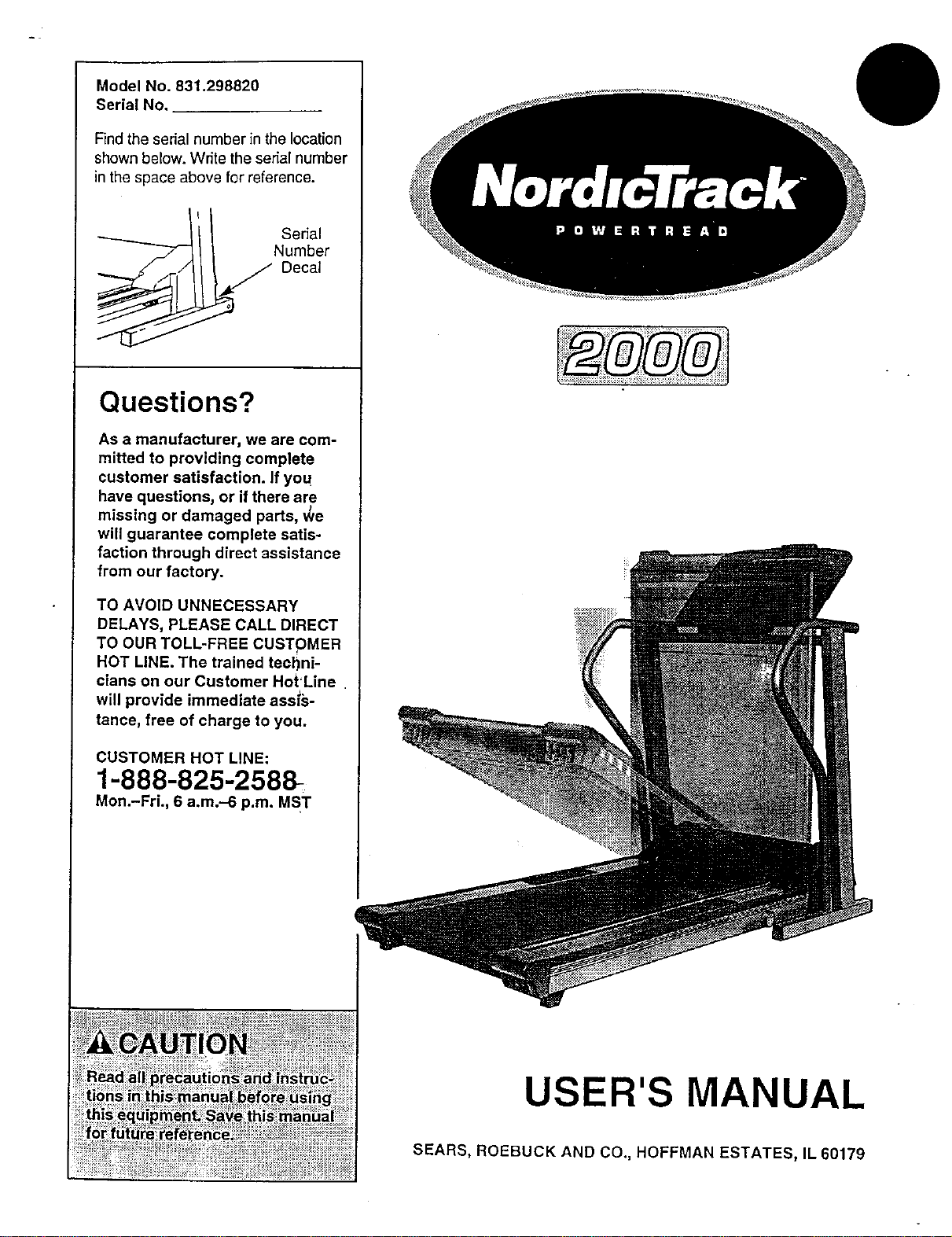
Model No. 831.298820
Serial No.
Find the serial number in the location
shown below. Write the serial number
in the space above for reference.
Questions?
As a manufacturer, we are com-
mitted to providing complete
customer satisfaction. If you
have questions, or if there are
missing or damaged parts, _/e
will guarantee complete satis-
faction through direct assistance
from our factory.
TO AVOID UNNECESSARY
DELAYS, PLEASE CALL DIRECT
TO OUR TOLL-FREE CUSTOMER
HOT LINE. The trained techni-
cians on our Customer Hot'Line
will provide immediate assis-
tance, free of charge to you.
CUSTOMER HOT LINE:
1-888-825-2588-
Mon.-Fri., 6 a.m.-6 p.m. MST
USER'S MANUAL
SEARS, ROEBUCK AND CO., HOFFMAN ESTATES, IL 60179

_.::_;._:_... ,.:¥_:_ z:¸_¸¸"- . _:_:%_'- " _: :__:_'" -._$
i ¸ i_ : _
Table of Contents
Important Precautions ....................................................................... 3
Before You Begin ........................................................................... 5
Assembly ................................................................................. 6
How to Use the CardioTrack TM Heart Rate Monitor ................................................. 8
Treadmill Operation ........................................................................ 10
How to Use the Manual Mode .............................................................. 12
How to Use the Heart Rate Programs ........................................................ 15
How to Use the Incline Programs ........................................................... 17
How to Create Custom Programs ........................................................... 19
How to Use Custom Programs ............................................................. 20
How to Fold and Move the Treadmill ........................................................... 22
Maintenance and Trouble-shooting ............. _.............................................. 24
Conditioning Guidelines .................................................................... 26
Part List ....... _ ........................... ............ . ................................. 30
Ordering Replacement Parts ................................................................. 31
Limited Warranty ................................................................... Back Cover
Note: An Exploded Drawing is attached in the center of this user's manual.
2
Important Precautions
_res o
_ressed voltage rating
Durir
exce F
treadmill
Keep your feet and Ob
treadmill.
3
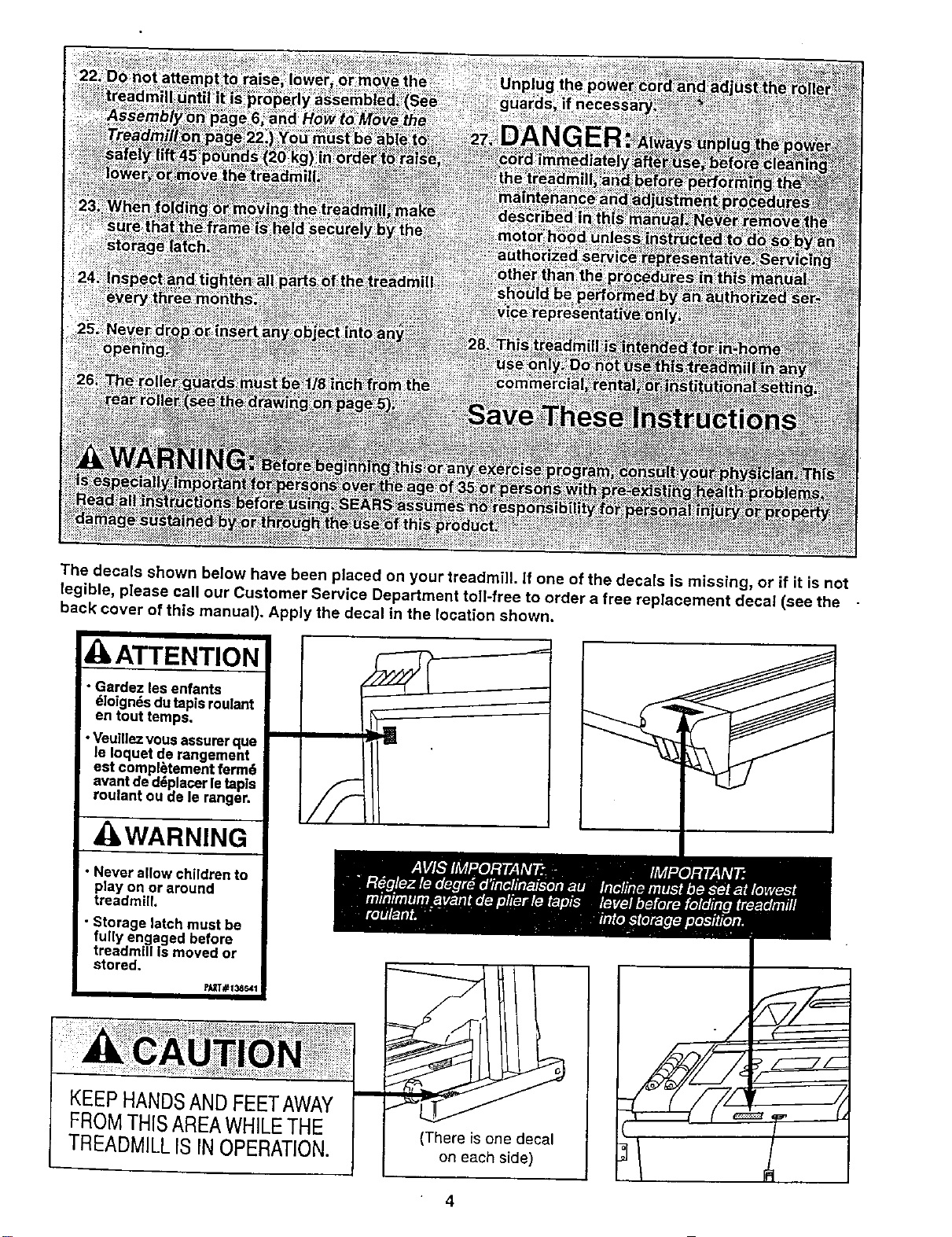
The decals shown below have been placed on your treadmill, if one of the decals is missing, or if it is not
legible, please call our Customer Service Department toll-free to order a free replacement decal (see the
back cover of this manual). Apply the decal in the location shown.
ATTENTION
• Gardez les enfants
dloignds dutapisroulant
en tout temps.
•Veuillezvousassurerque
le Ioquet de rangement
est compl_tement ferm6
avantded_placerletapls
roulant ou de le ranger.
WARNING
• Never allow children to
play on or around
treadmill,
• Storage latch must be
fully engaged before
treadmill Is moved or
stored.
I
KEEPHANDSAND FEETAWAY
FROMTHISAREAWHILETHE
TREADMILLIS INOPERATION.
(There is one decal
on each side)
4
Before You Begin
Thank you for selecting the new NordicTrack
PowerTread TM 2000 treadmill. The PowerTread 2000
treadmill combines advanced technology with innova-
tive design to let you enjoy an excellent form of cardio-
vascular exercise in the convenience and privacy of
your home. And when you're notexercising, the unique
PowerTread 2000 can be folded up, requiring less than
half the floor space of other treadmills.
For your benefit, read this manual carefully before
using the treadmill. If you have additional questions,
please call our Customer Service Department toll-free
at 1-888-825-2588, Monday through Friday, 6 a.m.
until 6 p.m. Mountain Time (excluding holidays). To
help us assist you, please note the product model
number and serial number before calling. The model
number of the treadmill is831.298820. The serial num-
ber can be found on a decal attached to the treadmill
(see the front cover of this manual for the location).
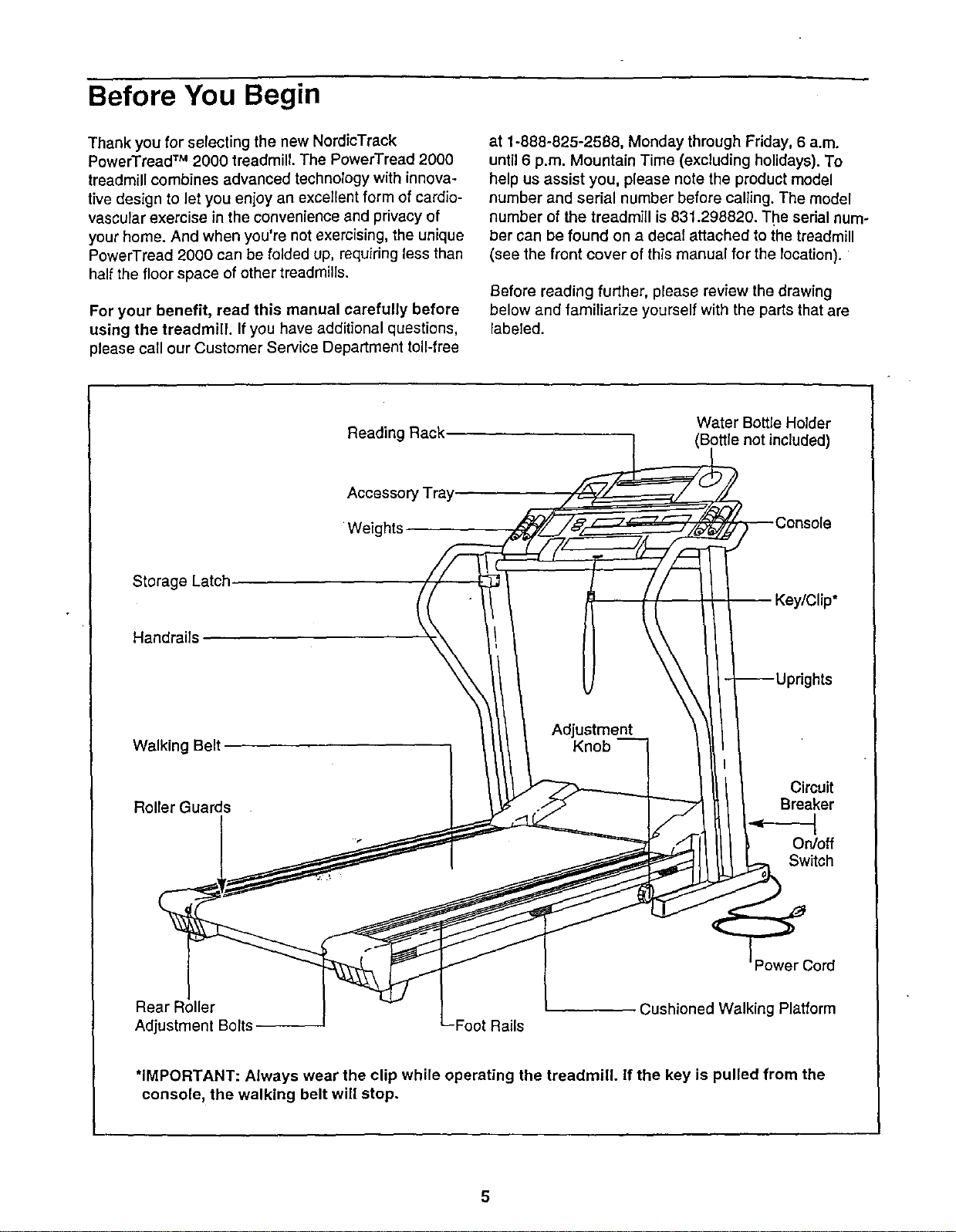
Before reading further, please review the drawing
below and familiarize yourself with the parts that are
labeled.
Reading Rack
Water Bottle Holder
(Bottle not included)
AccessoP
Weights
Storage Latch
Handrails
]hts
Walking Belt
Adjustment
Roller Guards
Circuit
Breaker
On/off
Switch
Power Cord
Rear Roller
Adjustment Bolts Foot Rails
Cushioned Walking Platform
*IMPORTANT: Always wear the clip while operating the treadmill. If the key is pulled from the
console, the walking belt will stop.
5
Assembly
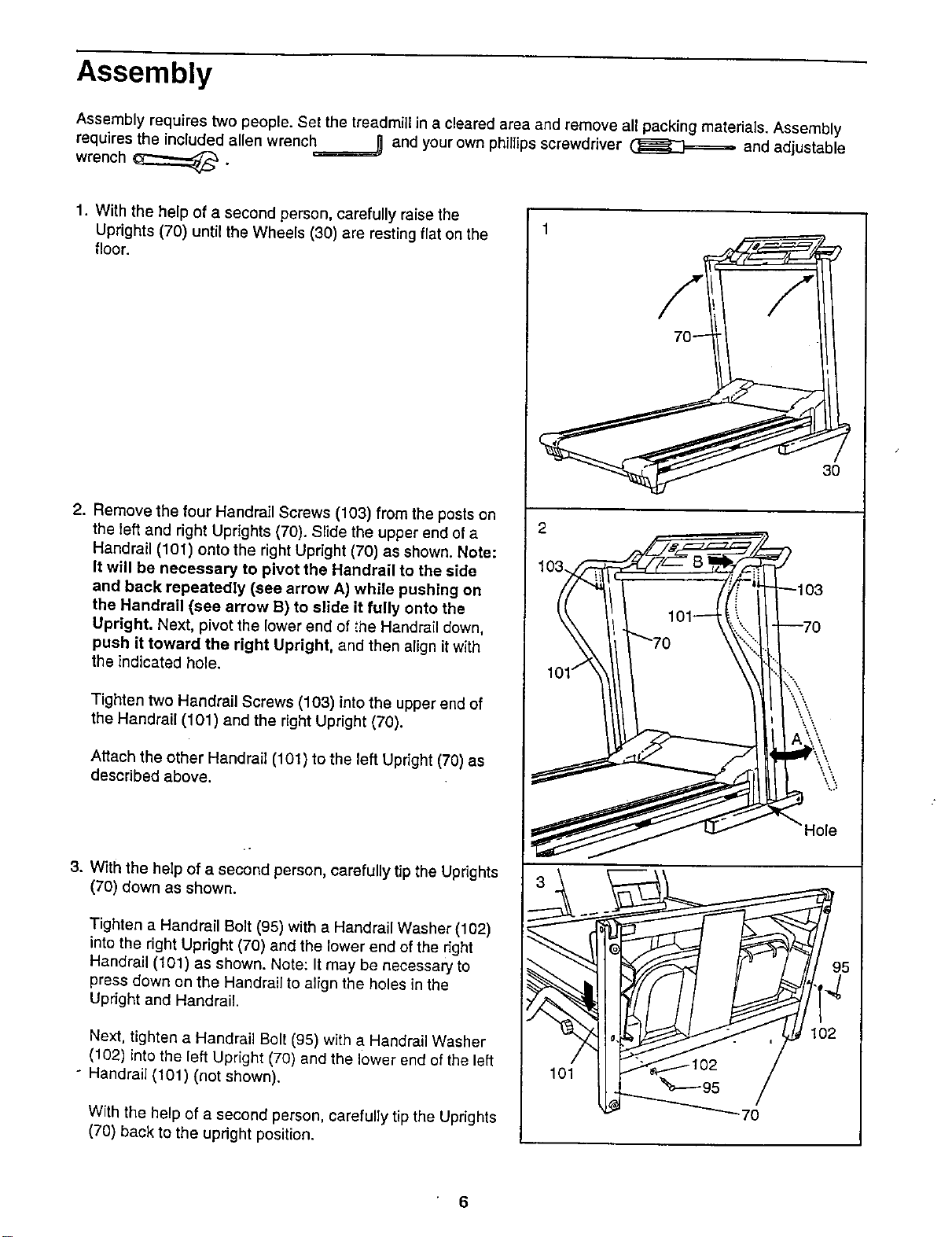
Assembly requires two people. Set the treadmill in a cleared area and remove all packing materials. Assembly
requires the included allen wrench_ and your own phillipsscrewdriver (]_W_====== and adjustable
wrench _.
1. With the help of a second person, carefully raise the
Uprights (70) until the Wheels (30) are resting flat on the
floor.
2. Remove the four Handrail Screws (103) from the posts on
the left and right Uprights (70). Slide the upper end of a
Handrail (101) onto the right Upright (70) as shown. Note:
It will be necessary to pivot the Handrail to the side
and back repeatedly (see arrow A) while pushing on
the Handrail (see arrow B) to slide It fully onto the
Upright. Next, pivot the lower and of the Handrail down,
push it toward the right Upright, and then align itwith
the indicated hole.
Tighten two Handrail Screws (103) into the upper end of
the Handrail (101) and the right Upright (70),
Attach the other Handrail (101) to the left Upright (70) as
described above.
3. With the help of a second person, carefully tip the Uprights
(70) down as shown.
Tighten a Handrail Bolt (95) with a Handrail Washer (102)
into the right Upright (70) and the lower end of the right
Handrail (101) as shown. Note: It may be necessary to
press down on the Handrail to align the holes in the
Upright and Handrail.
Next, tighten a Handrail Bolt (95) with a Handrail Washer
(102) into the left Upright (70) and the lower end of the left
" Handrail (101) (not shown).
With the help of a second person, carefully tip the Uprights
(70) back to the upright position.
3O
_95
Hole
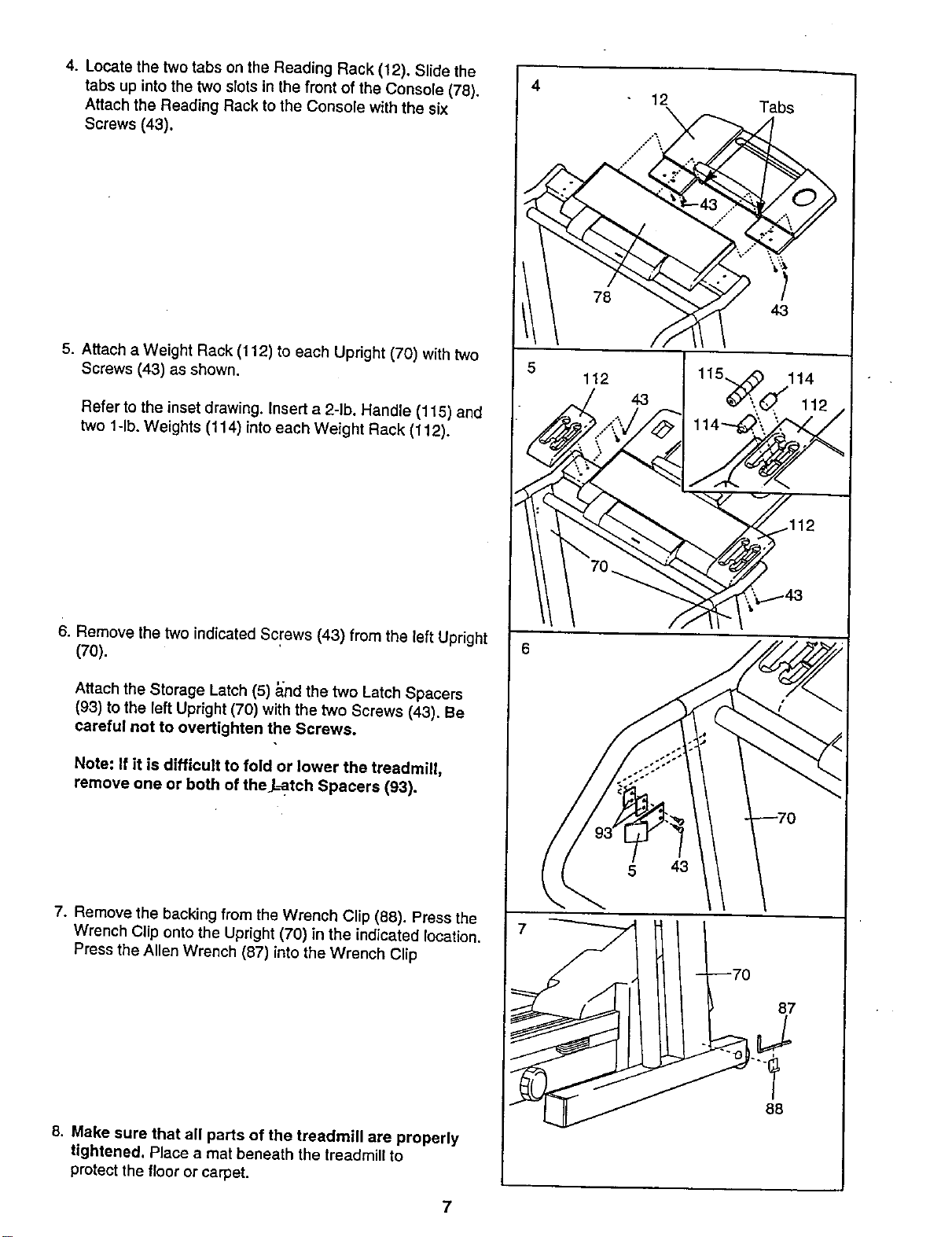
4. Locate the two tabs on the Reading Rack (12). Slide the
tabs up into the two slots in the front of the Console (78).
Attach the Reading Rack to the Console with the six
Screws (43).
5. Attach a Weight Rack (112) to each Upright (70) with two
Screws (43) as shown.
Refer to the inset drawing. Insert a 2-lb. Handle (115) and
two l-lb. Weights (114) into each Weight Rack (112).
6. Remove the two indicated Screws (43) from the left Upright
(70).
Attach the Storage Latch (5) _nd the two Latch Spacers
(93) to the left Upright (70) with the two Screws (43). Be
careful not to overtighten the Screws.
Note: If it is difficult to fold or lower the treadmill,
remove one or both of the L_tch Spacers (93).
7. Remove the backing from the Wrench Clip (88). Press the
Wrench Clip onto the Upright (70) in the indicated location.
Press the Allen Wrench (87) into the Wrench Clip
8. Make sure that all parts of the treadmill are properly
tightened. Place a mat beneath the treadmill to
protectthe floor or carpet.
7
4
5
I
6
7
12 Tabs
78 =i
43
L_/12 43 115_,_11142 ,
__° .._i' .': "
5 43
87
88
How to Use the CardioTrack TM Heart Rate Monitor
The unique CardioTrack heart rate monitor is specially
designed for accuracy, comfort, and durability. To get
the best performance from the heart rate monitor,
please read the instructions below.
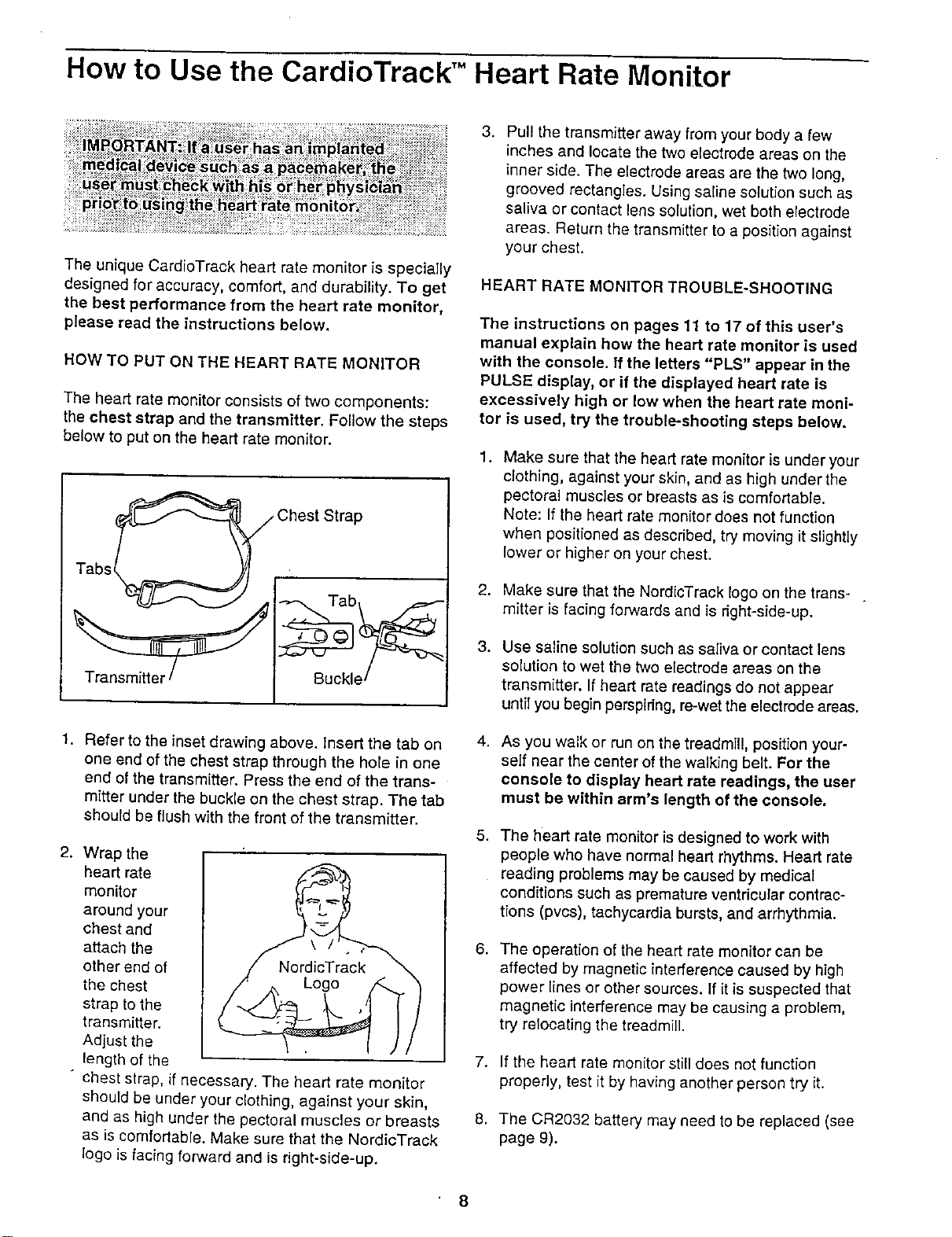
HOW TO PUT ON THE HEART RATE MONITOR
The heart rate monitor consists of two components:
the chest strap and the transmitter. Follow the steps
below to put on the heart rate monitor.
_ Chest Strap
1. Refer to the inset drawing above, insert the tab on
one end of the chest strap through the hole in one
end of the transmitter. Press the end of the trans-
mitter under the buckle on the chest strap, The tab
should be flush with the front of the transmitter.
2. Wrap the
heart rate
monitor
around your
chest and
attach the
other end of
the chest
strap to the
transmitter.
Adjust the
length of the
" chest strap, if necessary. The heart rate monitor
should be under your clothing, against your skin,
and as high under the pectoral muscles or breasts
as is comfortable. Make sure that the NordicTrack
logo is facing forward and is right-side-up.
3. Pull the transmitter away lrom your body a few
inches and locate the two electrode areas on the
inner side. The electrode areas are the two long,
grooved rectangles. Using saline solution such as
saliva or contact lens solution, wet both electrode
areas. Return the transmitter to a position against
your chest.
HEART RATE MONITOR TROUBLE-SHOOTING
The instructions on pages 11 to 17 of this user's
manual explain how the heart rate monitor is used
with the console. If the letters "PLS" appear in the
PULSE display, or if the displayed heart rate is
excessively high or low when the heart rate moni-
tor is used, try the trouble-shooting steps below.
1.
Make sure that the heart rate monitor is under your
clothing, against your skin, and as high under the
pectoral muscles or breasts as is comfortable.
Note: If the heart rate monitor does not function
when positioned as described, try moving it slightly
lower or higher on your chest.
2. Make sure that the NordlcTrack logo on the trans-
mitter is facing forwards and is right-side-up.
3. Use saline solution such as saliva or contact lens
solution to wet the two electrode areas on the
transmitter. If heart rate readings do not appear
until you begin perspiring, re-wet the electrode areas.
4,
As you walk or run on the treadmill, position your-
serf near the center of the walking belt. For the
console to display heart rate readings, the user
must be within arm's length of the console.
5. The heart rate monitor is designed to work with
people who have normal heart rhythms. Heart rate
reading problems may be caused by medical
conditions such as premature ventricular contrac-
tions (pvcs), tachycardia bursts, and arrhythmia.
6.
The operation of the heart rate monitor can be
affected by magnetic interference caused by high
power lines or other sources. If [tis suspected that
magnetic interference may be causing a problem,
try relocating the treadmill.
7. If the heart rate monitor still does not function
properly, test it by having another person try it.
8. The CR2032 battery may need to be replaced (see
page 9).
8
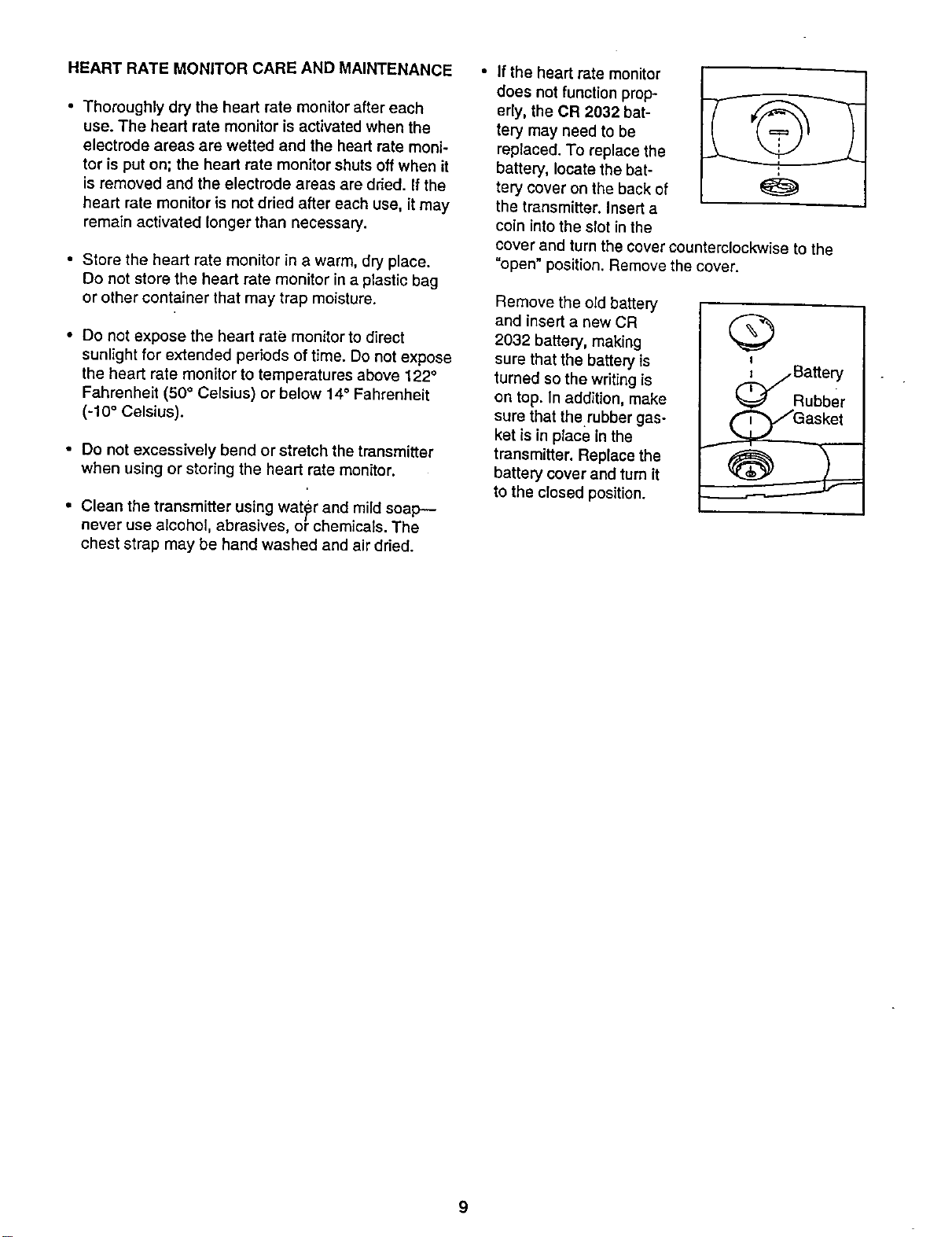
HEART RATE MONITOR CARE AND MAINTENANCE
• Thoroughly dry the heart rate monitor after each
use. The heart rate monitor is activated when the
electrode areas are wetted and the heart rate moni-
tor is put on; the heart rate monitor shuts off when it
is removed and the electrode areas are dried. If the
heart rate monitor is not dried after each use, it may
remain activated longer than necessary.
• Store the heart rate monitor in a warm, dry place.
Do not store the heart rate monitor in a plastic bag
or other container that may trap moisture.
• Do not expose the heart rate monitor to direct
sunlight for extended periods of time. Do notexpose
the heart rate monitor to temperatures above 122°
Fahrenheit (50° Celsius) or below 14° Fahrenheit
(-10 ° Celsius).
• Do not excessively bend or stretch the transmitter
when using or storing the heart rate monitor.
• Clean the transmitter using water and mild soap--
never use alcohol, abrasives, or chemicals. The
chest strap may be hand washed and air dried.
If the heart rate monitor
does not function prop-
erly, the CR 2032 bat-
tary may need to be
replaced. To replace the
battery, locate the bat-
tery cover on the back of
the transmitter. Insert a
coin into the slot in the
cover and turn the cover counterclockwise to the
"open" position. Remove the cover.
Remove the old battery
and insert a new CR
2032 battery, making
sure that the battery is
turned so the writing is
on top. In addition, make
sure that therubber gas-
ket is in place in the
transmitter. Replace the
battery cover and turn it
to the closed position.
Q
I
9
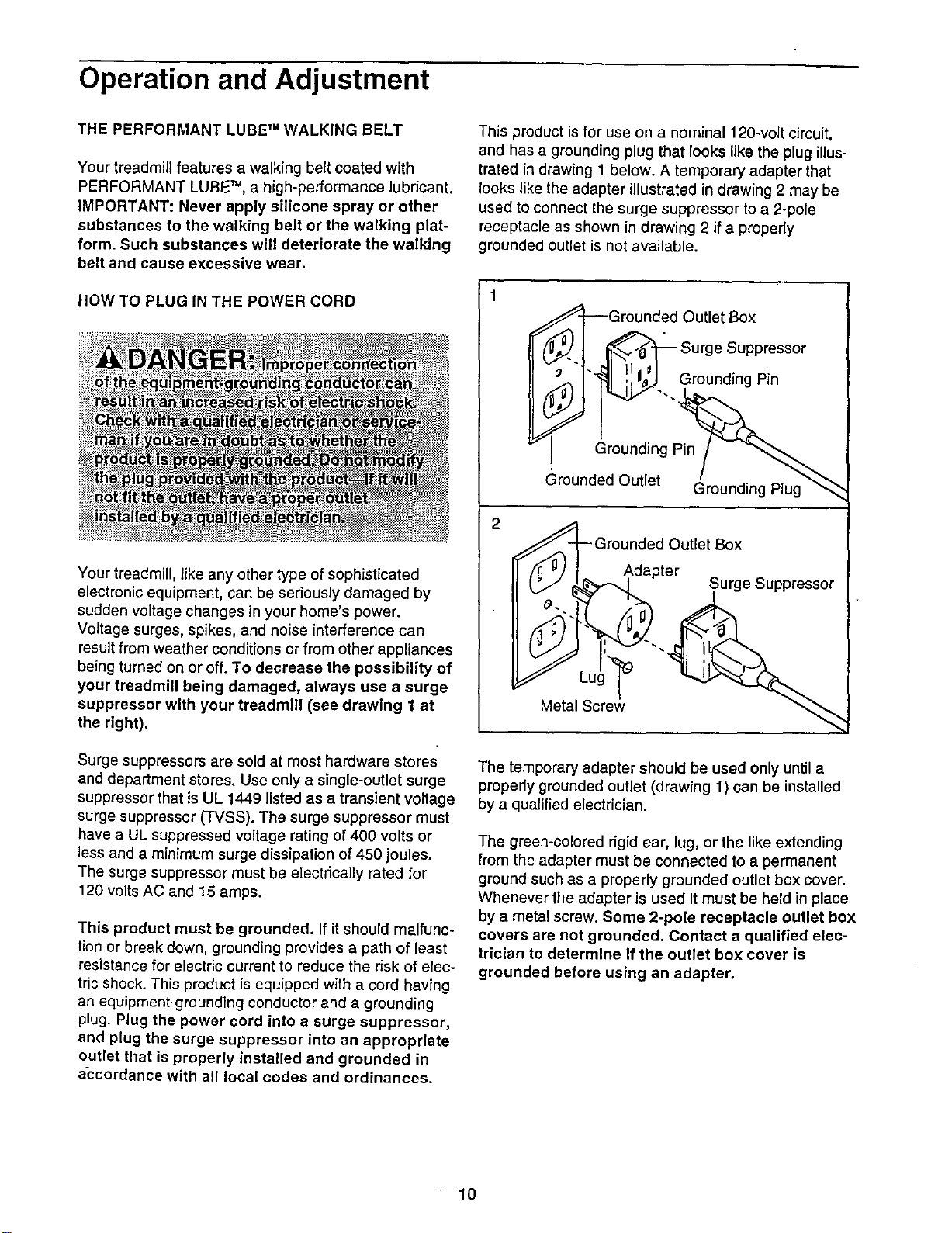
Operation and Adjustment
THE PERFORMANT LUBE TM WALKING BELT
Your treadmill features a walking belt coated with
PERFORMANT LUBE TM, a high-performance lubricant.
IMPORTANT: Never apply silicone spray or other
substances to the walking belt or the walking plat-
form. Such substances will deteriorate the walking
belt and cause excessive wear.
HOW TO PLUG IN THE POWER CORD
Your treadmill, like any other type of sophisticated
electronic equipment, can be seriously damaged by
sudden voltage changes in your home's power.
Voltage surges, spikes, and noise interference can
result from weather conditions or from other appliances
being turned on or off. To decrease the possibility of
your treadmill being damaged, always use a surge
suppressor with your treadmill (see drawing 1 at
the right).
Surge suppressors are sold at most hardware stores
and department stores. Use only a single-outlet surge
suppressor that is UL 1449 listed as a transient voltage
surge suppressor (TVSS). The surge suppressor must
have a UL suppressed voltage rating of 400 volts or
less and a minimum surge dissipation of 450 joules.
The surge suppressor must be electrically rated for
120 volts AC and 15 amps.
This product must be grounded. If it should malfunc-
tion or break down, grounding provides a path of least
resistance for electric current to reduce the risk of elec-
tric shock• This product is equipped with a cord having
an equipment-grounding conductor and a grounding
plug. Plug the power cord into a surge suppressor,
and plug the surge suppressor into an appropriate
outlet that is properly installed and grounded in
accordance with all local codes and ordinances.
This product isfor use on a nominal 120-volt circuit,
and has a grounding plug that looks like the plug illus-
trated in drawing 1 below. A temporary adapter that
looks like the adapter illustrated in drawing 2 may be
used to connect the surge suppressor to a 2-pole
receptacle as shown in drawing 2 if a properly
grounded outlet is not available.
_Grounded Outlet 13ox
_. ! _Surge Suppressor
II I ii .. Ground,ngP,n
Ground,ngP, /
Grounded Outlet (_rounding Plug"'_
Grounded Outlet Box
Adapter
I °J _%_1 Surge _uppressor
Metal Screw
The temporary adapter should be used only until a
properly grounded outlet (drawing 1) can be installed
by a qualified electrician.
The green-colored rigid ear, lug, or the like extending
from the adapter must be connected to a permanent
ground such as a properly grounded outlet box cover.
Whenever the adapter is used it must be held in place
by a metal screw. Some 2-pole receptacle outlet box
covers are not grounded. Contact a qualified elec-
trician to determine if the outlet box cover is
grounded before using an adapter.
lO
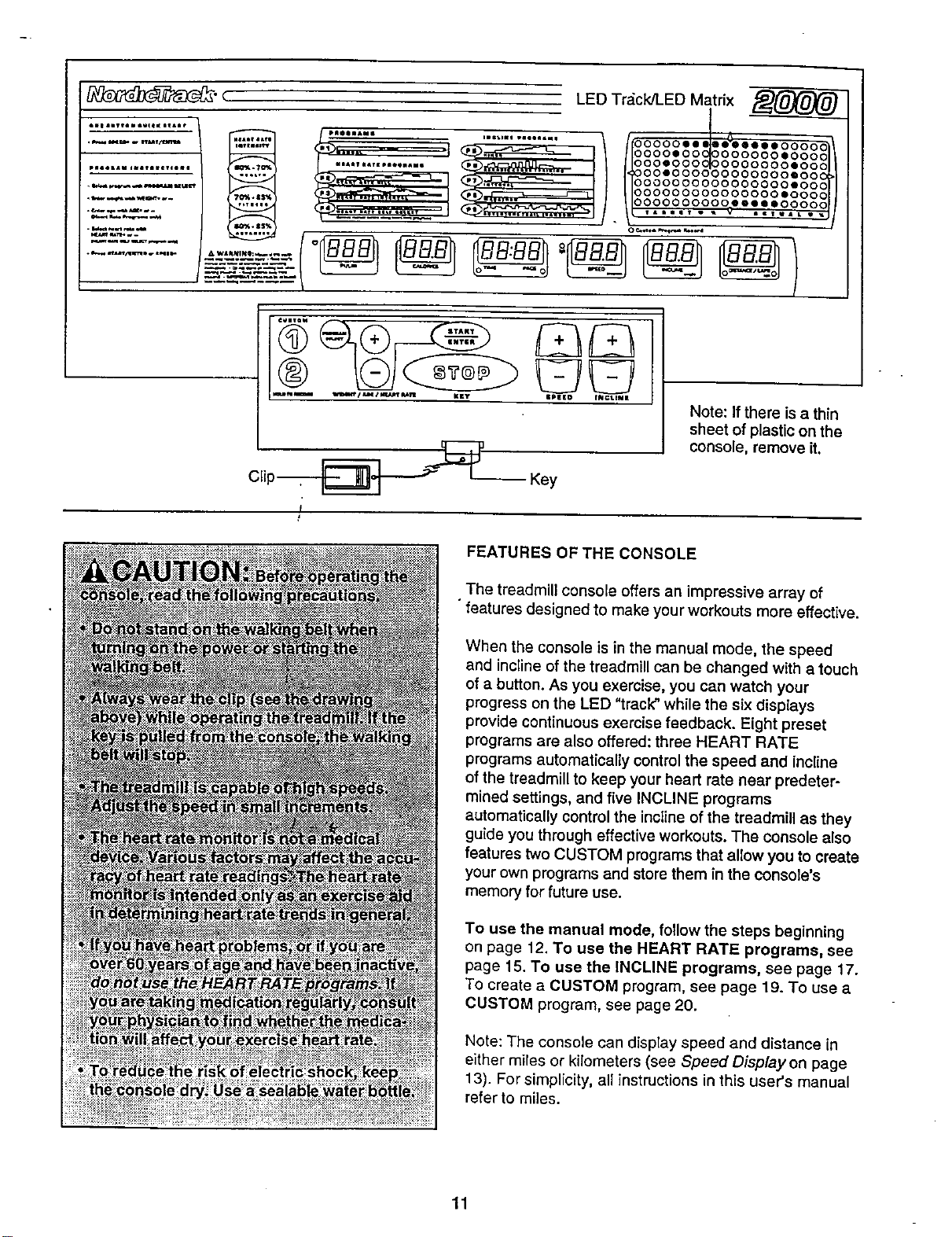
_" ( ,. LEDTr_ck/[.EDMatrix
................... .L.,.
............. ooooo..
......... "I_b_ _ lloooo,ooolooooooo,ooooll
................. _;_,[_$_n_ II 116ooooooolooooooooeoo
................... °°'°°°°°°°°°°°°'°°
,. O0000000000000000000
._.._.--_ ,N_ ,._,, _ 000000000000000000
.................. i/itoooooooo°o'-"'oooooj/
............ -'-.-'."=3-'".--I..--."'=-.=
f
|PI_ED fNC:LIN|
-- Key
Note: If there is a thin
sheet of plastic on the
console, remove it.
FEATURES OF THE CONSOLE
The treadmill console offers an impressive array of
features designed to make your workouts more effective•
When the console is in the manual mode, the speed
and incline of the treadmill can be changed with a touch
of a button. As you exercise, you can watch your
progress on the LED "track" while the six displays
provide continuous exercise feedback. Eight preset
programs are also offered: three HEART RATE
programs automatically controlthe speed and incline
of the treadmill to keep your heart rate near predeter-
mined settings, and five INCLINE programs
automatically control the incline of the treadmill as they
guide you through effective workouts. The console also
features two CUSTOM programs that allow you to oreate
your own programs and store them in the console's
memory for future use.
To use the manual mode, follow the steps beginning
on page 12. To use the HEART RATE programs, see
page 15. To use the INCLINE programs, see page 17.
To create a CUSTOM program, see page 19. To use a
CUSTOM program, see page 20.
Note: The console can display speed and distance in
either miles or kilometers (see Speed Displayon page
13). For simplicity, all instructions in this user's manual
refer to miles.
11
[i
B
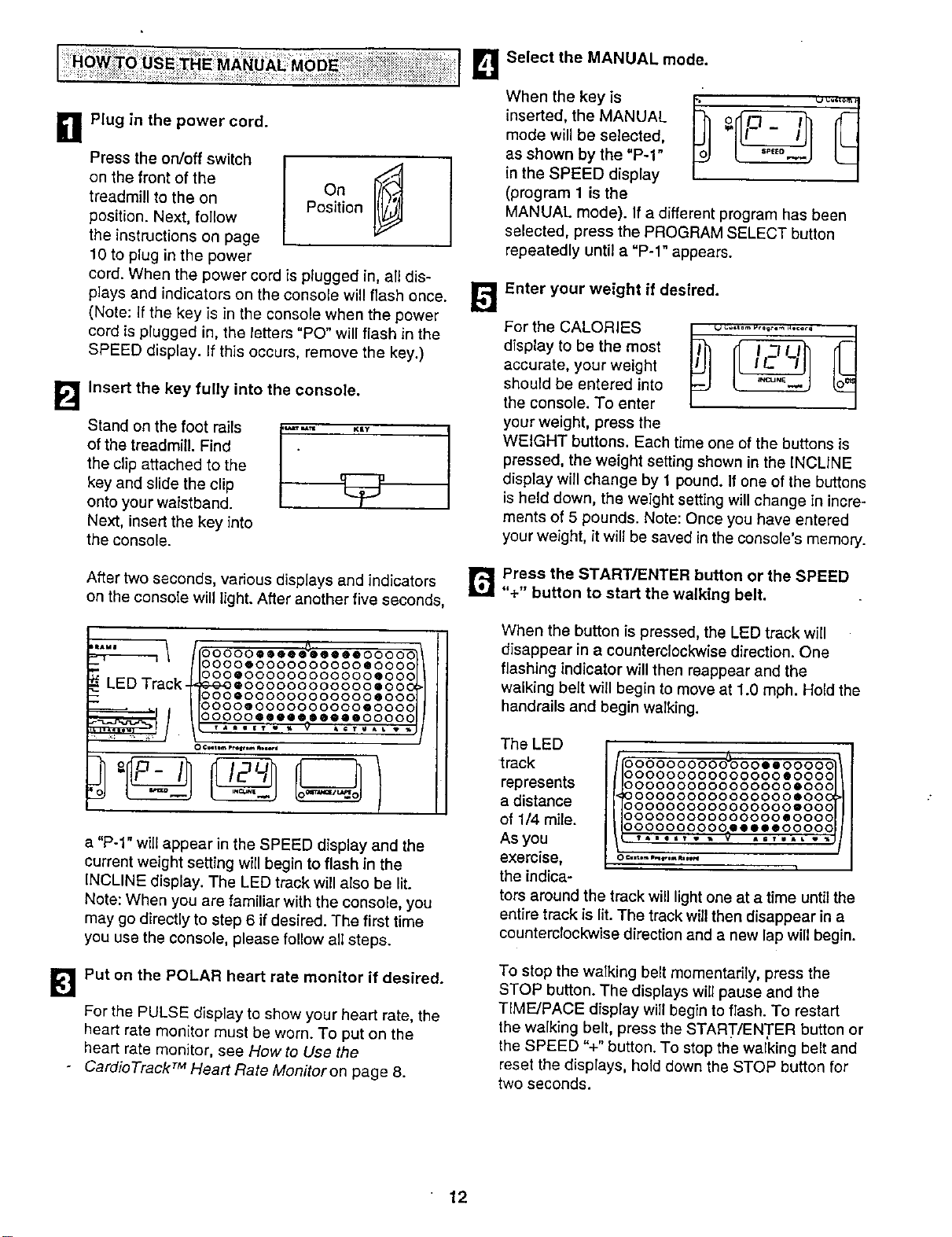
Plug in the power cord.
Press the on/off switch
on the front of the
treadmill to the on
position. Next, follow
the instructions on page
10 to plug in the power
Position
cord. When the power cord is plugged in, all dis-
plays and indicators on the console will flash once.
(Note: If the key is in the console when the power
cord is plugged in, the letters "PO" will flash in the
SPEED display. If this occurs, remove the key.)
Insert the key fully into the console.
Stand on the foot rails
of the treadmill. Find
the clip attached to the
key and slide the clip
onto your waistband.
Next, insert the key into
the console.
After two seconds, various displays and indicators
on the console will light. After another five seconds,
..... 1 II°°°°°e°e°e_°°°ee°°°°c
O000QOOOOOOOOOOQOOOC
LED Track-_°°°e°°°°°°°°°°°°e°°c
,@-Q-O@0 O0 O00000000 @00 C
O000000000000000@OOC
/10000@ O0000000OO @O00C
O0000@@O@®@e@@@O000C
a "P-1" will appear in the SPEED display and the
current weight setting will begin to flash in the
INCLINE display. The LED track will also be lit.
Note: When you are familiar with the console, you
may go directly to step 6 if desired. The first time
you use the console, please follow all steps.
[_lPut on the POLAR heart rate monitor if desired.
For the PULSE display to show your heart rate, the
heart rate monitor must be worn. To put on the
heart rate monitor, see How to Use the
- CardioTrack TM Heart Rate Monitoron page 8.
B Select the MANUAL mode.
When the key is
inserted, the MANUAL
mode will be selected,
as shown by the "P-1"
in the SPEED display
(program 1 is the
MANUAL mode). If a different program has been
selected, press the PROGRAM SELECT button
repeatedly until a "P-1" appears.
Enter your weight if desired.
For the CALORIES
display to be the most
accurate, your weight
shoutd be entered into
the console. To enter
your weight, press the
WEIGHT buttons. Each time one of the buttons is
pressed, the weight setting shown in the iNCLINE
display will change by 1 pound. If one of the buttons
is held down, the weight setting will change in incre-
ments of 5 pounds. Note: Once you have entered
your weight, it will be saved in the console's memory.
r_ Press the START/ENTER button or the SPEED
"+" button to start the walking belt.
When the button is pressed, the LED track will
disappear in a counterclockwise direction. One
flashing indicator will then reappear and the
walking belt will begin to move at 1.0 mph. Hold the
handrails and begin walking.
The LED
track
represents
a distance
of 1/4 mile.
As you
exercise,
the indica-
0000000000_000@@00000
000000000000000@0000
0000000000000000@000
0000000000000000@000
0000000000000000@000
oooooooooooo00oeoooo
0000000000@@@@@00000
tors around the track will light one at a time until the
entire track is lit. The track will then disappear in a
counterclockwise direction and a new lap will begin.
To stop the walking belt momentarily, press the
STOP button. The displays will pause and the
TIME/PACE dfsplay will begin to flash. To restart
the walking belt, press the START/ENTER button or
the SPEED %" button. To stop the walking belt and
reset the displays, hold down the STOP button for
two seconds.
12
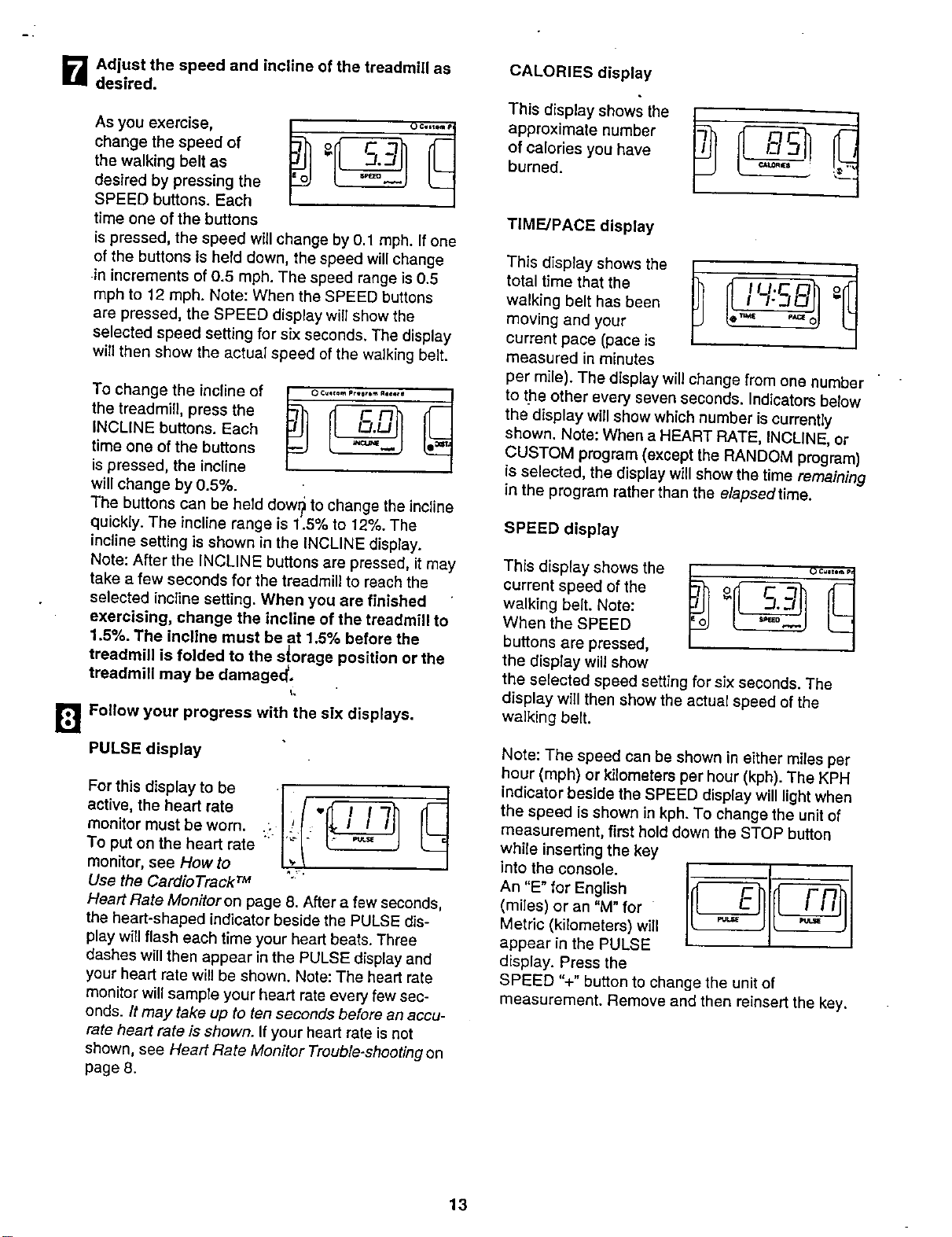
B Adiust the speed and incline of the treadmill as
desired.
As you exercise,
change the speed of
the walking belt as
desired by pressing the
SPEED buttons. Each
time one of the buttons
is pressed, the speed willchange by 0.1 mph. If one
of the buttons is held down, the speed will change
in increments of 0.5 mph. The speed range is 0.5
mph to 12 mph. Note: When the SPEED buttons
are pressed, the SPEED display will show the
selected speed setting for six seconds, The display
will then show the actual speed of the walking belt.
[]
To change the incline of _ o:-,,.,,.,...,,,-_ _
the traadmill, press the
INCLINE buttons. Each
time one of the buttons
is pressed, the incline
will change by 0.5%.
The buttons can be held dowr_ to change the incline
quickly. The incline range is 1.5% to 12%. The
incline setting is shown in the INCLINE display•
Note: After the INCLINE buttons are pressed, it may
take a few seconds for the treadmill to reach the
selected incline setting. When you are finished
exercising, change the incline of the treadmill to
1.5%• The incline must be at 1.5% before the
treadmill is folded to the s!orage position or the
treadmill may be damaged,
I.
Follow your progress with the six displays•
PULSE display
For this display to be
active, the heart rate
monitor must be worn•
To put on the heart rate
monitor, see How to
Use the Cardio TrackrM
Heart Rate Monitoron page 8. After a few seconds,
the heart-shaped indicator beside the PULSE dis-
play will flash each time your heart beats. Three
dashes wiUthen appear in the PULSE display and
your heart rate will be shown. Note: The heart rate
monitor will sample your heart rate every few sec-
onds./t may take up to ten seconds before an accu-
rate heart rate is shown. If your heart rate is not
shown, see Heart Rate Monitor Trouble-shooting on
page 8.
CALORIES display
T ,sd,sp,ays ws*he
approximate number
of calories you have
burned. =="
I
TIME/PACE display
This display shows the
total time that the
walking belt has been
moving and your
current pace (pace is
measured in minutes
per mile). The display will change from one number
to the other every seven seconds. Indicators below
the display w(ll show which number is currently
shown. Note: When a HEART RATE, INCLINE, or
CUSTOM program (except the RANDOM program)
is selected, the display will show the time remaining
in the program rather than the elapsed time.
SPEED display
This display shows the
current speed of the
walking belt. Note:
When the SPEED
buttons are pressed,
the display will show
the selected speed setting for six seconds. The
display will then show the actual speed of the
walking belt.
Note: The speed can be shown in either miles per
hour (mph) or kilometers per hour (kph). The KPH
indicator beside the SPEED display wiUlight when
the speed is shown in kph. To change the unit of
measurement, first hold down the STOP button
while inserting the key
into the console.
An "E" for English
(miles) or an "M" for
Metric (kilometers) will
appear in the PULSE
display. Press the
SPEED %" button to change the unit of
measurement. Remove and then reinsert the key,
13

INCLINE display
This display shows the
current incline level of
the treadmill.
DISTANCE/LAPS display
This display shows the
distance that the
walking belt has moved
and the number of laps
you have completed
(one lap equals 1/4
mile). Every seven seconds, the display will change
from one number to the other. Indicators below the
display willshow which numbe_" is currently shown.
Note: If the KPH indicator beside the SPEED display
is lit, the distance will be displayed in kilometers. If
the KPH indicator is dark, the distance will be
displayed in miles.
[]When you are finished exercising, stop the
walking belt and remove the key.
Step onto the foot rails and press the STOP button.
Change the incline of the treadmill to the lowest
setting. The incline must be at the lowest setting
before the treadmill is folded to the storage
position or the treadmill may he damaged.
Remove the key from the console. Store the key in
a secure place. In addition, press the on/off switch
to the off position. (See the drawing near the top
of page 12.)
14
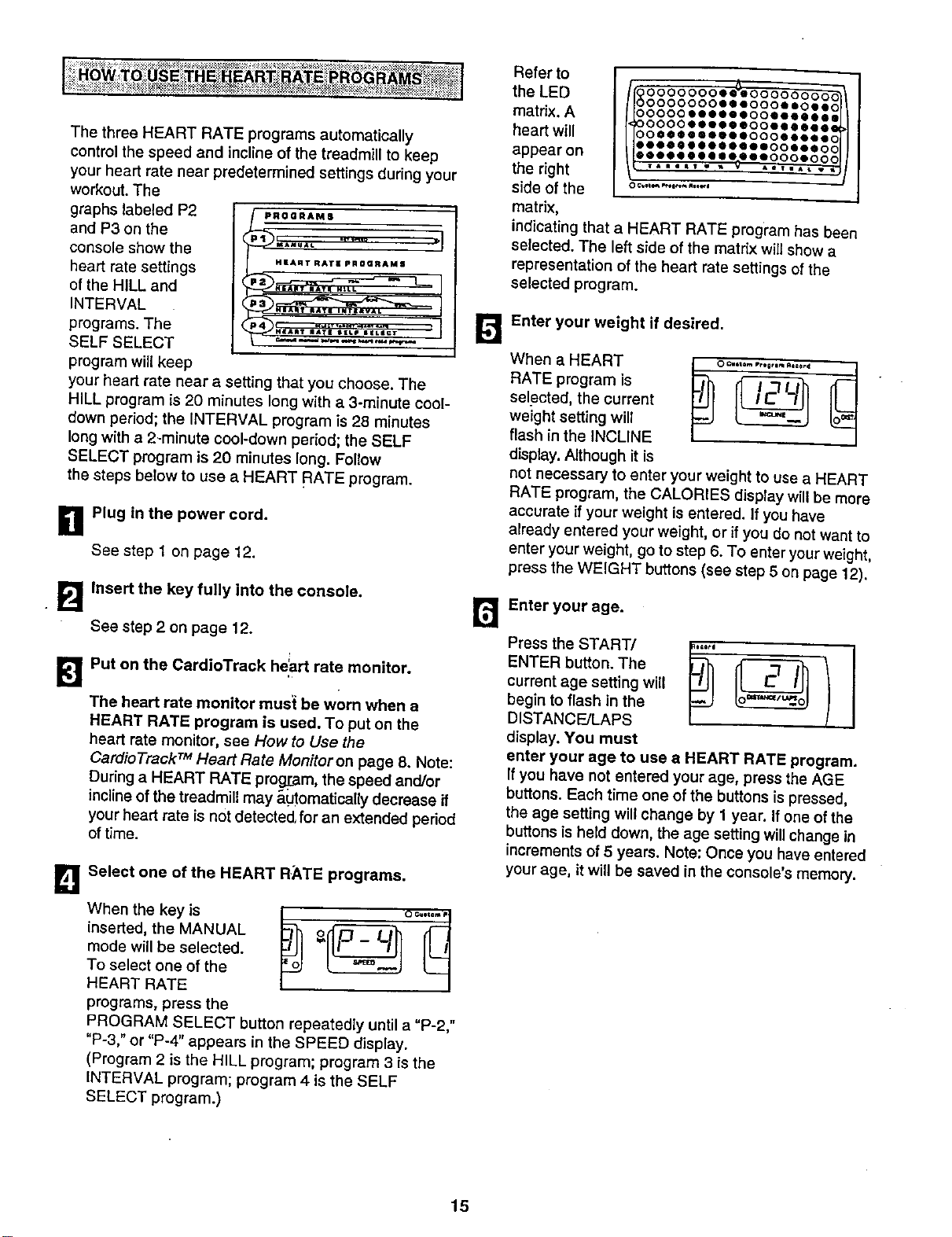
ThethreeHEARTRATEprogramsautomatically
controlthespeedandinclineofthetreadmilltokeep
yourheartratenearpredeterminedsettingsduringyour
workout.The
graphslabeledP2 _.._.._.
andP3onthe I
consoleshowthe
headratesettings "'_"_"_' ""°_"_'_'
oftheHILLand
INTERVAL
programs.The
SELFSELECT
programwillkeep
yourheartratenearasettingthatyouchoose.The
HILLprogramis20minuteslongwitha3-minute cool-
down period; the INTERVAL program is 28 minutes
long with a 2-minute cool-down period; the SELF
SELECT program is 20 minutes long. Follow
the steps below to use a HEART RATE program.
g Plug in the power cord.
See step 1 on page 12.
Insert the key fully into the console.
See step 2 on page 12.
Put on the CardioTrack he'art rate monitor.
The heart rate monitor must be worn when a
HEART RATE program is used. To put on the
heart rate monitor, see How to Use the
Cardio Track TM Heart Rate Monitor on page 8. Note:
During a HEART RATE prog[am, the speed and/or
inclineof the treadmill may _,_Jtomatioallydecrease if
your heart rate is not detected,for an extended period
of time.
B
Select one of the HEART RATE programs.
When the key is
inserted, the MANUAL
mode will be selected.
To select one of the
HEART RATE
programs, press the
PROGRAM SELECT button repeatedly until a "P-2,"
"P-3," or "P-4" appears in the SPEED display.
(Program 2 is the HILL program; program 3 is the
INTERVAL program; program 4 is the SELF
SELECT program.)
Refer to
the LED
matrix. A
heart will
appear on
the right
side of the
matrix,
II 00°O0°ee_
O000000e_eoooeeoeec
ooooo_eeee_oo_ee_el
O000_OeO00000_I_
O0_I_I_O00_C
O0_O_O0_tO000000000_
indicating that a HEART RATE program has been
selected. The left side of the matrix will show a
representation of the heart rate settings of the
selected program.
13
Enter your weight if desired,
When.HEARTseIectedRATEprogramtheourrentiS I_" "'°""°'°"""°'°'_ _
weight setting will
flash in the INCLINE
display. Although it is
not necessary to enter your weight to use a HEART
RATE program, the CALORIES display will be more
accurate if your weight is entered. If you have
already entered your weight, or if you do not want to
enter your weight, go to step 6. To enter yourweight,
press the WEIGHT buttons (see step 5 on page 12).
13
Enter your age.
ENTER button. The
current age setting will
begin to flash in the
DISTANCE/LAPS
display. You must
enter your age to use a HEART RATE program.
If you have not entered your age, press the AGE
buttons. Each time one ofthe buttons is pressed,
the age setting willchange by 1 year. If one of the
buttons is held down, the age setting willchange in
increments of 5 years. Note: Once you have entered
your age, itwill be saved in the console's memory.
15
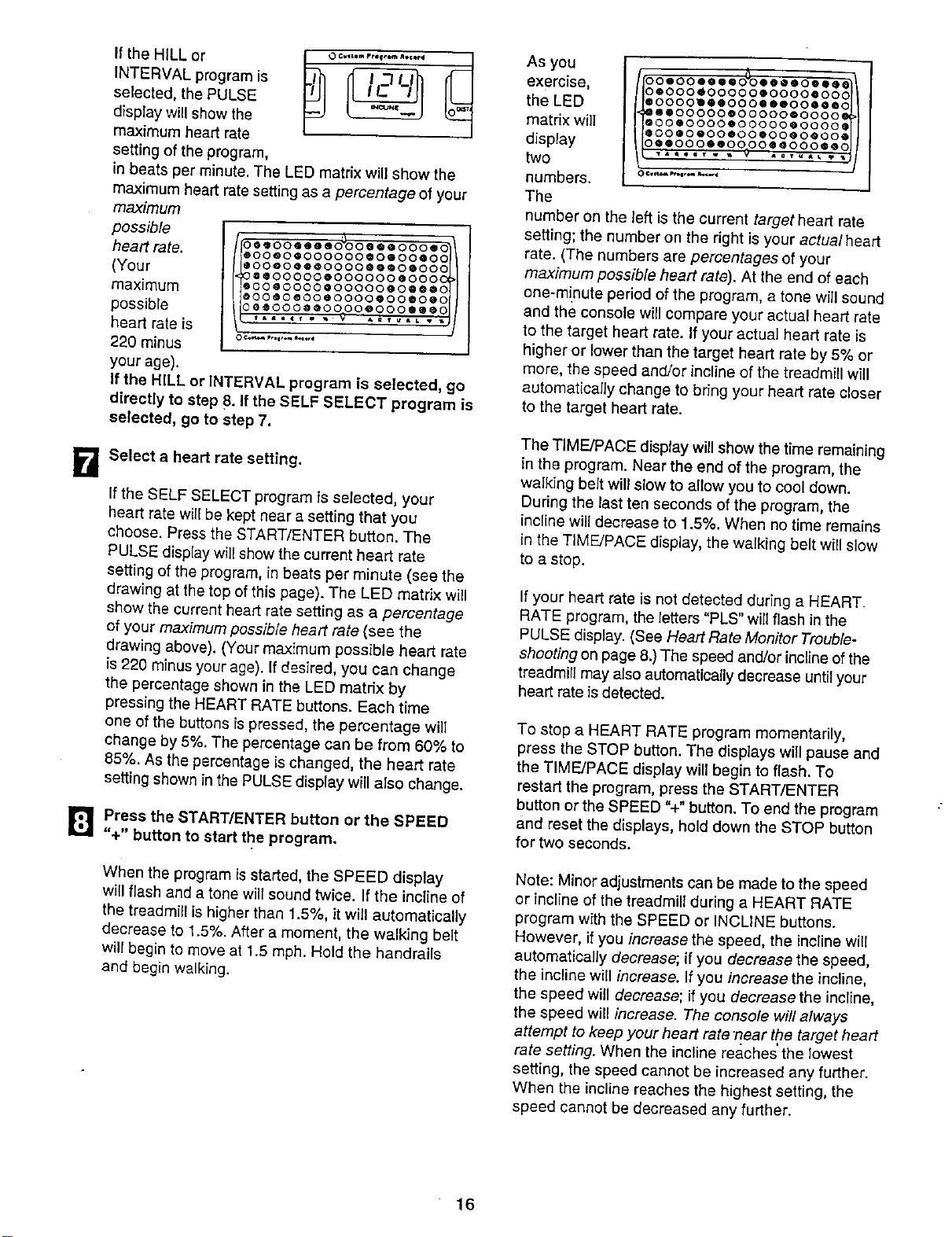
B
heHLLor.o--.............
INTERVAL program is
selected, the PULSE
display will show the
maximum heart rate
setting of the program,
in beats per minute. The LED matrix wiU show the
maximum heart rate setting as apercentage of your
maximum
possible
heart rate.
(Your
maximum
possible
heart rate is
220 minus
your age).
oo"oo'"'6_oooe'ooo'_\
°°°°*°°°°°°*°'°°'°I)
@oo@oeeeO00O@@O0oo00
Q@OOOOOeO00000@o00
@o0@o000@o0000@0@@_0
@OOOO_OO@OO00eO0®O@O
Oe@O00@@O000oO00@®@O
TAmlt T _ _ _ 4=V _AL V
If the HILL or INTERVAL program is se]ected, go
directly to step 8.If the SELF SELECT program is
selected, go to step 7.
Select a heart rate setting.
If the SELF SELECT program is selected, your
heart rate will be kept near a setting that you
choose. Press the START/ENTER button. The
PULSE display will show the current heart rate
setting of the program, in beats per minute (see the
drawing at the top of this page). The LED matrix will
show the current heart rate setting as a percentage
of your maximum possible heart rate (see the
drawing above). (Your maximum possible heart rate
is 220 minus your age). If desired, you can change
the percentage shown in the LED matrix by
pressing the HEART RATE buttons. Each time
one of the buttons is pressed, the percentage will
change by 5%. The percentage can be from 60% to
85%. As the percentage is changed, the heart rate
setting shown in the PULSE display will also change.
_1] Press the START/ENTER button or the SPEED
"+" button to start the program.
When the program isstarted, the SPEED display
will flash and a tone will sound twice. If the incline of
the treadmill is higher than 1.5%, it will automatically
decrease to 1.5%. After a moment, the walking belt
will begin to move at 1.5 mph. Hold the handrails
and begin walking.
As you
exercise,
the LED
matrix will
display
two
numbers.
The
ooooo''"o_o""o",_\
*°°°°°°°°°*°°°°'°°!)
@oooo_e@oooleeoo@@@o
@@O0000QOOOOOQO000
@00®0000000000@0000@
@00@0@00@00@00@0@00@
O@@O00@@O000eO000®@O
TAmglT " _ _ A_TU_ _
number on the left is the current target heart rate
setting; the number on the right is your actual heart
rate. (The numbers are percentages of your
maximum possible heart rate). At the end of each
one-m!nute period of the program, a tone will sound
and the console wiU compare your actual heart rate
to the target heart rate. If your actual heart rate is
higher or lower than the target heart rate by 5% or
more, the speed and/or incline of the treadmill will
automatically change to bring your heart rate closer
to the target heart rate.
The TIME/PACE display will show the time remaining
in the program. Near the end of the program, the
walking bait will slow to allow you to cool down.
During the last ten seconds of the program, the
incline will decrease to 1.5%. When no time remains
in the TIME/PACE display, the walking belt will slow
to a stop.
If your heart rate is not detected during a HEART.
RATE program, the letters "PLS" will flash in the
PULSE display. (See Heart Rate Monitor Trouble-
shooting on page 8.) The speed and/or incline of the
treadmill may also automatically decrease until your
heart rate is detected.
To stop a HEART RATE program momentarily,
press the STOP button. The displays will pause and
the TIME/PACE display will begin to flash. To
restart the program, press the START/ENTER
button or the SPEED %" button. To end the program
and reset the displays, hold down the STOP button
for two seconds.
Note: Minor adjustments can be made to the speed
or incline of the treadmill during a HEART RATE
program with the SPEED or INCLINE buttons.
However, if you increase the speed, the incline will
automatically decrease; if you decrease the speed,
the incline will increase. If you increase the incline,
the speed will decrease; if you decrease the incline,
the speed will increase. The console will always
attempt to keep your heart rate t!ear the target heart
rate setting. When the incline reaches the lowest
setting, the speed cannot be increased any further.
When the incline reaches the highest setting, the
speed cannot be decreased any further.
16
Follow your progress with the six displays.
See step 8 on page 13.
When the program is completed, remove the
key from the console.
Make sure that the treadmill is at the lowest
incline setting. Remove the key from the console.
Store the key in a secure place. In addition, press
the on/off switch to the off position. (See the
drawing near the top of page 12.)
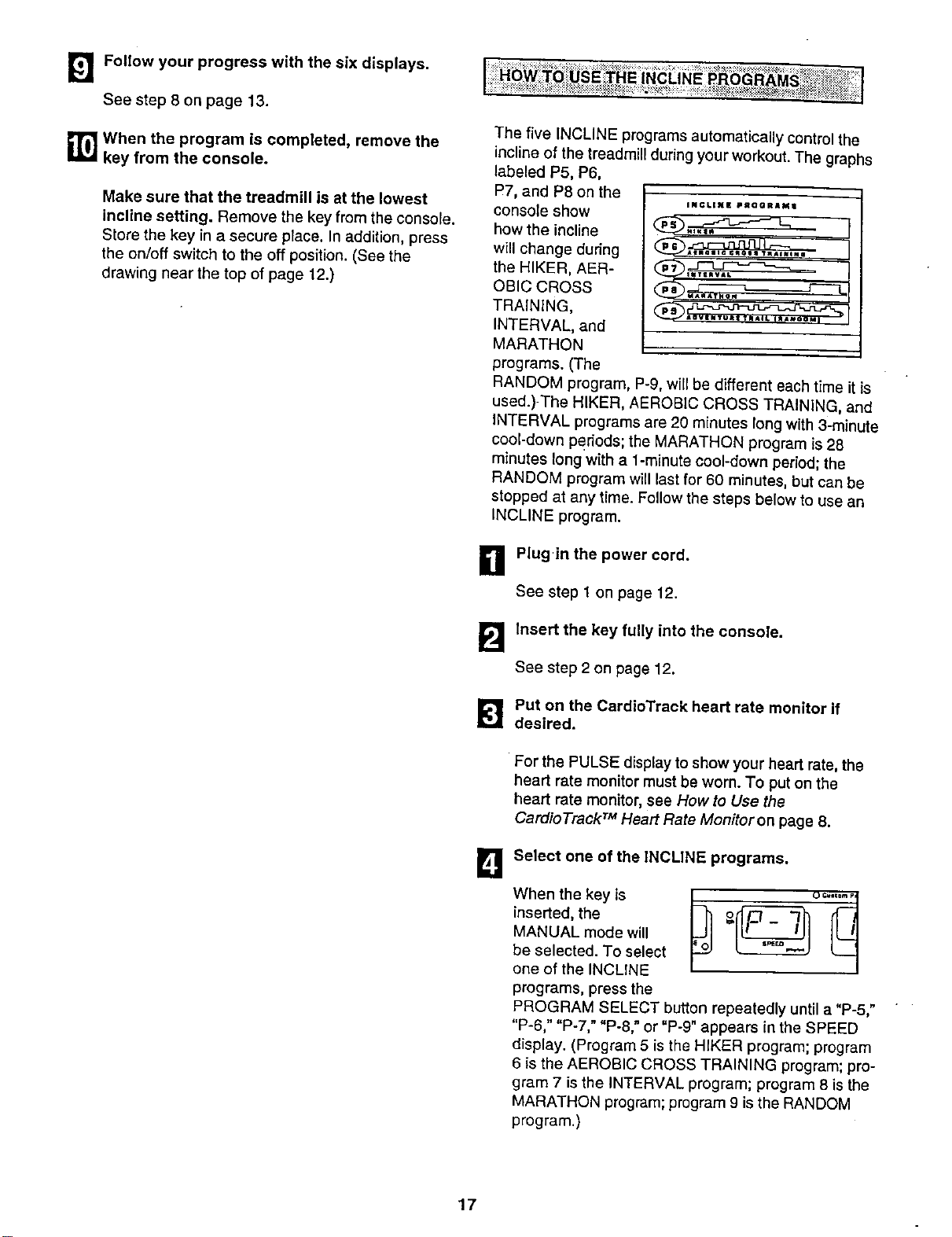
The five INCLINE programs automatically control the
incline of the treadmill during your workout. The graphs
labeled P5, P6,
P7, and P8 on the
console show
how the incline
will change during
the HIKER, AER-
OBIC CROSS
TRAINING,
INTERVAL, and
MARATHON
programs. (The
INCLINE PRQORAM;I
_Alma|lc ¢_o|a TXAINIml i --
_OyENTUJtZ TA_tiL I_OM_
RANDOM program, P-9, will be different each time it is
used.)-The HIKER, AEROBIC CROSS TRAINING, and
INTERVAL programs are 20 minutes long with 3-minute
cool-down Periods; the MARATHON program is 28
minutes long with a 1-minute cool-down period; the
RANDOM program witt _astfor 60 minutes, but can be
stopped at any time. Follow the steps below to use an
INCLINE program.
_11 Plug in the power cord.
See step 1 on page 12.
B Insert the key fully into the console.
See step 2 on page 12.
Put on the CardioTrack heart rate monltor if
desired.
For the PULSE display toshow your heart rate, the
heart rate monitor must be worn. To put on the
heart rate monitor, see How to Use the
Cardio Track TM Heart Rate Monitor on page 8.
B
Select one of the INCLINE programs.
When the key is
inserted, the
MANUAL mode will
be selected. To select
one of the INCLINE
programs, press the
PROGRAM SELECT button repeatedly until a "P-5,"
"P-6," "P-7," "P-8," or "P-9" appears in the SPEED
display. (Program 5 is the HIKER program; program
6 is the AEROBIC CROSS TRAINING program; pro-
gram 7 is the INTERVAL program; program 8 is the
MARATHON program; program 9 is the RANDOM
program.)
17
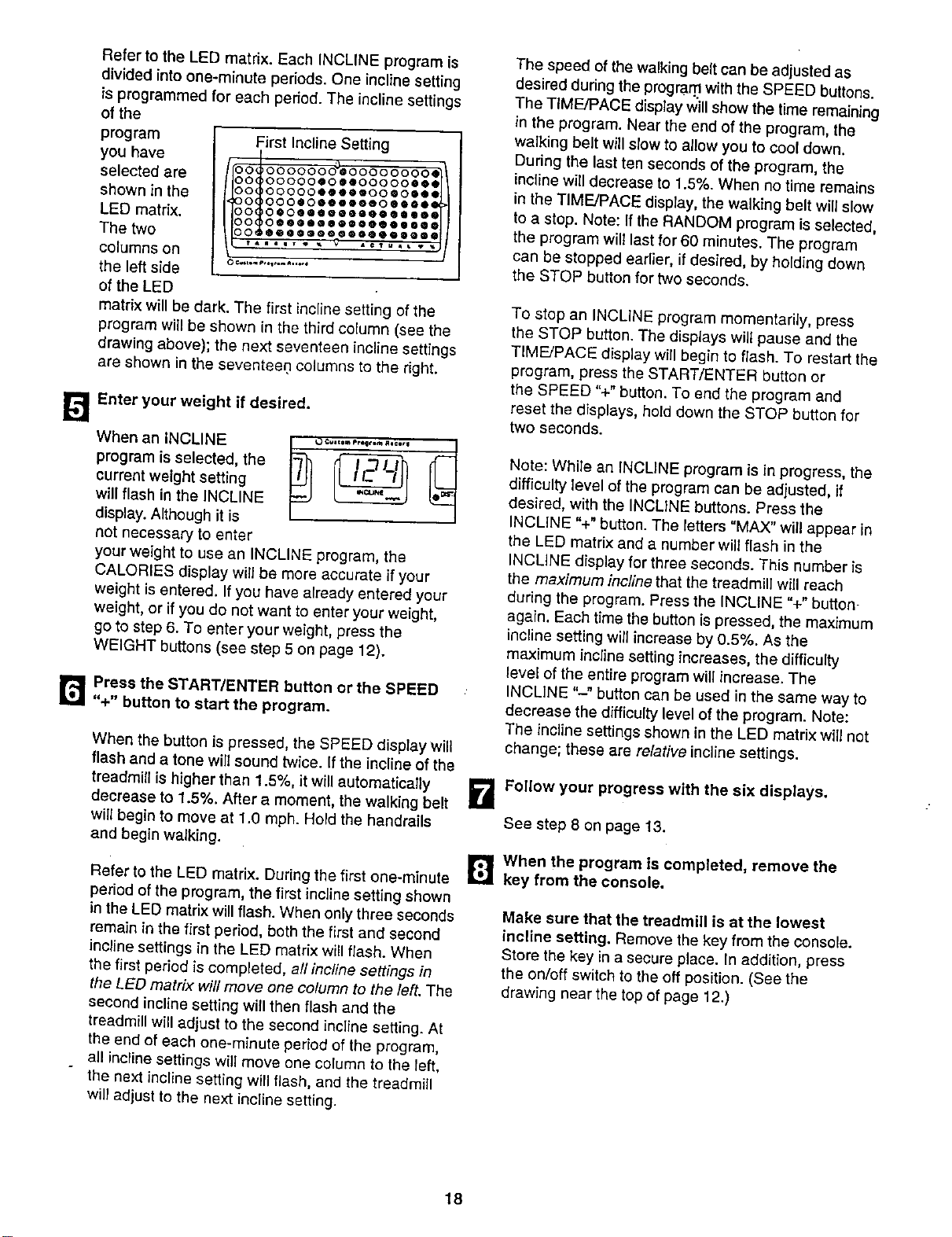
[]
Refer to the LED matrix. Each INCLINE program is
divided into one-minute periods. One incline setting
is programmed for each period. The incline settings
of the
program
you have
selected are
shown in the
LED matrix.
The two
columns on
the left side
of the LED
First Incline Setting
O0 O0000OO00000000OO
O0 O000000OOIOOQOOOO
0 0000000000000000
O0 O000QOOOOQ0000OO0
O0 000@0®00000000000
0 00000Q0000000000
matrix will be dark. The first incline setting of the
program will be shown in the third column (see the
drawing above); the next seventeen incline settings
are shown in the seventee.n columns to the right.
Enter your weight if desired.
When an INCLINE _) o =-,,.,,,o0,.,,,,-,_ [_
program is selected, the
current weight setting
will flash in the INCLINE
display. Although it is
not necessary to enter
your weight to use an INCLINE program, the
CALORIES display will be more accurate if your
weight is entered. If you have already entered your
weight, or if you do not want to enter your weight,
go to step 6. To enter your weight, press the
WEIGHT buttons (see step 5 on page 12).
r_ Press the START/ENTER button orthe SPEED
"+" button to start the program.
When the button is pressed, the SPEED display will
flash and a tone will sound twice. If the incline of the
treadmill is higher than 1.5%, it will automatically
decrease to 1.5%. After a moment, the walking belt
will begin to move at 1.0 mph. Hold the handrails
and begin walking.
Refer to the LED matrix. During the first one-minute
period of the program, the first incline setting shown
in the LED matrix will flash. When only three seconds
remain in the first period, both the first and second
incline settings in the LED matrix will flash. When
the first period is completed, all incline settings in
the LED matrix will move one column to the left. The
second incline setting will then flash and the
treadmill wiLLadjust to the second incline setting. At
the end of each one-minute period of the program,
all incline settings will move one column to the left,
the next incline setting will flash, and the treadmill
wil_adjust to the next incline setting.
The speed of the walking belt can be adjusted as
desired during the progra .nlwith the SPEED buttons.
The TIME/PACE display will show the time remaining
in the program. Near the end of the program, the
walking belt will stow to allow you to cool down.
During the last ten seconds of the program, the
incline will decrease to 1.5%. When no time remains
in the TIME/PACE display, the walking belt will slow
to a stop. Note: If the RANDOM program is selected,
the program wilt last for 60 minutes. The program
can be stopped earlier, if desired, by holding down
the STOP button for two seconds.
To stop an INCLINE program momentarily, press
the STOP button. The displays wilt pause and the
TIME/PACE display will begin to flash. To restart the
program, press the START/ENTER button or
the SPEED %" button. To end the program and
reset the displays, hold down the STOP button for
two seconds,
Note: While an INCLINE program is in progress, the
difficulty level of the program can be adjusted, if
desired, with the INCLINE buttons. Press the
INCLINE %" button. The letters "MAX" will appear in
the LED matrix and a number will flash in the
INCLINE display for three seconds. This number is
the maximum incline that the treadmill will reach
during the program. Press the INCLINE %" button
again. Each time the button is pressed, the maximum
incline setting will increase by 0.5%. As the
maximum incline setting increases, the difficulty
level of the entire program will increase. The
INCLINE "-" button can be used in the same way to
decrease the difficulty level of the program. Note:
The incline settings shown in the LED matrix will not
change; these are relative incline settings.
i_ Follow your progress with the six displays.
See step 8 on page 13.
r_l when the program is completed, remove the
key from the console.
Make sure that the treadmill is at the lowest
incline setting. Remove the key from the console.
Store the key in a secure place. In addition, press
the on/off switch to the off position. (See the
drawing near the top of page 12.)
18
r,_ Press the START/ENTER button or the SPEED
'%" button to start the program.
The two CUSTOM programs are programs that you
create. CUSTOM programs control both the speed and
the incline of the treadmill, and can be up to 40 minutes
long. The programs are stored in the console's memory,
and can be changed as many times as desired. Follow
the steps below to create a CUSTOM program.
B Plug in the power cord.
See step 1 on page 12.
B Insert the key fully into the console.
See step 2 on page 12.
[_l Put on the CardioTrack heart rate monitor if
desired.
For the PULSE display to show your heart rate, the
heart rate monitor must be wom. To put on the
heart rate monitor, see How tb Use the
Cardio Track TM Heart Rate Monitor on page 8.
B
Select one of the CUSTOM programs.
inserted, the o
MANUAL mode will be
selected. To select one
of the CUSTOM
programs, press the
CUSTOM 1 or 2 button. A =CPI" or "CP2" will
appear in the SPEED display. Note: The indicators
in the LED matrix will be explained in step 7.
Enter your weight if desired.
When a CUSTOM
program is selected,
the current weight
setting will flash in the
INCLINE display.
Although it is not
necessary to enter your weight to use a CUSTOM
program, the CALORIES display will be more
accurate if your weight is entered. If you have
already entered your weight, or if you do not want to
enter your weight, go to step 6. To enter your weight,
press the WEIGHT buttons (see step 5 on page 12).
When the button ispressed, the SPEED display will
flash and a tone will sound twice. If the incline of the
treadmill is higher than 1.5%, it wil! automatically
decrease to 1.5%. After a moment, the walking belt
wi{{begin to move. Hold the handrails and begin
walking.
B Hold down the CUSTOM 1 or 2 button for two
seconds and program the desired speed and
incline settings.
When the CUSTOM 1
or 2 button is held
down for two
seconds, the
CUSTOM PROGRAM
RECORD indicator will
0 C_om p_u_lra RQ¢=_¢
light. Speed and incline settings can be
programmed only when the indicator is lit.
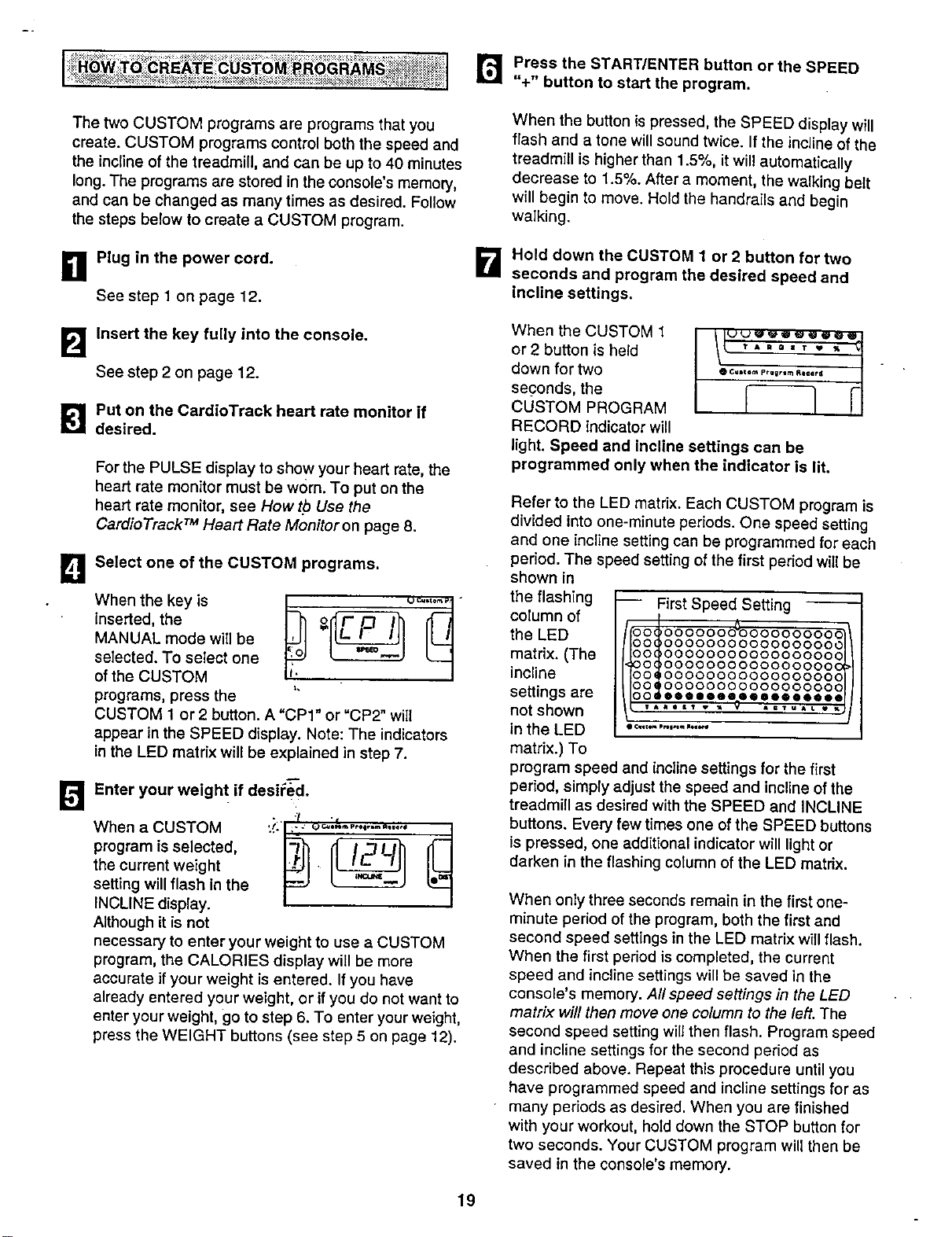
Refer to the LED matrix. Each CUSTOM program is
divided into one-minute periods. One speed setting
and one incline setting can be programmed for each
period. The speed setting of the first period will be
shown in
the flashing
column of
the LED
matrix. (The
incline
settings are
not shown
in the LED
matrix.) To
-- First Speed Se_ing
00('000000060000000000
00(,0000000000000000_
00(_0000000000000000(
O0(_O0000OO0000OO000(
OOI 00000000000000000
00_ O000000000000000C
program speed and incline settings for the first
period, simply adjust the speed and incline of the
treadmill as desired with the SPEED and INCLINE
buttons. Every few times one of the SPEED buttons
is pressed, one additional indicator will light or
darken in the flashing column of the LED matrix.
When only three seconds remain in the first one-
minute period of the program, both the first and
second speed settings in the LED matrix will flash.
When the first period is completed, the current
speed and incline settings will be saved in the
console's memory. All speed settings in the LED
matrix will then move one column to the left. The
second speed setting will then flash. Program speed
and incline settings for the second period as
described above. Repeat this procedure until you
have programmed speed and incline settings for as
many periods as desired. When you are finished
with your workout, hold down the STOP button for
two seconds. Your CUSTOM program will then be
saved in the console's memory.
19
TostopaCUSTOMprogrammomentarily,pressthe
STOPbutton.ThedisplayswillpauseandtheTIME/
PACEdisplaywillbegintoflash.Torestartthe
program,presstheSTART/ENTERbuttonorthe
SPEED%" button.
[]When the program is completed, remove the
key from the console.
Make sure that the incline of the treadmill is at
the lowest setting. Remove the key from the
console. Store the key in a secure place. In addition,
press the on/off switch to the off position. (See the
drawing near the top of page t 2.)
B
B
E!
0
Plug in the power cord.
See step 1 on page 12.
Insert the key fully into the console.
See step 2 on page 12.
Put on the CardioTrack heart rate monitor if
desired.
For the PULSE display to show your heart rate, the
heart rate monitor must be worn. To put on the heart
rate monitor, see How to Use the CardioTrack TM
Heart Rate Monitoron page 8.
Select one of the CUSTOM programs.
When the key is
inserted, the
MANUAL m_e will be
selected. To select one
of the CUSTOM
programs, press the
CUSTOM 1 or2 button. A "CPI" or"CP2" will
appear in the SPEED display.
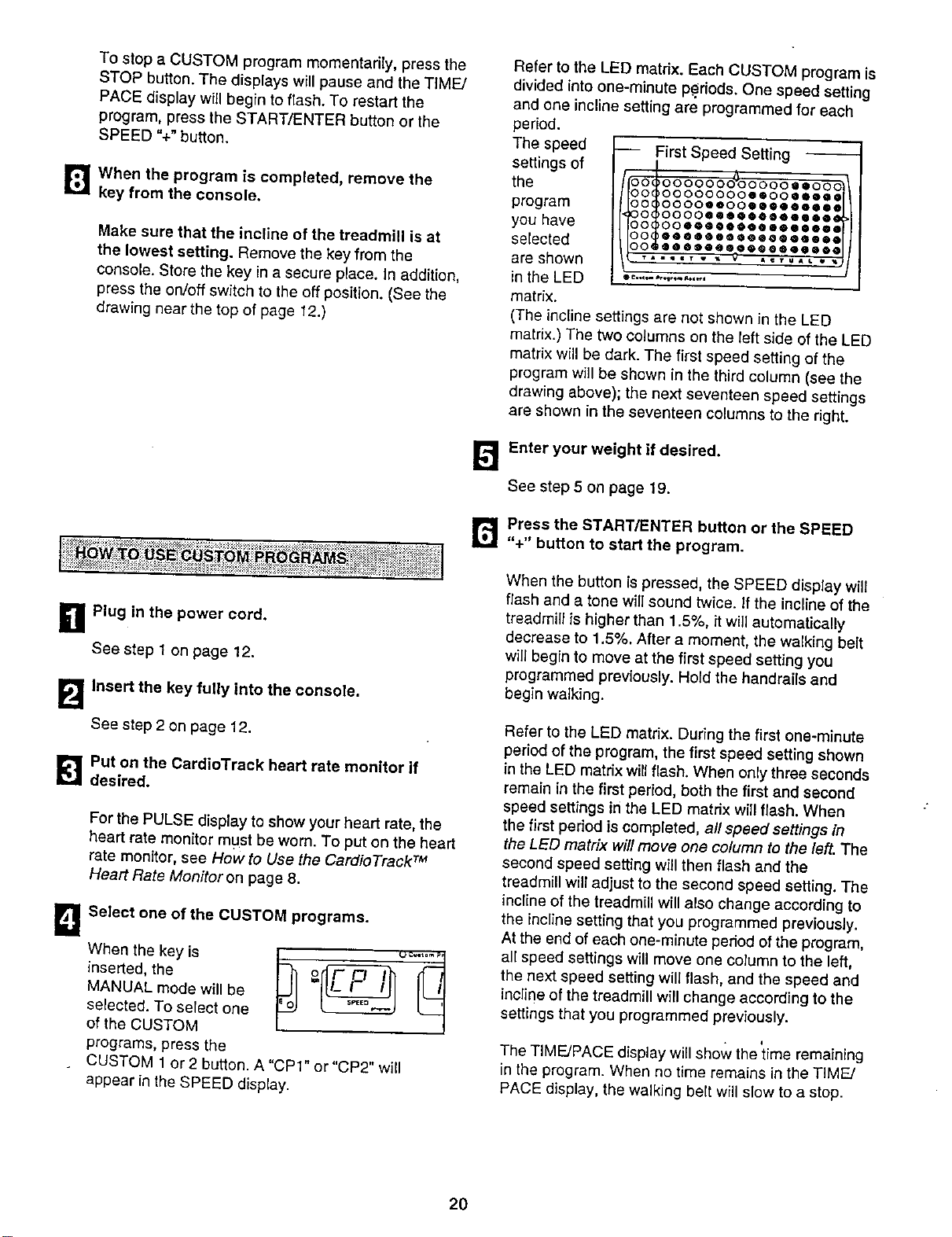
Refer to the LED matdx. Each CUSTOM program is
d v ded nto one-minute per ods One speed setting
and one incline setting are programmed for each
period.
The speed
settings of
the
program
you have
selected
are shown
in the LED
matrix.
-- First Speed Setting
OOI _00000 @@OOC
00( )00000000@@00@@@@_
00( _0000@@00@@@@@@@@_
00{ )000@@@@@@@@@@@@@_
00_ )0@@@@0@ @@@_@@@@@_
00_@@ @@@@@@@@@@@@@@@
(The incline settings are not shown in the LED
matrix.) The two columns on the left side of the LED
matrix will be dark. The first speed setting of the
program will be shown in the third column (see the
drawing above); the next seventeen speed settings
are shown in the seventeen columns to the right.
_'_ Enter your weight if desired.
See step 5 on page 19.
r_ Press the START/ENTER button or the SPEED
"+" button to start the program.
When the button is pressed, the SPEED display will
flash and a tone will sound twice. If the incline of the
treadmill is higher than 1.5%, it will automatically
decrease to 1.5%. After a moment, the walking belt
will begin to move at the first speed setting you
programmed previously. Hold the handrails and
begin walking.
Refer to the LED matrix. During the first one-minute
period of the program, the first speed setting shown
in the LED matrix will flash. When only three seconds
remain in the first period, both the first and second
speed settings in the LED matrix will flash. When
the first period is completed, all speed settings in
the LED matrix will move one column to the left. The
second speed setting will then flash and the
treadmill wil_adjust to the second speed setting. The
incline of the treadmill will also change according to
the incline setting that you programmed previously.
At the end of each one-minute period of the program,
all speed settings will move one column to the left,
the next speed setting will flash, and the speed and
incline of the treadmill will change according to the
settings that you programmed previously.
• i
The TIME/PACE display will show the time remaining
in the program. When no time remains in the TIME/
PACE display, the walking belt will slow to a stop.
2O
To stop a CUSTOM program momentarily, press the
STOP button. The displays will pause and the TIME/
PACE display will begin to flash. To restart the
program, press the START/ENTER button or the
SPEED "+" button. To end the program and reset
the displays, hold down the STOP button for two
seconds.
Note: While a CUSTOM program is in progress, the
speed or incline setting of the current period can be
adjusted with the SPEED or INCLINE buttons.
However, adjustments will not be stored in memory.
To reprogram the speed or incline setting of the
current period, hold down the CUSTOM 1 or 2
button for two seconds. The CUSTOM PROGRAM
RECORD indicator will light. Speed and incline
settings can be reprogrammed only when the
indicator is lit. Adjust the speed or incline setting of
the current period by pressing the SPEED or
INCLINE buttons. After the current period is
completed, hold down the CUSTOM 1 or 2 button
for two seconds. The CUSTOM PROGRAM
RECORD indicator will darken: The new settings will
then be stored in the console'_i' memory.
!
Follow your progress with the six displays.
See st_.p8 on page 13.
When the program is completed, remove the key
from the console.
J
Make sure that the treadmi!l is at the lowest
incline setting. Remove the key from the console.
Store the key in a secure place. In addition, press
the on/off switch to the off position.(See the
drawing near the top of page 12_)
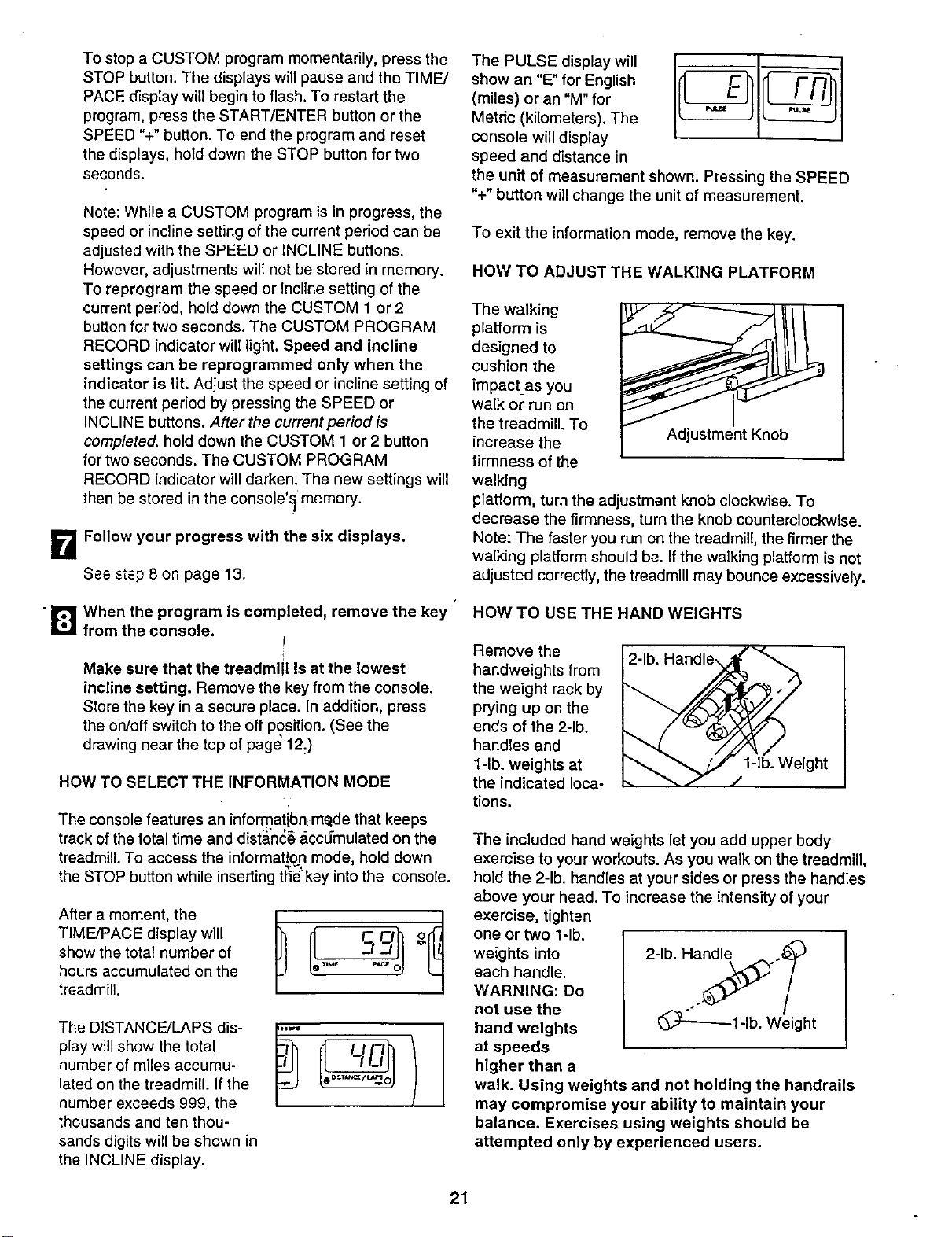
HOW TO SELECT THE INFORMATION MODE
The console features an informatibn:mede that keeps
track of the total time and distan_6 accu-mulated on the
treadmill. To access the information mode, hold down
the STOP button while insert ng ttie key nto the console.
After a moment, the
TIME/PACE display will
show the total number of
hours accumulated on the
treadmill.
The DISTANCE/LAPS dis-
play will show the total
number of miles accumu-
lated on the treadmill. If the
number exceeds 999, the
thousands and ten thou-
sands digits will be shown in
the INCLINE display.
The PULSE display will
show an "E" for English _
(miles) or an "M" for ,_. _
Metdc (kilometers). The
console will display
speed and distance in
the unit of measurement shown• Pressing the SPEED
%" button will change the unit of measurement.
To exit the information mode, remove the key.
HOW TO ADJUST THE WALKING PLATFORM
The walking
platform is
designed to
cushion the
impact_as you
walk or run on
the treadmill. To
increase the Adjustment Knob
firmness of the
walking
platform, turn the adjustment knob clockwise. To
decrease the firmness, turn the knob counterclockwise.
Note: The faster you run on the treadmill, the firmer the
walking platform should be. If the walking platform is not
adjusted correctly, the treadmill may bounce excessively•
HOW TO USE THE HAND WEIGHTS
Remove the
handweights from
the weight rack by
prying up on the
ends of the 2-lb.
handles and
1-lb. weights at
the indicated loca-
tions.
ght
The included hand weights let you add upper body
exercise to your workouts• As you walk on the treadmill,
hold the 2-lb. handles at your sides or press the handles
above your head. To increase the intensity of your
exercise, tighten
one or two l-lb.
weights into
each handle.
WARNING: Do
not use the
hand weights
at speeds
higher than a
walk. Using weights and not holding the handrails
may compromise your ability to maintain your
balance. Exercises using weights should be
attempted only by experienced users.
21
How to Fold and Move the Treadmill
HOW TO FOLD THE TREADMILL FOR STORAGE
Before folding the treadmill, adjust the incline to the
lowest position. Next, unplug the power cord. Caution:
You must be able to safely lift 45 pounds (20 kg) in order
to raise, lower, or move the treadmill.
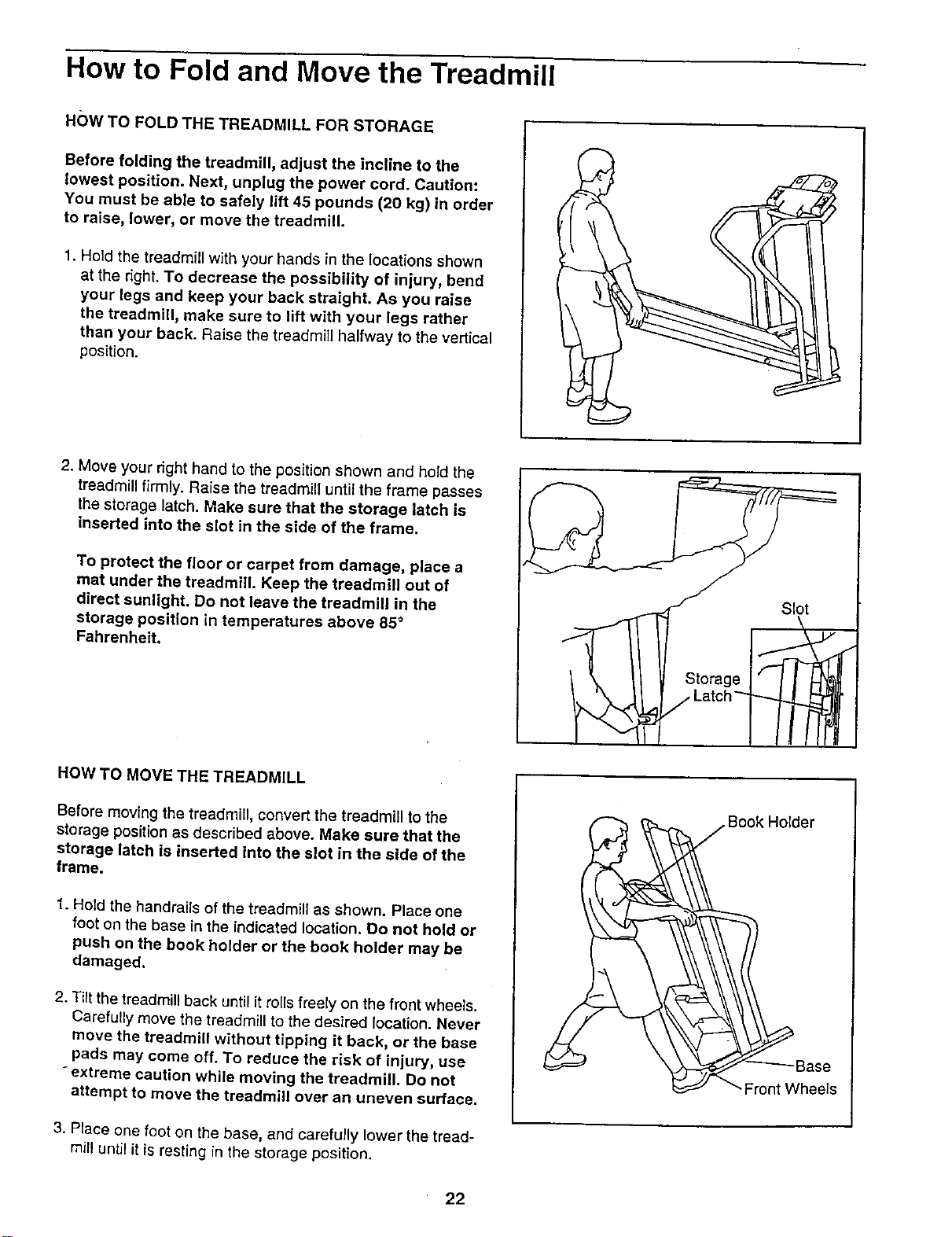
1. Hold the treadmill with your hands in the locations shown
at the fight. To decrease the possibility of injury, bend
your legs and keep your back straight. As you raise
the treadmill, make sure to lift with your legs rather
than your back. Raise the treadmill halfway to the vertical
position.
2. Move your right hand to the position shown and hold the
treadmill firmly. Raise the treadmill until the frame passes
the storage latch. Make sure that the storage latch is
inserted into the slot in the side of the frame.
To protect the floor or carpet from damage, place a
mat under the treadmi{L Keep the treadmill out of
direct sunlight. Do not leave the treadmill in the
storage position in temperatures above 85°
Fahrenheit.
Slot
Storage
/ Latch _-
HOW TO MOVE THE TREADMILL
Before moving the treadmill, convert the treadmill to the
storage position as described above. Make sure that the
storage latch is inserted Into the slot in the side of the
frame.
1. Hold the handrails of the treadmill as shown. Place one
foot on the base in the indicated location. Do not hold or
push on the book holder or the book holder may be
damaged.
2. Tilt the treadmill back until it rolls freely on the front wheels.
Carefully move the treadmill to the desired location. Never
move the treadmill without tipping it back, or the base
pads may come off. To reduce the risk of injury, use
"extreme caution while moving the treadmill. Do not
attempt to move the treadmill over an uneven surface.
3. Place one foot on the base, and carefu}ly lower the tread-
mill until it is resting in the storage position.
Holder
;ront wB::,_s
22
HOW TO LOWER THE TREADMILL FOR USE
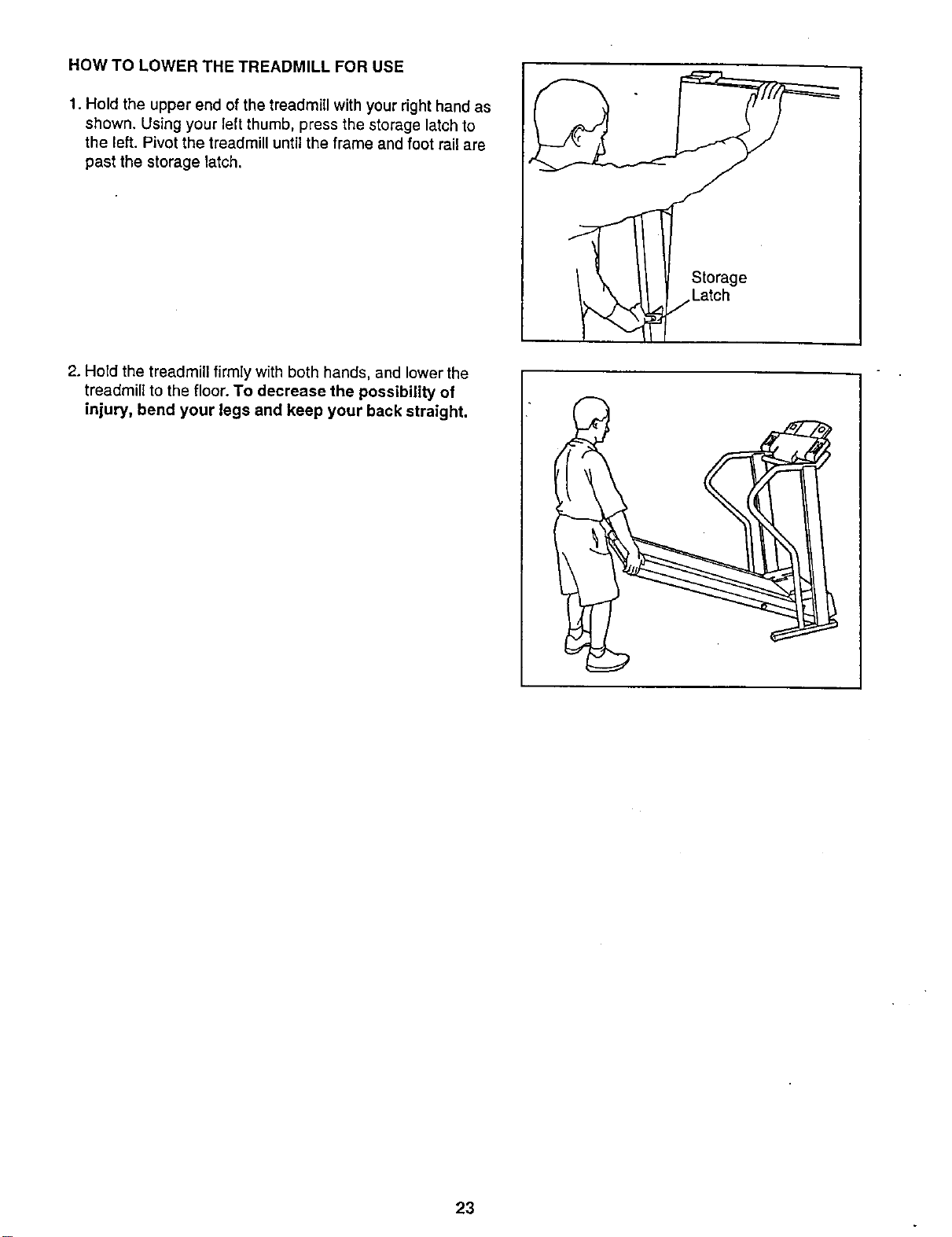
1. Hold the upper end of the treadmill with your right hand as
shown. Using your left thumb, press the storage latch to
the left. Pivot the treadmill until the frame and foot rail are
past the storage latch,
2. Hold the treadmill firmly with both hands, and lower the
treadmill to the floor. To decrease the possibility of
injury, bend your legs and keep your back straight.
Storage
/Latch
23
Maintenance and Trouble-shooting
Most treadmill problems can be solved by following the simple steps below. Find the symptom that
applies, and follow the steps listed. If further assistance is needed, call our Customer Service Department
toll-free at 1-888-825-2588, Monday through Friday, 6 a.m. until 6 p.m. Mountain Time (excluding holidays).
1. SYMPTOM: THE POWER DOES NOT TURN ON
a. Make sure that the power cord is plugged into a surge suppressor, and that the surge suppressor is plugged
into a properly grounded outlet (see page 10). Use only a single-outlet surge suppressor that is UL 1449
listed as a transient voltage surge suppressor ('T'VSS). The surge suppressor must have a UL suppressed
voltage rating of 400 volts or less and a minimum surge dissipation of 450 joules. The surge suppressor
must be electrically rated for 120 volts AC and 15 amps.
b. After the power cord has been plugged in, make sure that the key is fully inserted into the console. (See step
2 on page 12.)
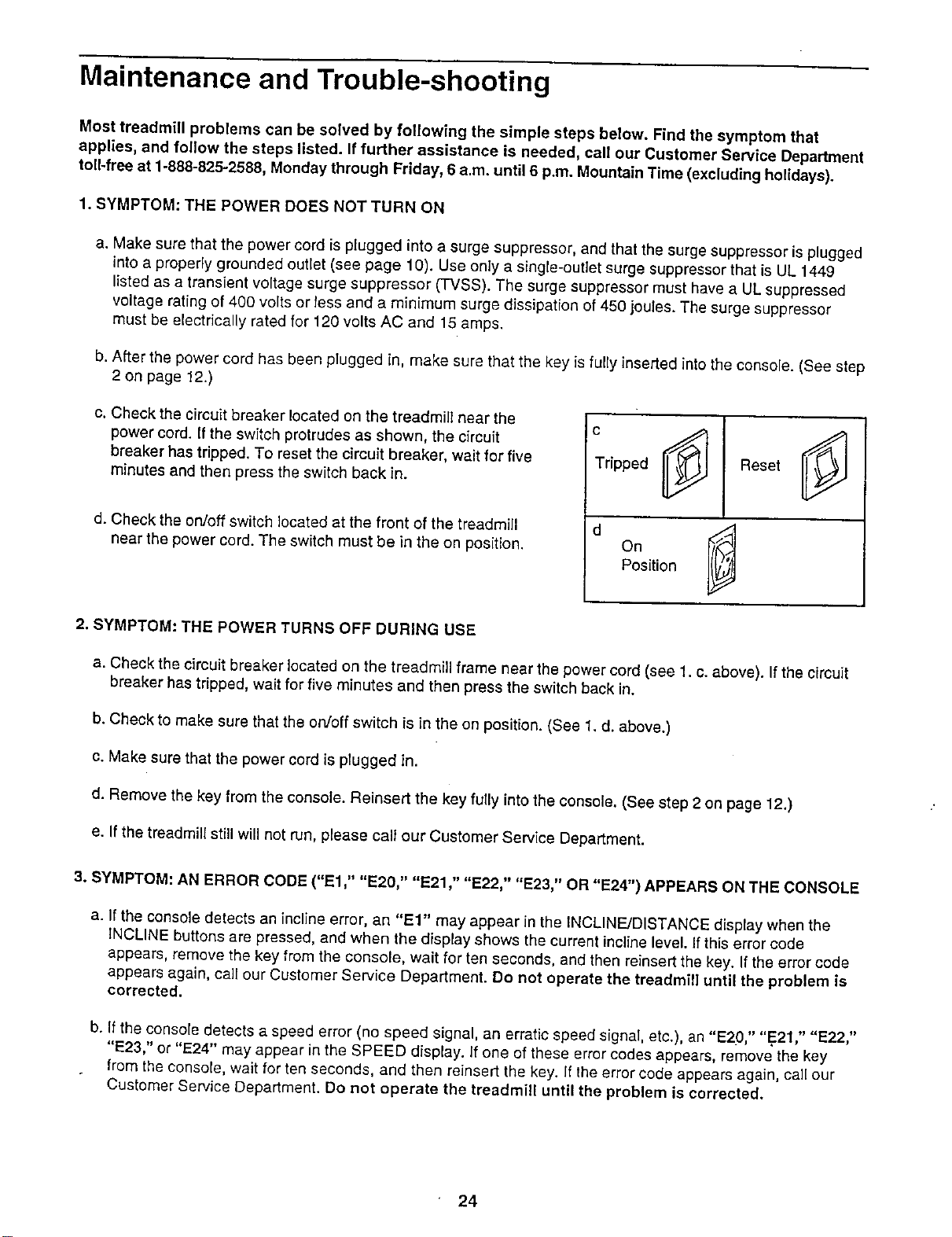
c. Check the circuit breaker located on the treadmill near the
power cord. If the switch protrudes as shown, the circuit
breaker has tripped. To reset the circuit breaker, wait for five
minutes and then press the switch back in.
d. Check the on/off switch located at the front of the treadmill
near the power cord. The switch must be in the on position.
IC
Tripped I
Reset ____
On
Position
2. SYMPTOM: THE POWER TURNS OFF DURING USE
a. Check the circuit breaker located on the treadm(ll frame near the power cord (see 1. c. above), if the circuit
breaker has tripped, wait for five minutes and then press the switch back in.
b. Check to make sure that the on/off switch is in the on position. (See 1. d. above.)
c. Make sure that the power cord is plugged in.
d. Remove the key from the console. Reinsert the key fully into the console. (See step 2 on page 12.)
e. tlthe treadmill stilt will not run, please calt our Customer Service Department.
3. SYMPTOM: AN ERROR CODE ("El," "E20," "E21," "E22," "E23," OR "E24") APPEARS ON THE CONSOLE
a. If the console detects an incline error, an "El" may appear in the tNCLINF__/DISTANCEdisplay when the
INCLINE buttons are pressed, and when the display shows the current incline level. If this error code
appears, remove the key from the console, wait for ten seconds, and then reinsert the key. if the error code
appears again, call our Customer Service Department. Do not operate the treadmill until the problem is
corrected,
b. If the console detects a speed error (no speed signal, an erratic speed signal, etc.), an "E2()," "E21," "E22,"
"E23," or "E24" may appear in the SPEED display. If one of these error codes appears, remove the key
from the console, wait for ten seconds, and then reinsert the key. If the error code appears again, call our
Customer Service Department. Do not operate the treadmill until the problem is corrected.
24
4. SYMPTOM: THE HEART RATE MONITOR DOES NOT FUNCTION PROPERLY
a. See How to Use the CardioTrack TM Heart Rate Monitoron pages 8 and 9, and Pulse Disp/ayon page 13.
5. SYMPTOM: THE WALKING BELT IS OFF-CENTER WHEN WALKED ON
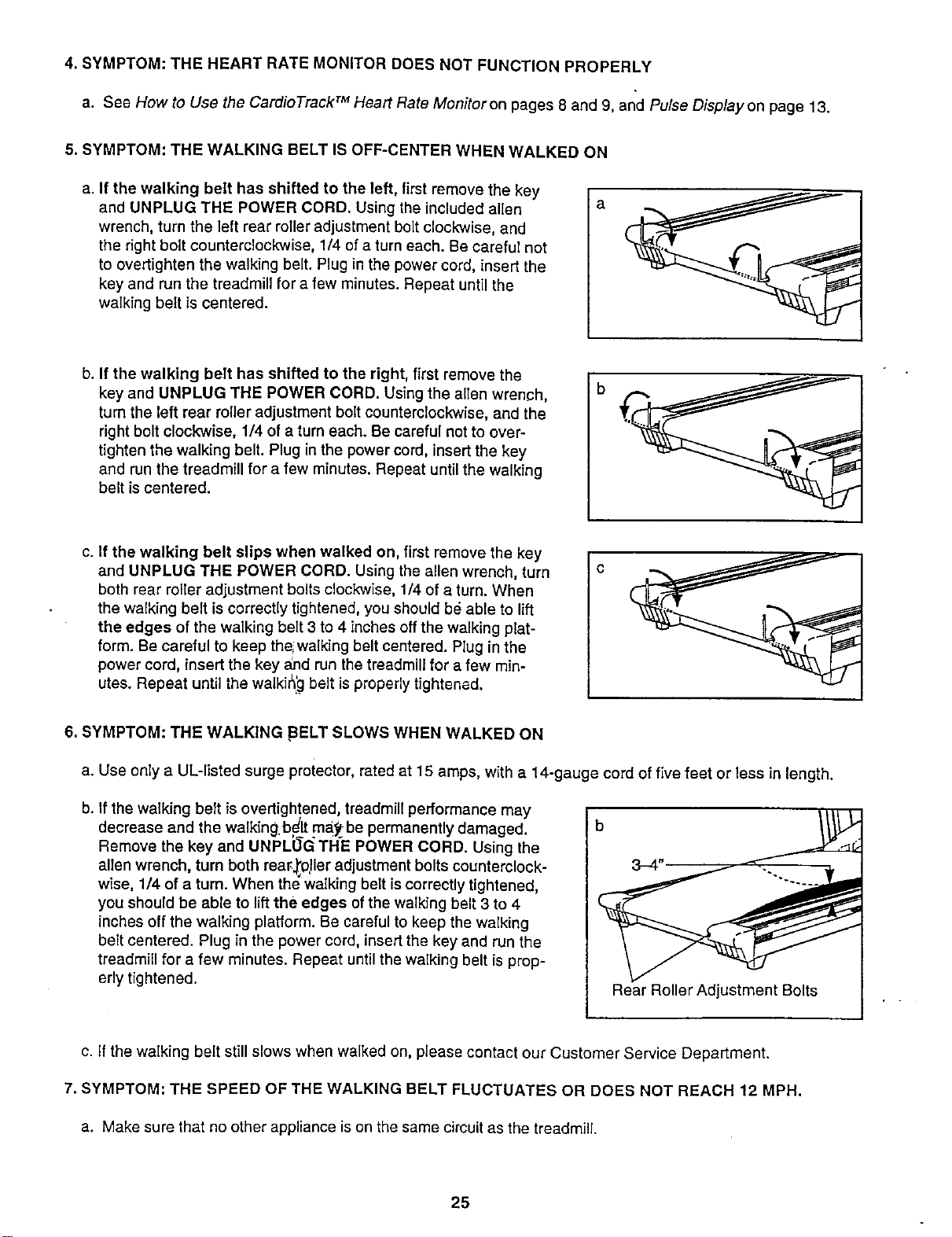
a. If the walking belt has shifted to the left, first remove the key
and UNPLUG THE POWER CORD. Using the included allen
wrench, turn the left rear roller adjustment bolt clockwise, and
the right bolt counterclockwise, 1/4 of a turn each. Be careful not
to overtighten the walking belt. Plug in the power cord, insert the
key and run the treadmill for a few minutes. Repeat until the
walking belt is centered.
b. If the walking belt has shifted to the right, first remove the
key and UNPLUG THE POWER CORD. Using the allen wrench,
turn the left rear roller adjustment bolt counterclockwise, and the
right bolt clockwise, 1/4 of a turn each. Be careful not to over-
tighten the walking belt. Plug in the power cord, insert the key
and run the treadmill for a few minutes. Repeat until the walking
belt is centered.
c. If the walking belt slips when walked on, first remove the key
and UNPLUG THE POWER CORD• Using the allen wrench, turn
both rear reeleradjustment bolts clockwise, 1/4 of a turn. When
the walking belt iscorrectly tightened, you should be able to lift
the edges of the walking belt 3 to 4 inches offthe walking plat-
form. Be careful to keep the;walking belt centered• Plug in the
power cord, insert the key a_qdrun the treadmill for a few min-
utes. Repeat until the waikir_'.gbelt is proper_y tightened.
6. SYMPTOM: THE WALKING ,BELT SLOWS WHEN WALKED ON
a. Use only a UL-listed surge protector, rated at 15 amps, with a 14-gauge cord of five feet or less in length.
b. Ifthe walking beTtis overtigh!ened, treadmill performance may
decrease and the walking.be'_ pay- be permanent y damaged.
Remove the key and UNPLUG THE POWER CORD. Using the
allen wrench, turn both rear_,_0!leradjustment bolts counterclock-
wise, 1/4 of a turn. When the walking belt is correctly tightened,
you should be able to lift the edges of the walking belt 3 to 4
inches off the walking platform. Be careful to keep the walking
belt centered. Plug in the power cord, insert the key and run the
treadmill for a few minutes. Repeat until the walking belt is prop-
erly tightened.
Rear Roller Adjustment Bolts
c. if the walking belt still slows when walked on, please contact our Customer Service Department.
7. SYMPTOM: THE SPEED OF THE WALKING BELT FLUCTUATES OR DOES NOT REACH 12 MPH.
a. Make sure that no other appliance is on the same circuit as the treadmill
25
Conditioning Guidelines
The following 9 steps for designing your exercise
program were developed by exercise physiologists at
NordicTrack. The actual exercise you perform is only
a part of a safe and effective training program. There
are many other aspects to developing a fife-tong
commitment to physical fitness.
U Consult your physician before beginning
any exercise program.
A medical examination or consultation with your
physician is essential.
B Establish personal fitness goals.
Set attainable, realistic goals, Reward yourself
when you meet those goals. Remember, your
goals should act as a guide for your workout
. program.
Determine your target heart rate.
Your target heart rate (THR), is the rate at which
you would like your heart to work during aerobic
exercise. It is expressed as a percentage of your
maximum heart rate (MHR). MHR is the maximum
number of times that your heart can pump dudng
one minute. To determine your approximate MHR,
subtract your age (in years) from 220. This is only
an estimation of your MHR-_on]y clinical stress
testing can provide an actual MHR reading.
Once you have determined your MHR, you can
establish your target heart rate zone. Beginning
exercisers may wish to start at 60 to 70 percent of
their MHR. This level is called the Health level.
Exercise at 70 to 85 percent of your MHR for the
optimal training, aerobic, or cardiovascular level--
the Fitness ]evel. Advanced exercisers, or those
wishing to do sports, athletic conditioning, or inter-
val training workouts should exercise at 80 to 85
percent of the MHR for short periods of time. The
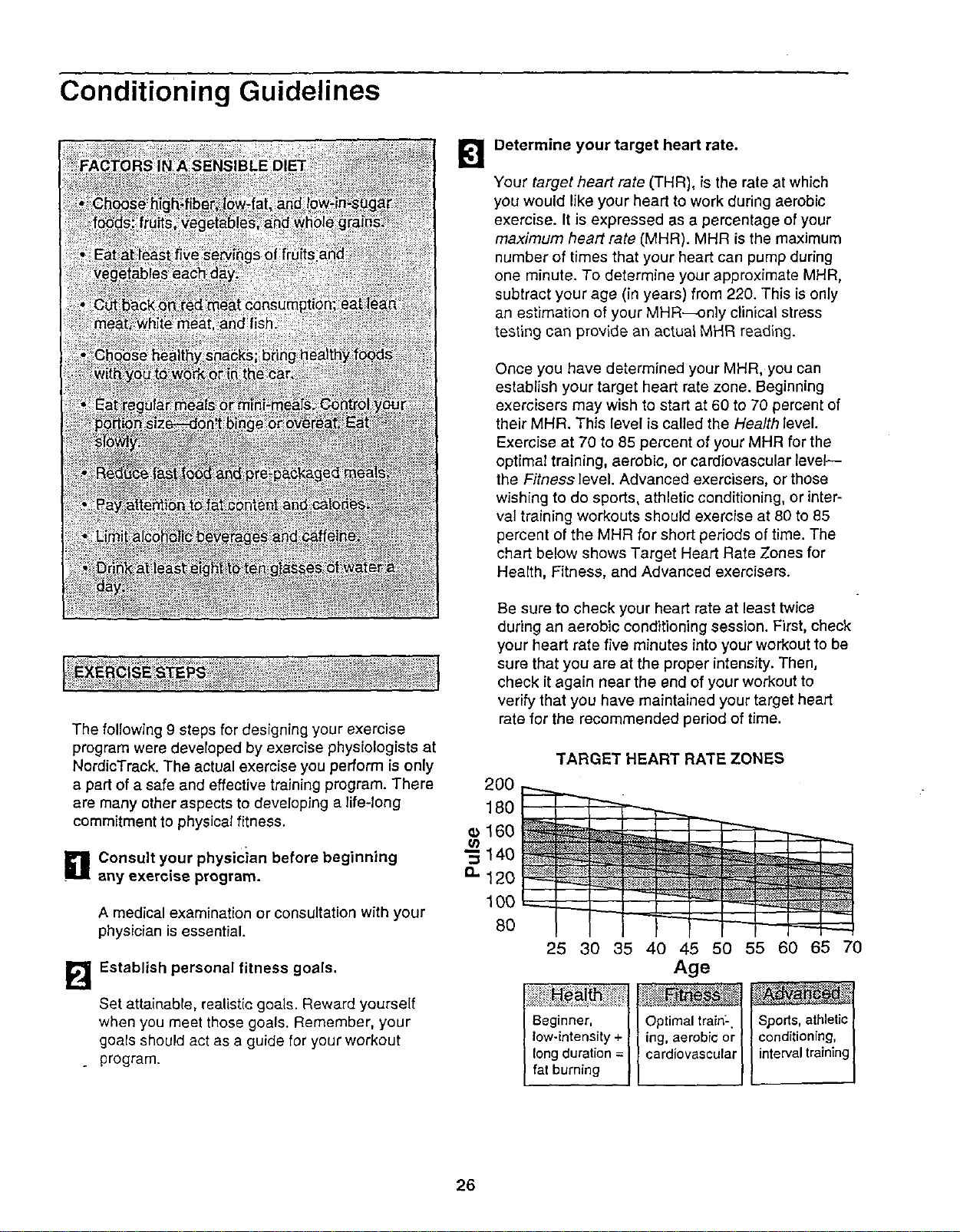
chart below shows Target Heart Rate Zones for
Health, Fitness, and Advanced exercisers.
Be sure to check your heart rate at least twice
during an aerobic conditioning session. First, check
your heart rate five minutes into your workout to be
sure that you are at the proper intensity. Then,
check it again near the end of your workout to
verify that you have maintained your target heart
rate for the recommended period of time.
TARGET HEART RATE ZONES
200
160 __ "'_'-
• 14o
......_ _
100 "----F---_ _ _;_
8O
25 30 35 40 45 50 55 60 65 70
Age
Beginner, [I Optimal trainL l athletid
low-intensity + I I ing, aerobic or [ I conditi?ni_.g, |
long duration =I _cardiovascular| I intervaltrainingI
fat burning II / [ |
26
_1] Warm up before you begin.
A warm-up routine prepares your body and mind
for vigorous exercise. It also provides insurance
against injury and soreness. Warm up with two to
five minutes of slow exercise, )_t minimal intensity.
B
Stretch after your warm-up.
A pliable, well-stretched muscle is less susceptible
to injury. Perform the recommended stretches on a "
smooth, flat surface.
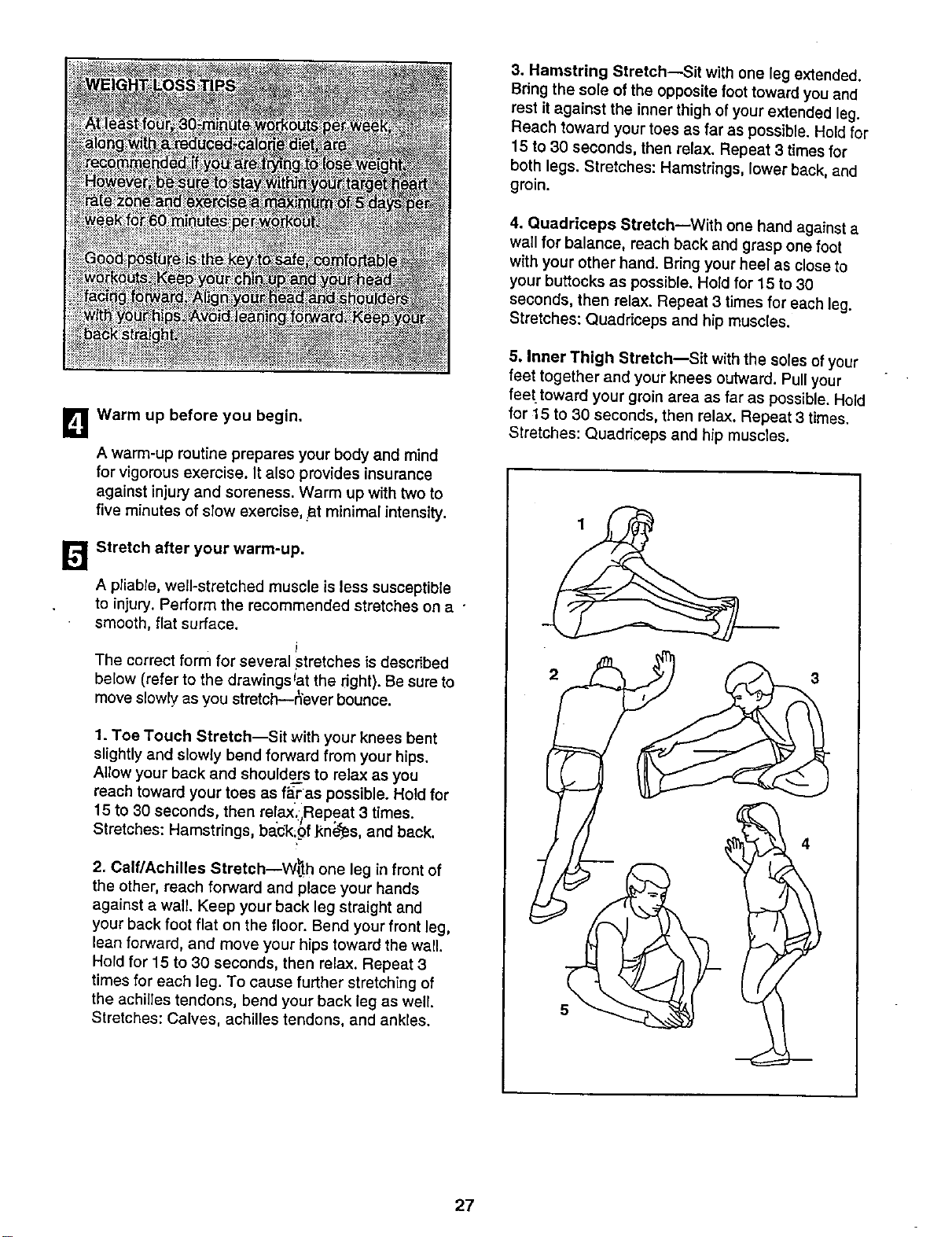
The correct form for several stretches isdescribed
below (refer to the drawings Jatthe right). Be sure to
move slowly as you stretch--_ever bounce.
1. Toe Touch Stretch--Sit with your knees bent
slightly and slowly bend forward from your hips.
Allow your back and shoulders to relax as you
reach toward your toes as f_ras possible. Hold for
15 to 30 seconds, then relax.:jRepeat 3 times.
Stretches: Hamstrings, ba'bk;of _n_,_s, and back.
2. Calf/Achilles Stretch_W_'_h one leg in front of
the other, reach forward and place your hands
against a wall. Keep your back leg straight and
your back foot flat on the floor. Bend your front leg,
lean forward, and move your hips toward the wall.
Hold for 15 to 30 seconds, then relax. Repeat 3
times for each leg. To cause further stretching of
the achilles tendons, bend your back leg as well.
Stretches: Calves, achilles tendons, and ankles.
3. Hamstring Stretch--Sit with one leg extended.
Bring the sole of the opposite foot toward you and
rest it against the inner thigh of your extended leg.
Reach toward your toes as far as possible. Hold for
15 to 30 seconds, then relax. Repeat 3 times for
both legs. Stretches: Hamstrings, lower back, and
groin.
4. Quadriceps Stretch_With one hand against a
wall for balance, reach back and grasp one foot
with your other hand. Bring your heel as close to
your buttocks as possible. Hold for 15 to 30
seconds, then relax. Repeat 3 times for each leg.
Stretches: Quadriceps and hip muscles.
5. Inner Thigh Stretch--Sit with the soles of your
feet together and youi" knees outward. Pull your
feettoward your groin area as far as possible. Hold
for 15 to 30 seconds, then relax. Repeat 3 times.
Stretches: Quadriceps and hip muscles.
5
4
27
Get FIT with the PowerTread 2000.
Effective aerobic exercise has three major parts:
frequency, intensity, and time. The acronym "FIT"
may help you to remember these three parts:
B
[]"F" stands for the frequency of your workouts.
Three to five workouts per week are recom-
mended. Exercise at least four times a week for
weight loss.
"1"refers to the intensity of your workout.
Check your heart rate at least twice during
your aerobic exercise session: once during the
session and once again at the end. Maintain a
workout intensity level within your Target Heart
Rate Zone. You can measure your heart rate using
the heart rate monitor. An alternate method is
described below:
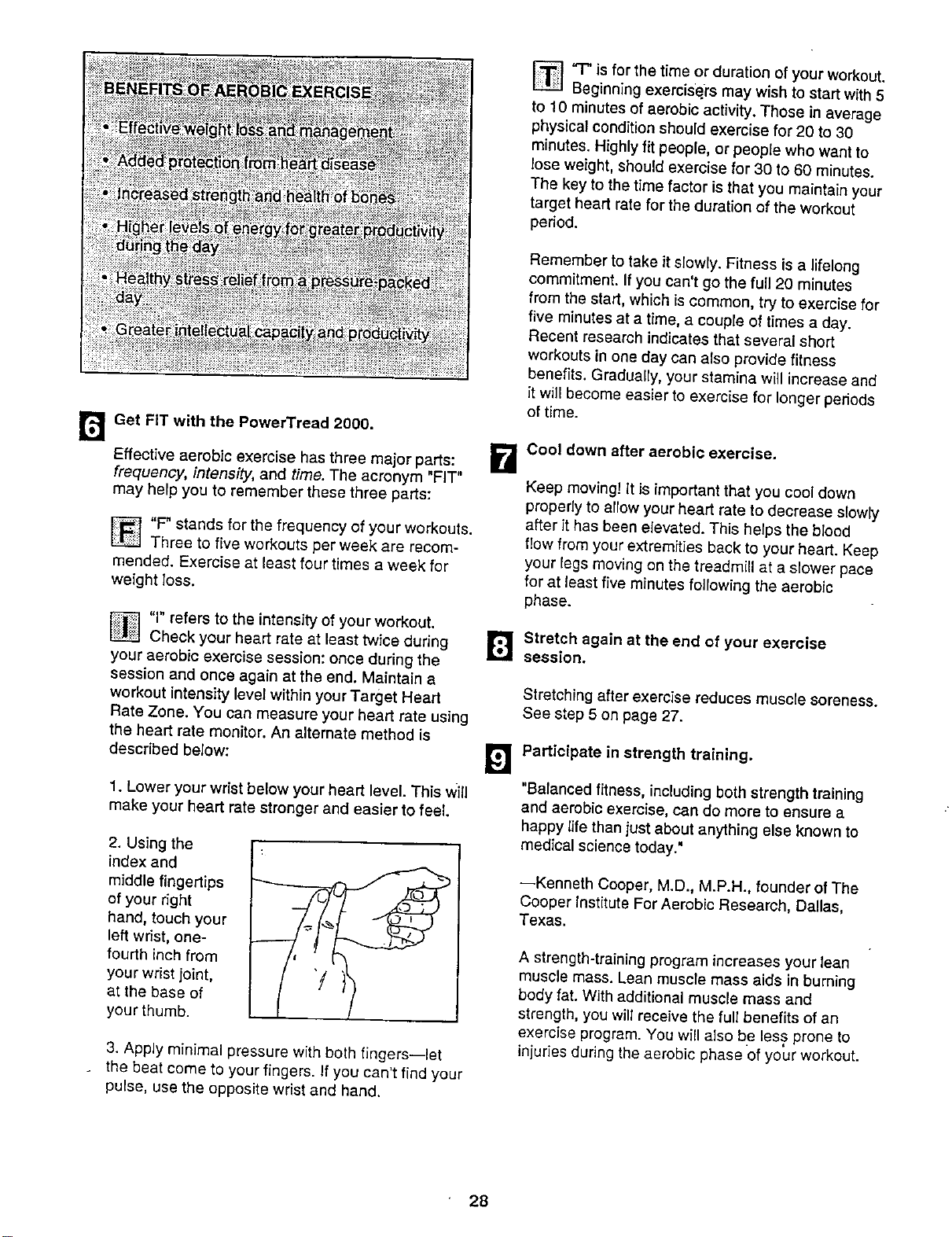
1. Lower your wrist below your heart level. This will
make your heart rate stronger and easier to feel.
[]'q-" is for the time or duration ofyour workout.
Beginning exercisers may wish to start with 5
to 10 minutes of aerobic activity. Those in average
physical condition should exercise for 20 to 30
minutes. Highly fit people, or people who want to
lose weight, should exercise for 30 to 60 minutes.
The key to the time factor is that you maintain your
target heart rate for the duration of the workout
period.
2. Using the
index and
middle fingertips
of your right
hand, touch your
left wrist, one-
fourth inch from
your wrist joint,
at the base of
your thumb.
3. Apply minimal pressure with both fingers--let
. the beat come to your fingers. If you can't find your
pulse, use the opposite wrist and hand.
Remember to take it slowly. Fitness is a lifelong
commitment. If you can't go the full 20 minutes
from the start, which is common, try to exercise for
five minutes at a time, a couple of times a day.
Recent research indicates that several short
workouts in one day can also provide fitness
benefits. Gradually, your stamina will increase and
it will become easier to exercise for longer periods
of time.
Cool down after aerobic exercise.
Keep moving! It is important that you cool down
properly to allow your heart rate to decrease slowly
after it has been elevated. This helps the blood
flow from your extremities back to your heart. Keep
your legs moving on the treadmill at a slower pace
for at least five minutes following the aerobic
phase.
[]Stretch again at the end of your exercise
session.
Stretching after exercise reduces muscle soreness.
See step 5 on page 27.
Participate in strength training.
"Balanced fitness, including both strength training
and aerobic exercise, can do more to ensure a
happy life than just about anything else known to
medical science today."
--Kenneth Cooper, M.D., M.P.H., founder of The
Cooper Institute For Aerobic Research, Dallas,
Texas.
A strength-training program increases your lean
muscle mass. Lear) muscle mass aids in burning
body fat. With additional muscle mass and
strength, you will receive the full benefits of an
exercise program. You will also be less prone to
injuries during the aerobic phase of your workout.
28
MoveontotheFitnessLevelonlywhenyoufeelready
andyourheartratehasmovedbelowyourtargetheart
ratezone.
TheFitness level usually lasts 12 to 20 weeks. (It may
last longer, depending on your fitness goals.) At this
level you should strive to achieve your fitness goals.
Set realistic short- and long-term goals for yourself.
Frequently re-evaluate your fitness goals and reward
yourself as you are successful.
Move on to the Advanced Level when you have
reached your fitness goals and your heart rate has
moved below your target heart rate zone.
°
Work out at the Advanced level once you have reached
your desired fitness goals. It is intended to be a mainte-
nance program and should continue on a regular, long-
term basis.
The Health level typically lasts four to six weeks. At this
level you should be concerned with slowly improving
your fitness level and endurance.
You may wish to add Interval Trainingto your mainte-
nance program as well. Interval training will add variety
to your workout routine and further condition your
cardiovascular system. Interval training has been
shown to promote higher levels of aerobic conditioning.
It consists of spurts of high-intensity activity followed by
active rest periods of exercise at a lower intensity.
For example, a one-minute spurt of high-resistance,
fast exercise* is followed by a two- to three-minute
active rest period of low-resistance, slow exercise. The
duration of these periods should be based more on
how you feel rather than time. A sequence such as this
should be repeated 5 to 20 times during your workout
session.
*Estimated maximum heart rate (MHR) = 220 - your age.
Take it slowly. Set mini-goals for yourself. You may
want to begin your fitness routine with_three or four
short, 5- or 1O-minute worko_Jts;|ri'a day.
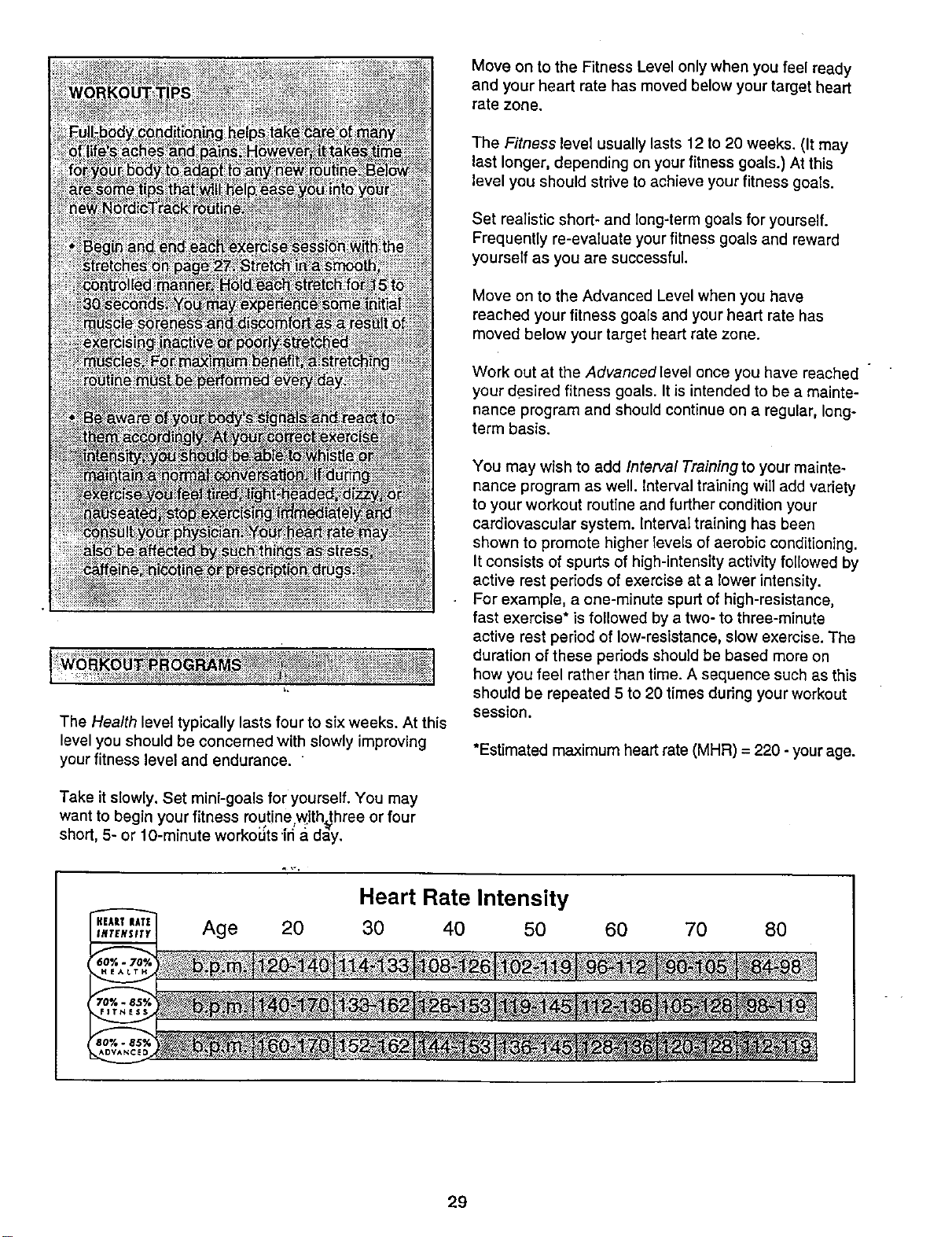
Age 20
Heart Rate lntensity
30 40 50
60 70 80
29
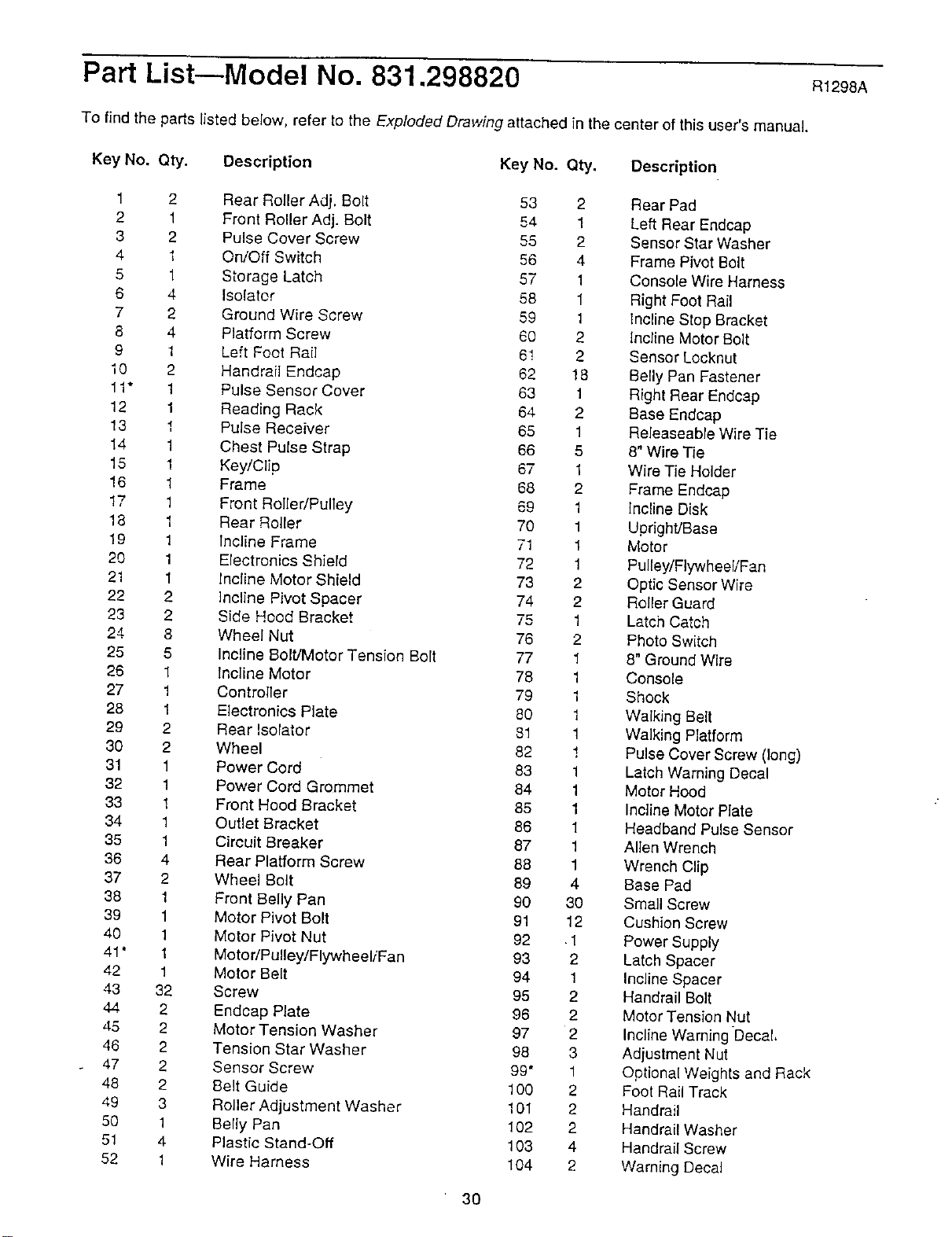
Part List--Model No. 831.298820 R1298A
To find the parts listed below, refer to the Exploded Drawing attached in the center of this user's manual.
Key No. Qty. Description Key No. Qty. Description
1 2 Rear Relier Adj. Bolt 53 2
2 1 Front Roller Adj. Bolt 54 1
3 2 Pulse Cover Screw 55 2
4 1 On/Off Switch 56 4
5 1 Storage Latch 57 1
6 4 isolator 58 1
7 2 Ground Wire Screw 59 1
8 4 Platform Screw 60 2
£ 1 Left Foot Rail 6! 2
I0 2 Handrail Endcap 62 ! 8
11" I Pulse Sensor Cover 63 1
12 1 Reading Rack 64 2
13 I Pulse Receiver 65 1
14 1 Chest Pulse Strap 66 5
15 1 Key/Clip 67 1
16 1 Frame 68 2
17 1 Front Roller/Pulley 69 1
18 1 Rear Roller 70 1
19 1 incline Frame 71 1
20 1 Electronics Shield 72 1
21 1 Incline Motor Shield 73 2
22 2 ]ncline Pivot Spacer 74 2
23 2 Side Heod Bracket 75 1
24 8 Wheel Nut 76 2
25 5 Incline Bolt/Motor Tension Bolt 77 1
26 1 Incline Motor 78 1
27 1 Controller 79 1
28 1 Electronics Plate 80 1
29 2 Rear Isolator 81 1
30 2 Wheel 82 !
31 1 Power Cord 83 1
32 1 Power Cord Grommet 84 1
33 1 Front Hood Bracket 85 1
34 1 Outlet Bracket 86 1
35 1 Circuit Breaker 87 1
36 4 Rear Platform Screw 88 1
37 2 Wheel Bolt 89 4
38 1 Front Belly Pan 90 30
39 1 Motor Pivot Bolt 91 12
40 1 Motor Pivot Nut 92 1
41* 1 Motor/Pulley/Flywheel/Fan 93 2
42 1 Motor Belt 94 1
43 32 Screw 95 2
44 2 Endcap Plate 96 2
45 2 Motor Tension Washer 97 2
46 2 Tension Star Washer 98 3
47 2 Sensor Screw 99" 1
48 2 Belt Guide 100 2
49 3 Roller Adjustment Washer 101 2
50 1 Belly Pan 102 2
51 4 Plastic Stand-Off 103 4
52 1 Wire Harness 104 2
Rear Pad
Left Rear Endcap
Sensor Star Washer
Frame Pivot Bolt
Console Wire Harness
Right Foot Rail
Incline Stop Bracket
Incline Motor Bolt
Sensor Locknut
Belly Pan Fastener
Hight Rear Endcap
Base Endcap
Releaseable Wire Tie
8" Wire Tie
Wire Tie Holder
Frame Endeap
Incline Disk
Upright/Base
Motor
Pulley/Flywhee!/Fan
Optic Sensor Wire
Roller Guard
Latch Catch
Photo Switch
8" Ground Wire
Console
Shock
Walking Belt
Walking P_atform
Pulse Cover Screw (long)
Latch Warning Decal
Motor Hood
Incline Motor Plate
Headband Pu_seSensor
Allen Wrench
Wrench Clip
Base Pad
Small Screw
Cushion Screw
Power Supply
Latch Spacer
Incline Spacer
Handrail Bolt
Motor Tension Nut
Incline Warning Decal,
Adjustment Nut
Optional Weights and Rack
Foot Rail Track
Handrail
Handrail Washer
Handrail Screw
Warning Deca_
30
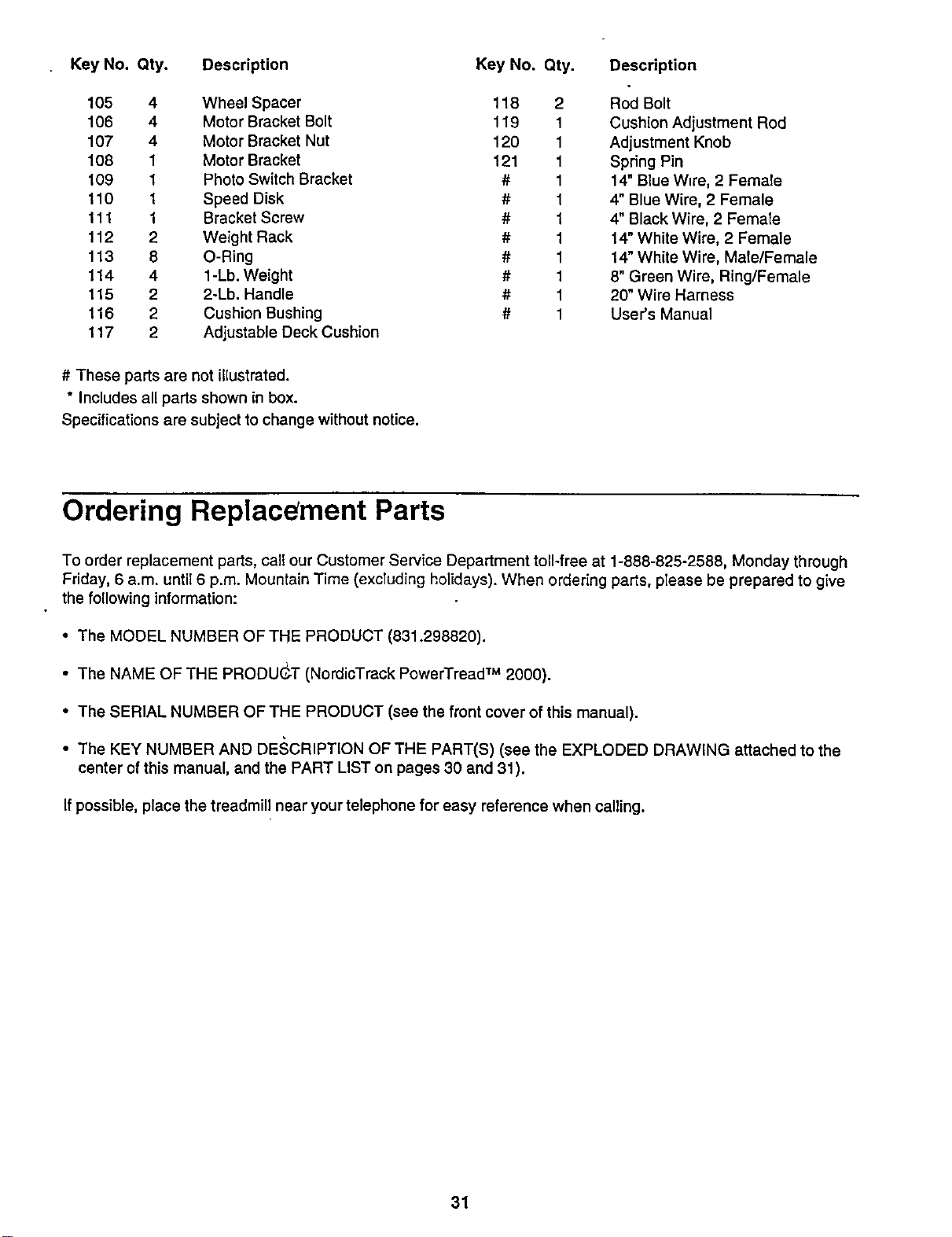
Key No. Qty. Description Key No. Qty.
105 4 Wheel Spacer 118 2
106 4 Motor Bracket Bolt 119 1
107 4 Motor Bracket Nut 120 1
108 1 Motor Bracket 121 1
109 1 Photo Switch Bracket # 1
110 1 Speed Disk # 1
111 1 Bracket Screw # 1
112 2 Weight Rack # 1
113 8 O-Ring # 1
1t 4 4 1-Lb. Weight # 1
115 2 2-Lb. Handle # 1
116 2 Cushion Bushing # 1
117 2 Adjustable Deck Cushion
Description
Rod Bolt
Cushion Adjustment Rod
Adjustment Knob
Spring Pin
14" Blue W_re,2 Female
4" Blue Wire, 2 Female
4" Black Wire, 2 Female
14" White Wire, 2 Female
14" White Wire, Male/Female
8" Green Wire, Ring/Female
20" Wire Harness
User's Manual
# These parts are not illustrated.
* Includes all parts shown in box.
Specifications are subject to change without notice.
Ordering Replacement Parts
To order replacement parts, call our Customer Service Department toll-free at 1-888-825-2588, Monday through
Friday, 6 a.m. until 6 p.m. Mountain Time (exctuding holidays). When ordering parts, please be prepared to give
the following information:
• The MODEL NUMBER OF THE PRODUCT (831.298820).
i
• The NAME OF THE PRODUGT (NordicTrack PowerTread TM 2000).
• The SERIAL NUMBER OF THE PRODUCT (see the front cover of this manual).
• The KEY NUMBER AND DESCRIPTION OF THE PART(S) (see the EXPLODED DRAWING attached to the
center of this manual, and the PART LIST on pages 30 and 31).
If possible, place the treadmill near your telephone for easy reference when calling.
31
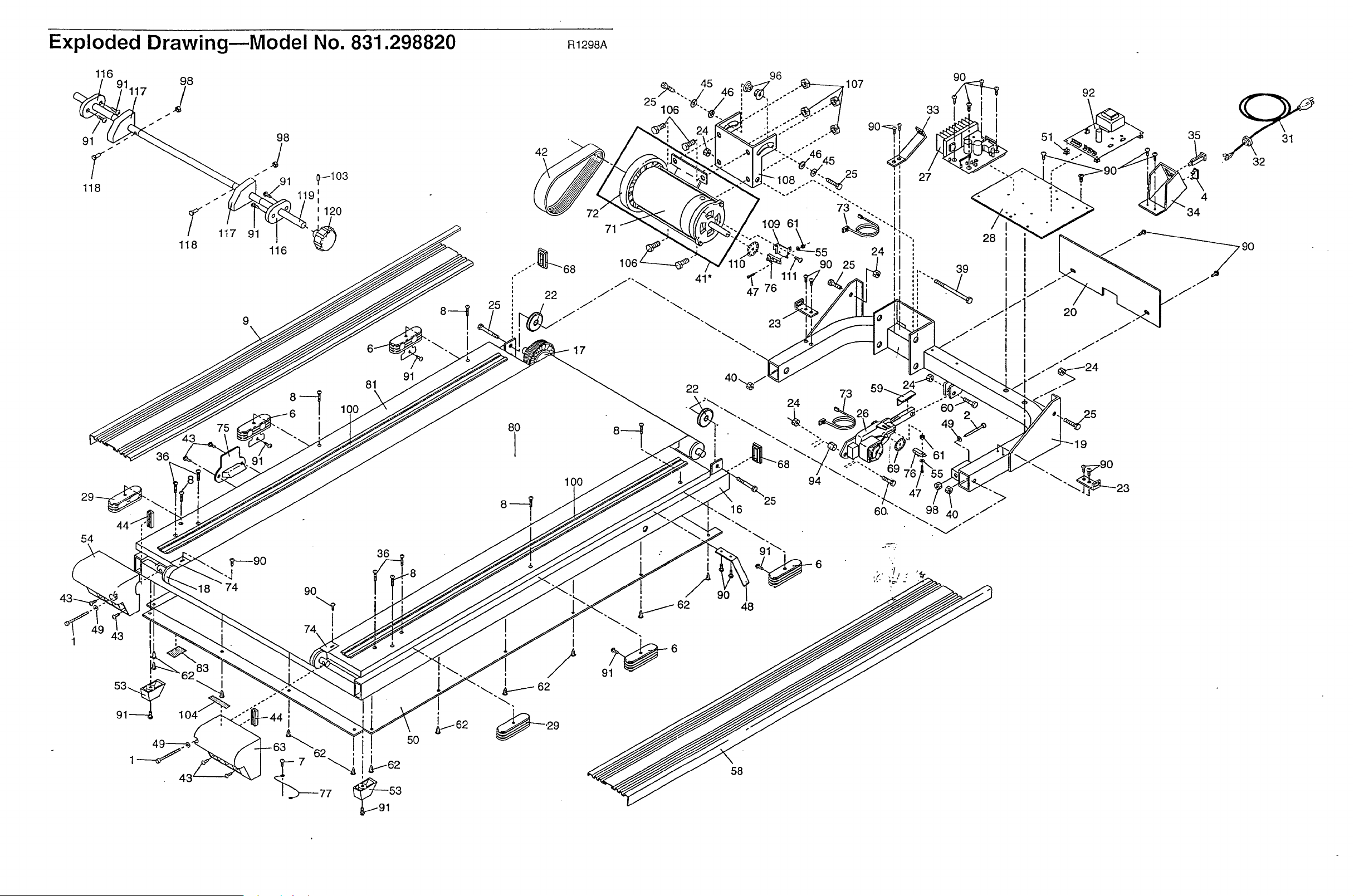
Exploded Drawing--Model No. 831.298820 R1298A
116
9
|
81
54
90
36
42
71
1O0
8
90
33 I
27
32
23
22
94
6
25
24
39
28
i
58
31
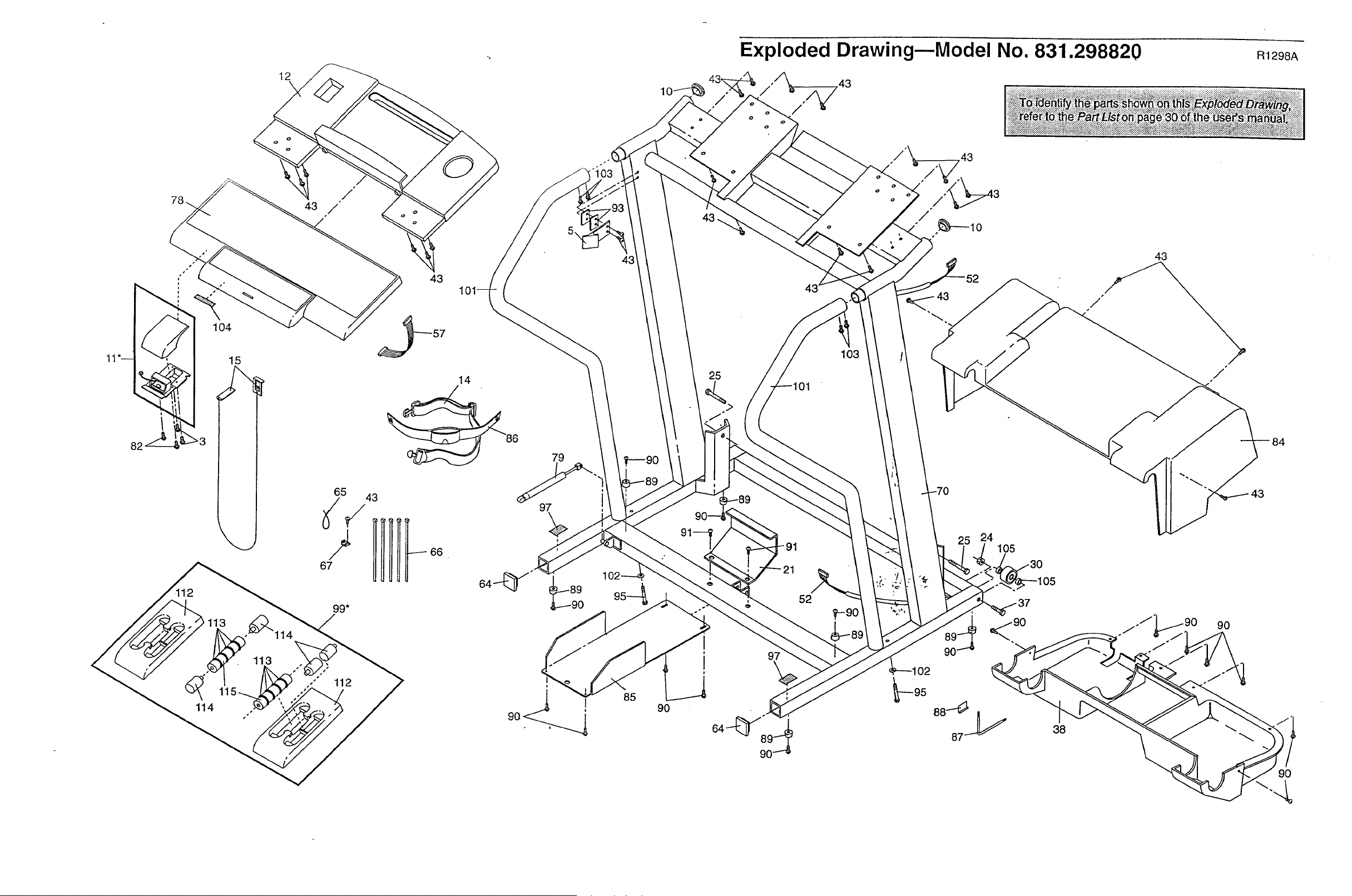
Exploded Drawing--Model No. 831.298820 m298A
104
15
12
\
65
67
43
5\
43
14
_86 79
i
43
102,
85
90
25
I
i
I
01
103
43
24
105
97
90
52
38
90
9O
Limited Warranty
WHAT IS COVERED--The entire NordicTrack PowerTread TM 2000 ("Product") is warranted to be free of all defects in
material and workmanship.
WHO IS COVERED--The odginal purchaser or any person receiving the Product as a gift from the original purchaser.
HOW LONG IS [T COVERED-ICON Health & Fitness, thc. ("ICON"), warrants the motor for three years after the date of
purchase. All other parts are covered for two years after the date of purchase. Labor is covered for one year.
WHAT WE DO TO CORRECT COVERED DEFECTS--We will ship to you, without charge, any replacement part or com-
ponent, providing the repairs are authorized by ICON first and are performed by an iCON trained and authorized service
provider, or, at our option, we will replace the Product.
WHAT IS NOT COVERED--Any failures or damage caused by unauthorized service, misuse, accident, negligence,
improper assemb{y or installation, eIterations, modifications without our wd_en authorization or by failure on your part to
use, operate, end maintain as set out in your User's Manual ("Manual").
WHAT YOU MUST DO--Always retain proof of purchase, such as your bill of sale; store, operate, and maintain the
Product as specified in the Manual; notify our Customer Service Department of any defect within 10 days after discovery of
the defect; as _nstructed, retum any defected part for replacement or, if necessary, the entire product,for repair.
USER'S MANUAL--It is VERY IMPORTANT THAT YOU READ THE MANUAL before operating the Product. Remember
to do the periodic maintenance requirements specified in the Manual to assure proper operation and your continued satis-
faction.
HOW TO GET PARTS AND SERVICE--Simply call our Customer Service Department at 1-888-825-2588 and te{I them
your name and address and the serial number of your Product. They will teti you how to get a part replaced, or if neces-
sary, arrange for service where your Product is located or advise you how to ship the Product for service, Before shipping,
always obtain a Return Authorization Number (RA No.) from our Customer Service Department; securely pack your
Produc_ (save the original shipping carton if possible); put the RA No. on the outside of the carton and insure the product.
Inc!ude a letter explaining the product or problem and a copy of your proof ofpurchase if you believe the service is covered
by warranty.
ICON is not responsible cr liable for _ndireet, special or consequential damages arising out of or in connectionwith the usa
or performance of the product or damages with respect to any economic !ess, loss of property, loss of revenues or profits,
loss of enjoyment or usa, costs of removal installation or ether consequential damages of whatsoever nature. Some states
de not allow the exclusion or limitation of thc{dental or consequential damages. Accordingly, the above limitation may not
apply to you.
The warranty extended hereunder is in lieu of any and all other warranties and any implied warranties of merchantability or
fitness for a particular purpose is limited in its scope and duration to the terms set forth herein. Some states do not allow
[imitations en hew long an implied warranty lasts. Accordingly, the above limitationmay not apply to you.
No one is authorizedto change, modify or extend the terms of this limited warranty.
This warrantygives you specific legal rights and you may have other rights which vary from state to state.
ICON HEALTH & FITNESS, INC., 1500 S. 1000 W., LOGAN, UT 84321-9813
Part No. 152502 H04442-C R1298A Printed in USA © 1998 Sears, Roebuck and Co.