
1
EN
Alert Indoor Security Camera
Cámara de alerta de seguridad para interiores
Caméra de sécurité intérieure Alert
Telecamera di sicurezza per interno con avvisi
Innen-Überwachungskamera alarmieren
EN
Quck Start Gude
ES
Guía de nco rápdo
FR
Gude de démarrage rapde
IT
Guda rapda
DE
Schnellstartanletung
SWIFI-ALERTCAM
2
EN
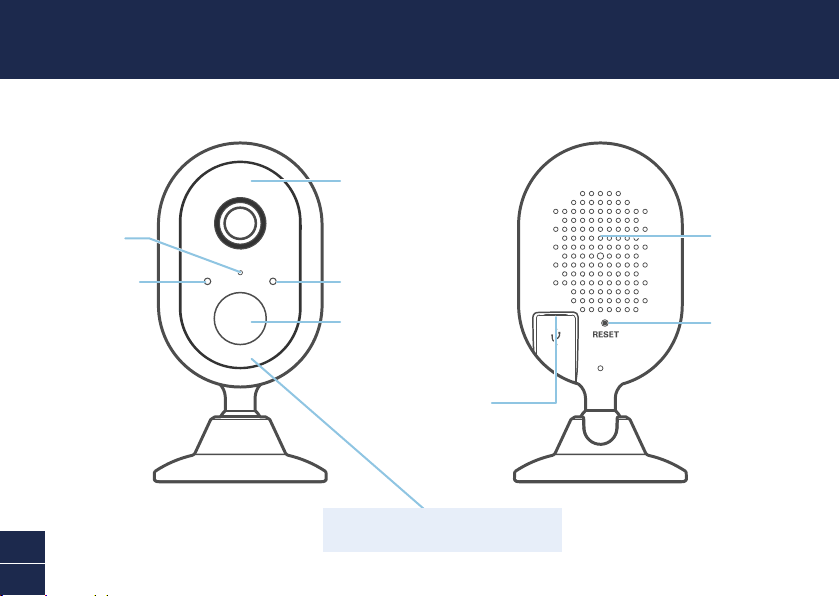
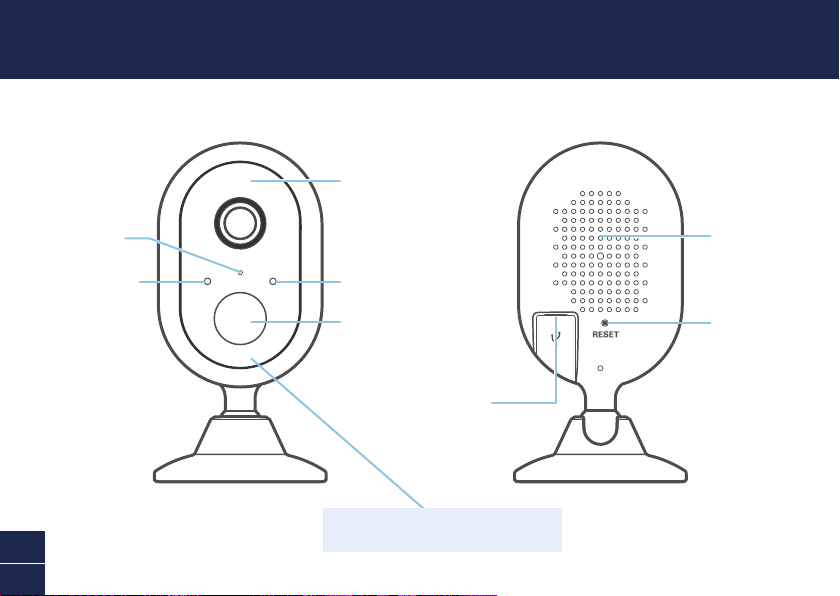
CAMERA OVERVIEW
Night detection
sensor
Microphone
LED indicator
Passive infrared
motion sensor
Infrared LEDs
(for night vision)
Speaker
Reset button
Micro USB port
Remember to remove the protective film from
the front of the camera before use.
3
EN
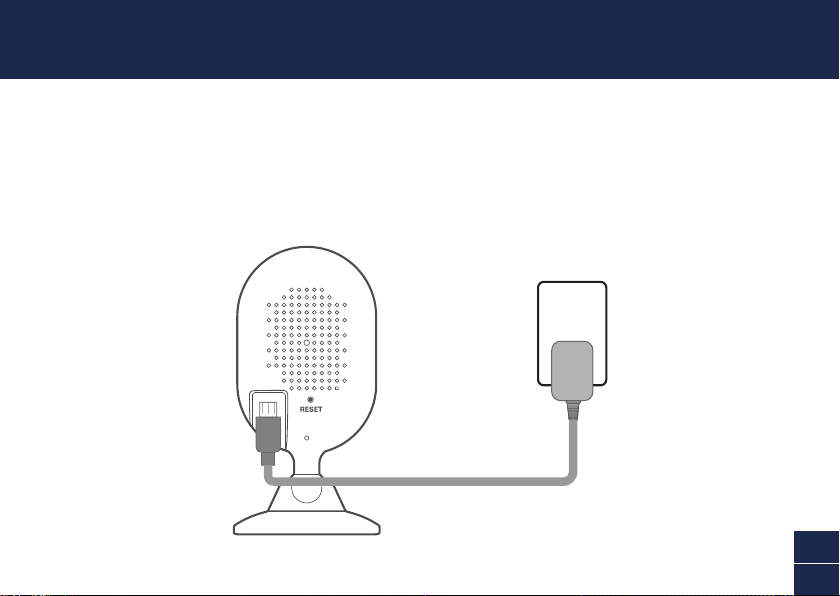
POWER THE CAMERA
1 Insert the micro USB plug of the supplied power adapter into the micro USB port on the back of
the camera.
2 Connect the power adapter to a power outlet. Make sure the camera is within range of the Wi-Fi
network to which you want to connect.
4
EN
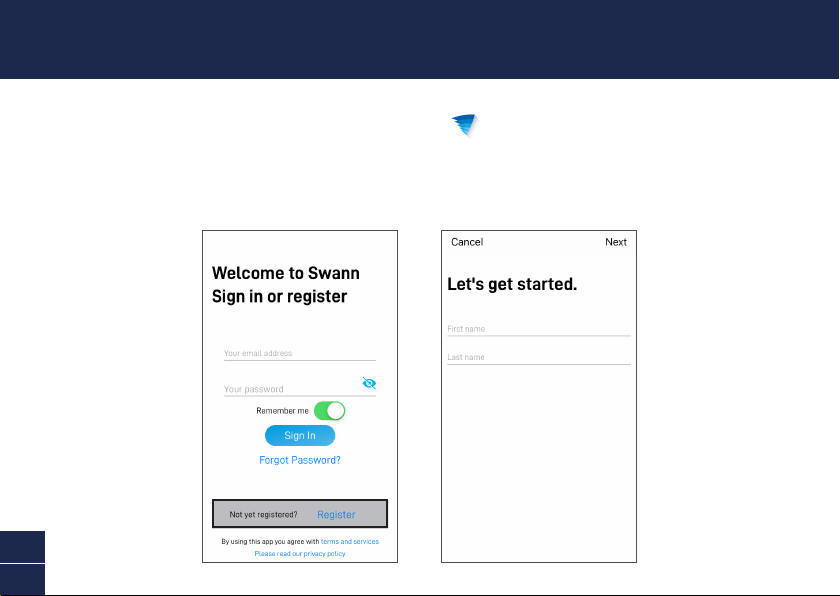
GET THE SWANN SECURITY APP
1 Download the latest version of the Swann Security app from the Apple App Store® or Google
Play™ Store on your iOS or Android device. Simply search for "Swann Security".
2 Open the app and create your Swann Security account. You will need to activate your account by
confirming the email sent to the registered email account before you can sign in.
5
EN
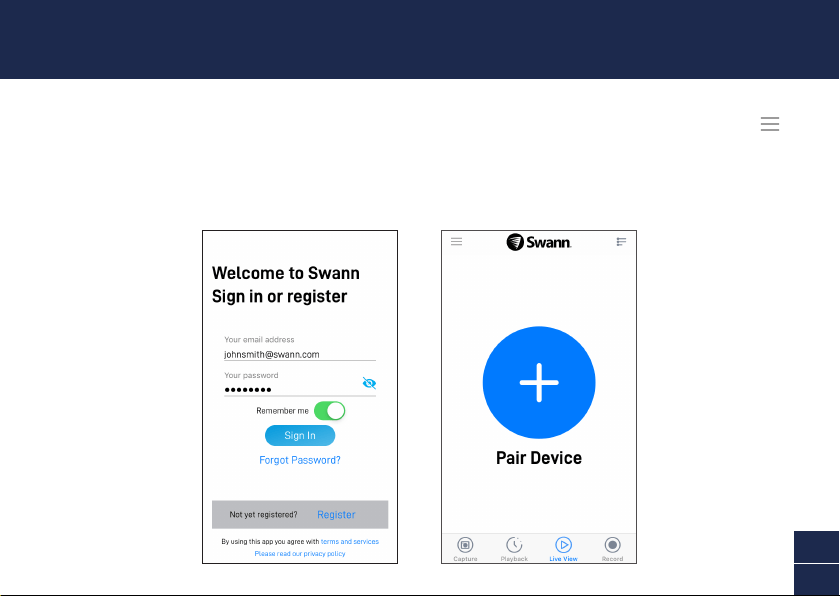
Launch the Swann Security app and sign in. Tap the Pair Device button on the screen (or open Menu
and select Pair Device) and follow the in-app instructions to set up your new camera. Before you begin,
be close to your router or access point and have your Wi-Fi network information (including password)
handy. Please note that the camera can connect to a 2.4GHz Wi-Fi network only.
SET UP THE CAMERA
6
EN
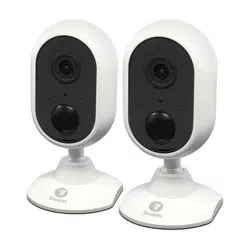
The camera can be placed on a table or shelf, or easily mounted on the wall. With its flexible stand,
you can freely swivel the camera around and monitor your home from any angle that you need. Pick a
location with good, reliable Wi-Fi reception to ensure best video streaming performance. As a general
rule, the nearer your camera is to your router, the better the wireless connection quality.
CAMERA PLACEMENT
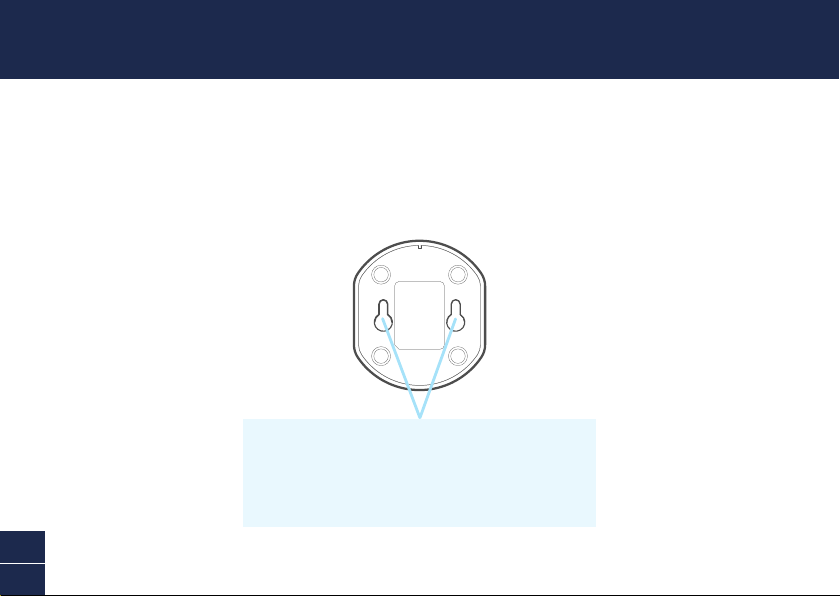
Mounting the camera
The back of the camera stand has two keyhole slots that provide a
convenient method for you to securely hang the camera on your wall.
Simply follow the instructions in the supplied mounting template to
drill screw holes and install the screws needed to hang the camera.
7
EN
Have questions?
We’re here to help! Visit our Support Center at support.swann.com. You can register your product
for dedicated technical support, find answers to commonly asked questions, and more. You can also
email us at any time via: tech@swann.com
TIPS
Motion detection
The camera’s PIR motion sensor detects heat signatures of moving objects. You’ll generally get good
detection results by pointing the camera downwards at an angle where people will be moving across
the coverage area before heading directly towards the camera.
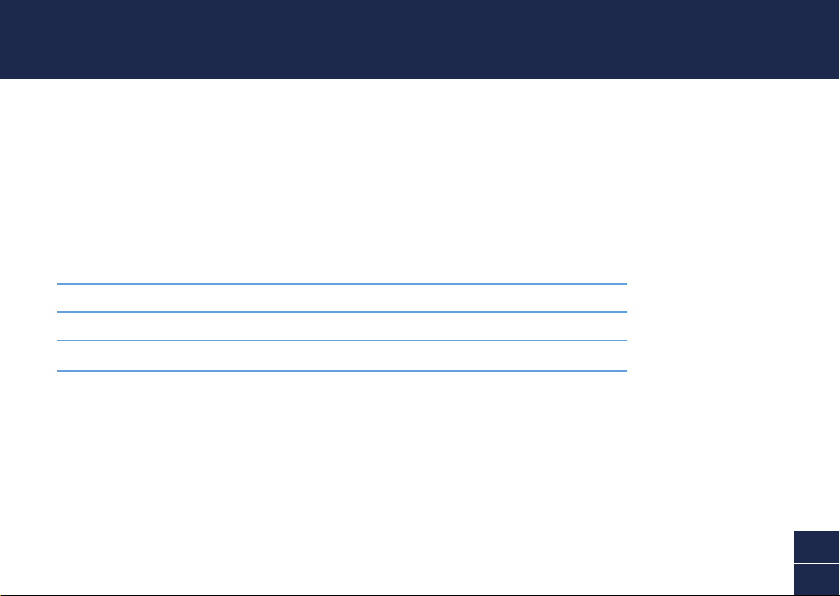
LED indicator guide
The LED light on the front of your camera helps inform you of what is happening with the device.
Solid Red Live streaming/Motion recording
Slow Blinking Blue Wi-Fi Pairing mode
Fast Blinking Blue Connecting to Wi-Fi
8
ES
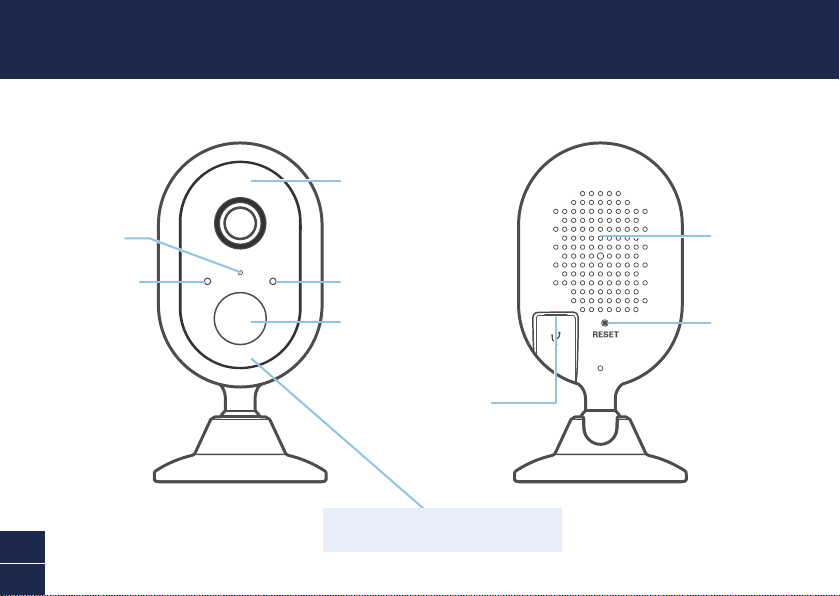
DESCRIPCIÓN DE LA CÁMARA
Sensor de
detección
nocturna
Micrófono
Indicador LED
Sensor infrarrojo
pasivo de movimiento
LED infrarrojos
(para visión nocturna)
Altavoz
Botón de reinicio
Puerto micro USB
Recuerde retirar la película de protección de
frente de la cámara antes de usar.
9
ES
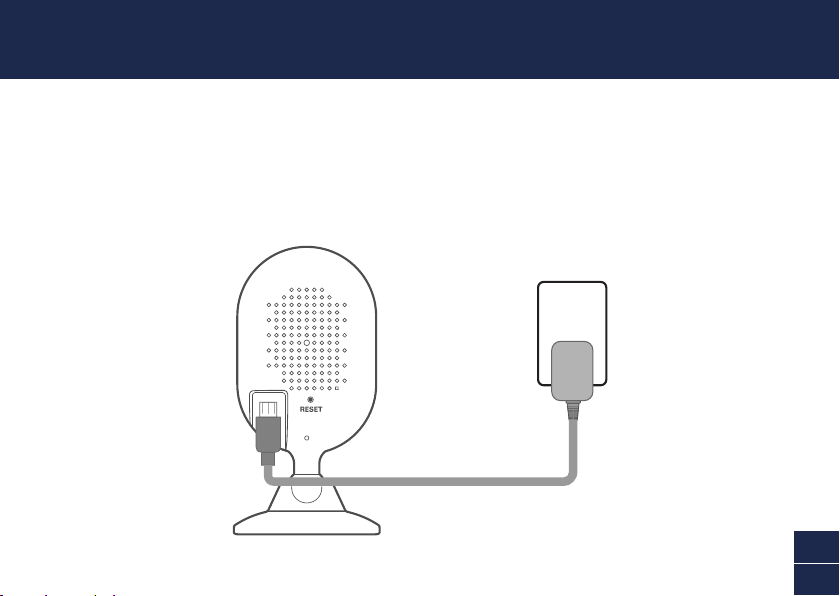
ENCIENDA LA CÁMARA
1 Inserte el enchufe micro USB del adaptador de corriente provisto en el puerto micro USB en la
parte posterior de la cámara.
2 Conecte el adaptador de corriente a un tomacorriente. Verifique que la cámara se encuentre
dentro del rango de la red Wi-Fi a la que desea conectarla.
10
ES
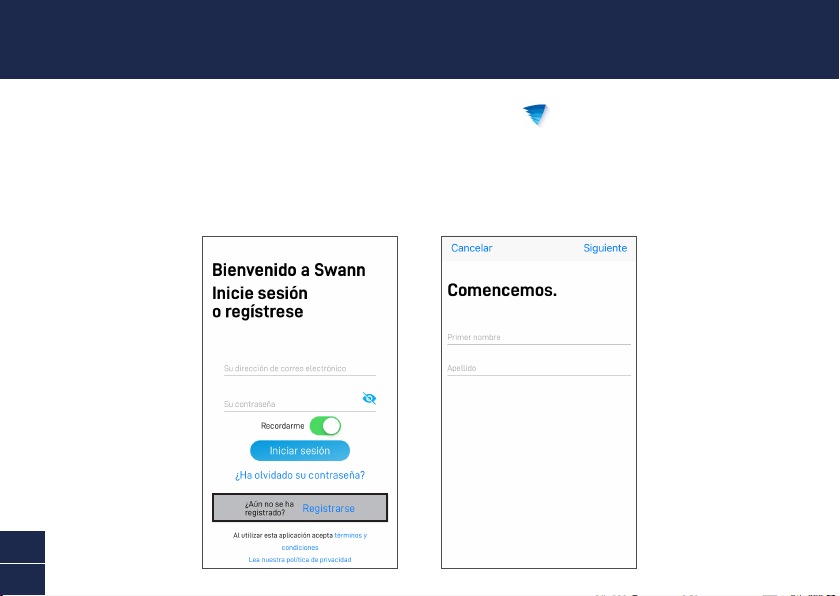
OBTENGA LA APLICACIÓN
SWANN SECURITY
1 Descargue la última versión de la aplicación Swann Security de Apple App Store® o Google
Play™ Store en su dispositivo con iOS o Android. Simplemente busque "Swann Security".
2 Abra la aplicación e cree su cuenta de Swann Security. Deberá activar su cuenta confirmando
el correo electrónico enviado a la cuenta de correo electrónico registrada antes de poder iniciar
sesión.
11
ES
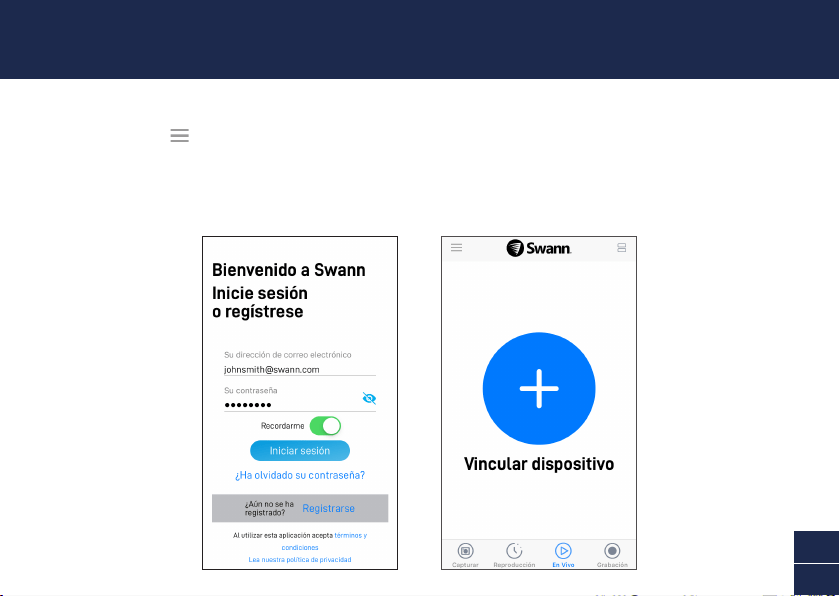
Abra la aplicación Swann Security e inicie sesión. Toque el botón Vincular dispositivo en la pantalla
(o abra el Menú y seleccione Vincular dispositivo) y siga las instrucciones en la aplicación para
configurar su nueva cámara. Antes de comenzar, manténgase cerca de su enrutador o punto de acceso
y conserve la información de su red Wi-Fi (incluida la contraseña) a mano. Tenga en cuenta que la
cámara se puede conectar solo a una red Wi-Fi de 2,4GHz.
CONFIGURE LA CÁMARA
12
ES
La cámara se puede colocar en una mesa o estante, o montarse fácilmente sobre la pared. Con su
soporte flexible, puede girar libremente la cámara y controlar su hogar desde cualquier ángulo que
necesite. Seleccione un lugar con recepción buena y confiable de Wi-Fi para garantizar el mejor
desempeño en la transmisión de video. Como regla general, cuanto más cerca está la cámara del
enrutador, mejor será la calidad de la conexión inalámbrica.
COLOCACIÓN DE LA CÁMARA
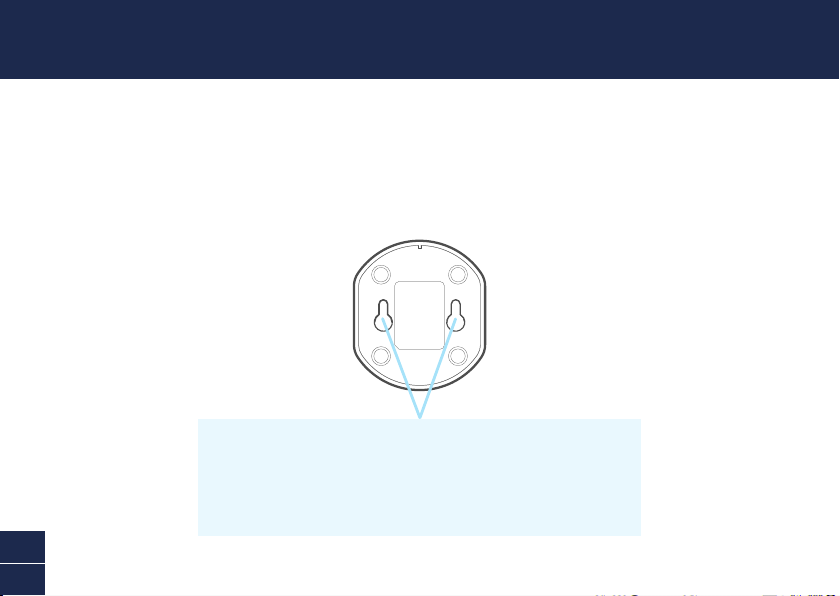
Montaje de la cámara
La parte posterior del soporte de la cámara tiene dos ranuras con orificios que ofrecen
un método conveniente para que cuelgue de forma segura la cámara en la pared.
Simplemente siga las instrucciones en la plantilla provista de montaje para perforar
orificios para tornillos e instale los tornillos necesarios para colgar la cámara.
13
ES
¿Alguna pregunta?
¡Estamos aquí para ayudarlo! Visite nuestro Centro de Asistencia en support.swann.com.
Puede registrar su producto para obtener asistencia técnica dedicada, encontrar respuestas a
preguntas frecuentes y más. También puede enviarnos un correo electrónico en cualquier momento a:
SUGERENCIAS
Detección de movimiento
El sensor de movimiento PIR de la cámara detecta las firmas de calor de los objetos en movimiento.
En general, obtendrá buenos resultados de detección apuntando la cámara hacia abajo en un ángulo
donde las personas se muevan por el área de cobertura antes de dirigirse directamente hacia la
cámara.
Guía del Indicador LED
La luz LED en el frente de su cámara ayuda a informarle lo que sucede con el dispositivo.
Rojo permanente Transmisión en vivo/Grabación por movimiento
Azul de destello lento Modo de vinculación de Wi-Fi
Azul de destello rápido Conectando a Wi-Fi
14
FR
PRÉSENTATION GÉNÉRALE DE LA CAMÉRA
Capteur de
détection de nuit
Microphone
Indicateur LED
Capteur de mouvement
infrarouge passif
LED infrarouges
(pour la vision
nocturne)
Haut-parleur
Bouton de
réinitialisation
Port micro USB
N'oubliez pas de retirer le film protecteur de
l'avant de l'appareil avant de l'utiliser.
15
FR
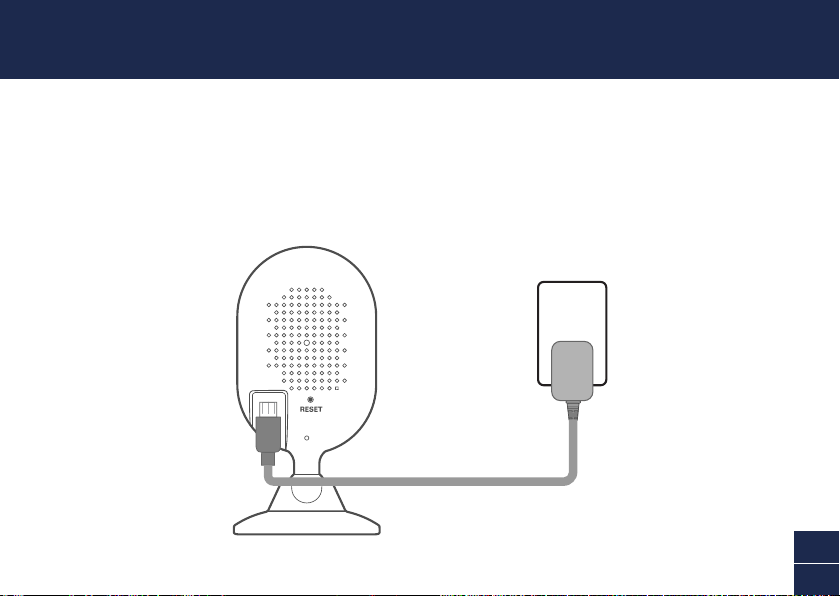
ALIMENTATION DE LA CAMÉRA
1 Insérez la fiche micro USB de l'adaptateur secteur fourni dans le port micro USB situé à l'arrière
de la caméra.
2 Branchez l'adaptateur secteur sur une prise secteur. Assurez-vous que la caméra est à portée du
réseau Wi-Fi auquel vous souhaitez vous connecter.
16
FR
OBTENIR L'APPLICATION
SWANN SECURITY
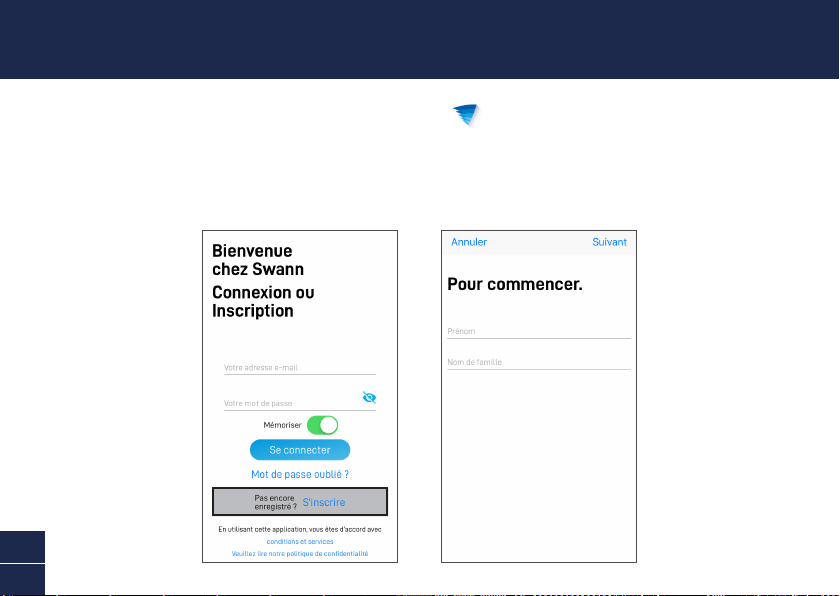
1 Téléchargez la dernière version de Swann Security depuis l'Apple App Store® ou le Google
Play™ Store sur votre appareil iOS ou Android. Il suffit de rechercher " Swann Security ".
2 Ouvrez l'application et créez votre compte Swann Security. Vous devrez activer votre compte en
confirmant l'e-mail envoyé au compte de messagerie enregistré avant de pouvoir vous connecter.
17
FR
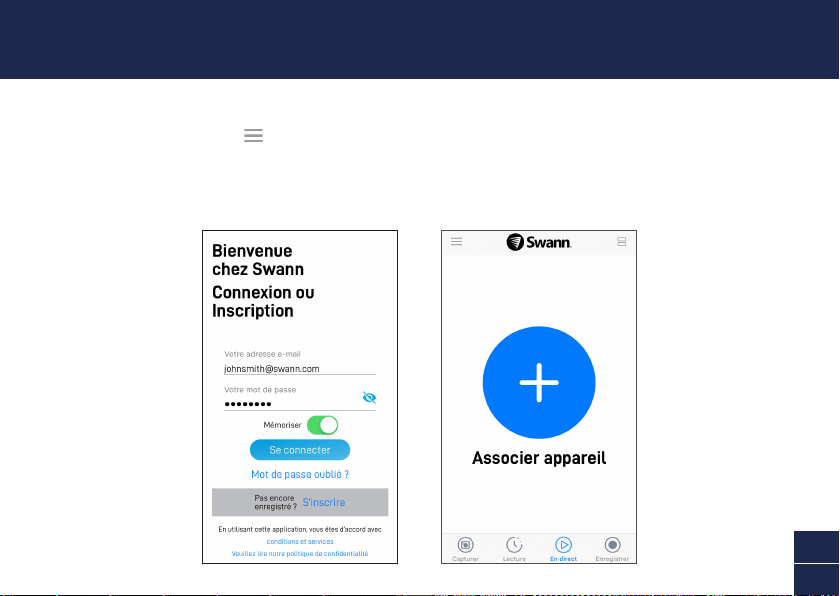
Lancez l’application Swann Security et connectez-vous. Appuyez sur le bouton Associer appareil à
l’écran (ou ouvrez le Menu et sélectionnez Associer appareil) et suivez les instructions fournies avec
l'application pour configurer votre nouvelle caméra. Avant de commencer, approchez-vous de votre
routeur ou de votre point d'accès et notez les informations de votre réseau Wi-Fi (y compris votre mot
de passe). Veuillez noter que la caméra ne peut se connecter qu’à un réseau Wi-Fi à 2,4 GHz.
CONFIGURATION DE LA CAMÉRA
18
FR
La caméra peut être placée sur une table ou une étagère, ou facilement au mur. Avec son support
flexible, vous pouvez faire pivoter librement la caméra et surveiller votre maison sous tous les angles.
Choisissez un emplacement avec une bonne réception Wi-Fi fiable pour assurer les meilleures
performances de streaming vidéo. En règle générale, plus votre caméra est proche de votre routeur,
meilleure est la qualité de la connexion sans fil.
EMPLACEMENT DE LA CAMÉRA
Fixation de la caméra
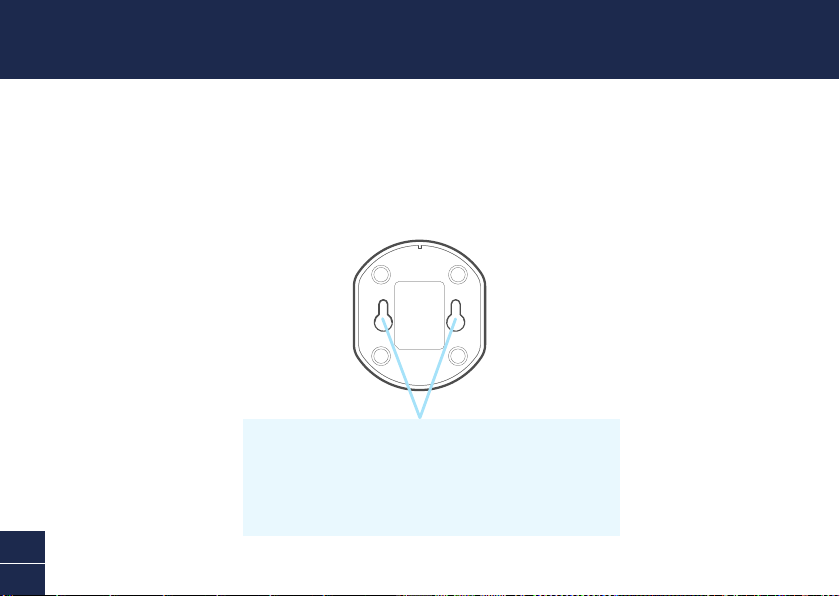
L'arrière du support de la caméra comporte deux fentes en trou de
serrure qui vous permettent de la fixer solidement au mur. Suivez
simplement les instructions du gabarit de montage fourni pour percer les
trous de vis et installer les vis nécessaires à la suspension de la caméra.
19
FR
Des questions ?
Nous sommes là pour vous aider! Visitez notre Centre de Support à l'adresse support.swann.com.
Vous pouvez enregistrer votre produit pour un support technique dédié, trouver des réponses aux
questions fréquemment posées, etc. Vous pouvez également nous envoyer un email à tout moment via:
ASTUCES
Détection de mouvement
Le capteur de mouvement PIR de la caméra détecte la chaleur des objets en mouvement. En général,
vous obtiendrez de bons résultats en termes de détection en dirigeant la caméra vers le bas, la pointant
sur un angle où les personnes se déplacent dans sa zone de couverture avant de se diriger directement
vers la caméra.
Guide de l'indicateur LED
La lumière LED située à l'avant de votre caméra vous informe de ce qui se passe avec l'appareil.
Rouge fixe Diffusion en direct/Enregistrement de mouvements
Bleu clignotant lent Mode de liaison Wi-Fi
Bleu clignotant rapide Connexion au Wi-Fi
20
IT
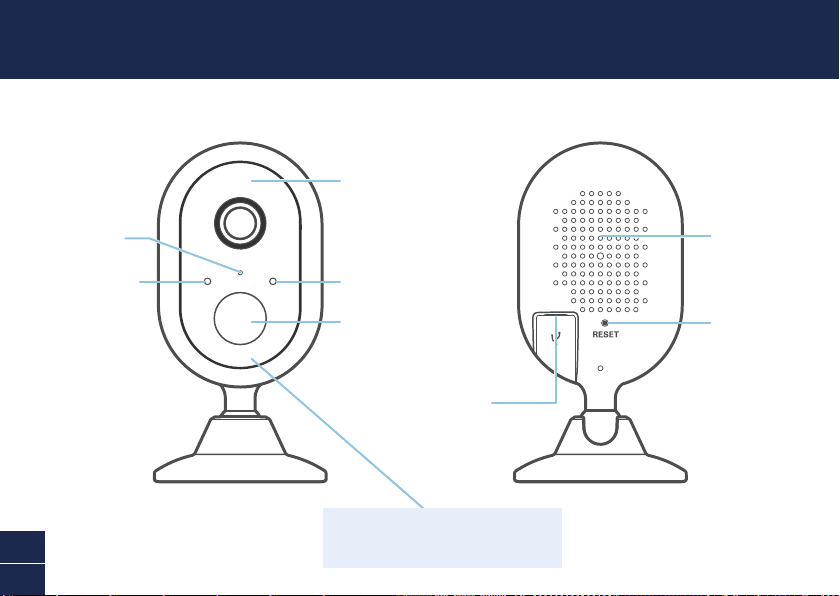
PANORAMICA DELLA TELECAMERA
Sensore di
rilevamento
del notturno
Microfono
Indicatore a LED
Sensore di rilevamento
del movimento a raggi
infrarossi passivo
LED a infrarossi
(per visione notturna)
Altoparlante
Tasto Ripristino
Porta micro USB
Ricordarsi di rimuovere la pellicola protettiva
dal lato anteriore della telecamera prima
dell’uso.
21
IT
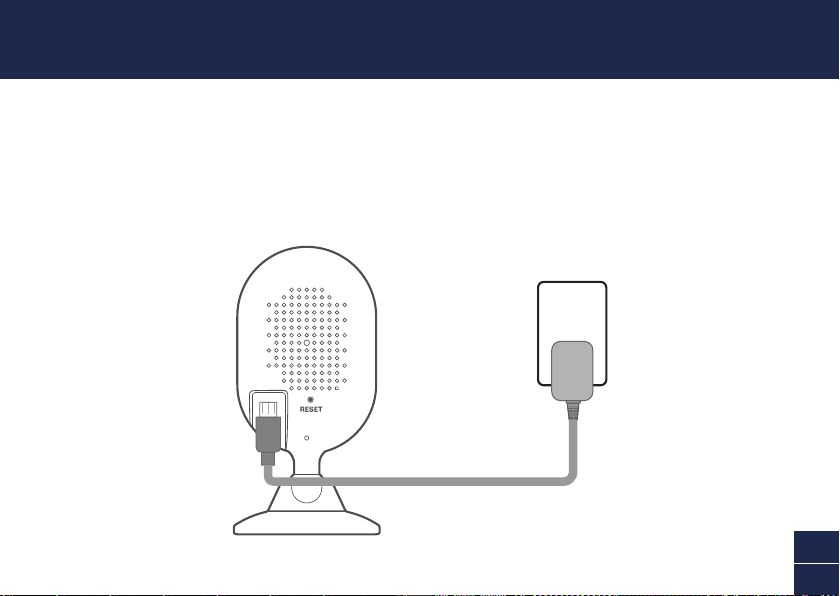
ALIMENTARE LA TELECAMERA
1 Inserire la spina micro USB dell’adattatore in dotazione nella porta micro USB presente sul lato
posteriore della telecamera.
2 Collegare l’adattatore alla presa di corrente. Verificate che la telecamera sia nel raggio della rete
Wi-Fi al quale desiderate collegarvi.
22
IT
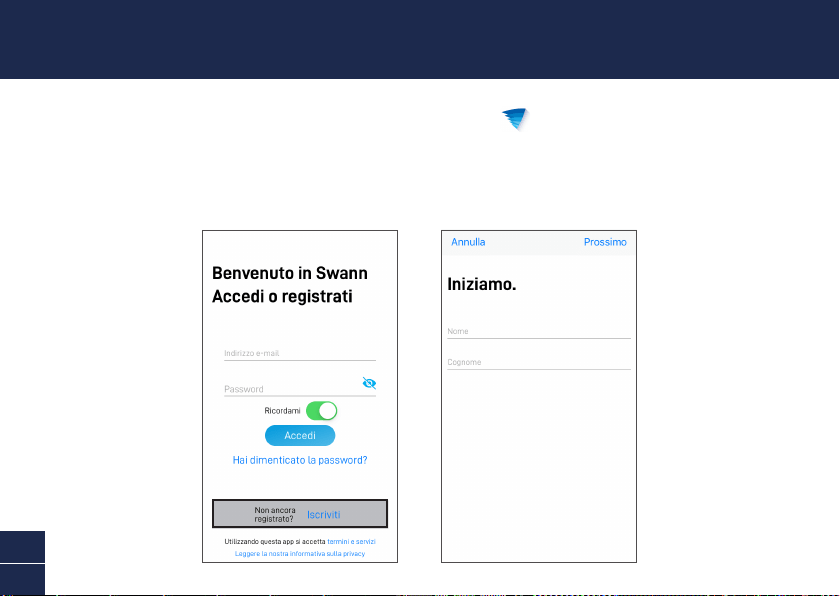
OTTENERE L’APP SWANN SECURITY
1 Scaricare la versione più recente dell’app Swann Security dal’Apple App Store® o da Google
Play™ Store sul dispositivo iOS o Android. Basta cercare "Swann Security".
2 Aprire l'app ed creare l'account Swann Security. Prima di poter accedere bisogna attivare
l'account confermando l'email inviata all'account email fornito.
23
IT
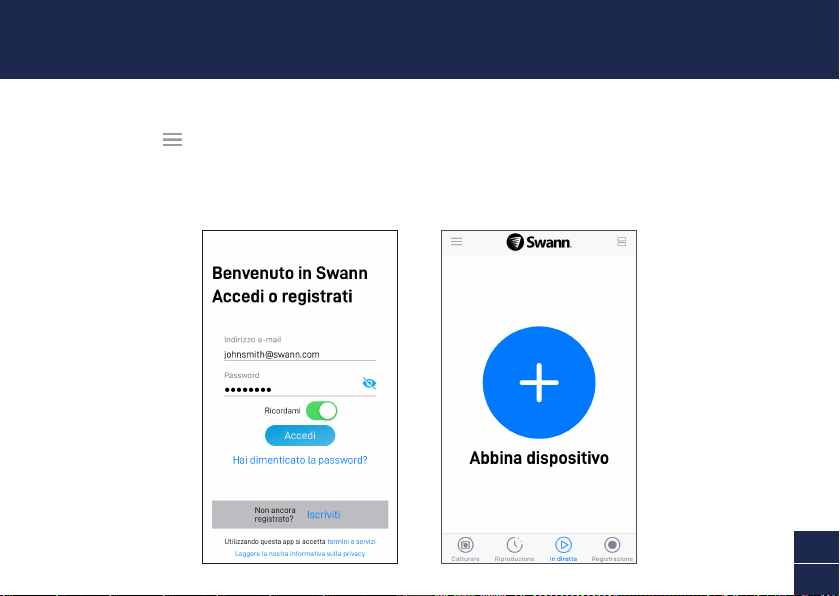
Aprire l’app Swann Security e eseguite l’accesso. Toccate il tasto Abbina dispositivo sullo schermo
(o aprire Menu e selezionare Abbina dispositivo) e seguire le istruzioni dell’app per configurare la
nuova telecamera. Prima di iniziare avvicinarsi al router o punto di accesso e tenere a portata di mano
le informazioni della rete Wi-Fi (inclusa la password). La telecamera può collegarsi solo ad una rete
Wi-Fi 2.4GHz.
CONFIGURAZIONE DELLE TELECAMERA
24
IT
La telecamera può essere posizionata su un tavolo o mensola o semplicemente montata a parete.
Con il supporto flessibile, è possibile orientare liberamente la telecamera e controllare l’abitazione da
qualsiasi angolo si desideri. Scegliere un luogo con una ricezione Wi-Fi buona e affidabile per garantire
la migliore prestazione streaming video. Di norma, quanto più vicina è la telecamera al router, tanto
migliore sarà la qualità di connessione.
POSIZIONAMENTO DELLE TELECAMERA
Montaggio della telecamera
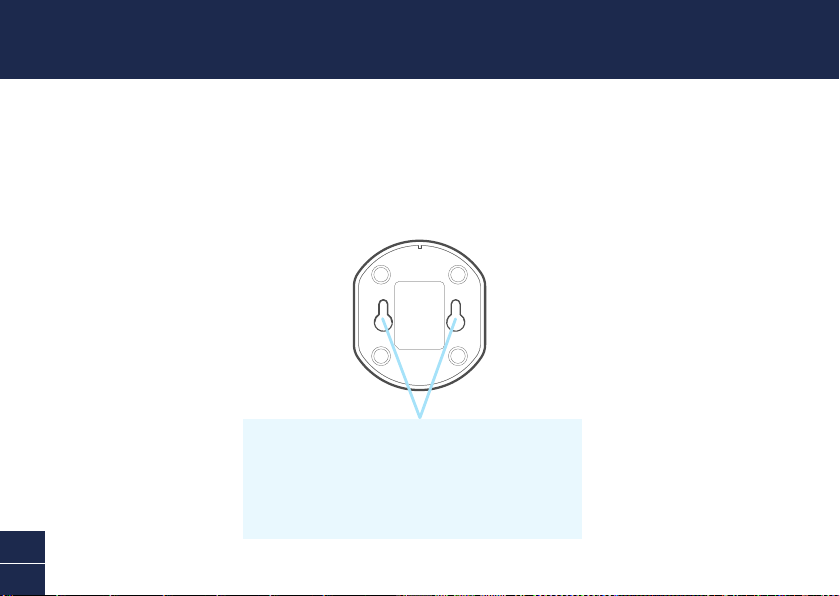
Il lato posteriore del supporto della telecamera presenta
due fessure che offrono un metodo comodo per applicare la
telecamera al muro in modo sicuro. Seguire le istruzioni sul
modello di montaggio in dotazione per eseguire i fori e installare
le viti necessarie ad appendere la telecamera.
25
IT
Hai domande?
Siamo qui per aiutarti! Visita il nostro Centro di supporto su support.swann.com. È possibile registrare
il prodotto per l'assistenza tecnica dedicata, trovare le risposte alle domande più frequenti e altro
ancora. Puoi anche contattarci via email in qualsiasi momento all'indirizzo: [email protected]
SUGGERIMENTI
Rilevamento di movimento
Il sensore di movimento PIR della telecamera rileva le tracce termiche degli oggetti in movimento. In
genere si otterranno buoni risultati di rilevamento puntando la telecamera verso il basso in un angolo
in cui le persone si muovono attraverso l'area di copertura prima di dirigersi direttamente verso la
telecamera.
Guida dell'indicatore LED
La luce LED sul lato anteriore della telecamera informa su cosa accade con il dispositivo.
Rosso fissa Streaming dal vivo/Registrazione in movimento
Blu lampeggiante lento Modalità di abbinamento Wi-Fi
Blu lampeggiante veloce Connessione al Wi-Fi
26
DE
KAMERAÜBERSICHT
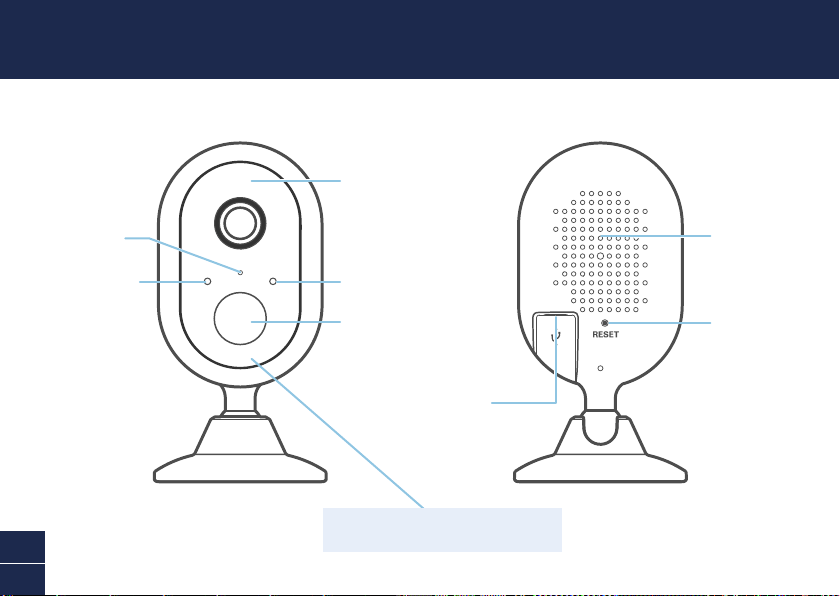
Nacht-Bewegungs-
sensor
Mikrofon
LED-Anzeige
Passiv-Infrarot
Bewegungssensor
Infrarot-LEDs
(für Nachtsicht)
Lautsprecher
Reset-Taste
Micro-USB-Anschluss
Entfernen Sie bitte vor Gebrauch die
Schutzfolie auf der Vorderseite der Kamera.
27
DE
KAMERA MIT STROM VERSORGEN
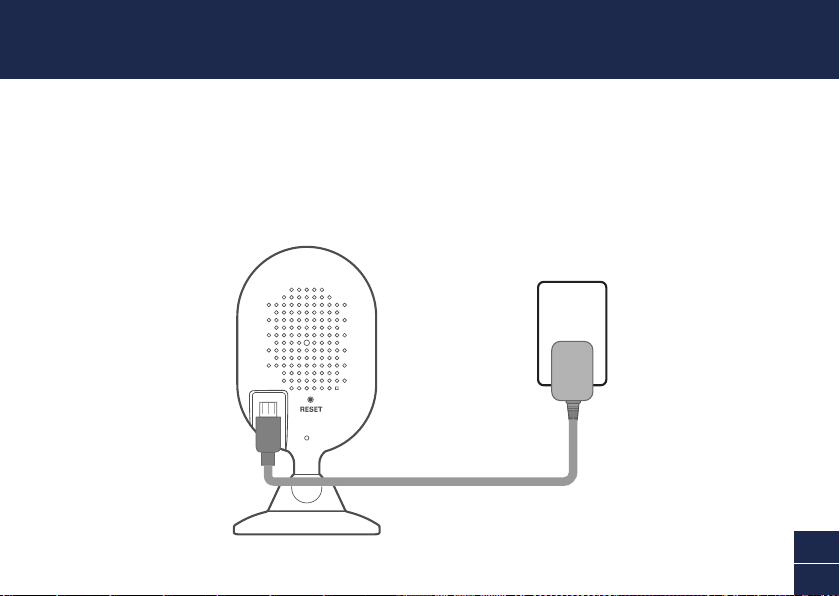
1 Stecken Sie den Mikro-USB-Stecker des mitgelieferten Stromadapters in den Micro-USB-
Anschluss auf der Rückseite der Kamera.
2 Verbinden Sie den Stromadapter mit einer Steckdose. Achten Sie darauf, dass sich die Kamera im
Empfangsbereich des WLAN befindet, mit dem Sie sie verbinden wollen.
28
DE
INSTALLATION DER SWANN
SECURITY APP
1 Laden Sie die aktuelle Version von der Swann Security App aus dem Apple App Store® oder
Google Play™ Store auf dem iOS- oder Android-Gerät. Suchen Sie einfach nach „Swann Security“.
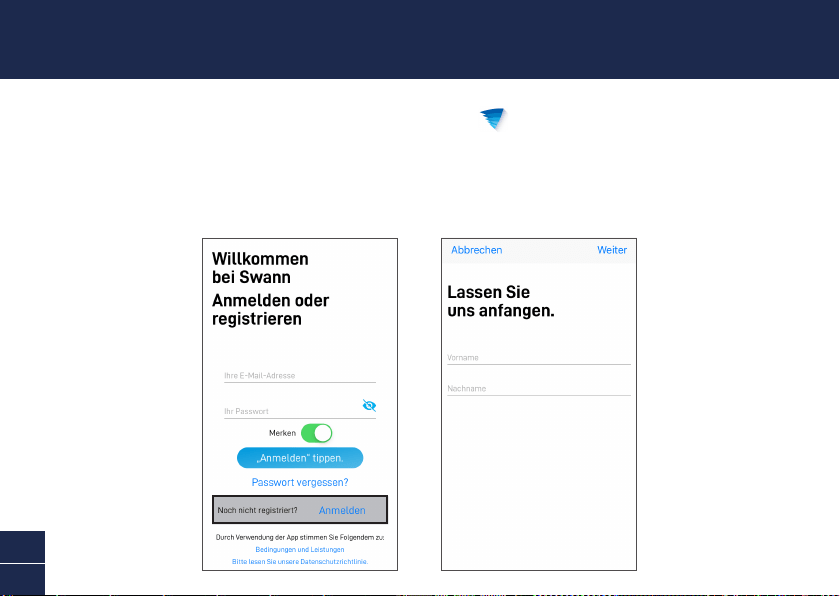
2 Öffnen Sie die App und erstellen ein Swann Security Konto. Sie müssen vor der Anmeldung Ihr
Konto aktivieren, indem Sie die E-Mail bestätigen, die an die registrierte E-Mail gesendet wurde.
29
DE
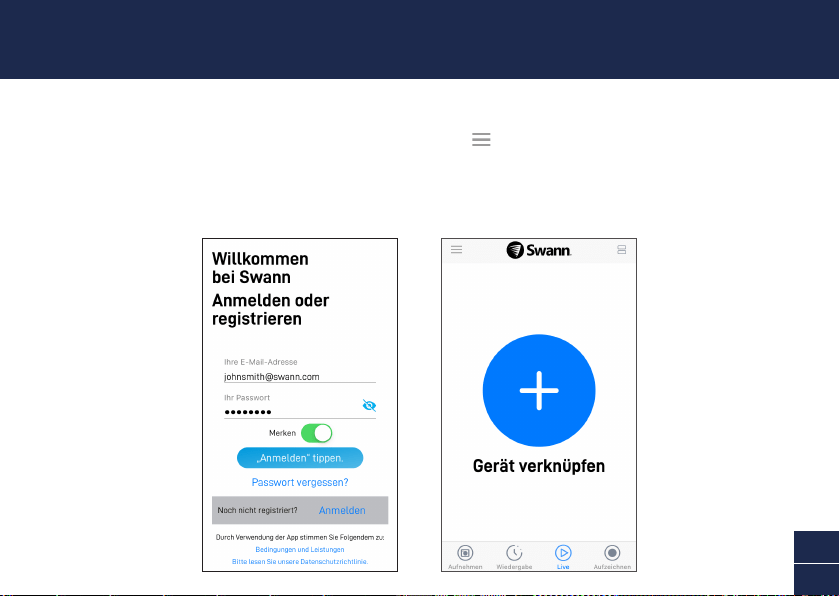
Starten Sie die Swann Security App und melden sichan. Tippen Sie auf die Schaltfläche Gerät
verknüpfen auf dem Bildschirm (oder öffnen Sie das Menü und wählen Gerät verknüpfen) und
befolgen die Anweisungen zum Einrichten der neuen Kamera. Bevor Sie beginnen sollten Sie dicht
an Ihrem Router oder Access Point stehen und die WLAN-Daten zur Hand haben (einschließlich dem
Passwort). Bitte beachten Sie, dass die Kamera nur mit einem 2.4GHz WLAN verbunden werden kann.
KAMERA EINRICHTEN
30
DE
Die Kamera kann auf einen Tisch oder ein Regal gestellt oder einfach an der Wand montiert werden.
Mit diesem flexiblen Ständer kann die Kamera frei geschwenkt werden, damit Sie Ihr Heim aus jedem
gewünschten Winkel überwachen können. Wählen Sie einen Ort mit gutem, zuverlässigem WLAN-
Empfang, um die beste Leistung für den Videostream zu gewährleisten. Allgemein gilt, je näher die
Kamera am Router steht, desto besser ist die Qualität der Wireless-Verbindung.
PLATZIERUNG DER KAMERA
Montage der Kamera
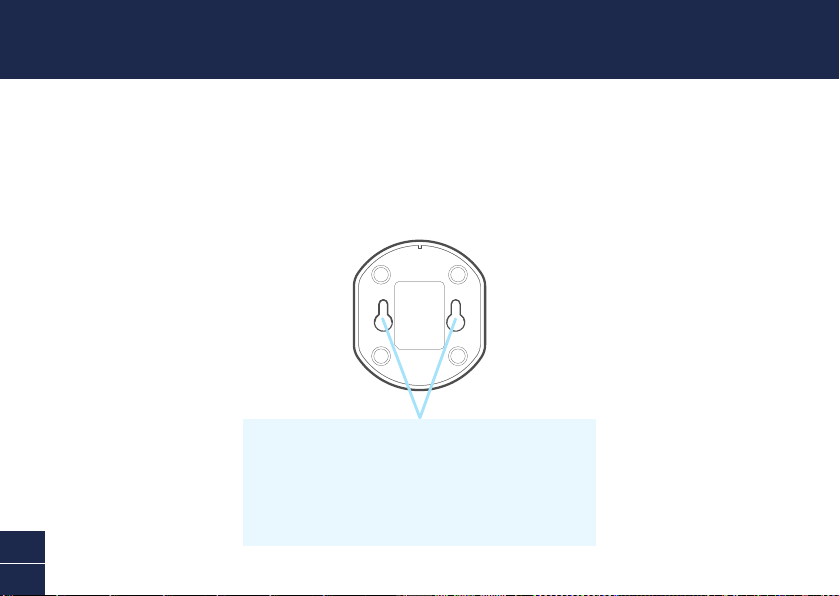
Die Rückseite des Kameraständers hat zwei Schlitze für
Schlüssellöcher, an denen die Kamera bequem an die Wand gehängt
werden kann. Befolgen Sie einfach die Anweisungen auf der
mitgelieferten Befestigungsvorlage, um die Löcher zu bohren und
die Schrauben zur Befestigung der Kamera zu verwenden.
31
DE
Noch Fragen?
Wir helfen Ihnen gerne. Besuchen Sie unser Support-Center auf support.swann.com. Sie können dort
Ihr Produkt registrieren und erhalten so technischen Support, Antworten auf häufig gestellte Fragen
und vieles mehr. Sie können uns auch jederzeit per E-Mail erreichen unter: [email protected]
TIPPS
Bewegungserkennung
Der PIR-Bewegungsmelder der Kamera erkennt Hitzesignaturen beweglicher Objekte. Sie erhalten im
Allgemeinen gute Erkennungsergebnisse, wenn Sie die Kamera in einem Winkel nach unten einstellen,
wo Leute durch den Deckungsbereich gehen, bevor sie direkt auf die Kamera zugehen.
LED-Anzeigenleitfaden
Die LED-Anzeige vorn an der Kamera informiert Sie über den Zustand des Geräts.
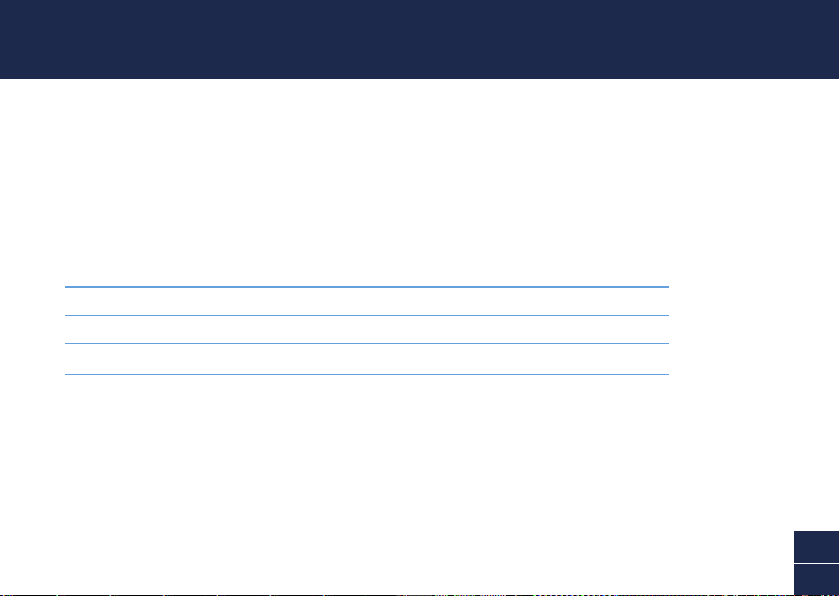
Durchgehend rot Live-Streaming/Bewegungsaufzeichnung
Blinkt Langsam blau WLAN-Kopplungsmodus
Blinkt schnell blau WLAN Verbinden
32
EN
© Swann Communications 2019
QSGSWIFIALERTCAMVER15L
Input: DC5V 1A
Important Safety Warning
For pluggable equipment, the socket-outlet shall be installed near the equipment and shall be easily accessible.
FCC Statement
This equipment has been tested and found to comply with the limits for Class B digital device, pursuant to part
15 of the FCC Rules. These limits are designed to provide reasonable protection against harmful interference
in a residential installation. This equipment generates, uses and can radiate radio frequency energy and, if not
installed and used in accordance with the instructions, may cause harmful interference to radio communications.
However, there is no guarantee that interference will not occur in a particular installation. If this equipment does
cause harmful interference to radio or television reception, which can be determined by turning the equipment
off and on, the user is encouraged to try to correct the interference by one or more of the following measures: •
Reorient or relocate the receiving antenna • Increase the separation between the equipment and the receiver •
Connect the equipment into an outlet on a circuit different from that to which the receiver is connected • Consult
the dealer or an experienced radio/TV technician for help.
This device complies with Part 15 of the FCC Rules. Operation is subject to the following two conditions: (1) this
device may not cause harmful interference, and (2) this device must accept any interference received, including
interference that may cause undesired operation.
FCC RF Radiation Exposure Statement Caution: To maintain compliance with the FCC’s RF exposure guidelines,
place the product at least 20cm from nearby persons.
WARNING: Modifications not approved by the party responsible for compliance could void user’s authority to
operate the equipment.
WiFi Frequency:2400~2500MHz,Max RF POWER:18.37dBm
IC Statement
This device complies with Industry Canada license-exempt RSS standard(s). Operation is subject to the following
two conditions: (1) this device may not cause interference, and (2) this device must accept any interference,
including interference that may cause undesired operation of the device.
The device is compliance with RF field strength limits, users can obtain Canadian information on RF exposure
and compliance.
This Class B digital apparatus complies with Canadian ICES-003. This equipment complies with IC radiation
exposure limits set forth for an uncontrolled environment. This equipment should be installed and operated with
minimum distance 20cm between the radiator & your body.
Déclaration IC
Le présent appareil est conforme aux CNR d’Industrie Canada applicables aux appareils radio exempts de licence.
L’exploitation est autorisée aux deux conditions suivantes : (1) l’appareil ne doit pas produire de brouillage, et (2)
l’utilisateur de l’appareil doit accepter tout brouillage radioélectrique subi, même si le brouillage est susceptible
d’en compromettre le fonctionnement.
Le présent appareil est conforme de ce matériel aux conformités ou aux limites d’intensité de champ RF,
les utilisateurs peuvent sur l’exposition aux radiofréquences et la conformité d’acquérir les informations
correspondante.
Cet appareil numérique de la classe B est conforme à la norme NMB-003 du Canada. Déclaration d’exposition
aux radiations : Cet équipement est conforme aux limites d’exposition aux rayonnements IC établies pour un
environnement non contrôlé. Cet équipement doit être installé et utilisé avec un minimum de 20 cm de distance
entre la source de rayonnement et votre corps.
EN CE marking on this product represents the product is in compliance with all directives that are applicable
to it. See www.swann.com/uk/compliance. This product should not be disposed with other household wastes
throughout the EU. To prevent possible harm to the environment or human health from uncontrolled waste disposal,
recycle it responsibly to promote the sustainable reuse of material resources. To return your used device, please
use the return and collection systems or contact the retailer where the product was purchased. They can take this
product for environment safe recycling. | ES La marca CE en este producto representa que el producto cumple con
todas las directivas de aplicación. Ver www.swann.com/uk/compliance. Este producto no debe arrojarse junto
con otros desperdicios domésticos en ningún lugar de los Estados Unidos. Para evitar posibles daños al medio
ambiente o a la salud humana debidos a desechos no controlados de desperdicios, recíclelo responsablemente
para promover la reutilización sostenible de los recursos materiales. Para devolver su dispositivo usado, utilice
los sistemas de devolución recolección, o contacte con el vendedor minorista donde compró el producto. Ellos
pueden llevar este producto al reciclado seguro para el medio ambiente. | FR Le marquage CE sur ce produit
indique que le produit est conforme à toutes les directives qui lui sont applicables. Voir www.swann.com/
uk/compliance. Ce produit ne doit pas être éliminé avec les autres déchets ménagers dans l’UE. Pour éviter
tout risque pour l’environnement ou la santé humaine d’une élimination incontrôlée des déchets, recyclez-le
de manière responsable afin de promouvoir la réutilisation durable des ressources matérielles. Pour retourner
votre appareil usagé, veuillez utiliser les systèmes de retour et de collecte ou contactez le revendeur chez qui
vous avez acheté le produit. Il pourra reprendre ce produit pour un recyclage sans danger pour l’environnement.
| IT Il simbolo CE su questo prodotto indica che il prodotto è conforme a tutte le direttive applicabili.
Vedi www.swann.com/uk/compliance. Questo prodotto non deve essere smaltito con altri rifiuti domestici in
tutta l’UE. Per evitare possibili danni all’ambiente o alla salute umana derivanti dallo smaltimento incontrollato
dei rifiuti, riciclarlo responsabilmente per promuovere il riutilizzo sostenibile delle risorse materiali. Per
restituire il dispositivo usato, utilizzare i simboli di reso e raccolta o contattare il rivenditore presso il quale
è stato acquistato il prodotto. Possono consegnare questo prodotto presso i centri di riciclaggio sicuro. |
DE Das CE-Zeichen auf diesem Produkt gibt an, dass es allen entsprechenden Bestimmungen entspricht.
Siehe www.swann.com/uk/compliance. Das Produkt in der EU nicht im Hausmüll entsorgt werden darf. Um
mögliche Umwelt- oder Gesundheitsgefahren durch unkontrollierte Müllentsorgung abzuwenden, recyceln Sie
es verantwortlich, um eine nachhaltige Wiederverwendung der Materialien zu fördern. Um ein benutztes Gerät
zurückzugeben, verwenden Sie bitte die Rückgabe- und Sammelsysteme oder kontaktieren den Händler, von dem
das Produkt erworben wurde. Sie können das Produkt zum umweltfreundlichen Recycling geben.
CHILD SAFETY WARNING Strangulation Hazard - If product is used to monitor infants or small children, keep
camera and USB power cable more than 1 metre (3ft) away out of their reach. Do not place camera or cord within a
cot, playpen or near a bed. ADVERTENCIA DE SEGURIDAD PARA NIÑOS Peligro de estrangulación: si el producto se
utiliza para controlar a bebés o niños pequeños, mantenga la cámara y el cable de alimentación de USB a más de
1 metro (3 pies) de distancia de su alcance. No coloque la cámara o el cable en una cuna, corralito o cerca de una
cama. AVERTISSEMENT DE SÉCURITÉ CONCERNANT LES ENFANTS Risque d'étranglement - Si le produit est utilisé
pour surveiller des nourrissons ou des enfants en bas âge, gardez l'appareil photo et le câble d'alimentation
USB à une distance de plus d'un mètre (3 pieds) de leur portée. Ne placez pas la caméra ou son câble dans un
berceau, un parc ou près d’un lit. AVVISO SULLA SICUREZZA BAMBINI Pericolo di strangolamento - Se il prodotto
è usato per controllare neonati o bambini piccoli, tenere la telecamera e il cavo di alimentazione USB a più di
1 metro (3ft) di distanza dalla loro portata. Non mettere la telecamera o il cavo in una culla, box o vicino ad un
letto. SICHERHEITSWARUNG FÜR KINDER Erstickungsgefahr - Wenn das Produkt zur Überwachung von Babys und
Kleinkindern verwendet wird, halten Sie Kamera und USB-Stromkabel mehr als 1 m außer Reichweite. Kamera
oder Kabel nicht im Kinderbett oder Laufstall anbringen.