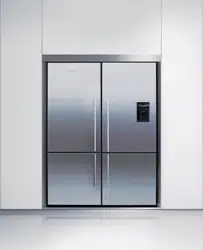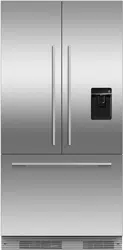
Thank you for buying a Fisher & Paykel Active Smart TM refrigerator with automatic ice dispensing
and chilled water through the door.
At Fisher & Paykel we are very proud of this refrigerator. We feel we have achieved water
dispensing through the door without compromising the storage space or access in the fridge.
During our testing we have enjoyed the health benefits of having coo[ filtered water so
accessible, while minimising the number of door openings.
Thousands of hours of food care research and 70 years of refrigeration
experience has been programmed into your refrigerator to give you the
best possible performance.
We hope you enjoy your new refrigerator.
Before you start using your Ice & Water refrigerator
Check refrigerator is switched on and has cooled for at least 2 hours (refer to page 15 - The
temperature of your refrigerator and freezer) before use.
o Check that the water filter has been connected and turned on.
Turn on ice maker.
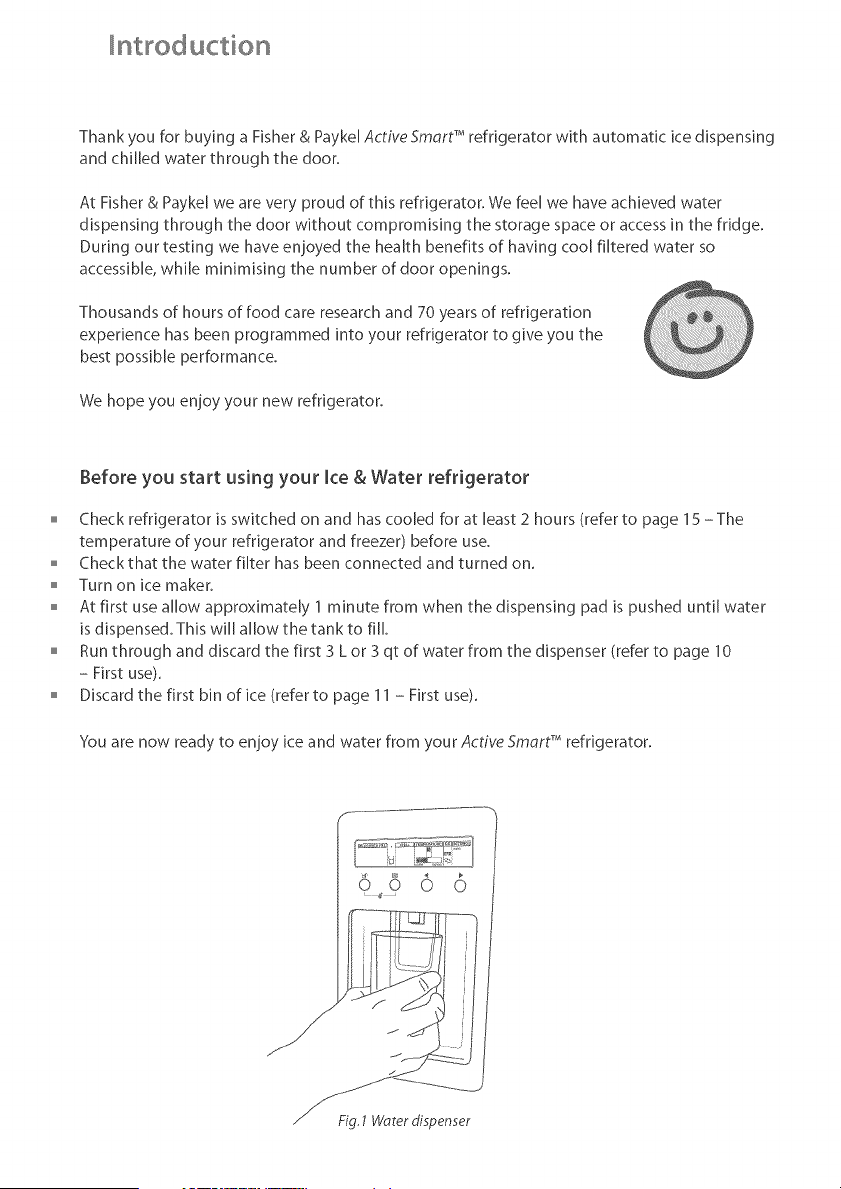
o At first use allow approximately 1 minute from when the dispensing pad is pushed until water
is dispensed. This will allow the tank to fill.
Runthrough and discard the fffst 3 L or 3 qt of water from the dispenser (refer to page 10
- First use).
Discardthe first bin of ice (refer to page 11 - First use).
You are now ready to enjoy ice and water from your Active Smc_rtTM refrigerator.
/if
Fig.1 Worerdispenser
Contents
_mportant safety instructions
hstallation instructions
All about the display
Usin 9 your water dispenser
Using your ice maker
Fridge options
Measured Fill
Freezer Ch [ and Bottle ChI!
The temperature of your refr ge_ator and freeze_
Settings/User warn ngs
Water filter
Measured Fill Calibration
Trouble shooting
Cleaning and caring for your refrigerator
On vacation/holiday
Manufacturers warranty
Performance data sheet
2
4
8
10
11
13
13
14
15
16
18
20
21
23
23
24
26
tmportand
This Ice & Water refrigerator booklet contains specific information about the ice end water
function on your refrigerator.
Please use this booklet in conjunction with the Refrigerator & Freezer User Guide supplied with
your refrigerator.
SAVE THESEINSTRUCTIONS
The models shown in this user guide may not be available in all markets and are subject to
change at any time. For current details about model and specification availability in your country,
please go to our website www.fisherpaykeLcom or contact your local Fisher & Paykel dealer.
mpo tant safety instructions
To reduce the risk of fire, electric shock, or injury to persons read the IMPORTANT SAFETY
PRECAUTIONS before operating this appliance.
Use this appliance only for its intended purpose as described in this User Guide.
important safety precautions
When using this appliance always exercise basic safety precautions including the following:
Danger
This appliance is not intended for use by young children or infirm persons without superdsiono
Young children should be supervised to ensure the}, do not play with the appfience°
Risk of child entrapment. Before you throw away your old refrigerator or freezer:
- Take off the doors
- Leave the shelves in place so that children may not easily climb inside.
Disposal
Extreme care must be taken when disposing of your old appliance to avoid hazards. The
refrigerant gas must be safely removed and for the safety of young children, remove doors.
o Your Fisher & Paykel Appliances Authorised Service Centre wifl be able to give advice on
environmentally friendly methods of disposing of your old refrigerator or freezer.
Electrical
This appliance must be properly installed in accordance with the instefletion instructions before
it is used.
Never unplug your refrigerator or freezer by pulling on the power cord.
o Always grip the plug firmly and pull straight out from the outlet.
o Do not plug in any other appfiance at the same power point as your refrigerator or freezer or use
extension cords or double adapters.
Rep_ir _r repl_ce immediately all electric service c_rds th_t have bec_me fr_yed _r _therw_se
damaged. Do not use a cord that shows cracks or abrasion along its length or at either the plug
or appfiance end.
If the power supply cord is damaged, it must only be replaced by },our Fisher & Paykel Appliances
Authorised Service Centre because special purpose tools are required.
When moving your appliance away from the wall, be careful not to roll over or damage the power
cord.
Unplug your refrigerator or freezer before cleaning or replacing the liqhtbulb°
mpo tant safety instructions
Storing food and drinks
o Never store volatile or flammable materials in your refrigerator or freezer as the}, may explode.
Never freeze fiquids in glass containers. Liquid expands during freezing, which may cause the
container to explode.
Never freeze carbonated drinks. The>, may explode.
Do not consume food if it is too cold_ Food removed from the freezer compartment may be cold
enough to cause damage when brought into contact with bare skin e.g. frozen ice cubes.
Power failure - food safety
o Do not refreeze frozen foods that have thawed completely. Foflow the recommendations below ff
you discover food in your freezer has thawed:
1)ice crystals still visible - food may be refrozen but should be stored for e shorter period then
recommended.
2) Thawed but refrigerator cold = refreezing generally not recommended. Fruits and some cooked
food can be refrozen but use as soon as possible. Meat, fish, poultry = use immediately or cook
then refreeze. Vegetables - discard as the>, usually go fimp and soggy.
3) Thawed but warmer than 4 °C (38 °F). Red meat can be cooked immediately and refrozen but
use as soon as possible. Discard all other frozen foods.
Do not refreeze frozen foods that have thawed completely. The food may be dangerous to eat.
Many commercially available cleaning products contain solvents which may attack plastic
components of your refrigerator or freezer and cause them to crack. Please refer to the cleaning
care section of this booklet for further advice.
SAVE THESEINSTRUCTIONS
_nsta_ation instructions
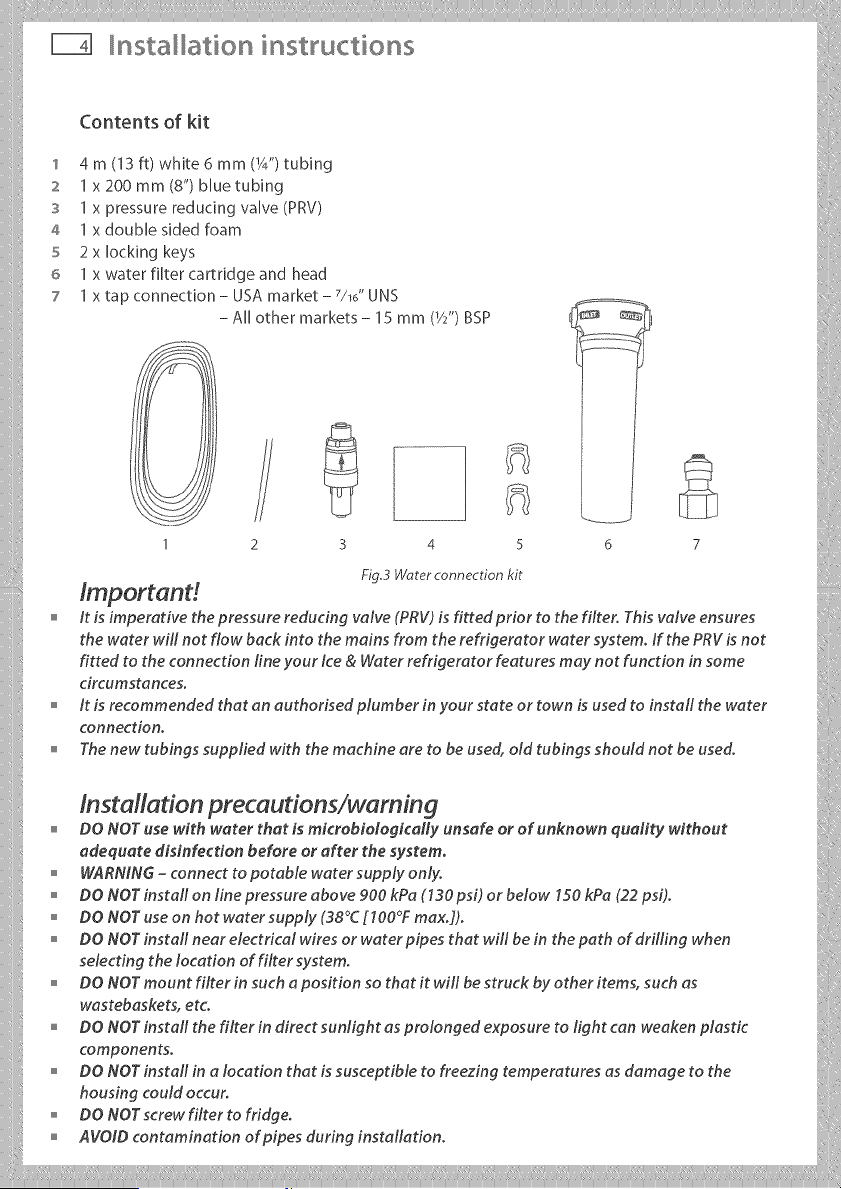
Contents of kit
1 4 m (13 ft) white 6 mm (W') tubing
:z 1 x2OOmm(8")bluetubing
3 1 x pressure reducing valve (PRV)
4 1 x double sided foam
5 2x locking keys
6 1 x water filter cartridge and head
7 1 x tap connection - USA market - 7/16" UNS
- All other markets - 15 mm (1/2")BSP
Fig.3 Waterconnection kit
Imp or tan d .......
it is imperative the pressure reducing valve (PRV) is fitted prior to the filter. This valve ensures
the water will not flow back into the mains from the refrigerator water system, if the PRV is not
fitted to the connection line your ice & Water refrigerator features may not function in some
circumstances.
it is recommended that an euthorised plumber in your state or town is used to install the water
connection.
" Thenewtubinqssuppliedwiththemechineeretobeused, oldtubinqsshouldnotbeused.
o
DO NOT use with water that is microbiologicMly unsafe or of unknown quality without
adequate disinfection before or after the ,ystem.
o WARNING-connecttopotablewatersupplyonly.
o DONorinstallonlinepressureaboy_900k_aC130psOorbelow1sokpac22psi;.
o DoNoruseonhotwatersupply_38Cr_O0Fmax...
" DO NOT install near electrical wires or water pipes that will be in the path of drilling when
selecting the location of filter system.
o DO NOT mount filter in such a position so that it will be struck by other items, such as
wastebaskets, etc.
, DO NOT install the filter in direct sunlight as prolonged exposure to light can weaken plastic
components.
" DO NOT install in a location that is susceptible to freezing temperatures as damage to the
housing could occur.
o DoNOTscrewfiltertofridge.
" AVOID contamination of pipes during installation.
nsta ation instructions
Installation instructions:
1 Ensure that refrigerator is not plugged into a power supply.
2 Remove the compressor compartment cover from the rear
of the refrigerator (USA market only).
3 Locate isolation tap for water connection - cold water feed
only (dishwasher or sink mixer taps) - if you can't find the
connection tap, contact an authofised plumber in your state
or town to fit your water connection.
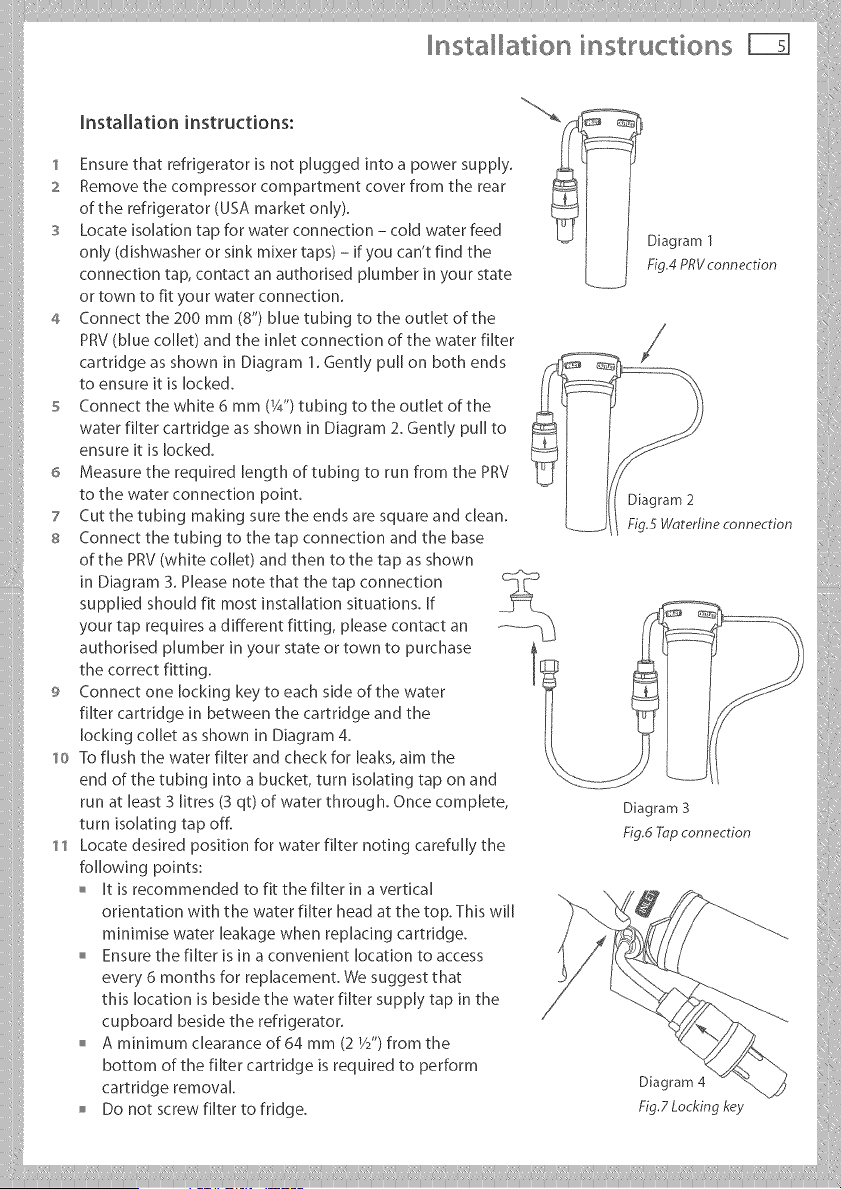
4 Connect the 200 mm (8") blue tubing to the outlet of the
PRV (blue coHet) and the inlet connection of the water filter
cartridge as shown in Diagram 1. Gently pull on both ends
to ensure it is locked.
5 Connect the white 6 mm (1/4")tubing to the outlet of the
water filter cartridge as shown in Diagram 2. Gently pull to
ensure it is locked.
6 Measure the required length of tubing to run from the PRV
to the water connection point.
7 Cut the tubing making sure the ends are square and clean.
s Connect the tubing to the tap connection and the base
of the PRV (white coJJet) and then to the tap as shown
Diagram 1
Fig,4 PRV connection
Diagram 2
Fig.5 Waterline connection
........................in Diagram 3. Please note that the tap connection c_? .....
supplied shouH fit most installation situations. If ...._
your tap requires a different fitting, please contact an ........ "L_!
authorised plumber in your state or town to purchase
the correct fitting. _
9 Connect one locking key to each side of the water '_
fi[ter cartridge in between the cartridge and the II
lockingcolIetas shown inDiagram 4. I[
10 To flush the water filter and check for leaks, aim the \_
end of the tubing into a bucket, turn isolating tap on and :
runatleast3,tres(3qt)ofwaterthroughOncecomplete,
turn so at ng tap off _ _ T............ ii
11 Locate desired position for water filter noting carefully the [
following points= ii
o It is recommended to fit the filter in a vertical //,_ j/_.
orientation with the water filter head at the top. This will [
minimise water leakage when replacing cartridge.
Ensure the filter is in a convenient location to access _.[. {
every 6 months for replacement. We suggest that \_.._.-\<--_...
this location is beside the water filter supply tap in the /
cupboard beside the refrigerator, hf_,}_},,,,
o A minirnum clearance of 64 mm (2 W') from the _...,. _/9"/_
bottom of the filter cartridge is required to perform _. _(_/_
cartridgeremoval. Diagram4 _ m.
Do not screw filter to frJdge. Fig.Z Locking key
Installation instructions
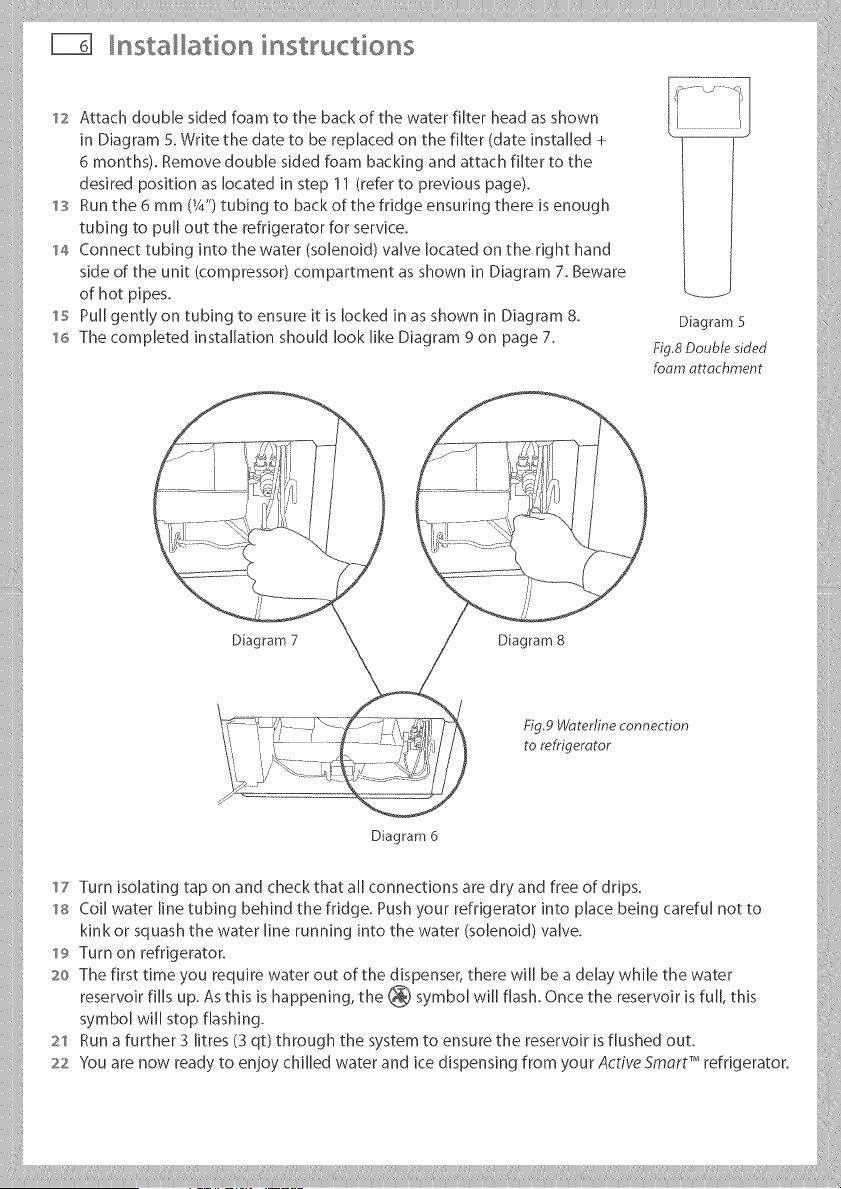
12 Attach double sided foam to the back of the water filter head as shown
in Diagram 5. Write the date to be replaced on the filter (date installed +
6 months). Remove double sided foam backing and attach filter to the
desired position as located in step 11 (refer to previous page).
'13 Run the 6 mm (14") tubing to back of the fridge ensuring there is enough
tubing to pull out the refrigerator for service.
'14 Connect tubing into the water (solenoid) valve located on the right hand
side of the unit (compressor) compartment as shown in Diagram 7. Beware
of hot pipes.
'15 Pull gently on tubing to ensure it is locked in as shown in Diagram 8.
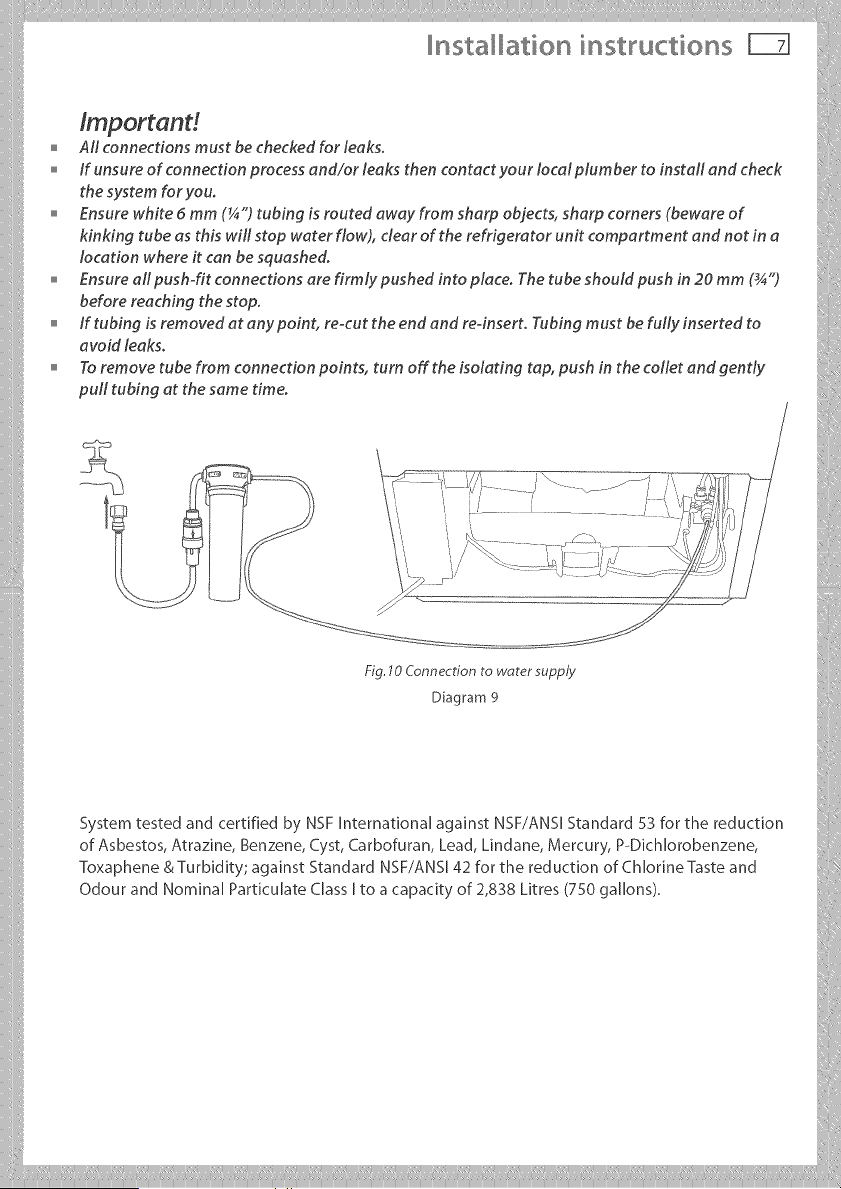
'16 The completed installation should look like Diagram 9 on page 7.
Diagram 5
Fig,8 Double sided
foam attachment
i!I
-'_-:_I"W _ Fig.P#_,terline connection
. i i± _ to refrigerator :
Diagram6
17 Turn isolating tap on and check that all connections are dry and free of drips.
,'==coilwaterlinetubingbehindthefridge.Pushyourrefrigeratorintoplacebeingcarefulnotto
kinkorsquashthewaterlinerunningintothewaterlsolenoidlvalve.
,,=9Turnonrefrigerator.
:,oThefirsttimeyourequirewateroutofthedispenser,therewUlbeadelaywhUethewater
reservoir fills up. As this is happening, the @ symbolwill flash. Once the reservoir is fuji, this
symbol will stop flashing.
2"_ Run a further 3 [itres (3 qt)through the system to ensure the reservoir is flushed out. _:i
22YouarenowreadytoenioychilledwaterandicedispensingfromyourA_t,VeS_n'_'refrigerator./
nsta ation instructions FIE
tmportand
Aft connections must be checked for leaks.
o if unsure of connection process end/or leaks then contact your Iocalplumber to instafl end check
the system for you.
Ensure white 5 mm (¼") tubing is routed away from sharp objects, sharp corners (beware of
kinking tube as this will stop water flow), clear of the refrigerator unit compartment and not in a
location where it can be squashed.
Ensure all push-fit connections are firmly pushed into piece. The tube should push in 20 mm (_")
before reaching the stop.
if tubing is removed at any point, re-cut the end and reqnsert. Tubing must be fully inserted to
avoid leaks.
To remove tube from connection points, turn off the isolating tap, push in the toilet and gently
pull tubing at the same time.
i .lOConnec ionto
9
System tested and certifiedby NSF InternationalagainstNSF/ANSI Standard 53 forthe reduction
of Asbestos,Atrazine,Benzene,Cyst,Carbofuran,Lead,Lindane,Mercury,P-Dichlorobenzene,
Toxaphene &Turbidity;againstStandard NSF/ANS142 forthe reductionofChlorineTasteand
Odour and Nornina[ Particulate Class [to a capacity of 2,838 Litres (750 gallons).
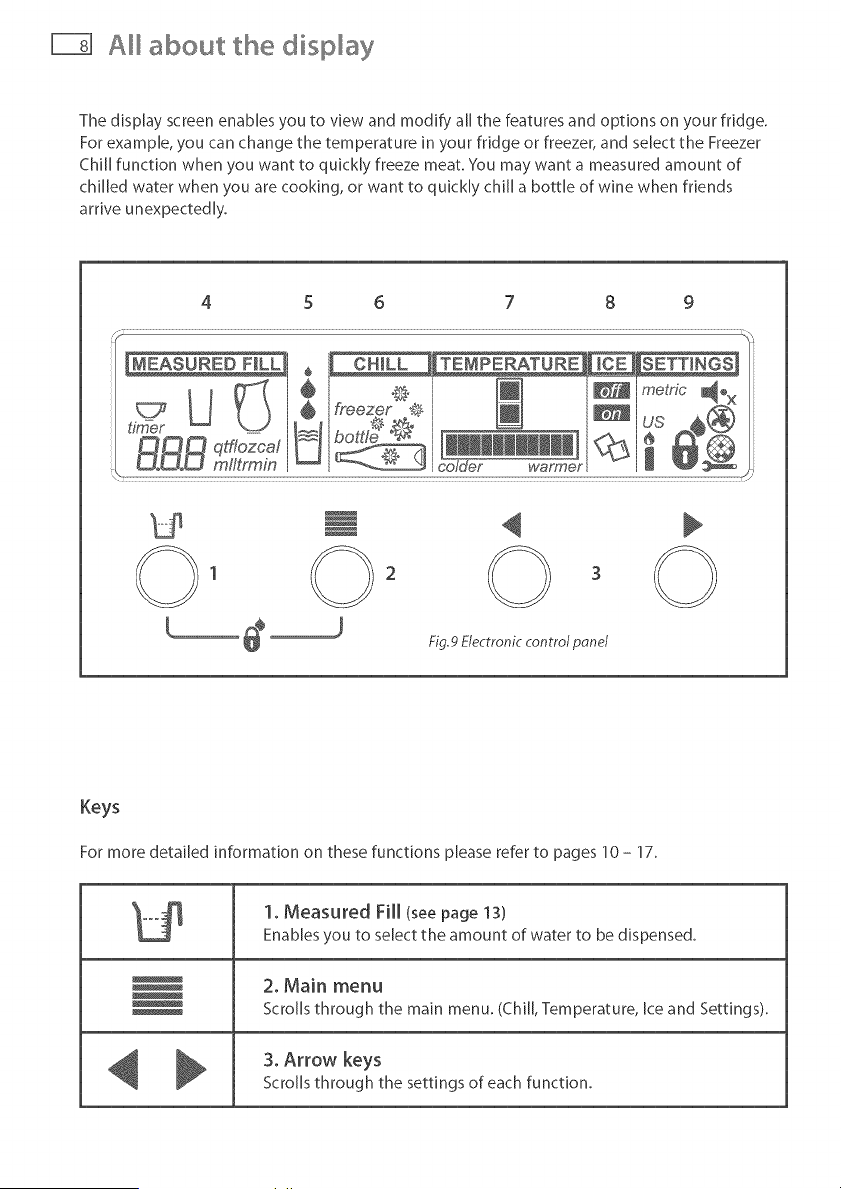
about the display
The display screen enables you to view and modify all the features and options on your fridge.
For example, you can change the temperature in your fridge or freezer, and select the Freezer
Chili function when you want to quickly freeze meat. You may want a measured amount of
chilled water when you are cooking, or want to quickly chili a bottle of wine when friends
arrive unexpectedly.
4 5 6 7 8 9
Fig.9 Electronic control pond
Keys
For more detailed information on these functions please refer to pages 10 - 17.
t2
1. Measured Fill (seepage 13)
Enables you to select the amount of water to be dispensed.
2. Main menu
Scrolls through the main menu. (Chill, Temperature, Ice and Settings).
3. Arrow keys
Scrolls through the settings of each function.
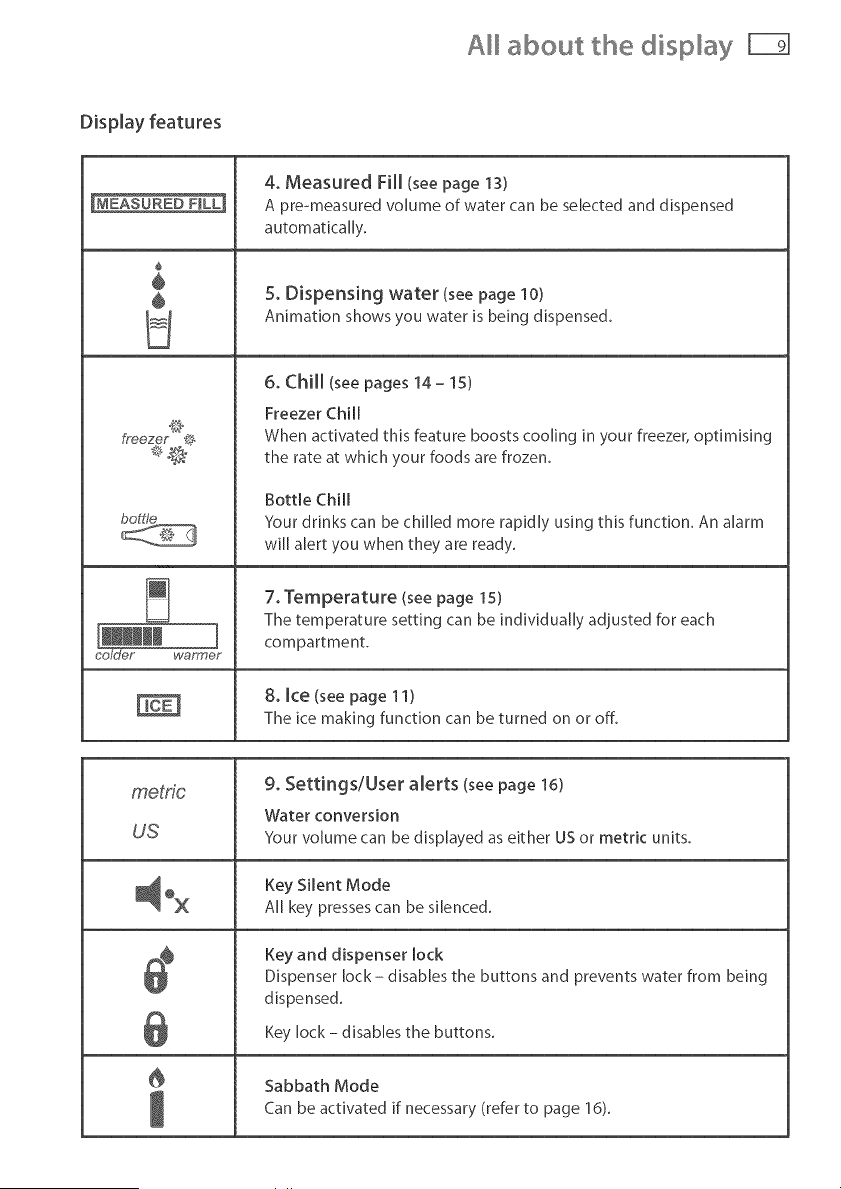
about the display
[MEASURED F_LL_
÷
÷
÷
WaY_G_I@Y
4. Measured Fill (seepage 13)
A pre-measured volume of water can be selected and dispensed
automatically.
5. Dispensing water (see page 10)
Animation shows you water is being dispensed.
6. Chill (see pages 14 - 15)
Freezer Chill
When activated this feature boosts cooling in your freezer, optimising
the rate at which your foods are frozen.
Bottle Chill
Your drinks can be chilled more rapidly using this function. An alarm
will alert you when they are ready.
7. Temperature (see page 15)
The temperature setting can be individually adjusted for each
compartment.
8, Ice (see page 11)
The ice making function can be turned on or off.
metric 9. Settings/User alerts (see page 16)
Water conversion
US Your volume can be displayed as either US or metric units.
Key Silent Mode
All key presses can be silenced.
l
Key and dispenser lock
Dispenser lock - disables the buttons and prevents water from being
dispensed.
Key lock - disables the buttons.
Sabbath Mode
Can be activated if necessary (refer to page 16).
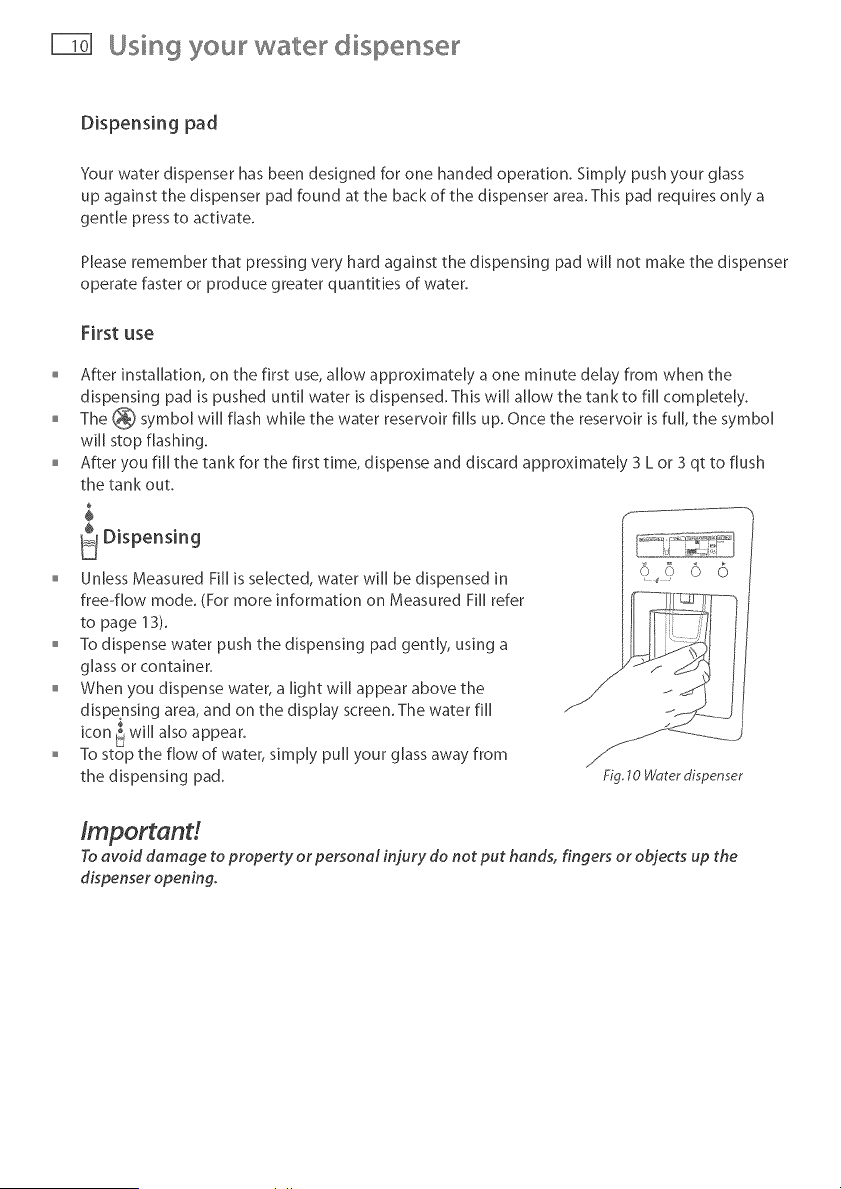
Using your wate dispense
Dispensing pad
Your water dispenser has been designed for one handed operation. Simply push your glass
up against the dispenser pad found at the back of the dispenser area. This pad requires only a
gentle press to activate.
Please remember that pressing very hard against the dispensing pad wi[[ not make the dispenser
operate faster or produce greater quantities of water.
First use
After installation, on the first use, allow approximately a one minute delay from when the
dispensing pad is pushed until water is dispensed. This w[[[ allow the tank to fi[[ completely.
o The _ symbol wi[[ flash while the water reservoir fi[[s up. Once the reservoir is fuji, the symbol
wi[[ stop flashing.
After you fi[[ the tank for the first time, dispense and discard approximately 3 L or 3 qt to flush
the tank out.
$
÷
Dispensing
Unless Measured Fi[[ is selected, water wi[[ be dispensed in
free-flow mode. (For more information on Measured Fi[[ refer
to page 13).
To dispense water push the dispensing pad gently, using a
glass or container.
When you dispense water, a light wi[[ appear above the
dispensing area, and on the display screen. The water fi[[
t, .
icon _ wl[[ also appear.
To stop the flow of water, simply pu[[ your glass away from
the dispensing pad.
0 o 0 0
Fig.10 Worerdispenser
/mportand
To avoid damage to property or personal injury do not put hands, fingers or objects up the
dispenser opening.
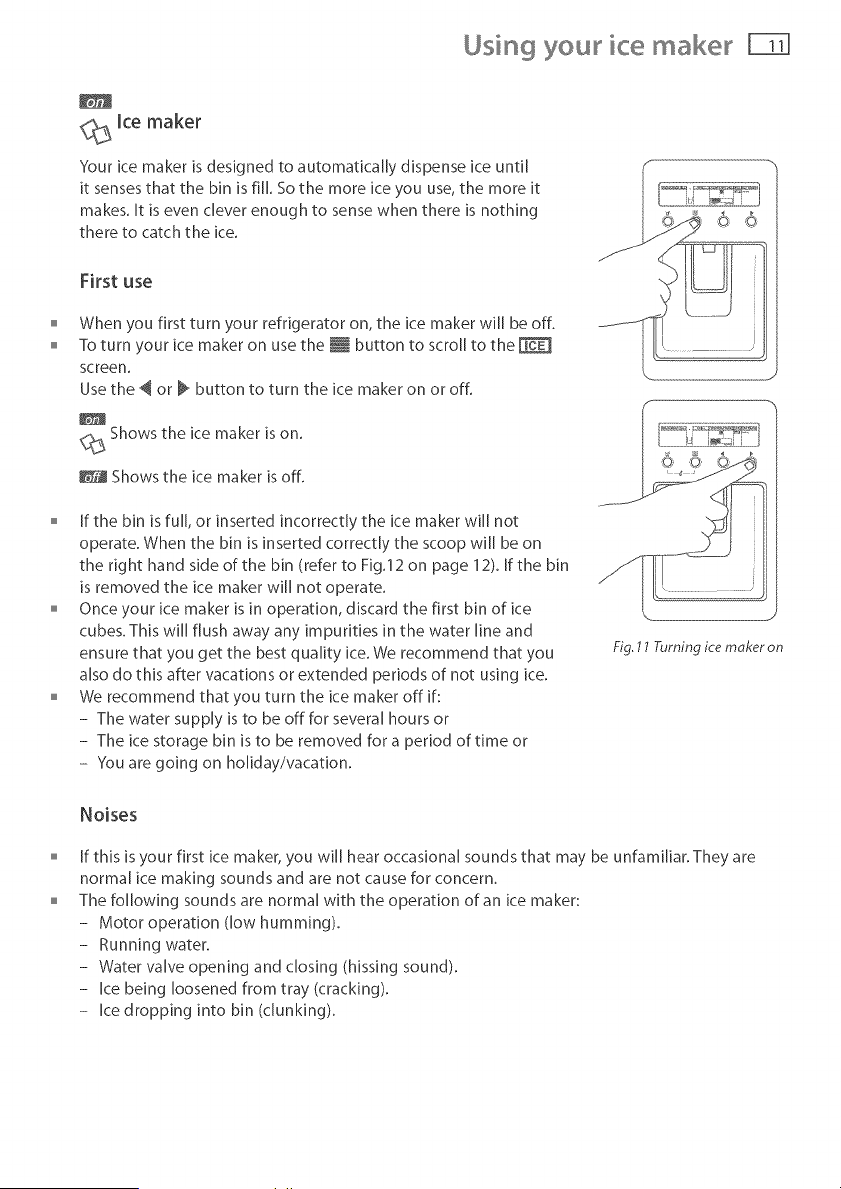
Using your ice maker F
_._ ice maker
Your ice maker [s designed to automatically dispense ice until
[t senses that the bin [s fill So the more ice you use, the more [t
makes. [t [s even clever enough to sense when there [s nothing
there to catch the ice.
First use
When you first turn your refrigerator on, the ice maker will be off.
To turn your ice maker on use the i button to scroll to the
screen.
Usethe @or _ button to turn the ice maker on or off.
Shows the ice maker is on.
_@ Shows the ice maker is off.
S
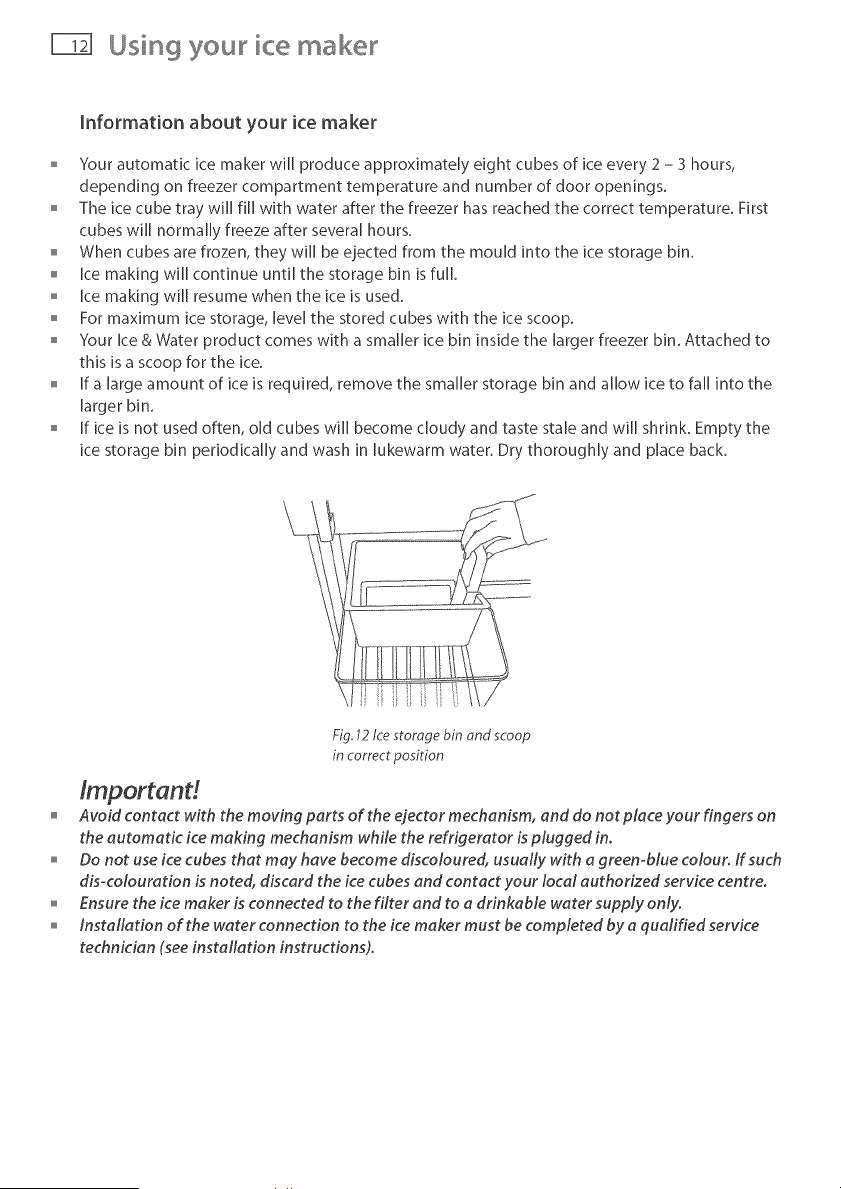
o [f the bin is fuji, or inserted incorrectly the ice maker will not
operate. When the bin is inserted correctly the scoop w[[[ be on
the right hand side of the bin (refer to Fig.12 on page 12). If the bin
is removed the ice maker wi[[ not operate.
Once your ice maker is in operation, discard the first bin of ice
cubes. This will flush away any impurities in the water line and
ensure that you get the best quality ice. We recommend that you
also do this after vacations or extended periods of not using ice.
We recommend that you turn the ice maker off if:
- The water supply is to be off for several hours or
- The ice storage bin is to be removed for a period of time or
- You are going on holiday/vacation.
Fig, 11 Turning ice moker on
Noises
[f this is your first ice maker, you will hear occasional sounds that may be unfamiliar. They are
normal ice making sounds and are not cause for concern.
The following sounds are normal with the operation of an ice maker:
- Motor operation (low humming).
- Running water.
- Water valve opening and closing (hissing sound).
- Ice being loosened from tray (cracking).
- Ice dropping into bin (clunking).
Using your ice make
information about your ice maker
)'our automatic ice maker will produce approximately eight cubes of ice every 2 - 3 hours,
depending on freezer compartment temperature and number of door openings.
The ice cube tray will fill with water after the freezer has reached the correct temperature. First
cubes will normally freeze after several hours.
When cubes are frozen, they wi[[ be ejected from the mould into the ice storage bin.
ice making wi[[ continue until the storage bin is full
o ice making will resume when the ice is used.
For maximum ice storage, [eve[ the stored cubes with the ice scoop.
)'our Ice & Water product comes with a smaller ice bin inside the larger freezer bin. Attached to
this is a scoop for the ice.
if a [argo amount of ice is required, remove the smaller storage bin and allow ice to fail into the
larger bin.
o if ice is not used often, old cubes wi[[ become cloudy and taste stale and will shrink. Empty the
ice storage bin periodically and wash in lukewarm water. Dry thoroughly and place back.
Fig, 12 Ice storage bin and scoop
in correct position
tmportand
Avoid contact with the moving parts of the ejector mechanism, and do not place your fingers on
the automatic ice making mechanism while the refrigerator is plugged in.
Do not use ice cubes that may have become discoloured, usually with a green-blue colour. If such
dis-colouration is noted, discard the ice cubes and contact your local authorized service centre.
Ensure the ice maker is connected to the filter and to a drinkable water supply only.
o installation of the water connection to the ice maker must be completed by a quafified service
technician (see installation instructions).
Fddge options
_ Measured Fill
One useful feature of your water dispenser is it's ability to dispense a pre-measured amount of
water. This comes in handy when cooking or preparing drinks.
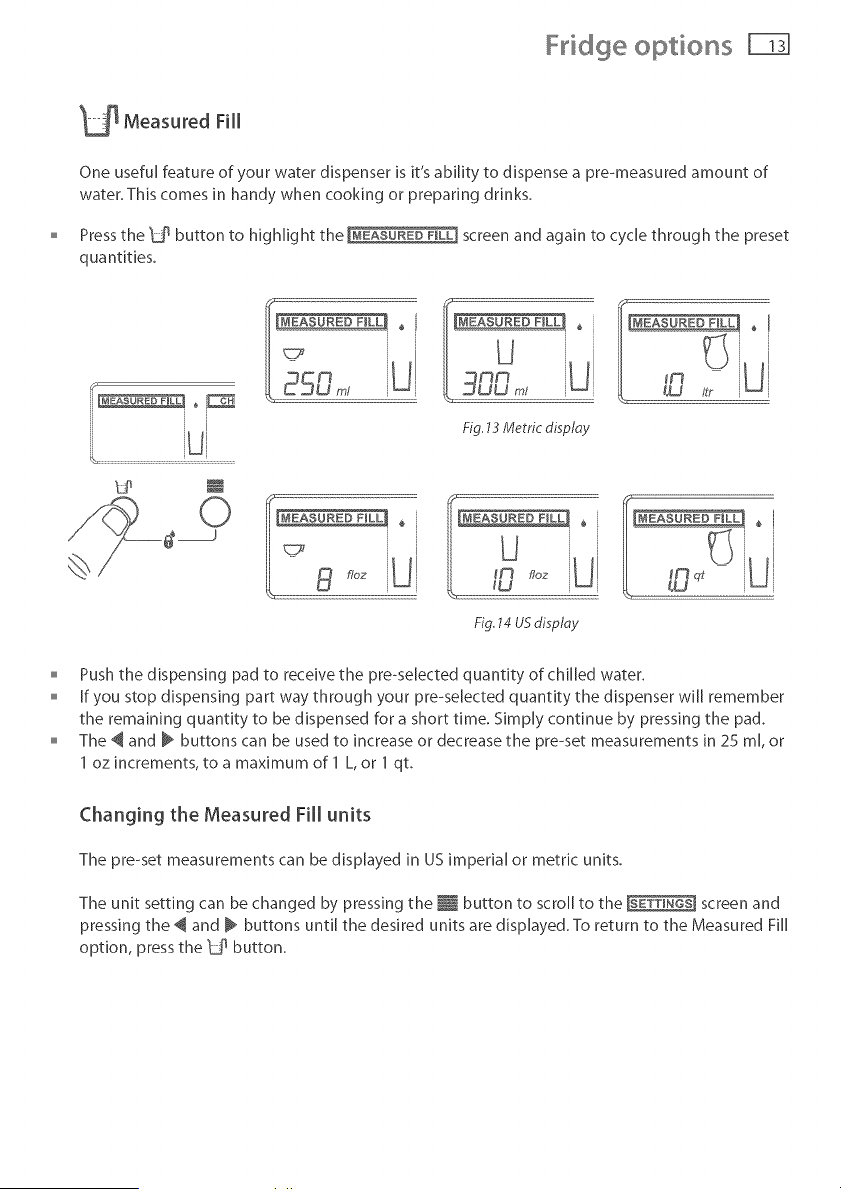
Press the 1_ button to highlight the screen and again to cycle through the preset
quantities.
Fig, 13 Metric disploy
0 LL
__)
1!, - 8 f/oz
Fig.14 USdisplay
o Push the dispensing pad to receive the pre-seJected quantity of chilled water.
o if you stop dispensing part way through your pre-selected quantity the dispenser will remember
the remaining quantity to be dispensed for a short time. Simply continue by pressing the pad.
The @ and _ buttons can be used to increase or decrease the pre-set measurements in 25 m[, or
1 oz increments, to a maximum of 1 L, or 1 qt.
Changing the Measured Fill units
The pre-set measurements can be displayed in US imperial or metric units.
The unit setting can be changed by pressing the _ button to scroll to the screen and
pressing the @ and @ buttons until the desired units are displayed. To return to the Measured F][[
option, press the _ button.
Fddge options
fmezer ®
_.@ Freezer Chill
We know that the faster food is frozen, the better the overall q uality of the food, so we have
created the Freezer Chili feature.
The Freezer Chili feature drops the freezer to it's coldest temperature for a 12 hour period and
then returns to its normal mode. You may wish to use this when freezing a quantity of meat or
when you are making frozen desserts.
To activate, use the _ button to scroll to the screen. Then use the _ button until
".....<_ is displayed.
o To deactivate manually, use the i button to scroll to the screen. Then use the
IS no freezer @ screen.< and @ buttons until there _ii icon in the
For best results, we recommend that you activate the function approximately 2 hours before it is
required. Alternatively, activate it when placing food into the freezer.
Bottle Chill
This function allows you to chili your beverages in the freezer without the worry of forgetting
about them.
When activated Bottle Chili wi[[ remind you to remove your bottle by sounding an alarm. The
user alarm wi[[ continue to sound until any key on the panel is pressed.
The time taken to chili depends on the size of your bottle. Bottle Chili allows you to customise
this chill time.
Recommended times:
20 minutes - can or small bottle.
25 minutes - wine bottle or similar size beverage.
30 minutes - larger bottle.
if you remove your beverage from the freezer and it is not chilled to your liking, reset the timer
to 10 minutes and place the beverage back into the freezer.
To activate, use the _ button to scroll to the screen. Then use the _ button until
is displayed.
Then use the _ button to select 10, 15, 20, 25 or 30 minutes as displayed on the [eft hand side of
the screen in the IMEASUREDF_L] screen.
An alarm wi[[ sound after the amount of time selected has elapsed.
Fddge options 1-i31
Bottle Chill contd...
Important!
Do not leave the bottle inside the freezer longer then the time needed for chilling,
To deactivate manuaJ[y, use the i button to scroJ[ to the screen, then use the
and @ buttons until there is no icon in the screen.
Note: The freezer chill and bottle chili option cannot be used at the same time.
The temperature of your refrigerator and freezer
o When the refrigerator is first turned on it wi[[ take approximately 2 to 3 hours to coo[, depending
on the humidity and temperature of the environment.
To adjust the temperature of a compartment, use the _ button to scroll to the [TEMPERATURE]
screen, use the _ button to select the compartment to change.
The temperature can then be adjusted using the _ button to make the compartment warmer or
the _ button to make the compartment colder.
The temperature setting wi[[ be indicated on the icon below.
[ mHi I
cofd@r waFmor
it is important to have your refrigerator set to the correct temperature. Setting it too cold may
cause some items in the refrigerator to freeze, and setting it too warm wi[[ decrease the storage
life of your food.
For further information on food storage temperatures refer to the food care section in the
general Refrigeration & Freezer User Guide.
Fddge options
Settings
Water unit conversion
You can change the units your refrigerator uses between USand metric units. To change the
units pressthe _ button to scroll to the screen option and press one of the _ or
buttons until the desired units are displayed.
_÷X Key Silent Mode
The Key Silent Mode allows you to silence all key presses.
it can be activated or deactivated by holding the _ button for four seconds.
When Key Silent Mode is on 4°× will appear.
When this function is off no symbol will appear.
Note: Faults, Bottle Chili timer and the door alarm will still sound when the refrigerator is set on
Key Silent Mode.
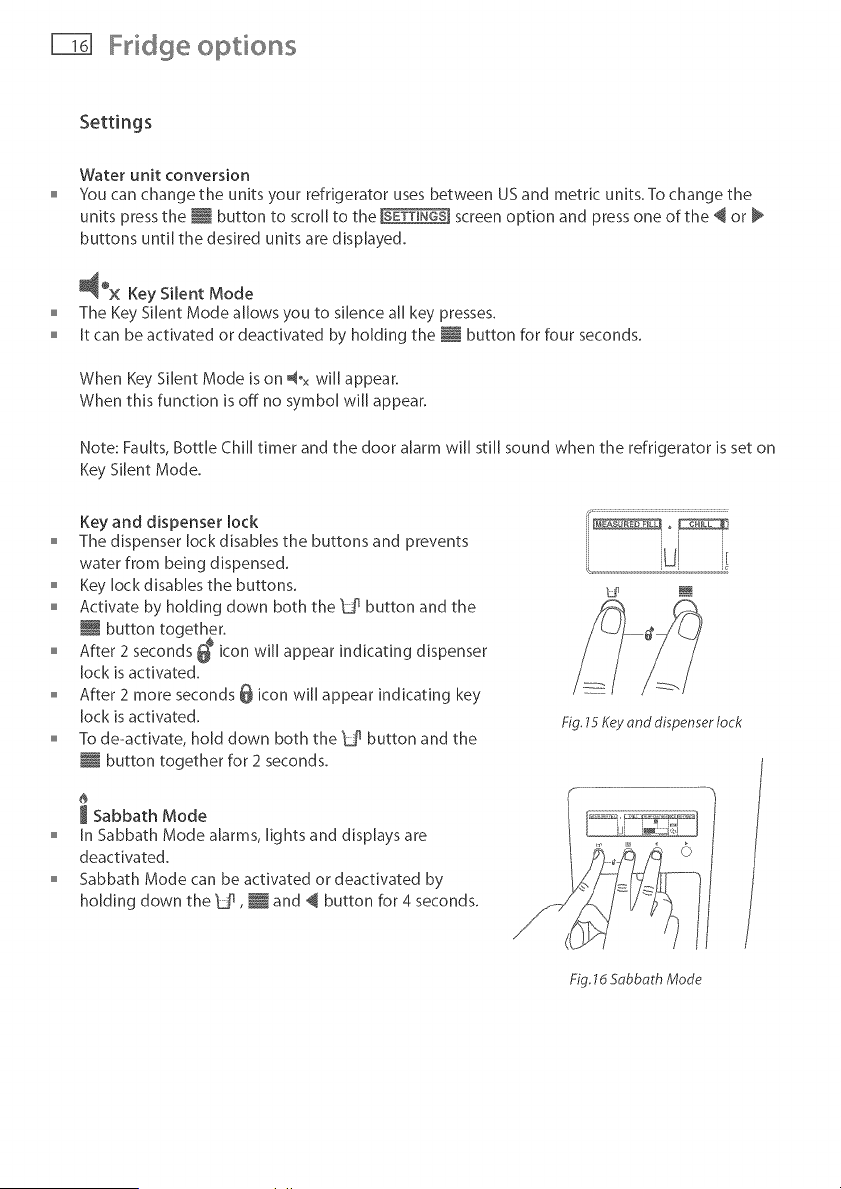
Key and dispenser lock
The dispenser Jack disables the buttons and prevents
water from being dispensed.
Key lock disables the buttons.
Activate by holding down both the _d_ button and the
button together.
After 2 seconds _ icon will appear indicating dispenser
Jack is activated.
o After 2 more seconds @ icon will appear indicating key
Jack is activated.
To de-activate, hold down both the "ba button and the
i button together for 2 seconds.
J Sabbath Mode
In Sabbath Mode alarms, lights and displays are
deactivated.
Sabbath Mode can be activated or deactivated by
holding down the 'Uq , _ and @ button for 4 seconds.
I; ................................................................................
ii °
Fig. 15 Key and dispenser lock
Fig. ld Sabbath Mode
Fddge options 1-i71
Settings
Once in Sabbath Mode:
The interior light will not turn on when the refrigerator is opened.
The door alarm will not operate.
The display will not be illuminated.
o Electronic control panel will not work,
Note: If power is turned off the refrigerator wiJJautomatically continue in Sabbath Mode once
power is restored. Sabbath Mode will automatically de-activate after 80 hours.
User warnings
Your refrigerator is clever enough to diagnose it's own problems. It will alert you when there is
a fault.
No water
The no water icon @ will appear when the water supply to the refrigerator is interrupted.
Please refer to the Trouble shooting checklist (refer to pages 21 - 22).
Filter reset
The filter reset icon Q will appear when the water filter needs changing. This wH[ flash when
dispensing water. To change the filter and reset the filter icon refer to pages 18 - 19.
Fault
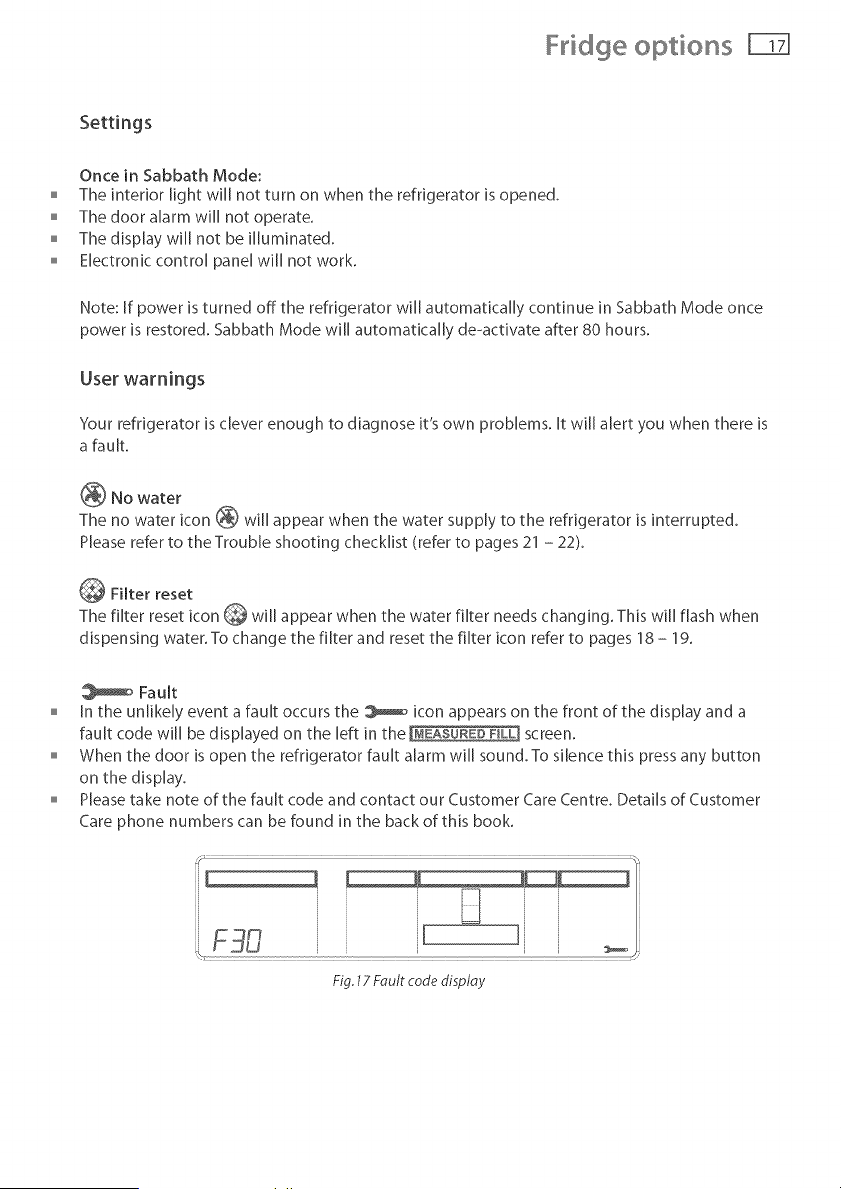
In the unlikely event a fault occurs the _ icon appears on the front of the display and a
fault code will be displayed on the left in the [MEASURZDPILL] screen.
When the door is open the refrigerator fault alarm will sound. To silence this press any button
on the display.
Please take note of the fault code and contact our Customer Care Centre. Details of Customer
Care phone numbers can be found in the back of this book.
F30 , [
Fig. 17 Fault code display
Water fi te
All the water to your fridge is filtered to remove impurities through a cartridge located in a
position of your choice outside the refrigerator. Of course, this will need changing approximately
every 6 months or up to 2800 L depending on the quality of the incoming water and how much
you use the dispenser.
There is a replacement indicator Q icon on the control panel which will appear when the filter
needs replacing. It will flash, when dispensing water, as a reminder.
Rephcement cartridges are available from your authorised Fisher and Paykd Dealer.The details
of the replacement cartridge are on the label on the cartridge.
Changing the water filter cartridge
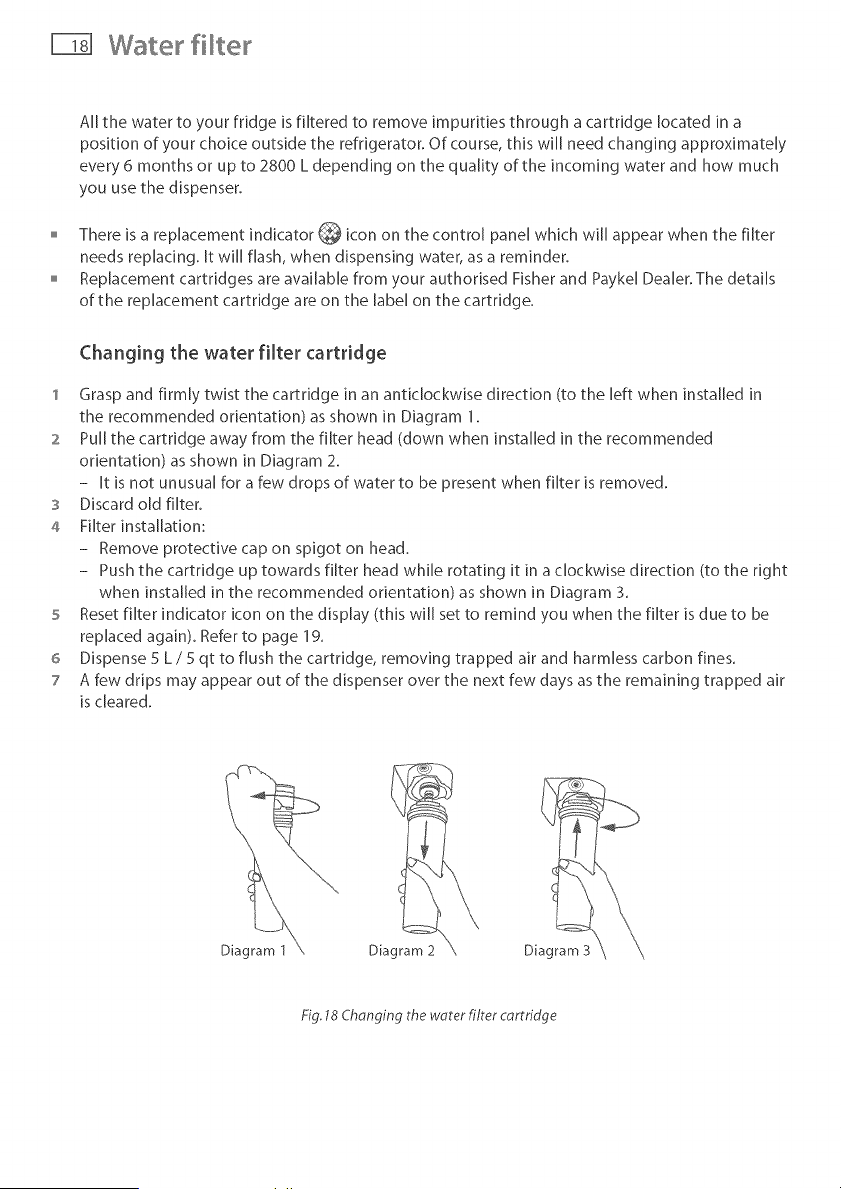
1 Grasp and firmly twist the cartridge in an anticJockwise direction (to the left when installed in
the recommended orientation) as shown in Diagram 1.
2 Pull the cartridge away from the filter head (down when installed in the recommended
orientation) as shown in Diagram 2.
- It is not unusual for a few drops of water to be present when filter is removed.
3 Discard old filter.
4 Filter installation:
- Remove protective cap on spigot on head.
- Push the cartridge up towards filter head while rotating it in a clockwise direction (to the right
when installed in the recommended orientation) as shown in Diagram 3.
5 Reset filter indicator icon on the display (this will set to remind you when the filter is due to be
replaced again). Refer to page 19.
6 Dispense 5 L / 5 qt to flush the cartridge, removing trapped air and harmless carbon fines.
7 A few drips may appear out of the dispenser over the next few days as the remaining trapped air
is cleared.
Diagram 1 Diagram 3
Fig. 18 Chonging the woter filter cartridge
Water fi te F-D
To reset filter indicator
tmportand
We recommend the water filter is used from installation.
Do not reset monitor before filter is changed or filter monitoring will be inaccurate.
Press and hold _Jqand _ buttons for 4 seconds to reset the filter indicator.
[f present the Q icon in the screen will disappear when reset.
To disable filter indicator
Note: if disabled, you will not be reminded to change your filter.
When no filter is to be fitted, you can disable the filter indicator.
Press and hold _u_, _ and @ buttons for 4 seconds to turn this feature off/on.
When activated or deactivated the Q icon will flash and on or off will be displayed in the
[MEASURED FILq screen.
We recommend that you do not disable the filter indicator if you have a filter fitted to the
connection.
Importand
To avoid serious illness or death, do not use the water filter where water is unsafe or of unknown
quality without adequate disinfection before or after use of filter.
The water filter cartridge needs to be changed when the filter indicator icon flashes on the
interface panel
We recommend the water filter cartridge is replaced when the _ icon flashes. This wifl happen
ever}, 6 months or 2800 L.
if the water filtration system has been allowed to freeze, replace filter cartridge.
o If system has not been used for several months and water has an unpleasant taste or odour,
flush system by dispensing 3 L or 3 qt of water, if unpleasant taste or odour persists, change
filter cartridge.
Measured Fill Calibration
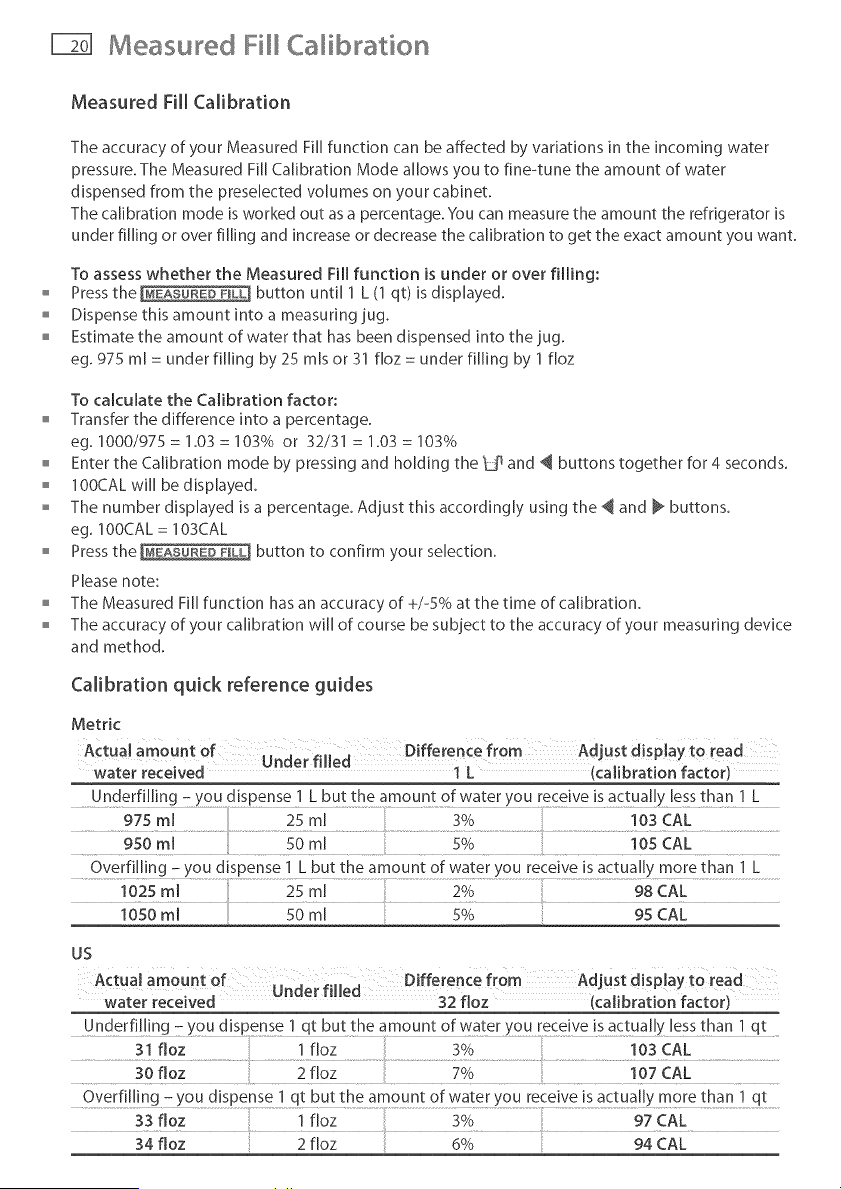
Measured Fill Calibration
The accuracy of your Measured Fill function can be affected by variations in the incoming water
pressure.The Measured Fi[[ Calibration Mode allows you to fine4une the amount of water
dispensed from the preselected volumes on your cabinet.
The calibration mode is worked out asa percentage.You carl measurethe amount the refrigerator is
under filling or over filling and increaseor decreasethe calibration to get the exact amount you want.
To assess whether the Measured Fill function is under or over filling:
Press the [_EASURED FmLL] button until 1 L (1 qt) is displayed.
Dispense this amount into a measuring jug.
Estimate the amount of water that has been dispensed into the jug.
eg. 975 m[ = under filling by 25 mls or 31 floz = under filling by 1 floz
To calculate the Calibration factor:
Transfer the difference into a percentage.
eg. 1000/975 = 1.03 = 103% or 32/31 = 1.03 = 103%
Enter the Calibration mode by pressing and holding the _dq and _ buttons together for 4 seconds.
o IOOCALwIII be displayed.
The number displayed is a percentage. Adjust this accordingly using the _ and _ buttons.
eg. 100CAL = 103CAL
Press the [MEASUREDFILl] button to confirm your selection.
Please note:
The Measured Fill function has an accuracy of +/-5% at the time of calibration.
The accuracy of your calibration wi[[ of course be subject to the accuracy of your measuring device
and method.
Calibration quick reference guides
Metric
water received 1 L (calibration factor)
Underfilling - you dispense 1 L but the amount of water you receive is actually less than 1 L
Overfilling - you dispense 1 L but the amount of water you receive is actually more than 1 L
.........................i02smi ..............................................................mi ............................................................................................................................................................................................................................................2O/o 98CAL
us
Underfi! !ng z you dispense 1 qt but the amount of water you [ece Ve is actually less ttlan ! qt
31 floz 1 floz 3% 103 CAL
Overfilling - you dispense 1 qt but the amount of water you receive is actually more than 1 qt
.......................................................................33 floz i fioz ....................................................3O/o....................................................................................................97 CAL
34 floz
Trouble shooting I-$1
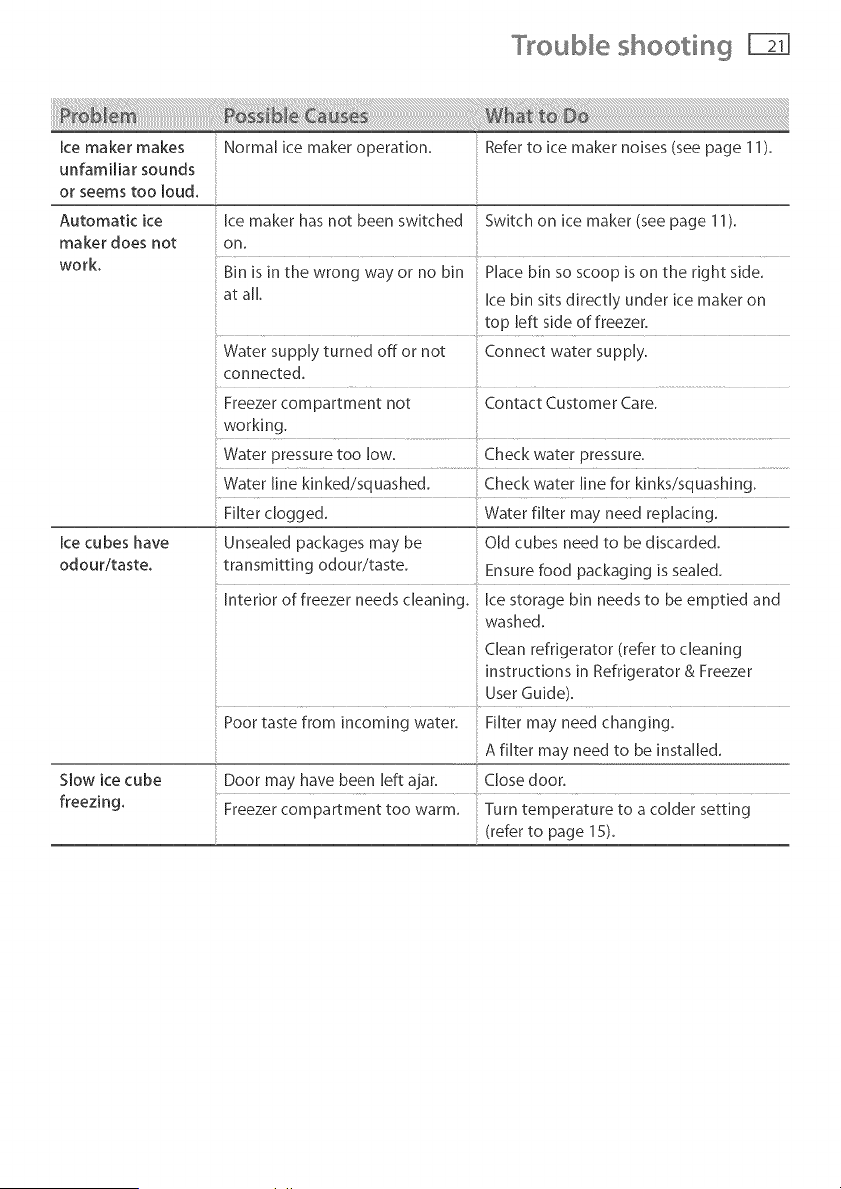
Ice maker makes
unfamiliar sounds
or seems too loud.
Automatic ice
maker does not
work.
Ice cubes have
odouritaste,
Slow ice cube
freezing.
Normal ice maker operation. ;; Refer to ice maker noises (see page 11).
Ice maker has not been switched Switch on ice maker (see page 11).
on,
Bin is in the wrong way or no bin Place bin so scoop is on the right side.
at all. Ice bin sits directly under ice maker on
top left side of freezer,
Water supply turned off or not Connect water supply.
connected.
Freezer compartment not Contact Customer Care.
working.
Water pressure too low. Check water pressure,
Water line kinked/squashed. Check water line for kinks/squashing.
Filter clogged. Water filter may need replacing.
Unsealed packages may be Old cubes need to be discarded.
transmitting odour/taste, Ensure food packaging is sealed,
Interior of freezer needs cleaning. Ice storage bin needs to be emptied and
washed.
Clean refrigerator (refer to cleaning
instructions in Refrigerator & Freezer
User Guide),
Poor taste from incoming water. Filter may need changing.
A filter may need to be installed.
Door may have been left ajar, Close door.
Freezer compartment too warm. Turn temperature to a colder setting
(refer to page 15).
°'[rouble shooti g
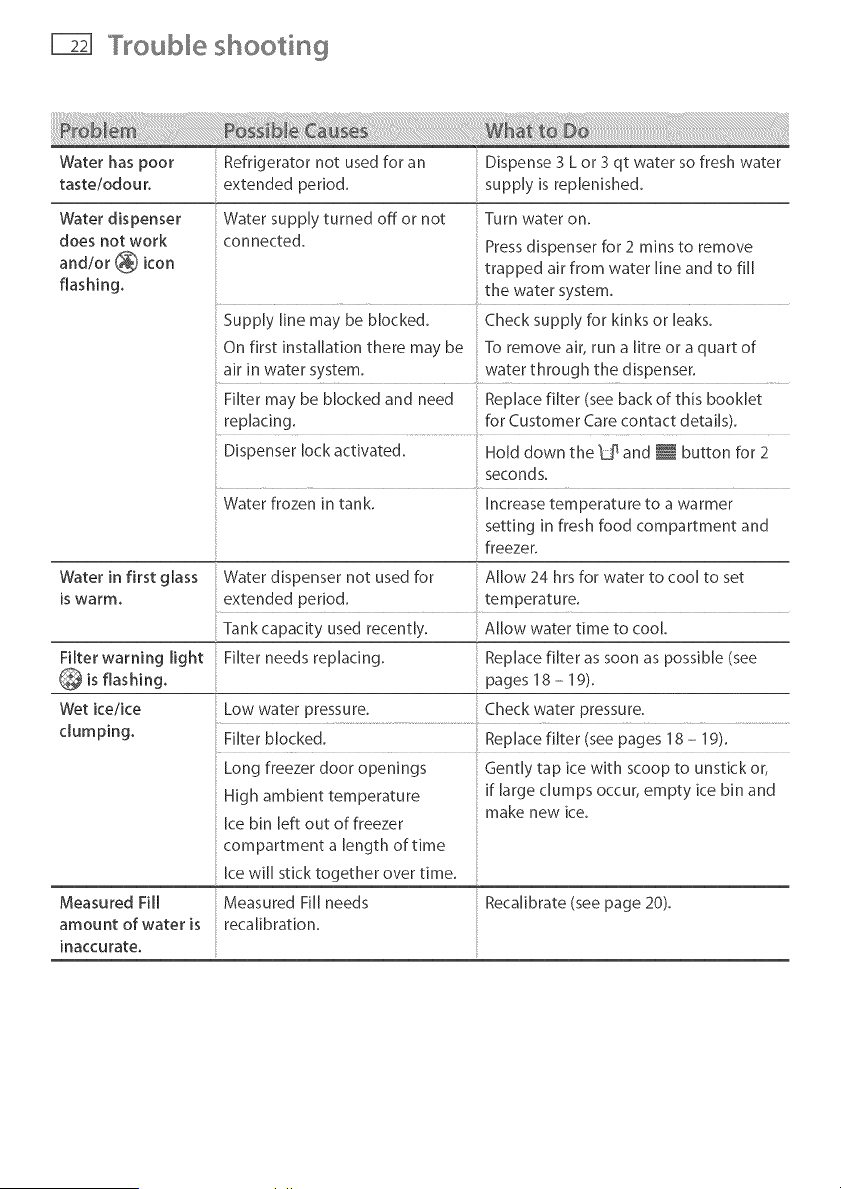
Water has poor
tasteiodour.
Water dispenser
does not work
and/or _ icon
flashing,
Refrigerator not used for an Dispense 3 L or 3 qt water so fresh water
extended period, supply is replenished.
Water supply turned off or not Turn water on.
connected. Press dispenser for 2 rains to remove
trapped air from water line and to fill
............... the water system.
Supply line may be blocked. Check supply for kinks or leaks.
On first installation there may be To remove air, run a [itre or a quart of
air in water system, water through the dispenser.
Filter may be blocked and need Replace filter (see back of this booklet
replacing, for Customer Care contact details).
Dispenser lock activated. Hold down the _jq and _ button for 2
seconds.
Water frozen in tank. Increase temperature to a warmer
setting in fresh food compartment and
freezer.
Filter warning light
Wet keike
clumping.
Water in first glass Water dispenser not used for Allow 24 hrs for water to cool to set
is warm. extended period, temperature.
Tank capacity used recently. Allow water time to cool.
Filter needs replacing. Replace filter as soon as possible (see
pages 18 - 19).
Low water pressure. Check water pressure.
Measured Fill
amount of water is
inaccurate.
Long freezer door openings
High ambient temperature
ice bin left out of freezer
compartment a length of time
[ce wi[[ stick together over time.
Measured Fill needs
recahbrat[on.
Gently tap ice with scoop to unstick or,
if large clumps occur, empty ice bin and
make new ice.
Reca[ibrate (see page 20).
C eaning and caring for your refrigerator
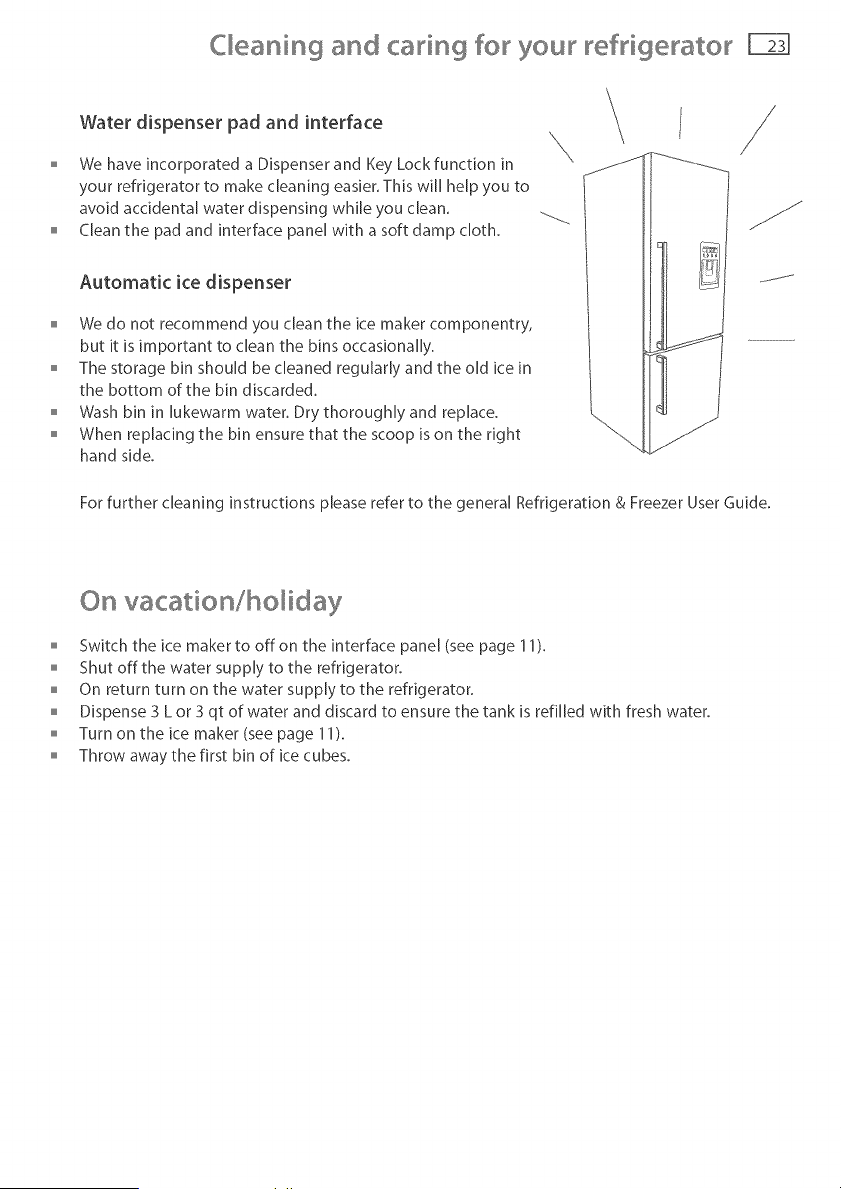
Water dispenser pad and interface
o We have incorporated a Dispenser and Key Lock function in
your refrigerator to make cleaning easier. This will help you to
avoid accidental water dispensing while you dean.
Clean the pad and interface panel with a soft damp cloth.
Automatic ice dispenser
We do not recommend you clean the ice maker componentry,
but it is important to clean the bins occasionally.
o The storage bin should be cleaned regularly and the old ice in
the bottom of the bin discarded.
Wash bin in lukewarm water. Dry thoroughly and replace.
When replacing the bin ensure that the scoop is on the right
hand side.
For further cleaning instructions please refer to the general Refrigeration & Freezer User Guide.
On vacation/holiday
Switch the ice maker to off on the interface panel (see page 11).
Shut off the water supply to the refrigerator.
On return turn on the water supply to the refrigerator.
Dispense 3 L or 3 qt of water and discard to ensure the tank is refilled with fresh water.
o Turn on the ice maker (see page 11).
Throw away the first bin of ice cubes.
Manufacturers warranty
Before you call for service or assistance ...
Check the things you can do yourself. Referto the installation instructions and your user guide
and check that:
1 Your product is correctly installed.
2 You are familiar with its normal operation.
If after checking these points you still need assistance please refer to the following...
In New Zealand If You Need Assistance.. _
Call your Fisher & Paykel retailer who is trained to provide information on your appliance, or if we
can be of any further help, please contact our Customer Care Centre,
Toll Free: 0800 FP CARE or 0800 37 2273
Fax: (09) 273 0656
Postal Address: Fisher & Paykel Appliances Limited, PO Box 58732 Greenmount, Auckland
If you need service... _
Fisher & Paykel has a network of independent Fisher & Paykel AUTHORISED SERVICE CENTRES
whose fully trained technicians can carry out any service necessary on your appliance. Your
dealer or our Customer Care Centre can recommend an AUTHORISED SERVICECENTRE in
your area.
In Australia If You Need Assistance... _
Please call our Fisher & Paykel Customer Care Centre.
Toll Free: 1300 650 590
Fax: (07) 3826 9298
Postal Address: Fisher & Paykel Appliances Limited, PO Box 798, Cleveland, QLD4163
If you need service.., e
Fisher & Paykel Australia Pty Ltd has a network of independent Fisher & Paykel AUTHORISED
CUSTOMER SERVICECENTRES whose fully trained technicians can carry out any service necessary
on your appliance. Our Customer Care Centre can recommend an AUTHORISED SERVICECENTRE
in your area.
In United Kingdom If You Need Assistance... _
Phone: (0845) 066 2200
Fax: (0845) 331 2360
Postal Address: Fisher & Paykel Appliances Limited, Pheasant Oak Barn, Hob Lane,
Balsall Common, CV7 7GX
Manufacturers warranty
In Ireland If You Need Assistance,,,*
Phone: 01800 625 174
Fax:01800 635 012
Emaih c ustomer.care@fisherpaykeLie
Postal Address: Fisher & Paykel Appliances Limited, Unit 3, North Park, North Road,Dublin 11
For the Rest of the World...*
Call your Fisher & Paykel retailer/dealer from whom you purchased the product. They are trained
to provide information on your appliance. If we can be of any further help, please contact us on:
Phone: +64 9 273 0660
Fax: +64 9 273 0580
Postal Address: Fisher & Paykel Appliances Limited, PO Box 58550, Greenmount, Auckland, New
Zealand
In Europe If You Need Assistance.,,*
Please refer to website for regional service providers.
www.fisherpaykeLcom
In USA If You Need Assistance.,,*
Toll Free: 1 888 9 FNP USA or 1 888 367 872
Fax: 949 790 8913
Postal Address: Fisher & Paykel Appliances [nc, 5900 Skylab Road, Huntington Beach, CA 92647,
USA
Feel free to contact us at our website on
www.fisherpaykel.com
_[f you call or write, please provide: name, address, model number, serial number, date of
purchase and a description of the problem. This information is needed in order to better respond
to your request for assistance.
Product Details
Fisher & Payke[ Appliances Ltd
Model/Serial No.
Date of Purchase Purchaser
Dealer Suburb
Town Country
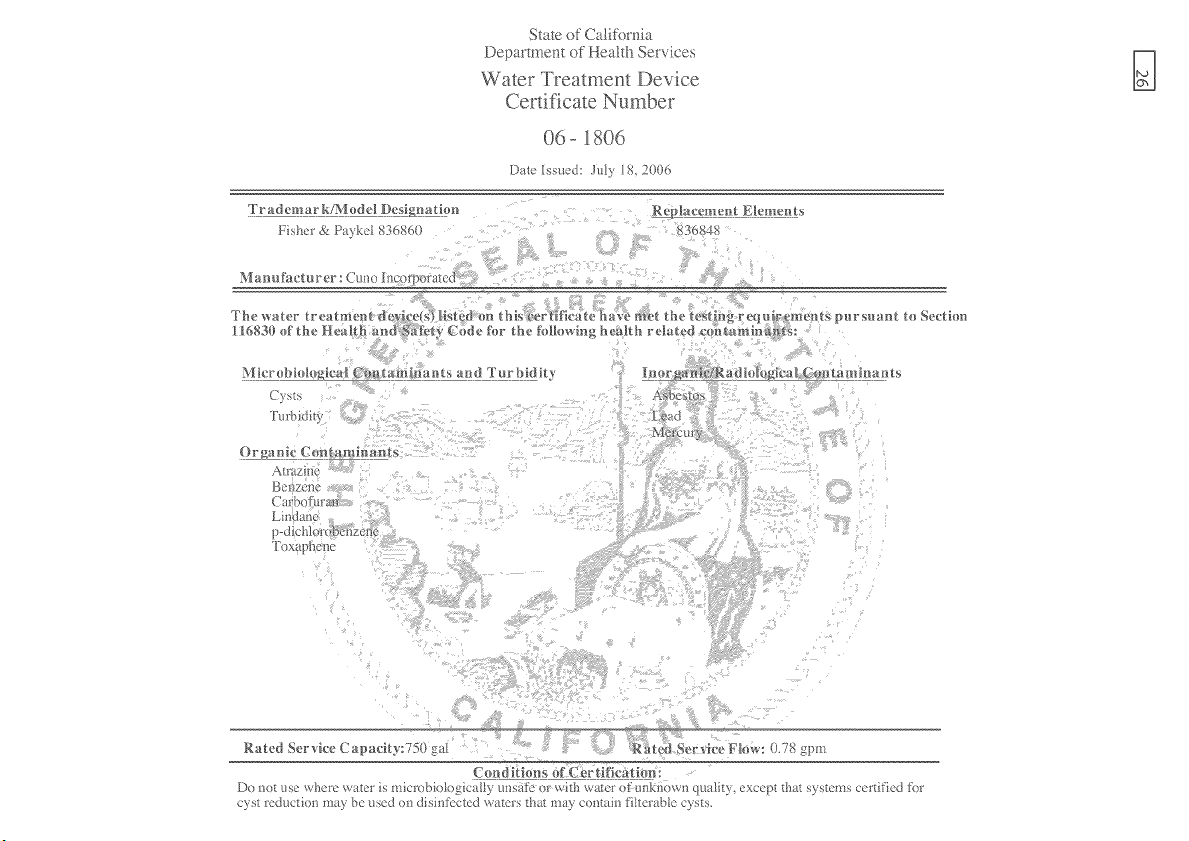
State of Cali%mia
Department of Heath Services
Water Treatment Device
Certificate Number
06-1806
Date Issued: JaW 18. 2006
r r ad emar kK*vh_dd Desig_aHon R ep _ac_,mentE}temen t _
}-isl_er e< P_\kd 83{_8{_0 56848
Manu_a, cturer : Cuao h° a_r_orated
Secthm
g
_ga _ic (>m_t a mf_vagits
Air zinc
BCBTC_X
Carbo_ara?
ToxaDl?c;ilo
Rated Service Ca pacity:750 g:d Rgted germ-ice Flow: 0.78 gpm
C o_ d _t%n s of C===_._rtificat hm:
Da not sc where w_tcr is microbiohagica[l 3 asatc or wi/h water of =:lllkilox\_lq ltli_), except tba_ .%stems ccrdficd h_r
c3 s! rod {orlon m/) be seal on disintcctcd _/lets _ha_ ma) co Vain fittcrabtc c3 s_,
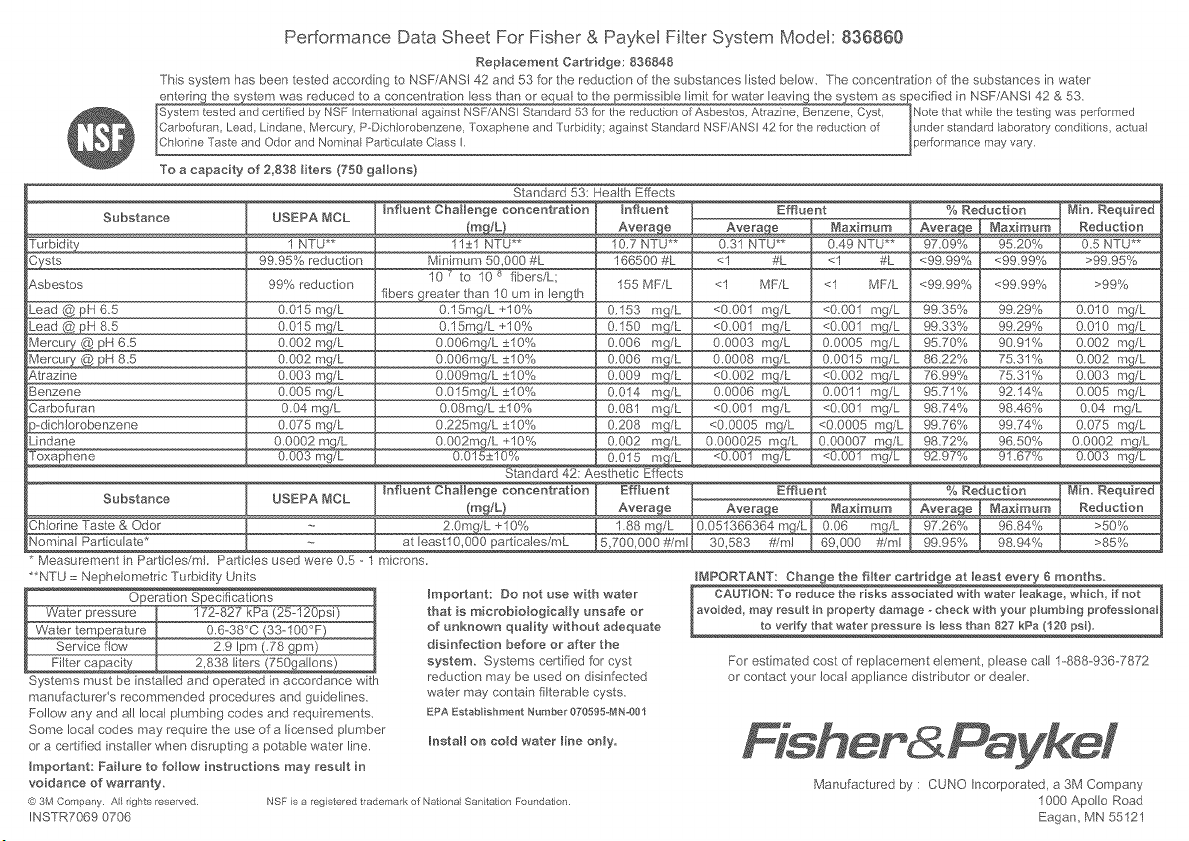
Performance Data Sheet For Fisher & Paykel Filter System Model: 836860
Replacement Cartridge: 836848
This system has been tested accord ng to NSF/ANSI 42 and 53 for the reduction of the substances listed below. The concentration of the substances in water
entering the system was reduced to a concentration less than or eq}_al to the permissible limit for water leaving the system as specified in NSF/ANSI 42 & 53.
System tested and cert fed by NSF nternationa against NSF/ANS Standard 53 for the redaction of Asbestos, Atrazine, Benzene, Cyst
Carbofuran Lead Lindane, Mercury, P Dich orobenzene Toxaphene and Turbd ty: against Standard NSF/ANS 42 for the reduction of
Ch or ne Taste and Odor and Nora na Part cu ate C ass
To a capacity of 2,838 liters (?50 gallons)
Standard 53: Health Effects
[nfluent Challenge concentration [nfluent [ Effluent
Substance USEPA _aCL
_qaximum
_%_ 1 NTU** 10.7 NTU** 0.31 NTU** 0.49 NTU**
3ysts 99.95% reduction 166500 #L <1 #L <1 #L
_.sbestos 99% reduction 155 MF'/L <1 MF/L <1 MF/L
_ead @ pH 6.5
_ead @ pH 8.5
_J1ercury @ pH 6.5
_J1ercury @ pH 8.5
_.trazine
Senzene
3arbofuran
s-dicMerobenzene
Jndane
Substance I BSEPA _aCL
Measurement nPartclesim. Partcesusedwee0.S-
**NTU :: Nephelometric Turbidity Units
Operation Specifications
Water pressure 172-827 kPa (25-120psi)
Water temperature 0.6-38°C (33-100°F_.
Service flow 2.9 Ipm (78 gpm)
Fi{ter capacity 2,838 liters (750gallons)
Systems must be installed and operated n accordance with
manufacturer's recommended procedures and guidelines.
Follow any and all local plumbing codes and requirements.
Some local codes may require the use of a licensed plumber
or a certified nstal/er when disrupting a potable water line.
Important: Failure to follow instructions may result in
voidance of warranty
@ 3M Company A rghts reserved
INSTR7069 0706
0.015 mg/L
0.015 mg/L
0.002 mq/L .
0.002 mg/L
0.003 m_(L
0.005 mg/L
0.04 mg/L
0.075 £_ ..................
0.0002 mg/L
0.003 mg/L
11±1 NTU**
Minimum 50_000 #L
10 7 to 10 s fibers/L;
fibers greater than 10 um in length
0.15mg/L +10%
O. 15mg/L -_10%
0.006mg/L ±10%
0.006mg/L ±10%
0.009mg/L ±10%
0.015mg/L ±10%
0.08mg/L ±10%
0.225mg/L ±10%
0.002mg/L +10%
0.015±10%
0.153 mg/L
0.150 mg/L
0.006 mg/L
0.006 mg/L
0.009 mg/L
0.014 mg/L
0.081 mg/L
0.002 mg!L
Standard 42: Aesthetic Effects
Influent Challenge concentration
2.0 mgLL +10%
at leastl0_000 particales/mL
microns.
<0.001 mg/L
<0.001 mg/L
0.0003 mg/L
0.0008 mg/L
<0.002 mg/L
0.0006 mg/L
<0.001 mg/L
<0.0005 mg/L
0.000025 m_
<0.001 mg/L
Effluent
1.88 mg/L
5,700_000 #iml
<0.001 mg/L
0.0011 mg/L
<0.001 mg/L
<0.0005 mg/L
<0.001 mg/L
Impo_ant: Do not use with water
that is rnicrobiologically unsafe or
of unknown quality without adequate
disinfection before or after the
system Systems certified for cyst
reduction may be used on disinfected
water may contain fi terable cysts.
ERA Estabishment Numbe 070595_1N-001
% Reduction
<99.99% <99.99%
__"
__
__"
__
Min. Required
Reduction
0.5 NTU**
>9995%
>99%
0.010 mg/L
0.010 mg/L
0.002 mg/L
0.003 mg/L
0.005 mg/L
0.04 mg/L
0.075 mg/L
0.003 mg/L
Effluent Min. Required
Maximum Reduction
0.0_66364 _/L[ 0.06 mg/L >50%
30_583 #/ml [ 69,000 #/ml >85%
IMPORTANT: Change the filter cartridge at bast every 8 months.
I CAUTaON: To reduce the risks associated with water leakage_ which, if not 1
avoided, may result _n prope_y da_-eage ° check with your plumbing professionaI_
to verify that water pressure is Iess than 827 kPa (120 psi).
For estimated cost of replacement element, please call 1-888-936-7872
or contact your local appliance d stributor or dealer.
Install on cow water line only.
NSF is a registe ed trademark of Nationa San tatiorl Foundatio _
Manufactured by: CUNO Incorporated, a 3M Company
1000 Apollo Road
Eagam MN 55121