Lenovo
Tab M8
(3rd Gen)
Safety, Warranty &
Quick Start Guide
Lenovo TB - 8506F
Lenovo TB - 8506X
Read this guide carefully before using your device.
All information labeled with * in this guide only refers to the
WLAN + LTE model.
https://support.lenovo.com
https://forums.lenovo.com

Reading before using your device
Reading first - regulatory information
Device models equipped with wireless communications comply with the radio
frequency and safety standards of any country or region in which it has been
approved for wireless use. In addition, if your product contains a telecom modem,
it complies with the requirements for connection to the telephone network in your
country.
Be sure to read the Regulatory Notice for your country or region before using
the wireless devices contained in your device. To obtain a PDF version of the
Regulatory Notice, go to https://support.lenovo.com.
Getting support
To get support on network services and billing, contact your wireless network
operator. To learn how to use your device and view its technical specifications, go
to https://support.lenovo.com.
Accessing your User Guide
Your User Guide contains detailed information about your device. To download
the publications for your device, go to https://support.lenovo.com and follow the
instructions on the screen.
Legal notices
Lenovo and the Lenovo logo are trademarks of Lenovo in the United States, other
countries, or both.
Other company, product, or service names may be trademarks or service marks of
others.
Manufactured under license from Dolby Laboratories. Dolby, Dolby Atmos, and
the double-D symbol are registered trademarks of Dolby Laboratories Licensing
Corporation.
LIMITED AND RESTRICTED RIGHTS NOTICE: If data or software is delivered
pursuant a General Services Administration “GSA” contract, use, reproduction, or
disclosure is subject to restrictions set forth in Contract No. GS-35F-05925.
1
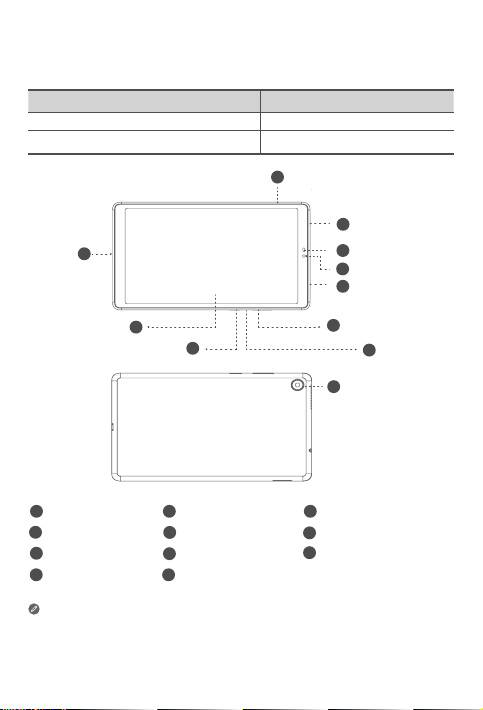
Device overview
• The WLAN version does not have a Nano-SIM card slot.
• All pictures and illustrations in this document are for your reference only and
may differ from the final product.
Model Version
Lenovo TB-8506F WLAN
Lenovo TB-8506X WLAN + LTE
Card tray
1
6
9
2
4
7
10 11
3
5
8
USB-C connector
Rear camera
Front camera
Microphone
Headset connector
Speakers
Power button
Light/Proximity sensor
Volume buttons
Touch screen
10
1
2
3
4
5
6
7
11
8
9
2
Preparing your device
Installing cards
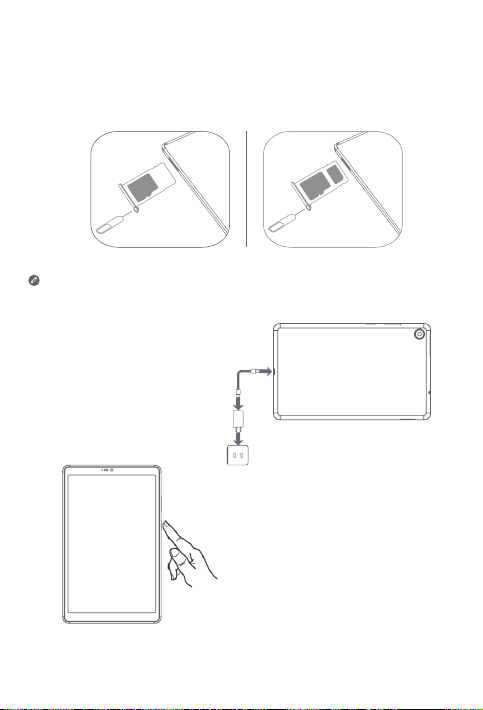
Install the cards as shown in the figure.
• Power o the device before inserting or removing a card.
• Note that the WLAN version does not have a Nano-SIM card slot.
Charging your device
Connect your device to a power
outlet using the USB cable and
power adapter provided.
S
I
N
a
n
o
S
IM
m
ic
ro
S
D
m
ic
r
o
S
D
Turning on
Press and hold the Power button until
the Lenovo logo appears.
3
Important safety and handling information
Plastic bag notice
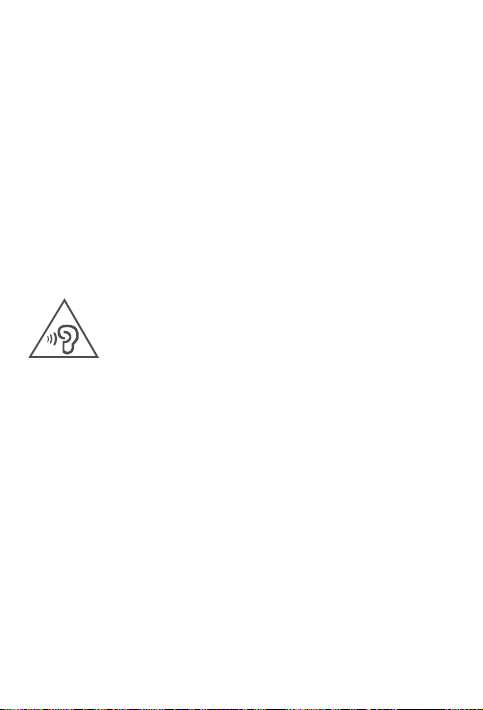
Danger: Plastic bags can be dangerous. Keep plastic bags away from babies and
children to avoid danger of suocation.
Caution about high volume usage
Warning: Exposure to loud noise from any source for extended periods of time
may aect your hearing. The louder the sound, the less time is required before your
hearing could be aected. To protect your hearing:
• Limit the amount of time you use headsets or headphones at high volume.
• Avoid turning up the volume to block out noisy surroundings.
• Turn the volume down if you can’t hear people speaking near you.
If you experience hearing discomfort, including the sensation of pressure or fullness
in your ears, ringing in your ears or mued speech, you should stop listening to the
device through your headset or headphones and have your hearing checked.
To prevent possible hearing damage, do not listen at high volume levels for long
periods.
Safety instructions for parents and adult supervisors
Your mobile device is not a toy. As with all electrical products, precautions should
be observed during handling and using of electrical products to reduce the risk of
electric shock. If parents choose to allow children to use the device, they should
caution his or her child about the potential hazard while using and handling the
mobile device.
Parents should inspect the mobile device (including the ac power adapter and
the small part, as applicable) periodically for damage. Routinely check this mobile
device to ensure that the device is working properly and is safe for children to use.
Internal rechargeable battery warning
Danger: Do not attempt to replace the internal rechargeable lithium ion battery.
Replacing the original battery with an incompatible type may result in an increased
risk of personal injury or property damage due to explosion, excessive heat, or other
risks. Do not attempt to disassemble or modify the battery pack. Attempting to do
so can cause a harmful explosion or battery fluid leakage.
4
EurAsia compliance mark
When disposing of the battery, comply with all relevant local ordinances or
regulations. Do not dispose the battery pack in municipal waste. Dispose used
batteries according to the instructions.
The battery pack contains a small amount of harmful substances.
To avoid injury:
• Keep the battery pack away from open flames or other heat sources.
• Do not expose the battery pack to water, rain, or other corrosive liquids.
• Do not leave the battery in an environment with extremely high temperature.
• Avoid short-circuiting the battery pack.
• Keep the battery pack out of reach of small children and pets.
• Do not leave the battery in an environment with extremely low air pressure. It may
result in an explosion or the leakage of flammable liquid or gas from the battery.
To extend battery life, we recommend charging the battery to at least 30% to 50%
capacity each time, and recharging it every three months to prevent over discharge.
Eye Protection and Safety Information
While concentrating on the performance capabilities of its screens, Lenovo
also places importance on user’s eye health. This product has received TÜV
Rheinland’s “Low Blue Light” certification and can be used with confidence.
For further information, please visit https://support.lenovo.com.

Product Safety Information
Driving precautions. Responsible and safe driving is your primary responsibility
when driving a vehicle. Always obey local laws and regulations.
Seizures, blackouts, eye strain and discomfort. This device may display flashing
images or loud sounds.
Medical devices. This device may interfere with pacemakers and other medical
devices. If you use an implantable pacemaker, defibrillator, or other medical device,
please consult your healthcare provider and device manufacturer before using this
mobile device. If you use a pacemaker or defibrillator, the FCC recommends that you
pay attention to the following precautions:
Always keep this mobile device at least 20 cm (8 inches) away from the pacemaker
or defibrillator. Please use the mobile device on the side away from the pacemaker
or defibrillator to minimize the possibility of interference.
When you suspect that interference is being caused, the mobile device should be
turned o immediately.
Extreme heat or cold. Don’t use your device in temperatures below 0°C or above
40°C. Don’t store/transport your device in temperatures below -20°C or above
60°C.
Operational warnings. Obey all posted signs when using devices in public areas.
• Potentially explosive areas: potentially explosive areas are often, but not always,
posted and can include blasting areas, fueling stations, fueling areas (such as below
decks on boats), fuel or chemical transfer or storage facilities or areas where the air
contains chemicals or particles, such as grain dust or metal powders.
Turn o your device before entering such an area and do not charge batteries. In
such areas, sparks can occur and cause an explosion or fire.
Hospitals. Switch o your wireless device when requested to do so in hospitals,
clinics or health care facilities. These requests are designed to prevent possible
interference with sensitive medical equipment.
Aircraft. Switch o your wireless device whenever you are instructed to do so by
airport or airline sta.
Consult the airline sta about the use of wireless devices on board the aircraft, if your
device oers a ‘flight mode’ this must be enabled prior to boarding an aircraft.
5
6
Service and support information
Lenovo Limited Warranty notice
This product is covered by the terms of the Lenovo Limited Warranty (LLW),
version L5050010-02 08/2011. Read the LLW at https://www.lenovo.com/
warranty/llw_02. You can view the LLW in a number of languages from this
website.
Warranty information
Lenovo provides a warranty period for your device. To check the warranty status of
your device purchase upgrades, go to https://support.lenovo.com/warrantylookup,
and then select the product and follow the on-screen instructions.
Get support
To download Lenovo service tool - LMSA:
https://support.lenovo.com/downloads/ds101291
Visit the website above for information on devices compatible with LMSA.
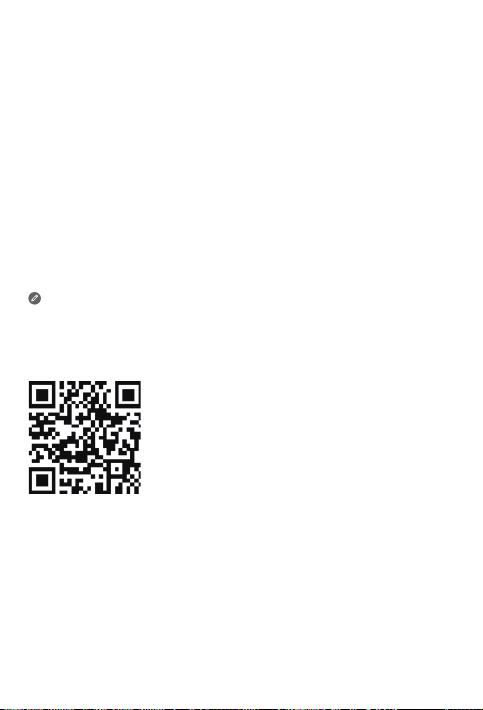
Visit Lenovo’s support website (https://support.lenovo.com) with the device serial
number to get more Lenovo support options, or scan the QR code, and then follow
the on-screen instructions.
7
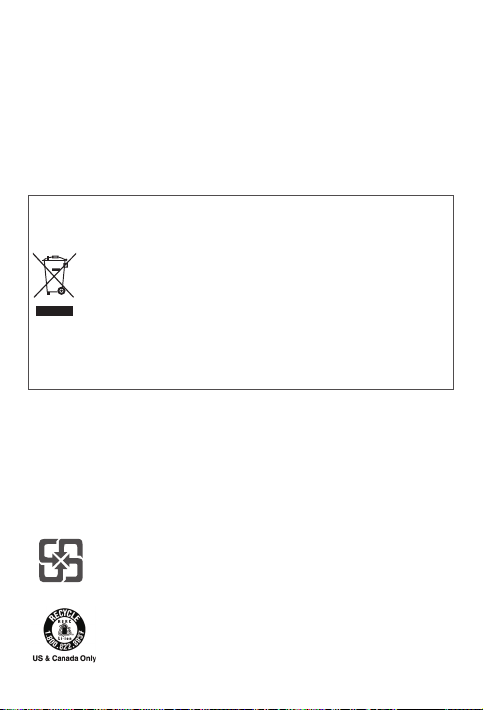
Battery recycling marks
Battery recycling information for Taiwan
Battery recycling information for the United States and Canada
Environmental, recycling, and disposal information
General recycling statement
Lenovo encourages owners of information technology (IT) equipment to
responsibly recycle their equipment when it is no longer needed. Lenovo oers a
variety of programs and services to assist equipment owners in recycling their IT
products. For information on recycling Lenovo products, go to
http://www.lenovo.com/recycling.
Important battery and WEEE information
Recycling information for Japan
Recycling and disposal information for Japan is available at:
http://www.lenovo.com/recycling/japan
Additional recycling statements
Additional information about recycling device components and batteries is in your
User Guide. See “Accessing your User Guide” for details.
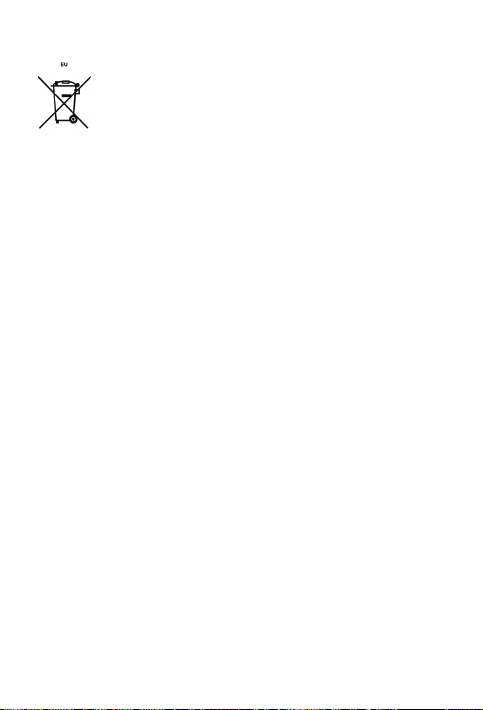
Batteries and electrical and electronic equipment marked with the
symbol of a crossed-out wheeled bin may not be disposed as unsorted
municipal waste. Batteries and waste of electrical and electronic
equipment (WEEE) shall be treated separately using the collection
framework available to customers for the return, recycling, and
treatment of batteries and WEEE. When possible, remove and isolate
batteries from WEEE prior to placing WEEE in the waste collection
stream. Batteries are to be collected separately using the framework
available for the return, recycling, and treatment of batteries and
accumulators.
Country-specific information is available at:
http://www.lenovo.com/recycling
8
Restriction of Hazardous Substances Directive (RoHS)
Turkey
Lenovo products sold in Turkey, on or after June 1, 2009, meet the requirements of
the former Republic of Turkey Restriction of Hazardous Substances legislation from
30th of May 2008 and the Control of Waste Electrical and Electronic Equipment
Regulations from 22nd of May 2012(“Turkey RoHS”).
Ukraine
Lenovo products sold in Ukraine, on or after January 1, 2011, meet the requirements
of the Technical Directive on Restriction of Hazardous Substances in Electric
and Electronic Equipment enforced by the Government, Decision No 1057 dated
2008/12/03” (“Ukraine TR on RoHS”).
India
Lenovo products sold in India, on or after May 1, 2012, meet the requirements of the
India E-waste (Management) Rules (“India RoHS”).
Vietnam
Lenovo products sold in Vietnam, on or after September 23, 2011, meet the
requirements of the Vietnam Circular 30/2011/TT-BCT (“Vietnam RoHS”).
Singapore
Lenovo products sold in Singapore, on or after June 1, 2017, meet the requirements
of Government Gazette order No. S 263/2016 Restriction of Hazardous Substances
in Electrical and Electronic Equipment in Singapore (“SG-RoHS”).
European Union
Lenovo Products meet the requirement of Directive 2011/65/EC on the restriction of
the use of the certain hazardous substances in electrical and electronic equipment
(“RoHS 2”). Lenovo products sold in the European Union, from the 21st July 2019,
meet the requirement of Commission Delegated Directive (EU 2015/863) amending
Directive 2011/65/EU.
For more information about Lenovo progress on RoHS, go to:
https://www.lenovo.com/us/en/social_responsibility/RoHS-Communication.pdf
Battery recycling information for , the European Union:
9
European Union compliance statement
European Union conformity
Compliance with the RE Directive
Lenovo PC HK Limited declares that the radio equipment type Lenovo TB-8506F,
Lenovo TB-8506X is in compliance with Directive 2014/53/EU.
The full text of the EU declaration of conformity is available at the following internet
address: https://www.lenovo.com/us/en/compliance/eu-doc
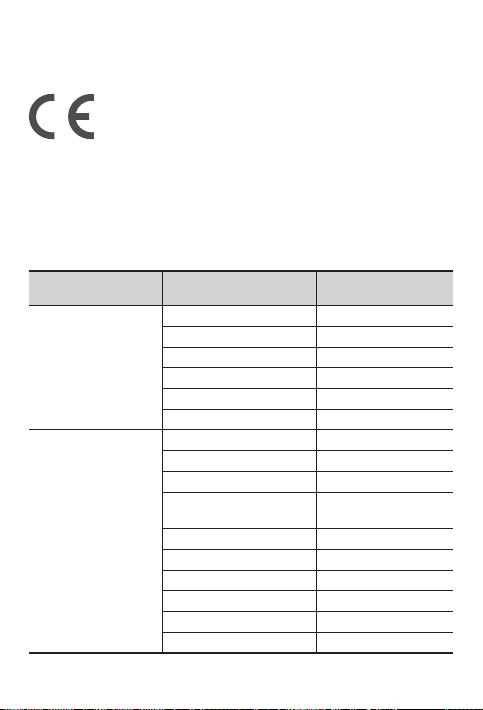
This radio equipment operates with the following frequency bands and maximum
radio-frequency power:
Model Name Frequency Bands Maximum Power (dBm)
Lenovo TB-8506F
WLAN2400~2483.5 <20
WLAN5150~5250 <20
WLAN5250~5350 <20
WLAN5470~5725 <20
WLAN 5725~5850 <14
Bluetooth 2400~2483.5 <10
Lenovo TB-8506X
GSM900 33
DCS1800 31
UMTS B1/B5/B8 24
LTE B1/B3/B5/B7/B8/B20/
B28/B38/B40/B41
24
WLAN2400-2483.5 <20
WLAN5150-5250 <20
WLAN5250-5350 <20
WLAN5470-5725 <20
WLAN 5725-5850 <14
Bluetooth 2400-2483.5 < 10
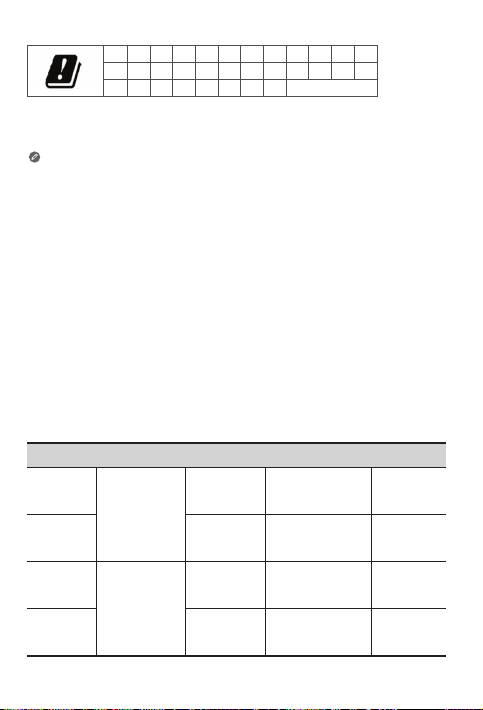
AT BE BG CH CY CZ DE DK EE EL ES FI
FR HR HU IE IS IT LI LT LU LV MT NL
NO PL PT RO SE SI SK TR UK (NI)
Restrictions of use:
Usage of this device is limited to indoor in the band 5150 to 5350MHz.
Specific Absorption Rate information
YOUR MOBILE DEVICE MEETS INTERNATIONAL GUIDELINES FOR EXPOSURE TO
RADIO WAVES.
Your mobile device is a radio transmitter and receiver. It is designed not to exceed
the limits for exposure to radio waves (radio frequency electromagnetic fields)
recommended by international guidelines. The guidelines were developed by an
independent scientific organization (ICNIRP) and include a substantial safety margin
designed to assure the safety of all persons, regardless of age and health. The
radio wave exposure guidelines use a unit of measurement known as the Specific
Absorption Rate, or SAR.
Tests for SAR are conducted using standard operating positions with the device
transmitting at its highest certified power level in all tested frequency bands. The
highest SAR values under the ICNIRP guidelines for your device model are listed
below:
Maximum SAR for this model and conditions under which it was recorded.
Europe 10g
SAR Limit
(2.0 W/kg)
Lenovo
TB-8506F
Body WLAN, Bluetooth 0.923W/Kg
Europe 10g
SAR Limit
(4.0 W/kg)
Limb WLAN, Bluetooth 0.923W/Kg
Europe 10g
SAR Limit
(2.0 W/kg)
Lenovo
TB-8506X
Body
LTE B40, WLAN,
Bluetooth
1.477 W/kg
Europe 10g
SAR Limit
(4.0 W/kg)
Limb WLAN, Bluetooth 1.477 W/kg
10
The above information is for EU countries only. Please refer to the actual
product for supported frequency bands in other countries.

During use, the actual SAR values for your device are usually well below the values
stated. This is because, for purposes of system eciency and to minimize interference
on the network, the operating power of your mobile device is automatically
decreased when full power is not needed for the data connection. The lower the
power output of the device, the lower its SAR value. If you are interested in further
reducing your RF exposure then you can easily do so by limiting your usage or simply
using a hands-free kit to keep the device away from the head and body.
11
© Copyright Lenovo 2021.
V1.0_20210305
7011AA001995 MC
Printed in China