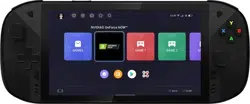
Lenovo Legion Play
Quick Start Guide
Lenovo L71051
Read this guide carefully before using your device.
Read this guide carefully before using your device.
Reading before using your device
Reading first - regulatory information
Be sure to read the Regulatory Notice for your country or region
before using the wireless devices contained in your Lenovo Gaming
Tablet. To obtain a PDF version of the Regulatory Notice, go to
lenovomobilesupport.lenovo.com. Some regulatory information is also
available in Settings > Device Info > Regulatory labels on your gaming
tablet.
Getting support
To get support on network service and billing, contact your wireless
network operator. To learn how to use your gaming tablet and view its
technical specifications, go to lenovomobilesupport.lenovo.com.
Accessing your User Guide
Your User Guide contains detailed information about your gaming
tablet. To access your User Guide, go to
lenovomobilesupport.lenovo.com and follow the instructions on the
screen.
Legal notices
Lenovo and the Lenovo logo are trademarks of Lenovo in the United
States, other countries, or both.
Other company, product, or service names may be trademarks or
service marks of others.
For additional legal notices, refer to the User Guide for your gaming
tablet. See “Accessing your User Guide” for additional information.
This product is not intended for use by children and toddlers
under 14 years of age.
1
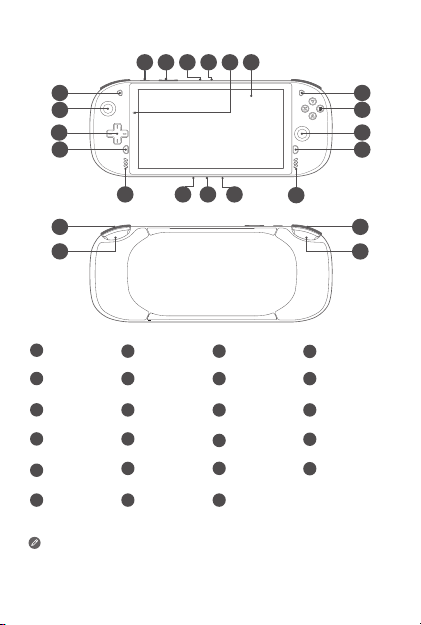
Device overview
All pictures and illustrations in this document are for your
reference only and may dier from the final product.
Type-C connector can support the screen projection with
the USB cable.
1
19
18
17
16
15 14 13 12
2 3 4 5 6
7
8
9
10
11
20
21
22
23
1
Power key
2
Volume key
3
Microphone
4
Card tray
5
Infrared sensor
6
Touch Panel
7
Menu key
8
ABYX function
key
9
Joystick cap
10
Home key
11
Speaker
12
Headset Jack
13
Type-C
14
Microphone
15
Speaker
16
Screenshot key
18
Joystick cap
19
Function key
20
R1 key
Direction key
17
L1 key
21
L2 key
22
R2 key
23
connector
2
Device overview
All pictures and illustrations in this document are for your
reference only and may dier from the final product.
Type-C connector can support the screen projection with
the USB cable.
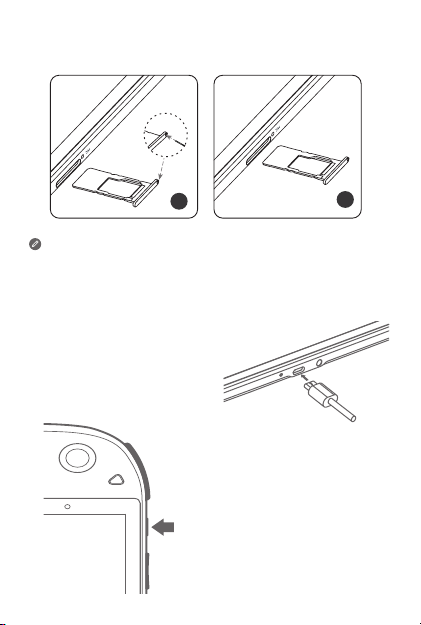
Installing Micro SD card
Install the Micro SD card as shown.
Power o the device before inserting or removing the
Micro SD card.
Charging your device
Charge your gaming tablet
as shown.
1
2
Micro
SD
Micro
SD
Turning on
Press and hold the Power button
until the screen lights up.
3
Type-C
Type-A X 2
Type-C
HDMI
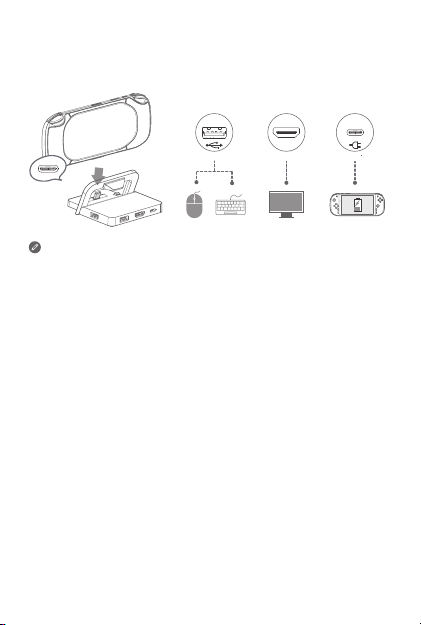
* Dock
Use the Dock to connect your gaming tablet to external devices such
as projectors, TVs, mouse and keyboard.
• In addition to the gaming tablet, Dock, and external display, you
will also need a HDMI cable.
• The two Type-A ports are standard USB 2.0 ports, and only
support USB 2.0 devices such as mouse and keyboard. The
portable hard disks are not supported.
* Applies to the product with specific configuration.

4
Important safety and handling information
Operating temperature
Ideal operating temperatures are 0 °C to 35 °C. Ideal storage
temperatures are -20 °C to +45 °C. Extreme heat or cold may damage
your device or accessories.
Plastic bag notice
Danger: Plastic bags can be dangerous. Keep plastic bags away from
babies and children to avoid danger of suocation.
Battery safety
Before assembling, charging or using your mobile device for the first
time, please read the important safety and handling information
provided with your product.
If your mobile device becomes unresponsive, press and hold the Power
button until the screen goes dark and your device restarts.
For your safety, the battery in your mobile device should only be
removed by a Lenovo approved service center or independent
qualified professional.
Warning:
• Don’t try to remove or replace the battery yourself—doing so may
damage the battery and could cause burning and injury.
• Don’t crush, bend, or expose your mobile device to heat or liquid. This
may damage the battery and could cause burning and injury.
• Don’t try to dry your mobile device using a microwave oven,
conventional oven, or dryer.
Battery charging
Charge your mobile device using a compatible Lenovo charger or a
high-power USB port on a PC.
• Don’t charge the mobile device in an environment with extremely high
or low temperature.
• Only use Lenovo approved batteries, which contain safety circuitry
and are designed to give the best performance in your mobile device.
5
• Don’t use a damaged charger or charger cable to charge your device.
• Don’t use tools, sharp objects, or excessive force to clean the USB
port, as this may damage your mobile device.
• Don’t try to charge your mobile device when it’s wet.
Other brand class 2 Limited Power Source USB chargers that comply
with USB 1.1, 2.0, 3.0, or greater, and comply with EN301489-34, IEC/
EN60950-1 or equivalent can be used. Chargers that do not comply
with these standards may be unsafe and may cause slow charging,
product damage, or reduced gaming tablet performance.
Warning about high volume usage
To prevent possible hearing damage, do not listen at
high volume levels for long periods. Ensure your player
at low volume levels or power o before you leaving.
Fully understand user manual before use.
Disposing according to local laws and regulations
When the Lenovo gaming tablet reaches the end of its useful life,
do not crush, incinerate, immerse in water, or dispose of the Lenovo
gaming tablet in any manner contrary to local laws and regulations.
Some internal parts contain substances that can explode, leak, or
have an adverse environmental eect if disposed of incorrectly. See
“Recycling andenvironmental information” for additional information.
User privacy
When this product is turned on for the first time (and is connected
to the internet), the international mobile station equipment identity
(IMEI) number or serial number (SN) of this product together with
the information about the country and city where this product is
first activated will be registered with Lenovo; this will be a one-
time registration. Confirming the mobile phone/tablet’s activation
will facilitate after-sales service to you by verifying the product’s
authenticity. For the registration, the data transmitted is less than 1KB.

6
Eye Protection and Safety Information
While concentrating on the performance capabilities of its screens,
Lenovo also places importance on user’s eye health.
To minimize eyestrain, you can adjust your habits of screen use to let
your eyes relax and recover. Here are some ways that you can do this:
Recommended viewing distance - The recommended viewing distance
between the eye and the display screen is 40-50cm.
Break times - Take some time away from the screen, especially if you
are using for long periods of time. Generally, taking short breaks (say
for 10 mins) after half an hour of continuous use is recommended.
Looking at distant objects - Rest your eyes periodically by focusing on
objects that are far away.
Eye exercises – Specific exercises can reduce eye strain and keep your
eyes healthy.
7
Service and support information
The following information describes the technical support that is
available for your product, during the warranty period or throughout
the life of your product. Contact your Lenovo reseller for a full
explanation of warranty terms.
Lenovo Limited Warranty (LLW) notice
Important: Lenovo Gaming Tablet Products do not have International
Warranty Services.
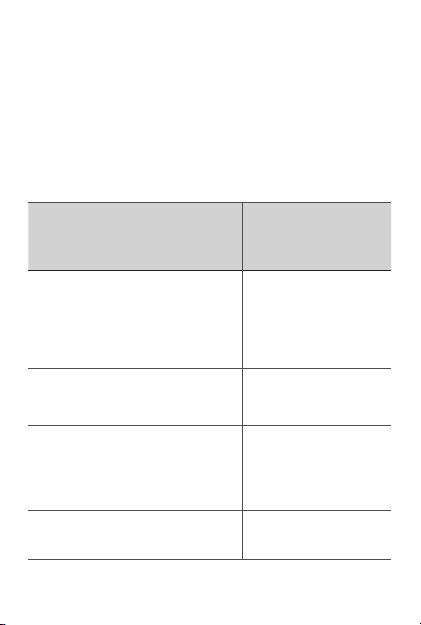
Warranty period for your product
Country or region
Warranty period (months)
Handset/Charger/Earphone/
USB Cable/Non-Removable
Battery/Removable Battery
India, United Arab Emirates, Oman, Qatar,
Kuwait, Bahrain, Kenya, Egypt, Lebanon,
Jordan, Morocco, Angola, Mauritius, Ghana,
Uganda, Tanzania, Botswana, Zimbabwe,
Namibia, Nigeria, Ethiopia, Zambia, Tunisia,
Mozambique, Algeria, Pakistan, Bangladesh
12/6/6/6/12/6
Russia, Ukraine 12/12/3/12/12/6
Chile, Colombia, Mexico, Brazil, Peru,
Argentina, Paraguay, Honduras, El Salvador,
Ecuador, Uruguay, Costa Rica, Guatemala,
Nicaragua, Puerto Rico, Canada, United
States, Indonesia, Vietnam
12/12/12/12/12/12
Cambodia, Macau, Japan, Australia, New
Zealand
12/12/12/12/12/6
8
For the warranty details, contact your Lenovo approved Service
Providers.
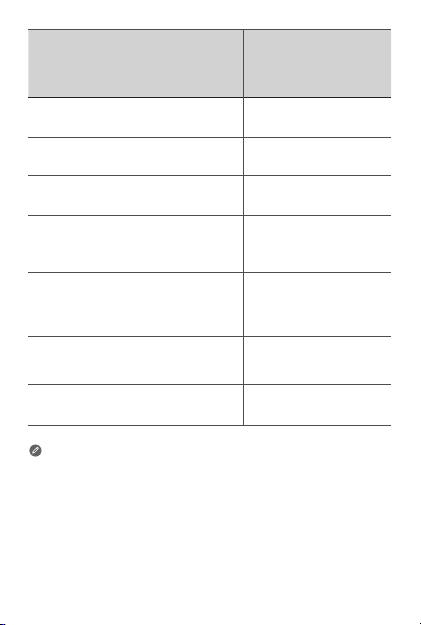
Country or region
Warranty period(months)
Handset/Charger/Earphone/
USB Cable/Non-Removable
Battery/Removable Battery
Saudi Arabia 24/6/6/6/24/6
South Africa, Turkey, Portugal, France, Spain 24/24/24/24/24/24
United Kingdom, Ireland 24/12/12/12/12/12
Romania, Hungary, Bulgaria, Greece,
Slovakia, Slovenia, Serbia, Croatia, Cyprus,
Czech Republic
24/24/24/24/24/12
Austria, Poland, Netherlands, Belgium,
Norway, Denmark, Sweden, Finland,
Italy, Germany, Lithuania, Estonia, Latvia,
Switzerland
24/12/12/12/24/12
Montenegro, Albania, Macedonia, Bosnia
and Herzegovina
24/12/6/12/12/6
Singapore, Hong Kong, Malaysia, Thailand,
Taiwan, Myanmar, Philippines
12/6/3/6/12/6
9
Recycling information for India
Recycling and disposal information for India is available at:
https://www3.lenovo.com/us/en/social_responsibility/sustainability/ptb_india
Battery recycling information for the European
Recycling and environmental information
General recycling statement
Lenovo encourages owners of information technology (IT) equipment
to responsibly recycle their equipment when it is no longer needed.
Lenovo oers a variety of programs and services to assist equipment
owners in recycling their IT products. For information on recycling
Lenovo products, go to http://www.lenovo.com/recycling.
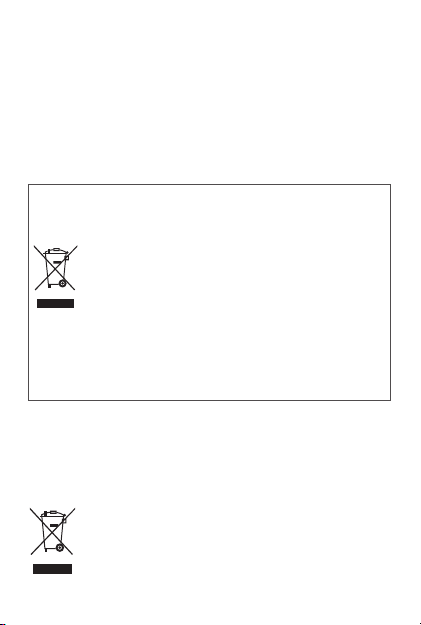
Important battery and WEEE information
Batteries and electrical and electronic equipment marked
with the symbol of a crossed-out wheeled bin may not
be disposed as unsorted municipal waste. Batteries and
waste of electrical and electronic equipment (WEEE)
shall be treated separately using the collection framework
available to customers for the return, recycling, and
treatment of batteries and WEEE. When possible, remove
and isolate batteries from WEEE prior to placing WEEE in
the waste collection stream. Batteries are to be collected
separately using the framework available for the return,
recycling, and treatment of batteries and accumulators.
Country-specific information is available at:
http://www.lenovo.com/recycling

10
Restriction of Hazardous Substances Directive (RoHS)
European Union
Lenovo products sold in the European Union, on or after 3 January
2013 meet the requirements of Directive 2011/65/EU on the restriction
of the use of certain hazardous substances in electrical and electronic
equipment (“RoHS recast” or “RoHS 2”). For more information about
Lenovo progress on RoHS, go to:
https://www3.lenovo.com/us/en/pdf/41A7733_RoHS-REACH_Eng_Spec.pdf
India
RoHS compliant as per E-Waste (Management & Handling) Rules, 2011.
Vietnam
Lenovo products sold in Vietnam, on or after September 23, 2011, meet
the requirements of the Vietnam Circular 30/2011/TT-BCT (“Vietnam
RoHS”).
Ukraine
Цим підтверджуємо, що продукція Леново відповідає вимогам нормативних актів
України, які обмежують вміст небезпечних речовин
Singapore
Lenovo products sold in Singapore, on or after June 1, 2017, meet the
requirements of Government Gazette order No. S 263/2016 Restriction
of Hazardous Substances in Electrical and Electronic Equipment in
Singapore (“SG-RoHS”).
Turkey
The Lenovo product meets the requirements of the Republic of Turkey
Directive on the Restriction of the Use of Certain Hazardous Substances
in Waste Electrical and Electronic Equipment (WEEE).
Türkiye AEEE Yönetmeligine Uygunluk Beyanı
Bu Lenovo ürünü, T.C. Çevre ve Orman Bakanlıgı’nın “Atık Elektrikli ve Elektronik
Esya Bazı Zararlı Maddelerin Kullanımının Sınırlandırılmasına Dair Yönetmelik (AEEE)”
direktierine uygundur.
AEEE Yönetmeligine Uygundur.
11
European Union (EU) / United Kingdom
(UK) compliance statement
LENOVO PC HK LIMITED declares that the radio equipment is in
compliance with the EU Radio Equipment Directive 2014/53/EU, as well
as the UK Radio Equipment Regulations SI 2017 No. 1206.
The full text of the system declarations of conformity are available
at: https://www.lenovo.com/us/en/compliance/eu-doc for EU and
https://www.lenovo.com/us/en/compliance/uk-doc for UK.
Restrictions of Use
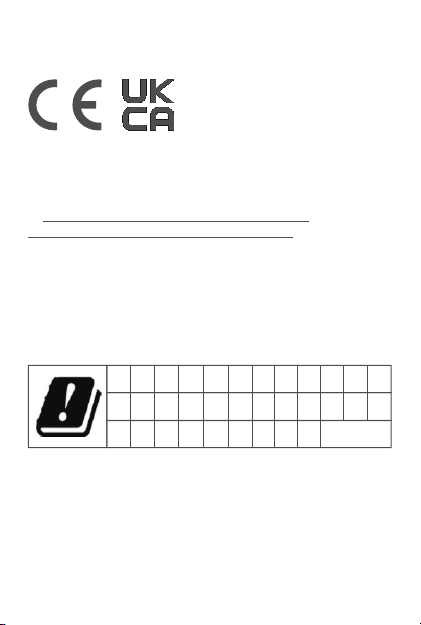
This product may be used in the following countries or regions subject
to the following restrictions. For products that support Wi-Fi 802.11a/ac
(as defined in your product information): Outside the United States, this
device is restricted to indoor use when operating in the 5.15 to 5.35 GHz
(802.11a) Wi-Fi frequency band.
AT BE FI
RO
BG
FR
SE
CH
HR
SI
CY
HU MT
SK
CZ
IE NL
TR
DE
IS
PL UK
DK
IT
PT
EE EL ES
LI LT LU LV
NO
UK(NI)
12
The above information is for EU countries only. Please refer to the
actual product for supported frequency bands in other countries.
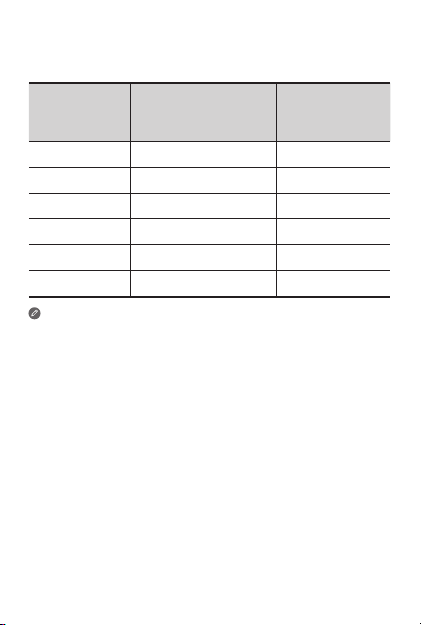
Operating Mode Frequency Bands
Maximum nominal
Transmit Power
(EIRP) dBm
Bluetooth 2400 – 2483.5 20
WLAN 2400 – 2483.5 20
WLAN 5150 – 5250 23
WLAN 5250 – 5350 23
WLAN 5470 – 5725 23
WLAN 5725 – 5850 14
Supported Frequencies and Power
This device is capable of operation on the following frequencies,
subject to location and network availability.
Specific Absorption Rate information
This product meets the applicable national or international RF
exposure guidance (SAR guideline) when used normally
against your head or, when worn or carried, at a distance of
5mm from the body. The SAR guideline includes a considerable safety
margin designed to assure the safety of all persons, regardless of age
and health.
Specific absorption rate (ICNIRP)
YOUR MOBILE DEVICE MEETS INTERNATIONAL GUIDELINES FOR
EXPOSURE TO RADIO WAVES. The highest SAR values under the
ICNIRP guidelines for your device model are listed below:
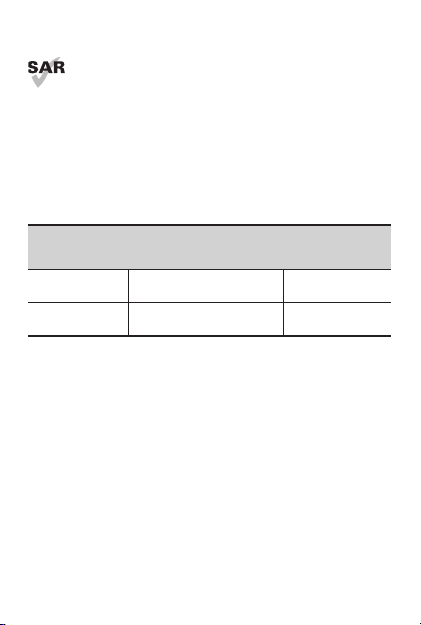
Maximum SAR for this model and conditions under which it was
recorded.
Body-worn SAR Wi-Fi, Bluetooth 0.978 W/kg
Limbs SAR Wi-Fi, Bluetooth 2.213 W/kg
13
Supported Frequencies and Power
This device is capable of operation on the following frequencies,
subject to location and network availability.
© Copyright Lenovo 2021.
V1.0_20210511
80601126H001 FLD
Printed in China