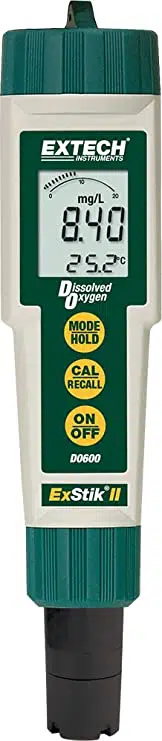
Dissolved Oxygen
DO600
II
RECALL
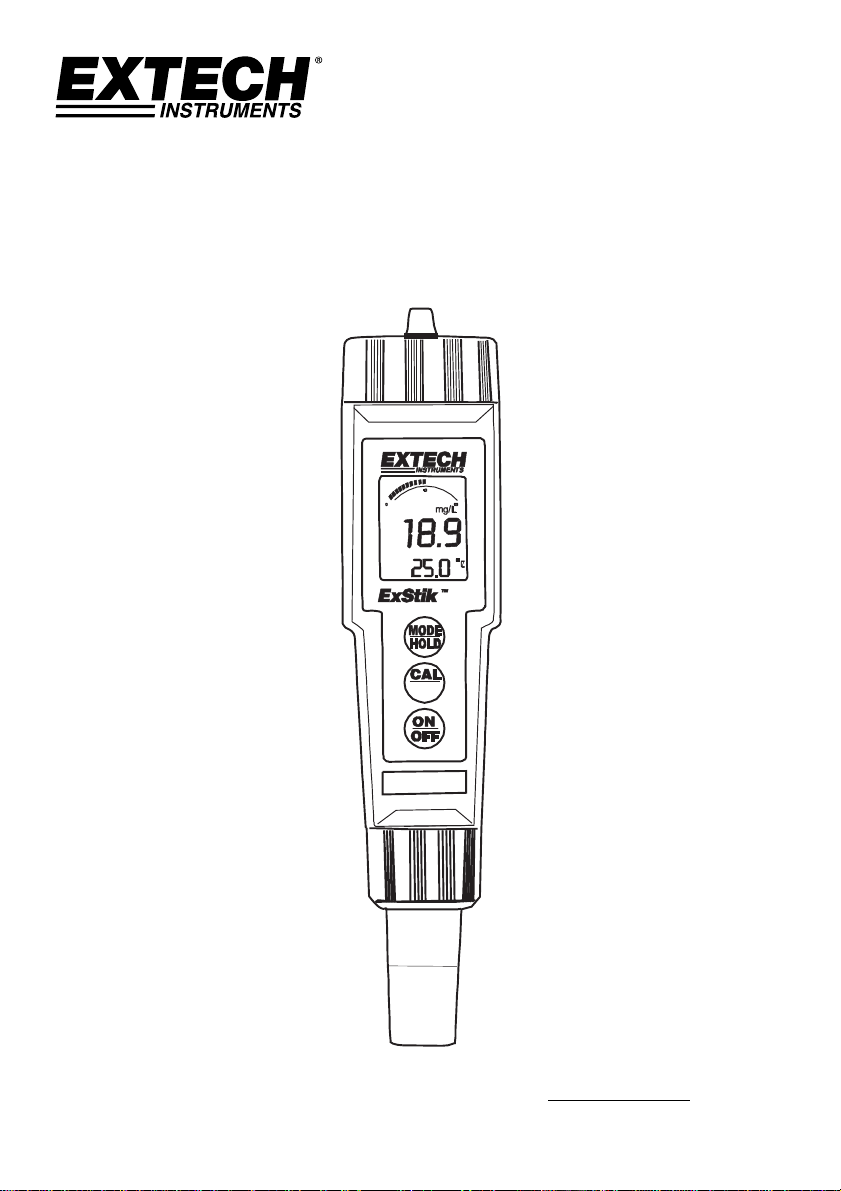
UserManual
ExStik
®
DO600
DissolvedOxygenMeter
AdditionalUserManualTranslationsavailableatwww.extech.com
DO600-en-GB_V7.4 12/16
2
Dissolved Oxygen
DO600
II
RECALL
1
2
3
4
5
6
7
8
9
Membrane
Cathode
Electrode Bottom View
Introduction
CongratulationsonyourpurchaseoftheExStik
®
DO600dissolvedoxygen/temperaturemeter
whichsimultaneouslydisplaysdissolvedoxygenandtemperature.Unitsofmeasureare%
saturation,mg/lorppmfordissolvedoxygen,and°Cor°Ffortemperature.Advancedfeatures
includeDataHold,25‐pointmemory,autopoweroff,automatictemperaturecompensation,
salinityandaltitudecompensation.This
meterisshippedfullytestedandcalibratedand,with
properuse,willprovideyearsofreliableservice.Pleasevisitourwebsite(www.extech.com)to
checkforthelatestversionofthisUserGuide,ProductUpdates,andCustomerSupport.
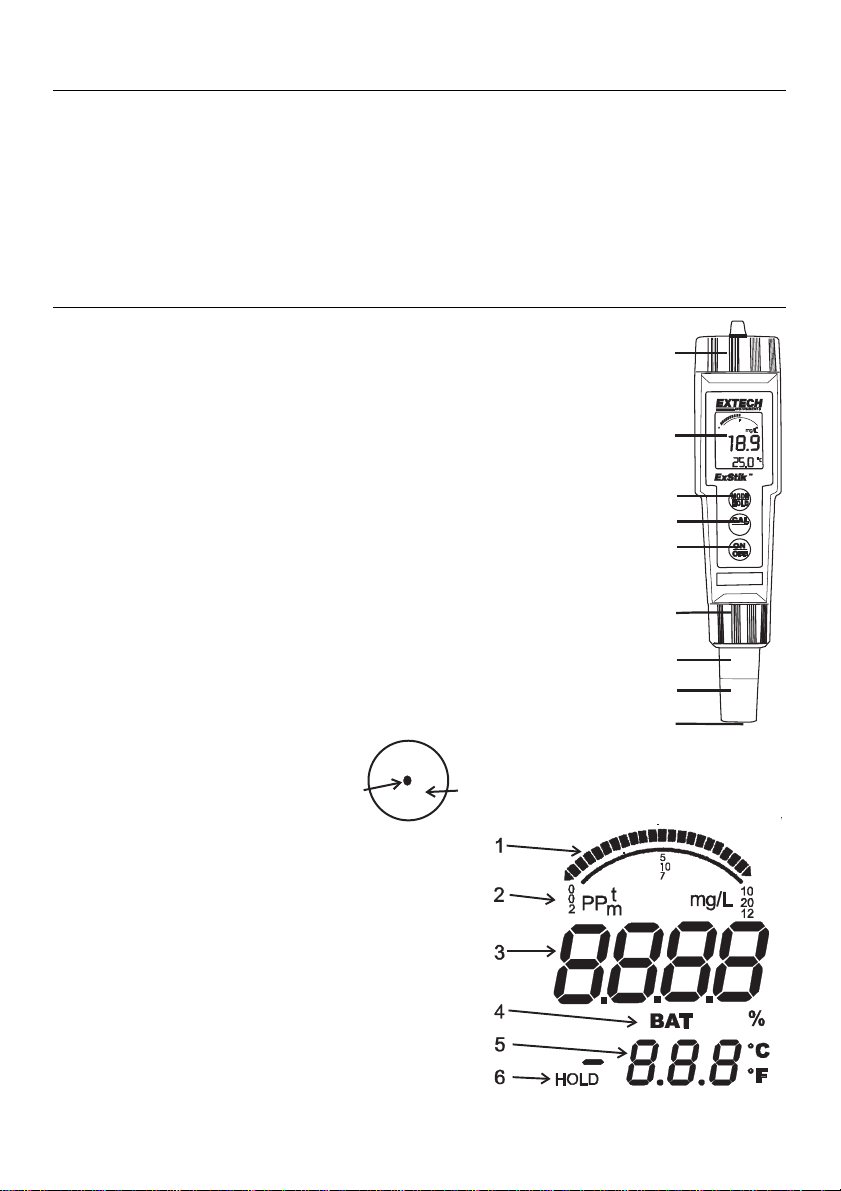
MeterDescription
FrontPanelDescription
1. Batterycompartmentcover
2. LCDDisplay
3. MODE/HOLDbutton
4. CAL/RECALLbutton
5. ON/OFFbutton
6. ElectrodeRetainingCollar
7. DissolvedOxygenSensor
8. BondedMembraneCapassembly
9. Membrane&Cathode
(Note:TheElectrodestoragecapisnotshown)
LCDDisplay
1. Bargraphdisplay
2. Measurementunits
3. Maindisplay
4. LowBatteryindicator
5. Temperaturedisplay
6. Readingholdindicator

DO600-en-GB_V7.4 12/16
3
Operation
PreparetheElectrode
Theelectrodeisshipped“dry”andrequiresfillingwiththesuppliedelectrolytesolutionbefore
use.Themembraneshouldbeinplaceanddoesnotneedreplacement.Followtheprocedureat
theendofthisguideforfillingthebondedcap.
NOTE:Makesurethattherearenoairbubblesintheelectrodebeforeuse.
PoweringtheExStik®
TheExStik
®
usesfour(4)CR2032LithiumIonBatteries.PresstheON/OFFbuttontoturnthe
meteronoroff.Ifthebatteriesareweak,the‘BAT’indicatorappearsontheLCD.Theauto
powerofffeatureshutstheExStik
®
offautomaticallyafterapproximately10minutesof
inactivity.Theautopowerofffeaturemaybetemporarilydisabledforconvenienceorfor
extendedpolarizationtime.
StartupPolarizationPeriod
WhentheExStik
®
ispoweredupforthefirsttime,theelectroderequirespolarization.Inorder
forthistooccurathreeminute(approx.)polarizationperiodmustelapsebeforemeasurements
canbemade.
Whenthemeterisleftpoweredon,aspecialcircuitisincludedinthismeterwhichmaintainsa
verysmallbiasingcurrenttotheelectrodeforaperiodofsevendays.Thiskeepstheelectrode
polarizedandenablestheusertomakeimmediatemeasurementswithoutwaitingforthe
electrodetore‐polarize.
EachtimetheExStik®isturnedon,thepolarizationtimerisresetandthe7‐daypolarization
periodis
initiated.Asmallasteriskatthebottomrightcornerofthedisplayisusedtoindicate
thatthepolarizationtimercircuitisactiveevenwhenthemeterisoff.
Turn‐OnDiagnostics
1. WhenthemeteristurnedONtheLCDdisplays“SELF”and“CAL”whilethemeterrunsa
diagnosticroutine.
2. DuringthistimethemeterisrecallingtheUserCalibrationdata,performingselfdiagnostics
&initializingthecircuitry.
3. Afterthisfunctioniscomplete,themeterproceedstothenormal
measurementmode.
4. TheDO600shouldbecalibrateddailyformeasurementaccuracy.

DO600-en-GB_V7.4 12/16
4
Calibration
1. Calibrationshouldbeperformedonadailybasis.
2. TurnthemeterON
3. PressandholdtheMODE/HOLDbuttonuntil%isdisplayedontheLCD.
4. Ifthemeterhasnotbeenusedforseven(7)daysorlonger,allowtheelectrodetofully
polarize.Thismaytake2‐3minutes.
5. Placetheelectrodecapontotheelectrode.Thespongecontainedinthecapshouldbeonly
moistened(notsoaked)with(distilledwater)orcleantapwater.Besurethattheelectrode
membraneiscleananddryorthecalibrationwillbeincorrect.Thereneedstobeanairgap
betweenthemembraneandthesponge.Nevertouchthemembrane,asskinoilwillaffect
theelectroderesponse.
6. WaituntilthereadingstabilizesthenpressandholdtheCAL/RECALLbuttonuntilCALis
showninthelowerdisplay.Thereadingswillblink“101.7”and“SA”willappear.
7. Whenthecalibrationiscomplete“End”willappearandthenthemeterwillreturntothe
normalmeasurementmode.Turnoffthemeter.
Note:The“SA”willnotappearifthecalibrationfails.
Optional’zerooxygen’calibration(improvesmeasurementaccuracyforveryloworveryhighDO
measurements):
Placetheelectrodeinazerooxygencalibrationsolution,suchas5%sodiumsulfite,waitfor
stabilityandpresstheCAL/RECALLbuttonuntilCALisshownintheinthelowerdisplay.Stabilityin
azerosolutionmaytakemanyminutes,dependingonelectrodehistory.
Note:SodiumSulfitecanbecomedepositedontheelectrodeandonthe“coined”surfaceofthe
electroderetainingcollar.ThepresenceoftheSodiumSulfitewillnegativelyaffectfutureDO
measurementsuntilsuchatimewhereALLofitisremovedfromtheelectrode.
OptionalElectronicZerocalibration.
IftheDO600isnotmakingstablemeasurementsoryouarereplacingtheelectrodewithanew
assembly,performthisZerocalibration.
Turnoffthemeter,removetheelectrodebyunscrewingtheretainingringandpulloffthe
electrode.
TurnonthemeterandwaitfortheSelfcalibrationtocomplete.
SettheModeto%.
PressandHoldtheCALbutton untilCALappearsonthedisplay.Whenthecalcyclecompletes,the
displayshouldread0.0%.
Turnoffthemeter.
Re‐attachtheelectrode.PerformtheelectrodecapcalibrationfromStep5.

DO600-en-GB_V7.4 12/16
5
Measurements
1. Covertheelectrodewiththeelectrodecap.Thespongecontainedinthecapshouldbe
moistened(notsoaked)with(distilledwater)orcleantapwater.
2. PressingtheON/OFFbuttonturnsthemeterONorOFF.WhenturnedON,themeter’s
displayswitchesonandtheSelfCalibrationutilityruns
(seeabove).
3. Ifthisisthefirsttimethemeterispoweredup,waitapprox.3minutesfortheprobeto
polarize(pleasedisableauto‐poweroff;Instructionsfordisablingauto‐poweroffare
providedinalatersection).Formoredetails,pleasereadtheStartupPolarizationPeriod
paragraph
earlierinthismanualbefore continuing.
4. SelectthedesiredunitsofmeasurebypressingandholdingtheMODE/HOLDbuttonuntil
theproperunitsareshowninthedisplay.Removetheelectrodecoverandplacethe
electrodeinthesampletobemeasured.Stirtheelectrodeinthesampletoremoveany
trappedairbubblesfromthemembranesurface.Donotsubmersetheelectrodetothe
pointthatthesampleliquidreachesthemeter’selectrodecollar.
5. Allowthemetertimetosettletothefinalmeasurementvalue.
Note:Thelargerthedifferenceintemperature betweentheelectrodeandthesolution
the
longeritwilltakeforthereadingtostabilize.Stabilizationtimecanvaryfromthirty(30)
secondstofive(5)minutes.
MeasurementUnits
Themetercanbesettomeasureeither%saturation,mg/l,orpartspermillion(ppm).
Tochangethemode:
1. PressandholdtheMODE/HOLDbuttonfor2secondsandthedisplaywillbegintoscroll
throughthedifferentunitsofmeasure:
%saturation;D.O.inmg/l;D.O.inppm
(partspermillion)
2. Whenthedesiredunitsaredisplayed,releasetheMODE/HOLDbuttonandtheunitwill
returntonormaloperatingmode.
Note:The“HOLD”functioncannotbeonwhenchangingthemeasurementfunction.If“HOLD”
isdisplayedinthelowerleftcornerofthedisplay,brieflypressthe
MODE/HOLDbuttontoturn
itoff.
TemperatureUnits(ºF/ºC)
1. WiththeunitOFF,pressandholdtheCAL/RECALLbutton.
2. WiththeCAL/RECALLbuttondepressed,momentarilypresstheON/OFFbuttontoturnthe
unitON.
3. TheCAL/RECALLbuttoncanbereleasedwhen‘SelfCal’isshowninthedisplay.
SalinityCompensation
1. WiththeunitON,momentarilypresstheCAL/RECALLbuttontwiceinquicksuccession
(‘SAL’isshowninthelowertemperaturedisplay).
2. MomentarypresstheMODE/HOLDbutton.EachpressoftheMODE/HOLDbuttonincreases
thecompensationby1ppt(partperthousand);theavailablerangeis0to50ppt.
3. Momentarily
presstheCAL/RECALLbuttontosavethecompensationsettingandreturnto
thenormalmeasurementmode.

DO600-en-GB_V7.4 12/16
6
AltitudeCompensation
1. WiththeunitON,momentarilypresstheCAL/RECALLbuttontwiceinquicksuccession
(‘SAL’isshowninthelowertemperaturedisplay.
2. PressandholdCAL/RECALLagainfor2secondstoentertheAltitudeMode(‘Ald’willbe
showninthelowertemperaturedisplay).
3. Thefactorydefaultvalueis
sealevel.EachpressoftheMODE/HOLDbuttonincreasesthe
compensationby1000ft.Themaximumvalueis20presses(20,000ftabovesealevel).
4. MomentarilypresstheCAL/RECALLbuttontosavethecompensationsettingandreturnto
thenormalmeasurementmode.
Auto‐PowerOFFFeature
Theautopowerofffeatureautomaticallyshutsthemeteroff10minutesafterthemostrecent
buttonpress.Todisablethisfeature,refertotheDisableAuto‐PowerOFFsection.
DisableAuto‐PowerOFFFeature
WiththeunitON,momentarilypresstheCAL/RECALLbutton,thenquicklypress andholdboth
theMODE/HOLDandON/OFFbuttonsuntil‘off’isdisplayed.TorestoretheAutoPowerOff
Feature(autopowerOFFenable)simplyturnthemeteroffandonagainusingtheON/OFF
button.
LowBatteryIndication
Whenthebatteryvoltagefallsbelowtheoperatingthreshold,‘BAT’willappearonthedisplay.
RefertotheMaintenancesectionforbatteryreplacementinformation.
StoringReadings
1. PresstheMODE/HOLDbuttontostoreareading.Thestoragelocationnumberwillbe
displayedonthelowerdisplay,whilethemaindisplayshowsthestoredreading.Themeter
willentertheHOLDmodeandthe“HOLD”indicatorwillappearontheLCD.
2. PresstheMODE/HOLDbuttonagaintoexittheHOLDmodeandreturntonormal
operation.ThenexttimeMODE/HOLDismomentarilypressedanotherreadingisstored
andsoon.
3. Ifmorethan25readingsarestored,previouslystoredreadings(startingwithreading
number1)areoverwritten.
RecallingStoredReadings
1. MomentarilypresstheCAL/RECALLbuttonandthenwithin4secondsmomentarilypress
theMODE/HOLD.Thelaststoreddatapointlocationwillbedisplayed(1to25).Eachtime
theMODE/HOLDbuttonismomentarilypressedthenextmostrecentlystoreddatapoint
willbedisplayed.
2. Afterthelast
datapointstoredisdisplayed,pressingtheMODE/HOLDbuttonagainreturns
thedisplaytothebeginningofthelist.
3. PressingtheCAL/RECALLbuttonatanytimestopsthedataretrievalprocessandreturnsthe
metertothenormalmeasurementmode.

DO600-en-GB_V7.4 12/16
7
ClearingStoredReadings
1. WiththeunitONpressandholdtheON/OFFbuttonfor4seconds
2. When“clr”isshowninthemaindisplaythememoryiscleared.
MeasurementandDisplayConsiderations
TheDO600usesapolarographicsensor,whichconsumesoxygenatthesensingsurface.
Thisrequiresaconstantmovementofthesampleacrossthemembranetomaintaina
constantdissolvedoxygenlevel.Itisrecommendedthattheprobebemovedinthesample
asthemeasurementismade,orifin
alaboratoryenvironment,thesamplebestirredusing
astirplate.
IfyouaremeasuringDOinasmallcontainer,theprobewillconsumeoxygenasitis
measuringandthemeasurementvaluewillcontinuetogolower.
Iftheunitappearstobelocked(displayfrozen).It
ispossiblethattheDataHoldmodehas
beeninadvertentlyaccessedbyapressoftheMODE/HOLDbutton(HOLDwillbedisplayed
inthebottomleftoftheLCD).SimplypresstheMODE/HOLDbuttonagainorturnthe
meteroffandbackonagain.
Ifthemeterdoeslatchupandnobuttonpressesreviveit,removethebatteriesandrestart.
Formaximumaccuracy,allowsufficienttimeforthetemperatureoftheprobetoreachthe
temperatureofthesamplebeforetakingareading.Thiswillbeindicatedbyastable
temperaturereadingonthedisplay.
MembraneMaintenance
Firstuse
Whenyoufirstgotouseanewmeter,youwillneedtoremovethemembranecapand
replaceitwithanewcapfilledwithrefillsolution.
PleaseNote:Theinstallationofabondedcapcausesthemembranetobetightlystreched
overthecathode.Onceabondedcapisremovedreinstallationisnotpossibleasthe
membranewillnolongerbeproperlystrechedoverthecathode.
Storage
Thespongecontainedintheprotectiveelectrodecapshouldbeonlymoistened (notsoaked)
with(distilledwater)orcleantapwater.
DO600-en-GB_V7.4 12/16
8
Maintenance
BatteryReplacement
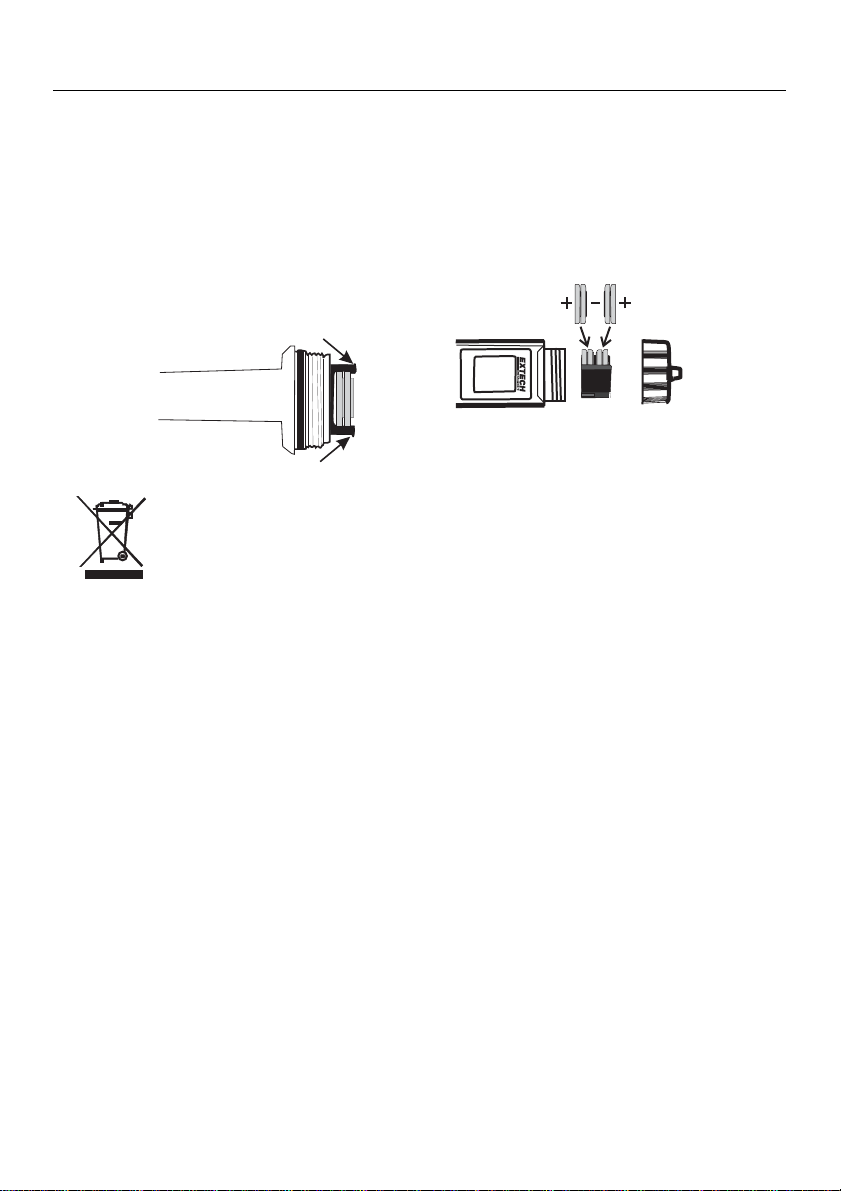
1. Twistoffthebatterycompartmentcover.
2. Holdingthebatteryhousinginplacewithafinger,pulloutthebatterycarrierusingthetwo
smalltabs.
3. Replacethefour(4)CR2032batteriesobservingproperpolarity.
4. Replacethebatterycarrier,reattachthebatterycompartmentcapandtightensecurely.
Neverdisposeofusedbatteriesorrechargeablebatteriesinhouseholdwaste.
Asconsumers,usersarelegallyrequiredtotakeusedbatteriestoappropriate
collectionsites,theretailstorewhere thebatterieswerepurchased,orwherever
batteriesaresold.
Disposal:Donotdisposeofthisinstrumentinhousehold
waste.Theuseris
obligatedtotakeend‐of‐lifedevicestoadesignatedcollectionpointforthedisposal
ofelectricalandelectronicequipment.
OtherBatterySafetyReminders
o Neverdisposeofbatteriesinafire.Batteriesmayexplodeorleak.
o Nevermixbatterytypes.Alwaysinstallnewbatteriesof
thesametype.
ElectrodeReplacement
1. Toremovetheelectrode,firstturntheinstrumentOFFandthenunscrewandremovethe
electroderetainingcollar.(turnthecollarcounter‐clockwisetoremove).
2. Gentlyrocktheelectrodefromsidetoside,pullingitawayfromthemeteruntilit
disconnects.
3. Toattachanelectrode,alignthe
positioning“keys”ontheelectrodeandthemainbody
housingandthencarefullypushtheelectrodeintothemetersocketuntilitisfullyseated.
4. Tightentheelectroderetainingcollarfirmlyenoughtosealtheelectrodewiththemeter.

DO600-en-GB_V7.4 12/16
9
DOBondedMembraneCapreplacement
ImportantNote:Donottouchthemembraneasskinoilswillinterferewiththeoxygen
permeabilityrateofthemembrane.Usecautionwhenreplacingthebondedcap.
1. Itisrecommendedthattheelectroderemainattachedtothemeterduringthis
replacementprocess.
2. Toremovethebondedcapfrom
theelectrode,unscrewthecapfirmlyandcarefully
counter‐clockwisefrom theelectrode(seediagrambelow).
3. Discardtheusedcap.PleaseNote:Theinstallationofabondedcapcausesthemembrane
tobetightlystrechedoverthecathode.Onceabondedcapisremovedreinstallationisnot
possibleasthemembranewillnolongerbeproperlystrechedoverthecathode.
4. RinsetheoldelectrolytesolutionfromtheCathodeandAnodebeforecontinuing.
5. UsethesuppliedPolishingPaper(SeeAccessoriestable)
toclean,polish,shine,and/or
removescratchesfromthecathode.Besuretomoistentheclothbeforepolishingthe
cathode.Donotover‐polishthesensitivegoldcathode.
6. Setthenewreplacementbondedcaponaflatsurface.Leavethecapinthisposition
throughoutthereplacementprocess.
7.
Fillthebondedcapwiththeelectrolytesolutionuptothebottomofthethreadsonthe
insideofthecap.
8. Tapthesideofthebondedcaptohelpjarfreeanytrappedairbubblesfromtheelectrolyte
solution.
9. Keepingthecapinafixedpositiononaflatsurface,carefullyinserttheelectrodeintothe
newbondedcapbyfirstdippingandremovingthe
electrodeseveraltimesfromthecap.
Witheachdip,pushtheelectrodeprogressivelydeeperintothebondedcap.Finally,screw
theelectrodeslowlyontothebondedcap(clockwise)untilfullytightened.Thedippingand
removaltechniqueminimizestheintroductionofairbubblesintotheelectrolytesolution.
Airbubblesintheelectrolytecancompromisemeasurements.
10. Duringthetighteningofthebondedcap,excesselectrolytesolutionwillleakout,thisis
normalanddesireablesinceitminimizestheintroductionofairpockets.Cleanoffthe
excess
electrolytebeforeuse.
Cathode
Electrode
Bonded Cap
Anode
Air Vents
BONDED CAP
Clockwise to tighten
Counter-clockwise to loosen

DO600-en-GB_V7.4 12/16
10
Specifications
Display 2000count,Dualfunction3½digitLCDwithBargraph,
Displaysize:24mmx20mm
Sensor Polarographictype
Membrane Bondedmembranecapwiththreadedfitting
OperatingTemp.Range 0to50°C(32to122°F)
ATCRange 0to50°C(32to122°F)
SalinityCompensation 0to50
pptin1ppt(partperthousand)increments
Altitudecompensation 6000m(0to20,000ft)in300m(1000ft)increments
MeasurementStorage 25tagged(numbered)datasetswithrecall
BatteryPower Four(4)CR2032buttonbatteries
LowBatteryIndication ‘BAT’appearsontheLCD
AutoPowerOff After10minutes
ofinactivity(APOoverrideavailable)
Dimensions/Weight 36x173x41mm(1.4x6.8x1.6”);110g(3.8oz)
Measurement Range Resolution Accuracy
%Saturation 0to200.0% 0.1% ±2.0%FS(fullscale)
DissolvedOxygen
Concentration
0to20.00mg/l 0.01mg/l ±2%FS
0to20.00ppm 0.01ppm ±2%FS
Temperature 0to50°C 0.1°C ±1.0°C
32to122°F 0.1°F(0to99ºF);
1.0°F(>100°F)
±1.8°F

DO600-en-GB_V7.4 12/16
11
Appendices
TroubleshootingGuide
Symptom PossibleCauses Action
Unitwillnotpoweron‐Batteriesnotinplace
‐Deadbatteries
‐Batterypolarityincorrect
‐ReplaceBatteries
‐ReplaceBatteries
‐Reorient/Replace
Batteries
“BAT”indicatorshownon
display
‐Batteriesareweak‐ReplaceBatteries
UnstableReadings‐Insufficientelectrolytein
probe(Airbubblespresent
whenprobeisinverted.)
‐Electrolyteisdepleted
‐Replaceelectrolyte,and
membranecapassembly.
Readingsdriftdown‐Insufficientstirring(the
probeconsumesoxygenat
themeasuringsurface,
requiringconstantsample
movementacross
membrane)
‐Moveprobeinsampleor
stirsample
SlowResponse‐Dirtyordamaged
membrane
‐Replaceelectrolyteand
membranecap
Electrodecannotbe
calibrated
‐Depletedelectrolyte
‐Dirtyordamaged
membrane
‐Replaceelectrolyteand
membranecap
Electrodecannotbe
calibratedafterreplacing
theelectrolyteand
membranecap
‐Dirtyprobe(Cathodeisnot
ashinygoldcolor)
‐Cleancathodewith
Polishingpaper*perform
theelectronincZero
calibration
Samplereadingisfrozen‐Unitisin“HOLD”mode
‐Unitislocked
‐ReleaseHOLD
(momentarillypress
Mode/Holdbutton)
‐Removebatteries,press
ON/OFFbutton,replace
batteriesandrestart
*PolishingpaperisavailableintheDO603membranekit

DO600-en-GB_V7.4 12/16
12
OperationalMatrixfortheModelDO600
Function/
Resulting
Action
Power
Status
Mode
Setting
RequiredButtonPressSequence Comments
On/Off Any Any MomentarypressoftheON/OFFbutton
WaterSaturated
AirCalibration
On Any PlaceElectrodeinCalibrationCap
Press&holdCAL/RECALLbuttonfor2seconds
ZeroCalibration
On Any
PlaceElectrodeinZeroSolution,waitforstabilityPress
&holdCAL/RECALLbuttonfor2seconds
Alsoworkswithprobe
removed(Calatzerocurrent)
StoreReading
On Any MomentarypressoftheMODE/HOLDbutton
Storesandholdsreading
“HOLD”displayed
HoldRelease
On
WhileIn
Hold
Mode
MomentarypressoftheMODE/HOLDbutton
EnterMemory
Retrieval
On Any
MomentarypressoftheCalbuttonfollowedby
amomentarypressoftheMODE/HOLDbutton
(w/in4seconds)
Ifnodataisstoredin
memory,“End”isdisplayed
briefly,andthenreturnsto
lastmode.
ScrollStored
Readings
On
Memory
Recall
MomentarypressoftheMODE/HOLDbutton
ExitMemory
Retrieval
On
Memory
Recall
MomentarypressoftheCAL/RECALL
ClearStored
Memory
On
Any
Measure‐
mentMode
PressandholdtheON/OFFbuttonfor4seconds “clr”isdisplayed.
Change
Measurement
Mode
On Any
PressandholdtheMODE/HOLDbuttonforat
leasttwoseconds(themodeswillscrolluntil
thebuttonisreleased)
EnterSalinity
Compensation
On Any
PressandreleasetheCAL/RECALLbuttontwice
(momentary)insuccession(DisplaysSAL)
Changing
Salinity
Compensation
On SAL
MomentarypressoftheMODE/HOLDbutton
(eachbuttonpressincreasestheratioby1ppt
(partperthousand),thevaluecyclesfrom0to
50)
ExitSalinity
Compensation
On SAL
PressandreleaseCAL/RECALLbuttonfor2
secondstoenterAltitudeCompensation,Or
PressandreleaseCalButtononemoretimeto
entermeasurementmode
Itisnecessarytopressthe
CAL/RECALLbuttontosave
changes.Iftheunittimesout,
nochangesaresaved.
EnterAltitude
Compensation
On
Anyor
SAL
PressCAL/RECALLtwice(momentary).Unit
entersSalinityMode.PressCAL/RECALLfor2
secondstoenterAltitudeCompensationMode.
(DisplaysAld)
Unittimesoutin5
secondsifnobuttonis
pressed,revertsto
previousmode.
Changing
Altitude
Compensation
On Ald
MomentarypressoftheMODE/HOLD
button(eachbutton‐pressincreasesaltitudeby
1,000ft,thevaluecyclesfrom0to20)
ExitAltitude
Compensation
On Ald
MomentarypressCAL/RECALLbuttontoexit
andsavechanges.
Itisnecessarytopressthe
CAL/RECALLbuttontosave
changes.Iftheunittimesout,
nochangesaresaved.
Change
Temperature
Units
Off
n/a(off
mode)
PressandholdtheCAL/RECALLbuttonthen
momentarilypresstheON/OFFbutton.Release
theCAL/RECALLbuttonafterthe"SELFCAL"
lights
Override
AutopowerOff On Any
PressCAL/RECALLbutton(momentary)then
simultaneouslypressandholdtheMODE/HOLD
andON/OFFbuttonsforfor2seconds.
DefaultReset
Off
n/a(off
mode)
SimultaneouslypressON/OFF,CAL/RECALLand
MODE/HOLDmomentarily.“dFLt”willbe
displayed.

DO600-en-GB_V7.4 12/16
13
Re‐orderandAccessoriesInformation
PartNumber Description
DO600 ExStikIIDissolvedOxygenMeter
DO600‐K ExStikIIDissolvedOxygenMeterKit–containsDO600,DO603,EX050
cable,andweight,andCA895case
DO605 ReplacementProbe,ExStikIIDissolvedOxygenMeter
DO603 MembraneKitforDO600
Contains:6MembraneCaps,15mLKCLFillingSolution,Polishing
Paper
EX010 ExtensionCable3feet(1Meter)&ProbeWeight
EX050 ExtensionCable16feet(5Meter)&ProbeWeight
DO610 ExStikIIDO/pH/ConductivityMeterKit
Contains:EC500pH/Conductivity/Salinity/TDSExStikIIMeter,DO600
DissolvedOxygenExStikIIMeter,SingleusepHbufferpouches4,7,
and10pH,SampleCupswithCap,WeightedBaseforSampleCups,and
Batteries,allpackedinaCarryingCase
CA895 SmallSoftVinylPouchwithBeltLoopforExStikandExStikII
Copyright©2014‐2016FLIRSystems,Inc.
Allrightsreservedincludingtherightofreproductioninwholeorinpartinanyform
ISO-9001 Certified
www.extech.com