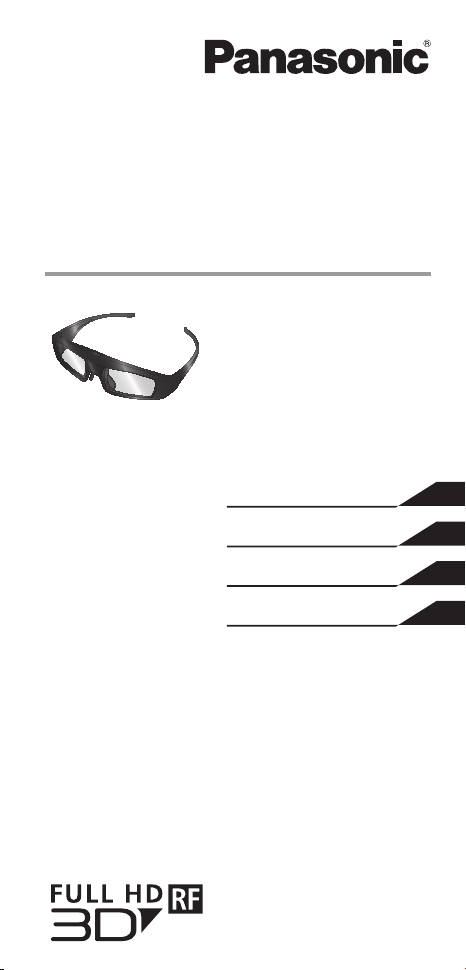
Operating Instructions
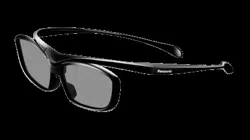
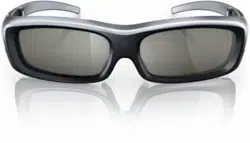
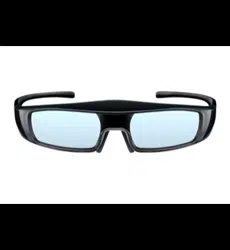
3D Eyewear
Model No.
TY-ER3D4MW
TY-ER3D4SW
This product cannot be used as sunglasses.
ENGLISH
繁體中文
TI NG VI T
日本語
TQZJ405
E
NGLISH
2
Thank you for purchasing a Panasonic
product.
Before operating this product, please read the instructions
carefully, and save this manual for future use.
Before using this product, be sure to read “Safety Precautions”
and “Using Precautions” (
pages 2 - 6).
This 3D Eyewear can be used for Panasonic HDTVs
supporting 3D and Bluetooth
®
wireless technology, that
have the logo as shown below. ( page 18)
For the latest information on applicable models, visit
our web site.
http://panasonic.net/
Safety Precautions
Danger
About Prohibition of Heating
Do not put 3D Eyewear in re, heat it or leave it in
places that can get hot.
3D Eyewear contains a lithium-ion polymer rechargeable battery, so
heating may result in combustion or rupture that may cause burns or re.
Warning
About Prohibited Place
Do not use 3D Eyewear in hospital or other medical
facilities.
Radio waves from 3D Eyewear may cause interference of medical
equipments.
Do not use 3D Eyewear nearby automatic control
equipments, like a automatic door, a re alarm
apparatus, etc.
Radio waves from 3D Eyewear may cause interference of automatic
control equipments.
Keep 3D Eyewear more than 22 cm (9 in.) away
from the implant of cardiac pacemaker, or similar
implantable medical equipments, at all times.
Radio waves from 3D Eyewear may affect implantable cardiac
pacemaker or similar equipment operations.

E
NGLISH
3
About Prohibition of Disassembly
Do not disassemble or modify the 3D Eyewear.
Doing so may result in re, or in a malfunction that may cause the user
to feel unwell.
When disposing this product, refer “Disposal” (
page 10 - 12) and
disassemble properly for removing the rechargeable battery.
About Charging
Charge by connecting the included charging cable to the
USB terminal of a Panasonic TV supporting 3D.
Charging with other devices may result in battery leakage, heating or
rupture.
Do not use the included charging cable for uses other
than charging 3D Eyewear.
Doing so may result in heating, combustion or damage.
Caution
About 3D Eyewear
Do not drop, exert pressure on, or step on the
3D Eyewear.
Doing so may damage the glass section, which may result in injury.
Be careful of the tips of the frame when putting on the
3D Eyewear.
Accidentally inserting the tip of the frame into the eye may cause injury.
Always keep the 3D Eyewear in a cool, dry place.
Failure to do so may cause re or electric shock.
Be careful not to trap a nger in the hinge section of the
3D Eyewear.
Doing so may result in injury.
• Pay special attention when children are using this product.
About Viewing of 3D Images
Do not use the 3D Eyewear if you have a history of over-
sensitivity to light, heart problems, or have any other
existing medical condition.
Using the 3D Eyewear may cause the symptoms to worsen.
Stop using the 3D Eyewear immediately if you feel tired,
discomfort, or any other abnormality.
Continuing to use the 3D Eyewear in such cases may cause you to feel
unwell.
Please take the necessary rest before continuing use.
When watching 3D movies, take an appropriate length
break after watching a movie.
(continued overleaf)

E
NGLISH
4
When watching 3D content on interactive devices such as
3D games or computers, take an appropriate length break
after using for 30 - 60 minutes.
Prolonged use may cause eyesight fatigue.
When using the 3D Eyewear, be careful not to strike the
television screen or other people by mistake.
As the images are in 3D, the distance between the user and screen may
be mistaken, causing the user to strike the screen which may result in
injury.
Use the 3D Eyewear when viewing 3D images.
When using the 3D Eyewear, make sure your eyes are on
an approximately horizontal level.
If you suffer from myopia (short-sightedness), hyperopia
(far-sightedness), astigmatism, or have eyesight
differences between the left and right eyes, please use
corrective glasses or other such methods to correct your
eyesight before putting on the 3D Eyewear.
Stop using the 3D Eyewear if you can clearly see double
images when viewing 3D content.
Prolonged use may cause eyesight fatigue.
View the screen at a distance at least 3 times further than
the effective height of the screen.
Recommended distance:
For a 50-inch TV 1.9 m or more
For a 65-inch TV 2.4 m or more
Using the 3D Eyewear at a distance closer than the recommended
distance may cause eyesight fatigue.
Using 3D Eyewear
As a guide, 3D Eyewear should not be used by children
younger than 5 - 6 years old.
As it is difcult to judge younger children’s reactions to fatigue or
discomfort, it may be difcult to prevent them from suddenly feeling
unwell.
• When this product is being used by a child, the parent or guardian
should check to ensure that the child’s eyes are not becoming tired.
When using the 3D Eyewear, do not place breakable
objects near to the user.
The user may mistake the 3D objects they are viewing as real objects
causing them to move, which may cause damage to surrounding objects
that may lead to injury.
Do not move around while wearing the 3D Eyewear.
The surrounding area appears dark, which may result in falling or other
accidents that may cause injury.
Only use the 3D Eyewear for the specied purpose.
Do not use if the 3D Eyewear is cracked or broken.
Doing so may result in injury or eyesight fatigue.
E
NGLISH
5
If a malfunction or fault occurs in the 3D Eyewear,
stop use immediately.
Continuing to use the 3D Eyewear may result in injury, eyesight fatigue,
or may cause you to feel unwell.
Stop using the 3D Eyewear immediately if your skin feels
unusual.
In rare cases, the paint or materials used in the 3D Eyewear may cause
an allergic reaction.
Stop using the 3D Eyewear immediately if you experience
any redness, pain, or itching on the nose or temples.
Prolonged use may cause such symptoms due to excess pressure,
which may result in the user feeling unwell.
Using Precautions
Lens
Do not apply pressure to the liquid crystal shutter. Also, do
not drop or bend the 3D Eyewear.
Do not scratch the surface of the liquid crystal shutter with
a pointed instrument etc.
Doing so may cause damage to the 3D Eyewear, and
reduce the quality of the 3D image.
Cautions during viewing
Do not use devices that emit strong electromagnetic waves
(such as mobile phones or personal transceivers) near
the 3D Eyewear. Doing so may cause the 3D Eyewear to
malfunction.
The 3D Eyewear cannot operate fully at high or low
temperatures.
Please use within the specied usage temperature range
(
page 14).
If the 3D Eyewear is used in a room in which uorescent
lights (50 Hz) are used, the light within the room may
appear to be ickering. In this case, either darken or switch
off the uorescent lights when using the 3D Eyewear.
Wear the 3D Eyewear correctly. 3D images will not be
correctly visible if the 3D Eyewear is worn upside down or
back-to-front.
Other kinds of displays (such as computer screens, digital
clocks, or calculators etc.) may be difcult to see while
wearing the 3D Eyewear. Do not wear the 3D Eyewear
when watching anything other than 3D images.
(continued overleaf)

E
NGLISH
6
For comfortable viewing
View the screen at a distance at least 3 times further than
the effective height of the screen.
Recommended distance:
For a 50-inch TV 1.9 m or more
For a 65-inch TV 2.4 m or more
When the top and bottom area of the screen is blackened, such as
movies, view the screen at a distance about 3 times further than the
height of the actual image.
(That makes the viewing distance closer than above recommended
distance.)
Using radio waves
This unit uses the 2.4 GHz radio frequency ISM band
(Bluetooth
®
). However other wireless equipment may use the
same frequency. Be sure to take note of the following to prevent
radio wave interference from other equipment.
Restriction of use
For use only in your country.
Range of use
The range of use is up to approximately 3.2 m (10.5 ft.). The range may
be less depending on the structure of the building, the environment and
any obstacles between the receiver and the transmitter. Such obstacles
as reinforced concrete walls and metal doors, in particular, obstruct the
transmitter’s signals.
Interference from other equipment
Due to radio interference, malfunctions may occur if the unit is placed
too close to other equipment. We recommend keeping the unit as far
away as possible from the following devices:
Bluetooth
®
devices other than this unit, wireless LAN, microwaves, of ce
automation devices, digital cordless telephones and other electronic
devices.
The unit is designed to automatically avoid radio interference from these
household devices. However malfunctions may happen when radio
interference occurs.
Accessories
Charging cable ···························································<1>
(K2KYYYY00164)
< > indicates the quantity.
E
NGLISH
7
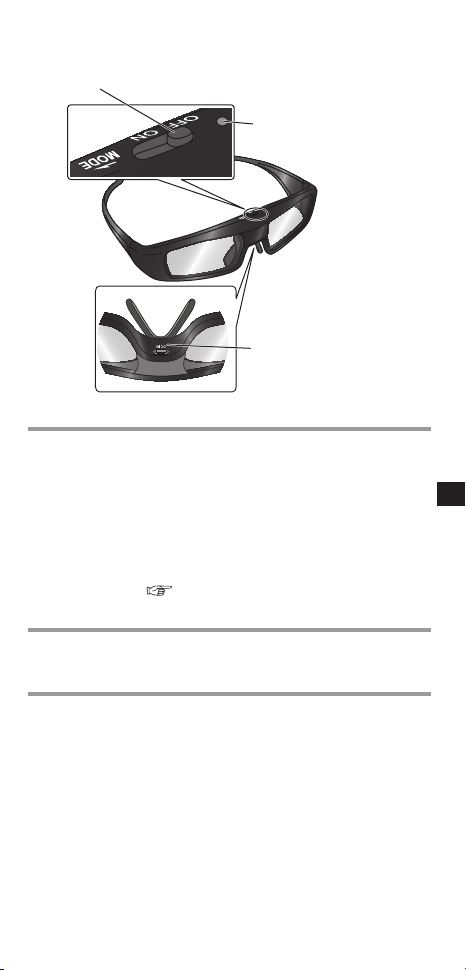
Identifying Controls
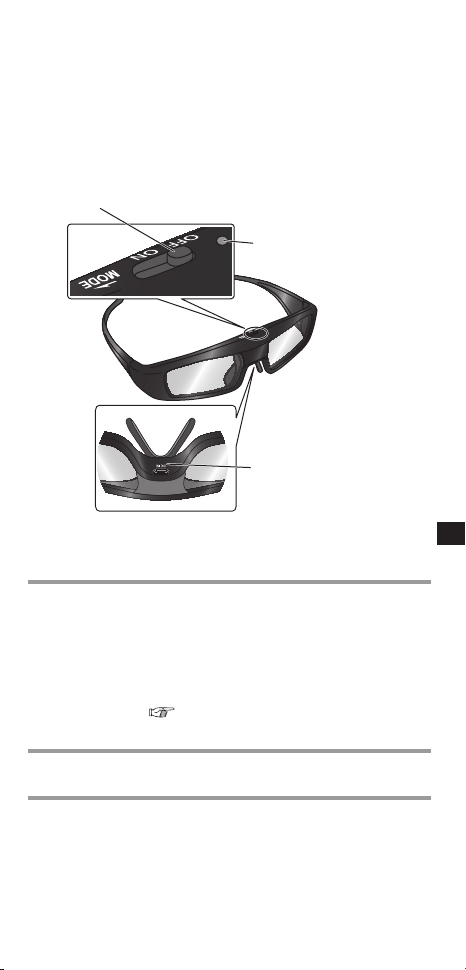
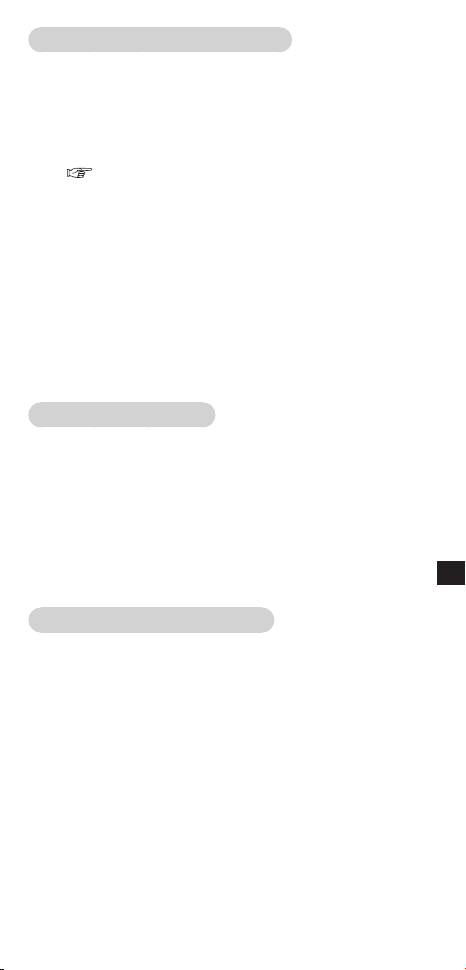
Power switch
Indicator lamp
Charging port (DC IN)
Power switch
ON/OFF Slide the tab to the ON/OFF position to switch
the power on/off.
MODE Slide the tab once to the MODE position to
change the mode between 3D and 2D.
• 2D: View a 3D image in 2D.
This is also used when registering the 3D
Eyewear on the television. For details on
registration, refer to the Registration page.
(
page 9)
Indicator lamp
Lights or ashes during use or charging to show the status of
the rechargeable battery and the registration.
Charging port
Connect the charging cable.
• Charge by connecting the included charging cable.
(continued overleaf)
E
NGLISH
8
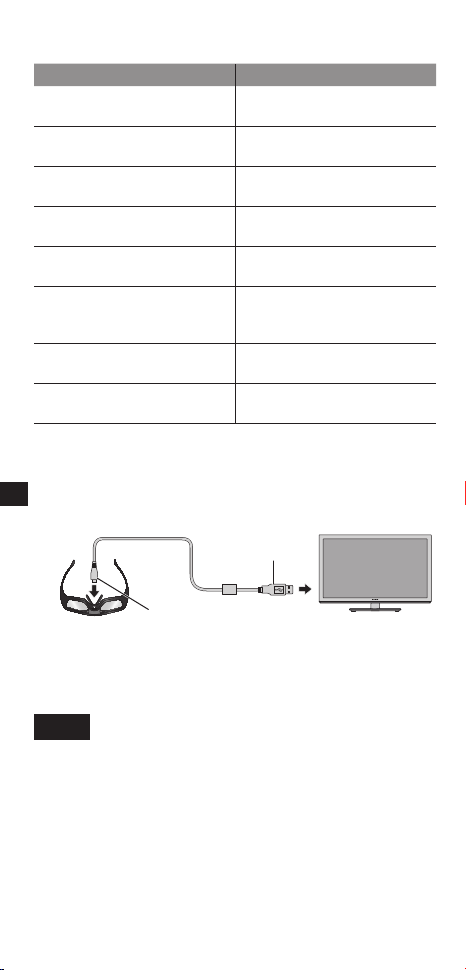
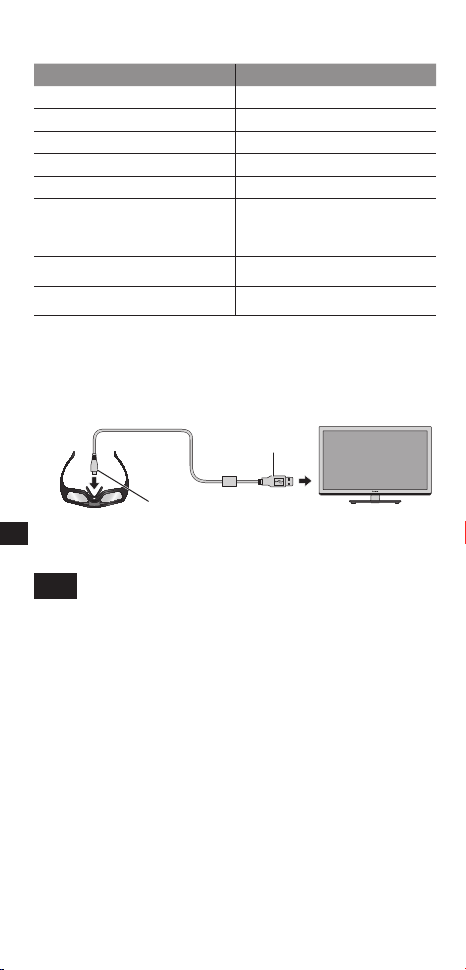
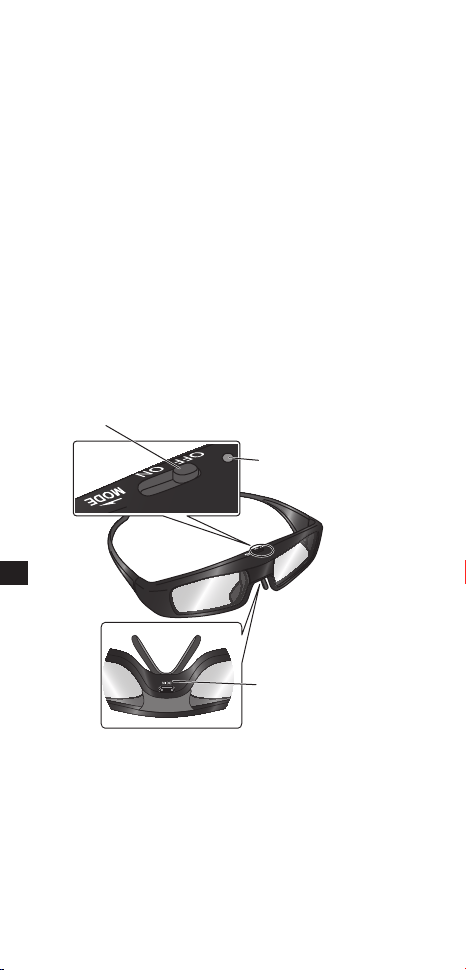
Indicator lamp status
Indicator lamp Status
Lights red for 2 seconds when
turned on
Suf cient battery level
Flashes red 5 times when
turned on
Low battery level
Flashes red and green
alternately
Under registration
Flashes green once every 2
seconds
Under reconnecting to the TV
Lights green for 3 seconds Registration or reconnecting
is successfully completed.
Flashes red 3 times Automatically power off
(Registration or reconnecting
fails or connection is lost)
Flashes red once every
2 seconds when in use
3D mode is selected.
Flashes red twice every
4 seconds when in use
2D mode is selected.
Charging
Charging the 3D Eyewear
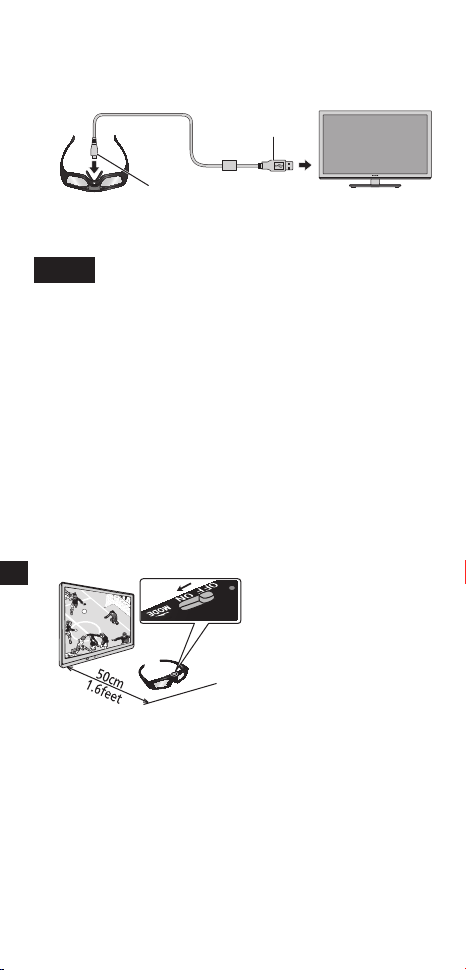
Connect the 3D Eyewear with the included charging cable to
the television, then switch on the television.
• When the indicator lamp turns off, charging is complete. Refer
to the speci cations on page 14 for the approximate charging
time.
NOTE
• Charge the 3D Eyewear before using the rst time after purchase or
after long periods of disuse.
• Be sure to turn the television power on when charging. The battery will
not be charged when the television power is off.
USB connector
Micro USB connector
E
NGLISH
9
Registration
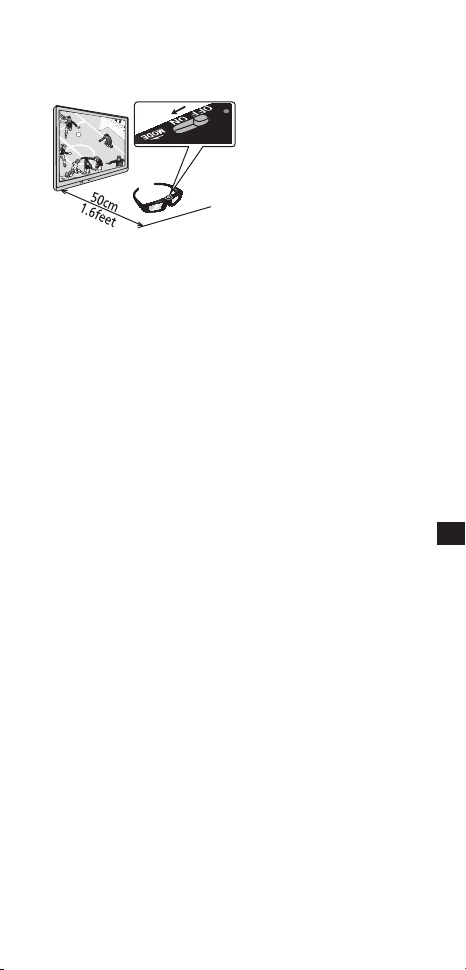
First Registration
Perform the First Registration when the 3D Eyewear is used
for the rst time.
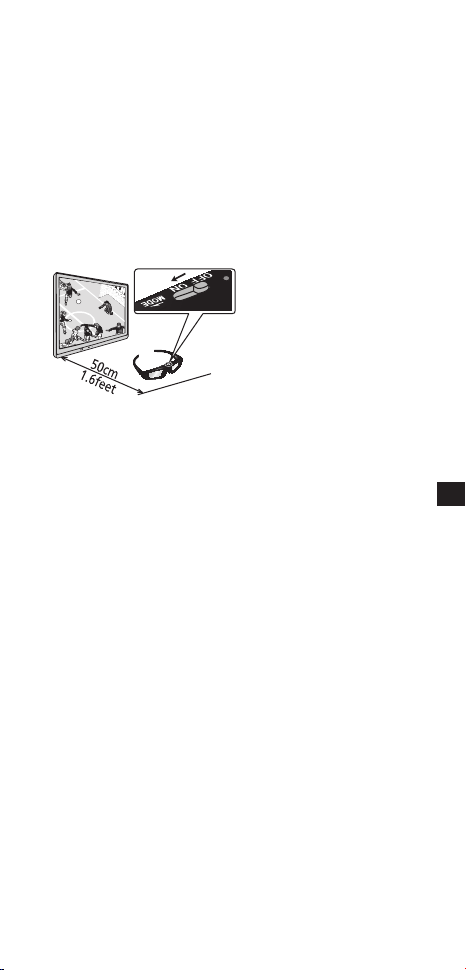
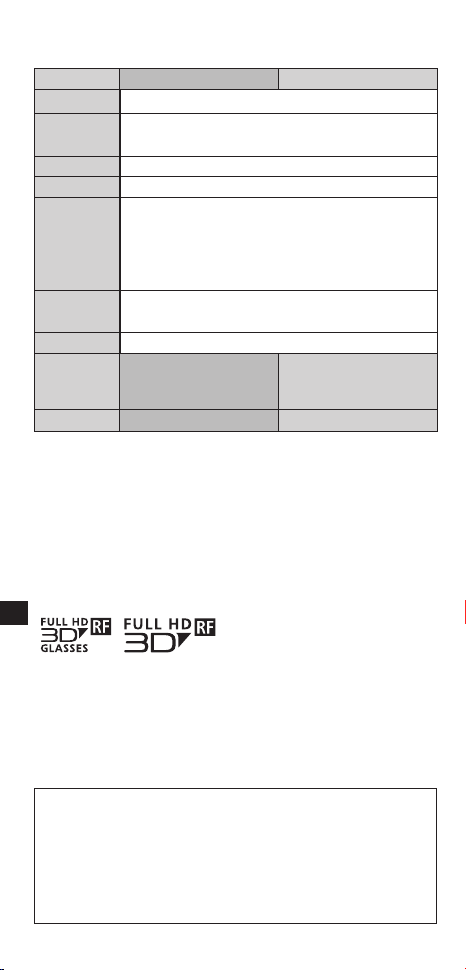
1. Turn on the TV to see.
2. Slide the tab from the OFF position to the ON position.
The 3D Eyewear will power on and start registration.
Place the 3D Eyewear within 1.6 feet (50 cm) from the TV
while registration in progress.
3. The green LED lights on the 3D Eyewear for 3 seconds when
the registration is successfully completed.
After rst registration, the 3D Eyewear will reconnect with the TV
automatically when 3D Eyewear is powered on near the TV in
3D mode.
Registration Again
When connection with registered TV fails, or when using with
another TV, re-register the 3D Eyewear.
1. Turn on the TV to see.
2. Within 1.6 feet (50 cm) from the TV, hold the tab on the
MODE position for more than 2 seconds.
The registration will start.
3. The green LED lights for 3 seconds when the registration is
successfully completed.
* If the registration failed, the 3D Eyewear will power off.
In this case, power off the TV and perform from step 1.
* Do not connect the charging cable while Registration Again.
* Release the tab when Registration Again starts.

E
NGLISH
10
Storage and Cleaning
Clean using a soft, dry cloth.
Wiping the 3D Eyewear with a soft cloth that is covered in dust
or dirt may scratch the eyewear. Shake off any dust from the
cloth before use.
Do not use benzene, thinner, or wax on the 3D Eyewear, as
doing so may cause the paint to peel off.
Do not dunk the 3D Eyewear in liquid such as water when
cleaning.
Avoid storing the 3D Eyewear in hot or highly humid locations.
During the long period of disuse, full charge the 3D Eyewear
once every 6 months to keep the battery performance.
As the liquid crystal shutters (lens) are fragile and easily
broken, be very careful when cleaning them.
Disposal
A lithium-ion polymer rechargeable battery is built in
to the 3D Eyewear. Please discard according to local
regulations.
When disposing this product, disassemble properly by
following the procedure on the next page, and remove
the internal rechargeable battery.
Do not disassemble this product except when disposing
of it.
Danger
As the rechargeable battery is specically for this
product, do not use it for any other device.
Do not charge the removed battery.
Do not throw the battery in a re, or apply heat to it.
Do not pierce the battery with a nail, subject it to an impact,
or dismantle or modify it.
Do not let the wires touch any other metal or each other.
Do not carry or store the battery with a necklace, hair pin,
or the like.
Do not charge, use, or leave the battery in a hot location
such as near a re or under the hot sun.
Doing so may cause the battery to generate heat, ignite, or
rupture.
E
NGLISH
11
Warning
Do not place the removed battery, screws, and other
items within reach of infants.
Accidental swallowing of such an item may have an adverse
effect on the body.
In the event that you think such an item has been
swallowed, consult a doctor immediately.
In the event of uid leaking from the battery, take the
following measure, and do not touch the uid with
bare hands.
Fluid entering into an eye may cause loss of eyesight.
Wash the eye with water immediately without rubbing it,
and then consult a doctor.
Fluid getting on your body or clothes may cause inammation of
the skin or injury.
Sufciently rinse with clean water, and then consult a
doctor.
How to remove the battery
Disassemble this product after the battery has run out of
power.
The following gures are intended to explain how to
dispose of the product, not for describing how to repair.
The product cannot be repaired once it has been
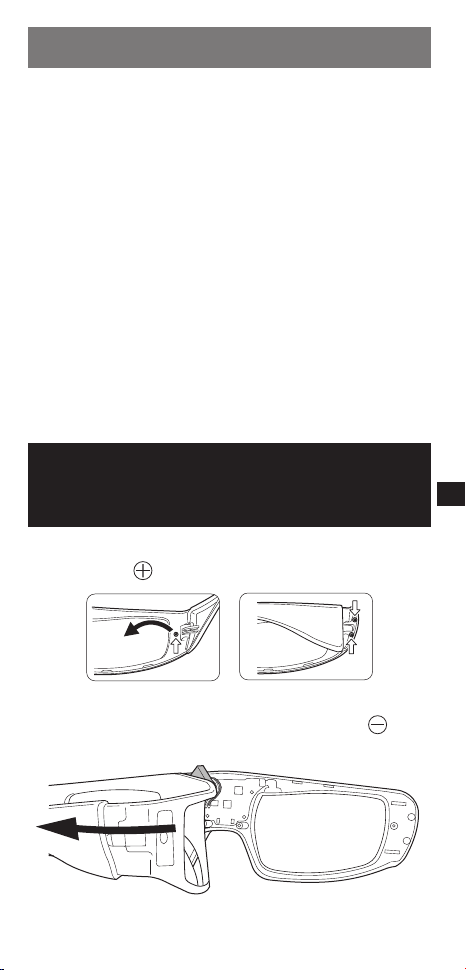
disassembled.
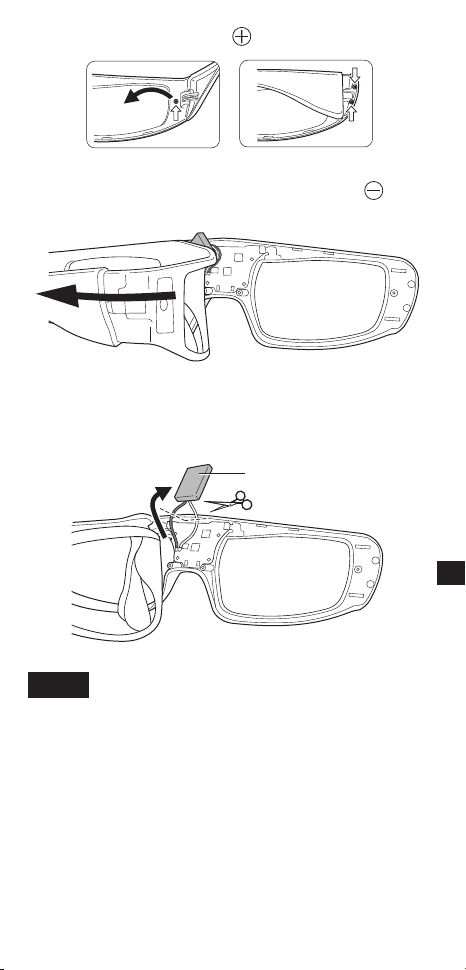
1. Remove the screws of the 3D Eyewear with a precision
Phillips (plus
) screwdriver.
2. Bend the frame inwards and pull it off from the side cover.
If it is difcult to pull off, insert a at-blade (minus
)
screwdriver and pry open it.
(continued overleaf)
E
NGLISH
12
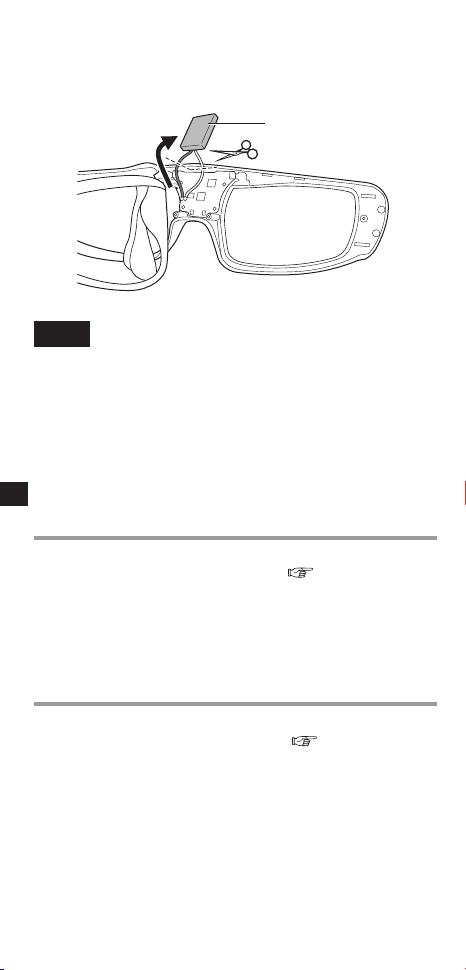
3. Pull off the battery and separate it from the 3D Eyewear by
cutting off the wires, one by one, with scissors.
Insulate the wire parts of the removed battery with
cellophane tape.
Battery
NOTE
• Take sufcient care when performing this work so as not to injure
yourself.
• Do not damage or dismantle the battery.
Troubleshooting/Q&A
Check the followings rst. If they do not solve the problem,
please contact the place of purchase.
Cannot register a 3D Eyewear to TV.
► Does the TV support on this 3D Eyewear?
Use the 3D Eyewear with compatible TVs. (
page 2)
► Did you allow more than 1 minute to elapse after setting
the unit to the device registration mode?
The registration is automatically released if you allow more than
1 minute to elapse. Set the registration with the television and
connected 3D Eyeware placed as close to each other as possible.
Images are not 3D.
► Is the TV has been registered with the 3D Eyewear?
Perform the registration with the TV to see. (
page 9)
► Is the 3D Eyewear mode set to 3D?
Slide the tab once to the MODE position to change the mode between
3D and 2D.
► Are the image settings switched to 3D images?
Refer the television operating instructions.

E
NGLISH
13
► Individual differences may occur in which the 3D images
are difcult to see, or cannot be seen, especially in users
that have a different level of eyesight between the left
and right eyes.
Take the necessary steps (wearing glasses etc.) to correct your
eyesight before use.
The power of the 3D Eyewear turns off by itself.
► Are there any objects between the eyewear and
television?
The indicator lamp does not light when the power
switch is set to “ON”.
► Is the 3D Eyewear sufciently charged?
If the indicator lamp does not light at all, the battery is completely at.
Perform the battery charging operation.
The battery does not charge, or operation time is
short when charged.
► Is the charging cable connected properly?
Make sure the charging cable is properly connected.
► Is the television power off?
Switch the television power on, then charging will start.
► The battery has reached the end of its lifespan.
If operation time is very short even when the battery is charged, the
battery has reached the end of its lifespan. Please consult with the
place of purchase.
E
NGLISH
14
Specications
Lens type
Liquid Crystal Shutter
Usage temperature range
0 °C - 40 °C (32°F - 104°F)
Charging power supply
DC 5 V ( supplied by USB terminal of a Panasonic TV)
Battery
Lithium-ion polymer rechargeable battery
DC 3.7 V, 40 mAh
Operation time*
1
:
Approx. 30 hours
Charging time*
1
: Approx. 30 minutes
Quick charge
( 2 minutes charge enables approx. 3 hours use)
Viewing range*
2
Within 3.2 m from front surface of the TV.
Materials
Main body: Resin
Lens section: Liquid crystal glass
Communication system
2.4 GHz band FH-SS (Frequency Hopping Spread Spectrum)
Dimensions (not including nose pad part)
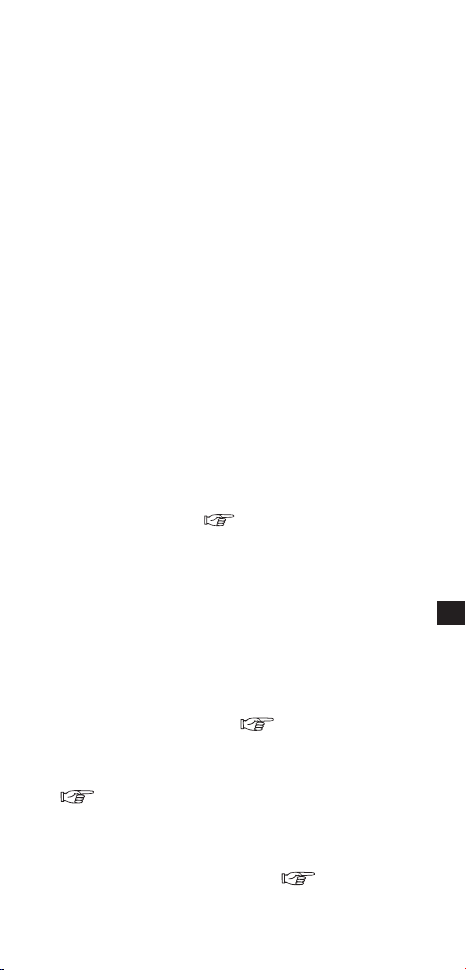
Models TY-ER3D4MW TY-ER3D4SW
Width 167.7 mm 160.5 mm
Height 42.2 mm 42.2 mm
Overall length 170.7 mm 167.6 mm
Mass Approx. 27
g
Approx. 27
g
*
1
Operation time/Charging time
• The battery deteriorates after repeated use, and the operation time
eventually becomes short. It may also take longer to charge, depending
on where and how long it was stored. The gures above are at shipping
from the factory, and are not a guarantee of performance.
*
2
Viewing range
• There are differences in the viewing range of the 3D Eyewear among
individuals.
• The 3D Eyewear may not operate correctly at the outside of the viewing
range.

E
NGLISH
15
WARRANTY
- Australia only
Panasonic Warranty
1. The product is warranted for 12 months from the date of purchase.
Subject to the conditions of this warranty Panasonic or its Authorised
Service Centre will perform necessary service on the product without
charge for parts or labour if, in the opinion of Panasonic, the product is
found to be faulty within the warranty period.
2. This warranty only applies to Panasonic products purchased in
Australia and sold by Panasonic Australia or its Authorised Distributors
or Dealers and only where the products are used and serviced within
Australia or it’s territories. Warranty cover only applies to service carried
out by a Panasonic Authorised Service Centre and only if valid proof of
purchase is presented when warranty service is requested.
3. This warranty only applies if the product has been installed and used in
accordance with the manufacturer’s recommendations (as noted in the
operating instructions) under normal use and reasonable care (in the
opinion of Panasonic). The warranty covers normal domestic use only
and does not cover damage, malfunction or failure resulting from use
of incorrect voltages, incorrect installation, accident, misuse, neglect,
build-up of dirt or dust, abuse, maladjustment of customer controls,
mains supply problems, thunderstorm activity, infestation by insects
or vermin, tampering or repair by unauthorised persons (including
unauthorised alterations), introduction of sand, humidity or liquids,
commercial use such as hotel, ofce, restaurant, or other business or
rental use of the product, exposure to abnormally corrosive conditions
or any foreign object or matter having entered the product.
4. This warranty does not cover the following items unless the fault or
defect existed at the time of purchase:
(a) Cabinet Part(s)
(b) Video or Audio Tapes
(c) SD cards or USB devices
(d) User replaceable Batteries
(e) DVD Video, Blu-ray, or Recordable Discs
(f) Video / Audio Heads from wear and tear in normal use
(g) Information stored on Hard Disk Drive, USB stick or SD card
(h) DTV reception issues caused by TV Aerial / Cabling / Wall
socket(s) etc
5. Some products may be supplied with Ethernet connection hardware.
The warranty is limited on such products and will not cover
(a) Internet and or DLNA connection / setup related problems
(b) Access fees and or charges incurred for internet connection
(c) The use of incompatible software or software not specically
stipulated in the product operations manual; and
(d) Any indirect or consequential costs associated with the incorrect
use or misuse of the hardware, its connection to the internet or any
other device.
6. To claim warranty service, when required, you should:
Telephone Panasonic’s Customer Care Centre on 132600 or visit
our website referred to below and use the Service Centre Locator
for the name/address of the nearest Authorised Service Centre.
Send or take the product to a Panasonic Authorised Service Centre
together with your proof of purchase receipt as a proof of purchase
date. Please note that freight and insurance to and / or from your
nearest Authorised Service Centre must be arranged by you.
Note that home or pick-up/delivery service is available for the
following products in the major metropolitan areas of Australia or the
normal operating areas of the nearest Authorised Service Centres:
- Plasma/LCD televisions / displays (screen size greater than 103 cm)
(continued overleaf)

E
NGLISH
16
7. The warranties hereby conferred do not extend to, and exclude, any
costs associated with the installation, de-installation or re-installation
of a product, including costs related to the mounting, de-mounting or
remounting of any screen, (and any other ancillary activities), delivery,
handling, freighting, transportation or insurance of the product or any
part thereof or replacement of and do not extend to, and exclude, any
damage or loss occurring by reason of, during, associated with, or
related to such installation, de-installation, re-installation or transit.
Panasonic Authorised Service Centres are located in major metropolitan
areas and most regional centres of Australia, however, coverage will vary
dependant on product. For advice on exact Authorised Service Centre
locations for your product, please telephone our Customer Care Centre on
132600 or visit our website and use the Service Centre Locator.
In addition to your rights under this warranty, Panasonic products come
with consumer guarantees that cannot be excluded under the Australian
Consumer Law. If there is a major failure with the product, you can reject
the product and elect to have a refund or to have the product replaced or if
you wish you may elect to keep the goods and be compensated for the drop
in value of the goods. You are also entitled to have the product repaired or
replaced if the product fails to be of acceptable quality and the failure does
not amount to a major failure.
If there is a major failure in regard to the product which cannot be remedied
then you must notify us within a reasonable period by contacting the
Panasonic Customer Care Centre. If the failure in the product is not a major
failure then Panasonic may choose to repair or replace the product and will
do so in a reasonable period of time from receiving notice from you.
THIS WARRANTY CARD AND THE PURCHASE DOCKET
(OR SIMILAR PROOF OF PURCHASE)
SHOULD BE RETAINED BY THE CUSTOMER AT ALL
TIMES
If you require assistance regarding warranty conditions or any
other enquiries,please visit the
Panasonic Australia website www.panasonic.com.au or
contact by phone on 132 600
If phoning in, please ensure you have your operating instructions
available.
Panasonic Australia Pty. Limited
ACN 001 592 187 ABN 83 001 592 187
1 Innovation Road, Macquarie Park NSW 2113
PRO-031-F11 Issue: 4.0 01-01-2011
E
NGLISH
17
WARRANTY
- New Zealand only
WARRANTY
- New Zealand only
WE WARRANT that the Panasonic Product that you have
purchased is free from defects in material and workmanship
under normal home use and service. Accordingly, we
undertake to repair, or at our option, replace without cost to
the owner, either for material or labour, any part which within
12 months from the date of sale is found to be defective,
provided that the appliance has been used for domestic
purposes only and in accordance with the instructions given
in the Instruction Book and not been subjected to misuse,
neglect or faulty installation, dismantled, repaired or serviced
by any other than an authorised Panasonic New Zealand
Dealer or Panasonic New Zealand Authorised Service
Centre.
NOTE
– Before reporting a fault, please ensure
that you read the item “Troubleshooting” in
the information section of your Panasonic
Instruction Book.
– It is important to retain your proof of
purchase as this will be required by the
serviceman or retailer as proof of purchase
date, should service be required.
– In the event of service being required,
contact your Panasonic New Zealand
retailer or Panasonic New Zealand
Authorised Service Centre.
IMPORTANT
Any request for warranty service must be through an
Authorised Panasonic New Zealand Service Centre who
during the period of the warranty, undertakes to make any
necessary adjustment and t any replacement part supplied
by the manufacturer, during normal working hours, or
alternatively will arrange for such service to be provided by
some other Panasonic New Zealand Authorised Service
Centre.
NEWZEALAND
Distributed in New Zealand by Panasonic
New Zealand Limited
350 Te Irirangi Drive East Tamaki,
Private Bag 14911, Panmure Auckland
Tel. 09 272 0100
Customer Care Center
Email: [email protected]
www.panasonic.co.nz
E
NGLISH
Information on Disposal in other Countries outside
the European Union
This symbol is only valid in the European Union.
If you wish to discard this product, please
contact your local authorities or dealer and ask
for the correct method of disposal.
For the purpose of recycling to facilitate effective
utilization of resources, please return this
product to a nearby authorized collection center,
registered dismantler or recycler, or Panasonic
service center when disposing of this product.
Please see the Panasonic website for further
information on collection centers, etc.
http://www.panasonic.co.in/wps/portal/home
These logos indicate products that are compatible with active
shutter 3D glasses technology standards licensed by the Full
HD 3D Glasses Initiative. The RF logo indicates products that
operate on the wireless system, and can be used with any TV
that has the same logo.
“Full HD 3D™” Logo indicates compatibility between TV products
and 3D Eyewear which are compliant with the “Full HD 3D
Glasses™” format, and does not indicate picture quality of 3D
image which should be depend on the quality of TV products.
“Full HD 3D Glasses™” logo and “Full HD 3D Glasses™” word
are trademark of Full HD 3D Glasses Initiative.
The Bluetooth
®
word mark and logos are owned by the
Bluetooth SIG, Inc. and any use of such marks by Panasonic
Corporation is under license.
Other trademarks and trade names are those of their respective
owners.
Panasonic Corporation
Web Site : http://panasonic.net/
© Panasonic Corporation 2012
[India Only]
繁體中文
1
使用說明書
3D眼鏡
型號
TY-ER3D4MW
TY-ER3D4SW
感謝您購買松下產品。
在使用本產品前,請仔細閱讀本說明書,並妥善保存,以備日
後使用。
在使用本產品前,請務必閱讀「安全注意事項」與「使用注意
事項」(
第 1 - 4 頁)。
本 3D 眼鏡適用於支援 3D 及 Bluetooth
®
,藍牙
®
無線
技術的松下電視 (HDTV),標誌如下所示( 第 12 頁)。
欲瞭解適用型號的最新資訊,請瀏覽我們的網站。
http://panasonic.net/
本產品不可作為太陽眼鏡使用。
安全注意事項
危險
關於禁止加熱
請勿將3D眼鏡置於火中或加熱,或是放置於可能會變
熱的地方。
3D眼鏡內含一個鋰離子聚合物充電電池,所以加熱可能會導致燃燒或是
破裂,因此,可能會著火或引起火災。
警告
關於禁止使用場所
請勿在醫院或其他醫療設施附近使用3D眼鏡。
3D 眼鏡散發的無線電波會對醫療設備造成干擾。
請勿在自動控制設備附近使用3D眼鏡,如自動門、火
警警報設備等。
3D 眼鏡散發的無線電波會對自動控制設備造成干擾。
(續後頁)
繁體中文
2
請隨時確保將3D眼鏡遠離心臟起搏器或類似可植入人
體的醫療設備達22cm(9in.)以上。
3D 眼鏡散發的無線電波會影響可植入人體的心臟起搏器或類似設備的運
作。
禁止拆卸
請勿拆卸或改裝3D眼鏡。
因為這樣做可能引起火災或使用中發生故障,造成使用者感覺不適。
棄置本產品時,請參照「棄置」(
第 8 - 9 頁),並正確移除充電電池。
關於充電
請將內含的充電纜線連接到支援3D功能的松下電視USB端子,
以進行充電。
使用其他裝置充電可能會導致電池洩漏、發熱或破裂。
請勿將內含的充電纜線用於3D眼鏡充電以外的其他用途。
否則可能會導致發熱、燃燒或損壞。
注意
3D眼鏡
請勿掉落、重壓或踩踏3D眼鏡。
這可能會損壞鏡片部分,進而可能造成人身傷害。
配戴3D眼鏡時,請小心眼鏡腿。
將眼鏡腿意外插入眼睛可能造成人身傷害。
請始終將3D眼鏡置於陰涼、乾燥的地方。
否則可能造成火災或觸電。
請注意手指不要被3D眼鏡的鉸鏈部分夾到。
這可能會造成人員傷害。
• 兒童使用本產品時,請給予特別關照。
觀看3D圖像
如果您具有光過敏史、心臟問題或有其他未消除的醫學症狀,
請勿使用3D眼鏡。
因為使用3D眼鏡可能導致症狀加劇。
如果感覺疲勞、不舒服或其他任何異常,請立即停止使用3D
眼鏡。
因為在這些情況下繼續3D眼鏡可能讓您感覺不適。
請適當休息之後再繼續使用3D眼鏡。
在觀看3D立體電影時,請在看完一部電影之後適當休息一段
時間。
在觀看互動設備(例如3D立體遊戲或電腦)上的3D立體內容
時,請在使用30-60分鐘後適當休息一段時間。
使用時間過長可能引起視覺疲勞。
在使用3D眼鏡時,請注意不要誤打到電視螢幕或其他人。
因為在觀看3D立體圖像,使用者可能對距螢幕的距離作出錯誤判斷,進
而擊打到螢幕,這可能造成人身傷害。
繁體中文
3
觀看3D立體圖像時,請使用3D眼鏡。
在使用3D眼鏡時,請確保雙眼視線基本保持水準。
如果您有近視、遠視、散光或左、右眼視力不同,請先使用矯
正眼鏡或其他方法矯正視力,再使用3D眼鏡。
如果在觀看3D立體內容時,明顯看到重影圖像,請停止使用
3D眼鏡。
使用時間過長可能引起視覺疲勞。
觀看時,與螢幕的距離至少應保持在螢幕有效高度的三倍以上。
建議距離:
如為 50 吋電視 1.9 m 或以上
如為 65 吋電視 2.4 m 或以上
如果使用3D眼鏡的距離小於推薦距離,可能引起視覺疲勞。
在觀看3D圖像時
5-6歲以下的兒童不可使用3D眼鏡。
由於難以判斷幼童對疲勞或不適的反應,可能就無法防止他們突然出現頭
暈噁心。
• 當兒童使用本產品時,家長或監護人應檢查確保兒童的眼睛不會疲勞。
在使用3D眼鏡時,請勿在使用者周圍放置易碎的物品。
因為使用者可能將他們正在觀賞的3D立體物體誤認為是真實物體而挪動
身體,這樣可能損壞周圍物品,進而可能造成人身傷害。
在戴著3D眼鏡時,請勿四處走動。
因為這是周圍環境看起來是黑暗的,可能導致摔倒或引起其他事故,進而
可能造成人身傷害。
只能將本3D眼鏡用於指定用途。
請勿使用破裂或破碎的3D眼鏡。
否則,可能造成人身傷害或視覺疲勞。
如果3D眼鏡發生故障或問題,請立即停止使用。
繼續使用該3D眼鏡可能造成人身傷害、眼睛疲勞或身體不適。
如果感覺皮膚有異樣,請立即停止使用3D眼鏡。
在極少數情況下,3D眼鏡使用的塗漆或材料可能引起過敏性反應。
如果鼻子或太陽穴發紅、疼痛或發癢,請立即停止使用3D眼鏡。
如果使用時間過長,由於壓力過大可能引起上述症狀,進而讓使用者感覺
不適。
低功率射頻電機設備警語
依據低功率電波輻射性電機管理辦法
第十二條 經型式認證合格之低功率射頻電機,非經許可,公司、商號或
使用者均不得擅自變更頻率、加大功率或變更原設計之特性及功能。
第十四條 低功率射頻電機之使用不得影響飛航安全及干擾合法通信;經
發現有干擾現象時,應立即停用,並改善至無干擾時方得繼續使用。前
項合法通信,指依電信法規定作業之無線電通信。低功率射頻電機須忍
受合法通信或工業、科學及醫療用電波輻射性電機設備之干擾。
繁體中文
4
使用注意事項
鏡片
不可用力壓液晶快門。也不可掉落或折彎3D眼鏡。
請勿用尖銳物件等刮擦液晶快門的表面。
這樣做可能損壞3D眼鏡,並降低3D立體圖像的品質。
觀賞時的注意事項
不可在3D眼鏡附近使用發射強電磁波的設備(例如手機或
個人收發機)。這樣做可能造成3D眼鏡不能正常工作。
3D眼鏡不能在高溫或低溫下完全正常工作。
請在規定的工作溫度範圍內使用(
第 11 頁)。
如果在使用螢光燈(50 Hz)的室內使用3D眼鏡,室內的燈
光可能出現閃爍。在這種情況下,請在使用3D眼鏡時調暗
或關掉螢光燈。
請正確配戴3D眼鏡。如果上下或前後顛倒配戴3D眼鏡,將
無法看到正確的3D立體圖像。
當配戴3D眼鏡時,可能難以看清其他類型的顯示器(例如
電腦螢幕、電子時鐘或計算機等)。不觀看3D立體圖像時,
請勿配戴3D眼鏡。
舒適地觀看
觀看時,與螢幕的距離至少應保持在螢幕有效高度的三倍以
上。
建議距離:
如為 50 吋電視 1.9 m 或以上
如為 65 吋電視 2.4 m 或以上
當屏幕的頂部和底部為黑條時,比如觀看電影時,請在實際圖像高度的三
倍距離之處觀看。
(就是說觀看距離要比上面的推薦距離近。)
使用無線電波
本裝置使用 2.4 GHz 無線電頻率 ISM 頻帶 (Bluetooth
®
,藍牙
®
)。
然而其他無線設備可能會使用相同的頻率。 請務必注意下列事項,
以避免遭受其他設備的無線電波干擾。
使用限制
僅限在您的國家使用。
使用範圍
使用範圍可長達 3.2 m (10.5 ft.)。 視建築物的結構、環境及接收器與發射
器間的障礙物而定,此範圍可能會縮減。 類似如鋼筋混凝土牆及金屬門
等障礙物,特別容易阻礙發射器的訊號。
來自其他設備的干擾
若裝置離其他設備太近,可能會因無線電干擾而發生故障。 建議盡可能
讓本產品遠離下列裝置:
除本產品以外的 Bluetooth
®
、藍牙
®
、無線 LAN、微波爐、辦公室自動化
裝置、數位無線電話和其他電子裝置。
本產品的設計可自動預防家用裝置的無線電干擾。 不過在發生無線電干
擾時可能會出現故障。
繁體中文
5
配件
充電纜線
······································································
<1>
(K2KYYYY00164)
< >表示數量。
認識產品各個部分
電源按鍵
指示燈
充電埠(DCIN)
認識產品各個部分
電源按鍵
ON/OFF
滑動按鍵至 ON/OFF 位置以切換電源開/關。
MODE將凸起圓鈕滑動至MODE(模式)位置以切換
3D 與 2D 模式。
• 2D:以 2D 檢視 3D 圖片。
在電視上登錄 3D 眼鏡時也會用到。登錄的相
關資訊,請參閱登錄頁面的說明。
(
第 6 - 7 頁)
指示燈
使用時或充電時的亮起或閃爍光表示充電電池與登錄的狀態。
充電埠
連接充電纜線。
• 連接隨附的充電線進行充電。
(續後頁)
繁體中文
6
由指示燈顯示電池的狀態
指示燈狀態
開啟時會亮起紅燈約 2 秒電池電量充足
開啟時會閃爍紅燈 5 次電池電量不足
交替閃爍紅燈與綠燈登錄中
每 2 秒閃爍一次綠燈重新連接至電視
亮起綠燈約 3 秒登錄或重新連接已成功完成。
閃爍紅燈 3 次自動關機
(登錄中或重新連接失敗或連
線遺失)
使用時每 2 秒閃爍紅燈一次已選擇 3D 模式。
使用時每 4 秒閃爍紅燈兩次已選擇 2D 模式。
充電
為3D眼鏡充電
以隨附的充電線連接 3D 眼鏡至電視,然後開啟電視機。
• 指示燈熄滅,表示充電已完成。如需約略的充電時間,請參閱
第 11 頁上的規格。
注意
• 在購買後第一次使用時,或經長時間未使用時,請在使用之前先充電。
• 充電時,請務必開啟電視機的電源。電視機的電源關閉時,電池將無法
充電。
登錄
首次登錄
首次使用 3D 眼鏡時請執行首次登錄。
1. 開啟電視電源以查看。
USB連接器
MicroUSB接頭
繁體中文
7
2. 將凸起圓鈕從 OFF 位置滑至 ON 位置。
3D 眼鏡將開啟電源並開始登錄。
正在進行登錄時請將 3D 眼鏡放在距離電視約 1.6 feet (50 cm)
處。
3. 成功完成登錄後,3D 眼鏡上的綠色 LED 會亮起約 3 秒。
在首次登錄後,當 3D 眼鏡靠近電視並以 3D 模式開啟電源時,
3D 眼鏡將自動重新連接電視。
重新登錄
登錄電視連線失敗時,或搭配其他電視使用時,需重新登錄
3D 眼鏡。
1. 開啟電視電源以查看。
2. 在距離電視約 1.6 feet (50 cm) 處,固定MODE位置上的圓鈕
超過 2 秒。
登錄將開始。
3. 成功完成登錄後,綠色 LED 會亮起約 3 秒。
* 若登錄失敗,3D 眼鏡將關閉電源。
* 在這種情況下,請關閉電視並從步驟 1 開始操作。
* 重新登錄時請勿連接充電的纜線。
* 重新登錄開始時請放開圓鈕。
儲存與清潔
使用一塊柔軟的乾布清潔眼鏡。
使用帶有灰塵或污垢的軟布擦拭3D眼鏡可能刮花眼鏡。 因此,
在使用之前,請抖落軟布上的灰塵。
請勿在3D眼鏡上使用苯、稀釋劑或蠟,這樣做可能導致上面
的塗漆脫落。
清潔時,請勿將3D眼鏡浸泡在液體中,例如水。
避免將3D眼鏡存儲在潮濕高溫的地方。
長時間不使用時,請每 6 個月將 3D 眼鏡充滿電以保持電池效
能。
液晶快門(鏡片)是脆弱且易碎的,在清潔時請非常小心。
繁體中文
8
棄置
鋰離子聚合物充電電池內建於 3D 眼鏡中。請依照當地的
相關規定丟棄。
置棄本產品時,請依照下一頁的步驟拆卸,並移除內部的
充電電池。
除非於棄置時,否則請勿拆卸本產品。
危險
由於此充電電池是專門為本產品設計的,請勿用於其它設
備上。
請勿將移除的電池充電。
請勿將電池扔入火中,或是加熱電池。
請勿以釘子刺穿電池、撞擊電池、拆卸或改裝電池。
請勿讓電線互相碰觸,或碰到任何金屬。
請勿將項鍊、髮夾之類的物品與電池一起攜帶或存放。
請勿在高溫的地方充電、使用或置放電池,例如靠近火邊或
在高溫的太陽底下。
這樣做可能會導致電池發熱、燃燒或破裂。
警告
請勿將移除的電池、螺絲,以及其它物品置於嬰兒可觸及
的地方。
誤吞此類物品可能會對身體有害。
假如您發現誤吞此類物品,請立即就醫。
萬一電池漏液,請採取以下措施,請勿直接用手碰觸此液
體。
如果此液體進入眼睛,可能會導致視力喪失。
請勿揉眼睛,並立即用水沖洗,然後立即就醫。
如果此液體沾到身體或是衣服,可能會導致皮膚發炎、受傷。
請以乾淨的水充分沖洗,然後立即就醫。

繁體中文
9
如何移除電池
在電池電力耗盡後,請拆卸本產品。
以下的圖表旨在解釋如何棄置本產品,而非如何修復。
本產品一旦被拆卸後就無法修復。
1. 以精密十字 (
) 螺絲刀取下 3D 眼鏡的螺絲。
鏡架
內側
2. 將鏡架向內折,並將其從側蓋上取下。
如果很難拔除,請以一字 (
) 螺絲刀撬開。
3. 拔除電池並以剪刀逐一剪斷電線,以將電池從 3D 眼鏡中分離。
用乙烯膠帶包住已移除電池的電線部份,使其絕緣。
電池
注意
• 請小心操作,以免受傷。
• 請勿破壞或拆卸本電池。
繁體中文
10
故障排除/常見問題與解答
請先參照以下的訊息。如果問題仍未解決,請與購買處聯絡。
無法在電視上登錄3D眼鏡。
►
電視是否支援本3D眼鏡?
請使用相容電視的 3D 眼鏡。 (
第 1 頁)
►
進入本產品的裝置登錄模式後,您是否閒置眼鏡超過1分鐘?
若您讓眼鏡閒置超過1分鐘,登錄設定會自動取消。盡可能縮短登錄電
視與連接 3D 眼鏡的距離。
圖像不是3D立體的。
►
電視是否已與3D眼鏡登錄?
執行電視登錄以查看。 (
第 6 - 7 頁)
►
3D眼鏡模式是否設定為3D?
滑動按鍵一次至 3D/2D 位置以於 3D 與 2D 模式之間進形變換。
►
是否已將圖像設置切換為3D立體圖像?
參閱電視機的使用說明書。
►
由於個體差異,可能難以或無法看到3D立體圖像,特別是對
於左眼和右眼視力不同的使用者。
請在使用3D眼鏡之前,採取必要的步驟(配戴眼鏡等)矯正視力。
3D眼鏡的電源自動關閉。
►
眼鏡與電視機之間是否有任何障礙物?
將電源按鍵切換至「ON(開)」後,指示燈不亮。
►
3D眼鏡電量是否已充足?
如果指示燈完全不亮,表示電池電量已完全用盡。請進行電池充電動作。
電池無法充電,或是充電後運作時間很短。
►
充電纜線是否正確連接?
請確認充電線已正確連接。
►
電視機的電源是否關閉?
請將電視開關打開,充電將會開始進行。
►
電池的使用壽命已結束。
即使電池已充電,運作時間還是非常短,表示此電池的使用壽命已結束。
請向購買處諮詢。
繁體中文
11
技術規格
鏡片類型
液晶快門
使用溫度範圍
0 ℃ - 40 ℃ (32℉ - 104℉)
充電電源
直流 5 V(由松下電視機的USB端子提供)
電池
鋰離子聚合物充電電池
直流 3.7 V, 40 mAh
運作時間*1: 約 30 小時
充電時間
*1
: 約 30 分
快速充電(充電 2 分鐘即可使用約 3 小時)
視場範圍
*2
距離電視正面 3.2 公尺以內的範圍。
材料
主體: 樹脂
鏡片部分: 液晶玻璃
通訊系統
2.4 GHz 頻帶 FH-SS (跳頻展頻技術)
尺寸(未包括鼻墊零件)
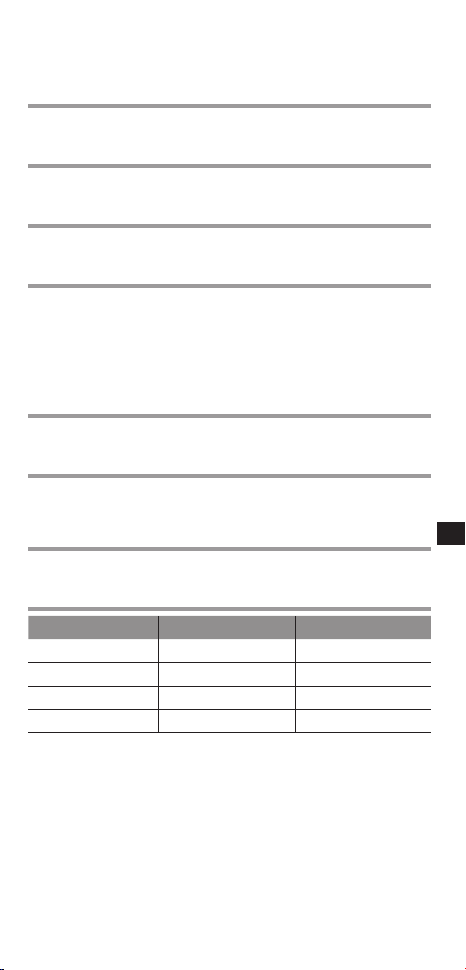
型號TY-ER3D4MWTY-ER3D4SW
寬度167.7 mm160.5 mm
高度42.2 mm42.2 mm
總長度170.7 mm167.6 mm
重量約 27
g
約 27
g
*
1
運作時間/充電時間
• 本電池在重複使用後將會退化,最終將導致運作時間短暫。視3D眼鏡的
存儲位置與時間而定,充電時間可能會更長。以上為出廠時的數字,並
不能保證其效能。
*
2
視場範圍
• 不同人戴 3D 眼鏡時,視場範圍會有所差異。
• 3D眼鏡可能無法在視場範圍外正常工作。
繁體中文
此標誌代表產品符合 Full HD 3D Glasses Initiative 授權的主動式
快門 3D 眼鏡技術標準。RF 標誌代表產品可在無線系統上操作,
並可搭配具有相同標誌的任何電視使用。
「Full HD 3D™」標誌代表電視產品與 3D 眼鏡之間的相容性符合
「Full HD 3D Glasses™」格式,不代表 3D 影像的畫質,畫質係根
據電視產品的品質而定。
「Full HD 3D Glasses™」標誌及「Full HD 3D Glasses™」文字均
為 Full HD 3D Glasses Initiative 的商標。
Bluetooth
®
,藍牙
®
文字標記及標誌皆為 Bluetooth SIG, Inc 所有,
Panasonic Corporation 已獲授權使用此標記。
其他商標及商品名稱皆為個別擁有者所有。
進口廠商:台松電器販賣股份有限公司
連絡地址:新北市中和區員山路579號
連絡電話:(02)2223-5121
Panasonic Corporation
Web Site : http://panasonic.net/
© Panasonic Corporation 2012
1
T
ING VIT
Hưng dn s dng
Knh 3D
S model
TY-ER3D4MW
TY-ER3D4SW
Cm ơn bn đ mua sn phm ca Panasonic.
Trưc khi s dng sn phm ny, vui lng đc cc hưng
dn cn thn v gi li sch hưng dn ny đ s dng v
sau.
Trưc khi s dng sn phm ny, hy chc chn đc phn
“Lưu an ton" v "Lưu khi s d ng" (
trang 1 - 6).
Có th s dng Kính 3D ny cho HDTVs của
Panasonic được hỗ trợ 3D v công nghệ không dây
Bluetooth
®
, v có biu tượng như hình bên dưi
( trang 14).
Đ bit thông tin mi nht v model ph hợp, hy truy
cp trang web của chng tôi.
http://panasonic.net/
Không th s dng sn phm ny lm knh
râm.
Lưu an ton
Nguy him
Thông tin về việc cấm lm nóng
Không đưa Knh 3D vo la, lm nóng hay đặt
Knh ở những nơi có th lm Knh bị nóng lên.
Kính 3D s dng loi pin lithium-ion polyme có th sc li, nên việc lm
nóng có th dn đn chy hoặc gy Kính, m điu ny có th gây ra vt
bỏng hoặc hỏa hon.
(tip theo trang sau)

2
T
ING VIT
Cnh bo
Thông tin về nơi cấm s dng
Không s dng Kính 3D ti bệnh viện hoặc cc cơ sở
y t khc.
Sóng vô tuyn từ Kính 3D có th gây nhiễu cc thit bị y t.
Không s dng Kính 3D gn cc thit bị điu khin tự
động, như ca tự động, thit bị bo chy, v.v...
Sóng vô tuyn từ Kính 3D có th gây nhiễu cc thit bị điu khin tự
động.
Luôn gi Kính 3D cch my to nhịp tim cy ghép,
hoặc cc thit bị y t cy ghép tương tự xa hơn 22 cm
(9 in.).
Sóng vô tuyn từ Kính 3D có th nh hưởng đn qu trình hot động
của my to nhịp tim cy ghép hoặc cc thit bị tương tự.
Thông tin về việc cấm tho ri
Không tho hoặc sa đi Knh 3D.
Lm như vy có th dn đn chy hoặc trc trặc trong qu trình s dng
khin ngưi dng cm thy không kho.
Khi vứt bỏ sn phm ny, hy tham kho phn “Vứt bỏ rc” (
trang
9-11) v thực hiện tho ri đng cch đ ly pin sc ra.
Thông tin về việc sc pin
Sc pin bằng cch ni dây cp sc kèm theo vo thiết bị
đầu cui USB bên trong TV ca Panasonic có hỗ trợ 3D.
Sc pin vi cc thit bị khc có th lm r rỉ pin, lm nóng hoặc gy
Kính.
Không s dng dây cp sc kèm theo vo những việc
khc ngoi việc sc pin cho Knh 3D.
Lm như vy có th dn đn việc lm nóng, chy hoặc hỏng Kính.
Thn trng
Thông tin về Knh 3D
Không lm rơi, tc dng lc hoặc gim lên Knh 3D.
Lm như vy có th lm v mt kính v bn có th bị thương.
Hy cn thn vi cc đầu gng knh khi đeo Knh 3D.
Việc vô tình chc đu gng kính vo mt có th khin bn bị thương.
Luôn giữ camera ở nơi khô ro, thong mt.
Nu không lm như vy, hỏa hon hoặc điện git có th xy ra.

3
T
ING VIT
Hy cn thn đ không bị vưng ngón tay vo phần khp
ca Knh 3D.
Lm như vy có th khin bn bị thương.
• Đặc biệt ch khi tr em s dng sn phm ny.
Thông tin về xem hnh nh 3D
Không s dng Knh 3D nếu bn có tiền s qu nhy
cm vi nh sng, có vấn đề về tim hoặc đang mc bất k
bệnh no khc.
S dng Kính 3D có th lm cho cc triệu chứng ny nặng hơn.
Ngng s dng Knh 3D ngay lp tc nếu bn cm thấy
mệt mi, khó chịu hoặc mi s bất thưng khc.
Tip tc s dng Kính 3D trong nhng trưng hợp đó có th khin bn
cm thy không kho.
Hy nghỉ ngơi trưc khi tip tc s dng.
Khi xem phim 3D, hy dnh thi gian ngh ngơi ph hợp
sau khi xem phim.
Khi xem ni dung 3D trên cc thiết bị tương tc như my
tnh hoặc my chơi game 3D, hy dnh thi gian ngh
ngơi ph hợp sau khi s dng 30 - 60 pht.
S dng trong thi gian di có th khin bn bị mỏi mt.
Khi s dng Knh 3D, hy thn trng đ không tnh c va
chm vo mn hnh TV hoặc ngưi khc.
Vì hình nh ở dng 3D nên khong cch gia ngưi dng v mn hình
có th bị nhm ln, khin ngưi dng va chm vo mn hình v có th
bị thương.
S dng Knh 3D khi xem hnh nh 3D.
Khi s dng Knh 3D, hy đm bo rằng mt bn ở trên
mt mặt phng ngang tương đi.
Nếu bn bị cn thị, vin thị, lon thị hoặc thị lc ca mt
bên phi v bên tri chênh lệch nhau, hy s dng knh
điều chnh hoặc cc phương php tương t khc đ điều
chnh thị lc ca mnh trưc khi đeo Knh 3D.
Ngng s dng Knh 3D nếu bn có th nhn r hnh nh
đôi trong khi xem ni dung 3D.
S dng trong thi gian di có th khin bn bị mỏi mt.
Xem mn hnh ở khong cch t nhất gấp 3 lần so vi
chiều cao hiệu qu ca mn hnh.
Khong cch được khuyn co:
Đối vi TV 50-inch 1.9 m hoặc hơn
Đối vi TV 65-inch 2.4 m hoặc hơn
S dng Kính 3D ở khong cch gn hơn khong cch khuyn co có
th khin bn bị mỏi mt.
(tip theo trang sau)

4
T
ING VIT
Xem hnh nh 3D
Theo hưng dn, không nên s dng Knh 3D cho tr em
dưi 5 - 6 tui.
Do khó xc định được phn ứng của tr nhỏ đối vi sự mệt mỏi hoặc
khó chịu nên bn không th gip tr trnh bị ốm bt ng.
• Khi tr đang s dng sn phm ny, cha m hoặc ngưi gim hộ phi
kim tra đ chc chn rng mt tr không bị mỏi.
Khi s dng Knh 3D, không đặt cc đ vt d v gần
ngưi dng.
Ngưi dng có th nhm tưởng cc đ vt 3D h đang nhìn thy l đ
vt tht, khin h di chuyn, lm v cc đ vt xung quanh v có th bị
thương.
Không di chuyn khi đang đeo Knh 3D.
Khu vực xung quanh s tối, có th khin bn bị ng hoặc cc tai nn
khc, có th lm bn bị thương.
Ch s dng Knh 3D cho mc đch được ch định.
Không s dng nếu Knh 3D bị nt hoặc v.
Lm như vy có th khin bn bị thương hoặc mỏi mt.
Nếu xy ra trc trặc hoặc lỗi vi Knh 3D, hy
ngng s dng ngay lp tc.
Tip tc s dng Kính 3D có th khin bn bị thương, mỏi mt hoặc
khin bn cm thy không kho.
Ngng s dng Knh 3D ngay lp tc nếu da bn cm
thấy bất thưng.
Trong số ít cc trưng hợp. sơn hoặc vt liệu s dng trong Kính 3D có
th gây dị ứng.
Ngng s dng Knh 3D ngay lp tc nếu bn thấy có nt
đ, bị đau hoặc bị nga ở mi hoặc thi dương.
S dng trong thi gian di có th gây ra cc triệu chứng như trên do
p lực qu ln, có th khin ngưi dng cm thy không kho.
Lưu khi s dng
Thấu knh
Không tc dng lực lên mn trp tinh th lỏng. Đng thi,
không lm rơi hoặc uốn cong Kính 3D.
Không lm xưc b mặt của mn trp tinh th lỏng bng
dng c có đu nhn, v.v.
Lm như vy có th lm hỏng Kính 3D v gim cht lượng
hình nh 3D.
5
T
ING VIT
Thn trng trong khi xem
Không s dng cc thit bị pht ra sóng điện từ mnh
(như điện thoi di động hoặc thit bị thu pht c nhân) gn
Kính 3D. Lm như vy có th khin Kính 3D bị trc trặc.
Kính 3D không th hot động đy đủ ở nhiệt độ cao hoặc
thp.
Hy s dng trong phm vi nhiệt độ s dng được chỉ định
(
trang 13).
Nu s dng Kính 3D trong phng có s dng đn hunh
quang (50 Hz), nh sng trong phng có th xut hiện dưi
dng nhp nhy. Trong trưng hợp ny, hy lm tối phng
hoặc tt đn hunh quang khi s dng Kính 3D.
Đeo Kính 3D đng cch. Hình nh 3D s không hin thị
chính xc nu Kính 3D bị đeo ngược hoặc đeo đng sau ra
đng trưc.
Có th khó xem cc loi mn hình khc (như mn hình
my vi tính, đng h k thut số hoặc my tính, v.v.) khi
đang đeo Kính 3D. (Trc phân cực không khp khin mn
hình có mu đen). Không đeo Kính 3D khi xem cc đ vt
khc không phi hình nh 3D.
Đ xem thoi mi
Xem mn hình ở khong cch ít nht gp 3 ln so vi
chiu cao hiệu qu của mn hình.
Khong cch được khuyn co:
Đối vi TV 50-inch 1.9 m hoặc hơn
Đối vi TV 65-inch 2.4 m hoặc hơn
Khi vng mn hình trên cng v dưi cng bị đen đi, chng hn như khi
xem phim, hy xem mn hình ở khong cch gp 3 ln so vi chiu cao
của hình nh thực.
(Điu đó khin cho khong cch xem gn hơn khong cch được
khuyn co ở trên.)
S dng sóng vô tuyến
Thit bị ny s dng băng tn ISM 2.4 GHz (Bluetooth
®
). Tuy
nhiên, thit bị không dây khc cũng có th s dng cng một
băng tn. Hy chc chn lưu cc việc sau đ ngăn ngừa bị
nhiễu sóng vô tuyn từ cc thit bị khc.
Gii hn s dng
Chỉ s dng trong quốc gia của bn.
Phm vi s dng
Phm vi s dng lên đn khong 3.2 m (10.5 ft.). Phm vi ny có th
nhỏ hơn ty vo cu trc của ta nh, môi trưng v bt k vt cn ở
gia thit bị thu v thit bị pht. Đặc biệt cc vt cn như tưng bê tông
cốt thép v ca kim loi s cn trở cc tín hiệu của thit bị pht.
(tip theo trang sau)
6
T
I NG VI T
Nhiễu từ thit bị khc
Do nhiễu vô tuyn, nhiu trc trặc có th xy ra nu thit bị ny đặt qu
gn thit bị khc. Chng tôi khuyn co nên gi thit bị cch cc thit bị
sau cng xa cng tốt:
Thit bị Bluetooth
®
ngoi trừ thit bị ny, mng LAN không dây, sóng vi
ba, cc thit bị văn phng tự động, điện thoi không dây k thut số, cc
thit bị điện t khc.
Thit bị được thit k đ tự động trnh nhiễu vô tuyn từ cc thit bị
gia dng ny. Tuy nhiên, trc trặc có th bị trc trặc khi xy ra nhiễu vô
tuyn.
Ph kiệ n
Dây cp sc pin ··························································<1>
(K2KYYYY00164)
< > bi u thị số lượ ng.
Nh n d ng c c b ph n
điề u khi n
N t ngu n
Đè n ch b o
Đang sc cng (DC IN)
7
T
I NG VI T
N t ngu n
ON/OFF Trượt chốt ci đn vị trí ON/OFF đ mở/tt
ngun.
MODE Trượt chốt ci đn vị trí MODE (Ch độ) đ
thay đổi gia hai ch độ 3D v 2D.
• 2D: Xem nh 3D bng 2D.
M ny cũng được s dng khi đăng k kính
3D trên tivi. Đ bit thông tin chi tit v liên
kt, hy vo trang Liên kt. (
trang 8-9)
Đè n ch b o
Đn sng hoặc nhp nhy khi s dng hoặc sc th hiện
trng thi của pin có th sc li v trng thi liên kt.
Đang sc cng
Kt nối vi cp sc.
• Sc pin bng cch kt nối vi cp sc km theo.
Trng thi ca đèn ch bo
Đèn ch bo Trng thi
Đn có mu đỏ trong khong
2 giây khi được bt
Mức độ pin đy
Đn nhp nhy mu đỏ 5 ln
khi được bt
Mức độ pin yu
Đn nhp nhy luân phiên
mu đỏ v mu xanh
Đang liên kt
Đn nhp nhy mu xanh một
ln sau mỗi 2 giây
Đang kt nối li vi TV
Đn có mu xanh trong 3 giây Liên kt hoặc kt nối li thnh
công.
Đn nhp nhy mu đỏ 3 ln Tự động tt ngun
(Liên kt hoặc kt nối li tht
bi hoặc mt kt nối)
Đn nhp nhy mu đỏ một
ln sau mỗi 2 giây khi s
dng
Ch độ 3D đ được chn.
Đn nhp nhy mu đỏ hai
ln sau mỗi 4 giây khi s
dng
Ch độ 2D đ được chn.
8
T
I NG VI T
Sc pin
Sc pin cho Knh 3D
Nối Kính 3D vi cp sc km theo vo TV, ri bt TV lên.
• Khi đn chỉ bo tt, pin đ được sc đy. Tham kho cc thông
số k thut ở trang 13 cho thi gian sc xp xỉ.
CHÚ Ý
• Sc trưc khi s dng ln đu tiên sau khi mua v hoặc sau một
khong thi gian di không dng đn.
• Chc chn rng ngun TV được bt khi đang sc pin. Không th sc
Pin khi ngun TV đang tt.
Liên kết
Liên kết Đầu tiên
Thực hiện Liên kt Đu tiên khi ln đu s dng Kính 3D.
1. Bt TV đ xem.
2. Trượt chốt ci từ vị trí "OFF" (TẮT) đn vị trí "ON" (BẬT).
Kính 3D s bt ngun v bt đu liên kt.
Đặt Kính 3D cch TV 1.6 feet (50 cm) trong qu trình liên kt.
3. Đn LED trên Kính 3D có mu xanh trong 3 giây khi liên kt
thnh công.
Sau liên kt đu tiên, Kính 3D s tự động kt nối li vi TV khi
Kính 3D được bt gn TV đang ở ch độ 3D.
Đầu ni USB
Đầu ni Micro USB

9
T
ING VIT
Liên kết li
Khi kt nối vi TV đ được liên kt tht bi, hoặc khi s dng
vi TV khc, hy đăng k li Kính 3D.
1. Bt TV đ xem.
2. Vi khong cch 1.6 feet (50 cm) so vi TV, gi chốt ci ti
vị trí MODE hơn 2 giây.
Liên kt s bt đu.
3. Đn LED trên Kính 3D có mu xanh trong 3 giây khi liên kt
thnh công.
* Nu liên kt tht bi, Kính 3D s tt ngun.
* Trong trưng hợp ny, tt ngun TV v thực hiện từ bưc 1.
* Không kt nối dây cp sc trong khi Liên kt li.
* Tho chốt ci khi Liên kt li bt đu.
Cất giữ v Lm sch
Lau kính bng vi khô, mm.
Lau Kính 3D bng vi mm có bi bn có th lm xưc kính.
Hy giũ sch bi khỏi ming vi trưc khi s dng.
Không s dng benzen, cht pha long hoặc sp trên
Kính 3D, vì lm như vy có th khin sơn bị bong ra.
Không nhng Kính 3D vo cht lỏng, chng hn như nưc,
khi lm sch.
Trnh nơi có độ m cao v nhiệt độ cao khi ct gi Kính 3D.
Nên sc đy Kính 3D khong 6 thng một ln đ duy trì hiệu
sut của pin nu không s dng trong thi gian di.
Vì mn trp tinh th lỏng (thu kính) rt mỏng v dễ bị gy,
nên phi tht cn thn khi lau chi chng.
Vt b rc
Pin lithium-ion polyme có th sc li được gn bên trong
Kính 3D. Xin hy vứt rc theo quy định ti địa phương.
Khi vứt bỏ sn phm ny, hy tho ri đng cch cc bộ
phn theo cc bưc ở trang tip theo, v ly pin sc bên
trong ra.
Không tho ri sn phm ny tr khi vt b nó.
(tip theo trang sau)

10
T
ING VIT
Nguy him
V pin sc ch dnh riêng cho sn phm ny, nên
không được s dng cho cc thiết bị khc.
Không sc pin đ được tho ra.
Không ném pin vo la, hay lm nóng pin.
Không cy pin bng móng tay, đ pin va chm mnh, tho
lp vỏ bên ngoi hoặc sa đổi pin.
Không đ cc dây điện chm vo nhng kim loi khc hay
chm vo nhau.
Không mang hay gi pin trên vng cổ, kp tóc hay nhng
thứ tương tự.
Không sc, s dng, hay đặt pin vo chỗ nóng như gn
la hoặc dưi nh nng mặt tri.
Lm như vy có th lm pin pht sinh nhiệt, nóng chy, hay hư
hỏng.
Cnh bo
Không đ pin, c vt, v những ph kiện khc đ
được tho ra trong tầm tay tr em.
Nu vô tình nuốt phi một trong nhng ph kiện ny thì có th
gây nh hưởng xu đn cơ th.
Trong trưng hợp m bn nghĩ tr đ nuốt một trong
nhng ph kiện ny, hy liên hệ ngay vi bc s.
Trong trưng hợp có chất lng rò r t pin, không
nên chm tay vo chất lng đó m hy x l theo
cch sau.
Nu cht lỏng rơi vo mt thì có th gây m.
Vì th không nên di mt m hy dng nưc đ ra mt
ngay, sau đó hy liên hệ vi bc s.
Nu cht lỏng dính vo cơ th hay qun o thì có th s gây
phỏng da hay thương tích.
Ra tht k vi nưc sch, sau đó hy liên hệ vi bc s.
Cch tho pin ra
Tho ri sn phm ny ra sau khi pin đ ht điện.
Những hnh minh ha sau đây được dng đ gii thch
về cch sp xếp sn phm, ch không phi mô t về
cch sa chữa.
Sn phm sẽ không th được sa chữa mt khi nó đ bị
tho ri.
11
T
ING VIT
1. Dng một ci tua vít Phillips ( ) đ tho ốc Kính 3D.
2. Uốn khung vo trong v kéo ra từ phía vỏ bc bên ngoi.
Nu ly ra khó khăn, hy dng tua vít một cnh ( ) đ
ny mở ra.
3. Tho v tch ri pin khỏi Kính 3D bng cch dng kéo ct
từng dây điện một.
Cch điện cc phn dây điện của pin đ được tho ra bng
băng keo ny-lông.
Pin
CHÚ Ý
• Hy cn thn trong từng thao tc đ không lm bn bị thương.
• Không lm hư hi hay tho lp vỏ bên ngoi pin ra.
G ri/Q&A
Trưc tiên hy kim tra nhng đim sau đây. Nu không gii
quyt được vn đ, xin hy liên hệ ti nơi m bn đ mua sn
phm.
(tip theo trang sau)
12
T
ING VIT
Không th đăng k Knh 3D cho TV.
► TV có hỗ trợ Knh 3D ny không?
S dng Kính 3D vi cc TV tương thích. (
trang 1)
► Có phi bn đ đ hơn 1 pht trôi qua sau khi ci đặt
thiết bị sang chế đ đăng k thiết bị?
Đăng k s tự động ngt nu bn đ hơn 1 pht trôi qua. Khi ci đặt
liên kt vi TV v kt nối Kính 3D, đặt cc thit bị ny cng gn nhau
cng tốt.
Hnh nh không phi 3D.
► TV đ được liên kết vi Knh 3D chưa?
Thực hiện liên kt vi TV đ xem. (
trang 8-9)
► Knh 3D được ci đặt ở chế đ 3D chưa?
Trượt chốt ci đn vị trí 3D/2D đ thay đổi gia hai ch độ 3D v 2D.
► Ci đặt hnh nh đ được chuyn sang hnh nh 3D
chưa?
Hy tham kho hưng dn s dng TV.
► Có th xy ra những khc biệt riêng l lm cho hnh nh
3D khó xem hoặc không th xem được, đặc biệt l đi
vi ngưi dng có s chênh lệch thị lc giữa mt bên
tri v bên phi.
Hy thực hiện cc bưc cn thit (đeo kính, v.v.) đ điu chỉnh thị lực
của bn trưc khi s dng.
Ngun ca Knh 3D t đng tt.
► Có đ vt no ở giữa knh v TV không?
Đèn ch bo không sng khi chuyn nt ngun sang
trng thi “ON” (BẬT).
► Knh 3D đ được sc đ chưa?
Nu đn chỉ bo không sng, có nghĩa l pin cn hon ton. Tin hnh
sc pin.
Pin bị chai, hoặc thi gian hot đng gim đi khi
được sc.
► Dây cp sc có được ni đng không?
Hy chc chn rng cp sc đ được kt nối chính xc.
► Ngun TV có đang tt không?
Bt TV lên, ri bt đu sc pin.
► Pin đ đt tui th ti đa.
Nu thi gian hot động của pin qu ngn ngay c khi pin đ được
sc, pin đ đt đn tuổi th tối đa. Xin hy hỏi kin nơi m bn đ
mua sn phm.
13
T
ING VIT
Thông s k thut
Loi thấu knh
Mn Trp Tinh Th Lỏng
Phm vi nhiệt đ s dng
0 °C - 40 °C (32°F - 104°F)
Sc ngun điện
DC 5 V ( được cung cp bởi thit bị đu cuối USB trong TV
của Panasonic)
Pin
Pin Lithium-ion polyme có th sc li
DC 3.7 V, 40 mAh
Thi gian hot động*
1
: Khong 30 gi
Thi gian sc*
1
: Khong 30 pht
Sc nhanh ( Chỉ cn 2 pht sc thì có th s dng trong
khong 3 gi)
Khong cch xem*
2
Trong khong 3,2 m từ mặt trưc của TV.
Vt liệu
Thân chính: nhựa
Phn thu kính: Kính tinh th lỏng
Hệ thng truyền thông
FH-SS (Tri Phổ Nhy Tn) trong băng tn 2.4 GHz
Kch thưc ( không bao gm miếng đệm mi)
Model TY-ER3D4MW TY-ER3D4SW
Chiều rng 167.7 mm 160.5 mm
Chiều cao 42.2 mm 42.2 mm
Chiều di tng th 170.7 mm 167.6 mm
Mass Khong 27
g
Khong 27
g
*
1
Thi gian hot động/thi gian sc
• Pin bị hư sau nhiu ln s dng, v cuối cng thi gian hot động s
gim dn. Thi gian sc pin cũng có th kéo di lâu hơn, ty thuộc vo
việc bn đang ở đâu v pin lưu tr cn li bao nhiêu. Nhng du hiệu
trên l do qu trình vn chuyn từ nh my, v không được bo hnh.
*
2
Khong cch xem
• Mỗi ngưi khc nhau có khong cch xem của Kính 3D khc nhau.
• Kính 3D không th hot động chính xc ở ngoi khong cch xem.
T
ING VIT
Thông tin về việc vt b rc ở cc nưc khc ngoi phm vi
Liên minh châu Âu
Biu tượng ny chỉ có gi trị ở Liên minh châu
Âu.
Nu bn muốn vứt bỏ sn phm ny, xin vui
lng liên hệ vi cc cơ quan sở ti hoặc đi l
bn hng đ hỏi thông tin v hình thức vứt bỏ
rc theo quy định.
Biu tượng ny chứng nhn rng cc sn phm tương thích vi
nhng tiêu chun k thut của kính 3D mn trp chủ động được
cp phép bởi Full HD 3D Glasses Initiative. Biu tượng RF biu
thị cc sn phm có th hot động trên hệ thống không dây v
có th s dng vi bt k TV no có cng biu tượng ny.
Biu tượng “Full HD 3D™” chứng nhn rng sự tương thích
gia cc sn phm TV v Kính 3D, thích hợp vi dng thức “Full
HD 3D Glasses™”, v không chứng nhn cht lượng hình nh
của nh 3D, vì điu ny ph thuộc vo cht lượng của sn phm
TV.
Biu tượng “Full HD 3D Glasses™” v từ “Full HD 3D Glasses™”
l nhn hiệu đ được đăng k của Full HD 3D Glasses Initiative.
Nhn từ v biu tượng Bluetooth
®
thuộc sở hu của Bluetooth
SIG, Inc. v công ty Panasonic được phép s dng nhn ny.
Nhn hiệu hoặc tên thương mi khc có ngưi sở hu tương
ứng.
Panasonic Corporation
Web Site : http://panasonic.net/
© Panasonic Corporation 2012
安全上のご注意
人への危害、財産の損害を防止するため、必ずお守りいた
だくことを説明しています。
■誤った使い方をしたときに生じる危害や損害の程度を
区分して、説明しています。
危険
「死亡や重傷を負うおそれが大きい
内容」です。
警告
「死亡や重傷を負うおそれがある内容」
です。
注意
「軽傷を負うことや、財産の損害が発生
するおそれがある内容」です。
してはいけない
内容です。
実行しなければ
ならない内容です。
気をつけていただく内容です。
■
お守りいただく内容を次の図記号で説明しています。
(次は図記号の例です)
危険
■
3Dグラスを火の中に入れたり、加熱したり、
高温になる場所に放置したりしないでください
本製品はリチウムイオンポリマー充電池を
内蔵しているため、発火・破裂による火傷
や火災の原因になります。
加熱禁止について
品番
取扱説明書(日本語)
このたびは、パナソニック製品をお買い上げいただき、まことに
ありがとうございます。
●
取扱説明書(本書)をよくお読みのうえ、正しく安全にお使いください。
●ご使用前に「安全上のご注意」(1~5ページ)を必ず
お読みください。
●保証書は「お買い上げ日・販売店名」などの記入を確かめ、取扱
説明書とともに大切に保管してください。
3Dグラス
必ずお守りください
保証書付き
TY-ER3D4MW
TY-ER3D4SW
本製品は、サングラスではありません。
1
日本語
安全上のご注意
必ずお守りください
警告
分解禁止
■3Dグラスを分解したり、改造しないで
ください
火災や視聴時の異常による体調不良の
原因になります。
●本製品を廃棄するために分解するとき
は、「廃棄するときのお願い」(
13
ページ)の手順に従って、正しく分解
してください。
■充電時は、3D映像に対応した当社製
テレビのUSB端子に付属の充電ケーブル
を接続してご使用ください
他の機器による充電は、電池の液もれや、
発熱、破裂の原因になることがあります。
■付属の充電ケーブルは3Dグラスの充電
以外の用途に使用しないでください
発熱・発火・故障の原因になることが
あります。
■本機を医療機関や医療機器のある場所で
は使用しないでください
本機からの電波が医療機器に影響を及ぼ
すことがあり、誤動作による事故の原因と
なります。
■自動ドア、火災報知機等の自動制御機器の
近くで使用しないでください
本機からの電波が自動制御機器に影響を
及ぼすことがあり、誤動作による事故の原
因となります。
■本機は心臓ペースメーカーの装着部位か
ら22cm以上離してください。
本機からの電波によりペースメーカーの
作動に影響を与える場合があります。
分解禁止について
充電について
Bluetooth®について
2
日本語
3Dグラスについて
注意
■3Dグラスに物を落としたり、力を加え
たり、踏んだりしないでください
ガラス部分などが破損してけがの原因に
なることがあります。
■3Dグラスを装着する時は、フレームの
先端にご注意ください
目をついてけがの原因になることがあります。
■3Dグラスのヒンジ部に指をはさまない
ようにしてください
けがの原因になることがあります。
●特にお子様にご注意ください。
水れ止
■ぬらしたりしないでください
火災、感電の原因になることがあります。
3
日本語
■
光過敏の既往症のある人、心臓に疾患のある人、体
調不良の人は3Dグラスを使用しないでください
病状悪化の原因になることがあります。
■
3Dグラスで視聴中に疲労感、不快感など異常
を感じた場合には、使用を中止してください
そのまま視聴すると体調不良の原因になるこ
とがあります。適度な休憩をとってください。
■
3D映画などをご覧になる場合は1作品の
視聴を目安に適度に休憩をとってください
■
3Dゲームやパソコンなどの双方向にやり取り
できる機器の3D映像をご覧になる場合は、30
~60分を目安に適度に休憩をとってください
長時間の視聴による目の疲れの原因に
なることがあります。
■3Dグラスを使用しているときに誤って
テレビ画面や人をたたかないでください
3D映像のため、画面との距離を誤り、画面
をたたきけがの原因になることがあります。
■3Dの映像を見るときは3Dグラスを
ご使用ください
■3Dグラスは、両目を水平に近い状態で
視聴してください
■
近視や遠視の方、左右の視力が異なる方や乱視の
方は視力矯正メガネの装着などにより、視力を適
切に矯正したうえで3Dグラスをご使用ください
■3D映像を視聴中に、はっきりと2重に
像が見えたら使用を中止してください
長時間の視聴による目の疲れの原因に
なることがあります。
■画面の有効高さの3倍以上の視距離で見て
ください
(
推奨距離
):
42V型1.6m以上46V型1.7m以上
50V型1.9m以上54V型2.0m以上
58V型2.3m以上65V型2.4m以上
推奨距離より近距離でのご使用は目の
疲れの原因になることがあります。
映画のように上下に黒帯がある場合は、
映像部分の高さに対して3倍以上の視距離
でご覧ください。
(上記推奨距離よりも短くなります。)
3D映像の視聴について
注意
4
日本語
■3Dグラスでの視聴年齢については、
およそ5~6歳以上を目安にしてください
お子様の場合は、疲労や不快感などに対
する反応がわかりにくいため、急に体調が
悪くなることがあります。
●
お子様が視聴の際は、保護者の方が目の
疲れが無いか、ご注意ください。
■3Dグラスを使用するときは周囲に壊れ
やすいものを置かないでください
3D映像を実際の物に間違えて身体を
動かし、周囲の物を破損してけがの原因に
なることがあります。
■3Dグラスをかけたまま移動しないで
ください
周りが暗くなり、転倒などによるけがの
原因になることがあります。
■3Dグラスは、指定の用途以外には使用
しないでください
■3Dグラスを割れた状態で使用しないで
ください
けがや目の疲れの原因になることがあり
ます。
■3Dグラスに異常・故障があったときは
直ちに使用を中止してください
そのまま使用するとけがや目の疲れ、体調
不良の原因になることがあります。
■肌に異常を感じたら3Dグラスの使用を
中止してください
ごくまれに塗料や材質でアレルギーの
原因になることがあります。
■鼻やこめかみが赤くなったり、痛み、
かゆみを感じたら3Dグラスの使用を
中止してください
長時間の使用による圧力により発生する
ことがあり、体調不良の原因になることが
あります。
注意
3Dグラスの使用について
5
日本語
3Dグラス使用上の注意事項
この機器の使用周波数帯域では、電子レンジなどの産業・科
学・医療機器のほか、工場の製造ラインなどで使用される移
動体識別用の構内無線局(免許を要する無線局)および特定
小電力無線局(免許を要しない無線局)、ならびにアマチュ
ア無線局(免許を要する無線局)が運用されています。
1この機器を使用する前に、近くで移動体識別用の構内
無線局及び特定小電力無線局ならびにアマチュア無
線局が運用されていない事を確認してください。
2万一、この機器から移動体識別用の構内無線局に対し
て有害な電波干渉の事例が発生した場合には、すみ
やかに場所を変更するか、または電波の使用を停止
したうえ、パナソニックVIERA(ビエラ)ご相談窓口
(
18ページ)にご連絡いただき、混信回避のた
めの処置など(例えば、パーティションの設置など)に
ついてご相談してください。
3その他、この機器から移動体識別用の特定小電力無線
局あるいはアマチュア無線局に対して有害な電波干
渉の事例が発生した場合など何かお困りのことが起
きた時は、18ページのパナソニックVIERAご相談窓
口へお問い合せください。
●
本
製品は、左記のロゴを表示している
Bluetooth
®
無線通信対応の当社製テレ
ビで使用できます。(
10ページ)
対応機種については、パナソニックの
ホームページをご覧ください。
http://panasonic.jp/support/
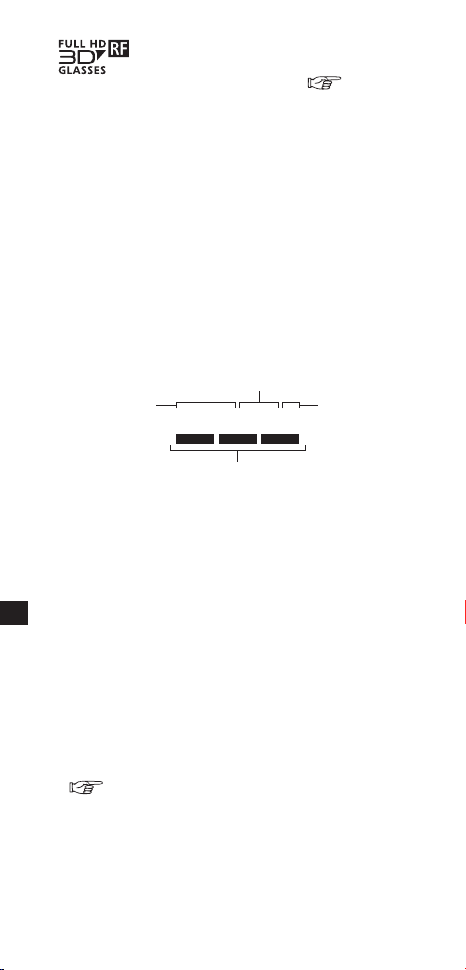
無線方式3Dグラス使用上のお願い
■使用周波数帯
本機は2.4GHz帯の周波数帯を使用しますが、他の無
線機器も同じ周波数を使っていることがあります。
他の無線機器との電波干渉を防止するため、下記事項
に留意してご使用ください。
■周波数表示の見かた
周波数表示は、本機に付属のステッカーに記載しています。
他の無線機器との電波干渉を防止するため、下記事項
に留意してご使用ください。
2.400GHz~2.4835GHzの全帯域を使用し、
かつ移動体識別装置の帯域を回避可能であることを
意味する
変調方式がFH方式
電波与干渉距離
10m以下
2.4GHz帯
を使用
2.4FH1
6
日本語
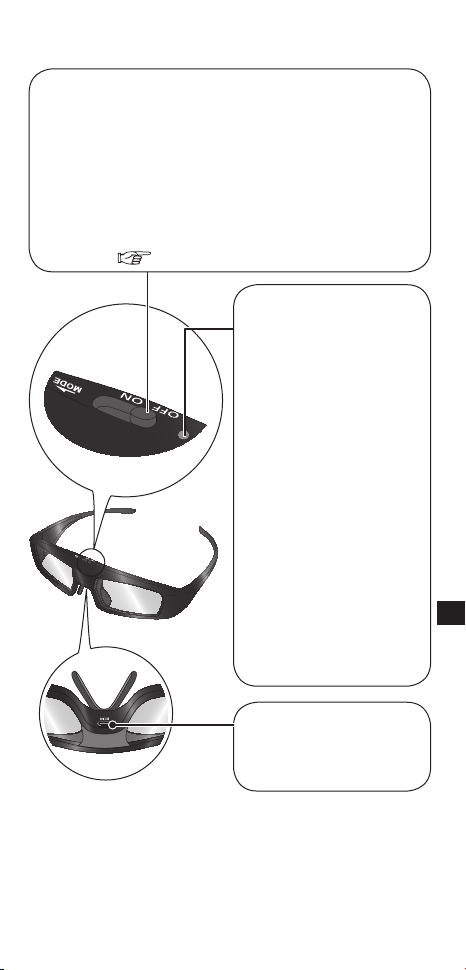
各部の名称とはたらき
使用中や充電中に点灯
または点滅して、充電
池や登録の状態を示し
ます。
■インジケータランプ
■電源スイッチ
「ON」にスライドさせると、電源が入ります。
テレビで3D映像を視聴中に、電源スイッチを「MODE」側
へスライドさせるごとに「3D」モードと「2D」モードが切
り換わります。(電源スイッチは「ON」の位置へ戻ります。)
3Dグラスをテレビに登録するときにも使用しま
す。登録については、登録のページを参照してくだ
さい。(8~9ページ)
●
「2D」モードのときは、テレビで3D映像を表示し
ていても、2D映像を楽しむことができます。
●
電源を入れると、約2秒
間赤く点灯したあと、約
2秒間隔で点滅します。
(「2D」モードでは約4秒
間隔で2回点滅します)
●
登録中は、赤と緑に交
互に点滅します。
●
再接続中は、約2秒間隔
で緑色に点滅します。
●
登録や再接続が完了
すると、緑色に約3秒
間点灯します。
●
電池の残量が少なく
なると、電源を「ON」
にしたときに5回連
続で点滅します。
■充電端子(DCIN)
(3Dグラス下面)
充電時に、付属の充電
ケーブルを接続します。
7
日本語
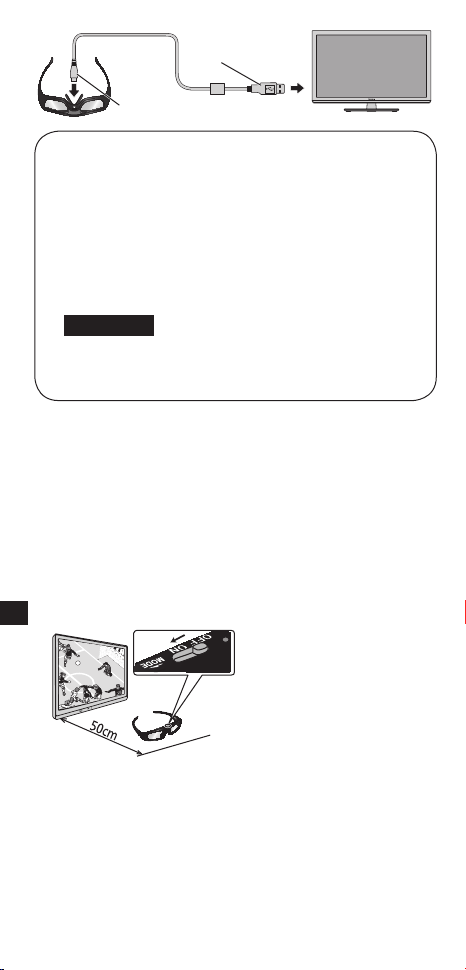
テレビのUSB端子と3Dグラスの充電端子を、
付属品の充電ケーブルで接続してください。インジ
ケータランプが点灯し、充電が始まります。
インジケータランプが消えたら、充電完了です。
充電時間の目安は10ページの仕様を参照してく
ださい。
■充電について
●
充電するときには、テレビの電源を「入」にしてくだ
さい。テレビの電源が「切」のときは充電できません。
●お買い上げ後初めて本製品を使用するときや、
長期間使用しなかったときは、充電してから
お使いください。
お願い
登録
■初期登録
お買い上げ後初めて3Dグラスをお使いになるとき
は、初期登録を行ってください。
①ご覧になるテレビの電源を入れてください。
②3Dグラスの電源スイッチを「OFF」から「ON」の位置
にスライドしてください。
3Dグラスの電源が入り、テレビとの登録が始まりま
す。登録中は3Dグラスをテレビから50cm以内の
距離に置いてください。
③インジケータランプが緑色に約3秒間点灯したら登録
完了です。
初期登録後は3Dモードになっているテレビの近くで
3Dグラスの電源を入れると、自動的にテレビと再接
続します。
この時、テレビ画面に電池残量が表示される場合があ
ります。
USBコネクター
マイクロUSBコネクター
8
日本語

■再登録
別のテレビで3Dグラスを使うときや、3Dグラスが
正しく動作しない場合は、再登録を行ってください。
①
テレビの電源を入れてください。
②3Dグラスの電源スイッチを「MODE」へスライドし、
2秒以上押さえ続けてください。
登録が始まります。登録中は3Dグラスをテレビから
50cm以内の距離に置いてください。
③インジケータランプが緑色に約3秒間点灯したら登録
完了です。
●登録に失敗すると、自動的に3Dグラスの電源が切
れます。テレビの電源を切り、上の手順を最初から
やり直してください。
●登録を行う際は充電ケーブルを接続しないでくだ
さい。
●再登録が始まったら、電源スイッチを離してくだ
さい。
9
日本語
付属品
■充電ケーブル·······································<1>
(品番:
K2KYYYY00164
)
●
付属品の品番は予告なく変更する場合があります。
(上記品番と実物の品番が異なる場合があります。)
●
付属品を紛失された場合は、お買い上げの販売店へ
上記品番でご注文ください。(サービスルート扱い)
●<>は個数です。
仕様
*
2
視聴可能範囲について
*
1
使用時間・充電時間について
●充電池は使用を繰り返すうちに劣化し、次第に使用時
間が短くなります。また、保存期間や環境により、充
電時間が長くなる場合があります。上記の数値は工場
出荷時の状態を示すもので、性能を保証するものでは
ありません。
●視聴可能範囲には、個人差があります。
●視聴可能範囲以上離れると、3Dグラスが正常に動作
しないことがあります。
機種
TY-ER3D4MWTY-ER3D4SW
レンズ方式液晶シャッター方式
通信方式
2.4GHz帯 FH-SS
(周波数ホッピングスペクトラム拡散方式)
使用温度範囲
0℃~40℃
充電用電源
DC5V(当社製テレビのUSB端子より供給)
電池
リチウムイオンポリマー充電池
DC3.7V、40mAh
使用時間*
1
:約30時間
充電時間*
1
:約30分
※2分の充電で約3時間使用可
視聴可能
範囲*
2
テレビ正面 約3.2m以内
材質本体:樹脂 レンズ部分:液晶ガラス
寸法
幅167.7mm
高さ42.2mm
奥行170.7mm
幅160.5mm
高さ42.2mm
奥行167.6mm
質量約27g約27g
これらのロゴは、フルHD3Dグラス・イニシアチブからライ
センスされるアクティブシャッター方式の3Dグラス技術の
規格に準拠した製品を示すものです。RF表示のあるロゴは、
無線方式を示すもので、同じロゴがついているテレビと3D
グラスの組み合わせで、お使いいただけます。
10
日本語
保管・お手入れ
●保管の際は、湿度の高いところや、温度が高くなるところ
を避けてください。
●長期間ご使用にならない場合は、充電池の劣化防止のた
め、半年に一度はフル充電してください。
●お手入れはやわらかい乾いた布を使ってください。やわ
らかい布にほこりなどが付着していると、製品に傷がつ
きます。ご使用前にほこりなどをはらってください。なお
ベンジンやシンナー、ワックスなどは、塗装がはがれる原
因になりますので、使用しないでください。
●お手入れの際に、3Dグラスを水などの液体につけないで
ください。
●レンズは繊細な表面加工をしたガラス製で、傷つきやす
く割れやすいため、お手入れの際は十分ご注意ください。
使用上のご注意
■レンズについて
■視聴中のご注意
●レンズに力を加えないでください。また、製品を落とし
たり曲げたりしないでください。
●鋭利なものでレンズの表面を引っかかないでください。
製品が破損し、3D映像の品質が低下するおそれがあります。
●
3Dグラスは正しく装着してください。上下を反対にしたり、
前後を逆にしたりすると、正しい立体像が見られません。
●
3Dグラスの近くで強い電磁波を生じる機器(携帯電話、ハンディ
無線機など)を使用しないでください。誤動作の原因になります。
●
高温あるいは低温では3Dグラスは十分な性能を発揮でき
ません。使用温度範囲(10ページ)をお守りください。
●蛍光灯をご使用の部屋で視聴すると、部屋全体の明かり
がちらついて見えることがあります。
●
3Dグラスをかけた状態では、他のディスプレイ(パソコン画
面、デジタル時計、電卓など)の表示が見づらくなることがあ
ります。3D映像以外は、3Dグラスを外して見てください。
故障かな? Q&A
まず次の項目を確認し、それでも直らないときはお買上げ
の販売店へご連絡ください。(
16ページ)
3Dグラスにテレビを登録できない
・本機に対応しているテレビですか?
(6ページ)
・登録の操作をしてから約1分たつと、登録は自
動的に終了されます。
3Dグラスをテレビから50cm以内に近づけて
から、再登録してください。
(8
~9
ページ)
11
日本語
3D映像にならない
・ご覧になるテレビに登録されていますか?
ご覧になるテレビに登録してからご使用ください。
(
8~9ページ)
・「2D」モードになっていませんか?
3Dグラスの電源スイッチを「MODE」側にスライド
させて、「3D」モードに切り換えてください。
・
テレビの映像が3D映像に切り換わっていますか?
詳しくは、テレビの取扱説明書をご覧ください。
・テレビとの間に物を置いていませんか?
3Dグラスは、テレビからの信号を受けて動作します。
・左右の視力の差が大きい方などは、3D映像が見
えにくかったり見えないなどの個人差がありま
す。視力を適切に矯正した上でご使用ください。
3Dグラスの電源が勝手に切れる
・テレビとの間に物を置いていませんか?
テレビからの信号が途絶えると、自動的に電源が
切れます。
3Dグラスの電源スイッチを「ON」にしても
インジケータランプが点灯しない
・電池が消耗していませんか?
電源スイッチを「ON」にしてもインジケータラン
プが点灯しない場合は電池残量がありません。充電
してください。
充電できない、または充電しても使用可能時間
が短い
・正しく接続されていますか?
接続を確認してください。
・テレビの電源が「切」になっていませんか?
テレビの電源を「入」にして充電してください。
・充電池の寿命です。
充電しても使用時間が極端に短い場合は、電池の寿
命です。お買い上げの販売店にご相談ください。
12
日本語
廃棄するときのお願い
内蔵している充電池はリサイクル可能な貴重な資源で
す。本製品の廃棄に際しては充電池を取り出し、リサイ
クルにご協力ください。充電池の取り出し方法について
は次ページをお読みください。
取り出した充電池はお早めにリサイクル協力店へお持ち
ください。
■取り出した充電池やねじなどは、乳幼児の
手の届くところに置かないでください
誤って飲み込むと、身体に悪影響を及ぼす
原因になります。
●万一、飲み込んだと思われるときは、すぐ
に医師にご相談ください。
■電池の液がもれたときは、素手で液をさわ
らず、以下の処置をしてください
液が目に入ったときは、失明の原因になり
ます。
●目をこすらずに、すぐにきれいな水で
洗ったあと医師にご相談ください。
液が身体や衣服に付いたときは、皮膚の
炎症やけがの原因になります。
●きれいな水で十分に洗い流したあと、医
師にご相談ください。
危険
警告
■本製品専用の充電池のため、本製品以外に
使用しないでください
取り出した充電池は充電しないでください。
●火への投入、加熱をしないでください。
●
く
ぎで刺したり、衝撃を与えたり、分解・
改造をしないでください。
●
切断したコードを、互いに接触させたり、
金属などに接触させないでください。
●ネックレス、ヘアピンなどと一緒に持ち
運んだり保管しないでください。
●火のそばや炎天下など高温の場所で充
電・使用・放置しないでください。
発熱・発火・破裂の原因になります。
13
日本語
本製品を廃棄するとき以外は絶対に分解しないでください。
この図は、本製品を廃棄するための説明であり、
修理の説明ではありません。
一度分解すると、修復はできません。
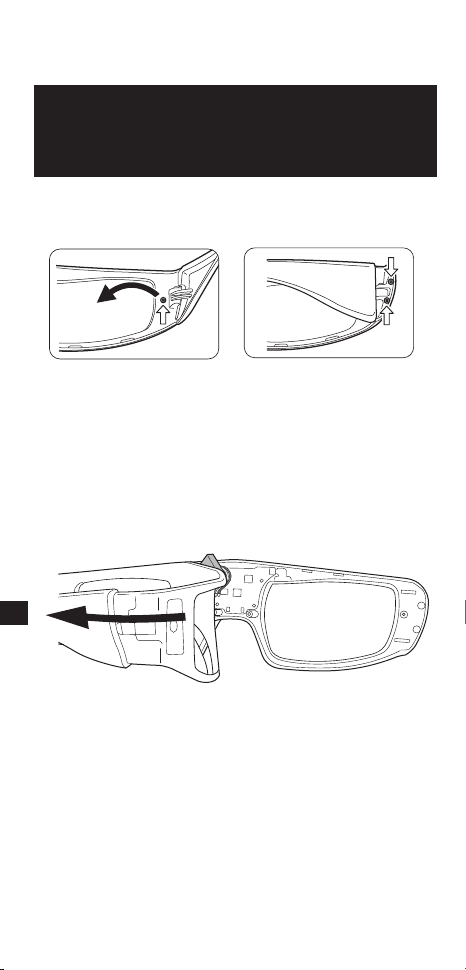
■充電池の取り出しかた
電池を使いきってから分解してください。
①精密プラス⊕ドライバーで下図のねじをはずす。
②フレームを内側に折り曲げるようにして、サイドカ
バーから引きはがす。
●はがしにくいときは、マイナス⊖ドライバーなど
を差し込んで引きはがしてください。
14
日本語
お願い
●
ケガをしないように十分気をつけて作業してください。
●充電池は傷つけたり分解したりしないでください。
●充電池以外は、地域の条例に従って廃棄してください。
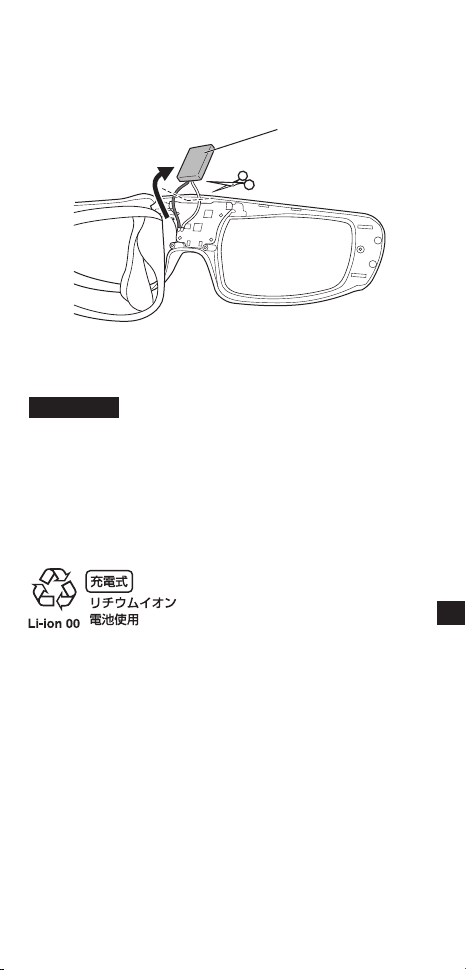
③
充電池をはがし、コード2本を1本ずつハサミで切断する。
●取りはずした充電池のコード部分はビニールテー
プなどで絶縁してください。
充電池
■使用済み充電池の届け先
●最寄りのリサイクル協力店へ。
●詳細は、一般社団法人JBRCの
ホームページをご参照ください。
ホームページ:http://www.jbrc.net/hp
15
日本語
保証とアフターサービス
使いかた・お手入れ・修理などは…
■まず、お買い求め先へご相談ください
●保証期間中は、保証書の規定に従ってお買い上げの
販売店が修理または同等品と交換をさせていただきま
すので、おそれ入りますが、製品に保証書を添えてご持
参ください。
保証期間:お買い上げ日から本体1年間
●保証期間終了後は、診断をして修理できる場合は、
ご要望により修理させていただきます。
※修理料金は次の内容で構成されています。
技術料
診断・修理・調整・点検などの費用
部品代
部品および補助材料代
出張料
技術者を派遣する費用
※補修用性能部品の保有期間
8年
当社は、この3Dグラスの補修用性能部品(製品の機能
を維持するための部品)を、製造打ち切り後8年保有
しています。
修理を依頼されるときは
11ページの「故障かな?Q&A」に従ってご確認のあと、
直らないときは、電源を切り、接続を外してから、お買い
上げ日と下の内容をご連絡ください。
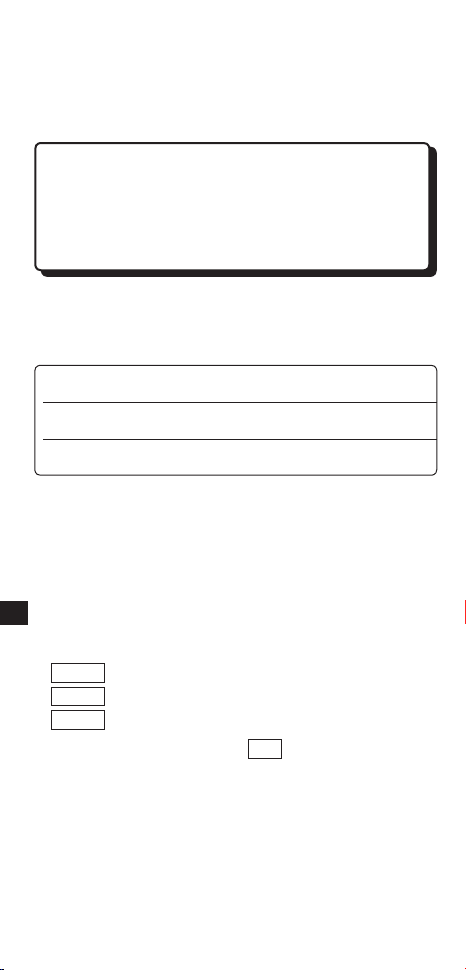
▼お買い上げの際に記入されると便利です
販売店名
電話 ( ) -
お買い上げ日 年 月 日
●製品名3Dグラス
●品 番TY-
●故障の状況できるだけ具体的に
16
日本語
■転居や贈答品などでお困りの場合は、次の窓口に
ご相談ください
●使いかた・お手入れなどのご相談は…………
ご使用の回線(IP電話やひかり電話など)によっては、
回線の混雑時に数分で切れる場合があります。
【ご相談窓口におけるお客様の個人情報のお取り扱い
について】
パナソニック株式会社およびグループ関係会社は、お
客様の個人情報をご相談対応や修理対応などに利用
させていただき、ご相談内容は録音させていただきま
す。また、折り返し電話をさせていただくときのため
に発信番号を通知いただいております。なお、個人情
報を適切に管理し、修理業務等を委託する場合や正当
な理由がある場合を除き、第三者に開示・提供いたし
ません。個人情報に関するお問い合わせは、ご相談い
ただきました窓口にご連絡ください。
よくお読みください
17
日本語
ヨーロッパ連合以外の国の廃棄処分に関する情報
この記号はヨーロッパ連合内でのみ有効です。
本製品を廃棄したい場合は、日本国内の法律等に
従って廃棄処理をしてください。
〒571−8504 大阪府門真市松生町1番15号
Ⓒ PanasonicCorporation2012
PrintedinChina
S1111-2032
ご使用の回線(IP電話やひかり電話など)によっては、回
線の混雑時に数分で切れる場合があります。本書の「保証
とアフターサービス」もご覧ください。
●使いかた・お手入れなどのご相談は…………………
パナソニック株式会社
AVC
ネットワークス社
FullHD3D™ロゴは、フルHD3Dグラス規格に準拠し
ているテレビと3Dグラスの間の互換性を示すもので
あって、テレビの性能に左右される3D映像の画質を示す
ものではありません。
FULLHD3DGLASSES™ロゴとFULLHD3D
GLASSES™は、フルHD3Dグラス・イニシアチブの商
標です。
Bluetooth®とそのロゴマークはBluetoothSIG,Inc.
の商標で、パナソニックはライセンスに基づき使用して
います。
本書に記載されるその他の商標や製品名は一般にそれら
の権利を保有する各社のものです。
18
日本語

TY-ER3D4MWTY-ER3D4SW
パナソニック株式会社
AVC
ネットワークス社