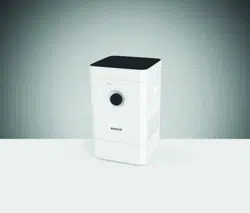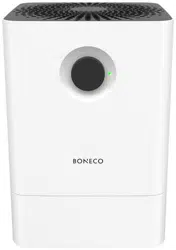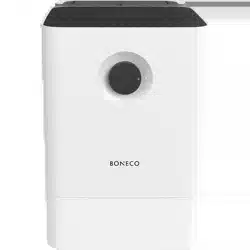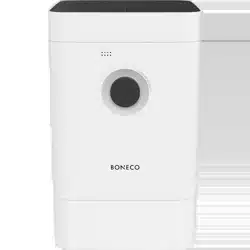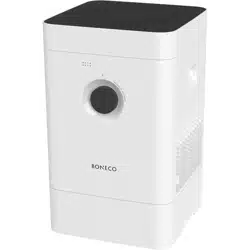
H300
MANUAL
Read and save these instructions
Lisez et enregistrez ces instructions
Lea y guarde estas instrucciones
EN Always observe all safety notes (included separately in delivery).
FR Veuillez respecter impérativement l’ensemble des consignes de sécurité
(fournies séparéme nt dans le contenu de la livraison).
ES Tenga en cuenta siempre todas las indicaciones de seguridad
(se suministran aparte junto con el producto).


EN Instructions for use 5
FR Mode d’emploi 29
ES Instrucciones de uso 53

5
en
INSTRUCTIONS FOR USE

6
en
TABLE OF CONTENTS
The various comfort modes 16
Comfort modes 16
AUTO mode 16
SLEEP mode 16
BABY mode 16
Fragrance container 17
Fragrance container 17
Use 17
The benefits of the BONECO app 18
About the BONECO app 18
Scope of services 18
Download 19
BONECO app for iOS 19
BONECO app for Android 19
Pairing with the BONECO appliance 20
Getting ready 20
Pairing 20
Notes on cleaning 21
About cleaning 21
Recommended cleaning intervals 21
Items included 8
Healthy air is a basic need 8
Availability of accessories 8
Overview and part names 9
Technical data 10
Starting up 11
Manual handling 13
About manual handling 13
AUTO mode 13
Adjusted AUTO mode 13
Switching on and o 13
Manual control 14
The various operating modes 15
Hybrid mode (“Hybrid”) 15
“Hybrid” LED operating mode 15
Humidification only (“Humidifier”) 15
“Humidifier” LED operating mode 15
Purification only (“Purifier”) 15
“Purifier” LED operating mode 15

7
en
Cleaning the appliance 22
Disassembly and cleaning 22
Cleaning the AW200 evaporator mat 23
About the AW200 evaporator mat 23
Cleaning in the washing machine 23
Cleaning by hand 23
Cleaning the pre-filter 24
About the pre-filter 24
Clean the pre-filter 24
Replacing the accessories 25
Replacing the A7017 Ionic Silver Stick® 25
Replacing the AH300 pollen filter 25
Availability of accessories 25
Malfunctions and troubleshooting 26
Factory default settings 27
About the factory default settings 27
Resetting the appliance 27
8
en
ITEMS INCLUDEDHEALTHY AIR IS A BASIC NEED
There is little to which we react with greater sensi
-
tivity than poor air. And yet many people do not pay
enough attention to air quality, which has conse-
quences for health and quality of life. This makes us
all the more pleased that you have chosen a BONECO
appliance to ensure that the basic need for healthy
room air is satisfied for you and the people around
you.
AVAILABILITY OF ACCESSORIES
You can obtain replacements for spent accessories
as well as additional accessories:
• At your BONECO specialist dealer,
• At shop.boneco.us or
• Directly via the “BONECO healthy air” app.
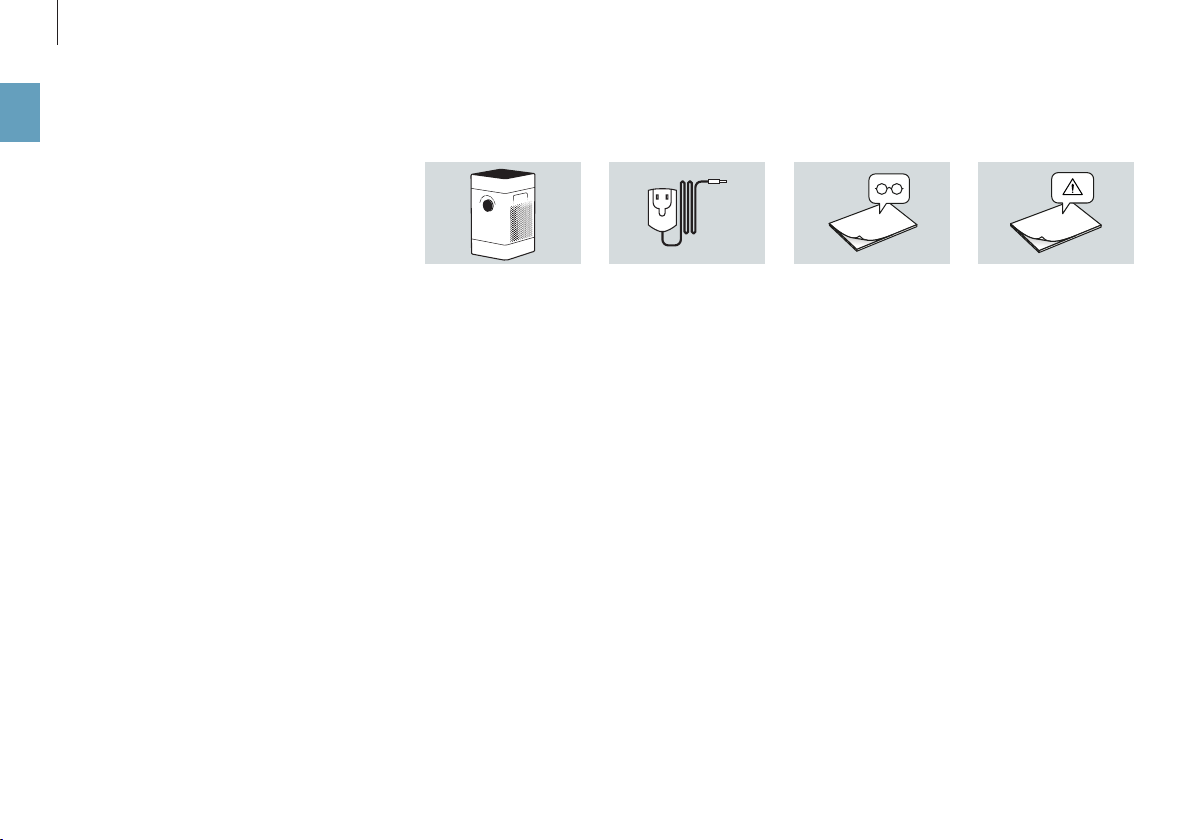
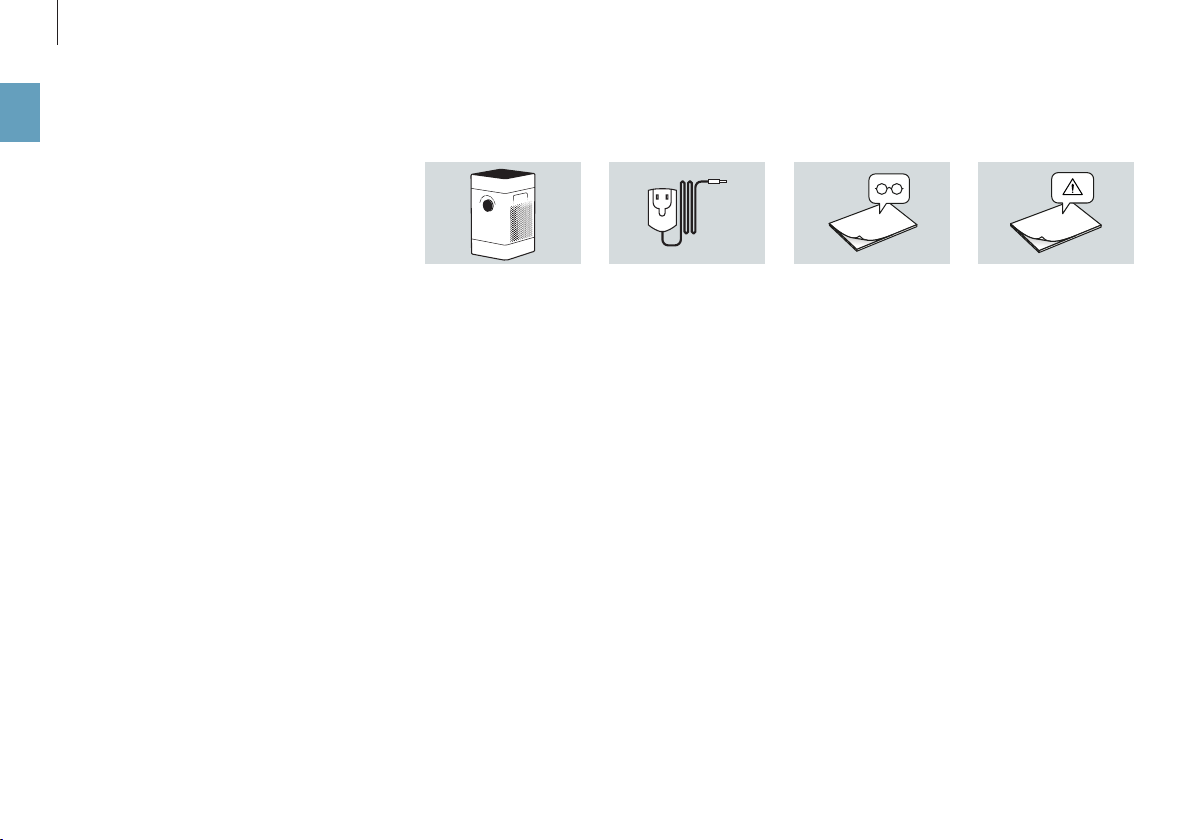
BONECO H300 Quick ManualPower supply Safety instructions
ITEMS INCLUDED
1
2
3
4
5
76 8
109
9
en
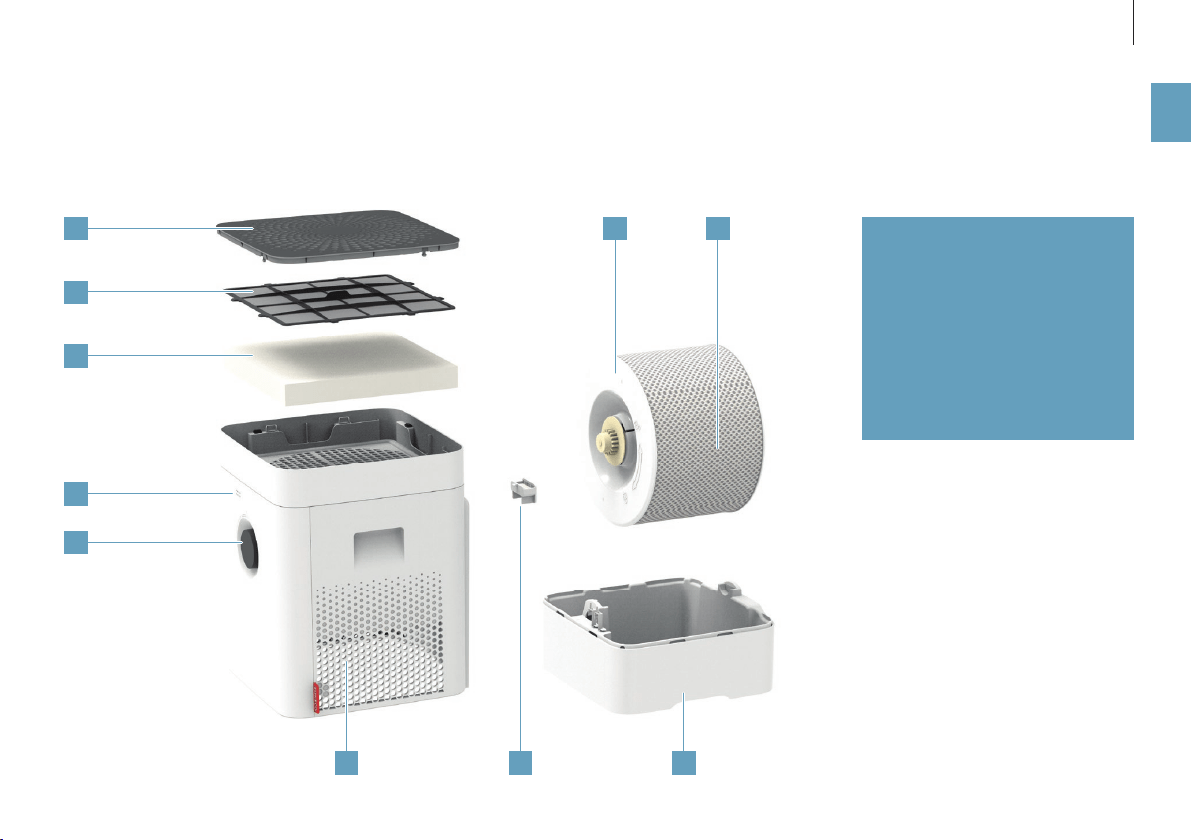
OVERVIEW AND PART NAMES
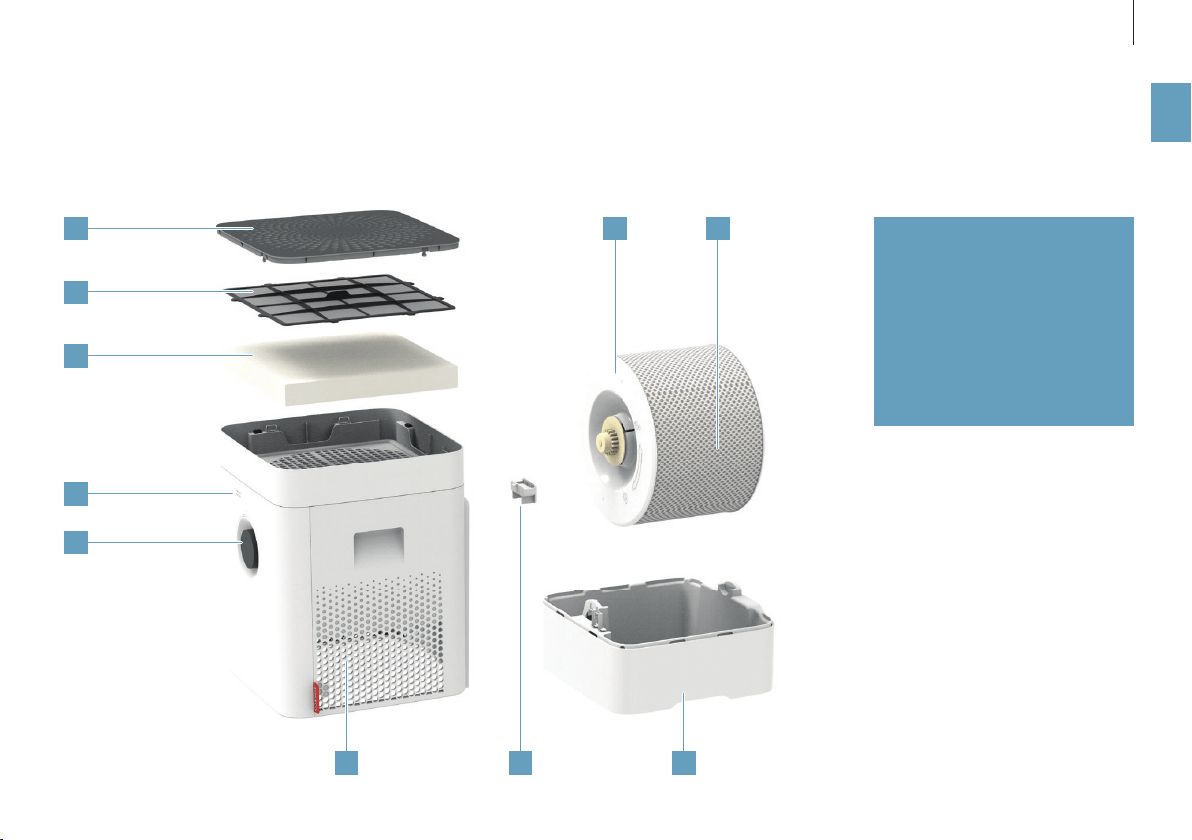
1 Cover/air inlet
2 Pre-fi lter
3 AH300 pollen fi lter
4 Hygrometer
5 On/O , performance level
6 Air outlet
7 Fragrance container
8 Water base*
9 Drum*
10 AW200 evaporator mat**
* Washable in the dishwasher up to 122°F
(50°C)
** Washable in the washing machine up to
104°F (40°C)

10
en
TECHNICAL DATA
TECHNICAL DATA
*
Type designation BONECO H300
Power supply voltage 100 – 120 V ~ 60 Hz
Power consumption Standby 0.6 W
Level 1 3.6 W
Level 6 9.6 W
Humidity output up to 2.22 gal/day (350 g/h)**
Particle CADR 3180 cu ft / h (< 90 m
3
/ h)
For rooms up to 650 sq ft (50 m
2
) / 5300 cu ft (125 m
3
)
Water capacity max. 1.19 gallons (4.5 liters)
Dimensions L × W × H 11.1 × 11.1 × 18.3 in (280 × 280 × 465 mm)
Weight (empty) 12.1 lbs (5.3 kg)
Operation noise level Level 1 28 dB(A)
Level 6 51 dB(A)
* Subject to change
** at 120 V ~ 60 Hz
11
en
STARTING UP
654
3
2
1
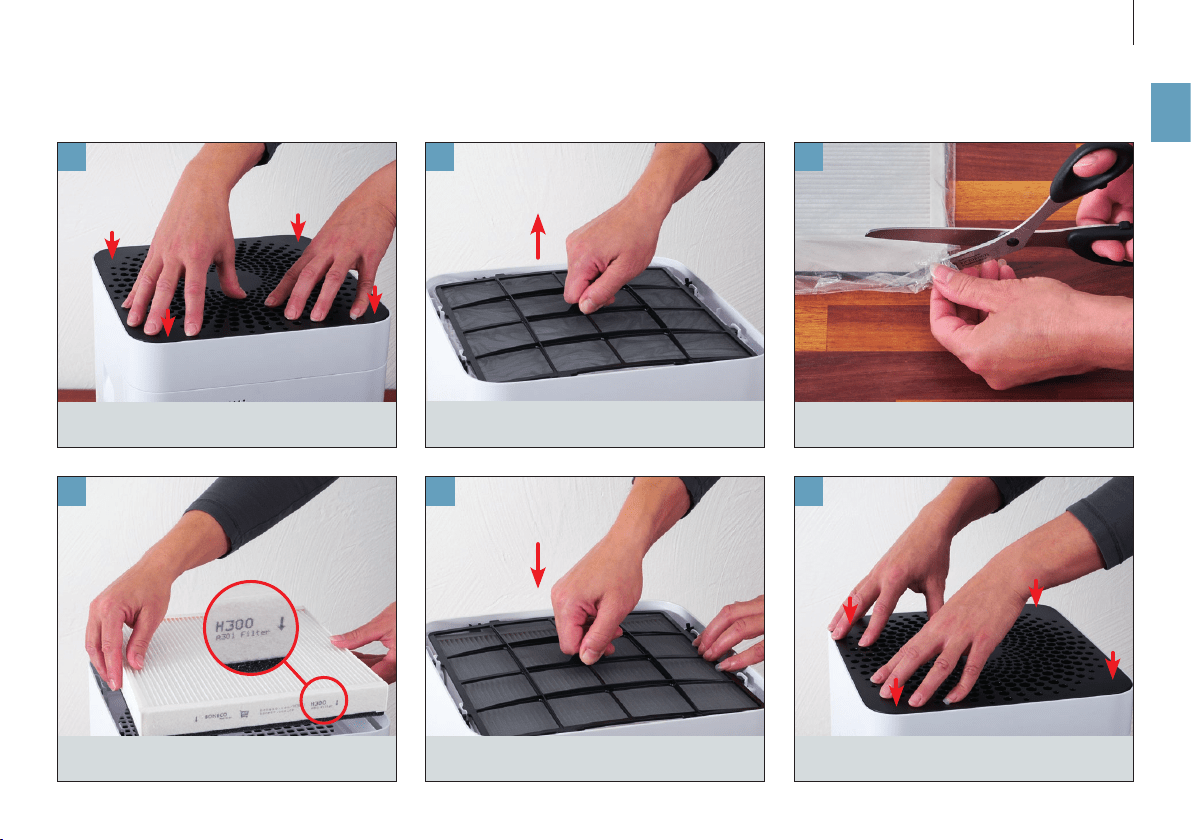
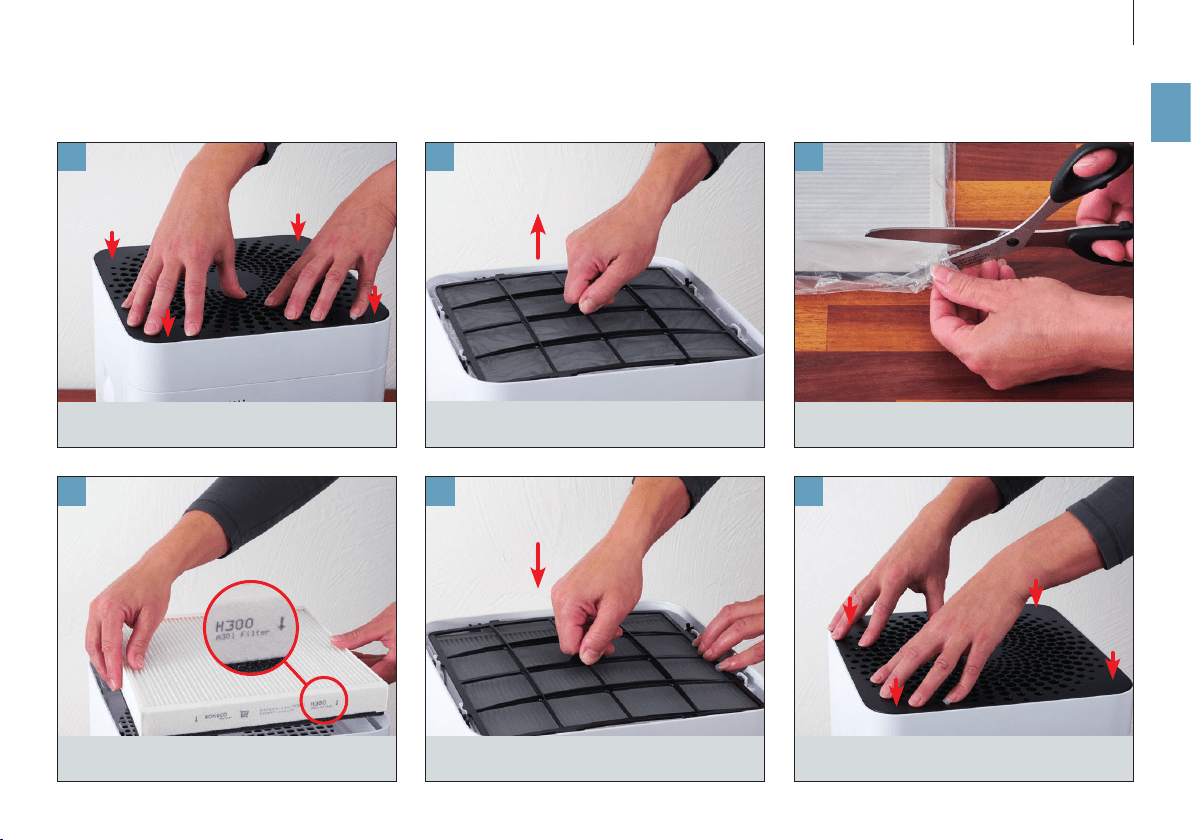
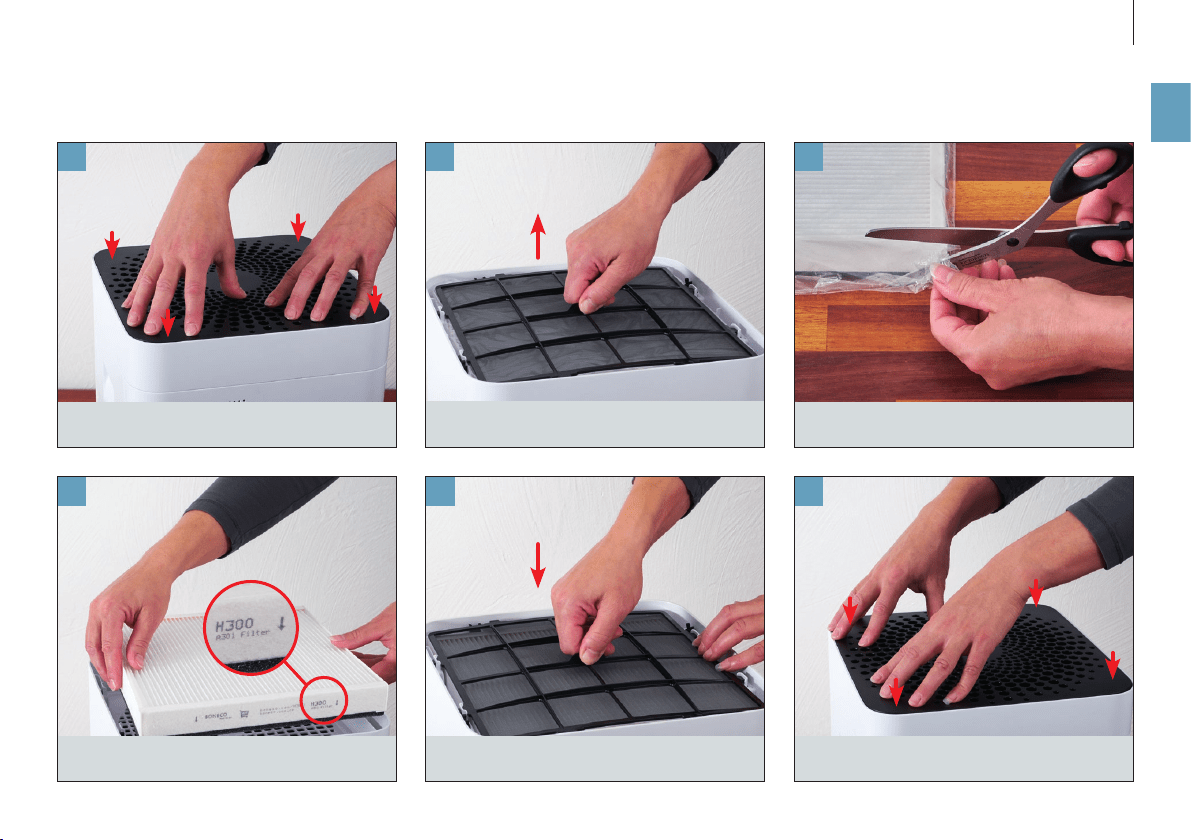
Remove the pre-filter and the AH300 pollen filter.
Remove the protective covering of the AH300
pollen filter.
Insert the AH300 pollen filter (observe the direc-
tion of the arrow).
Press down on all four corners of the cover to
unlock them.
Insert the pre-filter. Press down forcefully to snap the cover back in
place.
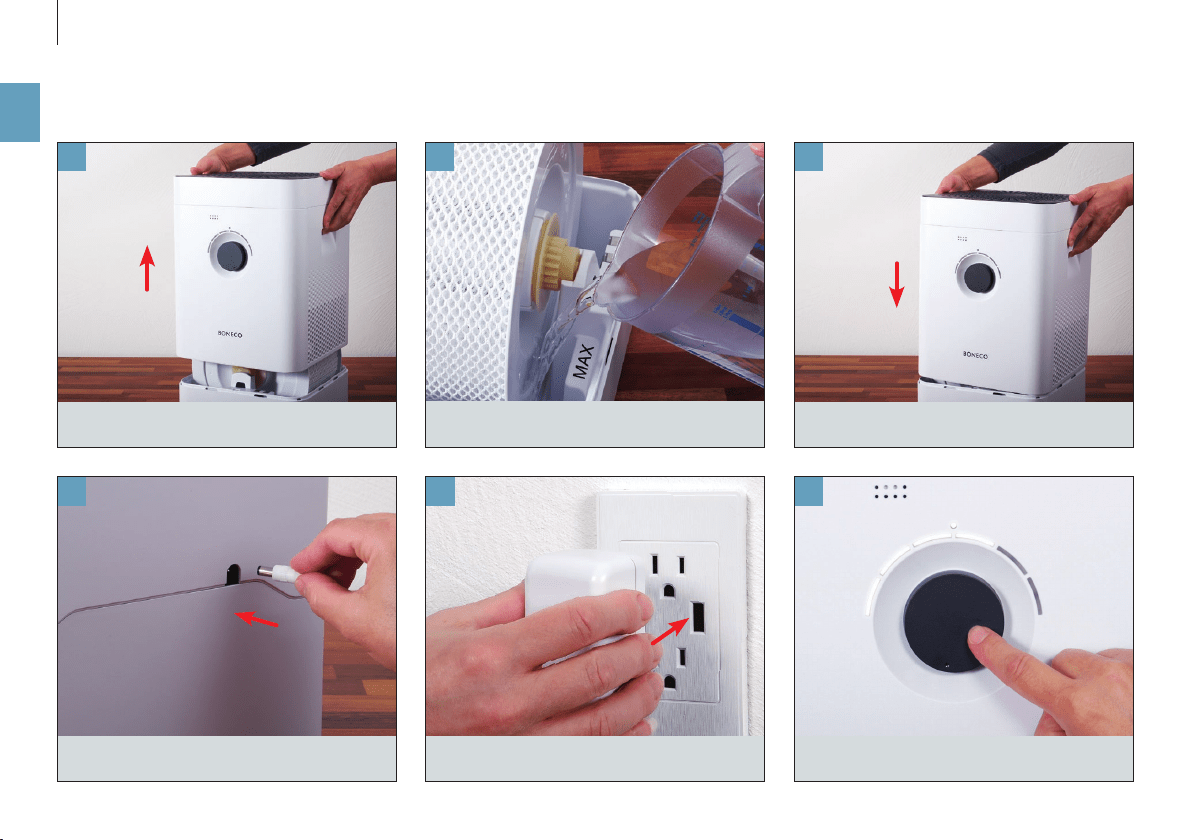
12
en
121110
9
8
7
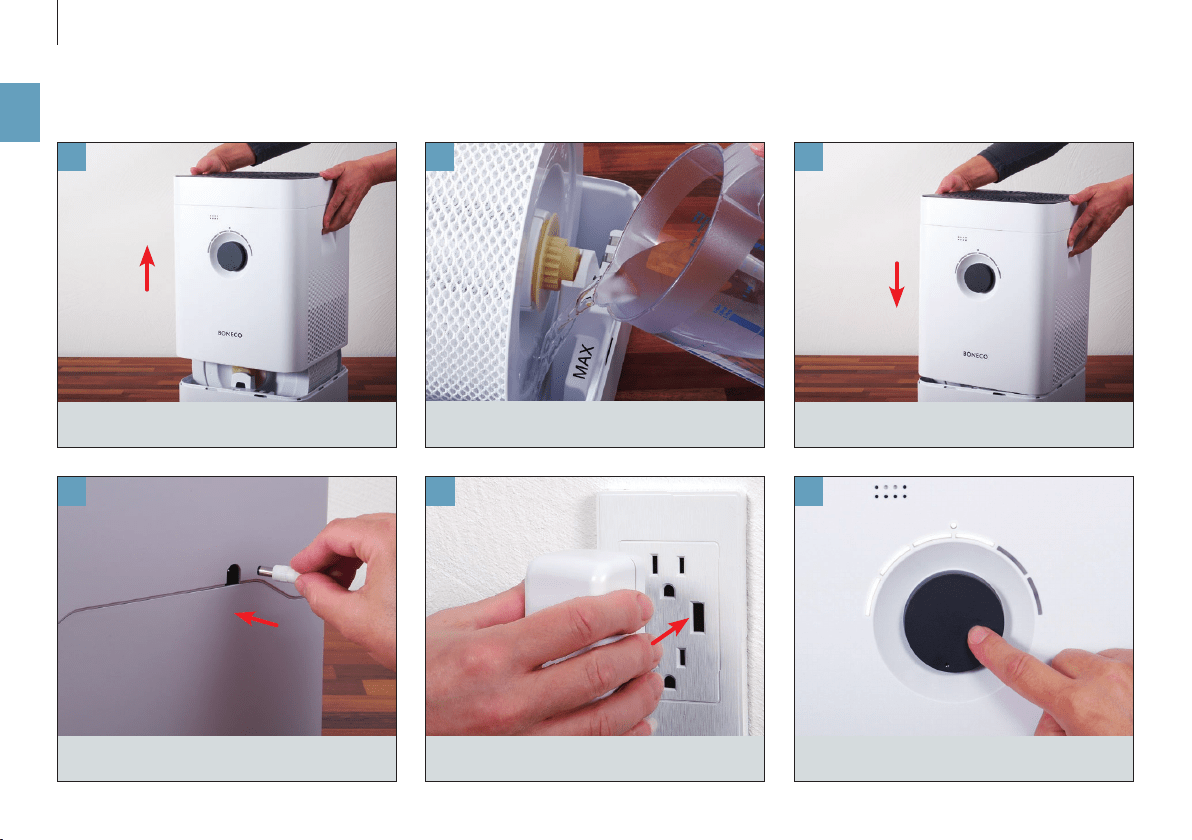
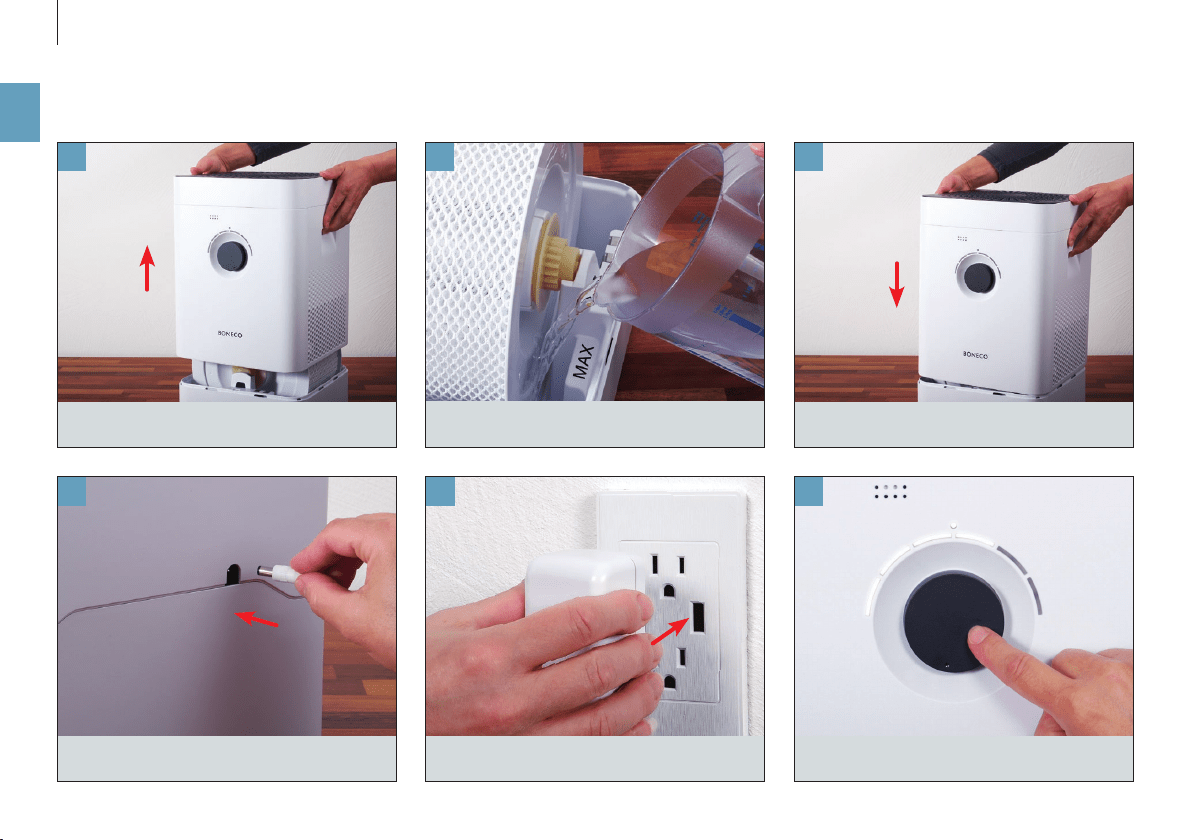
Fill with cold tap water up to the marking.
Put the upper part on the water base.
Plug the power cord into the appliance.
Remove the upper part.
Plug the power cord into a power outlet. Briefly press the output regulator to switch on
the appliance.
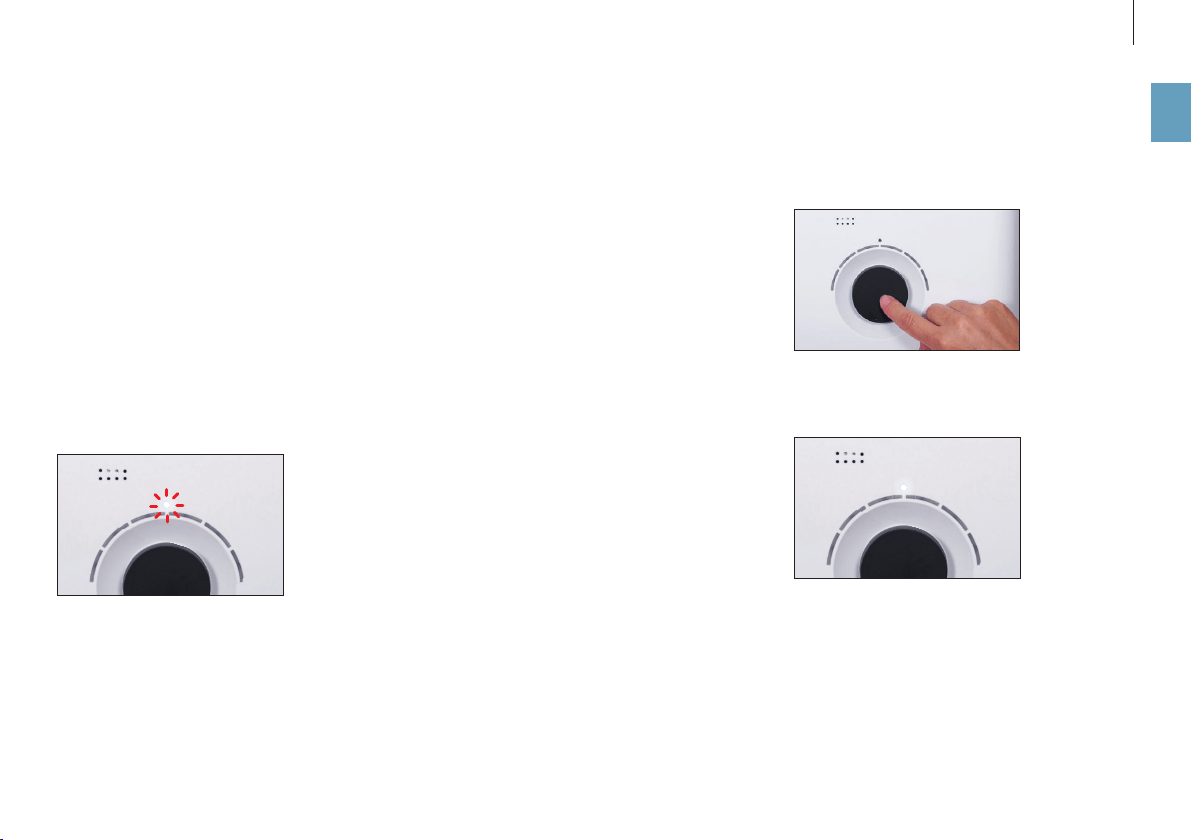
13
en
MANUAL HANDLING
ABOUT MANUAL HANDLING
Manual handling works conveniently by the knob
on the front side. The BONECO app o ers additional
extensive options for control and automation of the
BONECO appliance.
AUTO MODE
If you have never operated the BONECO appliance
with the BONECO app and switch it on for the fi rst
time, it starts up in AUTO mode. The appliance is pre-
set to a target relative humidity of 50 percent. The
performance level is automatically adapted to the
current humidity: The drier the air, the higher the
performance level.
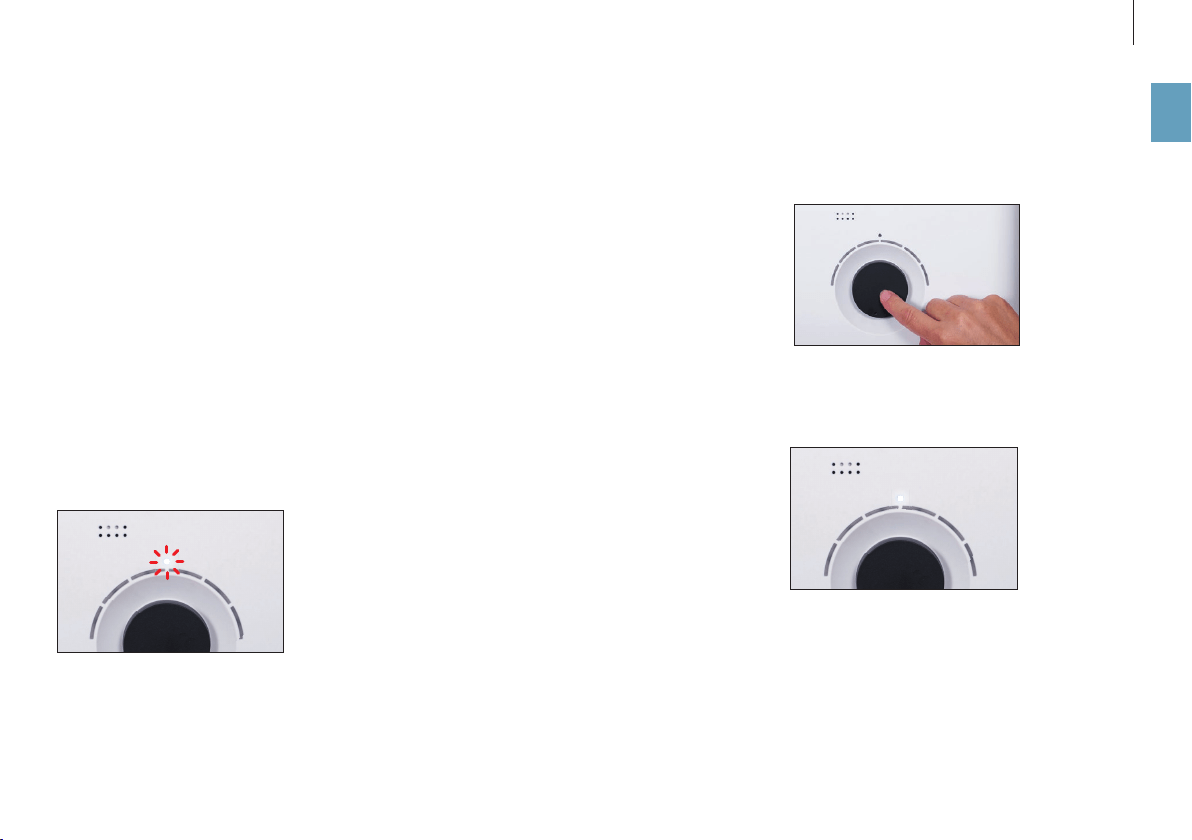
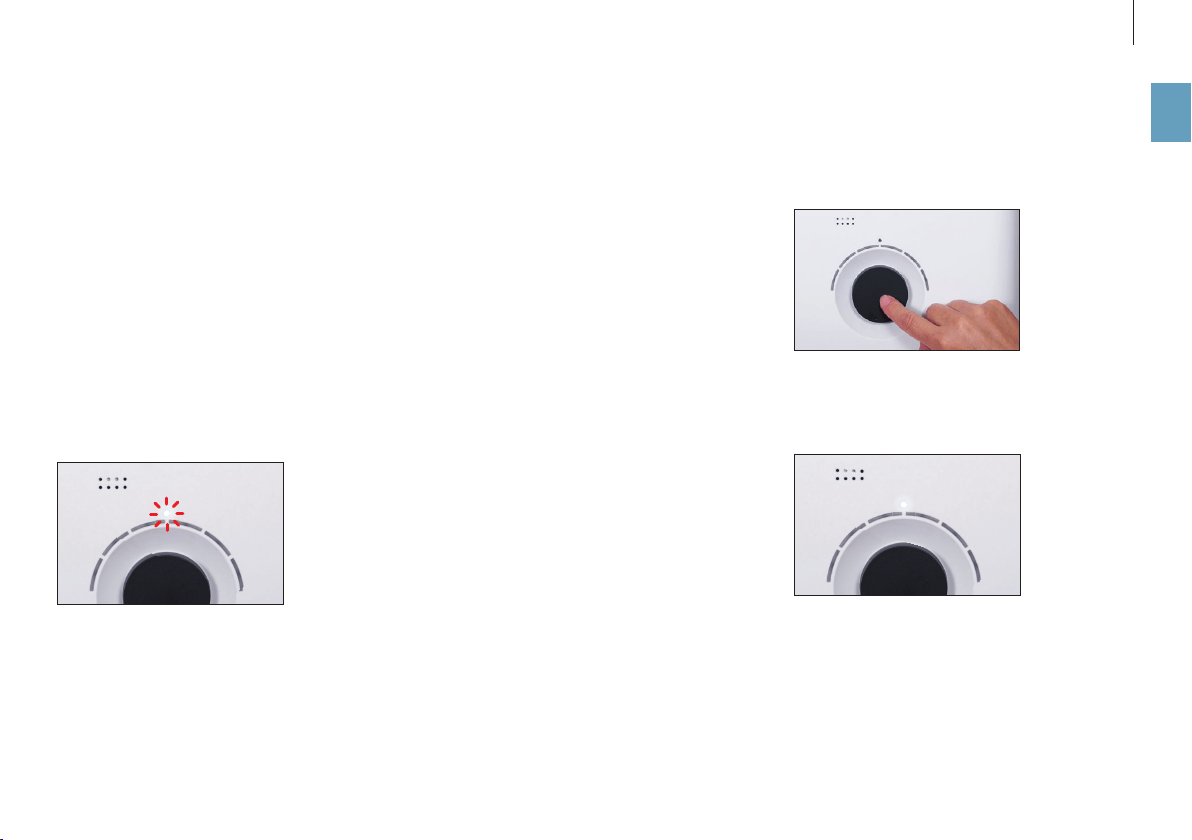
If the preset target humidity is exceeded, the appli-
ance switches to standby mode, which is indicated
by the pulsing LED:
If the humidity drops below the set level, the appli-
ance resumes operation.
ADJUSTED AUTO MODE
If you have already operated the appliance with the
BONECO app and set a di erent humidity, that value
is automatically taken over when the appliance is
switched on.
SWITCHING ON AND OFF
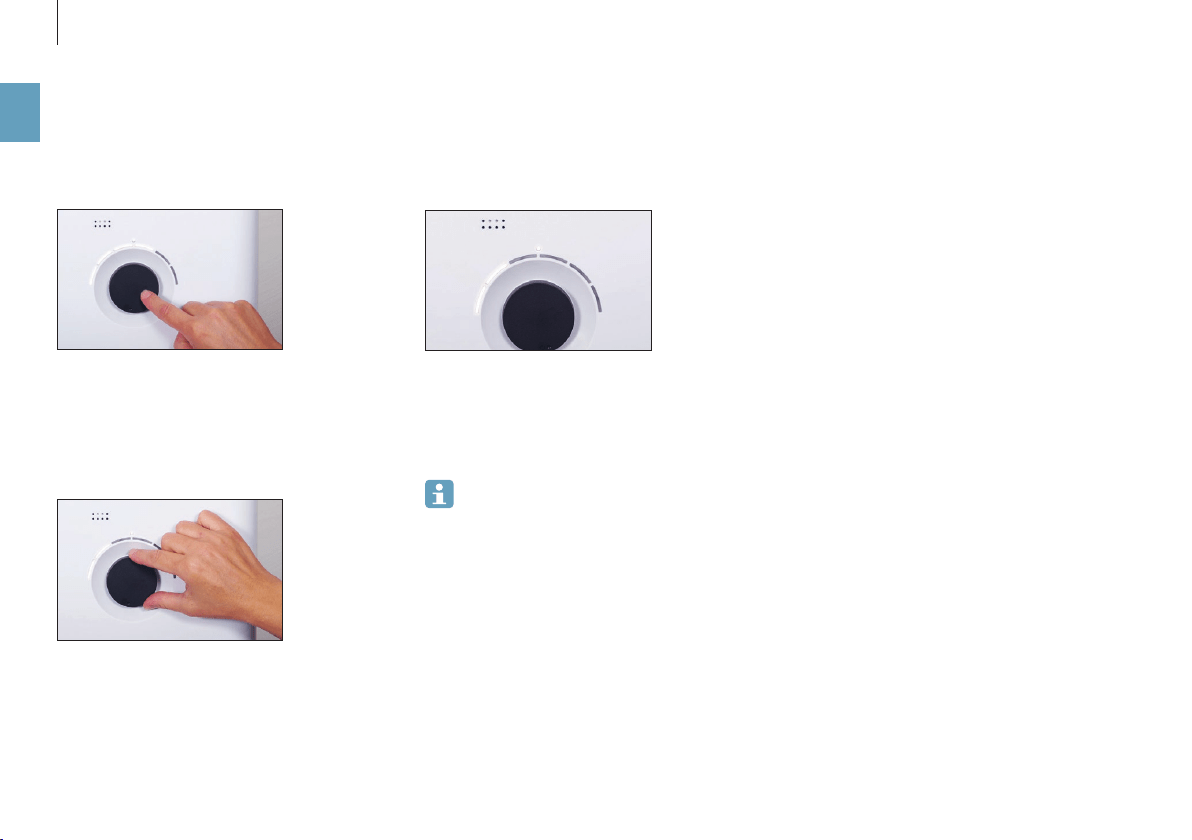
1. Briefl y press the knob once to switch on the ap-
pliance.
The appliance is always in AUTO mode when it is
switched on. You can identify active AUTO mode by
the small LED that lights up above the knob.
2. To switch o the appliance while it is in AUTO
mode, briefl y press the knob once.
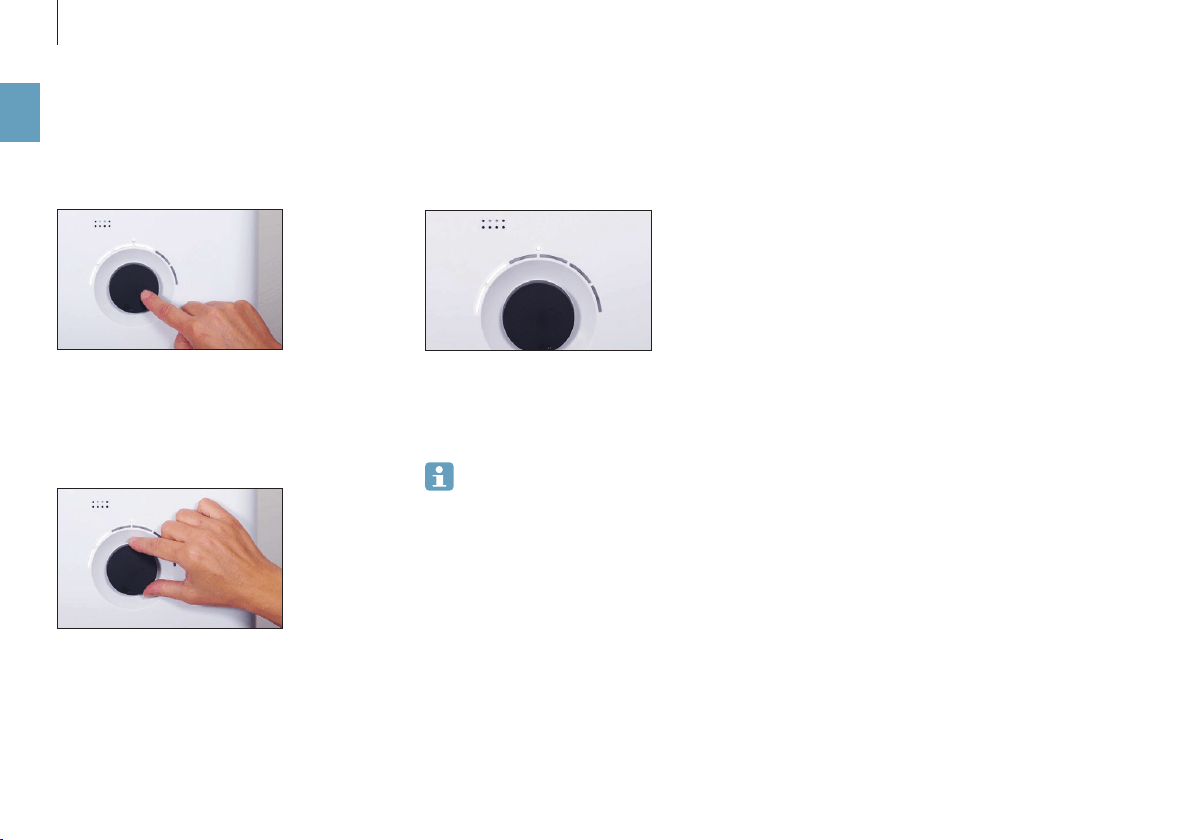
14
en
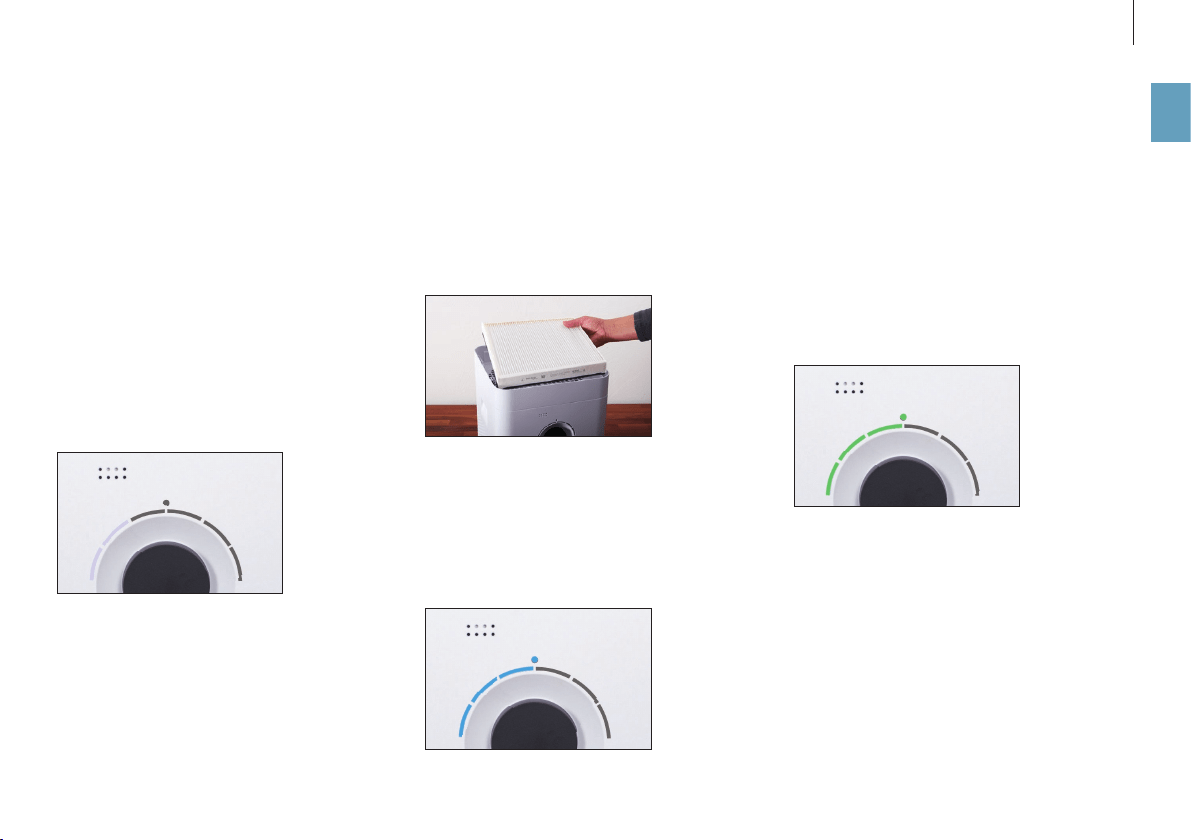
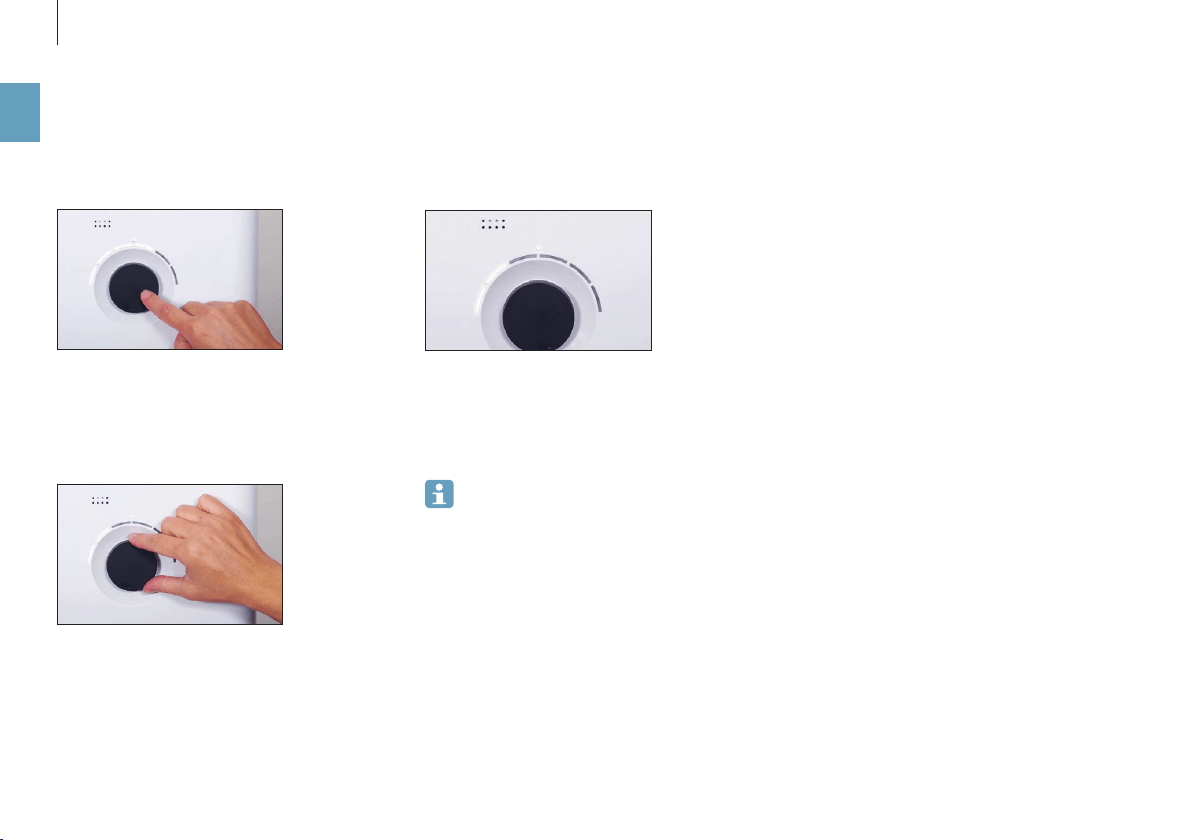
The selected performance level is indicated by the
number of LEDs that light up above the knob.
3. Briefly press the knob once to exit manual mode
and to reactivate AUTO mode.
4. Briefly press the knob once more to switch o the
appliance.
If you exit AUTO mode, the appliance will con-
tinue at the selected performance level until
the water base is empty, regardless of what the cur-
rent level of humidity is.
MANUAL CONTROL
1. Briefly press the knob once to switch on the ap
-
pliance.
The appliance is always in AUTO mode when it is
switched on.
2. Adjust the output to your needs by setting the
knob to the desired level from 1 to 6. This action
exits AUTO mode (AUTO LED is o).
15
en
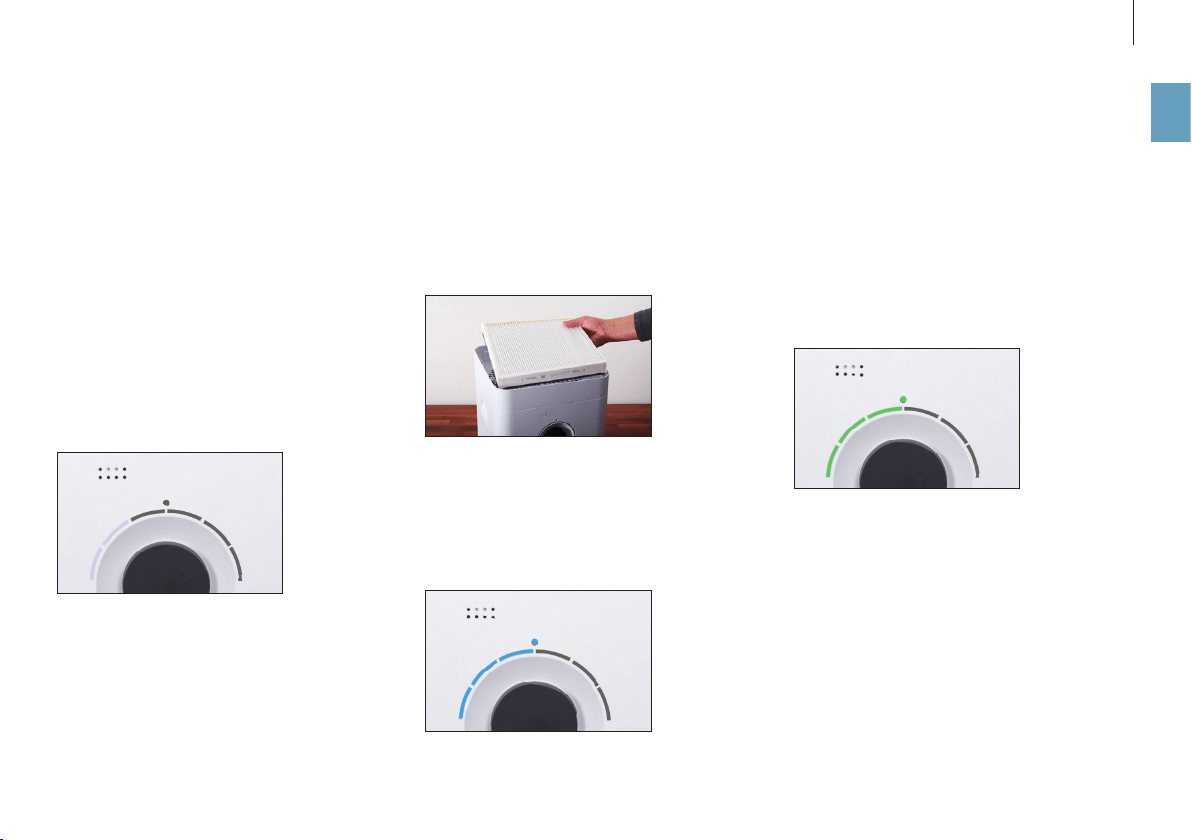
HYBRID MODE (“HYBRID”)
The BONECO appliance combines two functions.
• The AH300 pollen filter cleanses breathing air by
removing pollen, household dust and fine parti
-
cles.
• The AW200 evaporator mat humidifies the room
air.
You achieve the best results when the appliance is
humidifying and purifying the air at the same time.
Nevertheless it is possible to use just one of the two
functions.
“HYBRID” LED OPERATING MODE
HUMIDIFICATION ONLY (“HUMIDIFIER”)
We recommend using the appliance with insert-
ed AH300 pollen filter even in the winter because,
aside from pollen, it also filters household dust out
of the air. In order to operate the appliance with-
out the AH300 pollen filter, simply remove the filter
from its holder and use the BONECO app to switch to
“Humidifier” mode.
When you remove the AH300 pollen filter, the max
-
imum humidifier performance increases because
you achieve a better air passage.
“HUMIDIFIER” LED OPERATING MODE
PURIFICATION ONLY (“PURIFIER”)
In summer, humidity is usually sucient, but pollen
gives people with allergies a dicult time. If you
only want to use the purifying eect of the AH300
pollen filter, switch the appliance to “Purifier” oper
-
ating mode using the BONECO app and remove the
water and the drum from the appliance.
“PURIFIER” LED OPERATING MODE
THE VARIOUS OPERATING MODES

16
en
THE VARIOUS COMFORT MODES
COMFORT MODES
There are three dierent comfort modes available
in each of the three “Hybrid”, “Air purification” and
“Air humidification” operating modes: AUTO, SLEEP
and BABY.
AUTO MODE
In AUTO mode, the BONECO appliance uses all of the
fan levels between 1 and 5. The preset humidity is
50%.
SLEEP MODE
In SLEEP mode, the BONECO appliance can even be
used in a bedroom at night. The appliance automat
-
ically operates at the lowest fan level of 1 to keep
the operation noise level to a minimum. The preset
humidity is 45%.
BABY MODE
The BABY mode uses fan levels 1 through 4 and in
-
creases the humidity to 60%. This value is ideal for
use in a nursery or baby’s room since higher humid-
ity is recommended for babies and small children.
The fan also operates quietly enough that it will not
trigger a baby monitor.
17
en
FRAGRANCE CONTAINER
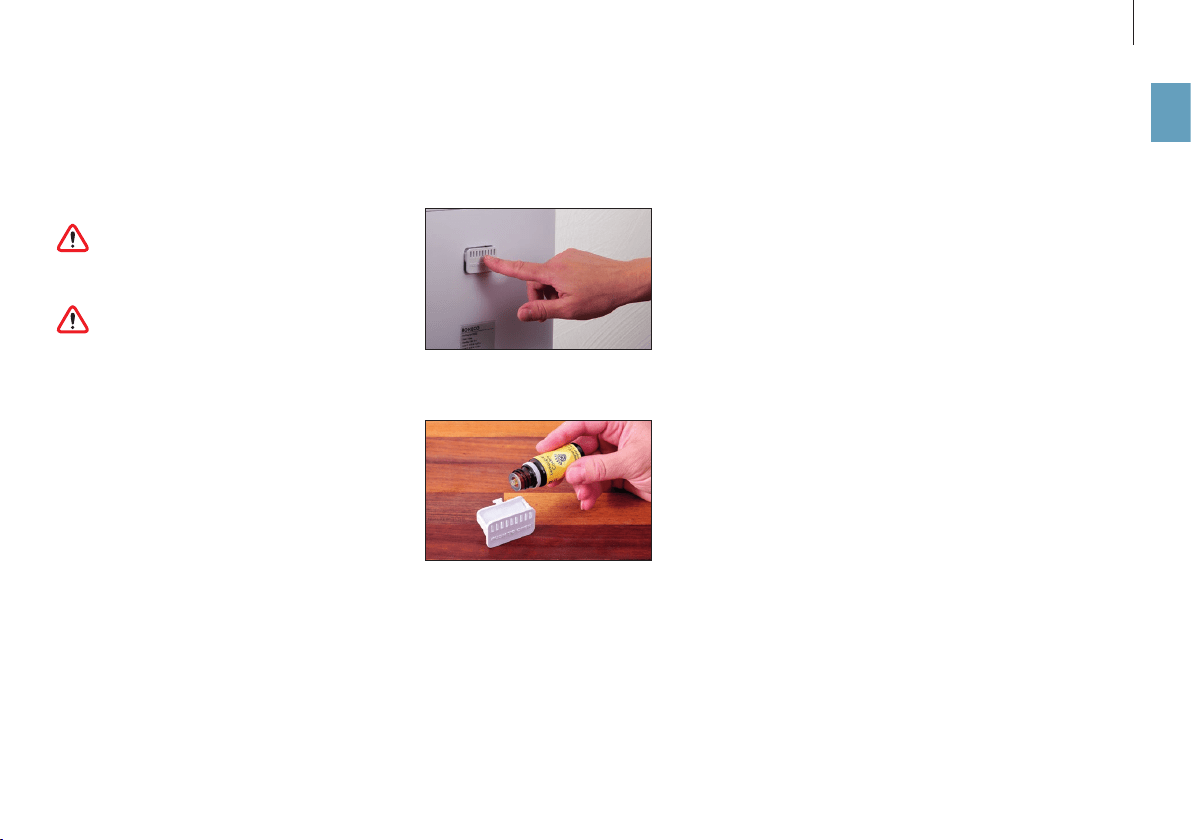
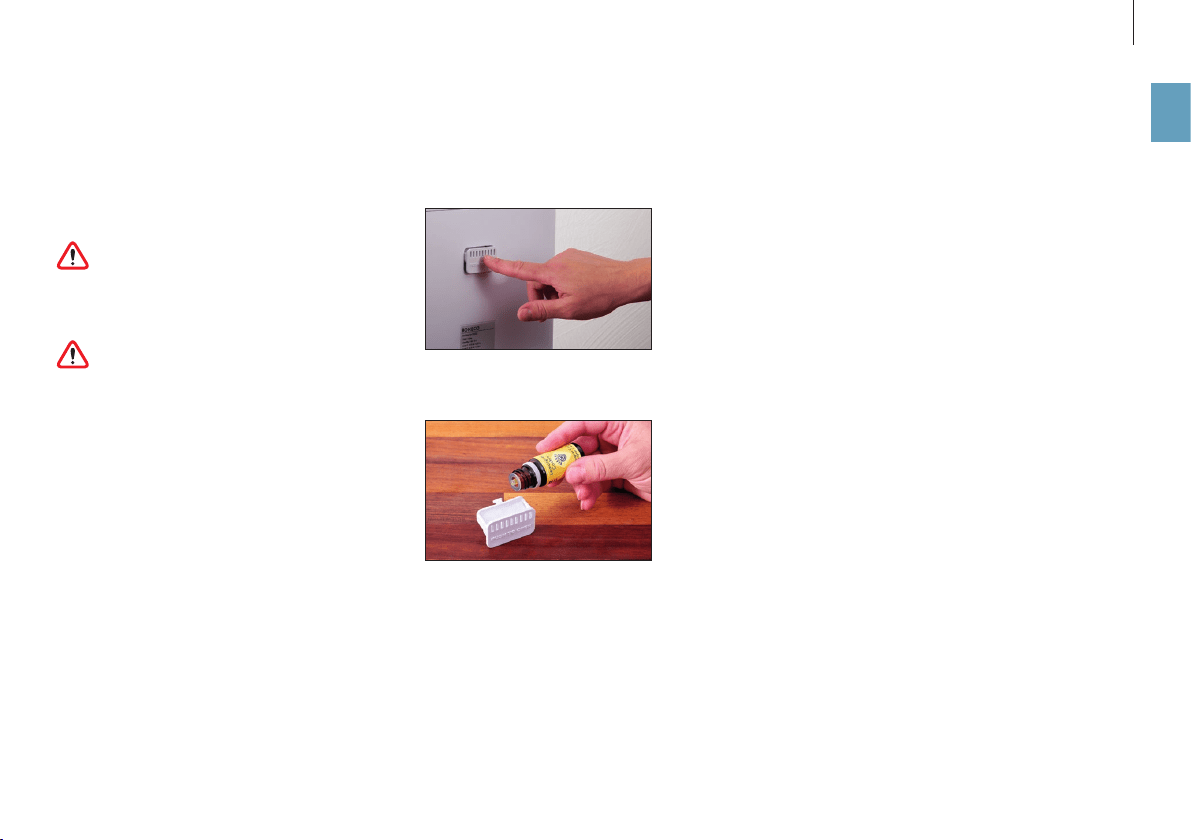
Commercially available fragrances and essential
oils can be inserted into the fragrance container on
the rear side.
Never put any fragrances into the water base
itself, since doing so can decrease the perfor-
mance of the appliance and even cause damage.
Such damage is not covered by the warranty.
The fragrance container can be cleaned in the
dishwasher. However, the temperature may
not exceed 122°F (50°C).
USE
1. Press down on the fragrance container to take
out the drawer.
2. Sprinkle the felt insert in the drawer with the fra
-
grance of your choice.
FRAGRANCE CONTAINER
18
en
THE BENEFITS OF THE BONECO APP
ABOUT THE BONECO APP
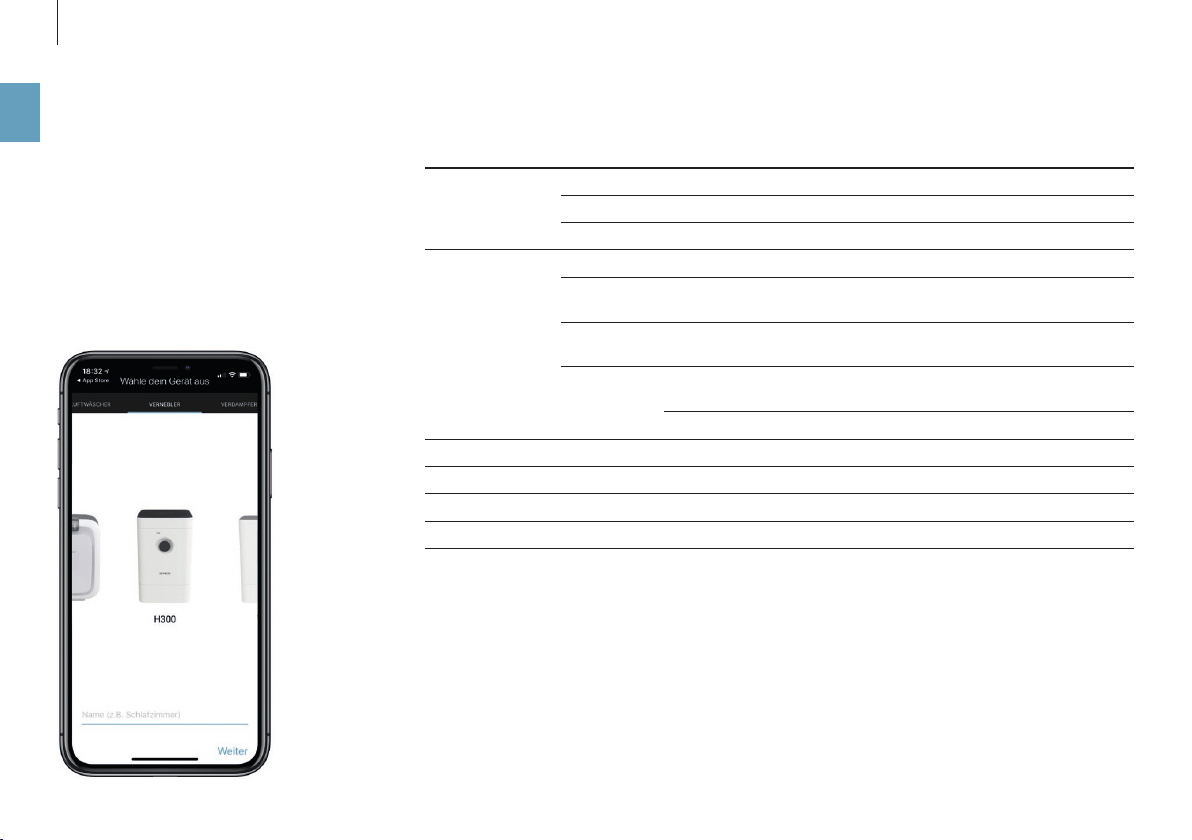
The “BONECO healthy air” app is used to control the
appliance and lets you take full advantage of its po-
tential. The app includes functions such as a timer, a
humidity preset and the option to switch between
various programs. In addition, it provides remind-
ers for the cleaning intervals and other recurring
tasks.
SCOPE OF SERVICES
Operating modes “Hybrid” The air is cleaned and humidified at the same time
“Purifier” The air is cleaned, but not humidified
“Humidifier” The air is humidified, but not cleaned
Selecting modes Predefined settings for frequent situations
AUTO mode The appliance uses all fan levels from 1 to 5 and has a preset target
humidity of 50%
SLEEP mode The appliance uses fan level 1 only and increases the target humidity
to 45%
BABY mode The appliance uses fan level 1 through 4 and increases the humidity
to 60%
Hygrostat Defines the desired humidity
Dimmer Sets the brightness of the status LED
Weather Displays the current weather and outside temperature
Filter change information Indicates when an AH300 pollen filter is spent
Accessories and consumables Provides support in replacement orders and further information
19
en
DOWNLOAD
BONECO APP FOR IOS
Search the app store for “BONECO healthy air” or
scan the QR code below. Reading the QR code under
iOS 10 or earlier requires installing a corresponding
app. Under iOS 11 and later, the QR code is read au-
tomatically whenever you direct the camera at it.
BONECO APP FOR ANDROID
Search the Google Play Store for “BONECO healthy
air” or scan the QR code below. Reading the QR code
requires installing a corresponding app on your de-
vice.

20
en
PAIRING WITH THE BONECO APPLIANCE
GETTING READY
Make sure that Bluetooth is activated on your smart
-
phone. During pairing, make sure that the smart-
phone is in the same room as the BONECO appliance.
Once paired successfully, you can control the
BONECO appliance with your smartphone from the
same room or even from an adjacent room. How
-
ever, the maximum distance between smartphone
and BONECO appliance depends on the specific
structural conditions.
PAIRING
1. Make sure that Bluetooth is activated on your
smartphone.
2. Start the BONECO app.
3. Follow the instructions in the app.
21
en
NOTES ON CLEANING
ABOUT CLEANING
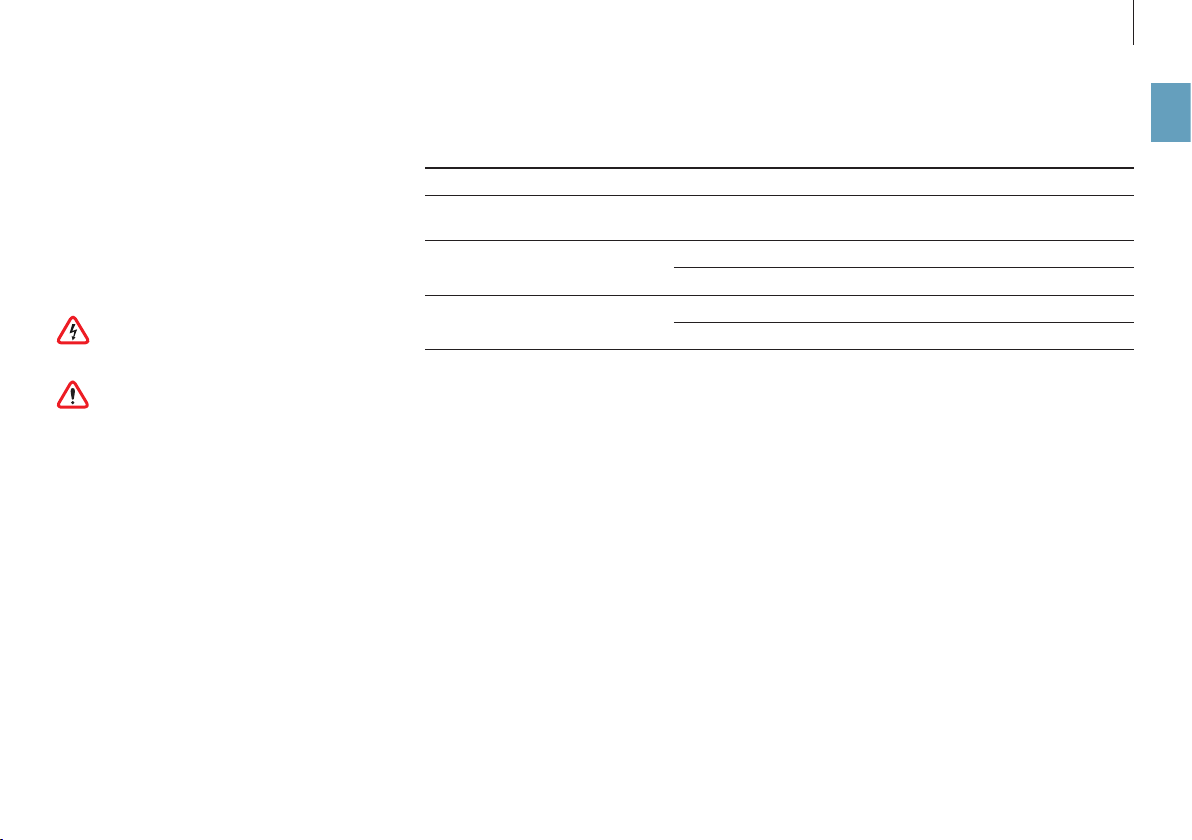
Regular maintenance and cleaning are necessary
for trouble-free and hygienic operation.
Recommended cleaning and maintenance intervals
vary depending on air quality, water quality and
operating time.
A soft cloth, dish detergent and a scrub brush are
recommended for cleaning by hand.
Always unplug the appliance from the power
outlet before you begin cleaning! Failure to
do so can result in electric shock and fatal injury!
If you clean the drum and the water base
in the dishwasher, a temperature of 122 °F
(50°C) may not be exceeded, as temperatures high-
er than this can cause the plastic parts to deform.
RECOMMENDED CLEANING INTERVALS
Interval Action
After the third day without
operation
Empty water base and fill with fresh water
Every 2 weeks Clean water base, drum and AW200 evaporator mat
Clean the pre-filter
Annually Replace the AH300 pollen filter
Clean the fan and the inner area of the appliance
22
en
CLEANING THE APPLIANCE
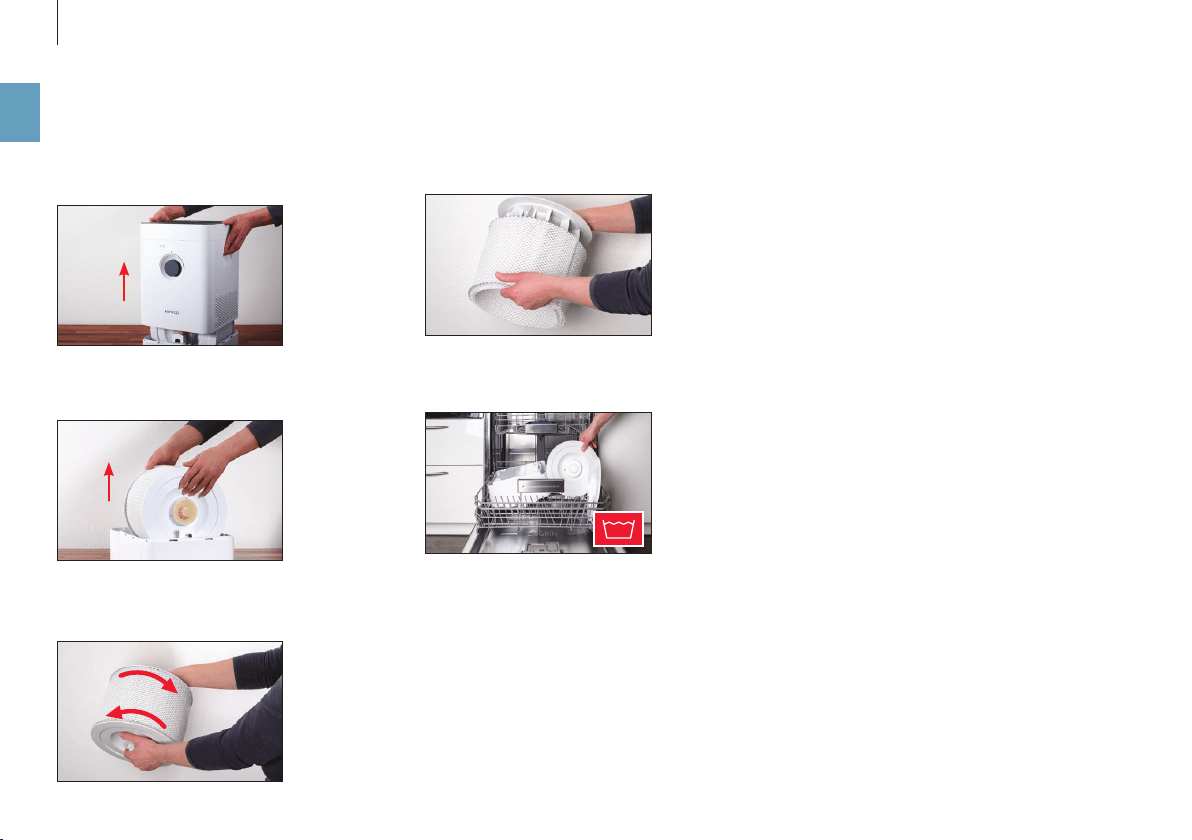
4. Remove the AW200 evaporator mat from the
drum.
5. Clean the water base and the drum either by
hand or in the dish washer at a max. temperature
of 122°F (50°C).
6. Put the appliance back together by following the
steps in reverse order.
DISASSEMBLY AND CLEANING
1. Take o the upper part of the BONECO appliance.
2. Remove the drum with the AW200 evaporator
mat.
3. Twist both drum discs to release them. When do
-
ing so, note the markings on the outer side of the
disc.
122 °F
23
en
CLEANING THE AW200 EVAPORATOR MAT
ABOUT THE AW200 EVAPORATOR MAT
The AW200 evaporator mat can be cleaned in the
washing machine. Uses any commercially available
detergent.
We recommend putting the AW200 evaporator mat
into a laundry bag or washing it separately because
it will collect loose fibers from other pieces of laun
-
dry otherwise.
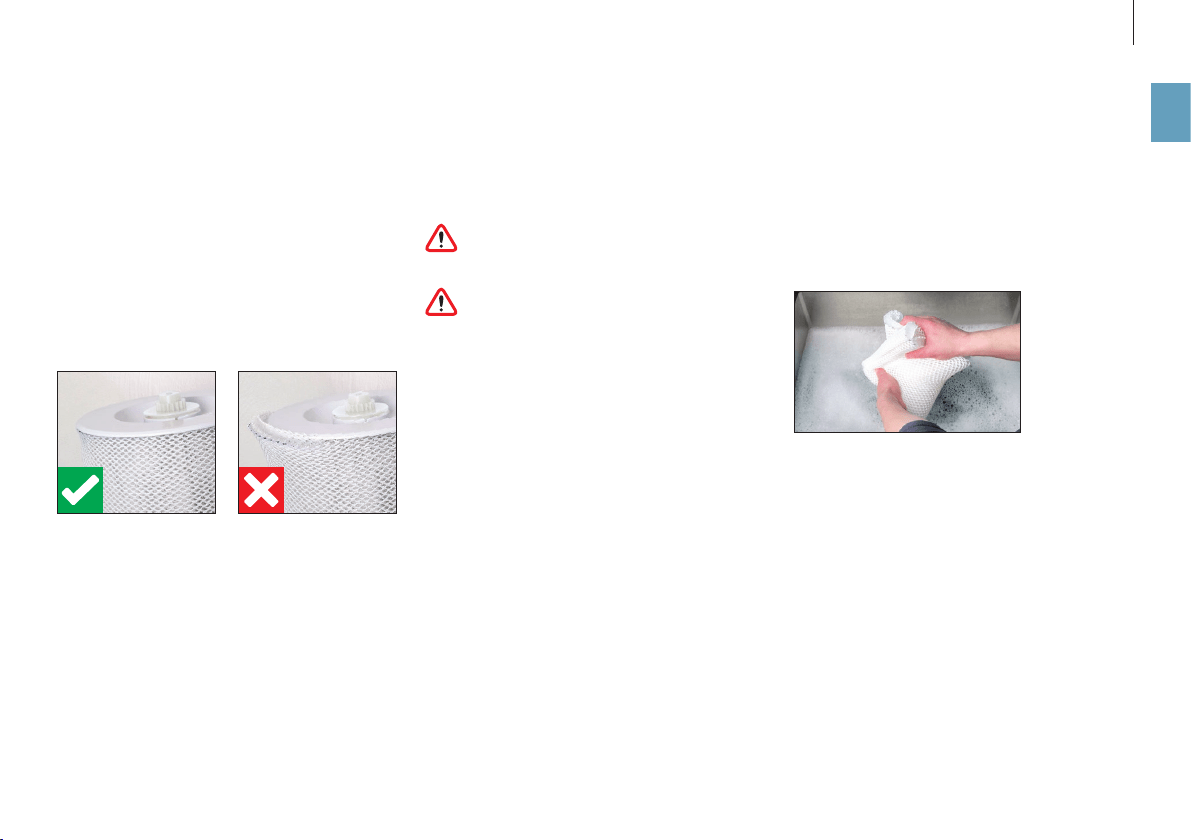
When stretching the AW200 evaporator mat on the
drum after cleaning, take note of correct position
-
ing:
CLEANING IN THE WASHING MACHINE
The AW200 evaporator mat can be cleaned in the
washing machine. Commercially available deter
-
gents can be used.
The AW200 evaporator mat must not be
washed at a temperature higher than 104°F
(40°C).
Do not dry the AW200 evaporator mat in the
clothes dryer.
CLEANING BY HAND
1. Add a little detergent to warm water and tumble
the AW200 evaporator mat in it thoroughly to get
dish detergent on all of it.
2. Rinse out the AW200 evaporator mat repeatedly
in clean, hand-warm water until suds no longer
form.
24
en
CLEANING THE PRE-FILTER
ABOUT THE PRE-FILTER
The pre-filter cleans coarse contaminants from the
air. Clean the pre-filter if it is dusty or dirty.
CLEAN THE PRE-FILTER
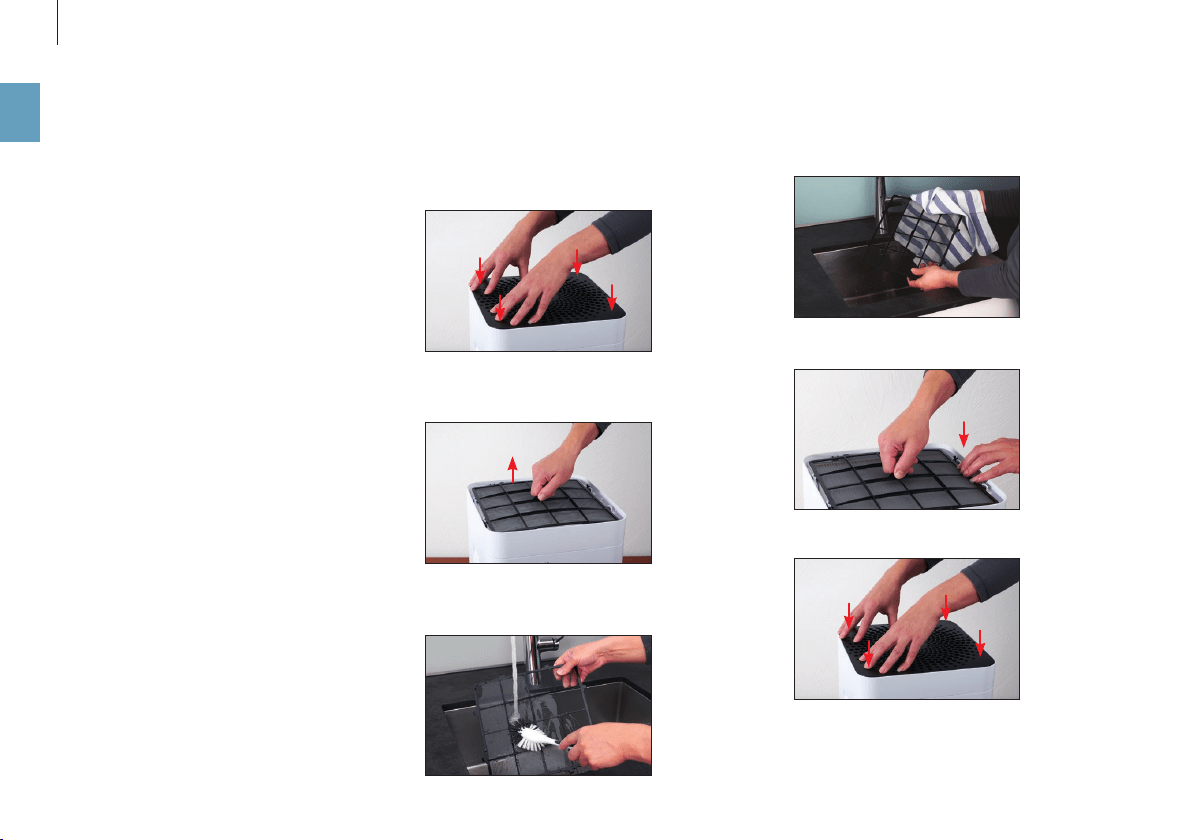
1. Press down each of the four corners of the cover
in sequence to unlock it.
2. Remove the pre-filter by pulling it upwards by
the lug in its center.
3. Wash the pre-filter under running water using a
cleaning brush.
4. Dry the pre-filter with a cloth.
5. Insert the pre-filter into the appliance.
6. Attach the cover.

25
en
REPLACING THE AH300 POLLEN FILTER
The AH300 pollen filter cannot be cleaned.
• Dirt is normal and shows that the AH300 pollen
filter is working.
• Replace the AH300 pollen filter once a year to
maintain the cleaning performance.
• The spent AH300 filter can be disposed of with
your regular household waste.
AVAILABILITY OF ACCESSORIES
You can obtain replacements for spent accessories
as well as additional accessories:
• At your BONECO specialist dealer,
• At shop.boneco.us or
• Directly via the “BONECO healthy air” app.
REPLACING THE ACCESSORIES
26
en
MALFUNCTIONS AND TROUBLESHOOTING
Problem Possible cause Action
Air has an unpleasant odor Stagnant water in the water base Drain the water base and clean the appliance and the
AW200 evaporator mat
No improvement in air quality Open windows or doors Close windows and doors
AUTO LED on the appliance flashes red The water base is empty Fill the water base
Appliance cannot be operated in the app.
The message “Searching …” “Non accessi
-
ble” appears
Appliance is blocked by another smartphone Close the app on the second smartphone
AUTO LED pulses The desired humidity has been reached or exceeded None needed
Current display flashes if handling is
attempted
Operation is blocked Disable the LOCK function in the app
Display remains dark The brightness of the LEDs has been heavily reduced
in the app
Increase the brightness of the LEDs in the app

27
en
FACTORY DEFAULT SETTINGS
ABOUT THE FACTORY DEFAULT SETTINGS
If your BONECO appliance control system is not func-
tioning the way you are expecting, or if you would
like to delete all adjustments, you can reset the ap-
pliance to the factory settings. This deletes all ad-
justments and settings.
After the reset, the BONECO appliance has to
be paired with the smartphone again so that
the control system can continue working with the
app.
RESETTING THE APPLIANCE
Reset your BONECO appliance to the factory settings
by pressing and holding the black button on the ap
-
pliance for approx. 30 seconds until the LEDs light
up in red. Now the BONECO appliance is in the same
state as when it was first started up.

28
en

29
fr
MODE D’EMPLOI

30
fr
SOMMAIRE
Les diérents modes 40
Les modes 40
Mode AUTO 40
Mode SLEEP 40
Mode BABY 40
Récipient pour substances odorantes 41
Récipient pour substances odorantes 41
Utilisation 41
Avantages de l’appli BONECO 42
Informations concernant l’appli BONECO 42
Fonctionnalités 42
Téléchargement 43
Application BONECO pour iOS 43
Appli BONECO pour Android 43
Appairage avec l’appareil BONECO 44
Actions préparatoires 44
Appairage 44
Précisions concernant le nettoyage 45
Informations concernant le nettoyage 45
Fréquence de nettoyage recommandée 45
Contenu de la livraison 32
Parce que l’air sain est un besoin fondamental 32
Disponibilité des accessoires 32
Vue d’ensemble et désignation des pièces 33
Caractéristiques techniques 34
Mise en service 35
Utilisation manuelle 37
Informations concernant l’utilisation manuelle 37
Le mode AUTO 37
Mode AUTO adapté 37
Mise en marche et arrêt 37
Commande manuelle 38
Les divers modes de fonctionnement 39
Mode de travail hybride («Hybrid») 39
Mode de fonctionnement à LED «Hybrid » 39
Humidification seulement («Humidifier») 39
Mode de fonctionnement à LED «Humidifier» 39
Nettoyage seulement («Purifier») 39
Mode de fonctionnement à LED «Purifier» 39

31
fr
Nettoyage de l’appareil 46
Démontage et nettoyage 46
Nettoyage du tapis d’évaporation AW200 47
Informations concernant le tapis d’évaporation AW200 47
Nettoyage au lave-linge 47
Nettoyage à la main 47
Nettoyage du préfiltre 48
Informations concernant le préfiltre 48
Nettoyage du préfiltre 48
Remplacement des accessoires 49
Remplacement du filtre à pollen AH300 49
Disponibilité des accessoires 49
Dysfonctionnements et correction des erreurs 50
Paramètres d’usine 51
Informations concernant les paramètres d’usine 51
Réinitialiser l’appareil 51
32
fr
CONTENU DE LA LIVRAISONPARCE QUE L’AIR SAIN EST UN BESOIN
FONDAMENTAL
Il y a peu de choses auxquelles nous soyons aus
-
si sensibles qu’à une mauvaise qualité de l’air. Et
pourtant nombreuses sont les personnes qui ac-
cordent trop peu d’attention à la qualité de l’air, ce
qui se répercute sur notre santé et notre qualité de
vie. Nous nous réjouissons d’autant plus que votre
appareil BONECO vous permette, à vous et à votre
entourage, de satisfaire votre besoin fondamental
en air ambiant sain.
DISPONIBILITÉ DES ACCESSOIRES
Des pièces de rechange pour accessoires usagés ou
des accessoires supplémentaires sont disponibles :
• auprès de votre revendeur spécialisé BONECO,
• à l’adresse shop.boneco.us ou
• directement via l’application « BONECO healthy
air ».
BONECO H300 Manuel simplifiéBloc d’alimentation Consignes de sécurité
CONTENU DE LA LIVRAISON
1
2
3
4
5
76 8
109
33
fr
VUE D’ENSEMBLE ET DÉSIGNATION DES PIÈCES
1 Couvercle/entrée d’air
2 Préfi ltre
3 Filtre à pollen AH300
4 Hygromètre
5 Marche/Arrêt, niveau de puissance
6 Sortie d’air
7 Récipient pour substances
odorantes
8 Bac à eau*
9 Tambour*
10 Tapis d’évaporation AW200**
* Lavable au lave-vaisselle jusqu’à 122°F (50°C)
** Lavable au lave-linge jusqu’à 104°F (40°C)

34
fr
CARACTÉRISTIQUES TECHNIQUES
CARACTÉRISTIQUES TECHNIQUES
*
Désignation du modèle BONECO H300
Tension de réseau 100 – 120 V ~ 60 Hz
Consommation électrique Veille 0,6W
Niveau1 3,6W
Niveau6 9,6W
Performance d’humidification jusqu’à 2.22 gal/day (350 g/h)**
Particules CADR 3180 cu ft / h (< 90 m
3
/ h)
Convient aux locaux d’une superficie max. de 650 sq ft (50 m
2
) / 5300 cu ft (125 m
3
)
Capacité max. 1.19 gallons (4.5 litres)
Dimensions L × l × H 11.1 × 11.1 × 18.3 in (280 × 280 × 465 mm)
Poids à vide 12.1 lbs (5.3 kg)
Niveau sonore de fonctionnement Niveau1 28db(A)
Niveau6 51db(A)
* Sous réserve de modifications
** à 120 V ~ 60 Hz
35
fr
MISE EN SERVICE
654
3
2
1
Enlevez le préfiltre et le filtre à pollen AH300.
Retirez la feuille de protection du filtre à pollen
AH300.
Insérez le filtre à pollen AH300 (dans le sens de
la flèche).
Appuyez sur les quatre angles du couvercle pour
le déverrouiller.
Insérez le préfiltre. Appuyez fortement sur le couvercle pour qu’il
soit bien en place.
36
fr
11 1210
9
8
7
Versez de l’eau froide du robinet jusqu’au repère.
Posez la partie supérieure sur le bac à eau.
Connectez l’appareil avec le cordon secteur.
Enlevez la partie supérieure.
Branchez le cordon secteur sur la prise de cou-
rant.
Appuyez brièvement sur le régulateur de puis-
sance pour mettre l’appareil en marche.
37
fr
UTILISATION MANUELLE
INFORMATIONS CONCERNANT L’UTILISATION
MANUELLE
Le commutateur rotatif situé sur le panneau avant
assure une utilisation manuelle aisée. L’appli
BONECO propose de nombreuses possibilités sup-
plémentaires pour la commande et l’automatisa-
tion de l’appareil BONECO.
LE MODE AUTO
Si vous n’avez encore jamais utilisé l’appareil
BONECO avec l’appli BONECO et que vous le met-
tez en marche pour la première fois, il démarre en
mode AUTO. L’appareil est préréglé pour l’obtention
d’un taux cible d’humidité relative de 50%. Le ni-
veau de puissance s’adapte automatiquement à
l’humidité actuelle de l’air: plus l’air est sec, plus le
niveau de puissance est élevé.
En cas de dépassement du taux cible préréglé d’hu-
midité de l’air, l’appareil se met en mode Veille, que
vous reconnaissez à la LED qui clignote:
Si le taux d’humidité de l’air descend en deçà de la
valeur préréglée, l’appareil recommence à fonc-
tionner.
MODE AUTO ADAPTÉ
Si vous avez déjà utilisé l’appareil avec l’appli
BONECO et réglé un autre taux d’humidité de l’air,
cette valeur est automatiquement reprise lors de la
mise en marche.
MISE EN MARCHE ET ARRÊT
1. Exercez une brève pression sur le commutateur
rotatif pour mettre l’appareil en marche.
Lors de la mise en marche, l’appareil est toujours
en mode AUTO. La petite LED allumée au-dessus
du commutateur rotatif vous informe que le mode
AUTO est actif.
2. Pour arrêter l’appareil quand il est en mode
AUTO, exercez une brève pression sur le commu-
tateur rotatif.
38
fr
Le niveau de puissance choisi est indiqué par le
nombre de LED allumées au-dessus du commuta-
teur rotatif.
3. Exercez une brève pression sur le commutateur
rotatif pour quitter le mode manuel et réactiver
le mode AUTO.
4. Appuyez une fois de plus sur le commutateur ro
-
tatif pour arrêter l’appareil.
Quand vous quittez le mode AUTO, l’appareil
fonctionne au niveau de puissance choisi,
jusqu’à ce que le bac à eau soit vide, quel que soit le
taux actuel d’humidité de l’air.
COMMANDE MANUELLE
1. Exercez une brève pression sur le commutateur
rotatif pour mettre l’appareil en marche.
Lors de la mise en marche, l’appareil est toujours en
mode AUTO.
2. Pour adapter la puissance à vos besoins, posi
-
tionnez le commutateur rotatif sur le niveau sou-
haité, de 1 à 6. Ce faisant, vous quittez le mode
AUTO (la LED AUTO s’éteint).
39
fr
MODE DE TRAVAIL HYBRIDE («HYBRID»)
L’appareil BONECO réunit deux fonctions.
• Le filtre à pollen AH300 ôte de l’air que l’on res
-
pire le pollen, la poussière domestique et les
poussières fines.
• Le tapis d’évaporation AW200 humidifie l’air am
-
biant.
Vous obtenez les meilleurs résultats quand l’appa
-
reil humidifie et purifie l’air simultanément. Il est
néanmoins possible d’utiliser une seule des deux
fonctions.
MODE DE FONCTIONNEMENT À LED «HYBRID »
HUMIDIFICATION SEULEMENT («HUMIDIFIER»)
Nous recommandons d’utiliser l’appareil pourvu du
filtre à pollen AH300 en hiver aussi, car en plus du
pollen, il filtre la poussière domestique présente
dans l’air. Pour utiliser l’appareil sans le filtre à
pollen AH300, il sut de retirer le filtre de son sup-
port et de passer en mode «Humidifier» à l’aide de
l’APPLI BONECO.
Lorsque vous retirez le filtre à pollen AH300, la
puissance d’humidification maximale augmente
puisque vous obtenez une meilleure circulation de
l’air.
MODE DE FONCTIONNEMENT À LED «HUMIDIFIER»
NETTOYAGE SEULEMENT («PURIFIER»)
En été, l’humidité de l’air est généralement suf
-
fisante, mais le pollen complique la vie des per-
sonnes allergiques. Si vous voulez utiliser unique-
ment l’eet purificateur du filtre à pollen AH300,
commutez l’appareil en mode de fonctionnement
«Purifier » à l’aide de l’appli BONECO, puis retirez
l’eau ainsi que le tambour de l’appareil.
MODE DE FONCTIONNEMENT À LED «PURIFIER»
LES DIVERS MODES DE FONCTIONNEMENT

40
fr
LES DIFFÉRENTS MODES
LES MODES
Dans les trois modes de fonctionnement «Hybrid»,
«Purification de l’air» et «Humidification de l’air»,
trois modes diérents sont disponibles pour la sé-
lection: AUTO, SLEEP et BABY.
MODE AUTO
En mode AUTO, l’appareil BONECO utilise des ni
-
veaux de ventilation compris entre 1 et 5. L’humidi-
té de l’air préréglée est de 50%.
MODE SLEEP
En mode SLEEP, l’appareil BONECO est également
utilisable la nuit dans une chambre à coucher. L’ap
-
pareil fonctionne de façon entièrement automa-
tique au niveau de ventilation 1, le plus bas, afin
que le niveau sonore soit au minimum. L’humidité
de l’air préréglée est de 45%.
MODE BABY
Le mode BABY utilise les niveaux de ventilation 1
à 4 et élève l’humidité de l’air à 60%. Cette valeur
s’avère idéale pour l’utilisation dans une chambre
d’enfant, car une humidité de l’air plus élevée est
recommandée pour les bébés et les jeunes enfants.
De plus, le ventilateur fait tellement peu de bruit
qu’il ne fait pas réagir un babyphone.
41
fr
RÉCIPIENT POUR SUBSTANCES ODORANTES
L’ajout de substances aromatiques et d’huiles es-
sentielles (disponibles dans le commerce) s’eec-
tue dans le récipient pour substances odorantes
situé sur le panneau arrière.
Ne versez pas de substances odorantes direc-
tement dans le bac à eau, sous peine d’altérer
les performances de l’appareil ou même de l’en-
dommager. De tels dommages ne sont pas couverts
par la garantie.
Le récipient pour substances odorantes est
lavable au lave-vaisselle. La température ne
doit cependant pas dépasser 122°F (50°C).
UTILISATION
1. Pour enlever le tiroir, appuyez sur le récipient
pour substances odorantes.
2. Arrosez le feutre présent dans le tiroir avec une
substance aromatique de votre choix.
RÉCIPIENT POUR SUBSTANCES ODORANTES
42
fr
AVANTAGES DE L’APPLI BONECO
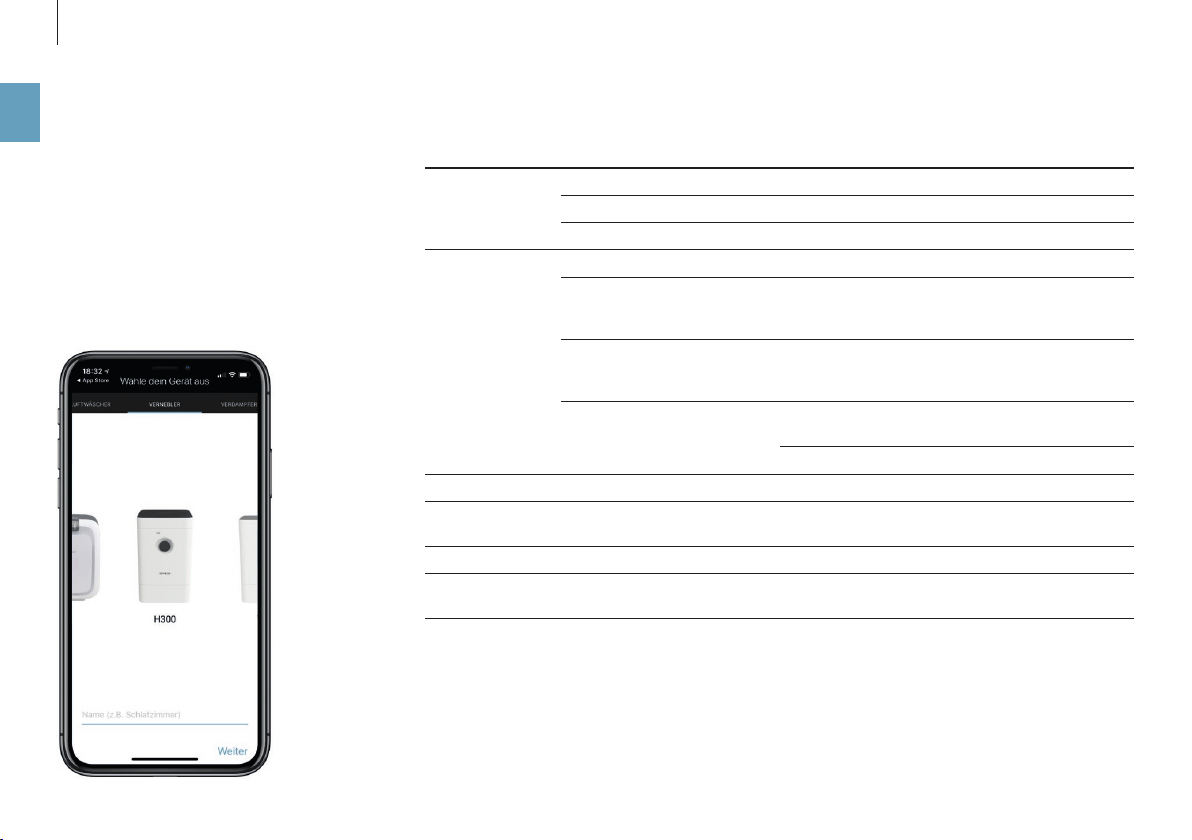
INFORMATIONS CONCERNANT L’APPLI BONECO
L’appli «BONECO healthy air» assure une commande
étendue de l’appareil et vous permet de profiter de
tout son potentiel. L’appli ore des fonctions telles
que le minuteur, le réglage du taux d’humidité de
l’air souhaité ou le changement de programme.
De plus, l’appli vous rappelle la fréquence de net-
toyage et d’autres tâches récurrentes.
FONCTIONNALITÉS
Modes de fonc-
tionnement
«Hybrid» L’air est purifié et humidifié simultanément
«Purifier» (purification de l’air) L’air est purifié, mais pas humidifié
«Humidifier» (humidification) L’air est humidifié, mais pas purifié
Sélection des
modes
Préréglages concernant les situations courantes
Mode AUTO L’appareil utilise tous les niveaux de ventilation 1 à
5 et un taux cible de l’humidité de l’air de 50% est
préréglé
Mode SLEEP L’appareil utilise seulement le niveau de ventilation
1 et un taux cible de l’humidité de l’air de 45% est
préréglé
Mode BABY L’appareil utilise les niveaux de ventilation 1 à 4 et
augmente l’humidité de l’air à 60%
Hygrostat Détermination du taux souhaité d’humidité de l’air
Variateur Réglage de la luminosité des LED d’état
Conditions météorologiques Indique les conditions météorologiques et la tempé
-
rature extérieure actuelles
Information sur le changement de filtre Signale que le filtre à pollen AH300 est usagé
Accessoires et consommables Fournit une aide pour le réapprovisionnement ainsi
que des informations complémentaires
43
fr
TÉLÉCHARGEMENT
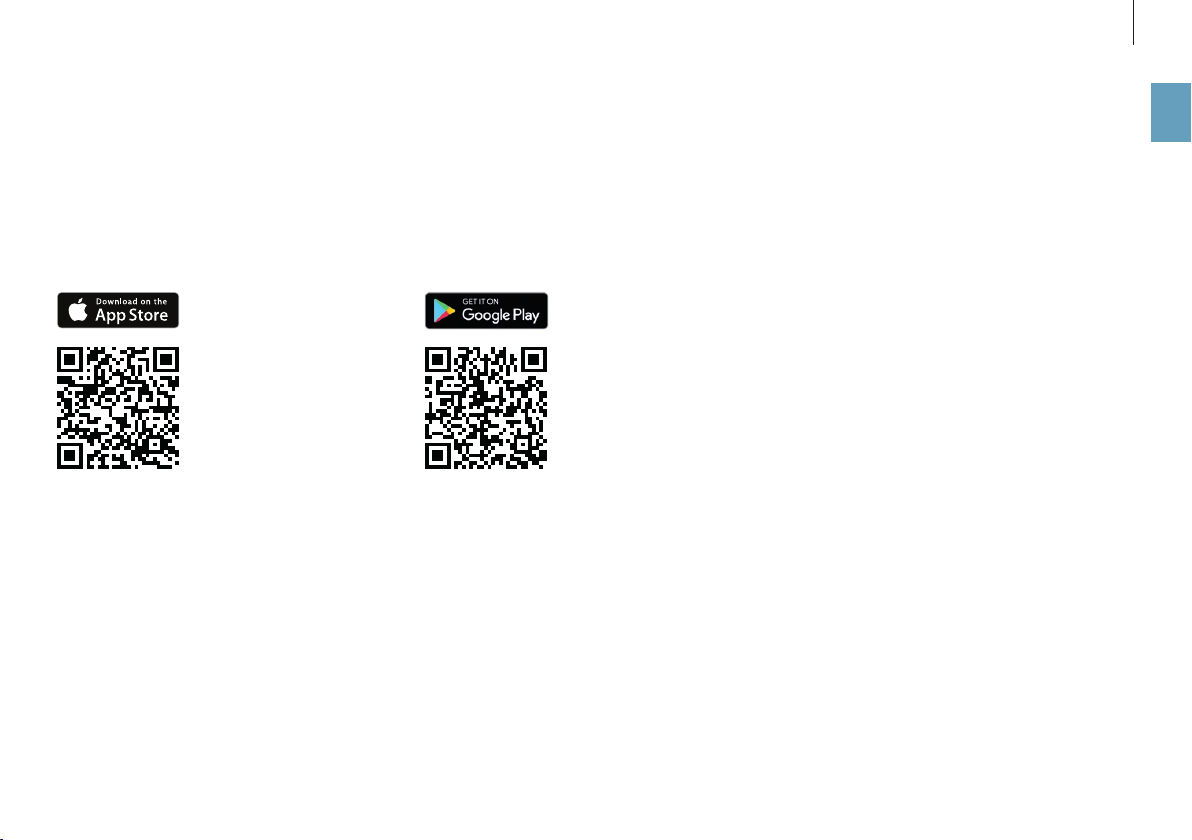
APPLICATION BONECO POUR IOS
Recherchez dans l’App Store «BONECO healthy air»
ou scannez le code QR ci-dessous. Pour reconnaître
le code QR sous iOS 10 ou une version antérieure,
il faut qu’une appli correspondante soit installée.
Sous iOS 11 et les versions ultérieures, le code QR
est automatiquement reconnu quand vous dirigez
la caméra vers le code.
APPLI BONECO POUR ANDROID
Recherchez dans Google Play Store « BONECO
healthy air» ou scannez le code QR ci-dessous. Pour
reconnaître le code QR, il faut qu’une appli corres-
pondante soit installée sur votre appareil.

44
fr
APPAIRAGE AVEC L’APPAREIL BONECO
ACTIONS PRÉPARATOIRES
Vérifiez que la fonction Bluetooth est activée sur
votre smartphone. Lors de l’appairage, veillez à ce
que le smartphone soit dans la même pièce que
l’appareil BONECO.
Une fois l’appairage eectué, vous pouvez, avec
votre smartphone, commander l’appareil BONECO
qui se trouve dans la même pièce ou même dans
une pièce adjacente. La distance maximale entre
le smartphone et l’appareil BONECO dépend cepen
-
dant des caractéristiques du bâtiment.
APPAIRAGE
1. Assurez-vous que la fonction Bluetooth est acti
-
vée sur votre smartphone.
2. Démarrez l’appli BONECO.
3. Suivez les instructions fournies par l’application.
45
fr
PRÉCISIONS CONCERNANT LE NETTOYAGE
INFORMATIONS CONCERNANT LE NETTOYAGE
La maintenance et le nettoyage réguliers sont in
-
dispensables à un fonctionnement irréprochable
et sain.
La fréquence de nettoyage et de maintenance re
-
commandée dépend de la qualité de l’air et de
l’eau, ainsi que de la durée de fonctionnement.
Pour un nettoyage manuel, il est recommandé
d’utiliser un chion doux, du liquide vaisselle et
une brosse à vaisselle.
Avant de commencer le nettoyage, débran-
chez toujours l’appareil du réseau électrique!
Le non-respect de cette instruction peut causer des
chocs électriques et mettre des vies en danger!
Lors du nettoyage du tambour et du bac à eau
dans un lave-vaisselle, la température ne
doit pas dépasser 122°F (50 °C), afin d’éviter une
possible déformation des parties en plastique.
FRÉQUENCE DE NETTOYAGE RECOMMANDÉE
Fréquence Mesure à prendre
À partir du troisième jour sans
fonctionnement
Vider le bac à eau et le remplir d’eau fraîche
Toutes les 2semaines Nettoyer le bac à eau, le tambour et le tapis d’évaporation AW200
Nettoyage du préfiltre
Une fois par an Remplacement du filtre à pollen AH300
Nettoyer le ventilateur et l’intérieur
46
fr
NETTOYAGE DE L’APPAREIL
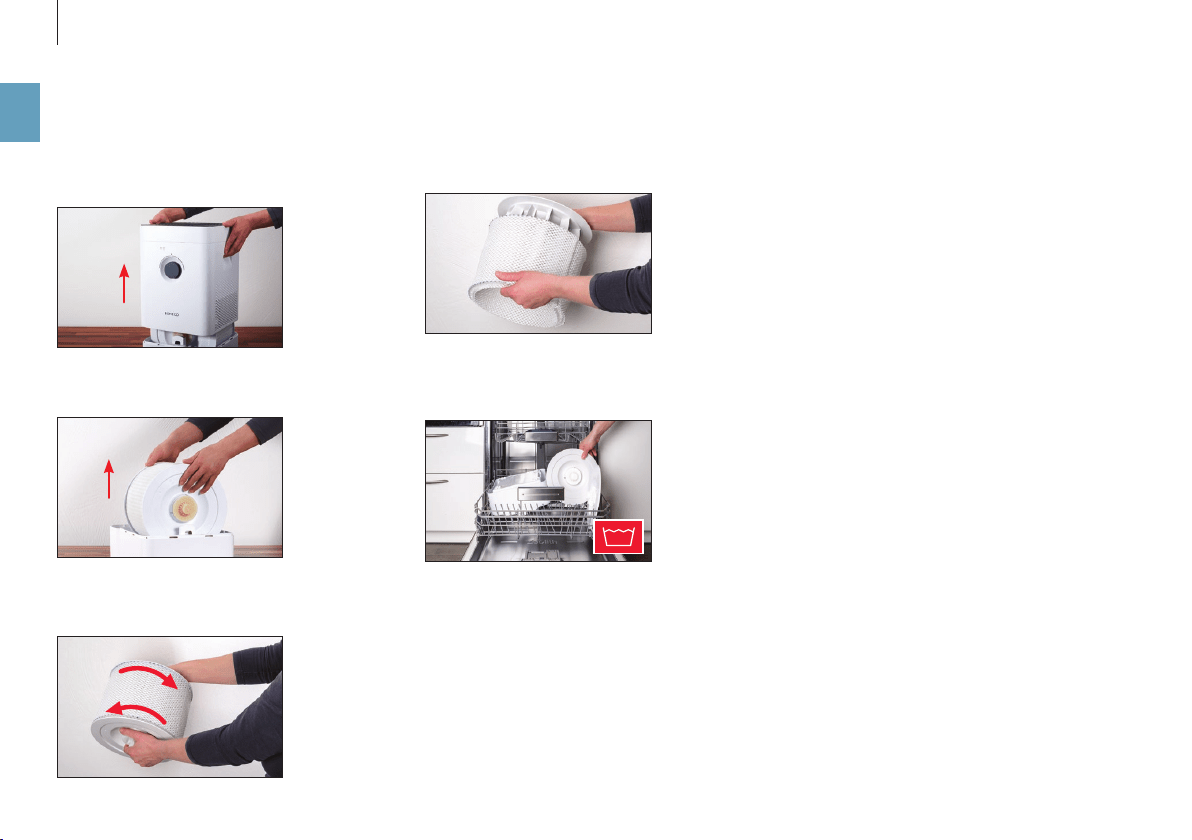
5. Retirez du tambour le tapis d’évaporation
AW200.
6. Nettoyez le bac à eau et le tambour, à la main ou
au lave-vaisselle. La température de l’eau ne doit
pas dépasser 122°F (50°C).
7. Remontez l’appareil BONECO en procédant dans
l’ordre inverse.
DÉMONTAGE ET NETTOYAGE
1. Enlevez la partie supérieure de l’appareil
BONECO.
2. Retirez le tambour et le tapis d’évaporation
AW200.
4. Tournez les deux disques du tambour pour les
séparer. Ce faisant, tenez compte des repères vi
-
sibles sur la face externe du disque.
122 °F
47
fr
NETTOYAGE DU TAPIS D’ÉVAPORATION AW200
INFORMATIONS CONCERNANT LE TAPIS
D’ÉVAPORATION AW200
Le tapis d’évaporation AW200 peut être nettoyé au
lave-linge. Utilisez un produit de lavage courant.
Il est recommandé de placer le tapis d’évaporation
AW200 dans un sac de lavage ou de le laver sépa
-
rément afin d’éviter qu’il ne reçoive les fibres déta-
chées d’autres pièces de linge.
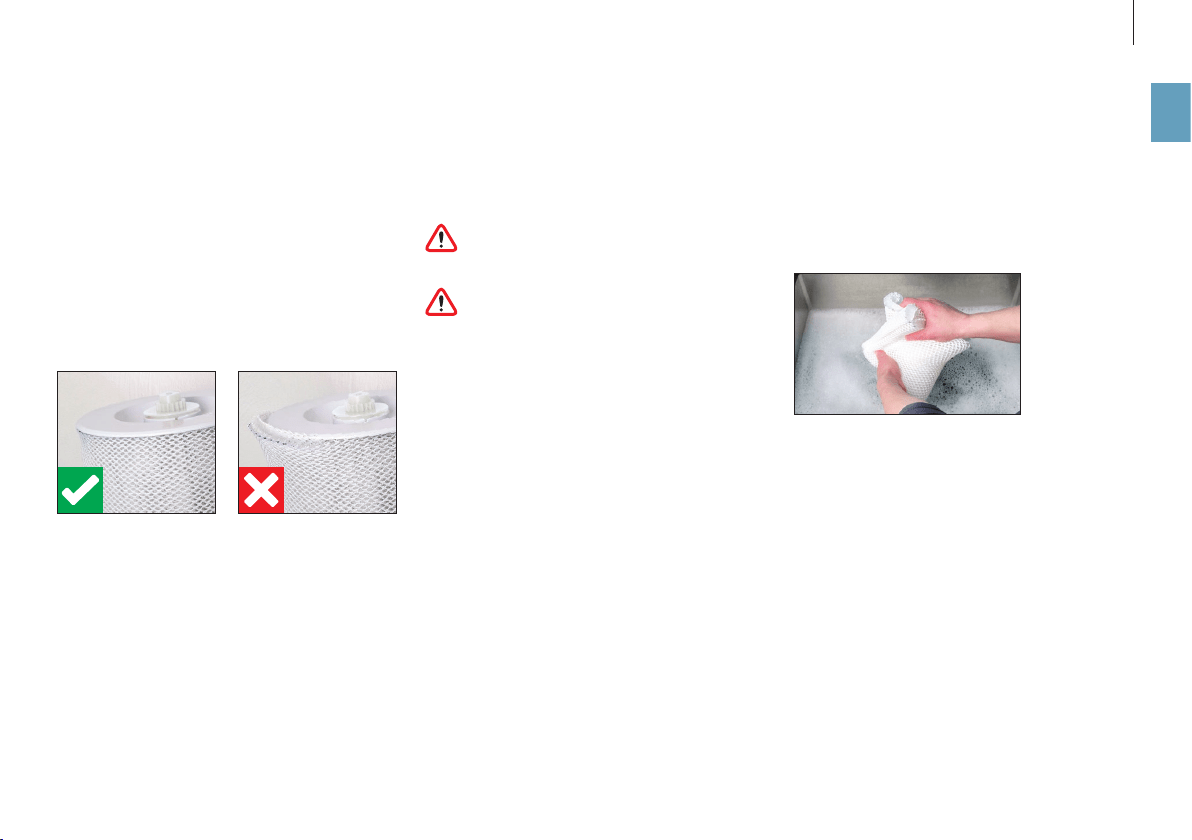
Après le nettoyage, lorsque vous tendez le tapis
d’évaporation AW200 sur le tambour, veillez à le
positionner correctement:
NETTOYAGE AU LAVE-LINGE
Le tapis d’évaporation AW200 peut être nettoyé au
lave-linge. Utilisez un produit de lavage courant en
supplément.
Le tapis d’évaporation AW200 ne doit pas être
lavé à une température supérieure à 104 °F
(40°C).
Ne séchez pas le tapis d’évaporation AW200
au sèche-linge.
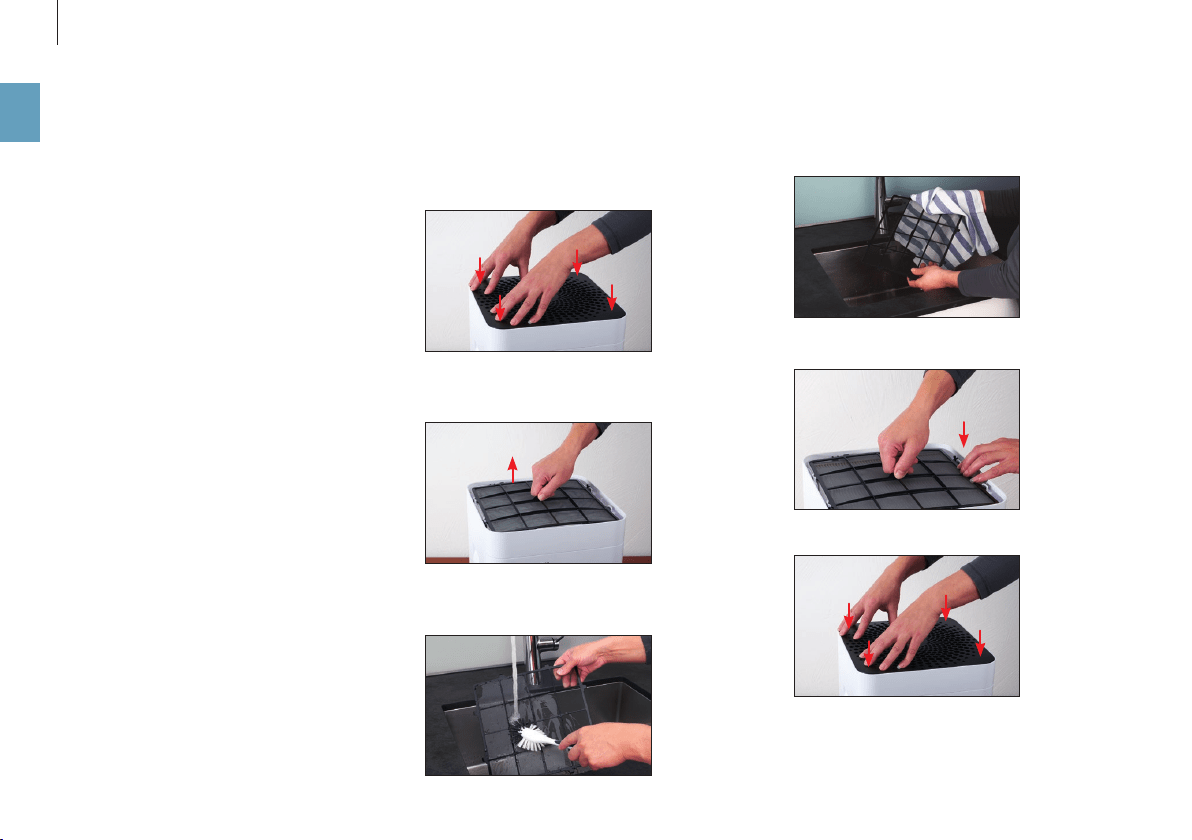
NETTOYAGE À LA MAIN
1. Foulez le tapis d’évaporation AW200 dans de
l’eau chaude additionnée d’un peu de liquide
vaisselle.
2. Rincez le tapis d’évaporation AW200 à l’eau tiède
et claire jusqu’à ce qu’il n’y ait plus de mousse.
48
fr
NETTOYAGE DU PRÉFILTRE
INFORMATIONS CONCERNANT LE PRÉFILTRE
Le préfiltre purifie l’air des grosses particules de sa-
leté. Nettoyez le préfiltre quand il est poussiéreux
ou sale.
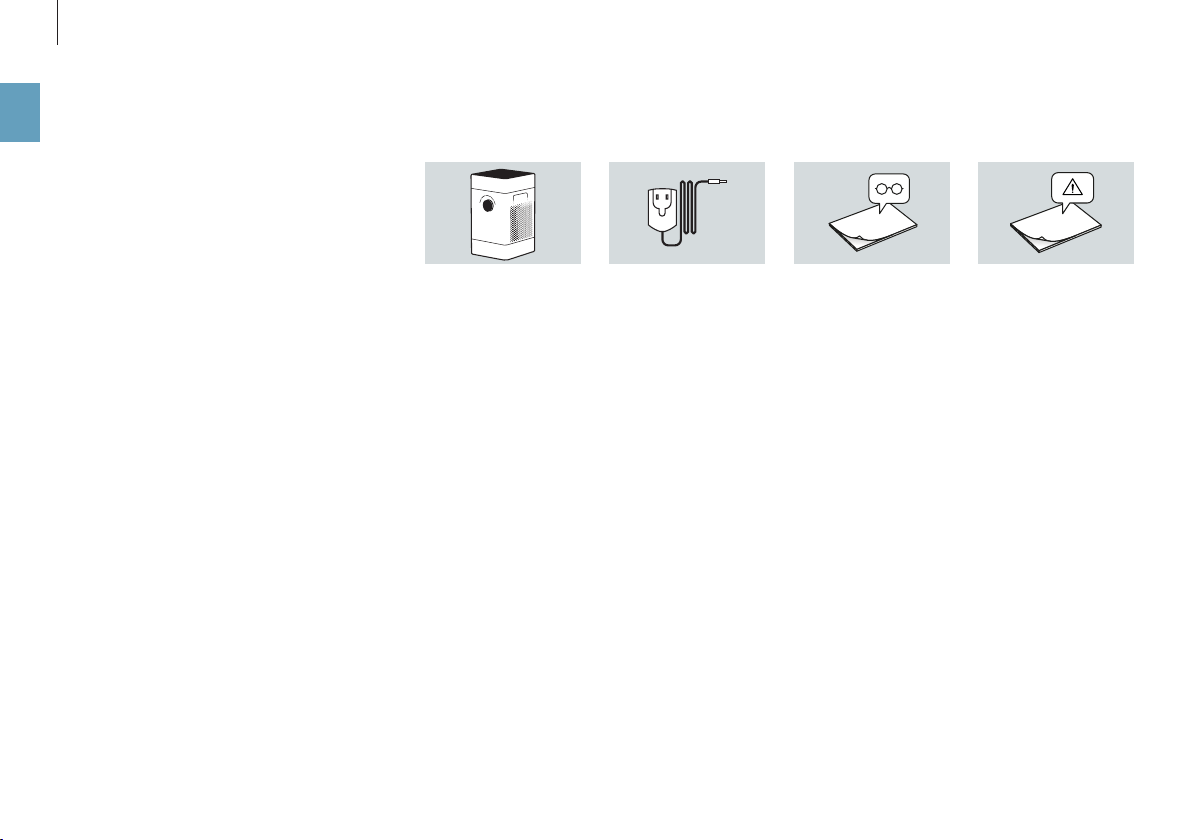
NETTOYAGE DU PRÉFILTRE
1. Appuyez successivement sur les quatre angles du
couvercle pour le déverrouiller.
2. Enlevez le préfiltre en le tirant vers le haut par la
languette située au milieu.
3. Nettoyez le préfiltre à l’eau courante au moyen
d’une brosse à vaisselle.
4. Séchez le préfiltre avec un chion.
5. Insérez le préfiltre dans l’appareil.
6. Mettez le couvercle en place.

49
fr
REMPLACEMENT DU FILTRE À POLLEN AH300
Il n’est pas possible de nettoyer le filtre à pollen
AH300.
• La présence de salissures est normale et prouve
que le filtre à pollen AH300 est ecace.
• Remplacez le filtre à pollen AH300 tous les ans
pour préserver la puissance de purification.
• Le filtre à pollen AH300 usagé peut être éliminé
avec les déchets ordinaires.
DISPONIBILITÉ DES ACCESSOIRES
Des pièces de rechange pour accessoires usagés ou
des accessoires supplémentaires sont disponibles :
• auprès de votre revendeur spécialisé BONECO,
• à l’adresse shop.boneco.us ou
• directement via l’application « BONECO healthy
air ».
REMPLACEMENT DES ACCESSOIRES

50
fr
DYSFONCTIONNEMENTS ET CORRECTION DES ERREURS
Problème Cause possible Mesure à prendre
L’air sent mauvais Eau pas fraîche dans le bac à eau Vider le bac à eau, puis nettoyer l’appareil et
le tapis d’évaporation AW200
Aucune amélioration de la qualité de l’air Fenêtres ou portes ouvertes Fermer les fenêtres et les portes
La LED AUTO de l’appareil clignote en rouge Le bac à eau est vide Remplir le bac à eau
Il est impossible d’utiliser l’appareil à partir
de l’appli. Le message «Chercher…» «Non
accessible» s’ache
L’appareil est bloqué par un autre smartphone Fermer l’appli sur le second smartphone
La LED AUTO clignote L’humidité de l’air souhaitée est atteinte ou dépassée pas nécessaire
L’achage actuel clignote lors de l’utilisation L’utilisation est bloquée Dans l’appli, désactiver la fonction LOCK
L’achage ne s’allume pas La luminosité des LED a été fortement réduite dans l’appli Dans l’appli, augmenter la luminosité des LED

51
fr
PARAMÈTRES D’USINE
INFORMATIONS CONCERNANT LES PARAMÈTRES
D’USINE
Si la commande de votre appareil BONECO ne fonc-
tionne pas comme vous l’attendez, ou si vous sou-
haitez supprimer toutes les personnalisations,
vous pouvez réinitialiser l’appareil aux paramètres
d’usine. Cela eacera toutes les personnalisations
et tous les réglages.
Après la réinitialisation, l’appareil BONECO
doit être à nouveau appairé avec le smart-
phone pour pouvoir continuer à le commander avec
l’appli.
RÉINITIALISER L’APPAREIL
Réinitialisez votre appareil BONECO aux paramètres
d’usine en appuyant sur le bouton noir de l’appa
-
reil pendant environ 30 secondes jusqu’à ce que
les LED s’allument en rouge. L’appareil BONECO est
désormais dans le même état que lors de sa mise en
service.

52
fr

53
es
INSTRUCCIONES DE USO

54
es
ÍNDICE
Los distintos modos 64
Modos 64
Modo “AUTO” 64
Modo “SLEEP” 64
Modo “BABY” 64
Depósito difusor de aroma 65
Depósito difusor de aroma 65
Utilización 65
Esto es lo que le ofrece la aplicación BONECO 66
Acerca de la aplicación BONECO 66
Funciones 66
Descarga 67
Aplicación BONECO para iOS 67
Aplicación BONECO para Android 67
Emparejamiento con el aparato BONECO 68
Preparación 68
Vinculación 68
Instrucciones de limpieza 69
Acerca de la limpieza 69
Intervalos de limpieza recomendados 69
Contenido 56
El aire limpio es una necesidad básica 56
Disponibilidad de los accesorios 56
Vista de conjunto y denominación de los componentes 57
Datos técnicos 58
Puesta en marcha 59
Manejo manual 61
Acerca del manejo manual 61
El modo “AUTO” 61
Modo “AUTO” adaptado 61
Encendido y apagado 61
Control manual 62
Los diferentes modos de funcionamiento 63
Modo de operación híbrido (“Hybrid”) 63
Modo de funcionamiento LED “Hybrid” 63
Solo humidificación (“Humidifier”) 63
Modo de funcionamiento LED “Humidifier” 63
Solo limpieza (“Purifier”) 63
Modo de funcionamiento LED “Purifier” 63

55
es
Limpieza del equipo 70
Desmontaje y limpieza 70
Limpieza de la placa de evaporación AW200 71
Acerca de la placa de evaporación AW200 71
Limpieza en la lavadora 71
Limpieza mediante lavado a mano 71
Limpieza del filtro previo 72
Acerca del filtro previo 72
Limpieza del filtro previo 72
Sustitución de los accesorios 73
Sustitución del filtro de polen AH300 73
Disponibilidad de los accesorios 73
Posibles problemas y soluciones 74
Ajustes de fábrica 75
Acerca de los ajustes de fábrica 75
Restablecimiento de la configuración de fábrica 75
56
es
CONTENIDOEL AIRE LIMPIO ES UNA NECESIDAD BÁSICA
A pocas cosas reaccionamos con mayor sensibili
-
dad que al mal aire. Sin embargo, muchas personas
apenas prestan atención a la calidad del aire, lo que
conlleva consecuencias en la salud y la calidad de
vida. Por eso, nos complace enormemente que, con
su aparato BONECO, se haya decidido por garantizar
un aire limpio y sano para su entorno.
DISPONIBILIDAD DE LOS ACCESORIOS
Puede adquirir recambios de sus accesorios usados
y adicionales:
• a través de su distribuidor de BONECO,
• en shop.boneco.us o
• directamente mediante la app “BONECO healthy
air”.
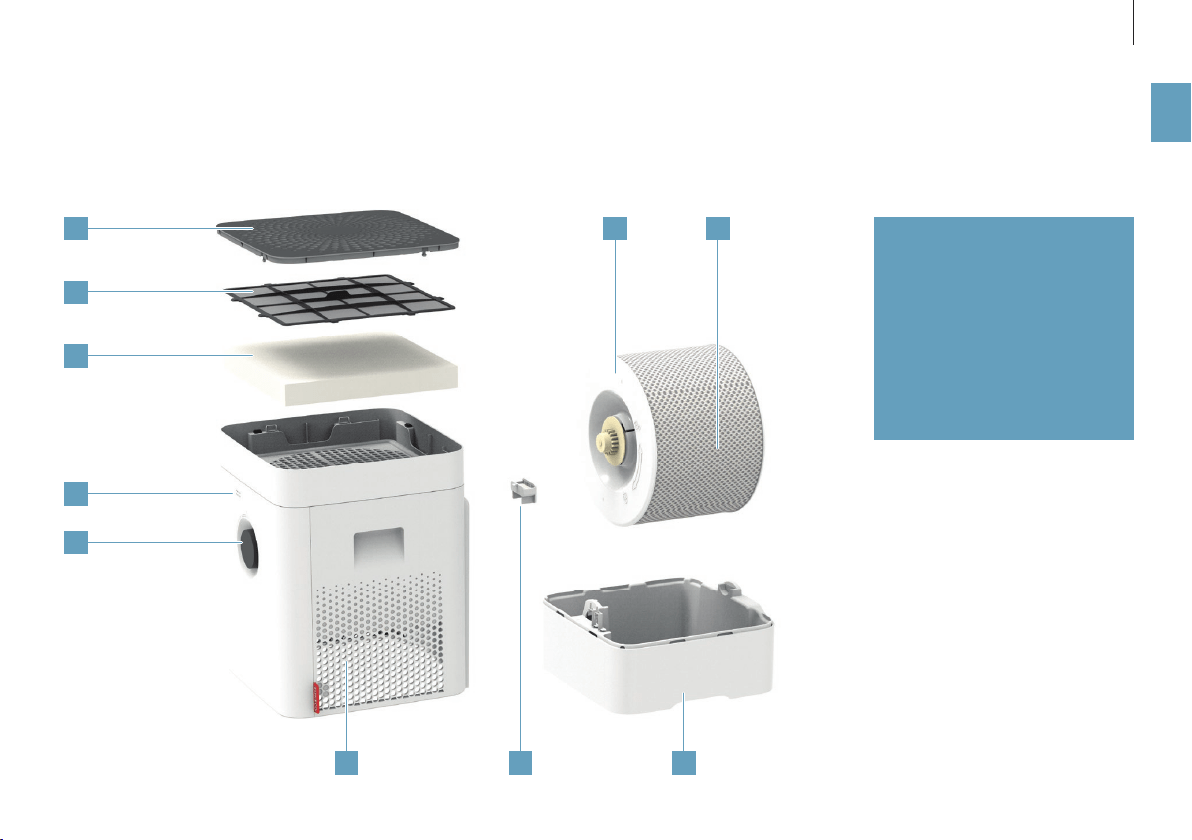
BONECO H300 Guía rápidaFuente de alimentación Indicaciones de seguridad
CONTENIDO
1
2
3
4
5
76 8
109
57
es
VISTA DE CONJUNTO Y DENOMINACIÓN DE LOS COMPONENTES
1 Cubierta/entrada de aire
2 Filtro previo
3 Filtro de polen AH300
4 Higrómetro
5 Encendido/apagado, nivel de
potencia
6 Salida de aire
7 Depósito difusor de aroma
8 Placa para el agua*
9 Tambor*
10 Placa de evaporación AW200**
* Se puede limpiar en el lavavajillas a hasta
122°F (50°C)
** Se puede limpiar en la lavadora a hasta
104°F (40°C)

58
es
DATOS TÉCNICOS
DATOS TÉCNICOS
*
Denominación del modelo BONECO H300
Tensión de red 100 – 120V ~ 60Hz
Consumo de energía Standby 0,6W
Nivel 1 3,6W
Nivel 6 9,6W
Capacidad de humidificación de hasta 2.22 galones/díay (350 g/h)**
Partículas CADR 3180 cu ft / h (< 90 m
3
/ h)
Apto para estancias de hasta 650 square feet (50 m
2
) / 5300 cu ft (125 m
3
)
Capacidad de agua máx. 1.19 galones (4.5 litros)
Dimensiones lon. × an. × alt. 11.1 × 11.1 × 18.3 in (280 × 280 × 465 mm)
Peso (vacío) 12.1 lbs (5.3 kg)
Nivel de ruido en funcionamiento Nivel 1 28dB(A)
Nivel 6 51dB(A)
* Se reserva el derecho a realizar modificaciones
** A 120 V ~ 60 Hz
59
es
PUESTA EN MARCHA
654
3
2
1
Extraiga el filtro previo y el filtro de polen AH300.
Retire la cubierta protectora del filtro de polen
AH300.
Coloque el filtro de polen AH300 (en el sentido de
la flecha).
Pulse en las cuatro esquinas de la cubierta para
desbloquearla.
Inserte el filtro previo. Presione con fuerza hasta que la cubierta encaje.
60
es
11 1210
9
8
7
Añada agua fría del grifo hasta la marca.
Coloque la parte superior sobre la placa para el
agua.
Conecte el cable de red al aparato.
Retire la parte superior.
Conecte el cable de red a la toma de corriente. Pulse brevemente el regulador de potencia para
encender el aparato.
61
es
MANEJO MANUAL
ACERCA DEL MANEJO MANUAL
El manejo manual se realiza cómodamente con el
interruptor giratorio de la parte frontal. La aplica-
ción BONECO ofrece infi nidad de opciones adiciona-
les para controlar y automatizar el aparato BONECO.
EL MODO “AUTO”
Si aún no ha manejado el equipo BONECO con la
aplicación BONECO, al encenderlo por primera vez
arranca en el modo “AUTO”. El equipo está preajus-
tado a una humedad relativa objetivo de 50 %. El
nivel de potencia se ajusta automáticamente según
la humedad actual del aire: cuanto más seco el aire,
tanto más alto el nivel de potencia.
Si se excede de la humedad del aire objetivo prea-
justada, el equipo pasa al modo stand by, lo cual se
reconoce por el LED intermitente:
Si la humedad del aire cae por debajo de la ajusta-
da, el aparato se vuelve a encender.
MODO “AUTO” ADAPTADO
Si ya ha manejado el aparato con la aplicación
BONECO y ha ajustado otro valor de humedad del
aire, el aparato adoptará ese valor automáticamen-
te al encenderlo.
ENCENDIDO Y APAGADO
1. Pulse una vez brevemente el interruptor girato-
rio para encender el aparato.
El aparato siempre se enciende en el modo “AUTO”.
Sabrá que el modo “AUTO” está activo cuando se ilu-
mine el pequeño LED situado encima del interruptor
giratorio.
2. Para apagar el aparato mientras se encuentra en
el modo “AUTO”, pulse brevemente una vez el in-
terruptor giratorio.
62
es
El nivel de potencia seleccionado es reconocible por
el número de LED encendidos encima del interrup-
tor giratorio.
3. Pulse una vez brevemente el interruptor girato-
rio para salir del modo manual y volver a activar
el modo “AUTO”.
4. Pulse otra vez el interruptor giratorio para apa
-
gar el aparato.
Cuando sale del modo “AUTO”, el aparato BO-
NECO continúa en el nivel de potencia selec-
cionado hasta que la placa para el agua esté vacía,
con independencia del grado de humedad actual
del aire.
CONTROL MANUAL
1. Pulse una vez brevemente el interruptor girato
-
rio para encender el aparato.
El aparato siempre se enciende en el modo “AUTO”.
2. Regule la potencia según sus necesidades ajus
-
tando el interruptor giratorio al nivel que desee
(entre 1 y 6). Al hacerlo, se sale del modo “AUTO”
(el LED AUTO se apaga).
63
es
MODO DE OPERACIÓN HÍBRIDO (“HYBRID”)
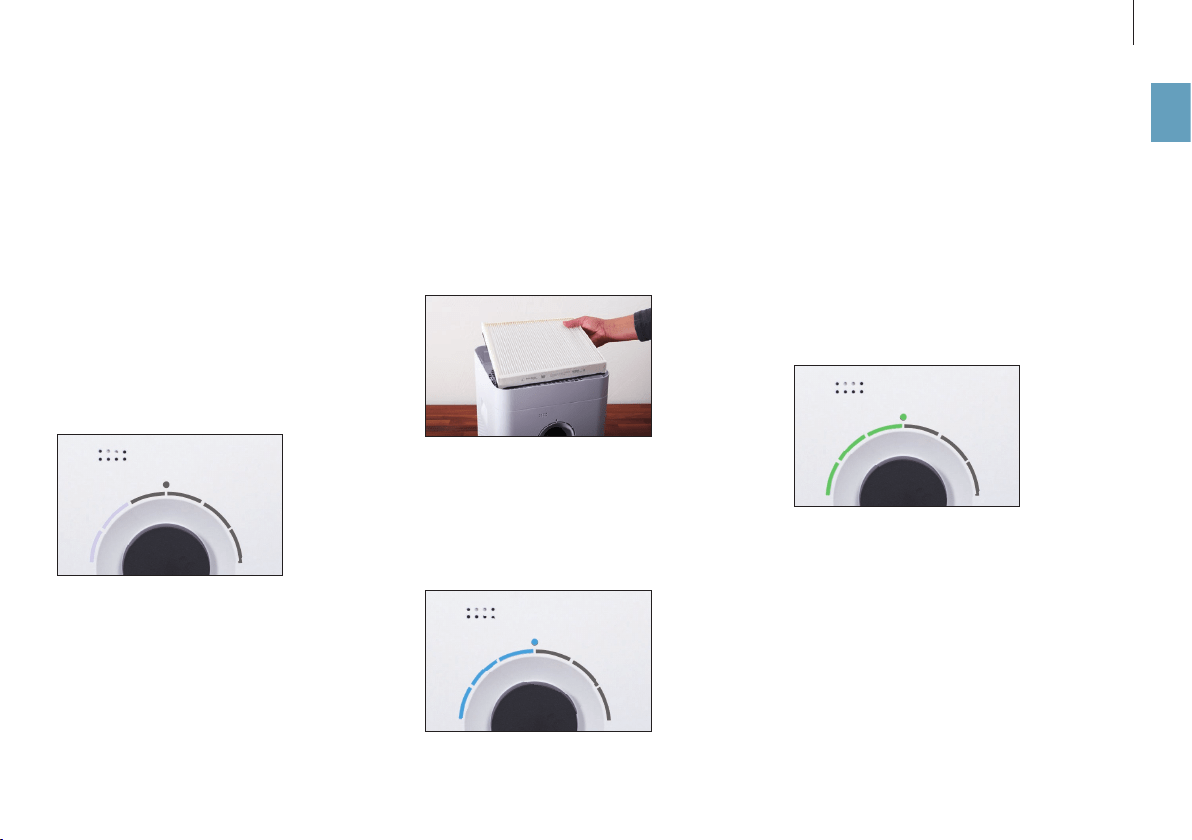
El aparato BONECO aúna dos funciones.
• El filtro de polen AH300 elimina polen, polvo do
-
méstico y polvo fino del aire.
• Con la placa de evaporación AW200 se humidifica
el aire ambiental.
Para obtener los mejores resultados con el aparato,
se recomienda usar al mismo tiempo las funciones
de humidificación y limpieza del aire. No obstante,
es posible utilizar solo una de las dos funciones.
MODO DE FUNCIONAMIENTO LED “HYBRID”
SOLO HUMIDIFICACIÓN (“HUMIDIFIER”)
Nuestra recomendación es utilizar el aparato con el
filtro de polen AH300 instalado también en invier-
no, pues además del polen también filtra el polvo
doméstico del aire. Si desea utilizar el aparato sin
filtro de polen AH300, solo tiene que extraer el filtro
del soporte y cambiar al modo de funcionamiento
“Humidifier” mediante la aplicación BONECO.
Cuando retira el filtro de polen AH300, sube la po
-
tencia de humidificación ya que se incrementa el
paso de aire.
MODO DE FUNCIONAMIENTO LED “HUMIDIFIER”
SOLO LIMPIEZA (“PURIFIER”)
En verano normalmente la humedad del aire es su
-
ficiente, pero el polen les hace la vida imposible a
los alérgicos. Si solo quiere utilizar el efecto limpia-
dor del filtro de polen AH300, ajuste el aparato al
modo de funcionamiento “Purifier” desde la aplica-
ción BONECO y retire tanto el agua como el tambor
del aparato.
MODO DE FUNCIONAMIENTO LED “PURIFIER”
LOS DIFERENTES MODOS DE FUNCIONAMIENTO

64
es
LOS DISTINTOS MODOS
MODOS
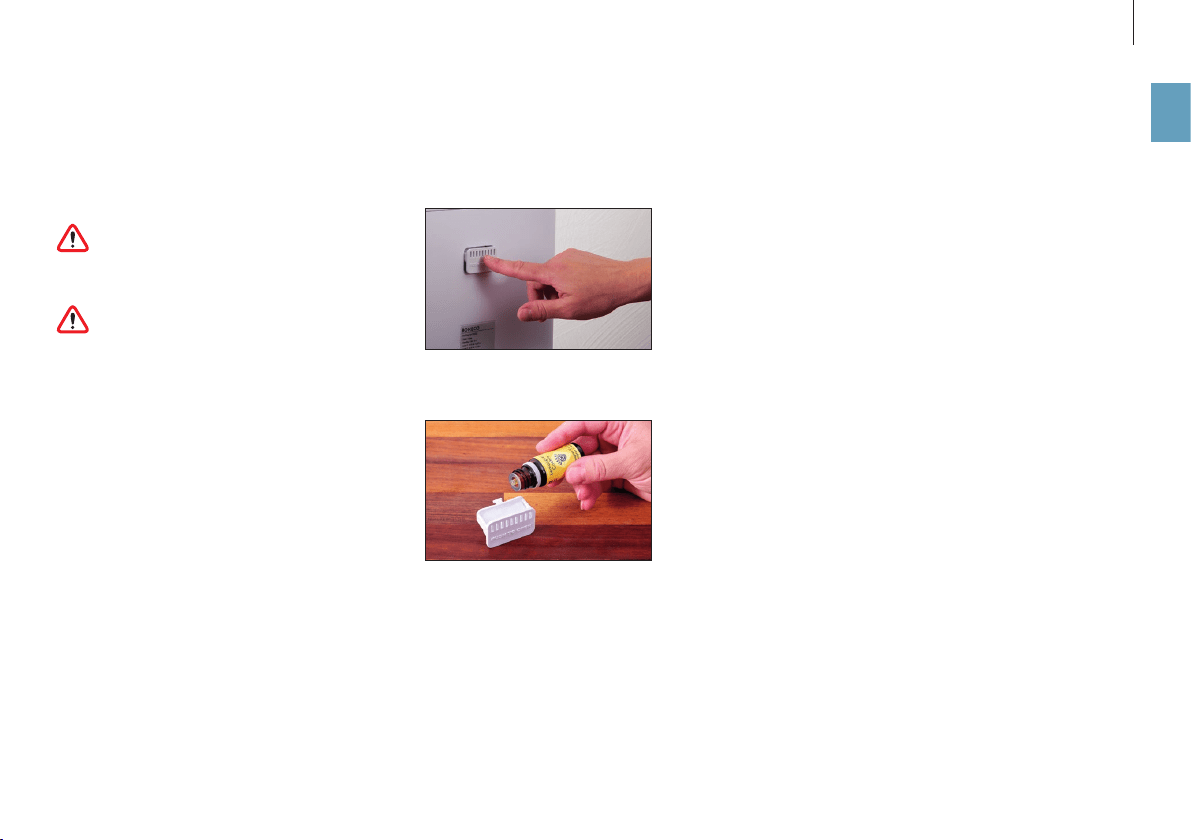
Cada uno de los tres modos de funcionamiento “Hy-
brid”, “Purificación” y “Humidificación” permite ele-
gir entre tres modos diferentes: AUTO, SLEEP y BABY.
MODO “AUTO”
En el modo “AUTO”, el BONECO utiliza todos los nive
-
les de potencia del ventilador (del 1 al 5). La hume-
dad del aire predeterminada es del 50%.
MODO “SLEEP”
El modo “SLEEP” permite utilizar el BONECO en el
dormitorio incluso durante la noche. El aparato
funciona de forma totalmente automática con la
potencia del ventilador más baja (1) a fin de minimi
-
zar el nivel de ruido. La humedad del aire predeter-
minada es del 45%.
MODO “BABY”
El modo “BABY” utiliza los niveles de potencia del
ventilador del 1 al 4 y aumenta la humedad del aire
hasta el 60%. Este valor es ideal para el cuarto de
los niños, ya que para niños y bebés se recomienda
una humedad del aire mayor. Además, el ventilador
resulta tan silencioso que no interfiere con los dis
-
positivos vigilabebés.
65
es
DEPÓSITO DIFUSOR DE AROMA
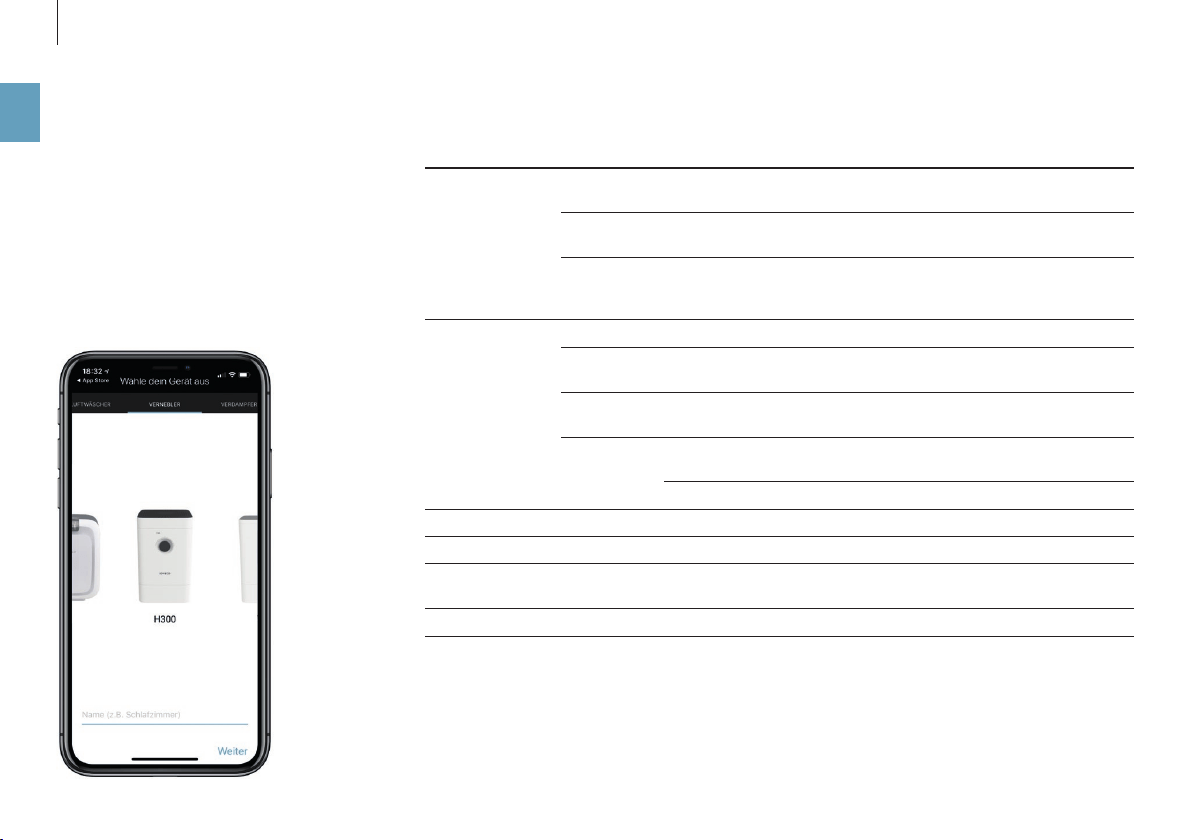
En el depósito difusor de aroma, que se encuentra
en la parte posterior, puede añadir aromas y aceites
esenciales convencionales.
No añada los aromas directamente a la placa
para el agua, ya que podría perjudicar la po-
tencia del aparato o incluso dañarlo. La garantía no
cubre este tipo de daños.
El depósito difusor de aroma puede lavarse
en el lavavajillas. No obstante, la temperatu-
ra no debe superar los 122°F (50°C).
UTILIZACIÓN
1. Presione el depósito difusor de aroma para ex
-
traer el cajón.
2. Rocíe el elemento de fieltro del cajón con un aro
-
ma de su elección.
DEPÓSITO DIFUSOR DE AROMA
66
es
ESTO ES LO QUE LE OFRECE LA APLICACIÓN BONECO
ACERCA DE LA APLICACIÓN BONECO
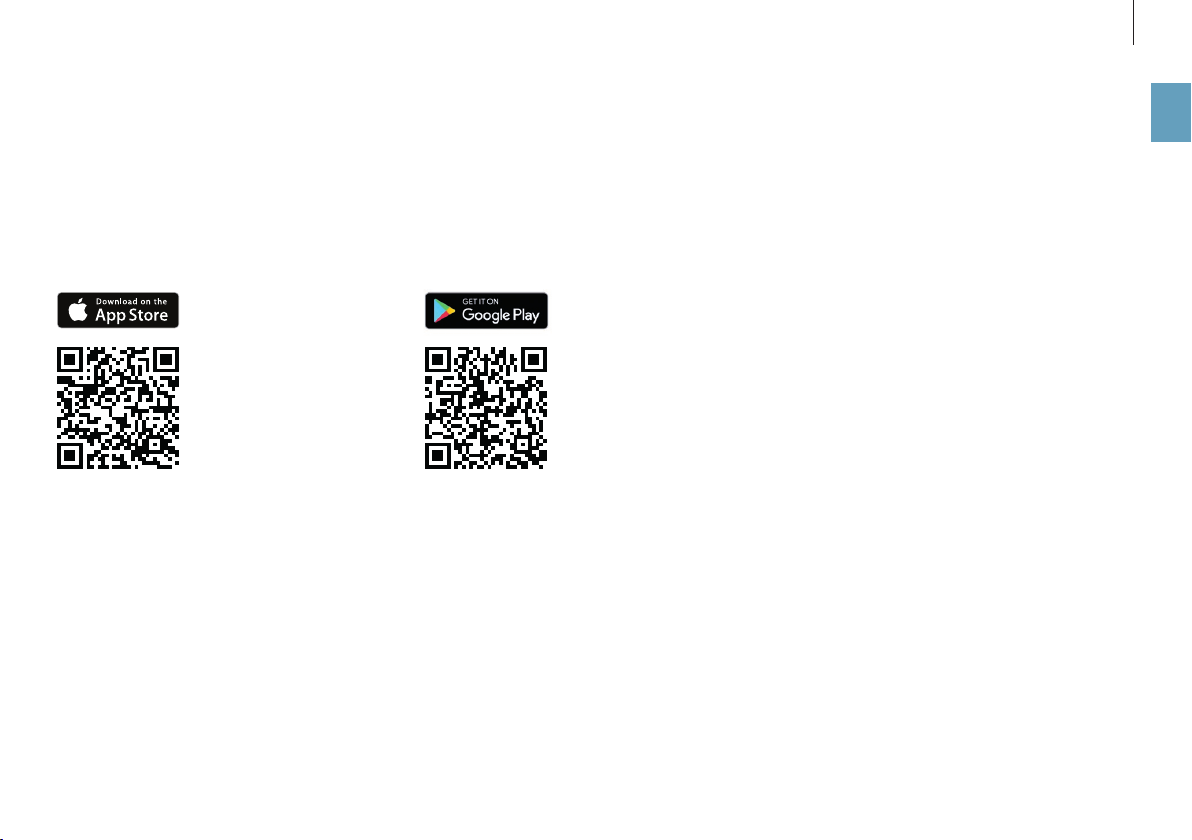
La aplicación “BONECO healthy air” sirve para ma-
nejar el aparato y le permite aprovechar todo su
potencial. La aplicación ofrece funciones como
un temporizador, ajuste de la humedad del aire o
cambio entre diferentes programas. Además, le
recuerda los intervalos de limpieza y otras tareas
recurrentes.
FUNCIONES
Modos de funcio-
namiento
“Hybrid”
(Híbrido)
El aire se purifica y se humidifica al mismo tiempo
“Purifier”
(Purificador)
El aire se purifica pero no se humidifica
“Humidifier”
(Humidifica
-
dor)
El aire se humidifica pero no se purifica
Selección de
modos
Ajustes predefinidos para situaciones frecuentes
Modo “AUTO” El aparato utiliza todos los niveles de potencia del ventilador (del 1 al
5) y el objetivo de humedad del aire es del 50%
Modo “SLEEP” El aparato solo utiliza el nivel de potencia 1 del ventilador y la hume
-
dad objetivo del aire preajustada es del 45%
Modo “BABY” El aparato utiliza los niveles de potencia del ventilador del 1 al 4 y
aumenta la humedad del aire al 60%
Humidostato Especificación de la humedad del aire deseada
Atenuador Ajuste de la luminosidad del LED de estado
Tiempo Muestra el tiempo actual y la temperatura exterior
Información sobre cambio de
filtro
Avisa cuando el filtro de polen AH300 está saturado
Accesorios y consumibles Ayuda al comprar recambios y ofrece más información
67
es
DESCARGA
APLICACIÓN BONECO PARA IOS
Busque “BONECO healthy air” en el App Store o es-
canee el código QR que encontrará abajo. Para que
el sistema iOS 10 o anterior reconozca el código QR
debe haberse instalado la aplicación correspon-
diente. Los sistemas iOS 11 o superiores reconocen
el código QR automáticamente al orientar la cáma-
ra hacia él.
APLICACIÓN BONECO PARA ANDROID
Busque “BONECO healthy air” en Google Play Store
o escanee el código QR que encontrará abajo. Para
que su dispositivo reconozca el código QR debe te-
ner instalada la correspondiente aplicación.

68
es
EMPAREJAMIENTO CON EL APARATO BONECO
PREPARACIÓN
Asegúrese de que el Bluetooth de su teléfono móvil
esté activado. Al realizar el emparejamiento, com
-
pruebe que su móvil se encuentre en la misma habi-
tación que el aparato BONECO.
Una vez realizada la vinculación, podrá manejar el
aparato BONECO a través de su móvil desde la mis
-
ma habitación o incluso desde la habitación conti-
gua. La distancia máxima entre el móvil y el aparato
BONECO depende de las características del edificio.
VINCULACIÓN
1. Asegúrese de que el Bluetooth de su teléfono
móvil esté activado.
2. Inicie la aplicación BONECO.
3. Siga las indicaciones de la aplicación.
69
es
INSTRUCCIONES DE LIMPIEZA
ACERCA DE LA LIMPIEZA
El mantenimiento y la limpieza regulares son requi
-
sitos imprescindibles para un funcionamiento per-
fecto e higiénico.
La frecuencia de limpieza y mantenimiento reco
-
mendada varía dependiendo de la calidad del aire
y del agua, así como del tiempo de funcionamiento.
Para la limpieza manual se recomienda utilizar un
paño suave, producto lavavajillas y un cepillo lim
-
piavajilla.
Desconecte siempre el aparato de la red eléc-
trica antes de iniciar la limpieza. No hacerlo
puede causar descargas eléctricas y poner su vida
en peligro.
Si se limpian el tambor y la placa para el agua
en el lavavajillas, la temperatura no debe su-
perar los 122°F (50°C), ya que de lo contrario po-
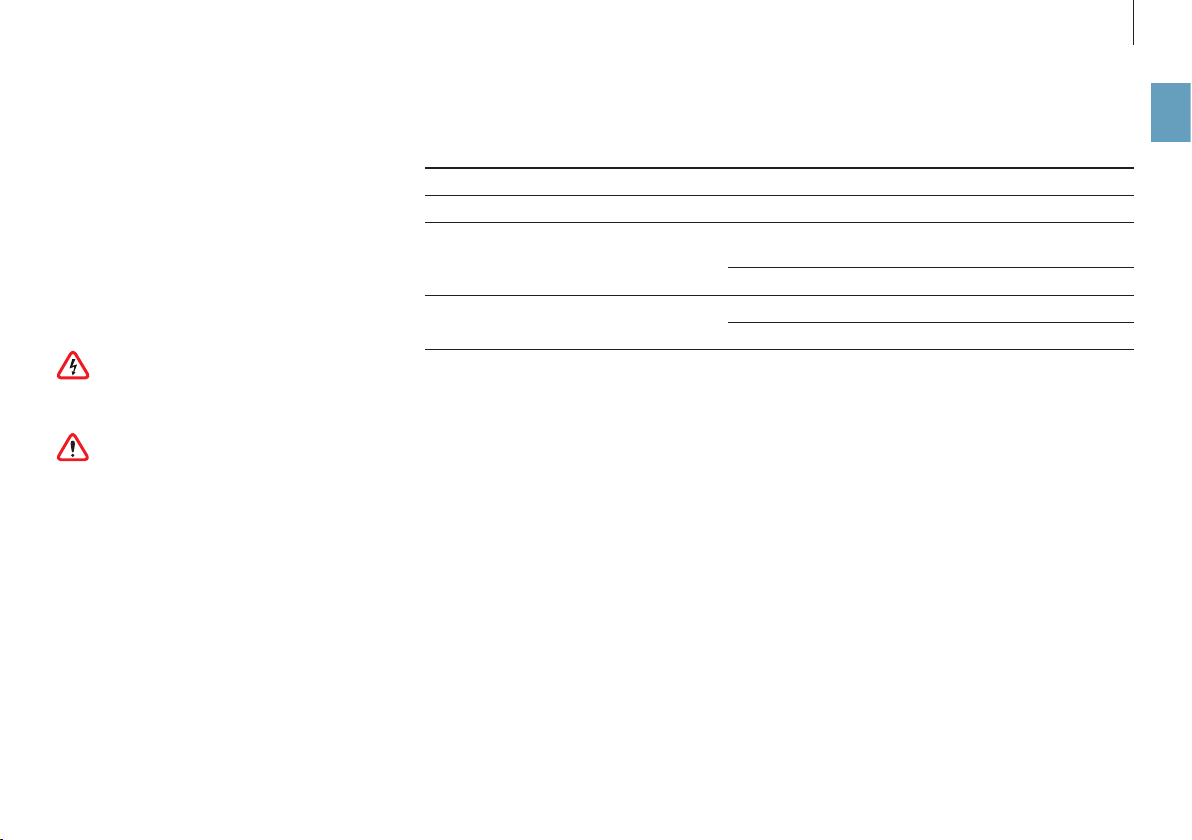
drían deformarse los componentes de plástico.
INTERVALOS DE LIMPIEZA RECOMENDADOS
Frecuencia Solución
A partir del tercer día sin funcionamiento Vaciar la placa para el agua y llenar con agua nueva
Cada 2 semanas Limpiar la placa para el agua, el tambor y la placa de
evaporación AW200
Limpieza del filtro previo
Una vez al año Sustitución del filtro de polen AH300
Limpiar el ventilador y el interior
70
es
LIMPIEZA DEL EQUIPO
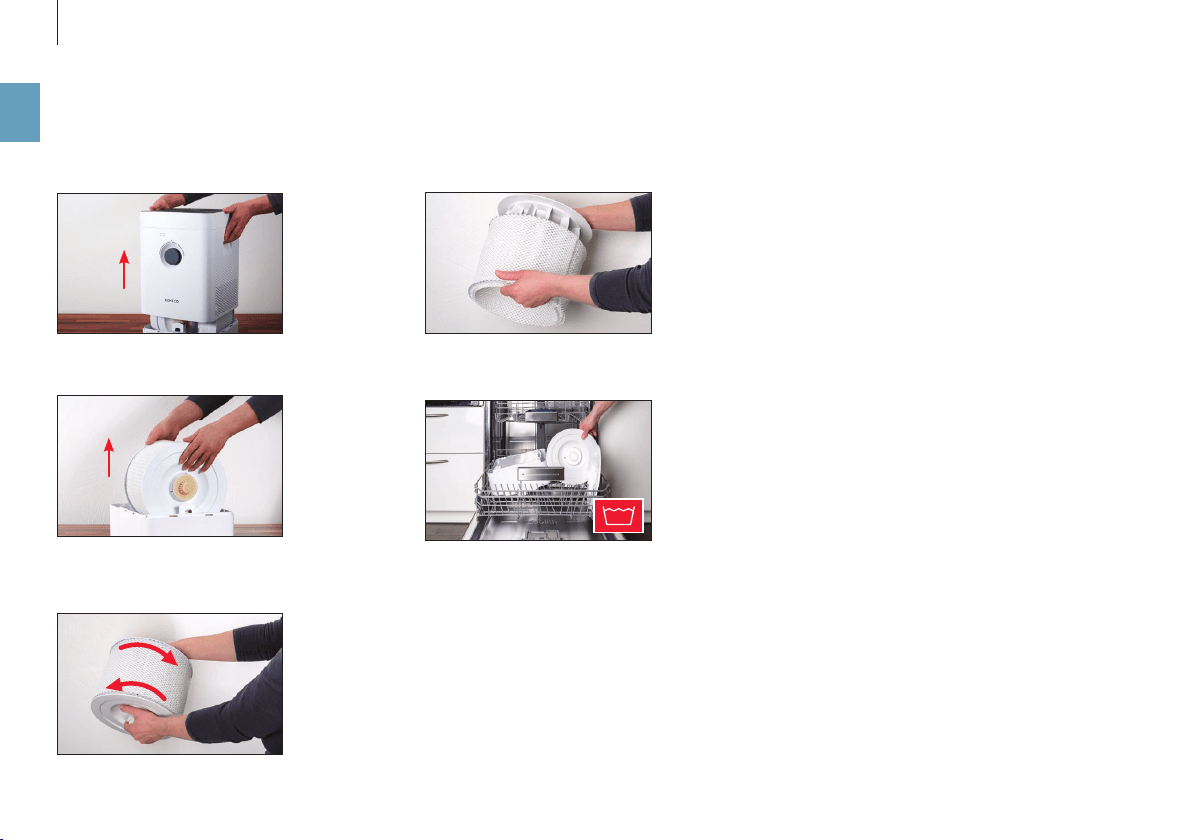
4. Retire la placa de evaporación AW200 del tam-
bor.
5. Lave la placa para el agua y el tambor a mano o a
un máximo de 122°F (50°C) en el lavavajillas.
6. Vuelva a montar el equipo BONECO en orden in
-
verso.
DESMONTAJE Y LIMPIEZA
1. Retire la parte superior del equipo BONECO.
2. Retire el tambor con la placa de evaporación
AW200.
3. Gire los dos discos del tambor para liberarlo. Para
ello, observe las marcas de la parte exterior del
disco.
122 °F
71
es
LIMPIEZA DE LA PLACA DE EVAPORACIÓN AW200
ACERCA DE LA PLACA DE EVAPORACIÓN AW200
La placa de evaporación AW200 se puede limpiar en
la lavadora. Utilice un detergente convencional.
Se recomienda introducir la placa de evaporación
AW200 en una bolsa de lavado o limpiarla por se
-
parado, ya que de lo contrario podría atrapar fibras
sueltas de otras prendas.
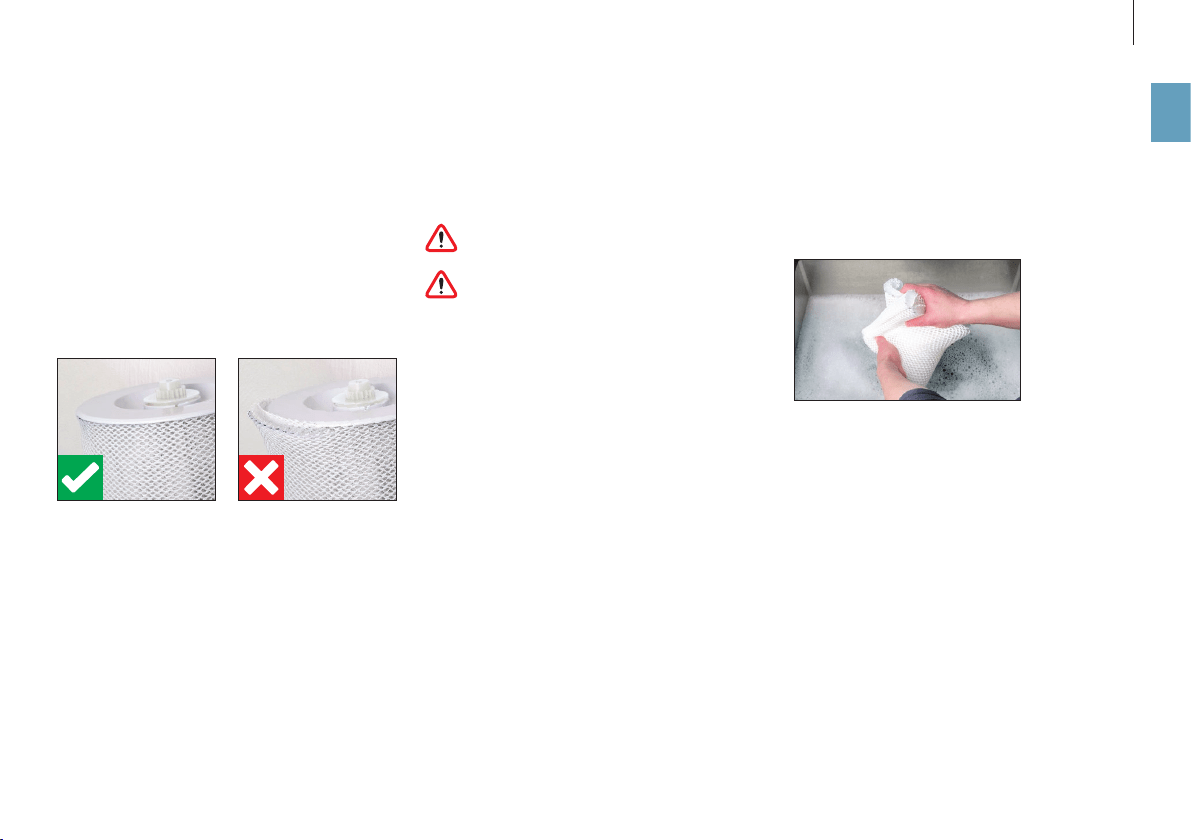
Cuando sujete la placa de evaporación AW200 en el
tambor después de haberla lavado, asegúrese de
que quede correctamente asentada:
LIMPIEZA EN LA LAVADORA
La placa de evaporación AW200 se puede limpiar en
la lavadora. Añada cualquier detergente de los que
se venden habitualmente en los comercios.
La placa de evaporación AW200 puede lim-
piarse como máximo a 104°F (40°C).
No seque la placa de evaporación AW200 en
una secadora.
LIMPIEZA MEDIANTE LAVADO A MANO
1. Sacuda la placa de evaporación AW200 a con
-
ciencia en agua tibia con un poco de lavavajillas.
2. Aclare la placa de evaporación AW200 con agua
limpia tibia hasta que deje de formarse espuma.
72
es
LIMPIEZA DEL FILTRO PREVIO
ACERCA DEL FILTRO PREVIO
El filtro previo limpia el aire de partículas gruesas
de suciedad. Limpie el filtro previo cuando conside-
re que está sucio o tiene impurezas.
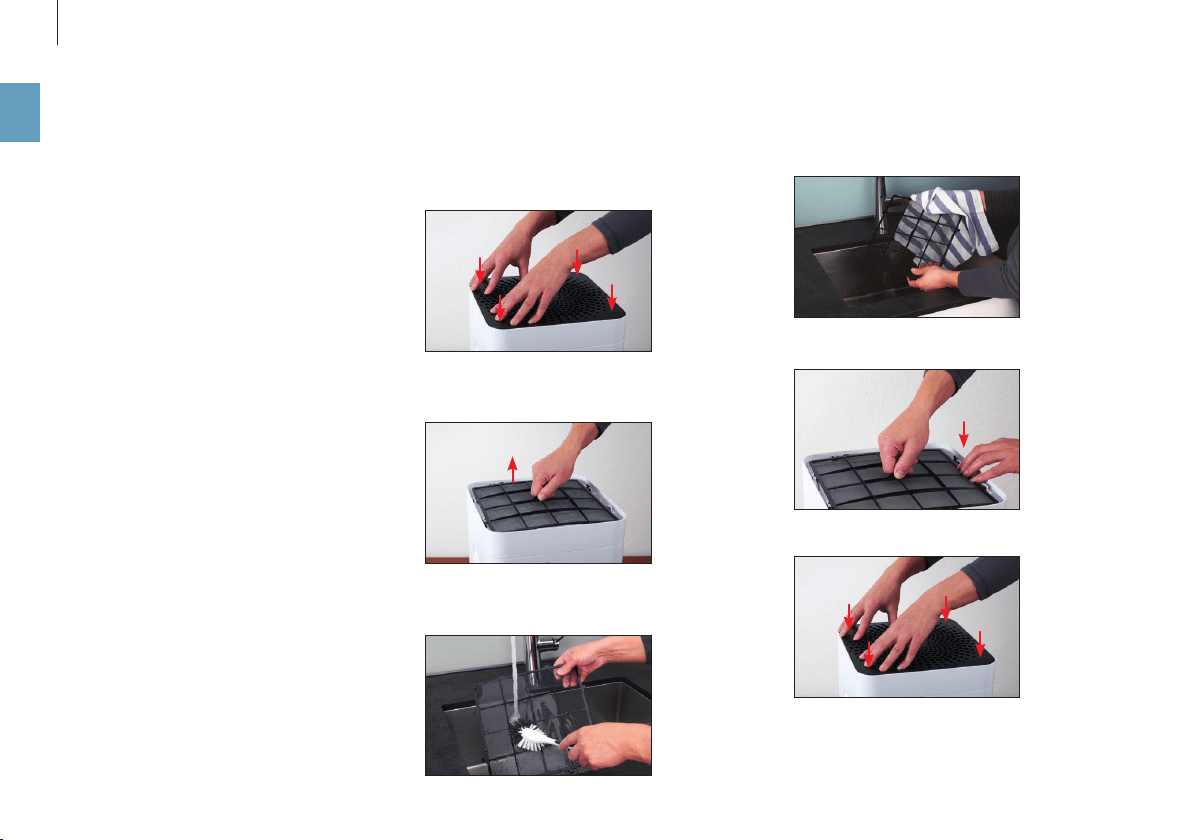
LIMPIEZA DEL FILTRO PREVIO
1. Presione las cuatro esquinas de la cubierta una
por una para desbloquearla.
2. Extraiga el filtro previo tirando hacia arriba de la
lengüeta situada en el centro.
3. Lave el filtro previo con un cepillo limpiador de
-
bajo del grifo.
4. Seque el filtro previo con un paño.
5. Coloque el filtro previo en el aparato.
6. Coloque la cubierta.

73
es
SUSTITUCIÓN DEL FILTRO DE POLEN AH300
El filtro de polen AH300 no puede limpiarse.
• Es normal que presente suciedad, lo cual de
-
muestra la eficacia del filtro de polen AH300.
• Cambie el filtro de polen AH300 una vez al año
para mantener su rendimiento de limpieza.
• El filtro de polen AH300 saturado puede des
-
echarse con la basura doméstica normal.
DISPONIBILIDAD DE LOS ACCESORIOS
Puede adquirir recambios de sus accesorios usados
y adicionales:
• a través de su distribuidor de BONECO,
• en shop.boneco.us o
• directamente mediante la app “BONECO healthy
air”.
SUSTITUCIÓN DE LOS ACCESORIOS
74
es
POSIBLES PROBLEMAS Y SOLUCIONES
Problema Posible causa Solución
El olor del aire es desagradable Hay agua estancada en la placa para el agua Vaciar la placa para el agua, limpiar el aparato y la placa
de evaporación AW200
La calidad del aire no mejora Las puertas o ventanas están abiertas Cierre las puertas y ventanas
El LED “AUTO” del aparato parpadea en rojo La placa para el agua está vacía Llenar la placa para el agua
El aparato no puede manejarse en la apli
-
cación. Aparece el mensaje “Buscando …”
“No disponible”
Otro teléfono móvil tiene bloqueado el aparato Cerrar la aplicación en el otro teléfono móvil
El LED “AUTO” parpadea Se ha alcanzado o superado la humedad del aire
deseada
No es necesaria
La pantalla actual parpadea al manejar el
aparato
Manejo bloqueado Desactivar la función de bloqueo en la aplicación
La pantalla permanece oscura La luminosidad de los LED se ha reducido mucho en la
aplicación
Incrementar la luminosidad de los LED en la aplicación

75
es
AJUSTES DE FÁBRICA
ACERCA DE LOS AJUSTES DE FÁBRICA
Si el control de su aparato BONECO no funciona
como esperaba, o si desea borrar todos los ajustes,
puede restablecer la configuración de fábrica del
aparato. Al hacerlo, se borrarán la configuración y
todos los ajustes.
Después del restablecimiento, se debe volver
a emparejar el aparato BONECO con el teléfo-
no móvil para poder seguir controlando el aparato
desde la aplicación.
RESTABLECIMIENTO DE LA CONFIGURACIÓN DE
FÁBRICA
Para restablecer la configuración de fábrica del
aparato BONECO, mantenga pulsado el botón ne
-
gro del aparato durante unos 30 segundos, hasta
que los LED se iluminen en rojo. El aparato BONECO
volverá a encontrarse en el mismo estado que en la
puesta en marcha.

76
es

47564-02
www.boneco.us
BONECO is a registered trademark of BONECO AG, Switzerland
BONECO North America Corp. 15821 Ventura Blvd., Encino, CA 91436