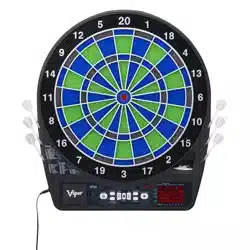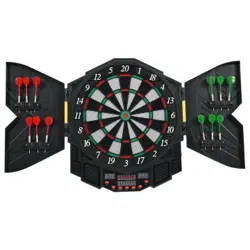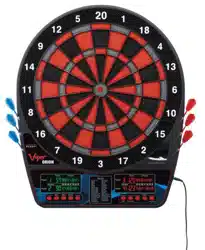
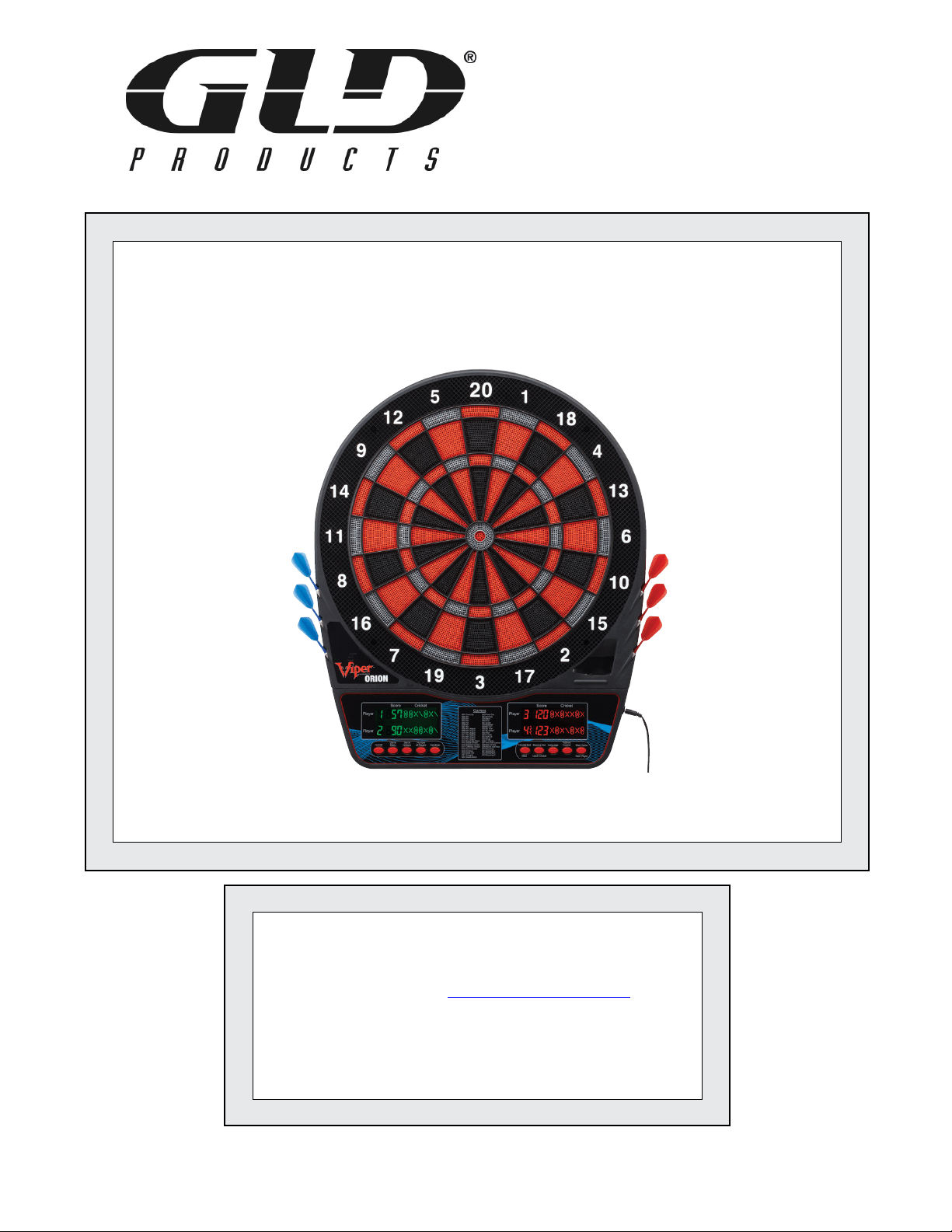
Orion Dartboard
Item 42-1036
ORION
ELECTRONIC DARTBOARD
Replacement Parts
Order direct at www.gldproducts.com
or call our Customer Service department at
(800) 225-7593
8 am to 4:30 pm Central Standard Time
Publication 42-1036 Rev E
January 2017 UPC Code 7-19265-54414-2
Viper
®
LaserLite
Compatible!

GLD Products Orion Dartboard
Item 42-1036
Staple your receipt here.
Important: A copy of your receipt will be needed to activate your warranty (see page 39).
GLD Products Orion Dartboard
Item 42-1036
Congratulations and THANK YOU for purchasing the
Orion Dartboard. You have chosen a product that
should provide years of entertainment. To assist you
with customer service and warranty claims, staple
your receipt to the inside cover, then keep this manual
in a safe place for future reference.
GLD Products
S84 W19093 Enterprise Drive
Muskego, WI 53150 USA
1-800-225-7593
Fax: 1-800-841-6944
Email: gld@gldmfg.com
Web: www.gldproducts.com
3 1-800-225-7593
www.gldproducts.com
Es un Manual de Español por favor visite GLD sitio web para descargar.
This manual may have been updated. For the latest manual or a manual in Spanish, visit
the GLD products website.
Place your package near the location where it will be used. Carefully unpack
all components and verify you have all the correct pieces.
If you notice missing or defective parts, please call us at:
1-800-225-7593
Please read and understand all instructions before beginning assembly.
This assembly will require 2 adults.
Choking Hazard
This game has small parts that may break free and present a choking
hazard. Children should be supervised by an adult when playing this game.
GLD Products Orion Dartboard
Item 42-1036
41-800-225-7593
www.gldproducts.com
IF YOU HAVE A WARRANTY CLAIM, CALL US FIRST:
Please refer to page 39.
GLD Products
Available 8 am to 4:30 pm Central Standard Time
S84 W19093 Enterprise Drive
Muskego, WI 53150 USA
1-800-225-7593
Fax: 1-800-841-6944
Email: gld@gldmfg.com
Web: www.gldproducts.com
For all claims, please have your receipt and item number when you call. The product
item number can be found on the front cover.
If you are instructed to return the product for service, you are responsible for
shipping the unit at your expense.
PRODUCT REGISTRATION
Important: The product registration form on page 41 and a copy of your receipt
must be completed and returned within 10 days of purchase to validate your
warranty.
Online registration is also available. Go to http://gldproducts.com/warranty-information or
click on this link. Follow the online instructions.
WARNING: Parents - Please read instructions carefully. Not for
use by children without adult supervision.
Thank you for purchasing the Orion Dartboard. The computerized scoring system makes
game playing easy and enjoyable. With 43 games and 320 options/variations to choose
from, beginners and more advanced players will ! nd challenging games to suit them.
TOOLS REQUIRED
• Tape measure
• Nail or marker
• Phillips screwdriver
• Level
• Mounting hardware (provided)
GLD Products Orion Dartboard
Item 42-1036
5 1-800-225-7593
www.gldproducts.com
UNPACKING THE GAME
After unpacking the game, it is important to save the original box, all packing material, and
the receipt. These items will be needed if it ever proves necessary to return the game for
service.
MOUNTING (PHYSICAL INSTALLATION)
Two methods for mounting the dartboard are available.
1. Use the keyhole slots on the backside of the dartboard. Follow the illustration and mount
the dartboard. The two screws are screwed into the wall until the screw head is 3/8"
away from the wall. The dartboard is positioned so the two screw heads are inside the
keyhole. Slide the dartboard down to secure. The head of the screw that is used must
be larger than 1/4" and smaller than 3/8".
2. Four equally spaced holes are accessible from the front to drive in screws. With the
dartboard held in place, four screws are driven in from the front, through the existing
holes. Use 1/8" diameter screws. The head of the screw must ! t inside the pocket.
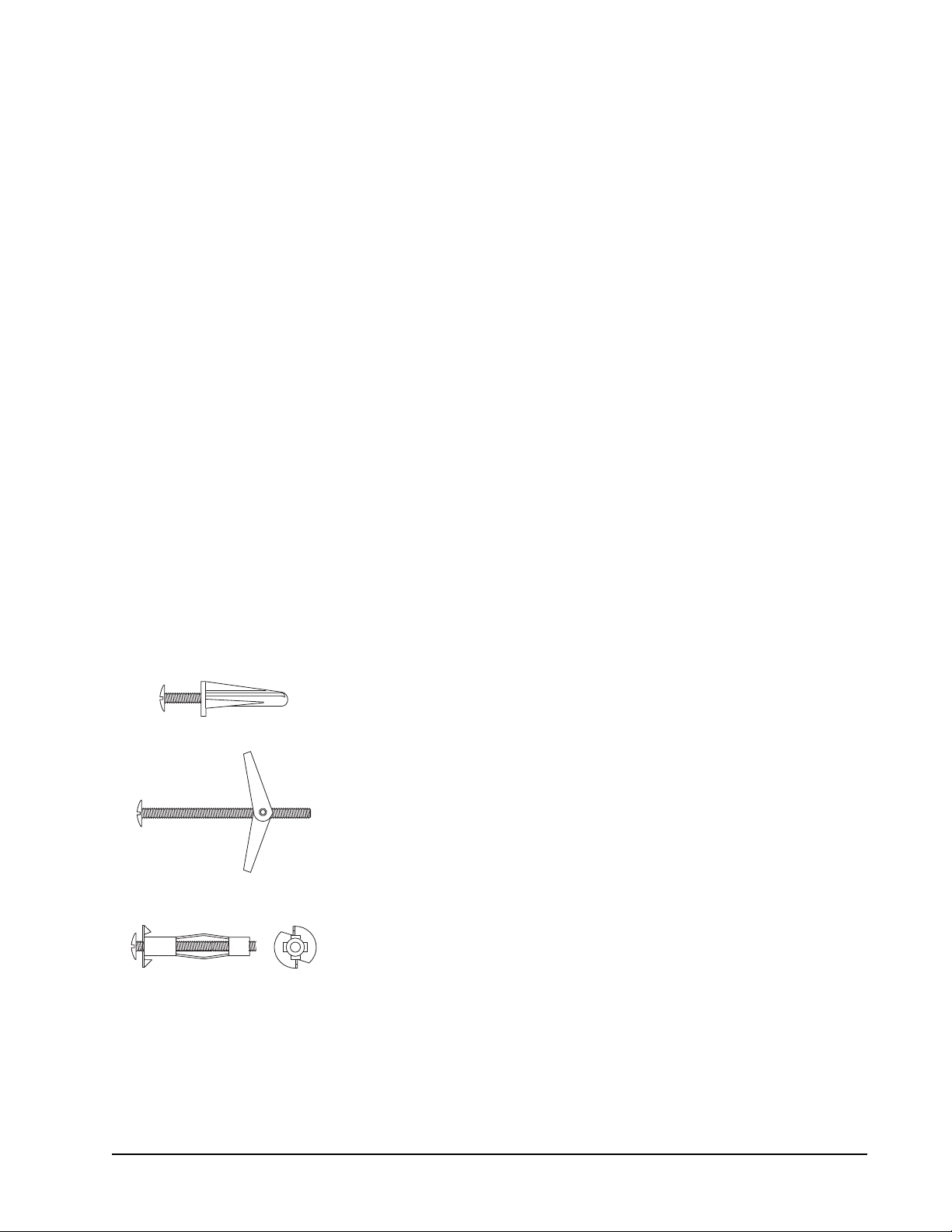
Wall Anchors
A wall with studs is the most common type of wall to mount the dartboard.
1. Locate a stud and use wood screws or sheet metal type screws to secure the dartboard.
2. If a stud cannot be located or is not in the proper location, use an anchor that is suitable
for the type of wall.
Some common anchors are:
Plastic - Drill a snug hole in drywall and push the anchor in up
to the head. When the screw is screwed into the anchor, the
plastic will expand, locking the anchor in place. Do not use on
thin panelling.
Toggle Bolt - Drill hole through wall. Hole must be large
enough for the wings to pass through. Insert screw through the
holes in the dartboard and thread the toggle wings just onto
the screw. Fold the wings back and push through the hole until
the wings spring open. Pull back on the screw to hold wings
against the inside of the wall and tighten screw.
Hollow wall anchor - Drill a snug hole through the wall. Tap
anchor into the hole until the prongs on the underside of the
head are seated securely into the wall. Turn screw in and
apply pressure to keep the anchor head from turning. Tighten
screw until resistance is felt. Do not over tighten. Turn screw
out to remove. Anchor will stay and screw can be replaced.
Other methods are available. Consult a hardware store if questions arise.

GLD Products Orion Dartboard
Item 42-1036
61-800-225-7593
www.gldproducts.com
Mounting Using the Keyhole Slots
Refer to the illustrations on the following pages.
1. Choose a location that is near an electrical outlet and has at least 10 feet of open ! oor
space in front of the board. Locate and use a wall stud for mounting whenever possible.
2. Locate studs and use wood screws or sheet metal screws to secure the dartboard if the
mark is on the stud. The head of the screw must be smaller than 3/8" and larger than 1/4".
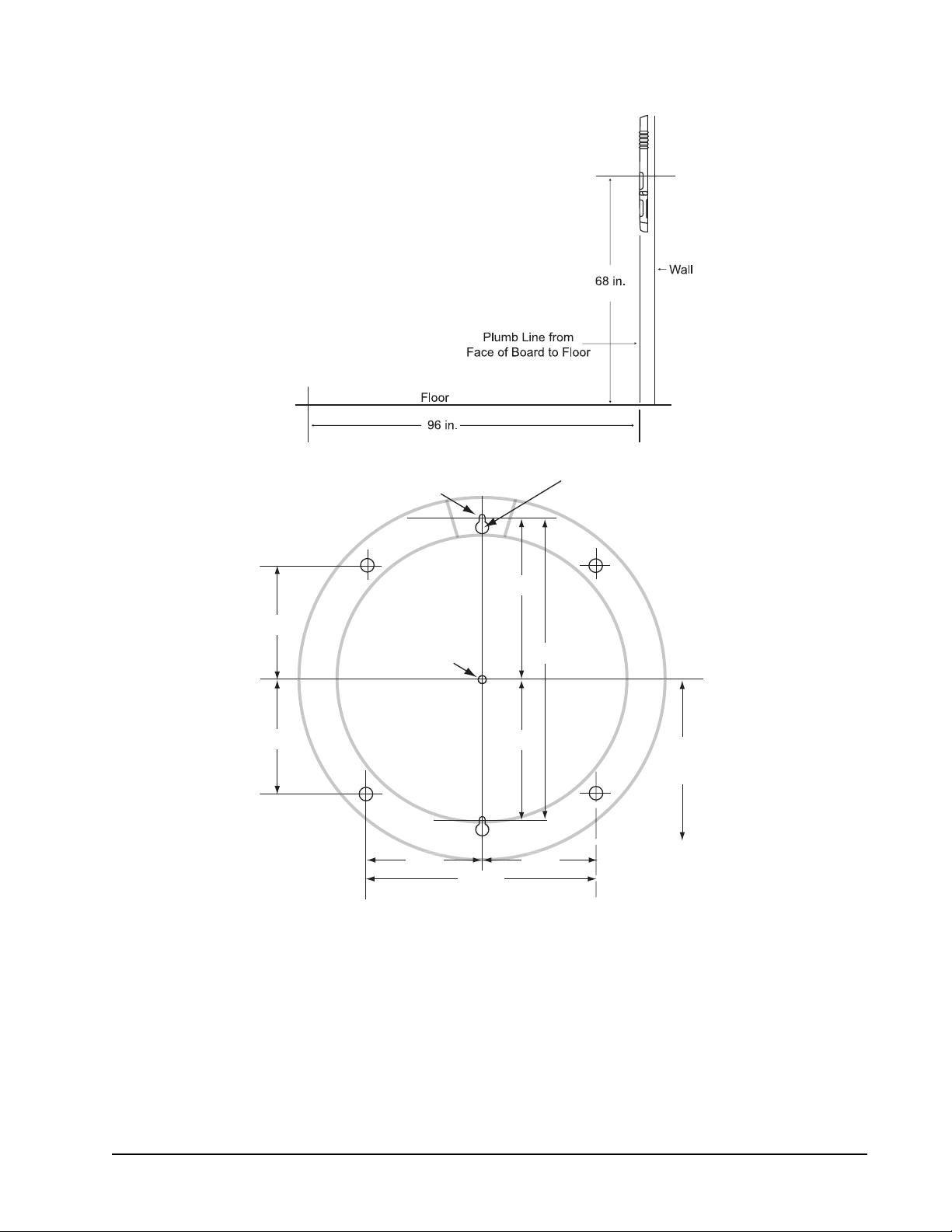
3. Determine the location for the dartboard. Place a mark on the wall 68 inches (172.7 cm)
from the ! oor. This mark is the # nal position of the center of the dartboard (bullseye).
4. If the mark is not over a stud, use the mounting hardware that came with your
dartboard.
5. Measure 8-5/8" (21.9 cm) directly up from the bullseye mark and place a mark on the
wall. Then measure down 8-5/8" (21.9 cm) from the bullseye mark and place a mark on
the wall. Use a level to check that all marks are vertical.
6. Drill pilot holes at the two marks. These are for the mounting screws.
7. If using wall anchors, follow the instructions under Wall Anchors on page 5.
8. Insert screws into anchors until a 1/4" (6.5 mm) gap is left between the wall and the
screw head.
9. Hold the dartboard so the two screw heads # t into the lower part of the keyholes. The
dartboard should slide down 1/2 inch and the screw heads will hold it on the wall.
10. Screws can be tightened or loosened to provide a secure mounting.
Mounting Using the Four Holes From the Front
Refer to the illustrations on the following pages.
1. Choose a location that is near an electrical outlet and has at least 10 feet of open ! oor
space in front of the board. Locate and use a wall stud for mounting whenever possible.
2. Two people are needed for this step. Hold board on the wall. Position center of bullseye
68" from the ! oor. Level the board. Hold in place.
3. Locate the four mounting holes on the front of the board. Use a marker or nail to mark
the position of the board through the four mounting holes onto the wall. Remove the
board.
4. Drill four pilot holes on the marks created in Step 3.
5. If using plastic anchors: drill the holes so the anchors # t snugly. Push anchors into
place.
6. Line up dartboard over anchors. Screw board into place. The screws will expand the
anchors.
GLD Products Orion Dartboard
Item 42-1036
7 1-800-225-7593
www.gldproducts.com
Center of Bullseye
Throwing or
Toe Line
12.5"
6.25" 6.25"
6.25"
6.25"
8.625"
8.625"
17.25"
68"
To Floor
Bullseye
Keyhole Slots
6.25"
6.25"
Screw head diameter
must be larger than 1/4"
and smaller than 3/8"
Mounting holes viewed from back
GLD Products Orion Dartboard
Item 42-1036
81-800-225-7593
www.gldproducts.com
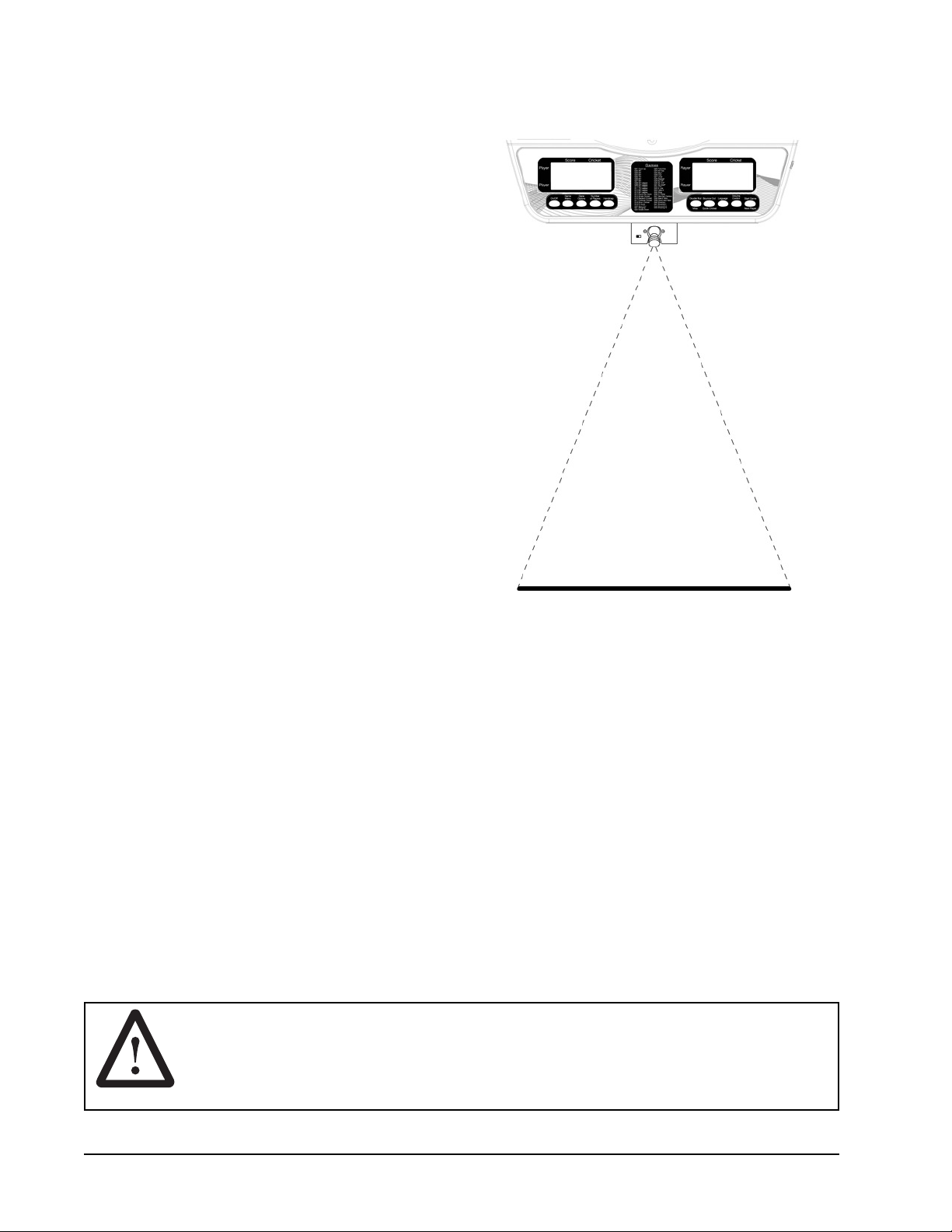
Create the Toe Line
Place a toe line 96" from the face of the board
for the throwing distance. Adhesive tape or
masking tape, 2' long by 2-1/2" wide, may be
used.
This dartboard is compatible with the Viper
LaserLite mini-laser throw line (not included),
an absolute essential for all dart players. No
need to tape a line to the ! oor; just plug the
LaserLite into your dartboard and you have a
crystal-clear throwing line that's there when
you need it and gone when you don't. Ordering
information is included on page 43.
GLD products also offers a Viper Throwing Line
and a Dart Mat for this purpose.
POWER INSTALLATION
The dartboard is designed to be powered by an AC to 5V DC, 1000 milliamp (minimum)
adapter, with the DC plug polarity con# gured as positive (+) outside, and negative (-)
center. To connect the adapter, plug the DC plug into the DC power jack on the dartboard
and the AC plug into an electrical outlet.
1. The board is not intended for children under the age of 9 years old.
2. The board must only be used with the recommended transformer.
3. The transformer is not a toy.
4. Disconnect the dartboard from the transformer before cleaning.
PROTECTIVE FILM
This electronic dartboard has a clear protective # lm over the entire display and button
area to prevent scratching during shipping. It is recommended that you remove this # lm for
easier reading of the display. To remove, simply lift edge, peel off and discard.
WARNING: Not for use by children without adult supervision.
Darts are not toys and may cause injury if used
improperly. Everyone must stand behind the dart
thrower.

GLD Products Orion Dartboard
Item 42-1036
9 1-800-225-7593
www.gldproducts.com
IMPORTANT NOTES
1. During shipping or in the course of normal play, it is possible for scoring segments of this
board to become temporarily jammed, resulting in a “frozen” board. If this occurs, the built-
in Self Diagnostic Function of the e-BOARD Computer will be activated automatically.
Your dartboard will run a self-test routine to determine which segment is stuck. An error
message will ! ash on the display together with the number for the “Frozen” segment.
Error Code Malfunction
E 30 Stuck GAME MENU Button
E 31 Stuck GAME OPTIONS Button
E 32 Stuck NUMBER OF PLAYERS Button
E 33 Stuck HANDICAP Button
E 34 Stuck DOUBLE BULL/MISS Button
E 35 Stuck ON/OFF Button
E 36 Stuck BOUNCE OUT/QUICK CRICKET Button
E 37 Stuck VOLUME CONTROL Button
E 38 Stuck LANGUAGE Button
E 39 Stuck START GAME/NEXT PLAYER button
E
XX A segment is stuck, the indicates a triple and XX
indicates the number of the segment.
E
XX A segment is stuck, the indicates a double and XX
indicates the number of the segment.
E XX A single segment is stuck, XX indicates the number
of the segment.
a. Find the “frozen” segment according to the display.
b. Press " rmly down on the “frozen” segment until it breaks free and the loose " t is
restored. Once the “frozen” segments are loosened, the error message should be
gone and the board will continue to operate normally.
2. This game is designed for use with 1# maximum length soft-tip darts only$ Never use metal
tipped darts or longer soft-tip darts on this dartboard$ Metal tipped darts will seriously
damage the circuitry, the e-BOARD computer, and electronic operation of the dartboard.
3. Electronic and mechanical reaction time is required between shots. If two shots occur
too close together, pull out second dart and rethrow to properly record your score.
4. If using an AC adapter, it must be 5V DC 1000 milliamp. The plug polarity is con" gured
as positive (+) outside, and negative (-) center. Using the wrong adapter may cause
electrical shock and damage to the unit.
5. Do not use excessive force when throwing darts. Throwing a dart too hard will cause
frequent tip breakage and cause excessive wear on the board.
6. Do not spill liquids on the dartboard. Do not use spray cleaners that contain ammonia or
other harsh chemicals, as they may damage the dartboard. Instead, we suggest regular
dusting with a damp cloth. Make sure the game is unplugged and use a mild detergent
and a damp cloth for more vigorous cleaning.
GLD Products Orion Dartboard
Item 42-1036
101-800-225-7593
www.gldproducts.com
7. This game is for indoor use only.
Helpful Tip: To prevent dart tips from loosening, twist the
dart to the right (clockwise when pulling it from the board).
This motion will make dart removal easier and will prolong
the life of your dart tips.
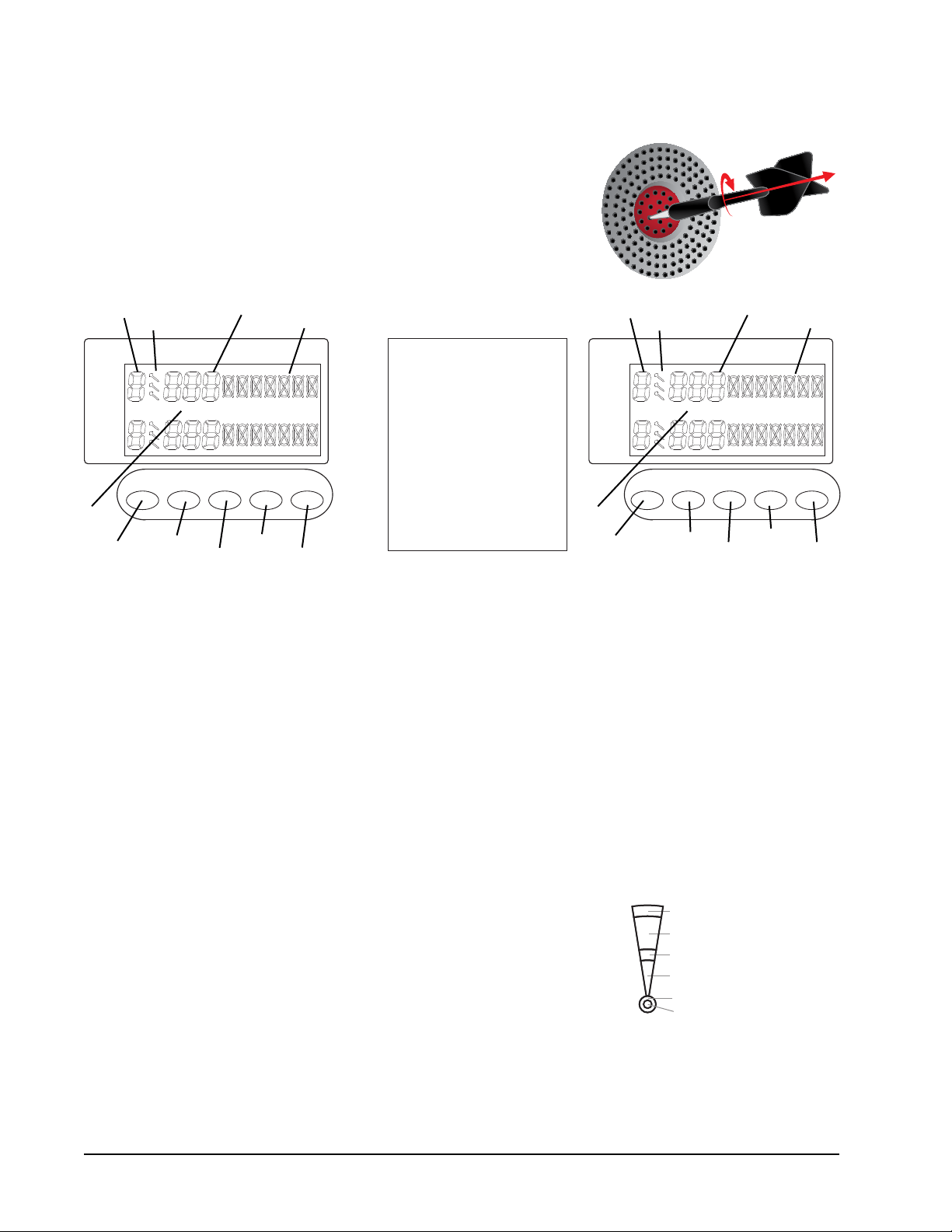
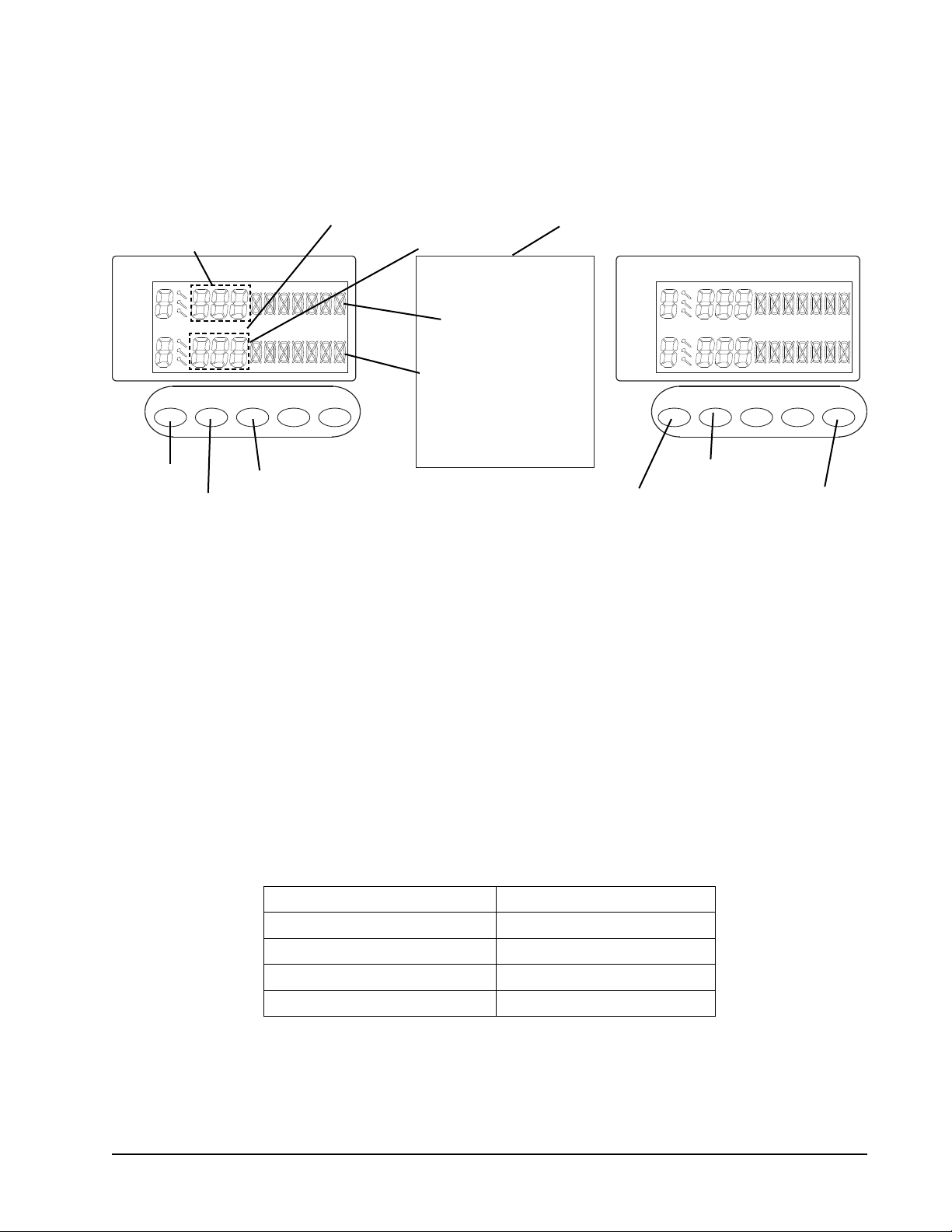
1. On/Off Button
2. Game Menu Button
3. Game Options Button
4. Number of Players Button
5. Handicap Button
6. Double Bull/Miss Button
7. Bounce Out/Quick Cricket Button
8. Language Button
9. Volume Control Button
10. Start Game/Next Player Button
11. Standard Cricket Display
12. Score Display
13. Dart Display
14. Player Number
15. Double In/Double Out Indicator
Player
Score Cricket
Player
Number
of Players
Handicap
Game
Options
Game
Menu
On/Off
Player
Score Cricket
Player
Volume
Control
Start Game
LanguageBounce OutDouble Bull
Miss Quick Cricket Next Player
Games
IN OUT IN OUT
1
2
3
4
5
6
7
8
9
10
15
14
13
12
11
15
14
13
12
11
Segment Scoring Scoring Rules
Single scoring segment score times 1
Double
Outer Single
Triple
Inner Single
Single Bullseye
Double Bullseye
Double scoring segment score times 2
Triple scoring segment score times 3
Outer bullseye 25 times 1
Center bullseye 25 times 2

GLD Products Orion Dartboard
Item 42-1036
11 1-800-225-7593
www.gldproducts.com
QUICK START - IF YOU JUST WANT TO START THROWING DARTS
1. Turn game on by pressing the ON/OFF button. Game G01 Count Up is displayed.
Note: The default game is G01 Count Up with 2 players, and single bull. The winning score
is 100.
2. Use the NUMBER OF PLAYERS button if you would like to change the number of
players.
3. Press the GAME OPTIONS button if you want to change the winning score.
4. Press the START GAME button to start the game.
5. Take turns throwing darts. When a players score is higher than the winning score they
are the winner.
DARTBOARD GAME MENU
Game Name Options Players
G01 Count Up 9/18 1-8
G02 301 4/8 1-8
G03 501 4/8 1-8
G04 601 4/8 1-8
G05 701 4/8 1-8
G06 801 4/8 1-8
G07 901 4/8 1-8
G08 301 League 4/8 4
G09 501 League 4/8 4
G10 601 League 4/8 4
G11 701 League 4/8 4
G12 801 League 4/8 4
G13 901 League 4/8 4
G14 Round The Clock 12/24 1-8
G15 Simple Cricket 3/6 1-8
G16 Standard Cricket 3/6 1-8
G17 Cut Throat Cricket 3/6 1-8
G18 Scram Cricket 1/2 2
G19 Hi Score 10/20 1-8
G20 Shoot Out 10 1-8
G21 Shanghai 12 1-8
G22 Double Down 1/2 1-8
G23 Forty-One 1/2 1-8
G24 All Fives 5/10 1-8
GLD Products Orion Dartboard
Item 42-1036
121-800-225-7593
www.gldproducts.com
Game Name Options Players
G25 Big 6 5 2-8
G26 Over 3/6 2-8
G27 Under 3/6 2-8
G28 Baseball 3 1-8
G29 By 5's© 1 1-8
G30 By 10's© 1 1-8
G31 By Odd's© 1 1-8
G32 Killer 30 2-8
G33 9 lives 7 2-8
G34 Halve-It 1 1-8
G35 Bingo 4 1-8
G36 21 Points 7 1-8
G37 Nine Dart Century 3/6 1-8
G38 Best of Nine 5/10 1-8
G39 Hound and Hare 5/10 2
G40 Shooting I 1/2 1-8
G41 Shooting II 1/2 1-8
G42 Shooting III 1/2 1-8
G43 Shooting IV 1/2 1-8
Total 320
GLD Products Orion Dartboard
Item 42-1036
13 1-800-225-7593
www.gldproducts.com
READ FIRST - OPERATION
The dartboard is powered by an external power supply. An external 5 VDC, 1000 milliamp
power supply is included with the dartboard. To use, plug the power supply into the jack on
the side of the dartboard.
Player
Score Cricket
Player
Number
of Players
Handicap
Game
Options
Game
Menu
On/Off
Player
Score Cricket
Player
Volume
Control
Start Game
LanguageBounce OutDouble Bull
Miss Quick Cricket Next Player
Games
IN OUT IN OUT
Step 2
Step 1
Step 1, 2
Step 5 Step 2
Step 2
Step 3Step 4
Step 1, 4
Step 6
Step 8
Single Bull
Step 8
Double Bull
1. Press the ON/OFF button to turn on the game. When the power is turned ON, the
displays will light up with a welcoming melody. When the sound stops, the left Score
display will show 2 G01 and 2 100 (Game 01, 2 players, winning score of 100).
2. Press the GAME MENU button to scroll through the games. The selection is shown
on the left Score display. Then press START GAME/NEXT PLAYER button to begin
the game. The game choices are printed on the dartboard. The number of the game is
shown at the Score display.
Note: Before pressing the START GAME/NEXT PLAYER button there are several options
that may be selected, see below.
3. The BOUNCE OUT/QUICK CRICKET button may be pressed to jump to G16 Cricket.
4. The GAME OPTIONS button may be pressed to select one of the available options for
each game. This selection will apply to all the players.
5. For games G02 to G13 games (301 to 901 and 301 League to 901 League), press the
GAME OPTIONS button to select the Double In/Double Out options.
IF SELECTING OPTION THEN
No icons are lit up Single In/Single Out
IN icon lit up Double In/Single Out
OUT icon lit up Single In/Double Out
IN and OUT icons lit up Double In/Double Out
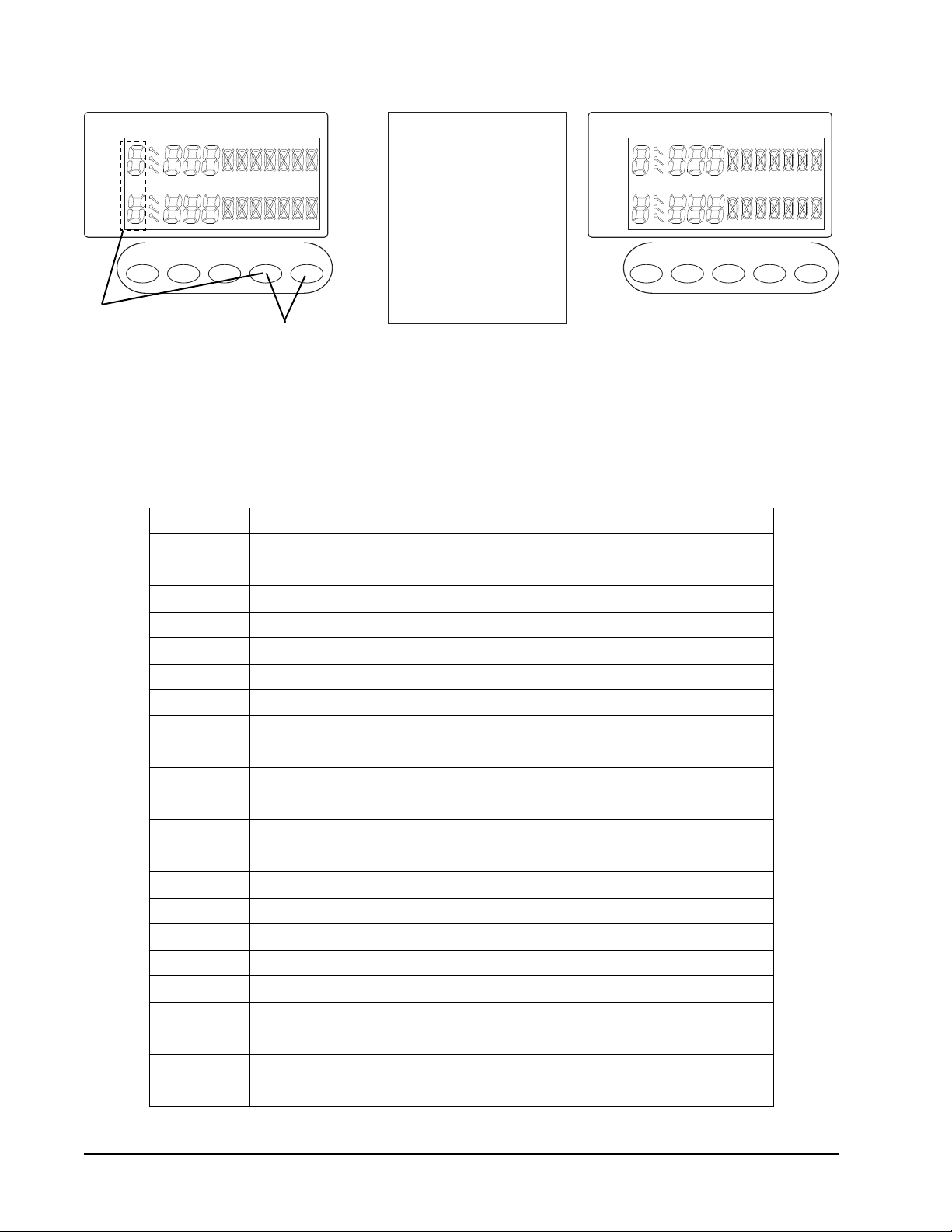
6. The DOUBLE BULL/MISS button may be pressed to select 25/50 (single) or 50/50
(double) bull. When single bull is chosen, the last mark location in Player 1 Cricket
display will show an "X" with a circle. When the double bull is chosen the Player 2
Cricket display will show an "X" with a circle.
GLD Products Orion Dartboard
Item 42-1036
141-800-225-7593
www.gldproducts.com
Player
Score Cricket
Player
Number
of Players
Handicap
Game
Options
Game
Menu
On/Off
Player
Score Cricket
Player
Volume
Control
Start Game
LanguageBounce OutDouble Bull
Miss Quick Cricket Next Player
Games
IN OUT IN OUT
Step 7
Step 8
7. Press the NUMBER OF PLAYERS button to select the number of players in the game.
Maximum selection is 8.
8. For some games, handicaps can be selected. Press the HANDICAP button to enter
handicap selection mode. Then press the NUMBER OF PLAYERS button to select the
handicap option. Press the HANDICAP button again to jump to the next player. The
games that use handicap mode are listed below.
Game Name Handicap Options
G01 Count Up +20, +40, +60, +80 Scores
G02 301 -20, -40, -60, -80 Scores
G03 501 -20, -40, -60, -80 Scores
G04 601 -20, -40, -60, -80 Scores
G05 701 -20, -40, -60, -80 Scores
G06 801 -20, -40, -60, -80 Scores
G07 901 -20, -40, -60, -80 Scores
G08 301 League -20, -40, -60, -80 Scores
G09 501 League -20, -40, -60, -80 Scores
G10 601 League -20, -40, -60, -80 Scores
G11 701 League -20, -40, -60, -80 Scores
G12 801 League -20, -40, -60, -80 Scores
G13 901 League -20, -40, -60, -80 Scores
G15 Simple Cricket L1, L2, L3, L4
G16 Standard Cricket L1, L2, L3, L4
G17 Cut Throat Cricket L1, L2, L3, L4
G19 Hi Score +20, +40, +60, +80 Scores
G20 Shoot Out +1, +2, +3, +4 Scores
G21 Shanghai +20, +40, +60, +80 Scores
G22 Double Down +20, +40, +60, +80 Scores
G23 Forty-One +20, +40, +60, +80 Scores
G25* Big 6 -1, -2, -3, -4 Lives
GLD Products Orion Dartboard
Item 42-1036
15 1-800-225-7593
www.gldproducts.com
Game Name Handicap Options
G26* Over -1, -2, -3, -4 Lives
G27* Under -1, -2, -3, -4 Lives
G32* Killer -1, -2, -3, -4 Lives
G33* 9 lives -1, -2, -3, -4 Lives
G34 Halve-It +20, +40, +60, +80 Scores
G36 21 Points +1, +2, +3, +4 Scores
*The minimum lives selection must be -3 for these games.
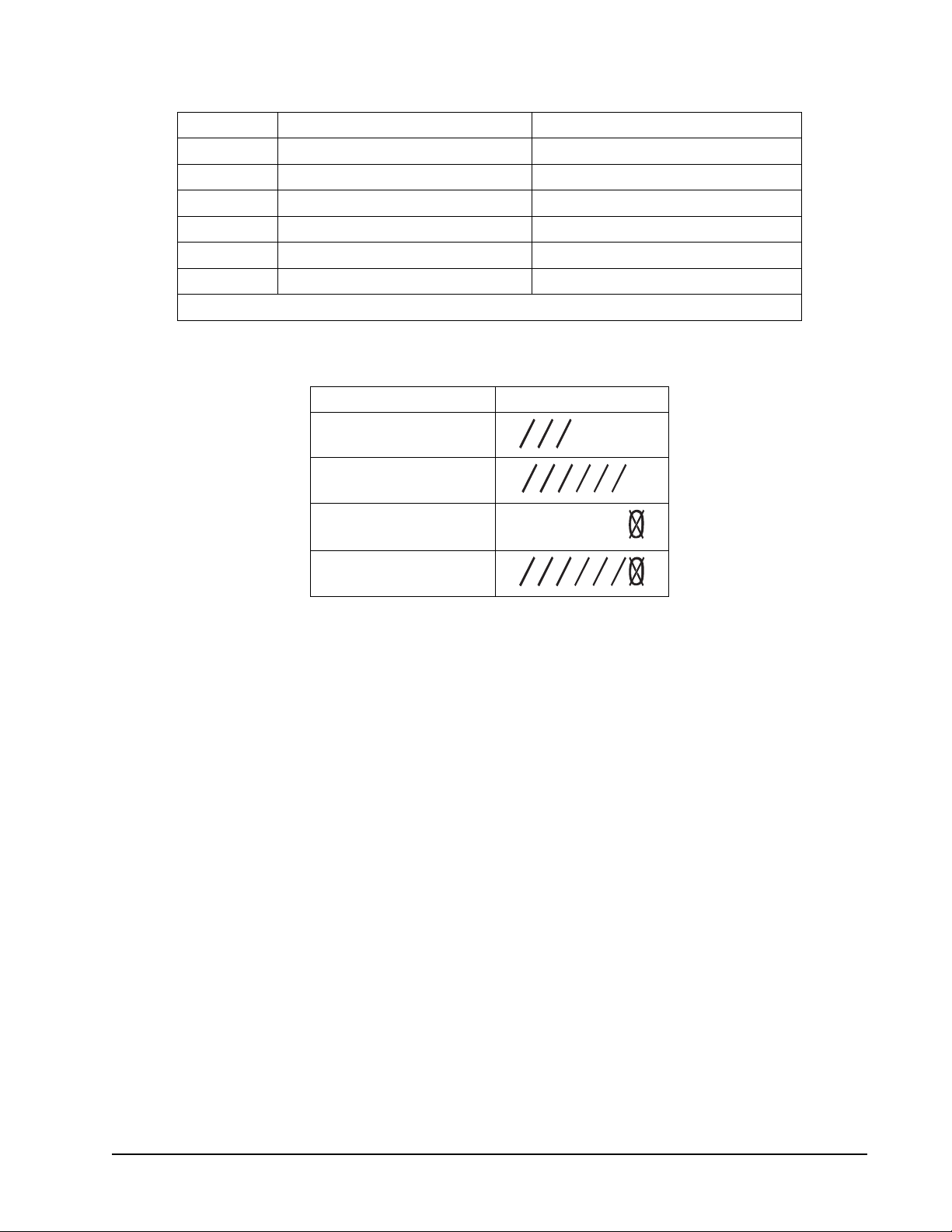
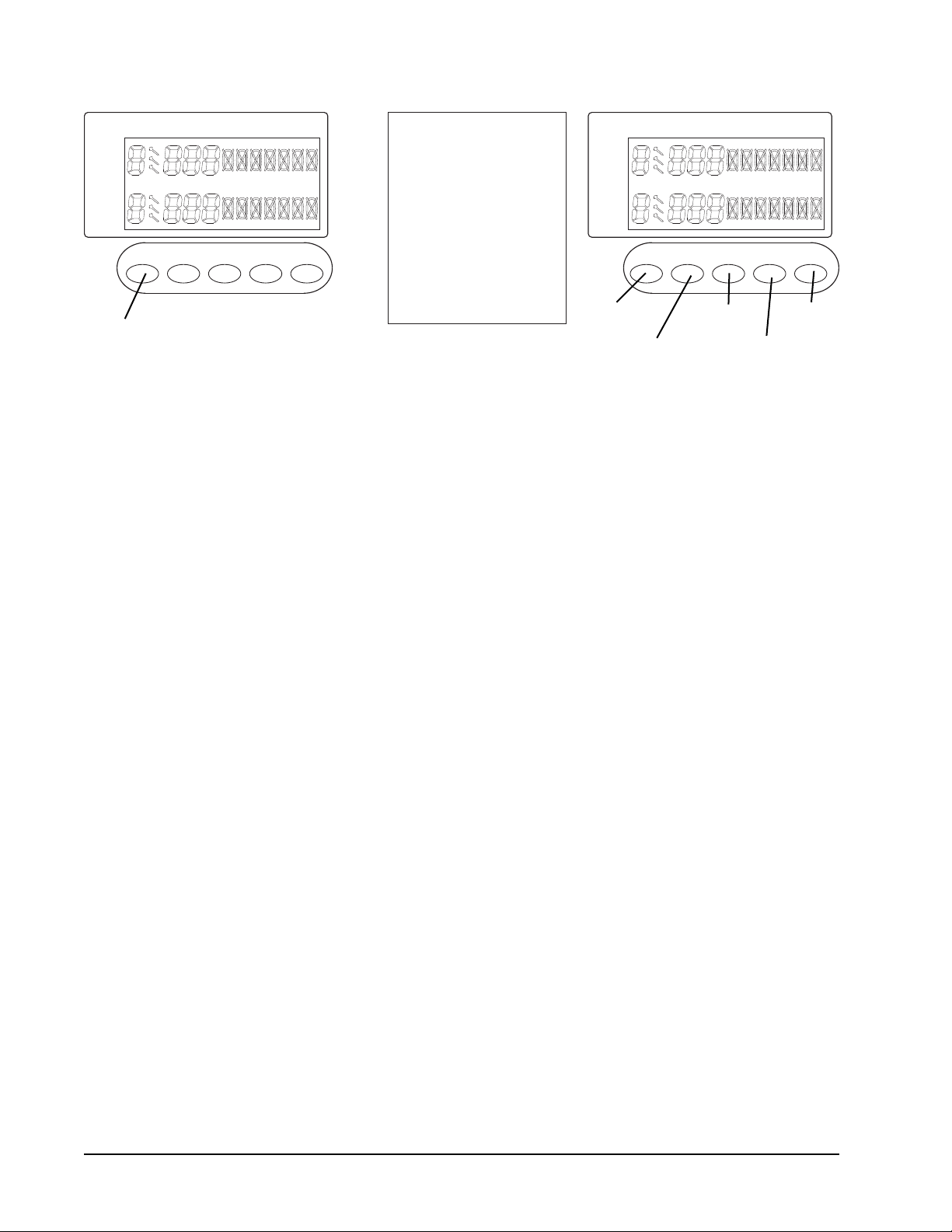
Handicap options L1, L2, L3 and L4 are used in the cricket games to give that player a
head start. The options give marks to a player as if they have already hit the number. The
chart below shows the marks a player starts with for the selected handicap.
Handicap Options Starting Display
L1
L2
20 19
18 17
16 15
B
L3
L4
GLD Products Orion Dartboard
Item 42-1036
161-800-225-7593
www.gldproducts.com
Player
Score Cricket
Player
Number
of Players
Handicap
Game
Options
Game
Menu
On/Off
Player
Score Cricket
Player
Volume
Control
Start Game
LanguageBounce OutDouble Bull
Miss Quick Cricket Next Player
Games
IN OUT IN OUT
Step 11
Step 9Step 10 Step 12
Step 13
Step 14
9. During the game, when the computer announces “next player”, any pressure on the
segments will not activate the dartboard. The player is required to remove all the darts
and press START GAME/NEXT PLAYER for the next player’s round. The dartboard will
automatically switch to the next player if the board has not been played for roughly 10
seconds after the “next player” announcement.
10. Press the DOUBLE BULL/MISS button to score 0 and count the dart when a dart
misses the scoring segments or the board completely.
11. If you throw a dart and it doesn’t stay in the segment and you don’t want to register the
score, press the BOUNCE OUT/QUICK CRICKET button.
12. This board is equipped with 2 languages for announcements. It defaults to English but
you can press the LANGUAGE button at any time to change to Spanish. If you want to
change back to English, simply press the LANGUAGE button one more time.
13. You can control the sound level by pressing the VOLUME CONTROL button.
14. Press and hold the ON/OFF button for 3 seconds to turn off the game. For energy
saving purposes, the board is equipped with an auto power off feature. If the game has
not been played for 30 minutes, the game will turn off automatically.

GLD Products Orion Dartboard
Item 42-1036
17 1-800-225-7593
www.gldproducts.com
GAME DESCRIPTIONS & RULES
G01 Count Up (with scoring options of 100, 200, 300, 400, 500, 600, 700, 800, 900)
Game Options:
Double Bull
Single Bull
The scoring options are the set points which are the points needed to win, see the chart
below.
Scoring Option 100 200 300 400 500 600 700 800 900
Set Points 100 200 300 400 500 600 700 800 900
Refer to the section “Read First - Operation”.
Playing the Game
To win: The ! rst player to reach or go over the set points will be the winner.
• Your score will be accumulated for each dart.
G02 - G07 301, 501, 601, 701, 801, 901
Game Options:
Single In/Single Out
Double In/Single Out
Double In/Double Out
Single In/Double Out
Double Bull
Single Bull
Refer to the section “Read First - Operation”.
Playing the Game
To win: The ! rst player who reaches exactly zero wins.
• The starting score for each player is 301 or the score option selected.
• The score will be deducted for each dart that scores.
• You must go out with the exact number. If you go over zero the dartboard will
announce “TOO HIGH, NEXT PLAYER”.
• For Single In or Single Out options, the game can be started or ended by
throwing at any segment, regardless if single, double or triple.
• If you selected Double In, you must hit a double segment or the double bullseye to
start the game. If you selected Double Out you must hit a double segment or the
double bullseye to end the game.
• After the game is ! nished, the display will show the points per dart (PPD) for each
player.

GLD Products Orion Dartboard
Item 42-1036
181-800-225-7593
www.gldproducts.com
G08 - G13 301 League, 501, 601, 701, 801, 901
Game Options:
Single In/Single Out
Double In/Single Out
Double In/Double Out
Single In/Double Out
Double Bull
Single Bull
Refer to the section “Read First - Operation”.
Playing the Game
To win: A team will win when a player on the team reaches exactly zero and his teammates
score is lower than or equal to the sum of the opposing teams score.
• This game is played by 2 teams who compete with each other.
• Each team for option 2C (default) has 2 members. Team 1 is made up of player 1
and Player 3. Team 2 is made up of Player 2 and Player 4.
• The starting score for each team is 301 or the score option selected.
• If the score of the current player goes below zero it will return to the score from the
beginning of the turn. That team cannot win at that time.
• For Single In or Single Out options, the game can be started or ended by
throwing at any segment, regardless if single, double or triple.
• If you selected Double In, you must hit a double segment or the double bullseye to
start the game. If you selected Double Out you must hit a double segment or the
double bullseye to end the game.
• The team will win when one players score reaches exactly zero and his teammates
score is lower than or equal to the sum of the opposing teams score. Otherwise the
score of the current player returns to the score at the beginning of the turn. That
team cannot win at that time.
GLD Products Orion Dartboard
Item 42-1036
19 1-800-225-7593
www.gldproducts.com
G14 Round The Clock (with scoring options of 105, 110, 115, 120, 205, 210, 215, 220,
305, 310, 315, 320)
Game Options:
The scoring options are the last number that will be thrown and the segment that must be
hit, see the chart below.
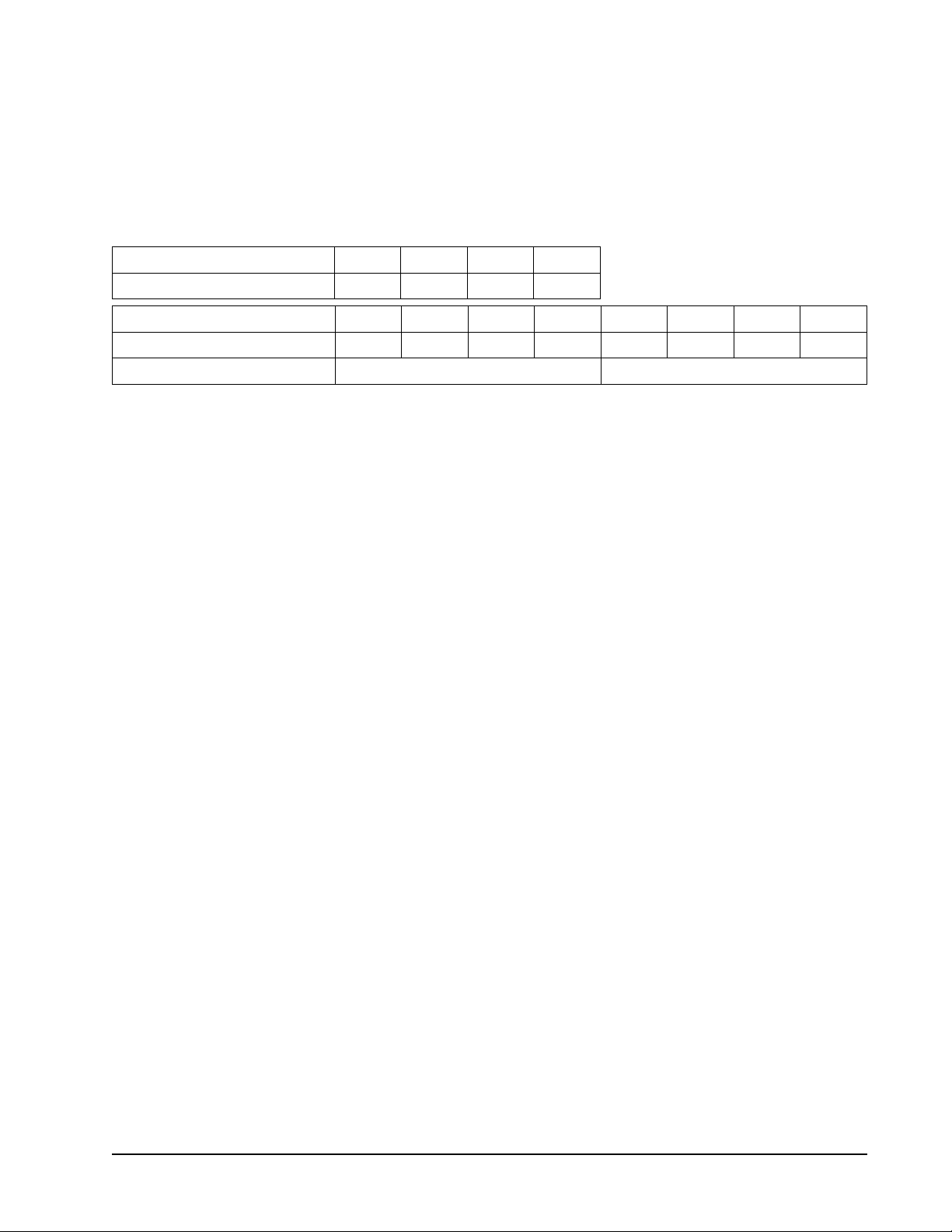
Scoring Option 105 110 115 120
Last Number Thrown 5 10 15 20
Scoring Option 205 210 215 220 305 310 315 320
Last Number Thrown 5 10 15 20 5 10 15 20
Must hit only Double segments Must hit only Triple segments
Refer to the section “Read First - Operation”.
Playing the Game
To win: The ! rst player to hit all the designated numbers in order, wins.
• Players must hit numbers 1 through 5 (or 10, 15, 20) in order.
• The number can be hit in any segment (single, double or triple).
• A player has to hit the designated number to move on to the next number.
• The scoreboard for each player will display the number of the segment that must
be hit.
GLD Products Orion Dartboard
Item 42-1036
201-800-225-7593
www.gldproducts.com
G15 Simple Cricket (with scoring options of 000, 020, 025)
Game Options:
Double Bull
Single Bull
The scoring options are described in the chart below.
Scoring
Options
Description
000 Hit and open numbers 15-20 and bullseye in any order.
020 Hit and open the number 20 ! rst, then in order, open numbers 19, 18, 17, 16,
15 and bullseye.
025 Hit and open bullseye ! rst, then in order, open numbers 15, 16, 17, 18, 19 and 20.
Refer to the section “Read First - Operation”.
Playing the Game
To win: The ! rst player to hit each number 3 times and open them all is the winner.
Note: A single segment counts as one hit, a double segment counts as two hits and a triple
segment counts as three hits.
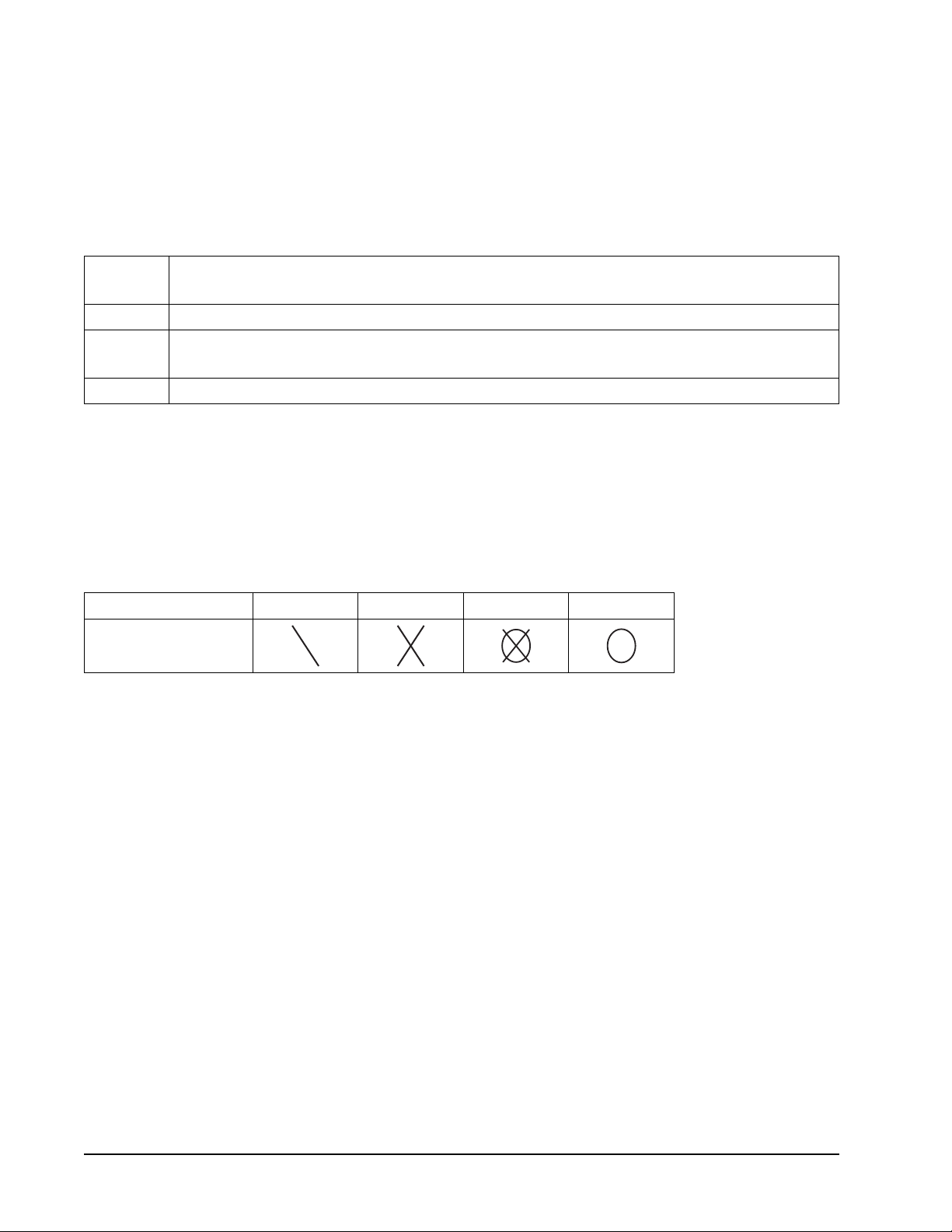
Cricket Status One Time Two Times Open Close
Sign
• In Simple Cricket only the numbers 15-20 and bullseye are used. The ! rst player to
hit each number 3 times and open them all is the winner.
• If every player has opened a number, that number will then close.
• All valid hits will be con! rmed and displayed by the Cricket Display.
GLD Products Orion Dartboard
Item 42-1036
21 1-800-225-7593
www.gldproducts.com
G16 Standard Cricket (with scoring options of C00, C20, C25)
Game Options:
Double Bull
Single Bull
The scoring options are described in the chart below.
Scoring
Options
Description
C00 Hit and open numbers 15-20 and bullseye in any order.
C20 Hit and open the number 20 ! rst, then in order, open numbers 19, 18, 17, 16,
15 and bullseye.
C25 Hit and open bullseye ! rst, then in order, open numbers 15, 16, 17, 18, 19 and 20.
Refer to the section “Read First - Operation”.
Playing the Game
To win: A player wins the game when he ! rst opens all the numbers and has an equal or
greater score than the other players. However, if players are tied on points, or have no
points, the ! rst player to open all numbers wins.
Note: A single segment counts as one hit, a double segment counts as two hits and a triple
segment counts as three hits.
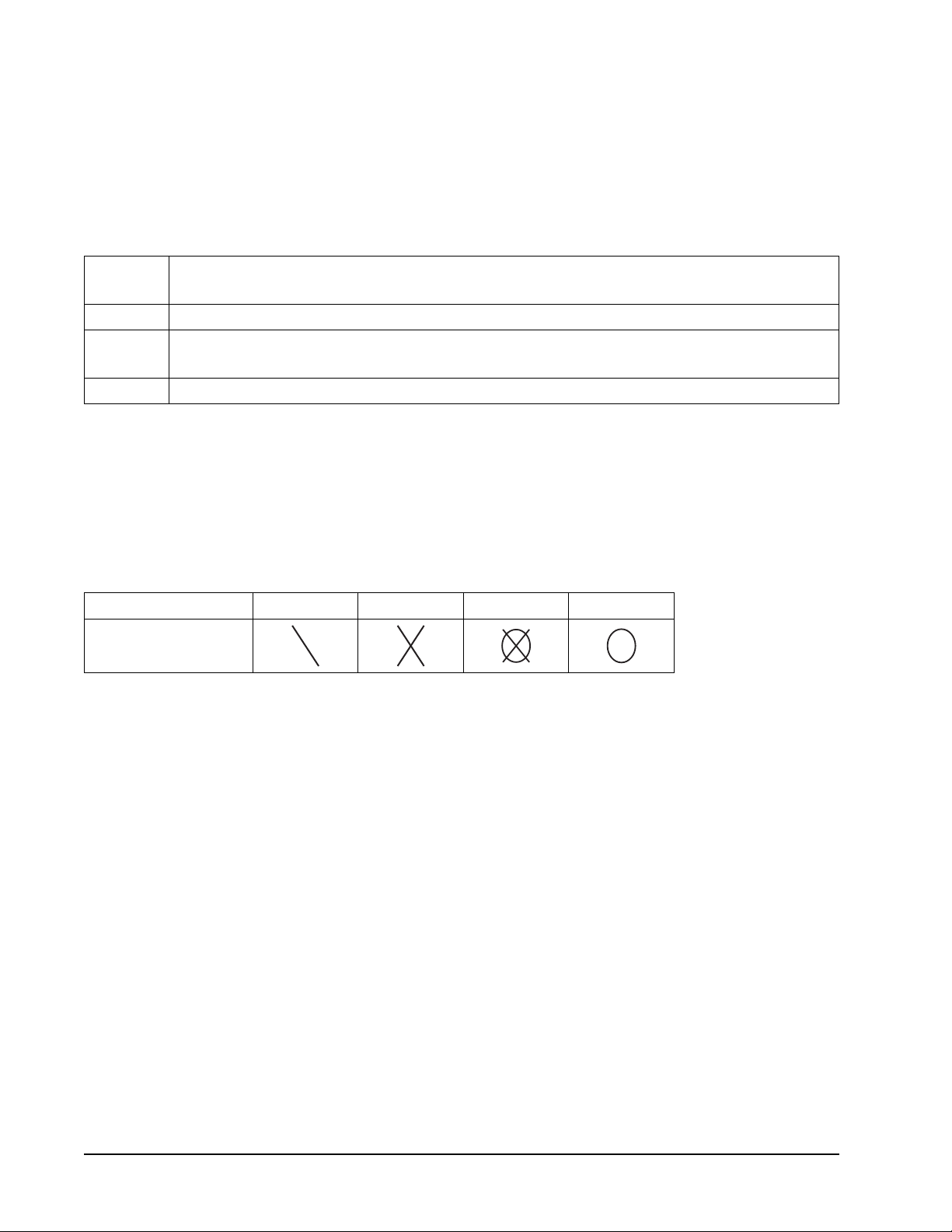
Cricket Status One Time Two Times Open Close
Sign
• In Standard Cricket only the numbers 15-20 and bullseye are used.
• All valid hits will be con! rmed and displayed by the Cricket Display.
• When a number has been hit 3 times by a player, it is then open to that player and
any further hits by that player will score points.
• Once a number has been hit 3 times by all the players, that number is then closed
and can no longer be scored upon by any player. At that time the indicator will
change to closed for that number.
• A player who has opened a number can continue to score on that number until it
becomes closed.
• If a player has opened all numbers ! rst, but is behind on points, scoring continues on
open numbers. If that player has not accumulated the highest point total by the time
another player opens all their numbers, the player with the most points will be the winner.
GLD Products Orion Dartboard
Item 42-1036
221-800-225-7593
www.gldproducts.com
G17 Cut Throat Cricket (with scoring options of 00C, 20C, 25C)
Game Options:
Double Bull
Single Bull
The scoring options are described in the chart below.
Scoring
Options
Description
00C Hit and open numbers 15-20 and bullseye in any order.
20C Hit and open the number 20 ! rst, then in order, open numbers 19, 18, 17, 16,
15 and bullseye.
25C Hit and open bullseye ! rst, then in order, open numbers 15, 16, 17, 18, 19 and 20.
Refer to the section “Read First - Operation”.
Playing the Game
To win: The player who ! rst opens all numbers and has the lower score wins.
Note: A single segment counts as one hit, a double segment counts as two hits and a triple
segment counts as three hits.
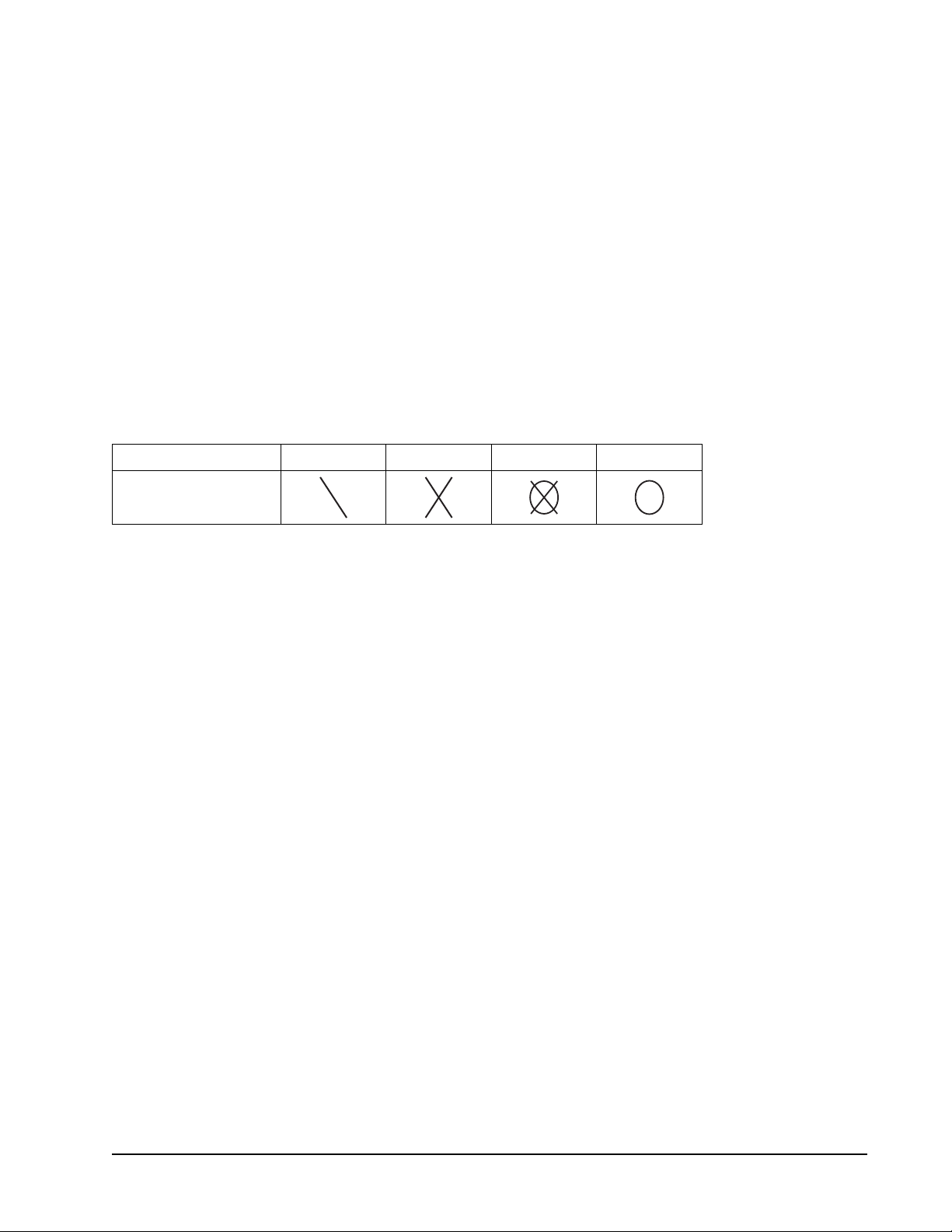
Cricket Status One Time Two Times Open Close
Sign
• In Cut Throat Cricket only the numbers 15-20 and bullseye are used.
• If every player has opened a number, that number will then close.
• All valid hits will be con! rmed and displayed by the Cricket Display.
• Once the scoring begins, points are added to your opponents scores who haven’t
opened that number.
GLD Products Orion Dartboard
Item 42-1036
23 1-800-225-7593
www.gldproducts.com
G18 Scram Cricket
Game Options:
Double Bull
Single Bull
Refer to the section “Read First - Operation”.
Playing the Game
To win: During round 2, if Player 1’s score goes over Player 2’s score the game will end
and Player 1 will be the winner. If Player 2 closes all the numbers and has a higher score
than Player 1, Player 2 will be the winner.
Note: A single segment counts as one hit, a double segment counts as two hits and a triple
segment counts as three hits.
Cricket Status One Time Two Times Open Close
Sign
• All valid hits will be con! rmed and displayed by the Cricket Display.
• The game consists of 2 rounds. In the ! rst round, player 1 must close 15 through
20 and bullseye while player 2 attempts to get as high a score as he can by
scoring on the open numbers. Round 1 will be ! nished when all numbers have
been closed. For round 2, the reverse is done. Player 2 attempts to close 15
through 20 and the bullseye. Player 1 attempts to get a high score.
• During round 2, if Player 1’s score goes over Player 2’s score the game will end
and Player 1 will be the winner. If Player 2 closes all the numbers and has a higher
score than Player 1, Player 2 will be the winner.
GLD Products Orion Dartboard
Item 42-1036
241-800-225-7593
www.gldproducts.com
G19 Hi-Score (with scoring options of H03, H04, H05, H06, H07, H08, H09, H10, H11,
H12)
Game Options:
Double Bull
Single Bull
The scoring options are the number of rounds, see the chart below.
Scoring Option H03 H04 H05 H06 H07 H08 H09 H10 H11 H12
No. of Rounds 3 4 5 6 7 8 9 10 11 12
Refer to the section “Read First - Operation”.
Playing the Game
To win: The player with the highest score at the end of all the rounds wins.
• The rules are simple. A player must rack up the most points in 3, 4, 5...or 12
rounds (each round is 3 darts) to win.
• Doubles and triples count as 2 times and 3 times that number’s score respectively.
• The cricket display will count the rounds.
G20 Shoot Out (with scoring options of -11, -12, -13, -14, -15, -16, -17, -18, -19, -20)
The scoring options are the number of targets you must hit, see the chart below.
Scoring Option -11 -12 -13 -14 -15 -16 -17 -18 -19 -20
No. of Targets 11 12 13 14 15 16 17 18 19 20
Refer to the section “Read First - Operation”.
Playing the Game
To win: The ! rst player who hits the number of correct targets, depending on the option
selected, is the winner.
• The e-BOARD Computer will randomly select a number (target) for the player to
hit.
• One correct hit on a segment of the displayed number subtracts one from the
score.
• Single, double and triple segments all count as one hit.
• If a player does not hit the selected number within 10 seconds, the dart is regarded
as a miss and the e-BOARD Computer will automatically select another random
number for the player to hit for the next dart.
GLD Products Orion Dartboard
Item 42-1036
25 1-800-225-7593
www.gldproducts.com
G21 Shanghai (with scoring options of L01, L05, L10, L15, H01, H05, H10, H15, P01,
P05, P10, P15)
The scoring options are described in the chart below.
Scoring
Option
L01 L05 L10 L15 H01 H05 H10 H15 P01 P05 P10 P15
Game starts
on number
1 5 10 15 1 5 10 15 1 5 10 15
Can hit any segment. Can hit double or triple
segments only.
Board will specify
if target is a double
segment or a triple
segment.
Refer to the section “Read First - Operation”.
Playing the Game
To win: The player who gets the most points at the end of the game wins.
• Each player must hit the numbers and the bullseye in order. Games have changing
start numbers.
• The target number for each turn will change by one, ending with the bullseye.
• The dartboard will display the target number you are supposed to hit.
• Throw 3 darts for each number and the player who gets the most points at the end
of the game wins.
• Your score is the number of the segment you are on.
• Hitting a double segment in the number you are on will double your points, likewise
a triple will triple your points. For example if you are on number 4 and you hit a
single in segment 4 you get 4 points. If you are on number 4 and you hit a double
segment 4 you get 8 points.
GLD Products Orion Dartboard
Item 42-1036
261-800-225-7593
www.gldproducts.com
G22 Double Down
Game Options:
Double Bull
Single Bull
Refer to the section “Read First - Operation”.
Playing the Game
To win: The player with the highest score after the last round is the winner.
• This game starts with a base score of 60 points for each player.
• There are 9 rounds for each player. Each round has a number or segment that you
must hit in order to score.
• The dartboard will display what number you must hit for that round. The designated
numbers for each round are:
Round 1 2 3 4 5 6 7 8 9
Target
Number
15 16 Any
Double
17 18 Any
Triple
19 20 Bullseye
• Each dart that hits the correct number will score points based on the number and
the segment. For example, if you hit number 15 single segment you will get 15
points. If you hit the number 15 double segment you would get 30 points. If you hit
the number 15 triple segment you would get 45 points.
• If the player does not hit the designated number during their round their score is
cut in half and they move on to the next round on their next turn.
• For the Any Double and Any Triple, the player must hit any double or triple
segment. If the doubles and triples are not hit, the player's score is cut in half.
GLD Products Orion Dartboard
Item 42-1036
27 1-800-225-7593
www.gldproducts.com
G23 Forty-One
Game Options:
Double Bull
Single Bull
Refer to the section “Read First - Operation”.
Playing the Game
To win: The player with the highest score after the last round is the winner.
• The sequence for the rounds is reversed from number 20 to the bullseye.
• There are 10 rounds for each player.
• The dartboard will display what number you must hit for that round. The designated
numbers for each round are:
Round 1 2 3 4 5 6 7 8 9 10
Target
Number
20 19 Any
Double
18 17 Any
Triple
16 15 “41”
Points
Bullseye
• The round of 41 points is before the bullseye, and a player must hit any 3
segments totaling 41 to score the 41 points.
• Each dart that hits the correct number will score points based on the number and
the segment. For example, if you hit number 15 single segment you will get 15
points. If you hit the number 15 double segment you would get 30 points. If you hit
the number 15 triple segment you would get 45 points.
• If the player does not hit the designated number during their round their score is
cut in half and they move on to the next round on their next turn.
G24 All Fives (with scoring options of 551, 561, 571, 581, 591)
Game Options:
Double Bull
Single Bull
The scoring options are the total points, see the chart below.
Scoring Option 551 561 571 581 591
Total Points 51 61 71 81 91
Refer to the section “Read First - Operation”.
Playing the Game
To win: The ! rst player to score 51, 61, 71, 81 or 91 points wins.
• During each round the player's total score for that round must be divisible by 5.
Every divisible 5 counts as one point. For instance 2, 8, 5 totals 15. A player will
get 3 points as 15 divided by 5 equals 3. There will be no points if the round of 3
darts' total score is not divisible by 5.
• The e-BOARD Computer will display the best possible hit that will give you the
most points.

GLD Products Orion Dartboard
Item 42-1036
281-800-225-7593
www.gldproducts.com
G25 Big-6 (with scoring options of 3, 4, 5, 6, 7)
The scoring options are the number of lives you start with, see the chart below.
Scoring Option 3 4 5 6 7
No. of Lives 3 4 5 6 7
Refer to the section “Read First - Operation”.
Playing the Game
To win: If a player loses all their lives they are out of the game. The remaining players
continue the game until one player is left with lives. That player is the winner.
• This game allows a player to challenge opponents to hit the targets of the players
choice. The dartboard will display the single 6 segment as the ! rst target. Players
must earn the chance to pick the next target for their opponent by making a hit
on the single 6 target. If they hit the single 6, the dartboard will display - - -. They
can then throw a dart to select the next target. That number and segment then
becomes the target. The scoreboard will display the target. In any turn if the player
does not hit the designated target they lose one life.
• If a player hits the target with the ! rst or second dart, the next dart then determines
the next target and that player's turn is over.
• If a player hits the target with the third dart their turn is over and the board will
create a new target for the next player. A life is not lost.
GLD Products Orion Dartboard
Item 42-1036
29 1-800-225-7593
www.gldproducts.com
G26 Overs (with scoring options of 0-7, 0-8, 0-9)
Game Options:
Double Bull
Single Bull
The scoring options are the number of lives you start with, see the chart below.
Scoring Option 0-7 0-8 0-9
No. of Lives 7 8 9
Refer to the section “Read First - Operation”.
Playing the Game
To win: If a player loses all their lives they are out of the game. The remaining players
continue the game until one player is left with lives. That player is the winner.
• Each player takes a turn throwing 3 darts, the highest score among the players will
become the "leader's score".
• A player's score will become a new "leader's score" if his score in the new turn is
higher than the previous "leader's score". If not, he will lose one life.
• If a leader does not want to challenge and wants to keep his "leader's score", he
can press the NEXT PLAYER button and skip his turn.
• The Cricket Display will show how many "lives": each player has.
• After a player throws, if they do not have a new "leader's score", a life will be lost. If
their score is higher than the "leader's score", then the e-Board computer will keep
his score.
• A leader can choose to proceed to challenge his own "leader's score" but he will
also lose a life if his score is lower than the "leader's score".
• The current "leader's score" is displayed on the e-Board computer between players
turns. If a player loses all their lives, they are out of the game. The remaining
players continue the game until one player is left with lives.
GLD Products Orion Dartboard
Item 42-1036
301-800-225-7593
www.gldproducts.com
G27 Unders (with scoring options of U-7, U-8, U-9)
Game Options:
Double Bull
Single Bull
The scoring options are the number of lives you start with, see the chart below.
Scoring Option U-7 U-8 U-9
No. of Lives 7 8 9
Refer to the section “Read First - Operation”.
Playing the Game
To win: If a player loses all their lives they are out of the game. The remaining players
continue the game until one player is left with lives. That player is the winner.
• Each player takes a turn throwing 3 darts, the lowest score among the players will
become the "leader's score".
• A player's score will become a new "leader's score" if his score in the new turn is
lower than the previous "leader's score". If not, he will lose one life.
• If a leader does not want to challenge and wants to keep his "leader's score", he
can press the NEXT PLAYER button and skip his turn.
• The Cricket Display will show how many "lives": each player has.
• After a player throws, if they do not have a new "leader's score", a life will be lost. If
their score is lower than the "leader's score", then the e-Board computer will keep
his score.
• A leader can choose to proceed to challenge his own "leader's score" but he will
also lose a life if his score is higher than the "leader's score".
• The current "leader's score" is displayed on the e-Board computer between players
turns. If a player loses all their lives, they are out of the game. The remaining
players continue the game until one player is left with lives.
GLD Products Orion Dartboard
Item 42-1036
31 1-800-225-7593
www.gldproducts.com
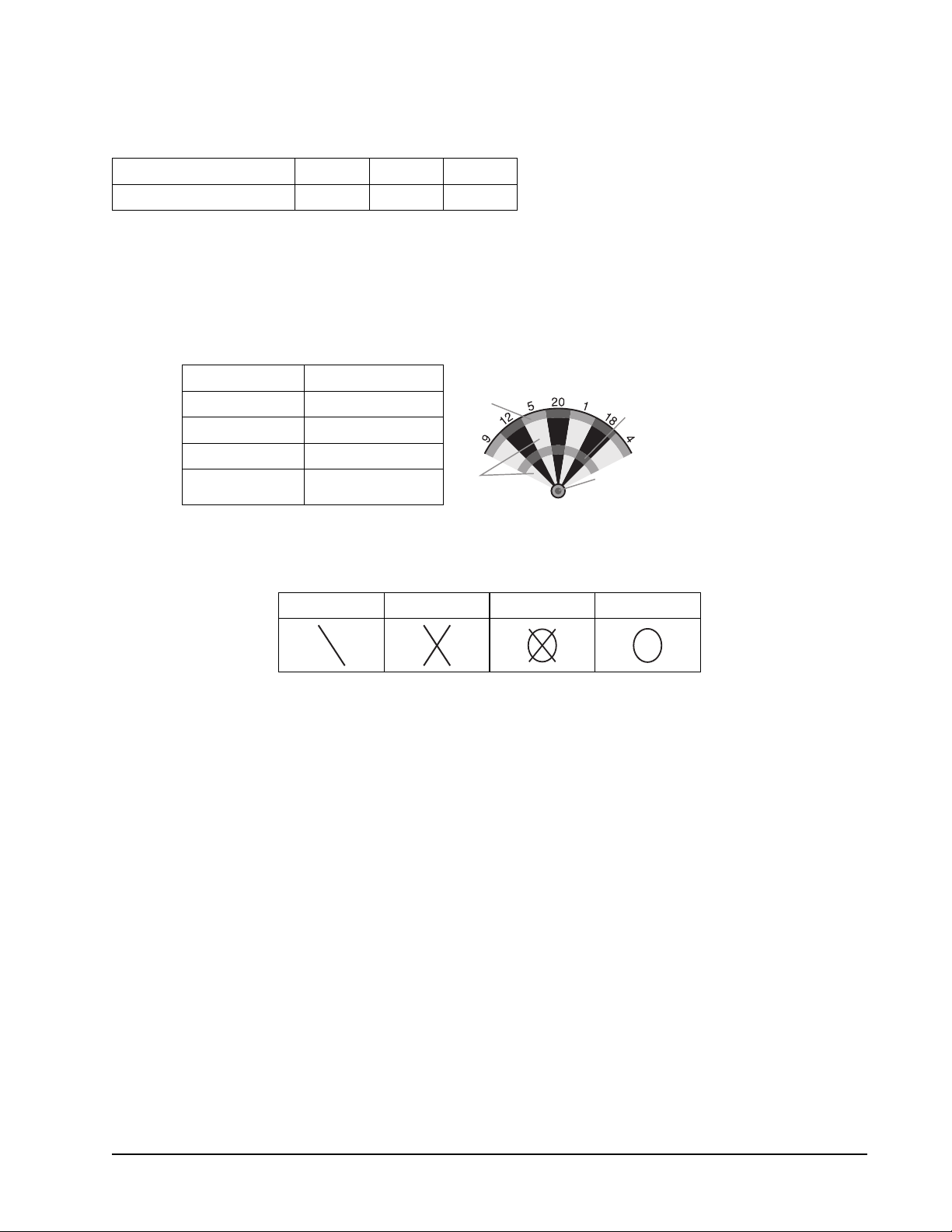
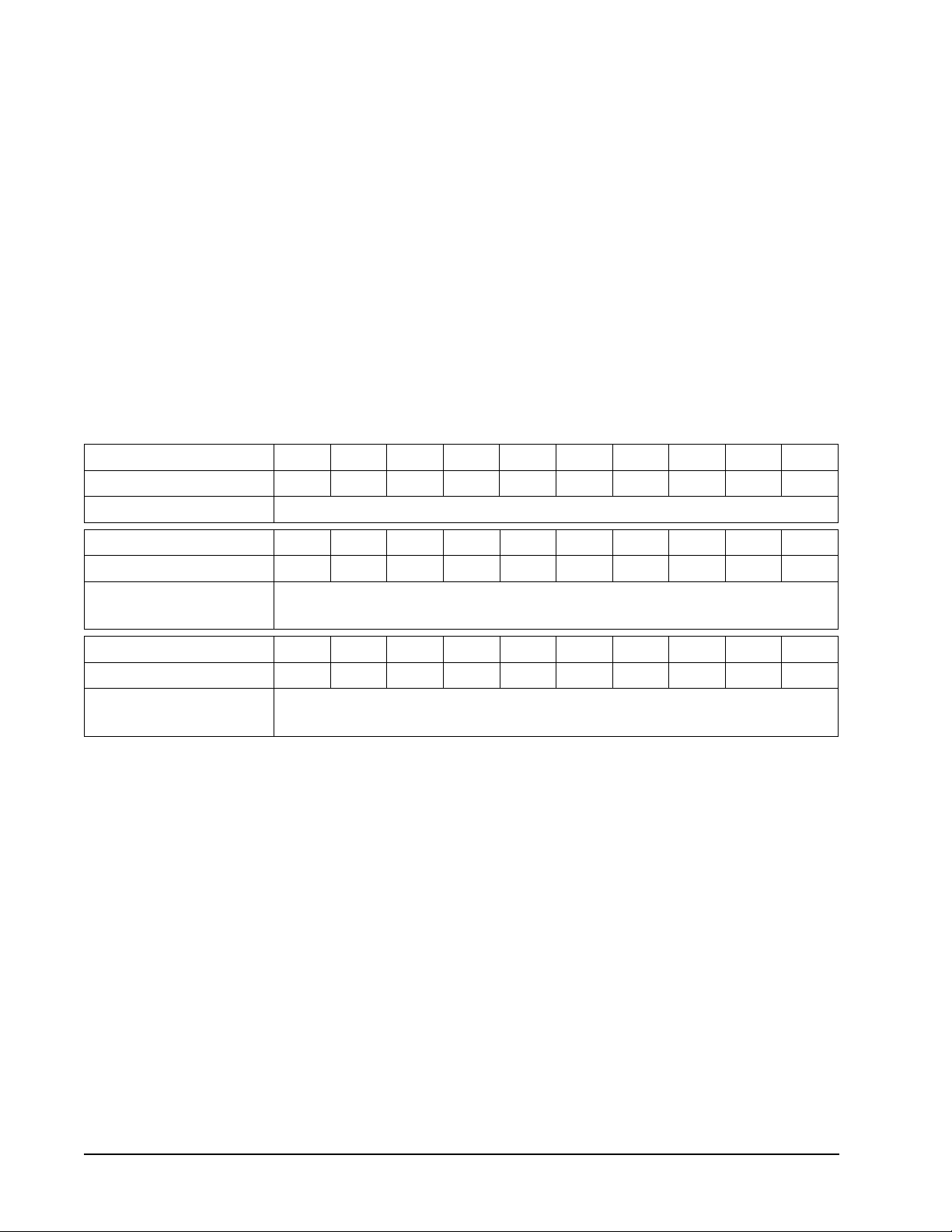
G28 Baseball (with scoring options of b07, b08, b09)
The scoring options are the number of innings, see the chart below.
Scoring Option b07 b08 b09
No. of Lives 7 8 9
Refer to the section “Read First - Operation”.
Playing the Game
To win: The player with the most runs at the end of the game is the winner.
• A baseball ! eld is laid out as shown in the diagram below. A player throws 3 darts
in each inning and the runs/bases are set as follows:
Segments Result
Single One Base
Double
Single
Triple
Bullseye
Double Two Bases
Triple Three Bases
Bullseye Home Run
• A home run can only be scored on the 3rd dart of each turn.
• The LCD display will show what base your “runners” are on and the number of
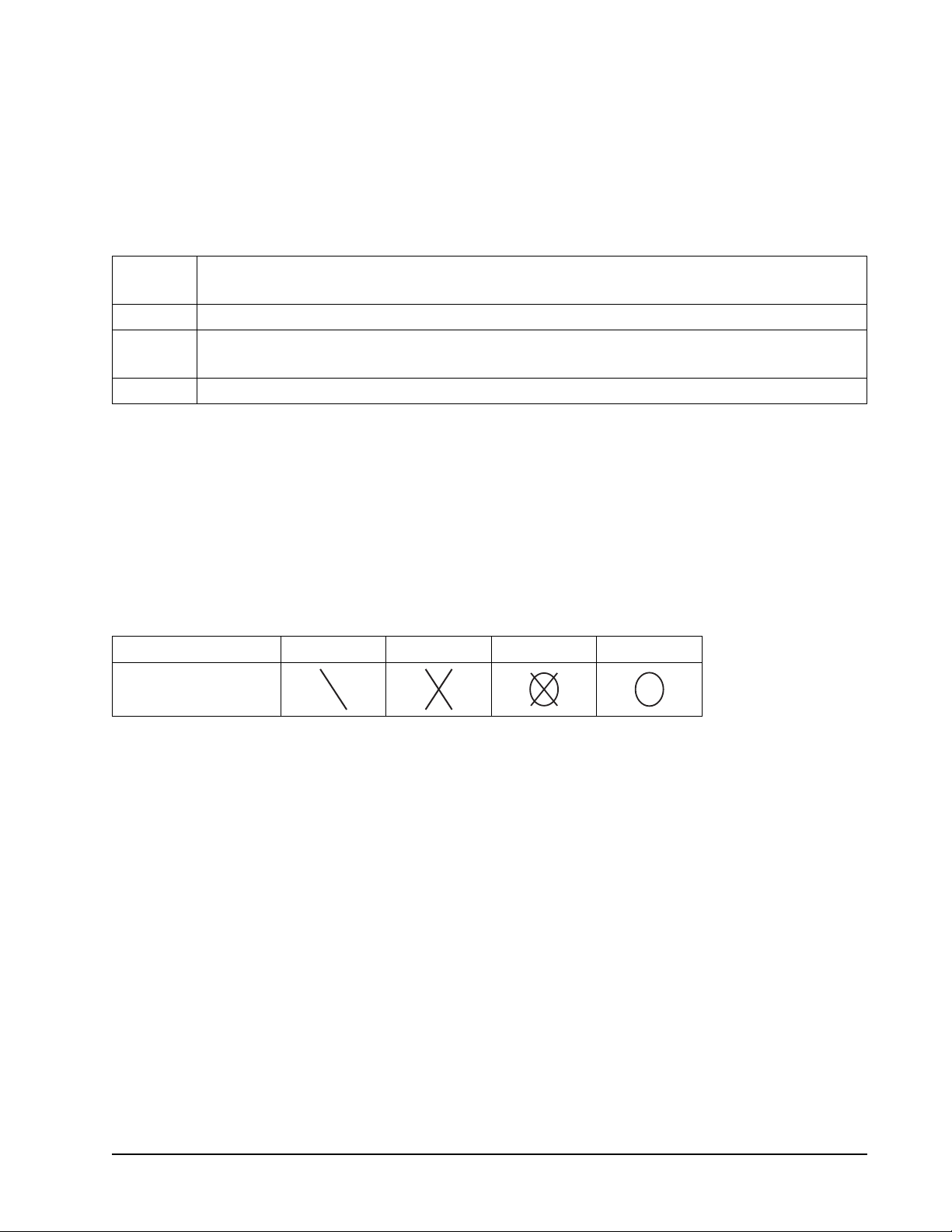
innings left. The table below will show the symbols displayed for the base that your
“runner” is on.
1st Base 2nd Base 3rd Base Home
G29 By 5’s©
Refer to the section “Read First - Operation”.
Playing the Game
To win: The ! rst player to get to 60 is the winner.
• Players score in multiples of 5.
• Start with a dart totaling 5 then a dart of 10 and so on up to 60.
• The display will show the next number that must be scored.
• Score in order 5, 10, 15, 20, 25, 30, 40, 45, 50, 60.
• Doubles and triples must be used to score the higher numbers.
G30 By 10’s©
Refer to the section “Read First - Operation”.
Playing the Game
To win: The ! rst player back to 10 is the winner.
• Same basic game as By 5’s EXCEPT players must score in multiples of 10.
• Start with a 10 then 20 and so on up to 60.
• When 60 is reached, reverse the order and return to 10.
• Score in order 10, 20, 30, 40, 50, 60, 60, 50, 40, 30, 20, 10.
GLD Products Orion Dartboard
Item 42-1036
321-800-225-7593
www.gldproducts.com
G31 By Odds’s©
Refer to the section “Read First - Operation”.
Playing the Game
To win: The ! rst player back to 1 is the winner.
• Same basic game as By 5’s EXCEPT players score with odd numbers.
• Players score starting with 1, then scoring the odd numbers up to 19. when 19 is
reached, reverse the order and return to 1.
• Score in order 1, 3, 5, 7, 9, 11, 13, 15, 17, 19, 19, 17, 15, 13, 11, 9, 7, 5, 3, 1.
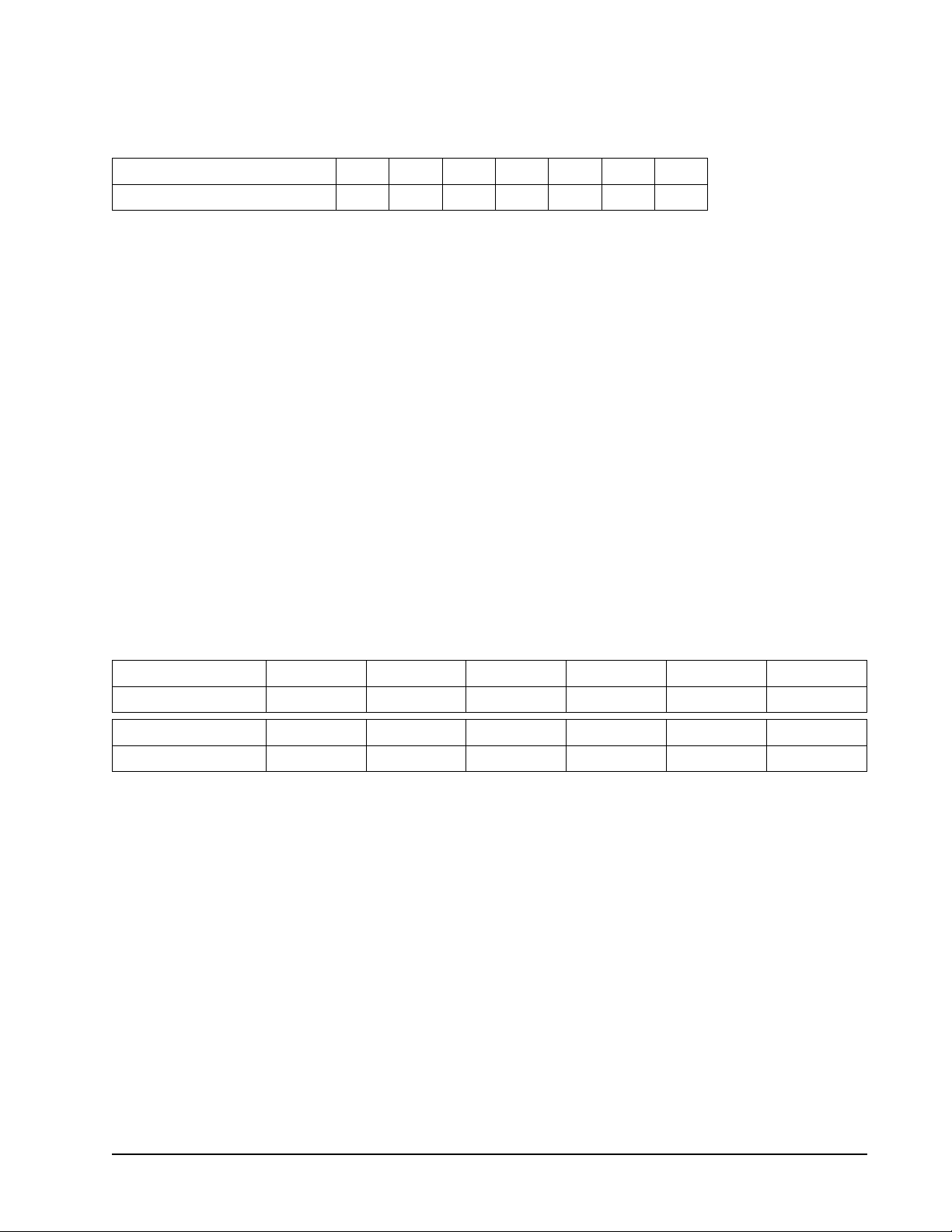
G32 Killer (with scoring options of 003, 005, 007, 009, 011, 013, 015, 017, 019, 021,
203, 205, 207, 209, 211, 213, 215, 217, 219, 221, 303, 305, 307, 309, 311, 313, 315, 317,
319, 321)
The scoring options are the number of lives you have and what segments to hit for a kill,
see the chart below.
Scoring Option 003 005 007 009 011 013 015 017 019 021
No. of Lives 3 5 7 9 11 13 15 17 19 21
Hit Single, Double or Triple to become a killer.
Scoring Option 203 205 207 209 211 213 215 217 219 221
No. of Lives 3 5 7 9 11 13 15 17 19 21
Must hit Doubles only to become a killer.
Single or Triple count as a miss.
Scoring Option 303 305 307 309 311 313 315 317 319 321
No. of Lives 3 5 7 9 11 13 15 17 19 21
Must hit Triples only to become a killer.
Single or Double count as a miss.
Refer to the section “Read First - Operation”.
Playing the Game
To win: The last player with “Lives” will be the winner.
• To start this game, players throw a dart at the dartboard to select their number.
• The dartboard display will show SEL. Select your number by throwing a dart at the
dartboard. The number selected will be used for that player throughout the game.
The number you select will display in your players score display. No two players
can select the same number in one game.
• To become a “Killer”, a player must hit the segment of their selected number.
• Once you become a “Killer” your score display will show a "K" in front of your
selected number during your turn.
• Once you become a “Killer” you can then kill other players by hitting the segments
of the number they picked until all their “Lives” are killed. Each hit can only “Kill”
one “Life” regardless if it is a double or triple.
• Hitting your own number will take away one of your own lives.
• The number of “Lives” remaining will be displayed on the player’s cricket display.
GLD Products Orion Dartboard
Item 42-1036
33 1-800-225-7593
www.gldproducts.com
G33 9 Lives (with scoring options of 003, 004, 005, 006, 007, 008, 009)
The scoring options are the number of lives you start with, see the chart below.
Scoring Option 003 004 005 006 007 008 009
No. of Lives 3 4 5 6 7 8 9
Refer to the section “Read First - Operation”.
Playing the Game
To win: The last player remaining alive is the winner.
• This game plays numbers 1 through 20 and bullseye in a sequence loop. Players
take turns throwing at 1 in the ! rst round, 2 in the second round, and so on, until
“25” in the 21st round, 1 in the 22nd round and so on.
• Each player must hit the target number with one dart in each round.
• The cricket display will keep track of lives remaining.
• A player will lose a life if all 3 darts miss.
G34 Halve-It
Game Options:
Double Bull
Single Bull
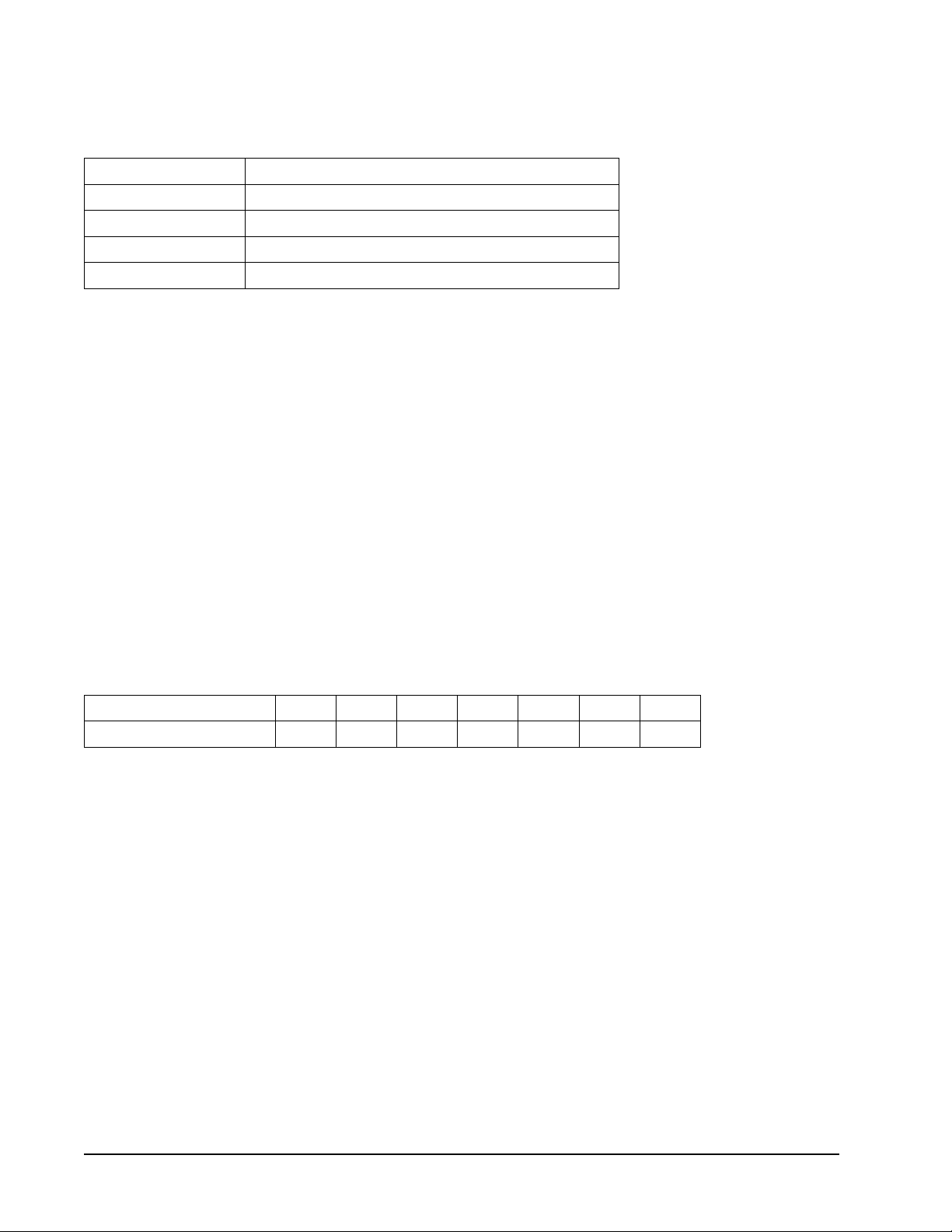
There are twelve rounds of three darts each in this game. Each round has a target number
you must hit to score points. The dartboard will display the number you need to hit for that
round. The target numbers for each round are:
Round 1 2 3 4 5 6
Target Number 12 13 14 Any Double 15 16
Round 7 8 9 10 11 12
Target Number 17 Any Triple 18 19 20 Bullseye
Refer to the section “Read First - Operation”.
Playing the Game
To win: The player with the highest score after all twelve rounds wins.
• Players take turns throwing darts and attempting to score points.
• If you hit the target number for that round, you will get that number in points.
Double segments will double your points and triple segments will triple your points.
For example, in Round 1 you have to hit the number 12. If you hit it in a single
segment you will get 12 points. If you hit the double 12 you will get 24 points and
the triple 12 will give you 36 points.
• For Round 4 you can only score off any double segment.
• For round 8 you can only score off any triple segment and for Round 12 you can
only score by hitting the bullseye.
• If a player misses the designated number on all three darts in a round, their total
score is cut in half.
GLD Products Orion Dartboard
Item 42-1036
341-800-225-7593
www.gldproducts.com
G35 Bingo (with scoring options of 132, 141, 168, 189)
The scoring options are described in the chart below.
Scoring Options Description
132 Hit segments 15, 4, 8, 14, 3 in order.
141 Hit segments 17, 13, 9, 7, 1 in order.
168 Hit segments 20, 16, 12, 6, 2 in order.
189 Hit segments 19, 10, 18, 5, 11 in order.
Refer to the section “Read First - Operation”.
Playing the Game
To win: The player that hits the speci! ed targets three times is the winner.
• The player should hit a number segment three times to enter into the next number
segment.
• Hitting the single segment counts as one time; the double segment counts as two
times; the triple segment counts as three times.
• The cricket display will keep track of the correct hits.
G36 21 Points (with scoring options of 005, 006, 007, 008, 009, 010, 011)
Game Options:
Double Bull
Single Bull
The scoring options are the number of rounds, see the chart below.
Scoring Option 005 006 007 008 009 010 011
No. of Rounds 5 6 7 8 9 10 11
Refer to the section “Read First - Operation”.
Playing the Game
To win: After the game is over, the player with the most marks wins the game.
• The object of this game is to get the most marks. A player can get one mark in two
ways:
1. Gets 21 points exactly with 1, 2 or 3 darts, or
2. Has the highest points up to 21 points (if no one gets 21 points in this round)
• The player will ‘bust’ when a score is over 21 points and the player cannot get a
mark.
• The cricket display keeps track of the rounds that are remaining.
GLD Products Orion Dartboard
Item 42-1036
35 1-800-225-7593
www.gldproducts.com
G37 Nine-Dart Century (with scoring options of 100, 150, 200)
Game Options:
Double Bull
Single Bull
The scoring options are the target score, see the chart below.
Scoring Option 100 150 200
Target Score 100 Points 150 Points 200 Points
Refer to the section “Read First - Operation”.
Playing the Game
To win: The player that gets closest to the Target Score without going over is the winner.
• In this game each player has 9 darts (three turns) to score 100 (or 150, 200) points
without going over, or get as close as possible.
• If you go over you are out of the game. The dartboard will announce “TOO HIGH”.
• Darts that land outside the scoring area will reset your score back down to zero.
Press the MISSED DART button.
• Darts that bounce out are not penalized and do not count for any points.
• The number on the dartboard that you hit will be your score.
• A double segment is worth double points and a triple is worth triple.
G38 Best of Nine (with scoring options of 009, 012, 015, 018, 021)
Game Options:
Double Bull
Single Bull
The scoring options are the number of darts thrown, matched with the number of rounds for
the game, see the chart below.
Scoring Option 009 012 015 018 021
No. of Darts/Rounds 9/3 12/4 15/5 18/6 21/7
Refer to the section “Read First - Operation”.
Playing the Game
To win: The player with the highest score at the end of the game wins.
• The dartboard will announce “PLAYER 1” and display a number for you to hit.
• The target number will change before each turn.
• Each player will take a turn throwing three darts.
• The object is to hit your assigned number.
• For every single segment hit in your number you will get one point. For every
double segment hit in your number you will get two points and for every triple
segment hit in your number you will get three points.
• The cricket display will count down how many rounds you have left.
GLD Products Orion Dartboard
Item 42-1036
361-800-225-7593
www.gldproducts.com
G39 Hound and Hare (with scoring options of 005, 012, 009, 014, 011)
Game Options:
Double Bull
Single Bull
The scoring options are the Hound starting number, see the chart below.
Scoring Option 005 012 009 014 011
Number Hound Starts At 5 12 9 14 11
Refer to the section “Read First - Operation”.
Playing the Game
To win: If the “Hound” (Player 2) hits the same double number that the “Hare” (Player 1) is
trying to hit, the “Hound” wins. If the “Hare” (Player 1) makes it back around the dartboard
to the double 20, the “Hare” wins.
• The “Hare” (Player 1) tries to escape from the “Hound” (Player 2) while the
“Hound” tries to catch the “Hare”.
• The “Hare” (Player 1), starts at the double 20.
• The dartboard will display what number you must hit.
• Only the double segments are used in this game.
• The “Hare” (Player 1) must hit the double 20 to move clockwise to the next
number. The “Hound” (Player 2) will start at the double 5 (or 12, 9, 14, 11)
segment. The “Hound” (Player 2) must hit the double 5 (or 12, 9, 14, 11) segment
to move clockwise to the next number.
• The players continue to take turns throwing darts and moving around the
dartboard.
• The object is for the “Hound” to catch up to the “Hare”.
G40 Shooting I
Game Options:
Double Bull
Single Bull
Refer to the section “Read First - Operation”.
Playing the Game
To win: Winner is the ! rst one to win 7 rounds.
• In this game, each player throws three darts. The player with the highest 3 dart
total wins that round.
• Double segments count as double the points and triple segments count as triple
the points.

GLD Products Orion Dartboard
Item 42-1036
37 1-800-225-7593
www.gldproducts.com
G41 Shooting II
Game Options:
Double Bull
Single Bull
Refer to the section “Read First - Operation”.
Playing the Game
To win: Winner is the ! rst one to win 7 rounds.
• In this game, each player throws three darts. The player with the highest 3 dart
total wins that round.
• Only darts that land in the single, double or triple areas of the following Target Area
numbers will count towards the score: 15, 16, 17, 18, 19, 20 and bullseye.
• The cricket display will keep track of the rounds the player has won.
• Double segments count as double the points and triple segments count as triple
the points.
G42 Shooting III
Game Options:
Double Bull
Single Bull
Refer to the section “Read First - Operation”.
Playing the Game
To win: The game lasts 7 rounds and the winner is the ! rst one who won 4 rounds within 7
rounds or who won the most rounds after 7 rounds.
• In this game, each player throws three darts. The player with the highest 3 dart
total wins that round.
• Double segments count as double the points and triple segments count as triple
the points.

GLD Products Orion Dartboard
Item 42-1036
381-800-225-7593
www.gldproducts.com
G43 Shooting IV
Game Options:
Double Bull
Single Bull
Refer to the section “Read First - Operation”.
Playing the Game
To win: The game lasts 7 rounds and the winner is the ! rst one to win 4 rounds within 7
rounds or who won the most rounds after 7 rounds.
• In this game, each player throws three darts. The player with the highest 3 dart
total wins that round.
• Only darts that land in the single, double, or triple areas of the following Target
Area numbers will count towards the score: 15, 16, 17, 18, 19, 20, bullseye.
• Double segments count as double the points and triple segments count as triple
the points.

GLD Products Orion Dartboard
Item 42-1036
39 1-800-225-7593
www.gldproducts.com
ONE YEAR LIMITED WARRANTY
The Manufacturer warrants to the original retail purchaser that this product is free from
defects in material and workmanship under normal use and conditions for a period of one
year from the date of original purchase. The Manufacturer’s liability is limited to the repair
or replacement, at its option, of any defective product and shall not include any liability for
indirect, incidental or consequential damages of any kind.
Should this product become defective due to material or workmanship within the warranty
period, contact our Customer Service Department. This warranty is not transferable and
does not cover normal wear and tear or damage caused by improper usage, negligence,
misuse, abuse, transportation damage, acts of nature, or accident (including failure to
follow the instructions in this manual). It does not cover expendable items such as batteries,
light bulbs, fuses, accessories, cosmetic parts and other items that wear out due to normal
usage, including felt covered areas of the playing surface. This warranty is also void if the
product is disassembled and reassembled, damaged, modi! ed from its original state, or
used for other than indoor personal residential use (no commercial or rental applications).
This warranty gives you speci! c legal rights, and you may have other rights which vary from
state to state.
IF YOU HAVE A WARRANTY CLAIM, CALL US FIRST (8 - 4:30 CST):
Please have your receipt and item number (found on the front cover) when you call.
GLD Products
S84 W19093 Enterprise Drive
Muskego, WI 53150 USA
1-800-225-7593
Fax: 1-800-841-6944
Email: gld@gldmfg.com
Web: www.gldproducts.com
If you are instructed to return the product for service, you are responsible for
shipping the unit at your expense to the above address in packaging that will
protect against further damage. All warranty or repair requests require a Return
Authorization Number prior to returning the item.
PRODUCT REGISTRATION
Important: The product registration form on page 41 must be completed and returned
along with a copy of your receipt within 10 days of purchase to validate your warranty.
On-line registration is also available.
Go to
http://www.gldproducts.com/index.php/registration or click on this link. Follow the
on-line instructions.
Cross Refrence
warranty

This page left intentionally blank.
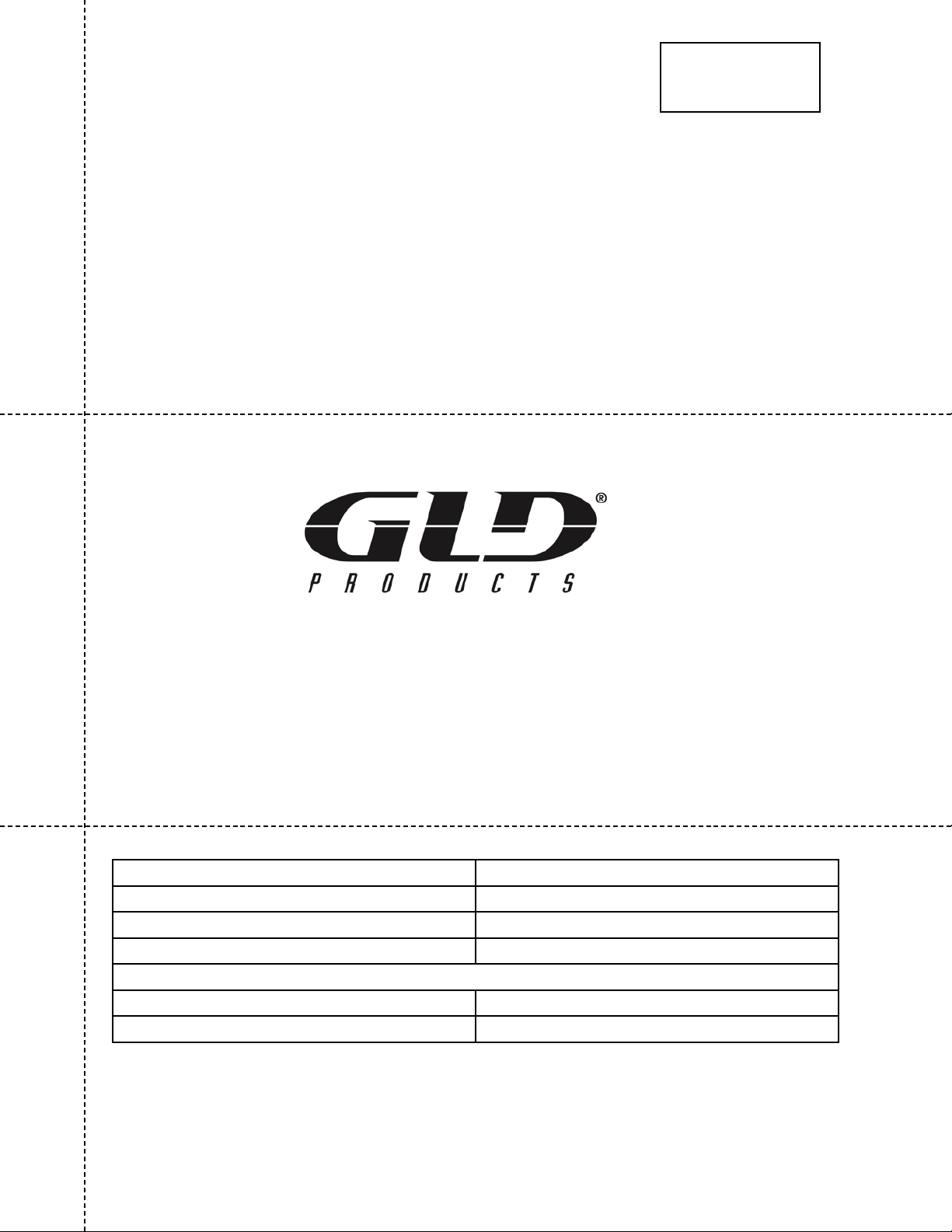
REGISTER YOUR PRODUCT
Complete this form, include a copy of your receipt, fold, tape
(do not staple) and return within 10 days of purchase. This
protects your warranty and will help us develop new products!
GLD Products
Warranty Department
S84 W19093 Enterprise Drive
Muskego, WI 53150 USA
Place postage here
GAME TABLES
GAMES AND ACCESSORIES
BILLIARD ACCESSORIES
SOFT-TIP DARTS
FLIGHTS AND SHAFTS
HOME CASINO
BILLIARD CUES
DARTBOARDS
STEEL-TIP DARTS
DART CASES AND ACCESSORIES
www.gldproducts.com
Name Date of Purchase
Address Phone-Day
City Phone-Evening
State Zip Email
Purchase Price: Item: 42-1036 Orion Electronic Dartboard
Store Name:
Remember to attach a copy of your receipt.
Cut here.
Fold here second.
Fold here • rst.
Cross Refrence Product
Reg

This page left intentionally blank.
GLD Products
S84 W19093 Enterprise Drive
Muskego, WI 53150 USA
1-800-225-7593 • FAX 800-841-6944
Email: [email protected]
Web Site: www.gldproducts.com
Mail To:
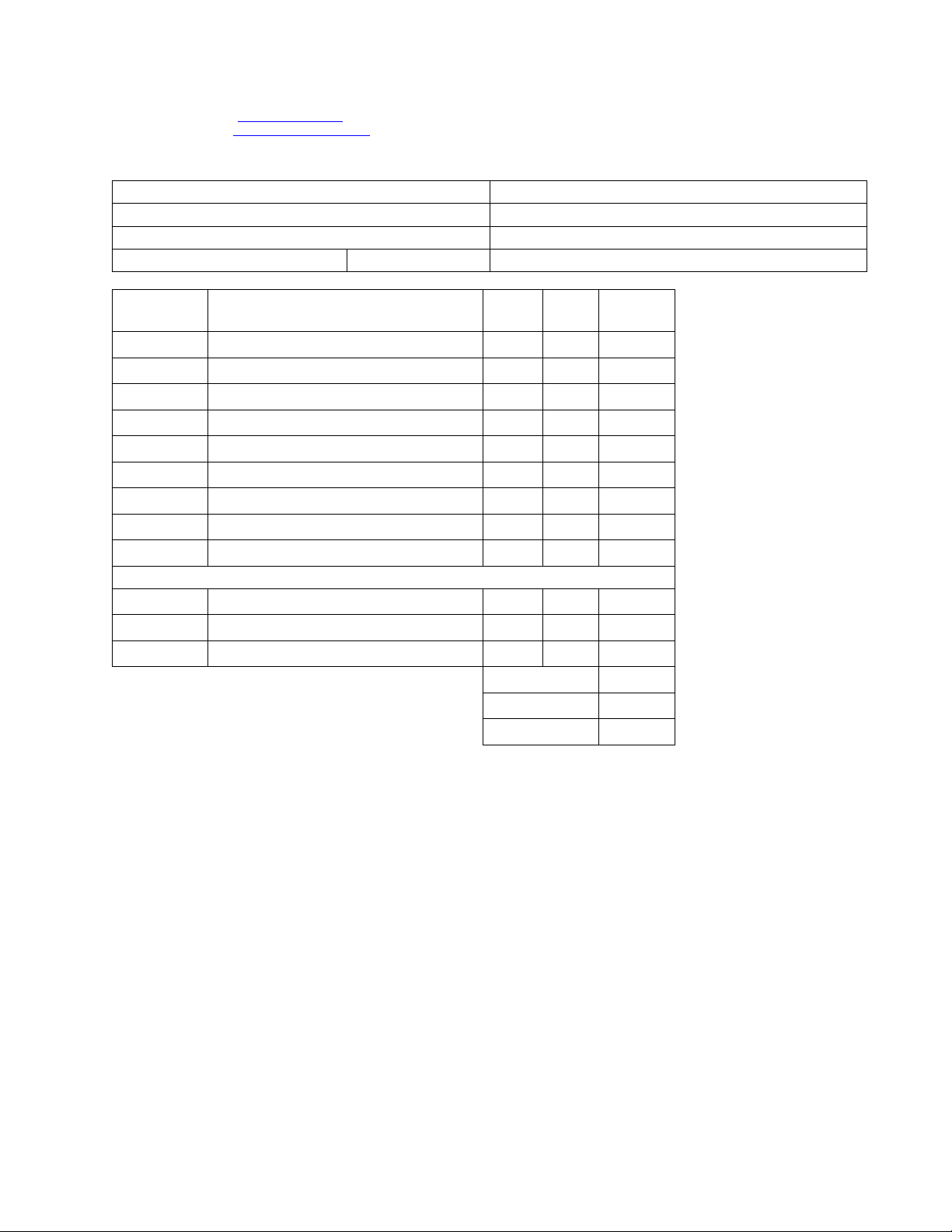
Parts Re-Order Form
Name Date
Address Phone-Day
City Phone-Evening
State Zip Email
Order No. Description
Unit
Price
Qty.
Total
Amount
42-9987 1000 mA Adapter Positive Outer 10.00
6-44 2 Piece Bullseye, Nylon 15.00
6-47 Pie Section, Black and Red Segments, Nylon 20.00
6-48 Pie Section, Grey and Red Segments, Nylon 20.00
6-15 Set of 3 Soft Tip Darts 5.00
37-1652-01 Tips, 100 pcs 4.99
6-38 Aluminum Shafts 3 pc 3.00
6-11 Mounting Hardware 3.00
6-14 Flights 3 pc, designs vary 1.50
Accessories
37-0025 Viper LaserLite Mini Laser Throw Line 24.99
37-0125 Viper Bull Throw Line 6.29
37-0106 Viper Vinyl Dart Mat 95.99
Subtotal
Shipping will be added. If paid by Check or Money Order, call for quote.
S/H
5.1% Waukesha Wisconsin tax will apply (subject to change).
Tax
Orion Dartboard
Item 42-1036
Cross Refrence Parts
order
NOTE: After a product has been discontinued for a period of one year, GLD will not
guarantee that replacements parts are available.
parts ordering page

Total
Method of Payment
Check or Money Order
Credit Card
Visa MasterCard Discover American Express
Card #
Security Code # Billing Address Zip code
Signature Exp. Date
Shipping Address
Name
Address Phone
City State Zip
GLD Products Orion Dartboard
Item 42-1036

www.gldproducts.com
GAME TABLES
HOME CASINO
GAMES AND ACCESSORIES
BILLIARD CUES
BILLIARD ACCESSORIES
DARTBOARDS
SOFT-TIP DARTS
STEEL-TIP DARTS
FLIGHTS AND SHAFTS
DART CASES AND ACCESSORIES

S84 W19093 Enterprise Drive • Muskego, WI 53150 USA
262.679.8730 or 1.800.225.7593 tele
262.679.8738 or 1.800.841.6944 fax
Email: [email protected]
www.gldproducts.com
PROUD MANUFACTURER OF
Quick Reference For Orion Dartboard Item 42-1036
Game Name Handicap Options
In/Out
Single/Double
Bullseye
Single/DBL
G01 Count Up +20, +40, +60, +80 Scores N/A Yes
G02 301 -20, -40, -60, -80 Scores Yes Yes
G03 501 -20, -40, -60, -80 Scores Yes Yes
G04 601 -20, -40, -60, -80 Scores Yes Yes
G05 701 -20, -40, -60, -80 Scores Yes Yes
G06 801 -20, -40, -60, -80 Scores Yes Yes
G07 901 -20, -40, -60, -80 Scores Yes Yes
G08 301 League -20, -40, -60, -80 Scores Yes Yes
G09 501 League -20, -40, -60, -80 Scores Yes Yes
G10 601 League -20, -40, -60, -80 Scores Yes Yes
G11 701 League -20, -40, -60, -80 Scores Yes Yes
G12 801 League -20, -40, -60, -80 Scores Yes Yes
G13 901 League -20, -40, -60, -80 Scores Yes Yes
G14 Round The Clock N/A N/A Yes
G15 Simple Cricket L1, L2, L3, L4 N/A Yes
G16 Standard Cricket L1, L2, L3, L4 N/A Yes
G17 Cut Throat Cricket L1, L2, L3, L4 N/A Yes
G18 Scram Cricket N/A N/A Yes
G19 Hi Score +20, +40, +60, +80 Scores N/A Yes
G20 Shoot Out +1, +2, +3, +4 Scores N/A N/A
G21 Shanghai +20, +40, +60, +80 Scores N/A N/A
G22 Double Down +20, +40, +60, +80 Scores N/A Yes
G23 Forty-One +20, +40, +60, +80 Scores N/A Yes
G24 All Fives N/A N/A Yes
G25* Big 6 -1, -2, -3, -4 Lives N/A N/A
G26* Over -1, -2, -3, -4 Lives N/A Yes
G27* Under -1, -2, -3, -4 Lives N/A Yes
G28 Baseball N/A N/A N/A
G29 By 5's© N/A N/A N/A
G30 By 10's© N/A N/A N/A
G31 By Odd's© N/A N/A N/A
G32* Killer -1, -2, -3, -4 Lives N/A N/A
G33* 9 lives -1, -2, -3, -4 Lives N/A N/A
G34 Halve-It +20, +40, +60, +80 Scores N/A Yes
G35 Bingo N/A N/A N/A
G36 21 Points +1, +2, +3, +4 Scores N/A N/A
G37 Nine Dart Century N/A N/A Yes
G38 Best of Nine N/A N/A Yes
G39 Hound and Hare N/A N/A Yes
Quick Reference For Orion Dartboard Item 42-1036
IF SELECTING OPTION THEN
No icons are lit up Single In/Single Out
IN icon lit up Double In/Single Out
OUT icon lit up Single In/Double Out
IN and OUT icons lit up Double In/Double Out
Game Name Handicap Options
In/Out
Single/Double
Bullseye
Single/DBL
G40 Shooting I N/A N/A Yes
G41 Shooting II N/A N/A Yes
G42 Shooting III N/A N/A Yes
G43 Shooting IV N/A N/A Yes
*The minimum lives selection must be -3 for these games.