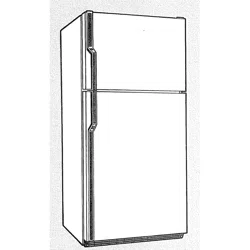
Use & Care Guide
Manual de Usa y Cuidado
Guide d'utilisation et d'entretien
English / Espa_ol / Francois
ModelsiModelosiMod@les: 253,6000_%6002 _,6008_%6011_ 6030_%6031_
6038_%6040_%6041_, 6050 _, 6060 _,6062 _,7030_%7040 _,7050 _, 7060 _,
7062 _,7063 _
_ J_ @
Refrigerador Superior
R@fri rateur @compartiments superpos@s
::::::::::Color i_urr'r_ber,nOmere de color, le r_urr'r_@rode couleurr r
P/N A01265002 (1409)
Sears Brands Management Corporation
Hell:man Estates, IL 60179 U_S_A_
W _V _V_kenmore_com
www.sears.com
Sears Canada inc.
Toronto, Ontario, Canada M5B 2C3
www.sears.ca
Record Model/Serial
Numbers
Pmease read and save these
instructions.
This Use & Care Guide provides specific
operating instructions for your modek Use
your unit onUy as instructed in this guide.
These instructions are not meant to cover
every possibUe condition and situation
that may occur. Common sense and
caution must be practiced when installing,
operating, and maintaining any appliance.
Please record your model and serial
numbers beJow for future reference. This
information is found on the serial plate
boated inside the refrigerator compartment.
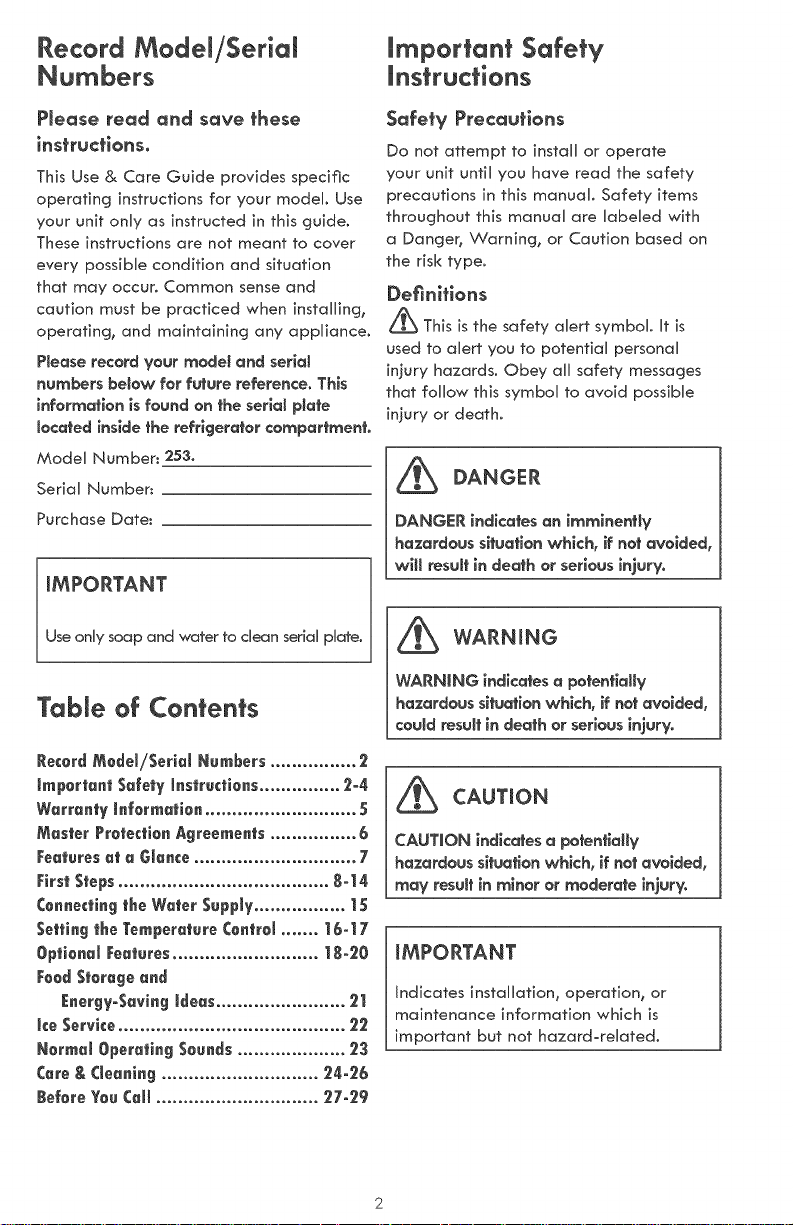
Model Number: 253°
Serial Number:
Purchase Date:
mMPORTANT
Use only soap and water to clean serial plate.
Table of Con_en_s
important Safety
instructions
Safety Precautlons
Do not attempt to install or operate
your unit until you have read the safety
precautions in this manual. Safety items
throughout this manual are labeled with
a Danger, Warning, or Caution based on
the risk type.
Definitions
_This is the safety alert symbol. It is
used to alert you to potential personal
injury hazards. Obey all safety messages
that follow this symbol to avoid possible
injury or death.
DANGER
DANGEr{ indicates an imminently
hazardous situation which, if not avoided,
will result in death or serious injury.
_b WARNING
WAr{NING indicates a potentially
hazardous situation which, if not avoided,
could result in death or serious injury.
CAUTION
CAUTION indicates a potentially
hazardous situation which, if not avoided,
may result in minor or moderate injury.
iMPORTANT
Indicates installation, operation, or
maintenance information which is
important but not hazard_related.
important Safety instructions
_ WARNING
PJease read aH safety (ns)ruc_iens
before us(rigyour new appi(ance.
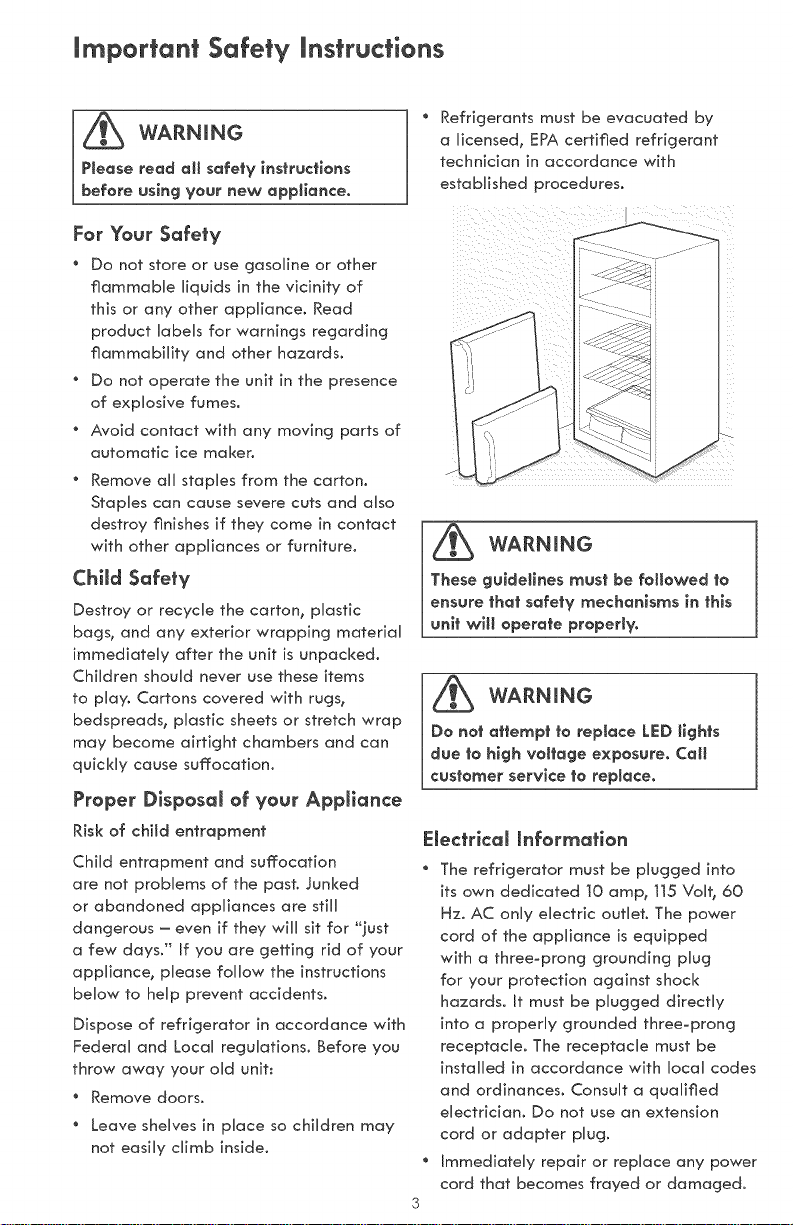
" Refrigerants must be evacuated by
a (icensed, EPA certified refrigerant
technician in accordance with
established procedures_
For Your Sofe)y
oDonotstoreorusegoso,neorother
flammabUe (iqu(ds (n the vicinity of
this or any other appliance. Read
product labels for warnings regarding
flammability and other hazards.
" Do not operate the unit in the presence
of explosive fumes.
" Avoid contact w(th any moving parts of
automatic ice maker.
" Remove a((stap(es from the carton.
Staples can cause severe cuts and a(so
destroy finishes if they come in contact
with other appliances or furniture.
Child Safety
Destroy or recycle the carton, p(astic
bags, and any exterior wrapping material
immediately after the unit is unpacked.
Children should never use these items
to play. Cartons covered with rugs,
bedspreads, plastic sheets or stretch wrap
may become airtight chambers and can
quickly cause suffocation.
Proper Disposa( of your App(icmce
Risk of child entrapment
Child entrapment and suffocation
are not problems of the past. Junked
or abandoned appliances are still
dangerous - even if they will sit for _']ust
a few days." if you are getting rid of your
appliance, please follow the instructions
below to help prevent accidents.
Dispose of refrigerator in accordance with
Federal and Local regu(ations. Before you
throw away your old unit:
* Remove doors.
Leave she(ves in p(ace so children may
not easi(y climb inside.
WARNING
These gu(dei(nes must be followed )e
ensure )ha)safety mechan(sms (n)h(s
un()w()( operate properly.
WARNING
Do no) o))emp) )o rep(ace ((F:D)(gh)s
due )o h(gh voi)age exposure. Cat(
¢us)omer serv(ce )o replace.
E(ectrlco( (nformafion
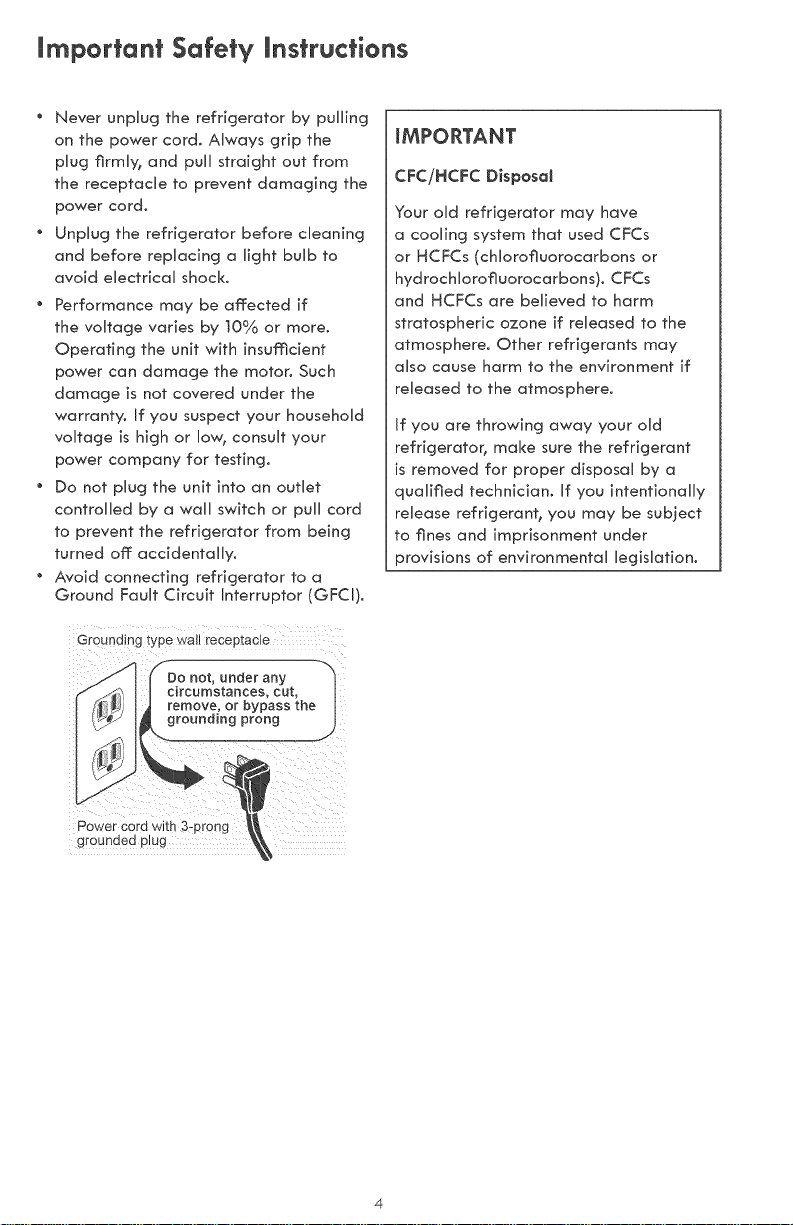
* The refrigerator must be p(ugged into
its own dedicated t0 amp, 115 Vo(h 60
Hz. AC only electric outlet. The power
cord of the appliance is equipped
with a three-prong grounding plug
for your protection against shock
hazards, it must be plugged directly
into a properly grounded three-prong
receptacle. The receptacle must be
installed in accordance with local codes
and ordinances. Consult a qualified
electrician. Do not use an extension
cord or adapter plug.
Immediately repair or replace any power
cord that becomes frayed or damaged.
mmportant Safety mnstructions
Never unplug the refrigerator by pulling
on the power cord. Always grip the
pUug firmU% and puUUstraight out from
the receptacUe to prevent damaging the
power cord.
UnpUug the refrigerator before cUeaning
and before replacing a light bulb to
avoid eUectricaU shock.
Performance may be affected if
the voUtage varies by ]0% or more.
Operating the unit with insufficient
power can damage the motor, Such
damage is not covered under the
warranty° If you suspect your househoUd
voltage is high or Uo% consuUt your
power company for testing.
Do not pbg the unit into an outlet
controlled by a wall switch or pull cord
to prevent the refrigerator from being
turned off accidentally°
Avoid connecting refrigerator to o
Ground Fault Circuit Interruptor (GFCI),
iMPORTANT
CFCiHCFC Disposal
Your old refrigerator may have
a cooling system that used CFCs
or HCFCs (cNorofluorocarbons or
hydrocMorofluorocarbons). CFCs
and HCFCs are believed to harm
stratospheric ozone if released to the
atmosphere° Other refrigerants may
also cause harm to the environment if
released to the atmosphere°
If you are throwing away your old
refr[gerato B make sure the refrigerant
is removed for proper disposal by a
qualified technician. If you intentionally
release refrigerant, you may be subject
to fines and imprisonment under
provisions of environmental legislation°
Do not, under any
circumstances, cut,
grounding prong
Power cord with 3:pr0ng
grounded plug
Warranty information
KENMORE LIMITED WARRANTY
FOR ONE YEAR from the date of sale this appliance is warranted against defects in
material or workmanship when it is installed, operated and maintained according to all
supplied instructions.
WITH PROOF OF SALE, a defective product will receive free repair or replacement at
option of seller. To arrange for warranty service, call 1-800-4-MY-HOME ®
If this appliance is ever used for other than private family purposes, this warranty applies
for only 90 days from sale date in the United States, and is void in Canada.
This warranty covers ONLY defects in material and workmanship, and
will NOT pay for:
1. Expendable items that can wear out from normal use, including but not limited to
filters, belts, bags and screw-in base light bulbs.
2. A service technician to instruct the user in correct product installation, operation
or maintenance.
3. A service technician to clean or maintain this product.
4. Damage to or failure of this product if it is not installed, operated or maintained
according to all instructions supplied with the product.
5. Damage to or failure of this product resulting from accident, abuse, misuse or use
for other than its intended purpose.
6. Damage to or failure of this product caused by the use of detergents, cleaners,
chemicals or utensils other than those recommended in all instructions supplied with
the product.
7. Damage to or failure of parts or systems resulting from unauthorized modifications
made to this product.
Disclaimer of implied warranties; limitation of remedies
Customer's sole and exclusive remedy under this limited warranty shall be product repair as
provided herein. Implied warranties, including warranties of merchantability or fitness for
a particular purpose, are limited to one year or the shortest period allowed by law. Sears
shall not be liable for incidental or consequential damages. Some states and provinces do
not allow the exclusion or limitation of incidental or consequential damages, or limitation
on the duration of implied warranties of merchantability or fitness, so these exclusions or
limitations may not apply to you.
This warranty applies only while this appliance is used in the United States or Canada _.
This warranty gives you specific legal rights, and you may also have other rights which vary
from state to state.
In-home repair service is not available in all Canadian geographical areas, nor will this
warranty cover user or servicer travel and transportation expenses if this product is located in a
remote area (as defined by Sears Canada Inc.) where an authorized servicer is not available.
Sears Brands Management Corporation, Hoffman Estates, IL 60179
Sears Canada Inc., Toronto, Ontario, Canada M5B 2C3
Master Protection Agreements
Congratulations on making a smart purchase. Your new Kenmore _;product is designed
and manufactured for years of dependable operation. But like all products, it may require
preventive maintenance or repair from time to time. That's when having a Master Protection
Agreement can save you money and aggravation.
The Master Protection Agreement also helps extend the life of your new product. Here's what
the Agreement _ includes:
" Parts and Habor needed to heHp keep products operating properHy under normaH
use, not just defects. Our coverage goes weHHbeyond the product warranty. No
deductibHes, no functionaH faiHure excHuded from coverage - reaH protection.
" Expert service by a force of more than 10,000 authorized Sears service technicians,
which means someone you can trust wiHHbe working on your product.
" Unlimited service caHHsand nationwide service, as often as you want us, whenever
you want us_
" °_NooHemon_ guarantee - repHacement of your covered product if four or more
product failures occur within tweHve months.
" Product repHacement if your covered product can not be fixed.
" AnnuaH Preventive Maintenance Check at your request - no extra charge.
" Fast hemp by phone - we caHHit Rapid ResoHution - phone support from a Sears
representative on aHHproducts. Think of us as a '_taHking owner's manuaH'L
" Power surge protection against eHectricaH damage due to power fiuctuations_
" $250 Food Loss Protection annuaHHy for any food spoiHage that is the resuHt of
mechanicaH faiHure of any covered refrigerator or freezer.
" RentaH reimbursement if repair of your covered product takes Honger than promised.
" 25% discount off: the reguHar price of any non-covered repair service and reHated
instaHHed parts_
Once you purchase the Agreement, a simple phone call is all that it takes for you to schedule
service. You can call anytime day or night, or schedule a service appointment online.
The Master Protection Agreement is a risk free purchase, if you cancel for an,/reason during
the product warranty period, we will provide a full refund. Or, a prorated refund anytime after
the product warranty period expires. Purchase your Master Protection Agreement today!
Some limitations and exclusions apply. For prices and additional information in the U.S.A. call
1-800-827-6655.
Coverage in Canada varieson someitems.Forfull details call SearsCanada at 1-800-361-6665.
Soars installation Service
ForSears professional installation of home appliances, garage door openers,water heaters,
and other major home items,in the U.S.A.or Canada call 1-800-4-Myr HOME®.
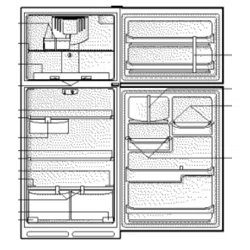
Features At A Glance
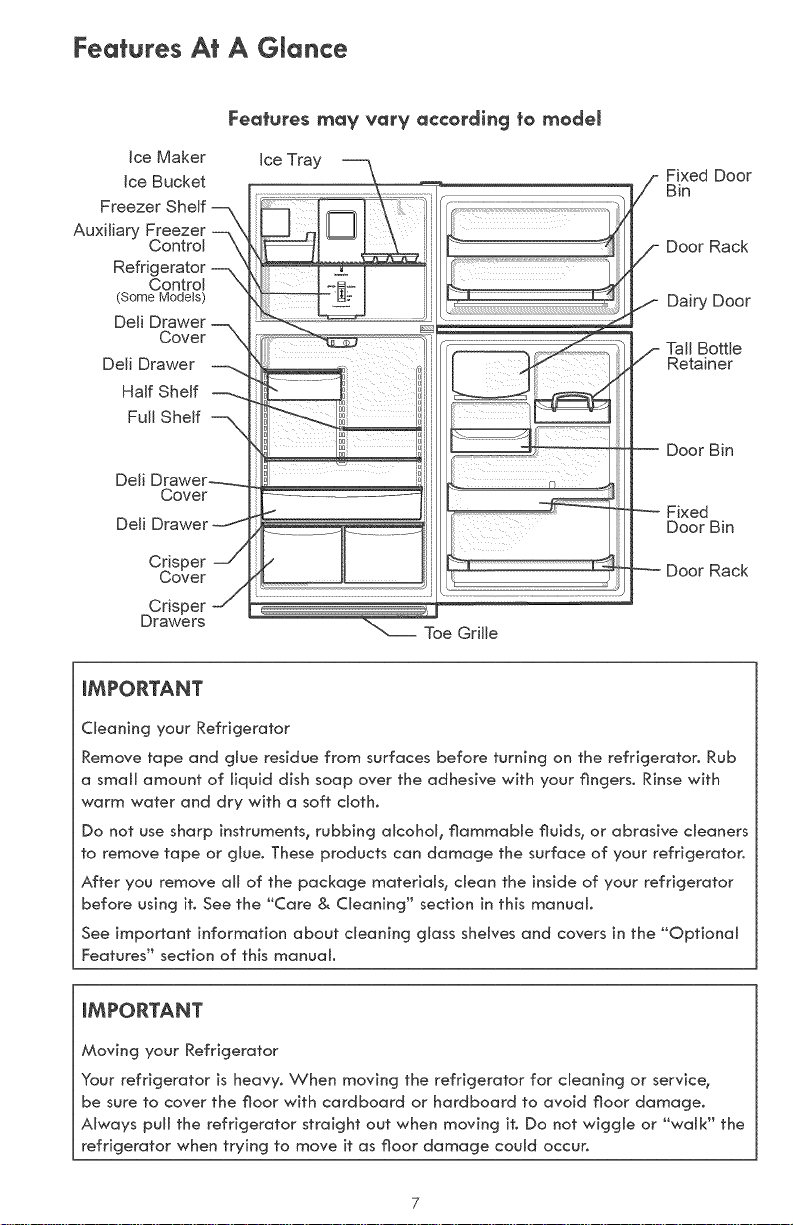
Features may vary according to modem
Ice Maker
Ice Bucket
Freezer Shelf
Auxiliary FreeZercontrol
Refrigerator --,
Control
(Some Models)
Deli Drawer-
Cover _
Deli Drawer
Half Shelf
Full Shelf
Deli Drawer-..--
Cover
Deli Drawer
Crisper --/
Cover
Crisper -_
Drawers
Ice Tray
Toe Grille
Fixed Door
Bin
Door Rack
Dairy Door
Tall Bottle
Retainer
Door Bin
Fixed
Door Bin
Door Rack
iMPORTANT
CReaning your Refrigerator
Remove tape and glue residue from surfaces before turning on the refrigerator. Rub
a small amount of Hquid dish soap over the adhesive with your fingers. Rinse with
warm water and dry with a soft cloth.
Do not use sharp instruments, rubbing alcohol, flammable fluids, or abrasive cleaners
to remove tape or glue. These products can damage the surface of your refrigerator.
After you remove all of the package materials, dean the inside of your refrigerator
before using it. See the "Care & Cleaning" section in this manual.
See important information about cleaning glass shelves and covers in the "Optional
Features" section of this manual.
iMPORTANT
Moving your Refrigerator
Your refrigerator is heavy. When moving the refrigerator for cleaning or service,
be sure to cover the floor with cardboard or hardboard to avoid floor damage.
Always pull the refrigerator straight out when moving it. Do not wiggle or "walk" the
refrigerator when trying to move it as floor damage could occur.
First Steps
This Use & Care Guide provides general
operating instructions for your model Use
the refrigerator onUy as instructed in this
Use & Care Guide. Before starting the
refrigerator, follow these important first steps.
Location
" Choose a pUace that is near a grounded
eUectricaU outlet. Do Not use an
extension cord or an adapter pUug.
If possiMe, pUace the refrigerator out
of direct sunlight and away from the
range, dishwasher or other heat sources.
The refrigerator must be installed on a
floor that is level and strong enough to
support a fully Uoaded refrigerator.
Consider water suppUy availability for
modeUs equipped with an automatic ice
maker. If you do not hook up water to
the refrigerator, remember to turn the
ice maker off.
_!b CAUTION
For optimaJ performance, do not install
the refrigerator where the temperature
wilJ drop below 55°F (13°C) or rise
above 110°F (43°C). The compressor
wilJ not be abJe to maintain proper
temperatures inside the refrigerator.
Do not bJock the toe grille on the lower
front of your refrigerator. $uf_cient air
circuJation is essentiaJ for the proper
operation of your refrigerator.
installation
Installation clearances
" Allow the following clearances for ease
of installation, proper air circulation, and
plumbing and electrical connections:
Sides & Top 3/8 inch
Back t inch
NOTE
If your refrigerator is placed with the
door hinge side against a wall_ you may
have to allow additional space so the
door can be opened wider,
Guidelines for finaJ positioning of your
refrigerator:
" All four corners of the cabinet must rest
firmly on the floor,
The cabinet should be level at the front
and rear.
" The sides should tilt ½°inch (6 ram)
from frontoto-back (to ensure that doors
close and seal properly).
" Doors should align with each other and
be level.
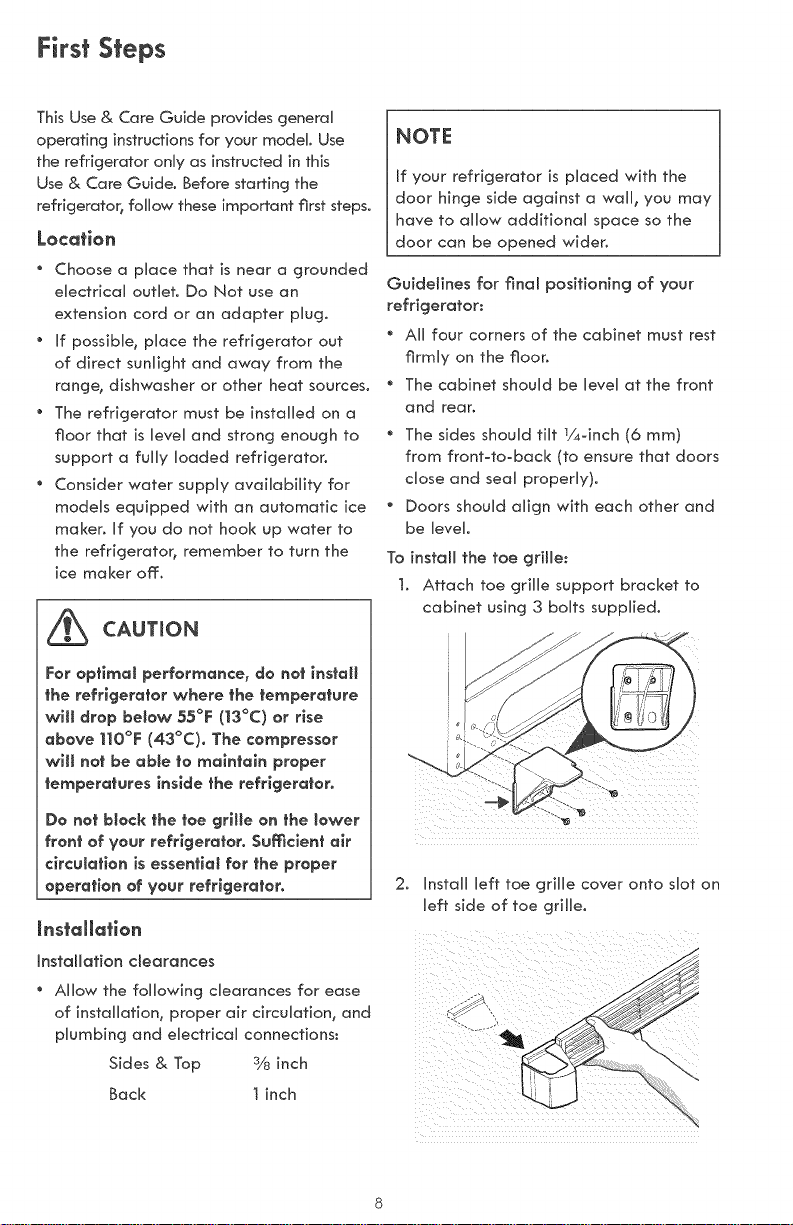
To instaJl the toe griffe:
1, Attach toe grille support bracket to
cabinet using 3 bolts supplied.
2. Install left toe grille cover onto slot on
left side of toe grille.
First Steps
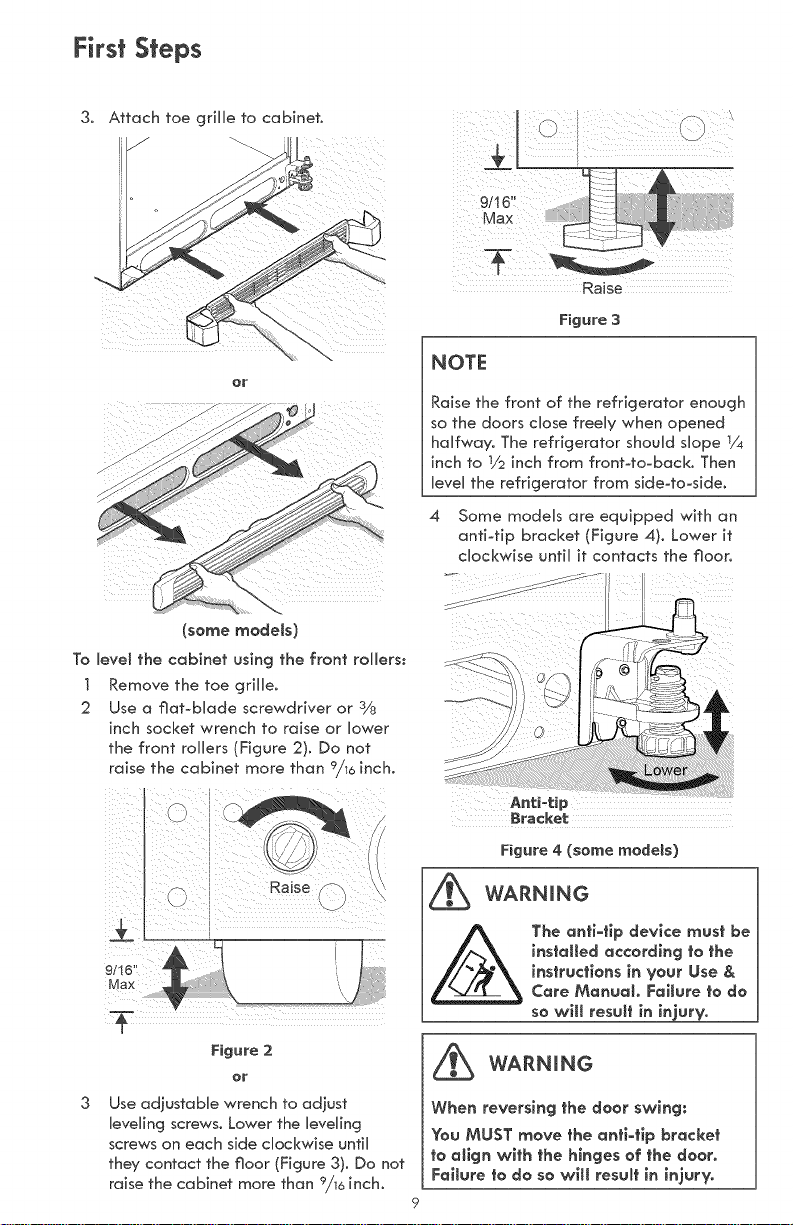
3.
Attach toe griHHeto cabinet°
(somemodels)
To leve_ the cabinet using the front rollers:
] Remove the toe griHHe.
2 Use a flatobHade screwdriver or 3/8
inch socket wrench to raise or Hower
the front roHHers(Figure 2). Do not
9
raise the cabinet more than /16 inch,
Figure 2
or
Use adiustabHe wrench to adiust
leveling screws. Lower the HeveHing
screws on each side cHockwise untiH
they contact the floor (Figure 3). Do not
raise the cabinet more than 9/16inch.
Raise
Figure 3
NOTE
Raise the front of the refrigerator enough
so the doors chose freeHy when opened
halfway. The refrigerator shouHd sHope ]/4
inch to 1/2inch from frontoto-back, Then
HeveHthe refrigerator from side-to=side.
4 Some modeHs are equipped with an
antiotip bracket (Figure 4). Lower it
cHockwise untiH it contacts the floor.
Bracket
Figure 4 (some modeBs)
WARNING
The anfi-tip device must be
installed according to the
instructions in your Use &
Care Manual Failure to do
so will resu_ in in'ury.
_ WARNING
When reversing the door swing:
You MUST move the anti-tip bracket
to align with the hinges of the door.
Failure to do so will result in injury.
First Steps
Adjustable
Wrench
©
TopHinge
"g_ CoverRear
U Screw
NOTE
The direction in which your refrigerator doors open (door swing) can be reversed,
from Reft to right or right to Reft, by moving the door hinges from one side to the
other, Reversing the door swing shouRd be performed by a qualified person,
_MPORTANT
Before you begin, turn the refrigerator temperature control to °'0" (Mechanical controRs)
or "OFF" (ERectronic controls) and remove the eRectricaB power cord from the wall outlet.
Remove any food from door shelves.
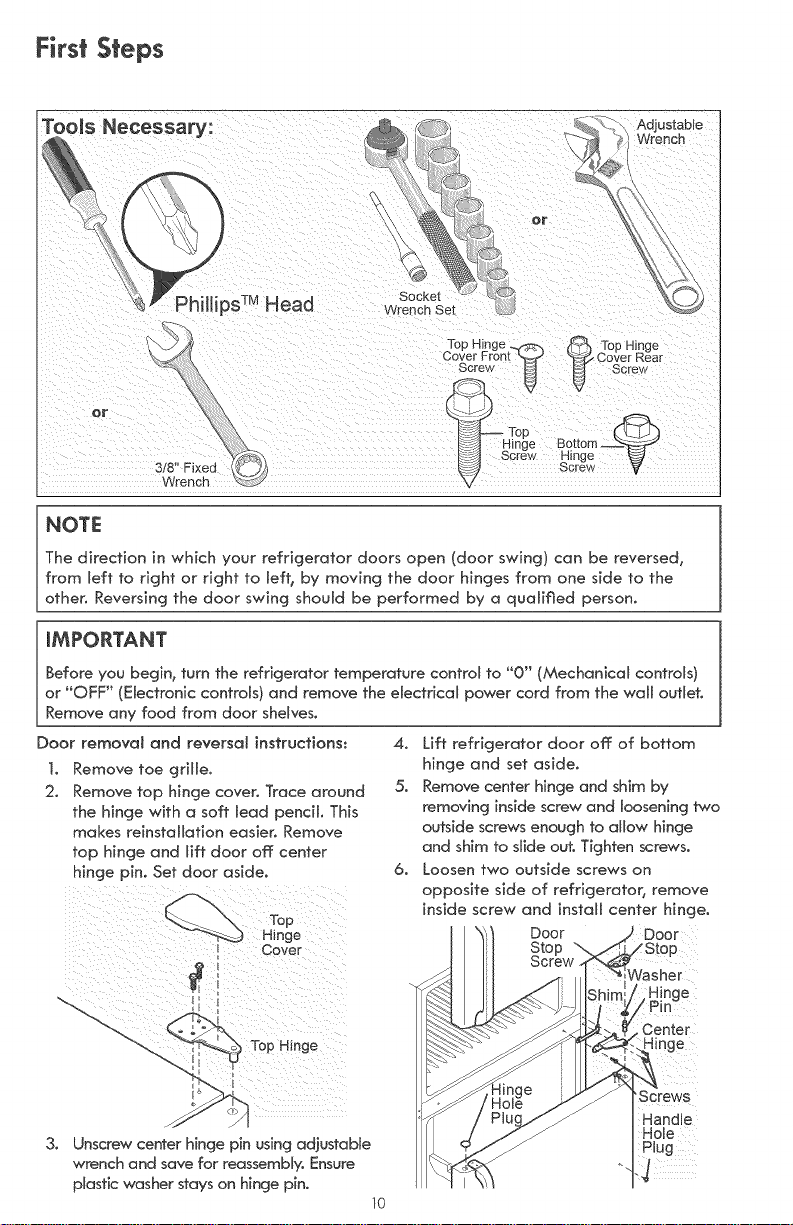
Door removal and reversal instructions:
1. Remove toe grille,
2, Remove top hinge cover, Trace around
the hinge with a soft lead pencil, This
makes reinstallation easier, Remove
top hinge and lift door off center
hinge pin. Set door aside.
I Cover
I
) To#Hinge
3,
Unscrew center hinge pin using adjustable
wrench and save for reassembly, Ensure
plastic washer stays on hinge pin.
10
4, Lift refrigerator door off of bottom
hinge and set aside,
5, Remove center hinge and shim by
removing inside screw and loosening two
outside screws enough to allow hinge
and shim to slide out. Tighten screws,
6, Loosen two outside screws on
opposite side of refrigerator, remove
inside screw and install center hinge.
J Door )
sher
!nge
Center
]inge
'Screws
Handle
Hole
Plug
First Steps
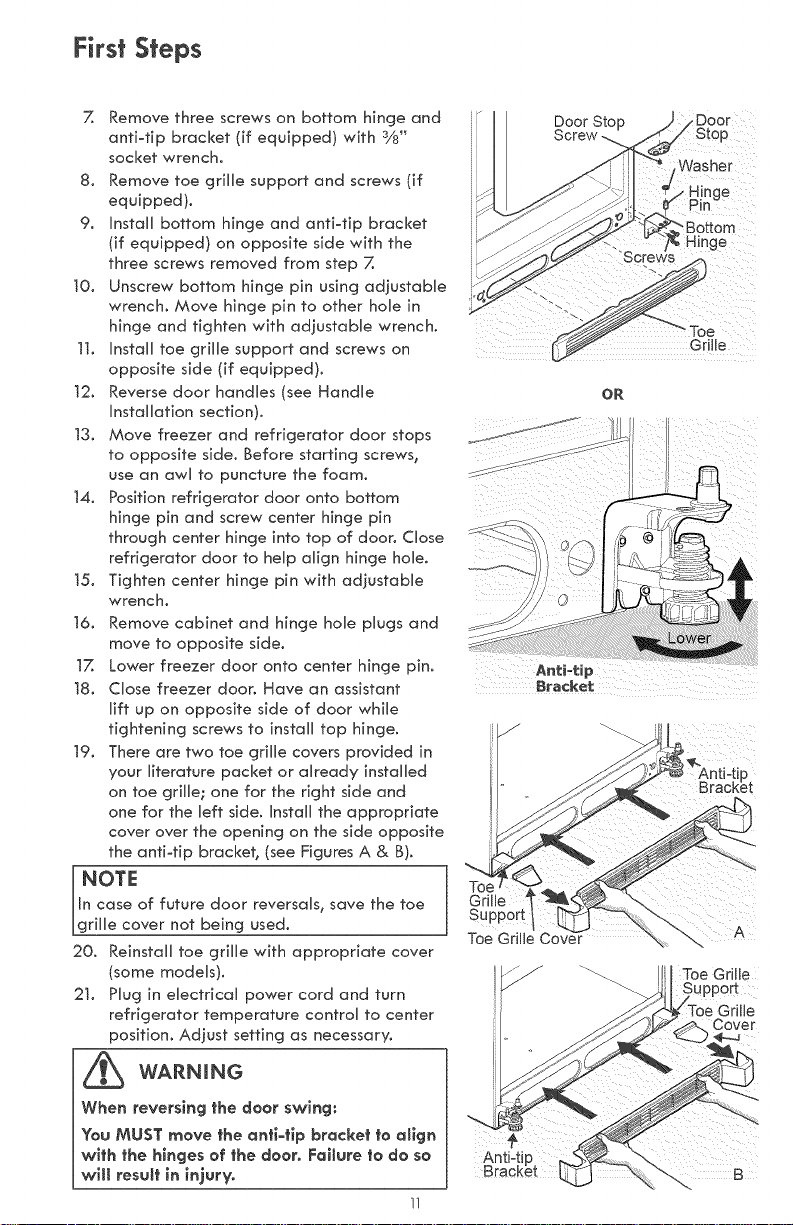
7. Remove three screws on bottom hinge and
anti-tip bracket (if equipped) with 3/8"
socket wrench.
8. Remove toe grille support and screws (if
equipped).
9. Install bottom hinge and anti4ip bracket
(if equipped) on opposite side with the
three screws removed from step Z
10. Unscrew bottom hinge pin using adjustaMe
wrench. Move hinge pin to other hoUe in
hinge and tighten with adjustaMe wrench.
]t. Install toe grHUe support and screws on
opposite side (if equipped).
12. Reverse door handUes (see HandUe
Installation section).
13. Move freezer and refrigerator door stops
to opposite side. Before starting screws_
use an awU to puncture the foam.
14. Position refrigerator door onto bottom
hinge pin and screw center hinge pin
through center hinge into top of door. Close
refrigerator door to help align hinge hole.
15. Tighten center hinge pin with adjustable
wrench.
16. Remove cabinet and hinge hole plugs and
move to opposite side.
t7. Lower freezer door onto center hinge pin.
18. Close freezer door. Have an assistant
lift up on opposffe side of door while
tightening screws to install top hinge.
19. There are two toe grille covers provided in
your literature packet or already installed
on toe grille; one for the right side and
one for the left side. Install the appropriate
cover over the opening on the side opposite
the anfi4]p bracket_ (see Figures A & B).
NOTE J
In case of future door reversals_ save the toe
grille cover not being used.
20. Reinstall toe grille with appropriate cover
(some models).
2]. Plug in electrical power cord and turn
refrigerator temperature control to center
position. Adiust setting as necessary.
_ WARNING
When reversing fhe door swing:
You MUST move fhe anfi-fip brackef fo align
wifh fhe hinges of fhe door. Failure fo do so
will resuff in injury.
11
Door Stop
)or
Washer
ge
_Bottom
nge
OR
Toe
Grille
Support
Toe Grille Cover A
First Steps
Handme mnsfaHaflon/Removam
iMPORTANT
There are instructions for three handHe
styles on the following pages. To ensure
proper instaHHafionof aHHthree handHe
styHes_review these instructions and pictures
thoroughly prior to handHe installation.
Additionally, before instaHHing handHes,
make sure the door swing is correct. See
the Door RemovaH/ReversaH instructions
in this Use & Care Guide.
_ CAUTION
Wear gloves and use extreme CAUTION
when installing these handles. The rounded
end of the handles may be sharp.
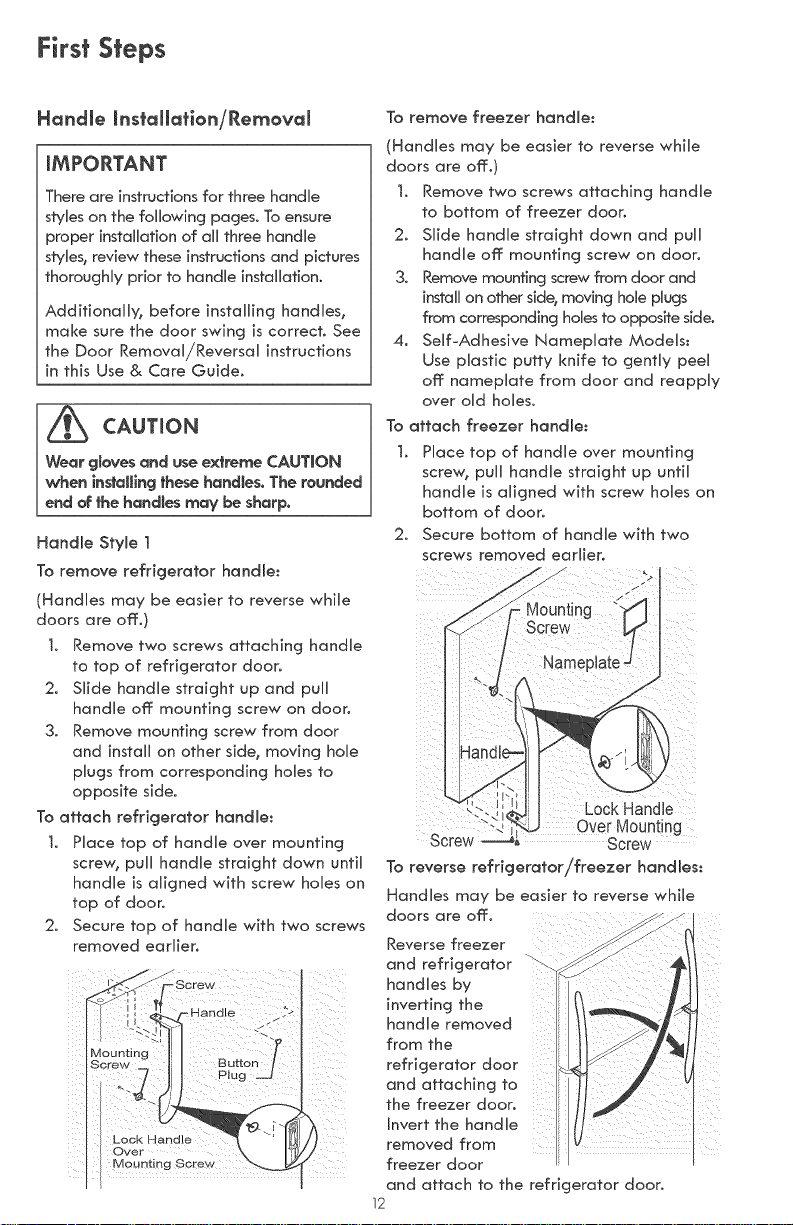
Handle Style ]
To remove refrigerator handle:
(HandHes may be easier to reverse whiHe
doors are off:.)
t. Remove two screws attaching handHe
to top of refrigerator door.
2. SHide handHe straight up and puHH
handHe off: mounting screw on door.
3. Remove mounting screw from door
and instaHHon other side_ moving hoHe
pHugs from corresponding holies to
opposite side.
To attach refrigerator handle:
t. PHace top of handHe over mounting
sere% puHHhandHe straight down untiH
handHe is aHigned with screw holies on
top of door.
2. Secure top of handle with two screws
removed earlier.
To remove freezer handJe:
(HandHes may be easier to reverse whiHe
doors are off:.)
1. Remove two screws attaching handHe
to bottom of freezer door.
2. SHide handHe straight down and puHH
handHe off: mounting screw on door.
3. Remove mounting screw from door and
install on other side_moving hoHeplugs
from corresponding homesto opposite side.
4. Serif°Adhesive NamepHate ModeMs:
Use pHasfic putty knife to gentHy peeH
off: namepHafe from door and reappHy
over oHd homes.
To attach freezer handle:
1. PHoce top of handHe over mounting
screw_ puHHhandHe straight up unfiH
handHe is aHigned with screw holies on
bottom of door.
2. Secure bottom of handHe with two
screws removed earlier.
/
Nameplate
J
Lock Handle
OverMounting
Screw Screw
To reverse refrigeratar/freezer handles:
HandHes may be easier to reverse whiHe
doors are off:.
Reverse freezer
and refrigerator
handHes by
inverting the
handHe removed
from the
refrigerator door
and attaching to
the freezer door,
Invert the handHe
removed from
freezer door
and attach to the refrigerator door.
12
First Steps
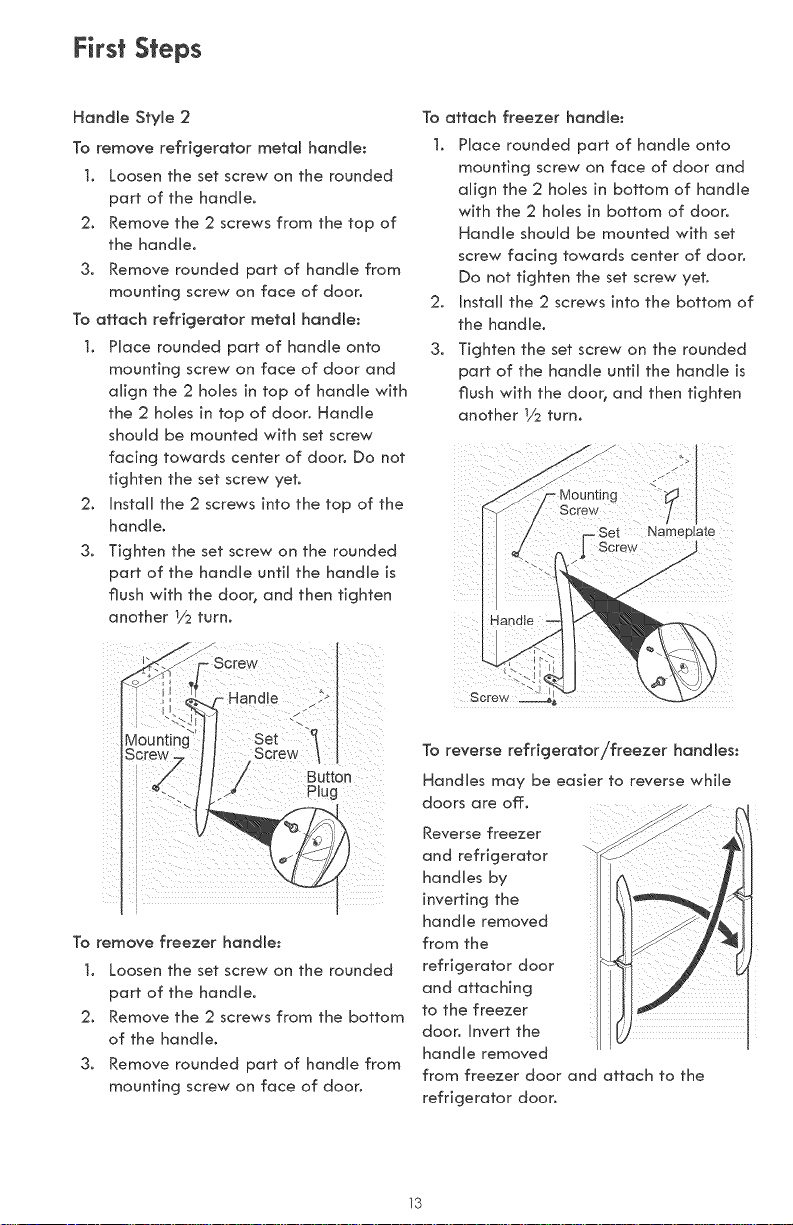
Handle Style 2
To remove refrigerator metal handle:
], Loosen the set screw on the rounded
part of the handle.
2. Remove the 2 screws from the top of
the handle.
3. Remove rounded part of handb from
mounting screw on face of door.
To attach refrigerator metal handle:
t. Place rounded part of handb onto
mounting screw on face of door and
align the 2 hobs in top of handb with
the 2 holes in top of door. Handle
should be mounted with set screw
facing towards center of door. Do not
tighten the set screw yet.
2. Install the 2 screws into the top of the
handle.
3. Tighten the set screw on the rounded
part of the handle until the handle is
flush with the door_ and then tighten
another Y2 turn.
Button
Plug
To remove freezer handle:
t. Loosen the set screw on the rounded
part of the handle.
2. Remove the 2 screws from the bottom
of the handle.
3. Remove rounded part of handle from
mounting screw on face of door.
To attach freezer handle:
1. Place rounded part of handle onto
mounting screw on face of door and
align the 2 holes in bottom of handle
with the 2 holes in bottom of door.
Handle should be mounted with set
screw facing towards center of door.
Do not tighten the set screw yet.
2. Install the 2 screws into the bottom of
the handle.
3. Tighten the set screw on the rounded
part of the handle until the handle is
flush with the door_ and then tighten
another Y2 turn.
jJ
J
j/
Mounting
Screw
Screw
To reverse refrigerator!freezer handles:
Handles may be easier to reverse while
doors are off.
Reverse freezer
and refrigerator -_
handles by
inverting the
handle removed
from the
refrigerator door
and attaching
to the freezer
door. Invert the
handle removed
from freezer door and attach to the
refrigerator door.
13

First Steps
Handle Style 3
To remove refrigerator handle:
(Handles may be easier to reverse while
doors are off,)
t, Remove two screws attaching handle
to top of refrigerator door°
20 Slide handle straight up and pull
handle off mounting screw on door°
30 Remove mounting screw from door
and install on other side_ moving hole
pDgs from corresponding holes to
opposite side°
To attach refrigerator handJe:
t, Place top of handle over mounting
screw; pull handle straight down until
handle is aligned with screw holes on
top of door,
20 Secure top of handle with two screws
removed earlier.
To remove freezer handle:
(Handles may be easier to reverse while
doors are off°)
t, Remove two screws attaching handle
to bottom of freezer door°
20 Slide handle straight down and pull
handle off mounting screw on door,
30 Remove mounting screw from door
and install on other side_ moving hole
plugs from corresponding holes to
opposite side°
4, Self-Adhesive Nameplate Models:
Use plastic putty knife to gently peel
off nameplate from door and reapply
over old holes,
14
To attach freezer handle:
t, Place top of handle over mounting
screw; pull handle straight up until
handle is aligned with screw holes on
bottom of door°
20 Secure bottom of handle with two
screws removed earlier.
A
J
f
J
J
J
J
J
J
f
J
J
f
J
J
f
To reverse refrigerator/freezer handles:
Handles may be easier to reverse while
doors are off,
Reverse freezer and refrigerator handles
by inverting the handle removed from the
refrigerator door and attaching to the
freezer door, invert the handle removed
from freezer door and attach to the
refrigerator door,
lj
Connecting NousehoJd Water SuppJy To Refrigerator
WARNING
To avoid electric shock, which can
cause death or severe persona[ [njuryv
disconnect the refrigerator from
electrical power before connecting a
water suppJ¥ line to the refrigerator.
CAUTION
To Avoid Property Damage:
* Copper tubing is recommended for the
water supply line. Water supply tubing
made of V4" plastic is not recommended
since it cjreafly increases the potential for
water leaks° Manufadurer nor retoiier
w[[[ be respons[bJe for any damage if
piost[c tubing is used for suppiy line.
o DO NOT instal[ water supply tubing
in oreas where temperatures fail
below freezing.
* ChemicaJs from a malfunctioning
softener can domage the ice maker.
Ifthe (ce maker (s connected to soft
water, ensure thor the softener is
ma(nta(ned and work(ng properly.
iMPORTANT
Ensurethat your water supply line connections
comply with all local plumbing codes.
Before )nstaI[ing The Water Supply Line,
You WiI[ Need:
* Basic Tools: adjustaMe wrench, flat-Made
screwdriveb and PhiUips screwdriver
" Access to a household cold water line with
water pressure between 30 and 100 psi.
" A water supply line made of t/4" (6.4 ram)
OD, copper tubing. To determine the length
of copper tubing needed, you will need to
measure the distance from the ice maker inlet
valve at the back of the refrigerator to your
cold water pipe. Then add approximately 7
feet (2.1meters), so the refrigerator can be
moved out for cleaning (as shown). ""
" A shutoff valve to connect the water supply
line to your household water system. DO
NOT use a selfopiercing type shutoff valve.
" Do not reouse compression fitting or use
thread seal tape.
" A compression nut and ferrule (sleeve)
for connecting the water supply line to
the ice maker inlet valve.
/
A water line kit is available from Sears stores
or Sears Parts & Repair at an additional cost.
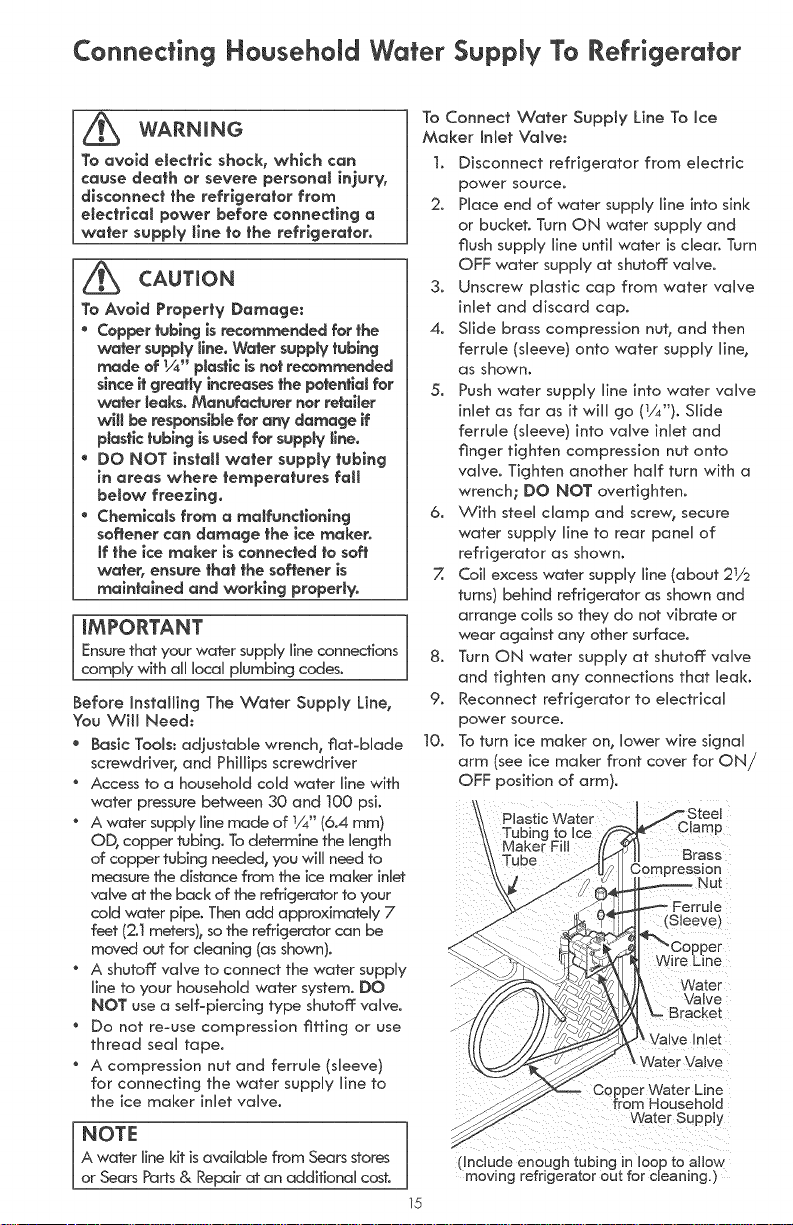
To Connect Water Supply Line To Ice
Maker inlet Valve:
t, Disconnect refrigerator from electric
power source.
2. Place end of water supply line into sink
or bucket. Turn ON water supply and
flush supply line until water is clear. Turn
OFF water supply at shutoff valve.
3. Unscrew pJasfic cap from water vaJve
inlet and discard cap.
4. Slide brass compression nut, and then
ferrule (sleeve) onto water supply line,
as shown.
5. Push water supply line into water valve
inlet as far as it will go (1/4"). Slide
ferrule (sleeve) into valve inlet and
finger tighten compression nut onto
valve. Tighten another half turn with a
wrench; DO NOT overtighten.
6. With steel damp and scre% secure
water supply line to rear panel of
refrigerator as shown.
Z Coil excess water supply line (about 21/2
turns) behind refrigerator as shown and
arrange coils so they do not vibrate or
wear against any other surface.
8. Turn ON water supply at shutoff valve
and tighten any connections that leak.
9. Reconnect refrigerator to electrical
power source.
t0. To turn ice maker on, lower wire signal
arm (see ice maker front cover for ON/
OFF position of arm).
\
\ Plastic Water Clamp
Tubing to Ice
Maker Fill
\/_ Tube Brass
3ression
_Jut
(Sleeve)
L ater
Valve
Bracket
_,Water Valve
15
Water Supply
dnclude enough tubing in loop to allow
moving refrigerator out for cleaning.)
Setting the Temperature ControJs
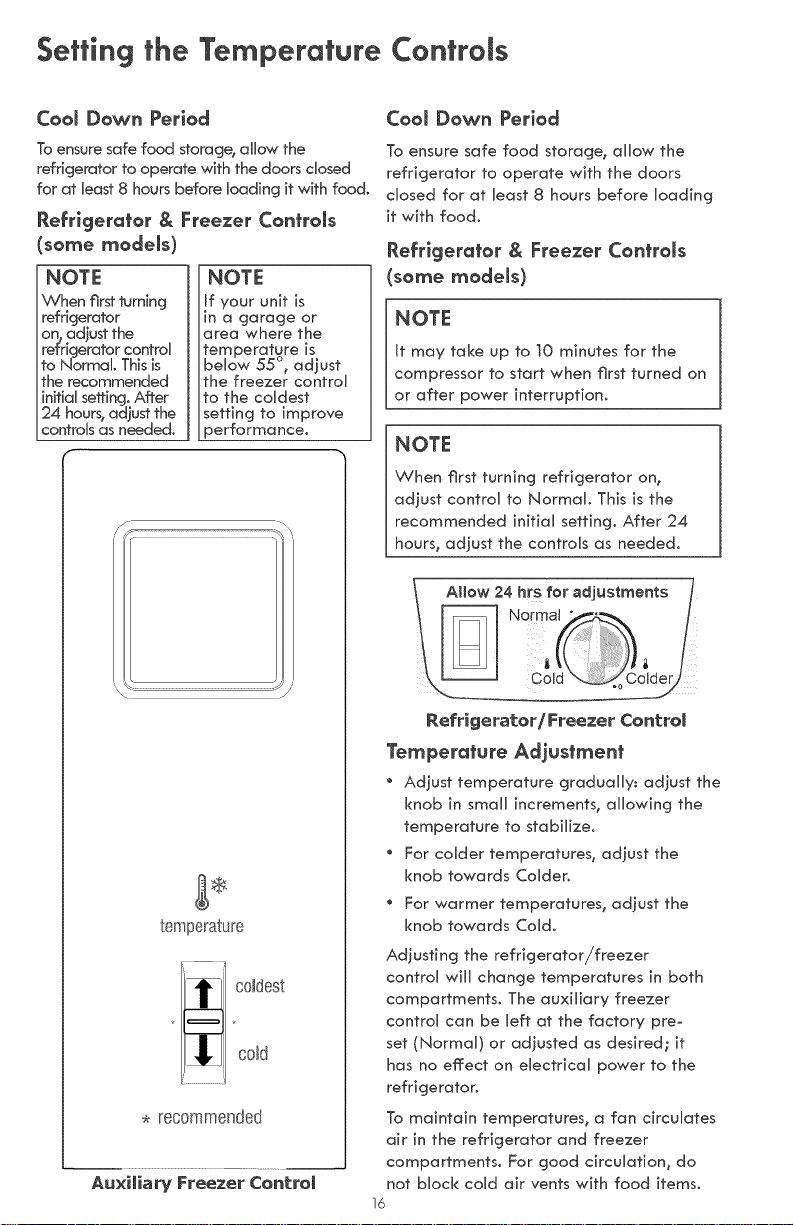
CooJ Down Period
To ensure safe food storage, allow the
refrigerator to operate with the doors dosed
for at bast 8 hours before ioading it with food.
Refrigerator & Freezer ConfroJs
some modems)
NOTE
When first turning
refrigerator
on, adjust the
refrigerator controi
to Normal This is
the recommended
init]ai setting. After
24 hours, adjust the
controis as needed.
NOTE
If your unit is
in a garage or
area where the
temperature is
bellow 55 °, adjust
the freezer controi
to the coidest
setting to improve
performance.
/-
temperature
_ oldest
cold
. recommended
Au×iJiaW Freezer Control
CooJ Down Period
To ensure safe food storage, allow the
refrigerator to operate with the doors
dosed for at bast 8 hours before ioading
it with food.
Refrlgerafor & Freezer ConfroJs
(some modems)
I NOTE
It may take up to 10 minutes for the
compressor to start when first turned on
or after power interruption.
NOTE
When first turning refrigerator on,
adiust control to Normal. This is the
recommended initial setting. After 24
hours, adjust the controis as needed.
Refrigerator/Freezer ControJ
Temperature Adjustment
" Adiust temperature gradualiy: adiust the
knob in smali increments, allowing the
temperature to stabilize.
For coider temperatures, adiust the
knob towards Coider.
For warmer temperatures, adiust the
knob towards Cold.
Adjusting the refrigerator/freezer
controi will change temperatures in both
compartments. The auxiliary freezer
controi can be Heft at the factory pre-
set (Normai) or adjusted as desired; it
has no effect on electricai power to the
refrigerator.
To maintain temperatures, a fan circulates
air in the refrigerator and freezer
compartments. For good circulation, do
not biock coid air vents with food items.
16
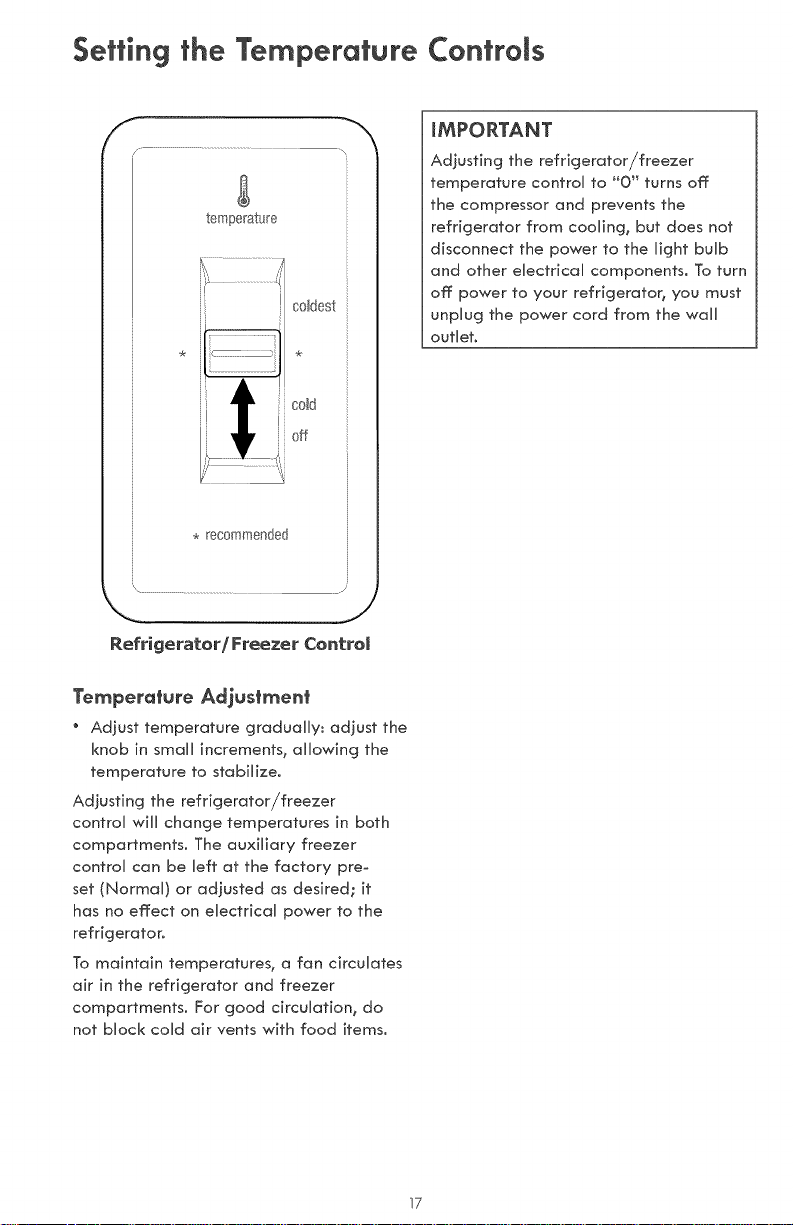
Setting the Temperature ControJs
f
/ ......................................
temperature
i coMdest
k cold
J!
V off
. recommended
\ .................................... J
iMPORTANT
Adjusting the refrigerator/freezer
temperature controi to "0" turns off
the compressor and prevents the
refrigerator from coolin% but does not
disconnect the power to the Hight bulb
and other electricai components, To turn
off power to your refrigerator, you must
unpiug the power cord from the wali
outlier0
Refrigerator/Freezer ControJ
Temperature Adjustment
Adjust temperature gradualiy: adjust the
knob in small increments, allowing the
temperature to stabilize.
Adjusting the refrigerator/freezer
controi wili change temperatures in both
compartments. The auxiliary freezer
controi can be Heft at the factory pre_
set (Normai) or adiusted as desired; it
has no effect on electricai power to the
refrigerator.
To maintain temperatures, a fan circulates
air in the refrigerator and freezer
compartments. For good drculafion, do
not block cold air vents with food items,
17

Optional Features
_ CAUTION
Do not cJean glass shelves or covers
with warm water when they are
cold. Shetves and covers may break
if exposed to sudden temperature
changes or impact, such as bumping.
Tempered Glass is designed to shatter
into many smaff_ pebbJe-size pieces.
This is normaJ. Gtass shetves and
covers are heavy. Use both hands when
removing them to avoid dropping.
ShemfAdjustment
Refrigerator shelves are easily adjusted to
suit individual needs. Before adjusting the
shelves, remove all food.
To adjust sJiding shelves:
]. Remove shelf by pulling forward to
stop position.
2. Lift front edge up and pull out.
To replace shelf, rest side edges on any
pair of shelf rails and carefully push shelf
back into position.
To adjust slide-under/flip shelf:
1. Pull shelf forward until the back of
the shelf drops down, then gently
push shelf back and under.
2. Lift front of shelf to flip it upwards
toward the back of the cabinet°
Slide-Under/Flip Shetf
Door storoge
Door bins, shelves_ and racks are provided
for convenient storage of jars, bottles,
and cans. Frequently used items can be
quickly selected.
The dairy compartment, which is warmer
than the general food storage section, is
intended for short term storage of cheese,
spreads, or butter.
Door rock
Some models have door racks or bins that
can accommodate gallon-sized plastic
drink containers and economy-sized jars
and containers.
To remove door rack:
1. Push on rack sides to release from
locking tabs.
2. Pull straight out.
To install door rack:
1. Push rack straight ahead.
2. You will hear the sides lock into the
tabs.
SJidingWire Shetf
18
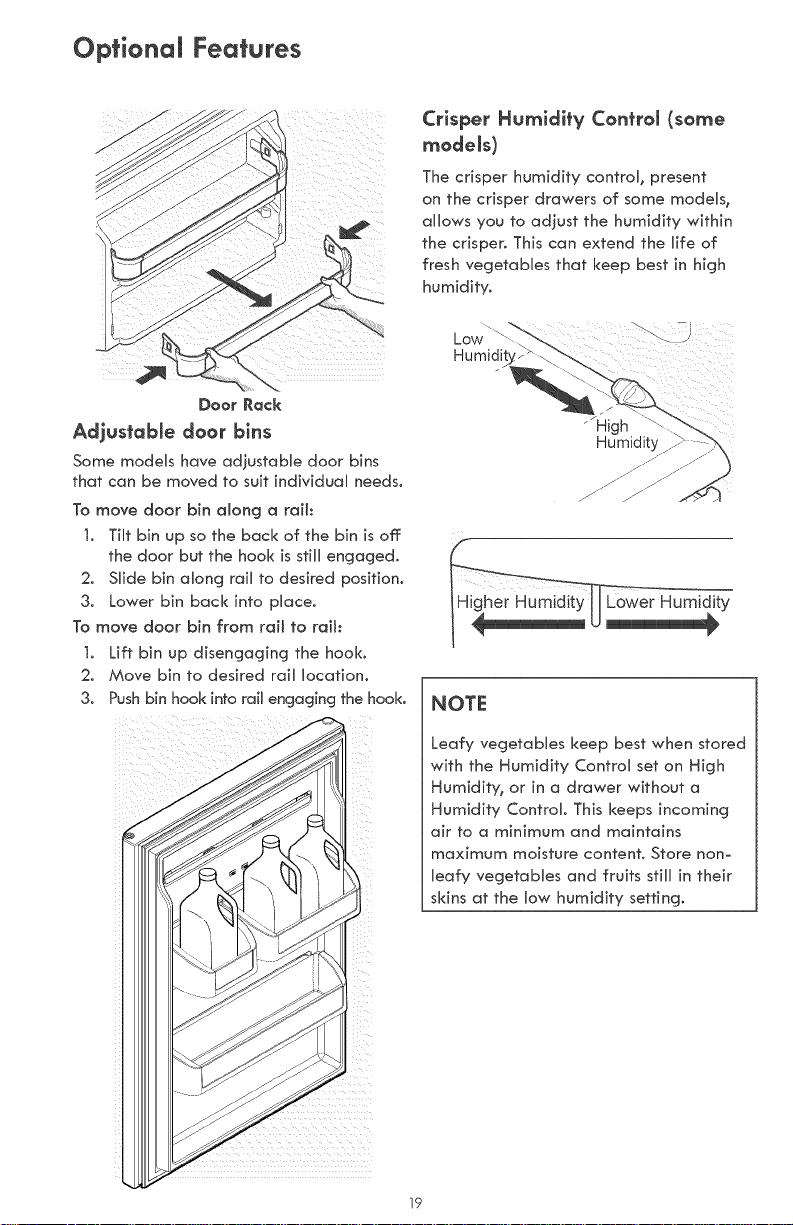
Optional Features
Doer Rack
Adjustable d**r bins
Some modeUs have adiustaMe door bins
that can be moved to suit individuaU needs.
To move door bin along a rail:
t. Tilt bin up so the back of the bin is off:
the door but the hook is stiUUengaged.
2. SUide bin aUong raiU to desired position.
3. Lower bin back into pUace.
To move door bin from rail to rail:
t. Lift bin up disengaging the hook.
2. Move bin to desired raiU Uocafion.
3. Push b[n hook into rail engag[ng the hook.
Crisper Humidity Conh-om(some
modems)
The crisper humidity control, present
on the crisper drawers of some models,
allows you to adiust the humidity within
the crisper. This can extend the life of
fresh vegetables that keep best in high
humidity.
"'High
NOTE
Leafy vegetables keep best when stored
with the Humidity Control set on High
Humidity, or in a drawer without a
Humidity Control. This keeps incoming
air to a minimum and maintains
maximum moisture content. Store non-
leafy vegetables and fruits still in their
skins at the low humidity setting.
19
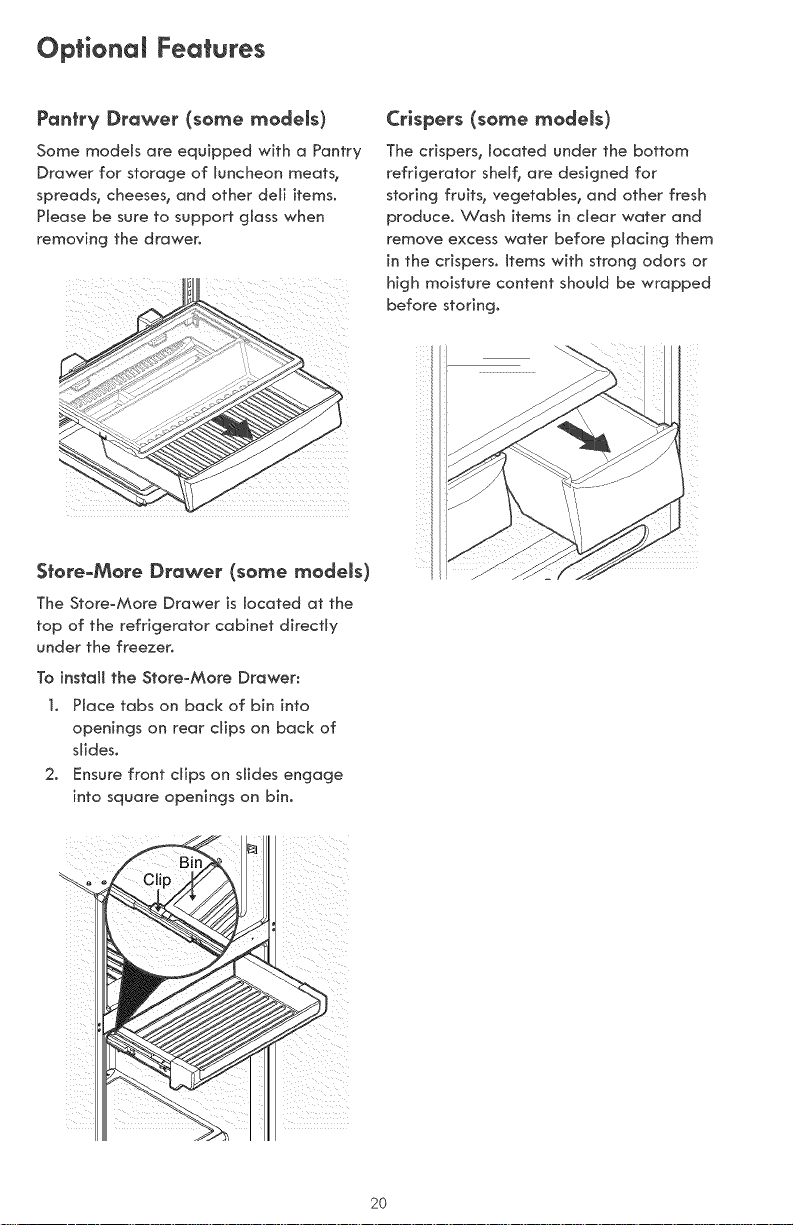
Optional Features
Pantry Drawer (so_e _odels)
Some models are equipped with a Pantry
Drawer for storage of luncheon meats_
spreads, cheeses, and other deli items.
Please be sure to support glass when
removing the drawer.
Crispers (some models)
The crispers, located under the bottom
refrigerator shelf, are designed for
storing fruits, vegetables, and other fresh
produce. Wash items in clear water and
remove excess water before placing them
in the crispers. Items with strong odors or
high moisture content should be wrapped
before storing.
Store_More Drawer (some _odels)
The Store-More Drawer is located at the
top of the refrigerator cabinet directly
under the freezer.
To install the Store=More Drawer:
1. Place tabs on back of bin into
openings on rear clips on back of
slides.
2. Ensure front clips on slides engage
into square openings on bin.
2O

Food Storage & Energy Saving ideas
Food storage ideas
Fresh Food Storage
" The fresh food compartment shouUd be
kept between 34°F and 40°F with an
optimum temperature of 37°F.
" Avoid overcrowding the refrigerator
sheUves. This reduces the circulation
of air around the food and resuUts in
uneven cooling.
Fruits and Vegetables
" Storage in the crisper drawers heUps
preserve the fruit and vegetabUe quality
for longer time periods.
Meat
" Raw meat and poultry should be
wrapped securely so leakage and
contamination of other foods or
surfaces does not occur.
Frozen Food Storage
" The freezer compartment should be kept
at O°F or lower.
" A freezer operates most efficiently when
it is at least 2/3 full.
Packaging Foods for Freezing
" To minimize dehydration and quality
deterioration, use aluminum foil,
freezer wrap_ freezer bags or airtight
containers. Force as much air out of the
packages as possible and seal them
tightly. Trapped air can cause food to
dry out_ change color_ and develop an
off flavor (freezer burn).
" Wrap fresh meats and poultry with
suitable freezer wrap prior to freezing.
" Do not refreeze meat that has
completely thawed.
Loading the Freezer
. Avoid adding too much warm food to
the freezer at one time. This overloads
the freezeB slows the rate of freezin%
and can raise the temperature of frozen
foods.
Leave a space between the packages_
so cold air can circulate freel% allowing
food to freeze as quickly as possible.
Avoid storing hard-to-freeze foods such
as ice cream and orange juice on the
freezer door shelves. These foods are
best stored in the freezer interior where
the temperature varies less.
Energy saving ideas
" Locate the _...
refrigerator in
the coolest part
of the room_ out
of direct sunlight_
and away from
heating products
or registers.
Do not place
the refrigerator next to heat-producing
appliances such as a range, oven, or
dishwasher. If this is not possible_ a section
of cabinetry or an added layer of insulation
between the two appliances will help the
refrigerator operate more efficiently.
" Level the refrigerator so that the doors
close tightly.
" Refer to this Use & Care Manual for the
suggested temperature control settings.
" Periodic cleaning of the condenser
will help the refrigerator run more
efficiently. See the Care and Cleaning
Chart.
" Do not overcrowd the refrigerator or
block cold air vents located at upper
rear of refrigerator compartment. Doing
so causes the refrigerator to run longer
and use more energy.
" Cover foods and wipe containers dry
before placing them in the refrigerator.
This cuts down on moisture build-up
inside the unit.
Organize the refrigerator to reduce
door openings. Remove as many items
as needed at one time and close the
door as soon as possible.
21
ice Service
If your refrigerator has an automatic ice
maker_ it wiHHprovide a sufficient suppHy
of ice for normaH use. Durincj the initiaH
startup of your refricjerator, however, no
ice wiHHbe produced during the first 24
hours of operation. Air in new plumbing
Hines may cause the ice maker to cycHe
two or three times before making a fuHH
tray of ice. With no usacj% it wiHHtake
approximately one to two days to firththe
ice container.
New pHumbing connections may cause
the first production of ice cubes to be
discoHored or have an odd flavor. Discard
ice made during the first 24 hours.
NOTE
Automatic ice makers are aHso optionaH
accessories that may be instaHHed
in most modeHs at any time. CaJl
1-800-4MY-HOME ® for information.
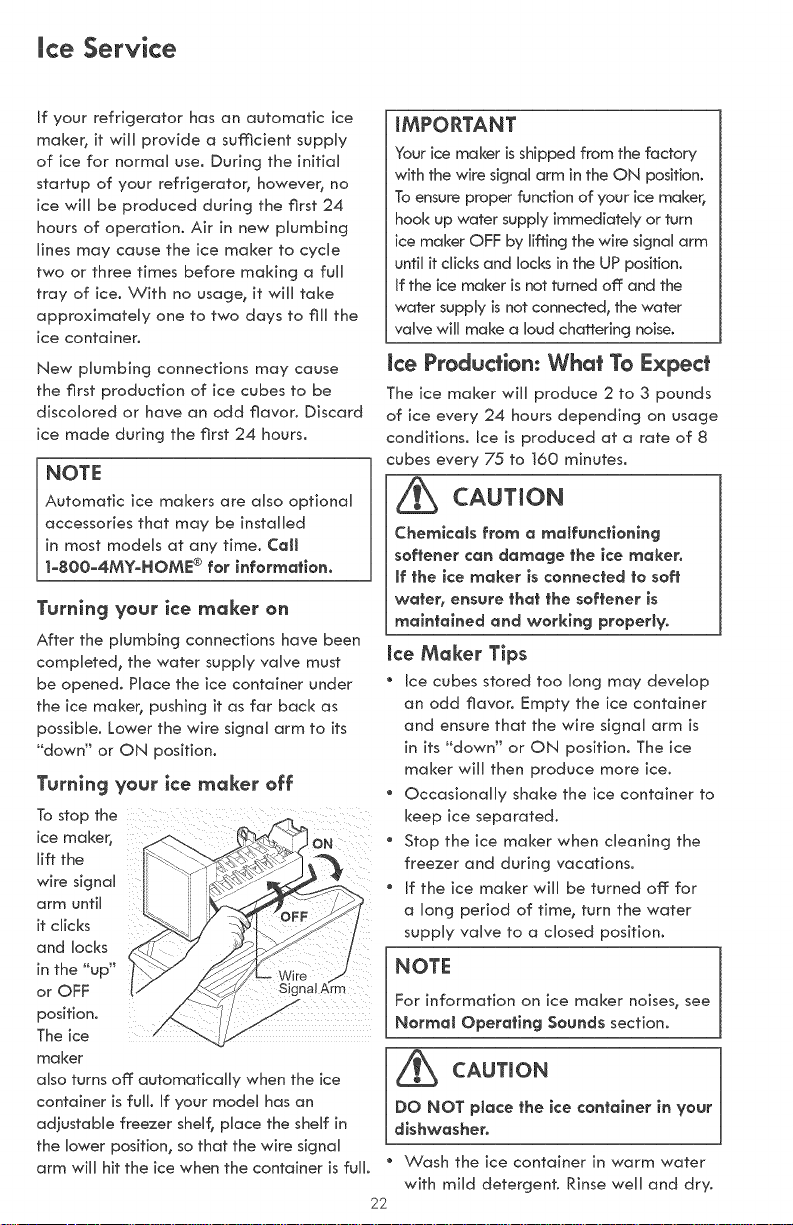
Turnlng your ice moker on
After the plumbing connections have been
compHeted, the water suppHy vaHve must
be opened. PHace the ice container under
the ice maker, pushing it as far bacH<as
possibHe. Lower the wire sicjnaH arm to its
°'down" or ON position.
Turnlng your ice rnoker off
Tostopthe
ice maker, ON
lift the
wire signaH
arm until
it chicks
and Hocks
in the "up"
or OFF
position.
The ice
ma ker
aHsoturns off: automaticaHHy when the ice
container is fuHH.If your modeH has an
adjustabHe freezer sheHf_pHace the sheHf in
the Mower position, so that the wire signaH
arm wiHHhit the ice when the container is fuHH.
mMPORTANT
Your ice maker is shipped from the factory
with the wire signal arm in the ON position.
To ensure proper function of your ice maker,
hook up water suppHyimmediately or turn
ice maker OFF by lifting the wire signal arm
untiHit chicks and Hocksin the UP position.
If the ice maker is not turned off: and the
water suppHy is not connected_ the water
valve wHHmake a Houdchattering noise.
Ice Procbction: What To r:xpect
The ice maker wiHHproduce 2 to 3 pounds
of ice every 24 hours dependincj on usage
conditions. Ice is produced at a rate of 8
cubes every 75 to t60 minutes.
_ CAUTION
Chemicals from a malfunctioning
softener can damage the ice maker.
(fthe (ce maker (s connected to soft
water, ensure that the softener (s
maintained and work(rig properly.
ke Moker Tips
* Ice cubes stored too long may deveHop
an odd flavor. Empty the ice container
and ensure that the wire sicjnaH arm is
in its _"down" or ON position. The ice
maker wiHHthen produce more ice.
" OccasionaHHy shake the ice container to
keep ice separated.
" Stop the ice maker when cleaning the
freezer and during vacations.
" if the ice maker wiHHbe turned off: for
a Honcj period of timer turn the water
suppHy vaHve to a dosed position.
NOTE
For information on ice maker noises, see
Normat Operat(ng Sounds section.
_b CAUT,ON
DO NOT p(ace the (ce container (nyour
dishwasher.
" Wash the ice container in warm water
with miHd detercjent Rinse weHHand dry.
22
Normal Operating Sounds
Understanding the sounds you
may hear
Your new, high-efficiency refrigerator
may introduce unfamiliar sounds. These
sounds normally indicate your refrigerator
is operating correctly. Some surfaces on
floors, walls, and kitchen cabinets may
make these sounds more noticeabUe.
NOTE
Rigid foam insuUation is very energy
efffic]ent, but is not a sound insuUator.
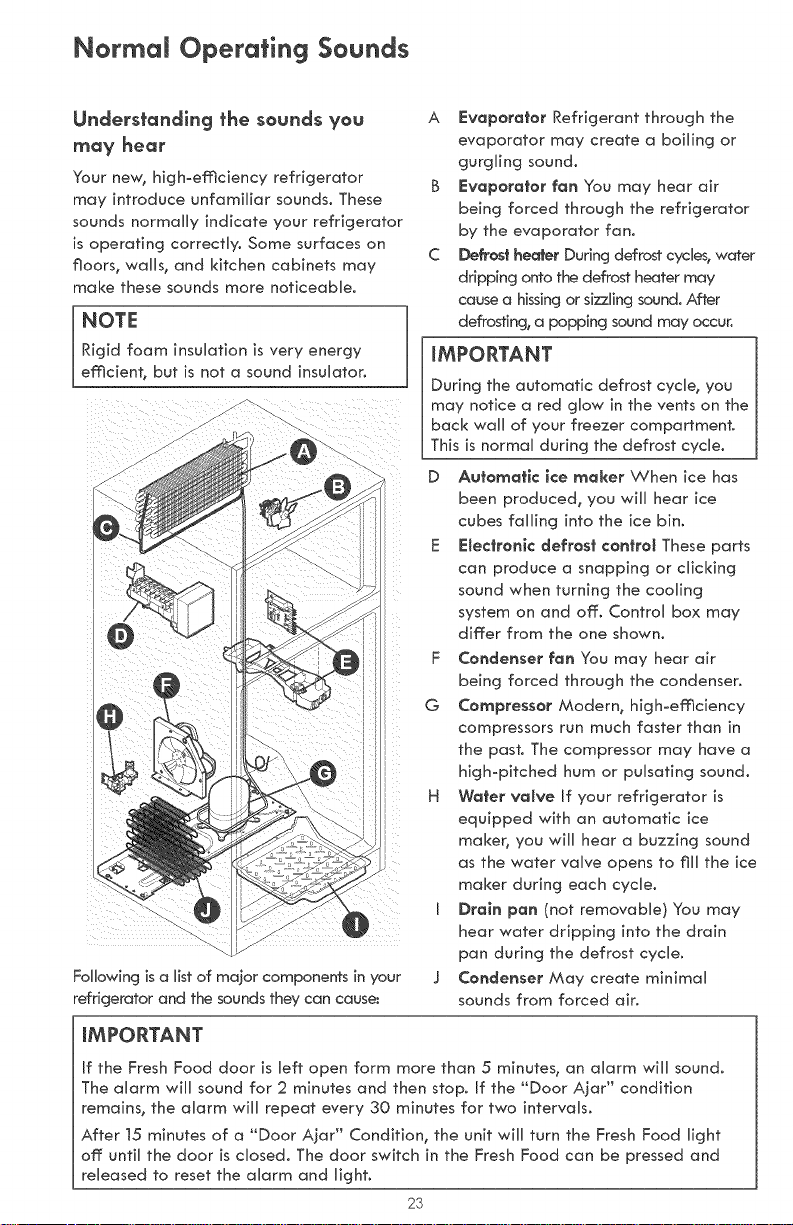
Following is a list of major components in your
refrigerator and the sounds they can cause:
A F:vaporafor Refrigerant through the
evaporator may create a boiling or
gurgling sound.
B _:vaporafor fan You may hear air
being forced through the refrigerator
by the evaporator fan.
C Defrosf heater During defrost cycles, water
dripping onto the defrost heater may
cause a hissing or sizzling sound. After
defrosting, a popping sound may occur.
mMPORTANT
During the automatic defrost cycle, you
may notice a red glow in the vents on the
back wall of your freezer compartment.
This is normal during the defrost cycle.
D Aufomatic ice maker When ice has
been produced, you will hear ice
cubes falling into the ice bin.
E $:Jecfronic defrosf confrol These parts
can produce a snapping or clicking
sound when turning the cooling
system on and off. Control box may
differ from the one shown.
F Condenser fan You may hear air
being forced through the condenser.
G Compressor Modern, highoefficiency
compressors run much faster than in
the past. The compressor may have a
high-pitched hum or pulsating sound.
H Wafer vatve If your refrigerator is
equipped with an automatic ice
maker, you will hear a buzzing sound
as the water valve opens to fill the ice
maker during each cycle.
I Drain pan (not removable) You may
hear water dripping into the drain
pan during the defrost cycle.
J Condenser May create minimal
sounds from forced air.
mMPORTANT
If the Fresh Food door is left open form more than 5 minutes, an alarm will sound.
The alarm will sound for 2 minutes and then stop. if the "Door Ajar" condition
remains, the alarm will repeat every 30 minutes for two intervals.
After t5 minutes of a "Door Ajar" Condition, the unit will turn the Fresh Food light
off until the door is closed. The door switch in the Fresh Food can be pressed and
released to reset the alarm and light.
23
Care & Clear ing
Protecting Your investment
Keeping your refrigerator clean maintains
appearance and prevents odor buHdoup.
Wipe up any spills immediateUy and dean
the freezer and fresh food compartments
at Ueast twice a year° When cleaning, take
the following precautions:
" Never use CHLORIDE or cUeaners with
bUeach to clean stainless steel
" Do not wash any removable parts in a
dishwashen
" Always unplug the electrical power cord
from the wall outlet before cleaning°
Remove adhesive labels by hand° Do
not use razor blades or other sharp
instruments which can scratch the
appliance surface°
Do not remove the serial plate°
Do not use abrasive cleaners such as
window sprays, scouring cleansers,
brushes, flammable fluids, cleaning waxes,
concentrated detergents, bleaches or
cleansers containing petroleum products
on plastic parts, interior doors, gaskets or
cabinet liners° Do not use paper towels,
metallic scouring pads, or other abrasive
cleaning materials or strong alkaline
sobtions_
NOTE
If you set your temperature controls
to turn off cooling, power to lights
and other electrical components will
continue until you unplug the power
cord from the wall outlet.
/_b CAUTION
Pull the refrigerator straight out to
move it. Shifting it from side to side
may damage flooring. Be careful not
to move the refrigerator beyond the
plumbing connections.
Damp objects stick to cotd metal
surfaces. Do not touch refrigerated
surfaces with wet or damp hands.
24
iMPORTANT
If you store or move your refrigerator
in freezing temperatures, be sure to
completely drain the water supply
system. Failure to do so could result in
water leaks when the refrigerator is put
back into service. Contact a service
representative to perform this operation.
Care & CJeaning
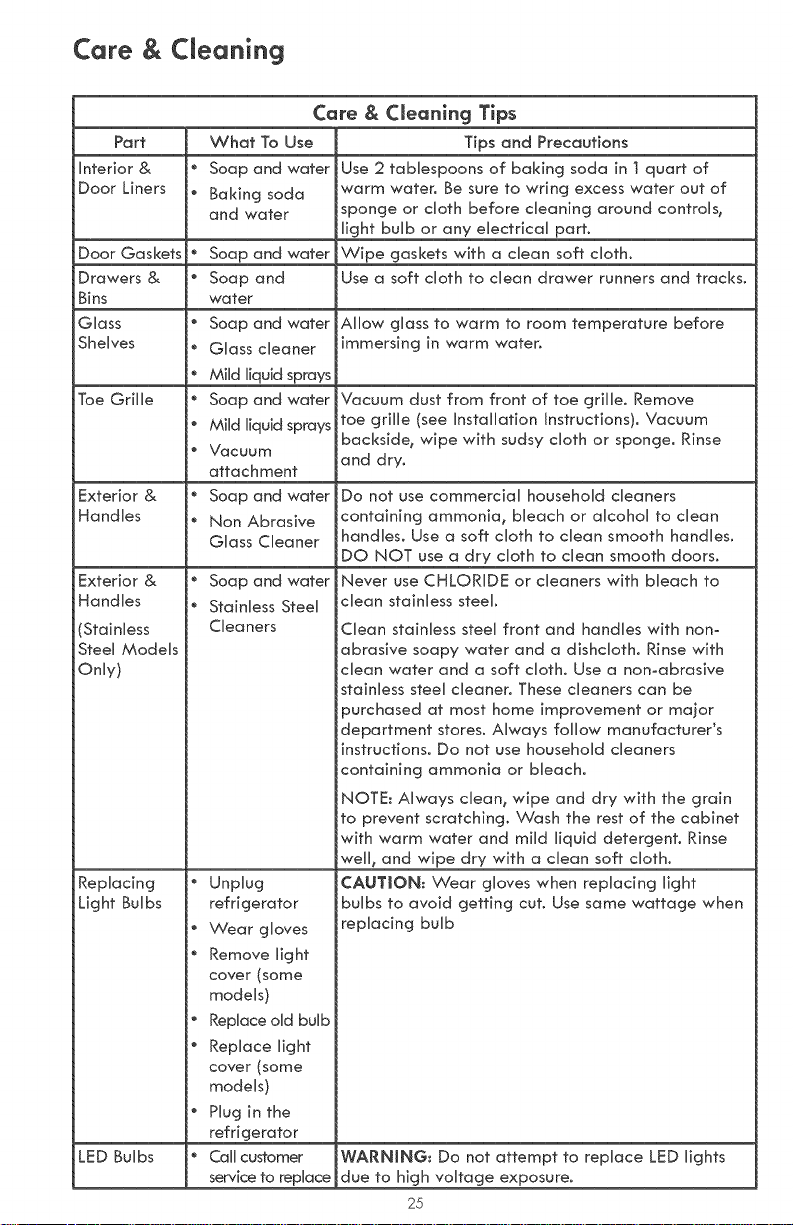
Care & CJeanlng Tips
Part What To Use Tips and Precautions
Intedor & * Soap and water Use 2 tabbspoons of baking soda in t quart of
Door Liners " Baking soda warm water. Be sure to wring excess water out of
and water sponge or cloth before cleaning around controls,
Uight buUb or any eUectricaU part.
Door Gaskets " Soap and water Wipe gaskets with a dean soft cloth.
Drawers & " Soap and Use a soft cloth to dean drawer runners and tracks.
Bins water
Glass _ Soap and water Allow glass to warm to room temperature before
Shelves _ Glass cleaner immersing in warm water.
" Mild liquid sprays
Toe Grille " Soap and water Vacuum dust from front of toe grille. Remove
" Mild liquid sprays toe grille (see Installation Instructions). Vacuum
backside, wipe with sudsy cloth or sponge. Rinse
" Vacuum and dry.
attachment
Exterior & " Soap and water
Handles " Non Abrasive
Glass Cleaner
Exterior & *
Handles
(Stainless
Steel Models
Only)
Replacing "
Light Bulbs
o
o
®
®
LED Bulbs "
Soap and water
Stainless Steel
Cleaners
Unplug
refrigerator
Wear gloves
Remove light
cover (some
models)
Replace old bulb
Replace light
cover (some
models)
Plug in the
refrigerator
Call customer
service to replace
Do not use commercial household cleaners
containing ammonia, bleach or alcohol to clean
handbs0 Use a soft cloth to clean smooth handles.
DO NOT use a dry cloth to clean smooth doors.
Never use CHLORIDE or cleaners with bleach to
clean stainless steel.
Clean stainless steel front and handles with non°
abrasive soapy water and a dishcloth. Rinse with
clean water and a soft cloth. Use a non-abrasive
stainless steel cleaner. These cleaners can be
purchased at most home improvement or major
department stores. Always follow manufacturer's
instructions. Do not use household cleaners
containing ammonia or bleach.
NOTE: Always clean, wipe and dry with the grain
to prevent scratching. Wash the rest of the cabinet
with warm water and mild liquid detergent. Rinse
well, and wipe dry with a dean soft cloth.
CAUTION: Wear gloves when replacing light
bulbs to avoid getting cut. Use same wattage when
replacing bulb
WARNING: Do not attempt to replace LED lights
due to high voltage exposure.
25

Care & Clear ing
Short
Vacations
Long
Vacations
Moving
Vacation and Movln9 Tips
" Leave refrigerator operating during vacations of 3 weeks or Uess,
* Use aH perishabUe items from refrigerator compartment.
Turn automatic ice maker off and empty ice bucket, even if you will
onUy be gone for a few days,
Remove aH food and ice if you will be gone one month or more.
Turn off automatic ice maker and turn water suppUy valve to dosed
position.
Turning control knobs to °'0 _ on the refrigerator (fresh food) controU box
onUy controls your refrigerator's cooling system° To turn off power to
your refrigerator you must unplug the power cord from the wall outlet°
Clean interior thoroughly.
Leave both doors open to prevent odors and mold build-up. Block
doors open if necessary,
Remove all food and ice.
o
" If using handcart, load from side,
* Adiust rollers all the way up to protect them during sliding or moving.
Pad cabinet exterior to avoid scratching surface,
Never CmeanCondenser (some moctels)
if your refrigerator is equipped with a '_Never Clean _ condenser, there's no need to
clean the condenser under normal operating conditions, If the refrigerator is operated
under particularly dusty or greasy conditions, or if there is significant pet traffic in
your home, it may be necessary to periodically clean the condenser for maximum
efficiency,
26

Before You Cail
TROUBLESHOOTING
GUIDE
PROBLEM
Before calling for service, review this Jist_It may save you time and
expense. This list includes common occurrences that are not the
result of defective workmanship or materials in this appliance.
CAUSE CORRECTION
AUTOMATIC ICE MAKER (some models)
ice maker is not making * ice maker wire signal
any ice. arm is in the _up" or
Ice maker is not making
enough ice.
Ice maker will not stop *
making ice.
Ice cubes are freezing
together.
Ice has bad odor and
taste.
e
LIGHT BULB IS NOT ON
OFF position.
* Household water line
valve is not open.
* Freezer is not cold
enough.
* Saddle valve on cold
water pipe is dogged
or restricted by foreign
material
* ice maker is producing
less ice than you
expect.
* Freezer is not cold
enough.
* Household water line
valve is not completely
open.
ice maker wire signal
arm is being held
down by some item in
the freezer.
* ice cubes are not
being used frequently
enough.
* Freezer control is set
too warm.
* Very little food in freezer. *
* ice has picked up *
odor or flavor from
strong food stored in
refrigerator or freezer.
o Water running to ice °
maker has poor taste
or odor.
Ice not used frequently *
enough.
* Move wire signal arm to the
"down" or ON position (side
mounted).
° Turn on household water line
va Ive.
* See PROBLEM column
TEMPERATURES ARE TOO WARM.
* Turn off household water line valve.
Remove valve. Ensurethat valve is not
a seJfzpiercing saddle valve. Clean
valve. Replace valve if necessary.
* The ice maker win produce 2 to
3 pounds of ice every 24 hours
depending on usage conditions.
Joe is produced at a rate of 8
cubes every 75 to 160 minutes.
* See PROBLEM column
TEMPERATURES ARE TOO WARM.
e
Turn on household water line
valve.
* Move item and release wire signal
arm. Remove any ice cubes that
are frozen together over the wire
signal arm.
* Remove ice container and discard
ice from container, ice maker win
produce fresh supply.
* Set freezer control to colder
setting. Allow 24 hours for
temperature to stabilize.
Add more food to freezer.
Cover foods tightly. Discard stale
ice. ice maker win produce fresh
supply. Replace air Biter (available
in select models).
Add filter to water supply
line. Consult a water purifying
company.
Discard stale ice.
Light bulb is not on. * Light bulb is burned
out.
* No electric current is
reaching refrigerator.
* See Replacing Light Bulbs in
NORMAL OPERATING SOUNDS
section.
* See PROBLEM column RUNNING
OF REFRIGERATOR.
27
Before You CaJJ
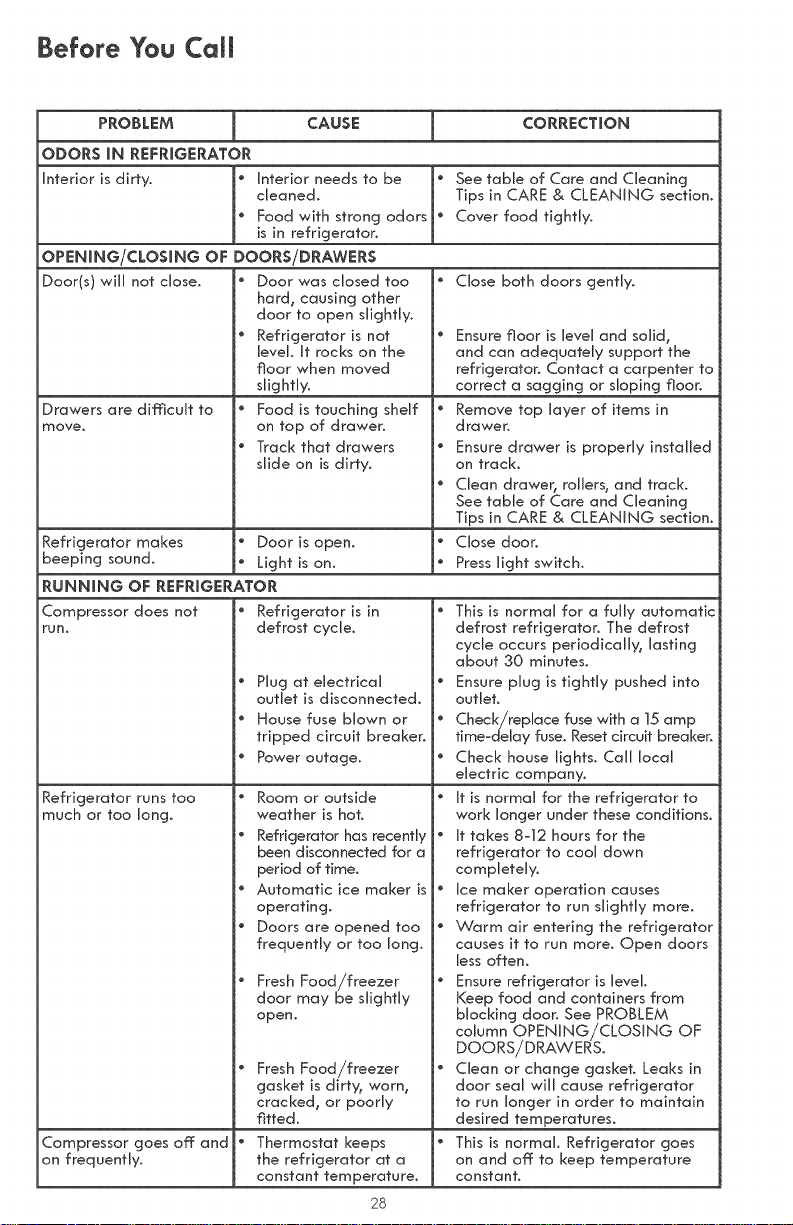
PROBLEM CAUSE CORRECTION
ODORS iN REFRIGERATOR
[ntedor is dirty. I_ Interior needs to be _ See table of Care and Cleaning
cleaned. Tips in CARE & CLEANING section.
Food with strong odors _ Cover food tightly.
o
o
[_ Refrigerator is in
defrost cycle.
Plug at electrical
outlet is disconnected.
House fuse blown or
tripped circuit breaker.
Power outage.
Room or outside
weather is hot.
Refrigerator has recently _
been disconnected for a
period of time.
Automatic ice maker is _
operating.
Doors are opened too
frequently or too long.
Fresh Food/freezer
door may be slightly
open.
Fresh Food/freezer
gasket is dirty, worn,
cracked, or poorly
fitted.
Thermostat keeps
the refrigerator at a
constant temperature.
is in refrigerator.
OPENING/CLOSING OF DOORS/DRAWERS
Door(s) will not dose. j_ Door was closed too
hard, causing other
door to open slightly.
i_ Refrigerator is not
levels It rocks on the
floor when moved
slightly.
Drawers are dimcuJt to J_ Food is touching shelf
move. on top of drawer.
i_ Track that drawers
slide on is dirty.
Refrigerator makes j_ Door is open.
beeping sound. _ Light is on.
RUNNING OF REFRIGERATOR
Close both doors gently.
Ensure floor is level and solid,
and can adequately support the
refrigerator. Contact a carpenter to
correct a sagging or sloping floor.
Remove top layer of items in
drawer.
Ensure drawer is properly installed
on track.
Clean drawer, rollers, and tracks
See table of Care and Cleaning
Tips in CARE & CLEANING section.
Close door.
Press light switch.
Compressor does not
run.
Refrigerator runs too
much or too long.
1o
I ®
io
io
io
I o
io
Compressor goes off and i_
on frequently.
This is normal for a fully automatic
defrost refrigerator. The defrost
cycle occurs periodically, lasting
about 30 minutess
Ensure plug is tightly pushed into
outlet.
Check/replace fuse with a 15amp
timezdeJay fuse. Reset circuit breaker.
Check house lights. Call local
electric company.
it is normal for the refrigerator to
work longer under these conditions.
it takes 8-12 hours for the
refrigerator to cool down
completely.
ice maker operation causes
refrigerator to run slightly more.
Warm air entering the refrigerator
causes it to run more. Open doors
less often.
Ensure refrigerator is level.
Keep food and containers from
blocking door. See PROBLEM
column OPENiNG/CLOSING OF
DOORS/DRAWERSs
Clean or change gaskets Leaks in
door seal win cause refrigerator
to run longer in order to maintain
desired temperatures.
This is normal Refrigerator goes
on and off to keep temperature
constant.
28
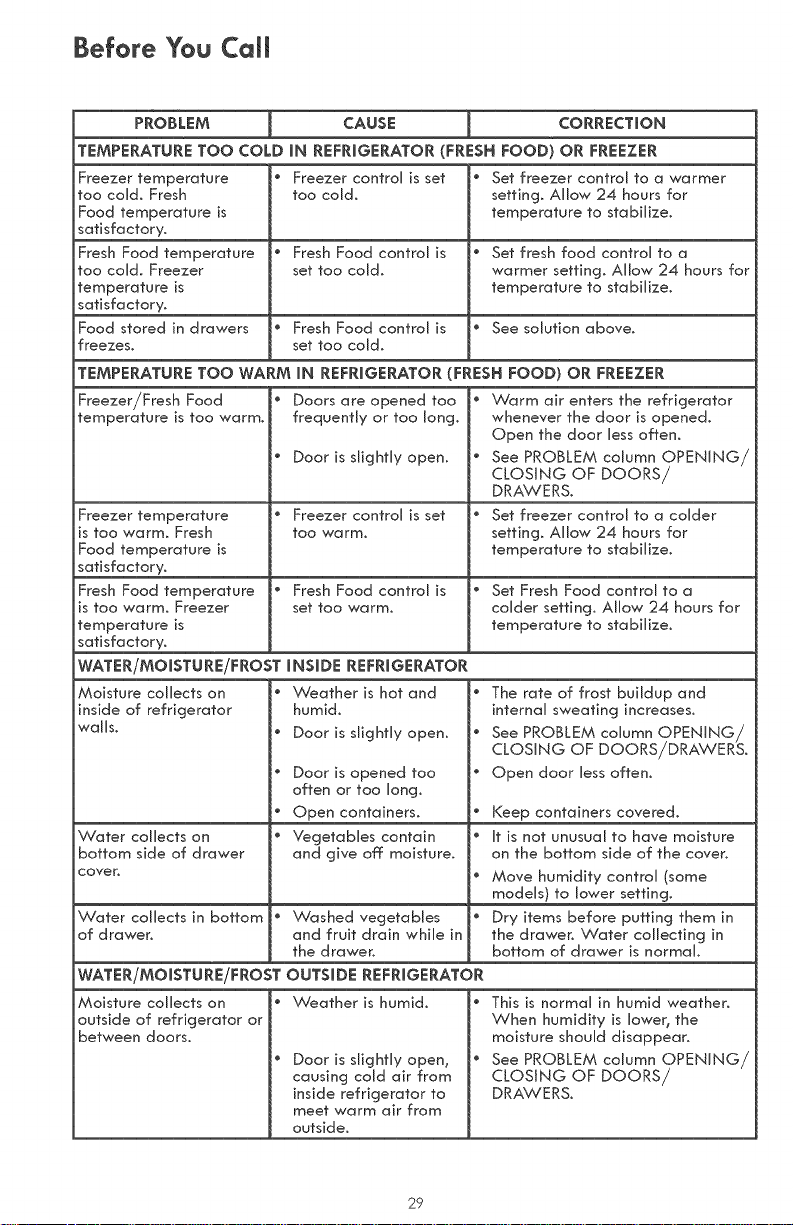
Before You Cail
PROBLEM CAUSE CORRECTION
TEMPERATURE TOO COLD iN REFRIGERATOR (FRESH FOOD) OR FREEZER
Freezer temperature
too cold. Fresh
Food temperature is
satisfactory.
Fresh Food temperature
too cold. Freezer
temperature is
satisfactory.
Food stored in drawers
freezes.
" Freezer control is set
too cold,
" Fresh Food control is
set too cold.
" Fresh Food control is
set too cold.
" Set freezer control to a warmer
setting. Allow 24 hours for
temperature to stabilize.
" Set fresh food control to a
warmer setting. Allow 24 hours for
temperature to stabilize.
" See solution above.
TEMPERATURE TOO WARM iN REFRIGERATOR (FRESH FOOD) OR FREEZER
Freezer/Fresh Food
temperature is too warm.
Freezer temperature " Freezer control is set
is too warm. Fresh too warm.
Food temperature is
satisfactory.
Fresh Food temperature * Fresh Food control is
is too warm. Freezer set too warm.
temperature is
satisfactory.
WATER/MOiSTURE/FROST INSIDE REFRIGERATOR
Moisture collects on
inside of refrigerator
walls.
Doors are opened too . Warm air enters the refrigerator
frequently or too long, whenever the door is opened.
Open the door less often,
Door is slightly open. " See PROBLEM column OPENING/
CLOSING OF DOORS/
DRAWERS.
" Set freezer control to a colder
setting. Allow 24 hours for
temperature to stabilize,
" Set Fresh Food control to a
colder setting, Allow 24 hours for
temperature to stabilize,
Water collects on
bottom side of drawer
cover,
Water collects in bottom
of drawer.
. Weather is hot and "
humid.
" Door is slightly open. "
" Door is opened too
often or too long,
" Open containers.
* Vegetables contain *
and give off moisture.
e
" Washed vegetables "
and fruit drain while in
the drawer.
WATER/MOiSTURE/FROST OUTSIDE REFRIGERATOR
Moisture collects on
outside of refrigerator or
between doors.
The rate of frost buildup and
internal sweating increases.
See PROBLEM column OPENING/
CLOSING OF DOORS/DRAWERS.
Open door less often.
Keep containers covered.
it is not unusual to have moisture
on the bottom side of the cover.
Move humidity control (some
models) to lower setting.
Dry items before putting them in
the drawer. Water collecting in
bottom of drawer is normal.
Weather is humid.
Door is slightly open,
causing cold air from
inside refrigerator to
meet warm air from
outside.
" This is normal in humid weather.
When humidity is lower, the
moisture should disappear.
* See PROBLEM column OPENING/
CLOSING OF DOORS/
DRAWERS.
29