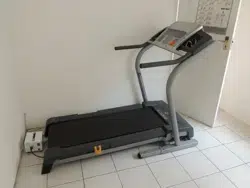
®
NordlcTrack
Patent Pending_
_r
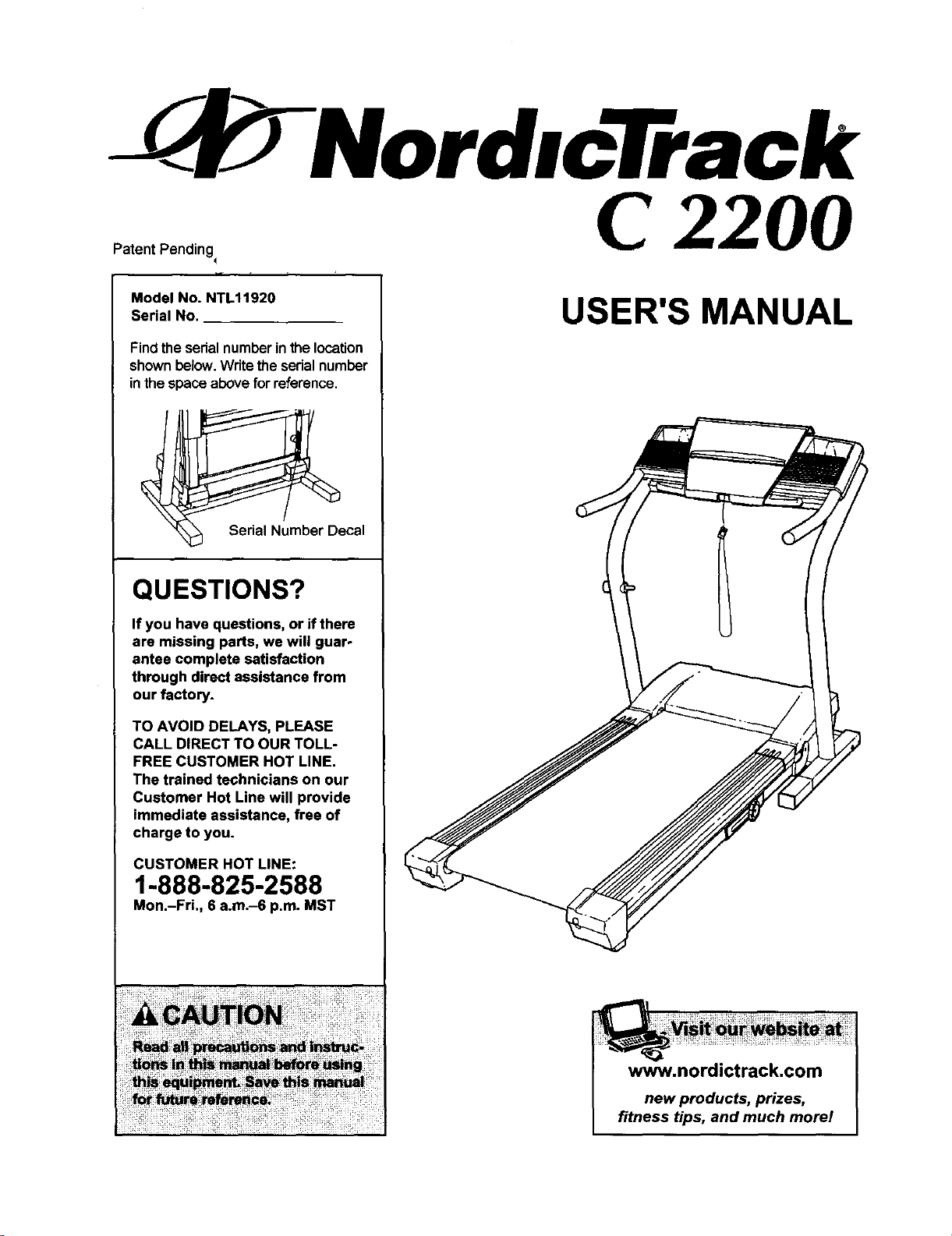
Model No. NTL11920
Serial No.
Find the serial number in the location
shown below.Write the sedal number
in the space above for reference.
_umber D_ecal
QUESTIONS?
If you have questions, or if there
are missing parts, we will guar-
antee complete satisfaction
through direct assistance from
our factory.
TO AVOID DELAYS, PLEASE
CALL DIRECT TO OUR TOLL-
FREE CUSTOMER HOT LINE.
The trained technicians on our
Customer Hot Line will provide
immediate assistance, free of
charge to you.
CUSTOMER HOT LINE:
1-888-825-2588
Mon.-Fri., 6 a.m.-6 p.m. MST
C 2200
USER'S MANUAL
www.nordictrack.com
new products, prizes,
fitness tips, and much morel
- NordlcTrack
C 2200
TABLE OF CONTENTS
IMPORTANT PRECAUTIONS ................................................................. 3
BEFORE YOU BEGIN ....................................................................... 5
ASSEMBLY ............................................................................... 6
OPERATION AND ADJUSTMENT ............................................................. 8
HOW TO FOLD AND MOVE THE TREADMILL .................................................. 24
TROUBLESHOOTING ...................................................................... 26
CONDITIONING GUIDELINES ............................................................... 28
PART LIST ............................................................................... 30
ORDERING REPLACEMENT PARTS .......................................................... 31
LIMITED WARRANTY ............................................................... Back Cover
Note: An EXPLODED DRAWING is attached in the center of this manual.
NordicTrack is a registered trademark of ICON Health & Fitness, Inc.
2
IMPORTANT PRECAUTIONS
WARNING: To ,_,, the risk of bums, fire, electric shock, or injury to persons, read the
following important precautions and information before operating the treadmill.
1. It is the responsibility of the owner to ensure
that all users of this treadmill are adequately
informed of all wamings and precautions.
2. Use the treadmill only as descdbed.
3. Place the treadmill on a level surface, with at
least eight feet of clearance behind it and two
feet on each side. Do not place the treadmill
on any surface that blocks air openings. To
protect the floor or carpet from damage, place
a mat under the treadmill.
4. Keep the treadmill indoors, away from mols-
tore and dust. Do not put the treadmill in a
garage or covered patio, or near water.
t2. Failure to use a properly functioning surge
suppressor could result in damage to the con-
trel system of the treadmill If the control sys-
tem is damaged, the walking belt may change
speed or stop unexpectedly, which may result
In a fall and serious Injury.
13. Keep the power cord and the surge suppres-
sor away from heated surfaces.
14. Never move the walking belt while the power
is tumad off. Do not operate the treadmill if
the power cord or plug is damaged, or it the
treadmill is not working properly. (See
BEFORE YOU BEGIN on page 5 if the tread-
mill is not working properly.)
5. Do not operate the treadmill where aerosol
products are used or where oxygen is being
administered.
t5. Never start the treadmill while you are stand-
ing on the walking belt_Always hold the
handrails while using the treadmill.
6. Keep children under the age of 12 and pete
away from the treadmill at all times.
7. The treadmill should not be used by persons
weighing more than 250 pounds.
8. Never allow more than one person on the
treadmill at a time.
9. Wear appropdate exercise clothes when
using the treadmill. Do not wear loose clothes
that could become caught in the treadmill
Athletic support clothes ere recommended for
both men and women. Always wear athletic
shoes. Never use the treadmill with bare feet,
wearing only stockings, or in sandals.
10.When connecting the power cord (see page 8),
plug the power cord Into a surge suppressor
(not included) and plug the surge suppressor
into a grounded circuit capable of carrying 15
or more amps. No other appliance should be on
the same circuit. Do not use an extension cord.
11. Use only a single.outlat surge suppressor that
meets all of the specifications described on
page 8. To purchase a surge suppressor, see
your local NordicTrack dealer or call t-800-
806-3651 and order pert number 146148.
16. The treadmill is capable of high speeds.
Adjust the speed in small increments to avoid
sudden jumps in speed.
17. The pulse sensor is not a medical device.
Various factors, including the user's move-
ment, may affect the accuracy of heart rate
readings. The pulse sensor is Intended only
as an exercise aid in determining heart rate
trends in general.
18. Never leave the treadmill unattended while it
is running. Always remove the key and un-
plug the power cord when the treadmill is not
in use.
19. Do not attempt to raise, lower, or move the
treadmill until It Is properly assembled. (See
ASSEMBLY on page 6, and HOW TO FOLD
AND MOVE THE TREADMILL on page 24.) You
must be able to safely lift 45 pounds (20 kg) in
order to raise, lower, or move the treadmill.
20. Do not change the incline of the treadmill by
placing objects under the treadmill.
21. When folding or moving the treadmill, make
sure that the storage latch is fully closed.
3
22. When using iFIT.com CD's and videos, an
electronic "chirping" sound will alert you
when the speed and/or incline of the treadmill
is about to change. Always listen for the
"chirp" and be prepared for speed and/or in-
aline changes. In some instances, the speed
and/or incline may change before the per-
sonal trainer describes the change.
23. When using iFIT.com CD's and videos, you
can manually override the speed and incline
settings at any time by pressing the speed
and incline buttons. However, when the next
"chirp" is heard, the speed and/or incline will
change to the next settings of the CD or video
program.
25. inspect and propedy tighten all parts of the
treadmill regulady.
26. Never insert or drop any object into any
opening.
2z.DANGER: Alwaysunplug thepower
cord immediately after use, before cleaning
the treadmill, and before performing the main-
tanance and adjustment procedures de-
scdbed in this manual. Never remove the
motor hood unless instructed to do so by an
authorized service representative. Servicing
other than the procedures in this manual
should be performed by an authorized service
representative only.
24. Always remove iFIT.com CD's and videos 28. This treadmill is intended for in-home usa
from your CD player or VCR when yon are not only. Do not use this treadmill in any corwmer-
using them. clel, rental, or institutional setting.
• WARNING: Before beginning this or any exercise program, consult your physician. This
is especially important for persons over the age of 35 or persons with preexisting health problems.
Read all Instructions before using. ICON assumes no respormlbllity for personal Injury or property
damage sustained by or through the use of this product.
SAVE THESE INSTRUCTIONS
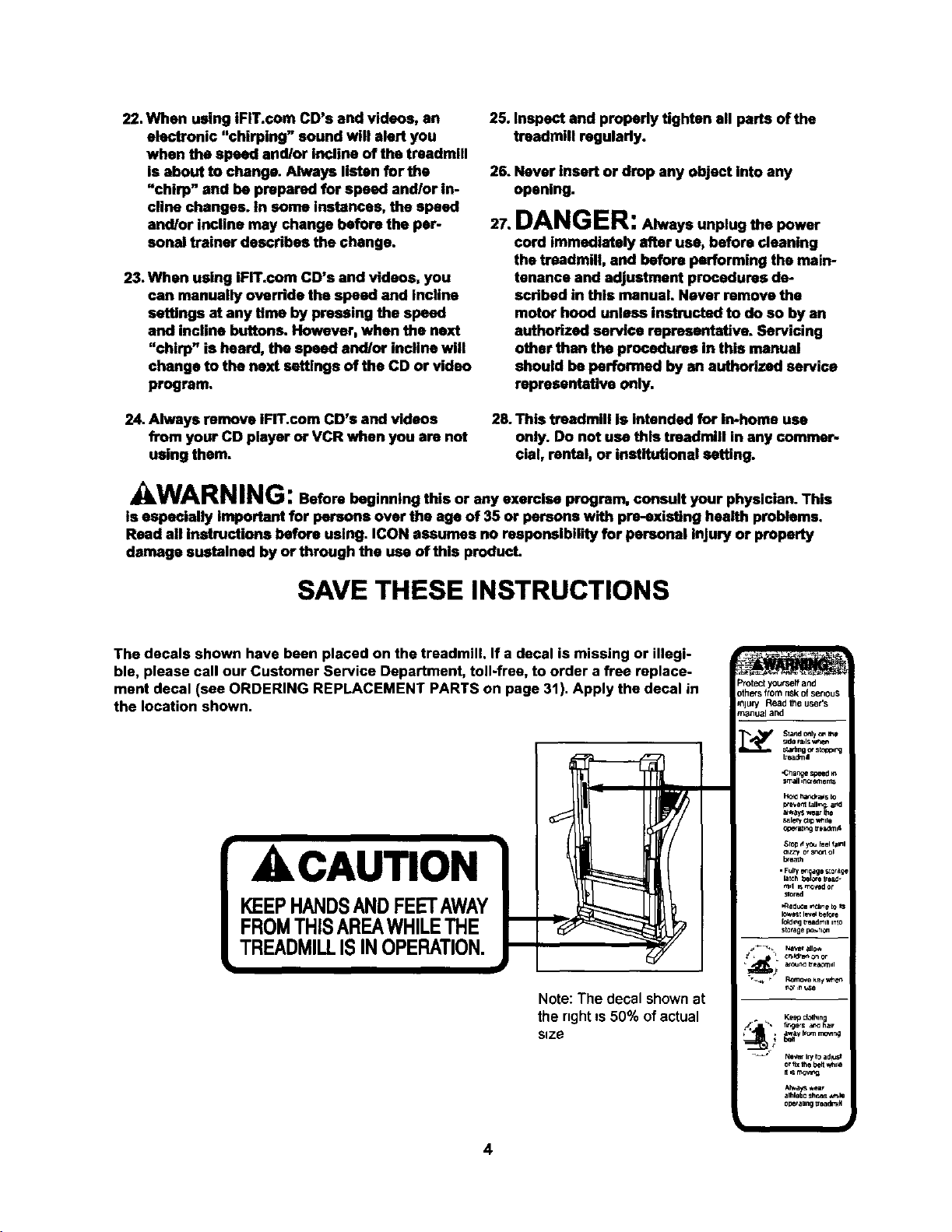
The decals shown have been placed on the treadmill. If a decal is missing or illegi-
ble, please call our Customer Service Department, toll-fres, to order a free replace-
ment decal (see ORDERING REPLACEMENT PARTS on page 31). Apply the decal in
the location shown•
ACAUTION
KEEPHANDSANDFEETAWAY
FROMTHISAREAWHILETHE
TREADMILLISINOPERATION.
t
I
Note: The decal shownat
the nght Is 50% ofactual
size
4
Protect yourseff and
oth_s from risk of serious
=nlury Read _e user's
manual ar:d
_,_ Stand only c_ _e
_de f=uls w_en
s_n 9 c,,sk_opr_g
beadm,I
•CPlange speed _n
small inuamenlS
HO_ I_,_a_ s Io
_e'/ent faJl_ and
aways _,ear Ihe
t,_lentdip _,*_do
brea_h
• Fulry en agmstorage
md _ mG,_d or
_ored
,,_ed_ _cIin e to _
I_est I_t t_, e
storage _.TI_
• _ _1_ _,_r_ll I
Ke_ ct_ln
fc_n
alhlebc shr,_s *n,_
o_l_ranng _e_N
BEFORE YOU BEGIN
Thank you for selecting the revolutionary NordicTracl_
C 2200 treadmill. The C 2200 treadmUl combines ad-
vanced technology with innovative design to help you
get the most from your exercise program in the conve-
nience of your home. And when you're not exercising,
the unique C 2200 treadmill can be folded up, requiring
less than half the floorspace of other treadmills.
For your benefit, read this manual carefully before
using the treadmill. If you have additionalquestions,
please call our Customer Service Department toll-free
at 1-888-825-2588, Monday through Friday, 6 a.m.
until 6 p.m. Mountain Time (excluding holidays). To
help us assist you, please note the product model
number and serial number before calling. The model
number of the treadmill is NTL11920. The serial num-
ber can be found on a decal attached to the treadmill
(see the front cover of this manual for the location).
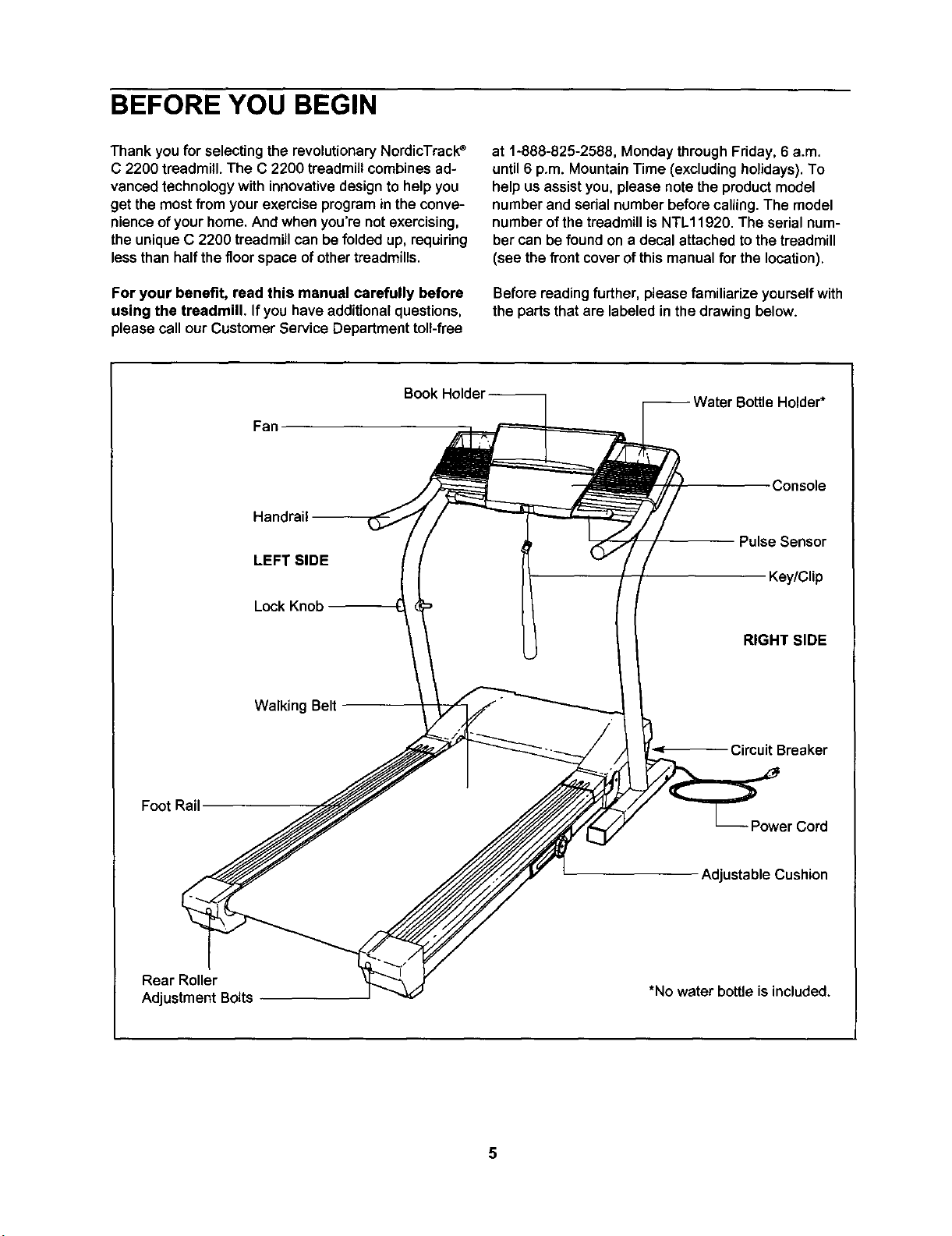
Before reading further, please familiarize yourself with
the parts that are labeled in the drawing below.
Fan
Hand
LEFT SIDE
Lock Knob
Console
Pulse Sensor
Key/Clip
RIGHT SIDE
Walking Belt
Circuit Breaker
Foot Rail
Power Cord
Adjustable Cushion
Rear Roller
AdjustmentBolts
*No water bottle is included.
5
ASSEMBLY
Assembly requires two people. Set thetreadmillin a cleared area and remove all packingmaterials.Do not
dispose ofthe packing materialsuntilassemblyis completed.Assembly requires the included allen wrenc_
and your own phillips screwdriver _ and wire cutters _.
Note: The undersideof the treadmill walkingbelt iscoated with high-performance lubricant. During shipping, a
small amount of lubricant may be transferred to the top of the walking belt or the shipping carton. This is a normal
condition and does not affect treadmill performance. If there is lubricant on top of the walking belt, simply wipe off
the lubricant with a soft cloth and a mild, non-abrasive cleaner.
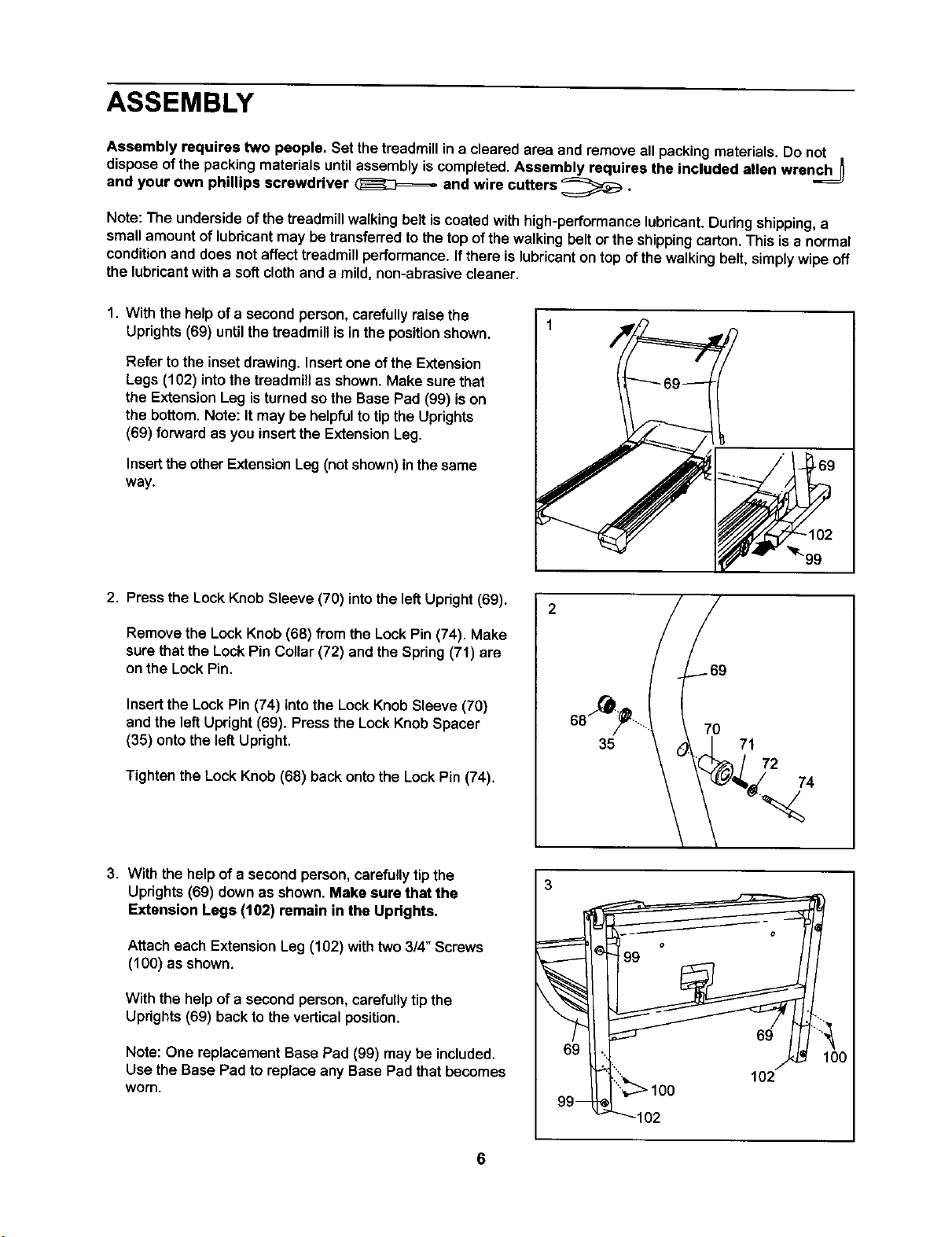
1. With the help of a second person, carefully raise the
Uprights (69) until the treadmill is in the position shown.
Refer to the inset drawing. Insert one ofthe Extension
Legs (102) into the treadmill as shown. Make sure that
the Extension Leg is turned so the Base Pad (99) is on
the bottom. Note: It may be helpful to tip the Uprights
(69) forward as you insertthe Extension Leg.
Insert the otherExtensionLeg (not shown) inthe same
way.
2. Press the Lock Knob Sleeve (70) into the left Upright (69).
Remove the LockKnob (68) from the Lock Pin (74). Make
sure that the Lock Pin Collar (72) and the Spring (71) are
on the Lock Pin.
Insert the Lock Pin (74) into the Lock Knob Sleeve (70)
and the left Upright (69). Press the Lock Knob Spacer
(35) onto the left Upright.
Tighten the Lock Knob (68) back onto the Lock Pin (74).
35
70
71
72
74
3. With the help of a second person, carefullytip the
Uprights (69) down as shown. Make sure that the
Extension Legs (102) remain in the Uprights.
Attach each ExtensionLeg (102) with two 3/4" Screws
(100) as shown.
With the help of a second person, carefullytipthe
Uprights(69) backto the verticalposition.
Note: One replacement Base Pad (99) may be included.
Use the Base Pad to replace any Base Pad that becomes
worn.
69
99-
""_102
102
6
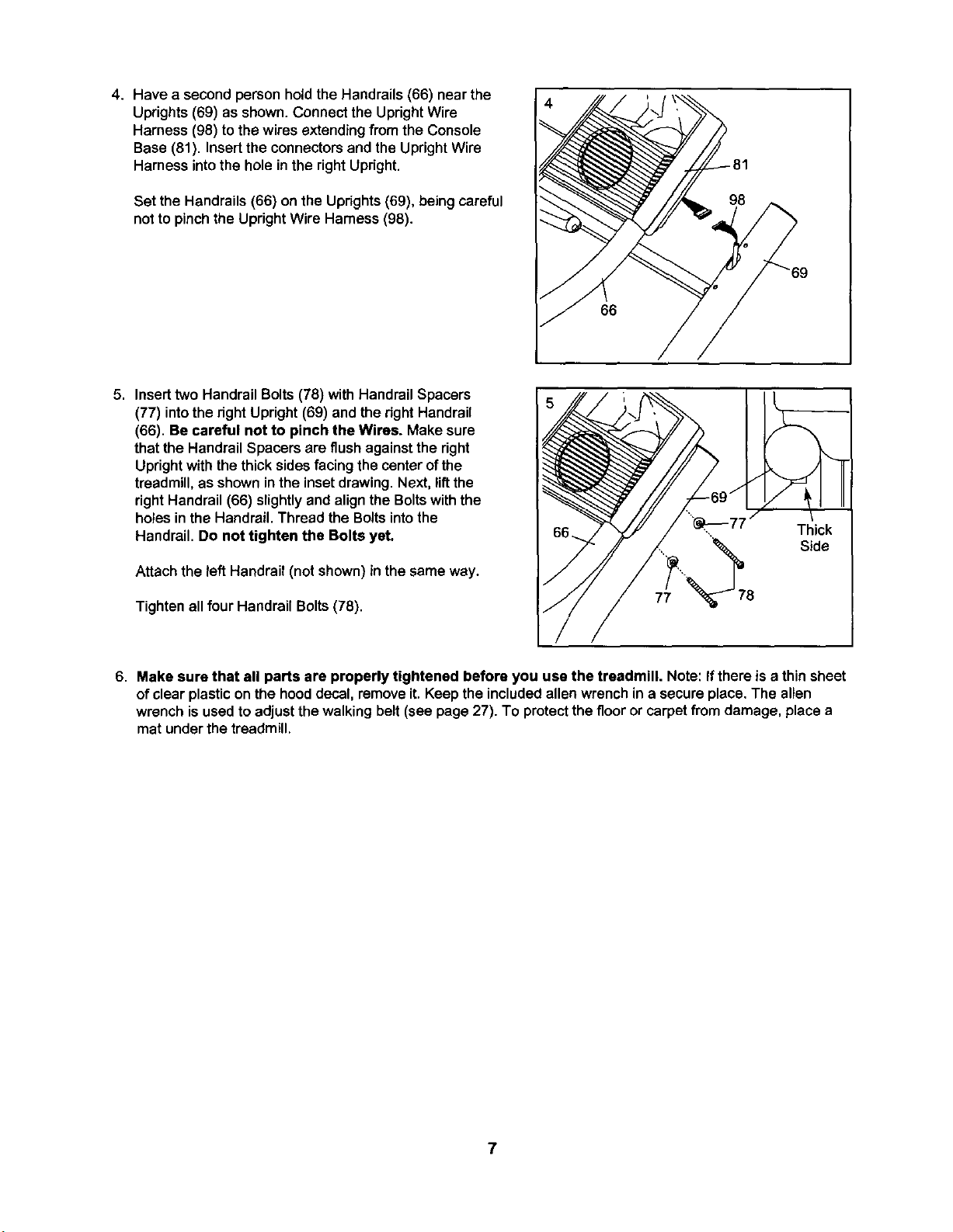
4. Have a second person hold the Handrails (66) near the
Uprights (69) as shown. Connect the Upright Wire
Harness (98) to the wires extendingfrom the Console
Base (81). Insert the connectors and the Upright Wire
Harness into the hole in the right Upright.
Set the Handrails (66) on the Uprights (69), being careful
not to pinch the Upright Wire Harness (98).
66
5. Insert two Handrail Bolts(78) with Handrail Spacers
(77) intothe rightUpright(69) and the rightHandrail
(66). Be careful not to pinch the Wires. Make sure
that the Handrail Spacers are flushagainstthe right
Uprightwith the thicksides facingthecenter ofthe
treadmill,as showninthe inset drawing.Next, lift the
rightHandrail (66) slightlyand alignthe Boltswiththe
holesin the Handrail.Thread the Boltsintothe
Handrail. Do not tighten the Bolts yet.
Attach the left Handrail (not shown) in thesame way.
Tighten all four Handrail Bolts (78).
Thick
Side
6. Make sure that all parts are properly tightened before you use the treadmill. Note: If there is a thinsheet
of clear plasticon the hooddecal, removeit. Keep theincludedallen wrenchin a secure place.The allen
wrench isused to adjustthe walking belt (see page 27). To protectthe flooror carpetfrom damage, place a
mat under the treadmill.
OPERATION AND ADJUSTMENT
THE PERFORMANT LUBETM WALKING BELT
Your treadmillfeatures awalking belt coated with
PERFORMANT LUBETM, a high-performance lubricant.
IMPORTANT: Never apply silicone spray or other
substances to the walking belt or the walking plat-
form. Such substances will deteriorate the walking
belt and cause excessive wear.
HOW TO PLUG IN THE POWER CORD
an equipment-groundingconductorand a grounding
plug.Plug the power cord into a surge suppressor,
and plug the surge suppressor into an appropriate
outlet that is properly installed and grounded in
accordance with all local codes and ordinances.
Important: The treadmill is not compatible with
GFCl-equipped outlets.
This product isfor use on a nominal 120-volt circuit,
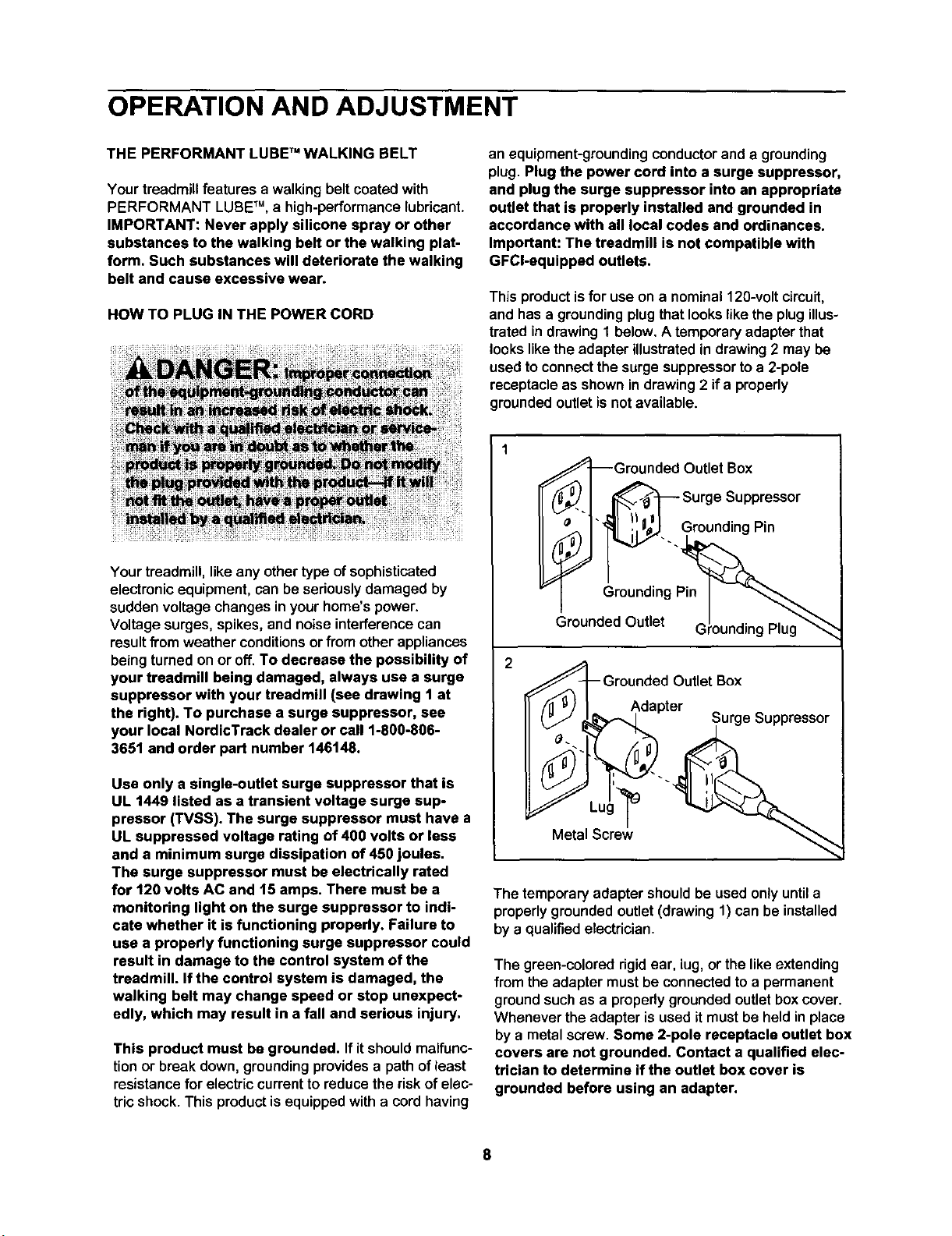
and hasa groundingplug thatlookslike the plug illus-
trated in drawingI below. A temporaryadapterthat
lookslikethe adapter illustratedin drawing 2 may be
usedto connectthe surgesuppressorto a 2-pole
receptacleas shown in drawing2 if a properly
groundedoutletisnotavailable.
Your treadmill, like any othertype ofsophisticated
electronicequipment,can be seriouslydamaged by
sudden voltagechanges in yourhome's power.
Voltage surges, spikes,and noiseinterferencecan
resultfTomweather conditionsor from otherappliances
beingturned on or off. To decrease the possibility of
your treadmill being damaged, always use a surge
suppressor with your treadmill (see drawing 1 at
the right). To purchase a surge suppressor, see
your local NordicTrack dealer or call 1-800-806-
3651 and order part number 146148.
Use only a single-outlet surge suppressor that is
UL 1449 listed as a transient voltage surge sup-
pressor (TVSS). The surge suppressor must have a
UL suppressed voltage rating of 400 volts or less
and a minimum surge dissipation of 450 joules.
The surge suppressor must be electrically rated
for 120 volts AC and 15 amps. There must be a
monitoring light on the surge suppressor to indi-
cate whether it is functioning properly. Failure to
use a properly functioning surge suppressor could
result in damage to the control system of the
treadmill. If the control system is damaged, the
walking belt may change speed or stop unexpect-
edly, which may result in a fall and serious injury.
This product must be grounded. Ifit shouldmalfunc-
tionor break down, groundingprovidesa path of least
resistancafor electriccurrentto reducethe riskof elec-
tric shock.This productisequipped with a cordhaving
_7_Grounded Outlet Box
_'-1 ,._ Surge Suppressor
_S_. Grounding Pin
Grounding Pin
Grounded Outlet G Plug
l_--Grounded Outlet Box
Adapter
_L ug__ _ Surge Suppressor
Metal Screw
The temporaryadapter should be used onlyuntila
properly groundedoutlet(drawing 1) can be installed
bya qualifiedelectrician.
The green-colored rigid ear, lug, or the like extending
from the adapter must be connected to a permanent
ground such as a properly grounded outlet box cover.
Whenever the adapter is used it must be held in place
by a metalscrew. Some 2-pole receptacle outlet box
covers are not grounded. Contact a qualified elec-
trician to determine if the outlet box cover is
grounded before using an adapter.
8
&WARNING : m
.......n,o-
Pulse
Sensor
Note: If there is a sheet of clear
plasticon the console, remove it.
Pulse
Sensor
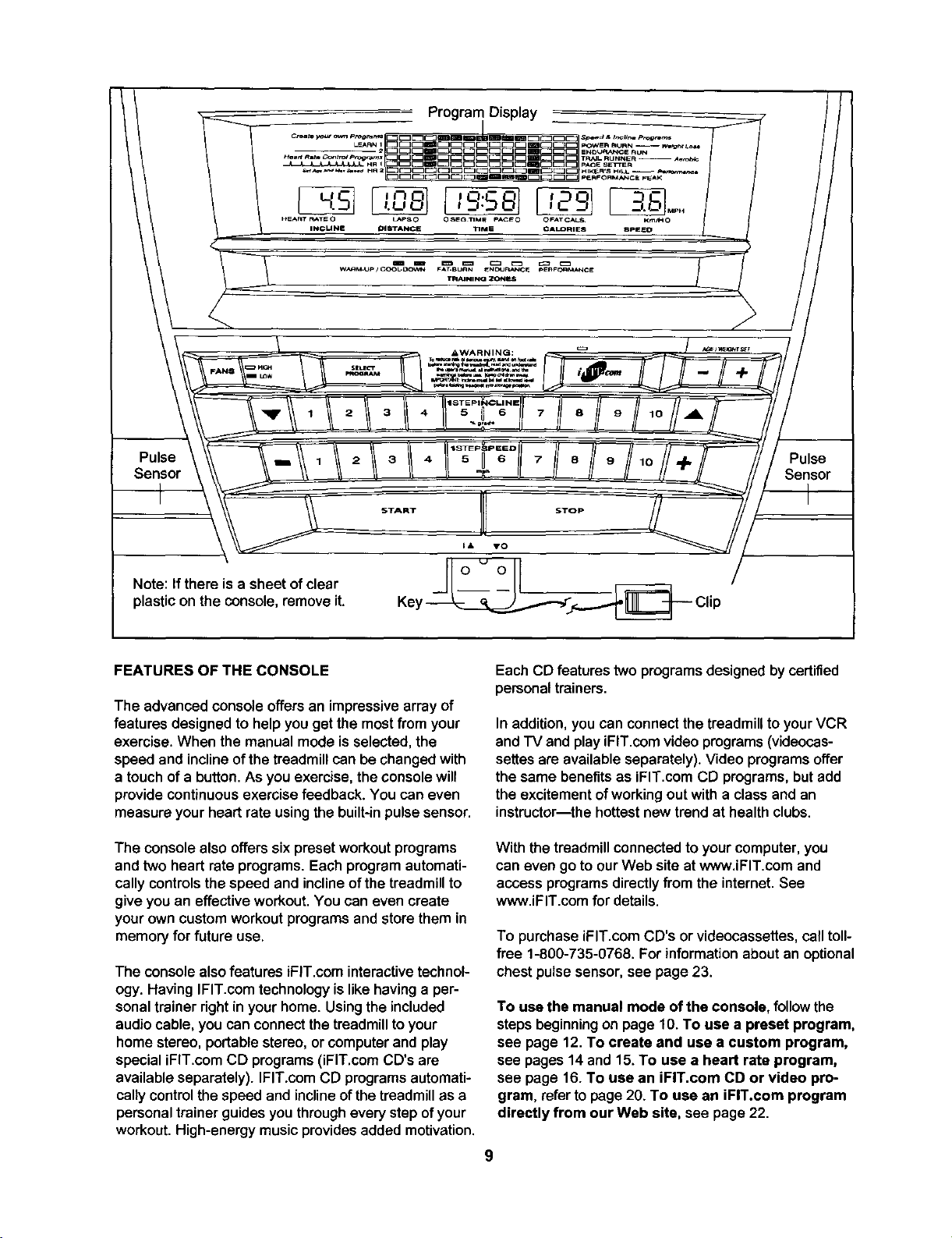
FEATURES OF THE CONSOLE
The advanced console offers an impressivearray of
features designed to helpyou get the most from your
exercise. When the manual mode is selected, the
speed and incline of the treadmill can be changed with
a touch of a button. As you exercise, the console will
provide continuous exercise feedback. You can even
measure your heart rate using the built-in pulse sensor.
The console also offers six preset workoutprograms
and two heart rate programs. Each program automati-
cally controls the speed and incline of the treadmill to
give you an effective workout. You can even create
your own custom workout programs and storethem in
memory for future use.
The consolealso features iFlT.com interactivetechnol-
ogy. Having IFIT.comtechnologyislike havinga per-
sonaltrainerdght in yourhome. Usingthe included
audiocable, you can connectthetreadmillto your
home stereo, portablestereo,or computerand play
specialiFIT.com CD programs(iFIT.comCD's are
available separately). IFIT.com CD programsautomati-
cally controlthe speed and inclineof thetreadmillas a
personaltrainerguides you throughevery stepofyour
workout.High-energymusic providesadded motivation.
Each CD features two programs designedby certified
personaltrainers.
In addition,you can connect thetreadmilltoyour VCR
and TV and play iFIT.com video programs (videocas-
settes are available separately). Video programs offer
the same benefits as iFIT.com CD programs, but add
the excitement of working out with a class and an
instructor--the hottest new trend at health clubs.
With the treadmill connected to your computer, you
can even go to our Web site at www.iFIT.com and
access programs directly from the internet. See
www.iFIT.com for details.
To purchase iFIT.com CD's or videocassettes, call toll-
free 1-800-735-0768. For information about an optional
chest pulse sensor, see page 23.
To use the manual mode of the console, follow the
steps beginning on page 10. To use a preset program,
see page 12. To create and use • custom program,
see pages 14 and 15.To use a heart rate program,
see page 16. To use an iFIT.com CD or video pro-
gram, referto page20. To use an iFIT.com program
directly from our Web site, see page 22.
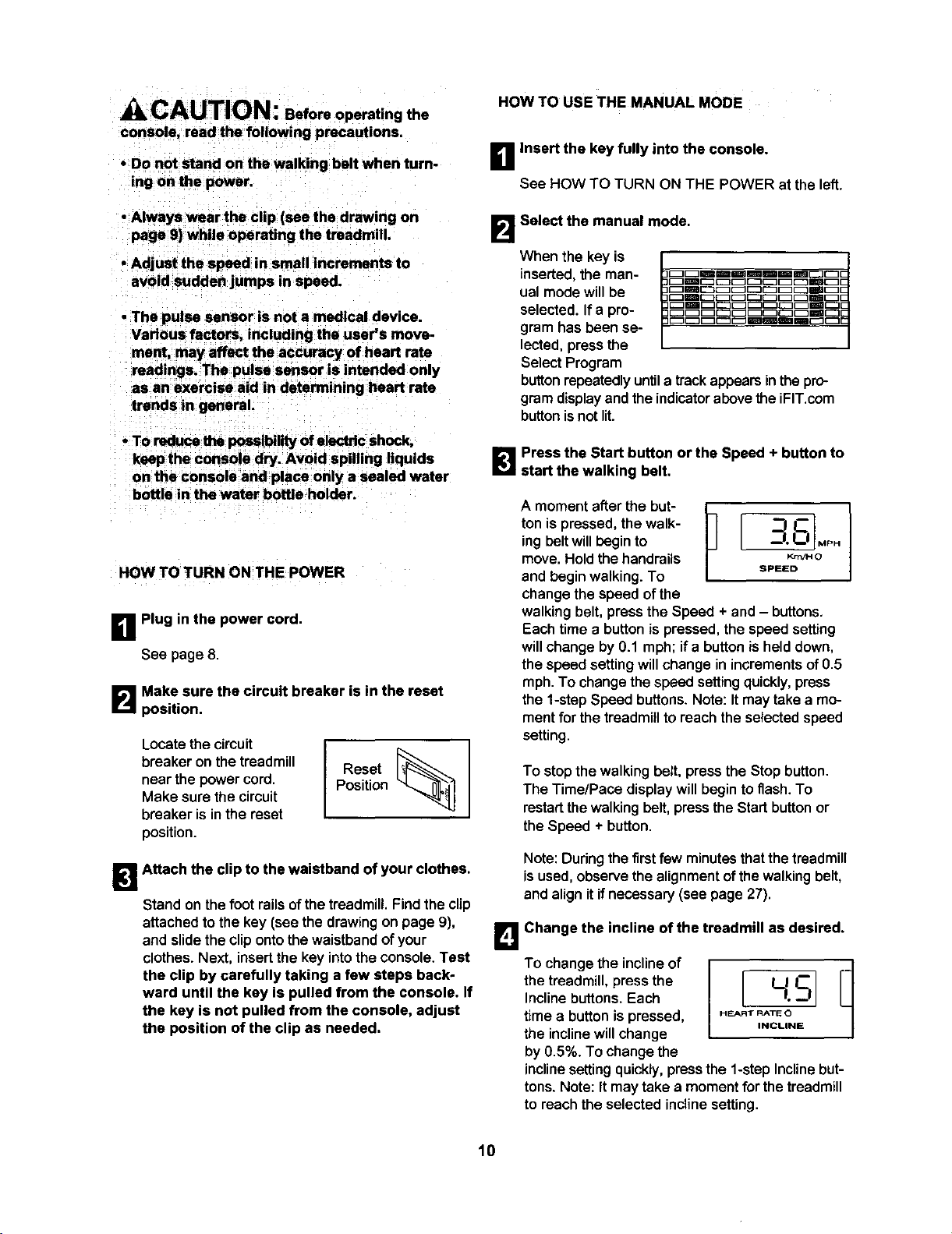
CAUTION: eoforaoperating the
console, read the following precautions.
• Do not stand on the walking belt when turn-
ing on the power.
• Always wear the clip (see the drawing on
page 9) while operating the treadmill.
• Adjust the speed in small increments to
avoid sudden jumps in speed.
• The pulse sensor is not a medical device.
Various factors, including the user's move-
ment, may affect the accuracy of heart rate
readings. The pulse sensor is intended only
as an exercise aid in determining heart rats
trends in general.
• To reduce the possibilityof electricshock,
ksepthe console dry. Avoid spilling liquids
on the console and place only a sealed water
bottle in the water bottle holder.
HOW TO TURN ON THE POWER
B Plug in the power cord.
See page 8.
B Make sure the circuit breaker is in the reset
position.
Locate the circuit
breaker on the treadmill
near the power cord.
Make sure the circuit
breaker is in the reset
position.
Reset
Position
B Attach the clip to the waistband of your clothes.
Stand on the foot rails of the treadmill. Find the clip
attached to the key (see the drawing on page 9),
and slide the clip onto the waistband of your
clothes. Next, insert the key into the console. Test
the clip by carefully taking a few steps back-
ward until the key is pulled from the console. If
the key is not pulled from the console, adjust
the position of the clip as needed.
HOW TO USE THE MANUAL MODE
B Insert the key fully into the console.
See HOW TO TURN ON THE POWER at the left.
B Select the manual mode.
When the key is
inserted, the man-
ual modewillbe
selected.If a pro-
gram hasbeen se-
lected,pressthe
SelectProgram
buttonrepeatedly untila trackappearsinthepro-
gramdisplayandthe indicatorabovethe iFIT,com
buttonisnot lit.
B Press the Start button or the Speed + button to
start the walking belt.
Amomento er,hebu,p [ l
ton is pressed, the walk- _'3 IF-"
ingboltwill begin to _--'1oI_1 _PH
move. Hold the handrails Kr,_O
and beginwalking.To SP_ED
changethe speed of the
walking belt, press the Speed + and - buttons.
Eachtime a button is pressed, the speed setting
will change by 0.1 mph; ifa button isheld down,
the speed setting will change in increments of 0.5
mph. To change the speed setting quickly, press
the 1-step Speed buttons. Note: It may take a mo-
ment for the treadmill to reach the selectedspeed
setting.
To stopthe walkingbelt, press the Stop button.
The Time/Pace display will begin to flash. To
restart the walking bolt, press the Start button or
the Speed ÷ button.
Note: During the first few minutes that the treadmill
isused, observe the alignment of the walking belt,
and align it if necessary (see page 27).
B Change the incline of the treadmill as desired.
Tochangetheincne°I
the treadmill, press the L1 --
Incline buttons. Each
timea button is pressed, HEARTRATEO
the inclinewillchange INCLINE
by 0.5%. TOchangethe
inclinesettingquickly,pressthe 1-stepInclinebut-
tons.Note: It may take a momentfor the treadmill
to reachthe selected inclinesetting.
10
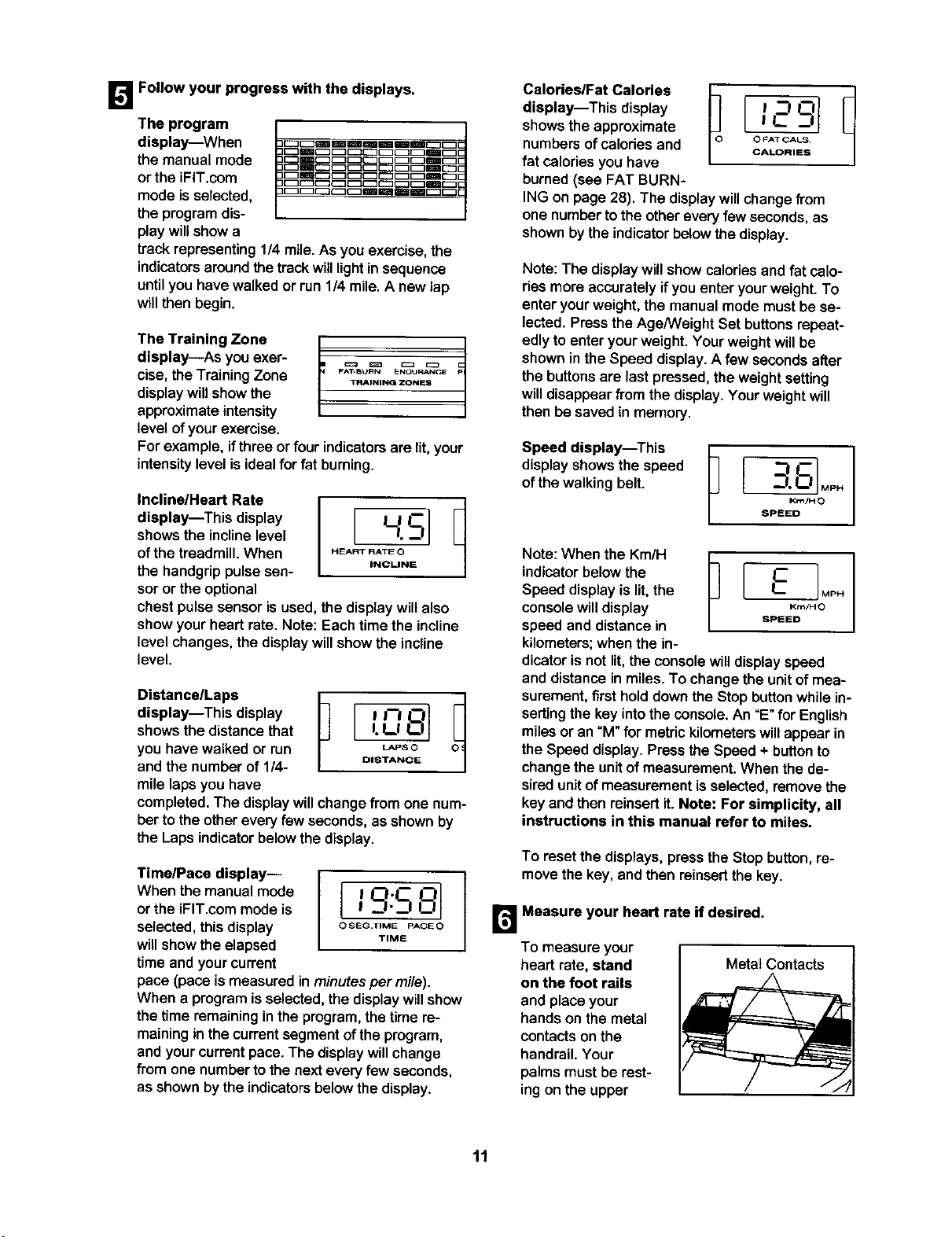
1_'_ Follow your progress with the displays.
The program
display--When
the manual mode
or the iFIT.com
mode isselected,
the programdis-
play willshow a
trackrepresenting 1/4 mile. As you exercise, the
indicatorsaroundthe track willlightin sequence
untilyou havewalked or run 1/4 mile.A new lap
willthen begin.
The Training Zone
display--As youexer-
cise, theTrainingZone
displaywillshow the
approximateintensity
level ofyourexercise.
]
FA_BURN ENDURANCE _P
TFIAINING ZONES
For example, ifthree or four indicatorsare lit, your
intensitylevel isidealfor fat bumiog.
Incline/Heart Rate
display--This display
showsthe inclinelevel
ofthe treadmill.When
the handgrippulsesen-
sor or the optional
chest pulse sensor isused, the display willalso
show your heart rate. Note: Each time the incline
level changes, the display will show the incline
level.
Osanceap
display--This display ! !'--I I__1
showsthe distance that I. L! LIJ
you have walked or run _Pso
and the number of 1/4- O'STANCE
mile laps you have
completed. The display willchange from one num-
ber to the othereveryfew seconds, as shownby
the Laps indicator below the display.
Time/Pace display--
When the manualmode
orthe iFIT.com mode is
selected,thisdisplay
willshow theelapsed
time and yourcurrent
pace (pace ismeasured inminutesper mi/e).
When a programisselected,the displaywillshow
the time remaininginthe program,the time re-
mainingin thecurrentsegment ofthe program,
and yourcurrentpace. The displaywillchange
from one numberto the nexteveryfew seconds,
as shownbythe indicatorsbelowthe display.
!O.C ! _1._!
O SEG.IIME PACEO
TIME
Ca,or,e..tCa,ores[ 1
display--This display ! --I L--'I
showsthe approximate ! C _1
numbers ofcalories and O_ATCALS
CALORIES
fat caloriesyou have
burned(see FAT BURN-
ING on page 28). The display willchange from
one number to the other every few seconds, as
shown by the indicator below the display.
Note: The display will showcalories and fat calo-
riesmore accuratelyifyou enter yourweight. To
enter yourweight, the manual mode mustbe se-
lected.Pressthe Age/Weight Set buttonsrepeat-
edly to enter yourweight.Your weightwillbe
shown inthe Speed display.A few secondsafter
the buttonsare last pressed,the weightsetting
willdisappearfrom the display.Yourweightwill
then be saved in memory.
Speed display--This
displayshows thespeed
of thewalking belt.
Krn/H 0
SPEED
Note: When the Km/H
indicatorbelow the
Speed display is lit,the
console will display
speed and distance in
kilometers; when the in-
dicator is not lit, the console willdisplay speed
and distance in miles. To change the unit of mea-
surement, firsthold down the Stop button while in-
serting the key into the console. An "E" for English
miles or an "M" for metric kilometers will appear in
the Speed display. Press the Speed + button to
change the unit of measurement. When the de-
sired unit of measurement is selected, remove the
key and then reinsertit. Note: For simplicity, all
instructions in this manual refer to miles.
To reset the displays, press the Stop button, re-
move the key, and then reinsertthe key.
Measure your heart rate if desired.
To measure your
heart rate, stand
on the foot rails
and place your
handson the metal
contactsonthe
handrail.Your
palmsmust be rest-
ingon the upper
Metal Contacts
11
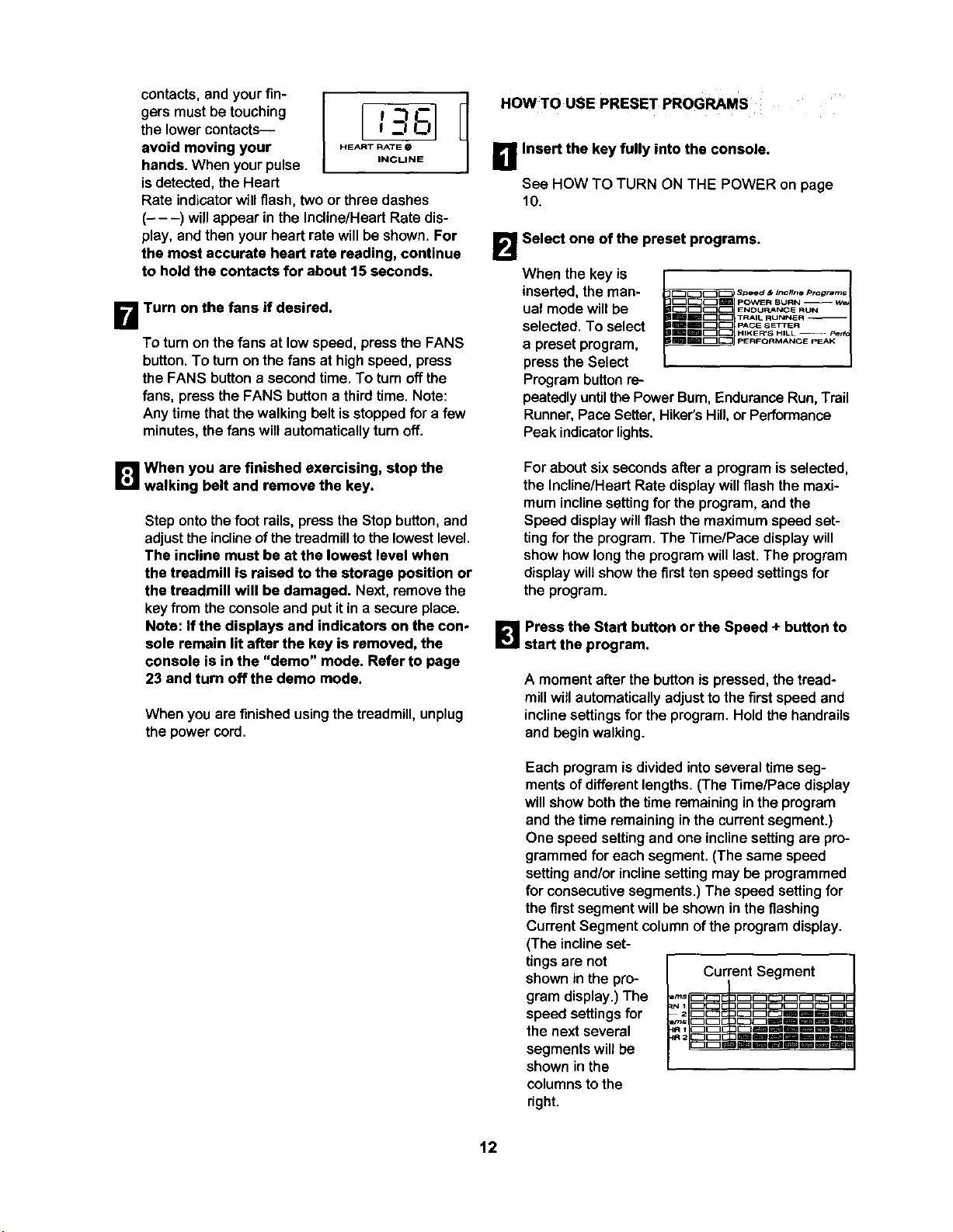
contacts, and your fin-
gers must be touching
the lower contacts---
avoid moving your
hands. When yourpulse
is detected, the Heart
Rate indicator will flash, two or three dashes
(- - -) will appear in the Incline/Heart Rate dis-
play, and then your heart rate will be shown. For
the most accurate heart rate reading, continue
to hold the contacts for about 15 seconds.
HEART RATE
INCLINE
B Turn on the fans if desired.
To turn on the fans at low speed, press the FANS
button. To turn on the fans at high speed, press
the FANS button a second time. To turn off the
fans, press the FANS button a third time. Note:
Any time that the walking belt is stopped for a few
minutes, the fans will automatically turn off.
B When you are finished exercising, stop the
walking belt and remove the key.
Step ontothe foot rails, press the Stop button, and
adjust the incline of the treadmilltothe lowest level.
The incline must be at the lowest level when
the treadmill is raised to the storage position or
the treadmill will be damaged. Next, removethe
key fromthe consoleand put itin a secureplace.
Note: If the displays and indicators on the con-
sole remain lit after the key is removed, the
console is in the "demo" mode. Refer to page
23 and turn off the demo mode.
When you are finished using the treadmill, unplug
the power cord.
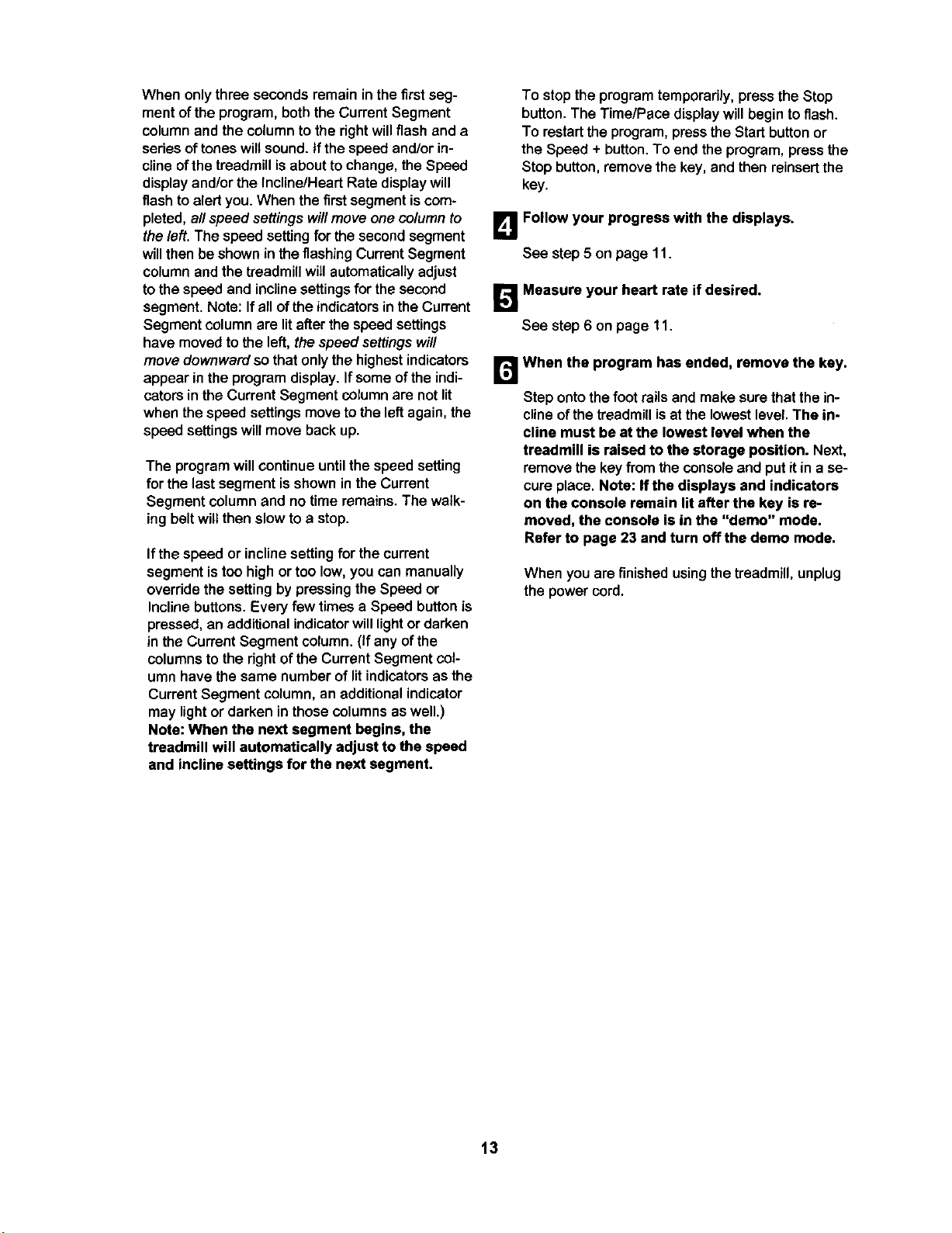
I OWTO USE PRESET PROGRAMS
B Insert the key fully into the console.
See HOW TO TURN ON THE POWER on page
10.
B Select one of the preset programs.
When the key is
inserted, the man-
ual mode willbe
selected. To select
a preset program,
press the Select
Program button re-
_! POWER BURN r W_
IIImm_ [z:] PACE SETTER
lm-----%E3[.,..,,,.....
IIm_m_c_j PERFORMANCE pEAK I
peatedly untilthe Power Bum, Endurance Run,Trail
Runner, Pace Setter, Hiker's Hill,or Performance
Peak indicator lights.
For about six seconds after a program is selected,
the Incline/Heart Rate display will flash the maxi-
mum incline setting for the program, and the
Speed display will flashthe maximum speed set-
ting for the program. The Time/Pace display will
show how long the program will last. The program
display will show the first ten speed settings for
the program.
B Press the Start button or the Speed + button to
start the program.
A moment after the button is pressed, the tread-
mill will automatically adjust to the first speed and
incline settings for the program. Hold the handrails
and begin walking.
Each program is divided into several time seg-
ments of different lengths. (The Time/Pace display
will show both the time remaining in the program
and the time remaining in the current segment.)
One speed settingand one inclinesettingare pro-
grammed for each segment. (The same speed
setting and/or incline setting may be programmed
for consecutive segments.) The speed setting for
the first segment will be shown in the flashing
Current Segment column of the program display.
(The incline set-
tings are not
shown in the pro- Current Segment
gram display.) The
speed settings for
the next several
segments will be
shown in the
columns to the
nght.
12
When only three seconds remain in the first seg-
ment of the program, both the Current Segment
column and the column to the right will flash and a
series of tones will sound. If the speed and/or in-
cline of the treadmill is about to change, the Speed
display and/or the Incline/Heart Rate display will
flash to alert you. When the first segment is com-
pleted, all speed settingswill move one column to
the left. The speed setting for the second segment
will then be shown in the flashing Current Segment
column and the treadmill will automatically adjust
to the speed and incline settings for the second
segment. Note: If an of the indicators in the Current
Segment column are lit after the speed settings
have moved to the left, the speed settings will
move downward so that only the highest indicators
appear in the program display. If some of the indi-
cators in the Current Segment column are not lit
when the speed settings move to the left again, the
speed settings will move back up.
The program willcontinue untilthe speed setting
for the last segment isshownin the Current
Segment column and no time remains. The walk-
ing belt will then slow to a stop.
If the speed or incline setting for the current
segment is too high or too low, you can manually
override the setting by pressing the Speed or
Incline buttons. Every few times a Speed button is
pressed, an additional indicator will light or darken
in the Current Segment column. (If any of the
columns to the dght of the Current Segment col-
umn have the same number of lit indicators as the
Current Segment column, an additional indicator
may light or darken in those columns as well.)
Note: When the next segment begins, the
treadmill will automatically adjust to the speed
and incline settings for the next segment.
To stop the program temporarily, press the Stop
button. The Time/Pace display willbegin to flash.
To restart the program, press the Start button or
the Speed + button. To end the program, press the
Stop button, remove the key, and then reinsert the
key.
B Follow your progress with the displays.
See step5 on page 11.
_'_ Measure your heart rate if desired.
See step6 on page 11.
When the program has ended, remove the key.
Step ontothe foot rails and make sure thatthe in-
clineofthe treadmillisat the lowest level. The in-
cline must be at the lowest level when the
treadmill is raised to the storage position. Next,
remove the keyfromthe consoleand put itina se-
cure place. Note: If the displays and indicators
on the console remain lit after the key is re-
moved, the console is in the "demo" mode.
Refer to page 23 and turn off the demo mode.
When you are finished using the treadmill, unplug
the power cord.
13
_! Insert the key fully into the console.
See HOW TO TURN ON THE POWER on page
10.
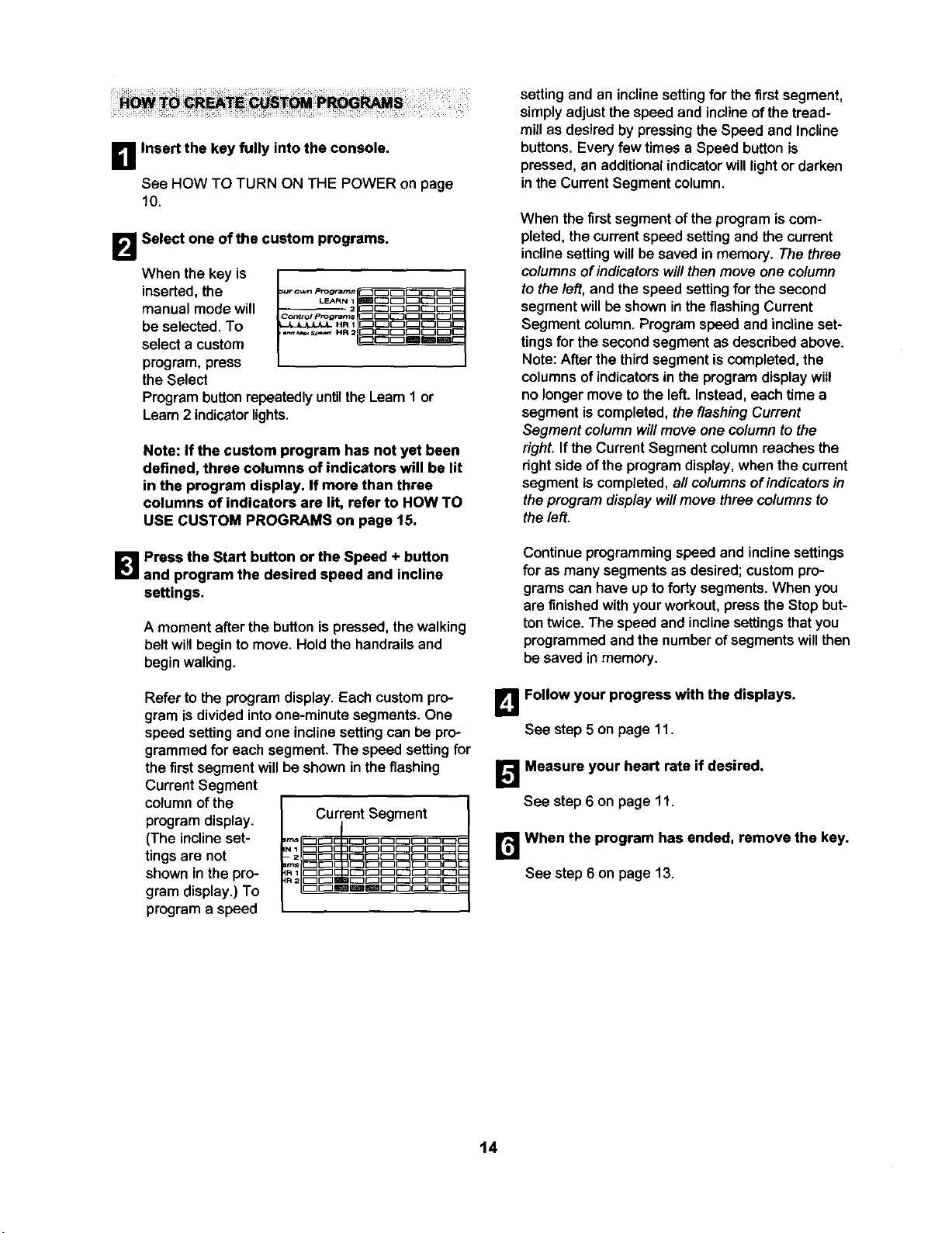
B Select one of the custom programs.
When the key is
inserted, the
manual mode will
be selected. To
select a custom
program, press
the Select
J
Control pPogr_m_ _J_[_,_
Program button repeatedly untilthe Learn 1 or
Learn 2 indicatorlights.
Note: If the custom program has not yet been
defined, three columns of indicators will be lit
in the program display. If more than three
columns of indicators are lit, refer to HOW TO
USE CUSTOM PROGRAMS on page 15.
1_'1 Press the Start button or the Speed + button
and program the desired speed and incline
settings.
A moment after the button ispressed, thewalking
belt will begin to move. Hold the handrails and
begin walking.
Refer to the program display. Each custom pro-
gram is divided intoone-minute segments. One
speed setting and one incline setting can be pro-
grammed for each segment.The speed setting for
the first segment will be shown in the flashing
Current Segment
column of the
program display. Current Segment
(The incline set-
tings are not
shown inthe pro-
gram display.) To
program a speed
setting and an incline setting for the first segment,
simplyadjust the speed and incline of the tread-
mill as desired by pressing the Speed and Incline
buttons. Every few times a Speed button is
pressed, an additional indicator will light or darken
in the Current Segment column.
When the firstsegment of the programiscom-
pleted, the current speed setting and the current
incline setting will be saved in memory. The three
columnsof indicators will then move one column
to the left, and the speed setting for the second
segment will be shown in the flashing Current
Segment column.Program speed and incline set-
tings for the second segment as descdbed above.
Note: After the third segment is completed, the
columns of indicators in the program display will
no longer move to the left. Instead, each time a
segment is completed, the flashing Current
Segment column will move one column to the
right. If the Current Segment column reaches the
right side of the program display, when the current
segment is completed, aft columns of indicators in
the program display will move three columns to
the left.
Continue programming speed and incline settings
for as many segmentsas desired; custompro-
grams can have up to forty segments. When you
are finished with your workout, press the Stop but-
ton twice. The speed and incline settings that you
programmed and the number of segments will then
be saved in memory.
B Follow your progress with the displays.
See step 5 on page 11.
[]Measure your heart rate if desired.
See step6 on page 11.
r_When the program has ended, remove the key.
See step 6 on page 13.
14
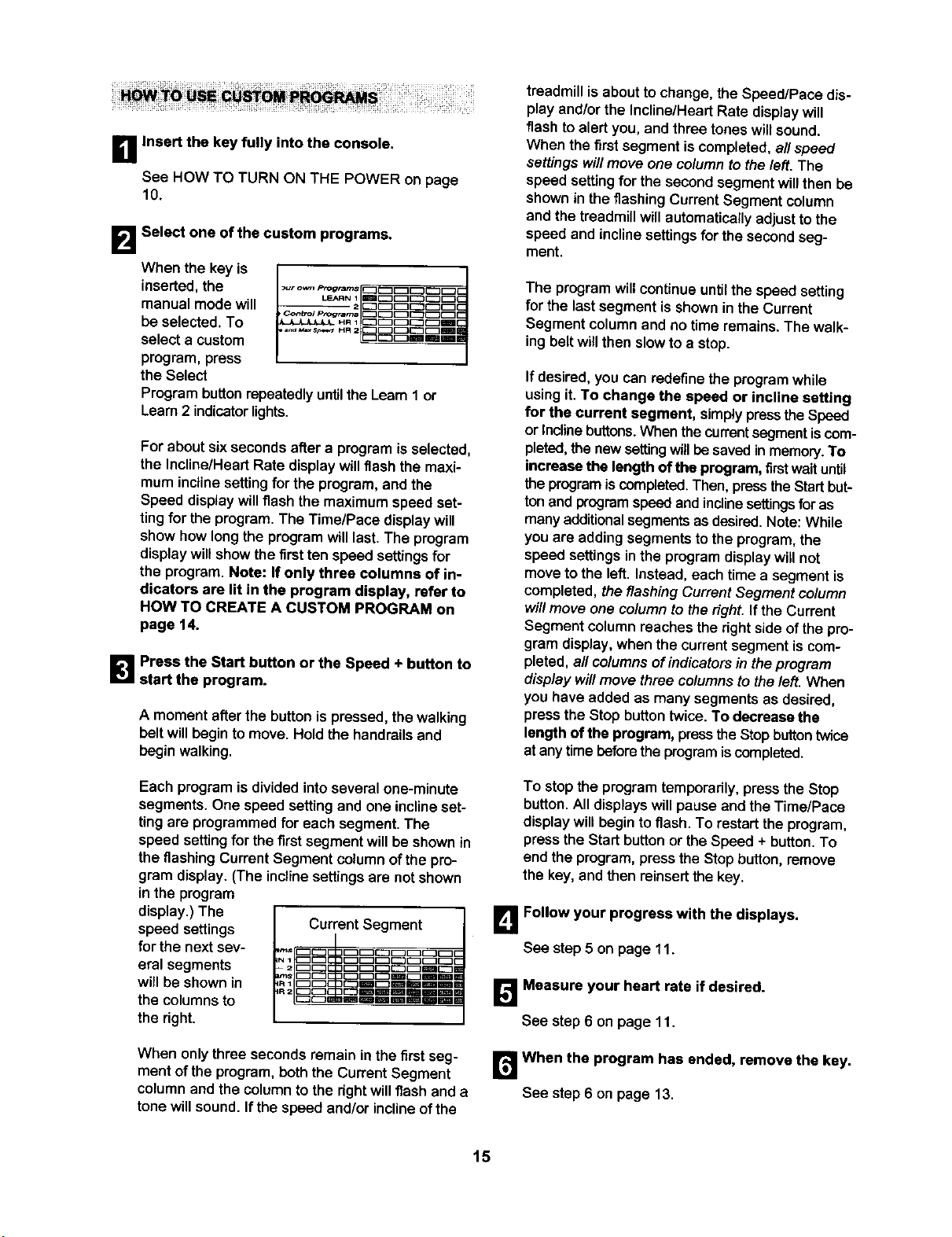
_1 Insert the key fully into the console.
See HOW TO TURN ON THE POWER on page
10.
B Select one of the custom programs.
When the key is
inserted,the _[]
=ur o_ prog*ams _[_JC_3[_3C
LEARN I EBII_[_3EZ3EZ3C
manual mode will -- 2c:_c:_c_c:_c
pContrOl ptog_n_s [_3_[_[_3[_{_
be selected.To _ .., C:_C:_E_E_mC
select a custom _m_me
program, press
the Select
Programbuttonrepeatedlyuntilthe Learn1 or
Learn2 indicatorlights.
For about sixsecondsafter a program isselected,
the InctinelHeart Rate display willflashthe maxi-
mum incline setting for the program, and the
Speed display will flash the maximum speed set-
ting for the program, The Time/Pace display will
show how long the program will last. The program
display will show the first ten speed settings for
the program. Note: If only three columns of in-
dicators are lit in the program display, refer to
HOW TO CREATE A CUSTOM PROGRAM on
page 14.
B Press the Start button or the Speed + button to
start the program.
A moment afterthe button is pressed, the walking
belt will begin to move. Hold the handrails and
begin walking.
Each program is divided intoseveral one-minute
segments.One speed settingand one inclineset-
ting are programmed for each segment. The
speed setting for the first segment will be shown in
the flashing Current Segment column of the pro-
gram display.(The incline settings are not shown
in the program
display.) The
speed settings
for the next sev-
eral segments
will be shown in
the columns to
the right.
Current Segment i
._c=c=c=c=c=_c=c_c=Bc
irn_ [ZZI_ g
When onlythree seconds remain inthe firstseg-
ment of the program, both the Current Segment
columnand the columnto the rightwillflash and a
tone willsound.If the speed and/or incline ofthe
treadmill is about to change, the Speed/Pace dis-
play and/or the Incline/Heart Rate display will
flash to alert you, and three tones will sound.
When the first segment is completed, all speed
settings will move one column to the left. The
speed settingfor the second segmentwillthen be
shown in the flashing Current Segment column
and the treadmill will automatically adjust to the
speed and incline settingsfor the secondseg-
ment.
The program will continue until the speed setting
for the last segment is shownin the Current
Segment column and no time remains. The walk-
ing belt will then slow to a stop.
If desired, you can redefinethe program while
usingit. To change the speed or incline setting
for the current segment, simplypresstheSpeed
or Incline buttons.Whenthecurrentsegmentiscom-
pleted,the newsettingwillbe savedin memory.To
increase the length ofthe program, firstwaituntil
theprogramiscompleted.Then,pressthe Startbut-
tonand programspeedand inclinesettingsforas
manyadditionalsegmentsas desired.Note: While
you are addingsegmentsto the program,the
speed settingsin the programdisplaywillnot
movetothe left. Instead, each timea segment is
completed,the flashing Current Segment column
willmoveone column to theright.Ifthe Currant
Segment column reaches theright side ofthe pro-
gram display, when the current segment is com-
pleted, all columns of indicators in the program
display will move three columns to the left. When
you have added as many segments as desired,
press the Stop button twice. To decrease the
length ofthe program, press the Stopbutton twice
at any time beforethe program iscompleted.
To stop the program temporarily, press the Stop
button. All displays will pause and the Time/Pace
displaywill begin to flash. To restart the program,
press the Start button or the Speed + button. To
end the program, press the Stop button, remove
the key, and then reinsert the key.
B Follow your progress with the displays.
See step5 on page 11.
_',! Measure your heart rate if desired.
See step6 on page 11.
B When the program has ended, remove the key.
See step 6 on page 13.
15
HOW l'O USE HEART RATE PROGRAMS
CAUTION: ,youha,,heartprob-
lems, or if you are over _ years of age and
have been inactive, do not use the heart rate
programs. If you are taking medication regu-
larly, consult your physician to find whether the
medication will affect your exercise hearl rate.
Followthestepsbelowto usea heartrate program.
Note: You must wear the optional chest pulse sen-
sor (see page 23) to use a heart rate program.
B Put on the chest pulse sensor.
See the instructions includedwith the optional
chest pulse sensor.
B Insert the key fully into the console.
See HOW TO TURN ON THE POWER on page
10,
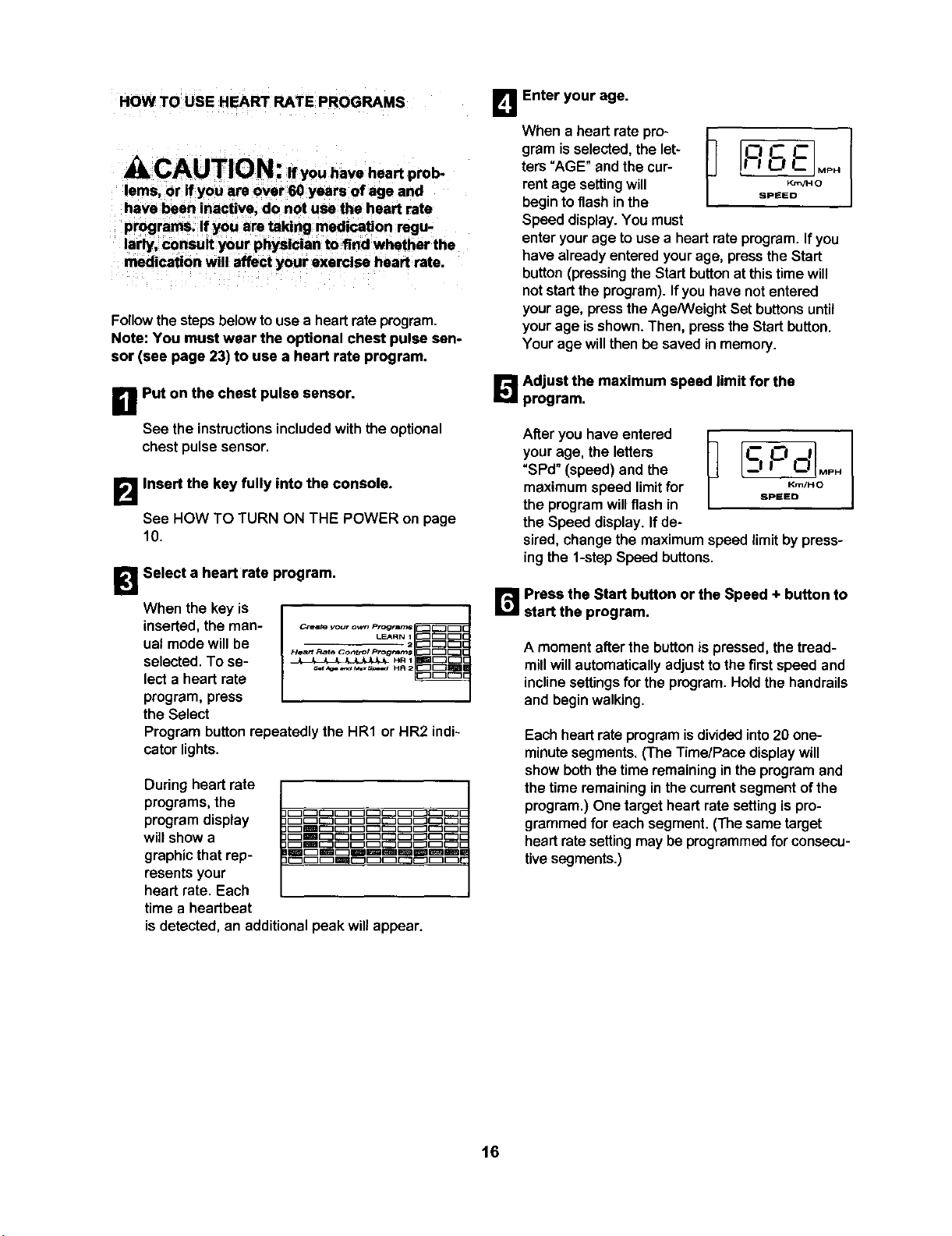
B Select a heart rate program.
When the key is
inserted, the man-
ual mode willbe
selected. To se-
lect a heart rate
program, press
the Select
N
H_'_rt Rate Co,_ttol progrdrns
Program button repeatedly the HR1 or HR2 indi-
cator lights.
During heart rate
programs, the
program display
willshow a
graphic that rep-
resents your
heart rate. Each
time a heartbeat
is detected, an additional peak will appear.
im_m_mmmm_mml
B Enter your age.
When a heart ratepro-
gram isselected,the let-
ters "AGE" and the cur-
rentage settingwill
begintoflash inthe
Speed display.You must
enteryourage to usea heart rateprogram. If you
have already entered your age, press the Start
button(pressingthe Startbuttonat thistime will
notstartthe program).Ifyou have notentered
yourage, presstheAge/WeightSet buttonsuntil
yourage isshown.Then, pressthe Startbutton.
Yourage willthen be savedin memory.
[]Adjust the maximum speed limit for the
program.
After you have entered
your age, the letters
"SPd" (speed) and the
maximum speed limit for
the program will flash in
the Speed display. If de-
p 11
_MPH
Krn/H O
SPEED
sired, change the maximumspeed limit by press-
ingthe 1-stepSpeed buttons.
r_ Press the Start button or the Speed + button to
start the program.
A moment after the button is pressed, the tread-
millwillautomaticallyadjust tothe firstspeed and
incline settings for the program. Hold the handrails
and begin walking.
Each heart rate program isdivided into20 one-
minute segments.(The Time/Pace display will
show boththe timeremaininginthe programand
the time remaininginthe currentsegment ofthe
program.) One target heart ratesettingispro-
grammed for each segment.(The same target
heart ratesettingmay be programmed forconsecu-
tivesegments.)
t6
Duringthe program, the console willregularly
compare your heart rate to the current target heart
rate setting. If your heart rate is too far below or
above the target heart rate setting, the speed of
the treadmill will automatically increase or de-
crease to bring your heart rate closer to the target
heart rate setting. If the speed reaches the maxi-
mum speed limit for the program (see step 5 on
page 16) and your heart rate is still too far below
the current target heart rate setting, the incline of
the treadmill will also increase to bring your heart
rate closer to the target heart rate setting.
The program will continue until no time remains in
the program. The walking belt will then slow to a
stop.
If the current speed or incline setting istoo high or
too low, you can adjust the setting with the Speed
or Incline buttons. However, each time the con-
sole compares your heart rate to the current target
heart rate setting, the speed and/or incline of the
treadmill may automatically change to bring your
heart rate closer to the target heart rate setting.
If your pulse is not detected during the program,
the letters "PLS" will flash in the Incline/Heart Rate
display and the speed and incline of the treadmill
may automatically decrease until your pulse is de-
tected. If this occurs, see the instructions included
with the chest pulse sensor.
To stop the program at any time, press the Stop
button. Heart rate programs should not be stopped
temporarily and then restarted. To use a heart rate
program again, reselect the program and start itat
the beginning.
B Follow your progress with the displays.
See step5 on page 11.
r_ when the program is completed, remove the
key from the console.
See step 6 on page 13.
17
HOW TO CONNECT THE TREADMILL TO YOUR
CD ;PLAYER, VCR, OR COMPUTER
To use iFIT.com CD's, the treadmill mustbe con-
nected to your portable CD player, portable stereo,
home stereo,or computerwith CD player. See pages
18 and 19 for connectinginstructions.To use iFIT.com
videocassettes, the treadmillmustbe connectedto
yourVCR. See page 20 for connectinginstructions.To
use iFIT.com programs directly from our Web site,
thetreadmillmustbe connected toyourhome com-
puter. See page 19 for connectinginstructions.
HOW TO CONNECT YOUR PORTABLE CD PLAYER
Note: If your CD player has separate LINE OUT and
PHONES jacks, see instruction A below. If your CD
player has only one jack, see instruction B.
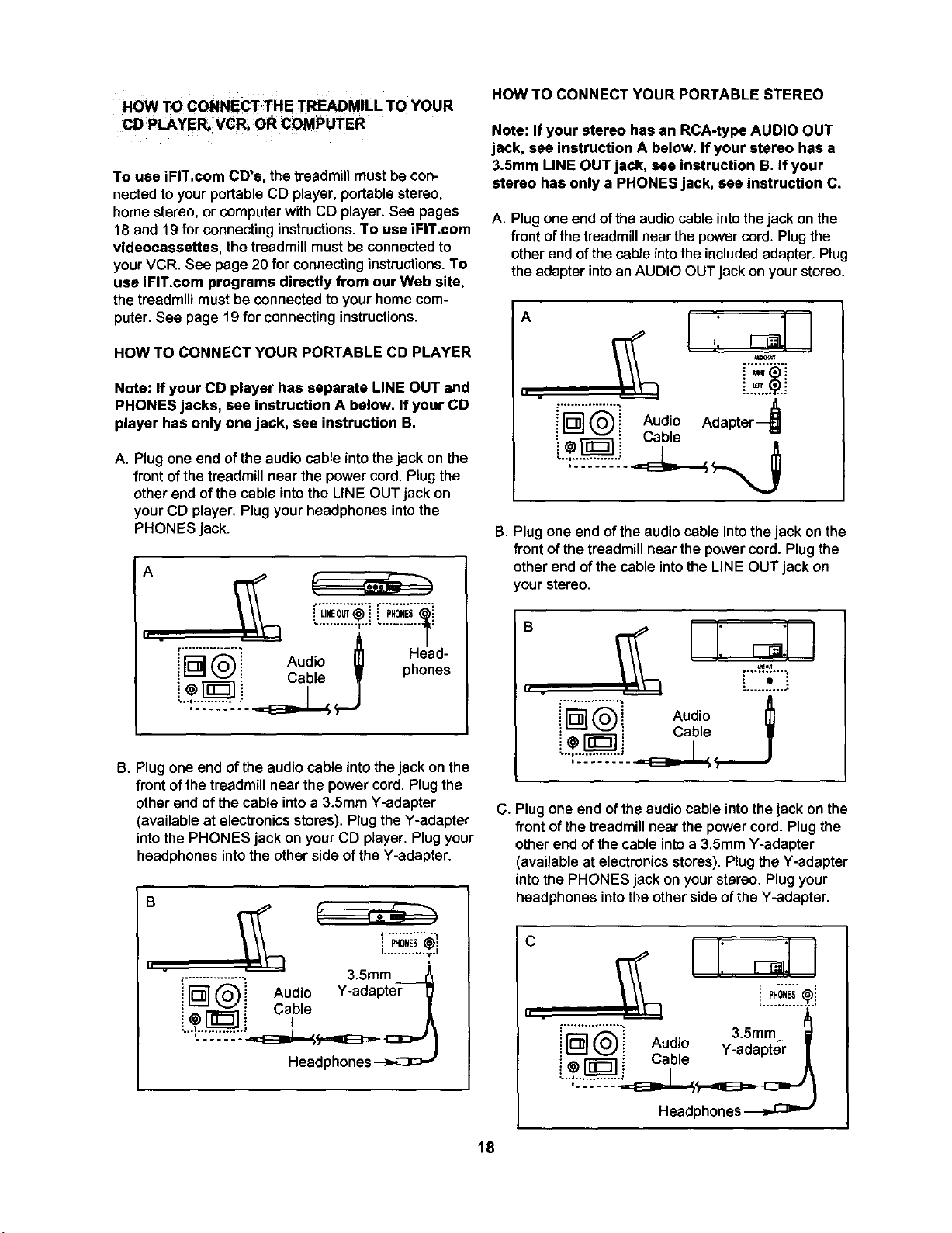
A. Plug one end of the audio cable into the jack on the
front of the treadmill near the power cord. Plug the
other end of the cable into the LINE OUT jack on
your CD player. Plug your headphones into the
PHONES jack,
A
II v
;'"'""-_'i Au i _1 Head-
L_J(._i ¢:.,dlO W phones
:@ : .....
L:
B. Plug one end of the audio cable into the jack on the
front of the treadmill near the power cord. Plug the
other end of the cable into a 3.5mm Y-adapter
(available at electronics stores). Plug the Y-adapter
into the PHONES jack on your CD player. Plug your
headphones into the other side of the Y-adapter.
B
h v
_0,Es@i
.............. t.,
:................. 3.5ram
AudioY-adapter- l
i--l:-....-.:-.--.-:L._L._.=,,=E3=._
Headphones
HOW TO CONNECT YOUR PORTABLE STEREO
Note: If your stereo has an RCA-type AUDIO OUT
jack, see instruction A below. If your stereo has a
3.5mm LINE OUT jack, see instruction B. if your
stereo has only a PHONES jack, see instruction C.
A. Plug one end of the audio cable into the jack on the
front ofthe treadmill near the power cord. Plug the
other end of the cable into the included adapter, Plug
the adapter into an AUDIO OUT jack on your stereo.
A
h
!'l_"_'i Audio Adapter--_
i;-r ! Cab,e
B. Plug one end of the audio cable into the jack on the
front of the treadmill near the power cord. Plug the
other end of the cable into the LINE OUT jack on
your stereo.
B
Ir
i'_'_'_ Audio I_
i _ i Cable •
" .".:.:::.
C. Plug one end of the audio cable into the jack on the
front of the treadmill near the power cord. Plug the
other end of the cable into a 3.5mm Y-adapter
(availableat electronicsstores). Plug the Y-adapter
intothe PHONES jack on your stereo. Plug your
headphones into the other side of the Y-adapter.
C
h w
!'r2_-'1"-"_"i A " 3.5mm _}
!1°11_._)i ^ud!o Y-adapter-7
@_ _ L,aole
Headphones
18
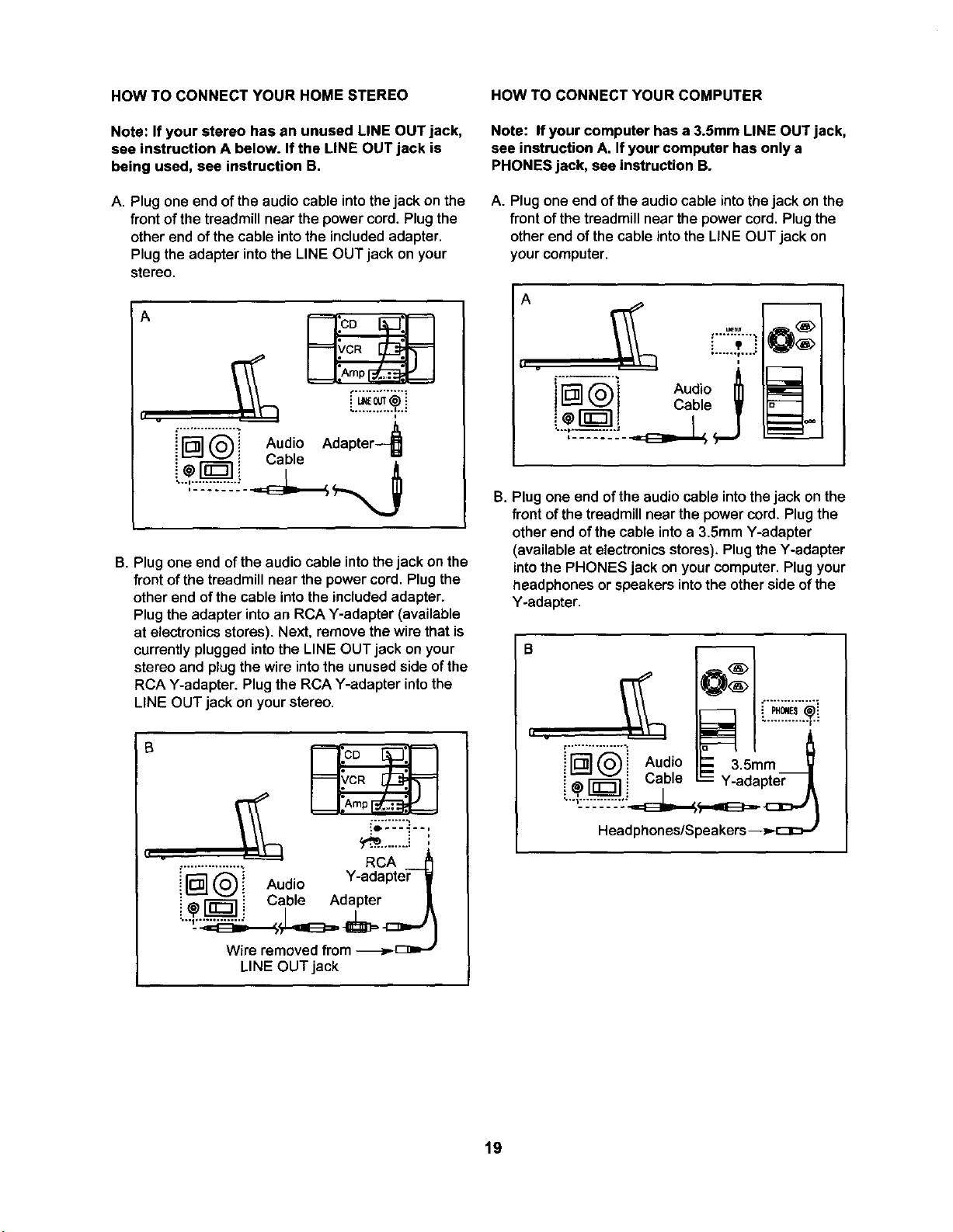
HOW TO CONNECT YOUR HOME STEREO
Note: If your stereo has an unused LINE OUT jack,
see instruction A below. If the LINE OUT jack is
being used, see instruction B.
A. Plug one end of the audio cable into the jack on the
front of the treadmill near the power cord, Plug the
other end of the cable into the included adapter.
Plug the adapter into the LINE OUT jack on your
stereo.
A
h .
_vc%
L_'@ !
i[]@i Aud,oAdapter
• Cable
B. Plug one end ofthe audio cable intothe jack on the
front of the treadmill near the power cord. Plug the
other end of the cable into the included adapter.
Plug the adapter into an RCA Y-adapter (available
at electronicsstores). Next, remove the wire that is
currently plugged into the LINE OUT jack on your
stereo and plug the wire into the unused side of the
RCA Y-adapter. Plug the RCA Y-adapter into the
LINE OUT jack on your stereo.
B
HOW TO CONNECT YOUR COMPUTER
Note: If your computer has a 3.Smm LINE OUT jack,
see instruction A. If your computer has only a
PHONES jack, see instruction B.
A. Plug one end of the audio cable into the jack on the
front of the treadmill near the power cord. Plug the
other end of the cable into the LiNE OUT jack on
your computer.
A
F"'"_"'..
! _ I Cable •
i
B. Plug one end of the audio cable into the jack on the
front of the treadmill near the power cord, Plug the
other end of the cable into a 3.SmmY-adapter
(available at electronics stores). Plug the Y-adapter
into the PHONES jack on your computer. Plug your
headphones or speakers intothe otherside ofthe
Y-adapter.
II .
..............._ A Io _ l_
ud'-3. rnm
i_ I-_ i Cable = Y-adapter
19
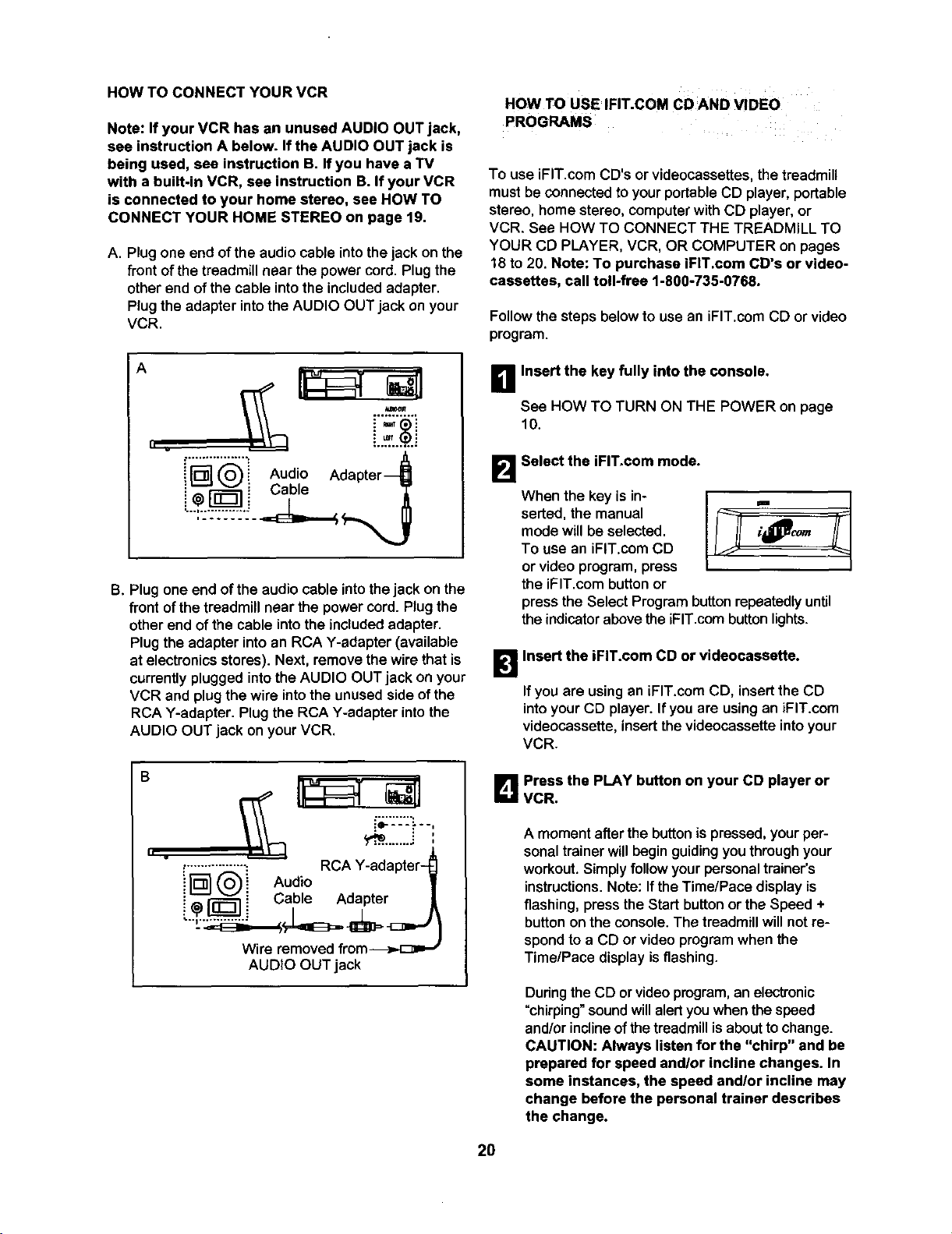
HOW TO CONNECT YOUR VCR
Note: If your VCR has an unused AUDIO OUT jack,
see instruction A below. If the AUDIO OUT jack is
being used, sea instruction B. If you have a TV
with a built-in VCR, see instruction B. If your VCR
is connected to your home stereo, see HOW TO
CONNECT YOUR HOME STEREO on page 19.
A. Plug one end of the audio cable into the jack on the
front of the treadmill near the power cord. Plug the
other end of the cable into the included adapter.
Plug the adapter into the AUDIO OUT jack on your
VCR.
HOW TO USE IFIT.COM CD AND VIDEo
PROGRAMS
To use iFIT.com CD's or videocassettes, thetreadmill
must be connected to your portable CD player, portable
stereo, home stereo, computer with CD plaYer,or
VCR. See HOW TO CONNECT THE TREADMILL TO
YOUR CD PLAYER, VCR, OR COMPUTER on pages
18 to 20. Note: To purchase iFIT.com CD's or video-
cassettes, call toll-free 1-800-735-0768.
Follow the steps below to use an iFIT.com CD or video
program.
A
II .
i_'_'i Audio Adapter_l
i;r l i Cab,°
,..:-..=---.--.-.:..-'.
B. Plug one end of the audio cable intothe jack on the
front of the treadmill near the power cord. Plug the
other end of the cable into the included adapter.
Plug the adapter into an RCA Y-adapter (available
at electronics stores). Next, remove the wire that is
currently plugged into the AUDIO OUT jack on your
VCR and plug the wire into the unused side of the
RCA Y-adapter. Plug the RCA Y-adapter into the
AUDIO OUT jack on your VCR.
_11 Insert the key fully into the console.
See HOW TO TURN ON THE POWER on page
10.
Select the iFIT.com mode.
When the key is in-
serted, the manual
mode willbe selected.
To use an iFIT.com CD
or video program, press
the iFIT.com button or
press the Select Program button repeatedly until
the indicator abovethe iFIT.com button lights.
1_1 Insert the iFIT.com CD or videocassatte.
If you are using an iFIT.com CD, insertthe CD
intoyour CD player. Ifyou are usingan iFIT.com
videocassette,insertthevideocassetteintoyour
VCR.
B
II .
y_.........."
-..........=--; RCA Y-adapter-
i_'__i Audio
i_,_ i Cable Adapter
L -Ji
Wire removed from_
AUDIO OUT jack
L_ Press the PLAY button on your CD player or
VCR.
A moment after the button is pressed, your per-
sonal trainer willbegin guiding you throughyour
workout. Simply follow your personal trainer's
instructions. Note: If the Time/Pace display is
flashing, press the Start button or the Speed +
button on the console. The treadmill will not re-
spondto a CD or video program when the
Time/Pace display is flashing.
During the CD or video program, an electronic
"chirping" soundwillalert you when the speed
and/or incline of the treadmill is about to change.
CAUTION: Always listen for the "chirp" and be
prepared for speed and/or incline changes. In
some instances, the speed andlor incline may
change before the personal trainer describes
the change.
20
If the speed or incline settings are too highor too
low,you can manually overridethe settings at any
time by pressing the Speed or Incline buttons on
the console. However, when the next "chirp" is
heard, the speed andlor incline will change to
the next settings ofthe CD or video program.
To stop the walking belt at any time, press the
Stop button on the console. The Time/Pace dis-
play will begin to flash. To restart the program,
press the Start button or the Speed + button. After
a moment, the walking belt will begin to move at 1
mph. When the next "chirp" is heard, the
speed and incline will change to the next set-
tings of the CD or video program.
When the CD or video program iscompleted, the
walkingbelt will stopand the Time/Pace display
will begin to flash. Note: To use another CD or
video program, press the Stop button or remove
the key and go to step 1 on page 20.
Note: If the speed or incline of the treadmill
does not change when a "chirp" is heard:
• Make sure that the iFIT.com indicator is lit and
that the Time/Pace display is not flashing. If
the TimelPace display is flashing, press the
Start button or the Speed + button on the
console.
• Adjust the volume of your CD player or VCR.
If the volume is too high or too low, the con-
sole may not detect the program signals.
• Make sure that the audio cable is properly
connected, that it is fully plugged in, and that
it is not wrapped around a power cord.
• Ifyou are using your portable CD player and
the CD skips, set the CD player on the floor or
another flat surface instead of on the console.
• See the instructions near the bottom of page
27.
[]Follow your progress with the displays.
See step5 on page 11.
r_ Measure your heart rate if desired.
See step 6 on page 11.
B When the program has ended, remove the key.
See step6 on page 13.
CAUTION: Always remove iFIT.com CD's and
videocassettes from your CD player or VCR
when you are finished using them.
21
HOW TO USE PROGRAMS DIRECTLY FROM
OUR WEB SITE
Our Web site at www.iFIT.com allowsyou to access
basic programs, audio programs, and video programs
directlyfrom the internet.Additional optionsare soon
tobe available. See www.iFIT.comfor details.
To use programs from ourWeb site,the treadmill must
be connectedto yourhome computer. See HOW TO
CONNECT YOUR COMPUTER on page 19. In
addition,you musthave an intemet connectionand
an internetserviceprovider.A listofspecificsystem
requirementswillbe found on ourWeb site.
Followthe stepsbelow to use a program from our
Web site.
B Insert the key fully into the console.
See HOW TO TURN ON THE POWER on page
10.
B Select the iFIT.com mode.
When the key is in-
serted, the manual
mode willbe selected.
To use a programfrom
ourWeb site, pressthe
iFIT.com buttonor
pressthe Select Programbuttonrepeatedlyuntil
the indicatorabovethe iFIT.combuttonlights.
_RGo to your computer and start an internet
connection.
B Start your web browser, if necessary, and go to
our Web site at www.iFIT.com.
[]Follow the desired links on our Web site to se-
lect a program.
Read and follow the on-lineinstructionsfor usinga
program.
r_ Follow the on-line instructions to start the
program.
When you startthe program, an on-screen count-
down will begin.
B Return to the treadmill and stand on the foot
rails. Find the clip attached to the key and slide
the clip onto the waistband of your clothes.
When the on-screencountdown ends, the program
willbegin and the walkingbelt will begin to move.
Hold the handrails, step onto the walking belt, and
begin walking. During the program, an electronic
"chirping" soundwill alert you when the speed
and/or incline of the treadmill is about to change.
CAUTION: Always listen for the "chirp" and be
prepared for speed andlor incline changes.
Ifthe speed or inclinesettingsare too high or too
low, you can manuallyoverridethesettingsat any
time by pressingthe Speed or Inclinebuttonson
the console.However, when the next "chirp" is
heard, the speed and/or incline will change to
the next settings of the program.
To stopthe walkingbelt at anytime, press the
Stop buttonon theconsole. The Time/Pace dis-
play will begin to flash. To restart the program,
press the Start button or the Speed + button. After
a moment, the walking belt will begin to move at 1
mph.When the next "chirp" is heard, the speed
and incline will change to the next settings of
the program.
When the program iscompleted, thewalkingbelt
willstopandthe Time/Pace display willbegin to
flash. Note: To useanother program,pressthe
Stop button and go tostep 5.
Note: Ifthe speed or incline of the treadmill
does not change when a "chirp" is heard, make
sure that the iFIT.com indicator is lit and that
the Time/Pace display is not flashing. In addi-
tion, make sure that the audio cable is properly
connected, that it isfully plugged in, and that it
is not wrapped around a power cord.
_1 Follow your progress with the displays.
See step 5 on page 11.
l_lWhen the program has ended, remove the key.
See step6 on page 13.
22
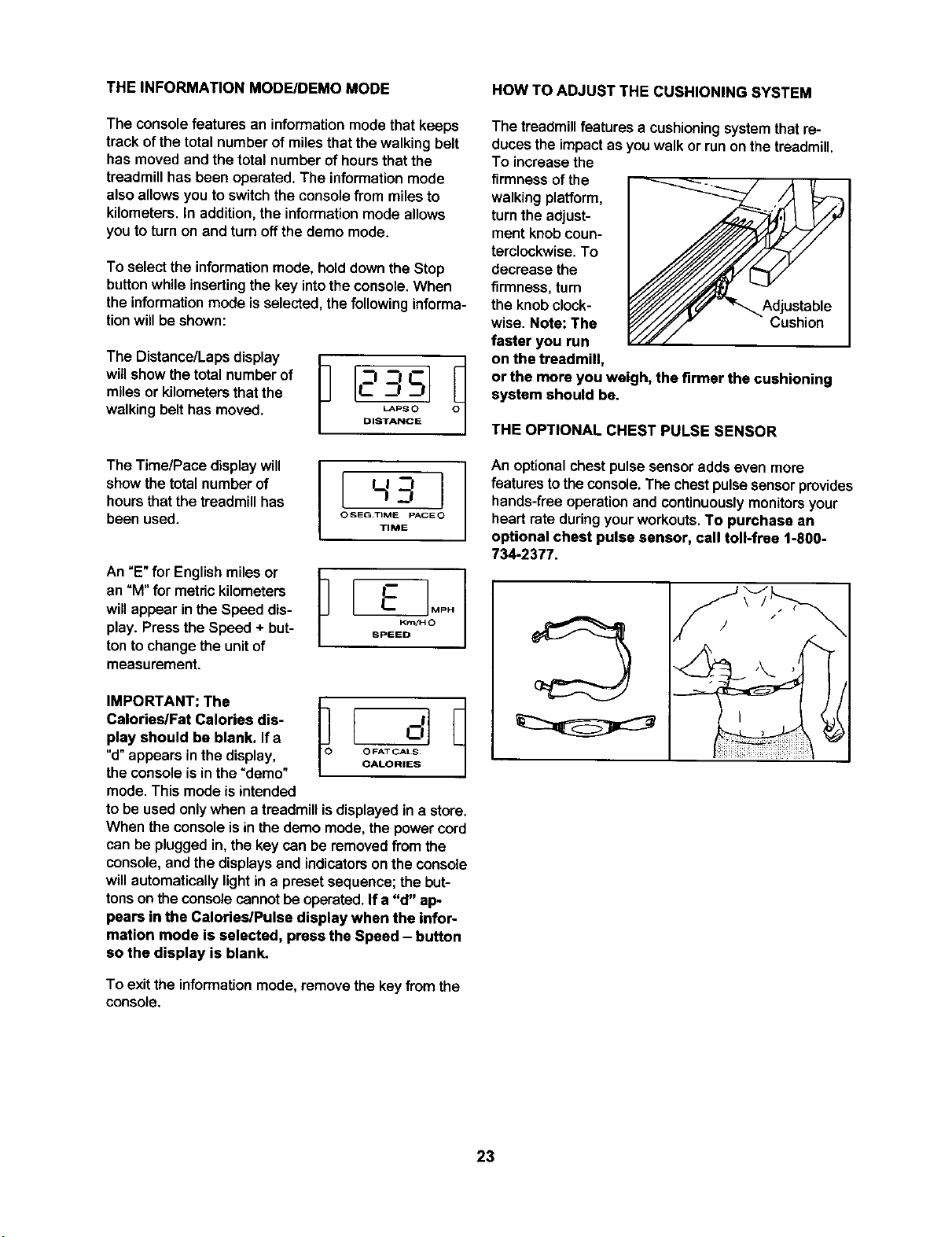
THE INFORMATION MODE/DEMO MODE HOW TO ADJUST THE CUSHIONING SYSTEM
The consolefeatures an informationmode that keeps
track of the total number of miles that the walking belt
has moved and the total number of hours that the
treadmill has been operated. The information mode
also allows you to switch the console from miles to
kilometers. In addition, the information mode allows
you to turn on and turn off the demo mode.
To select the information mode, hold down the Stop
button while inserting the key into the console. When
the information mode is selected, the following informa-
tion will be shown:
TheDistance/Lapsdispay
will show the total number of
miles or kilometers that the
watking belt has moved. O,,T'_SCOE
The treadmillfeatures a cushioningSystemthat re-
ducesthe impactas you walkor runon the treadmill.
To increasethe
firmness ofthe
walking platform,
turn the adjust-
ment knob coun-
terclockwise. To
decrease the
firmness,turn
the knob clock-
wise. Note: The
faster you run
on the treadmill,
or the more you weigh, the firmer the cushioning
system should be.
Cushion
THE OPTIONAL CHEST PULSE SENSOR
The TimelPace display will I L J
showthe total number of I.___--I
hours thatthe treadmillhas --!
been used. OSEa.T'_EpAC_O
TIME
An "E" for English miles or
an "M" for metric kilometers
will appear in the Speed dis-
play. Press the Speed + but-
ton to change the unit of
measurement.
IMPORTANT: The
Calories/Fat Calories dis-
play should be blank. If a
"d"appears inthe display,
the console is in the "demo"
mode. This mode is intended
to be used only when a treadmill is displayed in a store.
When the console is in the demo mode, the power cord
can be plugged in, the key can be removed from the
console, and the displays and indicators on the console
will automatically light in a preset sequence; the but-
tons on the console cannot be operated. If a "d" ap-
pears in the Calories/Pulse display when the infor-
mation mode is selected, press the Speed - button
so the display is blank.
i An optionalchest pulsesensoradds even more
features to theconsole. The chest pulse sensorprovides
hands-free operation and continuouslymonitors your
heart rate during your workouts. To purchase an
optional chest pulse sensor, call toll-free 1-800-
734-2377.
|
To exitthe information mode, remove the key from the
console.
23
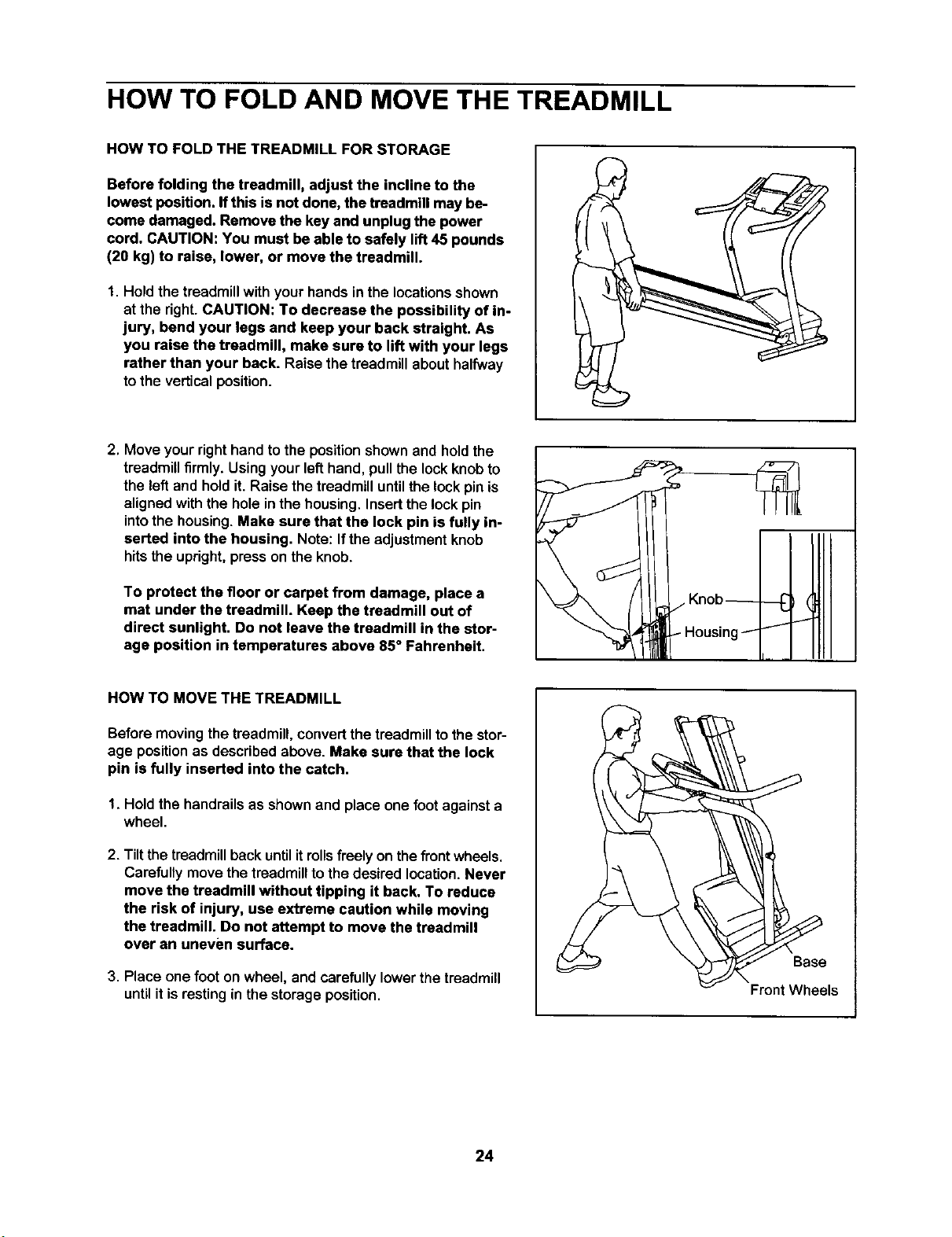
HOW TO FOLD AND MOVE THE TREADMILL
HOW TO FOLD THE TREADMILL FOR STORAGE
Before folding the treadmill, adjust the incline to the
lowest position. Ifthis is not done, the treadmill may be-
come damaged. Remove the key and unplug the power
cord. CAUTION: You must be able to safely lift 45 pounds
(20 kg) to raise, lower, or move the treadmill.
I. Hold the treadmill with your hands inthe locations shown
at the right.CAUTION: To decrease the possibility of in-
jury, bend your legs and keep your back straight. As
you raise the treadmill, make sure to lift with your legs
rather than your back. Raise the treadmillabouthalfway
tothe verticalposition.
2. Move your right hand to the position shownand hold the
treadmill firmly. Using your left hand, pull the lock knob to
the left and hold it. Raise the treadmill until the lock pin is
aligned with the hole in the housing. Insert the lock pin
into the housing. Make sure that the lock pin is fully in-
eerted into the housing. Note: If the adjustment knob
hits the upright, press on the knob.
To protect the floor or carpet from damage, place a
mat under the treadmill. Keep the treadmill out of
direct sunlight. Do not leave the treadmill in the stor-
age position in temperatures above 85° Fahrenheit.
HOW TO MOVE THE TREADMILL
Before moving the treadmill, convert the treadmill to the stor-
age position as described above. Make sure that the lock
pin is fully inserted into the catch.
1. Hold the handrails as shownand place one foot againsta
wheel.
2. Tiltthe treadmill back untilitrollsfreelyon thefrontwheels.
Carefullymovethetreadmilltothe desired location.Never
move the treadmill without tipping it back. To reduce
the risk of injury, use extreme caution while moving
the treadmill. Do not attempt to move the treadmill
over an uneven surface.
3. Place one foot on wheel, and carefully lower the treadmill
until it is resting in the storage position.
Base
Is
24
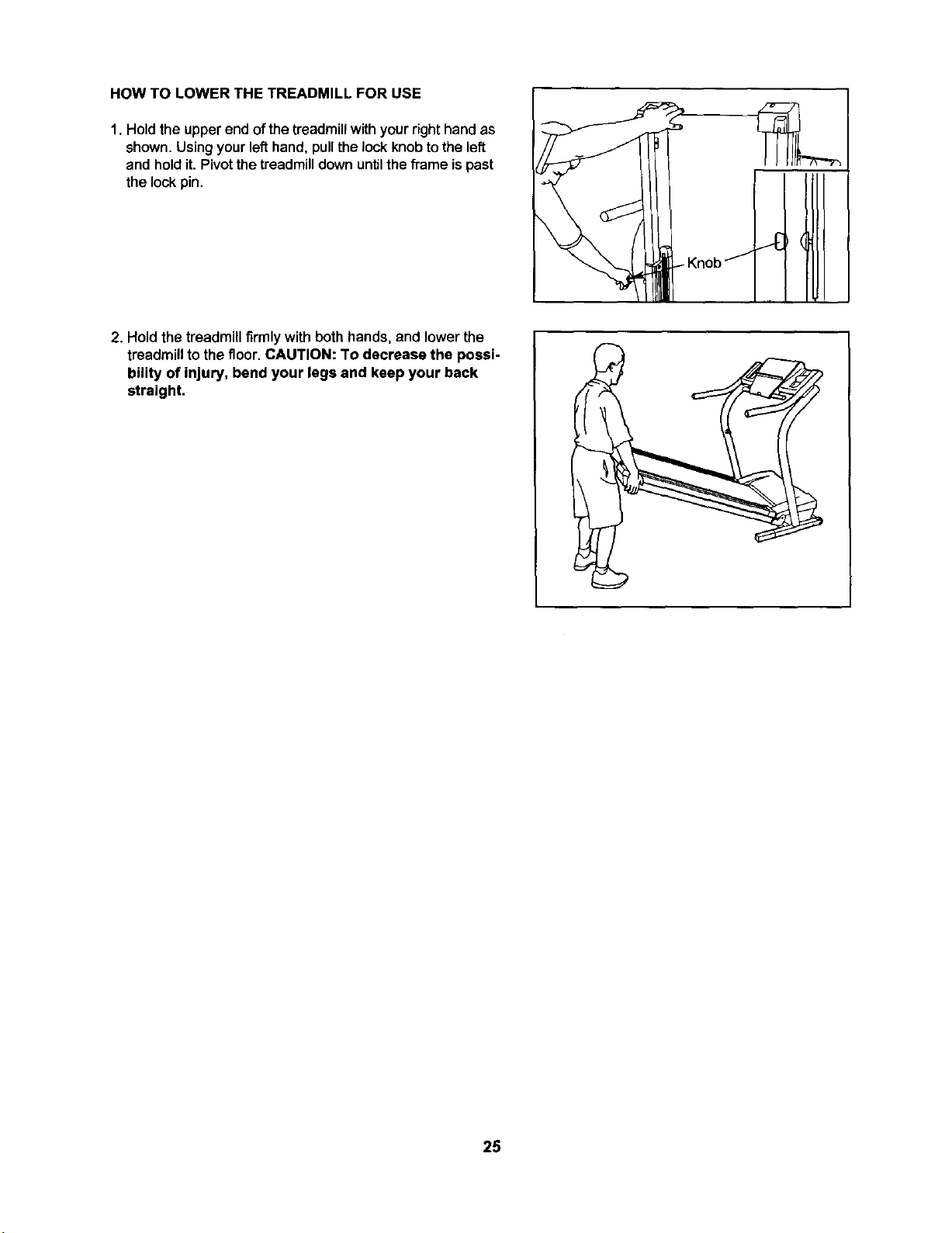
HOW TO LOWER THE TREADMILL FOR USE
1. Holdthe upper end of the treadmill with your right hand as
shown.Using your left hand, pull the lock knob to the left
and hold it. Pivot the treadmill down until the frame ispast
the lock pin.
2. Hold thetreadmillfirmly with both hands, and lower the
treadmill to the floor. CAUTION: To decrease the possi-
bility of injury, bend your legs and keep your back
straight.
25
TROUBLESHOOTING
Most treadmill problems can be solved by following the steps below. Find the symptom that applies, and
follow the steps listed. Iffurther assistance is needed, please call our Customer Service Department toll-
free at 1-888-825-2588, Monday through Friday, 6 a.m. until 6 p.m. Mountain Time (excluding holidays).
PROBLEM: The power does not turn on
SOLUTION: a. Make sure that the power cord is plugged intoa surgesuppressor,and thatthe surge suppressor
is plugged into a properly grounded outlet (see page 8). Use only a single-outlet surge suppressor
that meets all of the specifications described on page 8. Important: The treadmill is not compatible
with GFCl-equipped outlets.
b. Afterthe power cord has been pluggedin, make sure that the key isfullyinsertedintotheconsole.
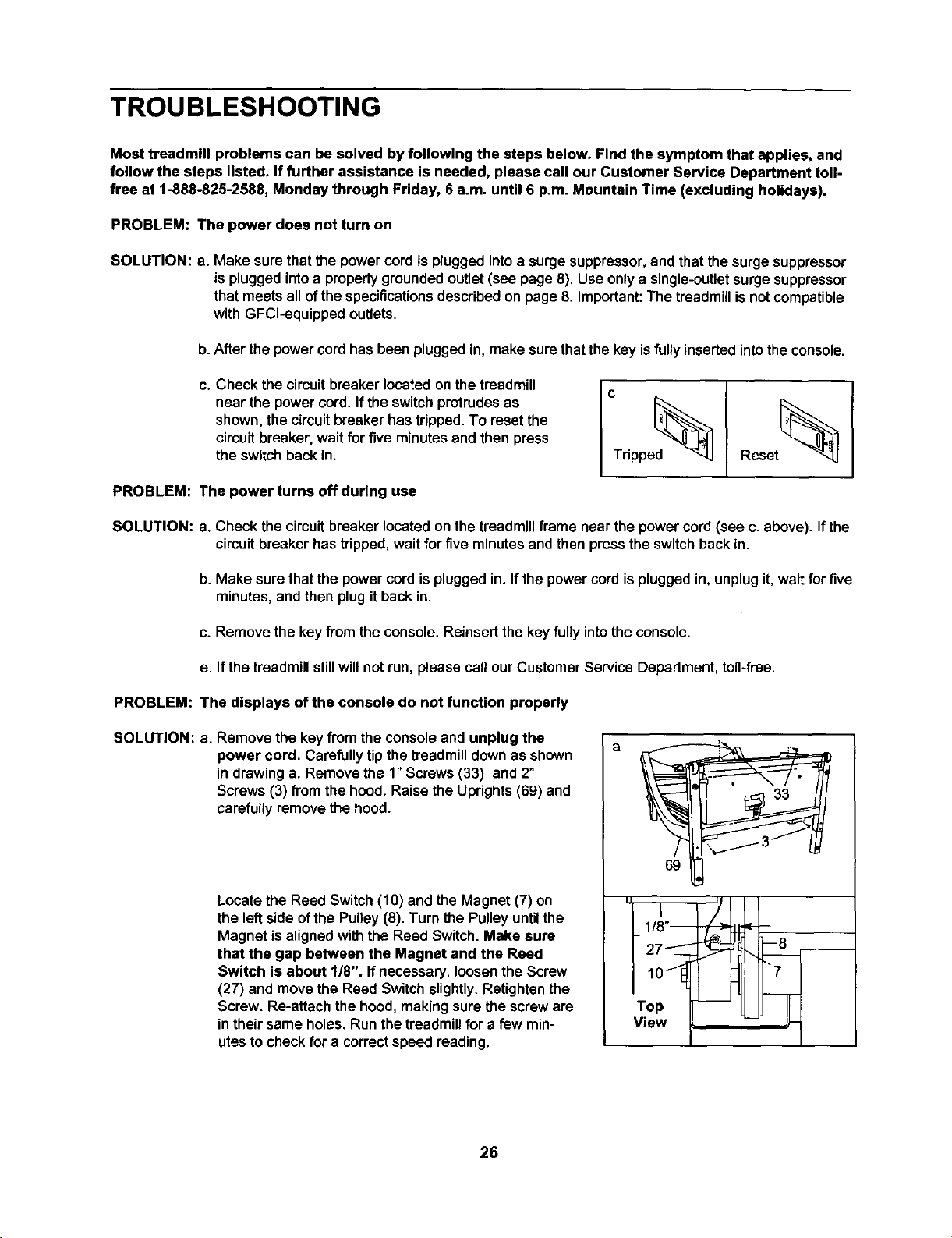
c. Check the circuitbreaker located on thetreadmill
near the power cord. Ifthe switchprotrudesas
shown, thecircuitbreaker hastripped.To resetthe
circuitbreaker, waitfor five minutesand then press
the switchback in.
PROBLEM: The power turns off during use
_ripped_
Reset_ I
SOLUTION: a. Check the circuit breaker located onthe treadmillframe near the powercord(see c. above). If the
circuitbreakerhas tripped,wait forfive minutesand then pressthe switchback in.
b. Make sure thatthe power cord isplugged in. If the power cord isplugged in, unplugit, waitfor five
minutes, and then plug it back in.
c. Remove the key from the console. Reinsert the key fully into the console.
e. If the treadmillstillwillnot run, please call our Customer Service Department, toll-free.
PROBLEM: The displays of the console do not function properly
SOLUTION: a. Remove the key from the consoleand unplug the
power cord. Carefullytip thetreadmilldownas shown
in drawinga. Remove the 1" Screws (33) and 2"
Screws (3) from the hood. Raise the Uprights(69) and
carefully remove the hood.
Locate the Reed Switch(10) and the Magnet (7) on
the left side of the Pulley (8). Turn the Pulley until the
Magnet isaligned with the Reed Switch. Make sure
that the gap between the Magnet and the Reed
Switch is about 1/8". If necessary,loosenthe Screw
(27) and movethe Reed Switchslightly.Retightenthe
Screw. Re-attach the hood,makingsure the screware
intheir same holes, Runthe treadmillfor e few min-
utesto checkfor a correctspeed reading.
a
1/8"--
27_
Top
View
26
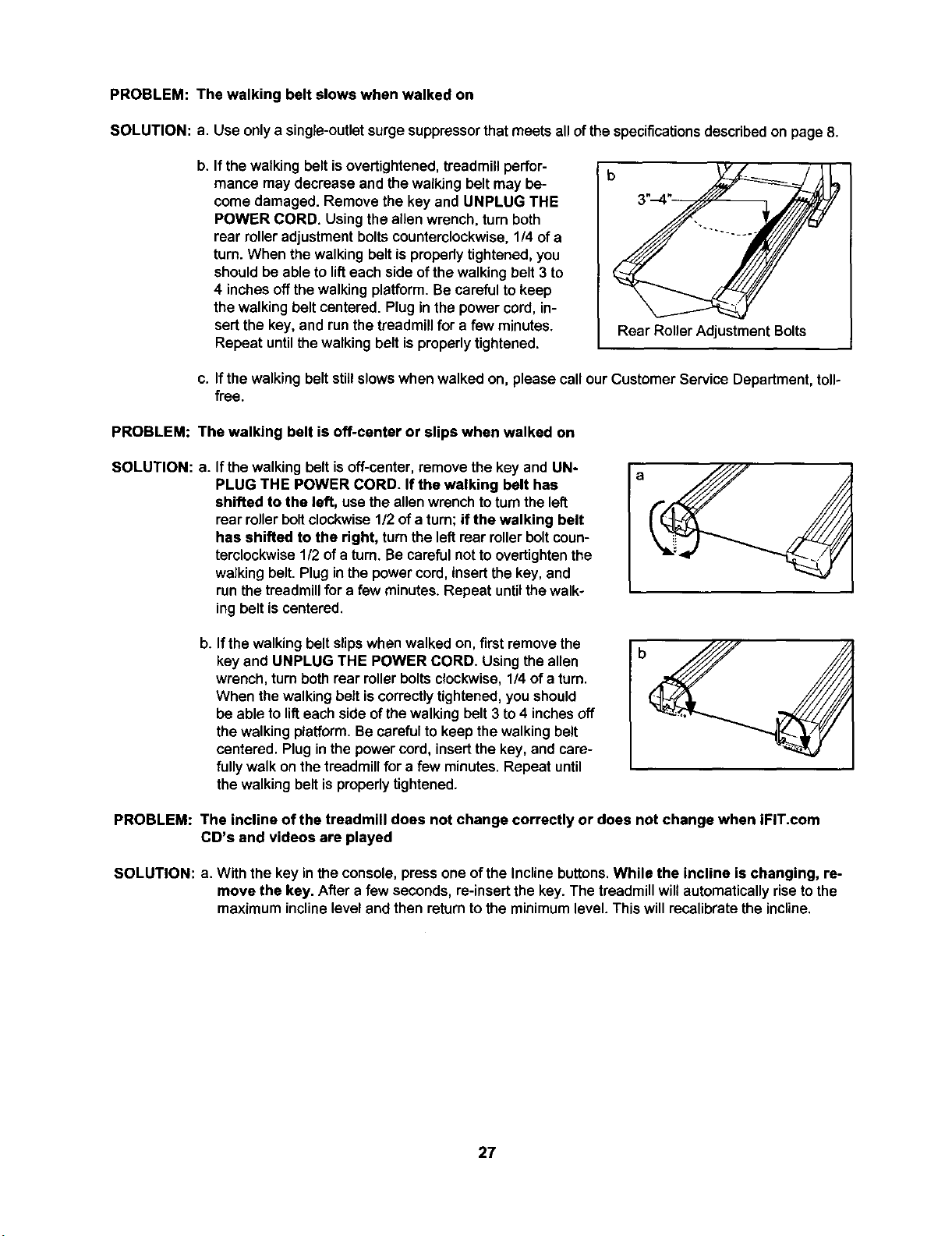
PROBLEM: The walking belt slows when walked on
SOLUTION: a. Use onlya single-outlet surgesuppressorthatmeets all ofthe specificationsdescribed on page 8.
b. If the walking belt isovertightened, treadmill perfor-
mance may decrease and the walking belt may be-
come damaged. Remove the key and UNPLUG THE
POWER CORD. Using the allen wrench, turn both
rear roller adjustment bolts counterclockwise, 1/4 of a
turn. When the walking belt is propedy tightened, you
should be able to lift each side of the walking belt 3 to
4 inches offthe walking platform. Be careful to keep
the walking belt centered. Plug in the power cord, in-
sert the key, and run the treadmill for a few minutes.
Repeat until the walking belt is properly tightened.
Rear Roller Adjustment Bolts
c. If the walkingbelt stillslowswhen walked on, please call our Customer Service Department, toll-
free.
PROBLEM: The walking belt is off-center or slips when walked on
SOLUTION: a.
If the walking belt is off-center, remove the key and UN-
PLUG THE POWER CORD. If the walking belt has
shifted to the left, usethe allenwrenchtoturnthe left
rear rollerboltclockwise1/2 of a turn;if the walking belt
has shifted to the right, turnthe leftrear rollerboltcoun-
terclockwise1/2 of a turn, Be carefulnottoovertightenthe
walkingbelt.Plugin the powercord, insertthe key,and
runthe treadmillfor a few minutes. Repeat untilthewalk-
ing belt iscentered,
b4
If the walking belt slipswhen walked on,first remove the
key and UNPLUG THE POWER CORD. Using the allen
wrench, turn both rear roller bolts clockwise, 1/4 of a turn.
When the walking belt is correctly tightened, you should
be able to lift each side of the walking belt 3 to 4 inches off
the walking platform. Be careful to keep the walking belt
centered. Plug in the power cord, insert the key, and care-
fully walk on the treadmill for a few minutes. Repeat until
the walking belt is properly tightened.
PROBLEM: The incline of the treadmill does not change correctly or does not change when iFIT.com
CD's and videos are played
SOLUTION: a. With the key inthe console, press one of the Incline buttons. While the incline is changing, re-
move the key. After a few seconds, re-insertthe key. The treadmillwillautomaticallyriseto the
maximum inclinelevel and then returntothe minimumlevel. Thiswillrecalibratethe incline.
27
CONDITIONING GUIDELINES
The following guidelineswill helpyou to plan your ex-
ercise program. Formore detailed exerciseinforma-
tion, obtaina reputablebook or consultyourphysician.
EXERCISE INTENSITY
Whether yourgoal isto burn fat or to strengthen your
cardiovascular system, the key to achieving the
desired results is to exercise with the proper intensity.
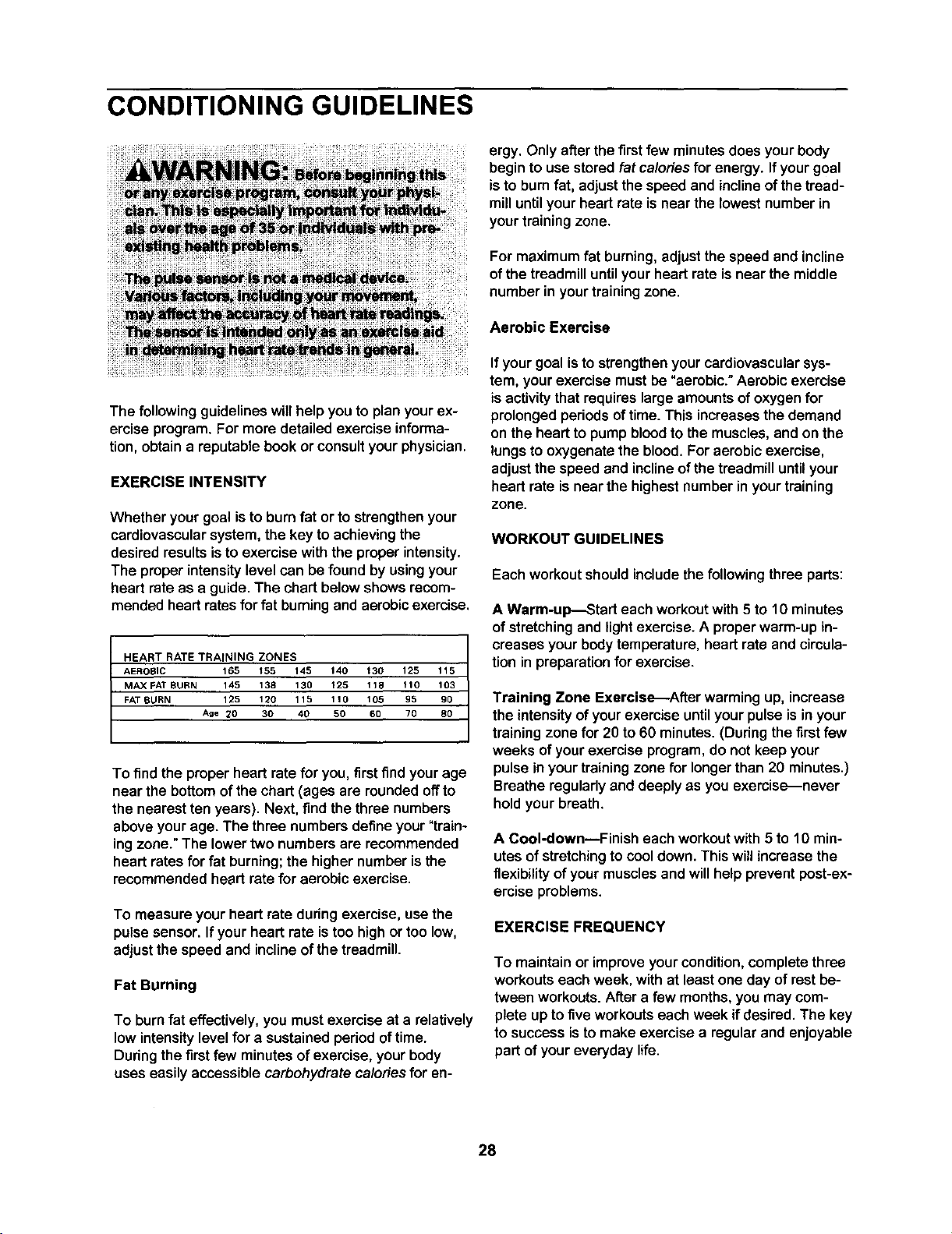
The proper intensity level can be found by using your
heart rate as a guide. The chart below shows recom-
mended heart rates for fat burning and aerobic exercise.
HEART RATE TRAINING ZONES
AEROBIC 165 f 55 145 140 130 125 115
MAX FAT BURN 145 138 130 125 118 110 103
FAT BURN 125 120 115 110 105 95 90
Age _0 30 40 50 60 70 80
To find the proper heart ratefor you, first findyour age
near the bottom ofthe chart (ages are roundedoff to
the nearest tenyears). Next, findthethree numbers
above your age. The three numbers defineyour"train-
ingzone."The lowertwo numbers are recommended
heart rates for fat burning; the highernumberisthe
recommendedheart ratefor aerobic exercise.
To measure your heart rate during exercise, use the
pulse sensor. If your heart rate is too high or too low,
adjust the speed and incline of the treadmill.
Fat Burning
To burn fat effectively, you mustexercise at a relatively
low intensity level for a sustained period of time.
During the first few minutes of exercise, your body
uses easily accessible carbohydrate calories for en-
ergy. Only after the first few minutes does your body
begin to use stored fat calories for energy. If your goal
is to bum fat, adjust the speed and incline of the tread-
mill until your heart rate is near the lowest number in
your training zone.
For maximum fat burning, adjustthe speed and incline
of the treadmill until your heart rate is near the middle
number in your training zone.
Aerobic Exercise
If your goal isto strengthenyour cardiovascularsys-
tem, yourexercise mustbe "aerobic." Aerobic exercise
isactivitythatrequireslargeamountsofoxygenfor
prolongedperiodsoftime. This increasesthe demand
onthe heartto pumpbloodto themuscles,and on the
lungsto oxygenatethe blood. Foraerobic exercise,
adjustthespeed and inclineof thetreadmilluntilyour
heart rate is near the highestnumber inyourtraining
zone.
WORKOUT GUIDELINES
Eachworkoutshould includethe following three parts:
A Warm-up-_Stad each workout with 5 to 10 minutes
of stretchingand light exercise. A proper warm-up in-
creasesyour bodytemperature, heart rate and circula-
tion in preparationforexercise.
Training Zone Exercise-After warming up, increase
the intensityof yourexemiseuntilyourpulse isin your
trainingzone for 20 to 60 minutes.(During thefirstfew
weeks of yourexercise program,do not keep your
pulse inyourtrainingzone for longerthan 20 minutes.)
Breatheregularlyand deeplyas you exercise--never
holdyour breath.
A Cool-down--Finish each workoutwith 5 to 10 min-
utesof stretchingto cooldown. Thiswill increasethe
flexibility ofyour muscles and willhelpprevent post-ex-
ercise problems.
EXERCISE FREQUENCY
To maintain or improveyour condition,completethree
workoutseach week, with at leastone day ofrest be-
tween workouts.After a few months,you may com-
plete up to fiveworkoutseachweek if desired. The key
tosuccess isto make exercise a regularand enjoyable
part of youreveryday life.
28
SUGGESTED STRETCHES
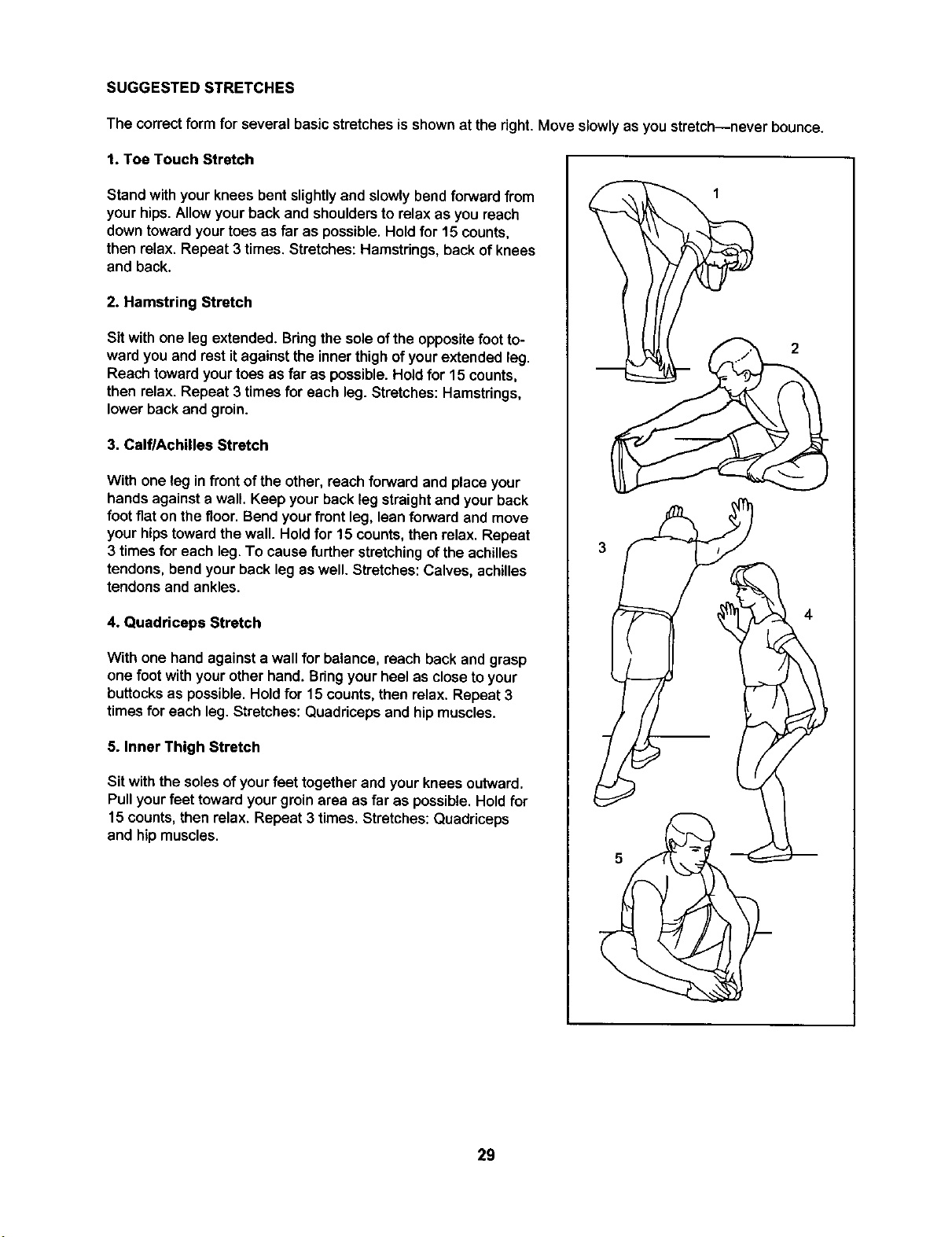
The correctform for several basic stretches is shownat the right. Move slowlyas you stretch--never bounce.
1. Toe Touch Stretch
Stand withyour knees bent slightly and slowlybend forward from
your hips. Allow your back and shoulders to relax as you reach
down toward your toes as far as possible. Hold for 15 counts,
then relax. Repeat 3 times. Stretches: Hamstrings, back of knees
and back.
2. Hamstring Stretch
Sit with one leg extended. Bringthe sole ofthe opposite foot to-
ward you and rest it against the inner thigh of your extended leg.
Reach toward your toes as far as possible. Hold for 15 counts,
then relax. Repeat 3 times for each leg. Stretches: Hamstrings,
lower back and groin.
3. CalflAchilles Stretch
With one leg in front of the other, reach forward and place your
hands against a wall. Keep your back leg straight and your back
foot flat on the floor.Bend your front leg, lean forward and move
your hips toward the wall. Hold for 15 counts, then relax. Repeat
3 times for each leg. To cause further stretching of the achilles
tendons, bend your back leg as well. Stretches: Calves, achilles
tendons and ankles.
4. Quadriceps Stretch
With one hand against a wall for balance, reach back and grasp
one foot with your other hand. Bring your heel as close to your
buttocks as possible. Hold for 15 counts, then relax. Repeat 3
times for each leg. Stretches: Quadriceps and hip muscles.
5. Inner Thigh Stretch
Sit with the solesof your feet together and your knees outward.
Pullyourfeet towardyour groinarea as far as possible.Hold for
15 counts,then relax. Repeat 3 times. Stretches:Quadriceps
and hipmuscles.
2
4
29
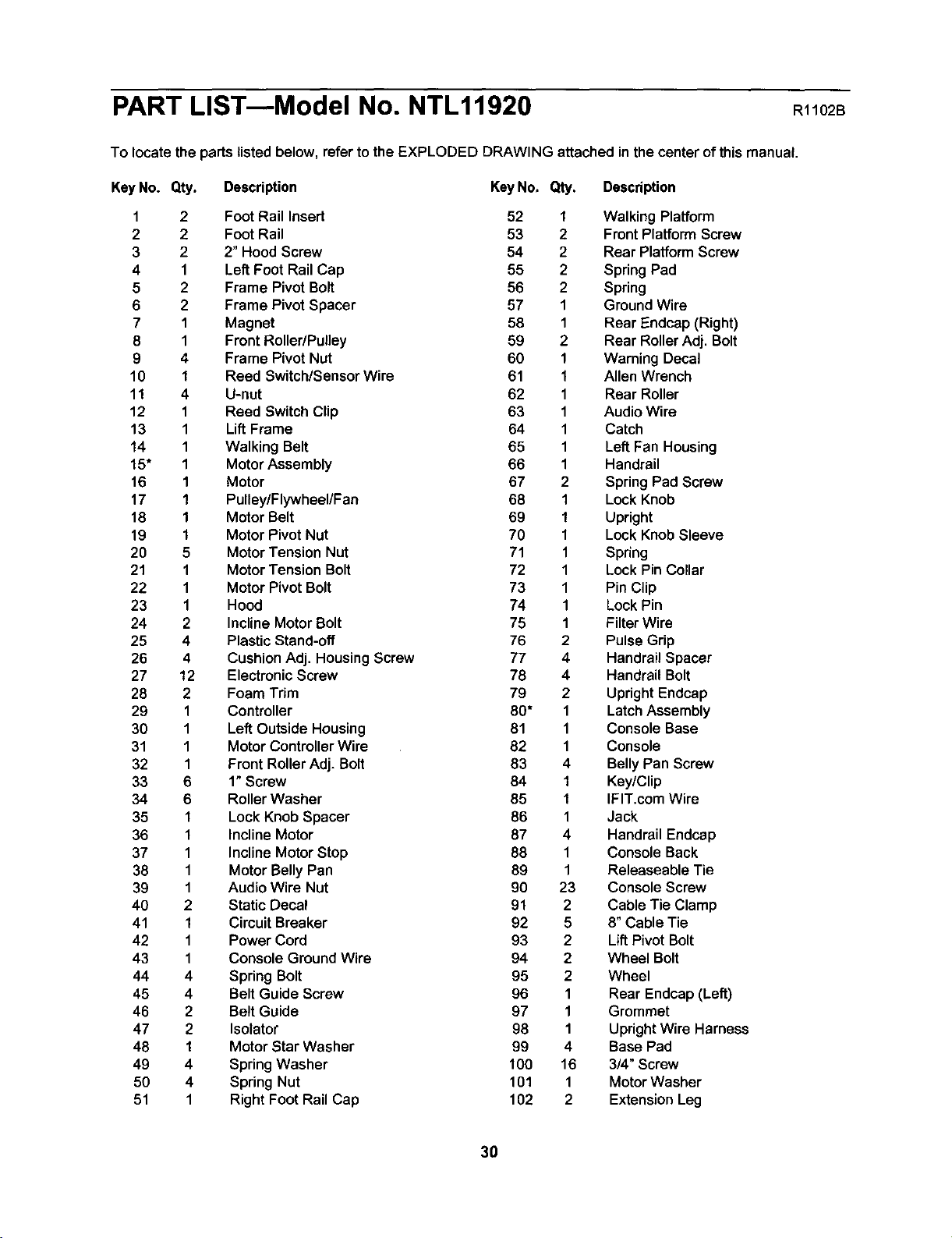
PART LIST---Model No. NTL11920 Rl102B
To locate the parts listedbelow, refer to the EXPLODED DRAWING attached inthe center of this manual.
KeyNo. Qty. Description KeyNo. Qty. Description
1 2 Foot Rail Insert 52 1 Walking Platform
2 2 FootRail 53 2 Front PlatformScrew
3 2 2"Hood Screw 54 2 Rear PlatformScrew
4 1 Left Foot RailCap 55 2 SpringPad
5 2 Frame Pivot Bolt 56 2 Spring
6 2 Frame Pivot Spacer 57 1 GroundWire
7 1 Magnet 58 1 Rear Endcap (Right)
8 1 Front Roller/Pulley 59 2 Rear RollerAdj. Bolt
9 4 Frame Pivot Nut 60 1 Warning Decal
10 1 Reed Switch/Sensor Wire 61 1 Allen Wrench
11 4 U-nut 62 1 Rear Roller
12 1 Reed Switch Clip 63 1 Audio Wire
13 1 LiftFrame 64 1 Catch
14 1 Walking Belt 65 1 Left Fan Housing
15" 1 MotorAssembly 66 1 Handrail
16 1 Motor 67 2 SpringPad Screw
17 1 Pulley/Flywheel/Fan 68 1 Lock Knob
18 1 Motor Belt 69 1 Upright
19 1 Motor Pivot Nut 70 1 Lock KnobSleeve
20 5 Motor Tension Nut 71 1 Spring
21 1 Motor Tension Bolt 72 1 LockPin Collar
22 1 Motor Pivot Bolt 73 1 Pin Clip
23 1 Hood 74 1 LockPin
24 2 InclineMotor Bolt 75 1 FilterWire
25 4 Plastic Stand-off 76 2 Pulse Grip
26 4 CushionAdj. HousingScrew 77 4 HandrailSpacer
27 12 ElectronicScrew 78 4 Handrail Bolt
28 2 Foam Trim 79 2 UprightEndcap
29 1 Controller 80* 1 LatchAssembly
30 1 LeftOutside Housing 81 1 ConsoleBase
31 1 Motor ControllerWire 82 1 Console
32 1 Front RollerAdj. Bolt 83 4 BellyPan Screw
33 6 1" Screw 84 1 Key/Clip
34 6 RollerWasher 85 1 IFIT.com Wire
35 1 Lock Knob Spacer 86 1 Jack
36 1 Incline Motor 87 4 HandrailEndcap
37 1 Incline MotorStop 88 1 Console Back
38 1 Motor BellyPan 89 1 Releaseable Tie
39 1 Audio Wire Nut 90 23 ConsoleScrew
40 2 Static Decal 91 2 Cable Tie Clamp
41 1 CircuitBreaker 92 5 8" Cable Tie
42 1 Power Cord 93 2 LiftPivot Bolt
43 1 Console Ground Wire 94 2 Wheel Bolt
44 4 SpringBolt 95 2 Wheel
45 4 Belt Guide Screw 96 1 Rear Endcap(Left)
46 2 Belt Guide 97 1 Grommet
47 2 Isolator 98 1 UpdghtWire Harness
48 I Motor Star Washer 99 4 Base Pad
49 4 SpringWasher 100 16 3/4" Screw
50 4 Spring Nut 101 1 MotorWasher
51 1 Right Foot Rail Cap 102 2 ExtensionLeg
30
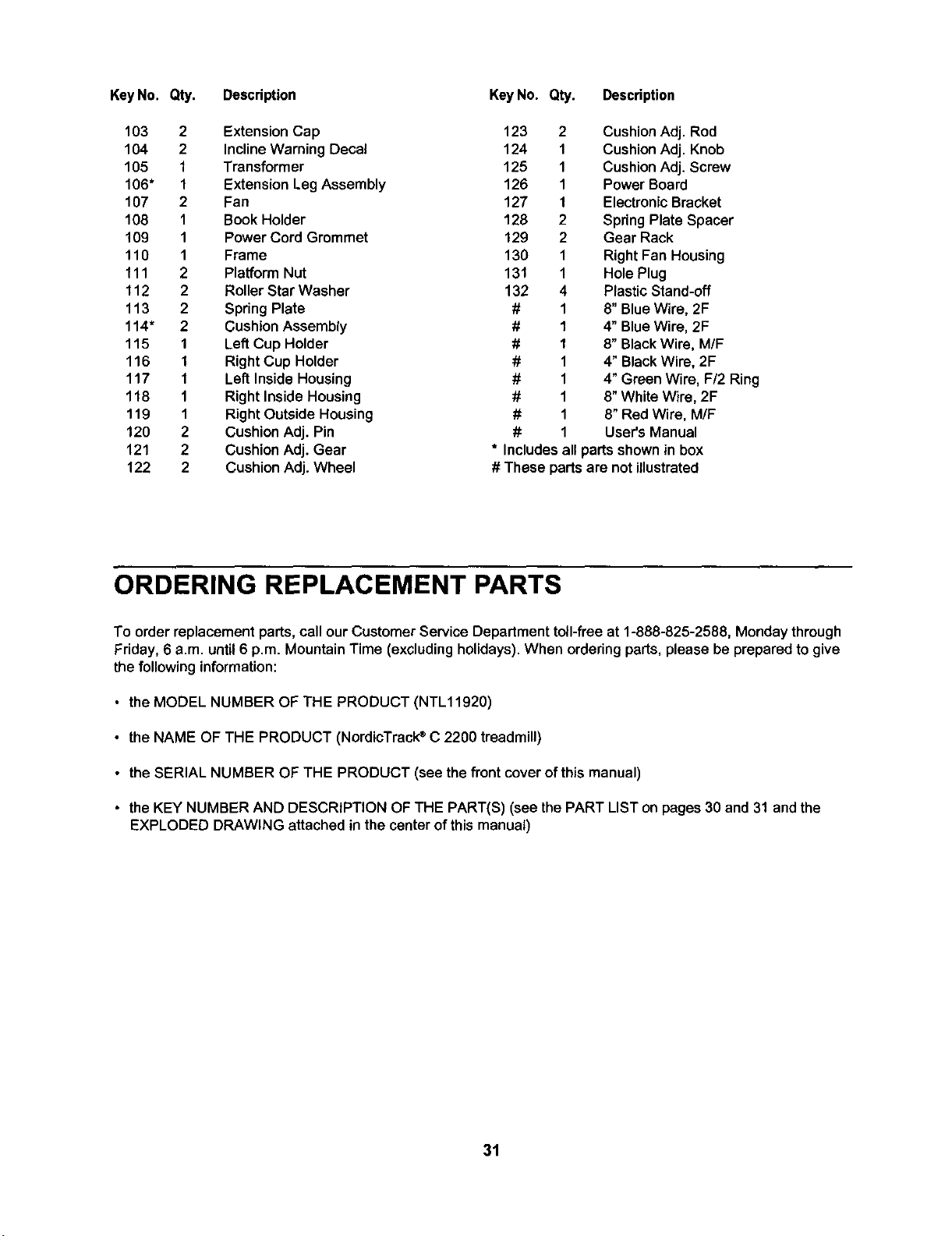
KeyNo. Qty. Descdption
103 2 Extension Cap
104 2 Incline Warning Decal
105 1 Transformer
106" 1 Extension Leg Assembly
107 2 Fan
108 1 Book Holder
109 1 Power Cord Grommet
110 1 Frame
111 2 Platform Nut
112 2 RollerStar Washer
113 2 Spring Plate
114" 2 Cushion Assembly
115 1 Lef_Cup Holder
116 I Right Cup Holder
117 1 Left Inside Housing
118 1 Right Inside Housing
119 1 RightOutside Housing
120 2 Cushion Adj. Pin
121 2 Cushion Adj. Gear
122 2 Cushion Adj. Wheel
KeyNo. Qty. Description
123 2 Cushion Adj. Rod
124 1 Cushion Adj. Knob
125 1 Cushion Adj. Screw
126 1 Power Board
127 1 Electronic Bracket
128 2 Spring Plate Spacer
129 2 Gear Rack
130 1 Right Fan Housing
131 1 Hole Plug
132 4 Plastic Stand-off
# 1 8" Blue Wire, 2F
# 1 4" Blue Wire, 2F
# 1 8" Black Wire, M/F
# 1 4" Black Wire, 2F
# 1 4" Green Wire, F/2 Ring
# 1 8" White Wire, 2F
# 1 8" Red Wire, M/F
# 1 User's Manual
* Includes all parts shown in box
# These parts are not illustrated
ORDERING REPLACEMENT PARTS
To order replacement parts, call ourCustomer Service Departmenttoil-free at 1-888-825-2588, Monday through
Friday,6 a.m. until6 p.m. MountainTime (excludingholidays).When orderingparts,please be preparedto give
thefollowing information:
• the MODEL NUMBER OF THE PRODUCT (NTL11920)
• the NAME OF THE PRODUCT (NordicTrack®C 2200 treadmill)
• the SERIAL NUMBER OF THE PRODUCT (see the front cover of this manual)
• the KEY NUMBER AND DESCRIPTION OF THE PART(S) (see the PART LIST on pages 30 and 31 and the
EXPLODED DRAWING attached in the center of this manual)
31
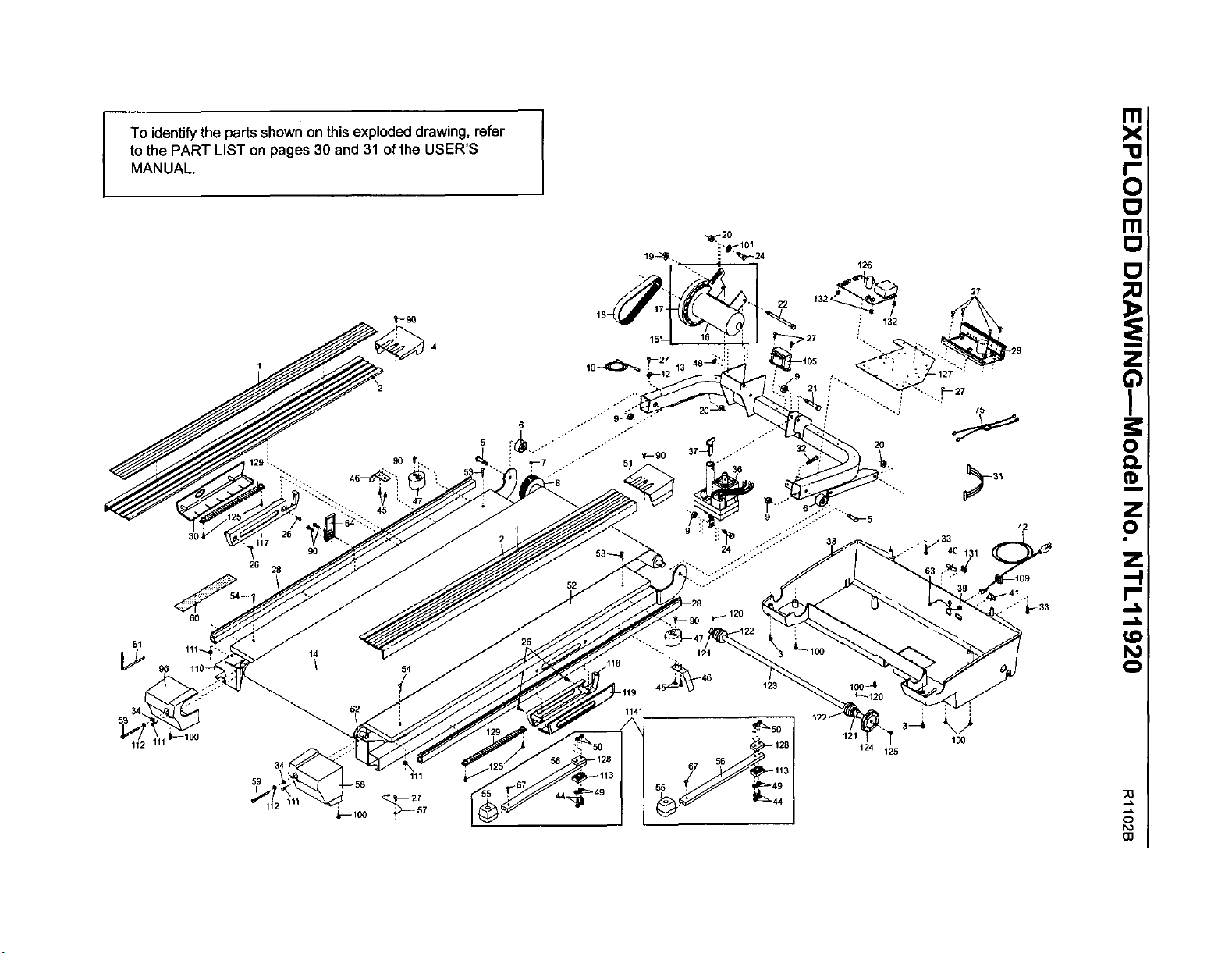
I
To identify the parts shown on this exploded drawing, refer
to the PART LIST on pages 30 and 31 of the USER'S
MANUAL.
30,
9O
26
28
112
111
59 _ 58
>
_-- 27
114"
121
124 125
100
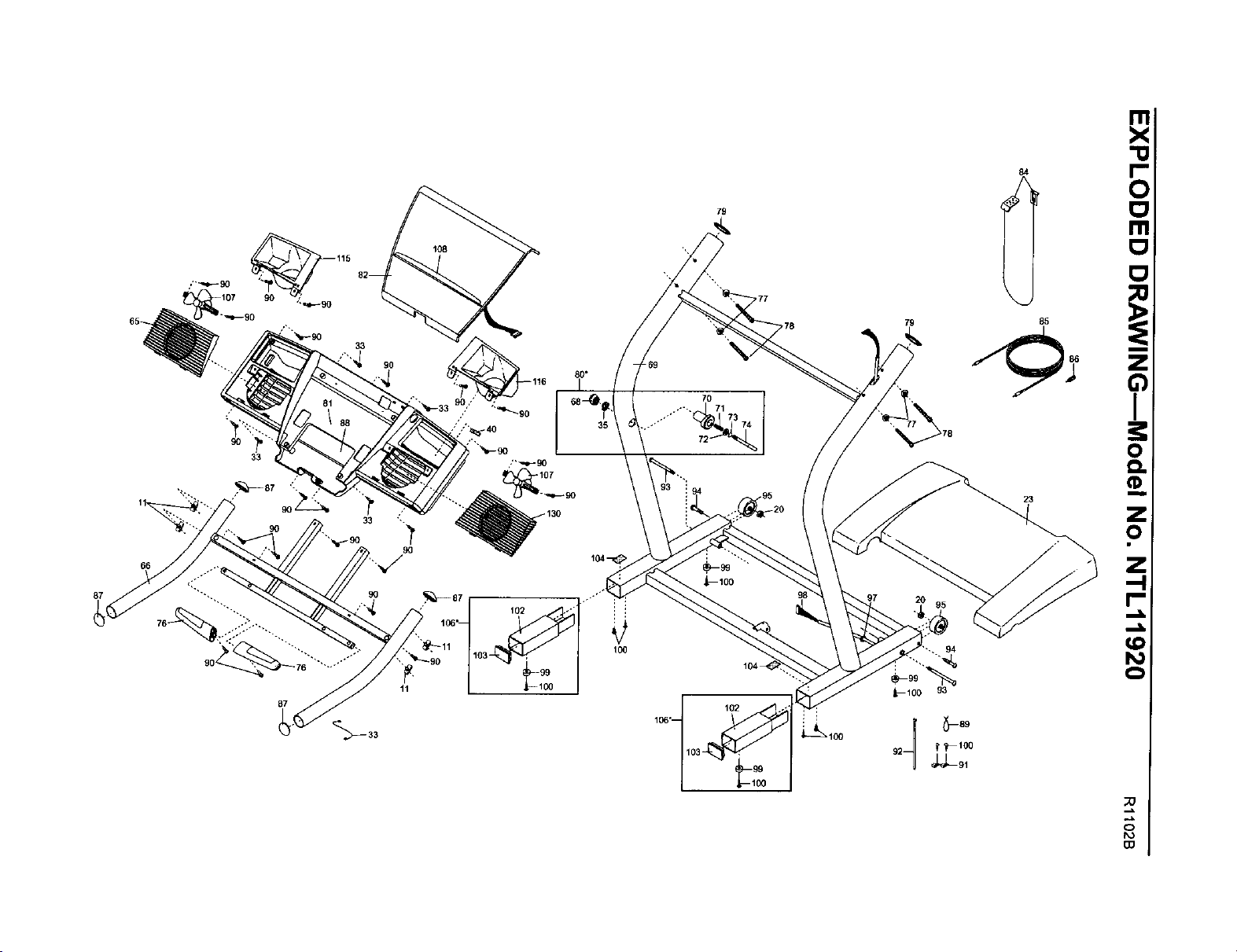
87
90
33
66
11
87
80"
102
100
79
;'77
:,78
79
94
_--100 93
8
LIMITED WARRANTY 1
WHAT IS COVERED_The entire NordicTrack _ C 2200 treadmill ("Product') is warranted to be free of all defects in ma-
terial and workmanship.
WHO IS COVERED--The original purchaser or anyperson receiving the Product as a gift from the original purchaser.
HOW LONG IS IT COVERED--ICON Health & Fitness,Inc. ("ICON'), warrants the motor for three years after the date
of purchase. The belt and deck are covered for two years after the date of purchase. All mechanical components ere
covered for two years after the date of purchase. All electrical components are covered for two years alter the date of
purchase. Labor is covered for one year. The hood, covers, belly pan, and decals are covered for six months after the
date of purchase.
WHAT WE DO TO CORRECT COVERED DEFECTS--We will ship to you, without charge, any replacement part or
component, providing the repairs are authorized by ICON first and are performed by an ICON trained and authorized
service provider, or, at our option, we will replace the Product.
WHAT IS NOT COVERED--Any failures or damage causedby unauthorized service, misuse, accident,negligence, im-
proper assembly or installation, alterations, modifications without our written authorization or by failure on your part to
use, operate, and maintain asset out inyour User's Manual ("Manual"). This warranty does not extend to products used
for commercial or rental purposes or to products used as store display modules.
WHAT YOU MUST DO--Always retain proof of purchase, such as your bill of sale; store, operate, and maintain the
Product as specified in the Manual; notify our Customer Service Department of any defect within 10 days after discov-
ery of the defect; as instructed, return any defected part for replacement or, if necessary, the entire product, for repair.
USER'S MANUAL--It is VERY IMPORTANT THAT YOU READ THE MANUAL before operating the Product.
Remember to do the periodic maintenance requirements specified in the Manual to assure proper operation and your
continued satisfaction.
HOW TO GET PARTS AND SERVICE--Simply cell our Customer Service Department at 1-888-825-2588 and tell them
your name and address end the serial number of your Product. They will tell you how to get a pert replaced, or if neces-
sary, arrange for service where your Product is located or advise you how to ship the Product for service. Before ship-
ping, always obtain a Return Authorization Number (RA No.) from our Customer Service Department; securely pack
your Product (save the original shipping carton if possible); put the RA No. on the outside of the carton and insure the
product. Include a letter explaining the product or problem and a copy of your proof of purchase if you believe the ser-
vice is covered by warranty.
ICON is not responsible or liable for indirect, special or consequential damagesarisingout of or in connection with the
use or performanceofthe productor damageswith respectto anyeconomic loss,lossof property,lossof revenuesor
profits,loss of enjoymentor use, costs of removal, installationor other consequential damagesof whatsoever nature.
Somestates do notallow theexclusionor limitationofincidentalorconsequential damages.Accordingly, the above lim-
itationmay notapplyto you.
The warranty extended hereunder is in lieu of any and all other warranties and any implied warranties of merchantability
or fitness for a particular purpose is limited in its scope and duration to the terms set forth herein. Some states do not
allow limitations on how long an implied warranty lasts. Accordingly, the above limitation may not apply to you.
No one is authorized to change, modify or extend the terms of this limited warranty.
This warranty gives you specificlegal rights and you may have other rights whichvary from state to state.
ICON HEALTH & FITNESS, INC., 1500 S. 1000 W., LOGAN, UT 84321-98t3
Part No. 189797 Rl102B Printed in USA © 2002 ICON Health & Fitness, Inc.