Operating and installation
instructions
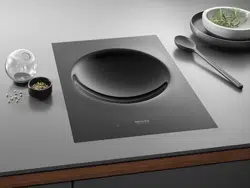
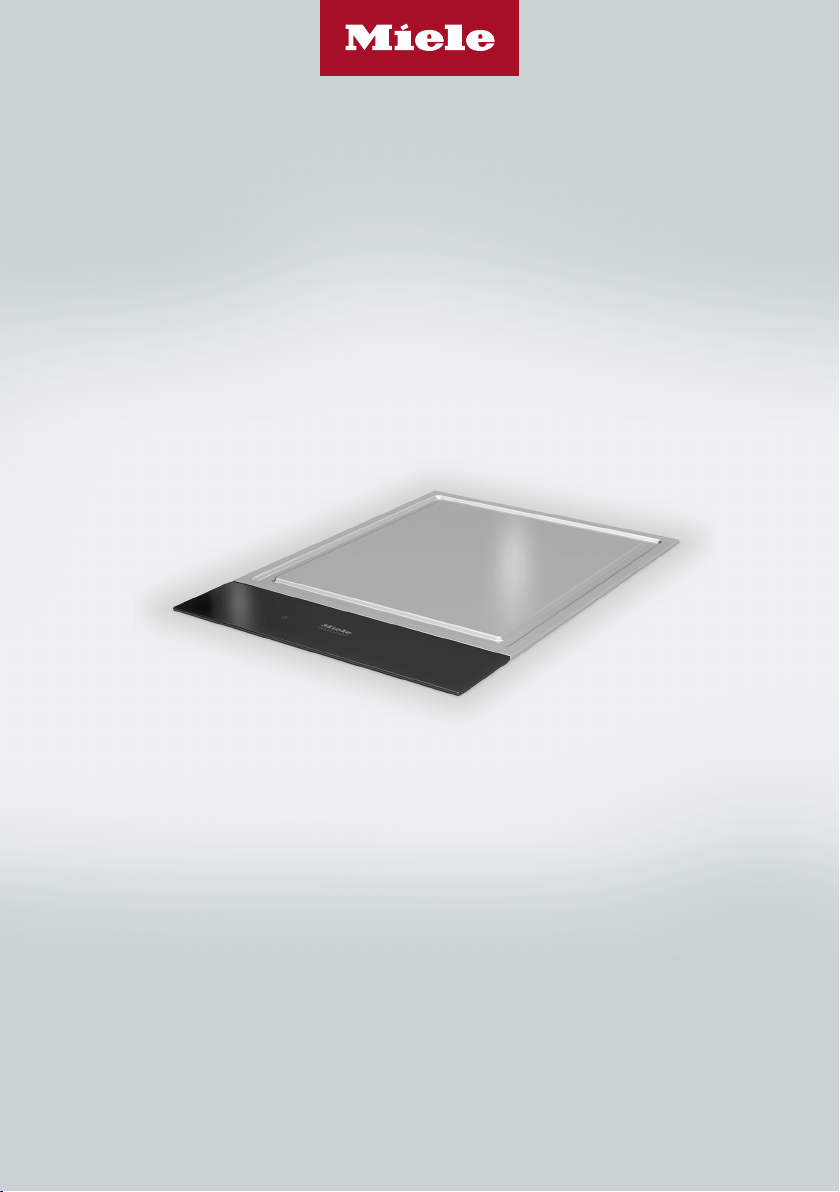
SmartLine Tepan Yaki
To avoid the risk of accidents or damage to the appliance it is essen-
tial to read these instructions before it is installed and used for the
first time.
en-GB M.-Nr. 10 803 081

Contents
2
Warning and Safety instructions...................................................................... 4
Caring for the environment .............................................................................. 14
Guide to the appliance...................................................................................... 15
Tepan Yaki ........................................................................................................... 15
Controls and display ........................................................................................... 16
How it works ...................................................................................................... 18
Before using for the first time .......................................................................... 19
Cleaning the SmartLine element for the first time............................................... 19
Switching on the SmartLine element for the first time ........................................ 19
Operation............................................................................................................ 20
Using the appliance............................................................................................. 20
Setting the power level........................................................................................ 21
Switching off........................................................................................................ 21
Residual heat indicator........................................................................................ 21
Setting the power level – extended setting range ............................................... 22
Switching the heating elements on together....................................................... 22
Tips on cooking................................................................................................... 23
Keeping warm ..................................................................................................... 23
Setting ranges.................................................................................................... 24
Timer................................................................................................................... 25
Minute minder ..................................................................................................... 25
Auto switch off .................................................................................................... 26
Using both timer functions at the same time ...................................................... 27
Additional functions .......................................................................................... 28
Stop&Go............................................................................................................ 28
Recall................................................................................................................... 28
Wipe protection ................................................................................................... 29
Demonstration mode........................................................................................... 29
Displaying the SmartLine element data .............................................................. 29
Safety features................................................................................................... 30
System lock/safety lock ...................................................................................... 30
Safety switch-off ................................................................................................. 31
Overheating protection........................................................................................ 32
Programming ..................................................................................................... 33

Contents
3
Cleaning and care ............................................................................................. 36
Cleaning the control panel .................................................................................. 37
Cleaning the cooking surface.............................................................................. 37
Problem solving guide ...................................................................................... 38
Messages in the display...................................................................................... 38
Unexpected behaviour ........................................................................................ 40
General problems or technical faults................................................................... 41
Optional accessories ........................................................................................ 42
After sales service............................................................................................. 43
Contact in the event of a fault ............................................................................. 43
Data plate ............................................................................................................ 43
Warranty .............................................................................................................. 43
Installation.......................................................................................................... 44
Safety instructions for installation ....................................................................... 44
Safety distances.................................................................................................. 45
Installation notes – surface-mounted.................................................................. 49
Worktop cutout – surface-mounted .................................................................... 51
Spacer bars – surface-mounted.......................................................................... 54
Installation dimensions–Surface-mounted........................................................ 55
Installation – surface-mounted............................................................................ 56
Installation notes – flush-fit ................................................................................. 58
Worktop cutout – flush-fit.................................................................................... 60
Spacer bars – flush-fit ......................................................................................... 63
Installation dimensions–Flush-fit ....................................................................... 64
Installation – flush-fit ........................................................................................... 65
Electrical connection ........................................................................................... 67

Warning and Safety instructions
4
This Tepan Yaki conforms to current safety requirements. Inappro-
priate use can, however, lead to personal injury and material dam-
age.
Please read these operating and installation instructions carefully
before using the Tepan Yaki for the first time. They contain import-
ant information on safety, installation, use and maintenance. This
prevents both personal injury and damage to the Tepan Yaki.
In accordance with standard IEC60335-1, Miele expressly and
strongly advises that you read and follow the instructions in the
chapter on installing the Tepan Yaki as well as the safety instruc-
tions and warnings.
Miele cannot be held liable for injury or damage caused by non-
compliance with these instructions.
Keep these instructions in a safe place and pass them on to any
future owner.

Warning and Safety instructions
5
Correct application
This Tepan Yaki is designed for domestic use and for use in similar
environments.
This Tepan Yaki is not intended for outdoor use.
This Tepan Yaki is intended for domestic use only to cook food
and keep it warm. All other types of use are not permitted.
This Tepan Yaki can only be used by people with reduced phys-
ical, sensory or mental capabilities or lack of experience and know-
ledge if they are supervised whilst using it. They may only use it un-
supervised if they have been shown how to use it in a safe way. They
must be able to recognise and understand the dangers of misuse.

Warning and Safety instructions
6
Safety with children
Children under 8 years of age must be kept away from the Tepan
Yaki unless they are constantly supervised.
Children aged 8 and older may only use the Tepan Yaki without
supervision if they have been shown how to use it in a safe manner.
Children must be able to understand and recognise the possible
dangers caused by incorrect operation.
Children must not be allowed to clean the Tepan Yaki unsuper-
vised.
Children should be supervised in the vicinity of the Tepan Yaki.
Never allow children to play with the Tepan Yaki.
The Tepan Yaki gets hot when in use and remains hot for quite a
while after being switched off. Keep children well away from the Te-
pan Yaki until it has cooled down and there is no danger of burning.
Danger of burning!
Do not store anything which might arouse a child's interest in stor-
age areas above or behind the Tepan Yaki. Otherwise they could be
tempted into climbing onto the Tepan Yaki.
Danger of suffocation! Whilst playing, children may become en-
tangled in packaging material (such as plastic wrapping) or pull it
over their head with the risk of suffocation. Keep packaging material
away from children.
Activate the system lock to ensure that children cannot switch the
Tepan Yaki on by mistake. Use the safety lock when the Tepan Yaki
is in use to prevent children from altering the settings selected.

Warning and Safety instructions
7
Technical safety
Unauthorised installation, maintenance and repairs can cause
considerable danger for the user. Installation, maintenance and re-
pairs must only be carried out by a Miele authorised technician.
Damage to the Tepan Yaki can compromise your safety. Check it
for visible signs of damage. Do not use a damaged Tepan Yaki.
Temporary or permanent operation on an autonomous power sup-
ply system or a power supply system that is not synchronised with
the mains power supply (e.g. island networks, back-up systems) is
possible. A prerequisite for operation is that the power supply sys-
tem complies with the specifications of EN50160 or an equivalent
standard.
The function and operation of the protective measures provided in
the domestic electrical installation and in this Miele product must
also be maintained in isolated operation or in operation that is not
synchronised with the mains power supply, or these measures must
be replaced by equivalent measures in the installation. As described,
for example, in the current version of BS OHSAS 18001–2 ISO
45001.
The electrical safety of the Tepan Yaki can only be guaranteed
when correctly earthed. It is most important that this basic safety re-
quirement is present. If in doubt, the electrical installation should be
checked by a qualified electrician.
Before connecting the Tepan Yaki to the mains supply, ensure that
the connection data on the data plate (voltage and frequency) match
the mains electricity supply. This data must correspond in order to
avoid the risk of damage to the appliance.
Compare this data before connecting the appliance. If in any doubt,
consult a qualified electrician.
Multi-socket adapters and extension leads do not guarantee the
required safety of the appliance (fire hazard). Do not use these to
connect the Tepan Yaki to the mains electricity supply.

Warning and Safety instructions
8
For safety reasons, this Tepan Yaki may only be used after it has
been built in.
This Tepan Yaki must not be installed and operated in mobile in-
stallations (e.g. on a ship).
Any contact with live connections or tampering with the electrical
or mechanical components of the Tepan Yaki will endanger your
safety and may lead to appliance malfunctions.
Do not open the Tepan Yaki housing under any circumstances.
While the Tepan Yaki is under warranty, repairs should only be un-
dertaken by a Miele authorised service technician. Otherwise the
warranty is invalidated.
Miele can only guarantee the safety of the appliance when genu-
ine original Miele replacement parts are used. Faulty components
must only be replaced by Miele spare parts.
The Tepan Yaki is not intended for use with an external timer
switch or a remote control system.
If the plug is removed from the connection cable or if the cable is
supplied without a plug, the Tepan Yaki must be connected to the
electrical supply by a suitably qualified electrician.
If the mains connection cable is damaged, it must be replaced
with a special connection cable by an electrician (see “Electrical
connection”).

Warning and Safety instructions
9
During installation, maintenance and repair work, the Tepan Yaki
must be completely disconnected from the mains electricity supply.
It is only completely isolated from the electricity supply when:
- the mains fuse is disconnected,
- the screw-out fuse is removed (in countries where this is applic-
able),
- the plug (if present) is removed from the socket. To do this, pull
the plug and not the mains connection cable.
Danger of electric shock.
Do not use the Tepan Yaki if it is damaged or if it suffers damage
during use. Switch it off immediately. Disconnect the Tepan Yaki
from the electrical supply. Contact Miele Service.
If the Tepan Yaki is built in behind a furniture front (e.g. a door), do
not close the furniture door while the Tepan Yaki is in use. Heat and
moisture can build up behind the closed furniture door. This can res-
ult in damage to the Tepan Yaki, the housing unit and the floor. Do
not close the furniture door until the residual heat indicators have
gone out.

Warning and Safety instructions
10
Correct use
The Tepan Yaki gets hot when in use and remains hot for quite a
while after being switched off. There is a danger of burning until the
residual heat indicators go out.
Due to the high temperatures radiated, objects left near the Tepan
Yaki when it is switched on could start to burn.
Do not use the Tepan Yaki to heat up the room.
Oils and fats can ignite if allowed to overheat. Never leave the Te-
pan Yaki unattended when cooking with oil or fats. Never attempt to
put out oil or fat fires with water. Switch the Tepan Yaki off.
Extinguish the flames carefully with a lid or fire blanket.
Do not leave the SmartLine element unattended whilst it is being
used. It should be continually monitored whilst boiling and flash fry-
ing.
Flames could set the grease filters of a cooker hood on fire. Do
not flambé under a cooker hood.
Spray canisters, aerosols and other inflammable substances can
ignite when heated. Therefore do not store such items or substances
in a drawer under the Tepan Yaki. Cutlery inserts must be heat-res-
istant.
Heating up food in closed containers e.g. tins or sealed jars res-
ults in an increase in pressure will can cause them to explode. Do
not use the Tepan Yaki for bottling food or for heating up food in tins.
If the Tepan Yaki is covered, there is a risk of the material catching
fire, shattering or melting if the appliance is switched on by mistake
or if residual heat is still present. Do not cover the Tepan Yaki, e.g.
with a cover, a cloth or protective foil.

Warning and Safety instructions
11
When the Tepan Yaki is switched on either deliberately or by mis-
take, or when there is residual heat present, there is the risk of any
metal items left on the Tepan Yaki heating up. Other materials can
melt or catch fire. Do not use the Tepan Yaki as a resting place for
anything. Always disconnect the Tepan Yaki from the power supply
when you have finished using it.
You could burn yourself on the hot Tepan Yaki. Protect your hands
with heat-resistant pot holders or gloves when using the Tepan Yaki.
Do not let them get wet or damp. Heat transfers through damp and
wet material more quickly with the risk of scalding or burning your-
self.
When using an electrical appliance, e.g. a hand-held food blender,
near the Tepan Yaki, ensure that the cable of the electrical appliance
cannot come into contact with the hot Tepan Yaki. This could dam-
age the cable insulation.
Placing hot pans on the sensors and indicators could damage the
electronics underneath. Do not place hot pans on the sensors or in-
dicators.
Because induction heating works extremely quickly, the temperat-
ure could reach the flash point of oils and fats within a very short
time. Do not leave the Tepan Yaki unattended whilst it is being used.
For people fitted with a heart pacemaker: please note that the
area immediately surrounding the Tepan Yaki is electromagnetically
charged when it is switched on. It is very unlikely to affect a pace-
maker. However, if in any doubt, consult the manufacturer of the
pacemaker or your doctor.
When switched on, the electromagnetic field of the Tepan Yaki
can impair the function of magnetisable objects. Do not leave credit
cards, digital storage devices, pocket calculators, etc. in the immedi-
ate vicinity of the Tepan Yaki.

Warning and Safety instructions
12
Metal objects stored in a drawer under the Tepan Yaki can be-
come hot if the appliance is used intensively for a long time. Do not
store any metal objects in a drawer directly under the Tepan Yaki.
The Tepan Yaki is fitted with a cooling fan. If a drawer is fitted dir-
ectly underneath the built-in Tepan Yaki, ensure that there is suffi-
cient space between the drawer and its contents and the underside
of the Tepan Yaki in order to ensure sufficient ventilation for the Te-
pan Yaki. Do not store pointed or small items or paper in the drawer.
They could get in through the ventilation slots or be sucked into the
casing by the fan and damage the fan or impair cooling.
The Tepan Yaki gets very hot. Do not use plastic utensils. Even
heat-resistant plastic utensils are unsuitable.

Warning and Safety instructions
13
Cleaning and care
The steam from a steam cleaning appliance could reach live elec-
trical components and cause a short circuit.
Do not use a steam cleaner to clean the Tepan Yaki.
If the Tepan Yaki is built-in above a pyrolytic oven or cooker, do
not use it during a Pyrolytic cleaning programme as this could trigger
the overheating protection device on the Tepan Yaki (see “Safety fea-
tures” – “Overheating protection”).
Miele will guarantee to supply functional spare parts for a min-
imum of 10years and up to 15years following the discontinuation of
your CombiSet.
Caring for the environment
14
Disposal of the packing mater-
ial
The packaging is designed to protect
the appliance from damage during
transportation. The packaging materials
used are selected from materials which
are environmentally friendly for disposal
and should be recycled.
Recycling the packaging reduces the
use of raw materials in the manufactur-
ing process and also reduces the
amount of waste in landfill sites.
Disposing of your old appli-
ance
Electrical and electronic appliances of-
ten contain valuable materials. They
also contain specific materials, com-
pounds and components, which were
essential for their correct function and
safety. These could be hazardous to hu-
man health and to the environment if
disposed of with your domestic waste
or if handled incorrectly. Please do not,
therefore, dispose of your old appliance
with your household waste.
Please dispose of it at your local com-
munity waste collection / recycling
centre for electrical and electronic ap-
pliances, or contact your dealer or
Miele for advice. You are also respons-
ible for deleting any personal data that
may be stored on the appliance being
disposed of. Please ensure that your
old appliance poses no risk to children
while being stored prior to disposal.
Guide to the appliance
15
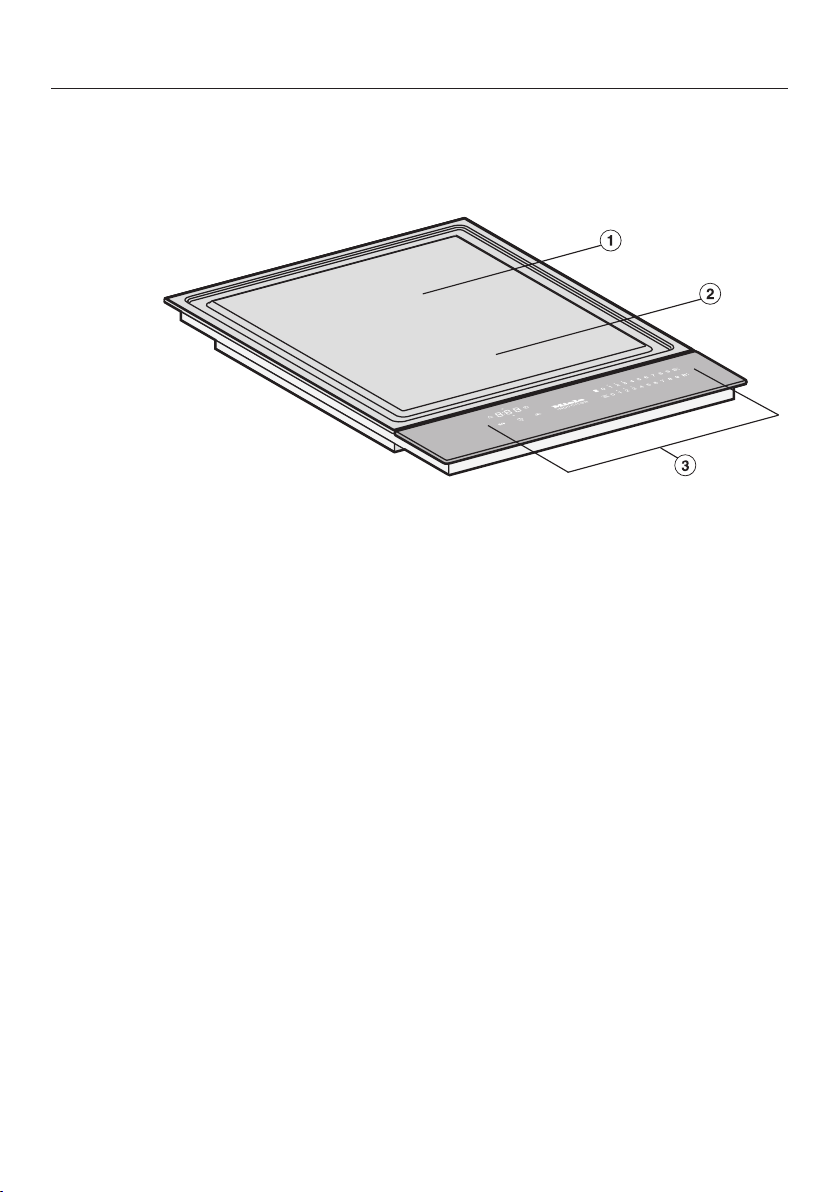
Tepan Yaki
a
Rear Tepan Yaki zone
b
Front Tepan Yaki zone
c
Controls and indicators
Guide to the appliance
16
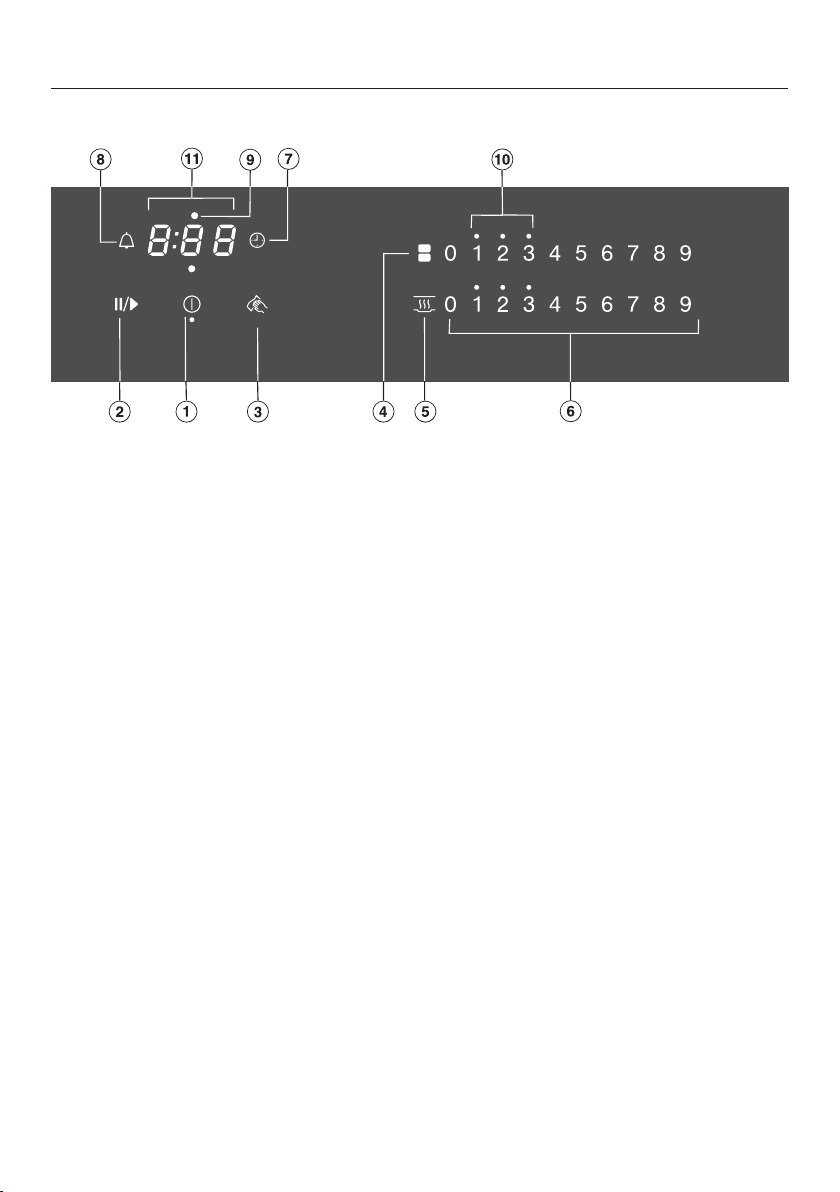
Controls and display
Sensor controls
a
SmartLine element On/Off
b
Stop&Go
To stop/start a cooking process in progress
c
Wipe protection
To lock the sensor controls
d
Heater elements
For manual connection/disconnection of heater elements
e
Keeping warm
To activate/deactivate the Keeping warm function
f
Numerical display
– To set the power level
– To set the times
g
Auto switch off
Switches the heater elements off automatically
h
Minute minder

Guide to the appliance
17
Displays/indicator lights
i
Heater element allocation auto switch off
Auto switch off for the heater element is activated
j
Residual heat
k
Timer display
: to
:
Time
System lock/safety lock is activated
Demo mode is activated

How it works
18
The cooking surface of the Tepan Yaki
is heated by induction. An induction coil
is located under the cooking surface.
When the Tepan Yaki is switched on,
this coil creates a magnetic field which
impacts directly on the cooking surface
and heats it up.
Risk of burning due to hot items.
When the Tepan Yaki is switched on
either deliberately or by mistake, or
when there is residual heat present,
there is the risk of any metal items
left on the Tepan Yaki heating up.
Do not use the Tepan Yaki as a rest-
ing place for anything.
After use, switch the Tepan Yaki off
with the sensor control.

Before using for the first time
19
Please stick the extra data plate for
the appliance supplied with this doc-
umentation in the space provided in
the “After sales service” section of
this booklet.
Remove any protective wrapping and
stickers.
Cleaning the SmartLine ele-
ment for the first time
Wipe all surfaces with a damp cloth
and then dry them.
Switching on the SmartLine
element for the first time
The metal components have a protect-
ive coating. Smells and possibly some
vapours may occur when the SmartLine
element is used for the first time. The
heating of the induction coils also
causes odours in the first few hours of
operation. With each subsequent use,
the odour is reduced until it disappears
completely.
The smell and any vapours given off do
not indicate a faulty connection or ap-
pliance and they are not hazardous to
health.
Please note that the heating-up time
for induction hobs is much shorter
than on conventional hobs.

Operation
20
Using the appliance
This SmartLine element is equipped
with electronic sensor controls which
react to finger contact. For safety reas-
ons, in order to switch the appliance on,
the On/Off sensor needs to be
touched for a little longer than the other
sensors.
Each time you touch a sensor, an aud-
ible tone sounds.
Only the printed On/Off symbol is
visible when the SmartLine element is
switched off. The other sensor controls
light up when the SmartLine element is
switched on.
Malfunction due to dirty and/or
covered sensor controls.
If the sensor controls are dirty or
covered this could cause them to fail
to react, to activate a function or
even to switch the appliance off
automatically (see “Safety features”,
“Safety switch-off”). Placing hot
pans on the sensor controls/indicat-
ors can damage the electronic unit
underneath.
Keep the sensor controls and indic-
ators clean and do not place any-
thing on top of them. Do not place
hot pans on them.
The Tepan Yaki has two cooking zones
which can be switched on and regu-
lated independently of one another. The
entire area can be used when cooking
food or keeping large quantities of food
warm. For smaller quantities, the rear
zone can be used for cooking food
whilst the front can be used for keeping
food warm with the keeping warm func-
tion.
Operation
21
Risk of fire with overheated food.
Unattended food can overheat and
catch alight.
Do not leave the Tepan Yaki unatten-
ded whilst it is being used.
Please note that the heating-up time
is very rapid with induction heating.
Switching on the Tepan Yaki
Touch the sensor control.
Further sensor controls will light up. If
no further entry is made, the Tepan Yaki
will switch itself off after a few seconds
for safety reasons.
Setting the power level
Touch the appropriate sensor control
on the respective numerical keybank
for the power level you want.
Switching off
To switch off a Tepan zone, touch the
0sensor control on the numerical
keybank for that zone.
To switch off the Tepan Yaki and both
zones, touch the sensor control.
Residual heat indicator
If the SmartLine element is still hot, the
residual heat indicator will light up after
it has been switched off. Depending on
the temperature, a dot will appear
above power levels 1, 2 and 3.
The dots of the residual heat indicator
go out one after the other as the Smart-
Line element cools down. The last dot
only goes out when the SmartLine ele-
ment is safe to touch.
Danger of burning due to hot
surfaces.
The surfaces will be hot after cook-
ing.
Do not touch the surfaces while the
residual heat indicators are on.

Operation
22
Setting the power level – ex-
tended setting range
9 power levels are programmed at the
factory. If you wish to fine-tune a set-
ting, you can extend the power level
range to 17power levels (see “Pro-
gramming”).
Touch the numerical keybank in
between two number sensors.
The numbers to the left and right of the
interim level light up brighter than the
other sensor controls.
Example:
if you have set power level 7. the num-
bers 7 and 8 will be brighter than the
other numbers.
Switching the heating ele-
ments on together
If you want to use the entire surface
with a single setting, the heating ele-
ments can be switched on and linked
together. The settings are controlled by
the front numerical keybank.
Touch the sensor control.

Operation
23
Tips on cooking
Wipe the surface of the Tepan Yaki
before each use with a damp cloth to
remove any dust or other residue.
- Pre-heat the Tepan Yaki thoroughly
for 2–3minutes. To do this, set the
power level that you are going to be
using for cooking.
- It is important to get the Tepan Yaki
sufficiently hot before use, particu-
larly with meat. If it is not hot enough,
the meat will lose too much juice.
- Very little fat is required for cooking
on the Tepan Yaki and no fat is re-
quired for marinated food.
- Use only fats and oils that can with-
stand high temperatures.
- We recommend that you marinate
food before cooking. This will im-
prove the flavour of the food.
- Pat wet food dry with kitchen paper
before cooking to prevent it spitting.
- Salt meat only after cooking to pre-
vent it drying out.
Keeping warm
This function is for keeping food warm
which has just been cooked and is still
hot. It is not for reheating food that
has gone cold.
The maximum duration for keeping food
warm is 2 hours.
Activating/deactivating the keeping
warm function
Touch the sensor for the cooking
zone you wish to use.
Setting ranges
24
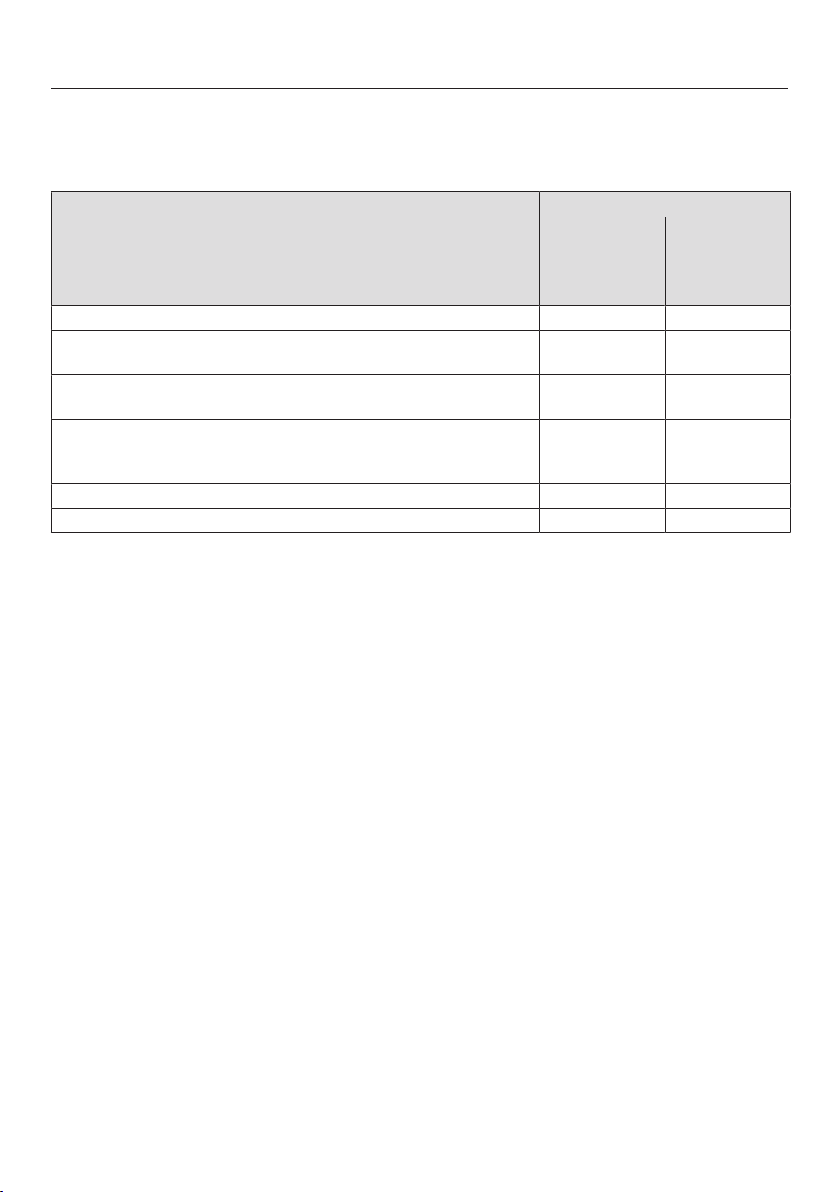
The hob is programmed with 9power levels at the factory. If you wish to fine-tune
a setting, you can extend the power level range to 17power levels (see “Program-
ming”).
Setting range
Factory set-
ting
(9power
levels)
Extended set-
ting
(17power
levels)
Keeping cooked food warm 1–2 1–2.
Gently cooking fruit, e.g. apple slices, peach halves, bananas,
etc.
3–4 3–4.
Gently frying vegetables, e.g. leeks, sliced mushrooms, green/
red peppers, onion rings, etc.
4–5 4–5.
Cooking fried eggs, fish, meat, sausages, escalopes, veget-
ables
bacon
5–6 5–6.
Cooking meat, fish, fried potatoes, hash browns, potato cakes 6–8 5.–8
Cooking steak, pancakes, marinated meat 8–9 7.–9
These settings should only be taken as a guide. Cooking durations will vary ac-
cording to the type, texture and thickness of the food being cooked.

Timer
25
The SmartLine element has to be
switched on if you wish to use the
timer.
The timer can be used for the following
2 functions:
- For setting the minute minder
- For automatically switching off a
cooking zone/heater element/Tepan
Yaki zone
You can use the functions simultan-
eously.
A duration of between 1minute(:)
and 9hours 59minutes(:) can be
set.
Durations of up to 59minutes are
shown in minutes (0:59) and durations
of more than 60minutes are shown in
hours and minutes. Durations are
entered in the order of hours, followed
by minutes in tens and then units.
Example:
59 minutes = 0:59 hours,
Enter: 5-9
80 minutes = 1:20 hours,
Enter: 1-2-0
After the first number has been entered,
the timer display will light up constantly.
After the second number has been
entered, the first number will move to
the left. After the third number has been
entered, the first and second numbers
will move to the left.
Minute minder
The minute minder is set using the nu-
merical display for the left or front left
cooking zone (depending on model).
Setting the minute minder
Touch the sensor control.
The timer display flashes.
Set the required duration.
Touch the sensor control or wait
10seconds to start the minute minder.
Changing the minute minder duration
Touch the sensor control.
The timer display flashes.
Set the required duration.
Deleting the minute minder duration
Touch the sensor control.
Touch theon the numerical display.

Timer
26
Auto switch off
You can set a time after which a heater
element/Tepan Yaki zone will switch off
automatically. This function can be
used for all cooking zones at the same
time.
If the time programmed is longer than
the maximum operating time allowed,
the heater element/Tepan Yaki zone
will be switched off by the safety
switch-off function (see “Safety fea-
tures – Safety switch-off”).
The switch-off time is set on the numer-
ical display for each cooking zone you
want to switch off automatically.
Setting the switch-off time
Select a power level for the desired
heater element/Tepan Yaki zone.
Touch the sensor control.
The timer display flashes.
Set the required duration.
Touch the sensor control or wait
10seconds to start the switch-off time.
The heater element allocation auto
switch off indicator light pulsates.
If you want to set a switch-off time for
another heater element/Tepan Yaki
zone, follow the same steps as de-
scribed above.
If more than one switch-off time is
programmed, the shortest time left will
be displayed, and the corresponding
indicator light will pulsate. The other
indicator lights will light up constantly.
If you want to show the times left
counting down in the background,
touch the sensor control of the de-
sired heater element/Tepan Yaki zone.
Changing the switch-off time
Touch the sensor control re-
peatedly until the indicator light for
the required heater element/Tepan
Yaki zone pulsates.
The timer display flashes.
Set the required duration.
Deleting the switch-off time
Touch the sensor control re-
peatedly until the indicator light for
the required heater element/Tepan
Yaki zone pulsates.
The timer display flashes.
Touch the sensor control on the nu-
merical display.

Timer
27
Using both timer functions at
the same time
If you use both functions simultan-
eously, the shortest time is always dis-
played. The sensor control (minute
minder) or the indicator light of the
cooking zone with the shortest time
pulsates.
Touch the orsensor control if
you want to show the times left
counting down in the background.
If a switch-off time is programmed for
several heater elements/Tepan Yaki
zones, touch the sensor control
repeatedly until the indicator light for
the desired heater element/Tepan
Yaki zone pulsates.

Additional functions
28
Stop&Go
The set power level is reduced to 1
when the Stop&Go function is activ-
ated.
The power levels and the timer settings
cannot be changed, the SmartLine Ele-
ment can only be switched off. The
minute minder and automatic switch-off
times continue to run.
If the function is deactivated, the appli-
ance switches back to the power level
that was set last.
If the function is not deactivated within
1 hour, the SmartLine element will
switch off.
Activating/Deactivating
Touch the sensor control.
Recall
If the SmartLine element is accidentally
switched off during use, you can use
this function to restore all the settings.
The SmartLine element must be
switched on again within 10seconds.
Switch the SmartLine element on
again.
The previously set power levels flash.
Press one of the flashing power level
indicators immediately.
The appliance will continue to operate
using the settings selected previously.

Additional functions
29
Wipe protection
You can lock the SmartLine element
sensor controls for 20 seconds in or-
der to remove soiling, for example.
The sensor control is not locked.
Activating
Touch the sensor control.
The time counts down in the timer dis-
play.
Deactivating
Touch the sensor control until the
timer display goes out.
Demonstration mode
This function enables the SmartLine
element to be demonstrated in show-
rooms without heating up.
Activating/deactivating demonstra-
tion mode
Switch the SmartLine element on.
Touch the0 sensor on any of the nu-
merical keybanks.
Then touch the0 and 2 sensors at
the same time for 6seconds.
In the timer display, flashes altern-
ately with (demonstration mode ac-
tivated) or (demonstration mode de-
activated) for a few seconds.
Displaying the SmartLine ele-
ment data
The model designation and software
version of the SmartLine element can
be displayed. To do this there must not
be any pots or pans on the SmartLine
element.
Model designation
Switch the SmartLine element on.
Touch the0 sensor control on any of
the numerical keybanks.
Then touch the 0 and 4 sensor con-
trols at the same time.
The timer display shows 2 numbers
flashing alternately:
flashes alternately with = CS 1234
Software version
Switch the SmartLine element on.
Touch the0 sensor control on any of
the numerical keybanks.
Then touch the 0 and 3 sensor con-
trols at the same time.
Numbers will appear in the timer dis-
play:
: = software version

Safety features
30
System lock/safety lock
The safety lock function is deactiv-
ated if there is a mains outage.
Your SmartLine element is equipped
with a system lock and a safety lock to
prevent the element from being
switched on or any settings being
altered by mistake.
The system lock is activated when the
SmartLine element is switched off. If
the system lock is activated, the ele-
ment cannot be switched on and the
timer cannot be used. A set minute
minder time continues to count down.
The SmartLine element is programmed
so that the system lock must be activ-
ated manually. It can be programmed to
be activated automatically 5minutes
after the SmartLine element has been
switched off (see “Programming”).
The safety lock is activated when the
SmartLine element is switched on.
When the safety lock is activated, the
element can be operated only under
certain conditions:
- Selected power levels cannot be
changed.
- A set minute minder time can be
modified.
- The SmartLine element can only be
switched off.
If an unavailable sensor control is
touched whilst the system lock or
safety lock is activated will appear
in the timer display for a few seconds
and a tone will sound.
Activating the system lock
Touch the sensor for 6seconds.
The seconds can be seen counting
down in the timer display. When this
time has elapsed will appear in the
timer display. The system lock has been
activated.
Deactivating the system lock
Touch the sensor for 6seconds.
will appear briefly in the timer dis-
play and then the seconds will be seen
counting down. The system lock is de-
activated once the time has elapsed.
Activating the safety lock
Touch and hold the and
sensors at the same time for
6seconds.
The seconds can be seen counting
down in the timer display. When this
time has elapsed will appear in the
timer display. The safety lock is activ-
ated.
Deactivating the safety lock
Touch and hold the and
sensors at the same time for
6seconds.
will appear briefly in the timer dis-
play and then the seconds will be seen
counting down. Once the time has
elapsed, the lock function is deactiv-
ated.
Safety features
31
Safety switch-off
Sensor controls are covered
Your SmartLine element will turn off
automatically if one or several of the
sensor controls remain covered for
longer than 10 seconds, for example,
by finger contact, food boiling over or
by an object such as an oven glove or
tea towel. flashes briefly above the
sensor control and a tone will sound.
If you remove the obstruction and/or
clean the appliance, goes out and the
SmartLine element is ready for use
again.
Excessive operating time
The safety shut-off is triggered auto-
matically if a heating element is heated
for an unusually long period of time.
This time depends on the power level
selected. If it has been exceeded, the
heating element turns off and the resid-
ual heat indicator appears. The Smart-
Line element can now be used again as
normal.
The SmartLine element is pro-
grammed to safety setting 0 at the
factory. If required you can set a
higher safety setting with a shorter
maximum operating time (see chart).
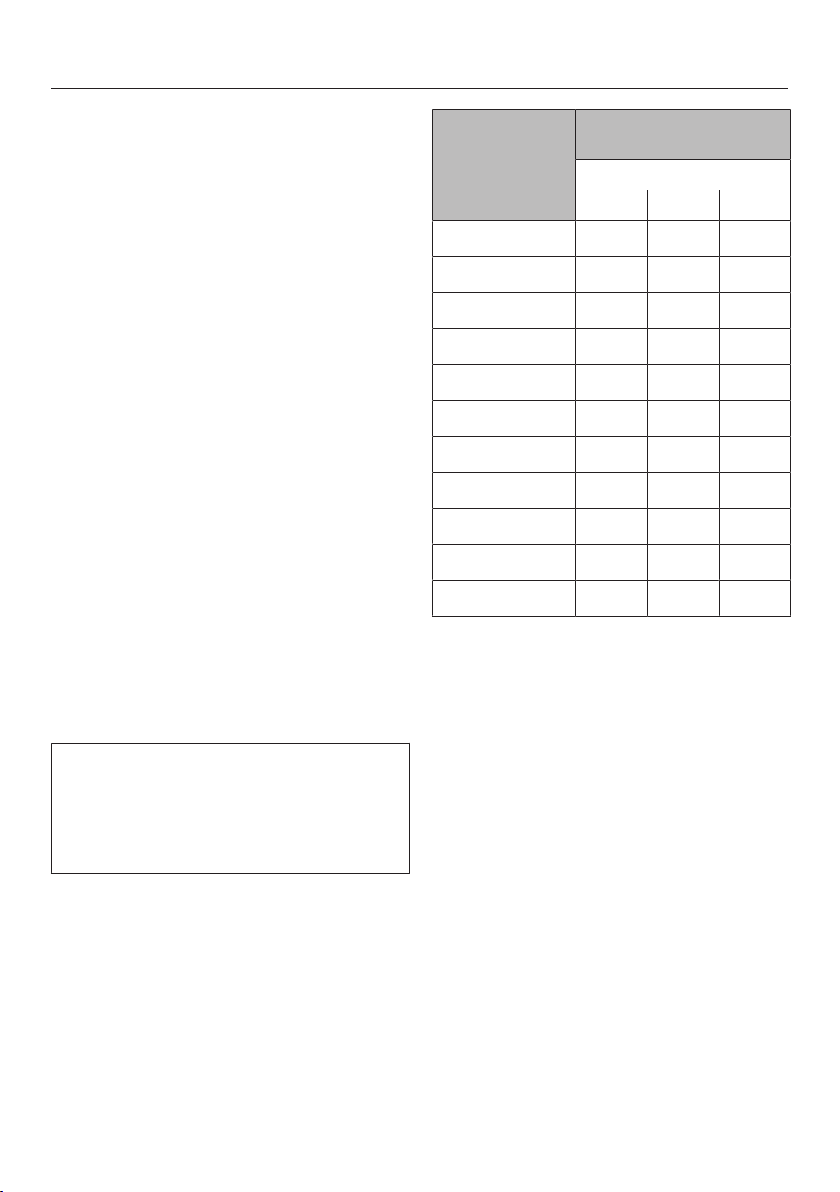
Power level* Maximum operating time
[h:min]
Safety setting
0** 1 2
1 10:00 8:00 5:00
1. 10:00 7:00 4:00
2/2. 5:00 4:00 3:00
3/3. 5:00 3:30 2:00
4/4. 4:00 2:00 1:30
5/5. 4:00 1:30 1:00
6/6. 4:00 1:00 0:30
7/7. 4:00 0:42 0:24
8 4:00 0:30 0:20
8. 4:00 0:30 0:18
9 1:00 0:24 0:10
* The power levels with a dot after the num-
ber are only available if the power level
range has been extended (see “Setting
range”).
** Factory default setting

Safety features
32
Overheating protection
All the induction coils and cooling ele-
ments for the electronics are fitted with
an overheating protection mechanism.
Before the induction coils and/or cool-
ing elements get too hot, the overheat-
ing protection mechanism cuts in in one
of the following ways:
Induction coils
- The set power level is reduced.
- The Tepan Yaki zone switches itself
off automatically. flashes altern-
ately with in the timer display.
You can use the Tepan Yaki zone again
as usual when the fault code has gone
out.
Cooling elements
- The set power level is reduced.
- The Tepan Yaki zone switches itself
off automatically.
The affected Tepan Yaki zone can only
be used again as usual once the cool-
ing element has cooled down to a safe
level.
The overheating protection may be ac-
tivated under the following circum-
stances:
- Fat or oil is being heated on a high
power level.
- Insufficient ventilation to the under-
side of the Tepan Yaki.
- A hot Tepan Yaki zone being
switched on after an interruption to
the power supply.
If, despite removing the cause, the
overheating protection mechanism trig-
gers again, contact Miele Service.

Programming
33
You can adapt the programming of the
SmartLine element to your personal
needs. Several settings can be altered
in succession.
After accessing the programming
mode, the symbol and will appear
in the timer display. After a few seconds
: (programme 01) will flash altern-
ately with : (code) in the timer dis-
play.
Changing the programming
Accessing programming mode
With the SmartLine element
switched off, press and hold the
and sensor controls together until
the symbol lights up and is
shown in the timer display.
Setting the programme
For a two-digit programme number
you need to first set the tens position.
Touch the sensor control re-
peatedly until the programme number
you want appears in the display, or
touch the appropriate number on the
numerical display.
Setting the code
Touch the sensor control re-
peatedly until the code number you
want appears in the display, or touch
the appropriate number on the nu-
merical display.
Saving the settings
While the programme is showing in
the display (e.g.:) touch the
sensor control until the indicators go
out.
To avoid saving the settings
Touch the sensor control until the
indicators go out.
Programming
34
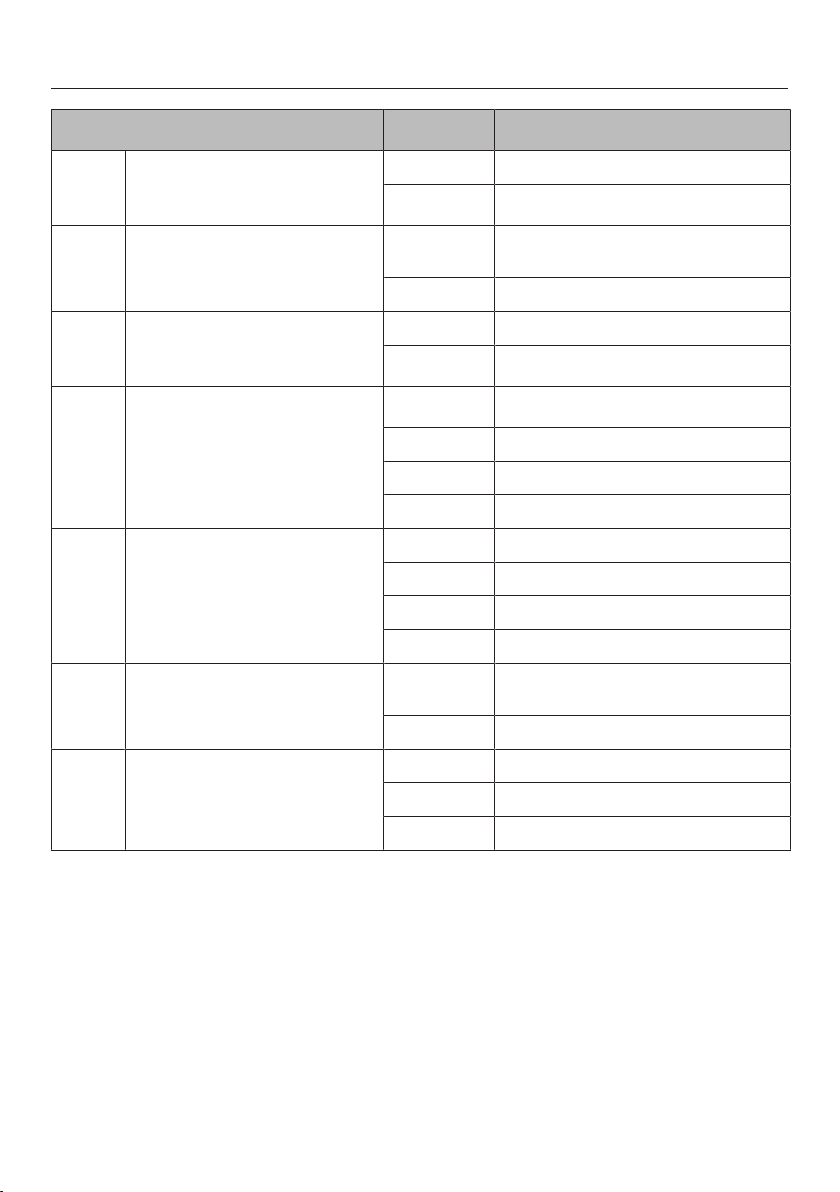
Programme
1
Code
2
Settings
P:01
Demo mode
C:00
Demo mode off
C:01
Demo mode on
3
P:03
Factory default setting
C:00
Do not restore factory default set-
tings
C:01
Restore factory default settings
P:04
Number of cooking zone power
levels
C:00
9 power levels + Booster
C:01
17 power levels + Booster
4
P:06
Audible tone when a sensor
control is touched
C:00
Off
5
C:01
Quiet
C:02
Medium
C:03
Loud
P:07
Timer buzzer
C:00
Off
C:01
Quiet
C:02
Medium
C:03
Loud
P:08
System lock
C:00
System lock can only be activated
manually
C:01
System lock activated automatically
P:09
Maximum operating time
C:00
Safety setting 0
C:01
Safety setting 1
C:02
Safety setting 2
Programming
35
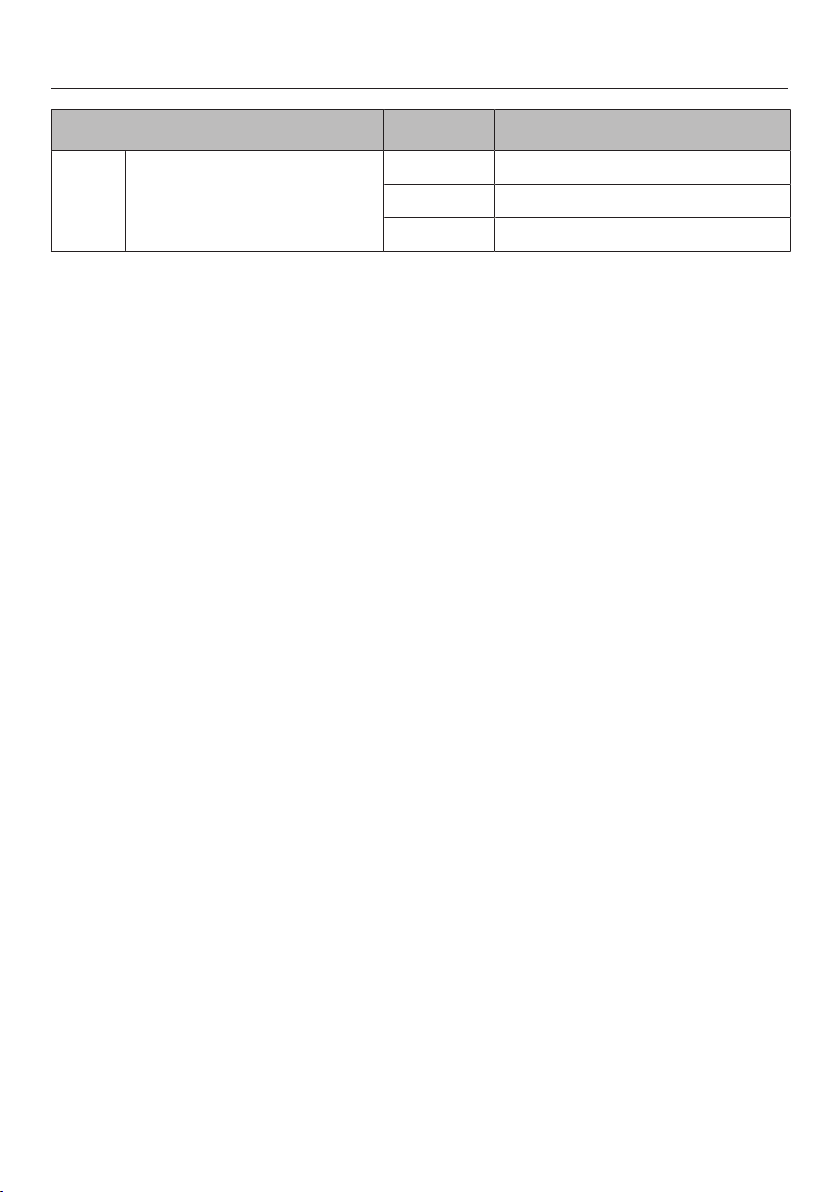
Programme
1
Code
2
Settings
P:12
Sensor controls reaction speed
C:00
Slow
C:01
Normal
C:02
Fast
1
Unlisted programmes are not assigned.
2
The factory-set code is shown in bold.
3
After the hob has been switched on appears in the timer display for a few seconds.
4
In the text and charts, the extended power levels are shown with a dot after the number
for better understanding.
5
The audible tone for the On/Off sensor control cannot be switched off.
Cleaning and care
36
Danger of burning due to hot
surfaces.
The surfaces will be hot after cook-
ing.
Switch the Tepan Yaki off.
Allow the surfaces to cool down be-
fore cleaning the Tepan Yaki.
Risk of damage due to moisture
ingress.
The steam from a steam cleaning ap-
pliance could reach live electrical
components and cause a short cir-
cuit.
Do not use a steam cleaner to clean
the Tepan Yaki.
All surfaces could be discoloured or
damaged if unsuitable cleaning
agents are used. All surfaces are
susceptible to scratching.
Remove all cleaning agent residues
immediately.
Never use abrasive sponges or
cleaning agents.
Allow the SmartLine element to cool
down before cleaning.
Clean the SmartLine element and ac-
cessories after each use.
Dry the SmartLine element thoroughly
after every cleaning to avoid limes-
cale residue.
Unsuitable cleaning agents
To avoid damaging the surfaces of the
appliance, do not use:
- cleaning agents containing soda, am-
monia, acids or chlorides
- cleaning agents containing descaling
agents
- stain and rust removers
- abrasive cleaning agents, e.g.
powder cleaners and cream cleaners
- solvent-based cleaning agents
- dishwasher cleaner
- oven sprays
- glass cleaning agents
- hard, abrasive brushes or sponges,
(e.g. pot scourers, or sponges which
have been previously used with ab-
rasive cleaning agents)
- melamine eraser blocks

Cleaning and care
37
Cleaning the control panel
Remove any coarse soiling with a
damp cloth and more stubborn soil-
ing with a scraper suitable for use on
glass.
Then clean the control panel with the
Miele ceramic and stainless steel
cleaner (see “Optional accessories”)
or with a proprietary ceramic glass
cleaner applied with kitchen paper or
a clean cloth.
Finally wipe the control panel with a
damp cloth, and then dry it.
Cleaning the cooking surface
Remove coarse soiling immediately
using a spatula.
Allow the cooking surface to cool
down until it can be touched by hand,
and then use a solution of hot water
and washing-up liquid to soften the
soiling. Clean the cooking surface
with the rough side of a dish sponge
and a few drops of Miele ceramic and
stainless steel cleaner (see “Optional
accessories”). Wipe off the cooking
surface with clean water and dry it
with a clean cloth.
Always use clean water to wipe the
appliance. This is to ensure that every
trace of cleaning agent has been re-
moved. Any remaining traces could af-
fect food the next time you use the
appliance.
Stainless steel care products must
not be used on the cooking surface.
Problem solving guide
38
Many malfunctions and faults that can occur in daily operation can be easily
remedied. Time and money will be saved because a service call will not be
needed.
The following guide may help you to find the reason for a malfunction or a fault,
and to correct it.
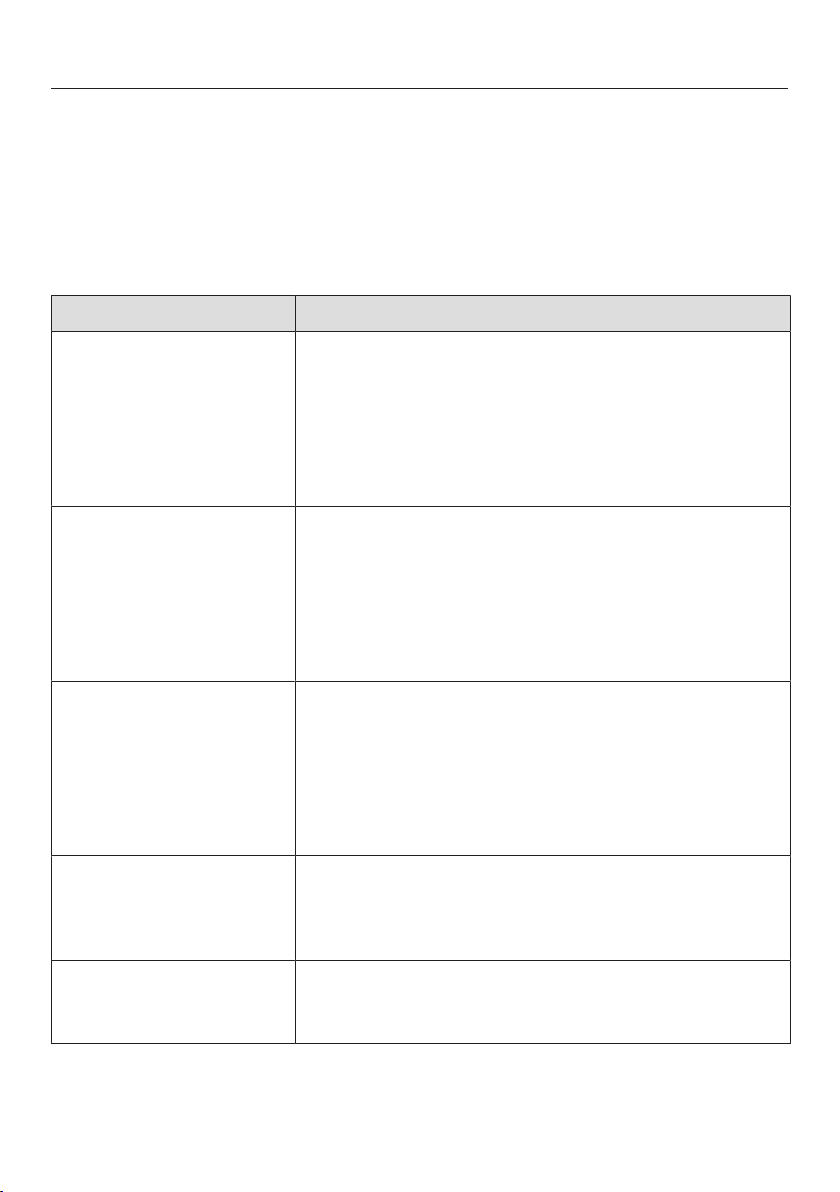
Messages in the display
Problem Cause and remedy
After the SmartLine ele-
ment has been
switched on or a sensor
control has been
touched, appears in
the timer display for a
few seconds.
The system lock or safety lock is activated.
Deactivate the system lock or safety lock (see
“System lock / Safety lock”).
After the SmartLine ele-
ment has been
switched on appears
in the timer display for a
short while. The Smart-
Line element does not
heat up.
The SmartLine element is in demonstration mode.
Touch the0 and 2 sensor controls at the same
time until flashes alternately with in the
timer display.
The SmartLine element
has switched off auto-
matically. When the ele-
ment is switched back
on, appears above the
On/Off sensor con-
trol.
One or more of the sensor controls are covered, e.g.
by finger contact, food boiling over or an object.
Clean off any dirt and/or remove the object (see
“Safety features” – “Safety switch-off”).
flashes alternately
with in the timer dis-
play and a tone will
sound.
The SmartLine element is connected incorrectly.
Disconnect the SmartLine element from the mains.
Contact Miele Service.
will flash alternately
within the timer
display.
The overheating protection mechanism has been ac-
tivated.
See “Safety features – Overheating protection”.
Problem solving guide
39
Problem Cause and remedy
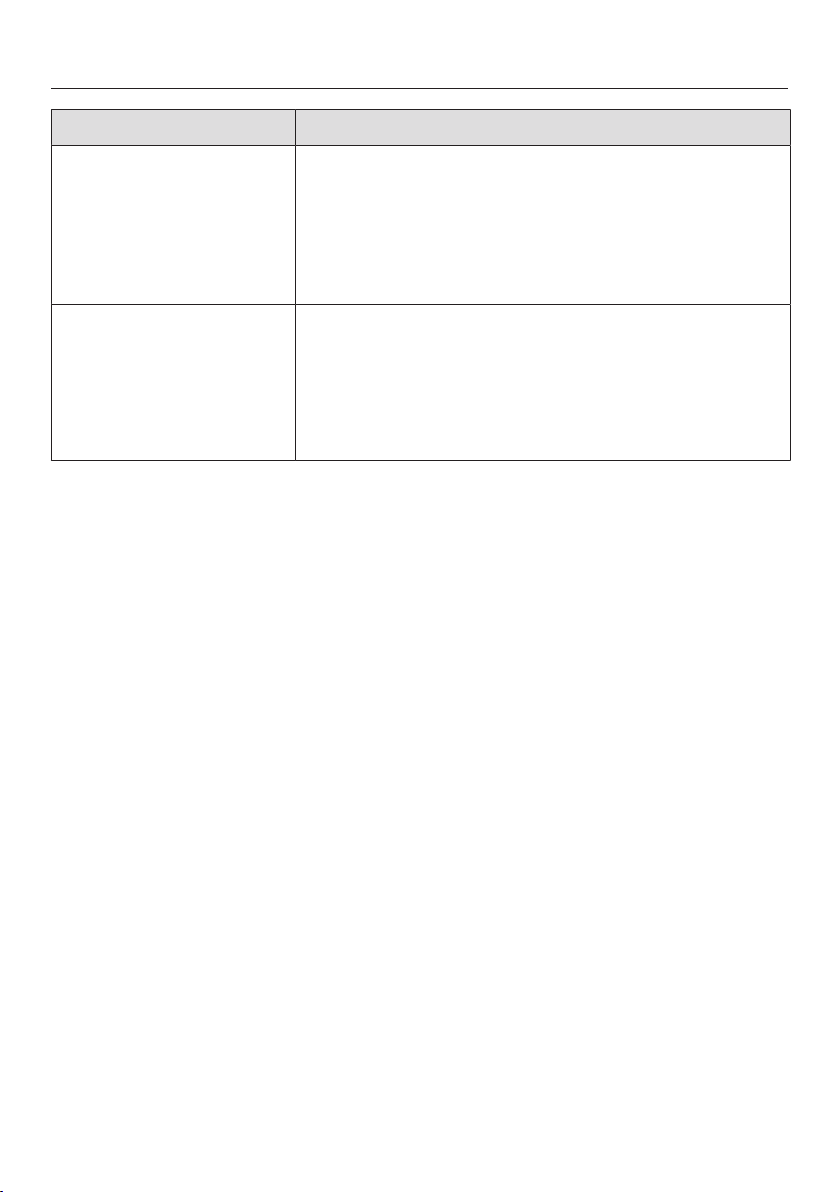
will flash alternately
with, or in
the timer display.
The fan is blocked or defective.
Make sure it has not been blocked by an object.
Remove the obstruction.
If this fault message continues to appear in the
display, contact the Customer Service Depart-
ment.
A message not listed in
this table is appearing
in the timer display.
There is an electronic module fault.
Interrupt the power supply to the SmartLine ele-
ment for approx. 1minute.
If the problem persists after power has been re-
stored, please contact the Customer Service De-
partment.
Problem solving guide
40
Unexpected behaviour
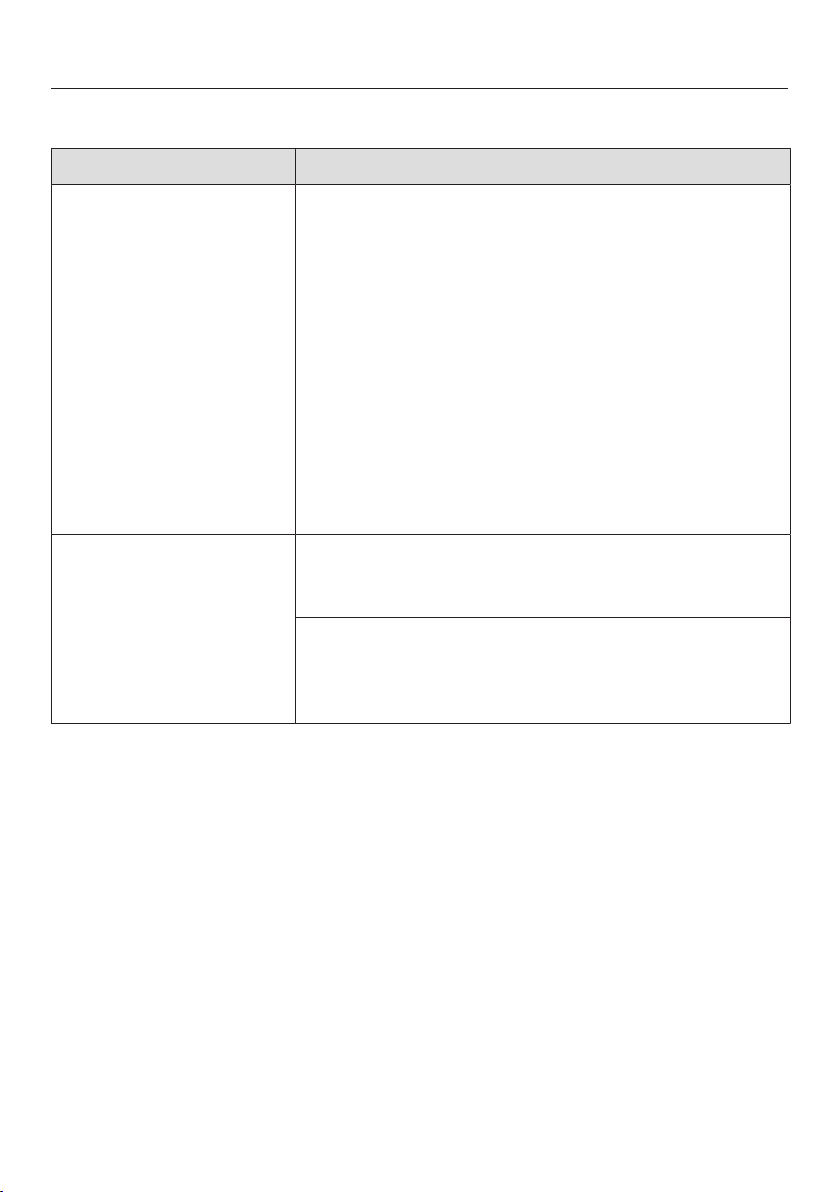
Problem Cause and remedy
The sensor controls
show increased sensit-
ivity or fail to react.
The sensitivity level of the sensor controls has
changed.
Make sure that there is no direct light (from the sun
or from an artificial source) falling onto the Smart-
Line element. The area surrounding the SmartLine
element must not be too dark.
Take any pans off the SmartLine element and wipe
away any food deposits.
Ensure that there is nothing covering the entire
SmartLine element unit or sensor controls.
Interrupt the power supply to the SmartLine ele-
ment for approx. 1minute.
If the problem persists after power has been re-
stored, please contact Miele Service.
The Tepan Yaki or one
of its zones switches it-
self off automatically.
It has been operated for too long.
Switch the Tepan Yaki or zone back on again (see
“Safety features” – “Safety switch off”).
The overheating protection mechanism has been ac-
tivated.
See “Overheating protection” in the “Safety fea-
tures” chapter.

Problem solving guide
41
General problems or technical faults
Problem Cause and remedy
The SmartLine element
cannot be switched on.
There is no power to the SmartLine element.
Check whether the mains fuse has tripped. Con-
tact an electrician or Miele Service (for the min-
imum fuse rating, see data plate).
There may be a technical fault.
Disconnect the SmartLine element from the mains
electricity supply for approx. 1 minute by
– tripping the relevant mains fuse or screwing the
fuse out completely, or
– switching off the residual current protection
device.
If, after resetting the trip switch in the mains fuse
box or the residual current protection device, the
SmartLine element will still not switch on, contact
a qualified electrician or Miele Service.
An operating noise can
be heard after the
SmartLine element has
been switched off.
The cooling fan runs until the SmartLine element
has cooled down and then switches off automatic-
ally.
Optional accessories
42
Miele offer a comprehensive range of
useful accessories as well as cleaning
and conditioning products for your
Miele appliances.
These products can be ordered through
the Miele Webshop.
They can also be ordered from Miele
(see end of this booklet for contact de-
tails) or from your Miele dealer.
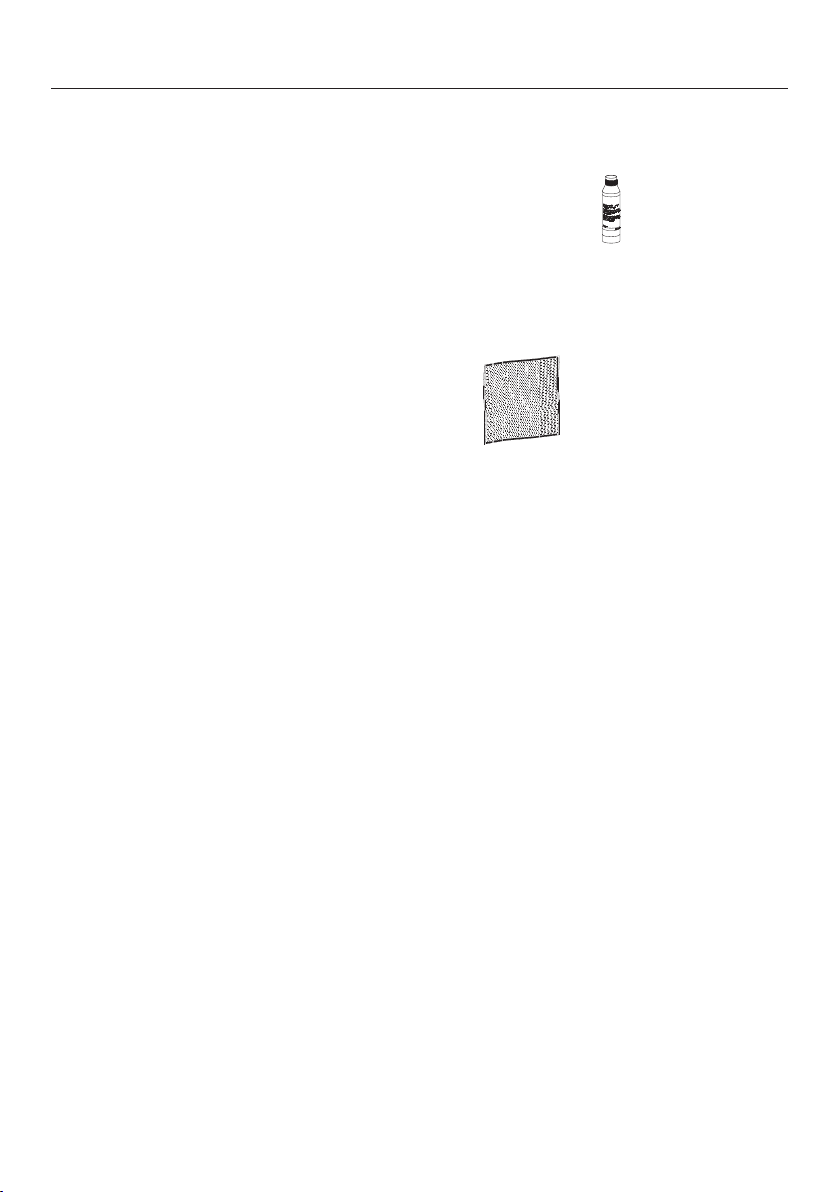
Ceramic and stainless steel
hob cleaner 250ml
Removes heavy soiling, limescale de-
posits and aluminium residues
Microfibre cloth
Removes finger marks and light soiling

After sales service
43
Contact in the event of a fault
In the event of any faults which you cannot remedy yourself, please contact your
Miele dealer or the Miele Customer Service Department.
You can book a Miele Customer Service Department call-out online at
www.miele.com/service.
Contact information for the Miele Customer Service Department can be found at
the end of this document.
Please quote the model identifier and serial number of your appliance (Fabr./SN/
Nr.) when contacting the Miele Customer Service Department. This information
can be found on the data plate.
Please note that telephone calls may be monitored and recorded for training pur-
poses and that a call-out charge will be applied to service visits where the problem
could have been resolved as described in this booklet.
Data plate
Stick the extra data plate supplied with the appliance here. Make sure that the
model number matches the one specified on the back cover of this document.
Warranty
For information on the appliance warranty specific to your country please contact
Miele. See back cover for address.
In the UK, your appliance warranty is valid for 2 years from the date of purchase.
However, you must activate your cover by calling 0330 160 6640 or registering on-
line at www.miele.co.uk.
Installation
*INSTALLATION*
44
Safety instructions for installation
Damage risk from incorrect installation.
Incorrect installation can cause damage to the SmartLine element.
The SmartLine element must only be installed by a qualified person.
Risk of electric shock!
Incorrect connection to the mains supply may result in an electric shock.
The SmartLine element must be connected to the electrical supply by a quali-
fied person only.
Damage from falling objects.
Take care not to damage the SmartLine element when fitting wall units or a
cooker hood above it.
Fit the wall units and the cooker hood before the SmartLine element.
The veneer or laminate coatings of worktops (or adjacent kitchen
units) must be treated with 100°C heat-resistant adhesive which will
not dissolve or distort. Any backmoulds must be of heat-resistant
material.
The SmartLine element must not be installed over a fridge, fridge-
freezer, freezer, dishwasher, washing machine, washer-dryer or
tumble dryer.
This SmartLine element must not be installed above ovens or
cookers unless these have a built-in cooling down fan.
When installing the SmartLine element, make sure that the mains
connection cable cannot come into contact with hot appliance parts.
Observe carefully the safety clearances listed on the following
pages.
Installation
*INSTALLATION*
45
Safety distances
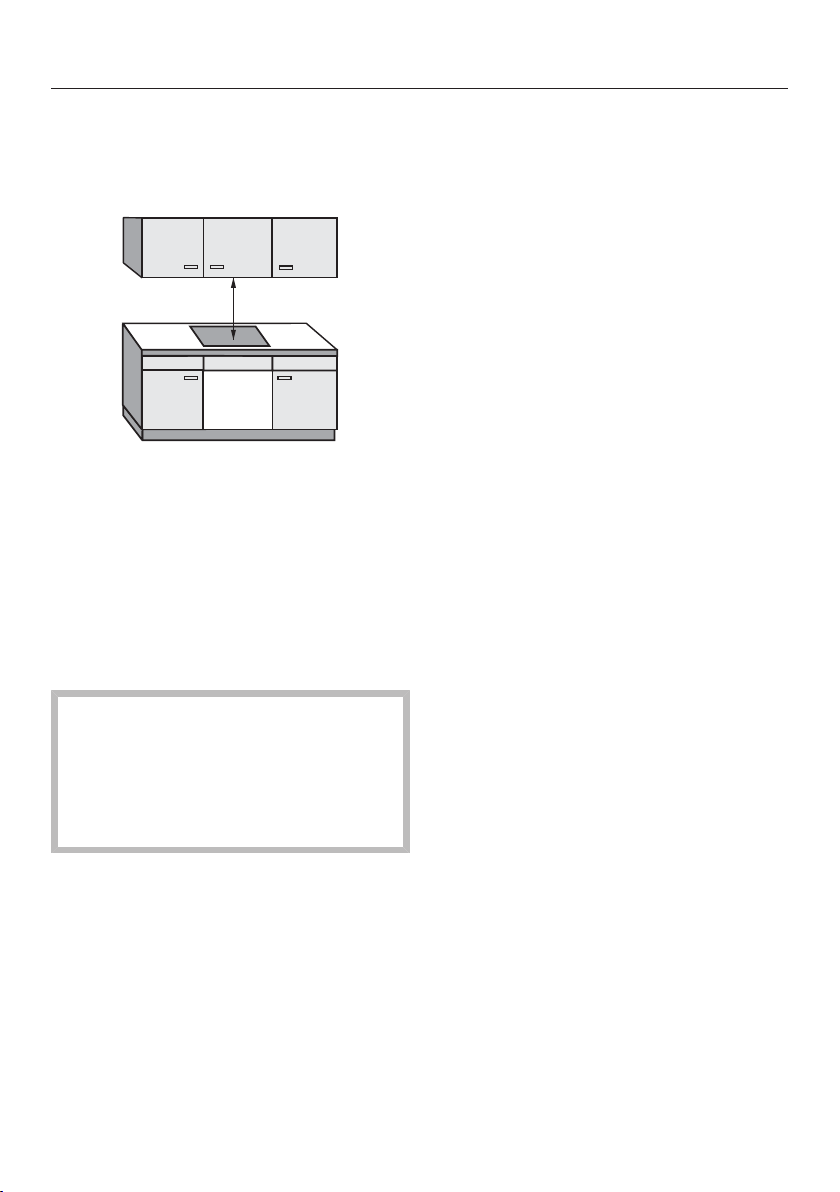
Safety distance above the SmartLine
element
The safety distance specified by the
manufacturer of the cooker hood must
be maintained between the SmartLine
element and the cooker hood above it.
If combustible objects are installed
above the SmartLine element (e.g. cab-
inets, utensil rail, etc.), a minimum
safety distance of 500mm must be
maintained.
When two or more SmartLine ele-
ments which have different safety
distances are installed together be-
low a cooker hood, you should ob-
serve the greatest specified safety
distance.
Installation
*INSTALLATION*
46
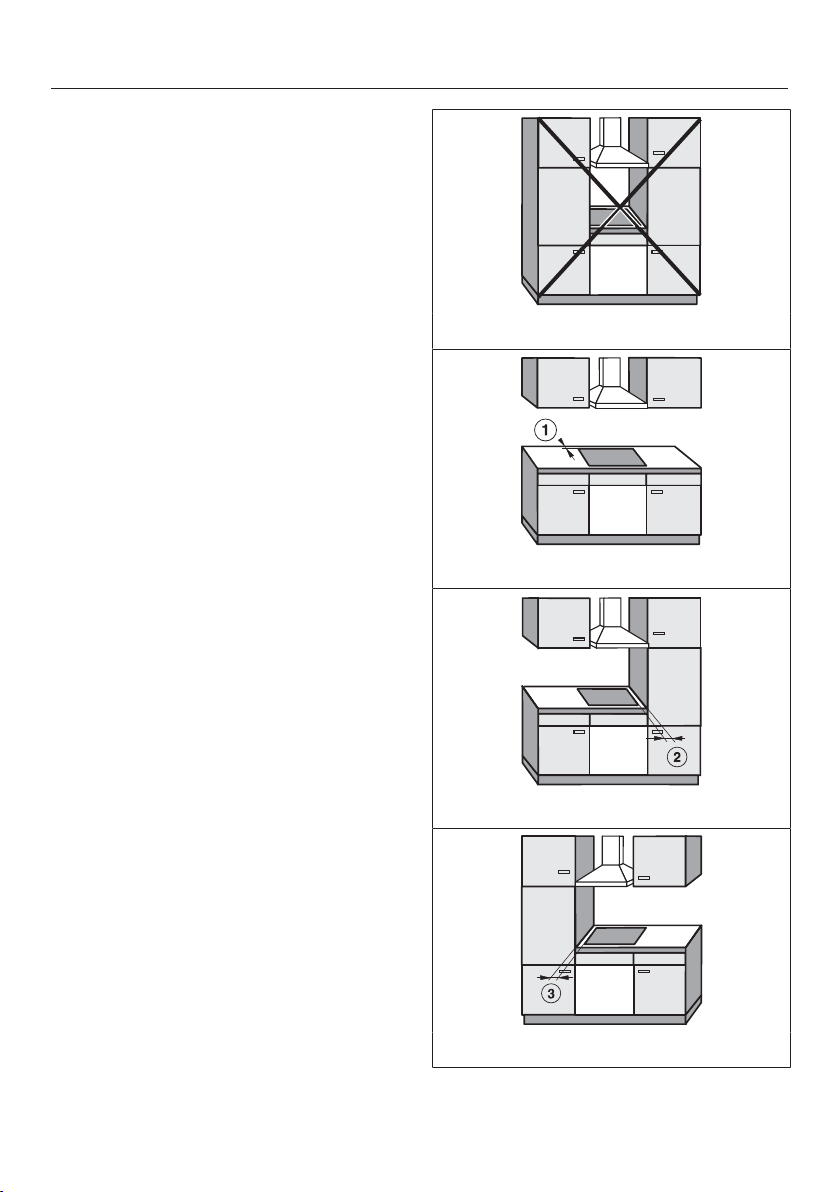
Safety distances to the sides and
back of the appliance
The SmartLine element should prefer-
ably be installed with plenty of space on
the right and left.
The minimum distance specified be-
low must be observed between the rear
of the SmartLine element and a tall unit
or room wall.
The minimum distance, specified
below must be adhered to between one
side of the SmartLine element (right or
left) and a tall unit or room wall. A min-
imum distance of 300mm must be ob-
served on the opposite side.
Minimum distance between the back
of the worktop cut-out and the rear
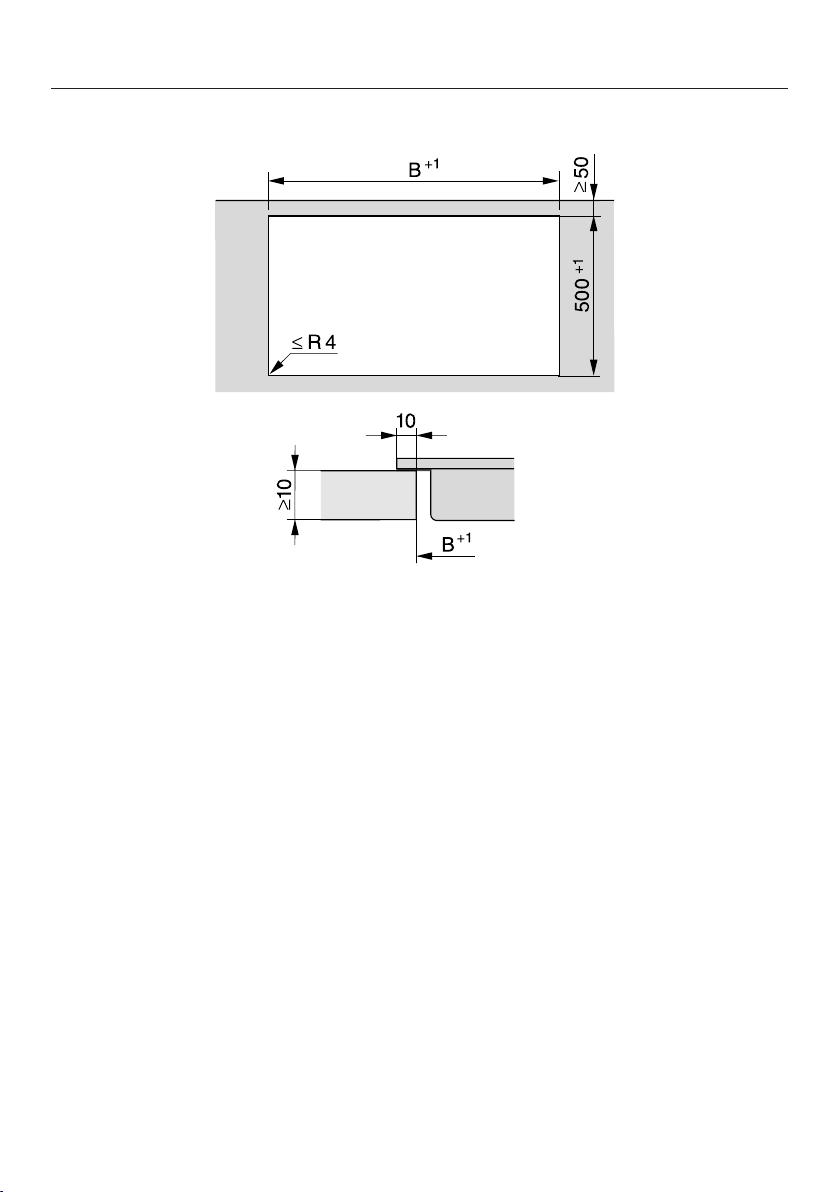
edge of the worktop:
50mm
Minimum distance on the right side
between the worktop cut-out and the
closest adjacent piece of furniture (e.g.
tall unit) or a room wall:
50mm.
Minimum distance on the left side
between the worktop cut-out and the
closest adjacent piece of furniture (e.g.
tall unit) or a room wall:
50mm.
Not allowed
Highly recommended
Not recommended
Not recommended

Installation
*INSTALLATION*
47
Minimum safety distance underneath
the SmartLine element
To ensure proper ventilation of the
SmartLine element, a minimum safety
distance is required between the ele-
ment and an oven, interim shelf or
drawer.
The minimum safety distance from the
lower edge of the SmartLine element to
- Upper edge of oven: 15mm
- Upper edge of interim shelf: 15mm
- Upper edge of drawer: 5mm
- Base of drawer: 75mm
Intermediate shelf
It is not necessary to fit an interim shelf
underneath the SmartLine element but
one may be fitted if you wish.
Leave a gap of 10mm at the back of
the shelf to accommodate the mains
connection cable. We recommend a
gap at the front of the SmartLine ele-
ment of 20mm to ensure good ventila-
tion.
Installation
*INSTALLATION*
48
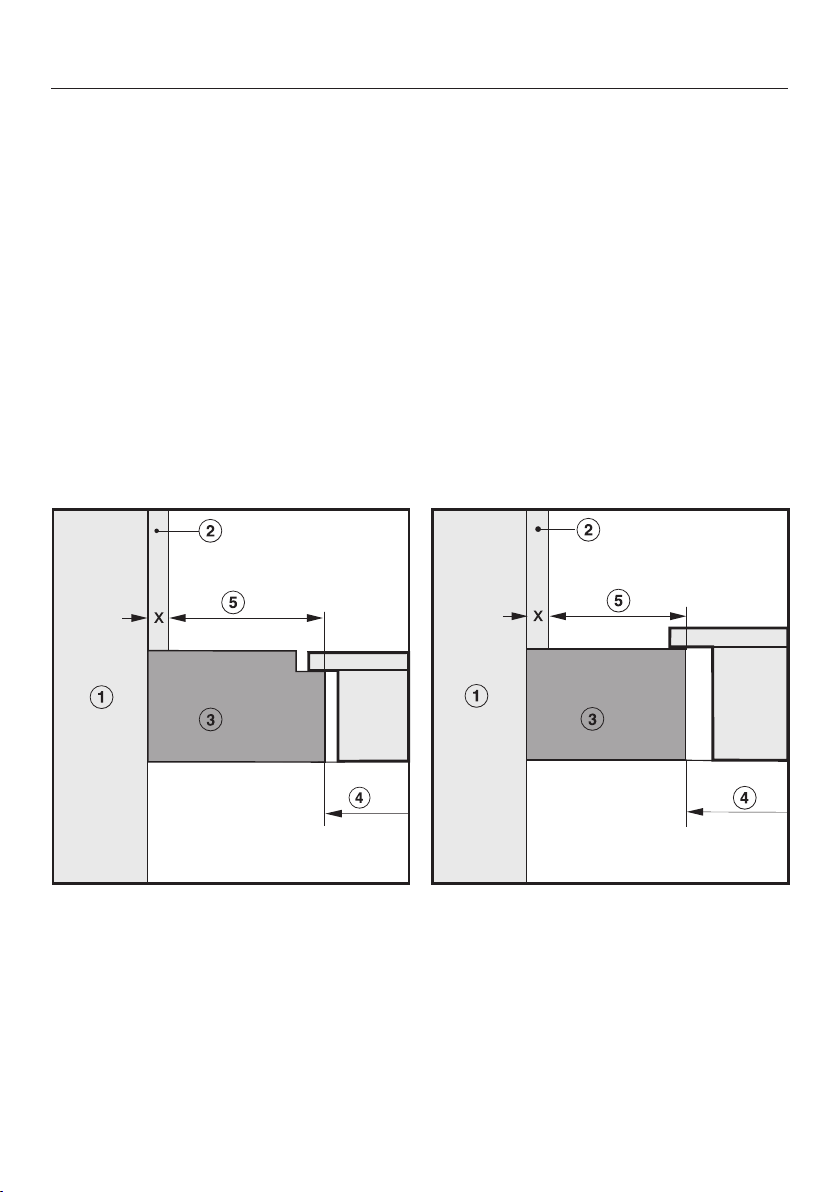
Safety distance when installing the appliance near a wall with additional
niche cladding
If a niche cladding is installed, a minimum safety distance must be maintained
between the worktop cut-out and the cladding, since high temperatures can dam-
age these materials.
If the niche cladding is made from a combustible material (e.g. wood) a minimum
safety distance of 50mm must be maintained between the worktop cut-out and
the cladding.
If the niche cladding is made from a non-combustible material (e.g. metal, natural
stone, ceramic tiles) the minimum safety distance between the worktop cut-out
and the cladding will be 50mm less the thickness of the cladding.
Example: 15mm niche cladding
50mm - 15mm = minimum safety distance of 35mm
Flush-fit installation Onset installation
a
Masonry
b
Niche cladding dimension x = thickness of the niche cladding material
c
Worktop
d
Worktop cut-out
e
Minimum distance to
combustible materials 50mm
non-combustible materials 50mm - dimension x
Installation
*INSTALLATION*
49
Installation notes –
surface-mounted
Sealing between the SmartLine Ele-
ment and the worktop
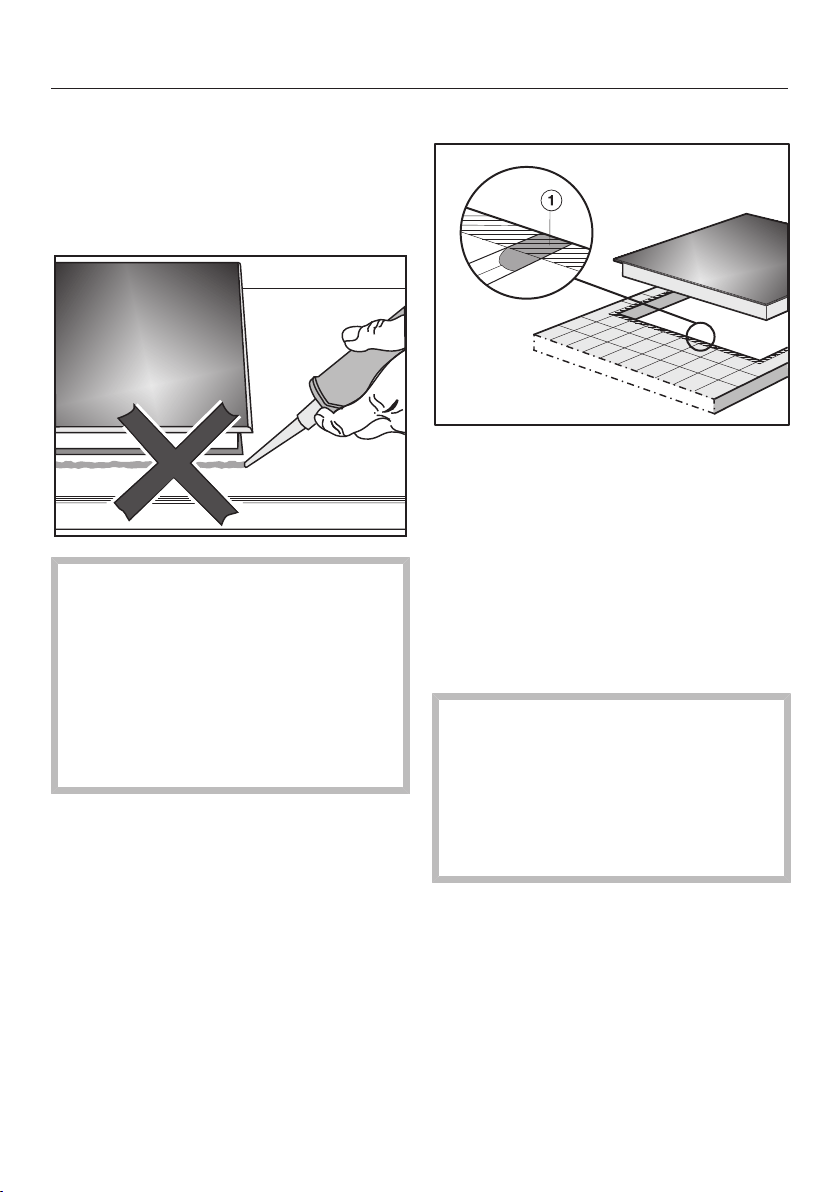
The SmartLine element and worktop
may be damaged if the element
needs to be removed after it has
been sealed with a sealant.
Do not use any sealant between the
SmartLine element and the worktop.
The seal under the edge of the top
part of the appliance provides a suf-
ficient seal for the worktop.
Tiled worktop
Grout lines and the hatched area un-
derneath the SmartLine element frame
must be smooth and even. If they are
not, the SmartLine element will not sit
flush with the worktop and the sealing
strip underneath the top part of the ap-
pliance will not provide a good seal
between the appliance and the work-
top.
Sealing strip
Dismantling the SmartLine element
for service purposes may damage
the sealing strip underneath the edge
of the SmartLine element.
Always replace the sealing strip be-
fore reinstalling the SmartLine ele-
ment.

Installation
*INSTALLATION*
50
Installing several
SmartLine elements
The gaps between the individual Smart-
Line elements are sealed with a silicone
sealant that is heat-resistant to at least
160°C. With flush-fit installation, the
gap between the SmartLine element(s)
and the worktop must also be sealed
with a silicone sealant that is heat-res-
istant to at least 160°C.
After installation, the SmartLine ele-
ments must be easily accessible from
below, so that the bottom half of the
casing can be removed for mainten-
ance. If the SmartLine elements are not
accessible from below, the sealant must
be removed so that they can be re-
moved.
Combination with a downdraft ex-
tractor
If the SmartLine element is installed in
combination with a downdraft extractor,
the latter must be installed first.
Installation
*INSTALLATION*
51
Worktop cutout – surface-mounted
Installation
*INSTALLATION*
52
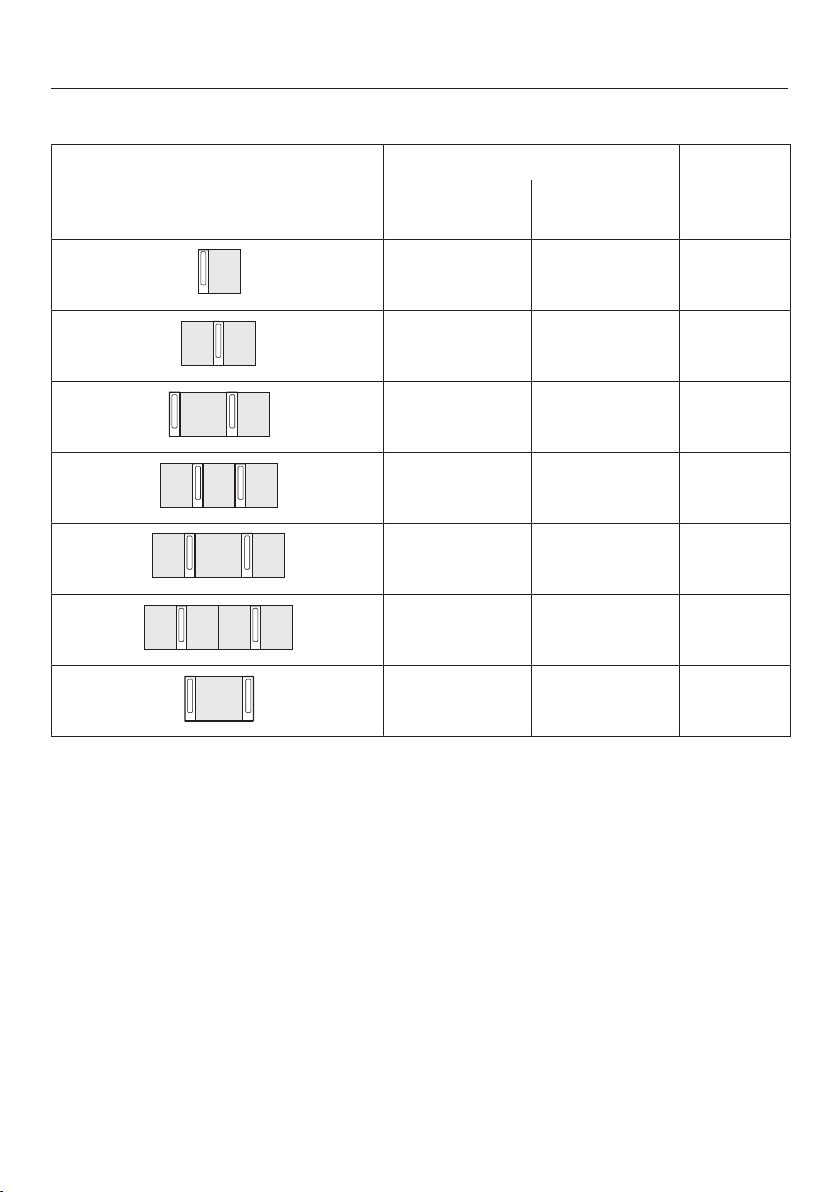
Installation with a countertop extractor
Combination examples Numberxwidth [mm] Dimen-
sionB
[mm]
Cooking ele-
ments
Countertop
extractor
1x378 1x120 481
2x378 1x120 862
1x378
1x620
2x120 1226
3x378 2x120 1365
2x378
1x620
2x120 1607
4x378 2x120 1746
1x620 2x120 845
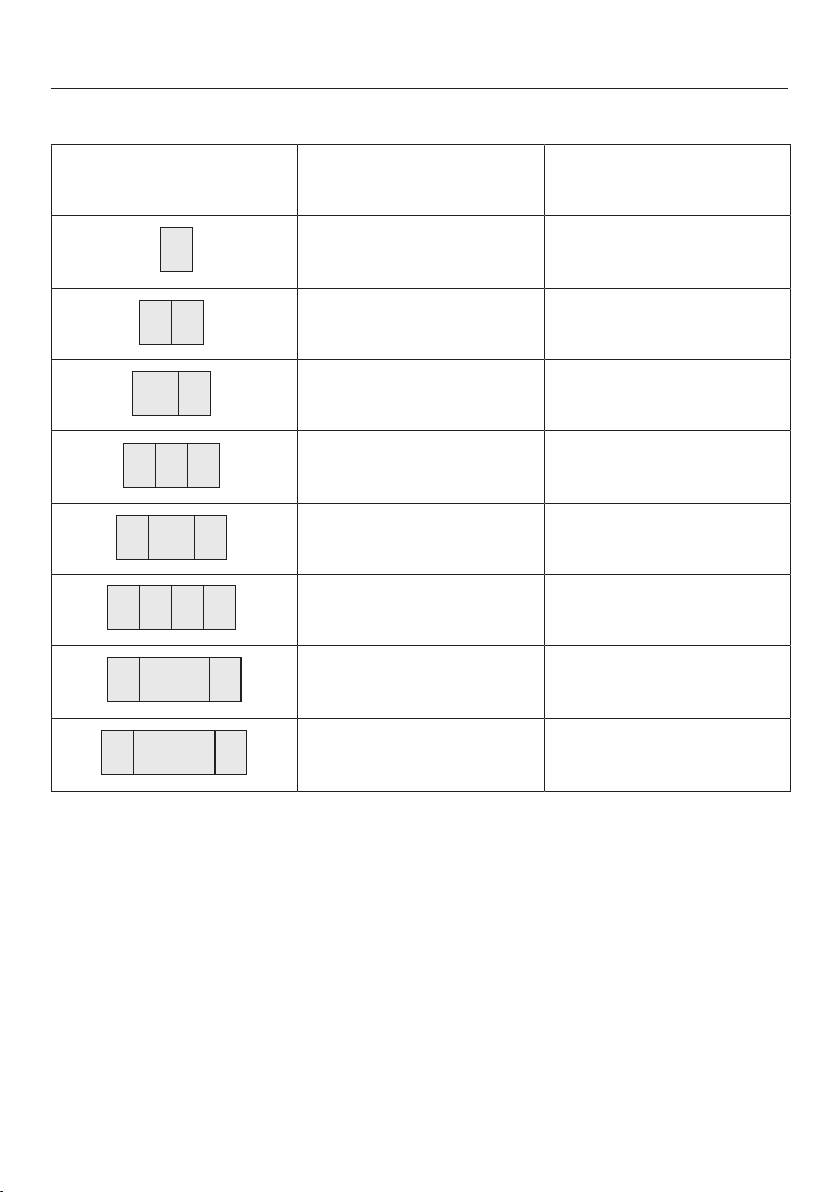
Installation
*INSTALLATION*
53
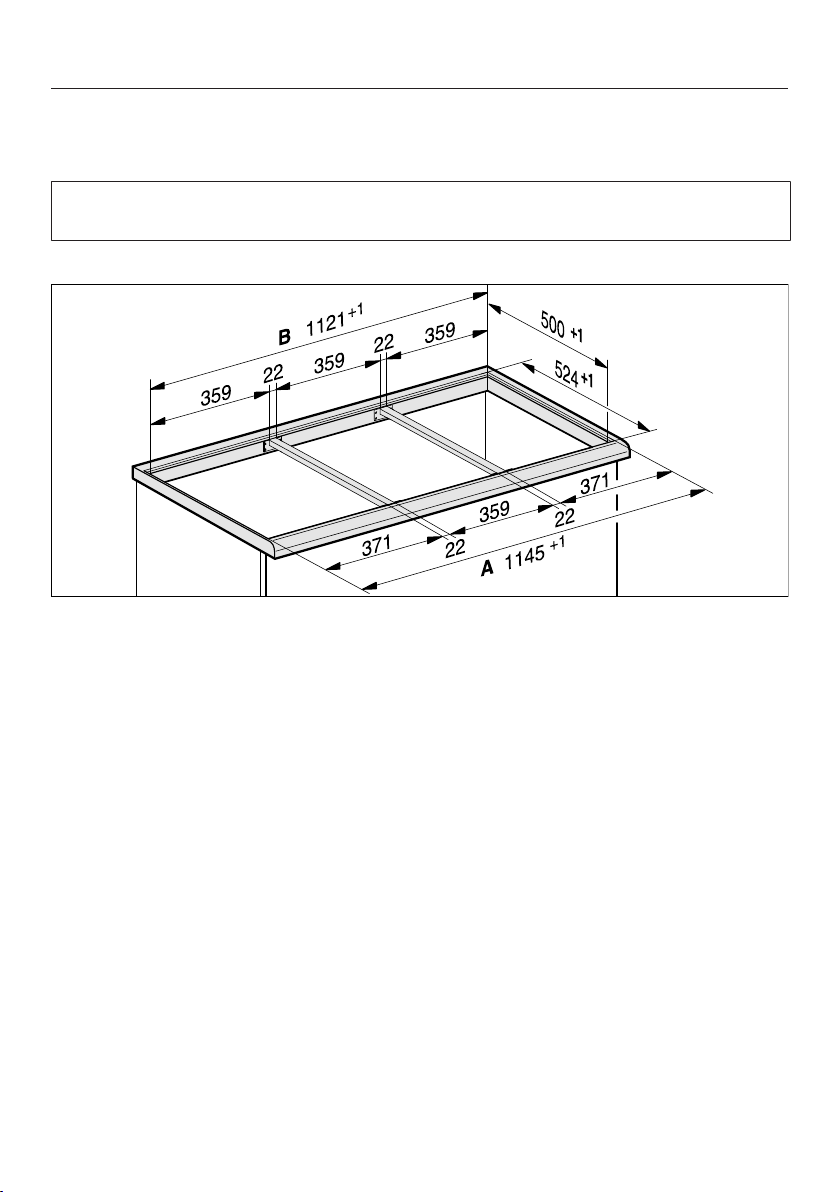
Installation without a countertop extractor
Combination examples Numberxwidth [mm] DimensionB
[mm]
Cooking elements
1x378 359
2x378 740
1x378
1x620
982
3x378 1121
2x378
1x620
1363
4x378 1502
2x378
1x800
1554
2x378
1x936
1680
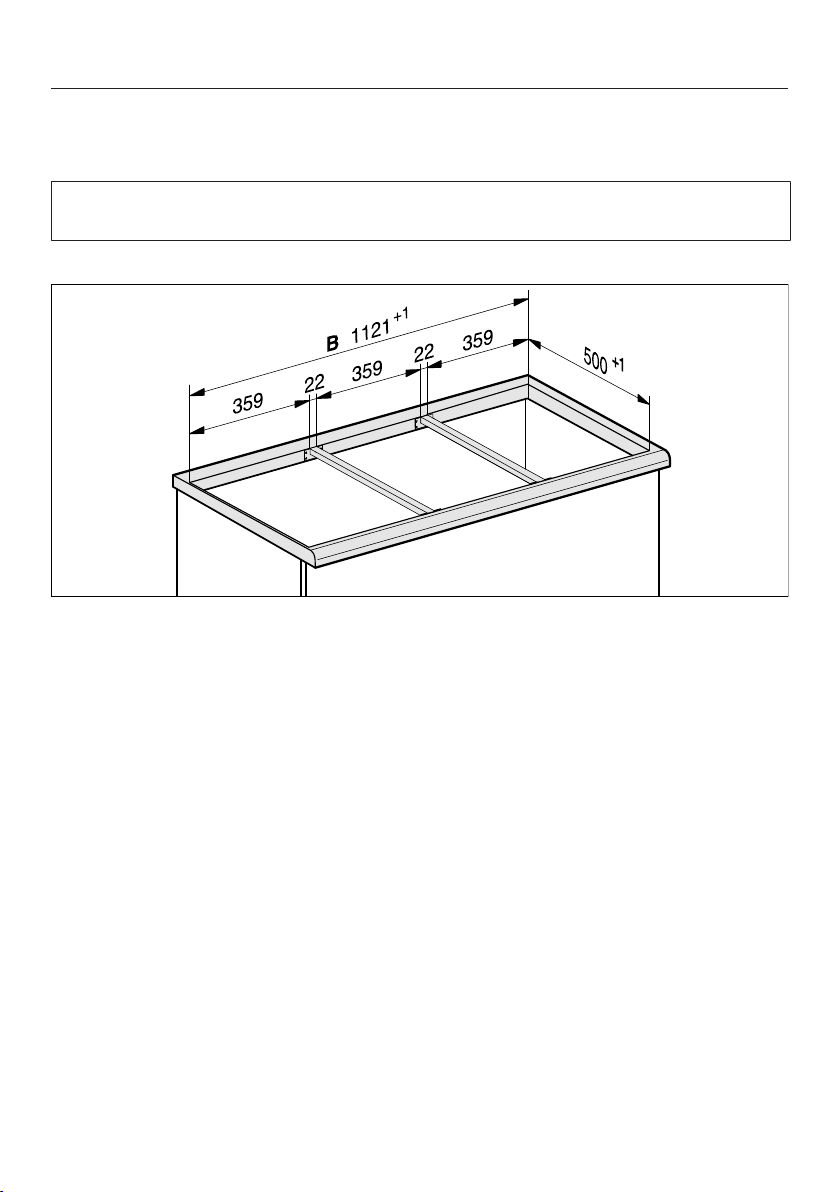
Installation
*INSTALLATION*
54
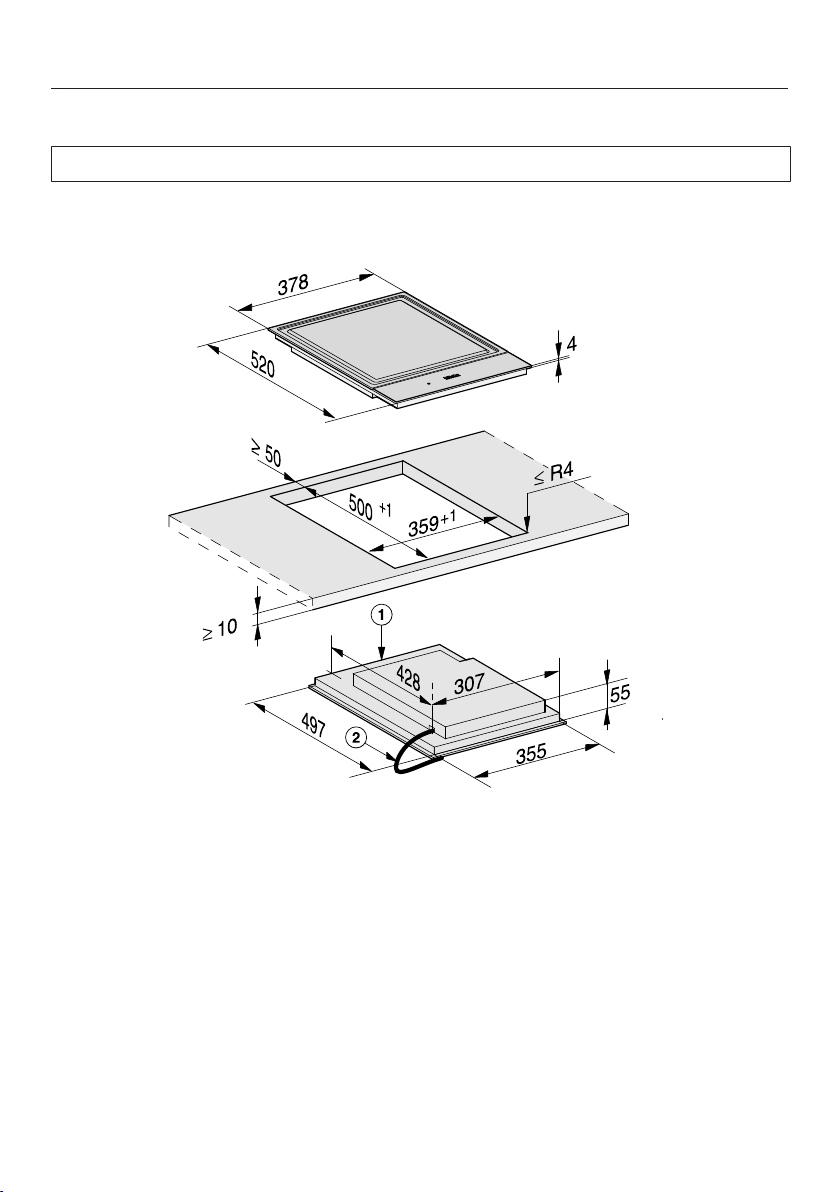
Spacer bars – surface-mounted
If you are installing several appliances, you must fit spacer bars between them.
The clips supplied with the spacer bars are only required for installing a
CSDA700xFL.
Installing 3elements and 2spacer bars
Installation
*INSTALLATION*
55
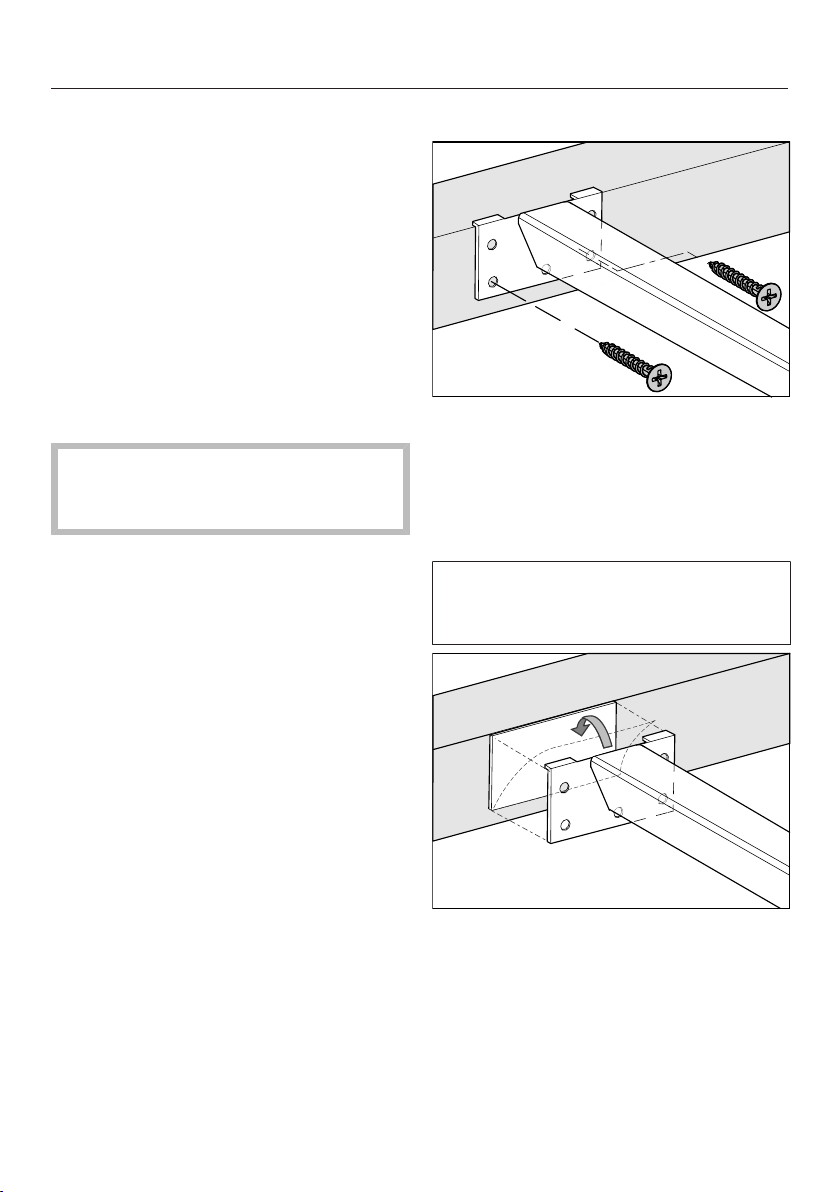
Installation dimensions–Surface-mounted
All dimensions are given in mm.
a
Front
b
Mains connection cable, L=2000mm
Installation
*INSTALLATION*
56
Installation – surface-mounted
Preparing the worktop
Create the worktop cutout. Remem-
ber to maintain the minimum safety
distances (see “Installation – Safety
distances”).
Seal any cut surfaces on wooden
worktops with a special varnish, sil-
icone sealant or resin to prevent the
wood from swelling as a result of
moisture ingress. The sealant must
be heat-resistant.
Make sure that the sealant does not
come into contact with the top of the
worktop.
Fitting the spacer bars
Use the middle screw holes if one of the
following SmartLine elements is in-
stalled to the right or left of the spacer
bar: CS7611, CS 7641, CS7101(-1),
CS7102(-1)
Wooden worktops
Position the spacer bars flush onto
the upper edge of the cutout.
Secure the spacer bars with the
3.5x25mm wood screws supplied.
Natural stone worktops
You will need heavy-duty double-
sided tape (not supplied) to secure the
spacer bars.
Stick the tape along the top edge of
the worktop cutout.
Position the spacer bars flush onto
the upper edge of the cutout.
Press the spacer bars firmly into
place.
Installation
*INSTALLATION*
57
Installing the SmartLine element
Stick the supplied sealing strip under
the edge of the SmartLine element.
Do not apply the sealing strip under
tension.
Feed the mains connection cable
down through the worktop cutout.
Position the SmartLine element in the
worktop cutout. Ensure that:
- The seal of the appliance sits flush
with the worktop on all sides to en-
sure an effective seal all round.
- All gap widths are uniform.
If the seal does not meet the worktop
correctly on the corners, carefully
scribe the corner radii (≤R4) with a
jigsaw.
Do not use any additional sealant
(e.g. silicone) on the SmartLine ele-
ment.
Connect the SmartLine element to
the mains electricity supply.
If required, connect the SmartLine
element to the gas supply (see “In-
stallation – Gas connection”).
Check that the SmartLine element
works.
Seal the gaps between the individual
elements with a silicone sealant that
is heat-resistant to at least 160°C.
Unsuitable sealant can damage nat-
ural stone.
For natural stone worktops and nat-
ural stone tiles, only use silicone
sealant that is specially formulated
for natural stone. Follow the manu-
facturer’s instructions.

Installation
*INSTALLATION*
58
Installation notes –
flush-fit
Flush-fit installation is only possible in
natural stone (granite, marble), solid
wood and tiled worktops. For installa-
tion in worktops made of other materi-
als, please consult the relevant manu-
facturer as to whether their worktops
are suitable for flush-fit installation.
The internal width of the base unit un-
derneath the appliance must be at
least as wide as the inner worktop
cutout (see “Installation – Building-in
dimensions – flush-fit”), so that the
SmartLine element is easily accessible
from underneath after installation and
the bottom half of the casing can be
removed for maintenance. If the ele-
ment is not freely accessible from be-
low after installation, the sealant must
be removed so that the element can
be removed.
Natural stone worktops
The SmartLine element is set directly in
the cutout.
Solid wood worktops, tiled worktops,
glass worktops
The SmartLine element is set on a
wooden frame inside the cutout. The
frame must be provided on site, and is
not supplied with the appliance.
Sealing strip
Dismantling the SmartLine element
for service purposes may damage
the sealing strip underneath the edge
of the SmartLine element.
Always replace the sealing strip be-
fore reinstalling the SmartLine ele-
ment.

Installation
*INSTALLATION*
59
Installing several
SmartLine elements
The gaps between the individual Smart-
Line elements are sealed with a silicone
sealant that is heat-resistant to at least
160°C. With flush-fit installation, the
gap between the SmartLine element(s)
and the worktop must also be sealed
with a silicone sealant that is heat-res-
istant to at least 160°C.
After installation, the SmartLine ele-
ments must be easily accessible from
below, so that the bottom half of the
casing can be removed for mainten-
ance. If the SmartLine elements are not
accessible from below, the sealant must
be removed so that they can be re-
moved.
Combination with a downdraft ex-
tractor
If the SmartLine element is installed in
combination with a downdraft extractor,
the latter must be installed first.
Installation
*INSTALLATION*
60
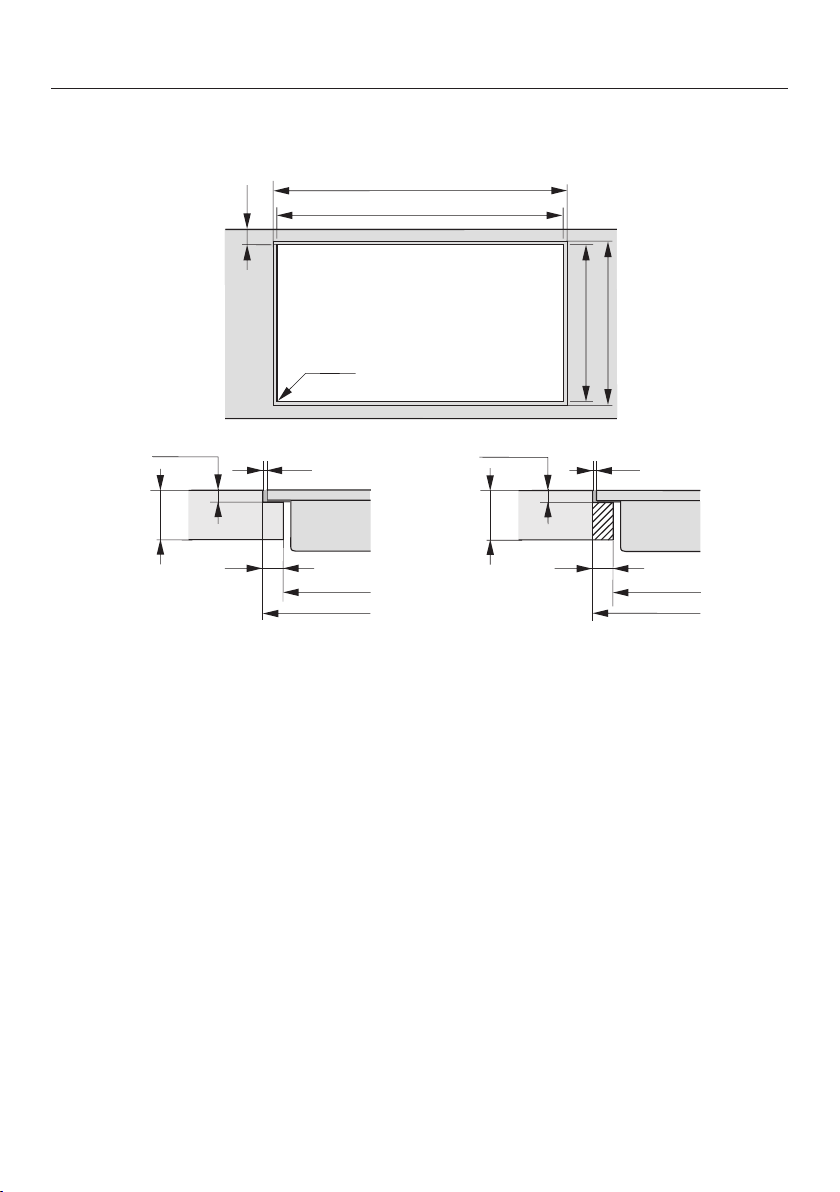
Worktop cutout – flush-fit
B
0
50
A
524
500
+
1
+ 1
ß R 4
B
A
0
2
12
0
10
5,5
+
0,5
*
/ 7
+ 0,5
0
2
12
0
10
5,5
+
0,5
*
/ 7
+ 0,5
+ 1
+ 1
+ 1
+ 1
B
A
+ 1
+ 1
Natural stone worktop Wooden worktop
* 7
+
0.5
mm with CS7611FL
Installation
*INSTALLATION*
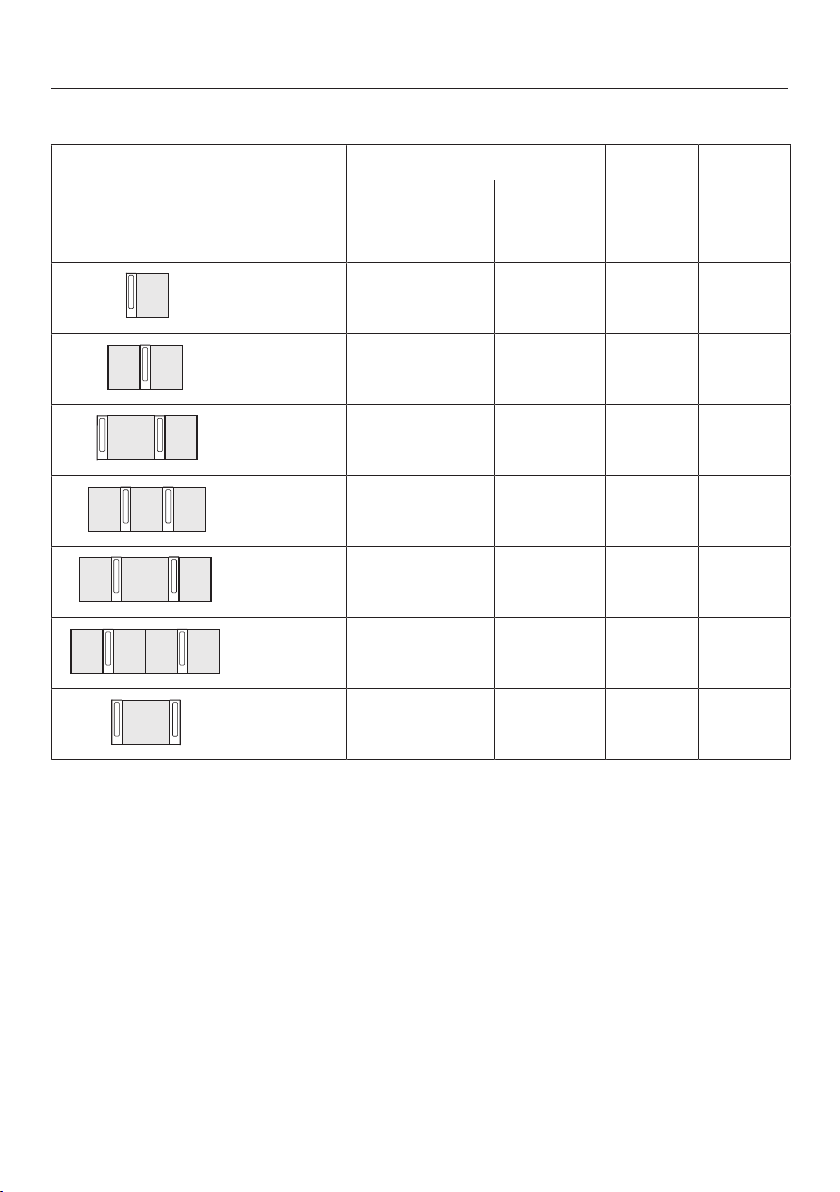
61
Installation with a countertop extractor
Combination examples Numberxwidth [mm] Dimen-
sionA
[mm]
Dimen-
sionB
[mm]
Cooking ele-
ments
Counter-
top ex-
tractor
1x378 1x120 505 481
2x378 1x120 886 862
1x378
1x620
2x120 1250 1226
3x378 2x120 1389 1365
2x378
1x620
2x120 1631 1607
4x378 2x120 1770 1746
1x620 2x120 869 845
Installation
*INSTALLATION*
62
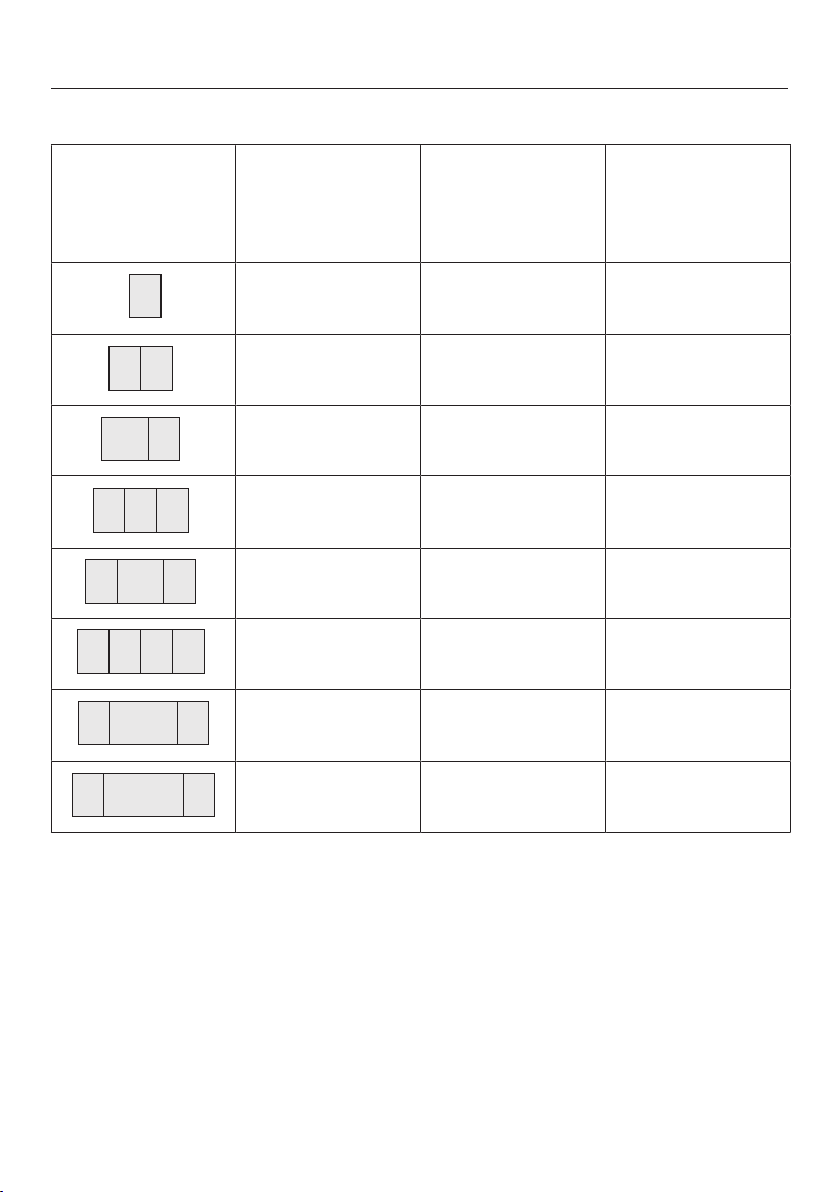
Installation without a countertop extractor
Combination ex-
amples
Numberxwidth
[mm]
DimensionA
[mm]
DimensionB
[mm]
Cooking elements
1x378 383 359
2x378 764 740
1x378
1x620
1006 982
3x378 1145 1121
2x378
1x620
1387 1363
4x378 1526 1502
2x378
1x800
1567 1543
2x378
1x936
1703 1679
Installation
*INSTALLATION*
63
Spacer bars – flush-fit
If you are installing several appliances, you must fit spacer bars between them.
The clips supplied with the spacer bars are only required for installing a
CSDA700xFL.
Installing 3elements and 2spacer bars
Installation
*INSTALLATION*
64
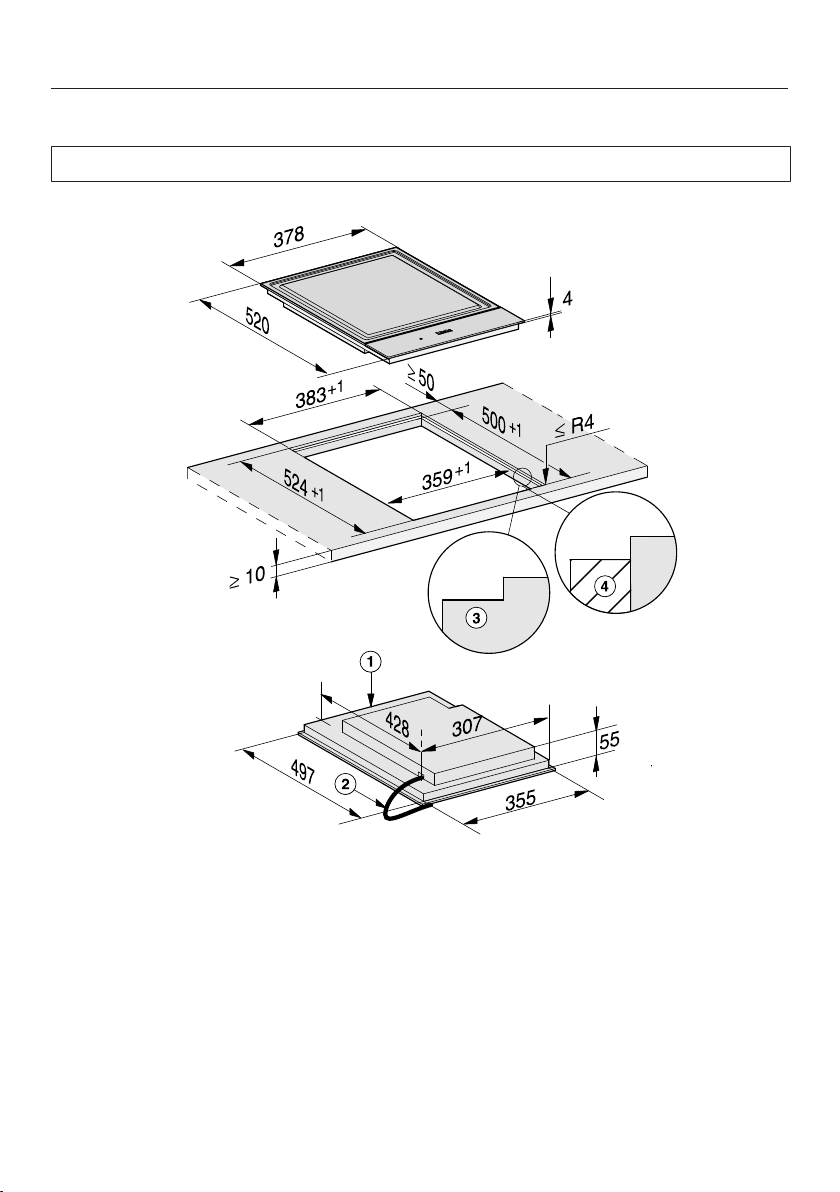
Installation dimensions–Flush-fit
All dimensions are given in mm.
a
Front
b
Mains connection cable, L=2000mm
c
Stepped cutout (for detailed illustrations, see “Installation – Worktop cutout –
flush-fit”)
d
12mm wooden frame (not supplied, for detailed illustrations, see “Installation –
Worktop cutout – flush-fit”)
Installation
*INSTALLATION*
65
Installation – flush-fit
Preparing the worktop
Create the worktop cutout. Remem-
ber to maintain the minimum safety
distances (see “Installation – Safety
distances”).
Seal any cut surfaces on wooden
worktops with a special varnish, sil-
icone sealant or resin to prevent the
wood from swelling as a result of
moisture ingress. The sealant must
be heat-resistant.
Make sure that the sealant does not
come into contact with the top of the
worktop.
For wooden worktops, secure the
wooden frame 5.5mm below the up-
per edge of the worktop.
For CS7611FL, the wooden frame
must be secured 7mm under the up-
per edge of the worktop.
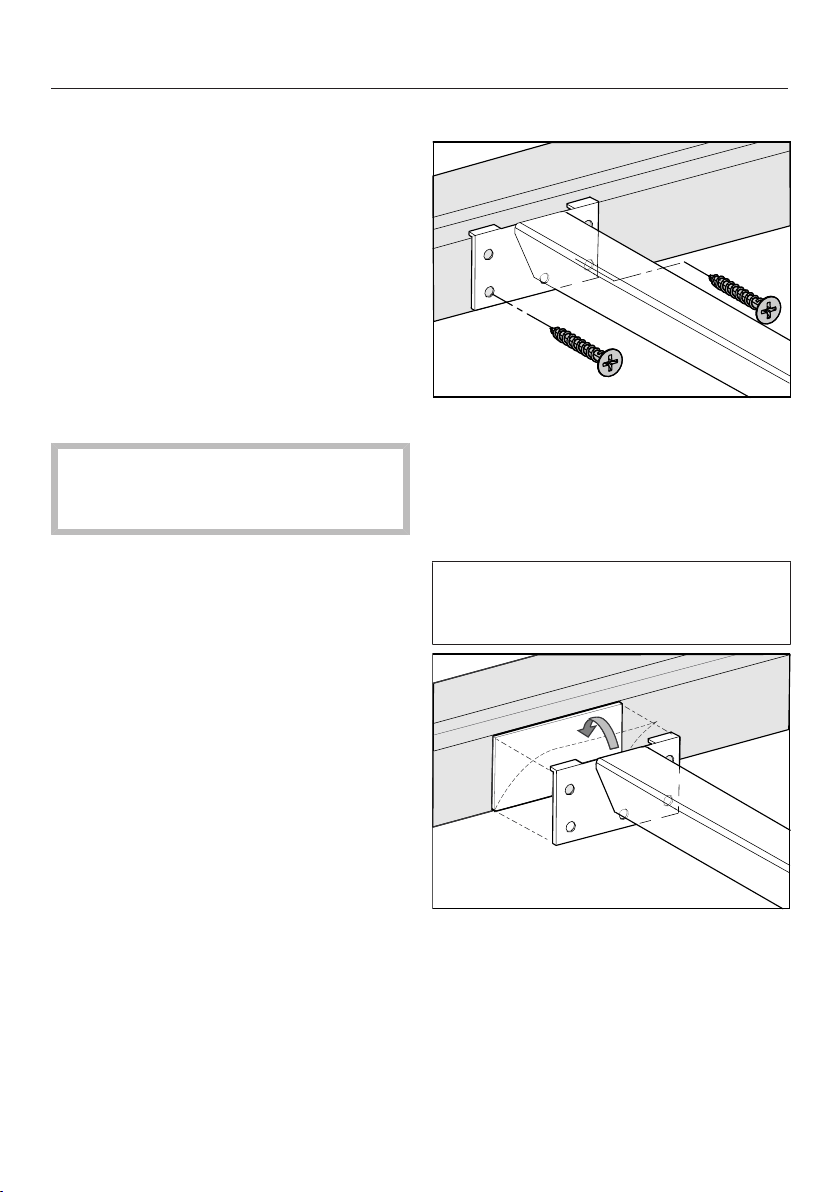
Fitting the spacer bars
Use the middle screw holes if one of the
following SmartLine elements is in-
stalled to the right or left of the spacer
bar: CS7611, CS 7641, CS7101(-1),
CS7102(-1)
Wooden worktops
Position the spacer bars flush onto
the lower step of the stepped cutout.
Secure the spacer bars with the
3.5x25mm wood screws supplied.
Natural stone worktops
You will need heavy-duty double-
sided tape (not supplied) to secure the
spacer bars.
Stick the tape onto the lower step of
the stepped cutout.
Position the spacer bars flush onto
the lower step of the stepped cutout.
Press the spacer bars firmly into
place.

Installation
*INSTALLATION*
66
Installing the SmartLine element
Stick the supplied sealing strip under
the edge of the SmartLine element.
Do not apply the sealing strip under
tension.
Feed the mains connection cable
down through the worktop cutout.
Position the SmartLine element in the
worktop cutout. Ensure that:
- The seal of the appliance sits flush
with the worktop on all sides to en-
sure an effective seal all round.
- All gap widths are uniform.
Connect the SmartLine element to
the mains electricity supply.
If required, connect the SmartLine
element to the gas supply (see “In-
stallation – Gas connection”).
Check that the SmartLine element
works.
Seal the gaps between the individual
elements and between the elements
and the worktop with a silicone seal-
ant that is heat-resistant to at least
160°C.
Unsuitable sealant can damage nat-
ural stone.
For natural stone worktops and nat-
ural stone tiles, only use silicone
sealant that is specially formulated
for natural stone. Follow the manu-
facturer’s instructions.

Installation
*INSTALLATION*
67
Electrical connection
Risk of damage from incorrect
connection.
Unauthorised installation, mainten-
ance and repairs can cause consid-
erable danger for the user.
Miele cannot be held liable for dam-
age or injury caused by unauthorised
installation, maintenance or repair
work, or by an inadequate or faulty
on-site earthing system (e.g. electric
shock).
This SmartLine element must be
connected to the electrical supply by
a qualified electrician.
The electrician must be familiar with
and comply with the national regula-
tions and any additional regulations
of the local electricity provider (e.g.
BS 7671 in the UK).
After installation, ensure that all elec-
trical components are shielded and
cannot be accessed by users.
Total power rating
See data plate
Connection data
The connection data is quoted on the
data plate. Please ensure these match
the household mains supply.
Residual current device
For extra safety, it is advisable to pro-
tect the SmartLine element with a suit-
able residual current device (RCD) with
a trip range of 30mA.
Disconnecting devices
It must be possible to disconnect the
SmartLine element from the mains at all
poles using disconnecting devices! A
contact distance of at least 3mm must
be observed in the switched-off state!
The disconnecting devices are overcur-
rent protection devices and residual
current protection devices.

Installation
*INSTALLATION*
68
Disconnecting from the mains
Risk of electric shock.
There is a risk of electric shock if the
appliance is connected to the mains
supply during repair or service work.
After disconnection, ensure the ap-
pliance cannot be switched back on
by mistake.
To disconnect the appliance from the
mains power supply, do one of the fol-
lowing depending on installation:
Safety fuses
Completely remove fuses.
Automatic circuit breakers
Press the (red) test button until the
middle (black) button springs out.
Built-in circuit breakers
Circuit breakers at least type B or C:
Switch the lever from 1 (on) to 0 (off).
Residual current device (RCD)
Switch the main switch from 1 (on) to
0 (off) or press the test button.
Replacing the mains connection
cable
Risk of electric shock.
Incorrect connection to the power
supply may result in an electric
shock.
The mains cable must only be re-
placed by a qualified electrician.
When replacing the mains cable only
use cable type H05VV-F with a suit-
able cross section. A suitable connec-
tion cable is available to order from
Miele.



United Kingdom
Miele Co. Ltd., Fairacres, Marcham Road, Abingdon, Oxon, OX14 1TW
Tel: 0330 160 6600, Internet: www.miele.co.uk/service, E-mail: [email protected]
Australia
Miele Australia Pty. Ltd.
ACN 005 635 398
ABN 96 005 635 398
1 Gilbert Park Drive
Knoxfield, VIC 3180
Tel: 1300 464 353
Internet: www.miele.com.au
Miele Electrical Appliances Co., Ltd.
1-3 Floor, No. 82 Shi Men Yi Road
Jing' an District
200040 Shanghai, PRC
Tel: +86 21 6157 3500
Fax: +86 21 6157 3511
E-mail: [email protected],
Internet: www.miele.cn
China Mainland
Miele (Hong Kong) Ltd.
41/F - 4101, Manhattan Place
23 Wang Tai Road
Kowloon Bay, Hong Kong
Tel: (852) 2610 1025
Fax: (852) 3579 1404
Email:
Website: www.miele.hk
Hong Kong, China
Miele India Pvt. Ltd.
1st Floor, Copia Corporate Suites,
Commercial Plot 9,
Mathura Road, Jasola,
New Delhi - 110025
E-mail: customercare@miele.in
Website: www.miele.in
India
Miele Ireland Ltd.
2024 Bianconi Avenue
Citywest Business Campus
Dublin 24
Tel: (01) 461 07 10
Fax: (01) 461 07 97
E-Mail: [email protected]
Internet: www.miele.ie
Ireland
Malaysia
Miele Sdn Bhd
Suite 12-2, Level 12
Menara Sapura Kencana
Petroleum
Solaris Dutamas No. 1
Jalan Dutamas 1
50480 Kuala Lumpur, Malaysia
Phone: +603-6209-0288
Fax: +603-6205-3768
Miele New Zealand Limited
IRD 98 463 631
8 College Hill
Freemans Bay, Auckland 1011
New Zealand
Tel: 0800 464 353
Internet: www.miele.co.nz
New Zealand
Miele Pte. Ltd.
29 Media Circle
#11-04 ALICE@Mediapolis
Singapore 138565
sTel: +65 6735 1191
Fax: +65 6735 1161
E-Mail: [email protected]
Internet: www.miele.sg
Singapore
Miele (Pty) Ltd.
63 Peter Place
Bryanston 2194
P.O. Box 69434
Bryanston 2021
Tel: (011) 875 9000
Fax: (011) 875 9035
E-mail: [email protected]
Internet: www.miele.co.za
South Africa
Miele Appliances Ltd.
Showroom 1
Eiffel 1 Building
P.O. Box 114782 - Dubai
Tel. +971 4 3044 999
Fax. +971 4 3418 852
800-MIELE (64353)
E-Mail: [email protected]
Website: www.miele.ae
United Arab Emirates
Manufacturer:
Miele & Cie. KG, Carl-Miele-Straße 29, 33332 Gütersloh, Germany
Thailand
Miele Appliances Ltd.
BHIRAJ TOWER at EmQuartier
43rd Floor Unit 4301-4303
689 Sukhumvit Road
North Klongton Sub-District
Vadhana District
Bangkok 10110, Thailand
Sheikh Zayed Road, Umm Al Sheif

M.-Nr. 10 803 081 / 03en-GB
CS7632