
Owner’s Manual

Write the model and serial numbers here:
Model # _______________________________
Serial # _______________________________
You’ll find them on a label when the door is open.
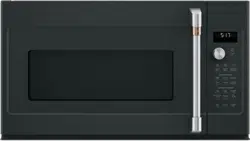
Convection / Microwave Oven
Model: CVM517P
Contents
Safety Information ...............................3
Using the Oven
Features ......................................7
Controls ......................................8
Cooking Options ................................9
Microwave Time and Auto Features ...............10
Power Level ..................................13
Microwave terms ..............................14
Microwave Sensor Features .....................14
Baking and Roasting Features ....................18
Fast Cook Feature .............................19
Air Fry Feature ................................20
Cookware Tips ................................21
Best Method of Cooking Chart ....................22
Other Features ................................23
Care and Cleaning
Inside .......................................26
Outside ......................................26
Replacing the LED Lamp ........................27
Exhaust Feature ...............................28
Troubleshooting ...............................29
Optional Kits ..................................31
Limited Warranty ...............................32
Consumer Support .............................33
Español
Para consultar una version en español de este manual de instrucciones,
visite nuestro sitio de internet cafeappliances.com.
Owner's Manual
TM
49-7000160 Rev. 1 10-21 GEA

2 49-7000160 Rev. 1
THANK YOU FOR MAKING CAFÉ A PART OF YOUR HOME.
We take pride in the craftsmanship, innovation and design that goes into every Café product, and
we think you will too. Among other things, registration of your appliance ensures that we can deliver
important product information and warranty details when you need them.
Register your Café appliance now online. Helpful websites are available in the Consumer Support
section of this Owner’s Manual. You may also mail in the pre-printed registration card included in the
packing material.
TM

49-7000160 Rev. 1 3
READ AND SAVE THESE INSTRUCTIONS
IMPORTANT SAFETY INFORMATION
READ ALL INSTRUCTIONS BEFORE USING THE APPLIANCE
SAFETY INFORMATION
WARNING
To reduce the risk of burns, electric shock, fire, injury to persons, or exposure to
excessive microwave energy:
When using electrical appliances, basic safety precautions should be followed, including the following:
Ŷ 5HDGDOOLQVWUXFWLRQVEHIRUHXVLQJWKLVDSSOLDQFH
Ŷ 5HDGDQGIROORZWKHVSHFLILFSUHFDXWLRQVLQWKH
PRECAUTIONS TO AVOID POSSIBLE EXPOSURE
TO EXCESSIVE MICROWAVE ENERGY section on
page 6.
Ŷ 8VHWKLVDSSOLDQFHRQO\IRULWVLQWHQGHGXVHDV
described in this manual. Do not use corrosive
chemicals or vapors in this appliance. This oven is
specifically designed to heat, dry or cook food, and is
not intended for laboratory or industrial use.
Ŷ 7KLVDSSOLDQFHPXVWRQO\EHVHUYLFHGE\TXDOLILHG
service personnel. Contact nearest authorized
service facility for examination, repair or adjustment.
INSTALLATION
Ŷ ,QVWDOORUORFDWHWKLVDSSOLDQFHRQO\LQDFFRUGDQFH
with the provided installation instructions.
Ŷ This appliance must be grounded. Connect only
to properly grounded outlet. See “GROUNDING
INSTRUCTIONS” found on page 6.
Ŷ 7KLVPLFURZDYHRYHQLV8/OLVWHGIRULQVWDOODWLRQRYHU
both gas and electric ranges.
Ŷ 7KLVXQLWLVVXLWDEOHIRUXVHDERYHJDVRUHOHFWULF
FRRNLQJHTXLSPHQW´RUOHVVZLGH
Ŷ Do not operate this appliance if it has a damaged
power cord or plug, if it is not working properly, or if it
has been damaged or dropped.
Ŷ .HHSFRUGDZD\IURPKHDWHGVXUIDFHV
Ŷ Do not let cord hang over the edge of the table or
counter
Ŷ 'RQRWLPPHUVHFRUGRUSOXJLQZDWHU
Ŷ 'RQRWFRYHURUEORFNDQ\RSHQLQJVRQWKH
appliance.
Ŷ 'RQRWVWRUHWKLVDSSOLDQFHRXWGRRUV'RQRWXVHWKLV
product near water—for example, in a wet basement,
near a swimming pool, near a sink or in similar
locations.
Ŷ 'RQRWPRXQWWKLVDSSOLDQFHRYHUDVLQN
TO REDUCE THE RISK OF FIRE IN THE CAVITY:
Ŷ Do not overcook food. Carefully attend appliance
when paper, plastic or other combustible materials
are placed inside the oven
to facilitate cooking.
Ŷ 5HPRYHZLUHWZLVWWLHVDQGPHWDOKDQGOHVIURP
paper or plastic containers before placing them in
the oven.
Ŷ 'RQRWVWRUHDQ\PDWHULDOVLQWKLVRYHQZKHQQRWLQ
use. Do not leave paper products, cooking utensils
or food in the cavity when not in use. All racks
should be removed from oven when not in use.
Ŷ ,IPDWHULDOVLQVLGHWKHRYHQLJQLWHNHHSWKHRYHQ
door closed, turn the oven off and disconnect the
power cord or shut off power at the fuse or circuit
breaker panel.
Ŷ 'RQRWRSHUDWHWKHPLFURZDYHIHDWXUHZLWKRXWIRRGLQ
the oven.
TO REDUCE THE RISK OF BURNS:
Ŷ %HFDUHIXOZKHQRSHQLQJFRQWDLQHUVRIKRWIRRG8VH
pot holders and direct steam away from face and
hands.
Ŷ 9HQWSLHUFHRUVOLWFRQWDLQHUVSRXFKHVRUSODVWLF
bags to prevent build-up of pressure.
Ŷ %HFDUHIXOZKHQWRXFKLQJWKHWXUQWDEOHGRRUUDFNV
or walls of the oven which may become hot during
use.
Ŷ HOT CONTENTS CAN CAUSE SEVERE BURNS.
DO NOT ALLOW CHILDREN TO USE THE
MICROWAVE. Use caution when removing hot items.

4 49-7000160 Rev. 1
SAFETY INFORMATION
READ AND SAVE THESE INSTRUCTIONS
IMPORTANT SAFETY INFORMATION
READ ALL INSTRUCTIONS BEFORE USING THE APPLIANCE
WARNING
Continued
OPERATING AND CLEANING
Ŷ 'RQRWVWRUHDQ\WKLQJGLUHFWO\RQWRSRIWKH
microwave oven surface when the microwave oven
is in operation.
Ŷ 2YHUVL]HGIRRGVRURYHUVL]HGPHWDOXWHQVLOVVKRXOG
not be inserted in a microwave/convection oven as
they may create a fire or risk of electric shock.
Ŷ 'RQRWFOHDQZLWKPHWDOVFRXULQJSDGV3LHFHVFDQ
burn off the pad and touch electrical parts involving a
risk of electric shock.
Ŷ Do not use paper products in oven when appliance
is operating in any cooking mode except microwave.
Ŷ 6RPHSURGXFWVVXFKDVZKROHHJJVDQGVHDOHG
containers—for example, closed jars—are able to
explode and should not be heated in this oven.
Ŷ 'RQRWFRYHUUDFNVRUDQ\RWKHUSDUWRIWKHRYHQ
with meal foil. This will cause overheating of the
microwave/convection oven.
Ŷ &RRNPHDWDQGSRXOWU\WKRURXJKO\²
meat to at least an INTERNAL temperature of 160°F,
and poultry to at least an INTERNAL temperature
of 180°F. Cooking to these temperatures usually
protects against foodborne illness.
Ŷ 0DNHVXUHDOOFRRNZDUHXVHGLQ\RXUPLFURZDYH
oven is suitable for microwaving. Most glass
casseroles, cooking dishes, measuring cups, custard
cups, pottery or china dinnerware which does not
have metallic trim or glaze with a metallic sheen can
be used.in compliance with cookware manufacturers’
recommendations.
Ŷ ,WLVLPSRUWDQWWRNHHSWKHDUHDFOHDQZKHUHWKH
door seals against the microwave. Use only mild,
nonabrasive detergents applied with a clean sponge
or soft cloth. Rinse well.
SUPER HEATED WATER
Ŷ /LTXLGVVXFKDVZDWHUFRIIHHRUWHDDUHDEOHWR
be overheated beyond the boiling point without
appearing to be boiling. Visible bubbling or boiling
when the container is removed from the microwave
oven is not always present. THIS COULD RESULT
IN VERY HOT LIQUIDS SUDDENLY BOILING
OVER WHEN THE CONTAINER IS DISTURBED
OR A SPOON OR OTHER UTENSIL IS INSERTED
INTO THE LIQUID.
Ŷ 7RUHGXFHWKHULVNRILQMXU\WRSHUVRQV
'RQRWRYHUKHDWWKHOLTXLG
6WLUWKHOLTXLGERWKEHIRUHDQGKDOIZD\WKURXJK
heating it.
- Do not use straight-sided containers with narrow
necks.
- After heating, allow the container to stand in the
microwave oven for a short time before removing
the container.
- Use extreme care when inserting a spoon or other
utensil into the container.
USE OF THE MICROWAVE RACK ACCESSORY
Ŷ 5HPRYHWKHPLFURZDYHUDFNIURPWKHRYHQZKHQQRW
in use.
Ŷ 8VHSRWKROGHUVZKHQKDQGOLQJWKHPLFURZDYHUDFN
and cookware. They may be hot.
Ŷ 'RQRWXVHUDFNVKHOIDQGFLUFXODUUDFNDWWKHVDPH
time.
Ŷ %HVXUHWKDWWKHPLFURZDYHUDFNLVSRVLWLRQHG
properly inside the oven to prevent product damage.
Rack should not touch microwave walls.

49-7000160 Rev. 1 5
READ AND SAVE THESE INSTRUCTIONS
IMPORTANT SAFETY INFORMATION
READ ALL INSTRUCTIONS BEFORE USING THE APPLIANCE
SAFETY INFORMATION
PACEMAKERS
Most pacemakers are shielded from interference from electronic products, including microwaves. However,
patients with pacemakers may wish to consult their physicians if they have concerns.
VENT FAN
The fan will operate automatically under certain conditions. Take care to prevent the starting
and spreading of
accidental cooking fires while the vent fan is in use.
Ŷ&OHDQWKHXQGHUVLGHRIWKHPLFURZDYHRIWHQ'RQRW
allow grease to build up on the microwave or the
fan filters.
Ŷ,QWKHHYHQWRIDJUHDVHILUHRQWKHVXUIDFHXQLWV
below the microwave oven, smother a flaming pan
on the surface unit by covering the pan completely
with a lid, a cookie sheet or a flat tray.
Ŷ8VHFDUHZKHQFOHDQLQJWKHYHQWIDQILOWHUV
Corrosive cleaning agents, such as lye-based oven
cleaners, may damage the filters.
Ŷ:KHQSUHSDULQJIODPLQJIRRGVXQGHUWKHPLFURZDYH
turn the fan on.
Ŷ1HYHUOHDYHVXUIDFHXQLWVEHQHDWK\RXUPLFURZDYH
oven unattended at high heat settings. Boilovers
cause smoking and greasy spillovers that may ignite
and spread if the microwave vent fan is operating.
7RPLQLPL]HDXWRPDWLFIDQRSHUDWLRQXVHDGHTXDWH
sized cookware and use high heat on surface units
only when necessary.

6 49-7000160 Rev. 1
READ AND SAVE THESE INSTRUCTIONS
SAFETY INFORMATION
IMPORTANT SAFETY INFORMATION
READ ALL INSTRUCTIONS BEFORE USING THE APPLIANCE
PRECAUTIONS TO AVOID POSSIBLE EXPOSURE
TO EXCESSIVE MICROWAVE ENERGY
ŶDo Not Attempt to operate this oven with the
door open since open-door operation can result
in harmful exposure to microwave energy. It is
important not to defeat or tamper with the safety
interlocks.
ŶDo Not Place any object between the oven front
face and the door or allow soil or cleaner residue to
accumulate on sealing surfaces.
ŶDo Not Operate the oven if it is damaged. It is
particularly important that the oven door close
properly and that there is no damage to the:
(1) door (bent)
(2) hinges and latches (broken or loosened)
(3) door seals and sealing surfaces
ŶThe Oven Should Not be adjusted or repaired by
DQ\RQHH[FHSWSURSHUO\TXDOLILHGVHUYLFHSHUVRQQHO
GROUNDING INSTRUCTIONS
To prevent risk of electric shock, follow these instructions:
ŶPlug microwave into a grounded 3-prong outlet.
ŶDo not remove the ground prong or use an
adapter.
ŶDo not use an extension cord.
WARNING
Improper use of the grounding
plug can result in a risk of electric shock.
This appliance must be grounded. In the event of
an electrical short circuit, grounding reduces the
risk of electric shock by providing an escape wire
for the electric current.
7KLVDSSOLDQFHLVHTXLSSHGZLWKDSRZHUFRUG
having a grounding wire with a grounding plug.
The plug must be plugged into an outlet that is
properly installed and grounded.
&RQVXOWDTXDOLILHGHOHFWULFLDQRUVHUYLFH
technician if the grounding instructions are not
completely understood, or if doubt exists as to
whether the appliance is properly grounded.
A short power-supply is provided to reduce
the risks resulting from becoming entangled
or tripping over a longer cord. Do not use an
extension cord with this appliance. If the power
FRUGLVWRRVKRUWKDYHDTXDOLILHGHOHFWULFLDQ
or service technician install an outlet near the
appliance.
Dispose of or recycle appliances in accordance with Federal and Local Regulations. Contact your local
Dispose of or recycle appliances in accordance with Federal and Local Regulations. Contact your local
authorities for the environmentally safe disposal or recycling of your appliances.
authorities for the environmentally safe disposal or recycling of your appliances.

49-7000160 Rev. 1 7
Features
USING YOUR OVEN: Features
1. Door Handle.
2. Door Latches.
3. Window with Metal Shield. Screen allows cooking
to be viewed while keeping microwaves confined in
the oven.
4. Control Panel and Selector Dial.
5. Removable Turntable. Do not operate the oven
in the microwave mode without the turntable and
turntable support seated and in place.
6. Removable Turntable Support. Do not operate
the oven in the microwave mode without the
turntable and turntable support seated and in place.
7. Shelves. Use with Convection Bake, Convection
Roast or Combination Fast Bake. (Do not use
when microwave cooking.)
For best results, use one shelf in the lower
position and leave at least a 1-inch gap between
the cooking dish and the sides of the oven. For
two-level Baking or Fast Baking use both shelves.
8 Deflector. Provides robustness from cooktop heat.
Do not remove.
Throughout this manual, features and appearance may vary from your model.
8 49-7000160 Rev. 1
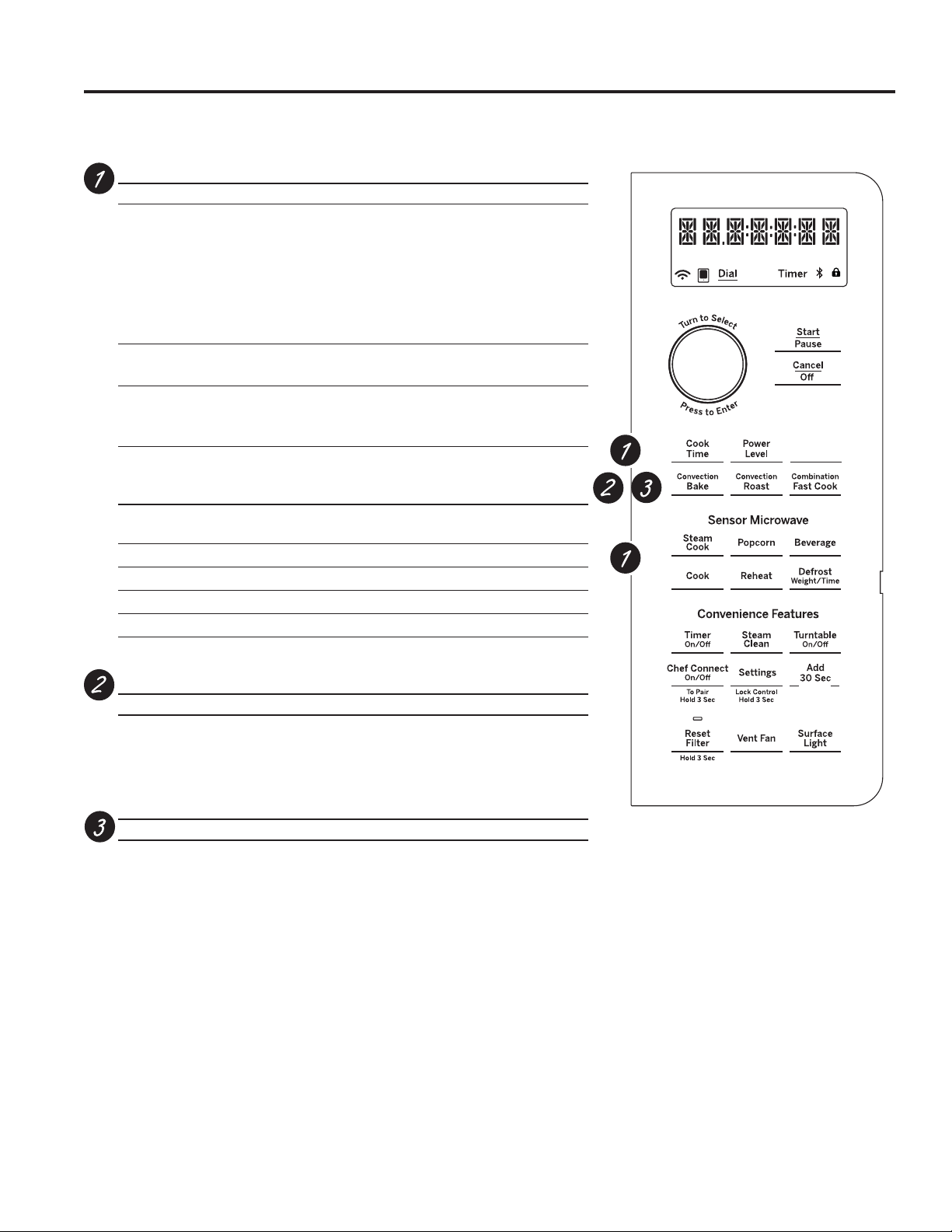
Microwave Cooking Time and Auto Features
Press Turn and push dial to enter
Cook Time Amount of cooking time
Press once (Cook Time I) to
microwave any time between
15 seconds and 99 minutes.
Press twice (Cook Time II) to
add a 2nd microwave cooking
stage.
Mircrowave Express cook/
Add 30 sec. Starts immediately!
Defrost
Press once (Weight Defrost) Food weight up to six pound
Press twice (Timer Defrost) Amount of defrosting time
Power Level Power level 1–10
Sensor Features
Press Turn and push
dial to enter Option
Steam Cook Food type
Popcorn Starts immediately!
Beverage Starts immediately!
Reheat Food type
Cook Food type
Convection Baking, Convection Roasting or Air Fry
Press Turn and push dial to enter
Convection Bake or Oven temperature and cook time
Convection Roast
Air Fry Food type, serving size and cook time
Combination Fast Cooking
Press Turn and push dial to enter
Combination Fast Cook Oven temperature and cook time
Controls
USING THE OVEN: Controls
My Cycle
Mute
Air Fry
<RXFDQFRRNE\0LFURZDYH&RQYHFWLRQ%DNH&RQYHFWLRQ5RDVWRU&RPELQDWLRQ)DVW%DNH.HHSKRWFRRNHG
foods at serving temperature with the Warm feature.

49-7000160 Rev. 1 9
Combination Fast Cooking
Your oven also offers the option of Combination Fast Cook, using microwave energy along with convection cooking.
You cook with speed and accuracy, while browning and crisping to perfection. .
Cooking Method
Microwave energy and convection
heat combine to cook foods up
to 25% faster than regular ovens,
while browning and sealing in
juices.
Heat Source
Microwave energy and circulating
heated air.
Heat Conduction
Food heats from instant energy from penetration and
heat conducted from outside
of food.
Benefits
Shortened
cooking time from
microwave energy, plus
browning and crisping from
convection heat.
Options
USING THE OVEN: Options
Microwave Cooking
Your oven uses microwave energy to cook by a set time or weight, or automatically by sensor.
Sensor microwave works by detecting the increasing humidity released during cooking. The oven automatically
adjusts the cooking time to various types and amounts of food.
Cooking Method
Microwave energy is distributed evenly
throughout the oven for thorough, fast
cooking of food.
Heat Source
Microwave energy.
Heat Conduction
Heat produced within food by
instant energy penetration.
Benefits
Fast, high efficiency cooking.
Oven and surroundings do not get hot. Easy clean-up.
Always use the shelf with Fast
Bake. For best results, use one
shelf in the lower position.
or
Do not use the
shelves when
microwave cooking.
Convection Baking, Convection Roasting and Air Fry
During baking or roasting, a heating element is used to raise the temperature of the air inside the oven. Any oven
temperature from 225°F. to 425°F. may be programmed. A fan gently circulates this heated air throughout the oven,
over and around the food, producing golden brown exteriors and rich moist interiors. This circulation of heated air is
called convection.
Because the heated air is kept constantly moving, not permitting a layer of cooler air to develop around the food,
some foods cook faster than in regular oven cooking.
Cooking Method
Hot air circulates around food to
produce browned exteriors and
seal in juices.
Heat Source
Circulating heated air
(Convection).
Heat Conduction
Heat conducted from
outside of food to inside.
Benefits
Aids in browning and seals
in flavor. Cooks some foods
faster than regular ovens.
Always use the shelf when
baking. For best results, use
one shelf in the lower position.
or

10 49-7000160 Rev. 1
Time and Auto Microwave Features
USING THE OVEN: Time and Auto Microwave Features
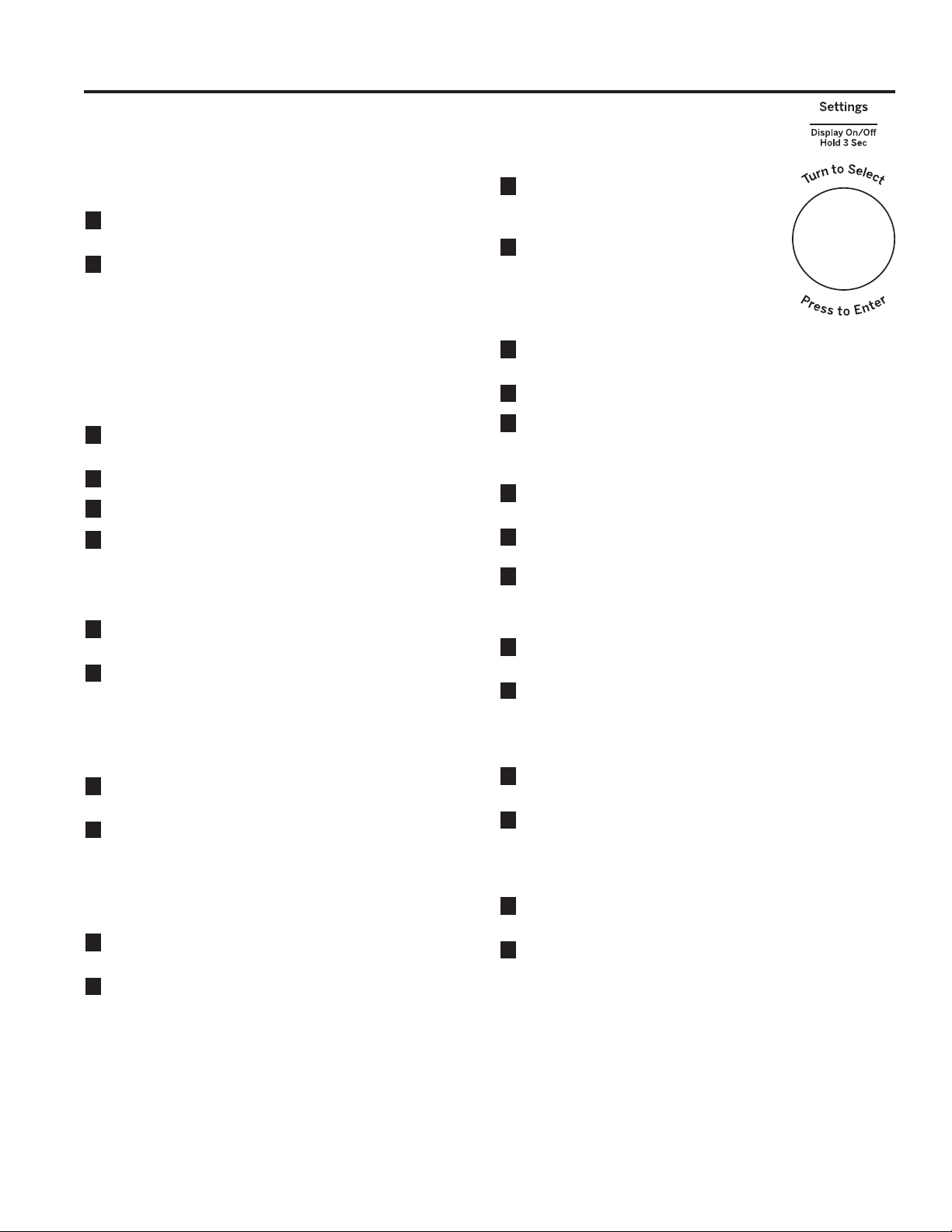
Using the Dial
You can make selections on the oven by turning the dial
and pressing it to enter the selection.
Pressing the dial can also be used in place of the Start/
PauseEXWWRQIRUTXLFNHUSURJUDPPLQJRIWKHRYHQ
Cook Time
(Do not use the shelves when microwave cooking.)
Cook Time I
Allows you to microwave for any time between
15 seconds and 99 minutes.
Power level 10 (High) is automatically set, but
you may change it for more flexibility.
1
Press the Cook Time button.
2
Turn the dial to set the cook time and press
the dial to enter.
3
Change power level if you don’t want full
power. (Press Power Level. Turn the dial to
select. Press the dial to enter.)
4
Press the dial or the Start/Pause button to
start cooking.
You may open the door during Cook Time to
check the food. Close the door and press the
dial or Start/Pause to resume cooking.
NOTE: You may change the cook time at any
time during cooking by turning the dial. You
may also change the power level by pressing
the Power Level button.
Cook Time II
Lets you change power levels automatically
during cooking. Here’s how to do it:
1
Press the Cook Time button.
2
Turn the dial to set the first cook time and
press the dial to enter.
3
Change the power level if you don’t want full
power. (Press Power Level. Turn the dial to
select. Press the dial to enter.)
4
Press the Cook Time button again.
5
Turn the dial to set the second cook time
and press the dial to enter.
6
Change the power level if you don’t want full
power. (Press Power Level. Turn the dial to
select. Press the dial to enter.)
7
Press the dial or the Start/Pause button to
start cooking.
At the end of Cook Time I, Cook Time II
counts down.
NOTE: You may change the cook time at any
time during cooking by turning the dial. You
may also change the power level by pressing
the Power Level button.
Add 30 Sec
7KLVLVDTXLFNZD\WRVHWDQGVWDUWFRRNLQJLQVHFRQG
blocks each time the Add 30 Second button is pressed.
The cook time may be changed by turning the dial at any
time during cooking.
The power level will automatically be set at 10 and the
oven will start immediately.
The power level can be changed as time is counting
down. Press the Power Level button, turn the dial and
press to enter.
My Cycle

49-7000160 Rev. 1 11
USING THE OVEN: Time and Auto Microwave Features
Time and Auto Microwave Features
Ŷ5HPRYHPHDWIURPSDFNDJHDQGSODFHRQ
microwave-safe dish.
1
Press the Defrost button once.
2
Turn the dial to the food weight, using the
Conversion Guide at right. For example,
dial .5 for .5 pounds (8 oz.) Press the dial
to enter.
3
Press the Start/Pause button to start
defrosting.
4
Turn the food over if the oven signals
TURN FOOD OVER.
Ŷ5HPRYHGHIURVWHGPHDWRUVKLHOGZDUP
areas with small pieces of foil.
Ŷ$IWHUGHIURVWLQJPRVWPHDWVQHHGWRVWDQG
5 minutes to complete defrosting.
Conversion Guide
If the weight of food is stated in pounds and
ounces, the ounces must be converted to
tenths (.1) of a pound.
Use Time Defrost to defrost for a selected
length of time.
1
Press the Defrost button twice.
2
Turn the dial to select the time you want.
Press the dial to enter.
3
Press the Start/Pause button to start
defrosting.
4
Turn the food over if the oven signals
TURN FOOD OVER.
You may change the defrost time at any time
during defrosting by turning the dial.
Power level is automatically set at 3, but
can be changed. You can defrost small
LWHPVTXLFNO\E\UDLVLQJWKHSRZHUOHYHODIWHU
entering the time. Power Level 7 cuts the
total defrosting time in about half; Power
Level 10 cuts the total time to approximately
+RZHYHUIRRGZLOOQHHGPRUHIUHTXHQW
attention than usual.
A dull thumping noise may be heard during
defrosting. This is normal when oven is not
operating at High power.
Defrosting Tips
Ŷ)RRGVIUR]HQLQSDSHURUSODVWLFFDQEH
defrosted in the package. Closed packages
should be slit, pierced or vented AFTER
food has partially defrosted. Plastic storage
containers should be partially uncovered.
Ŷ)DPLO\VL]HSUHSDFNDJHGIUR]HQGLQQHUV
can be defrosted and microwaved. If the
food is in a foil container, transfer it to a
microwave-safe dish.
Ŷ)RRGVWKDWVSRLOHDVLO\VKRXOGQRWEH
allowed to sit out for more than one
hour after defrosting. Room temperature
promotes the growth of harmful bacteria.
Ŷ:KHQGHIURVWHGIRRGVKRXOGEHFRROEXW
softened in all areas. If still slightly icy,
return to the microwave very briefly, or let it
stand a few minutes.
Weight of Food
in Ounces
Enter Food
Weight (tenths
of a pound)
1–2 .1
3.2
4–5 .3
6–7 .4
8.5
9–10 .6
11 .7
12–13 .8
14–15 .9
Weight Defrost
(Do not use the shelves when microwave cooking.)
Weight Defrost automatically sets the defrosting times and power levels to give even defrosting results for meats,
poultry and fish weighing up to one pound.
Time Defrost
(Do not use the shelves when microwave cooking.)

12 49-7000160 Rev. 1
Time and Auto Microwave Features
Defrosting Guide
Food Time Comments
Breads, Cakes
Bread, buns or rolls (1
piece)
1/4 min.
Sweet rolls (approx. 12 oz.) 2 to 4 min. Rearrange after half of time.
Fish and Seafood
Fillets, frozen (1 lb.) 6 to 9 min.
Fruit
Plastic pouch—1 or 2 1 to 5 min.
(10-oz. package)
Meat
Bacon (1 lb.) 2 to 5 min.
Place unopened package in oven. Let stand 5 minutes after defrosting.
Franks (1 lb.) 2 to 5 min. Place unopened package in oven. Microwave just until franks can be
separated. Let stand 5 minutes, if necessary, to complete defrosting.
Ground meat (1 lb.) 4 to 6 min. Turn meat over after first half of time.
Roast: beef, lamb, veal,
pork
9 to 13 min. per lb. Use power level 10.
Steaks, chops and cutlets 4 to 8 min. per lb. Place unwrapped meat in cooking dish. Turn over after first half of time
and shield warm areas with foil. After second half of time, separate pieces
with table knife. Let stand to complete defrosting.
Poultry
Chicken, broiler-fryer, cut up
(2
1
/2 to 3 lbs.)
14 to 20 min. Place wrapped chicken in dish. Unwrap and turn over after first half of
time. After second half of time, separate pieces and place in cooking dish.
Microwave 2 to 4 minutes more, if necessary. Let stand a few minutes to
finish defrosting.
Chicken, whole (2
1
/2 to 3
lbs.)
20 to 25 min. Place wrapped chicken in dish. After first half of time, unwrap and turn
chicken over. Shield warm areas with foil. To complete defrosting, run cool
water in cavity until giblets can be removed.
Cornish hen 7 to 13 min. per lb. Place unwrapped hen in oven breast-side-up. Turn over after first half of
time. Run cool water in cavity until giblets can be removed.
Turkey breast (4 to 6 lbs.) 3 to 8 min. per lb. Place unwrapped breast in microwave-safe dish breast-side-down. After
first half of time, turn breast-side-up and shield warm areas with foil.
Defrost for second half of time. Let stand 1 to 2 hours in refrigerator to
complete defrosting.
USING THE OVEN: Time and Auto Microwave Features

49-7000160 Rev. 1 13
USING THE OVEN: Time and Auto Microwave Features
Time and Auto Microwave Features
1
First, follow directions for Cook Time, Time
Defrost or Combination Fast Cook.
2
Press the Power Level button.
3
Turn the dial clockwise to increase and
counterclockwise to decrease the power
level. Press the dial to enter.
4
Press the Start/Pause button to start
cooking.
Variable power levels add flexibility to microwave
cooking. The power levels on the microwave
oven can be compared to the surface units on
a range. Each power level gives you microwave
energy a certain percent of the time. Power
Level 7 is microwave energy 70% of the time.
Power Level 3 is energy 30% of the time. Most
cooking will be done on High (Power Level
10) which gives you 100% power. Power Level
10 will cook faster but food may need more
IUHTXHQWVWLUULQJURWDWLQJRUWXUQLQJRYHU
A lower setting will cook more evenly and need
less stirring or rotating of the food. Some foods
may have better flavor, texture or appearance if
one of the lower settings is used. Use a lower
power level when cooking foods that have
a tendency to boil over, such as scalloped
potatoes.
Rest periods (when the microwave energy
F\FOHVRIIJLYHWLPHIRUWKHIRRGWR³HTXDOL]H´
or transfer heat to the inside of the food. An
example of this is shown with Power Level 3 -
the defrost cycle. If microwave energy did not
cycle off, the outside of the food would cook
before the inside was defrosted.
Here are some examples of uses for various
power levels:
High 10: Fish, bacon, vegetables, heating
OLTXLGV
Med-High 7: Gentle cooking of meat and
poultry; baking casseroles and reheating.
Medium 5: Slow cooking and tenderizing for
stews and less tender cuts of meat.
Low 2 or 3: Defrosting; simmering; delicate
sauces.
Warm 1: .HHSLQJIRRGZDUPVRIWHQLQJEXWWHU
Power Level
The power level may be entered or changed immediately after entering the time for Cook Time, Time Defrost or
Combination Fast Cook. The power level may also be changed during time countdown.

14 49-7000160 Rev. 1
Microwave Terms
USING THE OVEN: Microwave Terms / Sensor Microwave Features
Term Definition
Arcing Arcing is the microwave term for sparks in the oven. Arcing is caused by:
Ŷthe metal shelf being installed incorrectly and touching the microwave walls.
Ŷmetal or foil touching the side of the oven.
Ŷfoil that is not molded to food (upturned edges act like antennas).
Ŷmetal such as twist-ties, poultry pins, gold-rimmed dishes.
Ŷrecycled paper towels containing small metal pieces.
Ŷthe turntable ring support being installed incorrectly.
Covering Covers hold in moisture, allow for more even heating and reduce cooking time. Venting plastic wrap or
covering with wax paper allows excess steam to escape.
Shielding In a regular oven, you shield chicken breasts or baked foods to prevent over-browning. When
microwaving, you use small strips of foil to shield thin parts, such as the tips of wings and legs on
poultry, which would cook before larger parts.
Standing Time When you cook with regular ovens, foods such as roasts or cakes are allowed to stand to finish
cooking or to set. Standing time is especially important in microwave cooking. Note that a microwaved
cake is not placed on a cooling rack.
Venting After covering a dish with plastic wrap, you vent the plastic wrap by turning back one corner so excess
steam can escape.
Sensor Microwave Features
Humidity Sensor
What happens when using the Sensor Features:
The Sensor Features detect the increasing humidity
released during cooking. The oven automatically adjusts
the cooking time to various types and amounts of food.
Do not use the Sensor Features twice in succession
on the same food portion—it may result in severely
overcooked or burnt food. If food is undercooked after the
countdown, use Cook Time for additional cooking time.
NOTE: Sensor features will not operate when the oven
is hot. If one of the sensor cooking buttons is pressed
when the temperature inside the oven is greater than
)³29(1722+27)256(1625&22.,1*
USING ALTERNATE METHOD” will be displayed. The
oven will automatically change to cook by time (follow the
directions in the display) or once the oven is cool enough,
the sensor features will function normally.
Ŷ7KHSURSHUFRQWDLQHUVDQG
covers are essential for best
sensor cooking.
Ŷ$OZD\VXVHPLFURZDYH
safe containers and cover
them with lids or vented
plastic wrap. Never use tight
sealing plastic containers -
they can prevent steam from
escaping and cause food to
overcook.
Ŷ%HVXUHWKHRXWVLGHRIWKH
cooking containers and the
inside of the microwave
oven are dry before placing
food in the oven. Beads of
moisture turning into steam
can mislead the sensor.
Dry off dishes so they don’t
mislead the sensor.
Vented
Covered

49-7000160 Rev. 1 15
USING THE OVEN: Sensor Microwave Features
Steam Cook
TIMED STEAM* or SENSOR STEAM**
For best results, use steam or simmer
bowl. Add 2 Tablespoons (200 ml) of
water when steaming vegetables.
1
Press the Steam Cook pad once for Timed Steam or
twice for Sensor Steam cook.
2
Turn the dial to select food type. Press dial to enter.
3
Press the dial to select the amount, size and/or
GRQHQHVVLIUHTXLUHGWKHRYHQZLOOSURPSW\RX
Press the dial after each selection.
4
Insert food and close the door.
*Timed Steam is a pre-set time-based cook.
**Sensor Steam is a variable time based on a sensor.
Menu Selection for Sensor Steam**
For best results use 1-4 cups.
Ɣ $VSDUDJXV Ɣ%UXVVHOV6SURXWV
Ɣ &DUURWV Ɣ&DXOLIORZHU
Ɣ 3RWDWRHV Ɣ5LFH
Ɣ 6TXDVK Ɣ=XFFKLQL
Menu Selection for Time Steam*
Cook (Do not use the shelves when microwave cooking.)
Because most cooking containers
must be covered during Cook, this
feature is best with foods that you
want to steam or retain moisture.
NOTE: Use of the metal shelf with
Cook is not recommended.
Recommended Foods
A wide variety of foods including
meats, fish and vegetables can be
cooked using this feature.
Foods not recommended
Foods that must be cooked
XQFRYHUHGIRRGVWKDWUHTXLUH
constant attention, foods that
UHTXLUHDGGLWLRQRILQJUHGLHQWV
during cooking and foods calling
for a dry look or crisp surface after
cooking should not be cooked
using this feature. It is best to Cook Time them.
Sensor Microwave Features
Food Amount Time
Asparagus 1 cup 3:40
2 cups 4:40
3 cups 5:40
Broccoli 1 cup 3:30
2 cups 4:15
3 cups 5:00
Brussels 1 cup 3:40
2 cups 4:30
3 cups 5:30
Carrots 1 cup 3:50
2 cups 4:50
3 cups 5:40
Food Amount Time
Cauliflower 1 cup 3:30
2 cups 4:40
3 cups 5:50
Chicken Breast 1 piece (6-8 oz) 6:00
(8-10 oz) 7:00
2 pieces (6-8 oz) 9:00
(8-10 oz) 10:00
Fish, 1 piece thin filet - 1/2" 4:30
medium filet - 1" 5:00
thick filet - 1-1/2" 5:30
Fish - 2 pieces thin filet - 1/2" 5:30
medium filet - 1" 6:00
thick filet - 1-1/2" 6:30
Green Beans 1 cup 3:30
2 cups 4:30
3 cups 5:30
Potatoes 1 ea 7:00
2 ea 10:00
3 ea 13:00
Quinoa 1 cup 20:00
Rice 1 cup 24:00
Scallops -
Bay Scallops
6-10 oz 4:20
10-16 oz 7:00
Sea Scallops 6-10 oz 5:00
10-16 oz 8:00
Shrimp 1/2 pound 5:00
1 pound 7:00
6TXDVK 1 cup 4:00
2 cups 5:30
3 cups 7:00
=XFFKLQL 1 cup 4:00
2 cups 5:00
3 cups 6:00

16 49-7000160 Rev. 1
USING THE OVEN: Sensor Microwave Features
Popcorn (Do not use the shelves when microwave cooking.)
To use the Popcorn feature:
1
Follow package instructions, using Cook Time if the
package is less than 1.5 ounces or larger than 3.5
ounces. Place the package of popcorn in the center of
the turntable.
2
Press the Popcorn button. The oven starts
immediately.
If you open the door while POPCORN SENSOR is
displayed, an error message will appear. Close the door,
press &DQFHO2ႇ and begin again.
If food is undercooked after the countdown, use Cook
Time for additional cooking time.
How to Adjust the Automatic Popcorn Setting to
Provide a Shorter or Longer Cook Time
If you find that the brand of popcorn you use underpops
or overpops consistently, you can add or subtract 20–30
seconds to the automatic popping time.
To subtract or add time for sensor cook, turn the dial
when the time appears.
Sensor Microwave Features
Use only with prepackaged microwave
popcorn weighing 1.5 to 3.5 ounces.
NOTE: Do not use this feature twice
in succession on the same food
portion—it may result in severely
overcooked or burnt food.
Reheat (Do not use the shelves when microwave cooking.)
The Reheat feature reheats servings of previously
cooked foods or a plate of leftovers.
1
3ODFHWKHFXSRIOLTXLGRUFRYHUHGIRRGLQWKHRYHQ
Press Reheat and choose food type.
2
The oven signals when steam is sensed and the time
remaining begins counting down.
Do not open the oven door until time is counting down.
If the door is opened, close it and press Start/Pause
immediately.
After removing food from the oven, stir, if possible, to
even out the temperature. Reheated foods may have
wide variations in temperature. Some areas of food may
be extremely hot.
If food is not hot enough after the countdown use Cook
Time for additional reheating time.
Some Foods Not Recommended for Use With Reheat
It is best to use Cook Time for these foods:
Ŷ Bread products.
Ŷ Foods that must be reheated uncovered.
Ŷ Foods that need to be stirred or rotated.
Ŷ Foods calling for a dry look or crisp surface after
reheating.
Beverage (Do not use the shelves when microwave cooking.)
The Beverage feature heats beverages from 6 to 12
ounces.
Press the Beverage button. Then oven start
immediately.
Drinks heated with the Beverage feature may be very
hot. Remove the container with care.
NOTE: Do not use this feature twice in
succession on the same food portion—it may
result in severely overcooked or burnt food.

49-7000160 Rev. 1 17
USING THE OVEN: Sensor Microwave Features
Sensor Microwave Features
Cook (Do not use the shelves when microwave cooking.)
1
Place covered food in the oven and close the door.
Press the Cook button. ENTER FOOD TYPE appears
in the display.
2
Turn the dial to the desired food type. Press to enter.
See the Sensor Food Type Guide below for specific
foods and instructions.
The oven starts immediately.
NOTE: If the door was open while the control was being
set, close the door and press the Start/Pause button to
begin cooking.
If food is undercooked after the countdown, use Cook
Time for additional cooking time.
Do not open the oven door before the countdown time
is displayed—steam escaping from the oven can affect
cooking performance. If the door is opened, close the
door and press Start/Pause immediately.
If ground meat was selected, the oven may signal you
to drain and stir the meat. Open the door, drain the meat
and close the door. Press the Start/Pause button if
necessary to resume cooking.
Cooking Tips
Ŷ:KHQRYHQVLJQDOVDQGFRXQWGRZQWLPHLVGLVSOD\HG
the door may be opened for stirring, turning or rotating
food. To resume cooking, close the door and press
Start/Pause.
Ŷ0DWFKWKHDPRXQWRIIRRGWRWKHVL]HRIFRQWDLQHU)LOO
containers at least 1/2 full.
Ŷ%HVXUHRXWVLGHRIFRQWDLQHUDQGLQVLGHRIRYHQDUHGU\
Ŷ$IWHUFRPSOHWLRQRI&RRNF\FOHLIIRRGQHHGVDGGLWLRQDO
cooking, return food to oven and use Cook Time to
finish cooking.
NOTE: Do not use this feature
twice in succession on the same
food portion—it may result in
severely overcooked or burnt
food.
Sensor Food Type Guide
Food Type Servings Serving
Size
Comments
Chicken Bone-In
Boneless
2 to 8 pieces 8VHREORQJVTXDUHRUURXQGGLVK&RYHUZLWKYHQWHGSODVWLF
wrap.
Fish — 4 to 16 oz. 8VHREORQJVTXDUHRUURXQGGLVK&RYHUZLWKYHQWHGSODVWLF
wrap.
Ground Meat (Beef,
Pork, Turkey)
— 8 to 32 oz. Use round casserole dish. Crumble meat into dish. Cover with
vented plastic wrap.
Potatoes — 8 to 32 oz. Pierce skin with fork. Arrange in a star pattern in center of
turntable.
Vegetables Fresh 4 to 16 oz. Use microwave-safe casserole or bowl. Add 2 tablespoons water
for each serving. Cover with lid or vented plastic wrap.
Vegetables Frozen 4 to 16 oz. Use microwave-safe casserole or bowl. Follow package
instructions for adding water. Cover with lid or vented plastic
wrap.
Vegetables Canned 4 to 16 oz. Use microwave-safe casserole or bowl. Cover with lid or vented
plastic wrap.

18 49-7000160 Rev. 1
USING THE OVEN: Baking and Roasting Features
Baking or roasting uses a heating element to raise
the temperature of the air inside the oven. Any oven
temperature from 225°F to 425°F may be set. A fan
gently circulates this heated air throughout the oven, over
and around the food, producing golden brown exteriors
and rich, moist interiors. This circulation of heated air is
called convection.
Because the heated air is kept constantly moving,
not permitting a layer of cooler air to develop around
the food, some foods cook faster than in regular oven
cooking.
For Best Results…
Use one shelf in the lower position and leave at least a
1-inch gap between the cooking dish and the sides of the
oven. For two-level cooking only, use both shelves.
Use the circular rack if possible. If the food is too long to
turn (casseroles, lasagnas, etc.) or too tall to fit (roasts,
etc.), we recommend using the rectangular rack in the
lower position.
7KHVKHOILVUHTXLUHGIRUJRRGDLUFLUFXODWLRQDQGHYHQ
browning.
See the Cookware Tips section for information on
suggested cookware.
Convection Bake or Convection Roast with Preheat
1
Press the Convection Bake or Convection Roast
button.
2
Turn the dial to set the oven temperature and press
dial to enter. Do not enter bake time now. (The cook
time will be entered later, after the oven is preheated.)
See the Convection Bake Offset section below.
3
Press the dial or the Start/Pause button to start
preheating.
4
When the oven is preheated, it will signal. If you do
not open the door within 1 hour, the oven will turn off
automatically.
5
Open the oven door and, using caution, place the food
in the oven.
6
Close the oven door. Turn the dial to set the cook time
and press the dial or Start/Pause to start cooking.
7
When cooking is complete, the oven will signal and
turn off.
NOTE: You may change the cook
time at any time during cooking by
turning the dial.
You may change the oven
temperature at any time during
cooking by pressing the Power
Level button. Turn the dial to set the
oven temperature and press the dial
to enter.
To view the cook time and oven
temperature during cooking, press
the Bake button.
Convection Bake or Convection without Preheating
1
,I\RXUUHFLSHGRHVQRWUHTXLUHSUHKHDWLQJSUHVVWKH
Convection Bake or Convection Roast button. See
the Convection Bake Offset section below.
2
Turn the dial to set the oven temperature and press to
enter.
3
Turn the dial to set the cook time and press to enter.
4
Press the dial or the Start/Pause button to start the
oven.
NOTE: You may change the cook time at any time during
cooking by turning the dial.
You may change the oven temperature at any time during
cooking by pressing the Power Level button. Turn the
dial to set the oven temperature and press the dial to
enter.
To view the cook time and oven temperature during
cooking, press the Convection Bake button.
Baking and Roasting Features
Correct shelf position
Incorrect shelf position
OR
Convection Bake Offset
When using Convection Bake, the Convection Bake
Offset feature will automatically convert entered regular
baking temperatures to convection baking temperatures.
This feature is activated so that the display will show
OFFSET ON and the actual converted (reduced)
temperature. For example, if you enter a regular recipe
temperature of 350°F and press the Start/Pause button,
the display will show the converted temperature of 325°F.
This feature can be turned off in the Settings menu. See
the Convection Bake Offset Selection in the Other
features section.
NOTE: If convection baking and the Convection Bake
Offset feature is turned off, reduce the oven temperature
25°F from the recipe to prevent overbrowning on the top
of baked goods.

49-7000160 Rev. 1 19
USING THE OVEN: Fast Cook Feature
Fast Cook Feature
Fast Cook without Preheat
1
,I \RXU UHFLSH GRHV QRW UHTXLUH SUHKHDWLQJ SUHVV WKH
Fast Cook button.
2
Turn the dial to set the oven temperature and press
to enter.
3
Turn the dial to set the cook time and press to enter.
4
Press the dial or the Start/Pause button to start
the oven.
NOTE: You may change the cook time at any time
during cooking by turning the dial.
You may change the oven temperature and microwave
power level at any time during cooking by pressing
the Power Level button. Turn the dial to set the oven
temperature and press the dial to enter. Then, turn the
dial to set microwave power level 1 through 3 and press
the dial to enter. The default power level is 3.
To view the cook time and oven temperature during
cooking, press the Fast Cook button.
NOTE:
Ŷ 6RPH UHFLSHV FDOO IRU SUHKHDWLQJ
Ŷ &KHFN WKH Cookware Tips section for correct
cookware when using Fast Cook
Ŷ 'R QRW XVH PHWDO FRRNZDUH ZLWK Fast Cook.
Ŷ 6HH WKH Best Method of Cooking section to
determine the which foods are appropriate to cook
using Fast Cook.
Fast Cook offers the best features of microwave energy
and convection cooking. Microwaves cook food fast
and convection circulation of heated air browns foods
beautifully. Any oven temperature from 225°F to 425°F
may be set.
For Best Results…
Use one shelf in the lower position and leave at least a
1-inch gap between the cooking dish and the sides of
the oven.
7KH VKHOI LV UHTXLUHG IRU JRRG DLU FLUFXODWLRQ DQG HYHQ
browning.
See the Cookware Tips section for information on
suggested cookware.
See the Best Method of Cooking section to determine
the which foods are appropriate to cook using Fast
Cook.
Fast Cook with Preheat
1
Press the Combination Fast Cook button.
2
Turn the dial to set the oven temperature and press
dial to enter. Do not enter Fast Cook cook time now.
(The cook time will be entered later, after the oven is
preheated.)
Press the dial or the Start/Pause button to start
preheating.
4
When the oven is preheated, it will signal. If you do
not open the door within 1 hour, the oven will turn off
automatically.
5
Open the oven door and, using caution, place the
food in the oven.
6
Close the oven door. Turn the dial to set the cook
time and press to enter. Press the dial or the Start/
Pause button to start cooking.
7
When cooking is complete, the oven will signal and
turn off.
NOTE: You may change the cook time at any time
during cooking by turning the dial.
You may change the oven
temperature and microwave power
level at any time during cooking
by pressing the Power Level
button. Turn the dial to set the oven
temperature and press the dial to
enter. Then, turn the dial to set
microwave power level 1 through
3 and press the dial to enter. The
default power level is 3.
To view the cook time and oven
temperature during cooking, press
the Fast Cook button.
Ŷ
Check the Cookware Tips section
for correct cookware when using
Fast Cook.
Ŷ Do not use metal cookware with Fast Cook.
Ŷ Reduce the recipe cook time by 25%.
Ŷ See the Best Method of Cooking section to determine
the which foods are appropriate to cook using Fast
Cook
Correct shelf position
Incorrect shelf position

20 49-7000160 Rev. 1
USING YOUR OVEN: Air Fry Feature
Air Fry Feature
Air Fry uses a heating element to raise the temperature
of the air inside the oven. Any oven temperature from
225°F to 425°F may be set. A fan gently circulates
this heated air throughout the oven, over and around
the food, producing golden brown exteriors and rich,
moist interiors. This circulation of heated air is called
convection.
Because the heated air is kept constantly moving,
not permitting a layer of cooler air to develop around
the food, some foods cook faster than in regular oven
cooking.
For Best Results…
Use metal tray, metal rack and glass tray and leave at
least a 1- inch gap between the cooking dish and the
sides of the oven.
Air Fry with Auto Cook
1
Press the Air Fry button
2
Turn the dial to select Auto and press the dial
3
Turn the dial to select Food type and press the dial
4
Turn the dial to select Serving size and press the
dial or Start/Pause button to start cooking
5
When cooking is complete, the oven will signal and
turn off
Menu Quantity Food
Temp.
Instructions Accessory
Frozen French
Fries
1serving: 5oz,1 41g Frozen Place Frozen French Fries on the metal tray on the rack.
Choose the menu and weight, press Start.
Metal tray on
the rack on
the glass tray
2 servings: 10oz, 283g
Frozen Chicken
Nuggets
1serving: 5oz, 7 pcs Frozen Place Frozen Chicken Nuggets on the rack. Choose the
menu and weight, press Start.
Rack on the
glass tray
2 servings: 10oz, 14 pcs
Wedge Potatoes 1serving: 5oz, 15 pcs Room Brush Wedge Potatoes with oil and season as desired.
Place Wedge Potatoes on the rack. Choose the menu
and weight, press Start.
Rack on the
glass tray
2 servings: 10oz, 30 pcs
Chicken Wings 1serving: 5oz, 6 wings Room Brush Chicken Wings with oil, salt and pepper. Pickle
1 hour. Place Chicken Wings on the rack on the metal
tray. Choose the menu and weight, press Start.
Rack on the
metal tray on
the glass tray
2 servings: 10oz, 12
wings
Frozen Chicken
Tenders
1serving: 5oz, 9 pcs Frozen Place Frozen Chicken Tenders on the rack on the metal
tray. Choose the menu and weight, press Start.
Rack on the
glass tray
2 servings: 10oz, 18 pcs
Air Fry with Manual Cook
1
Press the Air Fry button
2
Turn the dial to select Manual and press the dial
3
Turn the dial to enter Cooking time and press the
dial or Start/Pause to start cooking
4
When cooking is complete, the oven will signal and
turn off
Air Fry
Air Fry
Accessories Tips for Air Fry
Metal Tray on
the circular rack
on the glass
tray
Circular rack on
the glass tray
Circular rack on
the metal tray on
the glass tray

49-7000160 Rev. 1 21
USING THE OVEN: Cookware Tips
Cookware Tips
Convection Bake or Roast
Metal Pans are recommended for all types of baked
products, but especially where browning is important.
Dark or dull finish metal pans are best for breads and
pies because they absorb heat and produce crisper
crust.
Shiny aluminum pans are better for cakes, cookies or
muffins because they reflect heat
and help produce a light tender crust.
Glass or Glass-Ceramic casserole or baking dishes
are best suited for egg and cheese recipes due to the
cleanability of glass.
Combination Fast Bake
Glass or Glass-Ceramic baking containers are
recommended. Be sure not to use items with metal trim
as it may cause arcing (sparking) with oven wall or oven
shelf. This can damage the cookware, the shelf or the
oven.
Heat-Resistant Plastic microwave cookware (safe to
450°F) may be used, but it is not recommended for foods
UHTXLULQJDOODURXQGEURZQLQJEHFDXVHWKHSODVWLFLVD
poor conductor of heat.
How to use Accessories
Cookware Microwave
Convection
Bake or Roast
Combination
Fast Cook
Heat-Resistant Glass, Glass-Ceramic (Pyrex
®
,
)LUH.LQJ
®
, Corning Ware
®
, etc.)
Yes Yes Yes
Metal No Yes No
Non Heat-Resistant Glass No No No
Microwave-Safe Plastics Yes No Yes*
Plastic Films and Wraps Yes No No
Paper Products Yes No No
Straw, Wicker and Wood Yes No No
* Use only microwave cookware that is safe to 450°F.
Microwave Convection Combination
: Possible to use
: Recommended method
: Do not use
Glass Turntable Metal Tray Metal Rack

22 49-7000160 Rev. 1
USING THE OVEN: Best Method of Cooking
Best Method of Cooking
Foods Microwave Bake Roast Fast Cook
Appetizers
Dips and Spreads
Pastry Snacks
9
99 9
Beverages
9
Sauces and Toppings
9
Soups and Stews
9
Meats
Defrosting
Roasting
9
99
Poultry
Defrosting
Roasting
9
999
Fish and Seafood
Defrosting
Cooking
9
99 9
Casseroles
99 9
Eggs and Cheese
Scrambled, Omelets
Quiche, Souffle
99
99
Vegetables, (fresh)
9
Breads
Muffins, Coffee Cake
Quick
Yeast
99
9
9
Desserts
Cakes, Layer and
Bundt
Angel Food and
Chiffon
Custard and Pudding
Bar Cookies
Fruit
Pies and Pastry
Candy
9
9
9
9
9
9
9
9
Blanching Vegetables
9
Frozen Convenience
Foods
99 9
Use the following guide to select the best method of cooking. Recipes can be adapted using the guidelines
below to determine the appropriate cooking mode.

49-7000160 Rev. 1 23
Control Lock-Out
You may lock the control panel to prevent the oven from
being accidentally started during cleaning or being used
by children.
To lock or unlock the controls, press and hold 3 seconds.
When the control panel is locked, CONTROL LOCKED will
be displayed briefly anytime a button or dial is pressed.
USING THE OVEN: Other Features
Other Features
Cooking Complete Reminder
To remind you that you have food in the oven, the oven
will display FOOD IS READY and beep once a minute
until you either open the oven door or press the Cancel/
Off button.
Start/Pause
In addition to starting many functions, Start/Pause allows
you to stop cooking without opening the door or clearing the
display.
Cancel/Off
Press the Cancel/Off button to stop and cancel cooking at
any time.
Timer On/Off
The Timer operates as a minute timer and can be used
at any time, even when the oven is operating.
1
Press the Timer button.
2
Turn the dial to select the minutes. Press the dial to
enter.
3
Turn the dial to select the seconds. Press the dial to
enter
4
Press the dial or Timer to start.
To cancel, press the Timer button.
When time is up, the oven will signal. To turn off the
timer signal, press Timer.
NOTE: The TIMER indicator will be lit while the timer is
operating.
Turntable
For best cooking results, leave the turntable on. It can be
turned off for large dishes.
Press the Turntable On/Off button to stop or start rotating
the turntable.
Sometimes the turntable can become too
hot to touch.
Be careful touching the turntable during
and after cooking.
Steam Clean
1
Press the Steam Clean button.
2
Put steam bowl with 1/4 cup of water.
3
Press the dial or Start/Pause to start.
Once the cycle is terminated, wipe oven
cavity with paper towel or cloth.
24 49-7000160 Rev. 1
USING THE OVEN: Other Features
Other Features
Auto Night Light
Auto Night Light can be set for light on during the
night. The surface light will be set to the LOW brightness
setting at the ON time. At the OFF time the surface light
will be turned off.
1
Press the Settings button and turn the dial to select
Auto Night Light. Press the dial to enter.
2
Turn the dial to select Off to turn off Auto Night
Light function. Press the dial to enter.
Turn the dial to select New to turn on Auto Night
Light function. Press the dial to enter. Enter ON time
and OFF time. Press the dial to enter.
Turn the dial to select Review to review the Auto
Night Light function setting. Press the dial to enter.
Set Clock
1
Press the Settings button and turn the dial to select
Clock Set. Press the dial to enter..
2
Turn the dial to set hours. Press the dial to enter.
3
Turn the dial to set minutes. Press the dial to enter.
4
Turn the dial to set AM/PM. Press the dial to enter.
Clock Mode
Clock Mode can be set for 12 hours and 24 hours.
1
Press the Settings button and turn the dial to select
Clock Mode. Press the dial to enter.
2
Turn the dial to set 12 hours or 24 hours Clock
Mode. Press enter to activate.
Display Speed
Display Speed can be adjusted for Slow, Normal, or
Fast
1
Press the Settings button and turn the dial to select
Display Speed. Press the dial to enter.
2
Turn the dial to set Display Speed (Slow, Normal,
Fast). Press enter to activate.
My Cycle
The Add 30 Sec. button can be adjusted to the My
Cycle features.
1
Press the Settings button and turn the dial to select
My Cycle. Press the dial to enter.
2
Turn the dial to select time (from 5 Sec to 60 Sec)
and press the dial to complete the setting.
Sound Level
Sound Level can be adjusted for
Mute, Low, Normal or Loud.
1
Press the Settings button and
turn the dial to select Sound
Level. Press the dial to enter.
2
Turn the dial to set Sound
Level (Mute, Low, Normal, or
Loud). Press enter to activate.
Surface Light Sync
1
Press the Settings button and turn the dial to select
Surface Light Sync. Press the dial to enter.
2
Turn the dial to select Sync Mode (Off, Low, High).
3
Press the dial to activate.
Vent Fan Sync
1
Press the Settings button and turn the dial to select
Vent Fan Sync. Press the dial to enter.
2
Turn the dial to select Vent Fan Sync Mode (Off,
Low, Medium or High).
3
Press the dial to activate.
Sync Auto Off
1
Press the Settings button and turn the dial to select
Sync Auto Off Press the dial to enter.
2
Turn the dial to select Sync Auto Off (up to 15
minutes and manual). Press enter to activate.
Convect Bake Offset
1
Press the Settings button and turn the dial to select
Convect Bake Offset. Press the dial to enter.
2
Turn the dial to select Convect Bake Offset On/Off
Press enter to activate.
Bake Temp Adjust
1
Press the Settings button and turn the dial to select
Bake Temp Adjust Press the dial to enter.
2
Turn the dial to select Bake Temp Adjust range
from -25 degree to 25 degree. Press enter to
activate.
49-7000160 Rev. 1 25
USING THE OVEN: Other Features
Other Features
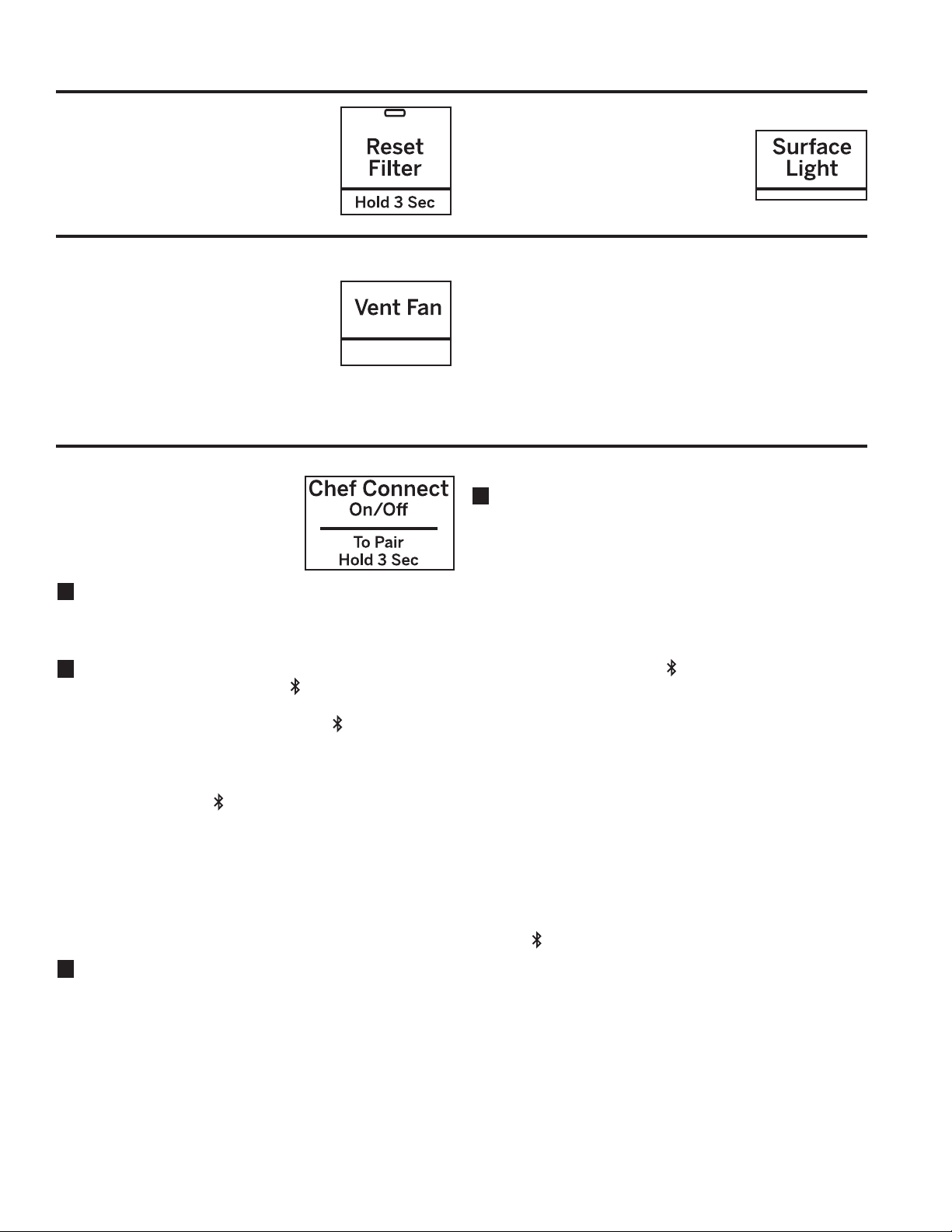
Filter Replace Reminder
When the Filter Replace light turned
on, replace filter and press Reset
Filter and hold for 3 seconds to reset.
A filter is only needed for models that
are not vented to the outside.
Surface Light
Press Surface Light once for bright
light, twice for the night light or a third
time to turn the light off.
Vent Fan
The vent fan removes steam and other
vapors from surface cooking.
Press Vent Fan once for high fan
speed, twice for medium fan speed,
three times for low fan speed or a
fourth time to turn the fan off.
Automatic Fan
An automatic fan feature protects the microwave from
too much heat rising from the cooktop below it. It
automatically turns on if it senses too much heat.
If you have turned the fan on you may find that you
cannot turn it off. The fan will automatically turn off when
the internal parts are cool. It may stay on for 30 minutes
or more after the cooktop and microwave controls are
turned off.
Chef Connect
Use the Chef Connect feature
for connecting your microwave to
a Café range to sync your vent
fan, cooktop surface lights and
clock via Bluetooth technology.
1
You must have a Chef Connect enabled range. To
pair your microwave for the first time, initiate the
Chef Connect process on the Café range. Refer to
the range owner’s manual for instructions
2
On the microwave, hold Chef Connect button for 3
seconds. The Bluetooth icon on the display will
start flashing as the microwave starts to search and
pair with your Café range. The icon will remain ON
after pairing successfully.
If a Café range is not found within 2 minutes during
search mode the microwave will stop searching and
the Bluetooth icon will turn OFF.
On initial setup, the setup protocol will start.
If the Chef Connect feature is enabled the default
settings are as follows:
- Display clock sync: ON
- Auto surface light: ON (HIGH setting)
- Auto vent fan: OFF
- Auto off: 15 minutes
3
Turn the dial to select Surface Light Sync On/Off.
Press the dial to confirm. If on, it allows the
microwave surface lights to turn on at HIGH level
automatically when the paired range’s cooktop
burner turns ON. If OFF, the microwave surface
lights will not automatically turn on when a cooktop
burner turns on.
4
Turn the dial to select Vent Fan Sync ON/OFF.
Press the dial to confirm. If ON, it allows the
microwave vent fan to turn on at LOW speed
automatically when the paired range’s cooktop
burner turns on. If OFF, the vent fan will not turn ON
automatically when a cooktop burner is turned on.
Pairing is now complete, the Chef Connect feature
is now on.
NOTE: If there is no sync option selected during set
up, 5 minutes after icon turns ON, the units will
return to stand-by mode and use the default settings.
After completing the setting per above steps, your
microwaves vent fan and surface light could be set
to turn on automatically when the cooktop burner is
turned on. The cooktop and range clock display will
be synced to display the same time. The vent fan
and cooktop light will be set to automatically turn off
15 minutes after the cooktop burner is turned OFF.
If desired, the light, fan, and auto off settings can
now be changed using option in Settings.
Press Chef Connect once to temporarily turn OFF
communication between the microwave and range.
Press again to turn communication back ON. The
icon will illuminate when ON.
In the case of an unintended disconnect such as lost
power to the microwave or range the connection will
remain after power resumed. For very short power
interruptions, the power may need to be reset in
order to reconnect
NOTE: To unpair the microwave from the range,
press and hold the Chef Connect button on the
microwave for 3 seconds. The Bluetooth icon will
start to flash. Press cancel or wait 2 minutes for the
flashing to stop. You may need to unpair when the
Café range is replaced or serviced.

26 49-7000160 Rev. 1
CARE AND CLEANING
Care and Cleaning
Helpful Hints
An occasional thorough wiping with a solution of baking
soda and water keeps the inside fresh.
Be certain the oven control is turned off before
cleaning any part of this oven.
How to Clean the Inside
Walls, Floor, Inside Window, Metal and Plastic Parts
on the Door
Some spatters can be removed with a paper towel;
RWKHUVPD\UHTXLUHDGDPSFORWK5HPRYHJUHDV\
spatters with a sudsy cloth, then rinse with a damp
cloth. Do not use abrasive cleaners or sharp utensils
on oven walls.
Never use a commercial oven cleaner on any part of
your microwave.
Removable Turntable and Turntable Support
To prevent breakage, do not
place the turntable into water
just after cooking. Wash it
carefully in warm, sudsy water
or in the dishwasher. The
turntable and support can be
broken if dropped. Remember, do not operate the oven
in the microwave mode without the turntable and support
seated and in place.
Shelves
Clean with mild soap and
water or in the dishwasher.
Do not clean in a
self-cleaning oven.
How to Clean the Outside
We recommend against using cleaners with ammonia
or alcohol, as they can damage the appearance of
the microwave oven. If you choose to use a common
household cleaner, first apply the cleaner directly to a
clean cloth, then wipe the soiled area.
Case
Clean the outside of the microwave with a sudsy cloth.
Rinse and then dry. Wipe the window clean with a
damp cloth.
Control Panel
Wipe with a damp cloth. Dry thoroughly. Do not use
cleaning sprays, large amounts of soap and water,
abrasives or sharp objects on the panel—they can
damage it. Some paper towels can also scratch the
control panel.
Door Panel
Before cleaning the front door panel, make sure you
know what type of panel you have. Refer to the 11
th
digit of the model number. “S” is stainless steel, “L” is
CleanSteel, "D" is for black slate or dark matte finish
and “B”, “W” or “C” are plastic colors.
Stainless Steel (on some models)
The stainless steel panel can be cleaned with Stainless
Steel Magic or a similar product using a clean, soft cloth.
Apply stainless cleaner carefully to avoid the surrounding
plastic parts. Do not use appliance wax, polish, bleach or
products containing chlorine on Stainless Steel finishes.
Plastic Color Panels
Use a clean, soft, lightly dampened cloth, then dry
thoroughly.
Door Seal
It’s important to keep the area clean where the door
seals against the microwave. Use only mild, non-
abrasive detergents applied with a clean sponge or soft
cloth. Rinse well.
Bottom
Clean off the grease and dust on the bottom often. Use a
solution of warm water and detergent.
T
u
r
n
t
o
S
e
l
e
c
t
P
r
e
s
s
t
o
E
n
t
e
r
Reheat
Timer
On/Off
Defrost
Weight/Time
Start
Pause
Cancel
Off
Lock Controls
Hold 3 Sec
Cook
Time
Set
Clock
Options Help
Surface
Light
Vent Fan
Popcorn
Beverage
Microwave
Express
Warm
Power
Level
Auto
Cook
Combination
Fast Bake
Convection
Roast
Turntable
Convection
Bake
T
u
r
n
t
o
S
e
l
e
c
t
P
r
e
s
s
t
o
E
n
t
e
r
Reheat
Timer
On/Off
Defrost
Weight/Time
Start
Pause
Cancel
Off
Lock Controls
Hold 3 Sec
Cook
Time
Set
Clock
Options Help
Surface
Light
Vent Fan
Popcorn
Beverage
Microwave
Express
Warm
Power
Level
Auto
Cook
Combination
Fast Bake
Convection
Roast
Turntable
Convection
Bake
T
u
r
n
t
o
S
e
l
e
c
t
P
r
e
s
s
t
o
E
n
t
e
r
Reheat
Timer
On/Off
Defrost
Weight/Time
Start
Pause
Cancel
Off
Lock Controls
Hold 3 Sec
Cook
Time
Set
Clock
Options Help
Surface
Light
Vent Fan
Warm
Power
Level
Auto
Cook
Combination
Fast Bake
Convection
Roast
Turntable
Convection
Bake

49-7000160 Rev. 1 27
CARE AND CLEANING
Replacing LED Lamp
Cooktop Light/Nite Light
Replace with LED lamp. See back cover for ordering
online at cafeappliances.com.
1
To replace the cooktop light/nite light, first disconnect
the power at the main fuse or circuit breaker panel,
or pull the plug.
2
Remove the screw from the side of the light
compartment cover and lower the cover until it stops.
3
Be sure the LED lamp is cool before removing.
Remove a screw and connector from LED lamp.
4
Connect LED lamp and secure using the screw.
Raise the light cover and replace the screw. Connect
electrical power to the oven.
Remove screw.
28 49-7000160 Rev. 1
CARE AND CLEANING: Exhaust Feature
Reusable Vent Filters
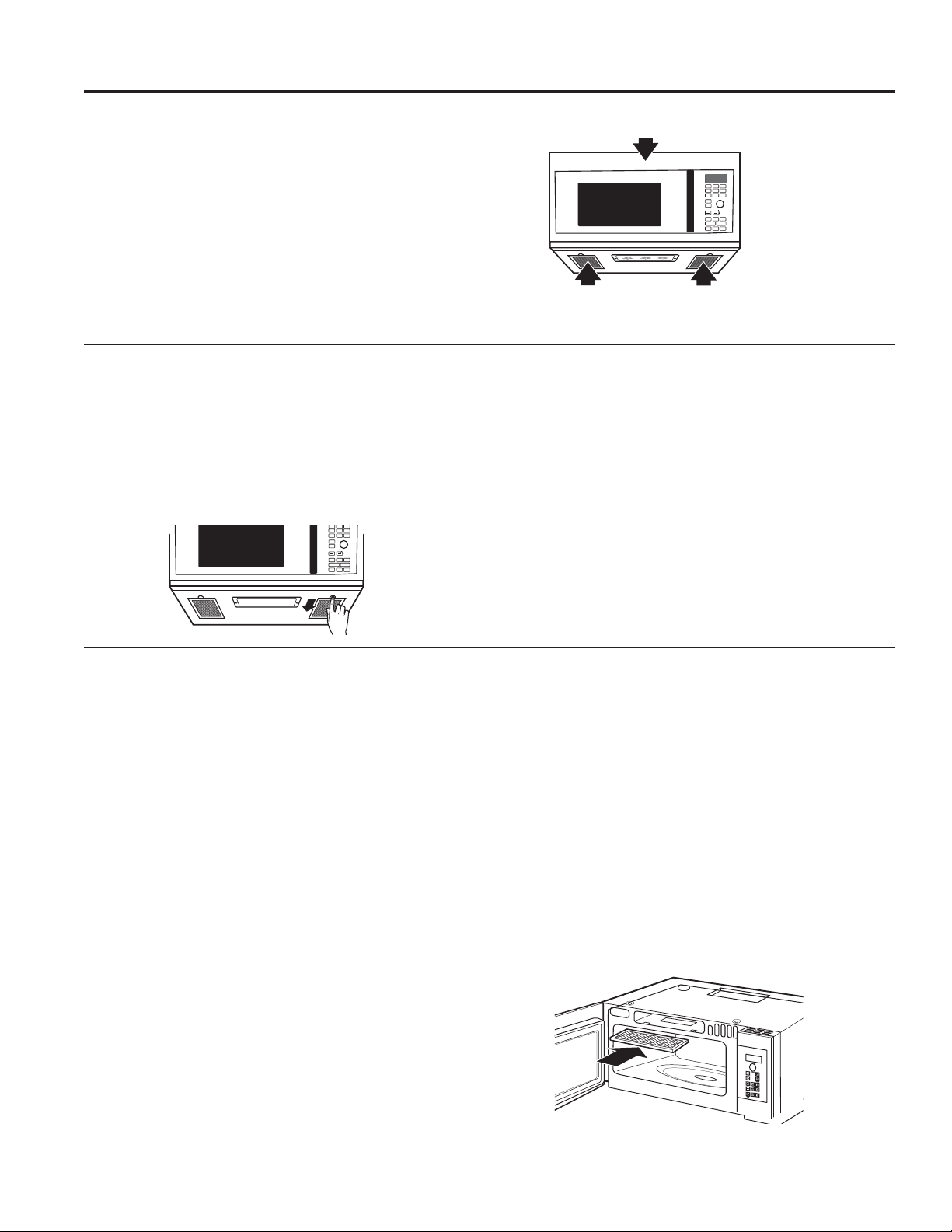
The metal filters trap grease released by foods on the
cooktop. They also prevent flames from foods on the
cooktop from damaging the inside of the oven.
For this reason, the filters must always be in place when
the hood is used. The vent filters should be cleaned
once a month, or as needed.
Removing and Cleaning the Filters
To remove, slide them to the rear using the tabs. Pull
down and out.
To clean the vent filters, soak them and then swish
around in hot water and detergent. Don’t use ammonia
or ammonia products because they will darken the metal.
Light brushing can be used to remove embedded dirt.
Rinse, shake and let dry before replacing.
To replace, slide the filters into the frame slots on the
back of each opening. Press up and to the front to lock
into place.
Vent Fan
The vent fan has two metal reusable vent filters.
Models that recirculate air back into the room also use a
charcoal filter.
Exhaust Feature
T
u
r
n
t
o
S
e
l
e
c
t
P
r
e
s
s
t
o
E
n
t
e
r
Reheat
Timer
On/Off
Defrost
Weight/Time
Start
Pause
Cancel
Off
Lock Controls
Hold 3 Sec
Cook
Time
Set
Clock
Options Help
Surface
Light
Vent Fan
Popcorn
Beverage
Microwave
Express
Warm
Power
Level
Auto
Cook
Combination
Fast Bake
Convection
Roast
Turntable
Convection
Bake
Reusable vent filters
(on all models).
Charcoal filter
T
u
r
n
t
o
S
e
l
e
c
t
P
r
e
s
s
t
o
E
n
t
e
r
Reheat
Timer
On/Off
Defrost
Weight/Time
Start
Pause
Cancel
Off
Lock Controls
Hold 3 Sec
Cook
Time
Set
Clock
Options Help
Surface
Light
Vent Fan
Popcorn
B
everage
Microwave
Express
Warm
Power
Level
Auto
Cook
Combination
Fast Bake
Convection
Roast
Turntable
Convection
Bake
Charcoal Filter
The charcoal filter cannot be cleaned. It must be
replaced. See back cover for ordering online at
cafeappliances.com
If the model is not vented to the outside, the air will be
recirculated through a disposable charcoal filter that
helps remove smoke and odors.
The charcoal filter should be replaced when it is
noticeably dirty or discolored (usually after 6 to 12
months, depending on usage). See Optional Kits page
30, for more information.
CHARCOAL FILTER REPLACEMENT
1. Unplug the microwave oven.
2. Remove the vent grille mounting screws.
3. Tip the grille forward, then lift out to remove.
4. Remove the charcoal filter.
5. Slide a new charcoal filter into place.
6. Slide the bottom of the vent grille into place.
Push the top until is snaps into place.
Replace the mounting screws
7. Plug in the microwave oven.

49-7000160 Rev. 1 29
TROUBLESHOOTING TIPS
Problem Possible Cause What To Do
Oven will not start A fuse in your home may be blown or
the circuit breaker tripped.
Replace fuse or reset circuit breaker.
Power surge. Unplug the microwave oven, then plug it back in.
Plug not fully inserted into wall outlet. Make sure the 3-prong plug on the oven is fully
inserted into wall outlet.
Door not securely closed. Open the door and close securely.
Control panel lighted, yet
oven will not start
Door not securely closed. Open the door and close securely.
Start/Pause button not pressed after
entering cooking selection.
Press Start/Pause.
Another selection entered already
in oven and Cancel/Off button not
pressed to cancel it.
Press Cancel/Off
Cooking time not entered after pressing
Cook Time.
Make sure you have entered cooking time after
pressing Cook Time.
Cancel/Off was pressedaccidentally. Reset cooking program and press Start/Pause.
Food weight not entered after selecting
Auto Defrost or Fast Defrost.
Make sure you have entered food weight after
selecting Auto Defrost or Fast Defrost.
Food type not entered after pressing
Auto Cook.
Make sure you have entered a food type.
CONTROL LOCKED appears
on display
The control has been locked. Press and hold Mute On/Off for about 3
seconds to unlock the control.
OVEN TOO HOT FOR
SENSOR COOKING---USING
ALTERNATE METHOD
appears on display
One of the sensor cooking buttons was
pressed when the temperature inside
the oven was greater than 200°F.
These features will not operate when the oven
is hot. The oven will automatically change to
cook by time (follow the directions in the display)
or once the oven is cool enough, the sensor
features will function normally.
Floor of the oven is warm
even when the oven has not
been used
The cooktop light is located below the
oven floor. When light is on, the heat it
produces may make the oven floor get
warm.
This is normal.
You hear an unusual low-tone
beep
You have tried to change the power
level when it is not allowed.
Many of the oven’s features are preset and
cannot be changed.
Oven emits a smoky odor and
gray smoke after using the
Bake feature
Oils on the stainless steel cavity are
burning off after using the Bake feature
the first few times.
This is normal.
Food browns on top much
faster than on the bottom
Rack has been placed in the “high”
position.
Always use the rack in its “low” position.
Oven temperature fluctuates
during cooking
The cooking element cycles on and off
to maintain the oven temperature at the
desired setting.
This is normal.
Vent fan comes on
automatically
The vent fan automatically turns on
to protect the microwave if it senses
too much heat rising from the cooktop
below.
This is normal.
During Bake, Roast or Fast Bake
(after preheating), the vent fan
will
automatically come on to cool the oven
components.
This is normal.
SENSOR ERROR appears on
the display
When using a Sensor feature, the door
was opened before steam could be
detected.
Do not open door until steam is sensed and time
is shown counting down on the display.
Steam was not detected in a maximum
amount of time.
Use Cook Time to heat for more time.
Troubleshooting Tips... Before you schedule service
Save time and money! Review the charts on the following pages first and you may not need to schedule service.
30 49-7000160 Rev. 1
TROUBLESHOOTING TIPS
Troubleshooting Tips... Before you schedule service
Things That Are Normal With Your Microwave Oven
Ŷ Moisture on the oven door and walls while cooking.
Wipe the moisture off with a paper towel or soft cloth.
Ŷ Moisture between the oven door panels when cooking
certain foods. Moisture should dissipate shortly after
cooking is finished.
Ŷ Steam or vapor escaping from around the door.
Ŷ Light reflection around door or outer case.
Ŷ Dimming oven light and change in the blower sound at
power levels other than high.
Ŷ The vent fan operating while the microwave is
operating. The vent fan will not go off nor can it be
turned off until the microwave is off.
Ŷ Dull thumping sound while oven is operating.
Ŷ Warm, convection bake, convection roast and
combination fast cook have a maximum cooking time
of 179 minutes (2 hours and 59 minutes). When
the maximum cooking time is reached, the oven will
automatically indicate that cooking is complete and
turn off the cooking element.
Ŷ When using convection bake, convection roast or
combination fast cook with a preheat, the oven door
must be opened and the cooking time set after preheat
or the oven will turn off the cooking element after
1 hour.
FEDERAL COMMUNICATIONS COMMISSION RADIO FREQUENCY
INTERFERENCE STATEMENT (U.S.A. ONLY)
7KLVHTXLSPHQWJHQHUDWHVDQGXVHV,60IUHTXHQF\
energy and if not installed and used properly, that is in
strict accordance with the manufacturer’s instructions,
may cause interference to radio and television
reception. It has been type tested and found to comply
ZLWKOLPLWVIRU,60(TXLSPHQWSXUVXDQWWRSDUWRI
FCC Rules, which are designed to part 18 of FCC
Rules, which are designed to provide residential
installation.
However, there is no guarantee that interference will not
RFFXULQDSDUWLFXODULQVWDOODWLRQ,IWKLVHTXLSPHQWGRHV
cause interference to radio or television reception, which
FDQEHGHWHUPLQHGE\WXUQLQJWKHHTXLSPHQWRIIDQGRQ
the user is encouraged to try to correct the interference
by one or more of the following:
Ŷ5HRULHQWWKHUHFHLYLQJDQWHQQDRIWKHUDGLRRU
television.
Ŷ5HORFDWHWKH0LFURZDYH2YHQZLWKUHVSHFWWRWKH
receiver.
Ŷ0RYHWKHPLFURZDYHRYHQDZD\IURPWKHUHFHLYHU
Ŷ3OXJWKHPLFURZDYHRYHQLQWRDGLIIHUHQWRXWOHWVRWKDW
the microwave oven and the receiver are on different
branch codes.
The manufacturer is not responsible for any radio of TV
interference caused by unauthorized modification to this
microwave oven. It is the responsibility of the user to
correct such interference.
7KLVHTXLSPHQWKDVEHHQWHVWHGDQGIRXQGWRFRPSO\
with the limits for a Class B digital device, pursuant to
part 15 of the FCC Rules. These limits are designed
to provide reasonable protection against harmful
LQWHUIHUHQFHLQDUHVLGHQWLDOLQVWDOODWLRQ7KLVHTXLSPHQW
JHQHUDWHVXVHVDQGFDQUDGLDWHUDGLRIUHTXHQF\HQHUJ\
and, if not installed and used in accordance with the
instructions, may cause harmful interference to radio
communications. However, there is no guarantee that
interference will not occur in a particular installation.
,IWKLVHTXLSPHQWGRHVFDXVHKDUPIXOLQWHUIHUHQFHWR
radio or television reception, which can be determined
E\WXUQLQJWKHHTXLSPHQWRIIDQGRQWKHXVHULV
encouraged to try to correct the interference by one or
more of the following measures:
Ŷ5HRULHQWRUUHORFDWHWKHUHFHLYLQJDQWHQQD
Ŷ,QFUHDVHWKHVHSDUDWLRQEHWZHHQWKHHTXLSPHQWDQG
receiver.
Ŷ&RQQHFWWKHHTXLSPHQWLQWRDQRXWOHWRQDFLUFXLW
different from that to which the receiver is connected.
Ŷ&RQVXOWWKHGHDOHURUDQH[SHULHQFHGUDGLR79
technician for help.
7RVDWLVI\)&&5)H[SRVXUHUHTXLUHPHQWVDVHSDUDWLRQ
distance of 20 cm or more should be maintained
between the antenna of this device and persons during
device operation.
To ensure compliance, operations at closer than this
distance is not recommended.
WARNING
Any changes or modifications to this
unit not expressly approved by the
party responsible for compliance could void the user’s
DXWKRULW\WRRSHUDWHWKHHTXLSPHQW

49-7000160 Rev. 1 31
Optional Kits
OPTIONAL KITS
Filler Panel Kits
CVM517P2MS1
JX36BSS – Stainless
CVM517P3MD1
JX36BDS – Black Slate
When replacing a 36" range hood, filler panel kits fill
in the additional width to provide a custom built-in
appearance.
For installation between cabinets only; not for end-of-
cabinet installation. Each kit contains two 3" wide filler
panels.
Ŷ JX15BUMP - Bump Out Kit
When installing a microwave in a kitchen with 15” deep
FDELQHWVWKHEXPSRXWNLWLVUHTXLUHG7KHNLWDOORZV
the microwave to be installed 3 inches further out which
prevents the cabinets from blocking the ventilation holes
at the top of the microwave grill.
Filter Kits
Filter kits are used when the oven cannot be vented to
the outside.
Available at extra cost from your Café Appliances
supplier. See the back cover for ordering online at
cafeappliances.com.
Available at extra cost from your Café supplier.
)LOWHU3DQHO.LWV

32 49-7000160 Rev. 1
Notes

49-7000160 Rev. 1 33
Staple your receipt here. Proof of the original purchase
date is needed to obtain service under the warranty.
cafeappliances.com
All warranty service is provided by our Factory Service Centers, or an authorized service technician. To schedule
service online, visit us at cafeappliances.com/service.
What Café will not cover:
Ŷ 6HUYLFHWULSVWR\RXUKRPHWRWHDFK\RXKRZWRXVH
the product.
Ŷ ,PSURSHULQVWDOODWLRQGHOLYHU\RUPDLQWHQDQFH,I\RX
have an installation problem, contact your dealer or
LQVWDOOHU<RXDUHUHVSRQVLEOHIRUSURYLGLQJDGHTXDWH
electrical, exhausting, and other connecting facilities.
Ŷ )DLOXUHRIWKHSURGXFWRUGDPDJHWRWKHSURGXFWLILWLV
abused, misused (for example, cavity arcing from wire
rack or metal/foil), or used for other than the intended
purpose or used commercially.
Ŷ 5HSODFHPHQWRIKRXVHIXVHVRUUHVHWWLQJRIFLUFXLW
breakers.
Ŷ 'DPDJHWRWKHSURGXFWFDXVHGE\DFFLGHQWILUH
floods or acts of God.
Ŷ ,QFLGHQWDORUFRQVHTXHQWLDOGDPDJHFDXVHGE\
possible defects with this appliance.
Ŷ 'DPDJHFDXVHGDIWHUGHOLYHU\
Ŷ 3URGXFWQRWDFFHVVLEOHWRSURYLGHUHTXLUHGVHUYLFH
Ŷ 6HUYLFHWRUHSDLURUUHSODFHOLJKWEXOEVH[FHSWIRU/('
lamps.
Ŷ 'DPDJHWRWKHILQLVKVXFKDVVXUIDFHUXVWWDUQLVKRU
small blemishes not reported within 48 hrs of delivery.
LIMITED WARRANTY
Café Microwave Oven Limited Warranty
EXCLUSION OF IMPLIED WARRANTIES
Your sole and exclusive remedy is product repair as provided in this Limited Warranty. Any implied warranties,
including the implied warranties of merchantability or fitness for a particular purpose, are limited to one year or
the shortest period allowed by law.
This limited warranty is extended to the original purchaser and any succeeding owner for products purchased for home
use within the USA. If the product is located in an area where service by a Café Appliances Authorized Servicer is not
DYDLODEOH\RXPD\EHUHVSRQVLEOHIRUDWULSFKDUJHRU\RXPD\EHUHTXLUHGWREULQJWKHSURGXFWWRDQ$XWKRUL]HG&DIp
Appliances Service location for service. In Alaska, the limited warranty excludes the cost of shipping or service calls to
your home.
6RPHVWDWHVGRQRWDOORZWKHH[FOXVLRQRUOLPLWDWLRQRILQFLGHQWDORUFRQVHTXHQWLDOGDPDJHV7KLVOLPLWHGZDUUDQW\
gives you specific legal rights, and you may also have other rights which vary from state to state. To know what your
legal rights are, consult your local or state consumer affairs office or your state’s Attorney General.
Warrantor: GE Appliances, a Haier company
/RXLVYLOOH.<
For the period of Café will replace
One year
From the date
of the original
purchase
Any part of the oven which fails due to a defect in materials or workmanship. During this
limited one-year warranty, Café Appliances will also provide, free of charge, all labor and
related service costs to replace the defective part when the unit is serviced.
Five years
From the date
of the original
purchase
The magnetron tube, if the magnetron tube fails dues to a defect in materials or
workmanship. During this five-year limited warranty, you will be responsible for any labor or
in-home service costs.
34 49-7000160 Rev. 1
Printed in the Malaysia
Consumer Support
CONSUMER SUPPORT
Café Website
+DYHDTXHVWLRQRUQHHGDVVLVWDQFHZLWK\RXUDSSOLDQFH"7U\WKHCafé Appliances Website 24 hours a day, any day
of the year! You can also shop for more great Café Appliances products and take advantage of all our on-line support
services designed for your convenience. cafeappliances.com
Register Your Appliance
Register your new appliance on-line at your convenience! Timely product registration will allow for enhanced
communication and prompt service under the terms of your warranty, should the need arise. You may also mail in the
pre-printed registration card included in the packing material. cafeappliances.com/register
Schedule Service
Expert Café repair service is only one step away from your door. Get on-line and schedule your service at your
convenience any day of the year. cafeappliances.com/service
Extended Warranties
Purchase a Café extended warranty and learn about special discounts that are available while your warranty is still in
effect. You can purchase it on-line anytime. Café Appliances Services will still be there after your warranty expires.
cafeappliances.com/extended-warranty
Remote Connectivity
For assistance with wireless network connectivity (for models with remote enable), visit our website at
cafeappliances.com/connect
Parts and Accessories
,QGLYLGXDOVTXDOLILHGWRVHUYLFHWKHLURZQDSSOLDQFHVFDQKDYHSDUWVRUDFFHVVRULHVVHQWGLUHFWO\WRWKHLUKRPHV
(VISA, MasterCard and Discover cards are accepted). Order on-line today 24 hours every day.
cafeappliances.com/parts
Instructions contained in this manual cover procedures to be performed by any user. Other servicing
generally should be referred to qualified service personnel. Caution must be exercised, since improper
servicing may cause unsafe operation.
Contact Us
If you are not satisfied with the service you receive from Café Appliances, contact us on our Website with all the
details including your phone number, or write to: General Manager,
Escriba el modelo y los números de serie a
continuación:
Modelo No: ____________________________
Serial No:______________________________
Los encontrarás en una etiqueta cuando la
puerta esté abierta.
Horno de
Convección / Microondas
Modelos: CVM517P
Contenido
Información de Seguridad ........................3
Uso de la Cocina
Funciones de su horno ..........................7
Controles .....................................8
Opciones de cocción ............................9
Funciones de tiempo y automático ................10
Nivel de potencia ..............................13
Terminología de microondas .....................13
Características de microondas
por sensor ..................................14
Funciones de Horneado y Asado ..................18
Función de Cocción Rápida ......................19
Freír con Aire .................................20
Consejos de utensilios de cocina .................21
Tabla con el mejor método para cocinar ............22
Otras funciones ...............................23
Cuidado y Limpieza
Interior ......................................26
Exterior ......................................26
Reemplazo de la luz LED .......................27
Función De Extractor ...........................28
Consejos Para La Solución De Problemas..........29
Kits Opcionales
.................................31
Garantía Limitada ..............................32
Soporte Para El Consumidor.....................33
Manual del Propietario
49-7000160 Rev. 1 10-21 GEA
TM

2 49-7000160 Rev. 1
GRACIAS POR HACER QUE CAFÉ SEA PARTE DE SU HOGAR.
Sentimos orgullo por el nivel de arte, innovación y diseño de cada uno de los electrodomésticos de
Café, y creemos que usted también. Entre otras cosas, el registro de su electrodoméstico asegura que
podamos entregarle información importante del producto y detalles de la garantía cuando los necesite.
Registre su electrodoméstico Café ahora a través de Internet. Sitios Web útiles están disponibles
en la sección de Soporte para el Consumidor de este Manual del Propietario. También puede enviar
una carta en la tarjeta de inscripción preimpresa que se incluye con el material embalado.
TM

49-7000160 Rev. 1 3
INFORMACIÓN DE SEGURIDAD
LEA Y GUARDE ESTAS INSTRUCCIONES
INFORMACIÓN IMPORTANTE DE SEGURIDAD
LEA TODAS LAS INSTRUCCIONES ANTES DE USAR
ADVERTENCIA
Para reducir el riesgo de quemaduras, descargas eléctricas, incendio, lesiones o
exposición a energía de microondas excesiva:
Cuando utilice aparatos eléctricos, se deben seguir las precauciones de seguridad básicas, entre las que se incluyen las
siguientes:
Ŷ /HDWRGDVODVLQVWUXFFLRQHVDQWHVGHXWLOL]DUHVWHDSDUDWR
Ŷ /HD\VLJDODVSUHFDXFLRQHVHVSHFtILFDVGHVFULWDVHQOD
sección PRECAUCIONES PARA EVITAR LA POSIBLE
EXPOSICIÓN A ENERGÍA DE MICROONDAS EXCESIVA
de la página 6.
Ŷ 8WLOLFHHVWHDSDUDWRVRODPHQWHSDUDHOILQSUHYLVWR
como se describe en este manual. No utilice químicos
ni vapores corrosivos en este aparato. Este horno está
específicamente diseñado para calentar, secar o cocinar
alimentos y bebidas y no está diseñado para usarse en n
laboratorio ni para uso industrial.
Ŷ 6yORSHUVRQDOFXDOLILFDGRGHEHUHSDUDUHVWHDSDUDWR
Póngase en contacto con el centro de mantenimiento
autorizado más cercano en caso de necesitar revisión,
reparación o ajuste.
INSTALLATION
Ŷ ,QVWDOHRXELTXHHVWHDSDUDWR~QLFDPHQWHGHDFXHUGRDODV
instrucciones de instalación suministradas.
Ŷ Este aparato debe contar con una conexión a tierra.
Conecte sólo a un tomacorriente con adecuada conexión a
tierra. Ver la sección Instrucciones de conexión a tierra de
la página 7.
Ŷ Este horno microondas figura en la lista de UL para su
posible instalación tanto en estufas a gas como eléctricas.
Ŷ Esta unidad fue diseñada para use sobre equipamientos
de cocción a gas o eléctricos, de un ancho de 36” o
menos.
Ŷ 1RXWLOLFHHVWHDSDUDWRVLWLHQHHOFDEOHHOpFWULFRRHO
enchufe dañados, si no funciona bien o si ha sufrido una
avería o una caída.
Ŷ 0DQWHQJDHOFDEOHDOHMDGRGHVXSHUILFLHVFDOLHQWHV
Ŷ 1RSHUPLWDTXHHOFDEOHHOpFWULFRFXHOJXHVREUHHOERUGH
de la mesa o del mostrador de encimera.
Ŷ 1RVXPHUMDHOFDEOHHOpFWULFRRHOHQFKXIHHQDJXD
Ŷ 1RFXEUDQLEORTXHHQLQJXQDDSHUWXUDGHHVWHDSDUDWR
Ŷ 1RDOPDFHQHHVWHDSDUDWRDODLUHOLEUH1RXWLOLFHHVWH
producto cerca del agua; por ejemplo, en un sótano
húmedo, cerca de una piscina, cerca de un lavabo o
lugares similares.
Ŷ 1RPRQWHHVWHDSDUDWRVREUHHOIUHJDGHUR
PARA REDUCIR EL RIESGO DE INCENDIO DENTRO DEL
HORNO:
Ŷ 1RFRFLQHH[FHVLYDPHQWHORVDOLPHQWRV9LJLOH
cuidadosamente el aparato cuandose coloque papel,
plástico u otros materiales combustibles dentro del
microondas para facilitar la cocción.
Ŷ 4XLWHODVWLULWDVGHVHJXULGDGWZLVWWLHV\DVDVPHWiOLFDV
de los recipientes de papel o plástico antes de colocarlos
dentro del microondas.
Ŷ 1RXWLOLFHHOKRUQRSDUDDOPDFHQDUHOHPHQWRV1RGHMH
productos de papel, utensilios de cocina o alimentos en
el horno cuando no lo esté usando. Todos los estantes
deberán ser retirados del horno cuando no se encuentren
en uso.
Ŷ 6LORVPDWHULDOHVTXHVHHQFXHQWUDQGHQWURGHOKRUQR
prenden fuego, mantenga cerrada la puerta del horno,
apáguelo y desconecte el cable eléctrico, o corte la
energía desde el panel de fusibles o del interruptor de
circuitos.
Ŷ No opere el horno sin alimentos adentro.
A FIN DE REDUCIR RIESGOS DE QUEMADURAS:
Ŷ 7HQJDFXLGDGRDODEULUHQYDVHVFRQFRPLGDFDOLHQWH8VH
manijas y aleje el vapor del rostro y las manos.
Ŷ 9HQWLOHSHUIRUHRFRUWHHQYDVHVEROVDVREROVDV
plásticas para evitar la acumulación de presión.
Ŷ 7HQJDFXLGDGRDOWRFDUHOSODWRJLUDWRULRODSXHUWD
estantes o paredes del horno, los cuales se podrán
calentar durante el uso.
Ŷ /26&217(1,'26&$/,(17(638('(1
2&$6,21$548(0$'85$6*5$9(612
3(50,7$48(/261,f2687,/,&(1(/
MICROONDAS. Tenga cuidado al retirar ítems
calientes.
4 49-7000160 Rev. 1
LEA Y GUARDE ESTAS INSTRUCCIONES
INFORMACIÓN DE SEGURIDAD
INFORMACIÓN IMPORTANTE DE SEGURIDAD
LEA TODAS LAS INSTRUCCIONES ANTES DE USAR
ADVERTENCIA
Continuado
USO Y LIMPIEZA
Ŷ 1RDOPDFHQHQLQJ~QHOHPHQWRGLUHFWDPHQWHVREUHOD
superficie del horno de microondas cuando éste se
encuentre en funcionamiento.
Ŷ Las comidas o utensilios metálicos de tamaño excesivo
no deberán ser insertados en un horno microondas/
convección, ya que podrán generar un incendio o riesgos
de descargas eléctricas.
Ŷ 1ROLPSLHFRQHVSRQMLOODVGHPHWDO3XHGHQGHVSUHQGHUVH
pedazos de la esponjilla y tocar partes eléctricas,
provocando un riesgo de descarga eléctrica.
Ŷ No utilice productos de papel cuando el aparato se utiliza
en modos diferentes al microondas.
Ŷ $OJXQRVSURGXFWRVWDOHVFRPRKXHYRVHQWHURV\
FRQWHQHGRUHVVHOODGRVSRUHMHPSORIUDVFRVVHOODGRVVRQ
propensos a explotar y no deben calentarse en este horno.
Tal uso del horno puede resultar en lesiones personales.
Ŷ No cubra las parrillas u otra parte del horno con papel
metálico. Esto ocasionará un sobrecalentamiento del
horno microondas/ por convección.
Ŷ &RFLQHDIRQGRODFDUQHGHUHVRDYHODFDUQHGHUHVDSRU
los menos una temperatura INTERNA de 160° F y carne
de ave a por lo menos una temperatura INTERNA de 180°
F. Cocinar a estas temperaturas generalmente protege
contra enfermedades causadas por los alimentos.
Ŷ $VHJ~UHVHGHTXHWRGRVORVXWHQVLOLRVXVDGRVHQHOKRUQR
microondas sean para uso en el mismo. Se pueden
usar la mayoría de las cazuelas de vidrio, platos de
cocción, tazas graduadas, tazas para postre, vajillas de
cerámica o cubiertos de porcelana que no poseen bordes
metálicos o vidriados con un brillo metálico, siguiendo las
recomendaciones del fabricante.
Ŷ (VLPSRUWDQWHPDQWHQHUHOiUHDOLPSLDGRQGHODSXHUWDVH
selle contra el horno microondas. Use sólo detergentes
suaves y no abrasivos con una esponja limpia o tela
suave. Enjuague bien.
AGUA SOBRECALENTADA
Ŷ /tTXLGRVWDOHVFRPRDJXDFDIpRWpVRQFDSDFHV
de sobrecalentarse más allá del punto de ebullición
sin parecer que estén hirviendo. No siempre hay
burbujeo o hervor visible cuando se saca el recipiente
del horno microondas. ESTO PUEDE RESULTAR EN
/$(%8//,&,Ï15(3(17,1$'(/Ë48,'2608<
CALIENTES CUANDO SE MUEVE EL RECIPIENTE O SE
INSERTA UNA CUCHARA U OTRO UTENSILIO DENTRO
'(//Ë48,'2
Ŷ 3DUDUHGXFLUHOULHVJRGHOHVLyQItVLFD
1RVREUHFDOLHQWHHOOtTXLGR
5HYXHOYDHOOtTXLGRDQWHV\DODPLWDGGHOWLHPSRGH
calentamiento.
1RXWLOLFHUHFLSLHQWHVFRQFRVWDGRVUHFWRV\FXHOORV
angostos.
'HVSXpVGHFDOHQWDUHOUHFLSLHQWHGpMHORHQHOKRUQR
microondas por un período corto de tiempo antes de
sacarlo.
7HQJDH[WUHPDSUHFDXFLyQFXDQGRLQWURGX]FDXQD
cuchara u otro utensilio en el recipiente.
USO DEL ACCESORIO DEL ESTANTE PARA
MICROONDAS
Ŷ 5HWLUHHOHVWDQWHSDUDPLFURRQGDVGHOKRUQRFXDQGRQR
esté en uso.
Ŷ 8VHODVPDQLMDVGHODVROODVDOPDQLSXODUHOHVWDQWHSDUD
microondas y los utensilios de cocina. Es posible que
estén calientes.
Ŷ 1RXVHHOHVWDQWHGHODUHSLVD\HOHVWDQWHFLUFXODUDO
mismo tiempo.
Ŷ $VHJ~UHVHGHTXHHOHVWDQWHSDUDPLFURRQGDVHVWp
posicionado de forma adecuada dentro del horno a fin de
evitar daños sobre el producto. El estante no deberá tener
contacto con las paredes del horno microondas.
49-7000160 Rev. 1 5
INFORMACIÓN IMPORTANTE DE SEGURIDAD
LEA TODAS LAS INSTRUCCIONES ANTES DE USAR
INFORMACIÓN DE SEGURIDAD
LEA Y GUARDE ESTAS INSTRUCCIONES
VENTILADOR CON EXTRACTOR
El ventilador funcionará de forma automática bajo ciertas condiciones. Asegúrese de evitar la activación y extensión
accidental del fuego de cocción mientras el ventilador esté en uso.
Ŷ /LPSLHODFDUDLQIHULRUGHOKRUQRPLFURRQGDVHQIRUPD
frecuente. No permita que se acumule grasa en el horno
microondas ni en los filtros del ventilador.
Ŷ (QFDVRGHTXHKD\DIXHJRSURGXFLGRSRUODJUDVDHQODV
unidades de la superficie debajo del horno microondas,
apague una olla llameante sobre la unidad de la
superficie cubriendo la olla completamente con una tapa,
una asadera de galletitas o una bandeja plana.
Ŷ Limpie con cuidado los filtros del ventilador. Agentes de
limpieza corrosivos, tales como los limpiadores de horno
a base de soda cáustica, podrán dañar los filtros.
Ŷ Al preparar comidas llameantes debajo del horno
microondas, encienda el ventilador.
Ŷ Nunca deje de prestar atención a las unidades de
la superficie debajo de su horno microondas en
las configuraciones altas de calor. Las ebulliciones
producen humo y derrames de grasa que pueden
encender y esparcir el fuego si el ventilador del horno
microondas está en funcionamiento. A fin de minimizar el
funcionamiento del ventilador automático, use utensilios
de tamaño adecuado y use un nivel de calor alto en las
unidades de la superficie sólo cuando sea necesario.
MARCAPASOS
La mayoría de los marcapasos poseen protección contra interferencias de productos eléctricos, incluyendo
microondas. Sin embargo, es aconsejable que los pacientes con marcapasos consulten a sus médicos ante
cualquier duda.

6 49-7000160 Rev. 1
LEA Y GUARDE ESTAS INSTRUCCIONES
INFORMACIÓN IMPORTANTE DE SEGURIDAD
LEA TODAS LAS INSTRUCCIONES ANTES DE USAR
INSTRUCCIONES DE CONEXIÓN A TIERRA
Para evitar el riesgo de descargas eléctricas, siga estas instrucciones.
— Enchufe el microondas en un tomacorriente con
conexión a tierra de 3 cables.
— No retire el enchufe de conexión a tierra ni use un
adaptador.
— No use un prolongador.
ADVERTENCIA
El uso inadecuado del enchufe
de conexión a tierra puede provocar riesgos de
descargas eléctricas.
Este electrodoméstico deberá estar conectado a tierra. En
caso de que se produzca un cortocircuito, la conexión a
tierra reduce el riesgo de descarga eléctrica, brindando un
cable de escape de la corriente eléctrica.
Este electrodoméstico está equipado con un cable de
corriente que posee un cable de conexión a tierra con
un enchufe a tierra. El enchufe se deberá colocar en un
tomacorriente instalado y conectado a tierra de forma
adecuada.
Consulte a un electricista calificado o al personal del servicio
técnico en caso de que las instrucciones de conexión a
tierra no se entiendan completamente, o si tiene dudas
sobre si la herramienta está conectada a tierra de forma
apropiada.
Se brinda un cable de corriente corto a fin de reducir los
riesgos asociados con enredos o tropiezos con un cable
más largo. No use prolongadores con este electrodoméstico.
Si el cable de corriente es demasiado corto, solicite a un
electricista o a personal del servicio técnico calificado que
instale un tomacorriente cerca del electrodoméstico
INFORMACIÓN DE SEGURIDAD
PRECAUCIONES PARA EVITAR LA POSIBLE
EXPOSICIÓN A ENERGÍA DE MICROONDAS EXCESIVA
(a) No intente hacer funcionar el horno con
la compuerta abierta ya que ésto puede provocar
exposición peligrosa a la energía de microondas. Es
importante no forzar ni dañar los seguros.
(b) No coloque ningún objeto entre la parte frontal del
horno y la compuerta, ni permita que se acumulen
residuos de producto limpiador o detergente, suciedad o
polvo en las superficies de sellado.
(c) No haga funcionar el horno si se encuentra dañado. Es
particularmente importante cerrar bien la compuerta
ODFRPSXHUWDGREODGDRFXUYDGD
ODVELVDJUDV\SHVWLOORVURWRVRIORMRV
VHOORVGHODFRPSXHUWD\VXSHUILFLHVGHVHOODGR
(d) El horno no debe ser ajustado o reparado por ninguna
persona, excepto por personal de mantenimiento
calificado.
Descarte o recicle los electrodomésticos de acuerdo con las Regulaciones Federales y Locales. Comuníquese
con las autoridades locales para descartar o reciclar sus electrodomésticos de forma ambientalmente segura.

49-7000160 Rev. 1 7
Funciones
USO DE LA HORNO
1. Tirador
2. Enganches de puerta.
3. Ventana con escudo metálico. La ventana permite
ver como se cocinan los alimentos y evita que salgan
microondas del horno.
4. Panel de control y dial selector.
5. Dispositivo giratorio extraíble No ponga en marcha el
horno en el modo microondas sin que estén la base y el
soporte de la base colocados en su lugar.
6. Soporte del plato giratorio extraíble. El soporte del plato
giratorio debe estar en su lugar cuando se use el horno.
7. Estantes. Utilícelos con Convection Bake (horneado por
convección), Convection Roast (asado por convección)
o Combinaton Fast Bake (horneado rápido combinado)
QRORVXWLOLFHPLHQWUDVHOPLFURRQGDVHVWiFRFLQDQGR
Para obtener mejores resultados, utilice un estante
en la posición inferior y deje al menos una brecha de
una pulgada entre el plato que está cocinando y los
laterales del horno. Para Horneado a dos niveles u
Horneado rápido, utilice ambos estantes.
8 Deflector. Brinda robustez por el calor de la cocción. No lo
retire.
Su modelo puede tener otras características y apariencia que las ilustradas en este manual.

8 49-7000160 Rev. 1
Funciones de tiempo de cocción por microondas y
automáticas
Presione Gire y apriete el dial para aceptar
Cook Time (cocción por tiempo) Cantidad de
tiempo de cocción
Pulse una vez Cook Time I
7LHPSRGHFRFFLyQ,
para utilizar la función
microondas en un intervalo de tiempo
de entre 15 segundos y 99 minutos.
3XOVHGRVYHFHV&RRN7LPH,,7LHPSR
GHFRFFLyQ,,SDUDDJUHJXHXQDVHJXQGDHWDSDGHFRFFLyQHQPLFURRQGDV
Microwave Express cocinar/Añadir 30 seg. ¡Empieza inmediatamente!
Defrost (descongelar)
3UHVLRQHXQDYH]'HVFRQJHODUSRU3HVR3HVRGHODFRPLGDGHKDVWDVHLV
libras. .
3UHVLRQHGRVYHFHV'HVFRQJHODUSRU7LHPSR&DQWLGDGGHWLHPSRGH
descongelación
Nivel de POTENCIA Nivel de potencia 1–10
Funciones de sensor
Presione Gire y apriete el dial
para aceptar Opción
Cocción al Vapor Tipo de alimentos
Popcorn (rosetas o palomitas
de maíz)
¡Empieza inmediatamente!
Beverage (bebida) ¡ Empieza inmediatamente!
Reheat (recalentar) Tipo de alimentos
Cook (cocinar)
Tipo de alimentos
Convection Baking, Convection Roasting o Air Fry (Horneado por
convección, Asado por convección o Freír con Aire)
Presione Gire y apriete el dial para aceptar
Convection Baking Temperatura de horno y tiempo
(Horneado por convección) o de cocción
Convection Roasting
(Asado por convección)
Air Fry (Freír con Aire) Tipo de comida, tamaño de porción y tiempo de
cocción
Combination Fast Baking (Horneado rápido combinado)
Presione Gire y apriete el dial para aceptar
Horneado rápido combinado Temperatura de horno y tiempo
de cocción
Opciones
USO DE LA HORNO: Opciones
Es posible cocinar en modo Microondas, Horneado por convección, Asado por convección u Horneado rápido
combinado. Gracias a la función “Calentar” puede mantener calientes los alimentos ya horneados y servirlos a
una temperatura apropiada.
My Cycle
Mute
Air Fry
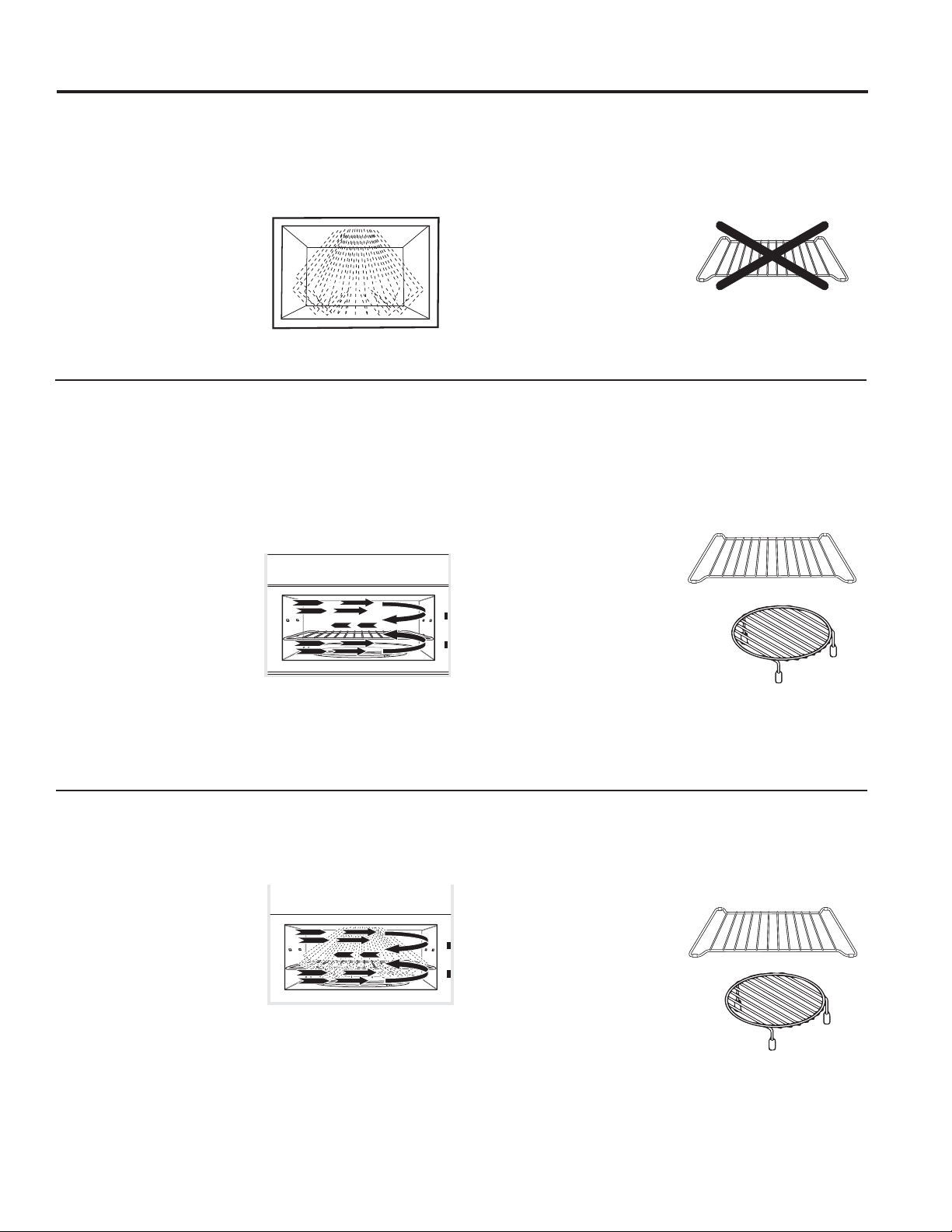
49-7000160 Rev. 1 9
Opciones
USO DE LA HORNO: Opciones
Cocción por microondas
Su horno usa energía de microondas para cocinar según un período de tiempo predeterminado, según el peso o de forma
automática por medio de un sensor.
El microondas por sensor funciona detectando el incremento de humedad liberada durante la cocción. El horno ajusta de forma
automática el tiempo de cocción a varios tipos y cantidades de alimentos.
Método de cocción
La energía microondas se
distribuye de forma pareja en
todo el horno para que la comida
se cocine de forma rápida y
completa.
Fuente de calor
Energía microondas.
Conducción del calor
Calor producido dentro de
la comida por penetración
instantánea de energía.
Beneficios
Rápida, alta eficacia de cocción.
El horno y sus alrededores no se
calientan. Fácil de limpiar.
Convection Baking y Convection Roasting y Air Fry (Freír con Aire)
Durante el horneado o dorado, se utiliza un elemento para calentar que eleva la temperatura del aire dentro del
horno. Se podrá programar cualquier temperatura del horno entre 225°F y 425°F. Un ventilador hacer circular este
aire caliente hacia todo el horno, sobre y alrededor de la comida, haciendo que la parte exterior se dore y que la
parte interior sea rica y húmeda. Esta circulación de aire caliente se llama convección.
Debido a que el aire caliente se mueve de forma constante, evitando que se desarrolle una capa de aire más frío
alrededor de la comida, algunas comidas se cocinan más rápido que en cocciones con
hornos normales.
Método de Cocción
Alrededor de la comida
circula aire caliente para
producir exteriores dorados y
conservar los jugos.
Fuente de Calor
&LUFXODFLyQGH$LUH&DOLHQWH&RQYHFFLyQ
Conducción de Calor
Calor conducido desde la
parte externa de la comida a la
parte interna.
Beneficios
Ayuda en el dorado y a
conservar el sabor. Cocina
las comidas de forma más
rápida que los hornos
regulares.
Combination Fast Cooking (Combinación de cocina rápida)t
(OKRUQRWDPELpQRIUHFHODRSFLyQGH&RPELQDWLRQ)DVW&RRN&RFFLyQ5iSLGD&RPELQDGDXWLOL]DQGRHQHUJtDGH
microondas junto con la cocción por convección. Puede cocinar con velocidad y precisión, mientras logra que su
comida quede perfectamente dorada y crujiente.
Método de Cocción
La energía de microondas
y el calor de la convección
se combinan para cocinar
las comidas en hasta un
25% más rápida que los
hornos comunes, al dorar y
conservar los jugos.
Fuente de Calor
Energía de microondas y aire caliente circulante.
Conducción de Calor
La comida se calienta a
partir de energía instantánea
de la penetración del calor
conducido desde afuera de la
comida.
Beneficios
Tiempo de cocción acortado
de energía de microondas,
además de dejar la comida
dorada y crujiente a través
del calor de la convección.
Siempre use el estante al
hornear. Para obtener mejores
resultados, use una repisa en la
posición inferior.
or
Siempre use la repisa al usar
)DVW%DNH+RUQHDGR5iSLGR
Para obtener mejores resultados,
use una repisa en la posición
inferior.
or
No utilice los estantes cuando
cocine por microondas.

10 49-7000160 Rev. 1
Funciones de microondas por tiempo y automático
USO DE LA HORNO: Funciones de microondas por tiempo y automático
Cómo usar el dial
Podrá hacer selecciones en el horno girando el dial y
presionando para ingresar la selección.
Usted también puede presionar el dial en vez de botón Start/
Pause para una programación más rápida del horno.
Cook Time (cocción por tiempo)
QRXWLOL]DUORVHVWDQWHVFXDQGRFRFLQDSRUPLFURRQGDV
Cook Time I (cocción por tiempo I)
Le permite usar el microondas por un período de
entre 15 segundos y 99 minutos.
El Nivel de potencia 10 (alto) (power level 10
[High]) se selecciona de forma automática pero
puede cambiarlo para mayor flexibilidad.
1. Presione el botón Cook Time (cocción por
tiempo).
2. Gire el dial para ajustar el tiempo de cocción y
presione el dial para seleccionar
3. Cambie el nivel de potencia si no quiere que
FRFLQHDWRGDSRWHQFLD3UHVLRQH3RZHU/HYHO
Gire el dial para buscar. Presione el dial para
VHOHFFLRQDU
4. Presione el dial o el botón Start/Pause para
empezar a cocinar.
Cuando use Cook Time puede abrir la puerta para
revisar la comida. Cierre la puerta y presione el dial
o Start/Pause para seguir cocinando.
NOTA: El tiempo de cocción puede cambiarse
en cualquier momento mientras se cocina
girando el dial. Usted puede también cambiar
el nivel de energía presionando el botón de
energía Power Level.
Cook Time II (cocción por tiempo II)
Le permite cambiar los niveles de potencia de forma
automática mientras cocina. Se hace de la siguiente
forma:
3UHVLRQHHOERWyQ&RRN7LPHFRFFLyQSRU
WLHPSR
2. Gire el dial para ajustar el primer tiempo de
cocción y presione el dial para seleccionar.
3. Cambie el nivel de potencia si no quiere que
FRFLQHDWRGDSRWHQFLD3UHVLRQH3RZHU/HYHO
Gire el dial para seleccionar. Presione el dial para
VHOHFFLRQDU
3UHVLRQHHOERWyQ&RRN7LPHFRFFLyQSRUWLHPSR
de nuevo.
5. Gire el dial para ajustar el segundo tiempo de
cocción y presione el dial para seleccionar.
6. Cambie el nivel de potencia si no quiere que
FRFLQHDWRGDSRWHQFLD3UHVLRQH3RZHU/HYHO
Gire el dial para seleccionar. Presione el dial para
VHOHFFLRQDU
7. Presione el el dial o el botón Start/Pause para
empezar a cocinar.
Cuando acaba Cook Time I, Cook Time II empieza
a funcionar.
NOTA: El tiempo de cocción puede cambiarse en
cualquier momento mientras se cocina girandoel
dial. Usted puede también cambiar el nivel de
energía presionando el botón de energía Power
Level.
Add 30 Sec (Agregar 30 Segundos)
Esta es la forma rápida de ajustar y empezar a cocinar en
bloques de 30 segundos cada vez que se aprieta el botón.
Botón para Agregar 30 Segundos. El tiempo de cocción puede
cambiarse en cualquier momento mientras se cocina girando
el dial.
El nivel de potencia estará automáticamente seleccionado a 10
y el horno empezará inmediatamente.
El nivel de potencia puede cambiarse mientras el tiempo se
va agotando. Presione el botón Power gire el dial y presiónelo
para seleccionar.
My Cycle

49-7000160 Rev. 1 11
Funciones de microondas por tiempo y automático
USO DE LA HORNO: Funciones de microondas por tiempo y automático
Ŷ6DTXHODFDUQHGHOSDTXHWH\FROyTXHODHQXQ
plato apto para microondas.
3UHVLRQHHOERWyQ'()5267'HVFRQJHODUXQD
vez.
2. Gire el dial hasta alcanzar el peso de la comida
usando la Tabla de Conversión a la derecha.
3RUHMHPSORSRQJDHOGLDODSDUDOLEUDV
RQ]DV3UHVLRQHHOGLDOSDUDVHOHFFLRQDU
3. Presione el botón Start/Pause para empezar a
descongelar.
4. De la vuelta a la comida si aparece el mensaje
TURN FOOD OVER.
Ŷ5HWLUHODFDUGHGHVFRQJHODGDRFXEUDODViUHDV
calientes con pequeños recortes de papel de
aluminio.
Ŷ8QDYH]GHVFRQJHODGDVODPD\RUtDGHFDUQHV
necesitan 5 minutos en reposo para que acaben
de descongelarse.
Tabla de conversión
Si el peso de la comida se calcula en libras
y onzas, las onzas deberán convertirse a
GpFLPDVGHOLEUD
Use Time Defrost (Descongelación por Tiempo)
para descongelar durante un período de tiempo
seleccionado.
1. Presione el botón DEFROST (Descongelar) dos
veces.
2. Gire el dial para seleccionar el tiempo que
desee. Presione el dial para ingresar.
3. Presione el botón Start/Pause para empezar a
descongelar.
4. De la vuelta a la comida si aparece el mensaje
TURN FOOD OVER.
Puede cambiar el tiempo de descongelación en
cualquier momento durante la misma girando el
dial.
El nivel de potencia se configura de forma
automática en 3, pero se puede cambiar. Puede
descongelar productos pequeños de forma
rápida, incrementando el nivel de potencia luego
GHLQJUHVDUHOWLHPSR3RZHUOHYHO1LYHOGH
SRWHQFLDUHGXFHHOWLHPSRGHGHVFRQJHODFLyQ
WRWDODSUR[LPDGDPHQWHDODPLWDGSRZHUOHYHO
QLYHOGHSRWHQFLDUHGXFHHOWLHPSRWRWDO
a aproximadamente 1/3. Sin embargo, será
necesario prestar mayor atención a la comida que
lo usual.
Es posible que se escuchen ruidos de golpes
secos durante la descongelación. Esto es normal
cuando el horno no está funcionando en el nivel de
SRWHQFLD+LJK$OWR
Consejos para la Descongelación
Ŷ/DVFRPLGDVFRQJHODGDVHQSDSHORSOiVWLFRVH
podrán descongelar en el paquete. Los paquetes
cerrados se deberán cortar, perforar o ventilar
LUEGO de que la comida se haya descongelado
parcialmente. Los envases de plástico se
deberán descubrir en forma parcial.
Ŷ/DVFRPLGDVGHWDPDxRIDPLOLDU
preempaquetadas se podrán descongelar y
cocinar en el horno microondas. Si la comida se
encuentra en el envase de papel de aluminio,
traslade la misma a un plato para uso seguro en
el horno microondas.
Ŷ/DVFRPLGDVTXHVHHFKDQDSHUGHUFRQIDFLOLGDG
no se deberán dejar reposar por más de una
hora luego de la descongelación. La temperatura
ambiente estimula el desarrollo de bacterias
nocivas.
Ŷ8QDYH]GHVFRQJHODGDODFRPLGDGHEHUtDHVWDU
fría pero ablandada en todas las áreas. Si aún
está un poco congelada, vuelva a colocarla en
el horno microondas muy brevemente, o deje
reposar la misma por unos pocos minutos.
Peso de la
comida en onzas
Introduzca el peso de
la comida (décimas
de libra)
1–2 .1
3.2
4–5 .3
6–7 .4
8.5
9–10 .6
11 .7
12–13 .8
14–15 .9
Weight Defrost (Descongelación por Peso)
QRXWLOL]DUORVHVWDQWHVFXDQGRFRFLQDSRUPLFURRQGDV
Weight Defrost ajusta de forma automática los tiempos de descongelación y los niveles de potencia para producir resultados de
descongelación parejos para carnes, aves y pescado que pesen hasta una libra.
Time Defrost (Descongelación por Tiempo)
QRXWLOL]DUORVHVWDQWHVFXDQGRFRFLQDSRUPLFURRQGDV
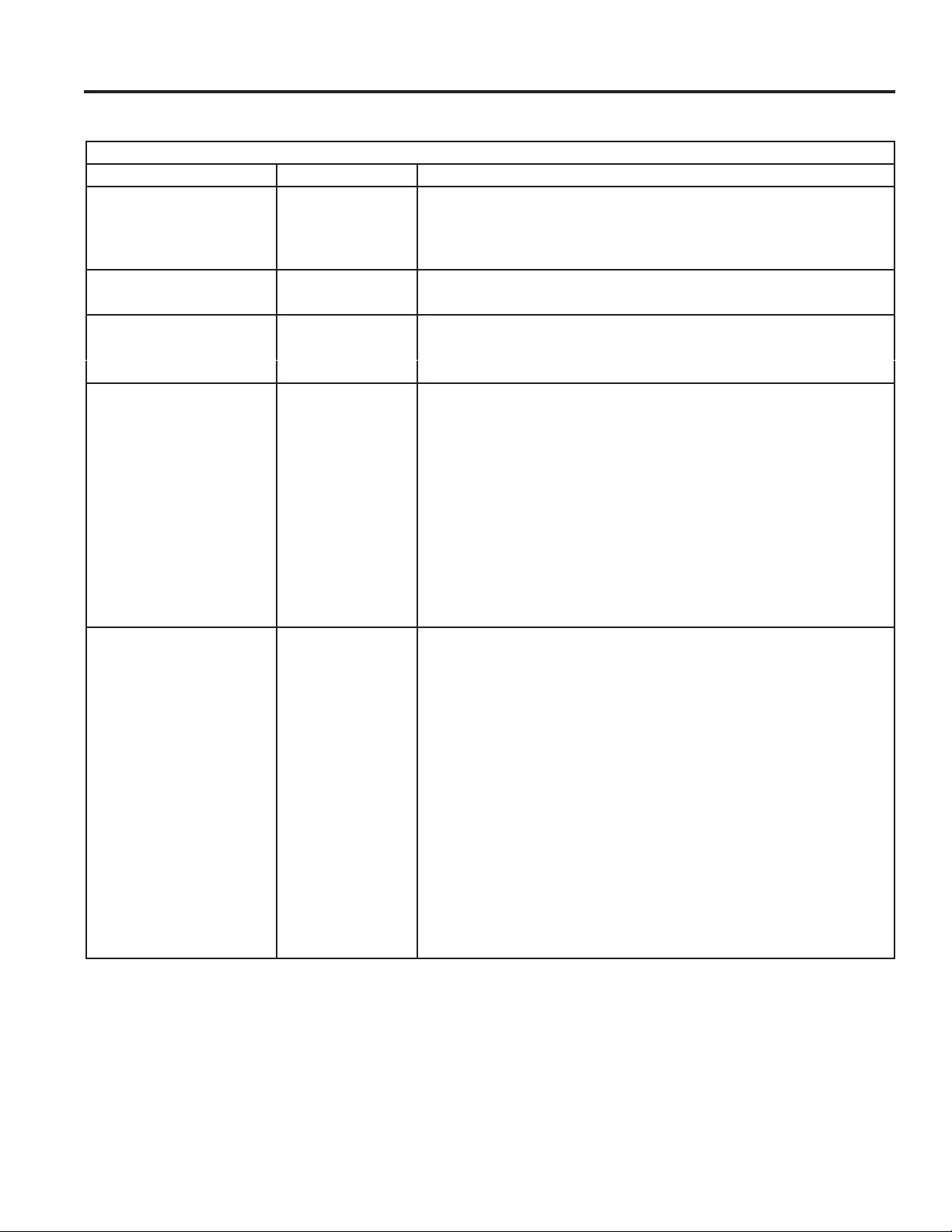
12 49-7000160 Rev. 1
Funciones de microondas por tiempo y automático
Guía de Descongelación
Comida Tiempo Comentarios
Panes, Tortas
Panes, buñuelos o
SDQHFLOORVWUR]R
1/4 min.
3DVWHOLWRVR]DSUR[ 2 a 4 min. Reordene luego de la mitad del tiempo.
Pescado y Mariscos
/RPRVFRQJHODGRVOE 6 a 9 min.
Fruta
Bolsa de plástico—1 o 2 1 a 5 min.
SDTXHWHGHR]
Carne
7RFLQROE 2 a 5 min.
Coloque el paquete cerrado en el horno. Deje reposar por 5 minutos luego
de la descongelación.
Salchichas Tipo Frankfurt
OE
2 a 5 min. Coloque el paquete cerrado en el horno. Cocine en el horno microondas
hasta que las salchichas tipo Frankfort se puedan separar. Deje reposar
por 5 minutos, de ser necesario, para completar la descongelación.
&DUQHSLFDGDOE 4 a 6 min. Dé vuelta luego de la primera mitad de tiempo.
Asar: Bife, cordero, ternera,
cerdo
9 a 13 min. par lb. Use el nivel de potencia 10.
Bistecs, chuletas de cerdo y
cordero
4 a 8 min. par lb. Coloque la carne aún envuelta en el plato de cocción. Dé vuelta vuelta
luego de la primera mitad de tiempo y cubra las áreas calientes con papel
de aluminio. Luego de la segunda mitad de tiempo, separe los trozos con
un cuchillo de mesa. Espere hasta que se complete la descongelación.
Ave
3ROORSDULOODIUHLGRUDFRUWH
óDOLEUDV
14 a 20 min. Coloque el pollo envuelto en el plato. Desenvuelva y dé vuelta luego de
la primera mitad de tiempo. Luego de la segunda mitad de tiempo, separe
los trozos y coloque los mismos en un plato de cocción. Cocine en el
horno microondas entre 2 y 4 minutos más, si es necesario. Deje reposar
por unos pocos minutos para finalizar la descongelación.
3ROORHQWHURóDOEV 20 a 25 min. Coloque el pollo envuelto en el plato. Luego de la primera mitad de
tiempo, desenvuelva y dé vuelta el pollo. Cubra las partes calientes con
papel de aluminio. Para completar la descongelación, deje correr agua
fría en la cavidad hasta que se puedan retirar los menudos.
Gallina de cornualle 7 a 13 min. par lb. Coloque la gallina sin desenvolver en el horno con la pechuga hacia
arriba. Dé vuelta luego de la primera mitad de tiempo. Deje correr agua
por la cavidad hasta que se puedan quitar los menudos.
3HFKXJDGHSDYRD
OLEUDV
3 a 8 min. par lb. Coloque la pechuga sin desenvolver en el plato para uso seguro en horno
microondas con la pechuga hacia abajo. Luego de la primera mitad de
tiempo, dé vuelta la pechuga hacia arriba y cubra las partes calientes
con papel de aluminio. Descongele durante la segunda mitad del tiempo.
Deje reposar entre 1 y 2 horas en el refrigerador para completar la
descongelación.
USO DE LA HORNO: Funciones de microondas por tiempo y automático
49-7000160 Rev. 1 13
USO DE LA HORNO: Funciones de microondas por tiempo y automático
1. Primero, siga las instrucciones para el
tiempo de cocción (Cook Time), el tiempo
de descongelación (Time Defrost), o
Combination Fast Cook.
2. Presione el botón Power Level.
3. Gire el dial, en el sentido de las agujas del
reloj, para aumentar y en el sentido contrario
para disminuir la potencia. Presione el dial
para seleccionar.
4. Presione el botón Start/Pause para empezar
a cocinar.
Los niveles de potencia variables añaden
flexibilidad a la cocina con microondas. Los
niveles de potencia del horno microondas
pueden compararse con las unidades de la
HQFLPHUDIRJRQHVHQXQDFRFLQD&DGDQLYHO
de potencia le proporciona energía microondas
durante cierto porcentaje del tiempo. Nivel
de potencia 7SRZHUOHYHO7HVHQHUJtD
microondas al 70% del tiempo. Nivel de
potencia 3SRZHUOHYHO3HVHQHUJtDDO
del tiempo. Normalmente se cocinará en Alto
QLYHOGHSRWHQFLD10+LJKSRZHUOHYHO10
TXHSURSRUFLRQDXQDSRWHQFLDGHO3RZHU
level 10 le permitirá cocinar más rápido, pero la
comida, posiblemente, necesitará que la agite,
gire o dé la vuelta más a menudo.
Un nivel inferior cocinará la comida de forma
más pareja y no necesitará que la agite, gire
o dé la vuelta tanto. Algunas comidas pueden
tener mejor sabor, textura o aspecto si se
usa un nivel inferior. Use un nivel de potencia
inferior cuando esté cocinando comidas que
tengan tendencia a hervir, como las papas
gratinadas.
/RVSHUtRGRVGHGHVFDQVRFXDQGRVHDFDEDHO
FLFORGHODHQHUJtDPLFURRQGDVOHGDQWLHPSR
a la comida a “igualarse” o transferir el calor a
su interior. Se muestra un ejemplo de esto con
HOFLFORGHGHVFRQJHODFLyQSRZHUOHYHO6LOD
energía microondas no funcionara en ciclos, la
parte externa de la comida se cocinaría antes
de que el interior se descongelara.
Estos son algunos ejemplos de aplicaciones
para diferentes niveles de potencia:
Alta 10: Pescado, bacon, verduras, calentar
líquidos.
Media alta 7: Cocción suave de carne y aves,
sirve para cocinar guisos y para recalentar.
Media 5: Cocina lenta y tierna para estofados o
guisos y para partes menos tiernas de carne.
Baja 2 o 3: Para descongelar, cocer a “fuego”
lento, para salsas delicadas.
Algo caliente 1: Mantener la comida caliente,
ablandar la mantequilla.
Power Level
El nivel de potencia puede introducirse o cambiarse de forma inmediata tras introducir el tiempo de cocción (Cook
Time), el tiempo de descongelación (Time Defrost), o Combination Fast Cook. El nivel de potencia también puede
cambiarse durante la cuenta atrás.
Funciones de microondas por tiempo y automático

14 49-7000160 Rev. 1
USO DE LA HORNO: Terminología de microondas
Terminología de microondas
Término Definición
Arco eléctrico El arco eléctrico es lo que, en la terminología de los microondas, describe las chispas en el horno. El arco
eléctrico se produce cuando:
ŶHOHVWDQWHGHPHWDOVHKDLQVWDODGRGHIRUPDLQFRUUHFWD\HVWiWRFDQGRODVSDUHGHVGHOPLFURRQGDV
Ŷhay un metal o papel de aluminio tocando el lateral del horno.
ŶKD\SDSHOGHDOXPLQLRQRHVWiHQYROYLHQGRELHQODFRPLGDKD\ERUGHVGREODGRVKDFLDDUULEDTXHDFW~DQFRPR
DQWHQDV
Ŷhay algún metal, como cintas de cierre con metal, pinchos de pollo, o platos con decoración de oro.
Ŷhay papel toalla reciclado que contiene pequeñas piezas de metal.
ŶHOVRSRUWHGHODURGHOSODWRJLUDWRULRHVWiLQVWDODGRLQFRUUHFWDPHQWH
Cubierto Las cubiertas mantienen la humedad dentro, permitiendo un calentamiento más parejo y reduciendo el tiempo de
cocción. Cuando se agujerea el envoltorio de plástico o se cubre con papel de cera se permite la salida del vapor.
Resguardar En un horno convencional, se tapan o resguardan las pechugas de pollo o las comidas horneadas para que no
se doren demasiado. Al usar el microondas, use pequeñas cintas de papel de aluminio para cubrir partes finas,
como las puntas de las alas en las aves, que podrían cocinarse antes que las partes mayores.
Tiempo de reposo Cuando cocina en hornos regulares, las comidas como los asados o pasteles se dejan reposar para que acaben
de cocinarse o se asienten. El tiempo de reposo es especialmente importante al cocinar con microondas. Tenga
en cuenta que un pastel cocido en horno microondas no se coloca en un estante de enfriamiento.
Abrir respiraderos Una vez que haya cubierto un plato con film plástico, deberá abrir un orificio desplegando una esquina para que
pueda escapar el vapor.
Características de microondas por sensor
Sensor de humedad
Qué sucede cuando usa las funciones de sensores:
Las funciones de Sensor detectan la mayor humedad
liberada durante la cocción.
El horno ajusta automáticamente el tiempo de cocción a
los diferentes tipos y cantidades de comida.
No utilice las funciones de Sensor dos veces
consecutivas en la misma porción de comida. Puede
resultar en que los alimentos se cocinen en exceso o se
quemen. Si la comida no se ha cocinado por completo
después de la cuenta regresiva, use la función Cook
Time para tiempo de cocción adicional.
NOTA: las funciones de sensor no estarán disponibles
cuando el horno está caliente. Si se pulsa uno de los
botones de cocinar por sensor cuando la temperatura
dentro del horno es superior a los 200ºF, aparecerá el
mensaje “OVEN TOO HOT FOR SENSOR COOKING.
86,1*$/7(51$7(0(7+2'´+RUQRGHPDVLDGR
caliente para cocinar por sensor. Se está utilizando
RWURPpWRGR(OKRUQRFDPELDUiDXWRPiWLFDPHQWHD
ODIXQFLyQ³FRRNE\WLPH´FRFLQDUSRUWLHPSRVLJDODV
LQGLFDFLRQHVGHODSDQWDOODRXQDYH]TXHHOKRUQR
esté lo suficientemente frío, las funciones del sensor se
ejecutarán de forma normal.
Ŷ(VHVHQFLDOXVDUORV
recipientes y las tapas
apropiados para cocinar por
sensor de forma óptima.
Ŷ8VHVLHPSUHUHFLSLHQWHV
aptos para microondas y
cúbralos con tapas o film de
plástico agujereado. No use
nunca recipientes cerrados
por completo—pueden
hacer que el vapor no salga
y causar que la comida se cocine
demasiado.
Ŷ$VHJ~UHVHTXHWDQWRHO
exterior de los recipientes
como el interior del
horno microondas estén
secos antes de poner la
comida en el horno. Las
acumulaciones de humedad
que se convierten en vapor
pueden engañar al sensor.
Seque los platos para que no
engañen al sensor.
Cubierto
Agujereado

49-7000160 Rev. 1 15
USO DE LA HORNO: Características de microondas por sensor
Cook (cocinar) QRXWLOL]DUORVHVWDQWHVFXDQGRFRFLQDSRUPLFURRQGDV
Dado que la mayoría de los recipientes
deben estar cubiertos durante Cook,
esta función trabaja mejor con comidas
que quiera hacer al vapor o en las que
quiera mantener la humedad.
NOTA: No se recomienda el uso del
estante de metal con Cook.
Comidas recomendadas
Con esta función se pueden
cocinar una gran variedad de
comidas incluyendo carnes,
pescado y vegetales.
Comidas no recomendadas
No deberían cocinarse usando
esta función aquellas comidas que
deban cocinarse descubiertas,
aquellas que requieran atención
constante, aquellas que requieran
añadir ingredientes durante su
cocción y comidas que deban
tener apariencia seca o con una
superficie crujiente.
Es mejor cocinar todas estas usando Cook Time.
Características de microondas por sensor
Cocción al Vapor
VAPOR CON TEMPORIZADOR* O VAPOR
CON SENSOR**
Para obtener mejores resultados, use un
bol para vapor o fuego lento. Agregue 2
FXFKDUDVPOGHDJXDDOFRFLQDUYHUGXUDVDOYDSRU
1. Presione la tecla Steam Cook (Cocción al Vapor) una vez
para acceder a Timed Steam (Vapor con Temporizador)
RGRVYHFHVSDUDODFRFFLyQFRQ6HQVRU6WHDP9DSRUFRQ
6HQVRU
2. Gire el dial para seleccionar el tipo de comida. Presione el
dial para ingresar.
3. Presione el dial para seleccionar la cantidad, tamaño
\RILQDOL]DFLyQVLHVQHFHVDULRHOKRUQRGDUiXQDYLVR
Presione el dial luego de cada selección.
4. Inserte comida y cierre la puerta.
7LPHG6WHDP9DSRUSRU7LHPSRHVXQDFRFFLyQ
preconfigurada por tiempo.
6HQVRU6WHDP9DSRUFRQ6HQVRUHVXQWLHPSRYDULDEOH
basado en un sensor.
Selección del Menú para la Cocción al Vapor con
Sensor**
Para obtener mejores resultados, use entre 1 y 4 tazas.
Ɣ(VSiUUDJRV Ɣ5HSROOLWRVGH%UXVHODV
Ɣ=DQDKRULDV Ɣ&ROLIORU
Ɣ3DSDV Ɣ$UUR]
Ɣ=DSDOOR Ɣ=XFFKLQL
Selección del Menú para la Cocción al Vapor con Sensor*
Comida Cantidad Tiempo
Espárragos 1 taza 3:40
2 tazas 4:40
3 tazas 5:40
Brócoli 1 taza 3:30
2 tazas 4:15
3 tazas 5:00
Repollitos de Bruselas 1 taza 3:40
2 tazas 4:30
3 tazas 5:30
Comida Cantidad Tiempo
=DQDKRULDV 1 taza 3:50
2 tazas 4:50
3 tazas 5:40
Coliflor 1 taza 3:30
2 tazas 4:40
3 tazas 5:50
Pechuga de Pollo
WUR]RDRQ]DV 6:00
DRQ]DV 7:00
WUR]RVDRQ]DV 9:00
DRQ]DV 10:00
Pescado, 1 pieza Filete fino – ½” 4:30
Filete medio – 1” 5:00
Filete ancho – 1 ½” 5:30
Pescado, 2 piezas Filete fino – ½” 5:30
Filete medio – 1” 6:00
Filete ancho – 1 ½” 6:30
Frijoles Verdes 1 taza 3:30
2 tazas 4:30
3 tazas 5:30
Papas 1 ea 7:00
2 ea 10:00
3 ea 13:00
4XLQRD 1 taza 20:00
Arroz 1 taza 24:00
Vieiras –
Vieiras de la Bahía
6 a 10 onzas 4:20
10 a 16 onzas 7:00
Vieiras de Mar 6 a 10 onzas 5:00
10 a 16 onzas 8:00
Camarones ½ libra 5:00
1 libra 7:00
=DSDOOR 1 taza 4:00
2 tazas 5:30
3 tazas 7:00
=XFFKLQL 1 taza 4:00
2 tazas 5:00
3 tazas 6:00

16 49-7000160 Rev. 1
USO DE LA HORNO: Características de microondas por sensor
Características de microondas por sensor
Popcorn (rosetas o palomitas de maíz) QRXWLOL]DUORVHVWDQWHVFXDQGRFRFLQDSRUPLFURRQGDV
Para usar la función Popcorn:
1. Siga las indicaciones del paquete, use Cook Time si el
paquete pesa menos de 1,5 onzas o es mayor de 3,5 onzas.
Sitúe el paquete de rosetas en el centro del plato giratorio.
2. Presione el botón Popcorn. El horno empieza a funcionar
inmediatamente.
Si abre la puerta mientras aparece en pantalla POPCORN
6(1625VHQVRUGHSDORPLWDVDSDUHFHUiXQPHQVDMHGH
error. Cierre la puerta, pulse Cancel/Off FDQFHODUGHVDFWLYDU\
comience de nuevo.
Si la comida no se ha cocinado por completo después de la
cuenta regresiva, use la función Cook Time para tiempo de
cocción adicional.
Cómo ajustar la configuración automática para
palomitas de maíz para un mayor o menor tiempo de
cocción
Si se da cuenta de que en la bolsa de la marca de palomitas
que usa queda mucho maíz sin reventar o lo cuece demasiado,
puede añadir o substraer 20–30 segundos al tiempo automático
de cocción.
Para restar o sumar tiempo a la cocción con sensor, gire el dial
cuando el tiempo aparezca.
Use sólo con palomitas o rosetas
preempaquetadas para microondas
que pesen de 1,5 a 3,5 onzas.
NOTA: No utilice esta función dos
veces consecutivas en la misma
porción de comida. Puede resultar
en que los alimentos se cocinen en
exceso o se quemen.
Reheat (recalentar) QRXWLOL]DUORVHVWDQWHVFXDQGRFRFLQDSRUPLFURRQGDV
La función de recalentar (Reheat) vuelve a calentar raciones
de comidas previamente cocinadas o un plato de sobras.
1. Coloque la taza de líquido o comida cubierta en el horno.
3UHVLRQH5HKHDW5HFDOHQWDU\HOLMDHOWLSRGHFRPLGD
2. El horno da una señal cuando advierte que hay vapor y
empieza a mostrarse hacia atrás el tiempo que queda.
No abra la puerta del horno hasta que el tiempo en el horno
aparezca en cuenta atrás. Si se abre la puerta, ciérrela y
presione Start/Pause inmediatamente.
Una vez que haya retirado la comida del horno, remuévala,
si es posible, para igualar la temperatura. Las comidas
recalentadas pueden tener grandes diferencias de
temperatura. Algunas áreas pueden estar extremadamente
calientes.
Si la comida no está suficientemente caliente después de
la cuenta regresiva, use Cook Time tiempo adicional para
recalentar.
No está recomendado el uso de reheat para algunas
comidas
Es mejor usar Cook Time en estos casos:
Ŷ Productos de pan.
Ŷ Comidas que deben recalentarse sin cubrir.
Ŷ Alimentos que necesiten removerse o rotarse.
Ŷ Comidas que necesiten tener un aspecto seco o una
superficie crujiente tras ser recalentados.
Beverage (bebida) QRXWLOL]DUORVHVWDQWHVFXDQGRFRFLQDSRUPLFURRQGDV
La función Beverage%HELGDFDOLHQWDEHELGDVGHHQWUH\
onzas.
3UHVLRQHHOERWyQ%HYHUDJH%HELGD(OKRUQRVHLQLFLDGH
inmediato.
Las bebidas calentadas con la función Beverage pueden estar
muy calientes. Saque el recipiente con cuidado.
NOTA: No utilice esta función dos veces
consecutivas en la misma porción de
comida. Puede resultar en que los alimentos
se cocinen en exceso o se quemen.

49-7000160 Rev. 1 17
USO DE LA HORNO: Características de microondas por sensor
Características de microondas por sensor
Cook (cocinar) QRXWLOL]DUORVHVWDQWHVFXDQGRFRFLQDSRUPLFURRQGDV
1. Ponga la comida cubierta en el horno y cierre la puerta.
3XOVHHOERWyQ&RRNFRFFLyQ$SDUHFHHQSDQWDOODENTER
FOOD TYPELQWURGX]FDHOWLSRGHFRPLGD
2. Gire el dial al tipo de comida deseado. Presione para
seleccionar
Ver la Tabla de Tipos de Comidas con Sensor de más abajo
para tipos específicos de comidas e instrucciones.
El horno empieza a funcionar inmediatamente.
NOTA: Si la puerta se abre mientras se está seleccionando el
control, ciérrela y presione el botón Start/Pause para empezar
a cocinar.
Si la comida no se ha cocinado por completo después de la
cuenta regresiva, use la función Cook Time para tiempo de
cocción adicional.
No abra la puerta del horno antes de que
el tiempo de cuenta atrás aparezca en la pantalla—el vapor
que se escapa del horno puede afectar la cocción. Si se abre la
puerta, ciérrela y presione Start/Pause inmediatamente.
6LVHOHFFLRQDFDUQHSLFDGDJURXQGPHDWHOKRUQRSXHGH
que le indique que le extraiga el líquido y la remueva. Abra la
puerta, seque la carne y cierre la puerta. Presione el botón
Start/Pause, si fuera necesario, para seguir con la cocción.
Consejos de cocción
Ŷ&XDQGRHOKRUQRKDFHXQDVHxDO\DSDUHFHHOWLHPSRKDFLD
atrás, la puerta puede abrirse para remover, girar o dar la
vuelta a la comida. Cierre la puerta y presione Start/Pause
para seguir cocinando.
Ŷ$MXVWHODFDQWLGDGGHFRPLGDDOWDPDxRGHOUHFLSLHQWH/OHQH
los recipientes por lo menos hasta la mitad.
Ŷ$VHJ~UHVHGHTXHODSDUWHH[WHULRUGHOUHFLSLHQWH\HOLQWHULRU
del horno estén secos.
Ŷ8QDYH]FRPSOHWDGRHOFLFORGH&RFFLyQVLODFRPLGD
necesita cocerse más, vuélvala a poner en el horno y use
Cook Time para acabar de cocinarla.
NOTA: No utilice esta función
dos veces consecutivas en la
misma porción de comida. Puede
resultar en que los alimentos se
cocinen en exceso o se quemen.
Tabla de tipos de comidas con sensor
Tipo de comida Raciones Tamaños de
las raciones
Comentarios
Piezas de pollo Con Huesos
Deshuesado
2 a 8 piezas Use un plato ovalado, cuadrado o redondo. Cubra con envoltura
plástica ventilada.
Pescado — 4 a 16 oz. Use un plato ovalado, cuadrado o redondo. Cúbralo con un film plástico
agujereado.
Carne picada
7HUQHUD3XHUFR
3DYR
— 8 a 32 oz. Use plato de guisos redondo. Reparta la carne en el plato. Cúbralo con
un papel de cera o un film plástico agujereado.
Papas — 8 a 32 oz. Rompa la piel con un tenedor. Arréglelas en un patrón en forma de
estrella al centro del plato giratorio.
Vegetales frescos Frescos 4 a 16 oz. Use cazuela de guisos para microondas, tazón o bol. Añada dos
cucharadas de agua por cada ración. Cúbralo con una tapa o un film
plástico agujereado.
Vegetales congelados Congelados 4 a 16 oz. Use cazuela de guisos para microondas, tazón o bol. Siga las
instrucciones del paquete en cuanto al agua a añadir. Cúbralo con una
tapa o un film plástico agujereado.
Vegetales enlatados Enlatados 4 a 16 oz. Use cazuela de guisos para microondas, tazón o bol. Cúbralo con una
tapa o un film plástico agujereado.

18 49-7000160 Rev. 1
USO DE LA HORNO: Funciones de horneado y asado
Funciones de horneado y asado
El proceso de horneado o asado utiliza un elemento de
calefacción para aumentar el aire del interior del horno. Puede
establecerse cualquier temperatura de horno entre 225ºF y
450ºF. Un ventilador hace circular ligeramente el aire por todo
el horno, por encima y alrededor de la comida, produciendo que
se dore por fuera y que los interiores sean ricos y jugosos. Esta
circulación de aire caliente es llamada convección.
Debido a que el aire se mantiene en constante movimiento,
al no permitirse la formación de una capa de aire más frío
alrededor de la comida, algunas comidas se cocinan más
rápidamente que en un horno de cocina normal.
Para conseguir mejores resultados...
Utilice un estante en la posición inferior y deje una
brecha de al menos una pulgada entre el plato de
cocción y los laterales del horno. Para cocción a dos
niveles exclusivamente, utilice ambos estantes.
De ser possible, use el estante circular. Si la comida es
GHPDVLDGRODUJDFRPRSDUDGDUODYXHOWDFD]XHODVODVDJQDV
HWFRGHPDVLDGRDOWDVFRPRSDUDFDEHUDVDGRVHWFOH
recomendamos usar el estante rectangular en la posición baja.
El estante se necesita para la buena circulación del aire y para
dorar.
Vea la sección de Consejos de Utensilios de Cocina para
información sobre utensilios recomendados.
Hornear por Convección o Dorar por Convección con la función Precalentar
1. Presione el botón Convection Bake o Convection Roast.
2. Gire el dial para ajustar el tiempo del horno y presiónelo
para seleccionar. No introduzca el tiempo de horneado aún.
(OWLHPSRGHFRFFLyQVHLQWURGXFLUiPiVDGHODQWHXQDYH]
TXHHOKRUQRVHKD\DUHFDOHQWDGR&RQVXOWHODVHFFLyQ
de Horneado por Convección en Espacio Lateral a
continuación.
3. Presione el botón Start/Pause para empezar a precalentar.
4. El horno dará una señal cuando esté recalentado. Si no abre
la puerta en menos de una hora, el horno se apagará de
forma automática.
5. Abra la puerta del horno y, con cuidado, introduzca la comida
en el mismo.
6. Cierre la puerta del horno. Gire el dial para ajustar el tiempo
de cocción y presione Start/Pause para empezar a cocinar.
7. Cuando se acabe de cocinar, el horno dará una señal y se
apagará.
NOTA: Podrá cambiar el tiempo de
cocción en cualquier momento durante la
cocción girando el dial.
Podrá cambiar la temperatura del horno
en cualquier momento durante la cocción
presionando el botón Power Level. Gire
el dial para fijar la temperatura del horno
y presione el dial para seleccionar.
Para ver el tiempo de cocción y la
temperatura del horno durante el tiempo
de cocinado, presione el botón Bake
+RUQHDU
Hornear por Convección o Convección sin la función Precalentar
1. Si la receta no requiere un precalentamiento, presione
HOERWyQ&RQYHFWLRQ%DNH+RUQHDUSRU&RQYHFFLyQR
&RQYHFWLRQ5RDVW'RUDUSRU&RQYHFFLyQ&RQVXOWHOD
sección de Conversión con Auto Recipe™ a continuación
2. Gire el dial para ajustar la temperatura del horno y presiónelo
para seleccionar.
3. Gire el dial para ajustar el tiempo de cocción y presiónelo
para seleccionar.
4. Presione el botón Start/Pause para poner el horno en
marcha.
NOTA: Podrá cambiar el tiempo de cocción en cualquier
momento durante la cocción girando el dial.
Podrá cambiar la temperatura del horno en cualquier momento
GXUDQWHODFRFFLyQSUHVLRQDQGRHOERWyQ3RZHU/HYHO*LUHHO
dial para fijar la temperatura del horno y presione el dial para
seleccionar.
Para ver el tiempo de cocción y la temperatura del horno
durante el tiempo de cocinado, presione el botón Convection
Bake.
OR
Hornear por Convección en Espacio Lateral
Al usar Convection Bake+RUQHDUSRU&RQYHFFLyQOD
función Convection Bake Offset +RUQHDUSRU&RQYHFFLyQ
/DWHUDOSRGUiDXWRPiWLFDPHQWHFRQYHUWLUWHPSHUDWXUDVGH
horneado regular ingresadas a temperaturas de horneado por
convección.
Cuando esta función se activa, el visor mostrará la leyenda
OFFSET ON
\ODWHPSHUDWXUDUHDOFRQYHUWLGDUHGXFLGD
Por ejemplo, si ingresa una temperatura regular de receta
de 350°F y oprime el botón Start/Pause, el visor mostrará la
temperatura convertida de 325°F.
Esta función se puede apagar en el menú de opciones
Settings. Consulte la sección Convection Bake Offset en la
sección Las otras funciónes.
NOTA: Si el horneado por convección y la función Convection
Bake Offset
+RUQHDUSRU&RQYHFFLyQ/DWHUDOVHDSDJDQ
reduzcan la temperatura del horno a 25ºF desde la receta, a fin
de evitar un dorado excesivo sobre los productos horneados.
Posición correcta del estante.
Posición incorrecta del estante.
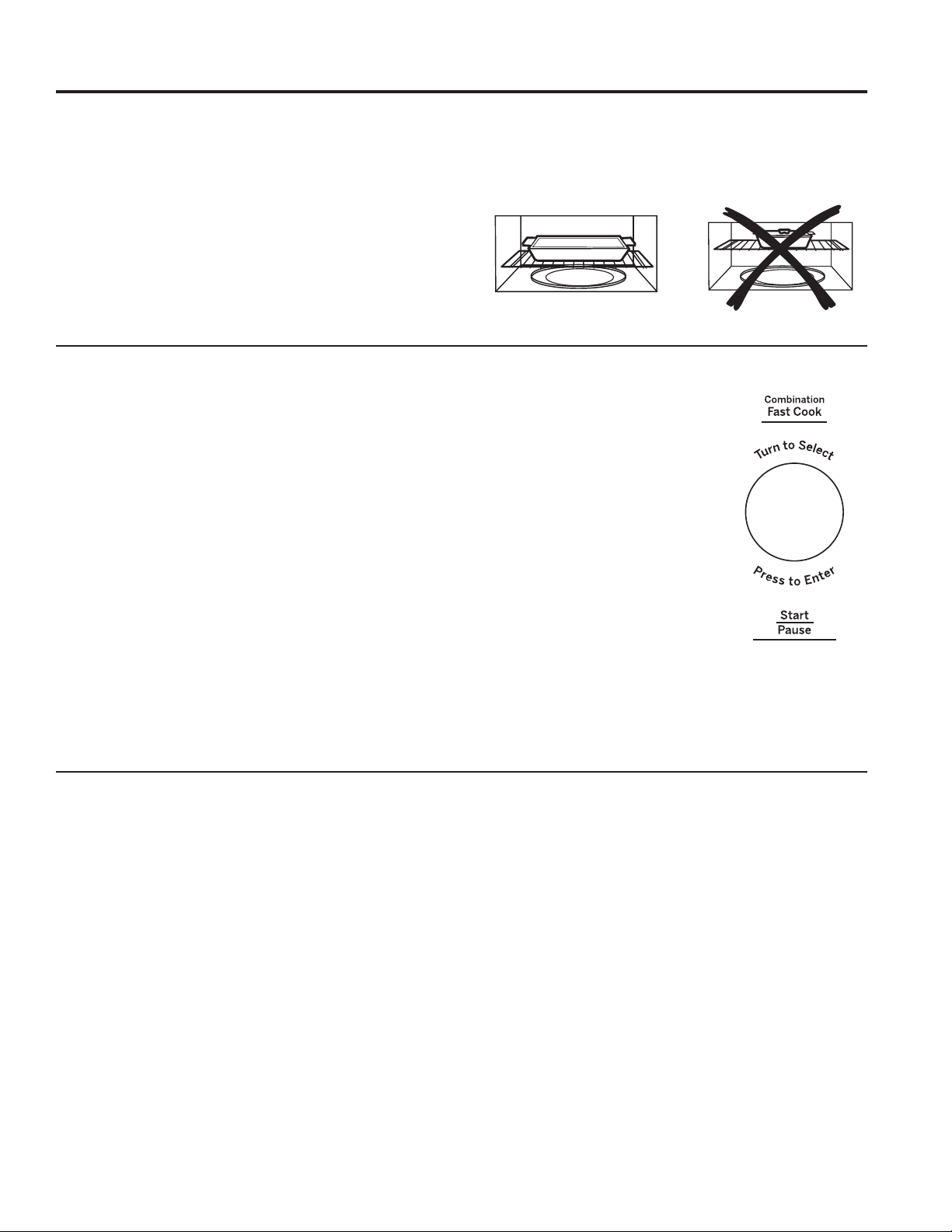
49-7000160 Rev. 1 19
USO DE LA HORNO: Función de cocción rápida
Función de cocción rápida
Horneo rápido sin precalentamiento
1. Si su receta no necesita precalentar el horno, presione el
botón Fast Cook.
2. Gire el dial para ajustar la temperatura del horno y
presiónelo para seleccionar.
3. Gire el dial para ajustar el tiempo de cocción y presiónelo
para seleccionar.
4. Presione el dial o el botón Start/Pause para poner el horno
en marcha.
NOTA: Podrá cambiar el tiempo de cocción en cualquier
momento durante la cocción girando el dial.
Podrá cambiar la temperatura del horno y el nivel de potencia
del microondas en cualquier momento durante la cocción
presionando el botón
Power Level. Gire el dial para fijar la
temperatura del horno y presione el dial para seleccionar.
Luego, gire el dial para fijar el nivel del microondas, de 1 hasta
3 y presione el dial para seleccionar. El nivel predeterminado
del horno es 3.
Para ver el tiempo de cocción y la temperatura del horno
durante el tiempo de cocción, presione el botón
Fast Cook.
NOTA:
Ŷ$OJXQDVUHFHWDVUHTXLHUHQHOSUHFDOHQWDPLHQWR
Ŷ5HYLVHODVHFFLyQGH&RQVHMRVGH8WHQVLOLRVGH&RFLQDSDUD
usar los utensilios correctos al usar Fast Cook.
Ŷ1RXVHXWHQVLOLRVPHWiOLFRVFRQFast Cook.
Ŷ9HUODSección Mejor Método de Cocción para determinar
cuáles alimentos son apropiados para cocinar usando Fast
Cook.
Fast Cook le ofrece las mejores funciones de la energía de
microondas con la cocina por convección. Las microondas
cocinan la comida de forma rápida y la circulación de
convección del aire caliente dora los alimentos de forma
maravillosa. Puede programarse cualquier temperatura entre
los 225°F y los 425°F.
Para conseguir mejores resultados...
Utilice un estante en la posición inferior y deje una brecha de
al menos una pulgada entre el plato de cocción y los laterales
del horno. Para cocción a dos niveles exclusivamente, utilice
ambos estantes
El estante se necesita para la buena circulación del aire y para
dorar.
Vea la sección de Consejos de Utensilios de Cocina para
información sobre utensilios recomendados.
Ver la Sección Mejor Método de Cocción para determinar
cuáles alimentos son apropiados para cocinar usando Fast
Cook.Cook.
Horneo rápido con precalentamiento
1. Presione el botón Combination Fast Cook.
2. Gire el dial para ajustar el tiempo del horno y presiónelo
para seleccionar. No introduzca el tiempo de cocción
Fast Cook
D~Q(OWLHPSRGHFRFFLyQVHLQWURGXFLUiPiV
DGHODQWHXQDYH]TXHHOKRUQRVHKD\DUHFDOHQWDGR
3. Presione el dial o el botón Start/Pause para empezar a
precalentar.
4. El horno dará una señal cuando esté precalentado. Si no
abre la puerta en menos de una hora, el horno se apagará
de forma automática.
5. Abra la puerta del horno y, con cuidado, introduzca la
comida en el mismo.
6. Cierre la puerta del horno. Gire el dial para ajustar el tiempo
de cocción y presiónelo para seleccionar. Presione el dial o
el botón Start/Pause para empezar a cocinar.
7. Cuando se acabe de cocinar, el horno dará una señal y se
apagará.
NOTA: Podrá cambiar el tiempo de cocción en cualquier
momento durante la cocción girando el dial.
Podrá cambiar la temperatura del horno
y el nivel de potencia del microondas en
cualquier momento durante la cocción
SUHVLRQDQGRHOERWyQ3RZHU/HYHO
Gire el dial para fijar la temperatura
del horno y presione el dial para
seleccionar. Luego, gire el dial para fijar
el nivel del microondas, de 1 hasta 3 y
presione el dial para seleccionar. El nivel
predeterminado del horno es 3.
Para ver el tiempo de cocción y la
temperatura del horno durante el tiempo
de cocción, presione el botón Fast Cook.
Ŷ5HYLVHODVHFFLyQGH&RQVHMRVGH
Utensilios de Cocina para usar los
utensilios correctos al usar Fast Cook.
Ŷ1RXVHXWHQVLOLRVPHWiOLFRVFRQ)DVW
Cook.
Ŷ5HGX]FDHOWLHPSRGHFRFLQDGRGHODUHFHWDHQ
Ŷ9HUODSección Mejor Método de Cocción para determinar
cuáles alimentos son apropiados para cocinar usando Fast
Cook.
Correct shelf position
Incorrect shelf position
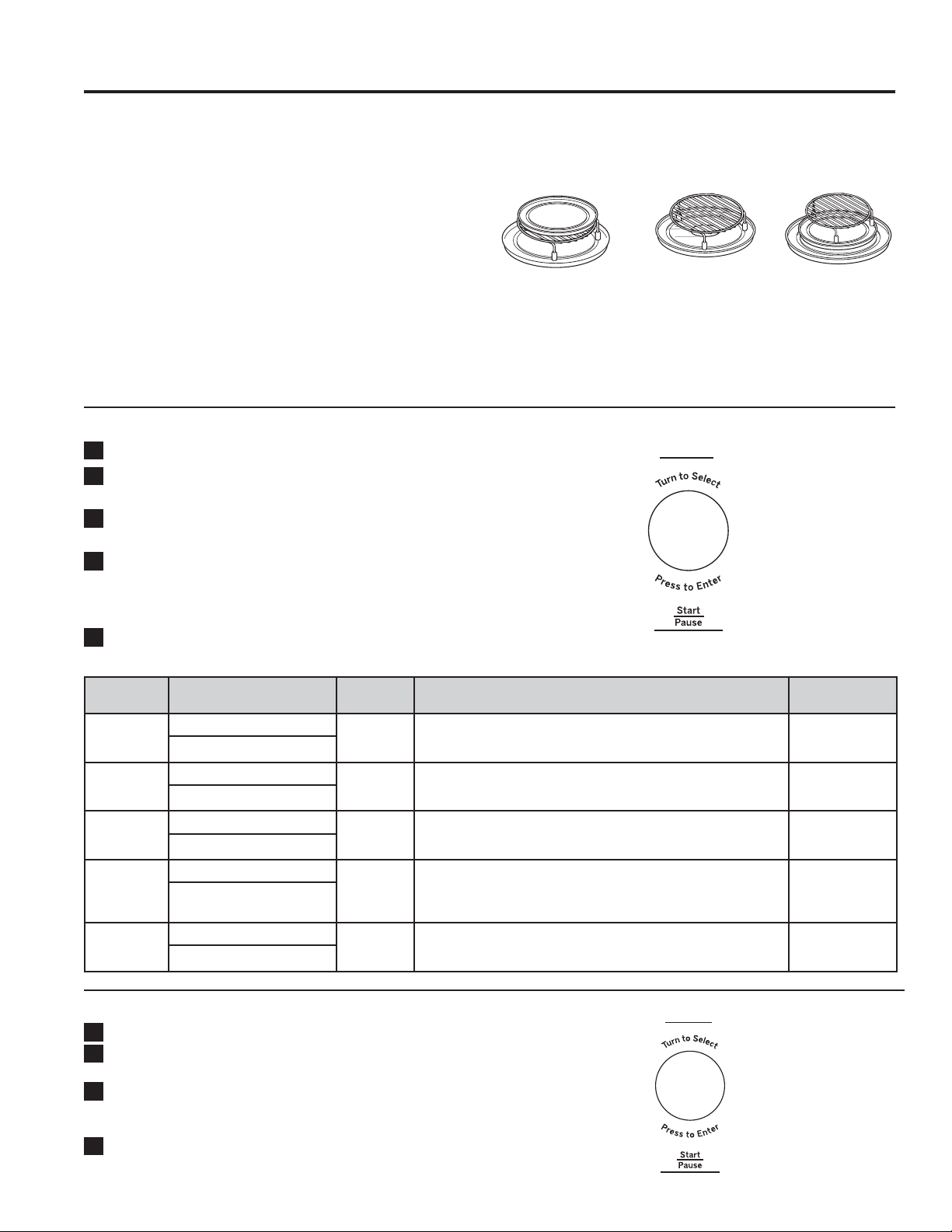
20 49-7000160 Rev. 1
USO DEL HORNO: Función para Freír con Aire
Función para Freír con Aire
/DIXQFLyQ$LU)U\)UHtUFRQ$LUHXWLOL]DXQHOHPHQWRSDUD
calentar que eleva la temperatura del aire dentro del horno. Se
puede configurar cualquier temperatura del horno entre 225°F
y 425°F . Un ventilador hace circular de forma suave este aire
caliente en todo el horno, sobre y alrededor de la comida,
haciendo que la parte exterior se dore y que la parte interior
sea rica y húmeda. Esta circulación de aire caliente se llama
convección.
Debido a que el aire caliente se mueve de forma constante,
evitando que se desarrolle una capa de aire más fría alrededor
de la comida, algunas comidas se cocinan más rápido que en
cocciones con hornos normales.
Para Obtener Mejores Resultados…
Use una bandeja metálica, un estante metálico y una bandeja
de vidrio y deje por lo menos un espacio de 1 pulgada entre el
plato de cocción y los costados del horno.
Freír con Aire con Cocción Automática
1
3UHVLRQHHOERWyQ$LU)U\)UHtUFRQ$LUH
2
*LUHHOGLDOSDUDVHOHFFLRQDU$XWR$XWRPiWLFR\SUHVLRQH
el dial
3
Gire el dial para seleccionar el tipo de comida a través de
ODIXQFLyQ)RRG&RPLGD\SUHVLRQHHOGLDO
4
Gire el dial para seleccionar el tamaño de la porción a
WUDYpVGHODIXQFLyQ6HUYLQJ3RUFLyQ\SUHVLRQHHOGLDO
RHOERWyQ6WDUW3DXVH,QLFLDU3DXVDUSDUDLQLFLDUOD
cocción
5
Una vez completada la cocción, el horno emitirá una señal
y se apagará
Menú Cantidad Temp. de la
Comida
Instrucciones Accesorio
Patatas Fritas
Congeladas
1 porción: 5 onzas, 141g Congeladas Coloque las patatas fritas congeladas en la bandeja metálica del
HVWDQWH(OLMDHOPHQ~\HOSHVR\OXHJRSUHVLRQH6WDUW,QLFLDU
Bandeja de metal
en la rejilla en la
bandeja de vidrio
2 porciones: 10 onzas, 283g
Nuggets
de Pollo
Congelados
1 porción: 5 onzas, 7 pcs Congeladas Coloque los Nuggets de Pollo Congelados en el estante. Elija el menú
\HOSHVR\OXHJRSUHVLRQH6WDUW,QLFLDU
Estante sobre la
bandeja de vidrio
2 porciones: 10 onzas, 14 pcs
Bastones de
Patatas
1 porción: 5 onzas, 15 pcs Ambiente Cubra los Bastones de Papa con aceite y agregue aderezos a gusto.
Coloque los Bastones de papa en el estante. Elija el menú y el peso,
\OXHJRSUHVLRQH6WDUW,QLFLDU
Estante sobre la
bandeja de vidrio
2 porciones: 10 onzas, 30 pcs
Alitas de
Pollo
1 porción: 5 onzas, 6 alas Ambiente Cubra las Alitas de Pollo con aceite, sal y pimienta. Deje en vinagre
durante 1 hora. Coloque las Alitas de Pollo en el estante de la
bandeja metálica. Elija el menú y el peso, y luego presione Start
,QLFLDU
Estante en la
bandeja de metal
en la bandeja de
vidrio.
2 porciones: 10 onzas,
12 alas
Medallones
de Pollo
Congelados
1 porción: 5 onzas, 9 pcs Congeladas Coloque los Medallones de Pollo en el estante de la bandeja metálica.
(OLMDHOPHQ~\HOSHVR\OXHJRSUHVLRQH6WDUW,QLFLDU
Estante sobre la
bandeja de vidrio
2 porciones: 10 onzas, 18 pcs
Freír con Aire con Cocción Manual
1
3UHVLRQHHOERWyQ$LU)U\)UHtUFRQ$LUH
2
*LUHHOGLDOSDUDVHOHFFLRQDU0DQXDO0DQXDO\SUHVLRQH
el dial.
3
Gire el dial para ingresar el tiempo de cocción a través
GHODIXQFLyQ&RRNLQJ&RFFLyQ\SUHVLRQHHOGLDOR6WDUW
3DXVH,QLFLDU3DXVDUSDUDLQLFLDUODFRFFLyQ
4
Una vez completada la cocción, el horno emitirá una señal
y se apagará.
Air Fry
Air Fry
Consejos sobre los
Accesorios para Freír con Aire
Bandeja de metal
en la rejilla en la
bandeja de vidrio
Estante circular
sobre la bandeja
de vidrio
Estante en la
bandeja de metal en
la bandeja de vidrio
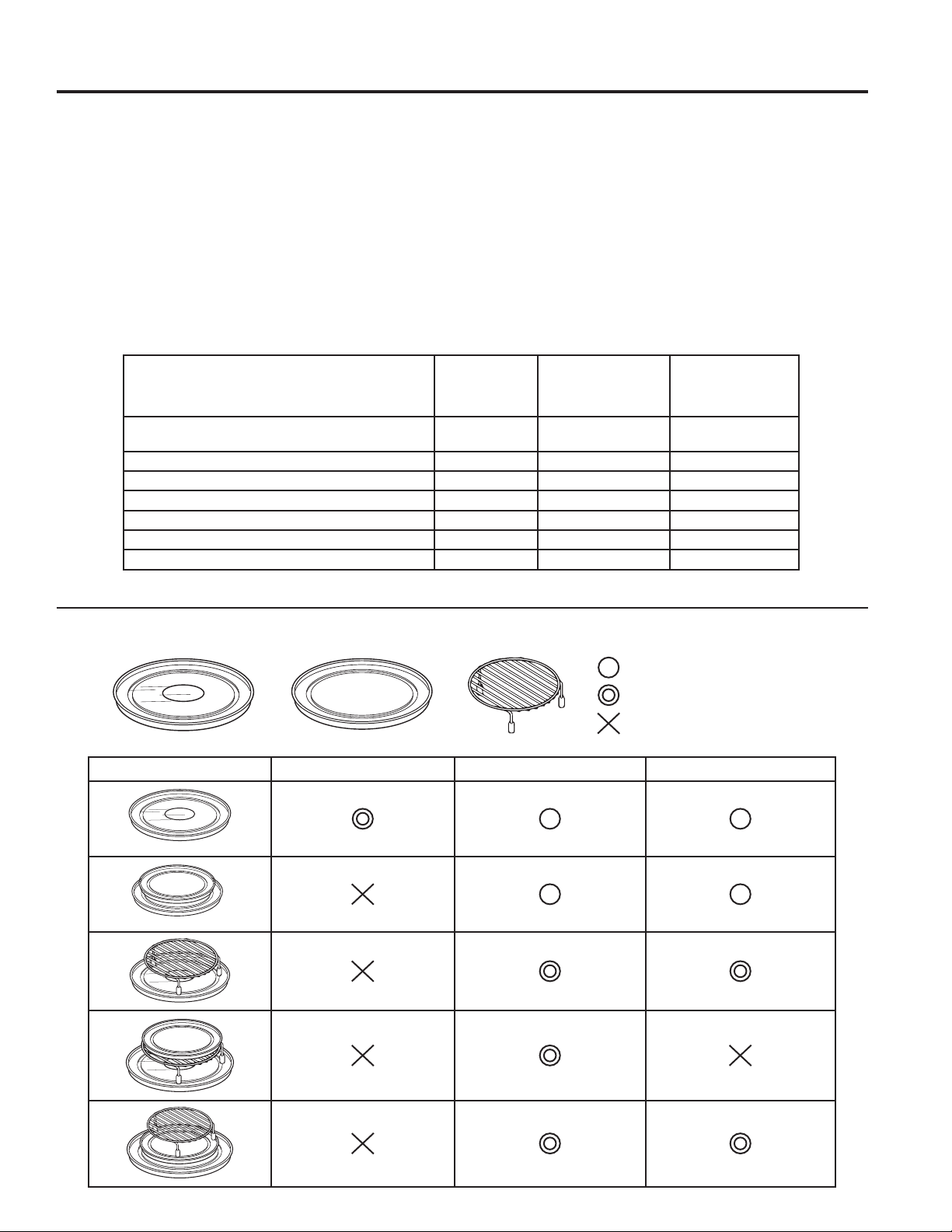
49-7000160 Rev. 1 21
USO DE LA HORNO: Consejos de utensilios de cocina
Consejos de utensilios de cocina
Horneado o asado por convección
Se recomienda el uso de bandejas metálicas para todo
tipo de productos horneados, pero especialmente cuando es
importante que estén dorados.
Las bandejas con acabados oscuros o mates son mejores para
panes y pasteles rellenos ya que absorben calor y producen
un exterior más crujiente.
Las bandejas de aluminio brillantes son mejores para pasteles,
JDOOHWDVRPDJGDOHQDVPXIILQV\DTXHODVPLVPDVUHIOHMDQHO
calor y ayudan a producir un exterior suavemente crujiente y
tierno.
Las cazuelas o platos de horno de cristal o de cerámica
acristalada son mejores para recetas de huevos y queso ya
que el cristal se limpia fácilmente.
Horneado rápido combinado
Se recomienda usar recipientes de cristal o cerámica
acristalada. Asegúrese de que no usa artículos con
decoraciones metálicas ya que podrían causar arcos eléctricos
FKLVSDVFRQODVSDUHGHVRHOHVWDQWHGHOPLFURRQGDV(VWR
puede dañar los utensilios, el estante o el horno.
Pueden usarse utensilios de microondas de plástico
resistente al calor VHJXURVSDUDXVRHQ)SHURQRVH
recomienda para comidas que necesiten estar doradas por
completo ya que el plástico es un pobre conductor de calor.
Utensilios Microondas
Horneado
o Asado
de convección
Horneado rápido
combinado
Cristal resistente al calor, cerámica acristalada
3\UH[)LUH.LQJ&RUQLQJ:DUHHWF
Sí Sí Sí
Metal No Sí No
Cristal no resistente al calor No No No
Plásticos aptos para microondas Sí No Sí*
Films plásticos o envoltorios Sí No No
Productos de papel Sí No No
Paja, mimbre y madera Sí No No
*Usar sólo con utensilios para microondas que puedan soportar 450°F de temperatura.
Cómo usar accesorios
: Posible de usar
: Método recomendado
: No utilice
Microondas Convección Combinación
Plato giratorio de vidrio
Bandeja de metal Estante de metal
22 49-7000160 Rev. 1
USO DE LA HORNO: Mejor método de cocción
Mejor método de cocción
Comidas Microondas Horneado Asado Hornear
rápido
Aperitivos
Salsas para mojar y untar
Snacks de pastelería
9
99 9
Bebidas
9
Salsas y acabados
9
Sopas y estofados
9
Carnes
Descongelación
Asados
9
99
Aves
Descongelación
Asados
9
999
Pescado y mariscos
Defrosting
Cooking
9
99 9
Guisos
99 9
Huevos y queso
Revueltos, tortillas
4XLFKHVRXIOp
99
99
VegetalesIUHVFRV
9
Panes
Magdalenas, pastel de té
Masa de levadura
Levadura
99
9
9
Postres
Pasteles, pasteles con capas y
bundt
Cabello de angel y pasta fina
Flan y pudín
Galletas alargadas
Fruta
Pasteles rellenos y pastelería
Dulces
9
9
9
9
9
9
9
9
Vegetales blanqueados
9
Alimentos preparados
congelados
99 9
Use la tabla siguiente para seleccionar el mejor método para cocinar. Las recetas pueden ser adaptadas
usando la tabla a continuación para determinar el modo de cocción apropiado.

49-7000160 Rev. 1 23
USO DE LA HORNO: Otras funciones
Otras funciones
Señal de final de cocción
Para recordarle que tiene comida en el horno, aparecerá el
PHQVDMH)22',65($'<6XFRPLGDHVWiOLVWD\VRQDUi
un pitido cada minuto hasta que abra la puerta del horno o
presione el botón Cancel/Off.
Start/Pause (inicio / pausa)
Además de poner en marcha muchas funciones, Start/Pause
le permite parar la cocción sin tener que abrir la puerta o borrar
lo que haya en pantalla.
Cancel/Off (borrar/apagado)
Presione el botón Cancel/Off para parar y cancelar la
cocción en cualquier momento.
Temporizador Encendido/ Apagado
El temporizador funciona por minutos y puede ser usado
en cualquier momento, incluso cuando el temporizador está
funcionando.
1. Presione el botón TIMER7HPSRUL]DGRU
2. Gire el dial para seleccionar los minutos. Presione el dial
para ingresar.
3 Gire el dial para seleccionar los segundos. Presione el dial
para ingresar.
4. Presione el dial o Timer7HPSRUL]DGRUSDUDFRPHQ]DU
Para cancelar, presione el botón Timer7HPSRUL]DGRU
Cuando el tiempo concluya, el temporizador emitirá una
señal.Para apagar la señal del temporizador, presione Timer
7HPSRUL]DGRU
NOTA: El indicador del Temporizador se
iluminará mientras el temporizador esté
funcionando.
Dispositivo giratorio
Para obtener mejores resultados de cocción, deje el dispositivo
giratorio activado. Puede desactivarse si va a cocinar platos
grandes.
3UHVLRQHHOERWyQ7XUQWDEOH2Q2II3ODWR*LUDWRULR(QFHQGLGR
$SDJDGRSDUDGHWHQHURLQLFLDUODURWDFLyQGHOSODWRJLUDWRULR
En determinadas ocasiones el dispositivo giratorio puede
calentarse demasiado como para tocarlo.
Tenga cuidado al tocarlo durante la cocción
o posteriormente a ella.
Steam Clean (Limpieza al Vapor)
1. Presione el botón Steam Clean /LPSLH]DDO9DSRU
2. Coloque el recipiente de vapor con 1/4 de taza de agua.
3. Presione el dial o Start/Pause,QLFLDU
3DXVDUSDUDFRPHQ]DU
Una vez finalizado el ciclo, limpie la cavidad
del horno con una toalla de papel o de tela.
Bloqueo del control
Puede bloquear el panel de control para evitar que enciendan
el horno accidentalmente durante la limpieza o paraque no lo
utilicen los niños.
Para bloquear y desbloquear los controles, apriete y mantenga
el botón Cancel/Off durante un período de tres segundos.
Con el panel de control bloqueado aparecerá brevemente
el mensaje CONTROL LOCKED cada vez que se apriete
XQERWyQRHOGLDO(OEORTXHRGHOFRQWUROQRVHDSOLFDDODV
funciones VENT FAN 9HQWLODGRU([WUDFWRU\ SURFACE
LIGHT/X]GHOD6XSHUILFLH
24 49-7000160 Rev. 1
USO DE LA HORNO: Otras funciones
Otras funciones
Luz Nocturna Automática
La función Auto Night Light (Luz Nocturna Automática)
puede ser configurada para que la luz quede encendida
durante la noche. La luz de la superficie se configurará con
HOEULOORHQ/2:%DMRFRQHOWLHPSRHQ21(QFHQGLGR
&RQHOWLHPSRHQ2))$SDJDGRODOX]GHODVXSHUILFLHVHUi
apagada.
1. Presione el botón Settings (Configuraciones) y gire el
dial para seleccionar Auto Night Light (Luz Nocturna
Automática). Presione el dial para ingresar.
2. Gire el dial para seleccionar Off (Apagar) para apagar
la función Auto Night Light (Luz Nocturna Automática).
Presione el dial para ingresar.
*LUHHOGLDOSDUDVHOHFFLRQDU1HZ1XHYRSDUDHQFHQGHU
la función Auto Night Light (Luz Nocturna Automática).
Presione el dial para ingresar. Ingrese el tiempo en ON
(QFHQGLGR\HQOFF (Apagado). Presione el dial para
ingresar.
*LUHHOGLDOSDUDVHOHFFLRQDU5HYLHZ5HYLVDUDILQGH
UHYLVDUODFRQILJXUDFLyQGHODIXQFLyQ$XWR1LJKW/LJKW/X]
1RFWXUQD$XWRPiWLFD3UHVLRQHHOGLDOSDUDLQJUHVDU
Ajustar el reloj
3UHVLRQHHOERWyQ6HWWLQJV&RQILJXUDFLRQHVSDUDJLUDUHO
GLDODILQGHVHOHFFLRQDU&ORFN6HW&RQILJXUDFLyQGHO5HORM
Presione el dial para seleccionar.
2. Gire el dial para configurar las horas. Presione el dial para
seleccionar.
3. Gire el dial para configurar los minutos.Presione el dial para
seleccionar.
4. Gire el dial para seleccionar AM/PM. Presione el dial para
ingresar.
Modo de Reloj
Clock Mode (Modo de Reloj) puede ser configurado en 12
horas y en 24 horas
1. Presione el botón Settings&RQILJXUDFLRQHV\JLUHHO
dial a fin de seleccionar Clock Mode0RGRGH5HORM
Presione el dial para seleccionar.
2. Gire el dial para configurar el Modo de Reloj en 12 horas o
en 24 horas. Presione el dial para seleccionar.
Velocidad de pantalla
Display Speed (Velocidad de la Pantalla) puede ser ajustado
HQ6ORZ/HQWR1RUPDO1RUPDOR)DVW5iSLGR
1. Presione el botón Settings y gire el dial para seleccionar
Display Speed. Presione el dial para seleccionar.
2. Gire el dial para configurar la Velocidad de la Pantalla
/HQWR1RUPDO5iSLGR3UHVLRQHHOGLDOSDUDVHOHFFLRQDU
Mi Ciclo
El botón Add 30 Sec. (Agregar 30 Segundos) puede ser
ajustado a las funciones de My Cycle (Mi Ciclo).
3UHVLRQHHOERWyQ6HWWLQJV&RQILJXUDFLRQHV\JLUHHOGLDO
SDUDVHOHFFLRQDU0\&\FOH0L&LFOR3UHVLRQHHOGLDOSDUD
ingresar.
*LUHHOGLDOSDUDVHOHFFLRQDUHOWLHPSRGHVHJXQGRVD
VHJXQGRV\SUHVLRQHHOGLDOSDUDFRPSOHWDUODFRQILJXUDFLyQ
Nivel de Sonido
El nivel de sonido puede ser ajustado en
Mute (Mudo), Low (Bajo), Normal (Normal) o
Loud (Alto).
1. Presione el botón Settings
&RQILJXUDFLRQHV\JLUHHOGLDODILQGH
seleccionar Sound Level (1LYHOGH6RQLGR
Presione el dial para seleccionar.
2. Gire el dial para configurar el Nivel de
Sonido
0XGR%DMR1RUPDOR$OWR
Presione el dial para seleccionar.
Sincronización de la Luz de la
Superficie
1. Presione el botón Settings&RQILJXUDFLRQHVSDUDJLUDUHO
dial a fin de seleccionar Surface Light Sync6LQFURQL]DFLyQ
GHOD/X]GHOD6XSHUILFLH3UHVLRQHHOGLDOSDUDLQJUHVDU
2. Gire el dial para seleccionar el modo de sincronización
$SDJDGR%DMR$OWR
3. Presione el dial para activarlo.
Sincronización del Ventilador
1. Presione el botón Settings&RQILJXUDFLRQHV\JLUHHO
dial para seleccionar Vent Fan Sync6LQFURQL]DFLyQGHO
9HQWLODGRU([WUDFWRU3UHVLRQHHOGLDOSDUDLQJUHVDU
2. Gire el dial para seleccionar el modo de Sincronización del
Ventilador
$SDJDGR%DMR0HGLRR$OWR
3. Presione el dial para activarlo.
Sincronización Automática Apagada
1. Presione el botón Settings&RQILJXUDFLRQHV\JLUHHOGLDO
para seleccionar Sync Auto Off 6LQFURQL]DFLyQ$XWRPiWLFD
$SDJDGD3UHVLRQHHOGLDOSDUDLQJUHVDU
2. Gire el dial para seleccionar Sync Auto Off6LQFURQL]DFLyQ
$XWRPiWLFD$SDJDGDKDVWDPLQXWRV\PDQXDO3UHVLRQH
ingresar para activarlo.
Hornear por Convección Lateral
1. Presione el botón Settings&RQILJXUDFLRQHV\JLUHHOGLDO
a fin de seleccionar Convect Bake Offset +RUQHDUSRU
&RQYHFFLyQ/DWHUDO3UHVLRQHHOGLDOSDUDLQJUHVDU
2. Gire el dial para seleccionar Convect Bake Offset On/
Off
+RUQHDUSRU&RQYHFFLyQ/DWHUDO(QFHQGLGR$SDJDGR
Presione ingresar para activarlo.
Ajuste de temp. de cocción
1. Presione el botón Settings y gire el dial para seleccionar
BAKE TEMP ADJUST Pulse el dial para introducir la
selección.
2. Gire el dial para seleccionar el rango de Bake Temp Adjust
$MXVWHGH7LHPSRGH+RUQHDGRGHVGHJUDGRVKDVWD
grados.Pulse el dial para introducir la selección.

49-7000160 Rev. 1 25
USO DE LA HORNO: Otras funciones
Otras funciones
Recordatorio de Reemplazo del Filtro
Cuando la luz de Filter Replace
5HHPSOD]RGHO)LOWURVHHQFLHQGD
reemplace el filtro y mantenga presionado
Reset Filter
5HLQLFLRGHO),OWURGXUDQWH
segundos para realizar el reinicio.
Un filtro sólo es necesario para los
modelos que no cuentan con ventilación
hacia el exterior.
Luz de superficie
Presione Surface Light una vez para una
iluminación fuerte, dos veces para la luz
nocturna o una tercera vez para apagarla.
Ventilador extractor
El extractor aspira el vapor de agua y otros
vapores de la encimera de la cocina.
Pulse Vent Fan
9HQWLODGRUH[WUDFWRUXQD
vez para alta velocidad de ventilación, dos
veces para velocidad media, tres veces
para velocidad baja y una cuarta vez para
desactivar el ventilador.
Extractor automático
El extractor automático protege al horno microondas del calor
excesivo que surge de la estufa debajo de éste. Se enciende
de forma automática si percibe demasiado calor.
Si ha encendido el extractor, es posible que sienta que no
lo puede apagar. El extractor se apagará automáticamente
cuando las partes internas se hayan enfriado. Puede
permanecer encendido hasta por 30 minutos o más después
de que los controles de la estufa y del microondas se hayan
apagado.
Chef Connect
Use la función Chef Connect para
conectar su horno microondas a una
Cocina de Café, a fin de sincronizar
el ventilador, las luces de la superficie
de cocción y el reloj a través de la
tecnología de Bluetooth.
1. Debe contar con una cocina habilitada para Chef
Connect. A fin de emparejar su horno por primera vez,
inicie el proceso de Chef Connect en la cocina Café. Para
acceder a instrucciones, consulte el Manual del Propietario
de la cocina .
2. En el horno microondas, mantenga presionado el botón
Chef Connect durante 3 segundos. El ícono de Bluetooth
en la pantalla comenzará a titilar a medida que el horno
microondas comience a buscar y a emparejarse con su
&RFLQD&DIp(OtFRQRSHUPDQHFHUiHQ21(QFHQGLGR
luego de un emparejamiento exitoso.
Si no es encontrada una Cocina Café dentro de los
2 minutos durante el modo de búsqueda, el horno
microondas dejará de buscar y el ícono de Bluetooth
TXHGDUiHQ2))$SDJDGR
Durante la configuración inicial, el protocolo de
configuración será iniciado.
Si la función Chef Connect es activada, las
configuraciones por omisión serán las siguientes:
6LQFURQL]DFLyQGHOUHORMHQSDQWDOOD(1&(1','2
/X]DXWRPiWLFDGHODVXSHUILFLHGHFRFFLyQ(1&(1','$
FRQILJXUDFLyQ$/7$
9HQWLODGRUH[WUDFWRUDXWRPiWLFR$3$*$'2
$SDJDGR$XWRPiWLFRPLQXWRV
23. Gire el dial para seleccionar Sync On/Off 6LQFURQL]DFLyQ
(QFHQGLGD$SDJDGDGHODOX]GHODVXSHUILFLH3UHVLRQHHO
dial para confirmar. Si está activada, esto permite que las
luces de la superficie del microondas se enciendan en el
QLYHO+,*+$OWRGHIRUPDDXWRPiWLFDFXDQGRHOTXHPDGRU
de la superficie de cocción de la cocina emparejada se
enciende. Si está desactivada, las luces de la superficie del
microondas no se encenderán automáticamente cuando un
quemador de la superficie de cocción se encienda.
24. Gire el dial para seleccionar Surface Light Sync ON/
OFF
/X]GHVXSHUILFLDOV\QFURQL]HHQFHQGLGRDSDJDGR
Presione el dial para confirmar. Si está activada, esto
permite que el ventilador extractor del microondas se
HQFLHQGDHQODYHORFLGDG/2:%DMDGHIRUPDDXWRPiWLFD
cuando el quemador de la superficie de cocción de la
cocina emparejada se enciende.
Si se encuentra en OFF
$SDJDGRHOH[WUDFWRUQRVHHQFHQGHUiDXWRPiWLFDPHQWH
cuando el quemador de la superficie de cocción sea
encendido.
El emparejamiento está ahora completo; la función Chef
Connect está ahora activada.
NOTA: Si no hay ninguna selección de la opción
sincronizar durante la configuración, 5 minutos luego de
encendido el ícono, las unidades regresarán al modo de
suspensión y usarán las configuraciones por omisión.
Luego de completar la configuración siguiendo los pasos
anteriores, el ventilador extractor de su horno microondas
y la luz de la superficie de cocción quedarán configurados
para encenderse de forma automática cuando el
quemador de la superficie de cocción sea encendido. La
superficie de cocción y la pantalla del reloj de la cocina
serán sincronizadas para mostrar el mismo tiempo. El
ventilador extractor y la luz de la superficie de cocción
estarán configurados para apagarse de forma automática
15 minutos después de que el quemador de la superficie
de cocción sea apagado.
Si lo desea, la luz, el ventilador y las configuraciones
de apagado automática pueden ahora ser modificadas
XVDQGRODRSFLyQHQ6HWWLQJV&RQILJXUDFLRQHV
Presione Chef Connect una vez para apagar de forma
temporaria la comunicación entre el horno microondas y
la cocina. Presione nuevamente si desea volver a activar
la comunicación. El ícono se iluminará cuando esté
encendido.
En el caso de una desconexión no intencional donde el
horno microondas o la cocina no reciban corriente, la
conexión permanecerá una vez restablecida la corriente.
En caso de interrupciones de corriente por cortes breves,
es posible que sea necesario reiniciar la corriente de
modo que se vuelva a establecer la conexión.
NOTA: Para desparejar el horno microondas de la cocina,
mantenga presionado el botón Chef Connect en el horno
microondas durante 3 segundos. El ícono de Bluetooth
comenzará a titilar. Presione cancelar o espere 2 minutos
hasta que la luz deje de titilar. Es posible que necesite
desparejarlas cuando se deba reemplazar o realizar el
servicio técnico sobre la cocina.

26 49-7000160 Rev. 1
Mantenimiento y limpieza
Consejos útiles
Una limpieza minuciosa ocasional con un trapo empapado de
bicarbonato sódico y agua mantendrá el interior fresco.
Asegúrese que se encuentre apagado el control del horno
antes de limpiar cualquier pieza del horno.
Cómo limpiar el interior
Paredes, suelo, ventana interior y piezas de plástico de la
puerta
Algunas salpicaduras pueden limpiarse con un papel
WRDOODRWUDVSXHGHQQHFHVLWDUXQSDxRK~PHGR4XLWHODV
salpicaduras con un paño enjabonado y aclare con un paño
húmedo. No use limpiadores abrasivos ni utensilios afilados en
las paredes del horno.
Nunca use un limpiador comercial de horno en ninguna parte
del microondas.
Base giratoria extraíble y soporte de base giratoria
Para que no se rompa, no ponga
el plato giratorio en agua justo
después de cocinar. Límpielo con
cuidado en agua tibia con jabón o
en el lavavajillas. El plato giratorio
y el soporte pueden romperse
si se caen. Recuerde no hacer
funcionar el horno en el modo microondas sin el dispositivo
giratorio y el soporte colocados en su lugar.
Estantes
Límpielo con agua y jabón suave
o en el lavavajillas.
No la limpie si tiene un horno
autolimpiable.
Cómo limpiar el exterior
No recomendamos el uso de limpiadores con amoniaco
o alcohol, ya que pueden dañar el aspecto del horno
microondas. Si opta por usar un limpiador casero, primero
aplique el limpiador directamente en un paño limpio, luego
limpie el área sucia.
La caja
Limpie la parte externa del horno de microondas con un paño
humedecido con agua jabonosa. Enjuáguela y luego séquela.
Pásele un paño humedecido limpio a la ventana para limpiarla.
El panel de control
Pásele un paño humedecido para limpiar. Seque
completamente. No use esprays limpiadores, grandes
cantidades de detergente y agua, abrasivos u objetos filosos
sobre el panel, ya que lo podría dañar. Algunas toallas de
papel podrían también dañar el panel de control.
Panel de puerta
Antes de limpiar el panel de puerta frontal, asegúrese de que
sabe qué tipo de panel tiene. Consulte el octavo dígito del
número de modelo. “S” es acero inoxidable,“L” es CleanSteel y
“D” es para negro pizarra y acabado mate oscuro y “B”, “W” o
“C” son colores plásticos.
Acero inoxidable (en algunos modelos)
El panel de acero inoxidable puede limpiarse con
Stainless Steel Magic o un producto similar, utilizando un
paño suave y limpio. Aplique el limpiador de superficies
de acero inoxidable cuidadosamente para evitar tocar
las piezas de plástico que rodean al acero. No utilice
cera, pulimento, lejía ni productos que contengan clorina
en acabados en acero inoxidable.
Paneles plásticos de color
Utilice un paño suave, limpio y ligeramente humedecido
y, a continuación, seque bien toda la zona.
Los sellos de la puerta
Es importante mantener el área donde la puerta se
sella con el horno de microondas limpia. Solamente use
detergentes no abrasivos suaves aplicados con una
esponja limpia o con un paño suave. Enjuague bien.
El fondo
Limpie la grasa y elimine el polvo del fondo a menudo.
Use una solución de agua cálida y detergente.
T
u
r
n
t
o
S
e
l
e
c
t
P
r
e
s
s
t
o
E
n
t
e
r
Reheat
Timer
On/Off
Defrost
Weight/Time
Start
Pause
Cancel
Off
Lock Controls
Hold 3 Sec
Cook
Time
Set
Clock
Options Help
Surface
Light
Vent Fan
Popcorn
Beverage
Microwave
Express
Warm
Power
Level
Auto
Cook
Combination
Fast Bake
Convection
Roast
Turntable
Convection
Bake
T
u
r
n
t
o
S
e
l
e
c
t
P
r
e
s
s
t
o
E
n
t
e
r
Reheat
Timer
On/Off
Defrost
Weight/Time
Start
Pause
Cancel
Off
Lock Controls
Hold 3 Sec
Cook
Time
Set
Clock
Options Help
Surface
Light
Vent Fan
Popcorn
Beverage
Microwave
Express
Warm
Power
Level
Auto
Cook
Combination
Fast Bake
Convection
Roast
Turntable
Convection
Bake
T
u
r
n
t
o
S
e
l
e
c
t
P
r
e
s
s
t
o
E
n
t
e
r
Reheat
Timer
On/Off
Defrost
Weight/Time
Start
Pause
Cancel
Off
Lock Controls
Hold 3 Sec
Cook
Time
Set
Clock
Options Help
Surface
Light
Vent Fan
Warm
Power
Level
Auto
Cook
Combination
Fast Bake
Convection
Roast
Turntable
Convection
Bake
MANTENIMIENTO Y LIMPIEZA

49-7000160 Rev. 1 27
MANTENIMIENTO Y LIMPIEZA
Reemplazo de la lámpara LED
Luz de encimera/luz nocturna
Reemplazo de la lámpara LED. Vea la contraportada para
ordenar en línea en geappliances.com.
1. Para cambiar la luz de encimera/luz nocturna, primero
desconecte la corriente del fusible principal o del panel de
diferencial o estire del enchufe.
4XLWHHOWRUQLOORGHOODWHUDOGHODFXELHUWDGHOFRPSDUWLPLHQWR
de la bombilla y baje la cubierta hasta que pare.
3. Asegúrese que la LED está fría antes de retirarla. Retire un
tornillo y el conector de la lámpara LED.
4. Conecte la lámpara LED y asegure la misma usando el
tornillo. Levante la tapa de la luz y reemplace el tornillo.
Conecte el horno a la corriente eléctrica.
4XLWHHOWRUQLOOR
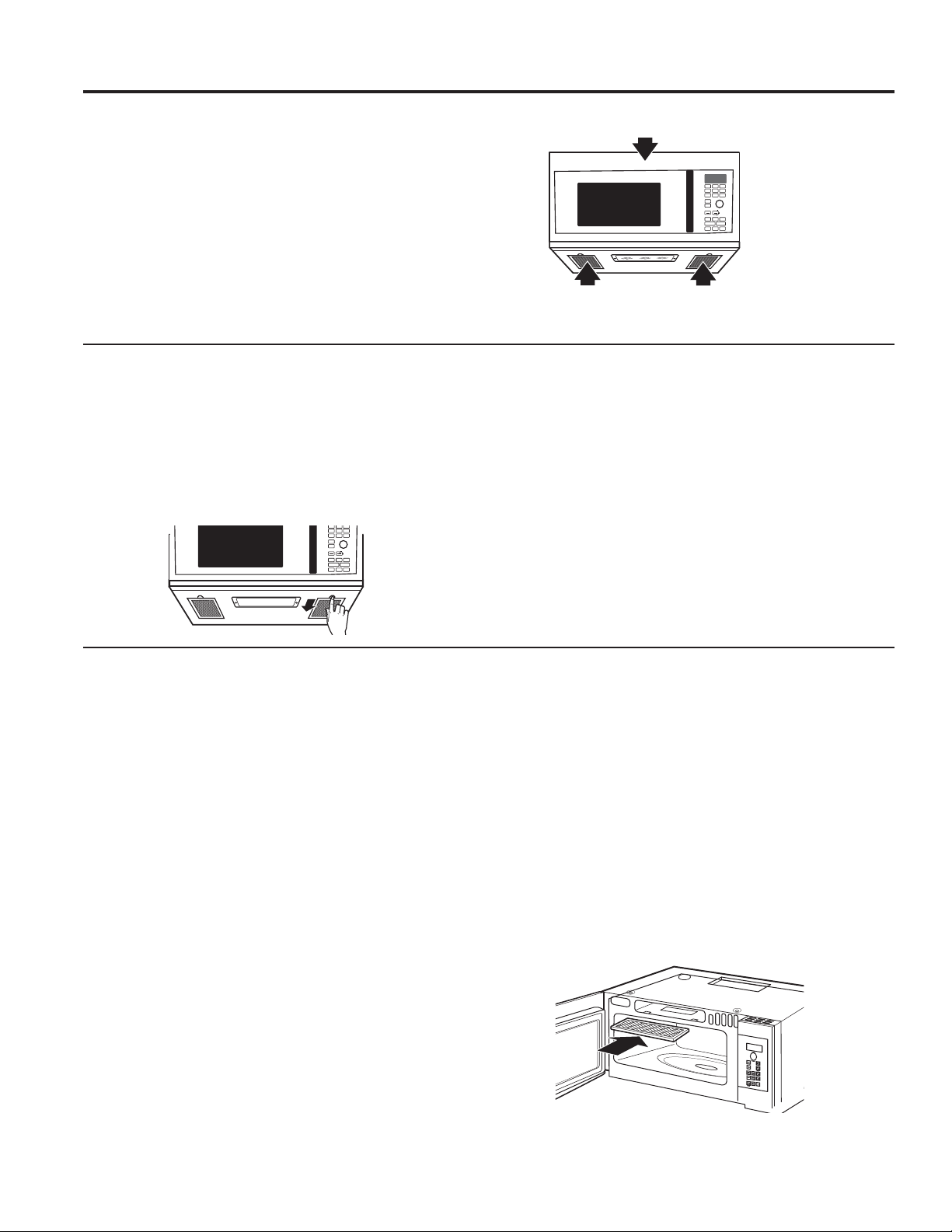
28 49-7000160 Rev. 1
MANTENIMIENTO Y LIMPIEZA: Función de extractor
Función de extractor
Filtros de extractor reutilizables
Los filtros metálicos atrapan la grasa liberada por la comida en
la cocina encimera. También evitan que las llamas de la cocina
encimera puedan dañar en interior del horno.
Por esta razón, los filtros deben estar siempre en su lugar
cuando se esté usando la campana. Los filtros del extractor
deben limpiarse una vez al mes o según sea necesario.
Cómo quitar y limpiar los filtros
Para quitarlos, usando las lengüetas, deslícelos hacia atrás.
Estire hacia abajo y afuera.
Para limpiar los filtros del extractor, empápelos y páselos de
un lado a otro en agua con detergente. No use amoniaco ni
productos que lo contengan ya que oscurecerían el metal.
Se pueden cepillar ligeramente para quitar suciedad pegada.
Aclárelos, sacúdalos y déjelos secar antes de volverlos a
poner.
Para volver a colocarlos, deslice los filtros en los marcos por
la parte trasera de cada apertura. Presione hacia arriba y hacia
la parte frontal para ajustarlos en su lugar.
Ventilador extractor
El ventilador extractor tiene dos filtros de metal reutilizables.
Los modelos que hacen recircular el aire de nuevo a la
habitación usan un filtro de carbón vegetal
T
u
r
n
t
o
S
e
l
e
c
t
P
r
e
s
s
t
o
E
n
t
e
r
Reheat
Timer
On/Off
Defrost
Weight/Time
Start
Pause
Cancel
Off
Lock Controls
Hold 3 Sec
Cook
Time
Set
Clock
Options Help
Surface
Light
Vent Fan
Popcorn
Beverage
Microwave
Express
Warm
Power
Level
Auto
Cook
Combination
Fast Bake
Convection
Roast
Turntable
Convection
Bake
Filtros de extractor reutilizables
HQWRGRVORVPRGHORV
Filtro de carbón vegetal
T
u
r
n
t
o
S
e
l
e
c
t
P
r
e
s
s
t
o
E
n
t
e
r
Reheat
Timer
On/Off
Defrost
Weight/Time
Start
Pause
Cancel
Off
Lock Controls
Hold 3 Sec
Cook
Time
Set
Clock
Options Help
Surface
Light
Vent Fan
Popcorn
B
everage
Microwave
Express
Warm
Power
Level
Auto
Cook
Combination
Fast Bake
Convection
Roast
Turntable
Convection
Bake
Filtros de carbón vegeta
El filtro de carbón vegetal no puede limpiarse. Debe cambiarse
por otro. Vea la contraportada para ordenar en línea en
cafeappliances.com.
Si el modelo no realiza la extracción al exterior, el aire
recirculará a través de un filtro de carbón vegetal no
reutilizable que ayuda a quitar olores y humos.
El filtro de carbón vegetal debería cambiarse cuando está
YLVLEOHPHQWHVXFLRRGHVFRORULGRQRUPDOPHQWHWUiVR
PHVHVVHJ~QHOXVR&RQVXOWHKits opcionales en la página
5 para obtener más información.
REEMPLAZO DEL FILTRO DE CARBÓN
1. Desenchufe el horno microondas
2. Retire los tornillos de montaje de la rejilla de ventilación.
3. Incline la parrilla hacia adelante, y luego levante la misma
para su retiro.
4. Retire el filtro de carbón.
5. Deslice el nuevo filtro de carbón hasta su posición.
6. Deslice la parte inferior de la rejilla de la ventana hasta su
posición. Empuje la parte superior hasta que calce en su
posición. Reemplace los tornillos de montaje
7. Enchufe el horno microondas.
49-7000160 Rev. 1 29
Problema Causas posibles Qué hacer/Explicación
El horno no se pone en marcha Puede que se haya fundido un fusible de su
casa o que haya
saltado el diferencial.
Cambie el fusible o reconecte el diferencial.
Apagón de corriente. Desenchufe el horno microondas de la corriente
y vuélvalo a enchufar.
El enchufe no está completamente insertado en
la toma de corriente
de la pared.
Asegúrese de que el enchufe de 3 clavijas del
horno esté completamente insertado en la toma
de corriente de la pared.
La puerta no está cerrada del todo. Abra la puerta y ciérrela por completo.
El panel de control está
encendido pero el horno no se
pone en marcha
La puerta no está cerrada del todo. Abra la puerta y ciérrela por completo.
No se presionó el botón Start/Pause tras
seleccionar el modo de cocción.
Presione Start/Pause.
Ya se ha realizado otra selección en el horno y
no se presionó
Cancel/Off para cancelarla.
Presione Cancel/Off.
No se introdujo un tiempo de cocción tras
apretar Cook Time.
Asegúrese de introducir un tiempo de cocción
tras presionar
Cook Time.
Se presionó Cancel/Off sin querer. Vuelva a programar la cocción y presione Start/
Pause.
No se introdujo el peso tras seleccionar Auto
Defrost
o Fast Defrost.
Asegúrese de introducir el peso de la comida
tras seleccionar Auto Defrost o Fast Defrost.
No se introdujo el tipo de comida tras apretar
AUTO COOK.
Asegúrese de entrar un tipo de comida.
CONTROL BLOQUEADO
(CONTROL LOCKED) aparece
en la pantalla
El control ha sido bloqueado. Presione y mantenga Mute On/Off (Mudo
Encendido/Apagado).durante 3 segundos para
desbloquear el control.
Aparece en pantalla OVEN TOO
HOT FOR SENSOR COOKING
– USING ALTERNATE METHOD
(Horno demasiado caliente para
cocinar por sensor: Se está
utilizando otro método)
Se pulsó uno de los botones de cocción por
sensor cuando la temperatura interior del horno
era superior a los 200ºF.
Estas funciones no podrán ejecutarse cuando
el horno. El horno cambiará automáticamente
DFRFLQDUSRUWLHPSRVLJDODVLQGLFDFLRQHVGH
ODSDQWDOODRXQDYH]TXHHOKRUQRHVWpOR
suficientemente frío, las funciones del sensor se
ejecutarán normalmente.
El suelo del horno está
templado incluso cuando el
horno no se ha usado
La luz de la encimera está situada bajo el suelo
del horno. Cuando la luz está puesta, el calor
que produce puede
calentar el suelo del horno.
Esto es normal.
Se escucha un pitido con un tono
inusualmente bajo
Ha intentado cambiar el nivel nivel de potencia
cuando no estaba permitido.
Muchas de las funciones del horno están
preseleccionadas y no pueden cambiarse.
El horno desprende un olor a
humo y sale humo gris después
de usar la función de horneado
Se están quemando aceites en la cavidad de acero
inoxidable después de usar la función de Horneado
las primeras veces.
Esto es normal.
La comida se dora mucho más
rápido en la parte de arriba que
en la parte de abajo
La parrilla se fijó en la posición
alta. Siempre use la parrilla en la posición baja.
La temperatura del horno fluctúa
durante la cocción
El elemento de cocina pasa de encendido a
apagado para mantener la temperatura del horno
en los niveles deseados.
Esto es normal.
El extractor del horno se enciende
automáticamente
El extractor se enciende automáticamente para
proteger el microondas si percibe que hay
demasiado calor en la estufa debajo de éste.
Esto es normal.
Durante los niveles de Bake (horneado) o Fast
Bake (horneado rápido), después de precalentado,
el extractor del horno se encenderá para enfriar los
componentes del horno.
Esto es normal.
Aparece en la pantalla SENSOR
ERROR (Error de sensor)
Se abrió la puerta mientras se utilizaba la función
de sensor antes antes de que pudiera detectarse
el vapor.
No abra la puerta hasta que se perciba el vapor y
aparezca en pantalla la cuenta de tiempo regresiva.
El vapor no se detectó en la cantidad de tiempo
máxima.
8WLOLFH&RRN7LPH7LHPSRGHFRFFLyQSDUD
calentar durante más tiempo.
Consejos para la Solución de Problemas... Antes de solicitar el servicio
técnico
¡Ahorre tiempo y dinero! Primero revise los cuadros que aparecen en las siguientes páginas y es posible que no
necesite solicitar reparaciones.
CONSEJOS PARA LA SOLUCIÓN DE PROBLEMAS
30 49-7000160 Rev. 1
CONSEJOS PARA LA SOLUCIÓN DE PROBLEMAS
Consejos para la Solución de Problemas... Antes de solicitar el servicio
técnico
Cosas normales de su horno microondas
Ŷ Humedad en la puerta y paredes del horno al cocinar.
Frote la humedad con una toallita de papel o un paño
suave.
Ŷ Humedad entre los paneles de las puertas del horno
al cocinar determinados alimentos. La humedad se
disipará poco después de terminar de cocinar.
Ŷ El vapor se escapa por la puerta.
Ŷ Una luz de reflexión alrededor de la puerta o en la
periferia de la caja del horno.
Ŷ La luz del horno se debilita y el sonido del soplador
cambia cuando se usan niveles de potencia
diferentes al alto.
Ŷ Un sonido sordo de golpe cuando el horno de
microondas está en operación.
Ŷ El ventilador opera mientras el horno de microondas
está operando. El ventilador no se apagará ni se
puede apagar hasta que el horno de microondas se
apague.
Ŷ Calentar, horneado por convección, asado por
convección y cocción rápida combinado tienen un
WLHPSRGHFRFFLyQPi[LPRGHPLQXWRVKRUDV
\PLQXWRV&XDQGRHOWLHPSRGHFRFFLyQPi[LPR
se alcanza, el horno automáticamente indicará que la
cocción finalizó y apagará el elemento de cocción.
Ŷ $OXVDUKRUQHDGRSRUFRQYHFFLyQDVDGRSRU
convección u cocción rápida combinado con un
precalentamiento, la puerta del horno debe ser
abierta y el tiempo de cocción establecido después
del precalentado o el horno apagará el elemento de
cocción después de 1 hora.
DECLARACIÓN DE INTERFERENCIA POR RADIOFRECUENCIA DE LA FEDERAL
COMMUNICATIONS COMMISSION (COMISIÓN FEDERAL DE COMUNICACIONES)
(EE.UU. ÚNICAMENTE)
Este equipo genera y utiliza energía de frecuencia ISM y si no
es instalado y usado de forma adecuada, estando en estricto
cumplimiento con las instrucciones del fabricante, podrá
generar interferencia en la recepción de radio y televisión. Fue
evaluado de forma específica y se comprobó que cumple con
los límites de Equipamientos ISM, de acuerdo con la parte
18 de las Normativas de la FCC, que fueron diseñadas para
brindar una instalación residencial.
Sin embargo, no se garantiza que no se presenten
interferencias en una instalación en particular. Si este
equipamiento genera interferencias en la recepción de
radio o televisión, lo que se puede comprobar encendiendo
y apagando el equipo, se aconseja al usuario que intente
corregir la interferencia a través de una de las siguientes
medidas:
Ŷ5HRULHQWHODDQWHQDUHFHSWRUDGHODUDGLRRHOWHOHYLVRU
Ŷ5HXELTXHHO+RUQR0LFURRQGDVHQUHODFLyQDOUHFHSWRU
Ŷ$OHMHHOKRUQRPLFURRQGDVGHOUHFHSWRU
Ŷ(QFKXIHHOKRUQRPLFURRQGDVHQXQWRPDFRUULHQWHGLIHUHQWH
de modo que el horno microondas y el receptor estén en
diferentes recepciones de códigos.
El fabricante no es responsable por ninguna interferencia
de radio o TV generada por modificaciones no autorizadas
sobre este horno microondas. Es responsabilidad del usuario
corregir tales interferencias.
Este equipo ha sido probado y cumple con los límites
establecidos para un dispositivo digital de Clase B, de
acuerdo con la parte 15 de las Normativas de la FCC. Estos
límites han sido diseñados para ofrecer una protección
razonable contra interferencias perjudiciales en la instalación
residencial. Este equipo genera, usa y puede emitir energía
de radiofrecuencia y, si no se instala y utiliza de acuerdo
con las instrucciones, podrá ocasionar interferencias
perjudiciales para las comunicaciones de radio. Sin embargo,
no se garantiza que no se presenten interferencias en una
instalación en particular. Si el equipo provoca interferencias
perjudiciales para la recepción de radio o televisión, lo que
puede comprobar encendiendo y apagando el equipo, se
aconseja al usuario intentar corregir la interferencia a través
de una de las siguientes medidas:
Ŷ5HRULHQWHRUHXELTXHODDQWHQDUHFHSWRUD
Ŷ$XPHQWHODVHSDUDFLyQHQWUHHOHTXLSR\HOUHFHSWRU
Ŷ&RQHFWHHOHTXLSRDXQWRPDFRUULHQWHGHXQFLUFXLWR
diferente al que se encuentra conectado el receptor.
Ŷ3DUDVROLFLWDUD\XGDFRQVXOWHDOSURYHHGRUPLQRULVWDRDXQ
técnico experimentado de radio/ TV.
A fin de satisfacer los requisitos de exposición a RF de la
FCC, se deberá mantener una distancia de separación de 20
cm o más entre la antena de este dispositivo y las personas
durante el funcionamiento del mismo.
Para asegurar el cumplimiento, no se recomienda el
funcionamiento en una cercanía mayor.
ADVERTENCIA
Las modificaciones sobre esta
unidad no aprobadas expresamente por la parte responsable
del cumplimiento adecuado podrán anular la autoridad del
usuario a utilizar el equipo.

49-7000160 Rev. 1 31
KITS OPCIONALES
Kits opcionales
Kits de panel de relleno
CVM517P2MS1
JX36BSS – Acero Inoxidable
CVM517P3MD1
JX36BDS – Loza Negra
Al cambiar la tapa de una cocina encimera de 36” los kits de
paneles de relleno ocupan el espacio adicional proveyendo un
aspecto de montaje a medida.
Sólo para instalarse entre armarios, no pueden instalarse al
final de los armarios. Cada kit contiene dos paneles de relleno
de 3”.
Ŷ JX15BUMP - Kit de Montaje
Cuando se instale un horno microondas en una cocina con
gabinetes de una profundidad de 15”, se requerirá el kit
de montaje. Este kit permite que el horno microondas sea
instalado 3 pulgadas más lejos, lo cual evita que los gabinetes
bloqueen los orificios de ventilación en la parte superior de la
rejilla del microondas.
Kits de filtros
Ŷ WB02X29749—Kit de filtro de carbón vegetal de
recirculación
Los kits de filtros se usan cuando el horno no puede
tener una salida al exterior.
Los kits de filtros están disponibles a un costo adicional
en su abastecedor Café. Para pedir, visite nuestro sitio
:HEFDIHDSSOLDQFHVFRPFRQVXOWHODSiJLQDWUDVHUD
Disponibles en su distribuidor Café por un costo adicional.
Kits de panel de relleno

32 49-7000160 Rev. 1
Notas

49-7000160 Rev. 1 33
Abroche su recibo aquí. Para acceder al servicio técnico de acuerdo con
la garantía deberá contar con la prueba de la fecha original de compra.
GEAppliances.com
Todo el servicio de garantía es provisto por nuestros Centros de Servicio de Fabricación, o un técnico autorizado de Servicio. Para
programar una visita del servicio técnico a través de Internet, visítenos en cafeappliances.com/service.
Lo que Café no cubrirá:
Ŷ 9LDMHVGHOWpFQLFRGHOVHUYLFLRDVXKRJDUSDUDHQVHxDUOH
sobre cómo usar el producto.
Ŷ ,QVWDODFLyQHQWUHJDRPDQWHQLPLHQWRLQDGHFXDGRV6L
tiene un problema con la instalación, comuníquese con su
vendedor o instalador. Usted es responsable de brindar
instalaciones adecuadas de conexión eléctrica, escape u
otras instalaciones de conexión.
Ŷ )DOODGHOSURGXFWRRGDxRVREUHHOSURGXFWRVLVHSURGXFH
XQDEXVRXVRLQDGHFXDGRSRUHMHPSORDUFRHOpFWULFRHQ
XQDFDYLGDGGHODUHMLOODRPHWDOSDSHOGHDOXPLQLRRXVR
diferente para el cual fue diseñado o uso comercial.
Ŷ 5HHPSOD]RGHIXVLEOHVGHODFDVDRUHLQLFLRGHGLV\XQWRUHV
Ŷ 'DxRVRFDVLRQDGRVVREUHHOSURGXFWRSRUDFFLGHQWH
incendio, inundaciones o catástrofes naturales.
Ŷ 'DxRVFRQVHFXHQWHVRLQFLGHQWDOHVFDXVDGRVSRUSRVLEOHV
defectos sobre este producto.
Ŷ 'DxRFDXVDGRGHVSXpVGHODHQWUHJD
Ŷ 3URGXFWRQRDFFHVLEOHSDUDEULQGDUHOVHUYLFLRUHTXHULGR
Ŷ 6ROLFLWHHOVHUYLFLRWpFQLFRSDUDUHSDUDURUHHPSOD]DUODV
lámparas, excepto las lámparas LED.
Ŷ 'DxRVVREUHHODFDEDGRWDOHVFRPRy[LGRVREUHOD
superficie, deslustres o manchas pequeñas no informadas
dentro de las 48 horas luego de la entrega.
GARANTÍA LIMITADA
EXCLUSIÓN DE GARANTÍAS IMPLÍCITAS
Su única y exclusiva alternativa es la reparación del producto, como se indica en la Garantía Limitada. Las garantías
implícitas, incluyendo garantías implícitas de comerciabilidad o conveniencia sobre un propósito particular, se limitan a un
año o al período más corto permitido por la ley.
Esta garantía limitada se extiende al comprador original y a cualquier dueño subsiguiente de productos comprados para uso hogareño
dentro de EE.UU. Si el producto está en un área donde no se encuentra disponible un Proveedor Autorizado del Servicio Técnico de
Café, usted será responsable por el costo de un viaje o se podrá requerir que traiga el producto a una ubicación del Servicio Técnico
de Café autorizado para recibir el servicio. En Alaska, la garantía limitada excluye el costo de envío o llamadas del servicio a su hogar.
Algunos estados no permiten la exclusión o limitación de daños fortuitos o consecuentes. Esta garantía limitada le da derechos legales
específicos y es posible que tenga otros derechos legales que varían entre un estado y otro. Para conocer cuáles son sus derechos
legales, consulte a la oficina de asuntos del consumidor local o estatal o al Fiscal de su estado.
Garante: GE Appliances, a Haier Company
/RXLVYLOOH.<
Por el período de Café Reemplazará:
Un año
Desde la fecha de
compra original
Cualquier parte del horno que falle debido a un defecto en los materiales o mano de obra.
Durante esta garantía limitada de un año, Café también proveerá, sin costo, todo el trabajo
y los costos del servicio relacionado con el reemplazo de la parte que presente defectos.
Cinco Años
Desde la fecha de
compra original
Café
elegirá reemplazar la unidad o reemplazar el tubo magnetrón, si éste falla debido a un
defecto en los materiales o la fabricación. Durante esta garantía limitada de cinco años, usted será
responsable por el costo de cualquier trabajo o reparación en el hogar.

34 49-7000160 Rev. 1
Impreso en Corea
Soporte para el Consumidor
SOPORTE PARA EL CONSUMIDOR
Sitio Web de Café
¿Desea realizar una consulta o necesita ayuda con su electrodoméstico? ¡Intente a través del Sitio Web de Café las 24 horas
del día, cualquier día del año! Usted también puede comprar más electrodomésticos maravillosos de Café y aprovechar todos
nuestros servicios de soporte a través de Internet, diseñados para su conveniencia.
En EE.UU.: cafeappliances.com
Registre su Electrodoméstico
¡Registre su electrodoméstico nuevo a través de Internet, según su conveniencia! Un registro puntual de su producto permitirá
una mejor comunicación y un servicio más puntual de acuerdo con los términos de su garantía, en caso de surgir la necesidad.
También puede enviar una carta en la tarjeta de inscripción preimpresa que se incluye con el material embalado.
En EE.UU.: cafeappliances.com/register
Servicio Programado
El servicio de reparación de expertos de Café está a sólo un paso de su puerta. Conéctese a través de Internet y programe su
servicio a su conveniencia cualquier día del año. En EE.UU.: cafeappliances.com/service o comuníquese al 800.432.2737 durante
el horario de atención comercial.
Garantías Extendidas
Adquiera una garantía extendida de Café y conozca los descuentos especiales que están disponibles mientras su garantía aún
está vigente. La puede adquirir en cualquier momento a través de Internet. Los servicios de Café aún estarán allí cuando su
garantía caduque. En EE.UU.: cafeappliances.com/extended-warranty o comuníquese al 800.626.2224 durante el horario de
atención comercial.
Conectividad Remota
3DUDVROLFLWDUDVLVWHQFLDSDUDODFRQHFWLYLGDGGHUHGLQDOiPEULFDSDUDPRGHORVFRQDFFHVRUHPRWR
YLVLWHQXHVWURVLWLRZHEHQcafeappliances.com/connect o comuníquese al 800.220.6899 en EE.UU.
Piezas y Accesorios
Aquellos individuos calificados para realizar el servicio técnico de sus propios electrodomésticos podrán solicitar el envío de
SLH]DVRDFFHVRULRVGLUHFWDPHQWHDVXVKRJDUHVVHDFHSWDQODVWDUMHWDV9,6$0DVWHU&DUG\'LVFRYHU2UGHQHKR\DWUDYpVGH
Internet durante las 24 horas, todos los días. En EE.UU.: cafeappliances.com/parts
Las instrucciones que figuran en este manual cubren los procedimientos que serán realizados por cualquier usuario.
Otros servicios técnicos generalmente deben ser derivados a personal calificado del servicio. Se deberá tener cuidado,
ya que una reparación indebida podrá hacer que el funcionamiento no sea seguro.
Contáctenos
Si no se encuentra satisfecho con el servicio que recibió de Café, comuníquese con nosotros a través de nuestro sitio Web,
cafeappliances.com/contact o escriba a: En EE.UU.: General Manager,
