LTM1555
LTM1755
(ForNTSCsystems)
TFT-LCDTV/Monitor
User_
Manual
ForBetter Display
I. Adjust computer resolution andscreen injection rate (refresh rate) in the control panel of
yourcomputer asdescribed below to enjoy the picture quality,
• Resolution:15"1024x768
IT' 1280x1024
• Veriicalfrequency(refreshrate):60 Hz
2.This[FTLCDpanelwasmanufacturedbyusingadvancedprecisionsemiconductortechnology.
Still, differentcolorpixetsmaybeseen,Thisisnormalandnotadefect.
• Forexample,thenumberofTFTLCDpixelsthat iscontainedin thisproductare
2,359,296(15"),3,932,160(1T'),
3. When you clean the outside of the monitor and panel, use a soft cloth with a small amount
of cleaner. Do not use excessive force as it can cause stains.
4,If youarenotsatisfiedwith thepicturequality,
executethe "autoadjustmentfunction"in thedisplayscreenthatappearswhenwindow
terminationbuttonispressed,tf there'sstill picturenoiseafter performingautomaticadjustment,
COARSEadjustmentfunction,
VIRTUAL
6URROU#O
ManufacturedunderlicensefromDolbyLaboratories"Dolby",andthe I11 aretrademarksofDolby
Laboratories.
Informationin thisdocumentissubjectto changewithout notice.
© 2001SamsungElectronicsCo.,Ltd.All rightsreserved.
Reproductionin anymannerwhatsoeverwithoutthewritten permissionof SamsungElectronicsCo.,
Ltd isstrictly forbidden,
SamsungElectronicsCo,,Ltd,shahnotbeliableforerrorscontainedhereinorfor incidentalor
consequentialdamagesinconnectionwith thefurnishing,performance,or useofthis material,
TheSamsunglogoistheregisteredtrademarkofSamsungElectronicsCo,,Ltd,;Mrcrosofl;Windows_
andWrbdows NTare registeredtrademarksof Microso[tCorporation;VESA,DPMSandDDCare
registeredtrademarksof VideoElectronicsStandardAssociation;the ENERGYSTARnameandlogoare
registeredtrademarksof the U,S,EnvironmentalProtectionAgency(EPA),AsanEN[RGYSU\RPartner,
SamsungElectronicsCo. Ltd,hasdeterminedthatthis productmeetstheENERGYSTARguidelinesfor
energyefficiency,All otherproductnamesmentionedhereinmaybethetrademarksorregistered
trademarksof theirrespectiveowners,
.... OOi " iliiiii:,i i;:i:!i ,ii1 iiii: !!iT,
Safety Instructions .......................................................... 2
Unpacking YourTV/Monitor ................................................... 3
Setting up Your LCDTV/Monitor .............................................. 4
Setting upan Ergonomic Workstation ....................................... 4
TV/Monitor Location ................................................. 4
Workstation Height .................................................. 4
Viewing Angle ...................................................... 4
Connecting Your LCDTV/Monitor .......................................... 5
Plugand Play .......................................................... 6
Installing the Video Driver ................................................ 6
Self-Test FeatureCheck(STFC) ............................................. 6
Getting Help ........................................................... 7
Warm-up Time ......................................................... 7
Adjusting YourLCDTV/Monitor .............................................. 8
UserControls .......................................................... 8
Automatic Save ......................................................... 9
Direct-Access Features ................................................. 10
OnScreen Display (OSD) ................................................. 11
Accessing the Menu System ........................................... 11
PCFunctions andAdjustments ........................................ 12
TV/Video Functionsand Adjustments ................................... 16
DTV/DVDFunctions and Adjustments ................................... 21
OSDFunctionsand Adjustments ....................................... 22
Appendix ................................................................ 23
V-Chip ............................................................... 23
Remote-Control ...................................................... 25
PowerSaver ............................................................ 27
Troubleshooting ....................................................... 28
Specifications ......................................................... 31
PinAssignments ....................................................... 33
Display Modes ......................................................... 34
Attaching a Wall or Arm Mounting Device ................................... 35
Installing VESACompliant Mounting Devices ................................ 36
Wall Mount Instructions .............................................. 36
Retractable Stand ....................................................... 37
Maintenance of YourLCDTV/Monitor ...................................... 37
Index ................................................................... 38
Regulatory Information ........................................ Insideback cover
Customer Service/ Technical Support ................................... Backcover
English 1
Beforeconnectingthe ACpower cordto the DCadapteroutlet, makesurethe voltage
designation of the DCadapter correspondsto the localelectrical supply
2 Neverinsertanything metallicinto the cabinet openingsof the liquidcrystal display(LCD)
W/Monitor; doingso maycreatethe dangerof electric shock
3 1oavoid electricshock,nevertoudl the insideof the LCDW/Monitor Onlya qualified
technician shouldopenthe caseof the LCDW/Monitor
NeveruseyourLCDW/Monitor if the power cordhas beendamaged,Donot allow
anything to reston the power cord,andkeepthe cordaway from areaswhere peoplecan
trip overit
5 Besureto hold the plug,not the cord,when disconnectingthe LCDW/Monitor from an
electric socket,
6
7
Openingsinthe LCDW/Monitor cabinetareprovidedfor ventilation Toprevent
overheating,theseopeningsshould not beblockedor covered,Also, avoid usingthe LCD
W/Monitor on abed,sofa,rug,or othersoft surface Doingso may blockthe ventilation
openingsin the bottom of the cabinet, Ifyouput the LCDW/Monitor in abookcaseor
someother enclosedspace,besureto provideadequateventilation.
Putyour LCDW/Monitor in alocationwith low humidityandaminimum of dust
8 Donot exposethe LCDW/Monitor toramor useit nearwater (inkitchens,nearswimming
pools,etc), Itthe LCDW/Monitor accidentallygets wet, unplug it andcontactan
authorizeddealer immediately.Youcancleanthe LCDW/Monitor with adampcloth when
necessary,but besureto unplugthe LCDW/Monkor first
Placethe LCDW/Monitor onasoJidsurfaceandtreat it carefully Thescreen ismadeof
thin glasswith aplastic front surfaceand canbe damagedit dropped,hit or scratched.Do
not cleanthe front panelwith keton type materials(eg, acetone),ethyl alcohol,toluene,
ethyl acid, methyl,or chloride thesemaydamagethe panel,
10 Locateyour LCDW/Monitor nearaneasily accessibleACoutlet.
1 Ifyour LCDW/Monitor doesnot operate normally in particular,if there areanyunusual
soundsor smellscomingfrom it unplugit immediatelyandcontactan authorizeddealer
or service center
12 Hightemperature cancauseproblems,Don't useyour LCDW/Monkor in direct sunlight,
and keepit away from heaters,stoves,fireplaces, andothersourcesof heat.
13 Unplugthe LCDW/Monitor when it isgoing to beleft unusedforan extendedperiodof
time,
4 UnplugyourLCDW/Monitor from the AC outlet beforeanyserwce,
CAUTION
RISKOFELECTRICSHOCK
DO NOT OPEN
CAUTION:TOREDUCETHERISKOFELECTRICSHOCK,DONOTREMOVECOVER
(ORBACK).
NOUSER-SERVICEABLEPARTSINSIDE.
REFERSERVICINGTOQUALIFIEDSERVICEPERSONNEL.
English 2
ii_,,_,_i!_ii_'_!_ii_,_i!!;i!,i_i!;;i_;li,,,_;ii:iiiil_iiJi'_'iil_iiiiii_'_iiiii"_!i:ili_i_,ii_,_iiiiii'_'¸"iiiiil'_"_i_iiii_i_JSliiii_iii#i<::fill_iii'_'iiliiiili_i'_i_i;:<ii:iiiilliiii¸''
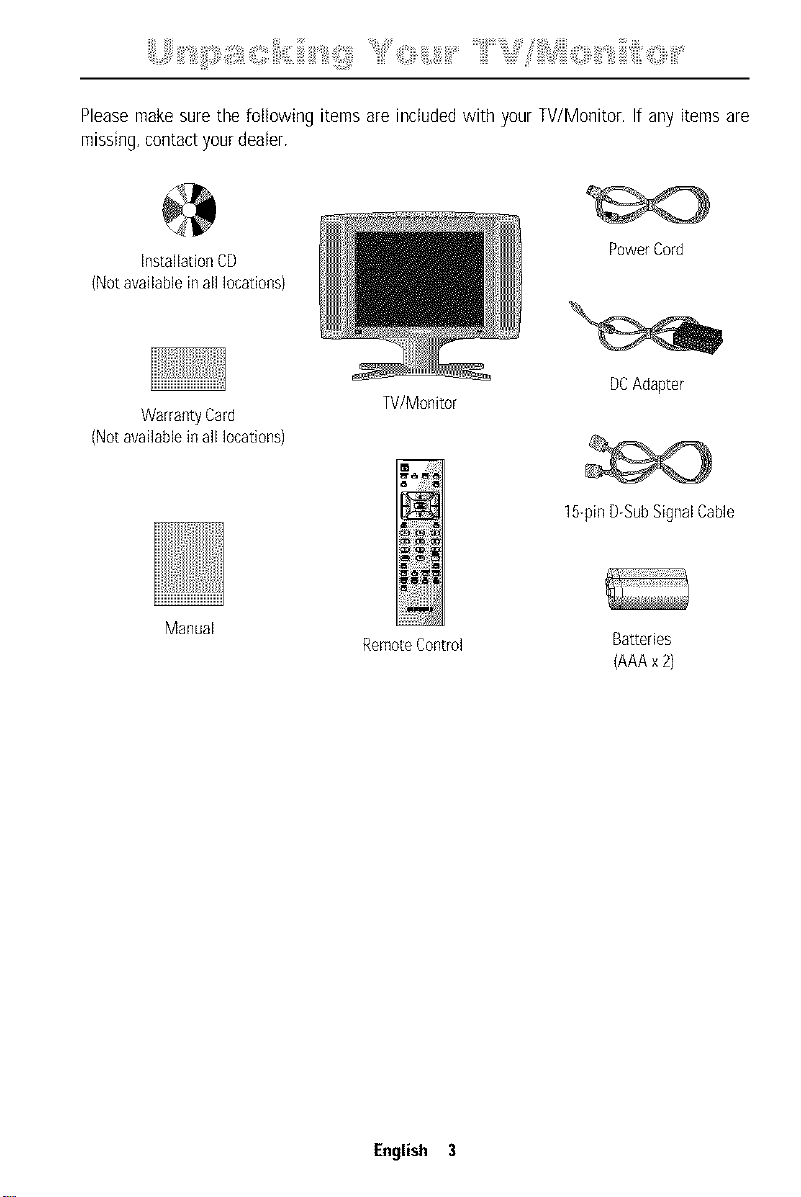
Pleasemakesurethe followingitemsare includedwith yourTV/Monitor.If anyitemsare
missing,contactyourdeater.
InstallationCD
(Notavailablein all locations)
WarrantyCard
(Notavailablein all locations)
Manual
W/Monitor
RemoteControl
PowerCord
DCAdapter
15-pinDGubSignalCable
Batteries
(AAAx2)
English 3
:iii!i_ii_i:::!;ildiiii:i_i:iiiii_iilli_!_!iiii;_i,_iii!ii::ii_,'_!iiii_"'_!::i_i_,i,_,i,_iiiiii,_,¸iiiiLiiiil;_i_;:!iiiiiii_;__iiiii_`_l_ii_lSS_ii_i_i_ii_l_i:::::_i_;i_ii_ii:_i_;i:_;:_i_iiii,''
Settingup an ErgonomicWorkstation
ConsidertheadvicegivenbelowbeforeyouinstallyourTV/Monitor.
TV/Monitor location
ChooseapositionthatexposesyourTV/Monitortotheleastreflectionfromlightsorwindows,
usuallyata rightangletoanywindow,
Workstation height
PlaceyourLCDTV/Monitorsothattiretopoftirescreenisslightlybelowyoureyelevelwhen
youarecomfor[ablyseated.
Viewing angle
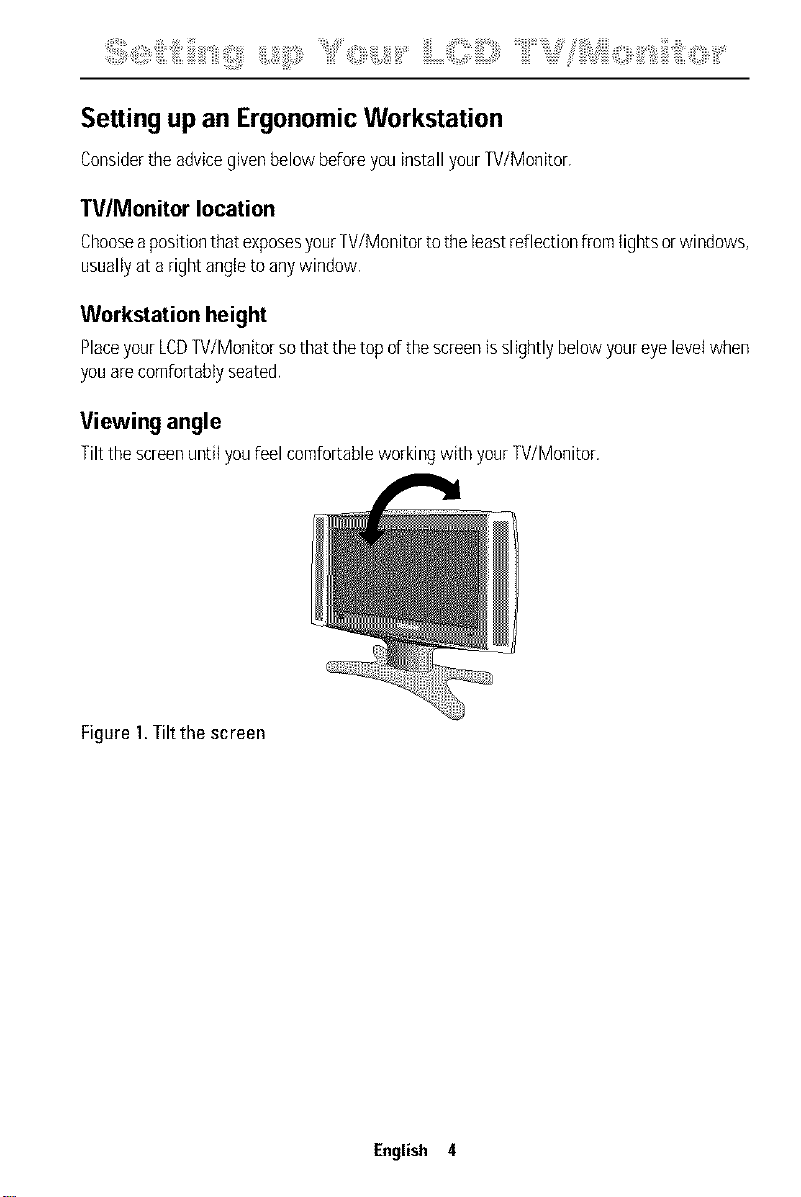
Tilt tirescreenuntilyoufeelcomfortableworkingwith yourTV/Monitor.
Figure 1.Tilt the screen
English 4
+i+iii+ii::iil, +iiiiii!++iiii i ;i!iiiiiii +
Connecting YourLCDTV/Monitor
r- --
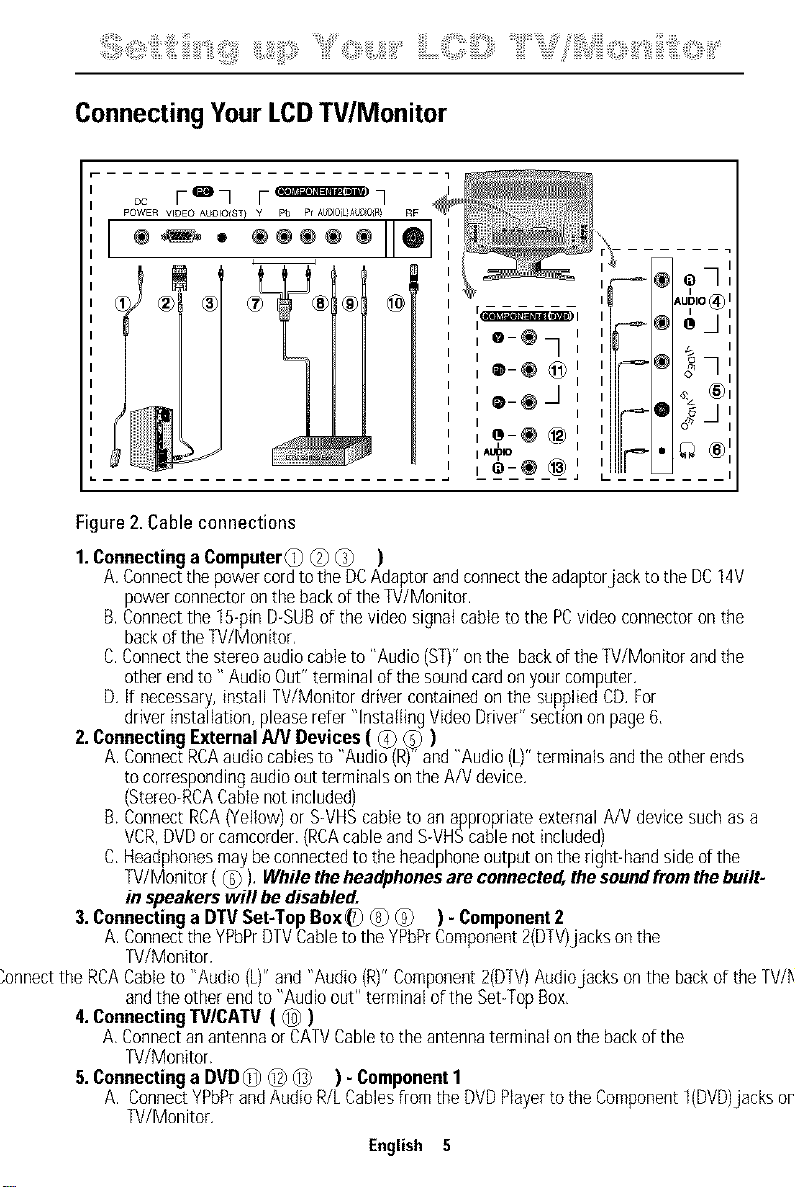
Figure2.Cableconnections
1.Connectinga ComputerC) @ @ )
A.Connectthepowercordtothe DCAdaptorandconnecttheadaptorjack tothe DC14V
powerconnectoronthebackof theTV/Monitor.
B.Connectthe 15-pinD-SUBofthevideosignalcableto the PCvideoconnectoronthe
backoftheTV/Monitor,
C.Connectthestereoaudiocableto "Audio(ST)"onthe backd theW/Monitor andthe
otherendto" AudioOut"terminalofthesoundcardonyourcomputer.
D. if necessary,install W/Monitor drivercontainedonthe suppliedCD.For
driverinstallation,pleaserefer"InstallingVideoDriver"sectionon page6,
2.ConnectingExternalA/VDevices( _ _ )
A.ConnectRCAaudiocablesto "Audio(R)"+'and"Audio(L)"terminalsandtheotherends
tocorrespondingaudiooutterminalsontheA/Vdevice.
(Stereo+RCACablenotincluded)
B.ConnectRCA(Yellow)or S+VHScableto an appropriateexternalA/Vdevicesuchas a
VCR,DVDorcamcorder.(RCAcableandS+VHScablenotincluded)
C.Headphonesmaybeconnectedto theheadphoneoutputontheright-handsideofthe
TV/Monitor(_) ). While theheadphonesareconnected,thesoundfromthebuilt.
in speakerswill bedisabled.
3.Connectinga DTVSet-TopBox_) _) (_ ) - Component2
A.Connectthe YPbPrDTVCabletotheYPbPrComponent2(DTV)jacksonthe
W/Monitor,
"onnectthe RCACableto "Audio (L)"and "Audio(R)"Component2(D+[V)Audiojacks onthe backofthe TV/M,
andtheotherendto "Audioout" terminalofthe Set+TopBox,
4.ConnectingTV/CATV( _ )
A.Connectan antennaor CATVCabletotheantennaterminalonthebackofthe
TV/Monitor.
5.Connectinga DVD_ _ _ ) - Component1
A. ConnectYPbPrandAudioR/LCablesfloratheDVDPlayertotheCoerponentt(DVD)jacksoni
TV/Monitor.
English 5
:iii!i_ii_i:::!_ii_iiiii:i_i:iiiii_iilli_!_!iiii__i,_iii!ii::ii_,'_!iiiii"_!:::i_i_'i'_'i,_iiiiii'_'¸iiiiiLiii:_i_::!iiii::_;_"iiiii_`_"_l_iii_JS_ii_i_i_i_i_l_i:::_i_l_iii_ii_ii1i:_::_i_liiii¸''
Plug and Play
Theadoptionof thenewVESA_ PlugandPtaysolutioneliminatescomplicatedandtime
consumingsetup,it allowsyouto installyourW/Monitor ina PlugandPlaycompatible
systemwithoutthe usualhasslesandconfusion.YourPCsystemcaneasilyidentifyand
configureitselffor usewith yourdisplay,ThisTV/MonitorautomaticallytellsthePCsystem
itsExtendedDisplayIdentificationData(DID) usingDisplayDataChannel(DDC)protocols.Thisway
thePCsystemcanautomaticallyconfigureitselfto usetheLCD.if yourPCsystemneedsa
videodriver,follow the instructionsgivenbelowaccordingtotheoperatingsystemyour
computeruses.
Installing the Video Driver
TheCDthat accompaniesthis productcontainsthenecessarydriversfor installingyour
W/Monitor. Pleaserefertothedriverinstallationinstructionsincludedwith yourCDpackage
formoreinformation.
Self-Test FeatureCheck (STFC)
YourTV/MonitorprovidesaselfitestfeaturethatallowsyoutocheckwhetheryourTV/Monitoris
functioningproperly,MakesurethatPCisselectedasa primaQ/sourcebycheckingifthesource
indicatorLEDlabeled"PC"ison,IfyourTV/Monitorandcomputerareproperlyconnectedbutthe
TV/Monitorscreenremainsdarkandthepowerindicatorisblinking,runtheTV/Monitorself-test
byfollowingthestepsgivenbelow:
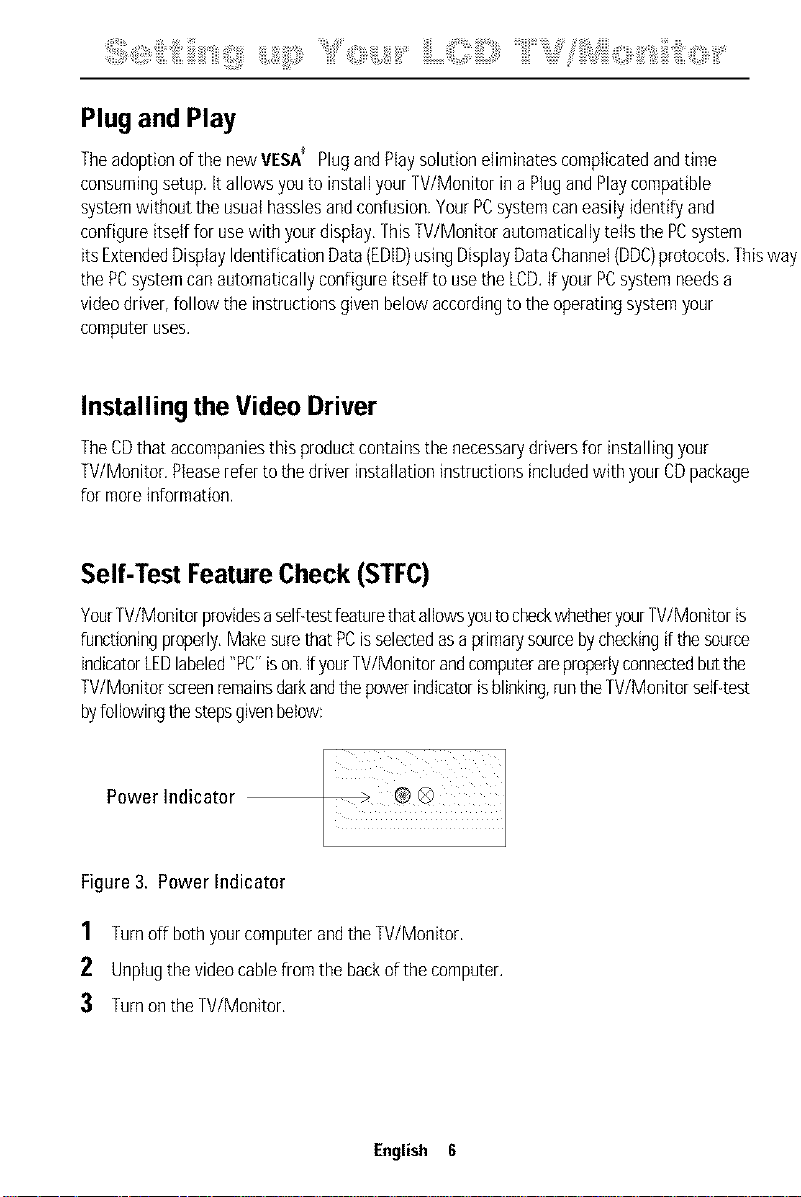
Power Indicator
l
Figure3. Power Indicator
1 Turnoff bothyourcomputerandtheW/Monitor,
2 Unplugthevideocablefromthebackofthe computer.
:3 TurnontheTV/Monitor.
English 6
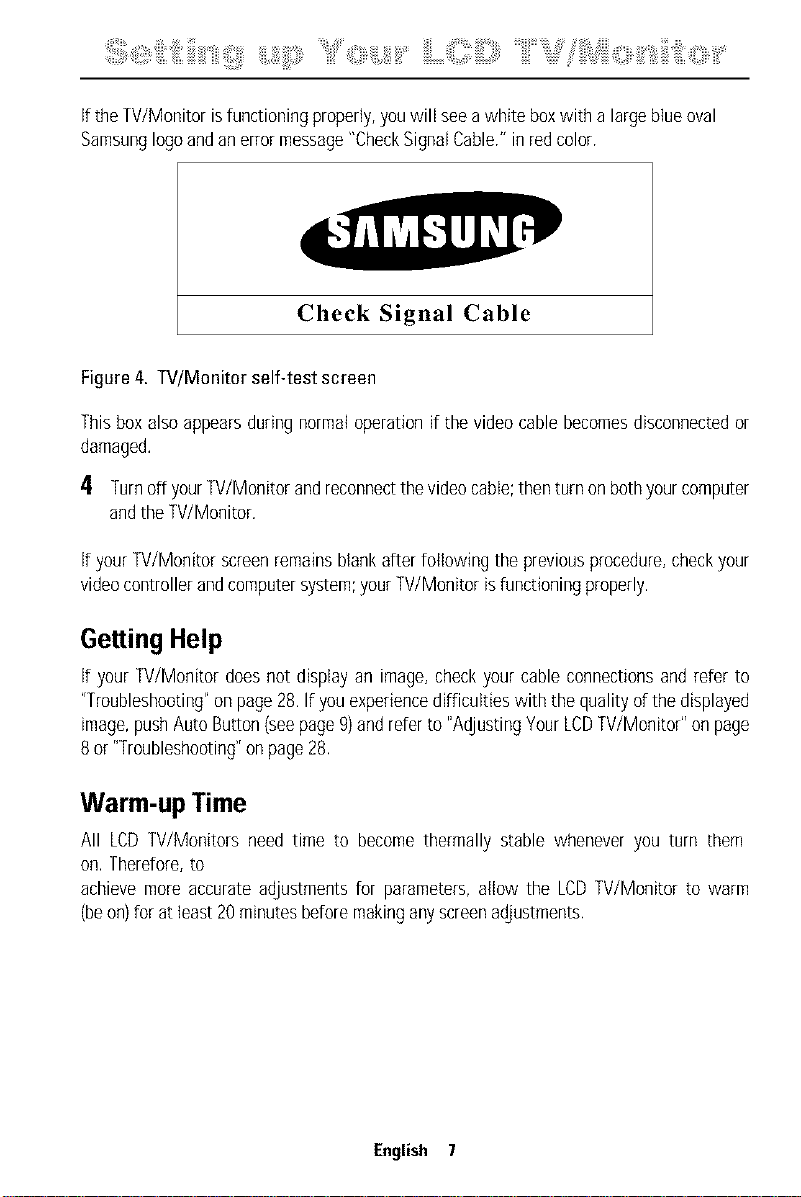
iftheTV/Monitorisfunctioningproperly,youwill seeawhite boxwith a largeblueoval
Samsunglogoandanerrormessage"CheckSignalCable."inredcolor.
Check Signal Cable
Figure4. TV/Monitor self-test screen
Thisboxalsoappearsduringnormaloperationif thevideocablebecomesdisconnectedor
damaged.
4 Turnoff yourW/Monitor andreconnectthevideocable;thenturnonbothyourcomputer
andtheW/Monitor.
ifyourW/Monitor screenremainsblankafterfollowing the previousprocedure,checkyour
videocontrollerandcomputersystem;yourW/Monitor isfunctioningproperly.
Getting Help
if yourW/Monitor doesnot displayan image,checkyourcableconnectionsand referto
"Troubleshooting"onpage28,If youexperiencedifficultieswith the qualityof thedisplayed
image,pushAutoButton(seepage9)andreferto "AdjustingYourLCDTV/Monitor"onpage
8 or"Troubleshooting"onpage28.
Warm-up Time
All LCDW/Monitors needtime to becomethermally stable wheneveryou turn them
on.Therefore,to
achievemoreaccurateadjustmentsfor parameters,allow the LCDW/Monitor to warm
(beon)for atleast20minutesbeforemakinganyscreenadjustments.
English 7
,ii!%_i_;:::_i,il,_;!iiii:!,jii_iiiitiiiiiiii'iii_!_!iiii;Y"<i_i_,i'_'i,_iiiiii'_'¸iiiiiLO!ii!i;ii::_,"iiiiii'_"_%ili!'?'liiii_),i_i_i_i_i_i<ii_i_iii'_'iiliiiili_i't<ii_iiiii¸'¸¸¸¸¸¸
UserControls
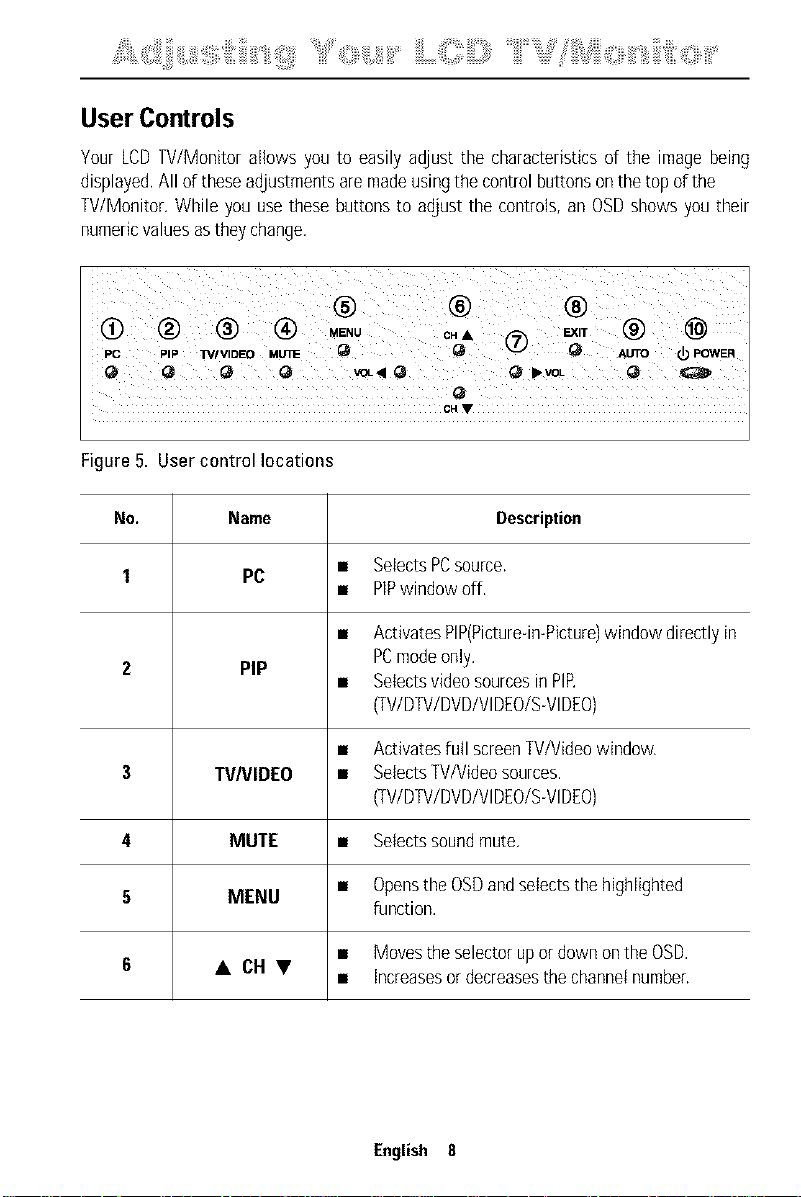
Your LCD TV/Monitor allows you to easily adjust the characteristics of the image being
displayed. All of these adjustments are made using the control buttons onthe top of the
TV/Monitor. While you use these buttons to adjust the controls, an OSD shows you their
numeric values asthey change.
® ® ®
PC PIP TVIVIDEO utrnE Q Q _ _ AUTO Q) POWER
CH •
Figure5. User control locations
No. Name Description
1 PC • SelectsPCsource.
• PlPwindowoff,
• ActivatesPIP(Picture-in-Picture)windowdirectlyin
PCmodeonly.
2 PIP
• SetectsvideosourcesinPIP
(TV/DTV/DVD/VlDEO/S-VlDEO)
• Activatesfull screenTV/Videowindow.
3 TVNIDEO • SelectsTV/Videosources.
(TV/DTV/DVD/VIDEO/S-VIDEO)
4 MUTE • Selectssoundmute.
• Opensthe OSDandselectsthehighlighted
5 MENU
function,
• Movestheselectorupor downontheOSD.
6 • CHV
• Increasesordecreasesthechannelnumber.
English 8
,ii!% i ;:: i,il,;!iiii ! jii :iiitiiiiiiiili ! !iiii;' iiiii%:::i i 'i' 'i, iiiiiiiiiiiLQ!ii!i iiiii '"iiiiii' " %ili!'?'liiii i i,i i i i i i<ii iii'Iliiiili ii i:<; iiii¸''
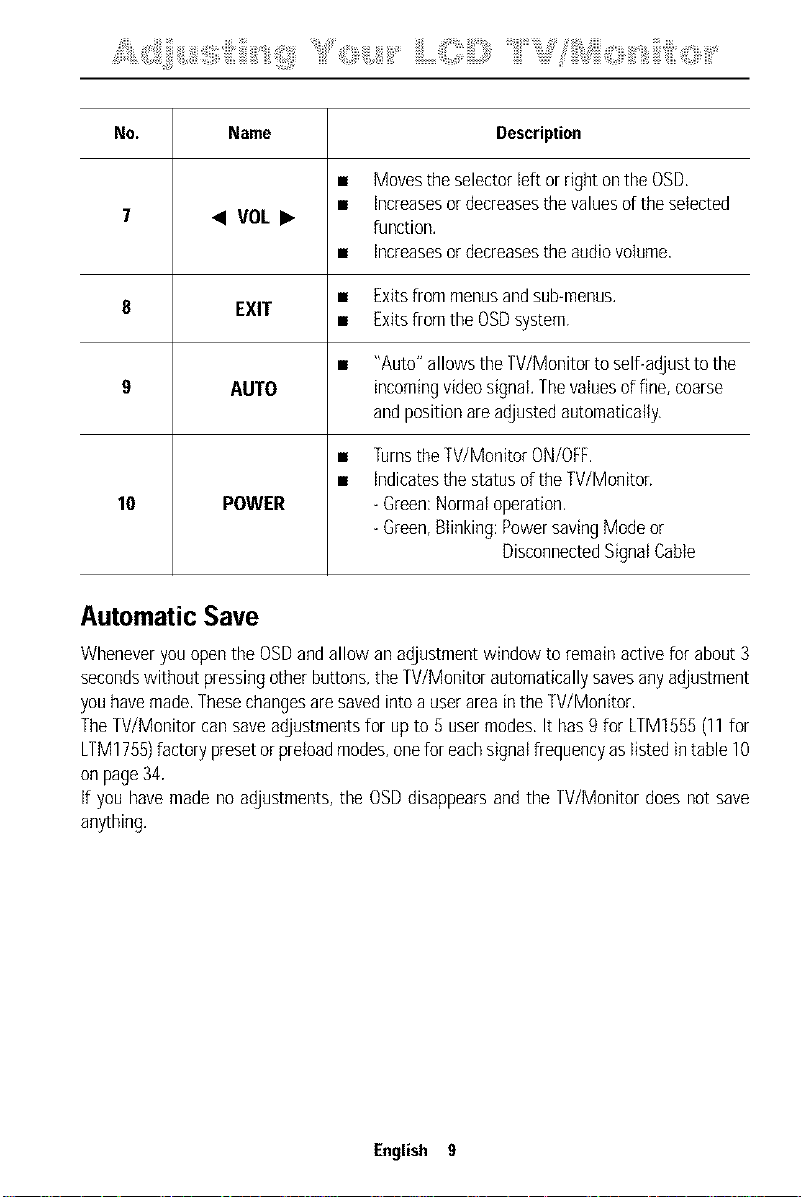
No. Name Description
• Movestheselectorleftor rightontheOSD,
• increasesordecreasesthevaluesoftheselected
7 • VOL • function,
• increasesordecreasestheaudiovolume,
• Exitsfrommenusandsub-menus.
8 EXIT
• ExitsfromtheOSDsystem,
• "Auto"allowstheTV/Monitortoself-adjusttothe
9 AUTO incomingvideosignal,Thevaluesof fine,coarse
andpositionareadjustedautomatically.
• TurnstheTV/MonitorON/OFF.
• indicatesthestatusoftheTV/Moniton
10 POWER -Green:Normaloperation,
-Green,Blinking:PowersavingModeor
DisconnectedSignatCable
AutomaticSave
Wheneveryouopenthe OSDandallow anadjustmentwindow toremainactivefor about3
secondswithoutpressingotherbuttons,theW/Monitor automaticallysavesanyadjustment
youhavemade,Thesechangesaresavedintoa userarea intheW/Monitor,
TheW/Monitor cansaveadjustmentsfor up to 5 usermodes,It has9 for LTM1555(11for
LTM1755)factorypresetorpreloadmodes,oneforeachsignalfrequencyaslistedintable10
onpage34,
if youhavemadenoadjustments,the OSDdisappearsand the W/Monitor doesnot save
anything.
English 9
Ji!% i ;:: i,il,;!iiii ! jl; :iiitiiiiiiiili ! !iiii;' iiiii%::i i 'i' 'i, iiiiiiiiiiib< i<ii!i iiiii ' ¸''
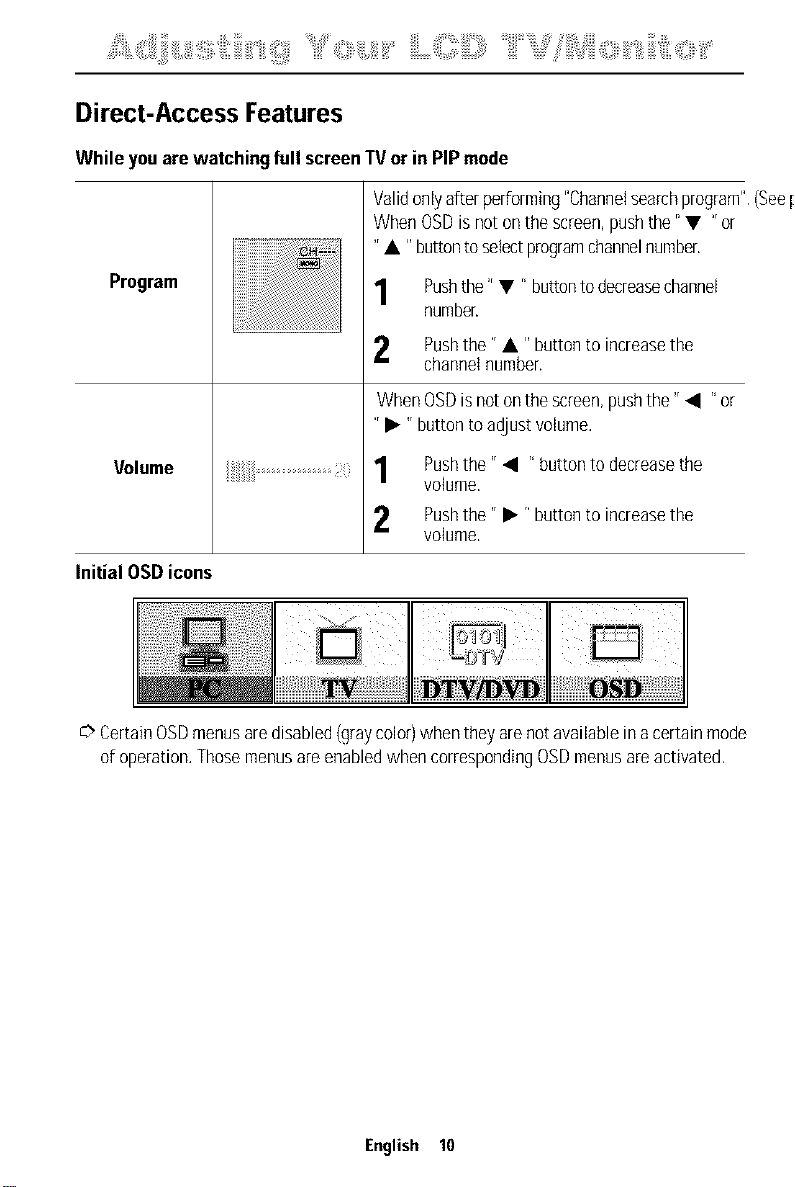
Direct-Access Features
While youarewatching full screenIV or in PIPmode
Program
Volume
Validonlyafterperforming"ChanneIsearchprogram".(Seepa
WhenOSDisnotonthescreen,pushthe" • "or
"• "buttontoselectprogramchannelnumber,
Pushthe" • r' buttontodecreasechannel
number.
Pushthe'r • I' buttonto increasethe
channelnumber.
WhenOSDisnotonthescreen,pushthe'r • r' or
'r • 'r buttontoadjustvolume.
Pushthe'r • r' buttontodecreasethe
volume,
2 Pushthe" • r'buttonto increasethe
volume.
Initial OSDicons
C>CertainOSDmenusaredisabled(graycolor)whentheyarenotavailableinacertainmode
ofoperation.ThosemenusareenabledwhencorrespondingOSDmenusareactivated.
English 10
,ii!%_i_;i::_i,il,_!iiii_!_jii_:iiitiiiiiiii'iii_!_!iiii;Y"<i<i,_,i,_iiiiii'_'¸iiiiiLO!ii!i_iiiii_,"iiiiii'_"_%ili!'?'liiii_i_i,i_i_i_i_i_i<ii_iii'_'iiliiiili_i't<;_iiii¸,¸¸¸¸¸¸
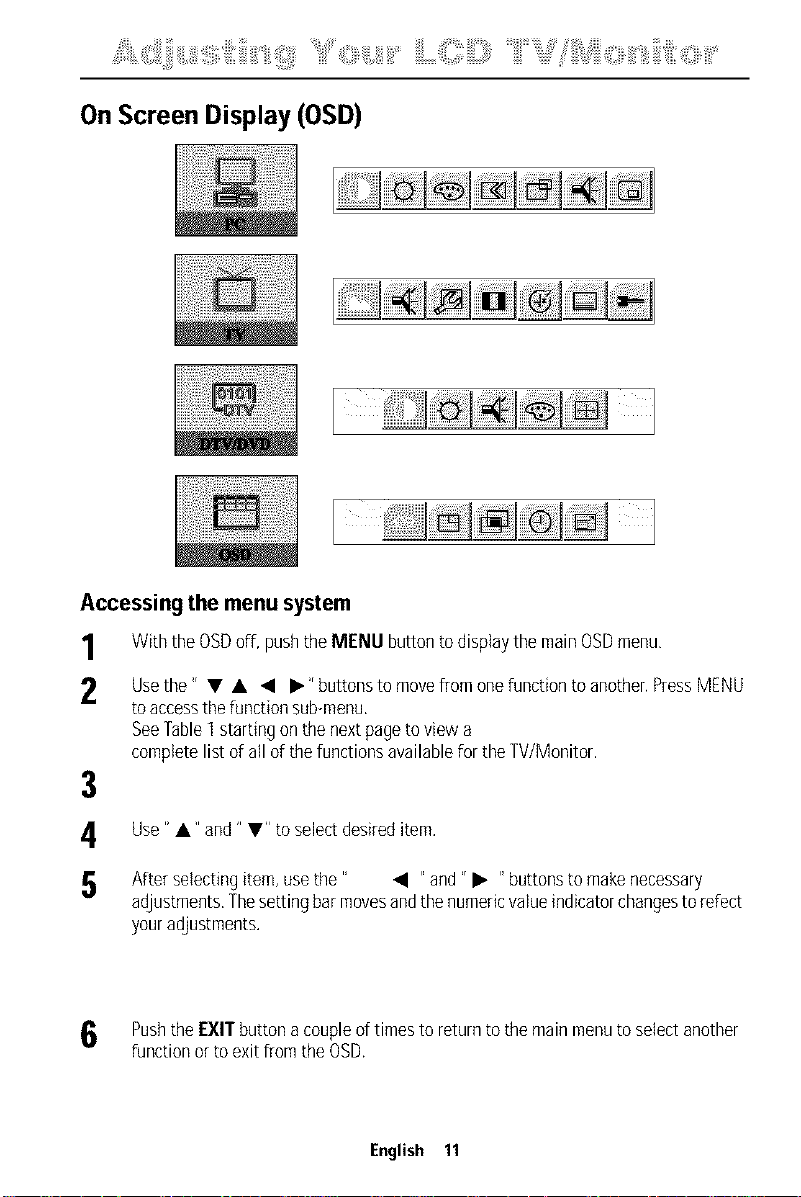
OnScreen Display (OSD)
Accessing the menu system
1 With the OSDoff, push the MENU button to display the main OSDmenu,
2 Usethe 'r • • • • 'rbutt°ns t° m°ve fr°m °ne functi°n t° an°ther' PressM[NU
to access the function sub-menu.
See Fable] starting on the next page to view a
complete list of all of the functions available for the TV/Monitor.
3
Use" •" and" •" to select desired item.
After selecting item, usethe" • "and" • "buttons to make necessary
adjustments, Thesetting bar movesand the numeric value indicator changesto refect
your adjustments.
Pushthe EXIT button acouple of times to return to the main menu to select another
function or to exit from the OSD.
English 11
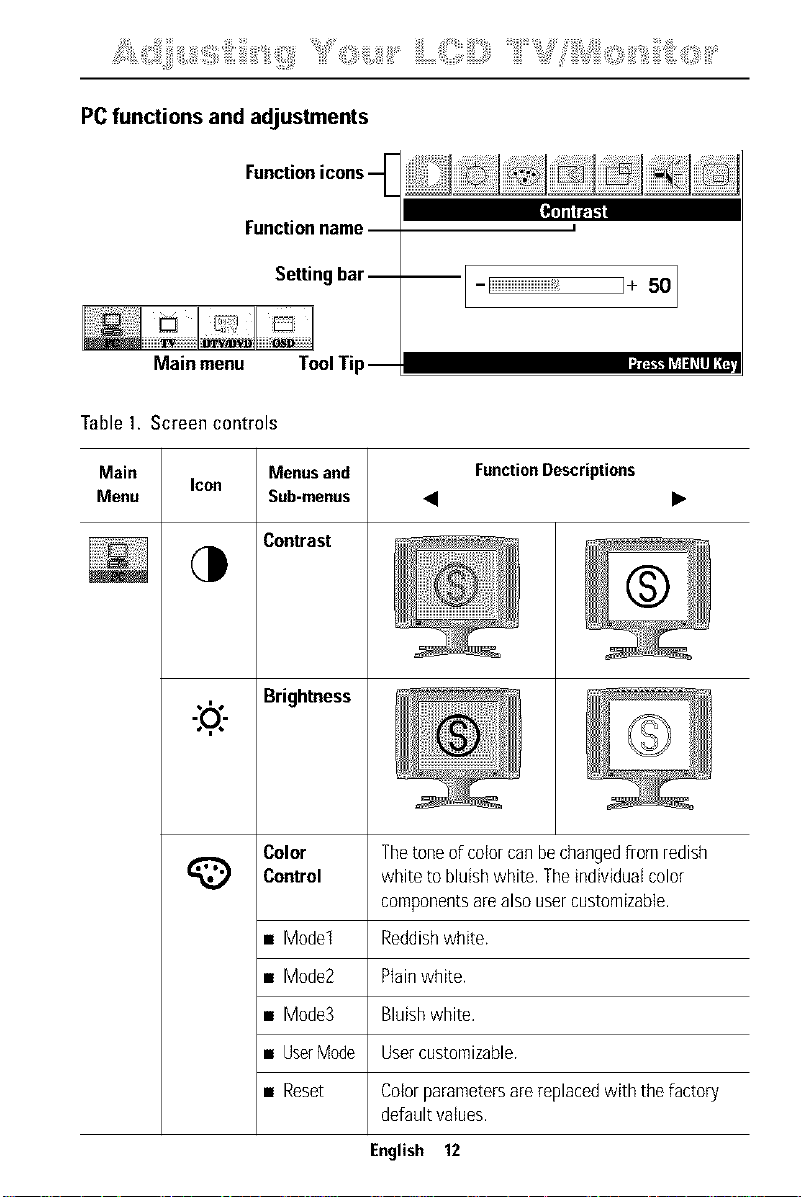
PC functions and adjustments
Functionname
Settingbar--
! J'R:_tLTd:ILlIII ,_=
Main menu ToolTip
I
--I--Iiiiiiiiiiiiiiiiiiiiiiii_ ]-I- 501
Table1. Screen controls
Main
Menu
Icon
,14.
-:o,)
Menus and
Sub-menus
Contrast
Brightness
FunctionDescriptions
® i
® i
i
Color The tone of color can be changedfrom redish
Control white to bluish white. The individual color
components are also usercustomizabte.
• Model Reddishwhite.
• Mode2 Plainwhite.
• Mode3 Bluish white.
• UserMode Usercustomizable.
• Reset Color parameters arereplaced with the factory
default vatues.
English 12
¸ ' ;iiiii "Oiii, i!ii i iiLOil[=)====iiiil' " " iii,Siii!: ,iill O; " iliiiii!iiiiii::Olii
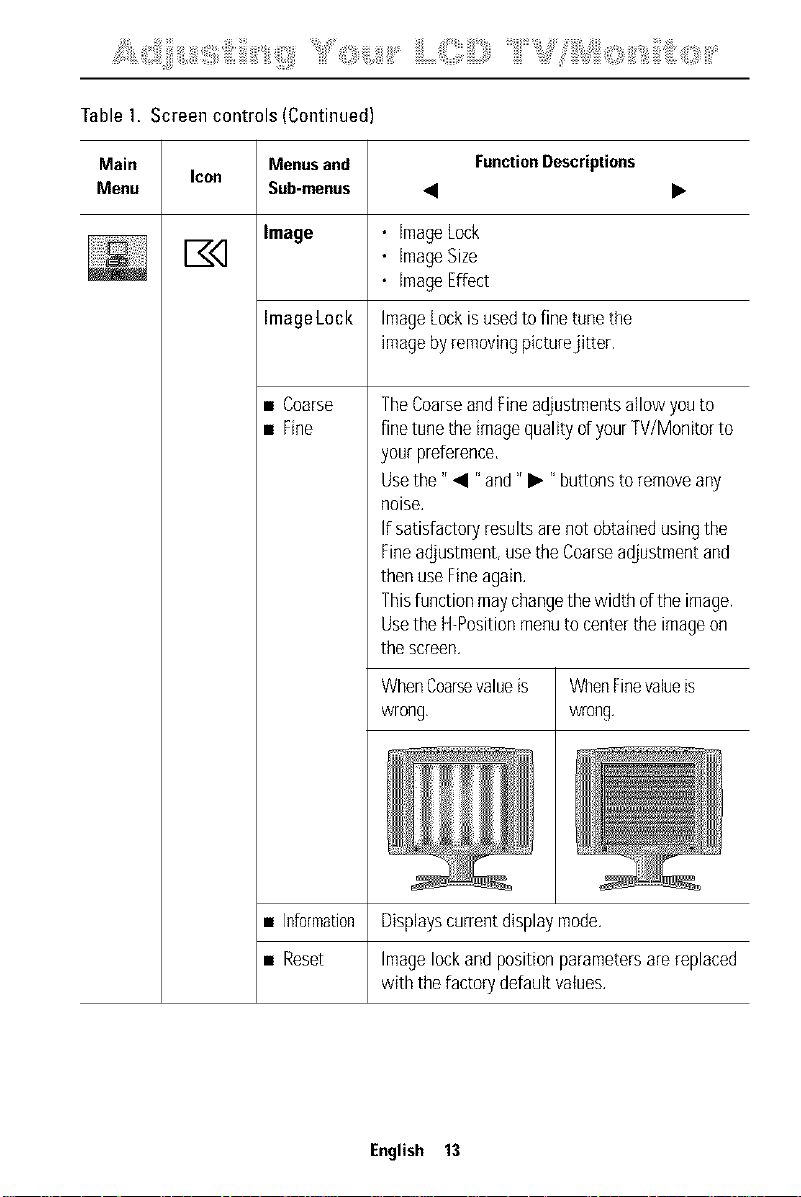
Table1. Screen controls (Continued)
Main Menusand FunctionDescriptions
Menu Sub-menus • •
Image
Icon
• imageLock
• imageSize
• imageEffect
ImageLock ImageLockisusedtofinetunethe
imagebyremovingpicturejitter.
• Coarse
• Fine
• Information
• Reset
TheCoarseandFineadjustmentsallowyouto
finetunetheimagequalityd yourTV/Monitorto
yourpreference,
Usethe" • "and" • "buttonstoremoveany
noise.
If satisfactoryresultsarenot obtainedusingthe
Fineadjustment,usetheCoarseadjustmentand
thenuseFineagain.
Thisfunctionmaychangethewidth d the image.
Usethe H-Positionmenutocenterthe imageon
thescreen.
WhenCoarsevalueis
wrong,
WhenFinevalueis
wrong.
Displayscurrentdisplaymode.
Imagelockandpositionparametersarereplaced
with thefactorydefaultvalues.
English 13
¸ ' ;iiiii "Oiii, i!ii; i iiLOil[=)====iiiil' " iii,Siii!: ,#<); " iliiiii!iiiiii::Olii
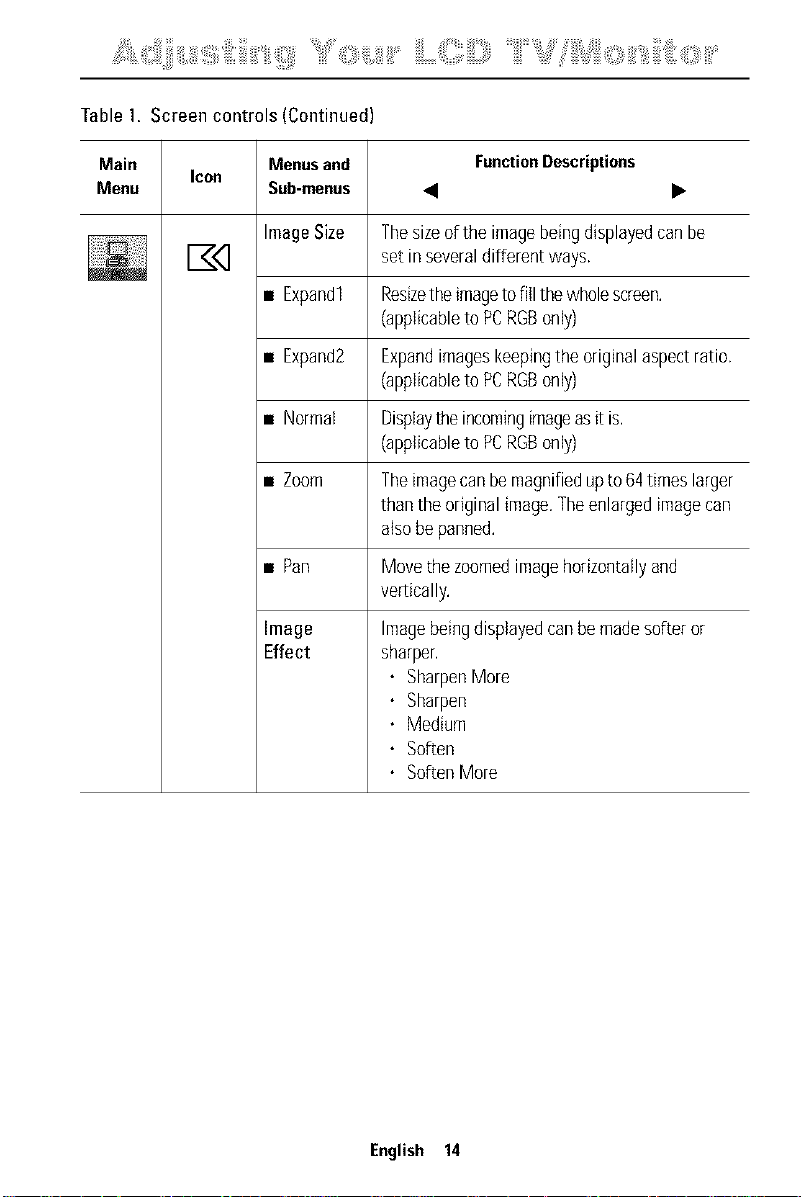
Table1. Screen controls (Continued)
Main FunctionDescriptions
Menu • •
Icon
Menusand
Sub-menus
ImageSize
• Expandl
• Expand2
• Normal
• Zoom
• Pan
Image
Effect
Thesizeofthe imagebeingdisplayedcanbe
set in severaldifferentways.
ResizetheimagetofilIthewholescreen.
(applicabletoPCRGBonly)
Expandimageskeepingtheoriginalaspectratio.
(applicabletoPCRGBonly)
Displaytheincomingimageasit is.
(applicabletoPCRGBonly)
Theimagecanbemagnifiedupto 64timeslarger
thantheoriginalimage.Theenlargedimagecan
alsobepanned.
Movethezoomedimagehorizontallyand
ver[ically.
Imagebeingdisplayedcanbemadesofteror
sharper.
• SharpenMore
• Sharpen
• Medium
• Soften
• SoftenMore
English 14
=_i_i_,_::_i_,;_ii:_i_!!i,',fiiii::,iiiiii"li_,!!!ilii¸_'_;iiiii_"Oiii,_i!ii_i_'_iiLOil[=)====iiiil'_"_iii,Siii!:_,iill_O;_"_iliiiii!iiiiii:;Olii'_'
Table1. Screen controls (Continued)
Main Menusand FunctionDescriptions
Menu Sub-menus • •
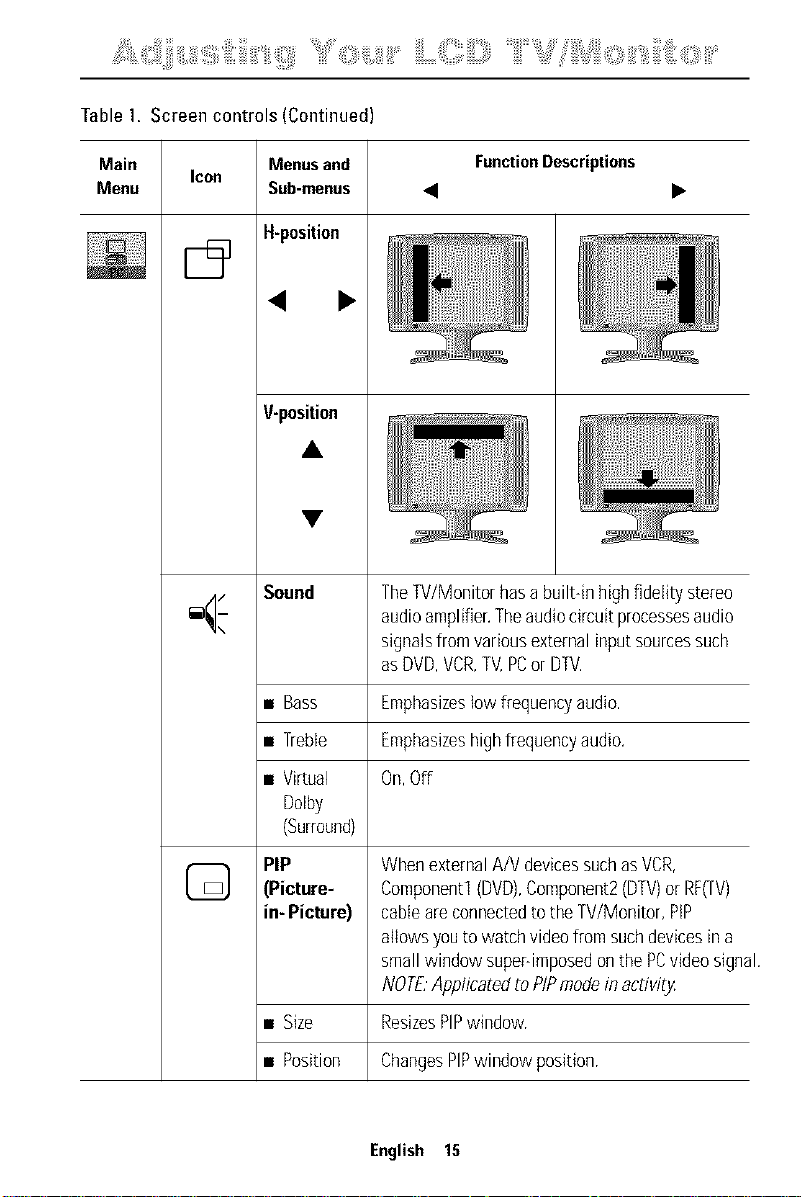
H-position
Icon
< •
V-position
lilliliiiiiliiiii!iiiiiii//i!
iii !i
/ Sound TheTV/Monitorhasa built-inhighfidelitystereo
/1
_J_ audioamplifier.Theaudiocircuitprocessesaudio
signalsfromvariousexternalinputsourcessuch
asDVD,VCR,TV,PCor DTV.
• Bass Emphasizestowfrequencyaudio.
• Treble Emphasizeshighfrequencyaudio.
• Virtual On,Off
Dolby
(Surround)
(_ PIP WhenexternalA/VdevicessuchasVCR,
(Picture- Componentl(DVD),Component2(DTV)orRF(TV)
ie- Picture} cane areconnectedto theW/Monitor, PIP
allowsyoutowatchvideofromsuchdevicesina
smallwindowsuper-imposedonthe PCvideosign_
NOT£ApplicatedtoPIPmodein activity
• Size ResizesPIPwindow.
• Position ChangesPIPwindowposition.
English 15
¸ ' ;iiiii roiii, i!ii i iiLOil[=)====iiiil' " iii,Siii!: ,iill O; " iliiiii!(iiiii::Olii
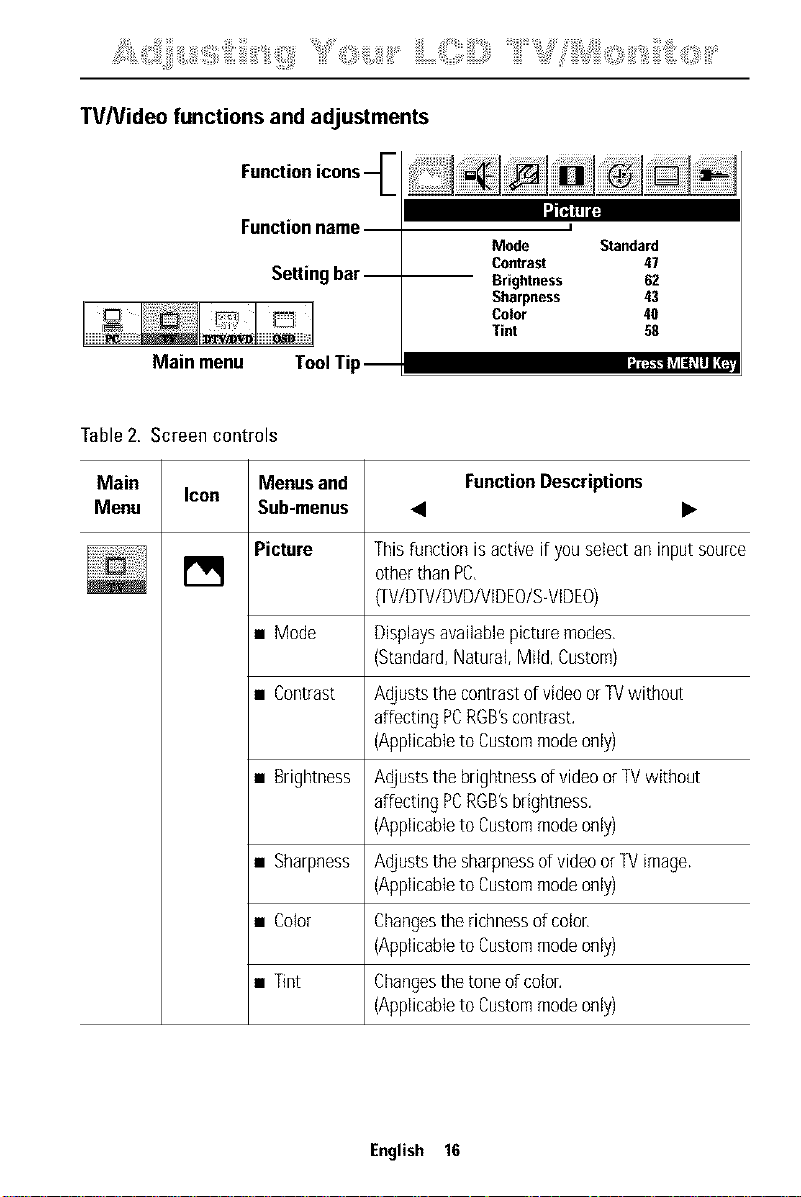
TVNideo functions and adjustments
Function"
l=[_llll[
Functionname
Settingbar--
Main menu ToolTip
I
Mode Standard
Conwast 47
Brightness 62
Sharpness 43
Color 40
Tint 58
Table2. Screen controls
Main Icon Menusand FunctionDescriptions
Menu Sub-menus • •
Picture
[]
Thisfunctionisactiveif youselectan inputsource
otherthanPC,
(TV/DTV/DVD/VIDEO/S-VIDEO)
• Mode Displaysavailablepicturemodes.
(Standard,Natural,Mild, Custom)
• Contrast AdjuststhecontrastofvideoorTVwithout
affectingPCRGB'scontrast.
(Applicableto Custommodeonly)
• Brightness Adjuststhebrightnessdvideo or TVwithout
affectingPCRGB'sbrightness.
(Applicableto Custommodeonly)
• Sharpness AdjuststhesharpnessofvideoorTVimage.
(Applicableto Custommodeonly)
• Color Changestherichnessof color,
(Applicableto Custommodeonly)
• Tint
Changesthetoneof color.
(Applicableto Custommodeonly)
English 16
= i i 4:: i ,; ii; is,',fiiii::iiiiis (!!ilii¸ ' ;iiiii "Oiii: i!ii; i iiL£,',',!lilil[=)====iiiil' " iii,£i]i!: ,#@ii " iliiiii!(iiiii::Olii
Table2. Screen controls (Continued)
Main Menusand FunctionDescriptions
Menu Sub-menus • •
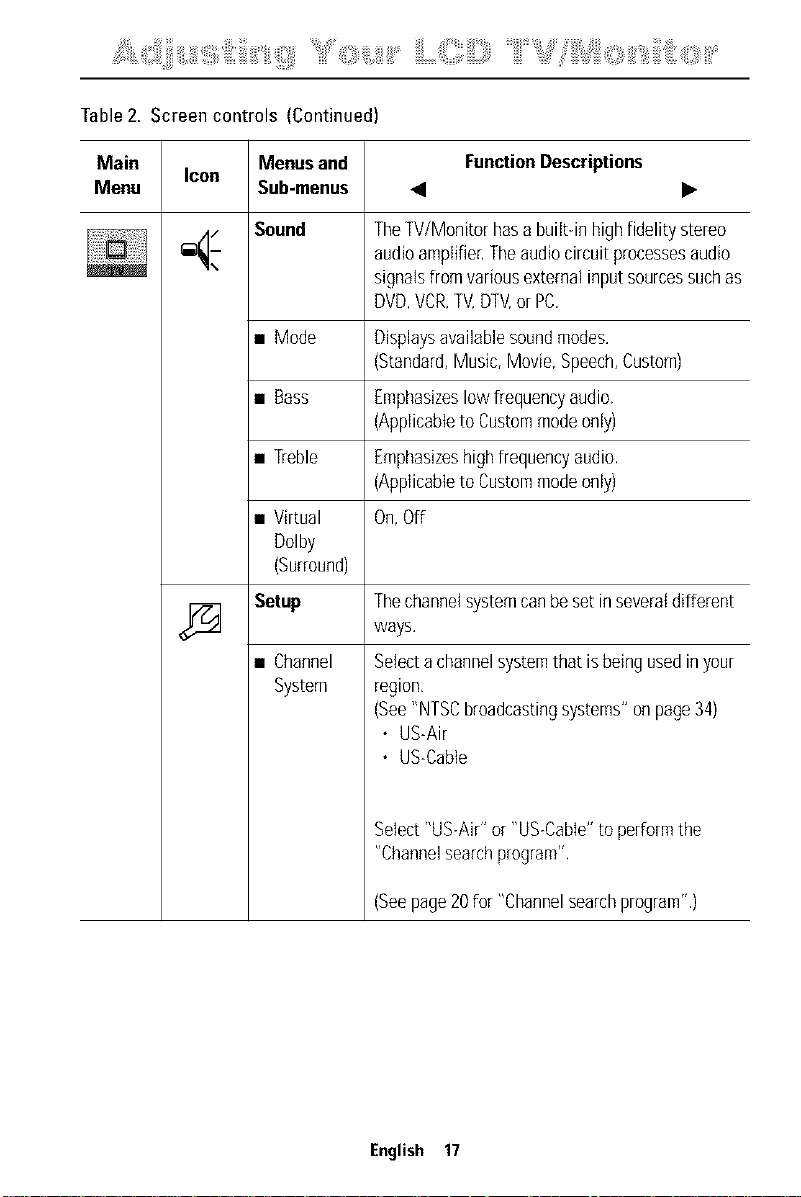
Sound
Icon
TheTV/Monitorhasabuilt-inhighfidelitystereo
audioamplifier.Theaudiocircuitprocessesaudio
signalsfromvariousexternalinputsourcessuchas
DVD,VCR,TV,DTV,or PC.
• Mode
• Bass
• Treble
• Virtual
Dolby
(Surround)
Setup
• Channel
System
Displaysavailablesoundmodes.
(Standard,Music,Movie,Speech,Custom)
Emphasizeslowfrequencyaudio.
(Applicableto Custommodeonly)
Emphasizeshighfrequencyaudio.
(Applicableto Custommodeonly)
On,Off
Thechannelsystemcanbesetin severaldifferent
ways.
Selectachannelsystemthat isbeingusedinyour
region,
(See"NTSCbroadcastingsystems"onpage34)
• US-Air
• US-Cable
Select"US-Air"or"US-Cable"to performthe
"Channelsearchprogram".
(Seepage20for "Channelsearchprogram".)
English 17
¸ ' ;iiiii "Oiii, i!ii i iiLOil[=)====iiiil' " " iii,Siii!: ,iillO; " iliiiii!iiiiii:;Olii
Table2. Screen controls (Continued)
Main Menusand FunctionDescriptions
Menu Sub-menus • •
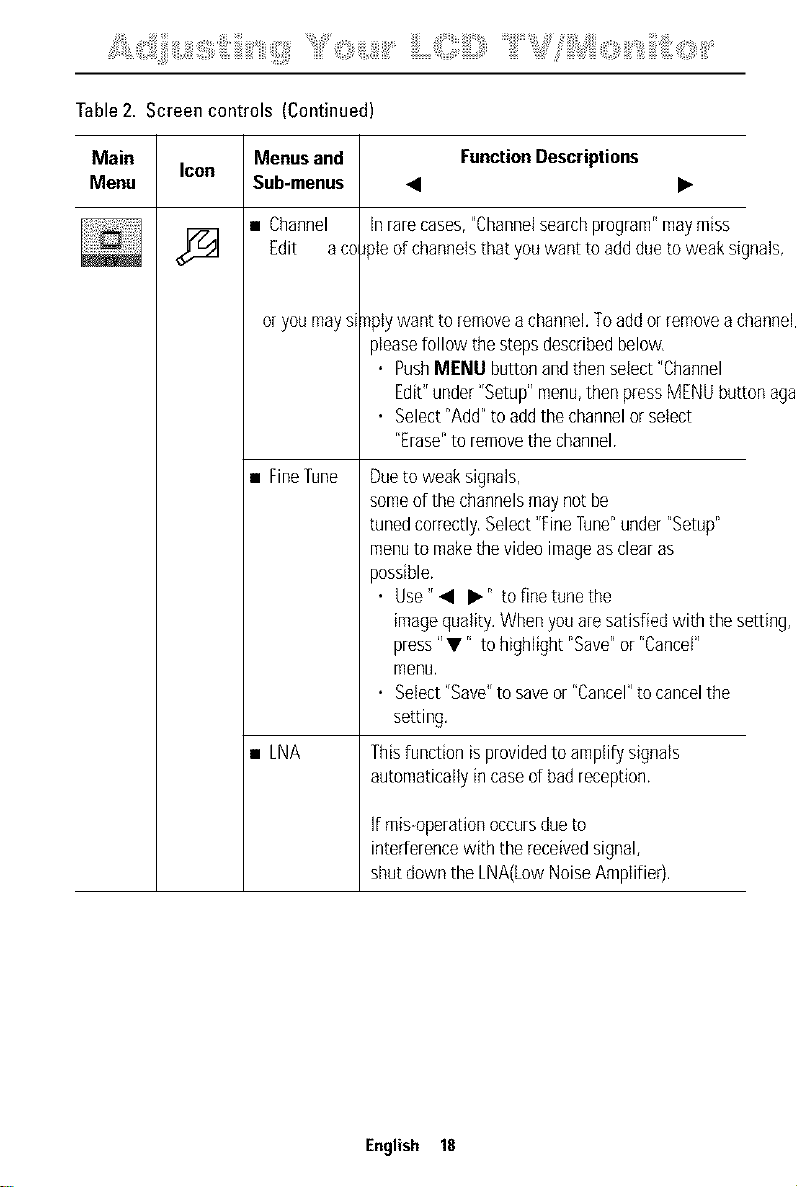
• Channel
Edit a co
oryoumays_
• FineTune
• LNA
inrarecases,"Channelsearchprogram"maymiss
oIe ofchannelsthatyouwantto addduetoweaksignals,
nplywantto removeachannel.Toaddorremovea c
pleasefollowthestepsdescribedbelow,
• PushMENDbuttonandthenselect"Channel
Edit"under"Setup"menu,thenpressMENUbut1
• Select"Add"toaddthechannelorselect
"Erase"to removethechannel.
Duetoweaksignals,
someofthechannelsmaynotbe
tunedcorrectly,Select"Finerune"under"Setup"
menuto makethevideoimageasclearas
possible.
• Use" • •" to finetunethe
imagequality.Whenyouaresatisfiedwith thes
press"V" tohighlight"Save"or "Cancel"
menu.
• Select"Save"tosaveor "Cancel"tocancelthe
setting.
Thisfunctionisprovidedto amplifysignals
automaticallyincased badreception.
If mis-operationoccursdueto
interferencewiththereceivedsignal,
shutdownthe[NA(LowNoiseAmplifier).
English 18
¸ ' ;iiiii "Oiii, i!ii i iiLOil[=)====iiiil' " iii,Siii!: ,iill O; " iliiiii!iiiiii::Olii
Table2. Screen controls (Continued)
Main Icon Menusand FunctionDescriptions
Menu Sub-menus • •
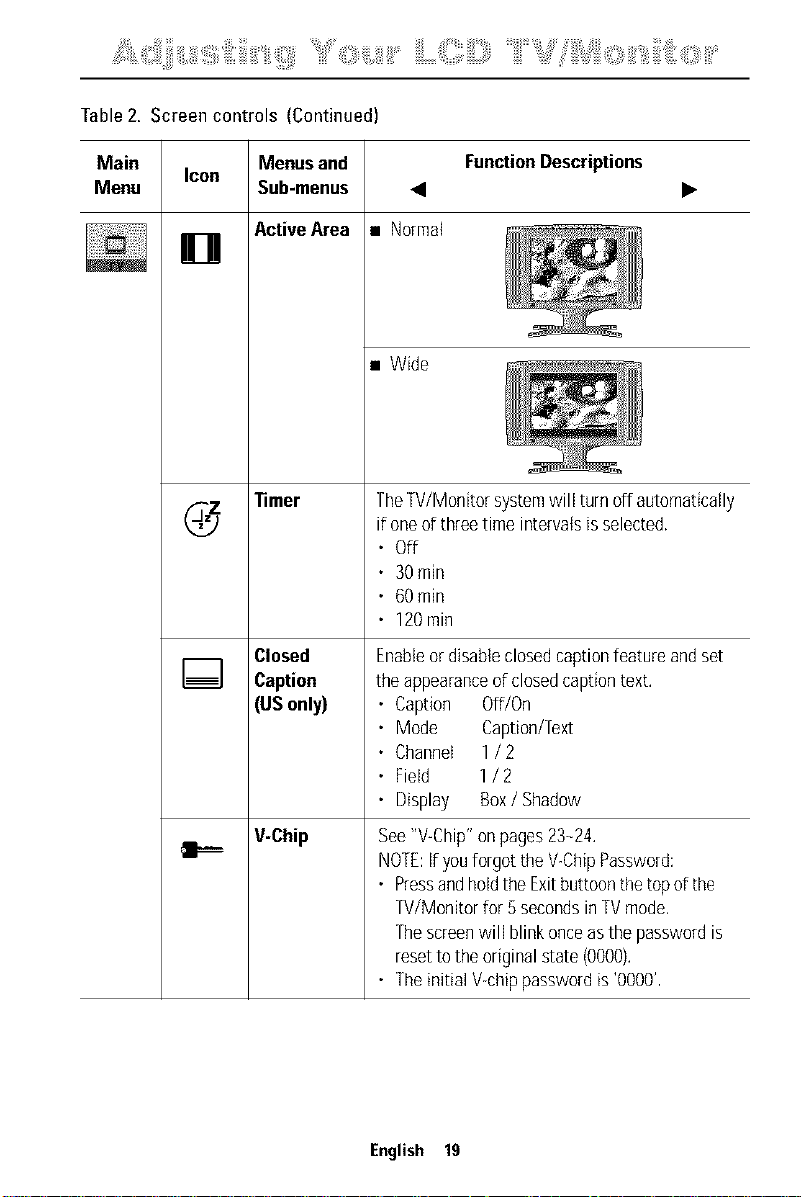
ActiveArea
[]
Timer
Closed
Caption
(USonly)
V-Chip
• Normal
• Wide
TheW/Monitor systemwill turnoff automatically
if oneof threetime intervalsisselected.
• Off
• 30min
• 60min
• 120rain
Enableor disableclosedcaptionfeatureandset
theappearanceofclosedcaptiontext.
• Caption Off/On
• Mode Caption/Text
• Channel 1/ 2
• Field 1/ 2
• Display Box/ Shadow
See"V-Chip"onpages23-24.
NOTE:if youforgottheV-ChipPassword:
• PressandholdtheExitbuttoonthetopof the
TV/Monitorfor 5secondsinTVmode,
Thescreenwill blinkonceasthepasswordis
resettotheoriginalstate(0000).
• Theinitial V-chippasswordis '0000',
English 19
=_ii_,_::_i_,;_ii;_i_!!i_',fiiii::,iiiiii"li_,!!!ilii¸_'_;iiiii_"Oiii,;!ii;_i_'_ILOill]!i,====iiiil'_"_iii,Siii!:_,iill_o_ii_"_iliiiii!iiiiii::olii,_'
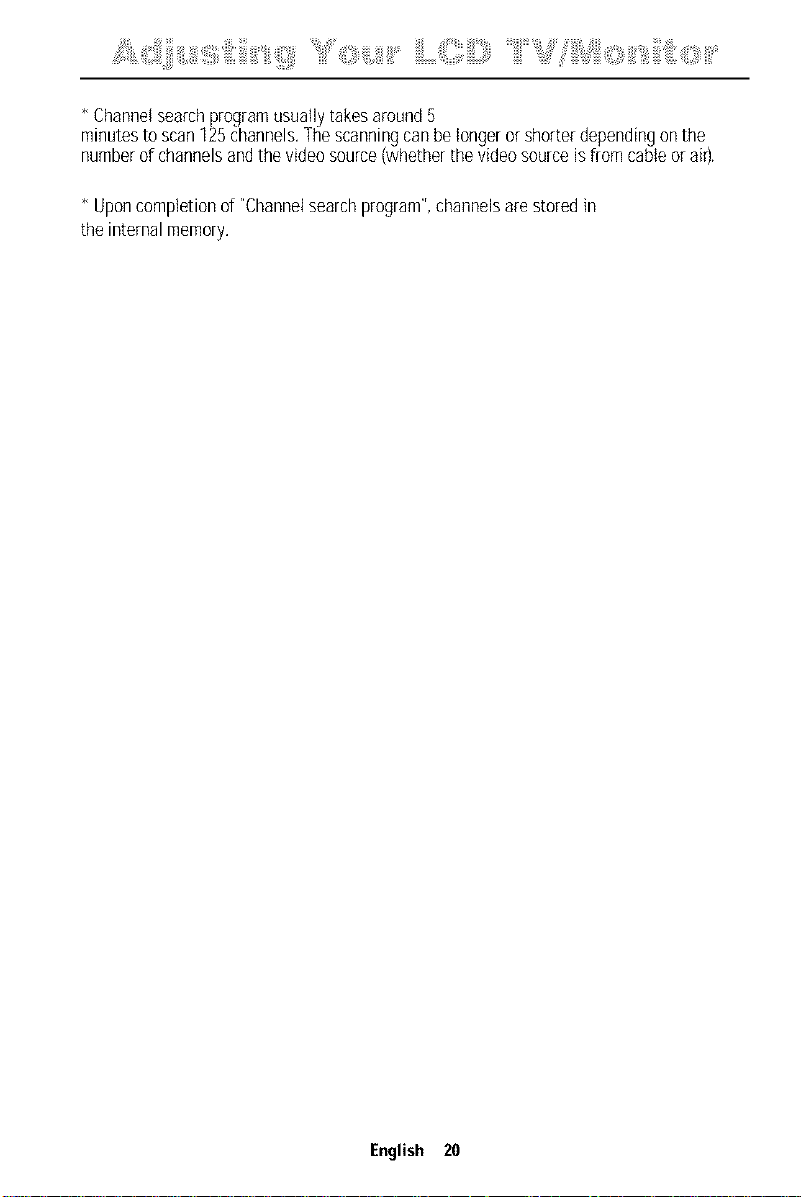
* Channelsearchprogramusuallytakesaround5
minutesto scan125channels.Thescanningcanbelongerorshorterdependingonthe
numberof channelsandthevideosource(whetherthevideosourceisfromcableor air).
* Uponcompletionof "Channelsearchprogram",channelsarestoredin
theinternalmemory.
English 20
¸ ' ;iiiii roiii, i!ii i iiLOil[=)====iiiil' " iii,Siii!: ,iill O ii " iliiiii!(iiiii::Olii
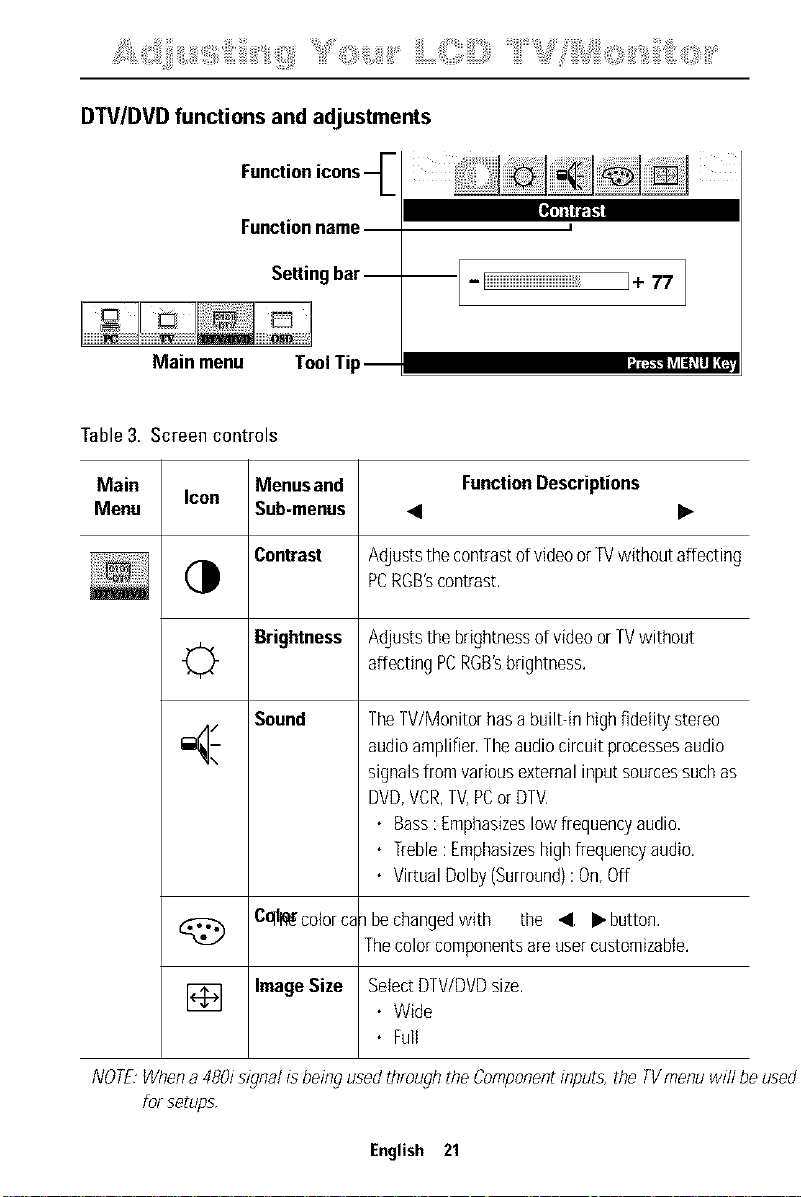
DTV/DVD functions and adjustments
Functionicons--_
Functionname
Settingbar--
I,Erfil1-_
Main menu ToolTip
I
i - liiiiiiiiiiiiiiiiiiiiiiiiiiiiiiii__ I_ 77
Table3. Screen controls
Main Icon Menusand FunctionDescriptions
Menu Sub-menus • •
Contrast AdjuststhecontrastofvideoorTVwithoutaffecting
PCRGB'scontrast.
Brightness Adjuststhebrightnessofvideoor TVwithout
affectingPCRGB'sbrightness.
Sound
0
TheTV/Monitorhasabuilt-inhighfidelitystereo
audioamplifier.Theaudiocircuitprocessesaudio
signalsfromvariousexternalinputsourcessuchas
DVD,VCR,TV,PCor DTV,
• Bass:Emphasizeslowfrequencyaudio,
• ]_eble: Emphasizeshighfrequencyaudio.
• VirtualDolby(Surround):On,Off
d_ Cqll_colorcalbechangedwith the • •button.
Thecolorcomponentsareusercustomizabte.
] Image Size SelectDTV/DVDsize.
• Wide
• Full
NOTE:When a 480/s/_gnalis being used through the Componentinputs, the TVmenu will be used
for setups.
English 21
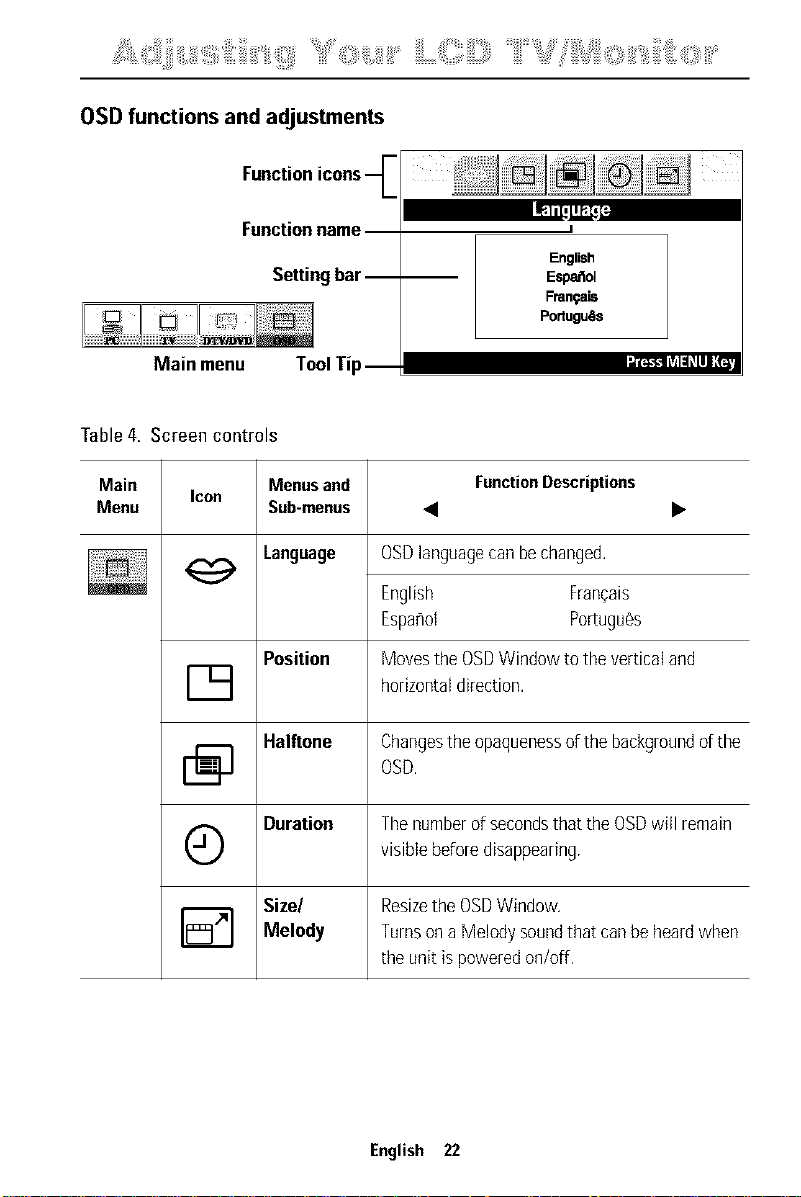
OSD functions and adjustments
Functionicons--C
Functionname
Settingbar-- --
J FI'_'-FI lTl1:1L1111,__
Main menu ToolTip
I
English
Espa_ol
Fran_ais
Portugulls
Table 4. Screen controls
Main Menus and FunctionDescriptions
Icon
Menu Sub-menus • •
Language
OSDlanguagecanbechanged.
English Frangais
Espahot Poriugues
MovestheOSDWindowtotheverticaland
horizontaldirection.
Position
D
Halftone Changestheopaquenessofthe backgroundofthe
OSD,
Duration Thenumberof secondsthat theOSDwill remain
Q visiblebeforedisappearing.
Size/ ResizetheOSDWindow.
[] Melody Turnsona Melodysoundthatcanbeheardwhen
theunit ispoweredon/off.
English 22
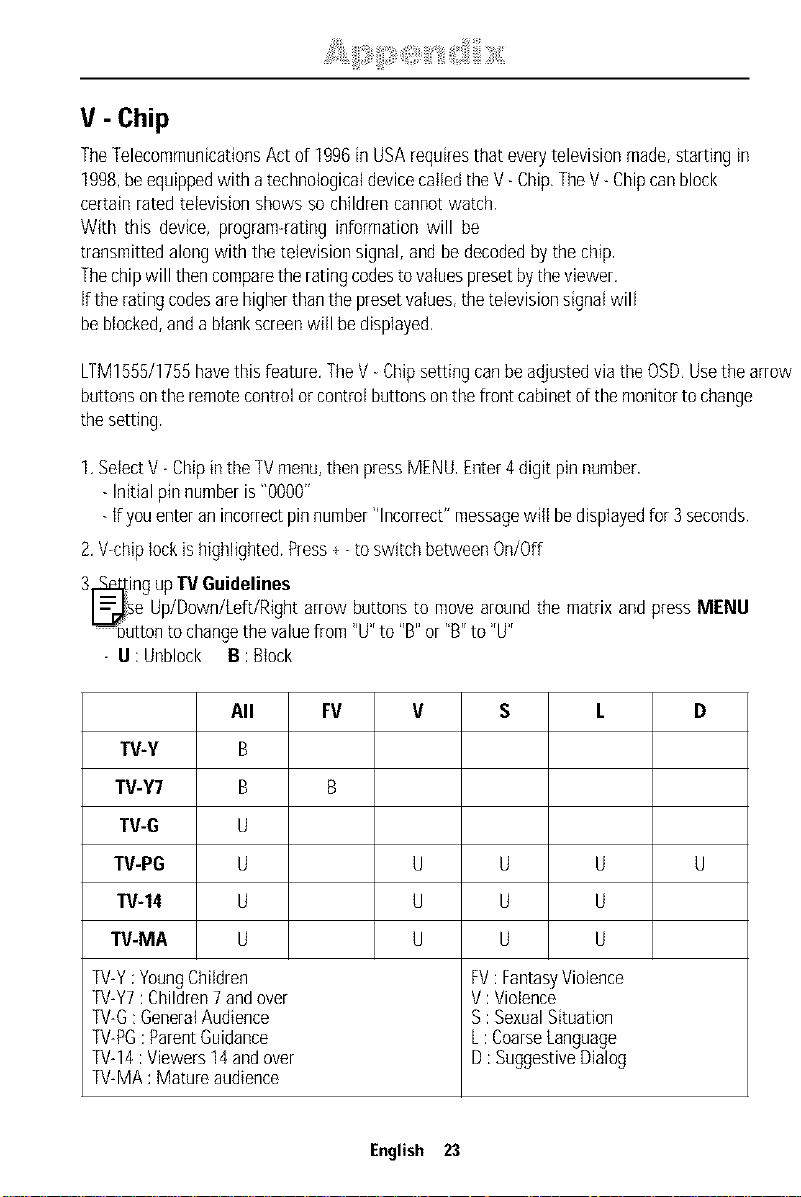
V - Chip
TheTelecommunicationsActof 1996in USArequiresthat everytelevisionmade,startingin
1998,beequippedwith atechnologicaldevicecalledtheV- Chip,TheV- Chipcanblock
certainratedtelevisionshowssochildrencannotwatch,
With this device,program-ratinginformationwill be
transmittedalongwith thetelevisionsignal,and bedecodedbythechip,
Thechipwill thencomparethe ratingcodestovaluespresetbytheviewer,
iftheratingcodesarehigherthanthepresetvalues,thetelevisionsignatwill
beblocked,anda blankscreenwill bedisplayed,
LTM1555/1755havethisfeature.TheV Chipsettingcanbeadjustedviathe OSD,Usethe arrow
buttonsontheremotecontrolorcontrolbuttonsonthefront cabinetofthemonitorto change
thesetting.
1.SelectV- ChipintheTVmenu,thenpressMENU,Enter4digit pinnumber,
- Initial pinnumberis"0000"
- if youenteranincorrectpinnumber"Incorrect"messagewill bedisplayedfor3 seconds.
2.V<hiplockishighlighted.Press+ toswitch betweenOn/Off
3_ing upTVGuidelines
_ise Up/Down/Left/Rightarrowbuttonsto movearoundthe matrixand pressMENU
_uttonto changethevaluefrom "U"to "B"or"B"to "U"
- U:Unblock B:Btock
All FV V S L D
TV-Y B
TV-Y7 B B
TV-G U
TV-PG U U U U U
TV-14 U U U U
TV-MA U U U U
TV-Y:YoungChildren FV:FantasyViotence
TV-Y7:Children7andover V :Violence
TV-G:GeneratAudience S :SexualSituation
TV-PG:ParentGuidance L:CoarseLanguage
TV-14:Viewers14andover D:SuggestiveDialog
TV-MA:Matureaudience
English 23
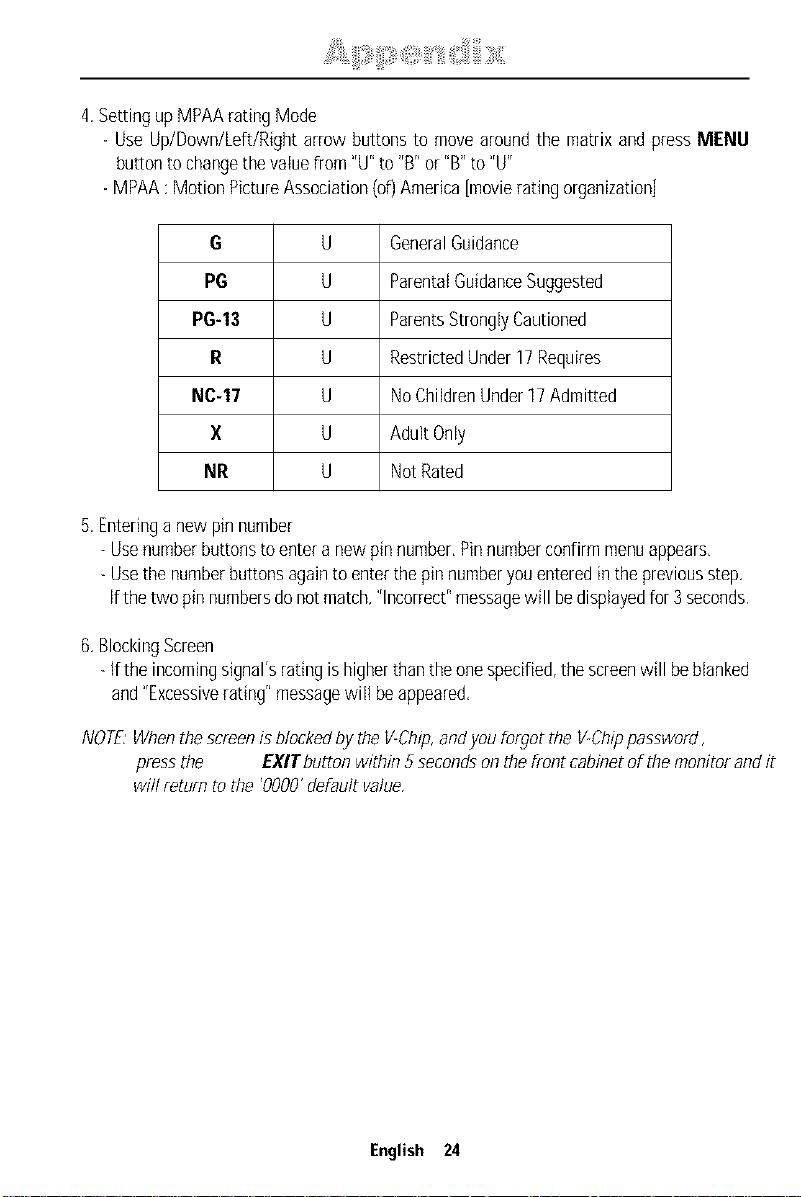
4.SettingupMPAAratingMode
- Use Up/Down/Left/Rightarrow buttonsto movearoundthe matrixand pressMENU
- MPAA:MotionPictureAssociation(08America[movieradngorganization]
G U GeneralGuidance
PG U ParentalGuidanceSuggested
PG-13 U ParentsStronglyCautioned
R U RestrictedUnder17Requires
NC-17 U NoChildrenUnder17Admitted
X U AdultOnly
NR U NotRated
5.Enteringa newpinnumber
- Usenumberbuttonstoenteranewpinnumber.Pinnumberconfirmmenuappears.
- Usethenumberbuttonsagainto enterthepin numberyouenteredin thepreviousstep.
ifthetwo pinnumbersdonotmatch,"Incorrect"messagewill bedisplayedfor3 seconds.
6.BlockingScreen
- Ifthe incomingsignal'sratingishigherthantheonespecified,thescreenwill beblanked
and"Excessiverating"messagewill beappeared,
NOTE:When the screen is blocked by the V-Chip,andyou forgot the VoChippassword,
press the EXITbutton within 5 seconds on the fi ont cabinet of the monitor and it
will return to the '0000' default value.
English 24
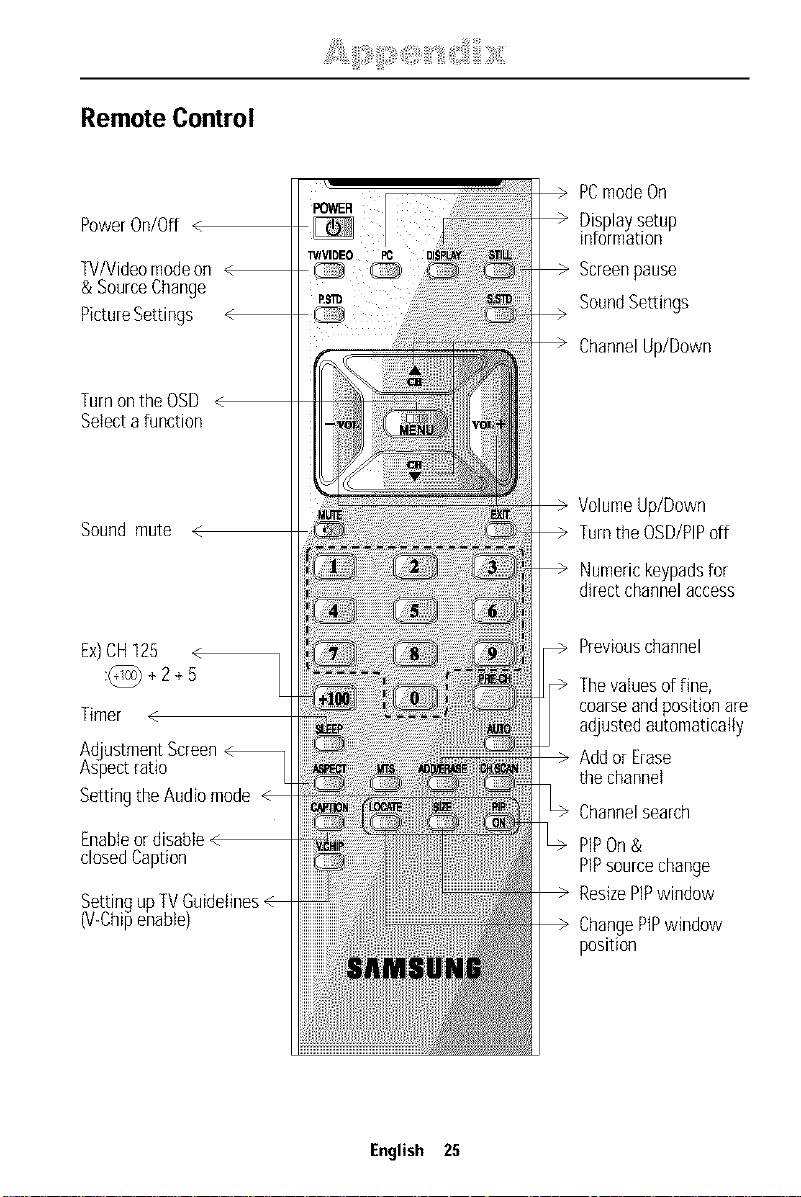
Remote Control
PowerOn/Off <
TV/Videomodeon
& SourceChange
PictureSettings
PCmodeOn
Displaysetup
information
Screenpause
SoundSe_ings
ChannelUp/Down
TurnontheOSD
Selecta function
Soundmute
VolumeUp/Down
Turnthe OSD/PIPoff
Numerickeypadsfor
directchannelaccess
Ex)CH125 <
:@+2+5
Timer
AdjustmentScreen
Aspectratio
SettingtheAudiomode
Ena
closedCaption
Settingup _v
(V-Chipenable)
Previouschannel
Thevaluesof fine,
coarseandpositionare
adjustedautomatically
Addor Erase
thechannel
Channelsearch
PIPOn&
PlPsourcechange
ResizePiPwindow
ChangePtPwindow
position
English 25
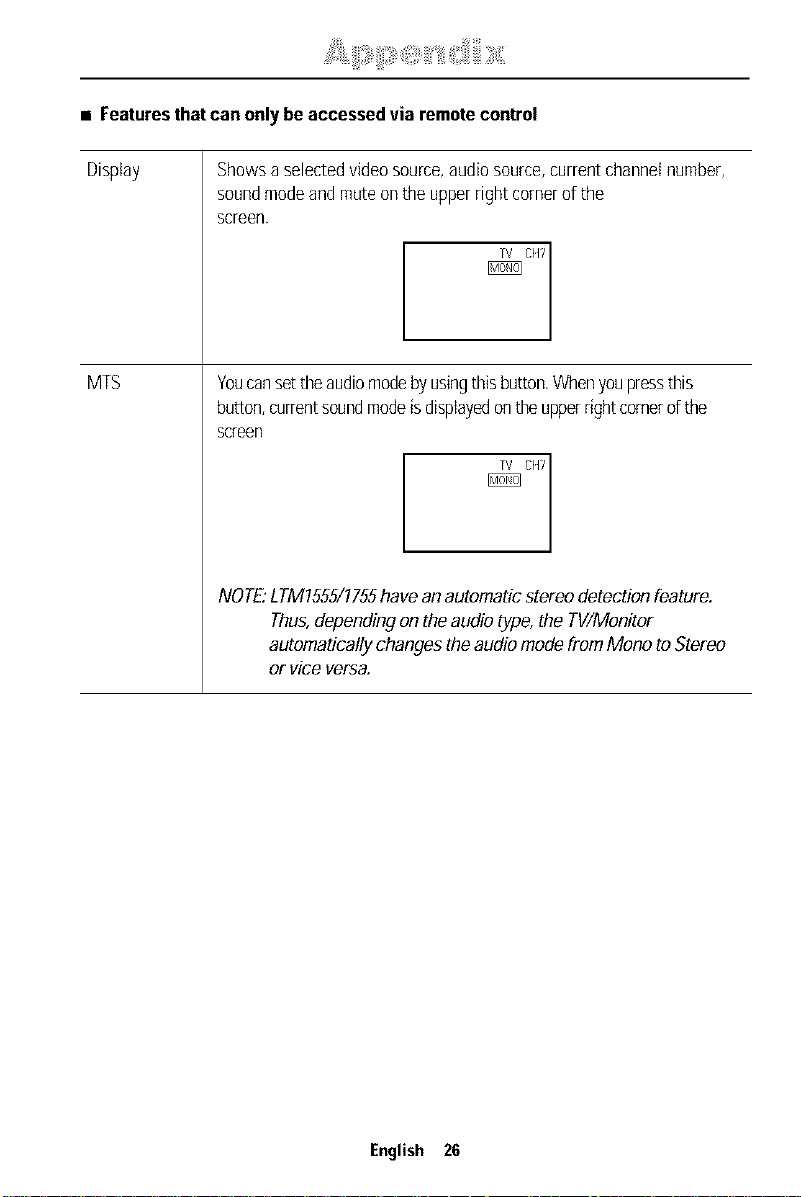
• Featuresthatcanonlybe accessedvia remotecontrol
Display
MTS
Showsa selectedvideosource,audiosource,currentchannelnumber,
soundmodeandmuteontheupperrightcornerofthe
screen.
Youcansettheaudiomodebyusingthisbutton,Whenyoupressthis
button,currentsoundmodeisdisplayedontheupperrightcornerd the
screen
_CFt7
NOTE."LTM1555/1755havean automaticstereo detectionfeature.
Thus,dependingon theaudiotype,the TV/Monitor
automaticallychanges theaudiomodefromMonoto Stereo
or vice versa.
English 26
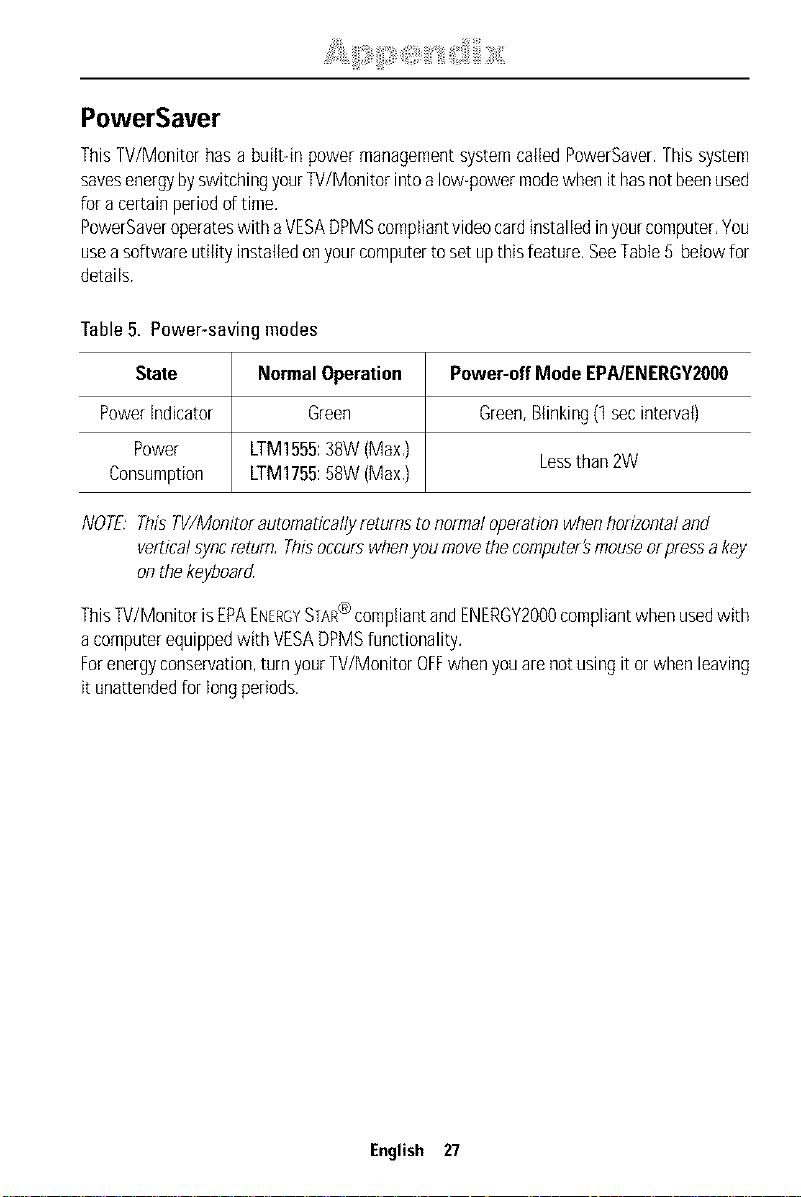
PowerSaver
ThisTV/Monitorhasa built-inpowermanagementsystemcalledPowerSaver.Thissystem
savesenergybyswitchingyourTV/Monitorintoa low-powermodewhenit hasnotbeenused
fora certainperiodd time.
PowerSaveroperateswith aVESADPMScompliantvideocardinstalledinyourcomputer,You
useasoftwareutilit 'installedonyourcomputerto setupthisfeature.SeeTable5 belowfor
details.
Table5. Power-savingmodes
State NormalOperation Power-offMode EPA/ENERGY20O0
Powerindicator Green Green,Blinking(1secinterval)
Power LTM1555:38W(Max,) Lessthan2W
Consumption LTM1755:58W(Max.)
NOTE:ThisTV/Monitorautomaticallyreturnstonormaloperationwhenhorizontaland
verticalsyncreturn,Thisoccurswhenyou movethecomputer'smouseel pressa key
onthekeyboard
ThisTV/MonitorisEPAENERGYSTAR@compliantandENERGY2000compliantwhenusedwith
a computerequippedwith VESADPMSfunctionality,
Forenergyconservation,turnyourW/Monitor OFFwhenyouarenotusingit orwhenleaving
itunattendedfor longperiods,
English 27
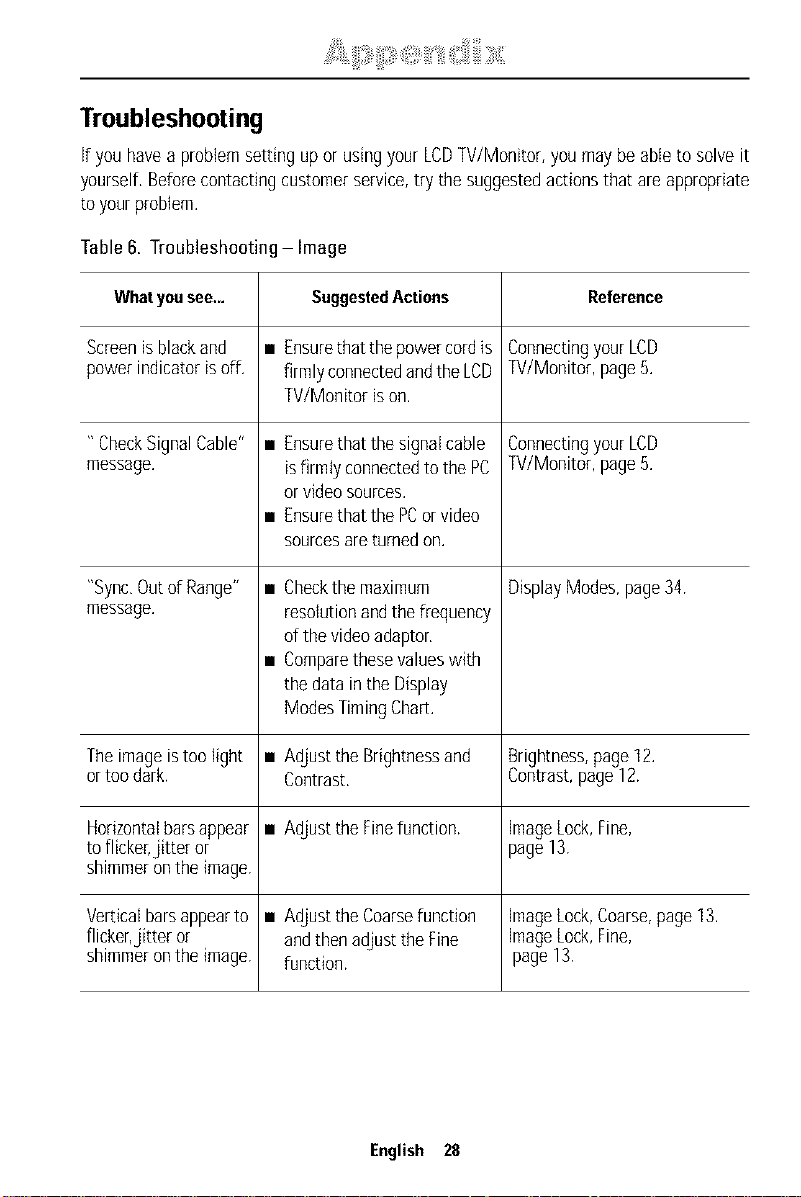
Troubleshooting
ifyouhavea problemsettingupor usingyourLCD]V/Monitor, youmaybe ableto solveit
yourself,Beforecontactingcustomerservice,try thesuggestedactionsthat are appropriate
toyourproblem.
Table6. Troubleshooting Image
Whatyousee.,. SuggestedActions Reference
Screenisblackand • Ensurethattirepowercordis ConnectingyourLDD
powerindicatorisoff. firmlyconnectedandtheLDD TV/Monitor,page5.
TV/Monitorison.
"CheckSignalCable" • Ensurethat thesignalcable ConnectingyourLDD
message, isfirmtyconnectedtothePC TV/Monitor,page5.
orvideosources.
• Ensurethat thePCorvideo
sourcesareturnedon.
DisplayModes,page34."Sync,Outof Range" •
message.
Theimageistoolight •
ortoodark.
Horizontalbarsappear •
toflicker,jitter or
shimmerontheimage.
Verticalbarsappearto •
flicker,jitter or
shimmerontheimage.
Checkthe maximum
resolutionandthefrequency
ofthevideoadaptor,
Comparethesevalueswith
thedatain theDisplay
ModesTimingChar[.
Adjustthe Brightnessand Brightness,page12.
Contrast. Contrast,page12.
AdjusttheFinefunction, imageLock,Fine,
page13.
AdjusttheCoarsefunction imageLock,Coarse,page13.
andthenadjusttheFine imageLock,Fine,
function, page13.
English 28
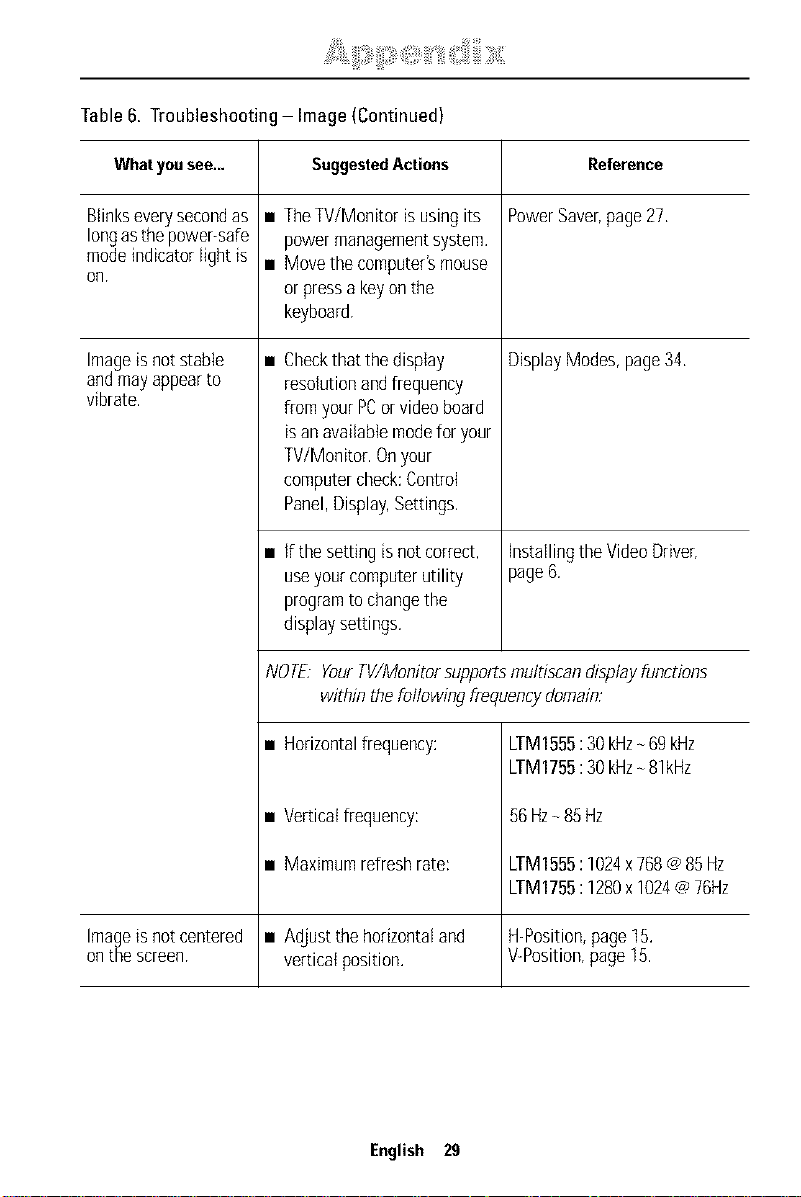
Table6. Troubleshooting Image (Continued)
Whatyousee.,. SuggestedActions Reference
Blinkseverysecondas • TheW/Monitor isusingits PowerSaver,page27,
longasthepower-safe powermanagementsystem.
modeindicatorfightis • Movethecomputer'smouse
on.
orpressa keyonthe
keyboard.
• DisplayModes,page34,Imageisnotstable
andmayappearto
vibrate.
Checkthat thedisplay
resolutionandfrequency
fromyourPCorvideoboard
isanavailablemodeforyour
W/Monitor. Onyour
computercheck:Control
Panel,Display,Settings.
• If thesettingis notcorrect, installingtheVideoDriver,
useyourcomputerutility page6.
programtochangethe
displaysettings.
NOTE YourTV/Monitorsupportsmultiscandisplayfunctions
within thefollowingfrequencydomain:
LTM1555:30kHz- 69kHz
LTM1755:30kHz- 81kHz
• Horizontalfrequency:
• Verticalfrequency:
• Maximumrefreshrate:
56Hz_85Hz
LTM1555: 1024x768@85Hz
LTM1755:1280x1024@76Hz
Imageisnotcentered • Adjustthehorizontaland H-Position,page15.
onthescreen, verticalposition. V-Position,page15.
English 29
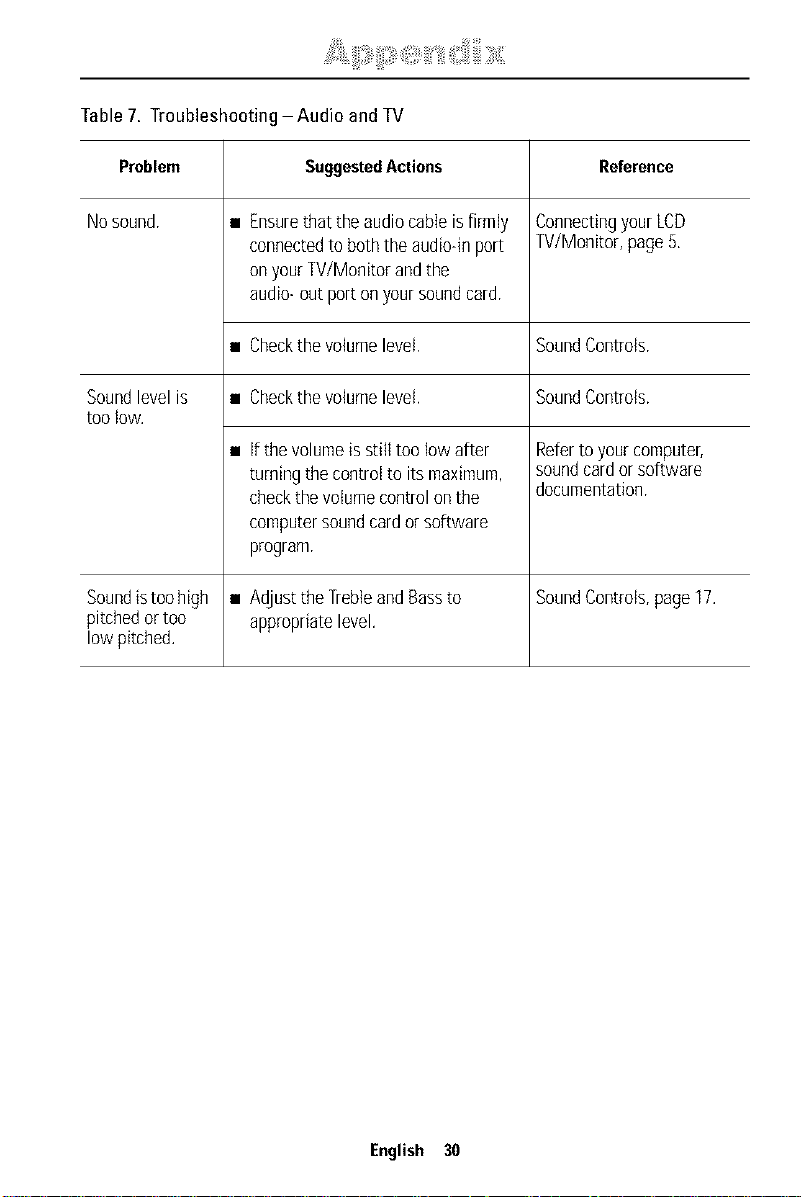
Table7.TroubleshootingAudioandTV
Problem SuggestedActions Reference
No sound, • Ensurethat the audio cabte is firmly Connectingyour LCD
connected to both the audio-in port TV/Monitor, page 5,
on your TV/Monitor and the
audio- out port on your sound card,
• Checkthe volume level, Sound Controls,
Sound level is • Checkthe volume level, Sound Controls,
too low.
• if the volume is still too low after Referto your computer,
turning the control to its maximum, soundcard or software
check the volume control onthe documentation,
computer sound cardor software
program,
Sound istoo high • Adjust the Trebleand Bassto Sound Controls, page 17.
pitched or too appropriate level.
low pitched.
English 30
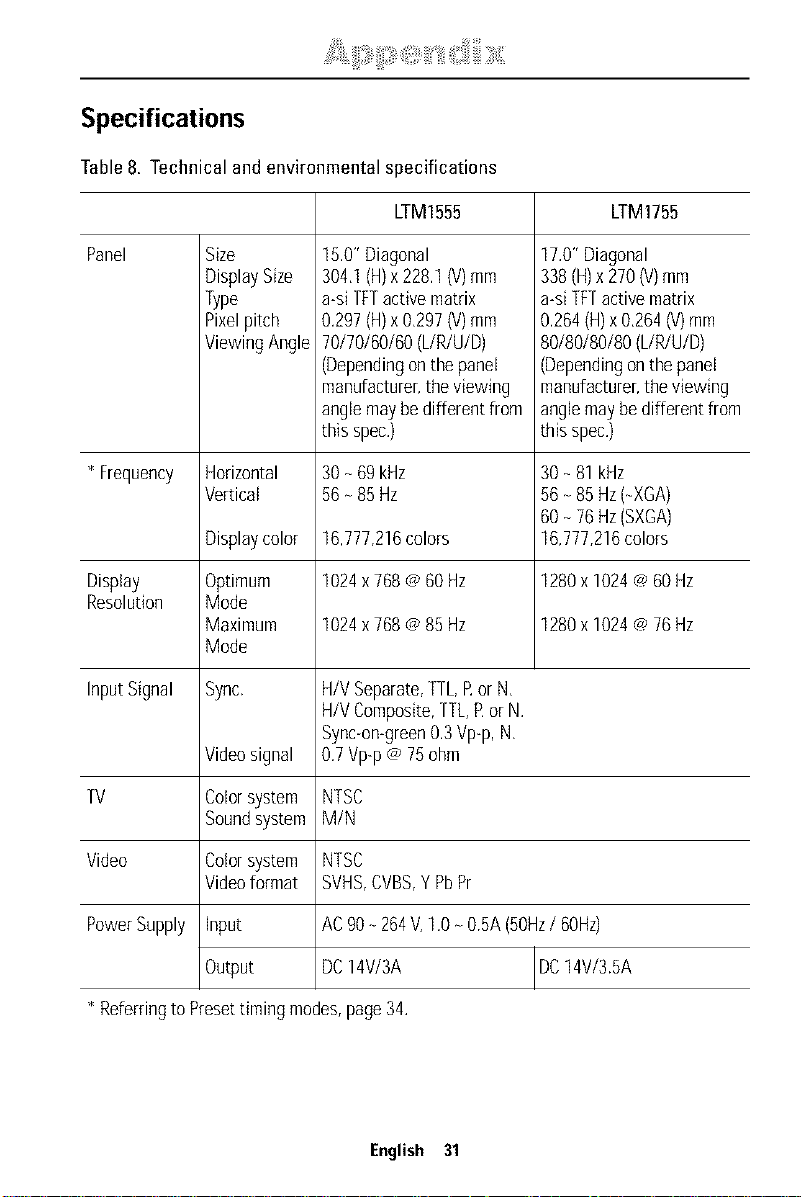
Specifications
Table8. Technical and environmental specifications
LTM1555 LTM1755
Panel Size
DisplaySize
Type
Pixelpitch
ViewingAngle
15.0"Diagonal
304.1(H)x228.1(V)mm
a-siTFTactivematrix
0.297(H)x0.297(V)mm
70/70/60/60(L/R/U/D)
(Dependingonthepanel
manufacturer,theviewing
anglemaybedifferentfrom
this spec.)
17.0"Diagonal
338(H)x270(V)mm
a-siTFTactivematrix
0.264(H)x 0.264(V)mm
80/80/80/80(L/R/U/D)
(Dependingonthepanel
manufacturer,theviewing
anglemaybe differentfrom
thisspec.)
* Frequency Horizontal 30- 69 kHz 30- 81kHz
Vertical 56- 85 Hz 56- 85Hz(-XGA)
60- 76Hz(SXGA)
Displaycolor 16,777,216colors 16,777,216colors
Display Optimum 1024x768@60Hz 1280x 1024Ca60Hz
Resolution Mode
Maximum 1024x768@85 Hz 1280x 1024Ca76Hz
Mode
InputSignal Sync. H/VSeparate,TTLRorN,
H/VComposite,TTL,Ror N.
Sync-on-green0.3Vp-p,N.
Videosignal 0.7Vp-p@75ohm
TV Colorsystem NTSC
Soundsystem M/N
Video Colorsystem NTSC
Videoformat SVHS,CVBS,Y PbPr
PowerSupply Input AC90- 264V,1.0_ 0.5A(50Hz/ 60Hz)
DC14V/3A IDC14V/3.5A
Output
* Referringto Presettiming modes,page34.
English 31
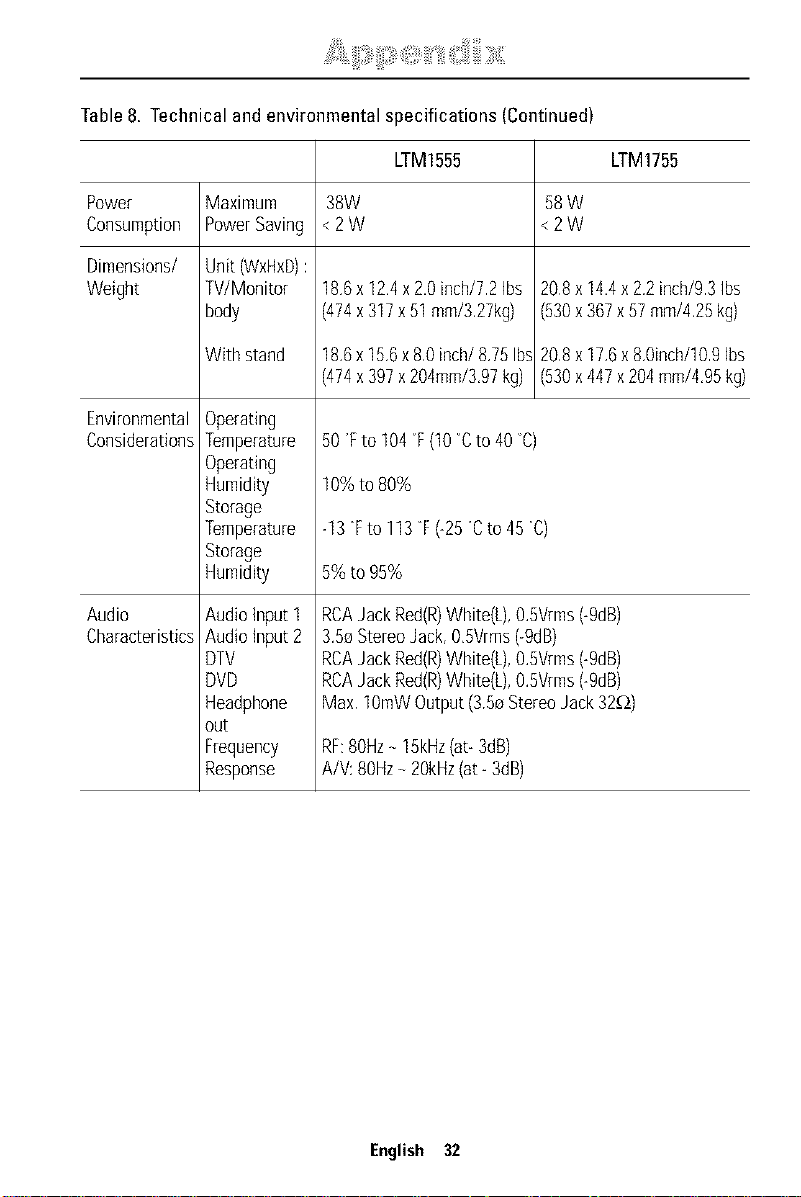
Table8. Technical and environmental specifications (Continued)
LTM1555 LTM1755
Power Maximum 38W 58W
Consumption PowerSaving <2W <2W
Dimensions/ Unit (WxHxD):
Weight W/Monitor 18,6x12.4x2.0inch/72 Ibs 208 x 14.4x2.2inch/93Ibs
body (474x317x51mm/3,27kg) (530x367x57mm/4,25kg)
Withstand 18,6x15,6x 80inch/8,75Ib__ 208x 17,6x8,0inch/109Ibs
(474x397x204mm/3,97kg) (530x447x204mm/4,95kg)
Environmental
Considerations 50"Eto 104_E(t0 Cto 40 D)
Audio
Characteristics
Operating
Temperature
Operating
Humidity
Storage
Temperature
Storage
Humidity
Audio{nputl
Audioinput2
DTV
DVD
Headphone
out
Frequency
Response
10% to 80%
-13F to 113F (-25"Cto 45"C)
5% to 95%
RCAJackRed(R)White(L),0.5Vrms(-9dB)
3.50StereoJack,O,5Vrms(-9dB)
RCAJackRed(R)White(L),0.5Vrms(-9dB)
RCAJackRed(R)White(L),0.5Vrms(-9dB)
Max.lOmWOutput(3.5eStereoJack32_)
RF:80Hz- 15kHz(at-3dB)
A/V:80Hz- 20kHz(at- 3dB)
English 32
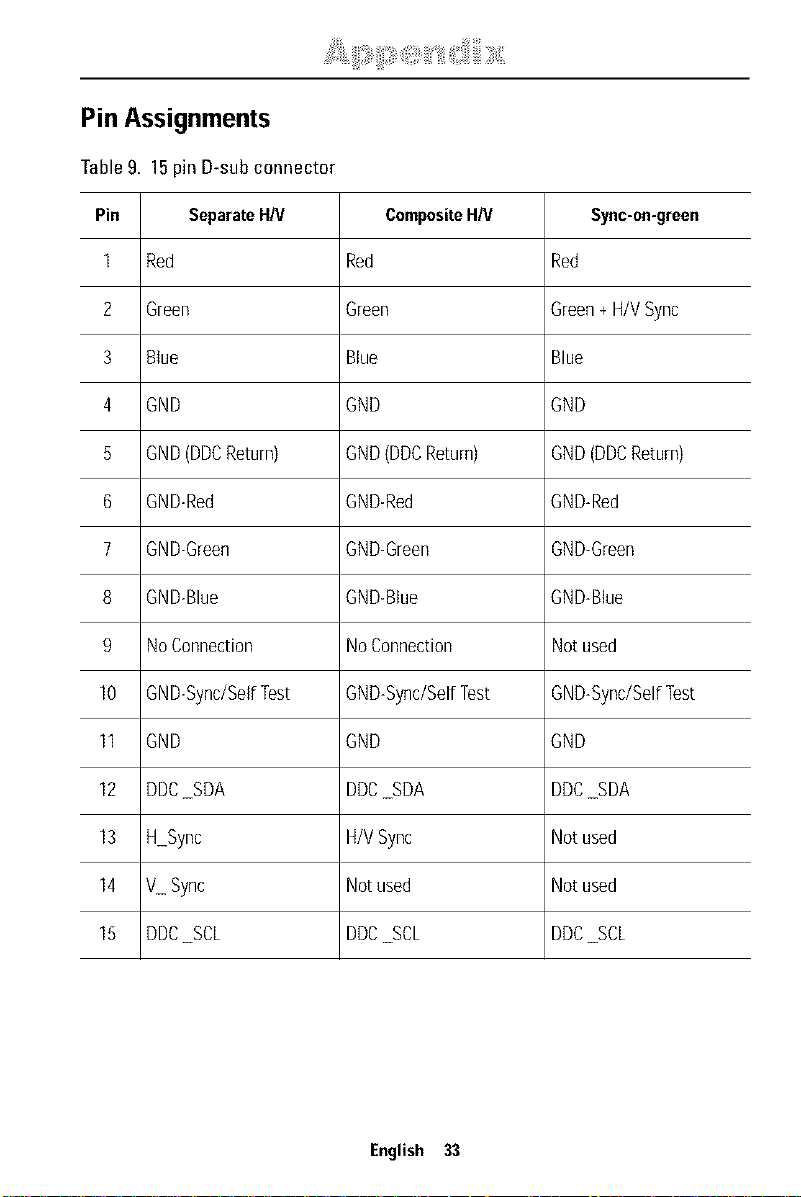
Pin Assignments
Table9. 15pin D-sub connector
Pin SeparateHN CompositeHN Sync-on-green
1 Red Red Red
2 Green Green Green+H/VSync
3 Blue Blue Blue
4 GND GND GND
5 GND(DDCReturn) GND(DDCReturn) GND(DDCReturn)
6 GND-Red GND-Red GND-Red
7 GND-Green GND-Green GND-Green
8 GND-Bhe GND-Blue GND-Blue
9 NoConnection NoConnection Notused
10 GND-Sync/SelfTest GND-Sync/SelfTest GND-Sync/SelfTest
II GND GND GND
12 DDCSDA DDCSDA DDCSDA
13 H Sync H/VSync Notused
14 V Sync Notused Notused
15 DDCSCL DDCSCL DDCSCL
English 33
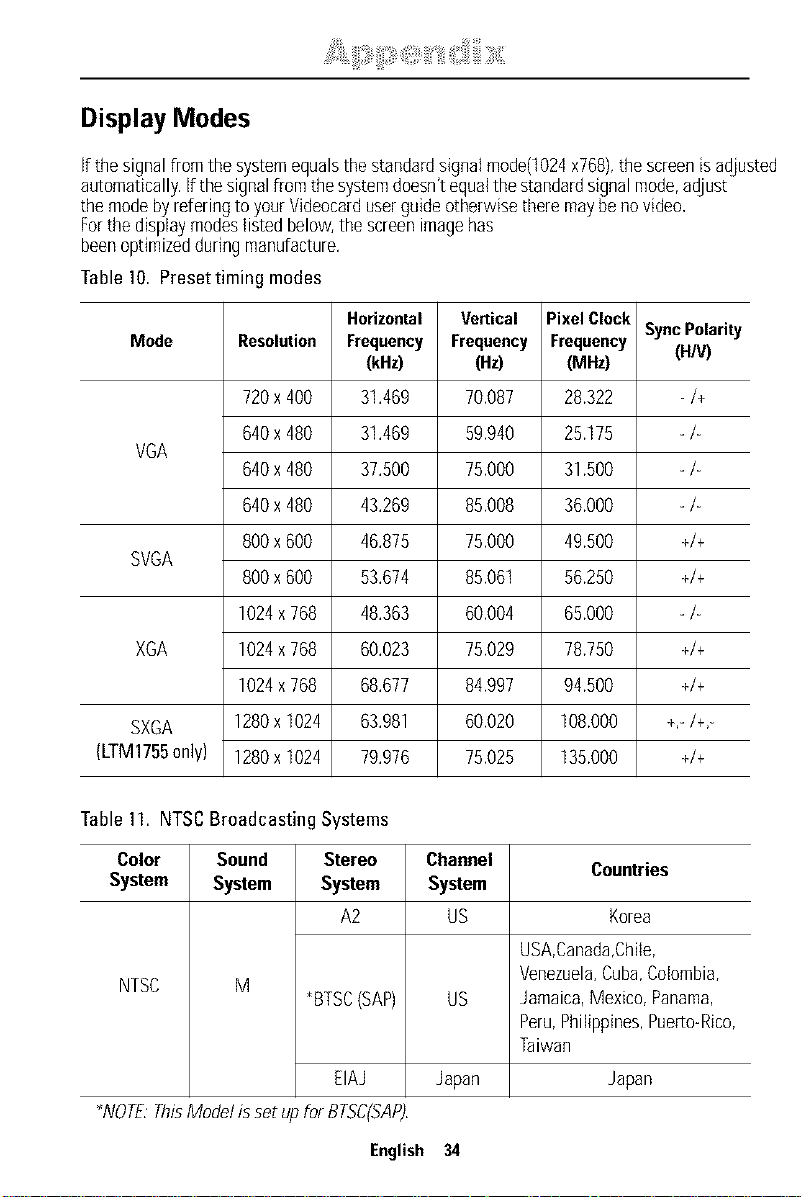
Display Modes
if the signal from the systemequals the standard signal mode(1024x768), the screen isadjusted
automatically. If the signal from the systemdoesn't equalthe standard signal mode, adjust
the mode by refering to your Videocard userguide otherwise there may be no video,
Forthe display modes listed below, the screen image has
been optimized during nlanufacture.
Table10. Presettiming modes
Horizontal Vertical PixelClock
Mode Resolution Frequency Frequency FrequencySyncPolarity
(kHz) (Hz) (MHz) (H/V)
720x400 31.469 70.087 28.322 -/+
640x480 31.469 59.940 25.175 -/-
VGA
640x480 37.500 75.000 31.500 -/-
640x480 43.269 85.008 36.000 -/-
800x600 46.875 75.000 49.500 +/+
SVOA
800x600 53.674 85.06t 56.250 +/+
1024x768 48.363 60.004 65.000 -/-
XGA 1024x768 60.023 75.029 78.750 +/+
1024x768 68.677 84.997 94.500 +/+
SXGA 1280x1024 63.981 60.020 I08.000 +,-/+,-
(LTM1755only) 1280xI024 79.976 75,025 135,000 +/+
Table11. NTSCBroadcasting Systems
Color Sound Stereo Channel Countries
System System System System
A2 US Korea
NTSC M
_BTSC(SAP)
EIAJ
_NOTE:ThisModelissetupfol BTSC(SAP),
US
Japan
USA,Canada,Chile,
Venezuela,Cuba,Colombia,
Jamaica,Mexico,Panama,
Peru,Philippines,Puerio-Rico,
Taiwan
Japan
English 34
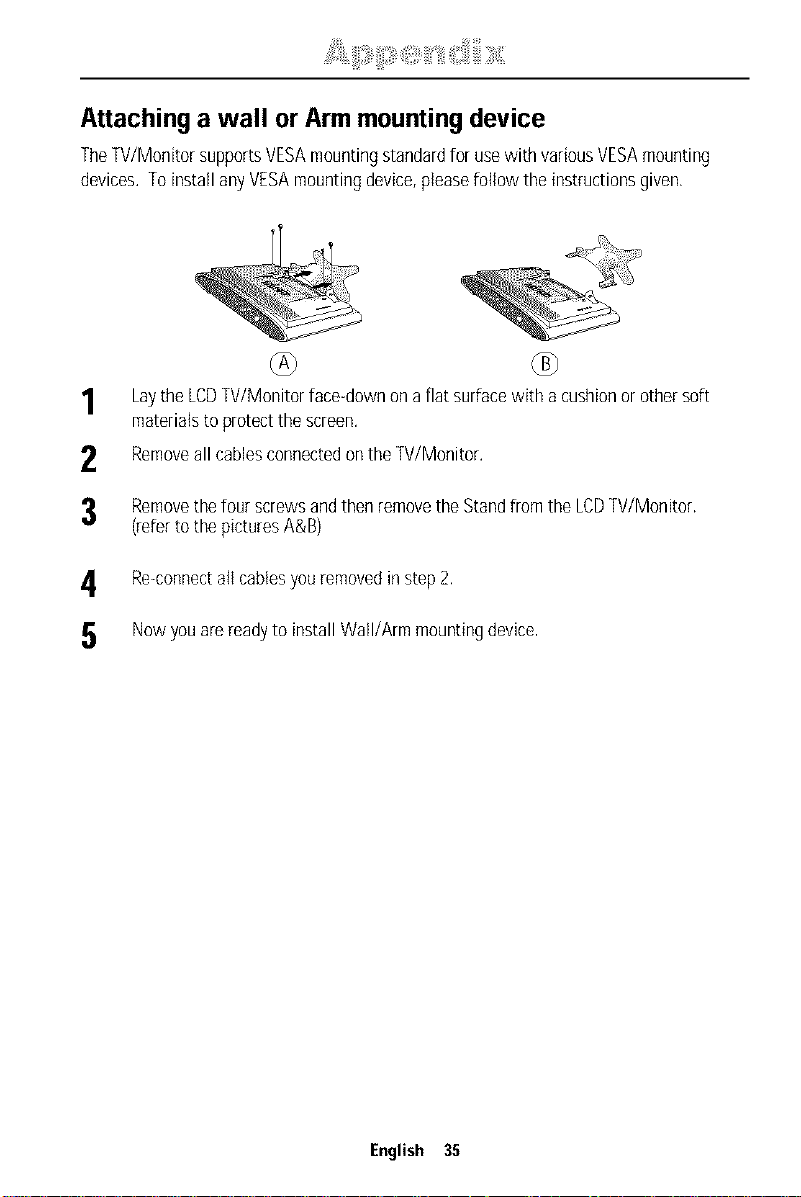
Attaching a wall or Armmounting device
TheTV/MonitorsupportsVESAmountingstandardforusewith variousVESAmounting
devices.ToinstallanyVESAmountingdevice,pleasefollow the instructionsgiven.
1
2
3
LaytheLCDTV/Monitorface-downona flatsurfacewith acushionor othersoft
materialsto protectthe screen.
Removeall cablesconnectedonthe TV/Monitor.
Removethefourscrewsandthenremovethe Standfromthe LCDTV/Monitor.
(refertothepicturesA&B)
4 Re-connectall cablesyouremovedinstep2.
5 Nowyouarereadyto installWall/Armmountingdevice,
English 35
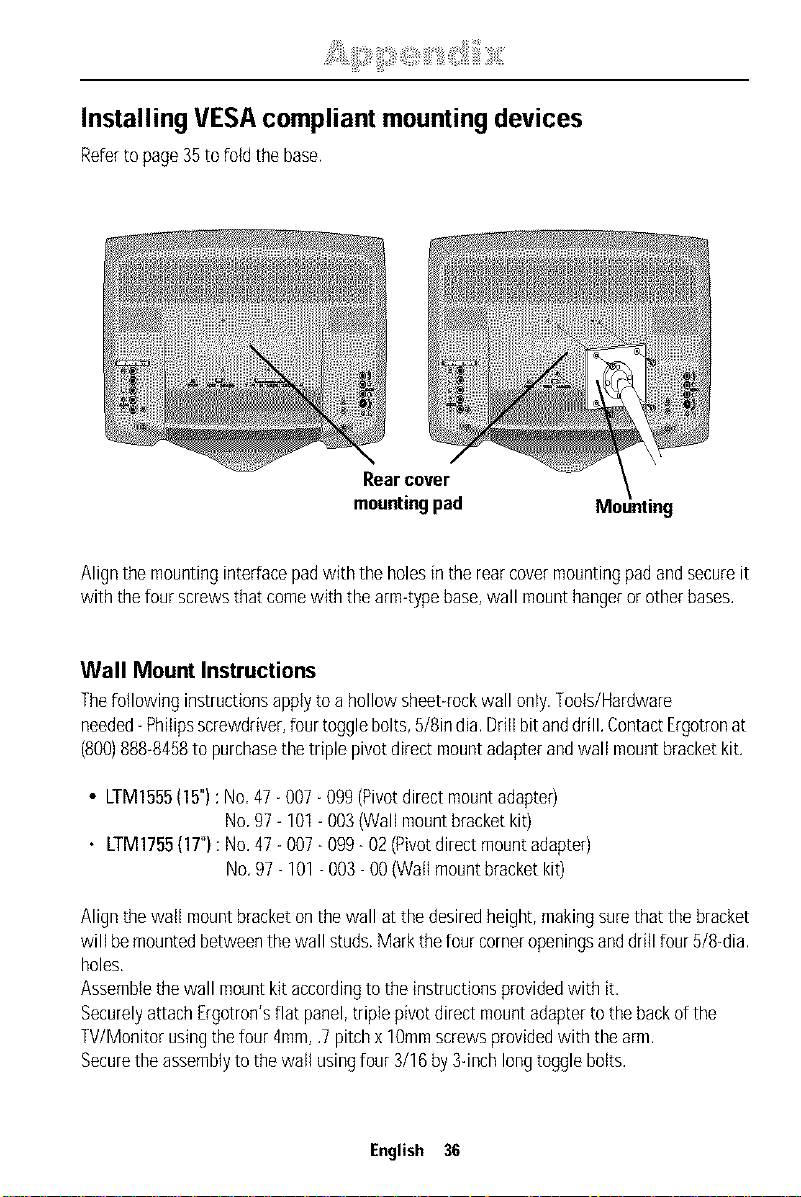
Installing VESAcompliant mountingdevices
Referto page35tofoldthe base.
Rearcover
mountingpad
Alignthemountinginterfacepadwith the holesin therearcovermountingpadandsecureit
with thefourscrewsthatcomewith thearm-typebase,wall mounthangerorotherbases.
Wall Mount Instructions
Thefollowing instructionsapplytoa hollowsheet-rockwall only.Tools/Hardware
needed-Philipsscrewdriver,fourtogglebolts,5/8india.Drillbitanddrill.ContactErgotronat
(808)888-8458to purchasethetriple pivotdirectmountadapterandwall mountbracketkit.
• LTM1555(15"):No,47- 007- 099(Pivotdirectmountadapter)
No,97- 101- 003(Wallmountbracketkit)
• LTM1755(1T'):No.47- 007- 099- 02(Pivotdirectmountadapter)
No.97- 101- 003- OO(Wallmountbracketkit)
Alignthewall mountbracketonthe wall atthedesiredheight,makingsurethat thebracket
will bemountedbetweenthewallstuds.Markthefourcorneropeningsanddrill four5/8-dia.
holes,
Assemblethewall mountkitaccordingto theinstructionsprovidedwith it,
SecurelyattachErgotron'sflat panel,triplepivotdirectmountadaptertothebackofthe
TV/Monitorusingthefour4ram,.7pitchx 18mmscrewsprovidedwith thearm.
Securetheassemblytothewall usingfour3/16by3-inchlongtogglebolts.
English 36
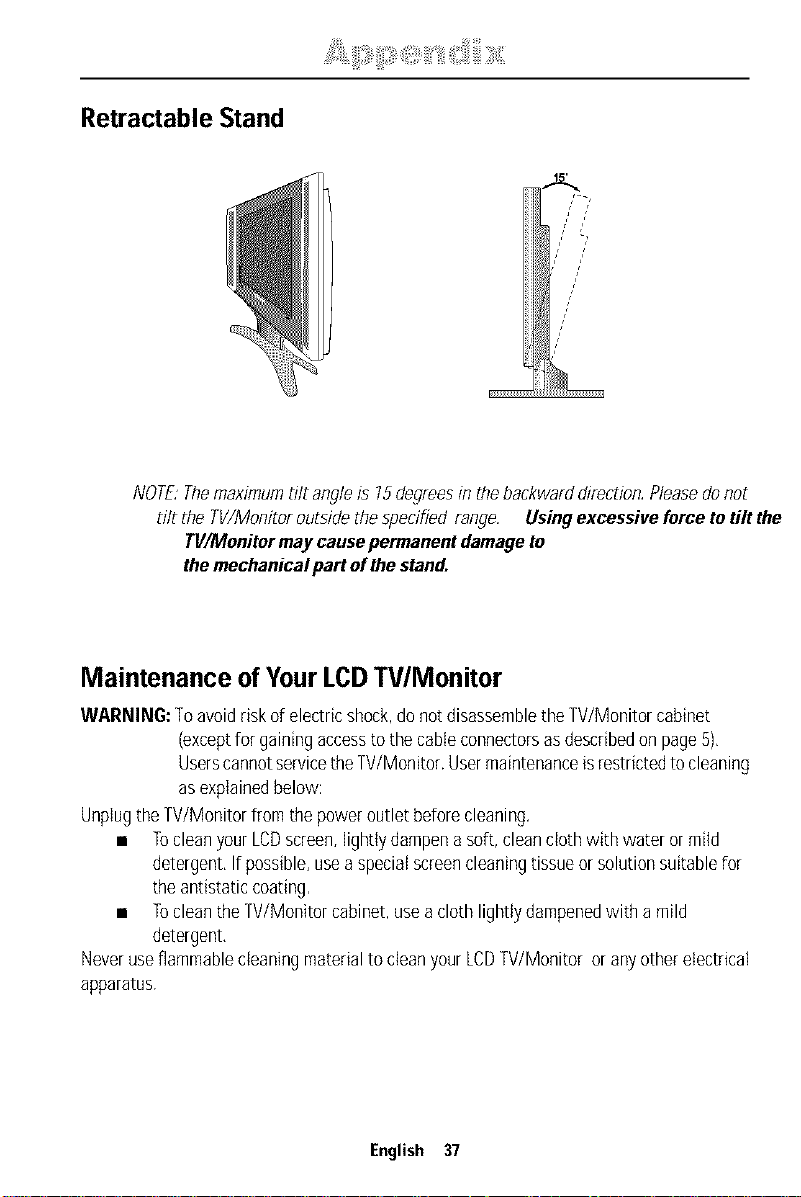
Retractable Stand
NOTE:Themaximum tilt angle is 75 degrees in the backwal d direction. Pleasedo not
tilt the TV/Monitor outside tire specified range. Using excessive force to tilt the
TWMonitor may cause permanent damage to
the mechanical part of the stand.
Maintenance of YourLCDTV/Monitor
WARNING:Toavoidriskofelectricshock,donotdisassembletheW/Monitor cabinet
(exceptforgainingaccesstothecableconnectorsasdescribedon page5),
UserscannotservicetheTV/Monitor.Usermaintenanceisrestrictedtocleaning
asexplainedbelow:
UnplugtheW/Monitor fromthepoweroutlet beforecleaning.
• TocleanyourLCDscreen,lightlydampenasoft,cleanclothwithwateror mild
detergent,If possible,useaspecialscreencleaningtissueor solutionsuitablefor
theantistaticcoating,
• TocleantheW/Monitor cabinet,useacloth lightlydampenedwith a mild
detergent,
Neveruseflammablecleaningmaterialto cleanyourLCDW/Monitor or anyotherelectrical
apparatus.
English 37
A
Active Area 19
AUTO 9
Automatic Save 9
B
Bass 15, 17
Brightness 12,16, 21
C
Cableconnections 5
ChannelEdit 18
ChannelSystem 17
ClosedCaption 19
Coarse 13
ColorControl 12
Colour 16, 21
Contrast 12, 16,21
D
DCadapter 3
Display 26
Display Modes 34
Duration 22
E
EXiT 9
Expand 14
F
Fine 13
FineTune 18
H
Halftone 22
H position 15
|
ImageEffect 14
ImageLock 13
ImageSize 14
Information 13
Insta%tion CD 3
K
Kensingtonsecurityslot 4
L
Language 22
LNA 18
M
Melody 22
MENU 8
Mode 12,16, 17
MTS 26
MUTE 8
English 38
0
On ScreenDisplay11
OSD Lock/Unlock10
P
Pan 14
PC 8
Picture16
PinAssignments33
PIP 8,15
PlugandPlay 6
Position 15,22
POWER 9
Powerindicator 6
Powepsavingmodes 27
Program 10
R
RemoteControl 3,25
Reset 12, 13
S
Safety Instructions 2
SeIFtest feature check 6
Setup 17
Sharpness 16
Size 12,15, 22
Sound 15, 17,21
T
Tilt the screen 4
Tint 16
Timer 19
Treble15,17
Troubleshooting 28
TV 8
U
Usercontrol locations 8
UserMode 12
V
VIDEO 8
Virtual Dolby 15,17
Volume 10
VChip 19
V-position 15
Z
Zoom 14
lii!iiliii: ii d!!!!:iiili iii,;liiili ii i i:Oll""'i!i ii ' iiil iiiiliiiiiii Olii' "ii'iii1 iiiiiiiii:iiiiiOi "iil
FCCInformation
UserInstructions
TrleFederalCommunicationsCommissionRadio
FrequencyInterferenceStatementincludesthe
fotowing warning:
Note: Thisequipmenthasbeentestedandfoundto
complywith thelimitsfor a ClassBdigital device,
pursuantto Part15ofthe FCCRules Theselimits art
designedtoprovidereasonableprotectionagainst
harmfulinterferencein aresidentialinsta/ation This
equipmentgenerates,uses,andcanradiateradio
frequencyenergyand,ifnot installedand usedhi
accordancewith the i11stfuctiofls,maycauseharmful
interferencetoradio communicationsHoweve[,there
is noguaranteethat interferencewill notoccurin a
particulalinstallation
If thisequipmentdoescausehalmfulinterferenceto
radioortelevisionreceptions,whichcanbedetermined
byturningthe equipmentoff andon, theuseris
encouragedto tryto correcttheinterferencebyoneor
moreof thefollowing measures:
• Reorientor relocatethereceivingantenna
• Increasetheseparationbetweentheequipmentand
receiver
• Connecttheequipmentinto anoutlet ona circuitdifi
ferentfromthatto whichthereceiverisconnected
• Consultthe dealero/an experiencedradio/TVtech
nidan for help
User Information
Changesor modificationsnotexpresslyapprovedbythe
partyresponsiblefor compliancecouldvoidtheuser's
authorityto operatetheequipment
If necessary,consultyourdealeroranexperienced
radio/televisiontechnicianfor additionalsuggestions
Youmayfindthe bookletcalledHowto Identifyand
ResolveRadio/TVInterferenceProblemshelpful This
bookletwas preparedby theFederalCommunications
CommissionItis availablefromtheUS Government
PrhlthlgOffice,Washington,DC20402,StockNumber
004000003454
Warning
Usermustuseshieldedsignal interfacecablesto
maintainFCCcornptancefor the product
Declarationofconformityfor products
Marked with FCCLogo
Thisdevicecornpleswith Part15of the FCCRules
OperationissubJeCttothefollowingtwo conditions:(1)
thisdevicemaynotcauseharmfulinterference,and(2)
thisdevicemustacceptanyinterferencereceived,
ilcluding interfere[Icethatmaycauseundesired
operation
Tile partyresponsiblefor productcompliance:
85WestTasmanDrive
SanJose,CA 95134USA
Tel)4085445124
Fax)4085445191
Providedwith this monitoris adetachablepower
supplycordwith IEC320style terminations It maybe
suitablefor connectionto anyULListedpersonal
computerwith similarconfigurationBeforemakingtilt
connection,makesurethevoltagerating ofthe
computerconvenienceoutlet isthesameasthe
monitorandthat theampereratingof thecomputer
convenienceoutlet isequalto orexceedsthe monitor
voltagerating
For120Voltapplications,useonlyULListeddetachable
powercoldwith NEMAconfiguration5 15Ptype
(parallelblades)plugcap For240Voltapplicationsuse
onlyULListed DetachaNepowersupplycordwith
NEMAconRgu/ation6 15Ptype(tandemblades)plug
cap
IC Compliance Notice
ThisClassB digital apparatusmeetsall requirements
of the CanadianInterferenceCausingEquipment
Regulationsof ICES003
Bet apparel NumedquededasseBrespecteroutes les
exigencesduReglemontICES003surlesequipements
produisantdes interferencesauCanada
MPR II Compliance
Thismonitorcomplieswill SWEDAC(MPRII)
r_commendationsforreducedelectricandmagnetic
fields
EuropeanNotice
Productswith the CEMarkingcomplywith bothtile
EMCDirective(89/336/EEC),(92/31/EEC),(93/68/EEC)
andthe LowVoltageDirective(Z3/23/EEB)issuedby
theCommissionof theEuropeanCommunity
Compliancewith thesedirectivesimpliescorlformityto
thefollowing EuropeanNorms:
• EN55022:1998 RadioFrequencyhlterference
• EN55024:1998 Electromagneticlmmunity
• EN610003 2:1995+A1 +A2 PowerLineHarmonics
• ENB100B3 3:1995 VoltageFluctuations
• EN60950 ProductSafety
U.S.A.: ESPAI_IA:
Fax :(9/3)6016001
http://samsungmonito/corn/
CANADA:
Sarrlsur_gE]ectro_licsCa_lada]r_c
703ZFinancialDrive
]el :(93)2616700
Fax: (93)2616750
http://samsunges/
UnitedKingdom:
Fax :(905)5421199
http://www samsungca
GERMANY:
TELEPLANRheiuMainDrnbH
Feldstr 16
6433] Weiterstadt
T 06151/9571306
F 06151/9671132
http://www samsungde/
AUSTRALIA:
Tel: 1300362603
http://www samsungcornau/
ITALY:
Fax: (0208)3979949
<EuropeanServiceCenter& NationalService>
Staffo/dPa_k]2 Telford,Shropshire,T[3 3BJ
lel :(0870)2420303
Fax: (01962)292033
http://samsu%serviceco uk/
THAILAND:
THAISAMSUNGSERVICECENTER
MPACOMPLEXBUILDENG,Ist2ridFloor
175SOlSUEKSAVIDHAYASATHONSOl12
SFLOMROAD,SILOiVI,BANGRAK
BANGKOKI0600
TEL:0 26352561
FAX:0 2635 2556
SOUTHAFRICA:
6 20063CernuscosulNaviglio(Mi)
Tel : 167010740
http://www samsungRaliacorn
PANAMA:
Panama
Tel : (507)2101122,2101133
Tel: B003278(FAST)
http://www samsunglatincorn/
MEXICO:
Del GustavoA MaderoCR 07700
MexicoDE
Tel 0157476100
Fax01 57476202
RFC:SEM950215S98
http://www samsungcornrex/
Fax:002711 6491629
http://www samsungco za
BRASIL:
%msu% EletronicadaAmazoniaLtda
R Prof ManoelitodeOrnellas,303,TerroB
ChacaraSto Antonio,CEP:04719040%o Paulo, SP
SAC:0800124 421
http://www samsungcornbr/
SWEDENIDENMARKINORWAYIFINLAND:
SamsungElect/orficsAB
Box713
S19427UPPLANDSVASBYSVERIGE
lel +468 59096600
Fax+46859096660
IMPORTADOPOR:SAMSUNGELECTRONICSMEXICOSA DECV
SATURNO44COLNVA INDUSTRIALVALLEJC
DELGUSTAVOA MADEROCR01700
MEXICODE TEL51475100
RED:SEM950215S98
EXPORTADOPOR:SAMSUNGELECTRONICSCO,LTD
JOONGANGDAILYNEWSBLDG
7SOONWHA DONGCHUNGKU,
CROBOX2775,1144SEOUL,KOREA
"AS al} ErJlRGYSb_, Parlnen SAMSUNG/as
de_eR}lil_r_Jthat tl/i_ product meets tile
E_iRGySIAI/_ _Liidelines fol el/e_y efficienc_
P/N : BN6&00183A-00
IIIIIIIIIIIIII
Printedonrecyclable paper