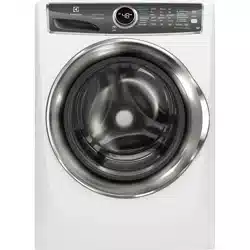
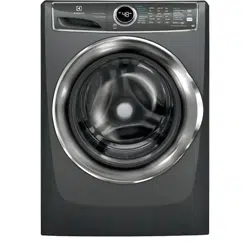
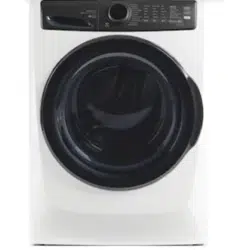
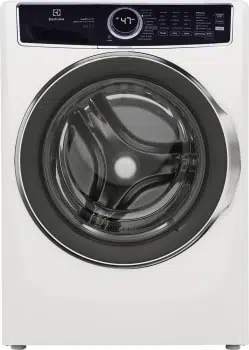
USE & CARE GUIDE FRONT LOAD WASHER
Features
Not all cycles, options, or features listed are available on every model.
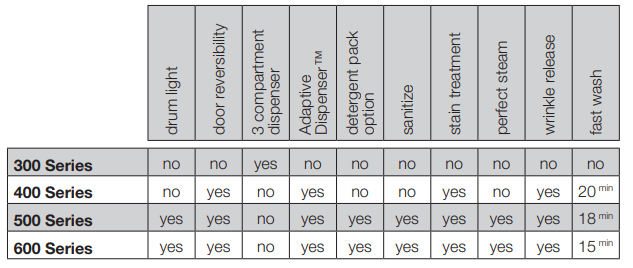
Refer to the table below for an overview of features available for each model series.
Model Series
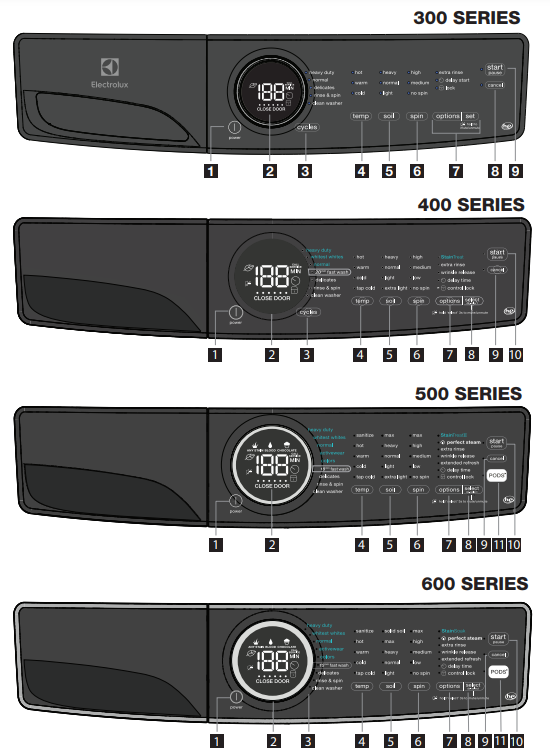
- power
- LED display
- cycle selector
- temperature
- soil level
- spin speed
- options
- set/select
- cancel
- start
- PODS® (select models)
This manual covers many models and not all cycles, options, or features listed are available on every model. Consoles shown above for reference only. Your model may differ
Operating Instructions
Operating your washer
1. Sort laundry into loads that can be washed together.
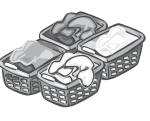
TIPS:
- Sort by recommended cycle and water temperature.
- Separate white, light, and colorfast items from dark and non-colorfast items.
- Separate items that shed lint from items that attract lint. Casual, synthetic, knit, and corduroy items will pick up lint from towels, rugs, and bedspreads.
- Separate heavily soiled items from lightly soiled items.
- Separate lacy, sheer, loosely knit, or delicate items from durable items.
IMPORTANT:
- DO NOT machine wash items containing fiberglass. Small particles of fiberglass left in drum may transfer to fabrics in other loads and cause skin irritation and/or damage to fabrics.
- DO NOT wash water resistant and water repellent type clothing or other materials
2. Prepare items for washing.
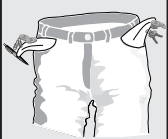
TIPS:
- Empty pockets.
- Brush off lint and dirt. Shake out rugs and beach towels.
- Close zippers, fasten hooks, button buttons, and tie strings/sashes. Remove non-washable trims and ornaments.
- Place delicate and small items (bras, hosiery, etc.) in a mesh bag (not included).
IMPORTANT:
- Mend rips and tears to prevent further damage during washing.
- Turn knit items inside out to prevent pilling.
3. Pretreat stains and heavy soil.
See stain treatment function in Cycle Options for your particular model or Stain Removal Guide for more information.
4. Add laundry load to wash tub.
TIPS:
- Combine large and small items in a load. Load large items first.
- Large items should not be more than half the total wash load.
- Washing single items is inefficient and may cause an out-of-balance load. Add 1 or 2 similar items to help balance load.
- Wash single heavy items (comforter, sleeping bag, etc.) separately.
- The washer can be fully loaded, but the items should not be tightly packed. The door should close easily
IMPORTANT:
- DO NOT overload the washer.
- DO NOT WASH: Water resistant and water repellent clothing or other materials.
5. Add wash products to dispenser.
TIPS:
- Water conditioners, detergent boosters and enzyme products may be added with detergent.
- See Adding Laundry Products for detailed information on the use of the product dispensers.
- See Adding Laundry Products for detailed information on the use of various wash products (detergent, bleach, stain treatment, fabric softener, etc).
IMPORTANT:
- Follow manufacturer’s instructions and recommendations when using wash products.
- Open and close the dispenser drawer slowly. Closing the drawer too quickly could result in early dispensing of the bleach or fabric softener.
6. Select the cycle and settings for the load.
TIPS:
- See Cycle Selection, Cycle Settings, and Cycle Options for detailed descriptions of cycle controls.
- See Cycle Setting Charts to determine which settings are available for each cycle.
- To provide the best care, not every setting or option is available with every cycle. If a setting or option is not available for the cycle selected, the indicator will not light.
IMPORTANT:
- Follow fabric care label instructions on items to be washed.
- Make sure that the PODS® option is selected when using models that have a separate detergent pack compartment. See Adding Laundry Detergent to the Adaptive Dispenser™
7. Start the washer.
TIPS:
- Close the door and press start/pause. The washer will not operate with the door open. “CLOSE DOOR” will be displayed as a reminder to close the door.
- To add a forgotten item to the washer any time during the wash portion of the cycle, press start/pause. When the door unlocks, open the door, add the item, close the door and press start/pause to resume cycle.
- To change settings or options after the cycle has begun, press start/pause, change the settings, and then press start/pause. If the cycle is not paused first, the unit will emit several beeps when the buttons are pressed but no changes to the cycle will be applied.
- To change the cycle once the cycle has begun, press cancel to cancel the cycle, select the new cycle, and press start/ pause to begin the new cycle. Changing a cycle selection without cancelling the current WILL NOT change the cycle.
- To cancel a cycle, press cancel.
- A signal will sound at the end of the cycle if the chime option is not set to mute.
IMPORTANT:
- DO NOT force door open. As a safety measure, the door will automatically lock during the entire wash cycle. Pause or cancel the wash load to unlock the door.
- If the cycle is interrupted during spin, the door lock will not release until the tub has stopped spinning.
- If the water level is above the bottom of the door opening/flexible door gasket, the lock will not release.
8. Remove items from washer when cycle has ended.
TIPS:
- Remove items when the cycle ends and place in dryer, line dry or dry flat as directed on the fabric care label.
IMPORTANT:
- Excess wrinkling, color transfer or odors may develop in items left in the washer after the cycle has ended.
Adding Laundry Products
Laundry Product Dispensers
Product dispenser - three compartment dispenser (300 Series)
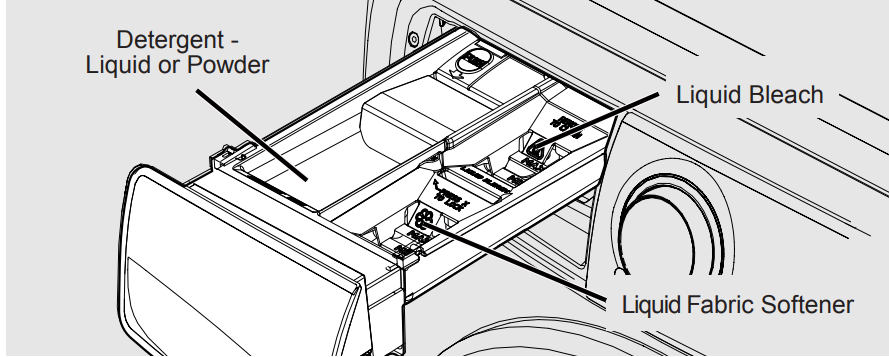
Product dispenser - Adaptive Dispenser™ (400, 500, and 600 Series)
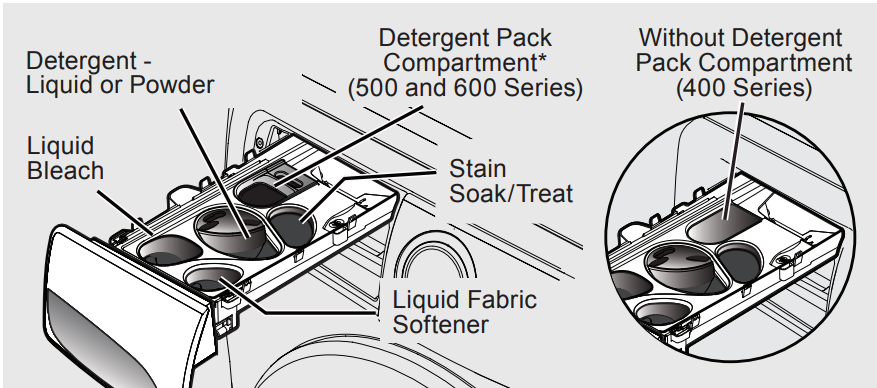
Detergent, stain treatment (on select models), liquid chlorine bleach and liquid fabric softener will be dispensed at the proper times in the cycle.
Use the cap or scoop provided by the detergent manufacturer to measure the amount recommended. Detergent dosage may need to be adjusted for water temperature, water hardness, load size and soil level.
IMPORTANT: Open and close the dispenser drawer slowly. Closing the drawer too quickly could result in early dispensing of the bleach or fabric softener
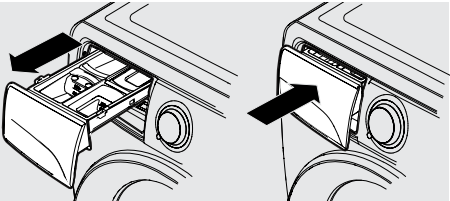
Adding Laundry Detergent to the Three Compartment Dispenser
Liquid or Powder Detergent
- Use the cap or scoop provided by the detergent to add recommended amount of detergent.
- Amount of detergent may need to be adjusted for water temperature, water hardness, load size, and soil level. Follow manufacturers instruction.
In a three compartment dispenser use either liquid or powder detergent. DO NOT mix both.
DO NOT mix liquids and powders. DO NOT exceed MAX fill line.
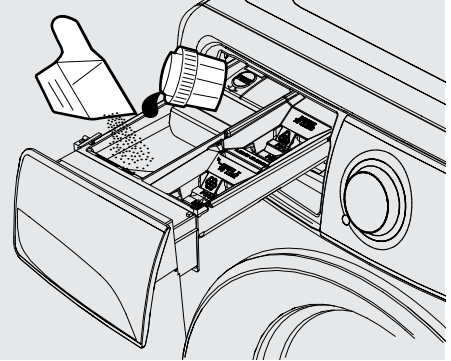
IMPORTANT: DO NOT add detergent packs into the three compartment dispenser. Detergent packs should be added directly into the drum.
CAUTION: Keep detergent packs away from children.
Adding Laundry Detergent to the Adaptive Dispenser™
Liquid Detergent
- Use the cap or scoop provided by the detergent to add recommended amount of detergent to the detergent compartment. Pour directly into the detergent cup, not over the blue cover.
- Amount of detergent may need to be adjusted for water temperature, water hardness, and load size. Follow manufacturers instructions.
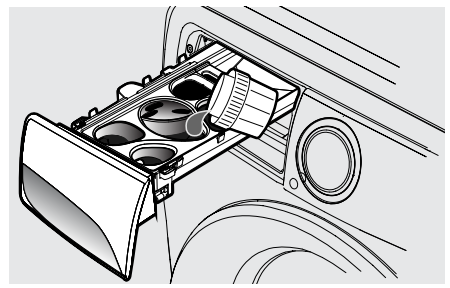
IMPORTANT: Pour liquid into the liquid detergent cup. DO NOT pour over the blue cover. DO NOT exceed MAX fill line.
Powder Detergent
- Remove the liquid detergent cup and blue cover before adding powder detergent.
- Add powder detergent directly to the powder detergent compartment.
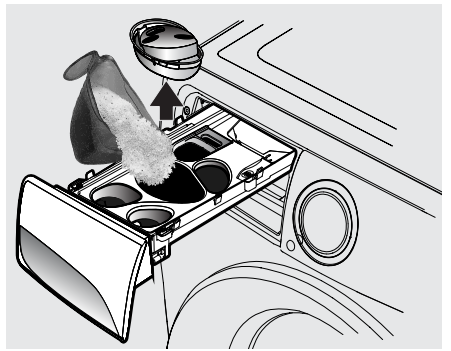
IMPORTANT: Save the liquid detergent cup and blue cover for future use. DO NOT discard it while you are using powder detergent. DO NOT exceed MAX fill line.
Detergent Pack
For 300 and 400 series models Add detergent pack directly to the empty drum BEFORE placing laundry into the unit.
- DO NOT place detergent packs directly into the detergent drawer. The gel coating may cause the detergent drawer to become clogged.
For 500 and 600 series models Add the recommended quantity of (one or two) high efficiency detergent packs to the detergent pack compartment in the dispenser.
- DO NOT place more than two packs into the dispenser.
- When using the fast wash cycle, only one detergent pack should be used.
CAUTION: Keep detergent packs away from children.
IMPORTANT:
- When using the detergent pack compartment, make sure to select the PODS® option before starting the load.
- Once the PODS® option has been chosen, the washer will retain the PODS® setting until manually changed.
- The washer will ALWAYS use a small amount of HOT water to dissolve the pack when the PODS® option has been selected.
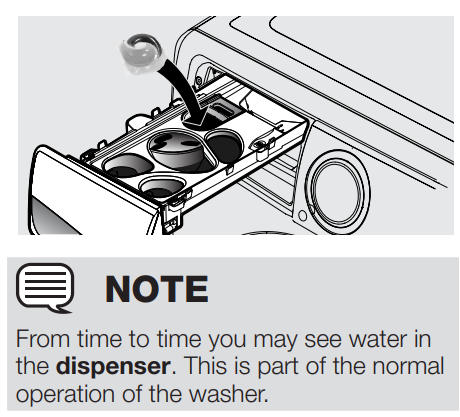
NOTE: From time to time you may see water in the dispenser. This is part of the normal operation of the washer.
Adding Other Wash Products
- Color-safe bleach, water conditioner, detergent booster and enzyme products may be added with detergent.
- Put liquid products in the Main Wash - liquid detergent compartment or powder products in the Main Wash - powder detergent compartment.
IMPORTANT: DO NOT mix liquids and powders
Stain Treatment (on select models)
- For heavily soiled or stained loads, select the Stain option (on select models only - StainTreat, StainTreatII, or StainSoak) and add the recommended amount of detergent or stain treatment to stain soak/treat compartment (on select models).
- See Cycle Options for information about Stain options for your model.
- See Stain Removal Guide in this instruction for additional suggestions.
IMPORTANT: Use of multi-product (detergent plus softener) sheets or color-absorbing sheets NOT recommended. They could disable your machine and result in unwarranted repair costs.
Liquid Chlorine Bleach 
- If desired, add liquid chlorine bleach to the compartment labeled Liquid Bleach and marked with this symbol: .
- DO NOT fill above the MAX fill line.
- Add color-safe bleach with detergent.
IMPORTANT: To prevent fabric damage, DO NOT overfill the “Liquid Bleach” compartment or pour bleach directly onto the load.
Liquid Fabric Softener 
- If desired, pour the recommended amount of liquid fabric softener into the compartment labeled Fabric Softener and marked with this symbol: .
- DO NOT fill above the MAX fill line.
NOTE: To prevent staining, DO NOT overfill Fabric Softener compartment or pour liquid fabric softener directly on wash load.
- Use of a fabric softener-dispensing ball is not recommended in front load washers.
Controls and Settings
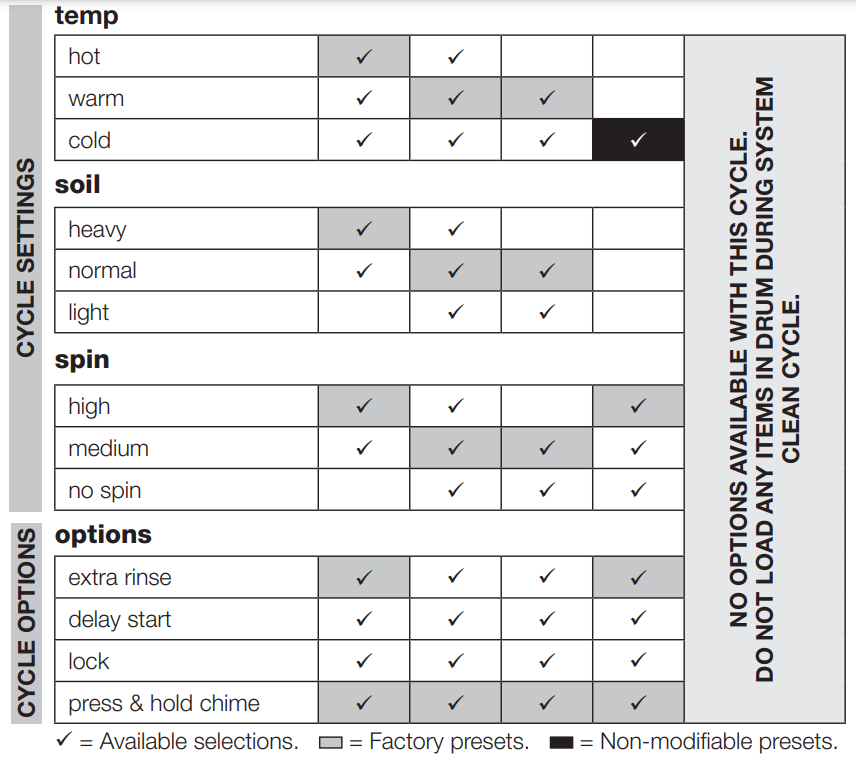
Settings Chart - 300 Series Washer
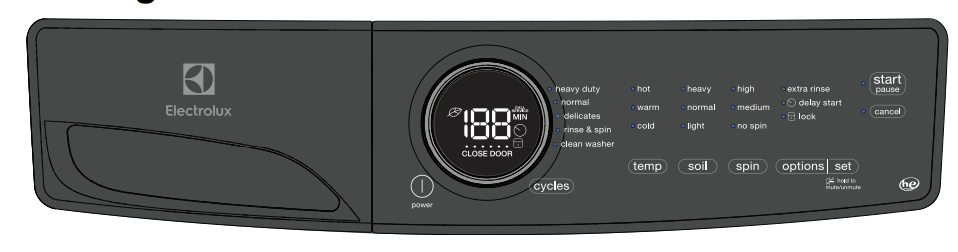
These temperature, spin speeds, soil levels and options are available with the following cycles:
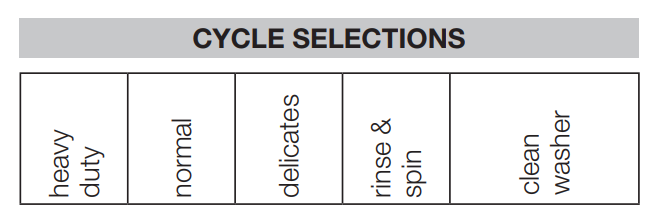
Settings Chart - 400 Series Washer
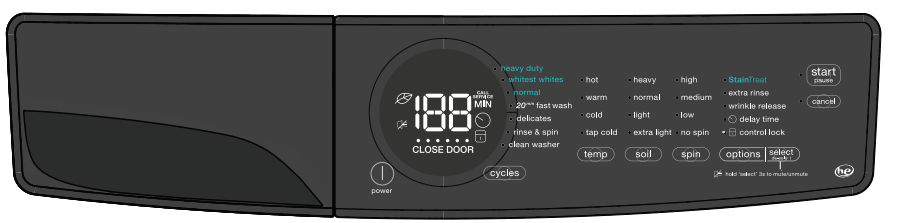
These temperature, spin speeds, soil levels and options are available with the following cycles:
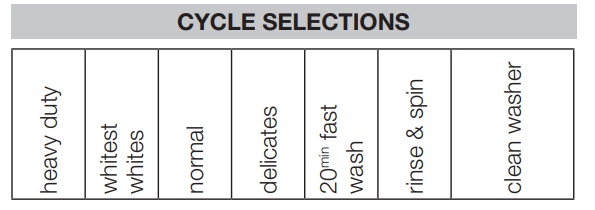
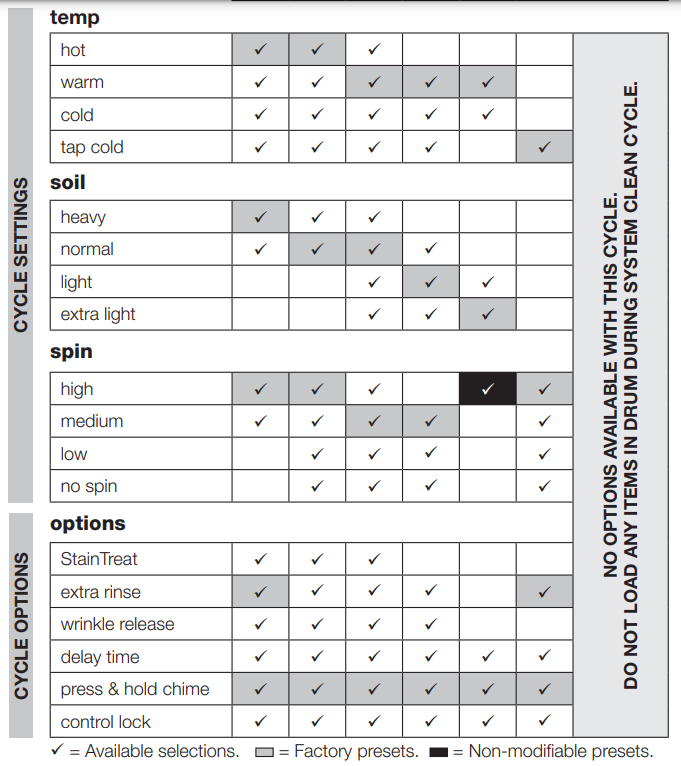
Settings Chart - 500 Series Washer
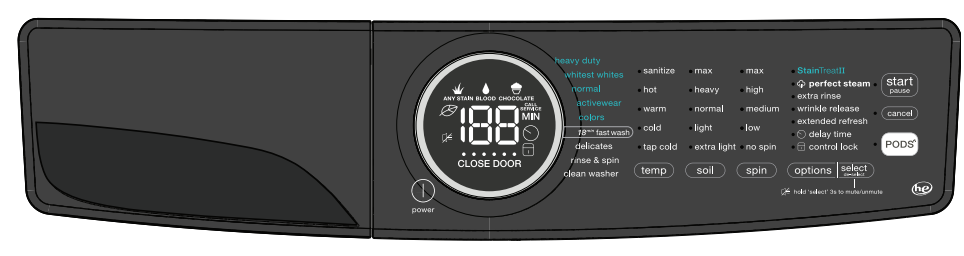
These temperature, spin speeds, soil levels and options are available with the following cycles:
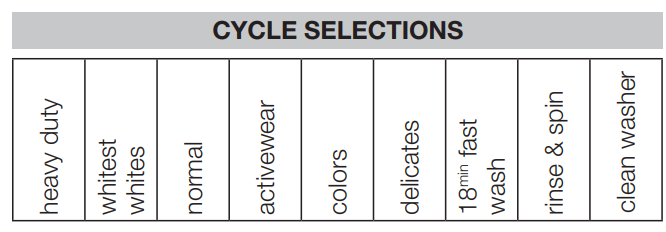
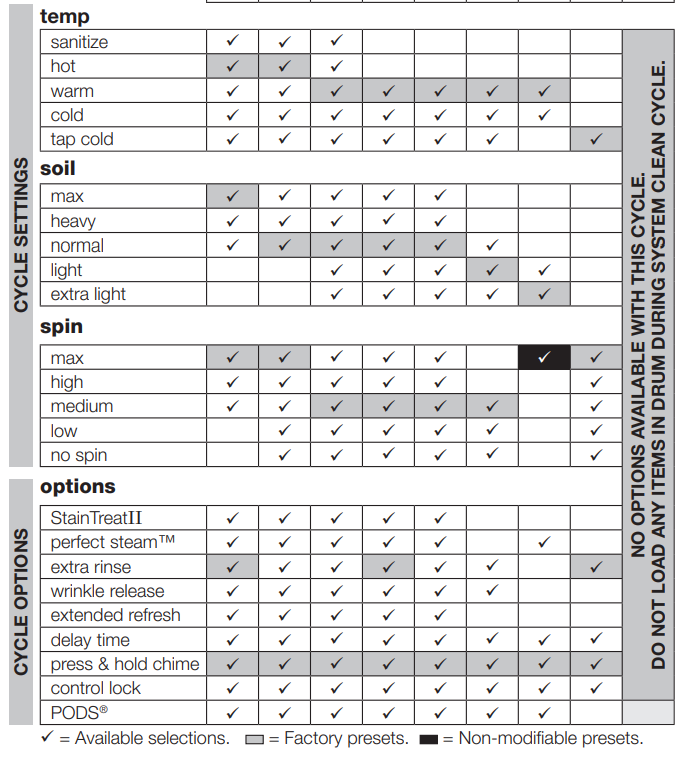
Settings Chart - 600 Series Washer
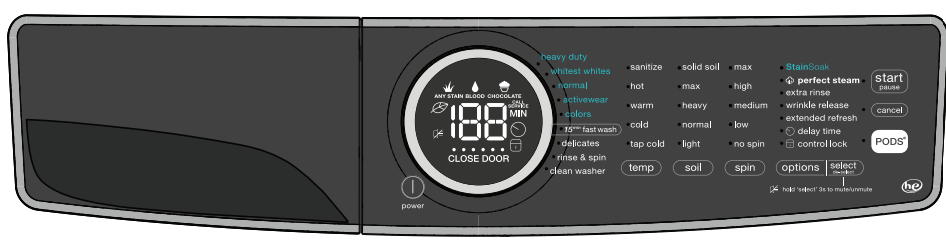
These temperature, spin speeds, soil levels and options are available with the following cycles:

Cycle Selection
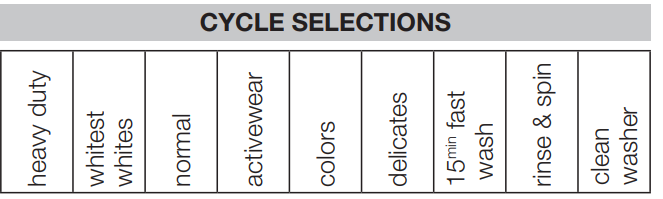
Press the power button to turn on the unit. Then, turn the cycle selector in either direction or press the cycles button (de- pendent on model) to scroll to the desired cycle. The indicator light for that cycle will be illuminated.
The estimated cycle time will appear on the LED display and indicator lights adjacent to the default settings (water temperature, final spin speed, and soil level) will illuminate for the cycle selected. See Washer Settings Chart for default settings for each cycle.
Cycle settings and cycle options can be changed using the temp, spin and soil buttons. See Cycle Settings and Cycle Options for detailed directions and descriptions of available settings.
To change the cycle once the cycle has begun, press cancel, select a new cycle, and press start again.
To stop the cycle, press cancel.
heavy duty: Use this cycle for heavily soiled, durable garments - ex. towels, sports gear, or fabric tote bags. For best soil and stain removal, use the hottest water safe for the fabrics being washed.
whitest whites (on select models): Use this cycle for white fabrics and lightly colored clothing. Refer to fabric care label for use of liquid chlorine bleach.
normal: Use this load for light to normally soiled cottons, linens, towels, shirts, jeans and mixed loads.
activewear (on select models): Use this cycle for lightweight, synthetic athletic apparel.
colors (on select models): Use this cycle for lightly soiled, dark, or highly dyed fabrics which may be susceptible to dye loss.
20min fast wash (400 Series model): Quickly wash a small, lightly soiled load in 20 minutes.
18min fast wash (500 Series model): Quickly wash a small, lightly soiled load in 18 minutes.
15min fast wash (600 Series model): Quickly wash a small, lightly soiled load in 15 minutes.
delicates: Use this cycle for lightly soiled knits and delicates which require gentle washing.
rinse & spin: Select rinse & spin for loads that need a cold water rinse or to add fabric softener that may have been omitted in a regular cycle. Add the fabric softener to the dispenser compartment. Select the spin speed appropriate for the load.
clean washer: To clean and freshen the washer, perform the clean washer cycle. If you wish to begin the cycle, empty the drum, add bleach and press start/pause. This maintenance cycle removes residue that may cause odor. See Inside Routine Cleaning (Preventive) for detailed instructions.
Cycle Settings
Washing Temperature
The appropriate washing temperature will automatically be indicated for the cycle selected. To change the preset temperature, press the temp button to scroll to the desired setting. Select a wash water temperature according to fiber content, colorfastness and soil level.
To protect your fabrics, not all temperatures are available with every cycle. If a temperature is not appropriate for the cycle, it cannot be selected and will not be lit by pressing the temp button.
The temperature selected for the cycle will be remembered and recalled each time that cycle is selected in the future.
All wash water temperatures are automatically regulated to maximize detergent effectiveness and improve washing performance. The water heater setting and its distance from the washer, water usage in other parts of the home, and seasonally low ground water temperature in some geographic areas can affect water temperature.
sanitize (on select models): Use the sanitize setting to clean and sanitize heavily soiled, colorfast fabrics including towels, bedding, cloth diapers, and children’s clothing. It is recommended that you set your water heater to 120° F (49° C) or higher to ensure proper performance during this cycle. If the setting is lower or the load is extra large, the cycle time may be extended. When used with the heavy duty and whitest whites cycles, the sanitize setting will kill 99.9% of bacteria with no carryover of bacteria between loads. No bleach or harsh chemicals are needed, but higher temperatures are required. Please check fabric care labels to prevent damage.
The wash water is heated by an internal boost heater to a maximum of 152° F (67° C) as the load tumbles. Cold water is added to cool down the load prior to drain and spin. As a precaution, the washer door remains locked when the water temperature reaches 130° F (55° C)
hot :Use this setting for heavily soiled white or colorfast cottons and blends.
warm :Use this setting for normally soiled white or colorfast cottons or blends.
cold: Some warm water will automatically blend with cold tap supply to achieve a precise cold. Use this setting for lightly soiled non-colorfast items, knits, delicates, and hand washables.
tap cold (on select models): Wash and rinse temperatures are equivalent to temperature of cold tap supply. Use this selection for fabrics and colors that are prone to dye transfer. For use with cold water  detergents.
Soil Level
Adjust the wash time based on the soil level of each load. Solid soil (on select models), max (on select models), heavy, normal, light and extra light (on some models) soil levels are available.
Spin Speed
Max (on select models), high, medium and low (on some models) spin speeds are available for each cycle. The spin speed and/or duration of final spin vary from model to model and cycle to cycle. Increasing the spin speed will extract more water, decrease drying time and conserve energy. Decreasing the spin speed will reduce wrinkling.
Select low spin speed (on some models) to gently spin items that should be line dried. Use no spin to omit the final spin at the end of the cycle. The load will be very wet. Remove items from the wash drum to drip dry or select a spin only cycle to remove excess water at a more convenient time.
Cycle Options
The default options for each cycle will automatically be chosen when a cycle is selected. To protect fabrics, not all options are available for all cycles. If an option is not available for a cycle, the indicator will not light.
Selecting Options
Press the option button to scroll though the options until the indicator light for the desired option flashes, then press select. The indicator light will illuminate when the option has been selected. Follow the same steps to deselect an option. The indicator light will turn off when the option is deselected.

All settings or options selected for the cycle, except sanitize (on select models), perfect steam (on select models), and stain treatment options, will be remembered and recalled each time that cycle is selected in the future. To return to factory settings, press and hold soil and options buttons at the same time and hold for 3 seconds until the confirmation signal sounds. To prevent unintentional and accidental exposure of delicate material to excess heat or unexpected steam, the sanitize, perfect steamTM and all stain treatment options will need to be reselected each time.
Stain Treatment options (on select models)
Your washer is equipped with powerful stain treatment tools. Depending on your model, use one of the options below to deal with tough stains on your garments. See step 5 in the Operating Your Washer section in this guide for details on adding stain additives to the dispenser.
StainTreat (400 Series Washer): Select this option to add a short initial wash period to available cycles using the stain treatment additives in the stain soak/treat compartment. After the stain wash phase, the load will automatically advance to the main wash cycle.
StainTreatII (500 Series Washer): Select this option when available and rotate the cycle selector to rotate through the stain types below. Stain treatment and main detergent will recirculate in the agitating load for approximately 20 minutes and then the washer will advance to the main wash cycle.
- Any Stain
 - Recirculating wash solution will be heated by boost heater.
- Blood
 - Recirculating wash solution will NOT be heated by boost heater to prevent setting blood stains.
- Chocolate
 - Stain wash time is extended with additional heating by boost heater.
StainSoak (600 Series Washer): Similar to StainTreatII above with the added feature of detergent/treatment mixing with SmartBoost pump technology before the Stain washing phase.
 perfect steam (on select models) - Select this option to add approximately 20 minutes of tumbling in steam.
Wash Cycle Options
extra rinse: Use this option when additional rinsing is desired to remove excess dirt and detergent. It is recommended for heavily soiled loads or if household members have sensitive skin.
wrinkle release (on select models): After the final spin, the washer will perform a “dry” agitation to loosen the garments from the side of the drum.
extended refresh (on select models): Select extended refresh if you will be unable to remove the load right after the cycle is complete. The washer recognizes the load has sat too long and will do a rinse and spin to keep the load fresh for up to 12 hours. When you are ready to remove the load during the extended refresh segment, you must press cancel to end the cycle and open the door.
PODS® (on select models): Select this option when using a detergent pack in a model equipped with a PODS® button (on select dispenser only). This option will divert the flow of water to the detergent pack compartment optimizing the detergent pack performance.
Control Options
control lock: To lock the controls between cycles, scroll to the control lock option and press select. The control lock icon will show on the LED display. To unlock the controls scroll to the control lock option again and press select. Use this feature to reduce the likelihood of accidental operation by children. Washer cycles will not run when Control Lock is activated.

delay time: Use delay time to delay the start of the washing cycle from 30 minutes to 12 hours. After selecting the delay time option, press select button to scroll to the desired delay time. The delay time icon will illuminate on the LED display to indicate the delay time option is activated, The time will begin counting down on the LED display once the washer start/pause button has been pressed.

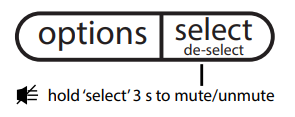
Chime :A signal will sound at the end of each cycle (and periodically during extended refresh) if option is activated.
To mute or unmute the chime, press and hold the select button for 3 sec. This will not affect any of the other button tones.
Other Features
LED display
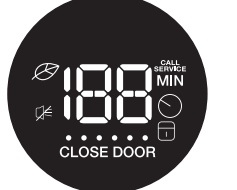
Icons may vary according to model.
The estimated total cycle time will be displayed when the cycle is selected. The time may increase if water pressure is low, oversudsing occurs or the load becomes unbalanced. The approximate time remaining will be displayed during the cycle. As the washer progresses through the cycle phases, the row of cycle phase indicators lights up under the cycle time. The eco, control lock, close door, mute (some models) and delay time will also appear on this LED display.
Eco Indicator
The eco symbol will light up on the LED display to indicate that the selected combination of temperature, spin speed and options are eco friendly.

Oversuds Protection
A situation where oversudsing has been detected by the washer will result in the washer requiring additional rinses until the suds have been cleared. Each extra rinse the washer performs to clear the suds will add approximately 5 minutes to the cycle duration. The LED will display “SU” followed by “dS” and then the remaining cycle time (0 min) for 60 seconds and then repeat. Press cancel to turn off the alert message. The washer will continue to perform rinse cycles until suds are removed.

Reversed Hose Detection
If condition is detected where the inlet hoses have been installed incorrectly (hot supply to cold inlet and cold supply to hot inlet), the washer will alert you. The LED will display “HO” followed by “SE” and then the remaining cycle time (0 min) for 60 seconds and then repeat. Acknowledge the reversed hose condition by pressing the cancel button. Shut off each water supply valve and attach each supply hose to the correct inlet connection on the washer.

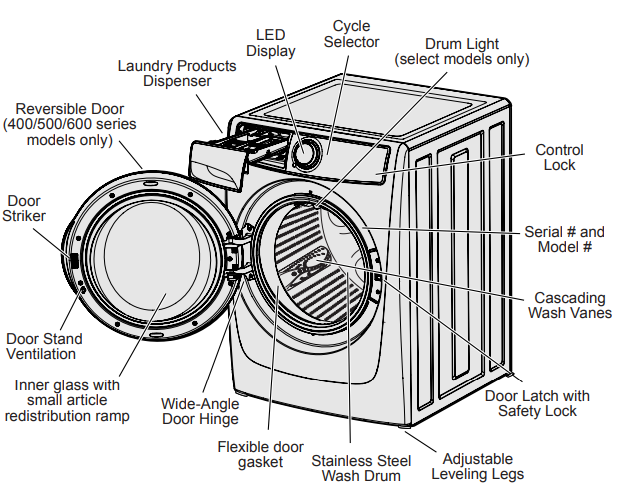
Drum Light (on select models)
The drum light will come on whenever the door is opened to illuminate the drum during loading and unloading. Closing the door turns off the light. The drum light will automatically turn off if the door is left open more than 3 minutes.
Reversible Door (on select models)
Your washer may be equipped with a reversible door. The door can be hinged on the right or left side.
Door Stand Ventilation
Help prevent odor buildup and reduce humidity between washes by utilizing your washer’s door stand ventilation feature. Open the door, locate the stand below the door latch and rotate the stand counterclockwise to unlock it.
The stand is spring loaded and will extend. Rotate it clockwise to lock in the extended position.

To disengage the stand, rotate to unlock, push the stand in and rotate to lock position.
Stain Removal Guide
Stain Removal Procedures
- To reduce the risk of fire or serious injury to persons or property, comply with the basic warnings listed below:
- Read and comply with all instructions on stain removal products.
- Keep stain removal products in their original labeled containers and out of children’s reach.
- Thoroughly wash any utensils used.
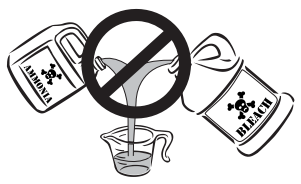
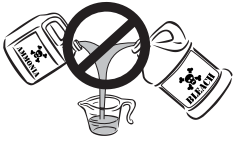
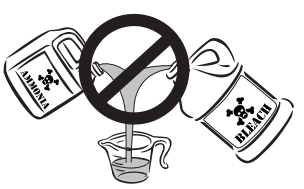
- DO NOT combine stain removal prod- ucts, especially ammonia and chlorine bleach. Dangerous fumes can result.
- Never wash items which have been previously cleaned in, washed in, soaked in or spotted with gasoline, dry cleaning solvents or other flammable or explosive substances because they give off vapors that could ignite or explode.
- Never use highly flammable solvents, such as gasoline, inside the home. Vapors can explode on contact with flames or sparks.
For Successful Stain Removal:
- Remove stains promptly.
- Determine the kind of stain, then follow the recommended treatment in the stain removal chart on the next page.
- To pretreat stains, use a stain treatment product, liquid detergent, or a paste made from powder detergent and water.
- Use cold water on unknown stains as hot water can set stains.
- Consult care label instructions for treatments to avoid on specific fabrics.
- Check for colorfastness by testing stain remover products on an inside seam.
- Rinse and wash items after stain removal.
WARNING: HARMFUL VAPOR HAZARD! DO NOT use or mix liquid chlorine bleach with other household chemicals such as toilet cleaners, rust removers, acid or products containing ammonia. These mixtures can produce dangerous fumes which can cause serious injury or death.
For best results: Follow the fabric care label instructions on items to be washed.
Stain Removal Suggestions
Adhesive tape, gum, rubber cement
- Apply ice. Scrape off excess. Place stain down on paper towels. Saturate with prewash stain remover or nonflammable dry cleaning fluid.
Baby formula, dairy products, egg
- Use product containing enzymes to pretreat or soak stains. Soak for 30 minutes or more. Wash.
Beverages (coffee, tea, soda, juice, alcoholic beverages)
- Pretreat stain. Wash using cold water and bleach safe for fabric.
Blood
- Rinse with cold water. Rub with bar soap. Or, pretreat or soak with product containing enzymes. Wash using bleach safe for fabric.
Candle wax, crayon
- Scrape off surface wax. Place stain face down between paper towels. Press with warm iron until wax is absorbed. Replace paper towels frequently. Treat remaining stain with prewash stain remover or nonflammable dry cleaning fluid. Hand wash to remove solvent. Wash using bleach safe for fabric.
Chocolate
- Pretreat or soak in warm water using product containing enzymes. Wash using bleach safe for fabric.
Collar or cuff soil, cosmetics
- Pretreat with prewash stain remover or rub with bar soap.
Dye transfer on white fabric
- Use packaged color remover. Wash using bleach safe for fabric.
Grass
- Pretreat or soak in warm water using product containing enzymes. Wash using bleach safe for fabric.
Grease, oil, tar (butter, fats, salad dressing, cooking oils, car grease, motor oils)
- Scrape residue from fabric. Pretreat. Wash using hottest water safe for fabric. For heavy stains and tar, apply nonflammable dry cleaning fluid to back of stain. Replace towels under stain frequently. Rinse thoroughly. Wash using hottest water safe for fabric.
Ink
- Some inks may be impossible to remove. Washing may set some inks. Use prewash stain remover, denatured alcohol or nonflammable dry cleaning fluid.
Mildew, scorch
- Wash with chlorine bleach if safe for fabric or soak in oxygen bleach and hot water before washing. Badly mildewed fabrics may be permanently damaged.
Mud
- Brush off dry mud. Pretreat or soak with product containing enzymes.
Mustard, tomato
- Pretreat with prewash stain remover. Wash using bleach safe for fabric.
Nail polish
- May be impossible to remove. Place stain face down on paper towels. Apply nail polish remover to back of stain. Repeat, replacing paper towels frequently. DO NOT use on acetate fabrics.
Paint, varnish
- WATER BASED: Rinse fabric in cool water while stain is wet. Wash. Once paint is dry, it can’t be removed.
- OIL BASED AND VARNISH: Use solvent recommended on label. Rinse thoroughly before washing.
Perspiration
- Use prewash stain remover or rub with bar soap. Rinse. Wash using non chlorine bleach in hottest water safe for fabric.
Rust, brown or yellow discoloration
- Use rust remover safe for fabric. DO NOT use chlorine bleach because it may intensify discoloration.
Shoe polish
- LIQUID: Pretreat with a paste of powder detergent and water.
- PASTE: Scrape residue from fabric. Pretreat with prewash stain remover or nonflammable dry cleaning fluid. Rinse. Rub detergent into dampened area. Wash using bleach safe for fabric.
Tomato
- Pretreat with prewash stain remover. Wash using bleach safe for fabric.
Urine, vomit, mucus, feces
- Pretreat or soak in product containing enzymes. Wash using bleach safe for fabric.
Wine
- Pretreat or soak in cold water. Wash in hottest water and bleach safe for fabric
Care & Cleaning
Inside Routine Cleaning (Preventative)
To help prevent odors or humidity accumulation leave the door open with the door stand ventilation feature (on select models) for a few hours after use or whenever the washer is not in use.
CAUTION: DO NOT leave the door open if there are small children or pets present. An open door could entice children to hang on the door or crawl inside the washer. If there are no small children present, you may leave the door ajar to prevent odor build up.
To Refresh or Clean Inside of Washer
To clean and freshen the washer, perform the clean washer cycle. For best results perform the cycle once a month.
To begin the cycle, select the clean washer cycle. If installed, remove the LIQUID DETERGENT cup from the dispenser. REMOVE ALL ITEMS FROM WASH DRUM before filling the detergent compartment with one (1) cup of liquid chlorine bleach OR one (1) pouch of TideTM Washing Machine Cleaner. DO NOT use both. Press start/pause to begin.
To Clean the dispenser drawer
Cleaning the three compartment dispenser
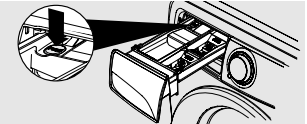
1. Remove the drawer by pulling the drawer out until it stops.
2. Reach back into the left rear corner of the drawer cavity and press down firmly on the lock tab. Pull out the drawer.
3. Remove all inserts from the drawers
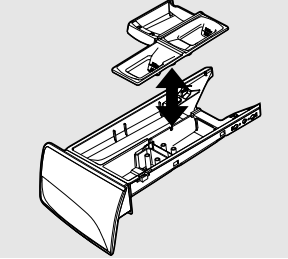
4. Rinse the drawer and inserts with hot tap water to remove traces of accumulated powders and liquids. Large amounts of fabric softener residue may indicate improper dilution or more frequent cleaning is required.
5. To clean the drawer opening, use a small brush to clean the recess. Remove all residue from the upper and lower parts of the recess.
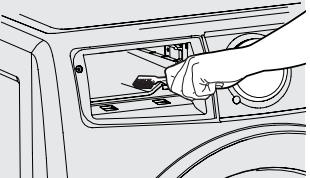
6. Replace the insert by pressing it in place until you hear a slight click.
7. Return the dispenser drawer to the unit.
Cleaning the Adaptive Dispenser™
1. Remove the drawer by pulling the dispenser out until it stops.
2. Reach back into the right rear corner of the dispenser cavity and press down firmly on the lock tab. Pull out the dispenser drawer.
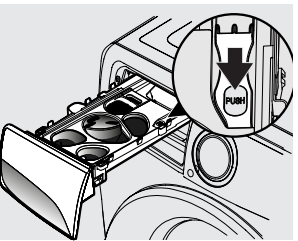
3. Remove the detergent cup and top cover from the dispenser drawer.
4. Remove the bottom cover from the dispenser drawer.
- First, pull the two lock tabs at the rear of the dispenser drawer to unlatch the back cover.
- Then, gently pull back the two clips on the front of the bottom cover to to fully release it from the dispenser drawer.
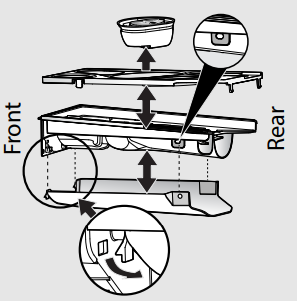
5. Rinse the dispenser drawer, covers, and detergent cup with hot tap water to remove traces of accumulated powders and liquids. Large amounts of fabric softener residue may indicate improper dilution or more frequent cleaning is required.
6. To clean the dispenser drawer opening, use a small brush to clean the recess. Remove all residue from the upper and lower parts of the recess.
7. Reassemble dispenser drawer and check to ensure that all pieces are securely in place.
8. Return the dispenser drawer to the unit.
Inside Cleaning (Aggressive)
In cases where clean washer cycle along with care and cleaning of rubber gasket folds isn’t done, and severe odor or residue buildup have developed, follow the below cleaning procedure to help alleviate the problem.
Cleaning Procedure-Washer Drum
Ensure the wash tub is empty. Open the detergent drawer and pour eight cups of bleach into the MAIN WASH detergent compartment. Select clean washer cycle as described previously in Inside Routine Cleaning (Preventative).
Upon cycle completion inspect the interior of the washer to see if the odor/residue has been eliminated. If any additional cleaning is required, repeat the above procedure. This may take several cycles depending on the severity of the odor/ residue. You may observe some remaining discoloration due to the long term effects of this residue.
For especially contaminated areas visible inside the drum (including the front rubber seal), these areas might be more effectively cleaned by spraying a bleach cleaner on a scrub brush, soft sponge, or towel and scrubbing.
If odor is still left after bleach cycle(s) and bleach cleaner, open the detergent drawer and pour one (1) pouch of TideTM Washing Machine Cleaner in detergent drawer. Select clean washer cycle as above and start the washer.
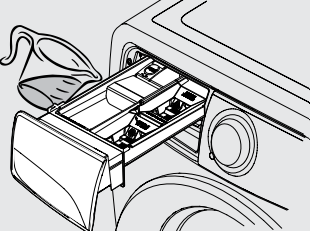
Three Compartment Preventative Cleaning
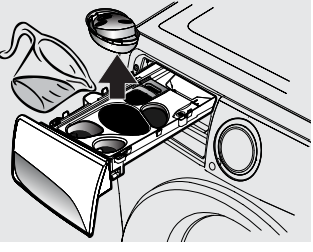
Adaptive Dispenser™ Preventative Cleaning
WARNING: DO NOT use or mix liquid chlorine bleach with other household chemicals such as toilet cleaners, rust removers, acid or products containing ammonia. These mixtures can produce dangerous fumes which can cause serious injury or death.
Outside Routine Cleaning
- When washing is completed, wipe top and sides of washer with a damp cloth.
- Clean the cabinet with mild soap and water. Never use harsh, gritty or abrasive cleansers
- If the cabinet becomes stained, clean with diluted chlorine bleach (1 part bleach to 8 parts water). Rinse several times with clear water.
- Remove glue residue from tape or labels with a mixture of warm water and mild detergent. Or, touch residue with the sticky side of tape.
- When cleaning chrome parts, it is best to use only a damp cloth.
- Before moving the washer, place a strip of cardboard or thin fiberboard under the front leveling legs to prevent damage to the floor.
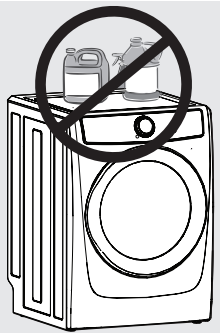
IMPORTANT: DO NOT store or place laundry products on top of washer at any time. They can damage the finish or controls. It is recommended to keep laundry products in the storage drawer between cycles if installed on a pedestal.
Winterizing Instructions
- Turn off water supply faucets.
- Disconnect hoses from water supply and drain water from hoses. Vacuum out each water supply inlet with a waterproof utility vac to ensure water valves are completely drained. Damage will occur if water in water inlet valves are allowed to freeze.
- Plug electrical cord into a properly grounded electrical outlet.
- Add 1 gallon (3.8 L) nontoxic recreational vehicle (RV) antifreeze to empty wash drum. Close door.
- Select any cycle. Press start/pause and let the washer drain for 1 minute to drain out all the water. Not all of the RV antifreeze will be expelled.
- Press cancel, unplug electrical power cord, dry off drum interior and close door.
- Remove dispenser drawer. Drain any water in compartments and dry compartments. Replace drawer.
- Store washer in an upright position.
- To remove antifreeze from washer after storage, run empty washer through a complete cycle using detergent. DO NOT add wash load.
Water Inlet Hose Inspection
Periodically inspect all water inlet hoses for water leaks, wear, cuts, corrosion and bulges. Replace all hoses, if any sign of the above is visible. All hoses should be replaced every 5 years to reduce the risk of hose failures. When replacing hoses, refer to the Installation Instructions for proper installation. DO NOT overtighten or cross thread the fittings. DO NOT allow the hose to rub against sharp objects. Always ensure the hose fitting rubber gasket is installed and free from water leaks when water pressure is applied.
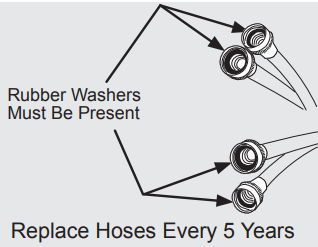
See the Accessories section of the Installation Instructions for ordering information.
Instructions for Limited Use, Vacation, and Away from Home
CAUTION: Your washer should be operated ONLY when you are home. Water leakage is a safety issue and can cause personal injury or property damage. If you are away from home or not using your washer for extended periods of time, follow these steps:
- Turn off the water supply to washer to avoid water leaks due to water pressure surges and unforeseen occurrences in the water supply.
- Disconnect or unplug the electrical power to the washer.
- Remove excess water from the dispenser, interior door and tub and perform the Care and Cleaning steps.
Reconnecting Water Supply and Electrical
IMPORTANT: When reinstalling the washer after disconnecting the water supply lines and electrical power, please follow the steps below:
- Review the Installation Instructions provided with the washer to ensure the appliance is level and the water and electrical power supply is properly connected.
- Ensure the water lines are flushed of debris, prior to connecting the water lines to the washer inlet.
- Check for water leaks and replace supply hoses if needed.
CAUTION: Damaged or improperly installed water lines can cause the water lines or connections to leak. Water leakage is a safety issue and can cause personal injury or property damage.
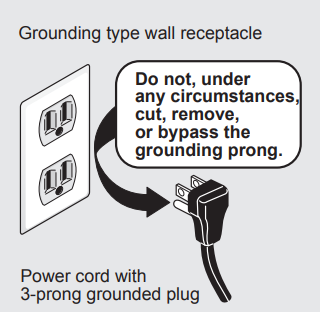
WARNING: Improper grounding of the washer may cause serious injury or death. Check with a licensed electrician if you are in doubt as to whether the appliance is properly grounded.
Solutions to Common Inquiries
Normal Operating Sounds
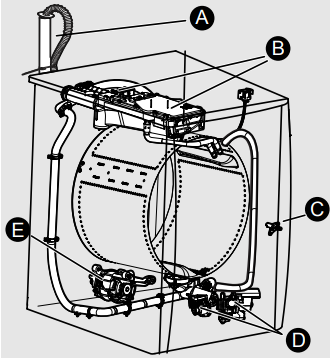
You may or may not hear the following sounds from your new washer:
A. DRAIN HOSE: The washer has a flexible drain hose to carry water from the washer to the stand pipe of your home. You will hear water flowing into your stand pipe. This is a normal part of the operation of the washer.
B. WATER VALVES/DISPENSER: As water enters the dispenser system, it is common to hear a water flowing sound. This normal sound will vary slightly based on the water pressure in your home.
C. DOOR LOCK: Your washer is equipped with a door lock with an electric solenoid. There will be a clicking sound as the washer door is being locked or unlocked.
D. DRAIN/RECIRCULATION PUMPS: Your washer is equipped with multiple high velocity system pumps. It is normal to hear humming and gurgling sounds as water is either pumped from the washer during the drain phase or recirculated during the prewash and wash phases. Both of these sounds are normal and indicate that your pump is functioning correctly.
E. HIGH SPEED MOTOR: A powerful motor is used to drive the drum to high spin speeds to extract water from your load. You will hear a sound associated with these higher spin speeds. This sound is normal and will vary slightly as the spin speed varies with load size and cycle selected.
CAUTION: Abnormal, on-going sounds may be an indication of a pending washer failure and should be investigated by a qualified technician. Refer to “Noise” section of Service Prevention Checklist in this manual.
Common Washing Inquiries
Blue stains
- Possible Causes:
- Undiluted liquid detergent or fabric softener dispensed directly onto fabric.
- Solutions:
- If caused by detergent, mix 1 cup (240 ml) white vinegar with 1 qt (.95 L) water in plastic container. Soak 1 hour. Rinse.
- If caused by fabric softener, rub stains with bar soap. Wash.
- Preventive Measures:
- Avoid overfilling detergent and fabric softener compartments of dispenser.
Discoloration, graying
- Possible Causes:
- Not enough detergent.
- Wash water temperature too low.
- Incorrect sorting.
- Solutions:
- Rewash with correct amount of detergent and hottest water safe for fabric.
- Add bleach safe for fabric.
- Preventive Measures:
- Sort items by soil level and color.
- Use correct amount of detergent, hottest water and bleach safe for fabric.
Greasy, oily stains
- Possible Causes:
- Not enough detergent.
- Undiluted liquid fabric softener poured directly on fabric.
- Solutions:
- Treat with prewash stain remover or liquid detergent.
- Increase detergent and water temperature. Rewash.
- Rub fabric softener stains with bar soap.
- Preventive Measures:
- Use correct amount of detergent and hottest water safe for fabric.
- DO NOT pour liquid fabric softener directly on fabric. See Operating Your Washer
Holes, tears, or snags
- Possible Causes:
- Incorrect use of chlorine bleach.
- Unfastened zippers, hooks, buckles.
- Rips, tears and broken threads.
- Overloading washer.
- Degradation of fabric.
- Solutions:
- May be irreversible if rips, tears and seams cannot be mended.
- Preventive Measures:
- Never pour chlorine bleach directly on fabric.
- Check condition of items before washing. See Operating Your Washer, steps 2 and 5.
Lint
- Possible Causes:
- Incorrect sorting.
- Tissues left in pocket.
- Overloading washer.
- Not enough detergent.
- Undissolved detergent has left a residue resembling lint.
- Static cling is attracting lint.
- Load washed too long.
- Solutions:
- Reduce load size. Rewash using correct water temperature, water level, and amount of detergent.
- Add nonprecipitating water conditioner to wash water to remove detergent residue.
- Add liquid fabric softener to final rinse.
- Dry load in dryer.
- Remove lint with lint brush or roller.
- Preventive Measures:
- See Operating Your Washer.
- DO NOT overload washer.
- Use correct temperature and amount of detergent, water and wash time.
Pilling (Fibers ball up and cling to fabric.)
- Possible Causes:
- Pilling is normal with synthetic and permanent press fabrics. This is due to abrasion from normal wear.
- Solutions:
- Use a lint brush or shaver to remove pills.
- Preventive Measures:
- Use fabric softener in washer to lubricate fibers.
- When ironing, use spray starch or fabric finish on collars and cuffs.
- Turn items inside out to reduce abrasion.
Residue or powder on dark items; Stiff, harsh fabrics.
- Possible Causes:
- Undissolved detergent.
- Some granular detergents can combine with hard water minerals to form a residue.
- Overloading washer.
- Solutions:
- Preventive Measures:
- • Increase water temperature using hottest water safe for fabric.
- DO NOT overload washer.
- Use liquid detergent or nonprecipitating water conditioner with powder detergent.
Wrinkling
- Possible Causes:
- Overloading washer.
- Incorrect wash cycle for wash load.
- Solutions:
- Reduce load size.
- Rinse in cold water with liquid fabric softener using the casual or delicate cycle.
- Preventive Measures:
- DO NOT overload washer.
- Remove items from washer as soon as cycle is completed.
- Use liquid fabric softener
Yellow buildup of body soil on synthetic fabrics
- Possible Causes:
- Agitation time too short.
- Wash water temperature too low.
- Not enough detergent.
- Solutions:
- Soak in detergent booster or product containing enzymes.
- Wash in hottest water safe for fabric using casual cycle.
- Increase detergent.
- Add bleach safe for fabric or treat with color remover.
- Preventive Measures:
- Select correct cycle.
- Use correct amount of detergent.
- Wash synthetics frequently using hot or warm water.
Yellow or brown rust stains
- Possible Causes:
- Iron or manganese in water supply, water pipes, or water heater.
- Solutions:
- To restore discolored load of whites, use rust remover safe for fabric.
- DO NOT use chlorine bleach to remove rust stains. It may intensify discoloration.
- Preventive Measures:
- Use nonprecipitating water softener.
- Before washing, run hot water for a few minutes to clear lines.
- Drain water heater occasionally.
- For an ongoing problem, install an iron filter in your water supply system.
Residue stain buildup in gasket
- Possible Causes:
- Moisture in washer.
- Use of non-HE detergent.
- Overdosing detergent.
- Overloading wash drum.
- Leaving a wet load set in washer.
- Cold water washes which may not completely dissolve and remove detergents.
- Solutions:
- Perform clean washer cycle
- Scrub gasket with Comet™ Spray Gel Mildew Stain Remover - use brush to remove stains.
- Use only HE (high efficiency detergent) along with recommended dosage.
- Remove wash load immediately upon cycle completion.
- Preventive Measures:
- Run dehumidifier in laundry room.
- Avoid overfilling detergent and fabric softener compartments of dispenser.
- Dry the inside of washer and gasket after every run.
Residue stain buildup in dispenser drawer or detergent pack not dissolved.
- Possible Causes:
- Moisture in the washer.
- Use of non-HE detergent.
- Overdosing detergent.
- Adding more than two detergent packs to detergent pack compartment.
- PODS® option not selected when using detergent pack (on select models)
- Solutions:
- Remove and clean dispenser and inserts with combination of ¾ cup liquid chlorine bleach and one gallon hot water. Rinse well, and repeat if necessary. NOTE: Wear rubber of latex gloves. Protect floor and clothing from bleach damage.
- Use only HE (high efficiency detergent) along with recommended dosage.
- Preventive Measures:
- Avoid overfilling detergent and fabric softener compartments of dispenser.
- Check that PODS® option is selected and detergent pack is placed in PODS® dispenser compartment when using detergent pack (on select models).
Water in fold of flexible gasket
- Possible Causes:
- Result of washing and part of normal operation.
- Solutions:
- At the end of each wash, dry inside of gasket fold with clean dry towel all around gasket.
Odor
- Possible Causes:
- Moisture in the washer.
- Use of non-HE detergent.
- Overdosing detergent.
- Leaving a wet load remain in washer.
- Cold water washes which may not completely dissolve and remove detergents.
- Solutions:
- Perform clean washer cycle.
- At the end of each wash, dry inside of gasket fold with clean, dry towel all around gasket.
- Use only HE (high efficiency detergent) along with recommended dosage.
- Remove wash load immediately upon cycle completion.
- Pour one cup liquid chlorine bleach in standpipe; let remain a day and flush with water.
- Preventive Measures:
- Utilize the door stand ventilation feature for a few hours after use or whenever washer is not in use.
Before Calling
NOISE
High pitch “jet engine” noise
- A certain amount of motor whine is normal during the spin cycle.
Rattling and clanking noise
- Foreign objects such as coins or safety pins may be in drum or pump.
- Stop washer and check drum. If no objects are found, perform cycle with empty drum. If noise continues, item may be in pump. Call your authorized service technician.
- Belt buckles and metal fasteners are hitting wash drum.
- To prevent unnecessary noise and damage to drum, fasten fasteners and turn items inside out.
Thumping sound
- Heavy wash loads may produce a thumping sound. This is usually normal. If sound continues, washer is probably out of balance.
- Stop washer and redistribute wash load.
Vibrating noise
- Washer is not resting firmly on floor.
- Move washer so it rests firmly on floor. Adjust leveling legs. See Installation Instructions for details.
- Shipping bolts and foam block have not been removed during installation.
- See Installation Instructions for removing shipping bolts and foam block.
- Wash load unevenly distributed in drum.
- Stop washer and rearrange wash load.
OPERATING
Residue left in drum
- Heavily soiled items.
- Wipe drum with a nonabrasive household cleanser, then rinse. Shake or brush excess dirt and sand from items before washing.
LED displays “ ”
- Washer has been programmed to temporarily perform a repeating demo cycle.
- Reset the unit back to factory default settings.
- Press power to turn off unit. Press power again to turn unit on. Look for console to light up.
- Wait at least 10 seconds, then simultaneously press and hold soil and options buttons for 3 secs.
- Lights will turn OFF and ON, indicating the unit has been reset to factory default
Washer won’t spin
- Load is too small.
- Add 1 or 2 similar items to help balance the load.
Washer does not start
- Electrical power cord may not be plugged in or connection may be loose.
- Make sure plug fits tightly in wall outlet.
- House fuse blown, circuit breaker tripped, or a power outage has occurred.
- Reset circuit breaker or replace fuse. DO NOT increase fuse capacity. If problem is a circuit overload, have it corrected by a qualified electrician. If problem is a power outage, call local electric company.
- Action of pressing start/ pause button on “touch screen” style console not recognized.
- Press start/pause button with bare fingertip.
- Water supply faucets are not turned on.
- Turn on water supply faucets.
- Motor is overheated. Washer motor will stop if overheated.
- It will automatically restart after a cool down period of up to 30 minutes (if washer has not been manually turned off).
- Door may be open. Unit will not operate with door open.
- Light next to start/pause button is flashing indicating unit is paused.
- • Press start/pause button to continue the cycle.
WATER
Water collects in folds of the door gasket at the end of the cycle
- This is a result of the washing action and is part of the normal operation of the washer.
- Wipe and dry the gasket to remove water and any debris remaining in the gasket after use.
Water collects in bleach and fabric softener compartments
- This is a result of the siphoning action and is part of the normal operation of the washer.
- Water may be removed by removing the dispenser drawer (see Care and Cleaning in this guide) and draining water into the empty drum or sink.
Wash load too wet after spin
- Washer is overloaded.
- DO NOT overload washer. See Operating Your Washer.
- Load is too small.
- Add 1 or 2 similar items to help balance load.
- Load is out of balance.
- Rearrange load to allow proper spinning.
- Drain hose is kinked.
Water does not enter washer or it enters slowly
- Water supply is not adequate in area.
- Check another faucet in the house. Wait until water supply and pressure increase
- Water supply faucets are not completely open.
- Fully open hot and cold faucets.
- Water is being used elsewhere in the house. Water pressure must be at least 30 psi (260 kPa).
- Avoid running water elsewhere while washer is filling
- Water inlet hoses are kinked.
- Water inlet screens plugged.
- Remove hose from inlets and clean screens.
Warm or hot water is not hot enough
- Hot water heater is set too low or is a distance from washer.
- Measure hot water temperature at nearby faucet with candy or meat thermometer. Water temperature should be at least 120°F (49°C). Adjust water heater as necessary.
- Hot water is being used elsewhere in the house.
- Avoid using hot water elsewhere before or during washer use. There may not be enough hot water available for proper cleaning. If problem persists, your hot water system may be unable to support more than 1 use at a time.
Water in washer does not drain or drains slowly
- Drain hose is kinked or clogged.
- Clean and straighten the drain hose.
- Drain hose standpipe is too tall. Maximum standpipe height is 8’ (2.4 m).
- Reduce standpipe height to less than 8’ (2.4 m). See Installation Instructions
- House drain pipes are clogged
- Unclog drain pipes. Contact plumber if necessary.
Water leaks
- Fill hose connection is loose at faucet or washer.
- Check and tighten hose connections. Install rubber sealing washers provided.
- Dispenser drawer not completely closed
- Close dispenser drawer completely.
- Water hoses have damage, cuts or corrosion.
Oversudsing
- HE detergent is not being used.
- Run rinse cycle. Use a low-sudsing, high efficiency detergent.
- Too much detergent.
- Run rinse cycle. Use less detergent in future loads.
Incorrect wash and rinse temperatures. The LED display will alert this condition with “HOSE” alarm
- Hot and cold water hoses are connected to wrong supply faucets.
- Connect hot water hose to hot water faucet and cold water hose to cold water faucet.
Water is entering washer but tub does not fill
- Drain hose standpipe is too low. Standpipe must be a min of 23.6” (60 cm) high to prevent siphoning.
- Increase standpipe height to at least 23.6” (60 cm). See Installation Instructions.