
10 Sunnen Drive
St. Louis, MO 63143
telephone: 314-678-6336
fax: 314-781-2714
www.bloomfieldworldwide.com
p/n 2m-75844 Rev.I M641 130319
641
OWNERS MANUAL
for
E. B. C.™
Electronic
Brew
Control ™
DECANTER
COFFEE BREWERS
MODELS
1012
1040
1072
Includes:
Installation
Use & Care
Servicing Instructions
E.B.C.™ brewers are protected under
U. S. Patent # 5,704,275
Other U. S. and Canadian patents pending.
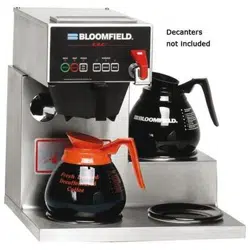
Models 1012 Brewer
with optional
8900-Series Glass Decanters
Model 1072 Brewer
with optional
8900-Series Glass Decanters
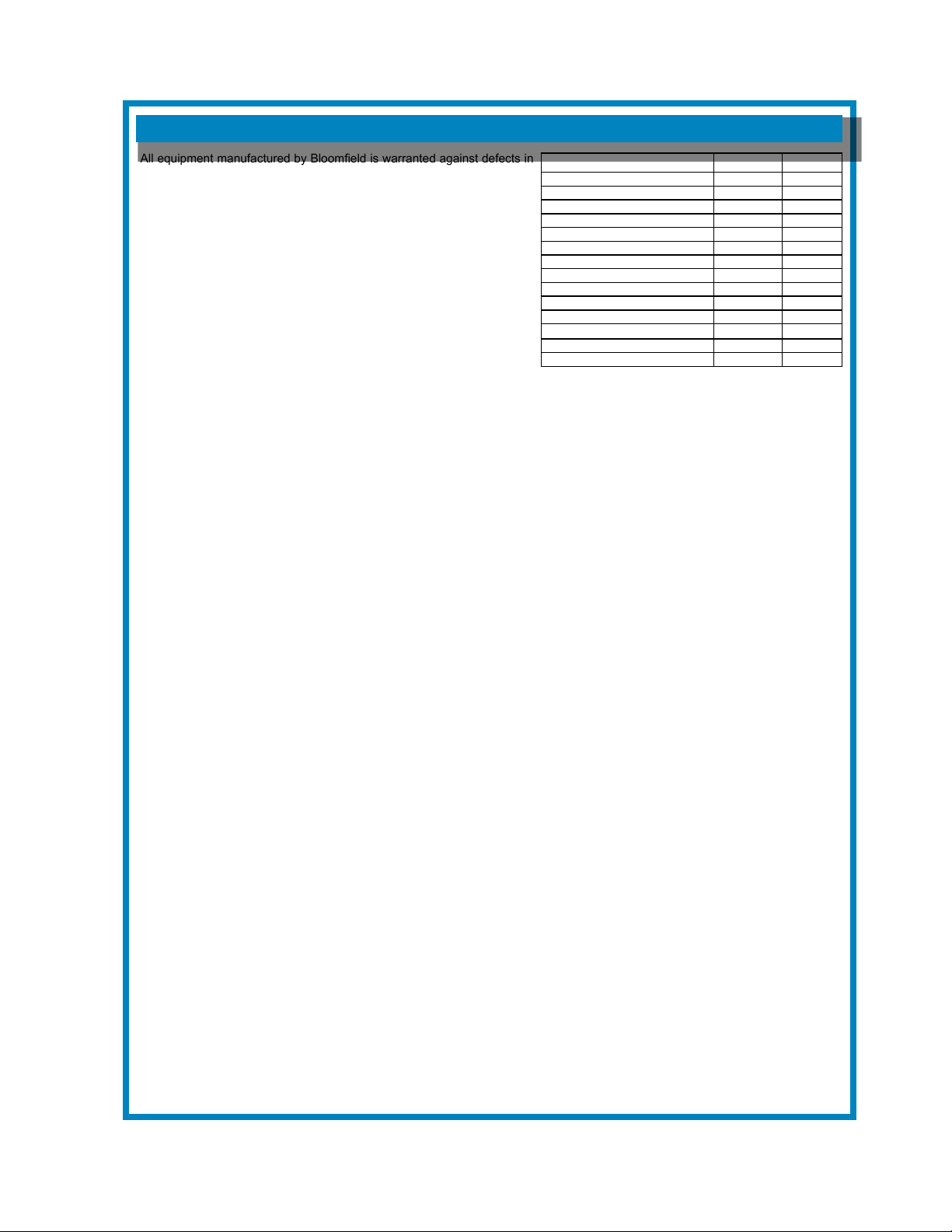
All equipment manufactured by Bloomeld is warranted against defects in
materials and workmanship for the time periods listed in the chart starting
from the date the equipment is placed into service and is for the benet of
the original purchaser:
THE FOREGOING OBLIGATION IS EXPRESSLY GIVEN IN LIEU OF
ANY OTHER WARRANTIES, EXPRESSED OR IMPLIED, INCLUDING
ANY IMPLIED WARRANTY OF MERCHANTABILITY OR FITNESS
FOR A PARTICULAR PURPOSE, WHICH ARE HEREBY EXCLUDED.
BLOOMFIELD, LLC SHALL NOT BE LIABLE FOR INDIRECT,
INCIDENTAL OR CONSEQUENTIAL DAMAGES OR LOSSES FROM
ANY CAUSE WHATSOEVER.
This warranty is void if it is determined that upon inspection by an
authorized service agency that the equipment has been modied,
misused, misapplied, improperly installed, or damaged in transit or by
re, ood or act of God.
It also does not apply if the serial nameplate has been removed or unauthorized service personnel perform service. The prices
charged by Bloomeld for its products are based upon the limitations in this warranty. Seller’s obligation under this warranty
is limited to the repair of defects without charge by a Bloomeld Authorized Service Agency or one of its sub-agencies. This
service will be provided on customer’s premises for non-portable models. Portable models (a device with a cord and plug or a
dispenser) must be taken or shipped to the closest authorized service agency, transportation charges prepaid, for services.
Agencies are located in principal cities, please visit our website to locate one.
This warranty is valid in the United States and Canada and void elsewhere. Please consult your classied telephone directory
or your food service equipment dealer; or, for information and other details concerning warranty, write to:
Service Parts Department; Bloomeld
10 Sunnen Drive, St. Louis, MO 63143
Phone: (314) 678-6336 : Fax: (314) 781-2714
Technical@ bloomeldworldwide.com / www.bloomeldworldwide.com
BLOOMFIELD SERVICE POLICY AND PROCEDURE GUIDE ADDITIONAL WARRANTY EXCLUSIONS
1. Resetting of safety thermostats, circuit breakers, overload protectors, or fuse replacements.
2. All problems due to operation at voltages other than specied on equipment nameplates - conversion to correct voltage
must be the customer’s responsibility.
3. All problems due to electrical connections not made in accordance with electrical code requirements and wiring diagrams
supplied with the equipment.
4. Replacement of items subject to normal wear, to include such items as knobs and light bulbs. Normal maintenance
functions including adjustment of thermostats, microswitches, and replacement of fuses and indicating lights are not
covered under warranty.
5. All problems due to inadequate water supply, such as uctuating, or high or low water pressure.
6. All problems due to mineral/calcium deposits, or contamination from chlorides/chlorines. De-liming is considered a
preventative maintenance function and is not covered by warranty.
7. Full use, care and manuals may or may not be sent with each unit, only a condensed version. Please visit our web site to
download the full version.
8. Travel mileage is limited to fty (50) miles from an authorized service agency or one of its sub-service agencies.
9. All labor shall be performed during normal working hours. Overtime premium shall be charged to the customer.
10. All genuine Bloomeld replacement parts are warranted for ninety (90) days from date of purchase on non- warranted
equipment. Any use of non-genuine Bloomeld parts completely voids any warranty.
11. Installation, labor and job checkouts are not considered warranty.
12. Charges incurred by delays, waiting time or operating restrictions that hinder the service technicians ability to perform
services are not covered by warranty. This includes institutional and correctional facilities.
SHIPPING DAMAGE CLAIMS PROCEDURE
NOTE: For your protection, please note that equipment in this shipment was carefully inspected and packaged by skilled
personnel before leaving the factory. Upon acceptance of this shipment, the transportation company assumes full responsibility
for its safe delivery.
IF SHIPMENT ARRIVES DAMAGED:
1. VISIBLE LOSS OR DAMAGE: Be certain that any visible loss or damage is noted on the freight bill or express receipt,
and that the note of loss or damage is signed by the delivery person.
2. FILE CLAIM FOR DAMAGE IMMEDIATELY: Regardless of the extent of the damage.
3. CONCEALED LOSS OR DAMAGE: if damage is unnoticed until the merchandise is unpacked, notify the
transportation company or carrier immediately, and le “CONCEALED DAMAGE” claim with them. This must be done
within fteen (15) days from the date the delivery was made to you. Be sure to retain the container for inspection.
Bloomeld cannot assume liability for damage or loss incurred in transit. We will, however, at your request, supply you with the
necessary documents to support your claim.
WARRANTY STATEMENT
Equipment Parts Labor
pour over, automatic coffee brewers 2 yrs. 2 yrs.
EBC, EMAX coffee brewers 2 yrs.* 2 yrs.
* EBC, EMAX coffee brewer control 3 yrs. no labor
POD coffee brewers 1 yr. 1 yr.
ECO coffee brewers 1 yr. 1 yr.
coffee warmers 1 yr. 1 yr.
in room brewers 1 yr. 1 yr.
tea brewers 2 yrs. 2 yrs.
tea dispensers 1 yr. 1 yr.
tea dispenser BBTea 1 yr. no labor
hot water machines 2 yrs. 2 yrs.
thermal servers 90 days no labor
airpots 30 days no labor
decanters no warranty no warranty
641 p/n 2M-75844 1012 1040 1072 Owmers Manual
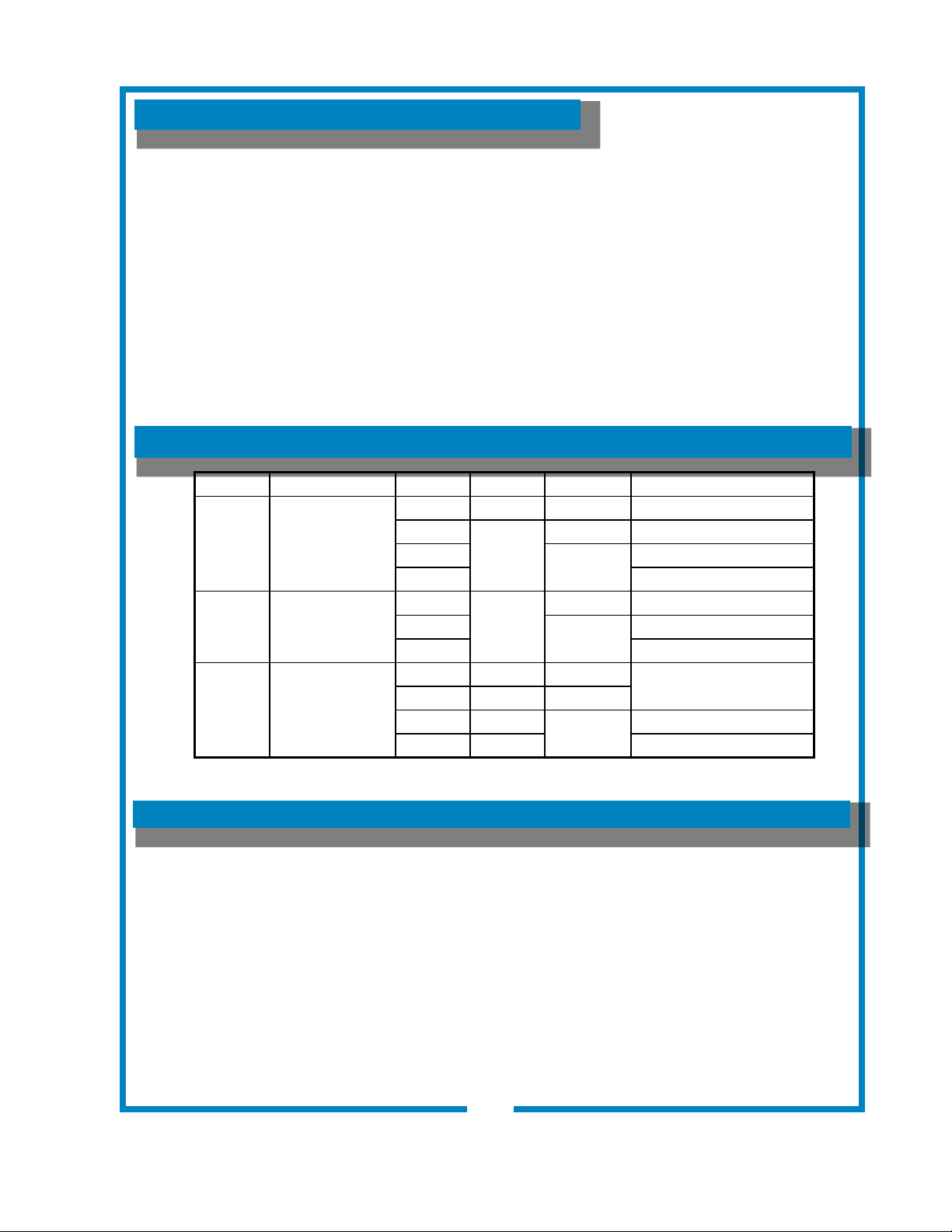
TABLE OF CONTENTS
SPECIFICATIONS
Thank You for purchasing this
Bloomeld appliance.
Proper installation, professional
operation and consistent
maintenance of this appliance will
ensure that it gives you the very
best performance and a long,
economical service life.
This manual contains the
information needed to properly
install this appliance, and to use,
care for and maintain or repair the
appliance in a manner which will
ensure its optimum performance.
WARRANTY STATEMENT xi
SPECIFICATIONS 1
FEATURES & OPERATING CONTROLS 2
PRECAUTIONS & GENERAL INFORMATION 3
AGENCY LISTING INFORMATION 3
INSTALLATION INSTRUCTIONS 4
OPERATION 6
BREWING COFFEE 10
CLEANING INSTRUCTIONS 11
TROUBLESHOOTING SUGGESTIONS 12
SERVICING INSTRUCTIONS 14
Deliming Instructions 20
EXPLODED VIEWS & PARTS LISTS 22
WIRING DIAGRAMS 29
APPLICABILITY
This manual applies to the following Bloomeld E. B. C.
®
products:
1012
1040
1072
1
641 p/n 2M-75844 1012 1040 1072 Owmers Manual
MODEL STYLE VOLTS WATTS AMPS 1PH POWER SUPPLY CORD
1012 3W IN-LINE
120V 1800 15 NEMA 5-15P
220/240V
2100
9 E.B.C. SERIES
230V
9.1
CEE7/7
UK BS 1363A
1040 2W IN-LINE
120V
1700
14.2 NEMA 5-15P
UK
7.39
BS 1363A
230V CEE7/7
1072 3W LO PROFILE
120V 1800 15
NEMA 5-15P
120C 1500 12.5
UK 1800
7.8
BS 1363A
230V 1800 CEE7/7
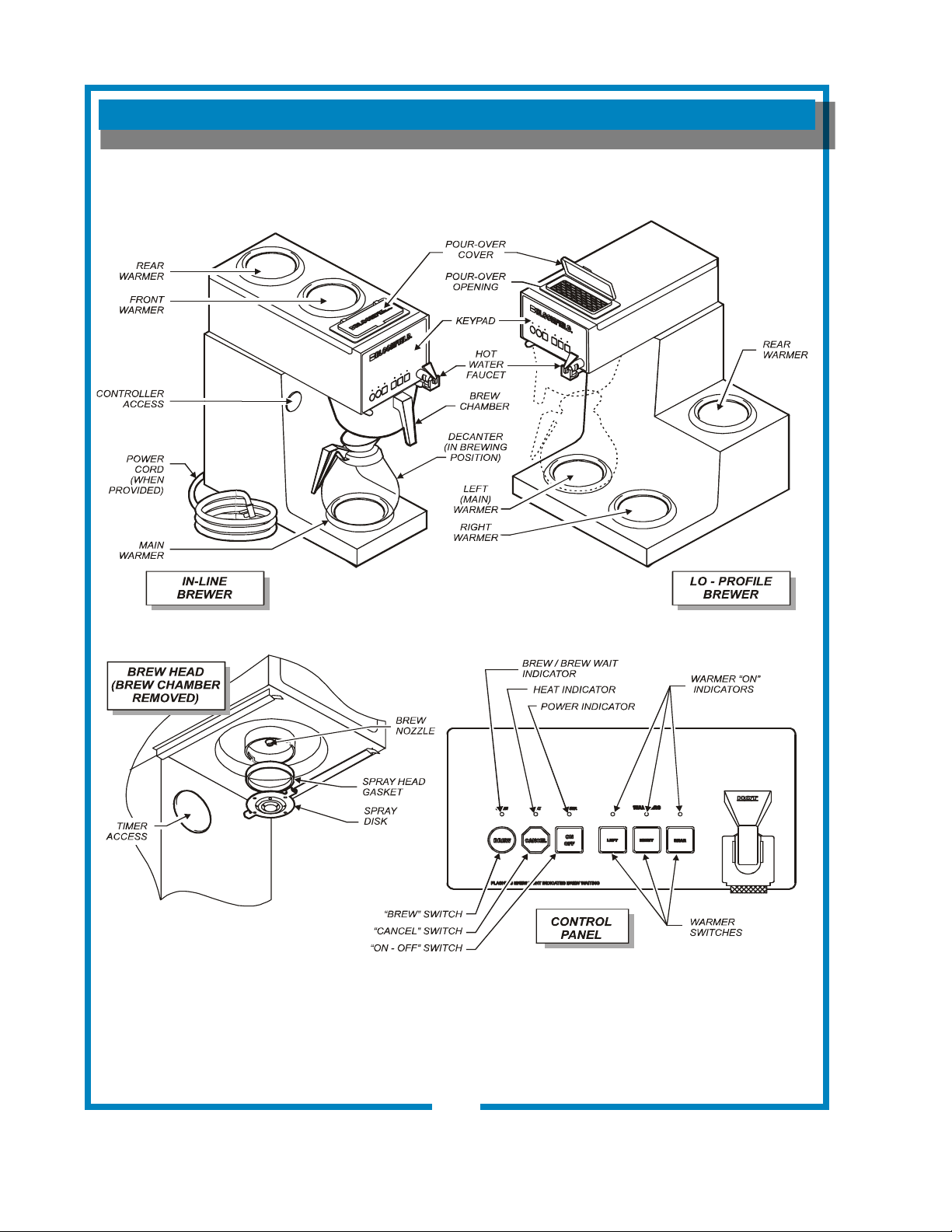
FEATURES AND OPERATING CONTROLS
Fig. 1 Features & Operating Controls
FEATURES AND OPERATING CONTROLS
Fig. 1 Features & Operating Controls
2
641 75844 Owners Manual E.B.C. Decanter
2
641 p/n 2M-75844 1012 1040 1072 Owmers Manual
PRECAUTIONS AND GENERAL INFORMATION
WARNING:
ELECTRIC SHOCK HAZARD
All servicing requiring access to non-insulated components must be performed by qualied
service personnel. Do not open any access panels which require the use of tools.
Failure to heed this warning can result in electrical shock.
WARNING: INJURY HAZARD
All installation procedures must be performed by qualied personnel with full knowledge of all
applicable electrical and plumbing codes. Failure could result in property damage and
personal injury.
WARNING: ELECTRIC SHOCK HAZARD
Brewer must be properly grounded to prevent possible shock hazard. DO NOT assume a
plumbing line will provide such a ground. Electrical shock will cause death or serious Injury.
WARNING: BURN HAZARD
This appliance dispenses very hot liquid. Serious bodily injury from scalding can occur from
contact with dispensed liquids.
This appliance is intended for commercial use only.
This appliance is intended for use to brew beverage products for
human consumption. No other use is recommended or
authorized by the manufacturer or its agents.
This appliance is intended for use in commercial establishments,
where all operators are familiar with the appliance use,
limitations and associated hazards. Operating instructions and
warnings must be read and understood by all operators and
users.
Except as noted, this piece of equipment is made in the USA
and has American sizes on hardware. All metric conversions are
approximate and can vary in size.
The following trouble shooting, component views and parts lists
are included for general reference, and are intended for use by
qualied service personnel.
This manual should be considered a permanent part of this
appliance. The manual must remain with the appliance if it is
sold or moved to another location.
This brewer is and
listed under UL le E9253.
This brewer meets Standard 4 only when installed,
operated and maintained in accordance with the enclosed
instructions.
CAUTION:
EQUIPMENT DAMAGE
DO NOT plug in or energize this
appliance until all Installation
Instructions are read and followed.
Damage to the Brewer will occur if
these instructions are not followed.
CAUTION:
BURN HAZARD
Exposed surfaces of the
appliance, brew chamber and
decanter may be HOT to the
touch, and can cause serious
burns.
AGENCY LISTING INFORMATION
3
641 p/n 2M-75844 1012 1040 1072 Owmers Manual
INSTALLATION INSTRUCTIONS
READ THIS CAREFULLY BEFORE STARTING THE INSTALLATION
Unpack the unit. Inspect all components for completeness and
condition. Ensure that all packing materials have been removed
from the unit.
Verify that the Spray Head Gasket (#33) and Spray Disk (#34)
are properly installed.
LEVELING THE UNIT
Verify that an adjustable leg is installed at each corner of the
brewer.
Set Brewer in its operating location. Level the Brewer. A spirit
level should be placed on the top of the unit, at the edge, as a
guide when making level adjustments.
Level the unit from left to right and front to back by turning the
adjustable feet. Be sure all four feet touch the counter to prevent
tipping.
PLUMBER’S INSTALLATION INSTRUCTIONS
Brewer should be connected to a POTABLE WATER, COLD
WATER line. Flush water line before connecting to Brewer.
DO NOT use a saddle valve with a self-piercing tap for the water
line connection. Such a tap can become restricted by waterline
debris. For systems that must use a saddle tap, shut off the
main water supply and drill a 3/16” (minimum) tap for the saddle
connection, in order to insure an ample water supply. Remember
to ush the line prior to installing the saddle.
The brewer must be installed on a water line with average
pressure between 20 PSI and 90 PSI. If your water pressure
exceeds 90 PSI at anytime, a pressure regulator must be
installed in the water supply line to limit the pressure to not more
than 90 PSI in order to avoid damage to lines and solenoid.
A water shut-off valve should be installed on the incoming water
line in a convenient location (Use a low restriction type valve,
such as a 1/4-turn ball valve, to avoid loss of water ow thru the
valve.
The provided water line strainer must be installed in the supply
line, between the shutoff valve and inlet tting. Note FLOW
arrow marking on strainer body.
IMPORTANT:
To enable the installer to make
a quality installation and to
minimize installation time, the
following suggestions and tests
should be done before the
actual unit installation is started:
CAUTION:
EQUIPMENT
DAMAGE
DO NOT plug in or energize this
appliance until all Installation
Instructions are read and
followed. Damage to the
Brewer will occur if these
instructions are not followed.
CAUTION:
UNSTABLE
EQUIPMENT
HAZARD
It is very important for safety
and for proper operation that the
brewer is level and stable when
standing in its nal operating
position. Provided adjustable,
non-skid legs must be installed
at each corner of the unit.
Failure to do so will result in
movement of the brewer which
can cause personal Injury and/
or damage to brewer.
NOTE: Water supply inlet line
must meet certain minimum
criteria to insure successful
operation of the brewer.
Bloomeld recommends 1/4”
copper tubing for installation of
less than 12 feet and 3/8” for
more than 12 feet from a 1/2”
water supply line.
4
641 p/n 2M-75844 1012 1040 1072 Owmers Manual
INSTALLATION INSTRUCTIONS (continued)
NOTE: This equipment must
be installed to comply with
all applicable federal, state
and local plumbing codes and
ordinances.
WARNING:
SHOCK HAZARD
Brewer must be properly
grounded to prevent possible
shock hazard. DO NOT
assume a plumbing line
will provide such a ground.
Electrical shock will cause death
or serious injury.
IMPORTANT: Do not connect
brewer to electrical power until
the tank is lled with water.
Pour water into the pour-over
opening until water ows from
the brew head.
IMPORTANT:
Supply power must match
nameplate for voltage and
phase. Connecting to the
wrong voltage will damage the
brewer or result in decreased
performance. Such damage is
not covered by warranty.
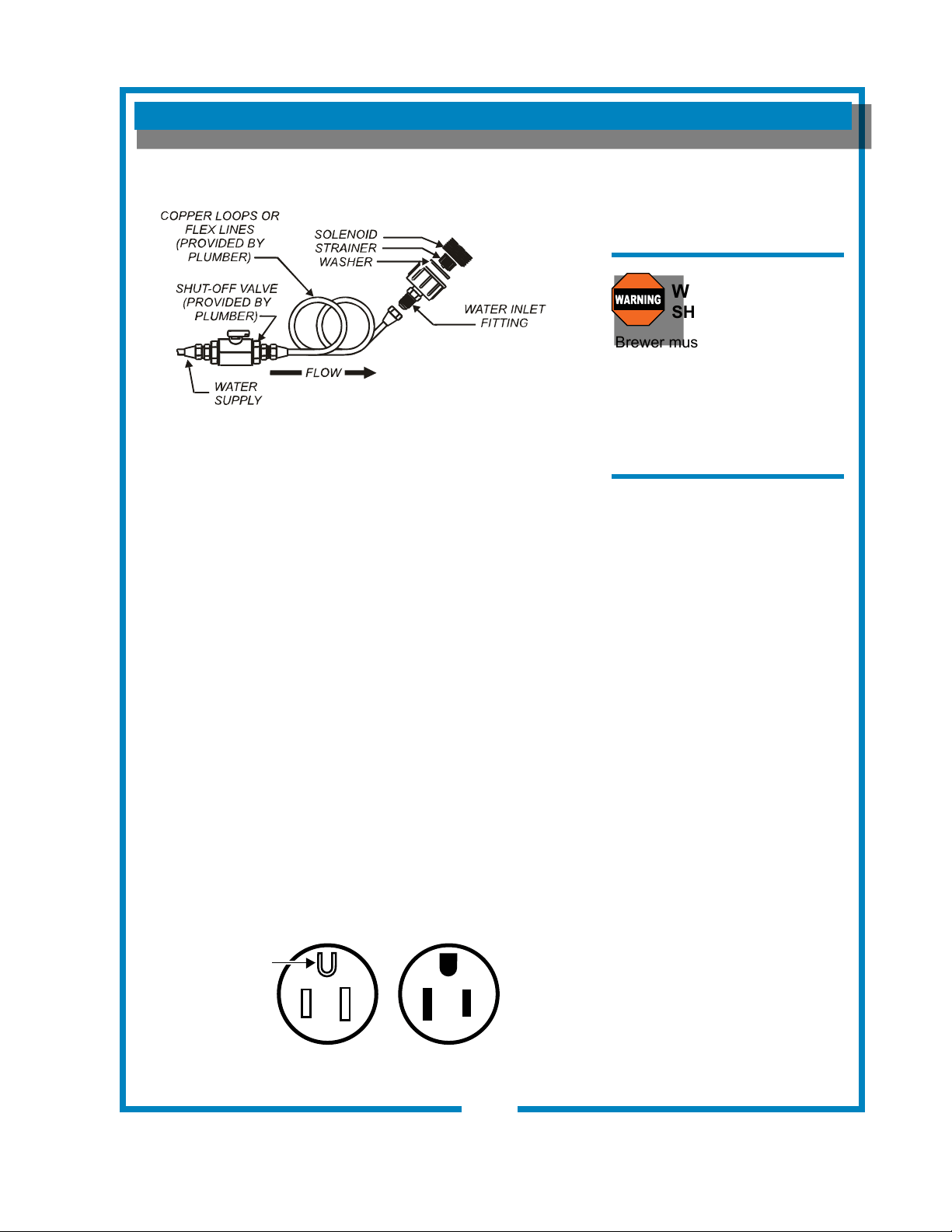
NSF requires that the brewer be able to be moved for cleaning
underneath. A ex line or loops of copper tubing will satisfy this
requirement. See Figure 2 below.
In some areas, local codes require a backow preventer (check
valve) to be installed on the inlet water line. If a backow
preventer is used, you must install a water hammer arrester
in the incoming line, between the backow preventer and the
brewer inlet, as far away from the brewer as space will allow.
This will relieve the excessive back pressures that can cause
faucet leaks and solenoid malfunctions.
ELECTRICIAN’S INSTALLATION INSTRUCTIONS
REFER TO ELECTRICAL SPECIFICATIONS - Page 1
Check the nameplate to determine correct electrical service
required for the Brewer to be installed.
IMPORTANT: Before connecting to electricity, make sure
automatic brewers are connected to the water supply.
Models 1012, 1040 & 1072 (US only) are equipped with a cord
and plug. They require a 115 - 125 volt 15 amp circuit (50/60 Hz,
2 wire plus ground, with NEMA 5-15R or 5-20R Receptacle).
IMPORTANT: The ground prong of the plug is part of a system
designed to protect you from electrical shock in the event of
internal damage. Never cut off the ground prong nor twist a
blade to t an existing receptacle. Contact a licensed electrician
to install the proper circuit and receptacle.
5
IL1615
Fig. 2 Water Supply Installation
641 p/n 2M-75844 1012 1040 1072 Owmers Manual
NEMA 5-15P
PLUG
GROUND
PIN
NEMA 5-15R
RECEPTACLE
IL1686
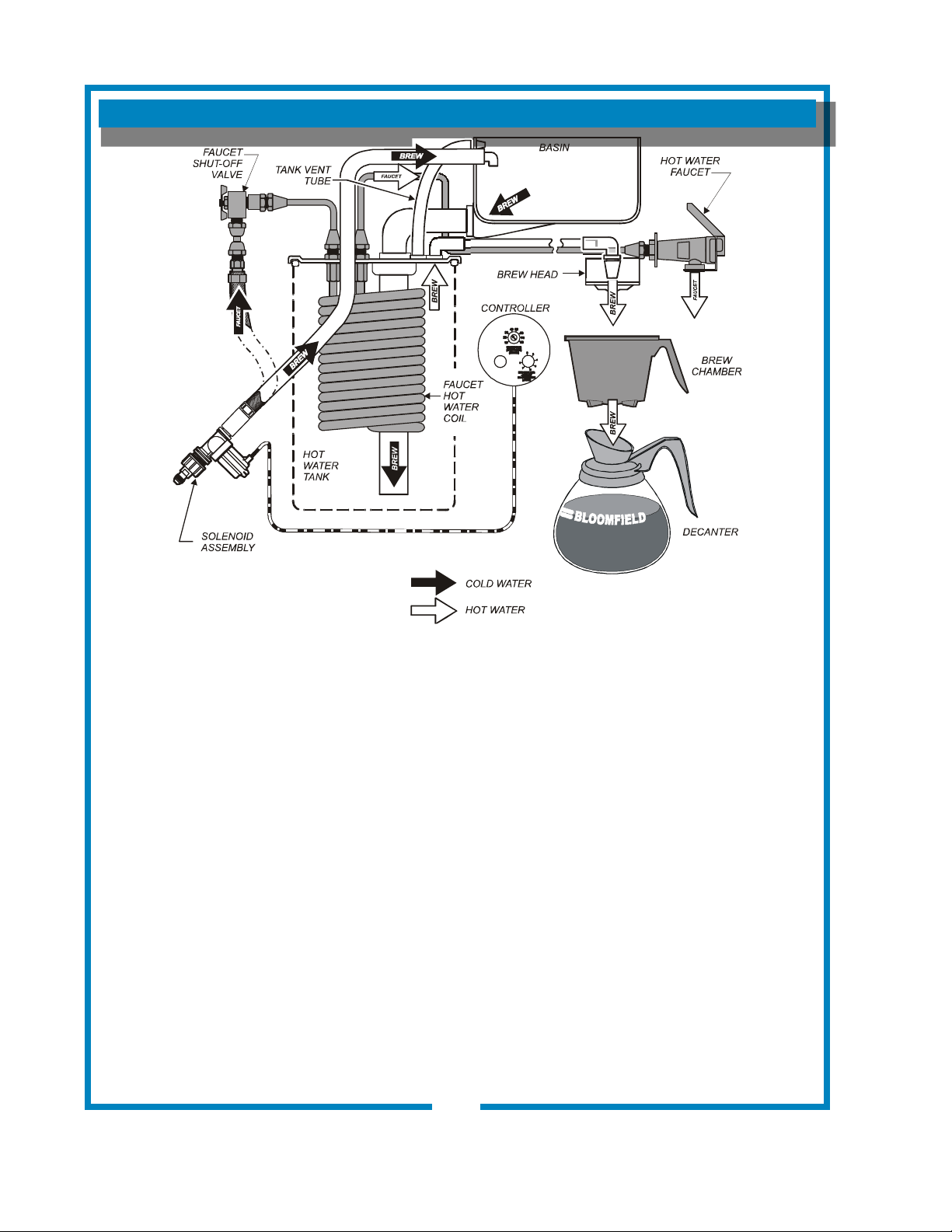
OPERATION
Fig. 4 Brewer Operation Diagram
A. START-UP
For initial start-up, or if the brewer has not been used for an
extended period of time:
• Be sure spray disk and brew gasket are properly installed in the
brew head.
• Be sure the water supply is properly connected and the water
supply valve is turned ON.
• Be sure the WATER TANK IS FILLED
BEFORE plugging the brewer into a receptacle, or otherwise
connecting brewer to electrical power THE WATER TANK MUST
BE FILLED. Place an empty decanter under the brew head. Lift
the pour-over cover then pour warm tap water into the pour-over
opening until water ows from the brew head. When water stops
dripping from the brew head, empty the container.
Once the tank is full of water, connect the brewer to electrical
power. For Models 1016 & 1074, press power switch to ON.
The heating elements will begin heating the water in the tank.
When the water has reached the proper temperature, the
“HEAT” LED will go out.
IMPORTANT:
Tank must be full of
water before connecting
brewer to electrical power.
Heating elements will be
damaged if allowed to
operate without being fully
submerged in water.
Damage caused by
operating the brewer
without water in the tank
is NOT COVERED BY
WARRANTY.
6
IL2203
641 p/n 2M-75844 1012 1040 1072 Owmers Manual
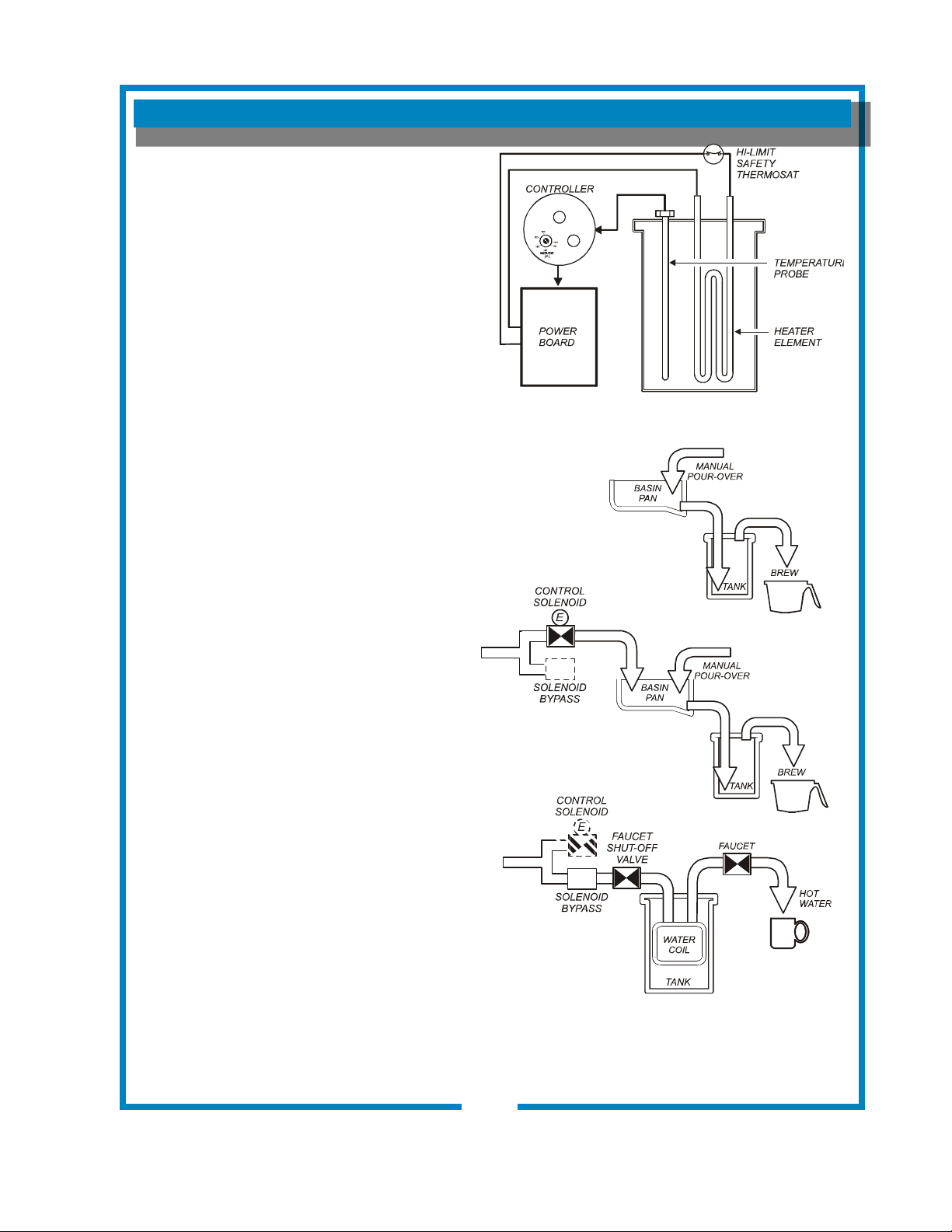
OPERATION (continued)
7
WATER HEATER
Water temperature is sensed by an electronic water
temperature probe inserted into the water tank.
This temperature signal is fed to the controller.
The setpoint temperature is adjustable. The
controller sends a command signal to the power
board based upon a comparison between the
setpoint temperature and actual temperature.
See page 17.
The power board energizes the heating elements
based on the command signal from the controller.
Excessive temperature will trip the hi-limit safety
switch. The hi-limit will automatically reset when
the brewer cools.
WATER FLOW
POUR-OVER FEATURE
Pouring any amount of water into the pour-over
opening and into the basin pan forces an identical
amount of heated water out of the tank and through
the spray head.
AUTOMATIC OPERATION
Pressing the BREW key energizes the solenoid
valve, allowing water from an external water supply
to ow into the water tank. The incoming water
forces heated water out of the tank to perform the
brew.
The solenoid uses a ow control device so that
ow is consistent between 20 p.s.i. and 90 p.s.i.
The length of time the solenoid is open is controlled
by the time setting of the controller. See page 18.
After the solenoid closes, water will continue to ow
to the brew chamber until the water level in the tank
falls below the brew pickup, breaking the siphon.
HOT WATER FAUCET
The faucet water coil is submerged in the hot water
tank and draws heat from the brew water. Wa-
ter going to the water coil is not controlled by the
solenoid valve.
Hot water is provided at the faucet, at supply water
pressure, any time the faucet shut-off valve is
OPEN
.
Fig. 6 Water Flow Diagram
Fig. 5 Heat Control Diagram
OPERATION (continued)
IL2204
IL2205
641 p/n 2M-75844 1012 1040 1072 Owmers Manual
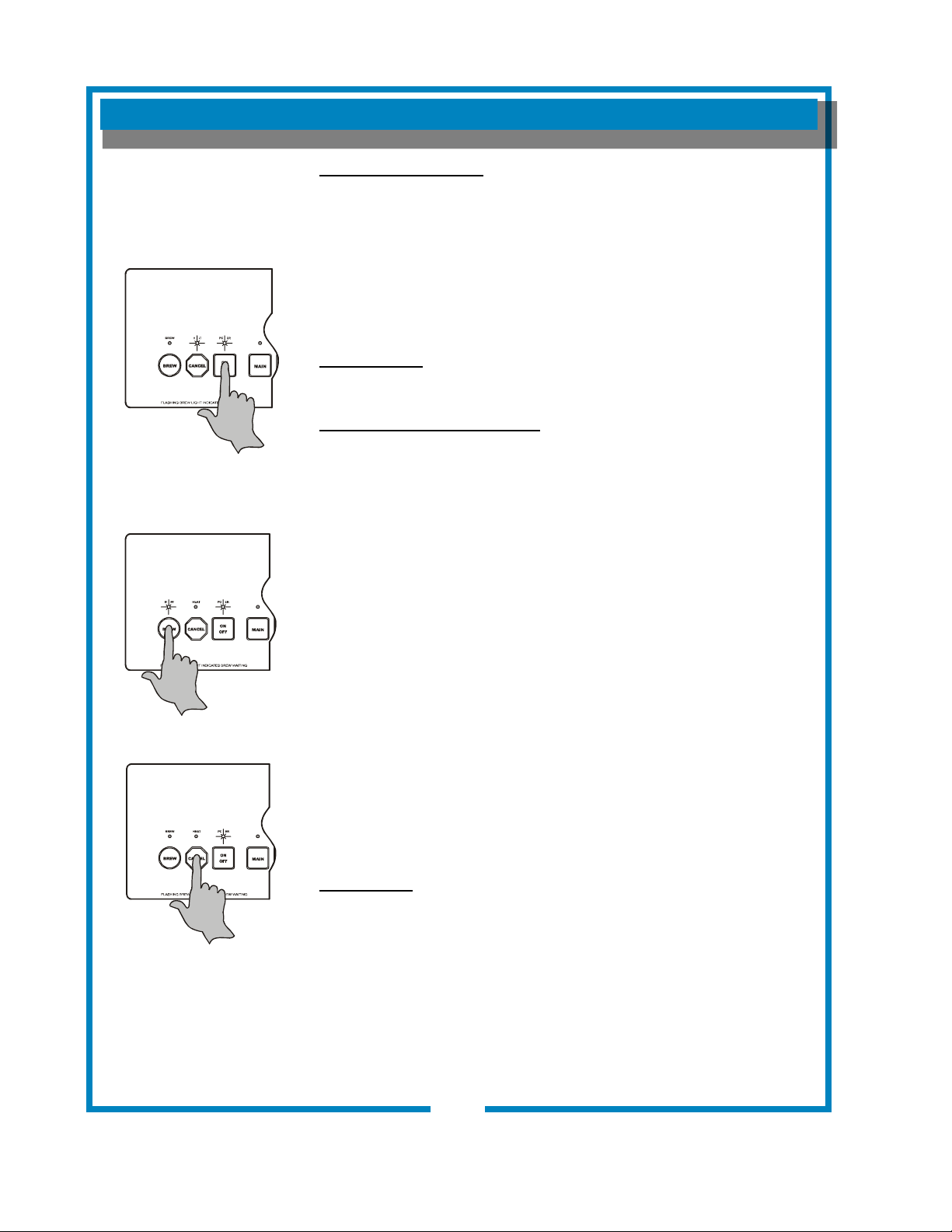
8
OPERATION (continued)
ELECTRONIC FEATURES
Energizing the Brewer
When electric power is applied to the unit, the unit will beep four times
and the “HEAT” & “POWER” lights will come on. The unit will be on.
If the water temperature is more than 10ºF below the setpoint, the
HEAT indicator will glow until water temperature reaches setpoint.
Press the ON/OFF key again to turn the brewer off. Three beeps will
sound, the tank heater and all warmers will be switched off, and all
indicator lights will go out.
Brew Settings
See pages 17 & 18 for setting Brew Time and Temperature.
ABS™ (Automatic Brew Start)
Start a brew by pressing BREW. A single beep will sound. The system
will verify that the water in the tank is at the proper temperature. If it is,
brew will start immediately. Otherwise, the BREW indicator will ash
(Brew Waiting Mode) until the water reaches setpoint temperature,
then the indicator will glow and brew will commence. If the main
warmer is off, it will be energized automatically.
At the conclusion of the brew cycle, three beeps will sound.
NOTE: To override Brew Waiting Mode, press and hold the BREW key
for 3 seconds while the BREW indicator is ashing. Brew will begin
regardless of water temperature. To avoid under-temperature brews,
this feature should only be used when setting brew volumes.
NOTE: Brew Waiting Mode (BREW indicator ashing) prevents
multiple, unattended brews. While the BREW indicator is on or
ashing, any additional strokes of the BREW key will be ignored (there
will be a beep each time the key is pressed, however). Another brew
cannot be initiated until the previous brew is complete.
The Brew Waiting Time, also called Dripout Time, (interval between
when the brew is initiated and the audible signal sounds at the end
of the brew) may be adjusted between 2 and 8 minutes at the Brew
Signal Timer dial on the controller. See page 18.
Brew Cancel
To cancel a brew in progress or a brew in waiting, press the CANCEL
key. Two beeps will sound and the BREW indicator will go out.
NOTE: If a brew in progress is cancelled, coffee will continue to ow
until all water delivered has dripped through the brew chamber.
IMPORTANT:
DO NOT energize this
brewer until the water
tank has been lled. Dry
ring will damage heating
elements. See page 6.
641 p/n 2M-75844 1012 1040 1072 Owmers Manual
Fig. 7 Turning Brewer
ON or OFF
Fig. 8 Initiate a Brew
Fig 9 Brew Cancel
IL2206
OPERATION (continued)
Quality Timer is normally
set for 30 minutes. It can
be set for 20 minutes by
moving a jumper on the
controller. See page 17.
After Hours™ is an energy
saving feature. The brew-
er will enter After Hours™
mode if it is not used for
three hours.
Press the BREW key
to immediately return
the brewer to normal
operation.
IMPORTANT:
If the original cause of
the problem has not been
addressed, the brewer will
once again go into Over
Temperature mode four
minutes after being reset.
Quality Timer
Coffee looses its freshness as it sits on a warmer. The Quality Timer
ashes the warmer lights 30 minutes after the last brew to remind you
that the coffee is nearing the end of its useful life.
After Hours™ Operation
During normal operation, the controller will maintain the precise
brewing temperature. If, however, if the BREW key in not pressed for
3 hours, the brewer goes into After Hours™ mode; any warmer left on
will be turned off; and, the temperature will only be maintained to within
20ºF. This feature prolongs component life and saves energy.
As soon as the BREW key is pressed, the brewer returns to normal
operation, heating the water to the precise temperature before
beginning the brew. The brewer will return to After Hours™ mode only
if three hours pass without a brew being initiated.
Disable/Enable After Hours™ Feature
To disable After Hours™, press the ON/OFF key to turn the brewer off.
Press and hold the CANCEL key until two beeps sound, and the HEAT
indicator ashes twice. This feature is now disabled.
To re-enable After Hours™, press the ON/OFF key to turn the brewer
off. Press and hold the CANCEL key until three beeps sound, and the
POWER indicator ashes twice. This feature is now enabled, however,
it will not be activated unless no brew is initiated for three hours.
Over-Temperature and Temperature Fault Protection
Should the water temperature exceed 214ºF (101ºC), or if the control-
ler does not detect a 2ºF (1ºC) rise in temperature within four minutes
of calling for heat, the brewer will go into Over Temperature Mode; the
heating element is turned off, all warmers are disabled and all lights will
ash.
Possible causes of Over Temperature condition:
• Setpoint is in the boiling range.
• Heating element or temperature probe has malfunctioned.
• Excessive scale buildup is preventing the element from heating the
water.
• Heating element relay fails in the “on” state.
• No water in the tank.
• Hi-limit safety tripped (must be manually reset)
To reset the brewer:
• Determine the cause of the failure and take appropriate remedial
action to rectify the problem.
• Press and hold the CANCEL key for three seconds. Four beeps will
sound and the brewer will resume normal operation.
9
641 p/n 2M-75844 1012 1040 1072 Owmers Manual
10
BREWING COFFEE
CAUTION:
BURN HAZARD
Exposed surfaces of the
brewer, brew chamber and
decanter may be HOT to
the touch, and can cause
serious burns.
CAUTION:
BURN HAZARD
To avoid splashing or
overowing hot liquids,
ALWAYS place an empty
decanter under the brew
chamber before starting
the brew cycle. Failure to
comply can cause serious
burns.
CAUTION:
BURN HAZARD
After a brew cycle, brew
chamber contents are
HOT. Remove the brew
chamber and dispose of
used grounds with care.
Failure to comply can
cause serious burns.
NOTE: The brewer will not
initiate a second automatic
brew cycle until the current
cycle plus the drip-out time
is completed. If the BREW
key is pressed during this
time, the BREW light will
ash, indicating a brew in
progress.
NOTE: Water for the hot
water faucet is heated in
a coil inside of the water
tank. Use of the faucet will
not affect the volume of
water delivered for a brew.
However, overuse of the
faucet during a brew may
lower the temperature of
the brew water.
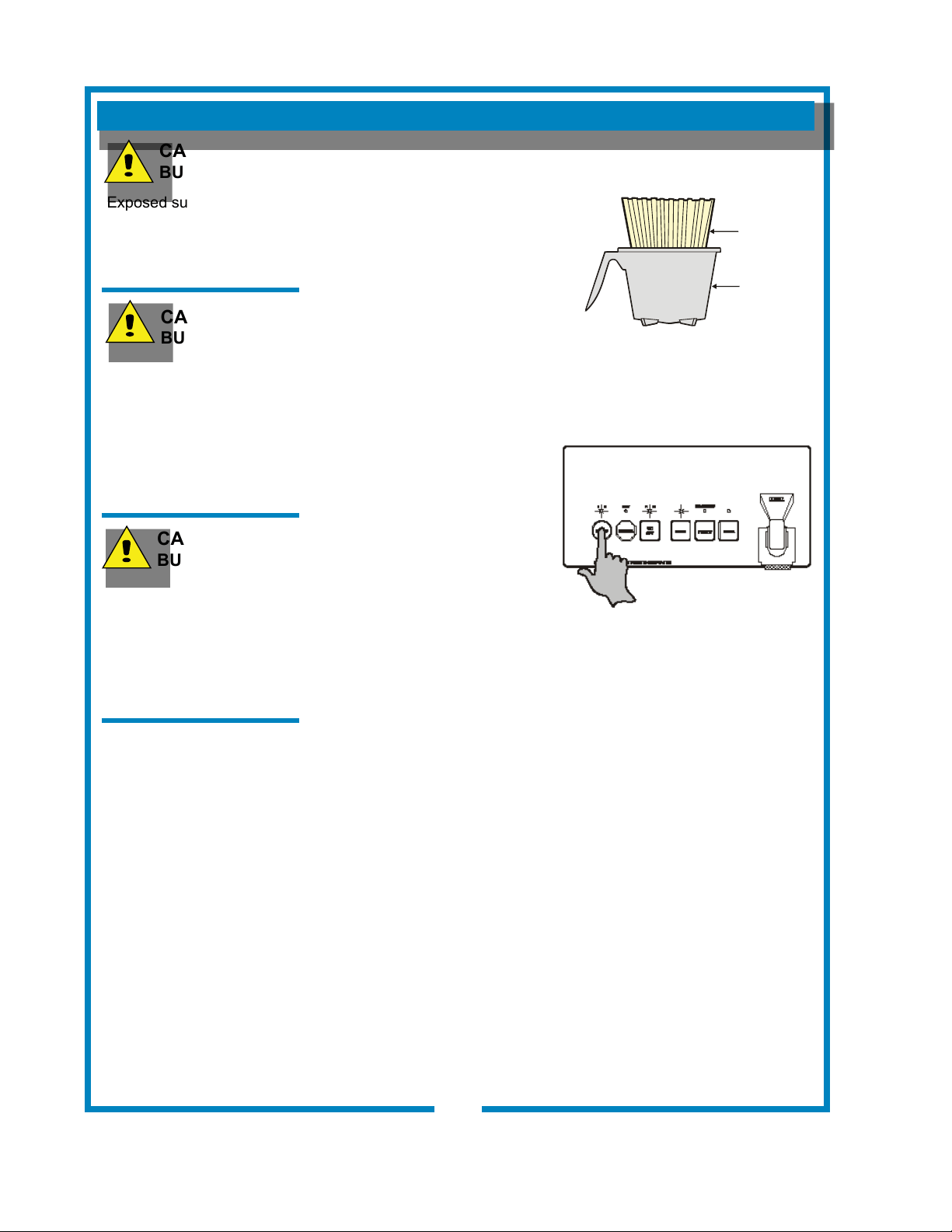
A. PREPARATION
Place one (1) genuine
Bloomeld paper lter in the
brew chamber.
Add a pre-measured amount
of fresh coffee grounds.
Gently shake the brew
chamber to level the bed of
grounds.
Slide the brew chamber into
place under the brew head.
B. AUTOMATIC OPERATION
BE sure HEAT light is not lit.
Place the appropriate EMPTY
decanter in place under the
brew chamber.
Press the BREW switch.
The BREW light will glow and
a beep will sound.
The solenoid will open for an
amount of time determined by
the timer setting, admitting a
measured quantity of water
into the tank.
Inlet water will displace a like amount of heated water from the tank.
The hot water will be forced into the brew head where it will spray
over the bed of grounds. Freshly brewed coffee will begin to ll the
container under the brew chamber.
At the end of the brew cycle, plus an amount of time set to allow all
water to drip out of the brew chamber, three beeps will sound.
When the ow and all dripping stops, the coffee is ready to serve.
Discard the contents of the brew chamber and rinse it in a sink.
When the HEAT light goes out, the brewer is ready for another
brew cycle.
C. WARMERS
At the start of a brew, the MAIN warmer is energized automatically.
Press either the FRONT or REAR warmer switch to energize an
auxiliary warmer. Set the lled decanter on the selected warmer to
keep it warm.
IL1605
PAPER
FILTER
BREW
CHAMBER
Fig. 10 Prepare Brew Chamber
Fig. 11 Press BREW to Start
641 p/n 2M-75844 1012 1040 1072 Owmers Manual
CLEANING INSTRUCTIONS
PROCEDURE: Clean Coffee Brewer
PRECAUTIONS: Disconnect brewer from electric power.
Allow brewer to cool.
FREQUENCY: Daily
TOOLS: Mild Detergent, Clean Soft Cloth or Sponge
Bristle Brush.
1. Disconnect brewer from electric power.
Allow brewer to cool before cleaning.
2. Remove and empty decanters.
3. Remove and empty brew chamber.
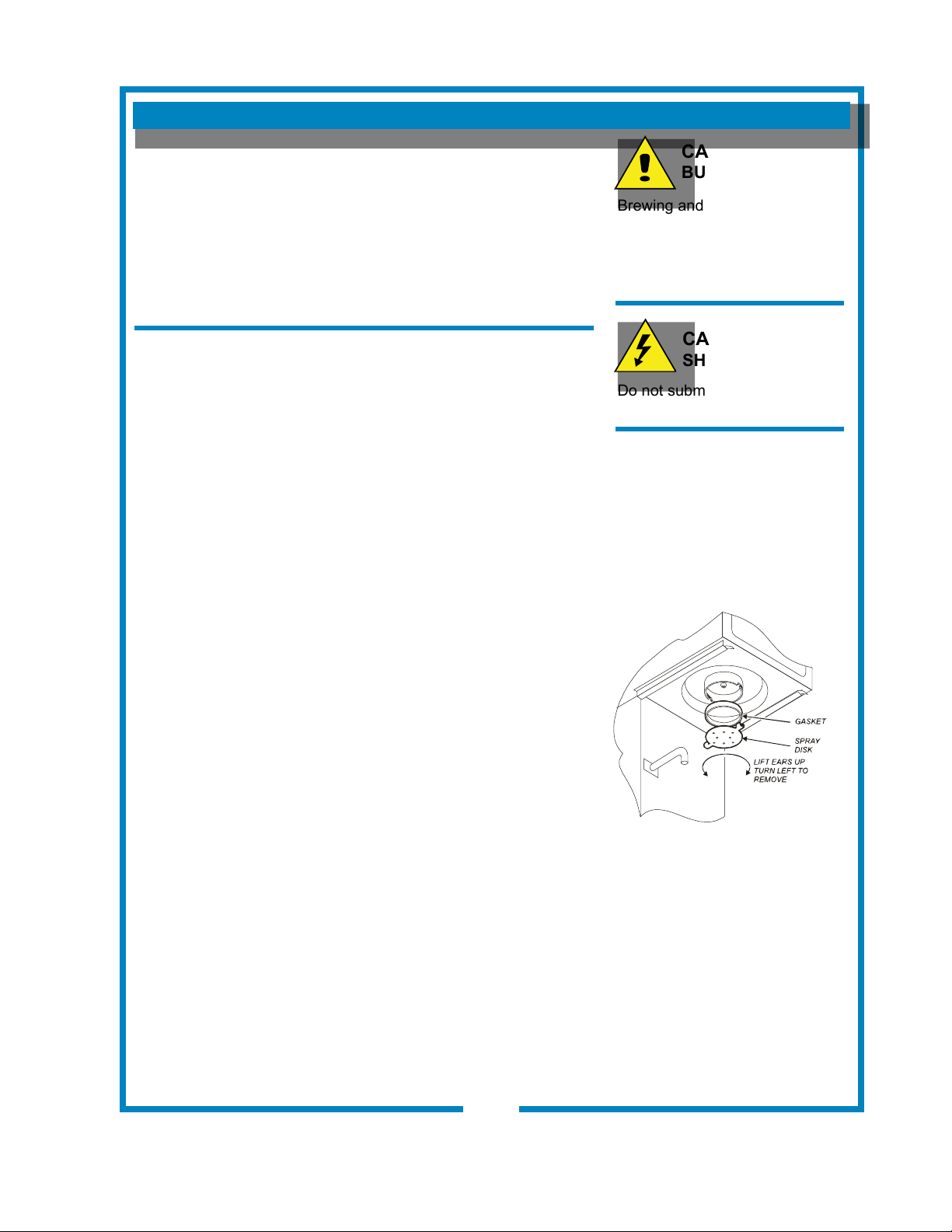
4. Remove the spray disk from the brew head (See gure 8):
Press up on the spray disk ears, and then turn the disk to
the left to unlatch. Remove the gasket from inside the brew
head.
5. Wipe inside of brew head and area around the brew head
with a soft clean cloth or sponge moistened with clean water.
6. Wash the spray disk in a sink using warm water and a mild
detergent. A bristle brush may be used to clear clogged
spray holes. Rinse the spray disk with clean water and allow
to air dry.
7. Wash the brew chamber in a sink using warm water and a
mild detergent. A bristle brush may be used to clean the
inside. Rinse with clean water and allow to air dry. For
stainless steel brew chambers, be sure the wire rack is prop-
erly reinstalled.
8. Wipe the exterior of the brewer with a soft clean cloth or
sponge moistened with clean water.
9. Reinstall the gasket INSIDE the brew head, then reinstall the
spray disk.
10. Reinstall the brew chamber.
11. Decanters may be washed in a dishwasher or sink.
Procedure is complete
CAUTION:
BURN HAZARD
Brewing and serving
temperatures of coffee are
extremely hot.
Hot coffee will cause
serious skin burns.
CAUTION:
SHOCK HAZARD
Do not submerge or immerse
brewer in water.
IMPORTANT:
DO NOT use steel wool, sharp
objects, or caustic, abrasive or
chlorinated cleansers to clean
the brewer.
Fig. 12 Cleaning
IL1677
11
641 p/n 2M-75844 1012 1040 1072 Owmers Manual
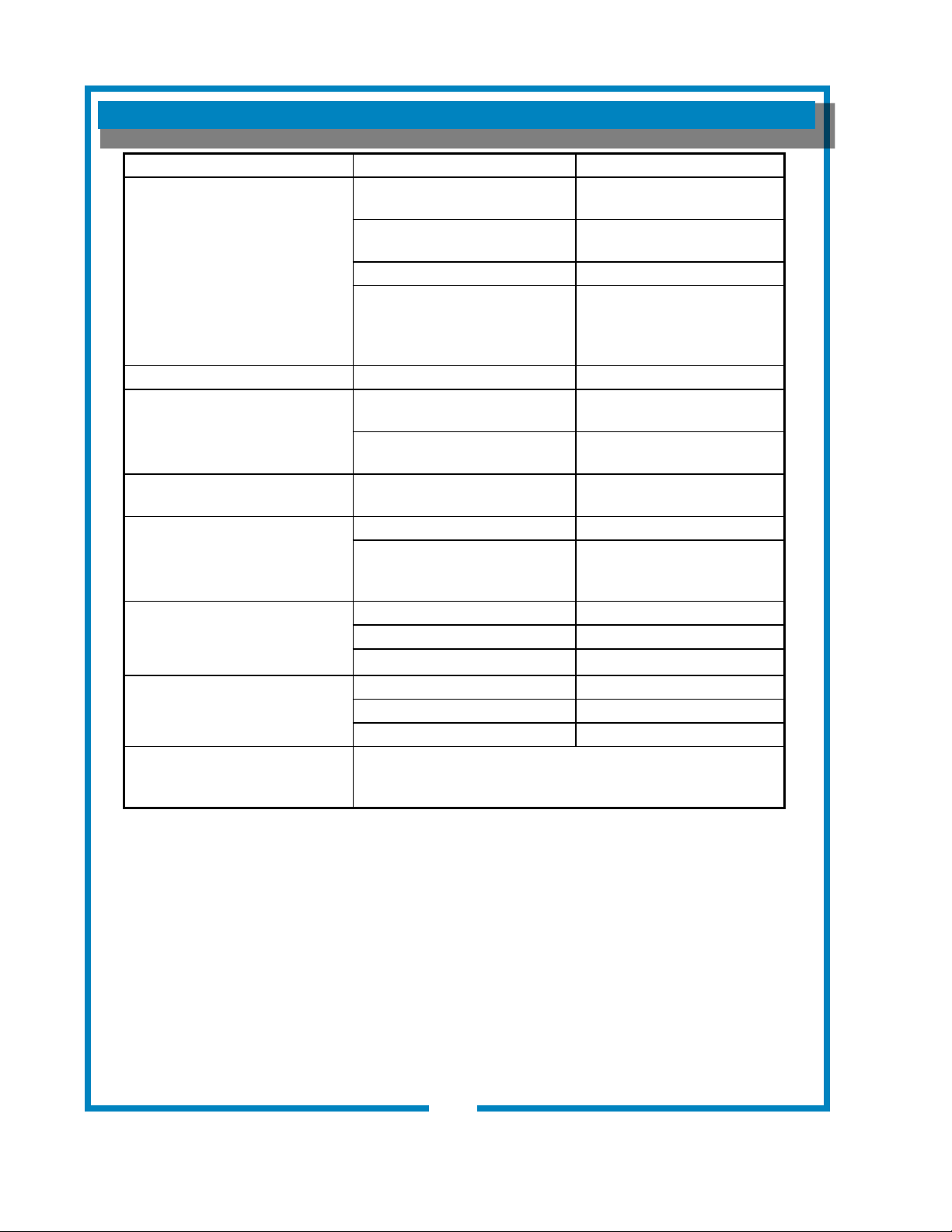
TROUBLESHOOTING SUGGESTIONS
12
SYMPTOM POSSIBLE CAUSE SUGGESTED REMEDY
Water won’t heat
(NOTE: Models 1016 & 1074 must
have power switch ON)
Brewer unplugged or circuit breaker
tripped
Check power supply cord,
Check / reset circuit breaker
Temperature adjusted too low or set
to off
Turn on and set for desired
temperature. See page 15
Hi-Limit thermostat tripped Allow to cool
Damaged internal component or
wiring
Examine wiring & connectors,
controller, power board and
heating element, Repair/replace
as needed
Coffee level too high or low Timer out of adjustment Adjust controller. See page 17
Brew chamber overows
Too many lter papers or wrong lter
paper
Use one (1) genuine Bloomeld
lter per brew
Brew chamber dispense hole
plugged
Thoroughly clean brew chamber
Sprays water from brew head Spray gasket improperly installed
Check/reinstall gasket on INSIDE
of brew head
No brew while faucet ows OK
Spray disk plugged Clean spray disk
Damaged internal component or
wiring
Check keypad, controller,
power board & solenoid,
Repair, replace as needed
No brew plus no ow from hot water
faucet
Water supply OFF Turn water supply ON
Solenoid screen plugged Clean solenoid screen
Water line strainer (if used) plugged Clean strainer
No ow from hot water faucet
Water lter (if used) plugged Replace lter element
Faucet valve turned OFF Turn faucet valve ON
Faucet plugged Disassemble faucet, clean
Poor coffee quality
Keep brewer and decanters clean. Install a taste and odor lter in water
supply, and replace cartridges regularly. Use a quality coffee with a
consistent roast. Use proper grind and amount of coffee per brew.
641 p/n 2M-75844 1012 1040 1072 Owmers Manual
CAUTION:
SHOCK HAZARD
Live electrical circuits may
be exposed while performing
these procedures.
These procedures are to
be performed by qualied
technical personnel only.
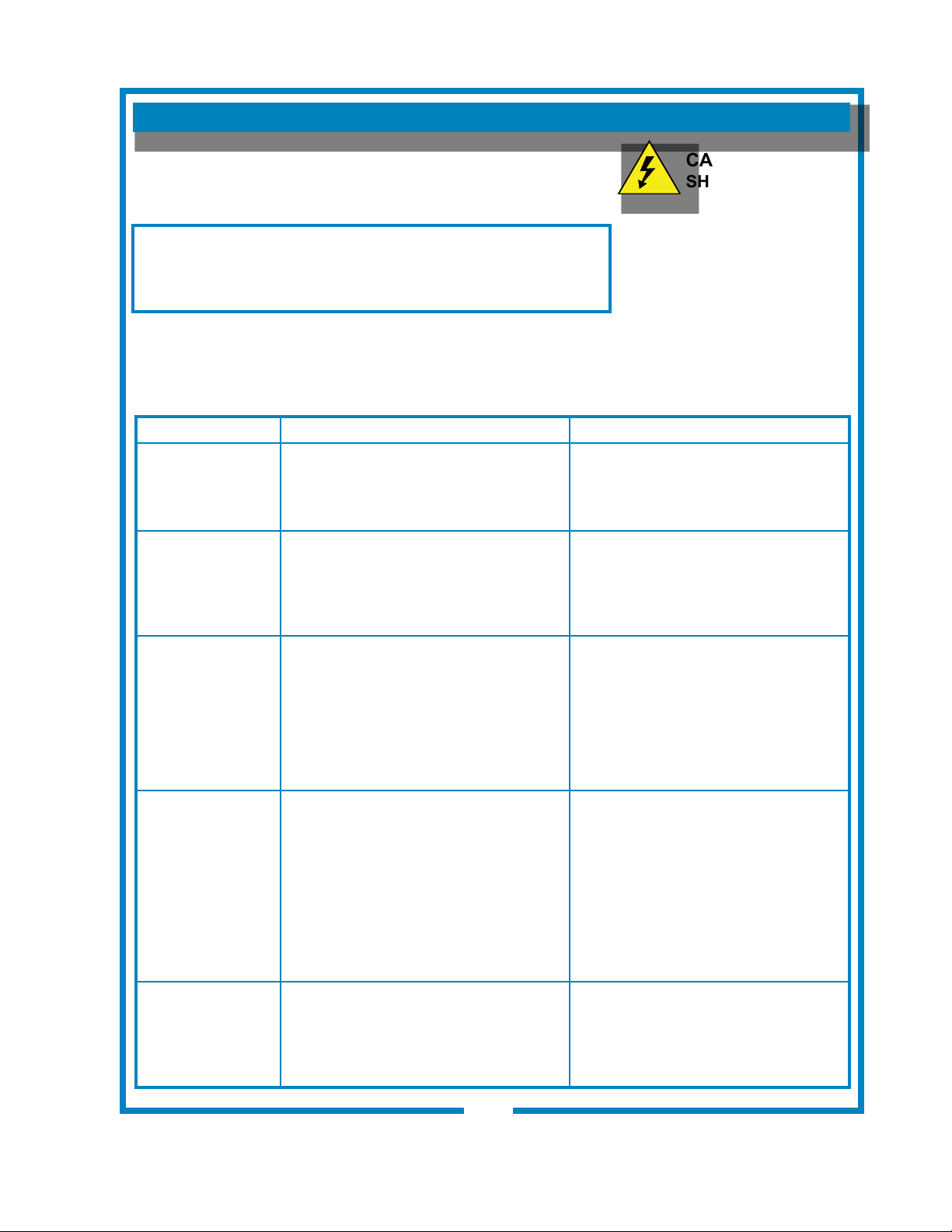
ERROR DETECTION
13
WHAT TO CHECK DESCRIPTION CORRECTIVE ACTION
Has the water
tank been properly
lled?
On initial startup, an attempt to heat a
dry tank will be detected as too high a
temperature or insufcient temp rise, or
will trip the high limit.
Tank must be properly lled as
detailed on page 6.
Check hi-limit (see below)
Has hi-limit safety
thermostat tripped
off?
Brewer may have been started without
water in the tank, or the temp control
thermostat may require adjustment.
Access hi-limit by removing front
panel. Hi-limit is on the left side of
the tank. Use an insulated tool to
push the red button in until it “clicks”
and stays. Reset per above.
Check control
board and temp
probe.
Brewer will go into error mode
immediately if either the control board
or temp probe is defective.
Temp probe electrical resistance is
approximately 30KW at room temp, and
2KW at boiling. Replace temp probe if
less than 1KW.
Reset by holding the CANCEL key for
3 seconds. If lights continue to ash:
Disconnect temp probe from control
board.
a. If lights continue to ash, unplug
brewer and replace control board.
b. If lights stop ashing, unplug
brewer and replace temp probe.
Check power
board and heating
element..
Brewer will go into error mode 4
minutes after energizing the heating
element if insufcient heat rise is
detected. The heating element is
energized by an electronic power
board, and protected by the hi-limit
safety.
Heating element should receive full line
voltage (i.e. 120V, 208V or 240V).
Be sure the hi-limit safety is reset.
Reset by holding the CANCEL key for
3 seconds. If lights resume ashing
after 4 minutes:
Check the voltage across the heating
element terminals:
a. If no voltage is present, unplug
brewer and replace power board.
b. If proper voltage is present,
unplug brewer and replace tank
heating element.
Is the brew
temperature
properly adjusted?
The brewer may occasionally go into
error mode if the brew temperature is
set too high.
See page 17 for temperature
adjustment procedure.
This brewer is designed to perform a continuous internal
diagnosis, and to signal faults by ashing all the lights. In fault
mode, warmers, heating element and water ll solenoid are turned
“off”, and most keypad functions are disabled.
Error detection (all lights ashing) will occur under two conditions:
• Anytime a temperature in excess of 214ºF is detected.
• Temperature does not change by at least 2ºF within 4 minutes
of tank heater being energized (HEAT light on).
To reset the brewer after the fault has been corrected, press and
hold the CANCEL key for 3 seconds, or disconnect the brewer from
electrical power for three seconds.
641 p/n 2M-75844 1012 1040 1072 Owmers Manual
SERVICING INSTRUCTIONS
CAUTION:
SHOCK HAZARD
Opening access panels or
removing warmer plates on this
brew may expose uninsulated
electrical components.
Disconnect brewer from
electrical power before
removing any panel or warmer
plate.
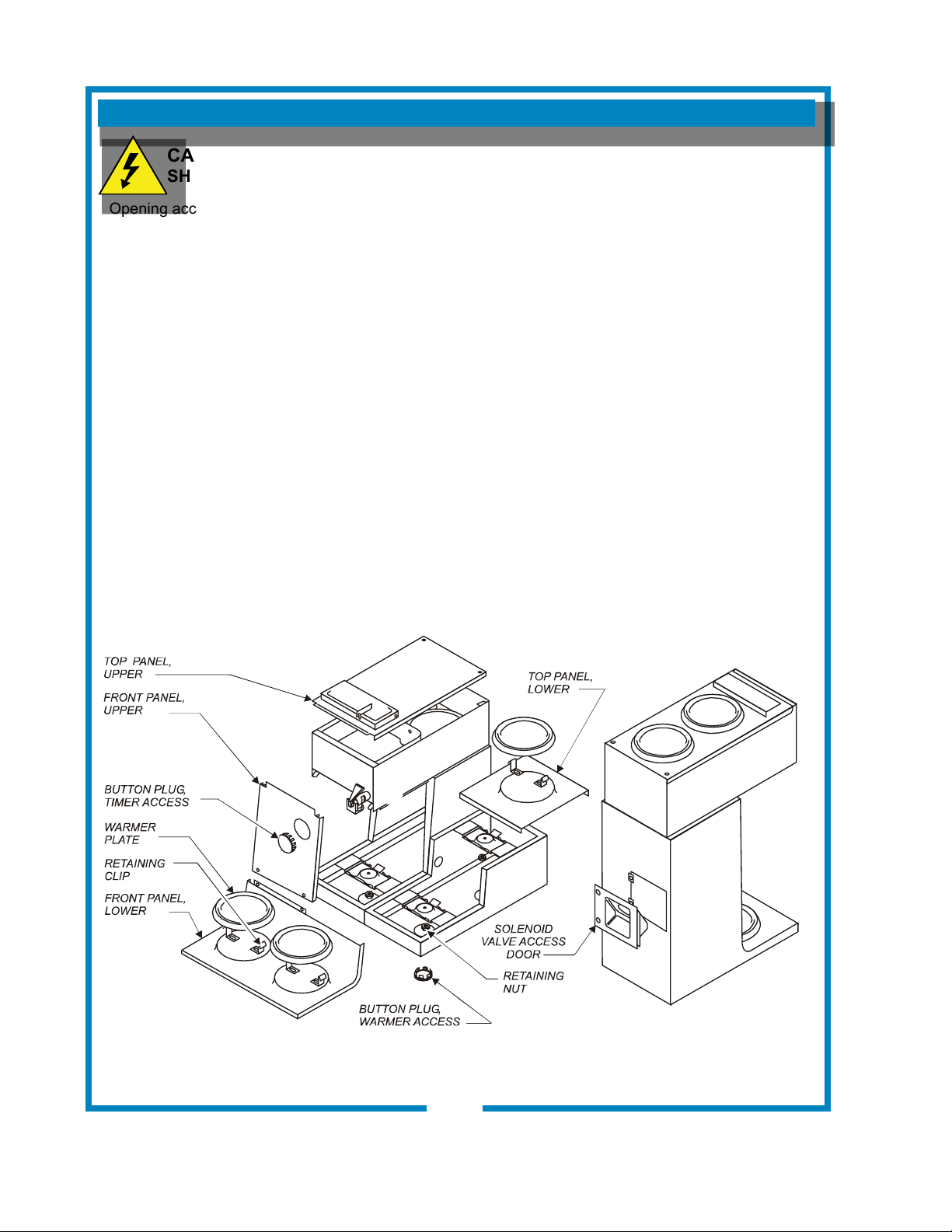
ACCESS PANELS
TOP PANEL:
Remove top panel to access hot water tank, thermo probe,
heating elements, brew circuit tubing, faucet valve and piping.
Top panel is held by two screws at the rear and a retaining lip at
the front.
FRONT PANEL:
Upper front panel is held by two screws at the bottom and a
retaining lip at the top. Lower panels are held by retaining clips
under the warmer plates.
Remove front panel to access controller and power board.
Solenoid on Models 1040 & 1072 are accessible through the
front panel.
WARMER ELEMENTS:
Warmer plates screw to the bracket, and are locked by a nut from
below. For lower warmers, remove the appropriate hole plug to
access the nut. For top panel warmers, remove the top panel to
access the nut. Remove the warmer plate to access the warmer
element.
Fig. 13 Access Panels
14
641 p/n 2M-75844 1012 1040 1072 Owmers Manual
Fig. 13 Access Panels
IL2207
SERVICING INSTRUCTIONS (continued)
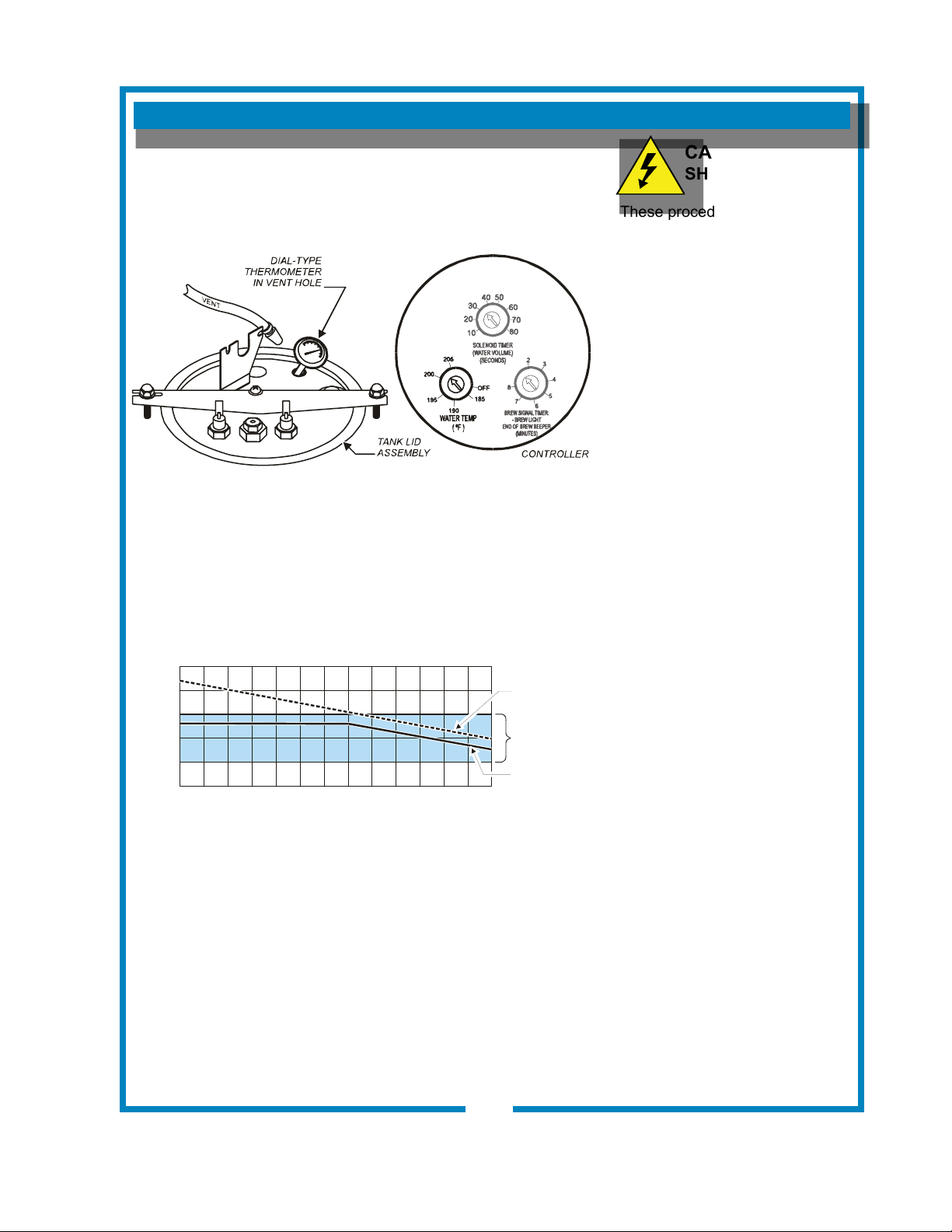
TEMPERATURE ADJUSTMENT
Unplug power cord or turn circuit breaker OFF. Remove top
panel. Remove button plug from front panel.
Pull vent tube out of tank lid and insert a thermometer of known
accuracy in vent hole. Reconnect brewer to electrical power.
Place empty container under brew chamber. Energize brewer
and pour one decanter (64 oz.) of cold water into pour-over
opening. When HEAT light goes out, read the temperature
displayed on thermometer.
Adjust WATER TEMP dial on controller; clockwise increases
temperature. Refer to Table 1 below for proper brewing
temperature based on altitude.
Upon completion, remove thermometer and reinstall vent tube.
Fig. 14 Checking and Adjusting Brew Temperature
CAUTION:
SHOCK HAZARD
These procedures involve
exposed electrical circuits.
These procedures are to
be performed by qualied
technical personnel only.
NOTE: Optimum brewing
temperature is 195ºF to 205ºF
(90ºC to 96ºC).
Maximum temperature setting
should be no more than 205ºF
(96ºC).
IMPORTANT:
An electronic temperature con-
troller will maintain temperature
within ±2ºF.
To prevent boiling water in
the brewer, controller should
be adjusted to a maximum
temperature equal to the local
boiling temperature minus 2ºF,
or 205ºF, whichever is less.
15
641 p/n 2M-75844 1012 1040 1072 Owmers Manual
Table 1 Boiling Temperature by Altitude
ELEVATION (feet above seal level)
0
5
0
0
1
,
0
0
0
1
,
5
0
0
2
,
0
0
0
2
,
5
0
0
3
,
0
0
0
3
,
5
0
0
4
,0
0
0
4
,5
0
0
5
,
0
0
0
5
,5
0
0
6
,0
0
0
6
,
5
0
0
T
E
M
P
.
(
º
F
)
195
200
205
210
190
IDEAL
BREWING
TEMPERATURE
RANGE
MAXIMUM
TEMPERATURE
SETTING
BOILING
POINT OF
WATER
IL2208
IL2209
SERVICING INSTRUCTIONS (continued)
IMPORTANT: Water pressure
must be between 20 p.s.i and
90 p.s.i. owing pressure. If
water pressure exceeds this
value, or if water pressure
varies greatly, a pressure
regulator must be installed in
the water supply line.
IMPORTANT: Before setting
assembly into tank, make sure
tank lid gasket is properly
seated on ange of lid.
DO NOT OVER-TIGHTEN.
IMPORTANT: When replacing
temperature probe, be sure a
new seal washer is in place
around the probe. Tighten jamb
lock nut only enough to ensure
no water leakage. Excessive
tightening is not necessary.
IMPORTANT: When replacing
heating element, also replace
seal gaskets.
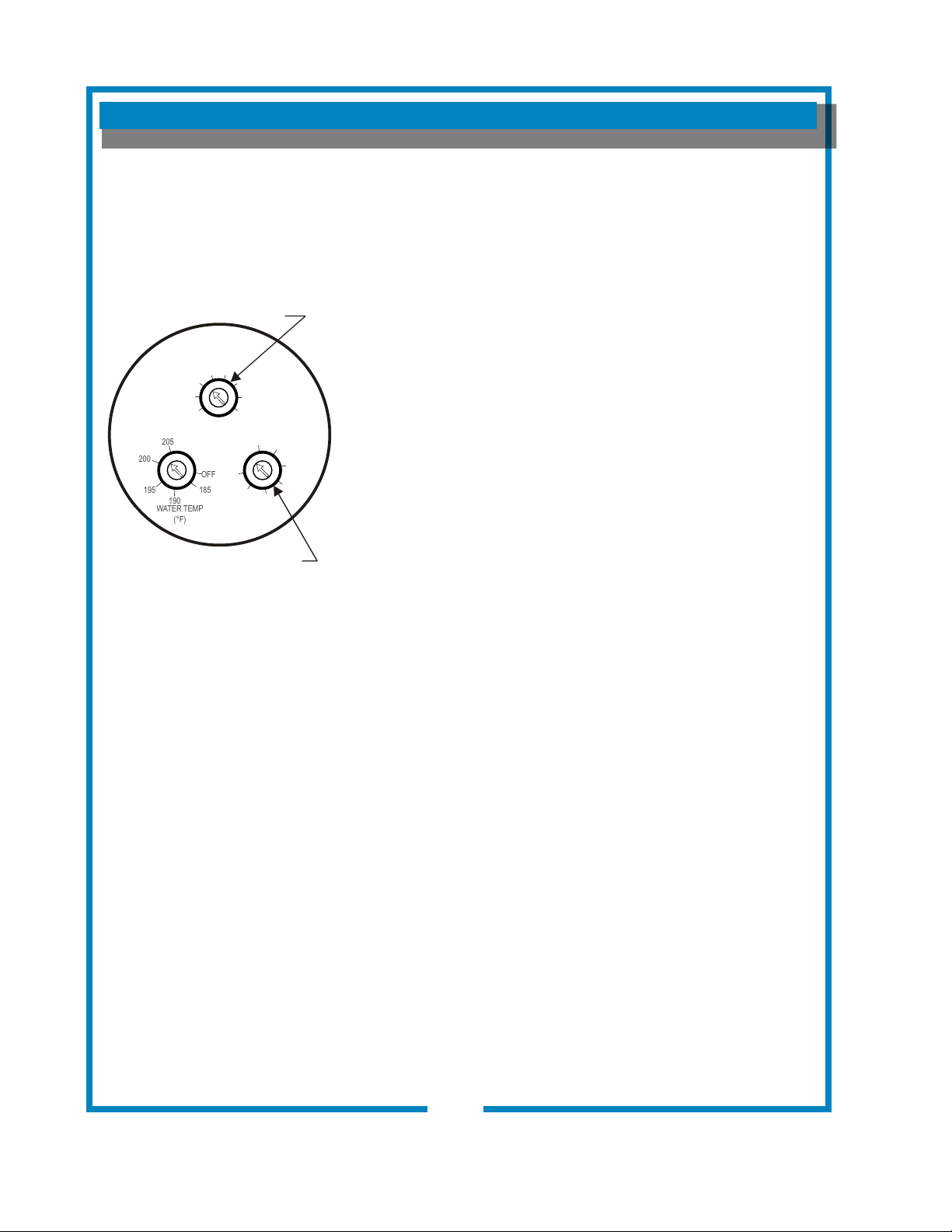
BREW TIME ADJUSTMENT
The amount of water dispensed automatically during a brew cycle
is controlled by the SOLENOID TIME dial of the controller.
Place empty decanter under brew chamber. Press BREW
button. Brewer should dispense one full decanter of water.
To adjust amount:
Remove brew chamber and button plug. On the controller, adjust
SOLENOID TIME dial (BREW TIME); clockwise increases time.
Run several cycles to check amount of water delivered.
DRIPOUT TIME ADJUSTMENT
Water delivered to the brew chamber will take a while to drip
through as coffee. The time between the end of a brew and
when a new brew can be initiated is controlled by the BREW
SIGNAL TIMER. Adjust the BREW SIGNAL TIMER dial on the
controller to account for the dripout time. Replace button plug.
REMOVE TANK LID ASSEMBLY
Unplug brewer or turn circuit breaker OFF. Turn OFF water
supply. Remove top panel. Pull vent tube and inlet elbow out of
basin pan.
On automatic models, pull water inlet tube out of basin pan.
Remove basin pan.
On models with faucet, disconnect inlet pipe at faucet shut-off
valve and outlet pipe at faucet.
Disconnect all wiring from hi-limit and heating element.
Disconnect temperature probe from controller.
Loosen center screw on tank hold-down bracket. Remove
hold-down bracket by sliding short slotted end off of locking stud
and lifting it off. Remove cover assembly by lifting it straight up.
Reassemble in reverse order.
REPLACE TEMPERATURE PROBE
Unplug brewer or turn circuit breaker OFF. Remove top panel.
Loosen and free jam nut from pass-thru tting securing
temperature probe. Disconnect temperature probe wiring
connector from controller.
Lift out probe, jamb nut and gasket.
Reassemble in reverse order.
REPLACE HEATING ELEMENT
Remove tank lid assembly per above.
Remove two hex nuts holding element to cover. Pull element
from mounting holes.
Reassemble in reverse order.
Fig. 15 Adjust BrewTime
and Dripout Time
16
IL2618
BREW TIME
DRIPOUT TIME
WATER TEMP
(°F)
SOLENOID TIMER
(WATER VOLUME)
(SECONDS)
BREW SIGNAL TIMER
- BREW LIGHT
END OF BREW BEEPER
(MINUTES)
10
20
2
3
4
5
6
7
8
30
40
50
60
70
80
OFF
185
190
195
200
205
641 p/n 2M-75844 1012 1040 1072 Owmers Manual
SERVICING INSTRUCTIONS (continued)
17
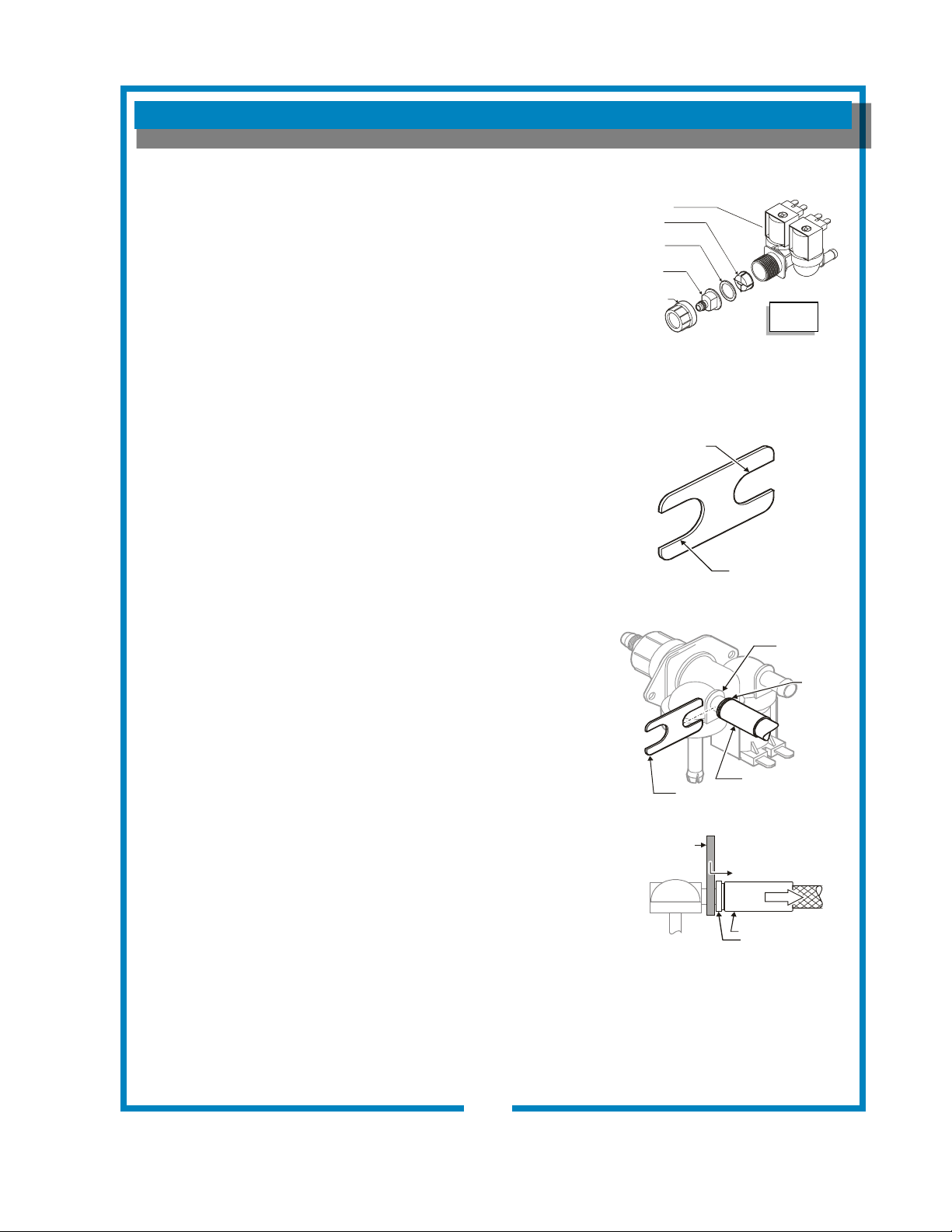
REPLACE SOLENOID
Unplug power cord. Turn OFF and disconnect water supply from
brewer inlet tting.
Remove front panel. Remove two screws holding access door in
place. Remove access door and solenoid. Unscrew inlet tting
cap to release solenoid from door.
Remove wiring from solenoid.
Large end of wrench 86660 can be used to hold solenoid inlet
tting while disconnecting supply line.
REPLACE FAUCET SUPPLY HOSE
Unplug power cord. Turn OFF and disconnect water supply from
brewer inlet tting. Disconnect hose tting from solenoid (See
illustration at right).
Disconnect hose are tting from tank coil tting.
REPLACE HOT WATER FAUCET COIL
(Symptom: Brewer drips continuously from brew head, except
when faucet valve is turned OFF.)
IMPORTANT: When replacing water faucet coil, also replace
seal gaskets.
Remove tank lid assembly per above.
Remove two hex nuts hot water coil to cover. Pull coil from
mounting holes.
REPAIR HOT WATER FAUCET
Remove top panel and turn faucet valve OFF.
Unscrew aerator cap from faucet and remove handle retaining
clip. Do not let faucet body turn.
Pull bonnet assembly from faucet body.
Examine the interior of the faucet body and the surface of the
seat cup. Clean out any debris in the faucet body, using a stiff
bristle brush if necessary.
NOTE: Any abrasion or roughness on the at end of the seat
cup will require replacing the seat cup:
Work the seat cup out of the bonnet and off of the end of the
stem.
Install a new seat cup, making sure the knob on the stem is fully
inserted into the pocket of the seat cup, and the skirt of the seat
cup is fully inserted into the bonnet.
Examine the aerator. Clean any debris from the screen or ow
straightener, using a stiff bristle brush if necessary.
Fig. 16 Fill Solenoid
Fig. 17 86660 Solenoid Wrench
P/N 2C-76660 Braided Hose Wrench
BYPASS
OUTLET
5/8” for VALVE
FLARE FITTING
7/16” for
BRAIDED HOSE
METAL FITTING
2C-76660 WRENCH
WRENCH
METAL FITTING
CLINCH RING
SLIDE WRENCH BETWEEN
VALVE AND HOSE FITTING
PRESS CLINCH RING TOWARD
METAL FITTING TO RELEASE
WHITE
CLINCH
RING
IL2619
641 p/n 2M-75844 1012 1040 1072 Owmers Manual
SCREEN
SOLENOID
WASHER
INLET
FITTING
CAP
IL1693a
Fill
Solenoid
REPLACE HOT WATER FAUCET COIL
(Symptom: Brewer drips continuously from brew head, except
when faucet valve is turned OFF.)
Remove tank lid assembly per above.
Remove two hex nuts hot water coil to cover. Pull coil from
mounting holes.
Reassemble in reverse order.
REPAIR HOT WATER FAUCET
Remove top panel and turn faucet valve OFF.
Unscrew aerator cap from faucet and remove handle retaining
clip. Do not let faucet body turn.
Pull bonnet assembly from faucet body.
Examine the interior of the faucet body and the surface of the
seat cup. Clean out any debris in the faucet body, using a stiff
bristle brush if necessary.
Examine the aerator. Clean any debris from the screen or ow
straightener, using a stiff bristle brush if necessary.
Reassemble in reverse order.
REPLACE CONTROLLER
Unplug power cord or turn circuit breaker OFF.
Remove front panel. Remove timer faceplate. Use needle
nose pliers to disengage three barbed ttings holding controller
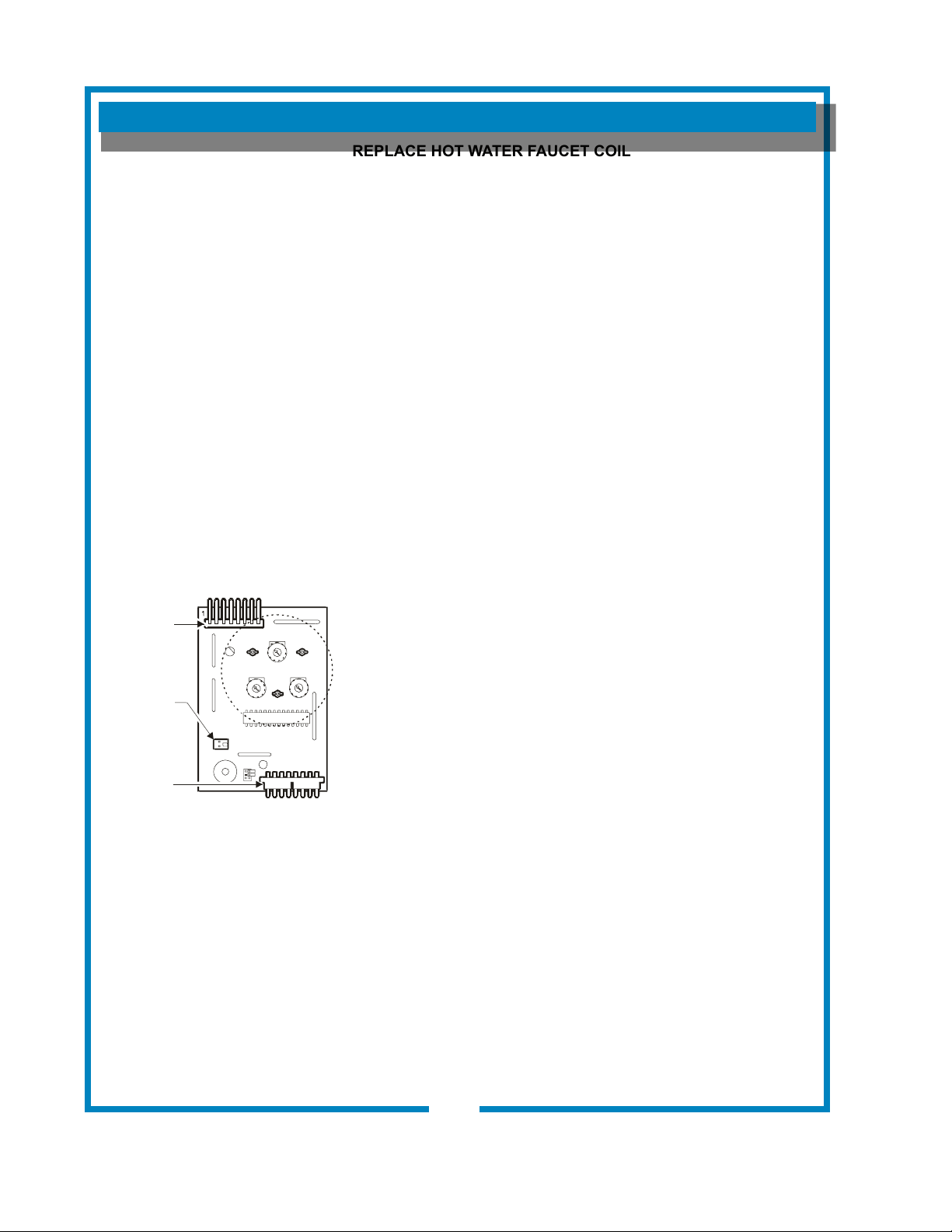
to bracket. Disconnect keypad ribbon cable (note position “1”),
temperature probe and power board cable.
Set jumpers as described on page 19.
Reassemble in reverse order.
Adjust controller as described on pages 15 & 16.
IMPORTANT: When replacing
water faucet coil, also replace
seal gaskets.
NOTE: Any abrasion or
roughness on the at end of the
seat cup will require replacing
the seat cup:
Work the seat cup out of the
bonnet and off of the end of the
stem.
Install a new seat cup, making
sure the knob on the stem is
fully inserted into the pocket of
the seat cup, and the skirt of the
seat cup is fully inserted into the
bonnet.
SERVICING INSTRUCTIONS (continued)
18
Fig. 18 Controller Hook-Up
IL2620
KEYPAD
RIBBON
CABLE
TEMP
PROBE
POWER
BOARD
CONNECTOR
641 p/n 2M-75844 1012 1040 1072 Owmers Manual
SERVICING INSTRUCTIONS (continued)
19
PROTECTIVE
SLEEVE
RIBBON
CABLE
CONNECTOR
ON
CONTROLLER
IL2622
Fig. 20 Keypad Ribbon Cable
Hook-Up
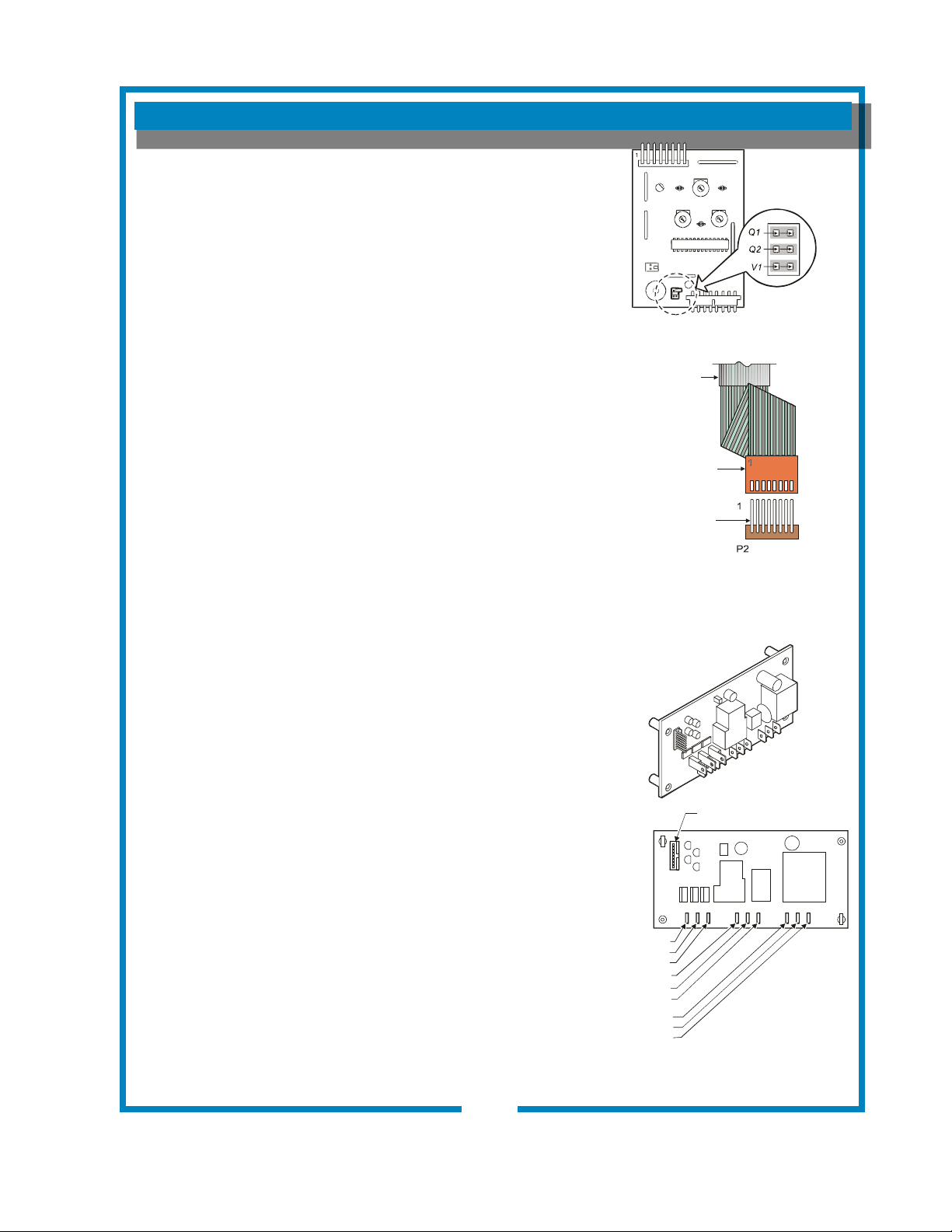
SET CONTROLLER JUMPERS
Placing the jumper across Q1 sets Quality Time at 20 Minutes.
Placing the jumper across Q2 sets Quality Time at 30 Minutes.
Removing jumpers from both Q1 or Q2 disables Quality Timer.
Placing the jumper across V1 sets Valve Time Range to 60 - 180
seconds.
Removing jumper from V1 sets Valve Time Range to 10 - 80
seconds.
REPLACE KEYPAD
Unplug power cord or turn circuit breaker OFF. Shut off water
supply valve. Remove top and front panels.
Remove faucet from basin body.
Disconnect ribbon cable from controller. Pry faceplate/keypad
from basin body. Remove all adhesive residue.
Remove protective backing from adhesive on new keypad.
Note: There is a clear protective wrap on the ribbon cable to
provide abrasion resistance where the cable passes through the
cabinet. Do NOT remove this protective sleeve.
Slide ribbon cable into slot on basin body from the outside, then
carefully apply keypad to face of basin body.
Ribbon cable connects to P2 on controller. Note locator marking
“1” on connector and cable.
Reassemble in reverse order. Test new keypad for function and
proper operation.
REPLACE POWER BOARD
Unplug power cord or turn circuit breaker OFF. Shut off water
supply valve. Remove front panel. Remove water tank lid (see
page 13), then pull tank from cabinet.
Note position of wires at power board, then remove wires.
Suggestion: Marking these wires is highly recommended to ease
reinstallation.
Remove screws holding power board to cabinet. Remove power
board from cabinet.
Reassemble in reverse order. Test for function and proper
operation.
Fig. 21 Power Board Hook-Up
CONTROLLER
CONNECTION
WARMER 3
WARMER 2
WARMER 1
HEATER A
LINE IN
VALVE A
HEATER B
VALVE B
NEUT IN
IL2623
IL2621
Fig. 19 Controller Jumpers
641 p/n 2M-75844 1012 1040 1072 Owmers Manual
CAUTION:
CHEMICAL BURN
HAZARD
Deliming chemicals are caustic.
Wear appropriate protective
gloves and goggles during
this procedure. Never siphon
deliming chemicals or solutions
by mouth.
This operation should only be
performed by qualied and
experienced service personnel.
IMPORTANT: DO NOT spill,
splash or pour water or deliming
solution into or over any internal
component other than the inside
of the water tank.
IMPORTANT: DO NOT allow
any internal components to
come into contact with the
deliming solution. Take care to
keep all internal components
dry.
NOTE: Repeat steps 4 thru 5
as required to remove all scale
and lime build-up.
NOTE: Normally, silicone
hoses do not need to be
delimed. Should deliming hoses
become necessary, Bloomeld
recommends replacing the
hoses.
PROCEDURE: Delime the Water Tank
PRECAUTIONS: Disconnect brewer from electric power.
Allow brewer to cool.
FREQUENCY: As required (Brewer slow to heat)
TOOLS: Deliming Solution
Protective Gloves, Goggles & Apron
Mild Detergent, Clean Soft Cloth or Sponge
Bristle Brush, Bottle Brush
Large Sink (or other appropriate work area)
1. Disconnect brewer from the electrical supply. Turn off the
water shut-off valve and disconnect the water supply line
from the brewer inlet tting.
2. Remove the tank lid assembly as described on page 12.
3. Remove the water tank from the brewer body by lifting
straight up. Empty all water from the tank. Set the tank back
into the brewer.
4. Mix 2 quarts of deliming solution according to the
manufacturer’s directions. Carefully pour the deliming
solution into the water tank. Lower the lid assembly back
onto the tank. Allow to sit for 30 minutes, or as directed by
the manufacturer.
5. At end of soaking period, remove lid assembly from tank.
Thoroughly rinse internal components of lid assembly with
clear water. Using a stiff bristle brush, scrub the heating
element (and faucet water coil on automatic brewers) to
remove lime and calcium build-up. Rinse with clean water.
Store lid assembly in a safe location.
6. Remove the tank from the brewer and empty. Using a stiff
bristle brush, scrub the interior of the water tank to remove
lime and calcium build-up. Rinse with clean water.
7. Set the tank back into the brewer. Reassemble the tank lid
to the water tank. Make sure the gasket is properly in place,
and then reinstall the hold-down strap.
8. Reinstall wiring to heating element and thermostat. Reinstall
the hi-limit thermostat (if removed). For automatic brewers,
reassemble piping for the faucet. Verify that all internal
components are dry, and then reinstall the top panel.
9. Reconnect brewer to electrical supply and, for automatic
brewers, reconnect water supply.
10. Install the brew chamber without lter paper or grounds.
Run at least three full brew cycles and discard all water
generated.
11. Brewer is ready to use.
SERVICING INSTRUCTIONS (continued)
20
641 p/n 2M-75844 1012 1040 1072 Owmers Manual

641 p/n 2M-75844 1012 1040 1072 Owmers Manual
EXPLODED VIEW & PARTS LIST
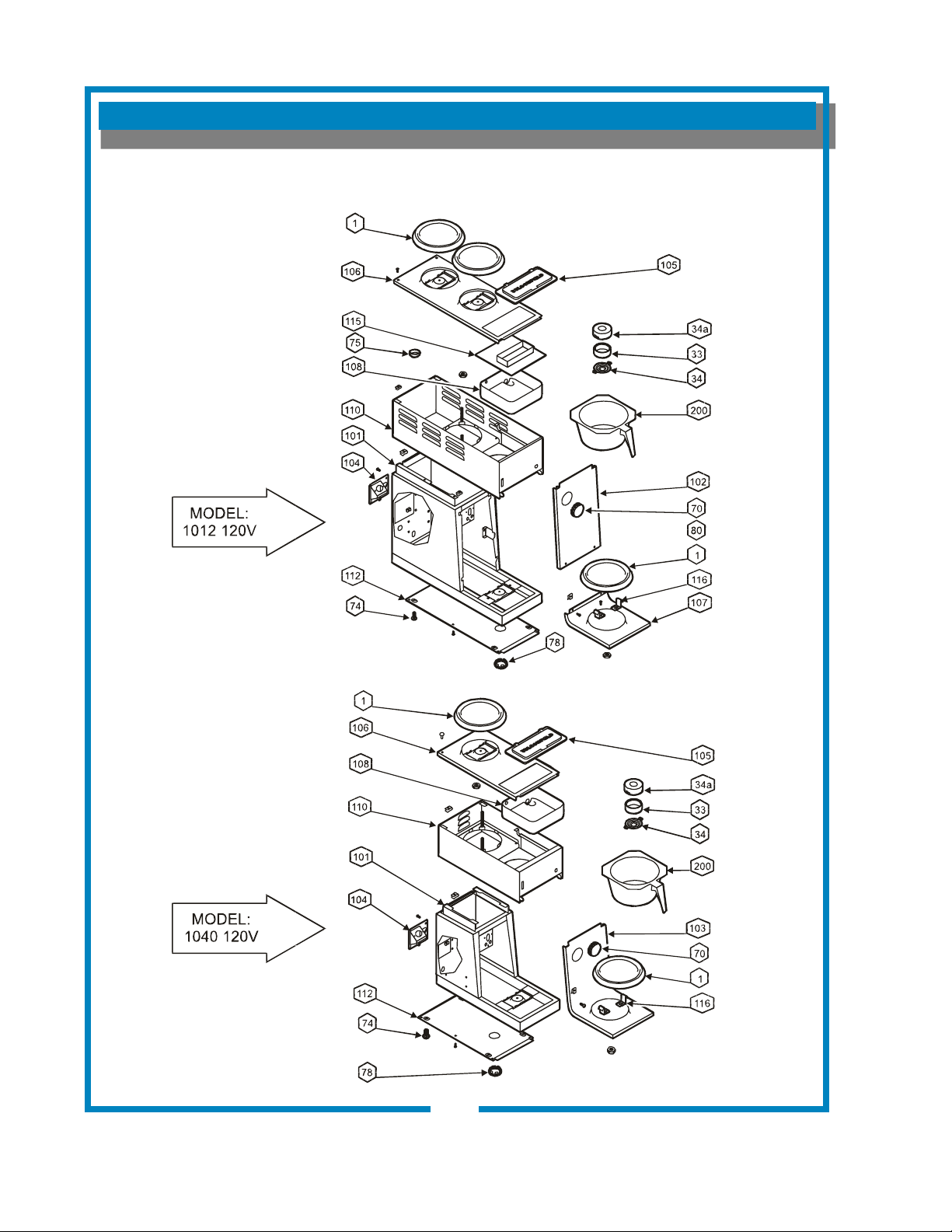
CABINET COMPONENTS - IN-LINE BREWERS
22
641 p/n 2M-75844 1012 1040 1072 Owmers Manual
CABINET COMPONENTS - IN-LINE BREWERS
EXPLODED VIEW & PARTS LIST (continued)
23
641 p/n 2M-75844 1012 1040 1072 Owmers Manual
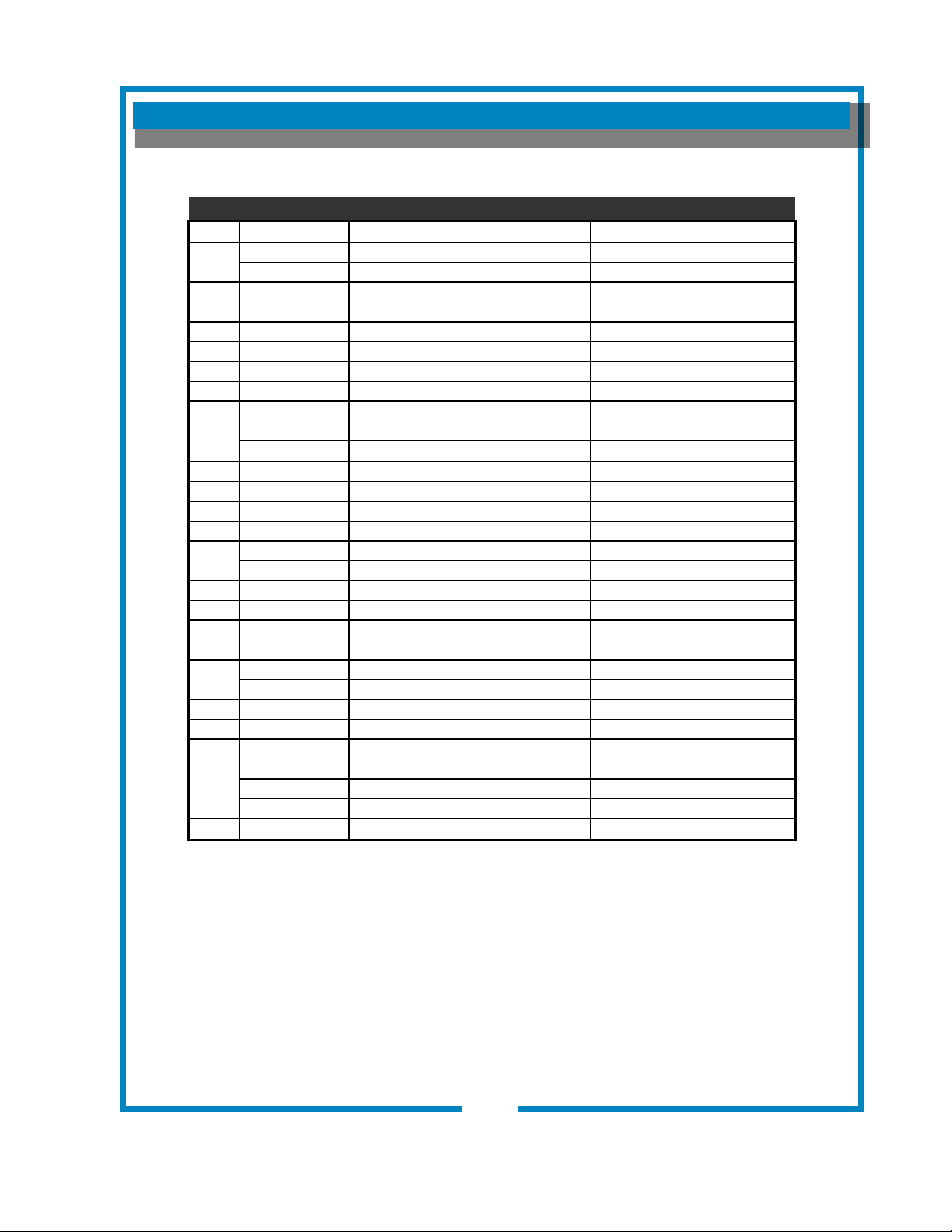
Cabinet Components for Models: 1012, 1040
ITEM PART NO. DESCRIPTION USED ON
1
2D-70090 Warmer Plate Black, 1/4-28 Stud 1012, 1040 Units Made in USA
2D-Z15630 Plate Cover Warmer, 1/4-20 Stud 1012, 1040 Units Made in China
33 2I-70139 Spray Head Gasket 1012, 1040
34 A6-72727 Spray Disk 1012, 1040
34a A6-70163 Spray Head Retainer 1012, 1040
70 2P-70053 Button Plug (Timer) 1012, 1040
74 2A-71732 Adjustable Leg Assembly 1012, 1040
75 2K-70229 Heyco Bushing 1012
78 2P-70953 Button Plug 1-1/8” (Warmer) 1012, 1040
101
Body, Welded Assy 1012
“ “ “ 1040
102 Panel, Front Upper 1012
103 A6-70288 Panel, Front 1040
104 2Q-75089 Access Door, Solenoid 1012, 1040
105 2F-76666 Cover, Pour-Over 1012, 1040
106
WS-9012-10 Top Cover 1012
WS-8512-56 Top Cover 1040
107 Panel, Front Lower 1012
108 2D-70095 Basin Pan 1012, 1040
110
Basin Body, Welded Assy 1012
Basin Body, Welded Assy 1040
112
Panel, Bottom 1012
Panel, Bottom 1040
115 A6-70089 Splash Shield, Basin 1012
116 2C-70098 Clip, Mounting 1012, 1040
200
2D-70234 Brew Chamber, Black 1012, 1040
WS-8942-6 Brew Chamber, Brown Optional
2D-70114 Brew Chamber, Stainless Optional
DD-70114S Brew Chamber, Stainless w/full wire rack Optional
210 WS-POF Bloomeld Paper Filter (pk 1000) 1012, 1040
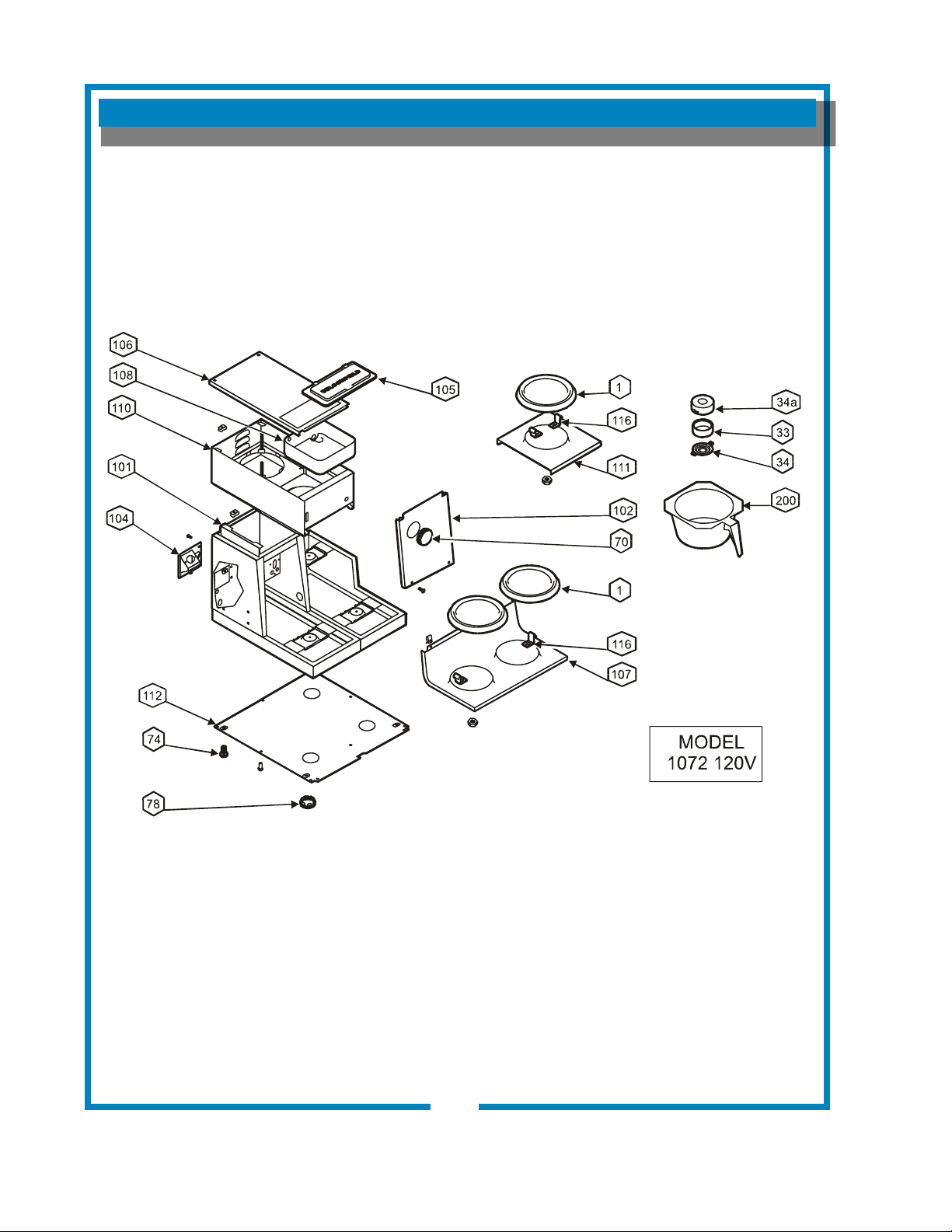
EXPLODED VIEW & PARTS LIST (continued)
CABINET COMPONENTS - LO-PROFILE BREWERS
24
641 p/n 2M-75844 1012 1040 1072 Owmers Manual
EXPLODED VIEW & PARTS LIST (continued)
25
641 p/n 2M-75844 1012 1040 1072 Owmers Manual
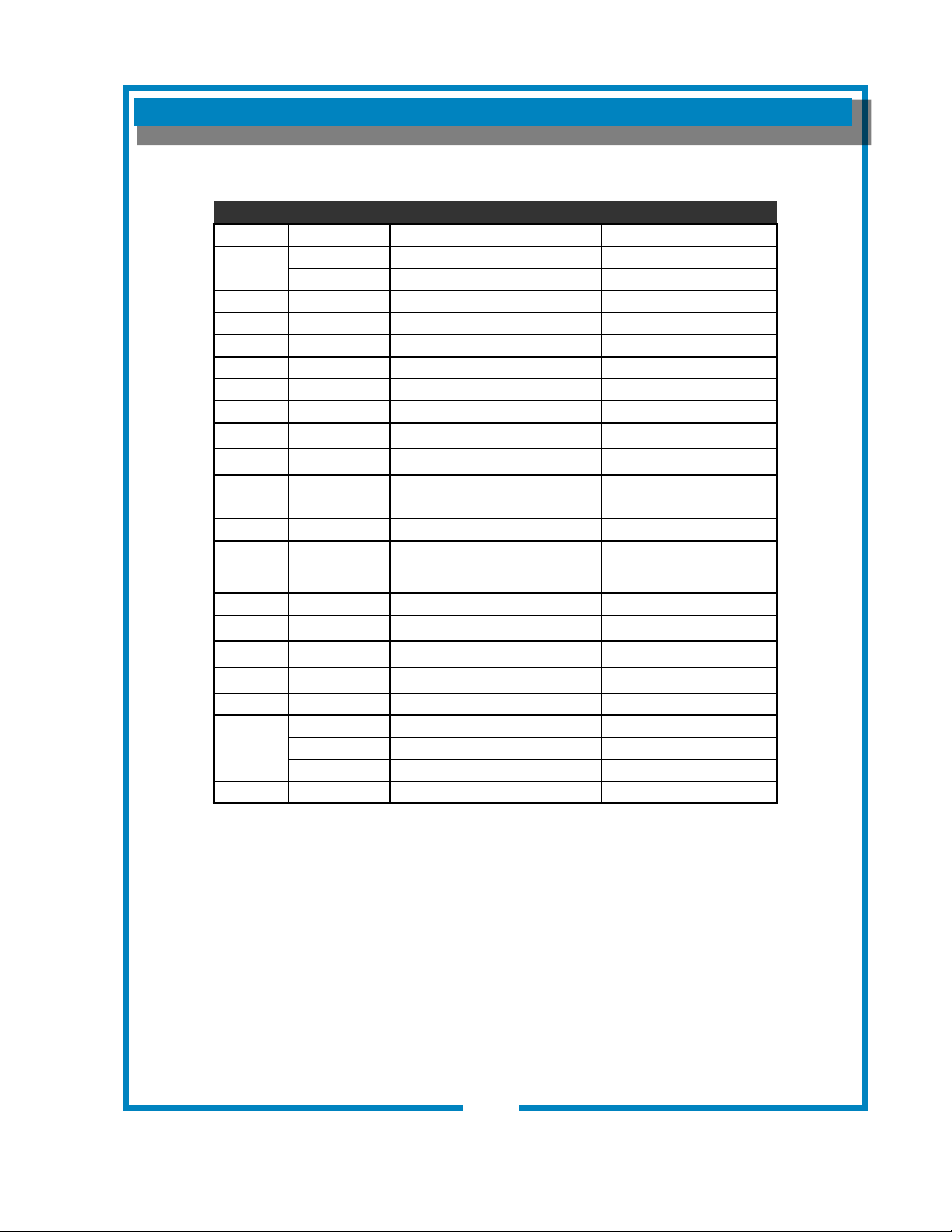
Cabinet Components for Models: 1072
ITEM PART NO. DESCRIPTION USED ON
1
2D-70090 Warmer Plate Black, 1/4-28 Stud
1072, Units Made in USA
2D-Z15630 Plate Cover Warmer, 1/4-20 Stud
1072, Units Made in China
33 2I-70139 Spray Head Gasket 1072
34 A6-72727 Spray Disk 1072
34a A6-70163 Spray Head Retainer 1072
70 2P-70053 Button Plug (Timer) 1072
74 2A-71732 Adjustable Leg Assembly 1072
78 2P-70953 Button Plug 1-1/8” (Warmer) 1072
101 Body, Welded Assy 1072
102 Panel, Front Upper 1072
104
A6-70098 Access Door, Solenoid 1072 (old-style)
2Q-75089 Access Door, Solenoid 1072 (new-style)
105 2Q-76666 Cover, Pour-Over 1072
106 Panel, Top Upper 1072
107 Panel, Front Lower 1072
108 2D-70095 Basin Pan 1072
110 Basin Body, Welded Assy 1072
111 Panel, Top Lower 1072
112 Panel, Bottom 1072
116 2C-70098 Clip, Mounting 1072
200
2D-70234 Brew Chamber, Black 1072
WS-8942-6 Brew Chamber, Brown Optional
2D-70114 Brew Chamber, Stainless Optional
210 WS-POF Bloomeld Paper Filter (pk 1000) 1072
EXPLODED VIEW & PARTS LIST (continued)
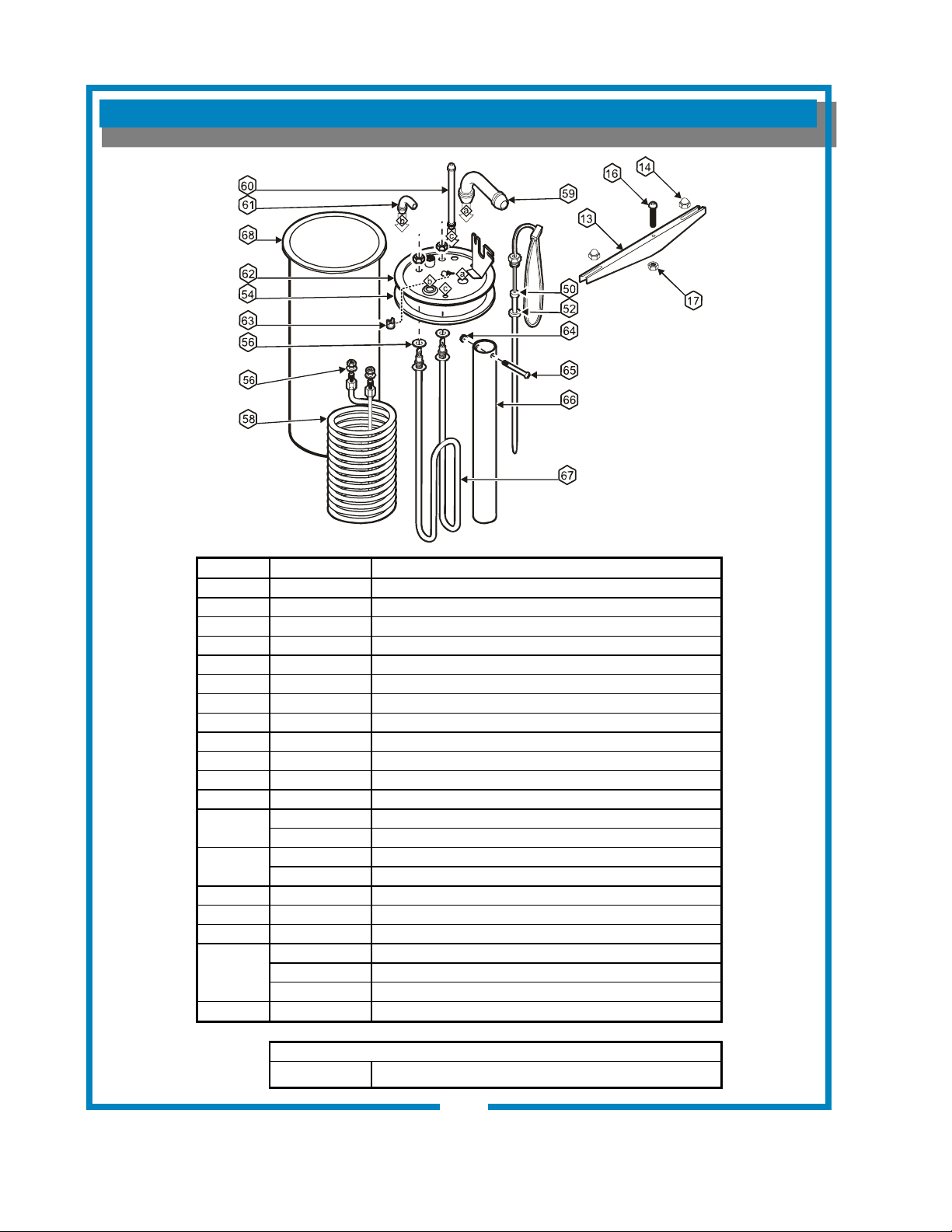
HOT WATER TANK ASSEMBLY
26
641 p/n 2M-75844 1012 1040 1072 Owmers Manual
IL2212
ITEM PART NO. DESCRIPTION
13 2C-70134 Hold Down Strap
14 2C-70133 Nut, 8-32 SS Acorn
16 Screw, 1/4-20 X 1-1/4 SS Cap Head
17 Nut, 1/4-20 SS
50 2J-73644 Temperature Probe
52 2I--73731 Seal Washer
54 2I-70147 Tank Cover Gasket
56 2I-70152 Seal Gasket
58 2N-70149 Hot Water Coil
59 2K-Z18254 Inlet Elbow
60 2V-70102 Vent Tube
61 2K-70103 Outlet Elbow
62
A6-70142 Tank Cover (Plate Only, 8-holes)
A6-72958 Tank Cover Sub Assy Exp
63
2T-47499 Hi-Limit Thermostat (120V)
2T-72956 Hi-Limit Thermostat Manual (230V)
64 2C-70146 Nut, 4-40 SS
65 2C-70145 Screw, 4-40 x 1-1/2
66 2V-70144 Water inlet Tube
67
2N-70143UL Heating Element (120V, 1500W)
2N-70167UL Tank Heating Element (120V / 1200W)
2N-70173UL Heating Element (240V, 1800W)
68
2D-70110 Tank Body
COMPLETE SPARE TANK COVER
WS-8541WF-300 Spare Cover Assembly (120V, 1500W with Coil - all parts mounted to cover)
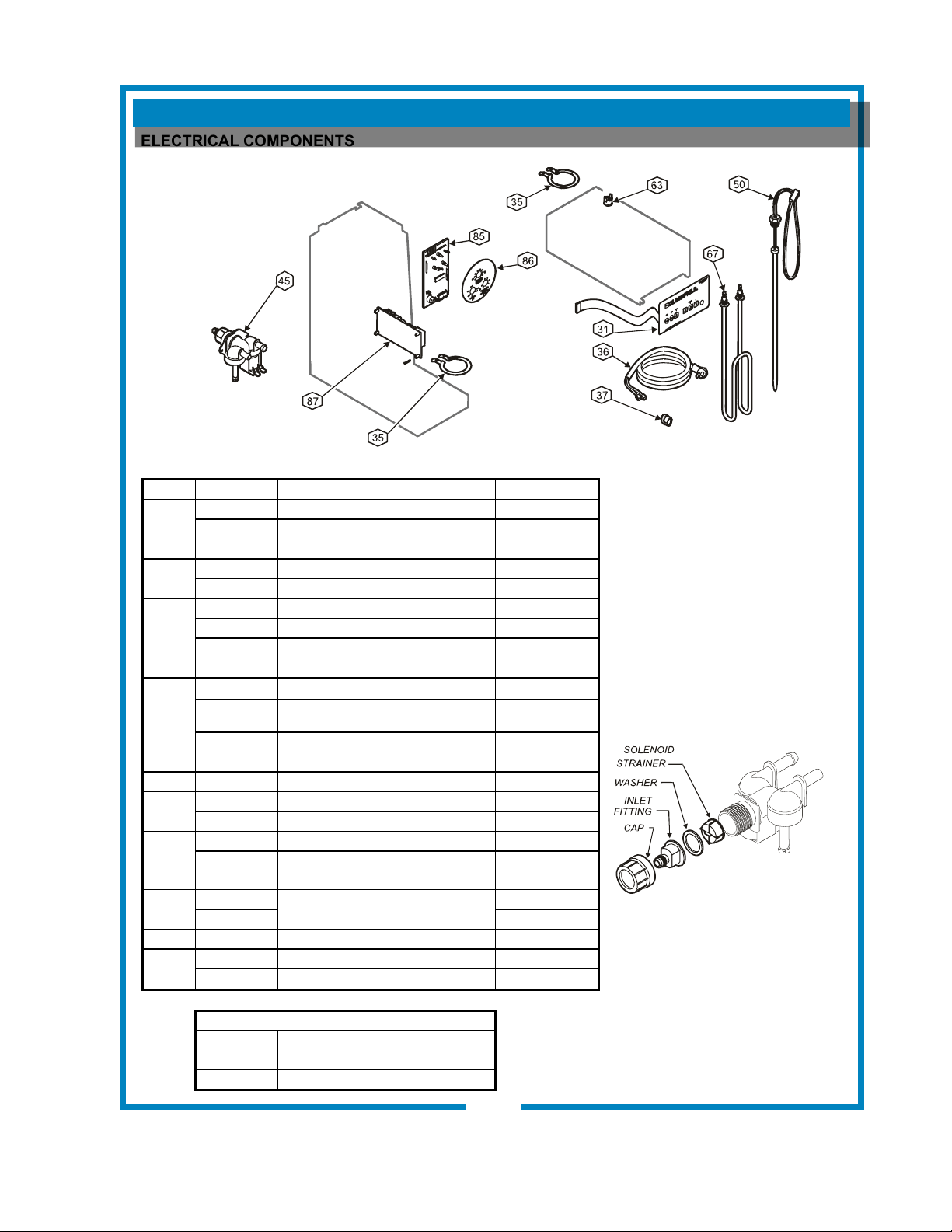
ELECTRICAL COMPONENTS
EXPLODED VIEW & PARTS LIST (continued)
27
641 p/n 2M-75844 1012 1040 1072 Owmers Manual
ELECTRICAL COMPONENTS
IL2213
ITEM PART NO. DESCRIPTION USED ON
31
2C-73633 Keypad 1012
DD-1040-10 Keypad 1040
2C-75445 Keypad 1072
35
2N-70091UL Element, 120V 100W 120V
2N-70635UL Element, Wmr, 100W@240, 85W@220 220/240V
36
2E-70353 Cord & Cap Assembly 1012, 1040
B6-WL0160 Cord Asy (UK) 220/240V
A6-71156 Cord Cap Assy Euro 230V
37 2K-70215 Strain Relief 1012, 1040
45
2E-75753 Solenoid Valve, 120V .50GPM 120V
2E-Z16608 Solenoid Bypass Valve 120V .30GPM
1012D3F, 1040D2F,
1072D3F
2E-Z16609 Solenoid Bypass 230V
2E-74570 Solenoid Valve, 240V 220/240V
50 2J-73644 Temperature Probe All
63
2T-47499 Hi-Limit Thermostat 1012, 1040, 1072
2T-72956 Thermal Hi-Limit Manual 230V
67
2N-70143UL Tank Heating Element 120V / 1500W 1012, 1040, 1072
2N-70167UL Tank Heating Element 120V / 1200W 1072-120C
2N-70173UL Tank Heating Element 240V / 1800W 1012D3F-UK
85
2E-74832
Controller Board
All
2E-Z16708 230V
86 2M-74828 Faceplate Controller Board All
87
2E-74831 Power Board 1012, 1040, 1072
2E-Z13802 Power Board EBC 220/240v 1012D3F-UK
SOLENOID REPAIR KITS
WS-85218
Inlet Fitting Kit
(includes cap, tting, gasket and strainer)
WS-85219 Inlet Strainer
EXPLODED VIEW & PARTS LIST (continued)
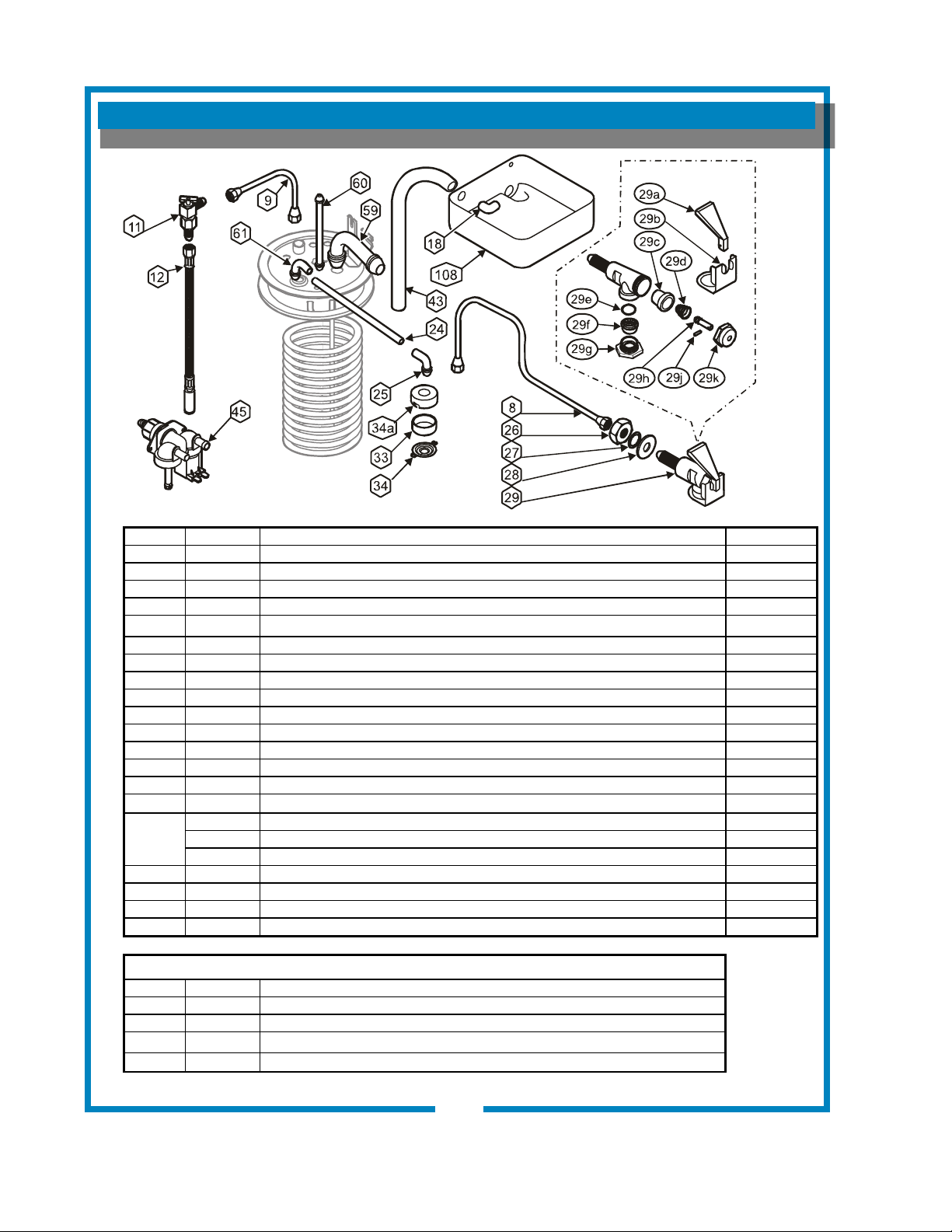
INTERNAL PLUMBING COMPONENTS
28
641 p/n 2M-75844 1012 1040 1072 Owmers Manual
ITEM PART NO. DESCRIPTION USED ON
8 2V-70104 Faucet Outlet Tube Assembly All
9 2V-70111 Formed Inlet Tube Assembly All
11 A6-70118 Needle Valve (Faucet Shut-Off) Assy All
12 2J-75681 Inlet Tube Assembly Braided All
18 2K-70096 Elbow All
24 2V-70131 Tube Outlet Water 4-3/4 SS All
25 2K-70130 Sprayer Elbow All
26 2C-72680 Nut, Jam 7/16-20 Ni All
27 2C-70107 Washer, Lock 7/16 External SEMS All
28 2C-72681 Washer Flat 15/32 x 1-1/8 SS All
29 WS-82556 Faucet Assembly All
33 2I-70139 Spray Head Gasket All
34 A6-72727 Spray Disk All
34a A6-70163 Spray Head Retainer All
43 A6-75813 Water Inlet Tube All
45
2E-75753 Solenoid Valve 120V, .50GPM 120V
2E-Z16608 Solenoid Bypass Valve, 120V, .30GPM, 1012D3F, 1040D2F, 1072D3F
2E-74570 Solenoid Valve, 240V (UK) 220/240V
59 2K-Z18254 Inlet Elbow All
60 2V-70102 Vent Tube All
61 2K-70103 Outlet Elbow All
108 2D-70095 Basin Pan All
FAUCET REPAIR COMPONENTS and KITS
29a WS-82573 Handle
29c WS-82575 Seat Cup
29b WS-82682 Retainer Clip
WS-82576 Faucet Repair Kit (Includes 29a Handle, 29c Seat Cup, 29d Spring, 29h Stem, 29j Pin & 29k Bonnet)
WS-84804 Aerator Replacement Kit (Includes 29e O-Ring, 29f Aerator Disk & 29g Aerator Cap)
IL2214
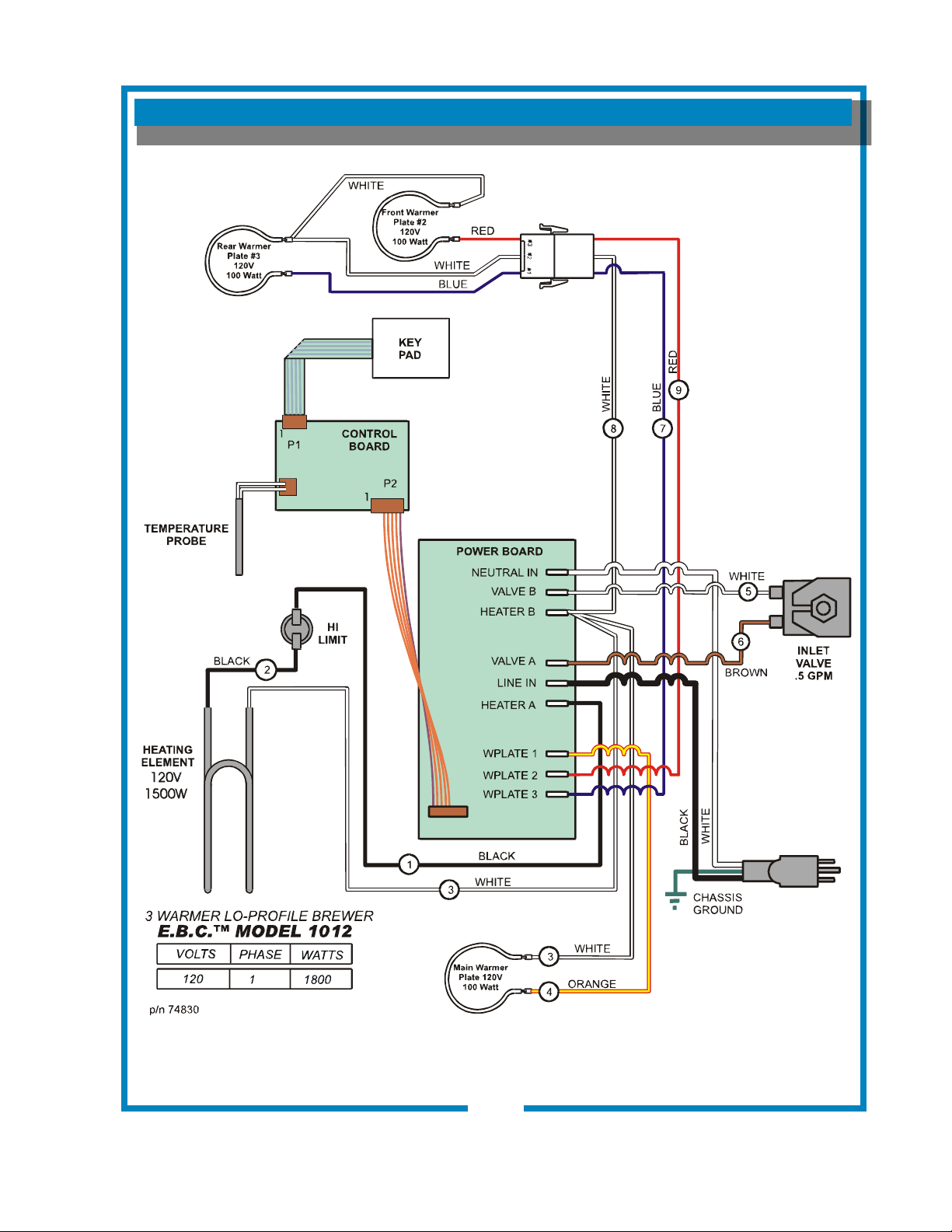
WIRING DIAGRAM
29
641 p/n 2M-75844 1012 1040 1072 Owmers Manual
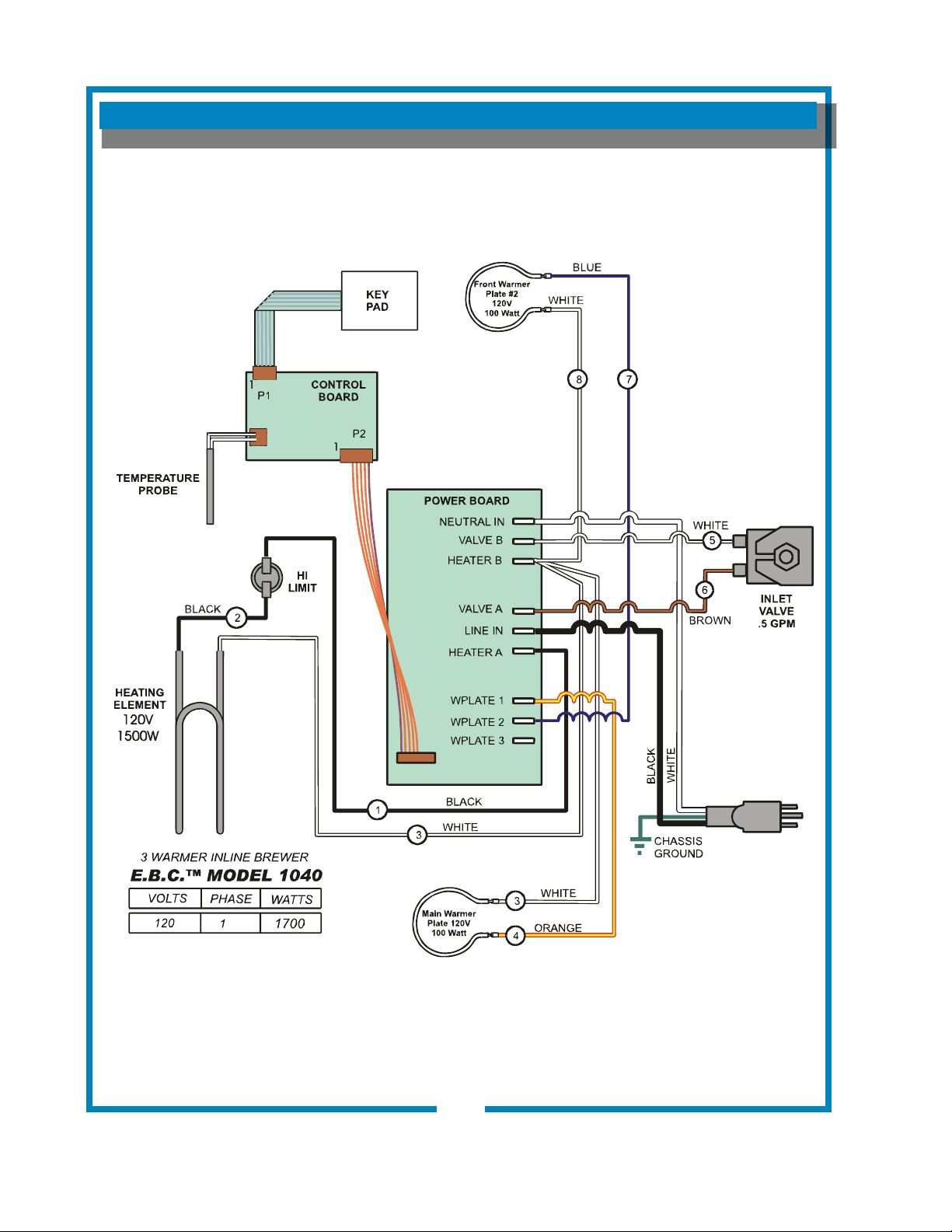
WIRING DIAGRAM
30
641 p/n 2M-75844 1012 1040 1072 Owmers Manual
p/n 75373
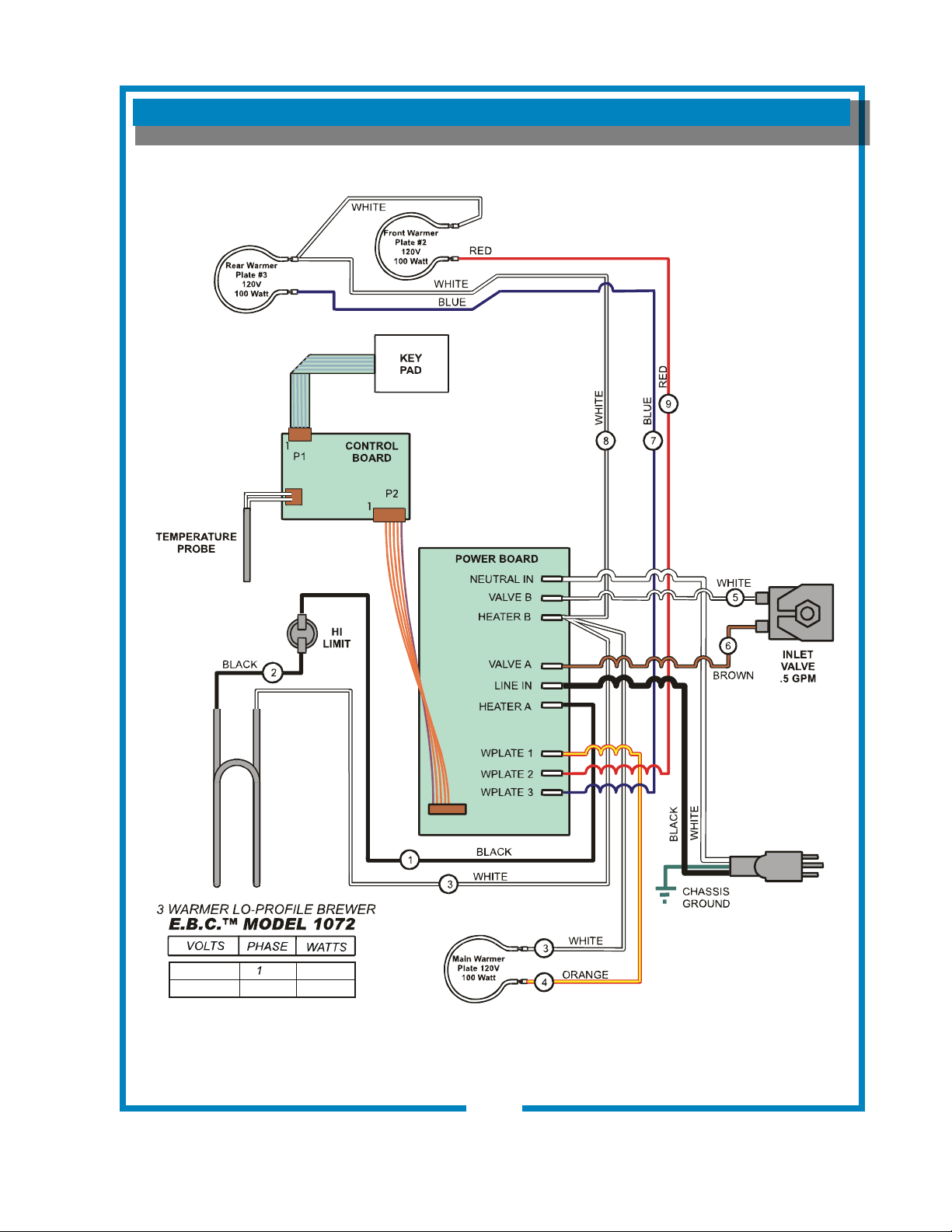
WIRING DIAGRAM (continued)
31
641 p/n 2M-75844 1012 1040 1072 Owmers Manual
p/n 2M-75361
HEATING
ELEMENT
120V: 1500W
120C: 1200W
120V
120C 1 1500
1800
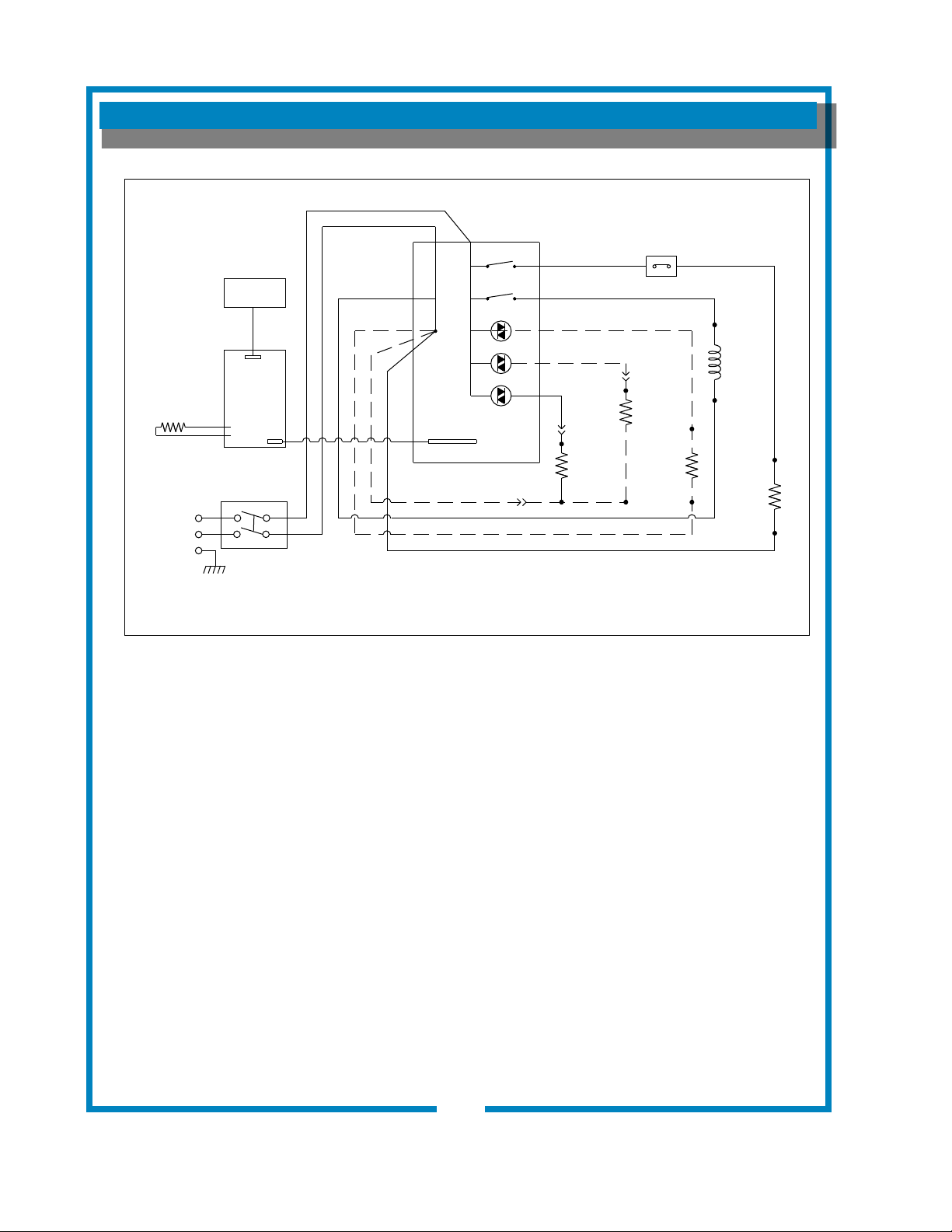
WIRING DIAGRAM
2M-Z16607
C1-2
J1
J2
TEMPERATURE
PROBE
KEYPAD
CONTROL
BOARD
P1
INLET
VALVE
WARMER
ELEMENT
1
C1-3
J12
J7
J9
J6
J8
J5
J4
J3
HI LIMIT
C1-1
POWER BOARD
NEUTRAL
VALVE B
HEATER B
HEATER A
VALVE A
WP1
WP2
WP3
GROUND
TANK
ELEMENT
LINE
J10
J11
WARMER
ELEMENT
2
WARMER
ELEMENT
3
NEUTRAL
LINE
P2
WARMING ELEMENTS ONLY ON MODELS 1012, 1040, AND 1072
230V MODELS: 1012, 1040, 1072, 1080, 1082, 1086, 1088
POWER
SWITCH
POWER SWITCH ONLY ON MODELS 1086 AND 1088
641 p/n 2M-75844 1012 1040 1072 Owmers Manual
32

NOTES
641 p/n 2M-75844 1012 1040 1072 Owmers Manual
10 Sunnen Drive, St. Louis, MO 63143
telephone: 314-678-6336 fax: 314-781-2714
www.bloomfieldworldwide.com