
INSTRUCTIONS
FOR USE
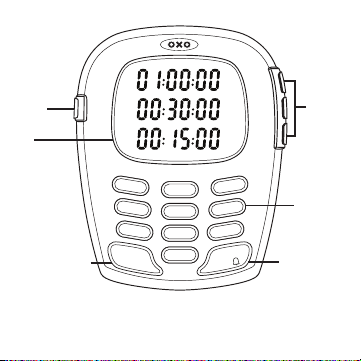
T2clock
1
4
7
8
0
clear/
memory
stop/
start
5
2
3
6
9
T1
T3
clock
button
LCD
number
keypad
*battery door on bottom
clear/memory
button
3 timer
buttons
stop/start
button

Instructions for Triple Timer use:
1. Place batteries securely inside battery compartment and
close battery door. Display will show
12:00:00.
2. To set clock, press and hold clock button for 3 seconds.
When hour and minute digits start blinking, enter clock
time in hours and minutes on the number keypad. For
example, to enter
12:30, press 1-2-3-0. Press clock
button again to save time.
3 a. To set the first timer, press T1 timer button. Display will
show all three timers and the first timer will be in
parentheses. Enter desired time in hours, minutes and
seconds on the number keypad. For example, to set
timer for
1 hour and 15 minutes, press 1-1-5-0-0.
Press stop/start button to begin countdown.

b. To set the second and third timers, repeat step 3 using
the corresponding
T2 and T3 timer buttons.
c. To pause any timer countdown, press the corresponding
timer button. Display will show parentheses around
that timer. Press stop/start and timer will pause.
d. To resume countdown, press stop/start again.
e. To clear any timer setting, make sure that timer is
stopped and press clear/memory to return the display
to
00:00:00.

f. When countdown is complete, timer will beep
continuously for
30 seconds, display will flash and timer
will begin counting up until stop/start is pressed. If
stop/start is not pressed after
30 seconds, timer will
beep once every
10 seconds for 10 minutes. Timer will
no longer beep after
10 minutes but display will
continue flashing and counting up.
4. To reset any timer to the last setting used, press the
corresponding timer button to select that timer. Press
clear/memory and timer will display the most recent time
set. Press stop/start to begin countdown.

5 a. To start count up, press clear/memory so timer reads
00:00:00. Press stop/start and a plus sign (+) will
appear on the right side of the timer display.
b. To stop count up, press stop/start.
6. If no timer settings are pressed in 1 minute, timer will
revert to clock display.
7. Press clock button to switch between clock and timer
displays.