Owner's Manual
Manual Del Propietario
Vacuum Cleaner
Aspiradora
Model, Modelo 116.34728
116.34729
CAUTION:
Read andfollow all
safetyand operating
instructions beforefirst
use ofthisproduct.
CUIDADO:
Leay siguatodaslas
instruccionesdeoperaci6n
y seguridadantesdel usode
esteproducto.
Sears, Roebuck and Co., Hoffman Estates, IL 60179 U.S.A.
www.sears.com
Impreso en Mexico
Part No. C01ZCKPO_UOO-KCO1ZCKPZOU_ Printed in Mexico
Before Using Your New Vacuum
Cleaner ........................... 2
Kenmore Vacuum Cleaner Warranty . 2
Important Safety Instructions ....... 3
Parts and Features ................ 4
Assembly Instructions ........... 5-6
Operating Instructions ............. 6
GettingStarted .................... 6
Pile Height Selection and Setting ...... 7
On/Off Switch ..................... 7
Variable Power Control .............. 8
Releasingthe Handle ............... 8
Carpet/Bare Floor Selector ........... 8
Attachments ...................... 9
Attachment Use Chart ............. 10
VacuumingTips .................. 10
Performance Features ............. 11
Vacuum Cleaner Care ............. 13
Vacuum Cleaner Storage ........... 13
Cleaning Exteriorand Attachments .... 13
Dust BinCleaning .............. 14-15
Filter Screen Cleaning ............. 15
Filter Changing/Cleaning ........... 16
Belt Changingand AgitatorCleaning .17-19
Clog Removal .................... 20
LightBulb Changing ............... 21
TroubleshooUng .................. 22
Requesting service ...... (back page)
Please read this guide. It will help you assemble and operate your new Kenmore vacuum
cleaner in the safest and most effective way.
For more information about vacuum cleaner care and operation, call your nearest Sears store.
You will need the complete model and serial numbers when requesting information.Your
vacuum cleaner's model and serial numbers are located on the Model and Serial Number
Plate.
Use the space below to record the model number and serial number of your new Kenmore
vacuum cleaner.
Model No.
Serial No.
Date of Purchase
Keep this book and your sales check (receipt) in a safe place for future reference.
LIMITED ONEYEARWARRANTY ON KENMOREVACUUM CLEANER
This warranty isfor one year from the date of purchase, and includes only private household
vacuum cleaner use. During the warranty year, when this vacuum cleaner is operated and
maintained according to the owner's manual instructions, Sears will repair any defects in
material or workmanship free of charge.
This warranty excludes vacuum bags, belts, light bulbs, and filters, which are expendable parts
and become worn during normal use.
For warranty service, return this vacuum cleaner to the nearest Sears Service Center in
the United States.
This warranty applies only while this product is in use in the United States. This warranty gives
you specific legal rights, and you may also have other rights which vary from state to state.
Sears, Roebuck and Co., DI817 WA, Hoffman Estates, IL 60179
2
WARNING
Your saf=t-y is important to us.To reduce the risk of
fire, electrical shock, injury to persons or damage
when using your vacuum cleaner, follow basic
safety precautions including the following:
Read all Instructions in this manual before
assembling or using your vacuum cleaner.
Use your vacuum cleaner only as
described in this manual. Use only with
Sears recommended attachments.
Disconnect electrical supply before ser-
vicing or cleaning out the brush area.
Failure to do so could result in electrical
shock or injury from moving parts.
Do not leave the vacuum cleaner when
plugged in. Unplug from outlet when not
in use and before servicing.
To reduce the risk of electrical shock - Do
not use outdoors or on wet surfaces.
Do not allow to be used as a toy. Close
attention is necessary when used by or
near children.
Do not use with a damaged cord or plug.
If vacuum cleaner is not working as it
should, has been dropped, damaged, left
outdoors, or dropped in water, return it to
a Sears Service Center.
Do not pull or carry by cord, use cord as
a handle, close a door on cord, or pull
cord around sharp edges or corners. Do
not run vacuum cleaner over cord. Keep
cord away from heated surfaces.
Do not unplug by pulling on cord. To
unplug, grasp the plug, not the cord.
Do not handle plugorvacuum cleaner with
wet hands.
Do not put any objects into openings.
Do not use with any opening blocked;
keep free of dust, lint, hair, and anything
that may reduce air flow.
Keep hair, loose clothing, fingers, and all
parts of body away from openings and
moving parts.
Turn off all controls before unplugging.
Use extra care when cleaning on stairs.
Do not rest vacuum cleaner on steps. Do
not put on chairs, tables, etc. Keep on
floor.
Do not use vacuum cleaner to pick up
flammable or combustible liquids (gaso-
line, cleaning fluid, perfumes, etc.), or use
in areas where they may be present. The
fumes from these substances can create
a fire hazard or explosion.
Do not pick up anything that is burning or
smoking, such as cigarettes, matches, or
hot ashes.
Do not use vacuum cleaner without dust
bag and/or filters in place.
Always change the dust bag after vacu-
uming carpet cleaners or freshener, pow-
ders, and fine dust. These products clog
the bag, reduce airflow and can cause the
bag to burst. Failure to change the bag
promptly could cause permanent damage
to the vacuum cleaner.
Do not use the vacuum cleaner to pick up
sharp hard objects, small toys, pins, paper
clips, etc. They may damage the vacuum
cleaner or dust bag.
Unplug before connecting Handi-mate Jr.
(if applicable). Keep hands away from bris-
tles when unit is on.
You are responsible for making sure that
your vacuum cleaner is not used by any-
one unable to operate it properly.
Do not extend the stretch hose, extension
hose or hose combination beyond its
reach. Doing so can cause the vacuum
cleaner to tip and may cause personal
injury or property damage.
SAVE THESE INSTRUCTIONS
Proper assembly and safe use of your vacuum cleaner are your responsibilities. Your vac-
uum cleaner is intended for Household use. Read this Owner's Manual carefully for impor-
tant use and safety information. This guide contains safety statements under warning and
caution symbols.
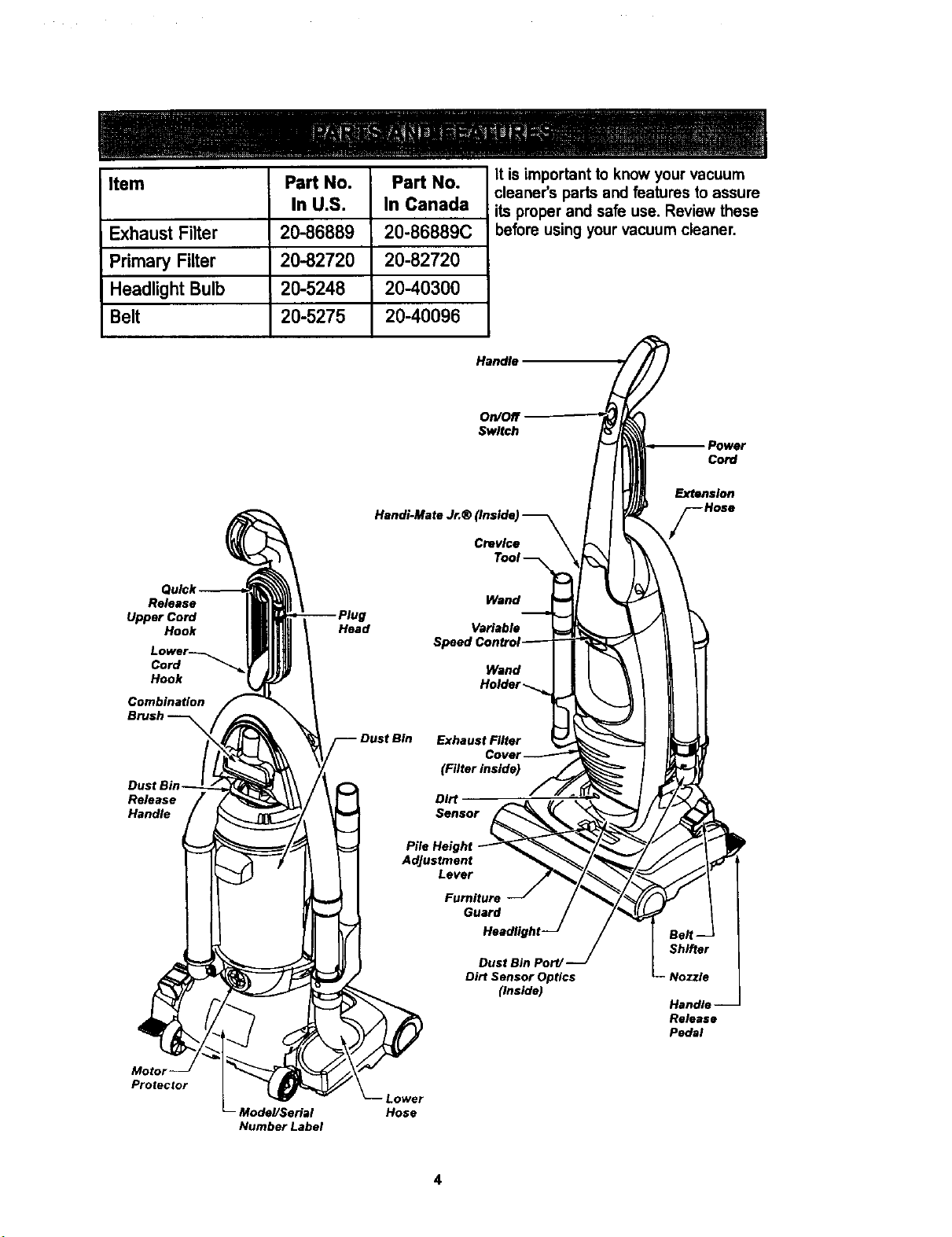
Item Part No. Part No.
In U.S. In Canada
Exhaust Filter 20-86889 20-86889C
Primary Filter 20-82720 20-82720
Headlight Bulb 20-5248 20-40300
Belt 20-5275 20-40096
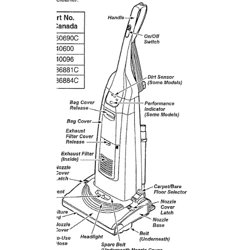
It is important to know your vacuum
cleaner's parts and features to assure
its proper and safe use. Review these
before using your vacuum cleaner.
Handle
On/Off
Switch
Handi-Mate Jr.®
Crevice
cord
Extension
Release
Upper Cord
Hook
Cord
Hook
Combination
Release
Handle
Head
Wand
Variable
Wand
Exhaust Filter
(Filter inside)
Dirt
Sensor
Adjustment
Lever
Furniture
Guard
Dust Bin PottJ
Dirt Sensor Optics
(inside)
Handle
Release
Pedal
Protector
Model!Serial
Number Label
Lower
Hose
4
_ IPlease pay special attention to these hazard alert boxes, and follow any instructionsI
Igiven. WARNING statements alert you to such dangers as tire, electric shock, burnsI
land personal injury. CAUTION statements alert you to such dangers as personalI
linjuryand/or property damage. I
WARNING
Electrical Shock Hazard
Do not plug into the electrical sup-
ply until the assembly is complete.
Failure to do so could result in elec-
trical shock or injury.
Before assembling the vacuum cleaner,
check the PACKING LIST on the cover of
the separate Repair Parts List. Use this
list to verify that you have received all the
components of your new Kenmore vacu-
um cleaner.
Remove tape from dust bin release handle.
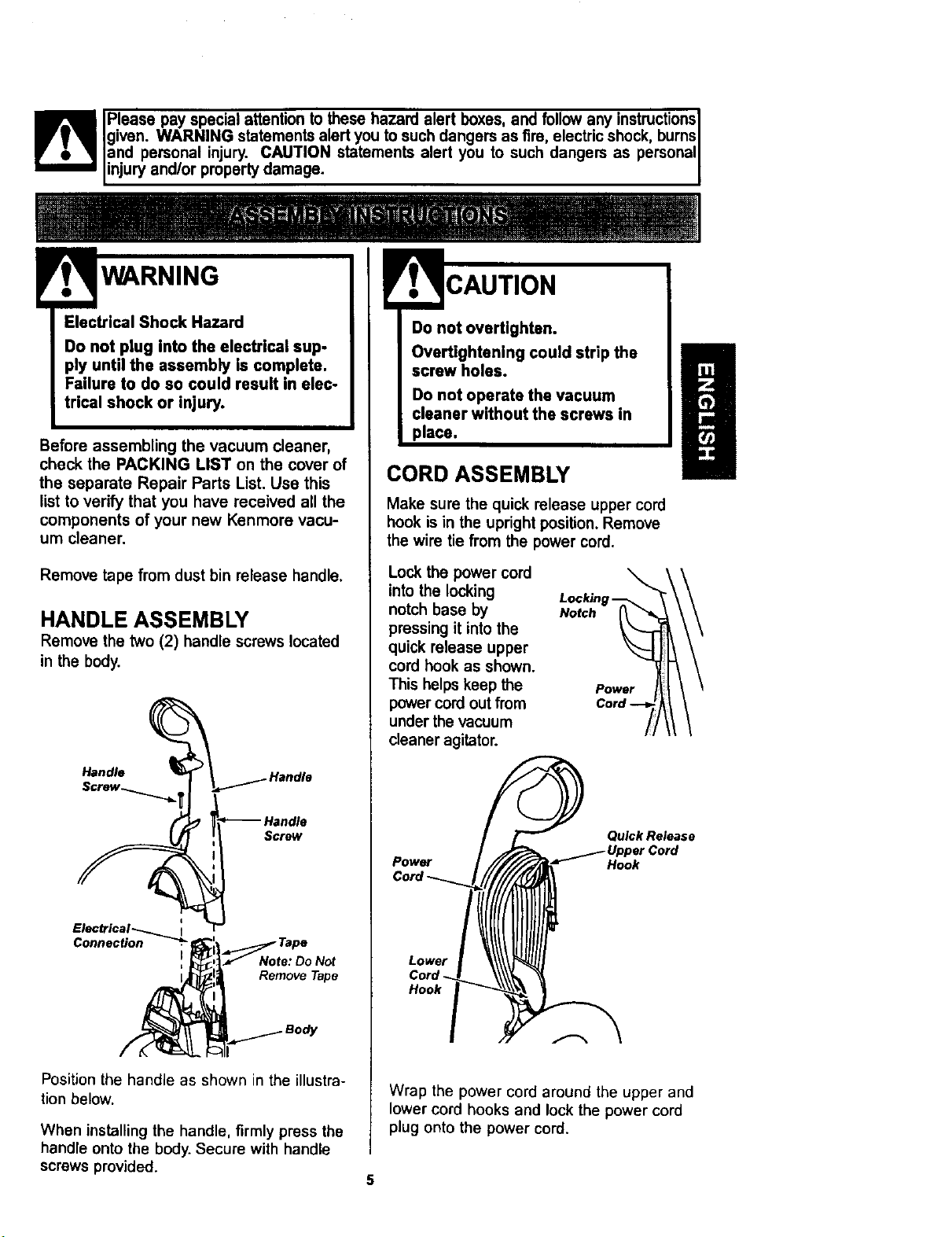
HANDLE ASSEMBLY
Remove the two (2) handle screws located
in the body.
Handle
Screw
Note: Do Not
Remove Tape
Position the handle as shown in the illustra-
tion below.
When installing the handle, firmly press the
handle onto the body. Secure with handle
screws provided.
Do not overtighten.
Overtightening could strip the
screw holes.
Do not operate the vacuum
cleaner without the screws in
place.
CORD ASSEMBLY
Make sure the quick release upper cord
hook is in the upright position. Remove
the wire tie from the power cord.
Lock the power cord
into the locking
notch base by
pressing it into the
quick release upper
cord hook as shown.
This helps keep the
power cord out from
under the vacuum
cleaner agitator.
Power I_
C 7AI
Power
Quick Release
Hook
Lower
Hook
Wrap the power cord around the upper and
lower cord hooks and lock the power cord
plug onto the power cord.
5
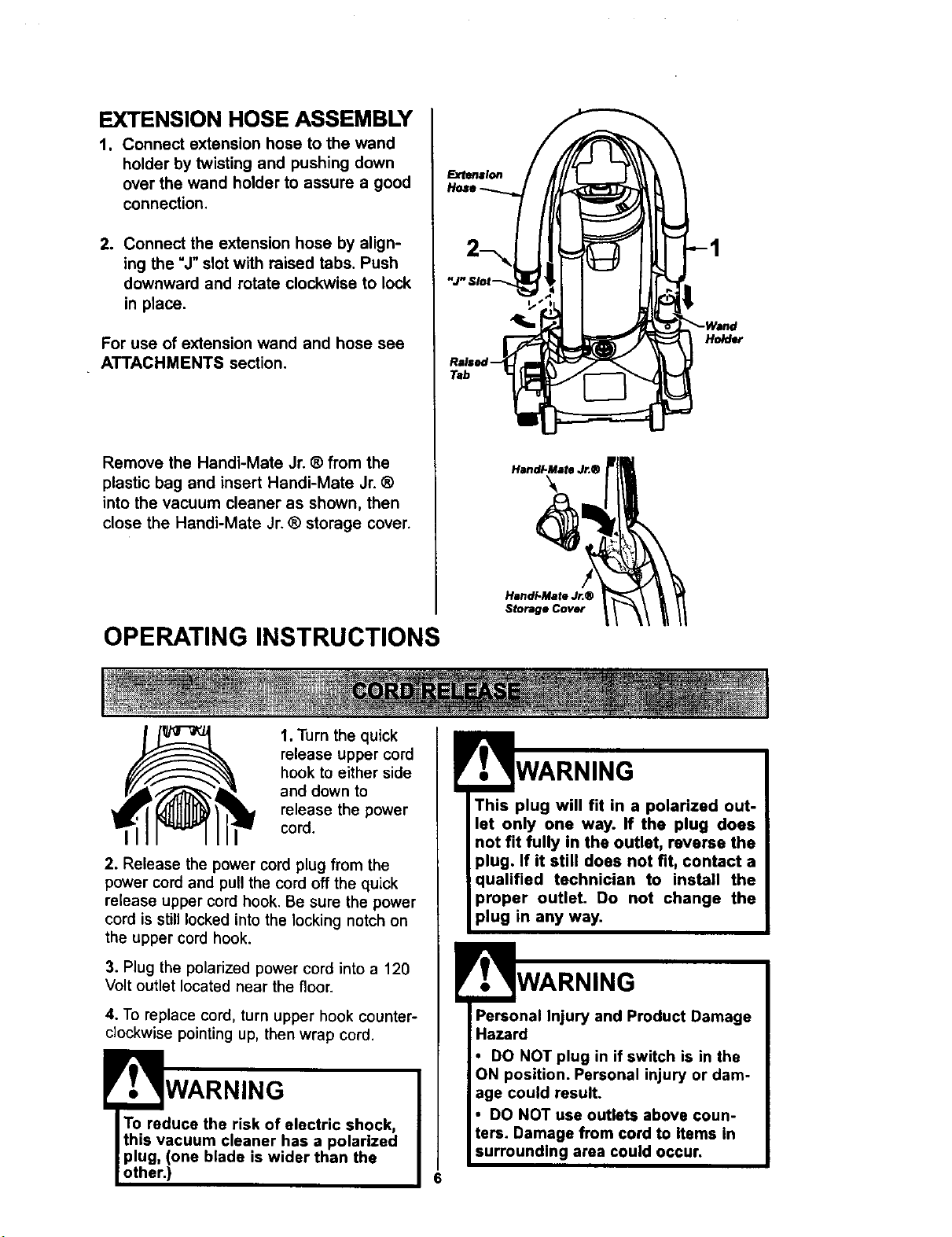
EXTENSION HOSE ASSEMBLY
t. Connect extension hose to the wand
holder by twisting and pushing down
over the wand holder to assure a good
connection,
2. Connect the extension hose by align-
ing the =J" slot with raised tabs. Push
downward and rotate clockwise to lock
in place.
For use of extension wand and hose see
ATTACHMENTS section.
Remove the Handi-Mate Jr. ® from the
plastic bag and insert Handi-Mate Jr. ®
into the vacuum cleaner as shown, then
close the Handi-Mate Jr. ® storage cover.
OPERATING INSTRUCTIONS
Tab
HandI-Mate Jr.®
Storage Cover
HoMer
1. Turn the quick
release upper cord
hook to either side
and down to
release the power
cord.
2. Release the power cord plug from the
power cord and pull the cord off the quick
release upper cord hook. Be sure the power
cord is stilllocked into the locking notch on
the upper cord hook.
3. Plug the polarized power cord into a 120
Volt outlet located near the floor.
4. To replace cord, turn upper hook counter-
clockwise pointing up, then wrap cord.
To reduce the risk of electric shock,
this vacuum cleaner has a polarized
plug, (one blade is wider than the
other.)
6
This plug will fit in a polarized out-
let only one way. If the plug does
not fit fully in the outlet, reverse the
plug. If it still does not fit, contact a
qualified technician to install the
proper outlet. Do not change the
plug in any way.
Personal Injury and Product Damage
Hazard
• DO NOT plug in if switch is in the
ON position. Personal injury or dam-
age could result.
• DO NOT use outlets above coun-
ters. Damage from cord to items in
surrounding area could occur.
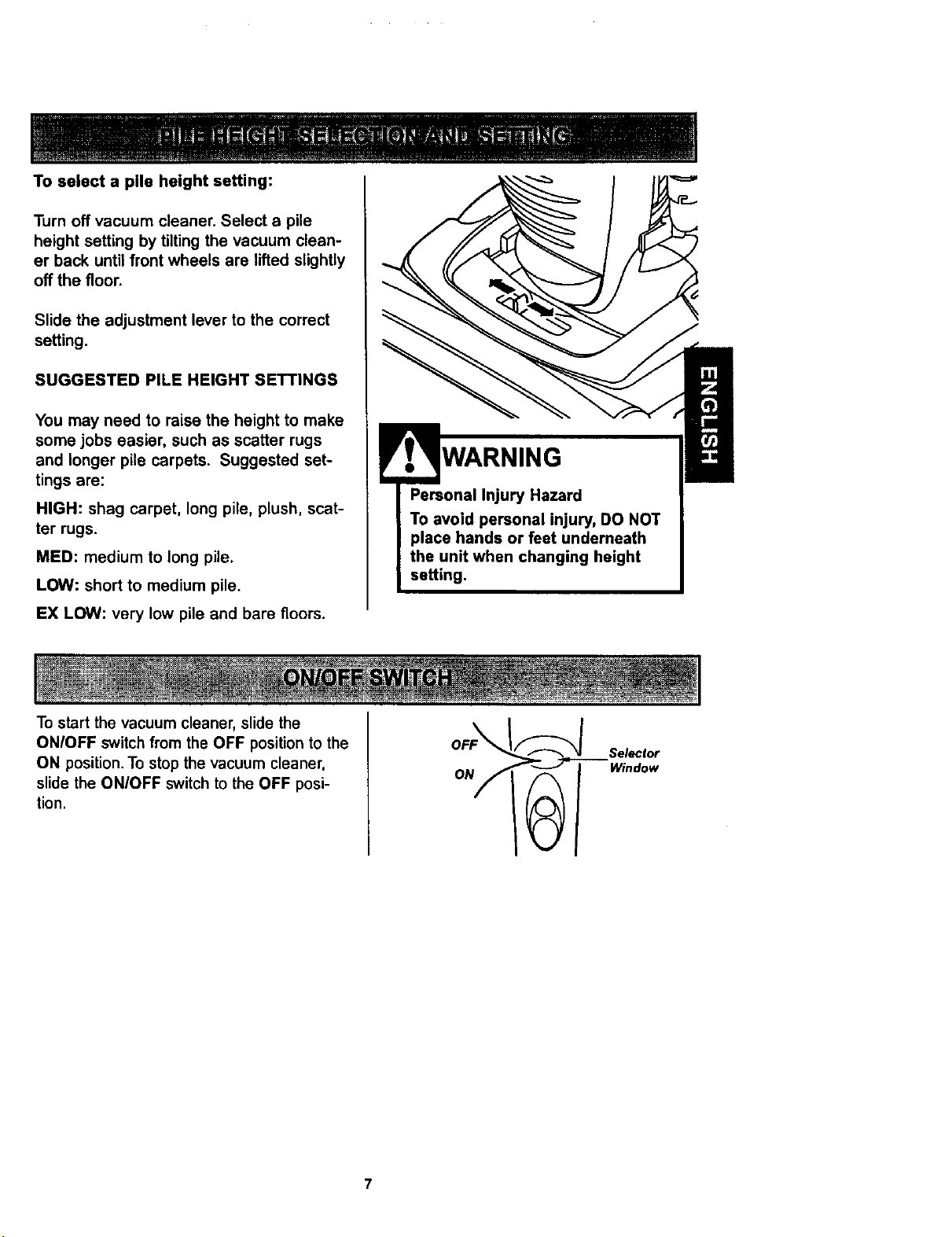
To select a pile height setting:
Turn off vacuum cleaner. Select a pile
height setting by tilting the vacuum clean-
er back until front wheels are lifted slightly
off the floor.
Slide the adjustment lever to the correct
setting.
SUGGESTED PILE HEIGHT SETTINGS
You may need to raise the height to make
some jobs easier, such as scatter rugs
and longer pile carpets. Suggested set-
tings are:
HIGH: shag carpet, long pile, plush, scat-
ter rugs.
MED: medium to long pile.
LOW: short to medium pile.
EX LOW: very low pile and bare floors.
To start the vacuum cleaner, slide the
WARNING
ONIOFF switch from the OFF position to the
ON position. To stop the vacuum cleaner,
slide the ON/OFF switch to the OFF posi-
tion.
ON
Selector
Window
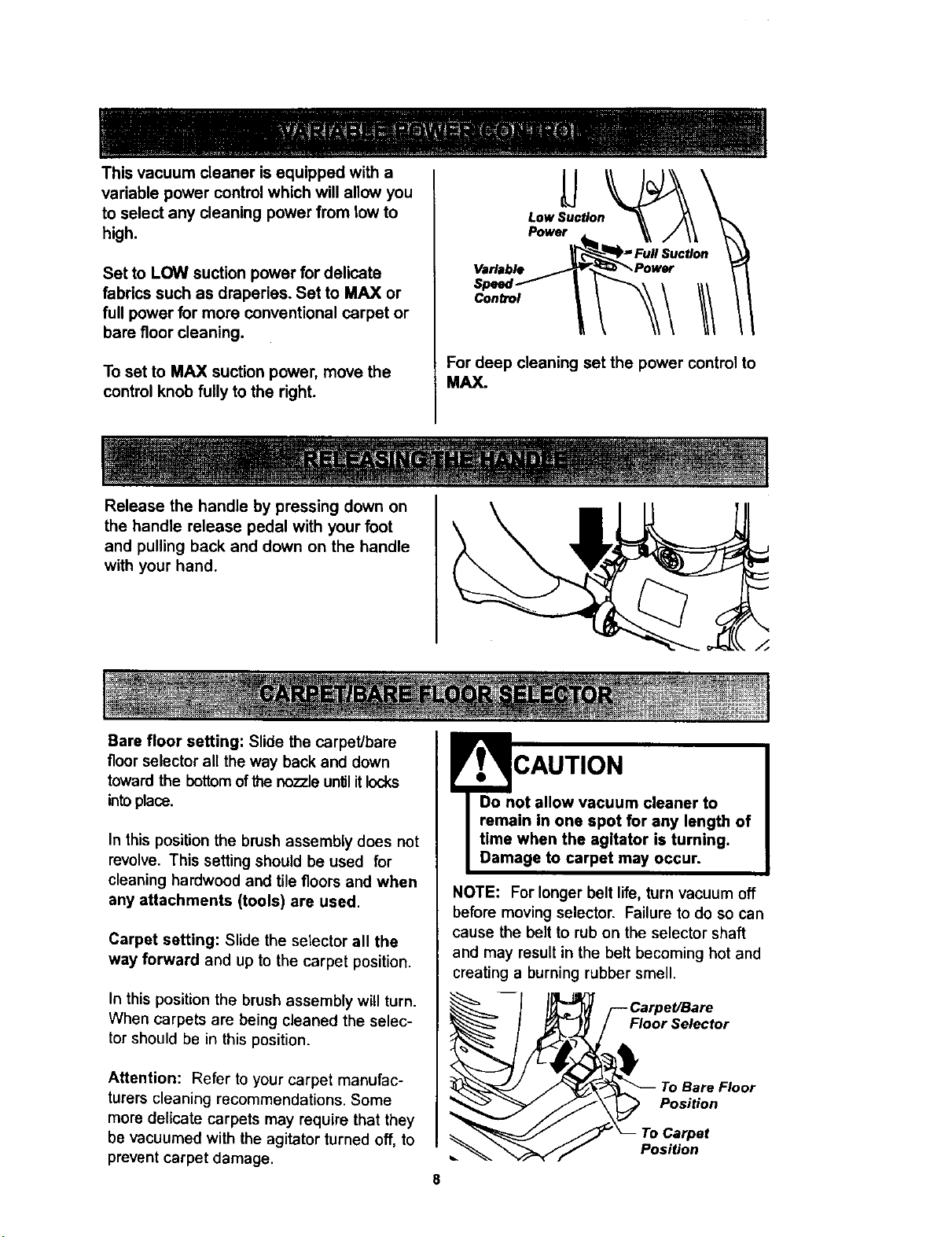
This vacuum cleaner is equipped with a
variable power control which will allow you
to select any cleaning power from tow to
high.
Set to LOW suction power for delicate
fabrics such as draperies. Set to MAX or
full power for more conventional carpet or
bare floor cleaning.
To set to MAX suction power, move the
control knob fully to the right.
Low Suction
Power
Variable
Control
For deep cleaning set the power control to
MAX.
Release the handle by pressing down on
the handle release pedal with your foot
and pulling back and down on the handle
with your hand.
Bare floor setting: Slide the carpet/bare
floor selector all the way back and down
toward the bottomofthe nozzleuntilitlocks
intoplace.
In this position the brush assembly does not
revolve. This setting should be used for
cleaning hardwood and tile floors and when
any attachments (tools) are used.
Carpet setting: Slide the selector all the
way forward and up to the carpet position.
In this position the brush assembly will turn.
When carpets are being cleaned the selec-
tor should be in this position.
Attention: Refer to your carpet manufac-
turers cleaning recommendations. Some
more delicate carpets may require that they
be vacuumed with the agitator turned off, to
prevent carpet damage.
CAUTION
NOTE: For longer belt life, turn vacuum off
before moving selector. Failure to do so can
cause the belt to rub on the selector shaft
and may result in the belt becoming hot and
creating a burning rubber smell.
Floor Selector
To Bare Floor
Position
Position
z
Handi.Mate Jr.(
Combination
Tool
Wand
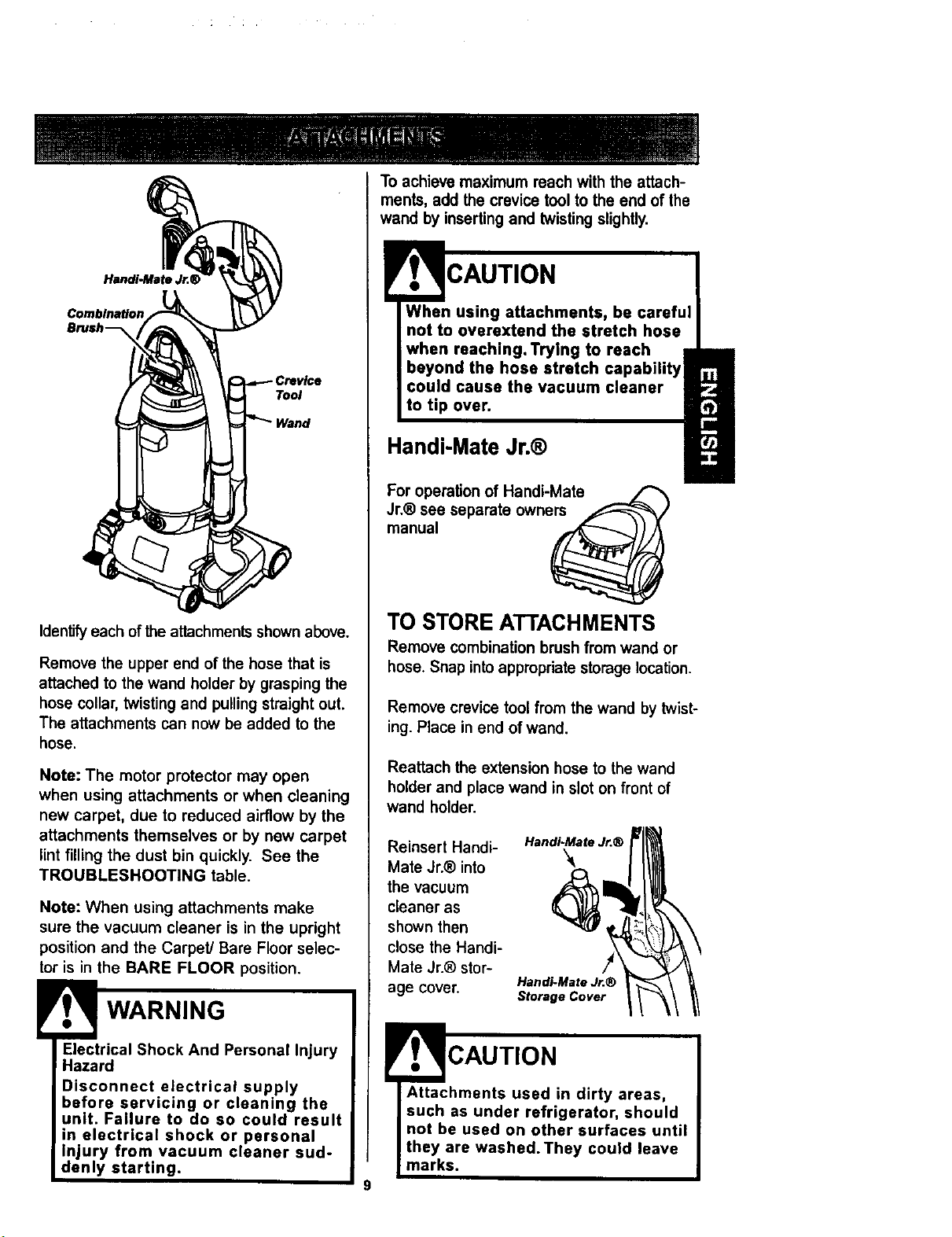
Identifyeach of the attachments shownabove.
Remove the upper end of the hose that is
attached to the wand holder by grasping the
hose collar, twisting and pulling straight out.
The attachments can now be added to the
hose.
Note: The motor protector may open
when using attachments or when cleaning
new carpet, due to reduced airflow by the
attachments themselves or by new carpet
lint filling the dust bin quickly. See the
TROUBLESHOOTING table.
Note: When using attachments make
sure the vacuum cleaner is in the upright
position and the Carpet] Bare Floor selec-
tor is in the BARE FLOOR position.
Electrical Shock And Personal Injury
Hazard
Disconnect electrical supply
before servicing or cleaning the
unit. Failure to do so could result
in electrical shock or personal
Injury from vacuum cleaner sud-
denly starting.
To achieve maximum reach with the attach-
ments, add the crevice tool to the end of the
wand by inserting and twisting slightly.
When using attachments, be careful
not to overextend the stretch hose
when reaching. Trying to reach
beyond the hose stretch
could cause the vacuum cleaner
to tip over.
Handi-Mate Jr.®
For operation of Handi-Mate
Jr.® sea separate owne _------------------_
manual
TO STORE ATTACHMENTS
Remove combination brush from wand or
hose. Snap intoappropdato storage location.
Remove crevice tool from the wand by twist-
ing. Place in end of wand.
Reattach the extension hose to the wand
holder and place wand in slot on front of
wand holder.
Reinsert Handi-
Mate Jr.® into
the vacuum
cleaner as
shown then
close the Handi-
Mate Jr.® stor-
age cover.
Handi-Mate Jr.®
Handi-Mate Jr.®
Storage Cover
CAUTION
Attachments used in dirty areas,
such as under refrigerator, should
not be used on other surfaces until
they are washed.They could leave
marks.
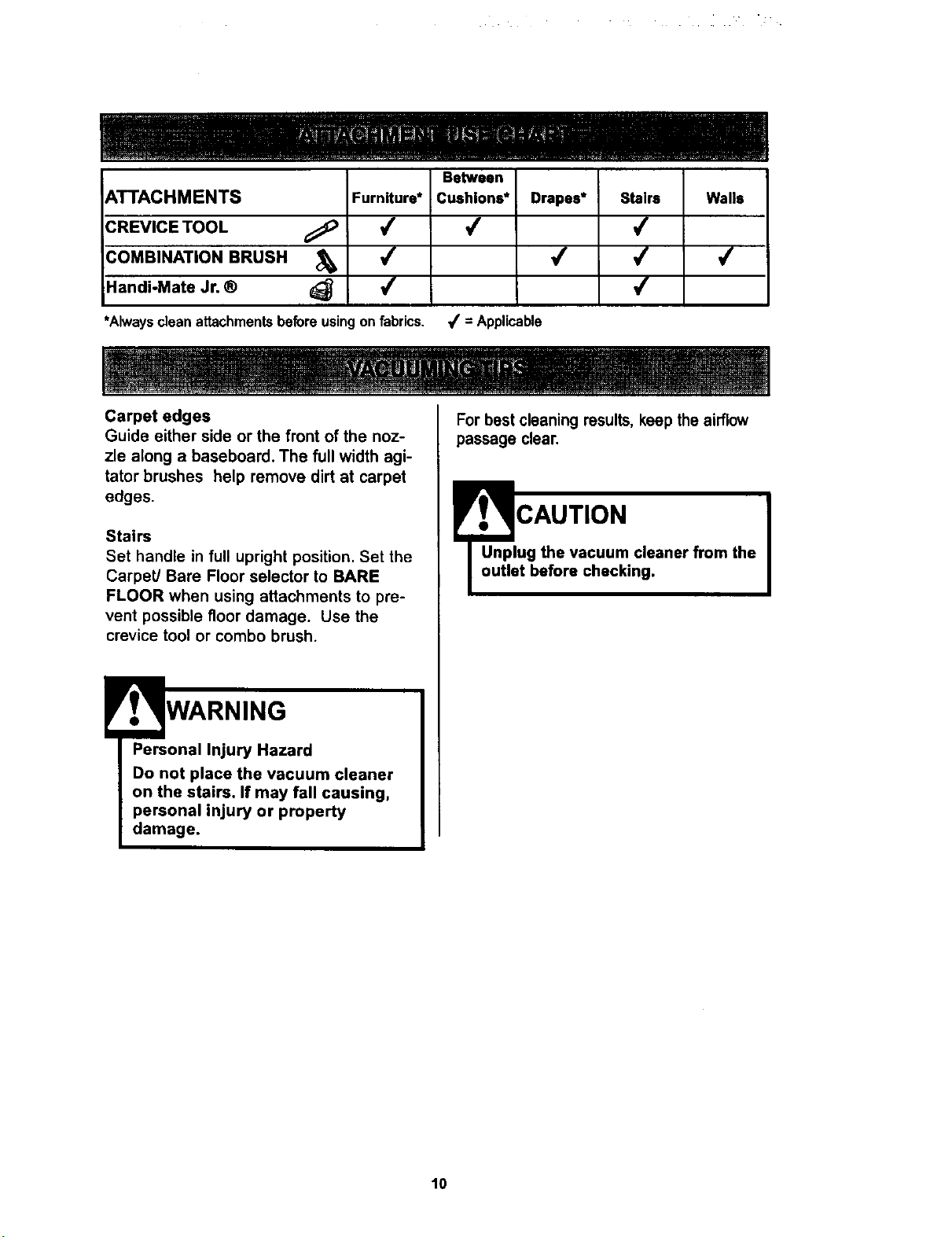
Between
ATTACHMENTS
CREVICE TOOL
COMBINATION BRUSH
Handi-Mate Jr. ®
FurnRure*
4
4
4
*Alwayscleanattachmentsbeforeusingon fabrics.
Cushions*
4
= Applicable
Drapes*
4
Stairs
4
,f
,f
Walls
4
Carpet edges
Guide either side or the front of the noz-
zle along a baseboard. The full width agi-
tator brushes help remove dirt at carpet
edges.
Stairs
Set handle in full upright position. Set the
CarpetJ Bare Floor selector to BARE
FLOOR when using attachments to pre-
vent possible floor damage. Use the
crevice tool or combo brush.
WARNING
Personal Injury Hazard
Do not place the vacuum cleaner
on the stairs. If may fall causing,
personal injury or property
damage.
For best cleaning results, keep the airflow
passage clear.
__CAUTION I
ug the vacuum cleaner from the
t before checking.
10
MOTOR PROTECTION
SYSTEM
Thermal Protector
This vacuum cleaner has a thermal
protector which automatically trips to
protect the vacuum from overheating. If a
clog prevents the normal flow of air to the
motor, the thermal protector turns the
motor off automatically. This allows the
motor to cool in order to prevent possible
damage to the vacuum cleaner.
To correct problem: If this occurs, turn
the vacuum cleaner off and unplug the
power cord from the outlet to allow the
vacuum cleaner to cool and the thermal
protector to reset. Check for and remove
clogs, if necessary. Also check and
cleanlreplace any clogged filters.Wait
approximately thirty (30) minutes and
plug the vacuum cleaner In and turn
back on to see if the motor protector
has reset. The motor protector will not
reset if the vacuum cleaner is not
turned off even if the vacuum cleaner
has cooled down.
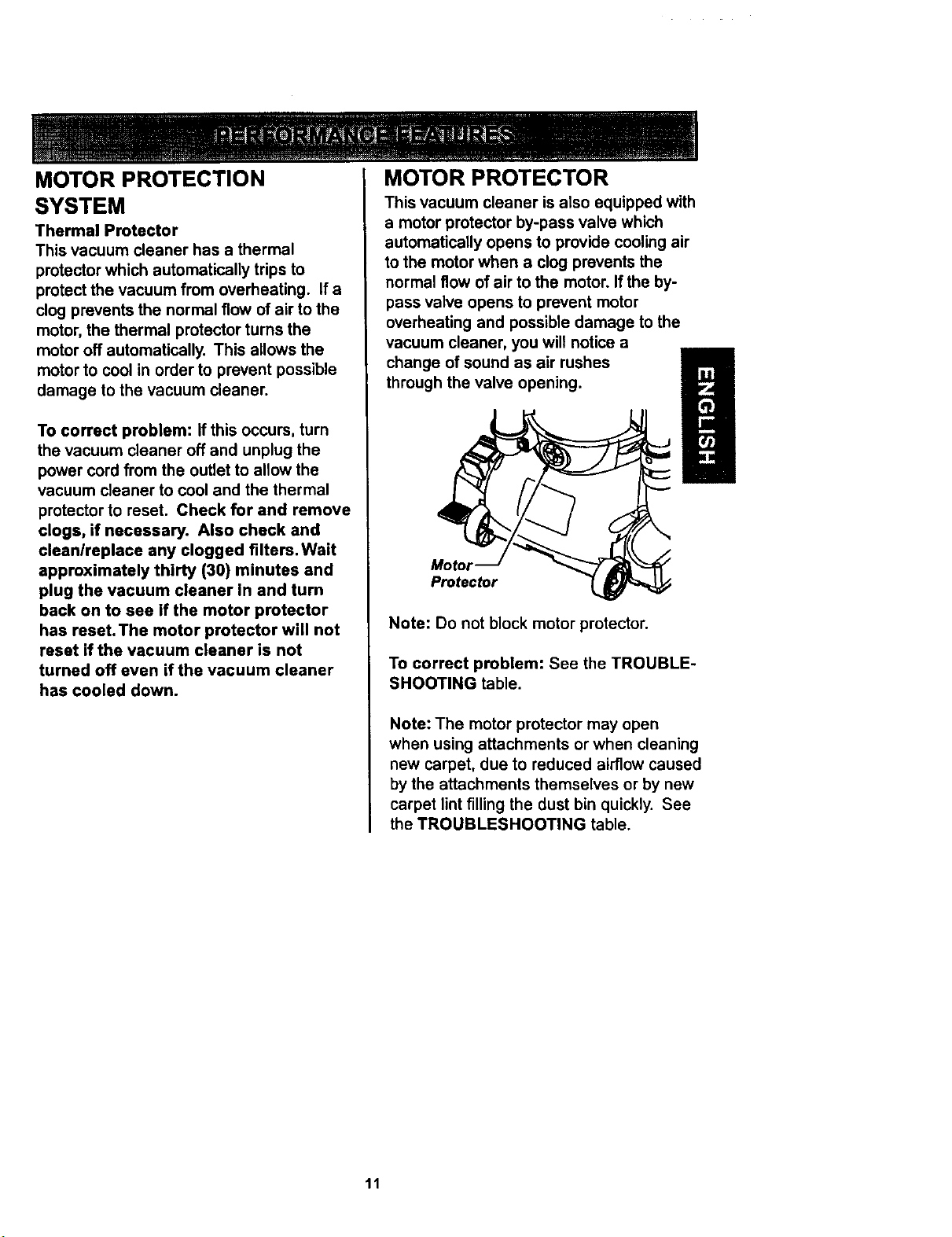
MOTOR PROTECTOR
This vacuum cleaner is also equipped with
a motor protector by-pass valve which
automatically opens to provide cooling air
to the motor when a clog prevents the
normal flow of air to the motor. If the by-
pass valve opens to prevent motor
overheating and possible damage to the
vacuum cleaner, you will notice a
change of sound as air rushes
through the valve opening.
Motor
Protector
Note: Do not block motor protector.
To correct problem: See the TROUBLE-
SHOOTING table.
Note: The motor protector may open
when using attachments or when cleaning
new carpet, due to reduced airflow caused
by the attachments themselves or by new
carpet lint filling the dust bin quickly. See
the TROUBLESHOOTING table.
11
DIRT SENSOR
The electronic dirt sensor is a feature
which will detect particles as they pass
through the vacuum cleaner.
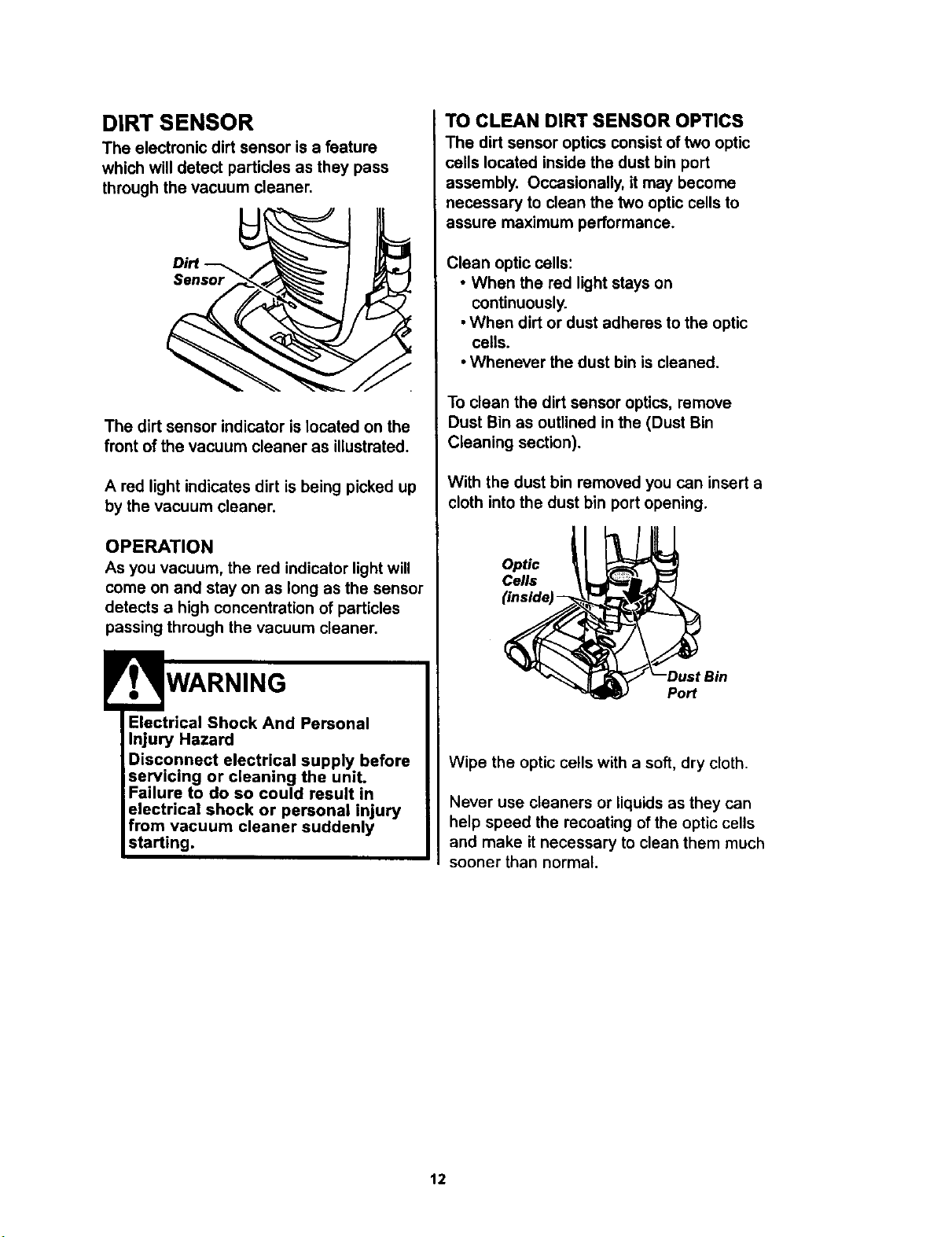
Dirt--_
Sensor
The dirt sensor indicator is located on the
front of the vacuum cleaner as illustrated.
A red light indicates dirt is being picked up
by the vacuum cleaner.
OPERATION
As you vacuum, the red indicator light will
come on and stay on as long as the sensor
detects a high concentration of particles
passing through the vacuum cleaner.
Electrical Shock And Personal
Injury Hazard
Disconnect electrical supply before
servicing or cleaning the unit.
Failure to do so could result in
electrical shock or personal injury
from vacuum cleaner suddenly
starting.
TO CLEAN DIRT SENSOR OPTICS
The dirt sensor optics consist of two optic
cells located inside the dust bin port
assembly. Occasionally, it may become
necessary to clean the two optic cells to
assure maximum performance.
Clean optic cells:
• When the red light stays on
continuously.
• When dirt or dust adheres to the optic
cells.
• Whenever the dust bin is cleaned.
To clean the dirt sensor optics, remove
Dust Bin as outlined in the (Dust Bin
Cleaning section).
With the dust bin removed you can insert a
cloth into the dust bin port opening.
Optic
Cells
(inside
Port
Wipe the optic cells with a soft, dry cloth.
Never use cleaners or liquids as they can
help speed the recoating of the optic cells
and make it necessary to clean them much
sooner than normal.
12
VACUUM CLEANER CARE
Always follow all safety precautions when
cleaning and servicing the vacuum
cleaner.
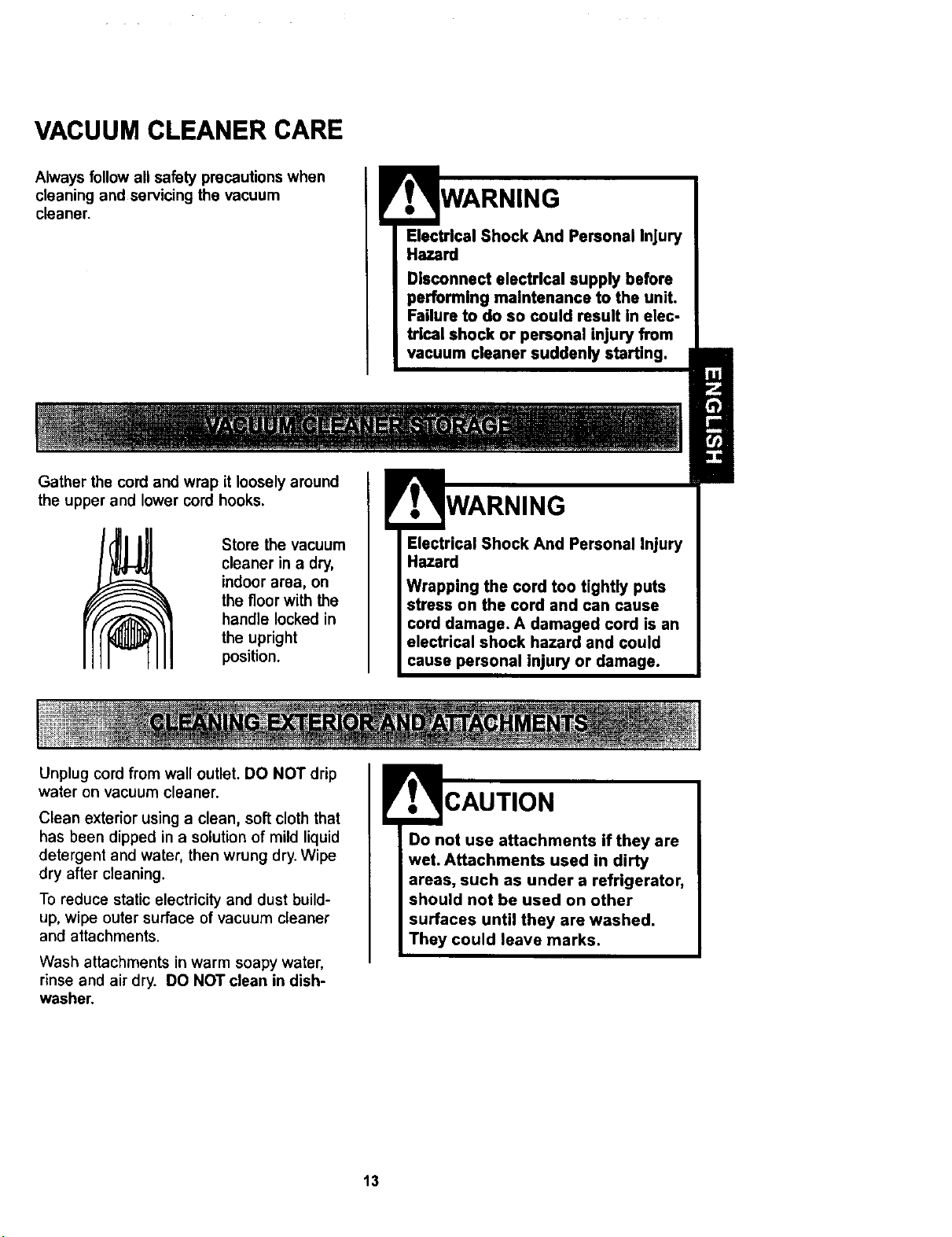
Gather the cord and wrap it loosely around
the upper and lower cord hooks.
Store the vacuum
cleaner in a dry,
indoor area, on
the floor with the
handle locked in
the upright
position.
Efectrlcal Shock And Personal Injury
Hazard
Disconnect efectrlcal supply before
performing maintenance to the unit.
Failure to do so could result In elec-
tr[cal shock or pemonal injury from
vacuum cleaner suddenly starting.
WARNING
Electrical Shock And Personal Injury
Hazard
Wrapping the cord too tightly puts
stress on the cord and can cause
cord damage. A damaged cord is an
electrical shock hazard and could
cause personal injury or damage.
Unplug cord from wall outlet. DO NOT drip
water on vacuum cleaner.
Clean exterior using a clean, soft cloth that
has been dipped in a solution of mild liquid
detergent and water, then wrung dry. Wipe
dry after cleaning.
To reduce static electricity and dust build-
up, wipe outer surface of vacuum cleaner
and attachments.
Wash attachments in warm soapy water,
rinse and air dry. DO NOT clean in dish-
washer.
Do not use attachments if they are
wet. Attachments used in dirty
areas, such as under a refrigerator,
should not be used on other
surfaces until they are washed.
They could leave marks.
13
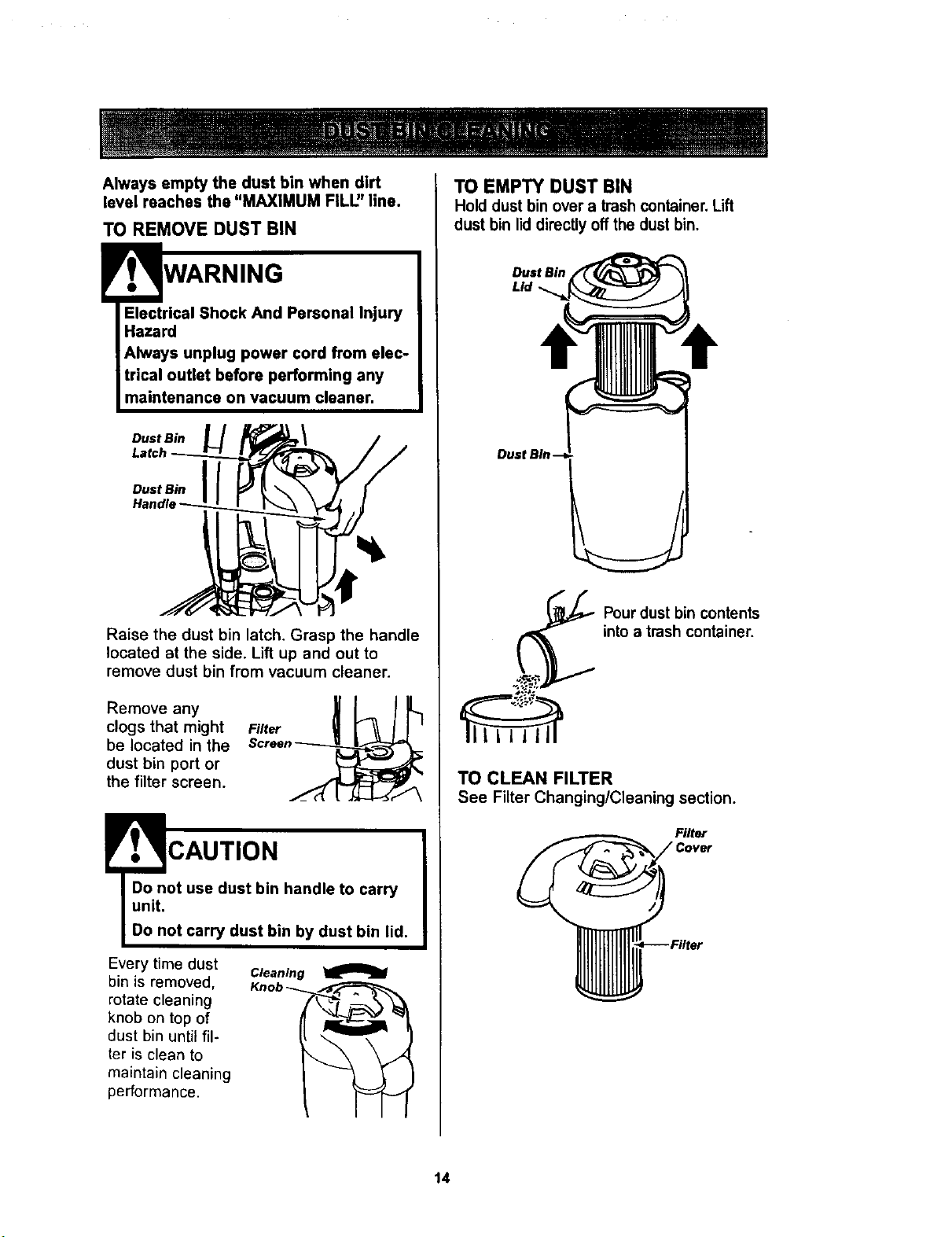
Always empty the dust bin when dirt
level reaches the "MAXIMUM FILU' line.
TO REMOVE DUST BIN
Electrical Shock And Personal Injury
Hazard
Always unplug power cord from elec-
trical outlet before performing any
maintenance on vacuum cleaner,
Dust Bin
Dust Bin
Raise the dust bin latch. Grasp the handle
located at the side. Lift up and out to
remove dust bin from vacuum cleaner.
Removeany _ k /_L.1
clogs that might Finer
be located in the Screen__
dust bin port or
the filter screen. _,_ I[ ..,(.(ZL..._-,-.-""_
!' ., CAUTION
Do not use dust bin handle to carry
unit.
Do not carry dust bin by dust bin lid.
Every time dust
bin is removed,
rotate cleaning
knob on top of
dust bin until fil-
ter is clean to
maintain cleaning
performance.
Cleaning
Knob __
TO EMPTY DUST BIN
Hold dust bin over a trash container. Lift
dust bin lid directly off the dust bin.
Dust Bin
Lid
Pourdust bin contents
into a trash container.
TO CLEAN FILTER
See Filter Changing/Cleaning section.
Filter
14
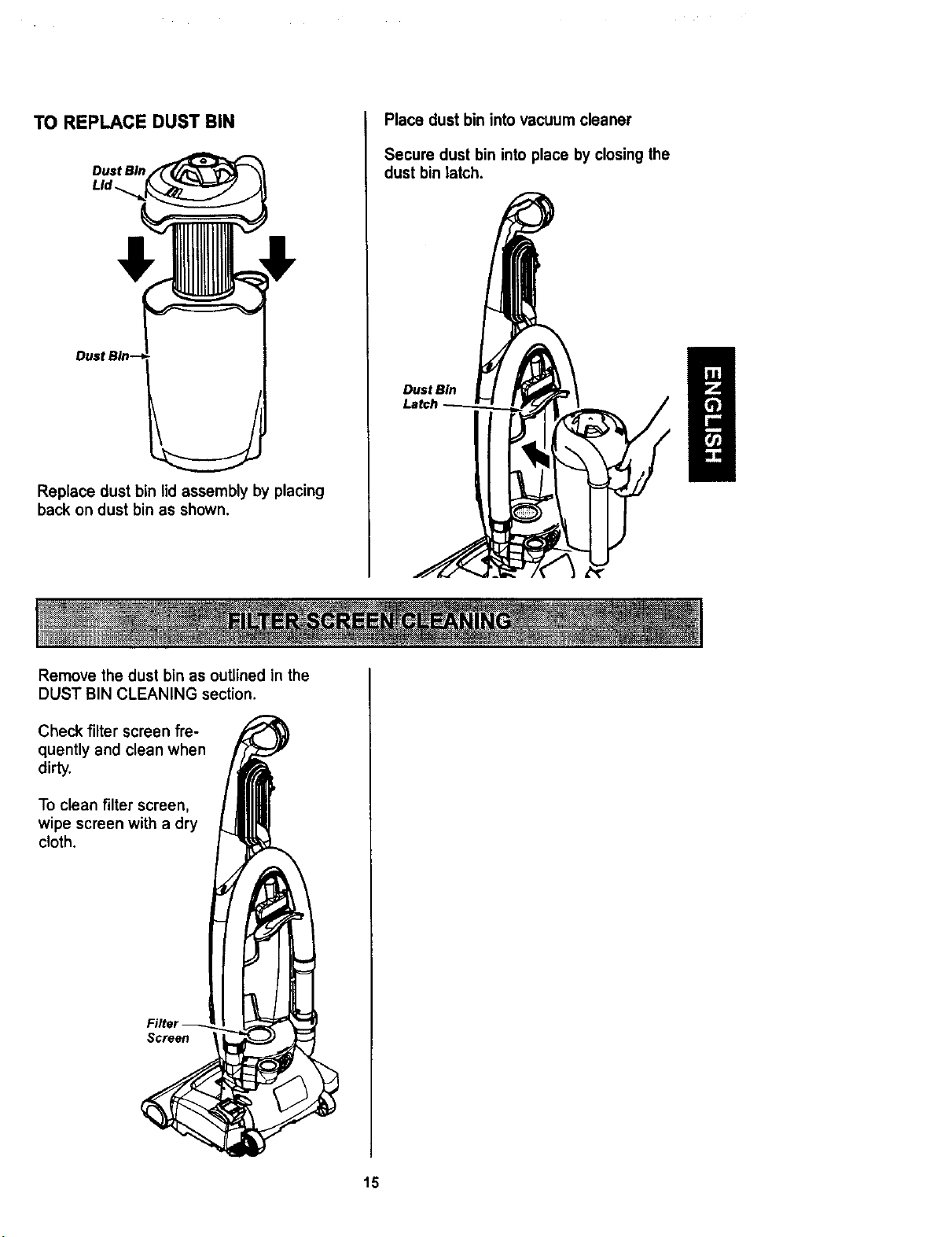
TO REPLACE DUST BIN
Dust Bin
LId_
Dust Bin--
Replace dust bin lid assembly by placing
back on dust bin as shown,
Place dust bin into vacuum cleaner
Secure dust bin into place by closing the
dust bin latch.
Dust Bin
Remove the dust bin as outlined in the
DUST BIN CLEANING section.
Check filter screen fre-
quently and clean when
dirty.
To clean filter screen,
wipe screen with a dry
cloth.
Filter
Screen
15
Electrical Shock Hazard
Unplug power cord from electrical
outlet. Do not operate the vacuum
cleaner without the primary or
exhaust filters. Be sure the filters
are properly installed to prevent
motor fadure and/or electrical shock.
PRIMARY FILTER
Check primary filter frequently and clean
when dirty.
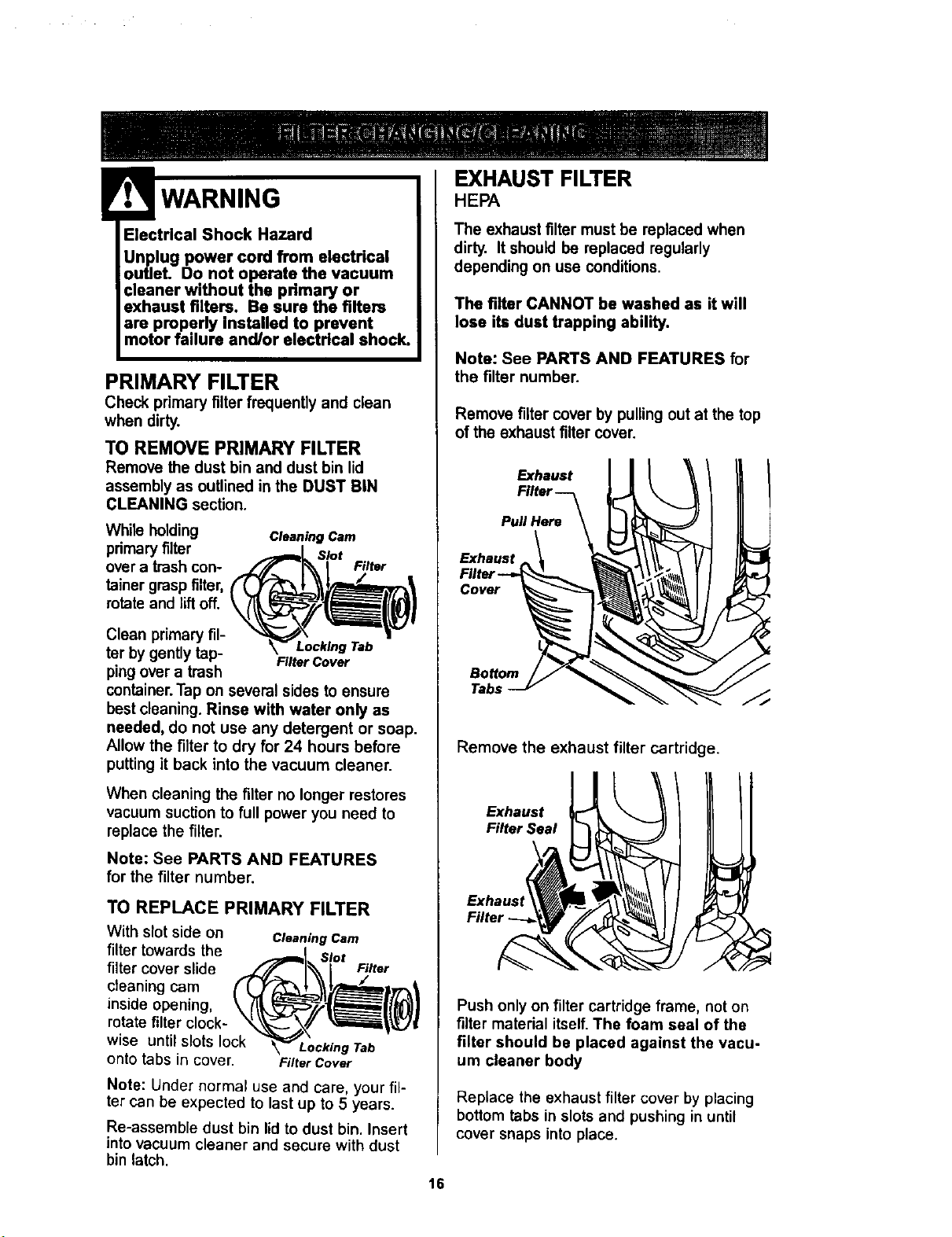
TO REMOVE PRIMARY FILTER
Remove the dust bin and dust bin lid
assembly as outlined in the DUST BIN
CLEANING section.
While holding ClHning Cam
pdmary filter Slot
over a trash con- Filter
tainer grasp filter,
rotate and lift off.
Clean primary fil-
Locking Tab
tar by gently tap- FilterCover
pingover a trash
container.Tap on several sides to ensure
bestcleaning. Rinse with water only as
needed, do not use any detergent or soap.
Allow the filter to dry for 24 hours before
putting it back into the vacuum cleaner.
When cleaning the filter no longer restores
vacuum suction to full power you need to
replace the filter.
Note: See PARTS AND FEATURES
for the filter number.
TO REPLACE PRIMARY FILTER
With slot side on
filter towards the
filter cover slide
cleaning cam
inside opening,
rotate filter clock-
wise until slots lock
onto tabs in cover.
Cleaning Cam
Slot
Filter
Locking Tab
Filter Cover
Note: Under normal use and care, your fil-
ter can be expected to last up to 5 years.
Re-assemble dust bin lid to dust bin. Insert
into vacuum cleaner and secure with dust
bin latch.
EXHAUST FILTER
HEPA
The exhaust filter must be replaced when
dirty. It should be replaced regularly
depending on use conditions.
The filter CANNOT be washed as it will
lose its dust trapping ability.
Note: See PARTS AND FEATURES for
the filter number.
Remove filter cover by pulling out at the top
of the exhaust filter cover.
II!
Remove the exhaust filter cartridge.
Exhaust
Filter Seal
Push only on filter cartridge frame, not on
filter material itself.The foam seal of the
filter should be placed against the vacu-
um cleaner body
Replace the exhaust filter cover by placing
bottom tabs in slots and pushing in until
cover snaps into place.
16
WARNING
Electrical Shock Or Personal Injury
Hazard
Disconnect electrical supply before
servicing or cleaning the unlL
Failure to do so could result in
electdcal shock or personal injury
from vacuum cleaner suddenly
starting.
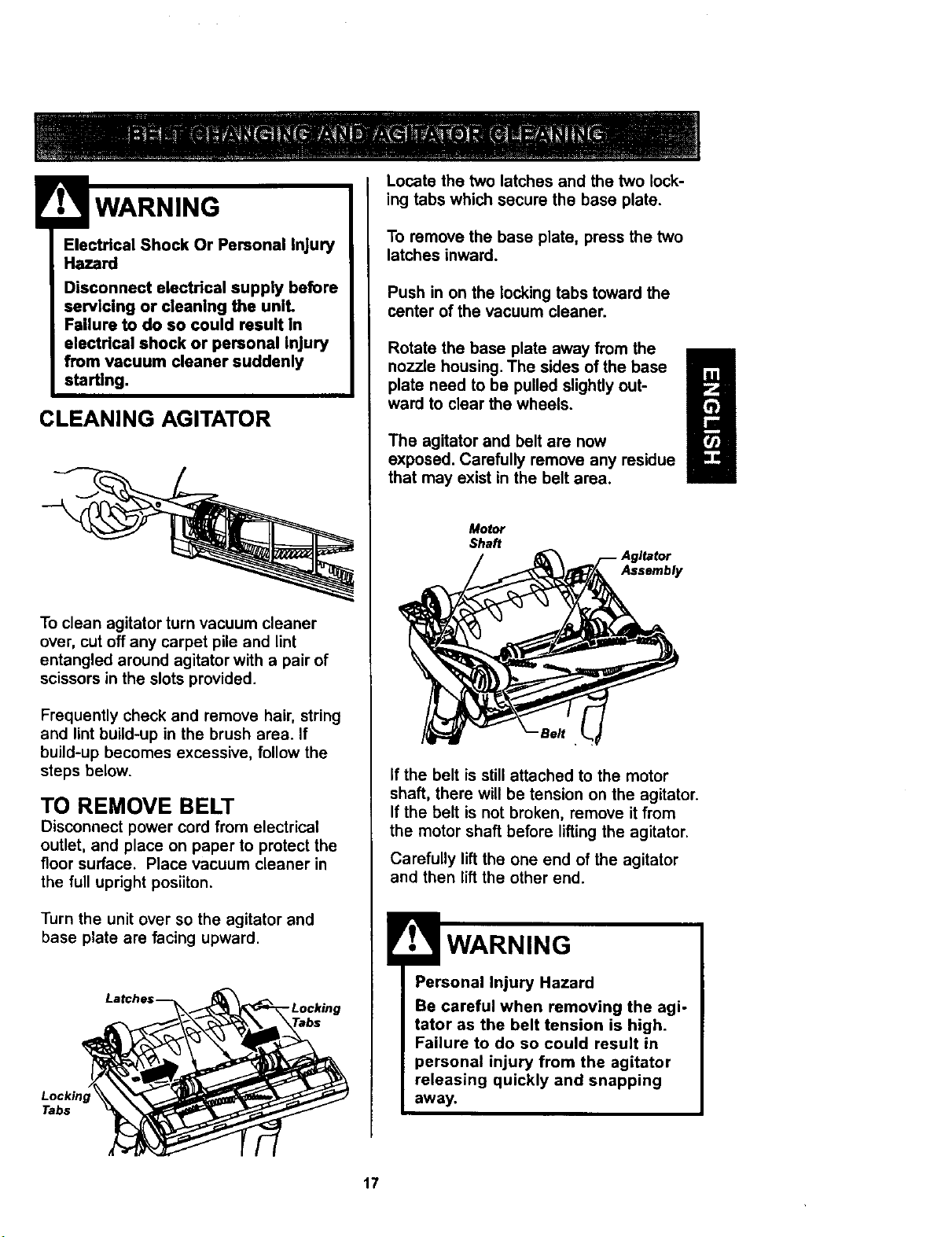
CLEANING AGITATOR
To clean agitator turn vacuum cleaner
over, cut off any carpet pile and lint
entangled around agitator with a pair of
scissors in the slots provided.
Frequently check and remove hair, string
and lint build-up in the brush area. If
build-up becomes excessive, follow the
steps below.
TO REMOVE BELT
Disconnect power cord from electrical
outlet, and place on paper to protect the
floor surface. Place vacuum cleaner in
the full upright posiiton.
Turn the unit over so the agitator and
base plate are facing upward.
Lockin
Tabs
- Locking
Locate the two latches and the two lock-
ing tabs which secure the base plate.
To remove the base plate, press the two
latches inward.
Push in on the locking tabs toward the
center of the vacuum cleaner.
Rotate the base plate away from the
nozzle housing. The sides of the base
plate need to be pulled slightly out-
ward to clear the wheels.
The agitator and belt are now
exposed. Carefully remove any residue
that may exist in the belt area.
Motor
Shaft
Assembly
If the belt is still attached to the motor
shaft, there will be tension on the agitator.
If the belt is not broken, remove it from
the motor shaft before lifting the agitator.
Carefully lift the one end of the agitator
and then lift the other end.
Personal Injury Hazard
Be careful when removing the agi-
tator as the belt tension is high.
Failure to do so could result in
personal injury from the agitator
releasing quickly and snapping
awa_
17
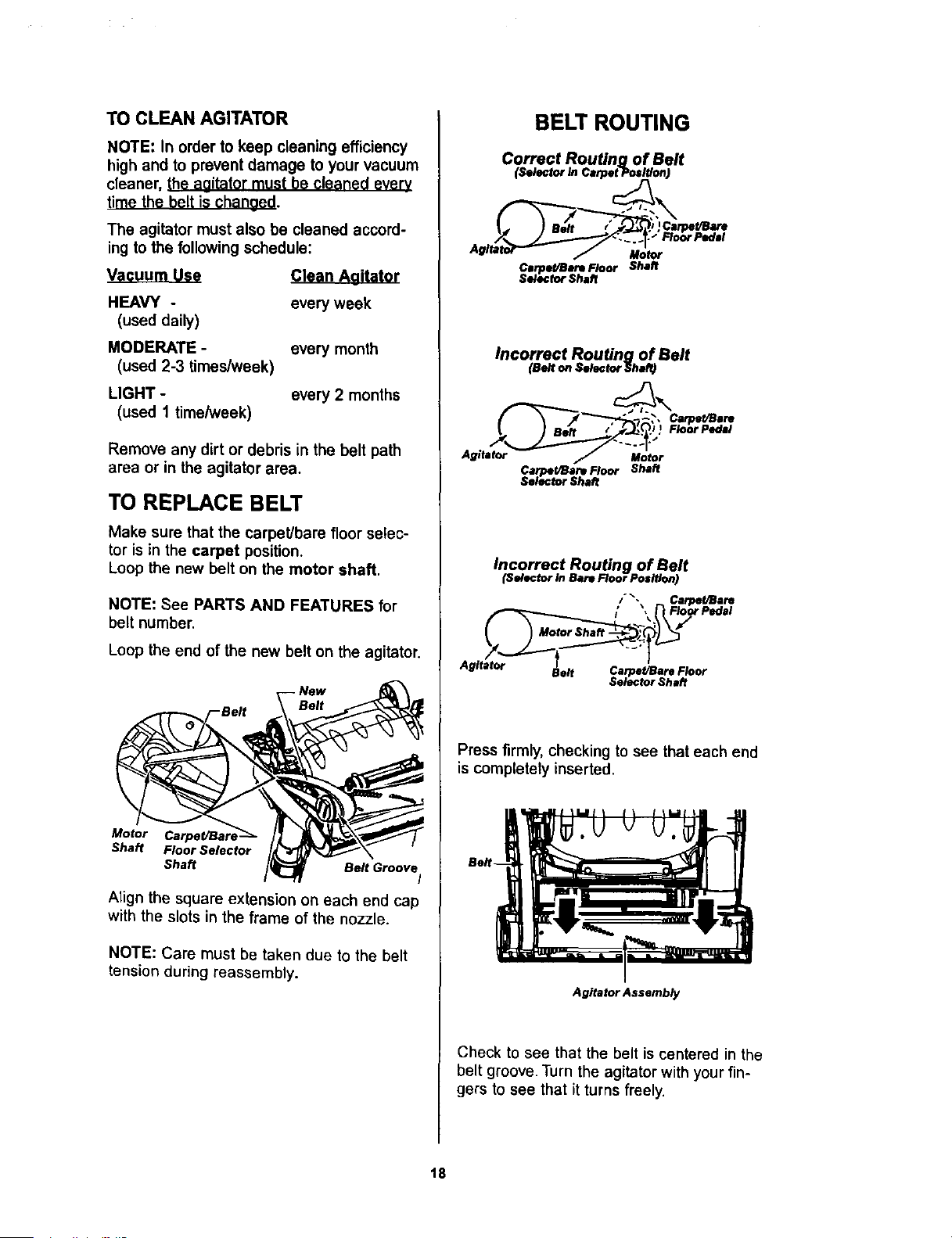
TO CLEAN AGITATOR
NOTE: In order to keep cleaning efficiency
high and to prevent damage to your vacuum
cleaner, the aaitator must be cleaned everv
time the belt is chanoed.
The agitator must also be cleaned accord-
ing to the following schedule:
Vacuum Use
HEAVY -
(used dally)
MODERATE -
(used 2-3 times/week)
LIGHT -
(used 1 time/week)
Clean Aaitator
every week
every month
every 2 months
Remove any dirt or debris in the belt path
area or in the agitator area.
TO REPLACE BELT
Make sure that the carpet/bare floor selec-
tor is in the carpet position.
Loop the new belt on the motor shaft.
NOTE: See PARTS AND FEATURES for
belt number.
Loop the end of the new belt on the agitator.
-Belt
Motor
Shaft Floor Selector
Shaft Belt Groove
I
Align the square extension on each end cap
with the slots in the frame of the nozzle.
NOTE: Care must be taken due to the belt
tension during reassembly.
BELT ROUTING
Correct Routing of Belt
(Selector In CerpetP___)
I., I aeft / .J,J._,lj )Carpet/Bare
Agft=_r"-- / u;_,
Clrpe#Bere Floor ShaR
Seleclor Shaft
Incorrect Routing of Belt
(Belt on Seleclor Shaf_
.J
Agitator Motor
Carpet/Bare Floor Shaft
Selector Shaft
Incorrect Routing of Belt
(Selector In Bare Floor Position)
/ _.\ Carpet/Bare
/ , Floor Pedal
Agitator
Belt Carpel/Bare Floor
Selector Shaft
Press firmly, checking to see that each end
is completely inserted.
Agitator Assembly
Check to see that the belt is centered in the
belt groove. Turn the agitator with your fin-
gers to see that it turns freely.
18
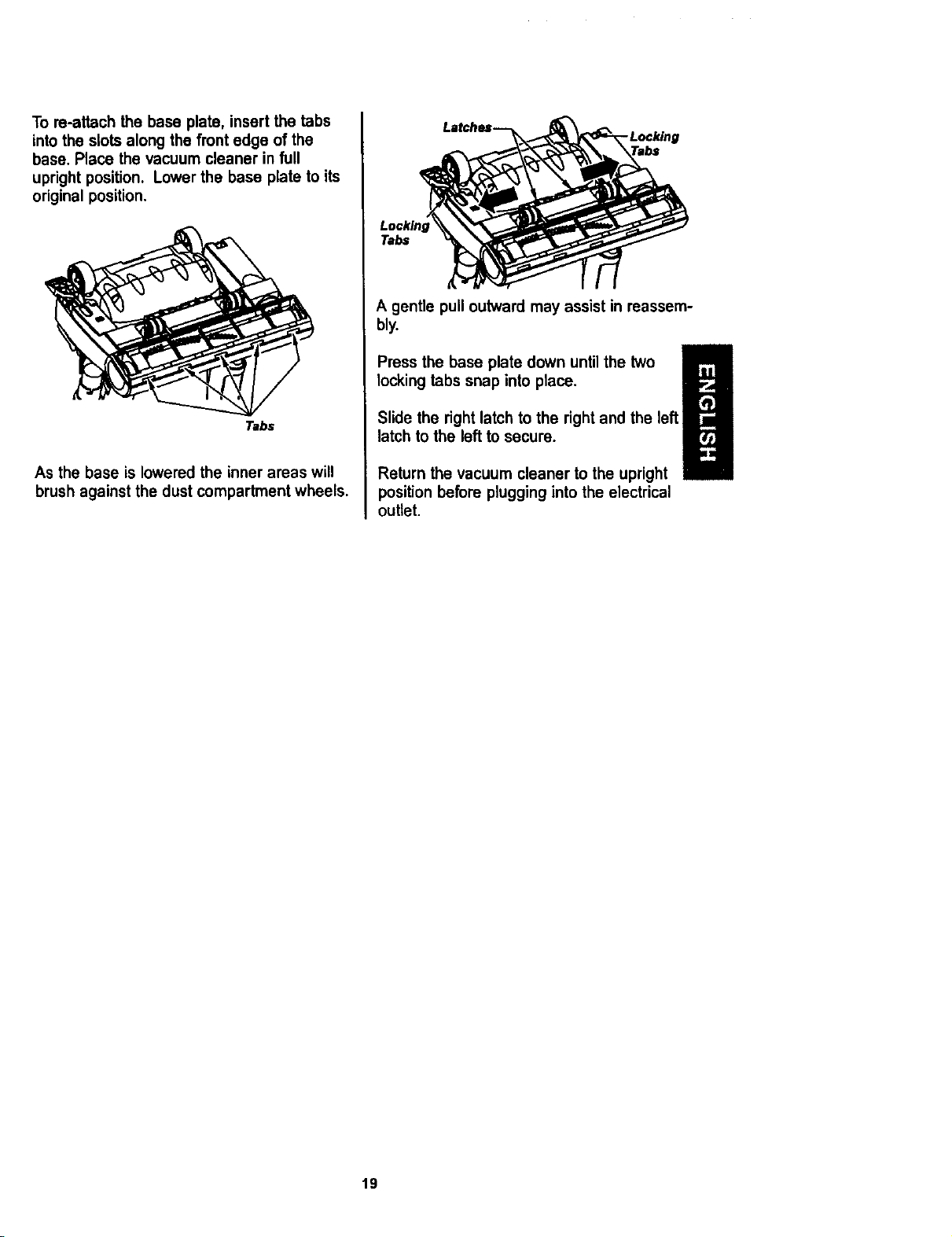
To re-attach the base plate, insert the tabs
into the slots along the front edge of the
base. Place the vacuum cleaner in full
upright position. Lower the base plate to its
original position.
Tabs
As the base is lowered the inner areas will
brush against the dust compartment wheels.
.Locking
Tabs
A gentle pull outward may assist in reassem-
bly.
m
Press the base plate down until the two
locking tabs snap into place.
I!
Slide the right latch to the right and the left
latch to the left to secure.
Return the vacuum cleaner to the upright
position before plugging into the electrical
outlet
19
Alwaysfollow allsafetyprecautionswhen
cleaningand servicingthevacuumcleaner.
Electrical Shock Or Personal Injury
Hazard
Disconnect electrical supply before
servicing or cleaning the unit. Failure
to do so could result in electrical
shock or personal injury from vacu-
um cleaner suddenly starting.
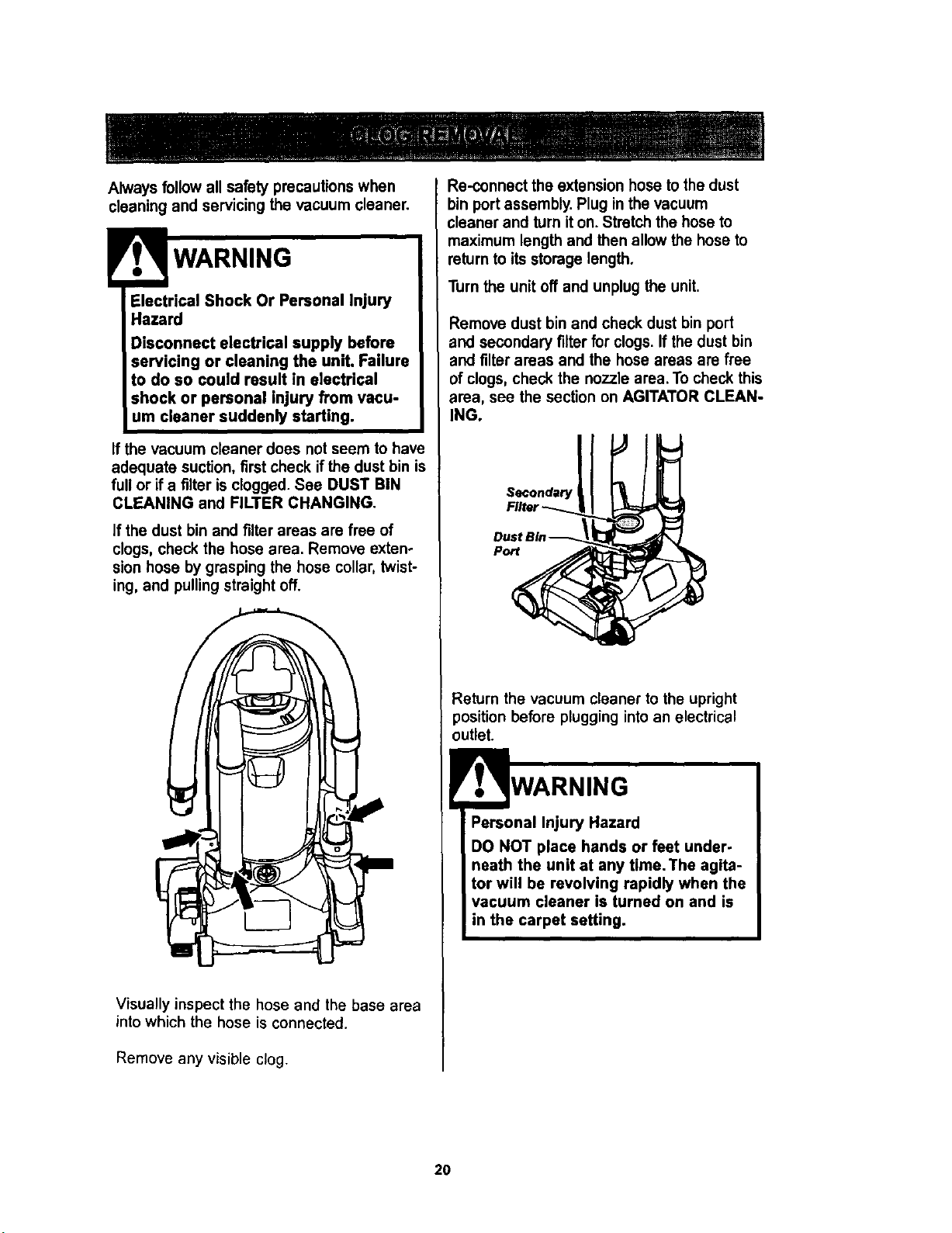
If the vacuum cleaner does not seem to have
adequate suction, first check if the dust bin is
full or if a tilter is clogged. See DUST BIN
CLEANING and FILTER CHANGING.
If the dust bin and tilter areas are free of
clogs, check the hose area. Remove exten-
sion hose by grasping the hose collar, twist-
ing, and pulling straight off.
i
Visually inspect the hose and the base area
into which the hose is connected.
Remove any visible clog.
Re-connect the extension hose to the dust
bin port assembly. Plug in the vacuum
;leaner and turn it on. Stretch the hose to
maximum length and then allow the hose to
return to its storage length.
Turn the unit off and unplug the unit.
Remove dust bin and check dust bin port
and secondary filter for clogs. If the dust bin
and tilter areas and the hose areas are free
of clogs, check the nozzle area. To check this
area, see the section on AGITATOR CLEAN-
ING.
Secondary
Port
Return the vacuum cleaner to the upright
position before plugging into an electrical
i
Personal Injury Hazard
DO NOT place hands or feet under-
neath the unit at any time. The agita-
tor will be revolving rapidly when the
vacuum cleaner is turned on and is
in the carpet setting.
2O
Electrical Shock Or Personal Injury
Hazard
Disconnect electrical supply before
performing maintenance or cleaning
the unit. Failure to do so could result
in electrlcal shock or personal Injury
from vacuum cleaner suddenly
starting.
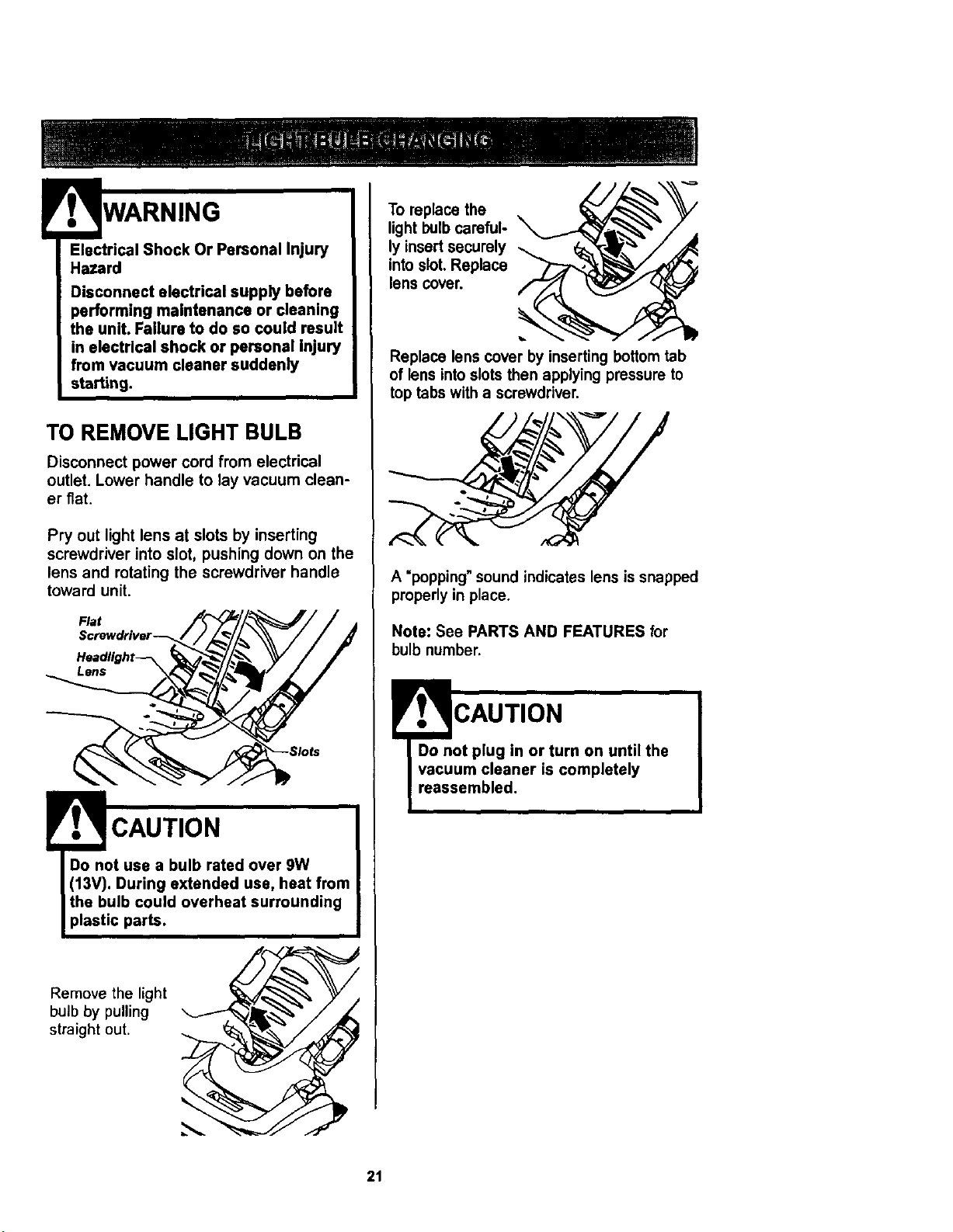
TO REMOVE LIGHT BULB
Disconnect power cord from electrical
outlet. Lower handle to lay vacuum clean-
er fiat.
Pry out light lens at slots by inserting
screwdriver into slot, pushing down on the
lens and rotating the screwdriver handle
toward unit.
Flat
CAUTION
Do not use a bulb rated over 9W
(13V). During extended use, heat from
the bulb could overheat surrounding
plastic parts.
Remove the light
bulb by pulling
straight out.
To replace the
light bulb careful-
ly insert securely
into slot. Replace
lens cover.
Replace lens cover by inserting bottom tab
of lens intoslots then applying pressure to
top tabs with a screwdriver.
A "popping"sound indicates lens is snapped
properly in place.
Note: See PARTS AND FEATURES for
bulb number.
!
r ., CAUTION
Do not plug in or turn on until the
vacuum cleaner is completely
reassembled.
21
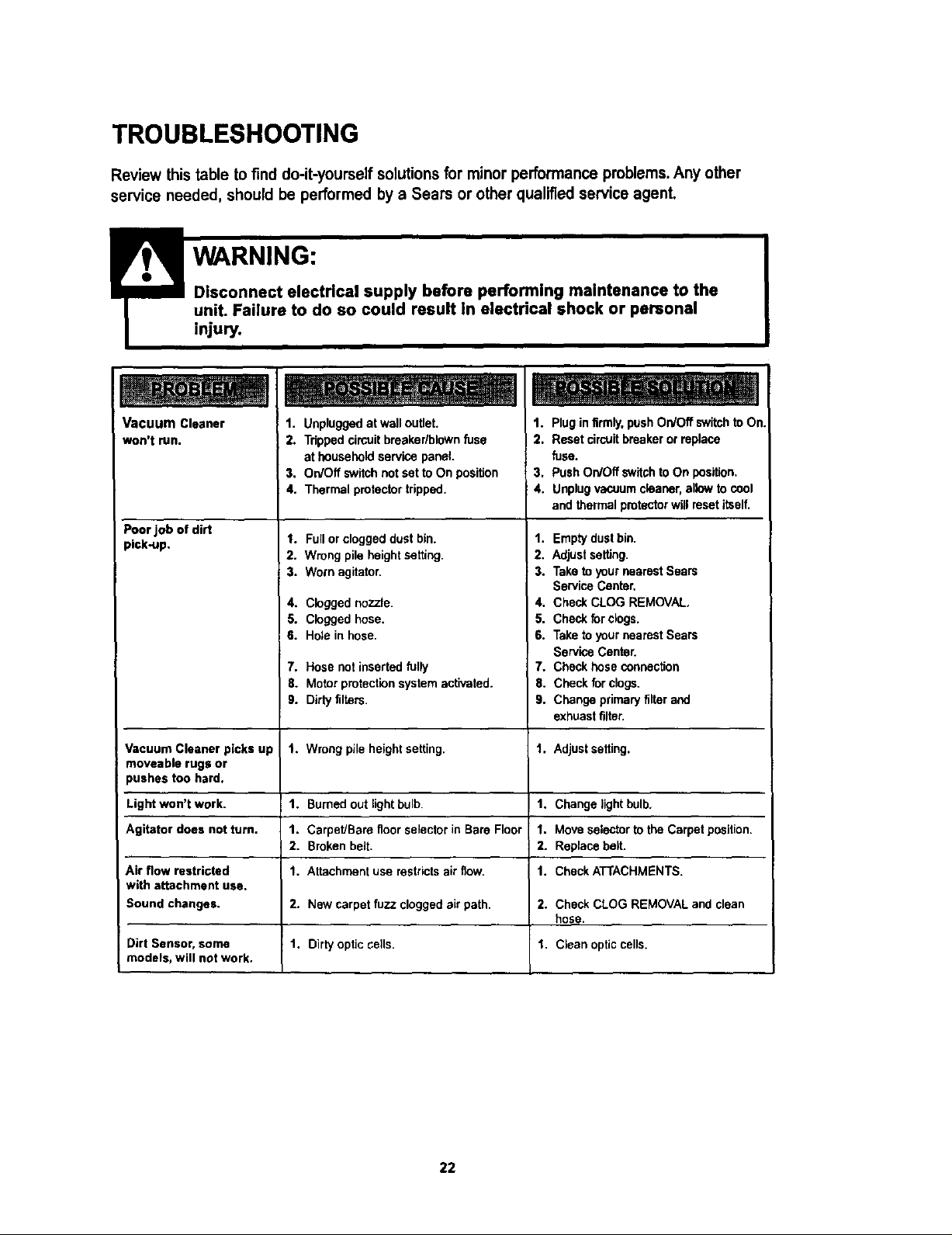
TROUBLESHOOTING
Review this table to find do-it-yourself solutions for minor performance problems. Any other
service needed, should be performed by a Sears or other qualified service agent.
Vacuum Cleaner 1. Unpluggedat walloutlet.
won't run. 2. Trippedcircuitbreaker/blownfuse
at householdservicepanel.
3, On/OffswitchnotsettoOn position
4. Thermal protector tripped,
4. Cloggednozzle.
5. Cloggedhose.
6. Holein hose,
Poor job of dirt
pick-up. 1.
2.
3.
7.
8.
9.
Vacuum Cleaner picks up 1.
moveable rugs or
pushes too hard.
Light won't work. 1.
Agitator does not turn. 1.
2.
Air flow restricted I.
with attachment use.
Sound changes. 2.
Dirt Sensor, some 1.
models, will not work.
1. Plug in firmly, push On/Off switch to On
2. Reset circUitbreaker or replace
fuse.
3. Push On/Off switchto On position,
4. Unplug vacuum cleaner, allow to cool
and thermal protector will reset itself.
Fullor cloggeddustbin. 1.
Wrongpile heightsetting. 2.
Wornagitator. 3.
4.
5.
6.
Hosenotinsertedfully 7.
Motorprotectionsystemactivated, fi.
Dirtyfilters. 9.
Emptydustbin.
Adjustsetting.
Taketo yournearestSears
ServiceCenter,
CheckCLOGREMOVAL.
Checkfor clogs.
TaketoyournearestSears
ServiceCenter.
Checkhoseconnection
Checkforclogs.
Changeprimaryfilterand
exhuastfilter.
Wrong pile height setting. 1. Adjust setting.
Burned out light bulb. 1. Change lightbulb,
Carpet/Bare floor selector in Bare Floor 1. Move selector to the Carpet position.
Broken belt. 2. Replace belt.
Attachment use restricts air flow. 1. Check ATTACHMENTS.
New carpet fuzz clogged air path. 2. Check CLOG REMOVAL and clean
hose.
Dirty optic cells. 1. Clean optic cells.
22
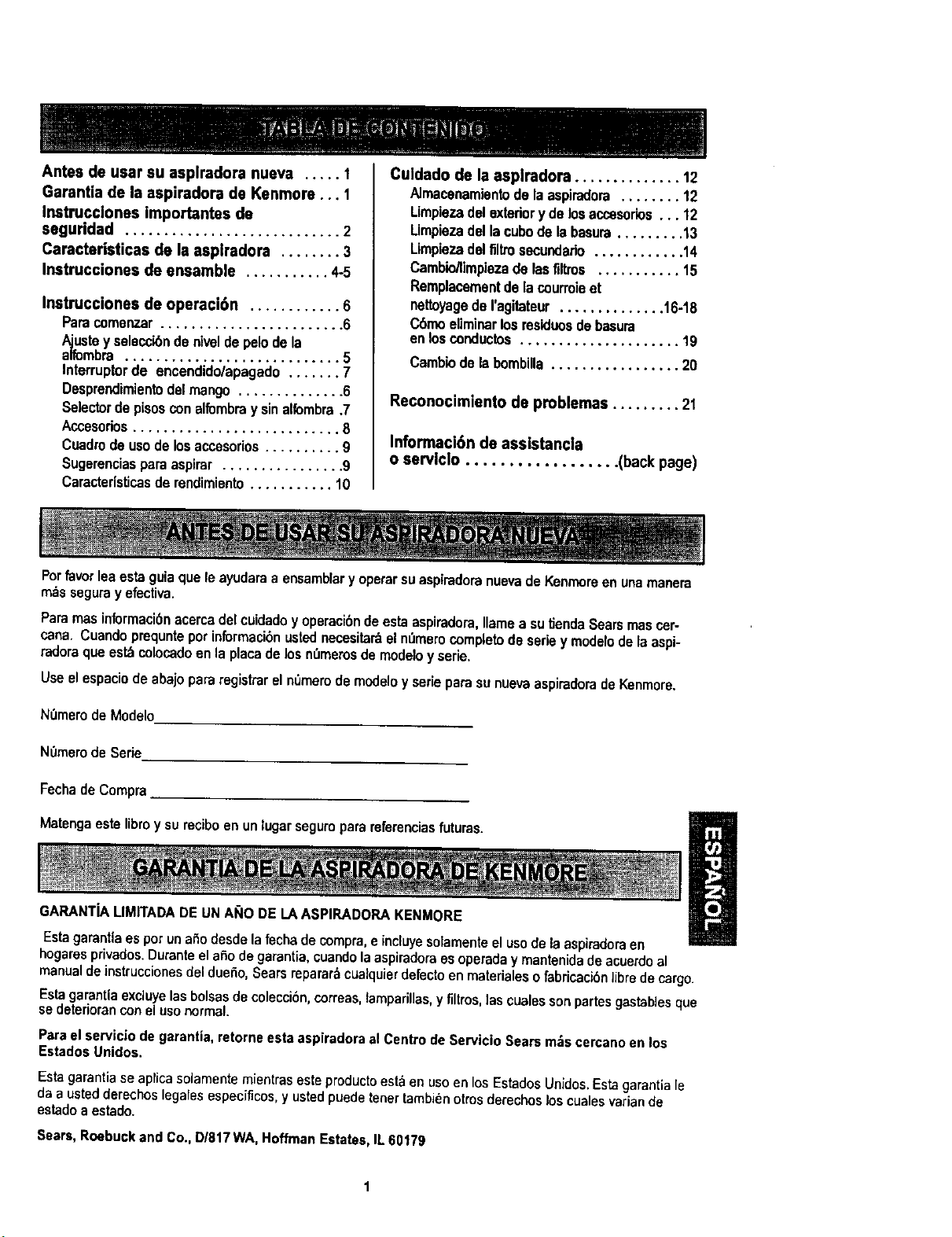
Antes de usar su asplradora nueva ..... 1
Garantia de la espiradora de Kenmore ... 1
Instmcclones importantes de
segurldad ............................ 2
Caracteristicas de la asplradora ........ 3
Instrucciones de ensamble ........... 4-5
Instrucciones de operaci6n ............ 6
Parecomenzar........................ 6
a_te y seleccibndenhteldepelodela
mbra ............................ 5
Interruptorde encendido/apagado....... 7
Desprendk_ientodelmango .............. 6
Selectordepisosconalfornbray sinalfombra.7
Accesorios........................... 8
Cuadrodeusode losaccesorios.......... 9
Sugorenciasparaaspirer ................ 9
Caracter(sticasde rendimiento........... 10
Culdado de la asplradora .............. 12
Almacenamientode laasplradora........ 12
Limpiezadel exteriory delosaccesorios... 12
Limpiezadel lacubode labasura......... 13
Limpiezadelfltttosecundario............ 14
Camblo/limpiezade lasfiltros ........... 15
Remplacementdelacourroieet
nettoyagedeI'agitateur.............. 16-18
Cbmoeliminarlosresiduosdebasupa
enlosconductos ..................... 19
Cambiodelabombilla................. 20
Reconocimiento de problemas ......... 21
tnformac|6n de assistancia
o servlclo .................. (back page)
Por favor lea esta guia que le ayudara a ensamblar y operar su aspiradora nueva de Kenmoreon una manera
rods sagupay efectiva.
Papamasinformacibnacercadelcuidadoy operacibndeestaaspiradora,llamaasutJendaSearsmascer-
cana. Cuandoprequnteporinformacibnustednecesitaraeln_merocompletode seriey modelodelaaspi-
Padoraqueest_colocadoenlaplacadelosn_merosdemodeloy serie.
UseelespaciodeabajopaparegistParelnt_merodemodeloy aerieparesunuevaaspiradoradeKenmore.
N0merodeModelo
NOmerode Serie
FechadeComppa
Matengaestetibroy sureciboenun |ugarseguroparareterenciasfutures.
GARANTiA LIMITADA DE UN A_IO DE LAASPIRADORA KENMORE
EstagarantlaesporunaSodesdelafachadecompra,e induyesolamenteel usodelaaspipadoraen
hogapasprivados.DuranteelaSodegapantia,cuandolaaspiradoraesoperaday manfanidadeacuerdoal
manualdeinstruccionesdeldueho,Searsrepararbcualquierdefectoenmateflalesofabricacibn]ibredecargo.
Esta garantia excluye las bolsasde colecci6n,correas, lamparillas,y filtros,las cuales sonpartes gastab]esque
se deteriorancon el uso normal.
Para el servicJode garantia, retorne esta aspiradora al Centro de Servicio Sears m_s cercano en los
Estados Unidos.
Esta garantia se aplicasolamente mientras este productoest& en uso en losEstados Unidos. Estagarantia le
da a usted derechos legales especificos, y usted puede tenet tambien otros derechos los cuales varian de
estado a estado.
Sears, Roebuck and Co., D/817 WA, Hoffman Estates, IL 60179
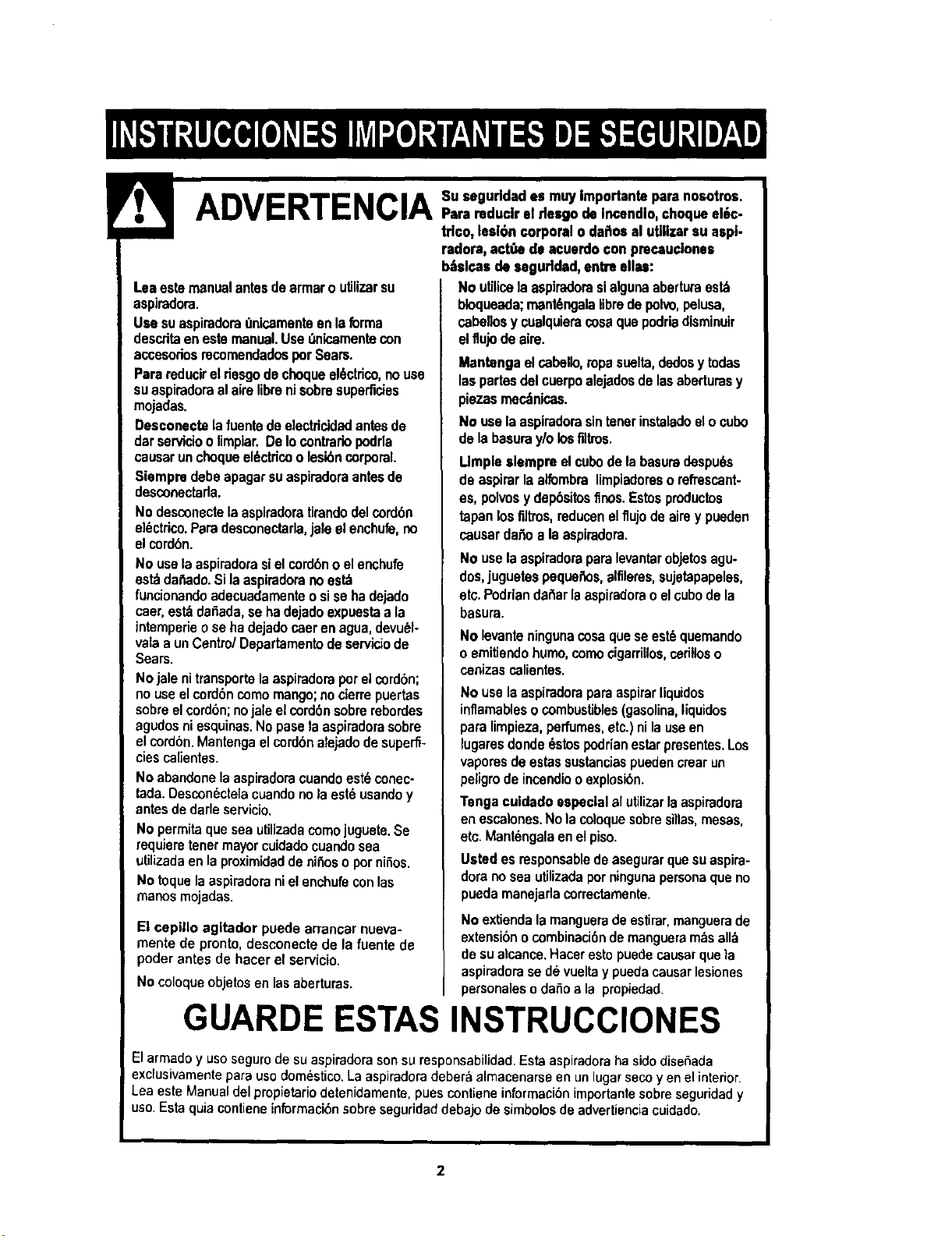
t A JJ"_l___ Importanteparsnosotros,
' s,c.
trlco,lesion corporalo dafiosal uUilzarsuaspl-
Leaestemanualantesdearmaro utilizarsu
aspiradom.
UsesuaspiradoraQnicamenteenlaforma
desc,ritaenestemanual.UseOnicamentecon
accesoriosmcomendadosporSears.
Parereducirel riesgodechoquael6ctrico,nouse
suaspiradoraalairslibranisobresuperficies
mojadas.
Desconectelafuentedeelectriddadantesde
darservicioolimpiar.DeIocontrariopodda
causarunchoqueel_ctricoo lesibncorporal.
Siempredebeapagarsuaspiradoraantesde
desconectada.
Nodesconectelaaspiradoratirandodelcordbn
el_ctrico.Parsdesconectarla,jaleelenchute,no
elcord6n.
Nouselaaspiradorasielcordbnoelenchufe
est_da_do. Sila aspiradorano est_
funcionandoadecuadamenteosise hadejado
caer,est_daSada,sehadejadoexpuestaa la
tntemperieo sehadejadocaerenagua,devu_l-
valaa unCentre/Departamentedeserviciode
Sears.
Nojalenitransportelaaspiradoraporelcord6n;
nouseelcord6ncomomango;nocierrepuertas
sobreelcord6n;nojale elcord6nsobrerebordes
agudosniesquinas.Nopasslaaspiradorasobre
elcordon.Mantengaelcord6nalejadodesuperfi-
ciescalientes.
Noabandonelaaspiradoracuandoest_conec-
tada.Descon6ctelacuandonolaest6usandoy
antesdedarleservicio.
No permitaqueseautilizadacomojuguete.Se
requiemtenetmayorcuidadocuandosea
utilizadaenlapmximidaddenitrosopornifios.
Notoquelaaspiradoranielenchufeconlas
manosmojadas.
El cepillo agitador puede an-ancar nueva-
mente de pronto, desconecte de la fuente de
poder antes de hacer el servicio.
No coloqueobjetosen las aberturas.
radora_act,s de acuerdoconprecaudones
b:tslcasdo asguddad, entreelias:
Noutilicelaaspimdorasialgunaaberturaest_
bloqueada;maot6ngalafibredepolvo,pelusa,
cabellosy cualquieracosaquepodriedisminuir
elfiujodeairs.
Mantengaelcabello,topssuelta,dsdosy todas
laspartesdelcuerpoalejadosdelasaberturasy
piezasrnec_nicas.
No uselaaspiradorasintenerinstaladoelocubo
delabasuray/olosflltros.
Umpleslempreelcubodelabasumdespu6s
de aspirarlaalfombmlimpiadoreso refrescant-
es,polvosy dep_sitesfinos.Estospmductos
tapanlosfiltros,reducenelflujodeairsy pueden
causardafioa laaspimdora.
No uselaaspiradoraparalevantarobjetosagu-
dos,juguetespeque_s, alfileres,sujetapapeles,
etc.Podriandattarlaaspiradorao elcubodela
basura.
No levanteningunacosaquaseest_quemando
oemitiendohumo,comacigarrillos,cerifioso
cenizascalientes.
No usela aspiradoraparaaspirarliquidos
inflamablesocombustibles(gasolina,liquidos
paralimpieza,perfumes,etc.)nilauseen
lugaresdonde_stespodrienestarpresentes.Los
vaporesdeestassustanciaspuedencrearun
peligmdeincendiooexplosi6n.
Tsngacuidadoespecialalutilizarlaaspimdom
enescalones.Nola coloquesobresillas,mesas,
etc.Mant_ngalaenelpiso.
Ustedes responsabledeasegurarquesuaspira-
doranoseautilizadapor ningunapersonaqueno
puedamanejarlacormctamente.
No extienda la manguera de estirar,manguerade
extensi6n o combinaci6nde manguera mds all_
de su alcance.Hacer esto puedecausarque ta
aspiradorase de vuelta y puedacausar lesiones
personales o dafio a la pmpiedad.
GUARDE ESTAS INSTRUCClONES
El armado y uso seguro de su aspiradorason su responsabilidad.Esta aspiradora ha sido disefiada
exciusivamente para uso dom_stico. La aspiradora debera almacenarse en un lugar seco yen el interior.
Lea este Manual del propietariodetenidamente, pues contiene informacibn importante sobre seguridad y
uso. Esta quia contiene informaci6n sobre seguridad debajo de simbolos de advertiencia cuidado.
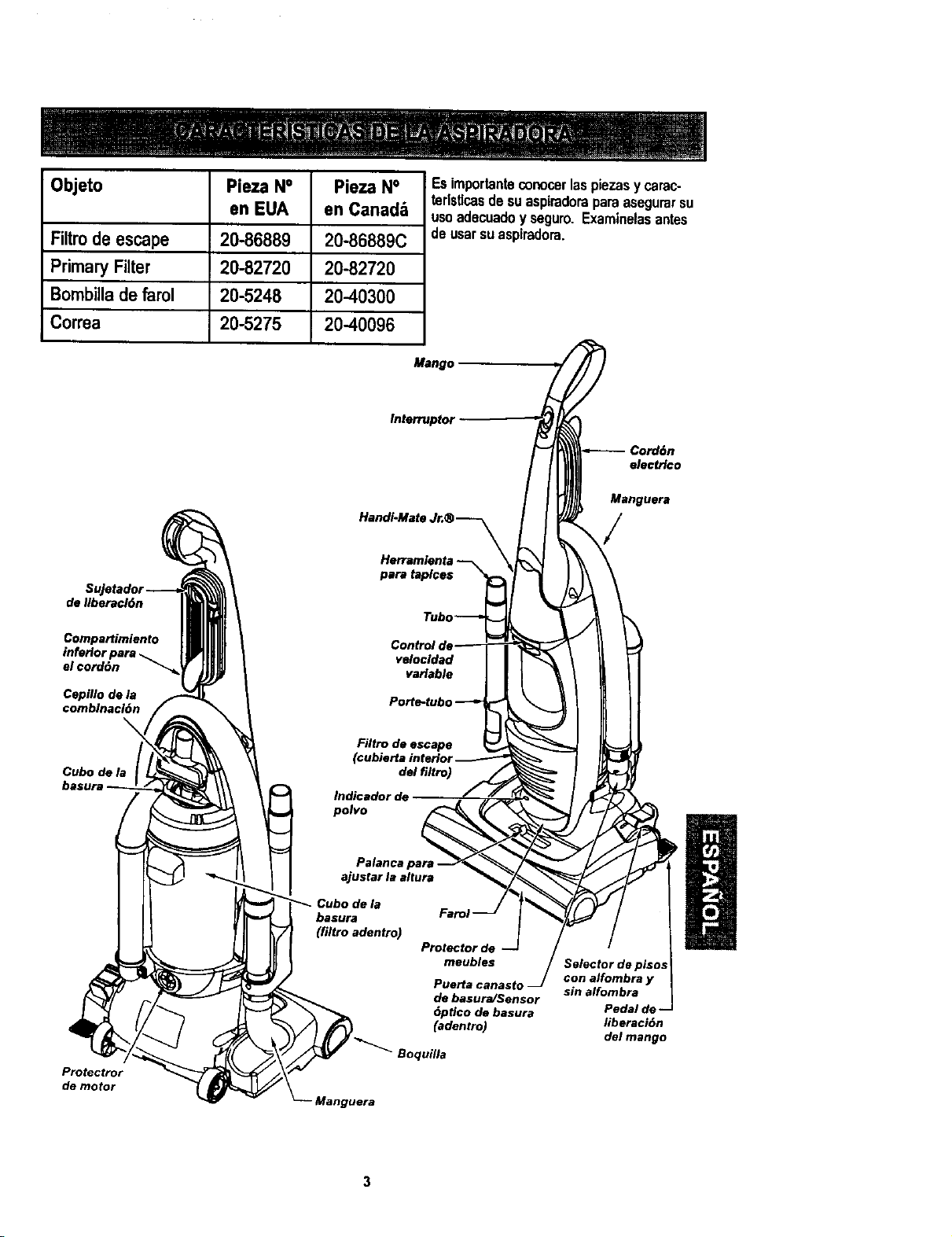
Objeto
Pieza N°
en EUA
Pieza N° Esimporlanteconocerlaspiezasy carac-
terlsticasdesuaspimdoraparaasegurarsu
en Canad& usaadecuadoyseguro.Examinelasantes
Filtrode escape 20-86889 20-86889C
Primary Filter 20-82720 20-82720
Bombillade farol 20-5248 20-40300
Correa 20-5275 20-40096
de Ilberacl6n
ComparUmiento
inferior para
el cord6n "_
Herramienla
pare taplces _
Tubo--_
Control de----- T
velocldad|
variable I
Po_e-tubo--_
Nitro de escape
(cubierta interior
del filtro)
Indicador de
polvo __/
deusarsuaspiradora.
Mango
Interrupter _
HandI-Mate Jr.® --_ _
Cubo de la _
basura _rol --
(filtro adentro)
Protector de --
meubles
Pue_a canaslo J
de basura/Sensor
6ptlcodebasura
_dentro)
Cepillo de la
€omblnacldn
\
Protectror
demeter
Boquilla
anguera
Selector de pisos
con alfombra y
sin alfombra
Pedal de --
liberaci6n
del mango
Manguera
Porfavorpongaatend6nespeciala estasinskucdonesdadas.Advertencla:Esteinfarmaci6nle
lalertar_conelpoligrosdefuego,choqueselectricos,quemadasy lesiones.Culdado: Este
linfarlaci6nlealertaraa peligroscomo lesionesy dar_osdepropiedad.
Peligrodechoqueel6ctrico
No conectela asplradorahastaqua ter-
minede armada.De Io contradopodria
causarun choqueel6ctricoo lesi6ncorpo-
ral.
Antesde armarlaaspiradora,chequela LISTA DE
EMBALAJEenlacubiertaseparadadela Listade
PartesparaReparacibn.Useestalistaparaveri-
ficarqueharecibidotodosioscomponentesdesu
nuevaaspiradoraKenroore.
Quitecintade la cubiertadelfiltroy picaportede
caj6nde polvo.
MONTAJE DEL MANGO
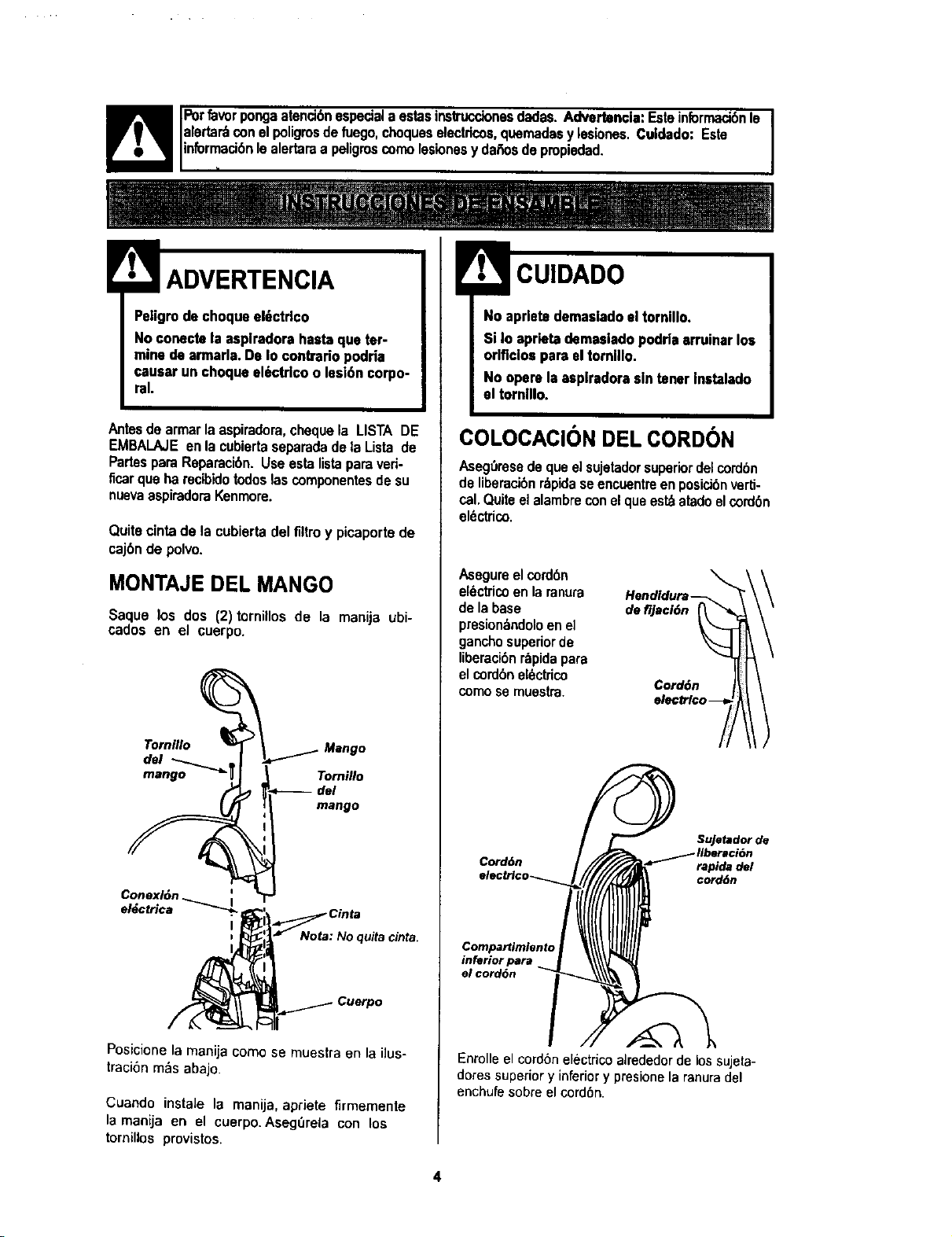
Saque los dos (2)tornillos de la manija ubi-
cados en el cuerpo.
Tornillo
Conexl6n
el_ctrica
I
Tornillo
*------del
mango
_Nota Cinta
: Noquitacinta.
Posicione la manija como se muestra en la ilus-
traci6n m_s abajo.
Cuando instaJe la manija, apriete firmemente
la manija en el cuerpo. Aseg_rela con los
tornillos provistos.
No aprletederoasiadoel tornillo,
Si In aprietademasiado podrlaarruinarlos
orlflclosparael tornlllo.
No operela asplradorasin tener Inetalado
el tomlllo.
COLOCACION DEL CORDON
Aseg_resedequeel sujetadorsuperiordelcord6n
de liberacibnr&pidaseencuentreenposicibnverti-
cal.Quiteelalambrecon elqueest_atadoelcord6n
el_ctrico.
Asegureelcord6n
el_ctricoen la ranura
dela base defijacl6n
presion_ndoloenel
ganchosuperiorde
liberaci6nr_pidapara
elcord6nel6ctrico
como semuestra. Cord6n
\
Cord6n
Sujetador de
rapida del
cord6n
Compartimlento
inferior para
el cord6n
Enrolleel cord6nelectricoalrededorde lossujeta-
dotes superiory inferiory presionela ranuradel
enchufesobreel cord6n.
4
ENSAMBLE DE LA
MANGUERA
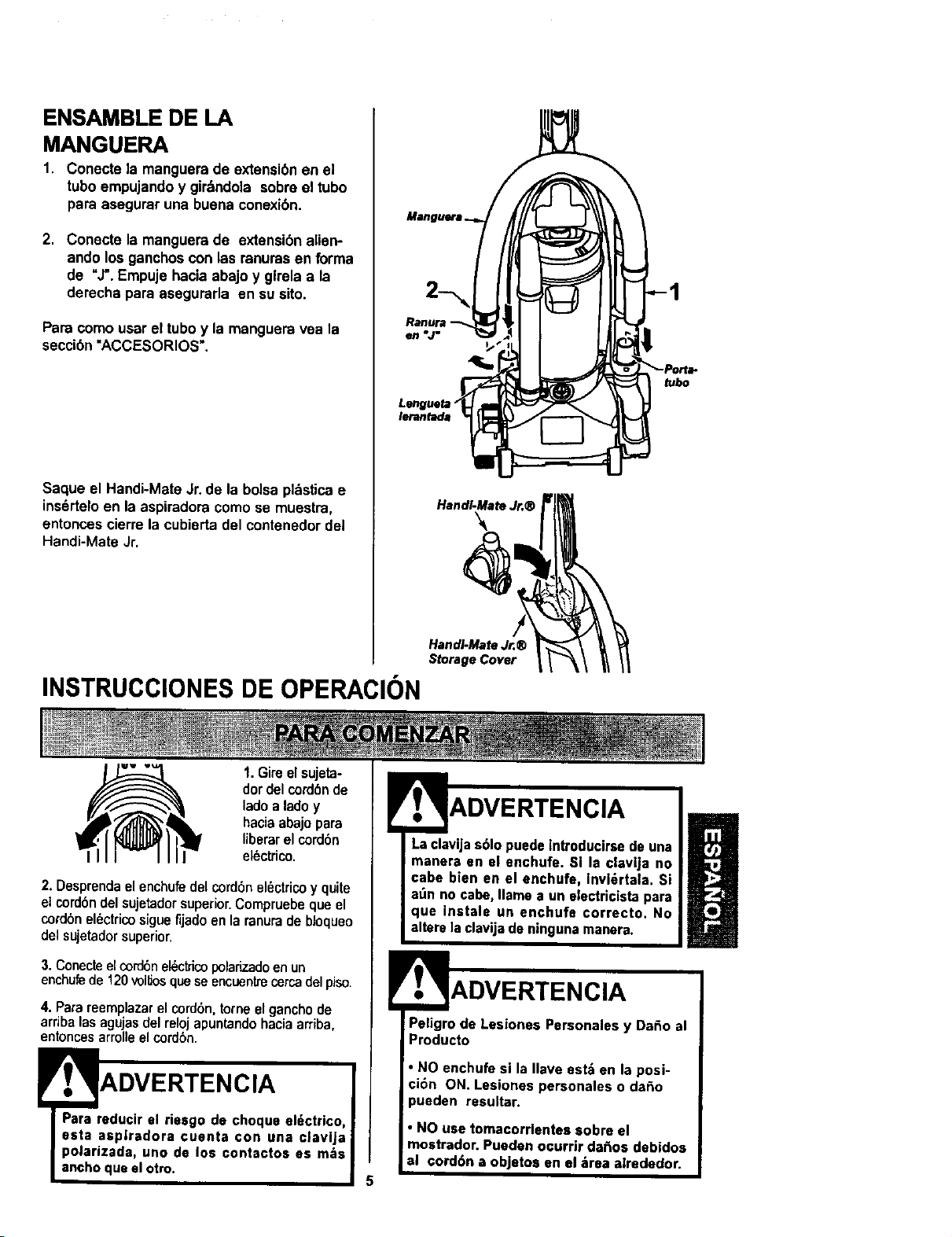
1. Conecte la manguera de extensi6n en el
tubo empujando y gir_ndola sobre el tubo
pare asegurar una buena conexi6n.
2. Conecte la manguera de extensibnalien-
ando los ganchoscon las ranurasen forma
de "J".Empuje hacia abajo y glrela ala
derecha para asegurarla en su sito.
Para como user el tube y la manguera vea la
seccibn"ACCESORIOS'.
Saque el Handi-Mate Jr. de la bolsa plbstica e
ins_rtelo en la aspiradora como se muestra,
entonces cierre la cubierta del contenedor del
Handi-Mate Jr.
INSTRUCCIONESDE OPERACION
Lenguetm "
lerantade
HandI-Mate Jr.®
HandI-Mato Jr.®
Storage Cover
tubo
1.Gireelsujeta-
dordelcord6nde
ladoa ladoy
haciaabajopare
liberarelcord6n
el_ctrico.
2. Desprendaelenchufedelcord6nel_ctricoy quite
elcord6ndel sujetadorsuperior.Compruebequeel
cordbnel6ctricosiguefljadoenlaranuradebloqueo
delsujetadorsuperior,
3. Conecte el cordbn el_ctrico polarizado en un
enchufede 120 vollJosquese encuentrecerca del piso.
4. Pare reemplazar el cordbn,tome el ganchode
arriba las agujasdel reloj apuntandohacia arriba,
entonces arrolleel cord6n.
Er. ' ADVERTENCIA
Para reducir el riesgo de choque el_ctrico,
esta aspiradora ¢uenta con una clavija
polarizada, uno de los contactos as m=ts
ancho que el otro.
ENCIA
Laclavijas61opuedelntroducirsede una
manera en el enchufe. Si la clav|ja no
cabe bien en el enchufa, Invl_rtala. Si
at_nno cabe,llama a un electricistapara
que instale un enchufe correcto. No
alterelaclavijadeningunamanera.
ADVERTENCIA
Peligrode Lesiones Personalesy Da_o al
Producto
• NO enchufe si la Ilave est& en la posi-
ci6n ON. Lesiones personales o daSo
pueden resultar.
• NO use tomacorrlentes sobre el
mostrador. Pueden ocurrir da_os dab|dos
al cord6n a objetos en el _trea airededor.
Para seleccionar un ajuste de nivel de pelo de la
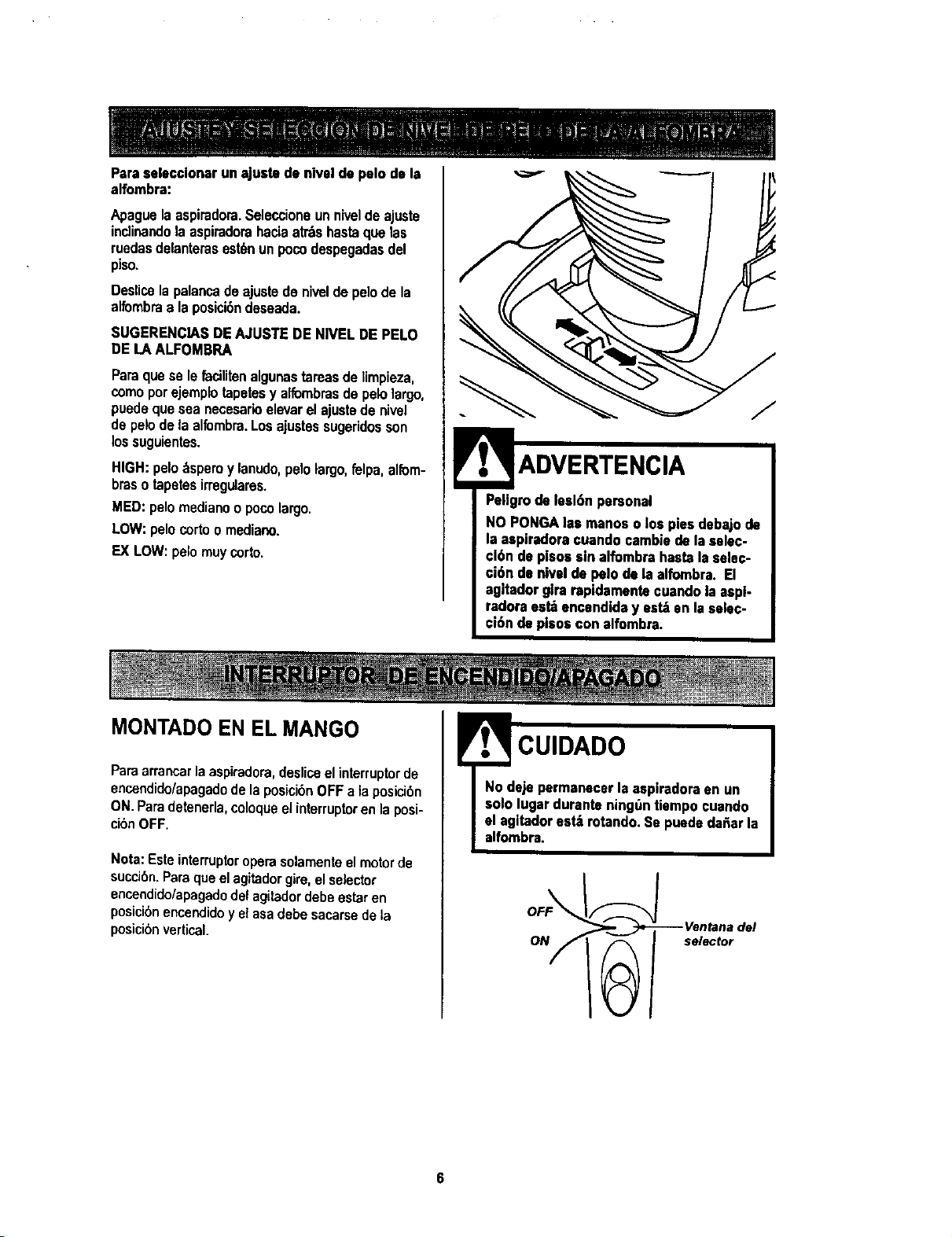
alfombra:
Apaguelaaspiradora.Seleccioneunniveldeajuste
incti_andola aspiradorahada atr_ bastso,uelas
ruedasdelanterasest_nunpocodespegadasdel
piso.
Deslicetapalar_cadeajustede niveldepelodeta
alfombraa la posicibndeseada.
SUGERENCIASDEAJUSTEDE NIVELDE PELO
DELA ALFOMSRA
Parsquese lefacilitenalgunastareasdeIimpieza,
comoporejemplotapetesy alfombrasde pelolargo,
p_edequeseaneceeadoelevarelajustede nivel
de pelodela alfombra.Los ajustessugeridosson
lossuguientes.
HIGH:pelo_spemy lanudo,pelolargo,fetpa,alfom-
braso tapete$irregulares.
MED:pelomedianoopocolargo.
LOW:pelocortoo mediano.
EX LOW:pelomuy corto.
Pellgmdelesl6npersonal
NO PONGAlasmanoso los piesdebajode
la aspiradoracuandoeatablede lasslec-
cl6n de plsossin alfombrahastaleselec-
ci6n de nivelde pelodela alfombra. El
agitadorg|rarapidementecuandoIs espi-
radoraest=_encendiday est_en laselec-
ci6n de plsos con alfombra.
MONTADO EN EL MANGO
Parsarrancarlaaspiradom,desliceelinterruptorde
enc_ndido/apagadodela posici6nOFFa Isposici6n
ON.Paradetenerla,coloqueelinterruptorenlaposi-
cibnOFF.
Nora:Esteinterruptoroperasolamenteelmotorde
succi6n.Parsqueelagitadorgirs,elselector
encendido/apagadodelagitadordebeestaren
posici6nencendidoy elasadebesacarsedela
posic_6nvertical
! CUIDADO
No deje permanecerla aspiradoraen un
sololugarduranteningt_ntiempoeuando
I el agltadorest_ rotando.Se puededeRarla
I
alfombrs.
ON _ selector
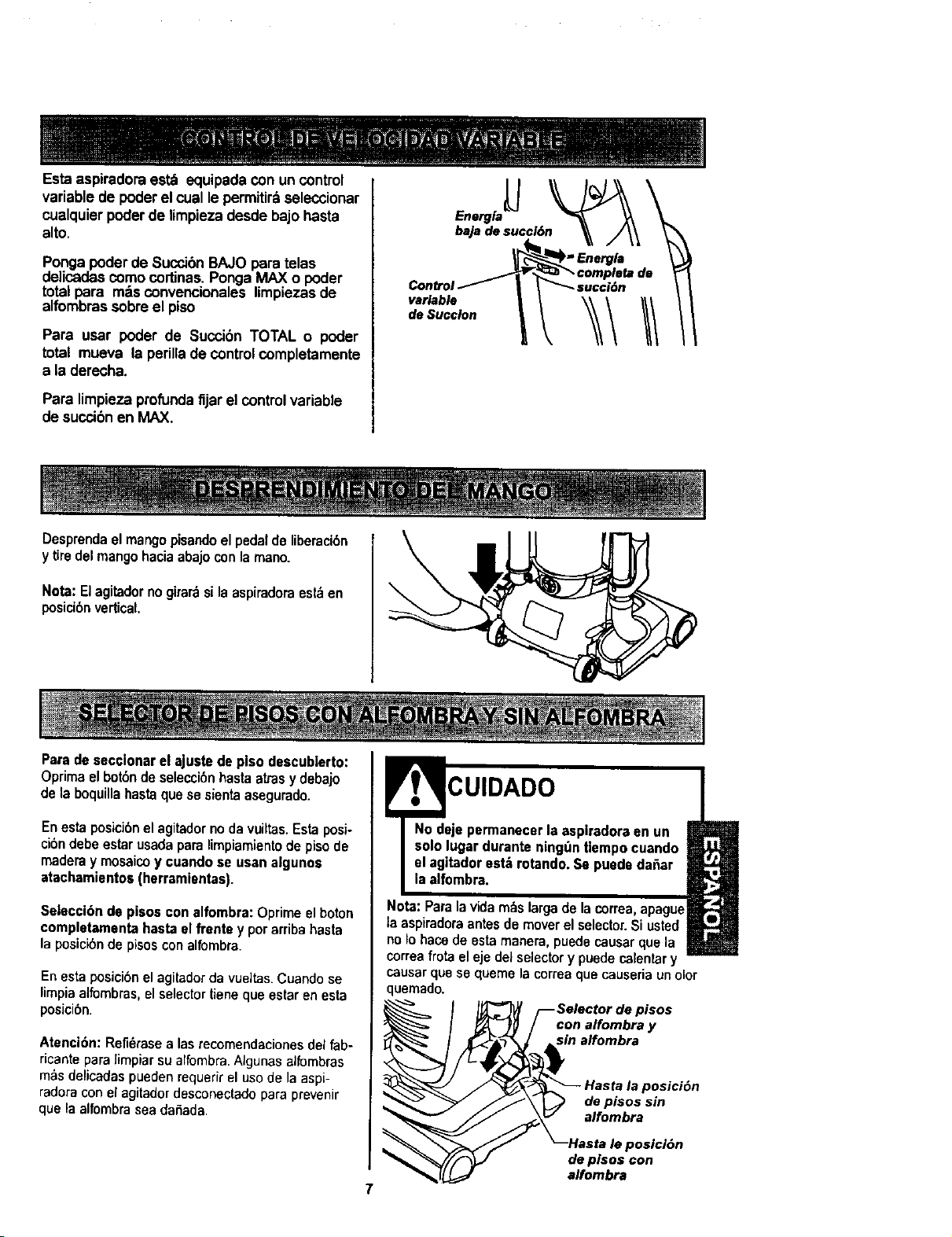
Esta aspiradoraest_ equipadacon un control
variablede poder elcual lepermitirdseleccionar
cualquierpoderde limpiezadesde bajohasta
alto,
Pongapoder de SuccibnBAJO para telas
delicadascomo cortinas.PongaMAX o poder
total para m_s convencionales limpiezasde
alfombrassobreel piso
Para usar poder de Succi6n TOTAL o poder
total mueva la perillade control completamente
a la derecha.
Para limpiezaprofundafijar el control variable
desuccibnen MAX,
%
It
I
Desprendael mangopisandoelpedalde liberaci6n
y tiredelmangohaciaabajoconlamano.
Nota:Elagitadornogirar_silaaspiradoraest_en
posicibnvertical.
Paradesecclonarel ajustede pisodescubierto:
Oprimaelbot6ndeselecci6nhastaarrasy debajo
de laboquillahastaquese sientaasegurado.
Enestaposici6nelagitadornodavuiltas.Estaposi-
cibndebeestarusadaparalimpiamientode pisode
maderay mosaicoy cuandose usanalgunos
atachamiento$(herramientas).
Selecci6n de pisos con alfombra: Oprime el boton
completamenta hasta el frente y por arriba basra
la posicibnde pisoscon alfombra
Enesta posicibnel agitadorda vueitas.Cuandose
limpiaaifombras,elselectortienequeestarenesta
poslclon.
Atenci6n: Refi_rase alas recomendaciones del fab-
ricante para ]impiarsu alfombra.AJgunas alfombras
m&s delicadas pueden requerirel usode la aspi-
radora con el agitador desconectadopara prevenir
que la alfombrasea clafiada.
CUIDADO
No deje permanecer la asplradora en un
solo lugar durante ning_ln Uempo cuando
el agitador estb rotando. Se puede dafiar
la alfombra.
Nota: Para la vida m_s larga de la correa, apague
la aspiradora antes de mover el selector.Si usted
no Io hace de esta manera, puede causar qua la
correa frota el eje dei selectory puede calentar y
causar que se queme la correa que causeria un olor
quemado.
pisos
con alfombra y
sin alfombra
ta la posiciOn
de pisos sin
alfombra
le posiciSn
de plsos con
alfombra
7
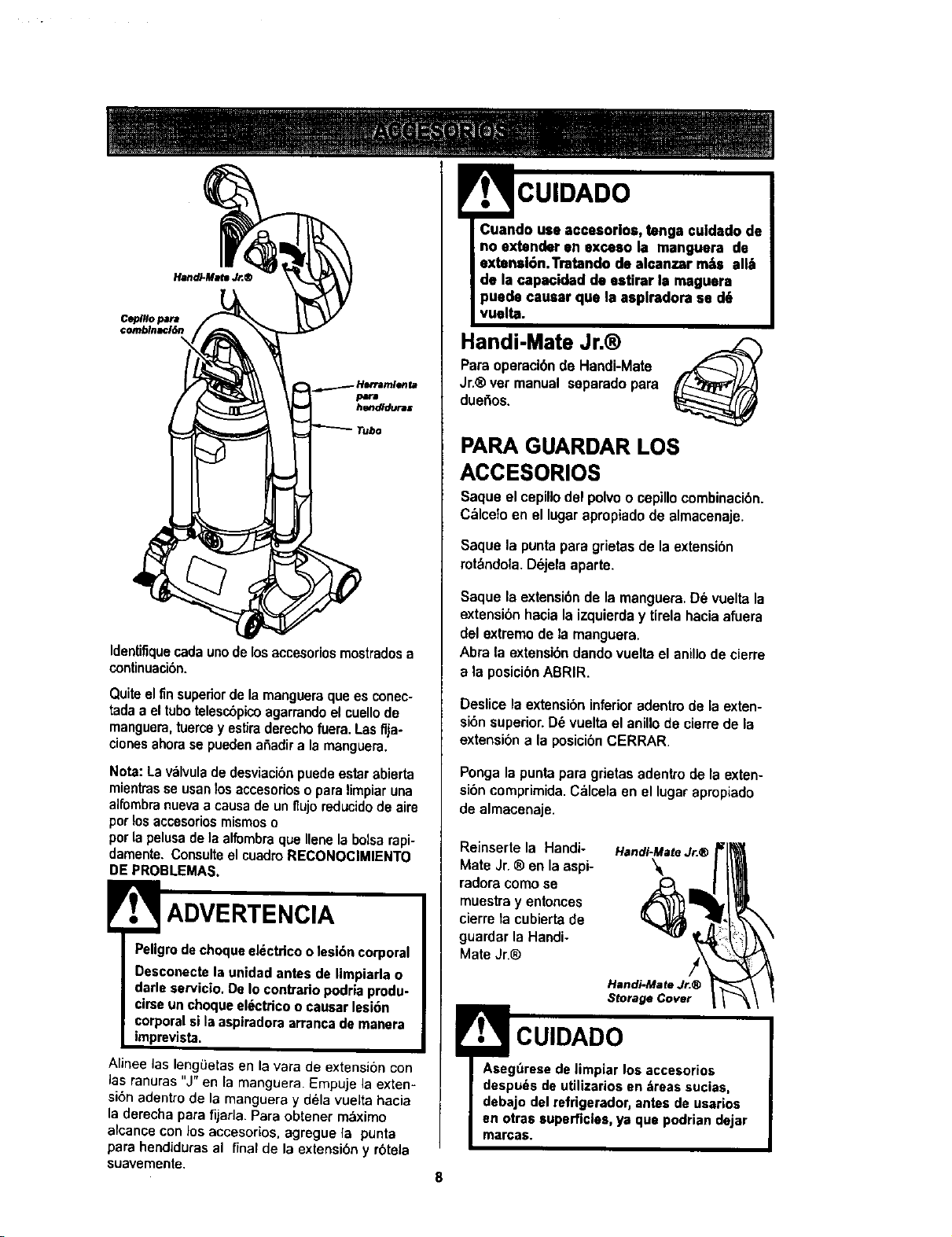
IdenUfiquecadaunode losaccesoriosmostradosa
continuation.
Quiteelfin superiordela mangueraquaes conec-
tadaa eltubatelescbpicoagarrandoel cuellode
manguera,tuerceyestiraderechofuera.LasflJa-
cionesahorase puedena_adira lamanguera,
Nota:Lav:_lvuladedesviaciOnpuedeestarabierta
mientrasse usanlos accesorioso paralimpiaruna
alfombranuevaa causadeun t_ujoreducidodesire
parlosaccesoriosmismoso
parlapelusadela alfombraque Ilenelabalsarapi-
damente.Consulteel cuadroRECONOC|MIENTO
DEPROBLEMAS.
! ADVERTENClA
Peligro dechoque el_ctrico o lesion corporal
Desconecte la unidad antes de limpiada o
darle servicio. De Io contrario podria produ-
cirse un choque el_cttico o causar lesion
corporal si la aspiradora arranca de manera
impreviste.
Alinee las lengLietasen la vara de extension con
las ranuras "J" en la manguera. Empuje la exten-
sion adentro de la manguera y d_la vuelta hacia
la derecha para fijarla. Para obtener m&ximo
alcance con los accesorios, agregue la punta
para hendiduras al final de la extension y rbtela
suavemente.
CUIDADO
;,tenga culdadode
boextenderan exceso la manguera de
extensl6n.Tratendo dealcanzar m_ts atilt
de la capacided de estirar la maguera
puede causar qua la asplradora se d6
vuelte.
Handi-Mate Jr.®
Para operaciOnde Handi-Mate
Jr.®vet manual separadopara
dueOos.
PARA GUARDAR LOS
ACCESORIOS
Saque el cepillodel polvo o cepillocombinack_n.
C_,lcetoen el lugar apropiado de almacenaje.
Saque la puntapara grietas de laextension
rotbndola. DOjelaaparte.
Saque la extensionde la manguera.D6 vueltala
extensionhacia la izquierday tirela hacia afuera
del extremodela manguera.
Abra la extensiondandovueltael anillode cierre
a la posiciOnABRIR.
Deslicela extensioninferioradentrode la exten-
sionsuperior.D6vueltael anillode cierrede la
extensiona la posicibnCERRAR.
Ponga la punta para grietas adentrode la exten-
si0n comprimida.C_lcela en el lugar apropiado
de almacenaje.
Reinsertela Handi-
Mate Jr.® anla aspi-
radoracomase
muestray entonces
cierreta cubierta de
guardarla Handi-
Mate Jr.®
Handi-Mate Jr.®
!
Handi-Mate Jr.®
Storage Cover
CUIDADO
Aseguresedelimpiar los accesorios
despu_sdeutJlizariosen treas sucias,
debajo delrefrigerador,antesde usarios
en arrassuperficies,ya qua podrlandejar
marcas.
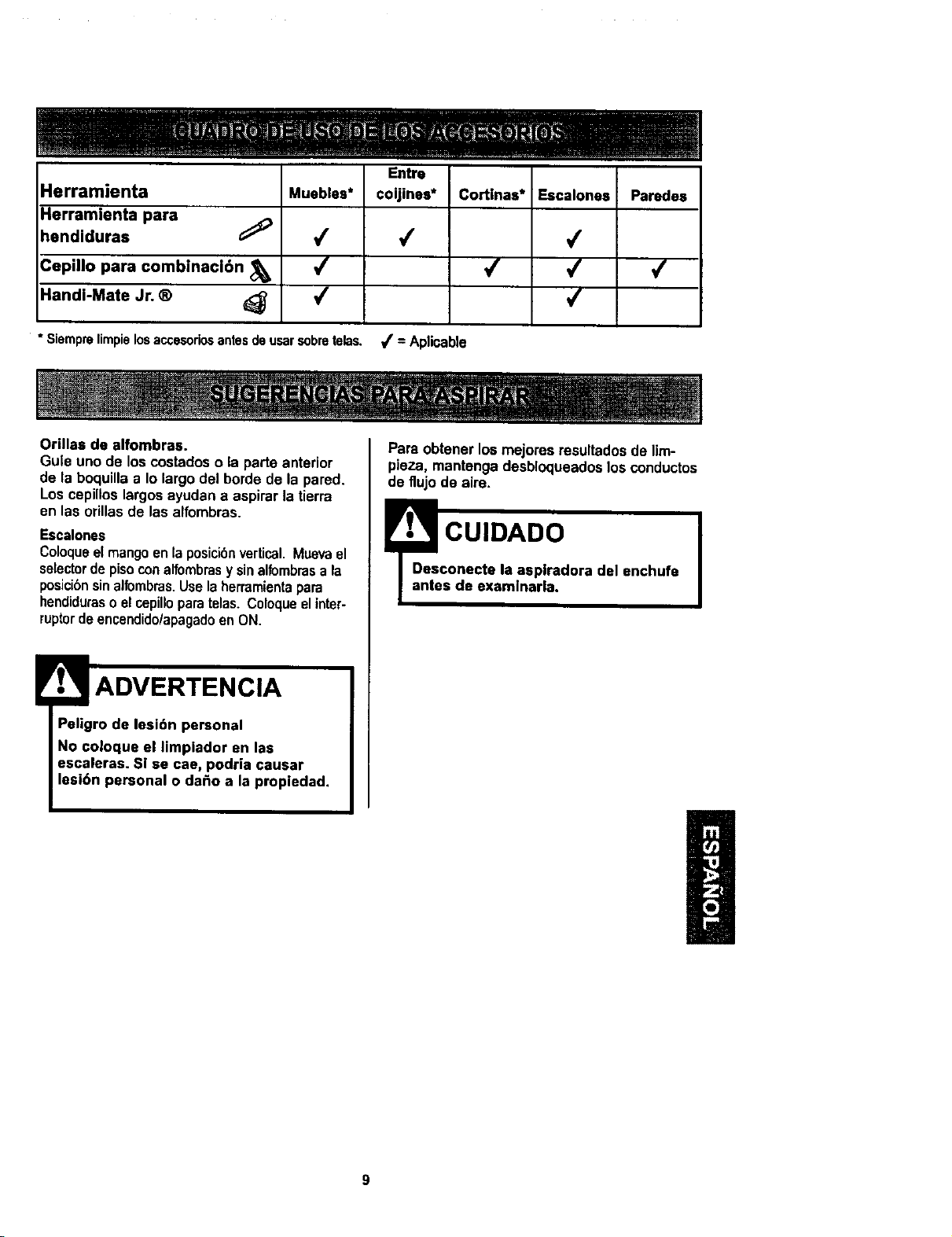
HerramJenta
Herramienta para
hendiduras
Cepillo para combinaci6n
Handi-Mate Jr. ®
Muebles*
4
4
4
Entre
coijines*
4
Cortlnas*
4
Escalones
4
4
4
Paredes
4
* Siemprelimpielosaccasoriosantesde usarsobretelas. _f = Aplicable
Orillas de alfombras.
Gule uno de loscostadoso ia parte anterior
de la boquillaa Io largo del borde de la pared.
Los cepilloslargosayudan a aspirar la tierra
en las orillasde lasalfombras.
Escalones
Coloqueelmangoenlaposici6nvertical.Muevael
selectordepisoconalfombrasy sinalfombrasa la
posicibnsinalbrnbras.Uselaherramientapara
hendiduraso elcepilloparatelas. Coloqueelinter-
ruptordeencendidolapagadoenON.
ADVERTENCIA
Peligro de lesibn personal
No coloque el limpiador en las
escaleras. Si se cae, podria causar
lesi6n personal o da_o a la propiedad.
Para obtener losmejores resultadosde lim-
pieza, mantengadesbloqueadoslos conductos
de flujo de airs.
eCUIDADO J
conecte la asplradora del enchufe
s de examlnarla.
SISTEMA DE PROTECTI6N
DE MOTOR
Protector Termal
Esta aspiradoratiene un protectortermal que
se ajustaautom_ticamentepara protegerala
aspiradoradel sobrecalentamiento.Si una
obstruccibnimpide e| flujonormalde aire al
motor,el protectortermal apaga el motor
autom&ticamentepara permiUrque el motorse
enfrie a finde evitarposiblesda_os ala
aspiradora.Durante este tiempola luz
delantera se mantiene prendida.
Pare corregir el problems'. Siesto ocurre,
apague laaspiradoray desenchufeelcordbn
del tomacorrientepara permitirque le
aspiradora se enfrie y que el protectortermal
se reajuste. Busque y saquelas
obstrucclones, sl es necesarlo. Examine
tambi_n y reemplace/llmple cualquler flltro
obstruido. Espere aproximadamente treinta
(30) minutos y enchufe la aspiradora y
volt6ela pare ver si el protector del motor se
ha reajustado. El protector del motor no se
reajustar_ si no se ha apagado la aspiradora
aun cuando la aspiradora se haya enfriado,
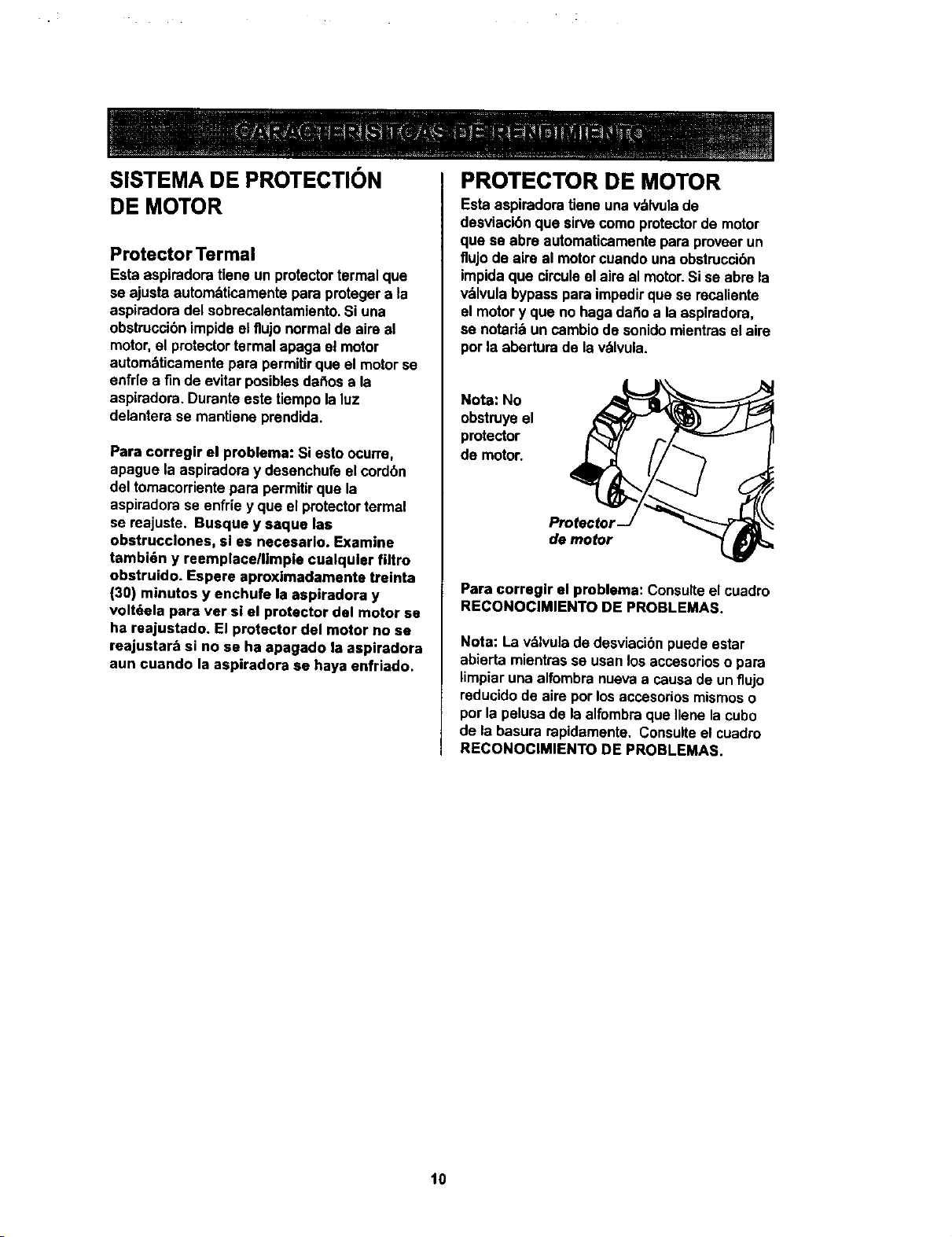
PROTECTOR DE MOTOR
Esta aspiradoratiene una v_lvulade
desviacibnque sirve comoprotectorde motor
que se abre automaticamentepara proveerun
flujo de aire al motorcuandouna obstruccibn
impidaque clrculeelaim al motor.Si se abre la
v_lvulabypass pare impedirque se recaliente
el motory que no hags daf_oa la aspiradora,
se notari_ un cambiode sonidomientraset aire
por la abertura de la v&lvula.
Nota: No
obstruyeel
protector
de motor.
Protecto_
de motor
Para correglr el problema: Consulteel cuadro
RECONOClMIENTO DE PROBLEMAS.
Nota: La v&lvuladedesviacibnpuedeestar
abierta mientrasse usan losaccesoriosopara
limpiaruna alfombranuevaa causade un flujo
reducidode aire porlos accesoriosmismoso
porla pe|usade la alfombraque _lenela cubo
de la basura rapidamente. Consulteel cuadro
RECONOCIMIENTO DE PROBLEMAS.
10
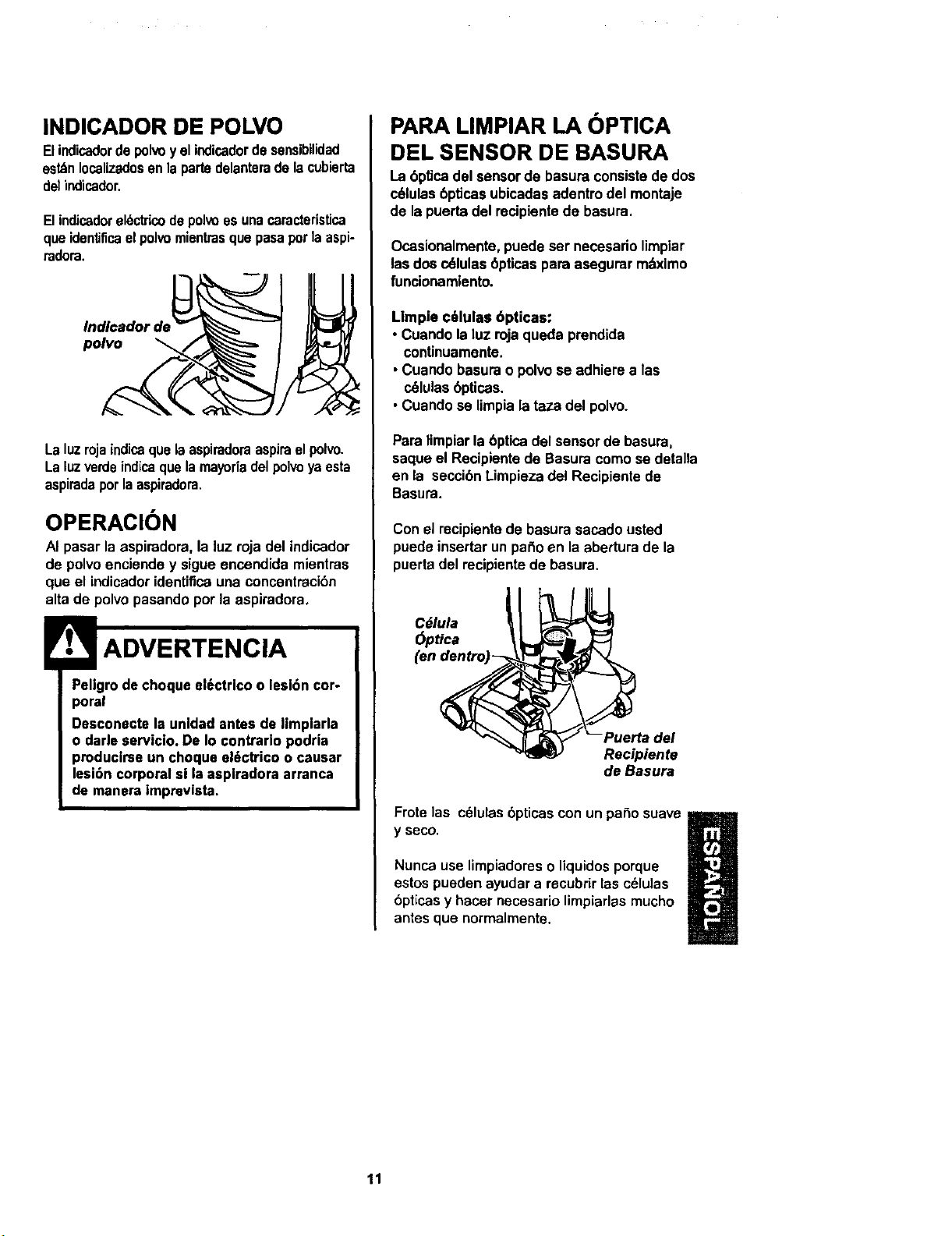
INDICADOR DE POLVO
Elindicadordepolvoy elindicadordesensibilidad
est_nIocalizadosenla partsdelanteradelacubierta
de)indicador.
Elindicadorel6ctricodepolvoes unacaracteristica
queidentificaelpol_,omientrasque pasapotla aspi-
radom.
Indlcador de
polvo
Laluzrojaindicaquelaaspiradoraaspiraelpolvo.
Laluzverdeindicaquelamayorladelpolveyaesta
aspiradaporlaaspiradora.
OPERACION
AI pasar la aspiradora, la luz roja del indicador
de polvoenciende y sigueencendida mientras
que el indicadoridentificauna concentraci6n
alta de polvopasando porla aspiradora,
ADVERTENClA
Peligrode cheque el6ctrlco o lesi6n cor-
poral
Desconecte la unldadantes de limpiarla
o darle servicio. De Io contrario podria
producirseun cheque el6¢trico o csusar
lesi6n corporal si la aspiradora arranca
de manera impreviata,
PARA LIMPIAR LA OPTICA
DEL SENSOR DE BASURA
La 6pUcadel sensorde basura consistede dos
c61ulas6pticasubicadasadentro del montaje
de la puertadel recipientede basura.
Ocasionalmente,puede ser necesariolimpiar
las dosc_lulas 6pticaspara asegurar mdximo
funcionamlento.
Limple c_lulas 6pticas:
• Cuando laIuz rojaqueda prendida
conUnuamente.
• Cuandobasurao polvose adhiere a las
c61ulas6pticas.
• Cuandose limpialataza del polvo.
Paralimpiarla 6ptica del sensorde basura,
saqueel Recipientede Basuracomo se detalla
en la seccibnLimpiezadel Recipientede
Basura.
Conel recipientede basurasacado usted
puedeinsertar unparle en laabertura de la
puertadel recipientede basura.
Cdlula
6ptica
(en
Recipiente
de Basura
Frote las c61ulas6pticas con un paso suave
y seco.
Nunca use limpiadores oliquidosporque
estos pueden ayudara recubrirlas c61ulas
6pticasy hacer necesario limpiarlasmucho
antesque normalmente.
11
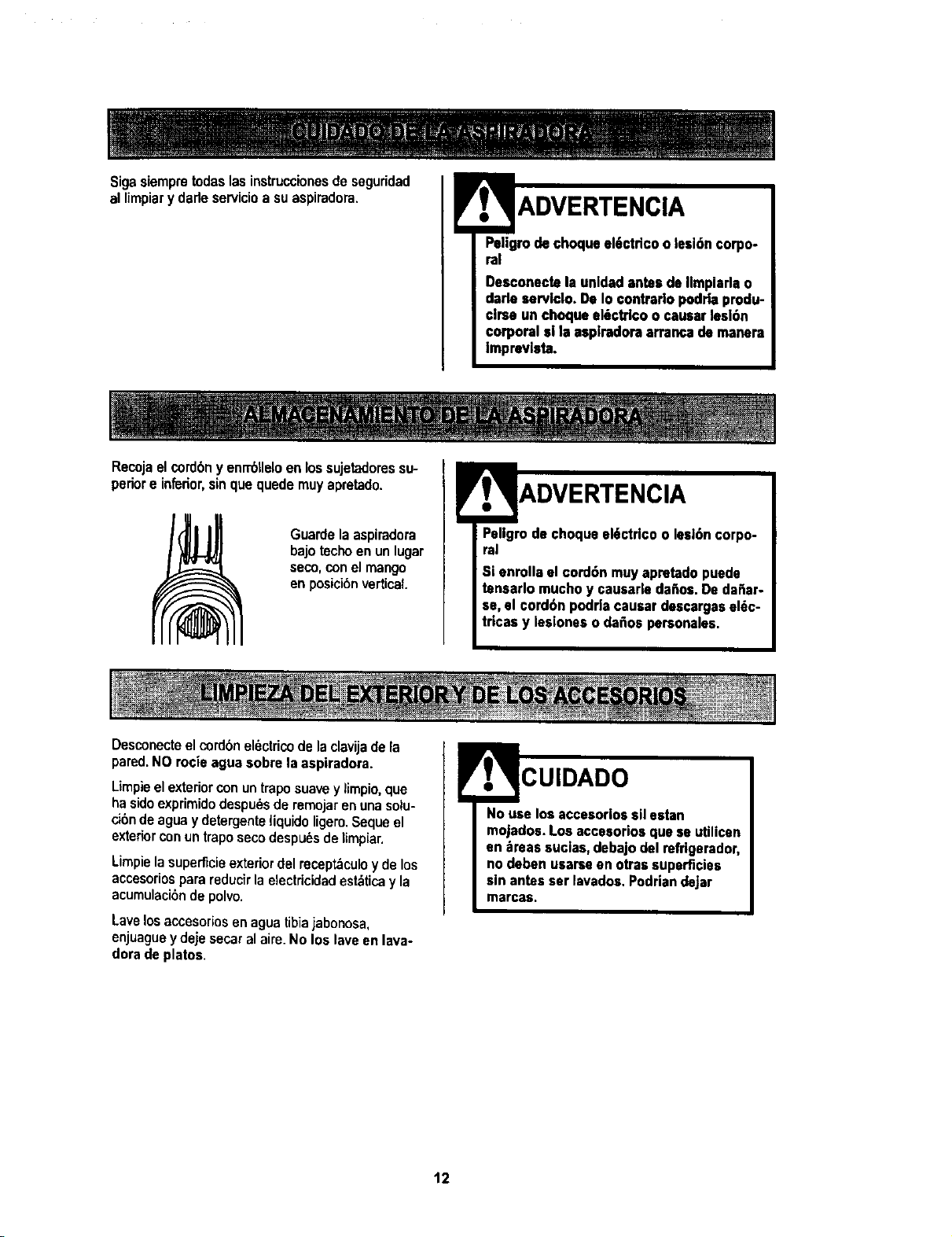
Sigasiempretodaslasinstruccionesdeseguridad
allimpiarydarleservicioasuaspiradora.
Paligro de choqua al6ctdco o lesi6n corpo-
ral
Desconecte la unldad antes de Ilreplada o
darle servldo. De Io ¢ontrarlo podrla produ-
€lrse un choque el6ctrlco o causar lesl6n
corporal si |a aspiradora arranca de reanera
Impravlsta.
|_ 1 =l ;7 --- -- _ ........
Recojaelcordbny enrrbtleloen lossujetadoressu-
periore inferior,sinquequedereuyapretado.
Guardelaaspiradora
bajotechoenunlugar
seco,conelmango
enposici6nvertical
Desconecteelcordonel_ctricodelaclavijadela
Pellgmdechoqueel6ctricoo lasl6ncorpo-
ral
Si anrolla el cord6n reuy apretado puede
tensarlo mucho y causarle de_os. De da_ar-
se, el cord6n podrJacausar descargas el_c-
tricas y lesiones o da_os personales.
pared.NO rocie agua sobre la aspiradora.
Limpieelexteriorconuntraposuavey limpio,qua
hasidoexprimidodespu_sde rereojarenunasolu-
cibndeaguay detergenteliquidoligero.Sequeel
exteriorconuntraposecodespu_sdelirepiar.
Lirepielasuperficieexteriordel recept_culoyde los
accesoriospara reducirla electricidadest_ticay la
acumulacibnde polvo.
Lavelosaccesoriosenaguatibiajabonosa,
enjuagueydejesecaralaire.No los laveen lava-
dorade platos.
CUIDADO
No use los accesorlos ell estan
reojados. Los accesorios que se utilicen
en _reas suclas, debajo del refrigerador,
no deben usarse en otraa superficies
sin antes ser lavados. Podrian dejar
rearcas.
12
Slemprevacieelcubodebaeuracuandoel
nlveldebasuraalcanzalaIlnea"MAXLLENO".
Pellgrode choque el6ctrico o lesi6n cor-
poral
Desconecte la unldadantes de Ilmpiarla
o darle servlclo. DeIo contrarlo podrla
produclrseun choque el6ctrlco o causar
lesi6n €orporal el laasplradora arranca
de manera imprevlsta.
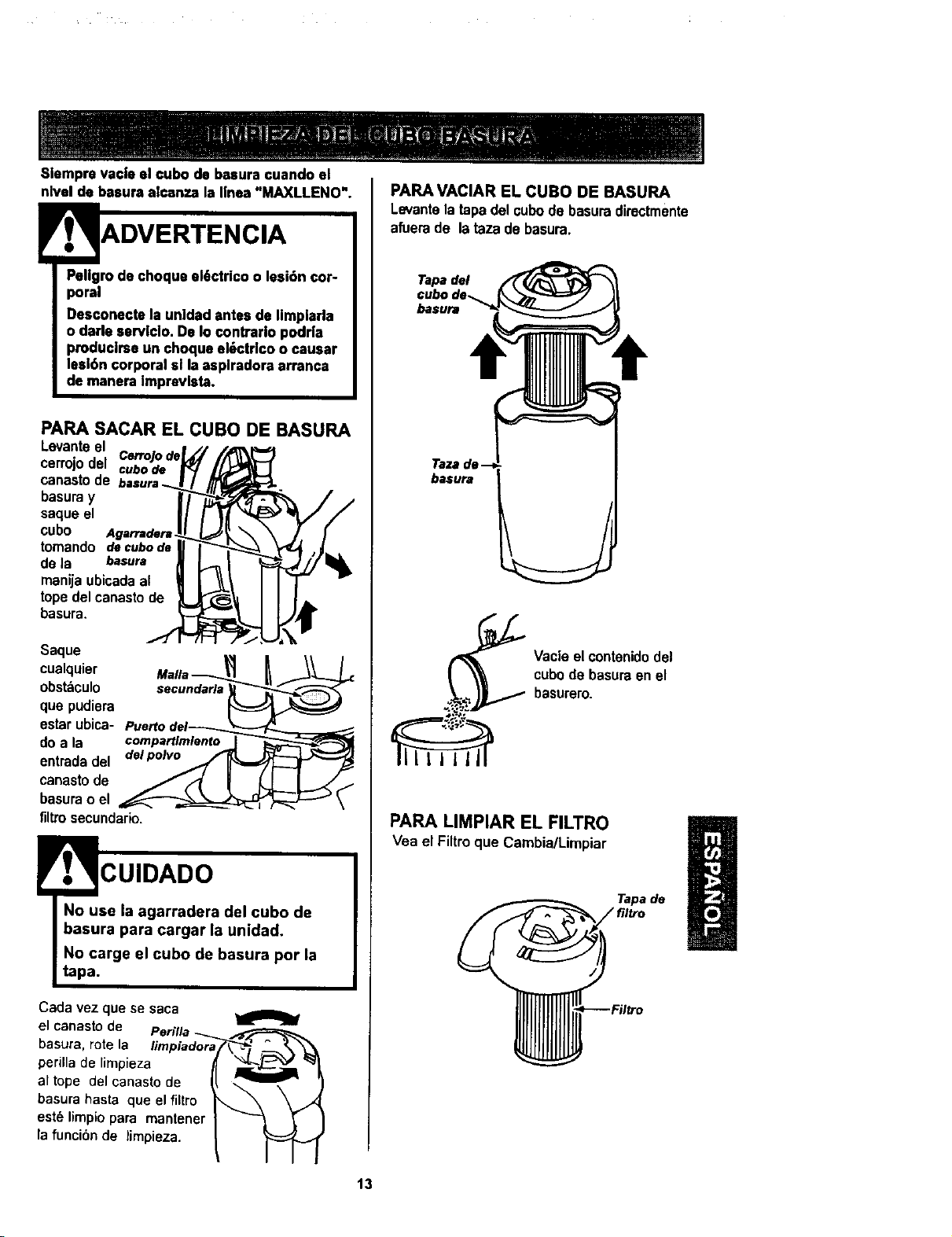
PARA SACAR EL CUBO DE BASURA
Levanteel
cerrojodel CerroJode
cubo de
canastode basura
basuray
saque el
cube Agarradera .
tomando decubode
de la basura
manijaubicadaaE
topedel canastode
basura.
Saque
cualquier Mafia _
obst_culo secundarla
que pudiera
estarubica- Puertodel_
do a la compartlmlento
entrada del _
canastode
basurao el
filtrosecundario.
CUIDADO
No use la agarradera del cubo de
basura para cargar la unidad.
No carge el cubo de basura por la
tapa.
Cada vez que se saca
el canasto de
bastJra, rote la fimpiador_
perilla de limpieza
al tope del canasto cle
basura basra que el filtro
est_ limpio para mantener
la funci6n de timpieza.
PARA VACIAR EL CUBO DE BASURA
Levante latapadel cubode basuradirectmente
afuerade lataza de basura.
Tapa del
cubo de-_
basura
basura
Vacie el contenido del
cube de basura en el
basurero.
PARA LIMPIAR EL FILTRO
Vea el Filtroque Cambia/Limpiar
Tapa de
13
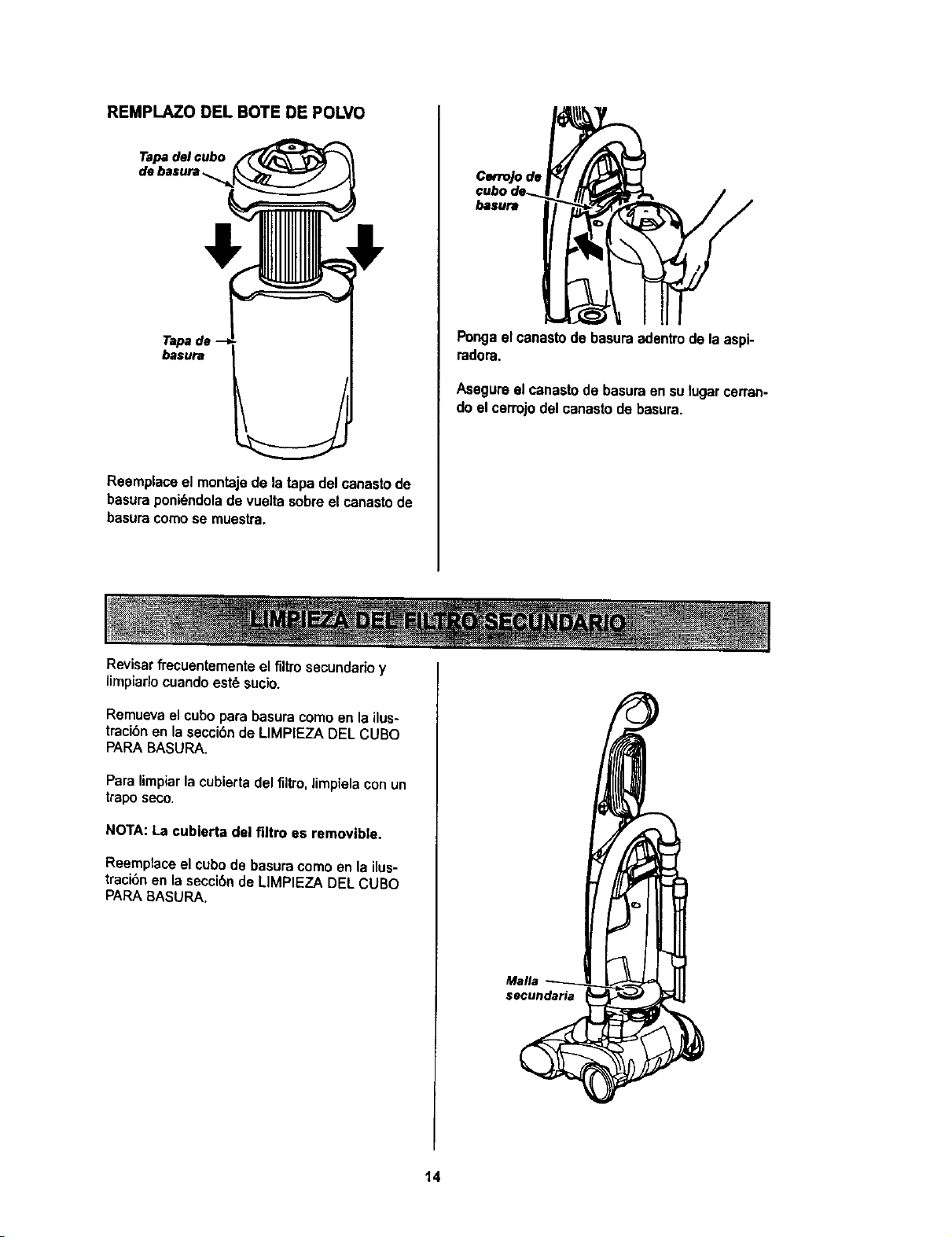
REMPLAZO DEL BOTE DE POLVO
Tapa del cubo
Tapa de --
basura
Reemplaceel montajede la tapadel canastode
basuraponi6ndoladevueltasobreel canastode
basuracomose muesb'a.
Revisarfrecuentementeel flltrosecundadoy
lirnpiarlocuandoest6 sucio.
Cerrojode
basura
Pongael canastode basuraadentrodela aspi-
radora.
Asegureel canastode basuraensulugarcerran-
do elcerrojodelcanastodebasura.
Remuevael cubopara basuracomoen la ilus-
tracibnen laseccibnde LIMPIEZA DEL CUBO
PAPABASURA.
Paralimpiarlacubiertadel filtro,limpielaconun
traposeco.
NOTA: La cubierta del filtro es removible,
Reernplaceel cubode basuracomoenla ilus-
traci6nen lasecci6nde LIMPIEZA DEL CUBO
PARABASURA.
Mafia
secundaria
14
!RTENCIA
Pellgrodechoqueel6ctrlco
Desenchufeel cablede poderdel tomacor-
dents.No operela Iimpiadorasin elflltro
pdmado oel flltro deescape.Eat6 segum
que el filtroseat6 Instaladoproplamente
para prevenlrfalla del motorylo sacudida
el6ctrica.
FILTRO PRIMARIO
Chequesetflitroprimariotrecuentementy timpielo
cuandoest6sucio,
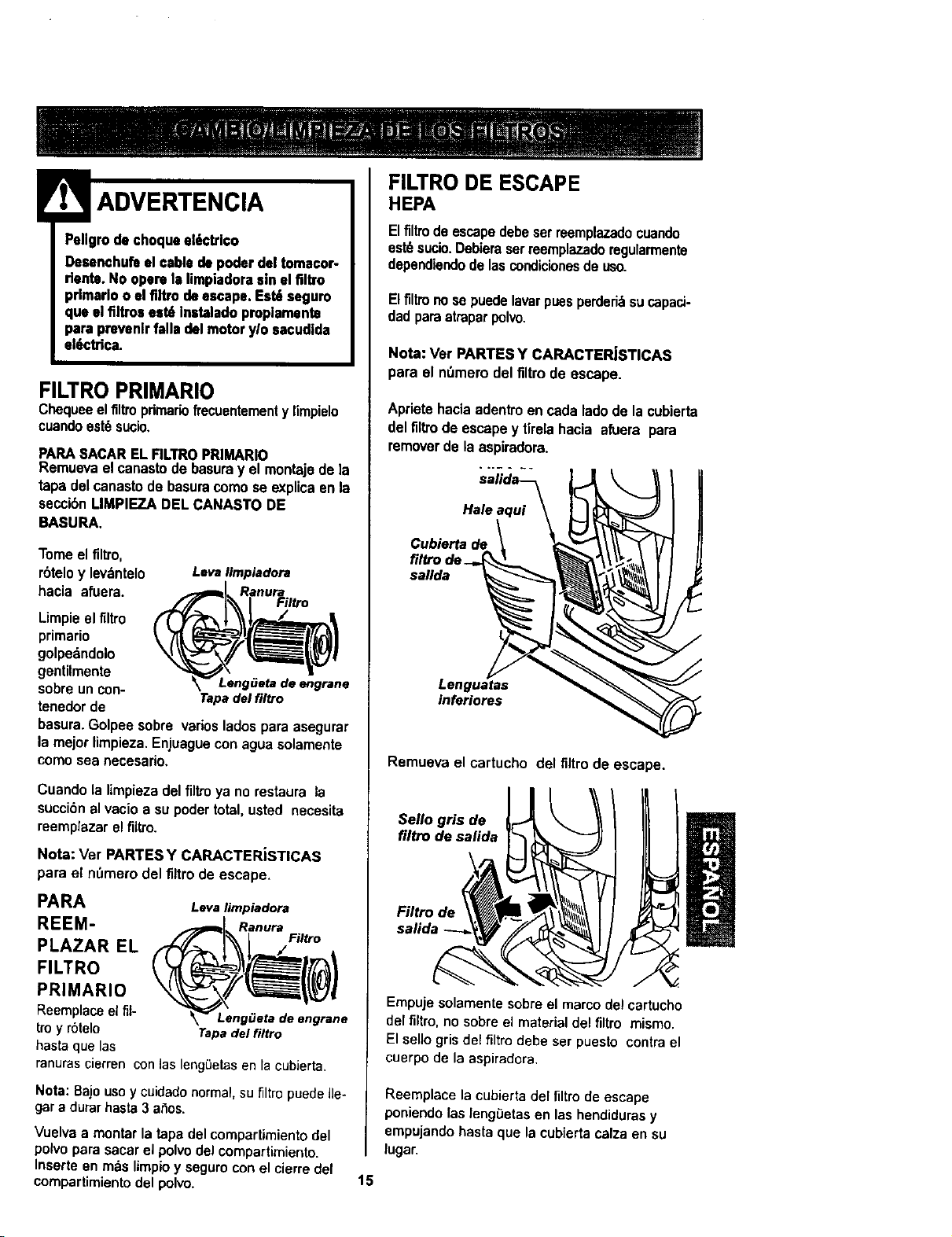
PAPASACARELFILTROPRIMARIO
Remuevael canastodebasuray el montaje dela
tapadel canastode basuracomose explicaen la
seccibnLIMPIEZA DEL CANASTO DE
BASURA.
Tomeelfiltro,
rbteloy levdntelo
hacia afuera.
Leva Iimpiadora
Limpie el filtro
primario
golpedndolo
gentilmente
Leng_eta de engrane
sobre un con-
Tapa delfl|tro
tanedor de
basura. Golpee sobre varios lados para asegurar
la mejor limpieza, Enjuague con agua solamente
como sea necesario.
Cuandola limpiezadel filtroya no restaura la
succi6nal vacioa su poder total,usted necesita
reemptazarelfiltro.
Nora: Ver PARTESY CARACTERJSTICAS
para el n,',merodetfiltrode escape.
PARA Leva limpiadora
REEM- Ranur=
Filtro
PLAZAR EL
FILTRO
PRIMARIO
Reemplacoelfit- LengiJeta deengrane
tmy r6telo Tapadelfiltro
basraquelas
ranuras¢ierrenconlasleng0etassn lacubJerta.
Nota: Bajo uso y cuidadonormal, su filtro puede Ile.
gar a durar hasta 3 aSos.
Vuelva a montar la tapa del compartimiento del
polvo para sacar el polvo del compartimiento.
Inserte en rods limpio y seguro con el cierre def
compartimiento del polvo.
FILTRO DE ESCAPE
HEPA
Elfiltrodeescapedebeserreemplazadocuando
est_sucio.Debieraserreemplazadomgularmente
dependiendodelascondicionesde uso.
Elfiltronosepuedelavarpuesperderi_sucapaci-
dadparaatraparpolvo.
Nora: Ver PARTESY CARACTER_STICAS
para el n_mero del filtrode escape.
Aprietahaciaadentroencadatadode la cub_erta
del filtrode escapey tirelahacia afuera para
removerde laaspiradora.
Hale aqui
Cublerta de
filCrode_
sallda
Lenguatas
inferiores
Remueva el cartucho del filtrode escape.
Sello gris de
filtro de salida
Filtro de
satida
Empuje solamente sobre el marco del cartucho
del flltro, no sobre el material del filtro mismo.
El selJo grisdel filtro debe ser puesto contra el
cusrpo de la aspiradora.
Reemplacelacubierta derfiltro de escape
poniendolas leng0etas en las hendidurasy
empujandohasta que la cubiertacalza ensu
lugar.
15
Pellgrodechoqueel6cbicoolesl6ncorpo-
rat
Desconecte la unldad antes de limpiarla o
derla servlcio. De Io contrario podria pmdu-
€lrse an choque el6ctrico o causar lesl6n
corporal st la aspiradora arranca de manera
Imprevlsta.
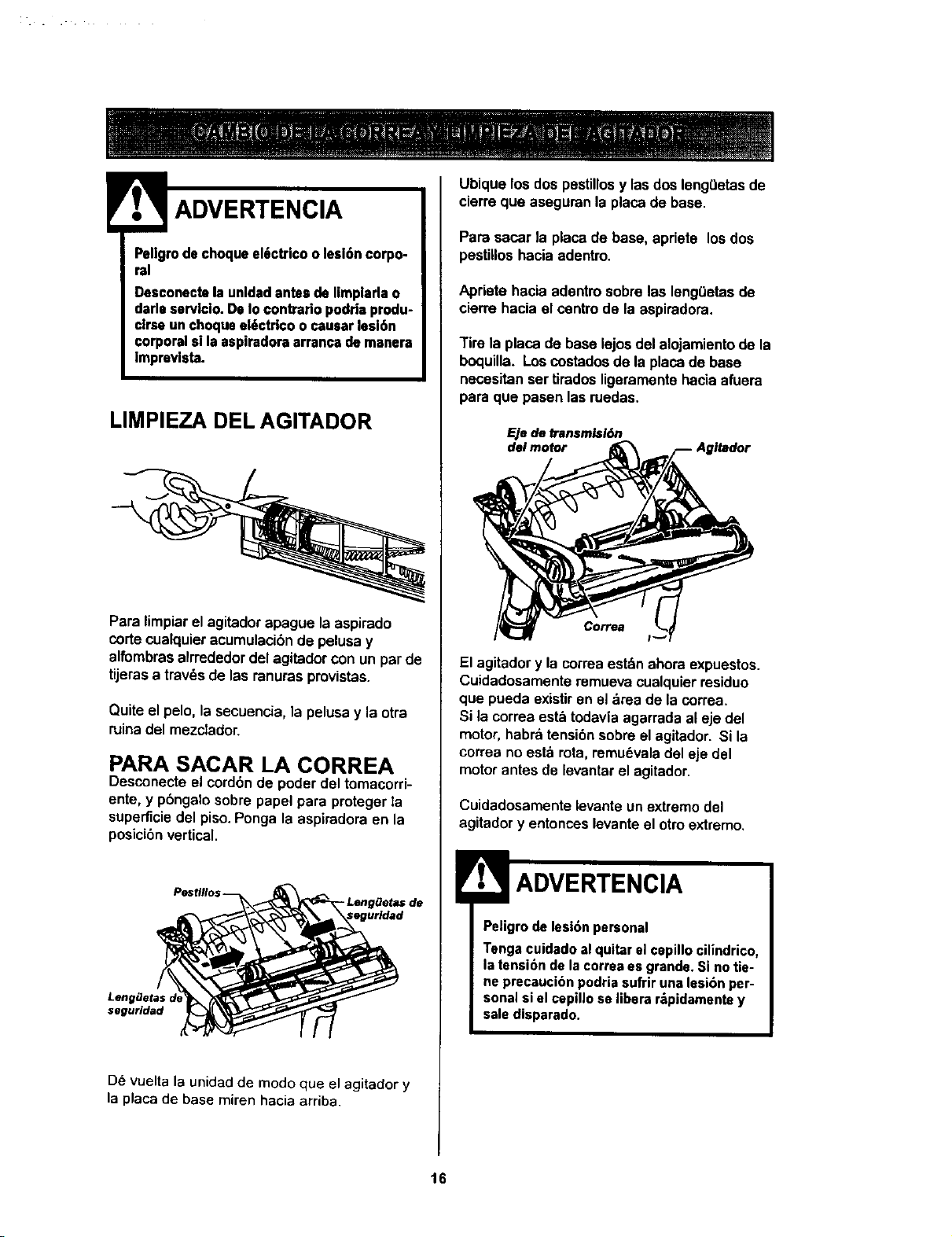
LIMPIEZA DEL AGITADOR
Para limpiarel agitadorapague la aspirado
cortecualquieracumulacibnde pelusay
alfombrasalrrededordel agitadorcon un parde
tijerasa trav_s de las ranurasprovistas.
Quiteel pelo, lasecuencia, la pelusay la otra
ruinadel mezclador.
PARA SACAR LA CORREA
Desconecteel cord6n de poder del temacorri-
ente, y pbngalosobre papal para protegerla
superficiedel piso.Ponga la aspiradoraen la
posici_nvertical,
Pesflllo$ --
segurldad
De vuelta la unidad de modo que el agitador y
la placa de base miren hacia arriba.
Ubiquelos dos pestillosy lasdos lengLletasde
cierre que aseguran la placade base.
Para sacar la placa de base, apriete los dos
pestllloshacia adentro.
Apriete hacia adentm sobre las leng(Jetasde
cierm hacia el centrode la aspiradora.
Tire la placa de base lejos del alojamientode la
boquilla. Los costadosde laplaca de base
necesitanser tiradosiigeramentehacia afuera
para qua pasen lasruedas.
F_je de bansmlsi6n
del motor
El agitadory la correaest_n ahoraexpuestos.
Cuidadosamente remuevacualquier residue
qua pueda exisUren el area de la correa.
Si la correa est&todaviaagarrada al eje del
motor,habra tensibnsobreel agitador. Si la
correa no esta rota,remu6valadel eje del
motorantes de levantarelagitador.
Cuidadosamente levante un extremodel
agitadory entonceslevanteel otroextremo.
ADVERTENClA
Peligro de lesi6n personal
Tenga cuidado al quitar el cepillo cilindrico,
la tensi6n de la correa es grande, Si no tie-
ne precaacion podria sufrir una lesibn per-
sonal si el cepillc se libera r_pidamente y
sale disparado.
16
LIMPIEZA DEL AGITADOR
Nota: Para mantener una alta eficienciade
limpiezay evitar el daf_oala aspiradora,hay
que limpiarel agitadorcada vez que se cambia
lacorrea.
Tambi6nhayque limpiarel agitadorsegt3nel
siguientehoratio:
El uso de la Limpie el
asplradora agitador
Frecuente - cada semana
(usada dirariamente)
Moderado - cada rues
(usada 2 o 3 veces
por semana)
LIgero - cada 2 meses
(usada 1 vez pot semana)
Retire todoindiciode basura o suciedadde la
zona de la correa y del agitador.
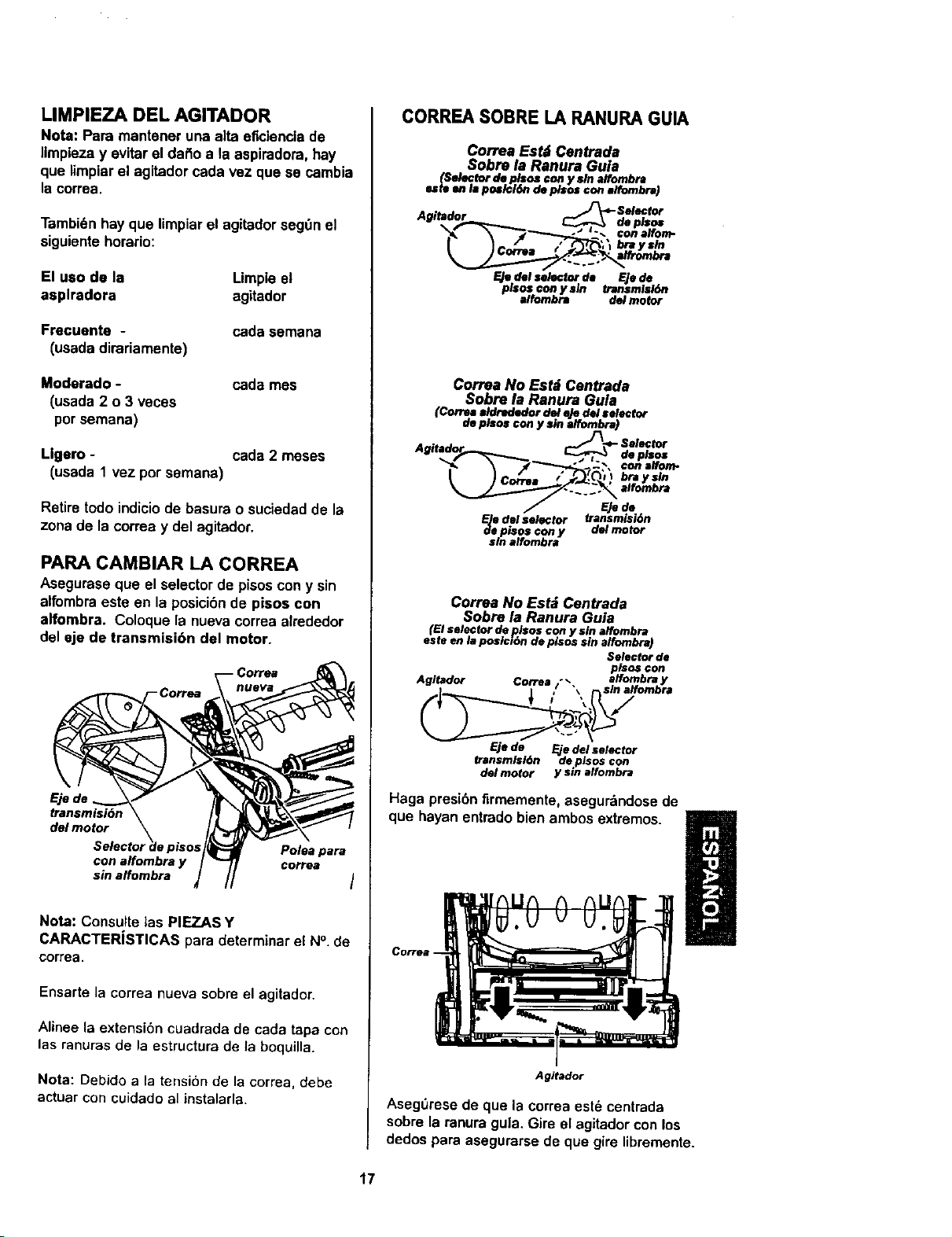
PARA CAMBIAR LA CORREA
Asegurase que el selectorde pisoscon y sin
alfombraeste en la posicibnde pisos con
alfombra. Coloque la nuevacorreaalrededor
del eje de transmisibn del motor.
transmisi6n
delmotor
pisos Polea pare
con alfombra y correa
sin affombra I
Note: Consulte las PIEZAS Y
CARACTERJSTICAS para determinar el N°. de
correa.
Ensarte la correa nueva sobre el agitador.
Alinee la extension cuadrade de eada tapa con
las ranuras de la estructura de la boquilla.
Nota: Debido a la tensi6n de la correa, debe
actuar con cuidadoal instatada.
CORREA SOBRE LA RANURA GUIA
Co,TeaEstd Centrada
Sobre la Ranura Guia
(Selector de plsos con y sln alfombra
este ell M poslcl6n de ptsos con alfombra)
F-Jedel selector de F-jede
pisos con y sln transmisi6n
elfombra del motor
Correa No Estd Centrada
Sobre la Ranura Gula
(Correa aldrededor del eJedel selector
de plsos con y sin alfombra)
_- Selector
Agitad f_ t •
de
p_?s
q ,Oi braysln
Ejede
F.]e€l_ sel_lor transmisidn
de pisos con y del motor
sin alfombra
Correa No Est_ Centrada
Sobre la Ranura Guia
(El selector deplsos con y sin elfombra
este en la posici6n de pisos sin a/fombra)
Selector de
pisos con
Agitador Correa /" _ alfombra y
, "_, sin elfombra
Eje de _'e del selector
transmtsl6n de pisos con
del motor y sin affombra
Haga presi6nfirmemente, asegurdndosede
que hayan entrado bienambos extremos.
Agitador
AsegOrese de que la correa est6 centrada
sobre la ranura gula, Gire el agitador con los
dedos pare asegurarse de que gire libremente.
17
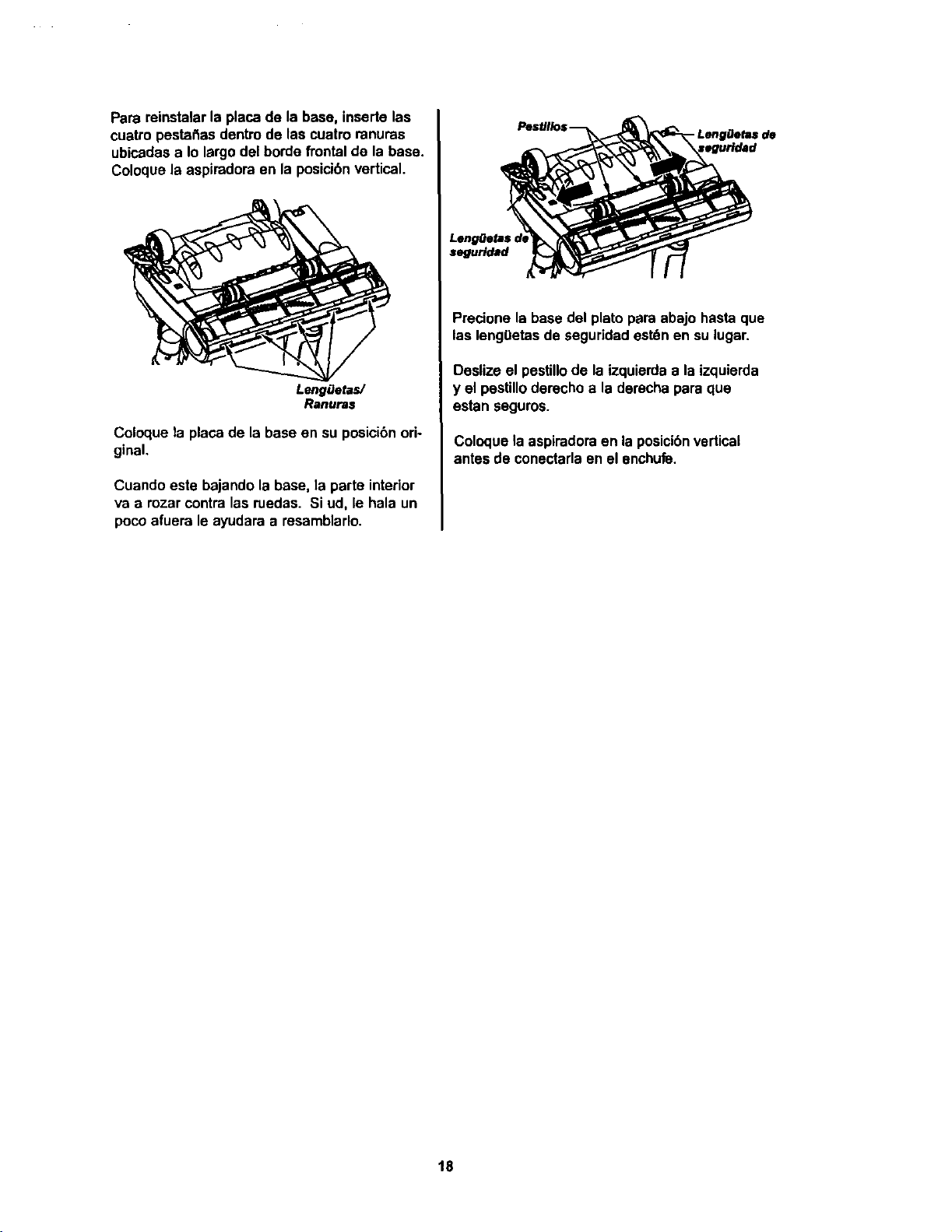
Parareinstalarlaplacadelabase,insertelas
cuatropestat_asdentrodelascuatroranuras
ubicadasaIolargodelbordefrontal de la base.
Coloque la aspiradoraen la posicibnvertical.
LengfJetas/
Ranuras
Coloque la plata de la base en su posici6nori-
ginal.
Cuando este bajando la base, la parte interior
va a rozar contralas ruedas. Si ud, le hala un
pocoafuera le ayudara a resamblarlo.
segurtdad
- LengOetas de
Precione la basedel plato para abajo hastaque
las leng0etas de seguridadest_n en su lugar.
Daslize el pesUllode la izquierdaa la izquierda
y el pestilloderecho a la darechapara qua
estan saguros.
Coloque la aspiradoraen laposicibnvertical
antes de conectarlaen el anchufe.
18
Procodasiempreconprecaucionesdeseguridadal
Ilmpiarydarservlclolaaspiradora.
Pellgrodechoqueel6ctrlcoolesi6ncorpo-
ral
Desconectelaunldadantesdelimpiadao
dadeservlclo.DeIocontrariopodrlaprodu-
cirseunchoqueel6ctrlcoocauaar]esi6n
corporalellaasplradoraarrancademanera
imprevista.
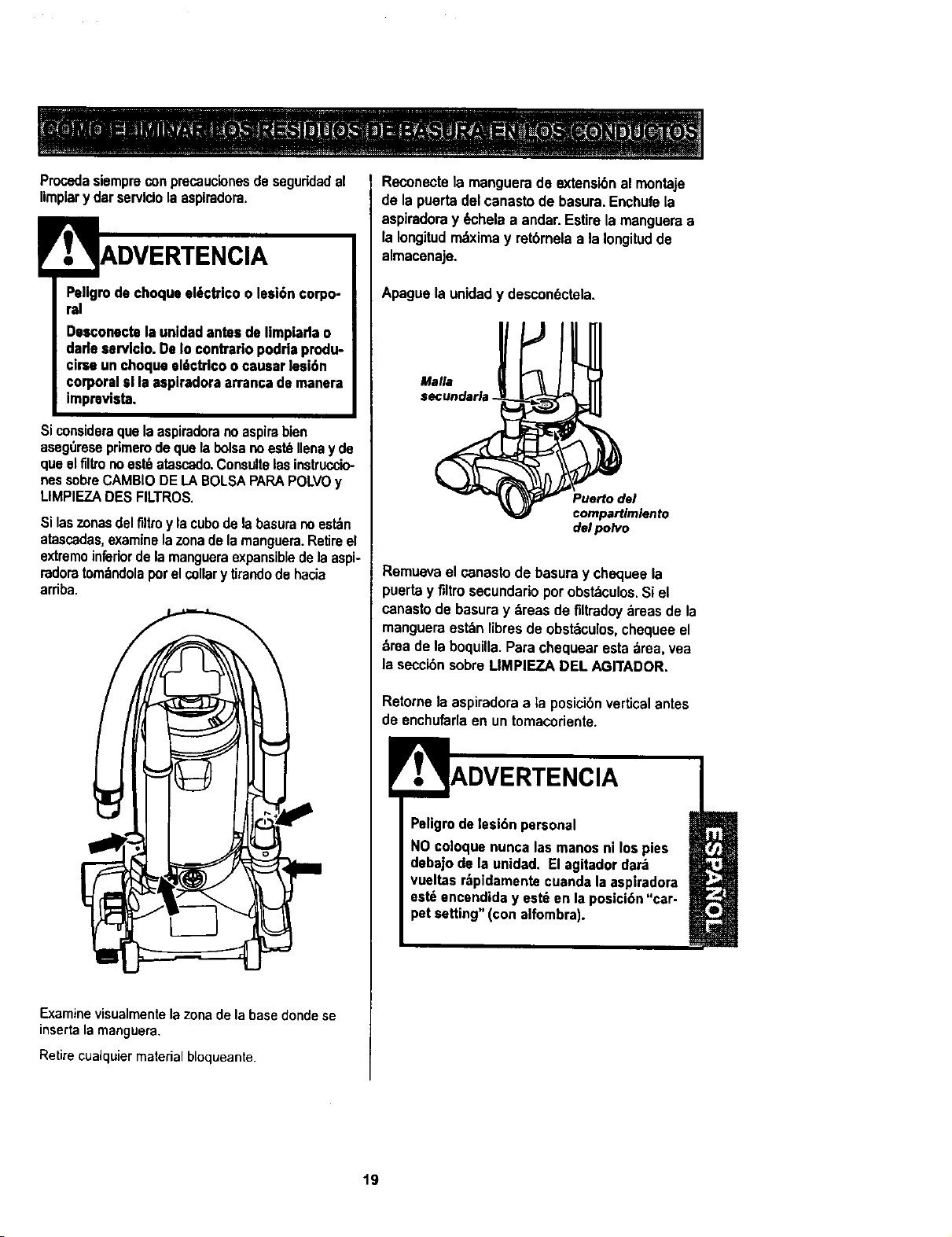
Siconsideraque laaspiradoranoaspirabien
aseg,',reseprimemdequelabolsano est_Ilenay de
que elflltrono est6atascado.Consultelasinstruccio-
nessobreCAMBIODELABOLSAPAPAPOLVOy
LIMPIEZADESFILTROS.
Si laszonasdelfiltroy lacubedela basuranoest_n
atascadas,examinelazonadelarnanguera.Retireel
extremoinferiordelamangueraexpansibledelaaspi-
radoratomtndolaporelcollarytirandode hacia
arriba.
Examine visualmente lazona de la base donde se
inserta la manguera.
Retire cualquier material bloqueante.
Reconectela manguerade extensibn al montaje
de la puertadelcanastode basura.Enchufela
aspiradoray _hela a andar.Estirela mangueraa
la Iongitudmtxima y retbrnelaa la Iongitudde
almacenaje.
Apague la unidad y descon6ctela.
Malla
secundaria .
Puerto del
compartlmlento
del polvo
Remuevael canastode basura y chequeela
puerta y filtro secundarioper obst_culos.Si el
canastode basuray treas defiltradoytreas de la
mangueraesttn libresde obsttculos,chequeeel
brea de laboquUla.Parachequearestatrea, vea
laseccibnsobreLIMPIEZA DEL AGITADOR.
Retornela aspiradoraa la posicibn verticalantes
deenchufarlaen un tomacoriente.
Peligrodelesi6n personal
NOcoloquenuncalasmanosni los pies
debajode la unidad. El agitadordart
vueltas r_,pidamentecuandala aspiradora
est_encendiday estt en laposici6n"car-
petsetting"(con alfombra).
19
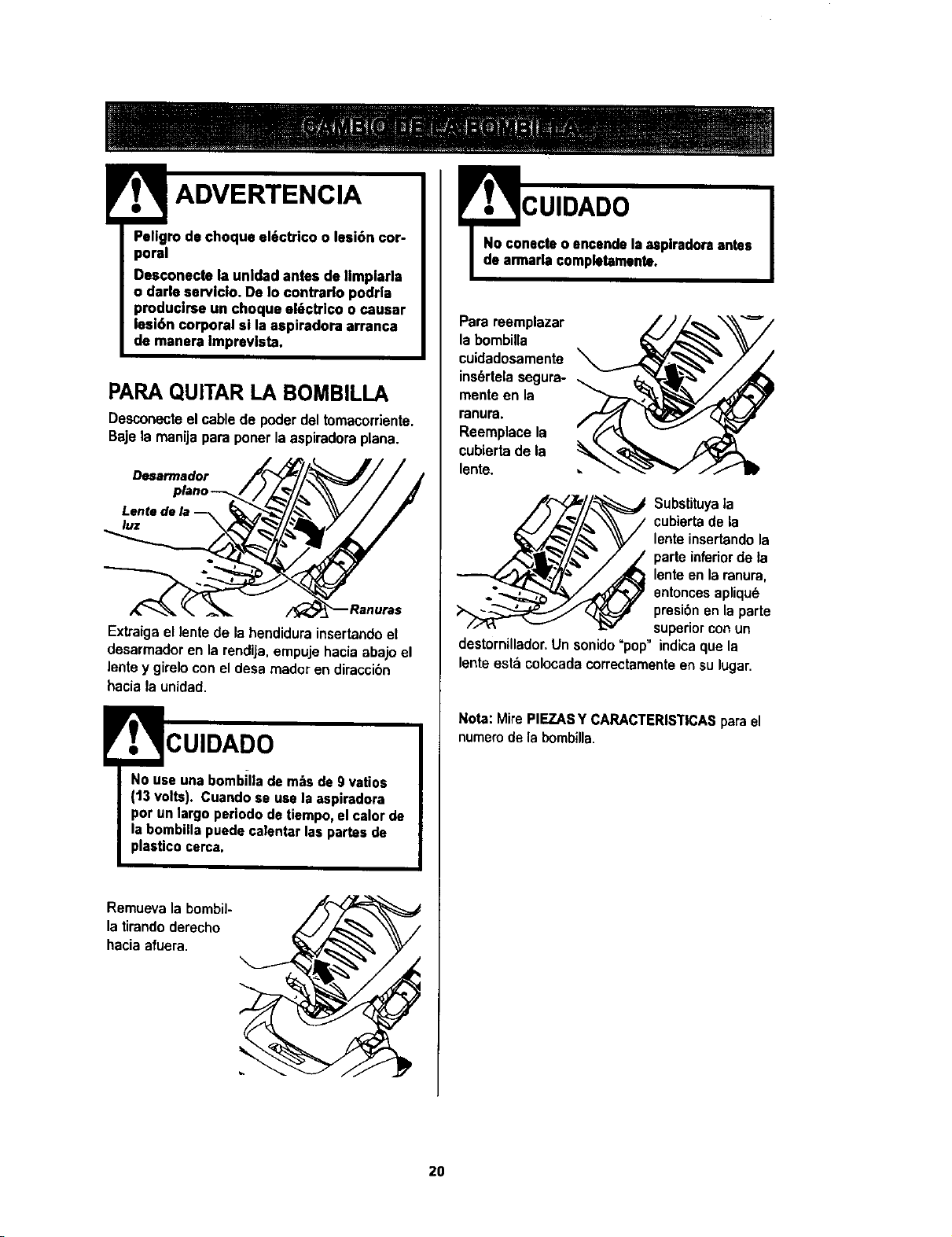
;,'r',,ro0,°boq°a,"o 'coo'--i0° or-
Desconecte la unldad antesde Ilmplarla
o darle sarvlcio.De Io contrarlo podr|a
producirseun choque el6ctrico ocausar
fesi6n corporal si laaspiradora arranca
de manera Imprevlsta.
PARA QUITAR LA BOMBILLA
Desconecteel cablede poderdeltomacorriente.
Bajela manijapara ponerla aspiradoraplana.
Desarmador
Lente de la
luz _,
Exkaiga ellenfede lahendidurainsertandoel
desarmadoren larendija,empujehaciaabajoel
lentey gireloconel desarnadoren diraccibn
haciala unidad.
CUIDADO
No use una bombilla de mrs de 9 vatios
(13 volts). Cuando se use la aspiradora
por un largo periodo de tiempo, el calor de
la bombilla puede calentar las partes de
plasUco cerca.
Remuevala bombil-
latirandoderecho
haciaafuera.
!
=CUIDADO
nacreo ancendeIsasplradoraantes
aria completamants.
Parareemplazar
labombilla
cuidadosamente
ins_rtelasegura-
menteen la
ranura.
Reemplacela
cubiertade la
lente.
_ Substituyala
'_ _ cubiertadela
lenteinsertandola
parfe inferiorde ta
lenteen laranura,
entoncesapliqu_
presibnen laparts
superiorconun
destornillador.Un sonido=pop" indicaque la
lenteest&colocadacorrectamenteensulugar.
Nora:MirePIEZASY CARACTERISTICASparael
numerode labombilla.
20
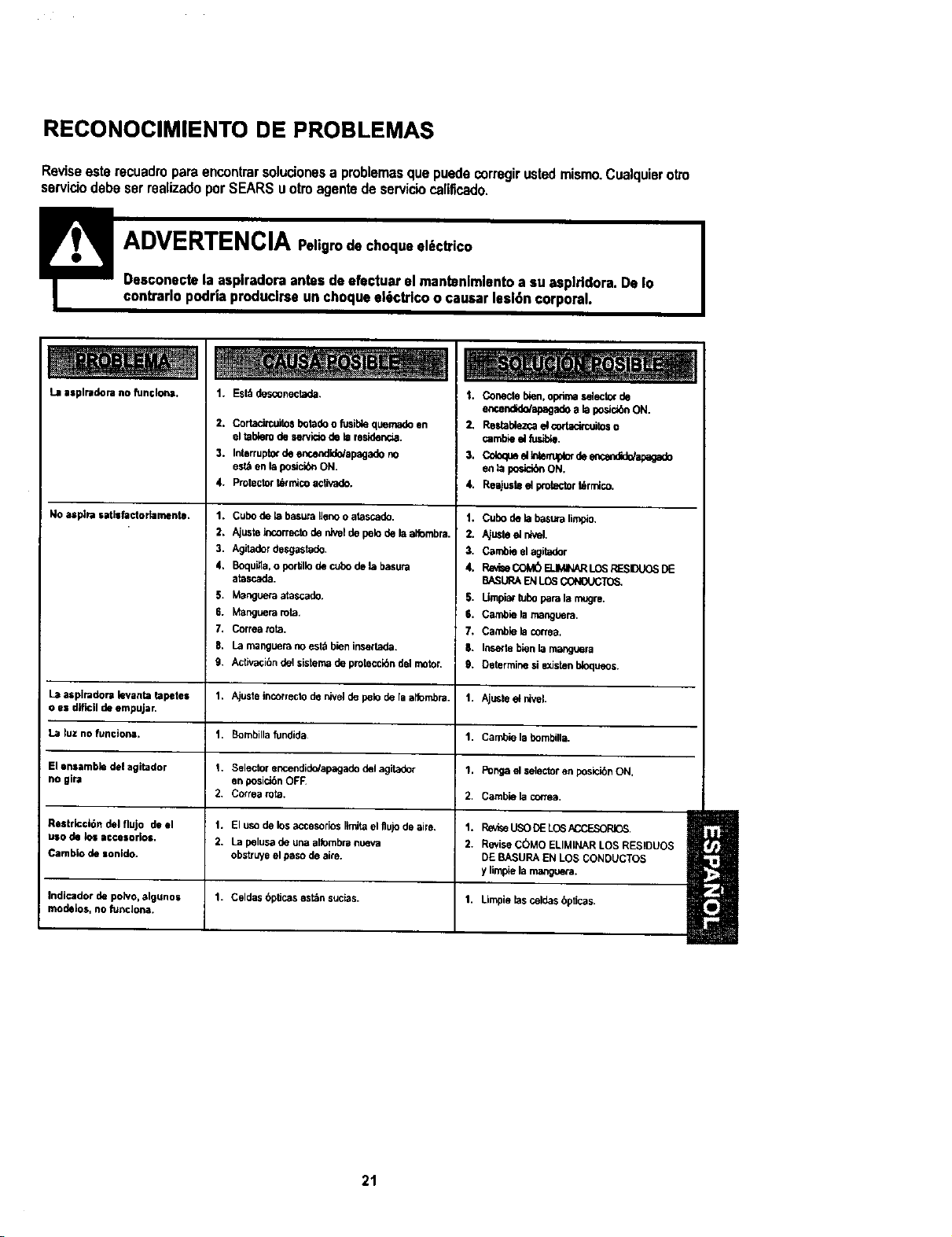
RECONOCIMIENTO DE PROBLEMAS
Reviseesterecuadroparaencontrarsolucionesa problemasquepuedecorregirustedmismo.Cualquierotto
serviciodebeserrealizadoporSEARSuotroagentedeserviciocafificado.
La asplradora no funclona,
, No asl_a tatisfactor_meltte.
1. Est;tdesconectada,
2. Cortadrcuitosbotadoo fusiblequemadoen
eltablerodeservidode k=residenoa.
3. _rr_ptzx desrt.,endid_ap_adono
est_enlaposicibnON.
4. protectort_micoactivado.
1. C,_o de_ _ ttenooatascado.
2. AjusteIncormctoden_l depeb delaalfombra.
3. Agitadordesgastado.
4, Boquifla,o portfllodecubodelabasura
atascada.
5. Mangueraatascado.
6. Manguerarata.
7. Correatota.
9. Activ_i6ndelsisternadeprolecci6ndelmotor.
1. Conecte bien, optima selec_ de
er_endido/apagado a b posi_n ON.
2, Restabbzca d cor_tos o
cambie d fu_.
_,.Co_ __B_r,_ de=_c_dU_apagado
en la posici_ ON.
4. Reajuste el protectort_rrnlco,
1. Cubodek=ba_,.=aP_.
2. Aju_teelntvel.
3. Cambieelagitador
4, RavbeCOM6ELIMINARLOSRESDUOSDE
BASURAENLOS_.
5, UmpiarbJbOparalamugre.
6, Camb_ela manguera,
7. Cambleb correa,
l.. Insewtebk_ _ r_J_a
9. Determinesiexistenb_oqueos.
La aspimdora levanta tapetes 1. Ajuste incorreclode n_ve_de polo de la a_ombra. I. Ajuste et nivel.
o es dif_[[ de er_pujar.
La luz no funciona, 1. Bombillafundida 1. Cambie labombilla.
Elensambledelagitador 1. Selectorencendido/apagadodelagitador 1, Pongaelselectorenposici_nON,
no gira en posid6n OF_
2. Correa rota, 2. Camb_ela conea.
RestrictiOn del flujo de el 1, El uso de los accesorios lirnitael flujo de aire, 1.
uso d_ los ac,c_sork=$. 2, La petusa de una atloml_ranoeva 2.
Cambio de sonldo, obsb'uyeel paso de aire.
RevlseUSODELOSACCE_
ReviseCOMOELtMII,)ARLOSRES)DL_OS
DEBASURAENLOSCONDUCTOS
ylimpielamanguera.
Indicador de po_vo,algunos 1. Celdas bptJcasest_n sucias. 1. Limpie las celdasbpticas.
mode_os, no funcJona.
21

iiiiiiii)_ii!iiiii_iL!_¸
i_i!!!_ii
:_i:i¸
1_123_ ,'_ _ ¢_r_O__ $ A.o_in
t_lald_.,,43om