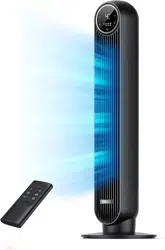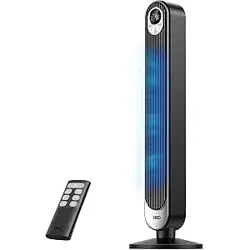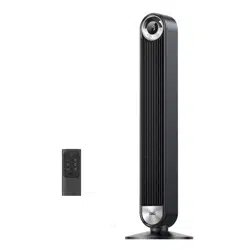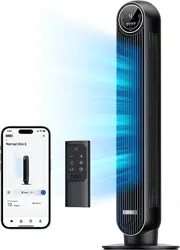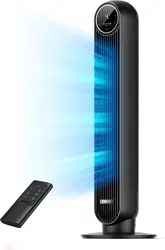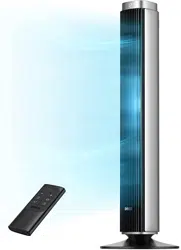
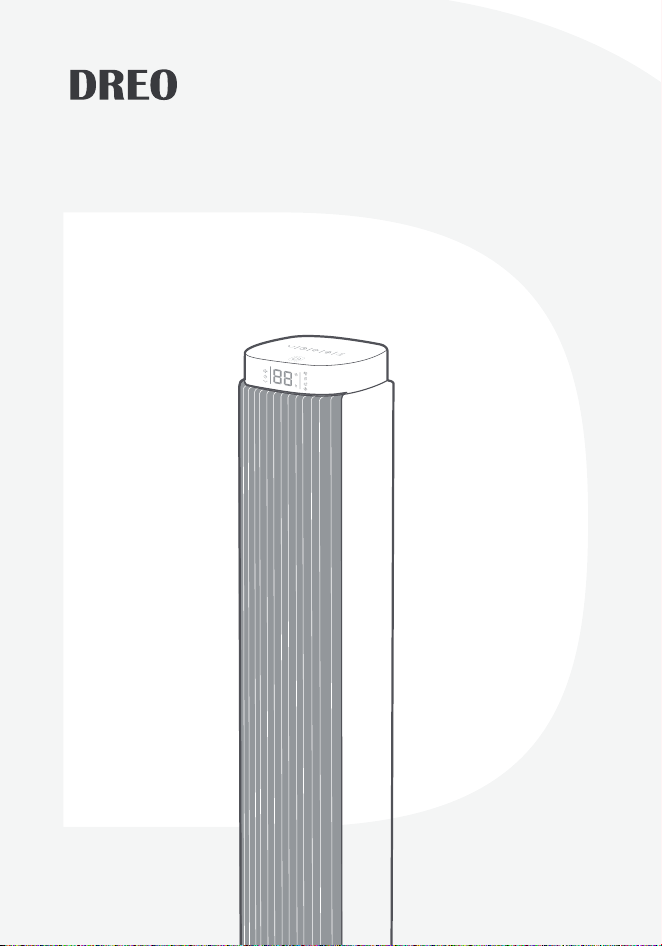
Tower Fan
USER MANUAL
Looking for help?
Contact us to get expert support.
DR-HTF005
www.dreo.com
support@dreo.com (888) 520-3736
Mon - Fri, 9:00 am-5:00 pm PST/PDT
www.dreo.com
Tower Fan
USER MANUAL
Looking for help?
Contact us to get expert support.
DR-HTF005
www.dreo.com
support@dreo.com (888) 520-3736
Mon - Fri, 9:00 am-5:00 pm PST/PDT
www.dreo.com
EXTEND YOUR
WARRANTY FOR FREE
Scan or visit dreo.com/warranty
to extend your warranty for free by registering your product. If
you have any product issues, we always stand ready to help.
Your support means the world to us. We
hope you enjoy our product as much as
we did creating it.
,,
@Dreo
Thanks for
Choosing
DREO!
support@dreo.com
Mon - Fri, 9:00 am-5:00 pm PST/PDT
(888) 520-3736
www.dreo.com

EXTEND YOUR
WARRANTY FOR FREE
Scan or visit dreo.com/warranty
to extend your warranty for free by registering your product. If
you have any product issues, we always stand ready to help.
Your support means the world to us. We
hope you enjoy our product as much as
we did creating it.
,,
@Dreo
Thanks for
Choosing
DREO!
support@dreo.com
Mon - Fri, 9:00 am-5:00 pm PST/PDT
(888) 520-3736
www.dreo.com
CONTENTS
4
2
6
1
5
3
7
8-10
3-5
12
1-2
11
6-7
13
USING YOUR
TOWER FAN
ASSEMBLING
YOUR TOWER
FAN
TROUBLE-
SHOOTING
IMPORTANT
SAFETY
INSTRUCTIONS
CLEANING
AND
MAINTENANCE
KNOWING YOUR
TOWER FAN
DREO
CUSTOMER
CARE
CONTENTS
4
2
6
1
5
3
7
8-10
3-5
12
1-2
11
6-7
13
USING YOUR
TOWER FAN
ASSEMBLING
YOUR TOWER
FAN
TROUBLE-
SHOOTING
IMPORTANT
SAFETY
INSTRUCTIONS
CLEANING
AND
MAINTENANCE
KNOWING YOUR
TOWER FAN
DREO
CUSTOMER
CARE
1
2
Dreo Tower
Fan
Dreo Tower
Fan
IMPORTANT SAFETY
INSTRUCTIONS
FOR HOUSEHOLD USE ONLY READ
AND SAVE THESE INSTRUCTIONS
1
READ ALL CAUTIONARY
MARKINGS ON THE APPLIANCE
AND SAFETY INSTRUCTIONS
IN THE USER MANUAL BEFORE
USE.
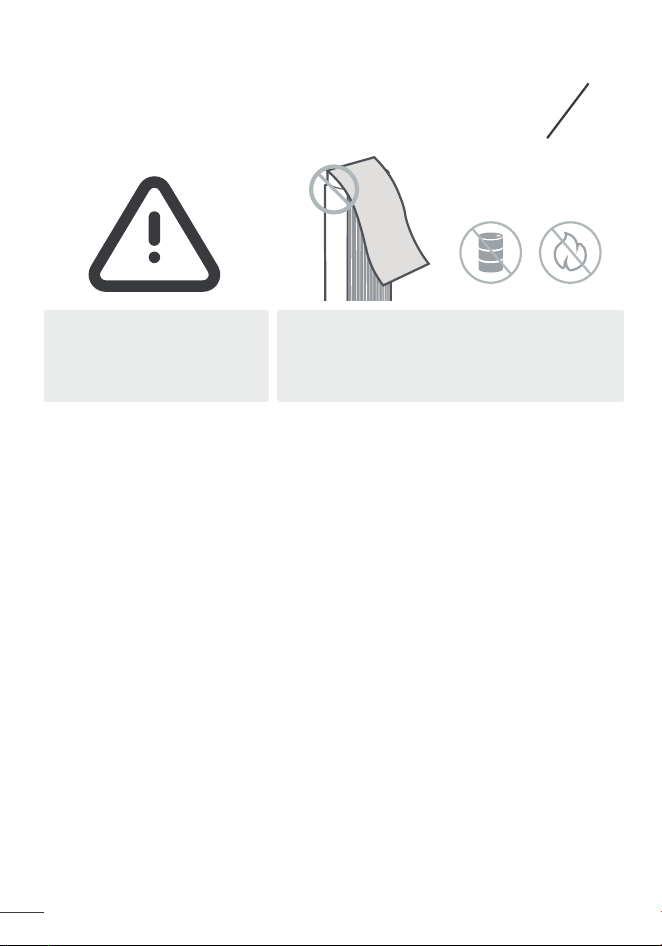
Do not cover the
air inlet and outlet
while in operation.
Do not use the fan
near flammables
and combustibles.
Children shall not play with the appliance. Cleaning and maintenance shall
not be performed by children without supervision.
Use the appliance as described in the user manual only. Any other use
not recommended in the user manual may cause fire, electrical shock, or
personal injury.
This appliance can be used by children aged above 8 years and persons
with reduced physical, sensory or mental capabilities or lack of experience
and knowledge if they have been given supervision or instruction
concerning use of this appliance in a safe way and understand the
hazards involved.
Make sure that the voltage of your electricity supply is the same as that
indicated on the appliance.
Always unplug before cleaning or leaving the appliance unused for a long
period of time. Keep your hands dry when plugging/unplugging.
Do not operate any fan with a damaged cord or plug. Discard fan or return
to an authorized service facility for examination and/or repair.
Do not run cord under carpeting. Do not cover cord with throw rugs,
runners, or similar coverings. Do not route cord under furniture or
appliances. Arrange cord away from traffic area and where it will not be
tripped over.
WARNING: To reduce the risk of fire or electric shock, do not use this
tower fan with any solid-state speed control device.
Use 24V/1A power adapter only. Turn off the appliance before plugging.
Place the appliance on a flat, dry surface before use.
Do not immerse in water and any other liquids.
Do not use the appliance until the base is installed.
Do not insert your fingers, pencil and any other objects into the grilles
while in operation.
Do not dismantle, repair, or modify. All servicing should be performed by
qualified personnel.
General Safety
Electricity Safety
Operation Safety
1.
2.
3.
1.
2.
3.
4.
5.
6.
1.
2.
3.
4.
5.
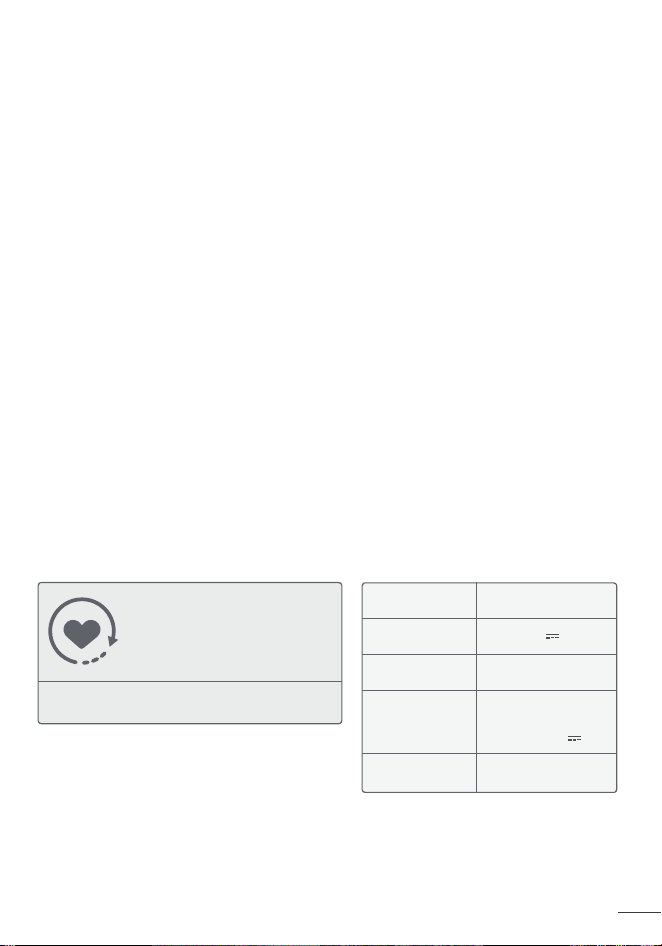
Specifications
Model DR-HTF005
Power Supply
24V 1A
Rated Power 24W
Remote Control
Battery
CR2025 3V
Check the appliance regularly
and refer to TROUBLESHOOTING
or contact our customer support
if it shows any of the following
signs:
- Power cord or plug is damaged.
- Loud noise, unusual smell or excessive heat.
Gentle Reminder:
Power Adapter
Input: 100-240V
~50/60Hz
Output: 24V 1A
1
2
Dreo Tower
Fan
Dreo Tower
Fan
IMPORTANT SAFETY
INSTRUCTIONS
FOR HOUSEHOLD USE ONLY READ
AND SAVE THESE INSTRUCTIONS
1
READ ALL CAUTIONARY
MARKINGS ON THE APPLIANCE
AND SAFETY INSTRUCTIONS
IN THE USER MANUAL BEFORE
USE.
Do not cover the
air inlet and outlet
while in operation.
Do not use the fan
near flammables
and combustibles.
Children shall not play with the appliance. Cleaning and maintenance shall
not be performed by children without supervision.
Use the appliance as described in the user manual only. Any other use
not recommended in the user manual may cause fire, electrical shock, or
personal injury.
This appliance can be used by children aged above 8 years and persons
with reduced physical, sensory or mental capabilities or lack of experience
and knowledge if they have been given supervision or instruction
concerning use of this appliance in a safe way and understand the
hazards involved.
Make sure that the voltage of your electricity supply is the same as that
indicated on the appliance.
Always unplug before cleaning or leaving the appliance unused for a long
period of time. Keep your hands dry when plugging/unplugging.
Do not operate any fan with a damaged cord or plug. Discard fan or return
to an authorized service facility for examination and/or repair.
Do not run cord under carpeting. Do not cover cord with throw rugs,
runners, or similar coverings. Do not route cord under furniture or
appliances. Arrange cord away from traffic area and where it will not be
tripped over.
WARNING: To reduce the risk of fire or electric shock, do not use this
tower fan with any solid-state speed control device.
Use 24V/1A power adapter only. Turn off the appliance before plugging.
Place the appliance on a flat, dry surface before use.
Do not immerse in water and any other liquids.
Do not use the appliance until the base is installed.
Do not insert your fingers, pencil and any other objects into the grilles
while in operation.
Do not dismantle, repair, or modify. All servicing should be performed by
qualified personnel.
General Safety
Electricity Safety
Operation Safety
1.
2.
3.
1.
2.
3.
4.
5.
6.
1.
2.
3.
4.
5.
Specifications
Model DR-HTF005
Power Supply
24V 1A
Rated Power 24W
Remote Control
Battery
CR2025 3V
Check the appliance regularly
and refer to TROUBLESHOOTING
or contact our customer support
if it shows any of the following
signs:
- Power cord or plug is damaged.
- Loud noise, unusual smell or excessive heat.
Gentle Reminder:
Power Adapter
Input: 100-240V
~50/60Hz
Output: 24V 1A

3
4
Dreo Tower
Fan
Dreo Tower
Fan
ASSEMBLING
YOUR TOWER FAN
2
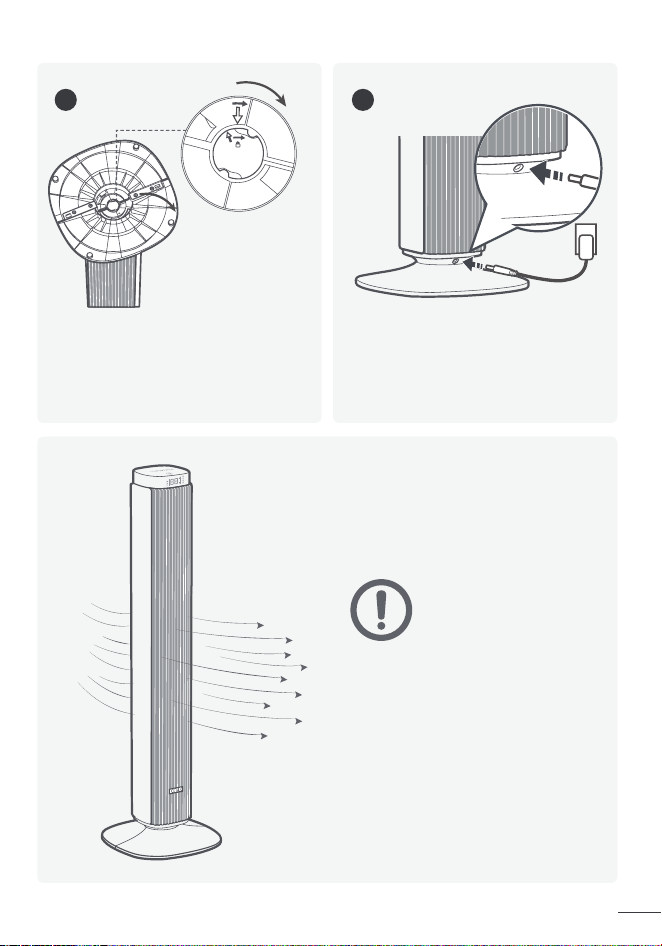
Assembly Instructions
When using the appliance for the first time, remove the wraps and attach the
parts by following the steps below.
1
2
4 5
3
Keep two base halves in a
crossed position, then insert
pegs on one half onto the
slots on the other half.
Press down on edges to click two
base halves together.
Rotate the base clockwise to
lock in place.
Put the fan upright, then plug
the power adapter into the
power input (located at the back
of the fan), and into the power
outlet.
Fit the base onto the bottom of
the fan by aligning the arrows
on the underside. Make sure the
jutting points in the center of the
base are fitted into the recesses
on the fan.
Up
Down
Slots
Pegs
CAUTION
Do not operate the tower
fan if the base has not
been installed.
Jutting Points
3
4
Dreo Tower
Fan
Dreo Tower
Fan
ASSEMBLING
YOUR TOWER FAN
2
Assembly Instructions
When using the appliance for the first time, remove the wraps and attach the
parts by following the steps below.
1
2
4 5
3
Keep two base halves in a
crossed position, then insert
pegs on one half onto the
slots on the other half.
Press down on edges to click two
base halves together.
Rotate the base clockwise to
lock in place.
Put the fan upright, then plug
the power adapter into the
power input (located at the back
of the fan), and into the power
outlet.
Fit the base onto the bottom of
the fan by aligning the arrows
on the underside. Make sure the
jutting points in the center of the
base are fitted into the recesses
on the fan.
Up
Down
Slots
Pegs
CAUTION
Do not operate the tower
fan if the base has not
been installed.
Jutting Points
5
6
Dreo Tower
Fan
Dreo Tower
Fan
KNOWING YOUR
TOWER FAN
3
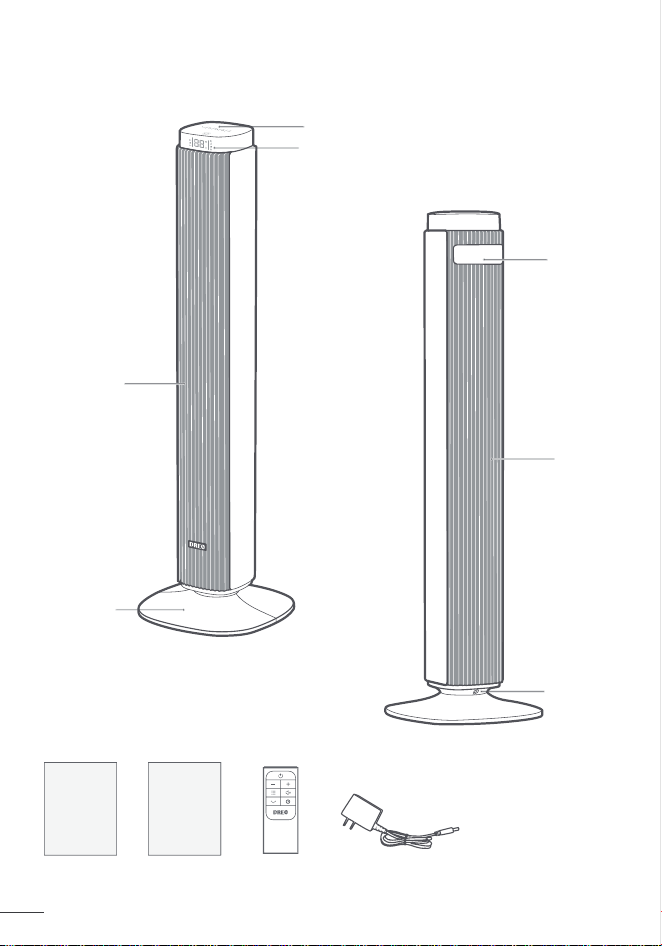
Control Panel
Power Button
Turn power on/off
Package Contents
Front
Rear
LED Display
Air Outlet
Base
Carry
Handle /
Remote
Holder
Air Inlet
User
Manual
Remote Control
(Battery Included)
Quick Start
Guide
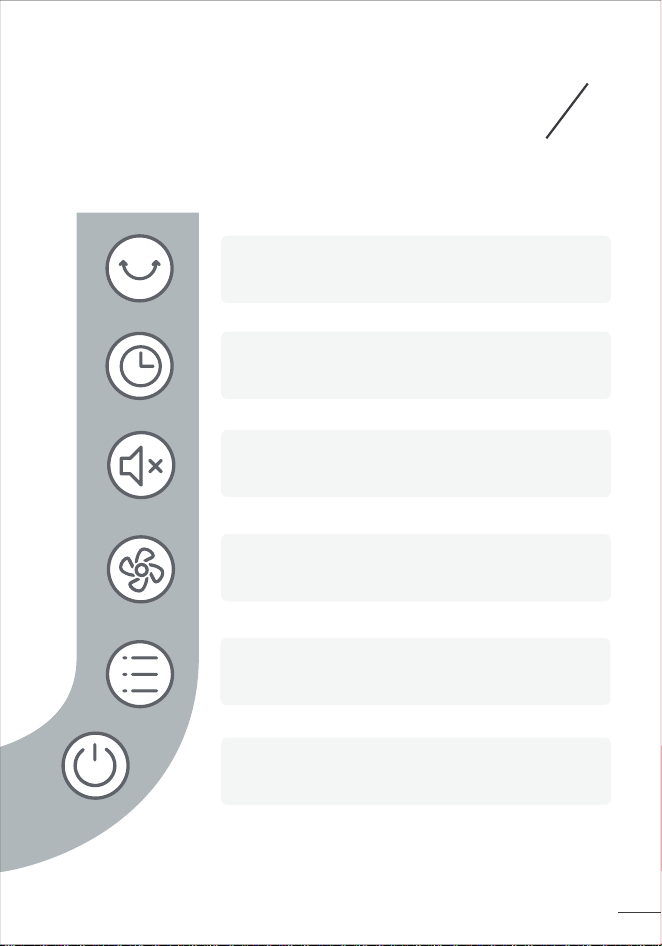
Control Panel
Power
Input
Mode Button
Switch between Normal/Natural/Sleep/Auto Mode
Oscillation Button
Adjust airflow direction
Timer Button
Select to set a timer (0-12h)
Mute Button
Turn on/off button sounds
Fan Speed Button
Adjust fan speed (1-9 levels)
Power Adapter
5
6
Dreo Tower
Fan
Dreo Tower
Fan
KNOWING YOUR
TOWER FAN
3
Control Panel
Power Button
Turn power on/off
Package Contents
Front
Rear
LED Display
Air Outlet
Base
Carry
Handle /
Remote
Holder
Air Inlet
User
Manual
Remote Control
(Battery Included)
Quick Start
Guide
Control Panel
Power
Input
Mode Button
Switch between Normal/Natural/Sleep/Auto Mode
Oscillation Button
Adjust airflow direction
Timer Button
Select to set a timer (0-12h)
Mute Button
Turn on/off button sounds
Fan Speed Button
Adjust fan speed (1-9 levels)
Power Adapter
7
8
Dreo Tower
Fan
Dreo Tower
Fan
USING YOUR
TOWER FAN
4
General Operations
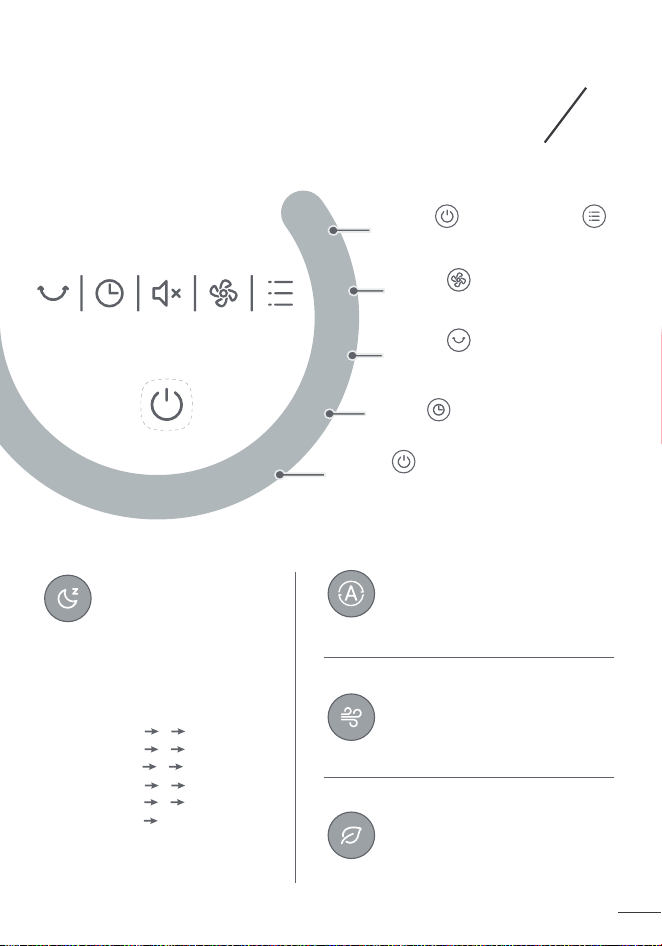
Working Modes
Normal Mode
Natural Mode
Auto Mode
Sleep Mode
(Mute Auto On)
Fan runs at the constant speed.
Fan runs at alternating speeds.
Fan speed adapts to the
ambient temperature.
Fan speed decreases every
30 minutes.
Speed decreases by two levels
at most and will remain constant
if at level 3, 2 or 1:
For level 9: 9 8 7
For level 8: 8 7 6
For level 7: 7 6 5
For level 6: 6 5 4
For level 5: 5 4 3
For level 4: 4 3
For level 3: 3
For level 2: 2
For level 1: 1
Touch to turn on, and
to choose a working mode.
Touch to adjust the
airflow volume.
Touch to change the
airflow direction.
Touch to set a timer.
Touch to turn off the
tower fan.
1
2
3
4
5
Getting the Most out of
Your Tower Fan
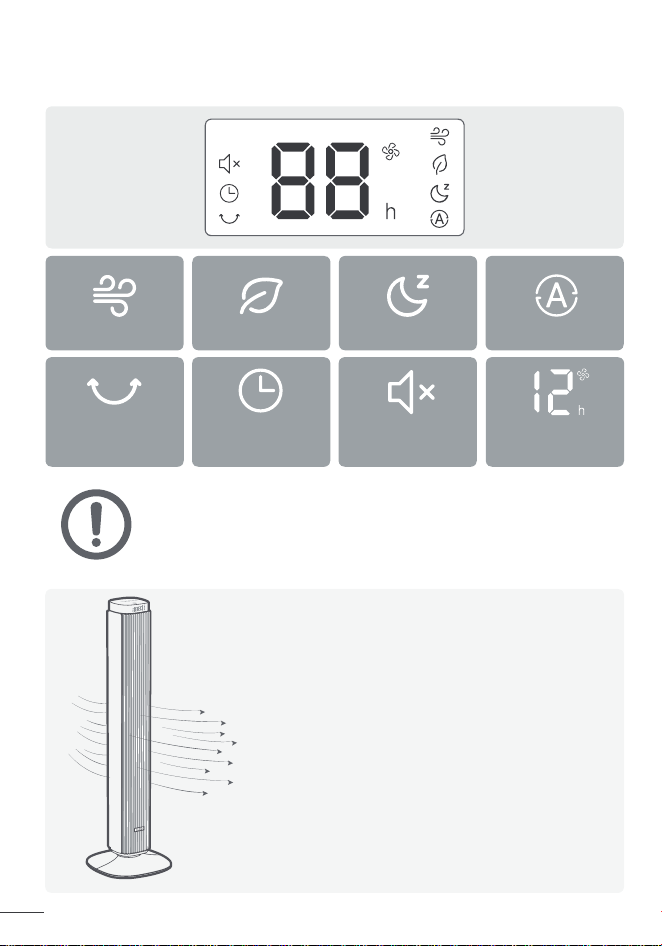
LED Display
• Display will turn off after 1 minute (after 5 seconds in sleep mode).
• Wake the display up with any button.
• Display will not turn off when the auto on timer is enabled.
NOTE:
It's not an air conditioner.
Remove any tall obstacles that might block
the airflow from the fan.
Combine with your AC unit to get cooler air
throughout the room.
Position the tower fan closer to you to get
more direct airflow.
Place a bucket of ice in front of the fan for
an extra cooling boost.
1.
2.
3.
4.
5.
Normal Mode
Mute
Natural Mode
Timer
Sleep Mode
Oscillation
Auto Mode
Fan Speed/
Timer Hour
7
8
Dreo Tower
Fan
Dreo Tower
Fan
USING YOUR
TOWER FAN
4
General Operations
Working Modes
Normal Mode
Natural Mode
Auto Mode
Sleep Mode
(Mute Auto On)
Fan runs at the constant speed.
Fan runs at alternating speeds.
Fan speed adapts to the
ambient temperature.
Fan speed decreases every
30 minutes.
Speed decreases by two levels
at most and will remain constant
if at level 3, 2 or 1:
For level 9: 9 8 7
For level 8: 8 7 6
For level 7: 7 6 5
For level 6: 6 5 4
For level 5: 5 4 3
For level 4: 4 3
For level 3: 3
For level 2: 2
For level 1: 1
Touch to turn on, and
to choose a working mode.
Touch to adjust the
airflow volume.
Touch to change the
airflow direction.
Touch to set a timer.
Touch to turn off the
tower fan.
1
2
3
4
5
Getting the Most out of
Your Tower Fan
LED Display
• Display will turn off after 1 minute (after 5 seconds in sleep mode).
• Wake the display up with any button.
• Display will not turn off when the auto on timer is enabled.
NOTE:
It's not an air conditioner.
Remove any tall obstacles that might block
the airflow from the fan.
Combine with your AC unit to get cooler air
throughout the room.
Position the tower fan closer to you to get
more direct airflow.
Place a bucket of ice in front of the fan for
an extra cooling boost.
1.
2.
3.
4.
5.
Normal Mode
Mute
Natural Mode
Timer
Sleep Mode
Oscillation
Auto Mode
Fan Speed/
Timer Hour
9
10
Dreo Tower
Fan
Dreo Tower
Fan
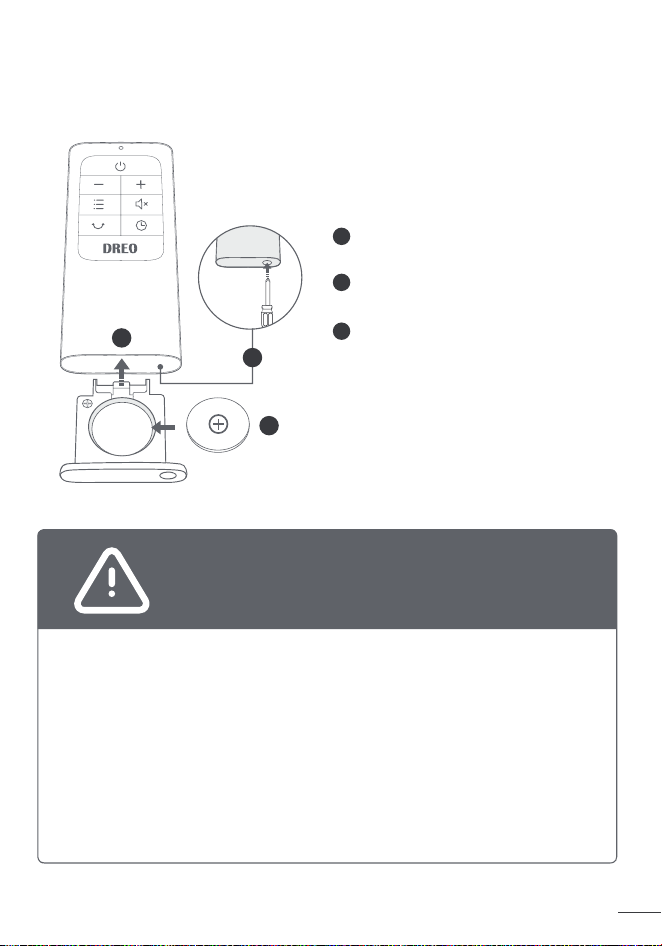
Battery Replacement
This product contains a lithium button/coin cell battery. If a new or
used lithium button/coin cell battery is swallowed or enters the body,
it can cause severe internal burns and can lead to death in as little
as 2 hours. Always completely secure the battery compartment. If
the battery compartment does not close securely, stop using the
product, remove the battery, and keep it away from children. If you
think batteries might have been swallowed or placed inside any part
of the body, seek immediate medical attention.
The batteries must be disposed of properly, including keeping them
away from children. Even used cells may cause injury.
Chemical Burn Hazard. Keep batteries away
from children.
WARNING
Note: If the indicator on the remote
control doesn’t turn on any more,
please consider replacing the
battery.
1
2
CR2025 3V
1
2
3
3
Press the locking button to pop
out the battery holder.
Replace with the same battery
type with the (+) side facing up.
Push in the holder until securely
locked into place.
Additional Features
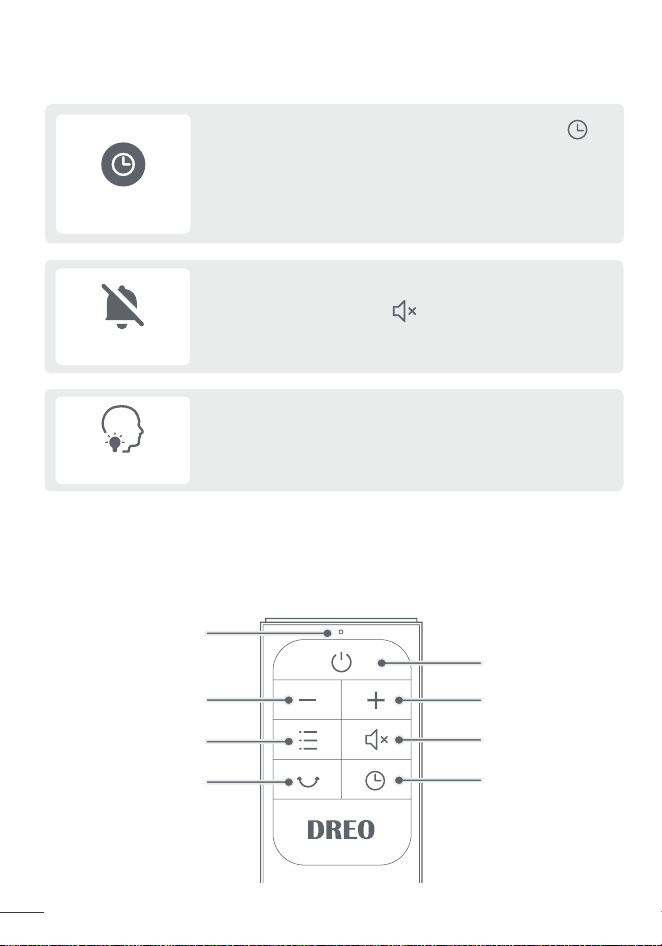
Remote Control
Power
Power Indicator
Increase Fan
Speed
Decrease Fan Speed
Mute
Mode
Timer
Oscillation
Touch the mute button to turn on or off the
Mute
Memory
If the fan is turned OFF or disconnected from power,
it will operate under the previous settings (except
the timer setting) when it is turned ON again.
When the fan is ON/OFF, touch the timer button
repeatedly to set a timer from 1 to 12 hours. When
the timer ends, the fan will stop/start running
automatically. To cancel, set the time to 0 hour.
Note: When the auto off timer is enabled, display will return
to fan speed after 3 seconds.
Timer
button sounds.
9
10
Dreo Tower
Fan
Dreo Tower
Fan
Battery Replacement
This product contains a lithium button/coin cell battery. If a new or
used lithium button/coin cell battery is swallowed or enters the body,
it can cause severe internal burns and can lead to death in as little
as 2 hours. Always completely secure the battery compartment. If
the battery compartment does not close securely, stop using the
product, remove the battery, and keep it away from children. If you
think batteries might have been swallowed or placed inside any part
of the body, seek immediate medical attention.
The batteries must be disposed of properly, including keeping them
away from children. Even used cells may cause injury.
Chemical Burn Hazard. Keep batteries away
from children.
WARNING
Note: If the indicator on the remote
control doesn’t turn on any more,
please consider replacing the
battery.
1
2
CR2025 3V
1
2
3
3
Press the locking button to pop
out the battery holder.
Replace with the same battery
type with the (+) side facing up.
Push in the holder until securely
locked into place.
Additional Features
Remote Control
Power
Power Indicator
Increase Fan
Speed
Decrease Fan Speed
Mute
Mode
Timer
Oscillation
Touch the mute button to turn on or off the
Mute
Memory
If the fan is turned OFF or disconnected from power,
it will operate under the previous settings (except
the timer setting) when it is turned ON again.
When the fan is ON/OFF, touch the timer button
repeatedly to set a timer from 1 to 12 hours. When
the timer ends, the fan will stop/start running
automatically. To cancel, set the time to 0 hour.
Note: When the auto off timer is enabled, display will return
to fan speed after 3 seconds.
Timer
button sounds.
11
12
Dreo Tower
Fan
Dreo Tower
Fan
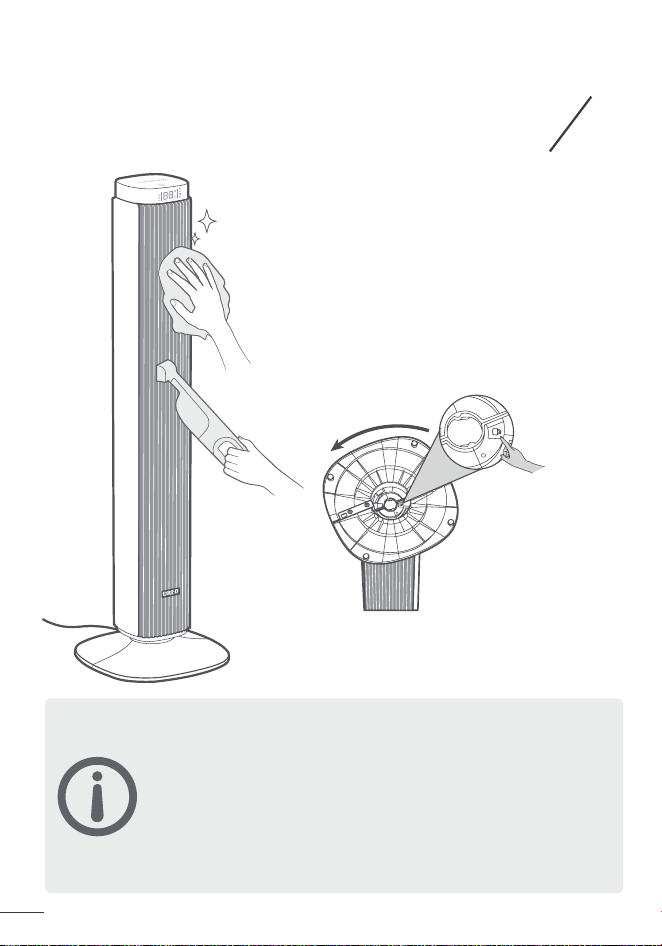
Always unplug the fan before any cleaning or maintenance
to avoid the risk of fire, electric shock, or injury to persons.
Do not immerse in water or get water inside the motor
housing.
Do not use any chemical agents when cleaning the fan.
Store in a cool, dry place and cover it to protect from dust.
CAUTION
CLEANING AND
MAINTENANCE
5
Outer Surface
Grilles & Blades
Base
Gently wipe off the dust with a soft,
dry cloth.
Remove the dust using a vacuum or
air duster.
Press on the lock sign here and rotate
conterclockwise to release the base,
then disassemble the base in the reverse
order of assembly.
1.
2.
3.
4.
If your problem is not listed or still persists, please contact our
Customer Support (see page 13).
Make sure that the cord is connected to a powered outlet and the
mains voltage corresponds with the voltage indicated on the fan.
Check if the power adapter is securely inserted into the power
outlet and the tower fan.
Place the fan on a flat, level surface.
Incorrect installation might also cause shakiness. Please refer to
the assembly instructions in page 3-4.
Place the fan on a flat, level surface.
Be sure not to insert anything into the air inlet and outlet.
TROUBLESHOOTING
6
My fan won’t turn on!
My fan is shaky and wobbling!
My fan is making vibration and noise!
1.
2.
1.
2.
1.
2.
11
12
Dreo Tower
Fan
Dreo Tower
Fan
Always unplug the fan before any cleaning or maintenance
to avoid the risk of fire, electric shock, or injury to persons.
Do not immerse in water or get water inside the motor
housing.
Do not use any chemical agents when cleaning the fan.
Store in a cool, dry place and cover it to protect from dust.
CAUTION
CLEANING AND
MAINTENANCE
5
Outer Surface
Grilles & Blades
Base
Gently wipe off the dust with a soft,
dry cloth.
Remove the dust using a vacuum or
air duster.
Press on the lock sign here and rotate
conterclockwise to release the base,
then disassemble the base in the reverse
order of assembly.
1.
2.
3.
4.
If your problem is not listed or still persists, please contact our
Customer Support (see page 13).
Make sure that the cord is connected to a powered outlet and the
mains voltage corresponds with the voltage indicated on the fan.
Check if the power adapter is securely inserted into the power
outlet and the tower fan.
Place the fan on a flat, level surface.
Incorrect installation might also cause shakiness. Please refer to
the assembly instructions in page 3-4.
Place the fan on a flat, level surface.
Be sure not to insert anything into the air inlet and outlet.
TROUBLESHOOTING
6
My fan won’t turn on!
My fan is shaky and wobbling!
My fan is making vibration and noise!
1.
2.
1.
2.
1.
2.
13
14
Dreo Tower
Fan
Dreo Tower
Fan
7
Rev_2.2_EN
FCC Statement
This device complies with Part 15 of the FCC Rules.
This equipment has been tested and found to comply with the limits for a
Consumer ISM equipment, pursuant to Part 15 of the FCC Rules.These limits
are designed to provide reasonable protection against harmful interference
in a residential installation.This equipment generates, uses and can radiate
radio frequency energy and,if not installed and used in accordance with
the instructions, may cause harmful interference to radio communications.
However, there is no guarantee that interference will not occur in a particular
installation.
Please note that changes or modifications of this product is not expressly
approved by the party responsible for compliance could void the user's
authority to operate the equipment.
If this equipment does cause harmful interference to radio or television
reception, which can be determined by turning the equipment off and on, the
user is encouraged to try to correct the interference by one or more of the
following measures:
-Reorient or relocate the receiving antenna.
-Increase the separation between the equipment and receiver.
-Connect the equipment into an outlet on a circuit different from that to
which the receiver is connected.
-Consult the dealer or an experienced radio/TV technician for help.
DREO CUSTOMER
CARE
Default 12-Month Warranty
Extend Your Warranty
This appliance is covered by Dreo warranty for 12 months from the date of
its original purchase.
We can only provide after-sales service for products that are sold by Dreo
or Dreo authorized retailers and distributors. If you have purchased the
appliance from a different place, please contact your seller for return and
warranty issues.
Accident, misuse, or repairs performed by unauthorized personnel.
Any unit that has been tampered with or used for commercial purposes.
Normal wear and tear of wearable parts.
Use of force, damage caused by external influences.
Damage caused by non-observance of the User Manual, e.g. connection
to an unsuitable mains supply or noncompliance with the instructions.
Partially or completely dismantled appliances.
Defects caused by or resulting from damages from shipping or from
repairs, service, or alteration to the product or any of its parts that have
been perform ed by a repair person not authorized by Dreo.
The warranty will not apply in cases of:
Extend your warranty by registering your new appliance on our website
https://dreo.com/warranty.
1.
2.
3.
4.
5.
6.
7.
support@dreo.com(888) 520-3736
Mon - Fri, 9:00 am-5:00 pm PST/PDT
www.dreo.com
www.dreo.com
Shenzhen Hesung Innovation
Technology Co., LTD
26F, Bldg A7, Creative City, Shenzhen, China
Intertek
5018396
MADE IN CHINA
13
14
Dreo Tower
Fan
Dreo Tower
Fan
7
Rev_2.2_EN
FCC Statement
This device complies with Part 15 of the FCC Rules.
This equipment has been tested and found to comply with the limits for a
Consumer ISM equipment, pursuant to Part 15 of the FCC Rules.These limits
are designed to provide reasonable protection against harmful interference
in a residential installation.This equipment generates, uses and can radiate
radio frequency energy and,if not installed and used in accordance with
the instructions, may cause harmful interference to radio communications.
However, there is no guarantee that interference will not occur in a particular
installation.
Please note that changes or modifications of this product is not expressly
approved by the party responsible for compliance could void the user's
authority to operate the equipment.
If this equipment does cause harmful interference to radio or television
reception, which can be determined by turning the equipment off and on, the
user is encouraged to try to correct the interference by one or more of the
following measures:
-Reorient or relocate the receiving antenna.
-Increase the separation between the equipment and receiver.
-Connect the equipment into an outlet on a circuit different from that to
which the receiver is connected.
-Consult the dealer or an experienced radio/TV technician for help.
DREO CUSTOMER
CARE
Default 12-Month Warranty
Extend Your Warranty
This appliance is covered by Dreo warranty for 12 months from the date of
its original purchase.
We can only provide after-sales service for products that are sold by Dreo
or Dreo authorized retailers and distributors. If you have purchased the
appliance from a different place, please contact your seller for return and
warranty issues.
Accident, misuse, or repairs performed by unauthorized personnel.
Any unit that has been tampered with or used for commercial purposes.
Normal wear and tear of wearable parts.
Use of force, damage caused by external influences.
Damage caused by non-observance of the User Manual, e.g. connection
to an unsuitable mains supply or noncompliance with the instructions.
Partially or completely dismantled appliances.
Defects caused by or resulting from damages from shipping or from
repairs, service, or alteration to the product or any of its parts that have
been perform ed by a repair person not authorized by Dreo.
The warranty will not apply in cases of:
Extend your warranty by registering your new appliance on our website
https://dreo.com/warranty.
1.
2.
3.
4.
5.
6.
7.
support@dreo.com(888) 520-3736
Mon - Fri, 9:00 am-5:00 pm PST/PDT
www.dreo.com
www.dreo.com
Shenzhen Hesung Innovation
Technology Co., LTD
26F, Bldg A7, Creative City, Shenzhen, China
Intertek
5018396
MADE IN CHINA