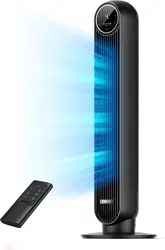
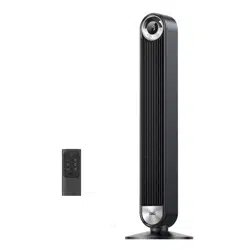
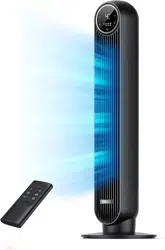
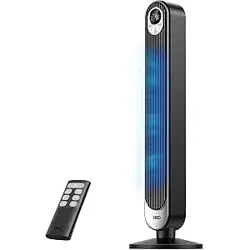
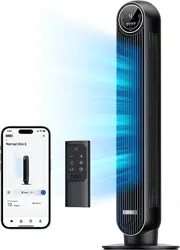
User Manual DREO Tower Fan DR-HTF007
IMPORTANT SAFETY INSTRUCTIONS
General Safety
- Children shall not play with the appliance. Cleaning and maintenance shall not be performed by children without supervision.
- Use the appliance as described in the user manual only. Any other use not recommended in the user manual may cause fire, electrical shock, or personal injury.
- This appliance can be used by children aged above 8 years and persons with reduced physical, sensory or mental capabilities or lack of experience and knowledge if they have been given supervision or instruction concerning use of this appliance in a safe way and understand the hazards involved.
Operation Safety
- Place the appliance on a flat, dry surface before use.
- Do not immerse in water and any other liquids.
- Do not use the appliance until the base is installed.
- Do not insert your fingers, pencil and any other objects into the grilles while in operation.
- Do not dismantle, repair, or modify. All servicing should be performed by qualified personnel.
Electricity Safety
- Make sure that the voltage of your electricity supply is the same as that indicated on the appliance.
- Always unplug before cleaning or leaving the appliance unused for a long period of time. Keep your hands dry when plugging/unplugging.
- Do not operate any fan with a damaged cord or plug. Discard fan or return to an authorized service facility for examination and/or repair.
- Do not run cord under carpeting. Do not cover cord with throw rugs, runners, or similar coverings. Do not route cord under furniture or appliances. Arrange cord away from traffic area and where it will not be tripped over.
- WARNING: To reduce the risk of fire or electric shock, do not use this tower fan with any solid-state speed control device.
- This appliance employs overload protection (fuse). A blown fuse indicates an overload or short-circuit situation. If the fuse blows, unplug the product from the outlet. Replace the fuse as per the user servicing instructions and check the appliance. If the replacement fuse blows, a short-circuit may be present and the appliance should be discarded or returned to an authorized service facility for examination and/or repair.
- This appliance has a polarized plug (one blade is wider than the other). To reduce the risk of electric shock, this plug is intended to fit in a polarized outlet only one way. If the plug does not fit fully in the outlet, reverse the plug. If it still does not fit, contact a qualified electrician. Do not attempt to defeat this safety feature.
Gentle Reminder:
Check the appliance regularly and refer to TROUBLESHOOTING or contact our customer support if it shows any of the following signs:
- Power cord or plug is damaged.
- Loud noise, unusual smell or excessive heat.
Specifications
| Model |
DR-HTF007 |
| Input |
AC 120V 60Hz |
| Rated Power |
42W |
| Battery Type |
CR2025 |
ASSEMBLING YOUR TOWER FAN
Assembly Instructions
When using the appliance for the first time, remove the wraps and attach the parts by following the steps below.
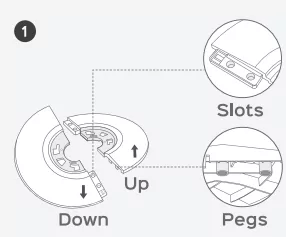
- Keep two base halves in a crossed position, then insert pegs on one half onto the slots on the other half.
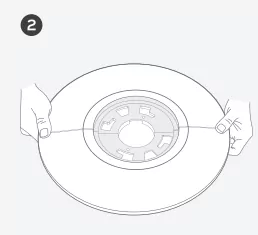
- Press down on edges to click two base halves together.
- Run the cord through the center hole.
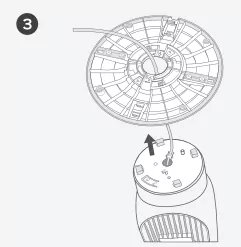
- Fit the base onto the bottom of the fan by aligning the arrows on the underside.
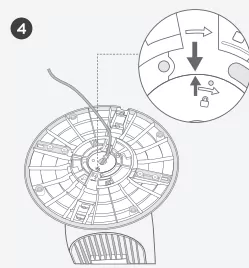
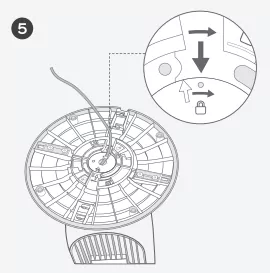
- Rotate the base clockwise to lock in place.
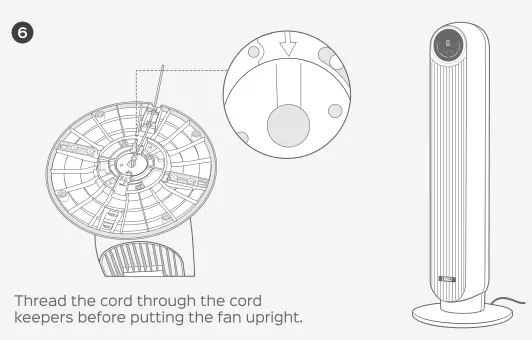
- Thread the cord through the cord keepers before putting the fan upright.
CAUTION
- Do not operate the tower fan if the base has not been installed.
- Make sure to thread the cord through all rear cord keepers.
Package Contents
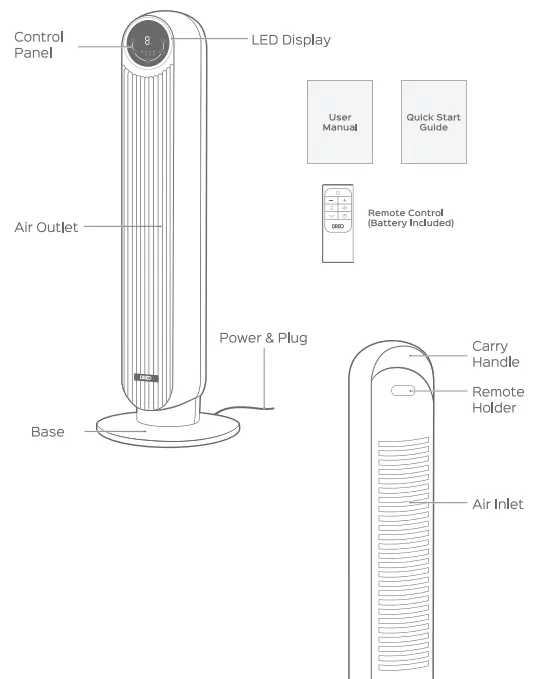
KNOWING YOUR TOWER FAN
Control Panel
Mode Button

Switch between Normal/Natural/Sleep/Auto Mode
Fan Speed Button

Adjust airflow volume (1-4 levels)
Power Button

Turn power on/off
Timer Button

Select to set a timer (0-8h)
Oscillation Button

Adjust airflow direction
LED Display
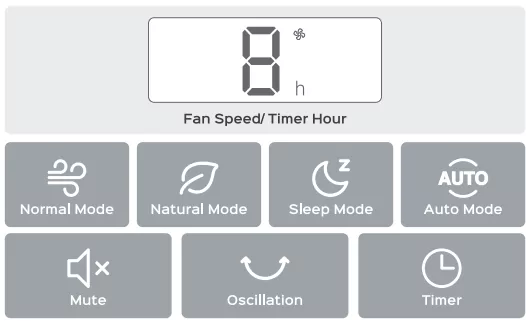
NOTE:
- Display will turn off after 1 minute (after 5 seconds in sleep mode).
- Wake up the display with any button.
- Display will not turn off when the auto on timer is enabled.
Getting the Most out of Your Tower Fan
- It's not an air conditioner.
- Remove any tall obstacles that might block the airflow from the fan.
- Combine with your AC unit to get cooler air throughout the room.
- Position the tower fan closer to you to get more direct airflow.
- Place a bucket of ice in front of the fan for an extra cooling boost.
USING YOUR TOWER FAN
General Operations
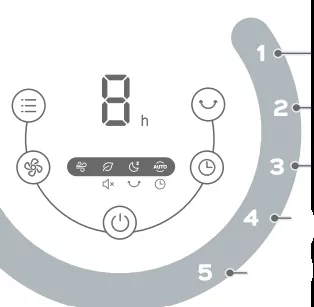
- Touch
 to turn on, and
  to choose a working mode.
- Touch
 to adjust the airflow volume.
- Touch
 to change the airflow direction.
- Touch to set a timer.
- Touch to turn off the tower fan.
Working Modes
Sleep Mode (Mute Auto On)

Fan speed decreases every 30 minutes.
Speed decreases by two levels at most and will remain constant if at level 1:
For level 4: 4 → 3 → 2
For level 3: 3 → 2 → 1
For level 2: 2 → 1
For level 1: 1
Auto Mode

Fan speed adapts to the ambient temperature.
Normal Mode

Fan runs at the constant speed.
Natural Mode

Fan runs at alternating speeds.
Additional Features
Timer

When the fan is ON/OFF, touch the timer button repeatedly to set a timer from 1 to 8 hours. When the timer ends, the fan will stop/start running automatically. To cancel, set the time to 0 hour.
Note: When the auto off timer is enabled, display will return to fan speed after 3 seconds.
Mute

Method 1: Short press the mute button on the remote control to turn on/off button sounds.
Method 2: Long press the mode button on the control panel to turn on/off button sounds.
Memorry

If the fan is turned OFF or disconnected from power, it will operate under the previous settings (except the timer setting) when it is turned ON again.
Remote Control
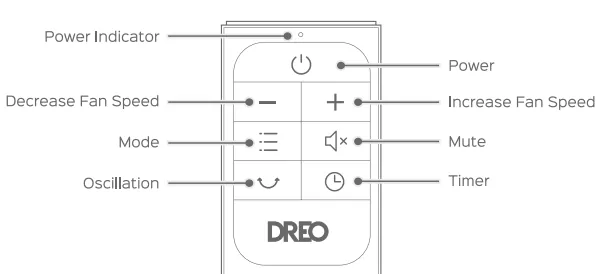
Battery Replacement
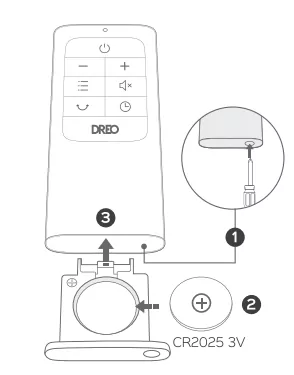
- Press the locking button to pop out the battery holder.
- Replace with the same battery type with the (+) side facing up.
- Push in the holder until securely locked into place.
Note: If the indicator on the remote control doesn't turn on any more, please consider replacing the battery.
WARNING
Chemical Burn Hazard. Keep batteries away from children.
This product contains a lithium button/coin cell battery. If a new or used lithium button/coin cell battery is swallowed or enters the body, it can cause severe internal burns and can lead to death in as little as 2 hours. Always completely secure the battery compartment. If the battery compartment does not close securely, stop using the product, remove the battery, and keep it away from children. If you think batteries might have been swallowed or placed inside any part of the body, seek immediate medical attention.
The cells must be disposed of properly, including keeping them away from children. Even used cells may cause injury.
CLEANING AND MAINTENANCE
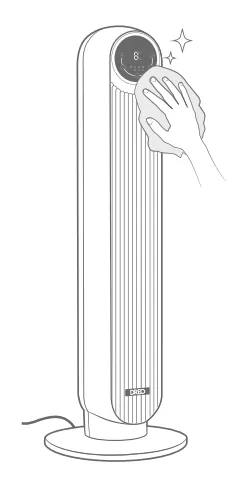
Outer Surface
Gently wipe off the dust with a soft, dry cloth.
Base
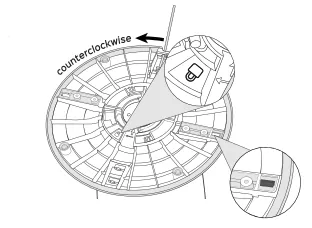
Press on the lock sign here and rotate counterclockwise to release the base from the fan, then press the tabs on the edges to detach the base halves from each other.
CAUTION
- Always unplug the fan before any cleaning or maintenance to avoid the risk of fire, electric shock, or injury to persons.
- Do not immerse in water or get water inside the motor housing.
- Do not use any chemical agents when cleaning the fan.
- Store in a cool, dry place and cover it to protect from dust.
Rear Grille
WARNING: Turn off the appliance and unplug before any cleaning and maintenance.
- Remove the screw on the top of the rear grille with a Philips screwdriver.
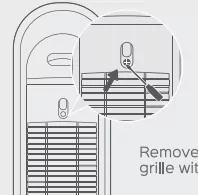
- Lift up the grille and pull it out.
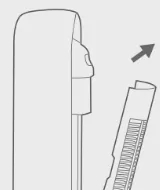
- Clean the dust on blades using a vacuum cleaner or air duster.
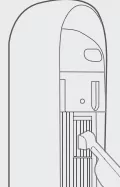
Rinse the rear grille under running water or with a clean, damp cloth.
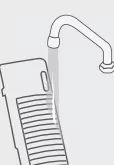
- Dry up, then install the grille and the screw back by following the reverse order of disassembly.
Fuse Replacement Instructions
This appliance features a fused safety plug that protects against overload or short-circuit situations. If the fuse blows, please cut off power and follow the below instructions or consult a qualified electrician.
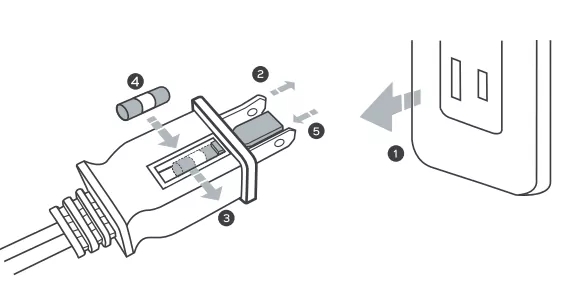
- Grasp plug and remove from the receptacle or other outlet device. Do not unplug by pulling on cord.
- Open fuse cover. Slide open fuse access cover on top of attachment plug towards blades.
- Remove fuse carefully. Push the fuse from the other side to remove the fuse.
- Risk of fire. Replace fuse only with 2.5 Amp, 125 Volt fuse.
- Close fuse cover. Slide closed the fuse access cover on top of attachment plug.
WARNING: Risk of fire. Do not replace attachment plug. Contains a safety device(fuse) that should not be removed. Discard product if the attachment plug is damaged.
TROUBLESHOOTING
My fan won't turn on!
- Make sure that the cord is connected to a powered outlet and the mains voltage corresponds with the voltage indicated on the fan.
- Check if the fuse has blown. If the fuse has blown, please refer to page 13.
My fan is shaky and wobbling!
- Place the fan on a flat, level surface.
- Incorrect installation might also cause shakiness. Please refer to the assembly instructions in page 3-4. Note that the power cord must be run through all three keepers.
My fan is making vibration and noise!
- Place the fan on a flat, level surface.
- Be sure not to insert anything into the air inlet and outlet.
If your problem is not listed or still persists, please contact our Customer Support (see page 15).
DREO CUSTOMER CARE
Default 12-Month Warranty
This appliance is covered by Dreo warranty for 12 months from the date of its original purchase.
Extend Your Warranty
Extend your warranty by registering your new appliance on our website https://dreo.com/warranty.
The warranty will not apply in cases of:
- Accident, misuse, or repairs performed by unauthorized personnel.
- Any unit that has been tampered with or used for commercial purposes.
- Normal wear and tear of wearable parts.
- Use of force, damage caused by external influences.
- Damage caused by non-observance of the User Manual, e.g. connection to an unsuitable mains supply or noncompliance with the instructions.
- Partially or completely dismantled appliances.
- Defects caused by or resulting from damages from shipping or from repairs, service, or alteration to the product or any of its parts that have been perform ed by a repair person not authorized by Dreo.
We can only provide after-sales service for products that are sold by Dreo or Dreo authorized retailers and distributors. If you have purchased the appliance from a different place, please contact your seller for return and warranty issues.