User Guide
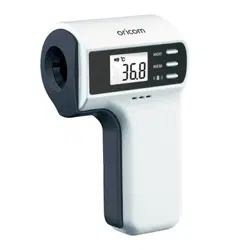
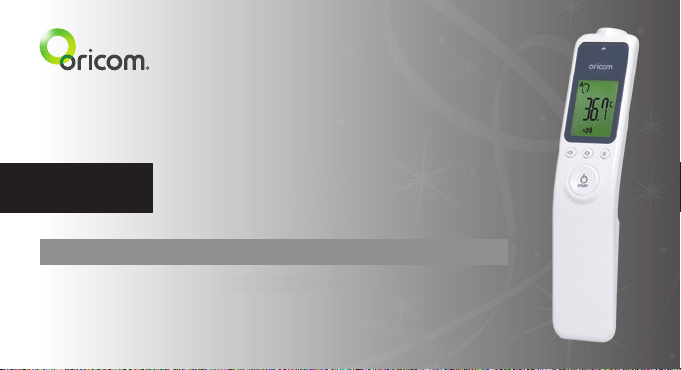
HFS1000 Non-Contact Infrared Thermometer
HFS1000 is included as a medical device on the Australian
Register of Therapeutic Goods (ARTG No. 279076).
HFS1000 is intended for use as a measuring device for determining the patient's body temperature. ALWAYS
READ THE LABEL AND USER GUIDE, USE ONLY AS DIRECTED.
Keep this user guide for future reference. Always retain your proof of purchase in case of warranty service and
register your product on line at AUSTRALIA: www.oricom.com.au

Need Help?
If you need assistance setting up or using your Oricom product now or in the future, call Oricom
Support.
Australia 1300 889 785 or 02 4574 8888
www.oricom.com.au
Mon-Fri 8am – 6pm AEST
New Zealand 0800 67 42 66
www.oricom.co.nz
Mon-Fri 10am – 8pm NZST
HFS1000 NoN-coNtact iNfrared thermometer
3
How to take a temperature 10
product description 14
Before first use 16
switcHing on and setting tHe tHermometer 16
measuring Body temperature 17
displaying stored measurements 20
Table of Contents
HFS1000 NoN-coNtact iNfrared thermometer
4
measuring oBject temperature 21
measuring room temperature 23
error messages 24
Battery replacement 26
maintenance and storage 27
product specifications 28
customer support 31
HFS1000 NoN-coNtact iNfrared thermometer
5
important 31
How to make a claim under warranty in australia 32
important information 33
warranty information (australia) 33

HFS1000 NoN-coNtact iNfrared thermometer
6
Thank you for purchasing the Oricom HFS1000 Non-contact Infrared Thermometer.
This product has been developed using the latest in infrared technology. This technology allows the user to
measure the temperature without physical contact. To use this device correctly please follow the directions in this
user guide. The instructions provide important details on how to achieve accurate measurements.
Warnings
Please read this user guide carefully before initial use.
• Use this product only for its intended purpose as described in this manual and follow all instructions.
• The measurement of temperature using this product does not represent a doctors medical examination.
• Consult with your medical professional if any abnormality is found.
• Do not take a temperature measurement over a scar or open tissue.
• Do not expose the product to temperatures below 20 °C (68 °F) or above 50 °C (122 °F) or above humidity of
95%(≥95%Rh).
• Do not drop the thermometer as it may cause damage.
• Donottakethetemperaturewiththisproductnearheatsourcessuchasindirectsunlight,nearareplaceor
stove.

HFS1000 NoN-coNtact iNfrared thermometer
7
• Do not use this product if it is not working properly, contact Oricom support.
• There are no user serviceable parts the only service required is battery replacement and general cleaning please
follow instructions in this user guide.
• If the product is not going to be used for an extended period of time, please remove the batteries and store the
thermometer in a cool dry place.
• This product is NOT waterproof. Direct contact with water or other liquids should be avoided.
• Do not leave the thermometer with infants or children at any time.
• The protective glass over the lens is fragile, handle with care. Do not touch the glass of the infrared lens with bare
ngers.
• Do not modify or repair the thermometer.
• Many people may not have an elevated temperature even if they are ill. In the following cases, please consult
your medical professional before using this product.
> Under 90-day-old infants.
> People on steroids, antibiotics or antipyretics.
> People with compromised immune systems.
HFS1000 NoN-coNtact iNfrared thermometer
8
Cautions
• The reliability of the measurement cannot be guaranteed if the temperature is measured from parts of body that
are not recommended.
• Similar to other thermometers, measurement error may occur within a range of ±0.2 °C (±0.4 °F).
• Measurement should not be taken until completely relaxed at normal room temperature.
• Please note that measurement may be incorrect after exercising, bathing or getting wet in the rain.
• Temperature between right and left temple could be different.
• Measurement may be incorrect when low battery (
) signal is indicated. Replace the battery and re-measure.
• When measuring the temperature of a liquid (milk, water), place the probe as close as possible to the liquid but
ensure that it is not immersed into the liquid as this may damage your thermometer.
• Check your product regularly for damage and exhausted batteries.
NOTE:
ASTM laboratory accuracy requirements in the display range of 22 to 40 °C (71.6 °F to 104.0 °F) for IR
thermometers is ±0.3 °C (±0.5 °F), whereas for mercuryin-glass and electronic thermometers, the requirement
per ASTM Standards E 667-86 and E 1112-86 is ±0.1 °C (±0.2 °F).

HFS1000 NoN-coNtact iNfrared thermometer
9
Simple Operation Principle
Thebodytemperatureisreectedonthetemporalartery.
• The temporal artery is the artery located closest to the skin and is spread across the forehead. If the blood with
bodytemperaturereectionpassesthetemporal arteryonforehead,corresponding amountofinfraredrays will
be generated. From the infrared rays, the body temperature can be measured.
• This product is a contactless type thermometer and does not make direct contact with forehead.
• The temperature measurement can be taken 2 to 3 cm away from the body or object.
• This will decrease discomfort or possible infections caused by touch.
HFS1000 NoN-coNtact iNfrared thermometer
10
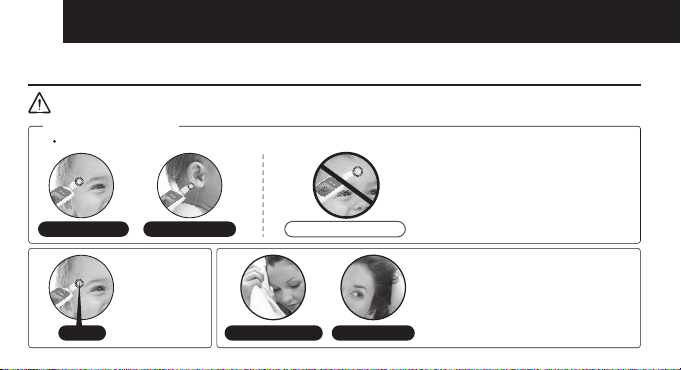
How to take a temperature
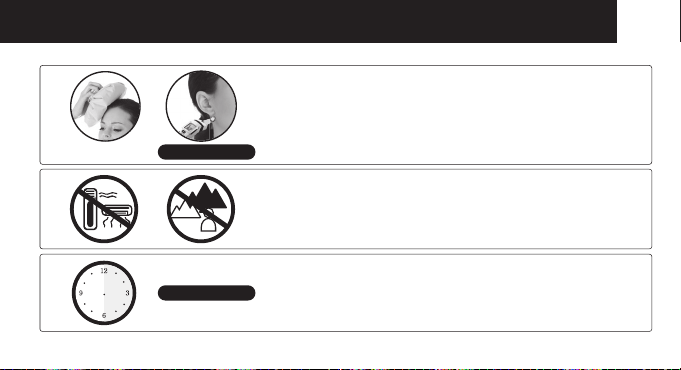
IMPORTANT
If sweating on the forehead is present
we recommend changing the
measurement point to behind to earlobe.
Wipe away sweat on the forehead and
push back any hair from the forehead
before use.
▶
Recommended measurement is the temple area.
2~3 cm away
from forehead.
▶
If there is a significant change of surrounding temperature,
please, allow the thermometer to adjust to the new temperature
for at least 30 minutes before use.
▶
Or
Temple area
Wipe away sweat
Push back hair
Behind the ear lob
Incorrect measurement
2~3 cm
WAIT 30 Minutes
Behind the ear lobe
If you have applied an ice or cool pack, you need to wait for
at least 30 minutes before taking a temperature measurement.
The measurement should then be taken behind the ear lobe.
▶
▶
Do not measure temperature near heat or cooling sources.
Do not use outdoors.
▶
MEASUREMENT POINT
HFS1000 NoN-coNtact iNfrared thermometer
11
If sweating on the forehead is present
we recommend changing the
measurement point to behind to earlobe.
Wipe away sweat on the forehead and
push back any hair from the forehead
before use.
▶
Recommended measurement is the temple area.
2~3 cm away
from forehead.
▶
If there is a significant change of surrounding temperature,
please, allow the thermometer to adjust to the new temperature
for at least 30 minutes before use.
▶
Or
Temple area
Wipe away sweat
Push back hair
Behind the ear lob
Incorrect measurement
2~3 cm
WAIT 30 Minutes
Behind the ear lobe
If you have applied an ice or cool pack, you need to wait for
at least 30 minutes before taking a temperature measurement.
The measurement should then be taken behind the ear lobe.
▶
▶
Do not measure temperature near heat or cooling sources.
Do not use outdoors.
▶
MEASUREMENT POINT
HFS1000 NoN-coNtact iNfrared thermometer
12
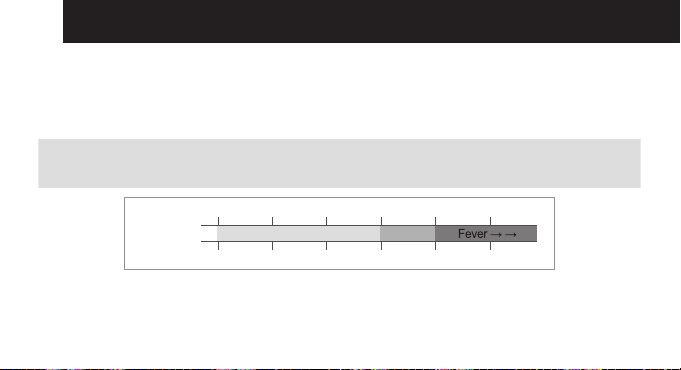
• BodyTemperatureMeasurementRanges
Body temperature means internal temperature of body. Normal temperature even in a healthy person can vary
within a small range. The temperature of a person measured in the evening is normally 0.5 °C higher than early
morningandisalsoaffectedbytheenvironment,timeandactivity.Refertothetablebelowtondoutthenormal
body temperature ranges.
Normal ranges by site:
•Axillary:
•Oral:
94.5 – 99.1 °F
95.9 – 99.5 °F
34.7 – 37.3 °C
35.5 – 37.5 °C
•Rectal:
•HFS1000:
97.9 – 100.4 °F
96.8 – 100.2 °F
36.6 – 38.0 °C
36.0 – 37.9 °C
Celsius
Fahrenheit
Normal
36 36.537 37.538 38.5
96.8 97.7 98.6 39.5 100.4 101.3
HFS1000 NoN-coNtact iNfrared thermometer
13
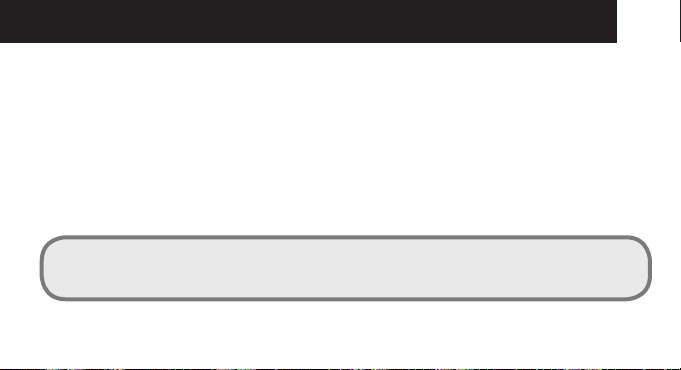
• UsingtheThermometer
- Measuring Body Temperature
Select the HFS1000 to body temperature measuring mode, and check the body temperature on the temple area
from 2 to 3 cm distance.
- Measuring Bathing Water Temperature
Select the thermometer to daily wide temperature measuring mode, and check the water temperature by
holding the thermometer 2 to 3 cm from the water. Be careful not to get water on the thermometer.
- Measuring the Nursing Bottle
Select the thermometer to daily wide temperature measuring mode, and check the temperature by holding the
thermometer 2 to 3 cm from the nursing bottle.
CAUTION:
ALWAYS CHECK BATH WATER OR NURSING BOTTLE TEMPERATURE MANUALLY IN ADDITION TO
USING THIS THERMOMETER.

HFS1000 NoN-coNtact iNfrared thermometer
14
Product Description
Unit
1
LCD display
2
Sound (on/off) button
3
Mode button
4
Memory button
5
Start button (Power &
Measurement)
6
Strap position
7
Probe
Buttons Functions
Switching device on. Starting temperature
measurement.
Setting the sound (On/Off).
Selecting the measurement method and unit.
Displaying stored measurements (max 32).
Entering the measurement method and unit.
HFS1000 NoN-coNtact iNfrared thermometer
15
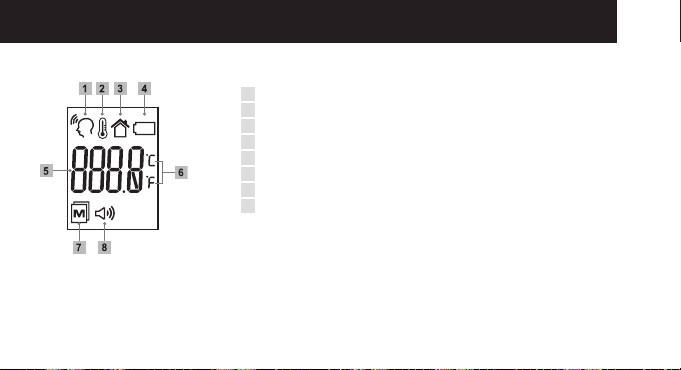
Display
1
Body temperature mode
2
Object temperature mode
3
Room temperature mode
4
Low Battery symbol
5
Temperature display
6
Measurement unit (Celsius/Fahrenheit)
7
Memory
8
Sound on/off
HFS1000 NoN-coNtact iNfrared thermometer
16
Before first use
• Beforerstuse,insertthebatteriessupplied.
> Battery Replacement [page. 26]
Switching on and setting the thermometer
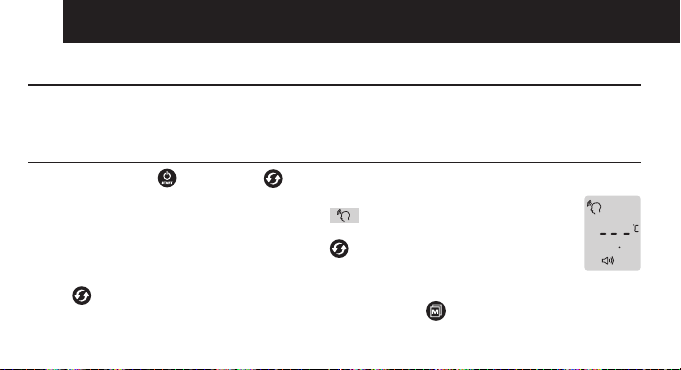
• Press the Start button or Mode button briey.
> The device switches on. After two seconds, the display shows that the device is ready for use.
> The device always starts in body temperature mode.
> After 1 minute without use, device automatically turns off.
How to force the device to power off: Press and hold
for 5 seconds.
Setting the measurement unit (°C/°F)
• Press 3 times to select Centigrade and 4 times to select Fahrenheit.
If correct measurement unit (°C or °F) is selected, press the MEM button
to save it.
HFS1000 NoN-coNtact iNfrared thermometer
17
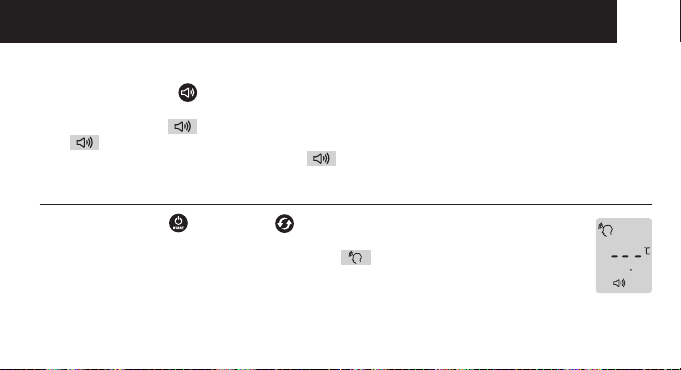
Setting the measurement sound
• PresstheSoundbutton briey.
> Each time the button is pressed, the sound switches on or off.
> If the display shows
after pressing the button, the device emits sound.
> If
is not displayed after pressing the button, the device does not emit sounds.
> The device always starts in “Sound on” mode.
Measuring body temperature
• Press the Start button or Mode button briefly.
> The device switches on. After two seconds, the display shows that the device is ready for use.
> The device always starts in body temperature mode.
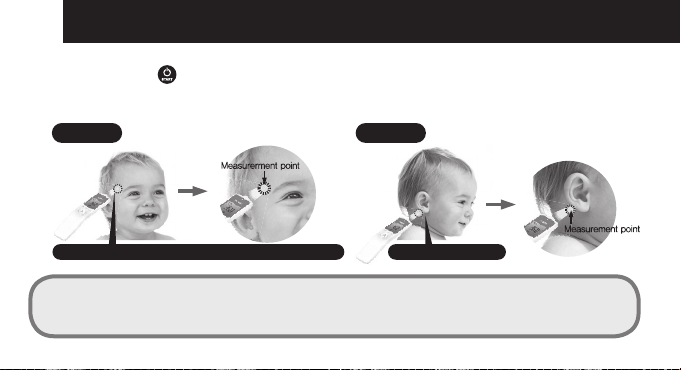
• Holdthethermometer2to3cmfromthemeasuringpoint.
> The ideal measuring point is the temple area.
HFS1000 NoN-coNtact iNfrared thermometer
18
• PresstheStartbutton briefly.
> Keep the distance until you hear the measurment completion beep.
> If the thermometer is in silent mode, keep the distance for approximately 2 seconds.
Site of measurement recommended is the temple area
Normal
behind the ear lobe
Sweating
NOTE:
If sweat is present, we recommend changing the measurement point from the temple to behind the ear lobe as
this area is less affected by sweating.
HFS1000 NoN-coNtact iNfrared thermometer
19
• Temperaturereadingsmayvaryaccordingtolocation.Thereforewerecommendtomeasurethetemperatureat
more than 2 points. Then please recognize the highest temperature as the right temperature.
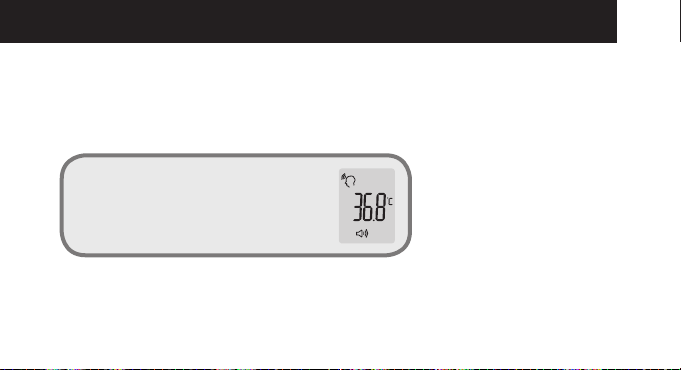
• CheckthetemperatureontheLCDscreen.Thetemperaturereadingwillbeautomaticallystored.
• TheLEDbacklightwillilluminatebasedonthereadings.
> LED will automatically turned off after 2 to 3 seconds.
LED 3 Colours
Green: between 22 °C ~ 37.3 °C
Yellow: between 37.4 °C ~ 37.9 °C
Red: higher than 38 °C
lower than 22 °C
HFS1000 NoN-coNtact iNfrared thermometer
20
Displaying stored measurements
• PresstheStartbutton or Mode button briefly to turn on the thermometer.
> The device switches on. After two seconds, the display shows that the device is ready for use.
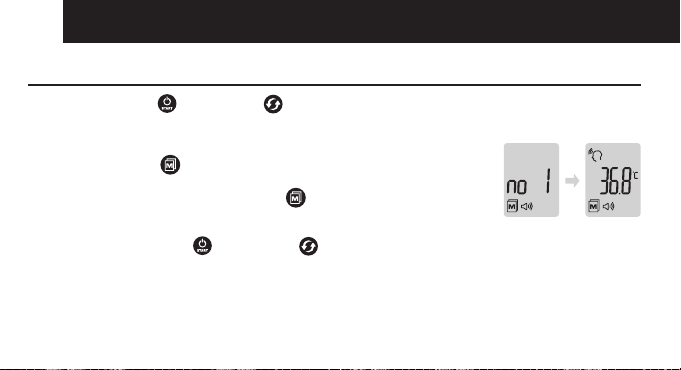
• The device automatically stores the last 32 measurements.
• PresstheMEMbutton
briefly.
> The most recent measurement is displayed.
• EachadditionalpressoftheMEM button
calls up the next most recent
measurement. The number on the display indicates how many measurements ago
this reading was taken.
• BrieflypresstheStartbutton
or Mode button to exit this feature.
> The device switches on. After two seconds, the display shows that the device is ready for use.
• Thedeviceonlystoresmeasurementswheninbodytemperaturemode.
HFS1000 NoN-coNtact iNfrared thermometer
21
Measuring object temperature
• PresstheStartbutton or Mode button briey.
> The device switches on. After two seconds, the display shows that the device is ready for use.
> The device always starts in body temperature mode.
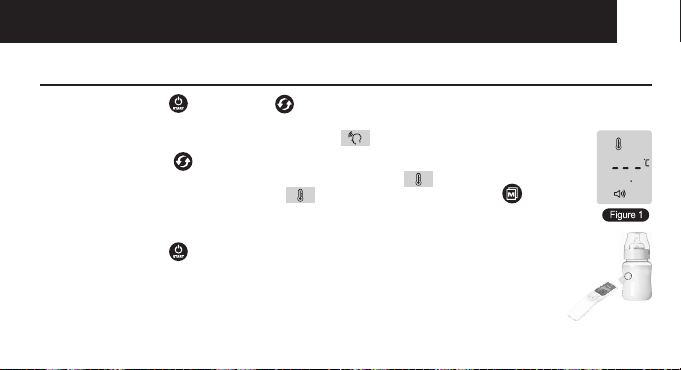
• Press the Mode button briey.
> The device switches to the object temperature measuring mode.
> If the object temperature measuring mode is selected, press the MEM button to save it.
• Checkthemeasurementreadystatusin[Figure1].
• Hold the thermometer 2 to 3 cm from the desired measuring point.
• PresstheStartbutton
briey.
> Keep the distance until you hear the measurment completion beep.
> If the thermometer is in silent mode, keep the distance for approximately 2 seconds.
HFS1000 NoN-coNtact iNfrared thermometer
22
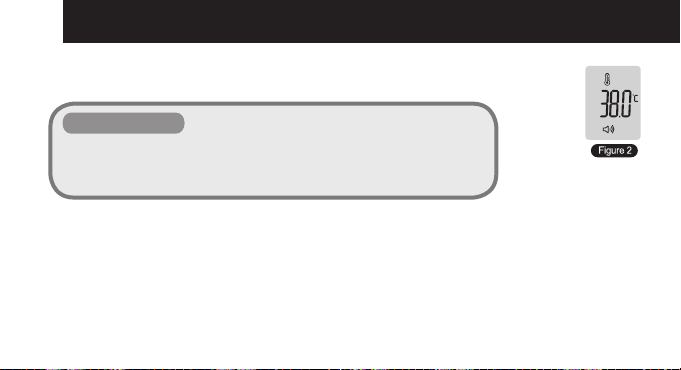
• Read the temperature from the display. [Figure 2]
> Measurements in object temperature mode are not stored.
Object temperature
•
LED 3 Colours
> Green: Measured temperature is between 0 °C ~ 100 °C (32 °F ~ 212 °F)
> Red: Measured temperature is higher than 100 °C (212 °F)
> Red: Measured temperature is lower than 0 °C (32 °F)
HFS1000 NoN-coNtact iNfrared thermometer
23
Measuring Room temperature
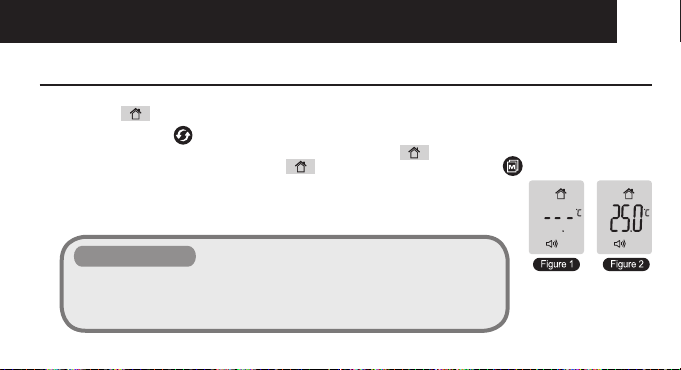
• Ifyou want tousethethermometertomeasure the roomtemperature,youneedtochangethe mode toroom
temperature.
• PresstheModebutton briey.
> The device switches to the room temperature measuring mode.
> If the object temperature measuring mode is selected, press the MEM button to save it.
• Check the measurement ready status in [Figure 1].
• Readthetemperaturefromthedisplay[Figure2].
> Measurements in room temperature mode are not stored.
Room temperature
•
LED 3 Colours
> Green: Measured temperature is between 16 °C ~ 40 °C (60.8 °F ~ 104 °F)
> Red: Measured temperature is higher than 40 °C (104 °F)
> Red: Measured temperature is lower than 16 °C (60.8 °F)
HFS1000 NoN-coNtact iNfrared thermometer
24
Error messages
Display Error description Trouble-shooting
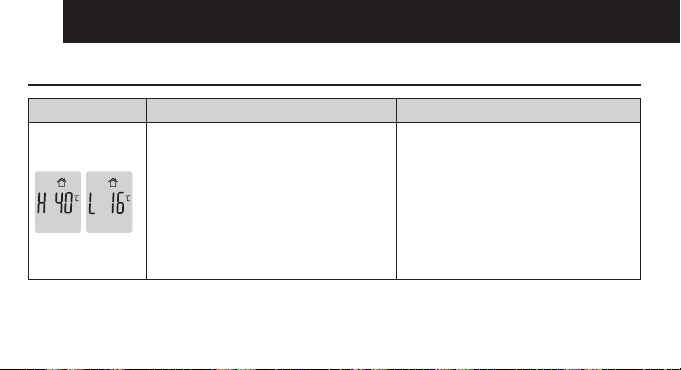
Ambient temperature is not within the
allowed operating temperature.
Operating temperature range: 16 °C ~ 40 °C
(60.8 °F ~ 104 °F)
“H 40” means: Ambient temperature is 43 °C
(109.4 °F) which is higher than allowed
range.
“L 16” means: Ambient temperature is
12 °C (53.6 °F) which is lower than
allowed range.
Allow the device to remain for approx
30 minutes in a normal room temperature.
HFS1000 NoN-coNtact iNfrared thermometer
25
Display Error description Trouble-shooting
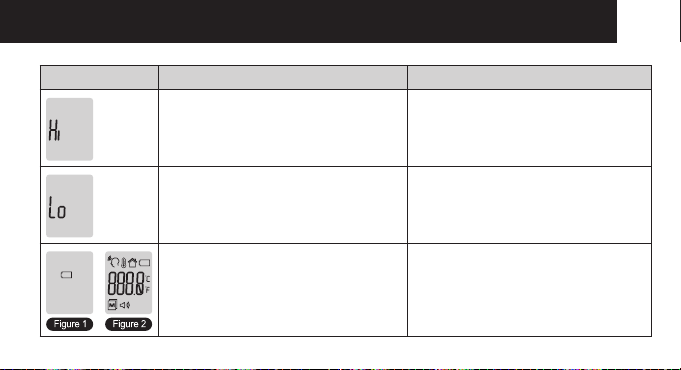
The temperature of the measuring point is
above the measurement range.
Measurement range for body temperature:
22 °C UP 42.5 °C (71.6 °F UP 108.5 °F)
Measurement range for object temperature:
0 °C UP 100 °C (32 °F UP 212 °F)
The temperature of the measuring point is
below the measurement range.
Measurement range for body temperature:
22 °C UP 42.5 °C (71.6 °F UP 108.5 °F)
Measurement range for object temperature:
0 °C UP 100 °C (32 °F UP 212 °F)
Figure 1. The batteries are weak.
Change batteries.
Figure2.Displayappearsbrieyafter
changing the batteries.
HFS1000 NoN-coNtact iNfrared thermometer
26
Battery Replacement
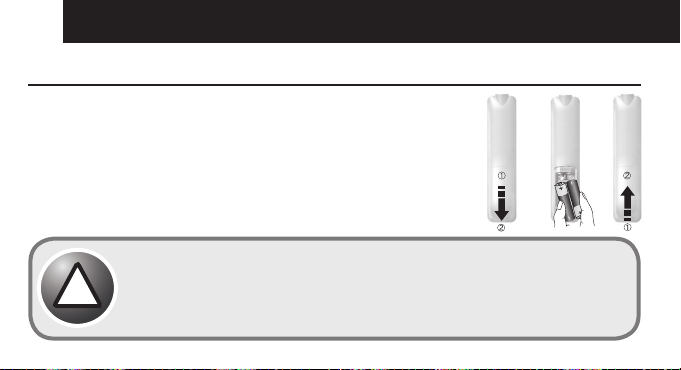
• The device requires two AA Alkaline batteries.
> Open the battery compartment.
> For this purpose, slide down the battery compartment lid on the back.
• Taketheusedbatteriesoutofthebatterycompartment.Insertnewbatteries.
> Observe correct polarity.
• Closebatterycompartment.
> Used batteries should not be disposed of in normal household waste.
> Dispose of batteries according to local recycling regulations.
Important, if equipment is not likely to be used for some time.
> Storage and transfer conditions, temperature: -20 °C to +50 °C
> Remove the batteries if the device is not to be used for over three months, the batteries
may leak and cause a malfunction.
!
HFS1000 NoN-coNtact iNfrared thermometer
27
Maintenance and Storage
• Thesensorpartofthethermometerisverysensitiveandmustbekeptcleanandundamaged.
• Donotputanyforeignmaterialsinsidetheprobe.
• Tocleanthesensor,usingacottonswabwithalcohol(ethanol),carefullywipethesurfaceclean.
• Keeptheproductawayfromdirectsunlight,dustandanyothertypeofcontaminatingsubstance.
• Thethermometershouldbestoredinnormalroomtemperature.
• Pleaseplace the product innormalroomtemperaturefor30minutespriorto use ifithasbeenstoredoutside
normal room temperature.
Do not subject the thermometer to strong shocks, such as dropping the unit.
Do not submerge the device or any of the components in water or any other solutions.
Store the thermometer and the components in a clean, safe location.
Do not modify this thermometer without authorization of the manufacturer. Do not
disassemble or attempt to repair the unit or components.
!
HFS1000 NoN-coNtact iNfrared thermometer
28
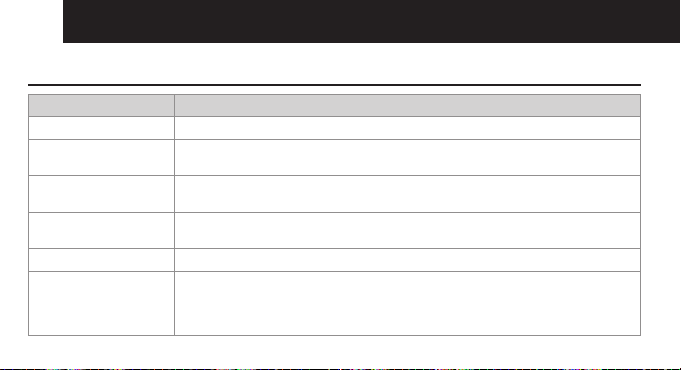
Product Specifications
Item Details of description
Measurement method Infrared (IR) measurement, Non-Contact measurement
Basic functions Switches for Multi-measurements (Body, Object and Room temperature)
Switches for Celsius/Fahrenheit, Memory function, Sound controls (On,Off)
Operating condition 16 °C to 40 °C (60.8 °F to 104 °F), Humidity: 15% to 93%, non-condensing,
Atmospheric Pressure (hPa) 700~1060
Transport and Storage
condition
-20 °C to 50 °C (-4 °F to 122 °F), Humidity: 15% to 93%,non-condensing
Atmospheric Pressure (hPa) 700~1060
Measuring distance 2 to 3 cm from the measuring point is the temple area
Measuring range •Bodytemperature:22°Cto42.5°C(71.6°Fto108.5°F),Accuracy:±0.2°C/±0.4°F
(36 °C~39 °C/196.8 °F~102.2 °F), Other Accuracy: ±0.3 °C/±0.5 °F
•Objecttemperature:0°Cto100°C(32°Fto212°F),Accuracy:±3°C/±5.4°F
•Roomtemperature:16°Cto40°C(60.8°Fto104°F),Accuracy:±3°C/±5.4°F
HFS1000 NoN-coNtact iNfrared thermometer
29
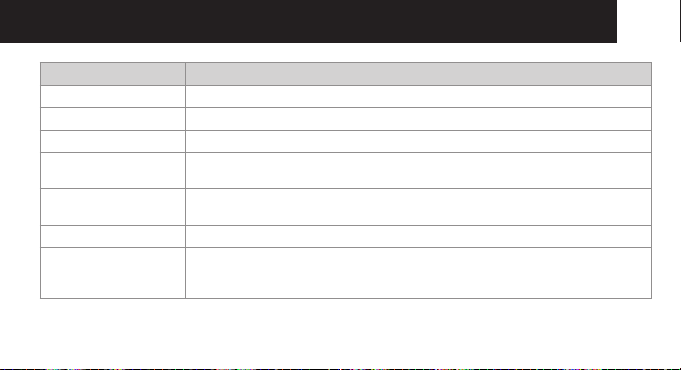
Item Details of description
Measuring time Less than 2 seconds, Continuous measurement
Resolution 0.1 °C/0.1 °F
Mode selection Body temperature, Object temperature, Room temperature
Memory function Automaticmemoryfunction,Conrmtheresultbyusingmemorybutton
Can store up to 32 results (1 to 32)
Sound Button sound, Measuring sound, Result sound,
The sound can be turned on and off by using Sound button
Screen type Liquid crystal display (mono LCD)
Display Body temperature mode, Object temperature mode, Room temperature mode,
Memory location, Low Battery, °C/°F degree, Hi / Lo signs for the temperature outside
the measurable ranges
HFS1000 NoN-coNtact iNfrared thermometer
30
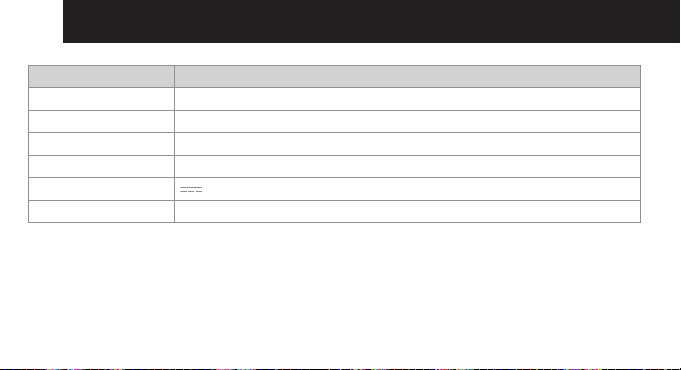
Item Details of description
Button Start, Sound, Mode, Memory
Backlight Turns On for 3 seconds after measurement. The backlight turns off automatically
Power-saving Turns Off automatically after one minute
Components HFS1000 1 set, Manual, Battery (AA type) 2ea, case
Power
AA Alkaline Batteries (x2)
Measurable numbers More than 10,000 times

HFS1000 NoN-coNtact iNfrared thermometer
31
Customer Support
Ifyouhaveanyproblemssettinguporusingthisproductyouwillndusefultipsandinformationinthisuserguide
as well as “Frequently Asked Questions” on our website www.oricom.com.au.
If you have further questions about using the product after reviewing the resources above or would like to purchase
replacement parts or accessories please call our Customer Support Team. Our dedicated local support team are
more likely to be able to help you than the retailer where you made your purchase.
Important
Please retain your purchase receipt and attach to the back page of this user guide as you will need to produce this
if warranty service is required. Take a few moments to register your product online: www.oricom.com.au

HFS1000 NoN-coNtact iNfrared thermometer
32
How to make a claim under Warranty in Australia
Oricom has a simple warranty process for you to follow:
• Please call or email our Customer Support Team, contact details follow.
• ACustomerSupportTeammemberwillverifyaftertroubleshootingwithyouif your product qualifies under
warranty. If so, they will give you a Product Return Authorisation number.
• WewillthenemailorfaxaReturnAuthorisationformandaRepairNotice(ifnecessary),togetherwithinstructions
on how to return the goods for warranty service.
Please note that if a Customer Support Team member advises that your product does not qualify for return, this
warranty does not apply to your product.
Products that are authorised to be returned to Oricom in Australia must include all of the following:
• AcompletedReturnAuthorisationform
• AcopyofyourProofofPurchase(pleasekeepyouroriginalcopy)
• Thefaultyproduct,includingallaccessories.
Send the approved returns to:
Oricom International Pty Ltd
Locked Bag 658
South Windsor NSW 2756 Australia

HFS1000 NoN-coNtact iNfrared thermometer
33
Please note that this warranty excludes expenses incurred by you in returning any faulty product to us. You
must arrange and pay any expenses incurred (including postage, delivery, freight, transportation or insur-
ance of the product) to return the faulty product to us, however, we will arrange delivery of the repaired or
replaced faulty product to you.
Important Information
Repair Notice
Please be aware that the repair of your goods may result in the loss of any user-generated data (such as stored
telephone numbers, text messages and contact information). Please ensure that you have made a copy of any data
saved on your goods before sending for repair.
Please also be aware that goods presented for repair may be replaced by refurbished goods or parts of the same
type rather than being repaired.
Warranty Information (Australia)
This Warranty is provided by Oricom International Pty Ltd ABN 46 086 116 369, Unit 1, 4 Sovereign Place, South
Windsor NSW 2756, herein after referred to as “Oricom”.

HFS1000 NoN-coNtact iNfrared thermometer
34
Oricommakesnootherwarrantiesorconditions,expressorimplied,includingastoacceptablequalityandtness
for a particular purpose, except as stated in this Warranty.
Any implied warranties that may be imposed by law are limited in duration to the Warranty Period.
Oricom warrants that the product is free from defects in materials or workmanship during the Warranty Period.
This Warranty does not extend to any product from which the serial number has been removed or was purchased
outside of Australia.
This warranty in no way affects your statutory warranty rights under the Competition and Consumer Act 2010 or
any other similar legislation.
The Warranty Period will be 1 year from the date of purchase of the product evidenced by your dated sales receipt.
You are required to provide proof of purchase as a condition of receiving warranty services.
You are entitled to a replacement product or repair of the product according to the terms and conditions of this
document if your product is found to be faulty within the Warranty Period. This Warranty extends to the original
purchaser only and is not transferable.
Products distributed by Oricom are manufactured using new materials or new and used materials equivalent to
new in performance and reliability. Spare parts may be new or equivalent to new. Spare parts are warranted to be
free from defects in material or workmanship for thirty (30) days or for the remainder of the Warranty Period of the
Oricom branded product in which they are installed, whichever is longer. During the Warranty Period, Oricom will
where possible repair and if not replace the faulty product or part thereof. All component parts removed under this

HFS1000 NoN-coNtact iNfrared thermometer
35
Warranty become the property of Oricom. In the unlikely event that your Oricom product has a recurring failure,
Oricom may, subject to the Competition and Consumer Act 2010, at its discretion, elect to provide you with a
replacement product of its choosing that is at least equivalent to your product in performance.
Oricom does not warrant that the operation of the product will be uninterrupted or error free.
Oricom is not responsible for damage that occurs as a result of your failure to follow the instructions that came with
theproduct.Thesetermsandconditionstogetherwithanyspecictermsandconditionscontainedintheuserguide
to the product purchased constitute the complete and exclusive agreement between you and Oricom regarding the
product.
No change to the conditions of this Warranty is valid unless it is made in writing and signed by an authorised
representative of Oricom.
Oricom will not be in breach of a warranty expressly set out in this User Guide or under the Competition and
Consumer Act 2010 and excludes any liability for damages or any other remedy arising under any other legislation
or the common law if the damage occurs as a result of:
1. failure by you to adhere to the warnings and follow the instructions set out in this user guide for the proper
installation and use of the product;
2. negligence on your part or misuse by you of the product;
3. an uncontrollable external cause which results in the product not functioning including but not limited to power
failure, lightning or over voltage; and

HFS1000 NoN-coNtact iNfrared thermometer
36
4. modicationtotheproductorservicescarriedoutontheproductionbyanyoneotherthanOricomorOricom’s
authorised service provider.
Oricom will not be liable for any damages caused by the product or the failure of the product to perform, including
anylostprotsorsavingsorspecial,incidentalorconsequentialdamages.Oricomisnotliableforanyclaimmade
by a third party or made by you on behalf of a third party. This limitation of liability applies whether damages are
sought, or a claim made, under this Warranty or as a tort claim (including negligence and strict product liability),
a contract claim or any other claim. However, this limitation of liability will not apply to claims for personal injury.
NothinginthisWarrantyexcludes,restrictsormodiesanycondition,warranty,rightorremedywhichpursuantto
the Competition and Consumer Act 2010 applies to this Warranty and which may not be so excluded, restricted or
modied.Forwarranties that cannotbeexcluded,restrictedormodied,Oricom limitstheremediesavailableto
thosespeciedintherelevantlegislation.
Oricom products come with guarantees that cannot be excluded under the Australian Consumer Law. You are
entitled to a replacement or refund for a major failure and compensation for any other reasonably foreseeable loss
or damage. You are also entitled to have the goods repaired or replaced if the goods fail to be of acceptable quality
and the failure does not amount to a major failure.


Contact details for Oricom support and warranty claims in Australia
Oricom International Pty Ltd
Locked Bag 658
South Windsor, NSW 2756
Australia
Email: [email protected]
Phone: 1300 889 785 or (02) 4574 8888
(Monday to Friday 8am to 6pm AEST)
Web: www.oricom.com.au
Fax: (02) 4574 8898
Contact details for Oricom support and warranty claims in New Zealand
Email: [email protected]
Phone: 0800 674 266
(Monday to Friday 10am to 8pm NZST)
Web: www.oricom.co.nz
Ref: 21092016