PRINTED IN CHINA
READ THESE INSTRUCTIONS AND
AND SAVE THEM FOR FUTURE USE
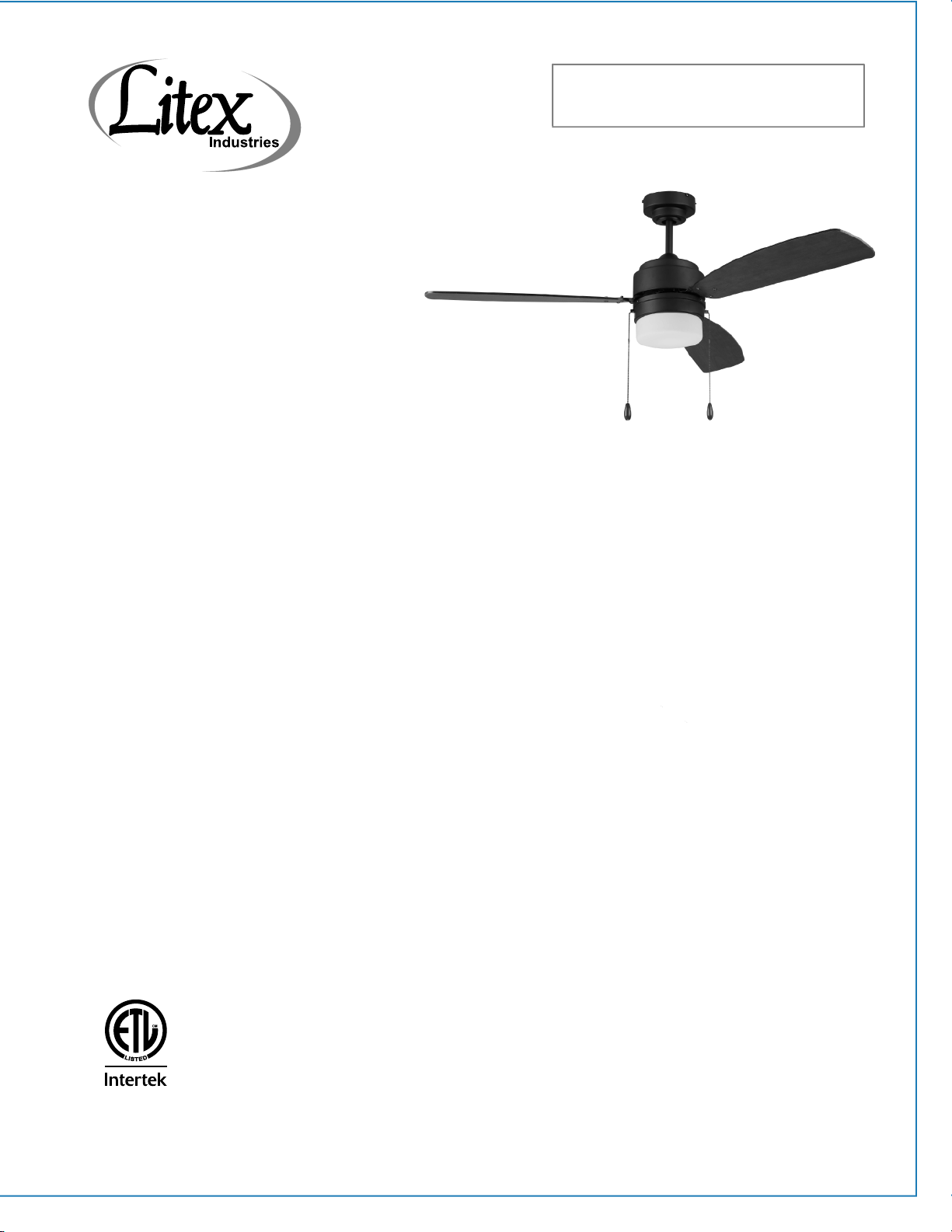
Installation Guide
For Models:
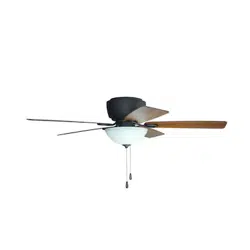
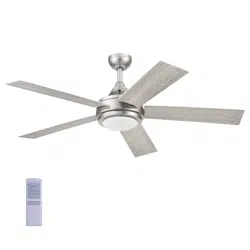
AU52EB3L
AU52BNK3L
net weight of fan: 13.5 lb (6.1 kg)
4007498
Table of Contents:
Safety Tips. pg. 1
Unpacking Your Fan. pg. 2
Parts Inventory. pg. 2
Installation Preparation. pg. 3
Hanging Bracket Installation. pg. 3
Fan Assembly. pgs. 4 - 5
Wiring. pg. 6
Canopy Assembly. pg. 6
Blade Assembly. pg. 7
Light Kit Assembly. pgs. 7 - 8
Testing Your Fan. pg. 8
Troubleshooting. pg. 9
Parts Replacement. pg. 9
Warranty. pg. 9
APPROVED FOR USE
IN DAMP LOCATIONS

SAFETY TIPS.
page 1
WARNING: To reduce the risk of electrical shock, turn off the electricity to the fan at the main fuse box or circuit
panel before you begin the fan installation or before servicing the fan or installing accessories.
1. READ ALL INSTRUCTIONS AND SAFETY INFORMATION CAREFULLY BEFORE INSTALLING YOUR FAN
AND SAVE THESE INSTRUCTIONS.
CAUTION: To avoid personal injury, the use of gloves may be necessary while handling fan parts with sharp
edges.
2. Make sure all electrical connections comply with Local Codes or Ordinances, the National Electrical Code,
and ANSI/NFPA 70-1999. If you are unfamiliar with electrical wiring or if the house/building wires are
different colors than those referred to in the instructions, please use a qualified electrician.
3. Make sure you have a location selected for your fan that allows clear space for the blades to rotate, and at
least seven (7) feet (2.13 meters) of clearance between the floor and the fan blade tips. The fan should
be mounted so that the tips of the blades are at least thirty (30) inches (76 centimeters) from walls or
other upright structures.
4. The outlet box and ceiling support joist used must be securely mounted, and capable of supporting at
least 35 pounds (16 kilograms). The outlet box must be supported directly by the building structure.
Use only ETL or UL listed outlet boxes marked "FOR FAN SUPPORT."
WARNING: To reduce the risk of fire, electrical shock, or personal injury, mount to the outlet box marked
"Acceptable for Fan Support of 15.9 kg (35 lb) or less," and use the mounting screws provided with the outlet
box. Most outlet boxes commonly used for the support of lighting fixtures are not acceptable for fan support
and may need to be replaced. Consult a qualified electrician if in doubt.
WARNING: To reduce the risk of fire, electrical shock, or personal injury, wire connectors provided with this fan
are designed to accept only one 12 gauge house wire and two lead wires from the fan. If your house wire is
larger than 12 gauge or there is more than one house wire to connect to the corresponding fan lead wires,
consult an electrician for the proper size wire connectors to use.
5. Electrical diagrams are for reference only.
6. After installation is complete, check that all connections are absolutely secure.
7. After making electrical connections, spliced conductors should be turned upward and pushed carefully
up into the outlet box. The wires should be spread apart with the grounded conductor and the
equipment-grounding conductor on opposite sides of the outlet box.
WARNING: To reduce the risk of fire or electrical shock, do not use this fan with any solid state speed control
device or control fan speed with a full range dimmer switch. [Using a full range dimmer switch to control fan
speed will cause a loud humming noise from fan.] (Note: This fan is suitable for use with remote controls
approved for DAMP locations.)
8. Do not operate the reverse switch until the fan has come to a complete stop.
9. Do not insert anything between the fan blades while they are rotating.
WARNING: To reduce the risk of personal injury, do not bend the blade arms during assembly or after
installation. Do not insert objects into the path of the blades.
WARNING: To avoid personal injury or damage to the fan and other items, be cautious when working around
or cleaning the fan.
10. Do not use detergents when cleaning the fan or fan blades. A dry dust cloth or lightly dampened cloth
will be suitable for most cleaning.
WARNING: To reduce the risk of personal injury, use only parts provided with this fan. The use of parts OTHER
than those provided with this fan will void the warranty.
11. Light kit is dimmable to 10% with select dimmers.
NOTE: The important safety precautions and instructions appearing in the manual are not meant to cover all
possible conditions and situations that may occur. It must be understood that common sense and caution are
necessary factors in the installation and operation of this fan.
page 2
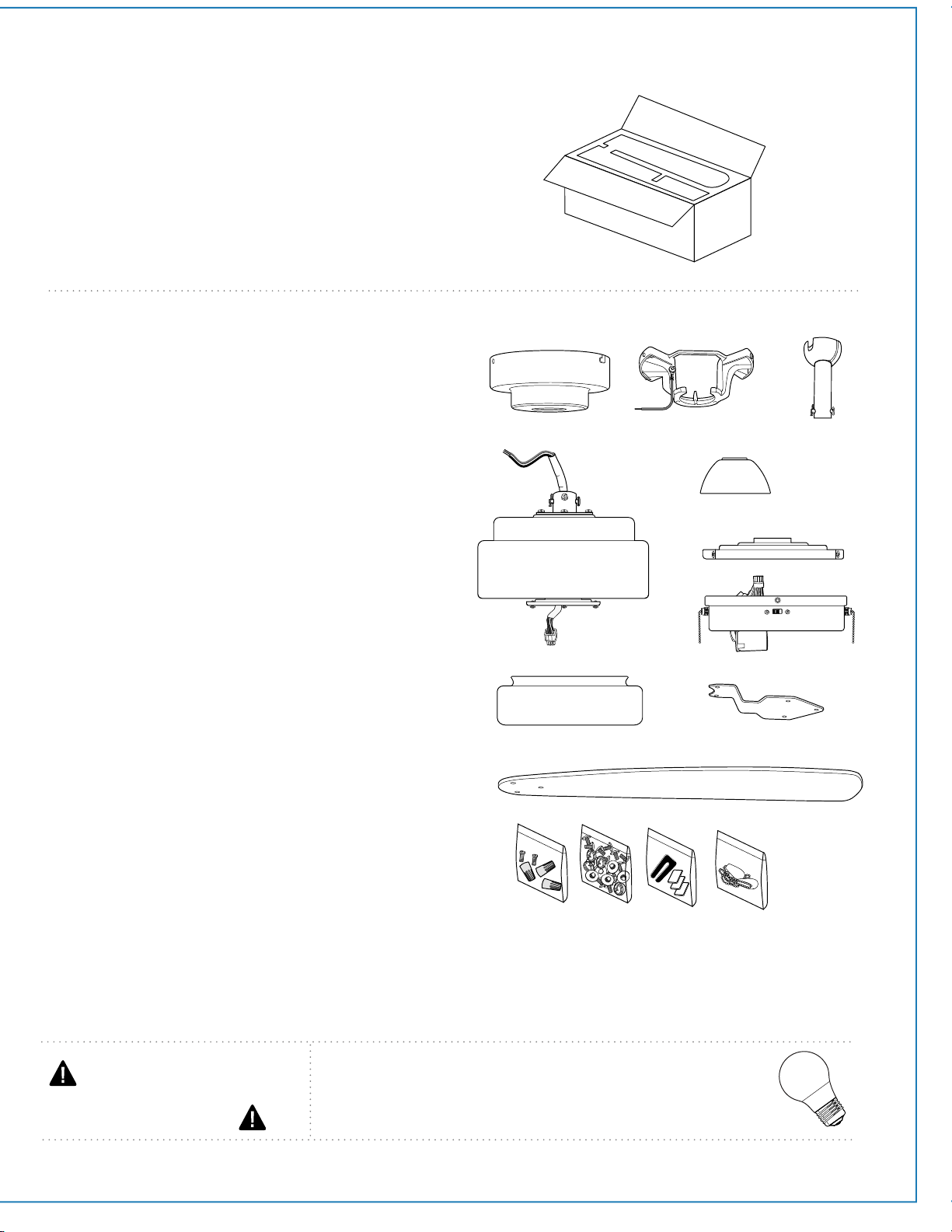
1. Unpacking Your Fan.
Carefully open the packaging. Remove items
from Styrofoam inserts. Remove motor housing
and place on carpet or Styrofoam to avoid
damage to finish. Do not discard fan carton or
Styrofoam inserts should this fan need to be
returned for repairs.
Check against parts inventory that all parts have
been included.
2. Parts Inventory.
a. canopy. 1 piece
b. hanging bracket .1 piece
c. downrod and hanging ball (with pin and clip).
1 piece
d. motor housing. 1 piece
e. yoke cover. 1 piece
f. fitter plate. 1 piece
g. light kit fitter. 1 piece
h. glass shade. 1 piece
i. blade arm. 3 pieces
j. blade. 3 pieces
k. hardware packs
g
IMPORTANT REMINDER: You must
use the parts provided with this fan for
proper installation and safety.
d
e
k
f
h
j
a
c
b
bulb required:
1 x 6.5 watt medium base LED bulb
(included)
i
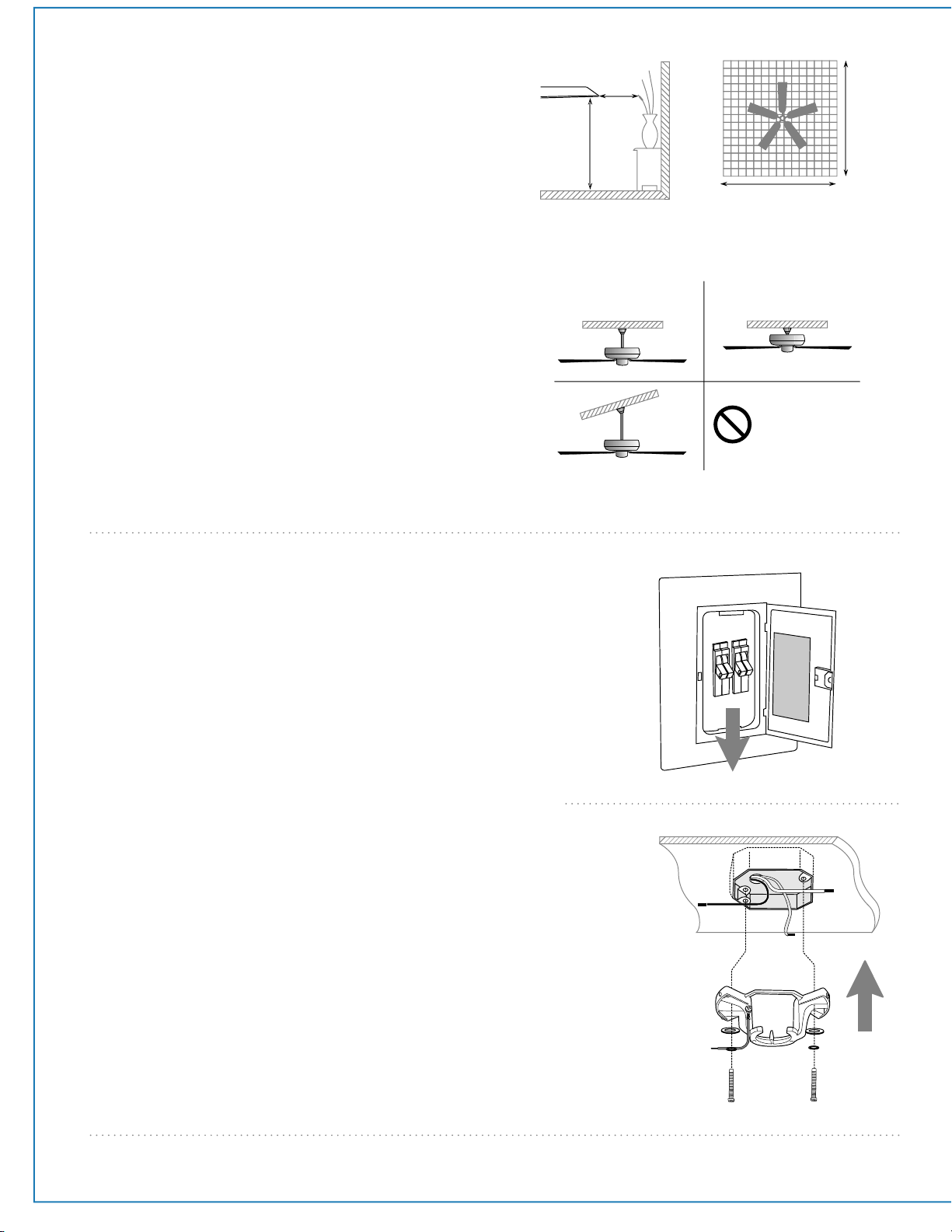
4. Hanging Bracket Installation.
page 3
ON
OFF
ON
OFF
Turn off circuit breakers to current fixture from breaker
panel and be sure operating light switch is turned to the
OFF position.
WARNING: Failure to disconnect power supply prior to
installation may result in serious injury.
Remove existing fixture.
WARNING: When using an existing outlet box, be sure the
outlet box is securely attached to the building structure and
can support the full weight of the fan. Ensure outlet box is
clearly marked "Suitable for Fan Support." If not, it must be
replaced with an approved outlet box. Failure to do so can
result in serious injury.
CAUTION: Be sure outlet box is properly grounded and that
a ground wire (GREEN or bare) is present.
Install hanging bracket to outlet box using original
screws, spring washers and flat washers provided with
new or original outlet box.* If installing on a vaulted
ceiling, face opening of hanging bracket towards high
point of ceiling. Arrange electrical wiring around the
back of the hanging bracket and away from the bracket
opening.
*Note: It is very important that you use the proper
hardware when installing the hanging bracket as this will
support the fan.
3. Installation Preparation.
Installation requires these tools:
Phillips screwdriver, flathead screwdriver, adjustable
pliers or wrench, stepladder, wire cutters, and rated
electrical tape.
downrod
installation
flushmount
installation
To prevent personal injury and damage, ensure
that the hanging location allows the blades a
clearance of 7 feet (2.13m) from the floor and
30in. (76cm) from any wall or obstruction.
This fan is suitable for room sizes up to 400 square
feet (37.2 square meters).
7 feet
(2.13 m) (76 cm)
30
inches
blade edge
12ft. - 20ft.
12ft. - 20ft.
(3.66m - 6.1m)
(3.66m - 6.1m)
Vaulted ceiling
angle is not to
exceed 20 degrees.
This fan can be mounted with a downrod
on a regular (no-slope) or vaulted ceiling. The
hanging length can be extended by purchasing a
longer downrod (0.5in./1.27cm diameter). After
installing hanging bracket, continue to Section 5 on
page 4 for those instructions. This fan can also be
mounted as a flushmount on a regular (no-slope)
ceiling. After installing hanging bracket, continue to
Section 6 on page 5 for those instructions.
hanging bracket
spring washers
outlet box screws
flat washers
page 4
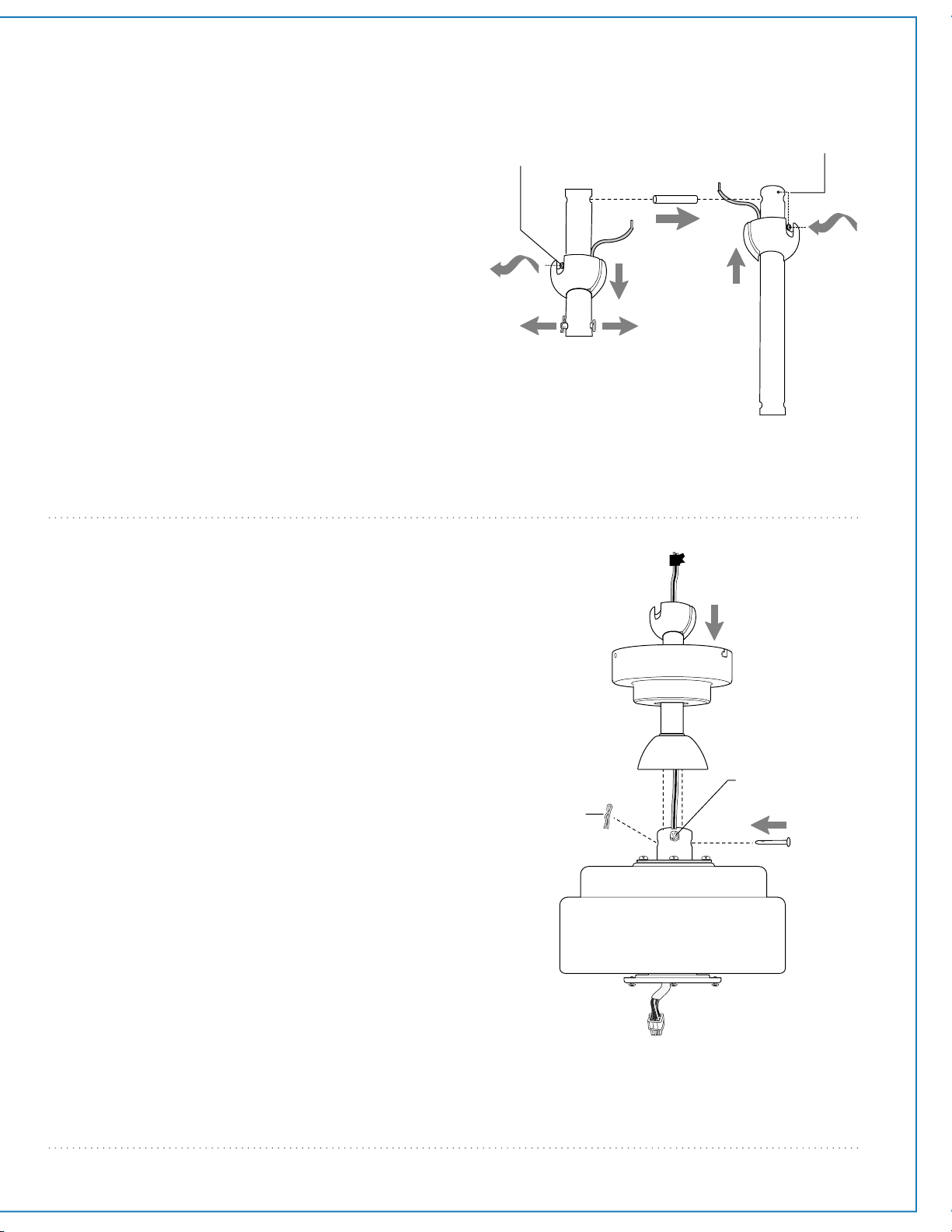
5. Fan Assembly.
NOTE: The important safety precautions and
instructions appearing in the manual are not meant to
cover all possible conditions and situations that may
occur. It must be understood that common sense and
caution are necessary factors in the installation and
operation of this fan.
If you wish to extend the hanging length of your fan,
you must remove the hanging ball from the
downrod provided to use with an extended
downrod (sold separately). [If you wish to use the
downrod provided, please proceed to instructions
following the dotted line below.]
To remove hanging ball, loosen set screw on
hanging ball and remove the pin and clip. Lower
hanging ball and remove stop pin. Slide hanging ball
off the original downrod, A, and slide it down the
longer downrod, B (the top of the downrod should
be noted as having a set screw hole; use this hole
when setting the set screw). Insert stop pin into top
of extended downrod and raise hanging ball. Be sure
stop pin aligns with slots on the inside of the
hanging ball. Tighten set screw securely.
WARNING: Failure to tighten set screw completely
could result in the fan becoming loose and possibly
falling.
set screw hole
set screw
hanging ball
stop pin
pin
clip
A
B
Tip: To prepare for threading electrical wires through
downrod, apply a small piece of electrical tape to the
ends of the electrical wires--this will keep the wires
together when threading them through the downrod.
Loosen yoke set screws and nut at top of motor
housing. Remove pin and clip from downrod (if you
have not already done so). Slide downrod through
yoke cover and canopy.
Thread electrical wires through downrod and pull
extra wire slack from the upper end of the downrod.
Place downrod into the motor housing yoke and
re-insert pin and clip that were previously removed.
Tighten yoke set screws and nut securely. Lower
canopy to motor housing.
["Fan Assembly" continued on next page.]
yoke set screw
downrod
electrical wiring
clip
pin
canopy
yoke cover
page 5
5. Fan Assembly. (cont.)
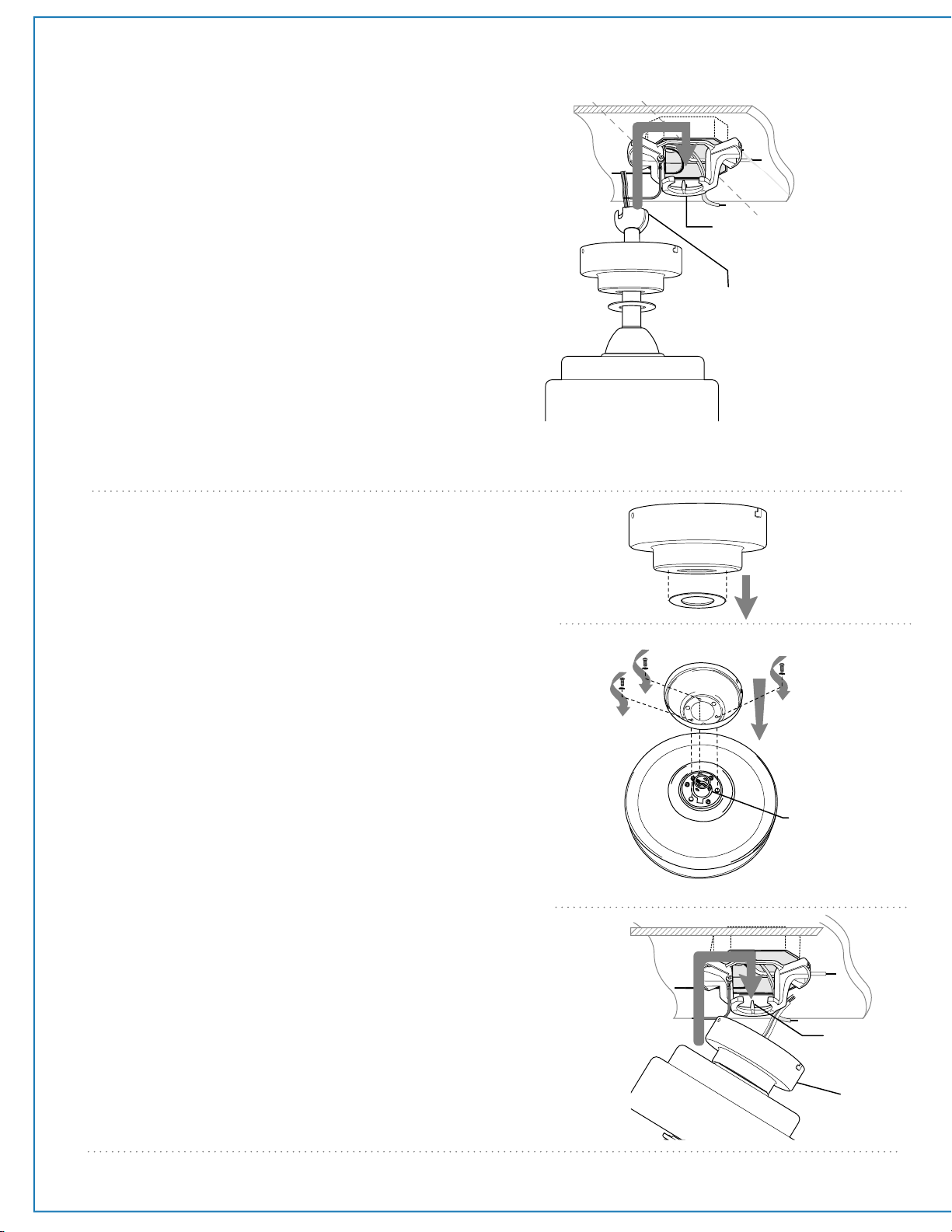
6. Fan Assembly (flushmount).
Remove and set aside canopy cover to reveal 6
holes. Notice that 3 of these holes are larger.
Note: Yoke cover will not be used with this type
of installation.
There are 6 screws in top of motor housing,
remove every other screw and lock washer.
Thread wiring through canopy. Place canopy over
yoke, aligning larger holes in canopy with the 3
existing screws in top of motor housing. Insert
the 3 screws and 3 lock washers that were
removed into the remaining holes. Securely
tighten these screws.
To prepare the fan for wiring, hang fan onto
hanging bracket by sliding the canopy over the
hanging bracket tab. (Use one of the non-slotted
holes on the rim of the canopy to do so.)
canopy
canopy cover
canopy
motor
housing
hanging ball slot
hanging bracket tab
motor housing
hanging
bracket tab
With the hanging bracket secured to the outlet
box and able to support the fan you are now
ready to hang your fan. Grab the fan firmly with
two hands. Slide downrod through opening in
hanging bracket and let hanging ball rest on
the hanging bracket. Turn the hanging ball slot
until it lines up with the hanging bracket tab.
WARNING: Failure to align slot in hanging ball
with tab in hanging bracket may result in
serious injury or death.
Tip: Seek the help of another person to hold the
stepladder in place and to lift the fan up to you
once you are set on the ladder.
canopy
motor
housing
yoke
page 6
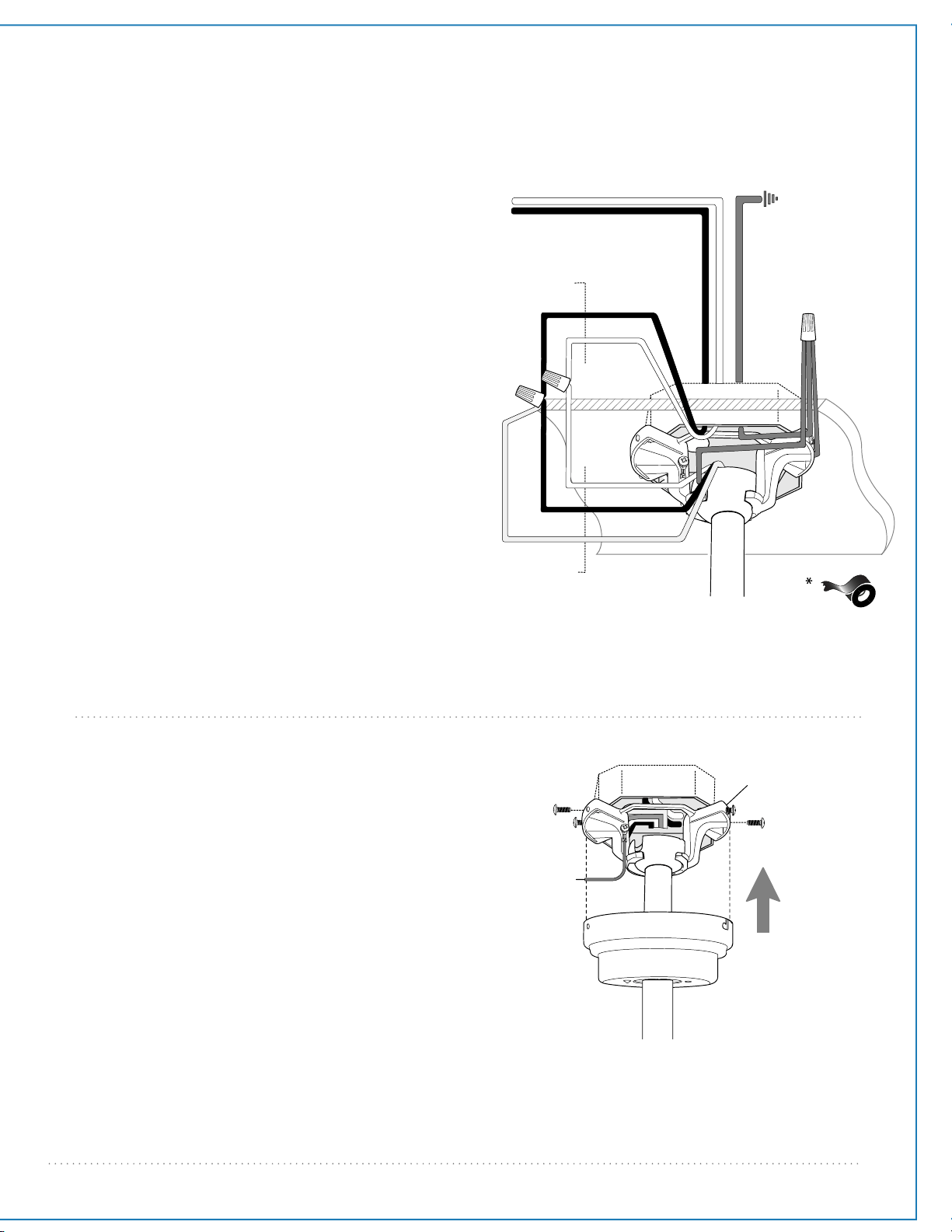
7. Wiring.
WARNING: Turn off circuit breakers to current fixture
from breaker panel and be sure switch is turned to the
OFF position.
CAUTION: Be sure outlet box is properly grounded and that
a ground (GREEN or Bare) wire is present.
Make sure all electrical connections comply with Local
Codes or Ordinances and the National Electrical Code. If you
are unfamiliar with electrical wiring or if the house/building
wires are different colors than those referred to in the
instructions, please use a qualified electrician.
Note: Excess lead wire length from the fan can be cut to the
desired length and then stripped.
When downrod is secured in place on the hanging
bracket, electrical wiring can be made as follows:
Connect BLACK and BLUE wire from fan to BLACK wire
from ceiling with wire connector provided.
Connect WHITE wire from fan to WHITE wire from
ceiling with wire connector provided.
Connect all GROUND (GREEN) wires together from fan
to BARE/GREEN wire from ceiling with wire connector
provided.
If you intend to control the fan light with a separate light
switch, connect BLUE wire from fan to the BLACK (or
RED) supply from the independent switch.
* Wrap each wire connector separately with electrical
tape as an extra safety measure.
black
black
white
white
black supply wire
white supply wire
from
ceiling
from fan
ground
(green or bare)
ground
(green
or bare)
8. Canopy Assembly.
hanging bracket
canopy
Temporarily raise canopy to hanging bracket to
determine which 2 screws in hanging bracket align
with slotted holes in canopy, and then lower canopy
and partially loosen these 2 screws. Remove the
other 2 screws/lock washers and set aside.
Now, lift canopy to hanging bracket again, aligning
slotted holes in the canopy with loosened screws in
hanging bracket. Twist canopy to lock. Re-insert the
other 2 screws/washers and secure all screws with a
Phillips screwdriver.
wire
connector
blue
This fan is remote control adaptable (remote
control sold separately). Note: Only remote
controls approved for DAMP locations can be
used with this fan.
page 7
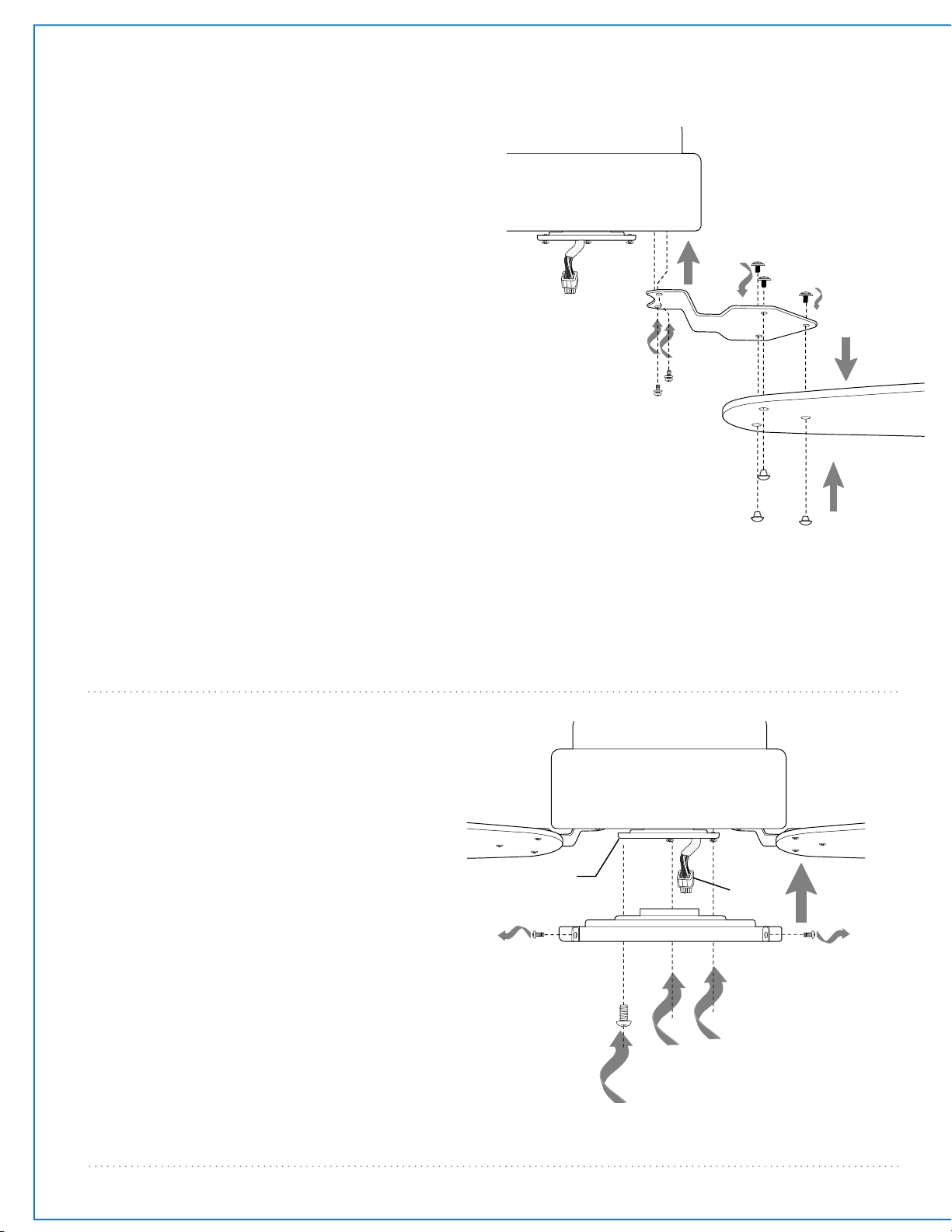
9. Blade Assembly.
blade arm
blade
motor housing
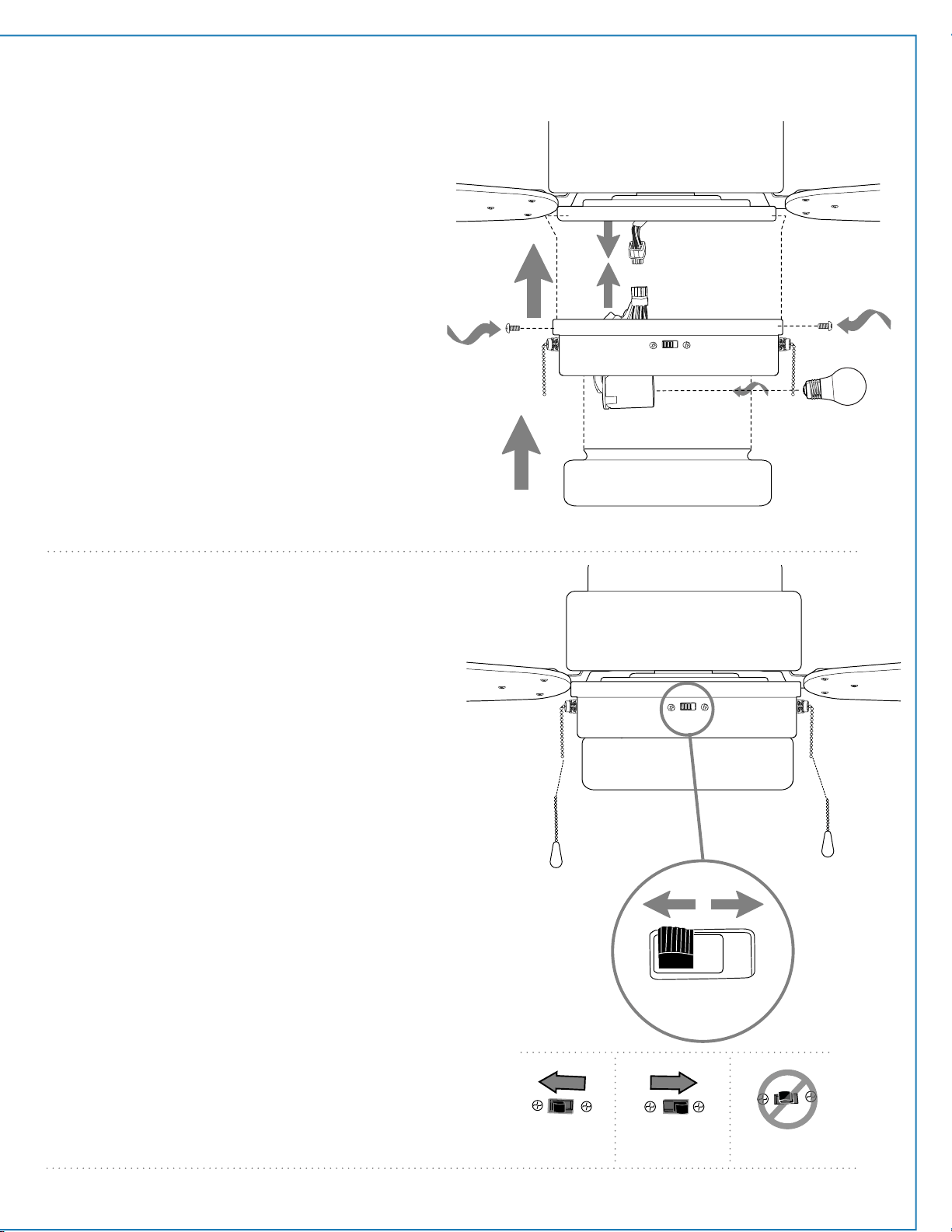
10. Light Kit Assembly.
Remove 3 screws from outer edge of
fitter plate (save screws for later use).
Remove 1 screw from motor plate on
underside of motor housing and partially
loosen the other 2 screws.
Align slotted holes in middle of fitter
plate with loosened screws in motor
plate, allowing male plug from motor
housing to come through center hole in
fitter plate. Twist fitter plate to lock.
Re-insert screw that was previously
removed and securely tighten all 3
screws with a Phillips screwdriver.
["Light Kit Assembly" continued on
next page.]
motor
housing
male
plug
fitter plate
motor plate
WARNING: To reduce the risk of serious bodily
injury, DO NOT use power tools to assemble the
blades. If overtightened, blades may crack and
break.
Locate 9 blade attachment screws and 9
decorative nuts in one of the hardware packs.
Place blade arm on TOPSIDE of blade, aligning
holes in blade arm with holes in blade as shown.
Insert 3 decorative nuts into holes in blade from
UNDERSIDE of blade (i.e., the side that will face the
floor), making sure to completely insert each
decorative nut so that the blade arm can be
attached correctly. Insert 3 blade attachment
screws from TOPSIDE of blade with fingers first
and then tighten screws securely with a Phillips
screwdriver. Repeat procedure for remaining
blades.
Remove blade arm screws and lock washers
from underside of motor. Align blade arm holes
with motor screw holes and attach blade arm
with lock washers and blade arm screws. Before
securing screws permanently, repeat this
procedure with remaining blade arms. Secure all
screws.
Note: Tighten blade arm screws twice a year.
decorative
nuts
blade attachment
screws
blade arm screws/
lock washers
page 8
11. Testing Your Fan.
bulb
motor
housing
female plug
male plug
10. Light Kit Assembly. (cont.)
Connect male plug from motor housing to female
plug from light kit fitter, matching up the colors
on the male plug with the colors on the female
plug for correct fit. Be sure that the plugs connect
completely.
Align holes in fitter plate with holes in light kit
fitter. Re-insert screws that were previously
removed and securely tighten all 3 screws with a
Phillips screwdriver.
Install one 6.5 watt medium base LED bulb
(included).
IMPORTANT: When replacing bulb, please allow
bulb and glass shade to cool down before
touching.
Locate clips inside of light kit fitter and place edge
of glass shade into clips.
Note: Pull down VERY GENTLY on glass shade to
make sure that glass shade is secure.
It is recommended that you test fan before
finalizing installation. Restore power from circuit
box and wall switch (if applicable). Test fan
speeds with the pull chain labeled FAN. Start at
the OFF position (no blade movement). First pull
will set the fan to HI. Second pull will set the fan
to MEDIUM. Third pull will set the fan to LOW.
Fourth pull will re-set the fan to OFF setting. If
applicable, test light with the pull chain labeled
LIGHT. (Refer to diagram 1.) If fan and/or light do
(does) not function, please refer to
"Troubleshooting" section to solve any issues
before contacting Customer Service.
Turn fan completely off before moving the reverse
switch. Set reverse switch to recirculate air
depending on the season:
- LEFT position in summer (diagram 2)
- RIGHT position in winter (diagram 3)
A ceiling fan will allow you to raise your
thermostat setting in summer and lower your
thermostat setting in winter without feeling a
difference in your comfort.
Important: Reverse switch must be set either
completely LEFT or completely RIGHT for fan to
function. If the reverse switch is set in the middle
position (diagram 4), fan will not operate.
Attach pull chain extension(s) supplied or custom
pull chain extension(s) (sold separately) to the
end(s) of the pull chain(s).
light
pull chain
extension
fan
pull chain
extension
diagram 2
diagram 3
diagram 4
diagram 1
light kit fitter
glass shade
reverse switch
page 9
Troubleshooting.
Warranty.
Parts Replacement.
WARNING: Failure to disconnect power supply
prior to troubleshooting any wiring issues may
result in serious injury.
JMLI1801
LITEX 30-YEAR LIMITED WARRANTY:
LITEX INDUSTRIES, LTD. warrants this fan to the original
household purchaser for indoor use under the following
provisions:
1-YEAR WARRANTY: LITEX INDUSTRIES, LTD. will replace or
repair any fan which has faulty performance due to a
defect in material or workmanship. Contact Litex Customer
Service at 1-800-527-1292 to arrange for return of fan.
Return fan, shipping prepaid, to Litex Industries, Ltd. We will
repair or ship you a replacement fan, and we will pay the
return shipping cost.
5-YEAR WARRANTY: LITEX INDUSTRIES, LTD. will repair or
replace, at no charge to the original purchaser, any fan
motor that fails to operate satisfactorily when failure
results from normal use.
RETURN FAN MOTOR ONLY, shipping prepaid, to Litex
Industries. We will repair or ship purchaser a replacement
motor and Litex will pay the return shipping cost.
6-YEAR to 30-YEAR WARRANTY: LITEX INDUSTRIES, LTD. will
repair the fan, at no charge to the original purchaser for
labor only, if the fan motor fails to operate satisfactorily
when failure results from normal use. Parts used in the
repair will be billed to the purchaser at prevailing prices at
time of repair.
The purchaser shall be responsible for all costs incurred
in the removal, reinstallation and shipping of the product
for repairs.
This warranty does not apply when damage from
mechanical, physical, electrical or water abuse results in
causing the malfunction. Deterioration of finishes or other
parts due to time or exposure to salt air is specifically
exempted under this warranty.
Neither Litex Industries nor the manufacturer will
assume any liability resulting from improper installation or
use of this product. In no case shall the company be liable
for any consequential damages for breach of this, or any
other warranty expressed or implied whatsoever. This
limitation as to consequential damages shall not apply in
states where prohibited.
For parts and information, please refer to
"Parts Inventory" on page 2.
Litex Customer Support:
1-800-527-1292
Problem: Fan fails to operate.
Solutions:
1. Check wall switch to fan.
2. Verify that reverse switch is set completely in
either direction.
3. Check to be sure fan is wired properly.
4. Verify that male and female plugs in light kit
fitter are connected properly.
Problem: Light kit not lighting.
Solutions:
1. Check wall switch to fan.
2. Check that bulb is installed correctly.
3. Check to be sure wires in canopy are wired
properly.
4. Verify that male and female plugs in light kit
fitter are connected properly.
Problem: Fan operates but light fails.
Solutions:
1. Check that bulb is installed correctly.
2. Check to be sure wires in canopy are wired
properly.
3. Verify that male and female plugs in light kit
fitter are connected properly.
4. Replace defective bulb with same type of bulb.
Problem: Fan wobbles.
Solutions:
1. Use the balancing kit provided in one of the
hardware packs. If no blade balancing kit is
provided, please call Customer Support,
at 1-800-527-1292, to request one.
2. Check to be sure set screw(s) on motor housing
yoke is (are) tightened securely.
3. Check to be sure set screw on hanging ball is
tightened securely.