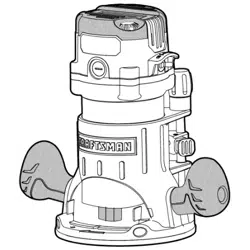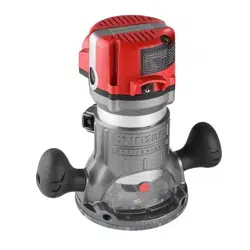
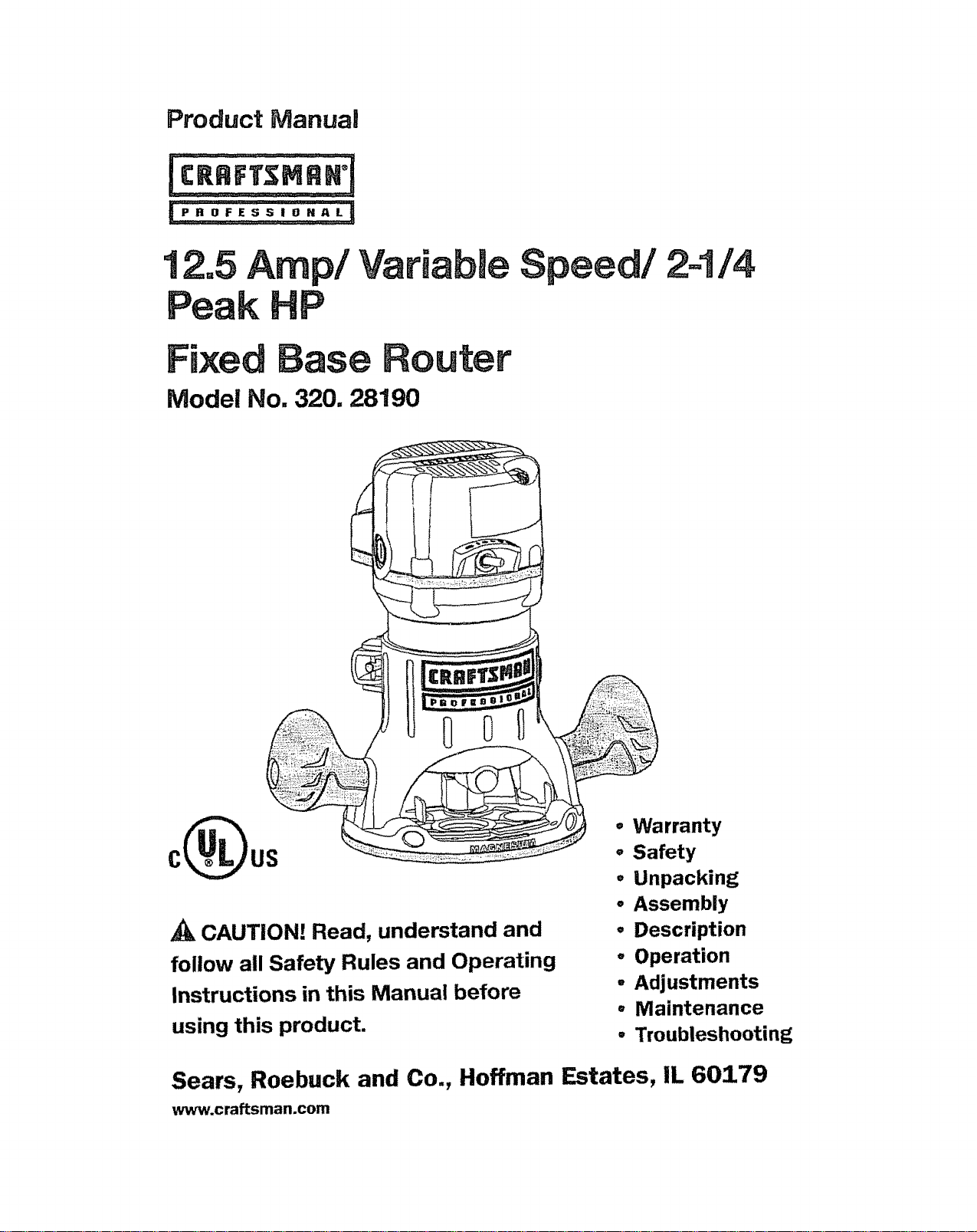
CAUTION! Read, understand and
follow all Safety Rules and Operating
Instructions in this Manual before
using this product.
• Warranty
o Safety
o Unpacking
• Assembly
° Description
° Operation
- Adjustments
° Maintenance
° Troubleshooting
Sears, Roebuck and Co., Hoffman Estates, IL 60179
www.craftsman.com
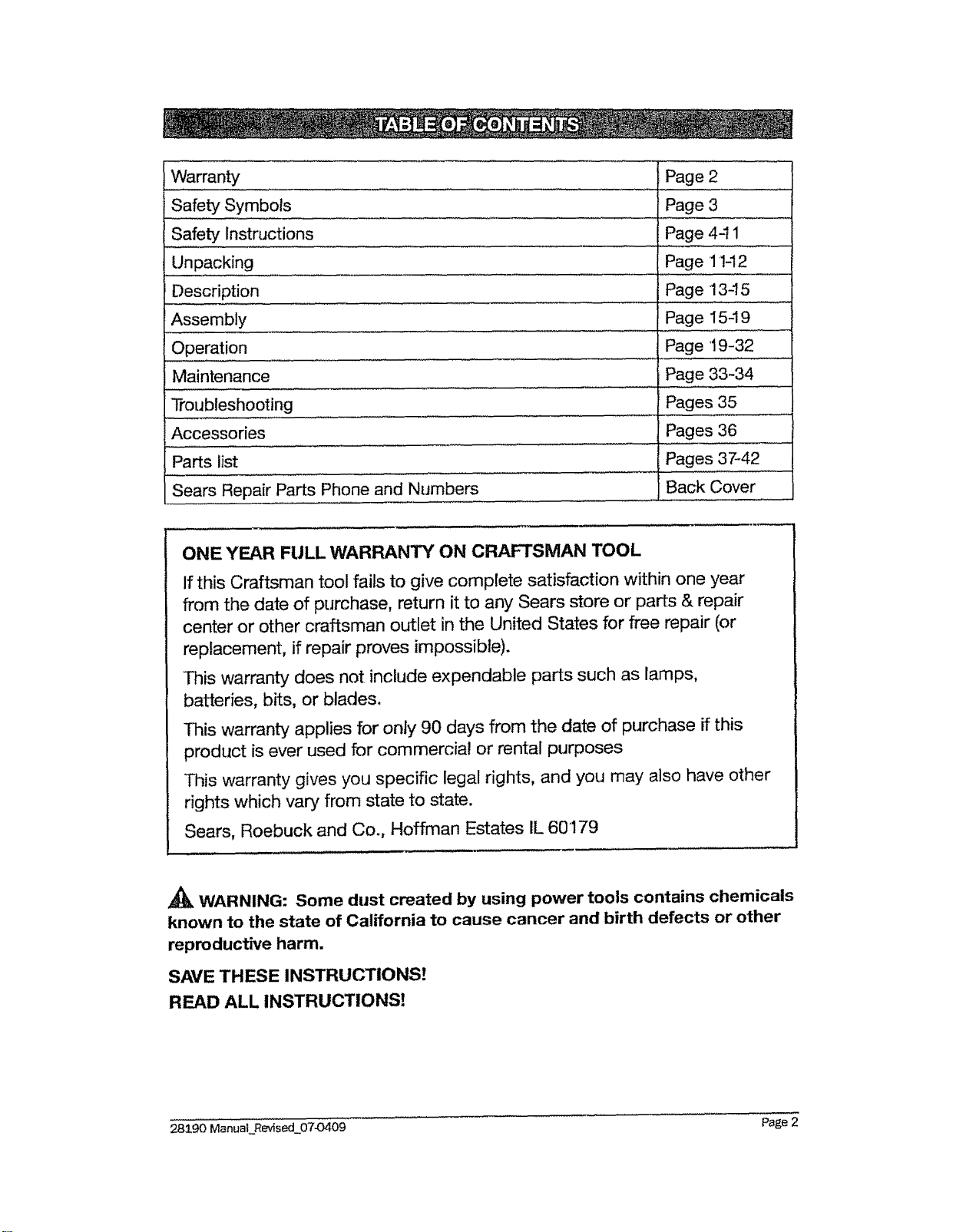
Warranty
Safety Symbols
Safety Instructions
Unpacking
Description
Assembly
Operation
Maintenance
Troubleshooting
Accessories
Parts list
Sears Repair Parts Phone and Numbers
Page 2
Page 3
Page 441
Page 1142
Page 13-15
Page 154 9
Page 19-32
Page 33-34
Pages 35
Pages 36
Pages 37-42
Back Cover
ONE YEAR FULL WARRANT'( ON CRAFTSMAN TOOL
If this Craftsman tool fails to give complete satisfaction within one year
from the date of purchase, return it to any Sears store or parts & repair
center or other craftsman outlet in the United States for free repair (or
replacement, if repair proves impossible).
This warranty does not include expendable parts such as lamps,
batteries, bits, or blades.
This warranty applies for only 90 days from the date of purchase if this
product is ever used for commercial or rental purposes
This warranty gives you specific legal rights, and you may also have other
rights which vary from state to state.
Sears, Roebuck and Co., Hoffman Estates IL 60179
WARNING: Some dust created by using power tools contains chemicals
known to the state of California to cause cancer and birth defects or other
reproductive harm.
SAVE THESE INSTRUCTIONS!
READ ALL INSTRUCTIONS]
28290 ManuaLRevised_07-0409 Page 2
The purpose of safety symbols is to attract your attention to possible dangers. The
safety symbols, and the explanations with them, deserve your careful attention and
understanding. The symbol warnings DO NOT, by themselves, eliminate any dan-
ger. The instructions and warnings they give are no substitutes for proper accident-
prevention measures..
WARNING: BE SURE to read and understand all safety alert symbols,
such as "DANGER," "WARNING," and "CAUTION" BEFORE using this product.
Failure to follow all instructions may result in electric shock, fire, and/or seri-
ous personal injury.
SYMBOL MEANINGS
SAFETY ALERT SYMBOL: Indicates DANGER, WARNING, OR CAUTION.
May be used in conjunction with other symbols or pictographs.
DANGER: Failure to obey this safety warning WILL result in death or
serious injury to yourself or to others. Always follow the safety precautions to
reduce the risk of fire, electric shock and personal injury.
WARNING: Failure to obey this safety warning CAN result in death or
serious injury to yourself or to others. Always follow the safety precautions to
reduce the risk of fire, electric shock and personal injury,
CAUTION: Failure to obey this safety warning MAY result in personal
injury to yourself or others or property damage. Always follow the safety pre-
cautions to reduce the risk of fire, electric shock and personal injury.
DAMAGE PREVENTION AND INFORMATION MESSAGES
These inform the user of important information and/or instructions that could
tead to equipment or other property damage if they are not followed, Each message
is preceded by the word "NOTE," as in the example below:
NOTE: Equipment and/or property damage may result if these instructions
are not followed.
WEAR YOUR
,_ WARNING: The operation of any router can result in
foreign objects being thrown into your eyes, which can
result in severe eye damage. Before beginning power
tool operation, ALWAYS wear safety goggles or safety
glasses with side shield and a full-face shield when
needed. We recommend a Wide Vision Safety Mask for
use over eyeglasses or standard safety glasses with
side shield, available at Sears Stores or other Craftsman
Outlets.
28190 ManuaLRevised 0743409 Page 3
A
_k WARNING: BE SURE to road and understand all instructions in this man-
ual before using this router. Failure to follow all instructions may result electric
shock, fire and/or serious personal injury.
WORK AREA SAFETY
= Keep your work area clean and well lit. Cluttered workbenches and dark
areas invite accidents.
DO NOT operate power tools in explosive atmospheres, such as in the
presence of flammable liquids, gases, or dust. Power tools create sparks
which may ignite the dust or fumes,_
Keep bystanders, children and visitors away while operating a power
tool. Distractions can cause you to lose control.
Make your workshop childproof with padlocks and master switches. Lock
tools away when not in use,
MAKE SURE the work area has ample lighting so you can see the work
and that there are no obstructions that will interfere with safe operation BE-
FORE using your router_
PERSONAL SAFETY
o KNOW your power tool. Read this operator's manual carefully° Learn the
router's applications and limitations, as well as the specific potential hazards
related to this tool
o STAY ALERT, watch what you are doing and use common sense when oper-
ating a power tool.
,, DO NOT use toot while tired or under the influence of drugs, alcohol or
medication. A moment of inattention while operating power tools may result in
serious personal injury.
,, DRESS properly. DO NOT wear loose clothing or jewelry. Pull back long hair.
Keep your hair, clothing, and gloves away from moving parts. Loose clothing,
or long hair can be caught in moving parts. Air vents often cover moving parts
and shouid also be avoided..
o
AVOID accidental starting° Be sure switch is in "OFF" position before plug-
ging in. DO NOT carry tools with your finger on the switch, Carrying tools with
your finger on the switch or plugging in tools that have the switch in the "ON"
position invites accidents.
REMOVE adjusting keys or blade wrenches before bJming the tool "ON." A wrench
that is left attached to a rotating part of the tool may result in personal injury.
Do not overreach. Keep proper footing and balance at all times. Proper
footing and balance enables better control of the tool in unexpected situationso
28590 ManuaLRevised 07-0409 Page 4
ALWAYS SECURE YOUR WORK. Use clamps or a vise to hold work piece
securety_ It is safer than using your hand and frees both hands to operate tool,
USE SAFETY EQUIPMENT. Always wear eye protection. Dust mask, non-
skid safety shoes, hard hat, or hearing protection must be used for appropri-
ate conditions,
• DO NOT USE ON A LADDER or unstable support. Stable footing on a solid
surface enables better control of the tool in unexpected situations.
TOOL USE AND CARE
WARNING: BE SURE to read and understand all instructions before op-
erating this router. Failure to follow all instructions listed below may result in
electric shock, fire and/or serious personal injury.
ALWAYS use clamps or other practical ways to secure and support the
work piece to a stable platform. Holding the work by hand or against your
body is unstable and may lead to loss of control.
DO NOT force the tool. Use the correct tool and bit for your application.
The correct tool and bit will do the job better and safer at the rate for which it is
designed.
DO NOT use the tool if switch does not turn it "On" or "Off." Any tool that
cannot be controtted with the switch isdangerous and must be repaired.
DISCONNECT the plug from the power source before making any adjust-
ments, changing accessories or storing the tool. Such preventive safety
measures reduce the risk of starting the tool accidentally.
= NEVER leave the tool running. ALWAYS turn it off. DO NOT leave the tool
until it comes to a complete stop.
• STORE idle tools out of the reach of children and other untrained per-
sons. Tools are dangerous in the hands of untrained users.
• MAINTAIN tools with care. Keep cutting tools sharp and clean. Prop-
erly maintained tools with sharp cutting edges are less likely to bind and
are easier to control.
CHECK for misalignment or binding of moving parts, breakage of parts, and
any other condition that may affect the tool's operation. If damaged, have the tool
serviced before using. Many accidents are caused by poorly maintained tools,
USE ONLY accessories that are recommended for this tool. Accessories
that may be suitable for one tool may become hazardous when used on another
tool.
28190 ManuaLRevised 07©409 Page 5
ELECTRICAL SAFETY
_k WARNING: Do not permit fingers to touch the terminals of plug when
installing or removing the plug from the outlet.
Double insulated tools are equipped with a polarized plug (one blade is
wider than the other). This plug will fit in a polarized outlet only one way.
If the plug does not fit fully in the outlet, reverse the plugo If it still does not fit,
contact a qualified electrician to install a polarized outleL Do not change the
plug in any way°
o Double insulation [] eliminates the need for the three-wire grounded power
cord and grounded power supply system. Applicable only to Class !1(double-
insulated) tools. This router motor is double insulated.
_k WARNING: Double insulation DOES NOT take the place of normal safety
precautions when operating this tool.
BEFORE plugging in the tool, BE SURE that the outlet voltage supplied is
within the voltage marked on the tool's data plate. DO NOT use "AC only"
rated tools with a DC power supply.
° AVOID body contact with grounded surfaces, such as pipes, radiators,
ranges and refrigerators. There is an increased risk of electric shock if your
body is grounded.
= DO NOT expose power tools to rain or wet conditions or use power tools
in wet or damp locations. Water entering a power tool will increase the risk
of electric shock.
INSPECT toot cords for damage. Have damaged tool cords repaired at a
Sear Service Center. BE SURE to stay constantly aware of the cord location
and keep it well away from the moving router.
DO NOT abuse the cord. NEVER use the cord to carry the tool by or to
pull the plug from the outlet. Keep cord away from heat, oil, sharp edges or
moving parts° Replace damaged cords immediately. Damaged cords increase
the risk of electric shock.
EXTENSION CORDS
Use a proper extension cord. ONLY use cords listed by Underwriters Labora-
tories (UL). Other extension cords can cause a drop in line voltage, resulting in
a loss of power and overheating of tool. For this tool an AWG (American Wire
Gauge) size of at least 14-gaugeis recommended for an extension cord of 25-ft
or less in length. Use 12-gauge for an extension cord of 50-ft. Extension cords
100-ft or longer are not recommended. Remember, a smaller wire gauge
size has greater capacity than a larger number (14-gauge wire has more
capacity than 16-gauge wire; 12-gauge wire has more capacity than 14-gauge)o
When in doubt use the smaller number° When operating a power tool outdoors,
use an outdoor extension cord marked "W-A" or "W." These cords are rated for
outdoor use and reduce the risk of electric shock.
28590 ManuaLRevised 07-O409 Page 6
,_ CAUTION: Keep the extension cord clear of the working area. Position
the cord so that it will not get caught on lumber, tools or other obstructions
while you are working with a power tool.
WARNING: Check extension cords before each use. If damaged replace
immediately. Never use tool with a damaged cord since touching the dam-
aged area could cause electrical shock, resulting in serious injury.
SAFETY SYMBOLS FOR YOUR TOOL
The label on your tool may include the following symbols.
V ........................................................Volts
A ............................................................. Amps
Hz ......................................................Hertz
W ............................................................. Watts
min ................................................... Minutes
"_" .................................................. Alternating current
---= ................................................. Direct current
no ................................................... No-load speed
[] .......................................................... Class ii construction, Double Insulated
,../rain ................................................. Revolutions or Strokes per minute
_k .................................................... Indicates danger, warning or caution, it means
attention! Your safety is involved.
SERVICE SAFETY
if any part of this router is missing or should break, bend, or fail in any way;
or should any electrical component fail to perform properly: SHUT OFF the
power switch and remove the router plug from the power source and have the
missing, damaged or failed parts replaced BEFORE resuming operation,
Tool service must be performed only at a Sears Parts and Repair Center.
Service or maintenance performed by unqualified personnel could result in a
risk of injury.
When servicing a tool, use only identical replacement parts. Follow in-
structions in the maintenance section of this manual. Use of unauthorized
parts or failure to follow maintenance instructions may create a risk of electric
shock or injury.
28190 Manual_ReTised 07-0409 Page7
SAFETY RULES FOR ROUTER
CAUTION: Cutting bits coast after router is switched off,
HOLD TOOL by insulated gripping surfaces (handles) when performing
an operation where the cutting tool may contact hidden wiring or its
own cord. Contact with a "live" wire will make the exposed metal parts of
the tool "live" and shock the operator.
O
o
Maintain a firm grip on the router with both hands to resist starting torque,
NEVER attempt to use the router motor without first installing it in an
approved fixed base. Failure to heed this warning could result in personal
injury and damage to the router motor.
MAKE SURE the router motor does not move up or down when clamped
in the fixed base. if router motor is not securely clamped in base, ad-
justments will not be accurate.
DO NOT HAND-HOLD THE ROUTER IN AN UPSIDE DOWN OR HORI-
ZONTAL POSITION. The router motor can separate from the base if not
properly attached according to the instructions_
TIGHTEN COLLET/NUT securely to prevent the cutting bit from slipping.
if the cotlet/nut is not securely tightened, the cutting bit may detach during
use, causing serious personal injury.
NEVER tighten collet/nut without a cutting bit installed in the collet/nut.
USE CLAMPS or other practical ways to secure and support the work
piece to a stable platform and hold the work piece rigidly in position.
Holding the work by hand or against your body is unstable and may lead to
loss of control.
O
O
NEVER hold the piece being cut in your hands or across your legs. It is
important to support and clamp the work piece properly in order to minimize
body exposure, bit binding, or loss of control.
ALWAYS keep chip shield clean and in place.
STAY ALERT and clear the Router cutting bit path of any obstructions
BEFORE starting the muter motor. Keep cutting area clear of all foreign
objects while muter motor is running.
CHECK TO SEE that the cord will not "hang up" during routing operation.
• MAKE SURE the cutting bit is not in contact with the work piece before
the switch is turned on. The bit must ALWAYS be running at full speed
before contacting the work piece.
= KEEP HANDS CLEAR OF CUTTING BIT when router motor is running to
prevent personal injury.
28190 ManuaLRevised 0743409 Page 8
= PROVIDE CLEARANCE under work piece for muter cutting bit when
through-cutting.
= KEEP CUTTING PRESSURE CONSTANT. Do not overload the motor.
• USE ONLY sharp cutting bits that are not chipped or cracked. Blunt cut-
ting bits will cause stalling and burn the work piece.
• NEVER use this router motor with a cutting bit larger than 3-1/2
inch in diameter.
ALWAYS USE cutting bits that are designed for this router. Never use
cutting bits which are larger in diameter than the opening in the muter
sub-base. Cutting bits that have cutter diameters larger than the opening
could cause possible loss of control or create other hazardous condition that
could cause serious personal injury.
The sub-base on this fixed base router has an opening of 1-1/4 inch. To
use cutting bits with a larger diameter, install and use a sub-base with a larger
diameter opening (sold separately) at Sears stores or other Craftsman outlets,
DO NOT use large router cutting bits for freehand muting. Use of large
cutting bits when freehand routing could cause loss of control or create haz-
ardous conditions that could result in serious personal injury. If using a router
table, large bits should be used for edging onlyo
BE SURE CUTTING BIT is centered in template guide (sold separately)
prior to template guide applications to avoid personal injury or damage
to finished work.
DO NOT REMOVE more than 1/8 inch. in a single pass. Excessive depth of
cut can result in loss of control that could result in personal injury.
After completing a cut, turn motor OFF and let it come to a complete stop
BEFORE REMOVING router from work piece.
Let the motor come to a COMPLETE STOP before putting the router
down. Cutting bits coast after power isturned off.
ONLY use router tables that conform to safe woodworking practices and
offer proper guarding for the cutting bit. Use router tables that are UL clas-
sified and identified suitable for use with this specific router model, Failure to
comply could result in serious personal injury°
Only use router tables with on-board switch controlled receptacles.
Failure to use router tables with all the appropriate safety features could result
in serious personal injury.
DISCONNECT THE TOOL FROM POWER SOURCE before making any
adjustments or changing cutting bits.
If you are changing a bit immediately after use, BE CAREFUL NOT TO TOUCH
the collet!nut or cutting bit with your hands or fingers. The heat buildup from
cutting could cause severe bums. ALWAYS use the wrench provided.
28190 Manual_Revised 07-0409 Page 9
AVOID "CLIMB CUTTING." See "OPERATION" section in this manual.
"Climb-cutting" increases the chance for loss of control resulting in possible
serious injury°
A_k WARNING: Use of this product can generate dust containing chemicals
known to the state of California to cause cancer, birth defects or other re-
productive harm. Some examples of these chemicals are:
o
O
o
Lead from lead-based paints.
Crystalline silica from bricks and cement and other masonry products.
Arsenic and chromium, from chemically treated lumber.
Your risk from these exposures varies, depending upon how often you do
this type of work. To reduce your exposure to these chemicals:
o Work in a wel!-ventilated area°
• Work with approved safety equipment, such as those dust masks that are
specially designed to filter out microscopic particles.
Avoid prolonged contact with dust from power sanding, sawing, grinding,
drilling and other construction activities. Wear protective clothing and wash
exposed areas with soap and water. Allowing dust to get into your mouth,
eyes or lay on the skin may promote absorption of harmful chemicals.
WARNING: Use of this tool can generate and/or disburse dust, which
may cause serious and permanent respiratory or other injury. Always use
NIOSH/OSHA approved respiratory protection appropriate for the dust ex-
posure. Direct particles away from face and body.
ADDITIONAL RULES FOR SAFE OPERATION
WARNING: BE SURE to read and understand all instructions. Failure to
follow all instructions listed below may result in electric shock, fire and/or
serious personal injury.
° Know your power tool. Read this operator's manual carefully. Leam the ap-
plications and limitations, as well as the specific potential hazards related to this
tool. Following this rule will reduce the risk of electric shock, fire or serious injury.
° ALWAYS wear safety glasses or eye shields when using this router. Every-
day eyeglasses have only impact-resistant Tenses; they are NOT safety glasses_
* PROTECT your lungs. Wear a face mask or dust mask if the operation is dusty.
° PROTECT your hearing. Wear appropriate personal hearing prots_ction during use.
Under some conditions noise from this product may conlTibut_ to headng loss.
= ALL VISTORS AND BYSTANDERS MUST wear the same safety equipment
that the operator of the router wears.
283_90 Manual__Revised 07-0409
Page 10
o
INSPECT the tool cords periodically and if damaged have them repaired
at your nearest Sears Service Center. BE AWARE of the cord location.
ALWAYS check the tool for damaged parts. Before further use of the tool, a
guard or other part that is damaged should be carefully checked to determine
if it will operate properly and perform its intended function. Check for mis-
alignment or binding of moving parts, breakage of parts, and any other condi-
tion that may affect the tool's operation.. A guard or other part that is damaged
should be properly repaired or replaced at a Sears Service Center.
INSPECT and remove all nails from lumber before routing.
SAVE THESE INSTRUCTIONS. Refer to them frequently and use them
to instruct others who may use this tool. If someone borrows this tool,
make sure they have these instructions also.
_k WARNING: Your router should NEVER be connected to the power
source when you are assembling parts, making adjustments, installing or
removing collets / nuts, cutting bits, cleaning or when it is not in use. Dis-
connecting the router will prevent accidental starting, which could cause
serious personal injury.
1o Carefully lift the Router Motor and Fixed Base, with the 1/2 in. colleVnut already
installed, out of the color box and place it on a stable, flat surface.
2. Open the parts bag to locate the following:
o Edge Guide
= 1/4-in. Collet/Nut
= Collet/Nut wrench
° Power cord
• Sawdust extraction adapter
o Depth-adjustment wrench
3.
inspect the items carefully to make sure that no breakage or damage has
occurred during shipping. If any of the items mentioned are missing, (refer to
"PARTS LIST' illustration on page 12), return the router to your nearest Sears
store or Craftsman outlet to have the router replaced°
_1_ WARNING: if any parts are broken or missing, DO NOT attempt to plug
in the power cord or operate router until the broken or missing parts are
replaced. Failure to do so could result in possible serious injury.
28:$90 ManuaLRevised_0743409 Page .I_
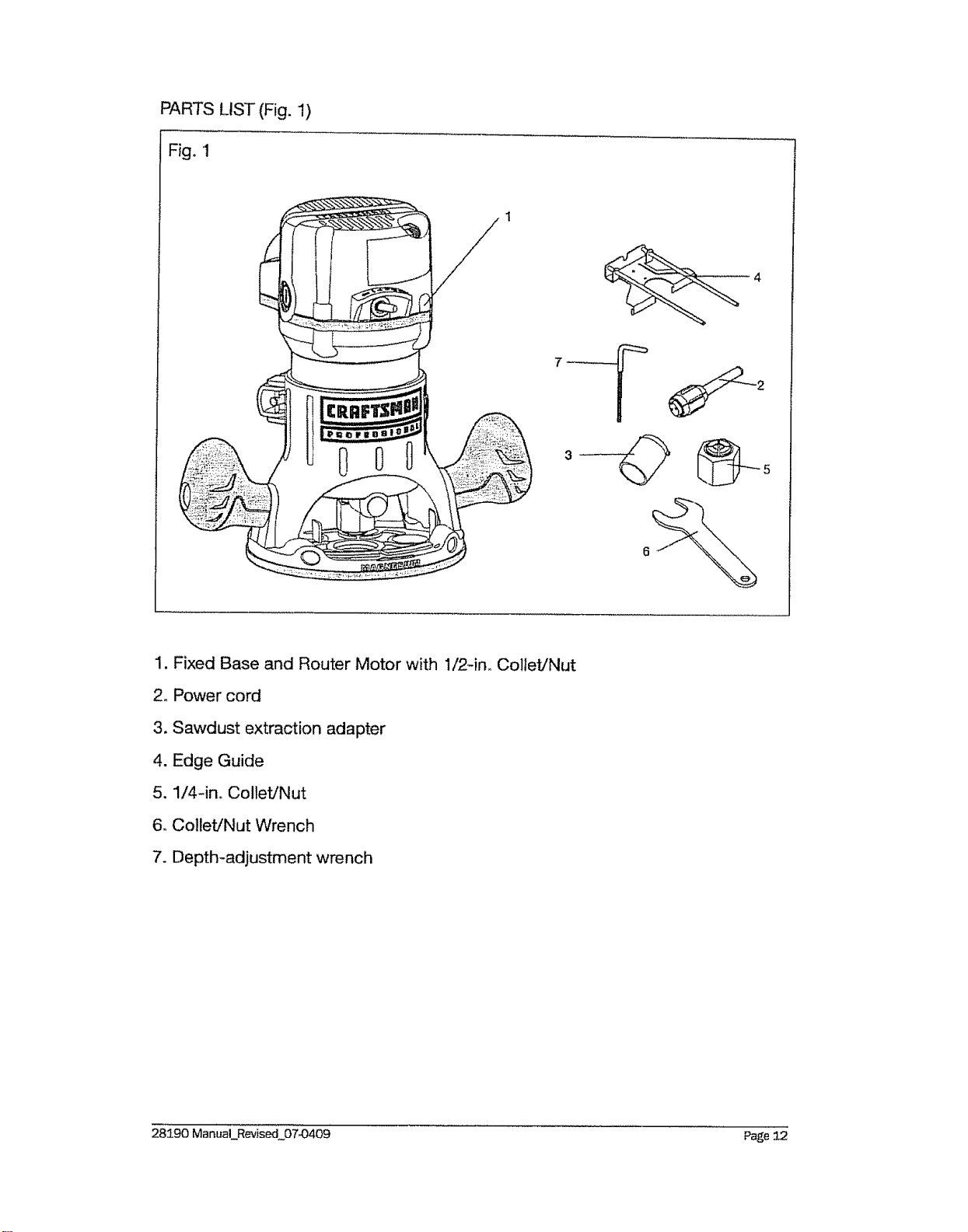
PARTS LIST (Fig. I)
Fig. 1
1. Fixed Base and Router Motor with 1/2-in,, Collet/Nut
2o Power cord
3. Sawdust extraction adapter
4. Edge Guide
5. 1/4-in. Collet/Nut
6. Collet/Nut Wrench
7. Depth-adjustment wrench
28190 ManuaLRevised 07_)409 Page 12
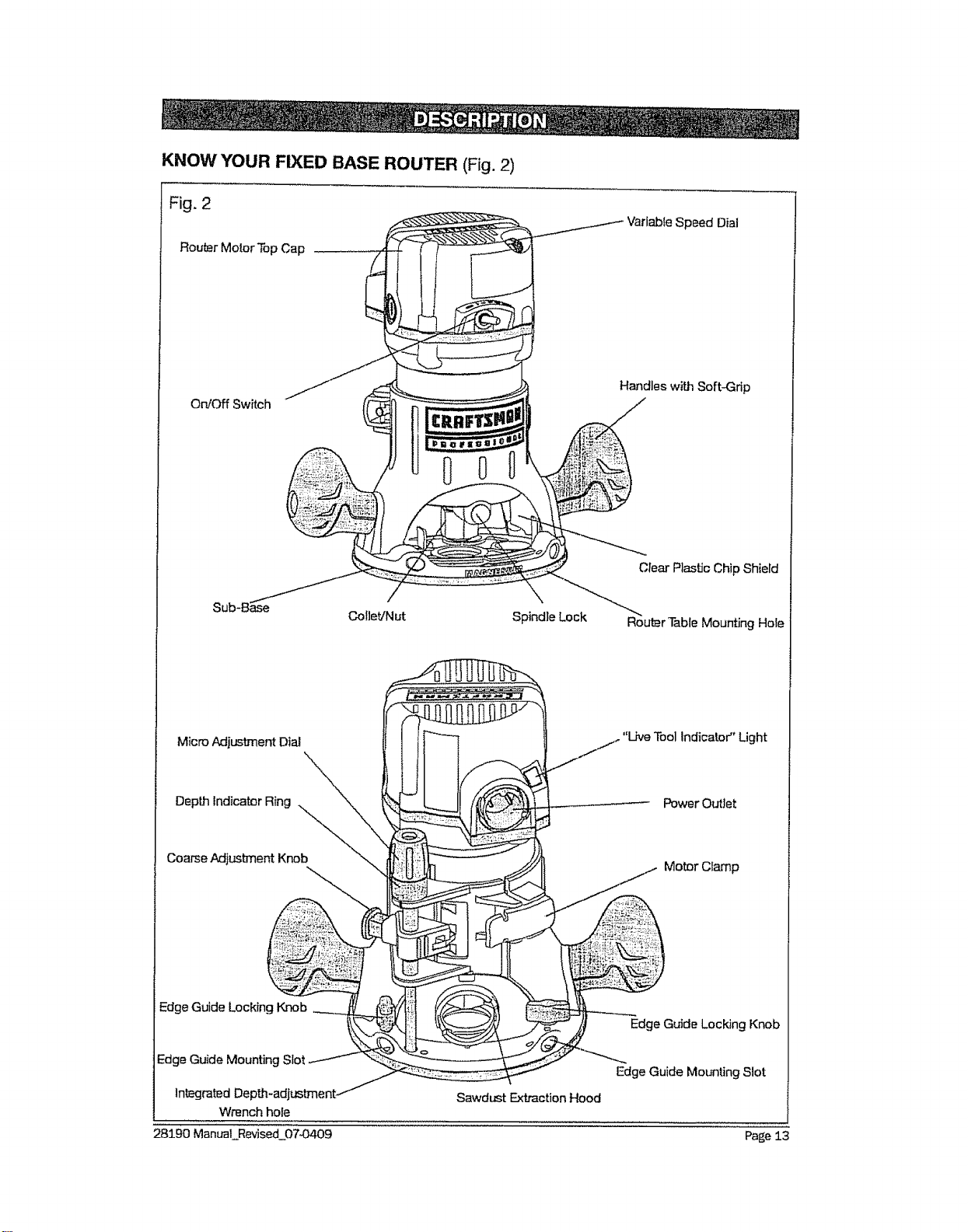
KNOW YOUR FIXED BASE ROUTER (Fig. 2)
Fig. 2
Router Motor Top Cap
Variable Speed Dial
On/Off Switch
Handles with Soft-Grip
Sub-B&se
Coliet/Nut Spindle Lock
Clear Plastic Chip Shield
Router Table Mounting Hole
Micro Adjustment Dial
Power Outlet
Coarse Adjustment Knob
Motor Cramp
Edge Guide Locking Knob
Edge Guide Mounting Slot
i , Wrench hole
28190 Manual Revised 07-0409
Sawdust Extraction Hood
Edge Guide Locking Knob
Edge Guide Mounting Slot
Page 13

PRODUCT SPECIFICATIONS
Rating
No load Speed
Peak HP
Input
CoIlets/Nuts and Cutting Bit Shank Diameters
Fixed Base Diameter
Sub Base Opening (Diameter for cutting bit use)
Sub Base Thickness
Fixed Base Depth of Cut
12.,5 Amps
12000-25000RPM
2-1/4
120-volts, 60Hz AC
1/4 in, 1/2 inn
6 inches
14/4 inches
&23 inches (6mm)
1-3/4 inches (45mm)
NOTE: Before attempting to use your router, familiarize yourself with all of
the operating features and safety requirements.
Your fixed base router has a precision-built electric router motor and it should
only be connected to a 120wolt, 60-Hz AC ONLY power supply (normal house-
hold current). DO NOT operate on direct current (DC). This large voltage drop will
cause a loss of power and the router motor will overheat,, tf the router does not
operate when plugged into a correct 120-volt, 60-Hz AC ONLY outlet, check the
power supply. This router has al 0-ft, 2-wire power cord (no adapter needed).
This Fixed Base Router has the following features:
1. 12.5 Amp, 2-1/4 Peak HP, Variable Speed Router Motor runs at 12,000 to
25,000 RPM (no-load speed).
2_
3.
4_
.
Speed Dial allows matching proper speed to material and bit size°
Electronic Feedback Circuitry provides soft starts for longer motor life,
maintains constant speed under load for a quality finish in all materials.
Fixed Base features Coarse and Fine Depth Adjustments for accurate set-
ups° Ideal for use with router table, sotd separately.
Spindle Lock for easy 1 wrench bit changes. Includes 1/4 and 1/2 inch
Self-Releasing Collets/Nuts for use with a wide variety of 1/4 inn and 1/2 in,
router bits, sold separately.
6, Detachable power cord: a replaceable cord to prolong tool life and for easy
carrying and storage°
7. Ball bearings throughout the motor for smooth, efficient operation and bng life.
& Base features Ergonomically Designed Handles with soft grip for comfort,
maximum control with less vibration.
9. Base features Large Base Opening and Large Chip Shield, combined wit;'] 3
LED Work lights on Router Motor to provide high visibility of bit and work piece°
28190 ManuaLRevised O7-O409 Page 14
10. Durable Non-Marring Sub-Base glides smoothly over work piece_ Sub-base
has cutter-bit opening of 1-1/4 inch. Do Not Use a bit with a cutter diameter
larger than 1-1/4 in., as it will not pass through the sub-base openingE
11o Base constructed of magnesium to provide light weight, durability and stability.
12. Router Motor housing constructed of High Density Nylon and Precision
Milled Cast Aluminum for strength and exact fit into base.
13. High-impact resistant Router Motor Top Cap and Handles on Base helps
protect tool from damage.
I 4. Heavy-duty Edge Guide for most routing applications such as decorative
edging, grooving, dadoing, slotting and straight edge planing/rimming.
15. Conveniently located On/Off Toggle Switch, side mounted for added vis-
ibility, easy access.
16. Sawdust Extraction Hood allows base to hook up to 1-1/4 inch vacuum
hose attachment, sold separately.
17o "LIVE TOOL INDICATOR" Light is green when saw is plugged into a power
source. Light is located on router motor top cap next to power cord inlet.
18. Replaceable Brushes (sold separately) for dependable service.
19. Includes carry bag for easy carrying and storage.
20. Integrated Depth-adjustment Wrench hole of the base for adjusting the
depth of cut from above the table with depth-adjustment wrench.
NOTE: This tool is shipped completely assembled. To install or remove bits
or add accessories such as sawdust ejection hoods for hook-up to vacu-
urns, see the following instructions.
SELECTING THE CUTTING BIT
This router comes with 1/4-in. and 1/2-in. co!lets/nuts that accept 1/4 and !/2
inch diameter shanked cutting bits.
WARNING: Do not use router cutting bits that have a cutting bit diame-
ter larger than 1-1/4 inches as they will not fit through the sub-base opening,
and will cause damage to the sub-base, the muter motor, and could cause
serious personal injury to the operator.
NOTE: The sub-base installed on this router has an opening of 1-1/4 inches.
To use cutting bits with a larger diameter, use a sub-base with a larger
opening, sold separately at Sears stores or other Craftsman outlets.
_k WARNING: ALWAYS turn router motor off and unplug muter before mak-
ing any adjustments or installing accessories. Failure to unplug the router
could result in accidental starting which can cause serious personal injury.
28190 ManuaLRevised 07-0409 Page 15
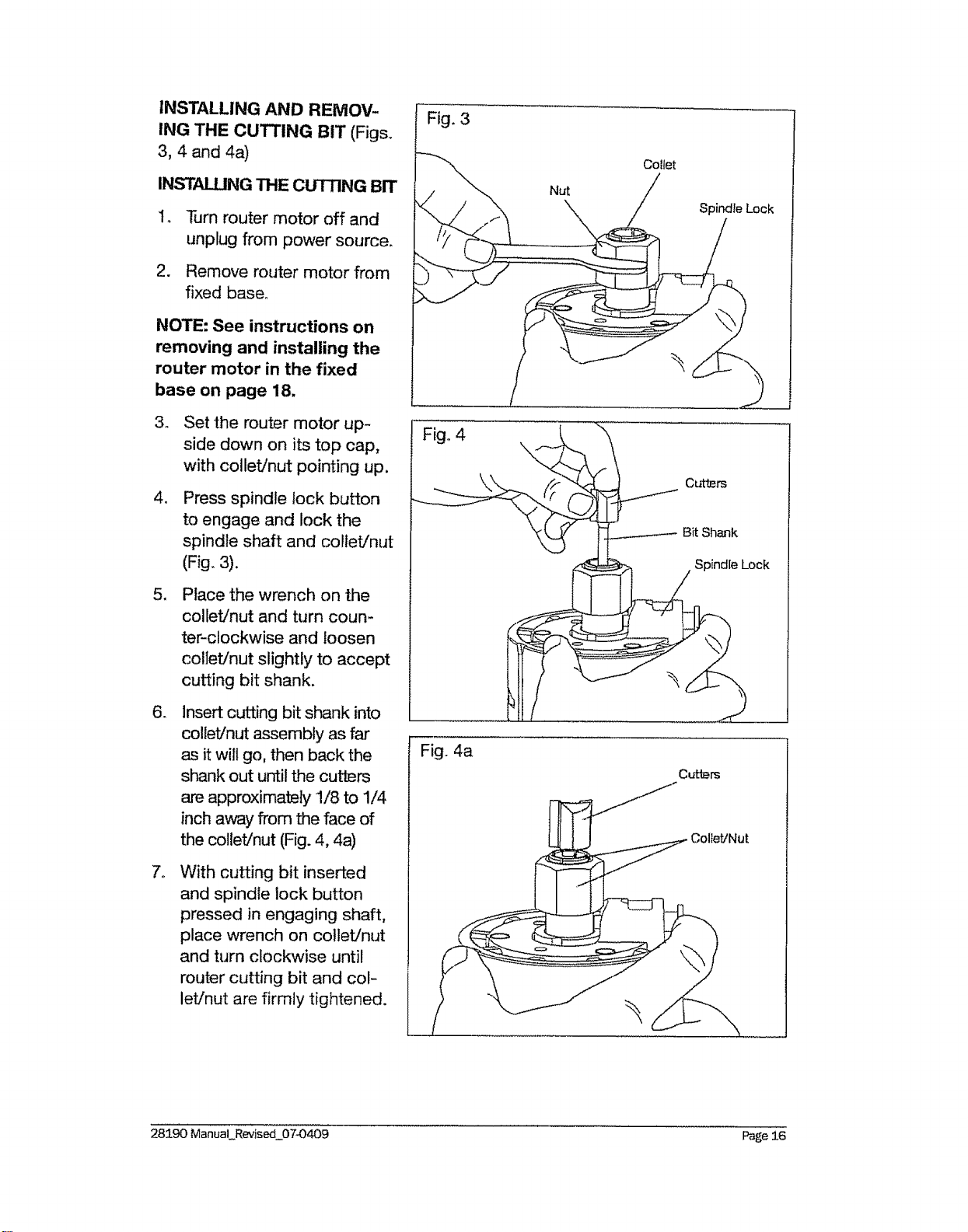
INSTALLING AND REMOV-
ING THE CUTTING BIT (Figs,
3, 4 and 4a)
INSTALUNG THE CUTTING BIT
14
.
Turn router motor off and
unplug from power source.
Remove router motor from
fixed base°
NOTE: See instructions on
removing and installing the
router motor in the fixed
base on page 18.
.
4_
5,
6_
Set the router motor up-
side down on its top cap,
with collet/nut pointing up.
Press spindle lock button
to engage and lock the
spindle shaft and collet/nut
(Fig. 3).
Place the wrench on the
collet/nut and turn coun-
ter-clockwise and loosen
col[et!nut slightly to accept
cutting bit shank.
Insert cutting bit shank into
collet/nut assembly as far
as it will go, then back the
shank out until the cutters
are approximately 1/8 to 1/4
inch away from the face of
the collet!nut (Fig. 4, 4a)
With cutting bit inserted
and spindle lock button
pressed in engaging shaft,
place wrench on collet/nut
and turn clockwise until
router cutting bit and col-
let/nut are firmly tightened.
Fig. 3
Fig° 4
Fig,. 4a
Nut
Collet
Spindle Lock
Cutters
Bit Shank
Spindle Lock
Cutters
Collet/Nut
28190 Manual Revised_07_0409 Page 26
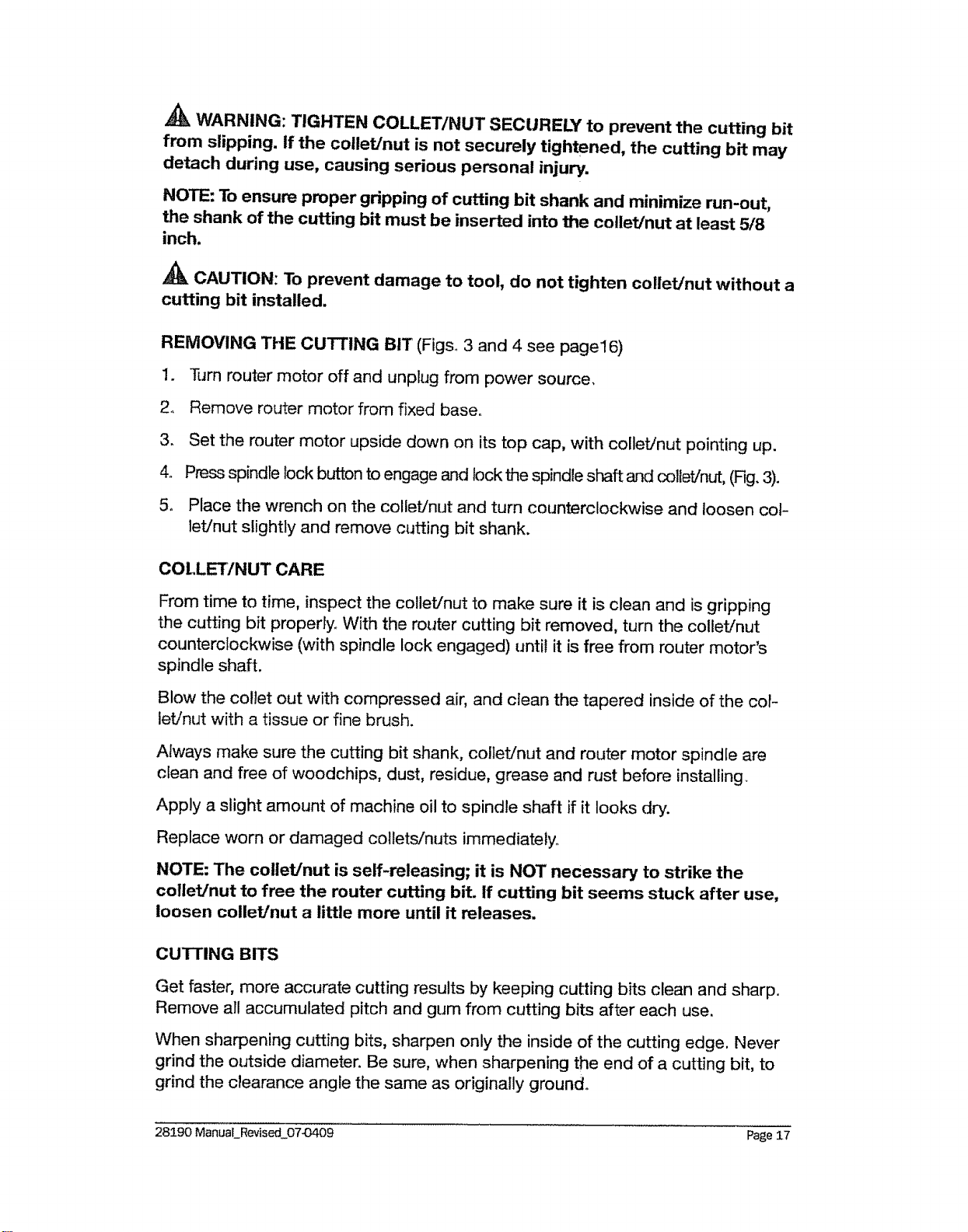
WARNING: TIGHTEN COLLET/NUT SECURELY to prevent the cutting bit
from slipping, if the collet/nut is not securely tightened, the cutting bit may
detach during use, causing serious personal injury.
NOTE: To ensure proper gripping of cutting bit shank and minimize run-out,
the shank of the cutting bit must be inserted into the collet/nut at least 5/8
inch.
CAUTION: To prevent damage to tool, do not tighten collet/nut without a
cutting bit installed.
REMOVING THE CUTTING BIT (Figs 3 and 4 see page16)
1. Turn router motor off and unplug from power source.
2. Remove router motor from fixed base.
3. Set the router motor upside clown on its top cap, with collet/nut pointing up.
4. Press spindle lock button to engage and lock the spindle sl-_qftand collet/nut, (Fig. 3).
5. Place the wrench on the colleVnut and turn counterclockwise and loosen cot-
let/nut slightly and remove cutting bit shank.
COLLET/NUT CARE
From time to time, inspect the collet/nut to make sure it is clean and is gripping
the cutting bit properly.. With the router cutting bit removed, turn the colleVnut
counterclockwise (with spindle lock engaged) until it is free from router motor's
spindle shaft.
Blow the collet out with compressed air, and clean the tapered inside of the cot-
let/nut with a tissue or fine brush.
Always make sure the cutting bit shank, collet/nut and router motor spindle are
clean and free of woodchips, dust, residue, grease and rust before installing.
Apply a slight amount of machine oil to spindle shaft if it looks dry.
Replace worn or damaged collets/nuts immediately,,
NOTE: The cotlet/nut is self-releasing; it is NOT necessary to strike the
cotlet/nut to free the router cutting bit. If cutting bit seems stuck after use,
loosen collet/nut a little more until it releases.
CUTTING BITS
Get faster, more accurate cutting results by keeping cutting bits clean and sharp.
Remove all accumulated pitch and gum from cutting bits after each use,
When sharpening cutting bits, sharpen only the inside of the cutting edge. Never
grind the outside diameter. Be sure, when sharpening the end of a cutting bit, to
grind the clearance angle the same as originally ground°
28190 ManuaLRevised 07_409 Page 17
INSTALLING ROUTER MOTOR IN BASE
WARNING: NEVER use the router motor without installing it into either
a fixed or plunge approved base. Failure to do so could result in serious
personal injury and damage to router motor.
NOTE: Before installing router motor in fixed base, have the collet/nut and
router cutting bit you are going to use already installed in router motor. See
page 16 "INSTALLING AND REMOVING THE CUTTING BIT."
WARNING: ALWAYS turn router motor off and unplug router from power
source before making any adjustments or installing accessories. Failure to
turn router motor off and unplug router could result in accidental starting
which can cause serious personal injury.
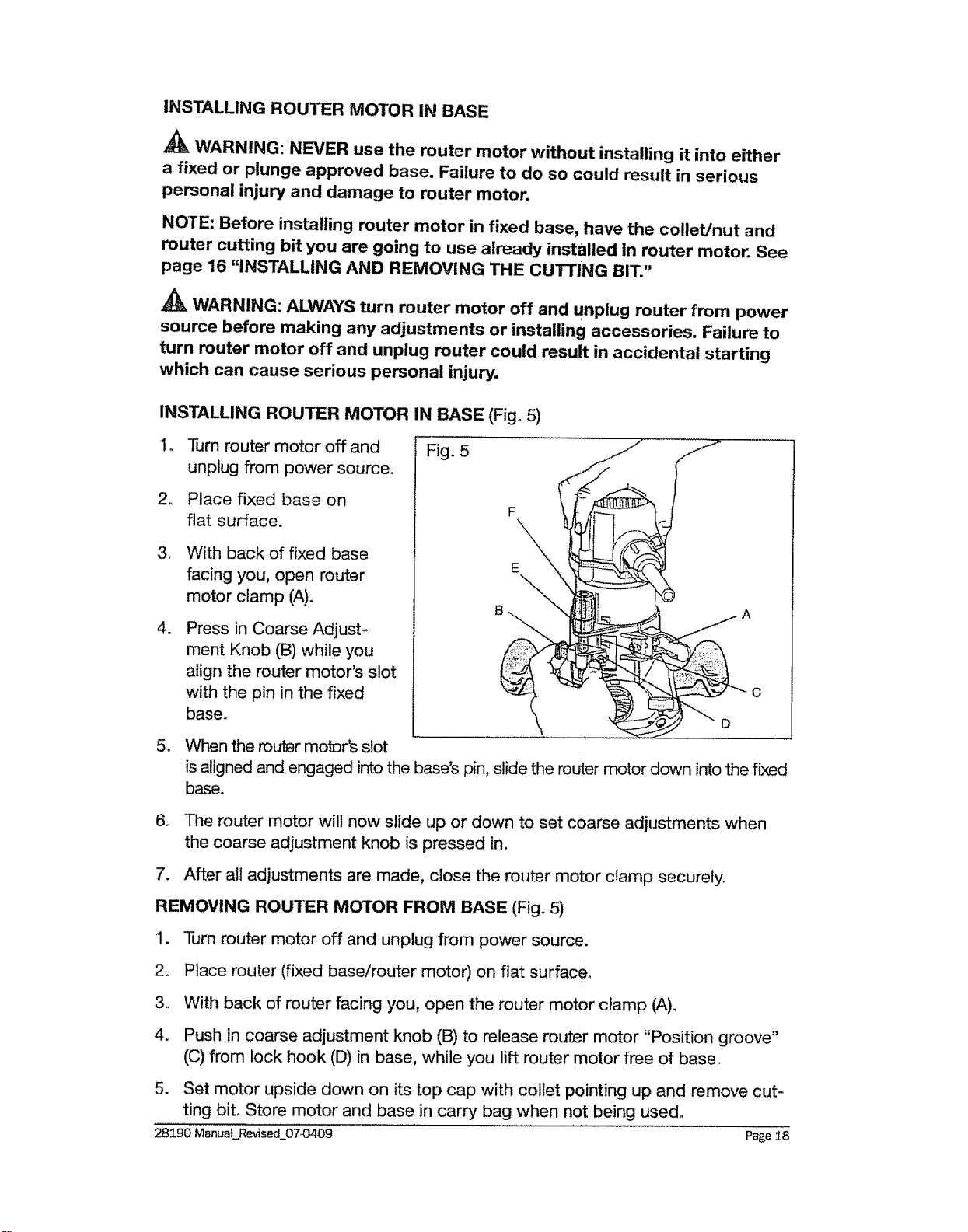
INSTALLING ROUTER MOTOR IN BASE (Fig_ 5)
1.
Turn router motor off and
unplug from power source.
2. Place fixed base on
flat surface.
,
.
With back of fixed base
facing you, open router
motor clamp (A).
Press in Coarse Adjust-
ment Knob (B) while you
align the router motor's slot
with the pin in the fixed
base.
5. When the router motDr's slot
Fig. 5
F
D
A
C
is aligned and engaged into the base's pin, slide the router motor down into the fixed
base.
6. The router motor wilt now slide up or down to set coarse adjustments when
the coarse adjustment knob is pressed in.
7. After all adjustments are made, close the router motor clamp securely.
REMOVING ROUTER MOTOR FROM BASE (Fig. 5)
1. Turn router motor off and unplug from power source.
2_ Place router (fixed base/router motor) on flat surface_
3. With back of router facing you, open the router motor clamp (A).
4. Push in coarse adjustment knob (B) to release router motor "Position groove"
(C) from lock hook (D) in base, while you lift router motor free of base.
5. Set motor upside down on its top cap with collet pointing up and remove cut-
ting bit. Store motor and base in carry bag when not being used.
28190 ManuaLRevised_0743409 Page 18
WARNING: ALWAYS remove cutting bits from collet/nut when the router
is not being used. Leaving bits installed could result in an accident causing
serious personal injury.
ADJUSTING DEPTH OF CUT
WARNING: Your router should NEVER BE TURNED ON or be connected
to the power source when you are assembling parts, making adjustments,
installing or removing collets / nuts, cutting bits, cleaning or when it is not in
use. Disconnecting the router will prevent accidental starting, which could
cause serious personal injury.
NOTE: All depth adjustments on the Fixed Base must be made with the mo-
tor clamp open.
NOTE: For all Fixed Base Routers, the cutting bit depth equals the amount of
the cutter that is exposed below the surface of the sub-base.
The fixed base is designed with a micrometer fine adjustment system. When the
bit is lowered to the approximate position desired (coarse setting), the system
then can be micro adjusted to the precise depth.
Coarse Adjustment:
Depressing the Coarse Adjustment Knob (B) allows you to quickly lower or raise
the cutting bit to three depth settings.
Micro Adjustments:
NOTE: Before making fine adjustments, reset zero "0" on Depth Indicator
Ring (E, Fig.5).
The Depth Indicator Ring (E, Fig.5) located on the Fine Adjustment Dial (F, Fig° 5)
is marked incrementally in 64ths. Turning the fine adjustment dial clockwise 180 °
(1/2 turn), lowers the cutting bit 1/16 inch. One full turn clockwise (360 °) zero "0"
to zero "0" lowers the bit 1/8 in.
The Depth Indicator Ring may be reset to zero "0" without moving the Fine Adjust-
ment Dial. This allows the user to begin adjustments from any reference point desired
28190 ManuaLRevised_07-0409 Page 19
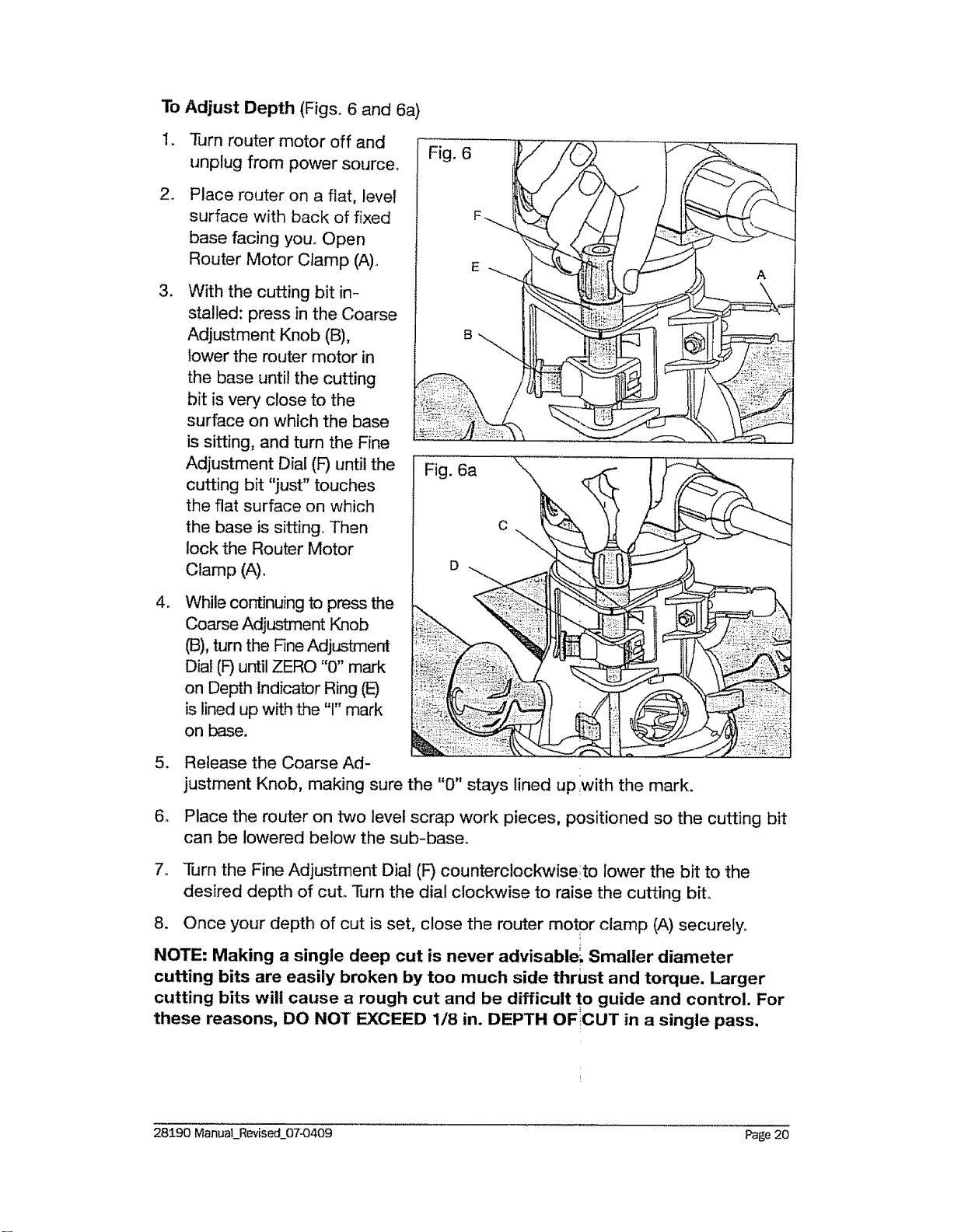
To Adjust Depth (Figs° 6 and 6a)
.
2_
3_
4_
Turn router motor off and
unplug from power source_
Place router on a flat, level
surface with back of fixed
base facing you, Open
Router Motor Clamp (A),
With the cutting bit in-
stalled: press in the Coarse
Adjustment Knob (B),
lower the router motor in
the base until the cutting
bit is very close to the
surface on which the base
is sitting, and turn the Fine
Adjustment Dial (F) until the
cutting bit "just" touches
the flat surface on which
the base is sitting,, Then
lock the Router Motor
Clamp (A),
While continuing to press the
Coarse Adjustment Knob
(B), turn the Fine Adjustment
Dia! (F) until ZERO "0" mark
on Depth Indicator Ring (E)
is lined up with the "1" mark
on base.
5. Release the Coarse Ad-
6_
Fig. 6a .........
justment Knob, making sure the "0" stays lined up with the mark,
Place the router on two level scrap work pieces, positioned so the cutting bit
can be lowered below the sub-baseo
7. Turn the Fine Adjustment Dial (F) counterclockwiseito lower the bit to the
desired depth of cut° Turn the dial clockwise to raise the cutting bit,
8. Once your depth of cut is set, close the router motor clamp (A) securely.
NOTE: Making a single deep cut is never advisable'_ Smaller diameter
cutting bits are easily broken by too much side thrust and torque. Larger
cutting bits will cause a rough cut and be difficult to guide and control. For
these reasons, DO NOT EXCEED 1/8 in. DEPTH OFICUT in a single pass.
28190 Manual_Revised_07_0409 Page 20
Deep Cuts
The proper cutting depth for each pass is always determined by the material, the
cutting bit size and type, and the power of the router motor.
Always make several progressively deeper cuts by starting at one depth and then
make several passes, each time increasing the cutting; depth until your desired
depth is reached.
Making a cut that is too deep will stress the router motor and the cutting bit, and
it may burn the work piece and dull the cutting bit. It could also "grab" too much
of the work piece and cause you to lose control of the router, causing a serious
accident.
To be certain that your depth settings are as desired, always make test cuts in
scrap material similar to your work piece before beginning your final cutting.
Remember, knowing the right depth for each cut comes with routing experience.
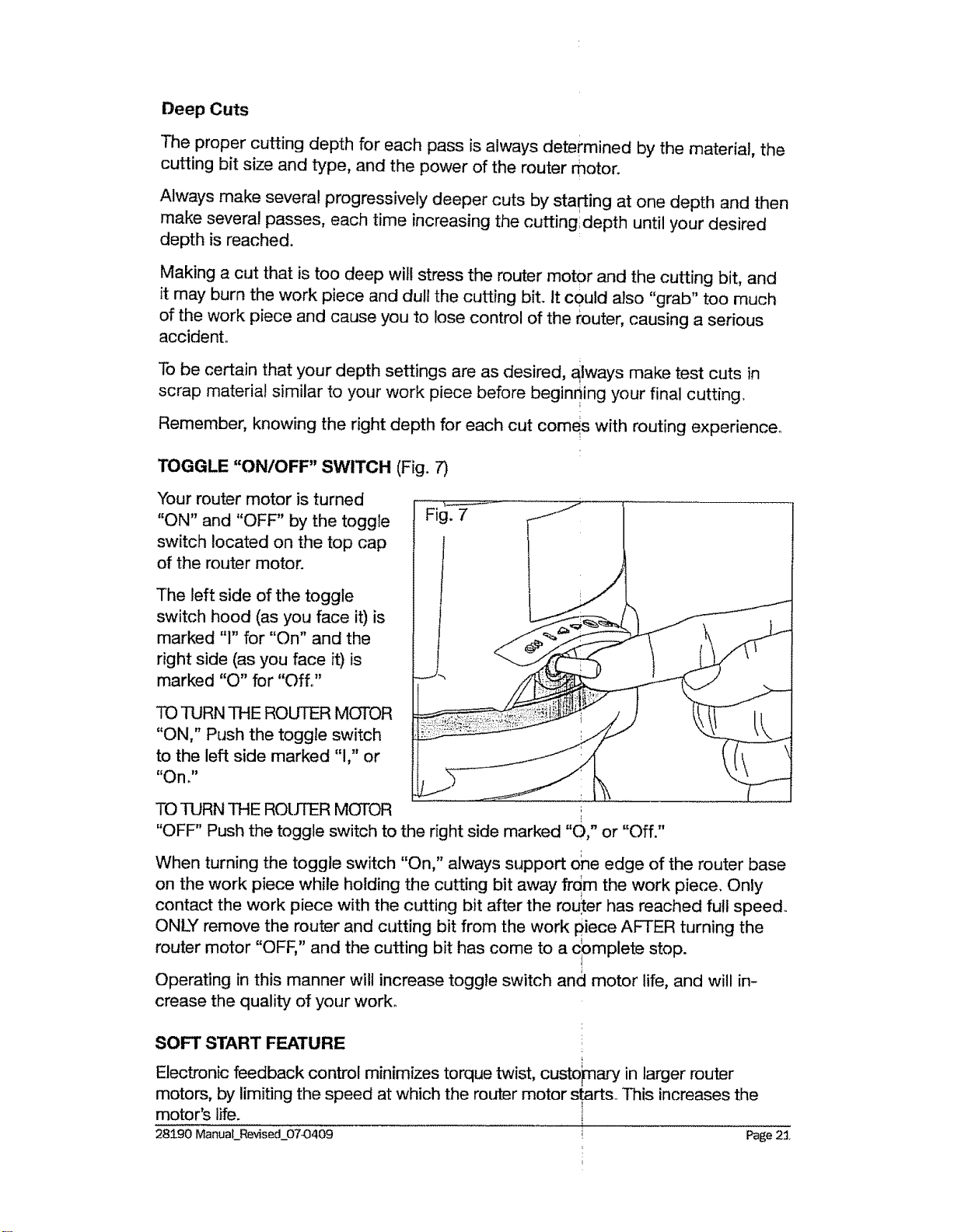
TOGGLE "ON/OFF" SWITCH (Fig. 7)
"four router motor is turned
"ON" and "OFF" by the toggle
switch located on the top cap
of the router motor.
The left side of the toggle
switch hood (as you face it) is
marked "1" for "On" and the
right side (as you face it) is
marked "O" for "Off°"
TO TURN THE ROUTER MOTOR
"ON," Push the toggle switch
to the left side marked "1," or
"On."
TO TURN THE ROUTER MOTOR
"OFF" Push the toggle switch to the right side marked "O," or "Off."
When turning the toggle switch "On," always support ohe edge of the router base
on the work piece while holding the cutting bit away frdm the work piece. Only
contact the work piece with the cutting bit after the rou_ter has reached full speed,.
ONLY remove the router and cutting bit from the work piece AFTER turning the
router motor "OFF," and the cutting bit has come to a cbmplete stop.
Operating in this manner will increase toggle switch and motor life, and will in-
crease the quality of your work.
SOFT START FEATURE !
L
Electronic feedback control minimizes torque twist, custo)ma.,-yin larger router
motors, by limiting the speed at which the router motor starts.. This increases the
motor's life.
28190 Manual__Revised_07-0409 Page 2:1.
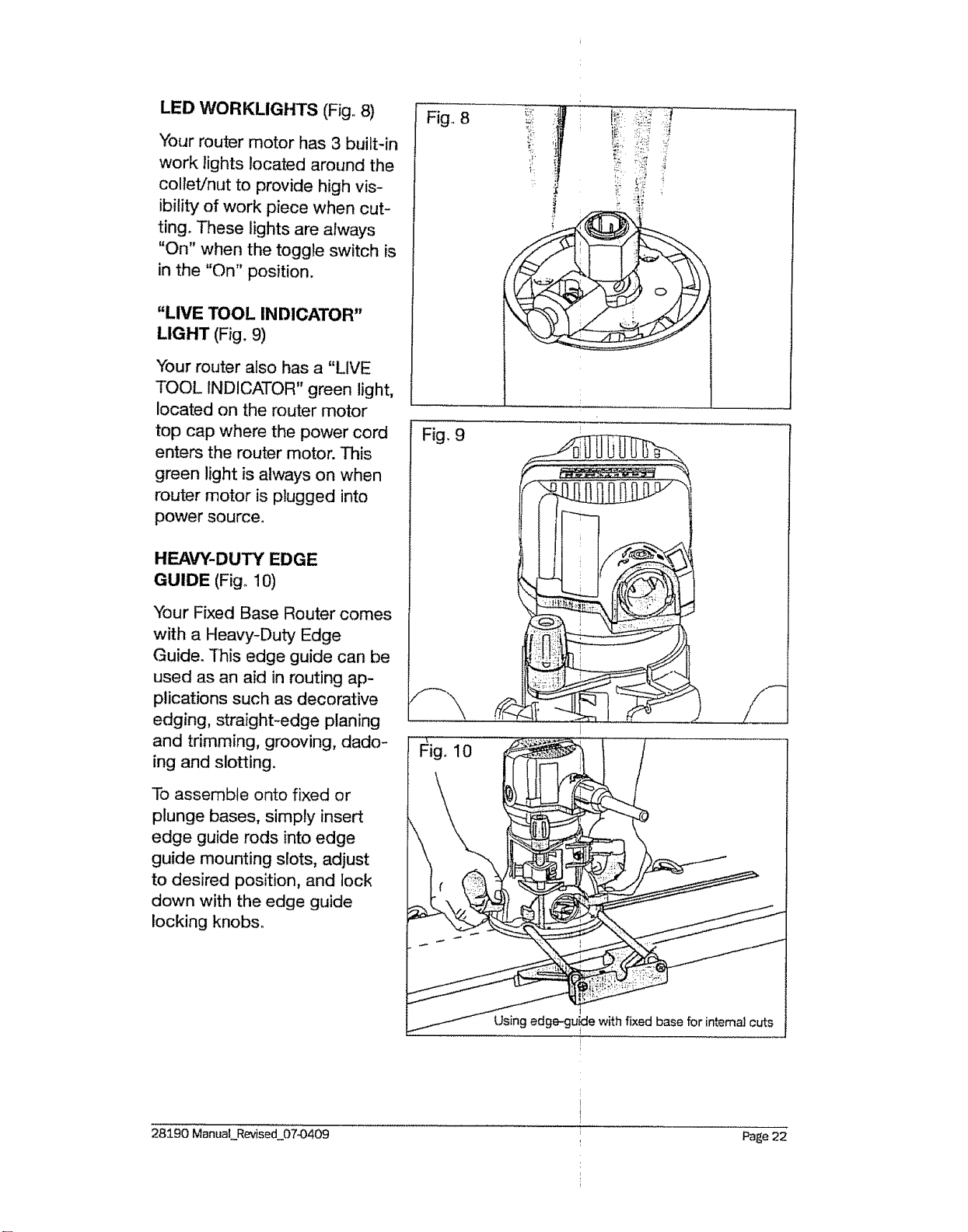
LED WORKLIGHTS (Fig° 8)
Your router motor has 3 built-in
work lights located around the
collet/nut to provide high vis-
ibility of work piece when cut-
ting. These lights are always
"On" when the toggle switch is
in the "On" position.
"LIVE TOOL INDICATOR"
LIGHT (Fig. 9)
"{-our router also has a "LIVE
TOOL INDICATOR" green light,
located on the router motor
top cap where the power cord
enters the router motor. This
green light is always on when
router motor is plugged into
power source.
HEAVY-DUTY EDGE
GUIDE (Fig° 10)
Your Fixed Base Router comes
with a Heavy-Duty Edge
Guide. This edge guide can be
used as an aid in routing ap-
plications such as decorative
edging, straight-edge planing
and trimming, grooving, dado-
ing and slotting.
To assemble onto fixed or
plunge bases, simply insert
edge guide rods into edge
guide mounting slots, adjust
to desired position, and lock
down with the edge guide
locking knobs_
Fig_ 8
'i
Fig. 9
Using edge-guide with fixed base for intema] cuts
!
28190 Manual Revised_07©409
I
I
Page 22
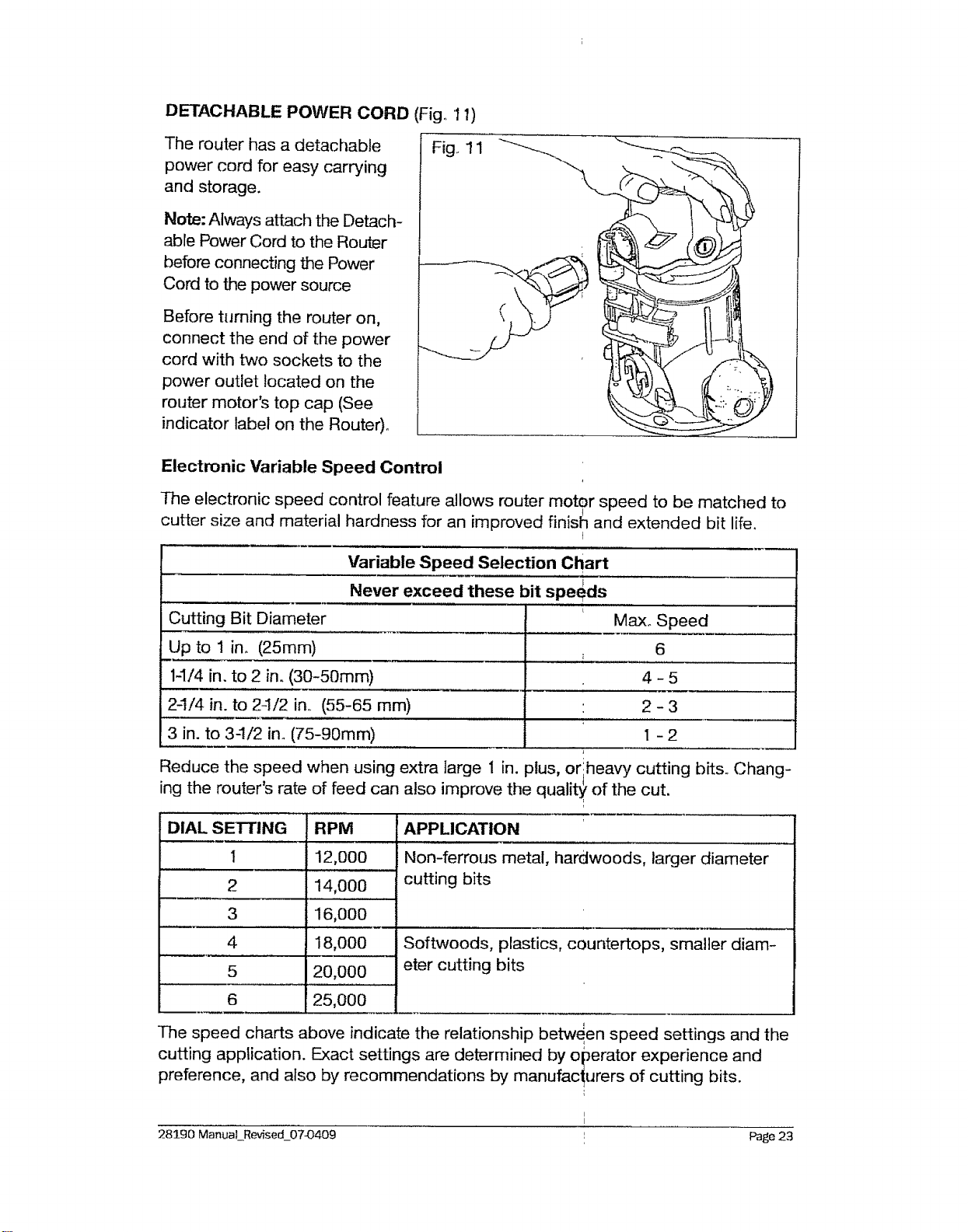
DETACHABLE POWER CORD (Fig., 11)
The router has a detachable
power cord for easy carrying
and storage.
Note: Always attach the Detach-
able Power Cord to the Router
before connecting the Power
Cord to the power source
Before turning the router on,
connect the end of the power
cord with two sockets to the
power outlet located on the
router motor's top cap (See
indicator label on the Router)°
Fig,, 11
Electronic Variable Speed Control
The electronic speed control feature allows router motor speed to be matched to
cutter size and material hardness for an improved finisl_ and extended bit life.
I
Variable Speed Selection Chart
Never exceed these bit speeds
Cutting Bit Diameter Max.. Speed
Up to 1 in. (25mm) 6
1-1/4 in. to 2 in. (30-50ram) 4 - 5
2-1/4 in. to 24/2 in, (55-65 mm) 2 - 3
3 in. to 3-1/2 in. (75-90mm) I - 2
Reduce the speed when using extra large 1 in. plus, or heavy cutting bits° Chang-
ing the router s rate of feed can also improve the quality, of the cut.
DIAL SETTING
1
2
3
4
5
6
RPM
12,000
14,000
16,000
18,000
20,000
25,000
APPLICATION
Non-ferrous metal, hardwoods, larger diameter
cutting bits
Softwoods, plastics, countertops, smaller diam-
eter cutting bits
The speed charts above indicate the relationship between speed settings and the
cutting application. Exact settings are determined by operator experience and
preference, and also by recommendations by manufacturers of cutting bits.
283_90 ManuaLRevised_0743409
Page 23
ELECTRONIC FEEDBACK CIRCUITRY
The router's electronic feedback circuitry monitors and adjusts power to main-
tain the desired RPM for consistent performance andlcontrol, providing constant
speed under load for a quality finish in all materials
PLACING THE ROUTER ONTO THE WORKPIECE AND STARTING THE CUT
_k WARNING: Before operating your router follow all safety instructions in
this manual. Failure to do so could result in serious personal injury.
NOTE: Making test cuts is essential with most routing applications. Even
with careful set-ups you won't know exactly how the cut will go until you
try it out. A test cut will give you a feel for the set-_p, the router's speed,
the depth of cut and how the cutting bit reacts to!he work piece. Much of
muting is a trial-and-error process of making var=0us adjustments, fol-
lowed by test cuts as you become familiar with all iof your router's op-
erational abilities. To avoid ruining good material, make your test cuts on
scrap materials.
How you place your router onto a work piece to start the cut depends on the type
of routing you are going to perform: Edge Routing or In_rnal Routing.
EDGE ROUTING OR INTERNAL ROUTING
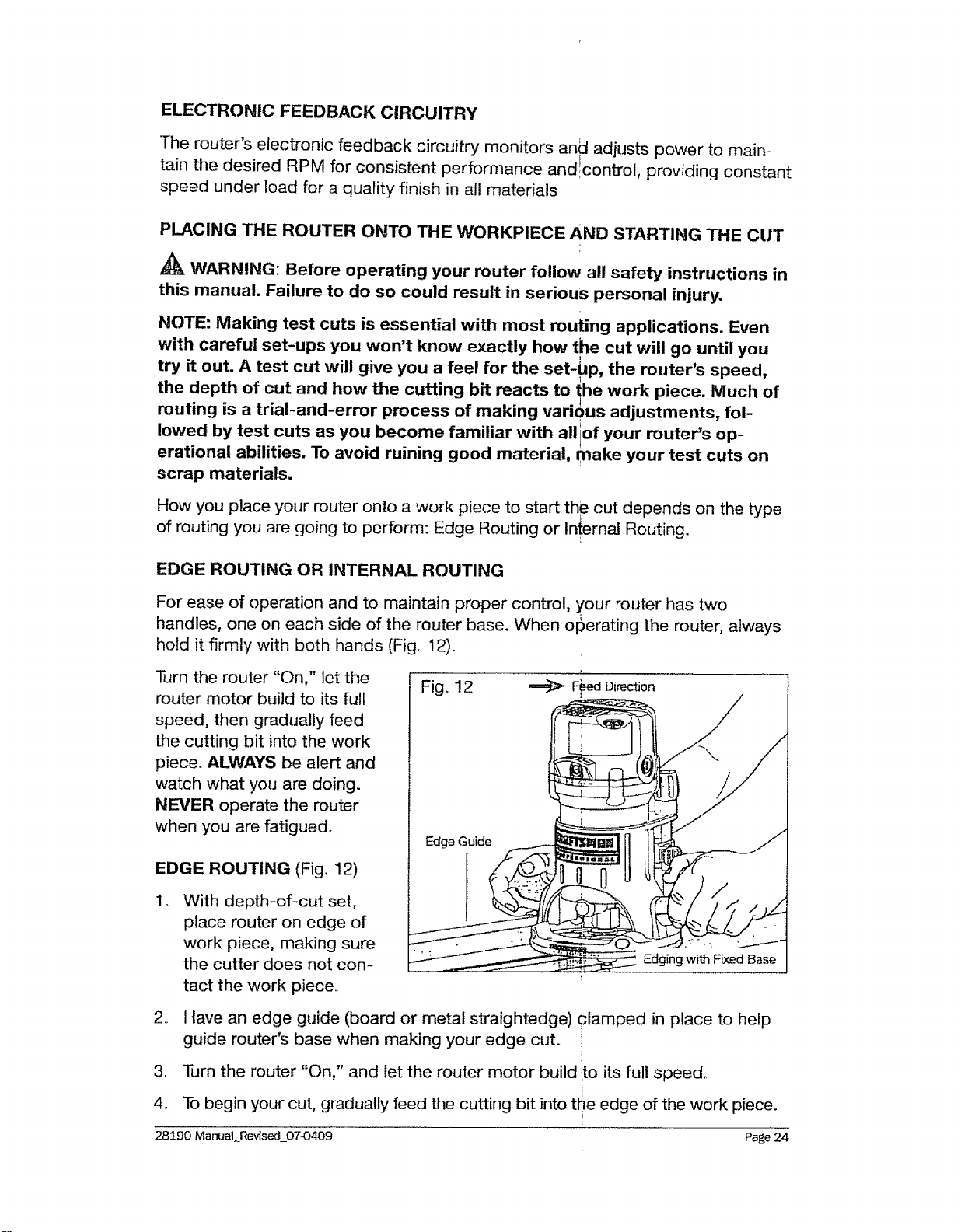
For ease of operation and to maintain proper control, your router has two
handles, one on each side of the router base. When ofSerating the router, always
hold it firmly with both hands (Fig, 12)o
Turn the router "On," let the
router motor build to its full
speed, then gradually feed
the cutting bit into the work
piece. ALWAYS be alert and
watch what you are doing.
NEVER operate the router
when you are fatigued.
EDGE ROUTING (Fig. 12)
,
Edge Guide
,,
With depth-of-cut set,
place router on edge of
work piece, making sure
the cutter does not con-
tact the work piece..
.
4o
28190 ManuaLRevis ed_07-0409
Edging with Fixed Base
Have an edge guide (board or metal straightedge) _lamped in place to help
guide router's base when making your edge cut. ,
i
Turn the router "On," and let the router motor build _to its full speed,
To begin your cut, gradually feed the cutting bit into t_e edge of the work piece.
Page 24
5_ When cut is completed, turn router motor "Off" arid let cutting bit come to a
complete stop before removing it from the work p!ece.
6. Unplug router from power source, place router upside down on worktable,
and inspect finished cut in work piece, i
_k WARNING: Always securely clamp your work piece and keep a firm grip
on the router base with BOTH HANDS at all times.! Failure to do so could
result in loss of control causing possible serious _ersonal injury.
A_ WARNING: Removing cutting bit from work pie_ce while it is still rotat-
ing could damage work piece and result in loss of icontrol, causing serious
personal injury. !
N ..... i .
OTE: Making test cuts m scrap materml that =s si_ndar to your work piece is
essential. Learning how the router's speed, depth._of-cut and cutting bit will
react in the work piece will help you produce quali_ cuts.
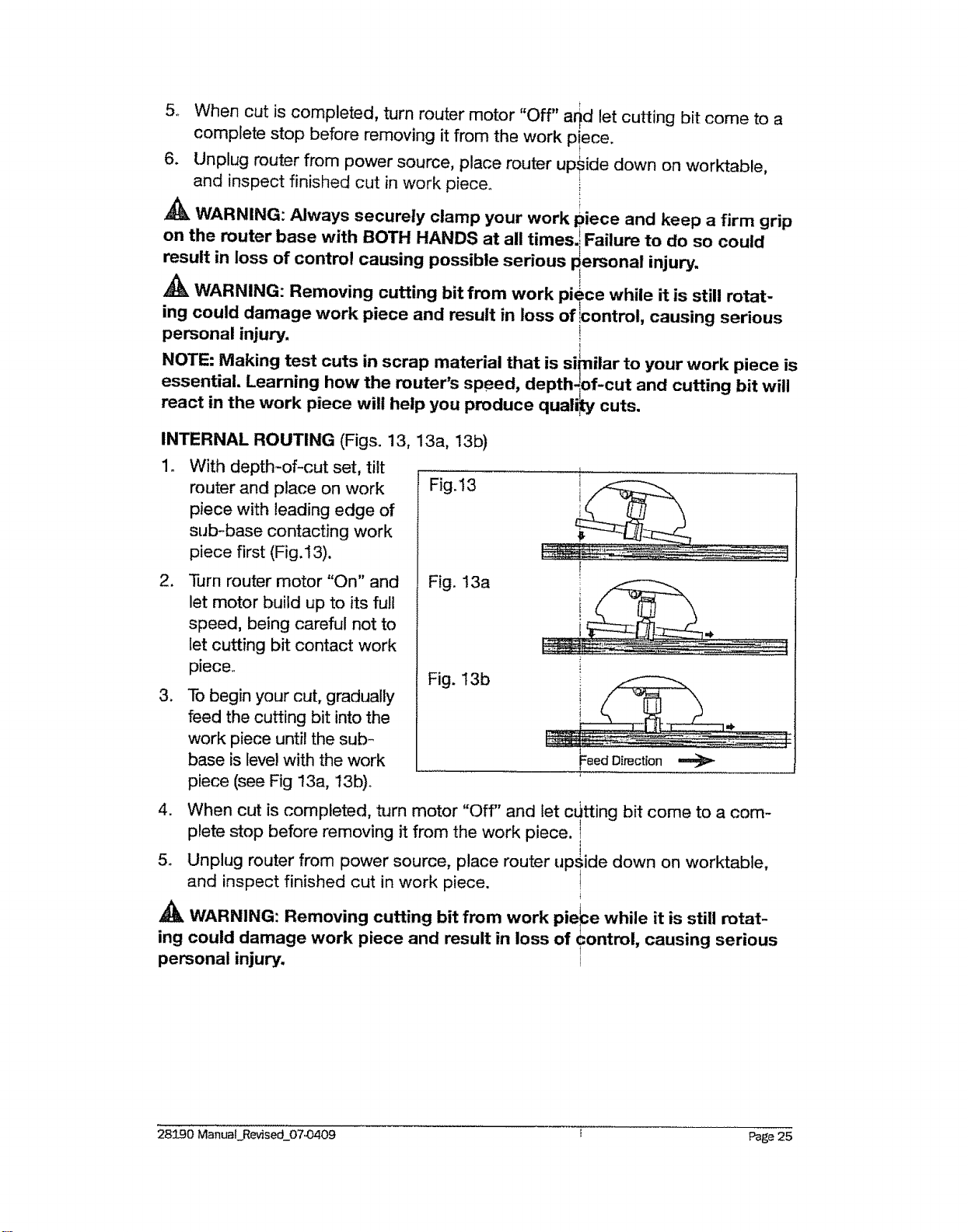
INTERNAL ROUTING (Figs. 13, 13a, 13b)
1. With depth-of-cut set, tilt
router and place on work Fig.!3
piece with leading edge of
sub-base contacting work
piece first (Fig.13).
,
3_
Turn router motor "On" and
let motor build up to its full
speed, being careful not to
let cutting bit contact work
piece,,
To begin your cut, gradually
feed the cutting bit into the
work piece until the sub-
base is level with the work
piece (see Fig 13a, 13b).
Fig. 13a
Fig. 13b
i
[
Feed Direction
4. When cut is completed, turn motor "Off" and let c[Jtting bit come to a com-
plete stop before removing it from the work piece.
5_ Unplug router from power source, place router upside down on worktable,
and inspect finished cut in work piece.
4
Ak
WARNING: Removing cutting bit from work pierce while it is still rotat-
ing could damage work piece and result in loss of control, causing serious
personal injury. _i
283:.90 ManuaLRevised_0743409
Page 25
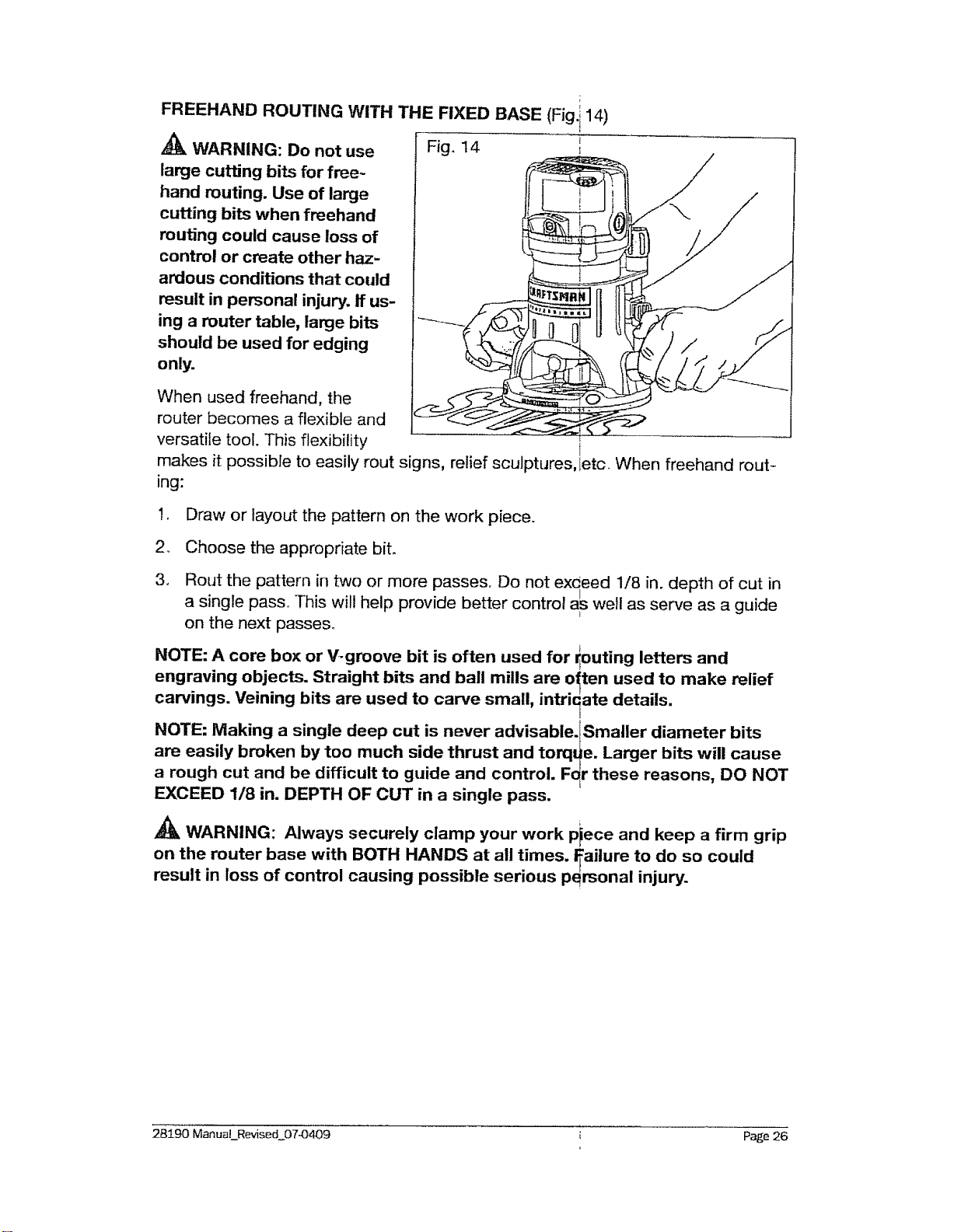
FREEHAND ROUTING WITH THE FIXED BASE (Fig. i 14)
WARNING: Do not use Fig. 14
large cutting bits for free-
hand routing. Use of large
cutting bits when freehand
routing could cause loss of
control or create other haz-
ardous conditions that could
result in personal injury, if us-
ing a router table, large bits
should be used for edging
only.
When used freehand, the
router becomes a flexible and
versatile tool. This flexibility l
makes it possible to easily rout signs, relief sculptures, letc. When freehand rout-
ing:
1 Draw or layout the pattern on the work piece.
2_ Choose the appropriate bit.
3_
Rout the pattern in two or more passes. Do not exceed 1/8 in. depth of cut in
a single pass° "[his will help provide better control arswell as serve as a guide
E
on the next passes°
NOTE: A core box or V-groove bit is often used for _outing letters and
engraving objects. Straight bits and ball mills are o_ten used to make relief
carvings. Veining bits are used to carve small, intricate details.
NOTE: Making a single deep cut is never advisable.fSmaller diameter bits
are easily broken by too much side thrust and torqt_e. Larger bits will cause
a rough cut and be difficult to guide and control. F_r these reasons, DO NOT
EXCEED 1/8 in. DEPTH OF CUT in a single pass.
WARNING: Always securely clamp your work piece and keep a firm grip
on the router base with BOTH HANDS at all times. ITailure to do so could
result in loss of control causing possible serious personal injury.
28190 ManuaLRevised 07-0409
Page 26
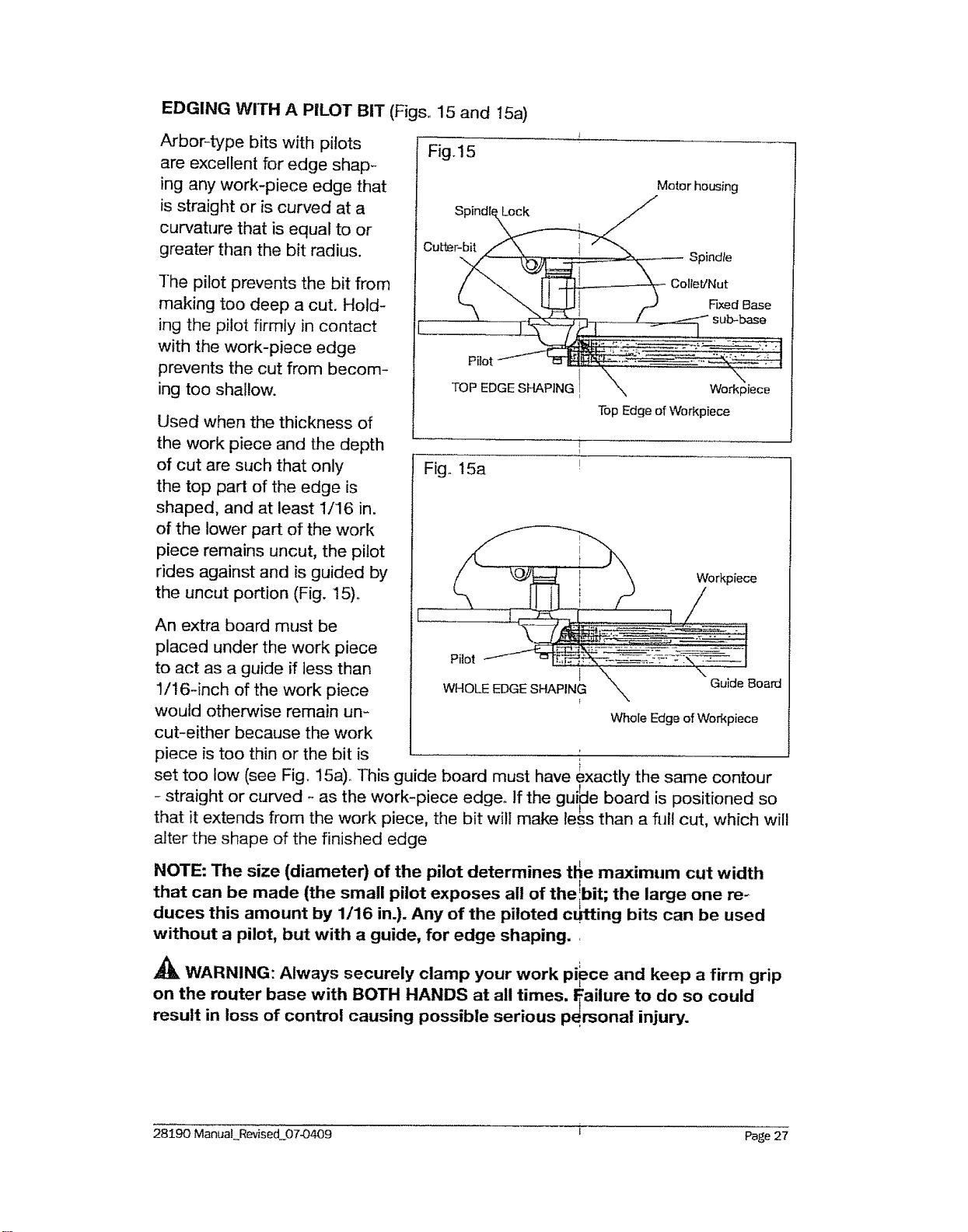
EDGING wrrH A PILOT BIT (Figs, 15 and 15a)
Arbor-type bits with pilots
are excellent for edge shap-
ing any work-piece edge that
is straight or is curved at a
curvature that is equal to or
greater than the bit radius.
The pilot prevents the bit from
making too deep a cut. Hold-
ing the pilot firmly in contact
with the work-piece edge
prevents the cut from becom-
ing too shallow.
Used when the thickness of
the work piece and the depth
of cut are such that only
the top part of the edge is
shaped, and at least 1/16 in.
of the lower part of the work
piece remains uncut, the pilot
rides against and is guided by
the uncut portion (Fig. 15).
An extra board must be
placed under the work piece
to act as a guide if less than
!/16-inch of the work piece
would otherwise remain un-
cut-either because the work
piece is too thin or the bit is
Fig. 15
Motor housing
SpindlexL°ck _ /
Cutl_r-_ Spindle
"_ L_._J I z-J Fixed Base
"TopEdge of Workpiece
Fig° 15a
i
I
Workpiece
I \ \ i
WHOLE EDGE SHAPING _ Guide Board
Whole Edge of Workpiece
set too low (see Fig. 15a)o This guide board must have exactly the same contour
r
- straight or curved - as the work-piece edge. If the guide board is positioned so
I
that it extends from the work piece, the bit will make less than a full cut, which will
alter the shape of the finished edge
NOTE: The size (diameter) of the pilot determines ti_e maximum cut width
that can be made (the small pilot exposes all of the bit; the large one re -L
duces this amount by 1/16 in.). Any of the piloted cutting bits can be used
without a pilot, but with a guide, for edge shaping.,
_t_ WARNING: Always securely clamp your work piece and keep a firm grip
on the router base with BOTH HANDS at all times. _ailure to do so could
result in loss of control causing possible serious personal injury.
28190 ManuaLRevised 07-0409 Page 27
FEEDING THE ROUTER (Fig. 16)
The secret to professional rout-
ing is in making a careful set-up
for the cut, selecting the proper
depth of cut, knowing how the
cutting bit reacts in your work
piece, and the rate and direc-
tion of feed of the router.
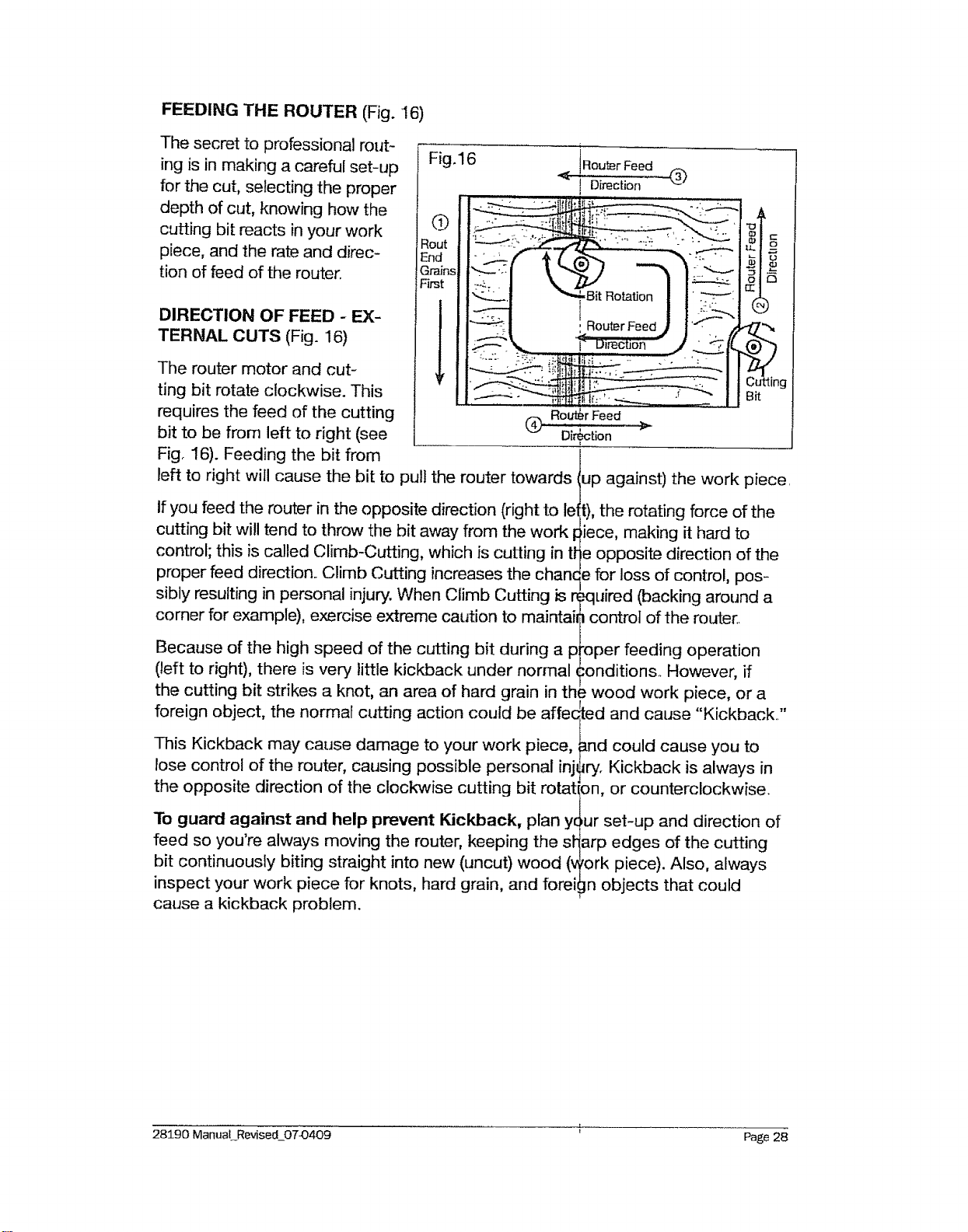
DIRECTION OF FEED - EX-
TERNAL CUTS (Fig. 16)
The router motor and cut-
ting bit rotate clockwise. This
requires the feed of the cutting
bit to be from left to right (see
Fig. 16). Feeding the bit from
Fig.16
Q
Rout
End
Gr'ains
First
Router Feed
Direction
®
I
I
®
Router Feed
Direction
left to right will cause the bit to pull the router towards
If you feed the router in the opposite direction (right to le
cutting bit will tend to throw the bit away from the work i:
control; this is called Climb-Cutting, which is cutting in tl-
proper feed direction. Climb Cutting increases the chanc
L;utting
Bit
up against) the work pfece
|), the rotating force of the
iece, making it hard to
e opposite direction of the
e for loss of control, pos-
sibly resulting in personal injury. When Climb Cutting is r_quired (backing around a
corner for example), exercise extreme caution to maintai? control of the router.
Because of the high speed of the cutting bit during a p_'oper feeding operation
(left to right), there is very little kickback under normal_onditionso However, if
the cutting bit strikes a knot, an area of hard grain in the wood work piece, or a
foreign object, the normal cutting action could be affe_ed and cause "Kickback.."
This Kickback may cause damage to your work piece,h_nd could cause you to
lose control of the router, causing possible personal injury. Kickback is always in
the opposite direction of the clockwise cutting bit rotation, or counterclockwise.
To guard against and help prevent Kickback, plan y_ur set-up and direction of
feed so you're always moving the router, keeping the sl_arp edges of the cutting
bit continuously biting straight into new (uncut) wood (v_ork piece). Also, always
inspect your work piece for knots, hard grain, and foreign objects that could
cause a kickback problem.
-f,
28590 Manual Revised_07_0409 Page 28
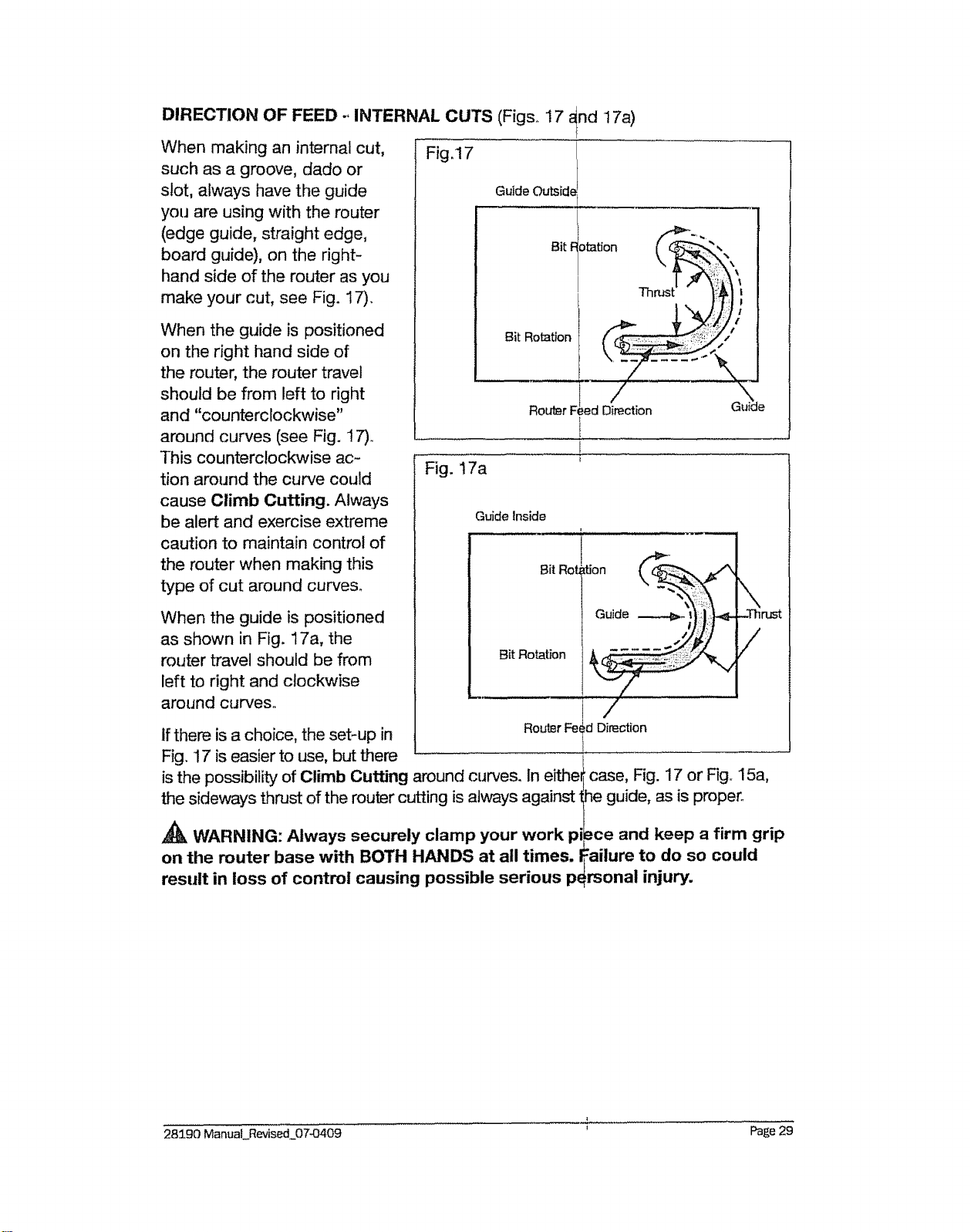
DIRECTION OF FEED., INTERNAL CUTS (Figs. ! 7 _nd 17a)
[
When making an internal cut, Fig.17
such as a groove, dado or
slot, always have the guide
you are using with the router
(edge guide, straight edge,
board guide), on the right-
hand side of the router as you
make your cut, see Fig. 17).
When the guide is positioned
on the right hand side of
the router, the router travel
should be from left to right
and "counterclockwise"
around curves (see Fig. 17)o
This counterclockwise ac-
tion around the curve could
cause Climb Cutting. Always
be alert and exercise extreme
caution to maintain control of
the router when making this
type of cut around curves.
When the guide is positioned
as shown in Fig. 17a, the
router travel should be from
left to right and clockwise
around curves,,
Guide Outside
Bitiotation
Bit Rotation
Fig. 17a
ROLdSrF!ed Direction
L
Guide Inside
Bit Rob
Bit Rotation
/
Routsr Fe_ d Direction
If there is a choice, the set-up in
Fig. 17 is easier to use, but there
is the possibility of Climb Cutting around curves. In eithe
the sideways thrust of the router cutting is always against
_k WARNING: Always securely clamp your work pi
on the router base with BOTH HANDS at all times. I
result in loss of control causing possible serious pe
)'i
/
f
\
case, Fig. 17 or Fig° 15a,
meguide, as is proper°
.=ce and keep a firm grip
:allure to do so could
rsonal injury.
28190 ManuaLRevised_07-0409 r Page 29
RATE OF FEED (Figs. 18 and '18a)
The proper rate of feed de-
pends on several factors: the
hardness and moisture content
of the work piece, the depth of
cut, and the cutting diameter of
the bit. When you are cutting
shallow grooves in soft woods
such as pine, you may use a
faster rate of feed. When mak-
ing deep cuts in hardwoods
such as oak, you should use a
slower rate of feed.
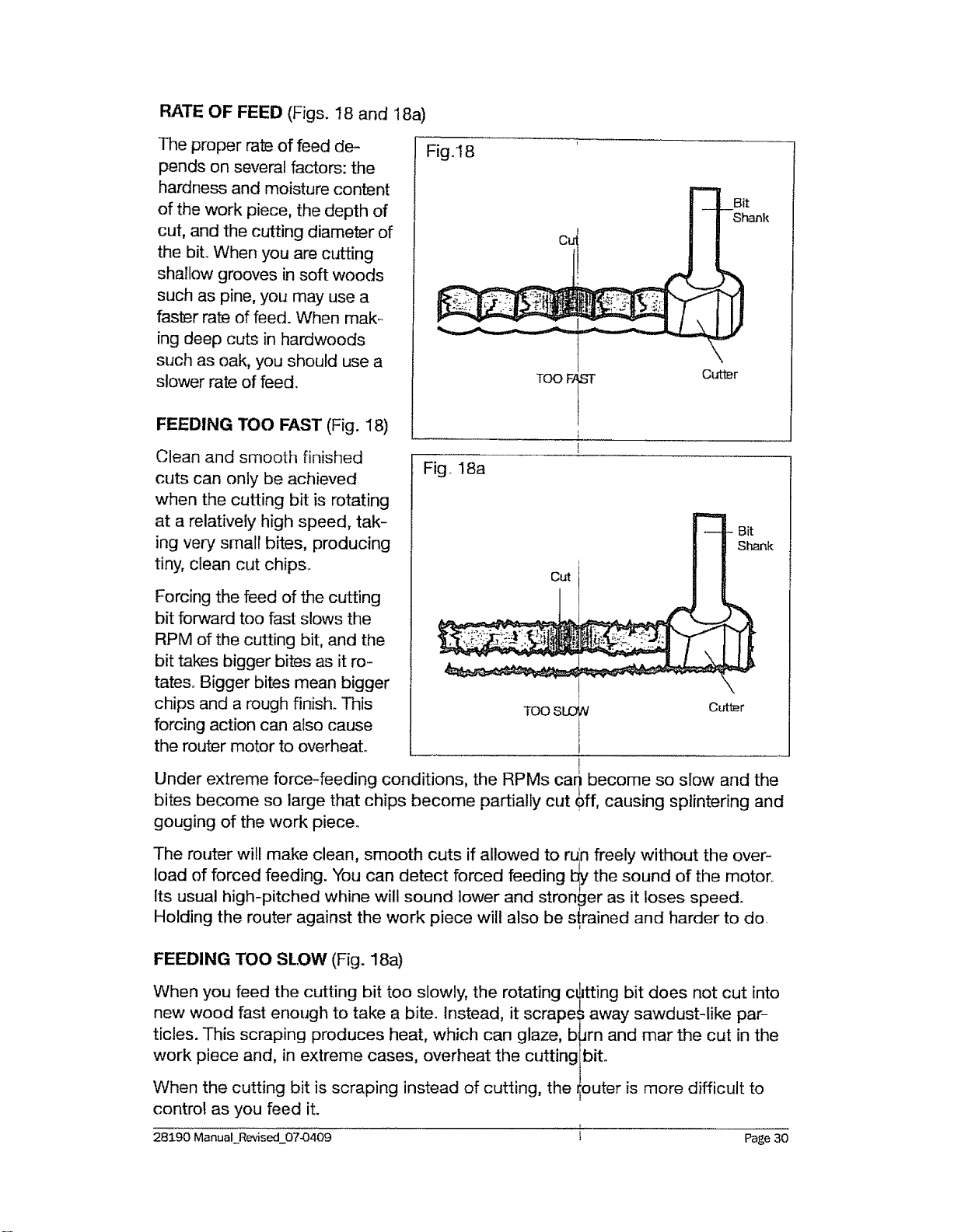
FEEDING TOO FAST (Fig. 18)
Clean and smooth finished
cuts can only be achieved
when the cutting bit is rotating
at a relatively high speed, tak-
ing very smalr bites, producing
tiny, clean cut chips..
Forcing the feed of the cutting
bit forward too fast slows the
RPM of the cutting bit, and the
bit takes bigger bites as it ro-
tates,. Bigger bites mean bigger
chips and a rough finish. This
forcing action can also cause
the router motor to overheat.
Fig. 18
Bit
Shank
Fig. 18a
Cut
Bit
Shank
TOO
!
Under extreme force-feeding conditions, the RPMs cari become so slow and the
bites become so large that chips become partially cut _ff, causing splintering and
gouging of the work piece.
The router will make clean, smooth cuts if allowed to ruln freely without the over-
load of forced feeding. You can detect forced feeding !_ the sound of the motor..
Its usual high-pitched whine will sound lower and stronger as it loses speed.
Holding the router against the work piece will also be s!rained and harder to do
FEEDING TOO SLOW (Fig. 18a)
When you feed the cutting bit too slowly, the rotating c_
new wood fast enough to take a bite. Instead, it scrape
ticles. This scraping produces heat, which can glaze, b
work piece and, in extreme cases, overheat the cutting
When the cutting bit is scraping instead of cutting, the
control as you feed it.
itting bit does not cut into
;away sawdust-like par-
Jrn and mar the cut in the
bit_
outer is more difficult to
L
28190 ManuaLRevised_07-0409 i Page 30
With almost no load on the router motor, the cutting bk has a tendency to bounce
off the sides of the cut in the work piece, producing a cut with a rippled finish
instead of clean straight sides.
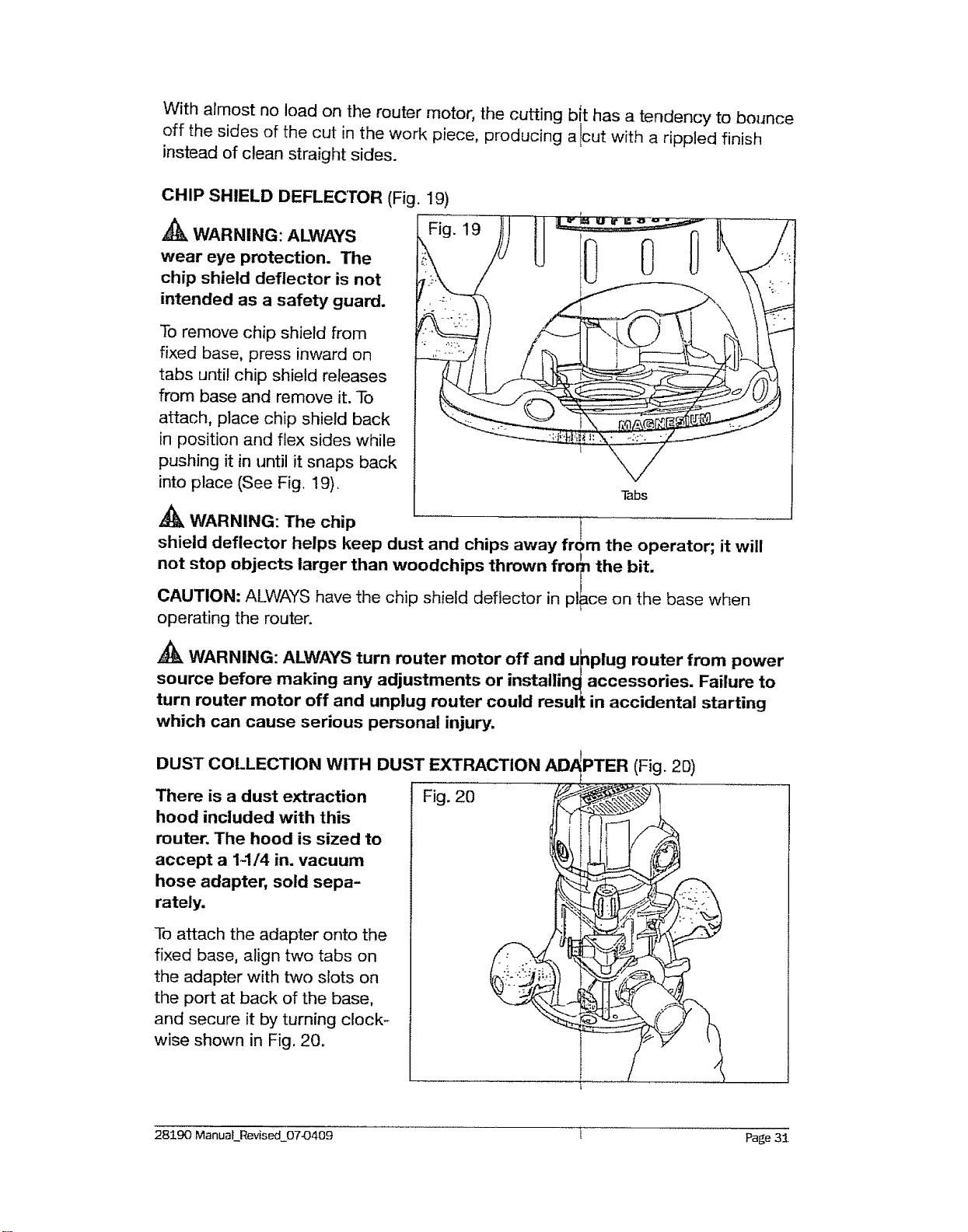
CHIP SHIELD DEFLECTOR (Fig. 19)
WARNING: ALWAYS
wear eye protection. The
chip shield deflector is not
intended as a safety guard.
Fig. 19
To remove chip shield from
fixed base, press inward on
tabs until chip shield releases
from base and remove it. To
attach, place chip shield back
in position and flex sides while
pushing it in until it snaps back
into place (See Fig. 19), Tabs
,_ WARNING: The chip i:
shield deflector helps keep dust and chips away frc_m the operator; it will
not stop objects larger than woodchips thrown fror_ the bit.
/
CAUTION: ALWAYS have the chip shield deflector in place on the base when
operating the router.
WARNING: ALWAYS turn router motor off and u_)plug router from power
source before making any adjustments or installin_ accessories. Failure to
turn router motor off and unplug router could result in accidental starting
which can cause serious personal injury.
DUST COLLECTION WITH DUST EXTRACTION
There is a dust extraction
hood included with this
router. The hood is sized to
accept a 1-1/4 in. vacuum
hose adapter, sold sepa-
rately.
To attach the adapter onto the
fixed base, align two tabs on
the adapter with two slots on
the port at back of the base,
and secure it by turning clock-
wise shown in Fig. 20.
AID PPTER (Fig. 20)
Fig. 20 __._
28190 ManuaLRevised_07_409 i Page 31
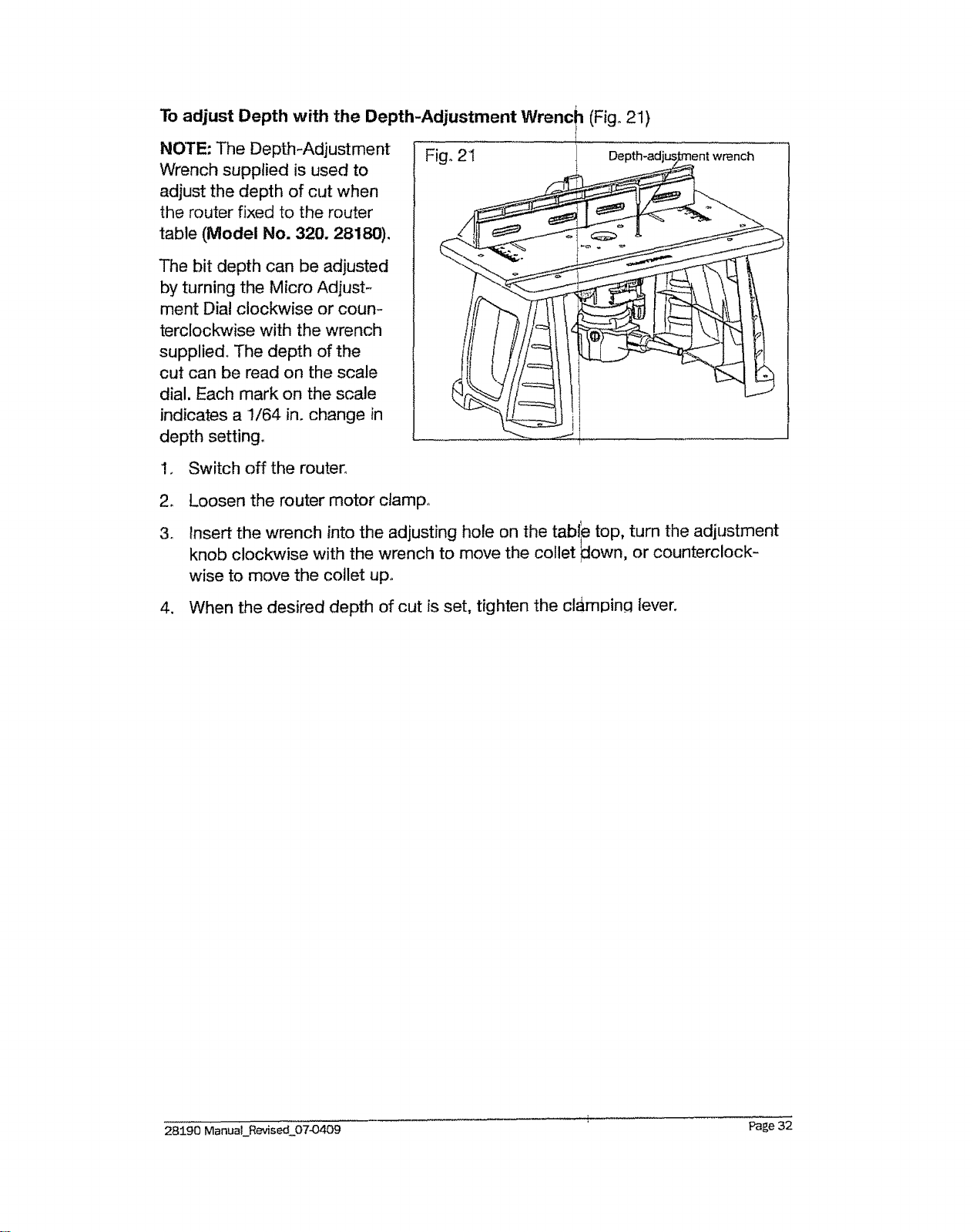
To adjust Depth with the Depth-Adjustment Wrenc_ (Fig° 21)
NOTE: The Depth-Adjustment Fig° 2i
Wrench supplied is used to
adjust the depth of cut when
the router fixed to the router
table (Model No. 320. 28180).
The bit depth can be adjusted
by turning the Micro Adjust-
ment Dial clockwise or coun-
terclockwise with the wrench
supplied. The depth of the
cut can be read on the scale
dial. Each mark on the scale
indicates a 1/64 in. change in
depth setting°
1. Switch off the router°
2. Loosen the router motor clamp°
3o Insert the wrench into the adjusting hole on the tabl_e top, turn the adjustment
knob clockwise with the wrench to move the collet ]down, or counterclock-
wise to move the collet up,,
4. When the desired depth of cut is set, tighten the cl_mpincl lever.
28190 ManuaLRevised 07-0409 Page 32
_k WARNING: To ensure safety and reliability, all r_pairs should be per-,
formed by a qualified service technician at a Seard Service Center=
GENERAL
Only the parts shown on the parts list are intended for repair or replacement by
the customer. All other parts represent an important part of the double insulation
system and should be serviced only by a qualified Sea_rs service technician.
_k WARNING: For your safety, ALWAYS turn off swiich and unplug muter mo-
tor from the power source before performing any maintenance or cleaning.
It has been found that electric tools are subject to acce_lerated wear and possible
premature failure when they are used to work on fiber _lass boats and sports
cars, wallboard, spackling compounds or plaster, The _hips and grindings from
these materials are highly abrasive to electrical tool pairs, such as bearings,
brushes, commutators, etc. Consequently, it is not recommended that this tool
be used for extended work on any fiberglass material, _allboard, spackling com-
pound or plaster° During any use on these materials, it is extremely important that
the tool is cleaned frequently by blowing with an air jetJ
A_k WARNING: Always wear safety goggles or safe_y glasses with side
shields during power tool operations, or when blov_ing dust. if operation is
dusty, also wear a dust mask.
ROUTINE MAINTENANCE
A_k WARNING: DO NOT at any time let brake fluids, gasoline, petroleum-
based products, penetrating oils, etc. come in contact with plastic parts.
Chemicals can damage, weaken or destroy plastic, which may result in seri-
ous personal injury.
o When work has been completed, clean the tool to _llow smooth functioning of
the tool over time. I
= Use clean damp cloths to wipe the tool
• Check the state of all electrical cables.
= Keep the router motor air openings free from oil, gr4ase and sawdust or
woodchips, and store tool in a dry place.
= Be certain that all moving parts are well lubricated, _aarticularly after lengthy
exposure to damp and/or dirty conditions.
WARNING: For your safety, ALWAYS turn off switch and unplug muter mo-
tor from the power source before performing any m_jntenance or cleaning.
!
Refer to ColletiNut Care and Cutting Bits on page t 7 f_r cleaning and care
!
28190 Manual Revised_0743409 I Page 33
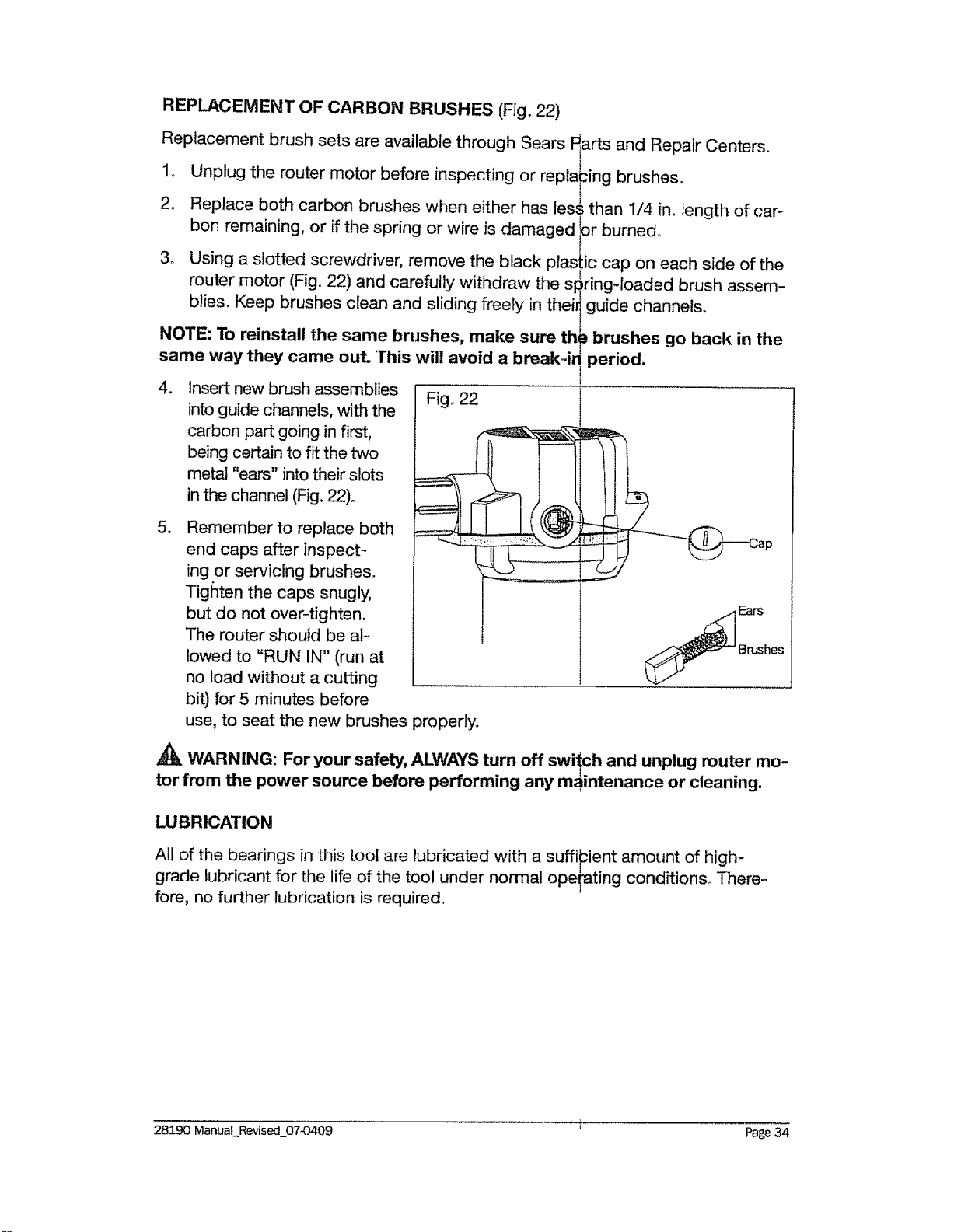
REPLACEMENT OF CARBON BRUSHES (Fig. 22)
Replacement brush sets are available through Sears Fiarts and Repair Centers_
1o Unplug the router motor before inspecting or repla_ing brushes°
2. Replace both carbon brushes when either has les_ than 1/4 in. length of car-
bon remaining, or if the spring or wire is damaged }or burned°
3o Using a slotted screwdriver, remove the black plastic cap on each side of the
router motor (Fig° 22) and carefully withdraw the s_ringqoaded brush assem-
blies, Keep brushes clean and sliding freely in thei_ guide channels.
NOTE: To reinstall the same brushes, make sure th_! brushes go back in the
same way they came out This will avoid a break4qperiod.
4. Insert new brush assemblies
.
into guide channels, with the
carbon part going in first,
being certain to fit the tx€o
metal "ears" into their slots
in the channel (Fig. 22)_
Remember to replace both
end caps after inspect-
ing or servicing brushes_
Tighten the caps snugly,
but do not over-tighten.
The router should be al-
lowed to "RUN IN" (run at
no load without a cutting
bit) for 5 minutes before
Figo22
Ears
Brushes
use, to seat the new brushes properly,,
_k WARNING: For your safety, ALWAYS turn off swiich and unplug router mo-
tor from the power source before performing any maintenance or cleaning.
LUBRICATION
All of the bearings in this tool are lubricated with a suffi_cient amount of high-
grade lubricant for the life of the tool under normal ope_ting conditions. There-
fore, no further lubrication is required,,
28190 ManuaLRevised_0743409 r Page 34
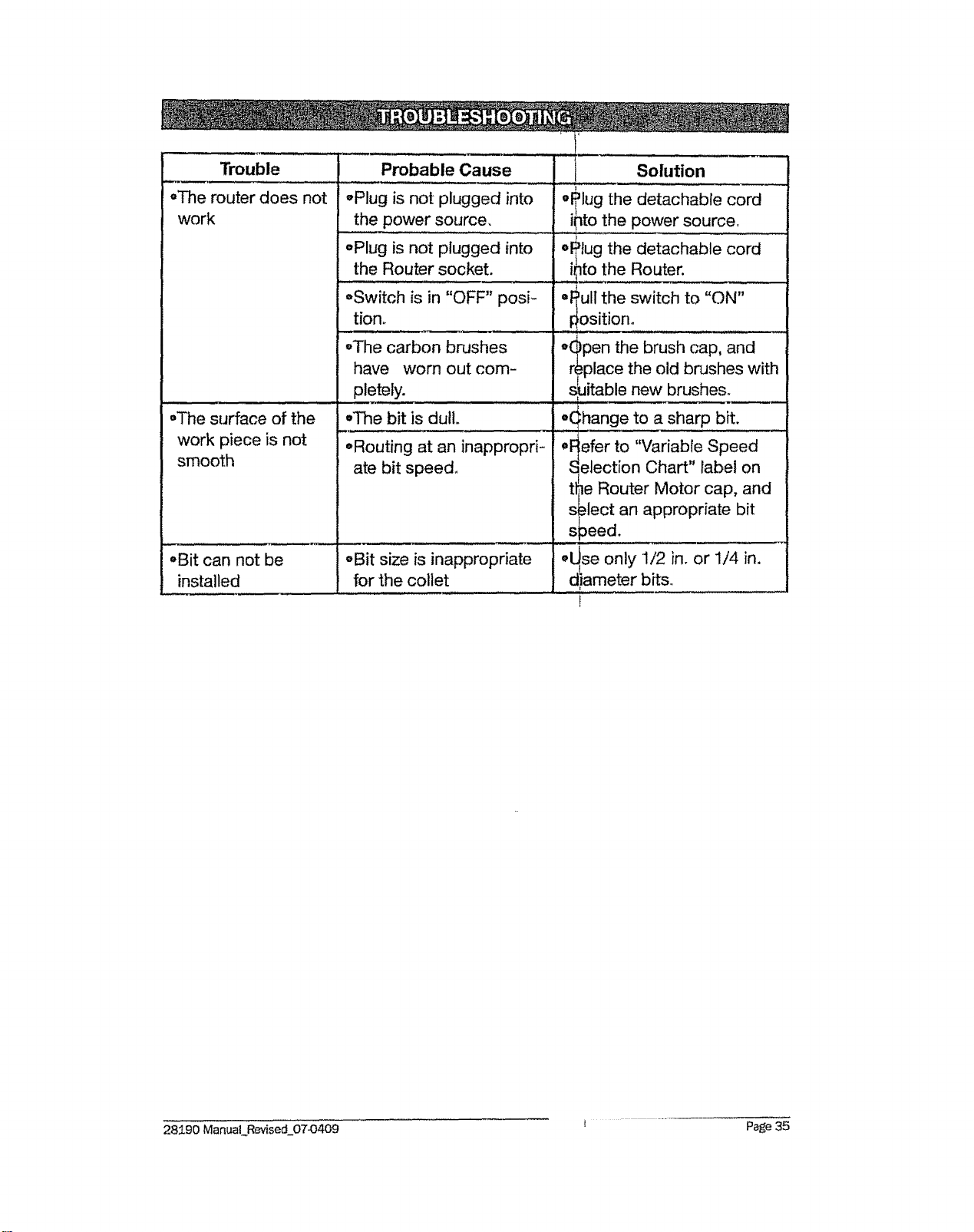
Trouble
,,The router does not
work
,The surface of the
work piece is not
smooth
,Bit ;an not be
installed
Probable Cause
-Plug is not plugged into
the power source.
-Plug is not plugged into
the Router socket.
°Switch is in "OFF" posF
tion..
.... ,i, i
°The carbon brushes
have "worn out com-
pletely.
.... i
oT'ne bit is dull.
=Routing at an inappropri-
ate bit speed°
,Bit size is inappropriate
for the cotlet
I Solution
w_lug the detachable cord
' ipto the power source,
oP_ullthe switch to "ON"
#ositiono
_,_pen the brush cap, and
/
replace the old brushes with
s_,itable new brushes.
o(:::hange to a sharp bit.
oFefer to "Variable Speed
" e n
_election Chart lab I o
the Router Motor cap, and
s.=lect an appropriate bit
s }eed.
.....o_se Only 1/2 in. or 1/4 in.
d!ameter bits.. ......
28190 ManuaLRevised 07-0409
Page 35
WARNING: The use of attachments or accessories that are not recom-
mended for this tool might be dangerous and coul
Sears and other Craftsman outlets offer a large select
cessories designed for specific routing applications.
There is a large selection of Craftsman Router Cutting
Speed Steel or Carbide Tipped High-Speed Steel for
In addition to a wide variety of router bits, Sears also
as: Router tables, various template sets, universal rout
(6418t), 11 pc_ bushing set (64180) and clear sub-bas
(64182) 6 pc. plunge base (64183)°
d result in serious injury.
ion of Craftsman router ac-
Bits available in High-
[11your routing needs.
ffers accessories such
.=rfence with lock knobs
sets; 6pc, fixed base
,k
WARNING:Only use router tables with proper guarding for the cutting
bit and with "on-board" switch controlled receptac,les." Failure to use router
tables with appropriate safety features could resul ! in serious personal
R _
inJUry.
I
28190 ManuatRevised 07_409 Page 36
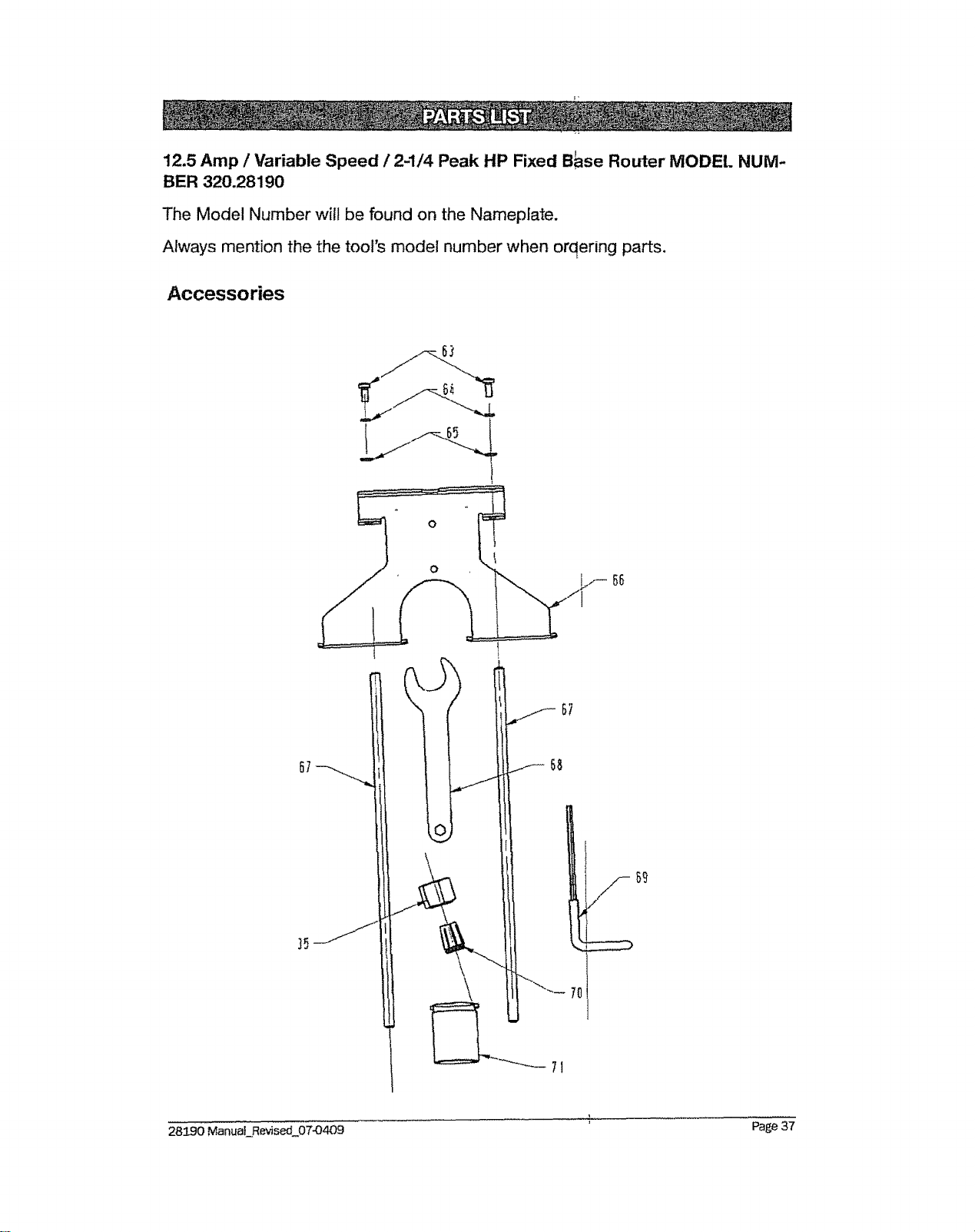
12.5 Amp / Variable Speed / 2-1/4 Peak HP Fixed B_se Router MODEL NUM-
BER 320.28190
The Model Number will be found on the Nameplate.
Always mention the the tool's model number when orqering parts.
Accessories
o
56
3_
7O
71
,,
28190 Manual_Revised 07-O409 Page 3/
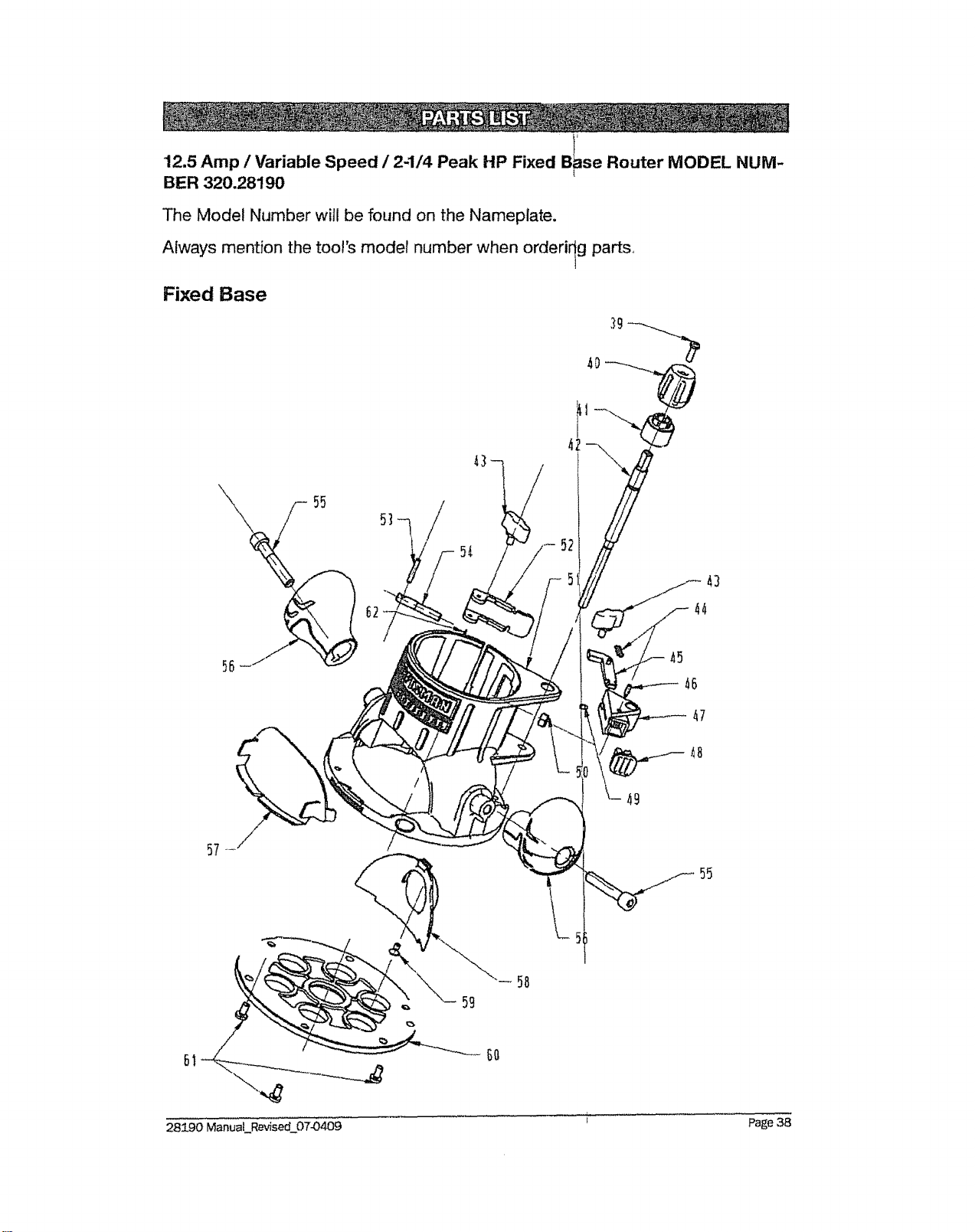
12.5 Amp / Variable Speed / 2-1/4 Peak HP Fixed B_se Router MODEL NUM-
BER 320.28190
The Model Number will be found on the Nameplate.
Always mention the too!'s model number when orderiqg parts,
Fixed Base
57
GO
59
28/90 ManuaLRev_sed_07-0409 i Page 38
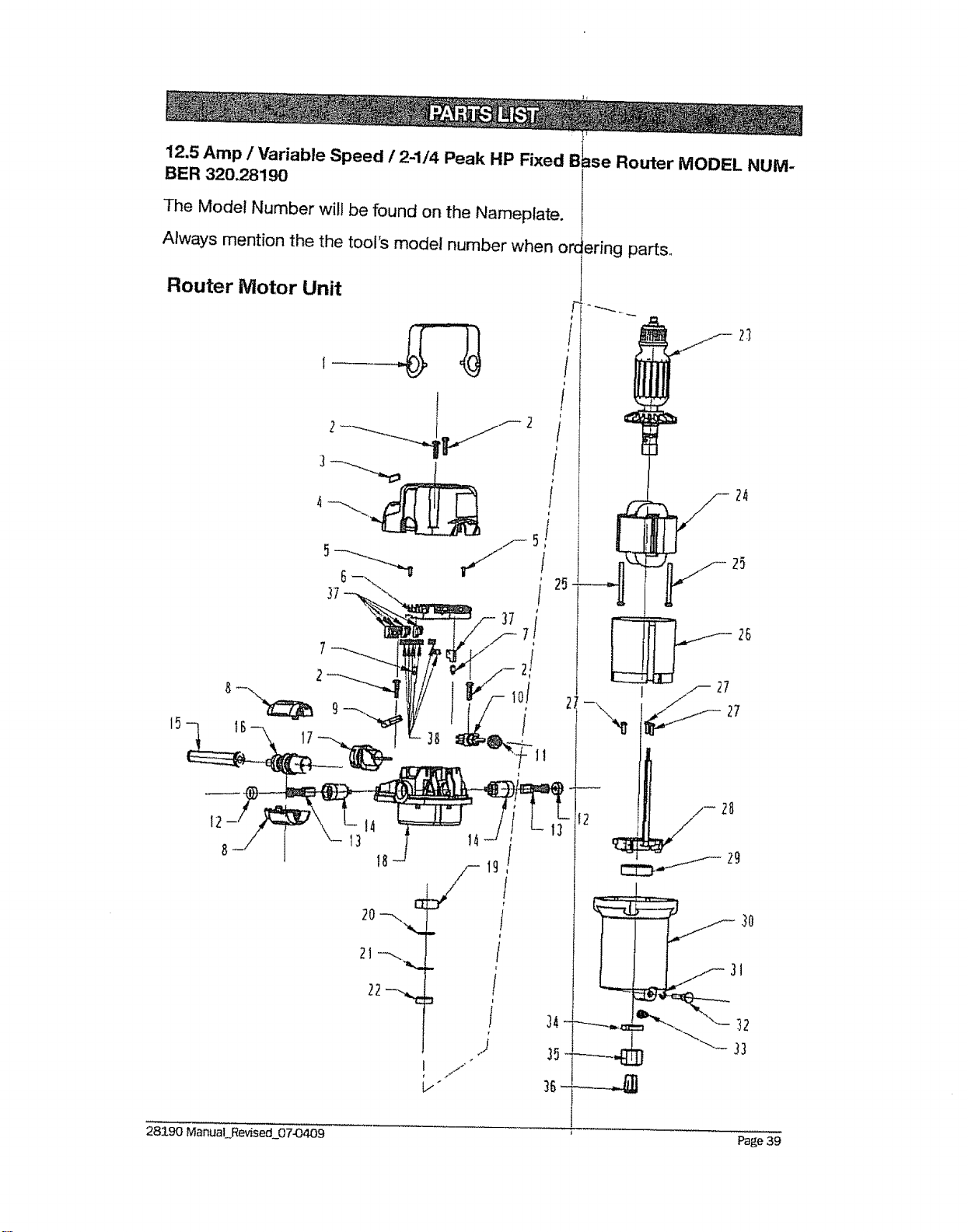
12.5 Amp / Variable Speed / 2-1/4 Peak HP Fixed
BER 320.281g0
The Model Number will be found on the Nameplate.
Always mention the the tool's model number when or(
Router Motor Unit
15
=se Router MODEL NUM-
ering parts°
2_
24
25
f2
28
f 29
28190 ManuaLRevised_07-0409 ' Page 39

12.5 Amp / Variable Speed / 2-1/4 Peak HP Fixed Router MODEL NUM-
BER 320.28190
The Model Number will be found on the Nameplate.
Always mention tool's model number when ordering p rts,
1 ..... 3703841000 Decorate Cover } 1
2 5610059000 Screw 4
: . : . : = : ,,, .... :............... : :: :::..... . . ,
3 3123313000
4 3123278000
5 5610017000
......... ,,,,,,,,,,,,, ,, , ,,i,
6 4900256000
Transparent Cap 1 1
: Rear cOVer ...............i- 1 .........................
Screw 2
PCB Plate 1
7 5620017000 Screw 2
8
9 4540017000 Power Indicator Ugh 1
10 4870073000
11 3122851000
12 3120537000
13 4960019000
14 2800005000
15
16 2822257000
Switch 1
Seat Ring 1
Brush Cap 2
Carbon Brush 2
Brush Holder 2
Cord Guard 1
Power Cord ASSY 1
3121O64O00
17
18 , 3123279000
.........i:? {......3520!30000
20 3121049000
4930314000 Receptacle 1
Middle Housing 1
........ ! .....
Bearing Holder I _. 1
Gasket 1
...... ....
22
25 5610100000
26 3123280000
5700008000 Bearing t
23 2750839000 Rotor 1
24 2740240000 Stator 1
Screw 2
-- ! Fan Baffle
1
28190 ManuaLR_zised_07-0409 Page 40
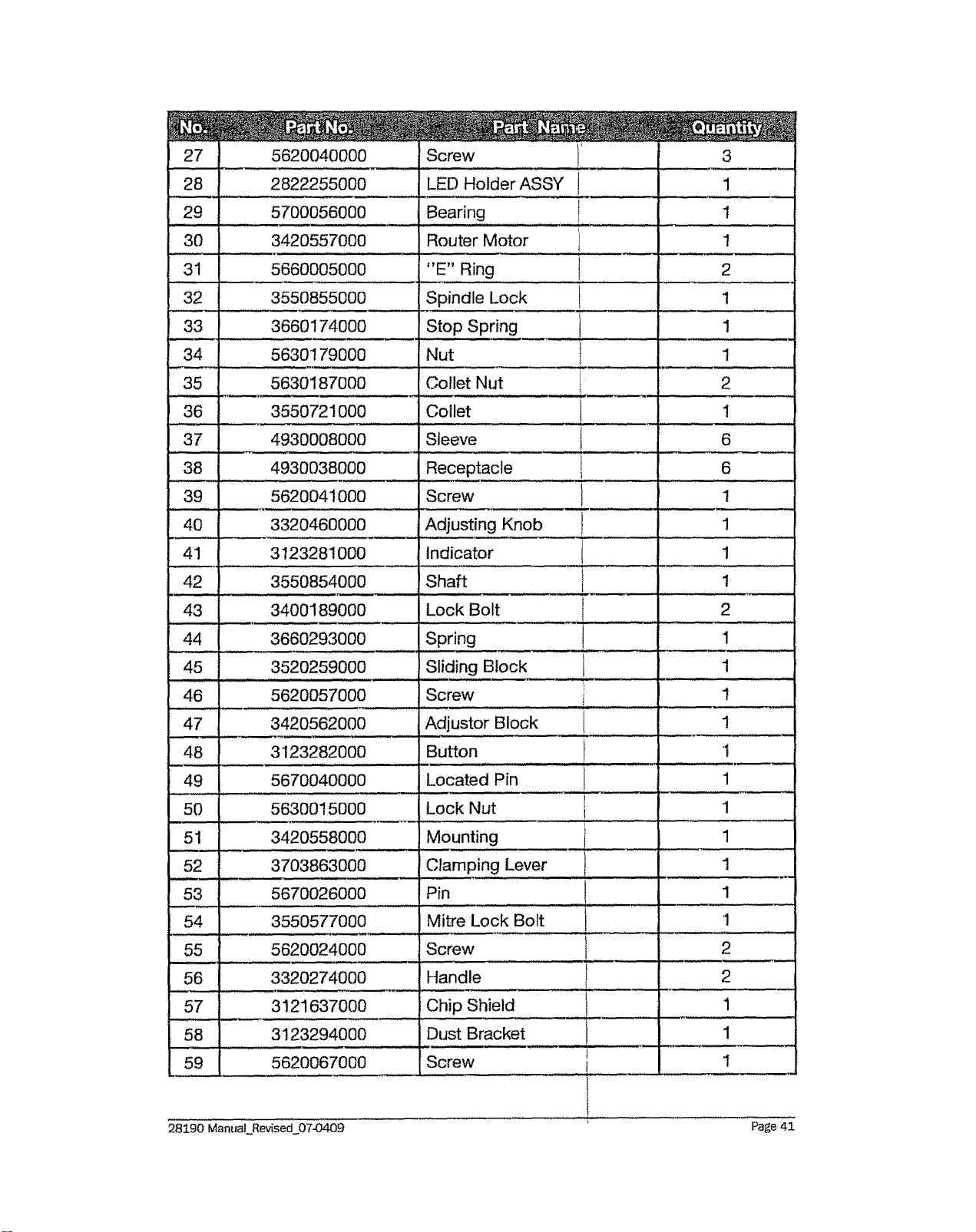
28i
5620040000 Screw ......
2822255000 LED Holder ASSY
5700056000 ............. Bearing ........... i.......................
30 3420557000 Router Motor
31 5660005000 "E" Ring
32 3550855000 Spindle Lock
33 ! 3660174000_ Stop Spring
34 5630179000 Nut
35 5630187000 Collet Nut
36 3550721000 Collet
37 4930008000 Sleeve
4930038000 Receptacle
1
.... ,.,, , , ,
1
1
2
1
1
1
2
....u,,i,,i_
i
38
39 5620041000 Screw 1
,,,,,,
40 3320460000 Adjusting Knob 1
41 3123281000 Indicator 1
42 3550854000 Shaft 1
43 3400189000 Lock Bolt 2
1
6
6
44 3660293000 Spring 1
45 ..... 3520259000 Sliding Block 1
46 5620057000 Screw 1
47 J 3420562000 Adjustor Block 1
48 3123282000 Button '1
49 5670040000 Located Pin 1
50 5630015000 Lock Nut 1
.....51 ..... 3420558000 ...... Mounting 1
52
54
55 5620024000
56 3320274000
57 3121637000
58 3123294000
59 5620067000
3703863000 Clamping Lever
5670026000 Pin
3550577000 Mitre Lock Bolt
Screw
Handle
Chip Shield
Dust Bracket
Screw
1
_r
1
1
2
2
1
1
1
I
I
28190 Manuat Rev_sed_07-O409 Page 41
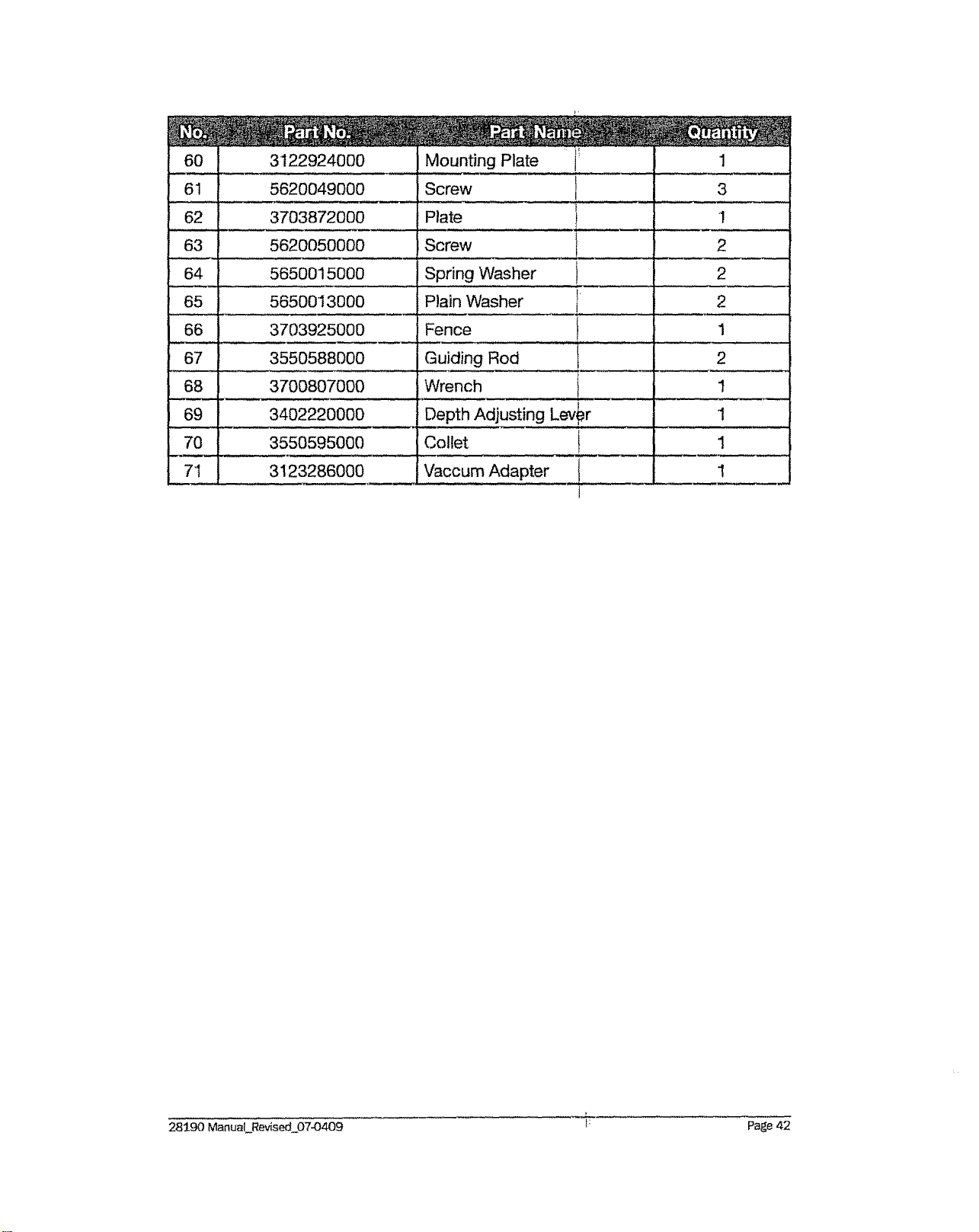
61 5620049000 Screw
62 3703872000 Plate
60 3122924000Mo,,,t!ngPlate_,_......... ....................1
63 5620050000 Screw
64 5650015000 Spring Washer
65 56500I 3000 Plain Washer
66
67
68
69
3
1
2
3703925000 Fence
- ,,ui ,, ,,,,
3550588000 Guiding Rod
3700807000 Wrench
3402220000 Depth Adjusting Lev,,=r
2
2
1
2
70
7"I
3550595000 Cotlet 1
3 I23286000 Vaccum Adapter 1
28590 Manual F_e_4sed07-O409 i: Page 42
28190ManuaLRevisecl_07-0409 Page43

Your Home
For expert troubleshooting and home splutions advice:
www.managemyhome.com I
For repair - in your home - of all major _rand appliances,
tawn and garden equipment, or heating anld cooling systems,
no matter who made it, no matter Who sold it !
For the replacement parts, acces_ and
owner's manuals that you need to 'ourselL
For Sears professional installation of home appliances
and items like garage door openers an_i water heaters.
CII "'{ d "'t
1-800-4-MY-HOME ® a any_!_e, ay or mgn
(1-800-469-4663) (US.Ao an_ Canada)
wv,_w.sears,com www.se_ars.ca
Our Home
For repair of carry-in items like vacuums.
and electronics, call anytime for the Iocai
Sears Parts & Repair Servic
1-800-488-1222 (U.S.A.) 1-800-46
www.sears.com www.se,
lawn equipment,
on of the nearest _:_i:_
;Center :,_'i;'_'_'
9-4663 (Canada) ._i_._i!
trs.ca
Para pedir servicio de reparaci6n Au Canad_
_"_F__
,_,_ a domicilio, y para ordenar piezas: 1-8
:_!_ 1-888-SU-HOGAR®
!pour service en s: '_:_=
!_.LE-FOYER _c
1__7_
_ww_sears,ca
©SearsBrands,LLC
@ Registered Trademark 1-r_Trademark I s_ Service Mark of Se_i's Brands, LLC
@Marca Registrada 1TMMarca de F#,bdca / s_4Marca de Servid_ide Sears Brands, LLC
MCMarque de commerce t _ Marque d_posOe de Sears Brands, ILLC