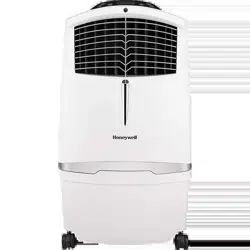
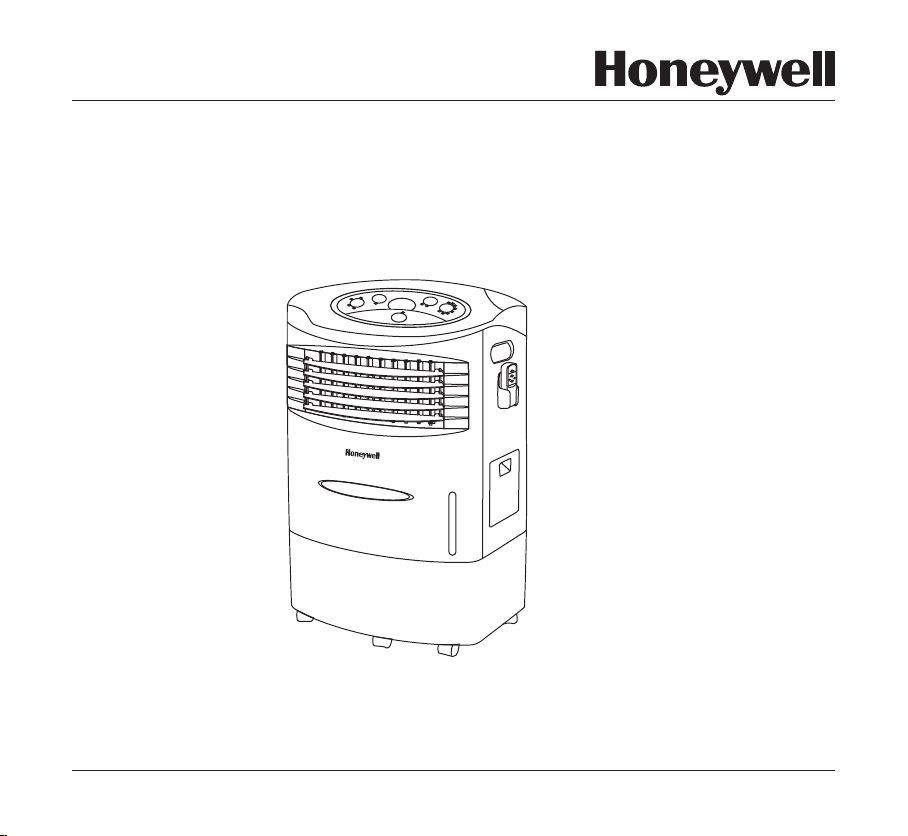
Portable Evaporative Air Cooler
OWNER’S MANUAL
Read and save these instructions before use
Voltage rating: 220 - 240V~50Hz
110V~60Hz
Power rating: 230W
For product enquiry or support contact :
e-mail: [email protected]
Made in China.
Model: CL20AE
CUST OMER CARE :
www.honeywellaircoolers.com

This page is intentionally left blank

SECTION
PAGE
1. THANK YOU .........................................................................................................
2. USER TIPS ...........................................................................................................
3. SAFETY RULES ...................................................................................................
4. PARTS DESCRIPTION ........................................................................................
5. USE & OPERATION .............................................................................................
6. CLEANING & MAINTENANCE .............................................................................
7. TROUBLESHOOTING GUIDE .............................................................................
8. TECHNICAL SPECIFICATIONS ...........................................................................
9. ELECTRICAL WIRING DIAGRAM ........................................................................
2
3
5
7
8
14
16
18
18
INDEX
1
Read all instructions carefully before setting up and operating the unit, and please keep
this instruction manual for future reference. This manual is designed to provide you with
important information needed to setup, operate, maintain, and troubleshoot your cooler.
Failure to follow these instructions may damage and/or impair its operation and void the
warranty.
Fill Water ......................................................... .................... ...............
Function Buttons .................................................................................................
Room Cooling and Humidifying ...........................................................................
Remote Control ...................................................................................................
.... ............
13
Control Panel .....................................................................................................
8
9
11
12

THANK YOU!
THANK YOU
2
Congratulations on your purchase of this versatile Honeywell Evaporative Air Cooler. For optimum
cooling performance from your unit, fill the water tank with water & ice (if available) to increase its
cooling power. The unit should be positioned in a location that will create a 'flow through' air effect.
The greatest cooling effect will be felt if the unit is operated in a partly opened doorway or window.
Please read these instructions carefully.
USER TIPS
3
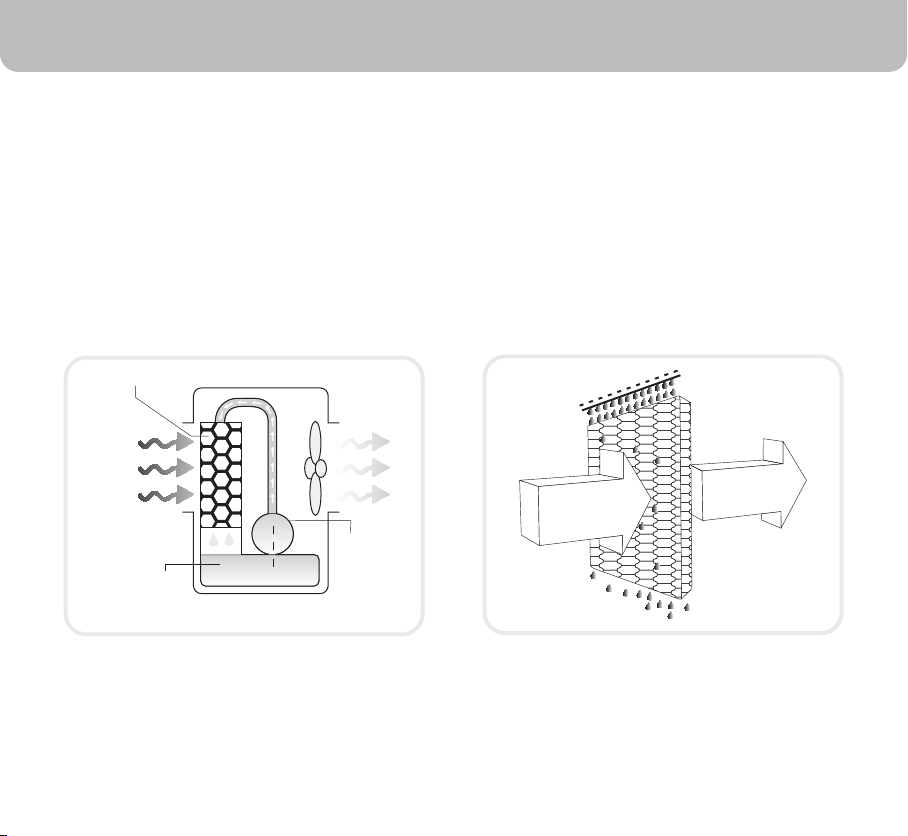
Pump
Water
Honeycomb Cooling Media
Evaporative Air Cooling Mechanism
Warm and
dry air
Cold and
humid air
COOL ~ EFFICIENT ~ NATURAL
Evaporative air cooling is the natural way of cooling, similar to a breeze blowing across a lake. This
breeze drops the temperature and has a relaxing cooling effect.
The evaporative air cooler cools the air by means of the evaporation of water. When water
evaporates into the air, the result is a mixture of air and water molecules. This chemical change
requires heat which is taken from the water molecules, resulting in cooler air propelled from the
unit.
NOTE
4
The recommended maximum relative humidity level is 60% or
less, which allows a noticeable temperature decrease. The
temperature decrease will be greater in drier climates because
higher evaporation occurs when the humidity is low.
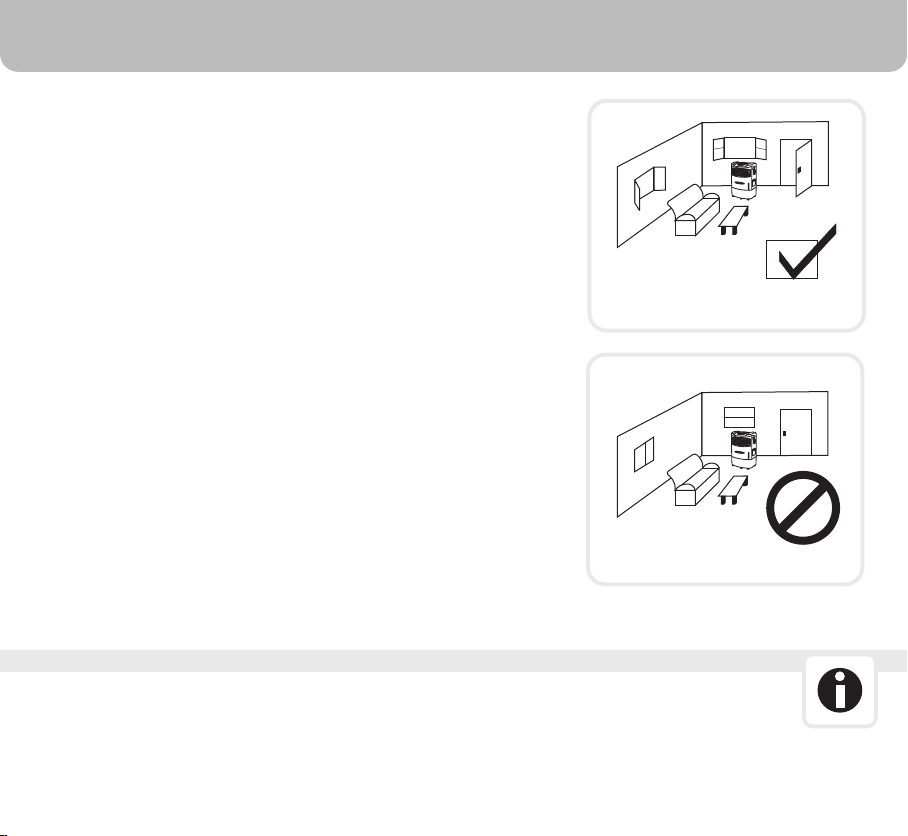
The evaporative air cooler should not be used in enclosed
spaces. It must be kept level and there must be water in the
water tank. The room should have doors and windows opened
to allow free air flow. The evaporative air cooler works best
when placed near an open window, so that outside air is drawn
into the evaporative air cooler, the air circulates in the room,
then exits via the door. The maximum cooling effect is felt
when a person is in the flow of air coming out of the evaporative
air cooler.
The evaporative air cooler can also be used to humidify dry air
during cool weather. To be used for humidification the
windows and doors should be closed to allow the humidified
air to accumulate. The evaporative air cooler is not an air
conditioner as it does not use a compressor or refrigerant gas.
It should not be expected to cool as efficiently as a refrigerated
air conditioner.
When the product is used for the first time the Honeycomb
cooling media will have an odour which will dissipate in a week
or so of initial use.
Room with open windows & door
Room with closed windows & door
USER TIPS
The recommended maximum relative humidity level is 60% or
less, which allows a noticeable temperature decrease. The
temperature decrease will be greater in drier climates because
higher evaporation occurs when the humidity is low.
The evaporative air cooler should not be used in enclosed
spaces. It must be kept level and there must be water in the
water tank. The room should have doors and windows opened
to allow free air flow. The evaporative air cooler works best
when placed near an open window, so that outside air is drawn
into the evaporative air cooler, the air circulates in the room,
then exits via the door. The maximum cooling effect is felt
when a person is in the flow of air coming out of the evaporative
air cooler.
The evaporative air cooler can also be used to humidify dry air
during cool weather. To be used for humidification the
windows and doors should be closed to allow the humidified
air to accumulate. The evaporative air cooler is not an air
conditioner as it does not use a compressor or refrigerant gas.
It should not be expected to cool as efficiently as a refrigerated
air conditioner.
When the product is used for the first time the Honeycomb
cooling media will have an odour which will dissipate in a week
or so of initial use.
Room with open windows & door
Room with closed windows & door
READ AND SAVE THESE INSTRUCTIONS:
SAFETY RULES
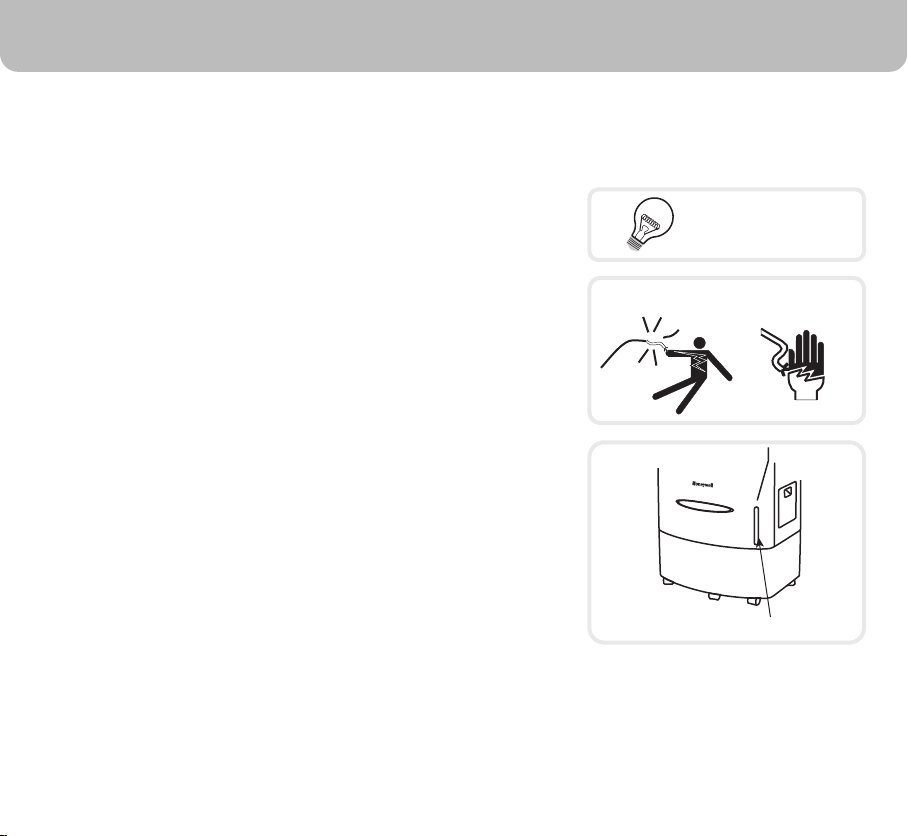
220-240 Volt AC, 50Hz
SHOCK HAZARD
WATER LEVEL INDICATOR
5
When using electrical appliances, basic safety precautions should always be followed:
Always unplug the product before refilling the water tank.
•
Always unplug the appliance from the power source before
cleaning, servicing or relocating the unit.
•
Remove the power cord from the electrical receptacle by
grasping and pulling on the power cord plug-end only, never
pull the cord.
•
DO NOT use the product in areas where gasoline, paint or
other flammable goods and objects are stored.
•
When using the ''COOL'' setting, please check the water tank
to ensure it is full. Operation of this unit on the ''COOL'' setting
with an empty tank may result in damage to the water pump.
•
DO NOT run power cord under carpeting, or cover it with
rugs or runners. Keep the cord away from areas where it
may be tripped over.
•
•
Your unit runs on 220/127 Volt AC, 60 Hz current. Check the
household voltage to ensure it matches the appliance's rate
specification.
•
Before operating the product remove it from its packaging
and check it is in good condition.
•
DO NOToperate any product with a damaged cord or plug.
We recommend not using an extension cord with this
appliance.
SAFETY RULES
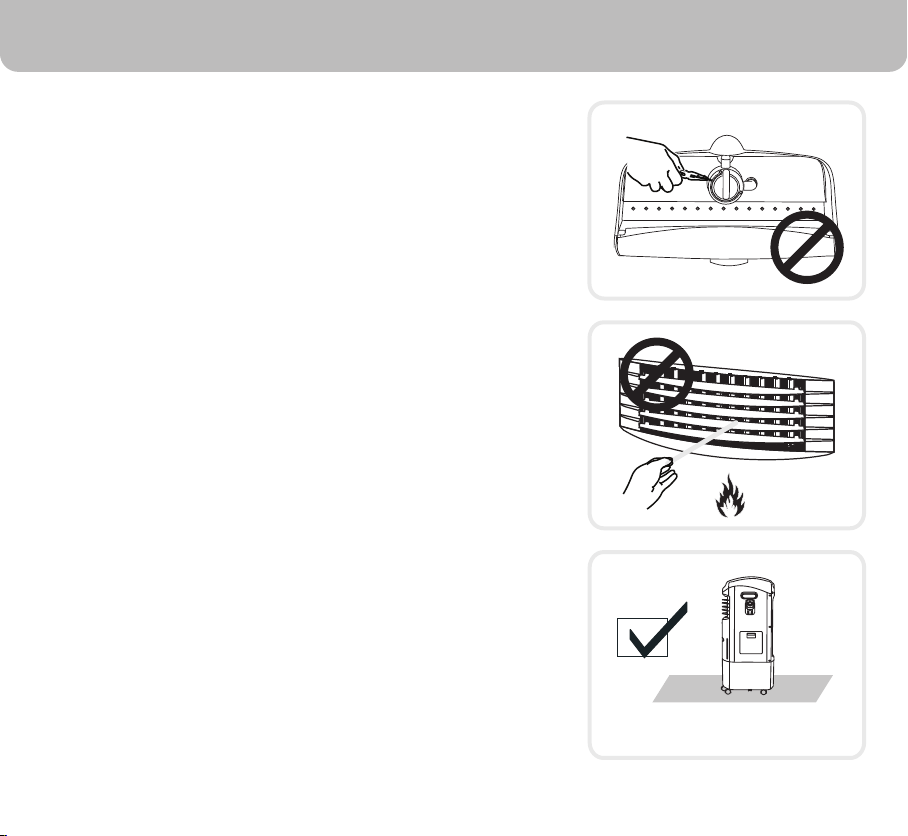
FLOOR LEVEL
6
• DO NOT attempt to repair or adjust any electrical or
mechanical functions of the cooler, as this may void the
warranty.
• DO NOT cover the air inlet or outlet on the appliance as this
may cause motor damage.
• DO NOT insert or allow objects to enter any ventilation or
exhaust opening as this may damage the product and could
cause an electrical shock or fire.
• DO NOT operate with the honeycomb media removed as
this will overload and damage the motor.
• DO NOT leave the appliance operating unattended for any
extended period of time.
• DO NOT let children play with this appliance, packaging or
plastic bags.
• If the unit is damaged or malfunctions, do not continue to
operate it. Refer to the troubleshooting section and /or seek
professional advice.
• Place the unit on a level floor.
• This product is not intended for use in wet or damp locations.
• Never locate the product where it may fall into a bathtub or
other water container. DO NOT use in bathrooms or
outdoors.
• When the unit is not in use always store it in a dry area.
• This appliance is not intended for use by persons (including
children or elderly) with reduced physical, sensory or mental
capabilities, or lack of experience and knowledge, unless
they have been given supervision or instruction concerning
use of the appliance by a person responsible for their safety.
• Always grip the side handles to move the unit.
ON/OFF
TIME
SPEED
SWING
COOL
MODE
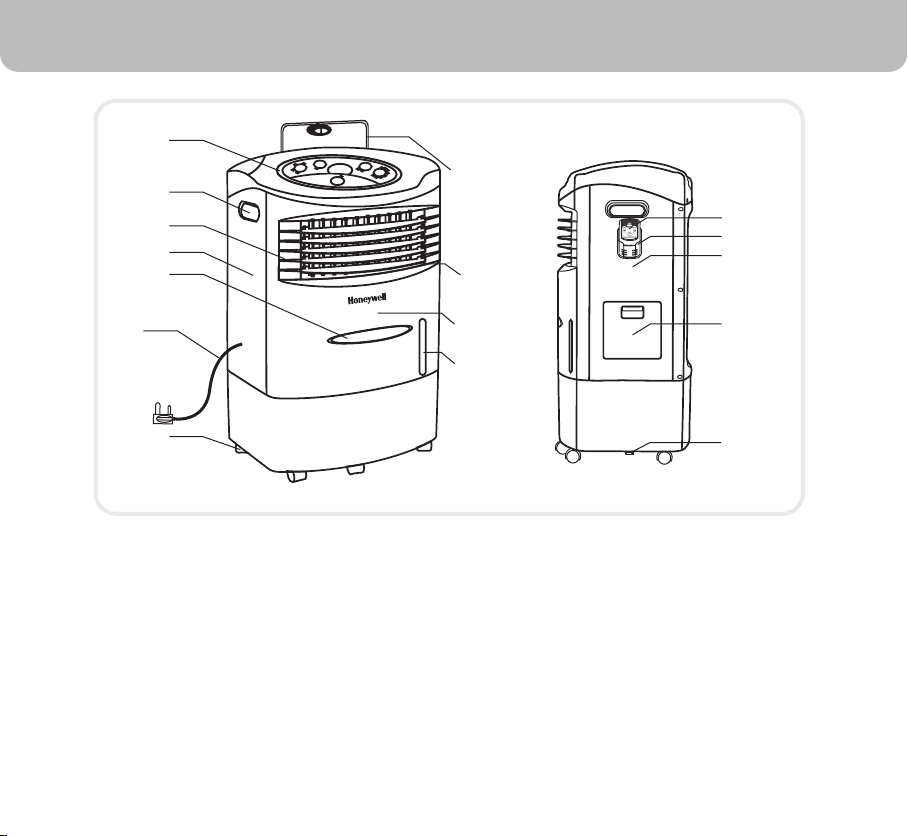
Control Panel
Side Handle
Horizontal Louvers
(Automatic with SWING Button)
Left Side Panel
Front Cover Ornament
Power Cord & Plug
Casters
Ice Compartment Lid
Vertical Louvers
(Manual Movement)
1
2
3
4
5
6
7
8
9
Front Panel
Water Level Indicator
Remote Control
Remote Control Holder
Right Side Panel
Water Fill Door
Drainage Tube / Cap
10
11
12
13
14
15
16
1
2
3
4
5
7
8
11
12
13
14
15
16
PARTS DESCRIPTION
7
10
9
6
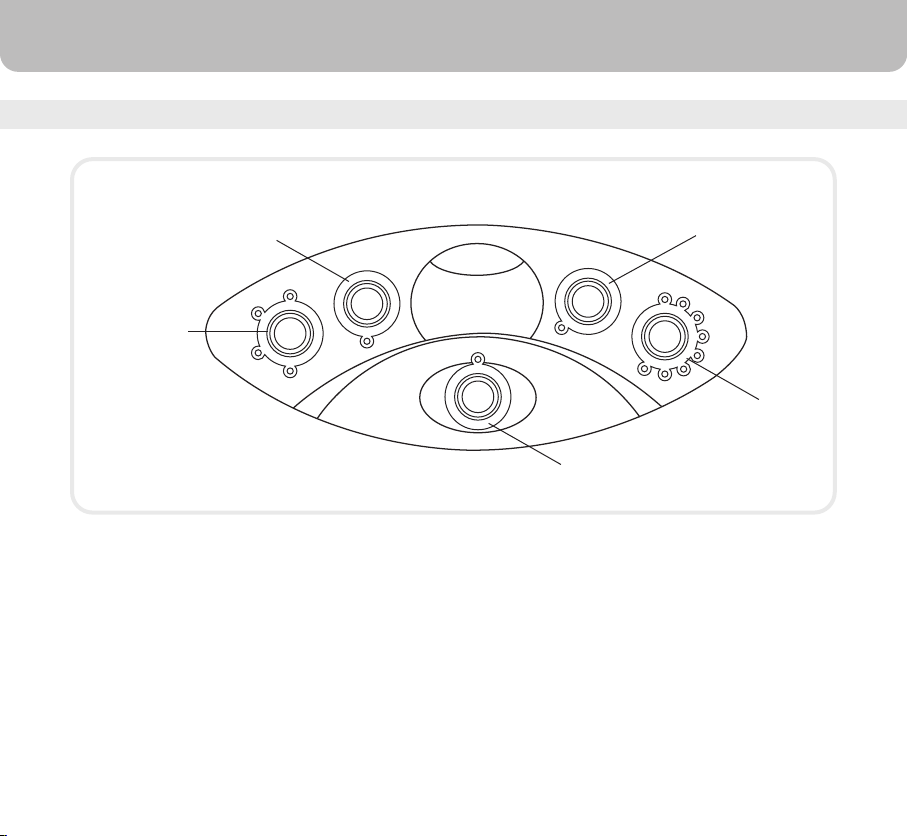
CONTROL PANEL
SPEED
TIMER
MODE
SWING
High
Mid
Low
Sleep
Cool
8hr
7hr
6hr
5hr
4hr
3hr
2hr
1hr
POWER
Speed Control
Swing Control
Power Button
Timer Control
Mode Button
USE & OPERATION
8
9
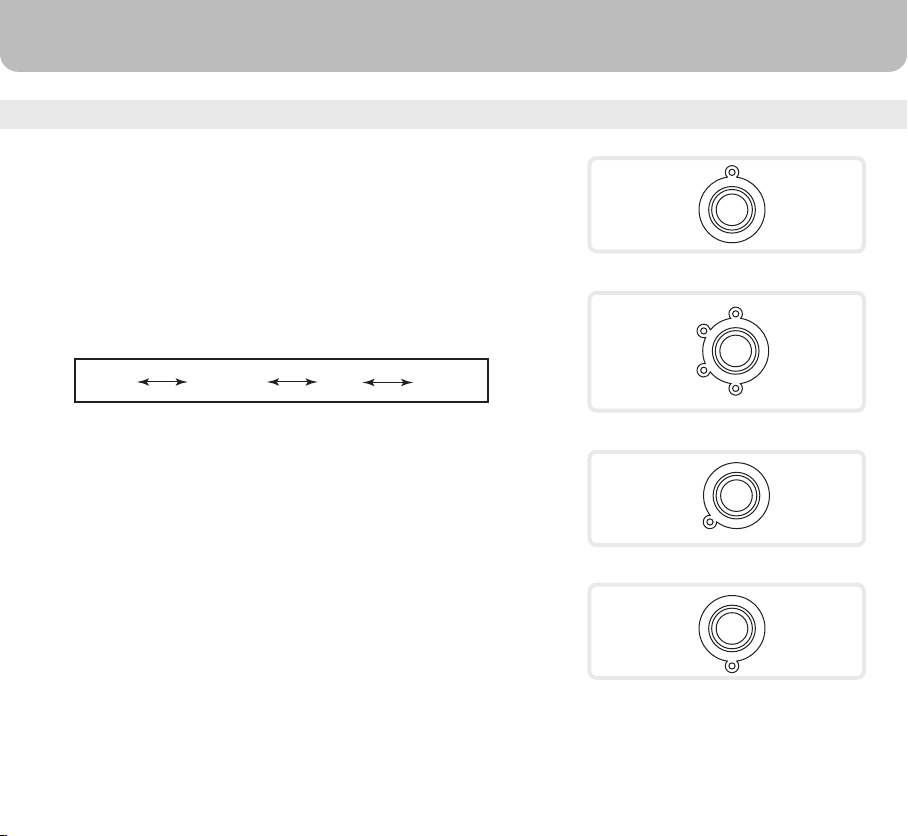
FUNCTION BUTTONS
USE & OPERATION
POWER
SPEED
High
Mid
Low
Sleep
MODE
Cool
SWING
High Medium Low Sleep
Sleep setting is for comfort during the night.
POWER
Press the POWER button to turn the unit on. To turn the unit
off, press the button again. The cooler will start automatically
at medium speed. After a few seconds the speed will switch to
low.
SPEED
Press the SPEED button repeatedly and the speed will
change. The indicator light will show the selected speed.
MODE / COOL
To begin cooling the desired area, press the MODE button.
The indicator light will come on and the water pump will
operate. You will feel the cooler air after the honeycomb
media is completely wet.
USE & OPERATION
TIMER
8hr
7hr
6hr
5hr
4hr
3hr
2hr
1hr
TIMER
Press the TIMER button until the indicator light moves to your
desired time. Once the set time has passed, the unit will
automatically shut off. The Timer function allows you to
program the unit for up to 8 hours of use.
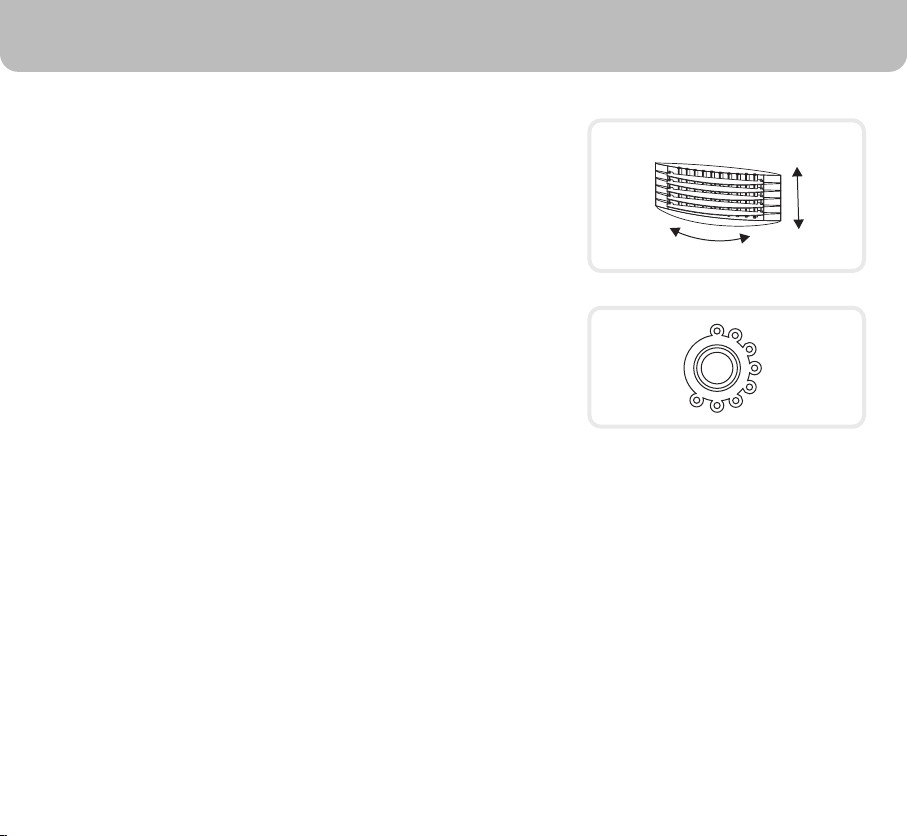
LOUVERS MOVEMENT
SWING
Press the SWING button. The indicator light will come on and
the louvers will begin to move from right to left automatically.
Manually adjust the horizontal louvers to change vertical
airflow.
10
11
USE & OPERATION
ROOM COOLING AND HUMIDIFYING
When the water regulator is set to MIN, the water pump
distributes a minimal amount of water to the honeycomb
media. This results in less water evaporation and reduces
cooling effect. Thus, reducing the humidity inside the room.
When the water regulator is set to MAX, the water pump
distributes the maximum amount of water to the honeycomb
media. This results in maximum water evaporation and the
cooling performance improves. Thus, increasing the humidity
inside the room.
Water Regulator is located inside the ice loading compartment.
Regulator knob can be rotated using your own hands.
NOTE
Water Regulator
MIN
MAX
12
USE & OPERATION
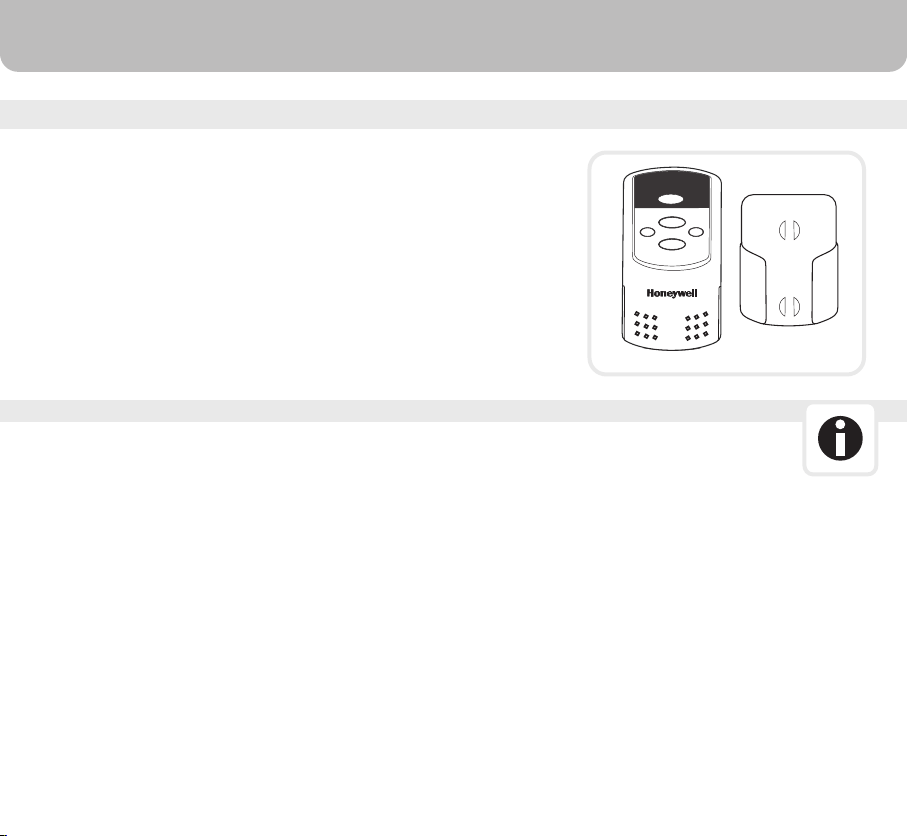
REMOTE CONTROL
Power: On / Off
Speed: Speed: Low / Medium / High / Sleep
Mode: Controls cooling or fan option
Swing: Controls the motion of the louvers
Timer:
Note : Remote control and holder are packed inside the top
ice loading compartment, during delivery.
Controls timer function for automatic shut off
NOTE
• Please open the battery compartment at the back of the
remote control and insert two new AAA dry cell batteries.
Care must be taken to insert the batteries according to the
correct polarity (+ / –) markings shown inside the battery
compartment.
• Always point the remote control signal transmitter toward the
unit when operating.
• Make sure that the signal path is not obstructed.
• Remove the batteries if the unit is not going to be used for an
extended period of time.
• Do not drop the remote control.
MODE
SPEED
TIMER SWING
Evaporative Air Cooler
ON/OF
13
USE & OPERATION
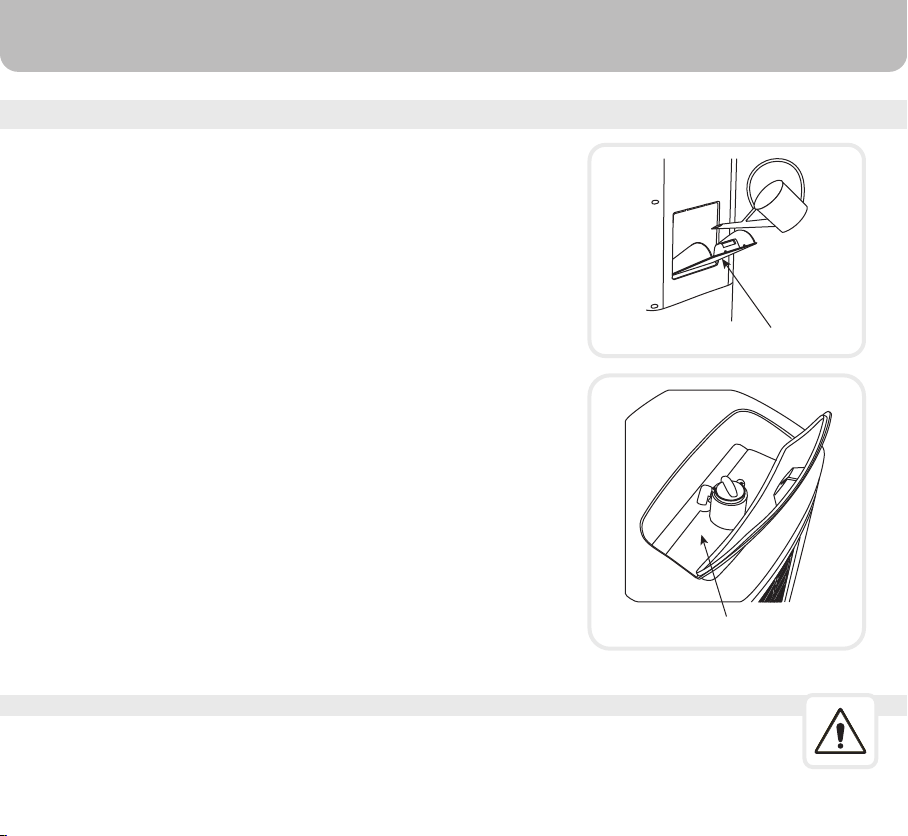
FILL WATER
CAUTION
Open the Water Fill Door located below the Remote Control
Holder on the unit. The water tank of the unit holds up to 20 litres
of water.
Water level display window is located on the front of the unit.
Refill the water tank when water level is low. Do not fill water
above the Max water level mark. Check water level in the tank
before running the ''COOL'' function. Please be sure water in
the tank is always above minimum water level mark. Running
the unit with inadequate water may cause pump failure. If ice is
available you may add ice in the top compartment to enhance
the cooling performance.
Unplug from power when refilling.
Water Fill Door
Ice Loading Compartment

WARNING
CLEANING & MAINTENANCE
CLEANING & DRAINING THE WATER TANK:
• Before cleaning the unit, switch it to the off position and remove the plug from the
power socket.
• To clean the outside, use a damp cloth to remove dirt and dust.
• Never use detergents, corrosive elements or any chemicals to clean this product.
• When the product is not in use, store the unit in a dry place out of direct sunlight.
•
•
•
•
Turn the power "off" and disconnect the unit from power supply.
Move the unit to a location where it can be drained and remove the drainage
tube/cap (see parts description on page 7).
Once the tank is empty, refill with clean water and drain it again. This should be
repeated weekly to maintain the integrity of the unit and to remove particles filtered
from the air.
Once the tank is clean, refill the water tank. The unit is now ready to be used again.
14
CLEANING & MAINTENANCE
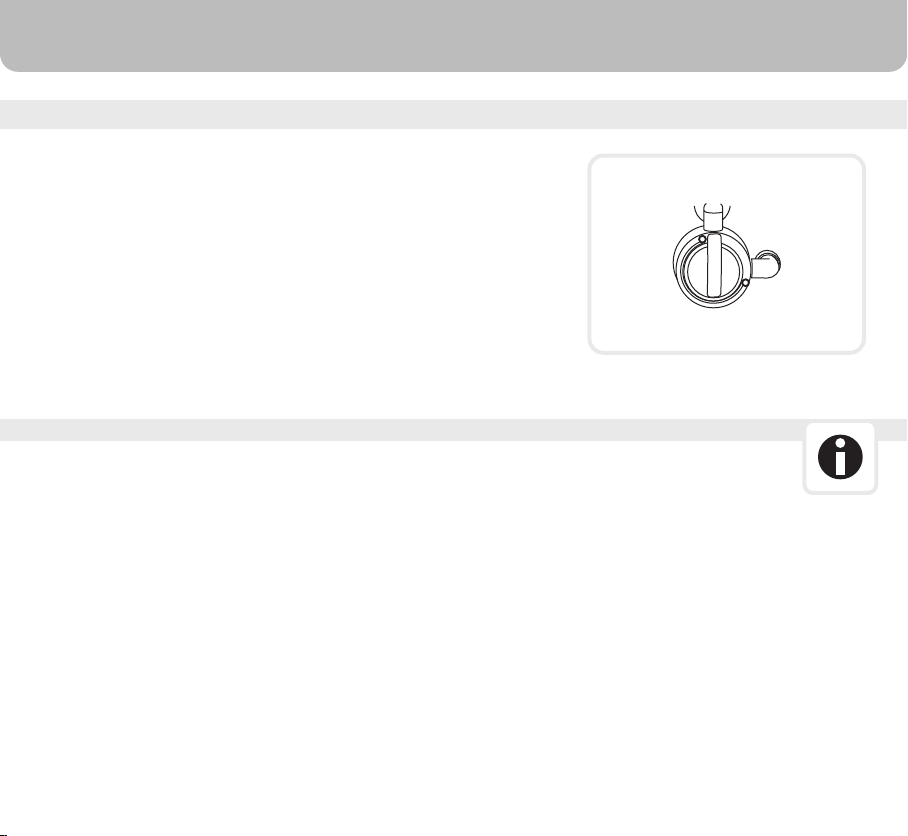
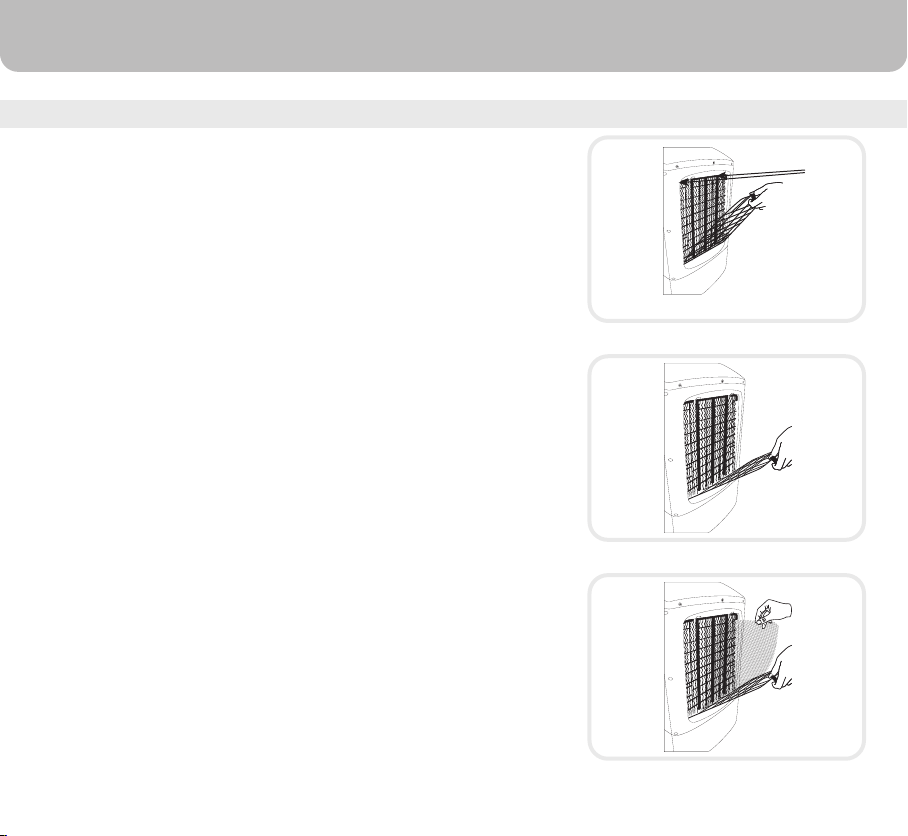
CLEANING THE CARBON / DUST FILTER
Carbon filter behind “air inlet”
• Turn off the unit, and unplug the power cord from wall outlet.
• Rotate the unit facing the back panel, and locate the knobs
to remove back grill.
• Press both the knobs (see fig.) and gently pull out the back
grill, untill it is completely removed.
• Now remove the carbon filter from the back panel.
• You can now clean or replace the carbon filter.
• Insert the dust free filter inside the unit, doing the reverse of
removal procedure.
• The appliance is supplied with carbon filter and honeycomb
cooling media.
• Always keep the carbon filter clean. Wash the carbon filter
at least twice a year or as necessary.
• Draining the water tank and refilling it with fresh water at least
once a week will greatly reduce mineral deposits in the pads
and help extend the life of the honeycomb cooling media.
• Do not run the unit in COOL mode with stale water in the
tank. It is recommended to empty the tank and refill it with
fresh water, if the water has been standing inside the tank for
an extended period of time.
• Cleaning frequency depends on local air and water
conditions. For example, in areas where mineral content of
the water is high, deposits may build up in the honeycomb
cooling media, restricting air flow. In this case, it is recommended
to clean the honeycomb cooling media every two months.
• For best results, allow the honeycomb cooling media to
dry after each use by turning off the cool function 15 minutes
before turning the unit off.
Knobs
15

TROUBLESHOOTING GUIDE
No discharge of air Cord is not plugged in.
Make sure power cord is plugged
in and the supply switch in ON.
Power is not on.
Try to turn the unit ON by
pressing buttons on control
panel or remote control.
Not Cooling / Unit is
making noise
Pump is not turned ON.
Turn on COOL function from
remote or control panel.
Low or no water in tank,
when COOL is selected.
Refill water tank.
Odour omission New Unit.
When the unit is used for the
first time, the Honeycomb
cooling media will have an
odour, which will dissipate
within a week of initial use.
Old Unit. There may be an algae issue,
Replace the honeycomb cooling
media. Contact service centre.
Damaged Pump or Calcium
deposits on blower.
Contact service centre.
PROBLEM POSSIBLE CAUSE SOLUTION
16

TROUBLESHOOTING GUIDE
The unit does not respond Remote control batteries. Check batteries, Replace if
needed. Try to operate using
the control panel.
Damaged PCB
Try with remote control. If the
unit responds, PCB board
fasteners may be loose.
Contact service centre.
If neither remote control nor
control panel works, PCB
board may be damaged.
Contact service centre.
PROBLEM POSSIBLE CAUSE SOLUTION
17
MODEL NO. CL201AE
220 - 240V
50Hz
200 Watts
20 Litre
Honeycomb
480(L) x 370(W) x 835(H) mm
10.6 Kg
Voltage
Frequency
Wattage
Water Tank Capacity
Cooling Media
Product Dimension
Net Weight
0.91A
Current
0.011m
3
/hour
Humidifier
0.18
Refrigerant efficiency
TECHNICAL SPECIFICATIONS
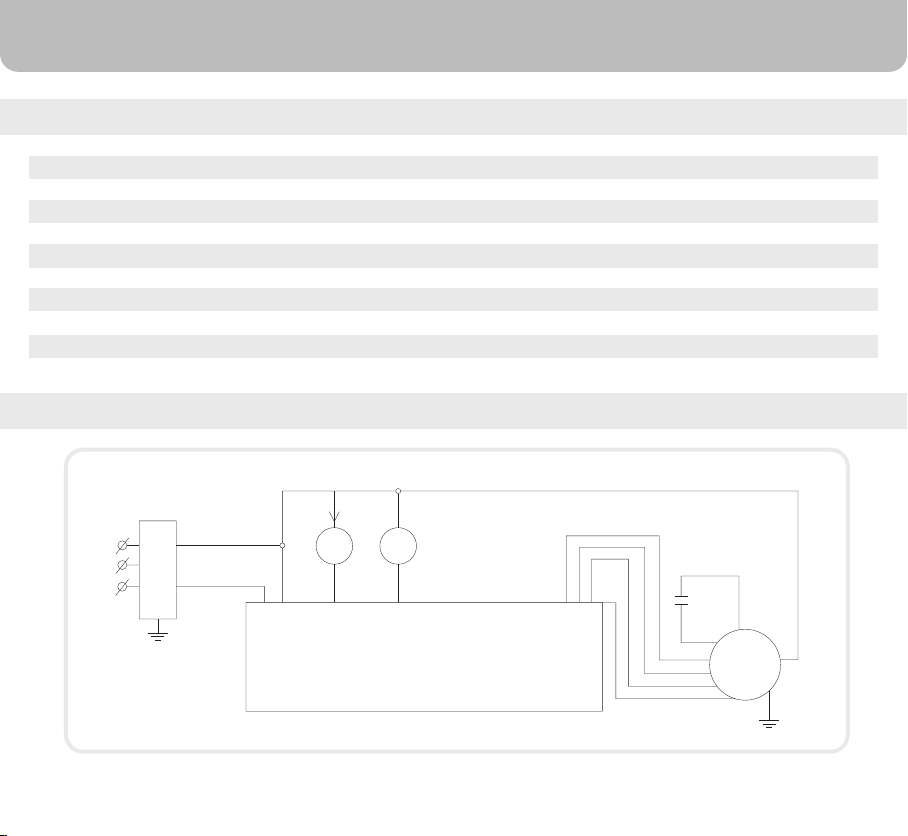
ELECTRICAL WIRING DIAGRAM
COOL
SWING
PUMP
PLUG-IN
PLUG
COOL
F/R
L N
PCB
H M L N
CAPACITOR
M
M
18

AirTek International Corporation Limited
Suite 806-807A, West Wing,
Tsim Sha Tsui Centre, 66 Mody Road,
Tsim Sha Tsui East, Kowloon, Hong Kong
tel: +852 2559-5522
fax: +852 2559-0699
e-mail: [email protected]
www.honeywellaircoolers.com
IM01-1009-000-000
March 2010
© 2010 AirTek International Corporation Limited
The Honeywell Trademark is used under license from
Honeywell International Inc.
Honeywell International Inc. makes no representation or
warranties with respect to this product.
Manufactured by AirTek International Corporation Limited.