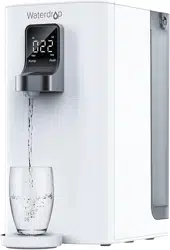
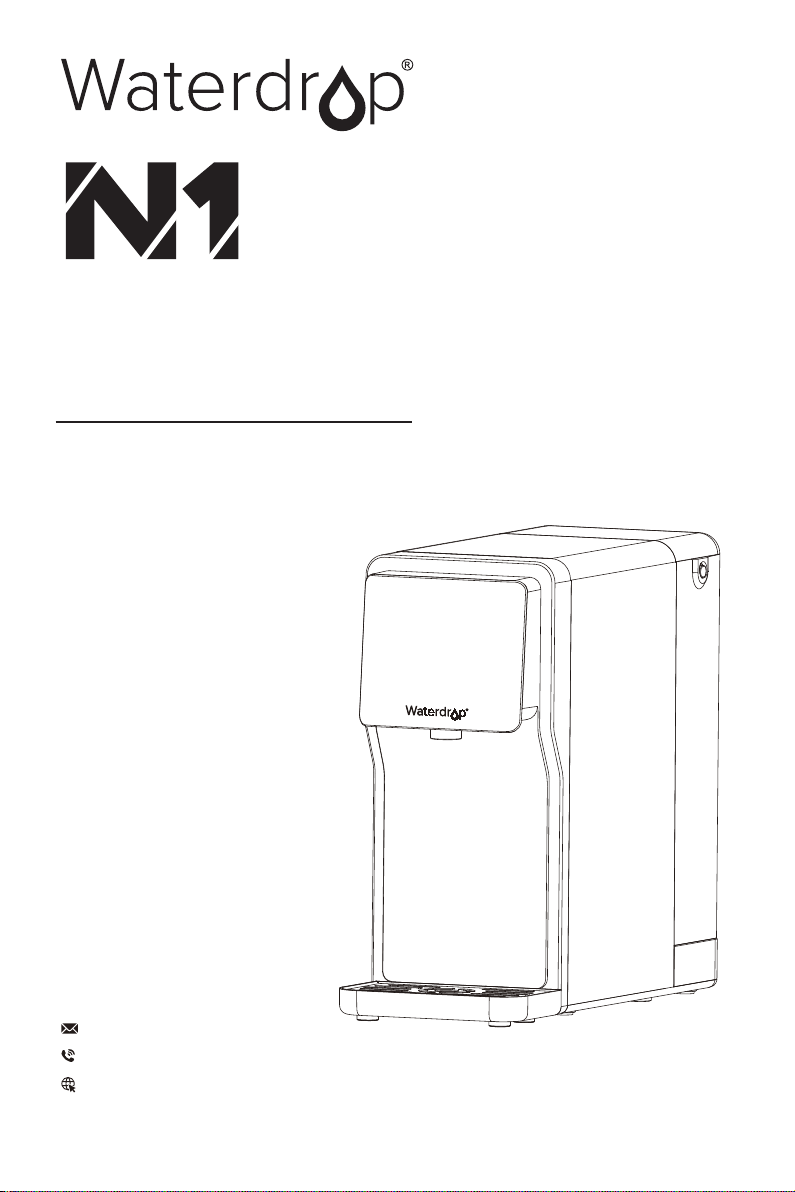
Countertop
Reverse Osmosis
Water Filtration System
Instruction Manual
service@waterdropfilter. com
1-888-352-3558 Mon-Fri 8:00 AM-5:00 PM (PST)
www.waterdropfilter.com (live chat available)

Find the installation video
Search "Waterdrop N1 Countertop RO Installation“ on
Register 1-year manufacturer warranty*
Visit warranty.waterdropfilter.com and enter the product serial number.
Any questions, please contact Waterdrop
by live chat: www.waterdropfilter.com
by phone: 1-888-352-3558 Mon-Fri 8:00 AM-5:00 PM (PST)
or by Email: service@waterdropfilter.com
This device complies with part 15 of the FCC Rules. Operation is subject to the following two conditions:
(1) This device may not cause harmful interference, and (2) this device must accept any interference received,
including interference that may cause undesired operation.
Any Changes or modifications not expressly approved by the party responsible for compliance could void the
user's authority to operate the equipment.

Contents
Installation Instructions
Owner’s Manual
1
2
3
6
6
6
7
8
8
12
13
16
17
Installation Instructions
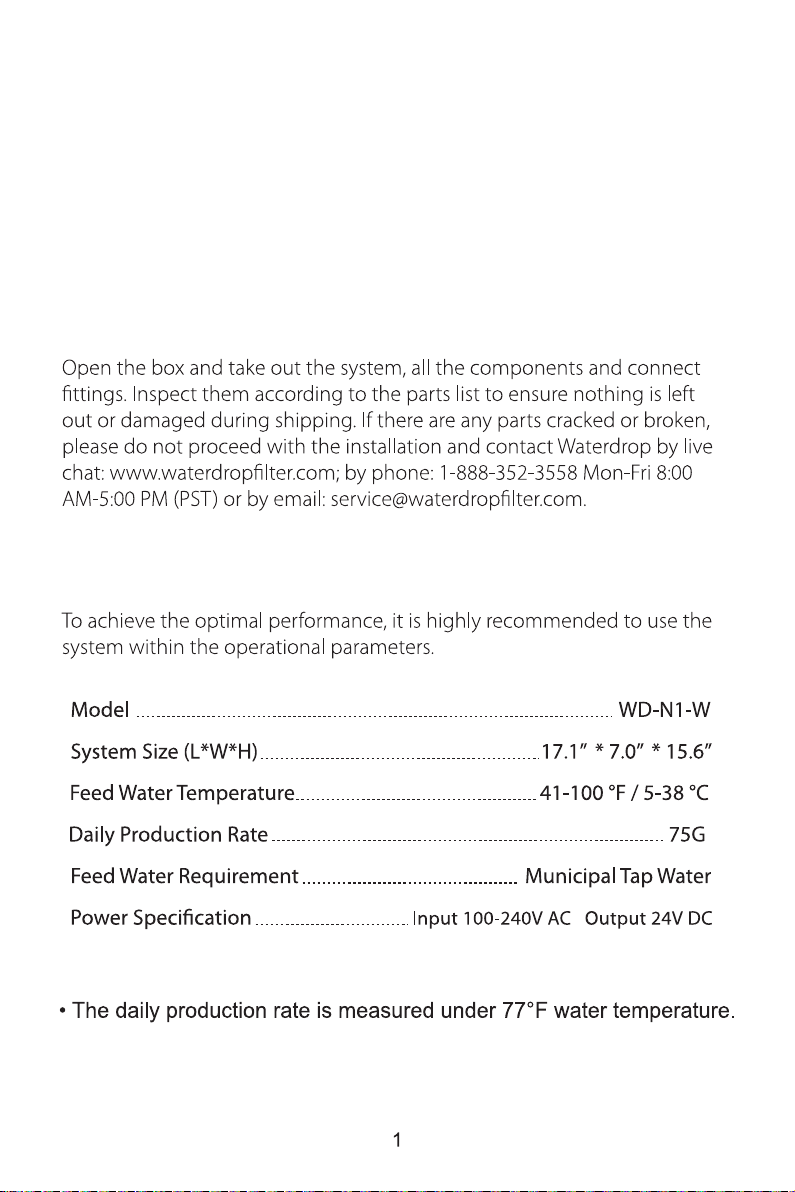
Before Installation
Inspect the Package
Specifications
Note
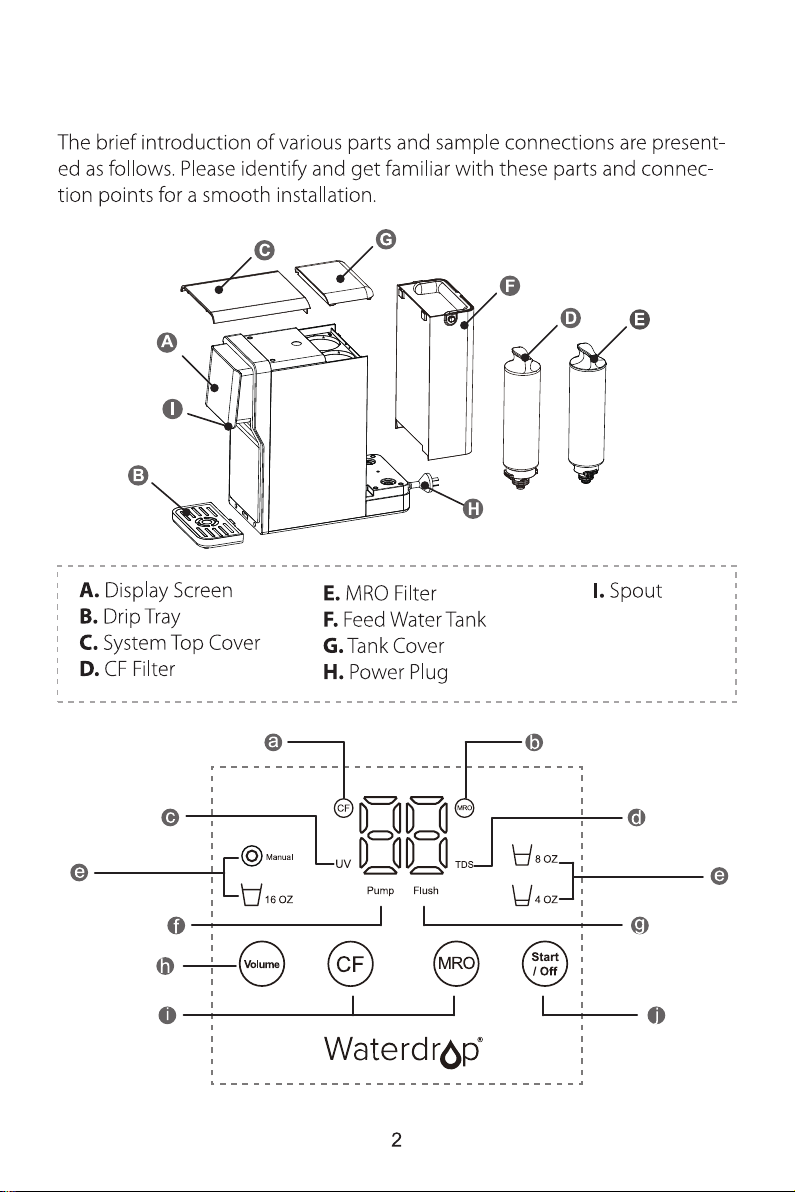
Product Introduction
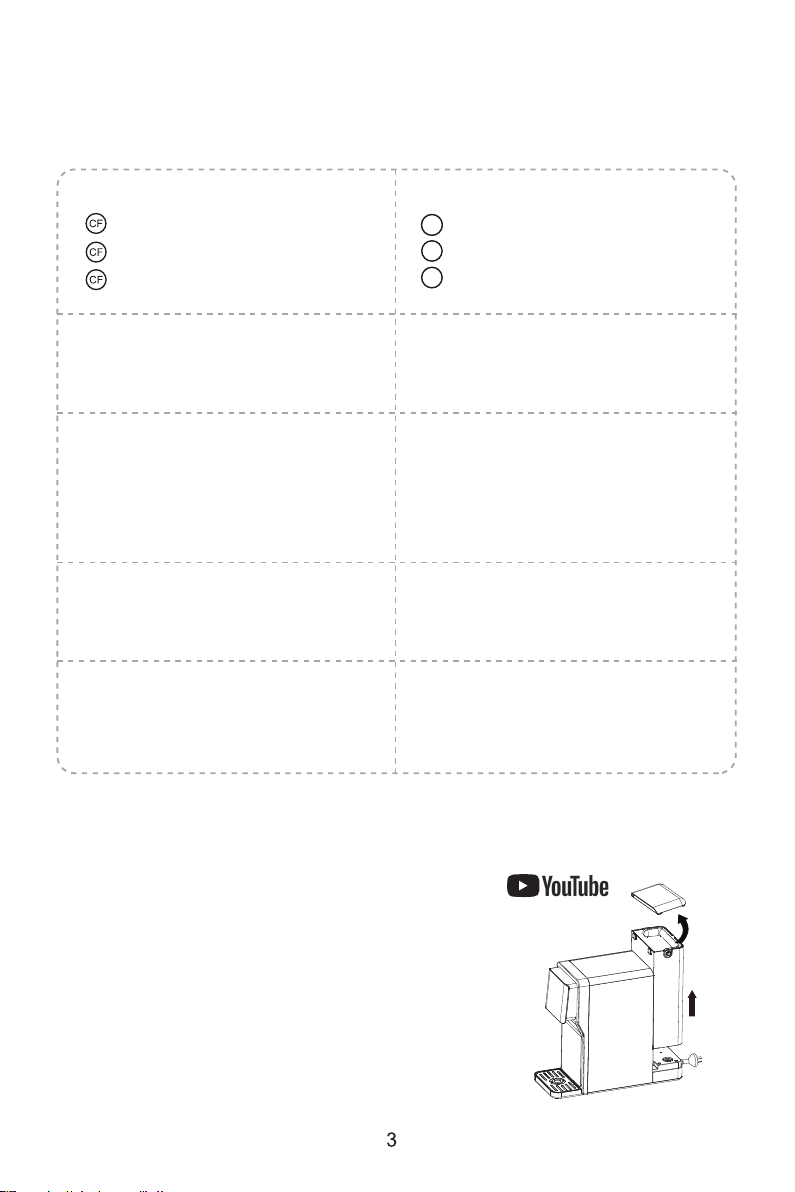
● Display Screen: TDS of filtered water / “L1” - Change water / Fault code /
Automatically flush
a. CF Filter Life Indicator Light:
“ ” Blue - normal status
“ ” Yellow - replace soon
“ ” Red - replace now
b. MRO Filter Life Indicator Light:
“ ” Blue - normal status
“ ” Yellow - replace soon
“ ” Red - replace now
MRO
MRO
MRO
c. UV Indicator Light:
Blue - working
Off - not working
d. TDS Indicator Light:
Blue - Standard
Red - Replace
e. Volume Indicator Light:
4 OZ, 8 OZ, 16 OZ - the capacity of
water
Manual - manually control the
water volume
f. Pump:
Light on - filtering water
Light off - not filtering water
g. Flush:
Light on - need to flush
h. Volume Selection:
Touch to select the capacity of
water
i. Filter Life Reset Button:
Press for 5s to reset filter life
j. Start /Off:
Touch to dispense water or stop
dispensing water
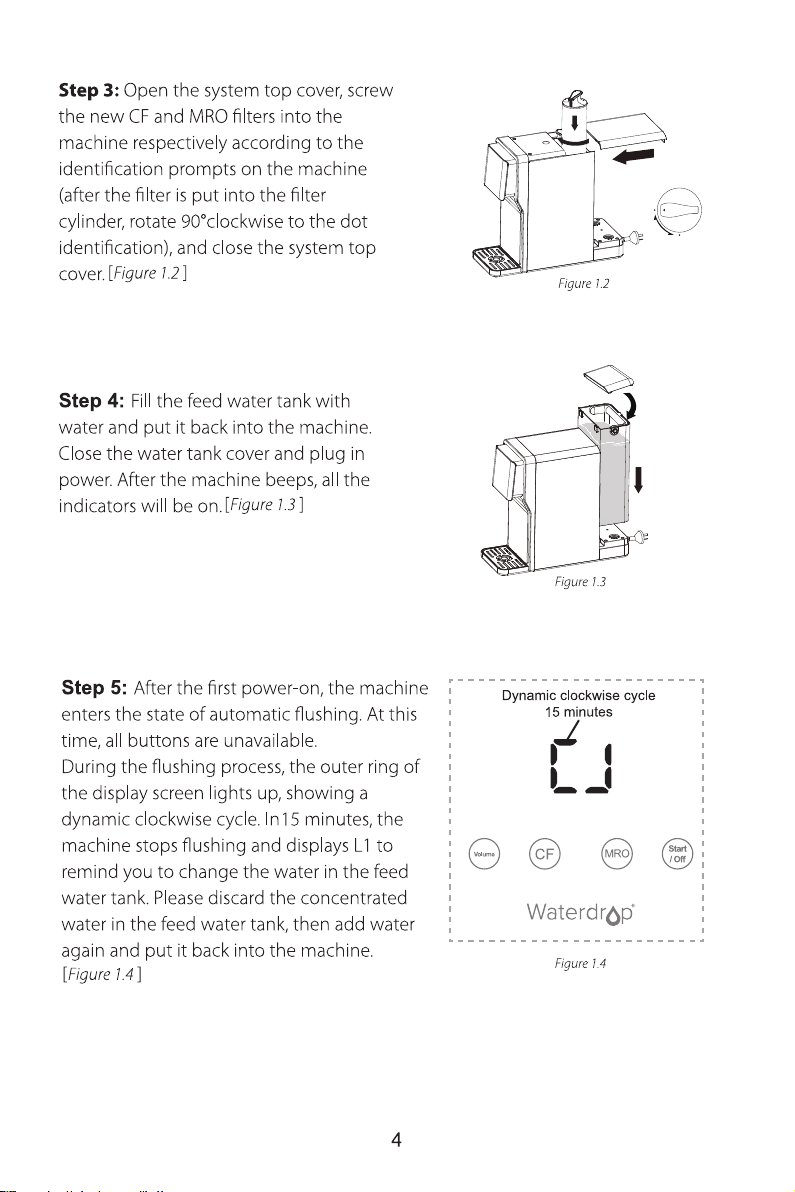
Installation Steps
Step 1: Take out the machine and place
it on the countertop. Install the drip tray.
Step 2: Remove the tank cover, hold the
machine with one hand, and take out the
feed water tank with the other hand.
Prior to installation, it is highly recommended to watch the video
“Waterdrop N1 Countertop RO Installation” on
[ ]
Figure 1.1
Figure 1.1
Section 1: Dispense Water (How to Dispense Water)
Section 2: Replenish Water
Manual replenishment of the feed water tank
Automatic replenishment of the purified water tank
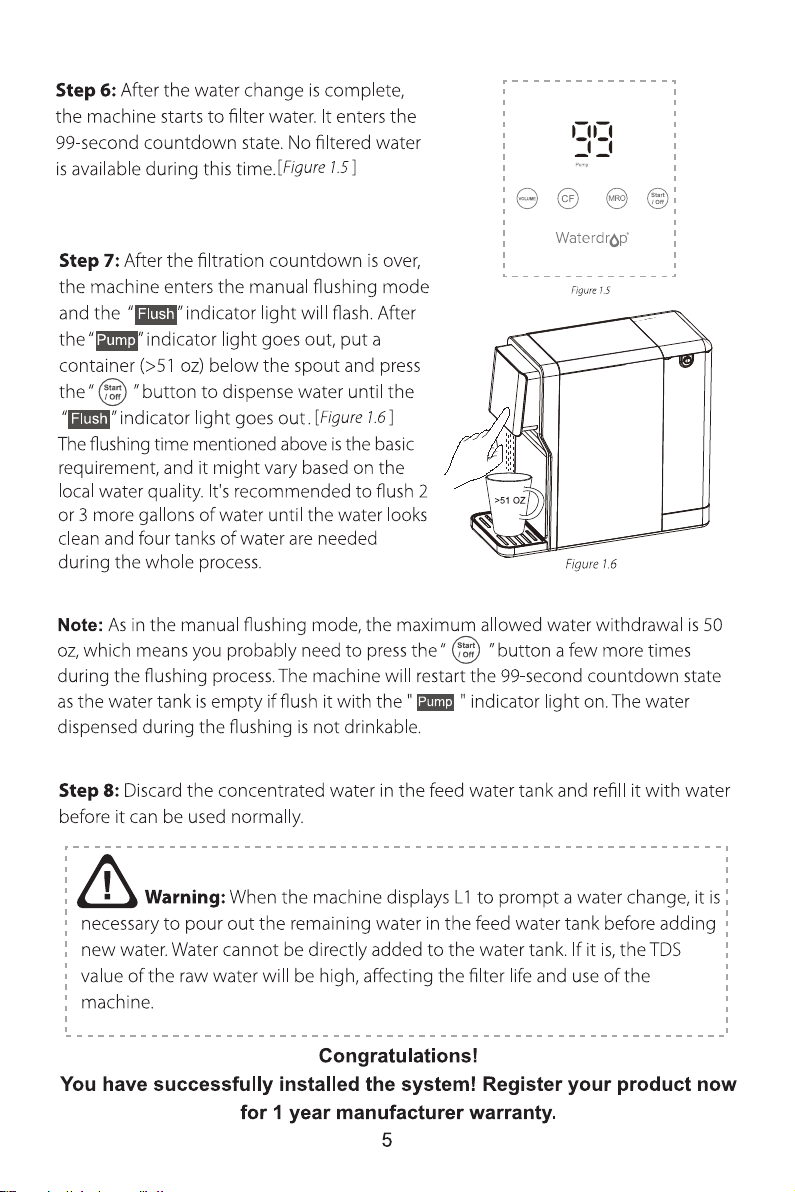
● During use, when L1 is displayed on the screen, the feed water tank is in a water
shortage state. The “ ” button will not be available at this time.
● When the built-in purified water tank is short of water during normal use, the
machine will automatically enter water replenishment mode. At this time, the display
screen will display a countdown of 99 seconds and the “ ” indicator light will be
on.
● Please remove the feed water tank, pour out the concentrated water, add water
again, and put the feed water tank back into the machine.
Note: The water cannot be directly poured into the feed water tank. Otherwise, the
RO filter life may be shortened or the machine may break down.
Capacity adjustment
Dispense water
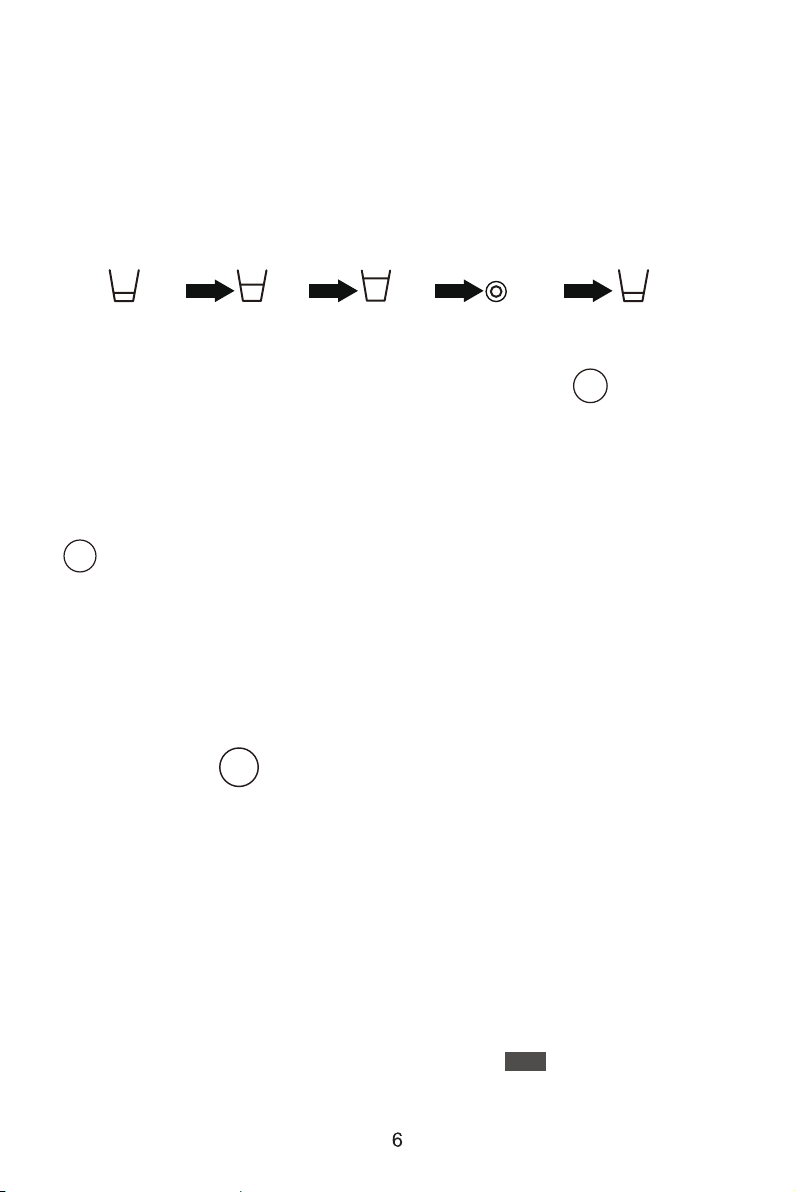
There are 4 capacity options (4 OZ, 8 OZ, 16 OZ, and Manual). Touch the Volume
button to choose the capacity you need.
Display and Operation
4 OZ 4 OZ
8 OZ
16 OZ
Manual
After selecting the amount of water you want, press the button “ ” for a short
time to get water. Press it again to stop getting water.
When the capacity options of 4 OZ, 8 OZ, or 16 OZ is selected, the system will
automatically stop dispensing water after the selected water capacity flows out.
Start
/ Off
When you select Manual, the water capacity should be controlled according to your
needs. When the required water capacity is obtained, the button
“ ” should be pressed to stop dispensing water.
Note: The maximum water output on Manual operation is 50 oz.
Start
/ Off
Start
/ Off
Pump
Section 3: Standby Mode and Sleep Mode
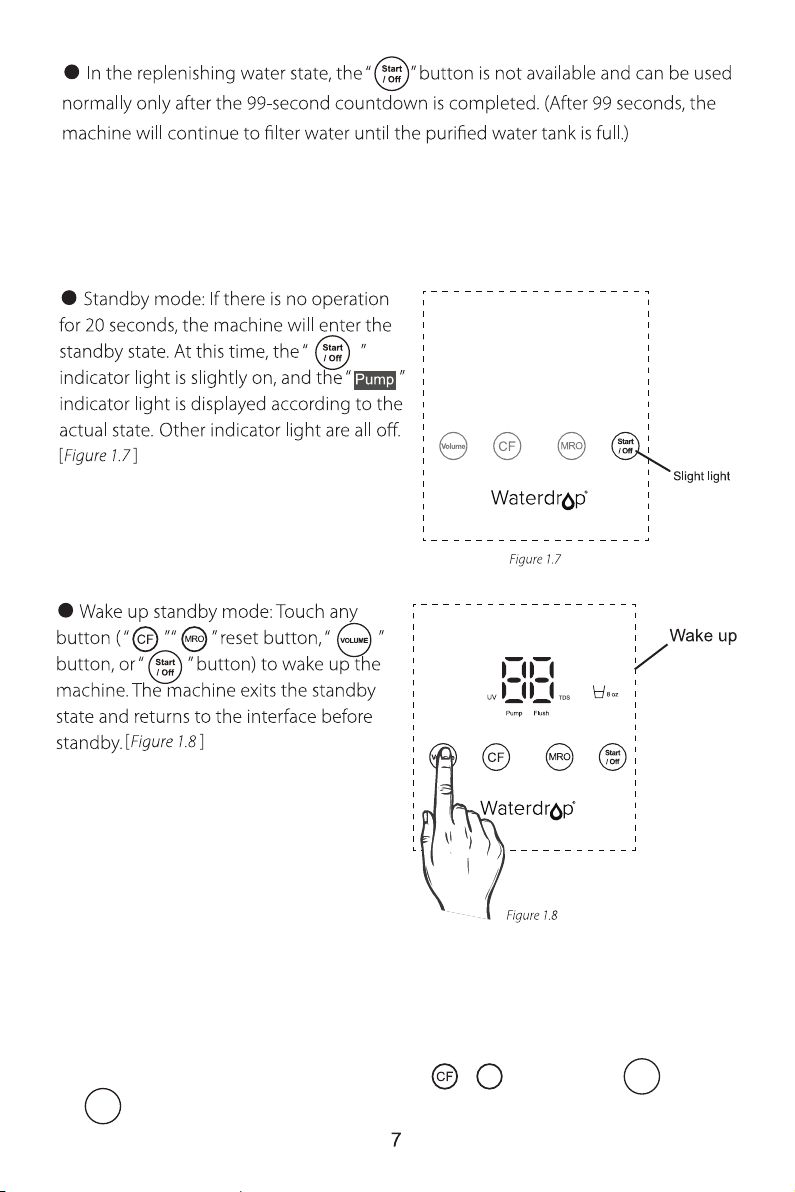
Standby mode
● Wake up sleep mode: Touch any button (“ ” “ ” reset button, “ ” button,
or “ ” button) to wake up the machine.
Sleep mode
● Sleep mode: After 120 hours of no use, the machine will enter the sleep state
and all lights go out.
MRO
VOLUME
Start
/ Off
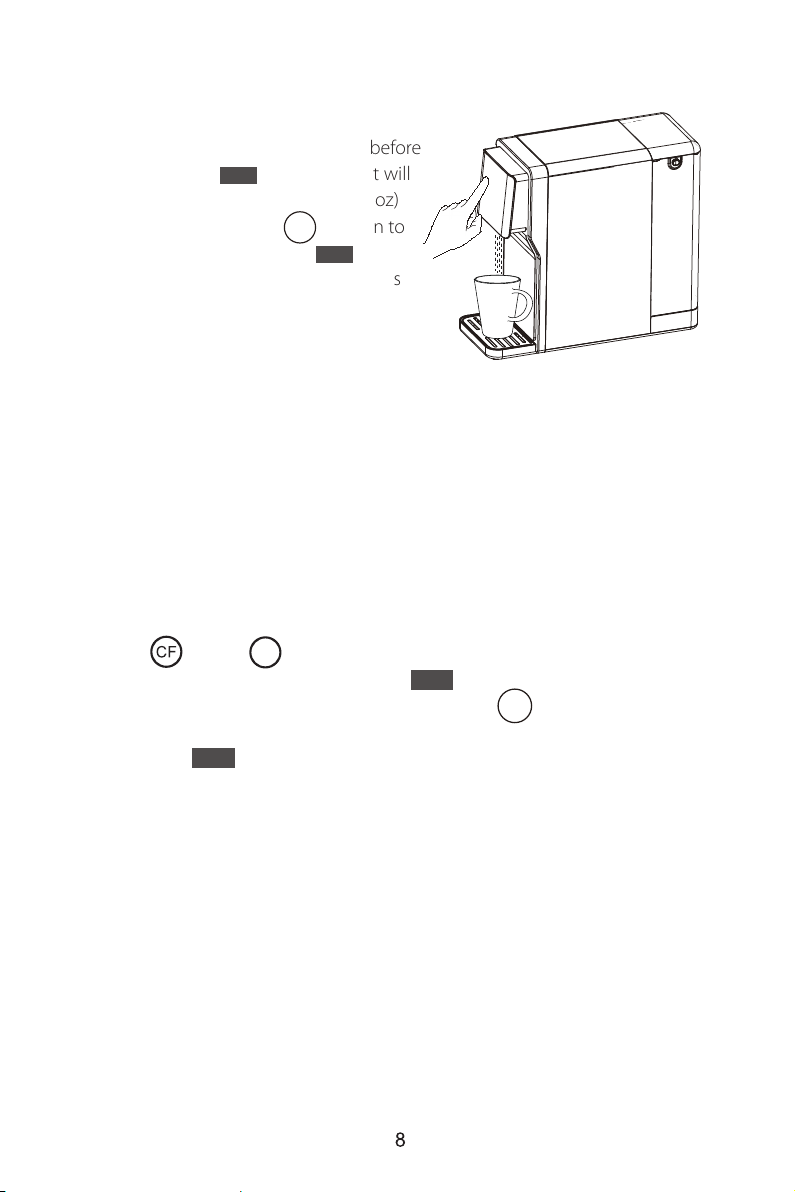
It is recommended to empty the purified water tank before using the system if the
system doesn’t been used for a period of time.
Press the “ ” and “ ” filter life reset buttons for 3 seconds, the system will
enter the drain mode after a beep and the “ ” indicator light will flash constantly.
Place a container (>51 oz) below the spout. Press the “ ” button to get water and
press it again to stop. The drain mode will be end after the purified water tank is
empty and the “ ” indicator light stops flashing. The screen displays a count-
down of 99 seconds to filter water again. The filtered water is drinkable after the flush
process. If the filtered water still tastes weird, it is recommended to empty the
purified water tank again.
● Manual flushing: Because the machine
has not been used for a long time, the water
stored in the purified water tank should be
drained and replaced with fresh water before
use. After that, the “ ” indicator light will
flash constantly. Place a container (>51 oz)
below the spout. Press the “ ” button to
get water for flushing until the “ ”
indicator light goes out before the water is
drinkable.
1. Filter life reminder
a. CF: Pre-Sediment and Carbon Block Filter
Service life: 6 months
b. MRO: Multiple Reverse Osmosis Membrane Filter
Service life: 18 months
Note: A total of 102 oz of water must be discharged. The whole operation takes
about 8 minutes. The water dispensed during flushing is not drinkable.
>51 oz
Section 4: Empty the Purified Water Tank
Section 5: Filter Life Reminder and Replacement Guide
[ ]
Figure 1.9
[ ]
Figure 1.9
Start
/ Off
Flush
Flush
Start
/ Off
Flush
Flush
MRO
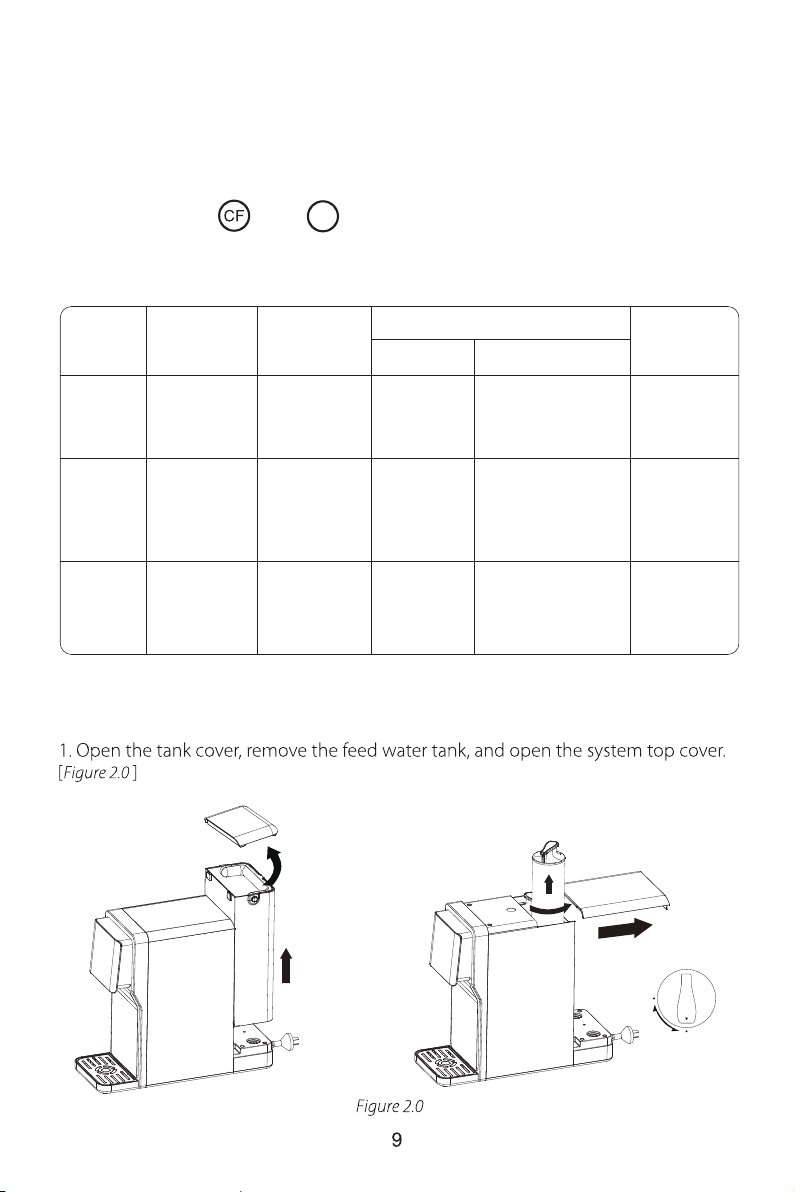
2. Filter replacement guide
a. How to replace filters:
There are helpful “ ” & “ ” filter life indicator light on the front panel that
will notify you to perform routine filter replacement by color change. Be sure to reset
the filter life indicator light every time you replace your filter.
NOTE:
Filter life may vary depending on source water quality and water usage.
Please replace the filters according to the reminder of the filter life indicator light.
Status
Normal >15 >40 N/A N/A
Replace
Soon
Replace
Now
Beeps 3
times when
dispensing water
Beeps 3
times when
dispensing water
Yellow
Red
≤40≤15
≤ 0
Pre-
warning
Warning
Remaining
Life (Day)
Remaining
Capacity (G)
Indication
Light Status
Status
≤40
Good
MRO
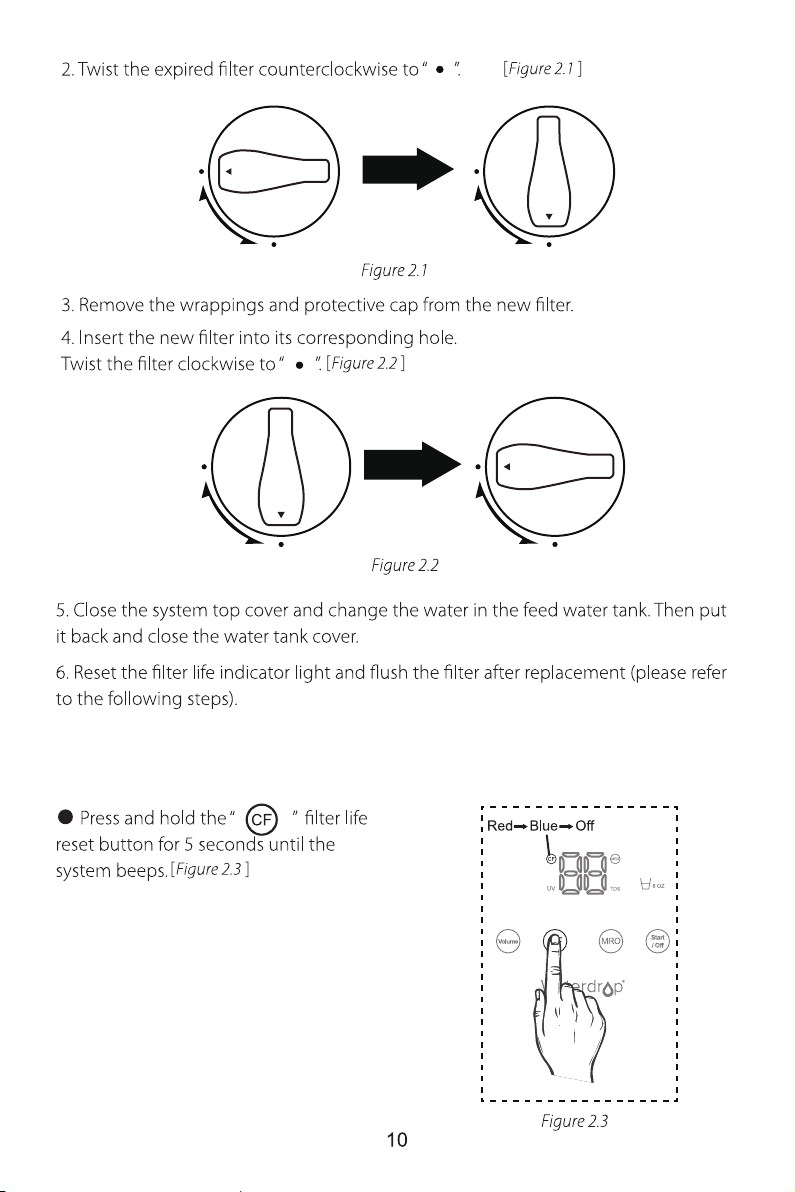
b. How to reset the filter life indicator light (resetting the CF filter life
indicator light, for example):
Note: The filter life reset of MRO is the
same as the reset of CF.
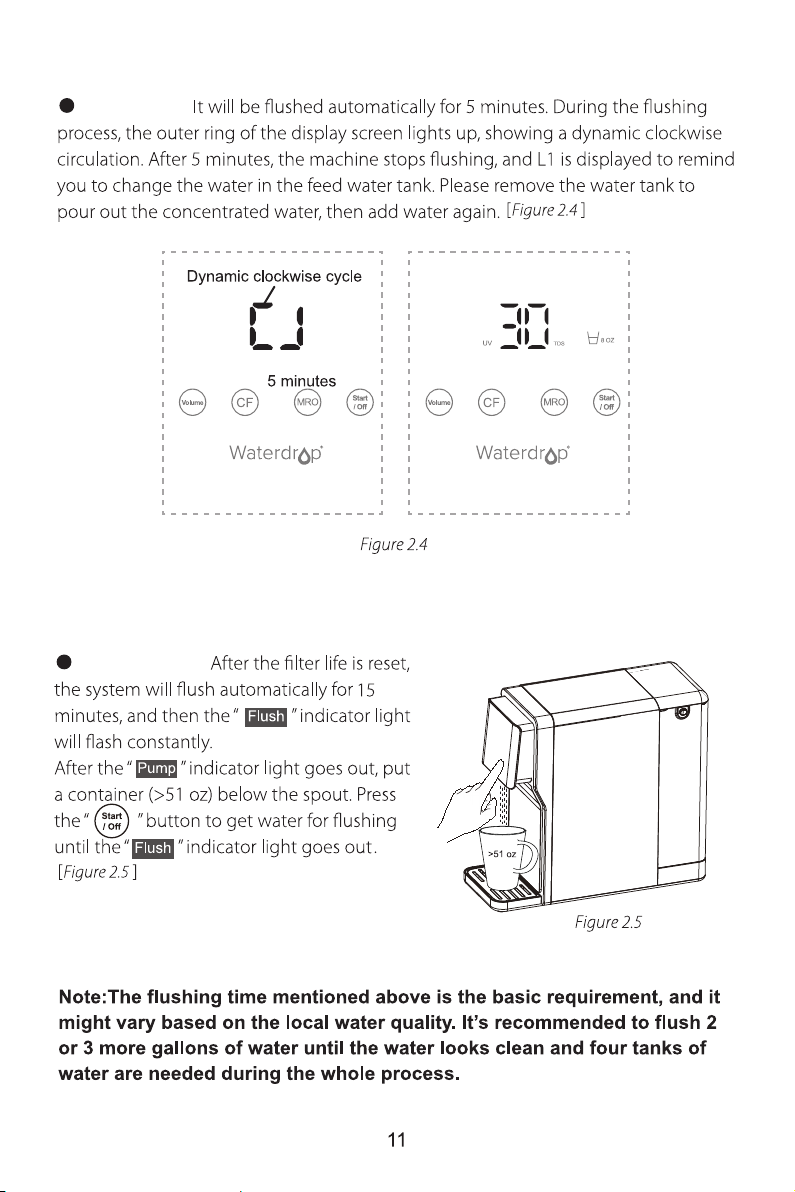
For CF filter:
For MRO filter:
c. How to flush the filter after replacement:
Section 6: Malfunction Display
Timeout protection
System Maintenance
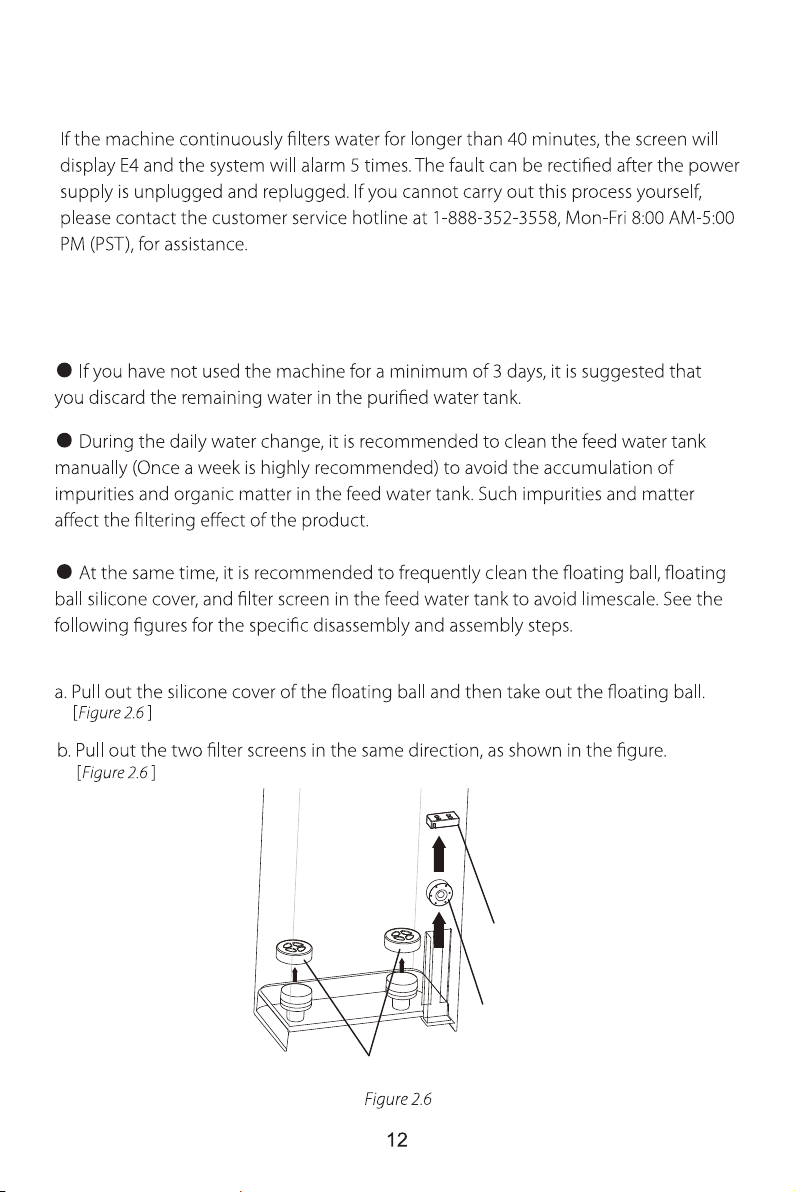
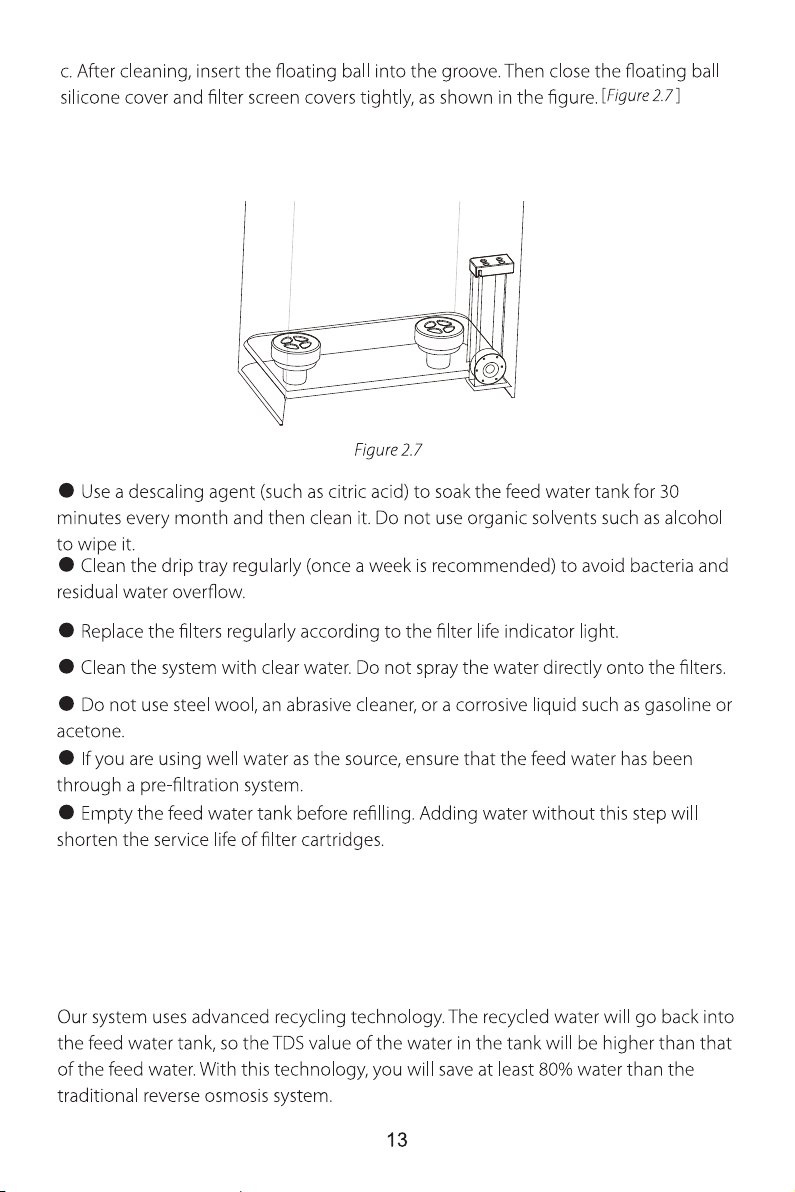
Filter screen
Floating ball
Floating ball
silicone cover
Troubleshooting
1. Why is the TDS value in the feed water tank higher than that of the added
tap water?

2. When the machine filters water, the TDS value in the feed water tank is
always changing.
When the machine filters water, the recycled concentrated water continuously enters
the feed water tank and the TDS value of the concentrated water is changing,
resulting in continual changes in the TDS value after the concentrated water is mixed
with the raw water. The TDS value will tend to be stable after filtration.
3. The TDS value of the purified water is high.
When working properly, the system will provide a 90%+ TDS rejection rate (tested
under standard laboratory conditions). If the TDS reading is high, the following are
the possible causes.
a. The new filters haven't been flushed thoroughly. Refer to the instructions to flush
them correctly.
b. The RO membrane filter has expired. Replace the RO membrane filter immediately.
c. The source water in the tank may have a high TDS. Test the source water in the tank
and the filtered water. The filtered water’s TDS should be about 5%-10% of your
source water’s TDS. This is a normal range. If the source water has high TDS, it may
reduce the service life of the system. When the filtered water’s TDS creeps up to
15%-20% of the source water’s TDS, please perform routine filter replacement.
4. The TDS value of the purified water is not stable.
The TDS value of purified water is positively correlated with the TDS value of the feed
water, which is generally 5%-10% of feed water. Feed water with an unstable TDS
value will lead to purified water that has an unstable TDS value.
a. The TDS value of tap water may change based on the water source.
b. The TDS value of the feed water tank is not stable. As this system works with the
function of “Concentrated Water Return and Reuse”, with the concentrated water
flowing back to the feed water tank, it will influence the TDS of the purified water.
5. The water has a peculiar smell.
a. The new system is not fully flushed and can be used after flushing according to the
instructions for the first installation.
b. If the system has not been used for a while, follow the emptying mode prompt to
flush.
c. If the filter is not replaced in time, please replace the filter immediately.

6. If the water in the feed water tank does not reach the lowest water level,
the machine displays L1 to prompt a water change.
When the TDS value of the filtered water is higher than 99ppm and the water quality
is poor, the screen will display L1 to prompt a water change. Continuing to use the
water in the feed water tank will shorten the filter life and damage the machine.
Therefore, when the machine displays L1, please pour the water out of the feed
water tank and replace it with new water to use the machine.
7. No water from the machine.
a. If the machine is not powered on, check on whether the power plug is loose or not
plugged in.
b. The purified water tank (not the feed water tank) is short of water. The screen
displays a countdown of 99 seconds. Water will be taken after the countdown is over.
8. The machine is leaking.
a. When the drip tray is full, empty the water stored in the drip tray.
b. Foreign matter is stuck in the check valve at the bottom of the feed water tank.
Use a small thimble or your finger to resist the sealing valve and remove the foreign
matter.
c. Leakage inside the machine: Turn off the power and water supply and contact our
customer service hotline, 1-888-352-3558, Mon-Fri 8:00 AM-5:00 PM (PST), for
assistance.
9. The machine does not filter water.
a. The feed water tank is short of water, and the machine displays L1 to prompt a
water change.
b. The TDS of the water in the feed water tank is higher than 99ppm, and the
machine displays L1 to prompt a water change.
c. The feed water tank is not installed in place. Check the feed water tank to ensure
that it is installed in place.
10. The indicator light on the display screen turns on and off.
a. The “ ” , “ ” , and filter life indicator light, as well as the Volume and UV
indicator light, are displayed according to the actual working status of the machine
and are not constant all the time. Please refer to the display part for details. Therefore,
if the display indicator light are consistent with the instructions, which means there is
no problem, feel free to use the machine.
b. If the circuit board is disconnected, please contact our customer service hotline by
live chat: www.waterdropfilter.com; by phone: 1-888-352-3558 Mon-Fri 8:00 AM-5:00
PM (PST) or by email: service@waterdropfilter.com.
Flush
Pump
Limited Product Warranty
Any information or suggestion with respect to our product concerning
applications, specifications or standards is provided solely for your
convenience.
Warranty Registration
How to Contact Us
service@waterdropfilter.com
1-888-352-3558 Mon-Fri 8:00 AM-5:00 PM (PST)
www.waterdropfilter.com (live chat available)

Made in China V002
service@waterdropfilter. com
1-888-352-3558 Mon-Fri 8:00 AM-5:00 PM (PST)
www.waterdropfilter.com (live chat available)