OWNER’S MANUAL
WASHING MACHINE
WM3570H*A
MFL68639708
www.lg.com
Please read this owner's manual thoroughly before operating and keep it handy
for reference at all times.
ENGLISH
ESPAÑOL

2
PRODUCT FEATURES
PRODUCT FEATURES
INVERTER DIRECT-DRIVE MOTOR
The inverter direct drive motor, which is directly attached to the drum, is capable of producing mul-
tiple distinct different motions for optimal washing performance with very little noise and vibration.
The motor assembly also contains fewer moving parts, thus resulting in fewer repairs.
SMART DIAGNOSIS™
Should you experience any technical difficulty with your washing machine, it has the capability of
transmitting data by phone to the Customer Information Center. The call center agent records the
data transmitted from your machine and uses it to analyze the issue, providing a fast and effective
diagnosis (Refer to page 45).
TUB CLEAN
Cleaning of the tub on a regular monthly basis using Tub Clean can help keep the tub clean and
fresh.
MAGNETIC DOOR PLUNGER
Safely and conveniently secure the door slightly ajar with the magnetic door plunger. This will pro-
mote air circulation and allow the interior of the machine to dry. To use this feature, after the load has
been removed, do not close the door completely.
When the magnetic door plunger comes into contact with the metal washer cabinet, it will secure the
door slightly open allowing the interior of the washer to dry.
LARGE CAPACITY STAINLESS STEEL DRUM
The large capacity stainless steel drum offers extreme durability and is tilted to improve efficiency
and allow easier access for large items.
CHILD LOCK
Use this option to disable the controls during a wash cycle. This option can prevent children from
changing cycles or operating the machine.
DETERGENT DISPENSER DRAWER
The four-compartment dispenser drawer makes it easy to separate the pre-wash detergent, main
laundry detergent, liquid bleach, and fabric softener into different compartments.
HIGH TEMPERATURE STEAM CYCLES
LG's unique, high-temperature steam cycles help to remove tough stains.
TAG ON
The Tag On feature works on most NFC equipped smart phones by communicating with your Tag
On equipped LG appliance. Using the LG Smart Laundry application, the Tag On feature allows you
to diagnose your appliance, download new cycles, and see the status of your appliance by simply
touching the smart phone to the Tag On logo of the appliance.
3
ENGLISH
TABLE OF CONTENTS
TABLE OF CONTENTS
2 PRODUCT FEATURES
4
IMPORTANT SAFETY INSTRUCTIONS
8
INTRODUCING YOUR WASHING MACHINE
8 Parts and Accessories
9 Control panel features
11 INSTALLATION INSTRUCTIONS
11 Preview installation order
12 Checking and choosing the proper location
13 Unpacking and removing shipping bolts
14 Connecting the water lines
15 Connecting the drain line
16 Leveling the washing machine
17 Plugging in the power cord and grounding
17 Test run
18 PREPARATION
18 Sorting wash loads
18 - Precautions for fabric care before wash cycle
19 - Fabric care labels
19 - Sorting laundry
20 Using detergent/fabric softener
20 - Recommended detergent
20 - Loading the dispenser
22 USING YOUR WASHING MACHINE
22 Basic operation
23 Cycle guide
24 Main cycle
24 - Reduce laundry allergen,
Allergiene™
24 - Reduce laundry bacteria, Sanitary
24 - White fabrics, Bright Whites™
24 - Blankets or bulky items, Bulky/Large
24 - Normal items, Cotton/Normal
24 - Heavily soiled items, Heavy Duty
24 - Wrinkle free items, Perm.Press
24 - Sheer items, Delicates
24 - For towels, Towels
24 - Quick wash, Speed Wash
25 Cycle modifier buttons
25 Setting options before the cycle
25 - Setting the water temperature,
Wash Temp.
25 - Setting the spin speed, Spin Speed
25 - Setting soil level of laundry, Soil Level
26 - Adjusting the melody and button tones, Signal
26 - Prewashing, Pre Wash
26 - Rinse, drain and spin only, Rinse+Spin
26 - Adding an extra rinse cycle, Extra Rinse
26 - Presetting the start time, Delay Wash
26 - Efficiently cleaning, Steam
27 - Saving energy, Cold Wash™
27 - Saving time, Turbo Wash™
27 Setting options during the cycle
27 - Button lock feature, Child Lock
28 - Saving customized wash cycle, PGM Save
28 - Selecting your customized cycle, Custom PGM
28 -
Tumbling clothes to prevent Wrinkles, Fresh Care
29 Before using the Tag On function
29 - To Use the Tag On Function
29 - The Tag On guide
30 Tag On
36 MAINTENANCE
36 Care
36 - Care after wash
36 - Care in cold climates
37 Cleaning
37 - Cleaning the drum, Tub Clean
38 - Cleaning the detergent dispenser drawer
39 - Cleaning the water inlet filters
40 - Cleaning the drain pump filter
41 - Cleaning the door seal
42 TROUBLESHOOTING
42 Checking error messages
43 Before calling for service
44 SPECIFICATIONS
45 USING SMART DIAGNOSIS™
46 WARRANTY
4
IMPORTANT SAFETY INSTRUCTIONS
IMPORTANT SAFETY INSTRUCTIONS
READ ALL INSTRUCTIONS BEFORE USE
WARNING
For your safety, the information in this manual must be followed to minimize the risk of fire, explosion, or electric
shock, or to prevent property damage, injury to persons, or death.
Your safety and the safety of others are very important.
We have provided many important safety messages in this manual and on your appliance. Always read and obey
all safety messages.
This is the safety alert symbol.
This symbol alerts you to potential hazards that can kill or hurt you and others.
All safety messages will follow the safety alert symbol and either the word DANGER, WARNING or CAUTION.
These words mean:
DANGER
You will be killed or seriously injured if you don’t immediately follow instructions.
WARNING
You can be killed or seriously injured if you don’t follow instructions.
CAUTION
You may be slightly injured or cause damage to the product if you do not follow instructions.
All safety messages will tell you what the potential hazard is, tell you how to reduce the chance of injury, and tell
you what can happen if the instructions are not followed.
BASIC SAFETY PRECAUTIONS
WARNING
To reduce the risk of fire, electric shock, or injury to persons when using this appliance, follow basic precautions,
including the following.
• Use this appliance only for its intended purpose as described
in this Owner’s Manual.
• Before use, the washer must be properly installed as
described in this manual.
• Do not wash articles that have been previously cleaned in,
washed in, soaked in, or spotted with gasoline, dry cleaning
solvents, or other flammable or explosive substances, as
they give off vapors that could ignite or explode.
• Do not add gasoline, dry cleaning solvents, or other
flammable or explosive substances to the wash water. These
substances give off vapors that could ignite or explode.
• Under certain conditions, hydrogen gas may be produced in
a hot water system that has not been used for 2 weeks or
more. HYDROGEN GAS IS EXPLOSIVE. If the hot water
system has not been used for such a period, before using the
washer, turn on all hot water faucets and let the water flow
from each for several minutes. This will release any
accumulated hydrogen gas. As the gas is flammable, do not
smoke or use an open flame during this time.
• Do not allow children to play on or in the washer. Close
supervision of children is necessary when the washer is used
near children.
• Before the washer is removed from service or discarded,
remove the lid to prevent children from climbing inside.
• Do not install or store the washer where it will be exposed to
the weather or freezing temperatures.
• Do not tamper with controls.
• Keep the area underneath and around your appliances free
of combustible materials (lint, paper, rags, etc.), gasoline,
chemicals and other flammable vapors and liquids.
• Do not repair or replace any part of the washer or attempt
any servicing other than as described in this manual. We
strongly recommend that any service be performed by a
qualified technician.
• See Installation Instructions for grounding requirements.
• ALWAYS follow the fabric care instructions supplied by the
garment manufacturer.
• Do not place items exposed to cooking oil in your washer.
Items contaminated with cooking oils may contribute to a
chemical reaction that could cause a load to catch fire.
• Use fabric softeners or products to eliminate static only as
recommended by the manufacturer.
• This washer is not designed for maritime use or for mobile
installations such as in RVs, aircraft, etc.
• Turn off the water faucets and unplug the washer if the
machine is to be left for an extended period of time, such as
during vacations.
• Packaging material can be dangerous for children. There is a
risk of suffocation! Keep all packaging from children.
• Always check the inside of the washer for foreign objects
before loading laundry. Keep the lid closed when not in use.
• Do not reach into the appliance if the tub or agitator is
moving.
• WARNING : This product contains chemicals known to the
State of California to cause cancer and birth defects or other
reproductive harm.
Wash hands after handling.
5
ENGLISH
IMPORTANT SAFETY INSTRUCTIONS
IMPORTANT SAFETY INSTRUCTIONS
READ ALL INSTRUCTIONS BEFORE USE
WARNING
For your safety, the information in this manual must be followed to minimize the risk of fire, explosion, or
electric shock, or to prevent property damage, injury to persons, or death.
GROUNDING INSTRUCTIONS
This appliance must be grounded. In the event of malfunction or breakdown, grounding will reduce the
risk of electric shock by providing a path of least resistance for electric current. This appliance is equipped
with a cord having an equipment-grounding conductor and grounding plug. The plug must be plugged
into an appropriate outlet that is properly installed and grounded in accordance with all local codes and
ordinances.
WARNING
Improper connection of the equipment-grounding conductor can result in risk of electric shock. Check with
a qualified electrician or servicer if you are in doubt as to whether the appliance is properly grounded. Do
not modify the plug provided with the appliance. If it does not fit the outlet, have a proper outlet installed
by a qualified electrician. Failure to follow these warnings can cause serious injury, fire, electric shock, or
death.
6
IMPORTANT SAFETY INSTRUCTIONS
IMPORTANT SAFETY INSTRUCTIONS
READ ALL INSTRUCTIONS BEFORE USE
WARNING
For your safety, the information in this manual must be followed to minimize the risk of fire, explosion, or electric
shock, or to prevent property damage, injury to persons, or death.
SAFETY INSTRUCTIONS FOR INSTALLATION
WARNING
To reduce the risk of fire, electric shock, or injury to persons when using this appliance, follow basic precautions,
including the following.
• Refer to INSTALLATION INSTRUCTIONS for detailed
grounding procedures. Installation instructions are
packed with the washer for installer’s reference. If the
washer is moved to a new location, have it checked
and reinstalled by a qualified service technician.
Failure to follow this warning can cause serious injury,
fire, electric shock, or death.
• Do not, under any circumstances, cut or remove the
third (ground) prong from the power cord. Failure to
follow this warning can cause serious injury, fire,
electric shock, or death.
• For personal safety, this appliance must be properly
grounded. Failure to follow this warning can cause
serious injury, fire, electric shock, or death.
• The power cord of this appliance is equipped with a
3-prong (grounding) plug which mates with a standard
3-prong (grounding) wall outlet to minimize the
possibility of electric shock from this appliance.
• This washer must be plugged into a 120 V~,60Hz
grounded outlet. Failure to follow this warning can
cause serious injury, fire, electric shock, or death.
• Have the wall outlet and circuit checked by a qualified
electrician to make sure the outlet is properly
grounded. Failure to follow this warning can cause
serious injury, fire, electric shock, or death.
• Where a standard 2-prong wall outlet is encountered,
it is your personal responsibility and obligation to
have it replaced with a properly grounded 3-prong
wall outlet. Failure to follow this warning can cause
serious injury, fire, electric shock, or death.
• Do not install on carpet. Install washer on a solid floor.
Failure to follow this warning can cause serious leak
damage.
• Do not remove ground prong. Do not use an adapter
or extension cord. Plug into a grounded 3-prong
outlet. Failure to follow these warnings can cause
serious injury, fire, electric shock, or death.
• The washer should always be plugged into its own
individual electrical outlet which has a voltage rating
that matches the rating plate. This provides the best
performance and also prevents overloading house
wiring circuits which could cause a fire hazard from
overheated wires.
• Never unplug your washer by pulling on the power
cord. Always grip plug firmly and pull straight out
from the outlet. Failure to follow this warning can
cause serious injury, fire, electric shock, or death.
• Repair or immediately replace all power cords that
have become frayed or otherwise damaged. Do not
use a cord that shows cracks or abrasion damage
along its length or at either end. Failure to follow this
warning can cause serious injury, fire, electric shock,
or death.
• When installing or moving the washer, be careful not
to pinch, crush, or damage the power cord. Failure to
follow this warning can cause serious injury, fire,
electric shock, or death.
• The washer must be installed and electrically
grounded by a qualified service person in accordance
with local codes to prevent shock hazard and assure
stability during operation.
• The washer is heavy. Two or more people may be
needed to install and move the appliance. Failure to
do so can result in back or other injury.
• Store and install the washer where it will not be
exposed to temperatures below freezing or exposed to
outdoor weather conditions. Failure to follow this
warning can cause serious leak damage.
• To reduce the risk of electric shock, do not install the
washer in humid spaces. Failure to follow this warning
can cause serious injury, fire, electric shock, or death.
• To reduce the risk of injury to persons, adhere to all
industry recommended safety procedures including
the use of long sleeved gloves and safety glasses.
Failure to follow all of the safety warnings in this
manual could result in property damage, injury to
persons or death.
7
ENGLISH
IMPORTANT SAFETY INSTRUCTIONS
IMPORTANT SAFETY INSTRUCTIONS
READ ALL INSTRUCTIONS BEFORE USE
WARNING
For your safety, the information in this manual must be followed to minimize the risk of fire, explosion, or
electric shock, or to prevent property damage, injury to persons, or death.
SAFETY INSTRUCTIONS FOR USE, CARE, CLEANING, AND DISPOSAL
WARNING
To reduce the risk of fire, electric shock, or injury to persons when using this appliance, follow basic
precautions, including the following.
SAVE THESE INSTRUCTIONS
• Unplug the washer before cleaning to avoid the
risk of electric shock.
• Never use harsh chemicals, abrasive cleaners, or
solvents to clean the washer. They will damage the
finish.
• Do not put oily or greasy rags or clothing on top of
the washer. These substances give off vapors that
could ignite the materials.
• Do not wash items that are soiled with vegetable
or cooking oil. These items may contain some oil
after laundering. Due to the remaining oil, the
fabric may smoke or catch fire by itself.
• Disconnect this appliance from the power supply
before attempting any user maintenance. Turning
the controls to the OFF position does not
disconnect this appliance from the power supply.
Failure to follow this warning can cause serious
injury, fire, electric shock, or death.
• Do not combine laundry products for use in one
load unless specified on the label.
• Do not mix chlorine bleach with ammonia or acids
such as vinegar. Follow package directions when
using laundry products. Incorrect usage can
produce poisonous gas, resulting in serious injury
or death.
• Do not reach into the washer while parts are
moving. Before loading, unloading, or adding
items, press the START/PAUSE button and allow
the drum to coast to a complete stop before
reaching inside. Failure to follow this warning can
cause serious injury, fire, electric shock, or death.
• Do not allow children to play on or in the washer.
Close supervision of children is necessary when
the washer is used near children. As children grow,
teach them the proper, safe use of all appliances.
Failure to comply with these warnings could result
in serious injury to persons or death.
• Destroy the carton, plastic bag, and other packing
materials after the washer is unpacked. Children
might use them for play. Cartons covered with
rugs, bedspreads, or plastic sheets can become
airtight chambers. Failure to comply with these
warnings could result in serious injury to persons
or death.
• Keep laundry products out of children’s reach. To
prevent injury to persons, observe all warnings on
product labels. Failure to comply with these
warnings could result in serious injury to persons
or death..
• Before your washer is removed from service or
discarded, remove the door to the washing
compartment to avoid the danger of children or
small animals getting trapped inside. Failure to do
so can result in serious injury to persons or death.
• Make sure the dispenser drawer is closed at all
times when not being filled with laundry products.
Failure to keep the drawer closed can result in
personal injury or flooding.
8
INTRODUCING YOUR WASHING MACHINE
INTRODUCING YOUR WASHING MACHINE
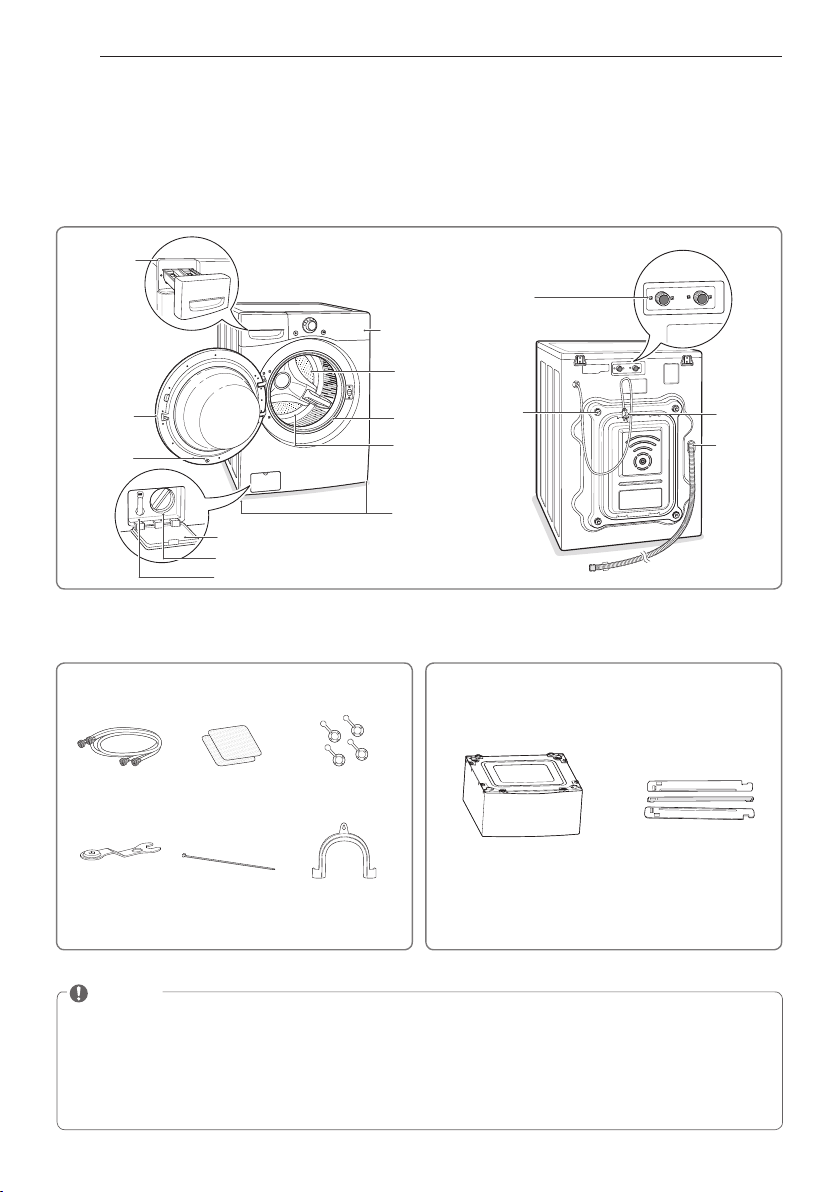
Parts and Accessories
Parts
Pedestal
(sold separately)
Stacking Kit
(sold separately)
Accessories
Hot/cold water
hoses
Non-skid pads
Caps for covering
shipping bolt holes
Wrench Tie strap Elbow bracket
(for securing drain
hose)
Detergent
dispenser
drawer
(See page 20)
Door
Magnet Door
Plunger
(see page 2)
Control panel
(See page 9)
Door seal
TurboWash™
Upper Nozzle
Tu b
Leveling
feet
Drain pump filter cover
Drain pump filter
Drain hose
Water inlets
Shipping
bolts
Power cord
Drain hose
Included Accessories Optional Accessories
NOTE
y
Contact LG Customer Service at 1-800-243-0000 (1-888-542-2623 in Canada) if any accessories are
missing.
y
For your safety and for extended product life, use only authorized components. The manufacturer
is not responsible for product malfunction or accidents caused by the use of separately purchased
unauthorized components or parts.
y
The images in this guide may be different from the actual components and accessories, which are
subject to change by the manufacturer without prior notice for product improvement purposes.
9
ENGLISH
INTRODUCING YOUR WASHING MACHINE
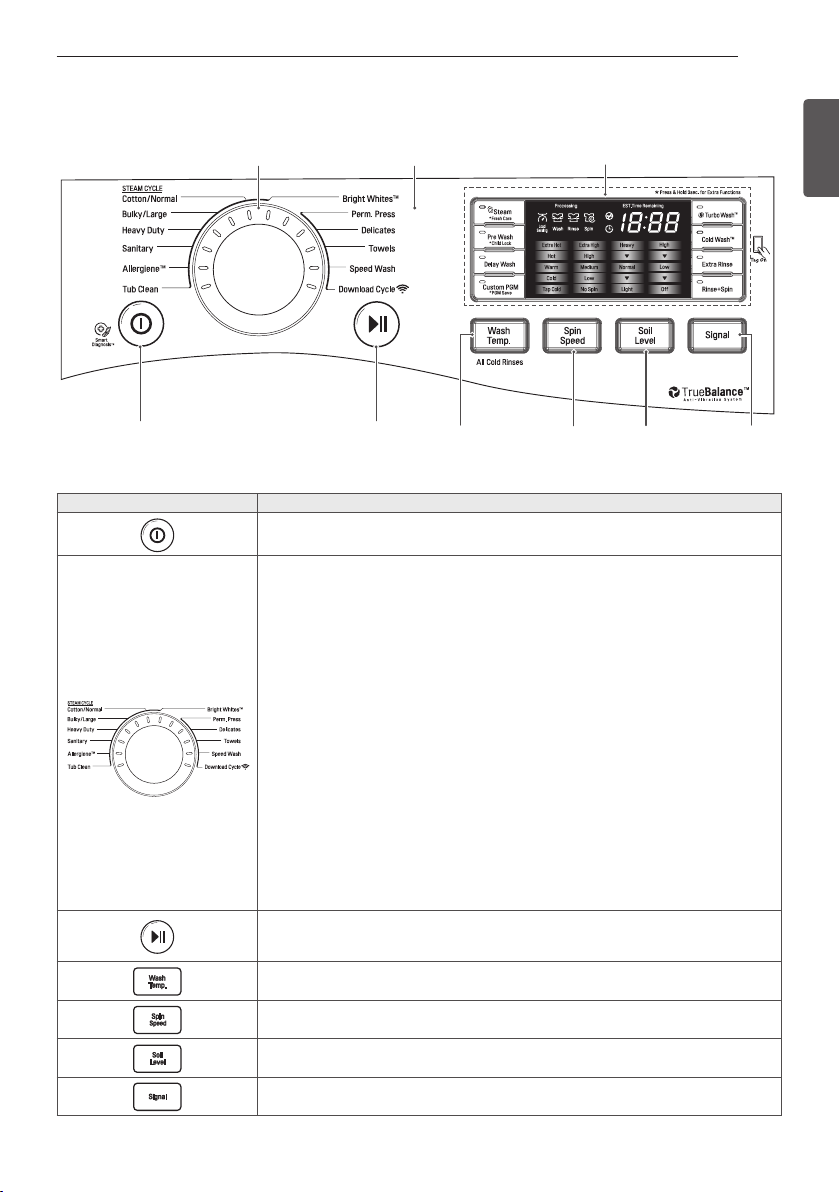
Button Description
y
Turns the washing machine on and off.
y
(During the wash cycle) stops operation, and cancels the settings.
y
Allergiene™
- For cotton, underwear (see page 24)
y
Sanitary
- For underwear, diapers, etc. (see page 24)
y
Heavy Duty
- For Heavily soiled cotton fabric (see page 24)
y
Bulky/Large
- For blankets or large bulky items (see page 24)
y
Cotton/Normal
- For general laundry, such as cotton T-shirts or towels (see page 24)
y
Bright Whites™
- For white fabrics (see page 24)
y
Perm. Press
- For wrinkle-free fabrics (see page 24)
y
Delicates
- For sheer and delicate fabrics (see page 24)
y
Towels
- For towels (see page 24)
y
Speed Wash
- For small quantities of lightly soiled items (see page 24)
y
Download Cycle
- This position is for downloadable cycles.
The default cycle in this position is Small Load. (See page 29)
y
Tub Clean
- For cleaning the wash tub (see page 37)
y
Starts or pauses the washing machine cycle.
- If you do not press the Start/Pause button within 4 minutes of selecting a cycle,
the washing machine will turn off automatically and all settings will be lost.
y
(Press repeatedly) Selects the water temperature for the wash cycle (see page 25).
- Select water temperature from 5 settings.
y
(Press repeatedly) Selects the spin speed at the desired level (see page 25).
- Select spin speed from 5 settings.
y
(Press repeatedly) Selects a wash cycle by soil level (see page 25).
- Select soil level from 5 settings.
y
(Press repeatedly) Selects the volume of the button tones and the end of cycle
melody. (see page 26)
Control panel features
Operation
Operation Display
Cycle selector
Soil
Level
Selection
Button
Signal
Sound
Selection
Button
Spin
Speed
Selection
Button
Water
Temperature
Selection
Button
Start/
Pause
Button
Power
Button
10
INTRODUCING YOUR WASHING MACHINE
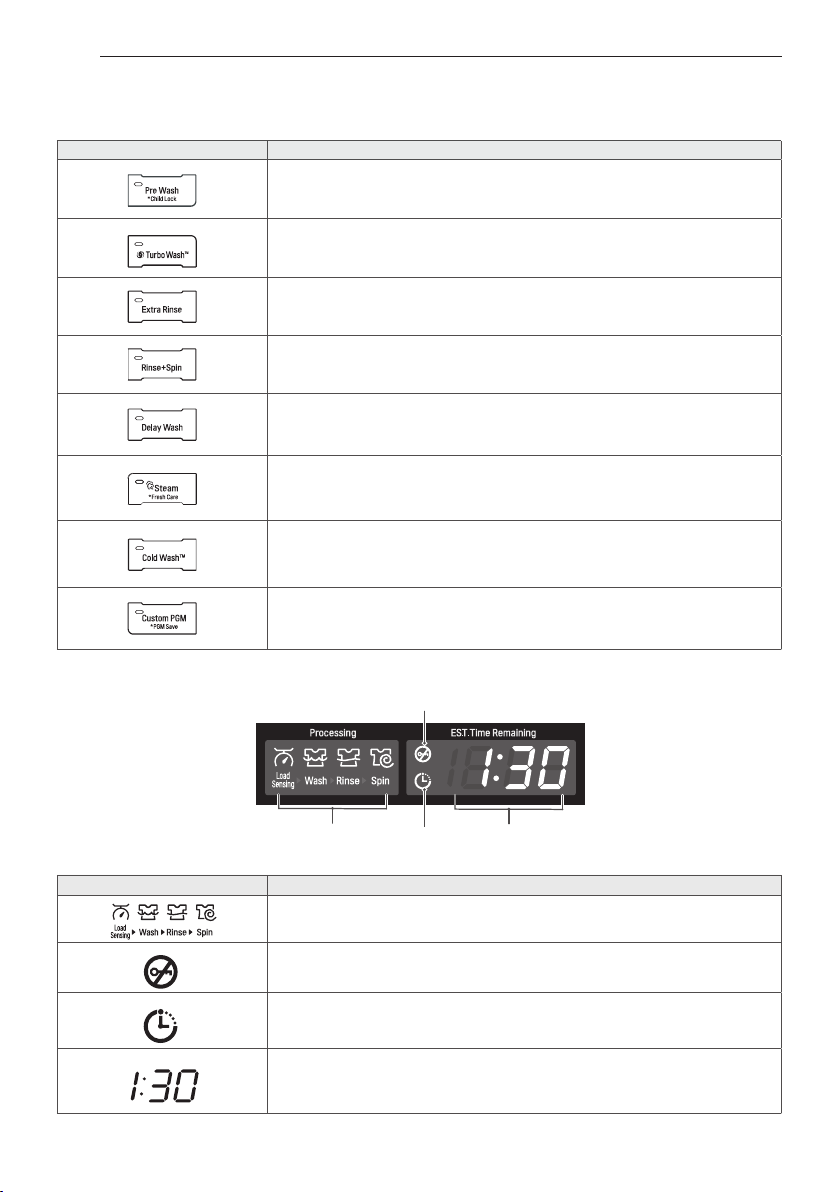
Display
Operation (continued)
Button Description
y
(Press before wash cycle) Pre-wash heavily soiled laundry (See page 26).
y
(Press and hold during wash cycle) Activates or cancels Child Lock feature.
(See page 27).
y
Use this option to save time (See page 27).
y
Add an extra rinse to the selected cycle (See page 26).
y
Use this option to rinse detergent from load (See page 26)
y
Set delay time of starting cycle (See page 26).
y
(Press before starting wash cycle) Use this option to add steam for extra
cleaning power (See page 26)
y
(Press and hold before starting wash cycle) Tumbles clothes after cycle
finishes to prevent wrinkles (See page 28)
y
Use this option to help reduce energy consumption (See page. 27).
y
(Press and hold) Saves the current cycle and settings for use at a later time.
y
(Press once) Restores the previously saved settings. (See page 27~28)
Display Icon Description
y
This portion of the display shows which stage of the wash cycle is
currently underway (Load Sensing, Wash, Rinse or Spin).
y
Indicates that the door is locked. The washer door will lock while the
washer is operating. The door can be unlocked by pressing the Start/
Pause button to stop the washer.
y
This indicator shows that the washer has been set for Delay Wash.
The washer will start automatically after the set delay time has
passed.
y
When the Start/ Pause button is pressed, the washer automatically
detects the wash load (weight) and optimizes the washing time,
based on the selected cycle and options. The display will then
indicate the estimated time remaining for the selected wash cycle.
Door lock
indicator
Estimated time remaining/
error message display
(See page 42)
Cycle
process
indicator
Delay
wash
indicator
11
ENGLISH
INSTALLATION INSTRUCTIONS
INSTALLATION INSTRUCTIONS
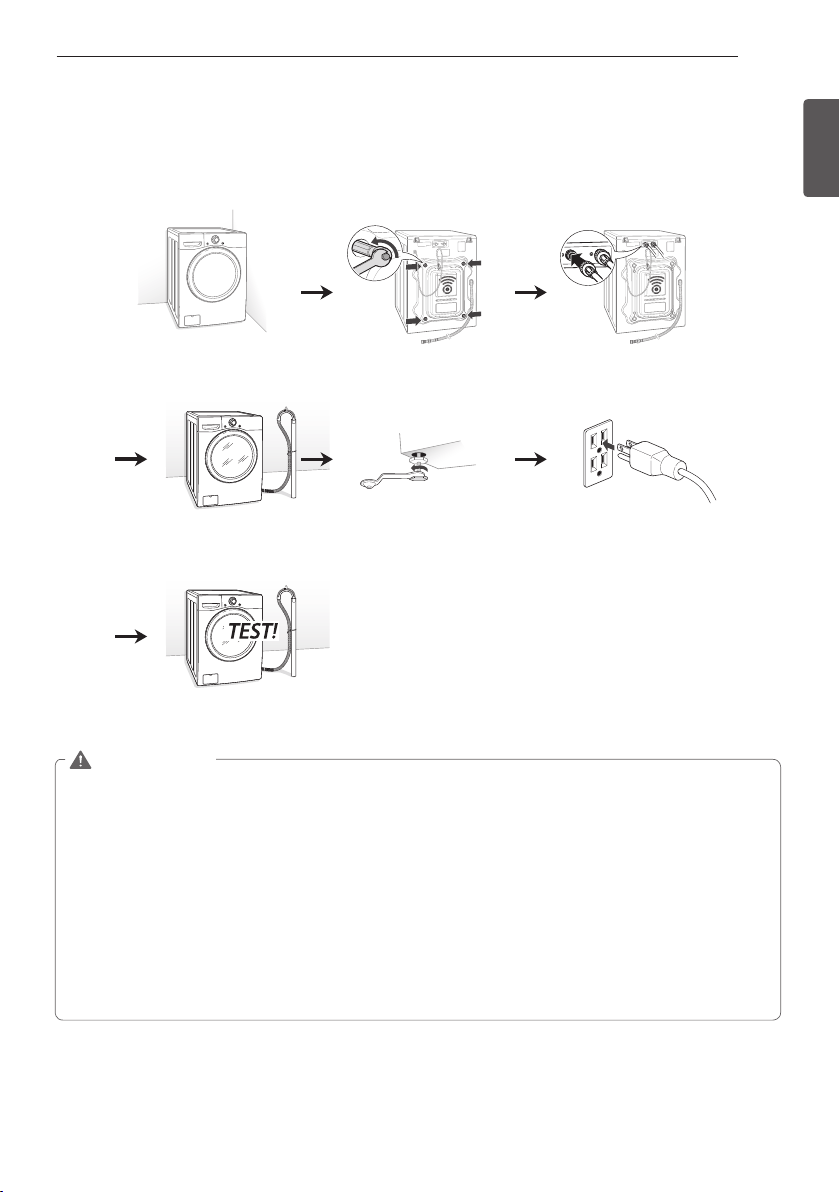
Preview installation order
WARNING
y
The washer is heavy! Two or more people are required when moving and unpacking the washer.
Failure to do so can result in back or other injury.
y
Store and install the washer where it will not be exposed to temperatures below freezing or
exposed to outdoor weather conditions. Failure to follow this warning can cause serious injury,
fire, electric shock, or death.
y
Properly ground the washer to conform with all governing codes and ordinances. Failure to follow
this warning can cause serious injury, fire, electric shock, or death.
y
To reduce the risk of electric shock, do not install the washer in humid spaces. Failure to follow
this warning can cause serious injury, fire, electric shock, or death.
y
The base opening must not be obstructed by carpeting when the washer is installed on a carpeted
floor.
y
Do not remove the ground prong. Do not use an adapter or extension cord. Plug into a grounded
3-prong outlet. Failure to follow this warning can cause serious injury, fire, electric shock, or
death.
Checking and choosing
the proper location
Unpacking and removing
shipping bolts
Connecting the water line
Connecting the drain line Leveling the washing
machine
Plugging in the power
cord and grounding
Test run
12
INSTALLATION INSTRUCTIONS
Checking and choosing the proper location
Install the washing machine on a solid floor that
is strong and rigid enough to support the weight
of the washing machine, even when fully loaded,
without flexing or bouncing. If the floor has too
much flex, you may need to reinforce it to make
it more rigid. If the floor is not solid, it may cause
severe vibration and noise.
1
Clean the floor before installation.
- Make sure to select solid and smooth ground.
2
Two or more people are needed for moving and
unpacking the washing machine.
3
Allow for sufficient space between the walls and
the washing machine for installation.
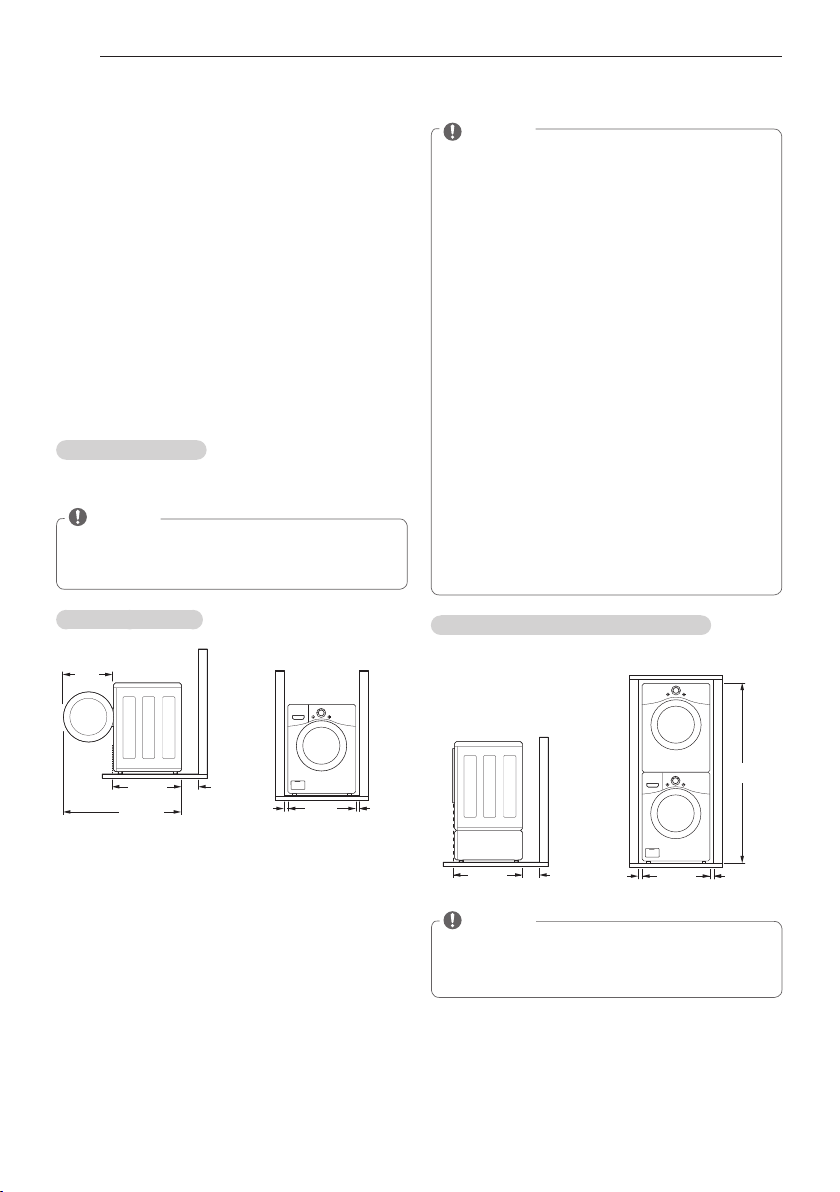
Space requirements
You must allow sufficient space for water lines, the
drain line, and airflow.
NOTE
y
Be sure to allow for wall, door, or floor
moldings that may increase the required
clearances.
Installing on a floor
29
3
/4"
(75.6 cm)
4"
(10 cm)
51"
(129.5 cm)
22
1
/4"
(57 cm)
27"
68.6 cm
1"
(2.5 cm)
1"
(2.5 cm)
NOTE
y
The floor must be strong and rigid enough
to support the weight of the washer, when
fully loaded, without flexing or bouncing. If
your floor has too much flex, you may need
to reinforce it to make it more rigid.
A floor that is adequate for a top-loading
washer may not be rigid enough for a front-
loading washer, due to the difference in the
spin speed and direction. If the floor is not
solid, your washer may vibrate and you may
hear and feel the vibration throughout your
house.
y
Before installing the washer, make sure
the floor is clean, dry and free of dust, dirt,
water and oil so the washer feet can not
slide easily. Leveling feet that can move or
slide on the floor can contribute to excess
vibration and noise due to poor contact with
the floor.
y
If a drip pan must be used, take extra care
to follow the instructions provided with the
drip pan and make sure the leveling feet are
adjusted for firm and even contact with the
pan. Use of drip pans and failure to properly
level the machine may result in increased
vibration and noise during operation.
Installing on a pedestal or stacking kit
29
3
/4"
(75.6 cm)
4"
(10 cm)
27"
(68.6 cm)
1"
(2.5 cm)
1"
(2.5 cm)
77
1
/2"
(196.8 cm)
NOTE
y
Refer to the instructions packaged with the
optional PEDESTAL or STACKING KIT before
installing with a PEDESTAL or a STACKING KIT.
13
ENGLISH
INSTALLATION INSTRUCTIONS
Unpacking and removing shipping bolts
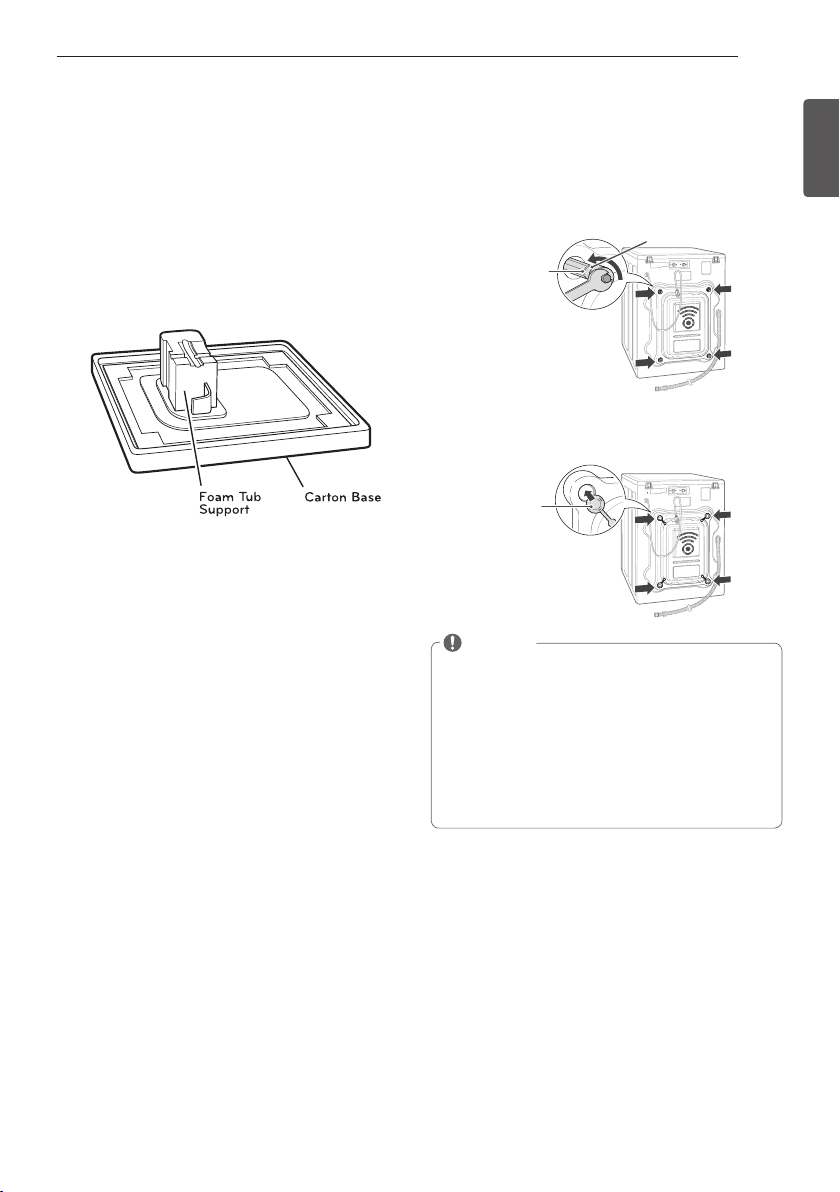
When removing the washer from the carton base,
be sure to remove the foam drum support in the
middle of the carton base.
If you must lay the washer down to remove the
base packaging materials, always lay it carefully on
its side.
Do NOT lay the washer on its front or back.
1
Starting with the bottom two shipping bolts,
use the wrench (included) to fully loosen all four
shipping bolts by turning them counterclockwise.
Remove the bolt assemblies by wiggling them
slightly while pulling them out.
Shipping
bolt
Retainer
2
Locate the four hole caps included in the
accessory pack and install them in the shipping
bolt holes.
Cap
NOTE
y
Save the bolt assemblies for future use. To
prevent damage to internal components, DO
NOT transport the washer without reinstalling
the shipping bolts.
y
Failure to remove shipping bolts and retainers
may cause severe vibration and noise, which
can lead to permanent damage to the washer.
The cord is secured to the back of the washer
with a shipping bolt to help prevent operation
with shipping bolts in place.
14
INSTALLATION INSTRUCTIONS
Connecting the water lines
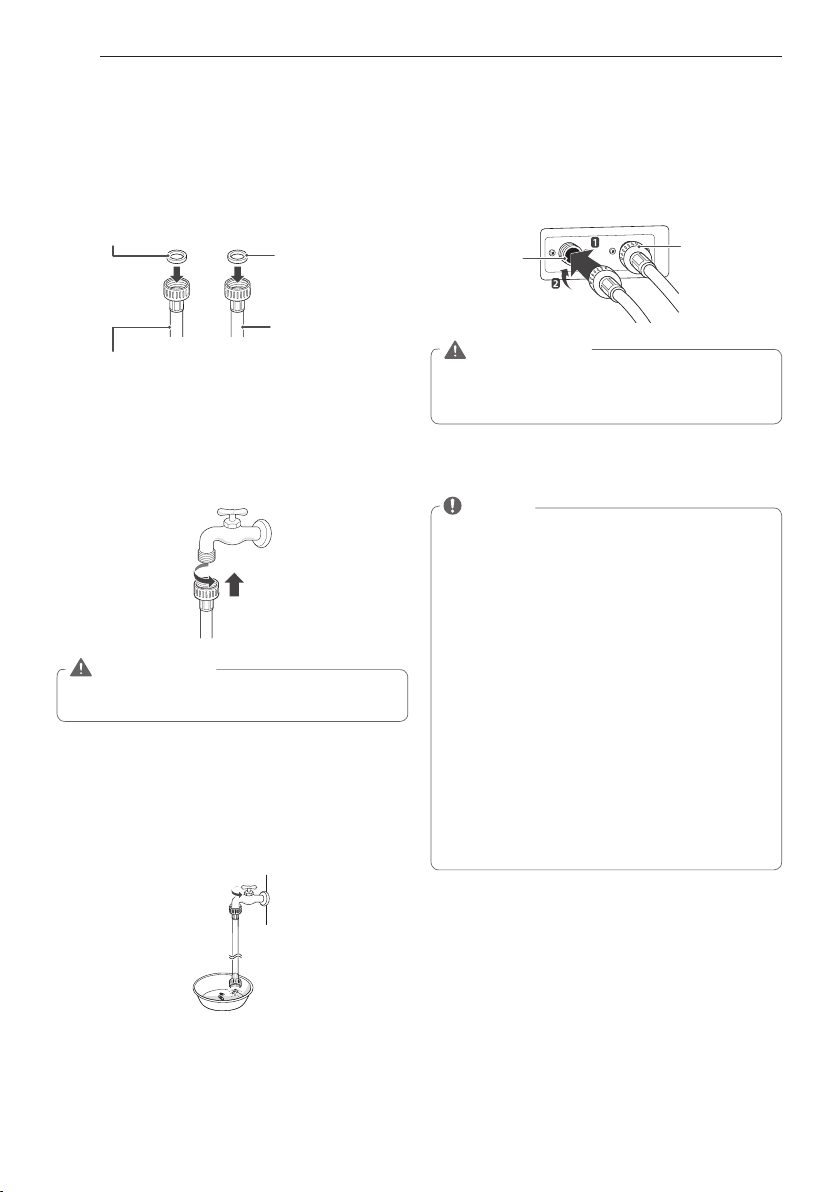
1
Check the rubber seals on both ends of the
Hoses.
- Insert a rubber seal into the threaded fittings on
both ends of each hose to prevent leaking.
Rubber seal
Water hose
(To water inlet on the
washing machine)
Rubber seal
Water hose
(To faucet)
2
Connect the water supply hoses to the HOT and
COLD water faucets tightly by hand and then
tighten another 2/3 turn with pliers.
- Connect the blue hose to a cold water faucet
and the red hose to a hot water faucet.
WARNING
y
Do not overtighten. Damage to the coupling
can result.
3
After connecting the inlet hoses to the water
faucets, turn on the water faucets to flush out
foreign substances (dirt, sand or sawdust) in the
water lines. Let water drain into a bucket, and
check the water temperature to make sure you've
connected the hoses to the correct faucets.
4
Connect the hoses to the water inlets tightly
by hand and then tighten another 2/3 turn with
pliers.
- Connect the blue hose to the cold water inlet
and the red hose to the hot water inlet.
Cold
water
inlet
Hot
water
inlet
WARNING
y
Do not overtighten the hoses. Overtightening
can damage the valves resulting in leaking
and property damage.
5
Check for leaks by turning on the faucets.
- If water leaks, check steps 1 to 4 again.
NOTE
y
For your safety, and for extended product
life, use only authorized components. The
manufacturer is not responsible for product
malfunction or accidents caused by the use of
separately purchased unauthorized parts.
y
Use new hoses when you install the washing
machine. Do not reuse old hoses. Use only the
inlet hoses provided with the washer. LG does
not recommend the use of aftermarket hoses.
y
Periodically check the hoses for cracks, leaks
and wear, and replace the hoses every 5 years.
y
Do not stretch the water hoses intentionally,
and make sure that they are not crushed by
other objects.
y
Water supply pressure must be between 14.5
PSI and 142 PSI (100~980 kPa). If the water
supply pressure is more than 116 PSI, a
pressure reducing valve must be installed.
y
To provide optimum washing performance the
hot water temperature should be set at 120-
135°F (48-57°C) and the cold at 60°F (15°C).
15
ENGLISH
INSTALLATION INSTRUCTIONS
Connecting the drain line
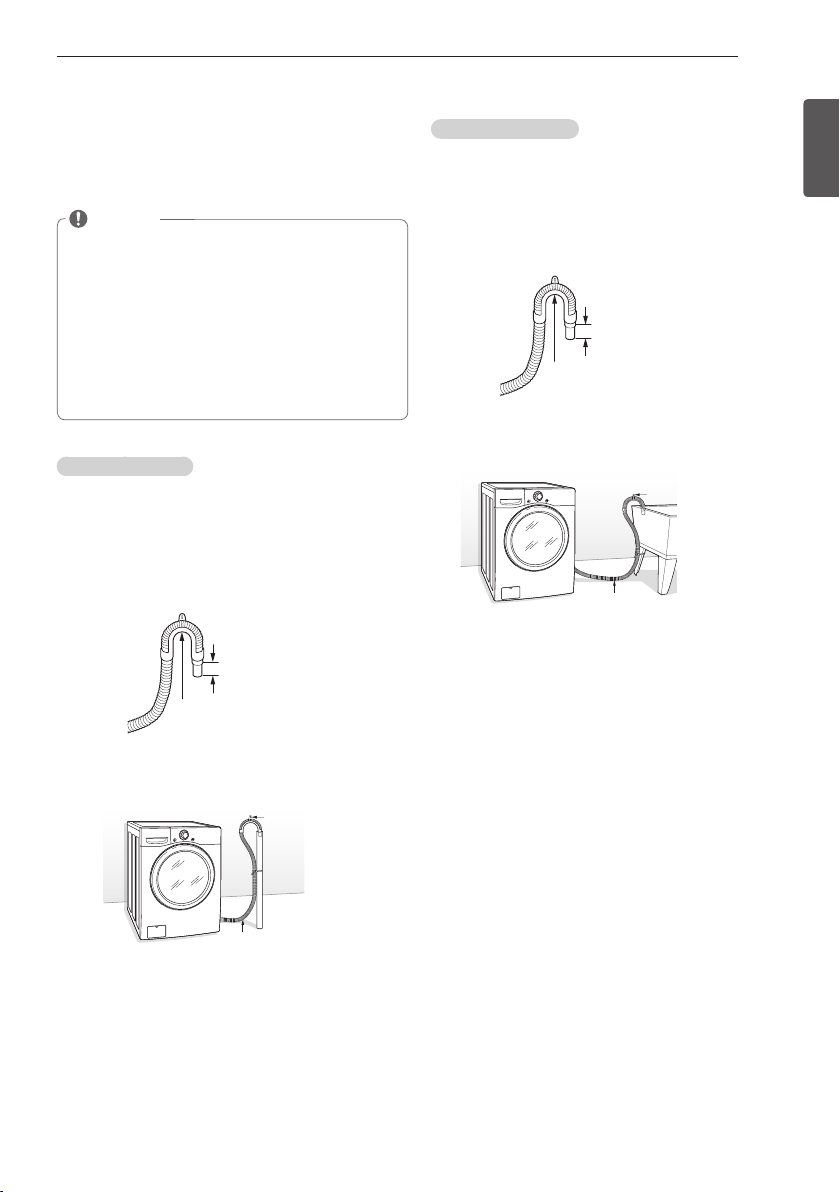
Secure the drain hose in place to prevent it from
moving and leaking.
NOTE
y
The drain hose should be properly secured.
Failure to properly secure the drain hose can
result in flooding and malfunction.
y
The end of the drain hose should not be lower
than 29 inches (73.66 cm) or higher than 96
inches (244.8 cm) from the bottom of the
washer.
y
The drain must be installed in accordance with
any applicable local codes and regulations.
y
Make sure that the water lines are not
stretched, pinched, crushed, or kinked.
Using a standpipe
1
Clip the end of the hose into the elbow bracket.
- Connect the elbow bracket within 4 inches (10
cm) from the end of the drain hose. If the drain
hose is extended more than 4 inches (10 cm)
beyond the end of the elbow bracket, mold or
microorganisms could spread to the inside of
the washer.
No more than
4 inches (10 cm)
Elbow bracket
2
Insert the end of the drain hose into the
standpipe.
Drain Hose
Elbow Bracket
3
Use a tie strap to secure the drain hose in place.
Using a laundry tub
1
Clip the end of the hose into the elbow bracket.
- Connect the elbow bracket within 4 inches (10
cm) of the end of the drain hose. If the drain
hose is extended more than 4 inches (10 cm)
beyond the end of the elbow bracket, mold or
microorganisms could spread to the inside of
the washer.
No more than
4 inches (10 cm)
Elbow bracket
2
Hang the end of the drain hose over the side of
the laundry tub.
Elbow Bracket
Drain Hose
3
Use a tie strap to secure the drain hose in place.
16
INSTALLATION INSTRUCTIONS
Leveling the washing machine
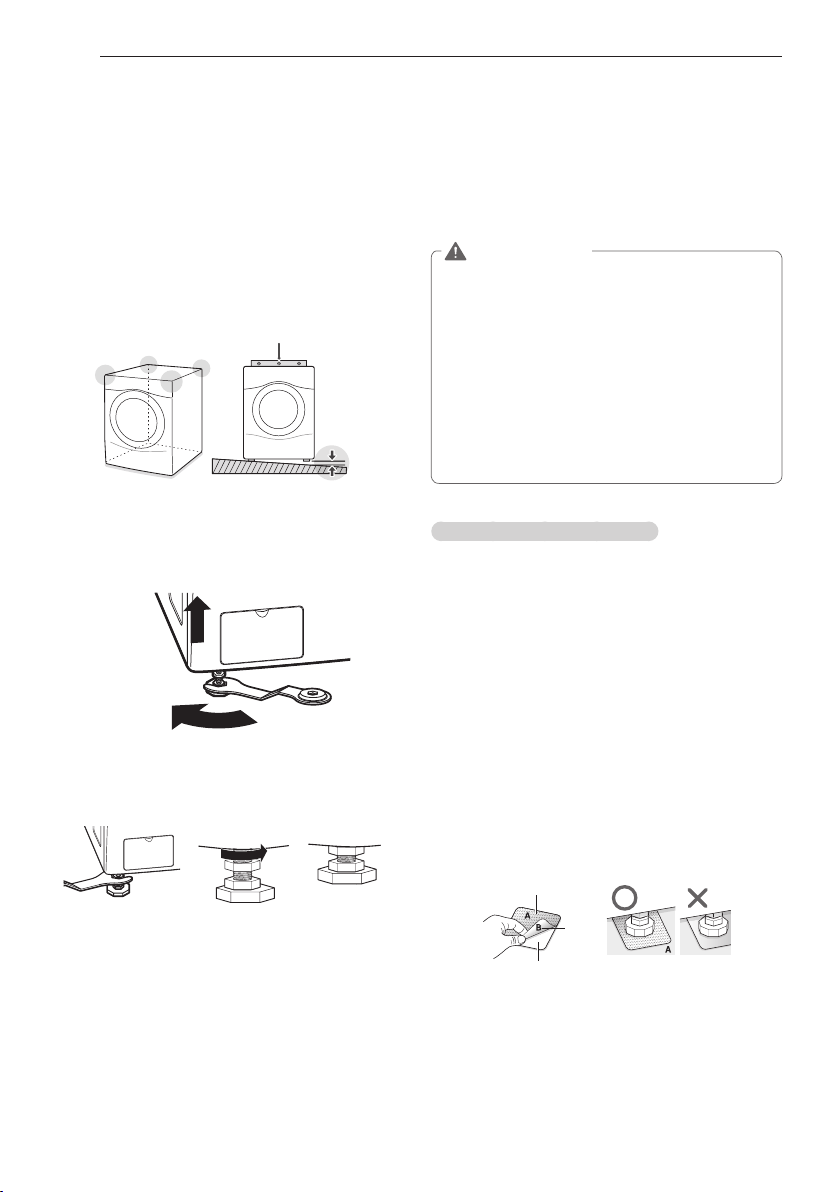
The washer tub of your new washing machine
spins at very high speeds. To minimize vibration,
noise, and unwanted movement, the floor must be
perfectly level and solid.
1
Check that the washing machine is level.
- Check the precise levelness by rocking the top
edges of the washing machine or placing a level
on the washing machine. The slope beneath the
washing machine must not exceed 1°, and all
four leveling feet must rest firmly on the floor.
Level
1°
2
Turn the lower leveling feet clockwise to level the
washing machine.
- Turning the lower leveling feet clockwise raises
the washing machine.
Raise
3
Turn the locknuts counterclockwise and tighten
them when the washing machine is level.
Tighten all 4 lock
nuts securely
using
the wrench.
4
Check the washing machine’s levelness again.
- Push or rock the top edges of the washing
machine gently to make sure that the washing
machine does not rock.
- If the washing machine rocks, repeat steps 1 to
3.
WARNING
y
Using the washing machine without leveling
it may result in malfunction caused by the
production of excess vibration and noise.
y
If you are installing the washing machine
on the optional pedestal, you must adjust
the leveling feet on the pedestal to level the
washing machine. The washing machine´s
leveling feet should be minimized. Turn the
locknuts counterclockwise to secure.
y
Use the leveling feet only when you level the
washing machine. If you raise the leveling feet
unnecessarily, it may cause abnormal vibration
of the washing machine.
Using non-skid pads (optional)
If you install the washing machine on a slippery
surface, it may move because of excessive
vibration. Incorrect leveling may cause malfunction
through noise and vibration. If this occurs, lay the
non-skid pads under the leveling feet and adjust the
level.
1
Clean the floor to attach the non-skid pads.
- Use a dry rag to remove and clean foreign
objects or moisture. If moisture remains, the
non-skid pads may slip.
2
Adjust the level after placing the washing
machine in the installation area.
3
Place the adhesive side of the non-skid pad on
the floor.
- It is most effective to install the non-skid pads
under the front legs. If it is hard to place the
pads under the front legs, place them under the
back legs.
Remove
backing
This side up
Adhesive
side
4
Check the washing machine’s levelness again.
- Push or rock the top edges of the washing
machine gently to make sure that the washing
machine does not rock. If the washing machine
rocks, level the washing machine again.
17
ENGLISH
INSTALLATION INSTRUCTIONS
Plugging in the power cord and
grounding
Make sure to ground the washing machine to
prevent a short circuit or an electric shock when
plugging in.
Using a 3-prong outlet
Plug in the electrical outlet without additional
grounding.
WARNING
y
The power outlet must be within 60 inches (1.5 m)
of either side of the washer.
y
The appliance and outlet must be positioned so
that the plug is easily accessible.
y
Do not overload the outlet with more than one
appliance.
y
The outlet must be grounded in accordance with
current wiring codes and regulations.
y
A time-delay fuse or circuit breaker is
recommended.
y
It is the personal responsibility and obligation
of the product owner to have a proper outlet
installed by a qualified electrician.
y
Do not use a worn or damaged power cord or
power plug. Replace or repair it immediately.
Failure to do so may result in death, fire, electric
shock, or malfunction.
y
Do not modify the power cord and take care not to
damage it when installing or moving the washing
machine. Failure to do so may result in death, fire,
electric shock, or product malfunction.
y
Make sure that the washing machine is grounded.
y
Connect this washing machine to a grounded
outlet conforming to the rating prior to use.
Failure product to do so may result in fire, electric
shock, or product malfunction.
y
Do not use adaptors or extension cords. The
washing machine should always be plugged
into its own individual electrical outlet which has
a voltage rating that matches the rating plate.
Failure to do so may result in fire, electric shock
or disorder.
y
Do not damage or cut off the ground prong of
the power cord. Doing so may cause death, fire,
electric shock, or product malfunction.
Test run
Check if the washing machine is properly installed
and run a test cycle.
1
Load the washing machine with 6 pounds of
laundry.
2
Press
A
and turn
B
on the right.
3
Press to Rinse+Spin.
4
Press
C
.
- The wash cycle starts.
5
Check if water is supplied, that the washing
machine does not rock or vibrate excessively,
and that it drains well during the spin cycle.
- If water leaks during water supply, see page
14, Connecting the water lines to connect them
properly.
- If the washing machine rocks and vibrates
excessively, see page 16, Leveling the washing
machine to level it again.
- If the drain does not work, see page 15,
Connecting the drain line to install the drain line
properly.

18
PREPARATION
u Check all pockets to make sure that they are
empty.
- Items such as clips, matches, pens, coins, and
keys can damage both your washer and your
clothes.
u Close zippers, hooks, and drawstrings to
prevent these items from snagging or tangling
on other clothes.
u Pretreat heavily stained areas before washing.
- Doing so will produce clean, stain-free results.
u Combine large and small items in a load. Load
large items first.
u Large items should not be more than half of
the total wash load.
u The washer can be fully loaded, but the drum
should not be tightly packed with items.
-The door of the washer should close easily.
u Do not wash single items, except for bulky
items such as blankets. Make sure to wash
laundry in similar types of loads.
- Washing a single small item may result in the
tub becoming unbalanced, vibrating and
making a noise.
u Do not wash waterproof clothes.
- This may cause abnormal vibration, or may
cause the load to bounce, which could
damage the tub.
u Check if there are any foreign objects in the
door seal and take extra care that clothes do
not get caught there.
- Foreign objects in the door seal may stain
clothes, and water may leak if clothes get
caught in the door seal.
u Wash underwear or small, light items in a
laundry net.
- Small, light items may get caught in the door
seal, and a brassiere hook may damage other
items or the tub.
u Brush heavy soil, dust, or hair off fabrics before
washing.
- Laundry may not wash clean if there is dirt or
sand on the fabrics, or items may be
damaged due to particles rubbing against
sheer fabrics.
u Wash blankets individually.
- Washing more than one blanket together may
produce unsatisfactory results due to tangling
or an unbalanced load.
u Always separate fabrics according to their
colors and wash them separately to prevent
colors from running.
- Fabrics may be damaged or become stained
due to fabric dyes running, or due to foreign
objects transferring from one fabric to
another.
PREPARATION
Sorting wash loads
Precautions for fabric care before the wash cycle
Read and observe the following to prevent shrinkage or damage to clothes.
19
ENGLISH
PREPARATION
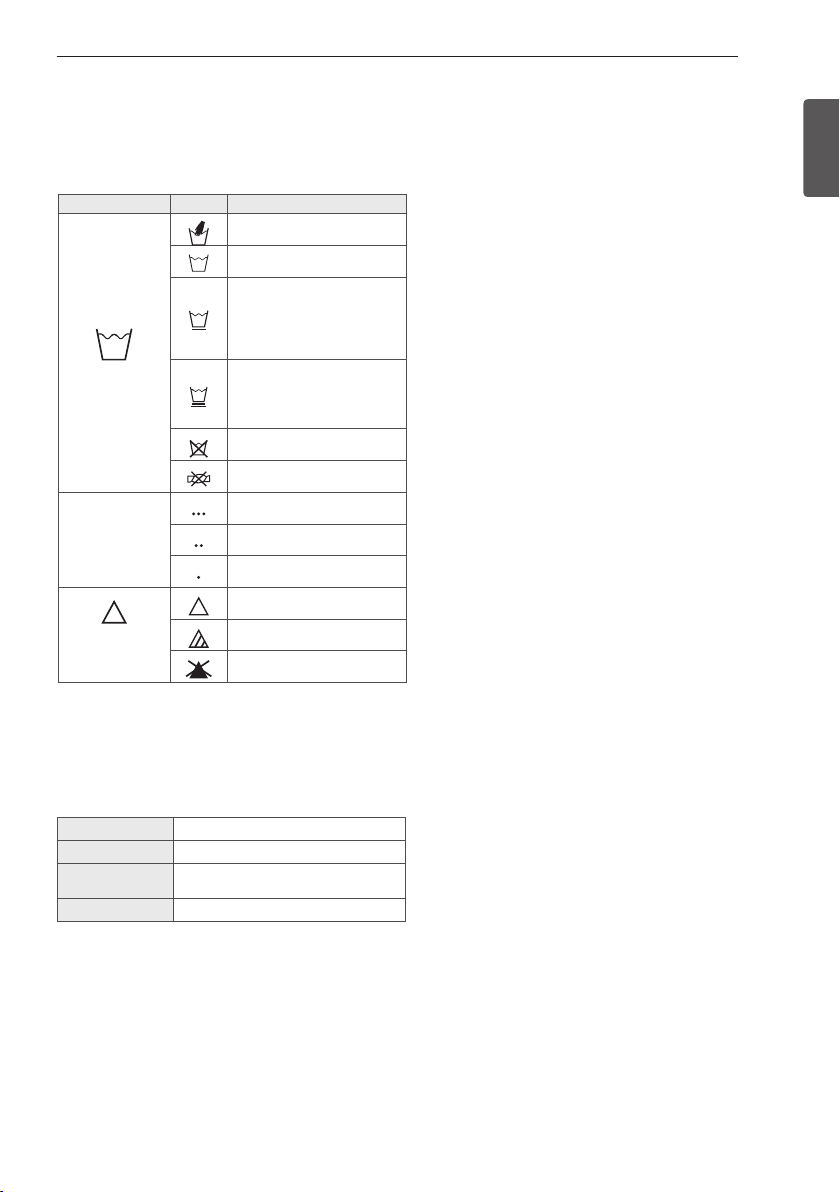
Category Label Directions
Washing
Hand Wash
Machine Wash, Normal
Cycle
Use Permanent Press/
Wrinkle Resistant
washing machine
setting (which has a
cool down or cold spray
before the slower spin)
Use Gentle/Delicate
washing machine
setting (slow agitation
and/ or reduced wash
time).
Do Not Wash
Do Not Wring
Water
Temperature
Hot
Warm
Cold/Cool
Bleach
symbols
Any Bleach (When
Needed)
Only Non-Chlorine
Bleach (When Needed)
Do Not Bleach
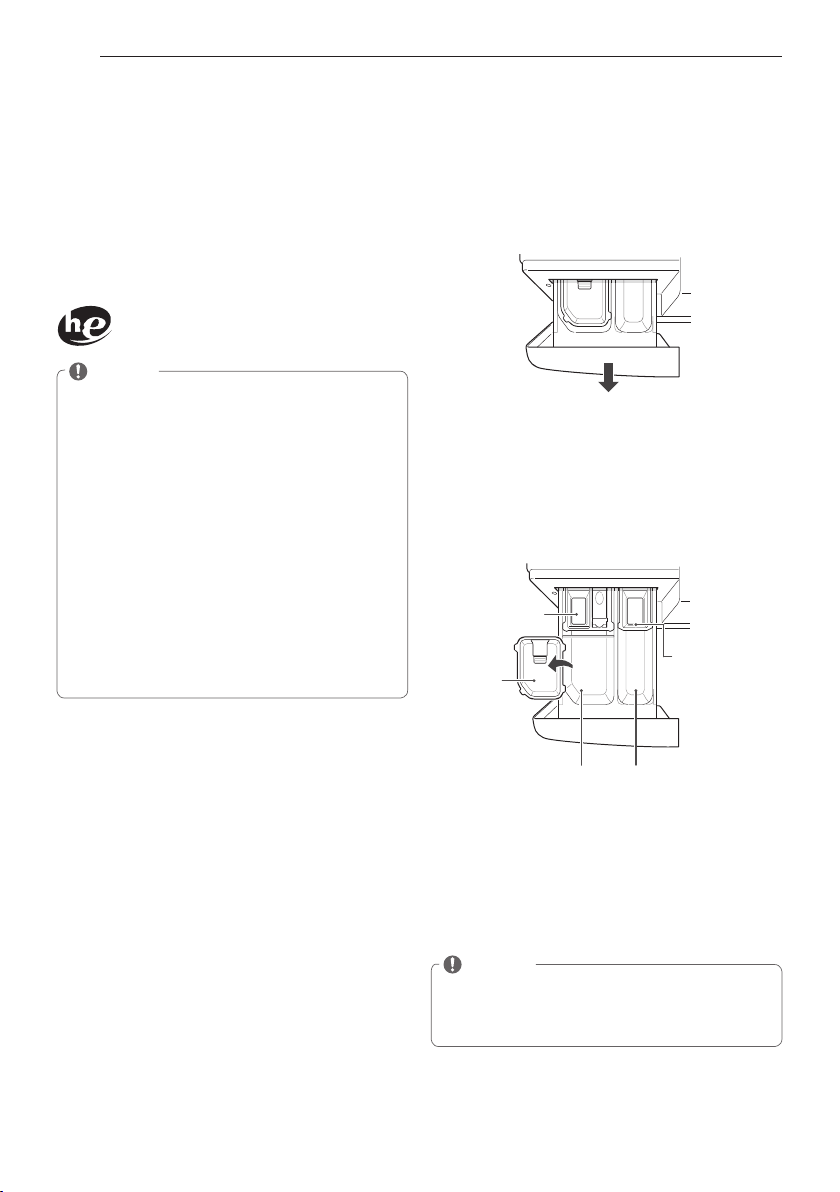
Colors Whites / Lights / Darks
Soil Heavy / Normal / Light
Fabric Delicates / Easy Care / Sturdy
Cottons
Lint Lint Producers / Lint Collectors
Fabric care labels
Most articles of clothing feature fabric care
labels that include instructions for proper care.
Sorting laundry
It is recommended that you sort laundry into
similar loads that are washable in the same
cycle.
Refer to the following chart for sorting clothes
20
PREPARATION
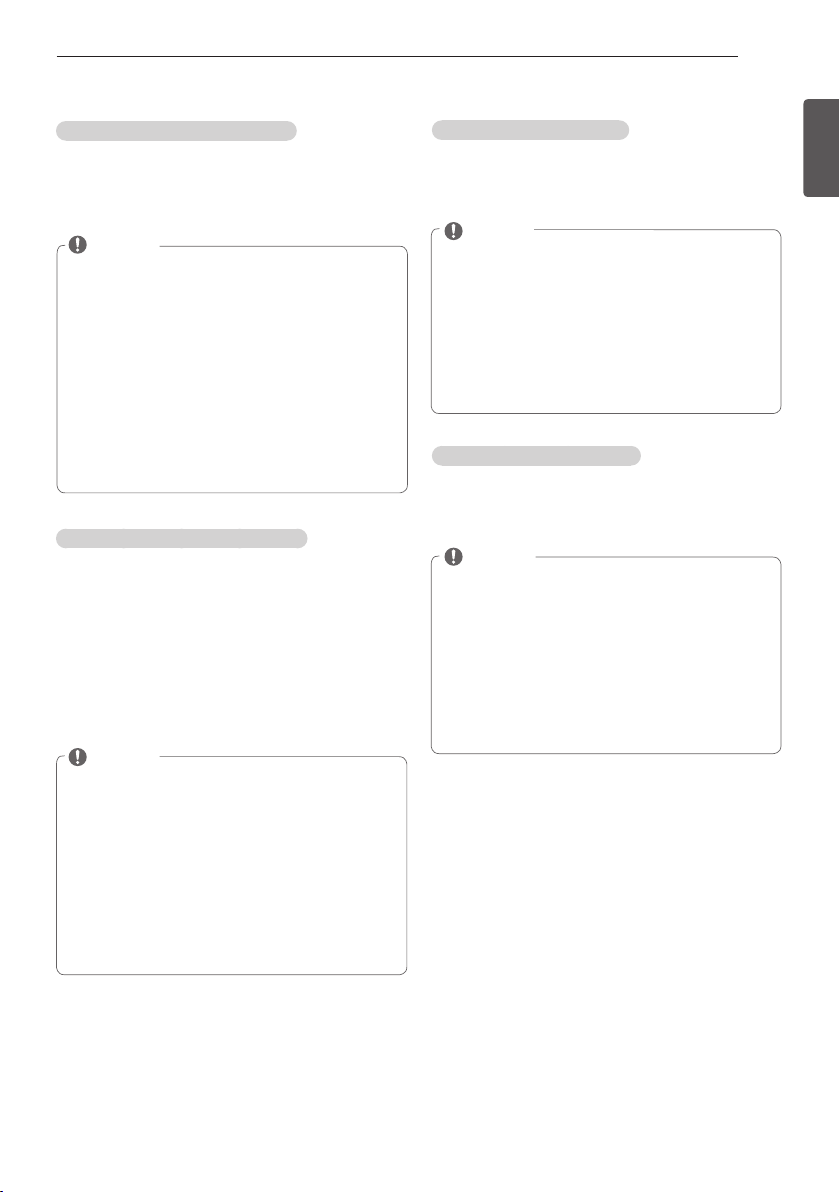
Loading the Dispenser
The detergent dispenser drawer of the washing
machine has a dispenser compartment for
each detergent type. Add each detergent to its
appropriate compartment.
1
Pull out the detergent dispenser drawer.
2
Add each detergent to its appropriate
compartment.
- If you use a liquid detergent, check if the
liquid detergent cup is in place.
- If you use a powdered detergent, remove the
liquid detergent cup and put the powder in
the main wash detergent compartment.
Liquid chlorine
bleach
compartment
Liquid
detergent
cup
Main wash
detergent
compartment
Pre-wash
detergent
compartment
Liquid fabric
softener
compartment
3
Close the detergent dispenser drawer slowly.
- Slamming the detergent dispenser drawer
may result in the detergent overflowing into
another compartment or pouring into the tub
earlier than programmed.
NOTE
y
It is normal for a small amount of water to
remain in the dispenser compartments at the
end of the cycle.
Using Detergent/Fabric Softener
Recommended Detergent
Make sure to use HE (High-Efficiency) detergent
for front-loading washing machines. HE
detergents dissolve more efficiently and produce
fewer suds to ensure efficient washing and
rinsing. Use the correct amount of detergent as
indicated on the detergent packaging.
Specially designed to use only
HE (High-Efficiency) detergent
NOTE
y
Only use HE detergents, because using a
regular detergent may produce excessive
suds.
y
HE detergents produce fewer suds, dissolve
more efficiently to improve washing and
rinsing performance, and help to keep the
interior of your washer clean.
y
Use less detergent for soft water.
y
Wipe up any spills immediately, as liquids
could damage the finish and the control
panel of the washing machine.
y
Using too much detergent can cause a build-
up in the tub resulting in unsatisfactory
performance and machine malfunction.
y
If you use a detergent that does not dissolve
easily or a detergent with high viscosity, it
will leave a residue on the tub, which may
not rinse properly.
21
ENGLISH
USING YOUR WASHING MACHINE
Liquid Bleach Compartment
This compartment holds liquid chlorine bleach,
which will be dispensed automatically at the
proper time during the wash cycle.
NOTE
y
Do not add powdered or liquid color-safe
bleach to this compartment.
y
Always follow the manufacturer’s
recommendations when adding bleach. Do
not exceed the maximum fill line. Using too
much bleach can damage fabrics.
y
Never pour undiluted liquid chlorine bleach
directly onto the load or into the drum.
Fabric damage can occur.
Fabric Softener Compartment
This compartment holds liquid fabric softener,
which will be automatically dispensed during the
final rinse cycle.
NOTE
y
Always follow the manufacturer’s
recommendations when adding fabric
softener. Do not exceed the maximum fill
line. Using too much fabric softener may
result in stained clothes.
y
Dilute concentrated fabric softeners with
warm water. Do not exceed the maximum fill
line.
y
Never pour fabric softener directly onto the
load or into the drum.
Pre-wash Detergent Compartment
Add liquid or powdered detergent to this
compartment when using the Pre-Wash option.
Always use HE (High-Efficiency) detergent with
your washing machine.
NOTE
y
When using the pre-wash option, if liquid
detergent is to be used for the main wash,
remember to use the liquid detergent cup
accessory in the main wash dispenser, to
prevent the main wash liquid detergent
from being dispensed with the pre-wash
detergent.
y
The amount of detergent added for the Pre-
Wash option is 1⁄2 the amount recommended
for the main wash cycle. For example, if the
main wash cycle requires one measure of
detergent, add 1⁄2 measure for the Pre-Wash
option.
Main Wash Detergent Compartment
This compartment holds laundry detergent for the
main wash cycle, which is added to the load at
the beginning of the cycle. Always use HE (High-
Efficiency) detergent with your washing machine.
Never exceed the manufacturer’s
recommendations when adding detergent. Using
too much detergent can result in detergent
buildup on clothing and the washer. Either
powdered or liquid detergent may be used.
NOTE
y
Liquid or powdered color-safe bleach may be
added to the main wash compartment with
detergent of the same type.
y
When using liquid detergent, make sure the
liquid detergent cup and insert are in place.
Do not exceed the maximum fill line.
y
When using powdered detergent, remove
the insert and liquid detergent cup from the
compartment. Powdered detergent will not
dispense with the liquid detergent cup and
insert in place.
22
USING YOUR WASHING MACHINE
USING YOUR WASHING MACHINE
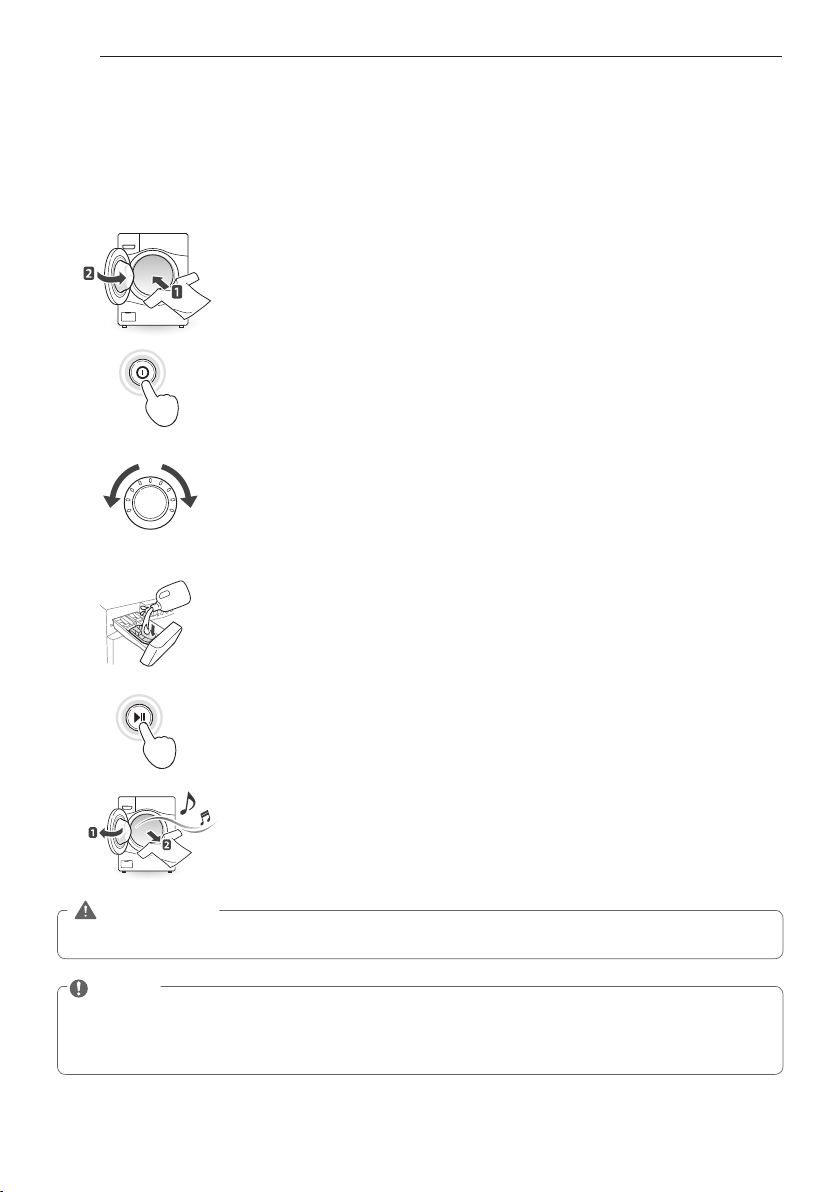
Basic operation
Load the laundry into the washing machine and close the door.
1
2
3
4
5
6
Press
A
.
- The lights around the cycle selector knob will illuminate and a chime will
sound.
Turn
B
to the desired cycle.
- The proper default option is automatically set according to the wash cycle.
See page 23, Cycle guide, for more detailed default options for each cycle.
- See page 24, Main cycle, for details on the wash cycles.
- To change the options, press the option button and select the desired
option. See page 25, Setting options before cycle, for more details on
options.
- Skip to step 4 to use the default setting without changing the options.
Add the proper amount of detergent and additions (bleach, softener) into the
detergent dispenser drawer.
- See page 20, Using detergent/fabric softener, for more details on using
detergent.
Press
C
.
- The washing machine will start.
When the melody plays, the wash cycle is finished.
- When the washing cycle is finished, the door will unlock. Open the door
and remove the laundry immediately.
- Make sure to check around the door seal when taking out the finished load.
Small items may be caught in the door seal.
NOTE
y
The front-load washing machine rotates the laundry in a way that allows it to use less water while
still fully saturating your clothing. It is normal to not be able to see water during the wash cycle.
y
If the temperature or the water level inside the machine is too high, the door locks and cannot be
opened. To open the door while washing, use the Rinse + Spin feature.
WARNING
y
To reduce the risk of fire, electric shock, or injury to persons, read the IMPORTANT SAFETY
INSTRUCTIONS before operating this appliance.
23
ENGLISH
USING YOUR WASHING MACHINE
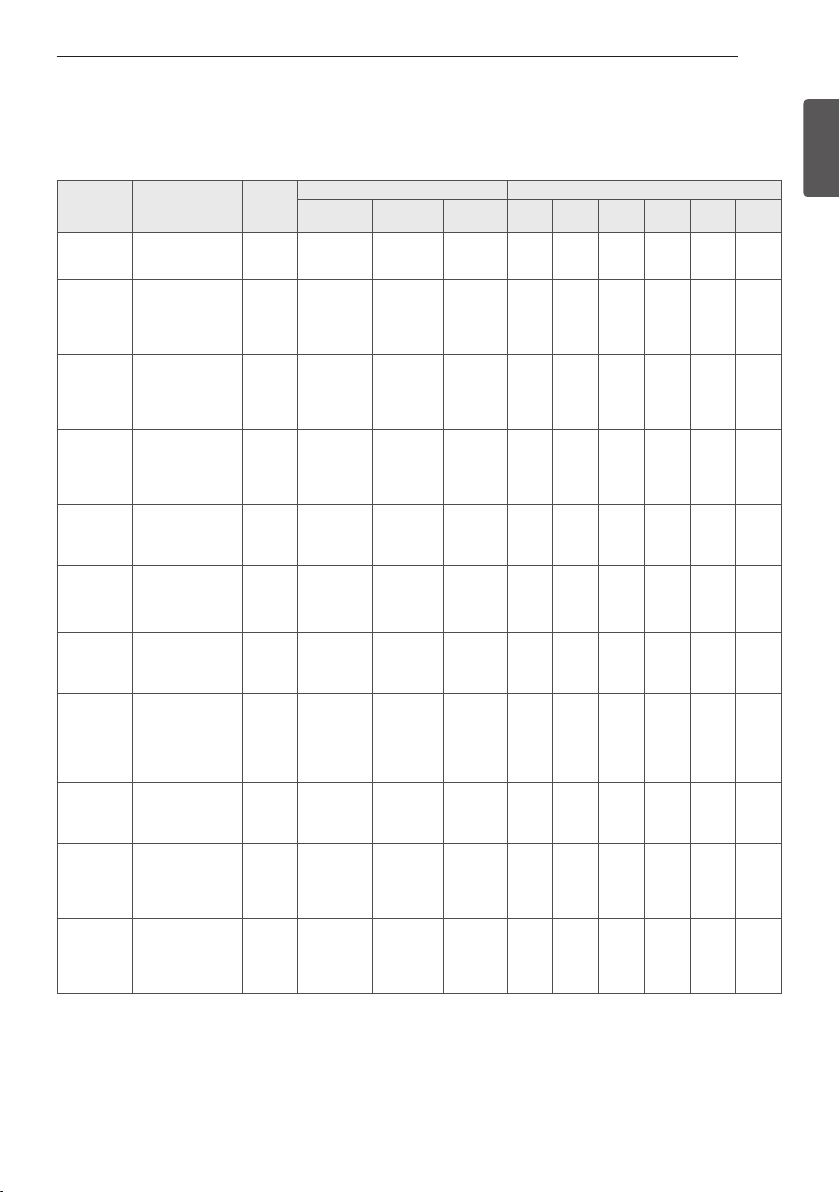
Cycle guide
The cycle guide below shows the options and recommended fabric types for each cycle.
●
= Available option
- Cycle time depends on water pressure, type and amount of load and chosen additional options.
- To protect your garments, not every wash/rinse temperature, spin speed, soil level, or option is
available with every cycle.
- If the Turbo Wash™ option is selected, you cannot select “No Spin” as your Spin Speed.
CYCLE FABRIC TYPE
DISPLAY
TIME(MIN)
BASIC OPTION (
=DEFAULT) ADDITIONAL OPTIONS
Wash
Temp.
Spin
Speed
Soil
Level
Pre-
Wash
Extra
Rinse
Steam
Cold
Wash™
Turbo
Wash™
Fresh
Care
Tub Clean This cycle is
designed to remove
a mildewy
89
Allergiene™ Cotton, underwear,
pillow covers, bed
sheets, baby wear
99 - 132
Extra High
High
Medium
Low
No Spin
Sanitary Heavily soiled
underwear, work
clothes, diapers,
etc.
110 - 120
Extra Hot
Extra High
High
Medium
Low
No Spin
Heavy
Normal
Light
Bright
Whites™
White Fabrics 66 - 76 Hot
Warm
Cold
Tap Cold
Extra High
High
Medium
Low
No Spin
Heavy
Normal
Light
Bulky/Large Large items such as
blankets and
comforters
56 Hot
Warm
Cold
Tap Cold
Medium
Low
No Spin
Heavy
Normal
Light
Cotton/
Normal
Cotton, linen,
towels, shirts,
sheets, jeans,
mixed loads
26 - 53 Hot
Warm
Cold
Tap Cold
Extra High
High
Medium
Low
Heavy
Normal
Light
Heavy Duty Heavy soiled Cotton
Fabrics
74 - 131 Hot
Warm
Cold
Tap Cold
Extra High
High
Medium
Low
Heavy
Normal
Light
Perm.Press Dress shirts/
pants, wrinkle-
free clothing,
poly/cotton
blend clothing,
tablecloths
33 - 47 Hot
Warm
Cold
Tap Cold
High
Medium
Low
Heavy
Normal
Light
Delicates Dress shirts/
blouses, nylons,
sheer or lacy
garments
41 Warm
Cold
Tap Cold
Medium
Low
No Spin
Heavy
Normal
Light
Towels Towels 55 - 65 Hot
Warm
Cold
Tap Cold
Extra High
High
Medium
Low
No Spin
Heavy
Normal
Light
Speed Wash Lightly soiled
clothing
and small loads
15 Hot
Warm
Cold
Tap Cold
Extra High
High
Medium
Low
No Spin
Heavy
Normal
Light
24
USING YOUR WASHING MACHINE
Heavily soiled items,
Heavy duty
This cycle is for washing heavily soiled laundry
though more powerful tub rotation.
Wrinkle free items,
Perm. Press
This cycle is for washing items such as wrinkle-
free clothes or tablecloths to minimize wrinkles.
Sheer items,
Delicates
This cycle is for washing lingerie or sheer and
lacy clothes which can easily be damaged.
For towels,
Towels
This cycle is for washing towels
Quick wash,
Speed Wash
Use the Speed Wash cycle to quickly wash lightly
soiled clothing and small loads. For high wash
and rinse efficiency, it is recommended to wash
small loads of 2-3 lightly soiled garments.
NOTE
y
Use very little detergent in this cycle. For
additional rinsing, you can add an extra rinse
by using the option button.
Main cycle
You can wash laundry items more thoroughly by
selecting the wash cycle that best suits the type
of items to be washed. Turn
B
the desired cycle.
When you select a wash cycle, the light for the
corresponding wash cycle will turn on. See page
22, Basic operation, for more details on operating
methods.
Reduce laundry allergen,
Allergiene™
This cycle is a powerful, high temperature cycle
designed specifically to reduce certain allergens.
NOTE
y
Selecting the Allergiene™ cycle
automatically incorporates steam into the
wash cycle.
y
The Allergiene™ cycle can significantly
reduce allergens in bedding and clothing.
y
The Allergiene™ cycle helps reduce dust
mite populations and helps reduce allergens.
y
Due to the higher energy and temperatures
used, the Allergiene™ cycle is not
recommended for wool, silk, leather, or any
other delicate or temperature sensitive Items.
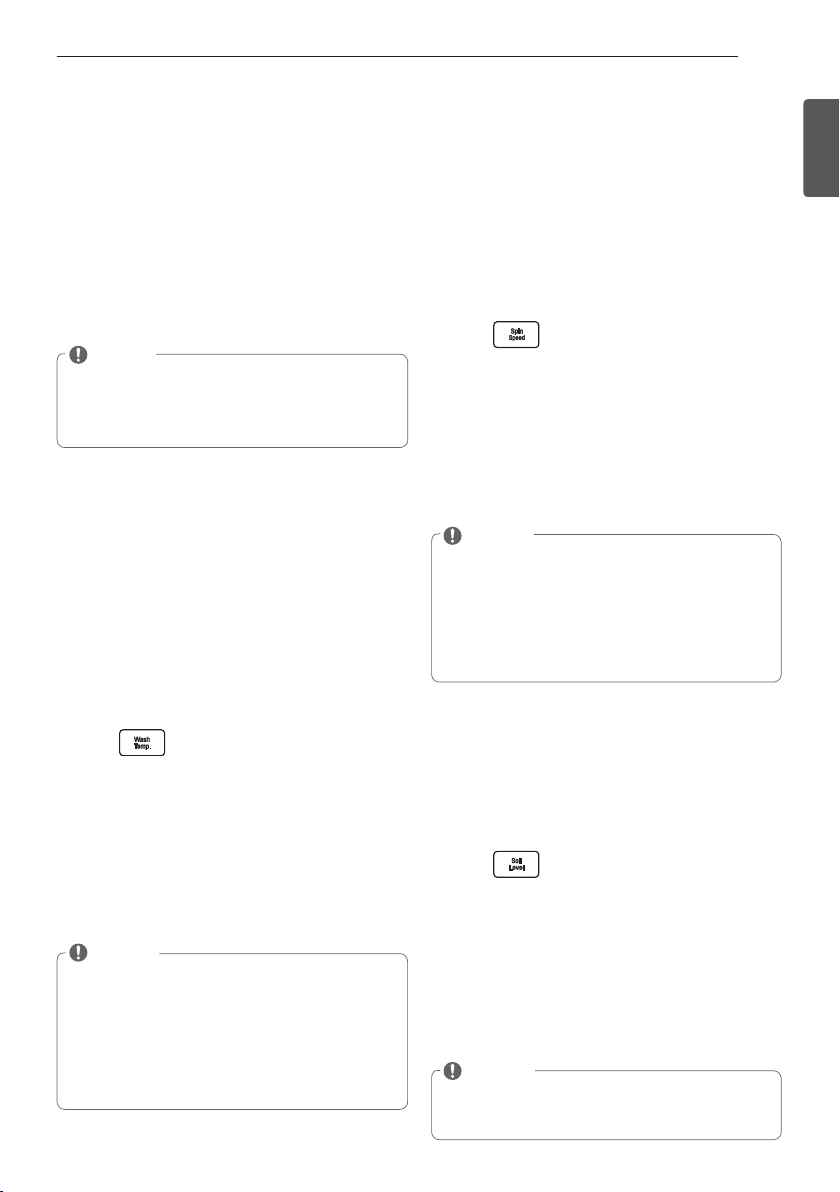
Reduce laundry bacteria,
Sanitary
NSF International (formerly the National
Sanitation Foundation), certifies that this wash
cycle reduces 99.9% of bacteria on laundry
through high temperature, when used with
powdered detergent.
For white fabrics,
Bright Whites™
This cycle is for washing white items only.
Blankets or bulky items,
Bulky/Large
This cycle is for washing blankets or bulky items.
Normal items,
Cotton/Normal
Use this cycle to wash all normal items, except
delicate fabrics such as wool or silk.
NOTE
y
If you press
A
and then
C
without selecting
another cycle, the washing machine
proceeds to Cotton/Normal.
Protocol P172
Sanitization Performance of Residential and
Commercial, Family Sized Clothes Washers
25
ENGLISH
USING YOUR WASHING MACHINE
Cycle modifier buttons
Each cycle has preset settings that are selected
automatically. You may also customize the
settings using the cycle modifier buttons. Press
the button for that option to view and select other
settings.
The washer automatically adjusts the water level
for the type and size of wash load for best results
and maximum efficiency. It may seem there is no
water inside the drum in some cycles, but this is
normal.
NOTE
y
To protect your garments, not every wash/
rinse temperature, spin speed, soil level, or
option is available with every cycle. See the
Cycle Guide for details.
Setting options before the cycle
You can select and add the desired optional
functions before you start the wash cycle.
Setting the water temperature,
Wash Temp.
The optimum water temperature is set
automatically for each cycle. To change the
water temperature setting for a cycle, follow
the instructions below. Remember to set the
appropriate temperature, as specified in the
fabric care labels on your clothing.
1
Press
A
and turn
B
to the desired cycle.
2
Press repeatedly to select the desired
water
temperature:
- When you press the button, an indicator light
for the corresponding selection will turn on in
the display.
3
You can now modify other cycle settings and
add options (see page 25-28), or proceed to
step 4 to begin the cycle.
4
Press
C
.
NOTE
y
Cold rinses use less energy.
y
Your washer features a heating element to
boost the hot water temperature for Extra
Hot settings. This provides improved wash
performance at normal water heater settings.
y
Select the water temperature suitable for
the type of load you are washing. Follow the
fabric care label for best results.
Setting spin speed,
Spin Speed
Higher spin speeds extract more water from
clothes, reducing drying time and saving energy.
Some fabrics, such as delicates, require a slower
spin speed. To protect your clothing, not all
spin speeds are available for all cycles. The
optimum spin speeds for each cycle have been
set automatically. To change the spin speed for a
cycle, follow the instructions below.
1
Press
A
and turn
B
to the desired cycle.
2
Press repeatedly to select the desired
spin speed.
- When you press the button, an indicator light
for the corresponding selection will turn on in
the display.
3
You can now modify other cycle settings and
add options (see page 25-28), or proceed to step
4 to begin the cycle.
4
Press
C
.
NOTE
y
The Spin Speed button also activates the
Drain & Spin cycle to drain the tub and spin
clothes; for example, if you want to remove
clothes before the cycle has ended. To use
Drain & Spin, press the Power button, then
press the Spin Speed button repeatedly to
select a spin speed. Press the Start/Pause
button to begin.
Setting soil level of laundry,
Soil Level
You can wash your laundry more thoroughly
by setting the proper soil level on the washing
machine. The soil level for each cycle has been
set automatically. To change the soil level for a
cycle, follow the instructions below.
1
Press
A
and turn
B
to the desired cycle.
2
Press
repeatedly to select a soil level.
- When you press the button, an indicator light
for the corresponding selection will turn on in
the display.
3
You can now modify other cycle settings and
add options (see page 25-28), or proceed to
step 4 to begin the cycle.
4
Press
C
.
NOTE
y
Lightly soiled loads may take less time and
heavily soiled loads may add time to the
cycle.
26
USING YOUR WASHING MACHINE
Adjusting the melody and button tones,
Signal
The washing machine plays a melody when the
wash cycle is finished. The buttons make a sound
each time a button is pressed. The melody and
button tones can be changed or they can be
turned off if desired.
1 Press
A
.
2 Turn
B
to the desired cycle.
3
Press
. Adjust the melody and button
tones as desired.
4 You can now modify other cycle settings and
add options (see page 25-28), or proceed to
step 4 to begin the cycle.
5 Press
C
.
Prewashing, Pre Wash
Pre-wash for 16 minutes when clothes are cov-
ered in dirt or dust. This feature is suitable for
heavily soiled items.
1 Press
A
and turn
B
to select the desired
cycle.
2 Press
.
-
light will turn on.
3 You can now modify other cycle settings and
add options (see page 25-28), or proceed to
step 4 to begin the cycle.
4 Press
C
.
Rinse, drain and spin only,
Rinse+Spin
Use this cycle to rinse detergent from the load.
1 Press
A
and turn
B
to select the desired
cycle.
2 Press
.
3 You can now modify other cycle settings and
add options (see page 25-28), or proceed to
step 4 to begin the cycle.
4 Pulse
C
.
Adding extra rinse cycle, Extra Rinse
You can add an extra rinse cycle to the default
rinse cycle.
1 Press
A
and turn
B
to select the desired
cycle.
2 Press .
-
light will turn on.
3 You can now modify other cycle settings and
add options (see page 25-28), or proceed to
step 4 to begin the cycle.
4 Press
C
.
Presetting the start time,
Delay Wash
You can set the desired start time.
1 Press
A
and turn
B
to the desired cycle.
2 You can now modify other cycle settings and
add options (see page 25-28).
3 Press repeatedly to select the desired
start time.
-
light will turn on.
- The set start time appears on the display
panel.
- Each press of the button increases the delay
time by one hour, up to 19 hours.
4 Press
C
.
High temperature,
Steam
Adding the Steam option to these cycles help to
enhance washing performance.
By using a hot steam fabrics get the cleaning
benefits of a super hot wash.
1 Press
A
and turn
B
to select the desired
cycle.
2 Press
. The washer will automatically
adjust the
cycle settings.
3 Set any other desired options.
4 Press
C
.
27
ENGLISH
USING YOUR WASHING MACHINE
WARNING
y
Do not touch the door during steam cycles.
The door surface can become very hot. Allow
the door lock to release before opening the
door.
y
Do not attempt to override the door lock
mechanism or reach into the washer during
a steam cycle. Steam can cause severe
burns.
NOTE
y
The steam option cannot be used with all
cycles.
y
Steam may not be clearly visible during
the steam cycles. This is normal. Too much
steam could damage clothing.
y
Do not use steam with delicate fabrics such
as wool, silk, or easily discolored fabrics.
Savin
g energy, Cold Wash™
Adding the Cold Wash™ option reduces
energy usage and provides the same washing
performance as a warm water wash.
By using six different washing motions (Tumbling,
Rolling, Stepping, Scrubbing, Swing, Filtration),
fabrics get the cleaning benefits, without the
energy usage.
1 Press
A
and turn
B
to select the desired
cycle.
2
Press
. The washer will automatically
adjust
the cycle settings.
3
Set any other desired options.
4
Press
C
.
NOTE
y
When you select the Cold Wash™ option,
wash time will be increased up to 10
minutes.
y
For high wash efficiency, use this option
with less than 8 pounds (3.6 kg) of laundry
(approximately 8 thick towels).
Saving time, Turbo Wash™
Adding the TurboWash™ option reduces cycle
time and provides good performance in normal
cycle.
By using the TurboWash™, We can save the time
without sacrificing performance.
1
Press
A
and turn
B
to the desired cycle.
2
Press
. The washer will automatically
adjust
the cycle settings.
3
Set any other desired options.
4
Press
C
.
NOTE
y
The Turbo Wash option cannot be used with
all cycles.
y
Turbo Wash is available in the beginning of
the Cotton/Normal, Heavy Duty and Perm.
Press cycles.
Setting options during the cycle
You can add desired options during the wash
cycle.
Button lock feature,
Child Lock
You can lock the washing machine to prevent
children or others from changing the cycle
settings by pressing the buttons during the cycle.
To enable child lock
Press and hold
for three seconds during
the wash cycle.
- When the Child Lock is enabled, a
N
message
and the remaining wash time are displayed,
in turn, on the display panel of the washing
machine.
To disable child lock
(When the Child Lock is activated.)
Press and hold
for three seconds during
the wash cycle.
NOTE
y
Child Lock remains active after the cycle
ends. To cancel Child Lock, turn the washer
on and then press and hold the PreWash
button for three seconds.
28
USING YOUR WASHING MACHINE
Saving customized wash cycle, PGM Save
You can save a cycle with all the settings and
options you use most frequently.
To save cycle
1 Press
A
and turn
B
to select the desired
cycle.
2
Modify the cycle settings and add other
options (see pages 25-28), if desired.
3
Press the Start/Pause button to start the cycle.
4
Press and hold for three seconds during
the wash cycle.
- The cycle with your preferred settings and
options is saved.
Selecting your customized cycle,
Custom PGM
You can recall the customized wash cycle you
had previously saved.
To recall cycle
1
Press
A
after then press .
2
Press
C
.
Tumbling clothes to prevent wrinkles, Fresh
Care
Use this function when you are not able to
take out your clothes as soon as the wash
cycle ends.
1
Press
A
and turn
B
to select the desired
cycle.
2
Press and hold for three seconds
during the wash cycle.
- The light will turn on.
3
You can now modify other cycle settings and
add options (see page 25-28), or proceed to
step 4 to begin the cycle.
4
Press
C
.
NOTE
y
This function provides periodic tumbling for
up to about 19 hours to prevent wrinkles.
If you press the START/ PAUSE or ON/ OFF
button, you can unload your laundry at any
time.
29
ENGLISH
USING YOUR WASHING MACHINE
Before using the Tag On function
The Tag On function allows you to conveniently use
the LG Smart Diagnosis™, Cycle Download, and
Laundry Stats features to communicate with your
appliance right from your own smart phone.
1 Download the LG Smart Laundry&DW App to
your smart phone.
2 Turn on the NFC (Near Field Communication)
function in your smart phone.
The Tag On function can be used with most smart
phones equipped with the NFC function and based
on the Android operating system (OS).
Turning on the NFC function of the smart
phone
1 Enter the "Settings" menu
of the smart phone and
select "Share & Connect"
under "WIRELESS &
NETWORKS”.
2 Set "NFC“ and “Direct
Android Beam” to ON and
select “NFC“.
3 Check "Use Read and Write/
P2P receive”.
NOTE
y Depending on the smart phone manufacturer
and Android OS version, the NFC activation
process may differ. Refer to the manual of your
smart phone for details.
The Tag On icon
Look for the Tag On icon next to the LED
screen on the control panel. This is where you
position your smart phone when using the Tag On
function with the LG Smart Diagnosis™, Cycle
Download, and Laundry Stats features of the LG
Smart Laundry&DW application.
Tag On position
When you use the Tag On function, position your
smart phone so that the NFC antenna on the back of
your smart phone matches the position of the Tag
On icon on the appliance. If you do not know the
position of your NFC antenna, move your smart
phone very slightly in a circular motion until the
application verifies the connection.
Because of the characteristics of NFC, if the
transmission distance is too far, or if there is a metal
sticker or a thick case on the phone, transmission
will not be good. In some cases, NFC-equipped
phones may be unable to transmit successfully.
Press [
] in the LG Smart Laundry&DW app for a
more detailed guide on how to use the Tag On
function.
30
USING YOUR WASHING MACHINE
Tag On
This feature allows you to use LG Smart
Diagnosis™, Cycle Download, and Laundry Stats
when you touch the LG appliance’s Tag On logo with
your NFC-equipped smart phone.
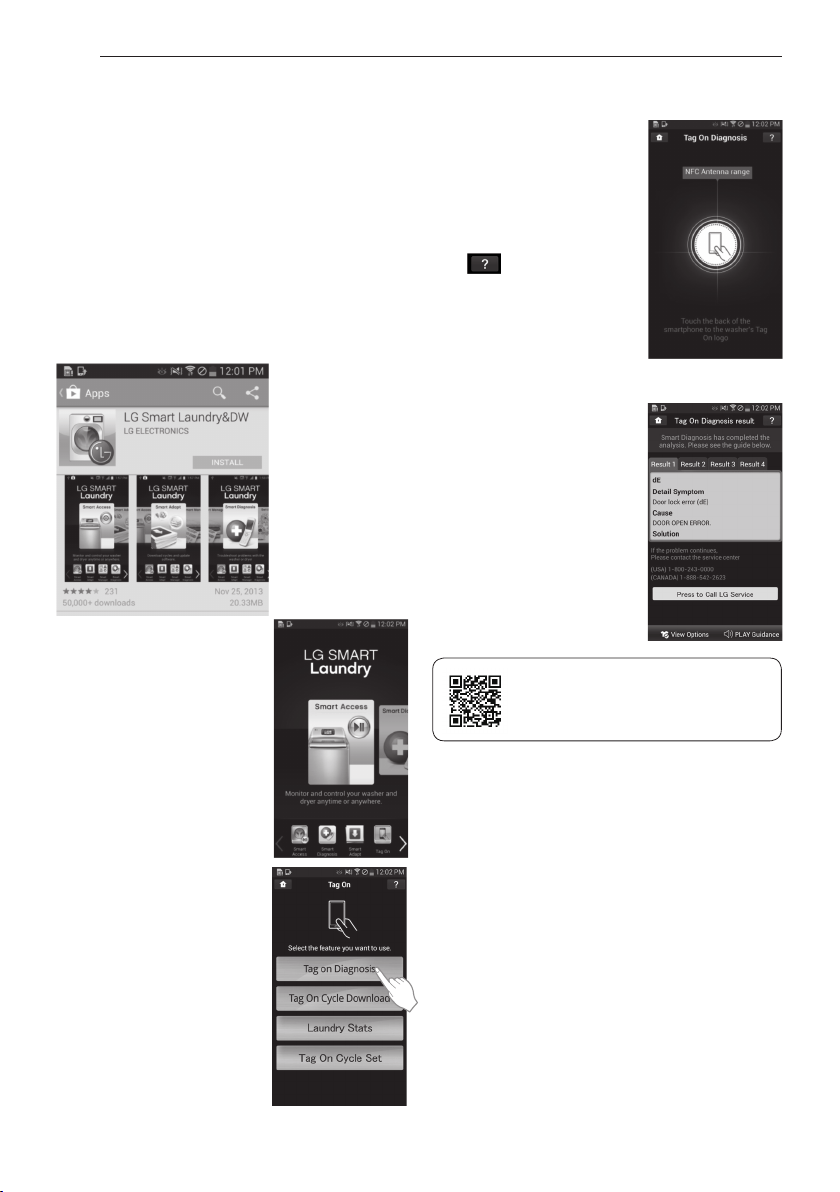
Tag On self-diagnosis using LG Smart
Laundry&DW application
1 Install ‘LG Smart Laundry&DW’ application on a
NFC-equipped smartphone.
- Install the application from the Play store and
run it.
2 Select ‘Tag On’ by using the
top icons or the bottom
icons
3 Select ‘Tag On Diagnosis’.
4 Touch the Tag On logo.
- When a Tag On screen
appears (see at right), tap
your smart phone on the
Tag On icon on the right
side of the washer's
control panel.
- If it isn't recognized, touch
[ ] on the upper right
of the Tag On screen on
your ‘LG Smart
Laundry&DW’ application
to see the detailed guide.
(This might happen due to
the different NFC antenna
positions for each phone.)
5 Check the diagnosis results
and solutions.
- It shows the diagnosis
results on the cycles
recently used.
* Images are for reference only. The LG Smart
Laundry&DW application may be updated.
Scan this QR code with your smart
phone to quickly access the LG Smart
Laundry&DW application for
download.
31
ENGLISH
Tag On Smart Diagnosis
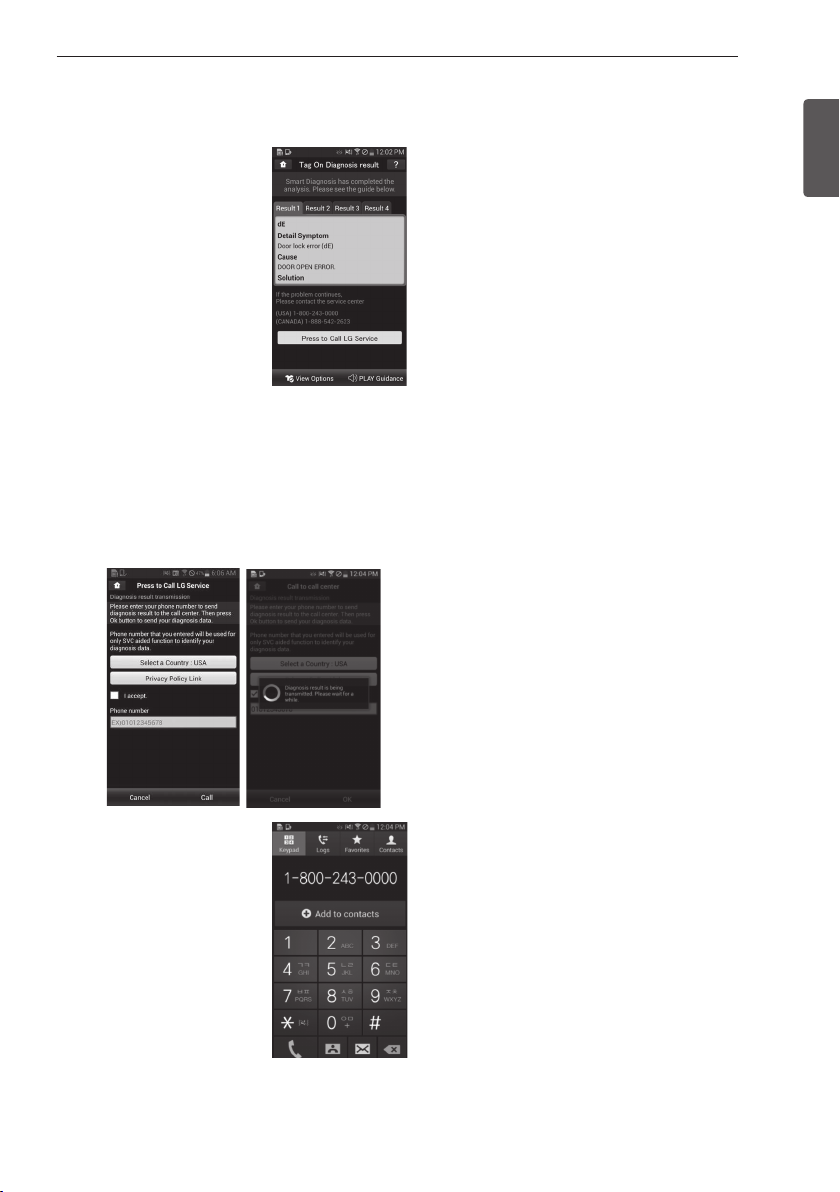
1 Select ‘Press to Call LG
Service’ on the Smart
Diagnosis Result screen.
2 Select your Country.
3 Agree to the terms and Conditions of the Use and
Privacy Policy by pressing “I accept.”
4 Enter your phone number in the field. Use this
phone number when talking to the LG customer
service representative to enable them to find your
Smart Diagnosis data.
5 Press the Call button to
initiate the call to LG’s
Support Center.
* Images are for reference only. The LG Smart
Laundry&DW application may be updated.
USING YOUR WASHING MACHINE
32
USING YOUR WASHING MACHINE
Tag On Cycle Download
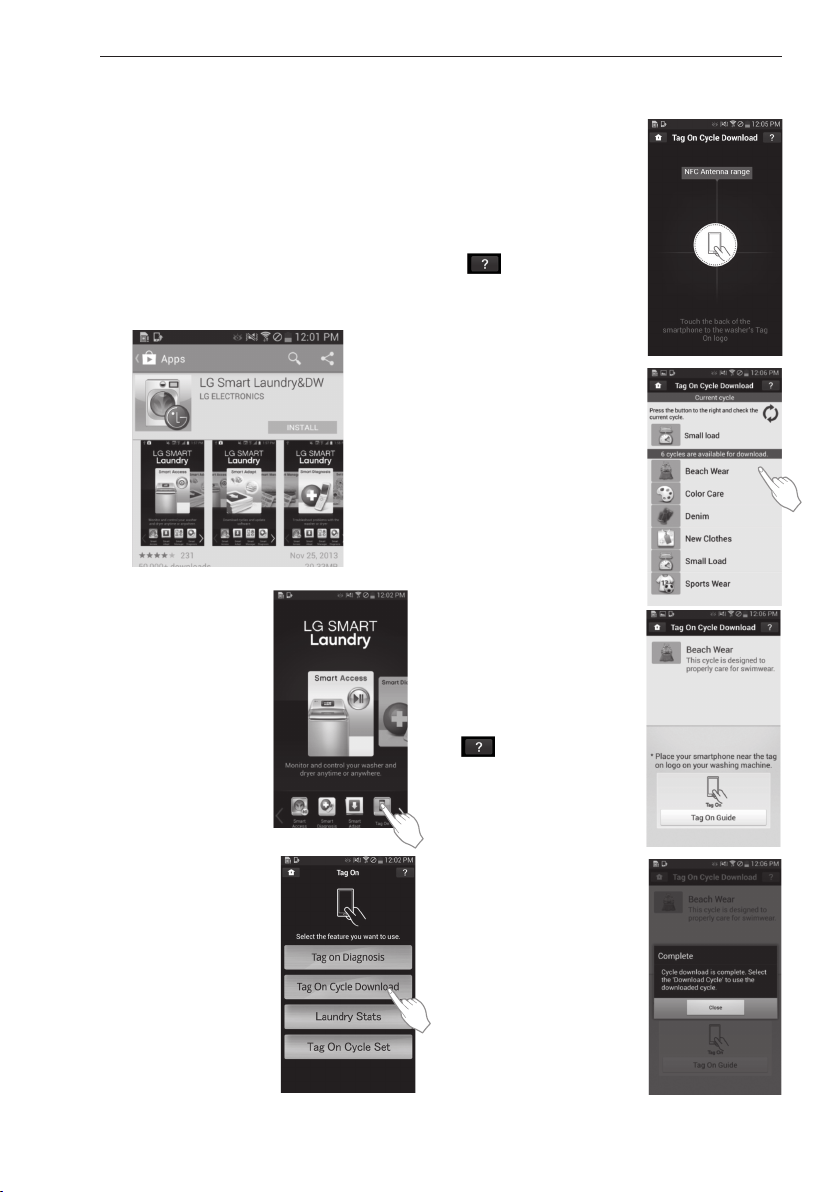
Tag On Cycle Download allows you to download
cycles for later use. The cycle is available at the
Download Cycle position on the control panel until
another cycle is downloaded.
1 Install ‘LG Smart Laundry&DW’ Application on a
NFC-equipped smartphone.
- Install the Application from the Play store and
run it.
2 Select ‘Tag On’ by using the
top icons or the bottom
icons.
3 Select ‘Tag On Cycle
Download’.
4 Touch the Tag On logo.
- When a Tag On screen
appears (see at right), tap
your smart phone on the
Tag On icon on the right
side of the washer's
control panel.
- If it isn't recognized, touch
[
] on the upper right
of the Tag On screen on
your ‘LG Smart
Laundry&DW’ app to see
the detailed guide. (This
might happen due to the
different NFC antenna
positions for each phone.)
5 Select a cycle to download.
- You can also check the
existing cycles already
downloaded.
6 Touch the Tag On logo.
- When a Tag On screen
appears (see at right), tap
your smart phone on the
Tag On icon on the right
side of the washer's
control panel.
- If it isn't recognized, touch
[ ] on the upper right of
the Tag On screen on your
‘LG Smart Laundry&DW’
app to see the detailed
guide. (This might happen
due to the different NFC
antenna positions for each
phone.)
7 The new cycle is
downloaded successfully!
- Check whether the new
cycle is downloaded by
turning the cycle selector
knob to Download Cycle.
* Images are for reference only.
The LG Smart Laundry&DW application may be
updated.
33
ENGLISH
USING YOUR WASHING MACHINE
Laundry Stats
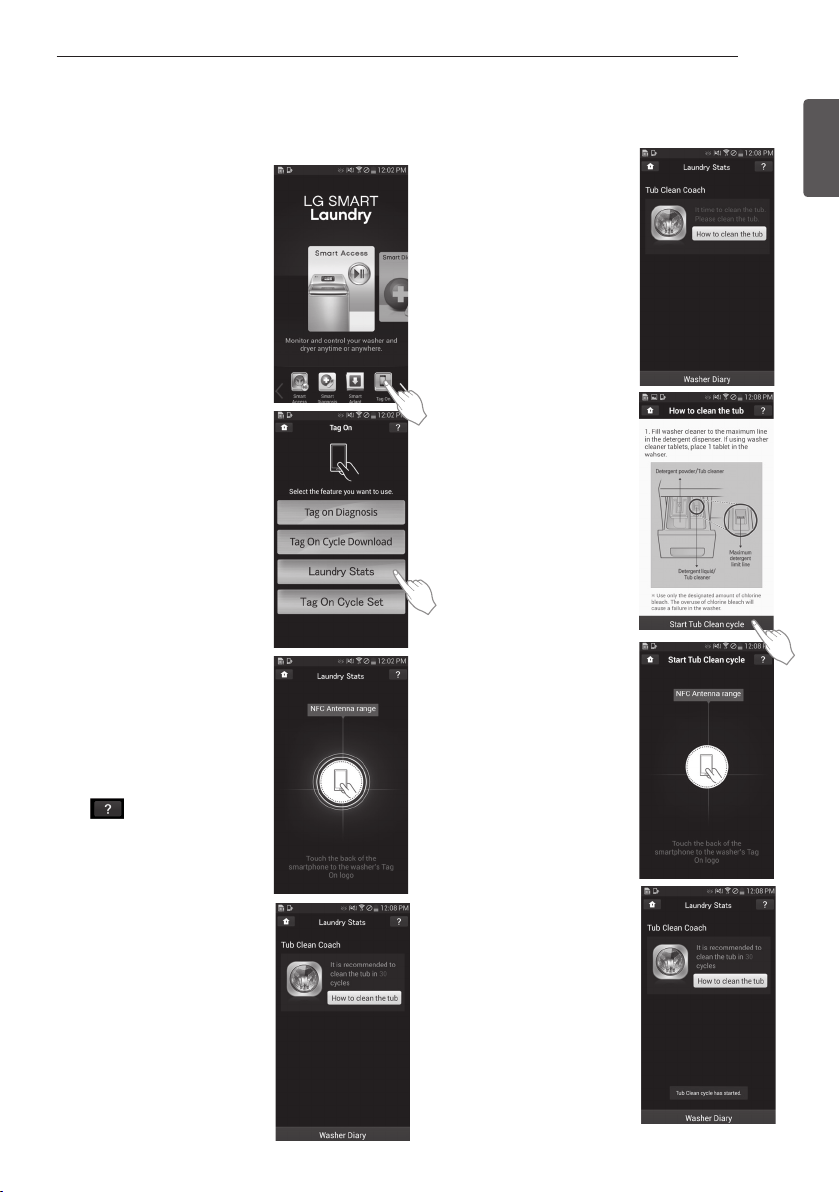
Laundry Stats can tell you
when the next Tub Clean cycle
is needed for your washer and
also tell you details of your last
10 cycles.
1 Select ‘Tag On’ by using the
top icons or the bottom
icons.
2 Select ‘Laundry Stats’.
3 When the Tag On screen
appears (see at right), tap
your smart phone to the Tag
On logo on the right side of
the washer’s control panel.
- If the app does not
recognize the appliance’s
Tag On logo, touch the
[
] in the upper right
corner of your smart
phone's screen to see the
detailed guide. (This might
happen due to the different
NFC antenna positions for
each phone.)
* Images are for reference only.
The LG Smart Laundry&DW
application may be updated.
Laundry Stats - Tub Clean
1 Select ‘How to clean the
tub’ in the Laundry Stats
screen.
2 Follow the instructions on
the phone to see how to
prepare the machine for
Tub Clean.
3 Select ‘Start Tub Clean
cycle’ at the bottom of the
screen.
4 When the Tag On screen
appears (as below), tap
your smart phone to the
Tag On logo on the right
side of the washer’s
control panel.
5 Verify that the Tub Clean
cycle has begun.
* Images are for reference
only. The LG Smart
Laundry&DW application
may be updated.
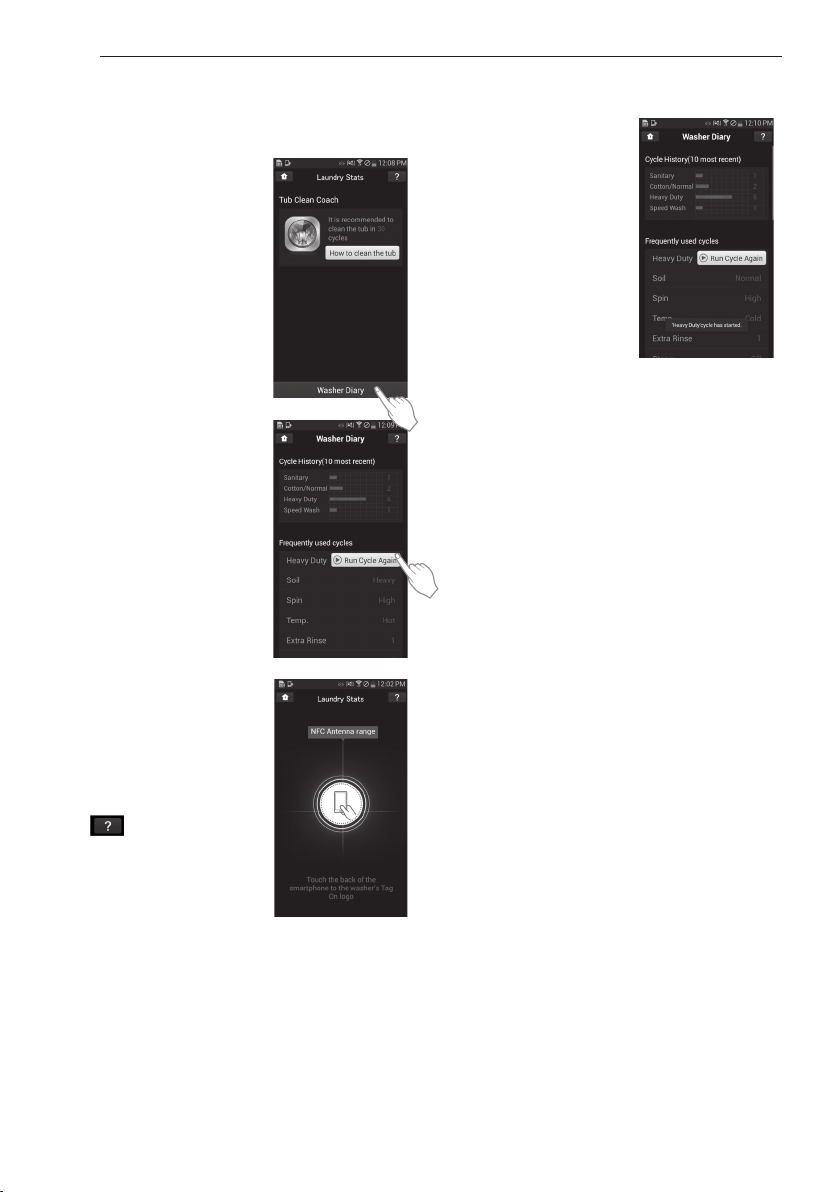
34
USING YOUR WASHING MACHINE
Laundry Stats - Washer Diary
1 Select "Washer Diary" at the
bottom of the Laundry Stats
screen.
- The Washer Diary displays
a chart showing the last
ten cycles used.
- Details of the Most Used
cycle and the Most Recent
cycle will also be
displayed.
2 Select the "Run Cycle Again"
- The Most Used cycle or
Most Recent cycle can be
immediately started by
selecting the "Run Cycle
Again" button.
3 Touch the Tag On logo.
- When a Tag On screen
appears (see at right), tap
your smart phone on the
Tag On icon on the right
side of the washer's control
panel.
- If it isn't recognized, touch
[
] on the upper right of
the Tag On screen on your
‘LG Smart Laundry&DW’
application to see the
detailed guide. (This might
happen due to the different
NFC antenna positions for
each phone.)
4 Check whether washing
starts with the selected
cycle.
- The screen as shown
appears and washing
starts immediately on the
selected cycle.
* Images are for reference only. The LG Smart
Laundry&DW application may be updated.
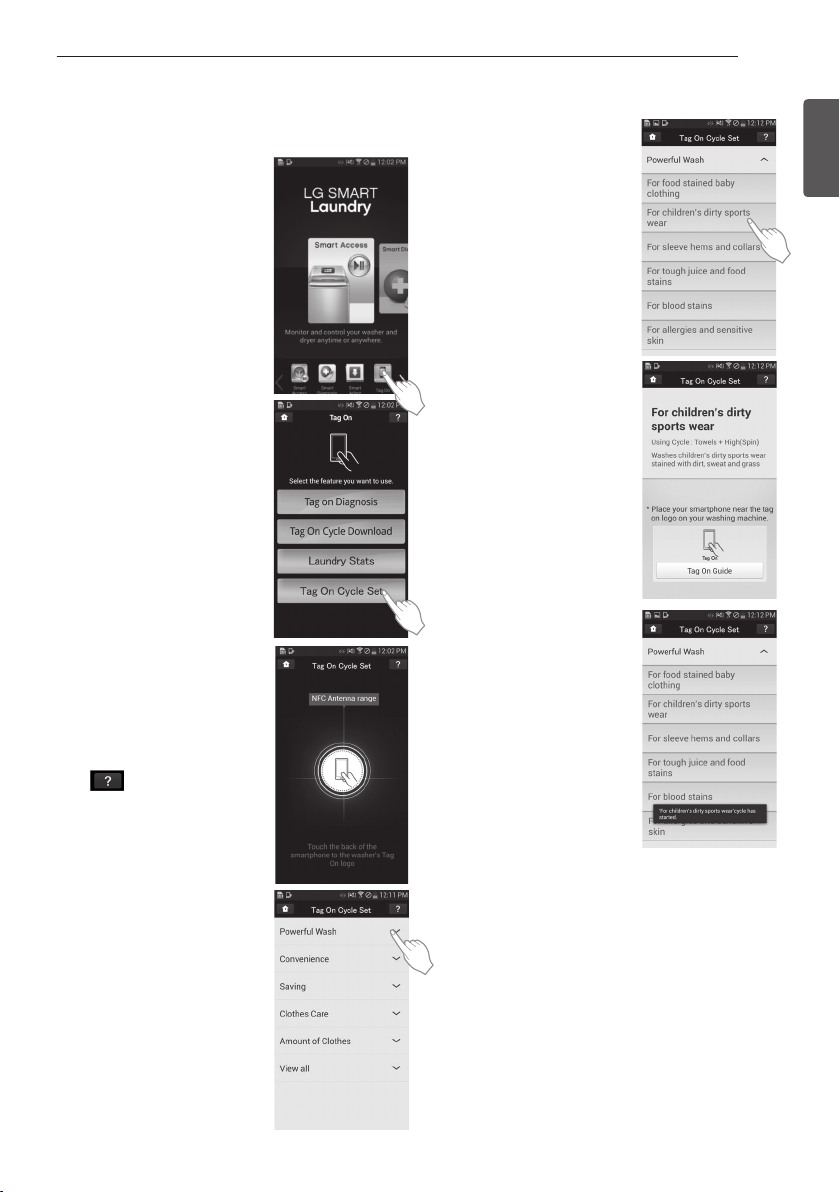
35
ENGLISH
USING YOUR WASHING MACHINE
Tag On Cycle Set
Tag On Cycle Set allows you to
automatically adjust the cycle
and settings based on your
laundry needs.
1 Select ‘Tag On’ by using the
top icons or the bottom
icons.
2 Select ‘Tag On Cycle Set’.
3 When the Tag On screen
appears (see at right), tap
your smart phone to the Tag
On logo on the right side of
the washer’s control panel.
- If the app does not
recognize the appliance’s
Tag On logo, touch the
[
] in the upper right
corner of your smart
phone's screen to see the
detailed guide. (This might
happen due to the different
NFC antenna positions for
each phone.)
4 Select a laundry category
based on the issue you want
the machine to focus on.
5 After selecting the category,
a list of specific cycles will
appear. Select the cycle
based on your needs.
6 When the Tag On screen
appears (see at right), tap
your smart phone to the
Tag On logo on the right
side of the washer’s control
panel.
7 After tagging the machine
with your phone, the cycle
will automatically start.
Verify the correct cycle and
settings were selected.
* Images are for reference only. The LG Smart
Laundry&DW application may be updated.
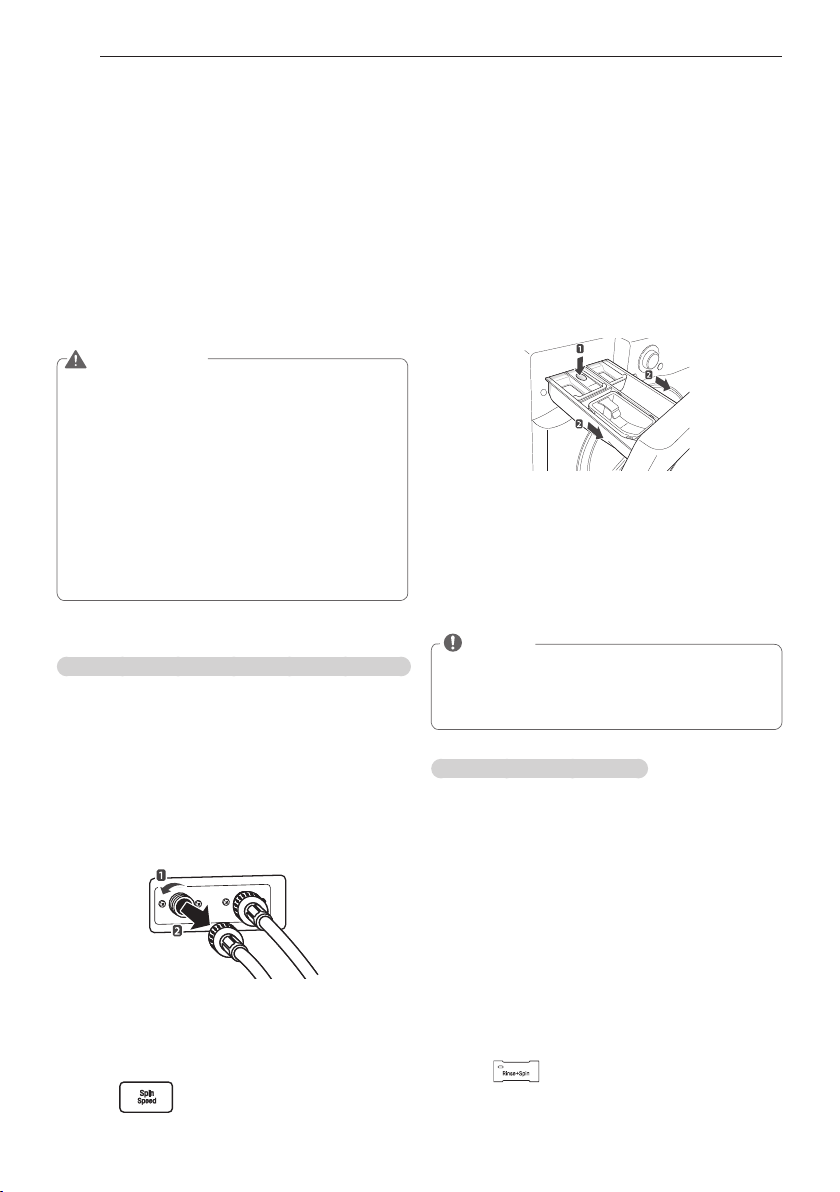
36
MAINTENANCE
Care
Care after wash
After the cycle is finished, wipe the door and the
inside of the door seal to remove any moisture.
Leave the door open to dry the tub interior. Wipe
the body of the washing machine with a dry cloth
to remove any moisture.
WARNING
y
Unplug the washer before cleaning to avoid
the risk of electric shock. Failure to follow
this warning can cause serious injury, fire,
electric shock or death.
y
Never use harsh chemicals, abrasive
cleaners, or solvents to clean the washer.
They will damage the finish.
y
Do not use volatile substances (benzene,
paint thinner, alcohol, acetone, etc.) or
detergents with strong chemical components
when cleaning the washing machine. Doing
so may cause discoloration or damage to the
machine, or it may cause a fire.
Care in cold climates
Storing the washing machine for an extended period of time
Follow the instructions for storing the washing
machine for an extended period of time in cold
climates where it may be exposed to freezing
temperatures.
1
Turn off the faucets connected with the water
lines.
2
Unscrew the water lines from back of the
washer.
3
Empty any water out of the water lines.
4
Press
A
.
5
Open the door and add 1 gallon (3.8 L) of
nontoxic recreational vehicle (RV) antifreeze to
the empty washer tub. Close the door.
6
Press to select draining and spinning.
MAINTENANCE
7
Press
C
.
- Drain the water from the washing machine
for 1 minute. Not all of the RV antifreeze will
be expelled.
8
Press
A
to turn off the washing machine and
pull out the power plug.
9
Dry the tub interior with a soft cloth, and close
the door.
10
Press down hard on the disengage button and
remove the detergent dispenser drawer.
11
Drain the water from the detergent dispenser
drawer and dry out each compartment.
12
Store the washing machine in an upright
position.
NOTE
y
To remove the antifreeze after storing the
washing machine, add detergent to the
dispenser, and run one cycle. Do not load
any laundry at this time.
When the water line is frozen
1
Turn off the faucets connected with the water
lines.
2
Pour hot water on the frozen faucets to thaw
the water lines and remove them.
3
Immerse the water lines in hot water to thaw
them.
4
Connect the water lines with the water inlets
of the washing machine and with the faucets.
- See page 14, Connecting the water lines for
details.
5
Turn on the faucets.
6
Press
A
.
7
Press .
8
Press
C
.
- Verify the water fills properly.
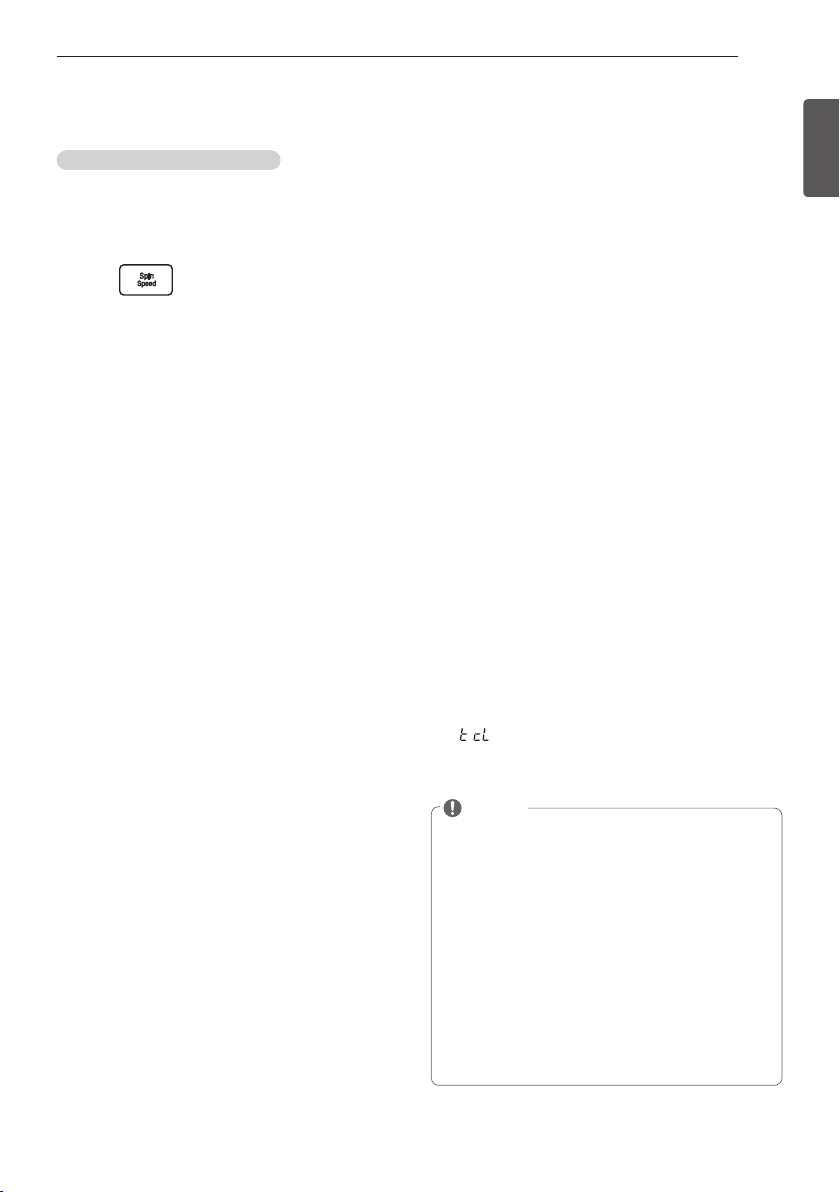
37
ENGLISH
MAINTENANCE
When the Drain Line is Frozen
1
Pour hot water in the washer tub and close the
door.
- Wait for 10 minutes.
2
Press
A
after 10 minutes.
3
Press
for draining and spinning.
4
Press
C
.
- Check if the water drains.
Cleaning
Periodically clean the washing machine to help
maintain its performance and to minimize the
chance of malfunction.
Cleaning the drum,
Tub Clean
Improper installation or use of the washing
machine in a humid space for a long period
of time potentially could lead to a buildup of
detergent residue in the washing machine that
may produce mildew or musty smells. If you
clean the washer tub regularly on a monthly basis
using Tub Clean it will minimize the possibility
that detergent residue will build up and mildew
or musty smells may occur.
1
Add tub cleaner or lime scale remover to the
detergent dispenser drawer.
- Do not exceed the maximum detergent limit
line when you add it. Detergent may remain
in the washer tub after cleaning.
- When you use liquid chlorine bleach, load it
into the liquid chlorine bleach compartment.
- When you use a powdered cleaner, pull out
the liquid detergent cup and add cleaner to
the main wash detergent compartment.
- When you use cleaning tablets,
place them
directly into the washer tub. (Do not add tablet
cleaner to the drawer.)
2
Press
A
.
3
Turn
B
to Tub Clean.
-
message appears in the display.
- The indication light for Tub Clean turns on.
4
Press
C
.
NOTE
y
Never load laundry while using Tub Clean.
The laundry may be damaged. Make sure to
clean the washer tub when it is empty.
y
It is recommended to leave the door open
after finishing the laundry to keep the tub
clean.
y
It is recommended that Tub Clean should be
repeated monthly.
y
If you notice mildew or musty smells, run
Tub Clean once a week for three consecutive
weeks.
y
Safely and conveniently secure the door
slightly ajar with the a magnetic door
plunger. This will promote air circulation and
help the machine to dry.
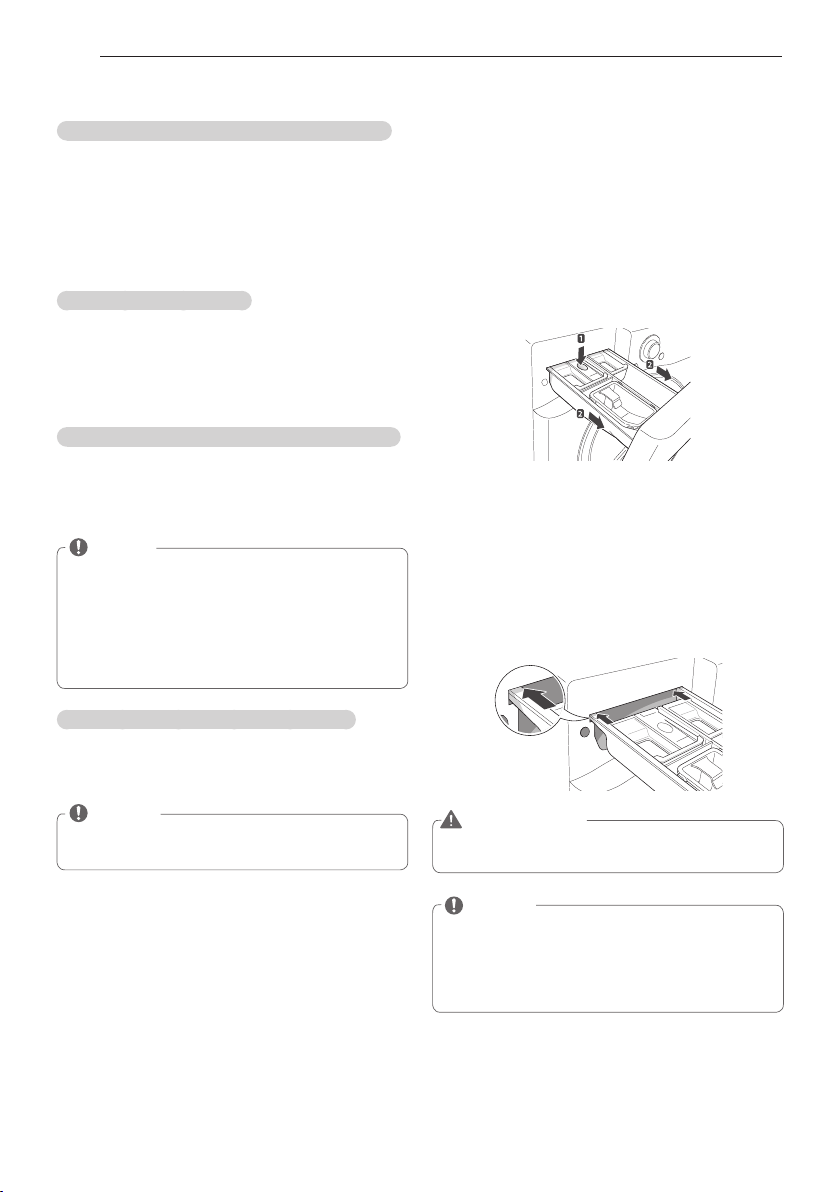
38
MAINTENANCE
Automatic alert for cleaning washing machine
When the power is on and the
O
message
blinks, it means the washer tub needs cleaning.
Use Tub Clean to clean the washer tub. The
automatic indication alert for cleaning the washer
tub depends on the frequency of use, however,
the message will generally appear every 1~2
months.
Removing mineral buildup
If you live in an area with hard water, mineral
scale can form on the internal components
of the washing machine. Take extra care to
periodically clean the mineral buildup on the
internal components to extend the lifespan of the
washing machine.
Removing mineral buildup from the washer tub
Check if the descaler is suitable for cleaning the
washer tub before using it and run the Tub Clean
cycle. See page 30,
Tub clean for details on tub
clean.
NOTE
y
In areas with hard water, it is recommended
to use a water softener.
y
Make sure to remove all loads from the
washer tub before cleaning the washer tub.
Cleaning the washer tub together with a load
may result in contamination of or damage to
the laundry.
Removing lime buildup on stainless steel
Wipe lime buildup or other spots on stainless
steel with a soft cloth soaked in stainless steel
cleaner.
NOTE
y
Never use steel wool or abrasive cleansers.
Doing so may damage the washing machine.
Cleaning the detergent dispenser drawer
Leaving detergent in the detergent dispenser
drawer for an extended period of time or using
the washing machine for a long period of time
may cause the build-up of scales in the detergent
dispenser drawer. Pull out and clean the
detergent dispenser drawer once a week.
1
Pull out the detergent dispenser drawer.
2
Press down hard on the disengage button and
remove the detergent dispenser drawer.
3
Remove the inserts from the drawer.
4
Clean them with warm water.
- Use a soft cloth or brush for cleaning and
remove any residue.
5
Wipe any moisture with a dry towel or cloth
after cleaning.
6
Replace the detergent dispenser drawer.
WARNING
y
Do not spray water inside the cabinet. Doing
so may cause fire or electric shock.
NOTE
y
Only use water to clean the detergent
dispenser drawer. Make sure to use
Rinse+Spin to rinse the washer tub before
the wash cycle when you use a cleaning
detergent to clean the washer tub.
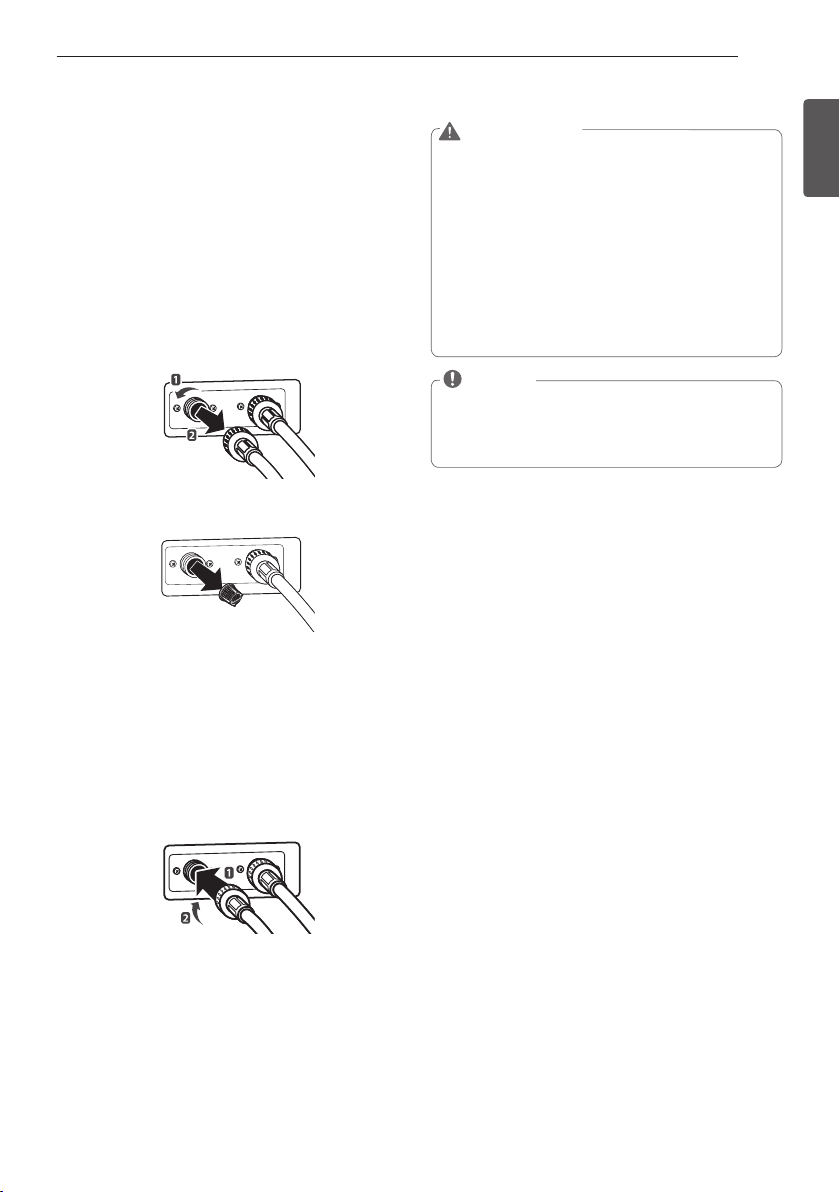
39
ENGLISH
MAINTENANCE
WARNING
y
Unplug the power cord and turn off the
faucets before cleaning. Failure to do so may
cause electric shock.
y
Do not use the washing machine without the
inlet filters. If you use the washing machine
without the inlet filters it will cause leaks and
malfunction.
y
If you use the washing machine in an area
with hard water, the inlet filter may become
clogged due to lime buildup. Contact your
nearest LG customer service center if the
inlet filter is not clean or is missing.
NOTE
y
P
message will blink on the display when
the water pressure in the detergent drawer
is weak or an inlet filter is clogged with dirt.
Clean the inlet filter.
Cleaning the water inlet filters
Clean the water inlet filters periodically to prevent
clogging. Take extra care to clean the water inlet
filters in areas using hard water. Water may not
be supplied if there are foreign objects, such as
rust, sand, or stones in the water inlet filters.
1
Press
A
to turn off the washing machine and
pull out the plug.
2
Turn off the faucets connected with the water
inlets.
3
Remove the water inlets.
4
Pull out the water inlet filter.
Inlet Filter
5
Remove foreign objects from the water inlet
filter.
- Soak the water inlet filters in white vinegar or
a lime scale remover or use a toothbrush to
remove foreign objects and rinse thoroughly.
6
Press the water inlet filters back into place.
7
Reattach the water lines to the washing
machine.
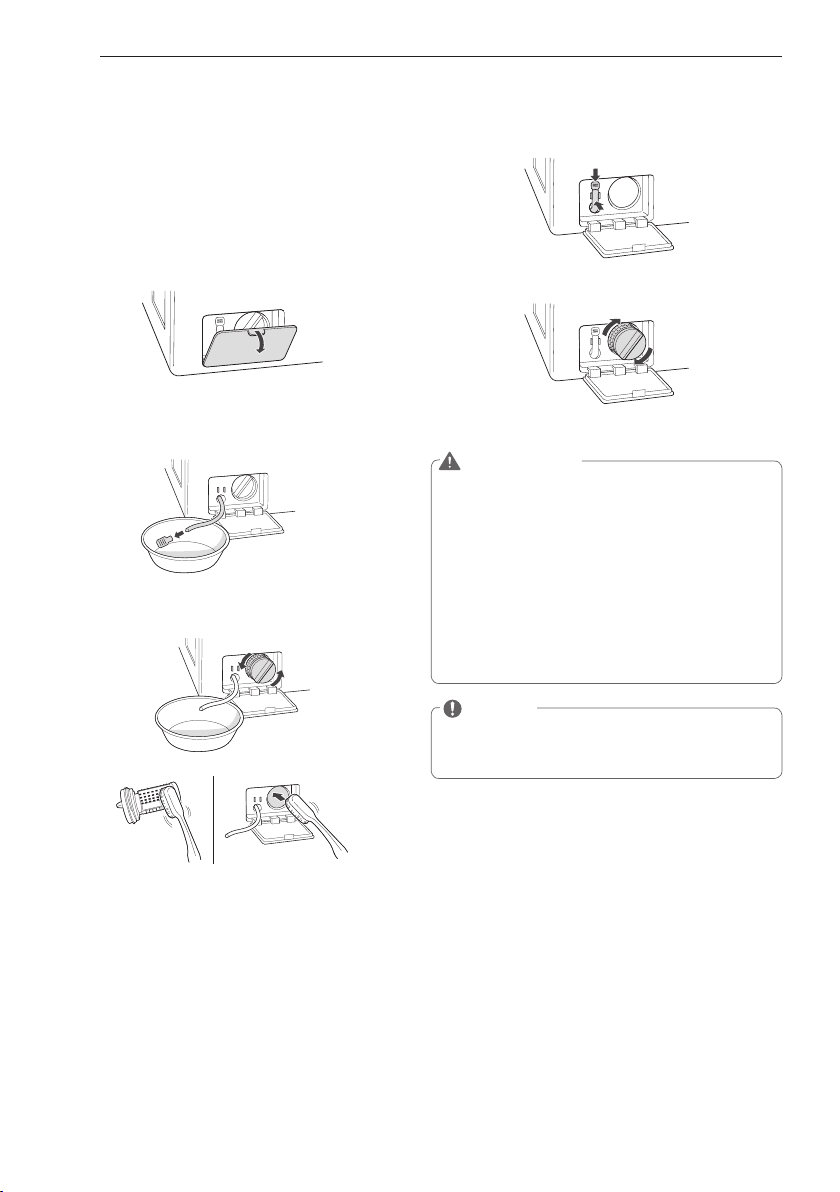
40
MAINTENANCE
Cleaning the drain pump filter
The washing machine fails to drain if the drain
pump filter is clogged. Periodically clean the
drain filter to prevent clogging with foreign
objects.
1
Press
A
to turn off the washing machine and
pull out the plug.
2
Open the drain pump filter cover.
3
Unclip the drain hose and remove the plug
from the drain hose to drain the remaining
water.
4
Twist the pump filter counterclockwise to
remove.
5
Clean the pump filter and opening.
6
Recap the plug onto the drain hose and
reattach the drain hose.
7
Insert the drain pump filter.
8
Close the drain pump filter cover.
WARNING
y
Make sure to unplug the electrical cord
before cleaning. Failure to do so may cause
electric shock.
y
Opening the drain filter will result in water
overflowing if there is water in the washer
tub. Make sure to check if the water is
completely drained before opening the drain
filter.
y
Using the washing machine without
the drain filter or with an incorrectly
assembled drain filter may cause leaks or
malfunctioning of the washing machine.
NOTE
y
Q
message will blink when the drain pump
filter is clogged with dirt. Clean the drain
pump filter.
41
ENGLISH
MAINTENANCE
Cleaning the door seal
Clean the door seal once a month to prevent
build-up of dirt in the door seal.
1
Wear rubber gloves and protective goggles.
2
Dilute 3/4 cup (177 ml) of liquid chlorine bleach
in 1 gallon (3.8 L) of water.
3
Soak a sponge or a soft cloth in this diluted
solution and wipe all around the door seal.
4
Wipe any moisture with a dry towel or cloth
after cleaning.
5
Leave the door open to allow the door seal to
dry completely.
CAUTION
y
Cleaning the door seal with an undiluted
solution may cause malfunction of the door
seal and washing machine parts.
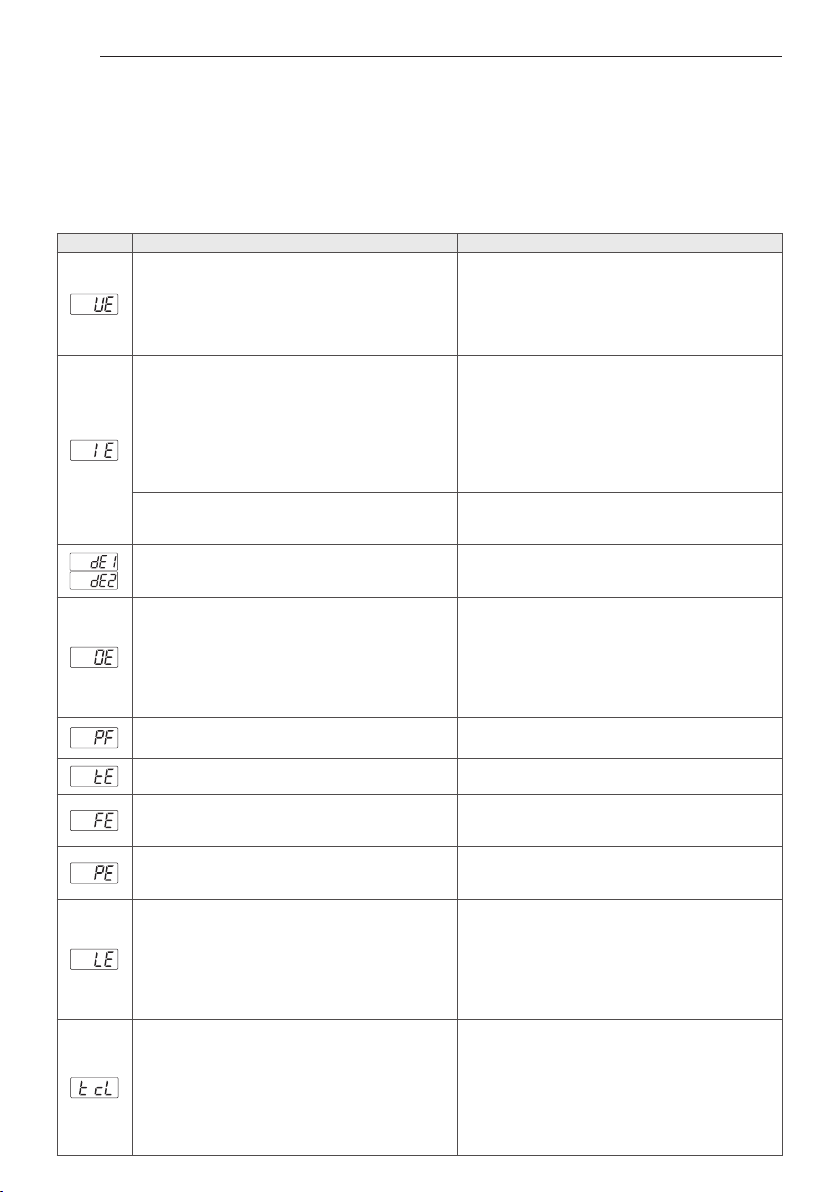
42
TROUBLESHOOTING
TROUBLESHOOTING
Checking error messages
If the following message appears on the display, check the following and take the appropriate corrective action.
Message
Possible Causes Solutions
Item of clothing has gathered on one side of the tub.
y
There are not enough items in the machine.
y
Items are tangled or bunched, or load is too small.
y
Did you wash a stuffed animal, a mat, or knitwear?
y
Did you wash two different blankets together?
y
Rearrange items to help balance the load.
y
Stuffed animals or mats can become unbalanced
during spinning and the washing machine may fail to
drain. Rearrange the knitwear to help balance the load
and drain it again.
y
Put one blanket in at a time.
Water is not supplied or the water pressure is low
y
Is the faucet turned off?
y
Is the water supply stopped or the faucet frozen?
y
Is the water pressure low or is an inlet filter clogged?
y
Is the water line properly connected with the cold
water inlet?
y
Is the water line pinched or bent?
y
Turn on the faucets.
y
If a faucet is frozen, thaw it with warm water.
y
If the inlet filter is clogged, clean it. (see page 39 )
y
Connect the water line properly with the cold water
inlet. (see page 14)
y
Check that the water lines are not pinched or bent.
Take extra care that water lines are not twisted or
pinched by other objects.
Water line leaks in connection
y
Are the water lines connected with the faucets
properly?
y
Connect the water lines properly with the faucets. (see
page 14)
The tub does not rotate
• Is the door completely closed and locked? Is the door
area free from clothing or other items?
y
Clear door area and make sure door is closed and
locked. If the message keeps appearing, unplug the
power and contact your nearest LG service center.
The washing machine drains slowly or not at all Is the
drain hose installed over 3 1/4 feet (1 m) beyond the end
of the elbow bracket?
y
Is the drain hose pinched or clogged inside?
y
Is the drain hose frozen?
y
Is the drain hose clogged with foreign objects?
y
Lower the drain hose within 3 feet below the end of
the elbow bracket.
y
Place the drain hose on a smooth surface to prevent
bending.
y
If the drain hoses are frozen, thaw them in warm
water.
y
Open the drain pump plug cap and remove the dirt.
A power failure has occurred.
y
Press
A
to turn off the washing machine and press it
again to turn it on.
Control Error.
y
Unplug the power cord and contact your nearest LG
service center.
The water supply does not stop
y
Do the water supply and the drain keep repeating in
turn?
y
Unplug the power cord and contact your nearest LG
service center
The water level is not controlled
y
Is the water level too low or high compared with the
size of the load?
y
The water level sensor is not working correctly.
y
Unplug the power cord and contact your nearest LG
service center.
The tub does not rotate
y
Is the washing machine overloaded?
y
Rearrange the load size and restart the washing
machine.
y
If the load size is big, the tub may not rotate due to
an overheated motor. Allow the washing machine
to stand for a while and restart the cycle. Unplug
the power cord and contact your nearest LG service
center if the same error message appears.
y
To clean up the tub, please run the Tub
Clean cycle.
y
Please empty the tub and insert bleach into the
detergent dispenser and select the Tub Clean cycle.
y
If you want to skip the Tub Clean, turn the cycle
selector knob or push the option buttons to select
a cycle. The message will keep appearing until a
few wash cycles have been completed, after which
it will disappear until the next scheduled time to
clean the tub.
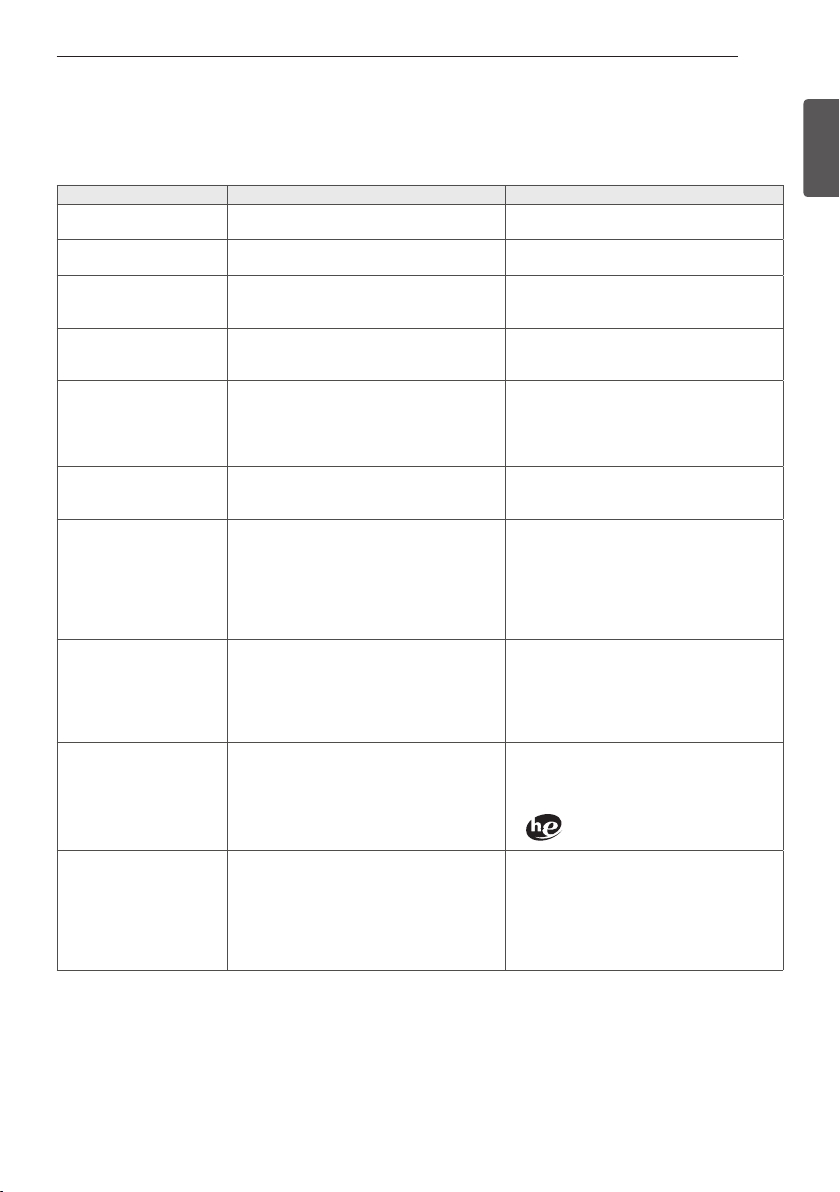
43
ENGLISH
TROUBLESHOOTING
Before calling for service
Check the following before calling for service.
Problem Possible Causes Solutions
Clicking sound
y
Do you hear a sound when you close or lock
and unlock the door?
y
This sound is normal and occurs when the
door is closed, locked or unlocked.
Spraying or hissing sound
y
Is water spraying in the tub?
y
This sound is normal as water is spraying or
circulating during the cycle.
Buzzing or gushing
sound
y
Is the washing machine draining water?
y
This sound is normal as the drain pump
drains water from the washing machine after
the cycle.
Splashing sound
y
Is the washing machine washing a load of
laundry?
y
This sound is normal as the load is moving
up and down during the wash and rinse
cycles.
Rattling and clanking noise
y
Are there any foreign objects such as keys,
coins, or safety pins in the tub or drain filter?
y
Check if there are any foreign objects in the
tub and drain the filter after stopping the
cycle.
y
Unplug the power cord and contact your
nearest LG service center if the noise persists.
Thumping sound
y
Is the washing machine overloaded?
y
Is the load out of balance?
y
This sound is normal and occurs when the
load is out of balance. Stop the cycle and
rearrange the load for balancing.
Vibrating noise
y
Are the shipping bolts removed?
y
Is the load evenly distributed in the tub?
y
Is the washing machine level balanced?
y
Is the washing machine installed on a solid
and smooth surface?
y
See page 13, Unpacking and removing
shipping bolts to remove the shipping bolts.
y
Stop the cycle and rearrange the load for
balancing.
y
See page 16,
Leveling the washing machine
to level the washing machine.
y
Check if the floor is solid and level.
Water leaking around washer
y
Is water leaking from the faucet or the water
line?
y
Is a drain pipe or a drain hose clogged?
y
Check the faucets or water lines.
- If the water lines are loosely connected, see
page 14, Connecting water lines to connect
them properly.
y
Unclog the drain pipe or drain hose. Contact
a plumber if necessary.
Excessive suds or failure to
rinse
y
Did you use more than the recommended
amount of detergent?
y
Is the soil level higher than the size of the
load?
y
Use the recommended amount of detergent
for load.
y
If the soil level is low, reduce the detergent
quantity to less than the recommended level.
Only use detergent with the HE (High-
Efficiency) logo.
Staining
y
Did you add detergent directly to the tub?
y
Did you remove the load immediately after it
finished?
y
Did you sort and wash the clothes by color or
soil?
y
Make sure to load detergent into the
detergent dispenser drawer.
y
Remove the load immediately after it finishes.
y
Sort and separate dark colors from light or
white ones, and heavily soiled items from
lightly soiled ones. See page 19, Sorting
laundry for details
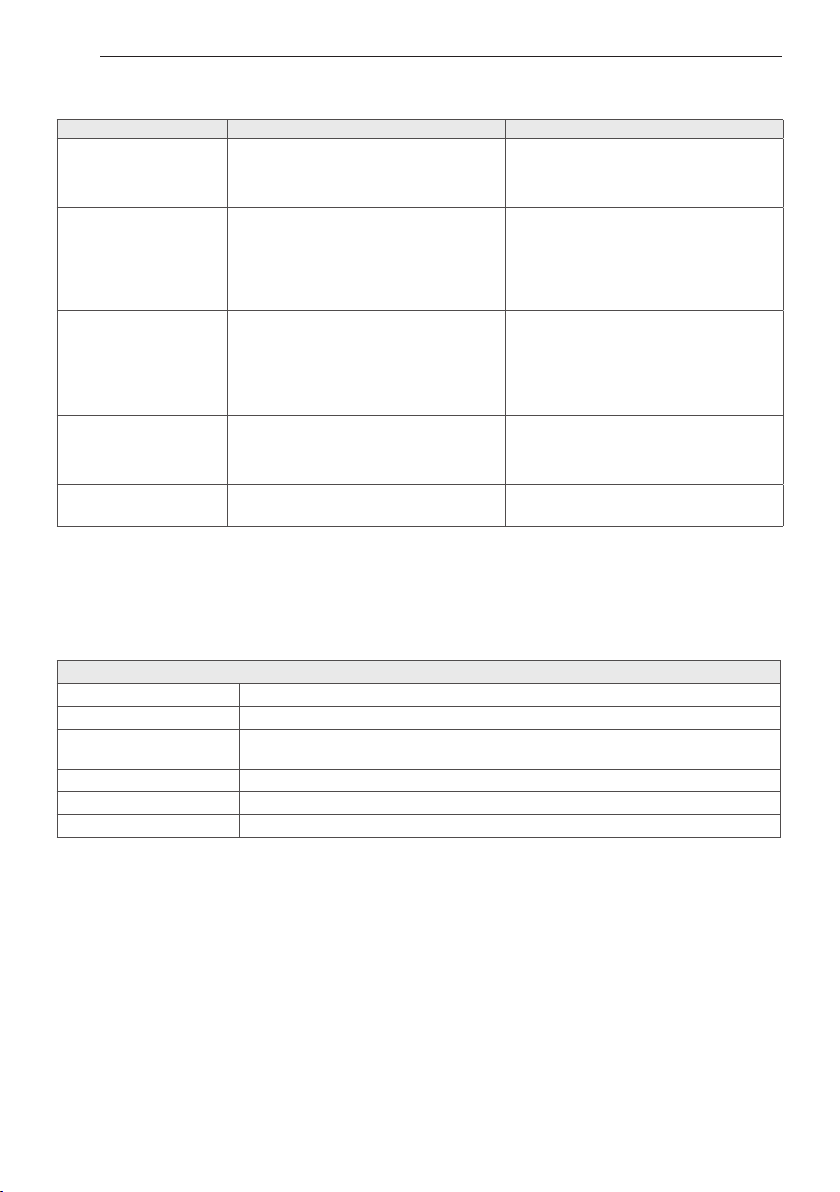
44
SPECIFICATION
Problem Possible Causes Solutions
Wrinkling
y
Did you remove the load immediately after it
finished?
y
Did you overload the tub?
y
Did you reverse the hot and cold water inlets?
y
Remove the load immediately after it finishes.
y
Do not overload the tub.
y
Hot water rinse can cause garments to
wrinkle. Check the inlet hose connections.
Power is not turned on
y
Is the power cord plugged in properly?
y
Has a house fuse blown, a circuit breaker
tripped, or a power outage occurred?
y
Make sure that the plug is secured in a
grounded 3-prong, 120 V (60 Hz) outlet.
y
Reset the circuit breaker or replace the
fuse. Do not increase the fuse capacity. If
the problem is a circuit overload, have it
corrected by a qualified electrician.
The door does not open
when the cycle pauses or
finishes
y
Is the temperature in the tub too high?
y
Is the water level in washer high?
y
The washing machine has a safety lock built
into the door to prevent burns. Leave the
door closed and wait until the door lock icon
disappears from the display.
y
Allow the washer to complete the
programmed cycle, or press the Spin button.
The wash cycle time is
longer than usual
y
Is the washing machine overloaded? Are
other options added to the wash cycle?
y
This is normal. The washing machine
automatically adjusts the cycle time for the
amount of laundry, water pressure, water
temperature, and other operating conditions.
It is musty or moldy in the
tub
y
Has the incorrect detergent been used?
y
Did you clean the tub periodically?
y
See page 37, clean the inside and outside of
the washing machine periodically.
SPECIFICATIONS
Model WM3570H*A
Description Front Loading Washer
Electrical requirements 120 VAC @ 60 Hz
Dimensions 68.6 cm (W) X 75.6 cm (D) X 98.3 cm (H), 129.5 cm (D with door open)
27" (W) X 29
3
/
4
" (D) X 38
11
/
16
" (H), 51" (D with door open)
Net weight 92kg(202.8lbs)
Max. spin speed 1300 RPM
Max. water pressure 14.5 – 142 PSI (100 – 980 kpa)
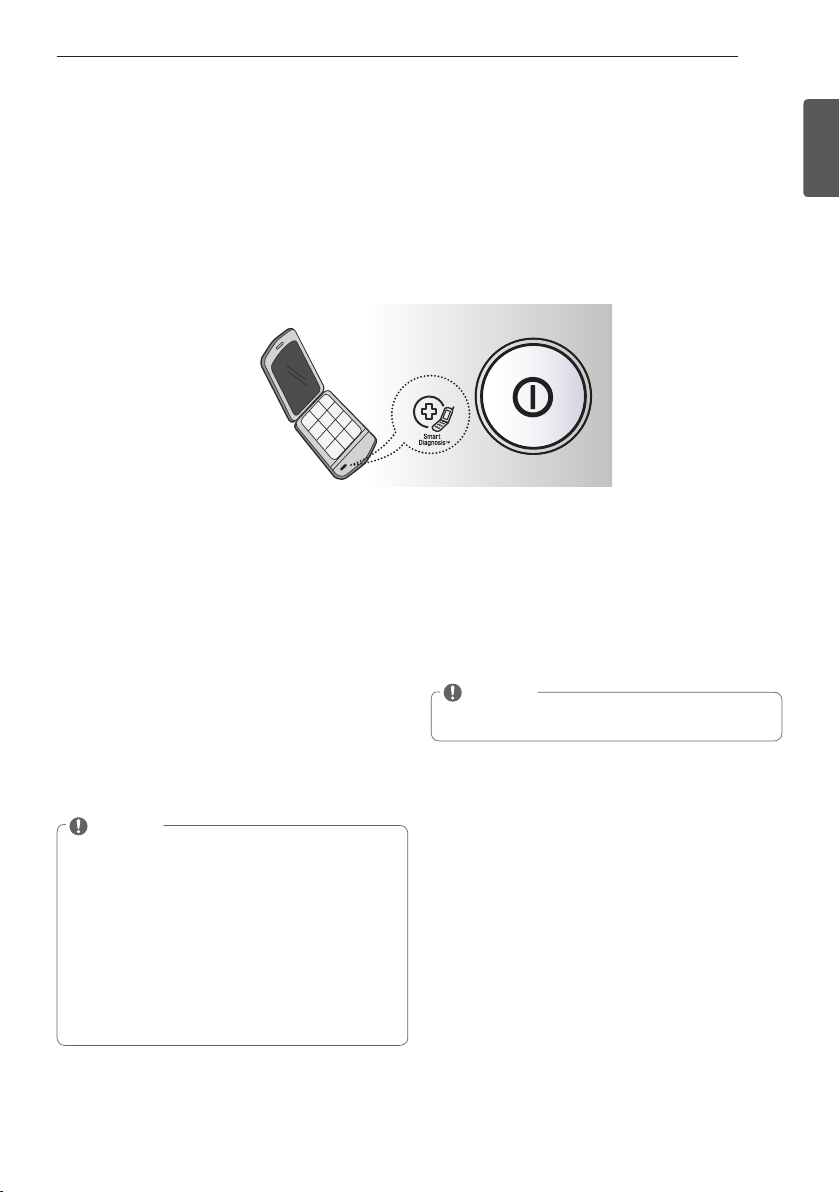
45
ENGLISH
USING Smart Diagnosis™
Should you experience any problems with your Washer, it has the capability of transmitting data to
your smart phone using the LG Smart Laundry Application or via your telephone to the LG call center.
Smart Diagnosis™ cannot be activated unless your washer is turned on by pressing the POWER but-
ton. If your washer is unable to turn on, then troubleshooting must be done without using Smart
Diagnosis™.
Audible Diagnosis
Smart Diagnosis™ Using Your Smart
Phone
1. Download the LG Smart Laundry application on
your smart phone.
2. Open the LG Smart Laundry application on your
smart phone. Press the right arrow button to ad-
vance to the next screen.
3. Press the RECORD button on the smart phone and
then hold the mouth piece of the smart phone
near the Smart Diagnosis™ logo on the Washer.
4. With the phone held in place, press and hold the
Wash Temp button for three seconds.
5. Keep the phone in place until the tone transmis-
sion has finished. This takes about six seconds
and the display will count down the time.
6. When the recording is complete, view the diagno-
sis by pressing the Next button on the phone.
NOTE
y
Smart Diagnosis™ is a troubleshooting feature
designed to assist, not replace, the traditional
method of troubleshooting through service
calls. The effectiveness of this feature depends
upon various factors, including, but not limited
to, the reception of the cellular phone being
used for transmission, any external noise that
may be present during the transmission, and
the acoustics of the room where the machine
is located. Accordingly, LG does not guarantee
that Smart Diagnosis™ would accurately trou-
bleshoot any given issue.
Smart Diagnosis™ Through the
CallCenter
1. Call the LG call center at: (LG U.S.) 1-800-243-0000
(LG Canada) 1-888-542-2623.
2. When instructed to do so by the call center agent,
hold the mouthpiece of your phone over the
Smart Diagnosis™ logo on the machine. Hold the
phone no more than one Inch from (but not touch-
ing) the machine.
NOTE
y
Do not touch any other buttons or icons on the
display screen.
3. Press and hold the Wash Temp button for three
seconds.
4. Keep the phone in place until the tone transmis-
sion has finished. This takes about six seconds
and the display will count down the time.
5. Once the countdown is over and the tones have
stopped, resume your conversation with the call
center agent, who will then be able to assist you in
using the information transmitted for analysis.
USING Smart Diagnosis™
46
WARRANTY
THIS LIMITED WARRANTY DOES NOT COVER:
1. Service trips to deliver, pick up, or install the product or for instruction on product use.
2. Replacing house fuses or resetting of circuit breakers, correction of house wiring or plumbing, or correction of product
installation.
3. Damage or failure caused by leaky/ broken/ frozen water pipes, restricted drain lines, inadequate or interrupted water supply
or inadequate supply of air.
4. Damage or failure caused by accidents, pests and vermin, lightning, wind, fire, floods or acts of God.
5. Damage or failure resulting from misuse, abuse, improper installation, repair or maintenance. Improper repair includes use
of parts not approved or specified by LG.
6. Damage or failure caused by unauthorized modification or alteration to the product.
7. Damage or failure caused by incorrect electrical current, voltage, or plumbing codes.
8. Cosmetic damage, including scratches, dents, chips or other damage to the finish of the product, unless such damage
results from defects in materials or workmanship and is reported to LG within seven (7) calendar days from the date of
delivery.
9. Damage or missing items to any display, open box, discounted, or refurbished product.
10. Product where the original factory serial numbers have been removed, defaced or changed in any way.
11. Repairs when product is used in other than normal and usual household use (e.g. rental, commercial use, offices, or
recreational facilities) or contrary to the instructions outlined in the owner’s manual.
12. The removal and reinstallation of the Product if it is installed in an inaccessible location.
HOW SERVICE IS HANDLED: In-Home Service
In-home service will be provided, as available, during the warranty period subject to servicer availability within the U.S. To
receive in-home service, the product must be unobstructed and accessible to service personnel. If the in-home service repair
cannot be completed, it may be necessary to remove, repair and return the product. If in-home service is unavailable, LG may
elect, at its option, to provide for transportation of the product to and from an LG authorized service center.
THIS WARRANTY IS IN LIEU OF ANY OTHER WARRANTY, EXPRESS OR IMPLIED, INCLUDING AND WITHOUT LIMITATION
TO, ANY WARRANTY OF MERCHANTABILITY OR FITNESS FOR A PARTICULAR PURPOSE. TO THE EXTENT ANY IMPLIED
WARRANTY IS REQUIRED BY LAW, THIS WARRANTY IS LIMITED IN DURATION TO THE TERM PERIOD EXPRESSED ABOVE.
REPAIR OR REPLACEMENT AS PROVIDED UNDER THIS WARRANTY IS THE EXCLUSIVE REMEDY FOR THE CUSTOMER.
NEITHER THE MANUFACTURER NOR ITS U.S. DISTRIBUTOR SHALL BE LIABLE FOR ANY INCIDENTAL, CONSEQUENTIAL,
INDIRECT, SPECIAL, OR PUNITIVE DAMAGES OF ANY NATURE, INCLUDING AND WITHOUT LIMITATION TO, LOST REVENUES
OR PROFITS, OR ANY OTHER DAMAGE, WHETHER BASED IN CONTRACT, TORT, OR OTHERWISE.
SOME STATES DO NOT ALLOW THE EXCLUSION OR LIMITATION OF INCIDENTAL OR CONSEQUENTIAL DAMAGES OR
LIMITATIONS ON HOW LONG AN IMPLIED WARRANTY LASTS, SO THE ABOVE EXCLUSION OR LIMITATION MAY NOT APPLY
TO YOU. THIS WARRANTY GIVES YOU SPECIFIC LEGAL RIGHTS AND YOU MAY ALSO HAVE OTHER RIGHTS THAT VARY
FROM STATE TO STATE.
HOW TO OBTAIN WARRANTY SERVICE & ADDITIONAL INFORMATION: Write your warranty information below:
Call 1-800-243-0000 or visit our website at www.lg.com. Product Registration Information:
Mail to: LG Customer Information Center (ATTN: CIC) Model:
201 James Record Road, Huntsville, AL 35824 Serial Number:
Date of Purchase:
WARRANTY:
LG Electronics U.S.A., Inc. (“LG”) warrants your LG Washing Machine (“product”) against defect in materials or workmanship
under normal household use, during the warranty period set forth below, LG will, at its option, repair or replace the product.
This limited warranty is valid only to the original retail purchaser of the product, is not assignable or transferrable to any
subsequent purchaser or user, and applies only when the product is purchased through an LG authorized dealer or distributor
and used within the United States (“U.S.”) including U.S. Territories.
Note: Replacement products and repair parts may be new or factory-remanufactured and are warranted for the remaining
portion of the original unit’s warranty period or ninety (90) days, whichever is longer. Please retain dated receipt or delivery
ticket as evidence of the Date of Purchase for proof of warranty (you may be required to submit a copy to LG or authorized
representative).
WARRANTY PERIOD:
LG WASHING MACHINE LIMITED WARRANTY (USA)
Period
One (1) year from date of
original retail purchase:
Ten (10) years from date of
original retail purchase:
Lifetime from date of
original retail purchase:
Scope of Warranty
Any internal /functional
Parts & Labor
Drum Motor
(Stator, Rotor, and Hall Sensor)
Stainless Steel Drum
Remark
LG will provide parts & labor to
repair or replace defective
parts.
Parts only. Customer will be responsible for any labor or in-
home
service to replace defective parts.
ENGLISH
47
WARRANTY
LG WASHING MACHINE LIMITED WARRANTY (CANADA)
WARRANTY:
Should your LG Washer (“Product”) fail due to a defect in material or workmanship under normal home use during the warranty
period set forth below, LG Canada will at its option repair or the Product upon receipt of proof of original retail purchase. This
warranty is valid only to the original retail purchaser of the product and applies only to a Product distributed in Canada by LG
Canada or an authorized Canadian distributor thereof. The warranty only applies to Products located and used within Canada.
Replacement products and parts are warranted for the remaining portion of the original warranty period or ninety (90) days,
whichever is greater.
Replacement products and parts may be new or remanufactured.
LG Authorized Service Center warranties their repair work for thirty (30) days.
LG Canada’s sole liability is limited to the warranty set out above. Except as expressly provided above, LG Canada makes no
and hereby disclaims all other warranties and conditions respecting the product, whether express or implied, including, but not
limited to, any implied warranty or condition of merchantability or fitness for a particular purpose, and no representations shall
be binding on LG Canada. LG Canada does not authorize any person to create or assume for it any other warranty obligation or
liability in connection with the product. To the extent that any warranty or condition is implied by law, it is limited to the express
warranty period above. LG Canada, the manufacturer or distributor shall not be liable for any incidental, consequential, special,
direct or indirect damages, loss of goodwill, lost profits, punitive or exemplary damages or any other damage, whether arising
Directly or indirectly from any contractual breach, fundamental or otherwise, or from any acts or omissions, tort, or otherwise.
This warranty gives you specific legal rights. You may have other rights which may vary from province to province depending on
applicable provincial laws.
Any term of this warranty that negates or varies any implied condition or warranty under provincial law is severable where it
conflicts with provincial law without affecting the remainder of this warranty’s terms.
This limited warranty does not cover:
1. Service trips to deliver, pick up, or install the product; instructing a customer on operation of the product; repair or replacement of
fuses or correction of wiring, or correction of unauthorized repairs/installation.
2. Failure of the product to perform during power failures and interruptions or inadequate electrical service.
3. Damage caused by leaky or broken water pipes, frozen water pipes, restricted drain lines, inadequate or interrupted water supply
or inadequate supply of air.
4. Damage resulting from operating the Product in a corrosive atmosphere or contrary to the instructions outlined in the Product
owner’s manual.
5. Damage to the Product caused by accidents, pests and vermin, lightning, wind, fire, floods, or acts of God.
6. Damage resulting from the misuse, abuse, improper installation, repair, or maintenance of the Product. Improper repair includes
use of parts not approved or specified by LG Canada.
7. Damage or product failure caused by unauthorized modification or alteration, or use for other than its intended purpose, or
resulting from any water leakage due to improper installation.
8. Damage or Product failure caused by incorrect electrical current, voltage, commercial or industrial use, or use of accessories,
components, or cleaning products that are not approved by LG Canada.
9. Damage caused by transportation and handling, including scratches, dents, chips, and/or other damage to the finish of your
product, unless such damage results from defects in materials or workmanship and is reported within one (1) week of delivery.
10. Damage or missing items to any display, open box, discounted, or refurbished Product.
11. Products with original serial numbers that have been removed, altered, or cannot be readily determined. Model and Serial
numbers, along with original retail sales receipt, are required for warranty validation.
12. Increases in utility costs and additional utility expenses.
13. Replacement of light bulbs, filters, or any consumable parts.
14. Repairs when your Product is used in other than normal and usual household use (including, without limitation, commercial use,
in offices or recreational facilities) or contrary to the instructions outlined in the Product owner’s manual.
15. Costs associated with removal of the Product from your home for repairs.
16. The removal and reinstallation of the Product if it is installed in an inaccessible location or is not installed in accordance with
published installation instructions, including the Product owner’s and installation manuals.
17. Accessories to the Product such as door bins, drawers, handles, shelves, etc. Also excluded are parts besides those that were
originally included with the Product.
All costs associated with the above excluded circumstances shall be borne by the consumer.
For complete warranty details and customer assistance,
please call or visit our website:
Write your warranty information below:
Call 1-888-542-2623 (24 hours a day, 365 days a year) and select
the appropriate option from the menu, or visit our website
at http://www.lg.com
Product Registration Information:
Model:
Serial Number:
Date of Purchase:
Period
One (1) year from the date of
original retail purchase
Ten (10) years from the date of
original retail purchase
Five ( 5 ) years from the date of
original retail purchase
Scope of Warranty
Parts and Labor
(internal/functional parts only)
DD Motor
(Stator, Rotor, Hall Sensor)
Stainless Steel Drum
Remark Washer
Extended Component Warranty (Parts Only)
(Consumer will be charged for Labor after one (1) year from the
date of purchase)

48
MEMO