®
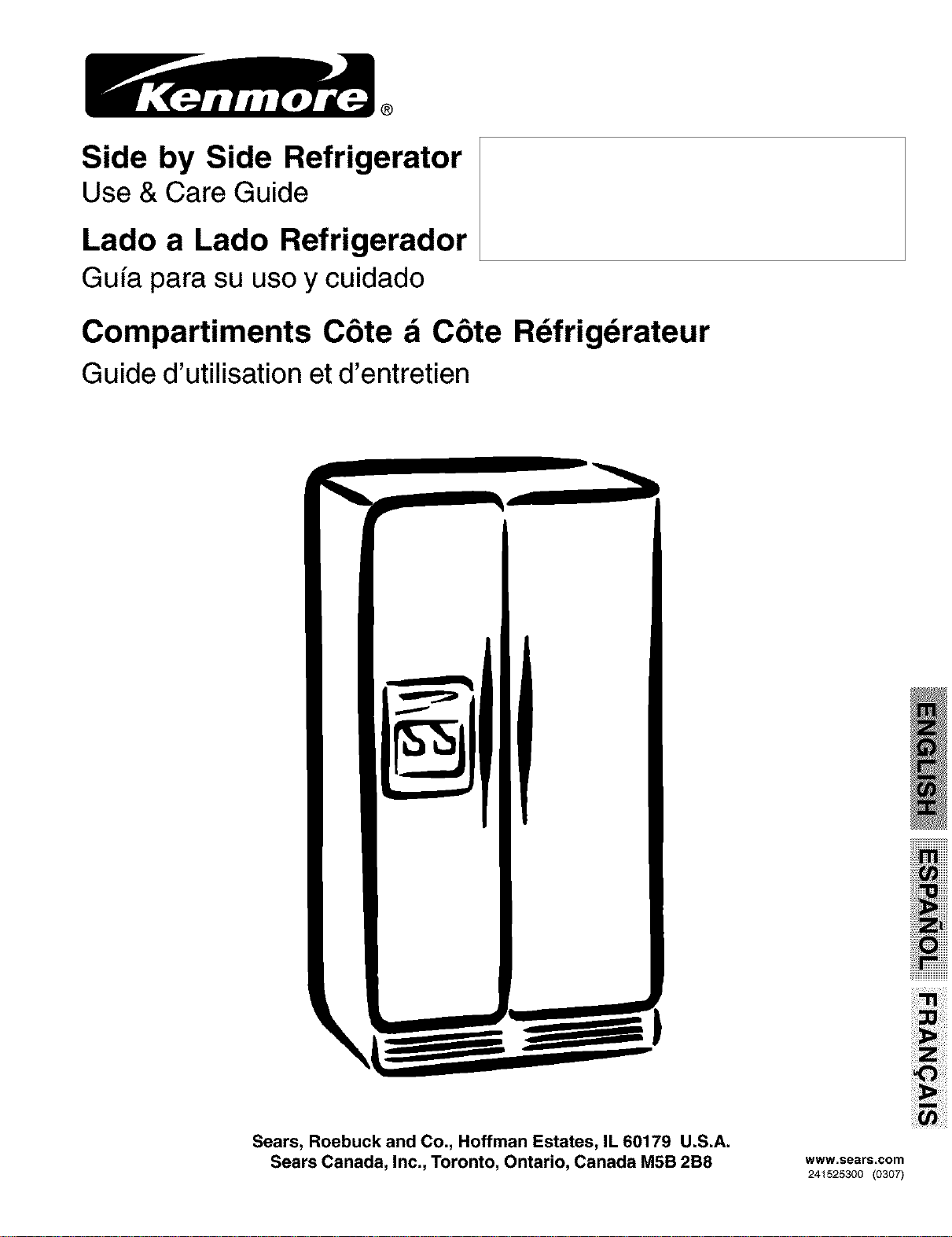
Side by Side Refrigerator
Use & Care Guide
Lado a Lado Refrigerador
Gufa para su usoy cuidado
Compartiments C6te d C6te Rdfrigdrateur
Guide d'utilisation et d'entretien
Sears, Roebuck and Co., Hoffman Estates, IL 60179 U.S.A.
Sears Canada, Inc., Toronto, Ontario, Canada M5B 2B8 www.sears.com
241525300 (0307)
Congratulations on your purchase of a new refrigerator! We
here at Sears are very proud of our product and we are
completely committed to providing you with the best
service possible. Your satisfaction is our #1 priority.
We know you'll enjoy your new refrigerator and Thank You
for choosing our product. We hope you consider us for
future purchases.
PLEASE READ AND SAVE THESE
INSTRUCTIONS
This Owner's Guide provides specific operating
instructions for your model. Use your refrigerator only as
instructed in this manual. These instructions are not meant
to cover every possible condition and situation that may
occur. Common sense and caution must be practiced
when installing, operating and maintaining any appliance.
Please record your model and serial numbers below
for future reference. This information is found on the
serial plate located inside the refrigerator
compartment.
Model Number: 253
FOR YOUR SAFETY
• Do not store or use gasoline, or other flammable liquids
in the vicinity ofthis or any other appliance. Read product
labels for warnings regarding flammability and other
hazards.
• Do not operate the refrigerator in the presence of
explosive fumes.
• Avoid contact with any moving parts of automatic ice
maker.
• Remove all staples from the carton. Staples can cause
severe cuts, and also destroy finishes if they come in
contact with other appliances or furniture.
CHILD SAFETY
Destroy or recycle the carton, plastic bags, and any
exterior wrapping material immediately after the refrigerator
is unpacked. Children should NEVER use these items to
play. Cartons covered with rugs, bedspreads, plastic
sheets or stretch wrap may become airtight chambers,
and can quickly cause suffocation.
or:
Serial Number:
Purchase Date:
Record Serial/Model Numbers ............ 2
Safety .................................................. 2-3
Warranty .............................................. 3
Canada - Limited Warranty .................. 4
Protection Agreements ........................ 5
Installation ........................................... 6-7
Door Removal Instructions ................. 8
Features At A Glance ......................... 9
Temperature Controls .......................... 10
Looking Inside ..................................... 11-13
Automatic Ice & Water Dispenser ....... 14-16
Front Ice and Water Filter .................... 17
Food Storage & Energy Saving Tips ... 18
Normal Operating Sounds & Sights .... 19
Care & Cleaning .................................. 20-21
Before You Call .................................... 22-25
PROPER DISPOSAL OF YOUR REFRIGERATOR
OR FREEZER
Risk of child entrapment
Child entrapment and suffocation
are not problems of the past.
Junked orabandoned refrigerators
or freezers are still dangerous -
even if they will sit for "just a few
days." Ifyou are getting rid of your
old refrigerator or freezer, please
follow the instructions below to
help prevent accidents.
Before you throw away your old refrigerator/freezer:
• Remove doors.
• Leave shelves in place so children may not easily climb
inside.
• Have refrigerant removed by a qualified service
technician.
2
FULL ONE-YEAR WARRANTY ON
REFRIGERATOR
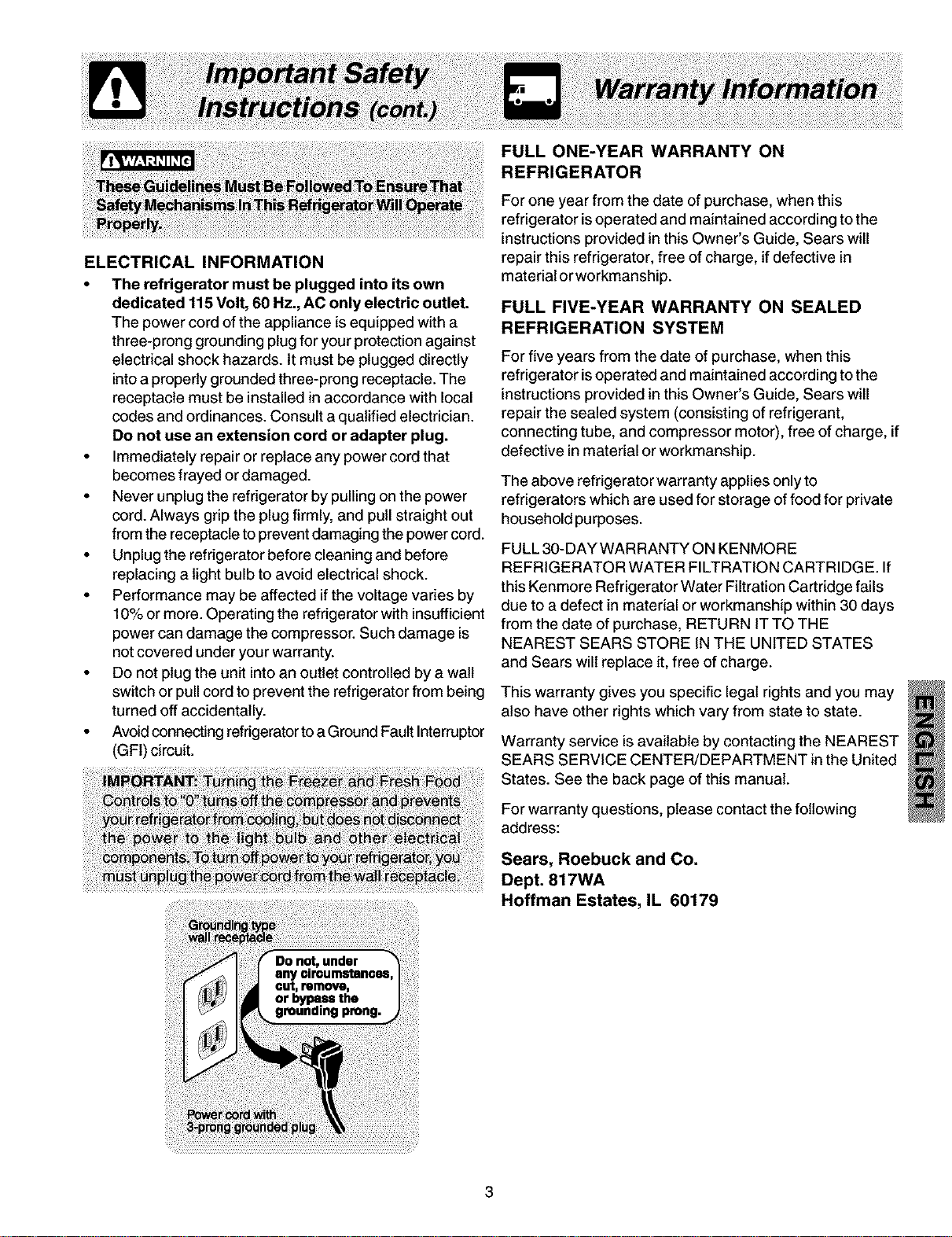
ELECTRICAL INFORMATION
• The refrigerator must be plugged into its own
dedicated 115 Volt, 60 Hz., AC only electric outlet.
The power cord of the appliance is equipped with a
three-prong grounding plug for your protection against
electrical shock hazards. It must be plugged directly
into a properly grounded three-prong receptacle. The
receptacle must be installed in accordance with local
codes and ordinances. Consult a qualified electrician.
Do not use an extension cord or adapter plug.
• Immediately repair or replace any power cord that
becomes frayed or damaged.
• Never unplug the refrigerator by pulling on the power
cord. Always grip the plug firmly, and pull straight out
from the receptacle to prevent damaging the power cord.
• Unplug the refrigerator before cleaning and before
replacing a light bulb to avoid electrical shock.
• Performance may be affected if the voltage varies by
10% or more. Operating the refrigerator with insufficient
power can damage the compressor. Such damage is
not covered under your warranty.
• Do not plug the unit into an outlet controlled by a walt
switch or pull cord to prevent the refrigerator from being
turned off accidentally.
• Avoid connecting refrigerator to a Ground Fault Interruptor
(GFI) circuit.
repair this refrigerator, free of charge, if defective in
material orworkmanship.
FULL FIVE-YEAR WARRANTY ON SEALED
REFRIGERATION SYSTEM
For five years from the date of purchase, when this
refrigerator is operated and maintained according to the
instructions provided in this Owner's Guide, Sears will
repair the sealed system (consisting of refrigerant,
connecting tube, and compressor motor), free of charge, if
defective in material or workmanship.
The above refrigerator warranty applies only to
refrigerators which are used for storage of food for private
household purposes.
FULL 30-DAY WARRANTY ON KENMORE
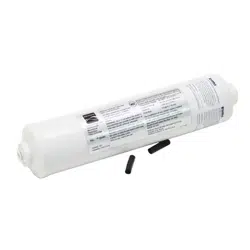
REFRIGERATOR WATER FILTRATION CARTRIDGE. If
this Kenmore Refrigerator Water Filtration Cartridge fails
due to a defect in material or workmanship within 30 days
from the date of purchase, RETURN IT TO THE
NEAREST SEARS STORE IN THE UNITED STATES
and Sears will replace it, free of charge.
This warranty gives you specific legal rights and you may
also have other rights which vary from state to state.
Warranty service is available by contacting the NEAREST
SEARS SERVICE CENTER/DEPARTMENT in the United
States. See the back page of this manual.
For warranty questions, please contact the following
address:
Sears, Roebuck and Co.
Dept. 817WA
Hoffman Estates, IL 60179
CANADA m LIMITED WARRANTY
Refrigerato
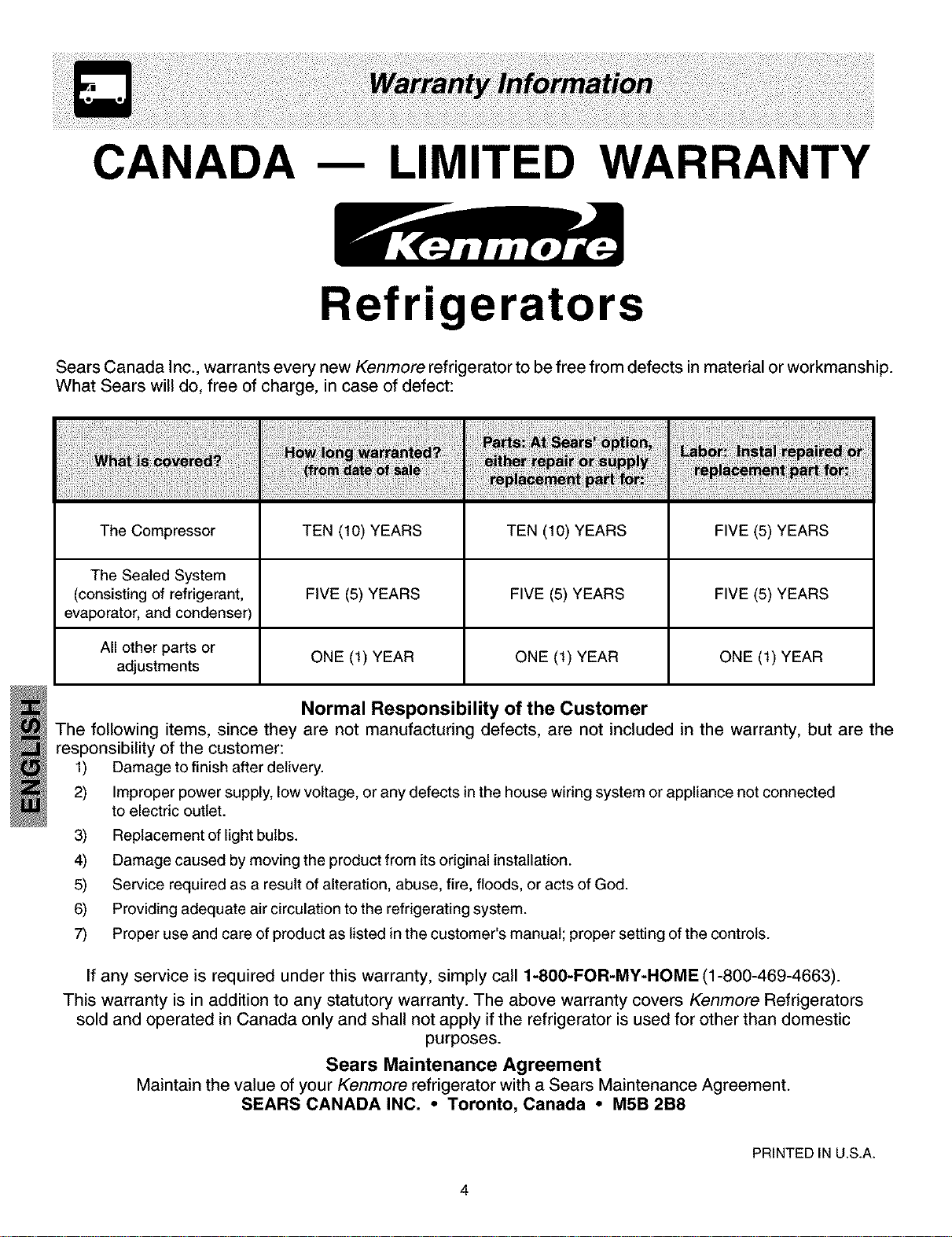
Sears Canada Inc., warrants every new Kenmore refrigerator to be free from defects in material or workmanship.
What Sears will do, free of charge, in case of defect:
The Compressor TEN (10) YEARS TEN (10) YEARS FIVE (5) YEARS
The Sealed System
(consisting of refrigerant, FIVE (5) YEARS FIVE (5) YEARS FIVE (5) YEARS
evaporator, and condenser)
All other parts or
adjustments ONE (1) YEAR ONE (1) YEAR ONE (1) YEAR
Normal Responsibility of the Customer
The following items, since they are not manufacturing defects, are not included in the warranty, but are the
responsibility of the customer:
1) Damage to finish after delivery.
2) Improper power supply, low voltage, or any defects in the house wiring system or appliance not connected
to electric outlet.
3) Replacement of light bulbs.
4) Damage caused by moving the product from its original installation.
5) Service required as a result of alteration, abuse, fire, floods, or acts of God.
6) Providing adequate air circulation to the refrigerating system.
7) Proper use and care of product as listed in the customer's manual; proper setting of the controls.
If any service is required under this warranty, simply call 1-800-FOR-MY-HOME (1-800-469-4663).
This warranty is in addition to any statutory warranty. The above warranty covers Kenmore Refrigerators
sold and operated in Canada only and shall not apply if the refrigerator is used for other than domestic
purposes.
Sears Maintenance Agreement
Maintain the value of your Kenmore refrigerator with a Sears Maintenance Agreement.
SEARS CANADA INC. • Toronto, Canada • M5B 2B8
PRINTED IN U.S.A.
4
In the U.S.A.
Master Protection Agreements
Congratulations on making a smart purchase. Your
new Kenmore ®appliance is designed and
manufactured for years of dependable operation. But
like all products, it may require preventive
maintenance or repair from time to time. That's when
having a Master Protection Agreement can save you
money and aggravation.
Purchase a Master Protection Agreement now and
protect yourself from unexpected hassle and expense.
The Master Protection Agreement also helps extend
the life of your new appliance. Here's what's included
in the Agreement:
Expert service by our 12,000 professional repair
specialists
Unlimited service and no charge for parts and
labor on all covered repairs
"No-lemon" guarantee - replacement of your
covered product if more than three product failures
occur within twelve months
_(
_(
_(
_(
_(
Product replacement if your covered product
can't be fixed
Annual Preventive Maintenance Check at your
request - no extra charge
Fast help by phone - non-technical and
instructional assistance on products repaired in
your home, plus convenient repair scheduling
Power surge protection against electrical
damage due to power fluctuations
Rental reimbursement if repair of your covered
product takes longer than promised
Once you purchase the Agreement, a simple phone
call is all that it takes for you to schedule service. You
can call anytime day or night, or schedule a service
appointment online.
Sears has over 12,000 professional repair specialists,
who have access to over 4.5 million quality parts and
accessories. That's the kind of professionalism you
can count on to help prolong the life of your new
purchase for years to come. Purchase your Master
Protection Agreement todayr
Some limitations and exclusions apply. For prices
and additional information, call 1-800-827-6655.
Sears Installation Service
For Sears guaranteed professional installation of home
appliances and items like garage door openers and
water heaters, in the U.S.A. call 1-800-4MY-HOME ®.
In Canada
Maintenance Agreements
Your purchase has added value because you can
depend on Sears HomeCentral ®for service. With over
2400 Service Technicians and access to over 900,000
parts and accessories, we have the tools, parts,
knowledge and skills to ensure the pledge: We Service
What We Sell.
Your Kenmore ®appliance is designed, manufactured
and tested to provide years of dependable operation.
Yet any major appliance may require service from time
to time. The Sears Maintenance Agreement offers you
an outstanding service program, affordably priced.
The Sears Maintenance Agreement
• Is your way to buy tomorrow's service at today's
price.
• Eliminate repair bills resulting from normal wear
and tear.
• Provides for non-technical and instructional
assistance.
• Even if you don't need repairs, provides an annual
Preventive Maintenance Check, at your request, to
ensure that your appliance is in proper running
condition.
Some limitations apply. For information
concerning Sears Canada Maintenance
Agreements, call 1-800-361-6665
This Owner's Guide provides specific operating
instructions for your model. Use the refrigerator only as
instructed in this Use & Care Manual. Before starting the
refrigerator, follow these important first steps.
LOCATION
• Choose a place that is near a grounded electrical outlet.
Do Not use an extension cord or an adapter plug.
• If possible, place the refrigerator out of direct sunlight
and away from the range, dishwasher or other heat
sources.
• The refrigerator must be installed on a floor that is level
and strong enough to support a fully loaded refrigerator.
• Consider water supply availability for models equipped
with an automatic ice maker.
INSTALLATION
Installation Clearances
• Allow the following clearances for ease of installation,
proper air circulation, and plumbing and electrical
connections:
Sides & Top 3/8"
Back 1"
DOOR OPENING
Your refrigerator should be positioned to allow easy access
to a counter when removing food. For best use of drawers
and freezer baskets, the refrigerator should be in a
position where both the refrigerator and freezer doors can
be fully opened.
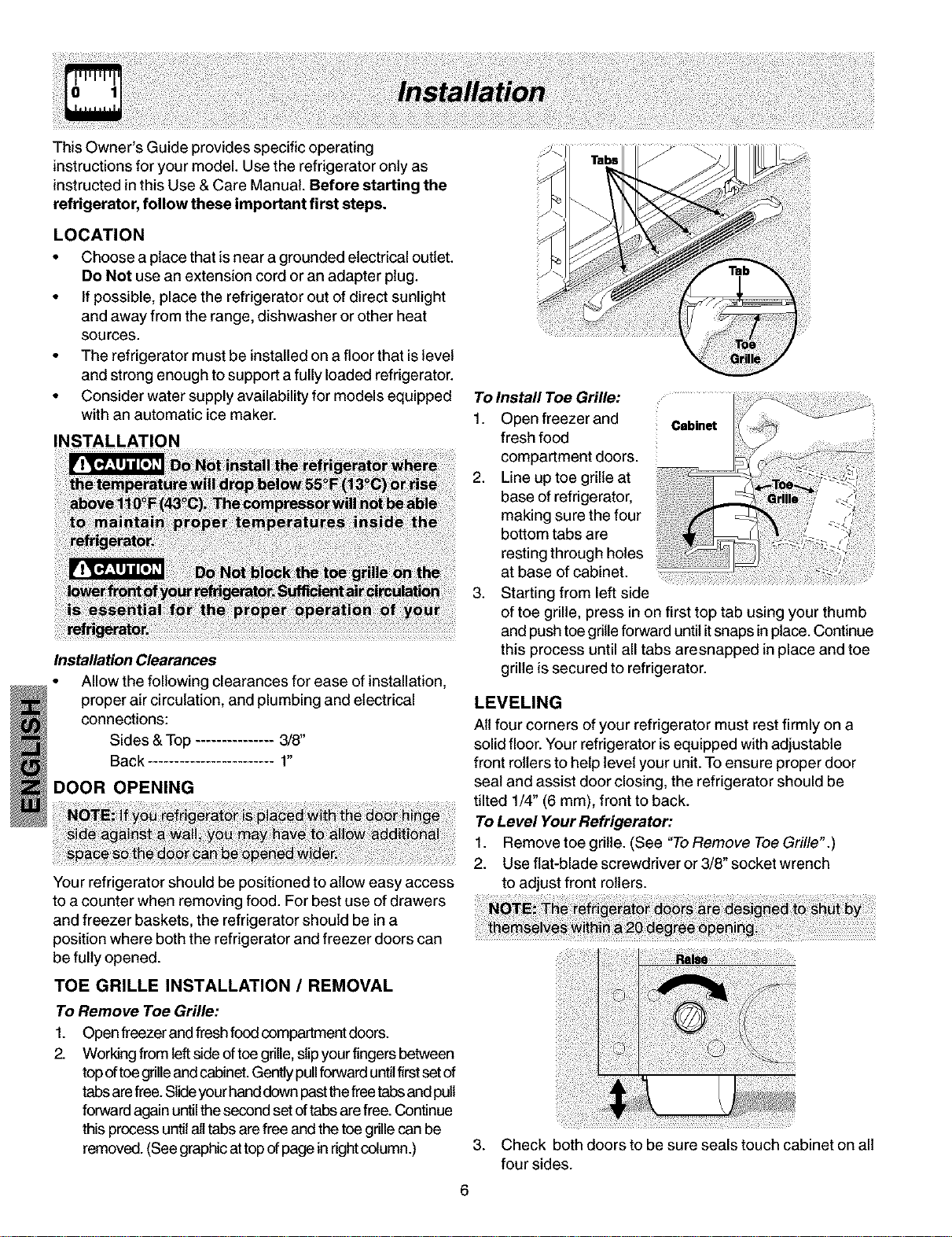
TOE GRILLE INSTALLATION / REMOVAL
To Remove Toe Grille:
1. Open freezer and fresh food compartment doors.
2. Working from leftside oftoe grille, slipyour fingersbetween
topoftoe grilleandcabinet.Genfiypull forward untilfirstsetof
tabs arefree. Slideyourhanddown pastthefreetabsand pull
forward again untilthesecond set oftabs arefree. Continue
this process untilall tabs are free and the toe grille can be
removed. (See graphic attopof page in rightcolumn.)
6
To Install Toe Grille:
1. Open freezer and
fresh food
compartment doors.
2. Line up toe grille at
base of refrigerator,
making sure the four
bottom tabs are
resting through holes
at base of cabinet.
3. Starting from left side
of toe grille, press in on first top tab using your thumb
and push toe grille forward until itsnaps in place. Continue
this process until all tabs aresnapped in place and toe
grille is secured to refrigerator.
LEVELING
All four corners of your refrigerator must rest firmly on a
solid floor. Your refrigerator is equipped with adjustable
front rollers to help level your unit. To ensure proper door
seal and assist door closing, the refrigerator should be
tilted 1/4" (6 mm), front to back.
To Level Your Refrigerator:
1. Remove toe grille. (See "ToRemove Toe Grille".)
2. Use flat-blade screwdriver or 3/8" socket wrench
to adjust front rollers.
. Check both doors to be sure seals touch cabinet on all
four sides.
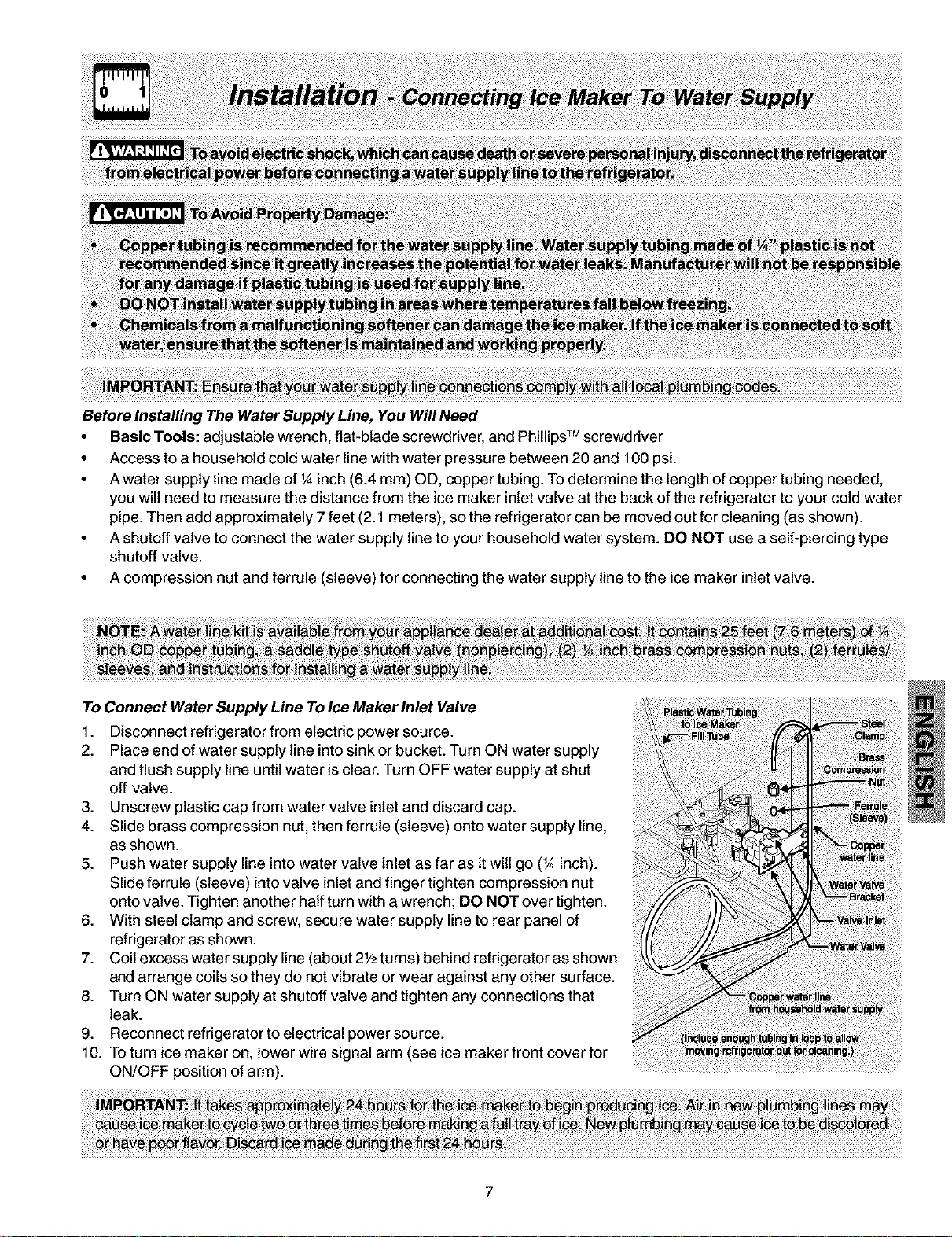
Before Installing The Water Supply Line, You Will Need
• Basic Tools: adjustable wrench, flat-blade screwdriver, and Phillips TM screwdriver
• Access to a household cold water line with water pressure between 20 and 100 psi.
• A water supply line made of 1Ainch (6.4 mm) OD, copper tubing. To determine the length of copper tubing needed,
you will need to measure the distance from the ice maker inlet valve at the back of the refrigerator to your cold water
pipe. Then add approximately 7 feet (2.1 meters), so the refrigerator can be moved out for cleaning (as shown).
• A shutoff valve to connect the water supply line to your household water system. DO NOT use a self-piercing type
shutoff valve.
• A compression nut and ferrule (sleeve) for connecting the water supply line to the ice maker inlet valve.
To Connect Water Supply Line To Ice Maker inlet Valve
1. Disconnect refrigerator from electric power source.
2. Place end of water supply line into sink or bucket. Turn ON water supply
and flush supply line until water is clear. Turn OFF water supply at shut
off valve.
3. Unscrew plastic cap from water valve inlet and discard cap.
4. Slide brass compression nut, then ferrule (sleeve) onto water supply line,
as shown.
5. Push water supply line into water valve inlet as far as it wilt go (_Ainch).
Slide ferrule (sleeve) into valve inlet and finger tighten compression nut
onto valve. Tighten another half turn with a wrench; DO NOT over tighten.
6. With steel clamp and screw, secure water supply line to rear panel of
refrigerator as shown.
7. Coil excess water supply line (about 2Y2turns) behind refrigerator as shown
and arrange coils so they do not vibrate or wear against any other surface.
8. Turn ON water supply at shutoff valve and tighten any connections that
leak.
9. Reconnect refrigerator to electrical power source.
10. To turn ice maker on, lower wire signal arm (see ice maker front cover for
ON/OFF position of arm).
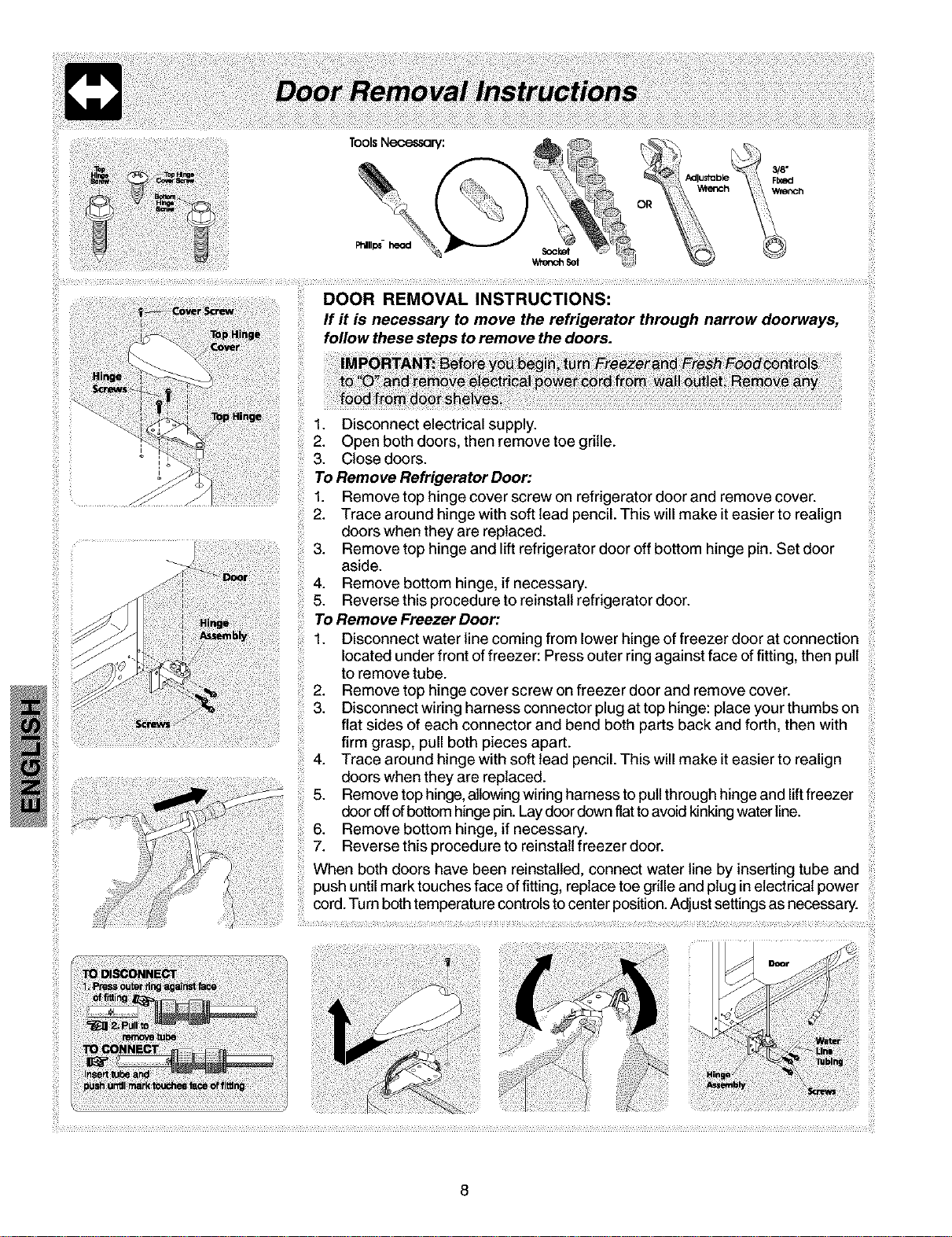
ToolsNecessary:
Socket
Wretch Set
DOOR REMOVAL INSTRUCTIONS:
If it is necessary to move the refrigerator through narrow doorways,
follow these steps to remove the doors.
1. Disconnect electrical supply.
2. Open both doors, then remove toe grille.
3. Close doors.
TORemove Refrigerator Door:
1. Remove top hinge cover screw on refrigerator door and remove cover.
2. Trace around hinge with soft lead pencil. This will make it easier to realign
doors when they are replaced.
3. Remove top hinge and lift refrigerator door off bottom hinge pin. Set door
aside.
4. Remove bottom hinge, if necessary.
5. Reverse this procedure to reinstall refrigerator door.
ToRemoveFreezerDoor:
1. Disconnect water line coming from lower hinge of freezer door at connection
located under front of freezer: Press outer ring against face of fitting, then pull
to remove tube.
2. Remove top hinge cover screw on freezer door and remove cover.
3. Disconnect wiring harness connector plug at top hinge: place your thumbs on
flat sides of each connector and bend both parts back and forth, then with
firm grasp, pull both pieces apart.
4. Trace around hinge with soft lead pencil. This will make it easier to realign
doors when they are replaced.
5. Remove top hinge, allowing wiring harness to pull through hinge and lift freezer
door off ofbottom hinge pin. Laydoor down flat to avoid kinkingwaterline.
6. Remove bottom hinge, if necessary.
7. Reverse this procedure to reinstall freezer door.
When both doors have been reinstalled, connect water line by inserting tube and
push until mark touches face of fitting, replace toe grille and plug in electrical power
cord. Turn both temperature controls to center position. Adjust settings as necessary.
iiiii_i_iiiiiiiii!i_i_i,lii_iiiii__I _i_i_i!i!_i!_i_!i_iill
i ¸
£i61
8
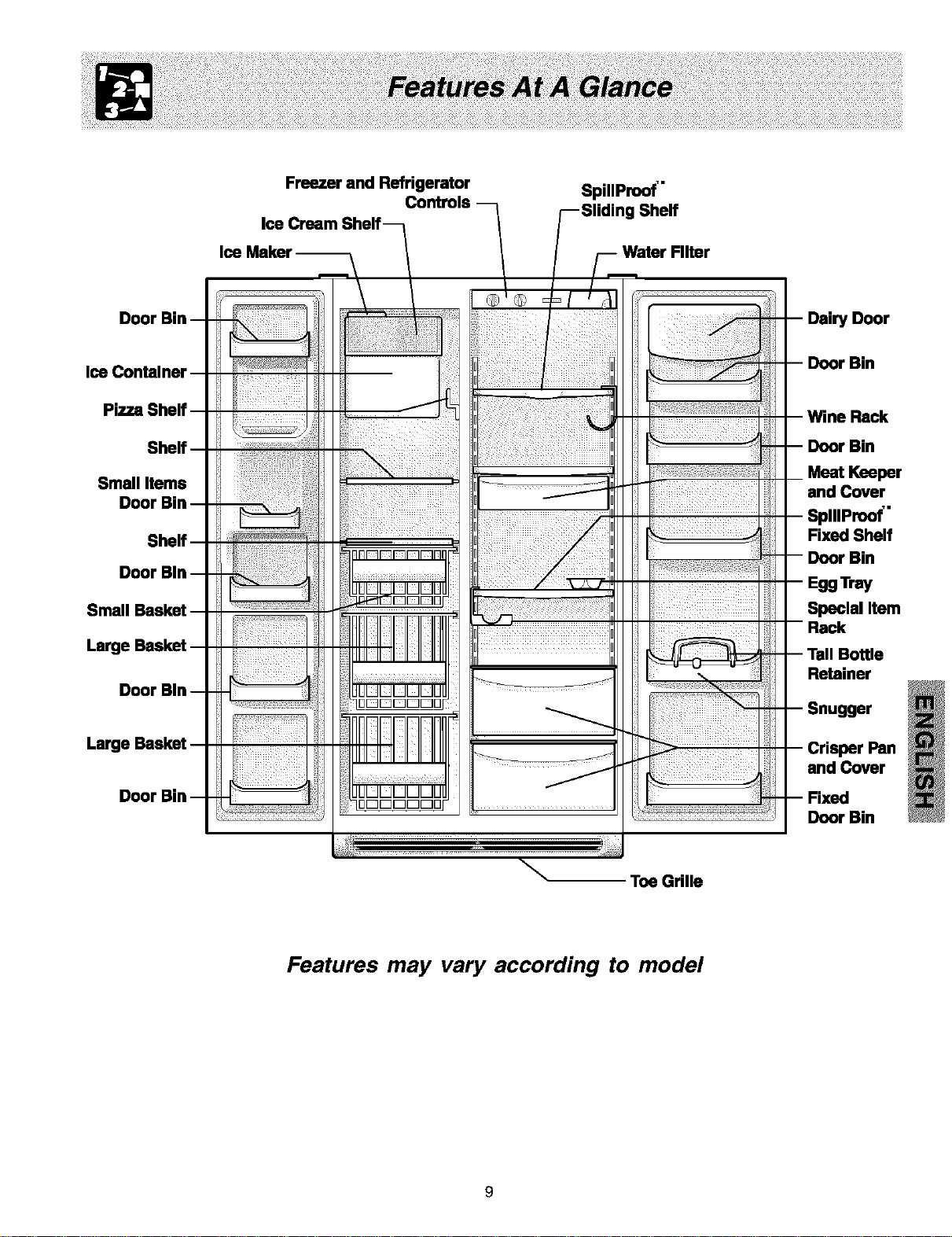
Freezer and Refrigerator
Controls
I
®IQ ,
SpillProof'"
g Shelf
Filter
Door
r Bin
Small Items
Meat Keeper
and Cover
iIIIProof'"
Fixed Shelf
Largq
Special Item
Bottle
Retainer
Largq
and Cover
Door Bin
Toe Grille
Features may vary according to model
COOL DOWN PERIOD
To ensure safe food storage, allow the refrigerator to operate with the doors closed for at least 8 to 12 hours before
loading it with food.
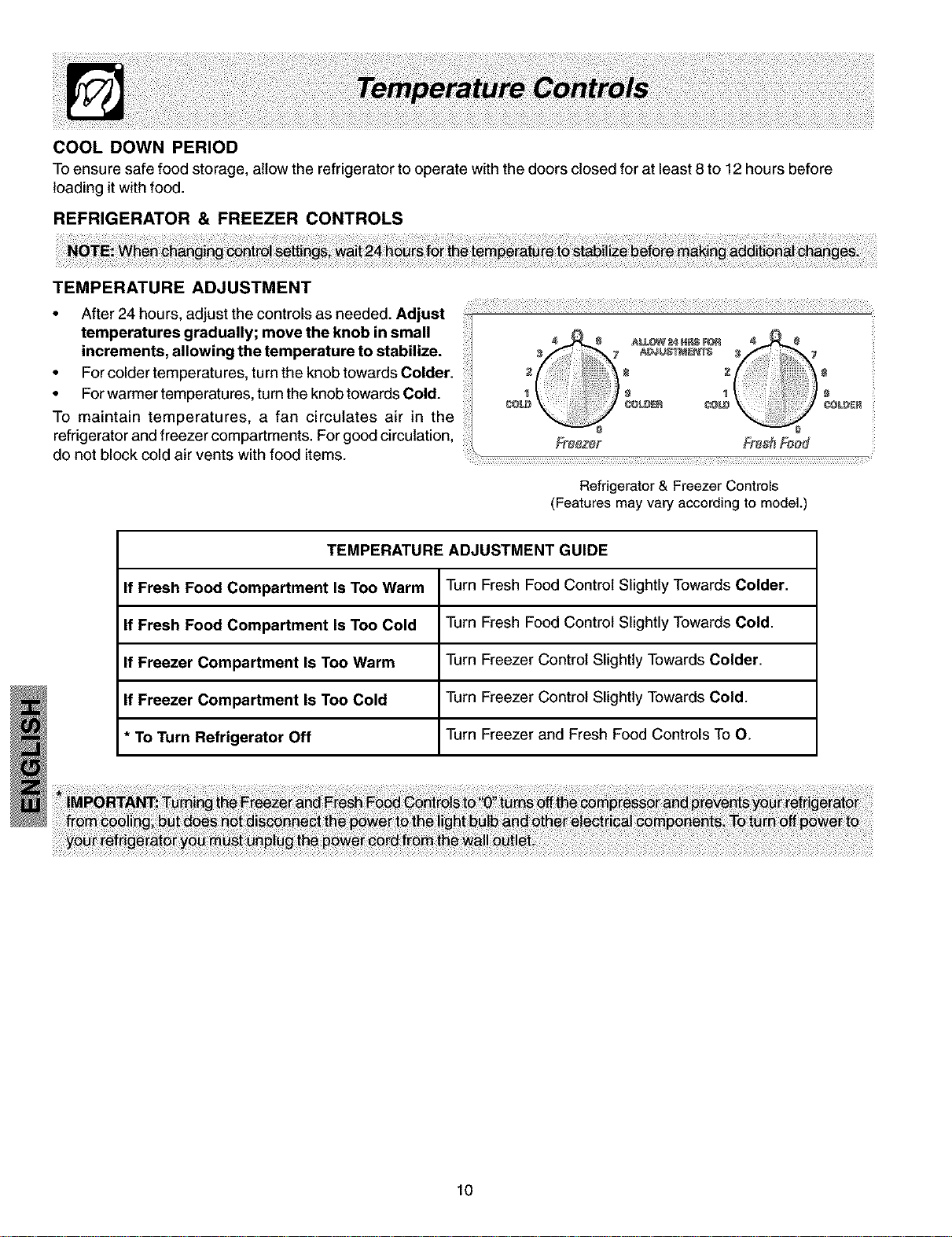
REFRIGERATOR & FREEZER CONTROLS
TEMPERATURE ADJUSTMENT
• After 24 hours, adjust the controls as needed. Adjust .................................................................................................................................................................................
temperatures gradually; move the knob in small
increments, allowing the temperature to stabilize.
• Forcolder temperatures, turnthe knob towardsColder.
• Forwarmer temperatures,turnthe knobtowardsCold.
To maintain temperatures, a fan circulates air in the
refrigerator and freezer compartments. For good circulation,
do not block coldair vents with food items.
Refrigerator & Freezer Controls
(Features may vary according to model.)
TEMPERATURE ADJUSTMENT GUIDE
If Fresh Food Compartment Is Too Warm Turn Fresh Food Control Slightly Towards Colder.
If Fresh Food Compartment Is Too Cold Turn Fresh Food Control Slightly Towards Cold.
If Freezer Compartment Is Too Warm Turn Freezer Control Slightly Towards Colder.
If Freezer Compartment Is Too Cold Turn Freezer Control Slightly Towards Cold.
* To Turn Refrigerator Off Turn Freezer and Fresh Food Controls To O.
10
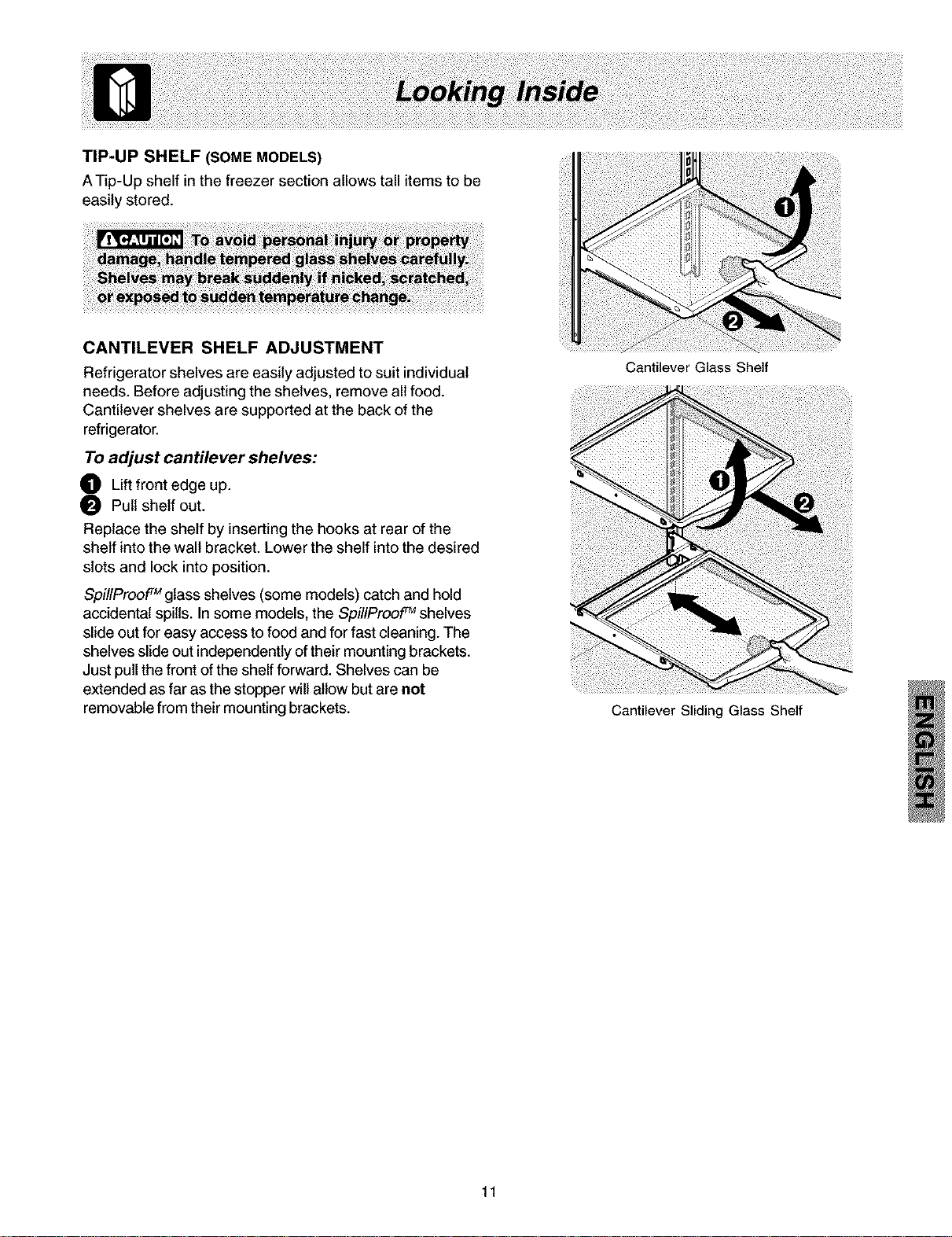
TIP-UP SHELF (SOME MODELS)
ATip-Up shelf inthe freezer section allows tall items to be
easily stored.
CANTILEVER SHELF ADJUSTMENT
Refrigerator shelves are easily adjusted to suit individual
needs. Before adjusting the shelves, remove all food.
Cantilever shelves are supported at the back of the
refrigerator.
TOadjust cantilever shelves:
O Liftfront edge up.
0 Pull shelf out.
Replace the shelf by inserting the hooks at rear of the
shelf into the wall bracket. Lower the shelf into the desired
slots and lock into position.
SpillProof rMglass shelves (some models) catch and hold
accidental spills. Insome models, the SpillProof TM shelves
slide out for easy access to food and for fast cleaning. The
shelves slide out independently of their mounting brackets.
Just pull the front of the shelf forward. Shelves can be
extended as far as the stopper will allow but are not
removable from their mounting brackets.
11
Cantilever Glass Shelf
Cantilever Sliding Glass Shelf
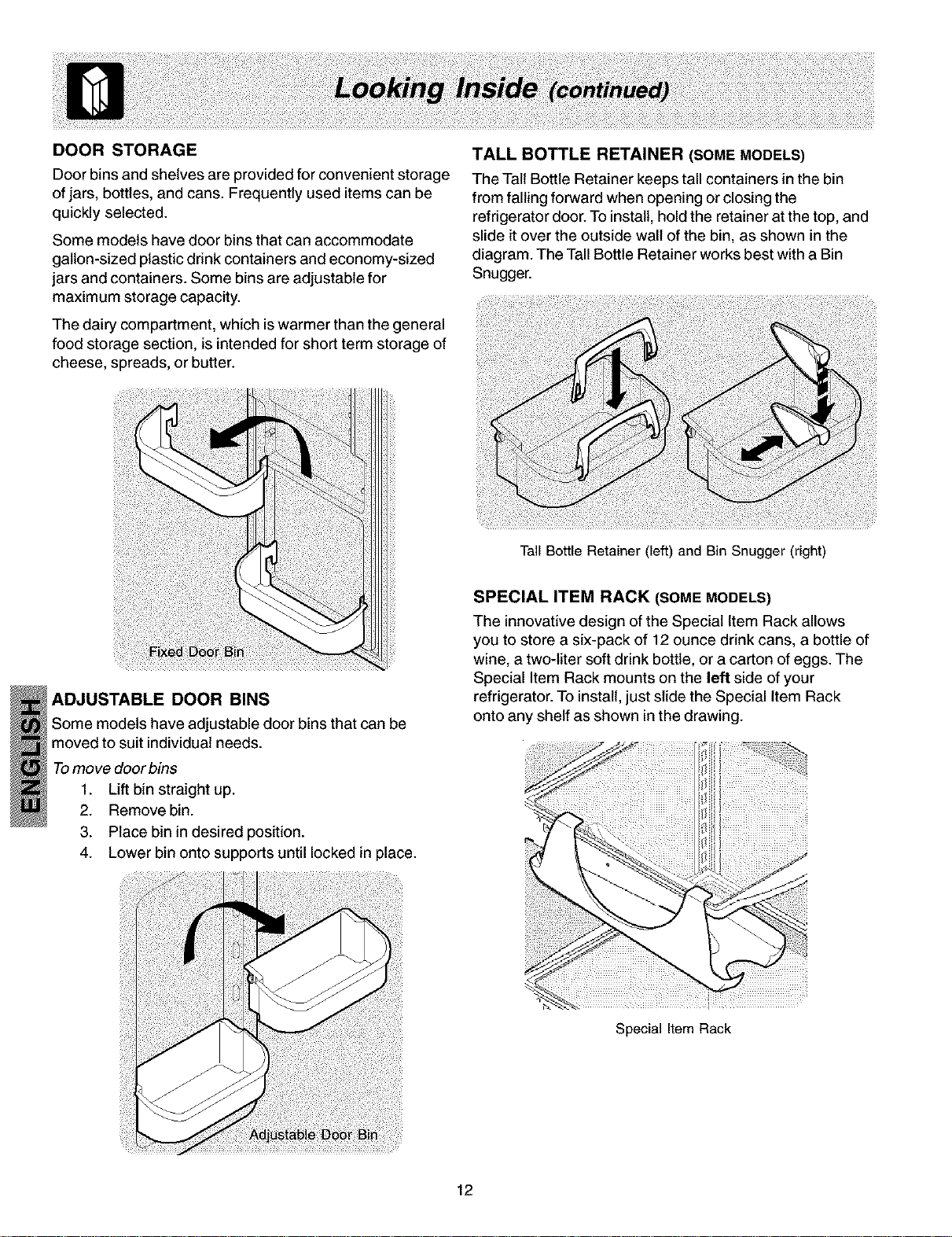
DOOR STORAGE
Door bins and shelves are provided for convenient storage
ofjars, bottles, and cans. Frequently used items can be
quickly selected.
Some models have door bins that can accommodate
gallon-sized plastic drink containers and economy-sized
jars and containers. Some bins are adjustable for
maximum storage capacity.
The dairy compartment, which iswarmer than the general
food storage section, is intended for short term storage of
cheese, spreads, or butter.
TALL BOTTLE RETAINER (SOME MODELS)
The Tall Bottle Retainer keeps tall containers inthe bin
from falling forward when opening or closingthe
refrigerator door. To install,holdthe retainer at the top, and
slide it over the outside wall ofthe bin, as shown in the
diagram. The TallBottle Retainer works best with a Bin
Snugger.
ADJUSTABLE DOOR BINS
Some models have adjustable door bins that can be
moved to suit individual needs.
Tomove door bins
1. Liftbin straight up.
2. Remove bin.
3. Place bin in desired position.
4. Lower bin onto supports until locked in place.
Tail Bottle Retainer (left) and Bin Snugger (right)
SPECIAL ITEM RACK (SOME MODELS)
The innovative design of the Special Item Rack allows
you to store a six-pack of 12 ounce drink cans, a bottle of
wine, a two-liter soft drink bottle, or a carton of eggs. The
Special Item Rack mounts on the left side of your
refrigerator. To install,just slide the Special Item Rack
onto any shelf as shown in the drawing.
12
Special Item Rack
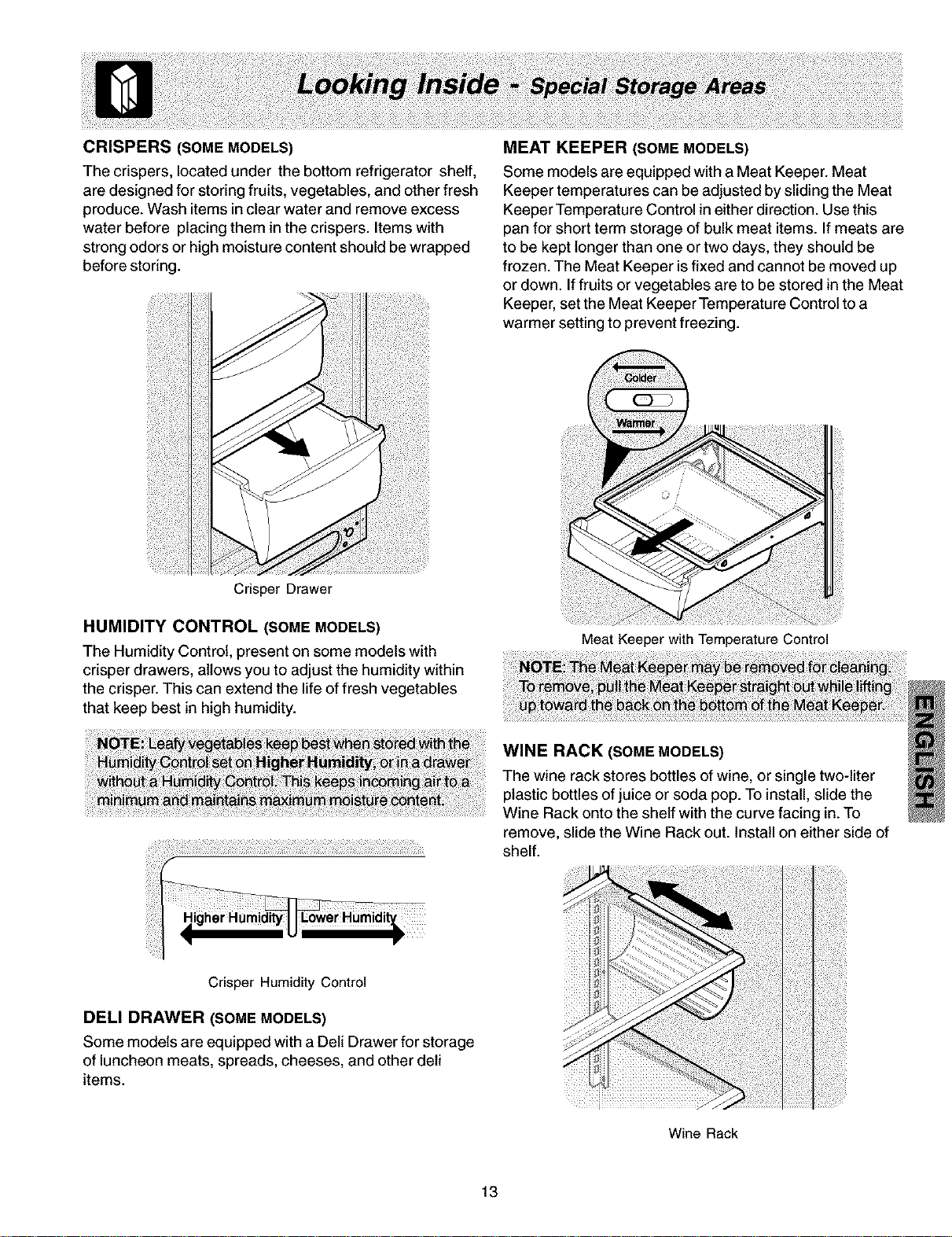
CRISPERS (SOME MODELS)
The crispers, located under the bottom refrigerator shelf,
are designed for storing fruits, vegetables, and other fresh
produce. Wash items in clear water and remove excess
water before placing them in the crispers. Items with
strong odors or high moisture content should be wrapped
before storing.
Crisper Drawer
MEAT KEEPER (SOME MODELS)
Some models are equipped with a Meat Keeper. Meat
Keeper temperatures can be adjusted by sliding the Meat
Keeper Temperature Control in eitherdirection. Use this
pan for short term storage of bulk meat items. Ifmeats are
to be kept longer than one or two days, they should be
frozen. The Meat Keeper isfixed and cannot be moved up
or down. Iffruits or vegetables are to be stored in the Meat
Keeper, set the Meat Keeper Temperature Control to a
warmer setting to prevent freezing.
HUMIDITY CONTROL (SOME MODELS)
The Humidity Control, present on some models with
crisper drawers, allows you to adjust the humidity within
the crisper. This can extend the life of fresh vegetables
that keep best in high humidity.
Meat Keeper withTemperature Control
WINE RACK (SOME MODELS)
The wine rack stores bottles of wine, or single two-liter
plastic bottles ofjuice or soda pop. To install,slide the
Wine Rack ontothe shelf with the curve facing in.To
remove, slide the Wine Rack out. Install on either side of
shelf.
Crisper Humidity Control
DELl DRAWER (SOME MODELS)
Some models are equipped with a Dell Drawer for storage
of luncheon meats, spreads, cheeses, and other dell
items.
Wine Rack
13
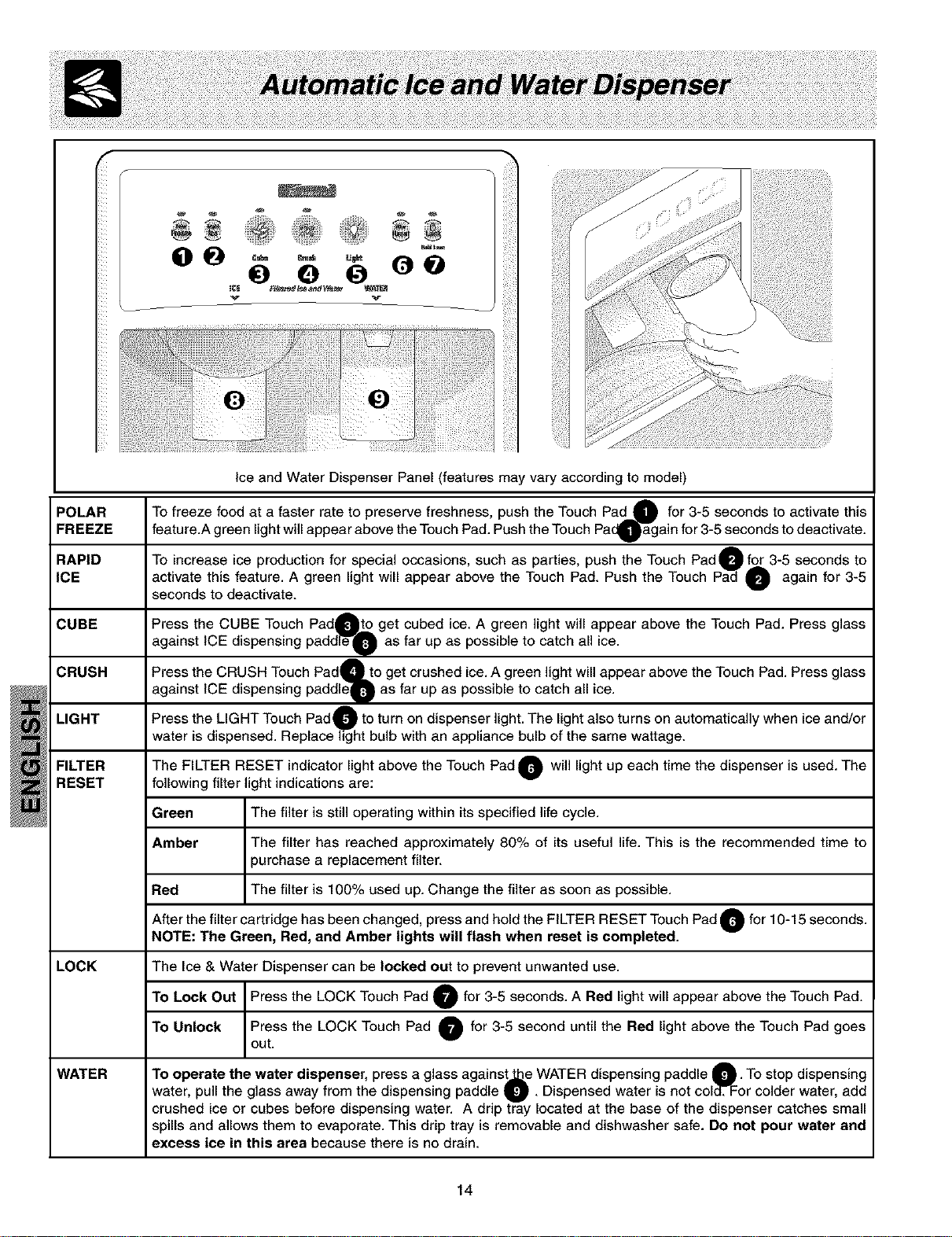
f
POLAR
FREEZE
RAPID
ICE
CUBE
CRUSH
LIGHT
FILTER
RESET
v
g:i;
Ice and Water Dispenser Panel (features may vary according to model)
A
To freeze food at a faster rate to preserve freshness, push the Touch Pad g for 3-5 seconds to activate this
feature.A green light will appear above the Touch Pad. Push the Touch PacQ'_gain for 3-5 seconds to deactivate.
To increase ice production for special occasions, such as parties, push the Touch Pad( for 3-5 seconds to
activate this feature. A green light will appear above the Touch Pad. Push the Touch O again for 3-5
seconds to deactivate.
Press the CUBE Touch PadOto get cubed ice. A green light will appear above the Touch Pad. Press glass
against ICE dispensing padde'_FO as far up as possible to catch all ice.
Press the CRUSH Touch PadQto get crushed ice. A green light will appear above the Touch Pad. Press glass
against ICE dispensing paddleQ as far up as possible to catch all ice.
Press the LIGHT Touch Pad O to turn on dispenser light. The light also turns on automatically when ice and/or
water is dispensed. Replace hg"ht bulb with an appliance bulb of the same wattage.
The FILTER RESET indicator light above the Touch Pad O will light up each time the dispenser is used. The
following filter light indications are:
Green _ is stilloperating within its specified lif._ecyclem
Amber ] The filter has reached approximately 80% of its useful life. This is the recommended time to
/
purchase a replacement filter.
Red ] The filter is 100% used up. Change the filter as soon as possible.
After the filter cartridge has been changed, press and hold the FILTER RESET Touch Pad O for 10-15 seconds.
NOTE: The Green, Red, and Amber lights will flash when reset is completed.
LOCK The Ice & Water Dispenser can be locked out to prevent unwanted use.
To Lock Out I Press the LOCK Touch Pad O for 3-5 seconds. A Red light will appear above the Touch Pad.
To Unlock I Press the LOCK Touch Pad _ for 3-5 second until the Red light above the Touch Pad
goes
out.
WATER To operate the water dispenser, press a glass against_e WATER dispensing paddle O" To stop dispensing
water, pull the glass away from the dispensing paddle U " Dispensed water is not coldTFor colder water, add
crushed ice or cubes before dispensing water. A drip tray located at the base of the dispenser catches small
spills and allows them to evaporate. This drip tray is removable and dishwasher safe. Do not pour water and
excess ice in this area because there is no drain.
14
ICE AND WATER DISPENSER FEATURES
The ice and water dispenser conveniently dispenses chilled water, and ice cubes or crushed ice, depending on the model.
To operate the icedispenser, select the ice option desired using the touchpad. Press a glass against the dispensing paddle
as far up as possible to catch all ice. To stop dispensing ice, pull glass away from dispensing paddle. Do not remove the
glass until the ice has completely dispensed. (Complete instructions for the dispenser operation are attached to the inside
of the freezer door.)
How the Water Dispenser Works
The water tank, located behind the drawers in the refrigerator compartment, automatically fills as water is dispensed. For
proper dispenser operation, the recommended supply water pressure should fall between 20 psi and 100 psi.
After the refrigerator is connected to the water supply, fill the water tank by drawing one glass of water. It may take about
11/_minutes after activating the dispenser paddle before water begins to fill this first glass. Continue flushing the system
for 3 minutes to rid the tank and plumbing connections of any impurities. The water dispenser has a built in shutoff device
that will stop the water flow after 3 minutes of continuous use. Simply release the dispenser paddle to reset the shutoff
mechanism.
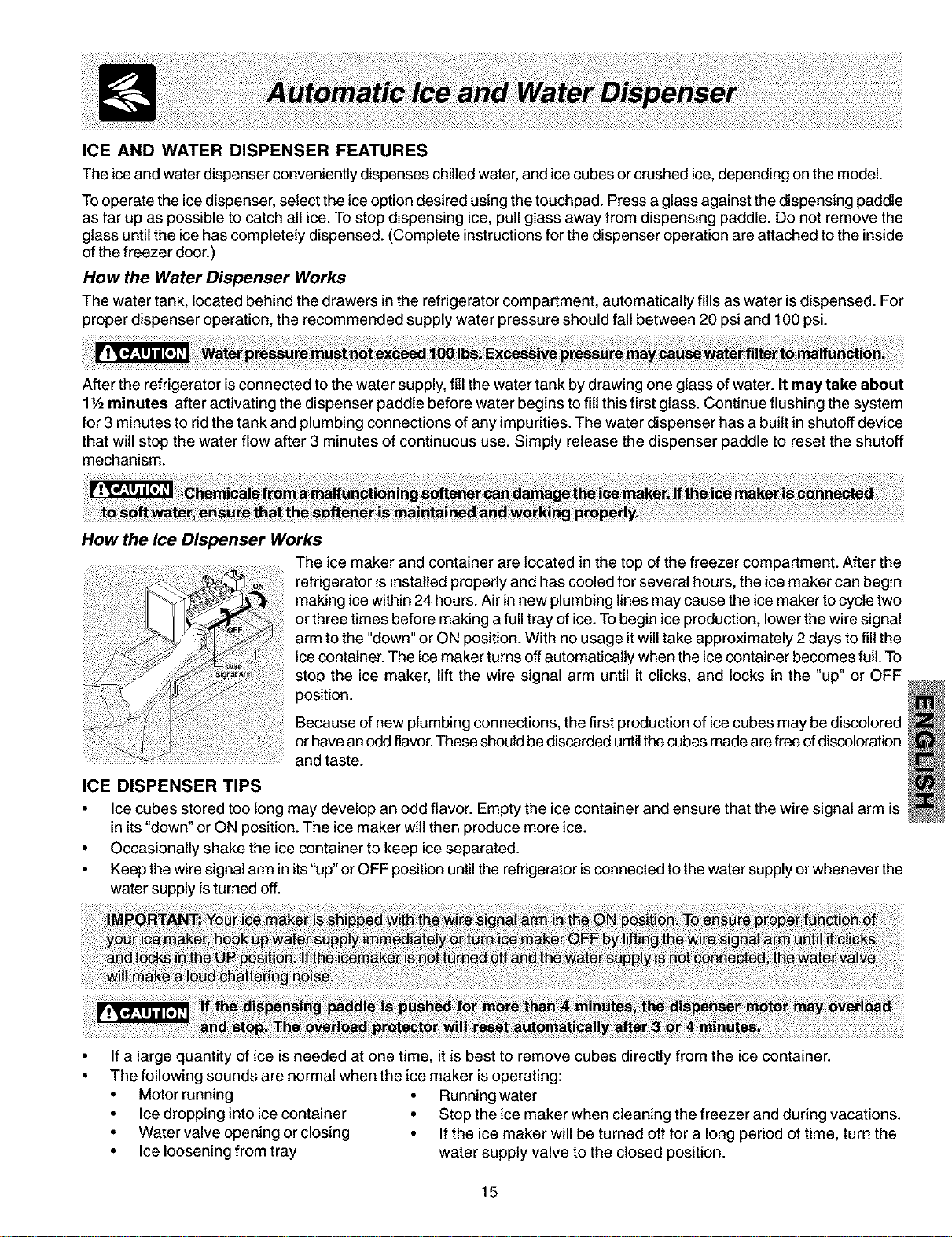
How the Ice Dispenser Works
The ice maker and container are located in the top of the freezer compartment. After the
refrigerator is installed properly and has cooled for several hours, the ice maker can begin
making ice within 24 hours. Air in new plumbing lines may cause the ice maker to cycle two
or three times before making a full tray of ice. To begin ice production, lower the wire signal
arm to the "down" or ON position. With no usage it will take approximately 2 days to fill the
ice container. The ice maker turns off automatically when the ice container becomes full. To
stop the ice maker, lift the wire signal arm until it clicks, and locks in the "up" or OFF
position.
Because of new plumbing connections, the first production of ice cubes may be discolored
or have an odd flavor.These should be discarded untilthe cubes made are free of discoloration
and taste.
ICE DISPENSER TIPS
• Ice cubes stored too long may develop an odd flavor. Empty the ice container and ensure that the wire signal arm is
in its "down" or ON position. The ice maker will then produce more ice.
• Occasionally shake the ice container to keep ice separated.
• Keep the wire signal arm in its"up" or OFF position until the refrigerator isconnected to the water supply or whenever the
water supply is turned off.
If a large quantity of ice is needed at one time, it is best to remove cubes directly from the ice container.
The following sounds are normal when the ice maker is operating:
• Motor running • Running water
• Ice dropping into ice container • Stop the ice maker when cleaning the freezer and during vacations.
• Water valve opening or closing • If the ice maker will be turned off for a long period of time, turn the
• Ice loosening from tray water supply valve to the closed position.
15
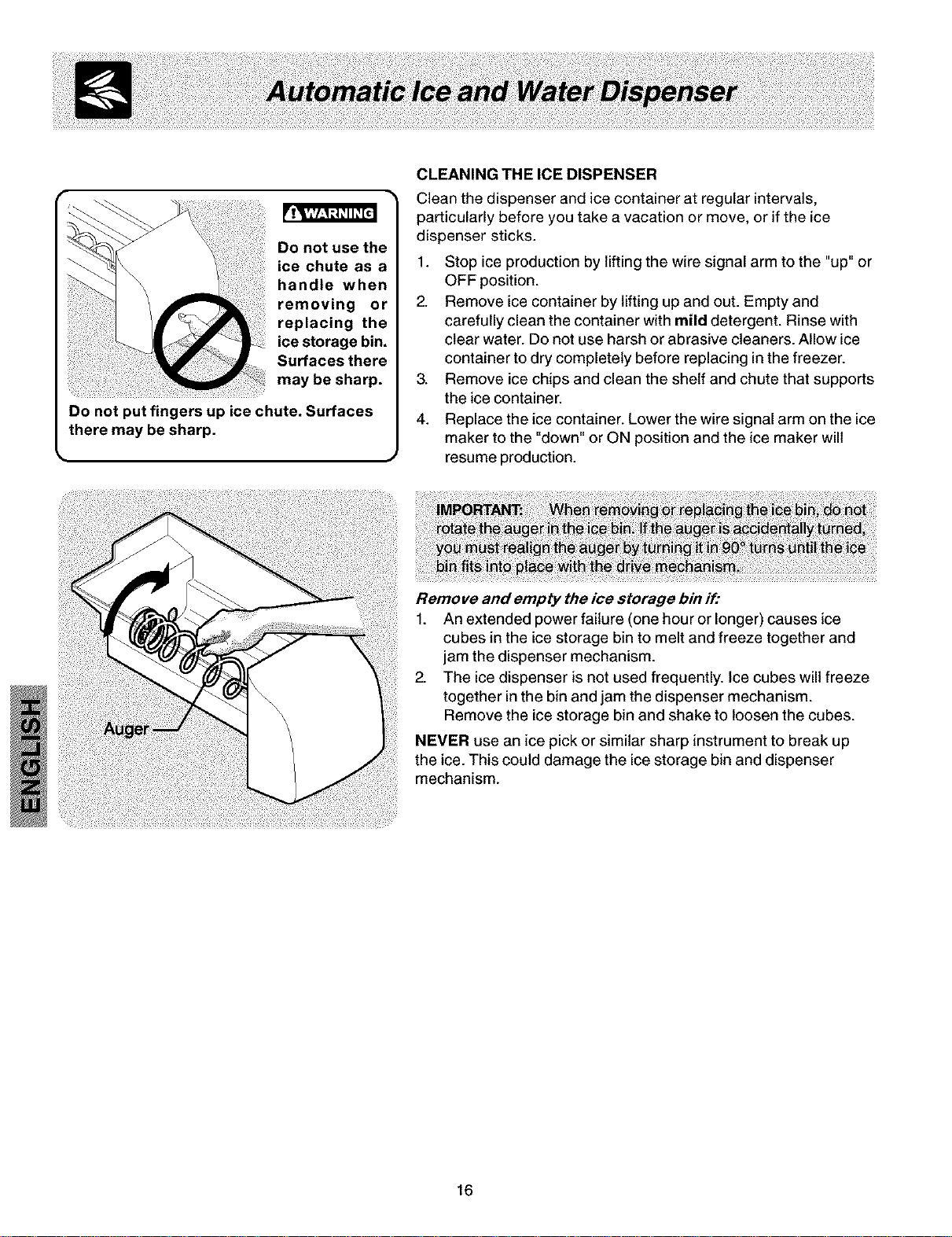
Do not use the
CLEANING THE ICE DISPENSER
Clean the dispenser and ice container at regular intervals,
particularly before you take a vacation or move, or if the ice
dispenser sticks.
1. Stop ice production by lifting the wire signal arm to the "up" or
OFF position.
2. Remove ice container by lifting up and out. Empty and
carefully clean the container with mild detergent. Rinse with
clear water. Do not use harsh or abrasive cleaners. Allow ice
container to dry completely before replacing in the freezer.
3. Remove ice chips and clean the shelf and chute that supports
the ice container.
4. Replace the ice container. Lower the wire signal arm on the ice
maker to the "down" or ON position and the ice maker will
resume production.
Remove and empty the ice storage bin if:
1. An extended power failure (one hour or longer) causes ice
cubes in the ice storage bin to melt and freeze together and
jam the dispenser mechanism.
2. The ice dispenser is not used frequently. Ice cubes will freeze
together in the bin and jam the dispenser mechanism.
Remove the ice storage bin and shake to loosen the cubes.
NEVER use an ice pick or similar sharp instrument to break up
the ice. This could damage the ice storage bin and dispenser
mechanism.
16
Kenmore Ice and Water Front Filter (some models)
NOTE: If you purchased a refrigerator with a Kenmore Ice and Water front filter, please read the following use and
care information. This ice and water filter system filters water to your ice maker and water dispenser. It is located in the
upper right front corner of the fresh food compartment.
System Startup:
Water supply does not need to be turned off, however, do not use ice and water dispenser while installing filter.
The filter cartridge has already been installed in the filter housing at the factory. Refer to the How The Water Dispenser
Works section to properly fill the system with water.
Changing the Filter:
Water conditions vary throughout the world, but changing the water filter every
6 - 9 months normally will ensure the highest possible water quality. The Filter
Status light wilt turn red after approximately 400 gallons of water has flowed
through the ice and water dispenser. Also, if the filter has been in a refrigerator
that has not been in use for awhile (during moving for example), change the filter
before reinstalling the refrigerator. The dispenser system will also operate without
filtration (with filter cartridge removed and bypass installed).
Order new filter cartridges through the
dealer where you bought the refrigerator,
or contact the Sears PartsDirect at 1-800-
366-PART. Itmight be goodto order some
filter cartridges when you first install your
refrigerator. Be sure to ask for the
Kenmore replacement cartridge 9911.
The Kenmore Ice and Water
Filter System NGFC 2000 with
the Kenmore cartridge FC
100 is tested and certified by
NSF International, the
nationally recognized and respected, not
for profit, certification organization for public
health safety. The Kenmore Filter system is
tested and certified to ANSI/NSF Standards
42 and 53. See performance data sheet for
specifications. This system should not be
used on water that is microbiologically
unsafe or with water of unknown quality
unless the water has been adequately
disinfected before or after traveling through
the filtration system.
_ Rated Capacity - 400 gallons
Rated service flow - .5 GPM
• Maximum Rated Pressure - 100 PSI
• Maximum Operating Temp. - 100° F
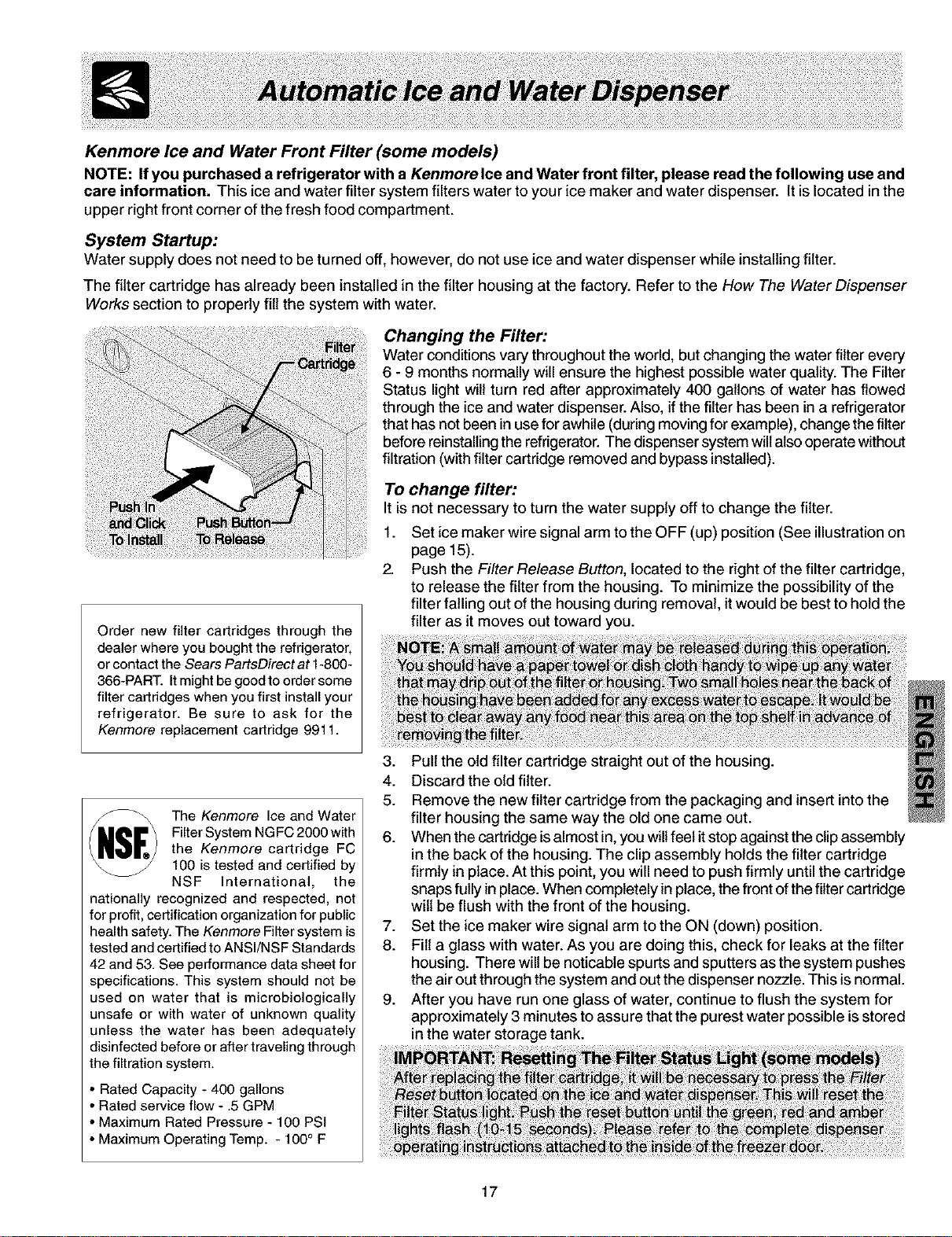
To change filter:
It is not necessary to turn the water supply off to change the filter.
1. Set ice maker wire signal arm to the OFF (up) position (See illustration on
page 15).
2. Push the Filter Release Button, located to the right of the filter cartridge,
to release the filter from the housing. To minimize the possibility of the
filter falling out of the housing during removal, it would be best to hold the
filter as it moves out toward you.
3. Pull the old filter cartridge straight out of the housing.
4. Discard the old filter.
5. Remove the new filter cartridge from the packaging and insert into the
filter housing the same way the old one came out.
6. When the cartridge isalmost in,you will feel it stop against the clip assembly
in the back of the housing. The clip assembly holds the filter cartridge
firmly in place. At this point, you will need to push firmly until the cartridge
snaps fully in place. When completely in place, the front ofthe filter cartridge
wilt be flush with the front of the housing.
7. Set the ice maker wire signal arm to the ON (down) position.
8. Fill a glass with water. As you are doing this, check for leaks at the filter
housing. There will be noticable spurts and sputters as the system pushes
the air out through the system and out the dispenser nozzle. This is normal.
9. After you have run one glass of water, continue to flush the system for
approximately 3 minutes to assure that the purest water possible isstored
in the water storage tank.
17
FOOD STORAGEIDEAS
Fresh Food Storage
• The fresh food compartment should be kept between 34° F and 40° F with an optimum temperature of 37° F.
• Avoid overcrowding the refrigerator shelves. This reduces the circulation of air around the food and results in uneven
cooling.
Fruits and Vegetables
• Storage in the crisper drawers traps moisture to help preserve the fruit and vegetable quality for longer time periods.
Meat
• Raw meat and poultry should be wrapped securely so leakage and contamination of other foods or surfaces does
not occu r.
Frozen Food Storage
• The freezer compartment should be kept at 0° F or lower.
• A freezer operates most efficiently when it is at least 2/3 full.
Packaging Foods for Freezing
• To minimize dehydration and quality deterioration, use aluminum foil, freezer wrap, freezer bags or airtight
containers. Force as much air out of the packages as possible and seat them tightly. Trapped air can cause food to
dry out, change color, and develop an off-flavor (freezer burn).
• Wrap fresh meats and poultry with suitable freezer wrap prior to freezing.
• Do not refreeze meat that has completely thawed.
Loading the Freezer
• Avoid adding too much warm food to the freezer at one time. This overloads the freezer, slows the rate of freezing,
and can raise the temperature of frozen foods.
• Leave a space between the packages, so cold air can circulate freely, allowing food to freeze as quickly as
possible.
• Avoid storing hard-to-freeze foods such as ice cream and orange juice on the freezer door shelves. These foods are
best stored in the freezer interior where the temperature varies less.
ENERGY SAVING IDEAS
• Locate the refrigerator in the coolest part of the room, out of direct
sunlight, and away from heating ducts or registers. Do not place the
refrigerator next to heat-producing appliances such as a range, oven, or
dishwasher. If this is not possible, a section of cabinetry or an added
layer of insulation between the two appliances will help the refrigerator
operate more efficiently.
• Level the refrigerator so that the doors close tightly.
• Refer to this Use & Care Manual for the suggested temperature control
settings.
• Periodic cleaning of the condenser will help the refrigerator run more
efficiently. See the Care and Cleaning Charton page 20.
• Do not overcrowd the refrigerator or block cold air vents. Doing so
causes the refrigerator to run longer and use more energy.
• Cover foods and wipe containers dry before placing them in the
refrigerator. This cuts down on moisture build-up inside the unit.
• Organize the refrigerator to reduce door openings. Remove as many
items as needed at one time and close the door as soon as possible.
18
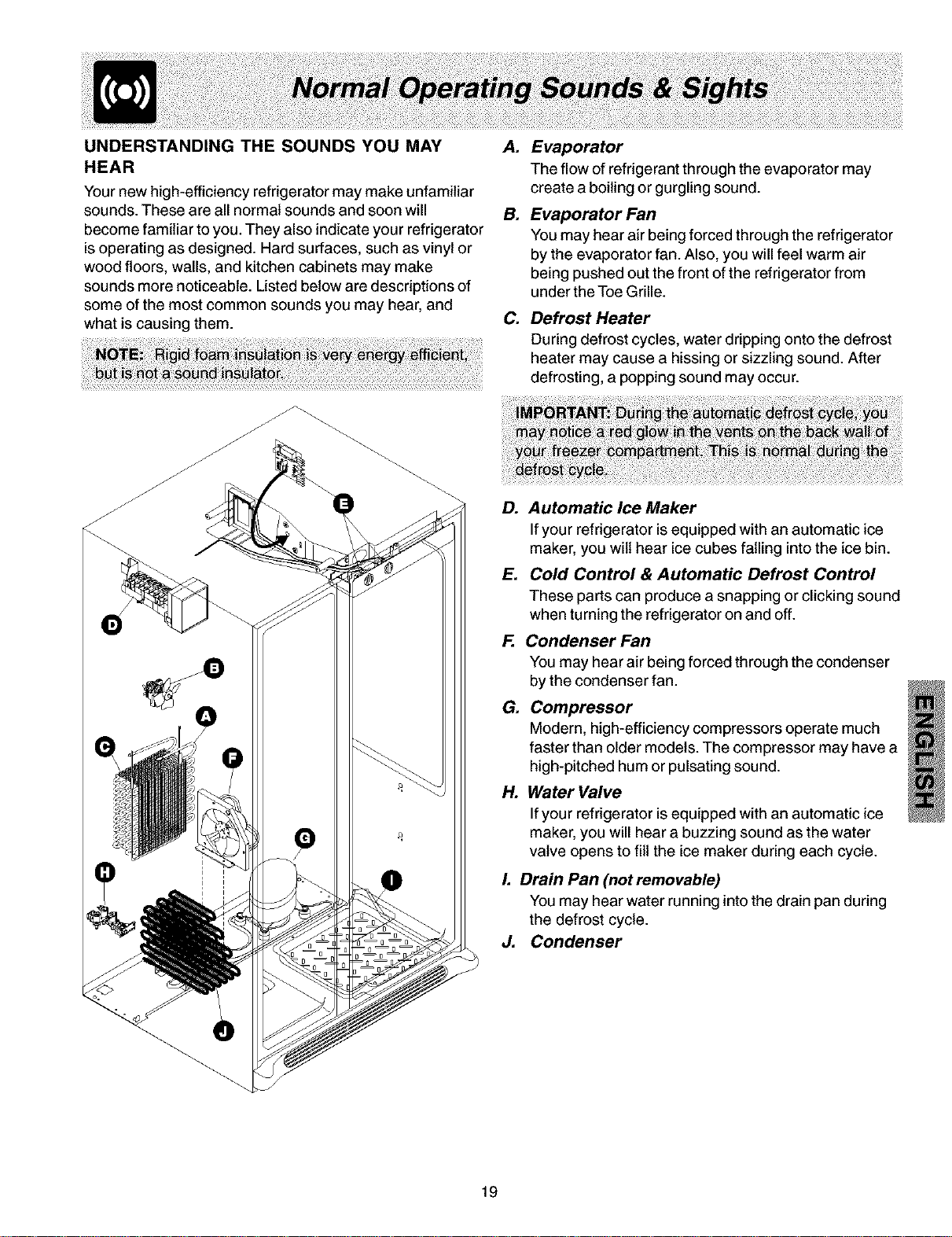
UNDERSTANDING THE SOUNDS YOU MAY
HEAR
Your new high-efficiency refrigerator may make unfamiliar
sounds. These are all normal sounds and soon will
become familiar to you. They also indicate your refrigerator
is operating as designed. Hard surfaces, such as vinyl or
wood floors, walls, and kitchen cabinets may make
sounds more noticeable. Listed below are descriptions of
some of the most common sounds you may hear, and
what is causing them.
A. Evaporator
The flow of refrigerant through the evaporator may
create a boiling or gurgling sound.
B. Evaporator Fan
You may hear air being forced through the refrigerator
by the evaporator fan. Also, you will feel warm air
being pushed out the front of the refrigerator from
under the Toe Grille.
C. Defrost Heater
During defrost cycles, water dripping onto the defrost
heater may cause a hissing or sizzling sound. After
defrosting, a popping sound may occur.
D. Automatic Ice Maker
If your refrigerator isequipped with an automatic ice
maker, you wilt hear ice cubes falling into the ice bin.
E. Cold Control & Automatic Defrost Control
These parts can produce a snapping or clicking sound
when turning the refrigerator on and off.
F. Condenser Fan
You may hear air being forced through the condenser
by the condenser fan.
G. Compressor
Modern, high-efficiency compressors operate much
faster than older models. The compressor may have a
high-pitched hum or pulsating sound.
H. Water Valve
If your refrigerator is equipped with an automatic ice
maker, you will hear a buzzing sound as the water
valve opens to fill the ice maker during each cycle.
L Drain Pan (not removable)
You may hear water running into the drain pan during
the defrost cycle.
J. Condenser
19
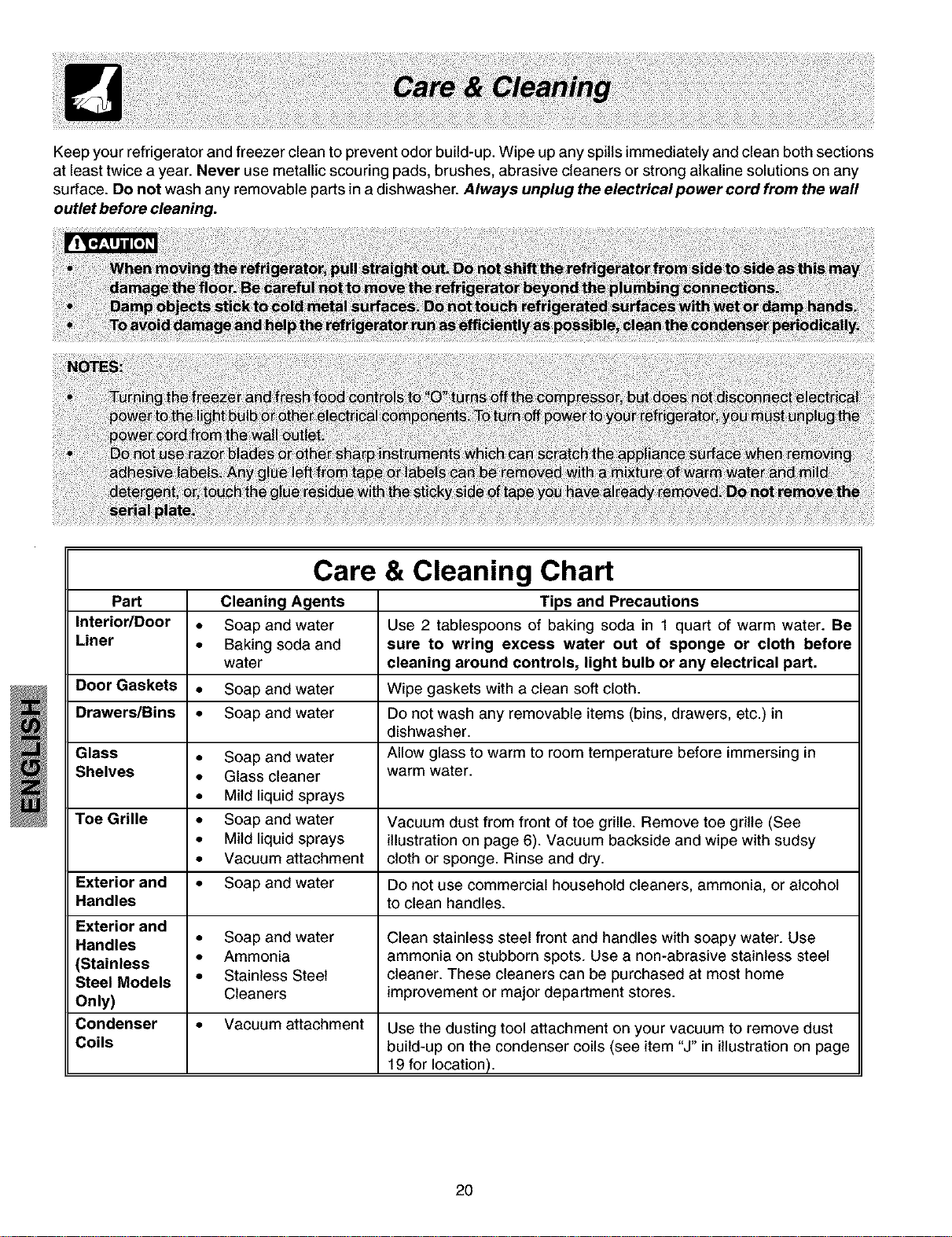
Keep your refrigerator and freezer clean to prevent odor build-up. Wipe up any spills immediately and clean both sections
at least twice a year. Never use metallic scouring pads, brushes, abrasive cleaners or strong alkaline solutions on any
surface. Do not wash any removable parts in a dishwasher. Always unplug the electricalpower cord from the wall
outlet before cleaning.
Care & Cleaning Chart
Part Cleaning Agents Tips and Precautions
Interior/Door • Soap and water Use 2 tablespoons of baking soda in 1 quart of warm water. Be
Liner • Baking soda and sure to wring excess water out of sponge or cloth before
water cleaning around controls, light bulb or any electrical part.
Door Gaskets • Soap and water Wipe gaskets with a clean soft cloth.
Drawers/Bins • Soap and water Do not wash any removable items (bins, drawers, etc.) in
dishwasher.
Glass • Soap and water Allow glass to warm to room temperature before immersing in
Shelves • Glass cleaner warm water.
• Mild liquid sprays
Toe Grille • Soap and water Vacuum dust from front of toe grille. Remove toe grille (See
• Mild liquid sprays illustration on page 6). Vacuum backside and wipe with sudsy
• Vacuum attachment cloth or sponge. Rinse and dry.
Exterior and • Soap and water Do not use commercial household cleaners, ammonia_ or alcohol
Handles to clean handles.
Exterior and
Handles • Soap and water Clean stainless steel front and handles with soapy water. Use
(Stainless • Ammonia ammonia on stubborn spots. Use a non-abrasive stainless steel
Steel Models • Stainless Steel cleaner. These cleaners can be purchased at most home
Only) Cleaners improvement or major department stores.
Condenser • Vacuum attachment Use the dusting tool attachment on your vacuum to remove dust
Coils build-up on the condenser coils (see item "J" in illustration on page
19 for location).
2O
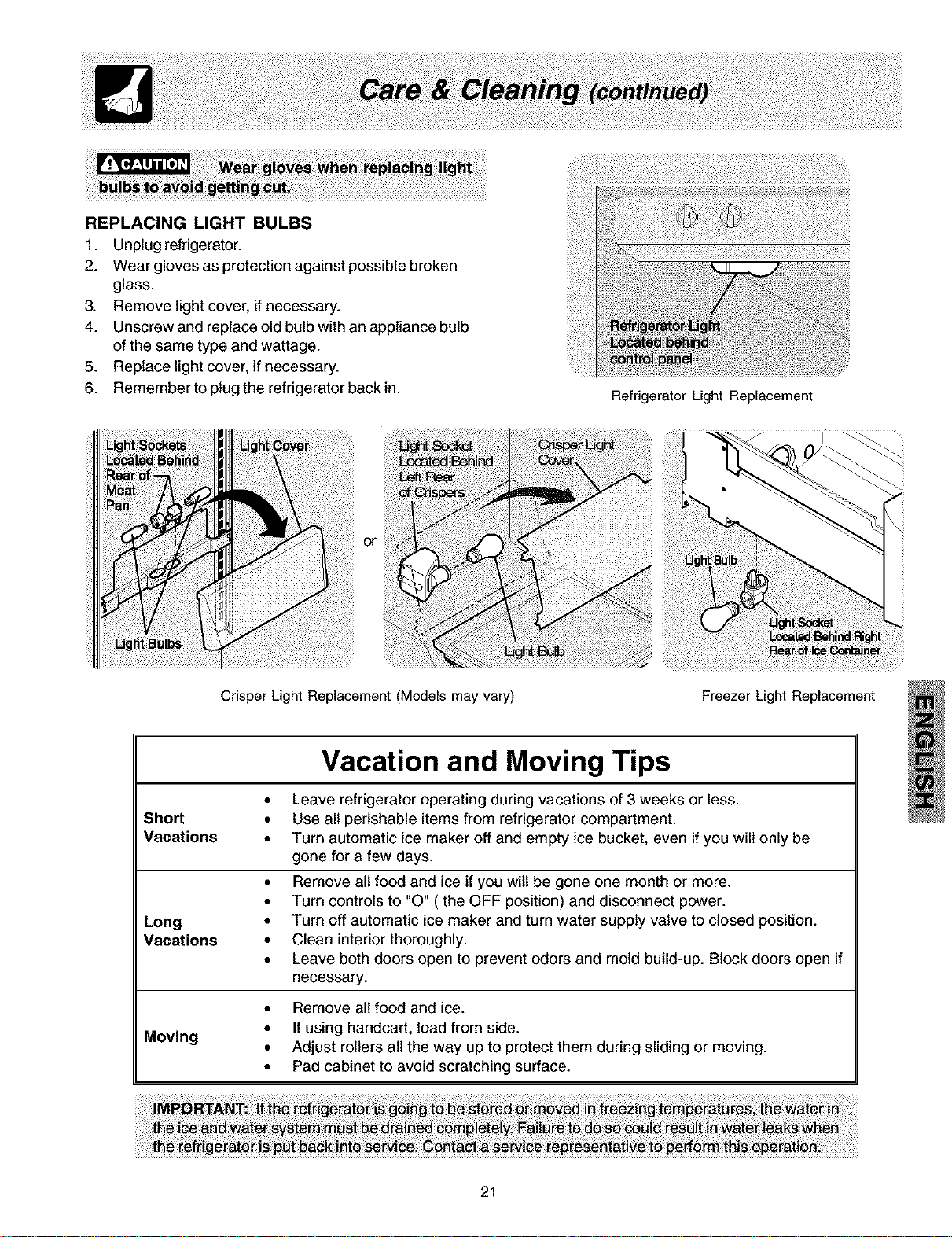
REPLACING LIGHT BULBS
1. Unplug refrigerator.
2. Wear gloves as protection against possible broken
glass.
3. Remove light cover, if necessary.
4. Unscrew and replace old bulb with an appliance bulb
of the same type and wattage.
5. Replace light cover, if necessary.
6. Remember to plug the refrigerator back in.
or
Crisper Light Replacement (Models may vary)
Refrigerator Light Replacement
Freezer Light Replacement
Vacation and Moving Tips
• Leave refrigerator operating during vacations of 3 weeks or less.
Short • Use all perishable items from refrigerator compartment.
Vacations • Turn automatic ice maker off and empty ice bucket, even if you will only be
gone for a few days.
• Remove all food and ice if you wilt be gone one month or more.
• Turn controls to "O" (the OFF position) and disconnect power.
Long • Turn off automatic ice maker and turn water supply valve to closed position.
Vacations • Clean interior thoroughly.
• Leave both doors open to prevent odors and mold build-up. Block doors open if
necessary.
• Remove all food and ice.
• If using handcart, load from side.
Moving
• Adjust rollers all the way up to protect them during sliding or moving.
• Pad cabinet to avoid scratching surface.
21
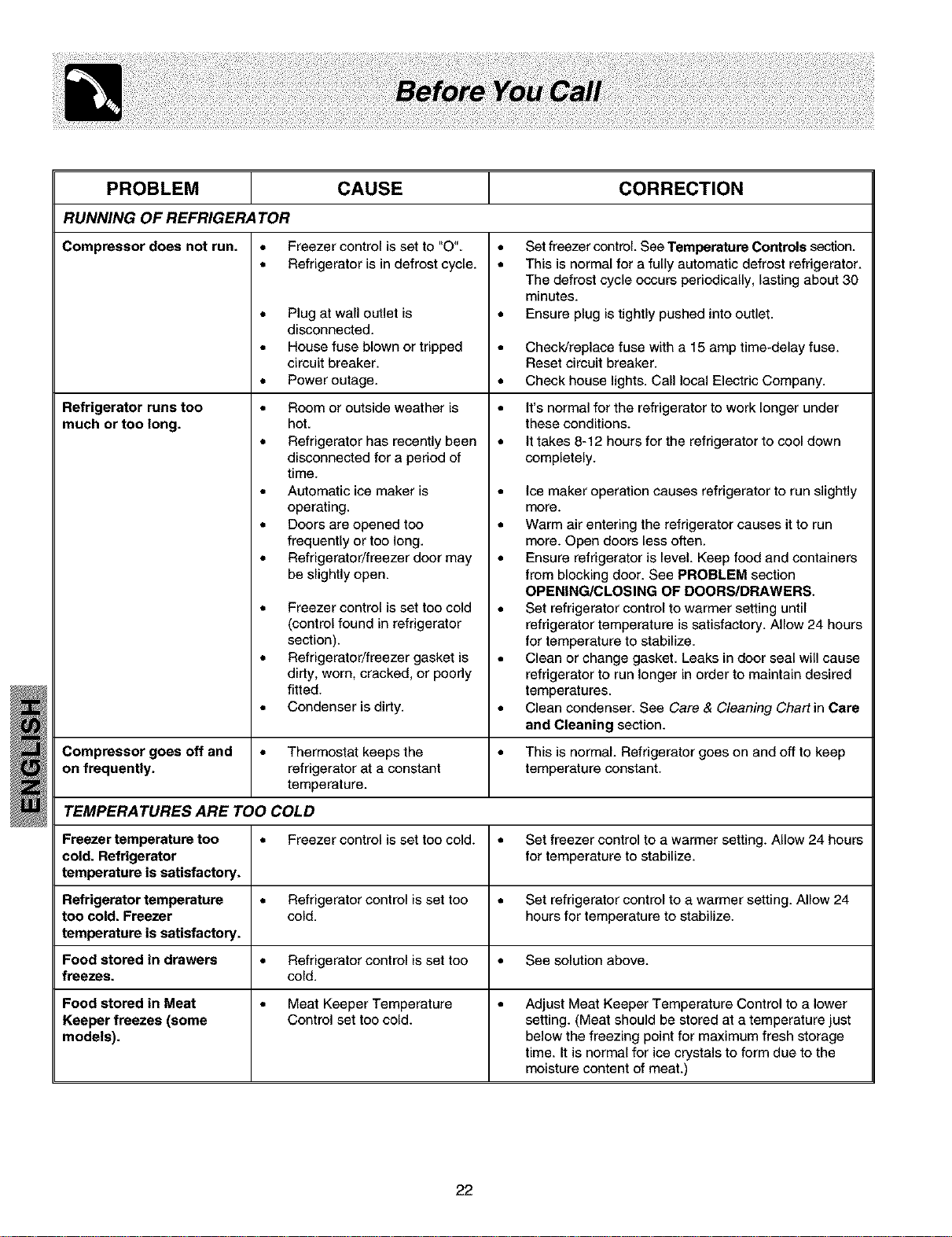
PROBLEM CAUSE CORRECTION
RUNNING OF REFRIGERATOR
Compressor does not run.
Refrigerator runs too
much or too long.
• Freezer control is set to "O".
• Refrigerator is in defrost cycle.
• Plug at wall outlet is
disconnected.
• House fuse blown or tripped
circuit breaker.
• Power outage.
• Room or outside weather is
hot.
• Refrigerator has recently been
disconnected for a period of
time.
• Automatic ice maker is
operating.
• Doors are opened too
frequently or too long.
• Refrigerator/freezer door may
be slightly open.
• Freezer control is set too cold
(control found in refrigerator
section).
• Refrigerator/freezer gasket is
didy, worn, cracked, or poorly
fitted.
• Condenser isdirty.
• Set freezer control See Temperature Controls section.
• This is normal for a fully automatic defrost refrigerator.
The defrost cycle occurs periodically, lasting about 30
minutes.
• Ensure plug istightly pushed into outlet.
• Check/replace fuse with a 15 amp time-delay fuse.
Reset circuit breaker.
• Check house lights. Call local Electric Company.
• It's normal for the refrigerator to work longer under
these conditions.
• It takes 8-12 hours for the refrigerator to cool down
completely.
• Ice maker operation causes refrigerator to run slightly
more.
• Warm air entering the refrigerator causes it to run
more. Open doors less often.
• Ensure refrigerator is level Keep food and containers
from blocking door. See PROBLEM section
OPENING/CLOSING OF DOORS/DRAWERS.
• Set refrigerator control to warmer setting until
refrigerator temperature issatisfactory. Allow 24 hours
for temperature to stabilize.
• Clean or change gasket. Leaks in door seal will cause
refrigerator to run longer in order to maintain desired
temperatures.
• Clean condenser. See Care & Cleaning Chart in Care
and Cleaning section.
Compressor goes off and • Thermostat keeps the • This is normal Refrigerator goes on and off to keep
on frequently, refrigerator at a constant temperature constant.
temperature.
TEMPERATURES ARE TOO COLD
Freezer temperature too • Freezer control is set too cold. • Set freezer control to a warmer setting. Allow 24 hours
cold. Refrigerator for temperature to stabilize.
temperature is satisfactory.
Refrigerator temperature • Refrigerator control isset too • Set refrigerator control to a warmer setting. Allow 24
too cold. Freezer cold. hours for temperature to stabilize.
temperature is satisfactory.
Food stored in drawers • Refrigerator control isset too • See solution above.
freezes, cold.
Food stored in Meat • Meat Keeper Temperature • Adjust Meat Keeper Temperature Control to a lower
Keeper freezes (some Control set too cold. setting. (Meat should be stored at a temperature just
models), below the freezing point for maximum fresh storage
time. It is normal for ice crystals to form due to the
moisture content of meat.)
22
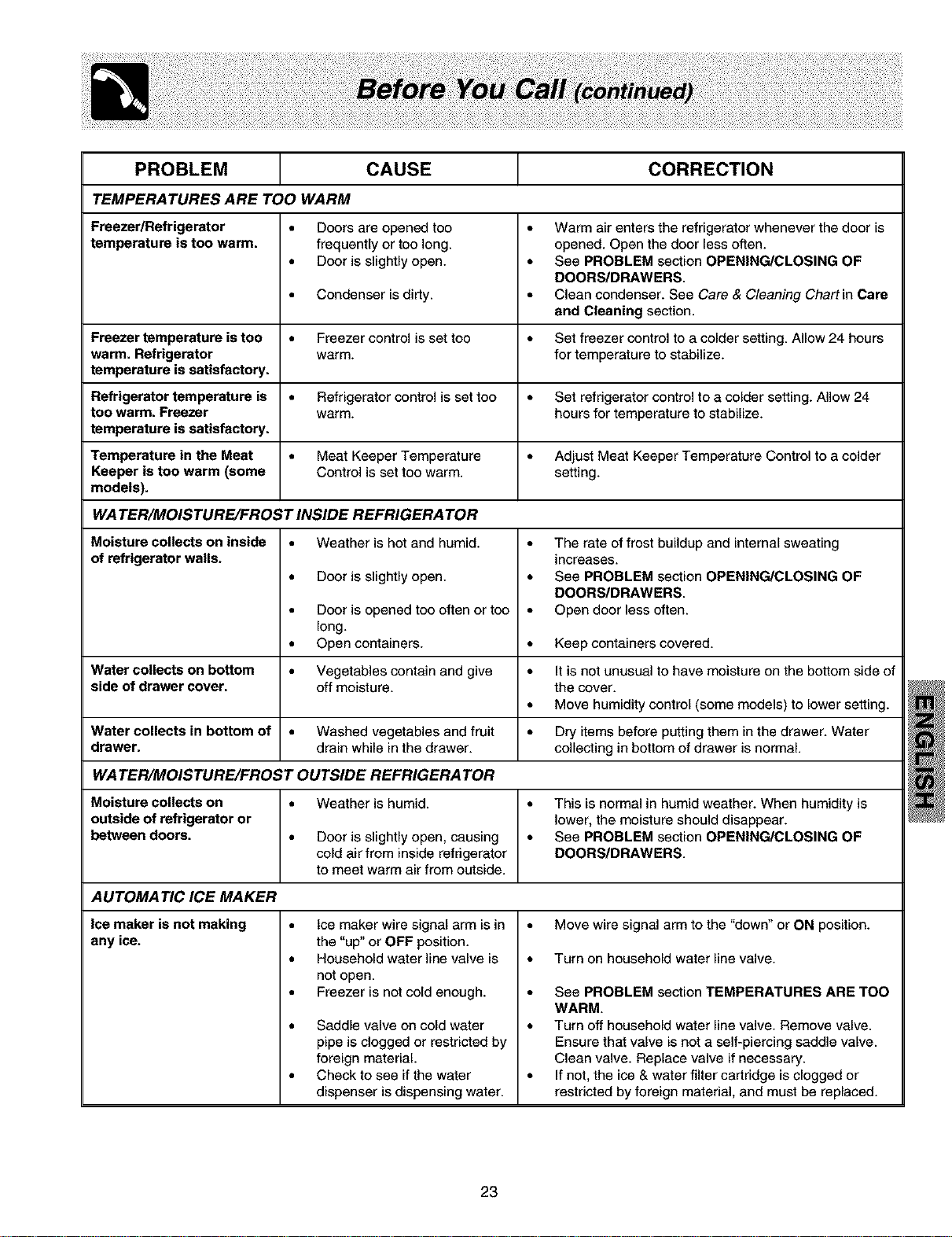
PROBLEM CAUSE CORRECTION
TEMPERATURES ARE TOO WARM
Freezer/Refrigerator • Doors are opened too • Warm air enters the refrigerator whenever the door is
temperature is too warm. frequently or too long. opened. Open the door less often.
• Doer is slightly open. • See PROBLEM section OPENING/CLOSING OF
DOORS/DRAWERS.
• Condenser isdirty. • Clean condenser. See Care & Cleaning Chart in Care
and Cleaning section.
Freezer temperature is too = Freezer control is set too = Set freezer control to a colder setting. Allow 24 hours
warm. Refrigerator warm. for temperature to stabilize.
temperature is satisfactory.
Refrigerator temperature is = Refrigerator control is set too = Set refrigerator control to a colder setting. Allow 24
too warm. Freezer warm. hours for temperature to stabilize.
temperature is satisfactory.
Temperature in the Meat = Meat Keeper Temperature = Adjust Meat Keeper Temperature Control to a colder
Keeper is too warm (some Control is set too warm. setting.
models).
WA TEn/MOISTURE/FROST INSIDE REFRIGERA Ton
• Weather is hot and humid.
Moisture collects on inside
of refrigerator walls.
• Door is slightly open.
• Door is opened too often or too
long.
• Open containers.
• The rate of frost buildup and internal sweating
increases.
• See PROBLEM section OPENING/CLOSING OF
DOORS/DRAWERS.
• Open door less often.
• Keep containers covered.
Water collects on bottom • Vegetables contain and give • It is not unusual to have moisture on the bottom side of
side of drawer cover, off moisture, the cover.
• Move humidity control (some models) to lower setting.
Water collects in bottom of • Washed vegetables and fruit • Dry items before putting them inthe drawer. Water
drawer, drain while in the drawer, collecting in bottom of drawer is normal
WA TEn/MOISTURE/FROST OUTSIDE REFRIGERA Ton
Moisture collects on • Weather is humid. • This is normal in humid weather. When humidity is
outside of refrigerator or lower, the moisture should disappear.
between doors. • Door is slightly open, causing • See PROBLEM section OPENING/CLOSING OF
cold air from inside refrigerator DOORS/DRAWERS.
to meet warm air from outside.
AUTOMATIC ICE MAKER
Ice maker is not making
any ice.
• Ice maker wire signal arm is in
the "up" or OFF position.
• Household water line valve is
not open.
• Freezer is not cold enough.
• Saddle valve on cold water
pipe is clogged or restricted by
foreign material
• Check to see if the water
dispenser is dispensing water.
• Move wire signal arm to the "down" or ON position.
• Turn on household water line valve.
• See PROBLEM section TEMPERATURES ARE TOO
WARM.
• Turn off household water line valve. Remove valve.
Ensure that valve is not a self-piercing saddle valve.
Clean valve. Replace valve if necessary.
• If not, the ice & water filter cartridge is dogged or
restricted by foreign material, and must be replaced.
23
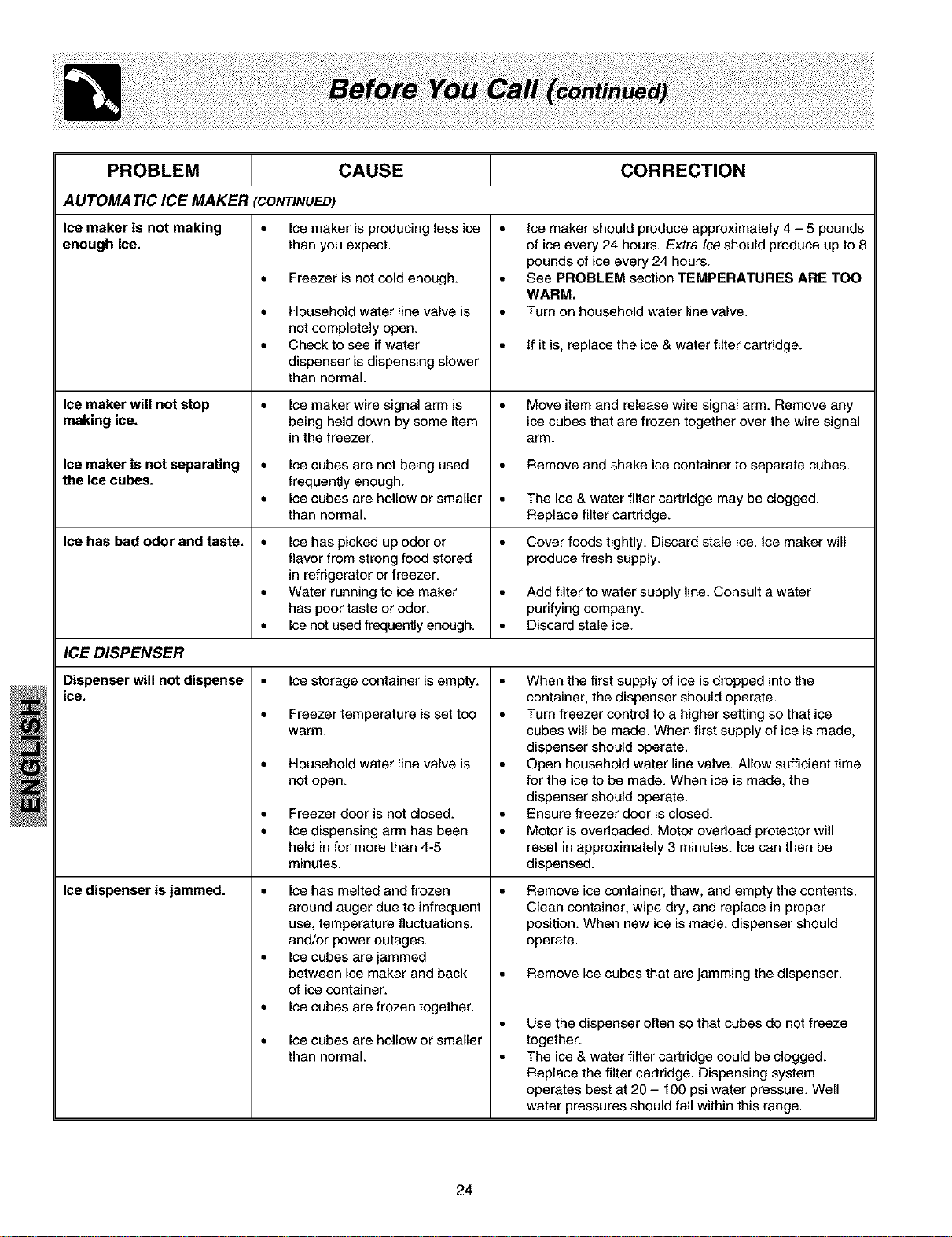
PROBLEM CAUSE
AUTOMA TIC ICE MAKER (CONTINUED)
Ice maker is not making • Ice maker is producing less ice
enough ice. than you expect.
• Freezer is not cold enough.
• Household water line valve is
not completely open.
• Check to see if water
dispenser is dispensing slower
than normal.
CORRECTION
• ice maker should produce approximately 4 - 5 pounds
of ice every 24 hours. Extra Iceshould produce up to 8
pounds of ice every 24 hours.
• See PROBLEM section TEMPERATURES ARE TOO
WARM.
• Turn on household water line valve.
If it is, replace the ice & water filter cartridge.
lee maker will not stop • Ice maker wire signal arm is • Move item and release wire signal arm. Remove any
making ice. being held down by some item ice cubes that are frozen together over the wire signal
in the freezer, arm.
Ice maker is not separating • Ice cubes are not being used • Remove and shake ice container to separate cubes.
the ice cubes, frequently enough.
• lee cubes are hollow or smaller • The ice & water filter cartridge may be clogged.
than normal. Replace filter cartridge.
Ice has bad odor and taste. • lee has picked up odor or • Cover foods tightly. Discard stale ice. Ice maker will
flavor from strong food stored produce fresh supply.
in refrigerator or freezer.
• Water running to ice maker • Add filter to water supply line. Consult a water
has poor taste or odor. purifying company.
• Ice not used frequently enough. • Discard stale ice.
ICE DISPENSER
Dispenser will not dispense
ice.
Ice dispenser is jammed.
• Ice storage container is empty.
• Freezer temperature is set too
warm.
• Household water line valve is
not open.
Freezer door is not closed.
Ice dispensing arm has been
held in for more than 4-5
minutes.
• Ice has melted and frozen
around auger due to infrequent
use, temperature fluctuations,
and/or power outages.
• Ice cubes are jammed
between ice maker and back
of ice container.
• Ice cubes are frozen together.
Ice cubes are hollow or smaller
than normal.
• When the first supply of ice isdropped into the
container, the dispenser should operate.
• Turn freezer control to a higher setting so that ice
cubes will be made. When first supply of ice is made,
dispenser should operate.
• Open household water line valve. Allow sufficient time
for the ice to be made. When ice is made, the
dispenser should operate.
• Ensure freezer door is closed.
• Motor is overloaded. Motor overload protector will
reset in approximately 3 minutes. Ice can then be
dispensed.
Remove ice container, thaw, and empty the contents.
Clean container, wipe dry, and replace in proper
position. When new ice is made, dispenser should
operate.
Remove ice cubes that are jamming the dispenser.
Use the dispenser often so that cubes do not freeze
together.
The ice & water filter cartridge could be clogged.
Replace the filter cartridge. Dispensing system
operates best at 20 - 100 psi water pressure. Well
water pressures should fall within this range.
24
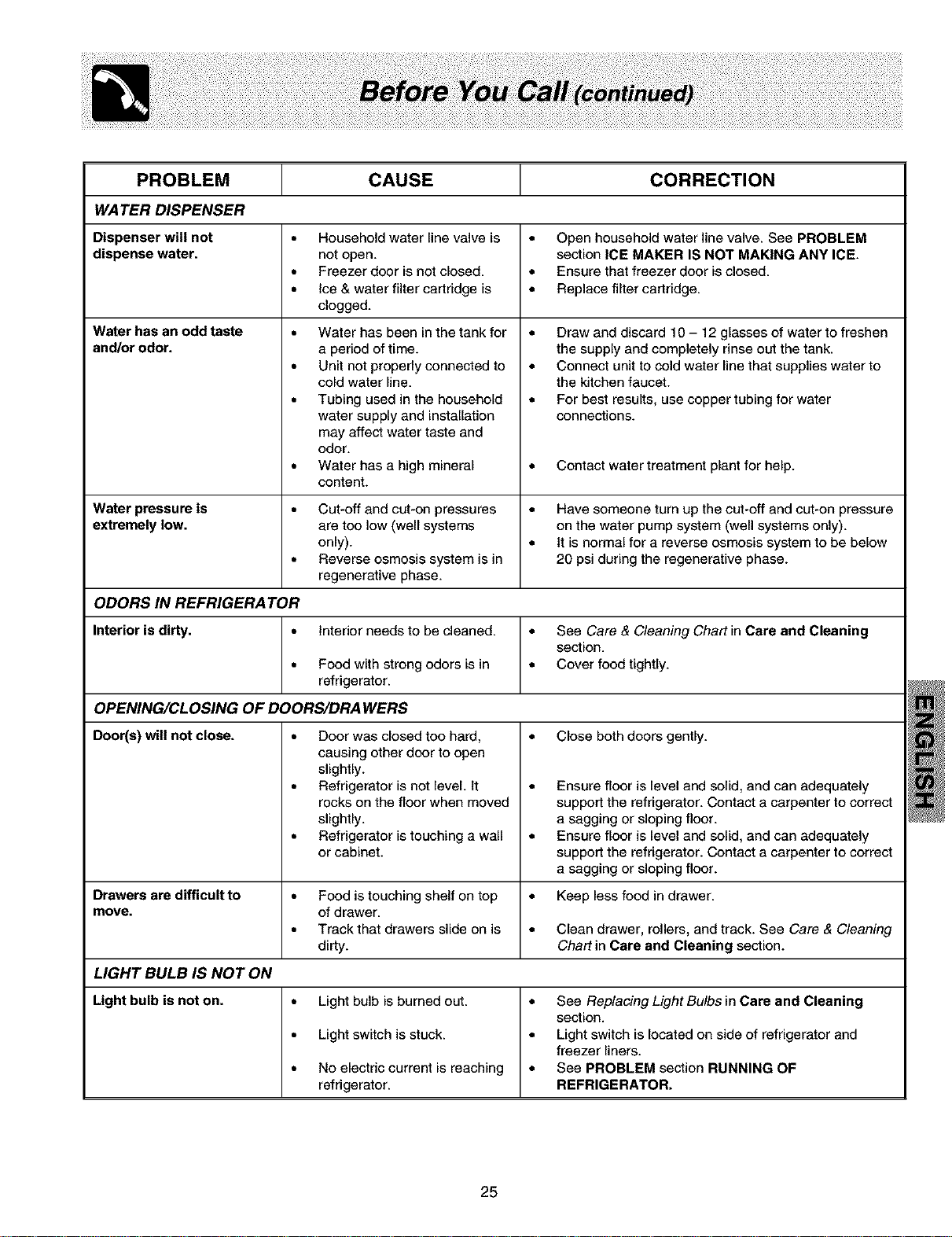
PROBLEM CAUSE CORRECTION
WATER DISPENSER
Dispenser will not • Household water line valve is • Open household water line valve. See PROBLEM
dispense water, not open. section ICE MAKER IS NOT MAKING ANY ICE.
• Freezer door isnot closed. • Ensure that freezer door is closed.
• Ice & water filter cartridge is • Replace filter cartridge.
clogged.
Water has an odd taste
and/or odor.
Water has been inthe tank for
a period of time.
Unit not properly connected to
cold water line.
Tubing used in the household
water supply and installation
may affect water taste and
odor.
Water has a high mineral
content.
• Draw and discard 10 - 12 glasses of water to freshen
the supply and completely rinse out the tank.
• Connect unit to cold water line that supplies water to
the kitchen faucet.
• For best results, use copper tubing for water
connections.
• • Contact water treatment plant for help.
Water pressure is • Cut-off and cut-on pressures • Have someone turn up the cut-off and cut-on pressure
extremely low. are too low (well systems on the water pump system (well systems only).
only). • It is normal for a reverse osmosis system to be below
• Reverse osmosis system is in 20 psi during the regenerative phase.
regenerative phase.
ODORS IN REFRIGERATOR
Interior is dirty. • interior needs to be cleaned. • See Care & Cleaning Chart in Care and Cleaning
section.
• Food with strong odors is in • Cover food tightly.
refrigerator.
OPENING/CLOSING OF DOORS/DRA WERS
Door(s) will not close. • Close both doors gently.
• Door was closed too hard,
causing other door to open
slightly.
• Refrigerator is not level It
rocks on the floor when moved
slightly.
• Refrigerator istouching a wall
or cabinet.
• Ensure floor is level and solid, and can adequately
support the refrigerator. Contact a carpenter to correct
a sagging or sloping floor.
• Ensure floor is level and solid, and can adequately
support the refrigerator. Contact a carpenter to correct
a sagging or sloping floor.
Drawers are difficult to • Food is touching shelf on top • Keep less food in drawer.
move. of drawer.
• Track that drawers slide on is • Clean drawer, rollers, and track. See Care & Cleaning
dirty. Chart in Care and Cleaning section.
LIGHT BULB IS NOT ON
Light bulb is not on. • Light bulb isburned out. • See Replacing Light Bulbs in Care and Cleaning
section.
• Light switch is stuck. • Light switch is located on side of refrigerator and
freezer liners.
• No electric current is reaching • See PROBLEM section RUNNING OF
refrigerator. REFRIGERATOR.
25