MS6701
Digital Sound Level Meter
Operation Manual
I. Preface…………………………………………..2
II. Safety Instructions………….......................2
III. Functions & Features………….......…….....3
IV. Specifications……...................................4
V. Preparation Before Using………….…..…...5
VI. The Method Of Usage……........................5
VII. Record And Storage Of
Measurement Data……..………….........6
VIII. Installing Operation
Software In A Computer……................7
IX. Linking And Communication Between
The Meter And a Computer……………….7
X. Set time And Date.....................................8
XI. Calibrating Sound level Meter……………...8
XII. Cautious………..............................…….8
01
CONTENTS
MS6701
RS232
RS-323 Pclink

MS6701
Digital Sound Level Meter
Operation Manual
I. Preface…………………………………………..2
II. Safety Instructions………….......................2
III. Functions & Features………….......…….....3
IV. Specifications……...................................4
V. Preparation Before Using………….…..…...5
VI. The Method Of Usage……........................5
VII. Record And Storage Of
Measurement Data……..………….........6
VIII. Installing Operation
Software In A Computer……................7
IX. Linking And Communication Between
The Meter And a Computer……………….7
X. Set time And Date.....................................8
XI. Calibrating Sound level Meter……………...8
XII. Cautious………..............................…….8
01
CONTENTS
MS6701
RS232
RS-323 Pclink
MS6701
Digital Sound Level Meter
Operation Manual
I. Preface…………………………………………..2
II. Safety Instructions………….......................2
III. Functions & Features………….......…….....3
IV. Specifications……...................................4
V. Preparation Before Using………….…..…...5
VI. The Method Of Usage……........................5
VII. Record And Storage Of
Measurement Data……..………….........6
VIII. Installing Operation
Software In A Computer……................7
IX. Linking And Communication Between
The Meter And a Computer……………….7
X. Set time And Date.....................................8
XI. Calibrating Sound level Meter……………...8
XII. Cautious………..............................…….8
01
CONTENTS
MS6701
RS232
RS-323 Pclink
MS6701
Digital Sound Level Meter
Operation Manual
I. Preface…………………………………………..2
II. Safety Instructions………….......................2
III. Functions & Features………….......…….....3
IV. Specifications……...................................4
V. Preparation Before Using………….…..…...5
VI. The Method Of Usage……........................5
VII. Record And Storage Of
Measurement Data……..………….........6
VIII. Installing Operation
Software In A Computer……................7
IX. Linking And Communication Between
The Meter And a Computer……………….7
X. Set time And Date.....................................8
XI. Calibrating Sound level Meter……………...8
XII. Cautious………..............................…….8
01
CONTENTS
MS6701
RS232
RS-323 Pclink
MS6701
Digital Sound Level Meter
Operation Manual
I. Preface…………………………………………..2
II. Safety Instructions………….......................2
III. Functions & Features………….......…….....3
IV. Specifications……...................................4
V. Preparation Before Using………….…..…...5
VI. The Method Of Usage……........................5
VII. Record And Storage Of
Measurement Data……..………….........6
VIII. Installing Operation
Software In A Computer……................7
IX. Linking And Communication Between
The Meter And a Computer……………….7
X. Set time And Date.....................................8
XI. Calibrating Sound level Meter……………...8
XII. Cautious………..............................…….8
01
CONTENTS
MS6701
RS232
RS-323 Pclink
R-00-05-0669
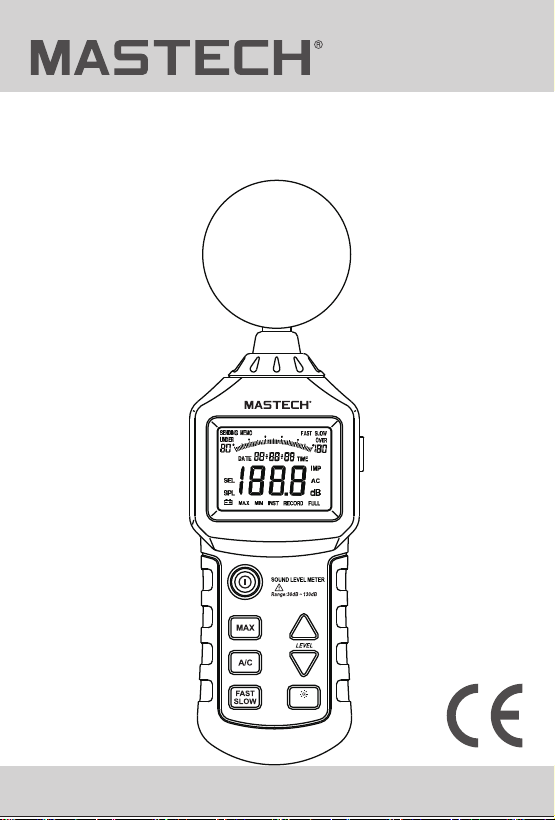
1. To save real-time data in the meter, by pressing the
“FAST/SLOW (RECORD)” button for 2 seconds,
“RECORD” symbol displays on the LCD screen.
At the same time, the meter starts to record
real-time data until it’s memory is full. LCD screen
displays “full” symbol, it indicates that the meter
cann't save data continually.
R-00-05-0669
1. To save real-time data in the meter, by pressing the
“FAST/SLOW (RECORD)” button for 2 seconds,
“RECORD” symbol displays on the LCD screen.
At the same time, the meter starts to record
real-time data until it’s memory is full. LCD screen
displays “full” symbol, it indicates that the meter
cann't save data continually.
R-00-05-0669
1. To save real-time data in the meter, by pressing the
“FAST/SLOW (RECORD)” button for 2 seconds,
“RECORD” symbol displays on the LCD screen.
At the same time, the meter starts to record
real-time data until it’s memory is full. LCD screen
displays “full” symbol, it indicates that the meter
cann't save data continually.
R-00-05-0669
1. To save real-time data in the meter, by pressing the
“FAST/SLOW (RECORD)” button for 2 seconds,
“RECORD” symbol displays on the LCD screen.
At the same time, the meter starts to record
real-time data until it’s memory is full. LCD screen
displays “full” symbol, it indicates that the meter
cann't save data continually.

R-00-05-0669
1. To save real-time data in the meter, by pressing the
“FAST/SLOW (RECORD)” button for 2 seconds,
“RECORD” symbol displays on the LCD screen.
At the same time, the meter starts to record
real-time data until it’s memory is full. LCD screen
displays “full” symbol, it indicates that the meter
cann't save data continually.