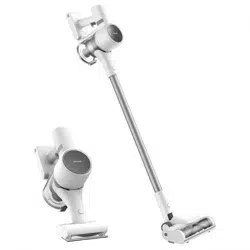
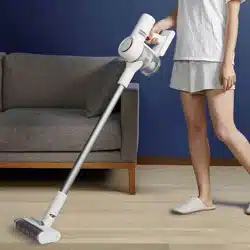
User Manual Dreame T10 Cordless Vacuum Cleaner EU
Safety Instructions
To prevent accidents including electric shock or fire caused by improper use, please read this manual carefully before use and retain it for future reference.
Warning
- This product can be used by children aged from 8 years and above and persons with physical, sensory, intellectual deficiencies, or limited experience or knowledge under the supervision of a parent or guardian to ensure safe operation and to avoid any risk of hazards. Cleaning and maintenance shall not be made by children without supervision.
- The vacuum is not a toy. Children shall not play with or operate this product. Please exercise caution when using the vacuum near children. Do not allow children to clean or maintain the vacuum unless supervised by a parent or guardian.
- Do not use the vacuum outdoors or on wet surfaces. Only use the vacuum on dry indoor surfaces. Do not touch the plug or any part of the vacuum with wet hands.
- To reduce the risk of fire, explosion, or injury, check to make sure the lithium battery and charging adapter are undamaged before use. Do not use the vacuum if either the lithium battery or charger is damaged.
- The multi-brush bar, battery, metal connector pin, and vacuum are electrically conductive and should not be immersed in water or other liquid. Make sure to dry all filters after cleaning.
- Prevent injury caused by moving parts. Turn off the vacuum before cleaning the multi-brush bar. The multi-brush bar, dust compartment and filter must all be properly installed before using the vacuum.
- Only use the original charging adapter. Never use an unoriginal adapter, as this may cause the lithium battery to catch fire.
- Do not use the vacuum to pick up flammable or combustible liquids, such as gasoline, or bleach, ammonia, drain cleaners or other liquids.
- Do not use the vacuum to pick up sharp or hard objects, such as glass, nails, screws, or coins, which may damage the machine.Do not use the vacuum to pick up drywall particles, ashes like fireplace ash, or smoking or burning materials such as coal, cigarette butts or matches.
- Check the area to be cleaned before use. To prevent the openings from being blocked, clear the larger paper, spitball, plastic cloth or sharp objects (such as glass, nails, screws, coins, etc.) and any object which is larger than openings.
- Keep hair, loose clothing, fingers and other parts of the body away from the vacuum's openings and moving parts. Do not point the hose, wand or tools at your eyes or ears or put them in your mouth.
- Do not put any object into the vacuum's openings. Do not use the vacuum with any opening blocked. Keep free of dust, lint, hair, or other items which may reduce airflow.
- Do not rest the vacuum against a chair, table, or other unstable surface, as this may cause damage to the machine or personal injury. If the vacuum becomes damaged from being knocked over or is otherwise malfunctioning, please contact our authorized service department. Never attempt to disassemble the device on your own.
- All instructions in the manual for recharging the battery must be strictly followed.
- Failure to properly charge the battery within the specified temperature range could damage the battery.
- Please be extra careful when using the vacuum to clean stairs.
- Make sure the vacuum is unplugged when not used for extended periods as well as prior to performing any maintenance or repairs.
- Do not install, charge, or use this product outdoors, in bathrooms, or around a pool.
- Fire Hazard Warning: Do not apply any type of fragrance to the vacuum's filter. These types of products are known to contain flammable chemicals which may cause the vacuum to catch fire.
- Only use the original charger (Model YLS0251B-E300080 (EU) / YLS0241A-A300080(AU)). Failing to do so may cause the lithium-ion battery to catch fire.
- Only use the approved battery type (Model P2010-7S1P-BW/P2010-7S1P-BWA/P2010-7S1P-BWB). Failing to do so may cause the lithium-ion battery to catch fire.
- Do not use and store in extremely hot or cold environments (below 0℃ /32°F or above 40℃ /104°F). Please charge the cordless vacuum in temperature above 0℃/32°F and below 40℃ /104°F.
- This product is designed for home use only.
Product Overview
Component Names
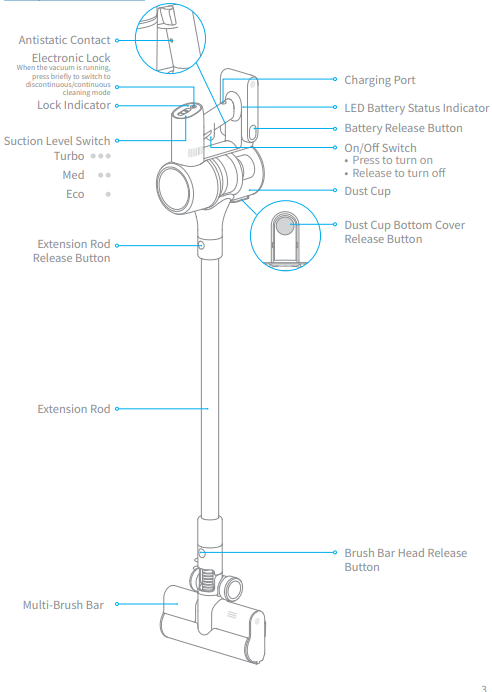
Accessories
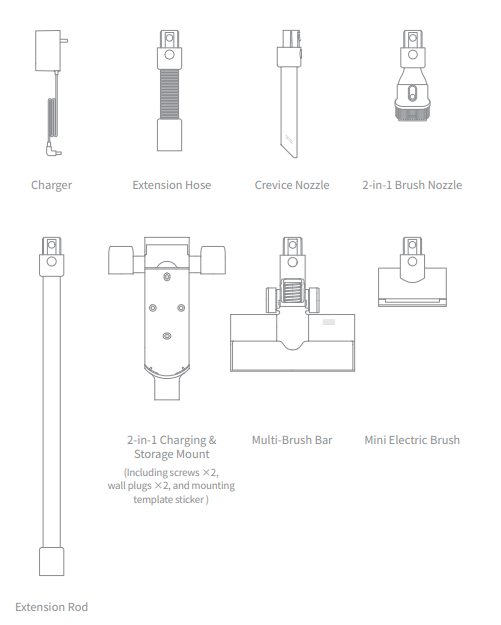
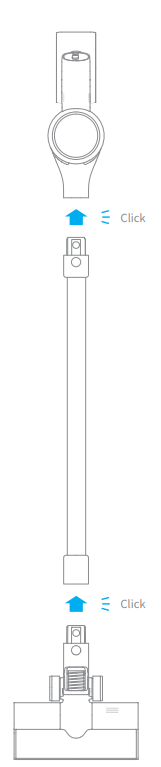
Vacuum Installation Diagram
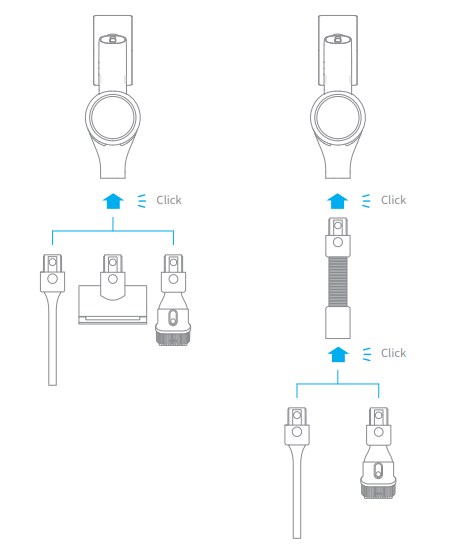
Accessories Installation Diagram
Installation
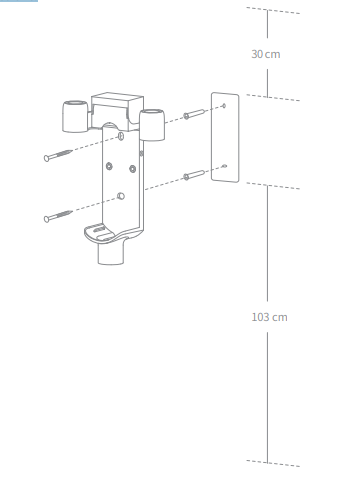
2-in-1 Charging & Storage Mount Installation Diagram
The 2-in-1 charging & storage mount is an optional accessory. You can install it based on your needs.
1. The 2-in-1 charging & storage mount should be installed in a cool, dry place with an
electrical outlet nearby. Prior to installing, ensure that there are no electrical wires or
pipes in the space directly behind where the mount will be installed.
2. The bottom of the mounting template sticker should be level and at least 103cm from the
ground. The top should have at least 30cm* of clearance above it. (*30cm: Leave enough
space just in case you may need to purchase the replaceable battery in the future.)
3. Use a power drill with an 8 mm drill bit to drill a hole into each marker on the mounting
template sticker, then insert a wall plug into each hole.
4. Align the holes on the mount with the holes on the wall. Fasten it to the wall with the
included screws.
Charging
Fully charge the vacuum before using it for the first time.
Note: A full charge will take approx. 3.5 hours. Using Turbo mode for a prolonged period will cause the battery to heat up, which increases charging time. Allow the vacuum to cool down for 30 minutes before charging it.
Charging Methods
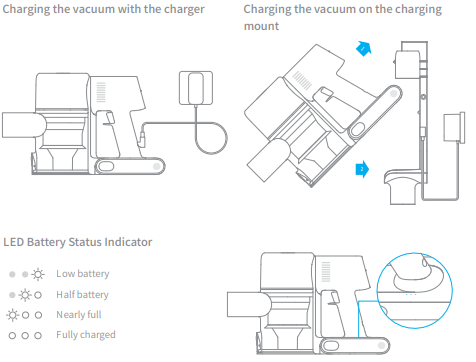
Note: Once the vacuum is fully charged, the indicator will turn off after 5 minutes, and the vacuum will enter the energy-saving mode
How to Use
Working Methods
Select from two working methods for the vacuum, based on your needs.
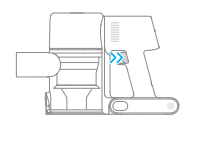
Method 1: Discontinuous Cleaning Mode
Press and hold the on/off switch to power it on, and release it to stop immediately
Method 2: Continuous Cleaning Mode (Electronic Lock)
Click the electronic lock to switch to Continuous Cleaning Mode when the vacuum is running. Then release the on/off switch to make the vacuum in Continuous Cleaning Mode. Use the electronic lock to free your fingers and avoid finger fatigue caused by holding the switch.
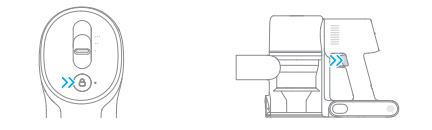
Note: In this mode, the lock indicator will illuminate steadily. Click the electronic lock again to quit the Continuous Cleaning Mode.
Using Different Accessories
Multi-Brush Bar
Suitable for vacuuming on the med/short pile carpets, tiles and floors.
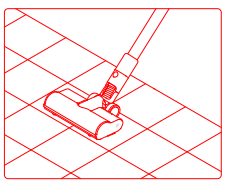
Mini Electric Brush
For vacuuming dirt, pet hair, and other stubborn debris from sofas, bedding, and other fabric surfaces.
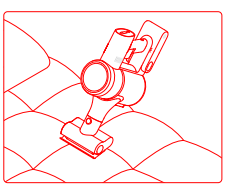
2-in-1 Brush Nozzle
For vacuuming curtains, keyboards, ceilings, sofas, vehicle interiors, coffee tables, etc.
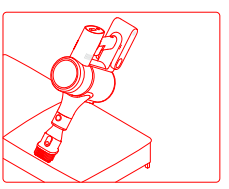
Crevice Nozzle
Suitable for vacuuming cracks, corners of doors and windows, stairs, and other hardto-reach places.
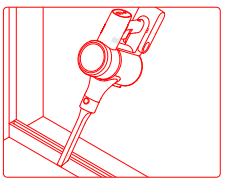
Extension Hose
Suitable for cleaning hard-to-reach corners such as drawers, vehicle interiors, sofa bottoms, etc.
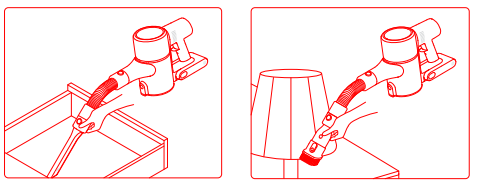
Note:
- If any rotating part becomes stuck, the vacuum may shut off automatically. Remove any trapped foreign objects, then resume use.
- When the battery becomes overheated, the vacuum will automatically shut off. Wait until the battery temperature returns to normal, then resume use
Care & Maintenance
Tips:
- Always use genuine parts to keep your warranty from being void.
- If the filter or nozzle becomes clogged, the vacuum will stop working shortly after being turned on. Clear the tube to restore functionality
- If the vacuum is not used for an extended period, fully charge it, unplug its charger, and store it in a cool, low-humidity environment away from direct sunlight. To avoid overdischarging the battery, recharge the vacuum at least once every three months.
Cleaning the Vacuum
Wipe the vacuum with a soft dry cloth
Cleaning the Dust Cup, Pre-Filter, and Cyclone Assembly
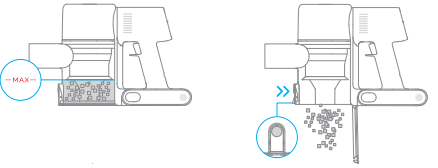
The vacuum's cleaning ability will be reduced if the dust cup is filled to the "MAX" mark. To regain performance, empty the dust cup in a timely manner. Before emptying the dust cup, make sure the vacuum is disconnected from the power, and do not press its power button.
1. Press the dust cup bottom cover release button, then empty the contents
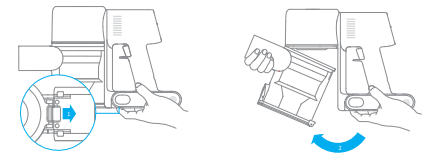
2. Push the dust cup release switch in the direction indicated by the arrow, then gently remove the dust cup from the vacuum.
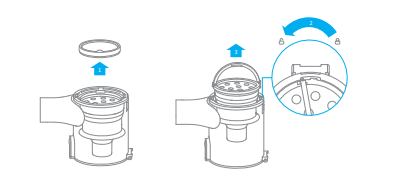
3. Remove the pre-filter first, then lift the handle of the cyclone assembly and turn it counterclockwise until it stops, then pull to lift out the cyclone assembly.
4. Rinse the cyclone assembly, pre-filter, and dust cup until they are clean. After washing, air dry for at least 24 hours .
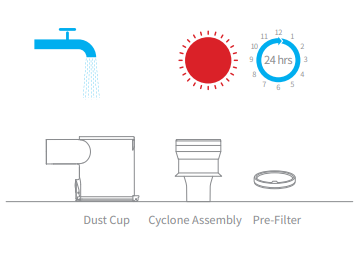
Note :
- It is recommended to clean the dust cup once every month.
- It is recommended to clean the pre-filter at least once every 3 months and the cyclone system at least once every 6 months.
Installing the Dust Cup, Pre-Filter, and Cyclone Assembly
1. Insert the cyclone assembly vertically into the dust cup, and make sure that the handle of the cyclone assembly line up with the slot on the left side of the dust cup. Turn the handle clockwise until it locks, then flip the handle down.
2. Place the pre-filter with its front side facing up into the cyclone assembly.
3. Slightly tilt the dust cup so the slot aligns with the clip on the vacuum. Then gently push the dust cup until it clicks into place.
Cleaning the Filter
1. Remove the dust cup as shown in the figure.
2. Remove the filter from the vacuum by pulling it down in the direction shown in the figure.
3. Clean the filter with clean water. Make sure you rotate the filter 360° to thoroughly and remove all dust caught in the filter. Lightly tap the filter several times to remove any excess dirt.
4. Allow the filter to air dry for 24 hours.
Installing the Filter
1. Insert the filter into the vacuum and gently press down, as illustrated.
2. Reinstall the dust cup
Cleaning the Multi-Brush Bar
1. Turn the lock counterclockwise until it stops, then remove the roller brush from the brush bar.
2. Use scissor to cut off the hairs and fibers that get stuck on the brush bar head. Wipe the dust from the notch and transparent cover with a dry cloth or paper towel. Thoroughly dry before use.
3. When it is dirty, rinse the roller brush with clean water until it is clean.
4. Stand the roller brush upright for at least 24 hours until it is fully dry.
Cleaning the Mini Electric Brush
1. Use a coin as illustrated to rotate the lock counterclockwise until you hear a click.
2. After unlocking the roller brush, remove it from the mini electric brush, then rinse and clean the brush head.
3. Stand the roller brush upright in a well-ventilated area for at least 24 hours until it is fully dry.
4. Once the mini roller brush is dry, reinstall it by following the disassembly steps in reverse.
Battery Pack
The vacuum contains a removable rechargeable lithium-ion battery pack which has a limited number of recharge cycles. After extended use, the battery pack may no longer hold a charge. If this happens, it means the battery pack has reached the end of its life cycle and needs to be replaced.
1. Press down the battery pack release button and slide the battery pack to the right, as illustrated, to remove it.
2. Install the new battery pack.