
Operator's Manual
CRRFT$IRNo
6 x 48" Belt
12" Disc
SANDER
Model No.
351.226060
CAUTION: Read and follow
all Safety Rules and Operating
Instructions before First Use
of this Product.
Sears, Roebuck and Co., Hoffman Estates, IL 60179 U.S.A.
2643.01 Draft (01/12/01)
Warranty ....................................... 2
Safety Rules .................................... 2
Unpacking ..................................... 3
Assembly ..................................... 3-4
Installation .................................... 4-5
Operation .................................... 5-8
Maintenance .................................... 8
Troubleshooting ................................. 9
Parts iflustration and List ....................... 16-13
Espafiol .................................... 14-23
FULL ONE YEAR WARRANTY ON CRAFTSMAN
BELT & DISC SANDER
If within one full year from the date of purchase, this
Craftsman sander fails due to a defect in material or work-
manship, Sears will repair it free of charge. Warranty service
is available by contacting Sears in-home major brand repair
service.This warranty gives you specific legal rights and you
may also have other rights which vary from state to state.
If this sander is used for commercial purposes, this warranty
applies for only 90 days from the date of purchase.
Sears, Roebuck and Co., Dept. 817WA, Hoffman Estates, IL
60179
WARNING: For your own safety, read all of the instructions
and precautions before operating tool.
CAUTION: Always follow proper operating procedures as
defined in this manual even ifyou are familiar with use of this
or similar tools. Remember that being careless for even a
fraction of a second can result in severe personal injury.
BE PREPARED FOR JOB
• Wear proper apparel. Do notwear loose clothing, gloves,
neckties, rings, bracelets or other jewelry which may get
caught in moving parts of machine.
• Wear protective hair covering to contain long hair.
• Wear safety shoes with non-slip soles.
• Wear safety glasses complying with United States ANSI
Z87.1. Everyday glasses have only impact resistant lenses.
They are NOT safety glasses.
• Wear face mask or dust mask if operation is dusty.
• Be alert and think clearly. Never operate power tools when
tired, intoxicated or when taking medications that cause
drowsiness.
PREPARE WORK AREA FOR JOB
• Keep work area clean. Cluttered work areas inviteaccidents.
• Do not use power tools in dangerous environments. Do not
use power tools in damp or wet locations. Do not expose
power tools to rain.
• Work area should be properly lighted.
• Proper electrical receptacle should be available for toot.
Three prong plug should be plugged directly into properly
grounded, three-prong receptacle.
• Extension cordsshould have a grounding prongand the three
wires ofthe extension cord should be ofthe correct gauge.
• Keep visitors at a safe distance from work area.
• Keep children out of workplace. Make workshop childproof.
Use padlocks, master switches or remove switch keys to
prevent any unintentional use of power tools.
TOOL SHOULD BE MAINTAINED
• Always unplug tool prior to inspection.
• Consult manual for specific maintaining and adjusting
procedures.
• Keep tool lubricated and clean for safest operation.
• Remove adjusting tools. Form habit of checking to see that
adjusting tools are removed before switching machine on.
• Keep all parts in working order. Check to determine that the
guard or other parts will operate properly and perform their
intended function.
• Check for damaged parts. Check for alignment of moving
parts, binding, breakage, mounting and any other condition
that may affect a tool's operation.
• A guard or ether part that is damaged should be properly
repaired or replaced. Do not perform makeshift repairs,
(Use parts list provided to order replacement parts.)
KNOW HOW TO USE TOOL
• Use righttool forjob. Do not force tool or attachment to do
a job for which it was not designed.
• Disconnect tool when changing belt or abrasive disc.
• Avoid accidental start-up. Make sure that the tool is in the
"OFF' position before plugging in.
• Do not force tool. It will work most efficiently at the rate for
which it was designed.
• Keep hands away from moving parts and sanding surfaces.
• Never leave tool running unattended. Turn the power off
and do not leave tool until it comes to a complete stop.
• Do not overreach. Keep proper footing and balance.
• Never stand on tool. Serious injury could occur if tool is
tipped or if belt or disc are unintentionally contacted.
• Know your tool. Learn the tool's operation, application and
specific limitations.
• Use recommended accessories (refer to page 11). Use of
improper accessories may cause risk of injuryto persons.
• Handle the workpiece correctly. Protect hands from possi-
ble injury.
• Turn machine off if it jams. Belt jams when it digs too
deeply into workpiece. (Motor force keeps it stuck in the
work.)
• Support workplace with miter gauge, belt platen or work
table.
• Maintain '/,," maximum clearance between table and sand-
ing belt or disc.
CAUTION: Think safety! Safety is a combination of operator
common sense and alertness at all times when tool is being
used.
WARNING: Do not attempt to operate tool until it is com-
pletely assembled according to the instructions.
2
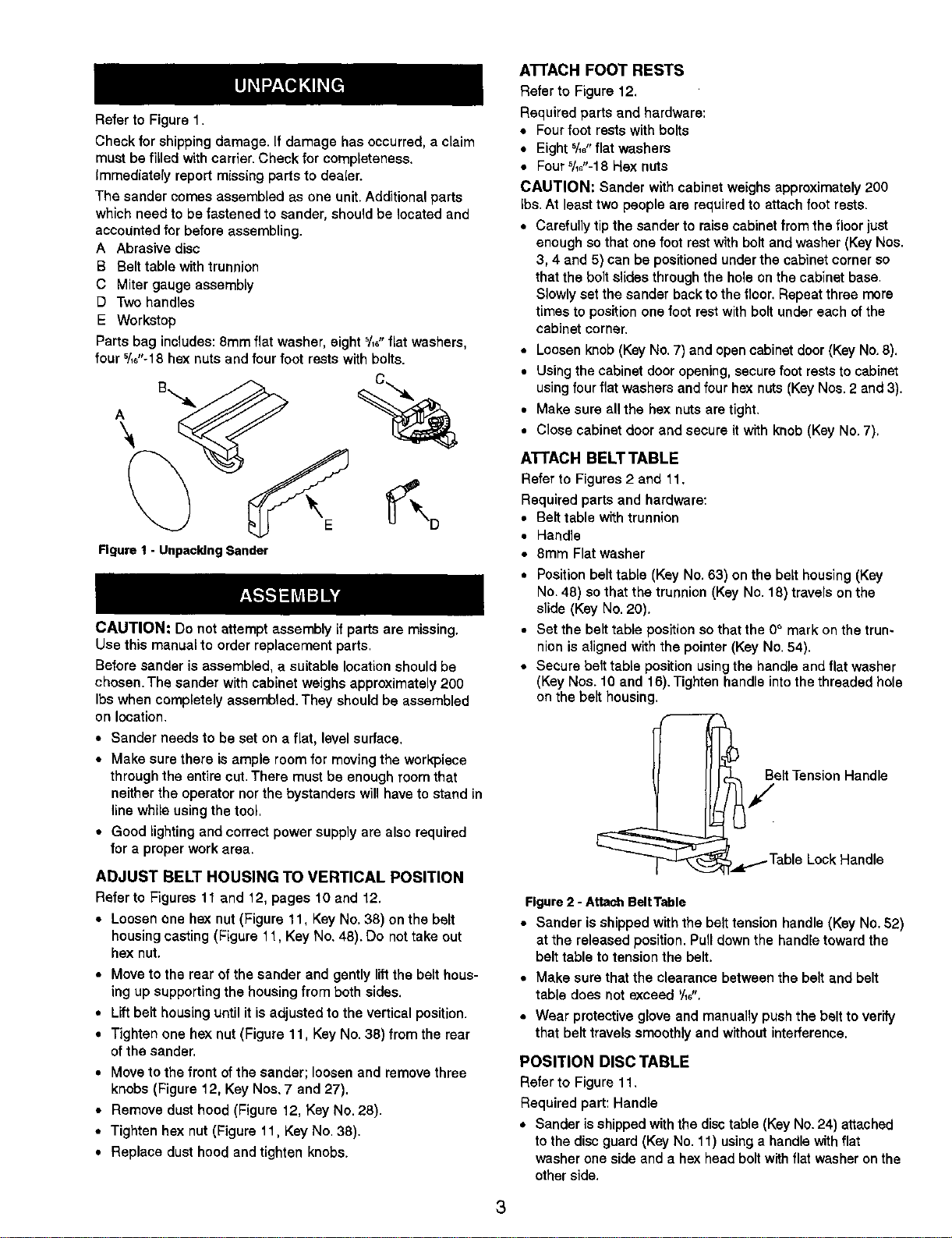
Refer to Figure 1.
Check for shipping damage. If damage has occurred, a claim
must be filled with carrier. Check for completeness.
Immediately report missing parts to dealer.
The sander comes assembled as one unit. Additional parts
which need to be fastened to sander, should be located and
accounted for before assembling.
A Abrasive disc
B Belt table with trunnion
C Miter gauge assembly
D Two handles
E Workstop
Parts bag includes: 8mm flat washer, eight %_"fiat washers,
four '/_"-18 hex nuts and four foot rests with bolts.
A
Figure I - Unpacking Sander
CAUTION: Do not attempt assembly if parts are missing,
Use this manual to order replacement parts.
Before sander is assembled, a suitable location should be
chosen. The sander with cabinet weighs approximately 200
Ibs when completely assembled. They should be assembled
on location.
• Sander needs to be set on a flat, level surface.
• Make sure there is ample room for moving the workpiece
through the entire cut. There must be enough room that
neither the operator nor the bystanders will have to stand in
line while using the tool,
• Good lighting and correct power supply are also required
for a proper work area.
ADJUST BELT HOUSING TO VERTICAL POSITION
Refer to Figures 11 and 12, pages 10 and 12.
• Loosen one hex nut (Figure 11, Key No. 38) on the belt
housing casting (Figure 11, Key No, 48). Do not take out
hex nut.
• Move to the rear ofthe sander and gently lift the belt hous-
ing up supporting the housing from both sides,
• Lift belt housing until it is adjusted to the vertical position.
• Tighten one hex nut (Figure 11, Key No. 38) from the rear
of the sander,
• Move to the front of the sander; loosen and remove three
knobs (Figure 12, Key Noa. 7 and 27).
• Remove dust hood (Figure 12, Key No. 28).
• Tighten hex nut (Figure 11. Key No. 38).
• Replace dust hood and tighten knobs.
ATTACH FOOT RESTS
Refer to Figure 12.
Required parts and hardware:
• Four foot rests with bolts
• Eight 5/_,,flat washers
• Four5/_,'-18 Hex nuts
CAUTION: Sander with cabinet weighs approximately 200
Ibs. At least two people are requLred to attach foot rests.
• Carefully tip the sander to raise cabinet from the floor just
enough so that one foot rest with bolt and washer (Key Nos.
3, 4 and 5) can be positioned under the cabinet corner so
that the bolt slides through the hole on the cabinet base.
Slowly set the sander back to the floor. Repeat three more
times to position one foot rest with bolt under each of the
cabinet corner.
• Loosen knob (Key No. 7) and open cabinet door (Key No. 8).
• Using the cabinet door opening, secure foot rests to cabinet
using four flat washers and four hex nuts (Key Nos. 2 and 3).
• Make sure all the hex nuts are tight.
• Close cabinet door and secure it with knob (Key No. 7),
ATTACH BELT TABLE
Refer to Figures 2 and 11.
Required parts and hardware:
• Belt table with trunnion
• Handle
• 8mm Flat washer
• Position belt table (Key No. 63) on the belt housing (Key
No. 48) so that the trunnion (Key No. 18) travels on the
slide (Key No. 20).
• Set the belt table position so that the 0° mark on the trun-
nion is aligned with the pointer (Key No. 54).
• Secure belt table position using the handle and flat washer
(Key Nos. 10 and 16), Tighten handle into the threaded hole
on the belt housing,
Belt Tension Handle
/
,_L.1..TableLock Handle
Figure2 - Attach BeltTable
• Sander is shipped with the belt tension handle (Key No. 52)
at the released position, Pull down the handle toward the
belt table to tension the belt.
• Make sure that the clearance between the belt and belt
table does not exceed '/16".
• Wear protective glove and manually push the belt to verify
that belt travels smoothly and without interference.
POSITION DISC TABLE
Refer to Figure 11.
Required part: Handle
• Sander is shipped with the disctable (Key No. 24) attached
to the disc guard (Key No. 11) using a handle with flat
washer one side and a hex head boltwith flat washer on the
other side,
3
• Loosen and remove hex head bolt and flat washer from the
disc table.
• Replace hex head bolt with the handle provided. Secure
disc table to disc guard using the handle and fiat washer.
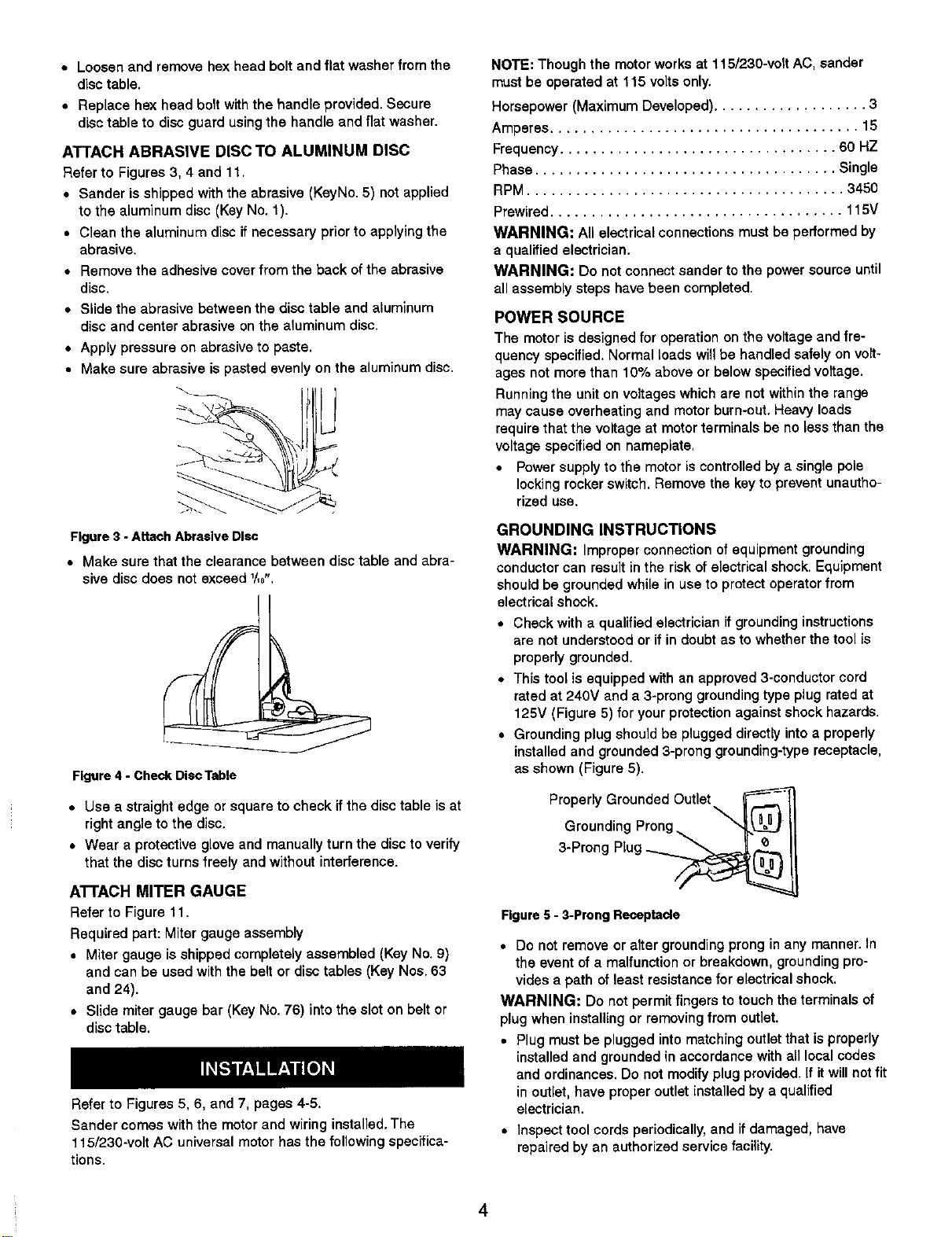
ATTACH ABRASIVE DISC TO ALUMINUM DISC
Refer to Figures 3, 4 and 1t+
• Sander is shipped with the abrasive (KeyNo. 5) not applied
to the aluminum disc (Key No. 1).
• Clean the aluminum disc if necessary prior to applying the
abrasive.
• Remove the adhesive cover from the back of the abrasive
disc.
• Slide the abrasive between the disc table and aluminum
disc and center abrasive on the aluminum disc.
• Apply pressure on abrasive to paste.
• Make sure abrasive is pasted evenly on the aluminum disc.
Figure3 - Attach Abrasive Disc
• Make sure that the clearance between disc table and abra-
sive disc does not exceed 1/_,,
Figure 4 - Check Disc Table
• Use a straight edge or square to check if the disc table is at
right angle to the disc.
• Wear a protective glove and manually turn the disc to verify
that the disc turns freely and without interference.
ATTACH MITER GAUGE
Refer to Figure 11,
Required part: Miter gauge assembly
• Miter gauge is shipped completely assembled (Key No. 9)
and can be used with the belt or disc tables (Key Nos. 63
and 24).
• Slide miter gauge bar (Key No. 76) into the slot on belt or
disc table.
R_er to Figures 5, 6, and 7, pages 4-5.
Sander comes with the motor and wiring installed. The
115/230-volt AC universal motor has the following specifica-
tions.
NOTE: Though the motor works at 115/230-volt AC, sander
must be operated at 115 volts only.
Horsepower (Maximum Developed) ................... 3
Amperes ...................................... 15
Frequency .................................. 60 HZ
Phase ..................................... Single
RPM ....................................... 3450
Prewired .................................... 115V
WARNING: All electrical connections must be performed by
a qualified electrician.
WARNING: Do not connect sander to the power source until
all assembly steps have been completed.
POWER SOURCE
The motor is designed for operation on the voltage and fre-
quency specified. Normal loads will be handled safely on volt-
ages not more than 10% above or below specified voltage.
Running the unit on voltages which are not within the range
may cause overheating and motor burn-out. Heavy loads
require that the voltage at motor terminals be no less than the
voltage specified on nameplate.
• Power supply to the motor is controlled by a single pole
locking rocker switch. Remove the key to prevent unautho-
rized use.
GROUNDING INSTRUCTIONS
WARNING: Improper connection of equipment grounding
conductor can result in the rLskof electrical shock, Equipment
should be grounded while in use to protect operator from
elect rioal shock,
• Check with a qualified electrician if grounding instructions
are not understood or if in doubt as to whether the tool is
properly grounded.
• This tool is equipped with an approved 3-conductor cord
rated at 240V and a 3-prong grounding type plug rated at
125V (Figure 5) for your protection against shock hazards.
• Grounding plug should be plugged directly into a properly
installed and grounded 3-prong grounding-type receptacle,
as shown (Figure 5).
ProP::LlyndGii ;u_ rdoendgOutIet_._
3 Prong Plug
Figure 5 - 3-Prong Receptacle
• Do not remove or alter grounding prong in any manner. In
the event of a malfunction or breakdown, grounding pro-
vides a path of least resistance for electrical shock.
WARNING: Do not permit fingers to touch the terminals of
plug when installing or removing from outlet.
• Plug must be plugged into matching outlet that is properly
installed and grounded in accordance with all local codes
and ordinances. Do not modify plug provided. If it will not fit
in outlet, have proper outlet installed by a qualified
electrician.
• Inspect tool cords periodically, and if damaged, have
repaired by an authorized service facility.
4
• Green (or green and yellow) conductor in cord is the
grounding wire. If repair or replacement of the electric cord
or plug is necessary, do not connect the green (or green
and yellow) wire to a live terminal.
• Where a 2-prong wall receptacle is encountered, it must be
replaced with a properly grounded 3-prong receptacle
installed in accordance with National Electric Code and
local codes and ordinances.
WARNING: This work should be performed by a qualified
electrician.
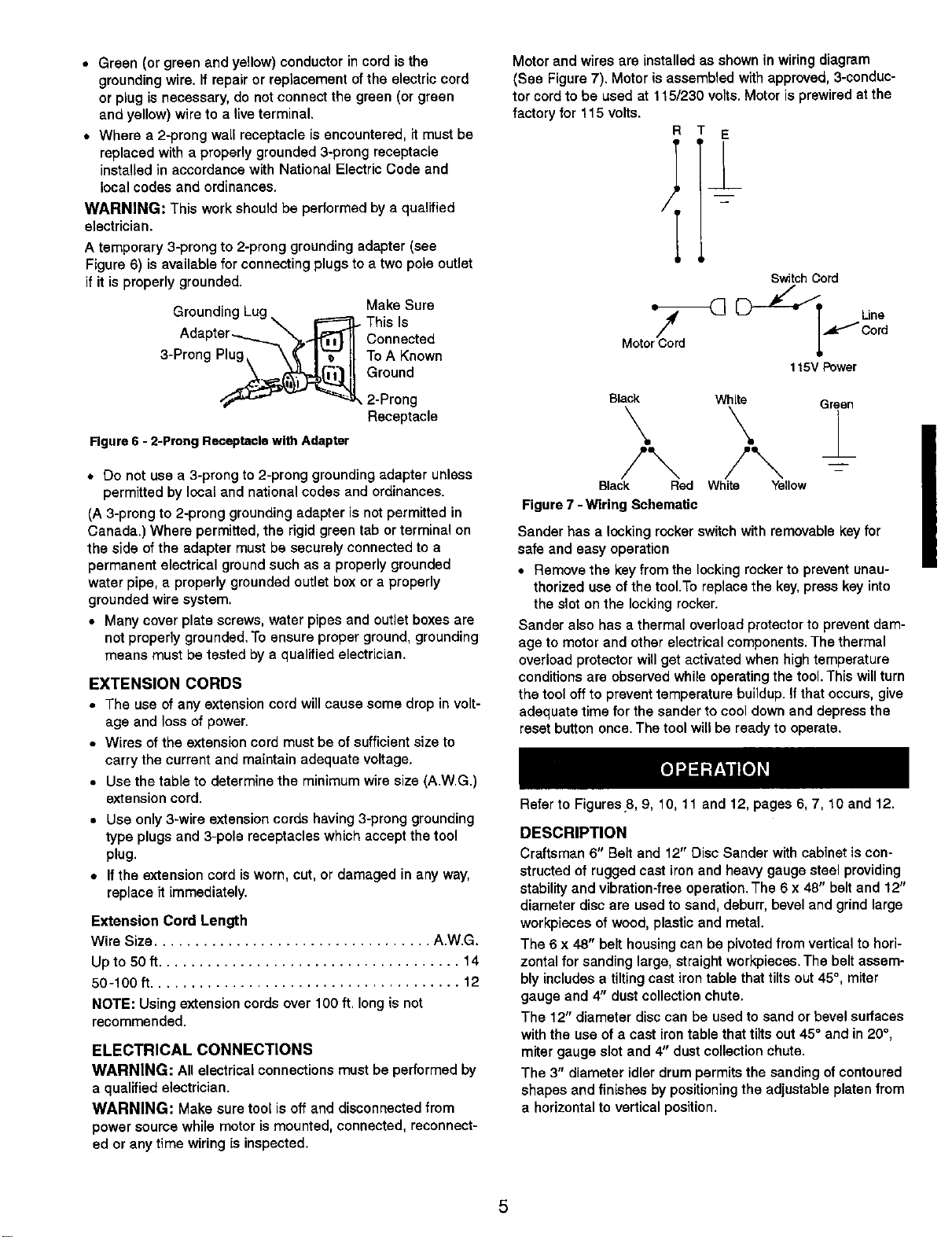
A temporary 3-prong to 2-prong grounding adapter (see
Figure 6) is available for connecting plugs to a two pole outlet
if it is properly grounded.
Groundin
3-Prong Plug
Make Sure
• This Is
Connected
To A Known
Ground
2-Prong
Receptacle
Figure 6 - 2-Prong Receptacle with Adapter
* Do not use a 3-prong to 2-prong grounding adapter unless
permitted by local and national codes and ordinances.
(A 3-prong to 2-prong grounding adapter is not permitted in
Canada.) Where permitted, the rigid green tab or terminal on
the side of the adapter must be securely connected to a
permanent electrical ground such as a properly grounded
water pipe, a properly grounded outlet box or a properly
grounded wire system.
• Many cover plate screws, water pipes and outlet boxes are
not properly grounded. To ensure proper ground, grounding
means must be tested by a qualified electrician.
EXTENSION CORDS
• The use of any extension cord will cause some drop in volt-
age and loss of power.
• Wires of the extension cord must be of sufficient size to
carry the current and maintain adequate voltage.
• Use the table to determine the minimum wire size (A.W.G.)
extension cord.
• Use only 3-wire extension cords having 3-prong grounding
type plugs and 3-pole receptacles which accept the tool
plug.
• If the extension cord is worn, cut, or damaged in any way,
replace it immediately.
Extension Cord Length
Wire Size .................................. A.W.G.
Upto 50 ft..................................... 14
50-100 f_...................................... 12
NOTE: Using extension cords over 100 ft. long is not
recommended.
ELECTRICAL CONNECTIONS
WARNING: All electrical connections must be performed by
a qualified electrician.
WARNING: Make sure tool is off and disconnected from
power source while motor is mounted, connected, reconnect-
ed or any time wiring is inspected.
Motor and wires are installed as shown in wiring diagram
(See Figure 7). Motor is assembled with approved, 3-conduc-
tor cord to be used at 115/230 volts. Motor is prewired at the
factory for 115 volts.
R E
Switch Cord
Une
,_Cord
115VPower
Black White Green
Black Red White Yellow
Figure 7 - Wiring Schematic
Sander has a locking rocker switch with removable key for
safe and easy operation
• Remove the key from the locking rocker to prevent unau-
thorized use of the tool.To replace the key, press key into
the slot on the locking rocker.
Sander also has a thermal overload protector to prevent dam-
age to motor and other electrical components. The thermal
overload protector will get activated when high temperature
conditions are observed while operating the tool. This will turn
the tool off to prevent temperature buildup, if that occurs, give
adequate time for the sander to cool down and depress the
reset button once. The tool will be ready to operate.
Refer to Figures 8, 9, 10, 11 and 12, pages 6, 7, 10 and 12.
DESCRIPTION
Craftsman 6" Belt and 12" Disc Sander with cabinet is con-
structed of rugged cast iron and heavy gauge steel providing
stability and vibration-free operation. The 6 x 48" belt and 12"
diameter disc are used to sand, deburr, bevel and grind large
workpieces of wood, plastic and metal.
The 6 x 48" belt housing can be pivoted from vertical to hori-
zontal for sanding large, straight workpieces. The belt assem-
bly includes a tilting cast iron table that tilts out 45°, miter
gauge and 4" dust collection chute.
The 12" diameter disc can be used to sand or bevel surfaces
with the use of a cast iron table that tilts out 45° and in 20°,
miter gauge slot and 4" dust collection chute.
The 3" diameter idler drum permits the sanding of contoured
shapes and finishes by positioning the adjustable platen from
a horizontal to vertical position.
I
The two dust collection chutes accept the standard 4" dust
collection hose for quick removal of dust. The adjustable miter
gauge can be used on both the belt and disc tables for guid-
ing the workpiece at a desired angle while sanding.
SPECIFICATIONS
Belt size ............................ 6 x 48", 100 grit
Belt platen area .......................... 6% x 167/8"
Belt table dimensions ....................... 5'/8x 9'/8"
Belt table tilts .............................. 0 to 45°
Belt dust chute diameter .......................... 4"
Belt speed .............................. 1570 FPM
Disc diameter .......................... 12", 100 grit
Disc table dimensions ........................ 7 x 16"
Disc table tilts ....................... 0 to 45° outward
.................................. 0 to 20° inward
Disc dust chute diameter .......................... 4"
Disc speed .............................. 2000 RPM
Base dimensions .................... 23Vz x 21 x 55'/2"
Switch ................... 120 Volts, SP, Locking rocker
Motor ................ 3HP (max. developed) 3450 RPM
.................................. 115V, 15 AMPS
Weight .................................... 195 Ibs
WARNING: Operation of any power tool can result in foreign
objects being thrown into eyes which can result in severe eye
damage. Always wear safety goggles complying with United
States ANSI Z87.1 (shown on package) before commencing
power tool operation. Safety goggles are available at Sears
retail stores or catalog.
CAUTION: Always observe the following safety precautions.
SAFETY PRECAUTIONS
• Whenever adjusting or replacing any parts on the tool, turn
switch OFF and remove the plug from power source.
• Recheck table handles. They must be tightened securely.
• Make sure all guards are properly attached.All guards
should be securely fastened.
• Make sure all moving parts are free and clear of any
interference.
• Make sure all fasteners are tight and have not vibrated
loose.
• With power disconnected, test operation by hand to verify
clearance and adjust if necessary.
• Always wear eye protection or face shield.
• Make sure abrasive belt tracks properly. Correct tracking
gives optimum performance.
• After turning switch on, always allow belt to come up to full
speed before sanding or grinding.
• Be sure motor runs clockwise on disc side. Abrasive belt
must travel down.
• Keep your hands clear of abrasive belt, disc and all moving
parts.
• For optimum performance, do not stall motor or reduce
speed. Do not force the work into the abrasive.
• Support workpiece with belt table when sanding with belt,
with disc table when sanding with disc.
• Never push a sharp corner of the workpiece rapidly against
belt or disc. Abrasive backing may tear.
• Replace abrasiveswhenthey become loaded (glazed)or
frayed.
• When grinding metal, move workpiece acrossabrasiveto
prevent heat built up.
• Never attempt wet sanding.Ifthe workpiece becomestoo
hot to handle, cool it in water.
POSITION BELT TABLE
Refer to Figures 8 and 11.
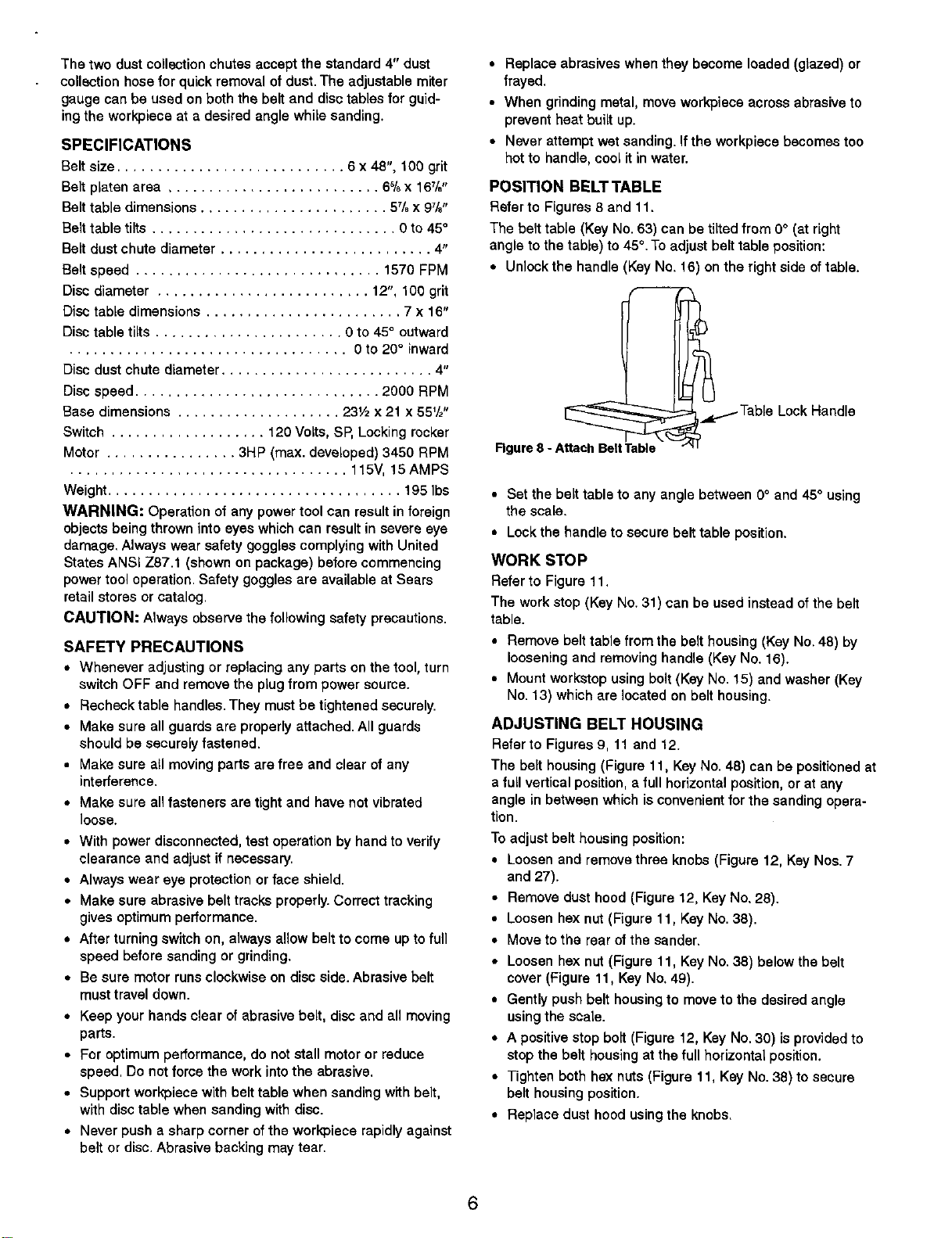
The belt table (Key No. 53) can be tilted from 0° (at right
angle to the table) to 45°.To adjust belt table position:
• Unlock the handle (Key No. 18) on the right side of table.
__ _.Table Lock Handle
Rgure 8 - Attach BeltTable
• Set the belt table to any angle between 0° and 45° using
the scale.
• Lockthe handle to secure belt table position.
WORK STOP
Refer to Figure 11.
The work stop (Key No. 31) can be used instead of the belt
table.
• Remove belt table from the belt housing (Key No. 48) by
loosening and removing handle (Key No. 16).
• Mount workstop using bolt (Key No. 15) and washer (Key
No. 13) which are located on belt housing.
ADJUSTING BELT HOUSING
Refer to Figures 9, 11 and 12.
The belt housing (Figure 11, Key No. 48) can be positioned at
a full vertical position, a full horizontal position, or at any
angle in between which isconvenient for the sanding opera-
tion.
To adjust belt housing position:
• Loosen and remove three knobs (Figure 12, Key Nos. 7
and 27).
• Remove dust hood (Figure 12, Key No. 28).
• Loosen he)( nut (Figure 11, Key No. 38).
• Move to the rear of the sander.
• Loosen hex nut (Figure 11, Key No. 38) below the belt
cover (Figure 11, Key No. 49).
• Gently push belt housing to move to the desired angle
using the soale.
• A positive stop bolt (Figure t2, Key No. 30) is provided to
stop the belt housing at the full horizontal position.
• Tighten both hex nuts (Figure 11, Key No. 38) to secure
belt housing position.
• Replace dust hood using the knobs.
6
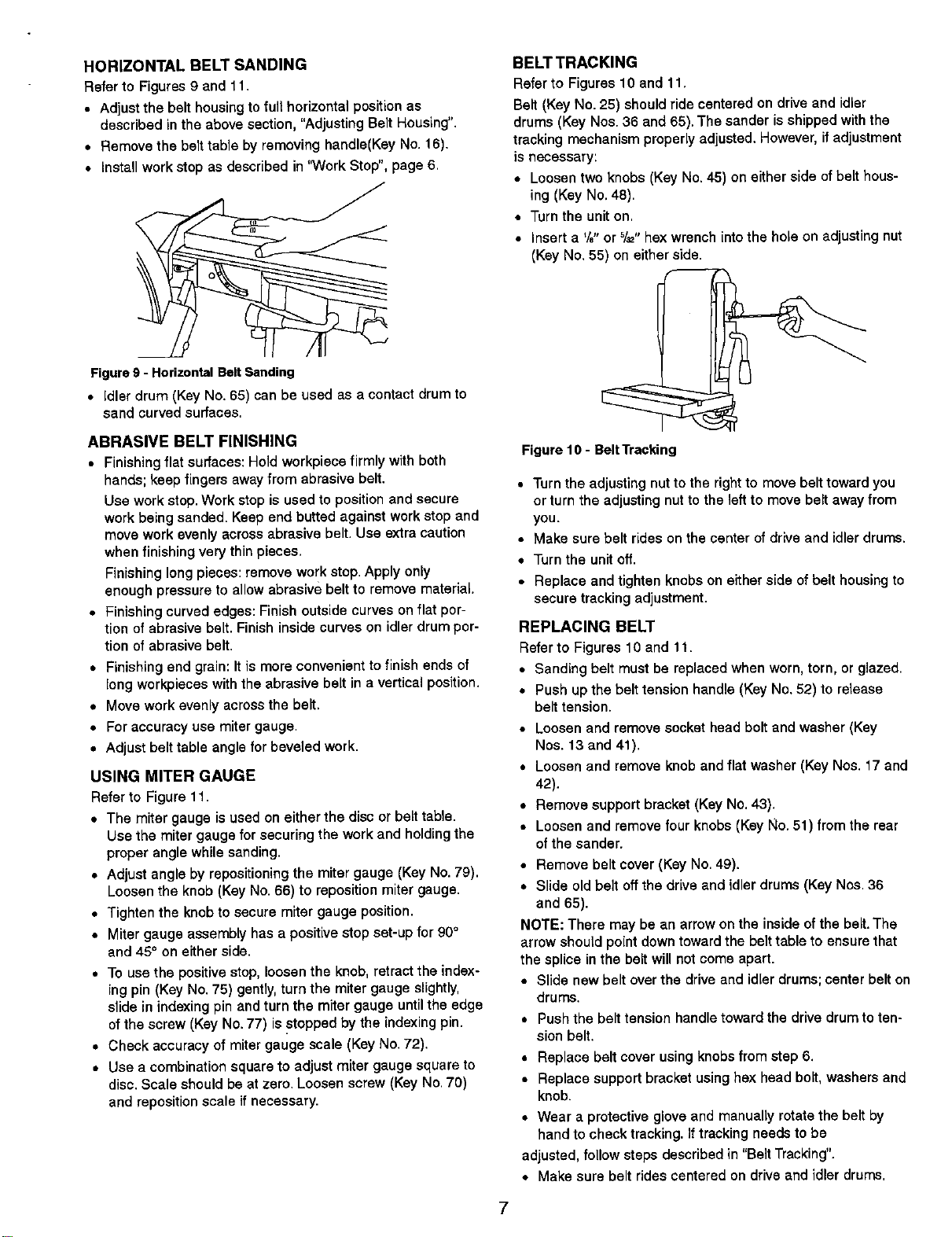
HORIZONTAL BELT SANDING
Refer to Figures 9 and lt.
• Adjust the belt housing to full horizontal position as
described in the above section, "Adjusting Belt Housing".
• Remove the belt table by removing handle(Key No. 16).
• Install work stop as described in "Work Stop", page 6,
Figure g - Horizontal Belt Sending
• Idler drum (Key No, 65) can be used as a contact drum to
sand curved surfaces.
ABRASIVE BELT FINISHING
• Finishing flat surfaces: Hold workpiece firmly with both
hands; keep fingers away from abrasive belt.
Use work stop. Work stop is used to position and secure
work being sanded. Keep end butted against work stop and
move work evenly across abrasive belt. Use extra caution
when finishing very thin pieces,
Finishing long pieces: remove work stop. Apply only
enough pressure to allow abrasive belt to remove material.
• Finishing curved edges: Finish outside curves on flat por-
tion of abrasive belt. Finish inside curves on idler drum por-
tion of abrasive belt.
• Finishing end grain: It is more convenient to finish ends of
long wor_ieces with the abrasive belt in a vertical position.
• Move work evenly across the bait.
• For accuracy use miter gauge.
• Adjust belt table angle for beveled work.
USING MITER GAUGE
Refer to Figure 11.
• The miter gauge is used on either the disc or belt table.
Use the miter gauge for securing the work and holding the
proper angle while sanding.
• Adjust angle by repositioning the miter gauge (Key No. 79),
Loosen the knob (Key No. 66) to reposition miter gauge.
• Tighten the knob to secure miter gauge position.
• Miter gauge assembly has a positive stop set-up for 90°
and 45° on either side.
• To use the positive stop, loosen the knob, retract the index-
ing pin (Key No. 75) gently, turn the miter gauge slightly,
slide in indexing pin and turn the miter gauge until the edge
of the screw (Kay No. 77) is stopped by the indexing pin.
• Check accuracy of miter gauge scale (Key No. 72).
• Use a combination square to adjust miter gauge square to
disc. Scale should be at zero. Loosen screw (Key No. 70)
and reposition scale if necessary.
BELT TRACKING
Refer to Figures 10 and 11,
Belt (Key No. 25) should ride centered on drive and idler
drums (Key Nos. 36 and 65). The sander is shipped with the
tracking mechanism properly adjusted. However, if adjustment
is necessary:
• Loosen two knobs (Key No. 45) on either side of belt hous-
ing (Key No. 48).
• Turn the unit on,
• Insert a '/8"or 5/_,,he:<wrench into the hole on adjusting nut
(Key No. 55) on either side.
Figure 10 - Belt Tracking
• Turn the adjusting nut to the right to move belt toward you
or turn the adjusting nut to the left to move belt away from
you.
• Make sure belt rides on the center of drive and idler drums.
• Turn the unit off.
• Replace and tighten knobs on either side of belt housing to
secure tracking adjustment.
REPLACING BELT
Refer to Figures 10 and 11.
• Sanding belt must be replaced when worn, torn, or glazed.
• Push up the belt tension handle (Key No. 52) to release
belt tension.
• Loosen and remove socket head bolt and washer (Key
Nos. 13 and 41).
• Loosen and remove knob and flat washer (Key Nos. 17 and
42).
• Remove support bracket (Key No. 43).
• Loosen and remove four knobs (Key No. 51) from the rear
of the sander.
• Remove belt cover (Key No. 49).
• Slide old belt off the drive and idler drums (Key Nos. 36
and 65).
NOTE: There may be an arrow on the inside of the belt. The
arrow should point down toward the belt table to ensure that
the splice in the belt will not come apart.
• Slide new belt over the drive and idler drums; center belt on
drums.
• Push the belt tension handle toward the drive drum to ten-
sion belt.
• Replace belt cover using knobs from step 6.
• Replace support bracket using hex head bolt, washers and
knob.
• Wear a protective glove and manually rotate the belt by
hand to check tracking. If tracking needs to be
adjusted, follow steps described in "Belt Tracking".
• Make sure belt rides centered on drive and idler drums,
7
POSITION DISC TABLE
Refer to Figure 11.
• Disc table (Key No. 24) is adjustable from 0° to 45=out-
ward and 0° to 20° inward.
• To adjust the disc table position, loosen the two handles
(KeyNo. 16) from either side of the disc table.
• Use the scale on disc table trunnions to set table at the
desired angle.
• Secure disc table position by tightening the two handles.
ABRASIVE DISC FINISHING
• Abrasive disc sanding is well suited for finishing small flat
surfaces and convex edges,
• Move workpiece across down side (right) of abrasive disc.
• Abrasive disc moves fastest and removes more material at
outer edge.
• For accuracy, use miter gauge.
REPLACING ABRASIVE DISC
Refer to Figures 11 and 12.
• Loosen and remove four bolts (Figure 11, Key No. 4) from
disc cover plate (Figure 11, Key No. 3).
• Loosen two top bolts (Figure 12, Key No. 22) from dust col-
lection port (Figure 12, Key No. 21).
• Remove disc cover plate.
• Remove old abrasive by peeling itfrom the aluminum disc.
Removing aluminum disc is not necessary.
• Clean aluminum disc if necessary. Select the proper abra-
sive disc and apply to aluminum disc.
• Additional abrasive discs are available (See Recommended
Accessories, page 11).
• Replace disc cover plate
• Tighten bolts on dust collection port.
• Replace four bolts to secure disc cover plate.
WARNING: Make certain that the unit is disconnected from
power soume before attempting to service or remove any
component,
REPLACING V-BELT
Refer to Figures 11 and 12.
• Turn sander off and disconnect it from power source.
• Loosen and remove two handles (Figure 11, Key No. 16)
from either side of the disc table (Figure 11, Key No. 24).
• Slide out disc table from the disc guard (Figure 11, Key No.
11).
• Loosen the set screw (Figure 11, Key No. 2) securing the
aluminum disc (Figure 11, Key No. 1). Use the hole on the
top of disc guard to locate and loosen set screw. Do not
remove set screw.
= Loosen and remove four bolts (Figure 11, Key No. 4) from
disc cover plate.
• Loosen and remove four bolts (Figure 12, Key No. 22) from
dust collection port (Figure 12, Key No. 21).
• Remove disc cover plate and dust collection port.
• Slide out and remove aluminum disc.
• Loosen and remove knob (Figure 12, Key No. 7) from cabi-
net door assembly (Figure 12, Key No. 8).
• Open cabinet door.
• Turn knob (Figure 12, Key No. 7) on bracket (Figure 12,
Key No. 17) to release tension on V-beif (Figure 11, Key
No. 6).
• Replace V-belt. Use parts list to order the appropriate V-
belt.
• Tighten knob on bracket to tension the V-belt.
• Do not over tension the V-belt. Excessive tension on V-belt
will reduce life of the belt and function of the tooL. A belt is
properly tensioned when light pressure applied to midpoint
of the belt produces about 1/2" deflection.
• Close the cabinet door and secure it with the knob.
• Replace aluminum disc and secure it by tightening the set
screw.
• Replace dust collection port and disc cover plate and
secure itwith bolts.
• Replace disc table onto the disc guard and secure it using
the two handles.
CLEANING
Keep machine and workshop clean. Do not allow sawdust to
accumulate on the tool. Keep the drums clean. Dirt on drums
will cause poor tracking and belt slippage. Operate tool with
dust collector to keep dust from accumulating.
WARNING: After sanding wood or nonmetallic material,
always clean dust collector and guards of sawdust before
grinding metal. Sparks could ignite debris and cause a fire.
Be certain motor is kept clean and isfrequently vacuumed
free of dust.
Use soap and water to clean painted parts, rubber parts and
plastic guards.
LUBRICATION
The shielded ball bearings in this tool are permanently lubri-
cated at the factory. They require no further lubrication.
• When operation seems stiff, a lightcoat of automobile-type
wax applied to the belt and disc tables will make it easier to
feed the work while finishing.
• Do not apply wax to the belt platen. Belt could pick up wax
and deposit it on the drums causing belt to slip.
KEEPTOOL IN REPAIR
• Ifpowercordisworn,cut,or damagedin anyway,haveit
replacedimmediately.
• Replacewornabrasiveswhen needed.
• Replaceanydamagedor missingparts.Usepartslist to
orderparts.
Any attempttorepairmotormay createa hazardunless
repairisdonebya qualifiedservicetechnician.Repairservice
isavailable at yournearestSearsstore.
8
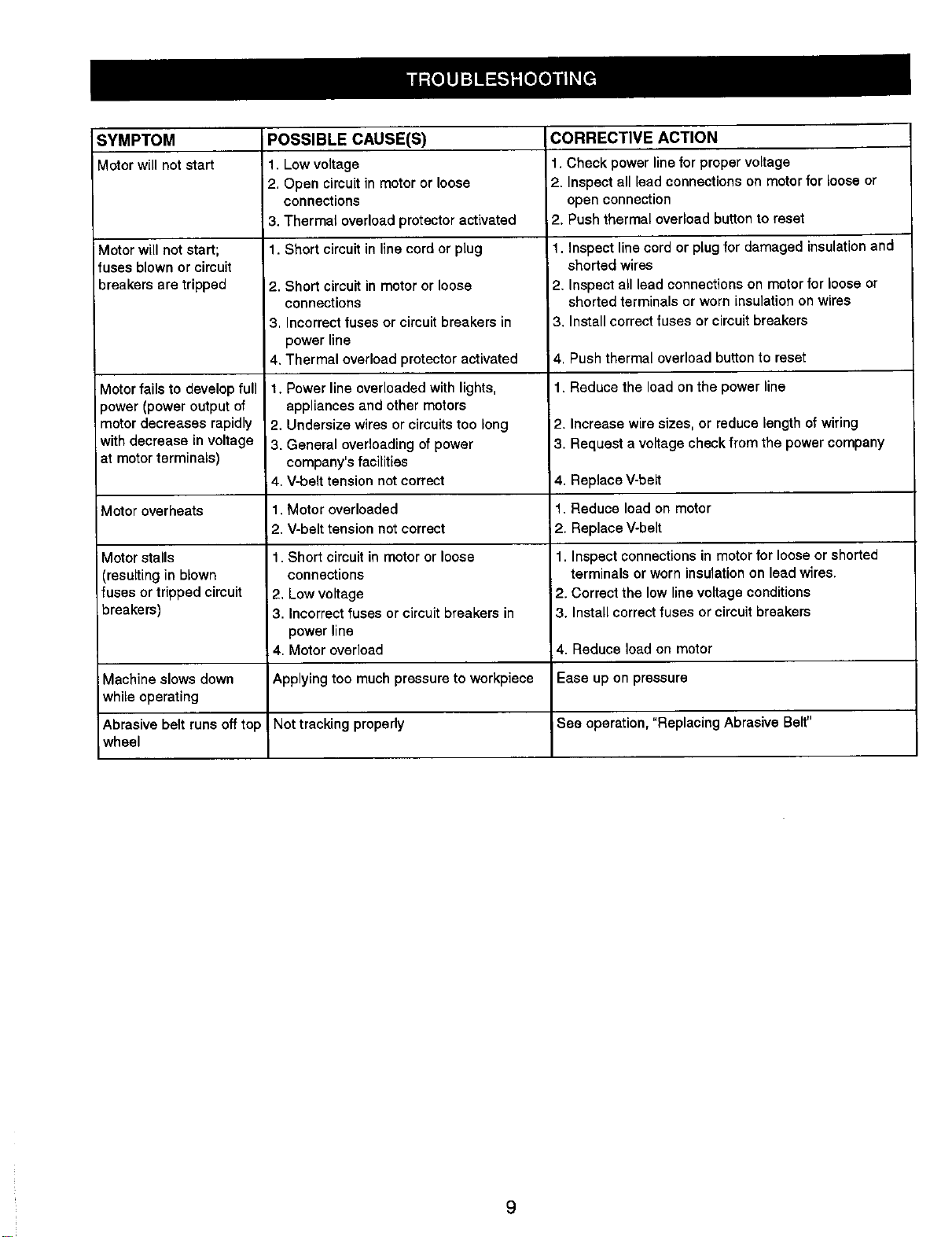
SYMPTOM POSSIBLE CAUSE(S) CORRECTIVE ACTION
Motor will not start 1, Low voltage 1. Check power line for proper voltage
2, Open circuit in motor or loose 2, Inspect all lead connections on motor for loose or
connections open connection
3. Thermal overload protector activated 2. Push thermal overload button to reset
1. Short circuit in line cord or plugMotor will not start;
fuses blown orcircuit
breakers are tripped
Motor fails to develop full
power (power output of
motor decreases rapidly
with decrease in voltage
at motor terminals)
Motor overheats
Motor stalls
(resulting in blown
fusesor trippedcircuit
breakers)
Machine slows down
while operating
Abrasive belt runsoff top
wheel
2. Short circuit in motor or loose
connections
3, Incorrect fuses or circuit breakers in
power line
4. Thermal overload protector activated
1. Power line overloaded with lights,
appliances and other motors
2. Undersize wires or circuits too long
3. General overloading of power
company's facilities
4. V-belt tension not correct
1. Motor overloaded
2. V-belt tension not correct
1. Short circuit in motor or loose
connections
2. Low voltage
3. Incorrect fuses or circuit breakers in
power line
4. Motor overload
Applying too much pressure to workpiece
Not tracking properly
1. Inspect line cord or plug for damaged insulation and
shorted wires
2. Inspect all lead connections on motor for loose or
shorted terminals or worn insulation on wires
3. Install correct fuses or circuit breakers
4, Push thermal overload button to reset
1. Reduce the load on the power line
2. Increase wire sizes, or reduce length of wiring
3. Request a voltage check from the power company
4. Replace V-belt
1. Reduce load on motor
2. Replace V-belt
1. inspect connections in motor for loose or shorted
terminals or worn insulation on lead wires.
2. Correct the low line voltage conditions
3. Install correct fuses or circuit breakers
4. Reduce load on motor
Ease up on pressure
See operation, "Replacing Abrasive Belt"
9
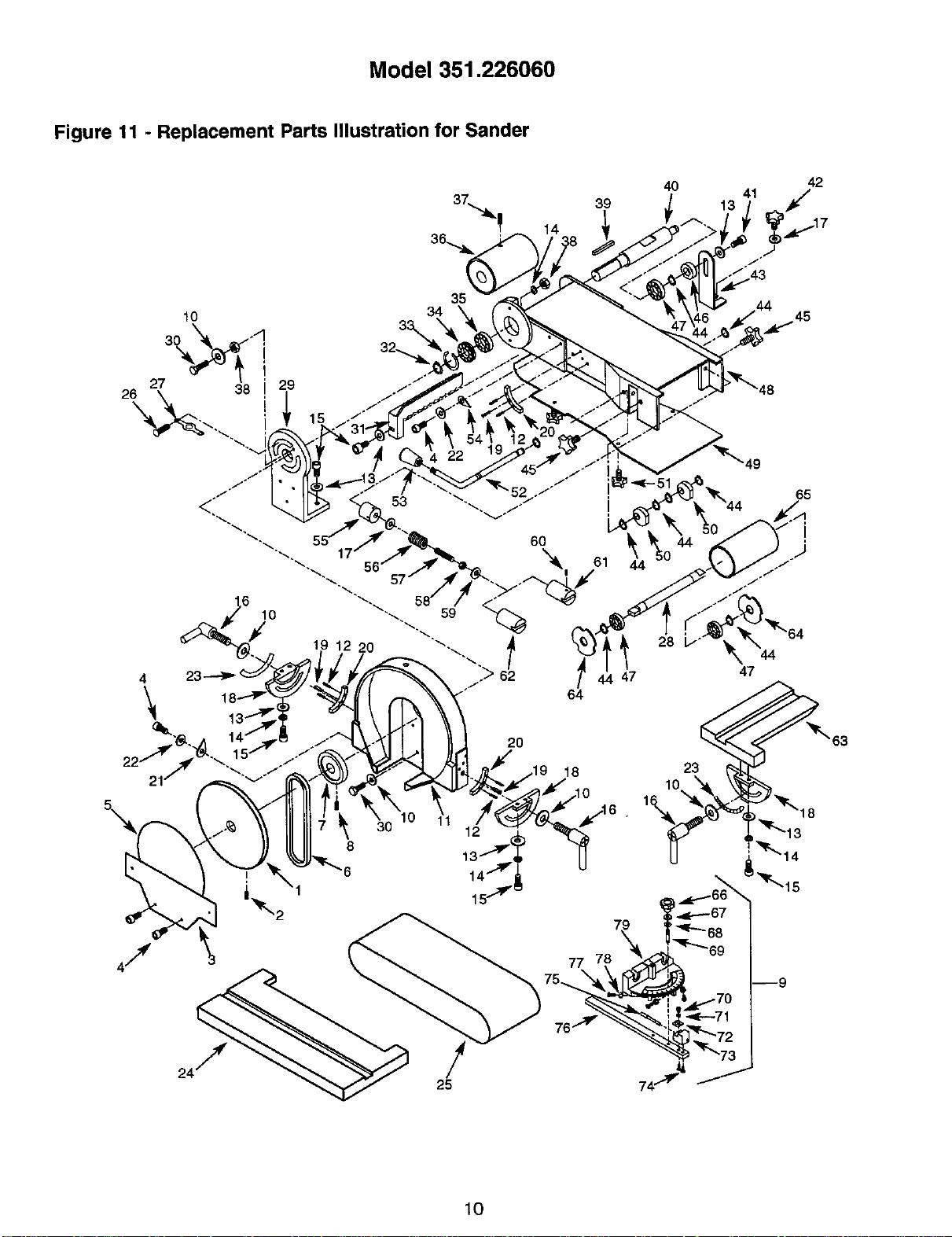
Model 351.226060
Figure 11 - Replacement Parts Illustration for Sander
39
14
4O
42
13 41 _...17
10
3_ °_,
27 29
16
4 23
\
21
35
20
!
25
47
64
18
77
28
45
49
65
_, 64
47
23
10
63
10
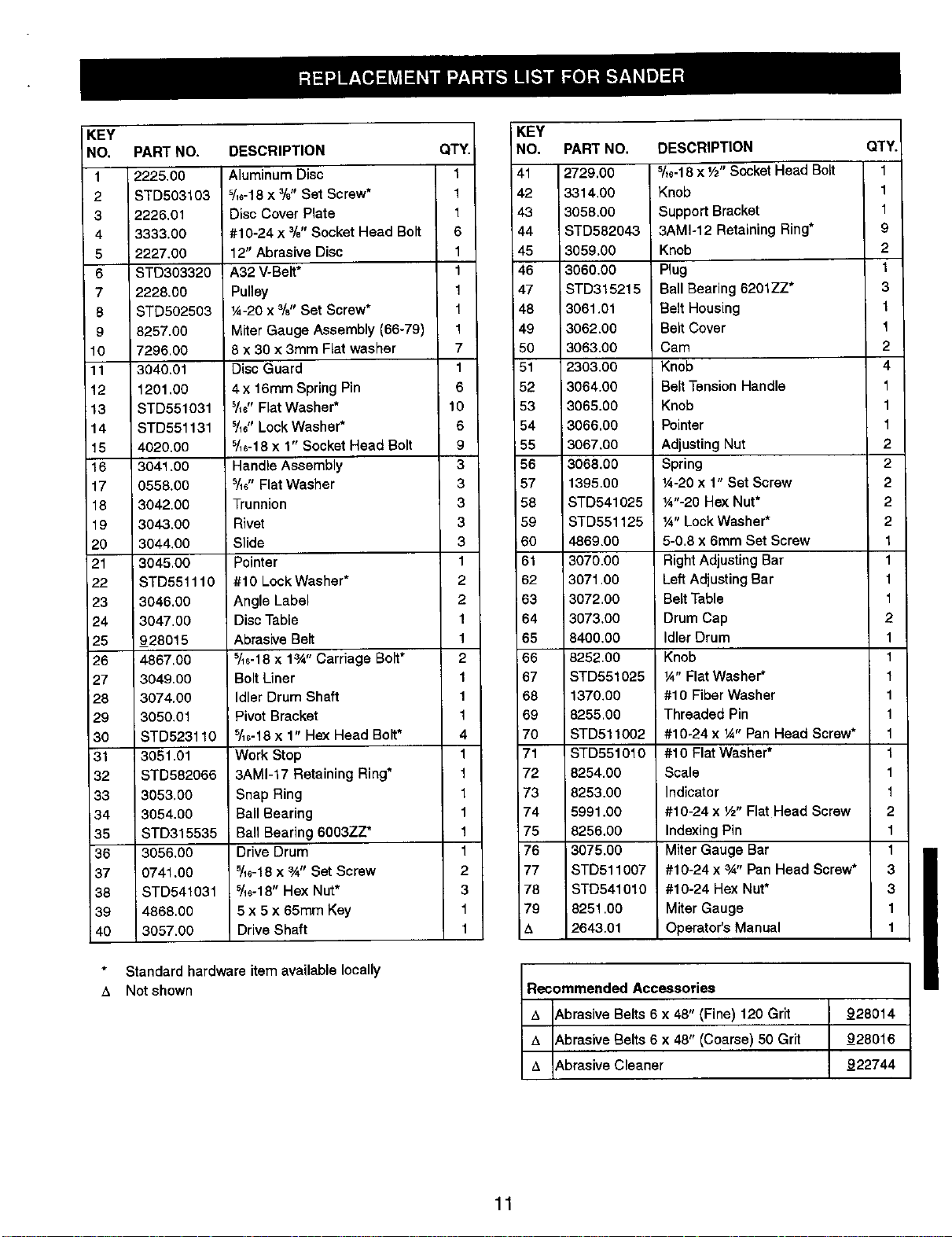
KEY
NO,
1
2
3
4
5
6
7
6
9
10
11
12
13
14
16
16
17
18
19
2O
21
22
23
24
25
26
27
26
29
3O
31
32
33
34
35
38
37
36
39
i4o
PART NO.
2225.00
STD503103
2226.01
3333.00
2227.00
STD303320
2228.00
STD502503
8257.00
7296.00
3040.01
1201.00
STD551031
STD551131
i 4020.00
3041.00
0558.00
3042.00
3043.00
3044.00
3045.00
STD551110
3046.00
3047.00
928015
4867,00
3049.00
3074.00
3050.01
STD523110
3051.01
STD582066
3053,00
3054.00
STD315535
3056.00
0741.00
STD541031
4868,00
3057.00
DESCRIPTION
Aluminum Disc
s/,6-18x %" Set Screw*
i Disc Cover Plate
#10-24 x %" Socket Head Bolt
12" Abrasive Disc
A32 V-Belt*
Pulley
/4-20 x %" Set Screw*
Miter Gauge Assembly (66-79)
8 x 30 x 3mm Fiat washer
Disc Guard
4 x 16ram Spring Pin
511e"Fiat Washer*
Y_" Lock Washer*
5/16-18x 1" Socket Head Bolt
Handle Assembly
s/_#,Flat Washer
Trunnion
Rivet
Slide
Pointer
#10 Lock Washer*
Angle Label
Disc Table
Abrasive Belt
s/_6-18x 1_" Carriage Bolt*
Bolt Liner
Idler Drum Shaft
Pivot Bracket
s/_6-18x 1" Hex Head Bolt*
Work Stop
3AM1-17 Retaining Ring*
Snap Ring
Ball Bearing
Ball Bearing 6003ZZ*
Drive Drum
5/_e-18x 3A" Set Screw
5/_e-18"Hex Nut*
5 x 5 x 65ram Key
Drive Shaft
Standard hardwareitem availablelocally
A Notshown
QTY.
1
1
1
6
1
1
1
1
1
7
1
6
10
6
9
3
3
3
3
3
1
2
2
1
1
2
1
1
1
4
1
1
1
1
1
1
2
3
1
1
KEY
NO.
41
42
i43
44
45
46
47
48
49
5O
51
52
53
54
55
56
57
58
59
6O
61
62
_63
64
65
66
67
68
69
70
71
72
73
74
75
76
77
78
79
&
PART NO.
2729.00
3314.00
3058.00
STD582043
3059.00
3060.00
STD315215
3061.01
3062.00
3063.00
2303.00
3064.00
3065.00
3066,00
3067.00
3068.00
1395.00
STD541025
STD551125
4869.00
3070.00
3071.00
3072.00
3073.O0
8400.00
8252.00
STD551025
1370.00
8255.00
STD511002
STD551010
8254.00
8253.00
5991.00
8256.00
3075.00
STD511007
STD541010
8251.00
2643.01
DESCRIPTION
5/t6-18x Vz"Socket Head Bolt
Knob
Support Bracket
3AM1-12 Retaining Ring*
Knob
Plug
Ball Bearing 6201ZZ*
Belt Housing
Belt Cover
Cam
Knob
Belt Tension Handle
Knob
Pointer
Adjusting Nut
Spring
¼-20 x 1" Set Screw
¼"-20 Hex Nut*
¼" Lock Washer*
5-0,8 x 6mm Set Screw
Right Adjusting Bar
Left Adjusting Bar
Belt Table
Drum Cap
Idler Drum
Knob
¼" Flat Washer*
#10 Fiber Washer
Threaded Pin
#10-24 x ¼" Pan Head Screw*
#10 Flat Washer*
Scale
Indicator
#10-24 x V2"Flat Head Screw
Indexing Pin
Miter Gauge Bar
#10-24 x 3A" Pan Head Screw*
#10-24 Hex Nut*
Miter Gauge
Operator's Manual
Recommended Accessories
A _,brasiveBelts 6x 48" (Fine) 120 Grit
A _,brasiveBelts6 x 48" (Coarse)50 Grit
A _,brasiveCleaner
QTY.
1
1
1
9
2
1
3
1
1
2
4
1
1
1
2
2
2
2
2
1
1
1
1
2
1
1
1
1
1
1
1
1
1
2
1
1
3
3
1
1
_28014
_28016
_22744
11
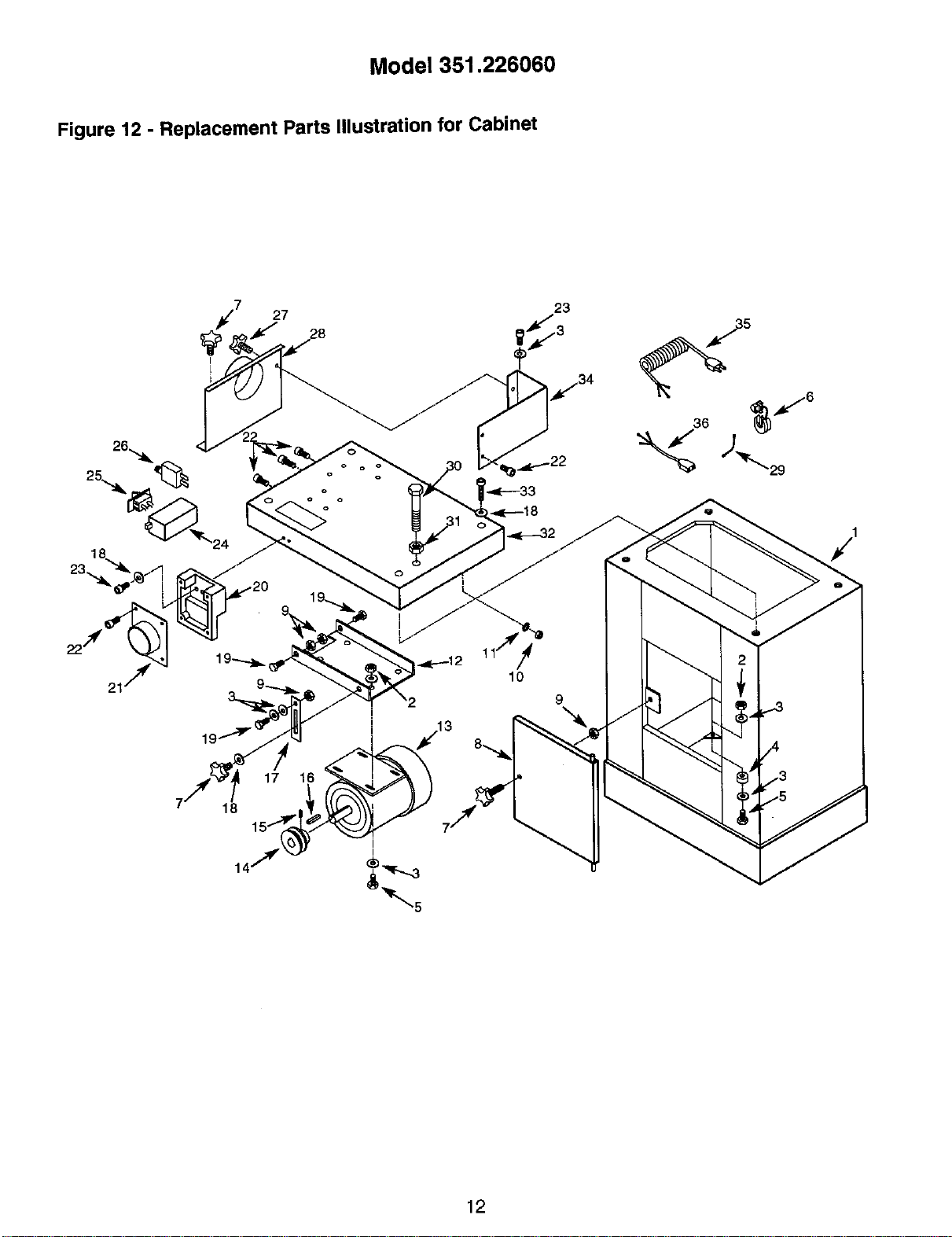
Model 351.226060
Figure 12 - Replacement Parts Illustration for Cabinet
27
o o
o o
o
o
23
I
I
10
9
12
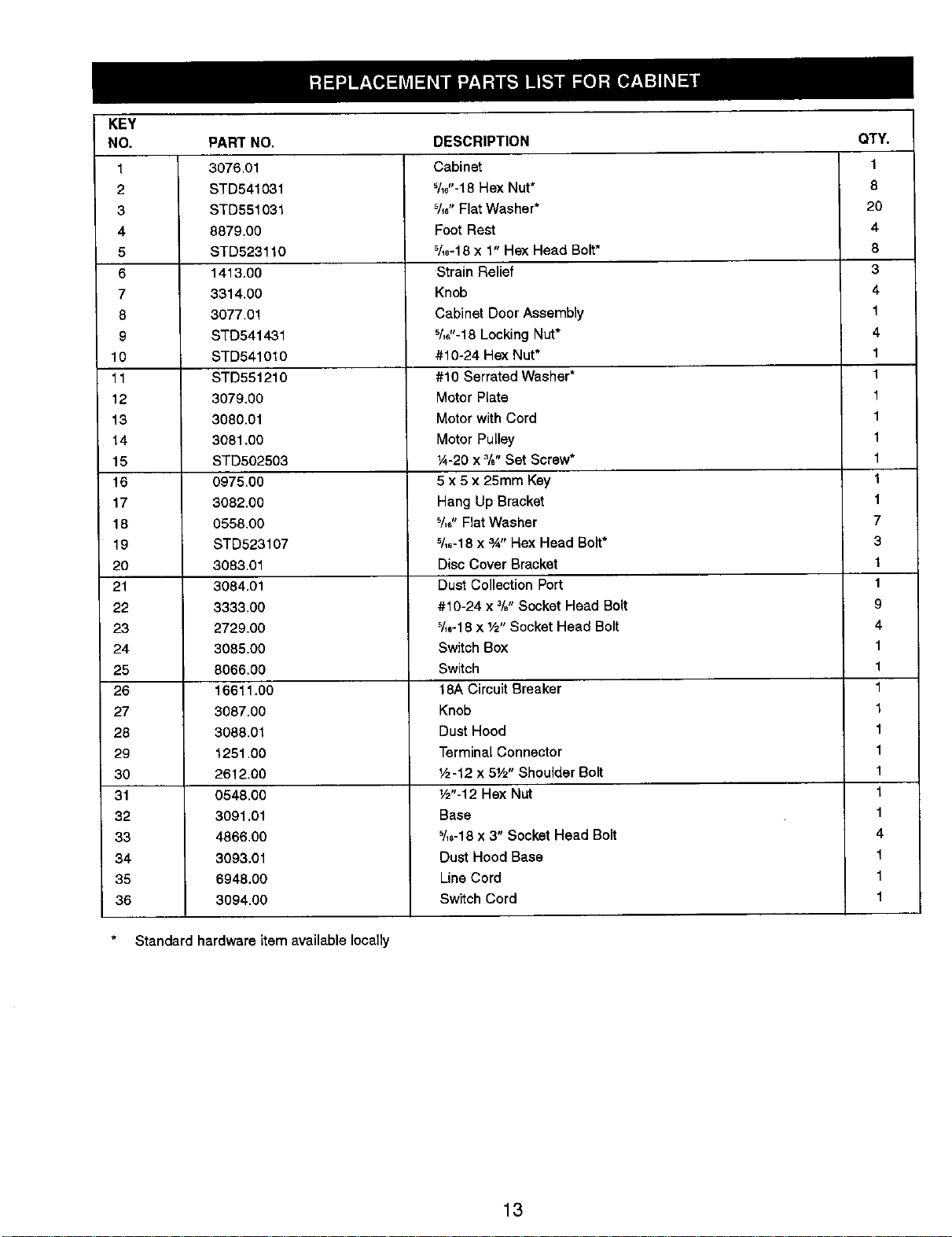
KEY
NO.
1
2
3
4
5
6
7
8
9
10
11
12
13
14
15
16
17
18
19
20
21
22
23
24
25
26
27
28
29
30
31
32
33
34
35
36
PART NO,
3076.01
STD541031
STD551031
8879.00
STD523110
1413.00
3314.00
3077.01
STD541431
STD541010
STD551210
3079.00
3080.01
3081.00
STD502503
0975.00
3082.00
0558.00
STD523107
3083.01
3084.01
3333.00
2729.00
3085.00
8066.00
16611.00
3087.00
3088.01
1251.00
2612.00
0548.00
3091.01
4866.00
3093.01
6948.00
3094.00
DESCRIPTION
Cabinet
%6"-18 Hex Nut*
%," Fiat Washer*
Foot Rest
%6-18 x 1" Hex Head Bolt*
Strain Relief
Knob
Cabinet Door Assembly
%6"-18 Locking Nut*
#10-24 Hex Nut*
#10 Serrated Washer*
Motor Plate
Motor with Cord
Motor Pulley
¼-20 x 3/B"Set Screw*
5 x 5 x 25mm Key
Hang Up Bracket
%," Flat Washer
%,-18 x _" Hex Head Bolt*
Disc Cover Bracket
Dust Collection Port
#10-24 x 3/. Socket Head Bolt
_[,-18 x 1/2"Socket Head Bolt
Switch Box
Switch
18A Circuit Breaker
Knob
Dust Hood
Terminal Connector
Vz-12 x 51/2"Shoulder Bolt
W'-12 Hex Nut
Base
_/,6-18x 3" Socket Head Bolt
Dust Hood Base
Line Cord
Switch Cord
Standard hardware item available locally
QTY.
1
8
20
4
8
3
4
1
4
1
1
1
1
1
1
1
1
7
3
1
1
9
4
1
1
1
1
1
1
1
1
1
4
1
1
1
13
LIJADORA
Correa de 15,2 x 121,9 cm
Disco de 30,5 cm
Modelo No.
351,226060
PRECAUCION: Lea este manual y siga las
Reglas de Seguridad y las Instrucciones de
Operacidn, antes de usar este producto por
primera vez,
Lnglds ............................................. 2-9
Ilustraci6n y Lista de Partas ........................... 10-13
Garsot fa ............................................ 14
Reglas de Segundad .................................. 14
Desempaque ........................................ 15
Montaje .......................................... 15-16
Instalsoi6n ........................................ 16-18
Operacidn ........................................ 18-20
Mantenimiento ....................................... 21
Identificaci6n de Problemas ............................. 22
UN ANO COMPLETO DE GARANTIA PARALA LIJADORA
DE CORREAY DISCO CRAFTSMAN
Siesta lijadora Craftsman falla debido a un defecto en el material
o en la mano de obra dentro de un ado eompleto
a partir de la fecha de compra, devu_lvala al centre de servicio
de Sears rods carcano y Sears la reparard gratis. El servicio de
garantfa se encuantra disponible a travelsdel serviciode repara-
clones en el hogar para las principales marcas de Seam. Esta
garant[a le da derechos legales especfficosy tambi_n puede
tener otros derechos que var[an de estado a estado.
Siesta lijadora se usa para prop6sitos comerciales, esta garantfa
serd vdlida por 90 dfas solarnente, a partir de la fecha de compra.
Sears, Roebuck and Co,, Dept. 817WA, Hoffman Estates, IL 60179
ADVERTENCIA: Para su propia seguridad, lea todas las
instruccionesy las preeaucionesantes de operar la herramienta.
PRECAUClON: Siempre siga lospmcedimientos de operacidn
correctos,tal como se defineRen este manual, auncuandoestd
familiarizado con el uso de _sta o de otrasherramientassimilares.
Recuerdeque, si no se tiene cuidadoporaunque sea una fracci6n
de segundo,se puedenproducirlesionesperaonalesgraves.
ESTE PREPARADO PARA ELTRABAJO
• Use ropa apmpiada. No use ropa sualta, guantes, corbatas,
anillos, pulseras u otrasjoyas que puedan quedar atrapadas
en las partes m6viles de la mdquina.
• Use una cubierta protectorapara el cabello, para sujetar el
cabeilo largo.
• Use zapatos de seguddad consuelas antideslizantes.
• Use gafas de segurLdadque cumptan con ANSI Z87.1 de
Estados Unidos. Los anteojos cordantes tienen solamante
lentes resistentes al impacto. NO son anteojos de seguddad.
• Use una mdsoara para la cara o una m&scara para el palvo,
si la operaal6n de lijado produce polvo.
• Est_ alerta y pianse claramente. Nunca opere herramientas
mecdnicas cuando est_ cansado, intoxicado o cuando est_
tomando medieamentos que causan somnolencia.
PREPARACION DEL AREA PARA EJECUTAR EL
TRABAJO
• Mantenga el drea limpia. Las dreas de trabajo desordenadas
atraen accidentes.
• No use herramientas mecdnicas en ambientes peligrosos. No
use herrarnientas mecdnicas en lugares h=Jmedoso mojados.
No exponga las herrarniantas meednicas a la Iluvia.
• El _.reade trabajo debe ester iluminada adecuadamente.
• TieRs que haber disponible un receptdculo electrico adecuado
para la herramienta, El enchufe de 3 puntas se tiene que
enchufar directamente en un receptaculo de 3 puntas conec-
tado a tierra correctamente.
• Los cordones de extensibndeben tener una punta de co-
nexi6n a tierm y los 3 alambres del cordbn de extensi6n deben
car del calibre correcto,
• Mantenga a los visitantes auna distanciaprudenta del drea
de trabajo.
• Mantenga a los nidos fuera del lugar de trabajo. Haga que
so taller sea a prueba de niu_os.Use candados, interruptores
principales o remueva las Havesdal interruptor para evitar el
uso no intencional de las herramiantas mecdnicas.
ES IMPORTANTE MANTENER LAS HERRAMIENTAS
• Desenchufe siemprela herramienta antes de inspeccionada.
• Consults el manual para informarse sobre los procedimientos
de mantenimiento y ajuste especfficos.
• Mantenga la herramienta lubricada y limpia para obtener una
operaci6n m_,ssegura.
• Remueva las herramientas de ajuste. Fbrmese el hdbito de
revisar para vedficar al las herramientas de ajuste se han
removido antes de encender la mdquina.
• Mantenga todas las partes listas para funcionar. Revise para
determinar que el protector u otras partas operardn correcta-
mente y hardn el trabajo especffico.
• Revise para vedficar sihay partes da_adas. Revisepara
verificar el alineamiento de las partas movibles, si hay atas-
camianto, roturas y montaje o cualquier otra condici6n que
pudiera afectar la opersoidn de la herrarnienta.
• Si hay una protecci6n ocualquier otra parte dadada, tieRs
que repararse correctarnente o cambiarse. No haga repara-
clones provisodas. (Use la lista de partes que viene incluida
para ordenar las partes de repuesto.)
EL OPERADOR DEBE SABER COMO USAR LA
HERRAMIENTA
• Use la herramienta correctapara el trabajo. No fueme la
herramienta,o el accasorio, ni losuse para un trabajopara
el cual no hen sido dise5ados.
• Desoonecte la herramientacuando cambie la correa o el
discoabrasivo.
• Evite el arranque poraccidentes. AsegOreseque el interruptor
de la herramienta est&en la posici6nOFF (apagado) antes de
enchufarla.
14
• No fueme la herramienta. Trebajard en la forma mds eficiente
a la velooidad para la eual se diseS5.
• Mantenga Lasmanos alejadas de las partes m6viles.
• Nunsa deje que una herremienta funeione sola. Descondctela
y no se vaya hasta que se detenga comp]etamente,
• No trete de alsanzar demasiado lejos. Mant_ngase firme y
equilibrado.
• Nunsa se pare en la herramienta. Se pueden produoir lesionas
graves si la herramienta se inclina, o si se toca el disco o la
correa pot accidente.
• Conozca su herramient_. Aprenda la operaoi6n de Laherre-
m[anta, aplicaeibn y limitaciones aspecfficas.
• Use los ecoesorios que sa recomianda. (Consulte ta pdgina
11.) Si sa usan aooesorios incorrectos, se puede produoir
riesgo de tesiones personales.
• Deje las manes libres para operar la mdquina. Prot_jalas de
posibles lesiones.
• Desoonecte Lam&quina sise atasca. La cortadore se atasca
ouando penetra muy profundamente en la pieza de trabajo.
(La fuel-za del motor la mantiene pegada a la pieza de trabajo.)
• Soporte la pieza de trabajo con la gufa de ingletes, la platina
de la correa o la mesa de trabajo.
• Mantenga un espacio libre m&ximo de 1,6 mm entre la mesa
y la corrsa o el disco para lijar.
PREOAUCION: iPiense en ia seguddad! La seguridad as una
oombinacibn det sentido comt_n del operador y de estar alerta
en todo momento cuando se est& usando la herramienta.
ADVERTENCIA: No trate de operer la herramienta hasta que
estd completamente montada sag,',n las instrucciones.
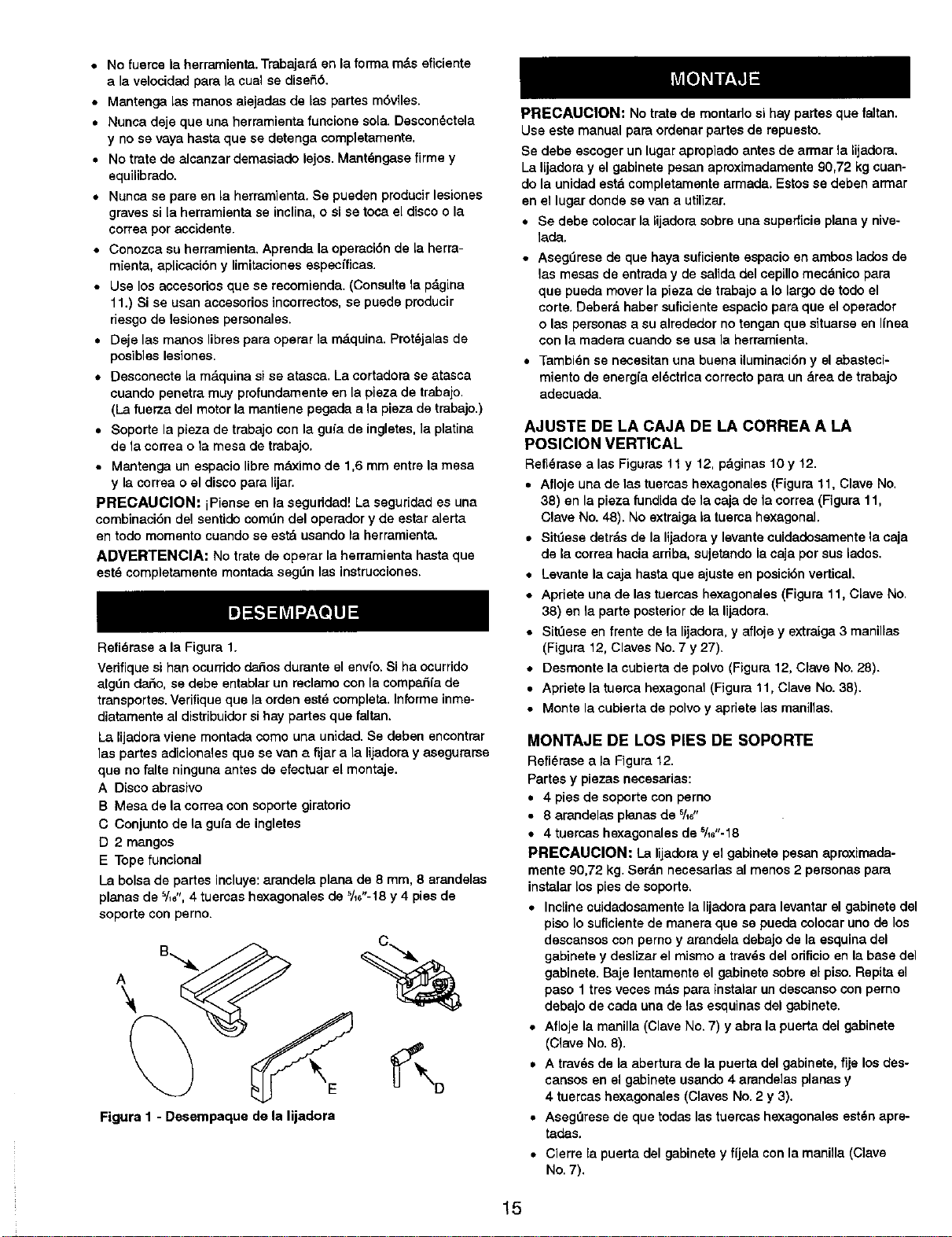
Refidrasea la Figura 1.
Vedfique si han ocurridodar_osdurante el envfo. Si ha ocurrido
algt_ndado, se debe enteblar un reolamo con la compaSfe de
transportes. Verifique que la orden est_ completa. Informe inme-
diatamente al distribuidor si hay partes que faltan.
La lijadore viene montada como una unidad. Se deben eneontrar
]aspartes adicionates que se van a fijara la lijadora y asegurerse
que no falte einguna antes de efectuar el montaje.
A Disco abrasivo
B Mesa de la correa con soporte giratorio
C Conjunto de la gufa de ingletes
D 2 mangos
E Tope funeional
La bolsa de partes incluye: arandela plana de 8 mm, 8 arandelas
planas de _/,_",4 tuereas hexagonales de 5/_6"-18y 4 pies de
soporte con perno.
Figura 1 - Desempaque de la lijadora
PRECAUCION: No trate de montado si hay partes que faltan.
Use aste manual pare ordenarpartes de repuesto.
Se debe escoger un lugar apropiado antes de armar la lijadora.
La lijadore y el gabinete pesan aproximadamente90,72 kg cuan-
do la unidad estd completamente armada. Estosse deben armar
en el lugardonde se van a utilizar.
• Se debe colocarla lijadora sobre una supefficie plana y nive-
lada.
• Asegerese de que haya suficiente aspasio en ambos lados de
las mesas de entrada y de salida delcepUlomecdnico para
que pueda mover la pieza de trabajoa Io largode todo el
corte. Deberb haber suficiente espasiopara que eloperador
o las personas a su alrededor notengan que situarse en I(nea
con la madera cuandose usa la herramienta.
• Tambi_n se necesitanuna buena Uuminasi6n y el abasteci-
miento de energ(a el_ctdca eorrecto pare un drea de trabajo
adecuada.
AJUSTE DE LA CAJA DE LA CORREA A LA
POSICION VERTICAL
Refidrasealas Figures 11 y 12, pdginas10 y 12,
• Afloje una de 1astuercashexagonales (Figura 11, Clave No.
38) en la pieza fundidade la caja de la correa (Figura 11,
Clave No. 48). No extraiga la tuema hexagonal.
• Sittlese detrds de la lijadoray levantecuidadosamante la saja
de la correa hacia ardba, sujetandola eaja por sus lados.
• Levante la ceje hastaque ajuste en posici6n vertical.
• Apriete una de las tuersas hexagonales(Figura 11, Clave No,
38) en la parte posterior de Lalijadora,
• S[_ese en frente de ta lijadora, y afloje y extraiga 3 manillas
(Figure 12, Claves No. 7 y 27).
• Desmonte la cubierta de polvo (Figura 12, Clave No. 28).
• Apriete la tuerca hexagonal (Figure 11, Clave No. 38).
• Monte la oubierta de polvo y apriete las manillas.
MONTAJE DE LOS PIES DE SOPORTE
Refi_,rese a la Figura 12.
Partes y piezas necesarias:
• 4 pies de soporte con perno
• 8 arandelas planes de 5/,,,,
• 4tuersashexagonalesdeSI1_"-18
PRECAUCION: La lijadora y el gabinete pesan aproximada-
mente 90,72 kg. Serdn necesarias al menos 2 personas pare
instalar Lospies de soporte,
• Incline cuidadosamente la lijadore para levantar el gabinete del
piso Io suficiante de manera que se pueda colcoar uno de los
descansos con perno y arendela debajo de la esquina del
gabinete y desiizer el mismo a trav_s del orificio en la base del
gabinete. Baje lentamente el gabinete sobre el piso. Repita el
paso 1 tres veees m#,spara instalar un dessanso con pemo
debajo de cada una de tas esquinas del gabinete.
• Afloje la manilla (Clave No. 7) y abra la puerta del gabinete
(Clave No. 8).
• A trav_s de la abertura de la puerta del gabinete, fije los des-
cansos en el gabinete usando 4 arende]as planas y
4 tuercas hexagonaJes (Claves No.2 y 3).
• Asegerese de que todas las tuercas hexagonales estdnapre-
tadas.
• Cierre la puerta del gabinetey fijela con la manilla (Clave
No.7).
15
MONTAJE DE LA MESA DE LA CORREA
Refi6rase alas Figuras2 y 11.
Partes y piezas necesarias:
• Mesa de la correa con soporte giratorio
• Mango
• Arandela plana de 8 mm
• Sit_e la mesa de la correa (Clave No.63) en la eaja de la
correa (Clave No. 48) de manera que se pueda mover el
soporte giratorio (Clave No. 18) en el desizador (Clave
No.20).
• Establezca la posicibn de la mesa de la correa de manera que
la mama de 0° en el soporte giratorio est6 alineada con el indi-
cador de posici6n (Clave No. 54).
• Fije la poeici6n de la mesa de la correa usando el mango y
una arandela plana (Claves No, 10 y 16). Atornlle y apriete
el mango en el orificio roscado en la caja de la correa.
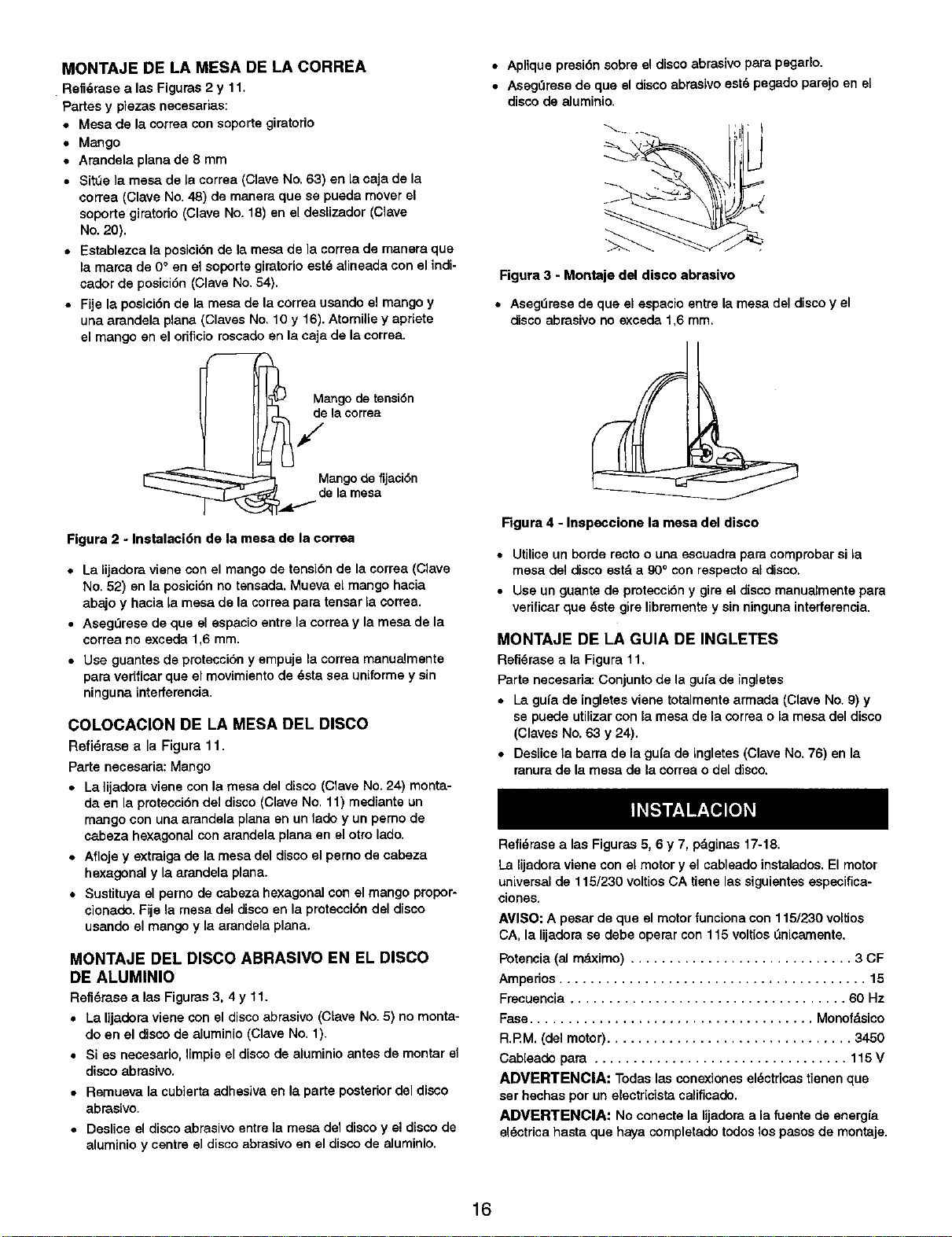
Mango de tensiSn
de la correa
an o de f_acl6n
M g "j "
de la mesa
Figura 2 - Instalaci6n de la mesa de la correa
• La lijadora viene con el mango de tensi6n de la correa (Clave
No. 52) en la posici6n no tensada. Mueva el mango hacia
abajo y hacia la mesa de la correa para tensar la eorrea.
• Aseg=Jrese de que el espaeio entre la correa y la mesa de la
correa no exceda 1,6 ram.
• Use guantes de protecci6n y empuje la correa manualmente
para verificar que el movimiento de 6sta sea uniforme y sin
ninguna interferencia.
COLOCACION DE LA MESA DEL DISCO
Refi6rase a la Figura 11.
Parte necesaria: Mango
• La lijadora viene con la mesa del disco (Clave No.24) monta-
da en la protecci6ndel disco (Clave No. 11) mediante un
mango con una arandela plana en un lado y un pemo de
cabeza hexagonal con arandela plana en el otto lado.
• Afloje y extraiga de la mesa del disco el perno de cabeza
hexagonal y la arandela plana.
• Sustituya el perno de sabeza hexagonal con el mango propor-
eionado. Fije la mesa dal disco en la protecoi6n del disco
usando el mango y la arandela plana.
MONTAJE DEL DISCO ABRASIVO EN EL DISCO
DE ALUMINIO
Refi6raee a las Figuras 3, 4 y 11.
• La lijadora viene con el disco abrasivo (CLaveNo. 5) no monta-
do en el discode aluminio (Clave No. 1).
• Si es neeesario, Impie eldisco de aluminio antes de montar el
disco abrasivo.
• Remueva la cubierta adhesiva en la parte posteriordeldisco
abrasivo.
• Deslice el discoabrasivoentre la mesa de1discoy el discode
aluminio y centre el disco abrasivoan el discode aluminio.
• Aplique presi6n sobre el discoabrasive para pegarlo.
• Aseg_rese de que eldisco abrasivoest6 pegado parejo en eL
disco de aluminio.
Figura 3 - Montaje del disco abrasivo
• AsegOresade que el espacio entre la mesa del discoy el
disco abmsivono exceda 1,6 ram.
Figura 4 - Inspeccione la mesa del disco
• Utiliceun borde recto o una escuadra para comprobar si la
mesa del disco estd a 900con respecto al disco.
• Use un guante de pmtecci6n y gire el disco manualmente para
verificar que 6ste gire libremente y sinninguna interferencia.
MONTAJE DE LA GUIA DE INGLETES
Refi6rase a la Figura 11,
Parte necesaria:Conjuntode la gufa de ingletes
• La gufa de [ngletesviane totalmente armada (Clave No.9) y
sa puede utilizarcon la mesa de la correa o la mesa deldisco
(Claves No. 63 y 24).
• DesLicela barra de la gu[a de ingletes (Clave No, 76) en la
ranura de la mesa de la correao daldisco,
Refi6rasa alas Figuras 5, 6 y 7, pdginas 17-18.
La lijadora viene con el motor y el cablsado instalados. El motor
universal de 115/230 voltios CA tiene las siguientesespecifica-
clones.
AMISO:A pesar de que el motor fanciona con 115/230 voltJos
CA, la lijadora se debe operar con 115 voltios _nicarnente.
Potencia (al mdximo) ............................. 3 CF
Amperios ........................................ 15
Frecueneia .................................... 60 Hz
Fasa..................................... Monofdsico
R.RM. (del motor) ................................ 3450
Cableado para ................................. 115V
ADVERTENCIA: Todas las conexionesel6ctricas tienen que
ser hechas por un electricistacalificado.
ADVERTENCIA: No conecte la lijadoraa la fuente de energ[a
el6ctricahasta que hayacompletado todoslospasos de montaje.
16
FUENTE DE ENERGIA
El motor ha sido dise_ado para operar con el voltaje y la frecuen-
cia especificados. Las cargas normales se pueden manejar con
seguridad con voltajes no mayores de 10% por encima o por
debajo dal voltaje especificado.
Si se hace funcionar la ualdad con voLtajes que no est_n dentro
de la gama, se puede producir un calentamiento excesivo y que-
marse el motor. Les carges pesadas exigen que el voltaje en los
terminales del motor no sean menos que el voltajeespecificado.
• El suministro de energfa al motor se controla mediante un
interruptor oscilante de seguridad unipolar. Extraiga la Ilave
para impedir el uso no autorizado de la herramienta.
INSTRUCCIONES PARA LA CONEXION A TIERRA
ADVERTENCIA: Si se conecta incorrectamenteel conductor
de conexi6n a tierra del equipo, se puede producir un riesgode
cboque el_ctrico.El equipo debe estar conectado a tierra mien-
tras se esta usando, pare protegeral operador contra un choque
el_ctrico.
• Consulte con un alectricista capecitado si noentiende las
instruccionesde conexi6na tierra o no estd segurosi la herra-
mienta est&correctemente conectada e tierra.
• Este herramiente viene con uncord6n al_ctrico apmbado
de 240 valtios nominales y un enchufede 3 puntas con
derivaci6na tierra de 125 vo]tiosnominales(vea la Figura5)
para protegerlocontra el peligrode sacudidas el_ctdcas.
• Elencbufedeconexibnatierrasedebeenchufardirectamente
en un recept&culode conexi6na tierra de 3 puntas, conectado
a tierra e insteledo correctamente, como se muestra en la
Figura5.
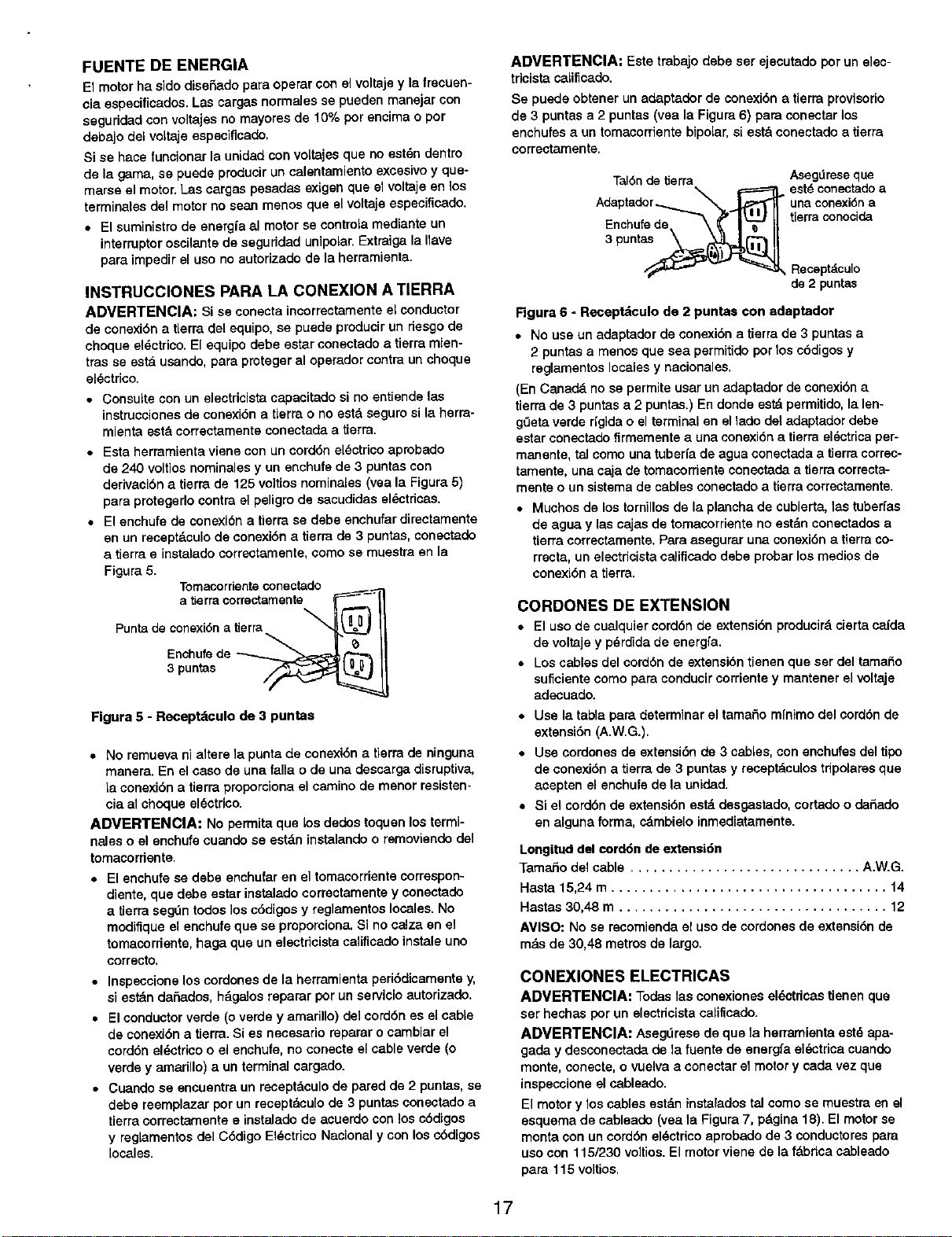
Tomacorrienteconectado
atierracorrectamente
Puntade conexi6na tierra
Enchufede _
3 puntas
Figura 5 - Recept_culo de 3 puntas
• No remueveal altere la punta de conexi6n a tierra de ninguna
manera. En el caso de una falla o de una descarga disruptiva,
[a conexi6n a tierra proporciona el camino de menor resisten-
cia al choque el_ctrico.
ADMERTENCIA: No permita que los dedos toquen los termi-
nales o el enchufe cuando se estdn instalando o removiendo dal
tomacorriente.
• El enchufese debe enchufar en el tomacorriente correspon-
diente,que debe estar instalado correctamente y conectado
a tierra segdn todos los c6digos y reglamentos locales. No
modifique el enchufe que se proporcione. Si no calza en el
tomacordente, haga que un alectdcista calificado instale uno
correcto,
• Inspeccione los cordones de la berramienta peri6dicamentey,
si estdn dadados, h&galosreparar por unservicio autorizado.
• El conductorverde (overde y amarillo) delcord6n es elcable
de conexi6n a tierra.Si es necesario reparar o cambiar el
cord6n eldctricoo el encbufe,no conecte el cableverde (o
verde y amarillo) a un terminal cargado.
• Cuando se encuentra un receptdculo de pared de 2 puntas, se
debe reemplazar por un receptdcu[ode 3 puntasconectado a
tierracorrectamente e instaladode acuerdo con los c6digos
y reglamentosdel C6digo El_ctrico Nacional y con losc6digos
locales.
ADVERTENClA: Este trabajo debe ser ejecutado porun elec-
tricista caLiflcado.
Se puede obtener un adaptador de conexi6na tierra provisorio
de 3 puntas a 2 puntas (vea la Figura 6) para conectar los
enchufes a un tomacorriente bipolar, siest& conectado a tierra
correctamente.
Tal6nde tierra Aseg0reseque
\ p====_ est_conectadoa
Adaptador_ _.. _ une conexi6na
Enchutede t" II tJerra onocJ
3psnta° I
_ Receptdculo
de 2 puntas
Figura 6 - Receptdculo de 2 puntae con adaptador
• No use un adaptador de conexi6n a tierra de 3 puntas a
2 puntas a menos que sea permitido por loscbdigosy
reglamentoslocalesy nacionales,
(En Canadd no se permite usarun adaptader de conexibna
tierra de 3 puntas a 2 puntas.) En donde estd permitido,la len-
g_3et_verde Hgidao el terminal en el1adodel adaptadordebe
estar conectadofirmementea una conexi6n a tierra el_ctricaper-
manente, tal como una tuberfe de agua conectada a tierra correc-
tamente, una caja de tomacorriente conectada a tierra correcta-
mente o un sistemede cables conectado a tierra correctamente.
• Muchos de los tornillos de la plencha de cubierta, 1astuberfas
de agua y las cejas de tomacorriente no estdn conectados e
tierra correctamente. Para asegurar una conexi6n a tierra co-
rrecta, un electdcista calificado debe prober los medios de
conexi6n a tierra.
CONDONES DE EXTENSION
• El uso de cualquiercord6n de extensibnpmducir&cierta ca(da
de voltaje y pdrdidade energfa.
• Los cables del cord6nde extensi6ntienen que ser deltamal_o
suficientecomo para conducircorrientey mantener elvottaje
adecuado.
• Use la tabla para determinar el tamado mfnimo delcorddn de
extensi6n (A.W.G.).
• Use cordones de extensi6n de 3 cables, con enchufesdel tipo
de conexi6n a tierra de 3 puntas y receptdculos tdpolares que
acepten el enchufe de la unidad.
• Si el cord6n de extensi6n estd desgastado, cortado o da_edo
en alguna forma, cdmbialo inmediatamente.
Longitud del cord6n de extensi6n
Tamario del cable .............................. A.W.G.
Hasta 15,24 m .................................... 14
Hastas 30,48 m ................................... 12
AVISO: No se recomienda el uso de cordones de extensi6n de
mds de 30,48 metrosde largo.
CONEXlONES ELECTRICAS
ADVERTENCIA: Todaslas conexiones eldctdcas tienen que
ser bechas por un electdcistacalificado.
ADVERTENCIA: Aseg'irese de que la herramienta est,. apa-
gada y desconectada de la fuente de energfa al_,ctrica cuando
monte, conecte, o vualva a conectar el motor y cada vez que
inspeccione elcableado.
El motory loscables est&ninstaradostal como se muestra en el
esquema de cableado (vea la Figura7, pdgina 18). El motorse
monta con uncord6n aldctrico aprobadode 3 conductorespara
uso con 115/230 voltios.El motor viene de la fdbrica cableado
para 115 voltios.
17
R E
Cable del motor Cable del intermptor
;bo,t ,2sum,o,stro--
Energla eldctrica
de 115V
Negro Blanco Verde
\ \ ±
Negro Rojo Blanco Amarillo
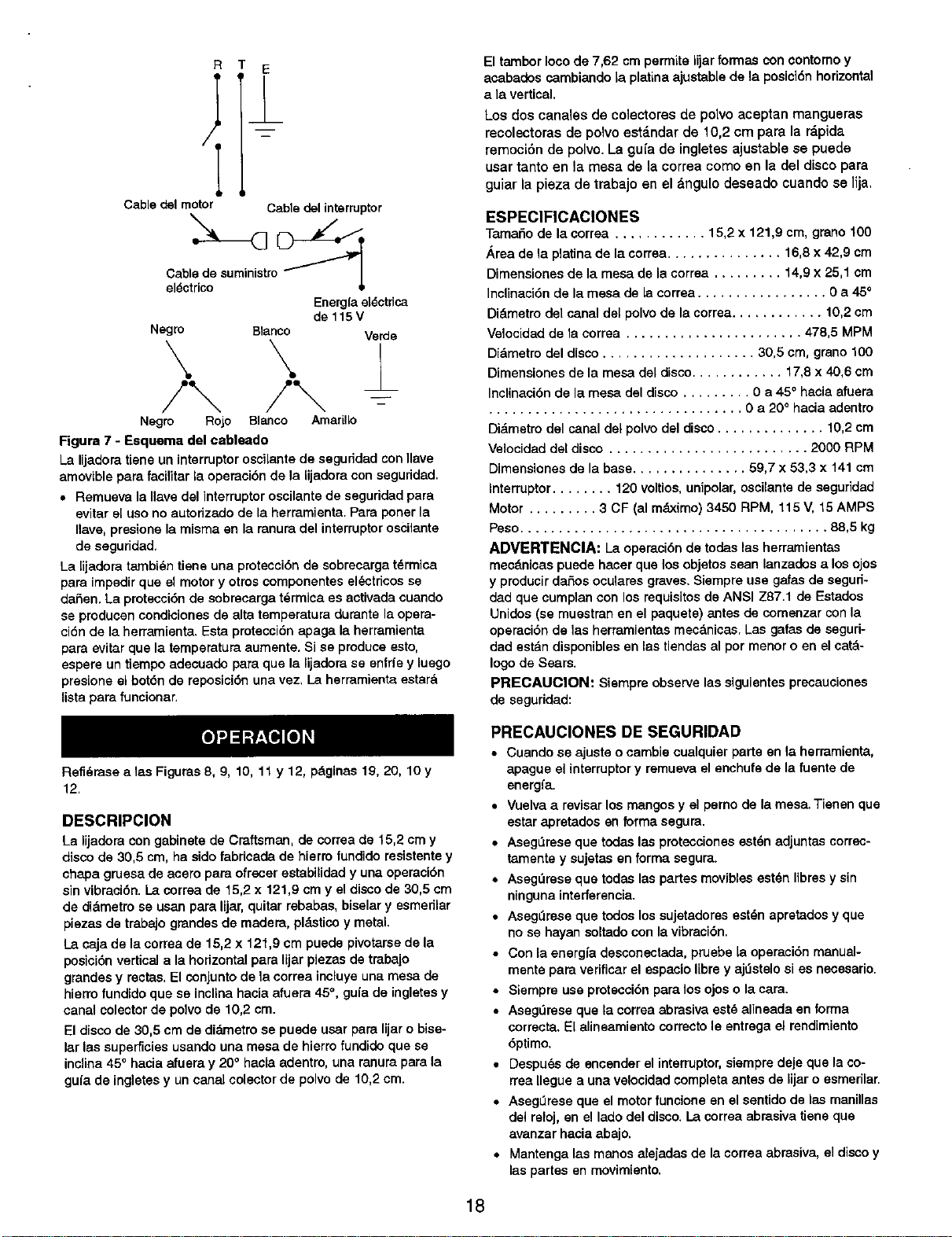
Figura 7 - Esquema del cableado
La lijadoratiene un interruptoroscilantede seguddad con Ilave
amovible para facilitar la operacibnde la lijadora con seguridad.
• Remueva la Ilave del interruptoroscilante de seguridadpara
evitar el uso no autorizado de la herramienta. Para poner la
Ilave, presionela miema en la ranura del interruptoroscilante
de seguridad,
La lijadora tambi_n tiene una protesci6n de sobrecarga t_rmica
para impedir que el motor y otros oomponentes al_ctdcos sa
darien. La protecci6n de cobrecarga t_rmica es activada cuando
sa producen condiciones de alta temperatura durante laopera-
ci6n de la herramienta. Esta protecci6n apaga la herramienta
para evitar que la temperatura aumente. Si se produce esto,
espere un tiempo adecuado para que la lijadora se enfrfe y luego
presione el bot6n de reposici6n una vez, La herramienta estar&
lista para funoionar.
Refi_rase a 1asFiguras 8, 9, 10, 11 y 12, pdginas 19, 20, 10 y
12,
El tambor Ioco de 7,62 cmpermits lijar formas con contomoy
acabados cambiandola platinaajustablede la posici6nhorizontal
a la vertical.
Los dos canales de colectores de polvo aceptan mangueras
recolectoras de polvo est_ndar de 10,2 cm para la r&pida
remoci6n de polvo. La guia de ingletes ajustable se puede
usar tanto en la mesa de la correa como en la del disco para
guiar la pieza de trabajo en el dngulo deseado cuando se lija,
ESPEClFICAClONES
TamaSo de la correa ............ 15,2 x 121,9 cm, grano 100
_.rea de la platinade la correa............... 16,8 x 42,9 cm
Dimensionesde la mesa de la corrsa ......... 14,9 x 25,1 cm
Inclinaci6n de la mesa de la corraa ................. 0 a 45°
Didmetro del canal del polvode la correa............ 10,2 cm
Velocidadde la corraa ....................... 478,5 MPM
Didmetro deldisco .................... 30,5 cm, grano 100
Dimansionesde la mesa del disco............ 17,8 x 40,6 cm
Inslinacibnde la mesa del disco ......... 0 a 45° hania afuera
................................. 0 a 20° hacia adentro
Didmetm del canal del polvodel disco.............. 10,2cm
Velocidaddel disco .......................... 2000 RPM
Dimansiones de la base............... 59,7 x 53,3 x 141 cm
Interruptor ........ 120 voltios,unipolar,oscilantede seguridad
Motor ......... 3 CF (al mdximo) 3450 RPM, 115 V, 15 AMPS
Peso........................................ 88,5 kg
ADVERTENClA: La operaci6nde todas las herramientas
mes&nicas puede haser que los objetos sean lanzados a losojos
y producirdaSosoculares graves. Siempreuse galas de sagud-
dad que cumplan con losrequisitos de ANSI Z87.1 de Estados
Unidos (se muestran en el paquete) antes de comenzar con la
operaci6n de las herramientas mecdnicas. Las gafas de seguri-
dad estdn disponiblesen las tiendas al pot manor o en elcatd-
logo de Sears.
PRECAUClON: Siempre observe las siguientesprecauciones
de seguridad:
DESCRIPCION
La lijadora con gabinete de Craftsman, de oorrea de 15,2 cm y
disco de 30,5 cm, ha sido fabricadade hierro fundidoresistentey
chapa gruesa de anero para ofrecer astabilidad y una operaci6n
sin vibraci6n. I.a corraa de 15,2 x 121,9 cm y el discode 30,5 cm
de di&metrosa usan para lijar,quitar rebabas, biselary esmedlar
piezas de trabajo grandeede madera, pldsticoy metal
I_acaja de la correa de 15,2 x 121,9 cm puede pivotarsede la
posici6nverticala la horizontalpara lijar piezas de trabajo
grandes y restae.El conjunto dela correa incluye una mesa de
hierrofundido qua se inclina hacia afuera 45°, gufade ingletesy
canal colectorde polvode 10,2 cm.
Eldisco de 30,5 cm de didmetrose puede usar para lijar o bise-
larlas superficiesusando una mesa de hierrofundidoque se
inclina45° hacia afuera y 20° haciaadantro, una ranurapara la
gufa de ingletesy uncanal colectorde polvo de 10,2 cm.
PRECAUCIONES DE SEGURIDAD
• Cuando se ajuste o cambie cualquier parte en la herramienta,
apague el interruptory remueva el enohufede la fuante de
energfa.
• Vuelvaa revisar los mangosy el perno de la mesa. Tienen que
estar apratados en forma segura.
• AsegL_raseque todaslas proteccionesest_n adjuntas corrsc-
tamente y eujetas en forma segura.
• Aseg,',resequa todas las partes movibles est_n libras ysin
ninguna interferencia.
• AsegLlrese que todos lossujetadoreeest_n apretados y qua
no se hayan soltado con la vibraci6n.
• Con la energfa desconectada, pruebe la operaci6n manual-
mente para verificar el espacio libre y aj_stelo si es necesario.
• Siempre use protecci6n para los ojos o la cara.
• Asagdresa que la correa abrasiva est_ alineada en forma
correcta. El alinsamiento correcto le entraga el rendimiento
6ptimo.
• Despuds de encender el interruptor, siempre deje qua la co-
rrea Ilegue a una velocidad completa antes de lijar o esmerilar.
• AsegL1reseque el motor funcione en el sentido de las manillas
del reloj, an el lado del disco. La correa abrasiva tiene qua
avanzar hacia abajo.
• Mantenga las manos alejadas de la sorrea abrasiva,el discoy
las partes en movimiento.
18
• Para obtener el rendimiento5ptimo no haga parar el motor ni
reduzca la velocidad. No fuerce el trabajo dentro de la parte
abrasiva.
• Soporte la plaza de trabajo con la mesa de lacorrea cuando
se lije con la correa, y con la mesa del discocuando se lije
con el disco.
• Nunca empuje una esquinaafilada de Lapieza de trabajo r&pi-
damente en contra de la correa o del disco.La parta trasera
abrasiva puede desgarrarse.
• Cambie la parts abraeiva cuando se carga (se pone lustrosa)
o se deshilacha.
• Cuando esmerile el metal, mueva la pieza de trabajoa travds
de la parts abrasiva para avitar la acumulacidn de salor,
• Nunsa trate de lijar mojado, Si la pieza de trabajose calienta
demasiado como para manejarala; enfrfela en agua,
AJUSTE DE LA POSICION DE LA MESA DE LA
CORREA
Refidrase alas Figuras 8 y 11.
La mesa de la correa (Clave No. 63) se puede inclinardesde 0°
(&ngu[orectoa la mesa) hasta 45°. Para ajustar la posicidnde la
mesa de la correa:
• Afloje el mango (Clave No. 16) en el lado derecho de la mesa.
__ Mangode fijaciSn
de lamesa
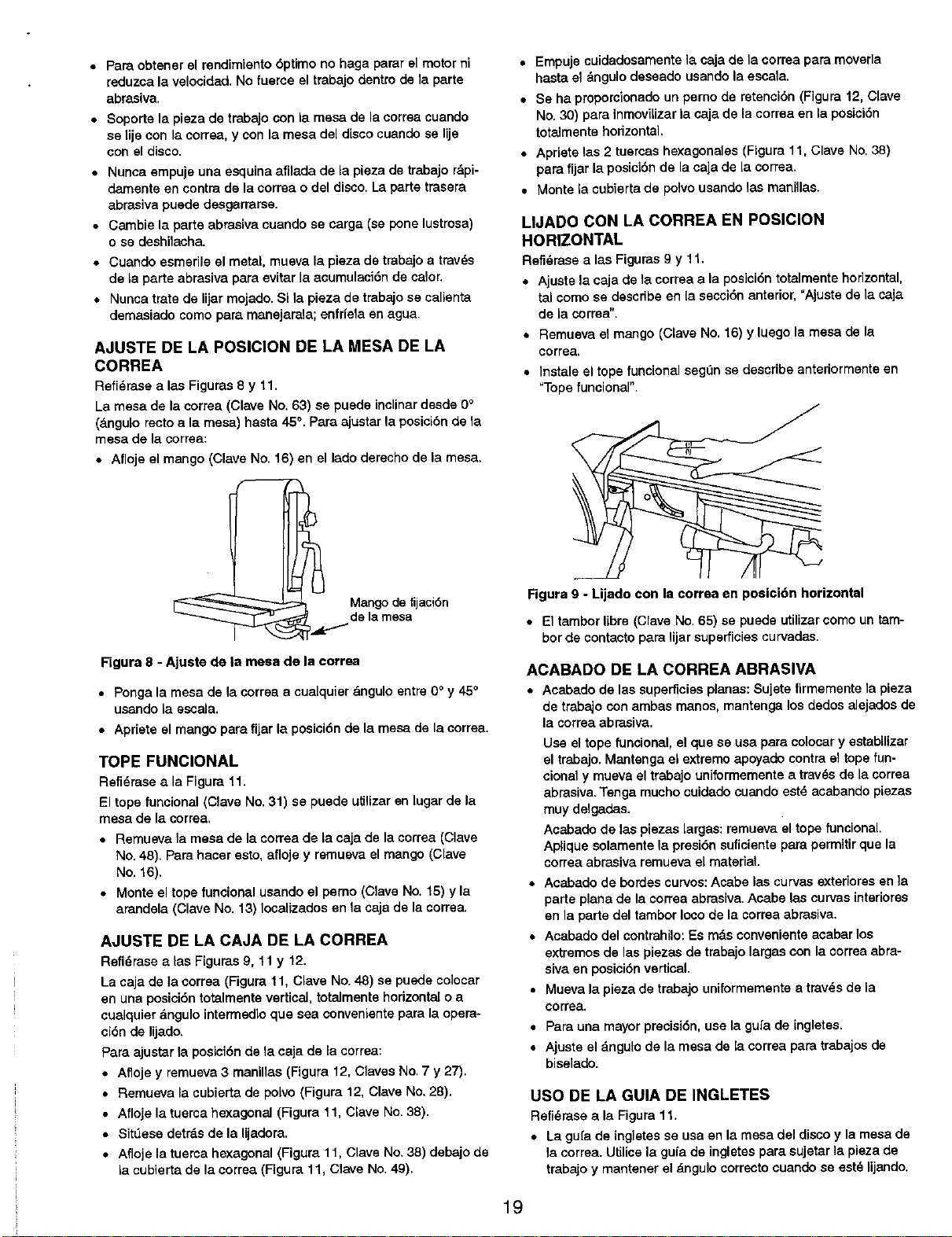
Figura 8 - Ajuste de la mesa de la correa
• Ponga la mesa de ta correa a cualquier &ngulo entre 0° y 45°
usando la escala.
• Apdete el mango para fijar la posicidn de la mesa de la correa.
TOPE FUNCIONAL
Refidrasea la Figura 11.
El tope funcional (Clave No.31) se puede utilizar en lugar de la
mesa de la correa,
• Remueva la mesa de la correa de ia caja de la correa (Clave
No. 48). Para hacer esto,afloje y remuava el mango (Clave
No. 16).
• Monte el tope funeional usando el pemo (Clave No. 15) y la
arandela (Clave No. 13) Iocalizados en la saja de la correa.
AJUSTE DE LA CAJA DE LA CORREA
Refidrasealas Figuras 9, 11 y 12.
La caja de ]a correa (Figura 11, Clave No. 48) se puede colocar
en una posicidntotalmentevertical, totalmentehorizontalo a
cualquier&ngulo intermedioque sea conveniantepara la opera-
ciSnde lijado,
Para ajustar la posicidn de la caja de la correa:
• Afloje y remueva 3 manillas (Figura 12, Claves No. 7 y 27).
• Remueva la cubierta de po[vo (Figura 12, Clave No. 28).
• Afloje la tuerca hexagonal (Figura 11, Clave No.38).
• Sit_ese detrds de la lijadora.
• Afloje la tuerca hexagonal (Figura 11, Clave No, 38) debajo de
la cubierta de la correa (Figura 11, Clave No. 49).
• Empuje cuidadosamentela saja de la correa para moverla
hasta el dngulo deseado usando la escala.
• Se ha proporcionado un perno de retencidn (Figura 12, Clave
No.30) para inmoviLizar la caja de la correa en la posicidn
totalmente horizontal,
• Apriete las 2 tuersas hexagonales (Figura 11, Clave No.38)
para fijar la posicidn de la saja de la correa.
• Monte la cubierta de polvo usando las manillas.
LIJADO CON LA CORREA EN POSICION
HORIZONTAL
Refidrasea las Figuras 9 y 11,
• Ajusta la caja de la corrsa a la pos]ci(Sntotalmantehorizontal,
tal como se describe en la seccidnanterior, =Ajustede la caja
de la correa".
• Remuava el mango (Clave No. 16) y luego la mesa de la
correa,
•Instale el tope func[onal seg=3nse describe anteriormente en
"Tope funcionar'.
Figura 9 - Lijado con la correa en posicidn horizontal
• El tambor libre (Clave No.65) se puede utilizarcomo un tam-
bor de contacto para lijar superficies curvadas.
ACABADO DE LA CORREA ABRASIVA
• Acabado de las superficiesplanas: Sujete firmemente la plaza
de trabajo con ambas manos, mantenga losdedos alejadosde
la correa abrasiva.
Use eltope funcional, el qua se usa para colocar y estabLlizar
el trabajo. Mantenga el extremo apoyado contra el tope fun-
cional y mueva el trabajo uniformemente a travds de la correa
abrasiva. Tenga mucho cuidado cuando est6 acabando piezas
muy dalgadas.
Acabado de las piezas Largas:remuava el tope funcional.
Aplique solamente la presidn suficiente para permitir que la
correa abrasiva remuava el matadal.
• Acabado de bordes curvos:Asabe las curvasexteriores en ]a
parte plana de la correa abrasiva,Acabe las curvasinteriores
en la parte del tambor Iocode la correa abrasiva,
• Acabado del contrahilo:Es mdsconvenienteacabar los
extremosde las piezasde trabajolargascon la correa abra-
siva en posicibnvertical,
• Muava la pieza de trabajo uniformementaa trav_s de la
correa.
• Para una mayor precisidn, use la gu[a de ingletes.
• Ajuste el dngulo de la mesa de la correa para trabajos de
biselado.
USO DE LA GUIA DE INGLETES
Refi_.rasea la Figura 11.
• La gu[a de ingletes se usa an la mesa del disco y la mesa de
la correa. Utilice la gufa de ingletes para sujetar la plaza de
trabajo y mantaner el dngulo correcto cuando se est6 lijando.
19
• Ajuste el dngulo, cambiando la pos[ci6n de la gufade ingletes
(Clave No.79). Afloje la monilla (CLaveNo. 66) para cambiar la
posici6n de Io gufa de ingletes.
• Apriete la manLIlapara fijar la posicidnde la gufa de ingletee,
• El conjunto de la gufa de ingletes tiene puntos de retenci6n
configurados para 90° y 45" en ombos lados,
• Para hater uso de los puntos de retenci6n, afloje la maniila,
retraiga cuidadosamente el pasador de indizaci6n (Clove No.
75), gire ligeramente la gufa de ingletes, inserte el pasador de
indizaci6n y gire la gufa de ingLetashasta que el borde del
tornillo (Clave No. 77) tope contra el pasador de indLzaci6n.
• Verifique la exactitud de la escala de la gula de ingletes (Clove
No.72).
• Utilice una escuadra combinada para ajuetar la escuadra de la
gufa de ingletes con respecto al disco. La escala deber& astar
en la posicidn cero. Si es necesapo, afloje el torniLIo(Clave No.
70) y cambie la posici6n de la escala.
ALINEACION DE LA CORREA
Refi_rase alas Figuras 10y 11.
La correa (Clave No. 25) debe viajar centrada sobre el tambor de
impulsi6n y el tambor ]ibre (Claves No. 36 y 65). Lo lijodora viene
con el mecanismo de aJineoci6n ajustado correctamente. No
obstante, si es necesorio hacer un ajuste:
• Afloja 2 maniilas (Clove No. 45) en cualquiera de los lados de
la caja de la correa (Clave No.48).
• Enciendala unidad.
• Inserte una Ilave hexagonal de 3,18 mm o 3,97 mm en el orifi-
cio de la tuerco de ajuste (Clove No. 55) en cualquiera de los
lades.
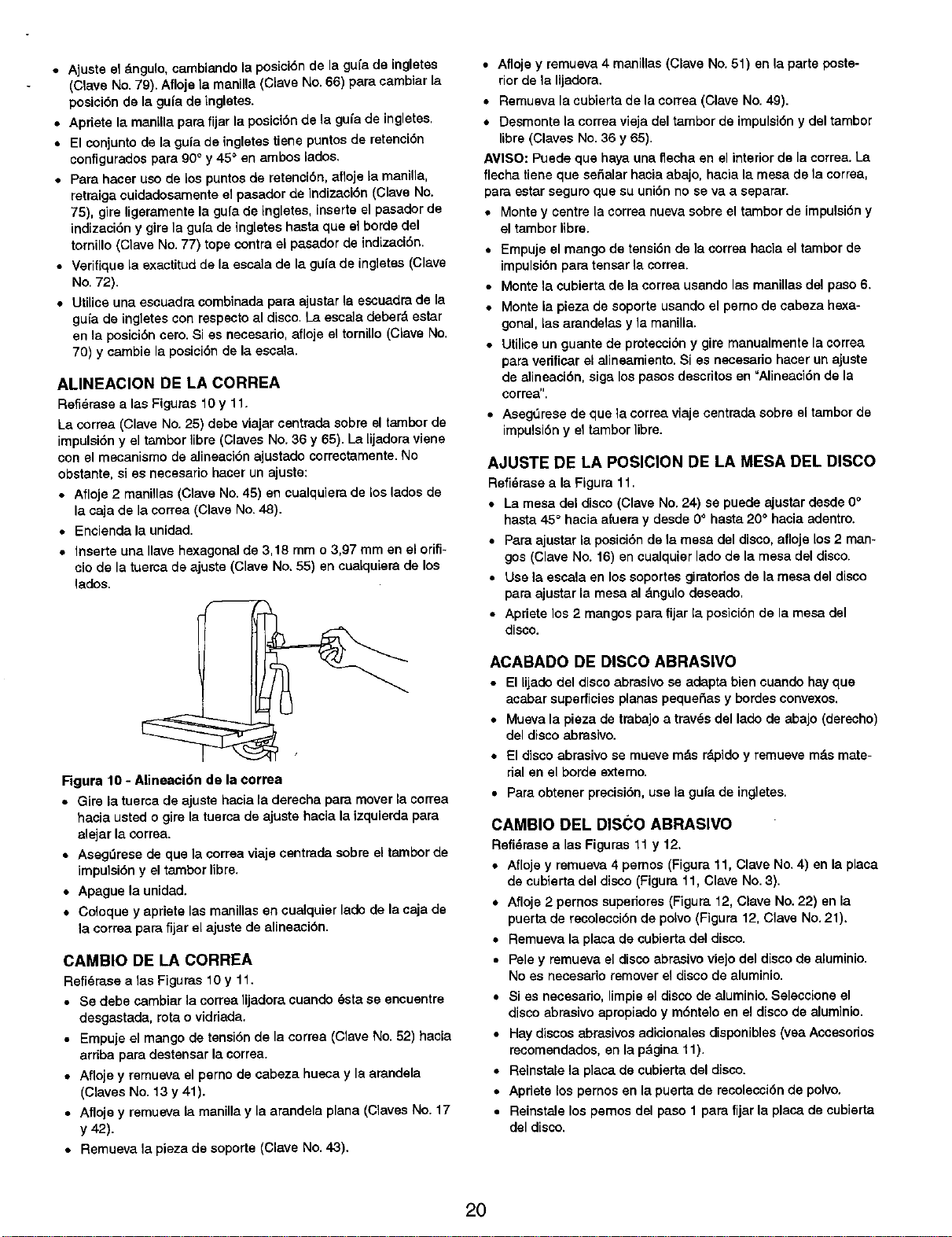
Figura 10 - Alineaci6n de la correa
• Gire la tuerca de ojuste hacia la darecho para mover la correa
hacia usted o gire la tuerca de ajuste hacia la izquierda para
alejar la correa.
• AsegOrase de que la correa viaje centrada sobre el tampor de
imputsi6ny el tarnborIibre.
• Apague la unidad.
• Coloque y apriete las manillas en cualquier lado de la caja de
la correa para fijar el ojuste de olineasi6n.
CAMBIO DE LA CORREA
Refl_rase a los F]guras 10 y 11.
• Se debe cambiar la correalijodoracuando _sta se encuentre
desgastada, rota o vidriada.
• Empuje el mango de tensi6nde la correa (Clave No. 52) hacia
arriba para destensar la correa.
• Afloje y remueva el pemo de cabeza husca y la arandela
(Craves No. 13 y 41).
• Afloje y remueva la manilla y la arandela plana (Clavas No. 17
y 42).
• Remueva la pieza de soporte (Clove No. 43).
• Afloje y remueva 4 manillas (Clave No.51) en la parte poste-
rior de la lijadora.
• Remueva la cubierta de la correa (Clove No. 49).
• Desmonte Io correa vieja del tambor de impulsi6n y del tambor
libre (Cloves No.36 y 65).
AVISO: Puede que haya una flecha en el interior de la correa.La
flecha tiene que sefialar hacia abajo, hacia la mesa de la correa,
pare estar seguro que su uni6n no se vo a separar.
• Monte y centre la correa nueva sobre el tambor de impulsi6n y
el tambor libre.
• Empuje el mango de tensi6n de ]a correa hacia el tambor de
impulsi6n para tensar la correa.
• Monte tocubierta de la correa usando las manillos del paso 6.
• Monte la pieza de soporte usando el perno de cabeza hexa-
gonal, las arandelas y la manilla.
• Utilice un guante de protesci6n y gire monualmente la correa
para verificar el alineamiento. Si es nscasapo haser un ajuste
de alineaci6n, siga los pascs descritos en =Alineaci6n de la
correa".
• Aseg_rese de que la correa vioje centrada sobre el tambor de
impulsidn y el tambor libre.
AJUSTE DE LA POSICION DE LA MESA DEL DISCO
Refidrasea la Figura 11.
• La mesa del disco (Clave No.24) se puede ajustar desde 0°
hasta 45° hasia afuera y desde O° hasta 20° hocia adentro.
• Poraajustor la posici6nde la mesa del disco, afloje los2 man-
gos (Clave No. 16) en cualquierlade de Io mesa del disco.
• Use la escala en lossoportesgiratodos de la mesa del disco
para ajustar la mesa al dngulodeseado,
• Aprietelos 2 mangos para fijar la posici6nde la mesa del
disco.
ACABADO DE DISCO ABRASIVO
• El lijado del disco abrasivose adapta bien cuando hay que
ocaborsuperficies planas pequei_asy hordesconvexos.
• Muevo la pieza de trabajoo travds del lado de abajo (derscho)
del disco abrasivo.
,, El disco abrasivese mueve mds rdpidoy remueve m_.smate-
dal en el borda externo.
• Para obtener precisi6n,use la gufa de ing]etes,
CAMBIO DEL DISCO ABRASIVO
Refidrase a las Figuras 11 y 12.
• Afloje y remuavo 4 pernos (Figuro 11, Clave No.4) en la placa
de cubiertodel disco (Figura 11, Clove No. 3).
• Afloje 2 pernos supedores (Figura 12, Clave No. 22) en la
puertade recolecci6n de polvo (Figura 12, Clave No. 21).
• Remueva la plata de cubierta dal disco.
• Pele y remueva el discoabrasive viejo del discode aluminio.
No as necesario remover eldisco de aluminio.
• Si es necesapo, limpieal disco de aluminio. Salescione el
discoabrasive apropiado y m6nte]o en el disco de aluminio.
• Haydiscos abrasivos adicionaIesdisponibles(vea Accesodos
recomendodos,en la p&gina 11).
• Reinstala la plata de cubierta del disco.
• Apriete los parnos en la puerta de recolecci6nde polvo.
• Reinstate los pemos del paso 1 para fijarla placa de cubierta
del disco.
20
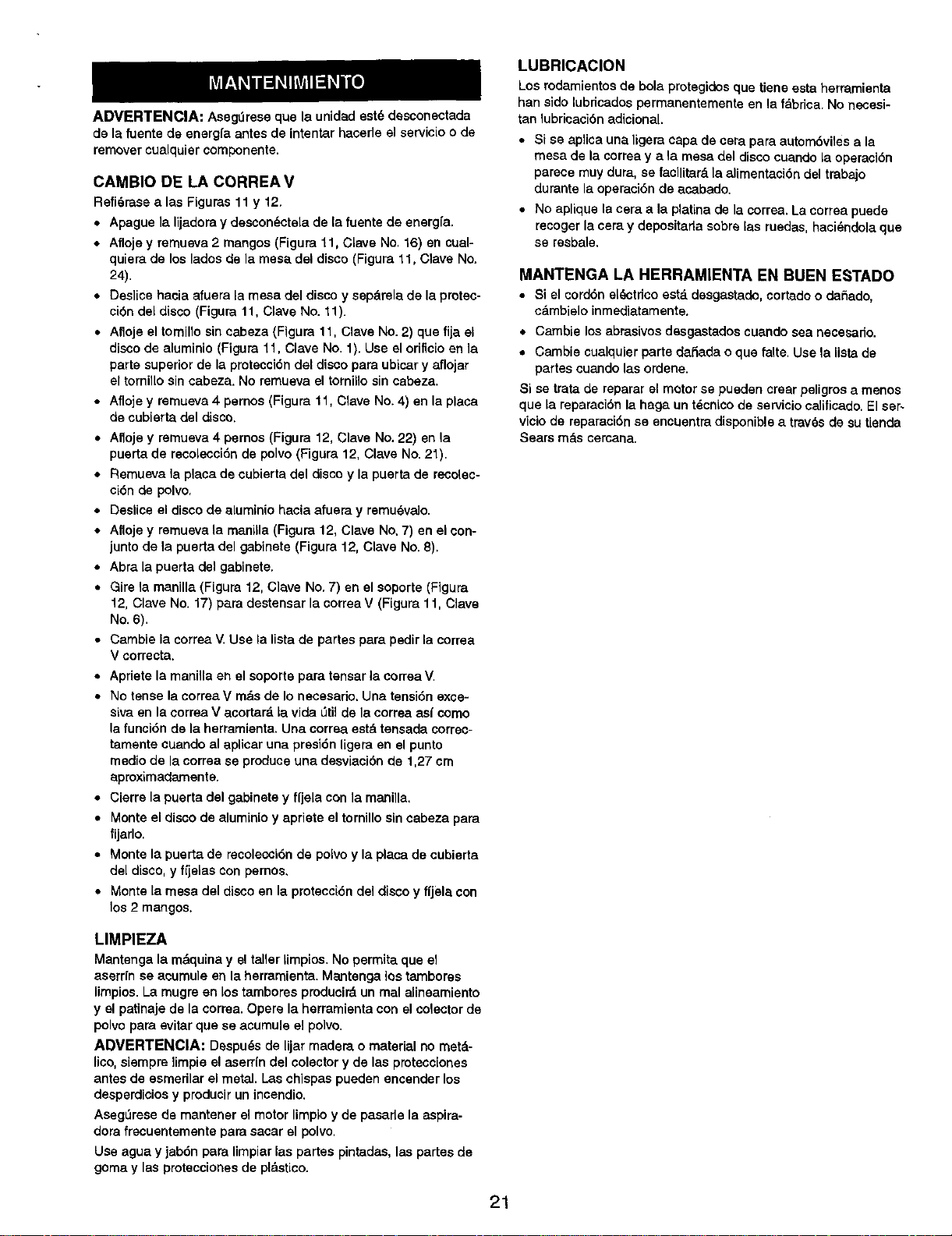
ADVERTENClA: Asegt_reseque la unidad est_ desconectada
de la fuente de energfa antes de intentar hacede el servicioo de
removercualquiercomponents.
CAMBIO DE LA CORREAV
Refi_rase alas Figures 11 y 12.
• Apague la lijadoray descon_ctela de la fuente do energfa.
• Aflojey remueva 2 mangos (Figure 11, Clave No. 16) en cual-
quiera de los lados de la mesa dal disco (Figura 11, Clave No.
24).
• Deslice hacia afuera la mesa del disco y sepdrala de la protec-
cibn del disco (Figure 11, Clave No. 11).
• Afloje el tomillo sin cabeza (Flgura 11, Clave No. 2) que fija el
disco de aluminio (Figure 11, Clave No. 1). Use el orificio on la
parte superior de la protecci6n dal disco pare ubicar y aflojar
el tornillo sin cabeza. No remueva el tomilio sin sabeza.
• Afloje y remueva 4 pernos (Figure 11, Clave No. 4) en la place
de cubierta del disco.
• Afloje y remueva 4 pernos (Figure 12, Clave No. 22) en la
puerta de recolecci6n de polvo (Figure 12, Clave No. 21).
• Remueva la place de cubierta del discoy la puerta de recolec-
ci6n de polvo,
• Deslice el disco de eluminiohacia afuera y remu6valo.
• Alloje y remueva la manilla (Figure 12, Clave No,7) en el con-
junto de la puerta del gabinete (Figure 12, Clave No. 8),
• Abra la puerta del gabinete.
• Gire la manilla (Figure 12, Clave No.7) en el soporte (Figure
12, Clave No. 17) pare destensar la correa V (Figura 11, Clave
No. 6).
• Cambie la correa V.Use la lista de partes para pedir la correa
V correcta.
• Apriete la manillaen elsoporte para tensar la correaV.
• NotenselacorreaVmdsdelonecesario. Unatensi6nexce-
siva en la eorrea V acortar& la vide L_tilde la corraa as( como
la funci6n de la herramienta. Una correa estd tensada correc-
tamente cuando al aplicar una presi6n ligera en el punto
medio de la corrsa so produce una desviaci6n de 1,27 cm
aproximadamente.
• Cierra la puerta dal gabinete y fijlela con la mani]la,
• Monte el disco de alumialo y apriete el tornillo sin cabeza pare
fijarlo.
• Monte la puerta de recolesci6n de polvo y la place de cubierta
del disco, y ffjalas con pernos,
• Monte la mesa del disco en la protecci6n del disco y fijela con
los2 mangos.
LUBRICACION
Los rodamientos de bola protegidos que tiene esta herramienta
han side lubricados permanentemente en la fdbrica. No necesi-
tan lubrieaci6nadicional.
• Si se aplica una ligera capa de cera para autom6viles ala
mesa de la correa y ala mesa del disco cuando la opersci6n
parece muy dura, se facilitate,la alimentaci6n del trabajo
durante la operaci6n de acabado.
• No aplique la cera ala platina de la correa. La correa puede
recoger la cera y depositarta sobre las ruedas, haci_ndola que
se resbale.
MANTENGA LA HERRAMIENTA EN BUEN ESTADO
• Si el cord6nel_ctdcoest&desgastado,cortadoo da_ado,
cdmbieloinmediatamente.
• Cambie losabrasivesdssgastados cuandosea necesado.
• Cambie cualquier parte daSada o que falte. Use la lieta de
partes cuando las ordene.
Si setrata de reparar el motor se pueden craar peligros a menos
que la reparaci6n la haga un t_cnico de servicio calificado.El ser-
vieio de reparaci6n se eneuentra disponible a trav_s de su tienda
Sears m_ts cemana.
LIMPIEZA
Mantenga la mdquinay el taller limpios. No permita que el
aserrin se aoumule en la herramienta. Mantenga los tamboras
limpios. La mugre on lostambores pmdueir_ un real alineamiento
y el patinaje de la eorrea. Opere la herramientason el colector de
polvo pare evitar que se asumule el polvo.
ADVI=RTI=NClA: Despu_s de lijar madera o material no metd-
lico, siempra limpie el aserr(n delselector y de las protsce[ones
antes de esmerilar el metal. [.as¢hispas pueden encender los
desperdieios y producir un incendio.
AsegQresede mantener el motor limpioy de pasarle la aspira-
dora frecuentemente pare sasar el polvo,
Use agua y jab6n pare Iimpiarlas partes pintadas, las partes de
goma y las proteccionesde pldstico.
21
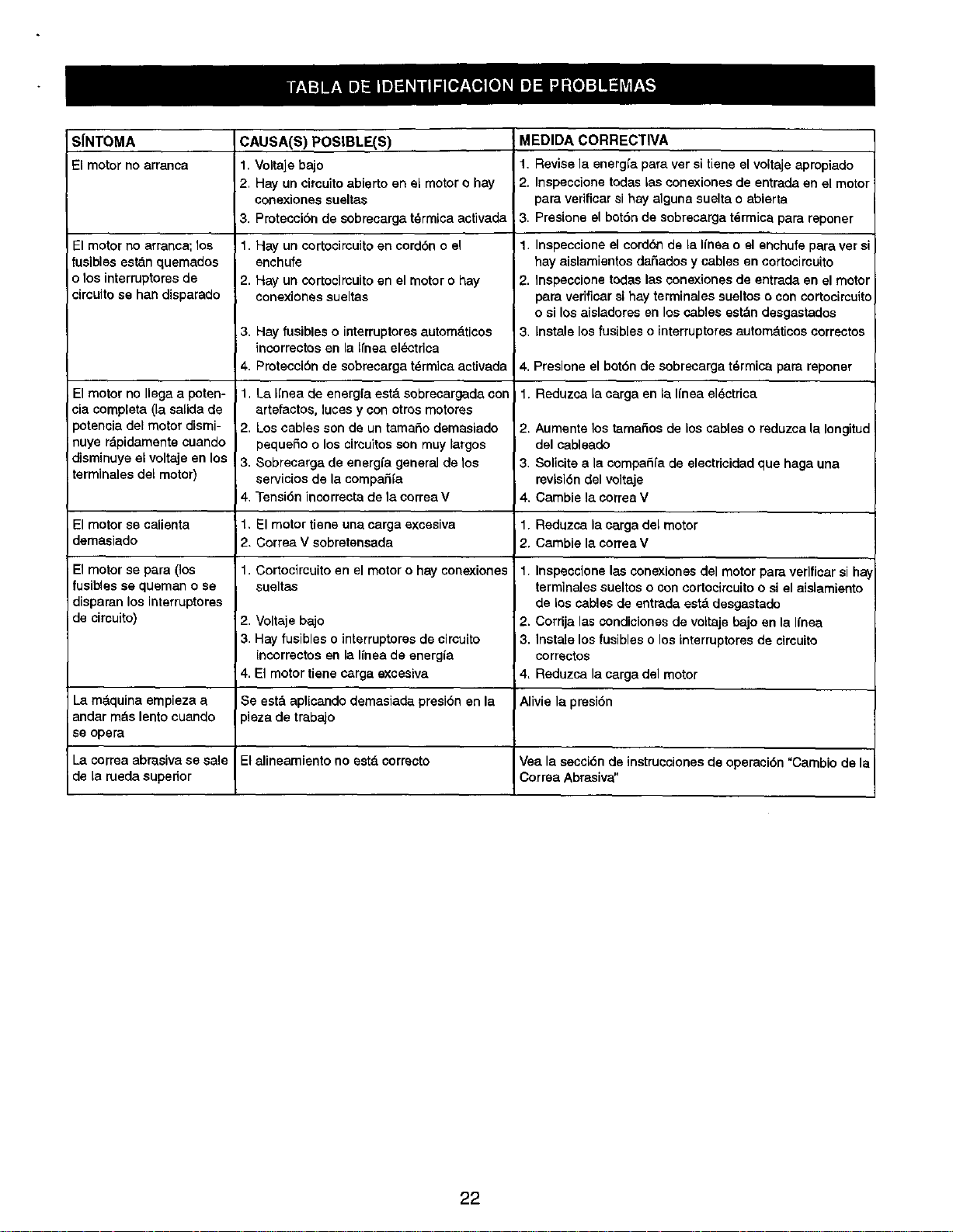
SfNTOMA
El motor noarranca
El motor no arranca; los
fusibles est&n quemados
o los interruptoresde
circuito se han disparado
El motor no Ilega a poten-
cia completa (la salida de
_otencia det motor dismi-
nuye rbpidamente cuando
disminuye at voltaje en los
terminales det motor)
CAUSA(S) POSIBLE(S)
1. Voltaic bajo
2, Hay un circuitoabierto en el motoro hay
conexionessueltas
3. Protecci6n de sobrecarga t_rmicaactivada
1. Hay un cortocireuitoen cordbn o el
enchufe
2. Hay un cortocircuito en el motor o hay
conexiones sueltas
3.
4.
1,
2
3.
4
1.
2
Hay fusibles o interruptoresautom_ticos
incorrectos en la RneaelL=ctdca
Protecci6n de sobrecarga t_rmica activada
La Ifnea de energfa est& sobrecargada con
artefactos, luces y con otrosmotores
Los cables son de un tamaSo demasiado
pequeSo o los circuitos son muy largos
Sobrecarga de energfa general de los
serviciosde la compaSfa
Tensi6n incorrectade la correa V
MEDIDA CORRECTIVA
1. Revise la energfa para ver si tiene el voltaje apmpiado
2. Inspeccione todas tas oonexionesde entrada en el motor
para verificar si hay alguna suelta o abierta
,3. Presione el bot6n de sobrecarga t_rmica para reponer
1. Inspeccione el cordbn de la linea o el enchufe para ver s_
hay aislamientos dai'3adosy cables en cortocircuito
2. Inspeccione todas las conexiones de entrada en el motor
para verificar si hay terminales sueltos o con cortocircuito
o si los aisladores en los cables estbn desgastados
3. Instale los fusibles o interruptoresautombticos correctos
4. Presione el botbn de sobrecarga t_rmica para reporter
1. Reduzca tacarga en ta linea el_ctrica
2. Aumsnte los tamaSos de los cables o reduzca la Iongitud
del cableado
3. Solicite a la compadfa de electdcidad que haga una
revisi6n del voltaje
4. Cambie la correa V
El motor se calienta El motor tiene una carga excesiva 1. Reduzca la carga del motor
demasiado Correa V sobretensada 2. Cambie la correa V
1. Cortocircuito en el motor o hay conexiones
sueltas
2,
3
Voltaje bajo
Hay fusibles o interruptores de circuito
incorrectos en la Ifnea de energia
El motor tiene carga excesiva
El motor se para (los
fusib4esse queman o se
disparan los interruptores
de circuito)
1. Inspeccionelas conexiones del motor para verificarsi hay
terminales sueltos o con cortocircuito o si el aislamiento
de los cables de entrada est_ desgastado
2. Corrija las condiciones de voltaje bajo en la Ifnea
3. Instale los fusibles o los interruptoresde cimuito
correctos
4. Reduzca la carga del motor
4,
La m&quina empieza a Se est&aplicando demasiada presi6n en la Alivie la pmsi6n
andar robs lento cuando pieza de trabajo
se opera
La correa abrasiva se sale El alineamiento no est,. correcto Vea la seccibn de instrucciones de operaoi6n "Cambio de la
de la rueda superior Correa Abrasiva"
22

23

In U.S.A. or Canada
for in-home major brand repair service:
Call 24 hours a day, 7 clays a week
1-800-4-MY-HOME s°(1-800-469-4683)
Para pedir servicio de reparacibn a domicilio - 1-800-676-5811
Au Canada pourtout le service - 1-877-LE-FOYER _ (1-877-533-6937)
For the repair or replacement parts you need:
Call 6 a.m. - 11 p.m. CST, 7 days a week
PartsDirect
1-800-366-PART (1-800-366-7278)
www.sears,com/partsdirect
Para ordenar piezas con entrega a domicilio - 1-800-659-7084
For the location of a Sears Service Center in your area:
Call 24 hours a day, 7 days a week
1-800-488-1222
To purchase or inquire about a Sears Maintenance Agreement:
Call 7 a.m. - 5 p.m. CST, Monday - Saturday
1-800-827-6655
SF.AR$
HomeCentral"

