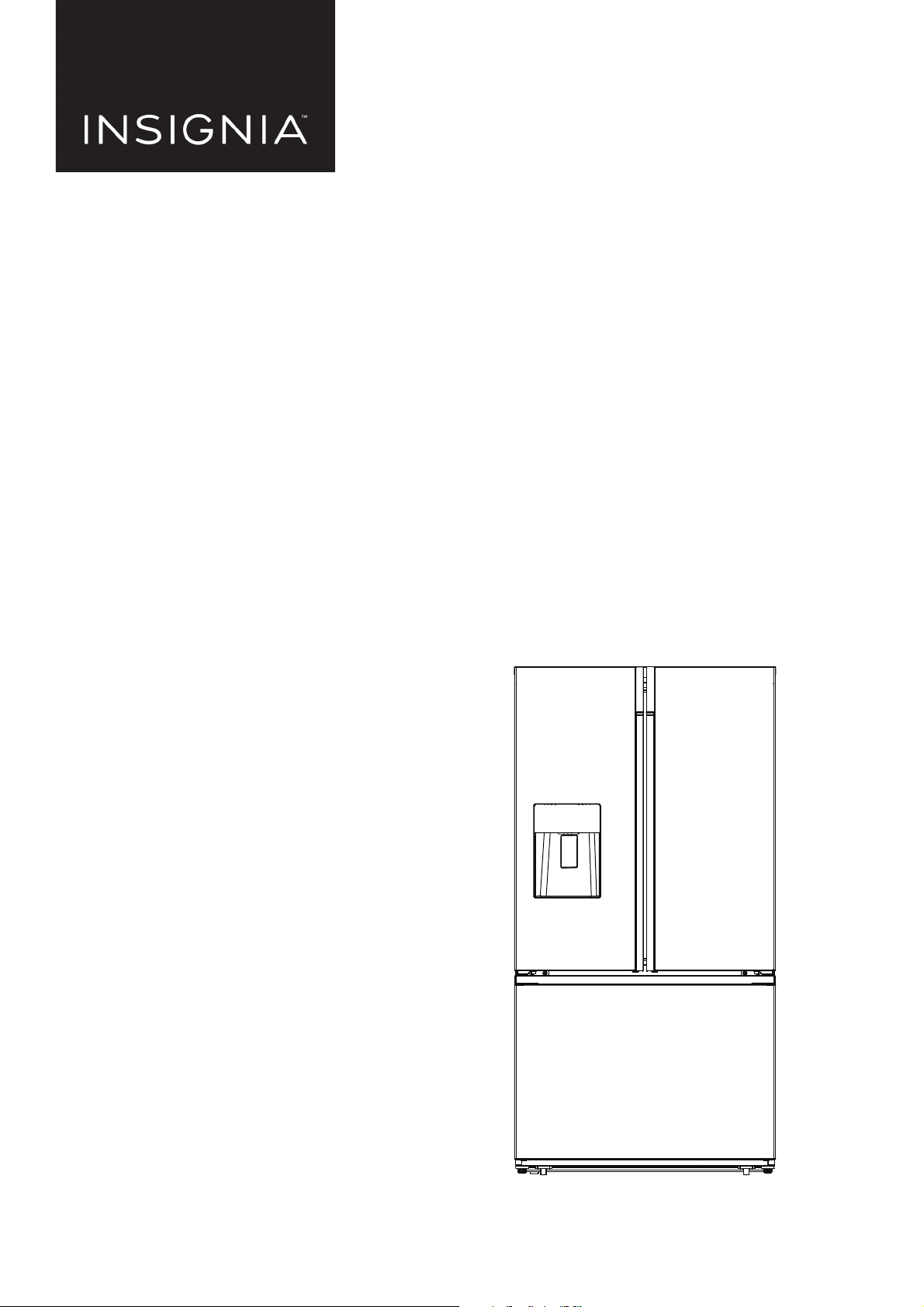
Before using your new product, please read these instructions to prevent any damage.
USER GUIDE
20.1 Cu. Ft. French
Door Counter Depth
Refrigerator
NS-RFD21CXSS0
www.insigniaproducts.com
2
Contents
IMPORTANT SAFETY INSTRUCTIONS . . . . . . . . . . . . . . . . . . . . . . . . . . . . . . . . . . . . . . . . . . . . . . . . . . . . . . . . . . . . . . . . . . . 3
Features . . . . . . . . . . . . . . . . . . . . . . . . . . . . . . . . . . . . . . . . . . . . . . . . . . . . . . . . . . . . . . . . . . . . . . . . . . . . . . . . . . . . . . . . . . . . . . 6
Package contents . . . . . . . . . . . . . . . . . . . . . . . . . . . . . . . . . . . . . . . . . . . . . . . . . . . . . . . . . . . . . . . . . . . . . . . . . . . . . . . . . . . . . . . . . . . . . . . . . 6
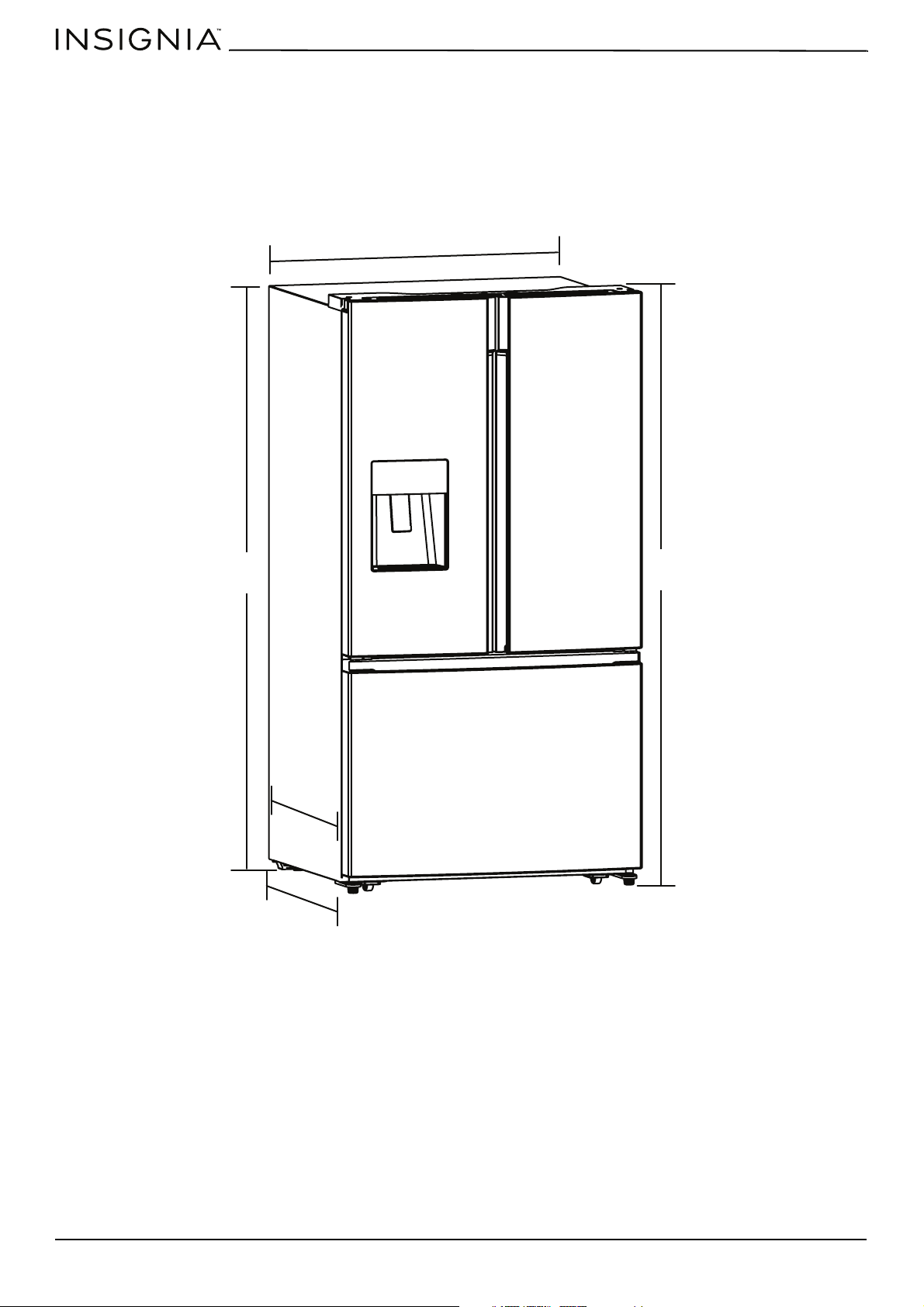
Dimensions. . . . . . . . . . . . . . . . . . . . . . . . . . . . . . . . . . . . . . . . . . . . . . . . . . . . . . . . . . . . . . . . . . . . . . . . . . . . . . . . . . . . . . . . . . . . . . . . . . . . . . . 6
Interior . . . . . . . . . . . . . . . . . . . . . . . . . . . . . . . . . . . . . . . . . . . . . . . . . . . . . . . . . . . . . . . . . . . . . . . . . . . . . . . . . . . . . . . . . . . . . . . . . . . . . . . . . . . 7
Control panel. . . . . . . . . . . . . . . . . . . . . . . . . . . . . . . . . . . . . . . . . . . . . . . . . . . . . . . . . . . . . . . . . . . . . . . . . . . . . . . . . . . . . . . . . . . . . . . . . . . . . 8
Setting up your refrigerator . . . . . . . . . . . . . . . . . . . . . . . . . . . . . . . . . . . . . . . . . . . . . . . . . . . . . . . . . . . . . . . . . . . . . . . . . . . 9
Before using your refrigerator . . . . . . . . . . . . . . . . . . . . . . . . . . . . . . . . . . . . . . . . . . . . . . . . . . . . . . . . . . . . . . . . . . . . . . . . . . . . . . . . . . . . . 9
Finding a suitable location . . . . . . . . . . . . . . . . . . . . . . . . . . . . . . . . . . . . . . . . . . . . . . . . . . . . . . . . . . . . . . . . . . . . . . . . . . . . . . . . . . . . . . . 10
Leveling your refrigerator . . . . . . . . . . . . . . . . . . . . . . . . . . . . . . . . . . . . . . . . . . . . . . . . . . . . . . . . . . . . . . . . . . . . . . . . . . . . . . . . . . . . . . . . 13
Aligning the refrigerator doors (Optional) . . . . . . . . . . . . . . . . . . . . . . . . . . . . . . . . . . . . . . . . . . . . . . . . . . . . . . . . . . . . . . . . . . . . . . . . 14
Removing and replacing the refrigerator doors (Optional). . . . . . . . . . . . . . . . . . . . . . . . . . . . . . . . . . . . . . . . . . . . . . . . . . . . . . . . . 14
Replacing the refrigerator doors. . . . . . . . . . . . . . . . . . . . . . . . . . . . . . . . . . . . . . . . . . . . . . . . . . . . . . . . . . . . . . . . . . . . . . . . . . . . . . . . . . 16
Removing and replacing the front of the freezer drawer. . . . . . . . . . . . . . . . . . . . . . . . . . . . . . . . . . . . . . . . . . . . . . . . . . . . . . . . . . . 18
Connecting the water supply. . . . . . . . . . . . . . . . . . . . . . . . . . . . . . . . . . . . . . . . . . . . . . . . . . . . . . . . . . . . . . . . . . . . . . . . . 21
Connecting the water supply line to your refrigerator . . . . . . . . . . . . . . . . . . . . . . . . . . . . . . . . . . . . . . . . . . . . . . . . . . . . . . . . . . . . . 24
Using your refrigerator. . . . . . . . . . . . . . . . . . . . . . . . . . . . . . . . . . . . . . . . . . . . . . . . . . . . . . . . . . . . . . . . . . . . . . . . . . . . . . . 25
Powering your refrigerator . . . . . . . . . . . . . . . . . . . . . . . . . . . . . . . . . . . . . . . . . . . . . . . . . . . . . . . . . . . . . . . . . . . . . . . . . . . . . . . . . . . . . . . 25
Switching between Fahrenheit and Celsius . . . . . . . . . . . . . . . . . . . . . . . . . . . . . . . . . . . . . . . . . . . . . . . . . . . . . . . . . . . . . . . . . . . . . . . 25
Setting the refrigerator temperature . . . . . . . . . . . . . . . . . . . . . . . . . . . . . . . . . . . . . . . . . . . . . . . . . . . . . . . . . . . . . . . . . . . . . . . . . . . . . 25
Setting the freezer temperature . . . . . . . . . . . . . . . . . . . . . . . . . . . . . . . . . . . . . . . . . . . . . . . . . . . . . . . . . . . . . . . . . . . . . . . . . . . . . . . . . . 25
Using the ice and water dispenser . . . . . . . . . . . . . . . . . . . . . . . . . . . . . . . . . . . . . . . . . . . . . . . . . . . . . . . . . . . . . . . . . . . . . . . . . . . . . . . . 26
Using Super Cool to speed refrigerator cooling . . . . . . . . . . . . . . . . . . . . . . . . . . . . . . . . . . . . . . . . . . . . . . . . . . . . . . . . . . . . . . . . . . . 27
Using Super Freeze to speed freezing . . . . . . . . . . . . . . . . . . . . . . . . . . . . . . . . . . . . . . . . . . . . . . . . . . . . . . . . . . . . . . . . . . . . . . . . . . . . 27
Using the Energy Saving mode . . . . . . . . . . . . . . . . . . . . . . . . . . . . . . . . . . . . . . . . . . . . . . . . . . . . . . . . . . . . . . . . . . . . . . . . . . . . . . . . . . . 27
Using the door baskets. . . . . . . . . . . . . . . . . . . . . . . . . . . . . . . . . . . . . . . . . . . . . . . . . . . . . . . . . . . . . . . . . . . . . . . . . . . . . . . . . . . . . . . . . . . 28
Removing and re-installing the glass shelves . . . . . . . . . . . . . . . . . . . . . . . . . . . . . . . . . . . . . . . . . . . . . . . . . . . . . . . . . . . . . . . . . . . . . 28
Removing and re-installing the glass shelves . . . . . . . . . . . . . . . . . . . . . . . . . . . . . . . . . . . . . . . . . . . . . . . . . . . . . . . . . . . . . . . . . . . . . 28
Opening and closing doors . . . . . . . . . . . . . . . . . . . . . . . . . . . . . . . . . . . . . . . . . . . . . . . . . . . . . . . . . . . . . . . . . . . . . . . . . . . . . . . . . . . . . . 29
Maintaining your refrigerator . . . . . . . . . . . . . . . . . . . . . . . . . . . . . . . . . . . . . . . . . . . . . . . . . . . . . . . . . . . . . . . . . . . . . . . . 29
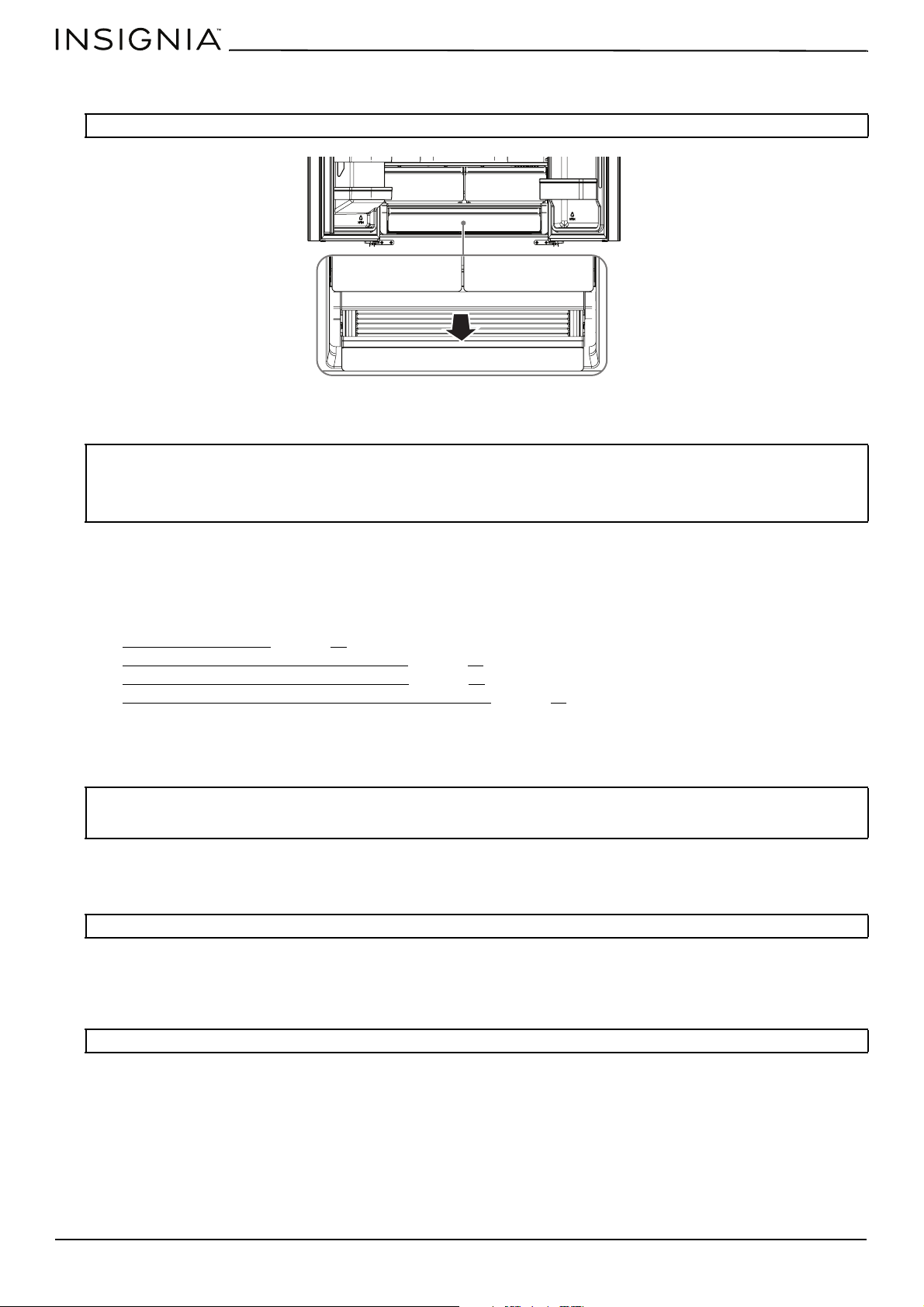
Removing the crisper and full-width drawers . . . . . . . . . . . . . . . . . . . . . . . . . . . . . . . . . . . . . . . . . . . . . . . . . . . . . . . . . . . . . . . . . . . . . 29
Cleaning your refrigerator. . . . . . . . . . . . . . . . . . . . . . . . . . . . . . . . . . . . . . . . . . . . . . . . . . . . . . . . . . . . . . . . . . . . . . . . . . . . . . . . . . . . . . . . 30
Defrosting the freezer compartment . . . . . . . . . . . . . . . . . . . . . . . . . . . . . . . . . . . . . . . . . . . . . . . . . . . . . . . . . . . . . . . . . . . . . . . . . . . . . 30
Replacing the water filter . . . . . . . . . . . . . . . . . . . . . . . . . . . . . . . . . . . . . . . . . . . . . . . . . . . . . . . . . . . . . . . . . . . . . . . . . . . . . . . . . . . . . . . . 31
Maintaining the ice bucket . . . . . . . . . . . . . . . . . . . . . . . . . . . . . . . . . . . . . . . . . . . . . . . . . . . . . . . . . . . . . . . . . . . . . . . . . . . . . . . . . . . . . . . 33
Replacing the LED light . . . . . . . . . . . . . . . . . . . . . . . . . . . . . . . . . . . . . . . . . . . . . . . . . . . . . . . . . . . . . . . . . . . . . . . . . . . . . . . . . . . . . . . . . . 33
Storing your refrigerator . . . . . . . . . . . . . . . . . . . . . . . . . . . . . . . . . . . . . . . . . . . . . . . . . . . . . . . . . . . . . . . . . . . . . . . . . . . . . 33
Moving your refrigerator . . . . . . . . . . . . . . . . . . . . . . . . . . . . . . . . . . . . . . . . . . . . . . . . . . . . . . . . . . . . . . . . . . . . . . . . . . . . . 34
Tips on saving energy. . . . . . . . . . . . . . . . . . . . . . . . . . . . . . . . . . . . . . . . . . . . . . . . . . . . . . . . . . . . . . . . . . . . . . . . . . . . . . . . 34
Troubleshooting. . . . . . . . . . . . . . . . . . . . . . . . . . . . . . . . . . . . . . . . . . . . . . . . . . . . . . . . . . . . . . . . . . . . . . . . . . . . . . . . . . . . . 34
Specifications. . . . . . . . . . . . . . . . . . . . . . . . . . . . . . . . . . . . . . . . . . . . . . . . . . . . . . . . . . . . . . . . . . . . . . . . . . . . . . . . . . . . . . . . 37
ONE-YEAR LIMITED WARRANTY . . . . . . . . . . . . . . . . . . . . . . . . . . . . . . . . . . . . . . . . . . . . . . . . . . . . . . . . . . . . . . . . . . . . . . 38
www.insigniaproducts.com
3
20.1 Cu. Ft. French Door Counter Depth Refrigerator
IMPORTANT SAFETY INSTRUCTIONS
Your safety and the safety of others are very important. We have provided many important safety messages in this manual
and on your appliance. Always read and obey all safety messages.
WARNING
To reduce the risk of fire, electrical shock, injury to persons, or damage when using the refrigerator, follow basic
precautions, including the following:
• Make sure that everyone using this appliance is familiar with its operations and safety features.
• This appliance is not intended for use by persons (including children) with reduced physical, sensory, or mental
capabilities, unless supervised or properly instructed.
• Plug into a grounded 3-prong outlet.
• Do not remove ground prong.
• Do not use an adapter.
• Do not use an extension cord.
• If the power supply cord is damaged, it must be replaced by the manufacturer, its service agent, or a similarly qualified
person to avoid a hazard.
• Disconnect power before servicing.
• Do not use electrical appliances inside the food storage compartments of the refrigerator, unless they are of the type
recommended by the manufacturer.
• Replace all parts and panels before operating.
• Flammable refrigerant used. To be repaired only by trained service personnel. Do not puncture refrigerant tubing.
• Flammable refrigerant used. Dispose of properly in accordance with federal or local regulations.
• Flammable refrigerant used. Follow handling instructions carefully. Risk of fire or explosion due to puncture of
refrigerant tubing.
• Use nonflammable cleaner.
• Do not use mechanical devices or other means to accelerate the defrosting process, other than those recommended by
the manufacturer.
• Keep flammable materials and vapors, such as gasoline, away from refrigerator.
•
CAUTION: Do not store products which contain flammable propellants (e.g. spray cans) or explosive substances in
the refrigerator.
• Keep ventilation openings in the appliance enclosure or in the built-in structure clear of obstruction.
• Connect to potable water supply only.
• Use two or more people to move and install the refrigerator.
• To avoid the risk of children becoming trapped and suffocating, do not allow them to play or hide inside the
refrigerator.
READ AND SAVE THESE INSTRUCTIONS
CAUTION
RISK OF ELECTRIC SHOCK
DO NOT OPEN
This is the safety alert symbol. This symbol alerts you to potential
hazards that can kill or hurt you and others. All safety messages will
follow the safety alert symbol and either the word “DANGER,”
“WARNING” or “CAUTION.” These words mean:
• DANGER: An imminently hazardous situation. You could be killed
or seriously injured if you don’t immediately follow instructions.
• WARNING: A potentially hazardous situation which, if not
avoided, could result in death or serious bodily injury.
• CAUTION: A potentially hazardous situation which, if not
avoided, may result in moderate or minor injury.
All safety messages will tell you what the potential hazard is, tell
you how to reduce the chance of injury, and tell you what can
happen if the instructions are not followed.
www.insigniaproducts.com
4
Proper disposal of your old refrigerator
IMPORTANT: Child entrapment and suffocation are not problems of the past. Junked or abandoned refrigerators are
still dangerous– even if they will sit for “just a few days.” If you are getting rid of your old refrigerator, please follow these
instructions to help prevent accidents.
Before you throw away your old refrigerator or freezer:
•Take off the doors.
• Leave the shelves in place so that children may not easily climb inside.
WARNING
1 Read these instructions.
2 Keep these instructions.
3 Heed all warnings.
4 Follow all instructions.
5 Do not use this appliance near water.
6 Clean only with a damp cloth or sponge using a non-corrosive, neutral detergent. Remove residual detergent with clear
water.
7 Do not block any ventilation openings. This includes placing large amounts of food in front of the air outlets on the rear
walls of the refrigerator and freezer compartments.
8 Install in accordance with the manufacturer’s instructions.
9 Do not install near any heat sources, such as radiators, heat registers, stoves, or other apparatus that produce heat.
10 Do not defeat the safety purpose of the polarized or grounding-type plug. A polarized plug has two blades with one
wider than the other. A grounding type plug has two blades and a third grounding prong. The wide blade or the third
prong are provided for your safety. If the provided plug does not fit into your outlet, consult an electrician for
replacement of the obsolete outlet.
11 Protect the power cord from being walked on or pinched, particularly at plugs, convenience receptacles, and the point
where it exits from the appliance.
12 Do not attempt to modify or extend the power cord of your refrigerator.
13 Unplug your refrigerator during lightning storms or when it will not be used for long periods of time.
14 Make sure that the available AC power matches the voltage requirements of your refrigerator.
15 Do not handle the plug with wet hands. This could result in an electric shock.
16 Unplug the power cord by holding the plug, never by pulling the cord.
17 Refer all servicing to qualified service personnel. Servicing is required when your refrigerator has been damaged in any
way, such as the power-supply cord or plug is damaged, liquid has been spilled or objects have fallen into your
refrigerator, your refrigerator has been exposed to rain or moisture, does not operate normally, or has been dropped.
18 To reduce the risk of fire or electric shock, do not expose your refrigerator to rain, moisture, dripping, or splashing, and
no objects filled with liquids should be placed on top of it.
19 Do not use extension cords or ungrounded (two prong) adapters. If the power cord is too short, have a qualified
electrician install an outlet near your refrigerator. Use of an extension cord can negatively affect your refrigerator’s
performance.
20 Your refrigerator is not intended for use by persons (including children) with reduced physical, sensory, or mental
capabilities, or lack of experience and knowledge, unless they have been given supervision or instruction concerning
use of your refrigerator by a person responsible for their safety.
21 Children should be supervised to ensure that they do not play with your refrigerator.
22 If the power cord is damaged, it must be replaced by the manufacturer, its service agent, or similarly qualified person, in
order to avoid a hazard.
WARNING
Suffocation Hazard
Remove doors from your old refrigerator. Failure to do so can result
in death or brain damage.
Important information about disposal of refrigerants: Dispose of refrigerator in accordance with Federal and Local
regulations. Refrigerants must be evacuated by a licensed, EPA certified refrigerant technician in accordance with
established procedures.
www.insigniaproducts.com
5
20.1 Cu. Ft. French Door Counter Depth Refrigerator
WARNING
Electric Shock Hazard
Failure to follow these instructions can result in electric shock, fire, or death.
1 WARNING–Keep ventilation openings, in both your refrigerator and the built-in structure, clear of obstruction.
2 WARNING–Do not touch the interior of your refrigerator with wet hands. This could result in frostbite.
3 WARNING–Do not use mechanical devices or other means to accelerate the defrosting process, other than those
recommended by the manufacturer.
4 WARNING–Do not use electrical appliances inside the food storage compartments of this appliance, unless they are of
the type recommended by the manufacturer.
5 WARNING–Do not damage the refrigerant circuit.
6 WARNING–Do not damage the refrigerant tubing when handling, moving, or using your refrigerator.
7 WARNING–Connect your refrigerator to a potable (drinking) water supply.
8 WARNING–Never allow children to play with, operate, or crawl inside your refrigerator.
Risk of child entrapment. Before you throw away your old refrigerator:
•Take off the doors.
• Leave the shelves in place so that children may not easily climb inside.
9 Unplug your refrigerator before carrying out user maintenance on it.
10 If a component part is damaged, it must be replaced by the manufacturer, its service agent, or similar qualified persons
in order to avoid a hazard.
11 Follow local regulations regarding disposal of your refrigerator due to flammable refrigerant and gas. All refrigeration
products contain refrigerants, which under the guidelines of federal law must be removed before disposal. It is the
consumer's responsibility to comply with federal and local regulations when disposing of this product.
12 Your refrigerator is intended to be used in household and similar applications, such as:
• Staff kitchen areas in shops, offices, and other working environments
• Farm houses and by clients in hotels, motels, and other residential type environments
• Bed-and-breakfast type environments
• Catering and similar, non-retail applications
13 Do not store or use gasoline or any flammable liquids inside or in the vicinity of your refrigerator.
Grounding requirement
Your refrigerator must be grounded. Your refrigerator is equipped with a cord having a grounding wire with a grounding
plug. The plug must be inserted into an outlet that is correctly installed and grounded.
Incorrect use of the grounding plug can result in a risk of electric shock. Consult a qualified electrician or service person if
the grounding instructions are not completely understood, or if doubt exists as to whether your refrigerator is correctly
grounded.
www.insigniaproducts.com
6
Features
Package contents
• 20.1 cu. ft. French door refrigerator
•User Guide
Dimensions
3
6
"
(
9
1
.
4
c
m
)
2
8
.
6
"
(
7
2
.
7
c
m
)
6
8
.
7
"
(
1
7
4
.
5
c
m
)
70" (177.8 cm)
2
4
.
2
"
(
6
1
.
5
c
m
)
www.insigniaproducts.com
7
20.1 Cu. Ft. French Door Counter Depth Refrigerator
Interior
Note: The illustrations shown in this User Guide are only for reference. The actual product may differ slightly.
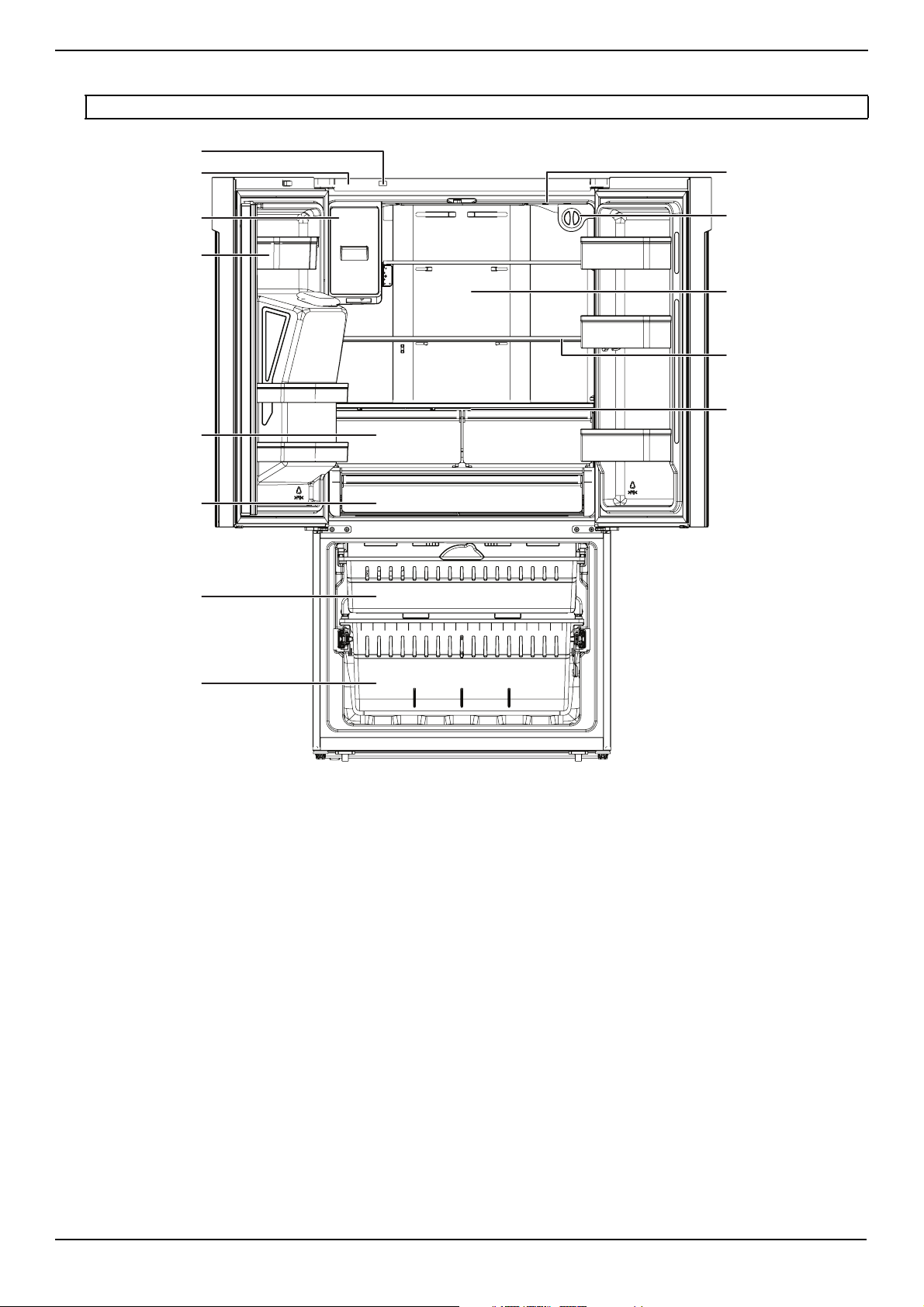
Ice maker
Crisper drawer
Full-width drawer
Freezer upper drawer
Freezer lower drawer
Hinge cover
Ice/Water Lockout switch
Refrigerator LED light
Water filter
Glass shelf
Air duct outlet
Crisper cover
Door bin
www.insigniaproducts.com
8
Control panel
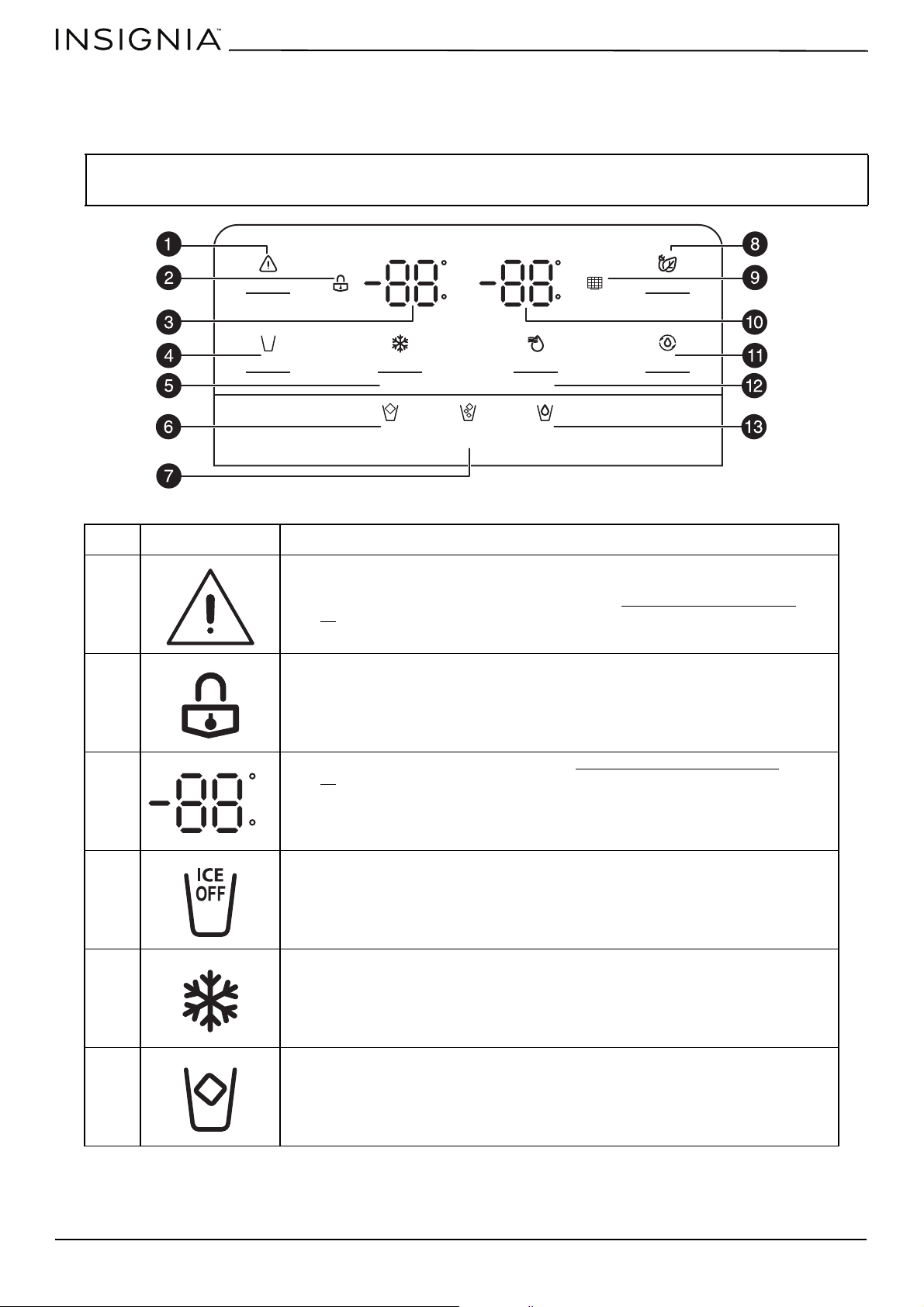
The control panel is located on your refrigerator’s door. The display illuminates when you plug in the power cord, a button
is pressed, or a door opened. The display automatically turns off after 60 seconds.
CAUTION:
Temperatures inside each compartment may vary from the temperature displayed on the control panel, depending on
how much food you store and where you place it. Ambient temperature may also affect the actual temperature inside your
refrigerator.
NO.
ITEM DESCRIPTION
1
Press to turn off the open door alarm.
Press and hold for three seconds to lock the control panel and water dispenser. To
unlock, press and hold again for three seconds. See “Opening and closing doors
” on
page 29
for more information.
2
Lights when the child lock is turned on.
3
Displays the freezer temperature setting. See Setting the freezer temperature
on
page 25
.
4
Press to stop making ice cubes. The icon lights up when ice is turned off. Press again to
turn ice back on.
5
Press repeatedly to adjust the freezer temperature from 7° to -11°F (-14° to -24°C).
Press and hold for three seconds to turn on the super freeze function, which reduces
the freezer temperature to -11°F (-24°C) for 52 hours, then reverts back to its last
setting.
6
Press to dispense Cubed ice. The icon lights up to show your selection.
C
F
C
F
°F/ °C
Ice Off
Alarm
Child Lock
Hold 3 Sec
Cubed Crushed Water
ICE
OFF
Eco
Filter Reset
Hold 3 Sec
Freezer
Super Freeze
Hold 3 Sec
Fridge
Super Cool
Hold 3 Sec
C
F
www.insigniaproducts.com
9
20.1 Cu. Ft. French Door Counter Depth Refrigerator
Setting up your refrigerator
Before using your refrigerator
Unpacking the refrigerator
• Remove the interior packing and throw it away or recycle it.
• If the refrigerator has been in a horizontal or tilted position for any period of time, let your refrigerator stand upright for
approximately two hours before connecting it to power. This lets the oil settle into the compressor and reduces the
possibility of a malfunction in the cooling system from improper handling during transportation.
• Remove tape and glue residue from surfaces before turning on the refrigerator. Rub a small amount of liquid dish soap
over the adhesive with your fingers. Wipe with warm water and dry.
• Wash the inside with a damp warm cloth soaked in a solution of one quart of lukewarm water to two tablespoons of
baking soda. See “Cleaning your refrigerator
” on page 30 for more information.
• Wait for approximately 10 minutes after moving your refrigerator or plugging it in for the first time so that the coolant
fluid settles.
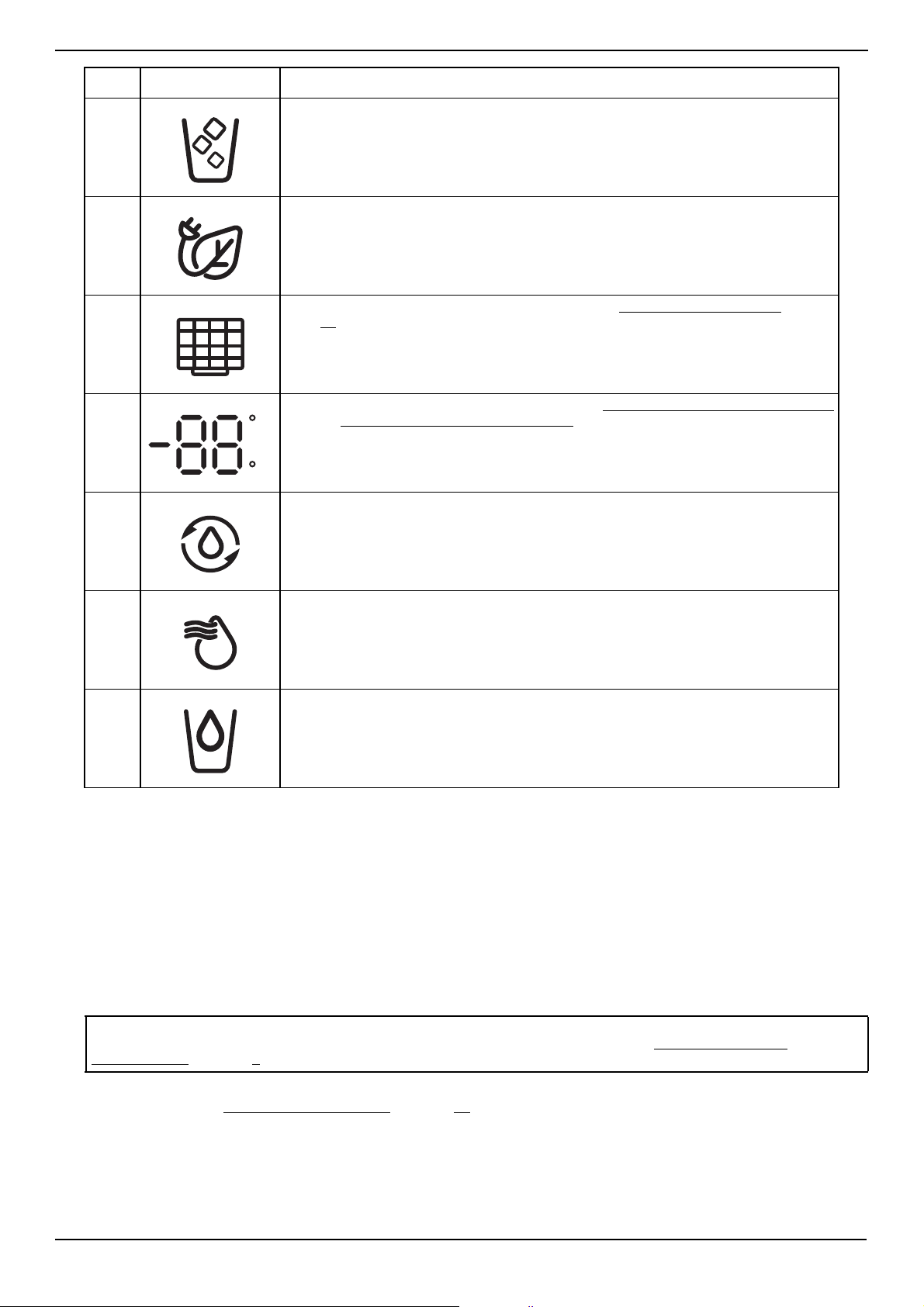
7
Press to dispense Crushed ice. The icon lights up to show your selection.
8
Press to enter (or exit) energy save mode. The refrigerator temperature changes to
43°F (6°C) and the freezer temperature changes to 1° F (-17° C).
After changing the water filter, press and hold to reset the filter reminder.
9
Blinks when it’s time to change the water filter. See “Replacing the water filter
” on
page 31 for more information.
10
Displays the refrigerator temperature setting. See Setting the refrigerator temperature
on page Setting the refrigerator temperature
.
11
Press to switch between Fahrenheit or Celsius. The indicator lights up when Fahrenheit
is selected.
12
Press repeatedly to adjust the refrigerator temperature from 46° to 36° F (8° to 2° C).
Press and hold for three seconds to turn on the super cool function, which reduces the
refrigerator temperature to 36° F (2° C) for three hours, then reverts back to its last
setting.
13
Press to dispense Water. The icon lights up to show your selection.
Note: Do not use sharp instruments, rubbing alcohol, flammable fluids, or abrasive cleaners to remove tape or glue.
These products can damage the surface of your refrigerator. For more information, see “IMPORTANT SAFETY
INSTRUCTIONS” on page 3.
NO.
ITEM DESCRIPTION
C
F
www.insigniaproducts.com
10
• For correct operation, you should level your refrigerator using the leveling feet. If you do not level your refrigerator, the
doors may not close or seal correctly, causing cooling, frost, and moisture problems. Turn the leveling feet clockwise to
raise or counterclockwise to lower a side. The leveling feet are easier to adjust if you have someone push against the
top of your refrigerator to take some weight off.
• When moving your refrigerator, do not tilt it beyond 45 ° from upright.
Finding a suitable location
• Place your refrigerator on a floor that is strong enough to support your refrigerator when it is fully loaded.
• Do not install your refrigerator on carpeting or a rug.
• Your refrigerator is designed to be free standing and should not be recessed or built-in.
• This refrigerator is designed for indoor, household use only. If you use your refrigerator in a garage, make sure that the
ambient temperature is between 55° F (13° C) and 110° F (43° C). If you operate your refrigerator outside this
temperature range, your refrigerator may not work correctly. The preferred room temperature range for optimum
performance, which reduces electricity usage and provides superior cooling, is between 60° F (15° C) and 90° F (32° C).
It is recommended that you do not install the refrigerator near a heat source, such as an oven or radiator.
• Before moving, retract the leveling legs to avoid scraping the floor, then adjust the feet to keep your refrigerator level.
• If you locate your refrigerator next to a fixed wall, allow sufficient space on the sides for the doors to swing open.
• The refrigerator has wheels, which should be used for only forward and backward movement. Moving the refrigerator
sideways may damage your floor.
• Position your refrigerator away from direct sunlight and sources of heat, such as a stove, heater, or radiator. Direct
sunlight may affect the acrylic coating and heat sources may increase electrical consumption. Extremely cold
temperatures may also prevent your refrigerator from performing correctly.
• Avoid locating your refrigerator in moist areas.
Locating near a water supply
A cold water supply with water pressure between 30 and 125 psi (207 and 862 kPa) is required to operate the ice maker. If
the refrigerator is installed in an area with low water pressure (below 30 psi (207 kPa)), you can install a booster pump to
compensate for the low pressure. Under normal conditions, a 200cc (5.75 oz.) cup can be filled in about 10 seconds. If the
water pressure is less than what is required, ice cubes could be hollow or irregularly shaped. If you have questions about
your water pressure, call a licensed, qualified plumber.
If you’re using a reverse osmosis water supply:
IMPORTANT: The pressure of the water supply coming out of a reverse osmosis system going to the water inlet valve of the
refrigerator needs to be between 30 and 125 psi (207 and 862 kPa).
If water pressure is too low:
Check to see whether the sediment filter in the reverse osmosis system is blocked. Replace the filter if necessary.
Allow the storage tank on the reverse osmosis system to refill after heavy use. The tank capacity could be too small to keep
up with the requirements of the refrigerator.
If you have questions about your water pressure, call a licensed, qualified plumber.
WARNING: Excessive Weight Hazard
• Use two or more people to move and install refrigerator. Failure to do so can result in back or other injury.
• Handle with care when moving refrigerator to avoid either damaging the refrigerant tubing or increasing the risk of a leak.
WARNING: Fire or Explosion Hazard
• Do not puncture refrigerant tubing.
• Follow handling instructions carefully.
• Flammable refrigerant used.
• Failure to do so can result in death, explosion, or fire.
CAUTION: Your refrigerator is heavy. When moving the refrigerator for cleaning or service, cover the floor with cardboard or hard
board to avoid floor damage. Always pull the refrigerator straight out when moving it. Do not wiggle or “walk” the refrigerator when
trying to move it, as floor damage could occur.
WARNING: Explosion and Fire Hazard
Keep flammable materials and vapors, such as gasoline, away from appliance. Failure to do so can result in death, explosion, or fire.
WARNING: Fire or Explosion Hazard
Do not puncture refrigerant tubing. Follow handling instructions carefully. Flammable refrigerant used. Failure to do so
can result in death, explosion, or fire.
CAUTIONS:
• A qualified plumber should make the water connection.
• Using water pressure that is outside the 30 to 125 psi (207 to 862 kPa) range can cause serious malfunction and severe, damaging
water leaks.
www.insigniaproducts.com
11
20.1 Cu. Ft. French Door Counter Depth Refrigerator
Providing correct ventilation
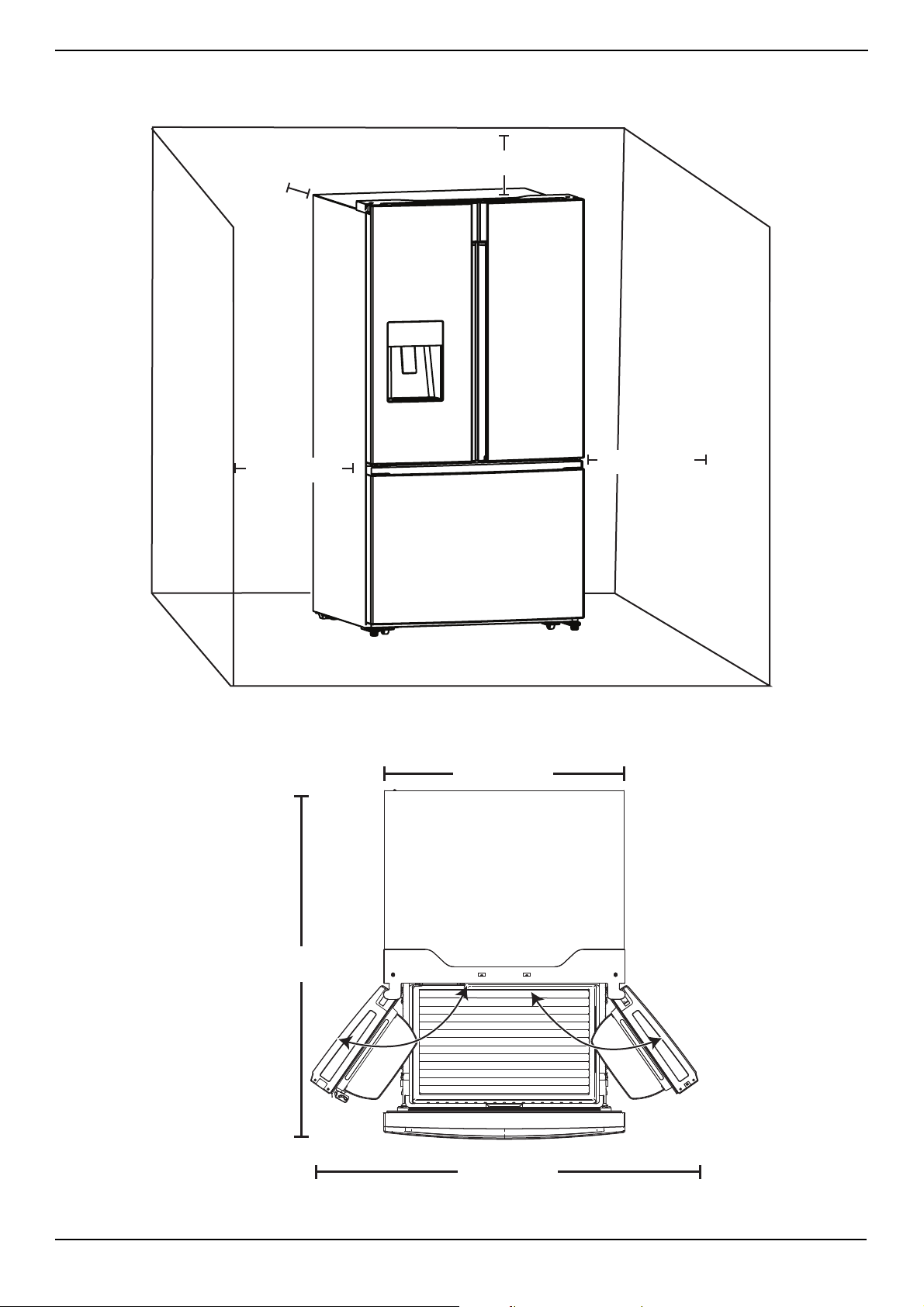
Your refrigerator needs at least 0.5" (1.3 cm) between it and the surrounding side walls, at least 4" (10.2 cm) between it and
the ceiling, and at least 2" (5.1 cm) between it and the back wall.
Providing room for doors to open
Make sure that you have enough room in front of your refrigerator to swing the doors open.
4" (10.2 cm)
0.5" (1.3 cm)
2" (5.1 cm)
0.5" (1.3 cm)
125°
125°
36" (91.4 cm)
4
8
"
(
1
2
2
c
m
)
59.1" (150 cm)
www.insigniaproducts.com
12
Providing the correct power source
Make sure that you have the proper electrical connection. Your refrigerator requires a 115 V, 60 Hz, AC-only, 15- or 20-amp
fused, grounded electrical supply. Use an outlet that cannot be turned off by a switch. A separate circuit serving only your
refrigerator is recommended.
Note: Before performing any type of installation or cleaning, disconnect the refrigerator from the electrical source. When you are
finished, reconnect the refrigerator to the electrical source and reset the temperature controls to the desired setting.
WARNING: Electrical Shock Hazard
• Plug into a grounded 3-prong outlet.
• Do not remove the ground prong from the power cord plug.
• If using a plug adapter, make sure that the adapter is equipped with a ground wire. Attach the ground wire to the screw on wall
outlet.
• Do not use an extension cord.
• Failure to do so can result in death, fire, or electrical shock.
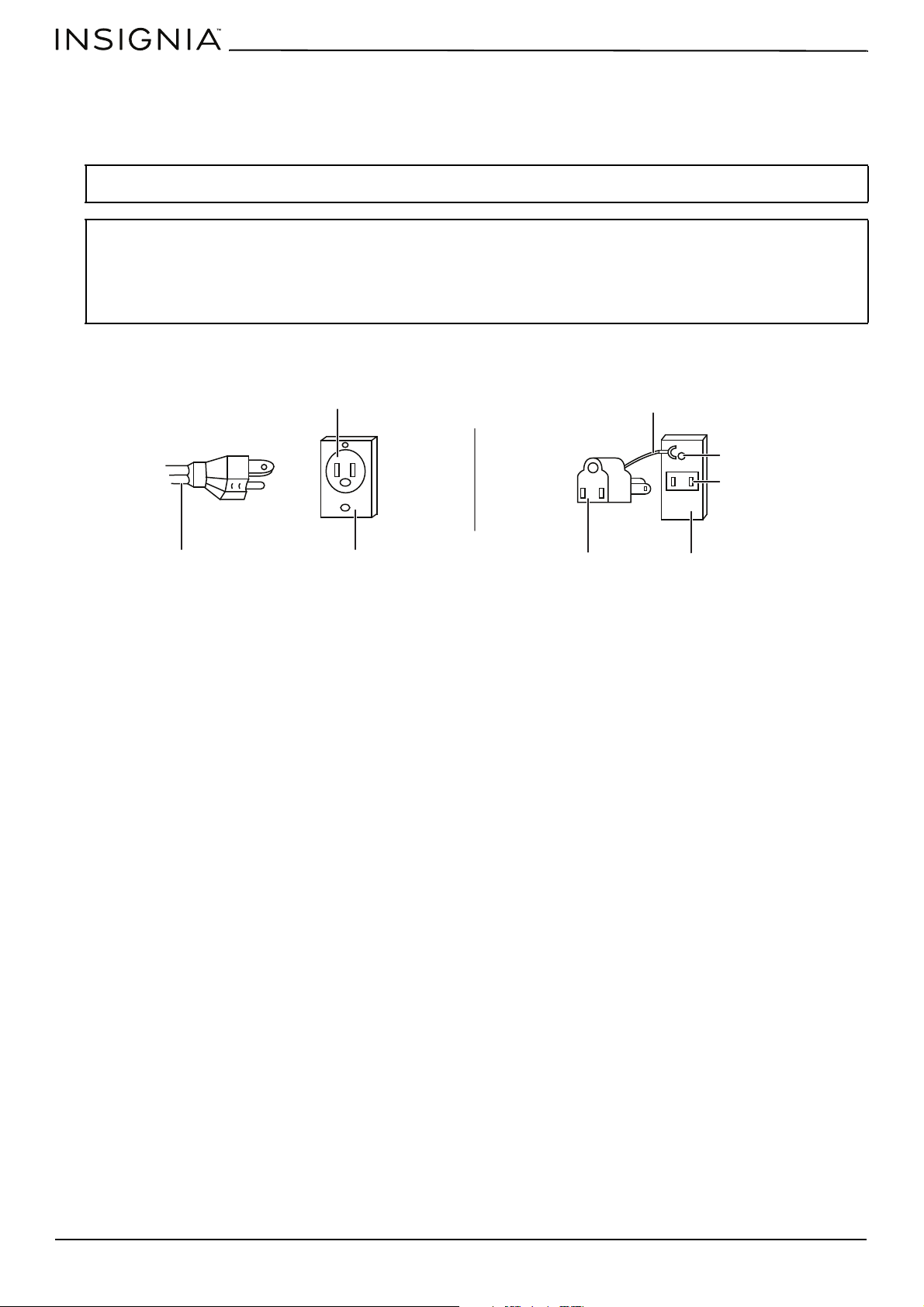
3-prong outlet
Outlet cover
3-prong plug
Grounding lead
Grounding adapter
Outlet cover
Screw
Outlet
Using a 3-prong plug and outlet
Using a grounding adapter
www.insigniaproducts.com
13
20.1 Cu. Ft. French Door Counter Depth Refrigerator
Leveling your refrigerator
Leveling your refrigerator is important. If you do not level your refrigerator during installation, the doors may not close or
seal correctly which can cause cooling, frost, or moisture problems.
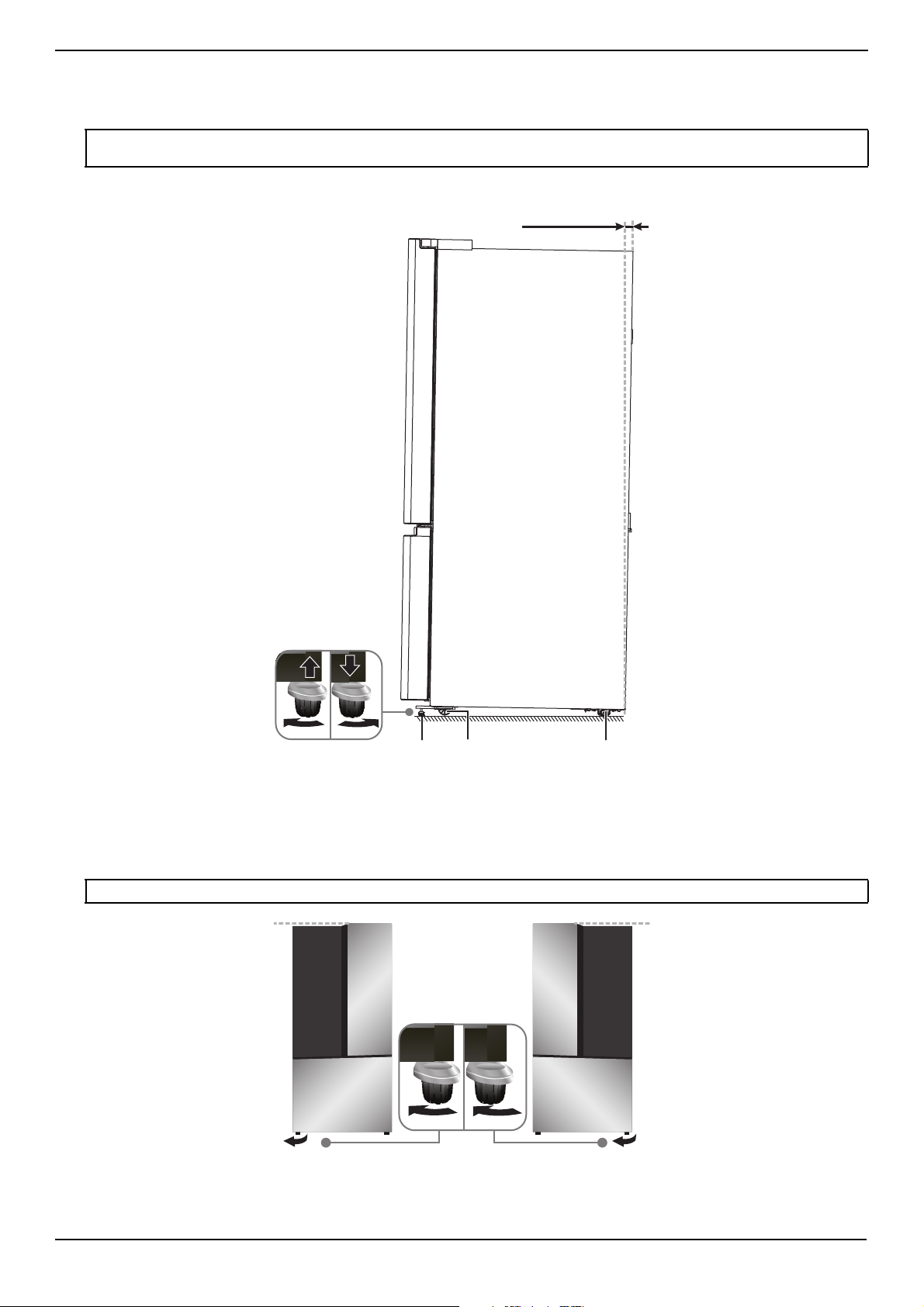
1 Turn the leveling feet at the front of the cabinet to raise (clockwise) or lower (counterclockwise) that side of the
refrigerator until the refrigerator is level side-to-side.
2 Turn both feet (by the same amount in the same direction) to slightly raise the front of the refrigerator. This helps the
doors close automatically.
CAUTION: The rollers are not casters. Use the rollers to move your refrigerator forward or backward. Do not use the rollers to move
your refrigerator from side to side. You might damage the floor or the rollers.
Note: To make it easier to adjust the feet, have someone tilt your refrigerator while you adjust the feet.
0.4" (10 mm) to
0.6" (15 mm)
Adjustable foot Roller Roller
www.insigniaproducts.com
14
Aligning the refrigerator doors (Optional)
If the door is uneven, adjust the adjustable foot on the lower hinge. Screw the foot on the high side of the door and loosen
the foot on the low side of the door body. See Leveling your refrigerator
on page 13.
Removing and replacing the refrigerator doors (Optional)
If the opening to the installation area you chose is too narrow for your refrigerator to pass through, remove the doors and
drawers, then move your refrigerator sideways into the area.
Removing the refrigerator doors
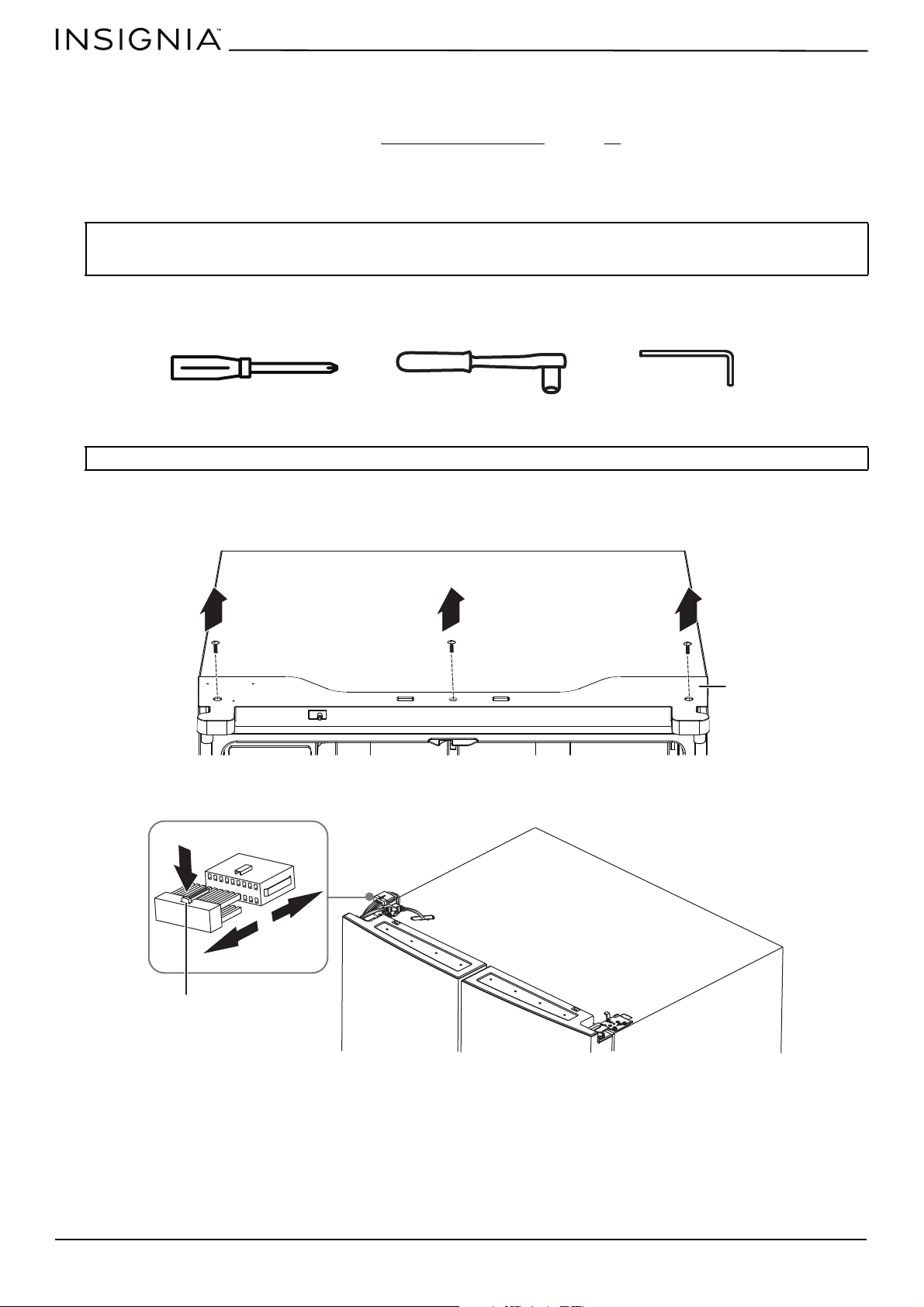
You need the following tools to remove the refrigerator doors:
1 Make sure that your refrigerator is unplugged.
2 With the refrigerator doors shut, use a Phillips screwdriver to remove the three screws that secure the hinge cover to
the top of your refrigerator, then remove the hinge cover with attached entire harness assemblies.
3 To remove the wire connector on the left door, press the top of the connector and pull it away.
WARNING: Electrical Shock Hazard
Disconnect the refrigerator from power before removing the doors. Reconnect ground wire before operating. Failure to do so could
result in death or electric shock.
Note: Do not remove the doors unless you have to.
Phillips screwdriver
8 mm wrench
4 mm Allen wrench
Hinge cover
Wire connector
www.insigniaproducts.com
15
20.1 Cu. Ft. French Door Counter Depth Refrigerator
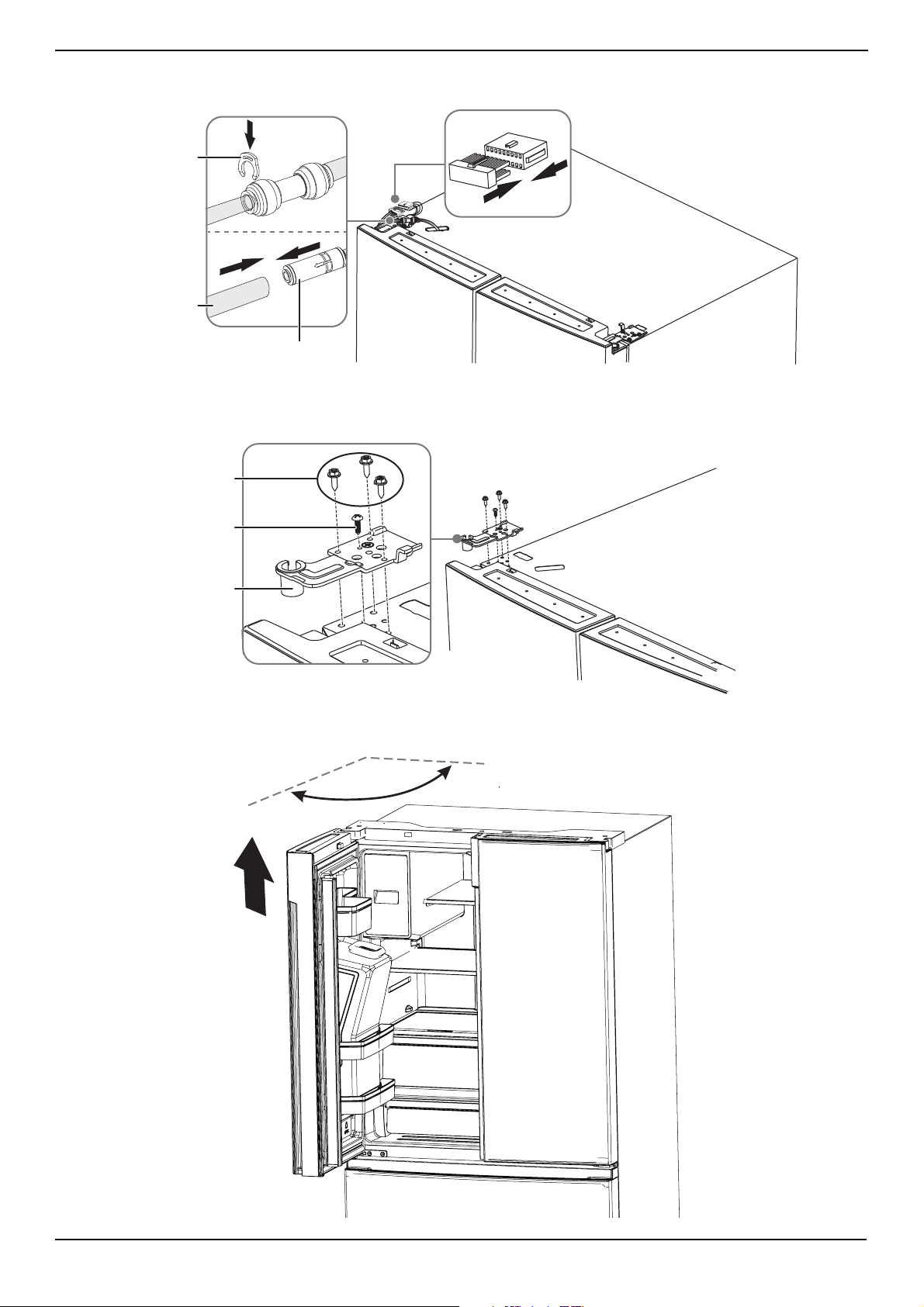
4 To remove the water coupler from the hinge, twist and pull the clips from the coupler, then remove the water line while
pressing the movable part of the water line coupler.
5 To remove the upper left door hinge, use a (5/16" or 8 mm) wrench to remove the three screws on the hinges and a
Phillips screwdriver to remove the ground screw.
6 Use both hands to open the door more than 90°, then lift it up and take it off.
Water line coupler
Water line
Clip
Screws
Ground screw
Upper left door hinge
>90°
www.insigniaproducts.com
16
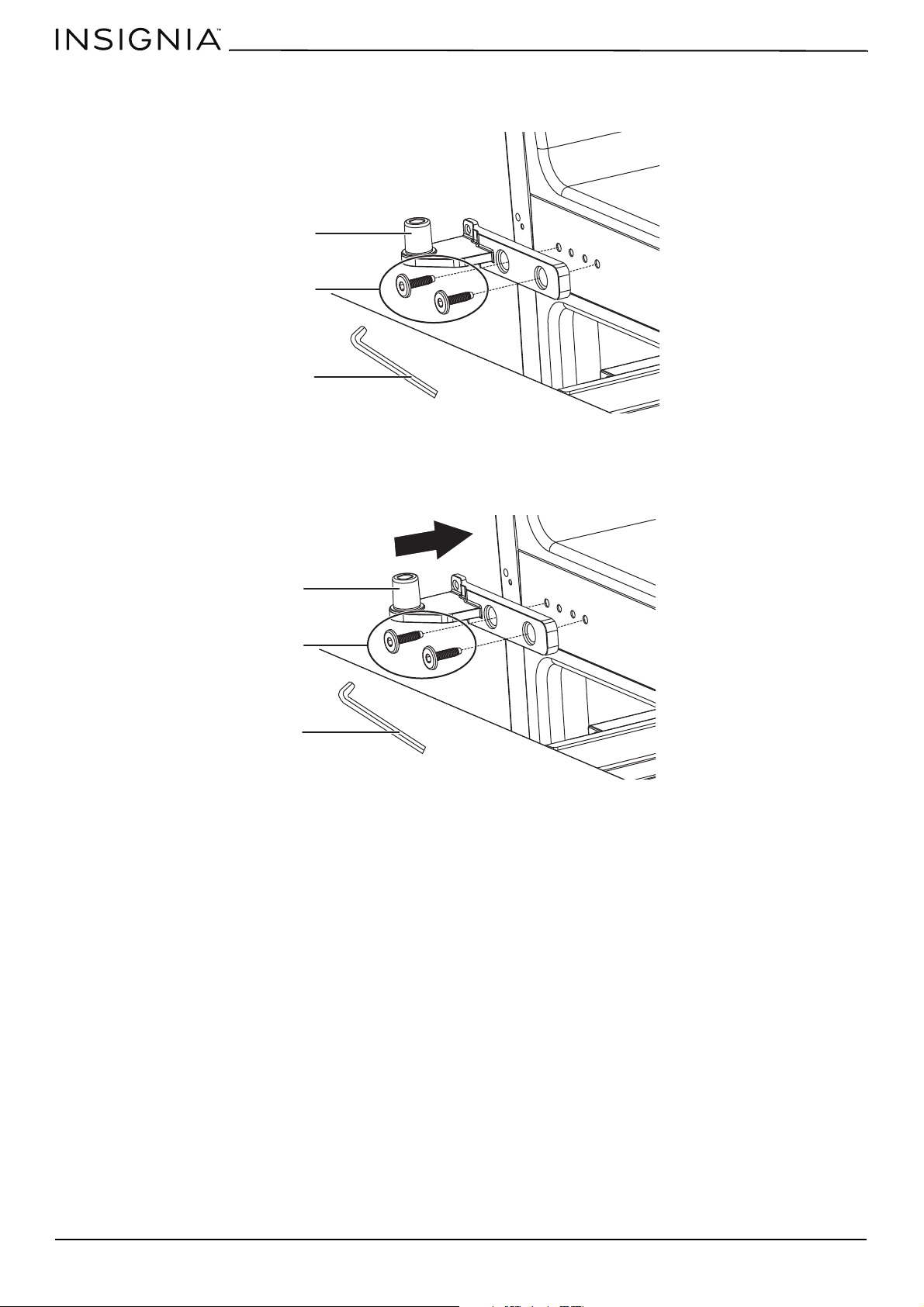
7 If you need to remove the bottom hinge, use an (5/32" or 4 mm) Allen wrench to remove the two hex head bolts that
secure it to the refrigerator.
8 Repeat steps 1–8 to remove the other door.
Replacing the refrigerator doors
1 If removed, reinstall the bottom hinge by securing the two hex head bolts with an (5/32" or 4 mm) Allen wrench.
Bottom hinge
Hex head bolts
Allen wrench
Bottom hinge
Hex head bolts
Allen wrench
www.insigniaproducts.com
17
20.1 Cu. Ft. French Door Counter Depth Refrigerator
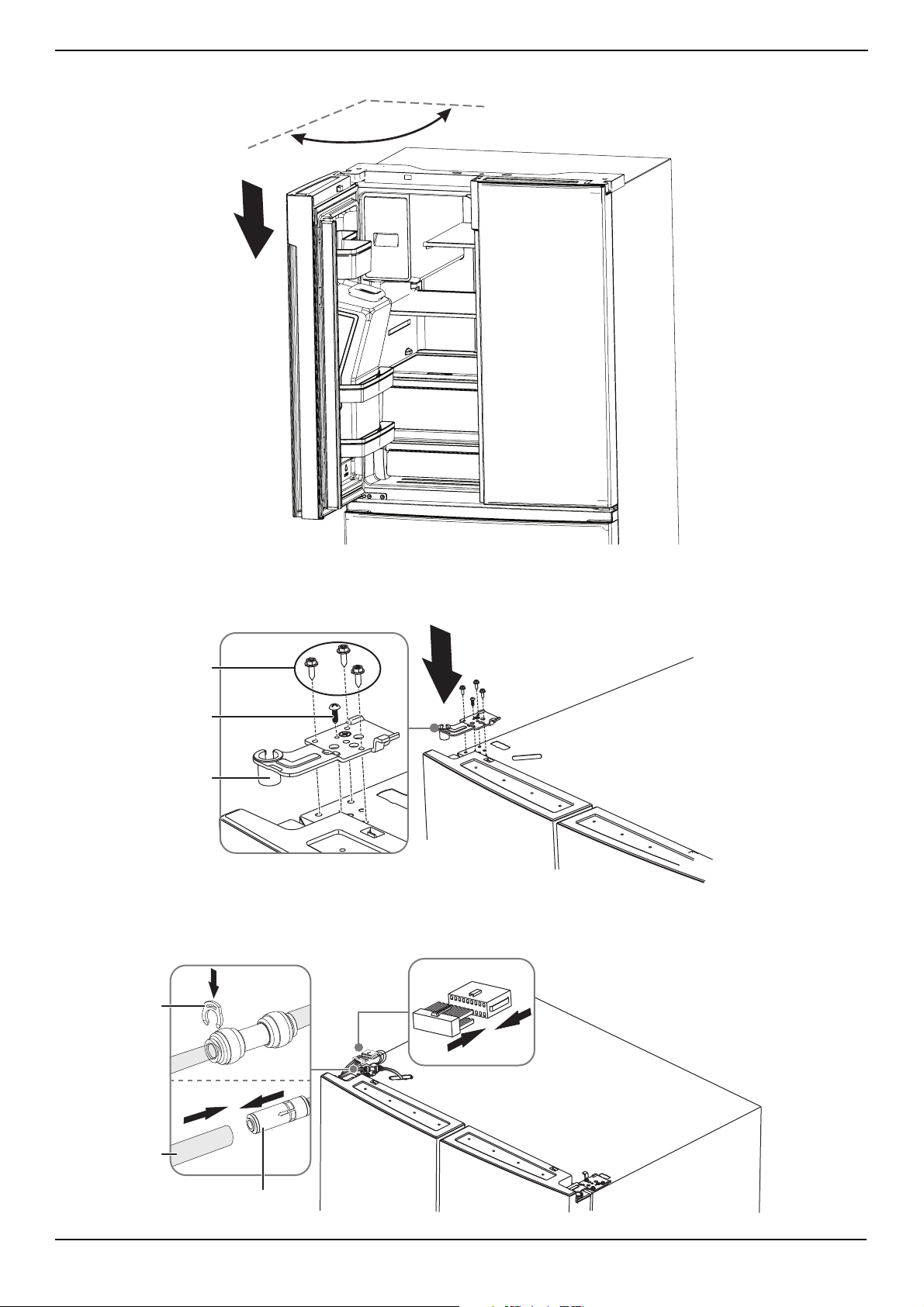
2 Using two or more people, set the refrigerator door onto the bottom hinge.
3 Insert the top hinge into the top of the door.
4 To secure the top hinge, use a Phillips screwdriver to secure the three screws removed earlier.
5 If reattaching the left door, secure the ground screw into the top hinge, reattach the wire harness, reconnect the water
line, and make sure that the clip is properly connected to the coupler.
>90°
Screws
Ground screw
Upper left door hinge
Water line coupler
Water line
Clip
www.insigniaproducts.com
18
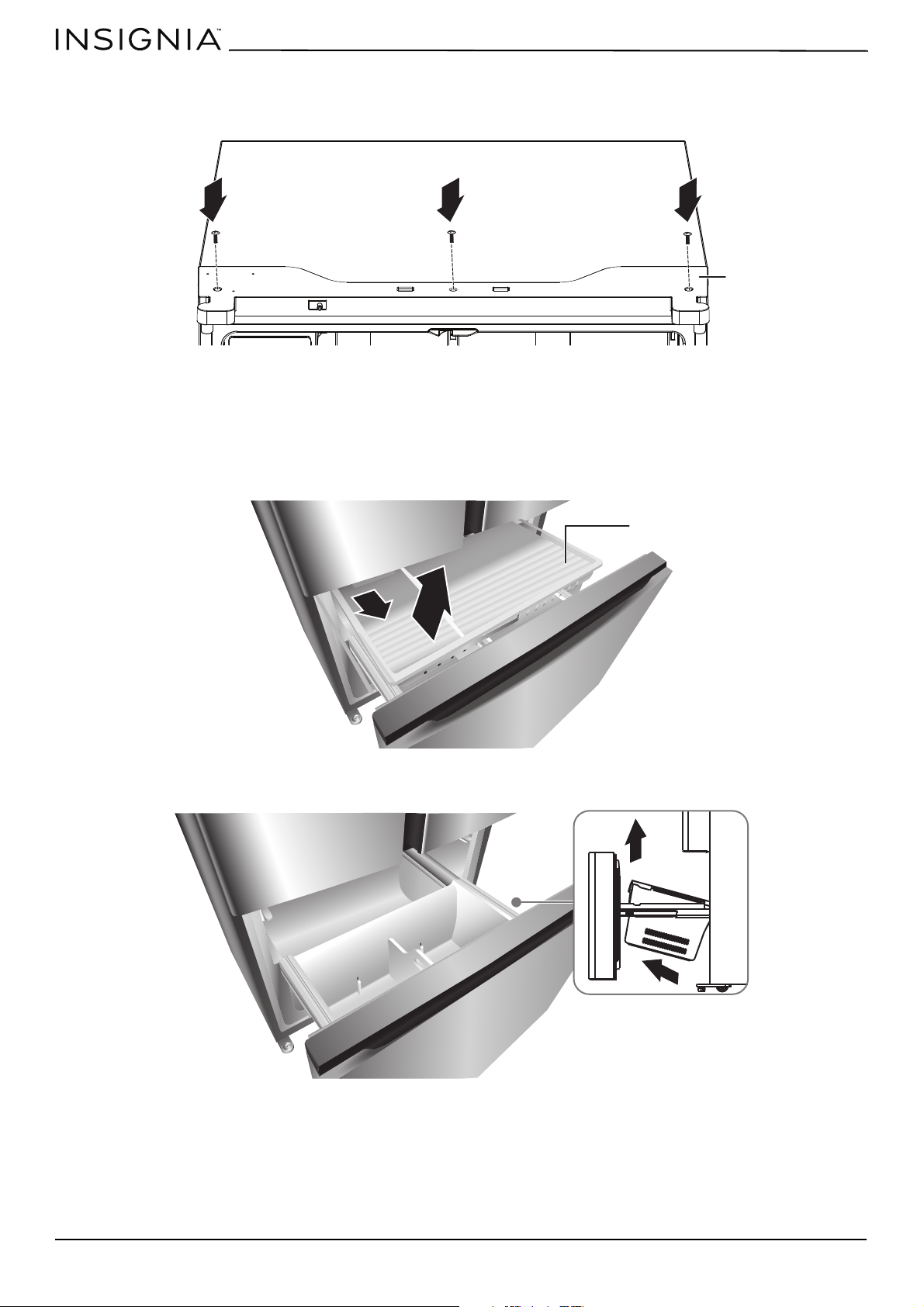
6 Repeat steps 1 through 5 to replace the other door.
7 Using the three screws removed earlier, reinstall the top hinge cover and control panel to the top of the cabinet.
Removing and replacing the front of the freezer drawer
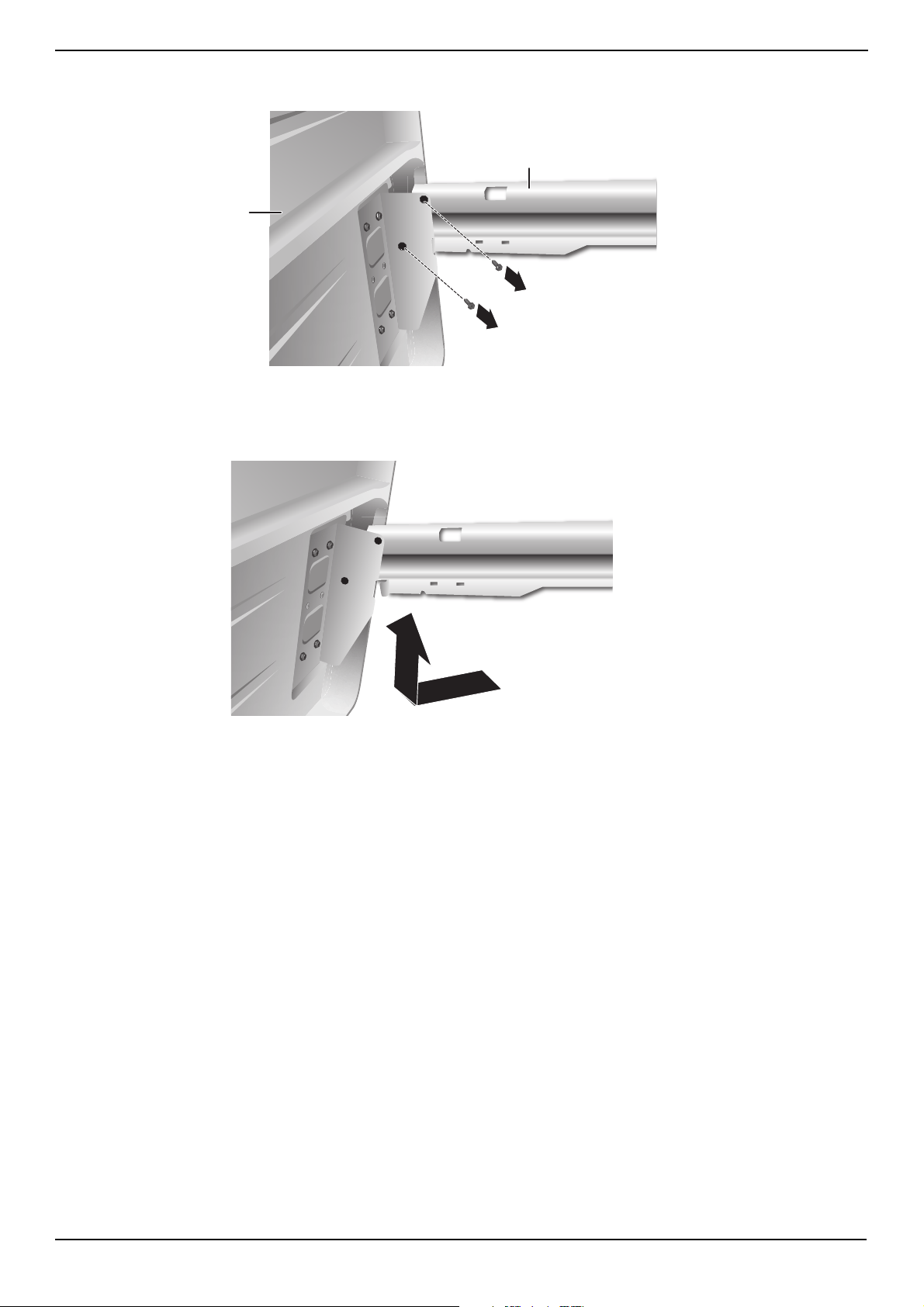
Removing the freezer drawer
1 Slide open the upper freezer drawer to its full extension.
2 Slide open the lower freezer drawer to its full extension.
3 Remove the lower freezer drawer from the glide rails by lifting up and pulling out at an angle.
4 Remove the lower freezer compartment by lifting upward at an angle.
Hinge cover
Lower freezer drawer
www.insigniaproducts.com
19
20.1 Cu. Ft. French Door Counter Depth Refrigerator
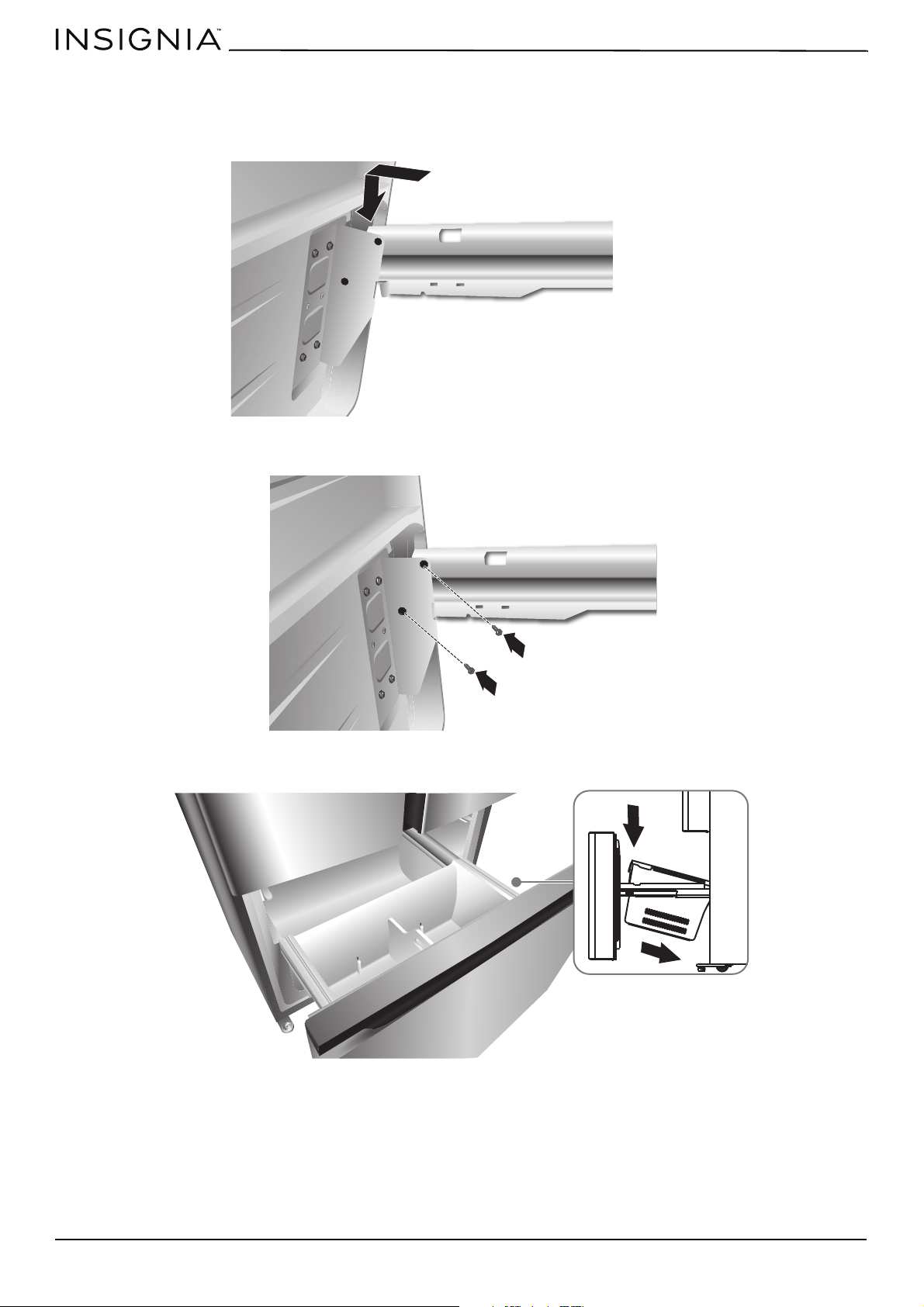
5 Use a (5/16" or 8 mm) socket wrench to remove the two screws attaching the glide rail to the bracket on the interior
panel of the drawer front.
6 Repeat Step 5 to detach the glide rail from the opposite side of the drawer front.
7 Using both hands, grasp the bottom of the drawer front. Pull the bottom of the drawer front toward you while lifting up
to remove.
8 Set the drawer front on a soft surface to protect the finish.
9 Slide the drawer glide rails into the cabinet.
10 Move the refrigerator through the doorway and into the room near the water and electrical connections.
Glide rail
Freezer drawer front
www.insigniaproducts.com
20
Replacing the front of the freezer drawer
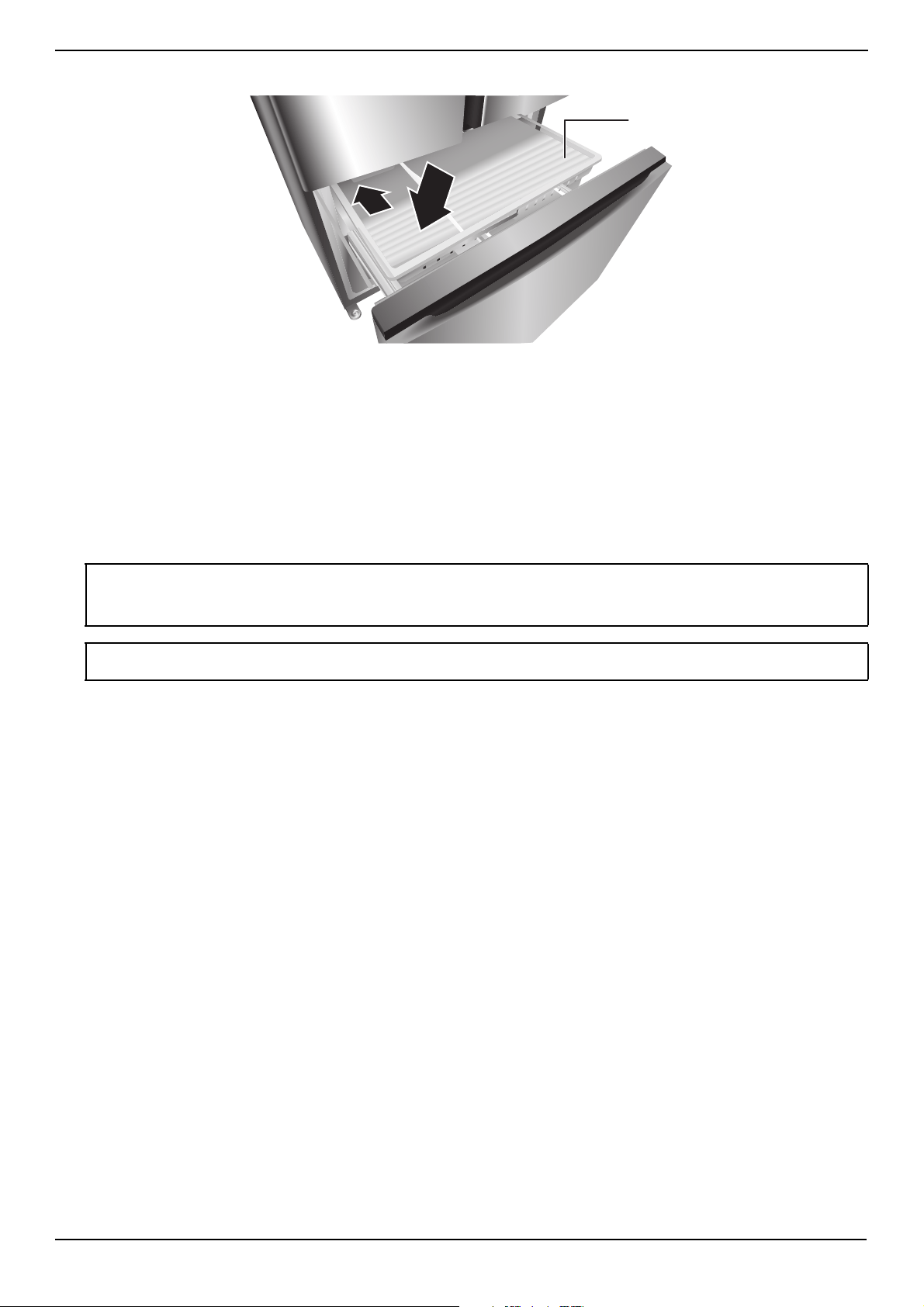
1 Slide the drawer glide rails out of the cabinet.
2 Set the brackets attached to the interior panel of the drawer front onto the drawer glide rails.
3 Using the screws removed earlier, fasten the brackets to the glide rails.
4 Replace the lower freezer compartment.
www.insigniaproducts.com
21
20.1 Cu. Ft. French Door Counter Depth Refrigerator
5 Replace the lower freezer drawer onto the rails.
6 Close the lower freezer drawer.
Connecting the water supply
Your refrigerator comes with a water dispenser and an ice maker. To use these features, you need to connect your
refrigerator to a drinking (potable) water supply. In order for the ice maker to operate correctly, the water pressure needs
to be between 30 and 125 psi (207 to 862 kPa). If the refrigerator is installed in an area with low water pressure (below 30
psi (207 kPa)), you can install a booster pump to compensate for the low pressure. Under normal conditions, a 5.75 oz. (200
cc)) cup can be fill in about 10 seconds.
To help promote better health, the water filter removes unwanted particles from your water. However, it does not sterilize
or destroy microorganisms. You may need to purchase a water purifying system to do that.
CAUTIONS:
• A qualified plumber should make the water connection.
• Using water pressure that is outside the 30 to 125 psi (207 to 862 kPa) range can cause serious malfunction and severe, damaging
water leaks.
Note: If you install your refrigerator in an area with low water pressure (below 30 psi (207 kPa)), you can install a booster pump to
compensate for the low pressure.
Upper storage drawer
www.insigniaproducts.com
22
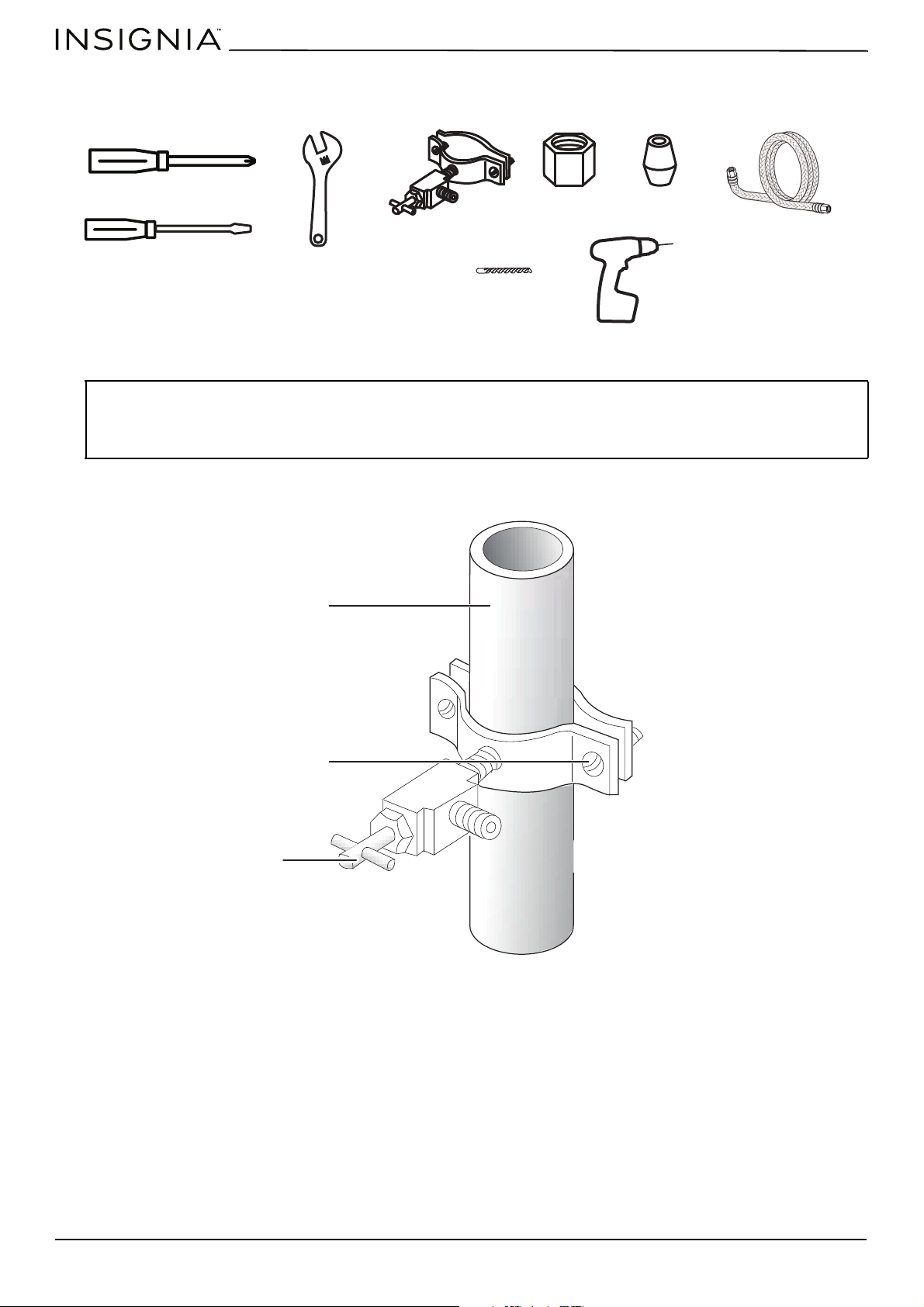
You need the following tools and parts (not included) to connect to the water supply. You need to purchase several items
to complete this connection. You may find these items sold as a kit at your local hardware store.
1 Shut off the main water supply.
2 Using a 1/4" drill bit, drill a hole into the cold water line, then install the saddle-type shutoff valve.
CAUTIONS:
Make sure that you:
• Use the tubing that came with your refrigerator and the water line installation kit. Do not use old tubing.
• Connect to the cold water pipe. If you connect to the hot water pipe, the purifier may malfunction.
• Do not contaminate the water pipes during installation.
Phillips screwdriver
Flat-blade screwdriver
1/4" saddle-type shutoff
valve (1)
1/4" compression
nut (1)
Ferrule (sleeve)
(1)
Drill
1/4" drill bit
1/2" or adjustable wrench
Water line installation kit
Cold water line
Pipe clamp
Shutoff valve
www.insigniaproducts.com
23
20.1 Cu. Ft. French Door Counter Depth Refrigerator
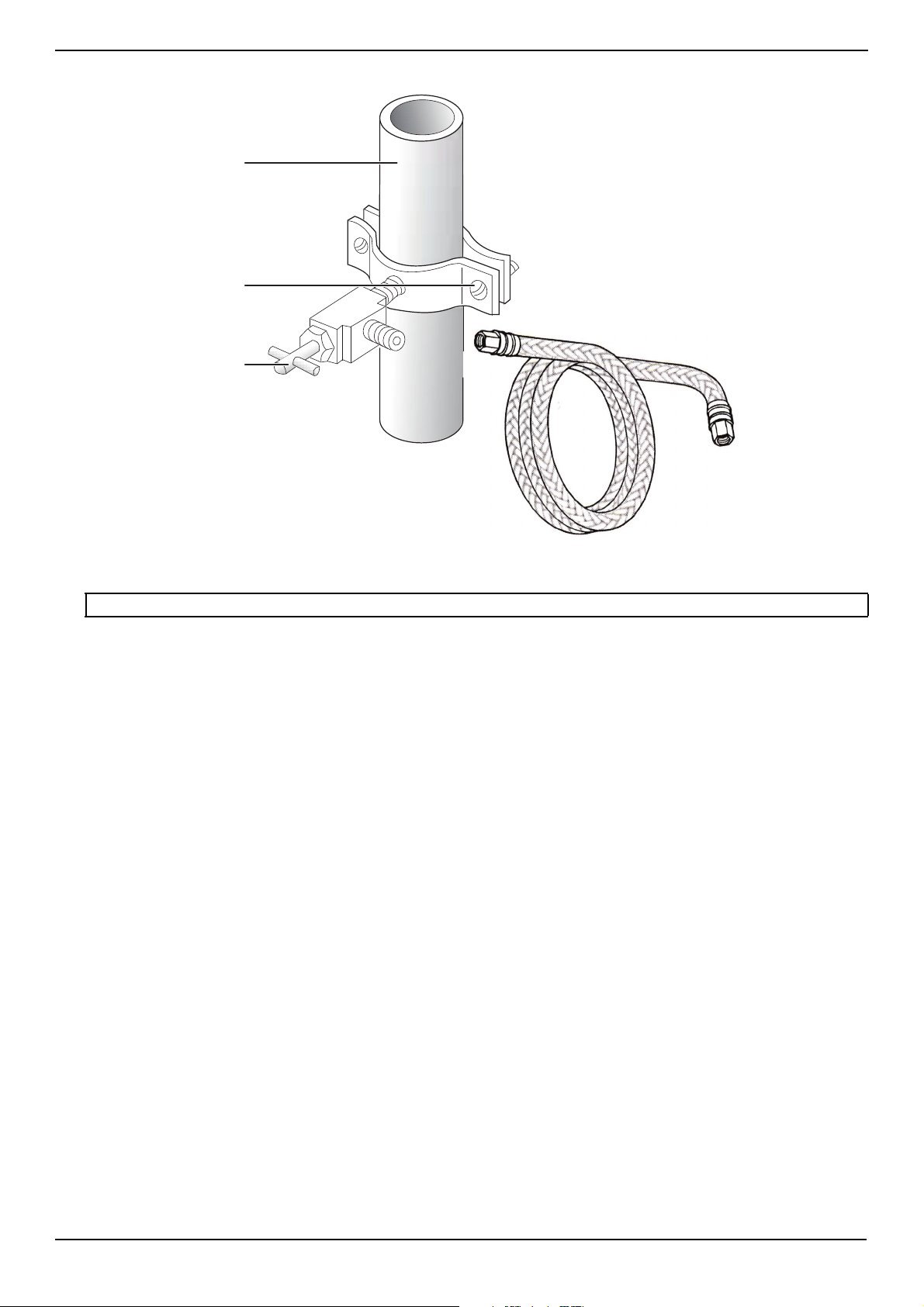
3 Connect the water line installation kit (not included) to the shutoff valve.
4 Turn the main water supply back on, then turn on the shutoff valve and flush out the tubing until the water runs clear.
5 Turn off the shutoff valve.
Note: The initial dark discoloration of water is normal.
Cold water line
Pipe clamp
Shutoff valve
www.insigniaproducts.com
24
Connecting the water supply line to your refrigerator
You need to purchase several items to complete this connection. You may find these items sold as a kit at your local
hardware store.
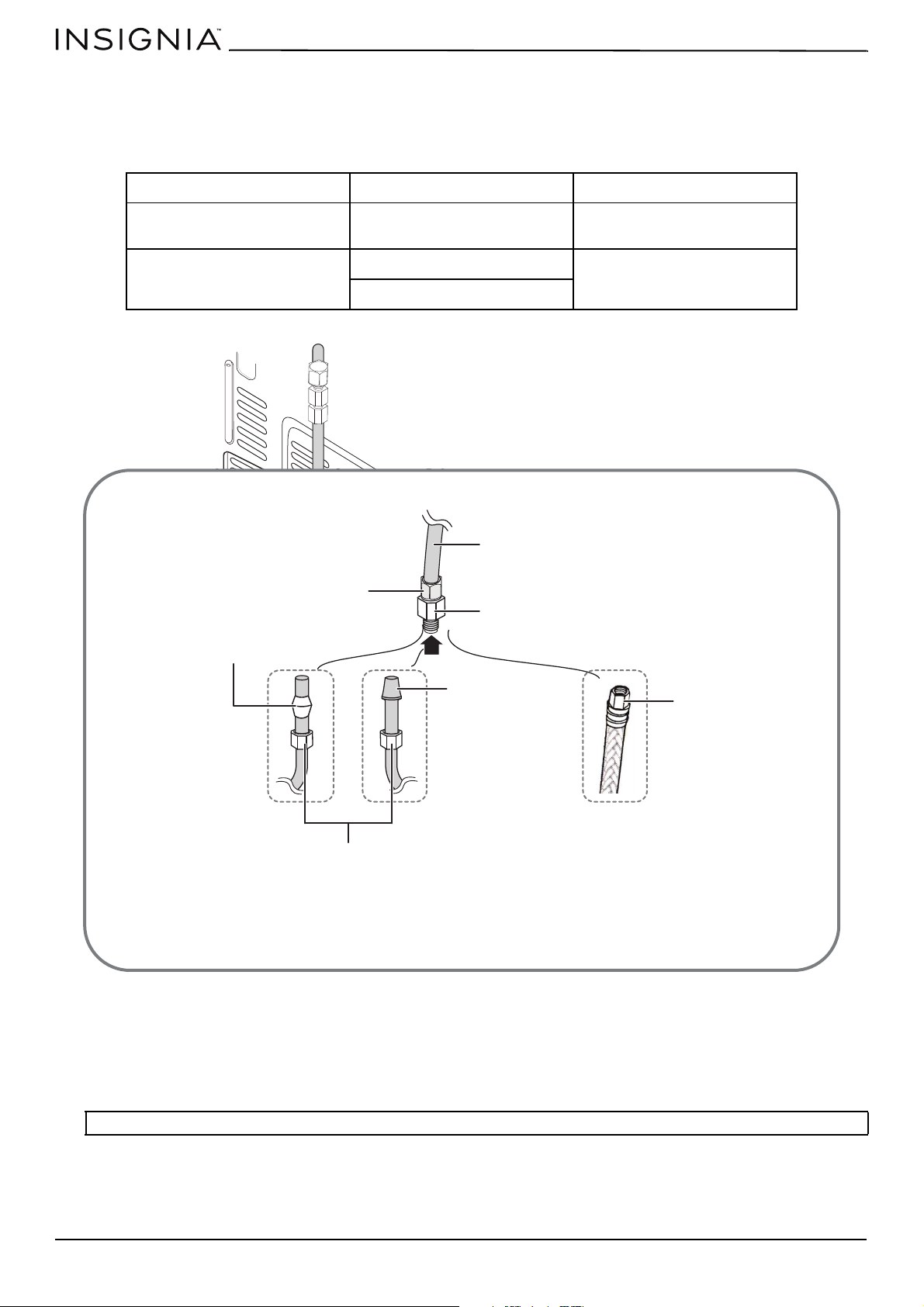
You can use plastic tubing, copper tubing, or stainless steel tubing.
1 Connect the household water supply line to the assembled compression fitting.
If you are using copper tubing, slip the compression nut (not supplied) and ferrule (not supplied) on the copper tubing
(not supplied).
OR
If you are using plastic tubing, insert the molded end (bulb) of the plastic tubing into the compression fitting.
OR
If you are using stainless steel tubing, slip the compression nut on the copper tubing (not supplied).
2 Tighten the compression nut onto the compression fitting. Do not over-tighten the compression nut.
PLASTIC TUBING COPPER TUBING STAINLESS STEEL TUBING
• 1/4" plastic tubing
molded end (bulb)
• 1/4" copper tubing • 1/4" stainless steel tubing
• 1/4" compression nut (1) • 1/4" compression nut (1) • 1/4" compression nut (1)
• Ferrule (2)
Important: Do not use without the molded end (bulb) of the plastic tubing.
Compression nut
(assembled)
Ferrule
Copper tubing (not
supplied)
Plastic tubing
(not supplied)
Stainless steel tubing
(not supplied)
Molded end (bulb)
Compression nut (1/4")
(not supplied)
Compression nut (1/4")
1/4" tube (assembled)
Compression fitting (assembled)
Refrigerator
Water supply line
www.insigniaproducts.com
25
20.1 Cu. Ft. French Door Counter Depth Refrigerator
3 Turn the water on and check for any leakage. If you find water drops or leakage in the connection areas, turn off the
main water supply, then check the connections and tighten, if necessary.
4 Flush one gallon of water through the filter before drinking or using the water from your refrigerator. (Flush
approximately five minutes.)
To flush, press a large glass or cup against the water dispenser lever. Fill the glass, then empty it into the kitchen sink.
Repeat until you dispense about one gallon of water.
5 After you turn on the refrigerator, let the ice maker make ice for one to two days. Over that period of time, throw out the
first one or two buckets of ice the freezer makes to make sure that all impurities have been removed from the water
line.
Using your refrigerator
Powering your refrigerator
1 Plug your refrigerator into a grounded 3-prong outlet, then move it to its final position.
2 Let the refrigerator cool for at least two hours before adding food. When adding food:
• Do not block air circulation vents with stored items.
• Store items so that the air can circulate freely around them.
• Cover or wrap stored food well to avoid transfer of odors.
• After the food is defrosted, food quality deteriorates rapidly and should not be refrozen.
• Do not store bottled or canned drinks in the freezer compartment. Bottles and cans may explode.
Switching between Fahrenheit and Celsius
To switch between Celsius and Fahrenheit on the display, press and hold °F/°C. The °F or °C indicators (next to the
temperatures) shows which is selected.
Setting the refrigerator temperature
• Press Fridge repeatedly to adjust the refrigerator temperature. The temperature setting cycles from 46° to 36° F (8°
to 2° C) in one degree increments.
Setting the freezer temperature
• Press Freezer repeatedly to adjust the refrigerator temperature. The temperature setting cycles from 7° to -11° F
(-14° to -24° C) in one degree increments.
Notes:
• Make sure that you connect the water line to a drinkable water source.
• You can test the water line quickly using a paper cup.
• The first time you use the water dispenser, you may hear the sound of water pushing air out of the water dispenser. This is normal.
• If you have to repair or disassemble the water line, cut off 1/4" of the plastic tubing to make sure you get a snug, leak-free
connection.
CAUTION: Never close the refrigerator or freezer doors while the shelves, drawers, or telescopic slides are extended. It may damage
both them and your refrigerator.
WARNING: Electric Shock Hazard
• Plug into a grounded 3-prong outlet.
• Do not remove the ground prong from the power cord plug.
• Do not use an adapter.
• Do not use an extension cord.
• Failure to do so can result in death, fire, or electrical shock.
Note: This refrigerator begins operating as soon as it is connected to the power supply.
Note: See “Using Super Cool to speed refrigerator cooling
” on page 27 for information about using Super Cool mode to quickly
lower the refrigerator compartment temperature to cool your food faster than usual.
Note: See “Using Super Freeze to speed freezing” on page 27 for information about using Super Freeze mode to quickly lower the
freeze compartment temperature to freeze your food faster than usual.
www.insigniaproducts.com
26
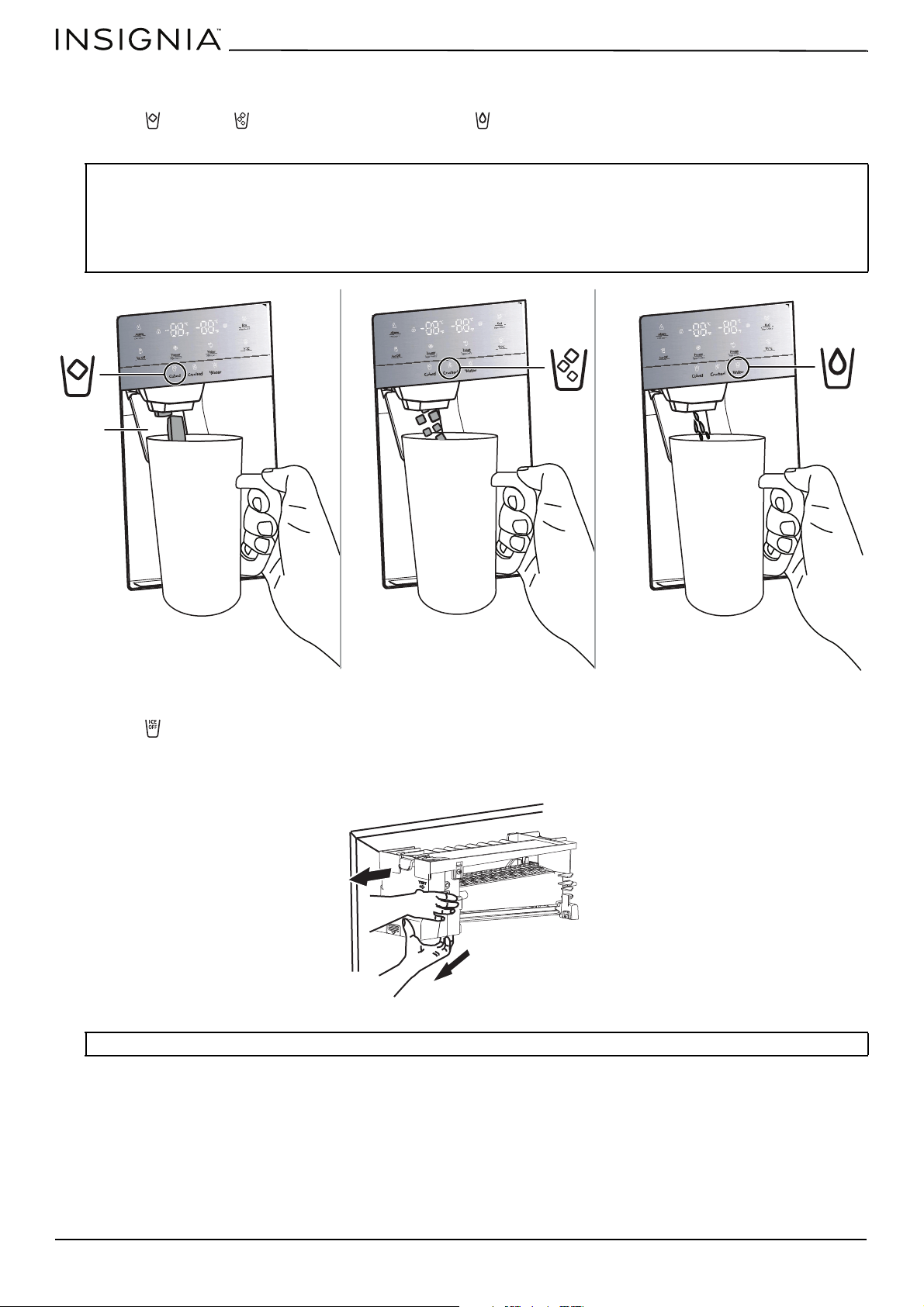
Using the ice and water dispenser
1 Press Cubed or Crushed to dispense ice, or press Water. The icon lights up to show your selection.
2 Position your glass under the dispenser in the refrigerator door and press the lever with the glass.
To turn off the ice maker:
1 Press Ice Off to turn off the ice maker. The icon lights up when ice is turned off. Press again to turn ice maker back
on.
2 To remove all ice cubes from the bucket, hold the bottom of the bucket with one hand and the side of the bucket with
the other. Lift up on the ice bucket, then pull it straight out in the direction of the arrow.
Notes:
• The water coming into your refrigerator flows through the filter under increased pressure. When you dispense water, the pressure
decreases which makes bubbles. The water may temporarily look misty or cloudy. The bubbles disappear and the water clears in a
few seconds.
• The ice cubes generated by the rapid ice-making process will look white, which indicates they were generated normally.
• When you select Cubed ice, a small amount of crushed ice might be produced. When you select Crushed ice, a small amount of
cube ice might be produced.
Note:
If you leave the ice cubes in the bucket, the ice cubes may clump together making it difficult to remove them.
Lever
www.insigniaproducts.com
27
20.1 Cu. Ft. French Door Counter Depth Refrigerator
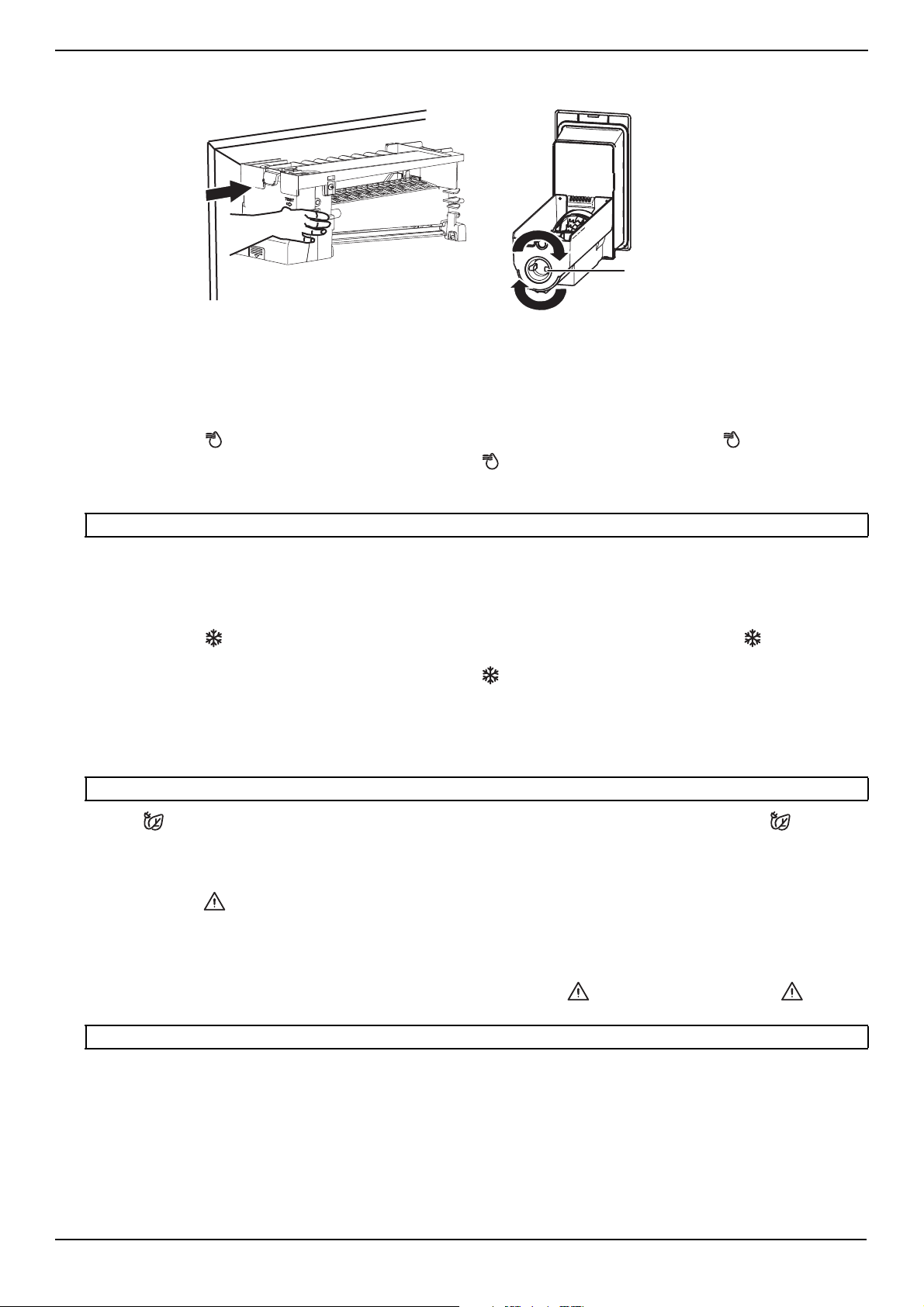
3 To replace the ice bucket, push it firmly straight back. If the bucket does not fit, turn the knob on the back of the ice
bucket 90 degrees and try again.
Using Super Cool to speed refrigerator cooling
You can quickly lower the refrigerator compartment temperature to cool your food faster than usual. Use the Super Cool
mode to speed up cooling when you add a large amount of food to the refrigerator compartment.
When the Super Cool mode is on, the refrigerator temperature lowers to 36° F (2° C). The Super Cool mode automatically
turns off after three hours, and the refrigerator temperature returns to the last refrigerator temperature setting.
1 Press and hold Fridge/Super Cool for three seconds to turn on the super cool function. The indicator lights up.
2 To manually turn off the Super Cool mode, press and hold Fridge/Super Cool for three seconds again.
Using Super Freeze to speed freezing
You can quickly lower the freezer temperature to freeze your food faster than usual. Fast-freezing can help retain more of
the vitamins and nutrition in fresh food and keep your food fresh longer. The Super Freeze mode also speeds up freezing
when you add a large amount of food to the freezer compartment.
When the Super Freeze mode is on, the freezer compartment temperature lowers to -11° F (-24° C). The Super Freeze mode
automatically turns off after 52 hours, and the freezer temperature returns to the last freezer temperature setting.
1 Press and hold Freezer/Super Freeze for three seconds to turn on the super cool function. The indicator lights
up.
2 To manually turn off the Super Cool mode, press and hold Freezer/Super Freeze for three seconds again.
Using the Energy Saving mode
To save energy, you can turn on the Energy Saving mode. When you use the Energy Saving mode, the refrigerator
compartment temperature is automatically set to 43° F (6° C) and the freezer compartment temperature is automatically
set to 1° F (-17° C).
• Press Eco to turn the Energy Saving mode on or off. When the Energy Saving mode is turned on the icon lights.
When you turn off the Energy Saving mode, the refrigerator and freezer temperatures return to the last temperature
settings.
Locking the control panel and dispensers
1 Press and hold Alarm for three seconds to turn on the child lock. When the lock is turned on, the control panel is
locked and the water and ice dispensers are turned off.
2 Press and hold Alarm again for three seconds to turn off the lock.
Turning off the door alarm
• If a door is left open for more that two minutes, an alarm buzzes and the Alarm indicator flashes. Press Alarm to
turn off the alarm.
Note: When you set the freezer temperature, we recommend that you wait about six hours before using the Super Freeze mode.
Note: When you turn on the Energy Saving mode, you cannot change the refrigerator or freezer compartment temperature.
Note: When the door is closed or opened for a long time, the alarm icon turns off.
Knob
www.insigniaproducts.com
28
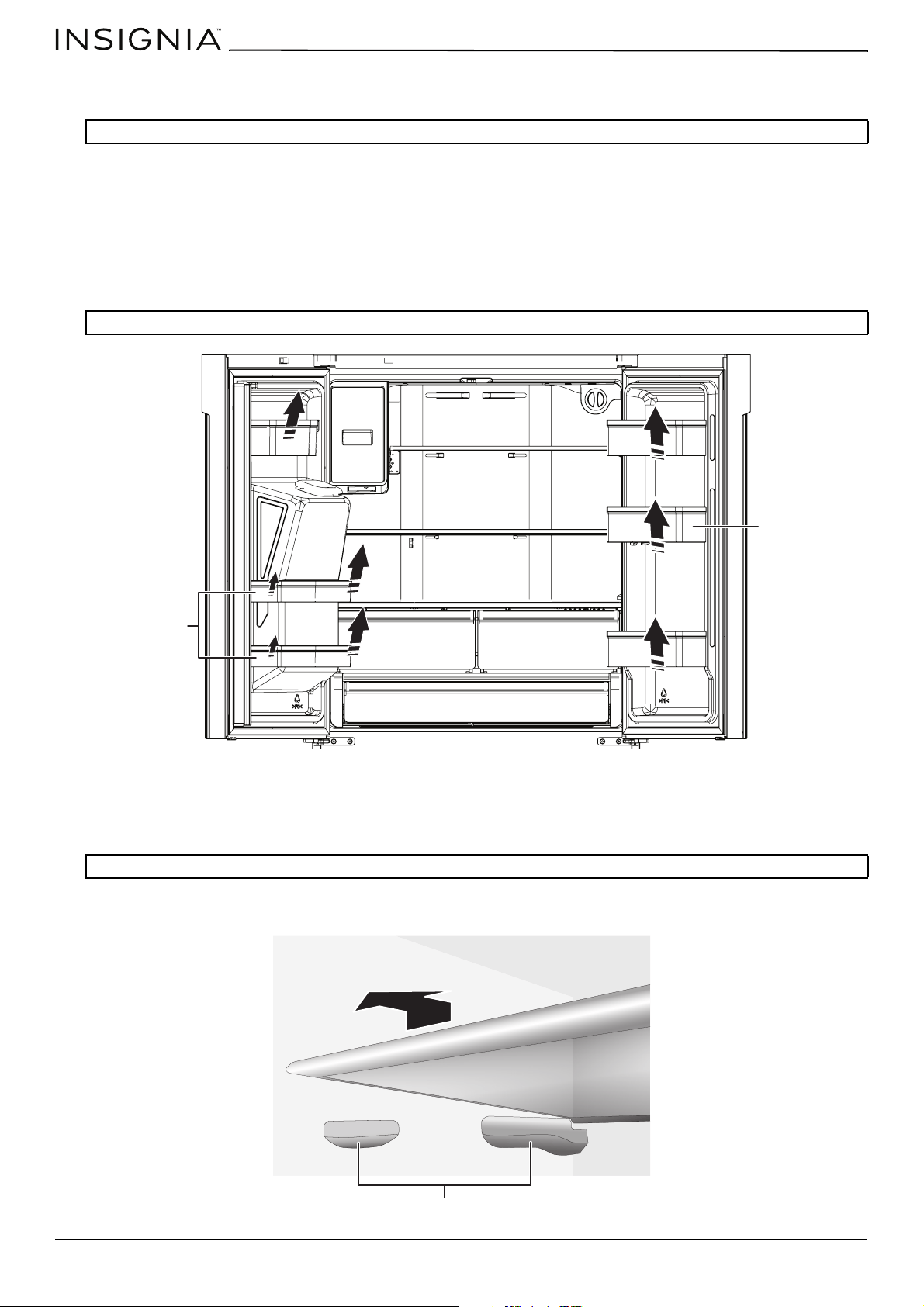
Using the door baskets
Your refrigerator has six door baskets designed to store canned liquids, bottled drinks, and packaged food.
To remove and replace door baskets:
1 To remove a basket, remove all items from the basket, then:
Lift the basket and pull it straight out of the door.
OR
Pull the right side of the basket at an angle along the guide, then take the left side out by pulling the basket from the
door.
2 To replace a basket, slide it in above the desired location and push the basket down until it stops.
Removing and re-installing the glass shelves
The refrigerator compartment has two glass shelves. You can place them at different heights.
1 To remove a shelf, gently lift it upward and pull it forward until it clears the shelf guides. Remove the left shelf first, then
remove the right shelf.
CAUTION: Do not put too many heavy items in the door baskets. You may break the baskets.
Note: Do not put too many heavy items in the door baskets. You may break the baskets.
Note:
You can remove the glass shelves to clean them.
Adjustable
drawer
Angled drawers
Shelf guides
www.insigniaproducts.com
29
20.1 Cu. Ft. French Door Counter Depth Refrigerator
2 To replace a shelf, make sure that the area where the shelf goes is clear of obstacles, then gently lower the shelf and
push it back into position. Replace the right shelf first, then replace the left shelf.
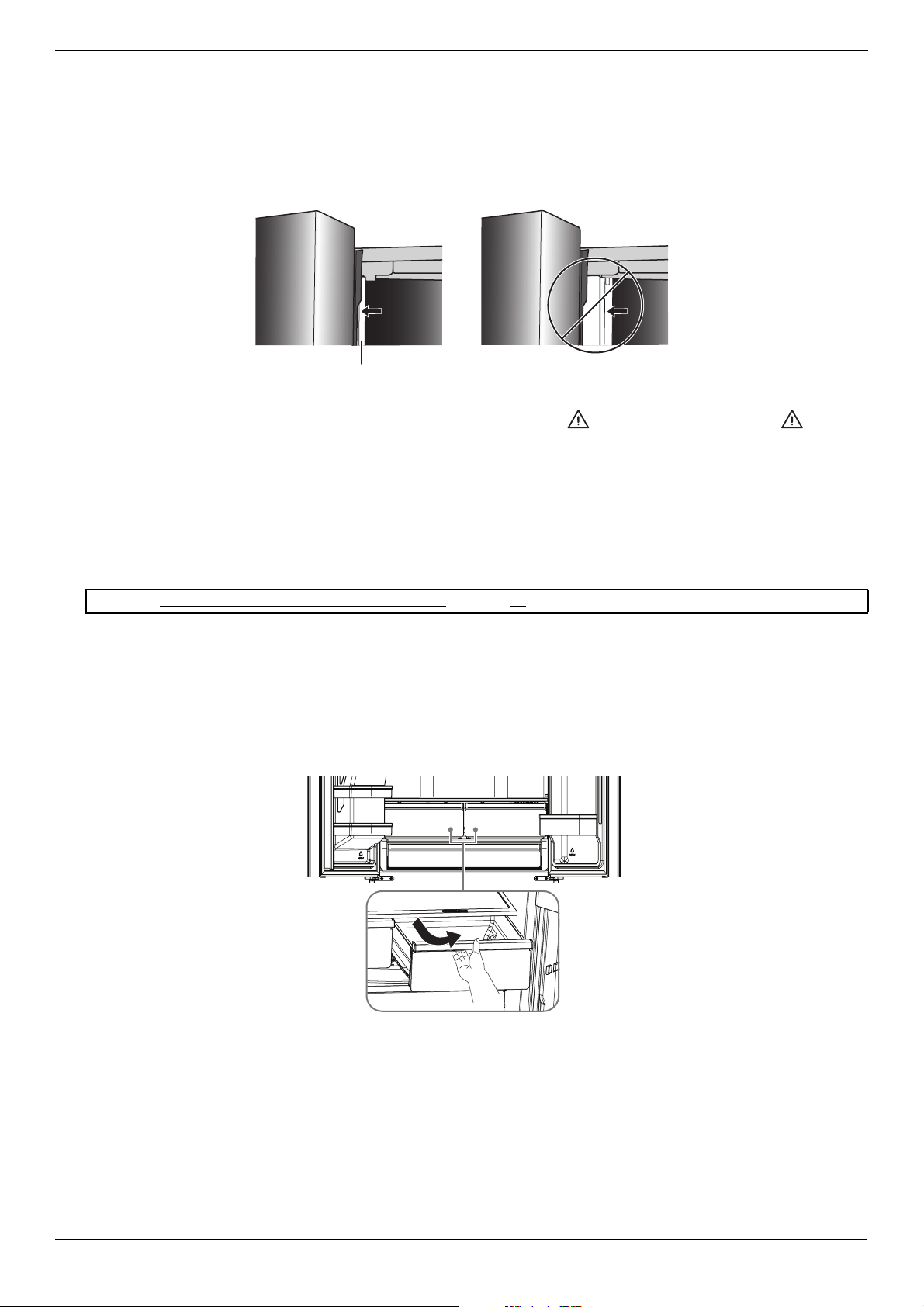
Opening and closing doors
• The refrigerator doors can be opened and closed either separately or together.
• When closing the left door, a mullion folds behind the right door and joins the two doors. Before closing the left-hand
door, make sure the mullion is folded inward. If the mullion is pulled outward it may become damaged when you try to
close the door.
• If a door is left open for more that two minutes, an alarm buzzes and the Alarm indicator flashes. Press Alarm to
turn off the alarm.
• The temperature of the door frame is controlled to help prevent moisture from developing on the mullion. The
temperature of the surface may be warm. This is normal, and will not affect the performance of the refrigerator.
Using the drawers
• Crisper drawers are suitable for storing vegetables and fruits. Putting fruits and vegetables inside the drawers helps
avoid losing moisture and prevents flavor from getting into other foods.
• The full-width drawer is an ideal space for storing large deli platters. The cover automatically opens as you pull out the
drawer and closes as the drawer is pushed back in.
Maintaining your refrigerator
Your refrigerator is designed for year-round use with only minimal cleaning and maintenance.
When you first receive it, wipe the cabinet with a mild detergent and warm water, then wipe dry with a dry cloth. Do this
periodically to keep your refrigerator looking new.
Removing the crisper and full-width drawers
• To remove the crisper drawers, pull each drawer out and tilt the front up.
Note: See “Removing the crisper and full-width drawers” on page 29 for information about removing the drawers.
Mullion
www.insigniaproducts.com
30
• To remove the full-width drawer, lift up the rear of the drawer, then pull it out.
Cleaning your refrigerator
We recommend that you do the following every time you clean your refrigerator to keep it running odor-free and
efficiently:
1 Unplug your refrigerator from the power outlet.
2 Remove all food.
3 If you want to remove the door baskets, shelves, crisper drawers, or freezer drawers, see:
• Using the door baskets
on page 28
• Removing and re-installing the glass shelves on page 28
• Removing the crisper and full-width drawers on page 29
• Removing and replacing the refrigerator doors (Optional) on page 14
4 Clean the doors, handles, and cabinet surfaces with a mild detergent, then rinse with warm water using a wrung-out
sponge or cloth.
5 Wash the inside with a damp warm cloth soaked in a solution of one quart of lukewarm water to two tablespoons of
baking soda solution, then rinse with warm water using a wrung-out sponge or cloth.
6 Clean the baskets, shelves, and drawers with a mild detergent and soft cloth, then rinse with warm water.
7 Make sure that you keep the door gaskets (seals) clean so that the door seals tightly. This helps your refrigerator run
efficiently.
8 Dry all surfaces and removable parts before putting them back into place.
9 Plug your refrigerator into the power outlet.
Defrosting the freezer compartment
Although the freezer compartment automatically defrosts, a layer of frost may occur on the compartment’s interior walls if
the freezer is opened frequently or kept open too long. If the frost is too thick, choose a time when the freezer is nearly
empty, then:
1 Unplug your refrigerator.
2 Remove all food from the freezer compartment, and place the food into containers that will prevent it from melting.
3 Leave the freezer compartment open.
Note: Remove the two crisper drawers before removing the full-width drawer.
CAUTIONS:
To prevent damage to the finish:
• Do not use gasoline, benzine, thinner, or other similar solvents.
• Do not use abrasive cleaners.
• Do not use sharp objects because they are likely to scratch the surface.
CAUTION: Do not clean glass shelves or covers with warm water when they are cold. Shelves and covers may break if exposed to
sudden temperature changes or impact, such as bumping. Tempered glass is designed to shatter into many small, pebble-size pieces.
This is normal. Glass shelves and covers are heavy. Use both hands when removing them to avoid dropping.
CAUTION: Make sure that the door gaskets are completely dry before you plug your refrigerator into the power outlet.
Tip: To avoid standing water when you defrost, place some towels on the floor in front of your refrigerator.
www.insigniaproducts.com
31
20.1 Cu. Ft. French Door Counter Depth Refrigerator
4 To speed the defrosting, you can:
• Place open containers with hot water inside the refrigerator.
• Use a plastic or wooden ice shovel (like a spatula) to remove thick layers of ice or frost. Do not use a sharp utensil (like
a knife) because you may damage your refrigerator.
5 When you finish defrosting, wipe the inside with a dry towel. If you need to clean the compartment, see Cleaning your
refrigerator on page 30.
6 Close the freezer compartment, plug your refrigerator into the power outlet, then put the food back into the freezer
compartment.
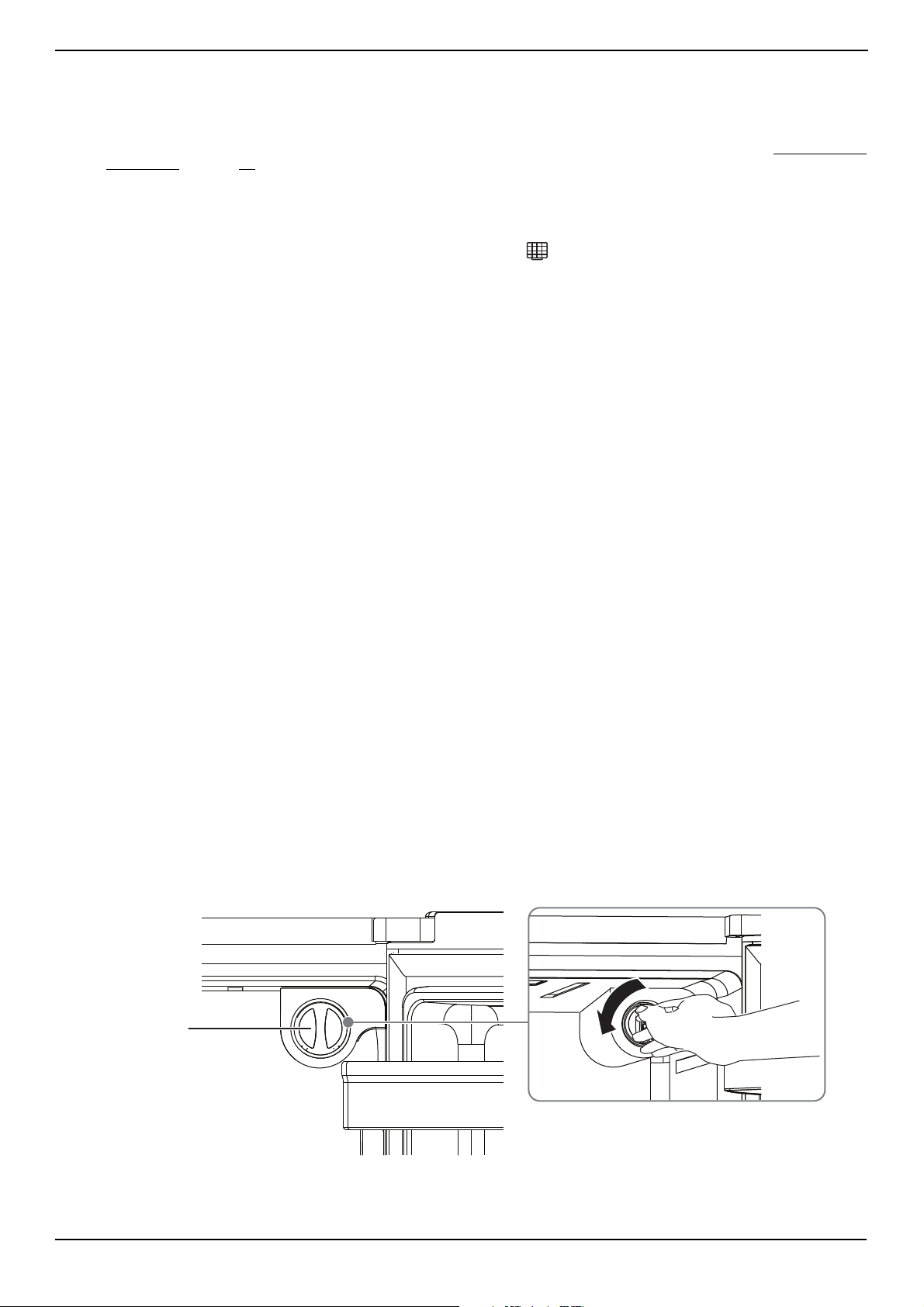
Replacing the water filter
After your refrigerator has dispensed about 300 gallons of water, the icon blinks to remind you to replace the water
filter and a buzzer sounds three times. For the best water quality, you should replace the water filter about every six
months even if the icon is not blinking.
Operating conditions
• Flow rate: 0.5 GPM (1.9 LPM)
• Pressure: 30 - 125 PSI (207-862 kPa)
• Temperature: 34-100° F (1-38° C)
• Service life: 6 Months
• Capacity: 300 GAL (1,136 L)
• Function: Chemical/Mechanical Reduction
•Flushing: 5 Minutes
Operating Notices
• Do not use with water that is microbiologically unsafe or of unknown quality without adequate disinfection before or
after using the filtration system.
• Systems certified for cyst reduction may be used on disinfected water that may contain filterable cyst.
• For cold water only.
• Replace the filter every 6 months.
• Testing was performed under standard laboratory conditions, actual performance may vary.
• Check for compliance with the state and local laws and regulations.
• Systems must be installed and operated in accordance with the manufacturer’s recommended procedures and
guidelines.
• Spent adsorption media will not be regenerated and used.
Warranty
• The filter is warranted for a period of 12 months.
• Filters are warranted for defects in material and workmanship only.
• Replacement Cartridge No.: NS-WF26FD9-1
• NSF System No: WF26FD9-1
For estimated costs of replacement elements, contact Best Buy.
Replacing the water filter
To drink the freshest and cleanest water from your refrigerator, change the filter on time.
1 Shut off the water supply.
2 Release a small amount of water to depressurize the water line.
3 Turn the old water filter about 1/4 turn counter-clockwise.
Water filter
www.insigniaproducts.com
32
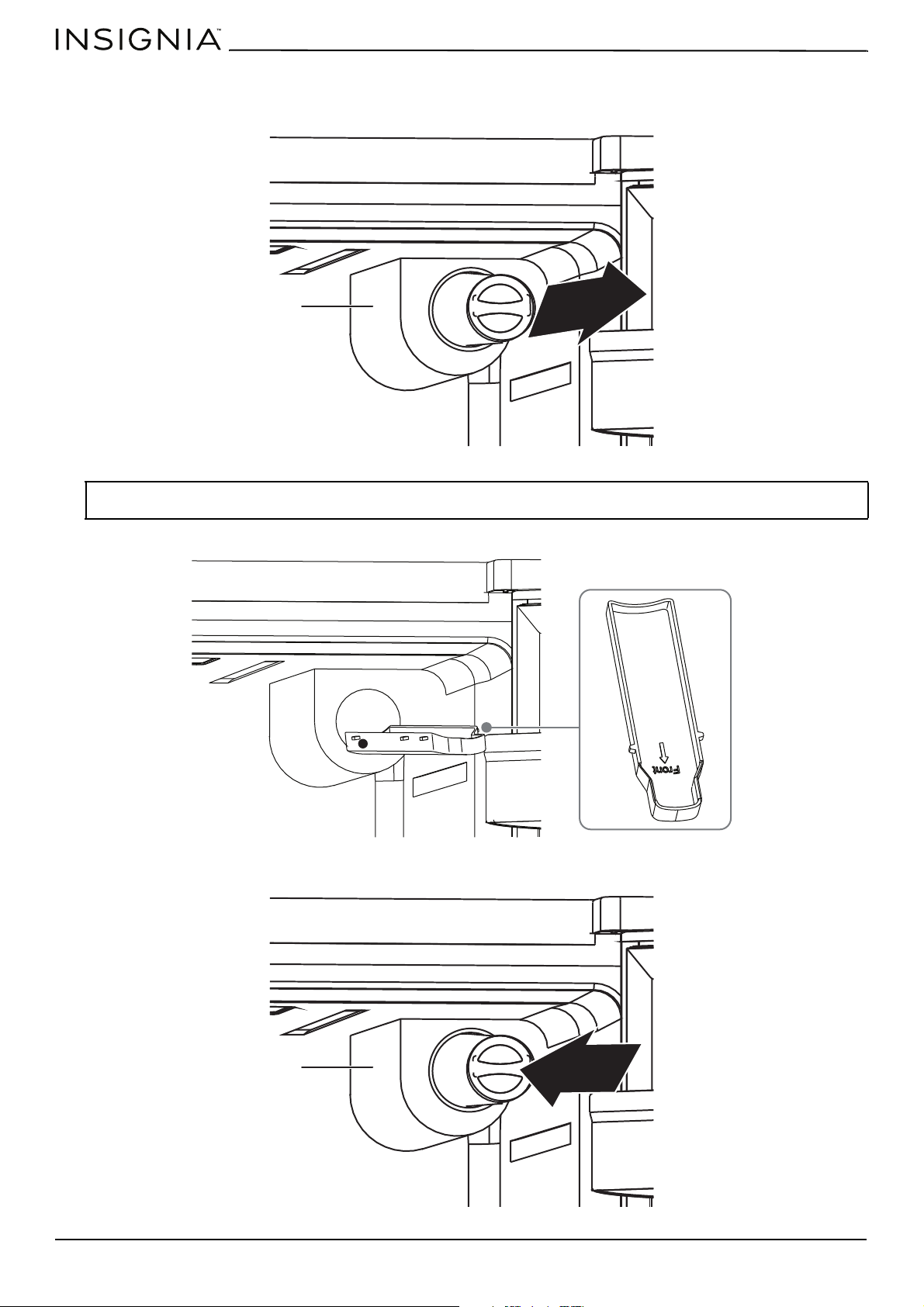
4 Pull the water filter out of the filter holder. Depending on water impurities, you may have to pull hard to remove the
filter.
5 Pull out the water filter tray, then empty the tray. Dry around the filter opening, then put the tray back in.
6 Insert the new water filter into the water filter holder.
Note: When you pull out the water filter, a little water may leak from the opening which is normal. To minimize the water leakage,
keep the filter horizontal when you pull it out.
Filter holder
Filter holder
www.insigniaproducts.com
33
20.1 Cu. Ft. French Door Counter Depth Refrigerator
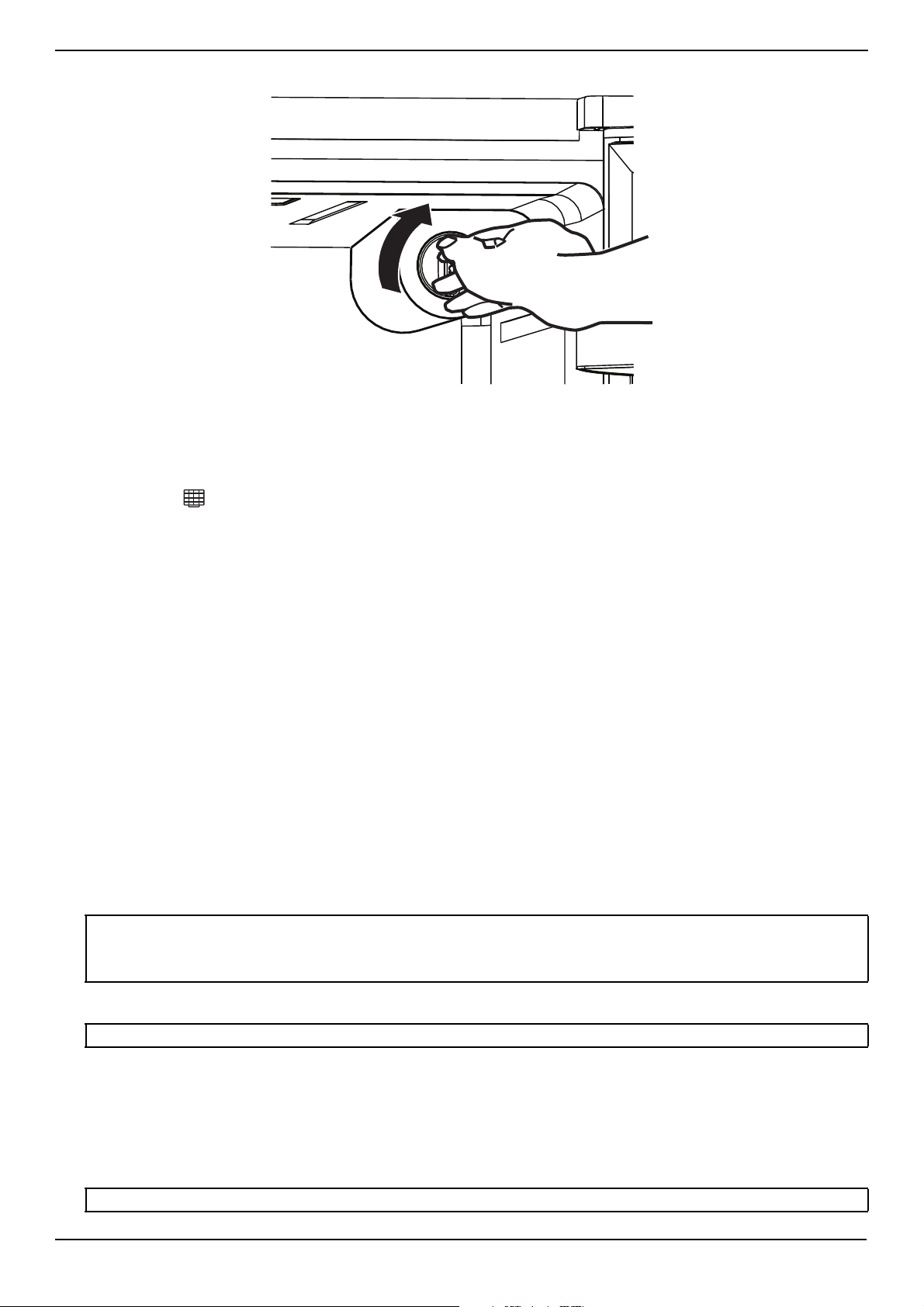
7 While turning the new filter clockwise, push it all the way into the holder until it locks into place.
8 Turn on the water supply, then run water through the dispenser until the water runs clear (about 6–7 minutes). This
cleans the water supply system and removes any trapped air.
9 Open the refrigerator door and make sure that no water leaks from the water filter.
10 After you install the new filter, press and hold both the On/Off and Super Freeze buttons for about three seconds to
turn off the icon.
Reverse osmosis system
If your cold water supply is connected to a reverse osmosis system:
• The water pressure to the reverse osmosis system needs to be between 30 and 125 psi (207 and 862 kPa).
• The water pressure at the inlet valve on your refrigerator needs to be between 30 psi to 125 psi (207 kPa to 862 kPa).
If the water pressure to the reverse osmosis system is less than 40 psi and 60 psi (276 kPa and 414 kPa):
• Check the sediment filter on the system, then replace the filter if necessary.
• Allow the storage tank on the system to refill after heavy usage.
• If the water pressure is still too low, your refrigerator's water filter may be further reducing the water pressure. Remove
the water filter.
Maintaining the ice bucket
• To clean the ice bucket, wash with a mild detergent, rinse well, and dry it thoroughly. Do not use harsh or abrasive
cleaners or solvents.
• If ice cubes in the ice bucket spill out over the drawer, clear the ice cubes that spilled out of the drawer.
• If there is a power failure, ice cubes may melt, and then freeze together when the power comes back on, causing the
dispenser to stop working. To prevent this problem, after a power failure, pull out the ice bucket and residual ice or
water.
• If you're not getting ice:
• If you recent emptied the ice bucket, wait until your ice maker produces additional ice.
• If there is no ice produced after 6 hours, contact customer service because there may be an issue with the ice maker.
• If there is ice in the bucket but it won't come out, contact customer service because there may be an issue with the
motor.
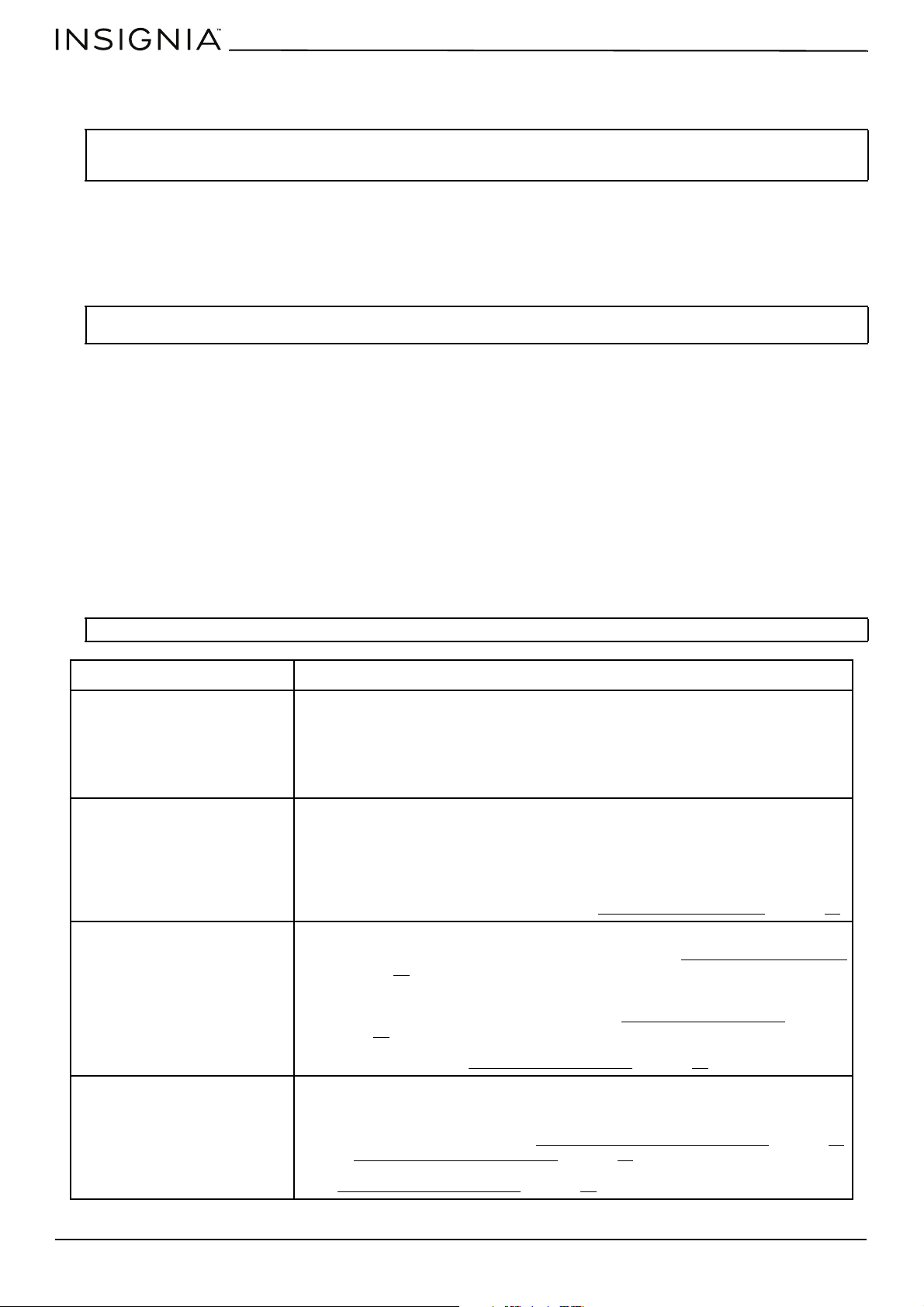
Replacing the LED light
Storing your refrigerator
1 Unplug your refrigerator from the power outlet.
2 Remove all food.
3 Clean your refrigerator.
4 Take off the doors, and leave the shelves in place so that children cannot easily climb inside.
CAUTION:
• Do not put food in the ice bucket. If you store food in the ice bucket, the food can strike the ice maker when you open or close the
door, causing damage to the ice maker.
• To avoid cold air leaking out from cabinet, keep the water dispenser parts installed even if the water dispenser was out of use.
CAUTION: The LED light must be replaced by a qualified service technician.
WARNING: If a door accidentally closes while a child is inside your refrigerator, the child may suffocate.
www.insigniaproducts.com
34
Moving your refrigerator
1 Unplug your refrigerator from the power outlet.
2 Remove all food, then clean and dry the refrigerator thoroughly.
3 Securely tape down all loose items inside your refrigerator.
4 Tape the door shut, then tape the power cord to the back of the refrigerator.
5 Make sure that your refrigerator does not tilt more than 45° from the upright position during transportation.
Tips on saving energy
• Locate your refrigerator in the coolest area of the room, away from heat producing appliances or heating ducts and out
of direct sunlight.
• Let hot foods cool to room temperature before placing them in your refrigerator. Overloading your refrigerator forces
the compressor to run longer. Foods that freeze too slowly may lose quality or spoil.
• Wrap foods correctly and wipe containers dry before placing them in your refrigerator. This cuts down on frost
build-up.
• Do not line the refrigerator storage shelves with aluminum foil, wax paper, or paper toweling. Liners interfere with cold
air circulation and make your refrigerator less efficient.
• Organize and label food to reduce door openings and extended searches. Remove as many items as needed at one
time, and close the door as soon as possible.
Troubleshooting
CAUTION: Your refrigerator is heavy. When moving the refrigerator for cleaning or service, be sure to cover the floor with cardboard or
hardboard to avoid floor damage. Always pull the refrigerator straight out when moving it. Do not wiggle or “walk” the refrigerator
when trying to move it, as floor damage could occur.
Note: If the refrigerator has been placed in a horizontal or tilted position for any period of time wait four hours before plugging it in to
allow the oil to settle into the compressor.
CAUTION: Do not try to repair your refrigerator yourself. Doing so invalidates the warranty.
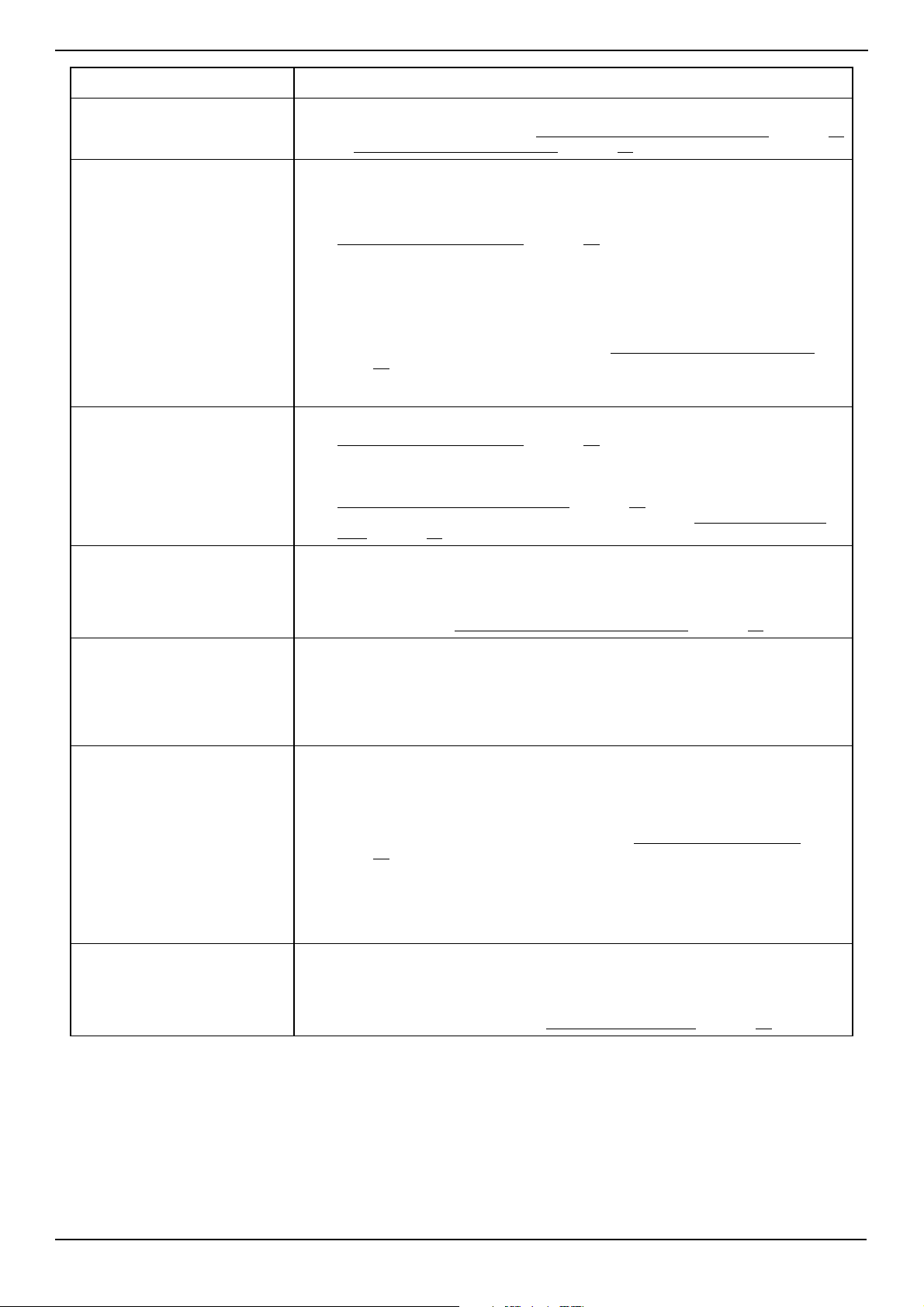
PROBLEM SOLUTION
My refrigerator does not work.
• Make sure that your refrigerator is securely plugged into a working outlet.
• Make sure that your power source has the correct voltage. Your refrigerator’s
voltage rating is on a label located on the back of your refrigerator.
• Check the house fuse or circuit breaker box and replace the fuse or reset the
circuit breaker.
• Wait for the defrost cycle to end and cooling system to restart.
The refrigerator compartment
has a bad odor.
• Make sure that all food with a strong odor (like onions) is wrapped or stored in
airtight packaging.
• Certain containers and wrapping materials (such as paper, foil, or plastic) can
cause odors. If you think this might be the case, try using different containers or
a different brand of wrapping material.
• Check for spoiled food and remove it.
• Clean the inside of your refrigerator. See Cleaning your refrigerator
on page 30.
The refrigerator doors do not
close completely.
• Make sure that no food packages are in the way.
• Make sure that the door gaskets (seals) are clean. See Cleaning your refrigerator
on page 30
.
• If the door gasket does not seal, try heating then cooling the seal. You can use an
electric hair dryer to heat the seal.
• Make sure that your refrigerator is level. See Leveling your refrigerator
on
page 13.
• Make sure that the top of your refrigerator is tilted backward about 0.4" (10 mm)
to 0.6" (15 mm). See Leveling your refrigerator
on page 13.
The temperature is too hot.
• You may have left the doors open too long or opened them too frequently.
• Make sure that no obstacle is keeping the doors from closing correctly.
• Adjust the refrigerator or freezer compartment temperature. Allow 24 hours for
the temperature to adjust. See Setting the refrigerator temperature
on page 25
or Setting the freezer temperature
on page 25.
• Your refrigerator may not have enough clearance from walls or the ceiling. See
Providing correct ventilation
on page 11.
www.insigniaproducts.com
35
20.1 Cu. Ft. French Door Counter Depth Refrigerator
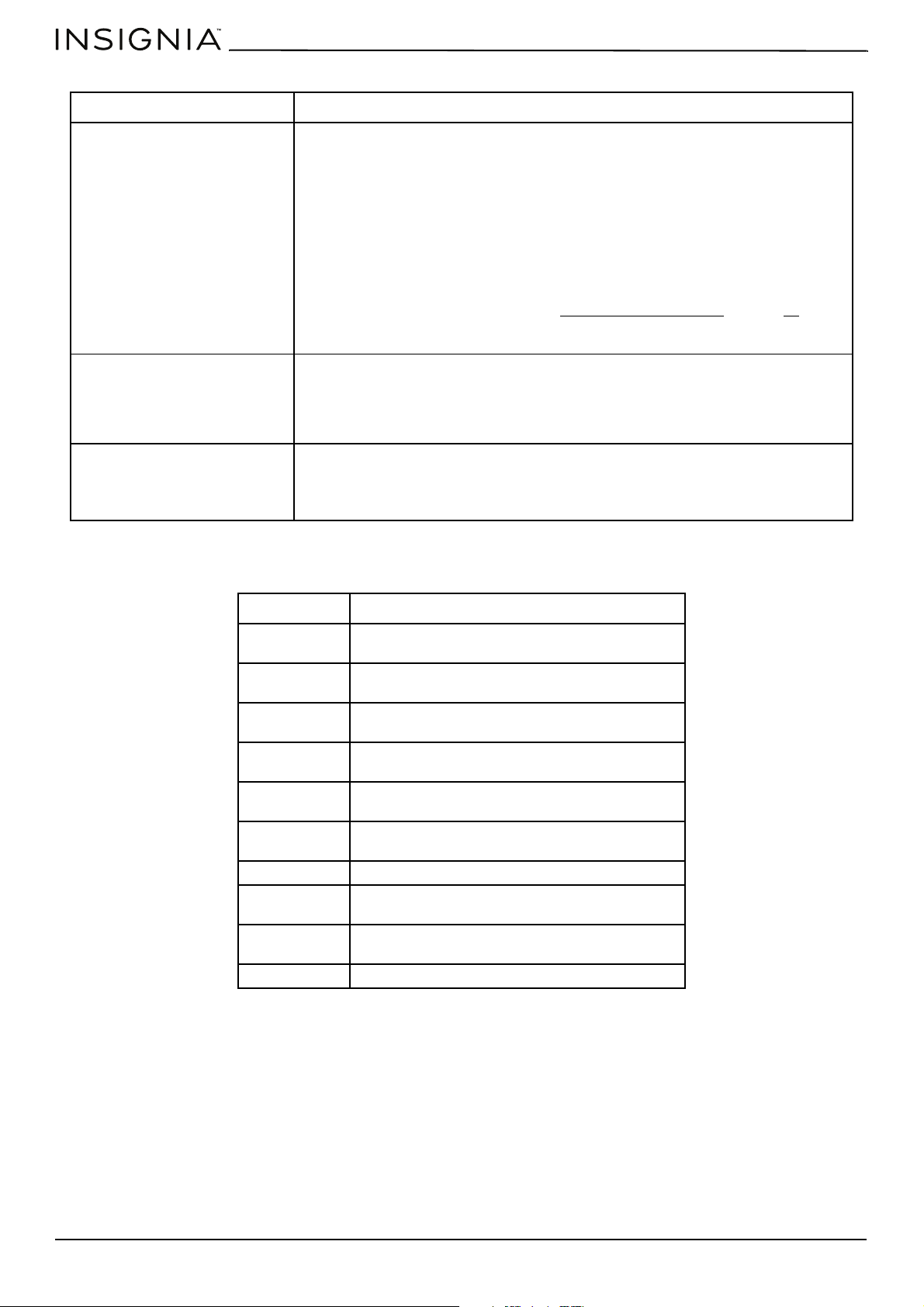
The temperature is too cold.
• Adjust the refrigerator or freezer compartment temperature. Allow 24 hours for
the temperature to adjust. See Setting the refrigerator temperature on page 25
or Setting the freezer temperature
on page 25.
Ice is not dispensing.
• After you install the water supply line, you should wait 12 hours before you try
dispensing ice. If the water is not sufficiently cooled, your refrigerator takes
longer to make ice.
• Make sure that the water line is connected and the water valve open. See
Connecting the water supply
on page 21.
• Make sure that the water line is not kinked or bent.
• Make sure that the ice dispenser is not in off mode.
• Make sure that no ice is blocking the ice maker bucket or ice chute.
• If the water pressure is less than 30 psi (206 kPa), try installing a booster pump to
compensate for the low pressure.
• Make sure that the freezer compartment temperature is not set too warm. Try
setting the freezer temperature lower. See Setting the freezer temperature
on
page 25
.
• If you just dispensed a large amount of ice, wait at least 90 minutes before
dispensing more ice.
Water is not dispensing.
• Make sure that the water line is connected and the water valve open. See
Connecting the water supply
on page 21.
• Make sure that the water line is not kinked or bent.
• Make sure that the refrigerator compartment temperature is not set too low. If
the temperature is too low, the water in the dispenser tank may freeze. See
Setting the refrigerator temperature
on page 25.
• Make sure that the water filter is correctly installed. See Replacing the water
filter on page 31.
A layer of frost occurs in one of
the compartments.
• A layer of frost may occur on the compartment’s interior walls if the freezer is
opened frequently or kept open too long.
• Make sure that the air outlets are not blocked by food.
• Make sure that the doors are fully closed.
To remove the frost, see Defrosting the freezer compartment
on page 30.
The refrigerator door is hard to
open.
• When you open the refrigerator door, warm air rushes inside. When you close
the door, the warm air rushes to the condenser which causes a vacuum. This
causes the door to be hard to open for about 10 to 15 seconds after closing.
• If the door is hard to open at other times, try rubbing paraffin wax or petroleum
jelly along the edges of the entire gasket. Paraffin wax is used for canning and is
safe for use around food.
The compressor runs for a long
time or turns on and off
frequently.
The compressor runs longer if:
• The room temperature is high.
• You just added a large amount of food. Wait for the food to freeze, then check
again.
• You open and close the door frequently.
• The door gasket is dirty. Clean the gasket. See Cleaning your refrigerator
on
page 30
.
• Your refrigerator has been disconnected for a period of time. Wait for your
refrigerator to cool (about four hours) before adding food.
• You have the temperature set too low.
• This refrigerator is designed to run for longer periods of time at a lower energy
usage.
The light inside the refrigerator
does not turn on.
• Make sure that your refrigerator is plugged into a working outlet.
• If a door stays open too long, your refrigerator automatically turns off the light.
Close then open the door again.
• Check to see if the light is damaged. If the light is damaged, have it replaced by a
qualified service technician. See Replacing the LED light
on page 33.
PROBLEM SOLUTION
www.insigniaproducts.com
36
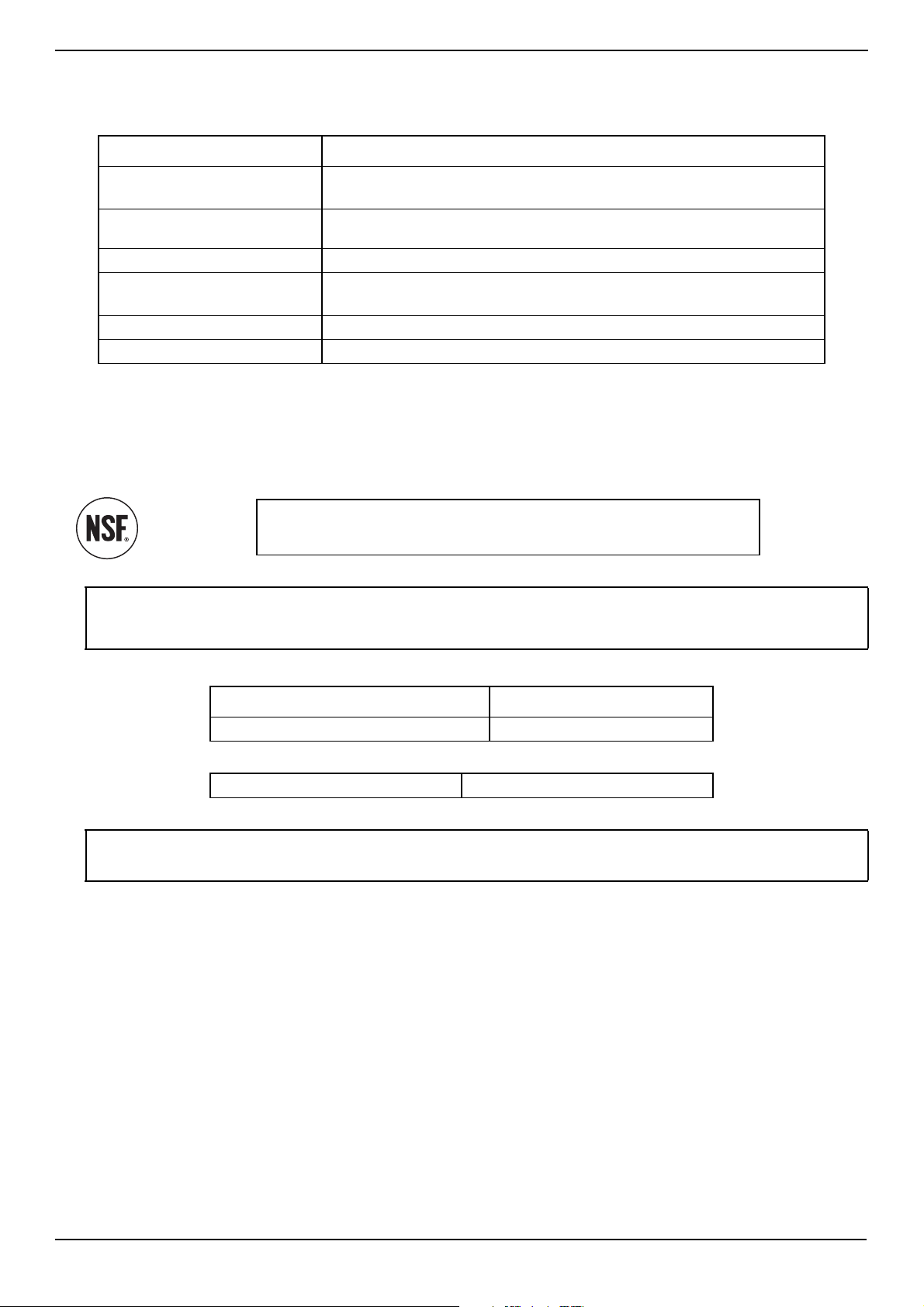
Error codes
Contact Insignia at 1-877-467-4289 for additional support or service.
The refrigerator makes unusual
noises or vibrations.
The following sounds are normal:
• Compressor running noises.
• Air movement noise from the small fan motor in the freezer compartment or
other compartments.
• Gurgling sound similar to water boiling.
• Popping noise during automatic defrosting.
• Clicking noise before the compressor starts.
• Clicking noise when you get the water.
• Motor running noises when you get the ice.
Other unusual noises or vibrations may occur:
• If you have items on the top of your refrigerator. Remove the items.
• If your refrigerator is not level. See Leveling your refrigerator
on page 13.
• If your refrigerator is touching walls. Move it away from the walls.
• If the shelves or drawers are installed incorrectly.
The outside of the refrigerator is
hot.
Heat dissipation from the condenser may make the outside feel hot. This is normal and
happens if:
• The room temperature is high.
• You have too much food in your refrigerator.
• You open and close the doors excessively.
Water condenses on the outside
of the refrigerator.
• Condensation on the exterior surface and door seal is normal when the room
humidity is high.
• When you open the door, warm, moist outside air meets the cold dry air inside
your refrigerator. This is normal.
ERROR CODE DESCRIPTION
E0 The ambient temperature sensor or circuit is not
functioning correctly.
E1 A refrigerator sensor or circuit is not functioning
correctly.
E3 A freezer sensor or circuit is not functioning
correctly.
E4 The freezer defrost sensor or circuit is not
functioning correctly.
E8 The humidity sensor or circuit is not functioning
correctly.
E9 The ice maker sensor or circuit is not functioning
correctly.
EA The ice maker cavity sensor is not functioning.
EC The display communication Transmit circuit is not
functioning correctly.
Er The display communication Receive circuit is not
functioning correctly.
F1 The freezer fan is not functioning correctly.
PROBLEM SOLUTION
www.insigniaproducts.com
37
20.1 Cu. Ft. French Door Counter Depth Refrigerator
Specifications
General
Water filter
Chlorine Taste and Odor Reduction
This system has been tested according to NSF/ANSI 42 and 53 for reduction of the substances listed below.
The concentration of the indicated substances in water entering the system was reduced to a concentration less than or
equal to the permissible limit for water leaving the system, as specified in NSF/ANSI 42 and 53.
California
Exterior dimensions (H × W × D)
70 × 36 × 28.6 in. (177.8 × 91.4 × 72.7 cm)
Glass shelf (H × W × D) .6 × 31.6 × 15.4 in. (1.6 × 80.2 × 39.2 cm)
.6 × 25.2 × 15.4 in. (1.6× 63.9 × 39.2 cm)
Fruit and vegetable crisper
(H × W × D)
6.5 × 15.5 × 12.9 in. (16.4 × 39.4 × 32.7 cm)
Full-width drawer (H × W × D) 4.5 × 29 × 14.6 in. (11.3 × 73.4 × 37 cm)
Weight Gross: 291 lbs. (132 kg)
Net: 264.5 lbs. (120 kg)
Power requirements 115 VAC, 60 Hz, 3 A
Power cord length 5.6 ft. (170 cm)
System tested and certified by NSF International against NSF/ANSI Standards
42 and 53 in Model WF26FD9-1 for reduction claims specified on the
Performance Data Sheet.
Notes:
• While the testing was performed under standard laboratory conditions, actual performance may vary.
• Tested using a flow rate 0.5 GPM, pressure of 60 psi, temp of 68±5° F
• * To a capacity of 300 gallons (1,136 liters)
TRADEMARK/MODEL DESIGNATION REPLACEMENT ELEMENTS
WF26FD9-1 NS-WF26FD9-1
Rated Service Capacity: 300 gal. Rated Service Flow: 0.5 GPM
CAUTION: Refer to the owner’s manual for proper maintenance and operation. If this device is not maintained and operated as
specified in the owner’s manual, there is a risk of exposure to contaminants. For more information, visit the manufacturer's Internet
web site at www.bestbuy.com or the California State Water Resources Control Board’s web site at www.waterboards.ca.gov.
www.insigniaproducts.com
38
ONE-YEAR LIMITED WARRANTY
Definitions:
The Distributor* of Insignia branded products warrants to you, the original purchaser of this new Insignia-branded product (“Product”), that the
Product shall be free of defects in the original manufacturer of the material or workmanship for a period of one (1) year from the date of your purchase
of the Product (“Warranty Period”).
For this warranty to apply, your Product must be purchased in the United States or Canada from a Best Buy branded retail store or online at
www.bestbuy.com or www.bestbuy.ca and is packaged with this warranty statement.
How long does the coverage last?
The Warranty Period lasts for 1 year (365 days) from the date you purchased the Product. Your purchase date is printed on the receipt you received
with the Product.
What does this warranty cover?
During the Warranty Period, if the original manufacture of the material or workmanship of the Product is determined to be defective by an authorized
Insignia repair center or store personnel, Insignia will (at its sole option): (1) repair the Product with new or rebuilt parts; or (2) replace the Product at
no charge with new or rebuilt comparable products or parts. Products and parts replaced under this warranty become the property of Insignia and are
not returned to you. If service of Products or parts are required after the Warranty Period expires, you must pay all labor and parts charges. This
warranty lasts as long as you own your Insignia Product during the Warranty Period. Warranty coverage terminates if you sell or otherwise transfer the
Product.
How to obtain warranty service?
If you purchased the Product at a Best Buy retail store location or from a Best Buy online website (www.bestbuy.com or www.bestbuy.ca), please take
your original receipt and the Product to any Best Buy store. Make sure that you place the Product in its original packaging or packaging that provides
the same amount of protection as the original packaging.
To obtain warranty service, in the United States and Canada call 1-877-467-4289. Call agents may diagnose and correct the issue over the phone.
Where is the warranty valid?
This warranty is valid only in the United States and Canada at Best Buy branded retail stores or websites to the original purchaser of the product in the
country where the original purchase was made.
What does the warranty not cover?
This warranty does not cover:
• Customer instruction/education
•Installation
•Set up adjustments
• Cosmetic damage
• Damage due to weather, lightning, and other acts of God, such as power surges
• Accidental damage
•Misuse
•Abuse
•Negligence
• Commercial purposes/use, including but not limited to use in a place of business or in communal areas of a multiple dwelling condominium or
apartment complex, or otherwise used in a place of other than a private home.
• Modification of any part of the Product, including the antenna
• Display panel damaged by static (non-moving) images applied for lengthy periods (burn-in).
• Damage due to incorrect operation or maintenance
• Connection to an incorrect voltage or power supply
• Attempted repair by any person not authorized by Insignia to service the Product
• Products sold “as is” or “with all faults”
• Consumables, including but not limited to batteries (i.e. AA, AAA, C etc.)
• Products where the factory applied serial number has been altered or removed
• Loss or Theft of this product or any part of the product
• Display panels containing up to three (3) pixel failures (dots that are dark or incorrectly illuminated) grouped in an area smaller than one tenth
(1/10) of the display size or up to five (5) pixel failures throughout the display. (Pixel based displays may contain a limited number of pixels that
may not function normally.)
• Failures or Damage caused by any contact including but not limited to liquids, gels or pastes.
REPAIR REPLACEMENT AS PROVIDED UNDER THIS WARRANTY IS YOUR EXCLUSIVE REMEDY FOR BREACH OF WARRANTY. INSIGNIA SHALL NOT BE
LIABLE FOR ANY INCIDENTAL OR CONSEQUENTIAL DAMAGES FOR THE BREACH OF ANY EXPRESS OR IMPLIED WARRANTY ON THIS PRODUCT,
INCLUDING, BUT NOT LIMITED TO, LOST DATA, LOSS OF USE OF YOUR PRODUCT, LOST BUSINESS OR LOST PROFITS. INSIGNIA PRODUCTS MAKES NO
OTHER EXPRESS WARRANTIES WITH RESPECT TO THE PRODUCT, ALL EXPRESS AND IMPLIED WARRANTIES FOR THE PRODUCT, INCLUDING BUT NOT
LIMITED TO ANY IMPLIED WARRANTIES OF AND CONDITIONS OF MERCHANTABILITY AND FITNESS FOR A PARTICULAR PURPOSE, ARE LIMITED IN
DURATION TO THE WARRANTY PERIOD SET FORTH ABOVE AND NO WARRANTIES, WHETHER EXPRESS OR IMPLIED, WILL APPLY AFTER THE WARRANTY
PERIOD. SOME STATES, PROVINCES AND JURISDICTIONS DO NOT ALLOW LIMITATIONS ON HOW LONG AN IMPLIED WARRANTY LASTS, SO THE ABOVE
LIMITATION MAY NOT APPLY TO YOU. THIS WARRANTY GIVES YOU SPECIFIC LEGAL RIGHTS, AND YOU MAY ALSO HAVE OTHER RIGHTS, WHICH VARY
FROM STATE TO STATE OR PROVINCE TO PROVINCE.
Contact Insignia:
1-877-467-4289
www.insigniaproducts.com
INSIGNIA is a trademark of Best Buy and its affiliated companies.
*Distributed by Best Buy Purchasing, LLC
7601 Penn Ave South, Richfield, MN 55423 U.S.A.
©2021 Best Buy. All rights reserved.
For product inquiries, please contact us with the information below:
1-877-467-4289
www.insigniaproducts.com
INSIGNIA is a trademark of Best Buy and its affiliated companies.
Distributed by Best Buy Purchasing, LLC
7601 Penn Ave South, Richfield, MN 55423 U.S.A.
©2021 Best Buy. All rights reserved.
V3 ENGLISH
21-0352