
BEFORE USING YOUR PRODUCT:
Please read this manual carefully and follow all safety rules & operating instructions. Keep this manual for future reference.
21.1 cu. ft. Refrigerator
Models: CFRR211P1S (463-1202), CFRR211P1W (463-1208), CFRR211P1B (463-1209)
User’s Manual

2

Table of Contents
3
Safety / Warnings
Safety 4
Warnings 5
Child Safety 6
Electrical Connections 6
Installation Requirements
Location 7
Leveling Refrigerator 7
Cleaning 8
Switching On 8
Installing Handles 8
Filling 9
Adjusting Door Height 9
IntroductionIntroduction
General Description 10
Display Controls
Refrigerator 11
Freezer 12
Water Filter 12
Energy Savings
12, 13
Alarm
13
Using the Appliance
Compartments 13
Shelves and Racks
13, 14
Drawers 14
Water Dispenser 14
Cleaning and Care
Exterior 15
Interior 15
Door Seals 16
LED Lights 16
Replacing Water Filter 16
Helpful Hints and Helpful Hints and Tips
Energy Savings 17
Refrigeration 17
Freezing 17
Storage 17
Switching Off 17
Troubleshooting
Troubleshooting 18–21
Door Removal
Disassembling Doors 22
Disassembling Drawer 23
Installing Water Line
Connecting to Water Supply 24
Connecting to Refrigerator 25
Replacing LED LightsReplacing LED Lights
Inside Refrigerator 26
Under Door 26
Limited Warranty
Coverage 27
Disclaimer 27

Safety / Warnings
4
WARNING!
It is hazardous for anyone other than authorized service personnel to carry out servicing
or repairs which involves the removal of covers. To avoid the risk of an electric shock do not
attempt to repair this appliance yourself.
WARNING!
Risk of fire / flammable materials.
Safety Tips
- Do not use electrical appliances such as a hair dryer or heater to defrost your freezer.
- Containers with flammable gases or liquids can leak at low temperatures.
- Do not store any containers with flammable materials, such as spray cans, fire extinguisher
refill cartridges etc. in the freezer.
- Do not place carbonated drinks in the freezer compartment.
- Do not remove items from the freezer compartment if your hands are damp/wet, as this could
- Do not remove items from the freezer compartment if your hands are damp/wet, as this could
cause skin abrasions or “Frost/Freezer burns”. Bottles and cans must not be placed in the
freezer compartment as they can burst when the contents freeze.
- Manufacturer’s recommended storage times should be adhered to. Refer to relevant instructions.
- Do not allow children to tamper with the controls or play with the refrigerator. The refrigerator
is heavy. Care should be taken when moving it. It is dangerous to alter the specification or
attempt to modify this product in any way.
- Do not store inflammable gases or liquids inside your freeze
- Do not store inflammable gases or liquids inside your freezer.
- If the power cable is damaged, it must be replaced by the manufacturer, its service agent, or
similarly qualified persons to avoid a hazard.
- This appliance is not intended for use by persons (including children) with reduced physical, sensory
or mental capabilities, or lack of experience and knowledge, unless they have been given supervision
or instruction concerning use of the appliance by a person responsible for their safety.
- This appliance is intended to be used in household and similar applications such as
- Staff kitchen areas in shops, offices and other working environments;
- Staff kitchen areas in shops, offices and other working environments;
- Farm houses and by clients in hotels, motels and other residential type environments;
- Bed and breakfast type environments;
- Catering and similar non-retail applications.
- Ambient temperature range for optimal operation is: 12.8°C ~ 43.3°C (55°F ~ 109°F).
- Keep ventilation openings, in the appliance enclosure or in the built-in structure, clear of obstruction.
- Do not use mechanical devices or other means to accelerate the defrosting process, other than
those recommended by the manufacture
those recommended by the manufacturer.
- Do not damage the refrigerant circuit.
- Do not use electrical appliances inside the food storage compartments of the appliance, unless
they are of type recommended by the manufacturer.
- Do not store explosive substances such as aerosol cans with a flammable propellant in
this appliance.

Safety / Warnings
(con’t)
5
WARNING!
This appliance is not intended for use by persons (including children) with lack of experience
and knowledge, unless they have been given supervision or instruction concerning use of the
appliance by a person responsible for their safety. Children should be supervised to ensure
that they do not play with the appliance.
– WARNING: Unpack and check through the appliance. Should any damage be evident, don’t plug
in the appliance but contact the store immediately from which you purchased it. Keep all packing
materials in this case.
– WARNING: We recommend that you wait for 4 hours before connecting the appliance to allow
the refrigerant to flow back into the compressor.
– WARNING: Keep ventilation openings, in the appliance enclosure or in the built-in structure, clear
of obstruction.
of obstruction.
– WARNING: Do not use mechanical devices or other means to accelerate the defrosting process,
other than those recommended by the manufacturer.
– WARNING: Do not damage the refrigerant circuit.
– WARNING: Do not use electrical appliances inside the food storage compartments of the appliance,
unless they are of the type recommended by the manufacturer.
– WARNING: Refrigerating appliances – in particular a refrigerator-freezer – might not operate
consistently (possibility of defrosting of contents or temperature becoming too warm in the frozen
consistently (possibility of defrosting of contents or temperature becoming too warm in the frozen
food compartment) when operated for an extended period of time below the cold end of the range of
temperatures for which the refrigerating appliance is designed.
- The ambient temperature range for optimal operation is: 12.8°C ~ 43.3°C (55°F ~ 109°F).
– WARNING: The refrigerant used in your appliance and insulation materials requires special disposal.
– WARNING: When positioning the appliance, ensure the supply cord is not trapped or damaged.
– WARNING: Do not locate multiple portable socket-outlets or portable power supplies at the rear
of the appliance.
of the appliance.
To avoid contamination of food, please observe the following instructions:
– Opening the door for long periods can cause a significant increase of the temperature in the
compartments of the appliance.
– Regularly clean surfaces that can come in contact with food and accessible drainage systems.
– Store raw meat and fish in suitable containers in the refrigerator, so that they do not come in contact
with or drip onto other food.
with or drip onto other food.
– Two-star frozen-food compartments are suitable for storing pre-frozen food, storing, or making
ice-cream and making ice cubes.
– If the refrigerating appliance is left empty for long periods, switch off, defrost, clean, dry, and
leave the door open to prevent mold developing within the appliance.

Safety / Warnings
(con’t)
6
Child Safety
DANGER: Risk of child entrapment. Before you throw away your old appliance:
•
Take off the doors
•
Leave the shelves in place so that children may not easily climb inside.
Freon-Free
The freon-free refrigerant (R600a) and the foaming insulation material (cyclopentane) are
environmentally friendly, causing no damage to the ozone layer and have a very small impact
on the global warming. R600a is flammable, and sealed in a refrigeration system, without
leakage during normal use. In case of refrigerant leakage due to the refrigerant circuit being
damaged, be sure to keep the appliance away from open flames and open the windows for
ventilation as quickly as possible.ventilation as quickly as possible.
Electrical Connection
Improper use of the grounded plug can result in the risk of electrical shock. If the power cord
is damaged, have it replaced by an authorized service center.
This refrigerator must be properly grounded for your safety. The power cord of this
refrigerator is equipped with a three-prong plug which mates with standard three prong
wall outlets to minimize the possibility of electrical shock.
Do not, under any circumstances, cut or remove the third ground prong from the power
cord supplied.cord supplied.
This refrigerator requires a standard 115V A.C. ~/60Hz electrical outlet with three-prong
ground.
This refrigerator is not designed to be used with an inverter.
The cord should be secured behind the refrigerator and not left exposed or dangling to
prevent accidental injury.
Never unplug the refrigerator by pulling the power cord. Always grip the plug firmly and
pull straight out from the receptacle.pull straight out from the receptacle.
Do not use an extension cord with this appliance. If the power cord is too short, have
a qualified electrician or service technician install an outlet near the appliance. Use of an
extension cord can negatively affect the performance of the unit.

7
Installation Requirements
Installation Location
Refrigerator is designed to operate in a temperature range of 55°F (12.8°C) and 109°F (43.3°C).
If you operature your refrigerator outside this range, it may not work correctly.
• Place your refrigerator on a floor that is strong enough to support when fully loaded.
• Do not install your refrigerator on carpeting or a rug.
• If you use your refrigerator in a garage, make sure that the ambient temperature is between
55°F (12.8°C) and 109°F (43.3°C). 55°F (12.8°C) and 109°F (43.3°C).
• Position the refrigerator away from direct sunlight and direct sources of heat, such as a stove
heater, or radiator. Doing so may increase electrical consumption.
• Avoid locating the refrigerator in moist areas.
Your refrigerator needs at least 0.5” (1.3cm) between it and the surrounding side walls,
at least 2” (5.1cm) between it and the back wall.
Once the refrigerator is placed in the final location,
adjust the feet to level the unit. Not leveling canadjust the feet to level the unit. Not leveling can
affect the door seal alignment, causing the
refrigerator to work incorrectly.
Door Removal
If your home access door is too narrow for the refrigerator to pass through, remove
the refrigerator doors and drawers. See page 22.
If you do not need to remove the appliance doors, proceed to ‘Installing Water Lines’
on page 24. If you need to remove the doors, next page.
Installation Requirements
(con’t)
Cleaning Before Use
Wipe the inside of the freezer with a solution of mild detergent and water. Then rinse
with warm water using a damp sponge or cloth. Wash the baskets and shelves in warm,
soapy water and dry completely before replacing in the freezer. The external parts of
the freezer can be cleaned with wax polish.
Before Switching On!
LET YOUR REFRIGERATOR STAND UPRGIHT FOR APPROXIMATELY FOUR HOURS
BEFORE CONNECTING TO POWER.
The coolant fluid needs time to settle. If the appliance is switched off at any time, wait
30 minutes before switching back on to allow the coolant fluid to settle.
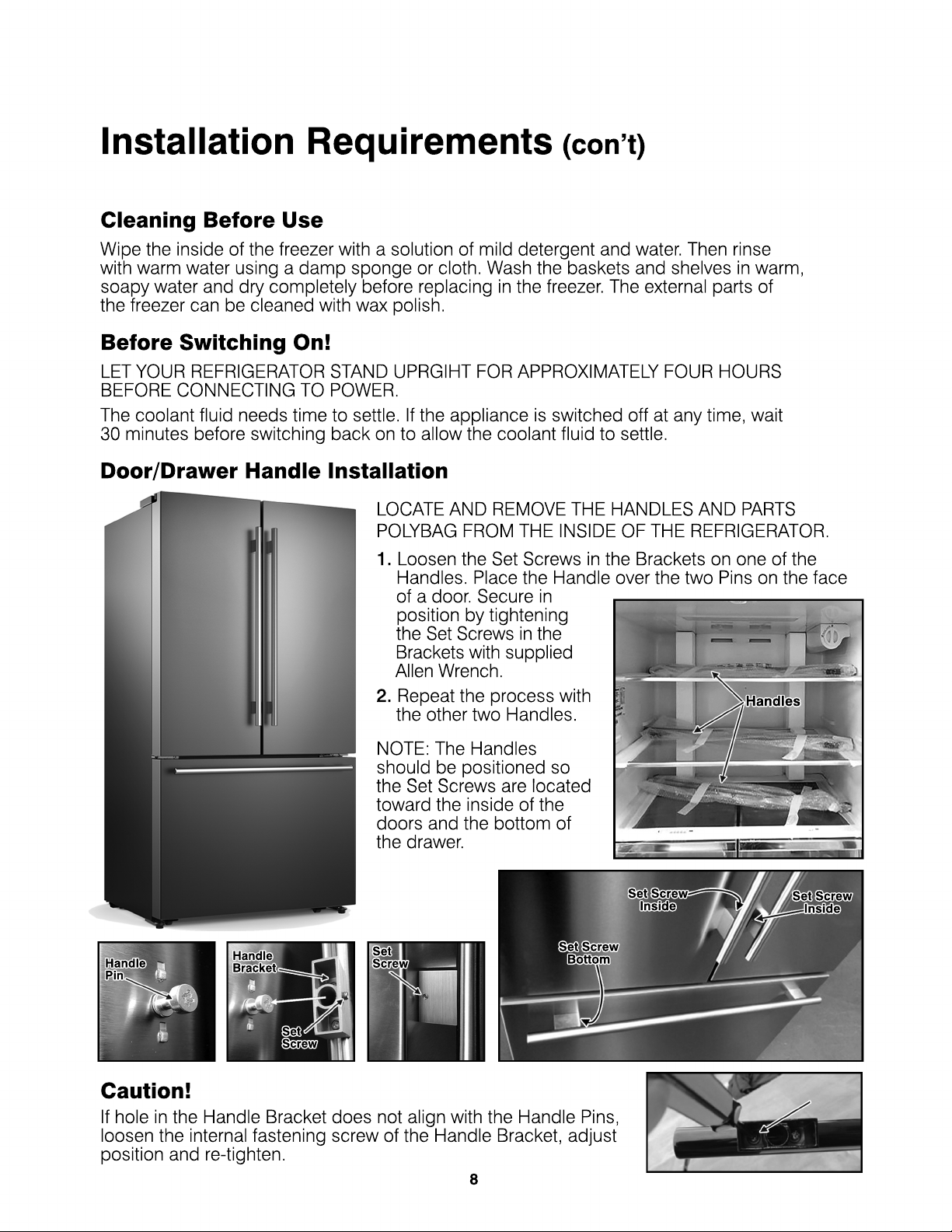
Door/Drawer Handle Installation
Set Screw
Inside
Set Screw
Bottom
Set Screw
Inside
Set
Screw
Set
Screw
Handle
Bracket
Handle
Pin
Handles
LOCATE AND REMOVE THE HANDLES AND PARTS
POLYBAG FROM THE INSIDE OF THE REFRIGERATOR.
1. Loosen the Set Screws in the Brackets on one of the
Handles. Place the Handle over the two Pins on the face
of a door. Secure in
position by tightening
the the Set Screws in the
Brackets with supplied
Allen Wrench.
2. Repeat the process with
the other two Handles.
NOTE: The Handles
should be positioned so
the Set Screws are locatedthe Set Screws are located
toward the inside of the
doors and the bottom of
the drawer.
Caution!
If hole in the Handle Bracket does not align with the Handle Pins,
loosen the internal fastening screw of the Handle Bracket, adjust
position and re-tighten.
8

Installation Requirements
(con’t)
Before Filling Your Freezer
Before storing foods in your freezer, turn the freezer on and wait 24 hours to make
sure it is working properly and to allow the freezer to reach the desired temperature.
Adjusting Door Height and Door Gap
Snap Rings
The height of a door can be adjusted using the provided
Snap Rings.
To Adjust the Height of a Door...
1. Check the height difference between the doors and then
lift and hold the lowest door to be even with the other.
2. Insert a suitably sized Snap Ring between the Door and
the Hinge as shown,
IMPORTANT
1. Insert only one Snap Ring. If you insert two or more Snap Rings, they may slip out or
cause a rubbing noise.
2. Do not raise the door too much. The door may contact and damage the top cover.
3. Save remaining Snap Rings for posible future use.
Warning! Contains Small Parts, Keep the Snap Rings Away From Babies and Children.
9

NOTE!
• The illustrations show above are for reference only. The acutal product may differ slightly,
but will not vary in function.
• To get the best energy efficiency of this product, please place all shelves, drawers and
baskets on their original position as per the illustration above.
Introduction
General Description of Refrigerator
10

Display Controls
Caution!
When you set a temperature, you set an average temperature for the whole refrigerator cabinet.
Temperatures inside each compartment may vary from the temperatures displayed on the panel,
depending on how much food you store and where you place it. Ambient room temperature
may also affect the actual temperature inside the appliance.
The temperature preset at the factory is Freezer 0° and Refrigerator 39° F.
Ice Control
Press the "Ice On/Off" button to turn the ice maker on or off. When the ice maker is
turned on, the icon will be lit. When the ice maker makes ice, the ice will be stored
in the ice storage box inside of the upper freezer drawer.
Fridge Temperature Control
Press the “Fridge” button to turn on the refrigerator temperature control, then press and
hold the “Fridge” button to select a temperature setting. If you have set the temperature
type to Fahrenheit, the temperature settings cycle from 35°F to 47°F in one degree
increments.
If you have set the temperature type to Celsius, the temperature settings cycle from 8°C to 2°C
in one degree increments.
NOTE:
•
If you want to toggle between "°F" to "°C", press and hold the "Super Cool" and
"Energy Saving” buttons for 3 seconds.
Super Cool
Press the “Super Cool” button to quickly reduce the refrigerator temperature to
35°F (2°C). When “Super Cool” mode is turned on, the icon will be lit. This function
can be useful when adding a large amount of food to the refrigerator compartment.
“Super Cool” mode automatically switches off after 3 hours, and the refrigerator temperature
setting will revert back to the previous setting.
To manully turn off “Super Cool” mode, press the “Super Cool” button again.
The control panel is located at the top of the inside of the refrigerator. The first time the
refrigerator is connected to power, the icons will light up for three seconds and a buzzer will
sound. If no buttons are pushed, or the door is closed, the lights will turn off in 60 seconds.
NOTE:
The WIFI icon will light for 3 seconds when door is opened. Ignore - this version is not
equipted with feature.
11
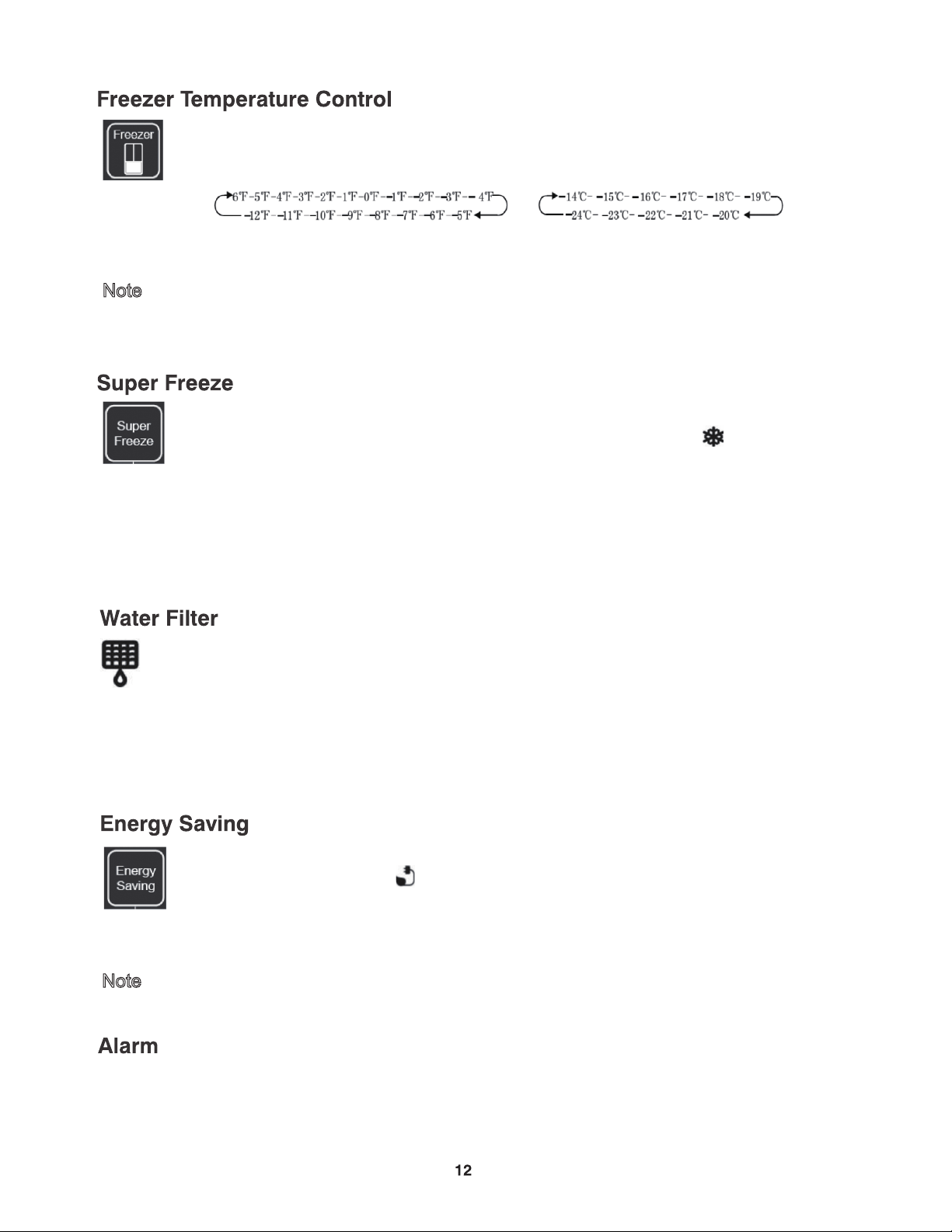
Press the Freezer button to turn on the freezer temperature control, then press and hold
the Freezer button to select a temperature setting. If you have set the temperature type
to Fahrenheit, the temperature settings cycle from 6°F to -12°F in one degree increments.
If you have set the temperature type to Celsius, the temperature settings cycle from -14°C
and -24°C in one degree increments.
Press the “Super Freeze” button to quickly quickly reduce the freezer temperature to
-12°F (-24°C). When “Super Freeze” mode is turned on, the icon will be lit. Fast-
freezing can help retain more of the vitamins and nutrients in fresh food and keep
your food fresh longer. This function is also useful when adding a large amount of food to
the freezer compartment.
• If you want to exchange the "°F" to "°C", please press and hold the "Super Cool" and
"Energy Saving” buttons for 3 seconds.
Note
Press this button to turn “Energy Saving” mode on and off. When “Energy Saving”
mode is turned on, the icon will be lit. The temperature of the refrigerator is
automatically set to 42°F (6°C) and the freezer to 2°F (-17°C).
• You cannot change the refrigerator or freezer temperature while in “Energy Saving” mode.
Note
(Note: Wait 6 hours to use this function after setting freezer temperature.
“Super Freeze” mode automatically switches off after 52 hours, and the freezer temperature
setting will revert back to the previous setting.
To manully turn off “Super Freeze” mode, press the “Super Freeze” button again.
The “Water Filter” icon will blink when you need to change the water filter. This will occur
after the refrigerator has dispensed about 300 gallons of water. For the best water quality,
it is recommended that you change the filter every six months even if the icon is not blink-
After you replace the water filter, push and hold the "Ice On/Off" and "Super Freeze" buttons for
3 seconds to reset the icon. When you replace the water filter, some water may leak from the
filter and lines.
Replacement filter: Model #HX2017FR-A
Both compartments will revert to the previous settings when the “Energy Saving” button is
pressed again and turned off.
• When the refrigerator or freezer door has been opened for over 2 minutes, the door alarm
will sound. The alarm will sound 3 times every 1 minute and will stop alarming automatically
after 8 minutes. The door alarm can also be cleared by closing the door that is ajar.
• To save energy, please avoid keeping the door open for a long time when using the appliance.
Using your Appliance
1. Using Your Refrigerator Compartment
The refrigerator compartment is suitable for storage of vegetables and fruit. Food inside should
be packed to store in order to avoid losing moisture or flavor permeating into other foods.
Caution!
When you set a temperature, you set an average temperature for the whole refrigerator cabinet.
Temperatures inside each compartment may vary from the temperatures displayed on the panel,
depending on how much food you store and where you place it. High or low room temperature
may also affect the actual temperature inside the appliance.
Glass Shelves and Door Racks
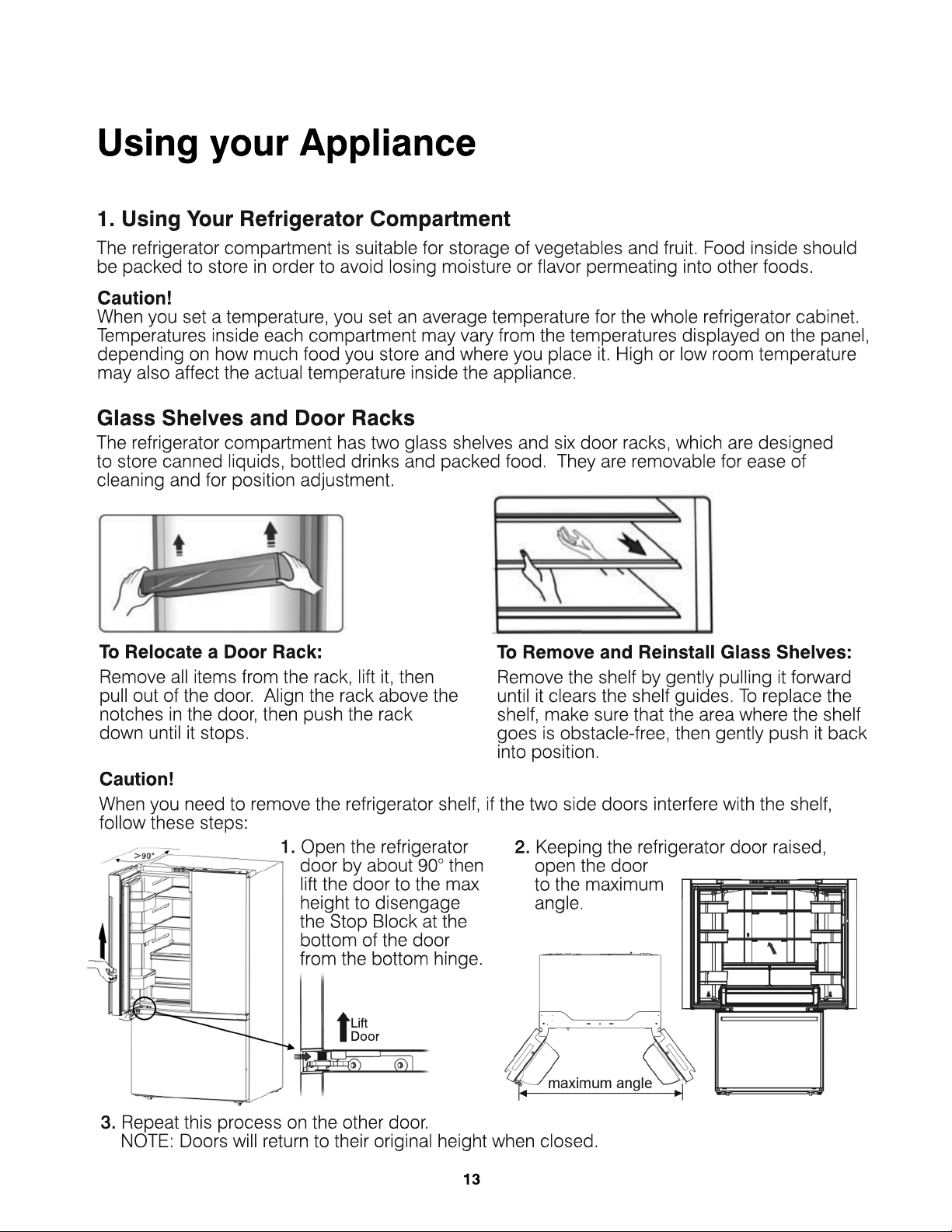
The refrigerator compartment has two glass shelves and six door racks, which are designed
to store canned liquids, bottled drinks and packed food. They are removable for ease of
cleaning and for position adjustment.
To Relocate a Door Rack:
Remove all items from the rack, lift it, then
pull out of the door. Align the rack above the
notches in the door, then push the rack
down until it stops.
To Remove and Reinstall Glass Shelves:
Remove the shelf by gently pulling it forward
until it clears the shelf guides. To replace the
shelf, make sure that the area where the shelf
goes is obstacle-free, then gently push it back
into position.
Caution!
When you need to remove the refrigerator shelf, if the two side doors interfere with the shelf,
follow these steps:
1. Open the refrigerator
door by about 90° then
lift the door to the max
height to disengage
the Stop Block at the
bottom of the door
from the bottom hinge. from the bottom hinge.
Lift
Door
2. Keeping the refrigerator door raised,
open the door
to the maximum
angle.
3. Repeat this process on the other door.
NOTE: Doors will return to their original height when closed.
13

Drawers
The cripser drawers are designed to store fruits and vegetables. Placing these types of foods
inside the drawers help avoid moisture loss and prevents flavor from absorbing into other foods
.To Remove a Drawer:
Open the refrigerator door all the way. Pull the drawer completely open and move it slightly
toward the compartment wall. Then lift the drawer up and pull it out of the refrigerator.
2. Using the Cold Water Dispenser
The water dispenser is located inside the left side of the refrigerator compartment. Position
your glass about 1.5” under the dispenser and push the lever
with the glass.
Note:
•
Wait a few seconds after dispensing water to remove your glass to
prevent spills.
• •
Run water frequently to maintain a cold temperature. When first
using this function, the water may not cold enough. Wait for a short
time to ensure the appropriate temperature.
•
The water flowing through the filter is under increased pressure. When
water is dispensed, the pressure descreases, causing bubbles to form.
The water may look misty or cloudy temporarily. The bubbles will dissipate and the water
will clear after a few seconds.
3. Using the Freezer Compartment
The freezer compartment includes an upper drawer, lower drawer, automatic ice maker, and
ice storage box.
Using your Appliance
(con’t)
Automatic Ice Maker
Note:
•
After you turn on the ice maker function, let the ice maker
make ice for one to two days. Throw out the first one or two
buckets of ice to make sure that all impurities have been
removed from the water line.
•
If you do not dispense ice for a long periods of time, ice may
clump in the ice box. If this occurs, remove and empty out the ice box. clump in the ice box. If this occurs, remove and empty out the ice box.
•
If you are going on a long trip and therfore not using the water dispenser or ice maker
for a period of time, it is recommended that you turn off the water supply to prevent leaks.
14

Cleaning and Care
It is recommended that you regulary clean your refrigerator to keep it odor-free and running
efficiently.
Caution!
The appliance must not be plugged in during cleaning. Danger of electrical shock!
Before cleaning, unplug the refrigerator from the main socket.
Exterior Cleaning
•
Spray water onto the cleaning cloth instead of spraying directly on the
surface of the appliance. This helps ensure an even distribution of moisture
to the surface.
•
Clean the doors, handles and cabinet surfaces with a mild detergent and
wipe dry with a soft cloth.
Caution!
•
Do not use sharp objects as they are likely to scratch the surface.
•
Do not use abrasive cleaners, thinners, gasoline, or benzine for cleaning.
They may damage the surface of the appliance.
Interior Cleaning
Wipe the inside of the refrigerator freezer with a weak solution of baking soda and water
and then rinse with warm water using a damp sponge or cloth. Wipe completely dry before
replacing the shelves and baskets. Thoroughly dry all surfaces and removable parts before
putting them back into place.
Although this appliance automatically defrosts, a layer of
frost may occur on the freezer compartment’s interior walls
if the freezer door is opened frequently or kept open too
if the freezer door is opened frequently or kept open too
long. If the frost is too thick, choose a time when the freezer
is nearly empty and proceed as follow:
1.
Remove existing food and accessories baskets, unplug
the appliance, and leave the doors open. You may use
a plastic or wooden utensil to remove frost, but do not
use sharp objects (knives) as they may damage the
interio interior.
2.
When defrosting is completed, clean your freezer as
described above.
Warning!
Only after the interior is completely dry should the
appliance be switched back on and plugged back into the
main socket.
15

Cleaning and Care
(con’t)
Door Seals
Take care to keep door seals clean so that the doors seal tightly.
Wash seal with a mild detergent and warm water. Rinse
and dry thoroughly after cleaning.
Caution!
The refrigerator should only be powered on after the seals
are completely dry.
Replacing the LED Light
(See page 26 for more details.)
Use the following steps to replace the LED light bulb if necessary:
1.
Unplug the refrigerator from the electrical outlet.
2.
Locate the LED light on the inside of the refrigerator.
3.
Remove the light cover. Insert a tool (tweezers or a screwdriver) along the side
opening of the LED light cover. Pop open the side over the cover, grasp the exposed
side and gently pull towards you to remove the cover and expose the LED light.
4. 4.
Remove LED bulb and insert a new LED bulb.
5.
Replace the light cover.
Replacing the Water Filter
To drink the freshest and cleanest water from your refrigerator,
change the filter on time.
1.
Shut off the water supply.
2.
Remove the Water Filter A by twisting it about 1/4 turn
counter-clockwise.
3.
Pull the Water Filter A from the Filter Holder B .
4. 4.
Empty the Water Filter Tray C and dry around the
Filter Case.
5.
Replace with new Water Filter.
16

Helpful Hints and Tips
Energy Saving Tips
•
Try to avoid keeping the door open for long periods in order to conserve energy. Organizing
and labelling foods can reduce extended searches.
•
Ensure the appliance is away from any sources of heat (direct sunlight, electric oven or
cooker, etc.) Place the appliance in a well-ventilated, humidity-free room. Please refer to
Installation Location section on Page 7.
•
Don‘t set the temperature colder than necessary.
• •
Don’t store warm food or evaporating liquid in the appliance. Allow foods to come down to
room temperature before placing in the refrigerator.
•
To prevent frost build-up, wrap foods tightly and wipe dry before placing in the refrigerator.
•
The diagram on Page 9 shows the most energy efficient layout for the drawers, crisper and
shelves. Altering their positions can affect air flow and efficiency of the appliance.
Switching Off Your Appliance
If the appliance needs to be switched off for an extended period, the following steps should
be taken prevent mold on the appliance.
1.
Remove all food.
2.
Remove the power plug from the main socket.
3.
Clean and dry the interior thoroughly.
4.
Ensure that all the doors are wedged open slightly to allow air to circulate.
17

Troubleshooting
If you experience a problem with your appliance or are concerned that the appliance is not
functioning correctly, you can carry out some easy checks before calling for service,
please see below.
Warning!
Don’t try to repair the appliance yourself. If the problem persists after you have
made the checks mentioned below, contact a qualified electrician, authorized service
engineer or the store where you purchased the product.
WWarning!
A child entrapment warning statement is included in either the operating
instructions or in a use and care manual provided with each refrigerator.
DANGER:
Risk of child entrapment. Before you throw away your old refrigerator or
freezer:
- Take off the doors.
- Leave the shelves in place so that children can not easily climb inside.
18
PROBLEM
• My refrigerator
does not work.
• The refrigerator
compartment has
a bad odo
a bad odor.
• The refrigerator
doors do not close
completely.
POSSIBLE CAUSE & SOLUTION
• Make sure that your refrigerator is securely plugged into a
working outlet.
• Make sure that your power source has the correct voltage.
Your refrigerator’s voltage rating is on a label on the back of
your refrigerator.
•
• Check the house fuse or circuit breaker box and replace the
fuse or reset the circuit breaker.
• Make sure that all food with a strong odor (like onions) is
wrapped or stored in airtight packaging.
• Certain containers and wrapping materials (such as paper, foil,
or plastic) can cause odors. If you think this might be the case, try
using different containers or a different brand of wrapping material.
• Check for spoiled food and remove it.
• Check for spoiled food and remove it.
• Clean the inside of your refrigerator. See Cleaning your refrigerator
on page 15.
• Make sure that no food packages are in the way.
• Make sure that the door gaskets (seals) are clean.
See Cleaning your refrigerator on page 16.
• If the door gasket does not seal, try heating then cooling the seal.
You can use an electric hair dryer to heat the seal.
• Make sure that your refrigerator is level. See Leveling your
refrigerator on page 7.
• Make sure that the top of your refrigerator is tilted backward
about 0.4" (10 mm) to 0.6" (15 mm). See Leveling your refrigerator
on page 7.

Troubleshooting
(con’t)
19
PROBLEM
• The temperature
is too hot.
• The temperature
is too cold.
• Ice is not
dispensing.
dispensing.
• Water is not
dispensing.
POSSIBLE CAUSE & SOLUTION
• You may have left the doors open too long or opened them
too frequently.
• Make sure that no obstacle is keeping the doors from closing
correctly.
• Adjust the refrigerator or freezer compartment temperature.
See Setting the refrigerator temperature on page 11 or Setting
See Setting the refrigerator temperature on page 11 or Setting
the freezer temperature on page 10.
• Your refrigerator may not have enough clearance from walls or
the ceiling. See Providing correct ventilation on page 7.
• Adjust the refrigerator or freezer compartment temperature.
See Setting the refrigerator temperature on page 11 or Setting
the freezer temperature on page 12.
•
• After you install the water supply line, you should wait 12 hours
before you try dispensing ice. If the water is not sufficiently cooled,
your refrigerator will take longer to make ice.
• Make sure that the water line is connected and the water valve
open. See Connecting the water supply on page 25.
• Make sure that the ice dispenser is not in off mode.
• Make sure that no ice is blocking the ice maker bucket or ice chute.
• If the water pressure is less than 30 psi, try installing a booster
• If the water pressure is less than 30 psi, try installing a booster
pump to compensate for the low pressure.
• Make sure that the freezer compartment temperature is not set
too warm. Try setting the freezer temperature lower. See Setting
the freezer temperature on page 12.
• If you just dispensed a large amount of ice, wait at least 90 minutes
before dispensing more ice.
• Make sure that the water line is connected and the water valve
• Make sure that the water line is connected and the water valve
open. See Connecting the water supply on page 25.
• Make sure that the water line is not kinked or bent.
• Make sure that the refrigerator compartment temperature is not
set too low. If the temperature is too low, the water in the dispenser
tank may freeze. See Setting the refrigerator temperature on
page 11.
• Make sure that the water filter is correctly installed. See Replacing
• Make sure that the water filter is correctly installed. See Replacing
the water filter on page 12.

Troubleshooting
(con’t)
20
PROBLEM
• A layer of frost
occurs in one of the
compartments.
• The refrigerator
door is hard
to open.
to open.
• The compressor
runs for a long time
or turns on and off
frequently.
• The light inside the
refrigerator does
not turn on.
not turn on.
• Hear water bubbling
in the refrigerator
POSSIBLE CAUSE & SOLUTION
• A layer of frost may occur on the compartment’s interior walls
if the freezer is opened frequently or kept open too long.
• Make sure that the air outlets are not blocked by food.
• Make sure that the doors are fully closed.
To remove the frost, see Defrosting the freezer compartment
on page 15.
on page 15.
• When you open the refrigerator door, warm air rushes inside.
When you close the door, the warm air rushes to the condenser
which causes a vacuum. This causes the door to be hard to
open for about 10 to 15 seconds after closing.
• If the door is hard to open at other times, try rubbing paraffin
wax or petroleum jelly along the edges of the entire gasket.
Paraffin wax is used for canning and is safe for use around food.
The compressor runs longer if:
• The room temperature is high.
• You just added a large amount of food. Wait for the food to freeze,
then check again.
• You open and close the door frequently.
• The door gasket is dirty. Clean the gasket. See Cleaning your
refrigerator on page 16.
refrigerator on page 16.
• Your refrigerator has been disconnected for a period of time. Wait
for your refrigerator to cool (about four hours) before adding food.
• You have the temperature set too low.
• Make sure that your refrigerator is plugged into a working outlet.
• If a door stays open too long, your refrigerator automatically
turns off the light. Close then open the door again.
• Check to see if the light is damaged. If the light is damaged,
• Check to see if the light is damaged. If the light is damaged,
have it replaced by a qualified service technician. See Replacing
the LED light on page 16.
This is normal. The bubbling comes from the refrigerant
coolant liquid circulating through the refrigerator.

Troubleshooting
(con’t)
PROBLEM
• The refrigerator
makes unusual
noises or vibrations.
• The outside of the
refrigerator is hot.
•
• Water condenses
on the outside of
the refrigerator.
POSSIBLE CAUSE & SOLUTION
The following sounds are normal:
• Compressor running noises.
• Air movement noise from the small fan motor in the freezer
compartment or other compartments.
• Gurgling sound similar to water boiling.
•
• Popping noise during automatic defrosting.
• Clicking noise before the compressor starts.
• Clicking noise when you get the water.
• Motor running noises when you get the ice.
Other unusual noises or vibrations may occur:
• If you have items on the top of your refrigerator. Remove
the items.
• If your refrigerator is not level. See Leveling your refrigerator
• If your refrigerator is not level. See Leveling your refrigerator
on page 12.
• If your refrigerator is touching walls. Move it away from the walls.
• If the shelves or drawers are installed incorrectly.
Heat dissipation from the condenser may make the outside
feel hot. This is normal and happens if:
• The room temperature is high.
•
• You have too much food in your refrigerator.
• You open and close the doors excessively.
• Condensation on the exterior surface and door seal is normal
when the room humidity is high.
• When you open the door, warm, moist outside air meets the
cold dry air inside your refrigerator. This is normal.
21

Door Removal
Removing the Refrigerator Doors
Make sure that your refrigerator is not plugged in.
1.
With the door closed, remove the 3 screws
holding the top cover (A) with Philips (+)
screwdriver, and then remove the top cover
with the entire-harness attached.
2.
Remove the 3 screws (B) fixed on the hinges
with a wrench ( 8 mm) and 1 ground screws
(C) attached to the hinge with Philips (+)
screwdriver. Remove the upper left and right
door hinges (D).
3.
Use your both hands to open the door
more than 90°.Lift it up and take it off.
22

Door / Drawer Removal
(con’t)
Removing the Freezer Door
3.
Take out the upper
freezer drawer (A)
by lifting it up from
the rail system.
4.
Remove the lower
freezer drawer (C)
by lifting it up.
5.
Remove the 4
screws attached
to the supporting
frame (D).
6.
Pull out the freezer
door and lift it up in
the direction of the
arrow.
2.
Pull out the freezer door and the upper freezer
drawer (A) to the final position.
Then take out the ice box (B) by lifting it up in the
direction of the arrow.
E
F
G
Allen Wrench
1.
Remove the 4 hex head bolts (E) with
an Allen wrench (4 mm) and 2 screws (G).
Remove the lower left and right door
hinges (F).
Re-assembling the Freezer Door
To re-assemble the drawer after you moved the appliance to its final location,
assemble the parts in reverse order.
23

Installing the Water Line
This refrigerator comes equipped with a water dispenser and an automatic ice maker. To use
these features, the refrigerator needs to be connected to a potable water supply. In order for
the ice maker to function correctly, the water pressure needs to be between 30 psi and 125 psi.
Warning:
• The water connection must be made by a qualified plumber. Operation outside the water
pressure range may cause malfunction, severe and damaging water leaks.
• If the refrigerator is installed in an area with low water pressure (below 30 psi), you can install
• If the refrigerator is installed in an area with low water pressure (below 30 psi), you can install
a booster pump to compensate for the low pressure.
• If you are going on a long trip and therfore not using the water dispenser or ice maker for
a period of time, it is recommended that you turn off the water supply to prevent leaks.
Connecting to the Water Supply
You will need the following tools and parts
(not included)
You need to purchase several items to complete this connection. You may find these items
sold as a kit at your local hardware store.
Warning:
Make sure that you:
•
Use the tubing that came with your refrigerator and the water supply installation kit.
Do not use old tubing.
•
Connect to the cold water pipe. If you connect to the hot water pipe, the purifier
may malfunction.
• •
Do not contaminate the water pipes during installation.
1.
Shut off the main water
supply.
2
.Using a 1/4" drill bit, drill
a hole into the cold water
line, then install the saddle
type shutoff valve.
33
. Connect the water line
(installation kit not included)
to the shutoff valve.
4.
Turn the main water
supply back on, then
turn on the shutoff
valve and flush out the
tubing until the water
runs clear.
Note:
Note:
Initial dark discoloration
of water is normal.
5
. Turn off shutoff valve.
24

Installing the Water Line
(con’t)
Connecting the Water Supply to Refrigerator
Plastic Tubing
¼” tubing with
molded end
¼” compression
nut (1)
Copper Tubing
¼” tubing
¼” compression
nut (1)
Ferrule (2)
Stainless Tubing
¼” tubing
¼” compression
nut (1)
You need to purchase several items to complete
this connection.
You may find these items sold as a kit at your local
hardware store.
You can use plastic tubing, copper tubing, or
stainless steel tubing as the water line installation kit.
1.
Connect the water supply line to
the compression fitting (assembled
with a 1/4" tube, included in
refrigerator).
•
If you are using copper tubing, slip
the compression nut (not supplied)
and ferrule (not supplied) on the and ferrule (not supplied) on the
copper tubing (not supplied).
•
If you are using plastic tubing, insert
the molded end (bulb) of the plastic
tubing into the compression fitting.
Important: Do not use without the
molded end (bulb) of the plastic tubing.
• •
If you are using stainless steel tubing,
slip the compression nut on the
copper tubing (not supplied).
2.
Tighten the compression nut onto
the compression fitting. Do not
over-tighten the compression nut.
Warning!
•
Turn on the water supply and make sure that there are no leaks. If there is leakage, turn off the
shutoff valve immediately and tighten the connections if necessary.
•
Flush one gallon of water (approximately five minutes) through the filter before drinking or
using the water from your refrigerator.
- To flush, press a large glass or cup against the water dispenser lever. Fill the glass, then
empty it into the kitchen sink. Repeat until you dispense about one gallon of wate
empty it into the kitchen sink. Repeat until you dispense about one gallon of water.
•
The first time you use the water dispenser, you may hear the sound of water pushing air out
of the water dispenser. This is normal.
•
After powering on the refrigerator, let the ice maker make ice for one to two days, then throw
out the first one or two buckets of ice to make sure that all impurities have been removed
from the water lines.
•
Do not pull hard on the water lines, it may damage the water system.
• •
The water line should not be pressed by heavy things and should not bend too much.
25

26
Replacing LED Refrigerator Lights
Warning
The LED light must be replaced by a competent person. If the LED light is damaged,
follow the steps below:
Inside LED Refrigerator Light
1.
Unplug the refrigerator from the electrical
outlet.
2. 2.
Insert a tool (tweezers or a screwdriver) along
the side opening of the LED light.
3.
Remove LED light A from these Brackets B
and insert a new LED light.
4.
Unplug the wire harness C from the LED
light A and replace the new LED light.
5.
Replace the light cover.
Step 2
B3
B2
A
B1
Step 3
A
C
Step 4
Under Refrigerator Door LED Light
1.
Unplug the refrigerator from the electrical
outlet.
2.
Insert a tool (tweezers or a screwdriver) into
opening A of the LED light. Then unplug the
wire harness B from C.
3. 3.
Remove LED light E from F and insert a new
LED light.
4.
Replace the light cover.
A
Step 2
B
C
E
F
Step 3

One Year Limited Warranty
Manufacturer provides a limited warranty for each new refrigerator to be free from defects in material
and workmanship for a period of 1 year from the date of purchase. Manufacturer agrees to remedy
any such defective inside accessory components such as door panels, door shelves, racks, handles,
casters, bins and drawers or to furnish a new unit if the unit proves to have failed, at the company’s
option, for one year from your original date of purchase.
Buyer must register unit at: PlasticDevelopmentGroup.com/applianceregistration.
In the event the unit requires replacement or refund under the terms of this limited warrant
In the event the unit requires replacement or refund under the terms of this limited warranty, the Buyer
is responsible for all transportation expenses to return the unit prior to receiving a replacement unit or
refund. A copy of the dated sales receipt/invoice is required to receive benefits of this limited warranty.
This limited warranty covers appliances in use within the continental United States, Alaska, and Hawaii,
and Puerto Rico.
This limited warranty does not cover the following:
1. Products with original serial numbers that have been removed, altered or cannot be readily determined.
2. Products that have been transferred from its original owner to another party or removed outside the USA.
3. Rust on the interior or exterior of the unit.
4. Damages due to shipping damage or improper installation.
5. Damages due to misuse or abuse.
6. Service calls, repairs, and labor expenses for any purpose.
7.
7. Content losses and food spoilage due to failure of the unit.
8. Punctures to the evaporation system due to improper defrosting of the unit.
9. Replacement or resetting of house fuses or circuit breakers.
10. Failure or defects of this product if used for other purposes than its intended purpose or used other
than in accordance with the provided instructions.
11. Disposal costs for failed unit not returned to Manufacturer.
12. Any delivery/installation costs incurred as the result of a unit that fails to perform as specified.
13.
13. Expenses for travel and transportation for product if you are exchanging or returning the unit.
14. Expenses related to the removal and re-installation of your unit or for making the unit accessible,
such as removal of trim, cupboards, shelves, etc. or if not installed in accordance with the provided
installation instructions.
15. Damages to the finish of the unit or home incurred during installation, including but not limited to floors,
cabinets, walls, etc.
16. Damages caused by external causes such as abuse, misuse, inadequate power supply, accidents,
fires, or acts of God.
fires, or acts of God.
17. Refunds for returned products are limited to the price paid for the unit per the sales receipt.
Disclaimer of Implied Warranties, Limitation of Remedies and Exclusions:
EXCEPT FOR THE EXPRESS WARRANTIES SET FORTH HEREIN, MANUFACTURER MAKES NO WARRANTY WHATSOEVER
(OR THE SHORTEST PERIOD ALLOWED BY LAW) REGARDING THE GOODS, INCLUDING ANY (1) WARRANTY OF
MERCHANTABILITY; (2) WARRANTY OF FITNESS FOR A PARTICULAR PURPOSE; (3) WARRANTY OF TITLE; OR (4) WARRANTY
AGAINST INFRINGEMENT OF INTELLECTUAL PROPERTY RIGHTS OF A THIRD PARTY; WHETHER ARISING BY LAW, COURSE
OF DEALING, COURSE OF PERFORMANCE, USAGE OF TRADE, OR OTHERWISE. BUYER ACKNOWLEDGES THAT IT HAS
NOT RELIED ON ANY REPRESEN
NOT RELIED ON ANY REPRESENTATION OR WARRANTY MADE BY MANUFACTURER, OR ANY OTHER PERSON ON
MANUFACTURER’S BEHALF. REPLACEMENT OF UNIT AND LISTED PARTS IN ACCORDANCE WITH THE TERMS HEREIN,
IS YOUR SOLE AND EXCLUSIVE REMEDY UNDER THIS LIMITED WARRANTY. MANUFACTURER IS NOT LIABLE FOR
INCIDENTAL OR CONSEQUENTIAL DAMAGES AND NO REPRESENTATIVE OR PERSON IS AUTHORIZED TO ASSUME
FOR MANUFACTURER ANY OTHER LIABILITY IN CONNECTION WITH THE SALE OF THIS PRODUCT. UNDER NO
CIRCUMSTANCE IS THE CONSUMER PERMITTED TO RETURN THE UNIT TO MANUFACTURER WITHOUT THE PRIOR
WRITTEN CONSENT OF MANUFACTURER.
Customer Service, (toll free: 833-953-1758) between the hours of 8:00 am and 4:00 pm EST
EMAIL: appliances@plasticdevelopmentgroup.com
Product Registration: plasticdevelopmentgroup.com/applianceregistration
27

28
Customer Service, (toll free: 833-953-1758) between the hours of 8:00 am and 4:00 pm EST
EMAIL: appliances@plasticdevelopmentgroup.com
Product Registration: plasticdevelopmentgroup.com/applianceregistration