TO WATCH VIDEOS GO TO:
tinyurl.com/lgh5x3h
TO WATCH VIDEOS GO TO:
tinyurl.com/lgh5x3h
Contents
Preparation ...................................... 2-5
Assembly .......................................6-10
Installation ..................................11-28
Install the Door Control ............21-22
Install the Protector System ......23-26
Connect Power .........................27-28
Adjustments .................................29-31
myQ® Smartphone Control .................32
Operation .....................................33-36
Features .......................................34
Using your Garage Door Opener .....35
Push Button Door Control ..............35
Remote Control and
Keyless Entry ................................35
Homelink® ...................................35
To Erase the Memory .....................36
Maintenance .....................................37
Troubleshooting ........................... 38-39
Accessories ........................................ 40
Warranty ........................................... 41
Repair Parts .................................42-43
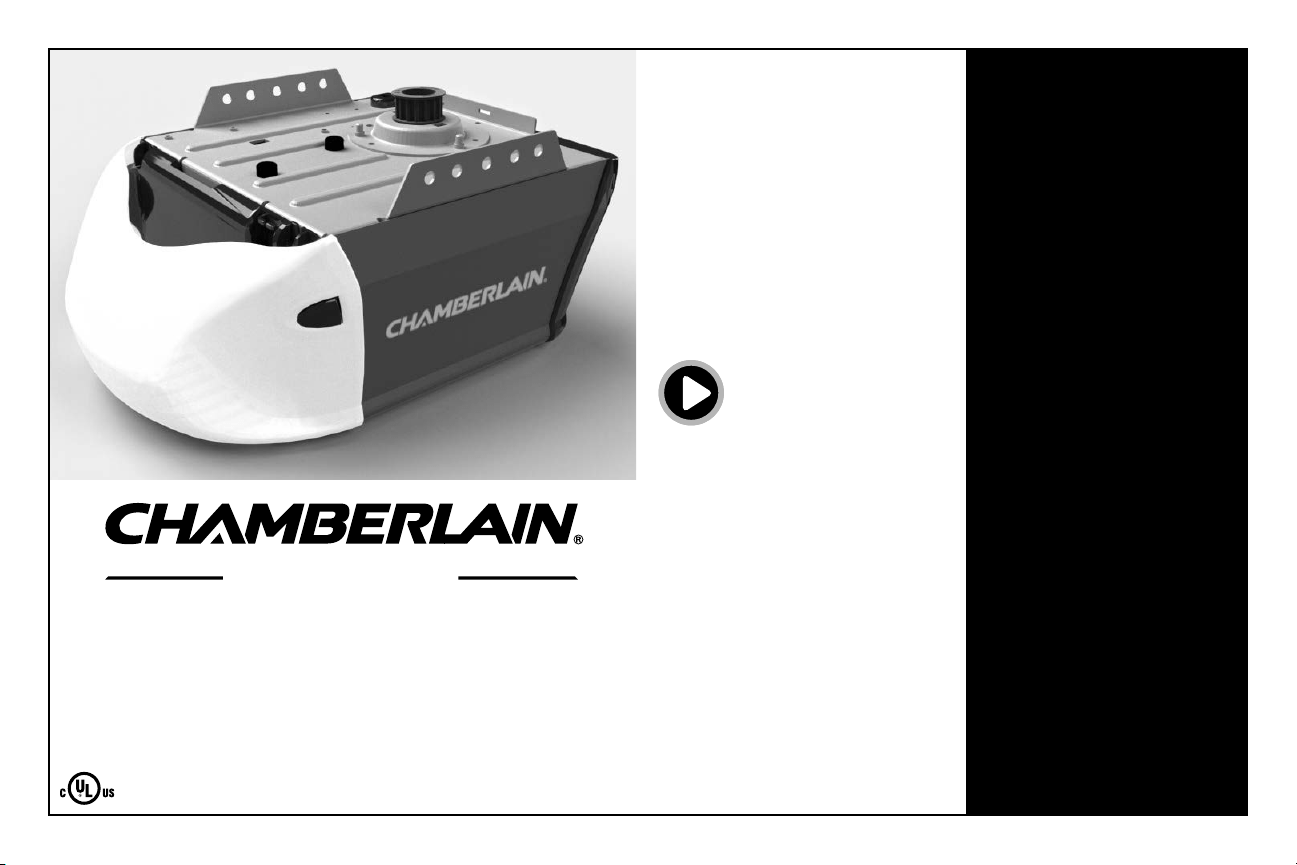
Owner’s Manual
B353
Belt Drive
Garage Door Opener
FOR RESIDENTIAL USE ONLY
PRE-PROGRAMMED REMOTE CONTROL
INCLUDED
www.chamberlain.com
www.mychamberlain.com
• Please read this manual and the enclosed safety materials carefully!
• Fasten the manual near the garage door after installation.
• The door WILL NOT CLOSE unless the Protector System® is connected
and properly aligned.
• Periodic checks of the garage door opener are required to ensure
safe operation.
• The model number label is located on the front panel of your garage
door opener.
• This garage door opener is compatible with myQ® and
Security+b2.0® accessories.
• DO NOT install on a one-piece door if using devices or features
providing unattended close. Unattended devices and features are
to be used ONLY with sectional doors.
Garage Opener
2
Safety Symbol and Signal Word Review
This garage door opener has been designed and tested to offer safe service provided it is installed, operated,
maintained and tested in strict accordance with the instructions and warnings contained in this manual.
Mechanical
Electrical
When you see these Safety Symbols and Signal Words on
the following pages, they will alert you to the possibility of
serious injury or death if you do not comply with the
warnings that accompany them. The hazard may come
from something mechanical or from electric shock. Read
the warnings carefully.
When you see this Signal Word on the following pages, it
will alert you to the possibility of damage to your garage
door and/or the garage door opener if you do not comply
with the cautionary statements that accompany it. Read
them carefully.
WARNING: This product can expose you to chemicals including lead, which are known to the State of
California to cause cancer or birth defects or other reproductive harm. For more information go to
www.P65Warnings.ca.gov
Unattended Operation
The Timer-to-Close (TTC) feature, the myQ
®
Smartphone Control app, and myQ Garage Door and Gate Monitor are
examples of unattended close and are to be used ONLY with sectional doors. Any device or feature that allows the
door to close without being in the line of sight of the door is considered unattended close. The Timer-to-Close (TTC)
feature, the myQ Smartphone Control, and any other myQ devices are to be used ONLY with sectional doors.
Check the Door
To prevent possible SERIOUSINJURYor DEATH:
l ALWAYS call a trained door systems technician if garage door binds, sticks, or is out of balance. An
unbalanced garage door may NOT reverse when required.
l NEVER try to loosen, move or adjust garage door, door springs, cables, pulleys, brackets or their hardware,
ALLof which are under EXTREME tension.
l Disable ALLlocks and remove ALLropes connected to garage door BEFORE installation and operating
garage door opener to avoid entanglement.
l DO NOT install on a one-piece door if using devices or features providing unattended close. Unattended
devices and features are to be used ONLY with sectional doors.
To prevent damage to garage door and opener:
l ALWAYS disable locks BEFORE installing and operating the opener.
l ONLY operate garage door opener at 120V, 60Hz to avoid malfunction and damage.
Before you begin:
1. Disable locks and remove any ropes connected to the garage door.
2. Lift the door halfway up. Release the door. If balanced, it should stay in place,
supported entirely by its springs.
3. Raise and lower the door to check for binding or sticking. If your door binds,
sticks, or is out of balance, call a trained door systems technician.
4. Check the seal on the bottom of the door. Any gap between the floor and the
bottom of the door must not exceed 1/4" (6 mm). Otherwise, the safety reversal
system may not work properly.
5. The opener should be installed above the center of the door. If there is a torsion
spring or center bearing plate in the way of the header bracket, it may be
installed within 4feet (1.2 m) to the left or right of the door center. See page 12.
Torsion
Spring
Extension
Spring
OR
Preparation
3
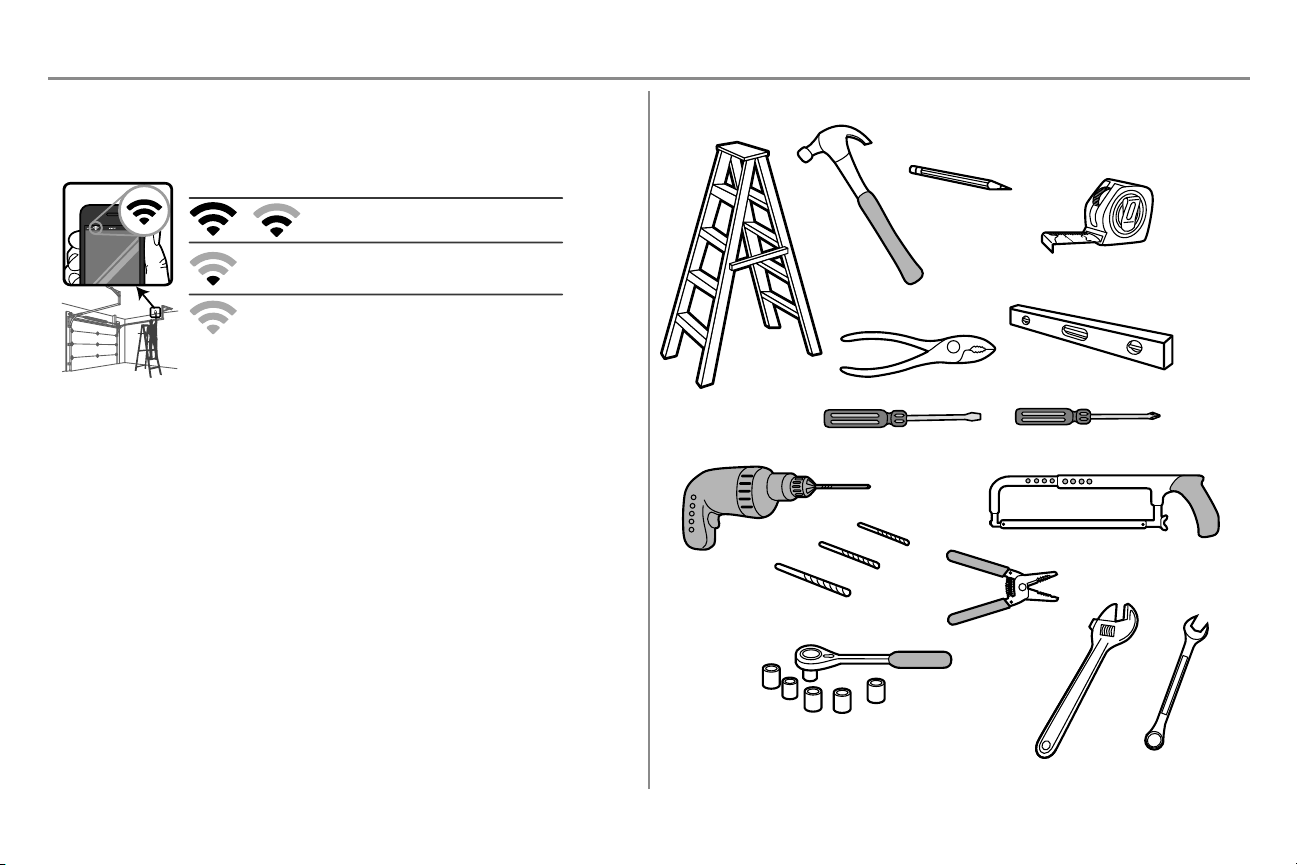
Before You Connect with Your Smartphone
Monitor and control your garage door from anywhere using the myQ app. You will need a router with Wi-Fi and a
smartphone or other mobile device. Make sure your mobile device is connected to your Wi-Fi network. Hold your
mobile device in the place where your garage door opener will be installed and check the Wi-Fi signal strength.
Wi-Fi signal is weak.
The garage door opener will likely connect to your Wi-Fi
network. If not, try one of the options below
.
No Wi-Fi signal. Try one of the following:
• Move your router closer to the garage door opener to
minimize interference from walls and other objects
• Buy a Wi-Fi range extender
• Buy a myQ Internet Gateway (828LG) see page 41
Check Signal Strength. If you see:
Wi-Fi signal is strong. You’re all set!
Install your new garage door opener.
See myQ Smartphone Control page 32 to connect your garage door opener to your Wi-Fi network.
Additional Items You May Need:
Survey your garage area to see if you will need any of the following items:
l (2) 2X4 Pieces of wood : May be used to fasten the header bracket to the structural supports. Also used to
position the garage door opener during installation and for testing the safety reversing sensors.
l Support bracket and fastening hardware: Must be used if you have a finished ceiling in your garage.
l Extension brackets (MODEL 041A5281-1) or wood blocks: Depending upon garage construction,
extension brackets or wood blocks may be needed to install the safety reversing sensor.
l Fastening hardware: Alternate floor mounting of the safety reversing sensor will require hardware not
provided.
l Door reinforcement: Required if you have a lightweight steel, aluminum, fiberglass or glass panel door.
l Rail extension kit: Required if your garage door is more than 7 feet (2.13 m) high.
Tools Needed
3/16
7/16
1/2
5/32
5/16
5/8
9/16
1/4
7/16
Preparation
4
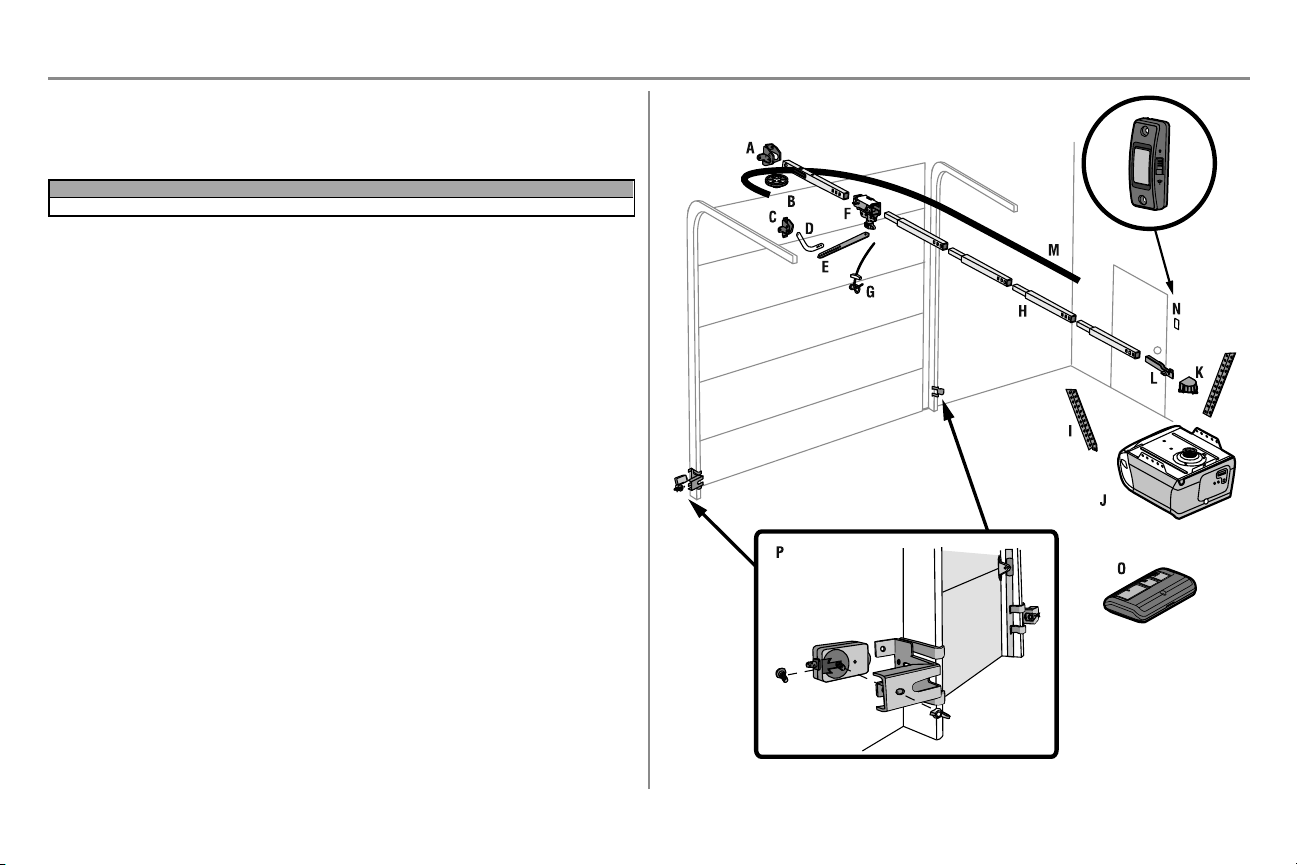
Carton Inventory
Save the carton and packing material until the installation and adjustment is complete. Instructions for the accessories
will be attached to the accessory and are not included in this manual. The images throughout this manual are for
reference only and your product may look different.
Model Power Door Control Remote Control
B353 Med Lift Power System™ Push Button 3-button
A. Header bracket
B. Pulley
C. Door bracket
D. Curved door arm
E. Straight door arm (Packaged inside front rail section)
F. Trolley
NOTE: Be sure to assemble the trolley before sliding onto rail.
G. Emergency release rope and handle
H. Rail (1 front and 4 center sections)
I. Hanging brackets (2) (Packaged inside the front rail section)
J. Garage door opener (motor unit)
K. Sprocket cover and screws
L. “U” bracket
M. Belt
N. Door control
O. Remote control - Model 953ESTD
P. The Protector System
Safety reversing sensors with 2 conductor white and white/black wire attached: Sending Sensor (1),
Receiving Sensor (1), and Safety Sensor Brackets (2)
NOT SHOWN
White and red/white wire
Owner's manual
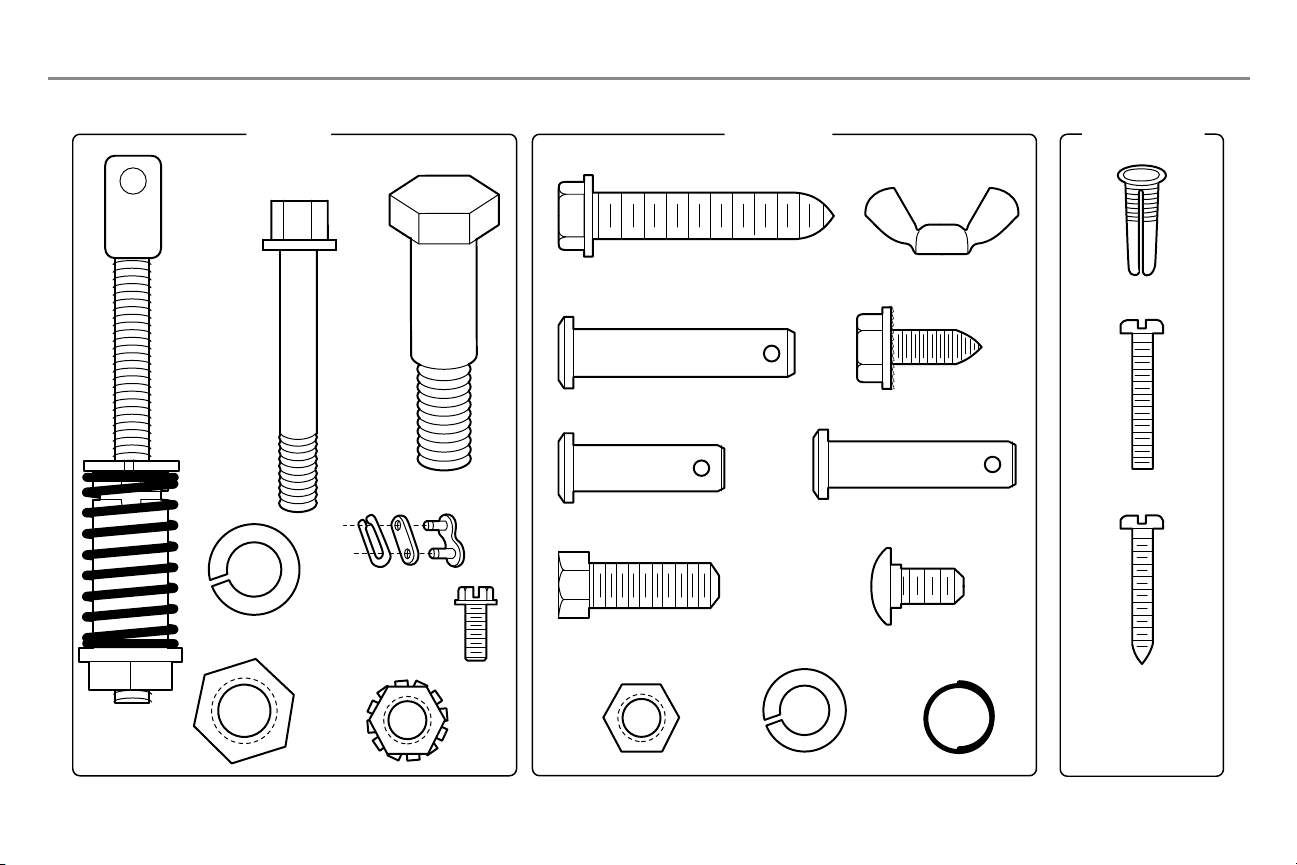
Hardware
Preparation
5
Hardware
ASSEMBLY INSTALLATION
DOOR CONTROL
Insulated Staples
(N
ot Shown)
Clevis Pin 5/16"x1-1/2"
Ring
Fastener (3)
Hex Bolt 5/16"-18x7/8" (4)
Self-Threading Screw
1/4"-14x5/8" (2)
Clevis Pin 5/16"x1" Clevis Pin 5/16"x1-1/4"
Carriage Bolt
1/4"-20x1/2" (2)
Wing Nut
1/4"-20 (2)
Lag Screw 5/16"-9x1-5/8" (4)
Screw 6ABx1" (2)
Drywall Anchors (2)
Screw 6-32x1" (2)
Hex Screw #8x3/8" (2)
(packed with the
sprocket cover)
Bolt
1/4"-20x1-3/4"
Lock Nut
1/4"-20
Bolt
Nut 3/8"
Lock Washer 3/8"
Master Link
Threaded
Shaft with
Spring
Trolley Nut
Lock Washer
5/16"-18 (4)
Nut
5/16"-18 (4)
Preparation
6
Assembly
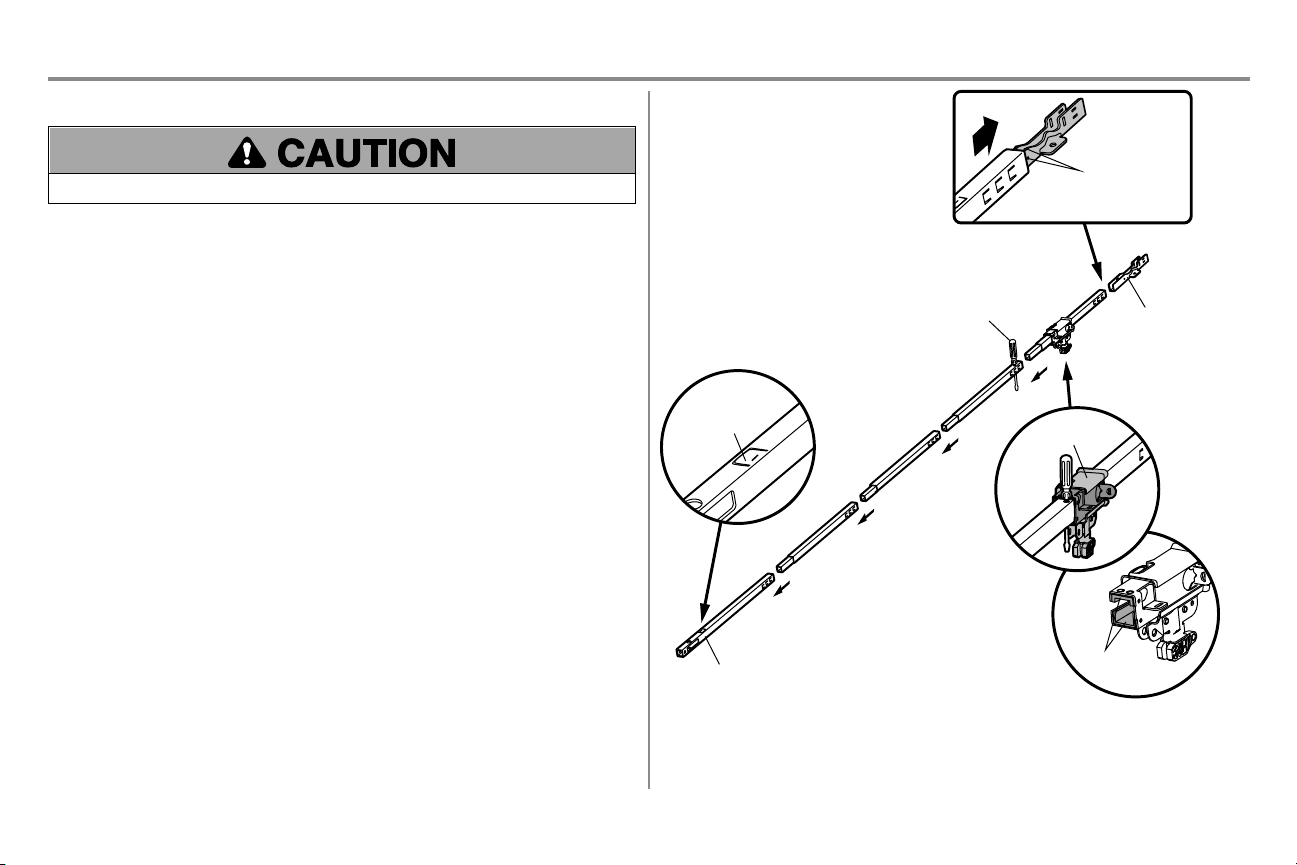
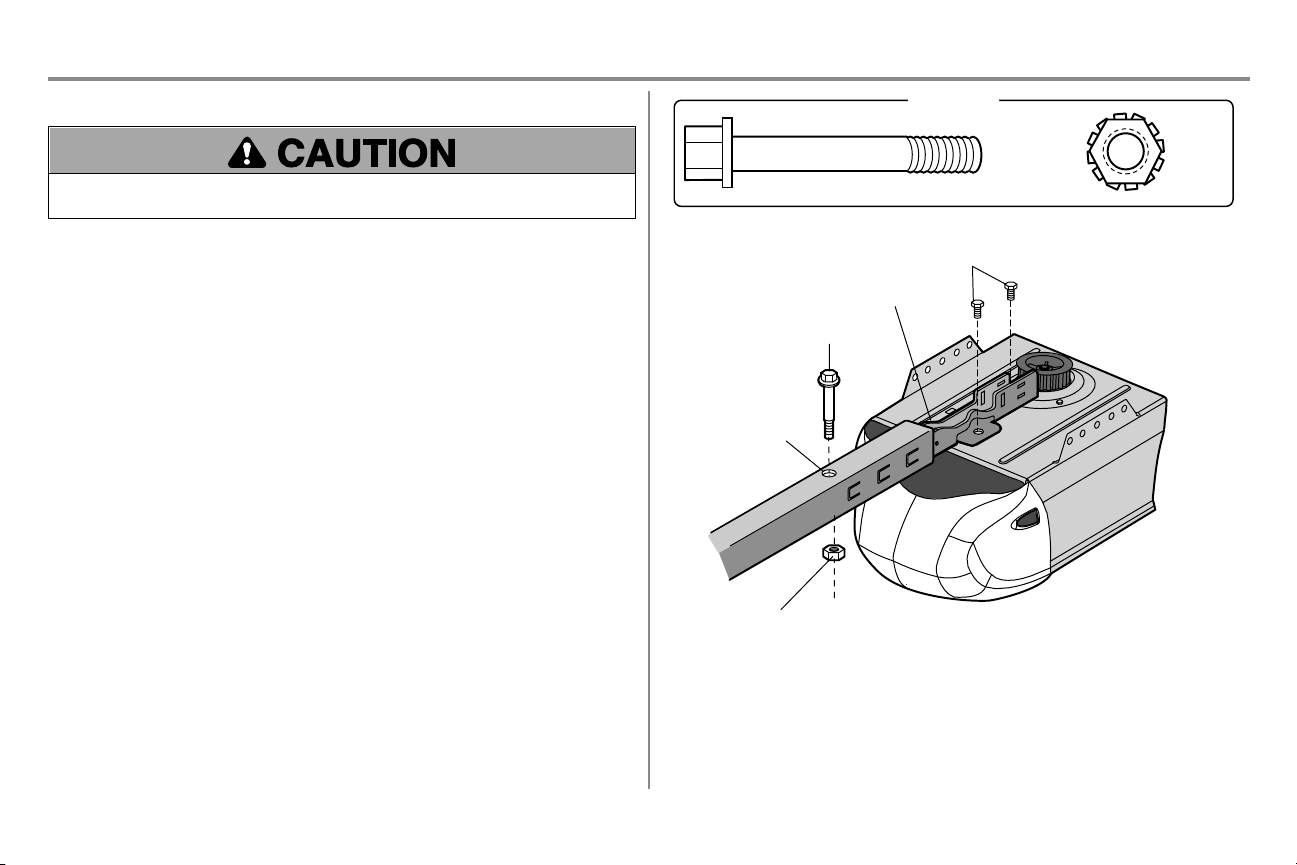
STEP 1 Assemble the rail and install the trolley
To prevent INJURY from pinching, keep hands and fingers away from the joints while assembling the rail.
To avoid installation difficulties, do not run the garage door opener until instructed to do so.
The front rail has a cut out “window” at the door end. The rail tab MUST be on top of the rail when assembled.
1. Remove the straight door arm and hanging bracket packaged inside the front rail and set aside for
Installation Step 5 and 9. NOTE: To prevent INJURY while unpacking the rail carefully remove the straight
door arm stored within the rail section.
2. Align the rail sections on a flat surface as shown and slide the tapered ends into the larger ones. Tabs
along the side will lock into place.
3. Place the motor unit on packing material to protect the cover, and rest the back end of the rail on top. For
convenience, put a support under the front end of the rail.
4. As a temporary stop, insert a screwdriver into the hole in the second rail section from the motor unit, as
shown.
5. Check to be sure there are 4 plastic wear pads inside the inner trolley. If they became loose during
shipping, check all packing material. Snap them back into position as shown.
6. Slide the trolley assembly toward the screwdriver as shown.
7. Slide the rail onto the “U” bracket, until it reaches all the stops on the top and sides of the “U” bracket.
Wear Pads
Front Rail Section
(TO DOOR)
“U” Bracket
(TO MOTOR UNIT)
Trolley
Rail Tab
On Top
Slide to stops
on top and sides
of “U” bracket
Screwdriver
7
Assembly
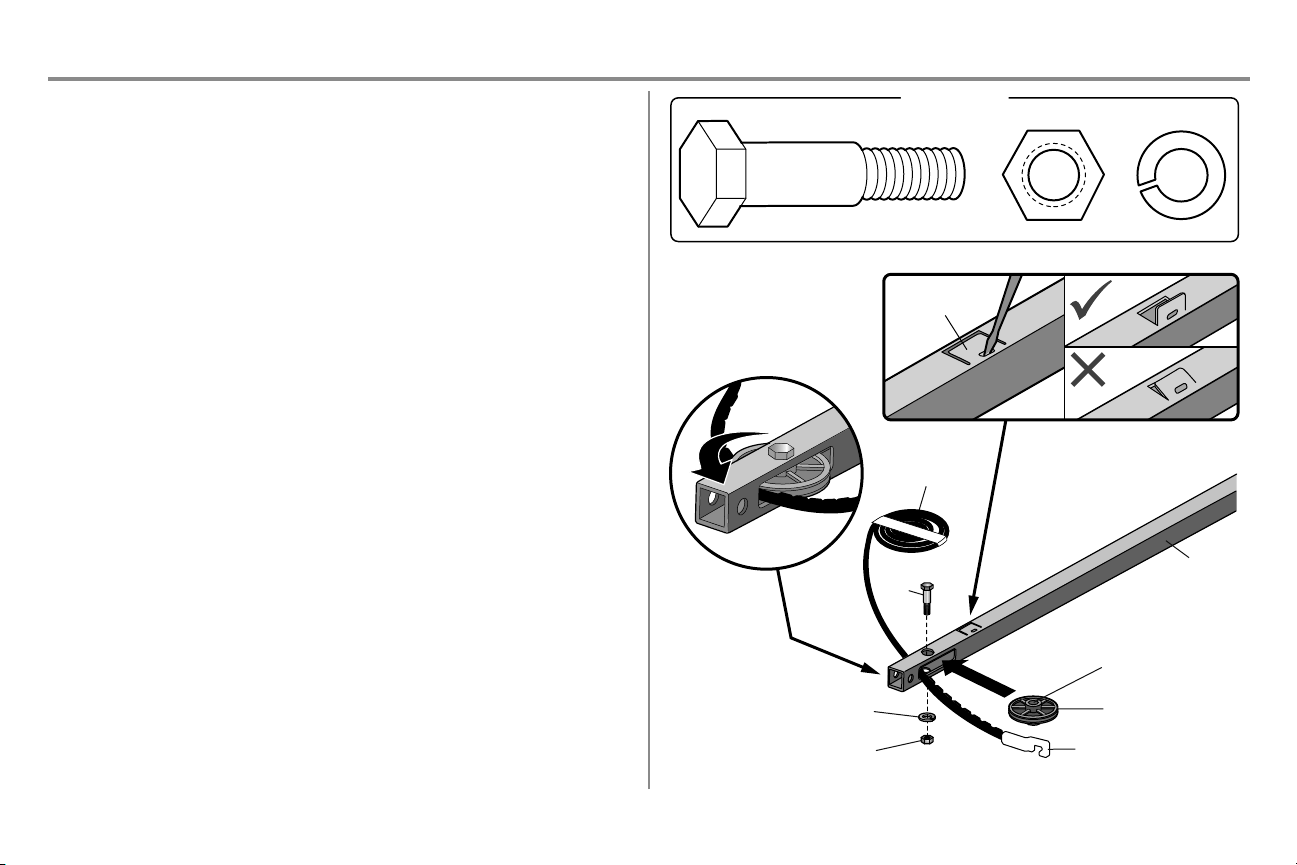
STEP 2 Fasten the rail to the motor unit
To avoid SERIOUS damage to garage door opener, use ONLY those bolts/fasteners mounted in the top of the
opener.
1. Insert a 1/4"-20 x 1-3/4" bolt into the cover protection bolt hole on the back end of the rail as shown. Tighten
securely with a 1/4"-20 lock nut. DO NOT overtighten.
2. Remove the bolts from the top of the motor unit.
3. Use the carton to support the front end of the rail.
4. Place the “U” bracket, flat side down onto the motor unit and align the bracket holes with the bolt holes.
5. Fasten the “U” bracket with the previously removed bolts; DO NOT use any power tools. The use of power
tools may permanently damage the garage door opener.
Bolt
1/4"-20x1-3/4"
Lock Nut
1/4"-20
HARDWARE
“U” Bracket
Cover Protection
Bolt Hole
Bolt
Lock Nut
Bolts (Mounted in the
garage door opener)
8
Assembly
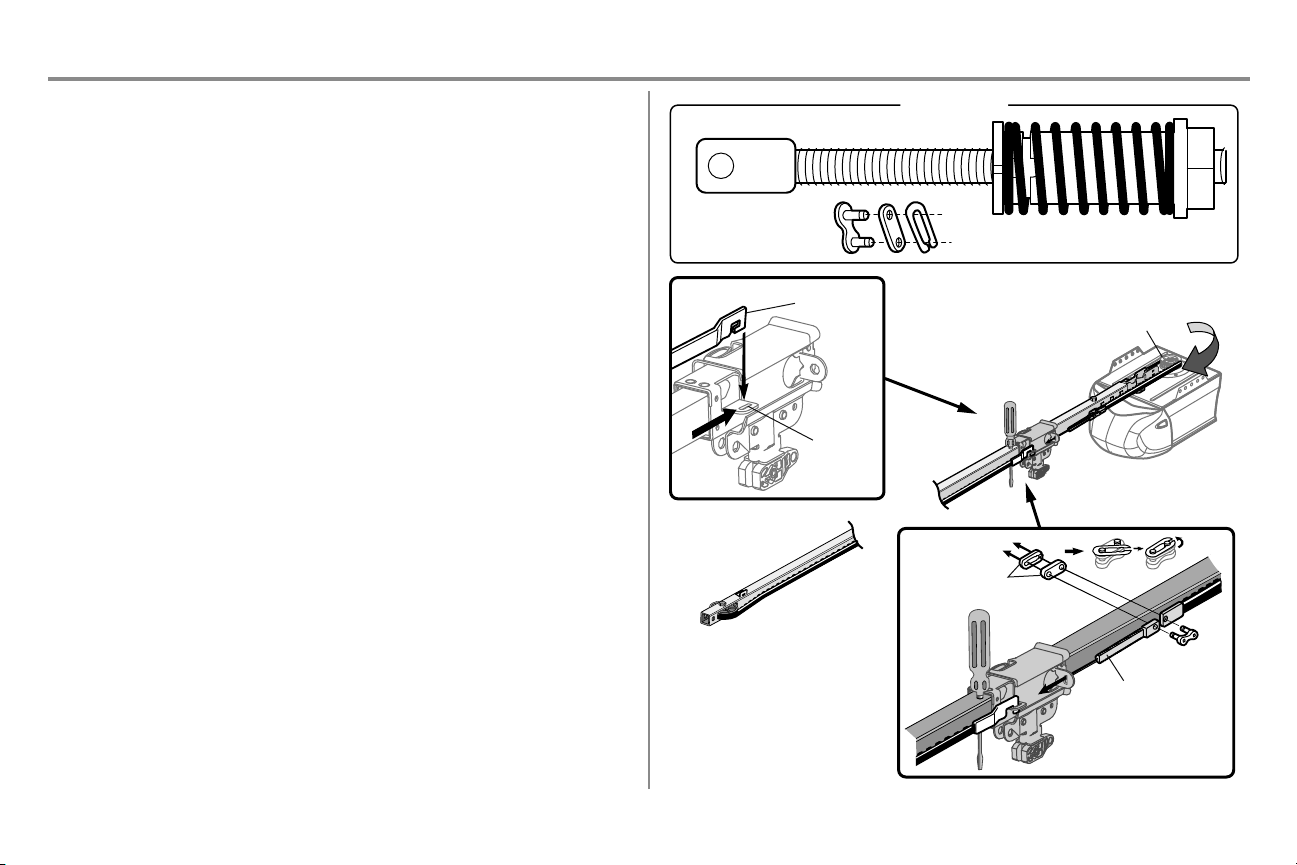
STEP 3 Install the idler pulley
1. Lay the belt beside the rail, as shown. Grasp the end with the hooked trolley connector and pass
approximately 12" (30 cm) of belt through the window. Keep the ribbed side toward the rail, and allow it to
hang until Assembly Step 4.
2. Remove the tape from the idler pulley. The inside center should be pre-greased. If dry, regrease to ensure
proper operation.
3. Place the idler pulley into the window as shown.
4. Insert the idler bolt from the top through the rail and pulley. Tighten with a 3/8" lock washer and nut
underneath the rail until the lock washer is compressed.
5. Rotate the pulley to be sure it spins freely.
6. Locate the rail tab. The rail tab is between the idler bolt and the trolley in the front rail section. Use a
flathead screwdriver and lift the rail tab until the tab is vertical (90º).
Rail
Idler Pulley
Grease Inside
Pulley
Bolt
Belt
Lock Washer
Nut
Bolt
Nut 3/8" Lock Washer 3/8"
HARDWARE
Trolley Connector
Rail Tab
9
Assembly
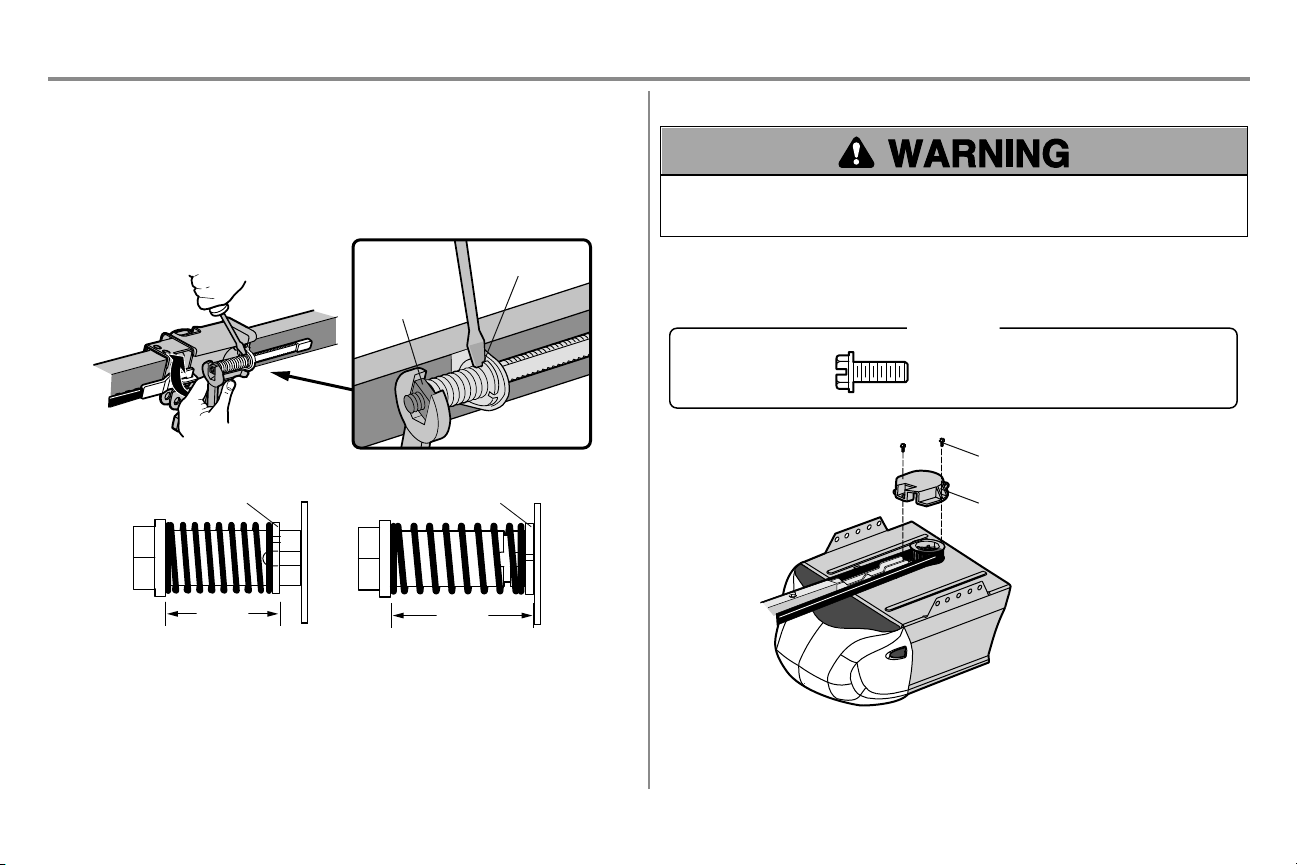
STEP 4 Install the belt
1. Pull the belt around the idler pulley and toward the trolley. The ribbed side must contact the pulley.
2. Hook the trolley connector into the retaining slot on the trolley as shown (Figure 1).
3. With the trolley against the screwdriver, dispense the remainder of the belt along the rail lengthtoward the
motor unit and around the sprocket (Figure 2). The sprocket teeth must engage the belt.
4. Check to make sure the belt is not twisted. Connect the trolley threaded shaft with the master
link(Figure 3).
l Push pins of master link bar through holes in end of belt and trolley threaded shaft.
l Push master link cap over pins and past pin notches.
l Slide the closed end of the clip-on spring over one of the pins. Push the open end of the clip-on spring
onto the other pin.
l Slide clip-on spring over cap and onto pin notches until both pins are securely locked in place.
5. Remove the spring trolley nut from the threaded shaft.
6. Insert the trolley threaded shaft through the hole in the trolley.
HARDWARE
Master Link
Figure 3
Threaded Shaft with Spring Trolley Nut
Threaded Shaft
Master Link
Sprocket
Figure 2
Figure 1
Trolley
Connector
Retaining
Slot
10
Assembly
STEP 5 Tighten the belt
1. By hand, thread the spring trolley nut on the threaded shaft until it is finger tight against the trolley. Do not
use any tools. Remove the screwdriver.
2. Insert a flathead screwdriver tip into one of the nut ring slots and brace it firmly against the trolley.
3. Tighten the spring trolley nut with an adjustable wrench or a 7/16" open end wrench about a quarter turn
until the spring releases and snaps the nut ring against the trolley. This sets the spring to optimum belt
tension.
Spring
Trolley Nut
Nut Ring Slot
Nut RingNut Ring
AFTER
1-1/4" (3.18 cm)
BEFORE
1" (2.5 cm)
STEP 6 Install the sprocket cover
To avoid possible SERIOUS INJURY to finger from moving garage door opener:
l ALWAYS keep hand clear of sprocket while operating opener.
l Securely attach sprocket cover BEFORE operating.
1. Position the sprocket cover over the sprocket as shown and fasten to the mounting plate with 8x3/8" hex
screws provided.
You have now finished assembling your garage door opener. Please read the following warnings before
proceeding to the installation section.
Hex Screw #8x3/8"
(Packed with the sprocket cover)
HARDWARE
Hex Screw #8x3/8"
Sprocket Cover
11
Installation
IMPORTANT INSTALLATION INSTRUCTIONS
To reduce the risk of SEVERE INJURY or DEATH:
1. READ AND FOLLOW ALL INSTALLATION WARNINGS AND INSTRUCTIONS.
2. Install garage door opener ONLY on properly balanced and lubricated garage door. An improperly balanced
door may NOT reverse when required and could result in SEVERE INJURY or DEATH.
3. ALL repairs to cables, spring assemblies and other hardware MUST be made by a trained door systems
technician BEFORE installing opener.
4. Disable ALL locks and remove ALL ropes connected to garage door BEFORE installing opener to avoid
entanglement.
5. Where possible, install the door opener 7 feet (2.13 m) or more above the floor.
6. Mount the emergency release within reach, but at least 6 feet (1.83 m) above the floor and avoiding contact
with vehicles to avoid accidental release.
7. NEVER connect garage door opener to power source until instructed to do so.
8. NEVER wear watches, rings or loose clothing while installing or servicing opener. They could be caught in
garage door or opener mechanisms.
9. Install wall-mounted garage door control:
l within sight of the garage door.
l out of reach of small children at a minimum height of 5feet (1.5m) above floors, landings, steps or any
other adjacent walking surface.
l away from ALL moving parts of the door.
10. Place entrapment warning label on wall next to garage door control in a prominent location.
11. Place emergency release/safety reverse test label in plain view on inside of garage door.
12. Upon completion of installation, test safety reversal system. Door MUST reverse on contact with a 1-1/2"
(3.8cm) high object (or a 2x4 laid flat) on the floor.
13. DO NOT install on a one-piece door if using devices or features providing unattended close. Unattended
devices and features are to be used ONLY with sectional doors.
12
Installation
STEP 1 Determine the header bracket location
To prevent possible SERIOUS INJURY or DEATH:
l Header bracket MUST be RIGIDLY fastened to structural support on header wall or ceiling, otherwise
garage door might NOT reverse when required. DO NOT install header bracket over drywall.
l Concrete anchors MUST be used if mounting header bracket or 2x4 into masonry.
l NEVER try to loosen, move or adjust garage door, springs, cables, pulleys, brackets, or their hardware, ALL
of which are under EXTREME tension.
l ALWAYS call a trained door systems technician if garage door binds, sticks, or is out of balance. An
unbalanced garage door might NOT reverse when required.
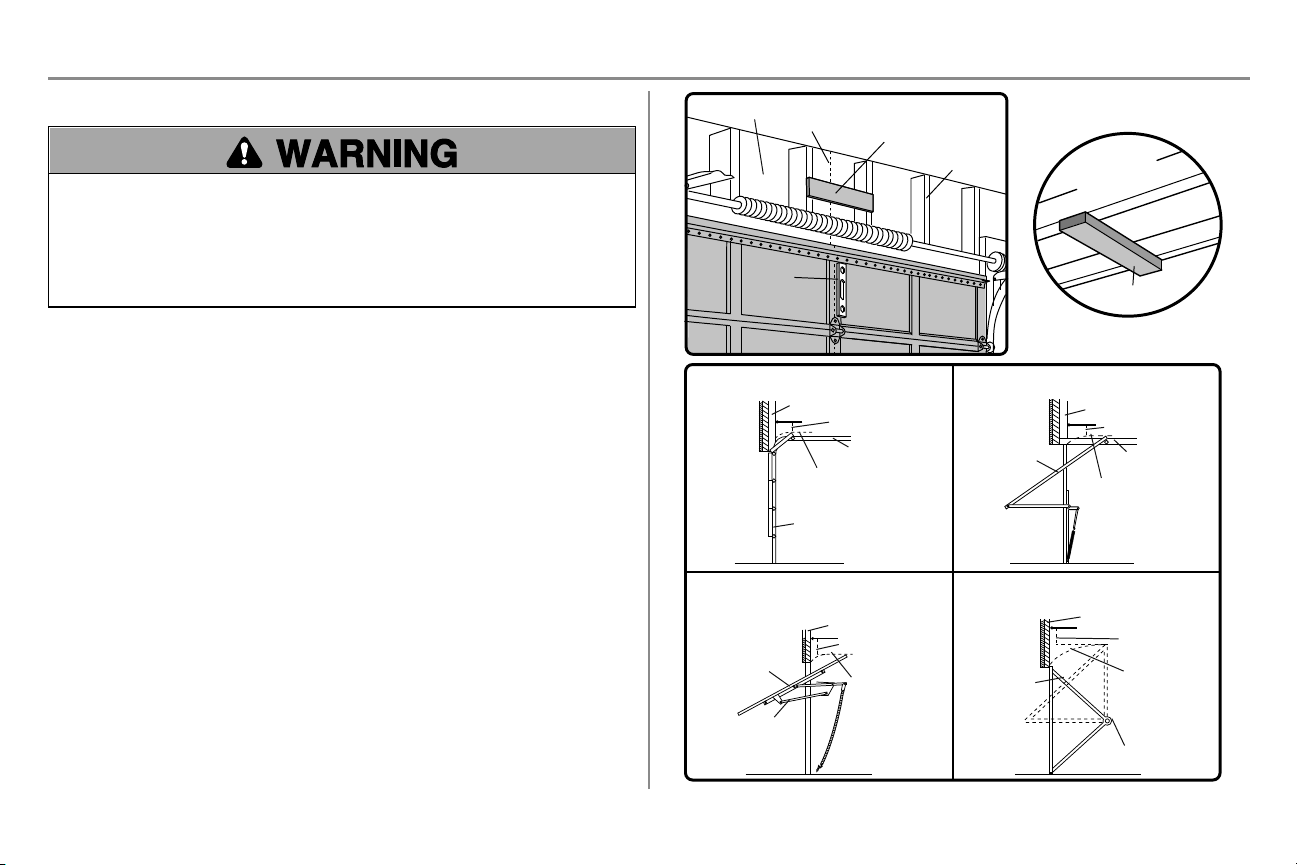
Installation procedures vary according to garage door types. Follow the instructions which apply to your door.
1. Close the door and mark the inside vertical centerline of the garage door.
2. Extend the line onto the header wall above the door.You can fasten the header bracket within 4 feet (1.22 m)
of the left or right of the door center only if a torsion spring or center bearing plate is in the way; or you can
attach it to the ceiling (see page 13) when clearance is minimal. (It may be mounted on the wall upside
down if necessary, to gain approximately 1/2" (1 cm). If you need to install the header bracket on a 2x4 (on
wall or ceiling), use lag screws (not provided) to securely fasten the 2x4 to structural supports as shown
here and on page 13.
3. Open your door to the highest point of travel as shown. Draw an intersecting horizontal line on the header
wall 2" (5 cm) above the high point:
l 2" (5 cm) above the high point for sectional door and one-piece door with track.
l 8" (20 cm) above the high point for one-piece door without track.
This height will provide travel clearance for the top edge of the door. NOTE: If the total number of inches exceeds the
height available in your garage, use the maximum height possible, or refer to page 13 for ceiling installation.
Header Wall
Vertical Centerline of Garage Door
2x4
Structural
Supports
Level
(Optional)
Unfinished
Ceiling
2x4
OPTIONAL CEILING MOUNT
FOR HEADER BRACKET
Sectional door with curved track
Header Wall
Track
2" (5 cm)
Highest
Point of
Travel
Door
One-piece door with horizontal track
Header Wall
Track
2" (5 cm)
Highest
Point of
Travel
Door
One-piece door without track:
jamb hardware
Header Wall
8" (20
cm)
Highest
Point of
Travel
Door
Jamb
Hardware
One-piece door without track:
pivot hardware
Header Wall
8" (20
cm)
Highest
Point of
Travel
Door
Pivot
13
Installation
STEP 2 Install the header bracket
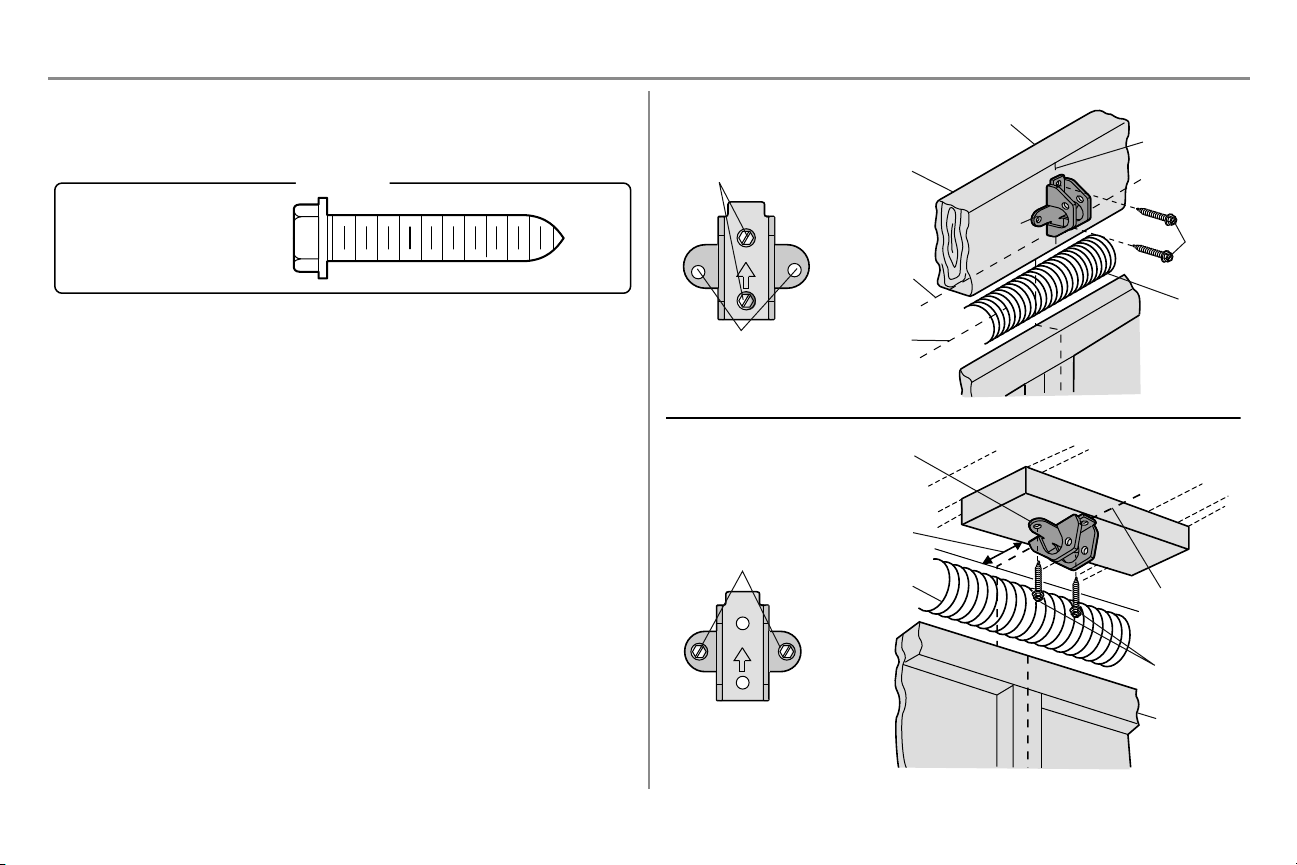
You can attach the header bracket either to the wall above the garage door, or to the ceiling. Follow the instructions
which will work best for your particular requirements. Do not install the header bracket over drywall. If installing
into masonry, use concrete anchors (not provided).
Lag Screw 5/16"-9x1-5/8"
HARDWARE
OPTION A - WALL INSTALLATION
1. Center the bracket on the vertical centerline with the bottom edge of the bracket on the horizontal line as
shown (with the arrow pointing toward the ceiling).
2. Mark the vertical set of bracket holes. Drill 3/16" pilot holes and fasten the bracket securely to a structural
support with the hardware provided.
OPTION B - CEILING INSTALLATION
1. Extend the vertical centerline onto the ceiling as shown.
2. Center the bracket on the vertical mark, no more than 6" (15 cm) from the wall. Make sure the arrow is
pointing away from the wall. The bracket can be mounted flush against the ceiling when clearance is
minimal.
3. Mark the side holes. Drill 3/16" pilot holes and fasten bracket securely to a structural support with the
hardware provided.
UP
Wall Mounting
Holes
WALL INSTALLATION
CEILING INSTALLATION
Optional Mounting
Holes
Vertical
Centerline of
Garage Door
Header Wall
Header
Bracket
2x4
Structural
Support
Door
Spring
Garage Door
Highest Point
of Garage
Door Travel
Horizontal
Line
Lag
Screw
UP
Header Wall
Ceiling Mounting
Holes
Finished Ceiling
Vertical
Centerline of
Garage Door
Header
Bracket
6" (15 cm)
Maximum
Door Spring
Garage Door
Lag Screw
14
Installation
STEP 3 Attach the rail to the header bracket
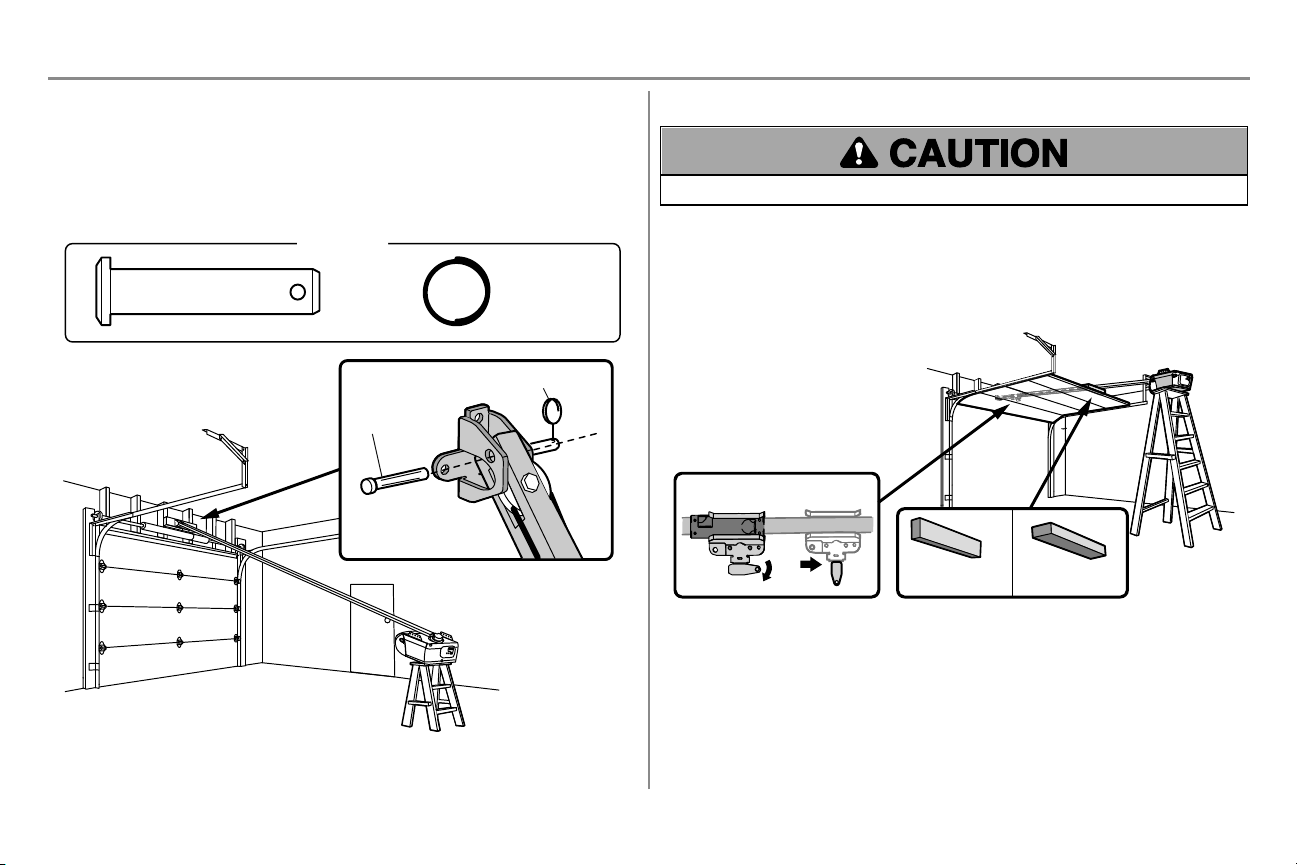
1. Position the opener on the garage floor below the header bracket. Use packing material as a protective
base.
NOTE: If the door spring is in the way, you will need help. Have someone hold the opener securely on a
temporary support to allow the rail to clear the spring.
2. Position the rail bracket against the header bracket.
3. Align the bracket holes and join with a clevis pin as shown.
4. Insert a ring fastener to secure.
HARDWARE
Clevis Pin
5/16"x1-1/2"
Ring Fastener
Clevis Pin
Ring Fastener
STEP 4 Position the garage door opener
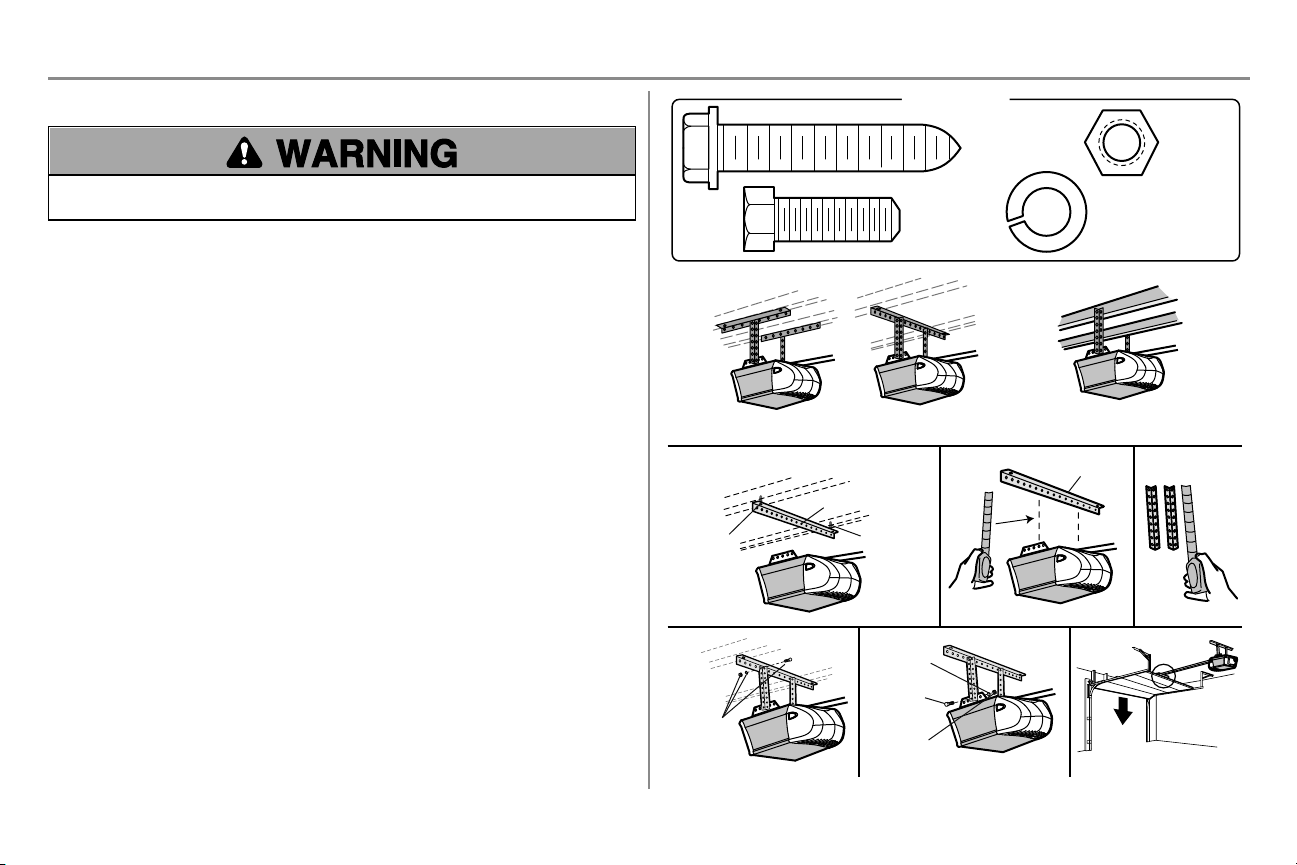
To prevent damage to garage door, rest garage door opener rail on 2x4 placed on top section of door.
1. Remove the packing material and lift the garage door opener onto a ladder.
2. Fully open the door and place a 2x4 (laid flat) under the rail. For one-piece doors without tracks, lay the
2x4 on it's side.
NOTE: A 2x4 is ideal for setting the distance between the rail and the door. If the ladder is not tall enough you will
need help at this point. If the door hits the trolley when it is raised, pull the trolley release arm down to disconnect the
inner and outer trolley. Slide the outer trolley toward the garage door opener. The trolley can remain disconnected
until instructed.
Connected Disconnected
One-piece door
without tracks
2x4 2x4
All other
door types
15
Installation
STEP 5 Hang the garage door opener
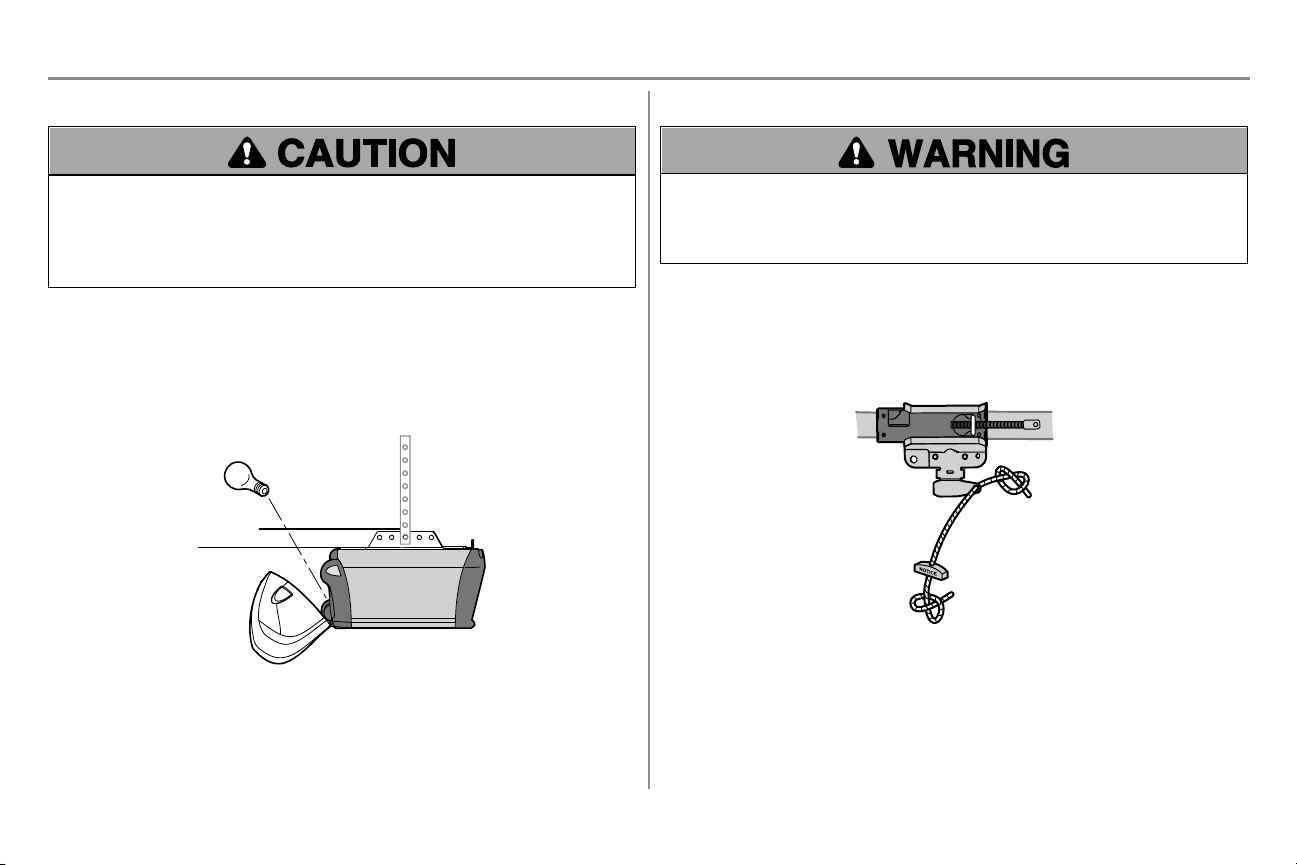
To avoid possible SERIOUS INJURY from a falling garage door opener, fasten it SECURELY to structural
supports of the garage. Concrete anchors MUST be used if installing ANY brackets into masonry.
Hanging the garage door opener will vary depending on your garage. Below are three example installations. Your
installation may be different. For ALL installations the garage door opener MUST be connected to structural supports.
The instructions illustrate one of the examples below.
1. On finished ceilings, use the lag screws to attach a support bracket (not provided) to the structural
supports before installing the garage door opener.
2. Make sure the garage door opener is aligned with the header bracket. Measure the distance from each side
of the garage door opener to the support bracket.
3. Cut both pieces of the hanging bracket to required lengths.
4. Attach the end of each hanging bracket to the support bracket with appropriate hardware (not provided).
5. Attach the garage door opener to the hanging brackets with the hex bolts, lock washers, and nuts.
6. Remove the 2x4 and manually close the door. If the door hits the rail, raise the header bracket.
Finished Ceiling
Lag Screw
1
2
3
Not Provided
Not
Provided
Not Provided
4 5
6
Lag Screw
Finished Ceiling
EXAMPLES
Unfinished Ceiling
HARDWARE
Hex Bolt
5/16"- 18x7/8"
Nut
5/16"-18
Lock Washer
5/16"-18
Lag Screw
5/16"-9x1-5/8"
Hex Bolt
Nut
Lock
Washer
16
Installation
STEP 6 Install the light bulb
To prevent possible OVERHEATING of the endpanel or light socket:
l DO NOT use short neck or specialty light bulbs.
l DO NOT use halogen bulbs. Use ONLY incandescent.
To prevent damage to the opener:
l DO NOT use bulbs larger than 100W.
l ONLY use A19 size bulbs.
1. Install a 100 watt maximum light bulb in the socket. Light bulb size should be A19, standard neck only. The
light will turn ON and remain lit for approximately 4-1/2 minutes when power is connected. Then the light
will turn OFF.
2. Insert bottomlens tabs into slots on chassis. Tilt towards chassis to engage top tabs, then drop down gently
into place (see illustration).
3. To remove, depress both top lens tabs. Tilt lens slightly outward and down, then pull out to clear bulb. Use
care to avoid snapping off bottomlens tabs.
NOTE: Use only standard light bulb. The use of short neck or speciality light bulbs may overheat the endpanel or light
socket.
STEP 7 Attach the emergency release rope and handle
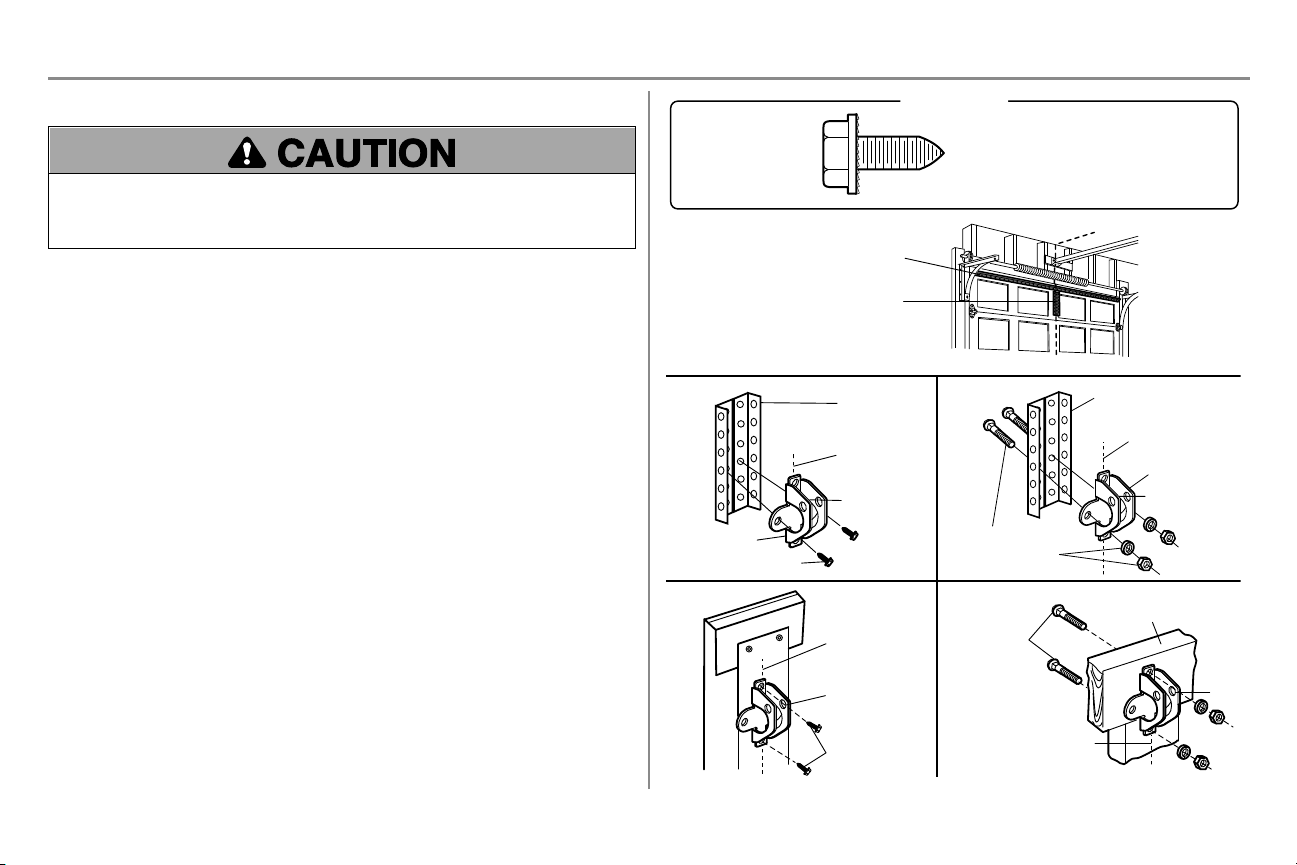
To prevent possible SERIOUS INJURY or DEATH from a falling garage door:
l If possible, use emergency release handle to disengage trolley ONLY when garage door is CLOSED. Weak
or broken springs or unbalanced door could result in an open door falling rapidly and/or unexpectedly.
l NEVER use emergency release handle unless garage doorway is clear of persons and obstructions.
l NEVER use handle to pull door open or closed. If rope knot becomes untied, you could fall.
1. Insert one end of the emergency release rope through the handle. Make sure that “NOTICE” is right side
up. Secure with an overhand knot at least 1" (2.5 cm) from the end of the rope to prevent slipping.
2. Insert the other end of the emergency release rope through the hole in the trolley release arm. Mount the
emergency release within reach, but at least 6 feet (1.83m) above floor, avoiding contact with vehicles to
prevent accidental release and secure with an overhand knot.
NOTE: If it is necessary to cut the emergency release rope, seal the cut end with a match or lighter to prevent
unraveling. Ensure the emergency release rope and handle are above the top of all vehicles to avoid entanglement.
17
Installation
STEP 8 Install the door bracket
Fiberglass, aluminum or lightweight steel garage doors WILL REQUIRE reinforcement BEFORE installation of
door bracket. Contact the garage door manufacturer or installing dealer for opener reinforcement instructions or
reinforcement kit. Failure to reinforce the top section as required according to the door manufacturer may void the
door warranty.
A horizontal and vertical reinforcement is needed for lightweight garage doors (fiberglass, aluminum, steel, doors with
glass panel, etc.) (not provided). A horizontal reinforcement brace should be long enough to be secured to two or three
vertical supports. A vertical reinforcement brace should cover the height of the top panel. Contact the garage door
manufacturer or installing dealer for opener reinforcement instructions or reinforcement kit.
NOTE: Many door reinforcement kits provide for direct attachment of the clevis pin and door arm. In this case you will
not need the door bracket; proceed to the next step.
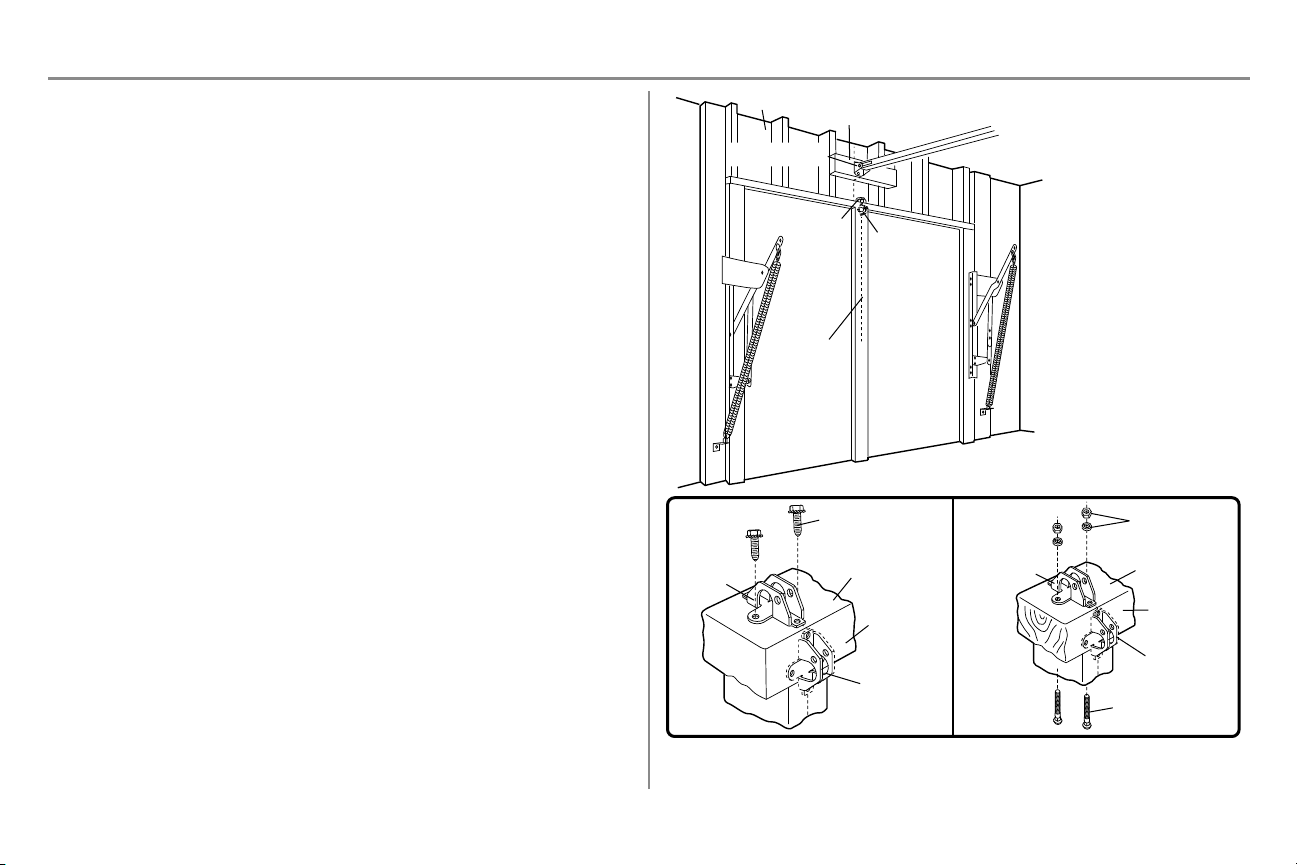
OPTION A - SECTIONAL DOORS
1. Center door bracket on the previously marked vertical centerline used for header bracket installation. Note
correct UP placement, as stamped inside bracket.
2. Position top edge of the bracket 2"–4" (5–10cm) below top edge of the door, OR directly below any support
across top of door.
3. Mark, drill holes and install as follows, depending on your door’s construction.
Metal or light weight doors using vertical angle iron brace in the door panel support and the door bracket:
l Drill 3/16" fastening holes. Secure the door bracket using the two 1/4"-14x5/8" self-threading screws.
(Figure1)
l Alternately, use two 5/16"-18x2" bolts, lock washers and nuts (not provided). (Figure2)
Metal, insulated or light weight factory reinforced doors:
l Drill 3/16" fastening holes. Secure door bracket using self-threading screws. (Figure3)
Wood doors:
l Use top and bottom or side to side door bracket holes. Drill 5/16" holes through door and secure bracket
with 5/16"-18x2" carriage bolts, lock washers and nuts (not provided). (Figure4)
NOTE: The 1/4"-14x5/8" self-threading screws are not intended for use on wood doors.
FIGURE 1
FIGURE 3 FIGURE 4
FIGURE 2
Vertical
Reinforcement
Vertical
Centerline
of Garage Door
UP
Door Bracket
Vertical Reinforcement
Vertical Reinforcement
Horizontal Reinforcement
Vertical Centerline
of Garage Door
Hardware
(not provided)
Door Bracket
UP
Vertical
Centerline
of Garage Door
UP
Vertical Centerline of
Garage Door
Hardware
(not provided)
UP
Inside Edge of Door or
Reinforcement Board
Self-Threading Screw
Self-Threading
Screw
HARDWARE
Self-Threading Screw
1/4"-14x5/8"
18
Installation
STEP 8 Install the door bracket (continued)
OPTION B - ONE-PIECE DOORS
1. Center the door bracket on the top of the door, in line with the header bracket as shown.
2. Mark either the left and right, or the top and bottom holes.
Metal Doors:
1. Drill 3/16" pilot holes and fasten the bracket with the self-threading screws provided.
Wood Doors:
1. Drill 5/16" holes and use 5/16"-18x2" carriage bolts, lock washers and nuts (not provided) or 5/16"x1-1/2"
lag screws (not provided) depending on your installation needs.
NOTE: The door bracket may be installed on the top edge of the door if required for your installation. (Refer to the
dotted line optional placement drawing.)
For a door with no exposed
framing, or for the optional
installation, use lag screws
5/16"x1-1/2" (not provided)
to fasten the door bracket.
Vertical
Centerline
of Garage
Door
Optional
Placement
of Door
Bracket
Door Bracket
Header Bracket
Header Wall
2x4 Support
(Finished Ceiling)
Door
Bracket
Top of Door
(Inside Garage)
Top Edge of
Door
Optional
Placement
Optional
Placement
Top Edge
of Door
Top of Door
(Inside Garage)
Door
Bracket
Hardware
(not provided)
Hardware
(not provided)
Metal Door Wood Door
Self-Threading Screw
19
Installation
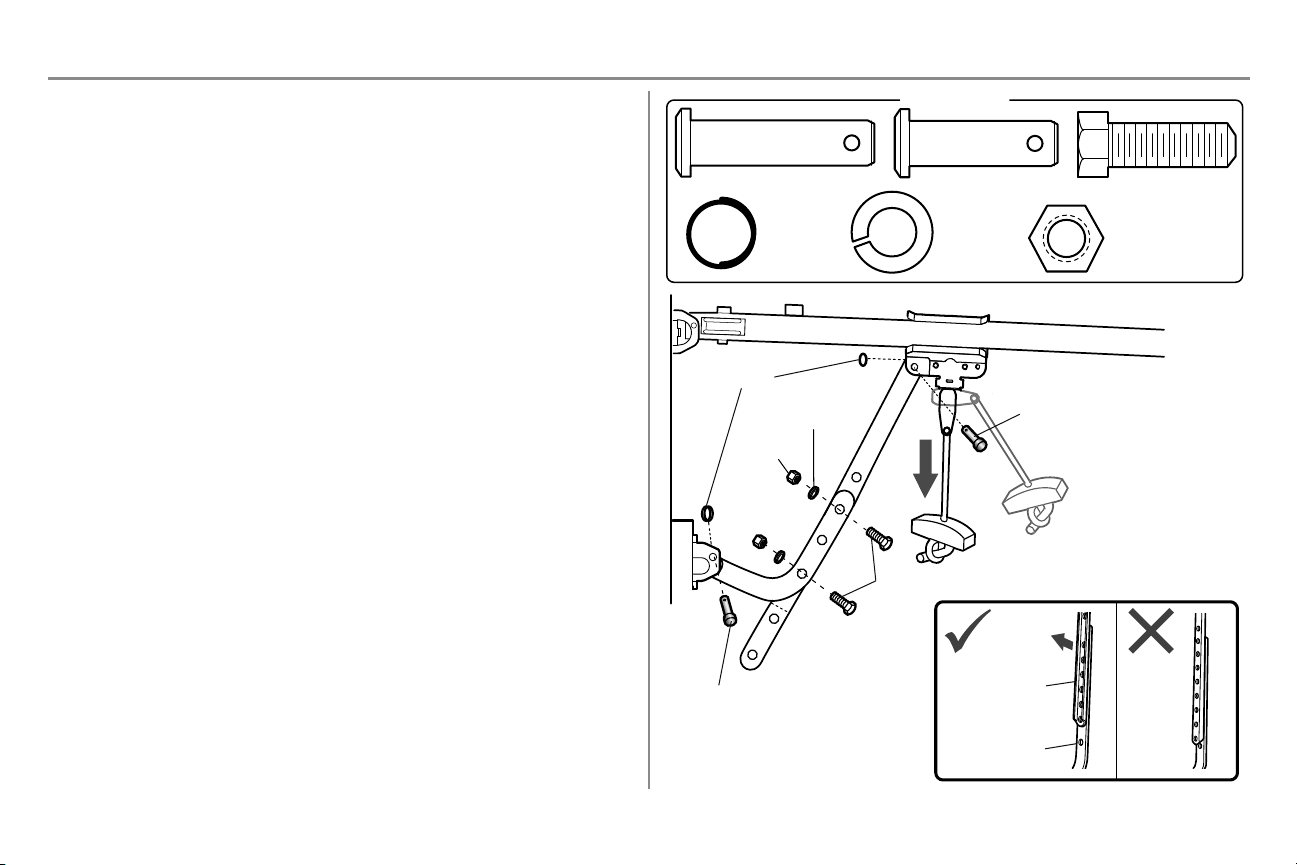
STEP 9 Connect the door arm to the trolley
Installation will vary according to the garage door type. Follow the instructions which apply to your door.
OPTION A - SECTIONAL DOORS
IMPORTANT: The groove on the straight door arm MUST face away from the curved door arm.
1. Close the door. Disconnect the trolley by pulling the emergency release handle.
2. Attach the straight door arm to the outer trolley using the clevis pin. Secure with the ring fastener.
3. Attach the curved door arm to the door bracket using the clevis pin. Secure with the ring fastener.
4. Bring arm sections together. Find two pairs of holes that line up and join sections. Select holes as far apart
as possible to increase door arm rigidity and attach using the bolts, nuts, and lock washers.
5. Pull the emergency release handle toward the garage door opener until the trolley release arm is
horizontal. The trolley will re-engage automatically when the garage door opener is activated.
NOTE: If the holes in the curved door arm and the straight door arm do not align, reverse the straight door arm, select
two holes (as far apart as possible) and attach using bolts, nuts, and lock washers. If the straight door arm is hanging
down too far, you may cut 6" (15 cm) from the solid end.
HARDWARE
Hex Bolt 5/16"-18x7/8"
Nut 5/16"-18
Lock Washer
5/16"-18
Clevis Pin 5/16"x1" Clevis Pin 5/16"x1-1/4"
Ring Fastener
Lock Washer
5/16"-18
Nut
5/16"-18
Hex Bolt
5/16"-18x7/8"
Clevis Pin
5/16"x1-1/4"
Ring Fastener
Clevis Pin
5/16"x1"
Straight
Door Arm
(Groove
facing out)
Curved
Door Arm
20
Installation
STEP 9 Connect the door arm to the trolley (continued)
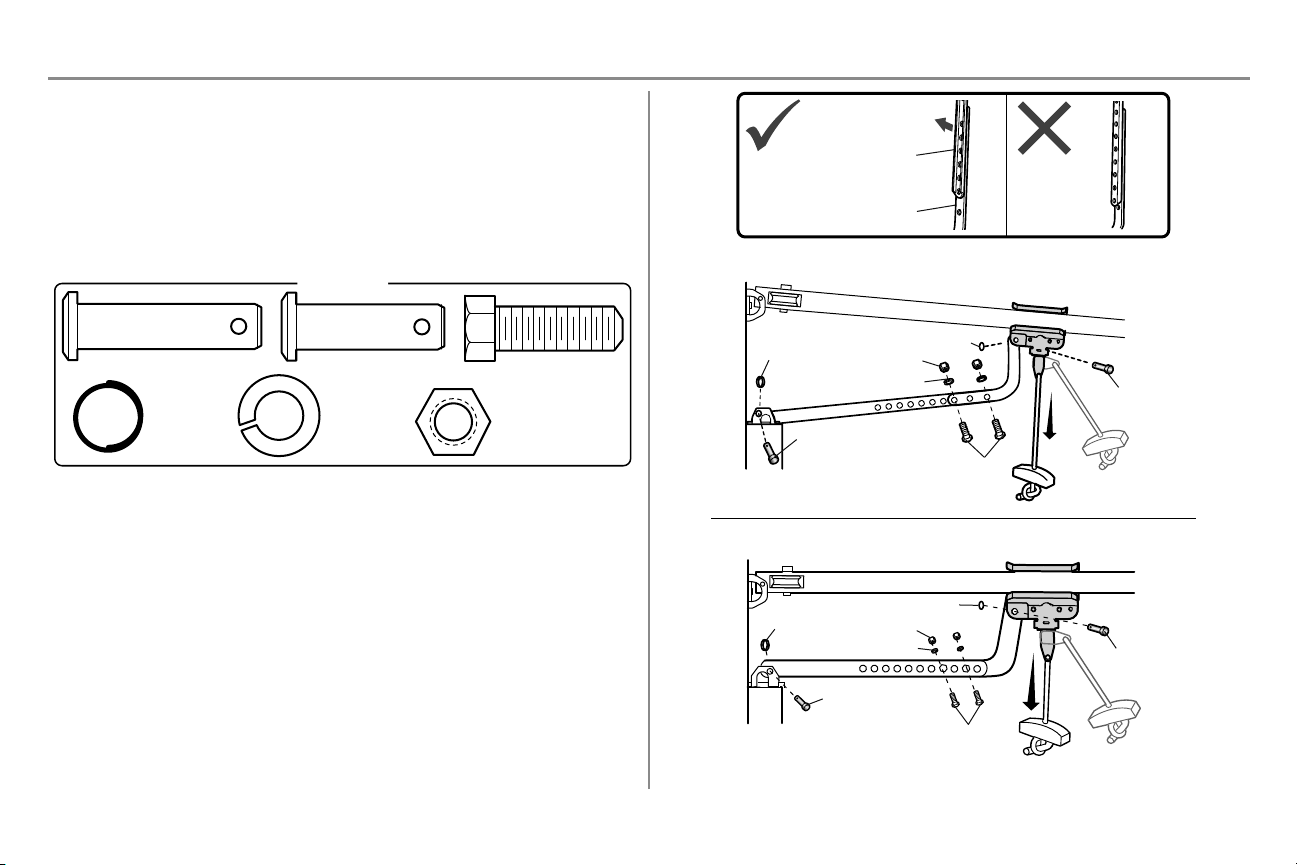
OPTION B - ONE-PIECE DOORS
IMPORTANT: The groove on the straight door arm MUST face away from the curved door arm.
1. Close the door. Disconnect the trolley by pulling the emergency release handle.
2. Fasten the straight door arm and the curved door arm together to the longest possible length (with a 2 or 3
hole overlap) using the bolts, nuts, and lock washers.
3. Attach the straight door arm to the door bracket using the clevis pin. Secure with the ring fastener.
4. Attach the curved door arm to the trolley using the clevis pin. Secure with the ring fastener.
5. Pull the emergency release handle toward the garage door opener until the trolley release arm is
horizontal.
HARDWARE
Hex Bolt 5/16"-18x7/8"
Nut 5/16"-18
Lock Washer
5/16" -18
Clevis Pin 5/16"x1" Clevis Pin 5/16"x1-1/4"
Ring Fastener
One-Piece Door without Track
One-Piece Door with Track
Ring Fastener
Ring Fastener
Ring Fastener
Nut
Nut
Ring Fastener
Lock Washer
Lock Washer
Clevis Pin 5/16"x1-1/4"
Clevis Pin
5/16"x1-1/4"
Hex Bolts
Hex Bolts
Clevis Pin
5/16"x1"
Clevis Pin
5/16"x1"
Straight Door Arm
(Groove facing out)
Curved Door Arm
21
Installation
STEP10 Install the door control
To prevent possible SERIOUS INJURY or DEATH from electrocution:
l Be sure power is NOT connected BEFORE installing door control.
l Connect door control ONLY to 12 VOLT low voltage wires.
To prevent possible SERIOUS INJURY or DEATH from a closing garage door:
l Install door control within sight of garage door, out of reach of small children at a minimum height of 5feet
(1.5m) above floors, landings, steps or any other adjacent walking surface, and away from ALL moving parts
of door.
l NEVER permit children to operate or play with door control push buttons or remote control transmitters.
l Activate door ONLY when it can be seen clearly, is properly adjusted, and there are no obstructions to door
travel.
l ALWAYS keep garage door in sight until completely closed. NEVER permit anyone to cross path of closing
garage door.
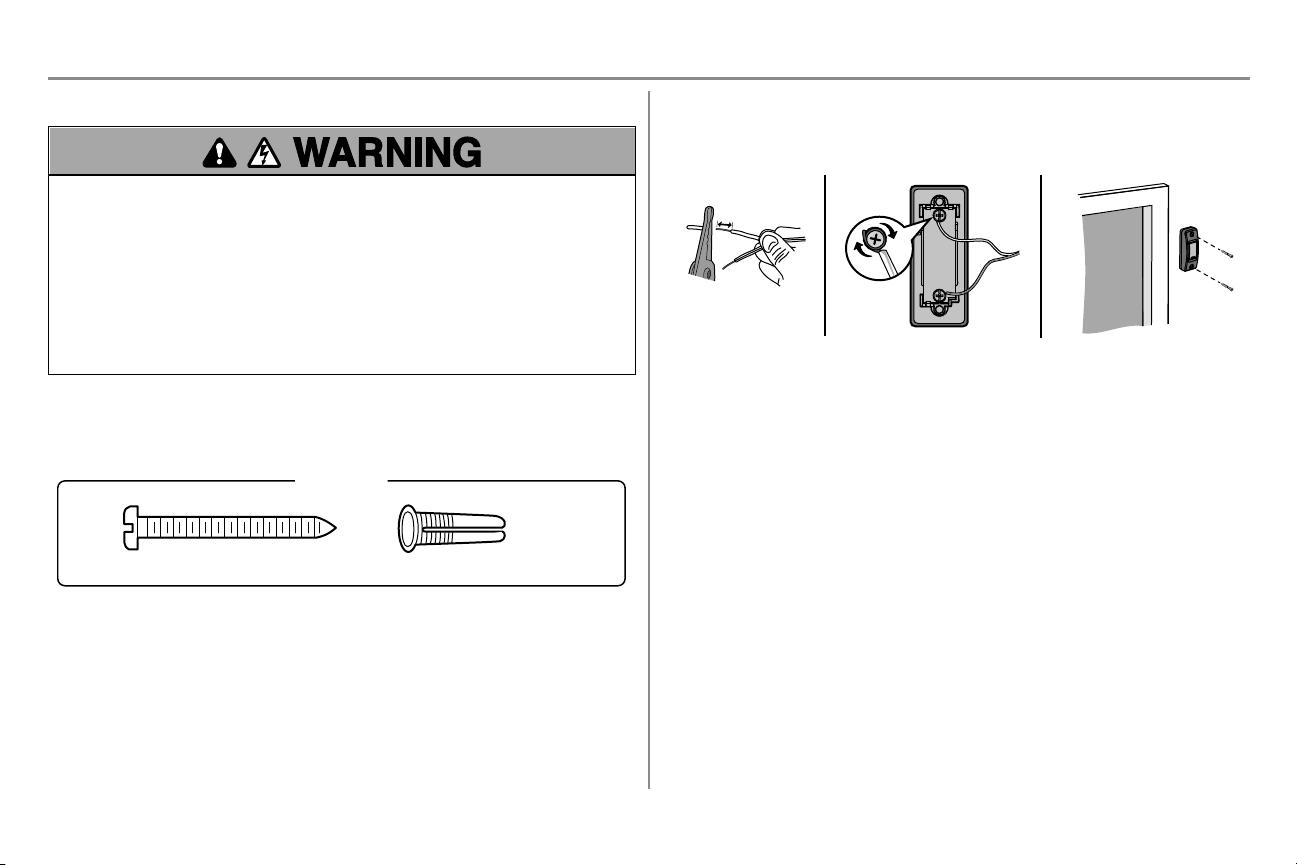
INTRODUCTION
Install the door control within sight of the door at a minimum height of 5 feet (1.5 m) above floors, landings, steps or
any other adjacent walking surface, where small children cannot reach, and away from the moving parts of the door.
NOTE: Your product may look different than the illustrations.
Screw 6ABx1-1/2" (2)
HARDWARE
Drywall Anchors (2)
1. Strip 1/4" (6 mm) of insulation from one end of the wire and separate the wires.
2. Connect one wire to each of the two screws on the back of the door control. The wires can be connected to
either screw.
3. Mount the door control with the hardware provided.
1/4" (6 mm)
1
2 3
22
Installation
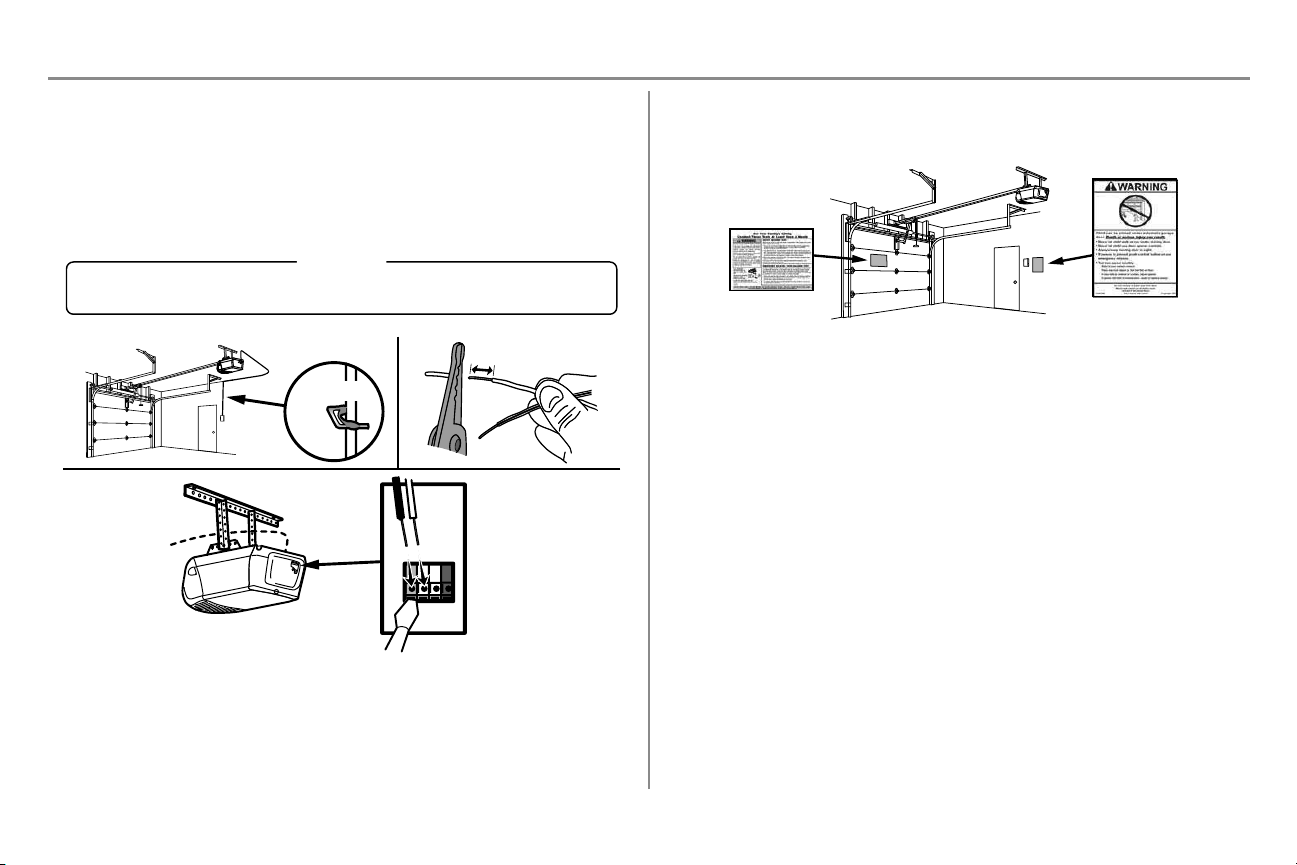
STEP 11 Wire the door control to the garage door opener
1. Run the white and red/white wire from the door control to the garage door opener. Attach the wire to the
wall and ceiling with the staple (not applicable for gang box or pre-wired installations). Do not pierce the
wire with the staple as this may cause a short or an open circuit.
2. Strip 7/16" (11 mm) of insulation from the end of the wire near the garage door opener.
3. Connect the wire to the red and white terminals on the garage door opener. If your garage is pre-wired
make sure you use the same wires that are connected to the door control. To insert or release wires from
the terminal, push in the tab with screwdriver tip.
RED
WHITE
WHITE
GREY
7/16" (11 mm)
2
3
1
HARDWARE
Insulated Staple (Not Shown)
Staple
STEP 12 Attach the warning labels
1. Attach the entrapment warning label on the wall near the door control with tacks or staples.
2. Attach the manual release/safety reverse test label in a visible location on the inside of the garage door.
23
Installation
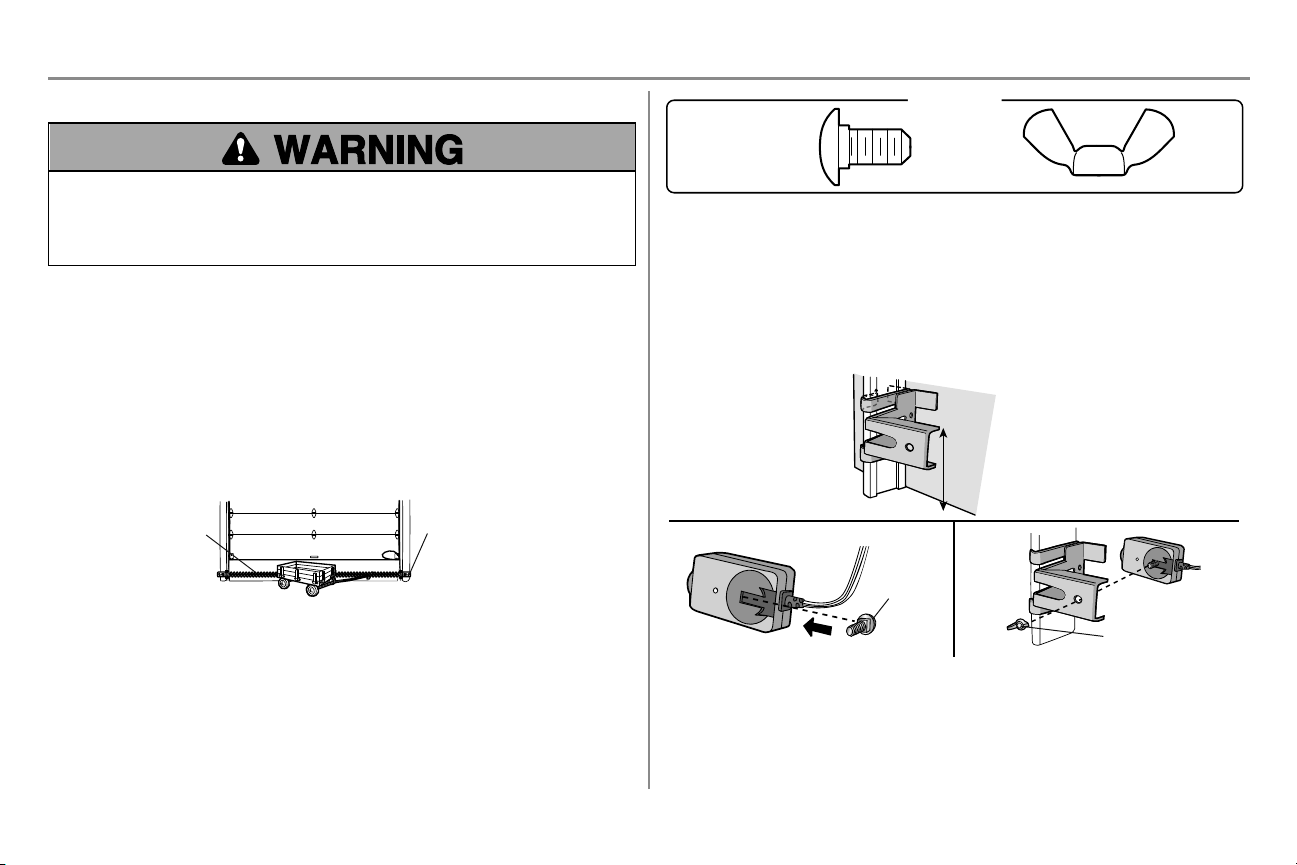
STEP 13 Install the Protector System
®
Be sure power is NOT connected to the garage door opener BEFORE installing the safety reversing sensor.
To prevent SERIOUS INJURY or DEATH from closing garage door:
l Correctly connect and align the safety reversing sensor. This required safety device MUST NOT be
disabled.
l Install the safety reversing sensor so beam is NO HIGHER than 6" (15 cm) above garage floor.
IMPORTANT INFORMATION ABOUT THE SAFETY REVERSING SENSORS
The safety reversing sensors must be connected and aligned correctly before the garage door opener will
move in the down direction.
The sending sensor (with an amber LED) transmits an invisible light beam to the receiving sensor (with a green
LED). If an obstruction breaks the light beam while the door is closing, the door will stop and reverse to the full open
position, and the garage door opener lights will flash 10 times.
NOTE: For energy efficiency the garage door opener will enter sleep mode when the door is fully closed. The sleep
mode shuts the garage door opener down until activated. The sleep mode is sequenced with the garage door opener
lights; as the lights turns off, the sensor LEDs will turn off and whenever the garage door opener lights turn on, the
sensor LEDs will light. The garage door opener will not go into the sleep mode until the garage door opener has
completed 5 cycles upon power up.
When installing the safety reversing sensors check the following:
l Sensors are installed inside the garage, one on either side of the door.
l Sensors are facing each other with the lenses aligned and the receiving sensor lens does not receive direct
sunlight.
l Sensors are no more than 6" (15 cm) above the floor and the light beam is unobstructed.
Safety Reversing Sensor
6" (15
cm) max. above floor
Invisible Light Beam
Protection Area
Facing the door from inside the garage
Carriage Bolt
1/4"-20 x 1/2"
Wing Nut
1/4"-20
HARDWARE
The safety reversing sensors can be attached to the door track, the wall, or the floor. The sensors should be no more
than 6" (15 cm) above the floor. If the door track will not support the sensor bracket a wall installation is
recommended. Choose one of the following installations.
OPTION A - DOOR TRACK INSTALLATION
1. Slide the curved arms of the sensor bracket around the edge of the door track. Snap into place so that the
sensor bracket is flush against the track.
2. Slide the carriage bolt into the slot on each sensor.
3. Insert the bolt through the hole in the sensor bracket and attach with the wing nut. The lenses on both
sensors should point toward each other. Make sure the lens is not obstructed by the sensor bracket.
No more
than 6” (15 cm)
Carriage Bolt
Wing Nut
1
2
3
24
Installation
STEP 13 Install the Protector System (continued)
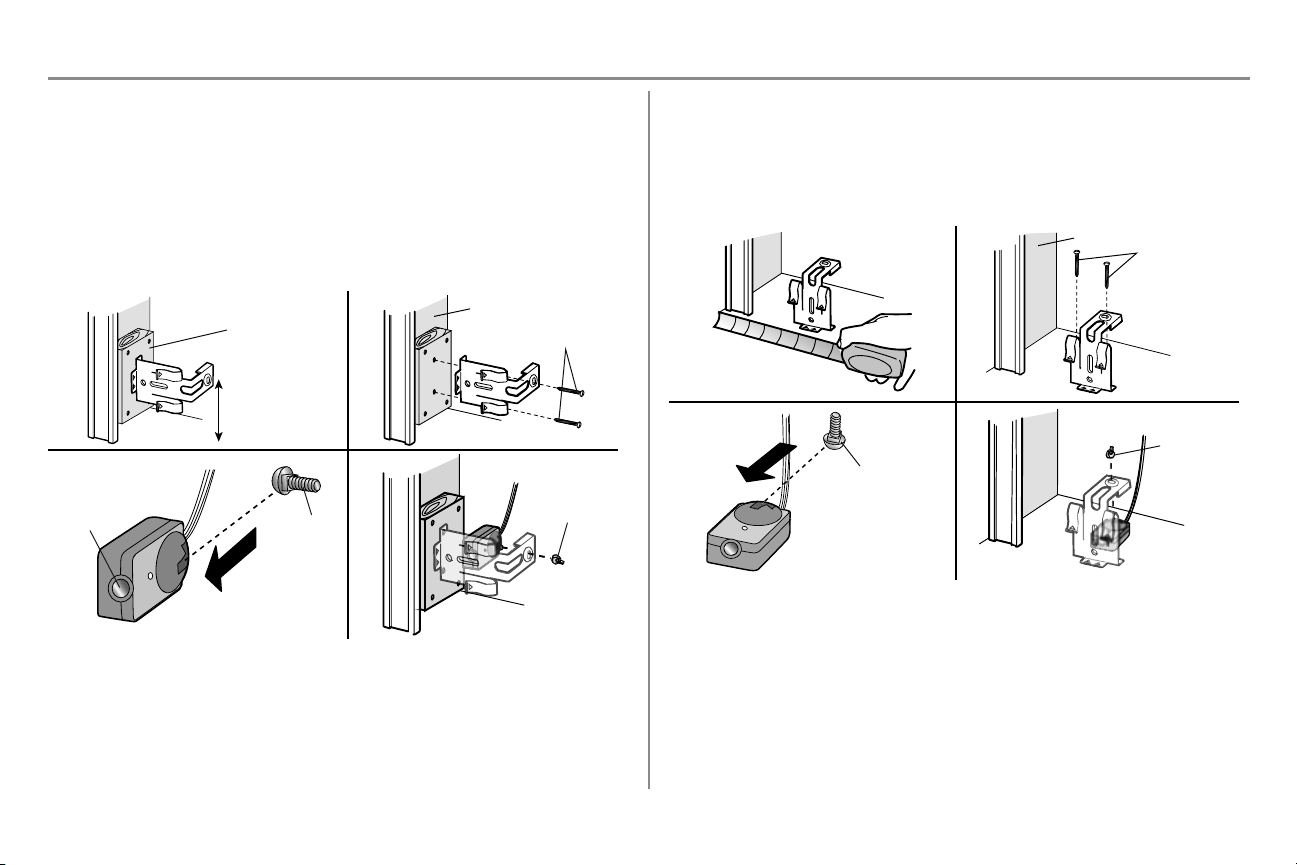
OPTION B - WALL INSTALLATION
If additional clearance is needed an extension bracket (not provided) or wood blocks can be used. Make sure each
bracket has the same amount of clearance so they will align correctly.
1. Position the sensor bracket against the wall with the curved arms facing the door. Make sure there is
enough clearance for the beam to be unobstructed. Mark holes.
2. Drill 3/16-inch pilot holes for each sensor bracket and attach the sensor brackets to the wall using lag
screws (not provided).
3. Slide the carriage bolt into the slot on each sensor.
4. Insert the bolt through the hole in the sensor bracket and attach with the wing nut. The lenses on both
sensors should point toward each other. Make sure the lens is not obstructed by the sensor bracket.
Lens
Carriage
Bolt
(Not provided)
No more than
6” (15 cm)
1 2
(Not provided)
Wing Nut
3 4
Inside Garage Wall
OPTION C - FLOOR INSTALLATION
Use an extension bracket (not provided) or wood block to raise the sensor bracket if needed.
1. Carefully measure the position of both sensor brackets so they will be the same distance from the wall and
unobstructed.
2. Attach the sensor brackets to the floor using concrete anchors (not provided).
3. Slide the carriage bolt into the slot on each sensor.
4. Insert the bolt through the hole in the sensor bracket and attach with the wing nut. The lenses on both
sensors should point toward each other. Make sure the lens is not obstructed by the sensor bracket.
(Not provided)
1 2
Carriage Bolt
Wing Nut
3 4
Inside Garage Wall
25
Installation
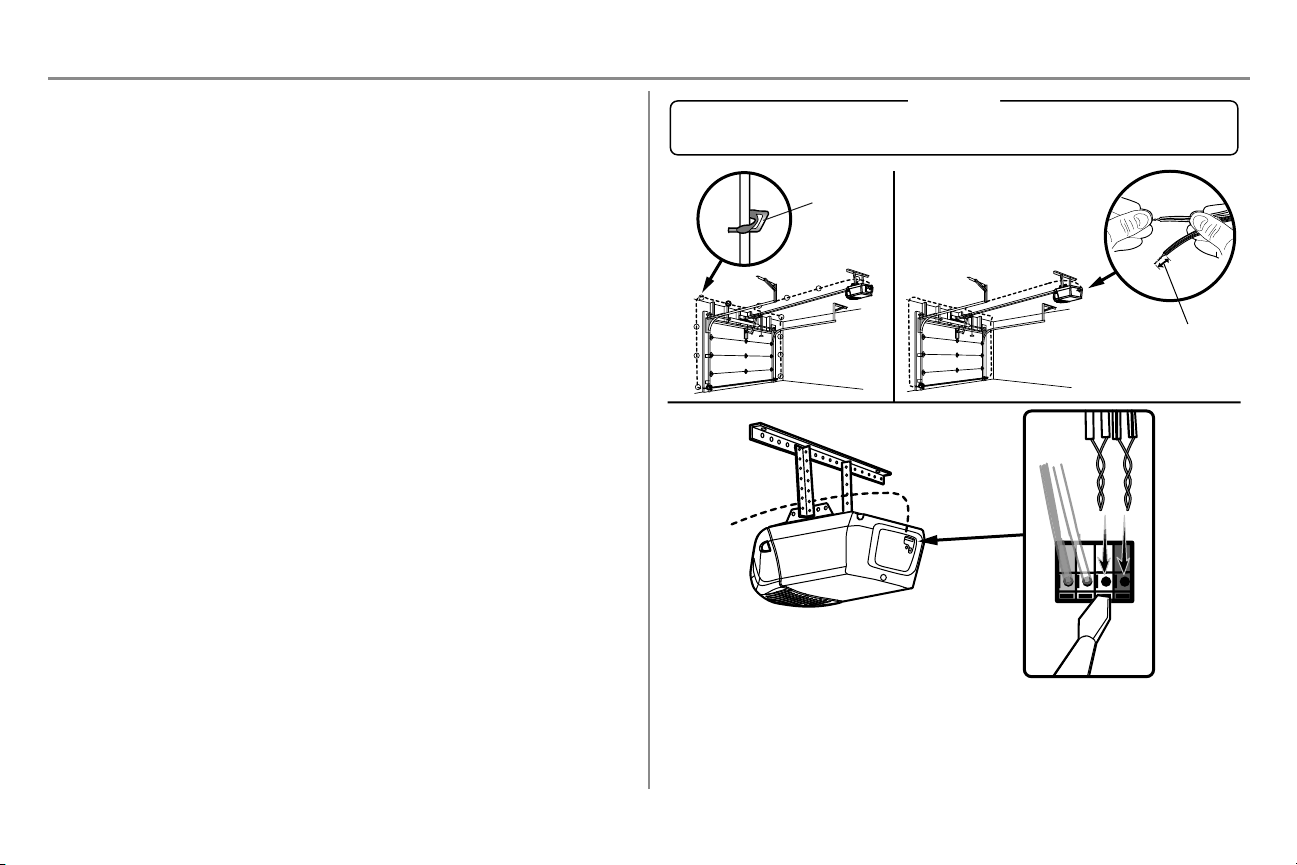
STEP 14 Wire the Safety Reversing Sensors
If your garage already has wires installed for the safety reversing sensors, proceed to page 26.
OPTION A INSTALLATION WITHOUT PRE-WIRING
1. Run the wire from both sensors to the garage door opener. Attach the wire to the wall and ceiling with the
staples.
2. Strip 7/16" (11 mm) of insulation from each set of wires. Separate the wires. Twist the white wires
together. Twist the white/black wires together.
3. Insert the white wires into the white terminal on the garage door opener. Insert the white/black wires into
the grey terminal on the garage door opener. To insert or remove the wires from the terminal, push in the
tab with a screwdriver tip.
Staple
7/16" (11 mm)
WHITE
WHITE
GREY
RED
1
2
3
HARDWARE
Insulated Staple (Not Shown)
26
Installation
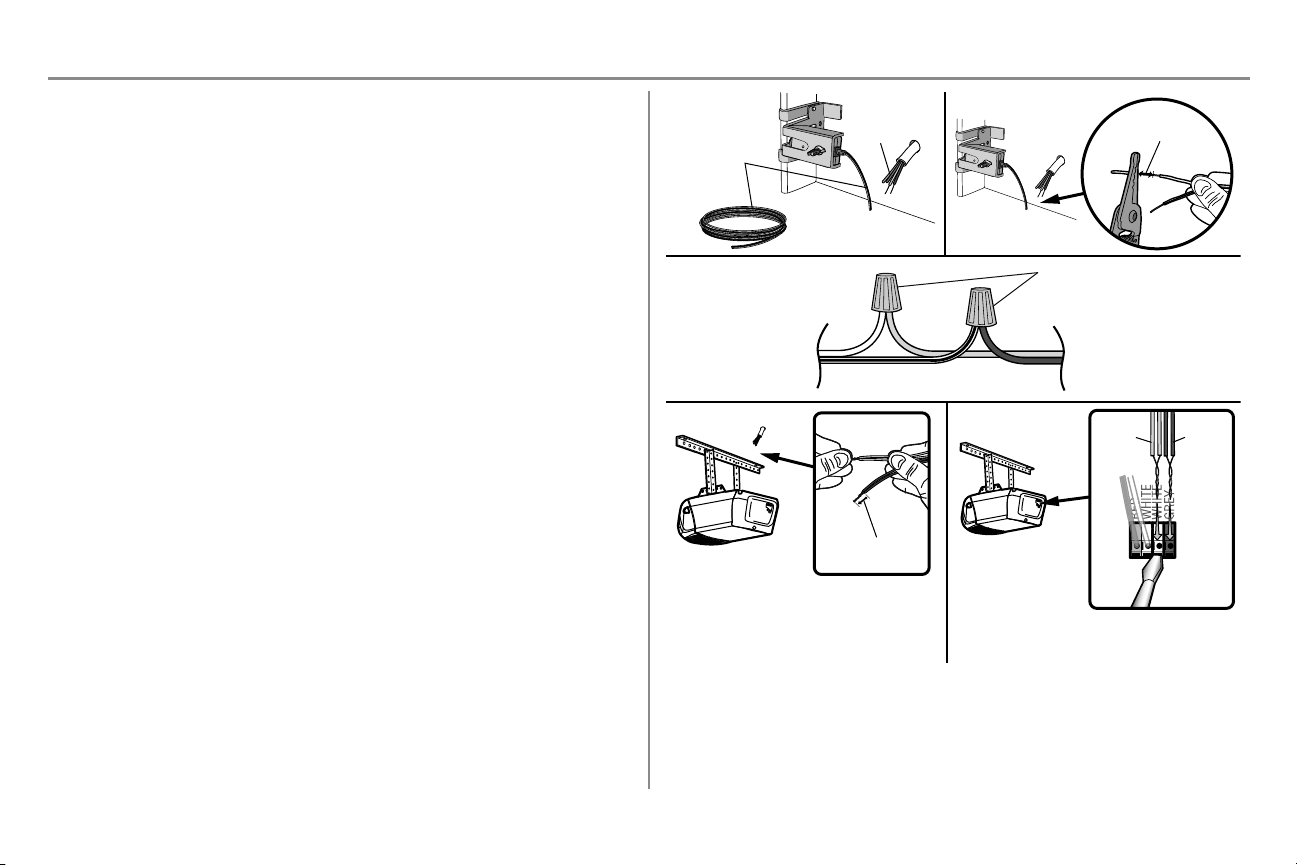
STEP 14 Wire the Safety Reversing Sensors (continued)
OPTION B PRE-WIRED INSTALLATION
1. Cut the end of the safety reversing sensor wire, making sure there is enough wire to reach the pre-installed
wires from the wall.
2. Separate the safety reversing sensor wires and strip 7/16" (11 mm) of insulation from each end. Choose
two of the pre-installed wires and strip 7/16" (11 mm) of insulation from each end. Make sure that you
choose the same color pre-installed wires for each sensor.
3. Connect the pre-installed wires to the sensor wires with wire nuts making sure the colors correspond for
each sensor. For example, the white wire would connect to the yellow wire and the white/black wire would
connect to the purple wire.
4. At the garage door opener, strip 7/16" (11 mm) of insulation from each end of the wires previously chosen
for the safety reversing sensors. Twist the like-colored wires together.
5. Insert the wires connected to the white safety sensor wires to the white terminal on the garage door opener.
Insert the wires that are connected to the white/black safety sensor wires to the grey terminal on the garage
door opener.
Safety reversing
sensor wires
Pre-installed
wires
White
White/Black
Yellow (for example)
Purple (for example)
Wire nuts (not provided)
Pre-installed wires
Safety reversing
sensor wires
1
3
4
7/16" (11 mm)
2
Purple
Yellow
5
7/16" (11 mm)
Yellow
Purple
To insert or remove the wires from the terminal,
push in the tab with a screwdriver tip.
27
Installation
STEP 15 Connect power
To prevent possible SERIOUS INJURY or DEATH from electrocution or fire:
l Be sure power is NOT connected to the opener, and disconnect power to circuit BEFORE removing cover to
establish permanent wiring connection.
l Garage door installation and wiring MUST be in compliance with ALL local electrical and building codes.
l NEVER use an extension cord, 2-wire adapter, or change plug in ANY way to make it fit outlet. Be sure the
opener is grounded.
To avoid installation difficulties, do not run the opener at this time.
To reduce the risk of electric shock, your garage door opener has a grounding type plug with a third grounding pin.
This plug will only fit into a grounding type outlet. If the plug doesn’t fit into the outlet you have, contact a qualified
electrician to install the proper outlet.
THERE ARE TWO OPTIONS FOR CONNECTING POWER:
OPTION A - TYPICALWIRING
1. Plug in the garage door opener into a grounded outlet.
2. DO NOT run garage door opener at this time.
OPTION B - PERMANENT WIRING
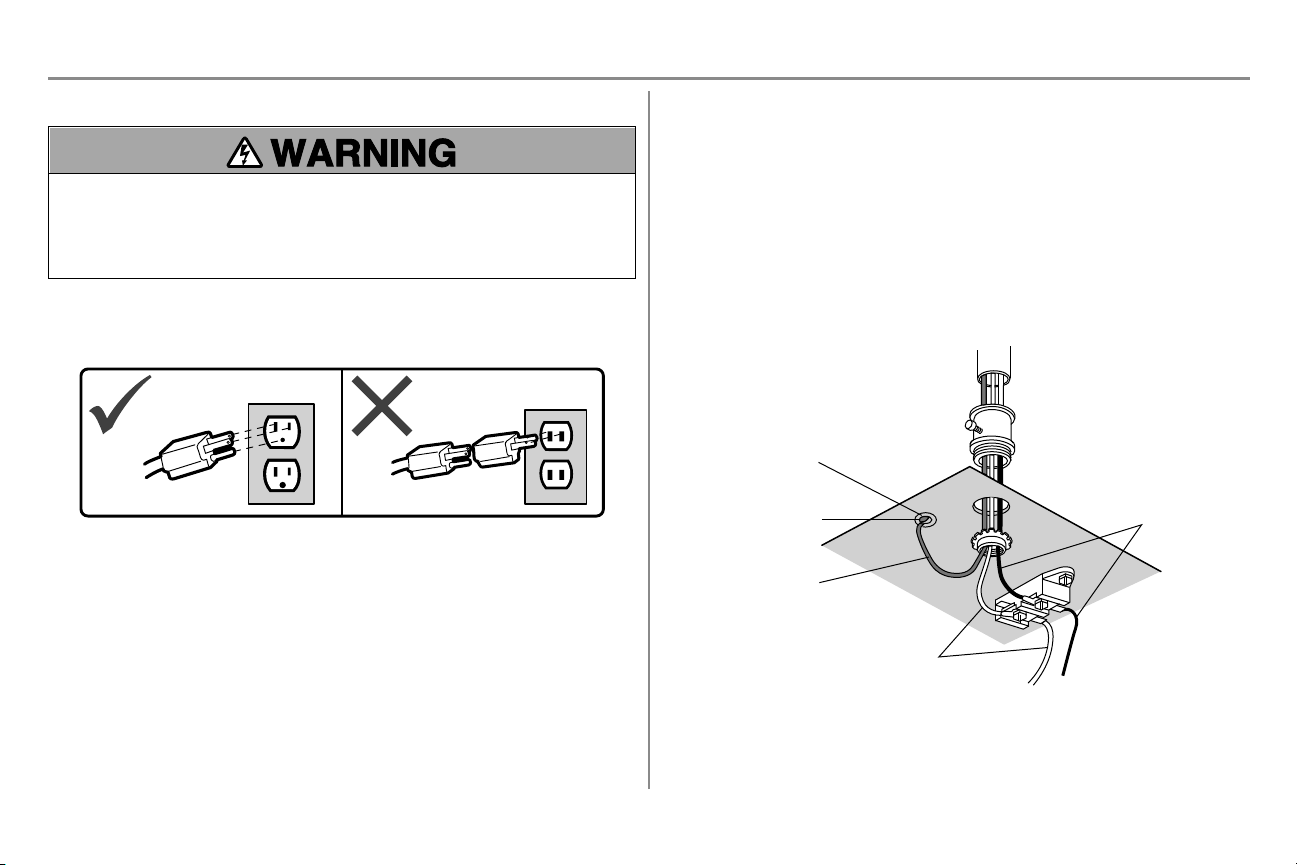
If permanent wiring is required by your local code, refer to the following procedure. To make a permanent
connection through the 7/8-inch hole in the top of the motor unit (according to local code):
1. Remove the motor unit cover screws and set the cover aside.
2. Remove the attached 3-prong cord.
3. Connect the black (line) wire to the screw on the brass terminal; the white (neutral) wire to the screw on
the silver terminal; and the ground wire to the green ground screw. The opener must be grounded.
4. Reinstall the cover.
Ground Tab
Green Ground Screw
Ground Wire
White Wire
Black Wire
28
Installation
STEP 16 Aligning the safety reversing sensors
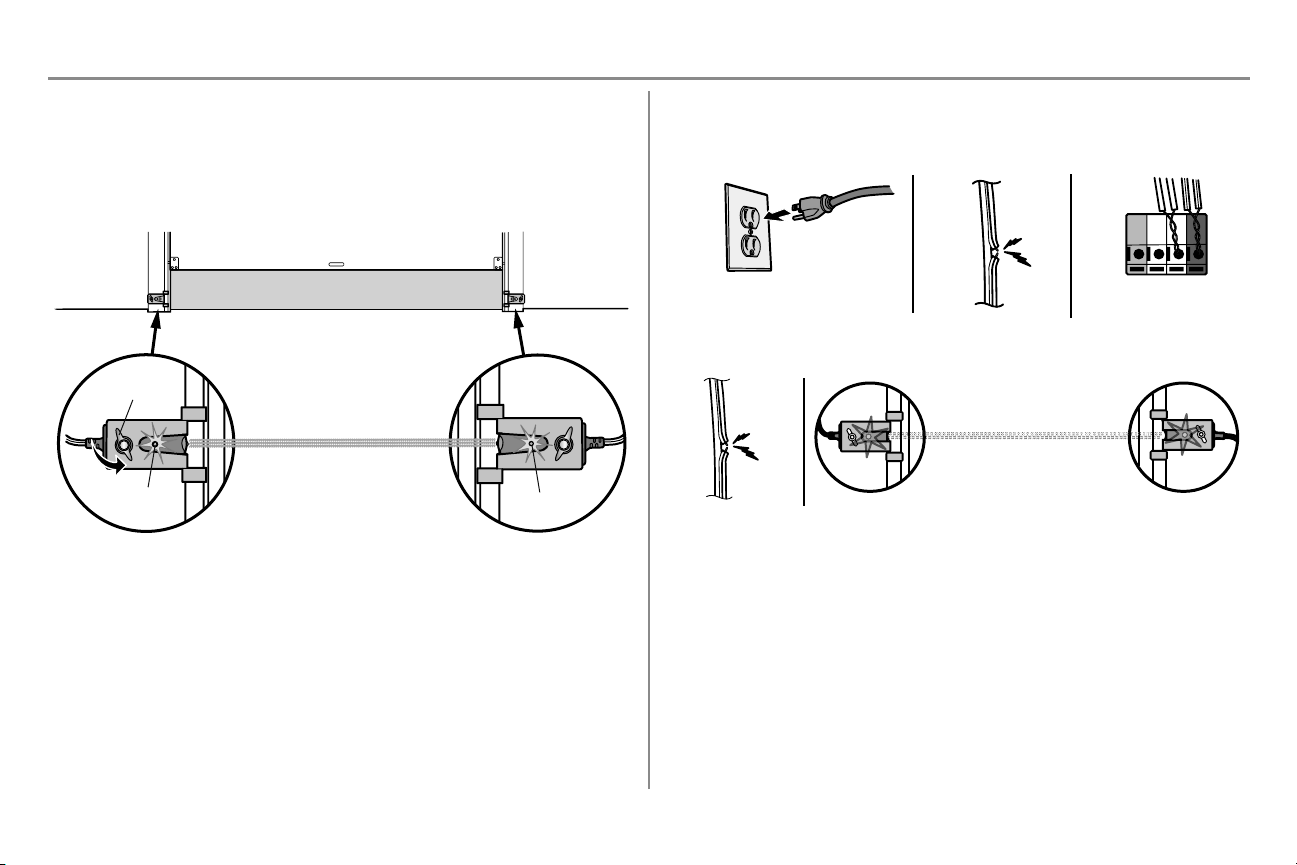
The door will not close if the sensors have not been installed and aligned correctly.
When the light beam is obstructed or misaligned while the door is closing, the door will reverse and the garage door
opener lights will flash ten times. If the door is already open, it will not close.
1. Check to make sure the LEDs in both sensors are glowing steadily. The LEDs in both sensors will glow
steadily if they are aligned and wired correctly.
The sensors can be aligned by loosening the wing nuts, aligning the sensors, and tightening the wing nuts.
Green LED
Amber LED
Wing Nut
SENDING SENSOR
RECEIVING SENSOR
(invisible light beam)
If the receiving sensor is in direct
sunlight, switch it with sending sensor so
it is on the opposite side of the door.
IF THE AMBER LED ON THE SENDING SENSOR IS NOT GLOWING:
1. Make sure there is power to the garage door opener.
2. Make sure the sensor wire is not shorted/broken.
3. Make sure the sensor has been wired correctly: white wires to white terminal and white/black wires to
grey terminal.
RED
WHITE
WHITE
GREY
3
2
1
IF THE GREEN LED ON THE RECEIVING SENSOR IS NOT GLOWING:
1. Make sure the sensor wire is not shorted/broken.
2. Make sure the sensors are aligned.
1
2
STEP 17 Ensure the door control is wired correctly
If the door control has been installed and wired correctly, the command LED on the Multi-Function Control Panel will
blink.
29
Adjustments
Introduction
Without a properly installed safety reversal system, persons (particularly small children) could be SERIOUSLY
INJURED or KILLED by a closing garage door.
l Incorrect adjustment of garage door travel limits will interfere with proper operation of safety reversal
system.
l After ANY adjustments are made, the safety reversal system MUST be tested. Door MUST reverse on
contact with 1-1/2" (3.8 cm) high object (or 2x4 laid flat) on floor.
To prevent damage to vehicles, be sure fully open door provides adequate clearance.
Your garage door opener is designed with electronic controls to make setup and adjustments easy. The adjustments
allow you to program where the door will stop in the open (UP) and close (DOWN) position. The electronic controls
sense the amount of force required to open and close the door. The force is adjusted automatically when you program
the travel.
NOTE: If anything interferes with the door’s upward travel it will stop. If anything interferes with the door’s downward
travel, it will reverse.
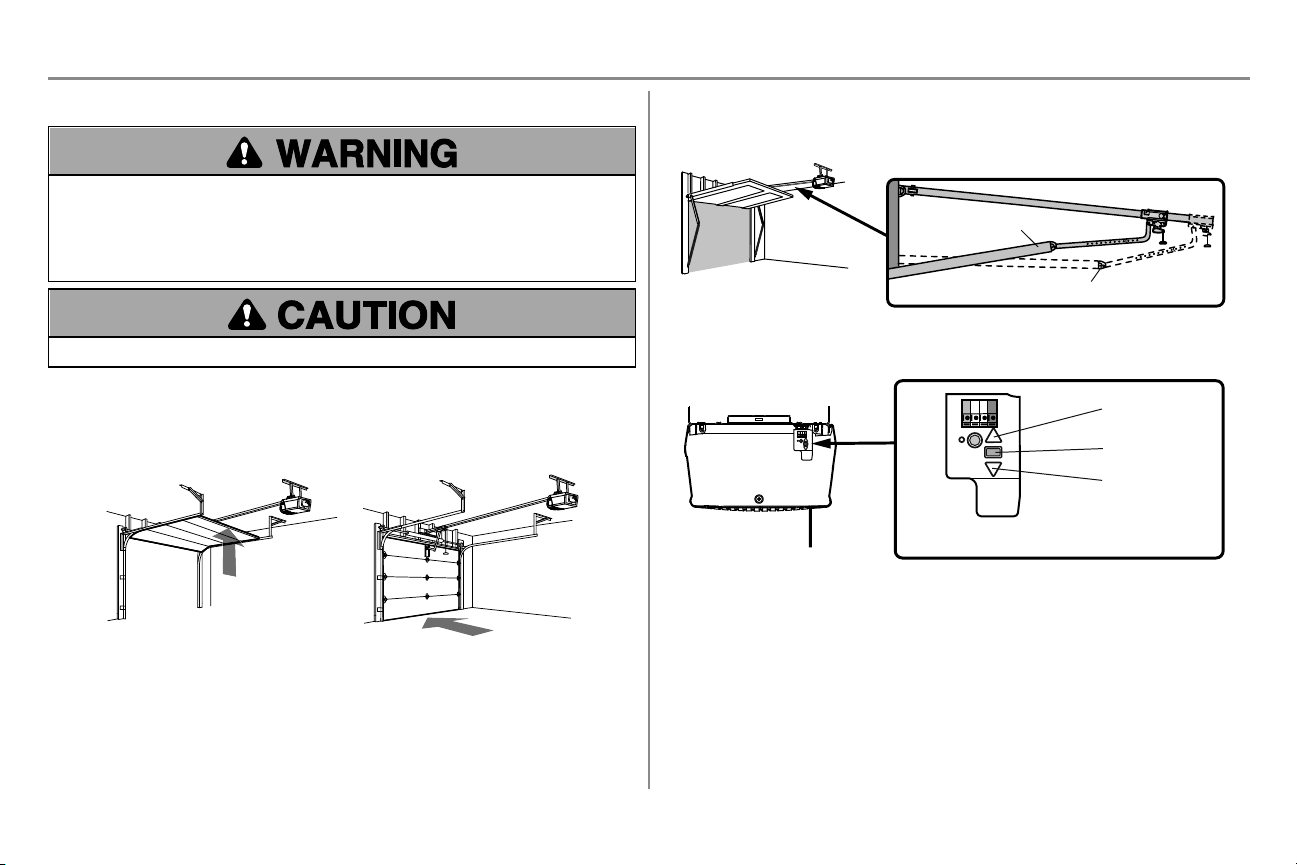
UP (Open)
DOWN (Close)
One-Piece Doors Only
When setting the UP travel for a one-piece door ensure that the door does not slant backwards when fully open (UP).
If the door is slanted backwards this will cause unnecessary bucking and/or jerking when the door is opening or
closing.
Correct
Incorrect
Programming Buttons
The programming buttons are located on the back panel of the garage door opener and are used to program the travel.
While programming, the UP and DOWN buttons can be used to move the door as needed.
UP Button
Adjustment Button
DO
WN
Button
PROGRAMMING BUTTONS
30
Adjustments
STEP 1 Program the Travel
Without a properly installed safety reversal system, persons (particularly small children) could be SERIOUSLY
INJURED or KILLED by a closing garage door.
l Incorrect adjustment of garage door travel limits will interfere with proper operation of safety reversal
system.
l After ANY adjustments are made, the safety reversal system MUST be tested. Door MUST reverse on
contact with 1-1/2" (3.8 cm) high object (or 2x4 laid flat) on floor.
While programming, the UP and DOWN buttons can be used to move the door as needed.
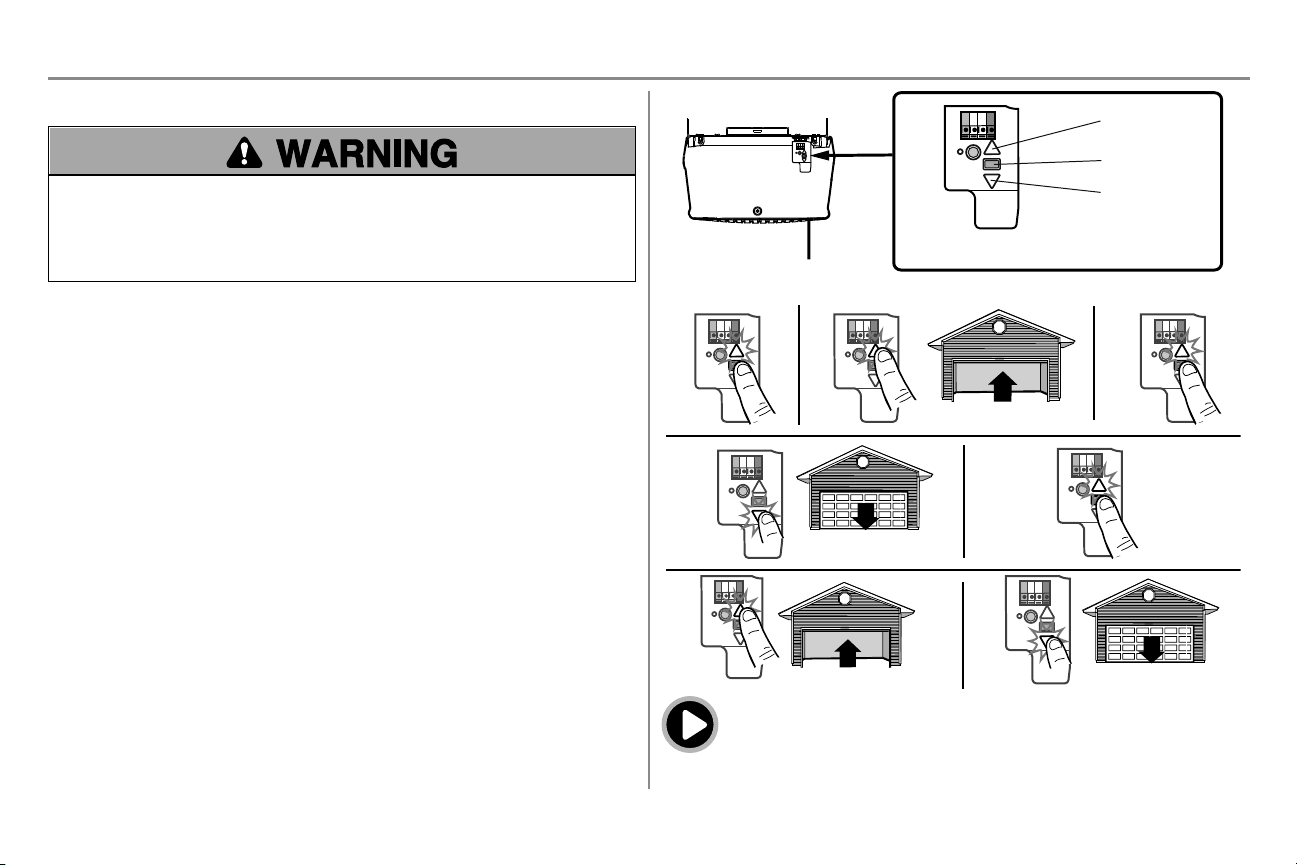
1. Press and hold the Adjustment Button until the UP Button begins to flash and/or a beep is heard.
2. Press and hold the UP Button until the door is in the desired UP position.
3. Once the door is in the desired UP position press and release the Adjustment Button. The garage door
opener lights will flash twice and the DOWN Button will begin to flash.
4. Press and hold the DOWN button until the door is in the desired DOWN position.>
5. Once the door is in the desired DOWN position press and release the Adjustment Button. The garage door
opener lights will flash twice and the UP Button will begin to flash.
6. Press and release the UP Button. When the door travels to the programmed UP position, the DOWN Button
will begin to flash.
7. Press and release the DOWN Button. The door will travel to the programmed DOWN position.
Programming is complete.
* If the garage door opener lights are flashing 5 times during the steps for Program the Travel, the programming has
timed out. If the garage door opener lights are flashing 10 times during the steps for Program the Travel, the safety
reversing sensors are misaligned or obstructed (refer to page 28). When the sensors are aligned and unobstructed,
cycle the door through a complete up and down cycle using the remote control or the UP and DOWN buttons.
Programming is complete. If you are unable to operate the door up and down, repeat the steps for Programming the
Travel.
UP Button
Adjustment Button
DO
WN
Button
PROGRAMMING BUTTONS
1 2
3
4
5
6 7
To watch a video, go to tinyurl.com/lkwbnhj
31
Adjustments
STEP 2 Test the Safety Reversal System
Without a properly installed safety reversal system, persons (particularly small children) could be SERIOUSLY
INJURED or KILLED by a closing garage door.
l Safety reversal system MUST be tested every month.
l After ANY adjustments are made, the safety reversal system MUST be tested. Door MUST reverse on
contact with 1-1/2" (3.8 cm) high object (or 2x4 laid flat) on the floor.
1. With the door fully open, place a 1-1/2" (3.8 cm) board (or a 2x4 laid flat) on the floor, centered under the
garage door.
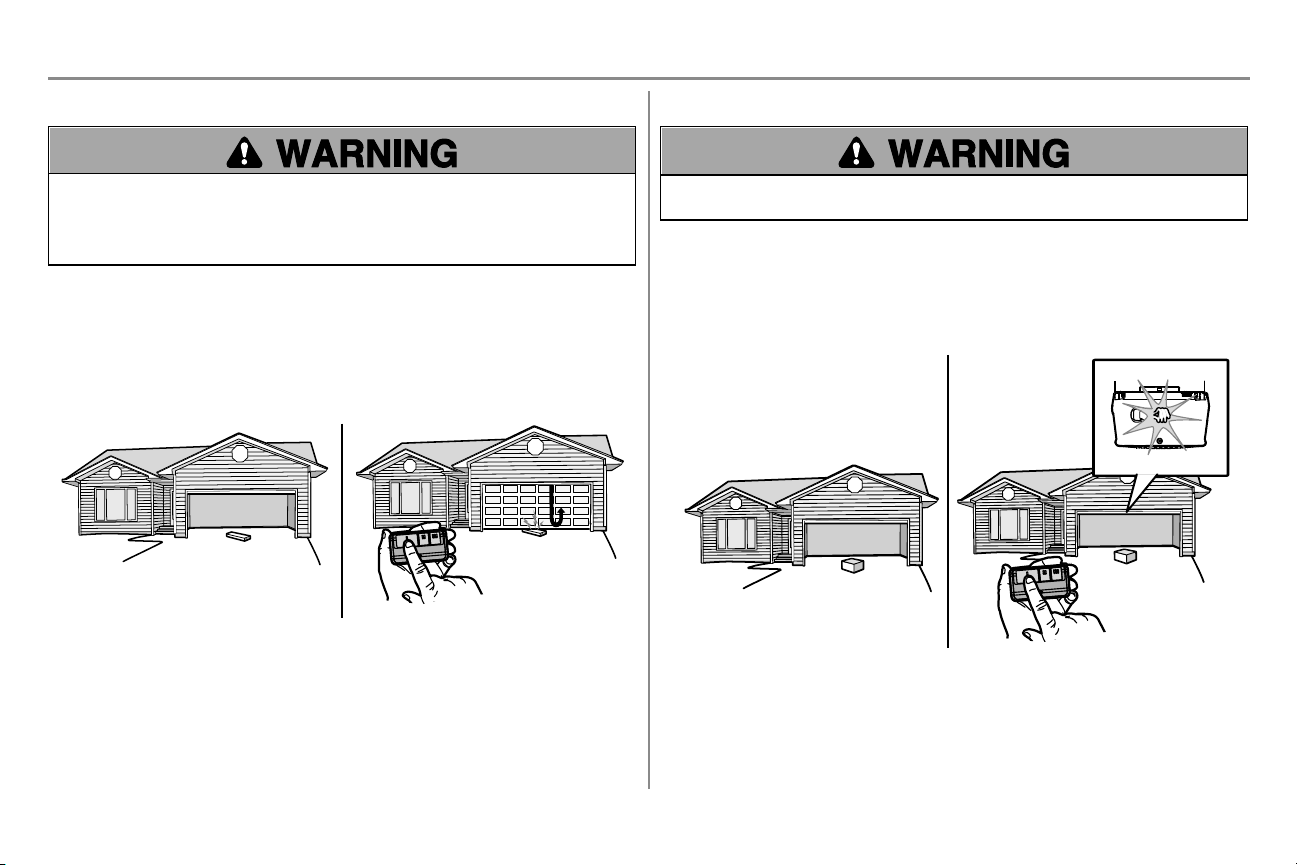
2. Press the remote control push button to close the door. The door MUST reverse when it makes contact
with the board.
If the door stops but does not reverse:
1. Review the installation instructions provided to insure all steps were followed;
2. Repeat Program the Travel (see Adjustment Step 1);
3. Repeat the Safety Reversal test.
If the test continues to fail, call a trained door systems technician.
1 2
STEP 3 Test the Protector System
Without a properly installed safety reversing sensor, persons (particularly small children) could be SERIOUSLY
INJURED or KILLED by a closing garage door.
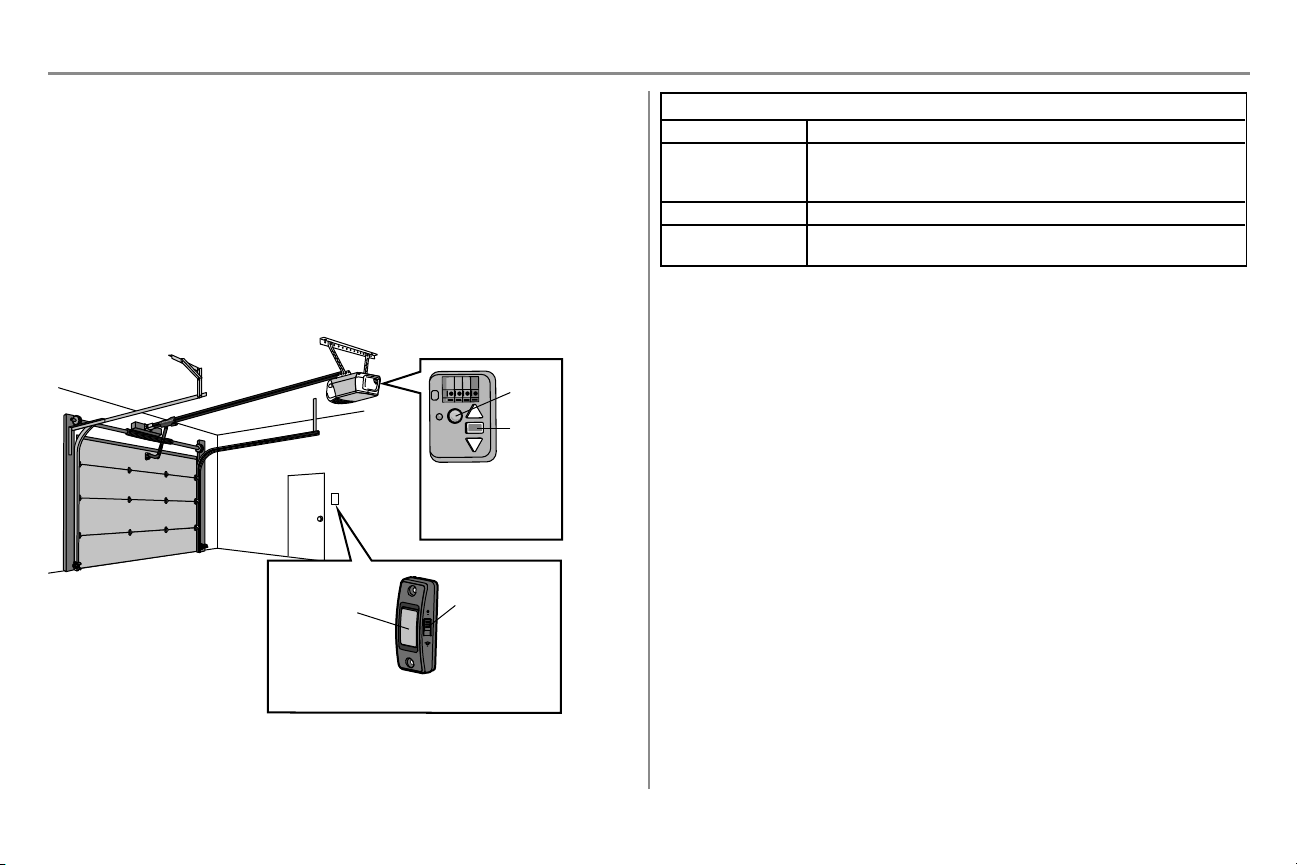
1. Open the door. Place the garage door opener carton in the path of the door.
2. Press the remote control push button to close the door. The door will not move more than 1" (2.5 cm), and
the garage door opener lights will flash 10 times.
The garage door opener will not close from a remote control if the LED in either safety reversing sensor is off (alerting
you to the fact that the sensor is misaligned or obstructed). If the garage door opener closes the door when the safety
reversing sensor is obstructed (and the sensors are no more than 6" [15 cm] above the floor), call for a trained door
systems technician.
1
2
32
myQ
®
Smartphone Control
Connect With Your Smartphone
Youwillneed:
l Wi-Fi enabled smartphone, tablet or laptop
l Broadband Internet Connection
l Wi-Fi signal in the garage (2.4 Ghz, 802.11b/g/n required), see page page 3
l Password for your home network (router's main account, not guest network)
l myQ serial number located on the garage door opener
Downloadthe myQ App to Set Upan Account andConnect
Open and close your door, get alerts and set schedules from anywhere. Connected smart garage door openers also
receive software updates to ensure the opener has the latest operational features.
1. Download the myQ App.
2. Set up an account and connect.
For more information on connecting your garage door opener, visit support.chamberlaingroup.com.
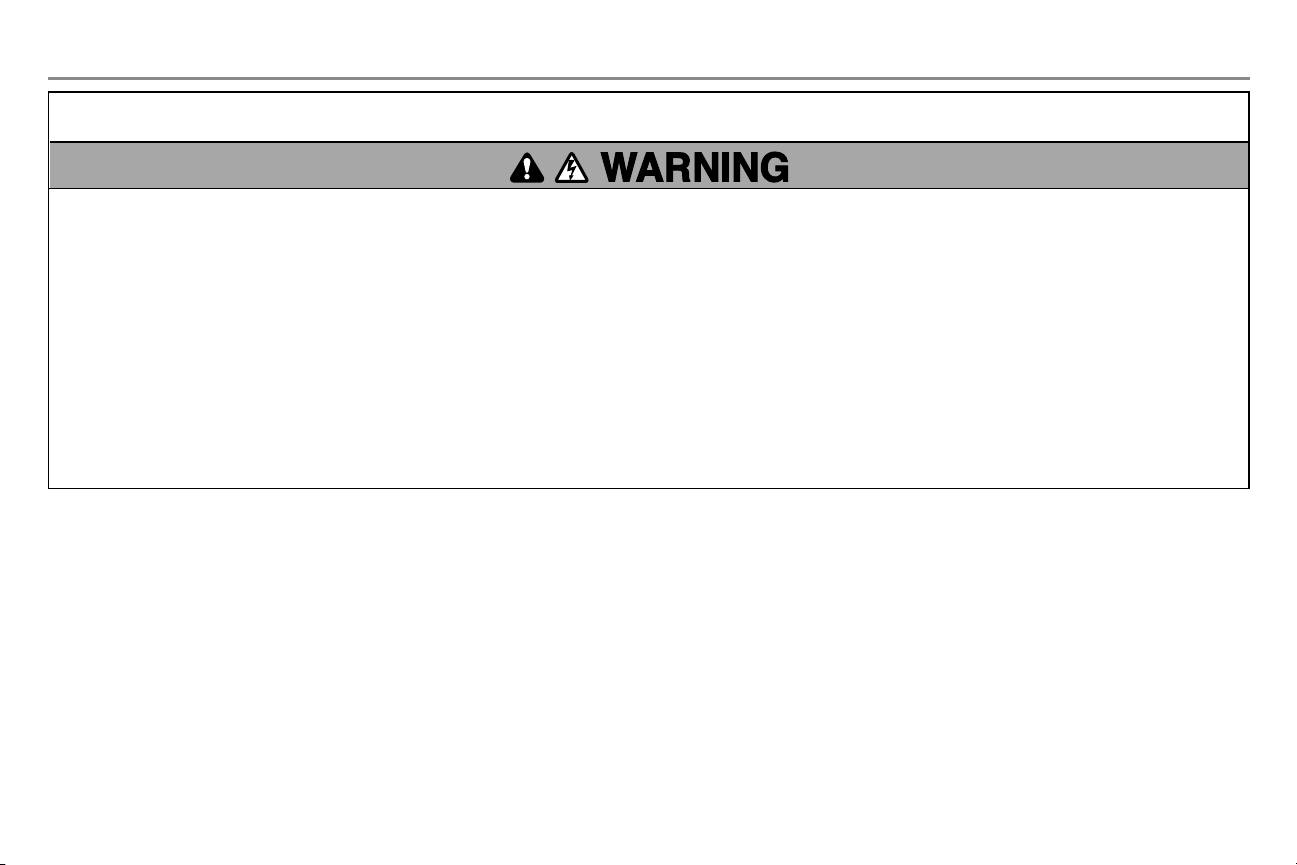
An LED on the garage
door opener will
indicate Wi-Fi status.
See table below.
Push Button
Light Button
(also used for
connecting
myQ; see app)
Push Button Door Control
LED
Learn
Button
Wi-FiStatus
LED Definition
Blue Off - Wi-Fi is not turned on.
Blinking - Garage door opener is in Wi-Fi learn mode.
Solid - Mobile device connected to the garage door opener.
Blue and Green Blinking - Attempting to connect to router.
Green Blinking - Attempting to connect to the Internet server.
Solid - Wi-Fi has been set up and garage door opener is connected to the internet.
NOTES:
To erase the Wi-Fi settings, see page page 36.
33
IMPORTANT SAFETY INSTRUCTIONS
To reduce the risk of SEVERE INJURY or DEATH:
1. READ AND FOLLOW ALL WARNINGS AND INSTRUCTIONS.
2. ALWAYS keep remote controls out of reach of children. NEVER permit children to operate or play with garage
door control push buttons or remote controls.
3. ONLY activate garage door when it can be seen clearly, it is properly adjusted, and there are no obstructions
to door travel.
4. ALWAYS keep garage door in sight and away from people and objects until completely closed. NO ONE
SHOULD CROSS THE PATH OF THE MOVING DOOR.
5. NO ONE SHOULD GO UNDER A STOPPED, PARTIALLY OPENED DOOR.
6. If possible, use emergency release handle to disengage trolley ONLY when garage door is CLOSED. Use
caution when using this release with the door open. Weak or broken springs or unbalanced door could result in
an open door falling rapidly and/or unexpectedly and increasing the risk of SEVERE INJURY or DEATH.
7. NEVER use emergency release handle unless garage doorway is clear of persons and obstructions.
8. NEVER use handle to pull garage door open or closed. If rope knot becomes untied, you could fall.
9. After ANY adjustments are made, the safety reversal system MUST be tested.
10. Safety reversal system MUST be tested every month. Garage door MUST reverse on contact with 1-1/2"
(3.8 cm) high object (or a 2x4 laid flat) on the floor. Failure to adjust the garage door opener properly
increases the risk of SEVERE INJURY or DEATH.
11. ALWAYS KEEP GARAGE DOOR PROPERLY BALANCED (see page 2). An improperly balanced door
may NOT reverse when required and could result in SEVERE INJURY or DEATH.
12. ALL repairs to cables, spring assemblies and other hardware, ALL of which are under EXTREME tension,
MUST be made by a trained door systems technician.
13. ALWAYS disconnect electric power to garage door opener BEFORE making ANY repairs or removing
covers.
14. This operator system is equipped with an unattended operation feature. The door could move
unexpectedly. NO ONE SHOULD CROSS THE PATH OF THE MOVING DOOR.
15. DO NOT install on a one-piece door if using devices or features providing unattended close. Unattended
devices and features are to be used ONLY with sectional doors.
16. SAVE THESE INSTRUCTIONS.
Operation
34
Operation
Features
Your garage door opener is equipped with features to provide you with greater control over your garage door
operation.
myQ
The Wi-Fi Garage Door Opener is compatible with up to 16 myQ enabled accessories. Up to 10 devices can be
paired to the Wi-Fi garage door opener’s internal gateway. These devices can be controlled with the myQ app. These
devices include any combination of myQ garage door openers, Wi-Fi garage door openers, and myQ light controls. Up
to 6 devices can be paired to garage door opener itself (controlled by garage door opener through 900MHz). These
devices include any combination of myQ light controls or a garage door and gate monitor.
TIMER-TO-CLOSE (DO NOT enable onone-piece doors)
The Timer-to-Close feature is not available on all door controls. Below is a list of door controls with the Timer-to-
Close feature:
041A7305-1 Smart Control Panel and 041A7327-1 Motion Detecting Control Panel
The Timer-to-Close feature automatically closes the garage door after a specified time period. DO NOT enable TTC
if operating a one-piece door. TTC is to be used ONLY with sectional doors. Factory default is set to off. The
garage door opener will beep and the lights will flash before closing the door. The TTC feature will deactivate if the
garage door encounters an obstruction twice; or the safety reversing sensors are incorrectly installed. The garage
door will reverse open and WILL NOT close until the obstructions are clear or the safety reversing sensors are
correctly installed. When the obstruction has been cleared or the safety reversing sensors have been aligned, the door
will close when the garage door opener is activated. TTC WILL NOT work if the garage door opener is operating by
battery power or if the safety reversing sensors are misaligned. This feature is NOT intended to be the primary
method of closing the door. A keyless entry should be installed in the event of an accidental lock out when
using this feature.
REMOTE CONTROLS AND DOOR CONTROLS
Your garage door opener has already been programmed at the factory to operate with your remote control, which
changes with each use, randomly accessing over 100 billion new codes.
myQ Accessories MEMORY CAPACITY
Remote Controls Up to 8
Door Controls Up to 2 myQ door controls
Keyless Entries Up to 1
THE PROTECTOR SYSTEM
®
(SAFETY REVERSING SENSORS)
When properly connected and aligned, the safety reversing sensors will detect an obstruction in the path of the
infrared beam. If an obstruction breaks the infrared beam while the door is closing, the door will stop and reverse to
full open position, and the opener lights will flash 10 times. If the door is fully open, and the safety reversing sensors
are not installed, or are misaligned, the door will not close from a remote control. However, you can close the door if
you hold the button on the door control or keyless entry until the door is fully closed. The safety reversing sensors do
not effect the opening cycle.
ENERGY CONSERVATION
For energy efficiency the garage door opener will enter sleep mode when the door is fully closed. The sleep mode
shuts the garage door opener down until activated. The sleep mode is sequenced with the garage door opener light
bulb; as the light bulb turns off the sensor LEDs will turn off and whenever the garage door opener lights turn on the
sensor LEDs will light. The garage door opener will not go into the sleep mode until the garage door opener has
completed 5 cycles upon power up.
LIGHTS
The garage door opener light bulbs will turn on when the opener is initially plugged in; power is restored after
interruption, or when the garage door opener is activated. The lights will turn off automatically after 4-1/2 minutes. An
incandescent A19 light bulb (100W maximum) or for maximum energy efficiency a 26W (100W equivalent) compact
fluorescent light (CFL) bulb may be used. NOTE: Do not use halogen, short neck, or specialty light bulbs as these
may overheat the end panel or light socket. Do not use LED bulbs as they may reduce the range or performance of
your remote controls.
Light Feature
The garage door opener is equipped with an added feature; the lights will turn on when someone enters through the
open garage door and the safety reversing sensor infrared beam is broken.
35
Operation
Using your Garage Door Opener
The garage door opener can be activated through a wall-mounted door control, remote control, wireless keyless entry
or myQ accessory.
When the door is closed and the garage door opener is activated the door will open. If the door senses an obstruction
or is interrupted while opening the door will stop. When the door is in any position other than closed and the garage
door opener is activated the door will close. If the garage door opener senses an obstruction while closing, the door
will reverse. If the obstruction interrupts the sensor beam the garage door opener lights will blink 10 times. However,
you can close the door if you hold the button on the door control or keyless entry until the door is fully closed.
The safety reversing sensors do not affect the opening cycle. The safety reversing sensor must be connected and
aligned correctly before the garage door opener will move in the down direction.
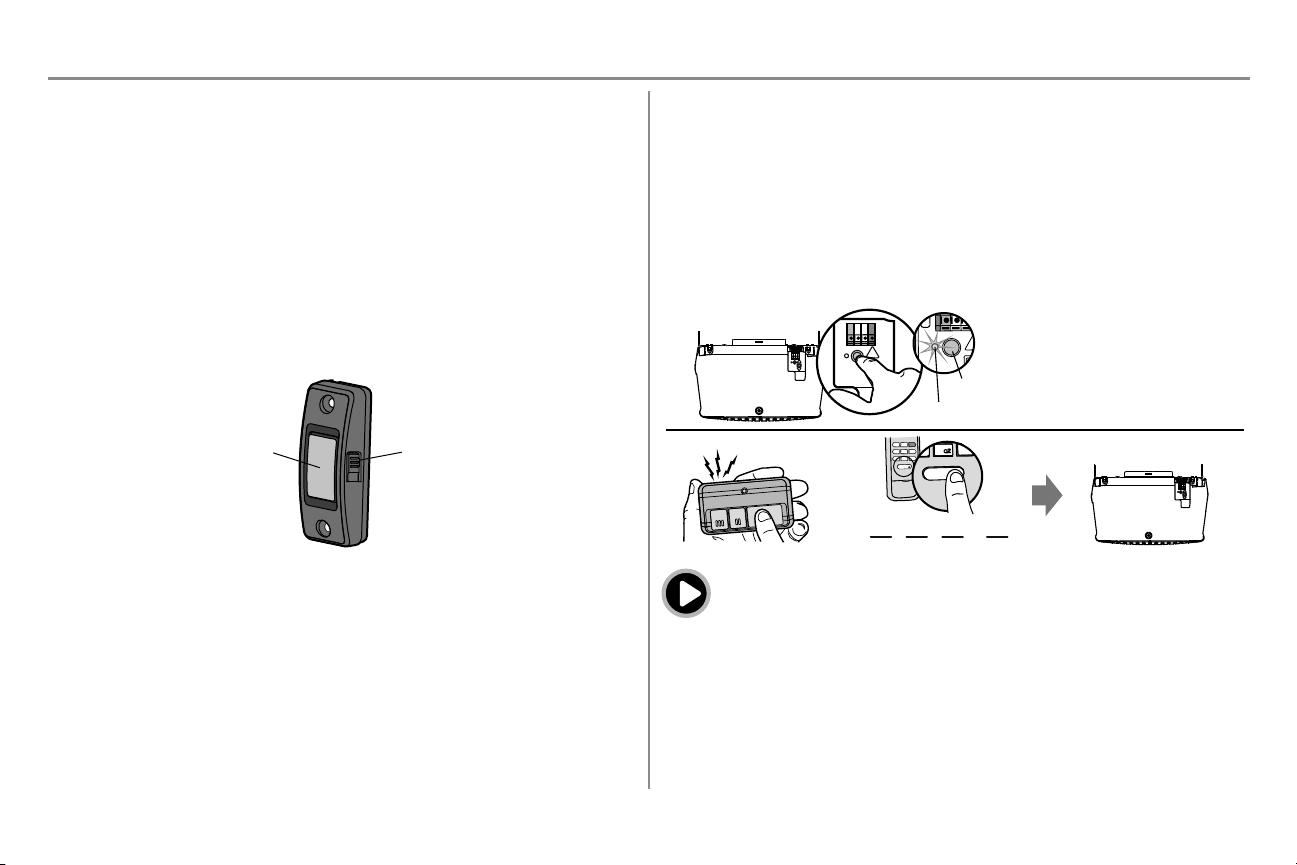
Push Button Door Control
SYNCHRONIZE THE DOOR CONTROL: To synchronize the door control to the garage door opener, press the
push button until the garage door opener activates (it may take up to 3 presses).
Push Button
LIGHT Button
Remote Control and Keyless Entry
Pre-programmed remote control included, no need to program the remote.
To add or reprogram a remote control, follow the instructions below. Older Chamberlain remote controls are NOT
compatible, see page 40 for compatible accessories.
PROGRAM USING THE DOOR CONTROL
1. Press and immediately release the Learn button.
2. Remote Control: Press and hold the button on the remote control that you wish to use.
Keyless Entry: Enter a 4-digit personal identification number (PIN) of your choice on the keyless entry
keypad. Then press the ENTER button.
The garage door opener lights will flash (or two clicks will be heard) when the code has been programmed. Repeat
the steps for programming additional remote controls or keyless entry devices.
1
2
OR
PIN
? ? ? ?
4
GHI
5
JKL
7
PRS
8
TUV
9
WXY
0
QZ
*
#
ENTER
0 QZ
*
#
ENTER
6
MNO
“click”
“click”
LEARN LED
LEARN Button
To watch a video, go to tinyurl.com/lcsf6xt
HomeLink
®
If your vehicle is equipped with HomeLink, a Compatibility Bridge
TM
(not included) may be necessary for certain
vehicles. Visit bridge.chamberlain.comto find out if a Bridge is needed.
36
Operation
To Erase the Memory
ERASE ALL REMOTE CONTROLS AND KEYLESS ENTRIES
1. Press and hold the LEARN button on garage door opener until the learn LED goes out (approximately 6
seconds). All remote control and keyless entry codes are now erased. Reprogram any accessory you wish
to use.
ERASE ALL REMOTE CONTROLS,KEYLESS ENTRIES AND myQ DEVICES FROM GARAGE
DOOR OPENER
1. Press and hold the LEARN button on garage door opener until the learn LED goes out (approximately 6
seconds).
2. Immediately press and hold the LEARN button again until the learn LED goes out. All codes are now
erased. Reprogram any accessory you wish to use.
ERASE THE CONNECTION FROM GARAGE DOOR OPENER TO HOME Wi-FiNETWORK
1. Press and hold the black adjustment button on the garage door opener until 3 beeps are heard
(Approximately 6 seconds).
ERASE A myQ ACCOUNT
1. Go to www.mychamberlain.com to access your myQ account.
2. Go to "Account" section.
3. Click "Delete Account".
Go to support.chamberlaingroup.com for more details.
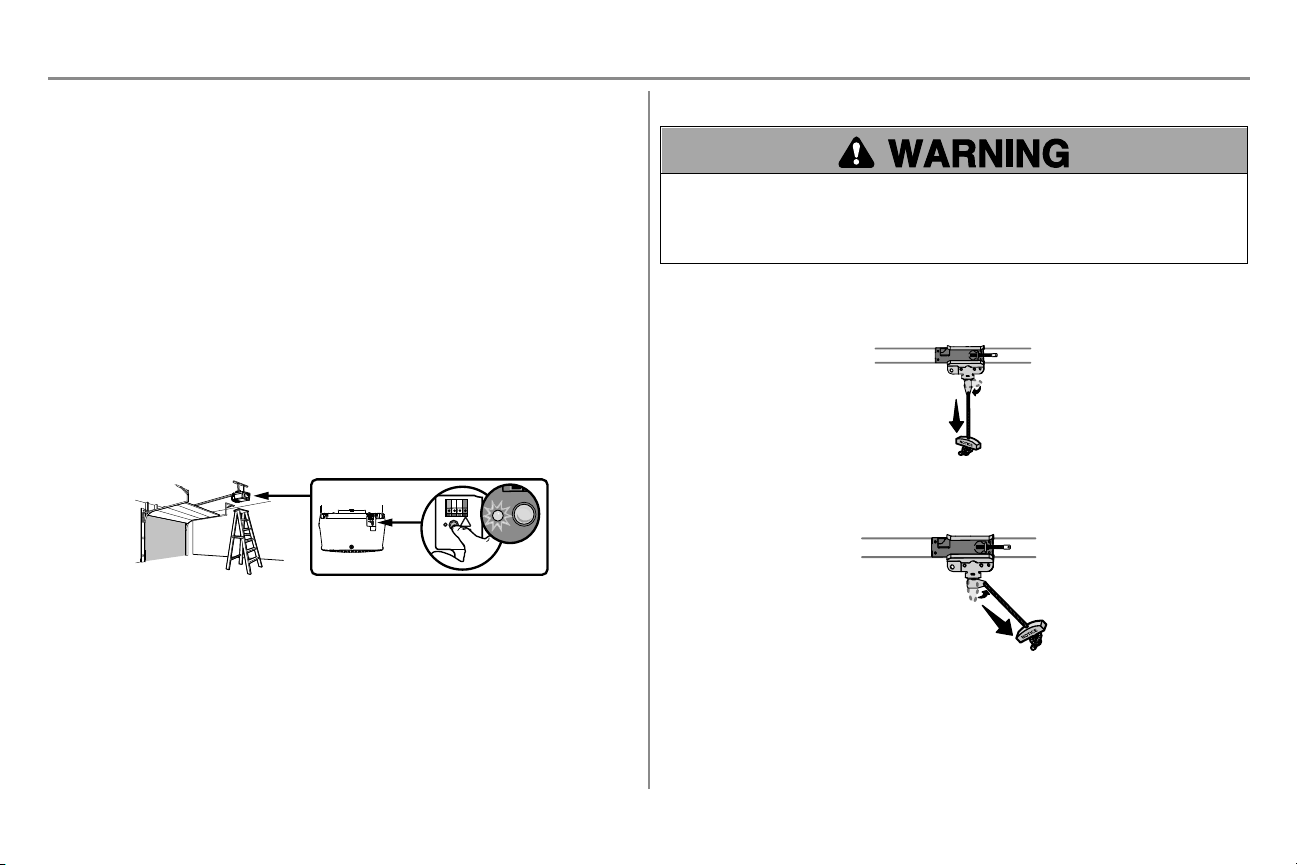
To Open the Door Manually
To prevent possible SERIOUS INJURY or DEATH from a falling garage door:
l If possible, use emergency release handle to disengage trolley ONLY when garage door is CLOSED. Weak
or broken springs or unbalanced door could result in an open door falling rapidly and/or unexpectedly.
l NEVER use emergency release handle unless garage doorway is clear of persons and obstructions.
l NEVER use handle to pull door open or closed. If rope knot becomes untied, you could fall.
DISCONNECTTHE TROLLEY
1. The door should be fully closed if possible.
2. Pull down on the emergency release handle so the trolley release arm snaps to the vertical position. The
door can now be raised and lowered as often as necessary.
TO RE-CONNECT THE TROLLEY
1. Pull the emergency release handle toward the garage door opener so the trolley release arm snaps to the
horizontal position. The trolley will reconnect on the next UP or DOWN operation, either manually or by
using the door control or remote control.
37
Maintenance
Maintenance Schedule
EVERY MONTH
l Manually operate door. If it is unbalanced or binding, call a trained door systems technician.
l Check to be sure door opens and closes fully. Adjust if necessary, see page 29.
l Test the safety reversal system. Adjust if necessary, see page 31.
EVERY YEAR
l Oil door rollers, bearings and hinges. The garage door opener does not require additional lubrication. Do not
grease the door tracks.
NOTICE: This device complies with Part 15 of the FCC rules and Industry Canada’s license-exempt RSSs.
Operation is subject to the following two conditions: (1) this device may not cause harmful interference, and (2) this
device must accept any interference received, including interference that may cause undesired operation.
Any changes or modifications not expressly approved by the party responsible for compliance could void the user’s
authority to operate the equipment.
This device must be installed to ensure a minimum20 cm (8 in.) distance is maintained between users/bystanders
and device.
This device has been tested and found to comply with the limits for a Class B digital device, pursuant to part 15 of
the FCC rules and Industry Canada ICES standard. These limits are designed to provide reasonable protection
against harmful interference in a residential installation. This equipment generates, uses and can radiate radio
frequency energy and, if not installed and used in accordance with the instructions, may cause harmful interference
to radio communications. However, there is no guarantee that interference will not occur in a particular installation.
If this equipment does cause harmful interference to radio or television reception, which can be determined by
turning the equipment off and on, the user is encouraged to try to correct the interference by one or more of the
following measures:
l Reorient or relocate the receiving antenna.
l Increase the separation between the equipment and receiver.
l Connect the equipment into an outlet on a circuit different from that to which the receiver is connected.
l Consult the dealer or an experienced radio/TV technician for help.
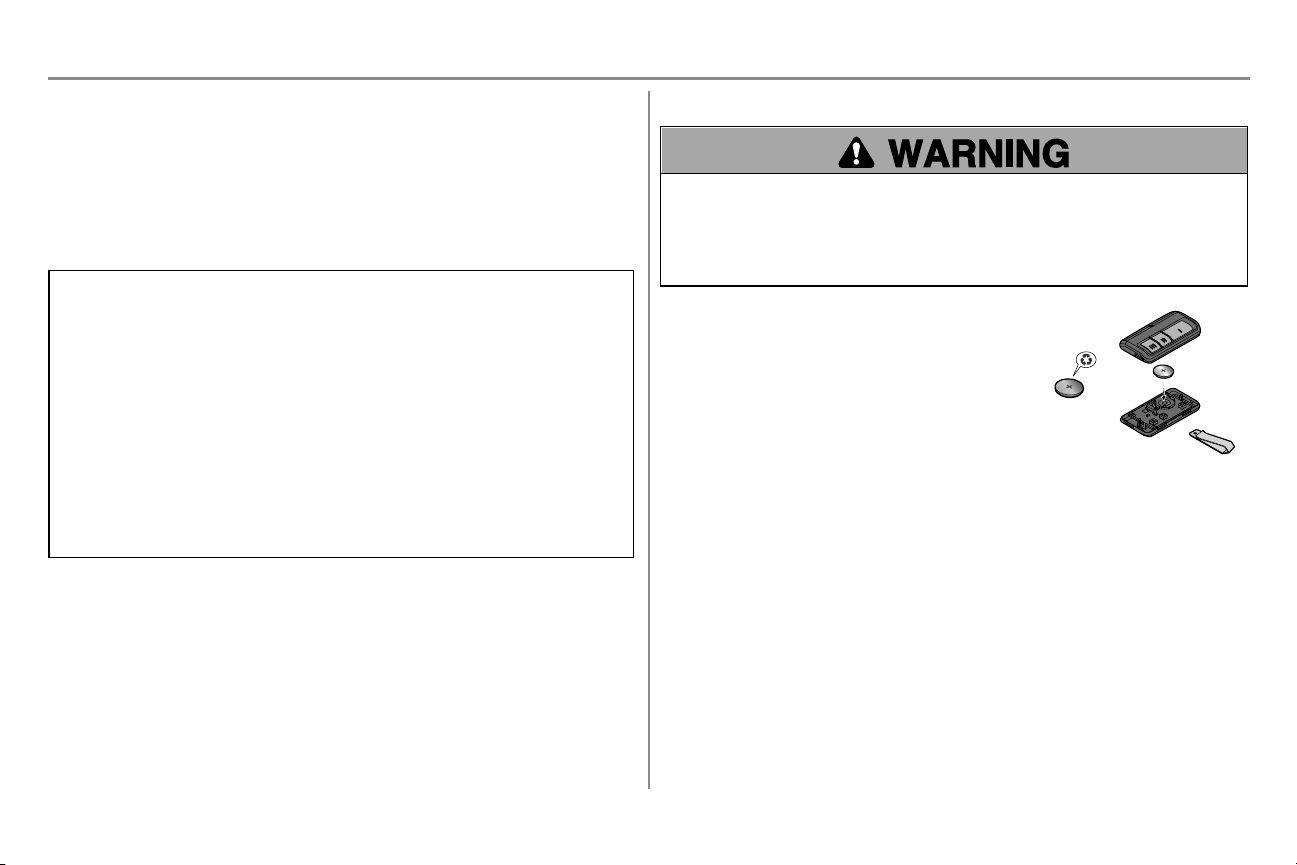
The Remote Control Battery
To prevent possible SERIOUS INJURY or DEATH:
l NEVER allow small children near batteries.
l If battery is swallowed, immediately notify doctor.
To reduce risk of fire, explosion or chemical burn:
l Replace ONLY with 3V CR2032 coin batteries.
l DO NOT recharge, disassemble, heat above 212°F (100°C) or incinerate.
The 3V CR2032 Lithium battery should produce power for up to 3
years. If the battery is low, the remote control’s LED will not flash
when the button is pressed.
To replace battery, pry open the case first in the middle (1), then at
each side (2 and 3) with the visor clip. Replace the batteries with only
3V CR2032 coin cell batteries. Insert battery positive side up. Dispose
of old batteries properly.
1
2
3

38
Diagnostic Chart
Your garage door opener is programmed with self-diagnostic capabilities. The UP and DOWN arrows on the garage door opener flash the diagnostic codes.
DIAGNOSTIC CODE SYMPTOM SOLUTION
Up Arrow
Flash(es)
Down Arrow
Flash(es)
1 1
The garage door opener will not close and the light bulbs flash.
Safety reversing sensors are not installed, connected, or wires may be cut. Inspect sensor wires for a disconnected
or cut wire.
1 2
The garage door opener will not close and the light bulbs flash.
There is a short or reversed wire for the safety reversing sensors. Inspect safety sensor wire at all staple and
connection points, replace wire or correct as needed.
1 3
The door control will not function.
The wires for the door control are shorted or the door control is faulty. Inspect door control wires at all staple and
connection points, replace wire or correct as needed.
1 4
The garage door opener will not close and the light bulbs flash.
Safety reversing sensors are misaligned or were momentarily obstructed. Realign both sensors to ensure both LEDs
are steady and not flickering. Make sure nothing is hanging or mounted on the door that would interrupt the sensor’s
path while closing.
1 5
Door moves 6-8" (15-20 cm) stops or reverses.
Manually open and close the door. Check for binding or obstructions, such as a broken spring or door lock, correct as
needed. Check wiring connections at travel module and at the logic board. Replace travel module if necessary.
No movement, only a single click.
Manually open and close the door. Check for binding or obstructions, such as a broken spring or door lock, correct as
needed. Replace logic board if necessary.
Opener hums for 1-2 seconds no movement.
Manually open and close the door. Check for binding or obstructions, such as a broken spring or door lock, correct as
needed. Replace motor if necessary.
1 6
Door coasts after it has come to a complete stop. Program travel to coasting position or have door balanced by a trained door systems technician.
2 1-5
No movement, or sound. Replace logic board.
3 2
Unable to set the travel or retain position. Check travel module for proper assembly, replace if necessary.
Troubleshooting
39
DIAGNOSTIC CODE SYMPTOM SOLUTION
Up Arrow
Flash(es)
Down Arrow
Flash(es)
4 1-4
Door is moving stops or reverses. Manually open and close the door. Check for binding or obstructions, such as a broken spring or door lock, correct
as needed. If the door is binding or sticking contact a trained door systems technician. If door is not binding or
sticking attempt to reprogram travel (refer to page 30).
4 5
Opener runs approximately 6-8" (15-20 cm), stops and reverses. Communication error to travel module. Check travel module connections, replace travel module if necessary.
4 6
The garage door opener will not close and the light bulbs flash. Safety reversing sensors are misaligned or were momentarily obstructed. Realign both sensors to ensure both
LEDs are steady and not flickering. Make sure nothing is hanging or mounted on the door that would interrupt the
sensor’s path while closing.
The garage door opener can beep for several reasons:
l Garage door opener has been activated through a device or feature such as Timer-to-Close or garage door
monitor, see page 34.
My remote control will not activate the garage door:
l Verify the lock feature is not activated on the door control.
l Reprogram the remote control.
l If the remote control will still not activate the door check the diagnostic codes to ensure the garage door opener
is working properly.
My door will not close and the light bulbs blink on my motor unit:
The safety reversing sensor must be connected and aligned correctly before the garage door opener will move in the
down direction.
l Verify the safety reversing sensors are properly installed, aligned and free of any obstructions.
My garage door opener light(s) will not turn off when the door is open:
The garage door opener is equipped with a feature that turns the light on when the safety reversing sensors have been
obstructed.
My neighbor’s remote control opens my garage door:
Erase the memory from your garage door opener and reprogram the remote control(s).
My vehicle's Homelink is not programming to my garage door opener:
Compatibility Bridge (not included) may be necessary for certain vehicles. Visit bridge.chamberlain.com to find out if a
Bridge is needed.
Wi-Fi troubleshooting
The garage door opener will NOT enter Wi-Fi LEARN mode:
l After the initial installation of the garage door opener, the garage door opener must complete a full cycle (open
and closed) before the Wi-Fi LEARN mode can be activated.
l If there has been a recent power outage, the garage door opener must complete a full cycle before the Wi-Fi
LEARN mode can be activated.
Troubleshooting
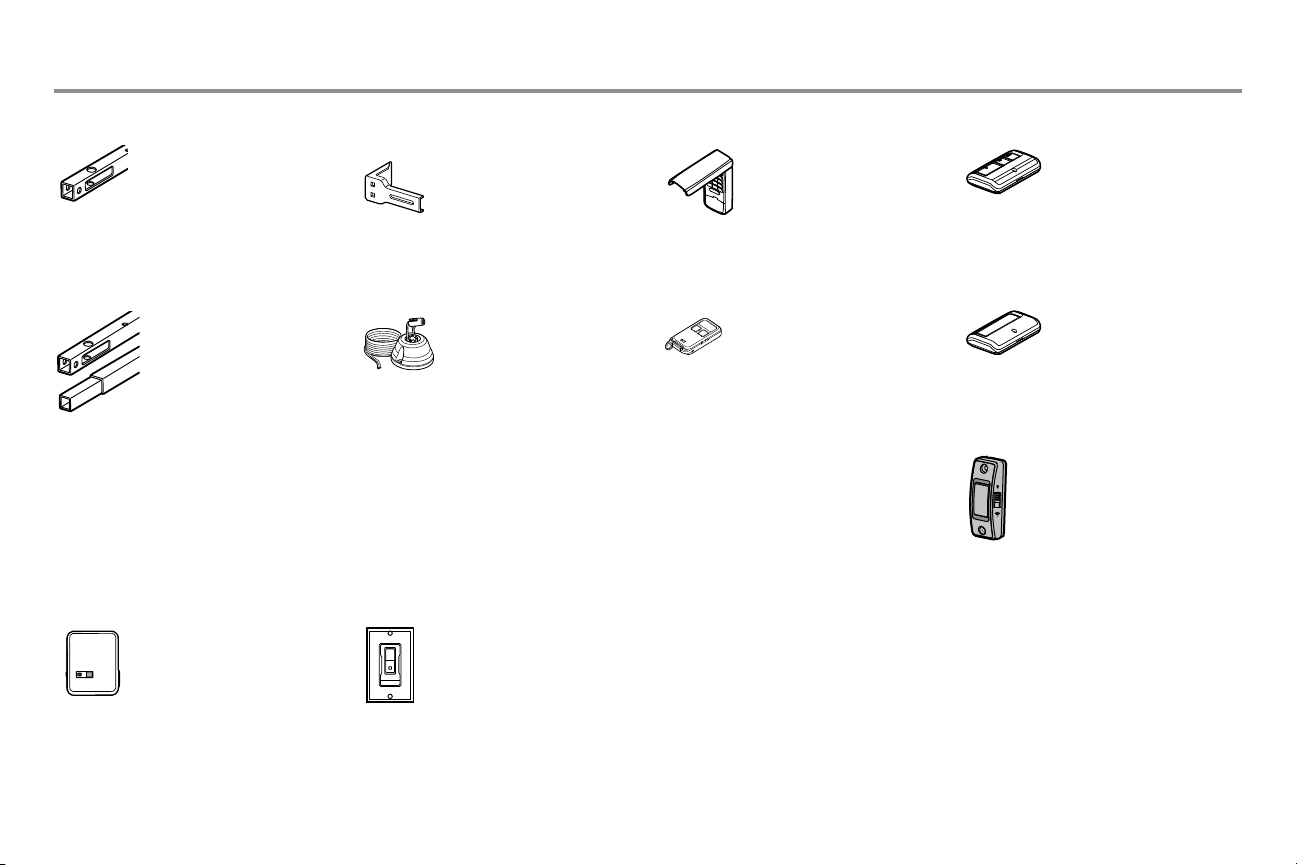
40
Accessories
Remote Control:
Works with ALL Chamberlain
openers from 1993-present.
myQ compatible. Includes
visor clip.
CLLP1 Laser Parking Assistant:
Park in the right spot every
time! A laser beam is activated
by your garage door opener
and projected on to the
dashboard of your vehicle to
guide perfect parking.
956EV Keychain Remote Control:
Works with ALL Chamberlain
openers from 1993-present.
myQ compatible. With key
ring.
940EV Wireless Keypad:
For use outside of the home
to enable access to the garage
using a 4-digit PIN. Works
with ALL Chamberlain openers
from 1993-present. myQ
compatible.
Extension Brackets:
(Optional) For safety
reversing sensor installation
onto the wall or fl oor.
CLOSED
OPEN
041A5281-1
8810CB
10 Foot (3 m) Rail
Extension:
To allow a 10 foot (3 m)
door to open fully.
8 Foot (2.4 m) Rail
Extension:
To allow an 8 foot (2.4 m)
door to open fully.
8808CB
myQ Accessories
PILCEV myQ Remote Lamp Control:
Monitor and control this plug
in lamp switch with the myQ
Smartphone App.
WSLCEV myQ Interior/Exterior Light
Switch
Monitor and control this wall
light switch with the myQ
Smartphone App.
953EV
Remote Control:
Works with ALL Chamberlain
openers from 1993-present.
myQ compatible. Includes
visor clip.
950ESTD
Push Button Door Control041A7367-3
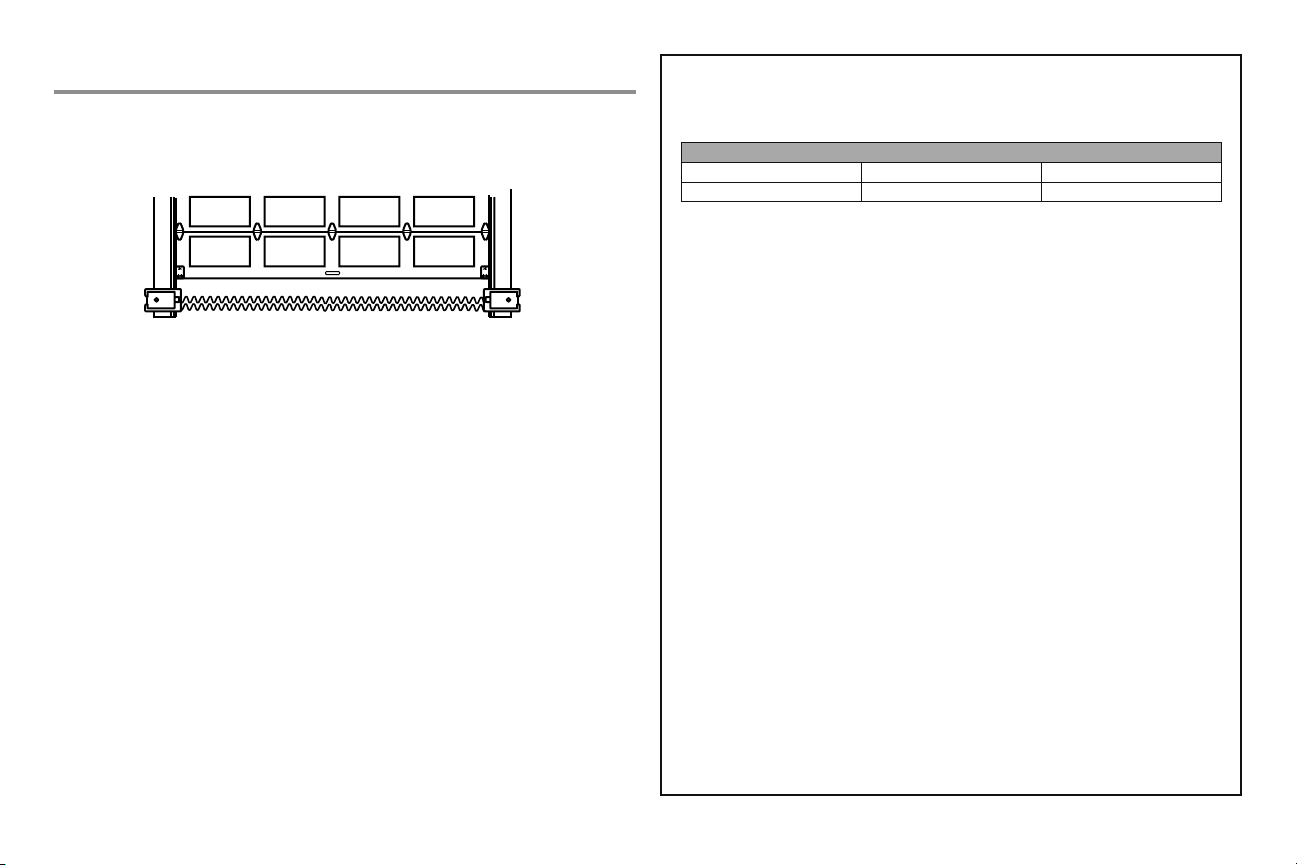
41
CHAMBERLAIN
®
LIMITED WARRANTY
The Chamberlain Group, Inc.
®
(“Seller”) warrants to the fi rst retail purchaser of this product, for the
residence in which this product is originally installed, that it is free from defects in materials and/or
workmanship for a specifi c period of time as defi ned below (the “Warranty Period”). The warranty
period commences from the date of purchase.
WARRANTY PERIOD
Parts Motor Accessories
1 Year 6 Years 1 Year
The proper operation of this product is dependent on your compliance with the instructions regarding
installation, operation, and maintenance and testing. Failure to comply strictly with those instructions
will void this limited warranty in its entirety. If, during the limited warranty period, this product appears
to contain a defect covered by this limited warranty, call 1-800-528-9131, toll free, before dismantling
this product. You will be advised of disassembly and shipping instructions when you call. Then
send the product or component, pre-paid and insured, as directed to our service center for warranty
repair. Please include a brief description of the problem and a dated proof-of-purchase receipt with
any product returned for warranty repair. Products returned to Seller for warranty repair, which upon
receipt by Seller are confi rmed to be defective and covered by this limited warranty, will be repaired
or replaced (at Seller’s sole option) at no cost to you and returned pre-paid. Defective parts will be
repaired or replaced with new or factory rebuilt parts at Seller’s sole option. [You are responsible for
any costs incurred in removing and/or reinstalling the product or any component.]
ALL IMPLIED WARRANTIES FOR THE PRODUCT, INCLUDING BUT NOT LIMITED TO ANY IMPLIED
WARRANTIES OF MERCHANTABILITY AND FITNESS FOR A PARTICULAR PURPOSE, ARE LIMITED
IN DURATION TO THE APPLICABLE LIMITED WARRANTY PERIOD SET FORTH ABOVE FOR THE
RELATED COMPONENT(S), AND NO IMPLIED WARRANTIES WILL EXIST OR APPLY AFTER SUCH
PERIOD. Some States and Provinces do not allow limitations on how long an implied warranty
lasts, so the above limitation may not apply to you. THIS LIMITED WARRANTY DOES NOT COVER
NON-DEFECT DAMAGE, DAMAGE CAUSED BY IMPROPER INSTALLATION, OPERATION OR CARE
(INCLUDING, BUT NOT LIMITED TO ABUSE, MISUSE, FAILURE TO PROVIDE REASONABLE AND
NECESSARY MAINTENANCE, UNAUTHORIZED REPAIRS OR ANY ALTERATIONS TO THIS PRODUCT),
LABOR CHARGES FOR REINSTALLING A REPAIRED OR REPLACED UNIT, REPLACEMENT OF
CONSUMABLE ITEMS (E.G., BATTERIES IN REMOTE CONTROL TRANSMITTERS AND LIGHT
BULBS), OR UNITS INSTALLED FOR NON-RESIDENTIAL USE. THIS LIMITED WARRANTY DOES
NOT COVER ANY PROBLEMS WITH, OR RELATING TO, THE GARAGE DOOR OR GARAGE DOOR
HARDWARE, INCLUDING BUT NOT LIMITED TO THE DOOR SPRINGS, DOOR ROLLERS, DOOR
ALIGNMENT OR HINGES. THIS LIMITED WARRANTY ALSO DOES NOT COVER ANY PROBLEMS
CAUSED BY INTERFERENCE. UNDER NO CIRCUMSTANCES SHALL SELLER BE LIABLE FOR
CONSEQUENTIAL, INCIDENTAL OR SPECIAL DAMAGES ARISING IN CONNECTION WITH USE, OR
INABILITY TO USE, THIS PRODUCT. IN NO EVENT SHALL SELLER’S LIABILITY FOR BREACH OF
WARRANTY, BREACH OF CONTRACT, NEGLIGENCE OR STRICT LIABILITY EXCEED THE COST OF
THE PRODUCT COVERED HEREBY. NO PERSON IS AUTHORIZED TO ASSUME FOR US ANY OTHER
LIABILITY IN CONNECTION WITH THE SALE OF THIS PRODUCT.
Some states and provinces do not allow the exclusion or limitation of consequential, incidental or
special damages, so the above limitation or exclusion may not apply to you. This limited warranty
gives you specifi c legal rights, and you may also have other rights, which vary from state to state and
province to province.
Warranty
STOP!
This garage door opener WILL NOT work until the
safety reversing sensors are properly installed and aligned.
Contact Information
For installation and service information call:
www.chamberlain.com
1-800-528-9131
Before calling, please have the model number of the garage door opener. If you are calling
about a Troubleshooting issue, it is recommended that you have access to your garage door
opener while calling. If you are ordering a repair part please have the following information:
part number, part name, and model number.
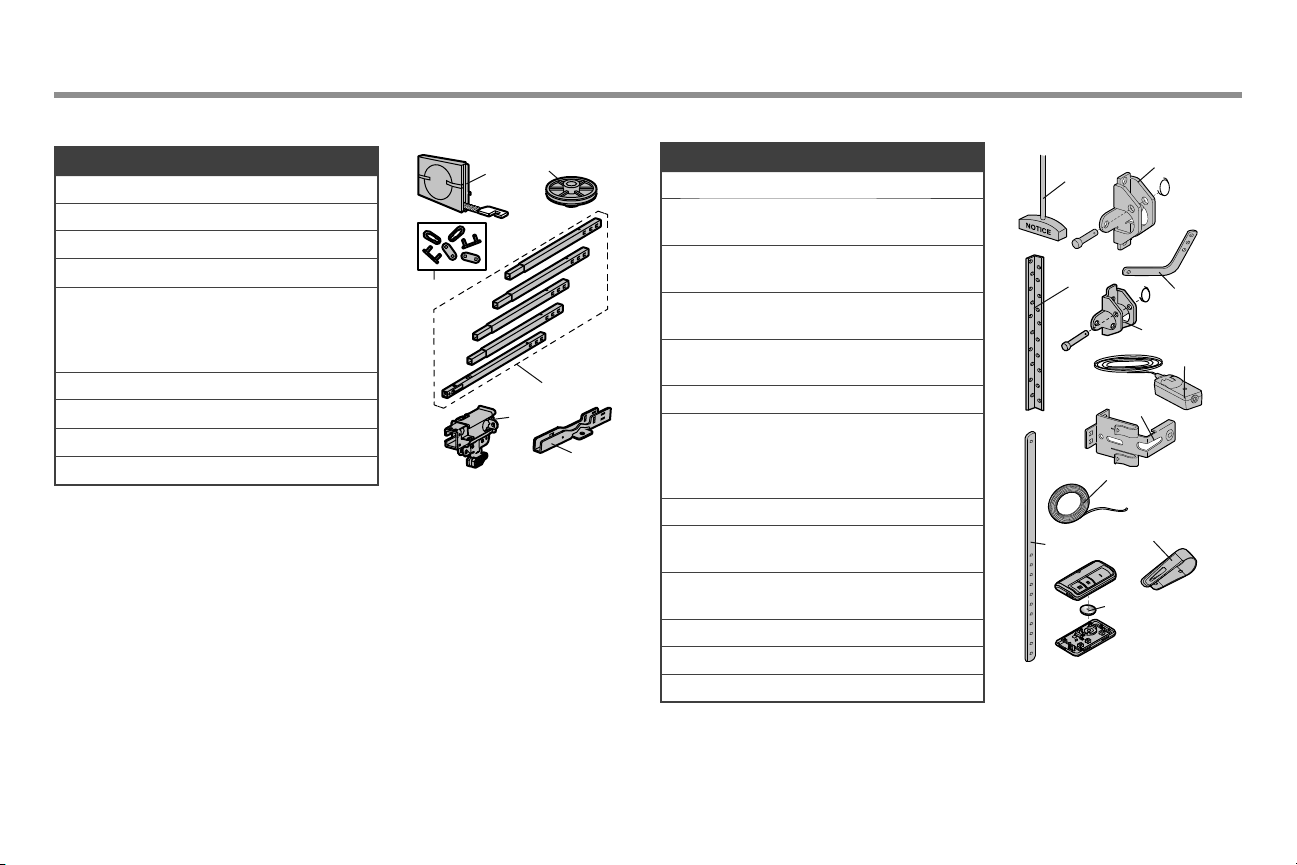
42
Repair Parts
Rail Assembly Parts Installation Parts
1
3
4
2
5
6
7
8
9
10
11
Description Part Number
1 Belt 041A5250
2 Pulley 144C0054M
3 Master Link 004A1008
4 Rail 041A5665
5 Trolley Assembly
Includes: Threaded
Shaft (1), Clevis Pin (1),
Ring (1)
041C5141-2
6 “U” Bracket 041D0598-1
Not Shown
Wear Pads 041A7276
Hardware Bag 041A7920-2
Description Part Number
1 Curved Door Arm 041B0035B
2 Door Bracket with Clevis
Pin and Fastener
041A5047-1
3 Emergency Release Rope
and Handle
041A2828
4 Header Bracket with
Clevis Pin and Fastener
041A5047-2
5 Remote Control
Visor Clip
K029B137
6 Safety Sensor Bracket 041A5266-3
7 Safety Sensor Kit
Receiving and
sending sensors with
2-conductor wire
041A5034
8 Straight Door Arm 4178B0034B
9 White and Red/White
Wire
041B4494-1
10 3V CR2032 Lithium
Battery
K010A0020
11 Hanging Brackets 012B0776
Not Shown
Owner’s Manual 114A5195
1
3
2
4
6
5
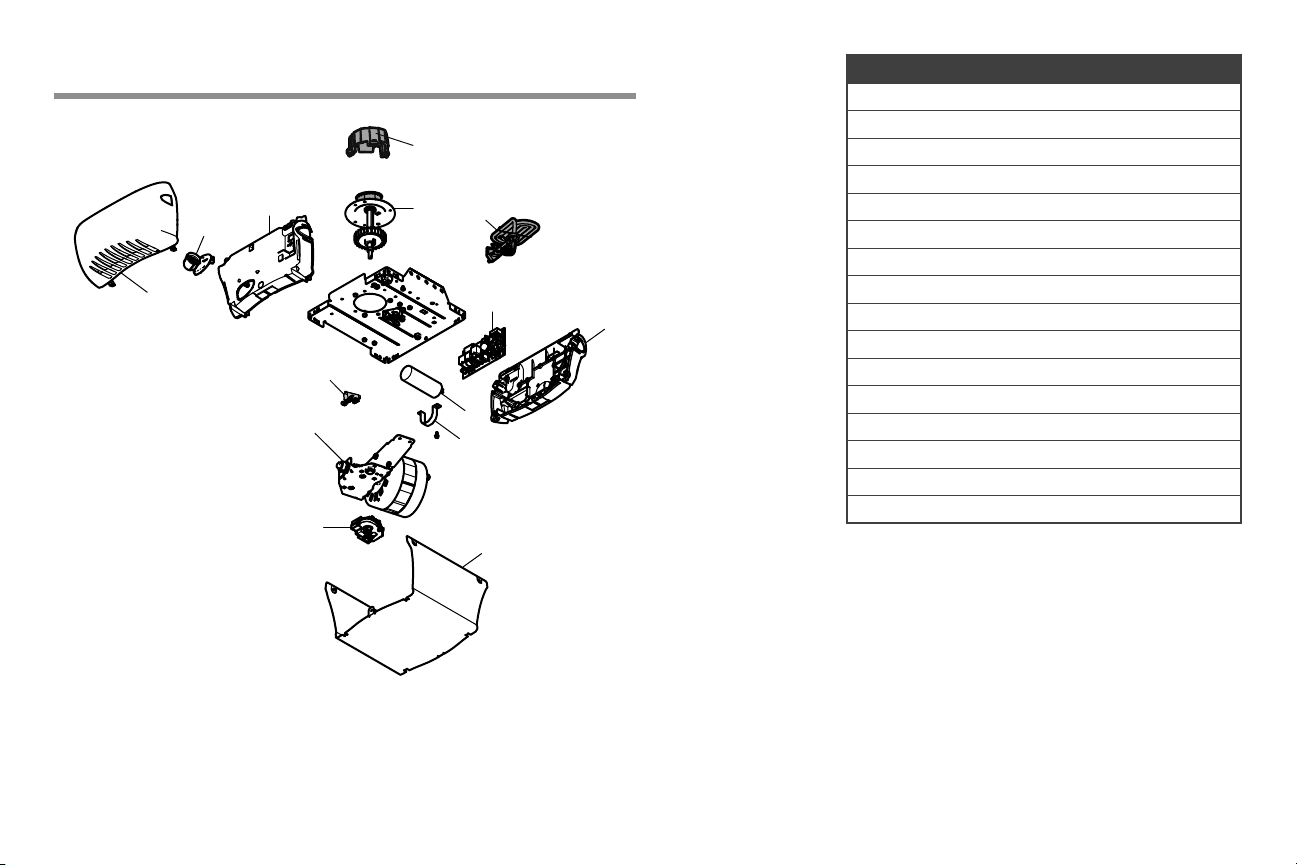
43
Repair Parts
Garage Door Opener Parts
Description Part Number
1 Sprocket Cover 041A4371
2 Gear 041A4885-4
3 End Panel with Light Socket 041-0037-000
4 Light Socket 041C0279
5 Light Lens K108D0079M
6 Capacitor 030B0532-1
7 Capacitor Bracket K012A0373
8 Travel Module 041D7742-7
9 Cover 041-0024-000
10 Receiver Logic Board 050ACTWF
11 End Panel for Receiver Logic Board 041-0025-000
12 Motor with Travel Module 041D7440
13 Line Cord 041B4245-1
14 Terminal Block 041A3150
Not Shown
Wire Harness 041A7946
2
6
7
11
9
5
12
8
10
3
4
13
14
1

© 2018, The Chamberlain Group, Inc.
All Rights Reserved
Wi-Fi
®
is a registered trademark of Wi-Fi Alliance
App Store is a service mark of Apple Inc.
114A5195 Google Play is a trademark of Google Inc.
The Chamberlain Group, Inc.
300 Windsor Drive
Oak Brook, IL 60523
PARA VER LOS VIDEOS
CONÉCTESE A:
tinyurl.com/lgh5x3h
PARA VER LOS VIDEOS
CONÉCTESE A:
tinyurl.com/lgh5x3h
Contenido
Preparación ......................................2-5
Ensamblado ..................................6-10
Instalación ...................................11-28
Instale el control de la puerta ...21-22
Instale la Protector System .......23-26
Conecte la alimentación
eléctrica ..................................27-28
Ajustes .........................................29-31
Control inteligente myQ® Conéctese ...32
Operación ....................................33-36
Funciones .....................................34
Cómo usar su
abre-puertas de garaje ..................35
Pulsador de comando de puerta .....35
Control remoto y teclado digital .....35
Homelink® ...................................35
Para borrar la memoria .................36
Mantenimiento .................................37
Resolución de problemas ..............38-39
Accesorios .........................................40
Garantía ............................................ 41
Piezas de repuesto ........................42-43
Manual del propietario
B353
Abre-puertas de garaje
de cadena
SÓLO PARA USO RESIDENCIAL
INCLUYE UN CONTROL REMOTO
PROGRAMADO
www.chamberlain.com
www.mychamberlain.com
• ¡Lea atentamente el contenido de este manual y las instrucciones de
seguridad en él incluidas!
• Al terminar la instalación, deje el manual a mano cerca de la puerta del garaje.
• La puerta NO SE CERRARÁ si el Protector System® no está conectado y
debidamente alineado.
• Como medida de seguridad, es conveniente efectuar inspecciones periódicas
del mecanismo de apertura.
• El número de modelo se encuentra en el panel frontal del abre puertas.
• Esté abre-puerta del garaje es compatibles con accesorios de myQ® y
Security+ 2.0®
• NO usarlo para puertas de una sola pieza si utiliza dispositivos de cierre
automático. Los dispositivos y funciones automáticas deben usarse
ÚNICAMENTE con puertas seccionales.
Garage Opener
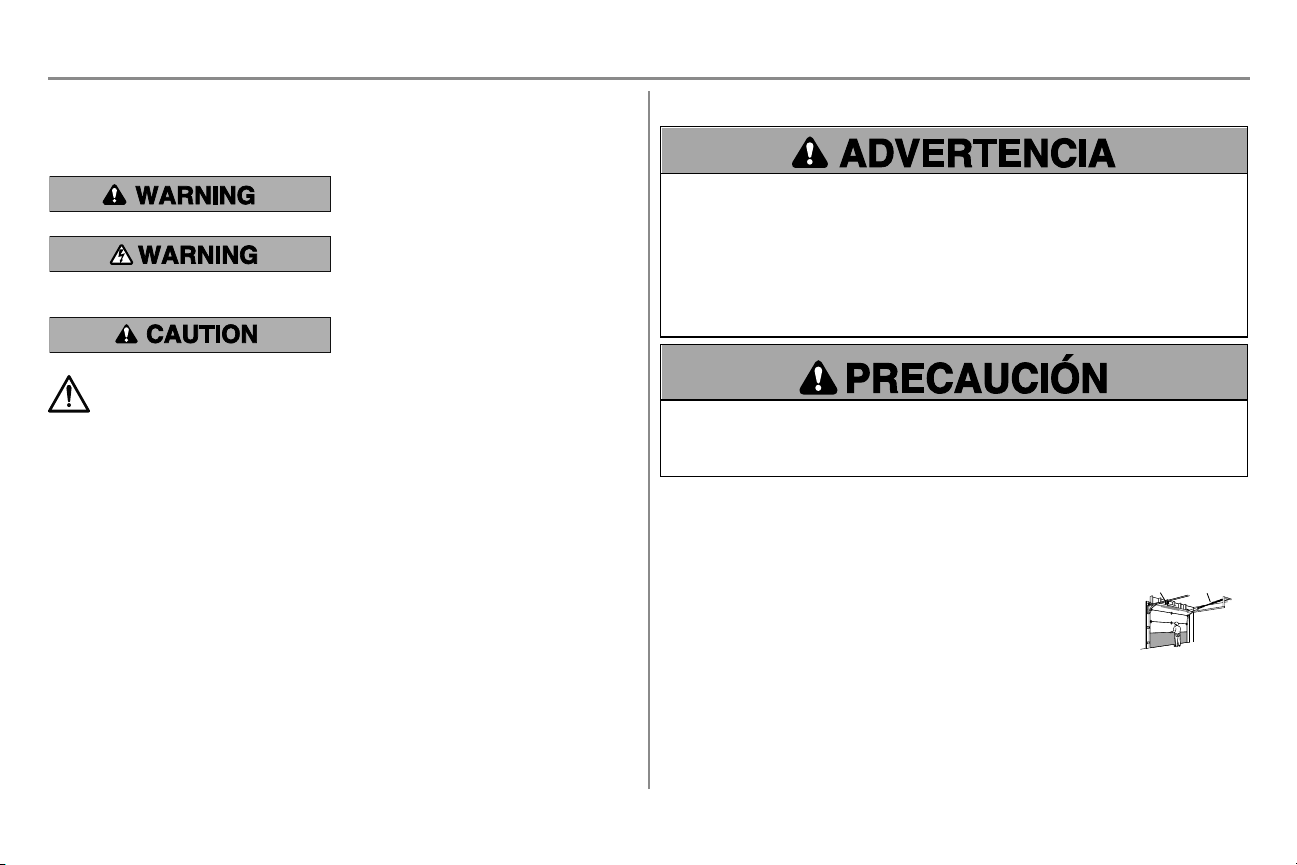
2
Revisión de los símbolos y términos de seguridad
Este abre-puertas de garaje ha sido diseñado y probado para un funcionamiento seguro, siempre y cuando se instale,
se opere, se mantenga y se pruebe cumpliendo al pie de la letra con todas las advertencias y las instrucciones
incluidas en este manual.
Mecánica
Eléctrica
Estas advertencias y/o símbolos de seguridad que
aparecen a lo largo de este manual le alertarán de la
existencia de riesgo de una lesión seria o de muerte si
no se siguen las instrucciones correspondientes. El
peligro puede ser eléctrico (electrocución) o mecánico.
Lea detenidamente estas advertencias.
Cuando vea esta palabra clave en las páginas siguientes,
se le alertará sobre la posibilidad de dañar la puerta del
garaje o el abre-puertas de garaje si no se siguen las
precauciones correspondientes. Léalas detenidamente.
ADVERTENCIA: Este producto puede exponerle a productos químicos (incluido el plomo), que a
consideración del estado de California causan cáncer, defectos congénitos u otros daños reproductivos.
Para más información, visite www.P65Warnings.ca.gov Para obtener más información, visite
www.P65Warnings.ca.gov
Operación en estado pasivo
La función temporizador de cierre (TTC), la aplicación de control por teléfono inteligente myQ
®
, el monitor de puerta
y de portón de garaje myQ son ejemplos de cierre en estado pasivo y SOLO se deben usar con puertas seccionales.
Cualquier dispositivo o función por medio de los cuales la puerta se cierre sin estar en la línea de visión de la puerta,
se considera cierre en estado pasivo. La función temporizador de cierre (TTC), el control para teléfonos inteligentes
myQ y cualquier otro dispositivo myQ® SOLO se deben usar con puertas seccionales.
Revise la puerta
Para evitar una posible LESIÓN GRAVE o LA MUERTE:
l SIEMPRE llame a un técnico especializado en sistemas de puertas si la puerta del garaje se atasca, atora o
si está desequilibrada. Es posible que una puerta de garaje que no esté bien equilibrado NO retroceda
cuando se requiera.
l NUNCA intente aflojar, mover ni ajustar la puerta de garaje, los resortes de la puerta, los cables, las poleas,
las ménsulas ni el herraje, pues TODOS estos elementos están bajo una tensión EXTREMA.
l Quite TODOS los seguros y retire TODAS las cuerdas conectadas a la puerta de garaje ANTES de instalar
y opere el abre-puertas para evitar que estas se enreden.
l NO usarlo para puertas de una sola pieza si utiliza dispositivos de cierre automático. Los dispositivos y
funciones automáticas deben usarse ÚNICAMENTE con puertas seccionales.
Para evitar daños a la puerta y al abre-puertas:
l SIEMPRE quite los seguros ANTES de instalar o de operar el abre-puertas.
l SOLAMENTE opere el abre-puertas de garaje con corriente de 120 V, 60 Hz para evitar su mal
funcionamiento y que el abre-puertas se dañe.
Antes de comenzar:
1. Quite todos los seguros y retire cualquier cuerda o cable que esté conectado a
la puerta del garaje.
2. Levante la puerta hasta la mitad de su recorrido. Suelte la puerta. Si está
equilibrada, deberá mantenerse en esa posición con solo el soporte de los
resortes.
3. Suba y baje la puerta para ver si se atora con algo o si se traba. Si su puerta se
atora o se traba, o no está equilibrada, llame a un técnico capacitado en
sistemas de puertas.
4. Revise el cierre en la parte de abajo de la puerta. El espacio entre la base de la
puerta y el piso no debe exceder 6mm (1/4de pulg.). De no ser así, el sistema
de reversa de seguridad podría no funcionar debidamente.
5. El abre-puertas se debe instalar por encima del centro de la puerta. Si existe
algún resorte de tensión o placa de apoyo en el paso de la ménsula del cabezal,
se puede instalar hasta a 1.2m (4pies) a la derecha o a la izquierda del centro
de la puerta. Consulte pagina 12.
Resorte
de torsión
Resorte de
extensión
O
Preparación
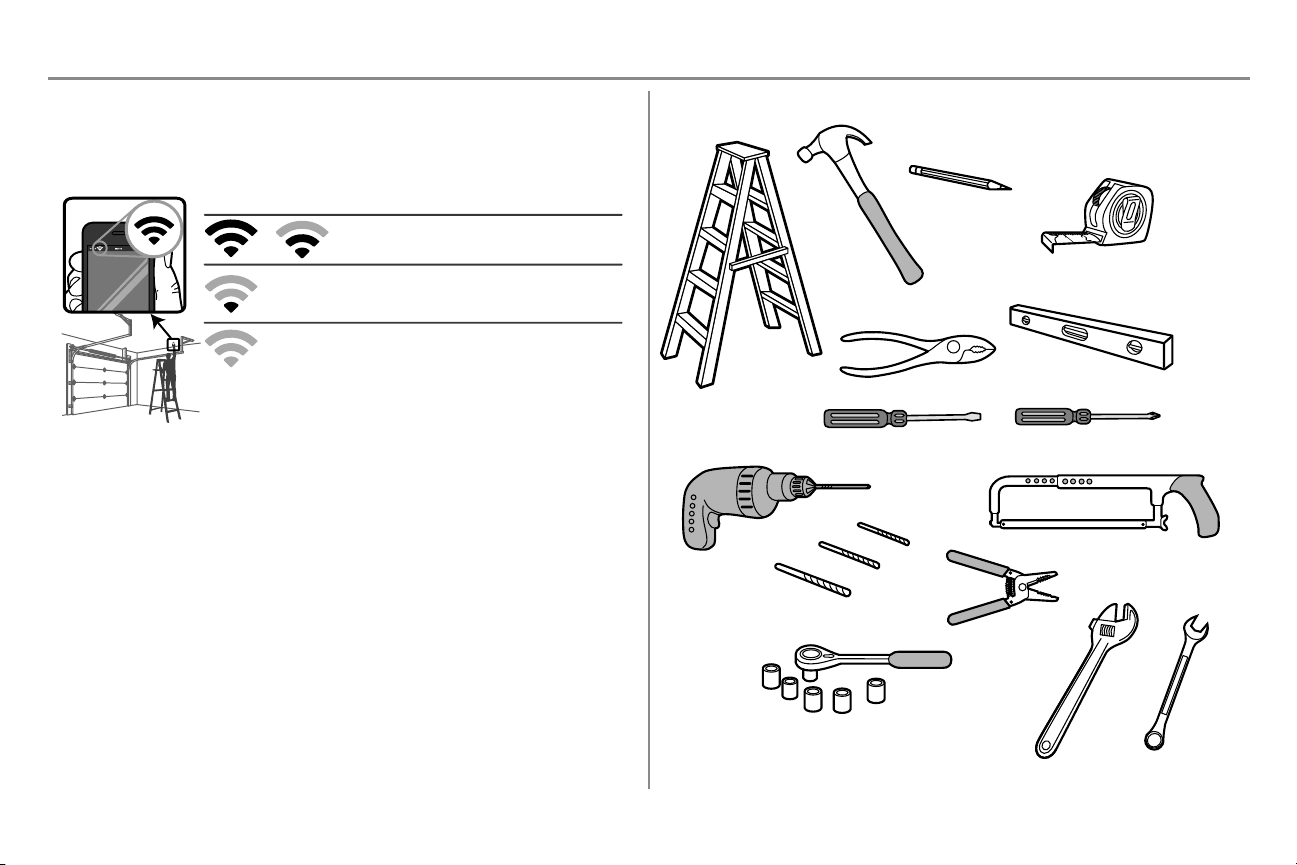
3
Antes de conectarse con su teléfono inteligente
Monitoree y controle la puerta de garaje desde cualquier lugar con la aplicación myQ. Necesitará un router con Wi-Fi
y un teléfono inteligente u otro dispositivo móvil. Verifique que el dispositivo móvil esté conectado a la red de Wi-Fi.
Ubíquese con el dispositivo móvil en el lugar donde se instalará el abre-puertas y verifique la intensidad de la señal
de Wi-Fi.
La señal de Wi-Fi es débil.
Es probable que el abre-puertas de garaje se conecte a su red
de Wi-Fi. Si no es así, pruebe alguna de las opciones de abajo.
Sin señal de Wi-Fi. Pruebe una de las siguientes opciones:
• Coloque el router más cerca del abre-puertas de garaje para
minimizar la interferencia de las paredes y otros objetos
• Compre un amplificador de alcance de Wi-Fi
• Compre un Chamberlain myQ Internet Gateway (828LG) consulte
la página 41
Revise la intensidad de la señal. Si observa:
La señal de Wi-Fi es fuerte. ¡Todo listo!
Instale su nuevo abre-puertas de garaje.
Consulte Control por teléfono inteligente de myQ pagina 32 para conectar el abre-puertas de garaje a su red de Wi-Fi.
Elementos adicionales que posiblemente necesite:
Inspeccione el área de su garaje para ver si necesitará alguno de los siguientes elementos:
l (2) pedazos de madera de 5 X 10 cm (2 X 4 pulg.): Se puede usar para ajustar la ménsula del cabezal a
los soportes estructurales. También se usa para colocar el abre-puertas del garaje durante la instalación y
para probar los sensores de reversa de seguridad.
l Ménsula de soporte y herraje de sujeción: Se deben usar si el cielo raso de su garaje está terminado.
l Ménsulas de extensión (MODELO 041A5281-1) o bloques de madera: Dependiendo de la estructura
del garaje, se podrían necesitar ménsulas de extensión o bloques de madera para instalar el sensor de
reversa de seguridad.
l Herraje de sujeción: Para el montaje en el piso alternativo del sensor de reversa de seguridad, se
necesitará herraje de sujeción no provisto.
l Refuerzo de la puerta: Es necesario si tiene una puerta de acero fino, aluminio, fibra de vidrio o con
paneles de vidrio.
l Juego de extensión del riel: Se necesita si la puerta del garaje tiene más de 2.13 m (7 pies) de altura.
Herramientas necesarias
3/16
7/16
1/2
5/32
5/16
5/8
9/16
1/4
7/16
Preparación
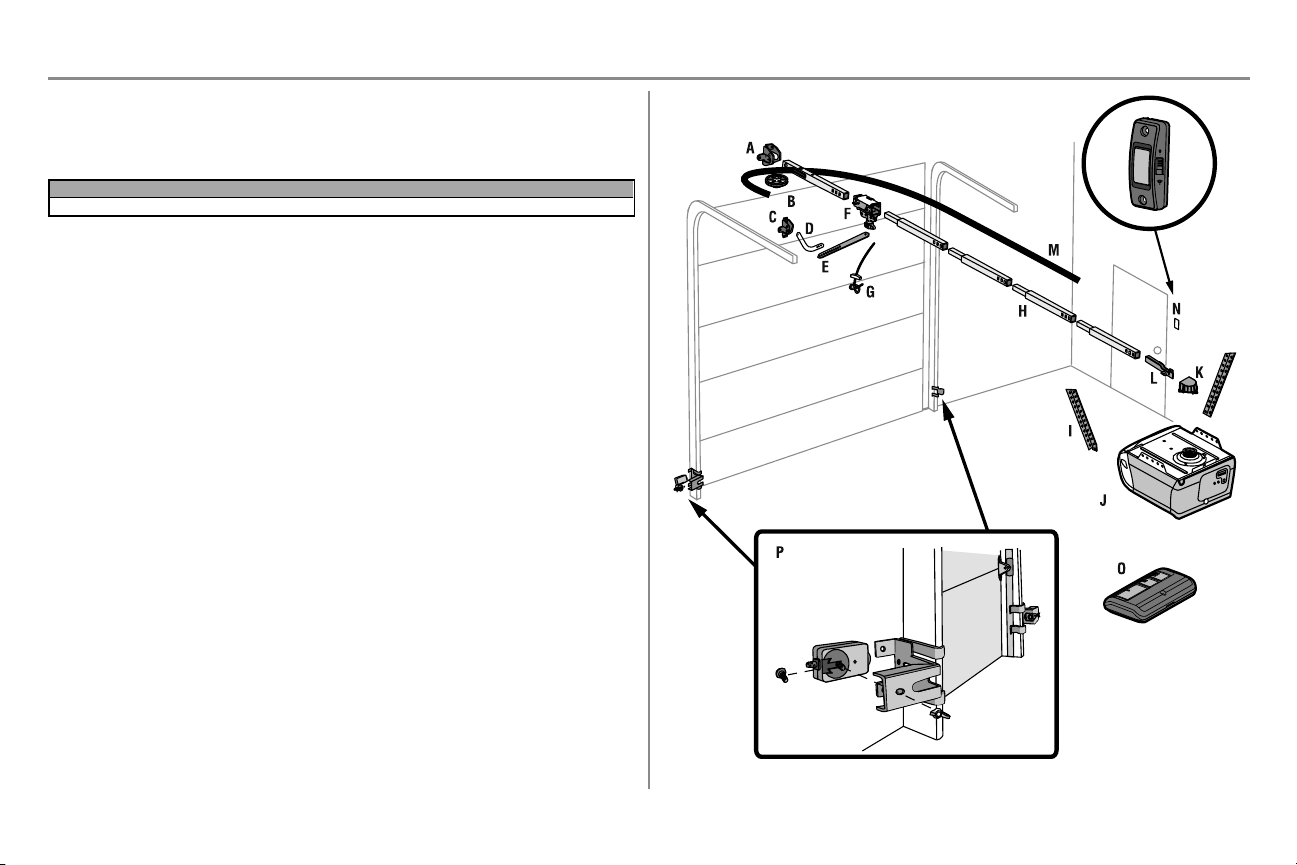
4
Inventario de la caja de cartón
Conserve la caja y los materiales de embalaje hasta que la instalación y el ajuste se hayan terminado. Las
instrucciones para los accesorios vendrán adjuntas al accesorio y no están incluidas en este manual. Las imágenes
en este manual se usan solamente como referencia. El producto comprado podría tener un aspecto diferente.
Modelo Energía Control de la puerta Control remoto
B353 Med Lift Power System™ Botón pulsador 3 botón
A. Ménsula del cabezal
B. Polea
C. Soporte de la puerta
D. Brazo curvo de la puerta
E. Brazo recto de la puerta (embalado dentro de la sección del riel)
F. Carro
NOTA: Asegúrese de ensamblar el carro antes de deslizarlo sobre el riel.
G. Manija y cuerda de liberación de emergencia
H. Riel (1 delantero y 4 secciones centrales)
I. Ménsulas colgantes (2) (embaladas dentro de la sección del riel frontal)
J. Abre-puertas de garaje (unidad de motor)
K. Tornillos y cubierta de la rueda dentada
L. Ménsula en U
M. Correa
N. Control de la puerta
O. Control remoto - Modelo 953ESTD
P. El Protector System
Sensores de reversa de seguridad con 2 cables conductores blanco y blanco/negro: Sensor emisor (1),
sensor receptor (1) y ménsulas del sensor de seguridad (2)
NO APARECE
Cable blanco y rojo/blanco
Manual del propietario
Herrajes
Preparación
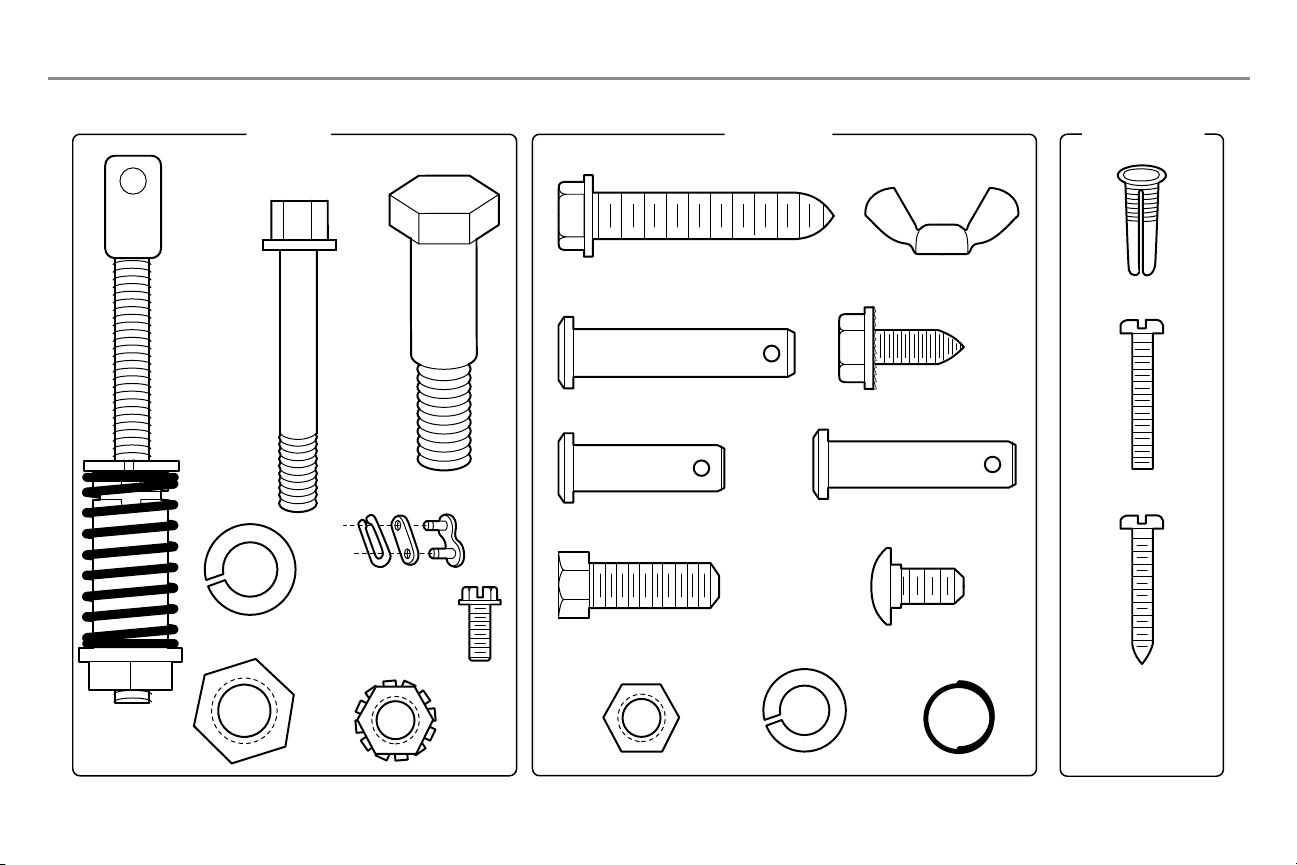
5
Herrajes
ENSAMBLAJE INSTALACIÓN
CONTROL DE LA
PUERTA
Grapas aisladas
(no aparece)
Pasador de chaveta
5/16 pulg. x 1-1/2 pulg.
Aro de
retención (3)
Pernos hexagonales de 5/16
de pulg. -18 x 7/8 de pulg. (4)
Tornillos autorroscantes
1/4 pulg.-14x5/8 pulg. (2)
Pasador de chaveta
5/16 pulg. x 1 pulg.
Pasador de chaveta
5/16 pulg. x 1-1/4 pulg.
Perno de carro 1/4 de
pulg. -20x1/2 pulg. (2)
Tuerca de mariposa
1/4 pulg.-20 (2)
Tornillo para madera 5/16
pulg.-9x1-5/8 pulg. (4)
Tornillo 6ABx1 pulg. (2)
Anclajes para
tablaroca (2)
Tornillo 6-32x1 pulg. (2)
Tornillo hexagonal
nro. 8 x 3/8 de pulg.
(2) (empaquetado con la
cubierta del portacadena)
Perno 1/4 de pulg.
-20x1-3/4 pulg.
Tuerca de
seguridad de
1/4 pulg.-20
Perno
Tuerca
3/8 pulg.
Arandela de
presión 3/8 pulg.
Eslabón maestro
Eje roscado con
tuerca del carro
con resorte
Arandela de presión
5/16 pulg.-18 (4)
Tuerca 5/16
pulg.-18 (4)
Preparación
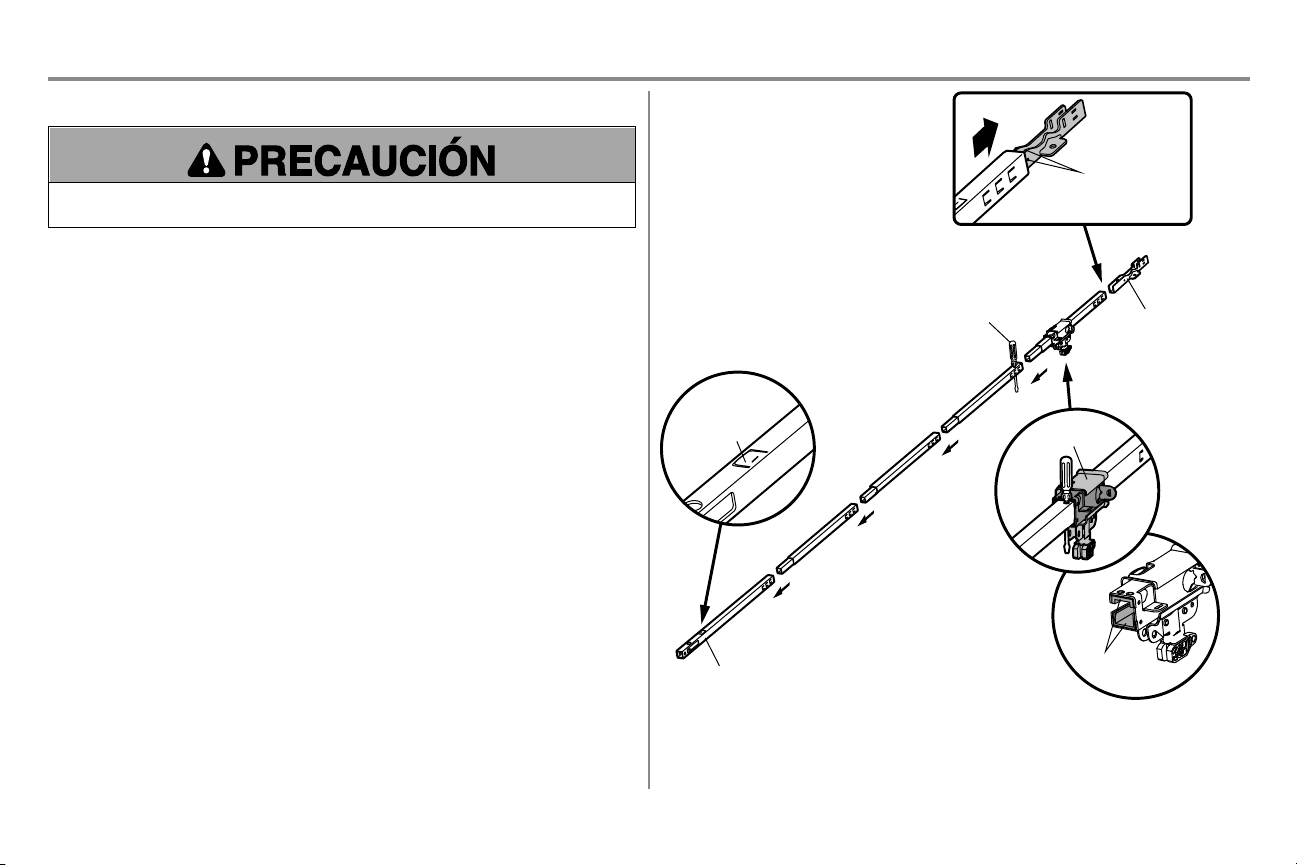
6
Ensamblaje
PASO 1 Ensamblado del riel y instale el carro
Para prevenir LESIONES por presión, mantenga las manos y los dedos alejados de las uniones mientras se
ensambla el riel.
No encienda ni use el abre-puertas hasta que llegue al paso de la instalación correspondiente, de otra
manera corre el riesgo de complicar el proceso de instalación.
El riel frontal tiene una “ventana" en el extremo de puerta. La pestaña del riel DEBE estar encima del carril cuando
está ensamblado.
1. Quite el brazo recto de la puerta y la ménsula colgante empacados dentro del riel frontal y póngalos a un
lado para usarlos en el Paso 5 y 9 de la Instalación. NOTA: Para evitar LESIONES al desempacar el riel,
retire cuidadosamente el brazo recto de la puerta empacado dentro de la sección del riel.
2. Alinee las secciones del riel sobre una superficie plana exactamente como se indica y luego deslice los
extremos más pequeños dentro de los más grandes. Las pestañas a lo largo del lado se trabarán en
posición.
3. Coloque el motor sobre el material de empaque para proteger la cubierta del mismo y apoye el extremo
posterior del riel encima. Para que le resulte más cómodo, ponga algún tipo de apoyo bajo el extremo
delantero del riel.
4. Como una parada temporal, inserte un destornillador en el orificio de la segunda sección del riel de la
unidad motor, como se muestra.
5. Revise y cerciórese de que haya 4 cojinetes plásticos de desgaste dentro del carro interno. Si los
cojinetes se han soltado durante el transporte, revise todo el material de empaque. Ponga los cojinetes de
desgaste en su lugar como se indica.
6. Deslice el carro por el riel hacia el destornillador, como se muestra.
7. Deslice el riel en la ménsula en ‘U’, hasta los topes que sobresalen en la parte superior y a los lados de la
ménsula en “U”.
Almohadillas
de desgaste
Sección de la parte
delantera del riel
(A LA PUERTA)
Ménsula en “U”
(A LA UNIDAD
DEL MOTOR)
Carro
Lengüeta del riel
en la parte
superior
Deslice hasta los
topes en la parte
superior y los
laterales de la
ménsula en “U”
Desarmador
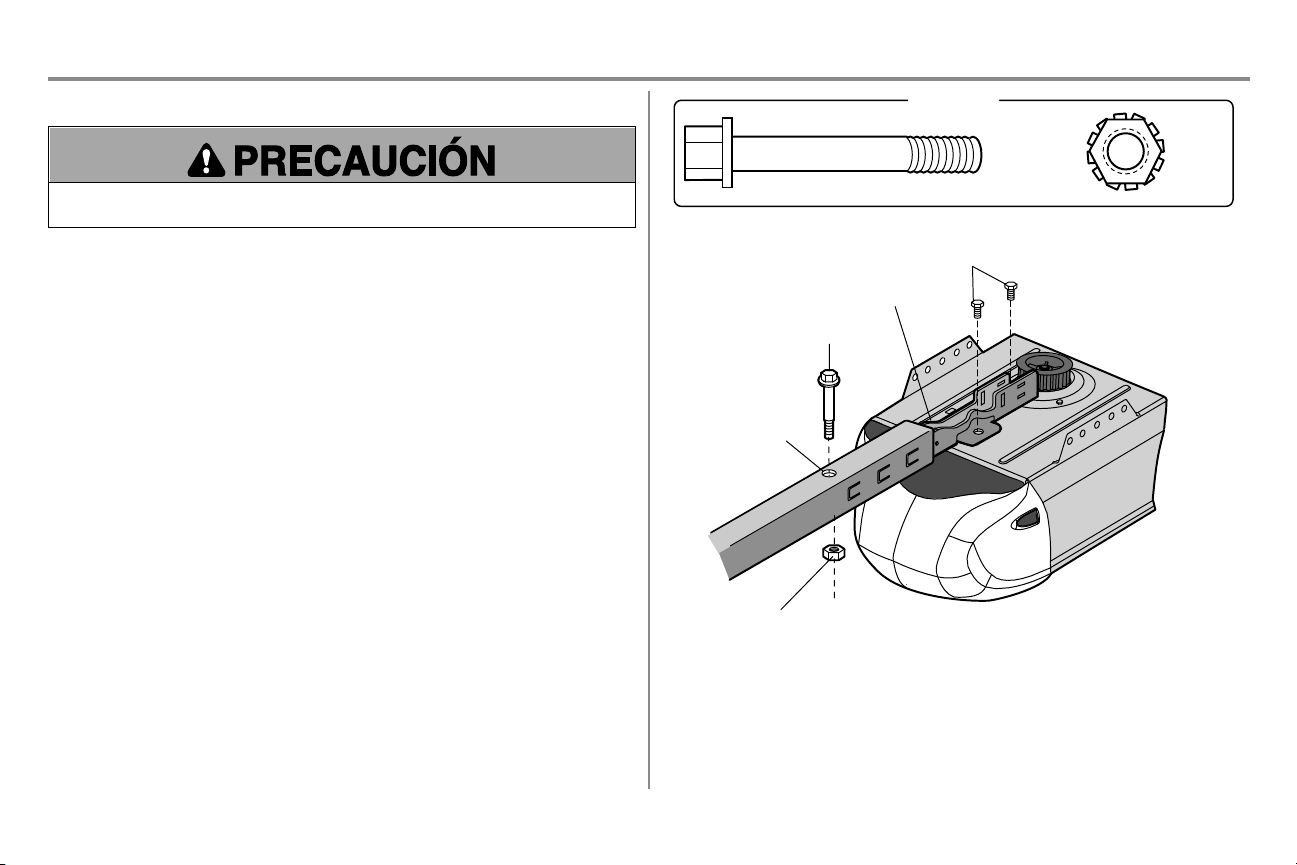
7
Ensamblaje
PASO 2 Fijar riel al abre-puertas de garaje
Para evitar daños GRAVES en el abre-puertas, utilice SOLAMENTE los pernos/sujetadores que vienen montados
en la parte superior del abre-puertas.
1. Coloque un perno de 1/4 de pulg.-20 x 1-3/4 de pulg. dentro del orificio de la cubierta de protección que se
encuentra en el extremo posterior del riel, como se indica en la ilustración. Apriete bien el perno con tuerca
de 1/4 de pulg.-20. NO ajuste demasiado.
2. Quite los perno de la parte superior del motor.
3. Uso el cartón para soporte el frente del riel.
4. Ponga la ménsula en 'U' sobre el motor con el lado plano hacia abajo y alinee los orificios de la ménsula
con los orificios de los pernos.
5. Ajustar la ménsula en “U” con pernos quitados anteriormente; SIN usar herramientas eléctricas. El uso de
herramientas eléctricas podría dañar permanentemente el abre-puerta de garaje.
Perno 1/4 de
pulg.-20x
1-3/4 pulg.
Tuerca de
seguridad
de 1/4
pulg.-20
HERRAJES
Ménsula en "U"
Orificio del perno de
protección de
la cubierta
Perno
Tuerca de segur
idad
Pernos (montados en el
abre-puertas de garaje)
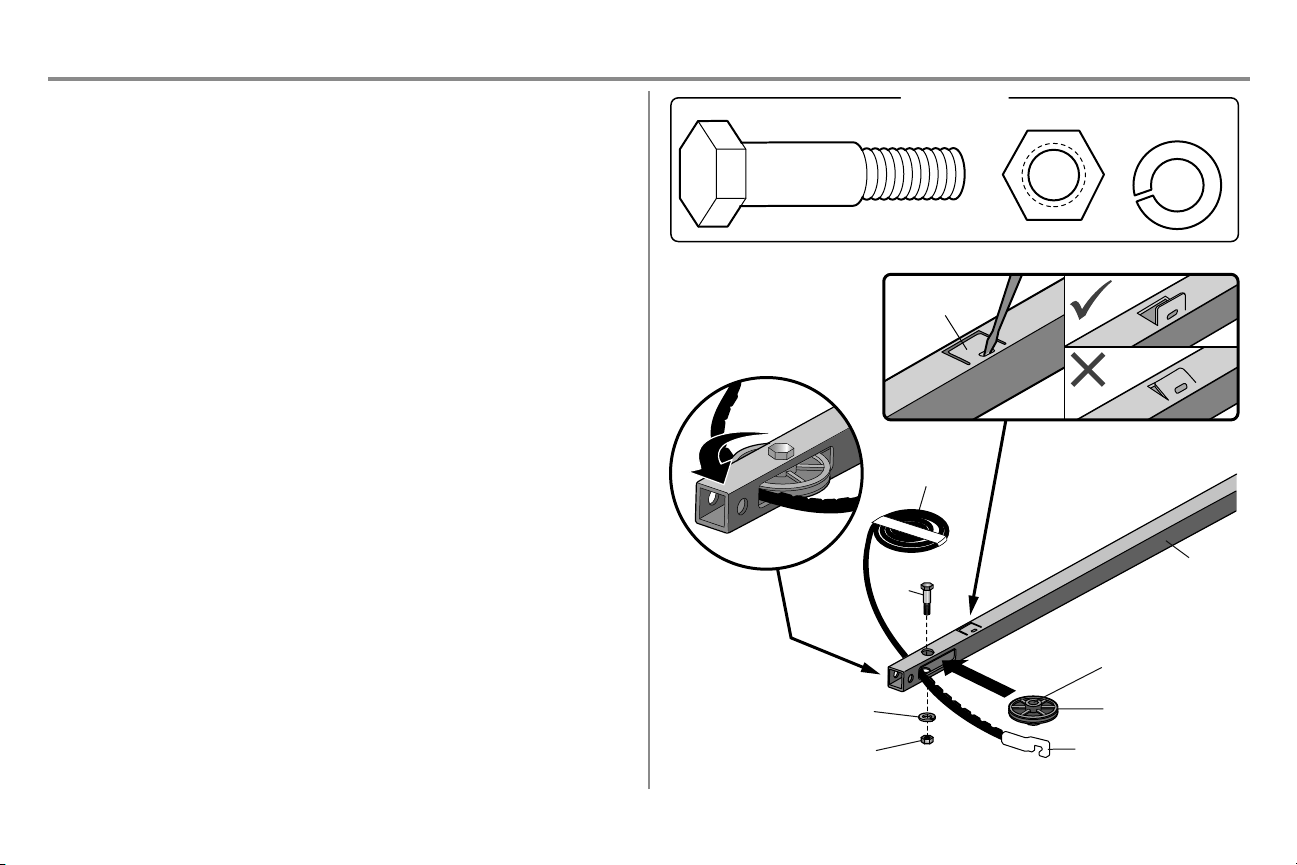
8
Ensamblaje
PASO 3 Instale la polea loca
1. Coloque la correa al lado del riel, como se muestra. Sujete el extremo con el conector del carro
enganchado y pase aproximadamente 30 cm (12 pulg.) de correa por la ventana. Mantenga el lado estriado
hacia el riel y deje que cuelgue hasta Montaje, Paso 4.
2. Retire la cinta de la polea loca. El interior del centro debe estar engrasado. Si se ha secado, vuelva a
engrasarlo para asegurar que la operación sea adecuada.
3. Coloque la polea loca dentro de la ventana como se muestra en la ilustración.
4. Inserte el perno loco desde la parte superior y a través del riel y la polea. Apriete con una arandela y una
tuerca de 3/8 de pulg. por debajo del riel hasta que la arandela quede comprimida.
5. Gire la polea para asegurarse de que rote libremente.
6. Ubicar la pestaña del riel. La pestaña del riel se encuentra entre el perno de la polea loca y el carro, en la
parte delantera del riel. Utilizar un destornillador de punta plana para levantar la pestaña hasta que quede
en posición vertical (a 90°).
Riel
Polea del tensor
Grasa dentro
de la polea
Perno
Correa
Arandela de presión
Tuerca
Perno
Tuerca 3/8 pulg.
Arandela de
presión 3/8 pulg.
HERRAJES
Conector del carro
Lengüeta del riel
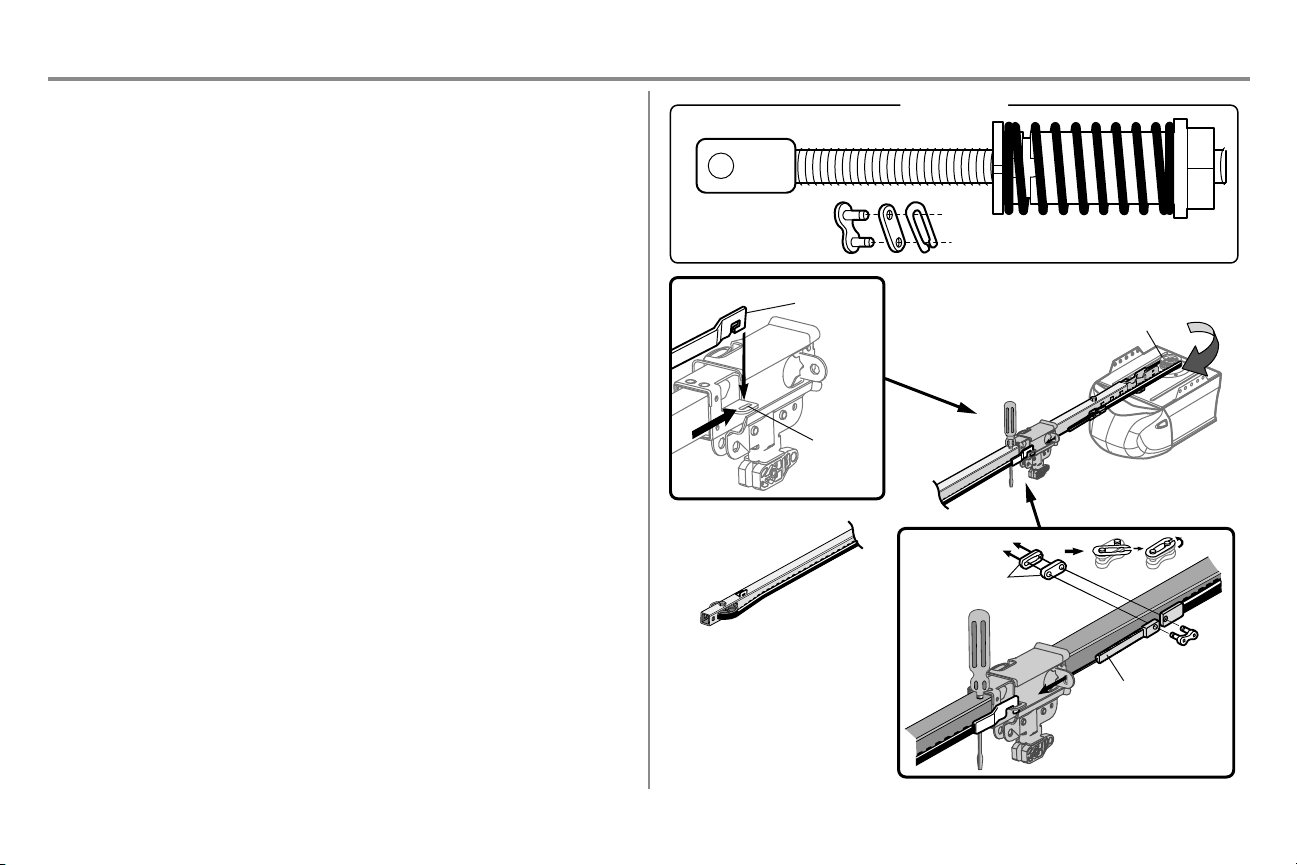
9
Ensamblaje
PASO 4 Instale la correa
1. Coloque la correa alrededor de la polea intermedia y tírela hacia el carro. El lado estriado debe estar en
contacto con la polea.
2. Enganche el conector del carro en la ranura de retención del carro como se muestra en la ilustración
(Figura 1).
3. Con el carro contra el destornillador, distribuya el resto de la correa a lo largo del riel hacia el motor y
alrededor de la rueda dentada (Figura 2). Los dientes de la rueda dentada deben estar conectados a la
correa.
4. Compruebe que la correa no esté torcida. Conecte el eje roscado del carro con el eslabón
maestro (Figura 3).
l Empuje las clavijas del eslabón maestro por los orificios en el extremo de la correa y el eje roscado
del carro.
l Empuje la tapa del enlace maestro sobre los pernos y las muescas de los pernos.
l Deslice el extremo cerrado del resorte sobre uno de los pasadores. Empuje el extremo abierto de la
primavera con clip en la espiga de otra.
l Deslice el resorte de sujeción sobre la tapa y sobre las muescas de los pernos hasta que los dos
pernos estén bien colocados y seguros en su lugar.
5. Quite la tuerca con resorte del carro del eje roscado.
6. Introduzca el eje roscado del trole por el orificio del carro.
HERRAJES
Eslabón maestro
Figura 3
Eje roscado con tuerca del carro con resorte
Eje roscado
Eslabón maestro
Portacadena
Figura 2
Figura 1
Conector
del carro
Ranura de
retención
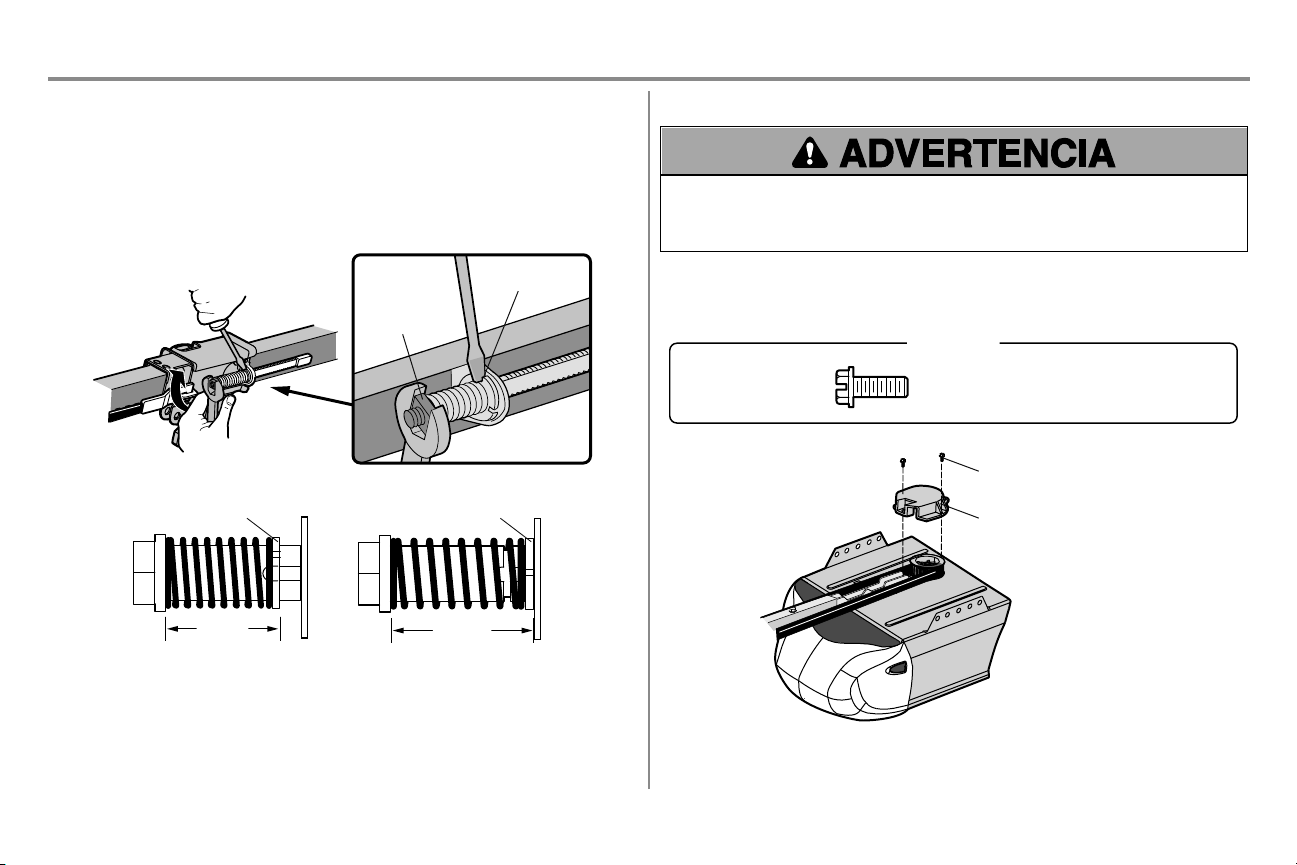
10
Ensamblaje
PASO 5 Ajuste la correa
1. Con la mano, enrosque la tuerca del carro con resorte en el eje roscado hasta que esté ajustada
firmemente contra el carro. No utilice ninguna herramientas. Quite el desarmador.
2. Introduzca la punta de un destornillador en una de las ranuras del aro de la tuerca y apóyelo firmemente
contra el carro.
3. Ajuste la tuerca del carro con resorte con una llave regulable o con una llave de boca ancha de 7/16 de
pulg., aproximadamente un cuarto de giro, hasta que se suelte el resorte y el aro de la tuerca quede
presionado contra el carro. En esta posición, se obtiene la tensión óptima de la correa.
Tuerca del carro
con resorte
Ranura del anillo
de la tuerca
Anillo de la tuercaAnillo de la tuerca
DESPUÉS
3.18 cm (1-1/4 pulg.)
ANTES
2.5 cm (1 pulg.)
PASO 6 Instale la cubierta de la rueda dentada
Para evitar posibles LESIONES GRAVES en los dedos causadas por las partes móviles del abre-puertas de
garaje:
l SIEMPRE tenga las manos lejos de la rueda dentada mientras el abre-puertas esté en funcionamiento.
l Ponga bien la cubierta de la rueda dentada ANTES de hacer funcionar el abre-puertas.
1. Coloque la cubierta de la rueda dentada tal como se muestra y ajuste la placa de montaje con los tornillos
hexagonales de 8x3/8 de pulg. incluidos.
Ha finalizado el ensamblado de su abre-puertas de garaje. Leer las advertencias siguientes antes de
proceder con la sección de instalación.
Tornillo hexagonal nro. 8 x 3/8 de pulg.
(empaquetado con la cubierta del portacadena)
HERRAJES
Tornillo hexagonal nro. 8 x 3/8 de pulg.
Cubierta de la rueda dentada
11
Instalación
INSTRUCCIONES DE INSTALACIÓN IMPORTANTES
Para reducir el riesgo de LESIONES GRAVES o la MUERTE:
1. LEA Y RESPETE TODAS LAS ADVERTENCIAS Y LAS INSTRUCCIONES DEINSTALACIÓN.
2. Instale el abre-puertas de garaje SOLAMENTE en puertas de garaje que estén bien equilibradas y
lubricadas. Si la puerta no está debidamente equilibrada es posible que NO retroceda cuando así se requiera
y podría ocasionar una LESIÓN GRAVE o incluso la MUERTE.
3. TODASlas reparaciones de los cables, resortes y otras partes las DEBE llevar a cabo un técnico
especializado en sistemas de puertas, ANTESde instalar el abre-puertas.
4. Desarme TODOS los seguros y retire TODASlas cuerdas conectadas a la puerta de garaje ANTES de
instalar el abre-puertas para evitar que estas se enreden.
5. Si es posible, instale el abre-puertas a una distancia de 2.13 m (7 pies) o más por encima del piso.
6. Monte la manija de desenganche de emergencia de modo que esté al alcance, pero con una altura mínima de
1.83 m (6 pies) del piso para evitar contacto con los vehículos y que se suelte accidentalmente.
7. No conecte NUNCA el abre-puertas de garaje a una fuente de energía eléctrica hasta que se le indique.
8. NUNCAlleve puestos relojes, anillos o prendas sueltas durante la instalación o la reparación del abre-
puertas, Pues podrían atorarse en la puerta del garaje o en los mecanismos del abre-puertas.
9. Instale el control de la puerta de garaje montado en la pared:
l de manera que quede a la vista desde la puerta del garaje.
l fuera del alcance de los niños pequeños a una altura mínima de 1.5 m (5 pies) por encima de pisos,
descansos, peldaños o cualquier otra superficie de tránsito peatonal adyacente.
l lejos de TODAS las partes móviles de la puerta.
10. Instale el cartel de advertencia de atrapamiento junto al control de la puerta, en un lugar visible.
11. Coloque la calcomanía de prueba de reversa de seguridad y liberación de emergencia a plena vista en la
parte interior de la puerta de garaje.
12. Pruebe el sistema de reversa de seguridad al terminar la instalación. La puerta del garaje DEBE retroceder
al entrar en contacto con un objeto de 3.8 cm (1-1/2 de pulg.) de altura (o de 5 x 10 cm (2 x 4 pulg.) acostado
en el piso.
13. NO usarlo para puertas de una sola pieza si utiliza dispositivos de cierre automático. Los dispositivos y
funciones automáticas deben usarse ÚNICAMENTE con puertas seccionales.
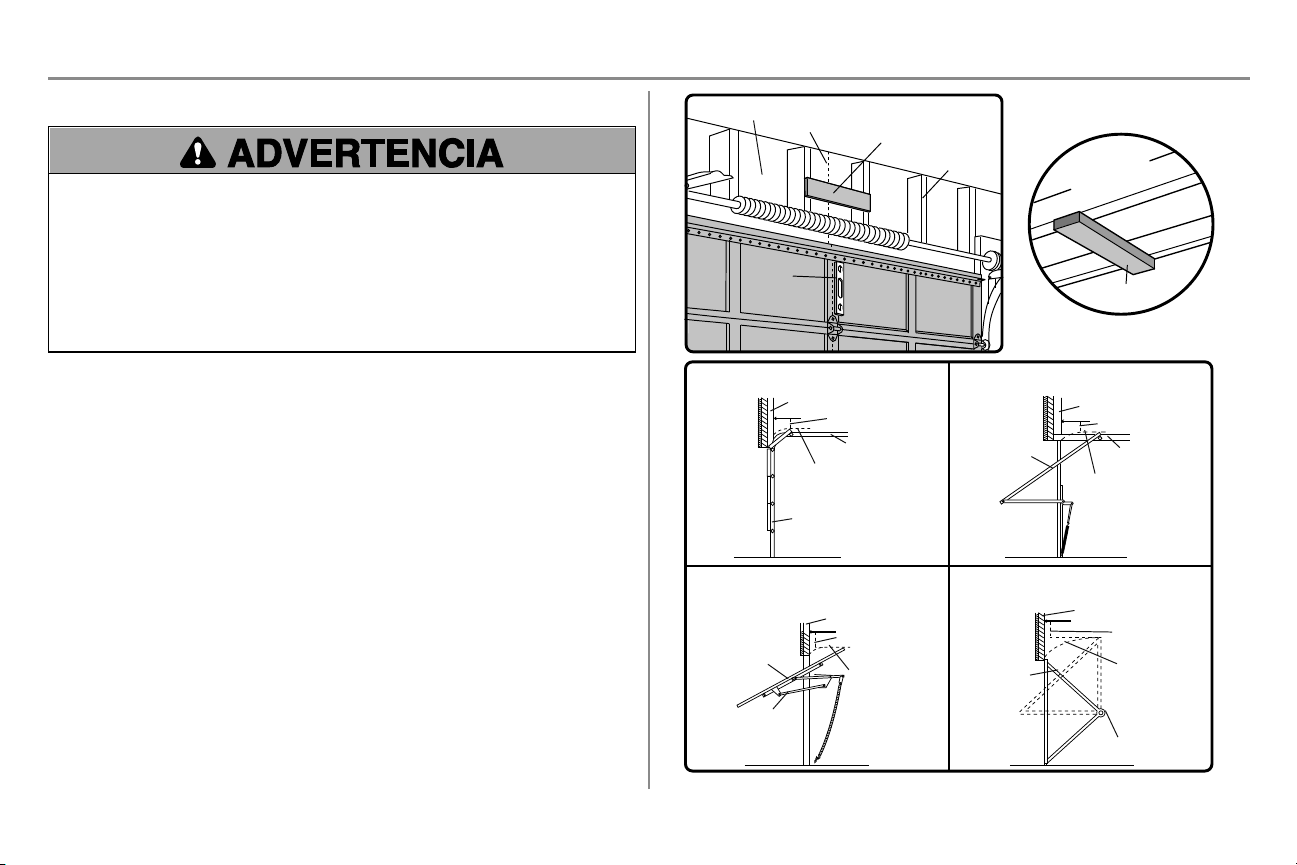
12
Instalación
PASO 1 Determine la ubicación de la ménsula de cabecera
Para evitar posibles LESIONES GRAVES o la MUERTE:
l La ménsula del cabezal DEBE quedar RÍGIDAMENTE sujeta al soporte estructural en la pared delantera o
en el cielo raso, de no ser así es posible que la puerta del garaje NO retroceda cuando se requiera. NO
instale la ménsula del cabezal en muros falsos.
l Se DEBEN utilizar anclajes de concreto si se monta el soporte de travesaño o 5 x 10 cm (2 x 4 pulg.) en la
mampostería.
l NUNCA trate de aflojar, mover, ni ajustar la puerta del garaje, los resortes, los cables, las poleas, las
ménsulas ni la pernería, pues TODAS estas piezas están bajo una tensión EXTREMA.
l SIEMPRE llame a un técnico especializado en sistemas de puertas si la puerta del garaje se atasca, atora o
si está desequilibrada. Una puerta de garaje que no está equilibrada puede NO retroceder cuando se
requiera.
Los procedimientos de instalación varían según el tipo de puerta de garaje. Siga las instrucciones que correspondan a
su puerta.
1. Con la puerta cerrada, marque el centro vertical de la puerta del garaje.
2. Es posible ajustar la ménsula de cabecera a una distancia de 1.2 m (4 pies) a la izquierda o la derecha del
centro de la puerta, pero solamente si hay un resorte de torsión o una placa central de apoyo en el
recorrido; o puede sujetarla al cielo raso (consulte pagina 13) cuando el espacio es reducido. (Asimismo,
se puede instalar en forma invertida sobre la pared si fuese necesario. Esto le dará aproximadamente 1 cm
[1/2 pulg.] de espacio). Si necesita instalar la ménsula del cabezal sobre una tabla de 5 x 10 cm (2 x 4
pulg.) (ya sea en la pared o en el cielo raso), utilice tornillos de cabeza cuadrada (no se incluyen) para
sujetar bien la tabla de madera a los soportes estructurales tal como se muestra aquí y en pagina 13.
3. Abra la puerta hasta el punto más alto de su recorrido tal como se muestra. Marque una línea horizontal
que intersecte la pared de cabecera a 5 cm (2 pulg.) por encima del punto más alto.
l 5 cm (2 pulg.) por encima del punto más alto para las puertas seccionales y para las puertas de una pieza
con carril.
l 20 cm (8 pulg.) por encima del punto más alto para las puertas de una pieza sin carril.
Esta altura brindará suficiente espacio de desplazamiento para el borde superior de la puerta. NOTA: Si el número
total de centímetros excede la altura disponible de su garaje, use la altura máxima posible o consulte la página pagina
13 para obtener información sobre la instalación en el cielo raso.
Pared del frente
Línea central vertical de
la puerta de garaje
2x4
Soportes
estructurales
Nivel
(opcional)
Cielo raso
sin acabado
2x4
MONTAJE OPCIONAL EN EL TECHO
PARA LA MÉNSULA DE CABECERA
Puerta seccionada con riel curvo
Pared del frente
Riel
5 cm (2 pulg.)
Punto más alto
del desplazamiento
Puerta
Puerta de una pieza con riel horizontal
Pared del frente
Riel
5 cm (2 pulg.)
Punto más alto
del desplazamiento
Puerta
Puerta de una pieza sin riel:
herrajes de la jamba
Pared del frente
20 cm (8 pulg.)
Punto más alto
del
desplazamiento
Puerta
Herrajes de
la jamba
Puerta de una pieza sin riel:
herrajes del pivote
Pared del frente
20 cm (8 pulg.)
Punto más alto
del
desplazamiento
Puerta
Pivote
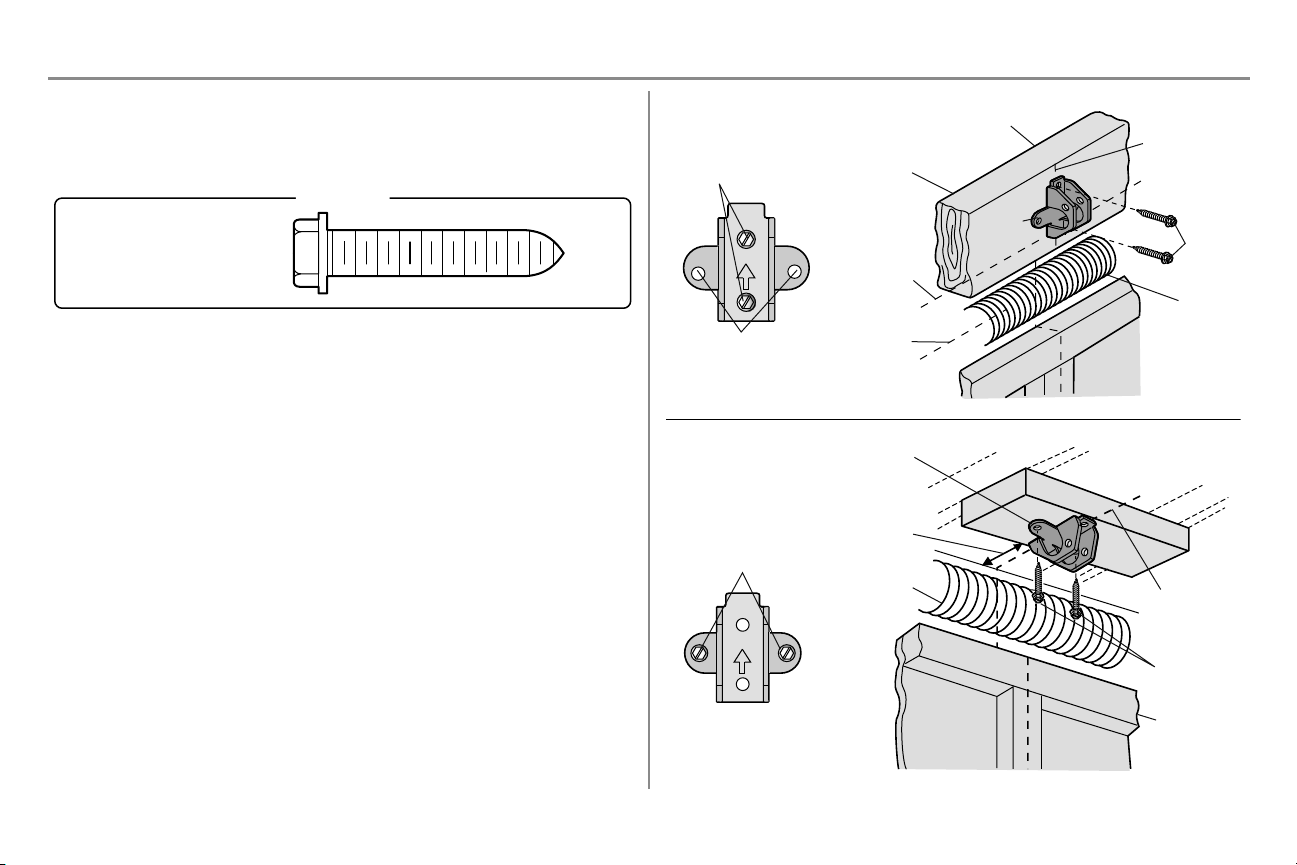
13
Instalación
PASO 2 Instale la ménsula de cabecera
La ménsula del cabezal se puede sujetar a la pared sobre la puerta del garaje o en el cielo raso. Siga las
instrucciones que sean las más adecuadas para las necesidades de su garaje. No instale la ménsula del cabezal
en un muro falso. Si la instalación es en mampostería, asegúrese de utilizar anclajes para hormigón (no se
incluyen).
Tornillo para madera
5/16 pulg.-9x1-5/8 pulg.
HERRAJES
OPCIÓN A - INSTALACIÓN EN LA PARED
1. Coloque la ménsula sobre la línea central vertical con el borde inferior sobre la línea horizontal como se
muestra en la ilustración (con la flecha de la ménsula apuntando hacia el cielo raso).
2. Marque los agujeros superior e inferior de la ménsula. Taladre los orificios piloto de 3/16 de pulg. y sujete
la ménsula firmemente a un soporte estructural con los herrajes provistos.
OPCIÓN B INSTALACIÓN EN EL CIELO RASO
1. Continúe marcando la línea central vertical sobre el cielo raso como se muestra en la ilustración.
2. Coloque la ménsula al centro de la línea a no más de 15 cm (6 pulg.) de la pared. Asegúrese de que la
flecha de la ménsula apunte en dirección opuesta a la pared. La ménsula se puede instalar pegada al cielo
raso cuando el espacio es muy reducido.
3. Marque dónde taladrará los orificios laterales. Taladre los orificios con una broca de 3/16 de pulg. y sujete
la ménsula firmemente al soporte de la estructura con la pernería que se incluye.
UP
Orificios de
montaje en pared
INSTALACIÓNEN LAPARED
INSTALACIÓNEN ELCIELO RASO
Orificios de montaje
opcional
Línea central
vertical de la
puerta de garaje
Pared del frente
Ménsula
del cabezal
Soporte
estructural
de 2 x 4
Resorte
de la
puerta
Puerta de garaje
Punto más alto
del recorrido de
la puerta de garaje
Línea
horizontal
Tornillo
para
madera
UP
Pared del
frente
Orificios de montaje en
el cielo raso
Cielo raso con acabado
Línea central
vertical de la
puerta de garaje
Ménsula del
cabezal
15 cm (6 pulg.)
max.
Resorte de la puerta
Puerta de
garaje
Tornillo para
madera
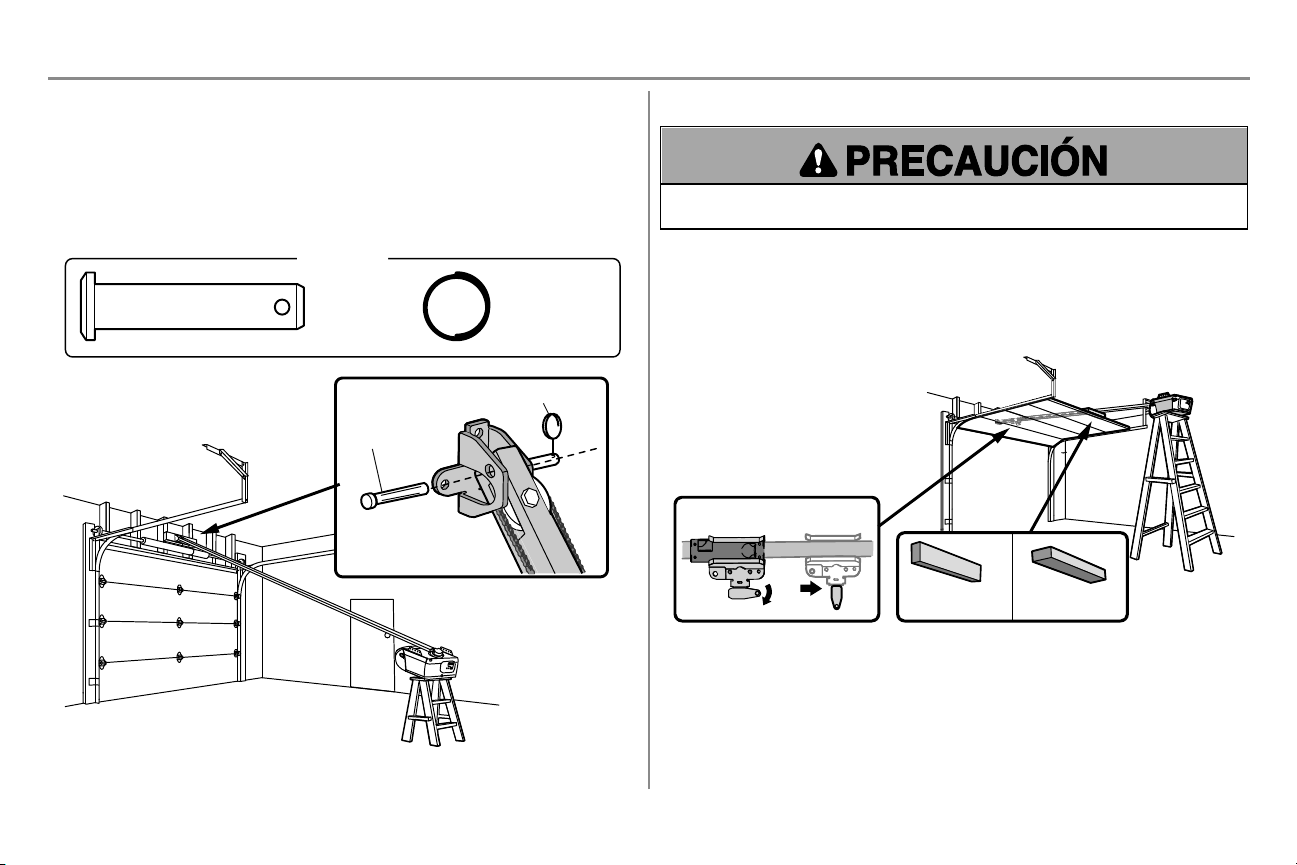
14
Instalación
PASO 3 Coloque el riel en la ménsula del cabezal
1. Coloque el abre-puertas sobre el piso de la garaje debajo de la ménsula del cabezal. Use el material del
empaque como base para protegerlo.
NOTA: Si el resorte de la puerta está obstruido, va a necesitar ayuda. Otra persona tendrá que sostener el
abre-puertas firmemente sobre un soporte temporal para permitir que el riel pueda librar el resorte.
2. Coloque la ménsula del riel contra la ménsula del cabezal.
3. Alinee los orificios de las ménsulas y júnte las con un pasador de chaveta como se muestra en la
ilustración.
4. Introduzca un anillo de seguro para terminar la unión.
HERRAJES
Pasador de chaveta
5/16 pulg. x
1-1/2 pulg.
Aro de retención
Pasador de
horquilla
Aro de retención
PASO 4 Colocación del abre-puertas del garaje
Para evitar que la puerta del garaje sufra daños, apoye el riel del abre-puertas de garaje sobre un pedazo de
madera de 5 x 10 cm (2 x 4 pulg.) colocado en la sección superior de la puerta.
1. Retire la espuma de embalaje y ponga el abre-puertas de garaje sobre la escalera.
2. Abra la puerta toralmente y apoye acostado un tirante de madera de 3.8 cm (2 X 4 pulg.) abajo del riel. Para
puertas de una pieza sin carriles, coloque el pedazo de madera de 5 x 10 cm (2 x 4 pulg.) de costado.
NOTA:Una tabla de 5 x 10 cm (2 x 4 pulg.) es ideal para fijar la distancia entre el riel y la puerta. Si la escalera no es
lo suficientemente alta, va a necesitar ayuda. Si la puerta toca el carro cuando se la levanta, tire del brazo del seguro
del carro para separar la parte interna de la externa. Deslice el carro externo hacia el abre-puertas de garaje. El
carro puede permanecer desconectado hasta que se indique.
Conectado Desconectado
Puerta de una sola
pieza sin rieles
2x4 2x4
Todos los demás
tipos de puertas
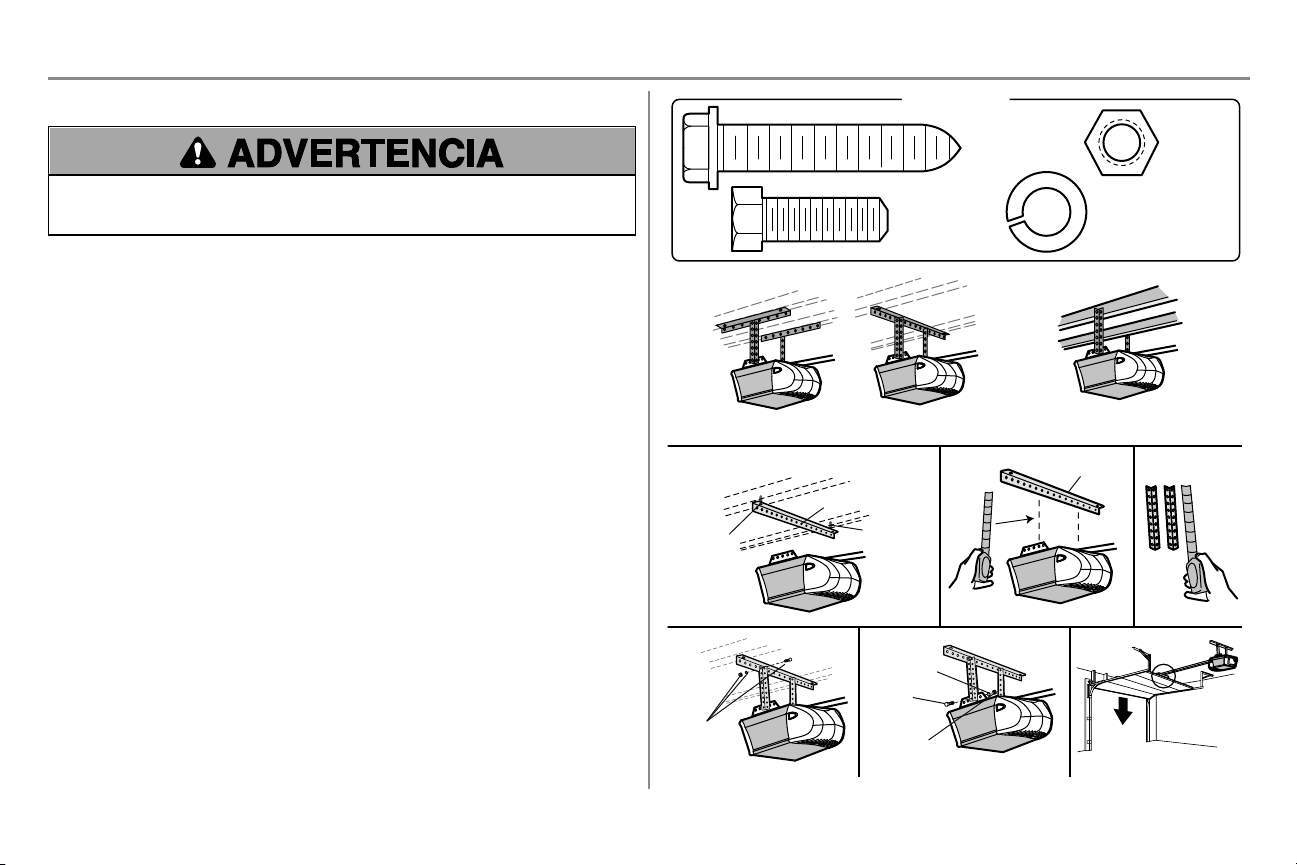
15
Instalación
PASO 5 Cuelgue el abre-puertas de garaje
Para evitar la posibilidad de una LESIÓN GRAVE si se cae el abre-puertas de garaje, sujételo FIRMEMENTE a
los soportes estructurales del garaje. Se DEBEN usar anclajes para hormigón SI se instalan ménsulas en la
mampostería.
Colgará el abre-puertas de garaje según su tipo de garaje. A continuación veremos tres ejemplos de instalaciones.
Quizá su instalación sea diferente. TODASlas instalaciones de abre-puertas de garaje DEBEN conectarse a
soportes estructurales. En las siguientes instrucciones se muestra uno de los ejemplos.
1. En cielos rasos acabados, use tornillos de cabeza cuadrada para fijar la ménsula de soporte (no provista)
a los soportes estructurales antes de instalar el abre-puertas de garaje.
2. Asegúrese de que el abre-puertas de garaje esté alineado con la ménsula del cabezal. Mida la distancia
entre cada lado del abre-puertas de garaje y la ménsula de soporte.
3. Corte las dos partes de los soportes colgantes a la medida adecuada.
4. Fije un extremo de cada ménsula colgante a la ménsula de soporte con las herramientas apropiadas (no
provistas).
5. Fije el abre-puertas de garaje a las ménsulas colgantes con pernos, arandelas de presión y tuercas.
6. Quite la tabla de madera de 5 x 10 cm (2 x 4 pulg.) y cierre la puerta manualmente. Si la puerta golpea el
riel, suba la ménsula del cabezal.
Cielo raso con acabado
Tornillo
para
madera
1
2
3
No provista
No
provista
No provista
4 5
6
Tornillo para
madera
Cielo raso con acabado
EJEMPLOS
Cielo raso sin acabado
HERRAJES
Perno hexagonal
de 5/16 de pulg.
-18 x 7/8 de pulg.
Tuerca 5/16
pulg.-18
Rondana de presión
de 5/16 de pulg. -18
Tornillo para madera
5/16 pulg.-9x
1-5/8 pulg.
Perno
hexagonal
Tuerca
Arandela de
presión
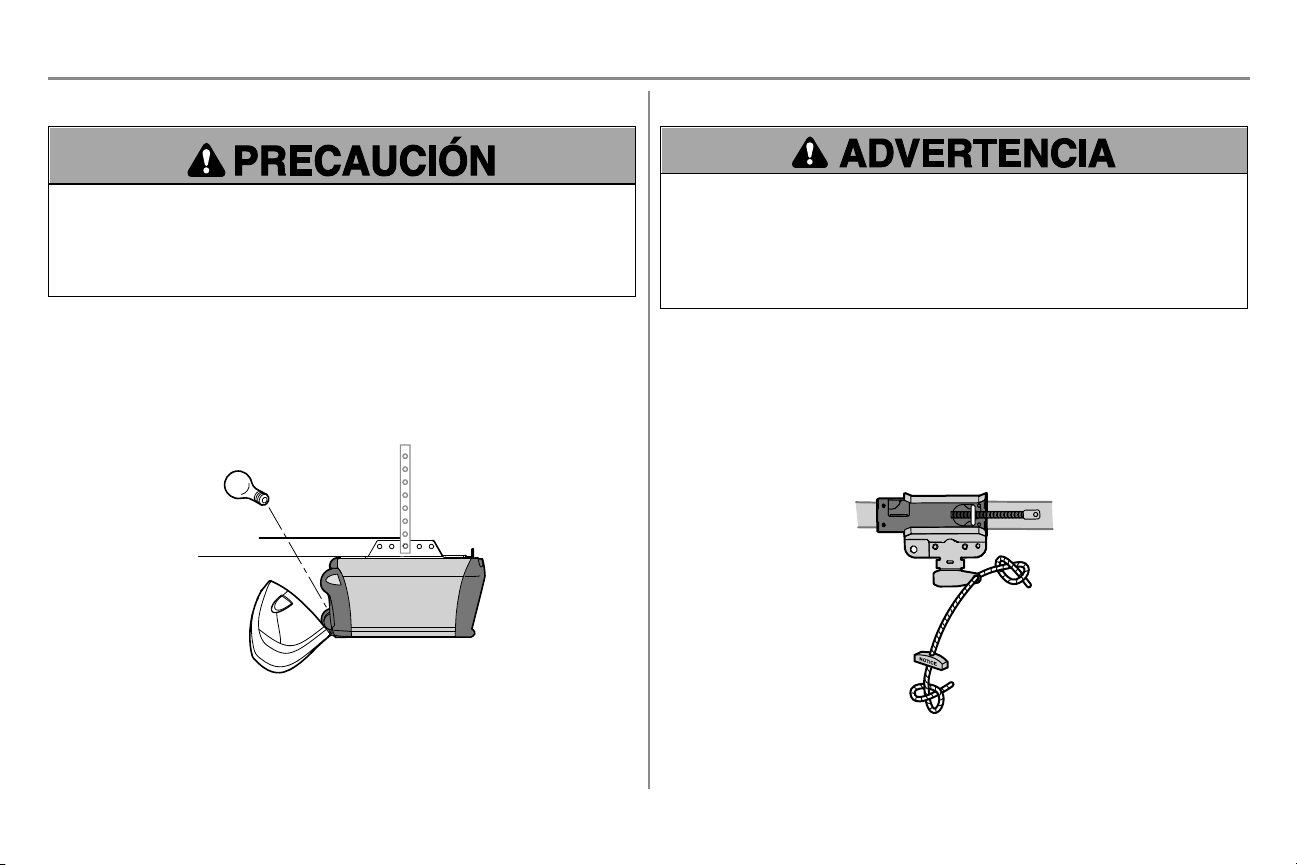
16
Instalación
PASO 6 Instale la bombilla
Para evitar un posible SOBRECALENTAMIENTO del panel trasero o del receptáculo para la bombilla:
l NO utilice bombillas de cuello corto ni de tipo especial.
l NO utilice bombillas halógenas. Use SOLAMENTE bombillas incandescentes.
Para impedir daños en el abre-puertas:
l NO use bombillas de más de 100 vatios.
l Use SOLAMENTE bombillas de tamaño A19.
1. Instale una bombilla de 100 vatios como máximo en el receptáculo. La bombilla debe ser A19, de cuello
estándar únicamente. En cuanto se conecte la electricidad, la luz se ENCENDERÁ y permanecerá
encendida por aproximadamente cuatro minutos y medio; luego, se APAGARÁ.
2. Inserte las lengüetas inferiores de la lente en las ranuras en el chasis. Incline hacia el chasis para
enganchar las lengüetas superiores, y después baje con cuidado (vea la ilustración).
3. Para quitar, oprima ambas lengüetas superiores. Incline la lente ligeramente hacia afuera y abajo, luego
jale hacia afuera para retirar la bombilla. Tenga cuidado de no desprender las lengüetas de la lente.
NOTA: Solo utilice bombillas estándar. El uso de bombillas de cuello corto o especiales puede recalentar el panel del
extremo o el receptáculo.
PASO 7 Instale la manija y la cuerda de emergencia
Para evitar la posibilidad de una LESIÓN GRAVE o incluso LA MUERTE si la puerta del garaje se cae:
l De ser posible, use el desenganche de emergencia para soltar el carro SOLO cuando la puerta del garaje
esté CERRADA. Si los resortes están débiles o rotos o si la puerta está desequilibrada, podría abrirse y
caer rápida y/o inesperadamente.
l NUNCA use la manija del desenganche de emergencia a menos que la entrada al garaje esté libre de
obstrucciones y no haya ninguna persona presente.
l NUNCA use la manija para tirar de la puerta para abrirla o cerrarla. Si el nudo de la cuerda se suelta, usted
podría caerse.
1. Inserte un extremo de la cuerda de liberación de emergencia a través de la manija. Verifique que la palabra
“NOTICE” (aviso) esté hacia arriba. Asegúrelo con un nudo simple por lo menos a 2.5cm (1 pulg.) del
extremo de la cuerda para evitar que se suelte.
2. Inserte el otro extremo de la cuerda de liberación de emergencia a través del orificio del brazo de
desenganche del carro. Monte la manija de liberación de emergencia de modo que esté al alcance, pero
con una altura mínima de 1.83 m (6 pies) del piso para evitar el contacto con los vehículos y que se suelte
accidentalmente y asegúrela con un nudo simple.
NOTA: Si es necesario cortar la cuerda de desenganche de emergencia, queme el extremo cortado con un fósforo o
con un encendedor para evitar que el cordón se desate. Asegúrese de que la cuerda de desenganche de emergencia y
la manija estén encima de la parte superior de los vehículos para que no se enreden.
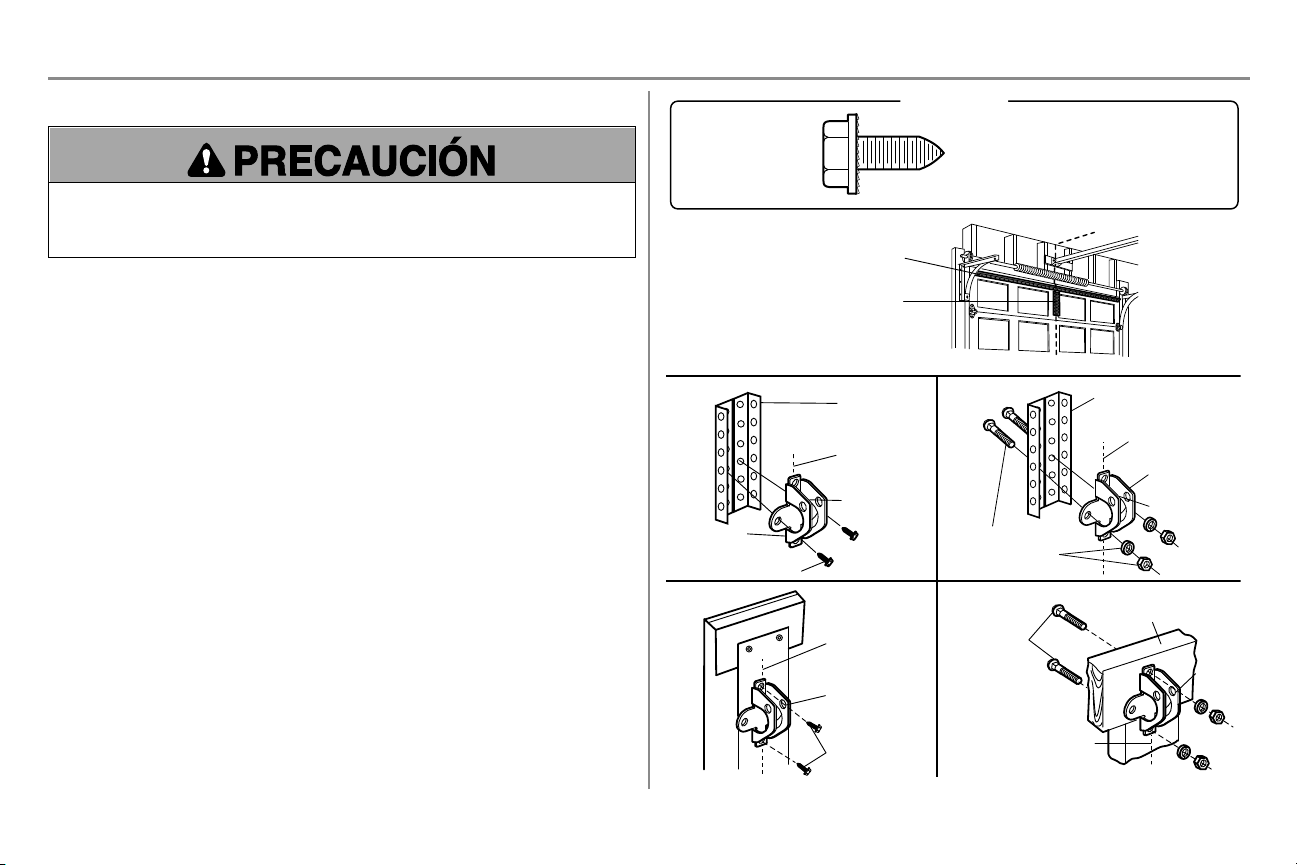
17
Instalación
PASO 8 Instale la ménsula de la puerta
Para puertas de garaje de fibra de vidrio, acero fino o aluminio, es NECESARIO un refuerzo ANTES de instalar
la ménsula de puerta. Consulte con el fabricante de la puerta del garaje o distribuidor que realizó la instalación
para obtener instrucciones acerca del refuerzo del abre-puertas o de juego de refuerzo. No reforzar la parte
superior según lo requiere el fabricante de la puerta puede anular la garantía de la puerta.
Se necesita un refuerzo horizontal y otro vertical para las puertas de garaje livianas (fibra de vidrio, aluminio, acero,
puertas con panel de vidrio, etc.) (no suministrados). Si usa un puntal horizontal, éste debe de ser lo suficientemente
largo para fijarlo en dos o tres soportes verticales. Si usa un puntal vertical, éste debe de ser de la altura del panel
superior. Consulte con el fabricante de la puerta del garaje o distribuidor que realizó la instalación para obtener
instrucciones acerca del refuerzo del abre-puertas o de juego de refuerzo.
NOTA: Muchos de los juegos de refuerzo permiten la conexión directa de los pasadores de chaveta y del brazo de la
puerta. En este caso, no necesitará instalar la ménsula de la puerta. Continúe con el siguiente paso.
OPCIÓN A - PUERTAS SECCIONALES
1. Coloque la ménsula de la puerta sobre la línea central vertical que había marcado previamente para la
instalación de la ménsula del cabezal. Asegúrese de que la leyenda "UP" (arriba) esté en la posición
correcta, como se indica en la parte interior de la ménsula.
2. El borde superior de la ménsula debe quedar a una distancia de 5 a 10 cm (2 a 4 pulgadas) por debajo del
borde superior de la puerta, O directamente bajo un soporte transversal en la parte superior de la puerta.
3. Haga los agujeros y proceda con las siguientes instrucciones de instalación, según el tipo de puerta.
Puertas metálicas o livianas con refuerzo vertical de hierro en ángulo entre el soporte del panel de la puerta
y la ménsula de la puerta:
l Taladre los orificios de sujeción de 3/16 de pulg. Fije la ménsula de la puerta con dos tornillos
autorroscantes de 1/4 de pulg.-14 x 5/8 de pulg. (Figura 1)
l Como alternativa puede usar dos pernos de 5/16 de pulg. con arandelas de presión y tuercas (no
incluidos). (Figura 2)
Puertas metálicas, con aislamiento o livianas, reforzadas de fábrica:
l Taladre los orificios de sujeción de 3/16 de pulg. Fije la ménsula de la puerta con tornillos autorroscantes.
(Figura 3)
Puertas de madera:
l Use los orificios laterales o superior e inferior de la ménsula de la puerta. Haga los agujeros
correspondientes de 5/16 de pulg. en la puerta y fije la ménsula con pernos de cabeza redonda de 5/16 de
pulg.-18 x 2 pulg., arandelas de seguro y tuercas (no incluidos). (Figura 4)
NOTA: Los tornillos autorroscantes de 1/4 de pulg.-14 x 5/8 de pulg. no son aptos para las puertas de madera.
FIGURA 1
FIGURA 3 FIGURA 4
FIGURA 2
Refuerzo
vertical
Línea central
vertical de la
puerta de garaje
HACIA ARRIBA
Ménsula de
la puerta
Refuerzo vertical
Refuerzo vertical
Refuerzo horizontal
Línea central
vertical de la
puerta de garaje
Herrajes
(no incluidos)
Ménsula de
la puerta
HACIA ARRIBA
Línea central
vertical de la
puerta de garaje
HACIA ARRIBA
Línea central vertical
de la puerta de garaje
Herrajes
(no incluidos)
HACIA
ARRIBA
Borde interior de la puerta
o tablero de refuerzo
Tornillo autorroscante
Tornillo
autorroscante
HERRAJES
Tornillos autorroscantes
1/4 pulg.-14x5/8 pulg.
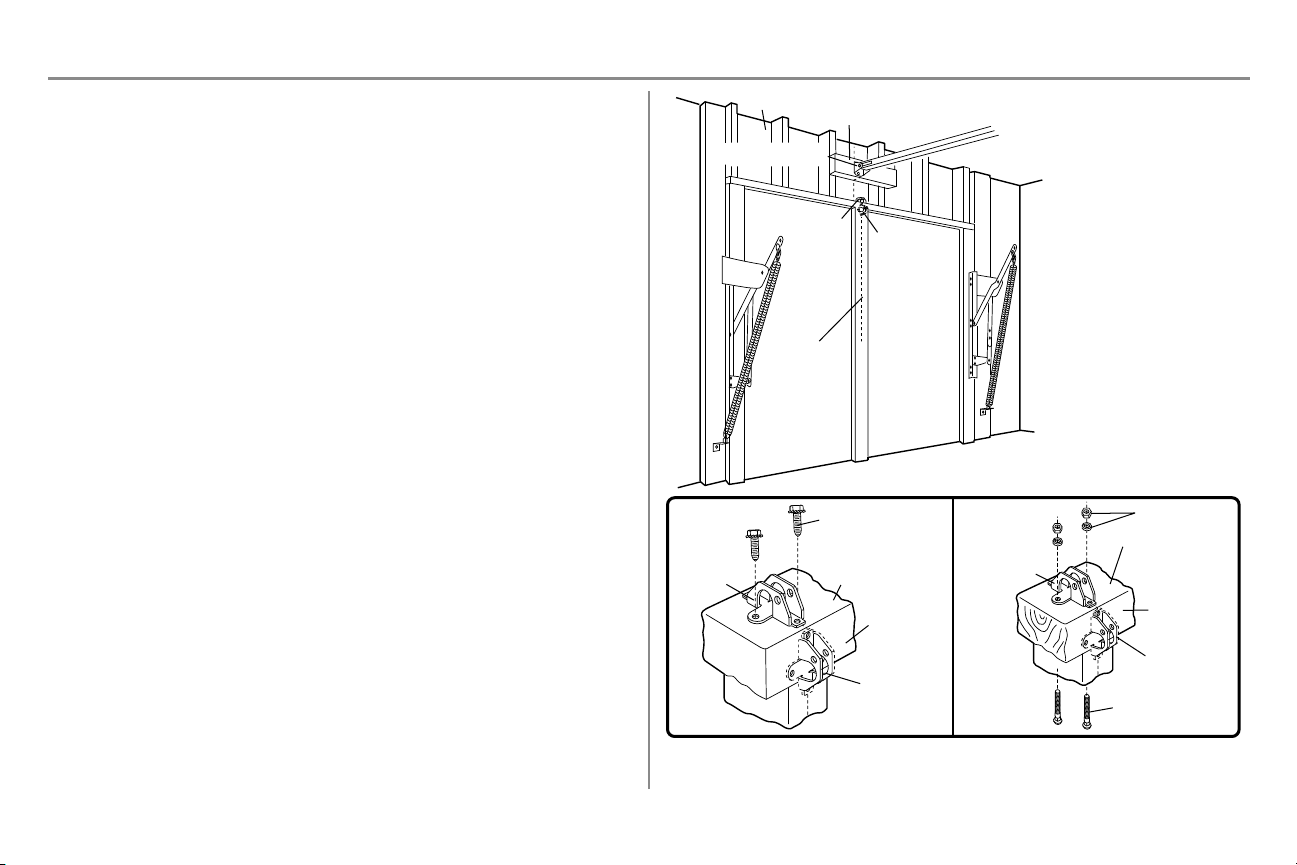
18
Instalación
PASO 8 Instale la ménsula de la puerta (continuación)
OPCIÓN B - PUERTAS DE UNA SOLAPIEZA
1. Coloque la ménsula de la puerta en el centro de la parte superior de la misma, alineada con la ménsula del
cabezal, según se muestra.
2. Marque ya sea los orificios derecho e izquierdo o superior e inferior.
Puertas metálicas:
1. Taladre los orificios guía de 3/16 de pulg. y ajuste la ménsula con los tornillos autorroscantes provistos.
Puertas de madera:
1. Taladre orificios de 5/16 de pulg. y use pernos con cabeza redonda de 5/16 de pulg. -18 x 2 pulg.,
arandelas de presión y tuercas (no provistas) o tornillos de cabeza cuadrada de 5/16 de pulg. x 1-1/2 de
pulg. (no provistos), dependiendo de lo que necesite para su instalación.
NOTA: La ménsula de la puerta puede instalarse sobre el borde superior de la puerta si es necesario para su
instalación. (Vea la ilustración de colocación opcional, señalada con la línea punteada).
Para una puerta sin marcos
expuestos, o para la instalación
opcional, use tornillos para madera
de 5/16 de pulg. x 1-1/2 de pulg.
(no incluidos) para sujetar la
ménsula de la puerta.
Línea central
vertical de la
puerta de garaje
Colocación
opcional de la
ménsula de la
puerta
Ménsula de
la puerta
Ménsula del cabezal
Pared del frente
Soporte de 2 x 4
(Cielo raso con acabado)
Ménsula de
la puerta
Parte superior de la
puerta (interior del
garaje)
Borde superior
de la puerta
Colocación
opcional
Colocación
opcional
Borde superior
de la puerta
Parte superior de la
puerta (interior del
garaje)
Ménsula de
la puerta
Herrajes
(no incluidos)
Herrajes
(no incluidos)
Puerta metálica Puerta de madera
Tornillo autorroscante
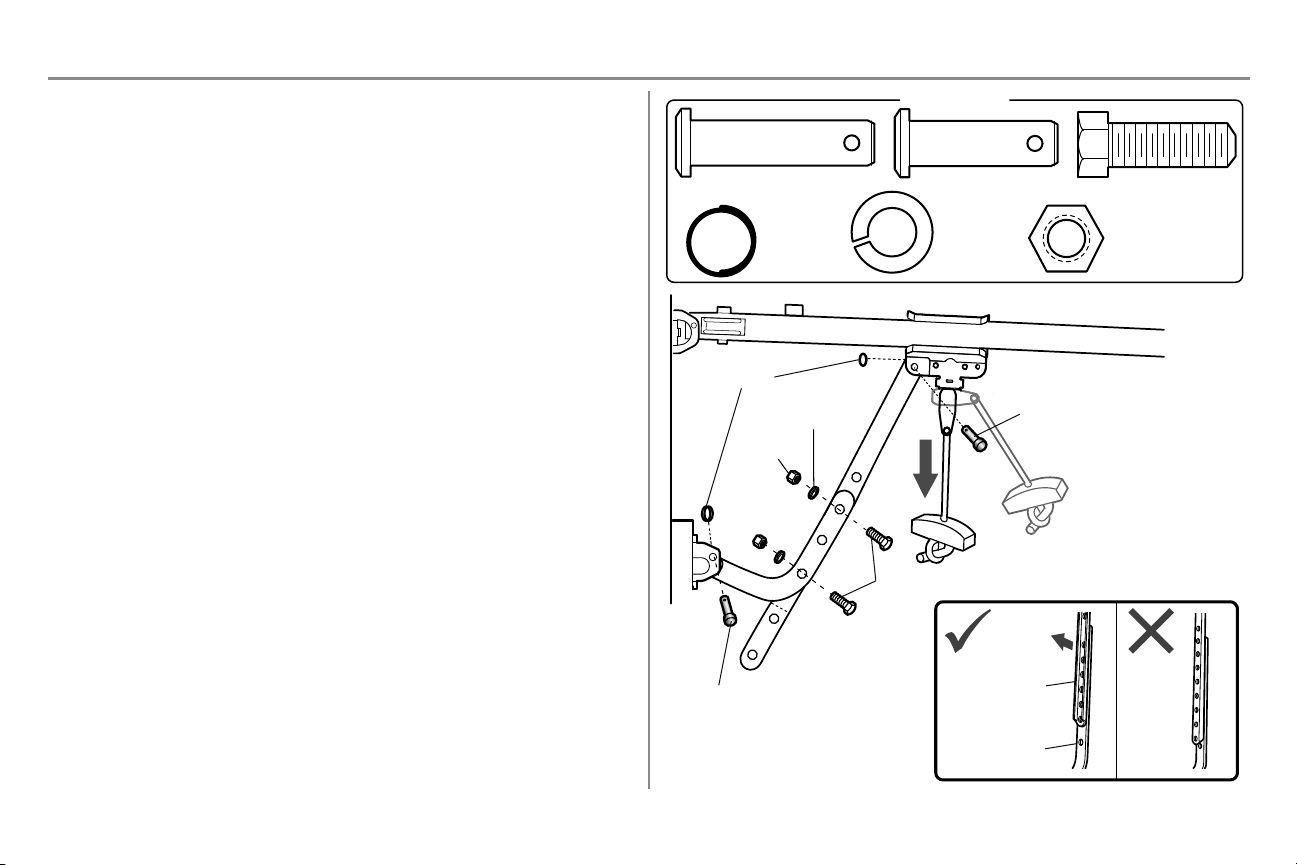
19
Instalación
PASO 9 Conecte el brazo de la puerta al carro
Los procedimientos de instalación varían según el tipo de puerta de garaje. Siga las instrucciones que correspondan a
su puerta.
OPCIÓN A - PUERTAS SECCIONALES
IMPORTANTE: El ranura en el brazo recto de la puerta DEBE voltéese del brazo curvado de la puerta.
1. Cierre la puerta. Desconecte el trole tirando de la manija de desenganche de emergencia.
2. Acople el brazo recto de la puerta al carro exterior usando el pasador de chaveta. Asegúrelo con el aro de
retención.
3. Acople el brazo curvo de la puerta a la ménsula de la puerta usando el pasador de chaveta. Asegúrelo con
el aro de retención.
4. Junte las dos secciones. Busque dos pares de orificios que estén alineados y una las secciones. Elija
orificios lo más apartados posible para aumentar la rigidez del brazo de la puerta y sujete usando los
pernos, las tuercas y las arandelas de cierre.
5. Tire de la manija de desenganche de emergencia hacia el abre-puertas hasta que el brazo del carro quede
en posición horizontal. El carro se reconectará automáticamente cuando se accione el abre-puertas de
garaje.
NOTA: Si los orificios en el brazo curvo y en el brazo recto de la puerta no quedan alineados, invierta el brazo recto,
elija dos orificios (lo más apartados posible) y sujételos usando los pernos, las tuercas y las arandelas de cierre. Si
el brazo recto de la puerta cuelga demasiado alejado, puede cortar 15 cm (6 pulgadas) del lado que no tiene orificios.
HERRAJES
Pernos hexagonales
de 5/16 de pulg.-18
x7/8 de pulg.
Tuerca 5/16 pulg.-18
Arandela de
presión 5/16
pulg.-18
Pasador de chaveta
5/16 pulg. x 1 pulg.
Pasador de chaveta 5/16 pulg.
x 1-1/4 pulg.
Aro de
retención
Arandela de presión
Tuerca
Perno hexagonal
Pasador de chaveta
5/16 pulg. x 1-1/4 pulg.
Aro de retención
Pasador de chaveta
5/16 pulg. x 1 pulg.
Brazo recto de
la puerta (ranura
hacia afuera)
Brazo de la
puerta curvo
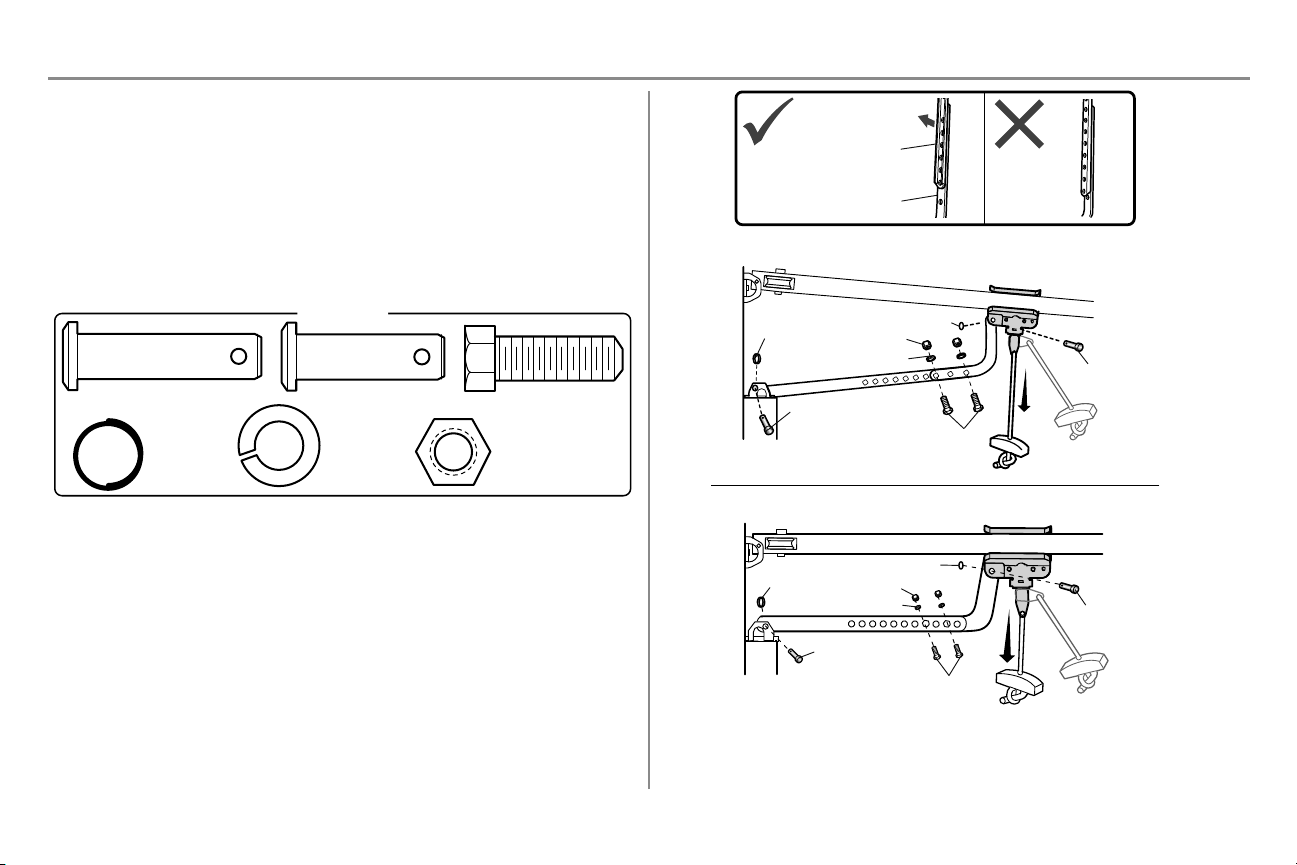
20
Instalación
PASO 9 Conecte el brazo de la puerta al carro (continuación)
OPCIÓN B - PUERTAS DE UNA SOLAPIEZA
IMPORTANTE: El ranura en el brazo recto de la puerta DEBE voltéese del brazo curvado de la puerta.
1. Cierre la puerta. Desconecte el trole tirando de la manija de desenganche de emergencia.
2. Fije los brazos de la puerta (recto y curvo) a la mayor distancia posible (una superposición de 2 o 3
orificios) usando los pernos, las tuercas y las arandelas de cierre.
3. Acople el brazo recto de la puerta a la ménsula de la puerta usando el pasador de chaveta. Asegúrelo con
el aro de retención.
4. Acople el brazo curvo de la puerta al carro usando el pasador de chaveta. Asegúrelo con el aro de
retención.
5. Tire de la manija de desenganche de emergencia hacia el abre-puertas hasta que el brazo del carro quede
en posición horizontal.
HERRAJES
Perno hexagonal de
5/16 de pulg. -18 x
7/8 de pulg.
Tuerca 5/16 pulg.-18
Arandela de
presión 5/16
pulg.-18
Pasador de chaveta
5/16 pulg. x 1 pulg.
Pasador de chaveta 5/16
pulg. x 1-1/4 pulg.
Aro de
retención
Puerta de una pieza sin riel
Puerta de una pieza con riel
Aro de retención
Aro de retención
Aro de retención
Tuerca
Tuerca
Aro de retención
Arandela de presión
Arandela de presión
Pasador de chaveta
5/16 pulg. x 1-1/4 pulg.
Pasador de chaveta
5/16 pulg. x
1-1/4 pulg.
Pernos
hexagonales
Pernos
hexagonales
Pasador de chaveta
5/16 pulg. x 1 pulg.
Pasador de chaveta
5/16 pulg. x 1 pulg.
Brazo recto de la puerta
(ranura hacia afuera)
Brazo de la puerta curvo
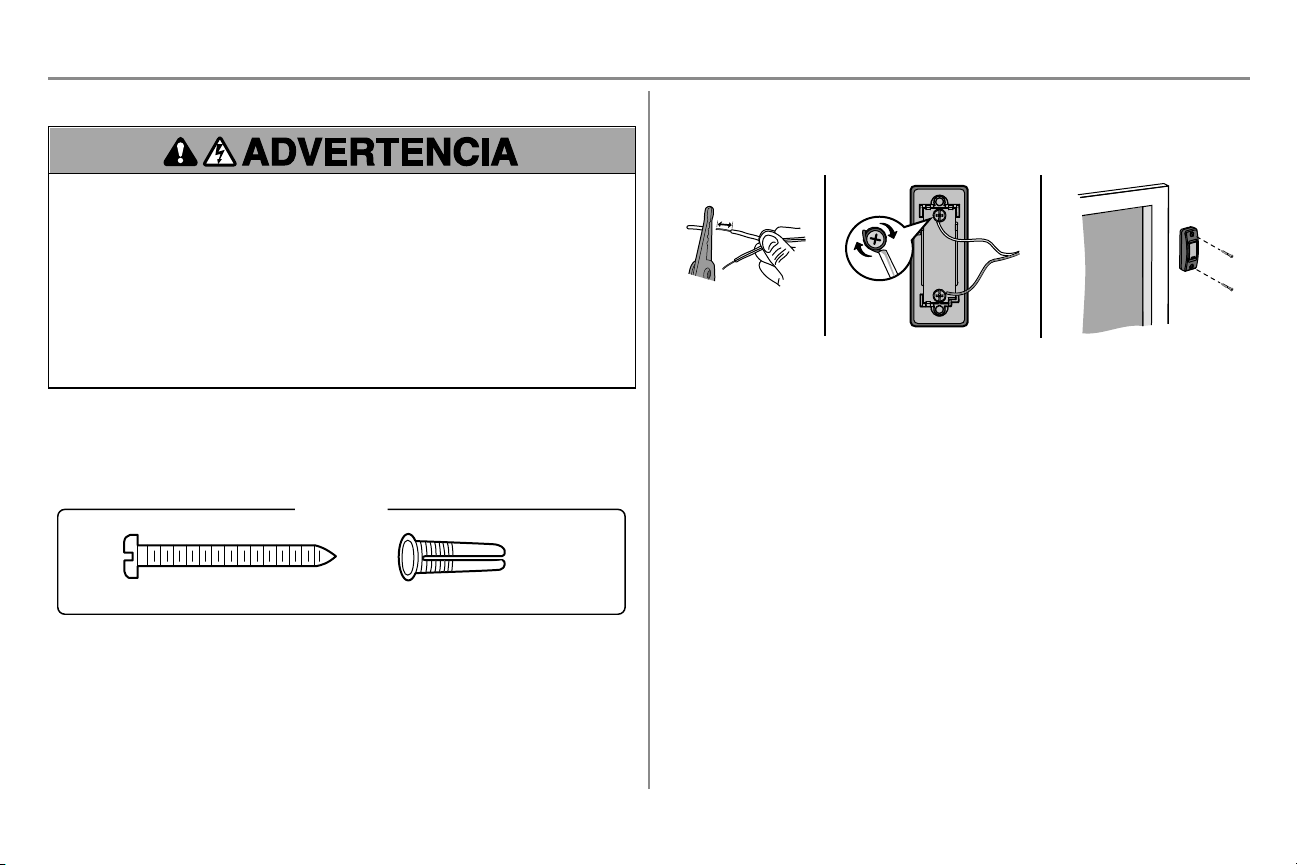
21
Instalación
PASO 10 Instale el control de la puerta
Para evitar posibles LESIONES GRAVES o la MUERTE por electrocución:
l ANTES de instalar el control de puerta, verifique que NO esté conectada la energía eléctrica.
l Conecte el control de la puerta SOLO a cables de bajo voltaje de 12 VOLTIOS.
Para evitar la posibilidad de una LESIÓN GRAVE o LA MUERTE cuando la puerta del garaje se esté cerrando:
l Instale el control de la puerta a la vista desde la puerta del garaje, fuera del alcance de los niños a una altura
mínima de 1.5 m (5 pies) sobre pisos, escalones y cualquier superficie peatonal cercana, y lejos de TODAS
las partes móviles de la puerta.
l NUNCA permita que los niños hagan funcionar o jueguen con los botones del control de la puerta ni con los
transmisores del control remoto.
l Abra/cierre una puerta de garaje SOLO si la puede ver claramente, si está correctamente instalada y si no
hay ninguna obstrucción en su recorrido.
l SIEMPRE mantenga la puerta de garaje a la vista hasta que esté completamente cerrada. NUNCA permita
que alguien se atraviese en el recorrido de la puerta del garaje cuando se está cerrando.
INTRODUCCIÓN
Instale el control de la puerta a la vista desde la puerta del garaje a una altura mínima de 5 pies (1.5 m) sobre pisos,
escalones y cualquier superficie peatonal cercana, fuera del alcance de los niños y lejos de TODAS las partes
móviles de la puerta.
NOTA: Es posible que su producto se vea diferente al de las ilustraciones.
Tornillo 6ABx1-1/2 de pulg. (2)
HERRAJES
Anclajes para tablaroca (2)
1. Pele 6 mm (1/4 de pulg.) de aislante de uno de los extremos del cable y separe los cables.
2. Conectar un cable a cada uno de los dos tornillos en la parte de atrás del control de la puerta. Los cables
pueden conectarse indistintamente a cualquiera de los terminales de tornillo.
3. Monte el control de la puerta con los herrajes provistos.
6 mm (1/4 pulg.)
1
2 3
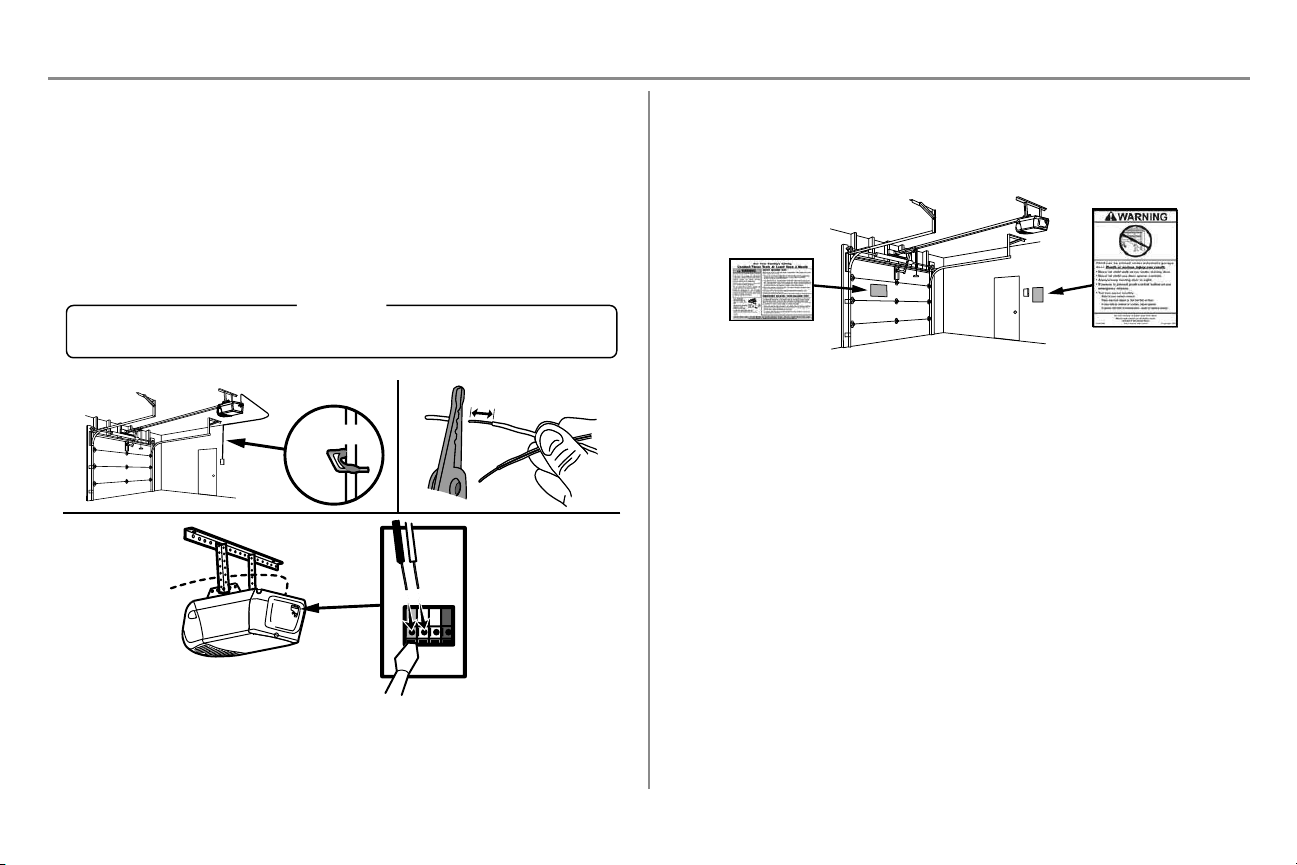
22
Instalación
PASO 11 Tender los cables desde el control hasta el abre-puerta de
garaje
1. Tienda los cables blanco y rojo/blanco entre el control de la puerta y el abre-puertas de garaje. Fije el
cable a la pared y al cielo raso con grapas (a menos que se utilicen cajas de conexión o sea una
instalación existente). No perfore el cable con los broches ya que esto podría causar un cortocircuito o un
circuito abierto.
2. Pele 11 mm (7/16 de pulg.) del extremo del cable cerca del abre-puertas de garaje.
3. Conecte el cable a los terminales rojo y blanco del abre-puertas de garaje. Si tiene cableado previo en su
garaje, asegúrese de usar los mismos cables que están conectados al control de la puerta. Para introducir
o soltar los cables del terminal, empuje la lengüeta con la punta de un destornillador.
ROJO
BLANCO
BLANCO
GRIS
11mm (7/16 de pulg.)
2
3
1
HERRAJES
Grapas aisladas (no aparece)
Grapa
PASO 12 Colocar las etiquetas de advertencia
1. Con tachuelas o grapas, coloque en la pared cerca del control de la puerta una etiqueta de advertencia
sobre el riesgo de quedar atrapado.
2. Coloque la etiqueta de prueba de reversa de seguridad y desenganche manual en un lugar a la vista del
lado interno de la puerta del garaje.
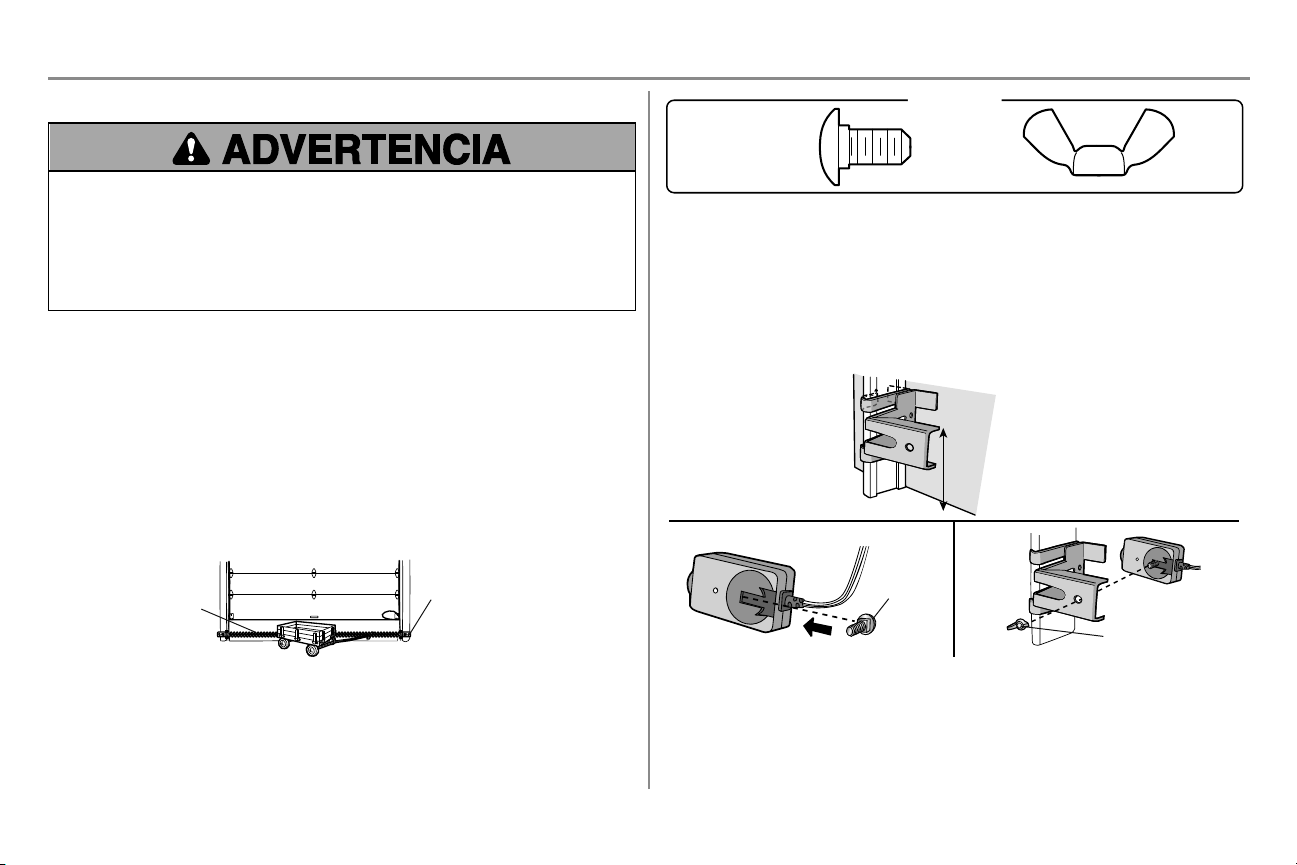
23
Instalación
PASO 13 Instale el Protector System
®
Asegúrese de que la energía eléctrica NO esté conectada al abre-puertas de garaje ANTES de instalar los
sensores de reversa de seguridad.
Para evitar la posibilidad de sufrir una LESIÓN GRAVE o LA MUERTE cuando la puerta del garaje se esté
cerrando:
l Conecte correctamente y verifique la alineación de los sensores de reversa de seguridad. Este dispositivo
de seguridad es necesario y NO se DEBE desactivar.
l Instale el sensor de reversa de seguridad de modo que el haz NO SUPERE 15 cm (6 pulg.) sobre el nivel
del piso.
INFORMACIÓN IMPORTANTE CON RESPECTO A LOS SENSORES DE REVERSA DE SEGURIDAD
Los sensores de reversa de seguridad deben estar bien conectados y alineados antes de que el abre-
puertas de garaje se mueva hacia abajo.
El sensor emisor (LED ámbar) transmite un haz de luz invisible hacia el sensor receptor (LED verde). Si una
obstrucción interrumpe el haz de luz mientras la puerta se está cerrando, la puerta se detendrá y regresará a la
posición totalmente abierta, y las luces del abre-puertas de garaje parpadearán 10 veces.
NOTA: Para ahorrar energía, el abre-puertas de garaje pasará a modo pasivo cuando la puerta esté totalmente
cerrada. En modo pasivo, el abre-puertas de garaje permanece apagado hasta que vuelva a activarse. En modo
pasivo está en sincronización con la bombilla del abre-puertas de garaje. Al apagarse la bombilla, se apagarán los
DEL de los sensores y cuando se enciendan las luces del abre-puertas de garaje, se encenderán los DEL del sensor.
El abre-puertas de garaje no pasará al modo pasivo hasta que haya completado 5 ciclos desde que se accionó.
Al instalar los sensores de reversa de seguridad verifique lo siguiente:
l Que los sensores estén instalados dentro del garaje, uno de cada lado de la puerta.
l Que los sensores estén orientados frente a frente con las lentes alineadas, y que la lente del sensor
receptor no reciba la luz directa del sol.
l Que los sensores están montados a una altura máxima de 15 cm (6 pulg.) sobre el piso y que no haya
obstrucciones en la trayectoria del haz de luz.
Sensor de reversa de
seguridad 15 cm (6 pulg.)
sobre el piso, como máximo
Área de protección
del haz de luz invisible
Vista de la puerta desde el interior del garaje.
Carriage Bolt
1/4"-20 x 1/2"
Wing Nut
1/4"-20
HARDWARE
Puede conectar los sensores de reversa de seguridad al carril de la puerta, a la pared o al piso. Los sensores no
deben estar a más de 15 cm (6 pulgadas) por encima del piso. Si el carril de la puerta no sostiene firmemente la
ménsula del sensor, es mejor instalarlos sobre la pared. Opte por uno de los siguientes tipos de instalación.
OPCIÓN A - INSTALACIÓN EN EL CARRIL DE LAPUERTA
1. Deslice los brazos curvos de la ménsula del sensor sobre el borde del carril de la puerta. Colóquelos en
su posición de modo que la ménsula del sensor quede al ras del carril.
2. Introduzca el perno de coche en la ranura correspondiente de cada sensor.
3. Introduzca el perno en el orificio de la ménsula del sensor y fije con tuercas mariposa. Las lentes de ambos
sensores deben quedar frente a frente. Verifique que la ménsula del sensor no obstruya las lentes.
No más de
15 cm
(6 pulg.)
Perno de carro
Tuerca de mariposa
1
2
3
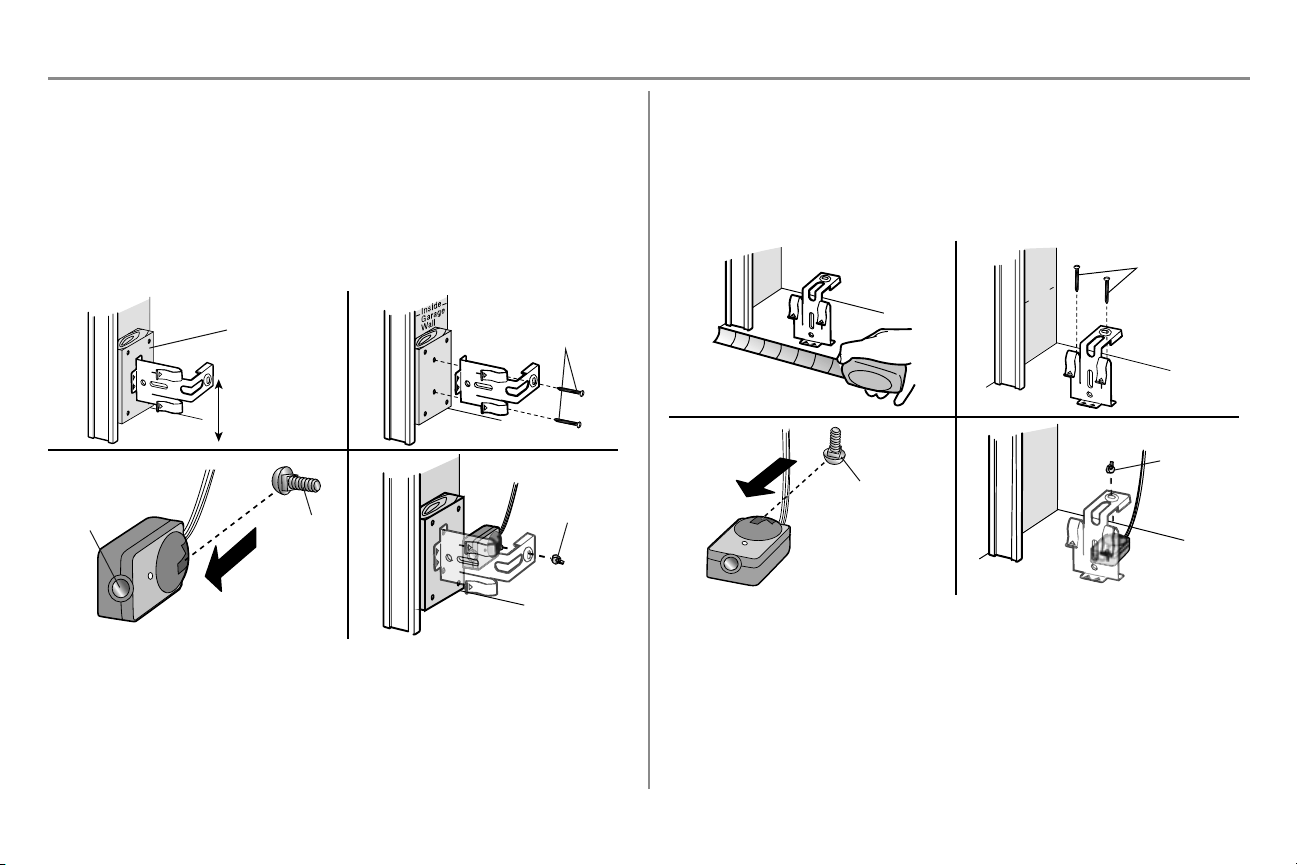
24
Instalación
PASO 13 Instale el Protector System (continuación)
OPCIÓN B - INSTALACIÓN EN LA PARED
Si fuera necesario más espacio puede utilizarse una ménsula de extensión (no provista) o bloques de madera.
Cerciórese de que cada ménsula tenga la misma cantidad de espacio para que queden alineadas correctamente.
1. Coloque la ménsula del sensor contra la pared, con los brazos curvos hacia la puerta. Verifique que quede
suficiente espacio para que el haz no tenga obstrucciones. Marque los orificios.
2. Taladre los orificios de 3/16 pulgadas de diámetro para cada ménsula del sensor y sujete las ménsulas del
sensor a la pared con tornillos de cabeza cuadrada (no provistos).
3. Introduzca el perno de coche en la ranura correspondiente de cada sensor.
4. Introduzca el perno en el orificio de la ménsula del sensor y fije con tuercas mariposa. Las lentes de ambos
sensores deben quedar frente a frente. Verifique que la ménsula del sensor no obstruya las lentes.
Lente
Perno
de carro
(No provista)
No más de
15 cm (6 pulg.)
1 2
(No provista)
Tuerca de
mariposa
3 4
OPCIÓN C - INSTALACIÓN EN EL PISO
Use una ménsula de extensión (no provista) o un bloque de madera para elevar la ménsula del sensor si es
necesario.
1. Mida cuidadosamente la posición de ambas ménsulas del sensor para que haya la misma distancia desde
la pared sin obstáculos en el medio.
2. Sujete las ménsulas de sensor al piso con anclajes para hormigón (no provistos).
3. Introduzca el perno de coche en la ranura correspondiente de cada sensor.
4. Introduzca el perno en el orificio de la ménsula del sensor y fije con tuercas mariposa. Las lentes de ambos
sensores deben quedar frente a frente. Verifique que la ménsula del sensor no obstruya las lentes.
(No provista)
Pa
red
de
l
i
nterior
de
l
ga
ra
je
1 2
Perno de carro
Tuerca de
mariposa
3 4
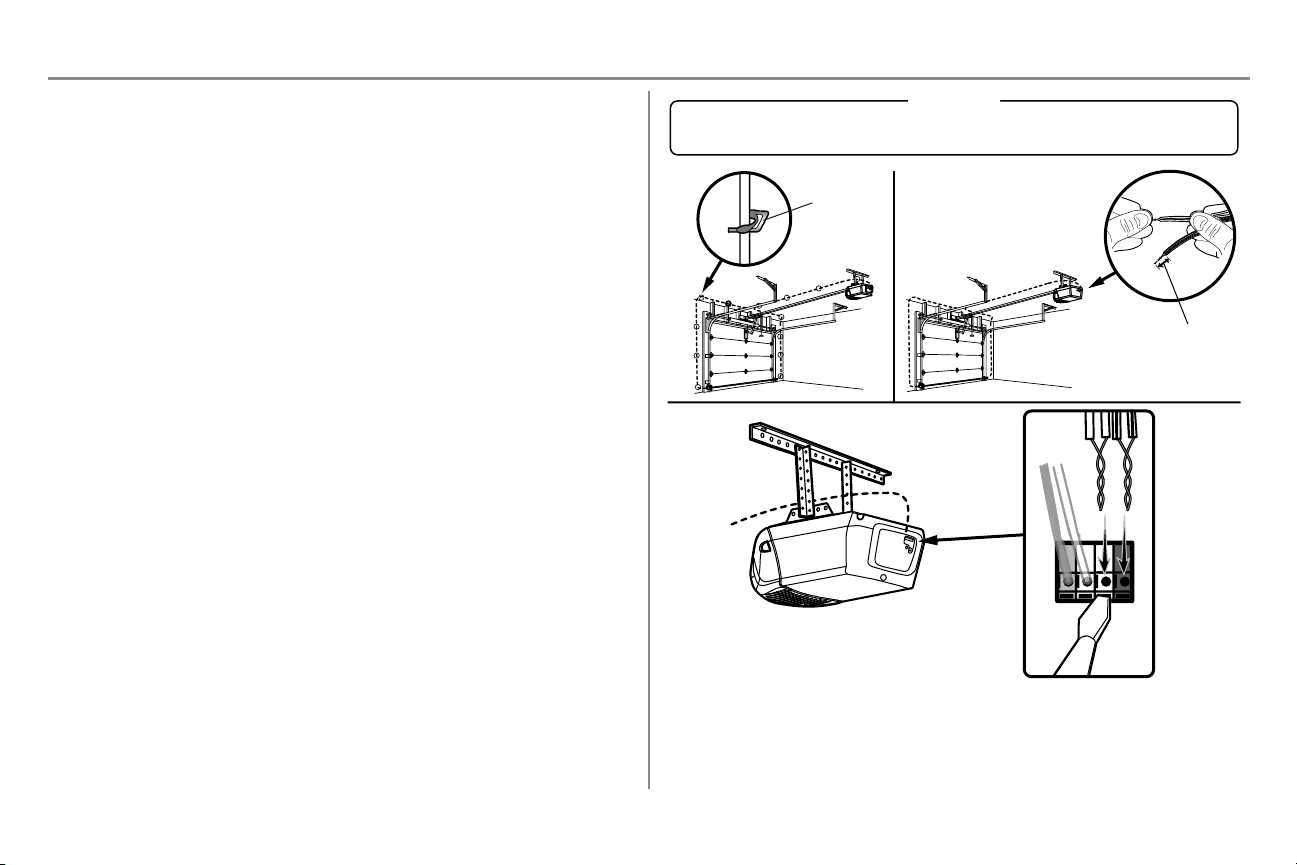
25
Instalación
PASO 14 Cableado de los sensores de reversa de seguridad
Si el garaje ya tiene cables instalados para los sensores de reversa de seguridad, continúe con pagina 26.
OPCIÓN A INSTALACIÓN SIN CABLEADO PREVIO
1. Instale los cables desde ambos sensores hasta el abre-puertas de garaje. Fije los cables a la pared y al
cielo raso con grapas.
2. Pele 11 mm (7/16 de pulg.) de cada juego de cables. Separe los cables. Retuerza juntos los cables
blancos. Retuerza juntos los cables blanco/negro.
3. Introduzca los cables blancos al terminal blanco del abre-puertas de garaje. Introduzca los cables
blanco/negro en el terminal gris del abre-puertas de garaje. Para conectar o desconectar un cable, empujar
la pestaña con la punta de un destornillador.
Grapa
11mm (7/16 de pulg.)
BLANCO
BLANCO
GRIS
ROJO
1
2
3
HERRAJES
Grapas aisladas (no aparece)
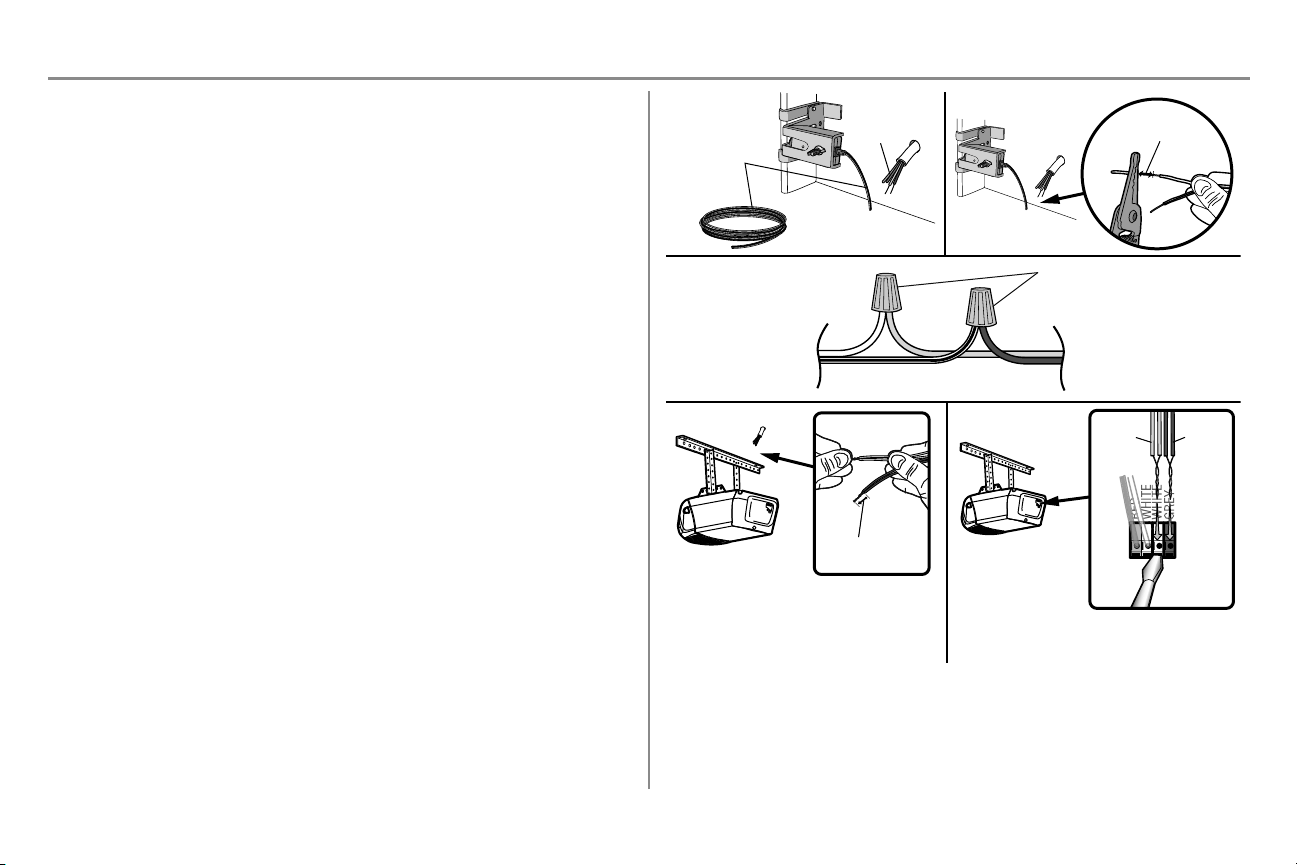
26
Instalación
PASO 14 Cableado de los sensores de reversa de seguridad
(continua)
OPCIÓN B INSTALACIÓN CON CABLEADO PREVIO
1. Corte el extremo del cable del sensor de reversa de seguridad dejando cable suficiente para que llegue a
los cables preinstalados en la pared.
2. Separe los cables del sensor de reversa de seguridad y pele 11 mm (7/16 de pulg.) de cada extremo. Elija
dos de los cables preinstalados y pele 11 mm (7/16 de pulg.) de cada extremo. Asegúrese de elegir el
mismo color de cable preinstalado para cada sensor.
3. Conecte los cables preinstalados con los cables del sensor, usando capuchones de empalme. Verifique
que los colores correspondan a cada sensor. Por ejemplo, el cable blanco se conecta con el cable amarillo
y el cable blanco/negro se conecta con el cable púrpura.
4. En el abre-puertas de garaje, pele 11 mm (7/16 de pulg.) de cada extremo de los cables elegidos
previamente para los sensores de reversa de seguridad. Retuerza juntos los cables de colores similares.
5. Introduzca los cables conectados con los cables blancos del sensor de seguridad al terminal blanco en el
abre-puertas de garaje. Introduzca los cables conectados con los cables blanco/negro del sensor de
seguridad al terminal gris en el abre-puertas de garaje.
Cables del sensor
de seguridad
de reversa
Cables
previamente
instalados
Blanco
Blanco/Negro
Amarillo (por ejemplo)
Púrpura (por ejemplo)
Tuercas para cables (No incluidas)
Cables previamente
instalados
Cables del sensor
de seguridad de reversa
1
3
4
11mm
(7/16 de pulg.)
2
Púrpura
Amarillo
5
11mm
(7/16 de pulg.)
Amarillo
Púrpura
Para conectar o desconectar un cable, empujar
la pestaña con la punta de un destornillador.
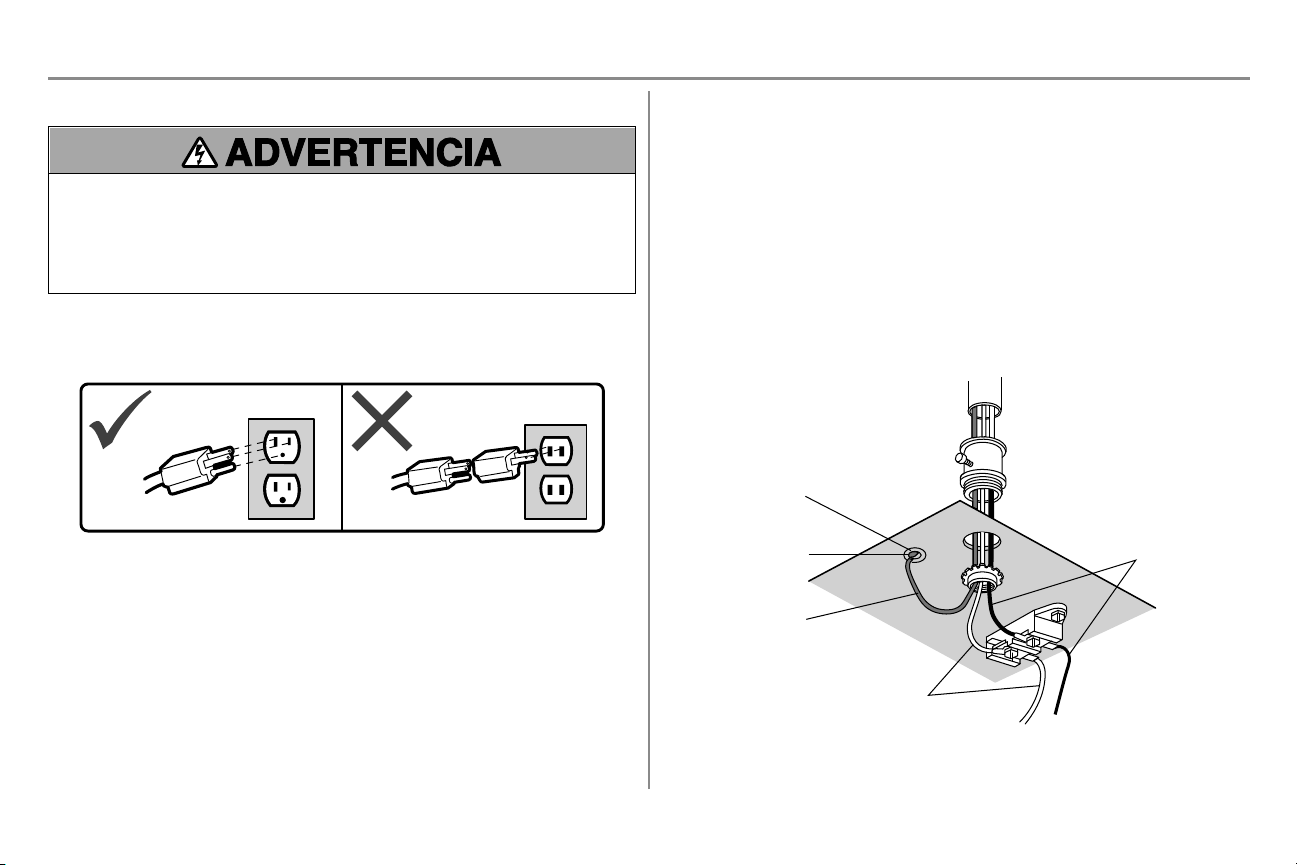
27
Instalación
PASO 15 Conecte la alimentación eléctrica
Para evitar posibles LESIONES GRAVES o la MUERTE por electrocución o incendio:
l Asegúrese de que el abre-puertas NO esté conectado a la energía eléctrica y desconecte la energía
eléctrica al circuito ANTES de quitar la cubierta para establecer la conexión del cableado permanente.
l Tanto la instalación como el cableado de la puerta del garaje DEBEN cumplir con TODOS los códigos
locales eléctricos y de construcción.
l NUNCA use una extensión ni un adaptador de dos hilos, tampoco modifique la clavija para poder enchufarla.
Asegúrese de que el abre-puertas esté puesto a tierra.
Para evitar problemas con la instalación, no opere el abre-puertas de garaje ahora.
Para reducir el riesgo de choque eléctrico, su abre-puertas de garaje viene con una clavija de conexión a tierra de
tres patas. Esta clavija sólo se puede conectar a un tomacorriente con puesta a tierra y con tres entradas. Si la clavija
no entra en el enchufe que usted tiene, diríjase a un electricista profesional para que instale el enchufe correcto.
Hay dos opciones para conectar la alimentación eléctrica:
OPCIÓN A - CONEXIÓN TÍPICA
1. Enchufe el abre-puertas a un tomacorriente con puesta a tierra.
2. Por el momento, NO ponga en funcionamiento el abre-puertas.
OPCIÓN B - CABLEADO PERMANENTE
Si la reglamentación local exige que su abre-puertas tenga cableado permanente, siga los siguientes pasos.
Para hacer una conexión permanente a través de la entrada de 7/8 de pulg. en la parte superior del motor
(según las normas municipales vigentes):
1. Quite los tornillos de la tapa del abre-puertas y deje la cubierta hacia un lado.
2. Quite el cable de tres entradas.
3. Conecte el cable (línea) negro al tornillo del terminal de cobre, el cable blanco (neutral) al tornillo del
terminal color plata, y el cable a tierra al tornillo verde de la puesta a tierra. El abre-puertas debe estar
puesto a tierra.
4. Volver a colocar la tapa.
Lengüeta de tierra
Tornillo verde de
puesta a tierra
Cable de puesta
a tierra
Cable blanco
Cable negro
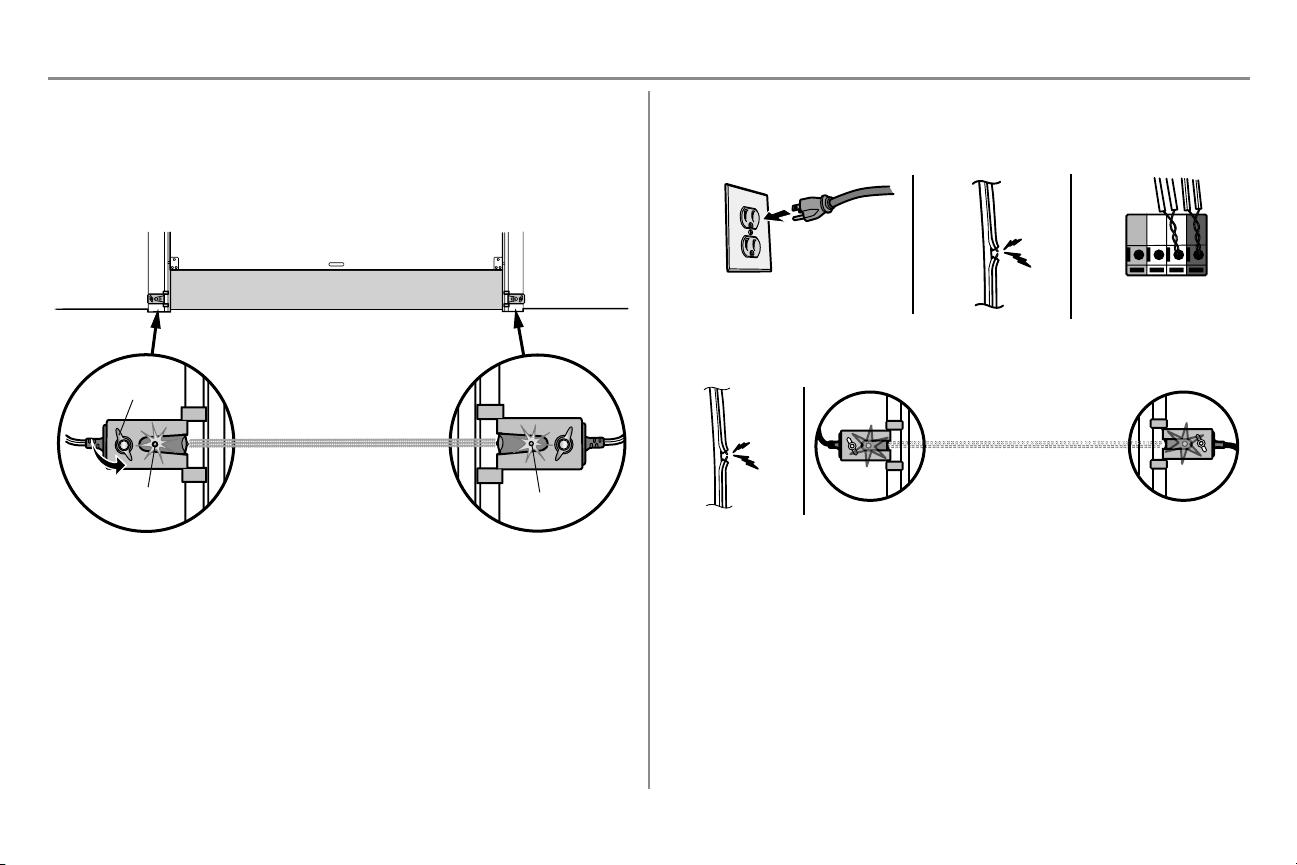
28
Instalación
PASO 16 Alinee los sensores de reversa de seguridad
La puerta no se cerrará si los sensores no están instalados y alineados correctamente.
Si el haz de luz está desalineado o se ve obstaculizado cuando la puerta se está cerrando, esta invertirá su dirección
y las luces del abre-puerta de garaje parpadearán diez veces. Si la puerta ya está abierta, no se cerrará.
1. Verifique que los DEL de ambos sensores estén encendidos permanentemente. Si los sensores están
conectados y alineados correctamente, los DEL quedarán encendidos en forma permanente.
Para alinear los sensores, afloje las tuercas mariposa, alinee los sensores y vuelva a ajustar las tuercas mariposa.
DEL verde
DEL ámbar
Tuerca de
mariposa
SENSOR EMISOR
SENSOR RECEPTOR
(haz de luz invisible)
Si el sensor receptor está expuesto a la luz solar directa,
inviértalo de posición con el sensor emisor, de modo que
quede en el lado opuesto de la puerta.
SI EL DEL ÁMBAR DEL SENSOR EMISOR NO SE ENCIENDE:
1. Verifique que llegue energía eléctrica al abre-puertas.
2. Verifique que no haya un cortocircuito ni el sensor esté roto.
3. Verifique que el sensor esté correctamente conectado: cables blancos al terminal blanco y cables
blanco/negro al terminal gris.
ROJO
BLANCO
BLANCO
GRIS
3
2
1
SI EL DEL VERDE DEL SENSOR RECEPTOR NO SE ENCIENDE:
1. Verificar que no haya un cortocircuito ni el sensor esté roto.
2. Asegúrese de que los sensores estén alineados.
1
2
PASO 17 Verificar que el instalación de alambres para el control
remoto es correctamente
Si el control de la puerta se ha instalado y cableado correctamente, el LED de comando que está en el panel de
control multifunción parpadeará.
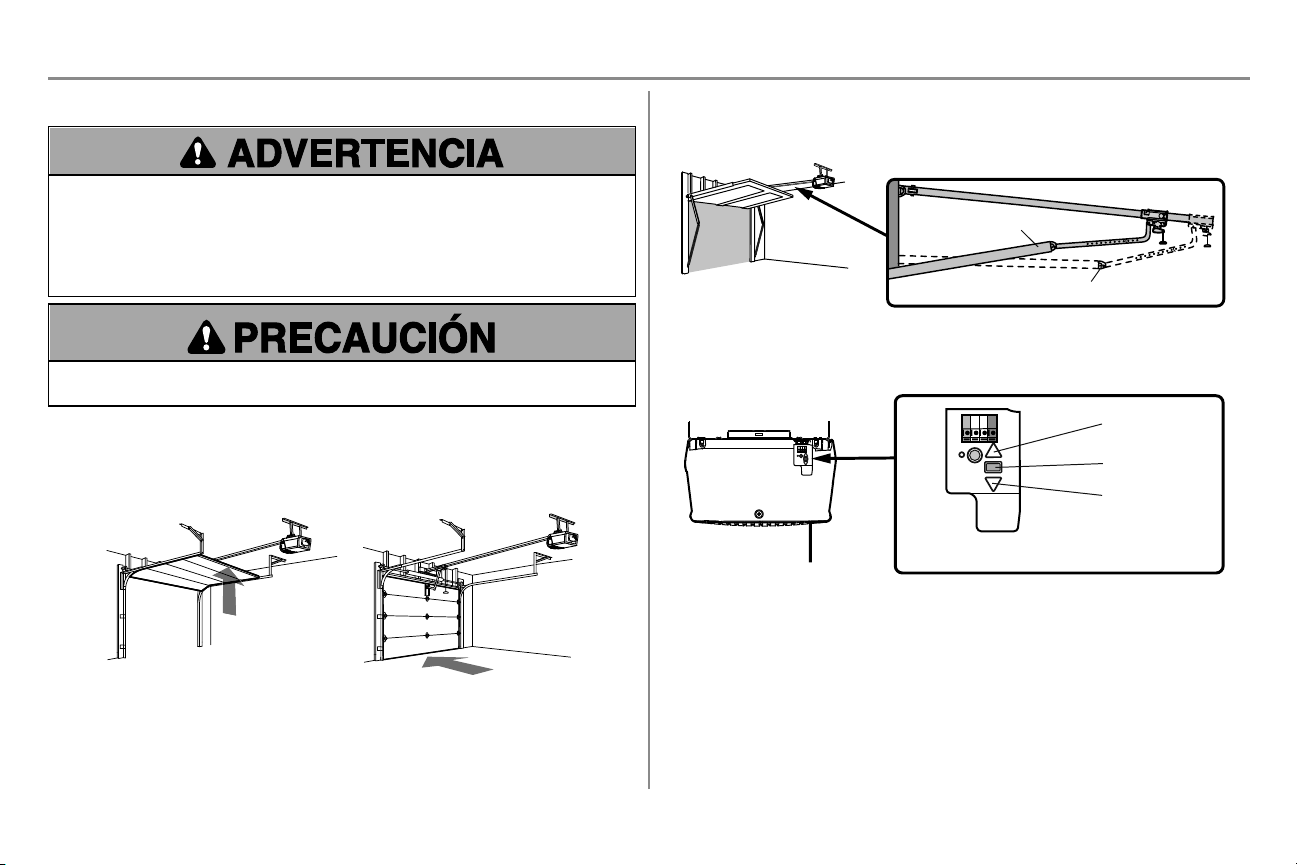
29
Ajustes
Introducción
Si el sistema de reversa de seguridad no se ha instalado debidamente, las personas (y los niños pequeños en
particular) podrían sufrir LESIONES GRAVES o incluso la MUERTE cuando se cierre la puerta del garaje.
l El ajuste incorrecto de los límites del recorrido de la puerta del garaje habrá de interferir con la operación
adecuada del sistema de reversa de seguridad.
l Después de llevar a cabo CUALQUIER ajuste, SE DEBE probar el sistema de reversa de seguridad. La
puerta DEBE retroceder al entrar en contacto con un objeto de 3.8 cm (1 1/2 de pulg.) de altura (o de 5 x 10
cm [2 x 4 pulg.] acostado en el piso).
Para evitar daños en los vehículos, asegúrese de que haya suficiente espacio cuando la puerta esté
completamente abierta.
El abre-puertas de garaje está diseñado con controles electrónicos que facilitan su instalación y regulación. Puede
regularse el punto de parada de la puerta en su posición abierta (arriba) y cerrada (abajo). Los controles electrónicos
detectan la fuerza que es necesaria para abrir y para cerrar la puerta. La fuerza se ajusta automáticamente cuando se
programa el recorrido.
NOTA: Si algo interfiere con el recorrido de la puerta en su trayectoria hacia arriba, la puerta se detendrá. La puerta
invertirá su dirección de movimiento si encuentra una interferencia en su movimiento hacia abajo.
ARRIBA (Abierto)
ABAJO (Cerrado)
Solamente para las puertas de una sola pieza
Al configurar el recorrido hacia ARRIBA de una puerta de una sola pieza, verifique que la puerta no quede inclinada
hacia atrás al abrirse completamente (ARRIBA). Si la puerta queda inclinada hacia atrás se deformará, hará
movimientos irregulares y/o se sacudirá al abrir o al cerrar.
Correcto
Incorrecto
Botones de programación
Los botones de programación están en el panel posterior del abre-puertas de garaje y se utilizan para programar el
recorrido de la puerta. Durante la programación, los botones de arriba y abajo pueden utilizarse para mover la puerta
cuando sea necesario.
Botón ARRIBA
Botón de ajuste
Botón A
BAJO
BOTONES DE PROGRAMACIÓN
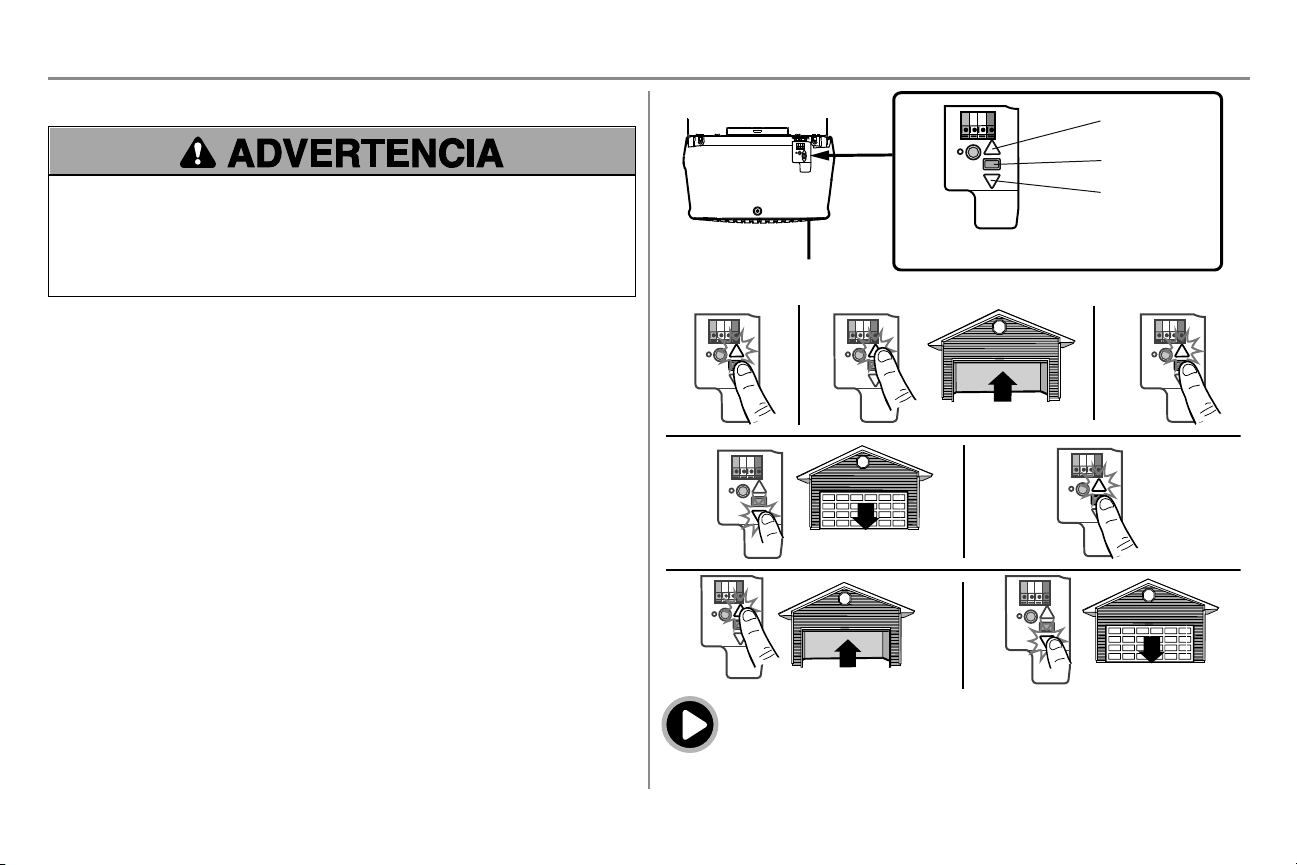
30
Ajustes
PASO 1 Programación del recorrido
Si el sistema de reversa de seguridad no se ha instalado debidamente, las personas (y los niños pequeños en
particular) podrían sufrir LESIONES GRAVES o incluso la MUERTE cuando se cierre la puerta del garaje.
l El ajuste incorrecto de los límites del recorrido de la puerta del garaje habrá de interferir con la operación
adecuada del sistema de reversa de seguridad.
l Después de llevar a cabo CUALQUIER ajuste, SE DEBE probar el sistema de reversa de seguridad. La
puerta DEBE retroceder al entrar en contacto con un objeto de 3.8 cm (1 1/2 de pulg.) de altura (o de 5 x 10
cm [2 x 4 pulg.] acostado en el piso).
Durante la programación, los botones de arriba y abajo pueden utilizarse para mover la puerta cuando sea necesario.
1. Mantenga presionado el botón de Ajuste hasta que el botón ARRIBA (UP) empiece a parpadear y/o se
escuche una señal sonora.
2. Mantenga presionado el botón ARRIBA (UP) hasta que la puerta se encuentre en la posición deseada.
3. Una vez que la puerta esté en la posición deseada, presione y suelte el botón de Ajuste. Las luces del
abre-puertas de garaje parpadearán dos veces y el botón ABAJO (DOWN) comenzará a parpadear.
4. Presione y mantenga presionado el botón ABAJO (DOWN) hasta que la puerta se encuentre en la posición
deseada.>
5. Una vez que la puerta esté en la posición deseada, presione y suelte el botón de Ajuste. Las luces del
abre-puertas de garaje parpadearán dos veces y el botón ARRIBA (UP) comenzará a parpadear.
6. Presione y suelte el botón UP (ARRIBA). Cuando la puerta se desplace a la posición programada de
ARRIBA (UP), el botón ABAJO (DOWN) empezará a parpadear.
7. Presione y suelte el botón DOWN (ABAJO). La puerta se desplazará a la posición programada de ABAJO
(DOWN). La programación ha finalizado.
* Si las luces del abre-puertas de garaje parpadean cinco veces durante los pasos de programación del recorrido,
significa que ha pasado el tiempo asignado a la programación. Si las luces del abre-puertas de garaje parpadean 10
veces durante la programación del recorrido, significa que los sensores de reversa de seguridad están mal alineados
u obstruidos (consulte pagina 28). Cuando los sensores estén bien alineados y no haya obstrucción, abra y cierre la
puerta con el control remoto o con los botones de ARRIBA (UP) y ABAJO (DOWN). La programación ha finalizado.
Si no puede operar la puerta hacia arriba o hacia abajo, repita los pasos de Programación del recorrido.
Botón ARRIBA
Botón de ajuste
Botón A
BAJO
BOTONES DE PROGRAMACIÓN
1 2
3
4
5
6 7
Para ver un video, visite tinyurl.com/lkwbnhj
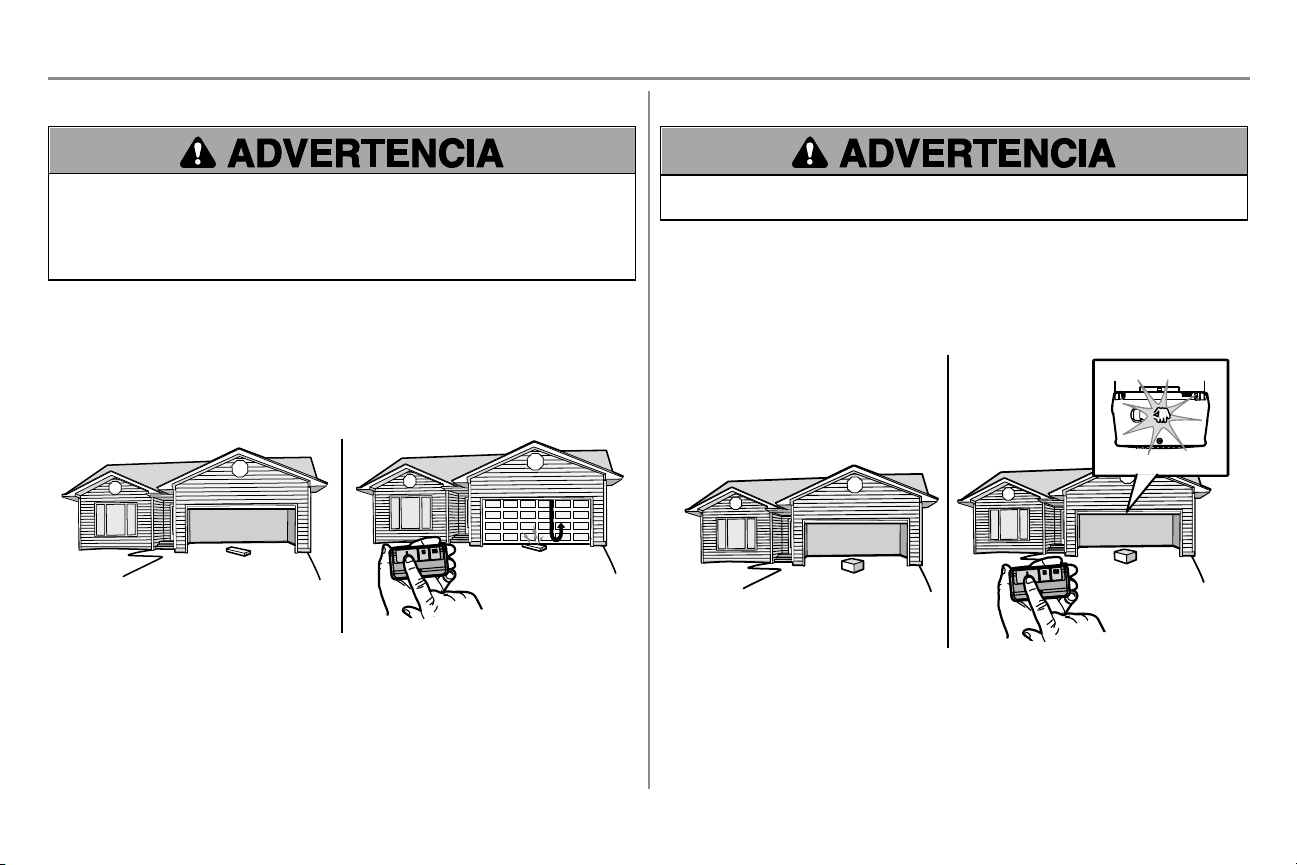
31
Ajustes
PASO 2 Pruebe el sistema de reversa de seguridad
Si el sistema de reversa de seguridad no se ha instalado adecuadamente, las personas (y los niños pequeños en
particular) podrían sufrir LESIONES GRAVES o incluso MORIR al cerrar la puerta del garaje.
l El sistema de reversa de seguridad SE DEBE probar cada mes.
l Después de llevar a cabo CUALQUIER ajuste, SE DEBE probar el sistema de reversa de seguridad. La
puerta DEBE retroceder al entrar en contacto con un objeto de 3.8 cm (1-1/2 de pulg.) de altura (o de 5 x 10
cm [2 x 4 pulg.]) acostado en el piso.
1. Con la puerta completamente abierta, coloque una tabla de 3.8 cm (1 1/2 de pulg.) de altura (o de 5 x 10 cm
[2 x 4 pulg.] acostada en el piso), centrada abajo de la puerta del garaje.
2. Presione el botón pulsador del control remoto para cerrar la puerta. La puerta DEBE retroceder al hacer
contacto con la tabla.
Si la puerta se detiene pero no retrocede:
1. Revise las instrucciones de instalación suministradas para asegurarse de seguir todos los pasos;
2. Repita la programación del desplazamiento (consulte el Paso 1 del Ajuste);
3. Repita la prueba de reversa de seguridad.
Si la prueba sigue fallando, llame a un técnico capacitado en sistemas de puertas.
1 2
PASO 3 Pruebe el sistema Protector System
Si un sensor de reversa de seguridad no se ha instalado adecuadamente, las personas (y los niños pequeños en
particular) podrían sufrir LESIONES GRAVES o incluso MORIR al cerrar la puerta del garaje.
1. Abra la puerta. Coloque la caja del abre-puertas de garaje en el recorrido de la puerta.
2. Presione el botón pulsador del control remoto para cerrar la puerta. La puerta no se moverá más de 2.5 cm
(una pulgada), y las luces del abre-puertas de garaje parpadearán 10 veces.
El abre-puertas de garaje no se cerrará mediante un control remoto si el LED del sensor de reversa de seguridad
está apagado (alertándolo de que el sensor está mal alineado u obstruido). Si el abre-puertas de garaje cierra la
puerta cuando está obstruido el sensor de reversa de seguridad (y los sensores están a no más de 6 pulgadas (15
cm) por encima del suelo), llame a un técnico de sistemas de puertas.
1
2
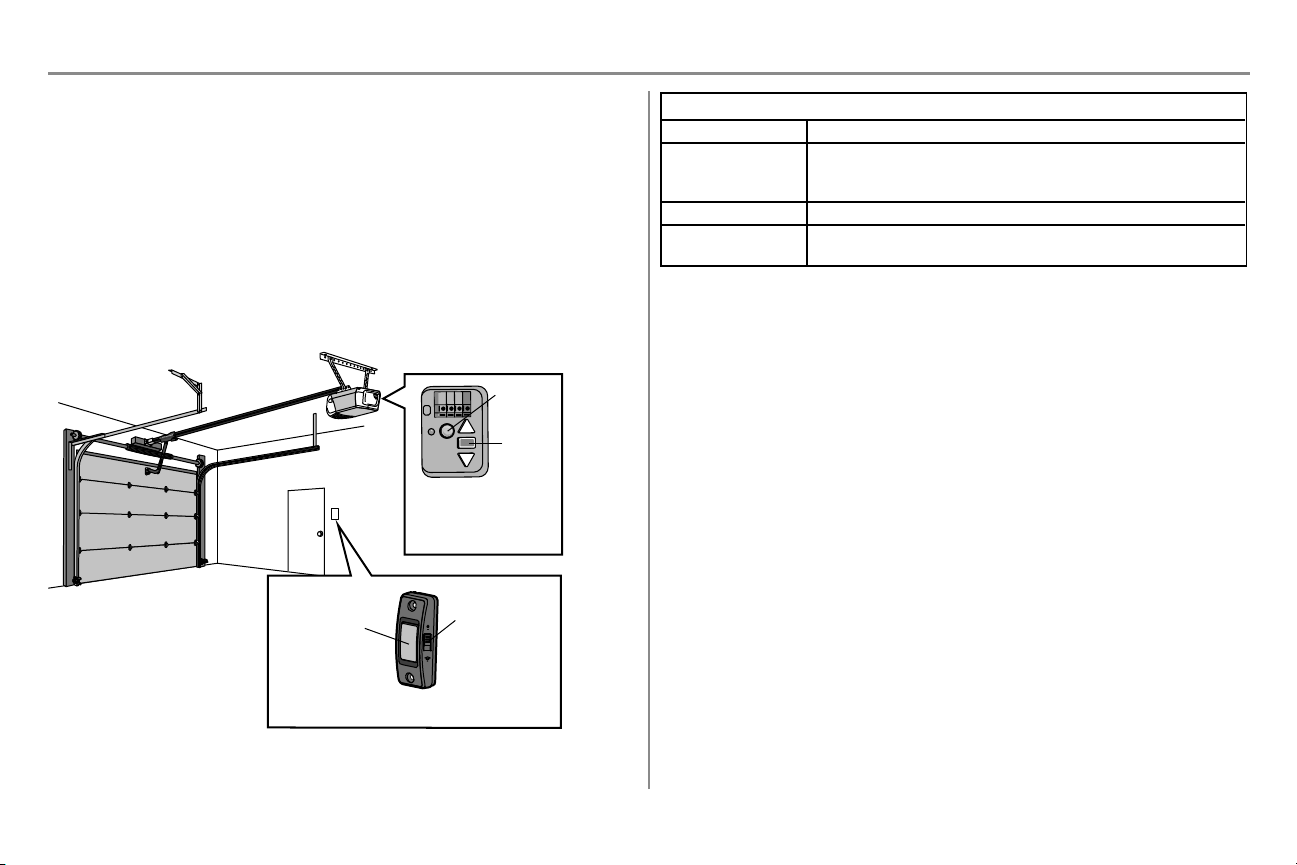
32
Control por teléfono inteligente myQ
®
Conéctese con su teléfono inteligente
Herramientas necesarias:
l Un teléfono inteligente, una tableta o una computadora portátil con Wi-Fi
l Conexión a Internet de banda ancha
l Señal de Wi-Fi en el garaje (se requieren 2.4 Ghz, 802.11b/g/n), vea la página pagina 3
l Contraseña para la red residencial (cuenta principal del router, no red de invitado)
l Número de serie myQ ubicado en el abre-puertas de garaje
Descargue la aplicación myQ para configurar una cuenta y conectarse
Abra y cierre su puerta, obtenga alertas y programe horarios desde cualquier lugar. Los abre-puertas de garaje
inteligentes conectados también reciben actualizaciones de software para garantizar que el abre-puertas cuente con
las últimas características operativas.
1. Descargue la aplicación de myQ.
2. Configurar una cuenta y conectarse.
Para obtener más información sobre la conexión de su abre-puertas de garaje visite support.chamberlaingroup.com.
Un DEL en el abre-puertas
de garaje indicará el estado
de la conexión de Wi-Fi.
Vea la siguiente tabla.
Botón pulsador
Botón de LUZ
(también se
utiliza para
conectar myQ;
ver aplicación)
Control de botón pulsador
LED
Botón de
aprendizaje
estadode la conexiónde Wi-Fi
DEL Definición
Azul Apagado – La conexión Wi-Fi no está activada.
Parpadeante – El abre-puertas de garaje está en modo de aprendizaje de Wi-Fi.
Fijo – Dispositivo móvil conectado al abre-puertas de garaje.
Azul y verde Parpadeante – Intentando conectar al router.
Verde Parpadeante – Intentando conectar al servidor de Internet.
Fijo – El Wi-Fi está configurado y el abre-puertas de garaje está conectado a Internet.
NOTAS:
Para borrar la configuración de Wi-Fi, consulte pagina 36.
33
INSTRUCCIONES DE SEGURIDAD IMPORTANTES
Para reducir el riesgo de LESIONES GRAVES o la MUERTE:
1. LEA Y RESPETE TODAS LAS ADVERTENCIAS Y LAS INSTRUCCIONES.
2. SIEMPRE guarde los controles remotos lejos del alcance de los niños. NUNCA permita que los niños hagan
funcionar o jueguen con los botones del control del abre-puertas de garaje o con los controles remotos.
3. SOLO active el abre-puertas de garaje siempre y cuando lo puedan ver con claridad, esté debidamente
ajustado y no haya ninguna obstrucción en su recorrido al cerrarse.
4. SIEMPRE mantenga la puerta del garaje a la vista y alejada de las personas y objetos hasta que esté
completamente cerrada. NADIE DEBE ATRAVESAR LA RUTA DE LA PUERTA CUANDO ESTÁ EN
MOVIMIENTO.
5. NADIE DEBE CRUZAR POR DEBAJO DE UNA PUERTA DETENIDA O PARCIALMENTE ABIERTA.
6. De ser posible, use el desenganche de emergencia para soltar el carro SOLO cuando la puerta del garaje esté
CERRADA. Tenga precaución cuando utilice esta liberación con la puerta abierta. Los resortes débiles o
rotos o la puerta desequilibrada pueden ocasionar la caída de la puerta en forma rápida y/o inesperada, lo que
aumenta el riesgo de LESIONES GRAVES o de MUERTE.
7. NUNCA use la manija del desenganche de emergencia a menos que la entrada al garaje esté libre de
obstrucciones y no haya ninguna persona presente.
8. NUNCA use la manija para jalar la puerta para abrirla o cerrarla. Si el nudo de la cuerda se suelta, usted
podría caerse.
9. Después de llevar a cabo CUALQUIER ajuste, SE DEBE probar el sistema de reversa de seguridad.
10. El sistema de reversa de seguridad SE DEBE probar cada mes. La puerta del garaje DEBE retroceder al
entrar en contacto con un objeto de 3,8 cm (1-1/2 de pulg.) de altura (o de 5 x 10 cm [2 x 4 pulg.] acostado
en el piso). Si no se ajusta el abre-puertas de garaje debidamente, aumentará el riesgo de sufrir
LESIONES GRAVES o LA MUERTE.
11. MANTENGA SIEMPRE LA PUERTA DEL GARAJE DEBIDAMENTE EQUILIBRADA (consulte pagina
2). Si la puerta no está debidamente equilibrada es posible que NO retroceda cuando así se requiera y
podría ocasionar una LESIÓN GRAVE o incluso la MUERTE.
12. TODAS las reparaciones necesarias para los cables, resortes y otras partes DEBEN ser realizadas por
un técnico capacitado en sistemas de puertas, pues todas estas partes están bajo una tensión EXTREMA.
13. SIEMPRE desconecte el suministro de corriente eléctrica al abre-puertas de garaje ANTES de llevar a
cabo CUALQUIER reparación o de quitar las cubiertas.
14. Este sistema tiene una función de activación por estado pasivo. La puerta podría ponerse en movimiento
repentinamente. NADIE DEBE ATRAVESAR LA RUTA DE LA PUERTA CUANDO ESTÁ EN
MOVIMIENTO.
15. NO usarlo para puertas de una sola pieza si utiliza dispositivos de cierre automático. Los dispositivos y
funciones automáticas deben usarse ÚNICAMENTE con puertas seccionales.
16. CONSERVE ESTAS
INSTRUCCIONES.
Operación
34
Operación
Funciones
El abre-puertas de garaje tiene varias funciones para que usted pueda tener más control sobre el funcionamiento de
su abre-puertas.
myQ
El abre-puertas de garaje con Wi-Fi es compatible con hasta 16 accesorios habilitados de myQ. Hasta 10
dispositivos se pueden asociar a la puerta de enlace del abre-puertas de garaje con Wi-Fi. Estos dispositivos se
pueden controlar mediante la aplicación myQ. Estos dispositivos incluyen cualquier combinación de abre-puertas de
garaje myQ, abre-puertas de garaje con Wi-Fi, y controles de luz myQ. Hasta 6 dispositivos se pueden asociar al
abre-puertas de garaje (controlados por el abre-puertas de garaje a través de 900 MHz). Estos dispositivos incluyen
cualquier combinación de controles de luz myQ o una puerta de garaje y un monitor de portón.
TEMPORIZADOR DE CIERRE (NO habilitaren puertas de una sola pieza)
La función de temporizador de cierre no está disponible en todos los controles de puerta. A continuación encontrará
una lista de controles de puerta con la función de temporizador de cierre:
041A7305-1 Smart Control Panel y 041A7327-1 Panel de control con detector de movimiento.
La función de temporizador de cierre cierra el portón automáticamente después de un período de tiempo especificado.
NO active el temporizador de cierre con puertas de una pieza. El temporizador de cierre puede utilizarse
ÚNICAMENTE con puertas seccionales. Esta función viene desactivada de fábrica. Antes de que se cierre la
puerta, el abre-puertas de garaje emitirá un sonido de advertencia y las luces se encenderán intermitentemente. El
temporizador de cierre se desactivará si la puerta encuentra dos obstrucciones consecutivamente o los detectores de
seguridad están desalineados. La puerta invertirá su dirección de movimiento y NO se volverá a cerrar hasta que se
despejen las obstrucciones o los detectores de seguridad queden correctamente alineados. Una vez que se haya
retirado la obstrucción o se hayan alineados los sensores de reversa de seguridad, la puerta se cerrará cuando se
active nuevamente el abre-puertas de garaje. El temporizador de cierre NO se activará si el abre-puertas de garaje
está funcionando con batería o si los sensores de reversa de seguridad no están alineados correctamente. Esta
función NO debe ser el método principal para cerrar la puerta. Si se usa esta función, es conveniente instalar
una llave digital en caso de que el usuario quede accidentalmente del lado de afuera después de que se
haya cerrado la puerta.
CONTROLESREMOTOSYCONTROLES DELAPUERTA
El abre-puertas de garaje viene programado de fábrica para funcionar con el control remoto, que cambia de código
cada vez que se usa (puede acceder aleatoriamente a más de cien mil millones de códigos nuevos).
Accesorios myQ Capacidad de la memoria
Controles remoto Hasta 8
Controles de la puerta Hasta 2 controles de la puerta myQ
Llaves digitales Hasta 1
THE PROTECTOR SYSTEM
®
(SENSORESDEREVERSA DE SEGURIDAD)
Cuando están correctamente instalados y alineados, los sensores de reversa de seguridad detectarán una
obstrucción en el trayecto del haz infrarrojo. Si una obstrucción interrumpe el haz infrarrojo mientras se cierra la
puerta, ésta se detendrá y retrocederá hasta la posición totalmente abierta, y las luces del abre-puertas parpadearán
10 veces. Si la puerta está totalmente abierta, y los sensores no están instalados o están desalineados, la puerta no
se cerrará desde un control remoto. Sin embargo, puede cerrar la puerta si mantiene presionado el botón del control
de la puerta o de la llave digital hasta que la puerta se cierre por completo. Los sensores de reversa de seguridad no
afectan el ciclo de apertura.
CONSERVACIÓN DE ENERGÍA
Para ahorrar energía, el abre-puertas de garaje pasará a modo pasivo cuando la puerta esté totalmente cerrada. En
modo pasivo, el abre-puertas de garaje permanece apagado hasta que vuelva a activarse. En modo pasivo está en
sincronización con la bombilla del abre-puertas de garaje. Al apagarse la bombilla, se apagarán los LED de los
sensores y cuando se enciendan las luces del abre-puertas de garaje, se encenderán los LED del sensor. El abre-
puertas de garaje no pasará al modo pasivo hasta que haya completado 5 ciclos desde que se accionó.
LUCES
Las bombillas del abre-puertas de garaje se encenderán cuando el abre-puertas se enchufe inicialmente, al
restablecerse la energía después de un corte o al activarse el abre-puertas de garaje. Las luces se apagarán
automáticamente después de cuatro minutos y medio. Puede usarse una bombilla incandescente A19 (de hasta 100
vatios) o una bombilla fluorescente de alto rendimiento (CFL) de hasta 26 vatios (equivalente a 100 vatios) para
obtener la máxima eficiencia de energía. NOTA: No use bombillas de halógeno, de cuello corto o especiales, ya que
pueden recalentar el panel del extremo o el casquillo de la luz. No use bombillas DEL, ya que pueden reducir el
alcance o el rendimiento de los controles remotos.
Función de iluminación
El abre-puertas de garaje está equipado con una función adicional: Las luces se encenderán si alguien entra por la
puerta del garaje y se interrumpe el haz infrarrojo de los sensores de seguridad.
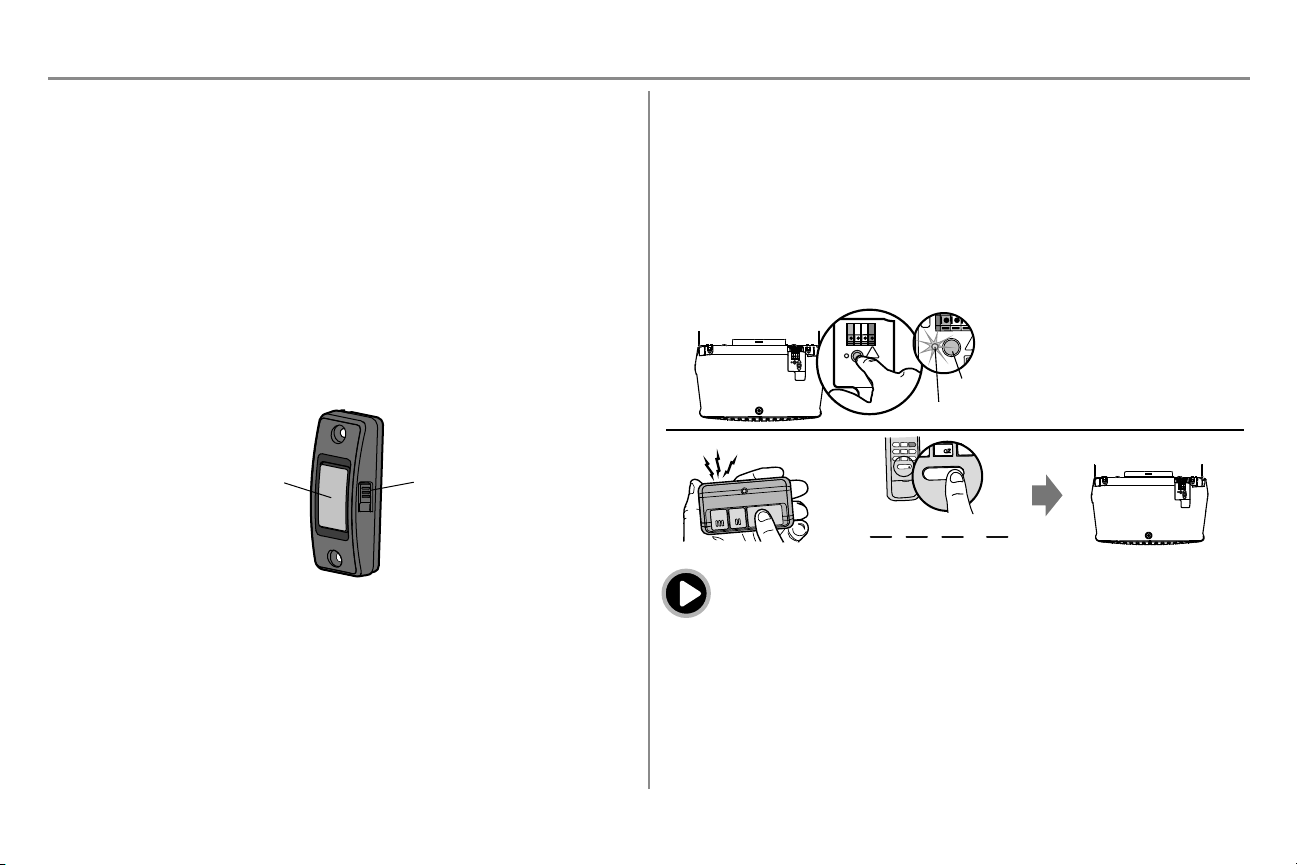
35
Operación
Cómo usar el abre-puerta de garaje
El abre-puertas puede activarse con un control de puerta montado en la pared, un control remoto, una llave digital o un
accesorio myQ.
La puerta se cerrara si están abierta, o se abrirá esta cerrada. La puerta se detendrá si detecta una obstrucción o se
interrumpe el movimiento. Al activarse el abre-puerta con la puerta en cualquier posición que no sea cerrada, la
puerta se cerrará. Si el abre-puerta detecta una obstrucción mientras se cierra, la puerta invertirá su dirección de
movimiento. Si una obstrucción interrumpe el haz del sensor, las luces del abre-puertas de garaje parpadearán 10
veces. Sin embargo, puede cerrar la puerta si mantiene presionado el botón del control o de la entrada sin llave hasta
que la puerta se cierre por completo.
Los sensores de reversa de seguridad no afectan el ciclo de apertura. El sensor de reversa de seguridad debe estar
bien conectado y alineado antes de que el abre-puertas de garaje se mueva hacia abajo.
Control de botón pulsador
SINCRONIZACIÓN DEL CONTROL DE LA PUERTA: Para sincronizar el control de la puerta con el abre-
puertas de garaje, presione el pulsador de barra hasta que se active el abre-puertas de garaje (esto podría llevar
hasta tres intentos).
Botón pulsador
Botón de
LUZ
Control remoto y entrada con llave digital
Se incluye un control remoto preprogramado, no es necesario programar el control remoto.
Para agregar o reprogramar un control remoto, siga las instrucciones siguientes. Los controles remotos anteriores de
Chamberlain NO son compatibles. Consulte pagina 40 para conocer los accesorios compatibles.
PROGRAMACIÓN USANDO EL CONTROLDE LAPUERTA
1. Presione y suelte inmediatamente el botón APRENDIZAJE.
2. Control remoto: Oprima y mantenga oprimido el botón de control remoto que desee usar.
Entrada con llave digital: Ingrese un número de identificación personal (PIN) de 4 dígitos en el teclado
con llave digital. Luego pulse el botón ENTER.
Las luces del abre-puertas se encenderán intermitentemente (o se escucharán dos clic) cuando el código quede
programado. Repetir los pasos anteriores para programar otros controles remotos o teclados digitales de acceso.
1
2
O
PIN
? ? ? ?
4
GHI
5
JKL
7
PRS
8
TUV
9
WXY
0
QZ
*
#
ENTER
0 QZ
*
#
ENTER
6
MNO
“clic”
“clic”
DEL DE APRENDIZAJE
Botón APRENDIZAJE
Para ver un video, visite tinyurl.com/lcsf6xt
HomeLink
®
Si su vehículo está equipado con HomeLink, se puede requerir un Compatibility Bridge
TM
(no incluido) para
determinados vehículos. Visite bridge.chamberlain.com para saber si necesitará un Bridge.
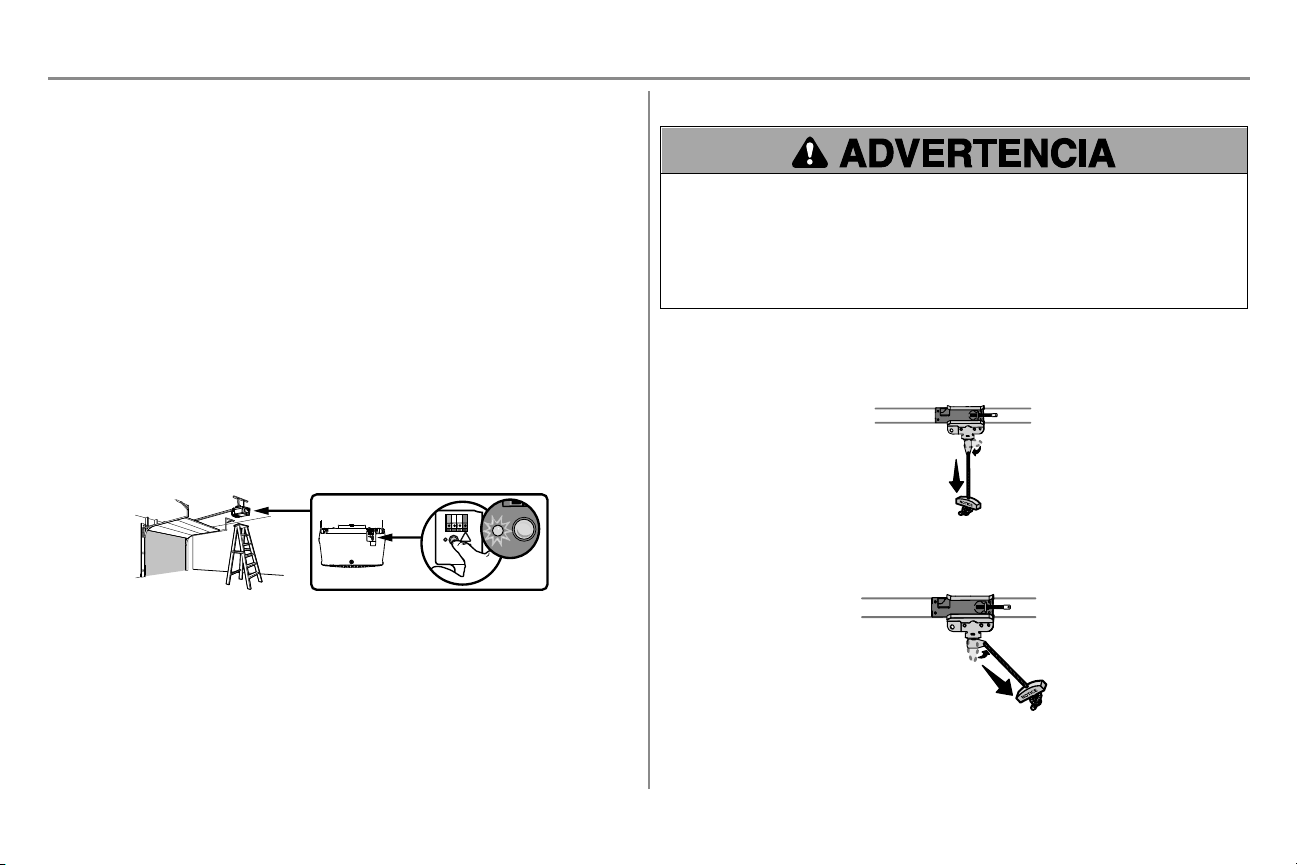
36
Operación
Para borrar la memoria
BORRE TODOS LOS DATOS DELCONTROL REMOTO Y DEL ACCESO CON LA LLAVE DIGITAL
1. Mantenga presionado el botón de aprendizaje (LEARN) en el abre-puertas de garaje hasta que se apague
el DEL (aproximadamente 6 segundos). Se borrarán todos los códigos de los controles y entradas
digitales. Vuelva a programar todo accesorio que desee usar.
BORRE TODOS LOS CONTROLES REMOTOS, ENTRADAS CON LLAVE DIGITAL Y
DISPOSITIVOS myQ DEL ABRE-PUERTAS DE GARAJE
1. Mantenga presionado el botón de aprendizaje (LEARN) en el abre-puertas de garaje hasta que se apague
el DEL (aproximadamente 6 segundos).
2. Inmediatamente presione y mantenga presionado el botón de aprendizaje (LEARN) otra vez hasta que el
DEL se apague. Ahora todos los códigos estarán borrados. Vuelva a programar todo accesorio que desee
usar.
ELIMINAR LACONEXIÓN DEL ABRE-PUERTAS A LA RED Wi-FiDE SU CASA
1. Presionar y mantener presionado el botón negro de ajuste en el abre-puertas hasta escuchar 3 señales
sonoras (aproximadamente 6 segundos).
BORRAR UNA CUENTA myQ
1. Visite www.mychamberlain.com para acceder a su cuenta myQ.
2. Vaya a la sección “Cuenta”.
3. Haga clic en “Eliminar cuenta”.
Visite support.chamberlaingroup.com para obtener más detalles.
Para abrir la puerta manualmente
Para evitar la posibilidad de una LESIÓN GRAVE o incluso LA MUERTE si la puerta del garaje se cae:
l De ser posible, use el desenganche de emergencia para soltar el carro SOLO cuando la puerta del garaje
esté CERRADA. Si los resortes están débiles o rotos o si la puerta está desequilibrada, podría abrirse y
caer rápida y/o inesperadamente.
l NUNCA use la manija del desenganche de emergencia a menos que la entrada al garaje esté libre de
obstrucciones y no haya ninguna persona presente.
l NUNCA use la manija para tirar de la puerta para abrirla o cerrarla. Si el nudo de la cuerda se suelta, usted
podría caerse.
DESCONECTE EL CARRO
1. Si es posible, la puerta se debe cerrar completamente.
2. Jale la manija de desenganche de emergencia para que el brazo de desenganche del carro quede en
posición vertical. A continuación, la puerta se puede subir y bajar manualmente siempre que sea
necesario.
VOLVER A CONECTAREL CARRO
1. Jale la manija de desenganche de emergencia hacia el abre-puertas de garaje para que el brazo del carro
quede en posición horizontal. El carro se volverá a conectar en la próxima operación de movimiento hacia
ARRIBA o hacia ABAJO, ya sea manualmente o usando el control de de la puerta o el control remoto.
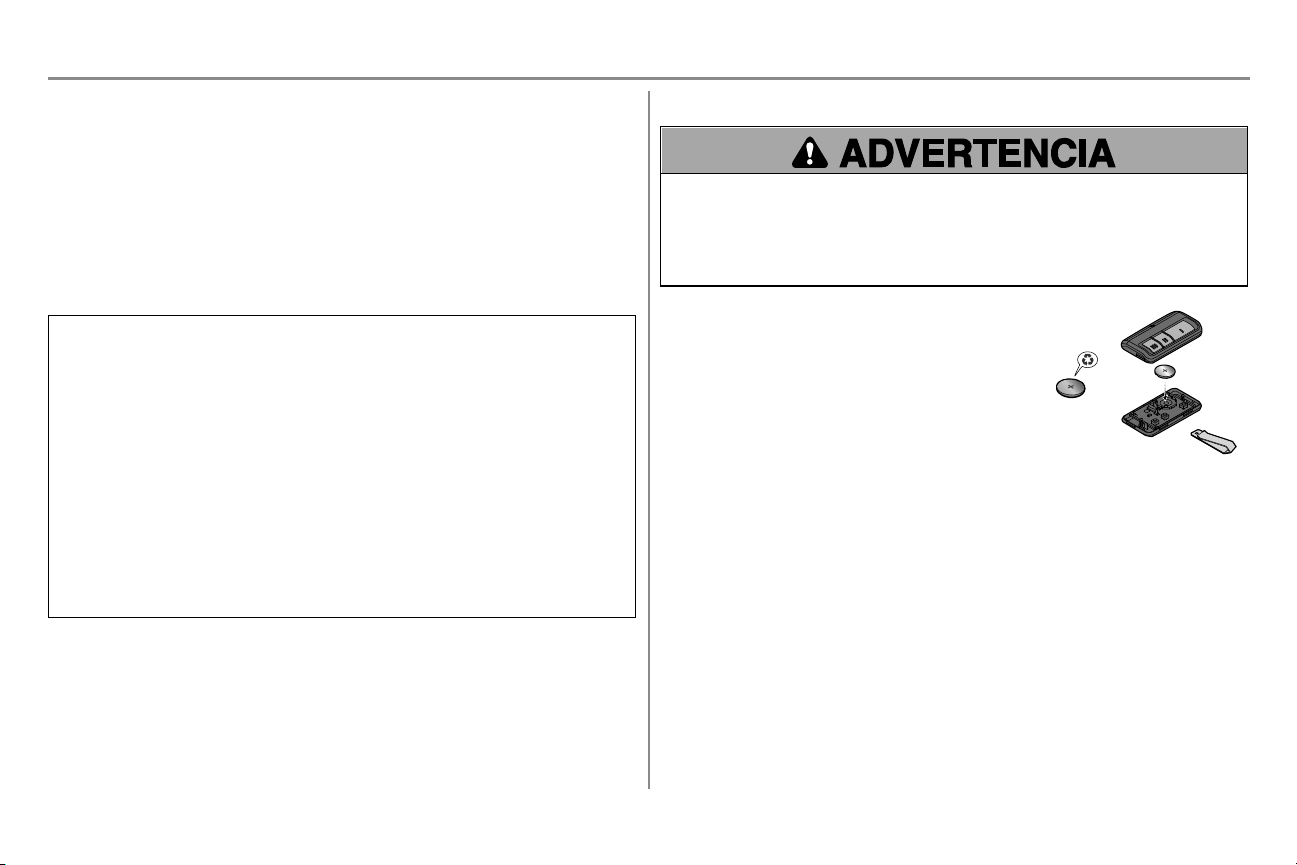
37
Mantenimiento
Plan de mantenimiento
MENSUAL
l Haga funcionar la puerta manualmente. Si está desequilibrada o se atasca, llame a un técnico capacitado en
sistemas de puertas.
l Verifique que la puerta se abra y se cierre completamente. Prueba del sistema de reversa de seguridad. Ajustar
si es necesario, vea pagina 29.
l Pruebe el sistema de reversa de seguridad. Prueba del sistema de reversa de seguridad. Ajustar si es
necesario, vea pagina 31.
ANUALMENTE
l Ponga aceite en los rodillos, los cojinetes y las bisagras de la puerta. El abre-puertas de garaje no necesita
lubricación adicional. No lubrique los rieles de la puerta.
ADVERTENCIA: Este dispositivo cumple con la Parte 15 de la reglamentación de la FCC y los estándares RSS
exentos de licencia de Industry Canada. La operación está sujeta a las siguientes dos condiciones: (1) este
dispositivo no puede causar interferencia perjudicial, y (2) este dispositivo debe aceptar cualquier interferencia
recibida, incluyendo la interferencia que puede causar una operación no deseable.
Cualquier cambio o modificación no expresamente aprobada por la parte responsable del cumplimiento podría
anular la autoridad del usuario para operar el equipo.
Instalar este dispositivo de manera que quede una distancia mínima de 20 cm (8 pulg.) entre el dispositivo y los
usuarios/transeúntes.
Este equipo ha sido verificado y cumple con los límites para un dispositivo digital de Clase B, conforme con la Parte
15 de las normas de la FCC y el estándar ICES de Industry Canada. Estos límites se establecen para brindar un
nivel razonable de protección contra interferencias perjudiciales en instalaciones residenciales. Este equipo
genera, usa y puede emitir energía de radiofrecuencia. Si no se instala y utiliza de acuerdo con las instrucciones,
podrá causar interferencia con comunicaciones radiales. Aun así, no hay garantía de que no se produzcan
interferencias en una instalación particular. Si este equipo produce interferencia en la recepción de radio o
televisión, lo cual puede determinarse apagando y encendiendo la unidad, el usuario debe tratar de corregir el
problema por medio de lo siguiente:
l Volver a orientar o reubicar la antena receptora.
l Aumentar la distancia entre el equipo y el receptor.
l Conectar el equipo en una salida de un circuito distinto del circuito al que está conectado el receptor.
l Consultar con el distribuidor o con un técnico de radio/TV experimentado para pedir ayuda.
La batería del control remoto
Para evitar posibles LESIONES GRAVES o la MUERTE:
l NUNCA permita la presencia de niños cerca de las pilas/baterías.
l Si alguien ingiere una pila/batería, llame al médico de inmediato.
Para reducir el riesgo de incendio, explosión o quemadura química:
l Reemplace las pilas solo por pilas tipo botón de 3V CR2032.
l NO recargue, desarme, caliente por encima de los 100 °C (212 °F) ni incinere la pila o batería.
La batería de litio CR2032 de 3V debe producir energía durante 3
años. Si la batería está baja, el LED del control remoto no parpadeará
cuando se presione el botón.
Para reemplazar la batería, abra la caja primero por el medio (1),
luego por cada lado (2 y 3) con el broche para visera. Reemplace las
baterías solo por baterías tipo botón de 3V CR2032. Coloque la batería
con el lado positivo hacia arriba. Deseche las pilas usadas en forma
adecuada.
1
2
3

38
Tabla de diagnóstico
El abre-puertas de garaje viene programado con funciones de autodiagnóstico. Las flechas hacia ARRIBA y ABAJO parpadean para mostrar los códigos de diagnóstico.
CÓDIGO DE DIAGNÓSTICO SÍNTOMA Solución
La flecha hacia arriba
parpadea
La flecha hacia abajo
parpadea
1 1
El abre-puertas de garaje no cierra la puerta y las bombillas se encienden
intermitentemente.
Sensores de reversa de seguridad no instalados, no conectados o cable cortado. Inspeccione los cables del sensor
para detectar si están desconectados o cortados.
1 2
El abre-puertas de garaje no cierra la puerta y las bombillas se encienden
intermitentemente.
Hay un cable en cortocircuito o invertido para los sensores de reversa de seguridad. Inspeccione el cable del sensor
de seguridad en todos los puntos de engrapado y de conexión y reemplace el cable o corrija, según sea necesario.
1 3
El control de la puerta no funciona.
Los cables tienen un cortocircuito o el control de la puerta es defectuoso. Inspeccione los cables del control de la
puerta en todos los puntos de engrapado y de conexión y reemplace el cable o corrija, según sea necesario.
1 4
El abre-puertas de garaje no cierra la puerta y las bombillas se encienden
intermitentemente.
Los sensores de seguridad están mal alineados o estaban momentáneamente obstruidos. Realinear ambos sensores
para asegurar que ambos DEL estén estables y no parpadeen. Asegúrese de que no haya nada colgado ni montado en
la puerta que pudiera interrumpir el recorrido de los sensores mientras se cierra la puerta.
1 5
La puerta se mueve de 15 a 20cm (6 a 8pulg.), se detiene o retrocede.
Abra y cierre la puerta manualmente. Verifique si hay atascos u obstrucciones, por ejemplo un resorte roto o bloqueo
de la puerta, y corrija según sea necesario. Revise las conexiones del cableado en el módulo de recorrido y en el
tablero lógico. Reemplace el módulo de recorrido, si es necesario.
No hay movimiento, tan solo un clic.
Abra y cierre la puerta manualmente. Verifique si hay atascos u obstrucciones, por ejemplo un resorte roto o bloqueo
de la puerta, y corrija según sea necesario. Reemplace el tablero lógico, si es necesario.
El abre-puertas hace un zumbido durante uno o dos segundos sin
movimiento.
Abra y cierre la puerta manualmente. Verifique si hay atascos u obstrucciones, por ejemplo un resorte roto o bloqueo
de la puerta, y corrija según sea necesario. Reemplace el motor, si es necesario.
1 6
La puerta se desliza después de haberse detenido por completo. Programe el recorrido hasta la posición de recorrido o pídale a un técnico profesional que equilibre la puerta.
2 1-5
No hay movimiento ni sonido. Reemplace el tablero lógico.
3 2
No se puede fijar la posición de recorrido o sujeción. Verifique que el módulo de recorrido se haya ensamblado correctamente y reemplácelo si es necesario.
Resolución de problemas
39
CÓDIGO DE DIAGNÓSTICO SÍNTOMA Solución
La flecha hacia arriba
parpadea
La flecha hacia abajo
parpadea
4 1-4
La puerta se mueve, se detiene o retrocede. Abra y cierre la puerta manualmente. Verifique si hay atascos u obstrucciones, por ejemplo un resorte roto o
bloqueo de la puerta, y corrija según sea necesario. Si la puerta está trabada o pegada, llame a un técnico
capacitado en sistemas de puertas. Si la puerta no está atascada o trabada, intente reprogramar el recorrido
(consulte pagina 30).
4 5
El abre-puertas se mueve aproximadamente de 15 a 20cm (6 a 8pulg.), se
detiene y retrocede.
Error de comunicación con el módulo de desplazamiento. Verifique las conexiones del módulo de recorrido y
reemplace el módulo si es necesario.
4 6
El abre-puertas de garaje no cierra la puerta y las bombillas se encienden
intermitentemente.
Los sensores de seguridad están mal alineados o estaban momentáneamente obstruidos. Realinear ambos
sensores para asegurar que ambos DEL estén estables y no parpadeen. Asegúrese de que no haya nada colgado ni
montado en la puerta que pudiera interrumpir el recorrido de los sensores mientras se cierra la puerta.
El abre-puerta emite señales sonoras por varios motivos:
l El abre-puertas de garaje ha sido activado a través de un dispositivo o función como el temporizador de cierre o
el monitor del abre-puertas de garaje. Consulte pagina 34.
El control remoto no activa la puerta del garaje:
l Verificar que la función de bloqueo no esté activada en el control de la puerta.
l Vuelva a programar el control remoto.
l Si aun así el control remoto no activa la puerta, revise los códigos de diagnóstico para comprobar que el abre-
puertas de garaje esté funcionando correctamente.
La puerta no cierra y la luz parpadea en la unidad del motor:
El sensor de reversa de seguridad debe estar bien conectado y alineado antes de que el abre-puertas de garaje se
mueva hacia abajo.
l Verifique que los sensores de seguridad estén debidamente instalados, alineados y libres de obstrucciones.
Las luces del abre-puertas de garaje no se apagan cuando la puerta está abierta:
El abre-puertas de garaje está equipado con una característica que enciende la luz cuando se hayan obstruido los
sensores de reversa de seguridad.
La puerta de mi garaje se abre con el control remoto de mi vecino:
Borre la memoria de su abre-puertas y vuelva a programar el control remoto.
El Homelink® de mi vehículo no está programado para mi abre-puertas de garaje:
Determinados vehículos pueden requerir un Compatibility BridgeTM (no incluido). Visite bridge.chamberlain.com para
saber si necesitará un Bridge.
Resolución de problemas de Wi-Fi
El abre-puertas de garaje NO entra en el modo de APRENDIZAJE de Wi-Fi:
l Luego de la instalación inicial del abre-puertas de garaje, este debe finalizar un ciclo completo (apertura y
cierre) antes de activar el modo APRENDIZAJE de Wi-Fi.
l Si hubo un corte de electricidad reciente, el abre-puertas de garaje debe finalizar un ciclo completo antes de
que se pueda activar el modo APRENDIZAJE de Wi-Fi.
Resolución de problemas
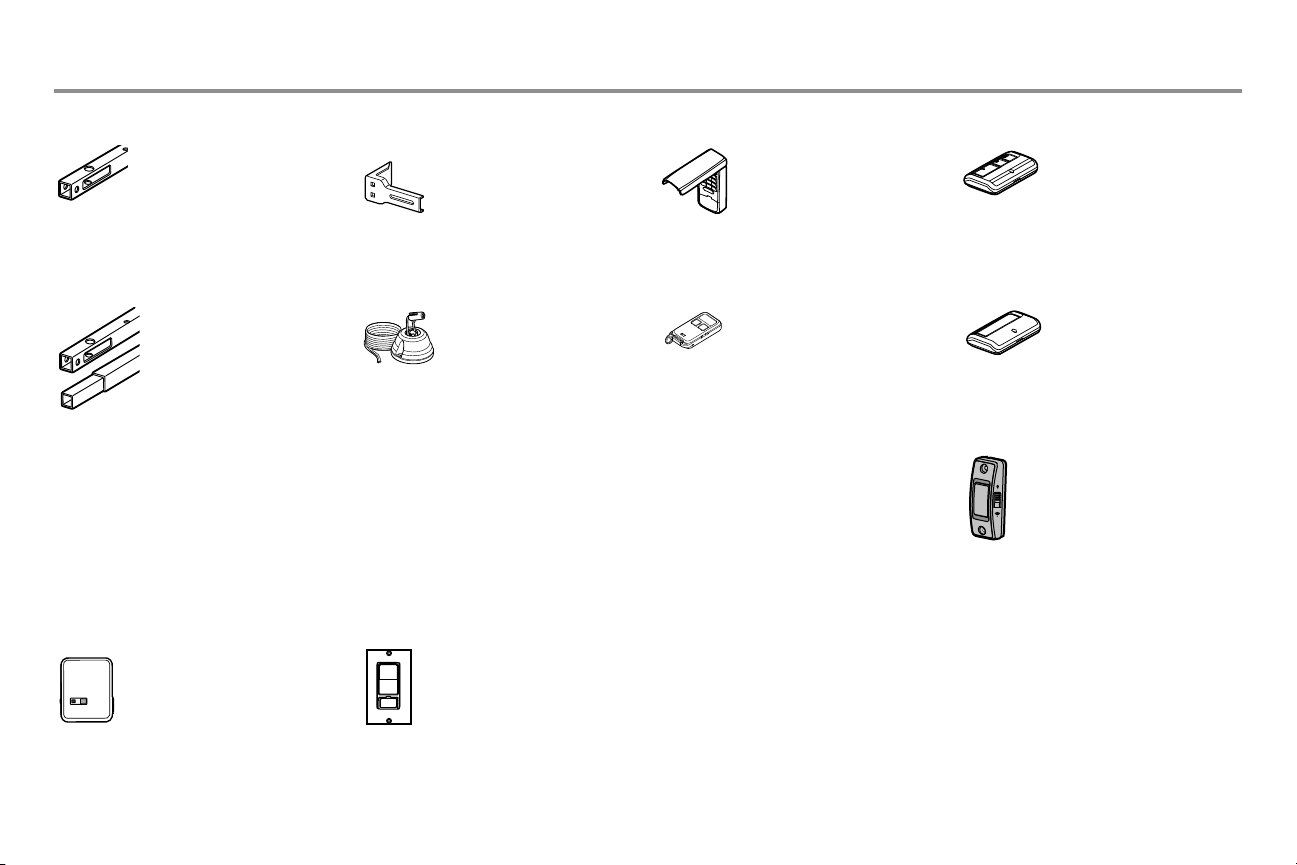
40
Accessorios
953EV
Control remoto:
Compatible con TODOS los
modelos Chamberlain desde 1993
hasta la fecha. Compatible con
myQ. Incluye broche para visera.
CLLP1
Asistente laser para estacionar:
Estacione siempre en el lugar
correcto. Su abre-puertas de
garaje activa un haz de laser, el
cual se proyecta en el tablero de
su vehículo para guiarlo en un
estacionamiento perfecto.
956EV
Control remoto tipo llavero:
Compatible con TODOS los
modelos Chamberlain desde 1993
hasta la fecha. Compatible con
myQ. Con llavero.
940EV
Teclado inalámbrico:
Utilizado del lado de afuera para
facilitar el ingreso al garaje con
un código de cuatro dígitos.
Compatible con TODOS los
modelos Chamberlain desde 1993
hasta la fecha. Compatible con
myQ.
Ménsulas de extensión:
(Opcionales). Para la instalación
del sensor de reversa de
seguridad en la pared o en el piso.
CLOSED
OPEN
041A5281-1
6610CD
Extensión del riel de 3 m
(10 pies):
Para permitir que una puerta
de 3 m (10 pies) se abra
completamente.
Extensión de riel de 2.4 m
(8 pies):
Para permitir que una puerta
de 2.4 m (8 pies) se abra
completamente.
6608CD
PILCEV
Control remoto de iluminación
myQ:
Controla este interruptor de luz con
la aplicación para teléfono inteligente
myQ.
WSLCEV
Interruptor de luz interna/externa
myQ
Controla este interruptor de luz
con la aplicación para teléfono
inteligente myQ.
Accesorios de myQ
Control remoto:
Compatible con TODOS los
modelos Chamberlain desde 1993
hasta la fecha. Compatible con
myQ. Incluye broche para visera.
950ESTD
Pulsador de comando de puerta
041A7367-3
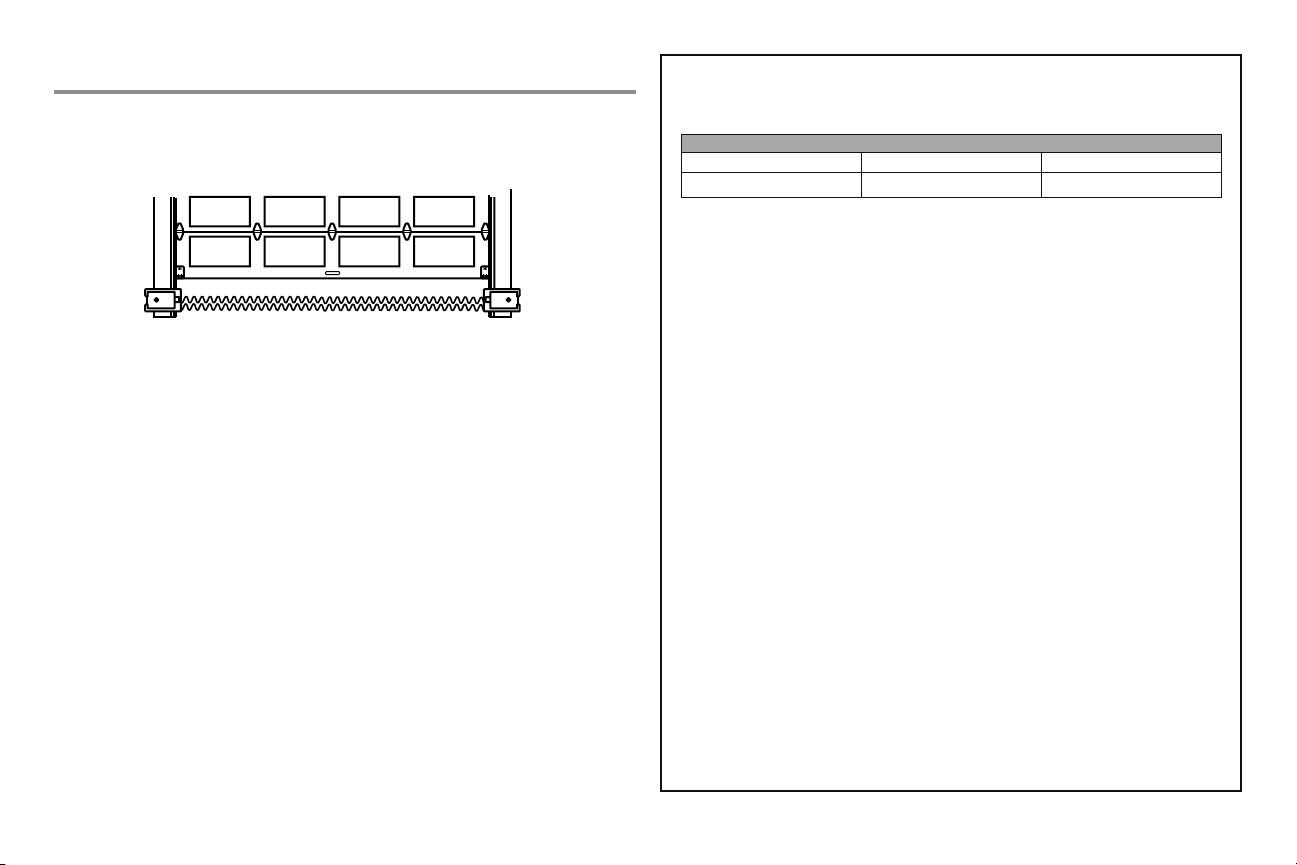
41
GARANTÍA LIMITADA DE CHAMBERLAIN
Chamberlain Group, Inc.
®
(“Vendedor”) garantiza al primer comprador minorista de este producto, para la
residencia en la que se instaló originalmente este producto, que está libre de defectos de materiales y mano
de obra durante un período específi co según se defi ne abajo (el “Período de garantía”). El período de garantía
empieza el día de compra.
PERÍODO DE GARANTÍA
Piezas Motor Accesorios
1 año 6 años 1 año
La operación correcta de este producto depende de que usted cumpla con las instrucciones referentes a la
instalación, a la operación, al mantenimiento y a la prueba. No seguir estrictamente esas instrucciones anulará
por completo esta garantía limitada.Si, durante el período de garantía limitado, este producto parece contener
un defecto cubierto por esta garantía limitada, llame al teléfono gratuito 1-800-528-9131 antes de desmontar
este producto. Al llamar a este número, se le proporcionará instrucciones para desmontar y enviar el producto
al centro de reparación. A continuación, envíe el producto o componente, por correo asegurado y con el porte
pagado, según las indicaciones al centro de servicio para que se realicen las reparaciones cubiertas por la
garantía. Por favor, incluya una descripción breve del problema y un recibo fechado como prueba de compra,
en cualquier producto devuelto por concepto de reparación cubierta por la garantía. Los productos devueltos al
Vendedor para la reparación cubierta por la garantía, los cuales una vez recibidos por el Vendedor, se confi rme
que sean defectuosos y que estén cubiertos por esta garantía limitada, serán reparados o reemplazados (a
opción única del Vendedor) sin costo para usted y serán devueltos con el porte pagado. Las piezas defectuosas
serán reparadas o reemplazadas a opción única del Vendedor por piezas nuevas o reconstruidas de fábrica.
[Usted es responsable de los costos incurridos en el retiro y/o en la reinstalación del producto o cualquier
componente].
TODAS LAS GARANTÍAS IMPLÍCITAS PARA EL PRODUCTO, INCLUYENDO, ENTRE OTRAS, CUALQUIER
GARANTÍA IMPLÍCITA DE COMERCIALIZACIÓN O DE IDONEIDAD PARA UN CIERTO FIN, ESTÁN LIMITADAS
EN DURACIÓN AL PERÍODO DE LA GARANTÍA LIMITADA APLICABLE ESTABLECIDA ANTERIORMENTE PARA
LOS COMPONENTES RELACIONADOS, Y NO EXISTE NINGUNA GARANTÍA IMPLÍCITA NI SE APLICARÁ
DESPUÉS DE DICHO PERÍODO. Algunos estados y provincias no permiten limitaciones sobre la duración de
las garantías implícitas, de tal modo que la limitación mencionada anteriormente podría no corresponder
a su caso. ESTA GARANTÍA LIMITADA NO CUBRE DAÑOS NO RELACIONADOS CON DEFECTO DEL
PRODUCTO, DAÑOS CAUSADOS POR LA INSTALACIÓN, LA OPERACIÓN O EL CUIDADO INCORRECTOS
(INCLUIDOS, SIN LIMITARSE A ELLO, ABUSO, USO INDEBIDO, FALTA DE MANTENIMIENTO RAZONABLE
Y NECESARIO O CUALQUIER ALTERACIÓN A ESTE PRODUCTO), NI LOS CARGOS DE MANO DE OBRA
POR LA REINSTALACIÓN DE UNA UNIDAD REPARADA O REEMPLAZADA, REEMPLAZO DE ARTÍCULOS
DE CONSUMO (POR EJEMPLO, BATERÍAS EN TRANSMISORES DE CONTROL REMOTO Y BOMBILLAS), O
UNIDADES INSTALADAS PARA USO NO RESIDENCIAL . ESTA GARANTÍA LIMITADA NO CUBRE PROBLEMAS
DE LA PUERTA DEL GARAJE O DE HERRAJES DE LA PUERTA DEL GARAJE O PROBLEMAS RELACIONADOS,
QUE INCLUYEN, ENTRE OTROS, RESORTES, RODILLOS, ALINEAMIENTOS O BISAGRAS DE PUERTA. ESTA
GARANTÍA LIMITADA TAMPOCO CUBRE PROBLEMAS CAUSADOS POR INTERFERENCIA. EL VENDEDOR
NO SERÁ RESPONSABLE, EN NINGUNA CIRCUNSTANCIA, DE DAÑOS EMERGENTES, INCIDENTALES O
ESPECIALES QUE SURJAN EN RELACIÓN CON EL USO O LA INCAPACIDAD DE USAR ESTE PRODUCTO. LA
RESPONSABILIDAD DEL VENDEDOR POR VIOLACIÓN DE LA GARANTÍA, POR VIOLACIÓN DEL CONTRATO,
NEGLIGENCIA O RESPONSABILIDAD ESTRICTA, EN NINGÚN CASO DEBERÁ EXCEDER EL COSTO DEL
PRODUCTO CUBIERTO POR LA PRESENTE. NINGUNA PERSONA ESTA AUTORIZADA A ASUMIR EN NUESTRO
NOMBRE NINGUNA OTRA RESPONSABILIDAD CON LA VENTA DE ESTE PRODUCTO.
Algunos estados no permiten la exclusión o limitación de daños emergentes, incidentales o especiales,
de manera que la anterior limitación o exclusión podría no aplicarse a su caso. Esta garantía limitada le
proporciona derechos legales específi cos y usted también puede tener otros derechos que varían según el
estado y la provincia.
Garantía
Información de contacto
Para obtener información sobre instalación y servicio técnico llame al:
1-800-528-9131
Antes de llamar, tenga a mano el numero de modelo del abre-puertas de garaje. Si llama por un problema
técnico, es recomendable que tenga acceso al abre-puertas de garaje mientras llama. Si desea solicitar
una pieza de repuesto, tenga a mano la siguiente información:
numero de pieza, nombre de la pieza y numero de modelo.
¡PARE!
Este abre-puertas de garaje NO funcionará hasta que los sensores de
reversa de seguridad estén debidamente instalados y alineados.
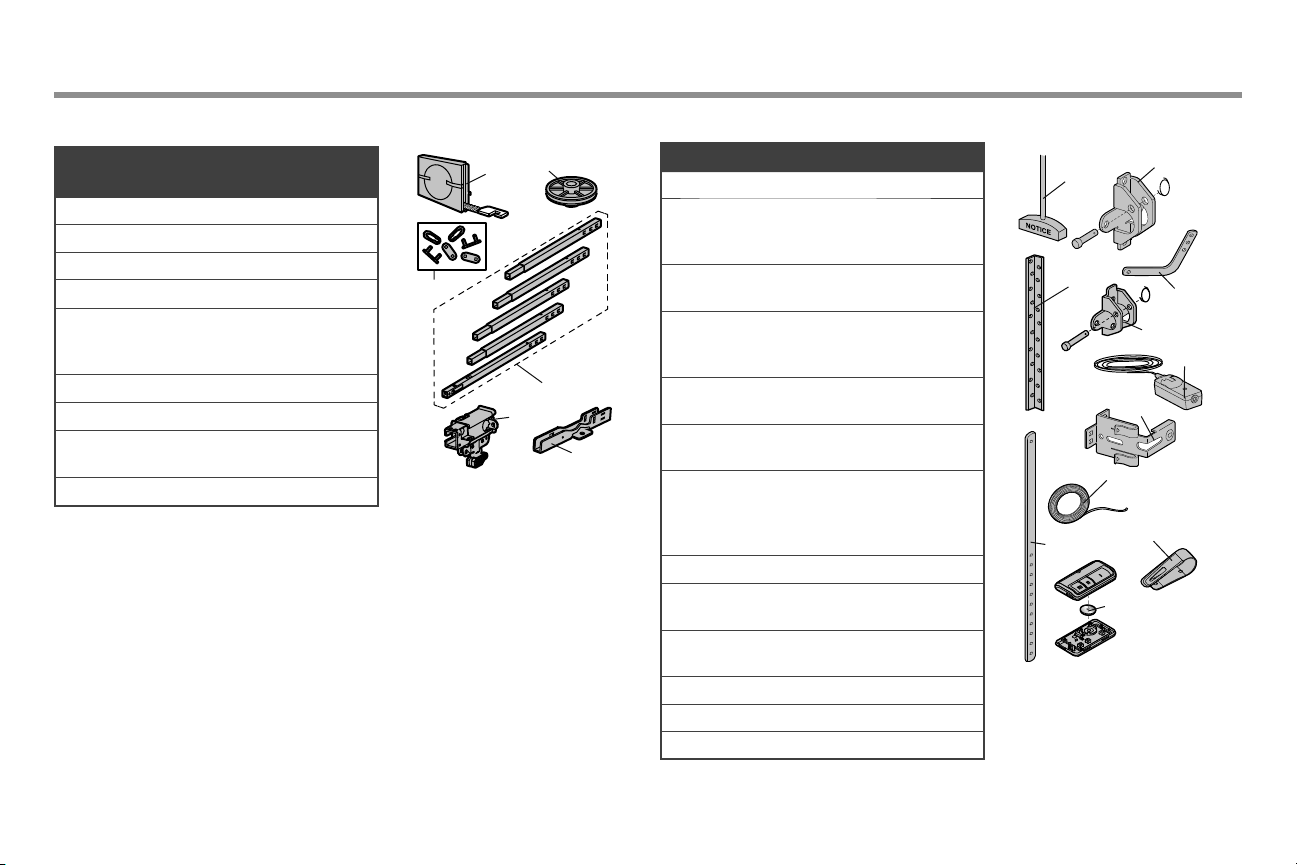
42
Piezas de repuesto
Piezas de la unidad del motor Piezas de instalación
Descripción Numero de
Parte
1 Correa 041A5250
2 Polea 144C0054M
3 Enlace maestro 004A1008
4 Riel 041A5665
5 Carro completo incluye:
eje roscado (1), pasador
chaveta (1), anillo (1)
041C5141-2
6 Ménsula en ‘U’ 041D0598-1
No Mostrado
Almohadillas de
desgaste
041A7276
Bolsa de herrajes 041A7920-2
1
3
2
4
6
5
1
3
4
2
5
6
7
8
9
10
11
Description Part Number
1 Brazo de la puerta curvo 041B0035B
2 Ménsula de la puerta con
pasador chaveta y anillo
de seguro
041A5047-1
3 Manija y cuerda de
apertura de emergencia
041A2828
4 Ménsula de cabezal con
pasador de chaveta y
anillo de seguro
041A5047-2
5 Broche de visera para
control remoto
K029B137
6 Ménsula del sensor de
seguridad
041A5266-3
7 Juego de sensores de
seguridad sensor de
receptor y emisor con
cable
041A5034
8 Brazo de puerta recto 4178B0034B
9 Cable blanco y rojo/
blanco
041B4494-1
10 Batería de Litio de 3V
CR2032
K010A0020
11 Ménsulas de soporte 012B0776
No Mostrado
Owner’s Manual 114A5195
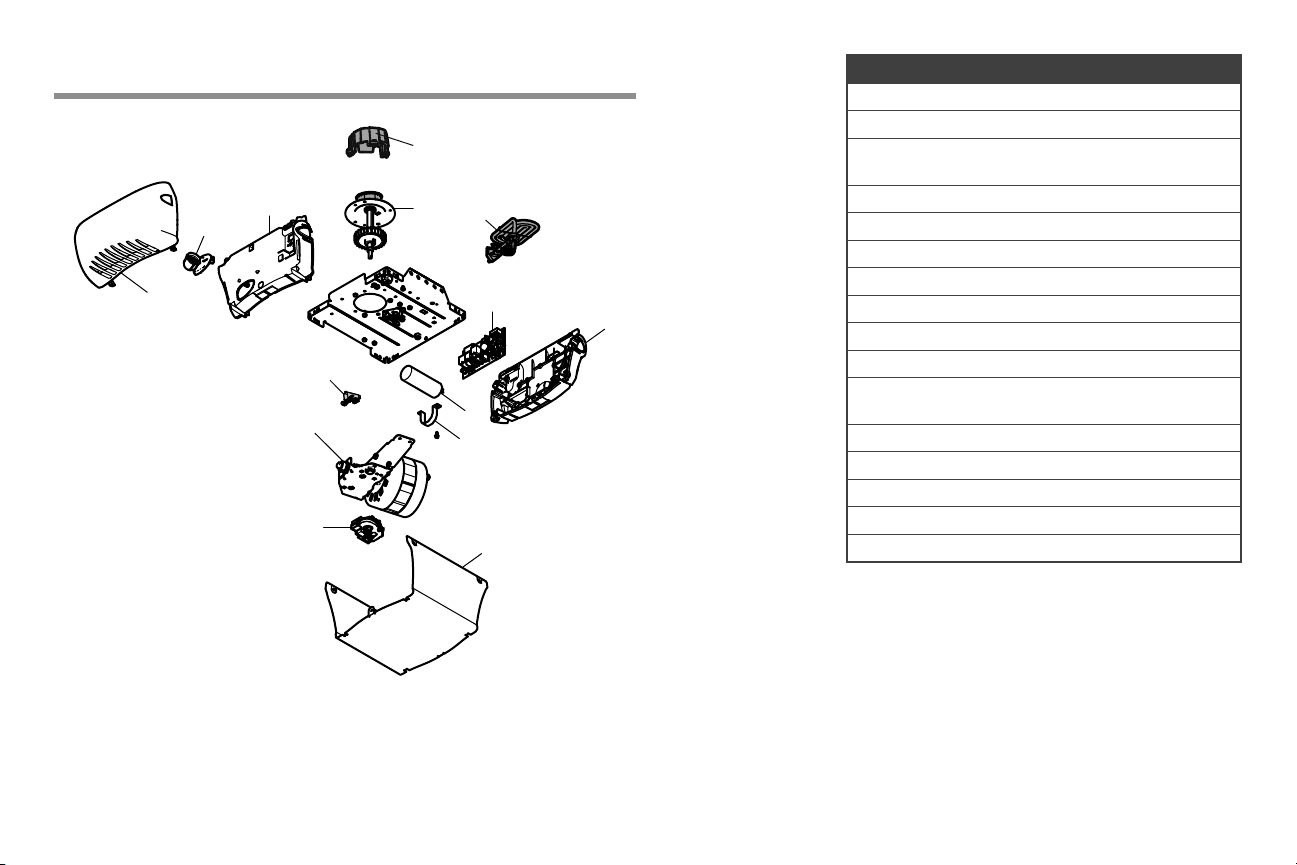
43
Piezas de repuesto
Abre-puertas de garaje
Description Part Number
1 Cubierta del portacadena 041A4371
2 Engranaje 041A4885-4
3 Panel de extremo con etiquetes y
casquillo de la luz
041-0037-000
4 Receptáculo de foco 041C0279
5 Lente K108D0079M
6 Capacitor 030B0532-1
7 Retén del capacitor K012A0373
8 Módulo de recorrido 041D7742-7
9 Cubierta 041-0024-000
10 Tabla de lógico de receptor 050ACTWF
11 Panel de extreme para tabla de
lógico de receptor
041-0025-000
12 Motor y módulo de recorrido 041D7440
13 Cordón eléctrico 041B4245-1
14 Bloque terminal 041A3150
No Mostrado
Arnés conector 041A7946
2
6
7
11
9
5
12
8
10
3
4
13
14
1

© 2018, The Chamberlain Group, Inc.
All Rights Reserved
Todos los derechos reservados
Wi-Fi
®
is a registered trademark of Wi-Fi Alliance
Wi-Fi
®
es una marca registrada de Wi-Fi Alliance.
App Store is a service mark of Apple Inc.
App Store es una marca registrada de servicio de Apple Inc.
Google Play is a trademark of Google Inc.
114A5195 Google Play es una marca registrada de Google Inc.
The Chamberlain Group, Inc.
300 Windsor Drive
Oak Brook, IL 60523