www.lg.com
MFL69176901 (1.0)
ENGLISH
LG-D631
USEr GUIdE

•Someofthecontentsinthismanualmaydifferfromyourphonedependingonthe
softwareversionofthephone,OSversionoryourserviceprovider,andaresubjectto
changewithoutpriornotice.
•AlwaysusegenuineLGaccessories.Thesupplieditemsaredesignedonlyforthisdevice
andmaynotbecompatiblewithotherdevices.
•Thisdeviceisnotsuitableforpeoplewhohaveavisualimpairmentduetothe
touchscreenkeyboard.
•Allscreenshotsinthisguidearesimulated.
•Actualdisplaysandthecolorofthephonemayvary.

1. WHAT THIS WARRANTY COVERS:
LGoffersyoualimitedwarrantythattheenclosedsubscriberunitanditsenclosedaccessories
willbefreefromdefectsinmaterialandworkmanship,accordingtothefollowingtermsand
conditions:
(1)ThelimitedwarrantyfortheproductextendsforTWELVE(12)MONTHSbeginningon
thedateofpurchaseoftheproductwithvalidproofofpurchase,orabsentvalidproofof
purchase,FIFTEEN(15)MONTHSfromdateofmanufactureasdeterminedbytheunit's
manufacturedatecode.
(2)Thelimitedwarrantyextendsonlytotheoriginalpurchaseroftheproductandisnot
assignableortransferabletoanysubsequentpurchaser/enduser.
(3)Thiswarrantyisgoodonlytotheoriginalpurchaseroftheproductduringthewarranty
periodaslongasitisintheU.S.,includingAlaska,Hawaii,U.S.TerritoriesandCanada.
(4)Theexternalhousingandcosmeticpartsshallbefreeofdefectsatthetimeofshipment
and,therefore,shallnotbecoveredundertheselimitedwarrantyterms.
(5)UponrequestfromLG,theconsumermustprovideinformationtoreasonablyprovethedate
ofpurchase.
(6)ThecustomershallbearthecostofshippingtheproducttotheCustomerService
DepartmentofLG.LGshallbearthecostofshippingtheproductbacktotheconsumerafter
thecompletionofserviceunderthislimitedwarranty.
2. WHAT THIS WARRANTY DOES NOT COVER:
(1)Defectsordamagesresultingfromuseoftheproductinotherthanitsnormaland
customarymanner.
(2)Defectsordamagesfromabnormaluse,abnormalconditions,improperstorage,exposureto
moistureordampness,unauthorizedmodifications,unauthorizedconnections,unauthorized
repair,misuse,neglect,abuse,accident,alteration,improperinstallation,orotheracts
LIMITED WARRANTY STATEMENT

whicharenotthefaultofLG,includingdamagecausedbyshipping,blownfuses,spillsof
foodorliquid.
(3)Breakageordamagetoantennasunlesscauseddirectlybydefectsinmaterialor
workmanship.
(4)ThattheCustomerServiceDepartmentatLGwasnotnotifiedbyconsumerofthealleged
defectormalfunctionoftheproductduringtheapplicablelimitedwarrantyperiod.
(5)Productswhichhavehadtheserialnumberremovedormadeillegible.
(6)Thislimitedwarrantyisinlieuofallotherwarranties,expressorimpliedeitherinfactorby
operationsoflaw,statutoryorotherwise,including,butnotlimitedtoanyimpliedwarranty
ofmarketabilityorfitnessforaparticularuse.
(7)DamageresultingfromuseofnonLGapprovedaccessories.
(8)Allplasticsurfacesandallotherexternallyexposedpartsthatarescratchedordamaged
duetonormalcustomeruse.
(9)Productsoperatedoutsidepublishedmaximumratings.
(10)Productsusedorobtainedinarentalprogram.
(11)Consumables(suchasfuses).
3. WHAT LG WILL DO:
LGwill,atitssoleoption,eitherrepair,replaceorrefundthepurchasepriceofanyunitthatis
coveredunderthislimitedwarranty.LGmaychooseatitsoptiontousefunctionallyequivalent
re-conditioned,refurbishedornewunitsorpartsoranyunits.Inaddition,LGwillnotre-install
orback-upanydata,applicationsorsoftwarethatyouhaveaddedtoyourphone.Itistherefore
recommendedthatyouback-upanysuchdataorinformationpriortosendingtheunittoLGto
avoidthepermanentlossofsuchinformation.
LIMITED WARRANTY STATEMENT

4. STATE LAW RIGHTS:
Nootherexpresswarrantyisapplicabletothisproduct.THEDURATIONOFANY
IMPLIEDWARRANTIES,INCLUDINGTHEIMPLIEDWARRANTYOFMARKETABILITY
ORMERCHANTABILITYORFITNESSFORAPARTICULARPURPOSE,ISLIMITEDTOTHE
DURATIONOFTHEEXPRESSWARRANTYHEREIN.LGSHALLNOTBELIABLEFORTHELOSS
OFTHEUSEOFTHEPRODUCT,INCONVENIENCE,LOSSORANYOTHERDAMAGES,DIRECT
ORCONSEQUENTIAL,ARISINGOUTOFTHEUSEOF,ORINABILITYTOUSE,THISPRODUCT
ORFORANYBREACHOFANYEXPRESSORIMPLIEDWARRANTY,INCLUDINGTHEIMPLIED
WARRANTYOFMARKETABILITYORMERCHANTABILITYORFITNESSFORAPARTICULAR
PURPOSEAPPLICABLETOTHISPRODUCT.
Somestatesdonotallowtheexclusivelimitationofincidentalorconsequentialdamagesor
limitationsonhowlonganimpliedwarrantylasts;sotheselimitationsorexclusionsmaynot
applytoyou.Thiswarrantygivesyouspecificlegalrightsandyoumayalsohaveotherrights
whichvaryfromstatetostate.
5. HOW TO GET WARRANTY SERVICE:
Toobtainwarrantyservice,pleasecallorfaxtothefollowingtelephonenumbersfrom
anywhereinthecontinentalUnitedStates:
Tel. 1-800-793-8896 or Fax. 1-800-448-4026
Orvisithttp://us.lgservice.com.Correspondencemayalsobemailedto:
LGElectronicsService-MobileHandsets,P.O.Box240007,Huntsville,AL35824
DO NOT RETURN YOUR PRODUCT TO THE ABOVE ADDRESS.Pleasecallorwrite
forthelocationoftheLGauthorizedservicecenternearestyouandfortheproceduresfor
obtainingwarrantyclaims.

Warranty Laws
Thefollowinglawsgovernwarrantiesthatariseinretailsalesofconsumergoods:
X TheCaliforniaSong-BeverlyConsumerWarrantyAct[CC§§1790etseq],
X TheCaliforniaUniformCommercialCode,DivisionTwo[ComC§§2101etseq],and
X ThefederalMagnuson-MossWarrantyFederalTradeCommissionImprovementAct[15
USC§§2301etseq;16CFRParts701–703].AtypicalMagnuson-MossActwarrantyisa
writtenpromisethattheproductisfreeofdefectsorawrittenpromisetorefund,repair,or
replacedefectivegoods.[See15USC§2301(6).]Remediesincludedamagesforfailingto
honorawrittenwarrantyorservicecontractorforviolatingdisclosureprovisions.[See15
USC§2310(d).]Exceptforsomelabelinganddisclosurerequirements,thefederalActdoes
notpreemptstatelaw.[See15USC§2311.]
TheConsumerWarrantyActdoesnotaffecttherightsandobligationsofpartiesunderthe
stateUniformCommercialCode,excepttheprovisionsoftheActprevailoverprovisionsofthe
CommercialCodewhentheyconflict.[CC§1790.3.]
Forpurposesofsmallclaimsactions,thiscoursewillfocusonrightsanddutiesunderthestate
laws.
LIMITED WARRANTY STATEMENT

Table of Contents
Important Notice ..............................9
Getting to know your phone ........12
Frontview..........................................12
InstallingtheSIMorUSIMcardand
battery...............................................14
Chargingthebattery.........................17
Insertingamemorycard...................18
Removingthememorycard..............19
Lockingandunlockingthedevice.....19
Your Home screen .........................21
Touchscreentips..............................21
Homescreen.....................................22
CustomizingtheHomescreen..........23
Returningtorecently-used
applications.......................................25
Noticationspanel............................25
On-screenkeyboard..........................28
Special Features ............................30
Gestureshot......................................30
KnockON............................................31
KnockCode........................................31
QuickMemo+.....................................32
QSlide................................................34
QuickRemote.....................................35
Google Account Setup ..................36
CreatingyourGoogleaccount...........36
SigningintoyourGoogleaccount.....36
Connecting to Networks and
Devices ............................................38
Wi-Fi..................................................38
Bluetooth...........................................38
Wi-FiDirect.......................................40
TransferringdatabetweenaPCand
yourdevice........................................41
Calls .................................................42
Makingacall.....................................42
Callingyourcontacts.........................42
Answeringandrejectingacall.........42
Makingasecondcall........................43
Viewingyourcalllogs.......................43
Callsettings......................................44
Contacts...........................................45
Searchingforacontact.....................45
Addinganewcontact.......................45
Favoritescontacts.............................45
Creatingagroup................................46
JoiningandSeparatingContacts......47
AT&TAddressBook(AAB)................47
Messaging ......................................48
Sendingamessage...........................48

Conversationview.............................49
Changingyourmessagingsettings...49
Email ................................................50
Managingemailaccounts.................50
Workingwithaccountfolders...........51
Composingandsendingemail..........51
Camera and Video .........................52
Cameraoptionsontheviewnder....52
Usingtheadvancedsettings.............53
Takingaphoto..................................54
Onceyouhavetakenaphoto............54
Recordingavideo..............................55
Afterrecordingavideo.....................56
Gallery...............................................57
Multimedia......................................60
Music.................................................60
Utilities ............................................62
Clock..................................................62
Calculator..........................................63
Calendar............................................64
VoiceSearch.....................................64
Downloads........................................64
LGSmartWorld..................................65
Browsing the Web .........................66
Browser.............................................66
Chrome..............................................67
Settings............................................69
Networks...........................................69
Sound................................................72
Display...............................................74
General..............................................76
PC software (LG PC Suite) ...........84
ForWindowsOS...............................84
ForMacOS........................................85
Software Update ............................87
PhoneSoftwareUpdate....................87
LGMobilePhoneSoftwareUpdate
viaOver-the-Air(OTA).......................87
Trademarks .....................................88
Trademarks........................................88
Q&A ..................................................89
Accessories ....................................90
Troubleshooting .............................91
For Your Safety ...............................95
Safety Guidelines ........................101
Table of Contents

9
Please read this before you start using your phone!
Pleasechecktoseewhetheranyproblemsyouencounteredwithyourphonearedescribed
inthissectionbeforetakingthephoneinforserviceorcallingaservicerepresentative.
1. Phone memory
Whenthereislessthan10MBofspaceavailableinyourphonememory,yourphonecannot
receivenewmessages.Youmayneedtocheckyourphonememoryanddeletesomedata,
suchasapplicationsormessages,tomakemorememoryavailable.
To uninstall applications:
1 Tap > > >Generaltab>Apps.
2 Onceallapplicationsappear,scrolltoandselecttheapplicationyouwanttouninstall.
3 TapUninstall > OK.
2. Optimizing battery life
Extendyourbattery'spowerbyturningofffeaturesthatyoudonotneedtorunconstantlyin
thebackground.Youcanmonitorhowapplicationsandsystemresourcesconsumebattery
power.
Extending your phone's battery life:
•Turnoffradiocommunicationswhenyouarenotusing.IfyouarenotusingWi-Fi,
BluetoothorGPS,turnthemoff.
•Reducescreenbrightnessandsetashorterscreentimeout.
Important Notice

10
Important Notice
•TurnoffautomaticsyncingforGmail,Calendar,Contactsandotherapplications.
•Someapplicationsyoudownloadmayconsumebatterypower.
•Whileusingdownloadedapplications,checkthebatterychargelevel.
3. Before installing an open source application and OS
WARNING
X IfyouinstallanduseanOSotherthantheoneprovidedbythemanufactureritmay
causeyourphonetomalfunction.Inaddition,yourphonewillnolongerbecoveredby
thewarranty.
X Toprotectyourphoneandpersonaldata,onlydownloadapplicationsfromtrusted
sources,suchasPlayStore™.Ifthereareimproperlyinstalledapplicationsonyour
phone,thephonemaynotworknormallyoraseriouserrormayoccur.Youmust
uninstallthoseapplicationsandallassociateddataandsettingsfromthephone.
4. Using the Hard Reset (Factory Reset)
Ifyourphonedoesnotrestoretoitsoriginalcondition,useaHardReset(FactoryReset)to
initializeit.
1 Turnthepoweroff.
2 PressandholdthePower/Lock Key + Volume Down Keyonthebackofthephone.
3 ReleasethePower/Lock Keyonlywhenthebootlogoisdisplayed,thenimmediately
pressandholdthePower/Lock Keyagain.
4 ReleaseallkeyswhentheFactoryresetscreenisdisplayed.
5 PresstheVolume KeystohighlightYes,thenpressthePower/Lock Keytocontinue.

11
Important Notice
6 PresstheVolume KeystohighlightYesoncemore,thenpressthePower/Lock Key
toconrm.
WARNING
X IfyouperformaHardReset,alluserapplications,userdataandDRMlicenseswill
bedeleted.PleaseremembertobackupanyimportantdatabeforeperformingaHard
Reset.
5. Opening and switching applications
MultitaskingiseasywithAndroid;youcankeepmorethanoneapplicationrunningatthe
sametime.Thereisnoneedtoquitanapplicationbeforeopeninganother.Useandswitch
betweenseveralopenapplications.Androidmanageseachapplication,stoppingandstarting
themasneededtomakesurethatidleapplicationsdon'tconsumeresourcesunnecessarily.
1 Tap
.Apppreviewsofrecentlyusedapplicationswillbedisplayed.
2 Taptheapplicationyouwanttoaccess.Thisdoesnotstopthepreviousappfrom
runninginthebackground.Makesuretotap
tobackoutofanappafterusingit.
•Tocloseanappfromtherecentappslist,swipetheapppreviewtotheleftorright.To
clearallapps,tapClear all.
6. If the screen freezes
Ifthescreenfreezesorthephonedoesnotrespondwhenyoutrytooperateit,removethe
batteryandreinsertit.Thenpowerthephonebackon.
12
Getting to know your phone
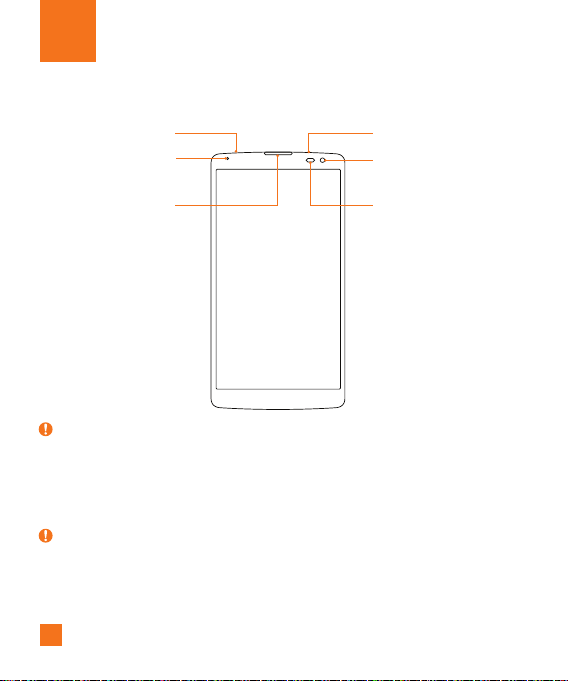
Front view
Proximity Sensor
IR (Infrared) LED
Notification LED
Earpiece
3.5mm Headset Jack
Front Camera Lens
NOTE: Proximity Sensor
X Whenreceivingandmakingcalls,theproximitysensorautomaticallyturnsthe
backlightoffandlocksthetouchscreenbysensingwhenthephoneisnearyourear.
Thisextendsbatterylifeandpreventsyoufromunintentionallyactivatingthetouch
screenduringcalls.
WARNING
X Placingaheavyobjectonthephoneorsittingonitcandamagethedisplayandtouch
screenfunctions.Donotcovertheproximitysensorwithscreenprotectorsoranyother
typeofprotectivefilm.Thiscouldcausethesensortomalfunction.
13
Getting to know your phone
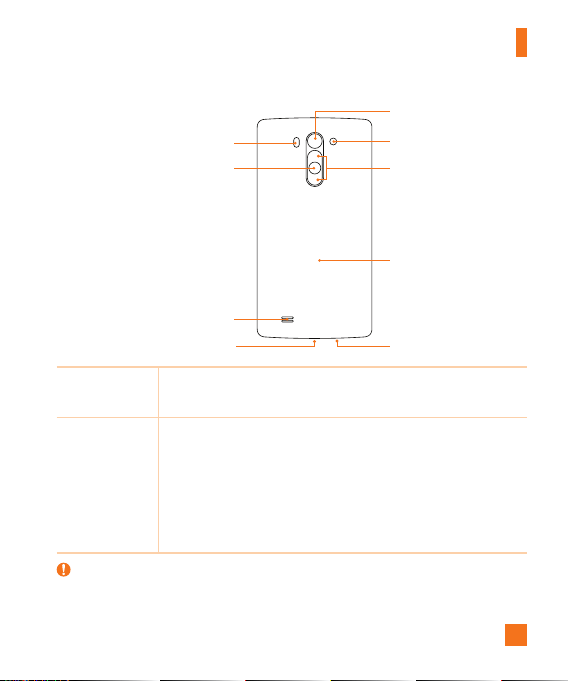
LDAF Sensor
(LaserDetectionAuto-FocusSensor)
Power/Lock Key
Speaker
Flash
Back Camera Lens
NFC Touch Point
Volume Keys
Microphone
Charger/USB port
Power/Lock
Key
•Turnyourphoneon/offbypressingandholdingthiskey.
•Pressoncequicklytolock/unlockthescreen.
Volume Keys While the screen is off:
•PressandholdtheVolumeUpKeytolaunchQuickMemo+.
•PressandholdtheVolumeDownKeytolaunchtheCamera.
While the screen is on:
•FromtheHomescreen,presstochangetheringertype.
•Whilelisteningtomusicoronacall,presstoadjustthevolume.
WARNING
X TheNFCantennaforthismodelisonthebackcover.
X BecarefulnottodamagetheNFCtouchpointonthephone,whichispartoftheNFC
antenna.
14
Getting to know your phone
Installing the SIM or USIM card and battery
Beforeyoucanstartexploringyournewphone,youneedtosetitup.
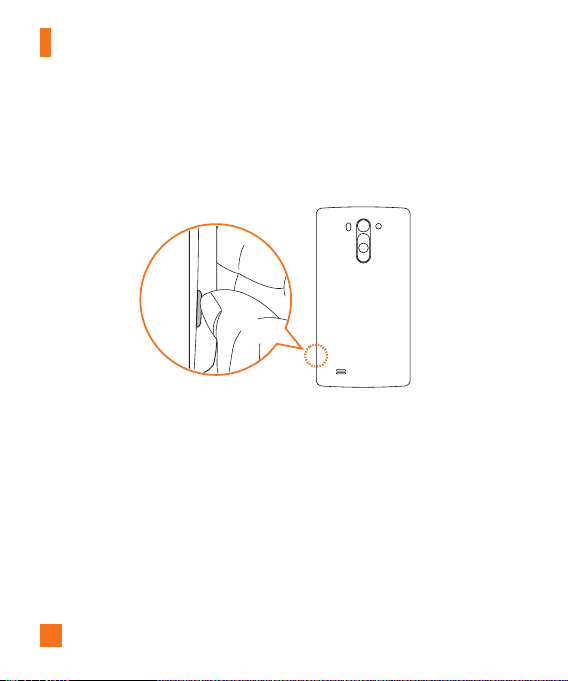
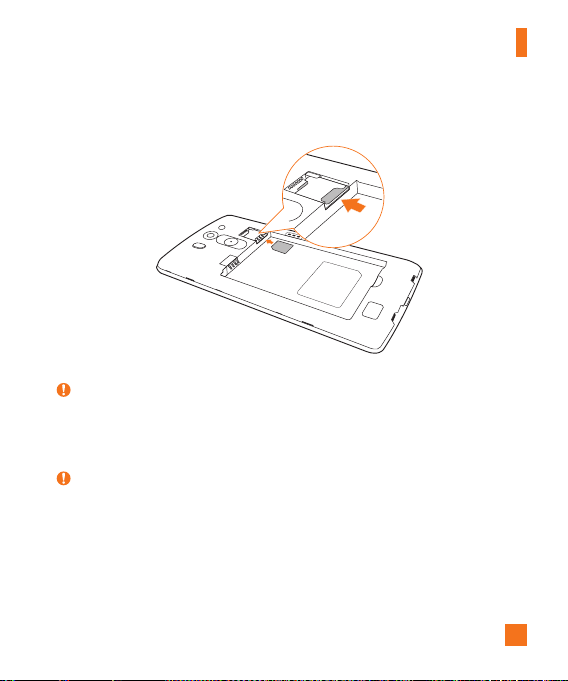
1 Toremovethebackcover,holdthephonefirmlyinonehand.Withyourotherhand,lift
offthebackcoverwithyourthumbnailasshowninthefigurebelow.
15
Getting to know your phone
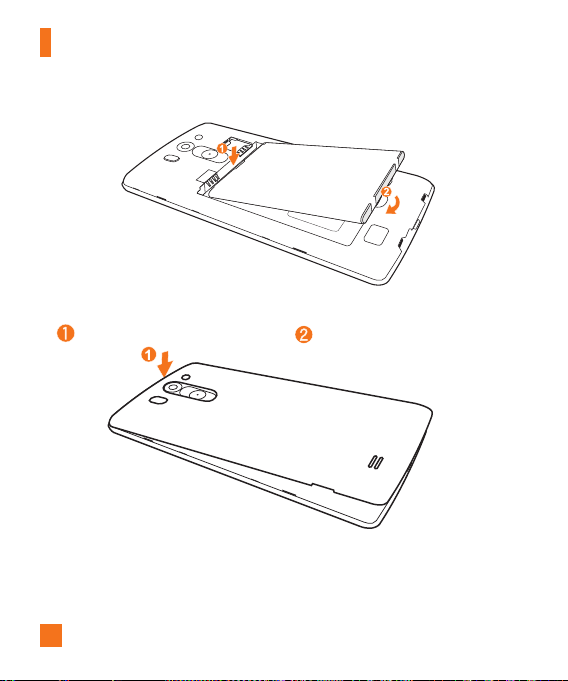
2 SlidetheSIMcardintothelowerslotfortheSIMcardasshowninthegure.Make
surethegoldcontactareaonthecardisfacingdownward.
WARNING
X DonotinsertamemorycardintotheSIMcardslot.Ifamemorycardhappenstobe
lodgedintheSIMcardslot,takethedevicetoaLGServiceCentertoremovethe
memorycard.
NOTE:
X OnlymicroSIMcardsworkwiththisdevice.
16
Getting to know your phone
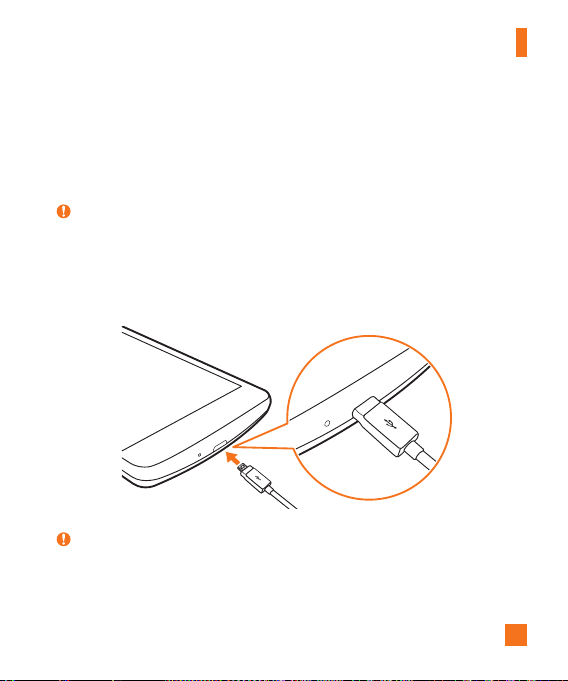
3 Insertthebattery.
4 Toreplacethecoverontothedevice,alignthebackcoveroverthebatterycompartment
andpressitdownuntilitclicksintoplace .
17
Getting to know your phone
Charging the battery
Chargethebatterybeforeusingitforfirsttime.Usethechargertochargethebattery.A
computercanalsobeusedtochargethebatterybyconnectingthephonetoitusingtheUSB
cable.
WARNING
X UseonlyLG-approvedchargers,batteriesandcables.Ifyouuseunapprovedchargers,
batteriesorcables,itmaycauseabatterychargingdelay.Thiscanalsocausethe
batterytoexplodeordamagethedevice,whichisnotcoveredbythewarranty.
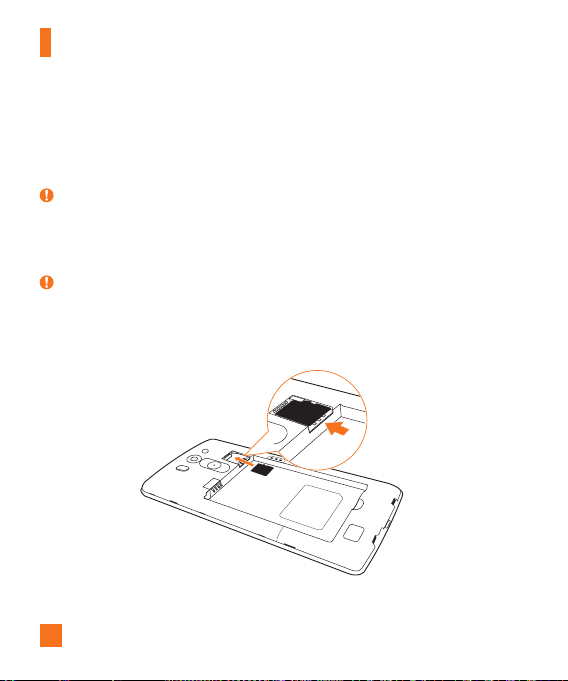
TheCharger/USBPortislocatedatthebottomofthephone.Insertthechargerandplugit
intoapoweroutlet.
NOTE:
X Donotopenthebackcoverwhileyourphoneischarging.
18
Getting to know your phone
Inserting a memory card
Yourdevicesupportsuptoa32GBmicroSDcard.Dependingonthememorycard
manufacturerandtype,somememorycardsmaynotbecompatiblewithyourdevice.
WARNING
X Somememorycardsmaynotbefullycompatiblewiththedevice.Usingan
incompatiblecardmaydamagethedeviceorthememorycard,orcorruptthedata
storedinit.
NOTE:
X Frequentwritinganderasingofdatashortensthelifespanofmemorycards.
1 Removethebackcover.
2 Insertamemorycardwiththegold-coloredcontactsfacingdownwards.
3 Replacethebackcover.

19
Getting to know your phone
Removing the memory card
Beforeremovingthememorycard,firstunmountitforsaferemoval.
1 Tap
> > >Generaltab>Storage>Unmount SD card.
2 Removethebackcoverandpulloutthememorycard.
WARNING
X Donotremovethememorycardwhilethedeviceistransferringoraccessing
information.Doingsocancausedatatobelostorcorruptedordamagetothememory
cardordevice.LGisnotresponsibleforlossesthatresultfromthemisuseofdamaged
memorycards,includingthelossofdata.
Locking and unlocking the device
PressingthePower/Lock Keyturnsoffthescreenandputsthedeviceintolockmode.The
deviceautomaticallygetslockedifitisnotusedforaspecifiedperiod.Thishelpstoprevent
accidentaltapsandsavesbatterypower.
Tounlockthedevice,pressthePower/Lock Keyandswipethescreeninanydirection.
NOTE:
X Double-tappingonthescreenalsocanwakeupthescreeninsteadofthePower/
Lock Key.
20
Getting to know your phone
Changing the screen lock method
Youcanchangethewaythatyoulockthescreentopreventothersaccessingyourpersonal
information.
1 Tap
> > >Displaytab>Lock screen>Select screen lock.
2 SelectadesiredscreenlockfromNone,Swipe,Knock Code,Pattern,PINand
Password.
NOTE:
X CreateorsignintoaGoogleaccountbeforesettinganscreenlockandrememberthe
backupPINyoucreatedwhencreatingyourscreenlock.
Caution!
X Ifyouhaven'tcreatedorsignedintoaGoogleaccountonthephoneandyouforgot
yourPIN,Password,andthebackupPIN,youneedtoperformahardreset.Performing
ahardresetdeletesalluserapplicationsanduserdata.Pleaseremembertobackup
anyimportantdatabeforeperformingahardreset.
TIP! Smart Lock
X YoucanuseSmartLocktomakeunlockingyourphoneeasier.Youcansetittokeep
yourphoneunlockedwhenyouhaveatrustedBluetoothdeviceconnectedtoit,when
it'sinafamiliarlocationlikeyourhomeorwork,orwhenitrecognisesyourface.
X Setting up Smart Lock
1 Tap
> > .
2 TapDisplaytab>Lock screen>Smart Lock.
3 Beforeyouaddanytrusteddevices,trustedplaces,ortrustedface,youneedtosetup
ascreenlock(pattern,PIN,orpassword).

21
Touch screen tips
Herearesometipsonhowtonavigateonyourphone.
•Tap or touch–Asinglefingertapselectsitems,links,shortcutsandlettersonthe
on-screenkeyboard.
•Touch and hold–Touchandholdanitemonthescreenbytappingitandnotlifting
yourfingeruntilanactionoccurs.
•Drag–Touchandholdanitemforamomentandthen,withoutliftingyourfinger,move
yourfingeronthescreenuntilyoureachthetargetposition.Youcandragitemsonthe
Homescreentorepositionthem.
•Swipe or slide–Toswipeorslide,quicklymoveyourfingeracrossthesurfaceofthe
screen,withoutpausingwhenyoufirsttapit(soyoudon'tdraganiteminstead).
•Double-tap–Double-taptozoomonawebpageoramap.
•Pinch-to-Zoom–Useyourindexfingerandthumbinapinchingorspreadingmotion
tozoominoroutwhenusingthebrowser,Maps,orwhenviewingpictures.
•Rotate the screen–Frommanyapplicationsandmenus,thescreenorientation
adjuststothedevice'sphysicalorientation.
NOTE:
X Donotpresstoohard;thetapscreenissensitiveenoughtopickupalight,yetfirm
tap.
X Usethetipofyourfingertotaptheoptionyouwant.Becarefulnottotapanyother
buttons.
Your Home screen
22
Your Home screen
Home screen
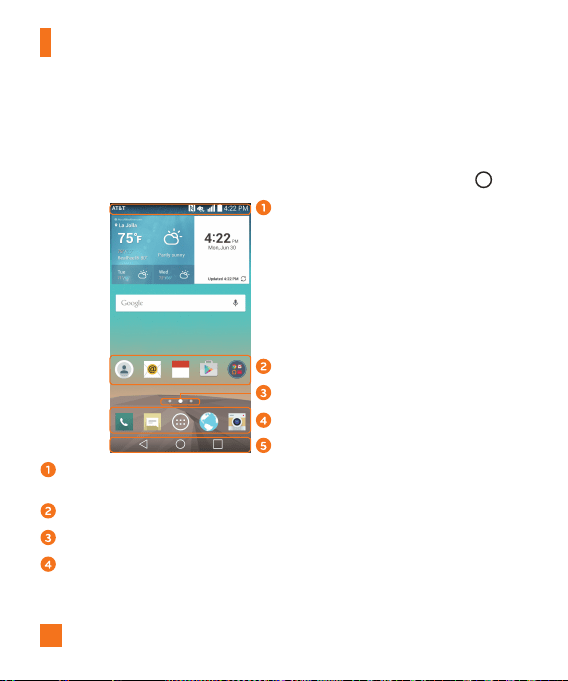
TheHomescreenisthestartingpointformanyapplicationsandfunctions.Itallowsyouto
additemslikeappshortcutsandGooglewidgetstogiveyouinstantaccesstoinformation
andapplications.Thisisthedefaultcanvasandaccessiblefromanymenubytapping .
Status Bar
Application Icons
Location Indicator
Quick Button Area
Home Touch Buttons
Showsthephone'sstatusinformation,includingthetime,signalstrength,batterystatus
andnotificationicons.
Tapanicon(application,folder,etc.)toopenanduseit.
IndicateswhichHomescreencanvasyouarecurrentlyviewing.
Providesone-touchaccesstothefunctionfromanyHomescreencanvas.
23
Your Home screen
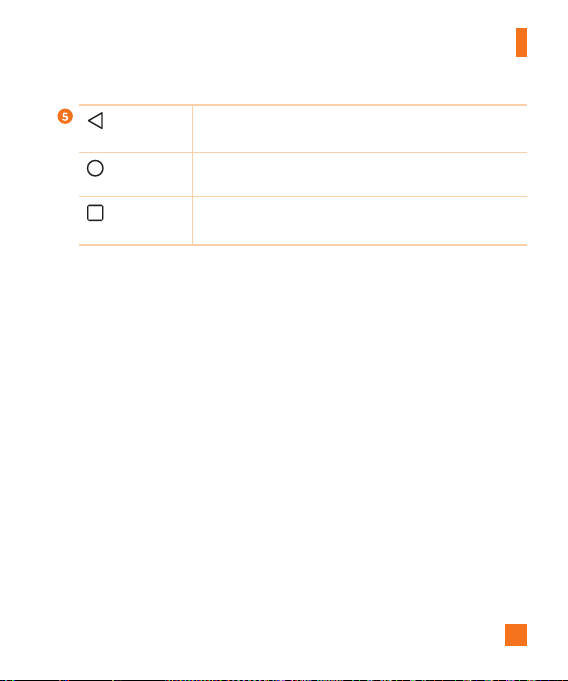
Back Button
Returnstothepreviousscreen.Alsoclosespop-upitems,such
asmenus,dialogboxesandtheon-screenkeyboard.
Home Button
ReturntotheHomescreenfromanyscreen.Touchandholdto
accessGoogleNow.
Recent Apps
Button
Displaysrecentlyusedapplications.Ifyoutouchandholdthis
button,itopensamenuofavailableoptions.
Extended Home screen
TheoperatingsystemprovidesmultipleHomescreencanvasestoprovidemorespacefor
addingicons,widgetsandmore.
•SlideyourfingerleftorrightacrosstheHomescreentoaccessadditionalcanvases.
Customizing the Home screen
YoucancustomizeyourHomescreenbyaddingappsandwidgetsandchangingwallpapers.
Adding items on your Home screen
1 TouchandholdtheemptypartoftheHomescreen.
2 TaptheWidgetstabandselecttheitemyouwanttoadd.Youthenseethisaddeditem
ontheHomescreen.
3 Dragittothedesiredlocationandliftyournger.
24
Your Home screen
TIP!
X ToaddanapplicationicontotheHomescreenfromtheAppsscreen,touchandhold
theapplicationyouwanttoadd.
Removing an item from the Home screen
•WhileontheHomescreen,touchandholdtheiconyouwanttoremove,thendragitto
andreleaseit.
Adding an app to the Quick Button area
•FromtheAppsscreenorontheHomescreen,touchandholdanapplicationiconand
dragittotheQuickButtonarea.Thenreleaseitinthedesiredlocation.
Removing an app from the Quick Button area
•TouchandholdthedesiredQuickButton,dragitto ,andreleaseit.
NOTE:
X TheApps Button cannotberemoved.
Customizing app icons on the Home screen
1 Touchandholdanapplicationiconuntilitunlocksfromitscurrentposition,thenrelease
it.Theeditingicon appearsintheupper-rightcorneroftheapplication.
2 Taptheapplicationiconagainandselectthedesiredicondesignandsize.
3 TapOKtosavethechange.
NOTE:
X YoucanalsotapAdd newtopersonalizeiconswithyourpictures.
25
Your Home screen
Returning to recently-used applications
1 Tap .Apppreviewsofrecentlyusedapplicationswillbedisplayed.
2 Tapanapppreviewtoopentheapplication.Ortap
toreturntoyourprevious
screen.
Notifications panel
Notificationsalertyoutothearrivalofnewmessages,calendareventsandalarms,aswell
asongoingevents,suchaswhenyouareonacall.
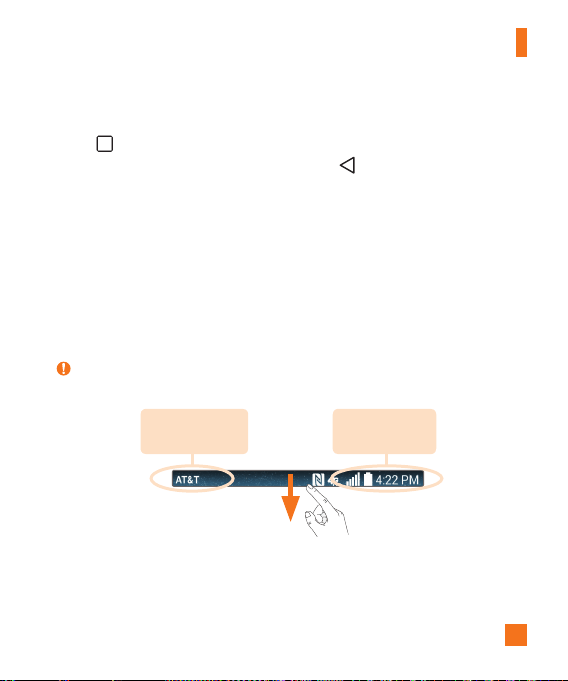
Whenanotificationarrives,itsiconappearsatthetopofthescreen.Iconsforpending
notificationsappearontheleft,andsystemicons,suchasWi-Fiandbatterystrengthare
shownontheright.
NOTE:
X Theavailableoptionsmayvarydependingontheregionorserviceprovider.
Pending
notifications
System
notifications
26
Your Home screen
Opening the Notifications panel
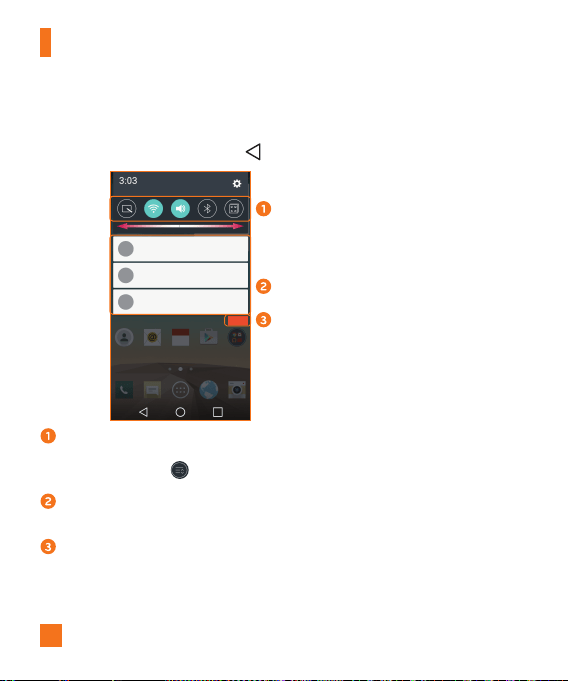
SwipedownfromtheStatusbartoopentheNotificationspanel.ToclosetheNotifications
panel,swipethescreenupwardsortap .
Quick Settings Area
Notifications
Clear
Tapeachquicksettingbuttontotoggleiton/off.Touchandholdthedesiredbuttonto
directlyaccessthesettingsmenuforthefunction.Toseemoretogglekeys,swipeleftor
right.TapEditbutton toremove,addorrearrangequicksettingbuttons.
Currentnotificationsarelisted,eachwithabriefdescription.Tapanotificationtoview
it.
Taptoclearallofthenotifications.
27
Your Home screen
Indicator icons on the Status Bar
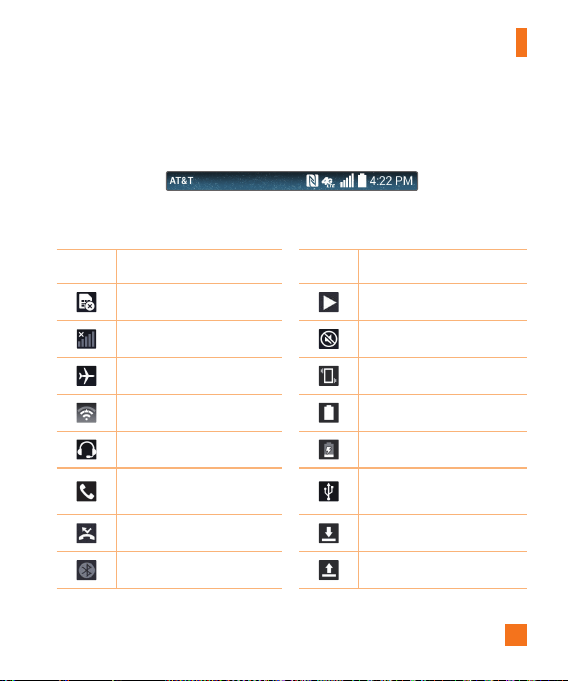
Indicatoriconsappearonthestatusbaratthetopofthescreentoreportmissedcalls,new
messages,calendarevents,devicestatusandmore.
Theiconsdisplayedatthetopofthescreenprovideinformationaboutthestatusofthe
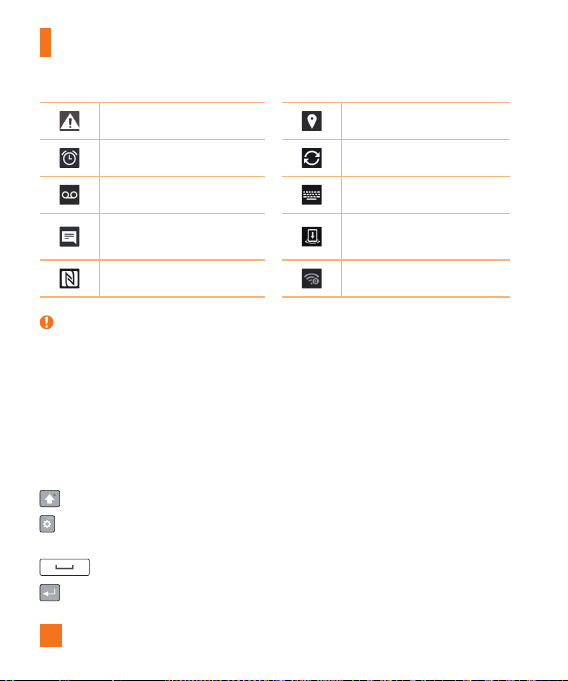
device.Theiconslistedinthetablebelowaresomeofthemostcommonones.
Icon Description Icon Description
NoSIMcardinserted Asongiscurrentlyplaying
Nonetworksignalavailable Ringerissilenced
Airplanemodeison Vibratemodeison
ConnectedtoaWi-Finetwork Batteryfullycharged
Wiredheadsetconnected Batteryischarging
Callinprogress
Thephoneisconnectedtoa
PCviaaUSBcable
Missedcall Downloadingdata
Bluetoothison Uploadingdata
28
Your Home screen
Systemwarning GPSison
Analarmisset Dataissynchronizing
Newvoicemailavailable Chooseinputmethod
Newtextormultimedia
message
Mediaservercontentsharing
ison
NFCison Mobilehotspotisactive
NOTE:
X Theicon'slocationintheStatusbarmaydifferaccordingtothefunctionorservice.
On-screen keyboard
Youcanentertextusingtheon-screenkeyboard.Theon-screenkeyboardappearsonthe
screenwhenyoutapanavailabletextentryfield.
Using the keypad and entering text
Taponcetocapitalizethenextletteryoutype.Double-tapforallcaps.
Taptogotothekeyboardsettings.Touchandholdtoentertextbyvoiceoraccessthe
ClipTray.
Taptoenteraspace.
Taptocreateanewline.

29
Your Home screen
Taptodeletethepreviouscharacter.
Entering special characters
Theon-screenkeyboardallowsyoutoenterspecialcharacters.
Forexample,toinput"á",touchandholdthe"a"buttonuntilthezoom-inkeyexpandsand
displaysspecialcharacters.Withoutliftingyourfinger,dragyourfingertothedesiredspecial
character.Onceit'shighlighted,liftyourfinger.
NOTE:
X Asymbolatthetoprightcornerofakeyindicatesthatadditionalcharactersare
availableforthatkey.
30
Gesture shot
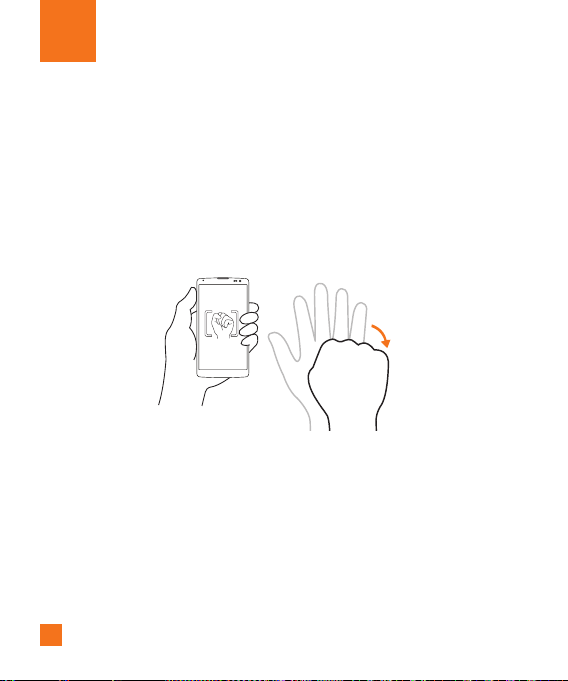
TheGestureshotfeatureallowsyoutotakeapicturewithahandgestureusingthefront
camera.
To take a photo
•Raiseyourhand,withanopenpalm,untilthefrontcameradetectsitandaboxappears
onthescreen.Thencloseyourhandintoafisttostartthetimer,allowingyoutimeto
getready.
Special Features

31
Special Features
KnockON
TheKnockONfeatureallowsyoutodouble-tapthescreentoeasilyturnitonoroff.
To turn the screen on
1 Double-tapthecenteroftheLockscreentoturnthescreenon.
2 Unlockthescreenoraccessanyoftheavailableshortcutsorwidgets.
To turn the screen off
1 Double-tapanemptyareaoftheHomescreenortheStatusBar.
2 Thescreenwillturnoff.
NOTE:
X Taponthecenterareaofthescreen.Ifyoutaponthebottomorthetoparea,the
recognitionratemaydecrease.
Knock Code
TheKnockCodefeatureallowsyoutocreateyourownunlockcodeusingacombinationof
knocksonthescreen.YoucanaccesstheHomescreendirectlywhenthescreenisoffby
tappingthesamesequenceonthescreen.
NOTE:
X IfyouenterthewrongKnockCode6times,itwillcompulsorilytakeyoutoyourGoogle
accountlogin/backupPIN.
X Usethefingertipinsteadoffingernailtotapthescreenforturningitonoroff.
X WhentheKnockCodeisnotinuse,youcanuseKnockOnfunctionbytapingthe
screen.
32
Special Features
1 Tap > > >Display tab>Lock screen>Select screen lock>Knock
Code.
2 TapthesquaresinapatterntosetyourKnockCode.YourKnockCodepatterncanbe3
to8taps.
Unlocking the screen using the Knock Code
YoucanunlockthescreenbytappingtheKnockCodepatternyoualreadyset,whenthe
screenturnsoff.
QuickMemo+
TheQuickMemo+featureallowsyoutocreatememosandcapturescreenshots.
YoucanuseQuickMemo+toeasilyandefficientlycreatememosduringacall,withasaved
pictureoronthecurrentphonescreen.
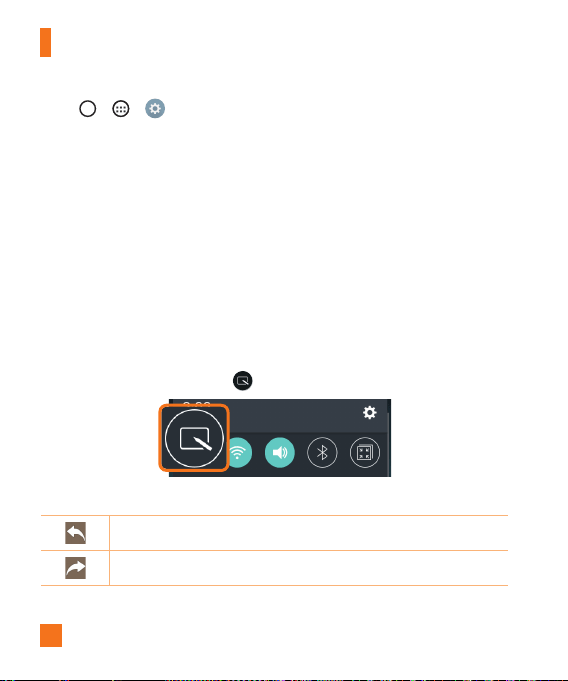
1 DragtheStatusbardownandtap
.
2 Createamemousingthefollowingoptions:
Taptoundothemostrecentaction.
Taptoredothemostrecentlydeletedaction.
33
Special Features
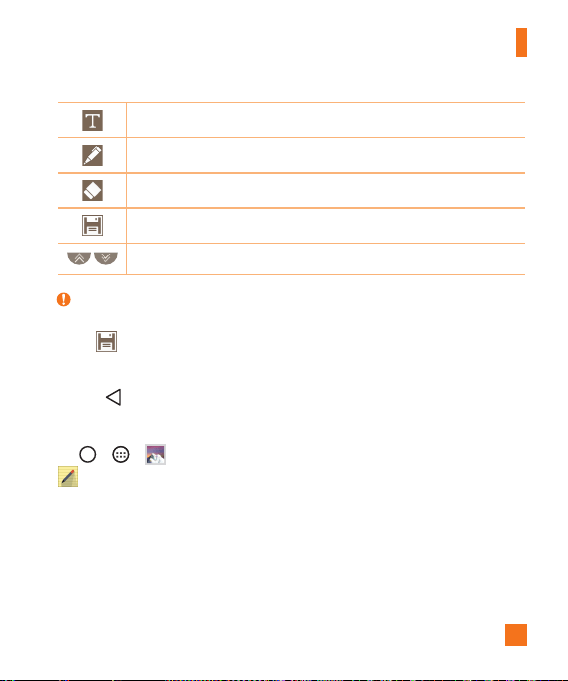
Taptoinserttextintoyourmemo.
Taptoselectthepentypeandcolor.
Taptousetheerasertoerasethepenmarksonthememo.
Taptosavethememoyou'vecreated.
Taptohideordisplaythetoolbar.
NOTE:
X PleaseuseafingertipwhileusingtheQuickMemo+feature.Donotuseyourfingernail.
3 Tap
tosavethecurrentmemototheQuickMemo+ orGallery.
Discard Memos
•Tap .
View the Saved Memo
Tap > > andselecttheQuickMemo+albumoraccesstheQuickMemo+app
andselectthedesiredmemo.
34
Special Features
QSlide
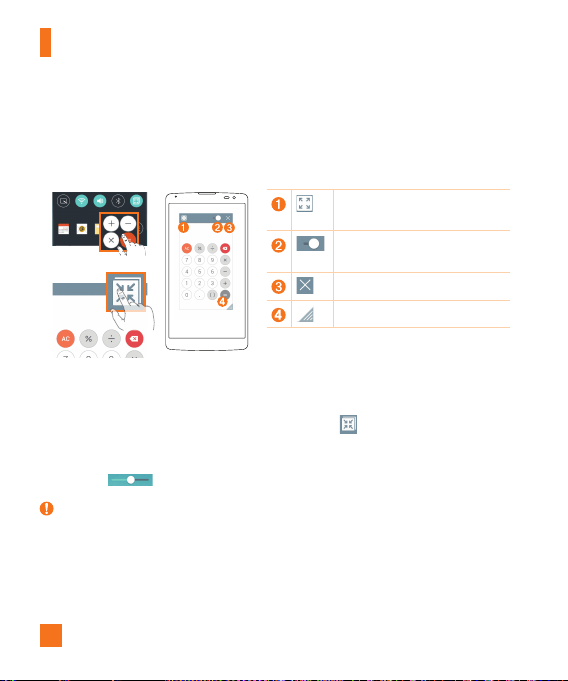
Fromanyscreen,usetheNotificationspaneltoeasilyaccessandusetheCalendar,
Calculator,andmorewithQSlide.
OR
Taptoexpandthewindowtofull
windowsize.
Taptoadjustthewindow's
transparency.
TaptoclosetheQSlidewindow.
Dragtoadjustthewindowsize.
1 SlidetheStatusbardownward,thentapQSlidetoviewtheavailableQSlideapps.
ThentapthedesiredappfromtheQSlideAppssection.
OR
Also,whileusingapplicationsthatsupportQSlide,tap
.Thefunctionisdisplayedas
asmallwindowonyourscreen.
2 YoucanuseandtapthescreenundertheQSlidewindowswhenthetransparencybar
isnotfull
.
NOTE:
X QSlidecansupportuptoonewindowatthesametime.
35
Special Features
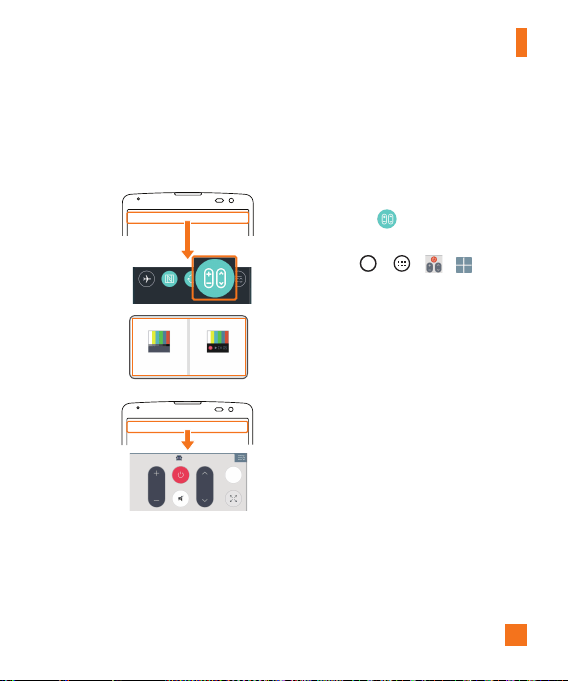
QuickRemote
QuickRemoteturnsyourphoneintoaUniversalRemoteforyourhomeTV,set-topboxand
audiosystem,andmore.
1 SlidetheStatusbardownward
andtap >ADD REMOTE.
OR
Tap
> > > .
2 Selectthetypeandbrandofthe
device,thenfollowtheon-screen
instructionstocongurethe
device.
3 Onceyouhavecompletedthe
initialsetup,youcaneasily
accesstheQuickRemotefrom
theNoticationspanel.Openthe
Noticationspanelandusethe
QuickRemotefunctions.
36
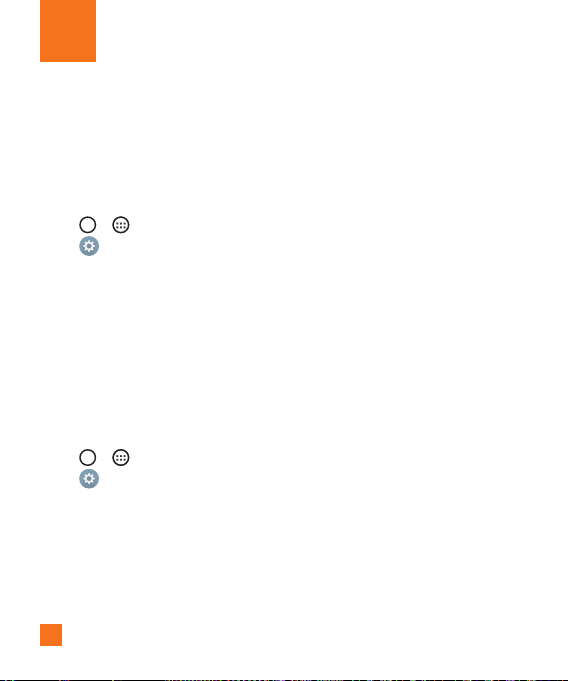
ThefirsttimeyouopenaGoogleapplicationonyourphone,youwillberequiredtosign
inwithyourexistingGoogleaccount.IfyoudonothaveaGoogleaccount,youwillbe
promptedtocreateone.
Creating your Google account
1 Tap > .
2 Tap
>Generaltab>Accounts & sync>Add account>Google>Or create a
new account.
3 Enteryourrstandlastname,thentapNEXT.
4 EnterausernameandtapNEXT.YourphonewillcommunicatewithGoogleserversand
checkforusernameavailability.
5 EnteryourpasswordandtapNEXT.
6 Followtheinstructionsandentertherequiredandoptionalinformationaboutthe
account.Waitwhiletheservercreatesyouraccount.
Signing into your Google account
1 Tap > .
2 Tap
>Generaltab>Accounts & sync>Add account>Google.
3 EnteryouremailaddressandtapNEXT.
4 OnceyouhavesetupyourGoogleaccount,yourphonewillautomaticallysynchronize
withyourGoogleaccountontheweb(ifadataconnectionisavailable).
Google Account Setup

37
Google Account Setup
Aftersigningin,yourphonewillsyncwithyourGoogleservices,suchasGmail,Contacts,
andGoogleCalendar.YoucanalsouseMaps,downloadapplicationsfromPlayStore,back
upyoursettingstoGoogleservers,andtakeadvantageofotherGoogleservicesonyour
phone.
IMPORTANT
X Someapplications,suchasCalendar,workonlywiththefirstGoogleAccountyouadd.
IfyouplantousemorethanoneGoogleAccountwithyourphone,besuretosigninto
theoneyouwanttousewithsuchapplicationsfirst.Whenyousignin,yourcontacts,
Gmailmessages,Calendarevents,andotherinformationfromtheseapplicationsand
servicesonthewebaresynchronizedwithyourphone.Ifyoudon'tsignintoaGoogle
Accountduringsetup,youwillbepromptedtosigninortocreateaGoogleAccount
thefirsttimeyoustartanapplicationthatrequiresone,suchasGmailorPlayStore.
X Ifyouhaveanenterpriseaccountthroughyourcompanyorotherorganization,yourIT
departmentmayhavespecialinstructionsonhowtosignintothataccount.
38
Wi-Fi
Youcanusehigh-speedInternetaccesswhilewithinthecoverageofthewirelessaccess
point(AP).
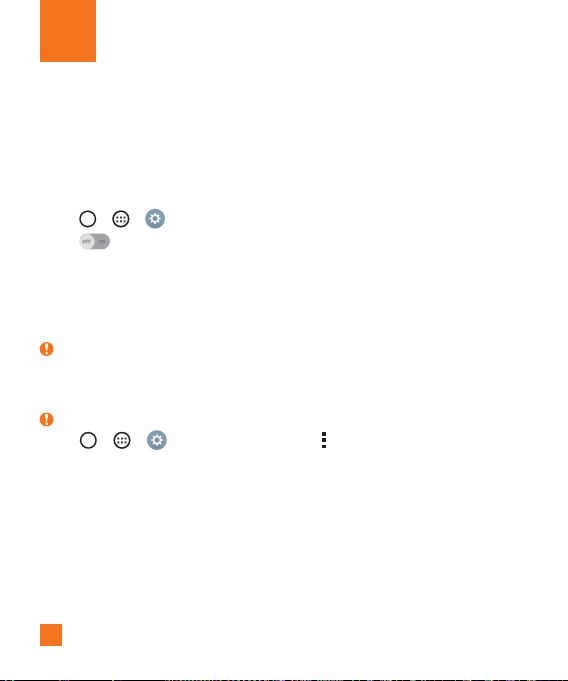
Connecting to Wi-Fi networks
1 Tap > > >Networks tab>Wi-Fi.
2 Tap
toturnWi-FionandstartscanningforavailableWi-Finetworks.
3 Tapanetworktoconnecttoit.
•Ifthenetworkissecuredwithalockicon,youwillneedtoenterasecuritykeyor
password.
4 TheStatusbardisplaysiconsthatindicateWi-Fistatus.
NOTE:
X IfyouareoutoftheWi-FizoneorhavesetWi-FitoOff,thedevicemayautomatically
connecttotheWebusingmobiledata,whichmayincurdatacharges.
TIP! How to obtain the MAC address
X Tap > > >Networks tab>Wi-Fi> >Advanced Wi-Fi>MAC
address.
Bluetooth
Bluetoothisashort-rangecommunicationstechnologythatallowsyoutoconnectwirelessly
toanumberofBluetoothdevices,suchasheadsetsandhands-freecarkits,andBluetooth-
enabledhandhelds,computers,printers,andwirelessdevices.
Connecting to Networks and Devices

39
Connecting to Networks and Devices
NOTE:
X LGisnotresponsiblefortheloss,interceptionormisuseofdatasentorreceivedvia
theBluetoothfeature.
X Alwaysmakesurethatyoushareandreceivedatawithdevicesthataretrustedand
properlysecured.
X Ifthereareobstaclesbetweenthedevices,theoperatingdistancemaybereduced.
X Somedevices,especiallythosethatarenottestedorapprovedbyBluetoothSIG,may
beincompatiblewithyourdevice.
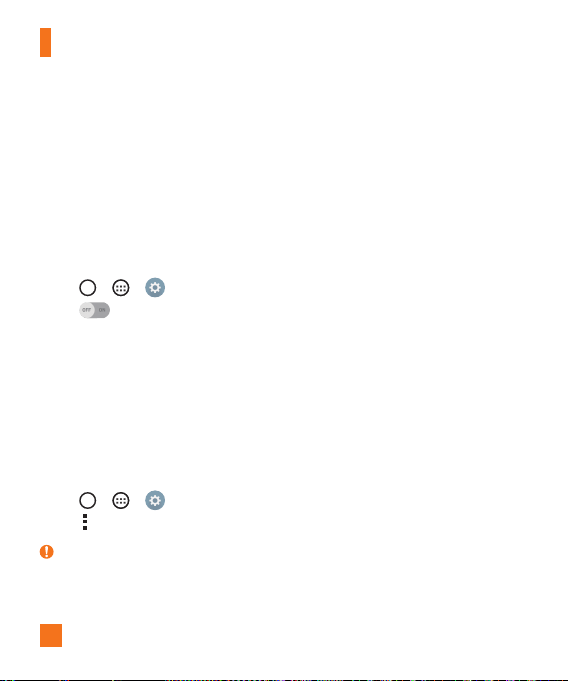
Pairing your phone with another Bluetooth device
1 Tap > > >Networks tab>Bluetooth.
2 Tap
toturnBluetoothon.
3 TapSearchtoviewthevisibledevicesinrange.
4 Choosethedeviceyouwanttopairwithfromthelist.Oncetheparingissuccessful,
yourphoneconnectstotheotherdevice.
NOTE:
X PairingbetweentwoBluetoothdevicesisaone-timeprocess.Onceapairinghas
beencreated,thedeviceswillcontinuetorecognizetheirpartnershipandexchange
information.
TIP!
X PleaseconsultdocumentationincludedwithBluetoothdeviceforinformationon
pairingmodeandpasscode(typically0000–fourzeroes).
40
Connecting to Networks and Devices
Sending data via Bluetooth
1 Selectafileoritem,suchasacontactormediafile.
2 SelecttheoptionforsendingdataviaBluetooth.
3 SearchforandpairwithaBluetooth-enableddevice.
•DuetodifferentspecificationsandfeaturesofotherBluetooth-compatibledevices,
displayandoperationsmaybedifferent,andfunctionssuchastransferorexchange,
maynotbepossiblewithallBluetoothcompatibledevices.
Receiving data via Bluetooth
1 Tap > > >Networks tab>Bluetooth.
2 Tap
toturnBluetoothon.
3 Youwillreceivearequesttoacceptcontentfromthesendingdevice.Besuretoselect
Accept.
Wi-Fi Direct
Wi-FiDirectprovidesadirectconnectionbetweenWi-Fienableddeviceswithoutrequiring
anaccesspoint.
Turning on Wi-Fi Direct
1 Tap > > > Networks tab > Wi-Fi.
2 Tap
> Advanced Wi-Fi > Wi-Fi Direct.
NOTE:
X Wheninthismenu,yourdeviceisvisibletoothervisibleWi-FiDirectdevicesnearby.

41
Connecting to Networks and Devices
Transferring data between a PC and your device
YoucancopyormovedatabetweenaPCandthedevice.
Transferring data
1 ConnectyourdevicetoaPCusingtheUSBcablethatcamewithyourphone.
2 OpentheNoticationspanel,tapthecurrentUSBconnection,andselectMedia
device (MTP).
3 Awindowwillpop-uponyourPC,allowingyoutotransferthedesireddata.
NOTE:
X TheLGUnitedMobileDriverisrequiredtobeinstalledonyourPCtobeabletodetect
thephone.
X ChecktherequirementsforusingMedia sync (MTP).
Items Requirement
OS MicrosoftWindowsXPSP3,Vistaorhigher
WindowMediaPlayerversion WindowsMediaPlayer10orhigher
X Pleaserefertowww.android.com/filetransfer/#tipsinordertouseMTPontheMAC
OS.
42
Making a call
1 Tap toopenthedialer.
2 Enterthenumberusingthedialer.Todeleteadigit,tap
.
3 Afterenteringthedesirednumber,tap
toplacethecall.
4 Toendthecall,tap
.
TIP!
X Toenter"+"tomakeinternationalcalls,touchandhold .
Calling your contacts
1 Tap toopenyourcontacts.
2 Scrollthroughthecontactlist.Youcanalsoenterthecontact'snameintheSearcheld
orscrollalongthealphabetlettersontherightedgeofthescreen.
3 Inthelistthatisdisplayed,tapthecontactyouwanttocall.
4 Tap
nexttothenumberyouwanttodial.
Answering and rejecting a call
•Swipe inanydirectiontoanswertheincomingcall.
•Swipe
inanydirectiontodeclineanincomingcall.
NOTE:
X TaporswipetheDecline with messageifyouwanttosendamessagetothecaller.
Calls
43
Calls
Making a second call
1 Duringyourfirstcall,tap >Add callandenterthenumber.
2 Tap
toplacethecall.
3 Bothcallsaredisplayedonthecallscreen.Yourinitialcallislockedandputonhold.
4 Tapthedisplayednumbertotogglebetweencalls.Ortap
tostartaconferencecall.
5 Toendallcalls,tap
.
NOTE:
X Youarechargedforeachcallyoumake.
TIP!
X TapManage memberstoendindividualcallsorseparatecallsfromaconferencecall.
Viewing your call logs
FromtheHomescreen,tap andselectCall logs.
Viewalistofalldialed,receivedandmissedcalls.
TIP!
X Tapanycalllogentrytoviewthedate,timeanddurationofthecall.
X Tap
,thentapDelete alltodeletealloftherecordeditems.

44
Calls
Call settings
Youcanconfigurephonecallsettings,suchascallforwarding,aswellasotherspecial
featuresofferedbyyourcarrier.
1 FromtheHomescreen,tap
toopenthedialer.
2 Tap
todisplaytheavailableoptions.
3 TapCall settingsandcongurethedesiredoptions.

45
YoucanaddcontactsonyourphoneandsynchronizethemwiththecontactsinyourGoogle
Accountorotheraccountsthatsupportsyncingcontacts.
Searching for a contact
1 Tap toopenyourcontacts.
2 TapSearch contactsandenterthecontactnameusingthekeyboard.
Adding a new contact
1 Tap andenterthenewcontact'snumber.Thentap >Add to Contacts>New
contact.
2 Ifyouwanttoaddapicturetothenewcontact,taptheimagearea.
ChooseTake photoorSelect from Gallery.
3 Enterthedesiredinformationforthecontact.
4 TapSave.
Favorites contacts
Youcanclassifyfrequentlycalledcontactsasfavorites.
Adding a contact to your favorites
1 Tap toopenyourcontacts.
2 Tapacontacttoviewitsdetails.
3 Tapthestaratthetoprightofthescreen.Thestarturnsgold.
Contacts

46
Contacts
Removing a contact from your favorites list
1 Tap toopenyourcontacts.
2 TaptheFavoritestab,andchooseacontacttoviewitsdetails.
3 Tapthegoldstaratthetoprightofthescreen.Thestarturnsadarkcolorandthe
contactisremovedfromyourfavorites.
Creating a group
1 Tap toopenyourcontacts.
2 TapGroups>
>New group.
3 Enteranameforthenewgroup.Youcanalsosetadistinctringtoneforthenewly
createdgroup.
4 TapAdd memberstoaddcontactstothegroup.
5 TapSavetosavethegroup.
NOTE:
X Ifyoudeleteagroup,thecontactsassignedtothatgroupwillnotbelost.Theywill
remaininyourcontactlist.
47
Contacts
Joining and Separating Contacts
Whenyouhavetwoormoreentriesforthesamecontact,youcanjointhemintoasingle
entry.Youcanalsoseparatecontactsthatwerejoined.
1 Tap
> > .
2 Tap
>Manage contacts>Join contacts.
3 Selectatabatthetopofthescreen.
•TapJoin suggestion toselectentriesyouwanttojoin.
•TapJoined contacts toselectentriesyouwanttoseparate.
4 Checkmarktheentry(orentries)youwanttojoinorseparate,thentaptheJoinor
Separatebutton.
AT&T Address Book (AAB)
AT&TAddressBook(AAB)isanapplicationthatautomaticallysyncsyourcontactstoan
onlineaddressbookforsafekeeping!WhenyoufirstturnonthephoneorchangeyourSIM
cardandopenContacts,theAABapplicationisdisplayed.
Aftersigningupforthisservice,yourinformationissyncedonaregularbasis.
Youcanfindmoreinformationonthisserviceandaccessyouronlineaddressbookatwww.
att.com/addressbook.Youcanfindthesynchronizationmenufortheservicebytapping
> > >Generaltab>Accounts & sync>AT&T Address Book.
48
Yourphonecombinestextandmultimediamessagingintooneintuitive,easyto-usemenu.
Sending a message
1 FromtheHomescreen,tap andtap tocreateanewmessage.
2 EnteracontactnameorcontactnumberintotheToeld.Asyouenterthecontact
name,matchingcontactsappear.Youcantapasuggestedrecipientandaddmorethan
onecontact.
NOTE:
X Youmaybechargedforeachtextmessageyousend.Pleaseconsultwithyourservice
provider.
3 Tapthetexteldandstartenteringyourmessage.
4 Tap
toopentheoptionsmenu.Choosefromanyoftheavailableoptions.
TIP!
X Youcantap toattachthefilethatyouwanttosharewithmessage.
5 TapSendtosendyourmessage.
TIP!
X The160-characterlimitmayvaryfromcountrytocountrydependingonhowthetext
messageiscodedandthelanguageusedinthemessage.
X Ifanimage,video,oraudiofileisaddedtoatextmessage,itwillbeautomatically
convertedintoamultimediamessageandyouwillbechargedaccordingly.
NOTE:
X Whenyougetatextmessageduringacall,therewillbeanaudiblenotification.
Messaging

49
Messaging
Conversation view
Messagesexchangedwithanotherpartyaredisplayedinchronologicalordersothatyoucan
convenientlyseeandfindyourconversations.
Changing your messaging settings
Yourphone'smessagingsettingsarepredefinedtoallowyoutosendmessagesimmediately.
Youcanchangethesettingsbasedonyourpreferences.
•Tap
ontheHomescreen,tap >Settings.
50
YoucanusetheEmailapplicationtoreademailfromprovidersotherthanGmail.TheEmail
applicationsupportsthefollowingaccounttypes:POP3,IMAPandMicrosoftExchange(for
Enterpriseusers).
Managing email accounts
To open the Email application
Tap > > .
ThefirsttimeyouopentheEmailapplication,asetupwizardopenstohelpyouaddanemail
account.
Adding another email account:
•Tap > > > >Settings> Add account.
Changing the email general settings:
•Tap > > > >Settings>General settings.
Deleting an email account:
•Tap > > > >Settings> >Remove account>Selecttheaccount
todelete>Remove>Yes.
Email
51
Email
Working with account folders
Tap > > > >Folders.
EachaccounthasInbox,Outbox,SentandDraftsfolders.Dependingonthefeatures
supportedbyyouraccount'sserviceprovider,youmayhaveadditionalfolders.
Composing and sending email
1 Inthe application,tap tocreateanewemail.
2 Enteranaddressforthemessage'sintendedrecipient.Asyouentertext,matching
addresseswillbeofferedfromyourcontacts.Separatemultipleaddresseswith
semicolons.
3 TaptheCc/Bcceldtocopyorblindcopytoothercontacts/emailaddresses.
4 Tapthetexteldandenteryourmessage.
5 TapAttachtoattachtheleyouwanttosendwithyourmessage.
6 TapSendtosendthemessage.
52
Camera and Video
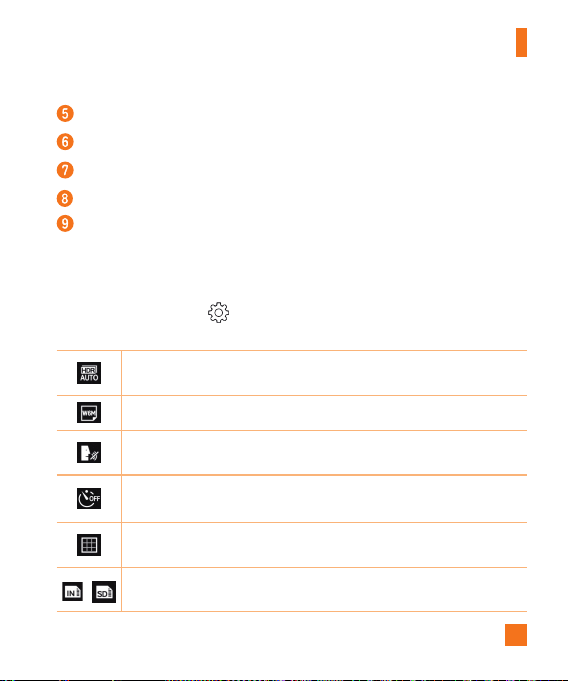
Camera options on the viewfinder
ToopentheCameraapplication,tap > > .
Youcanusethecameraorcamcordertotakeandsharepicturesandvideos.
NOTE:
X Besuretocleantheprotectivelenscoverwithamicrofiberclothbeforetaking
pictures.Alenscoverwithsmudgesfromfingerscancauseblurrypictureswitha
"halo"effect.
1
6
9
2
7
8
3
4
5
Hide/Display Options–Taptohide/displaythecameraoptionsontheviewfinder.
Flash–Allowsyoutomanagethecamera'sflash.
Swap camera–Taptoswapbetweentherearcameralensandthefrontcameralens.
Mode–AllowsyouselecttheshotmodefromAutoandPanorama.
53
Camera and Video
Settings–Tapthisicontoopenthecamerasettingsmenu.
Gallery–Taptoviewthelastphotoorvideoyoucaptured.
Record–Taptostartrecording.
Capture –Taptotakeaphoto.
Exit –Taptoexitthecamera.
Using the advanced settings
Inthecameraviewfinder,tap toshowtheadvancedoptions.Tapeachicontoadjustthe
followingcamerasettings.
Combinesphotostakenatmultipleexposuresintooneoptimalphototogeta
betterphotointrickylightingsituations.
Setthesizeofyourpictureandvideo.
Allowsyoutosayavoicecommandtotakepictures.YoucansayLG,Cheese,
Smile,oranyothersupportedcommand.
Setyourcamera'stimer.Thisisidealifyouwanttobeapartofthepicture
orvideo.
Allowsyoutotakebetterpicturesandrecordbettervideosbydisplayinga
gridlineforhelpwithalignment.
/
Setthestoragelocationforyourpicturesandvideos.Thismenuappearsonly
whentheSDcardisinserted.
54
Camera and Video
Allowsyoutolearnhowafunctionworks.Thisiconwillprovideyouwitha
helpguide.
NOTE:
X TheshuttersoundisnotavailablewhenVibratemodeorSilentmodeisenabled.
Taking a photo
1 Openthe applicationandpointthelenstowardthesubjectyouwantto
photograph.
2 Focusindicatorswillappearinthecenteroftheviewnderscreen.Youcanalsotap
anywhereonthescreentofocusonthatspot.
3 Whenthefocusindicatorsturnblue,thecamerahasfocusedonyoursubject.
4 Tap
tocapturethephoto.
Once you have taken a photo
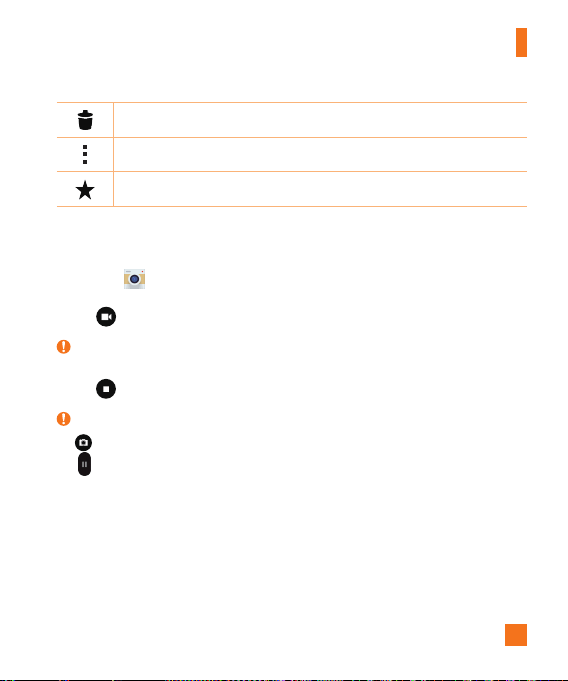
Taptheimagethumbnailonthescreentoviewthelastphotoyoutook.Thefollowing
optionsareavailable.
Taptoeditthephoto.
Taptotakeanotherphotoimmediately.
Taptosendyourphototoothersorshareitviaanyavailablesocialnetwork
services.
55
Camera and Video
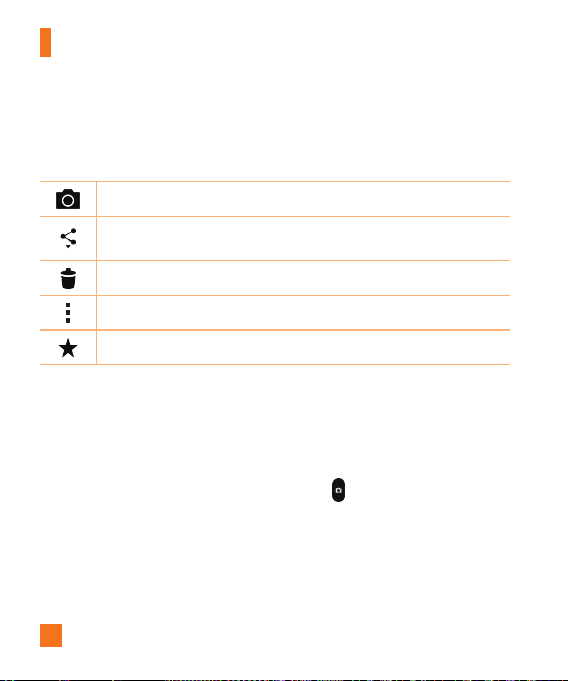
Taptodeletethephoto.
Taptoaccessadditionaloptions.
Taptoaddthephototoyourfavorites.
Recording a video
1 Openthe applicationandpointthelenstowardthesubjectyouwanttocapturein
yourvideo.
2 Tap
oncetostartrecording.
NOTE:
X Thetimerwillbedisplayedonthescreen.
3 Tap
tostoprecording.
TIP!
X –Taptocaptureascreenshotwhilerecordingavideo.
X
–Taptopausetherecording.
56
Camera and Video
After recording a video
Tapthevideothumbnailonthescreentoviewthelastvideoyourecorded.Thefollowing
optionsareavailable.
Taptorecordanothervideoimmediately.
Taptosendyourvideotoothersorshareitviaanyavailablesocialnetwork
services.
Taptodeletethevideo.
Taptoaccessadditionaloptions.
Taptoaddthevideotofavorites.
Multi-point Auto Focus
Whenyoutakeapicture,theMulti-pointAutoFocus(AF)functionoperatesautomatically
andallowsyoutoseeaclearimage.
Burst shot
Allowsyoutotakemultipleshotsquickly.Touchandhold .

57
Camera and Video
Gallery
TheGalleryapplicationpresentsthepicturesandvideosinyourstorage,includingthose
you'vetakenwiththeCameraapplicationandthoseyoudownloadedfromtheweborother
locations.
1 Tap
> > toviewtheimagesstoredinthestorage.
2 Tapanalbumtoopenitandviewitscontents.(Thepicturesandvideosinthealbumare
displayedinchronologicalorder.)
3 Tapapictureinanalbumtoviewit.
NOTE:
X Dependingonthesoftwareinstalled,somefileformatsmaynotbesupported.
X Somefilesmaynotplayproperlyduetotheirencoding.
Viewing pictures
TheGallerydisplaysyourpicturesinfolders.Whensomeappssaveapicture,afolderis
automaticallycreatedtocontainthepicture.
Picturesaredisplayedbythedatetheywerecreated.Selectapicturetoviewitfullscreen.
Scrollleftorrighttoviewthenextorpreviousimage.
Zooming in and out
Useoneofthefollowingmethodstozoominandoutonanimage:
•Double-tapanywheretozoominandout.
•Spreadtwofingersapartonanyplaceinthepicturezoomin.Pinchintozoomout.
58
Camera and Video
Video options
1 Tap > > .
2 Selectthevideoyouwanttowatch.
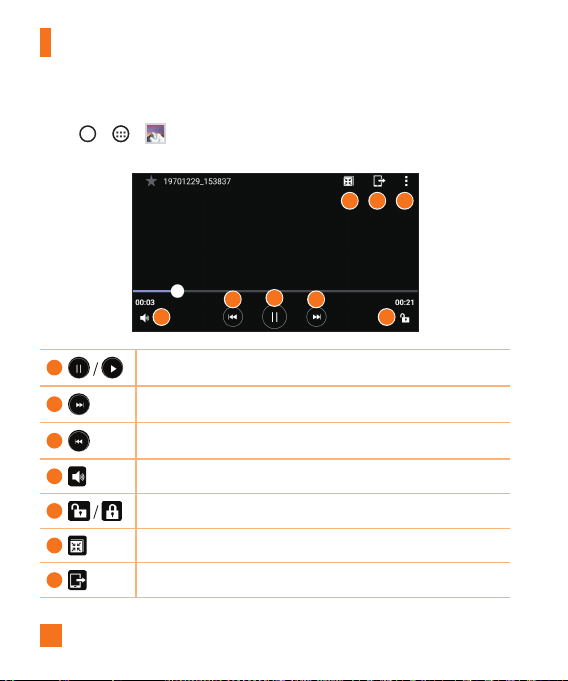
6 7 8
1
23
4 5
1
Touchtopause/resumevideoplayback.
2
Touchtofast-forward.
3
Touchtorewind.
4
Touchtoadjustvideovolume.
5
Touchtolock/unlockthescreen.
6
Enablesanoverlayonyourphone'sdisplayforeasymultitasking.
7
SharesmediafileswithDLNAcertifieddevices.
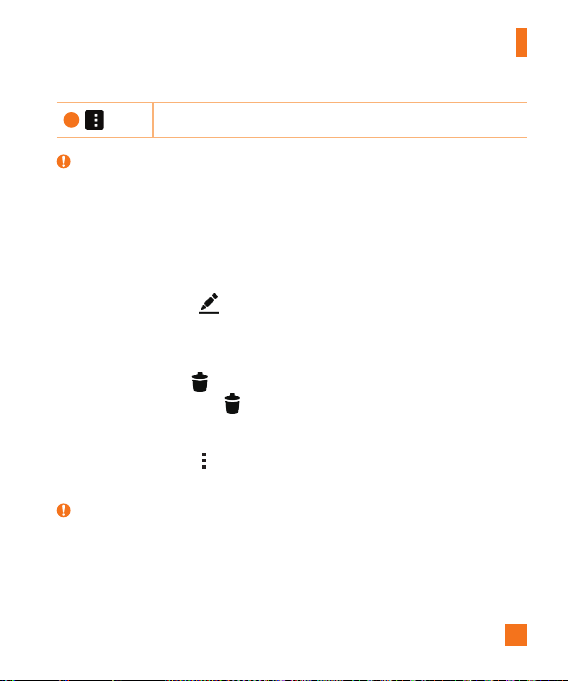
59
Camera and Video
8
Taptoaccessadditionaloptions.
NOTE:
X Whileavideoisplaying,thefollowingoptionsareavailable:
•Slidetherightsideofthescreenupordowntoadjustthesound.
•Slidetheleftsideofthescreenupordowntoadjustthebrightness.
•Slideyourfingerfromlefttoright(orviceversa)tofast-forwardandrewind.
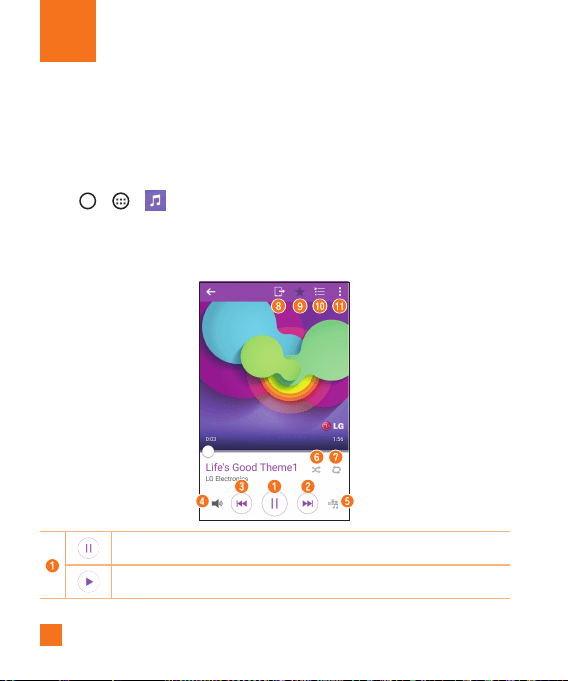
Editing photos
Whileviewingaphoto,tap .
Deleting photos/videos
Useoneofthefollowingmethods:
•Whileinafolder,tap ,selectthephotos/videosyouwanttodelete.ThentapDelete.
•Whileviewingaphoto,tap .
Setting wallpaper
Whileviewingaphoto,tap >Set image astosettheimageaswallpaperorassignit
toacontact.
NOTE:
X Dependingonthesoftwareinstalled,somefileformatsmaynotbesupported.
X Ifthefilesizeexceedstheavailablememory,anerrorcanoccurwhenyouopenfiles.
60
Multimedia
Music
Yourphonehasamusicplayerthatletsyouplayallyourfavoritetracks.
Playing a song
1 Tap > > .
2 TaptheSongstab.
3 Selectthesongyouwanttoplay.
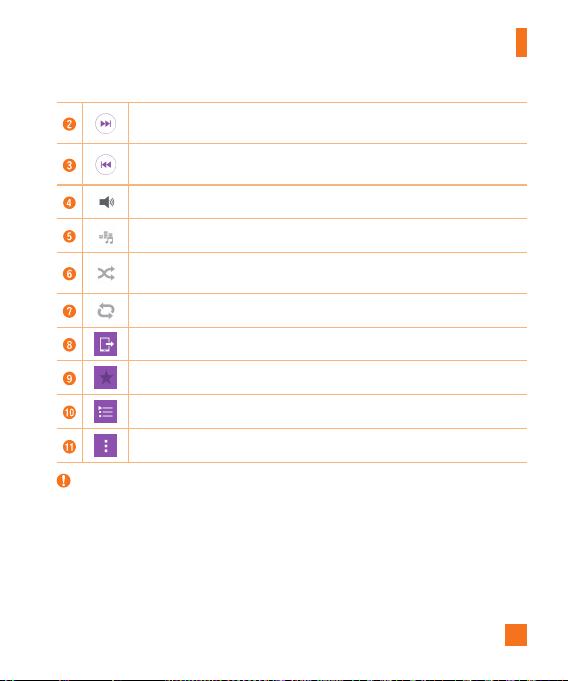
4 Thefollowingoptionsareavailable.
Taptopauseplayback.
Taptoresumeplayback.
61
Multimedia
Taptoskiptothenexttrackinthealbum,playlistorshufflelist.Touchand
holdtofast-forward.
Taptorestartthecurrenttrackorskiptotheprevioustrackinthealbum,
playlistorshufflelist.Touchandholdtorewind.
Taptoadjustthevolume.
Taptosetaudioeffects.
Taptoplaythecurrentplaylistinshufflemode(tracksareplayedinrandom
order).
Taptotogglethroughrepeatallsongs,repeatcurrentsongandrepeatoff.
TaptoshareyourmusicusingtheSmartSharefunction.
Taptoaddthesongtoyourfavorites.
Taptoopenthecurrentplaylist.
Taptoaccessadditionaloptions.
NOTE:
X Dependingonthesoftwareinstalled,somefileformatsmaynotbesupported.
X Ifthefilesizeexceedstheavailablememory,anerrorcanoccurwhenyouopenfiles.
X Musicfilecopyrightsmaybeprotectedbyinternationaltreatiesandnationalcopyright
laws.Therefore,itmaybenecessarytoobtainpermissionoralicencetoreproduceor
copymusic.Insomecountries,nationallawsprohibitprivatecopyingofcopyrighted
material.Beforedownloadingorcopyingthefile,pleasecheckthenationallawsofthe
relevantcountryconcerningtheuseofsuchmaterial.
62
Clock
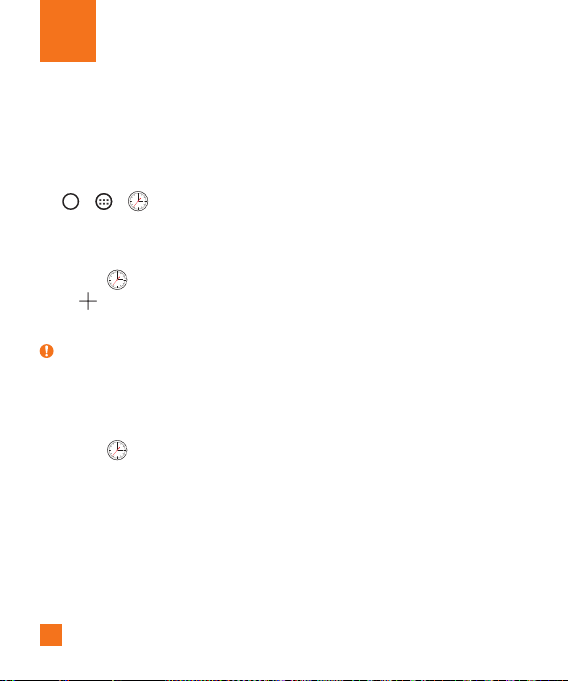
TheClockappgivesyouaccesstotheAlarms,Timer,WorldclockandStopwatchfunctions.
Accessthesefunctionsbytappingthetabsacrossthetopofthescreenorswiping
horizontallyacrossthemiddleofscreen.
Tap
> > .
Alarms
TheAlarmstaballowsyoutosetalarms.
1 Openthe
app,thenselecttheAlarmstab.
2 Tap
toaddanewalarm,tapanalarm.
3 AdjustthesettingsasnecessaryandtapSave.
NOTE:
X Youcanalsotapanexistingalarmtoeditit.
Timer
TheTimertabcanalertyouwithanaudiblesignalwhenasetamountoftimehaspassed.
1 Openthe
app,thenselecttheTimertab.
2 Setthedesiredtimeonthetimer.
3 TapStarttostartthetimer.
4 TapStoptostopthetimer.
Utilities
63
Utilities
World clock
TheWorldclocktaballowsyoutoeasilycheckthecurrenttimeinothercitiesaroundthe
world.
1 Openthe
app,thenselecttheWorld clocktab.
2 Tap
andselectthedesiredcity.
Stopwatch
TheStopwatchtaballowsyoutouseyourphoneasastopwatch.
1 Openthe
app,thenselecttheStopwatchtab.
2 TaptheStartbuttontoinitiatethestopwatch.
•TaptheLapbuttontorecordlaptimes.
3 TaptheStopbuttontostopstopwatch.
Calculator
TheCalculatorappallowsyoutoperformmathematicalcalculationsusingastandardor
scientificcalculator.
1 Tap
> > .
2 Tapthenumberkeystoenternumbers.
3 Forsimplecalculations,tapthefunctionyouwanttoperform(+,–,xor÷)followedby=.
NOTE:
X Formorecomplexcalculations,tap >Scientific calculator.
64
Utilities
Calendar
TheCalendarappallowsyoutotrackyourscheduleofevents.
1 Tap
> > .
2 Tapthedateyouwanttoaddaneventto.Thentap
.
3 EntertheeventdetailsandtapSave.
Voice Search
Usethisapplicationtosearchwebpagesusingvoice.
1 Tap
> >Google folder > .
2 SayakeywordorphrasewhenListening...appearsonthescreen.Selectoneofthe
suggestedkeywordsthatappear.
NOTE:
X Thisapplicationmaynotbeavailabledependingontheregionorserviceprovider.
Downloads
Usethisapplicationtoseewhatfileshavebeendownloadedthroughtheapplications.
•Tap
> > .
NOTE:
X Thisapplicationmaynotbeavailabledependingontheregionorserviceprovider.
65
Utilities
LG SmartWorld
LGSmartWorldoffersanassortmentofexcitingcontent–fonts,themes,games,
applications.
How to Get to LG SmartWorld from Your Phone
1 Tap > > .
2 TapSign inandenteryourusernameandpassword.Ifyouhavenotsignedupyet,tap
Registertocreateanaccount.
3 Browseanddownloadthecontentyouwant.
NOTE:
X YoumayincurdatafeechargeswhenusingyourmobilenetworktoaccessLG
SmartWorld.
X LGSmartWorldmaynotbeavailableforallcarriersorinallcountries.
X What if there is no LG SmartWorld
icon?
1 UsingamobileWebbrowseronyourdevice,accessLGSmartWorld
(www.lgworld.com)andselectyourcountry.
2 DownloadtheLGSmartWorldApp.
3 Runandinstallthedownloadedle.
4 AccessLGSmartWorldbytappingthe
icon.
X Special benefits available for LG SmartWorld
•
Personalizeyourdevicewithhomethemes,keyboardthemes,andfonts.
• EnjoyspecialpromotionsonlyofferedonLGSmartWorld.
• NotethatLGSmartWorldisonlyavailableforcertaindevices.Pleasecheckthe
www.lgworld.comformoreinformation.
66
Browsing the Web
Browser
TheBrowsergivesyouafast,full-colorworldofgames,music,news,sports,entertainment,
andmuchmore,rightonyourmobilephone.
NOTE:
X Additionalchargesapplywhenconnectingtotheseservicesanddownloadingcontent.
Checkdatachargeswithyournetworkprovider.
1 Tap
> > .
Using the Web toolbar
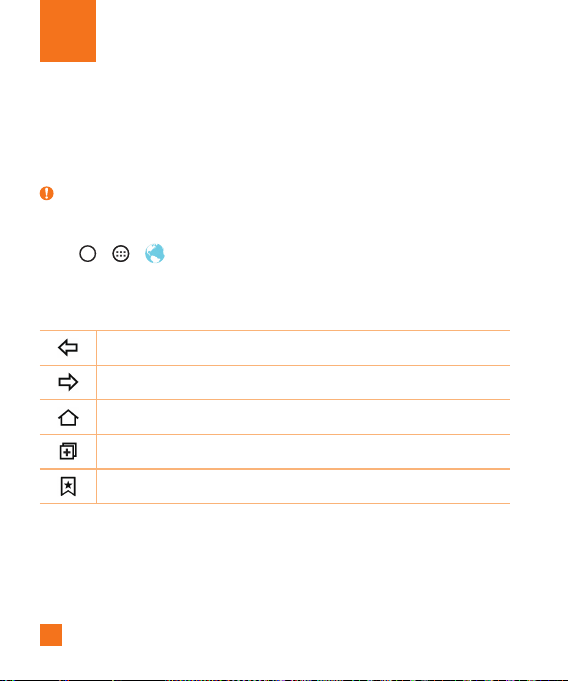
Scrolltowardsthetopofthewebpagetoaccessthebrowsertoolbar.
Taptogobackonepage.
Taptogoforwardonepage.
TaptogototheHomepage.
Taptoopenanewwindow.
Taptoaccessyourbookmarks.
Viewing webpages
Taptheaddressfield,enterthewebaddressandtapGoonthekeyboard.
67
Browsing the Web
Opening a page
Togotoanewpage,tap > .
Togotoanotherwebpage,tap
,scrollupordown,andtapthepagetoselectit.
Searching the web by voice
Taptheaddressfieldandthentap .Whenprompted,sayakeywordandselectoneofthe
suggestedkeywordsthatappear.
NOTE:
X Thisfeaturemaynotbeavailabledependingontheregionorserviceprovider.
Bookmarks
Tobookmarkthecurrentwebpage,tap >Add to bookmarks>OK.
Toopenabookmarkedwebpage,tap
andselectthedesiredbookmark.
History
Tap >Historytabtoopenalistofrecentlyvisitedwebpages.Toclearallofyourhistory,
tap >Yes.
Chrome
UseChrometosearchforinformationandbrowsewebpages.
1 Tap
> > .
NOTE:
X Thisapplicationmaynotbeavailabledependingonyourregionandserviceprovider.

68
Browsing the Web
Viewing webpages
Taptheaddressfield,andthenenterawebaddressorsearchcriteria.
Opening a page
Toopenanewpage,tab >New tab.
69
TheSettingsapplicationcontainsmostofthetoolsforcustomizingandconfiguringyour
phone.AllofthesettingsintheSettingsapplicationaredescribedinthissection.
To open the Settings application
•Tap >touchandhold >All settings.
-or-
•Tap
> > .
Networks
< WIRELESS NETWORKS >
Airplane mode
AirplaneMode(flightmode)allowsyoutousemanyofyourphone'sfeatures,suchas
games,andmusic,whenyouareinanareawheremakingorreceivingcallsordatauseis
prohibited.WhenyousetyourphonetoAirplaneMode,itcannotsendorreceiveanycallsor
accessonlinedata.
Wi-Fi
TurnsonWi-FitoconnecttoavailableWi-Finetworks.
Bluetooth
TurnstheBluetoothwirelessfeatureonorofftouseBluetooth.
Data Manager
Displaysthedatausageandallowsyoutosetapersonalizedmobiledatausagelimit.
Call
Configurephonecallsettings,suchascallforwardingandotherspecialfeaturesofferedby
yourcarrier.
Settings

70
Settings
•Voicemail –Allowsyoutoselectyourcarrier'svoicemailservice.
•Fixed dialing numbers–Turnonandcompilealistofnumbersthatcanbecalled
fromyourphone.YouneedyourPIN2,whichisavailablefromyouroperator.Only
numbersinthefixeddiallistcanbecalledfromyourphone.
•Caller ID–Usedefaultoperatorsettingstodisplayyournumberinoutgoingcalls.
•Incoming voice call pop-up–Displaysincomingvoicecallpop-upwhenanappis
inuse.
•Call reject–Allowsyoutosetthecalldeclinefunction.
•Decline with message–Whenyouwanttodeclineacall,youcansendaquick
messageusingthisfunction.Thisisusefulifyouneedtodeclineacallduringa
meeting.
•Privacy keeper–Hidesthecallernameandnumberforanincomingcall.
•Auto answer–Setsthetimebeforeaconnectedhands-freedeviceautomatically
answersanincomingcall.
•Connection vibration–Vibratesyourphonewhentheotherpartyanswersthecall.
•TTY mode –SetstheTTYmodetocommunicatewithotherTTYdevices.
•Hearing aids –Allowsyoutoturnonhearingaidcompatibility.
•Noise suppression–Suppressesbackgroundnoiseonyourdeviceduringacall.
•Power key ends call–Allowsyoutoselectyourendcall.
•Call duration–Viewthedurationofcalls,includingLastcall,Outgoingcalls,Incoming
callsandAllcalls.
•Sound settings-Allowsyoutocontrolthesoundsonthephone.
•Additional settings–Allowsyoutochangethefollowingsettings.
Call forwarding:Allowsyoutosetthecallforwardingoptions.
Call waiting:Ifcallwaitingisactivated,thehandsetwillnotifyyouofanincoming
callwhileyouareonacall(dependingonyournetworkprovider).

71
Settings
< CONNECTIVITY >
Share & connect
•NFC–NFC(NearFieldCommunication)isawirelesstechnologythatenablesdata
transmissionbetweentwoobjectswhentheyarebroughtwithinafewinchesofeach
others.WhenyouenableNFConyourphone,yourphonecanexchangedatawith
otherNFC-enableddevicesorreadinformationfromsmarttagsembeddedinposters,
stickers,andotherproducts.
•Android Beam–Whenthisfeatureisturnedon,youcanbeamappcontentto
anotherNFC-capabledevicebyholdingthedevicesclosetogether.Forexample,you
canbeamBrowserpages,YouTubevideos,contacts,ThinkFreeViewer,andmore.Just
bringthedevicestogether(typicallybacktoback)andthentouchyourscreen.Theapp
determineswhatgetsbeamed.
•SmartShare Beam–AllowsyoutoreceivemultimediacontentviaLGphonesand
tablets.
•Media server–Allowsyoutosharethephone'sdisplayandsoundonyourTV.
•LG PC Suite–ConnectLGPCSuitewithyourphonetoeasilymanagemultimedia
contentandapps.
Tethering & networks
•USB tethering–Youcanshareyourphone'sdataconnectionwithacomputerby
turningonUSBtethering.
•Mobile Hotspot–Youcanalsouseyourphonetoprovideamobilebroadband
connection.Createahotspotandshareyourconnection.
•Bluetooth tethering–Allowsyoutoconnectotherdevicestoyourphonevia
Bluetoothandshareitsinternetconnection.
•Help–DisplaysinformationregardingUSBtethering,Mobilehotspot,andBluetooth
tethering.

72
Settings
•Mobile networks–Allowsyoutoconfigurevariousmobilenetworksettings.
•VPN–Fromyourphone,youcanadd,setup,andmanagevirtualprivatenetworks
(VPNs)thatallowyoutoconnectandaccessresourcesinsideasecuredlocalnetwork,
suchasyourcorporatenetwork.
NOTE:
X YoumustsetascreenlockbeforeyoucanuseVPN.
Sound
< BASIC >
Sound profile
AllowsyoutosetthesoundprofiletoSound,Vibrate onlyandInterruptions.
Volume
Adjustthephone'svolumesettingstosuityourneedsandenvironment.
< RINGTONES & VIBRATIONS >
Ringtone
Selecttheringtoneforincomingcalls.
Default notification sound
Selecttheringtonefornotifications,suchasreceivingnewmessagesorcalendarevents.
Sound with vibration
Checkmarktosetthephonetovibrateinadditiontotheringtonewhenyoureceivecalls.

73
Settings
Vibration type
Allowsyoutosetavibrationtypefornotifications.
< NOTIFICATIONS >
Interruptions
Allowsyoutosetaschedulewhentopreventinterruptionsfromnotifications.Youcansetto
allowcertainfeaturestointerruptwhenPriorityonlyisset.
Lock screen
Allowsyoutochooseifyouwanttoshoworhidenotificationsonthelockscreen.
Apps
Allowsyoutopreventappsfromdisplayingnotificationsorsetappstoshownotifications
withprioritywhenDonotdisturbissettoPriorityonly.
< ADVANCED SETTINGS >
Vibrate on tap
CheckmarktovibratewhentappingtheHometouchbuttonsandduringotherUIinteractions.
Sound effects
Thismenuletsyouselectwhetheryouheartoneswhentouchingnumbersonthedialpad,
selectingon-screenoptions,andscreenlocksound.
•Dialpad touch sounds –Checkmarktoplaytoneswhileusingthedialpad.
•Touch sound –Checkmarktoplaysoundwhenmakingscreenselections.
•Screen lock sound –Checkmarktoplayasoundwhenlockingandunlockingthe
screen.
Message/call voice notifications
Allowsthedevicetoreadouttheincomingcallandthemessageeventautomatically.

74
Settings
Display
< HOME & LOCK >
Home screen
•Select Home –SelectthedesiredHometheme.ChoosefromHome(standard
Androidlayout)orEasyHome(simplifiedversionforuserslessfamiliarwithAndroid
navigation).
•Theme–Setsthescreenthemeforyourdevice.Youcandownloadnewthemesfrom
LGSmartWorld.
•Wallpaper –AllowsyoutosetthedesiredwallpaperforyourHomescreen.
•Screen swipe effect –Choosethedesiredtypeofeffecttodisplaywhenyouswipe
fromoneHomescreencanvastothenext.
•Allow Home screen looping –CheckmarktoallowcontinuousHomescreenscrolling
(loopbacktofirstscreenafterlastscreen).
•Home backup & restore –SettobackupandrestoreHomeapplayoutand
wallpaper.
Lock screen
•Select screen lock–Allowsyoutosetascreenlocktosecureyourphone.
•Smart Lock–SetstokeepyourphoneunlockedwhenyouhaveatrustedBluetooth
deviceconnectedtoit,whenit'sinafamiliarlocationlikeyourhomeorwork,orwhen
itrecognizesyourface.
•Screen swipe effect–Setstheeffectusedwhenswipingthelockscreen.
•Wallpaper–Selectthewallpapertodisplayforyourlockscreen.
•Shortcuts–Customizeshortcutsonthelockscreen.

75
Settings
•Contact info for lost phone–Selectwhethertodisplaytheownerinformationonthe
lockscreenandcustomizetheownerinformation.
•Lock timer–Allowsyoutosettheamountoftimebeforethescreenautomatically
locksafterthescreenhastimed-out.
•Power button instantly locks–Checkmarktoinstantlylockthescreenwhenthe
Power/LockKeyispressed.ThissettingoverridestheSecuritylocktimersetting.
Home touch buttons
Selectthehometouchbuttoncombinationandcolor.
< FONT >
Font type
Selectthedesiredfonttypeforthephoneandmenus.
Font size
Selectthedesiredfontsizeforthephoneandmenus.
< OTHER SCREEN SETTINGS >
Brightness
Allowsyoutoadjustthescreenbrightness.CheckmarkNight brightnesstosetbrightness
at0%automaticallybetween12:00AM~06:00AM.
Notification LED
TaptheswitchtotoggleitOnorOff.OnactivatestheLEDlightforthenotificationsyou
select,inthecoloryousetforeach.
Auto-rotate screen
Allowsyoutosettoswitchthescreenorientationautomaticallywhenyouphysicallyrotate
thephone.

76
Settings
Screen timeout
Allowsyoutosettheamountoftimebeforethescreentimesout.
Smart screen
Checkmarkthisoptiontokeepscreenonwhenthephonedetectsyourfacelookingatthe
screen.
< ADVANCED SETTINGS >
Screen-off effect
Allowsyoutosettheeffectusedwhenthescreenturnsoff.
Daydream
Selectthescreensavertodisplaywhenthephoneissleepingwhiledockedand/orcharging.
General
< PERSONAL >
Language & input
Selectthelanguageforthetextonyourphoneandforconfiguringtheon-screenkeyboard,
includingwordsthatyou'veaddedtoitsdictionary.
•Language –Choosealanguagetouseonyourphone.
•Spelling correction –Allowsspellingcorrectionwhenusingtheon-screenkeyboard.
•Default –Allowsyoutoselectthedefaultkeyboardtype.
•Google Keyboard–TaptheSettingsicontochangetheGoogleKeyboardsettings.
•LG Keyboard–TaptheSettingsicontochangetheLGKeyboardsettings.
•Google voice typing –CheckmarktoselectGooglevoicetypingtoentertext.Tapthe
SettingsicontochangetheGooglevoicesettings.

77
Settings
•Keeper FastFill–Thisfeatureallowsyoutomanageandsecureyourpasswordand
privateinformation.
•Voice Search–TouchtoconfiguretheVoiceSearchsettings.
•Text-to-speech output –Touchtosetthepreferredengineorgeneralsettingsfor
text-to-speechoutput.
•Pointer speed –Adjustthepointerspeed.
Location
Turnonlocationservice,yourphonedeterminesyourapproximatelocationusingWi-Fiand
mobilenetworks.Whenyouselectthisoption,you'reaskedwhetheryouconsenttoallowing
Googletouseyourlocationwhenprovidingtheseservices.
•Mode –Setsthehowyourcurrentlocationinformationisdetermined.
•RECENT LOCATION REQUEST–Displaysapplicationsandservicesthathave
recentlyrequestedyourlocationinformation.
•Camera –Checkmarktotagphotosorvideoswiththeirlocations.
•Google Location Reporting –AllowsyoutoviewandmanageyourGooglelocation
history.
Accounts & sync
UsetheAccounts&syncsettingsmenutoadd,remove,andmanageyourGoogleandother
supportedaccounts.Youalsousethesesettingstocontrolhowandwhetherallapplications
send,receive,andsyncdataontheirownschedulesandwhetherallapplicationscan
synchronizeuserdataautomatically.
Gmail™,Calendar,andotherapplicationsmayalsohavetheirownsettingstocontrol
howtheysynchronizedata;seethesectionsonthoseapplicationsfordetails.TouchAdd
accounttoaddnewaccount.

78
Settings
Accessibility
UsetheAccessibilitysettingstoconfigureaccessibilityplug-insyouhaveinstalledonyour
phone.
•TalkBack–AllowsyoutosetuptheTalkBackfunctionwhichassistspeoplewith
impairedvisionbyprovidingverbalfeedback.
•Font size–Setsthefontsize.
•Invert colors–Checkmarktoinvertthecolorsofthescreenandcontent.
•Color adjustment–Allowsyoutoadjustscreenandcontentcolors.
•Touch zoom–Allowsyoutozoominandoutbytriple-tappingthescreen.
•Message/call voice notifications–Thisfeatureallowsyoutohearautomatic
spokenalertsforincomingcallsandmessages.
•Screen shade–Checkmarktosetthescreentoadarkercontrast.
•Accessibility shortcut–AllowsyoutoopentheAccessibilityfeaturequicklyonany
screen.
•Text-to-speech output–Taptocustomizetext-to-speech(TTS)settings.
•Audio type–Setstheaudiotype.
•Sound balance–Setstheaudioroute.Movethesliderontheslidebartosetit.
•Notification LED–TurnontheLEDlightforincomingcallsandnotifications.
•Flash alerts–Checkmarktosettheflashtoblinkforincomingcallsandnotifications.
•Turn off all sounds–Checkmarktoturnoffalldevicesounds.
•Captions–Allowsyoutocustomizecaptionsettingsforthosewithhearing
impairments.
•Touch feedback time–Setsthetouchfeedbacktime.
•Touch assistant–Showatouchboardwitheasyaccesstocommonactions.
•Screen timeout –Setstheamountoftimebeforethebacklightturnsoffautomatically.

79
Settings
•Touch control areas–Allowsyoutoselectanareaofthescreentolimittouch
activationtojustthatareaofthescreen.
•Auto-rotate screen–Checkmarktoallowthephonetorotatethescreendepending
onthephoneorientation(portraitorlandscape).
•Password voice confirmation–Checkmarksothatyourphonecanreadpasswords
youtouch.
•Power key ends call–Checkmarksothatyoucanendvoicecallsbypressingthe
Power/LockKey.
•Accessibility settings shortcut–Setsquick,easyaccesstoselectedfeatureswhen
youtriple-taptheHomeKey.
•One-touch input –Checkmarktoenableone-touchinput.Itallowseachfingertouch
toenteraletterorcharacterontheLGkeyboard.
•Switch Access–Allowsyoutointeractwithyourdeviceusingoneormoreswitches
thatworklikekeyboardkeys.Thismenucanbehelpfulforuserswithmobility
limitationsthatpreventthemfrominteractingdirectlywiththeyourdevice.
•Keeper FastFill–AllowsyoutoturntheKeeperFastFillfeatureon,whichsecurely
andquicklyauto-fillsyourlogincredentialsonyourwebsitesandmobileapps.
One-handed operation
Allowsyoutoadjustthepositionofthedialkeypad,LGkeyboard,orlockscreentotheleft
orrightsideofthescreentoeasilyuseitwithonehand.
•Dial keypad –Checkmarktoenableyoutomovethedialkeypadtotherightorleft
sideofthedevice.Simplytapthearrowtomoveittoonesideortheother.
•LG keyboard –Checkmarktoenableyoutomovethekeyboardtotherightorleftside
ofthedevice.Simplytapthearrowtomoveittoonesideortheother.
•Lock screen –CheckmarktoenableyoumovethePINLockscreenkeypadtotheright
orleftsideofthephone.Simplytapthearrowtomoveittoonesideortheother.

80
Settings
•Mini view –CheckmarktoallowyoutoswipetheHometouchbuttonsleftorrightto
reducethescreensize.
•Help –Displaysinformationregardingone-handedoperation.
Shortcut key
GetquickaccesstoappsbypressingandholdingtheVolumeKeyswhenthescreenisoff
orlocked.
< PRIVACY >
Security
UsetheSecuritymenutoconfigurehowtohelpsecureyourphoneanditsdata.
•Lock screen–Allowsyoutosetyourlockscreensettings.
•Encrypt phone–Allowsyoutoencryptdataonthephoneforsecurity.Youwillbe
requiredtoenteraPINorpasswordtodecryptyourphoneeachtimeyoupoweriton.
•Encrypt SD card storage–EncryptSDcardstorageandkeepdataunavailablefor
otherdevices.
•Set up SIM card lock–AllowsyoutosetaPINtoberequiredtousethephone.You
canalsochangethePINaftersettingit.
•Password typing visible–Checkmarktobrieflyshoweachcharacterofpasswords
asyouenterthemsothatyoucanseewhatyouenter.
•Phone administrators–Viewordeactivatephoneadministrators.
•Unknown sources–Allowinstallationofnon-PlayStoreapplications.
•Verify apps –Disalloworwarnbeforeinstallationofappsthatmaycauseharm.
•Storage type –Displaysthestoragetypeforcredentials.
•Trusted credentials–AllowsyoutochecktrustedCAcertificateslist.
•Install from storage–Touchtoinstallasecurecertificate.

81
Settings
•Clear credentials–Deletesallsecurecertificatesandrelatedcredentialsanderases
thesecurestorage'sownpassword.
•Trust agents –Selectappstousewithoutunlockingscreen.
•Screen pin –Thisfeatureallowsyoutolockyourdevicesothatthecurrentusercan
onlyaccessthepinnedapp.Thisisusefulforuserswithchildren.
•App usage access–Allowsappstoviewappusageinfoonyourphone.
< SMART FUNCTIONS >
Gestures
•Silence incoming calls –Checkmarktoenableyoutoflipthephonetosilence
incomingcalls.
•Snooze or stop alarm –Checkmarktoenableyoutosimplyflipthephonetosnooze
orstopthealarm.
•Pause video–Checkmarktoenableyoutosimplyflipthephonetopausethecurrently
playingvideo.
•Help –TouchtogetinformationonusingtheGesturefunctionsofyourphone.
•Motion sensor calibration –Allowsyoutoimprovetheaccuracyofthetiltand
speedofthesensor.
Dual window
AllowsyoutoconfiguretheDualWindowfeature.
•Split view –Checkmarktoallowyoutotapalinkonthefullscreenorattachments
fromemailstoopenDualwindow.
•Help –DisplaytipsforusingDualwindow.

82
Settings
< PHONE MANAGEMENT >
Date & time
Setyourpreferencesforhowthedateandtimeisdisplayed.
Storage
Youcanmonitortheusedandavailableinternalmemoryinthedevice.
Battery
•BATTERY INFORMATION –TheBatterychargeinformationisdisplayedonabattery
graphicalongwiththepercentageoftheremainingchargeanditsstatus.
•Battery usage –Displaysthebatteryusagelevelandbatteryusedetails.Taponeof
theitemstoseemoredetailedinformation.
•Battery percentage on status bar –Checkmarktodisplaythebatterylevel
percentageontheStatusbarnexttotheBatteryicon.
•Battery saver–TaptheBatterySaverswitchtotoggleitonoroff.Youcanalsoset
whentoturnbatterysaveron.
•Help –Displaysbatterysavingitemsinformation.
Apps
Allowsyoutoviewdetailsabouttheappsinstalledonyourphone,managetheirdata,and
forcethemtostop.
Default message app
Thismenuallowsyoutochoosewhatmessagingapptouseasyourdefaultmessagingapp.
Backup & reset
Changethesettingsformanagingyoursettingsanddata.
•Back up my data –Backupappdata,Wi-Fipasswords,andothersettingstoGoogle
servers.

83
Settings
•Backup account –Displaystheaccountthatiscurrentlybeingusedtobackup
information.
•Automatic restore –Whenreinstallinganapp,restorebackedupsettingsanddata.
•LG Backup service –Backsupallinformationonthedeviceandrestoresitinthe
eventofdatalossorreplacement.
•Factory data reset –Resetyoursettingstothefactorydefaultvaluesanddelete
allyourdata.Ifyouresetthephonethisway,youarepromptedtore-enterthesame
informationaswhenyoufirststartedAndroid.
Printing
•Cloud Print–AllowsyoutomanageyourGoogleCloudPrintsettingsandprintjobs.
About phone
Viewlegalinformation,checkphonestatusandsoftwareversions,andperformasoftware
update.

84
For Windows OS
LGPCSuitehelpsyoumanagemediacontentsandapplicationsinyourphonebyallowing
youtoconnecttoyourphonetoyourPC.
With the LG PC Suite software, you can...
•Manageandplayyourmediacontents(music,movie,pictures)onyourPC.
•Sendmultimediacontentstoyourdevice.
•Synchronizesdata(schedules,contacts,bookmarks)inyourdeviceandPC.
•Backuptheapplicationsinyourdevice.
•Updatethesoftwareinyourdevice.
•PlaymultimediacontentsofyourPCfromotherdevice
NOTE:
X Somefunctionsmaynotbeavailable,dependingonthemodel.
X YoucanusetheHelpmenufromtheapplicationtofindouthowtousetheLGPCSuite
software.
Installing the LG PC Suite Software
TodownloadtheLGPCSuitesoftware,pleasedothefollowing:
1 Gotowww.lg.com.
2 GotoSUPPORT>MOBILE SUPPORT>PC Sync.
3 SelectthemodelinformationandclickGO.
4 Scrolldown,selectthePC SYNC tab> Windows > DOWNLOAD todownloadLGPC
Suite.
PC software (LG PC Suite)

85
PC software (LG PC Suite)
System Requirements for LG PC Suite software
•OS:WindowsXP(Servicepack3)32bit,WindowsVista,Windows7,Windows8
•CPU:1GHzorhigherprocessors
•Memory:512MBorhigherRAMs
•Graphiccard:1024x768resolution,32bitcolororhigher
•HDD:500MBormorefreeharddiskspace(Morefreeharddiskspacemaybeneeded
dependingonthevolumeofdatastored.)
•Requiredsoftware:LGUniteddrivers,WindowsMediaPlayer10orlater.
NOTE: LG United USB Driver
X TheLGUnitedUSBdriverisrequiredtoconnectanLGdeviceandPC.Itisinstalled
automaticallywhenyouinstalltheLGPCSuitesoftwareapplication.
For Mac OS
With the LG PC Suite software, you can...
•Manageandplayyourmediacontents(music,movie,pictures)onyourPC.
•Sendmultimediacontentstoyourdevice.
•Synchronizesdata(schedules,contacts,bookmarks)inyourdeviceandPC.
NOTE:
X Somefunctionsmaynotbeavailable,dependingonthemodel.
X YoucanusetheHelpmenufromtheapplicationtofindouthowtousetheLGPCSuite
software.

86
PC software (LG PC Suite)
Installing the LG PC Suite Software
TodownloadtheLGPCSuitesoftware,pleasedothefollowing:
1 Gotowww.lg.com.
2 GotoSUPPORT>MOBILE SUPPORT>PC Sync.
3 SelectthemodelinformationandclickGO.
4 Scrolldown,selectthePC SYNCtab>Mac OS>DOWNLOADtodownloadLGPC
Suite.
System Requirements for LG PC Suite software
•OS:MacOSX(10.6.8)orhigher
•Memory:2GBRAMorhigher
•Graphicscard:1024x768screenresolutionorhigherand32-bitcolor
•Harddisc:Storageof500MBorhigher(Additionalspacemayberequiredfordata)
•Requiredsoftware:LGUnitedMobiledriver
NOTE: LG United USB Driver
X TheLGUnitedUSBdriverisrequiredtoconnectanLGdeviceandPC.Itisinstalled
automaticallywhenyouinstalltheLGPCSuitesoftwareapplication.
87
Phone Software Update
Thisfeatureallowsyoutoupdatethefirmwareofyourphonetothelatestversion
convenientlyfromtheinternetwithouttheneedtovisitaservicecenter.
Formoreinformationonhowtousethisfunction,pleasevisit:
http://www.lg.com/common/index.jsp.
Asthemobilephonefirmwareupdaterequirestheuser’sfullattentionfortheduration
oftheupdateprocess,pleasemakesuretocheckallinstructionsandnotesthatappear
ateachstepbeforeproceeding.PleasenotethatremovingtheUSBcableorbattery
duringtheupgrademayseriouslydamageyourmobilephone.
LG Mobile Phone Software Update via Over-the-Air (OTA)
Thisfeatureallowsyoutoupdatethefirmwareofyourphonetothenewerversion
convenientlyviaOTAwithoutconnectingtheUSBcable.Thisfeatureisonlyavailableif
andwhenLGmakesthenewerversionofthefirmwareavailableforyourdevice.
First,youcancheckthesoftwareversiononyourmobilephone:
Tap > >
>Generaltab>About phone>Software info.
Toperformthephonesoftwareupdate,
Tap > >
>Generaltab>About
phone >Update Center > Software Update > Update now.
NOTE
X Yourpersonaldata—includinginformationaboutyourGoogleaccountandanyother
accounts,yoursystem/applicationdataandsettings,anydownloadedapplicationsand
yourDRMlicence—mightbelostintheprocessofupdatingyourphone'ssoftware.
Therefore,LGrecommendsthatyoubackupyourpersonaldatabeforeupdatingyour
phone'ssoftware.LGdoesnottakeresponsibilityforanylossofpersonaldata.
Software Update

88
Trademarks
Trademarks
•Copyright2015LGElectronics,Inc.Allrightsreserved.LGandtheLGlogoare
registeredtrademarksofLGGroupanditsrelatedentities.
•Bluetooth
®
isaregisteredtrademarkoftheBluetoothSIG,Inc.worldwide.
•Wi-Fi
®
,theWi-FiCERTIFIEDlogo,andtheWi-Filogoareregisteredtrademarksofthe
Wi-FiAlliance.
•Allothertrademarksandcopyrightsarethepropertyoftheirrespectiveowners.
NOTICE
X Wi-Fi
®
andWi-FiProtectedAccess
®
areregisteredtrademarksoftheWi-FiAlliance.

89
Pleasechecktoseeifanyproblemsyouhaveencounteredwiththephonearedescribedin
thissectionbeforetakingthephoneinforaserviceorcallingtheCustomerServiceCenter.
Q&A
Q
HowdoIviewthelistofoutgoingcalls,incomingcallsandmissedcalls?
A
TapthePhone Button
andtaptheCall logstab.
Q
Whyistheconnectioninconsistentornotaudibleincertainareas?
A
Whenthefrequencyenvironmentisunstableinacertainarea,connectionmaybe
inconsistentandinaudible.Relocatetoanotherareaandtryagain.
Q
Whyistheconnectioninconsistentorabruptlydisconnectsevenwhenestablished?
A
Whenfrequencyisunstableorweak,oriftherearetoomanyusers,aconnectionmay
becutoffevenafteritwasestablished.Pleasetryagainlaterorattemptagainafter
relocatingtootherareas.
Q
Whydoesthephoneheatup?
A
Thephonemaygethotwhenthereisaverylongcallduration,whengamesareplayed
orevenwhensurfingtheInternetforalongtime.Thishasnoeffectuponthelifeofthe
productorperformance.
Q
Whydoesthebatteryrunoutsoquicklyduringnormaluse?
A
Thismaybeduetotheuserenvironment,alargenumberofcallsoraweaksignal.
Q
WhyisnonumberdialedwhenanAddressBookentryisrecalled?
A
CheckthatthenumberhasbeenstoredcorrectlybyusingtheAddressbookSearch
feature.Re-storethem,ifnecessary.
Q
Thescreengotfrozen.HowcanIsolvethisproblem?
A
Ifthescreenfreezesorthephonedoesnotrespondwhenyoutrytooperateit,remove
thebatteryandreinsertit.Thenpowerthephonebackon.

90
Thereareavarietyofaccessoriesavailableforyourmobilephone,someofwhichmaybe
soldseparately.Youcanselecttheseoptionsaccordingtoyourpersonalcommunication
requirements.VisityourlocalAT&Tstoreorwww.att.com/wirelessaccessoriesforspecific
offerings.
NOTE
X AlwaysusegenuineLGaccessories.Failuretodothismayinvalidateyourwarranty.
X Accessoriesmaybedifferentindifferentregions;pleasecheckwithourregional
servicecompanyoragentforfurtherenquiries.
Accessories

91
Troubleshooting
Thischapterlistssomeproblemsyoumightencounterwhenusingyourphone.Some
problemsrequireyoutocallyourserviceprovider,butmostareeasytofixyourself.
Message Possible causes Possible corrective measures
SIMorUSIM
carderror
ThereisnoSIMor
USIMcardinthe
phoneoritisinserted
incorrectly.
MakesurethattheSIMcardis
correctlyinserted.
Nonetwork
connection/
Dropped
network
Signalisweakoryou
areoutsidethecarrier
network.
Movetowardawindoworintoan
openarea.Checkthenetworkoperator
coveragemap.
Operatorappliednew
services.
CheckwhethertheSIMcardismore
than6~12monthsold.Ifso,change
yourSIMcardatyournetwork
provider’snearestbranch.Contactyour
serviceprovider.
Codesdonot
match
Tochangeasecurity
code,mustconfirm
thenewcodeby
re-enteringit.
Ifyouforgetthecode,contactyour
serviceprovider.
Thetwocodesyou
entereddonotmatch.
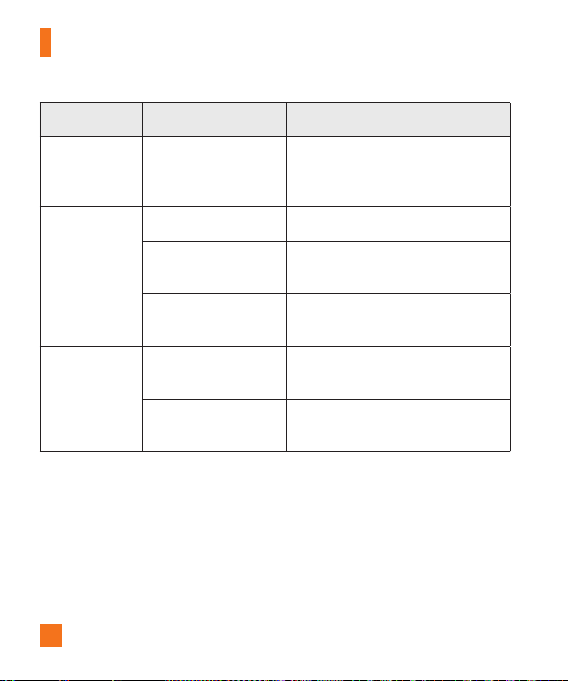
92
Accessories
Message Possible causes Possible corrective measures
Noapplications
canbeset
Notsupportedby
serviceprovideror
registrationrequired.
Contactyourserviceprovider.
Callsnot
available
Dialingerror Newnetworknotauthorized.
NewSIMorUSIMcard
inserted.
Checkfornewrestrictions.
Pre-paidchargelimit
reached.
Contactserviceproviderorresetlimit
withPIN2.
Phonecannot
beturnedon
On/Offkeypressedtoo
briefly.
PresstheOn/Offkeyforatleasttwo
seconds.
Batteryisnotcharged.
Chargebattery.Checkthecharging
indicatoronthedisplay.
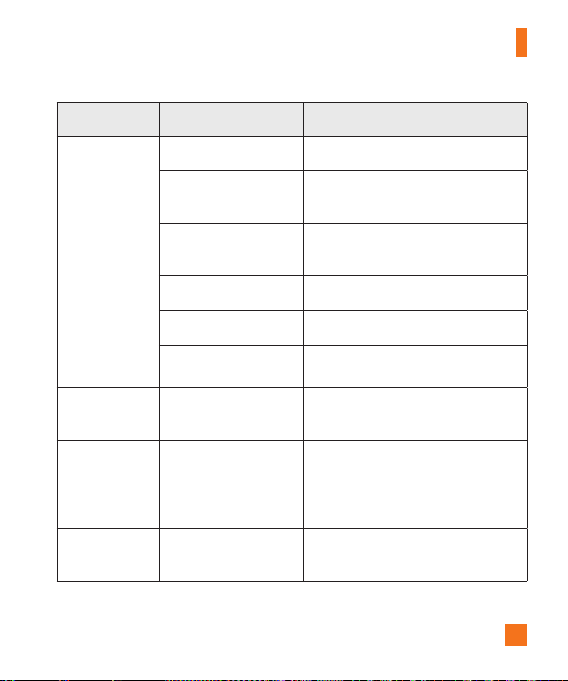
93
Accessories
Message Possible causes Possible corrective measures
Chargingerror
Batteryisnotcharged. Chargebattery.
Outsidetemperatureis
toohotorcold.
Makesurephoneischargingata
normaltemperature.
Contactproblem
Checkthechargeranditsconnection
tothephone.
Novoltage Plugthechargerintoadifferentoutlet.
Chargerdefective Replacethecharger.
Wrongcharger UseonlyoriginalLGaccessories.
Numbernot
allowed.
TheFixeddialing
numberfunctionison.
ChecktheSettingsmenuandturnthe
functionoff.
Impossibleto
receive/send
textmessages
&photos
Memoryfull
Deletesomemessagesfromyour
phone.
Filesdonot
open
Unsupportedfileformat Checkthesupportedfileformats.

94
Accessories
Message Possible causes Possible corrective measures
Thescreen
doesnotturn
onwhenI
receiveacall.
Proximitysensor
problem
Ifyouuseaprotectiontapeorcase,
makesureithasnotcoveredthearea
aroundtheproximitysensor.Make
surethattheareaaroundtheproximity
sensorisclean.
Nosound Vibrationmode
Checkthesettingsstatusinthesound
menutomakesureyouarenotin
vibrationorsilentmode.
Hangsupor
freezes
Intermittentsoftware
problem
Trytoperformasoftwareupdate
throughthewebsite.

95
For Your Safety
Important Information
Thisuserguidecontainsimportantinformationontheuseandoperationofthisphone.
Pleasereadalltheinformationcarefullyforoptimalperformanceandtoprevent
anydamagetoormisuseofthephone.Anychangesormodificationsnotexpressly
approvedinthisuserguidecouldvoidyourwarrantyforthisequipment.Anychangesor
modificationsnotexpresslyapprovedbythemanufacturercouldvoidtheuser’sauthority
tooperatetheequipment.
Before You Start
WARNING!ThisproductcontainschemicalsknowntotheStateofCaliforniatocause
cancerandbirthdefectsorreproductiveharm.
Wash hands after handling.
Safety Instructions
WARNING!Toreducethepossibilityofelectricshock,donotexposeyourphoneto
highhumidityareas,suchasthebathroom,swimmingpool,etc.
Always store your phone away from heat.Neverstoreyourphoneinsettingsthat
mayexposeittotemperatureslessthan32°Forgreaterthan104°F,suchasoutside
duringextremeweatherconditionsorinyourcaronahotday.Exposuretoexcessive
coldorheatwillresultinmalfunction,damageand/orcatastrophicfailure.
Be careful when using your phone near other electronic devices.RFemissions
fromyourmobilephonemayaffectnearbyinadequatelyshieldedelectronicequipment.
Youshouldconsultwithmanufacturersofanypersonalmedicaldevicessuchas
pacemakersandhearingaidestodetermineiftheyaresusceptibletointerferencefrom
yourmobilephone.Turnoffyourphoneinamedicalfacilityoratagasstation.Never
placeyourphoneinamicrowaveovenasthiswillcausethebatterytoexplode.
IMPORTANT!PleasereadtheTIASAFETYINFORMATIONbeforeusingyourphone.

96
For Your Safety
Safety Information
Readthesesimpleguidelines.Breakingtherulesmaybedangerousorillegal.Further
detailedinformationisgiveninthisuserguide.
►
Donotdisassemblethisunit.Takeittoaqualifiedservicetechnicianwhenrepair
workisrequired.
►
KeepawayfromelectricalappliancessuchasTVs,radios,andpersonalcomputers.
►
Theunitshouldbekeptawayfromheatsourcessuchasradiatorsorcookers.
►
Donotdrop.
►
Donotsubjectthisunittomechanicalvibrationorshock.
►
Thecoatingofthephonemaybedamagedifcoveredwithwraporvinylwrapper.
►
Usedryclothtocleantheexterioroftheunit.(Donotusesolventsuchasbenzene,
thinneroralcohol.)
►
Donotsubjectthisunittoexcessivesmokeordust.
►
Donotkeepthephonenexttocreditcardsortransporttickets;itcanaffectthe
informationonthemagneticstrips.
►
Donottapthescreenwithasharpobject;otherwise,itmaydamagethephone.
►
Donotexposethephonetoliquidormoisture.
►
Usetheaccessorieslikeanearphonecautiously.Donottaptheantenna
unnecessarily.
FCC RF Exposure Information
WARNING! Read this information before operating the phone.
InAugust1996,theFederalCommunicationsCommission(FCC)oftheUnitedStates,
withitsactioninReportandOrderFCC96-326,adoptedanupdatedsafetystandard
forhumanexposuretoradiofrequency(RF)electromagneticenergyemittedbyFCC
regulatedtransmitters.Thoseguidelinesareconsistentwiththesafetystandard

97
For Your Safety
previouslysetbybothU.S.andinternationalstandardsbodies.
ThedesignofthisphonecomplieswiththeFCCguidelinesandtheseinternational
standards.
CAUTION
Useonlythesuppliedantenna.Useofunauthorizedantennasormodificationscould
impaircallquality,damagethephone,voidyourwarrantyand/orresultinviolationof
FCCregulations.Donotusethephonewithadamagedantenna.Adamagedantenna
couldcauseaminorskinburn.Contactyourlocaldealerforareplacementantenna.
Body-worn Operation
Thisdevicewastestedfortypicalbody-wornoperationswiththebackofthephone
kept0.39inches(1cm)betweentheuser’sbodyandthebackofthephone.Tocomply
withFCCRFexposurerequirements,aminimumseparationdistanceof0.39inches
(1cm)mustbemaintainedbetweentheuser’sbodyandthebackofthephone.Third-
partybelt-clips,holsters,andsimilaraccessoriescontainingmetalliccomponentsmay
notbeused.Body-wornaccessoriesthatcannotmaintain0.39inches(1cm)separation
distancebetweentheuser'sbodyandthebackofthephone,andhavenotbeentested
fortypicalbody-wornoperationsmaynotcomplywithFCCRFexposurelimitsand
shouldbeavoided.
Part 15.19 statement
Thisdevicecomplieswithpart15ofFCCrules.Operationissubjecttothefollowingtwo
conditions:
(1)Thisdevicemaynotcauseharmfulinterference.
(2)Thisdevicemustacceptanyinterferencereceived,includinginterferencethatmay
causeundesiredoperation.

98
For Your Safety
Part 15.21 statement
Changesormodificationsthatarenotexpresslyapprovedbythemanufacturerfor
compliancecouldvoidtheuser’sauthoritytooperatetheequipment.
Part 15.105 statement
ThisequipmenthasbeentestedandfoundtocomplywiththelimitsforaclassBdigital
device,pursuanttoPart15oftheFCCRules.Theselimitsaredesignedtoprovide
reasonableprotectionagainstharmfulinterferenceinaresidentialinstallation.This
equipmentgeneratesusesandcanradiateradiofrequencyenergyand,ifnotinstalled
andusedinaccordancewiththeinstructions,maycauseharmfulinterferencetoradio
communications.However,thereisnoguaranteethatinterferencewillnotoccurina
particularinstallation.Ifyouexperienceinterferencewithreception(e.g.,television),
determineIfthisequipmentdoescauseharmfulinterferenceortelevisionreception,
whichcanbedeterminedbyturningtheequipmentoffandon,theuserisencouragedto
trytocorrecttheinterferencebyoneormoreofthefollowingmeasures:
►
Reorientorrelocatethereceivingantenna.
►
Increasetheseparationbetweentheequipmentandreceiver.
►
Connecttheequipmentintoanoutletonacircuitdifferentfromthattowhichthe
receiverisconnected.
►
Consultthedealeroranexperiencedradio/TVtechnicianforhelp.
Cautions for Battery
►
Donotdisassembleoropencrush,bendordeform,punctureorshred.
►
Donotmodifyorremanufacture,attempttoinsertforeignobjectsintothebattery,
immerseorexposetowaterorotherliquids,exposetofire,explosionorother
hazard.Suchconditionsmaypresenttheriskoffireorexplosion.
►
Onlyusethebatteryforthesystemforwhichitisspecified.

99
For Your Safety
►
Onlyusethebatterywithachargingsystemthathasbeenqualifiedwiththesystem
perCTIACertificationRequirementsforBatterySystemCompliancetoIEEE1725.Use
ofanunqualifiedbatteryorchargermaypresentariskoffire,explosion,leakage,or
otherhazard.
►
Donotshortcircuitabatteryorallowmetallicconductiveobjectstocontactbattery
terminals.
►
Batteryusagebychildrenshouldbesupervised.
►
Avoiddroppingthephone.Ifthephoneisdropped,especiallyonahardsurface,and
theusersuspectsdamage,takeittoaservicecenterforinspection.
►
ReplacethebatteryonlywithanotherbatterythathasbeenLG-approvedand
qualifiedwiththesystemperthisstandard,IEEE-Std-1725.Useofanunqualified
andnon-LG-approvedbatterymaypresentariskoffire,explosion,leakageorother
hazard.
►
Onlyauthorizedserviceprovidersshallreplacebattery(Ifthebatteryisnon-user
replaceable).
►
Promptlydisposeofusedbatteriesinaccordancewithlocalregulations.
►
Batteryusagebychildrenshouldbesupervised.
►
Avoiddroppingthephone,batteryorexposingthephoneorbatterytoaliquid.Ifthe
phoneorbatteryisdropped,especiallyonahardsurface,orisexposedtoaliquidor
comesintocontactwithasharpobjecttakeittoaservicecenterforinspection.
►
Atleast,oneoftheAuthenticationmethodsmaybeimplemented.(e.g.H/W,S/W,
Mechanical,Hologram,etc.)
►
Improperbatteryusemayresultinafire,explosionorotherhazard.
►
ForthosehostdevicesthatutilizeaUSBportasachargingsource,thehostdevice’s
usermanualshallincludeastatementthatthephoneshallonlybeconnectedto
productsthatbeartheUSB-IFlogoorhavecompletedtheUSB-IFcomplianceprogram.

100
For Your Safety
Adapter (Charger) Cautions
►
Usingthewrongbatterychargercoulddamageyourphoneandvoidyourwarranty.
►
Theadapterorbatterychargerisintendedforindooruseonly.
Donotexposetheadapterorbatterychargertodirectsunlightoruseitinplaceswith
highhumidity,suchasthebathroom.
Avoid damage to your hearing
►
Damagetoyourhearingcanoccurifyouareexposedtoloudsoundforlongperiods
oftime.Wethereforerecommendthatyoudonotturnonoroffthehandsetcloseto
yourear.Wealsorecommendthatmusicandcallvolumesaresettoareasonable
level.
►
Ifyouarelisteningtomusicwhileoutandabout,pleaseensurethatthevolumeis
atareasonablelevelsothatyouareawareofyoursurroundings.Thisisparticularly
imperativewhenattemptingtocrossthestreet.
Wi-Fi Caution
Thisdeviceiscapableofoperatingin802.11a/nmode.For802.11a/ndevicesoperating
inthefrequencyrangeof5.15–5.25GHz,theyarerestrictedforindooroperationsto
reduceanypotentialharmfulinterferenceforMobileSatelliteServices(MSS)intheUS.
Wi-FiAccessPointsthatarecapableofallowingyourdevicetooperatein802.11a/n
mode(5.15–5.25GHzband)areoptimizedforindooruseonly.
IfyourWi-Finetworkiscapableofoperatinginthismode,pleaserestrictyourWi-Fiuse
indoorstonotviolatefederalregulationstoprotectMobileSatelliteServices.

101
Safety Guidelines
TIA Safety Information
ProvidedhereinisthecompleteTIASafetyInformationforWirelessHandheldphones.
InclusionofthetextcoveringPacemakers,HearingAids,andOtherMedicalDevices
isrequiredintheowner’smanualforCTIACertification.UseoftheremainingTIA
languageisencouragedwhenappropriate.
Exposure to Radio Frequency Signal
Yourwirelesshandheldportabletelephoneisalowpowerradiotransmitterandreceiver.
WhenitisON,itreceivesandalsosendsoutradiofrequency(RF)signals.
InAugust,1996,theFederalCommunicationsCommissions(FCC)adoptedRFexposure
guidelineswithsafetylevelsforhandheldwirelessphones.Thoseguidelinesare
consistentwiththesafetystandardspreviouslysetbybothU.S.andinternational
standardsbodies:
ANSIC95.1(1992)*
NCRPReport86(1986)
ICNIRP(1996)
Thosestandardswerebasedoncomprehensiveandperiodicevaluationsoftherelevant
scientificliterature.Forexample,over120scientists,engineers,andphysiciansfrom
universities,governmenthealthagencies,andindustryreviewedtheavailablebodyof
researchtodeveloptheANSIStandard(C95.1).
*AmericanNationalStandardsInstitute;NationalCouncilonRadiationProtectionand
Measurements;InternationalCommissiononNon-IonizingRadiationProtection
ThedesignofyourphonecomplieswiththeFCCguidelines(andthosestandards).
Antenna Care
Useonlythesuppliedoranapprovedreplacementantenna.Unauthorizedantennas,
modifications,orattachmentscoulddamagethephoneandmayviolateFCCregulations.

102
Safety Guidelines
Tips on Efficient Operation
Foryourphonetooperatemostefficiently:Don’ttouchtheantennaunnecessarilywhen
thephoneisinuse.Contactwiththeantennaaffectscallqualityandmaycausethe
phonetooperateatahigherpowerlevelthanotherwiseneeded.
Driving
Checkthelawsandregulationsontheuseofwirelessphonesintheareaswhereyou
driveandalwaysobeythem.Also,ifusingyourphonewhiledriving,pleaseobservethe
following:
►
Givefullattentiontodriving-drivingsafelyisyourfirstresponsibility;
►
Usehands-freeoperation,ifavailable;
►
Pullofftheroadandparkbeforemakingoransweringacallifdrivingconditionsor
thelawrequireit.
Electronic Devices
MostmodernelectronicequipmentisshieldedfromRFsignals.However,certain
electronicequipmentmaynotbeshieldedagainsttheRFsignalsfromyourwireless
phone.
Pacemakers
TheHealthIndustryManufacturersAssociationrecommendsthataminimumseparation
ofsix(6’)inchesbemaintainedbetweenahandheldwirelessphoneandapacemakerto
avoidpotentialinterferencewiththepacemaker.Theserecommendationsareconsistent
withtheindependentresearchbyandrecommendationsofWirelessTechnology
Research.

103
Safety Guidelines
Personswithpacemakers:
►
ShouldALWAYSkeepthephonemorethansix(6)inchesfromtheirpacemakerwhen
thephoneisturnedON;
►
Shouldnotcarrythephoneinabreastpocket;
►
Shouldusetheearoppositethepacemakertominimizethepotentialfor
interference;
►
ShouldturnthephoneOFFimmediatelyifthereisanyreasontosuspectthat
interferenceistakingplace.
Hearing Aids
Somedigitalwirelessphonesmayinterferewithsomehearingaids.Intheeventofsuch
interference,youmaywanttoconsultAT&T.
HAC statement
Thisphonehasbeentestedandratedforusewithhearingaidsforsomeofthe
wirelesstechnologiesthatituses.However,theremaybesomenewerwireless
technologiesusedinthisphonethathavenotbeentestedyetforusewithhearingaids.
Itisimportanttotrythedifferentfeaturesofthisphonethoroughlyandindifferent
locations,usingyourhearingaidorcochlearimplant,todetermineifyouhearany
interferingnoise.Consultyourserviceproviderorthemanufacturerofthisphonefor
informationonhearingaidcompatibility.Ifyouhavequestionsaboutreturnorexchange
policies,consultyourserviceproviderorphoneretailer.
Other Medical Devices
Ifyouuseanyotherpersonalmedicaldevice,consultthemanufacturerofyourdeviceto
determineiftheyareadequatelyshieldedfromexternalRFenergy.Yourphysicianmay
beabletoassistyouinobtainingthisinformation.

104
Safety Guidelines
Health Care Facilities
TurnyourphoneOFFinhealthcarefacilitieswhenanyregulationspostedintheseareas
instructyoutodoso.Hospitalsorhealthcarefacilitiesmayuseequipmentthatcouldbe
sensitivetoexternalRFenergy.
Vehicles
RFsignalsmayaffectimproperlyinstalledorinadequatelyshieldedelectronicsystems
inmotorvehicles.Checkwiththemanufactureroritsrepresentativeregardingyour
vehicle.
Youshouldalsoconsultthemanufacturerofanyequipmentthathasbeenaddedtoyour
vehicle.
Posted Facilities
TurnyourphoneOFFinanyfacilitywherepostednoticessorequire.
Aircraft
FCCregulationsprohibitusingyourphonewhileintheair.TurnyourphoneOFFbefore
boardinganaircraft.
Blasting Areas
Toavoidinterferingwithblastingoperations,turnyourphoneOFFwhenina‘blasting
areasorinareasposted:‘Turnofftwo-wayradio’.Obeyallsignsandinstructions.
Potentially Explosive Atmosphere
TurnyourphoneOFFwheninanyareawithapotentiallyexplosiveatmosphereandobey
allsignsandinstructions.Sparksinsuchareascouldcauseanexplosionorfireresulting
inbodilyinjuryorevendeath.

105
Safety Guidelines
Areaswithapotentiallyexplosiveatmosphereareoften,butnotalways,markedclearly.
Potentialareasmayinclude:fuelingareas(suchasgasolinestations);belowdeckon
boats;fuelorchemicaltransferorstoragefacilities;vehiclesusingliquefiedpetroleum
gas(suchaspropaneorbutane);areaswheretheaircontainschemicalsorparticles
(suchasgrain,dust,ormetalpowders);andanyotherareawhereyouwouldnormally
beadvisedtoturnoffyourvehicleengine.
For Vehicles Equipped with an Air Bag
Anairbaginflateswithgreatforce.DONOTplaceobjects,includingeitherinstalledor
portablewirelessequipment,intheareaovertheairbagorintheairbagdeployment
area.Ifin-vehiclewirelessequipmentisimproperlyinstalledandtheairbaginflates,
seriousinjurycouldresult.
Charger and Adapter Safety
►
Thechargerandadapterareintendedforindooruseonly.
Battery Information and Care
►
Alwaysunplugthechargerfromthewallsocketafterthephoneisfullychargedto
saveunnecessarypowerconsumptionofthecharger.
►
Pleasereadthemanualofspecifiedchargeraboutchargingmethod.
►
Donotdamagethepowercordbybending,twisting,orheating.Donotusetheplug
ifitislooseasitmaycauseelectricshockorfire.
►
Donotplaceanyheavyitemsonthepowercord.Donotallowthepowercordtobe
crimpedasitmaycauseelectricshockorfire.
►
Unplugthepowercordpriortocleaningyourphone,andcleanthepowerplugpin
whenit’sdirty.Whenusingthepowerplug,ensurethatit’sfirmlyconnected.Ifnot,
itmaycauseexcessiveheatorfire.Ifyouputyourphoneinapocketorbagwithout
coveringthereceptacleofthephone(powerplugpin),metallicarticles(suchasa

106
Safety Guidelines
coin,papercliporpen)mayshort-circuitthephone.Alwayscoverthereceptacle
whennotinuse.
►
Rechargethebatteryafterlongperiodsofnon-usetomaximizebatterylife.Battery
lifewillvaryduetousagepatternandenvironmentalconditions.
►
PleaseuseonlyanLG-approvedchargingaccessorytochargeyourLGphone.
Improperhandlingofthechargingport,aswellastheuseofanincompatible
charger,maycausedamagetoyourphoneandvoidthewarranty.
►
Neverstoreyourphoneintemperaturelessthan-4°Forgreaterthan122°F.Charge
thebatteryinrangeof0°C~45°C.
►
Chargingtemperaturerangeisregulatedbetween0°C/32°Fand45°C/113°F.Do
notchargethebatteryoutofrecommendedtemperaturerange.Chargingoutof
recommendedrangemightcausethegeneratingheatorseriousdamageofbattery.
Andalso,itmightcausethedeteriorationofbattery'scharacteristicsandcyclelife.
►
Donotuseorleavethebatteryundertheblazingsunorinheatedcarbysunshine.
Thebatterymaygenerateheat,smokeorflame.Andalso,itmightcausethe
deteriorationofbattery’scharacteristicsorcyclelife.
►
Thebatterypackhasprotectioncircuittoavoidthedanger.Donotusenearbythe
placewheregeneratesstaticelectricitymorethan100Vwhichgivesdamagetothe
protectioncircuit.Iftheprotectioncircuitwerebroken,thebatterywouldgenerate
smoke,ruptureorflame.
►
Whenthebatteryhasrust,badsmellorsomethingabnormalatfirst-time-using,do
notusetheequipmentandgotobringthebatterytotheshopwhichitwasbought.
►
Incaseyoungerchildrenusethebattery,theirparentsshouldteachthemhowtouse
batteriesaccordingtothemanualwithcare.
►
Iftheskinorclothissmearedwithliquidfromthebattery,washwithfreshwater.It
maycausetheskininflammation.Removeanddonotusethebattery.

107
Safety Guidelines
►
Pleasetakeyourphonetoanauthorizedservicecenterimmediatelyifthisoccurs.
►
Donothandlethephonewithwethandswhileitisbeingcharged.Itmaycausean
electricshockorseriouslydamageyourphone.
►
Donotplaceoranswercallswhilechargingthephoneasitmayshort-circuitthe
phoneand/orcauseelectricshockorfire.
►
Thechargerandadapterareintendedforindooruseonly.
►
Insertthebatterypackchargerverticallyintothewallpowersocket.
►
OnlyusetheLG-approvedbatterycharger.Otherwise,youmaycauseseriousdamage
toyourphoneandriskofoverheating,fireorexplosionmayoccur.
►
Usethecorrectadapterforyourphonewhenusingthebatterypackchargerabroad.
►
Talkingonyourphoneforalongperiodoftimemayreducecallqualityduetoheat
generatedduringuse.
►
Donotuseharshchemicals(suchasalcohol,benzene,thinners,etc.)ordetergents
tocleanyourphone.Thiscouldcauseafire.Donotplaceoranswercallswhile
chargingthephoneasitmayshort-circuitthephoneand/orcauseelectricshockor
fire.Don’tshort-circuitthebattery.Metallicarticlessuchasacoin,papercliporpen
inyourpocketorbagmayshort-circuitthe+and–terminalsofthebattery(metal
stripsonthebattery)uponmoving.Short-circuitoftheterminalmaydamagethe
batteryandcauseanexplosion.
►
Neveruseandunapprovedbatterysincethiscoulddamagethephoneand/orbattery
andcouldcausethebatterytoexplode.Onlyusethebatteriesandchargersprovided
byLG.Thewarrantywillnotbeappliedtoproductsprovidedbyothersuppliers.Only
authorizedpersonnelshouldservicethephoneanditsaccessories.Faultyinstallation
orservicemayresultinaccidentsandconsequentlyinvalidatethewarranty.

108
Safety Guidelines
Explosion, Shock, and Fire Hazards
►
Donotputyourphoneinaplacesubjecttoexcessivedustandkeeptheminimum
requireddistancebetweenthepowercordandheatsources.
►
Unplugthepowercordpriortocleaningyourphone,andcleanthepowerplugpin
whenitisdirty.
►
Whenusingthepowerplug,ensurethatitisfirmlyconnected.Ifitisnot,itmay
causeexcessiveheatorfire.
►
Ifyouputyourphoneinapocketorbagwithoutcoveringthereceptacleofthephone
(powerplugpin),metallicarticles(suchasacoin,papercliporpen)mayshort-circuit
thephone.Alwayscoverthereceptaclewhennotinuse.
►
Donotshort-circuitthebattery.Metallicarticlessuchasacoin,papercliporpenin
yourpocketorbagmayshort-circuitthe+and–terminalsofthebattery(metalstrips
onthebattery)uponmoving.Short-circuitoftheterminalmaydamagethebattery
andcauseanexplosion.
General Notice
►
Usingadamagedbatteryorplacingabatteryinyourmouthmaycauseseriousinjury.
►
Donotplaceitemscontainingmagneticcomponentssuchasacreditcard,phone
card,bankbookorsubwayticketnearyourphone.Themagnetismofthephonemay
damagethedatastoredinthemagneticstrip.
►
Talkingonyourphoneforalongperiodoftimemayreducecallqualityduetoheat
generatedduringuse.
►
Whenthephoneisnotusedforalongperiodtime,storeitinasafeplacewiththe
powercordunplugged.
►
Usingthephoneinproximitytoreceivingequipment(i.e.,TVorradio)maycause
interferencetothephone.

109
Safety Guidelines
►
Donotusethephoneiftheantennaisdamaged.Ifadamagedantennacontacts
skin,itmaycauseaslightburn.PleasecontactanLGAuthorizedServiceCenterto
replacethedamagedantenna.
►
Donotimmerseyourphoneinwater.Ifthishappens,turnitoffimmediatelyand
removethebattery.Ifthephonedoesnotwork,takeittoanLGAuthorizedService
Center.
►
Donotpaintyourphone.
►
Thedatasavedinyourphonemightbedeletedduetocarelessuse,repairofthe
phone,orupgradeofthesoftware.Pleasebackupyourimportantphonenumbers.
(Ringtones,textmessages,voicemessages,pictures,andvideoscouldalsobe
deleted.)Themanufacturerisnotliablefordamageduetothelossofdata.
►
Whenyouusethephoneinpublicplaces,settheringtonetovibrationsoasnotto
disturbothers.
►
Donotturnyourphoneonoroffwhenputtingitinyourear.
►
Yourphoneisanelectronicdevicethatgeneratesheatduringnormaloperation.
Extremelyprolonged,directskincontactintheabsenceofadequateventilationmay
resultindiscomfortorminorburns.Therefore,usecarewhenhandlingyourphone
duringorimmediatelyafteroperation.
Caution: Avoid potential hearing loss.
Prolongedexposuretoloudsounds(includingmusic)isthemostcommoncauseof
preventablehearingloss.Somescientificresearchsuggeststhatusingportableaudio
devices,suchasportablemusicplayersandcellulartelephones,athighvolumesettings
forlongdurationsmayleadtopermanentnoiseinducedhearingloss.Thisincludes
theuseofheadphones(includingheadsets,earbudsandBluetooth
®
orotherwireless
devices).

110
Safety Guidelines
Exposuretoveryloudsoundhasalsobeenassociatedinsomestudieswithtinnitus
(aringingintheear),hypersensitivitytosoundanddistortedhearing.Individual
susceptibilitytonoise-inducedhearinglossandotherpotentialhearingproblemsvaries.
Theamountofsoundproducedbyaportableaudiodevicevariesdependingonthe
natureofthesound,thedevice,thedevicesettingsandtheheadphones.Youshould
followsomecommonsenserecommendationswhenusinganyportableaudiodevice:
204 Safety
►
Setthevolumeinaquietenvironmentandselectthelowestvolumeatwhichyou
canhearadequately.
►
Whenusingheadphones,turnthevolumedownifyoucannothearthepeople
speakingnearyouorifthepersonsittingnexttoyoucanhearwhatyouarelistening
to.
►
Donotturnthevolumeuptoblockoutnoisysurroundings.Ifyouchoosetolisten
toyourportabledeviceinanoisyenvironment,usenoisecancellingheadphonesto
blockoutbackgroundenvironmentalnoise.
►
Limittheamountoftimeyoulisten.Asthevolumeincreases,lesstimeisrequired
beforeyourhearingcouldbeaffected.
►
Avoidusingheadphonesafterexposuretoextremelyloudnoises,suchasrock
concerts,thatmightcausetemporaryhearingloss.Temporaryhearinglossmight
causeunsafevolumestosoundnormal.
►
Donotlistenatanyvolumethatcausesyoudiscomfort.Ifyouexperienceringingin
yourears,hearmuffledspeechorexperienceanytemporaryhearingdifficultyafter
listeningtoyourportableaudiodevice,discontinueuseandconsultyourdoctor.
Youcanobtainadditionalinformationonthissubjectfromthefollowingsources:
Safety 205
AmericanAcademyofAudiology11730PlazaAmericanDrive,Suite300

111
Safety Guidelines
Reston,VA20190
Voice:(800)222-2336
Email:info@audiology.org
Internet:www.audiology.org
NationalInstituteonDeafnessandOtherCommunication
Disorders
NationalInstitutesofHealth
31CenterDrive,MSC2320
Bethesda,MDUSA20892-2320
Voice:(301)496-7243
Email:nidcdinfo@nih.gov
Internet:http://www.nidcd.nih.gov/health/hearing
NationalInstituteforOccupationalSafetyandHealthHubertH.HumphreyBldg.
200IndependenceAve.,SWWashington,DC20201Voice:1-800-35-NIOSH(1-800-356-
4674)
Internet:http://www.cdc.gov/niosh/topics/noise/default.html
FDA Consumer Update
TheU.S.FoodandDrugAdministrationCenterforDevicesandRadiologicalHealth
ConsumerUpdateonMobilePhones.
1. Do wireless phones pose a health hazard?
Theavailablescientificevidencedoesnotshowthatanyhealthproblemsare
associatedwithusingwirelessphones.Thereisnoproof,however,thatwireless
phonesareabsolutelysafe.Wirelessphonesemitlowlevelsofradiofrequencyenergy

112
Safety Guidelines
(RF)inthemicrowaverangewhilebeingused.TheyalsoemitverylowlevelsofRF
whenintheHomescreen.WhereashighlevelsofRFcanproducehealtheffects
(byheatingtissue),exposuretolowlevelRFthatdoesnotproduceheatingeffects
causesnoknownadversehealtheffects.ManystudiesoflowlevelRFexposureshave
notfoundanybiologicaleffects.Somestudieshavesuggestedthatsomebiological
effectsmayoccur,butsuchfindingshavenotbeenconfirmedbyadditionalresearch.
Insomecases,otherresearchershavehaddifficultyinreproducingthosestudies,orin
determiningthereasonsforinconsistentresults.
2. What is the FDA’s role concerning the safety of wireless
phones?
Underthelaw,theFDAdoesnotreviewthesafetyofradiation-emittingconsumer
productssuchaswirelessphonesbeforetheycanbesold,asitdoeswithnewdrugs
ormedicaldevices.However,theagencyhasauthoritytotakeactionifwireless
phonesareshowntoemitradiofrequencyenergy(RF)atalevelthatishazardousto
theuser.Insuchacase,theFDAcouldrequirethemanufacturersofwirelessphones
tonotifyusersofthehealthhazardandtorepair,replace,orrecallthephonessothat
thehazardnolongerexists.
AlthoughtheexistingscientificdatadonotjustifyFDAregulatoryactions,theFDAhas
urgedthewirelessphoneindustrytotakeanumberofsteps,includingthefollowing:
►
SupportneededresearchintopossiblebiologicaleffectsofRFofthetypeemittedby
wirelessphones;
►
DesignwirelessphonesinawaythatminimizesanyRFexposuretotheuserthatis
notnecessaryfordevicefunction;and
►
Cooperateinprovidingusersofwirelessphoneswiththebestpossibleinformation
onpossibleeffectsofwirelessphoneuseonhumanhealth.
TheFDAbelongstoaninteragencyworkinggroupofthefederalagenciesthathave

113
Safety Guidelines
responsibilityfordifferentaspectsofRFsafetytoensurecoordinatedeffortsatthe
federallevel.Thefollowingagenciesbelongtothisworkinggroup:
►
NationalInstituteforOccupationalSafetyandHealth
►
EnvironmentalProtectionAgency
►
OccupationalSafetyandHealthAdministration
►
NationalTelecommunicationsandInformationAdministration
TheNationalInstitutesofHealthparticipatesinsomeinteragencyworkinggroup
activities,aswell.
TheFDAsharesregulatoryresponsibilitiesforwirelessphoneswiththeFederal
CommunicationsCommission(FCC).AllphonesthataresoldintheUnitedStatesmust
complywithFCCsafetyguidelinesthatlimitRFexposure.TheFCCreliesontheFDA
andotherhealthagenciesforsafetyquestionsaboutwirelessphones.
TheFCCalsoregulatesthebasestationsthatthewirelessphonenetworksrelyupon.
Whilethesebasestationsoperateathigherpowerthandothewirelessphones
themselves,theRFexposuresthatpeoplegetfromthesebasestationsaretypically
thousandsoftimeslowerthanthosetheycangetfromwirelessphones.Basestations
arethusnotthesubjectofthesafetyquestionsdiscussedinthisdocument.
3. What kinds of phones are the subject of this update?
Theterm‘wirelessphone’refersheretohandheldwirelessphoneswithbuilt-in
antennas,oftencalled‘cell’,‘mobile’,or‘PCS’phones.Thesetypesofwirelessphones
canexposetheusertomeasurableradiofrequencyenergy(RF)becauseoftheshort
distancebetweenthephoneandtheuser’shead.TheseRFexposuresarelimited
byFCCsafetyguidelinesthatweredevelopedwiththeadviceoftheFDAandother
federalhealthandsafetyagencies.Whenthephoneislocatedatgreaterdistances
fromtheuser,theexposuretoRFisdrasticallylowerbecauseaperson’sRFexposure
decreasesrapidlywithincreasingdistancefromthesource.Theso-called‘cordless

114
Safety Guidelines
phones,’whichhaveabaseunitconnectedtothetelephonewiringinahouse,
typicallyoperateatfarlowerpowerlevels,andthusproduceRFexposuresfarbelow
theFCCsafetylimits.
4. What are the results of the research done already?
Theresearchdonethusfarhasproducedconflictingresults,andmanystudieshave
sufferedfromflawsintheirresearchmethods.Animalexperimentsinvestigatingthe
effectsofradiofrequencyenergy(RF)exposurescharacteristicofwirelessphones
haveyieldedconflictingresultsthatoftencannotberepeatedinotherlaboratories.A
fewanimalstudies,however,havesuggestedthatlowlevelsofRFcouldaccelerate
thedevelopmentofcancerinlaboratoryanimals.However,manyofthestudies
thatshowedincreasedtumordevelopmentusedanimalsthathadbeengenetically
engineeredortreatedwithcancercausingchemicalssoastobepre-disposedto
developcancerintheabsenceofRFexposure.Otherstudiesexposedtheanimalsto
RFforupto22hoursperday.Theseconditionsarenotsimilartotheconditionsunder
whichpeopleusewirelessphones,sowedon’tknowwithcertaintywhattheresults
ofsuchstudiesmeanforhumanhealth.Threelargeepidemiologystudieshavebeen
publishedsinceDecember2000.Betweenthem,thestudiesinvestigatedanypossible
associationbetweentheuseofwirelessphonesandprimarybraincancer,glioma,
meningioma,oracousticneuroma,tumorsofthebrainorsalivarygland,leukemia,or
othercancers.Noneofthestudiesdemonstratedtheexistenceofanyharmfulhealth
effectsfromwirelessphoneRFexposures.However,noneofthestudiescananswer
questionsaboutlong-termexposures,sincetheaverageperiodofphoneuseinthese
studieswasaroundthreeyears.
5. What research is needed to decide whether RF exposure from
wireless phones poses a health risk?
Acombinationoflaboratorystudiesandepidemiologicalstudiesofpeopleactually

115
Safety Guidelines
usingwirelessphoneswouldprovidesomeofthedatathatareneeded.Lifetime
animalexposurestudiescouldbecompletedinafewyears.However,verylarge
numbersofanimalswouldbeneededtoprovidereliableproofofacancerpromoting
effectifoneexists.Epidemiologicalstudiescanprovidedatathatisdirectlyapplicable
tohumanpopulations,but10ormoreyearsfollow-upmaybeneededtoprovide
answersaboutsomehealtheffects,suchascancer.Thisisbecausetheinterval
betweenthetimeofexposuretoacancer-causingagentandthetimetumorsdevelop
-iftheydo-maybemany,manyyears.Theinterpretationofepidemiologicalstudies
ishamperedbydifficultiesinmeasuringactualRFexposureduringday-to-dayuseof
wirelessphones.Manyfactorsaffectthismeasurement,suchastheangleatwhich
thephoneisheld,orwhichmodelofphoneisused.
6. What is the FDA doing to find out more about the possible
health effects of wireless phone RF?
TheFDAisworkingwiththeU.S.NationalToxicologyProgramandwithgroups
ofinvestigatorsaroundtheworldtoensurethathighpriorityanimalstudies
areconductedtoaddressimportantquestionsabouttheeffectsofexposureto
radiofrequencyenergy(RF).TheFDAhasbeenaleadingparticipantintheWorld
HealthOrganizationInternationalElectromagneticFields(EMF)Projectsinceits
inceptionin1996.Aninfluentialresultofthisworkhasbeenthedevelopmentofa
detailedagendaofresearchneedsthathasdriventheestablishmentofnewresearch
programsaroundtheworld.Theprojecthasalsohelpeddevelopaseriesofpublic
informationdocumentsonEMFissues.TheFDAandtheCellularTelecommunications
&InternetAssociation(CTIA)haveaformalCooperativeResearchandDevelopment
Agreement(CRADA)todoresearchonwirelessphonesafety.TheFDAprovides
thescientificoversight,obtaininginputfromexpertsingovernment,industry,and
academicorganizations.CTIA-fundedresearchisconductedthroughcontractswith
independentinvestigators.Theinitialresearchwillincludebothlaboratorystudiesand

116
Safety Guidelines
studiesofwirelessphoneusers.TheCRADAwillalsoincludeabroadassessmentof
additionalresearchneedsinthecontextofthelatestresearchdevelopmentsaround
theworld.
7. How can I find out how much radio frequency energy exposure
I can get by using my wireless phone?
AllphonessoldintheUnitedStatesmustcomplywithFederalCommunications
Commission(FCC)guidelinesthatlimitradiofrequencyenergy(RF)exposures.The
FCCestablishedtheseguidelinesinconsultationwiththeFDAandtheotherfederal
healthandsafetyagencies.TheFCClimitforRFexposurefromwirelesstelephonesis
setataSpecificAbsorptionRate(SAR)of1.6wattsperkilogram(1.6W/kg).TheFCC
limitisconsistentwiththesafetystandardsdevelopedbytheInstituteofElectrical
andElectronicEngineering(IEEE)andtheNationalCouncilonRadiationProtectionand
Measurement.Theexposurelimittakesintoconsiderationthebody’sabilitytoremove
heatfromthetissuesthatabsorbenergyfromthewirelessphoneandissetwell
belowlevelsknowntohaveeffects.Manufacturersofwirelessphonesmustreport
theRFexposurelevelforeachmodelofphonetotheFCC.TheFCCwebsite(http://
www.fcc.gov/oet/rfsafety)givesdirectionsforlocatingtheFCCidentificationnumber
onyourphonesoyoucanfindyourphone’sRFexposurelevelintheonlinelisting.
8. What has the FDA done to measure the radio frequency energy
coming from wireless phones?
TheInstituteofElectricalandElectronicEngineers(IEEE)isdevelopingatechnical
standardformeasuringtheradiofrequencyenergy(RF)exposurefromwireless
phonesandotherwirelesshandsetswiththeparticipationandleadershipofFDA
scientistsandengineers.Thestandard,‘RecommendedPracticeforDeterminingthe
Spatial-PeakSpecificAbsorptionRate(SAR)intheHumanBodyDuetoWireless
CommunicationsDevices:ExperimentalTechniques,’setsforththefirstconsistenttest

117
Safety Guidelines
methodologyformeasuringtherateatwhichRFisdepositedintheheadsofwireless
phoneusers.Thetestmethodusesatissuesimulatingmodelofthehumanhead.
StandardizedSARtestmethodologyisexpectedtogreatlyimprovetheconsistency
ofmeasurementsmadeatdifferentlaboratoriesonthesamephone.SARisthe
measurementoftheamountofenergyabsorbedintissue,eitherbythewholebody
orasmallpartofthebody.Itismeasuredinwatts/kg(ormilliwatts/g)ofmatter.This
measurementisusedtodeterminewhetherawirelessphonecomplieswithsafety
guidelines.
9. What steps can I take to reduce my exposure to radiofrequency
energy from my wireless phone?
Ifthereisariskfromtheseproducts-andatthispointwedonotknowthatthereis-
itisprobablyverysmall.Butifyouareconcernedaboutavoidingevenpotentialrisks,
youcantakeafewsimplestepstominimizeyourexposuretoradiofrequencyenergy
(RF).Sincetimeisakeyfactorinhowmuchexposureapersonreceives,reducingthe
amountoftimespentusingawirelessphonewillreduceRFexposure.Ifyoumust
conductextendedconversationsbywirelessphoneeveryday,youcouldplacemore
distancebetweenyourbodyandthesourceoftheRF,sincetheexposureleveldrops
offdramaticallywithdistance.Forexample,youcoulduseaheadsetandcarrythe
wirelessphoneawayfromyourbodyoruseawirelessphoneconnectedtoaremote
antenna.Again,thescientificdatadonotdemonstratethatwirelessphonesare
harmful.ButifyouareconcernedabouttheRFexposurefromtheseproducts,youcan
usemeasureslikethosedescribedabovetoreduceyourRFexposurefromwireless
phoneuse.
10. What about children using wireless phones?
Thescientificevidencedoesnotshowadangertousersofwirelessphones,
includingchildrenandteenagers.Ifyouwanttotakestepstolowerexposureto

118
Safety Guidelines
radiofrequencyenergy(RF),themeasuresdescribedabovewouldapplytochildren
andteenagersusingwirelessphones.Reducingthetimeofwirelessphoneuseand
increasingthedistancebetweentheuserandtheRFsourcewillreduceRFexposure.
Somegroupssponsoredbyothernationalgovernmentshaveadvisedthatchildrenbe
discouragedfromusingwirelessphonesatall.Forexample,thegovernmentinthe
UnitedKingdomdistributedleafletscontainingsucharecommendationinDecember
2000.Theynotedthatnoevidenceexiststhatusingawirelessphonecausesbrain
tumorsorotherilleffects.Theirrecommendationtolimitwirelessphoneuseby
childrenwasstrictlyprecautionary;itwasnotbasedonscientificevidencethatany
healthhazardexists.
11. What about wireless phone interference with medical
equipment?
Radiofrequencyenergy(RF)fromwirelessphonescaninteractwithsomeelectronic
devices.Forthisreason,theFDAhelpeddevelopadetailedtestmethodto
measureelectromagneticinterference(EMI)ofimplantedcardiacpacemakersand
defibrillatorsfromwirelesstelephones.Thistestmethodisnowpartofastandard
sponsoredbytheAssociationfortheAdvancementofMedicalinstrumentation
(AAMI).Thefinaldraft,ajointeffortbytheFDA,medicaldevicemanufacturers,
andmanyothergroups,wascompletedinlate2000.Thisstandardwillallow
manufacturerstoensurethatcardiacpacemakersanddefibrillatorsaresafefrom
wirelessphoneEMI.TheFDAhastestedhearingaidsforinterferencefromhandheld
wirelessphonesandhelpeddevelopavoluntarystandardsponsoredbytheInstitute
ofElectricalandElectronicEngineers(IEEE).Thisstandardspecifiestestmethods
andperformancerequirementsforhearingaidsandwirelessphonessothatno
interferenceoccurswhenapersonusesa‘compatible’phoneanda‘compatible’
hearingaidatthesametime.ThisstandardwasapprovedbytheIEEEin2000.The
FDAcontinuestomonitortheuseofwirelessphonesforpossibleinteractionswith

119
Safety Guidelines
othermedicaldevices.Shouldharmfulinterferencebefoundtooccur,theFDAwill
conducttestingtoassesstheinterferenceandworktoresolvetheproblem.
12. Where can I find additional information?
Foradditionalinformation,pleaserefertothefollowingresources:
FDAwebpageonwirelessphones
(http://www.fda.gov,clickon"C"intheindexand"CellPhones")
FederalCommunicationsCommission(FCC)RFSafetyProgram
(http://www.fcc.gov/oet/rfsafety)
InternationalCommissiononNon-lonizingRadiationProtection
(http://www.icnirp.de)
WorldHealthOrganization(WHO)InternationalEMFProject
(http://www.who.int/emf)
NationalRadiologicalProtectionBoard(UK)
(http://www.hpa.org.uk/radiation/)
10 Driver Safety Tips
Yourwirelessphonegivesyouthepowerfulabilitytocommunicatebyvoicealmost
anywhere,anytime.Animportantresponsibilityaccompaniesthebenefitsofwireless
phones,onethateveryusermustuphold.
Whenoperatingacar,drivingisyourfirstresponsibility.
Whenusingyourwirelessphonebehindthewheelofacar,practicegoodcommon
senseandrememberthefollowingtips:
1.Gettoknowyourwirelessphoneanditsfeaturessuchasspeeddialandredial.
Carefullyreadyourinstructionmanualandlearntotakeadvantageofvaluable
featuresmostphonesoffer,includingautomaticredialandmemory.Also,workto
memorizethephonekeypadsoyoucanusethespeeddialfunctionwithouttaking

120
Safety Guidelines
yourattentionofftheroad.
2.Whenavailable,useahands-freedevice.Anumberofhands-freewirelessphone
accessoriesarereadilyavailabletoday.Whetheryouchooseaninstalledmounted
deviceforyourwirelessphoneoraspeakerphoneaccessory,takeadvantageofthese
devicesifavailabletoyou.
3.Makesureyouplaceyourwirelessphonewithineasyreachandwhereyoucan
reachitwithoutremovingyoureyesfromtheroad.Ifyougetanincomingcallatan
inconvenienttime,ifpossible,letyourvoicemailansweritforyou.
4.Suspendconversationsduringhazardousdrivingconditionsorsituations.Letthe
personyouarespeakingwithknowyouaredriving;ifnecessary,suspendthecall
inheavytrafficorhazardousweatherconditions.Rain,sleet,snowandicecan
behazardous,butsoisheavytraffic.Asadriver,yourfirstresponsibilityistopay
attentiontotheroad.
5.Donottakenotesorlookupphonenumberswhiledriving.Ifyouarereadingan
AddressBookorbusinesscard,orwritinga“to-do”listwhiledrivingacar,you
arenotwatchingwhereyouaregoing.Itiscommonsense.Don’tgetcaughtina
dangeroussituationbecauseyouarereadingorwritingandnotpayingattentionto
theroadornearbyvehicles.
6.Dialsensiblyandassessthetraffic;ifpossible,placecallswhenyouarenotmoving
orbeforepullingintotraffic.Trytoplanyourcallsbeforeyoubeginyourtripor
attempttocoincideyourcallswithtimesyoumaybestoppedatastopsign,redlight
orotherwisestationary.Butifyouneedtodialwhiledriving,followthissimpletip—
dialonlyafewnumbers,checktheroadandyourmirrors,thencontinue.
7.Donotengageinstressfuloremotionalconversationsthatmaybedistracting.
Stressfuloremotionalconversationsanddrivingdonotmix;theyaredistractingand
evendangerouswhenyouarebehindthewheelofacar.Makepeopleyouaretalking
withawareyouaredrivingandifnecessary,suspendconversationswhichhavethe

121
Safety Guidelines
potentialtodivertyourattentionfromtheroad.
8.Useyourwirelessphonetocallforhelp.Yourwirelessphoneisoneofthegreatest
toolsyoucanowntoprotectyourselfandyourfamilyindangeroussituations—
withyourphoneatyourside,helpisonlythreenumbersaway.Dial911orother
localemergencynumberinthecaseoffire,trafficaccident,roadhazardormedical
emergency.Remember,itisafreecallonyourwirelessphone!
9.Useyourwirelessphonetohelpothersinemergencies.Yourwirelessphoneprovides
youaperfectopportunitytobea“GoodSamaritan”inyourcommunity.Ifyousee
anautoaccident,crimeinprogressorotherseriousemergencywherelivesarein
danger,call911orotherlocalemergencynumber,asyouwouldwantotherstodo
foryou.
10.Callroadsideassistanceoraspecialwirelessnon-emergencyassistancenumber
whennecessary.Certainsituationsyouencounterwhiledrivingmayrequire
attention,butarenoturgentenoughtomeritacallforemergencyservices.Butyou
canstilluseyourwirelessphonetolendahand.Ifyouseeabroken-downvehicle
posingnoserioushazard,abrokentrafficsignal,aminortrafficaccidentwhereno
oneappearsinjuredoravehicle.Youknowtobestolen,callroadsideassistance
orotherspecialnon-emergencywirelessnumber.Theabovetipsaremeantas
generalguidelines.Beforedecidingtouseyourmobiledevicewhileoperatinga
vehicle,itisrecommendedthatyouconsultyourapplicablejurisdiction’slocallaws
orotherregulationsregardingsuchuse.Suchlawsorotherregulationsmayprohibit
orotherwiserestrictthemannerinwhichadrivermayusehisorherphonewhile
operatingavehicle.
Formoreinformation,pleasecallto
888-901-SAFE,orvisitourwebsite
http://www.ctia.org.

122
Safety Guidelines
Consumer Information on SAR (Specific Absorption Rate)
ThismodelphonemeetstheGovernment’srequirementsforexposuretoradiowaves.
Yourwirelessphoneisaradiotransmitterandreceiver.Itisdesignedandmanufactured
nottoexceed
theemissionlimitsforexposuretoradiofrequency(RF)energysetbytheFederal
CommunicationsCommission(FCC)oftheU.S.Government.TheseFCCexposure
limitsarederivedfromtherecommendationsoftwoexpertorganizations,theNational
CounselonRadiationProtectionandMeasurement(NCRP)andtheInstituteofElectrical
andElectronicsEngineers(IEEE).Inbothcases,therecommendationsweredeveloped
byscientificandengineeringexpertsdrawnfromindustry,government,andacademia
afterextensivereviewsofthescientificliteraturerelatedtothebiologicaleffectsofRF
energy.
Theexposurelimitforwirelessmobilephonesemploysaunitofmeasurementknown
astheSpecificAbsorptionRate,orSAR.TheSARisameasureoftherateofabsorption
ofRFenergybythehumanbodyexpressedinunitsofwattsperkilogram(W/kg).The
FCCrequireswirelessphonestocomplywithasafetylimitof1.6wattsperkilogram
(1.6W/kg).TheFCCexposurelimitincorporatesasubstantialmarginofsafetytogive
additionalprotectiontothepublicandtoaccountforanyvariationsinmeasurements.
TestsforSARareconductedusingstandardoperatingpositionsspecifiedbytheFCC
withthephonetransmittingatitshighestcertifiedpowerlevelinalltestedfrequency
bands.AlthoughSARisdeterminedatthehighestcertifiedpowerlevel,theactualSAR
levelofthephonewhileoperatingcanbewellbelowthemaximumvalue.
Becausethephoneisdesignedtooperateatmultiplepowerlevelstouseonlythe
powerrequiredtoreachthenetwork,ingeneral,thecloseryouaretoawirelessbase
stationantenna,thelowerthepoweroutput.
Beforeaphonemodelisavailableforsaletothepublic,itmustbetestedandcertified
totheFCCthatitdoesnotexceedthelimitestablishedbythegovernmentadopted

123
Safety Guidelines
requirementforsafeexposure.Thetestsareperformedinpositionsandlocations(e.g.,
attheearandwornonthebody)asrequiredbytheFCCforeachmodel.
TheFCChasgrantedanEquipmentAuthorizationforthismodelphonewithallreported
SARlevelsevaluatedasincompliancewiththeFCCRFemissionguidelines.
ThehighestSARvaluesare:
•Head:0.32W/kg
•Body(Body-worn/Hotspot):1.07W/kg
(bodymeasurementsdifferamongphonemodels,dependinguponavailable
accessoriesandFCCrequirements).
WhiletheremaybedifferencesbetweenSARlevelsofvariousphonesandatvarious
positions,theyallmeetthegovernmentrequirementforsafeexposure.
SARinformationonthismodelphoneisonfilewiththeFCCandcanbefoundunderthe
DisplayGrantsectionofhttp://www.fcc.
gov/oet/ea/fccid/aftersearchingonFCCIDZNFD631.
Tofindinformationthatpertainstoaparticularmodelphone,thissiteusesthe
phoneFCCIDnumberwhichisusuallyprintedsomewhereonthecaseofthephone.
Sometimesitmaybenecessarytoremovethebatterypacktofindthenumber.Once
youhavetheFCCIDnumberforaparticularphone,followtheinstructionsonthe
websiteanditshouldprovidevaluesfortypicalormaximumSARforaparticularphone.
AdditionalinformationonSpecificAbsorptionRates(SAR)canbefoundontheCellular
TelecommunicationsIndustryAssociation(CTIA)websiteathttp://www.ctia.org/
*IntheUnitedStatesandCanada,theSARlimitformobilephonesusedbythepublic
is1.6watts/kg(W/kg)averagedoveronegramoftissue.Thestandardincorporatesa
substantialmarginofsafetytogiveadditionalprotectionforthepublicandtoaccount
foranyvariationsinmeasurements.

124
Safety Guidelines
FCC Hearing-Aid Compatibility (HAC) Regulations for Wireless
Devices
OnJuly10,2003,theU.S.FederalCommunicationsCommission(FCC)ReportandOrder
inWTDocket01-309modifiedtheexceptionofwirelessphonesundertheHearingAid
CompatibilityActof1988(HACAct)torequiredigitalwirelessphonesbecompatible
withhearing-aids.TheintentoftheHACActistoensurereasonableaccessto
telecommunicationsservicesforpersonswithhearingdisabilities.
Whilesomewirelessphonesareusednearsomehearingdevices(hearingaidsand
cochlearimplants),usersmaydetectabuzzing,humming,orwhiningnoise.Some
hearingdevicesaremoreimmunethanotherstothisinterferencenoise,andphones
alsovaryintheamountofinterferencetheygenerate.
Thewirelesstelephoneindustryhasdevelopedaratingsystemforwirelessphones,to
assisthearingdeviceuserstofindphonesthatmaybecompatiblewiththeirhearing
devices.Notallphoneshavebeenrated.Phonesthatareratedhavetheratingontheir
boxoralabellocatedonthebox.
Theratingsarenotguarantees.Resultswillvarydependingontheuser’shearingdevice
andhearingloss.Ifyourhearingdevicehappenstobevulnerabletointerference,you
maynotbeabletousearatedphonesuccessfully.Tryingoutthephonewithyour
hearingdeviceisthebestwaytoevaluateitforyourpersonalneeds.
M-Ratings:
PhonesratedM3orM4meetFCCrequirementsandarelikelytogenerate
lessinterferencetohearingdevicesthanphonesthatarenotlabeled.M4isthebetter/
higherofthetworatings.
T-Ratings:
PhonesratedT3orT4meetFCCrequirementsandarelikelytogenerate
lessinterferencetohearingdevicesthanphonesthatarenotlabeled.T4isthebetter/
higherofthetworatings.
Hearingdevicesmayalsoberated.Yourhearingdevicemanufacturerorhearinghealth
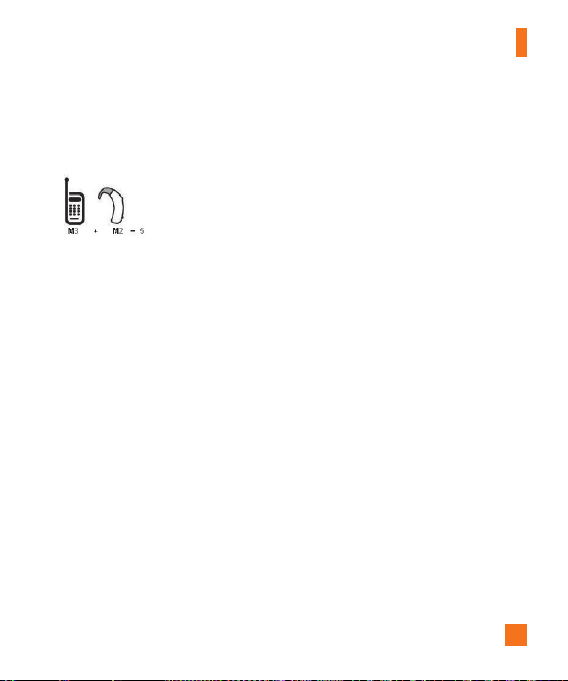
125
Safety Guidelines
professionalmayhelpyoufindthisrating.Higherratingsmeanthatthehearingdevice
isrelativelyimmunetointerferencenoise.Thehearingaidandwirelessphonerating
valuesarethenaddedtogether.Asumof5isconsideredacceptablefornormaluse.A
sumof6isconsideredforbestuse.
Intheaboveexample,ifahearingaidmeetstheM2levelratingandthewirelessphone
meetstheM3levelrating,thesumofthetwovaluesequalM5.Thisshouldprovidethe
hearingaiduserwith“normalusage”whileusingtheirhearingaidwiththeparticular
wirelessphone.“Normalusage”inthiscontextisdefinedasasignalqualitythat’s
acceptablefornormaloperation.
TheMmarkisintendedtobesynonymouswiththeUmark.TheTmarkisintendedto
besynonymouswiththeUTmark.TheMandTmarksarerecommendedbytheAlliance
forTelecommunicationsIndustriesSolutions(ATIS).TheUandUTmarksarereferenced
inSection20.19oftheFCCRules.TheHACratingandmeasurementprocedureare
describedintheAmericanNationalStandardsInstitute(ANSI)C63.19standard.
ToensurethattheHearingAidCompatibilityratingforyourphoneismaintained,
secondarytransmitterssuchasBluetoothandWLANcomponentsmustbedisabled
duringacall.
Thisphonehasbeentestedandratedforusewithhearingaidsforsomeofthe
wirelesstechnologiesthatituses.However,theremaybesomenewerwireless
technologiesusedinthisphonethathavenotbeentestedyetforusewithhearingaids.
Itisimportanttotrythedifferentfeaturesofthisphonethoroughlyandindifferent
locations,usingyourhearingaidorcochlearimplant,todetermineifyouhearany
interferingnoise.Consultyourserviceproviderorthemanufacturerofthisphonefor
informationonhearingaidcompatibility.Ifyouhavequestionsaboutreturnorexchange

126
Safety Guidelines
policies,consultyourserviceproviderorphoneretailer.
Whenyou’retalkingonacellphone,it’srecommendedthatyouturntheBT(Bluetooth)
modeoffforHAC.
Forinformationabouthearingaidsanddigitalwirelessphones
Wireless Phones and Hearing Aid Accessibility
http://www.accesswireless.org/
Gallaudet University, RERC
http://tap.gallaudet.edu/Voice/
FCC Hearing Aid Compatibility and Volume Control
http://www.fcc.gov/cgb/dro/hearing.html
The Hearing Aid Compatibility FCC Order
http://hraunfoss.fcc.gov/edocs_public/attachmatch/FCC-03-168A1.pdf
Hearing Loss Association of America [HLAA]
http://hearingloss.org/content/telephones-and-mobile-devices
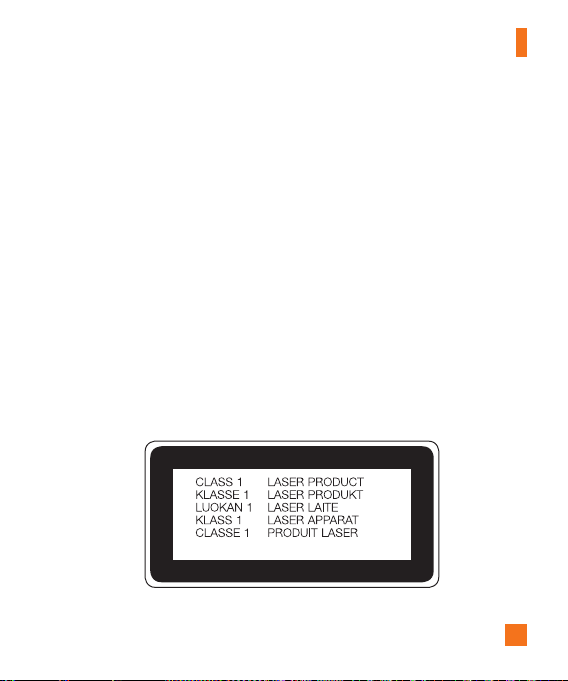
127
Safety Guidelines
Laser safety statement
CDRH Compliance
THISPRODUCTCOMPLIESWITHAPPLICABLEREQUIREMENTOFTHEDHHSPERFORMANCE
STANDARDFORLASERPRODUCT,21CFRSUBCHAPTERJ.
Caution!
Thisproductemploysalasersystem.Toensureproperuseofthisproduct,pleaseread
thisowner'smanualcarefullyandretainforfuturereference.Shouldtheunitrequire
maintenance,contactanauthorizedservicecenter.
Useofcontrols,adjustments,ortheperformanceofproceduresotherthanthosespecified
hereinmayresultinhazardousradiationexposure.
Topreventdirectexposuretolaserbeam,donottrytoopentheenclosureormakedirect
contactwiththelaser.

128
Safety Guidelines
Open Source Software Notice Information
ToobtainthesourcecodeunderGPL,LGPL,MPL,andotheropensourcelicenses,thatis
containedinthisproduct,pleasevisithttp://opensource.lge.com.
Inadditiontothesourcecode,allreferredlicenseterms,warrantydisclaimersandcopyright
noticesareavailablefordownload.
LGElectronicswillalsoprovideopensourcecodetoyouonCD-ROMforachargecoveringthe
costofperformingsuchdistribution(suchasthecostofmedia,shipping,andhandling)upon
emailrequesttoopensource@lge.com.Thisofferisvalidforthree(3)yearsfromthedateon
whichyoupurchasedtheproduct.