User Manual
Questions & Answers
1 What kinds of my remote control can be learned?
Make sure your original remote control is infrared remote and loaded with batteries, Note that Bluetooth and Wi-Fi remotes are NOT supported.
2 Why does the learning fail to work, or why the remote control still doesn't work properly even though the learning process has been successful?
During the learning process, please make sure:
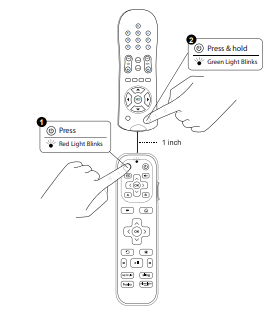
A.SofaBaton R2 and the original remote are placed in head to head position, on a flat surface and are aligned
B.The infrared transmitter of SofaBaton R2 is less than 1 inch apart from that of the original remote control
C.Try to keep both of the remotes still during learning process
D.Hold the to-be-learned button for more than 1 second until the green light flashes 3 times and then turns red
3 Why can't I enter the learning mode or the remote control doesn't work?
Please make sure the batteries in SofaBaton R2 are sufficient and are installed properly.
Introduction
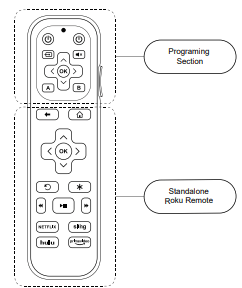
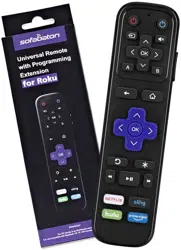
The R2 remote consists of two parts. The upper part is the programing section, while the lower part is an integrated Roku remote, which functions as a standalone Roku remote. You can use this part to control your Roku streaming devices. Please note that: Buttons on this section does not have programing capability.
For buttons on the programing section, including those two volume buttons on the side, you can program them using your existing remotes, such as those for your TV or A/V receiver. Please follow the instructions on next section of this manual to program your R2 remote.
Program Your R2 Remote
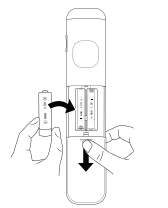
1 Install two AAA bateries into the battery box.
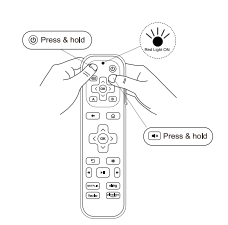
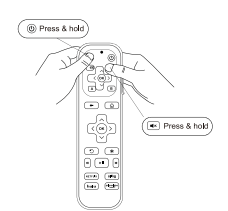
2 Press and hold  and
and  on SofaBaton R2 for more than 3 seconds, then release them when the red LED is on. It means the SofaBaton R2 is ready for learning.
3 Press the desired button on the SofaBaton R2, the red LED will blink rapidly. Place the SofaBaton R2 head to head (about 1 inch apart) from your original remote control. Then press the button to be learned on the original remote control continuously, until the green LED light flashes 3 times, indicating that the SofaBaton R2 has successfully learned the button function from the original remote control. Repeat this step for other buttons.
4 The SofaBaton R2 will automatically exit learning mode if 30 seconds elapse without actions. Or you can press  and
and  simultaneously to exit learning mode.
5 Upon completion of above programming, please test out the buttons on SofaBaton R2 to see if they work as expected. If not, please try above steps again.