2
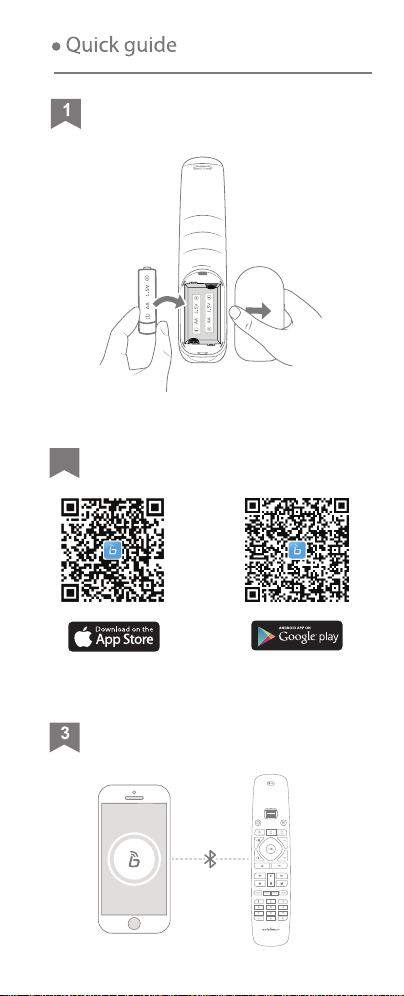
Load Batteries
Download “SofaBaton” App
Connect Remote
Upon adding new devices
Reassign Remote Keys
Configurate Macro Keys
Start Using
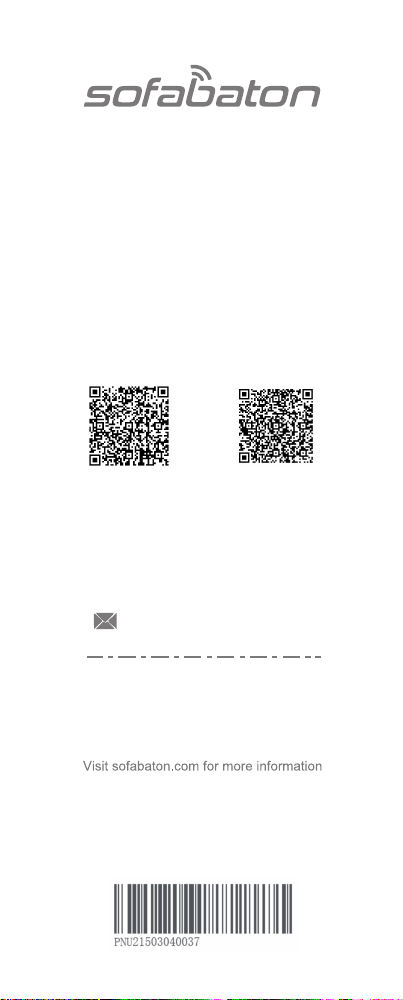
Scroll to the desired device on the app and
start using it.
*
Reassign Remote Key
Learn from Original Remote
Create Macro for This Key
Clear This Key
Cancel
Via IR Matching Mode
Via Bluetooth Mode
ADD BLUETOOTH DEVICES
Sofabaton*****
Device Connected
*
Back
PS4
Frie TV
Bluetooth devices
?
Add Device
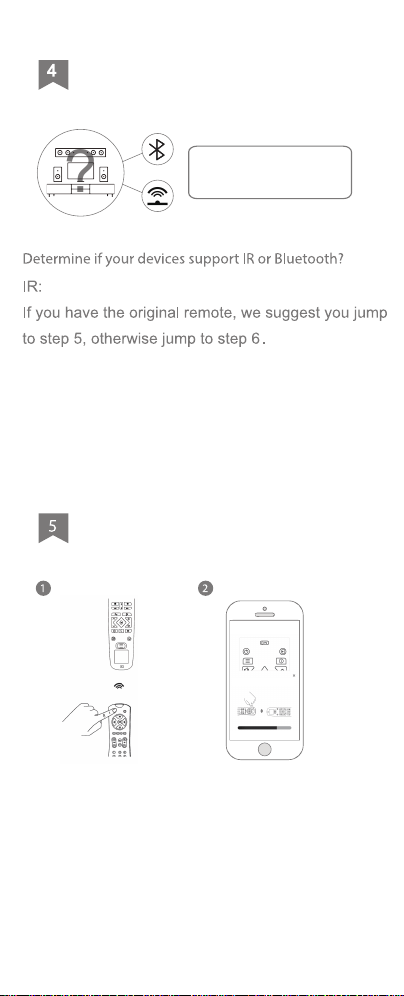
Via IR Learning Mode
Keep the U2 remote in line-of-sight with your
original remote. Select the icon for the function
key that needs to be copied, then long press the
corresponding function key on the original
remote. If the app notifies you that the process
was successful, it means the copying is
complete. If not, please try again.
*
Press and hold the button of
the original remote tha
3~4in
3~4in
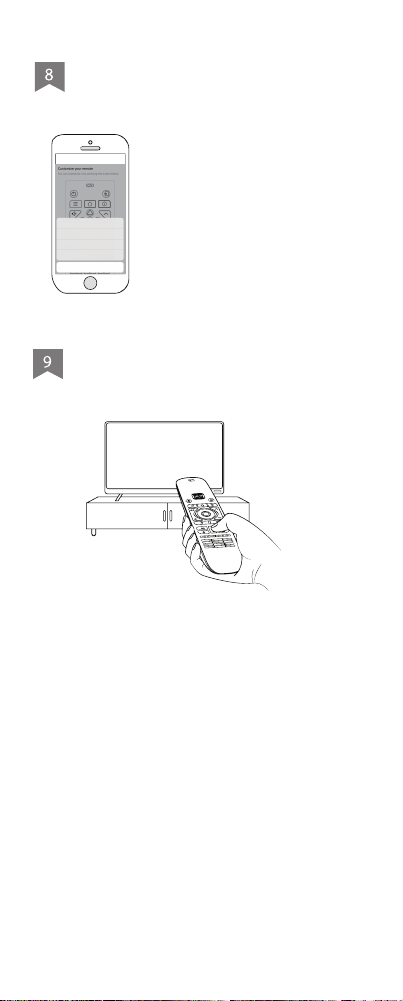
Bluetooth:
Bluetooth devices users please go to step 7 directly.
Learning...
Point at your
device...
*
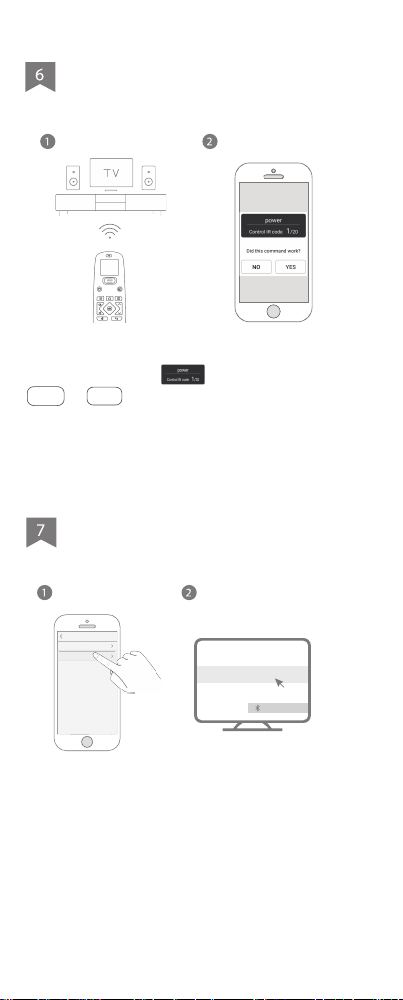
Keep the U2 remote in line-of-sight with your
device. Clicks the first, then choose
Yes or No to see if it works. During the
process, the U2 remote control will emit infrared
signals to the device. And U2 will be able to find
proper code set after searching database.
*
Product Name:Bluetooth Remote Controller
Model:U2
FCC ID:2AXDU-U2
FCC WARNING
This device complies with part 15 of the FCC Rules.
Operation is subject to the following two conditions:
(1) this device may not cause harmful interference,
and (2) this device must accept any interference
received, including interference that may cause
undesired operation.
Any changes or modifications not expressly
approved by the party responsible for compliance
could void the user's authority to operate the
equipment.
NOTE
This equipment has been tested and found to
comply with the limits for a Class B digital device,
pursuant to Part 15 of the FCC Rules. These limits
are designed to provide reasonable protection
against harmful
interference in a residential installation. This
equipment generates, uses and can radiate radio
frequency energy and, if not installed and used in
accordance with the instructions, may cause
harmful interference to radio communications.
However, there is no guarantee that interference will
not occur in a particular installation.
If this equipment does cause harmful interference to
radio or television reception,
which can be determined by turning the equipment off
and on, the user is encouraged to try to correct the
interference by one or more of the following
measures:
-- Reorient or relocate the receiving antenna.
-- Increase the separation between the equipment
and receiver.
-- Connect the equipment into an outlet on a circuit
different from that to which the receiver is connected.
-- Consult the dealer or an experienced radio/TV
technician for help.
-- Connect the equipment into an outlet on a circuit
different from that to which the receiver is connected.
-- Consult the dealer or an experienced radio/TV
technician for help.
The device has been evaluated to meet general RF
exposure requirement. The device can be used in
portable exposure condition without restriction.
If you add a new Bluetooth device, the app will first
disconnect from your U2. Meanwhile, you can
connect your U2 with your phone to complete the
remaining steps of adding a new device.
Search “SofaBaton” on App Store or Google Play
A
d
vi
ce
a
n
d
Co
m
p
l
a
in
t
s
:
Our friendly customer service
team wi ll work hard to put
a smile back on your face.
IC Caution:
RSS-Gen Issue 5 "&" RSS-Gen numéro 5
- English:
This device contains licence-exempt transmitter(s)/re-
ceiver(s) that comply with Innovation, Science and
Economic Development Canada’s licence-exempt
RSS(s). Operation is subject to the following two
conditions:
(1) This device may not cause interference.
(2) This device must accept any interference,
including interference that may cause undesired
operation of the device.
Any changes or modifications not expressly approved
by the party responsible for compliance could void the
user's authority to operate the equipment.
RF exposure statement:
The equipment complies with IC Radiation exposure
limit set forth for uncontrolled environment. This
equipment should be installed and operated with
minimum distance 20cm between the radiator and
your body.
U2 Manual
- French:
Cet appareil contient des émetteurs / récepteurs
exemptés de licence conformes aux RSS (RSS)
d'Innovation, Sciences et Développement
économique Canada. Le fonctionnement est soumis
aux deux conditions suivantes:
(1) Cet appareil ne doit pas causer d'interférences.
(2) Cet appareil doit accepter toutes les interférences,
y compris celles susceptibles de provoquer un
fonctionnement indésirable de l'appareil.
Tout changement ou modification non expressément
approuvé par la partie responsable de la conformité
pourrait annuler l'autorité de l'utilisateur à utiliser
l'équipement.
Déclaration d'exposition RF:
L'équipement est conforme à la limite d'exposition
aux radiations de la IC établie pour un environnement
non contrôlé. Cet équipement doit être installé et
utilisé avec une distance minimale de 20cm entre le
radiateur et votre corps.
1. Does not support Wifi devices.
2. Some devices are compatible with
both IR and Bluetooth
Submit a Ticket Live Chat
Contact Support Team
2
Load Batteries
Download “SofaBaton” App
Connect Remote
Upon adding new devices
Reassign Remote Keys
Configurate Macro Keys
Start Using
Scroll to the desired device on the app and
start using it.
*
Reassign Remote Key
Learn from Original Remote
Create Macro for This Key
Clear This Key
Cancel
Via IR Matching Mode
Via Bluetooth Mode
ADD BLUETOOTH DEVICES
Sofabaton*****
Device Connected
*
Back
PS4
Frie TV
Bluetooth devices
?
Add Device
Via IR Learning Mode
Keep the U2 remote in line-of-sight with your
original remote. Select the icon for the function
key that needs to be copied, then long press the
corresponding function key on the original
remote. If the app notifies you that the process
was successful, it means the copying is
complete. If not, please try again.
*
Press and hold the button of
the original remote tha
3~4in
3~4in
Bluetooth:
Bluetooth devices users please go to step 7 directly.
Learning...
Point at your
device...
*
Keep the U2 remote in line-of-sight with your
device. Clicks the first, then choose
Yes or No to see if it works. During the
process, the U2 remote control will emit infrared
signals to the device. And U2 will be able to find
proper code set after searching database.
*
Product Name:Bluetooth Remote Controller
Model:U2
FCC ID:2AXDU-U2
FCC WARNING
This device complies with part 15 of the FCC Rules.
Operation is subject to the following two conditions:
(1) this device may not cause harmful interference,
and (2) this device must accept any interference
received, including interference that may cause
undesired operation.
Any changes or modifications not expressly
approved by the party responsible for compliance
could void the user's authority to operate the
equipment.
NOTE
This equipment has been tested and found to
comply with the limits for a Class B digital device,
pursuant to Part 15 of the FCC Rules. These limits
are designed to provide reasonable protection
against harmful
interference in a residential installation. This
equipment generates, uses and can radiate radio
frequency energy and, if not installed and used in
accordance with the instructions, may cause
harmful interference to radio communications.
However, there is no guarantee that interference will
not occur in a particular installation.
If this equipment does cause harmful interference to
radio or television reception,
which can be determined by turning the equipment off
and on, the user is encouraged to try to correct the
interference by one or more of the following
measures:
-- Reorient or relocate the receiving antenna.
-- Increase the separation between the equipment
and receiver.
-- Connect the equipment into an outlet on a circuit
different from that to which the receiver is connected.
-- Consult the dealer or an experienced radio/TV
technician for help.
-- Connect the equipment into an outlet on a circuit
different from that to which the receiver is connected.
-- Consult the dealer or an experienced radio/TV
technician for help.
The device has been evaluated to meet general RF
exposure requirement. The device can be used in
portable exposure condition without restriction.
If you add a new Bluetooth device, the app will first
disconnect from your U2. Meanwhile, you can
connect your U2 with your phone to complete the
remaining steps of adding a new device.
Search “SofaBaton” on App Store or Google Play
A
d
vi
ce
a
n
d
Co
m
p
l
a
in
t
s
:
Our fr iendly customer service
team wi ll work hard to put
a smile back on your face.
IC Caution:
RSS-Gen Issue 5 "&" RSS-Gen numéro 5
- English:
This device contains licence-exempt transmitter(s)/re-
ceiver(s) that comply with Innovation, Science and
Economic Development Canada’s licence-exempt
RSS(s). Operation is subject to the following two
conditions:
(1) This device may not cause interference.
(2) This device must accept any interference,
including interference that may cause undesired
operation of the device.
Any changes or modifications not expressly approved
by the party responsible for compliance could void the
user's authority to operate the equipment.
RF exposure statement:
The equipment complies with IC Radiation exposure
limit set forth for uncontrolled environment. This
equipment should be installed and operated with
minimum distance 20cm between the radiator and
your body.
U2 Manual
- French:
Cet appareil contient des émetteurs / récepteurs
exemptés de licence conformes aux RSS (RSS)
d'Innovation, Sciences et Développement
économique Canada. Le fonctionnement est soumis
aux deux conditions suivantes:
(1) Cet appareil ne doit pas causer d'interférences.
(2) Cet appareil doit accepter toutes les interférences,
y compris celles susceptibles de provoquer un
fonctionnement indésirable de l'appareil.
Tout changement ou modification non expressément
approuvé par la partie responsable de la conformité
pourrait annuler l'autorité de l'utilisateur à utiliser
l'équipement.
Déclaration d'exposition RF:
L'équipement est conforme à la limite d'exposition
aux radiations de la IC établie pour un environnement
non contrôlé. Cet équipement doit être installé et
utilisé avec une distance minimale de 20cm entre le
radiateur et votre corps.
1. Does not support Wifi devices.
2. Some devices are compatible with
both IR and Bluetooth
Submit a Ticket Live Chat
Contact Support Team
2
Load Batteries
Download “SofaBaton” App
Connect Remote
Upon adding new devices
Reassign Remote Keys
Configurate Macro Keys
Start Using
Scroll to the desired device on the app and
start using it.
*
Reassign Remote Key
Learn from Original Remote
Create Macro for This Key
Clear This Key
Cancel
Via IR Matching Mode
Via Bluetooth Mode
ADD BLUETOOTH DEVICES
Sofabaton*****
Device Connected
*
Back
PS4
Frie TV
Bluetooth devices
?
Add Device
Via IR Learning Mode
Keep the U2 remote in line-of-sight with your
original remote. Select the icon for the function
key that needs to be copied, then long press the
corresponding function key on the original
remote. If the app notifies you that the process
was successful, it means the copying is
complete. If not, please try again.
*
Press and hold the button of
the original remote tha
3~4in
3~4in
Bluetooth:
Bluetooth devices users please go to step 7 directly.
Learning...
Point at your
device...
*
Keep the U2 remote in line-of-sight with your
device. Clicks the first, then choose
Yes or No to see if it works. During the
process, the U2 remote control will emit infrared
signals to the device. And U2 will be able to find
proper code set after searching database.
*
Product Name:Bluetooth Remote Controller
Model:U2
FCC ID:2AXDU-U2
FCC WARNING
This device complies with part 15 of the FCC Rules.
Operation is subject to the following two conditions:
(1) this device may not cause harmful interference,
and (2) this device must accept any interference
received, including interference that may cause
undesired operation.
Any changes or modifications not expressly
approved by the party responsible for compliance
could void the user's authority to operate the
equipment.
NOTE
This equipment has been tested and found to
comply with the limits for a Class B digital device,
pursuant to Part 15 of the FCC Rules. These limits
are designed to provide reasonable protection
against harmful
interference in a residential installation. This
equipment generates, uses and can radiate radio
frequency energy and, if not installed and used in
accordance with the instructions, may cause
harmful interference to radio communications.
However, there is no guarantee that interference will
not occur in a particular installation.
If this equipment does cause harmful interference to
radio or television reception,
which can be determined by turning the equipment off
and on, the user is encouraged to try to correct the
interference by one or more of the following
measures:
-- Reorient or relocate the receiving antenna.
-- Increase the separation between the equipment
and receiver.
-- Connect the equipment into an outlet on a circuit
different from that to which the receiver is connected.
-- Consult the dealer or an experienced radio/TV
technician for help.
-- Connect the equipment into an outlet on a circuit
different from that to which the receiver is connected.
-- Consult the dealer or an experienced radio/TV
technician for help.
The device has been evaluated to meet general RF
exposure requirement. The device can be used in
portable exposure condition without restriction.
If you add a new Bluetooth device, the app will first
disconnect from your U2. Meanwhile, you can
connect your U2 with your phone to complete the
remaining steps of adding a new device.
Search “SofaBaton” on App Store or Google Play
A
d
vi
ce
a
n
d
Co
m
p
l
a
in
t
s
:
Our fr iendly customer service
team wi ll work hard to put
a smile back on your face.
IC Caution:
RSS-Gen Issue 5 "&" RSS-Gen numéro 5
- English:
This device contains licence-exempt transmitter(s)/re-
ceiver(s) that comply with Innovation, Science and
Economic Development Canada’s licence-exempt
RSS(s). Operation is subject to the following two
conditions:
(1) This device may not cause interference.
(2) This device must accept any interference,
including interference that may cause undesired
operation of the device.
Any changes or modifications not expressly approved
by the party responsible for compliance could void the
user's authority to operate the equipment.
RF exposure statement:
The equipment complies with IC Radiation exposure
limit set forth for uncontrolled environment. This
equipment should be installed and operated with
minimum distance 20cm between the radiator and
your body.
U2 Manual
- French:
Cet appareil contient des émetteurs / récepteurs
exemptés de licence conformes aux RSS (RSS)
d'Innovation, Sciences et Développement
économique Canada. Le fonctionnement est soumis
aux deux conditions suivantes:
(1) Cet appareil ne doit pas causer d'interférences.
(2) Cet appareil doit accepter toutes les interférences,
y compris celles susceptibles de provoquer un
fonctionnement indésirable de l'appareil.
Tout changement ou modification non expressément
approuvé par la partie responsable de la conformité
pourrait annuler l'autorité de l'utilisateur à utiliser
l'équipement.
Déclaration d'exposition RF:
L'équipement est conforme à la limite d'exposition
aux radiations de la IC établie pour un environnement
non contrôlé. Cet équipement doit être installé et
utilisé avec une distance minimale de 20cm entre le
radiateur et votre corps.
1. Does not support Wifi devices.
2. Some devices are compatible with
both IR and Bluetooth
Submit a Ticket Live Chat
Contact Support Team
2
Load Batteries
Download “SofaBaton” App
Connect Remote
Upon adding new devices
Reassign Remote Keys
Configurate Macro Keys
Start Using
Scroll to the desired device on the app and
start using it.
*
Reassign Remote Key
Learn from Original Remote
Create Macro for This Key
Clear This Key
Cancel
Via IR Matching Mode
Via Bluetooth Mode
ADD BLUETOOTH DEVICES
Sofabaton*****
Device Connected
*
Back
PS4
Frie TV
Bluetooth devices
?
Add Device
Via IR Learning Mode
Keep the U2 remote in line-of-sight with your
original remote. Select the icon for the function
key that needs to be copied, then long press the
corresponding function key on the original
remote. If the app notifies you that the process
was successful, it means the copying is
complete. If not, please try again.
*
Press and hold the button of
the original remote tha
3~4in
3~4in
Bluetooth:
Bluetooth devices users please go to step 7 directly.
Learning...
Point at your
device...
*
Keep the U2 remote in line-of-sight with your
device. Clicks the first, then choose
Yes or No to see if it works. During the
process, the U2 remote control will emit infrared
signals to the device. And U2 will be able to find
proper code set after searching database.
*
Product Name:Bluetooth Remote Controller
Model:U2
FCC ID:2AXDU-U2
FCC WARNING
This device complies with part 15 of the FCC Rules.
Operation is subject to the following two conditions:
(1) this device may not cause harmful interference,
and (2) this device must accept any interference
received, including interference that may cause
undesired operation.
Any changes or modifications not expressly
approved by the party responsible for compliance
could void the user's authority to operate the
equipment.
NOTE
This equipment has been tested and found to
comply with the limits for a Class B digital device,
pursuant to Part 15 of the FCC Rules. These limits
are designed to provide reasonable protection
against harmful
interference in a residential installation. This
equipment generates, uses and can radiate radio
frequency energy and, if not installed and used in
accordance with the instructions, may cause
harmful interference to radio communications.
However, there is no guarantee that interference will
not occur in a particular installation.
If this equipment does cause harmful interference to
radio or television reception,
which can be determined by turning the equipment off
and on, the user is encouraged to try to correct the
interference by one or more of the following
measures:
-- Reorient or relocate the receiving antenna.
-- Increase the separation between the equipment
and receiver.
-- Connect the equipment into an outlet on a circuit
different from that to which the receiver is connected.
-- Consult the dealer or an experienced radio/TV
technician for help.
-- Connect the equipment into an outlet on a circuit
different from that to which the receiver is connected.
-- Consult the dealer or an experienced radio/TV
technician for help.
The device has been evaluated to meet general RF
exposure requirement. The device can be used in
portable exposure condition without restriction.
If you add a new Bluetooth device, the app will first
disconnect from your U2. Meanwhile, you can
connect your U2 with your phone to complete the
remaining steps of adding a new device.
Search “SofaBaton” on App Store or Google Play
A
d
vi
ce
a
n
d
Co
m
p
l
a
in
t
s
:
Our fr iendly customer service
team wi ll work hard to put
a smile back on your face.
IC Caution:
RSS-Gen Issue 5 "&" RSS-Gen numéro 5
- English:
This device contains licence-exempt transmitter(s)/re-
ceiver(s) that comply with Innovation, Science and
Economic Development Canada’s licence-exempt
RSS(s). Operation is subject to the following two
conditions:
(1) This device may not cause interference.
(2) This device must accept any interference,
including interference that may cause undesired
operation of the device.
Any changes or modifications not expressly approved
by the party responsible for compliance could void the
user's authority to operate the equipment.
RF exposure statement:
The equipment complies with IC Radiation exposure
limit set forth for uncontrolled environment. This
equipment should be installed and operated with
minimum distance 20cm between the radiator and
your body.
U2 Manual
- French:
Cet appareil contient des émetteurs / récepteurs
exemptés de licence conformes aux RSS (RSS)
d'Innovation, Sciences et Développement
économique Canada. Le fonctionnement est soumis
aux deux conditions suivantes:
(1) Cet appareil ne doit pas causer d'interférences.
(2) Cet appareil doit accepter toutes les interférences,
y compris celles susceptibles de provoquer un
fonctionnement indésirable de l'appareil.
Tout changement ou modification non expressément
approuvé par la partie responsable de la conformité
pourrait annuler l'autorité de l'utilisateur à utiliser
l'équipement.
Déclaration d'exposition RF:
L'équipement est conforme à la limite d'exposition
aux radiations de la IC établie pour un environnement
non contrôlé. Cet équipement doit être installé et
utilisé avec une distance minimale de 20cm entre le
radiateur et votre corps.
1. Does not support Wifi devices.
2. Some devices are compatible with
both IR and Bluetooth
Submit a Ticket Live Chat
Contact Support Team
2
Load Batteries
Download “SofaBaton” App
Connect Remote
Upon adding new devices
Reassign Remote Keys
Configurate Macro Keys
Start Using
Scroll to the desired device on the app and
start using it.
*
Reassign Remote Key
Learn from Original Remote
Create Macro for This Key
Clear This Key
Cancel
Via IR Matching Mode
Via Bluetooth Mode
ADD BLUETOOTH DEVICES
Sofabaton*****
Device Connected
*
Back
PS4
Frie TV
Bluetooth devices
?
Add Device
Via IR Learning Mode
Keep the U2 remote in line-of-sight with your
original remote. Select the icon for the function
key that needs to be copied, then long press the
corresponding function key on the original
remote. If the app notifies you that the process
was successful, it means the copying is
complete. If not, please try again.
*
Press and hold the button of
the original remote tha
3~4in
3~4in
Bluetooth:
Bluetooth devices users please go to step 7 directly.
Learning...
Point at your
device...
*
Keep the U2 remote in line-of-sight with your
device. Clicks the first, then choose
Yes or No to see if it works. During the
process, the U2 remote control will emit infrared
signals to the device. And U2 will be able to find
proper code set after searching database.
*
Product Name:Bluetooth Remote Controller
Model:U2
FCC ID:2AXDU-U2
FCC WARNING
This device complies with part 15 of the FCC Rules.
Operation is subject to the following two conditions:
(1) this device may not cause harmful interference,
and (2) this device must accept any interference
received, including interference that may cause
undesired operation.
Any changes or modifications not expressly
approved by the party responsible for compliance
could void the user's authority to operate the
equipment.
NOTE
This equipment has been tested and found to
comply with the limits for a Class B digital device,
pursuant to Part 15 of the FCC Rules. These limits
are designed to provide reasonable protection
against harmful
interference in a residential installation. This
equipment generates, uses and can radiate radio
frequency energy and, if not installed and used in
accordance with the instructions, may cause
harmful interference to radio communications.
However, there is no guarantee that interference will
not occur in a particular installation.
If this equipment does cause harmful interference to
radio or television reception,
which can be determined by turning the equipment off
and on, the user is encouraged to try to correct the
interference by one or more of the following
measures:
-- Reorient or relocate the receiving antenna.
-- Increase the separation between the equipment
and receiver.
-- Connect the equipment into an outlet on a circuit
different from that to which the receiver is connected.
-- Consult the dealer or an experienced radio/TV
technician for help.
-- Connect the equipment into an outlet on a circuit
different from that to which the receiver is connected.
-- Consult the dealer or an experienced radio/TV
technician for help.
The device has been evaluated to meet general RF
exposure requirement. The device can be used in
portable exposure condition without restriction.
If you add a new Bluetooth device, the app will first
disconnect from your U2. Meanwhile, you can
connect your U2 with your phone to complete the
remaining steps of adding a new device.
Search “SofaBaton” on App Store or Google Play
A
d
vi
ce
a
n
d
Co
m
p
l
a
in
t
s
:
Our fr iendly customer service
team wi ll work hard to put
a smile back on your face.
IC Caution:
RSS-Gen Issue 5 "&" RSS-Gen numéro 5
- English:
This device contains licence-exempt transmitter(s)/re-
ceiver(s) that comply with Innovation, Science and
Economic Development Canada’s licence-exempt
RSS(s). Operation is subject to the following two
conditions:
(1) This device may not cause interference.
(2) This device must accept any interference,
including interference that may cause undesired
operation of the device.
Any changes or modifications not expressly approved
by the party responsible for compliance could void the
user's authority to operate the equipment.
RF exposure statement:
The equipment complies with IC Radiation exposure
limit set forth for uncontrolled environment. This
equipment should be installed and operated with
minimum distance 20cm between the radiator and
your body.
U2 Manual
- French:
Cet appareil contient des émetteurs / récepteurs
exemptés de licence conformes aux RSS (RSS)
d'Innovation, Sciences et Développement
économique Canada. Le fonctionnement est soumis
aux deux conditions suivantes:
(1) Cet appareil ne doit pas causer d'interférences.
(2) Cet appareil doit accepter toutes les interférences,
y compris celles susceptibles de provoquer un
fonctionnement indésirable de l'appareil.
Tout changement ou modification non expressément
approuvé par la partie responsable de la conformité
pourrait annuler l'autorité de l'utilisateur à utiliser
l'équipement.
Déclaration d'exposition RF:
L'équipement est conforme à la limite d'exposition
aux radiations de la IC établie pour un environnement
non contrôlé. Cet équipement doit être installé et
utilisé avec une distance minimale de 20cm entre le
radiateur et votre corps.
1. Does not support Wifi devices.
2. Some devices are compatible with
both IR and Bluetooth
Submit a Ticket Live Chat
Contact Support Team

2
Load Batteries
Download “SofaBaton” App
Connect Remote
Upon adding new devices
Reassign Remote Keys
Configurate Macro Keys
Start Using
Scroll to the desired device on the app and
start using it.
*
Reassign Remote Key
Learn from Original Remote
Create Macro for This Key
Clear This Key
Cancel
Via IR Matching Mode
Via Bluetooth Mode
ADD BLUETOOTH DEVICES
Sofabaton*****
Device Connected
*
Back
PS4
Frie TV
Bluetooth devices
?
Add Device
Via IR Learning Mode
Keep the U2 remote in line-of-sight with your
original remote. Select the icon for the function
key that needs to be copied, then long press the
corresponding function key on the original
remote. If the app notifies you that the process
was successful, it means the copying is
complete. If not, please try again.
*
Press and hold the button of
the original remote tha
3~4in
3~4in
Bluetooth:
Bluetooth devices users please go to step 7 directly.
Learning...
Point at your
device...
*
Keep the U2 remote in line-of-sight with your
device. Clicks the first, then choose
Yes or No to see if it works. During the
process, the U2 remote control will emit infrared
signals to the device. And U2 will be able to find
proper code set after searching database.
*
Product Name:Bluetooth Remote Controller
Model:U2
FCC ID:2AXDU-U2
FCC WARNING
This device complies with part 15 of the FCC Rules.
Operation is subject to the following two conditions:
(1) this device may not cause harmful interference,
and (2) this device must accept any interference
received, including interference that may cause
undesired operation.
Any changes or modifications not expressly
approved by the party responsible for compliance
could void the user's authority to operate the
equipment.
NOTE
This equipment has been tested and found to
comply with the limits for a Class B digital device,
pursuant to Part 15 of the FCC Rules. These limits
are designed to provide reasonable protection
against harmful
interference in a residential installation. This
equipment generates, uses and can radiate radio
frequency energy and, if not installed and used in
accordance with the instructions, may cause
harmful interference to radio communications.
However, there is no guarantee that interference will
not occur in a particular installation.
If this equipment does cause harmful interference to
radio or television reception,
which can be determined by turning the equipment off
and on, the user is encouraged to try to correct the
interference by one or more of the following
measures:
-- Reorient or relocate the receiving antenna.
-- Increase the separation between the equipment
and receiver.
-- Connect the equipment into an outlet on a circuit
different from that to which the receiver is connected.
-- Consult the dealer or an experienced radio/TV
technician for help.
-- Connect the equipment into an outlet on a circuit
different from that to which the receiver is connected.
-- Consult the dealer or an experienced radio/TV
technician for help.
The device has been evaluated to meet general RF
exposure requirement. The device can be used in
portable exposure condition without restriction.
If you add a new Bluetooth device, the app will first
disconnect from your U2. Meanwhile, you can
connect your U2 with your phone to complete the
remaining steps of adding a new device.
Search “SofaBaton” on App Store or Google Play
A
d
vi
ce
a
n
d
Co
m
p
l
a
in
t
s
:
Our fr iendly customer service
team wi ll work hard to put
a smile back on your face.
IC Caution:
RSS-Gen Issue 5 "&" RSS-Gen numéro 5
- English:
This device contains licence-exempt transmitter(s)/re-
ceiver(s) that comply with Innovation, Science and
Economic Development Canada’s licence-exempt
RSS(s). Operation is subject to the following two
conditions:
(1) This device may not cause interference.
(2) This device must accept any interference,
including interference that may cause undesired
operation of the device.
Any changes or modifications not expressly approved
by the party responsible for compliance could void the
user's authority to operate the equipment.
RF exposure statement:
The equipment complies with IC Radiation exposure
limit set forth for uncontrolled environment. This
equipment should be installed and operated with
minimum distance 20cm between the radiator and
your body.
U2 Manual
- French:
Cet appareil contient des émetteurs / récepteurs
exemptés de licence conformes aux RSS (RSS)
d'Innovation, Sciences et Développement
économique Canada. Le fonctionnement est soumis
aux deux conditions suivantes:
(1) Cet appareil ne doit pas causer d'interférences.
(2) Cet appareil doit accepter toutes les interférences,
y compris celles susceptibles de provoquer un
fonctionnement indésirable de l'appareil.
Tout changement ou modification non expressément
approuvé par la partie responsable de la conformité
pourrait annuler l'autorité de l'utilisateur à utiliser
l'équipement.
Déclaration d'exposition RF:
L'équipement est conforme à la limite d'exposition
aux radiations de la IC établie pour un environnement
non contrôlé. Cet équipement doit être installé et
utilisé avec une distance minimale de 20cm entre le
radiateur et votre corps.
1. Does not support Wifi devices.
2. Some devices are compatible with
both IR and Bluetooth
Submit a Ticket Live Chat
Contact Support Team

2
Load Batteries
Download “SofaBaton” App
Connect Remote
Upon adding new devices
Reassign Remote Keys
Configurate Macro Keys
Start Using
Scroll to the desired device on the app and
start using it.
*
Reassign Remote Key
Learn from Original Remote
Create Macro for This Key
Clear This Key
Cancel
Via IR Matching Mode
Via Bluetooth Mode
ADD BLUETOOTH DEVICES
Sofabaton*****
Device Connected
*
Back
PS4
Frie TV
Bluetooth devices
?
Add Device
Via IR Learning Mode
Keep the U2 remote in line-of-sight with your
original remote. Select the icon for the function
key that needs to be copied, then long press the
corresponding function key on the original
remote. If the app notifies you that the process
was successful, it means the copying is
complete. If not, please try again.
*
Press and hold the button of
the original remote tha
3~4in
3~4in
Bluetooth:
Bluetooth devices users please go to step 7 directly.
Learning...
Point at your
device...
*
Keep the U2 remote in line-of-sight with your
device. Clicks the first, then choose
Yes or No to see if it works. During the
process, the U2 remote control will emit infrared
signals to the device. And U2 will be able to find
proper code set after searching database.
*
Product Name:Bluetooth Remote Controller
Model:U2
FCC ID:2AXDU-U2
FCC WARNING
This device complies with part 15 of the FCC Rules.
Operation is subject to the following two conditions:
(1) this device may not cause harmful interference,
and (2) this device must accept any interference
received, including interference that may cause
undesired operation.
Any changes or modifications not expressly
approved by the party responsible for compliance
could void the user's authority to operate the
equipment.
NOTE
This equipment has been tested and found to
comply with the limits for a Class B digital device,
pursuant to Part 15 of the FCC Rules. These limits
are designed to provide reasonable protection
against harmful
interference in a residential installation. This
equipment generates, uses and can radiate radio
frequency energy and, if not installed and used in
accordance with the instructions, may cause
harmful interference to radio communications.
However, there is no guarantee that interference will
not occur in a particular installation.
If this equipment does cause harmful interference to
radio or television reception,
which can be determined by turning the equipment off
and on, the user is encouraged to try to correct the
interference by one or more of the following
measures:
-- Reorient or relocate the receiving antenna.
-- Increase the separation between the equipment
and receiver.
-- Connect the equipment into an outlet on a circuit
different from that to which the receiver is connected.
-- Consult the dealer or an experienced radio/TV
technician for help.
-- Connect the equipment into an outlet on a circuit
different from that to which the receiver is connected.
-- Consult the dealer or an experienced radio/TV
technician for help.
The device has been evaluated to meet general RF
exposure requirement. The device can be used in
portable exposure condition without restriction.
If you add a new Bluetooth device, the app will first
disconnect from your U2. Meanwhile, you can
connect your U2 with your phone to complete the
remaining steps of adding a new device.
Search “SofaBaton” on App Store or Google Play
A
d
vi
ce
a
n
d
Co
m
p
l
a
in
t
s
:
Our fr iendly customer service
team wi ll work hard to put
a smile back on your face.
IC Caution:
RSS-Gen Issue 5 "&" RSS-Gen numéro 5
- English:
This device contains licence-exempt transmitter(s)/re-
ceiver(s) that comply with Innovation, Science and
Economic Development Canada’s licence-exempt
RSS(s). Operation is subject to the following two
conditions:
(1) This device may not cause interference.
(2) This device must accept any interference,
including interference that may cause undesired
operation of the device.
Any changes or modifications not expressly approved
by the party responsible for compliance could void the
user's authority to operate the equipment.
RF exposure statement:
The equipment complies with IC Radiation exposure
limit set forth for uncontrolled environment. This
equipment should be installed and operated with
minimum distance 20cm between the radiator and
your body.
U2 Manual
- French:
Cet appareil contient des émetteurs / récepteurs
exemptés de licence conformes aux RSS (RSS)
d'Innovation, Sciences et Développement
économique Canada. Le fonctionnement est soumis
aux deux conditions suivantes:
(1) Cet appareil ne doit pas causer d'interférences.
(2) Cet appareil doit accepter toutes les interférences,
y compris celles susceptibles de provoquer un
fonctionnement indésirable de l'appareil.
Tout changement ou modification non expressément
approuvé par la partie responsable de la conformité
pourrait annuler l'autorité de l'utilisateur à utiliser
l'équipement.
Déclaration d'exposition RF:
L'équipement est conforme à la limite d'exposition
aux radiations de la IC établie pour un environnement
non contrôlé. Cet équipement doit être installé et
utilisé avec une distance minimale de 20cm entre le
radiateur et votre corps.
1. Does not support Wifi devices.
2. Some devices are compatible with
both IR and Bluetooth
Submit a Ticket Live Chat
Contact Support Team

2
Load Batteries
Download “SofaBaton” App
Connect Remote
Upon adding new devices
Reassign Remote Keys
Configurate Macro Keys
Start Using
Scroll to the desired device on the app and
start using it.
*
Reassign Remote Key
Learn from Original Remote
Create Macro for This Key
Clear This Key
Cancel
Via IR Matching Mode
Via Bluetooth Mode
ADD BLUETOOTH DEVICES
Sofabaton*****
Device Connected
*
Back
PS4
Frie TV
Bluetooth devices
?
Add Device
Via IR Learning Mode
Keep the U2 remote in line-of-sight with your
original remote. Select the icon for the function
key that needs to be copied, then long press the
corresponding function key on the original
remote. If the app notifies you that the process
was successful, it means the copying is
complete. If not, please try again.
*
Press and hold the button of
the original remote tha
3~4in
3~4in
Bluetooth:
Bluetooth devices users please go to step 7 directly.
Learning...
Point at your
device...
*
Keep the U2 remote in line-of-sight with your
device. Clicks the first, then choose
Yes or No to see if it works. During the
process, the U2 remote control will emit infrared
signals to the device. And U2 will be able to find
proper code set after searching database.
*
Product Name:Bluetooth Remote Controller
Model:U2
FCC ID:2AXDU-U2
FCC WARNING
This device complies with part 15 of the FCC Rules.
Operation is subject to the following two conditions:
(1) this device may not cause harmful interference,
and (2) this device must accept any interference
received, including interference that may cause
undesired operation.
Any changes or modifications not expressly
approved by the party responsible for compliance
could void the user's authority to operate the
equipment.
NOTE
This equipment has been tested and found to
comply with the limits for a Class B digital device,
pursuant to Part 15 of the FCC Rules. These limits
are designed to provide reasonable protection
against harmful
interference in a residential installation. This
equipment generates, uses and can radiate radio
frequency energy and, if not installed and used in
accordance with the instructions, may cause
harmful interference to radio communications.
However, there is no guarantee that interference will
not occur in a particular installation.
If this equipment does cause harmful interference to
radio or television reception,
which can be determined by turning the equipment off
and on, the user is encouraged to try to correct the
interference by one or more of the following
measures:
-- Reorient or relocate the receiving antenna.
-- Increase the separation between the equipment
and receiver.
-- Connect the equipment into an outlet on a circuit
different from that to which the receiver is connected.
-- Consult the dealer or an experienced radio/TV
technician for help.
-- Connect the equipment into an outlet on a circuit
different from that to which the receiver is connected.
-- Consult the dealer or an experienced radio/TV
technician for help.
The device has been evaluated to meet general RF
exposure requirement. The device can be used in
portable exposure condition without restriction.
If you add a new Bluetooth device, the app will first
disconnect from your U2. Meanwhile, you can
connect your U2 with your phone to complete the
remaining steps of adding a new device.
Search “SofaBaton” on App Store or Google Play
A
d
vi
ce
a
n
d
Co
m
p
l
a
in
t
s
:
Our fr iendly customer service
team wi ll work hard to put
a smile back on your face.
IC Caution:
RSS-Gen Issue 5 "&" RSS-Gen numéro 5
- English:
This device contains licence-exempt transmitter(s)/re-
ceiver(s) that comply with Innovation, Science and
Economic Development Canada’s licence-exempt
RSS(s). Operation is subject to the following two
conditions:
(1) This device may not cause interference.
(2) This device must accept any interference,
including interference that may cause undesired
operation of the device.
Any changes or modifications not expressly approved
by the party responsible for compliance could void the
user's authority to operate the equipment.
RF exposure statement:
The equipment complies with IC Radiation exposure
limit set forth for uncontrolled environment. This
equipment should be installed and operated with
minimum distance 20cm between the radiator and
your body.
U2 Manual
- French:
Cet appareil contient des émetteurs / récepteurs
exemptés de licence conformes aux RSS (RSS)
d'Innovation, Sciences et Développement
économique Canada. Le fonctionnement est soumis
aux deux conditions suivantes:
(1) Cet appareil ne doit pas causer d'interférences.
(2) Cet appareil doit accepter toutes les interférences,
y compris celles susceptibles de provoquer un
fonctionnement indésirable de l'appareil.
Tout changement ou modification non expressément
approuvé par la partie responsable de la conformité
pourrait annuler l'autorité de l'utilisateur à utiliser
l'équipement.
Déclaration d'exposition RF:
L'équipement est conforme à la limite d'exposition
aux radiations de la IC établie pour un environnement
non contrôlé. Cet équipement doit être installé et
utilisé avec une distance minimale de 20cm entre le
radiateur et votre corps.
1. Does not support Wifi devices.
2. Some devices are compatible with
both IR and Bluetooth
Submit a Ticket Live Chat
Contact Support Team

2
Load Batteries
Download “SofaBaton” App
Connect Remote
Upon adding new devices
Reassign Remote Keys
Configurate Macro Keys
Start Using
Scroll to the desired device on the app and
start using it.
*
Reassign Remote Key
Learn from Original Remote
Create Macro for This Key
Clear This Key
Cancel
Via IR Matching Mode
Via Bluetooth Mode
ADD BLUETOOTH DEVICES
Sofabaton*****
Device Connected
*
Back
PS4
Frie TV
Bluetooth devices
?
Add Device
Via IR Learning Mode
Keep the U2 remote in line-of-sight with your
original remote. Select the icon for the function
key that needs to be copied, then long press the
corresponding function key on the original
remote. If the app notifies you that the process
was successful, it means the copying is
complete. If not, please try again.
*
Press and hold the button of
the original remote tha
3~4in
3~4in
Bluetooth:
Bluetooth devices users please go to step 7 directly.
Learning...
Point at your
device...
*
Keep the U2 remote in line-of-sight with your
device. Clicks the first, then choose
Yes or No to see if it works. During the
process, the U2 remote control will emit infrared
signals to the device. And U2 will be able to find
proper code set after searching database.
*
Product Name:Bluetooth Remote Controller
Model:U2
FCC ID:2AXDU-U2
FCC WARNING
This device complies with part 15 of the FCC Rules.
Operation is subject to the following two conditions:
(1) this device may not cause harmful interference,
and (2) this device must accept any interference
received, including interference that may cause
undesired operation.
Any changes or modifications not expressly
approved by the party responsible for compliance
could void the user's authority to operate the
equipment.
NOTE
This equipment has been tested and found to
comply with the limits for a Class B digital device,
pursuant to Part 15 of the FCC Rules. These limits
are designed to provide reasonable protection
against harmful
interference in a residential installation. This
equipment generates, uses and can radiate radio
frequency energy and, if not installed and used in
accordance with the instructions, may cause
harmful interference to radio communications.
However, there is no guarantee that interference will
not occur in a particular installation.
If this equipment does cause harmful interference to
radio or television reception,
which can be determined by turning the equipment off
and on, the user is encouraged to try to correct the
interference by one or more of the following
measures:
-- Reorient or relocate the receiving antenna.
-- Increase the separation between the equipment
and receiver.
-- Connect the equipment into an outlet on a circuit
different from that to which the receiver is connected.
-- Consult the dealer or an experienced radio/TV
technician for help.
-- Connect the equipment into an outlet on a circuit
different from that to which the receiver is connected.
-- Consult the dealer or an experienced radio/TV
technician for help.
The device has been evaluated to meet general RF
exposure requirement. The device can be used in
portable exposure condition without restriction.
If you add a new Bluetooth device, the app will first
disconnect from your U2. Meanwhile, you can
connect your U2 with your phone to complete the
remaining steps of adding a new device.
Search “SofaBaton” on App Store or Google Play
A
d
vi
ce
a
n
d
Co
m
p
l
a
in
t
s
:
Our fr iendly customer service
team wi ll work hard to put
a smile back on your face.
IC Caution:
RSS-Gen Issue 5 "&" RSS-Gen numéro 5
- English:
This device contains licence-exempt transmitter(s)/re-
ceiver(s) that comply with Innovation, Science and
Economic Development Canada’s licence-exempt
RSS(s). Operation is subject to the following two
conditions:
(1) This device may not cause interference.
(2) This device must accept any interference,
including interference that may cause undesired
operation of the device.
Any changes or modifications not expressly approved
by the party responsible for compliance could void the
user's authority to operate the equipment.
RF exposure statement:
The equipment complies with IC Radiation exposure
limit set forth for uncontrolled environment. This
equipment should be installed and operated with
minimum distance 20cm between the radiator and
your body.
U2 Manual
- French:
Cet appareil contient des émetteurs / récepteurs
exemptés de licence conformes aux RSS (RSS)
d'Innovation, Sciences et Développement
économique Canada. Le fonctionnement est soumis
aux deux conditions suivantes:
(1) Cet appareil ne doit pas causer d'interférences.
(2) Cet appareil doit accepter toutes les interférences,
y compris celles susceptibles de provoquer un
fonctionnement indésirable de l'appareil.
Tout changement ou modification non expressément
approuvé par la partie responsable de la conformité
pourrait annuler l'autorité de l'utilisateur à utiliser
l'équipement.
Déclaration d'exposition RF:
L'équipement est conforme à la limite d'exposition
aux radiations de la IC établie pour un environnement
non contrôlé. Cet équipement doit être installé et
utilisé avec une distance minimale de 20cm entre le
radiateur et votre corps.
1. Does not support Wifi devices.
2. Some devices are compatible with
both IR and Bluetooth
Submit a Ticket Live Chat
Contact Support Team
2
Load Batteries
Download “SofaBaton” App
Connect Remote
Upon adding new devices
Reassign Remote Keys
Configurate Macro Keys
Start Using
Scroll to the desired device on the app and
start using it.
*
Reassign Remote Key
Learn from Original Remote
Create Macro for This Key
Clear This Key
Cancel
Via IR Matching Mode
Via Bluetooth Mode
ADD BLUETOOTH DEVICES
Sofabaton*****
Device Connected
*
Back
PS4
Frie TV
Bluetooth devices
?
Add Device
Via IR Learning Mode
Keep the U2 remote in line-of-sight with your
original remote. Select the icon for the function
key that needs to be copied, then long press the
corresponding function key on the original
remote. If the app notifies you that the process
was successful, it means the copying is
complete. If not, please try again.
*
Press and hold the button of
the original remote tha
3~4in
3~4in
Bluetooth:
Bluetooth devices users please go to step 7 directly.
Learning...
Point at your
device...
*
Keep the U2 remote in line-of-sight with your
device. Clicks the first, then choose
Yes or No to see if it works. During the
process, the U2 remote control will emit infrared
signals to the device. And U2 will be able to find
proper code set after searching database.
*
Product Name:Bluetooth Remote Controller
Model:U2
FCC ID:2AXDU-U2
FCC WARNING
This device complies with part 15 of the FCC Rules.
Operation is subject to the following two conditions:
(1) this device may not cause harmful interference,
and (2) this device must accept any interference
received, including interference that may cause
undesired operation.
Any changes or modifications not expressly
approved by the party responsible for compliance
could void the user's authority to operate the
equipment.
NOTE
This equipment has been tested and found to
comply with the limits for a Class B digital device,
pursuant to Part 15 of the FCC Rules. These limits
are designed to provide reasonable protection
against harmful
interference in a residential installation. This
equipment generates, uses and can radiate radio
frequency energy and, if not installed and used in
accordance with the instructions, may cause
harmful interference to radio communications.
However, there is no guarantee that interference will
not occur in a particular installation.
If this equipment does cause harmful interference to
radio or television reception,
which can be determined by turning the equipment off
and on, the user is encouraged to try to correct the
interference by one or more of the following
measures:
-- Reorient or relocate the receiving antenna.
-- Increase the separation between the equipment
and receiver.
-- Connect the equipment into an outlet on a circuit
different from that to which the receiver is connected.
-- Consult the dealer or an experienced radio/TV
technician for help.
-- Connect the equipment into an outlet on a circuit
different from that to which the receiver is connected.
-- Consult the dealer or an experienced radio/TV
technician for help.
The device has been evaluated to meet general RF
exposure requirement. The device can be used in
portable exposure condition without restriction.
If you add a new Bluetooth device, the app will first
disconnect from your U2. Meanwhile, you can
connect your U2 with your phone to complete the
remaining steps of adding a new device.
Search “SofaBaton” on App Store or Google Play
A
d
vi
ce
a
n
d
Co
m
p
l
a
in
t
s
:
Our fr iendly customer service
team wi ll work hard to put
a smile back on your face.
IC Caution:
RSS-Gen Issue 5 "&" RSS-Gen numéro 5
- English:
This device contains licence-exempt transmitter(s)/re-
ceiver(s) that comply with Innovation, Science and
Economic Development Canada’s licence-exempt
RSS(s). Operation is subject to the following two
conditions:
(1) This device may not cause interference.
(2) This device must accept any interference,
including interference that may cause undesired
operation of the device.
Any changes or modifications not expressly approved
by the party responsible for compliance could void the
user's authority to operate the equipment.
RF exposure statement:
The equipment complies with IC Radiation exposure
limit set forth for uncontrolled environment. This
equipment should be installed and operated with
minimum distance 20cm between the radiator and
your body.
U2 Manual
- French:
Cet appareil contient des émetteurs / récepteurs
exemptés de licence conformes aux RSS (RSS)
d'Innovation, Sciences et Développement
économique Canada. Le fonctionnement est soumis
aux deux conditions suivantes:
(1) Cet appareil ne doit pas causer d'interférences.
(2) Cet appareil doit accepter toutes les interférences,
y compris celles susceptibles de provoquer un
fonctionnement indésirable de l'appareil.
Tout changement ou modification non expressément
approuvé par la partie responsable de la conformité
pourrait annuler l'autorité de l'utilisateur à utiliser
l'équipement.
Déclaration d'exposition RF:
L'équipement est conforme à la limite d'exposition
aux radiations de la IC établie pour un environnement
non contrôlé. Cet équipement doit être installé et
utilisé avec une distance minimale de 20cm entre le
radiateur et votre corps.
1. Does not support Wifi devices.
2. Some devices are compatible with
both IR and Bluetooth
Submit a Ticket Live Chat
Contact Support Team