Before using your new product, please read these instructions to prevent any damage.
USER GUIDE
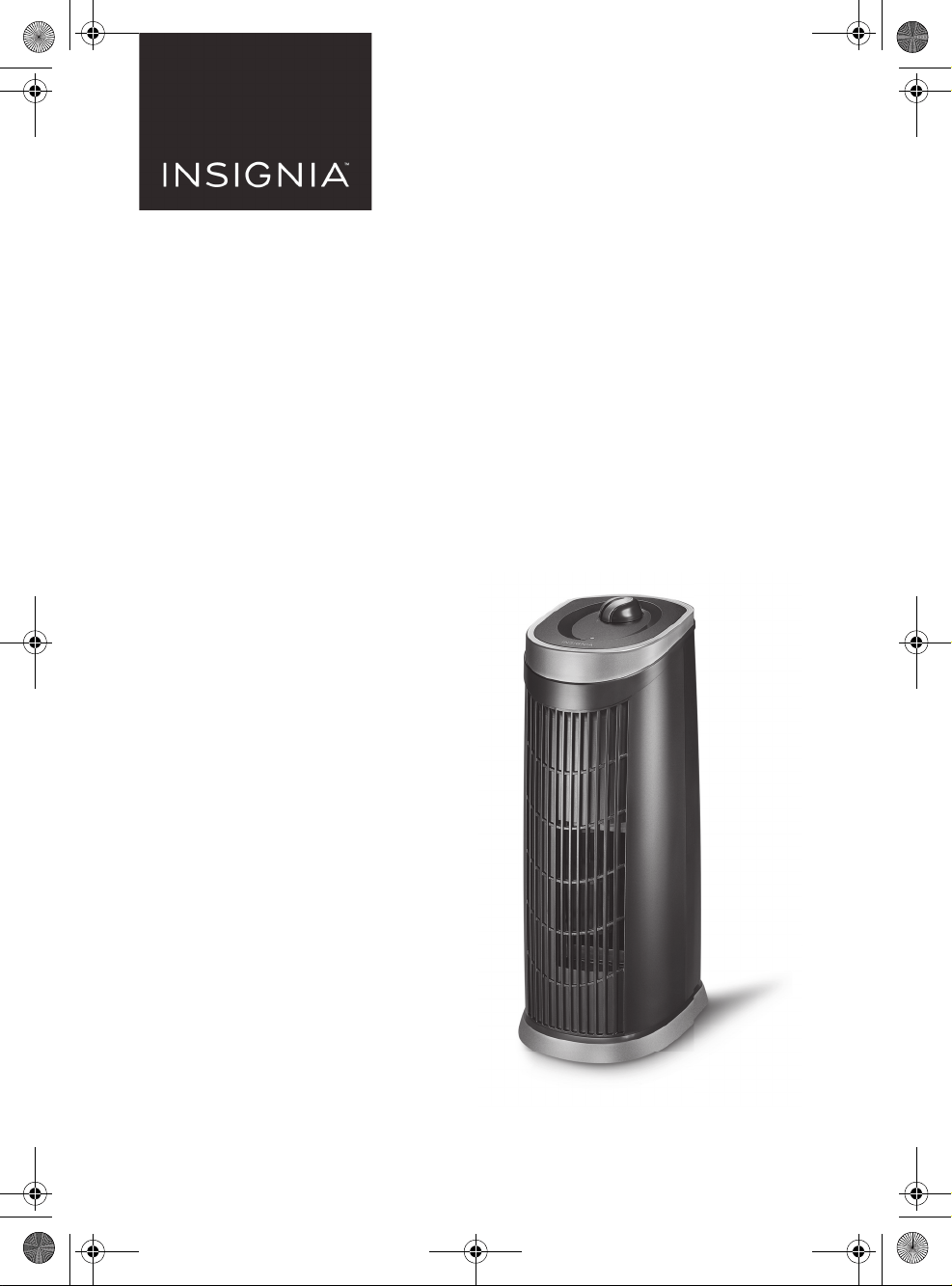
3-in-1 HEPA 16"
Air Purifier
NS-AP16BK8
NS-AP16BK8_17-0692_MAN_V1_ENG.fm Page 1 Wednesday, September 20, 2017 10:15 AM
V1
FINAL
FOR PRINT
www.insigniaproducts.com
2
Contents
IMPORTANT SAFETY INSTRUCTIONS . . . . . . . . . . . . . . . . . . . . . . . . . . . . . . 3
Package contents . . . . . . . . . . . . . . . . . . . . . . . . . . . . . . . . . . . . . . . . . . . . . . . .5
Features . . . . . . . . . . . . . . . . . . . . . . . . . . . . . . . . . . . . . . . . . . . . . . . . . . . . . . . . .5
Top View . . . . . . . . . . . . . . . . . . . . . . . . . . . . . . . . . . . . . . . . . . . . . . . . . . .5
Back View . . . . . . . . . . . . . . . . . . . . . . . . . . . . . . . . . . . . . . . . . . . . . . . . . .6
Before using your air purifier . . . . . . . . . . . . . . . . . . . . . . . . . . . . . . . . . . . . .6
Using your air purifier . . . . . . . . . . . . . . . . . . . . . . . . . . . . . . . . . . . . . . . . . . . .7
Understanding the filter indicator . . . . . . . . . . . . . . . . . . . . . . . . . . .8
Understanding the ionizer . . . . . . . . . . . . . . . . . . . . . . . . . . . . . . . . . .8
Maintaining your air purifier . . . . . . . . . . . . . . . . . . . . . . . . . . . . . . . . . . . . . 9
Replacing the pre-filter . . . . . . . . . . . . . . . . . . . . . . . . . . . . . . . . . . . .10
Replacing the HEPA filter . . . . . . . . . . . . . . . . . . . . . . . . . . . . . . . . . .11
Troubleshooting . . . . . . . . . . . . . . . . . . . . . . . . . . . . . . . . . . . . . . . . . . . . . . . .13
Specifications . . . . . . . . . . . . . . . . . . . . . . . . . . . . . . . . . . . . . . . . . . . . . . . . . .13
ONE-YEAR LIMITED WARRANTY . . . . . . . . . . . . . . . . . . . . . . . . . . . . . . . . .14
NS-AP16BK8_17-0692_MAN_V1_ENG.fm Page 2 Wednesday, September 20, 2017 10:15 AM

3
3-in-1 HEPA 16" Air Purifier
www.insigniaproducts.com
IMPORTANT SAFETY INSTRUCTIONS
1 Read all instructions before using your air purifier.
2 To reduce the risk of fire or electric shock, plug your air purifier directly
into a 120V AC electrical outlet.
3 Remove the plastic bag from the HEPA filter before use.
4 Keep the power cord out of heavy-traffic areas.
5 To avoid fire hazards, NEVER put the power cord under a rug or near
heat registers, radiators, stoves, or heaters.
6 DO NOT immerse your air purifier in water or other liquids.
7 Do not use near water.
8 Supervise children or people who are disabled when your air purifier is
in use near them.
9 Always unplug your air purifier before moving or cleaning it, opening
the grill, changing the filter, and when it is not in use. When
unplugging, make sure you pull the plug and not the cord.
10 NEVER drop or insert any objects into the openings of your air purifier.
11 DO NOT operate your air purifier if the power cord or plug is damaged.
12 If the motor fan fails to operate or your air purifier has been dropped
or damaged in any manner, return your air purifier to the
manufacturer for examination and/or repair.
13 Use your air purifier only for intended household use as described in
this manual. Any other use is not recommended by the manufacturer
and may cause a fire, electric shock, or injury to persons. The use of
attachments not recommended or sold by Best Buy Purchasing, LLC.
may cause injuries.
14 DO NOT use outdoors.
15 NEVER place on a soft surface, such as a bed or sofa, as this could cause
your air purifier to tip over and may block the air inlet or outlet grills.
16 Keep your air purifier away from heated surfaces and open flames.
17 DO NOT attempt to repair or adjust any electrical or mechanical
functions on your air purifier. Doing so may cause injuries and will void
your warranty. The inside of your air purifier contains no user
serviceable parts. All servicing should be performed by authorized
service personnel.
18 DO NOT place anything on top of your air purifier.
19 Always turn your air purifier off before unplugging it.
NS-AP16BK8_17-0692_MAN_V1_ENG.fm Page 3 Wednesday, September 20, 2017 10:15 AM
4
NS-AP16BK8
www.insigniaproducts.com
20 The ionizer in your air purifier produces less ozone than the UL
established limits of 50ppb (parts per billion). However, in high
concentrations, ozone can be harmful to birds and small pets. To
prevent ozone buildup, use the ionizer in well-ventilated areas with
the fan on.
21 Your air purifier should only be used in a room with temperatures
between 40~110°F (4~43°C).
22
WARNING: To reduce the risk of fire or electric shock, DO NOT
use your air purifier with any solid-state speed control device.
PLEASE READ AND SAVE THESE
IMPORTANT SAFETY INSTRUCTIONS
PLUG SAFETY
YOUR AIR PURIFIER HAS A POLARIZED PLUG—one blade is wider than the
other. To reduce the risk of electric shock, this plug is intended to fit in a
polarized outlet in only one way. If the plug does not fit fully in the power
outlet, reverse the plug and try again. If it still does not fit, contact a
qualified electrician to install the proper outlet.
DO NOT ATTEMPT TO MODIFY THIS PLUG OR TO DEFEAT THIS SAFETY
FEATURE IN ANY WAY.
CORD SAFETY
• The length of the power cord on this air purifier was selected to reduce
tangling or tripping hazards.
• If a longer power cord is necessary, an approved extension cord may be
used. The electrical rating of the extension cord must be equal to or
greater than the electrical rating of your air purifier (see the rating label on
the bottom of your air purifier).
• Do not drape an extension cord over a countertop or tabletop where it
can be pulled on by children or accidentally tripped over.
NS-AP16BK8_17-0692_MAN_V1_ENG.fm Page 4 Wednesday, September 20, 2017 10:15 AM
5
3-in-1 HEPA 16" Air Purifier
www.insigniaproducts.com
Package contents
•Air purifier
•HEPA filter
•Pre-filter
•User Guide
Features
• Ideal for use in small bedrooms
• True HEPA filter traps harmful particles, including pollen, pet dander, and
smoke
• Ionizer keeps particles out of the air
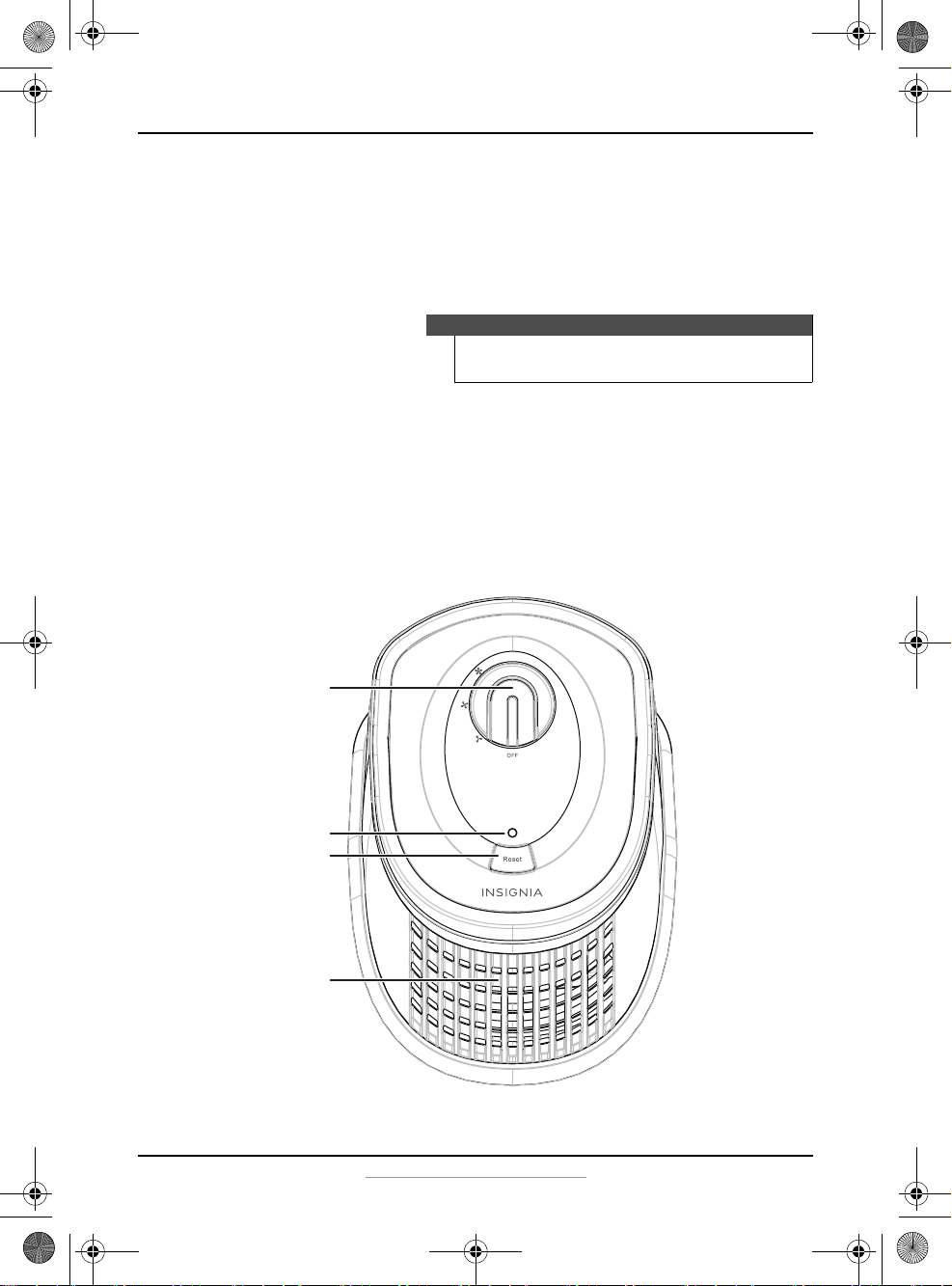
Top View
Note
The filters come pre-installed. Remove the
plastic bag from the HEPA filter before use.
Speed control knob
Filter indicator
Reset
Filtered air outlet
NS-AP16BK8_17-0692_MAN_V1_ENG.fm Page 5 Wednesday, September 20, 2017 10:15 AM
6
NS-AP16BK8
www.insigniaproducts.com
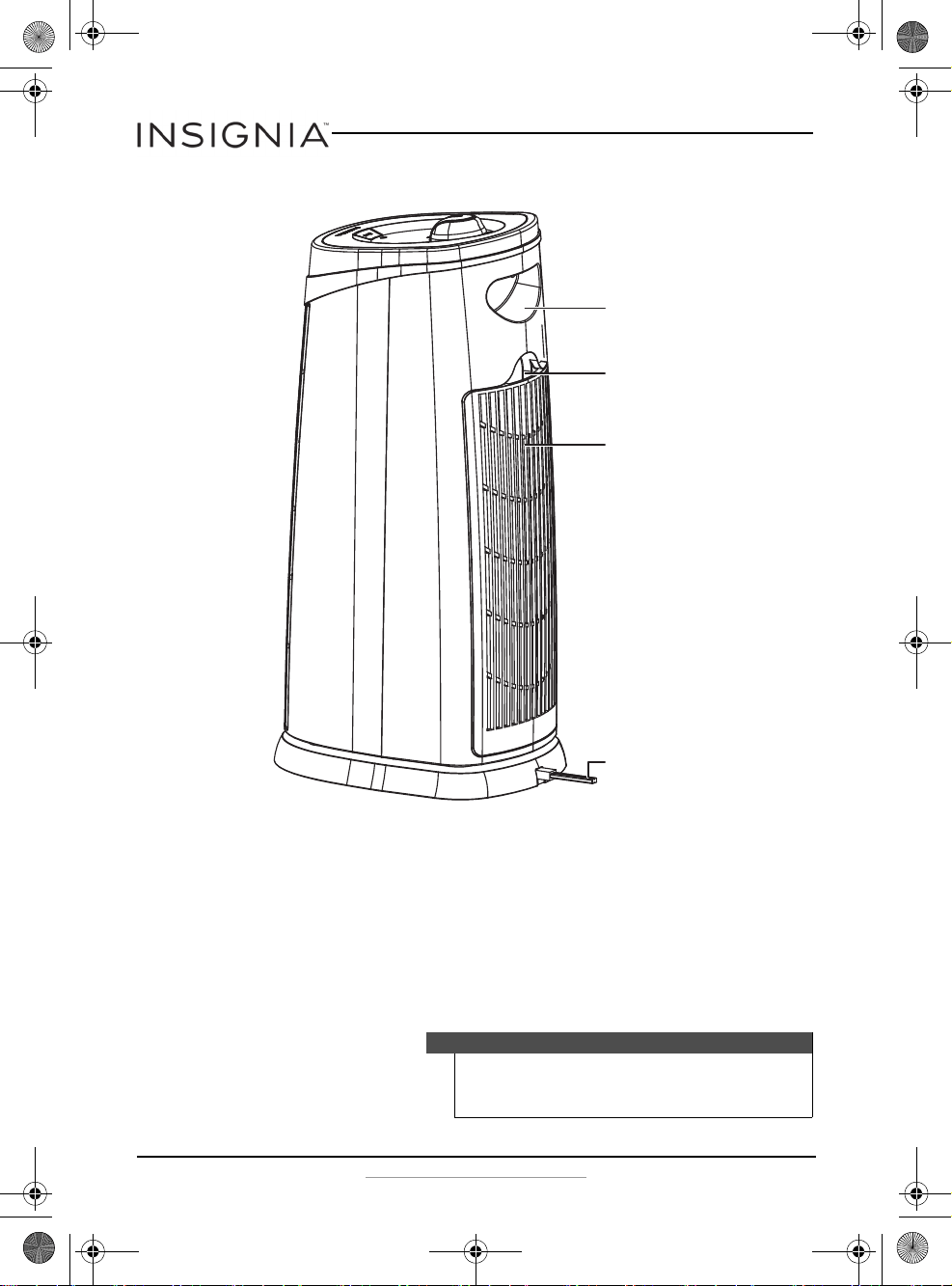
Back View
Before using your air purifier
1 Remove all packaging materials from your air purifier, then place it on
a level surface and make sure that there are no obstructions to the air
inlet or filtered air outlet.
2 Remove the air inlet grill by pulling it out, then remove the plastic bag
from the HEPA filter.
3 Place both filters into your air purifier, then reattach the air inlet grill.
Note
Make sure your air purifier is placed at least 1
foot (.3 meters) away from walls or large
objects.
Air inlet grill
Air inlet grill latch
Handle
Power cord
NS-AP16BK8_17-0692_MAN_V1_ENG.fm Page 6 Wednesday, September 20, 2017 10:15 AM
7
3-in-1 HEPA 16" Air Purifier
www.insigniaproducts.com
Using your air purifier
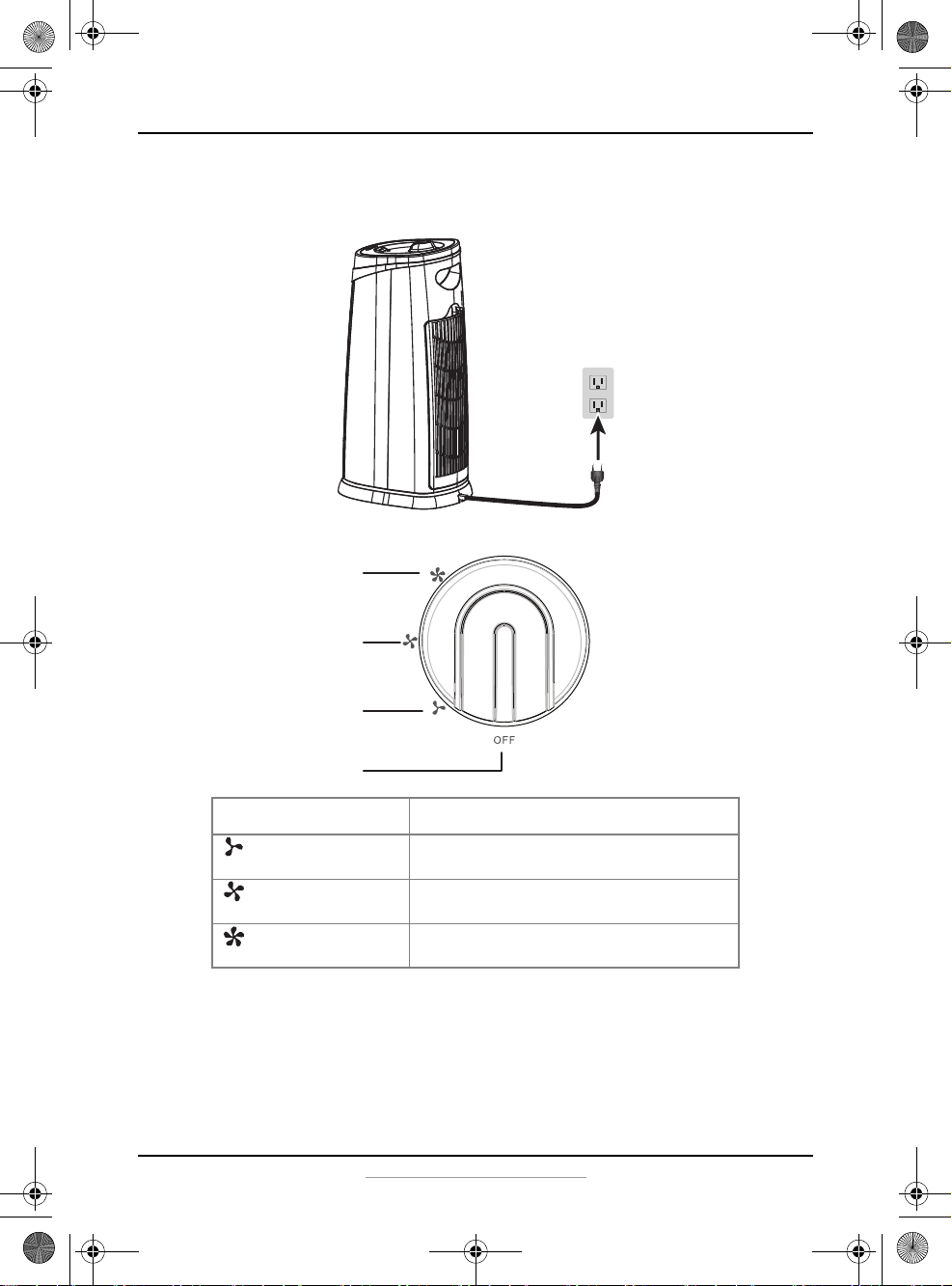
1 Plug your air purifier into a power outlet.
2 Turn the speed control knob to the speed you want.
SPEED SETTING IDEAL USE
LOW (1) Use this setting when you want your air
purifier to operate quietly.
MEDIUM (2) Use this setting continuously for optimum
filtration.
HIGH (3) Use this setting when you want to quickly
circulate and filter the air in the room.
HIGH (3)
MEDIUM (2)
LOW (1)
OFF
NS-AP16BK8_17-0692_MAN_V1_ENG.fm Page 7 Wednesday, September 20, 2017 10:15 AM
8
NS-AP16BK8
www.insigniaproducts.com
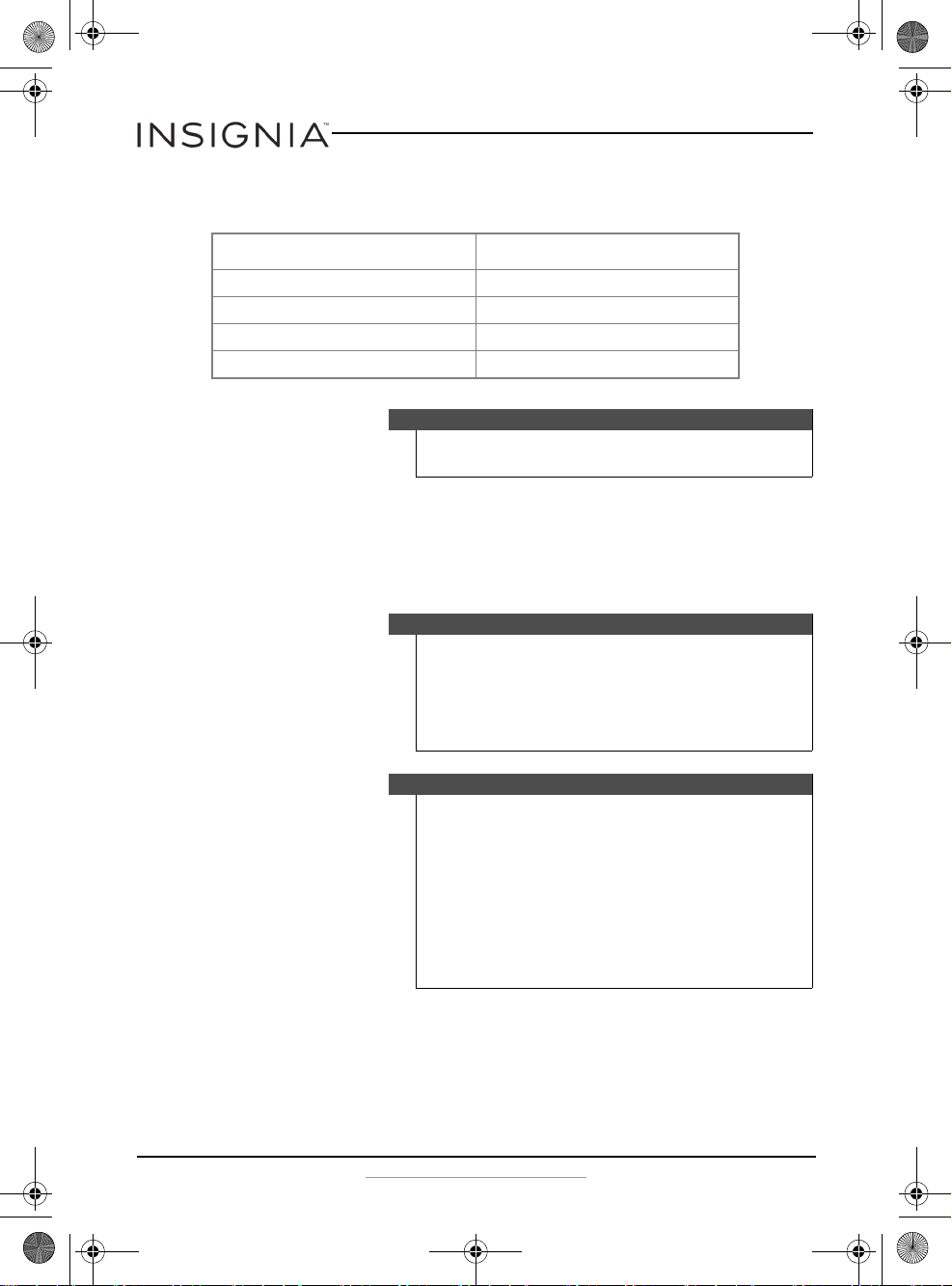
Understanding the filter indicator
The filter indicator shows you when to replace your filters:
Understanding the ionizer
The ionizer releases negative ions through the filtered air that will attach
to positively-charged particles, such as dust and pollen, and it will cause
the particles to settle out of the air. It automatically turns on when you
turn the speed control knob to the speed you want.
FILTER INDICATOR MEANING
Green LED Normal operation.
Blue LED flash Check and replace the pre-filter.
Red LED flash Check and replace the HEPA filter.
Blue/red LED flash Check and replace both filters.
Note
There is a sticker on your air purifier to remind you
what each color indicates.
Caution
The ionizer in your air purifier produces less ozone
than the UL established limits of 50ppb (parts per
billion). However, in high concentrations, ozone can
be harmful to birds and small pets. To prevent ozone
buildup, use the ionizer in well-ventilated areas with
the fan on.
Notes
• The ionizer may produce an occasional popping
or cracking sound. This is normal and occurs
when a small buildup of ions is discharged.
• You may notice more particles on the surfaces in
your home or on the filtered air outlet of your air
purifier. This is normal and means the particles
are being removed from the air.
• Excessive amounts of pet dander, dust, or smoke
may interfere with the ionization process.
• The ionizer cannot be turned off.
NS-AP16BK8_17-0692_MAN_V1_ENG.fm Page 8 Wednesday, September 20, 2017 10:15 AM
9
3-in-1 HEPA 16" Air Purifier
www.insigniaproducts.com
Maintaining your air purifier
1 Turn your air purifier off, then unplug it.
2 Clean the outside of your air purifier with a soft, clean, damp cloth.
3 Remove the air inlet grill by pulling it out, then remove the pre-filter
and wash the grill with warm, soapy water. Make sure that the air inlet
grill is dry before reattaching it to the air purifier.
4 Clean the filtered air outlet with a small, soft brush.
5 Remove the HEPA filter, then clean the filter chamber of your air
purifier with a dry, soft cloth.
Note
The air inlet grill is not dishwasher safe.
Warning
Do not allow moisture to come in contact with
the internal components.
NS-AP16BK8_17-0692_MAN_V1_ENG.fm Page 9 Wednesday, September 20, 2017 10:15 AM

10
NS-AP16BK8
www.insigniaproducts.com
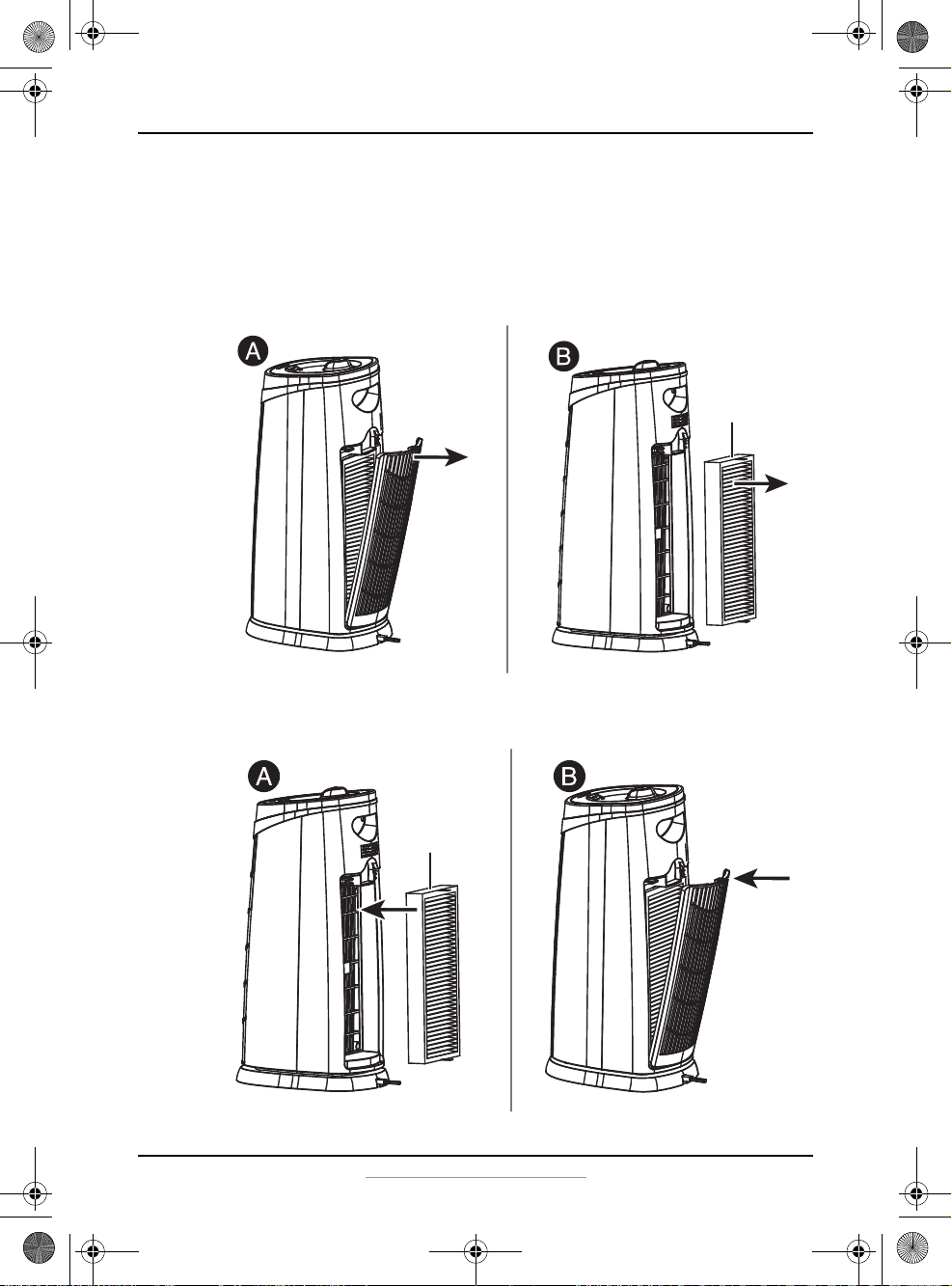
Replacing the pre-filter
The filter indicator flashes blue after 1500 hours of use to remind you to
replace the used filter with a new Insignia pre-filter (NS-APPF168).
1 Turn off your air purifier, then unplug it.
2 Remove the air inlet grill by pulling it out (A), then remove the used
pre-filter from the air inlet grill (B).
3 Install a new Insignia pre-filter (NS-APPF168) on the air inlet grill (A),
then reattach the grill (B).
Used
pre-filter
Used
pre-filter
NS-AP16BK8_17-0692_MAN_V1_ENG.fm Page 10 Wednesday, September 20, 2017 10:15 AM
11
3-in-1 HEPA 16" Air Purifier
www.insigniaproducts.com
Replacing the HEPA filter
The filter indicator will flash red after 3000 hours of use to remind you to
replace the used filter with a new Insignia HEPA filter (NS-APF168).
1 Turn of your air purifier, then unplug it.
2 Remove the air inlet grill by pulling it out (A), then remove the used
HEPA filter (B).
3 Install a new Insignia HEPA filter (NS-APF168) into your air purifier (A),
then reattach the grill (B).
Used
HEPA filter
New
HEPA filter
NS-AP16BK8_17-0692_MAN_V1_ENG.fm Page 11 Wednesday, September 20, 2017 10:15 AM
12
NS-AP16BK8
www.insigniaproducts.com
HEPA filter performance
The Insignia HEPA filter (NS-APF168) performs a variety of functions:
FILTER FUNCTIONS TECHNOLOGY IDEAL FOR
Total air 99% HEPA-Type technology. Dust reduction. Delivers 30%
better air quality.
Odor elimination 10 times the odor fighting
power.
Eliminating odors from pets,
tobacco smoke, and cooking
fumes.
Allergen removal 99.97% True HEPA
technology. Removes up to
99.97% of particles passing
through the filter, such as
pollen, dust, mold, and
dander.
Allergy sufferers.
Smoke removal HEPA-type filtration. Triple
layer protection made of
baking soda, carbon, and
zeolite removes up to 99.97%
of smoke and pollutants from
the air.
Reducing smoke and odors
from smoke and volatile
organic compounds.
NS-AP16BK8_17-0692_MAN_V1_ENG.fm Page 12 Wednesday, September 20, 2017 10:15 AM
13
3-in-1 HEPA 16" Air Purifier
www.insigniaproducts.com
Troubleshooting
Specifications
PROBLEM SOLUTION
My air purifier does not work. • Make sure your air purifier is plugged in.
• Make sure the power outlet is working.
• Make sure your air purifier is turned on.
• If your air purifier is plugged into a surge protector,
make sure that it is turned on.
My air purifier has poor air flow
or is loud.
• Make sure your air purifier is on a flat surface.
• Make sure nothing is blocking the air inlet and filtered
air outlet. Position your air purifier at least 1 foot
(.3 meters) away from walls or large objects.
• Check the condition of the filters. Replace them if they
are dirty.
• Remove the plastic bag from the HEPA filter.
• Make sure the filters are seated properly.
My HEPA filter and pre-filter do
not last the full lifetime.
• Excessive amounts of pet dander, dust, or smoke may
decrease the life expectancy of the filter.
My filter indicator is flashing
blue and/or red.
• When the filter indicator LED flashes blue, you need to
check and replace your pre-filter.
• When the filter indicator LED flashes red, you need to
check and replace your HEPA filter.
• When the filter indicator LED flashes blue and red, you
need to check and replace both filters.
Dimensions (H×W×D) 17.6 × 6.7× 8.9 in. (44.7 × 17.0 × 22.5 cm)
Weight 6.2 lbs. (2.8 kg)
Power input 120V AC
Power cord length 5.9 ft. (1.8 m)
Operating temperature 40~110°F (4~43°C)
Coverage area 108.0 sq. ft. (10.0 m
2
)
HEPA filter lifetime 3000 hours
Pre-filter lifetime 1500 hours
HEPA filter dimensions
(H×W×D)
10.0 × 4.7 × 1.1 in. (25.5 × 12.0 × 2.7 cm)
Pre-filter dimensions
(H×W×D)
10.3 × 5.1 × .2 in. (26.2 × 13.0 × .5 cm)
Pre-filter technology Activated carbon mesh
Pre-filter model number NS-APPF168
HEPA filter model number NS-APF168
NS-AP16BK8_17-0692_MAN_V1_ENG.fm Page 13 Wednesday, September 20, 2017 10:15 AM
14
NS-AP16BK8
www.insigniaproducts.com
ONE-YEAR LIMITED WARRANTY
Definitions:
The Distributor* of Insignia branded products warrants to you, the original purchaser of this
new Insignia-branded product (“Product”), that the Product shall be free of defects in the
original manufacturer of the material or workmanship for a period of one (1) year from the
date of your purchase of the Product (“Warranty Period”).
For this warranty to apply, your Product must be purchased in the United States or Canada
from a Best Buy branded retail store or online at www.bestbuy.com or www.bestbuy.ca and
is packaged with this warranty statement.
How long does the coverage last?
The Warranty Period lasts for 1 year (365 days) from the date you purchased the Product.
Your purchase date is printed on the receipt you received with the Product.
What does this warranty cover?
During the Warranty Period, if the original manufacture of the material or workmanship of
the Product is determined to be defective by an authorized Insignia repair center or store
personnel, Insignia will (at its sole option): (1) repair the Product with new or rebuilt parts; or
(2) replace the Product at no charge with new or rebuilt comparable products or parts.
Products and parts replaced under this warranty become the property of Insignia and are
not returned to you. If service of Products or parts are required after the Warranty Period
expires, you must pay all labor and parts charges. This warranty lasts as long as you own your
Insignia Product during the Warranty Period. Warranty coverage terminates if you sell or
otherwise transfer the Product.
How to obtain warranty service?
If you purchased the Product at a Best Buy retail store location or from a Best Buy online
website (www.bestbuy.com or www.bestbuy.ca), please take your original receipt and the
Product to any Best Buy store. Make sure that you place the Product in its original packaging
or packaging that provides the same amount of protection as the original packaging.
To obtain warranty service, in the United States call 1-888-BESTBUY or in Canada call
1-866-BESTBUY. Call agents may diagnose and correct the issue over the phone.
Where is the warranty valid?
This warranty is valid only in the United States and Canada at Best Buy branded retail stores
or websites to the original purchaser of the product in the county where the original
purchase was made.
What does the warranty not cover?
This warranty does not cover:
• Customer instruction/education
•Installation
•Set up adjustments
• Cosmetic damage
• Damage due to weather, lightning, and other acts of God, such as power surges
• Accidental damage
•Misuse
•Abuse
•Negligence
• Commercial purposes/use, including but not limited to use in a place of business or in
communal areas of a multiple dwelling condominium or apartment complex, or
otherwise used in a place of other than a private home.
NS-AP16BK8_17-0692_MAN_V1_ENG.fm Page 14 Wednesday, September 20, 2017 10:15 AM

15
3-in-1 HEPA 16" Air Purifier
www.insigniaproducts.com
• Modification of any part of the Product, including the antenna
• Display panel damaged by static (non-moving) images applied for lengthy periods
(burn-in).
• Damage due to incorrect operation or maintenance
• Connection to an incorrect voltage or power supply
• Attempted repair by any person not authorized by Insignia to service the Product
• Products sold “as is” or “with all faults”
• Consumables, including but not limited to batteries (i.e. AA, AAA, C etc.)
• Products where the factory applied serial number has been altered or removed
• Loss or Theft of this product or any part of the product
• Display panels containing up to three (3) pixel failures (dots that are dark or incorrectly
illuminated) grouped in an area smaller than one tenth (1/10) of the display size or up
to five (5) pixel failures throughout the display. (Pixel based displays may contain a
limited number of pixels that may not function normally.)
• Failures or Damage caused by any contact including but not limited to liquids, gels or
pastes.
REPAIR REPLACEMENT AS PROVIDED UNDER THIS WARRANTY IS YOUR EXCLUSIVE REMEDY
FOR BREACH OF WARRANTY. INSIGNIA SHALL NOT BE LIABLE FOR ANY INCIDENTAL OR
CONSEQUENTIAL DAMAGES FOR THE BREACH OF ANY EXPRESS OR IMPLIED WARRANTY ON
THIS PRODUCT, INCLUDING, BUT NOT LIMITED TO, LOST DATA, LOSS OF USE OF YOUR
PRODUCT, LOST BUSINESS OR LOST PROFITS. INSIGNIA PRODUCTS MAKES NO OTHER
EXPRESS WARRANTIES WITH RESPECT TO THE PRODUCT, ALL EXPRESS AND IMPLIED
WARRANTIES FOR THE PRODUCT, INCLUDING BUT NOT LIMITED TO ANY IMPLIED
WARRANTIES OF AND CONDITIONS OF MERCHANTABILITY AND FITNESS FOR A PARTICULAR
PURPOSE, ARE LIMITED IN DURATION TO THE WARRANTY PERIOD SET FORTH ABOVE AND
NO WARRANTIES, WHETHER EXPRESS OR IMPLIED, WILL APPLY AFTER THE WARRANTY
PERIOD. SOME STATES, PROVINCES AND JURISDICTIONS DO NOT ALLOW LIMITATIONS ON
HOW LONG AN IMPLIED WARRANTY LASTS, SO THE ABOVE LIMITATION MAY NOT APPLY TO
YOU. THIS WARRANTY GIVES YOU SPECIFIC LEGAL RIGHTS, AND YOU MAY ALSO HAVE OTHER
RIGHTS, WHICH VARY FROM STATE TO STATE OR PROVINCE TO PROVINCE.
Contact Insignia:
1-877-467-4289
www.insigniaproducts.com
INSIGNIA is a trademark of Best Buy and its affiliated companies.
*Distributed by Best Buy Purchasing, LLC
7601 Penn Ave South, Richfield, MN 55423 U.S.A.
©2017 Best Buy. All rights reserved.
Made in China
NS-AP16BK8_17-0692_MAN_V1_ENG.fm Page 15 Wednesday, September 20, 2017 10:15 AM
www.insigniaproducts.com
1-877-467-4289 (U.S. and Canada) or 01-800-926-3000 (Mexico)
INSIGNIA is a trademark of Best Buy and its affiliated companies.
Distributed by Best Buy Purchasing, LLC
7601 Penn Ave South, Richfield, MN 55423 U.S.A
©2017 Best Buy. All rights reserved.
Made in China
V1 ENGLISH
17-0692
NS-AP16BK8_17-0692_MAN_V1_ENG.fm Page 16 Wednesday, September 20, 2017 10:15 AM