Thank you for purchasing this Samsung product.
To receive more complete service, please register your product at www.samsung.com/register
Model Serial No.
If you have any questions, please call us at 1-800-SAMSUNG (1-800-726-7864) for assistance.
USER MANUAL
S ÉRIE 4&5
SERIES 4&5
English - 2
Before Reading This User Manual
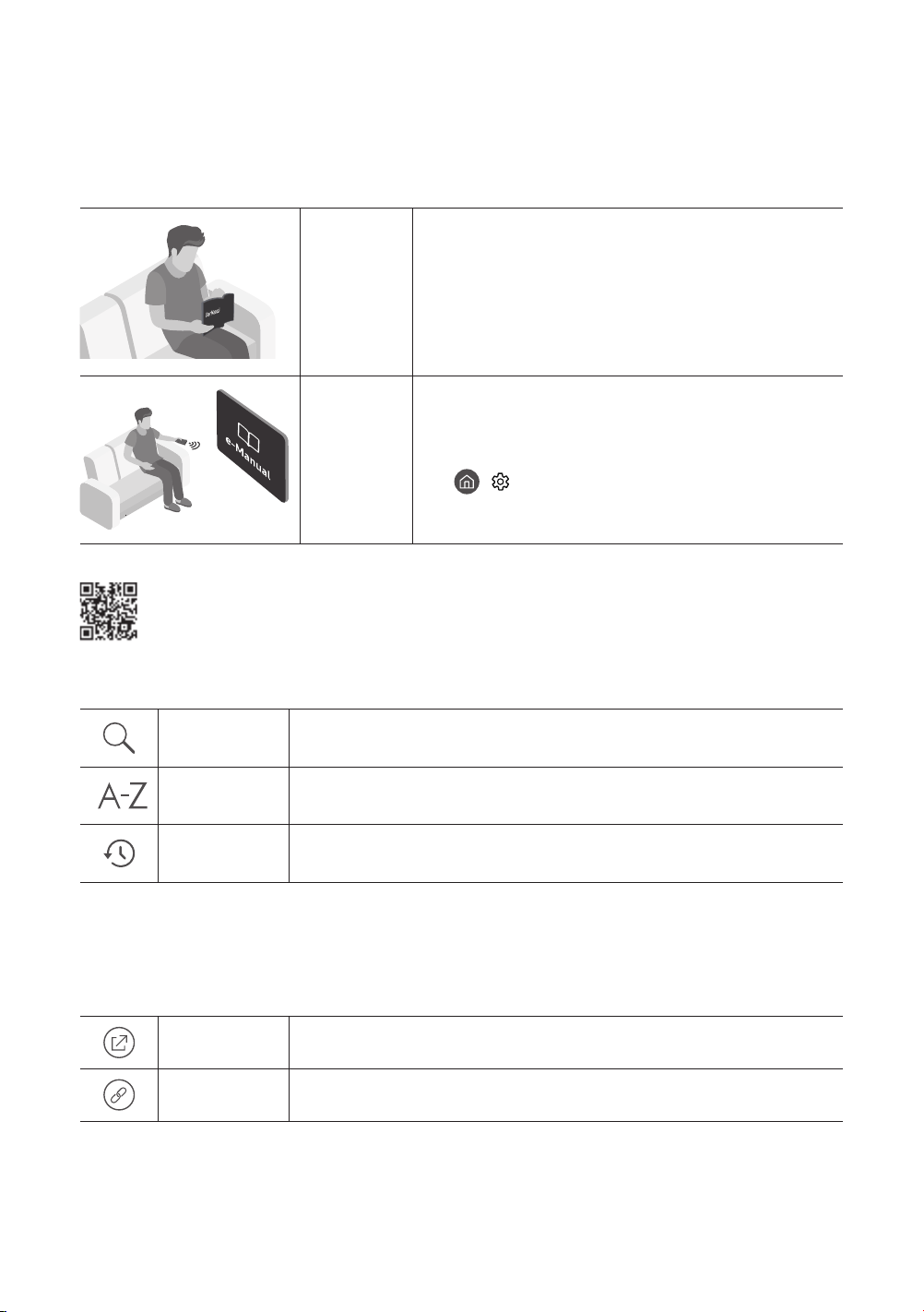
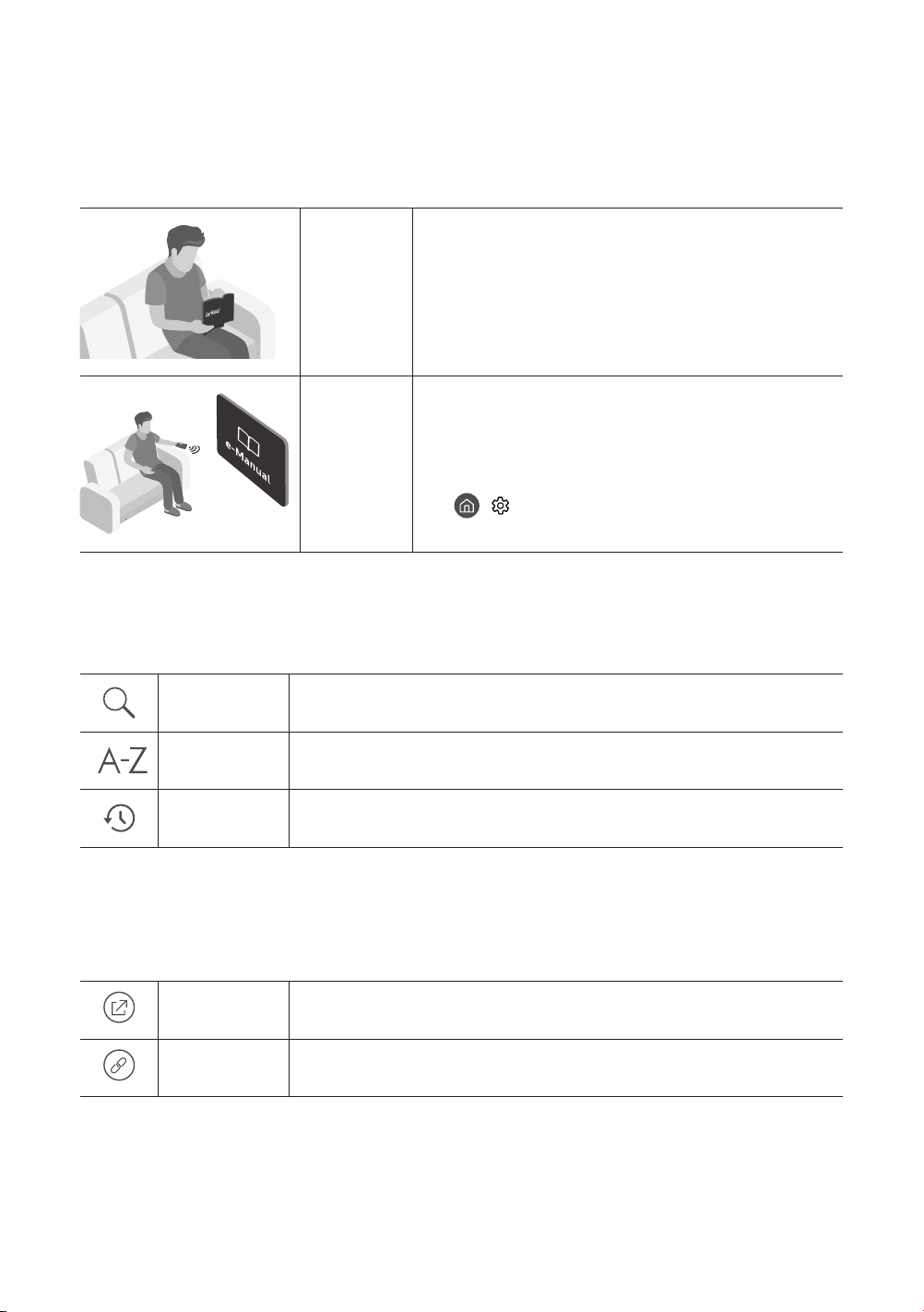
This TV comes with this user manual and an embedded e-Manual.
Before reading this user manual, review the following:
User
Manual
Read this provided user manual to see information about
product safety, installation, accessories, initial conguration,
and product specications.
e-Manual
For more information about this TV, read the e-Manual
embedded in the product.
• To open the e-Manual,
> Settings > Support > Open e-Manual
Scan this QR code with your smart device to visit Samsung's online Customer Service Center. You
can also visit the site - http//:www.samsung.com/us/support - on your PC. On the website, you can
download the user manual and see its contents on your PC or mobile device.
Learning the e-Manual's assistance functions
Search
Select an item from the search results to load the corresponding page.
Index
Select a keyword to navigate to the relevant page.
Recently
Viewed Topics
Select a topic from the list of recently viewed topics.
• Some menu screens cannot be accessed from the e-Manual.
Learning the functions of the buttons that appear on e-Manual topic pages
(Try Now)
Access the associated menu item and try out the feature directly.
(Link)
Access a topic referred to on an e-Manual topic page.
English - 3
Warning! Important Safety Instructions
Please read the Safety Instructions before using your TV.
CAUTION
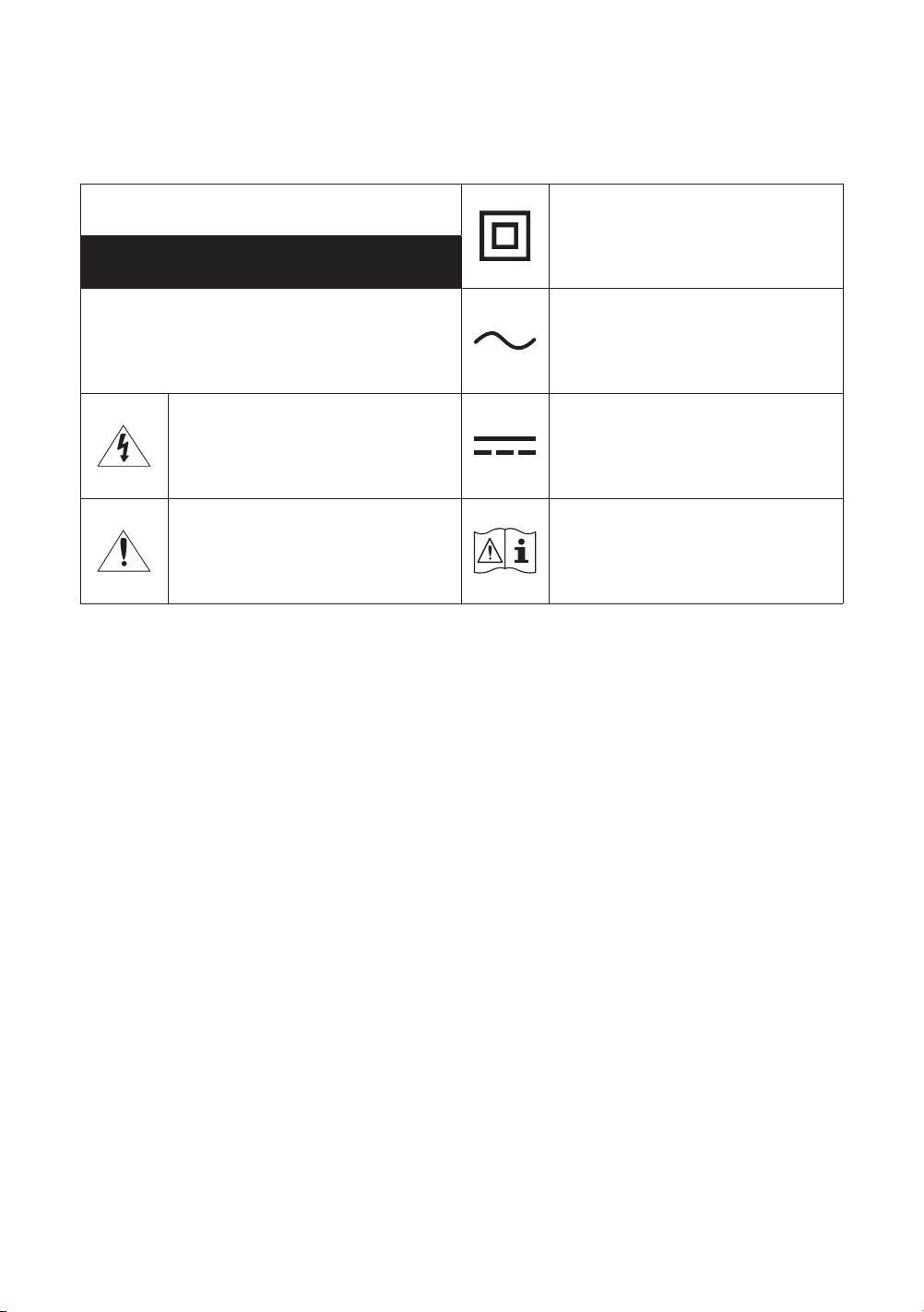
Class II product: This symbol indicates
that a safety connection to electrical
earth (ground) is not required.
RISK OF ELECTRIC SHOCK. DO NOT OPEN.
CAUTION: TO REDUCE THE RISK OF ELECTRIC
SHOCK, DO NOT REMOVE COVER (OR BACK). THERE
ARE NO USER SERVICEABLE PARTS INSIDE. REFER
ALL SERVICING TO QUALIFIED PERSONNEL.
AC voltage: Rated voltage marked with
this symbol is AC voltage.
This symbol indicates that high voltage
is present inside. It is dangerous to make
any kind of contact with any internal part
of this product.
DC voltage: Rated voltage marked with
this symbol is DC voltage.
This symbol indicates that this product
has included important literature
concerning operation and maintenance.
Caution. Consult instructions for use: This
symbol instructs the user to consult the
user manual for further safety related
information.
• The slots and openings in the cabinet and in the back or bottom are provided for necessary ventilation. To ensure
reliable operation of this apparatus and to protect it from overheating, these slots and openings must never be
blocked or covered.
– Do not place this apparatus in a conned space, such as a bookcase or built-in cabinet, unless proper
ventilation is provided.
– Do not place this apparatus near or over a radiator or heat register, or where it is exposed to direct sunlight.
– Do not place vessels (vases etc.) containing water on this apparatus, as this can result in a re or electric
shock.
• Do not expose this apparatus to rain or place it near water (near a bathtub, washbowl, kitchen sink, or laundry
tub, in a wet basement, or near a swimming pool, etc.). If this apparatus accidentally gets wet, unplug it and
contact an authorized dealer immediately.
• This apparatus uses batteries. In your community, there might be environmental regulations that require you to
dispose of these batteries properly. Please contact your local authorities for disposal or recycling information.
• Do not overload wall outlets, extension cords, or adaptors beyond their capacity, since this can result in re or
electric shock.
• Power-supply cords should be placed so that they are not likely to be walked on or pinched by items placed upon
or against them. Pay particular attention to cords at the plug end, at wall outlets, and at the point where they
exit from the appliance.
• To protect this apparatus from a lightning storm, or when left unattended and unused for long periods of time,
unplug it from the wall outlet and disconnect the antenna or cable system. This will prevent damage to the set
due to lightning and power line surges.
• Before connecting the AC power cord to the DC adaptor outlet, make sure that the voltage designation of the DC
adaptor corresponds to the local electrical supply.
• Never insert anything metallic into the open parts of this apparatus. This may cause a danger of electric shock.
• To avoid electric shock, never touch the inside of this apparatus. Only a qualied technician should open this
apparatus.
• Be sure to plug in the power cord until it is rmly seated. When unplugging the power cord from a wall outlet,
always pull on the power cord's plug. Never unplug it by pulling on the power cord. Do not touch the power cord
with wet hands.
• If this apparatus does not operate normally - in particular, if there are any unusual sounds or smells coming from
it - unplug it immediately and contact an authorized dealer or service center.
• Be sure to pull the power plug out of the outlet if the TV is to remain unused or if you are to leave the house for
an extended period of time (especially when children, elderly, or disabled people will be left alone in the house).
– Accumulated dust can cause an electric shock, an electric leakage, or a re by causing the power cord to
generate sparks and heat or by causing the insulation to deteriorate.
• Be sure to contact an authorized Samsung service center for information if you intend to install your TV in a
location with heavy dust, high or low temperatures, high humidity, chemical substances, or where it will operate
24 hours a day such as in an airport, a train station, etc. Failure to do so may lead to serious damage to your TV.
• Use only a properly grounded plug and wall outlet.
– An improper ground may cause electric shock or equipment damage. (Class l Equipment only.)
• To turn off this apparatus completely, disconnect it from the wall outlet. To ensure you can unplug this apparatus
quickly if necessary, make sure that the wall outlet and power plug are readily accessible.
• Store the accessories (batteries, etc.) in a location safely out of the reach of children.
• Do not drop or strike the product. If the product is damaged, disconnect the power cord and contact a Samsung
service center.
• To clean this apparatus, unplug the power cord from the wall outlet and wipe the product with a soft, dry cloth.
Do not use any chemicals such as wax, benzene, alcohol, thinners, insecticide, air fresheners, lubricants, or
detergents. These chemicals can damage the appearance of the TV or erase the printing on the product.
• Do not expose this apparatus to dripping or splashing.
• Do not dispose of batteries in a re.
• Do not short-circuit, disassemble, or overheat the batteries.
• There is danger of an explosion if you replace the batteries used in the remote with the wrong type of battery.
Replace only with the same or equivalent type.
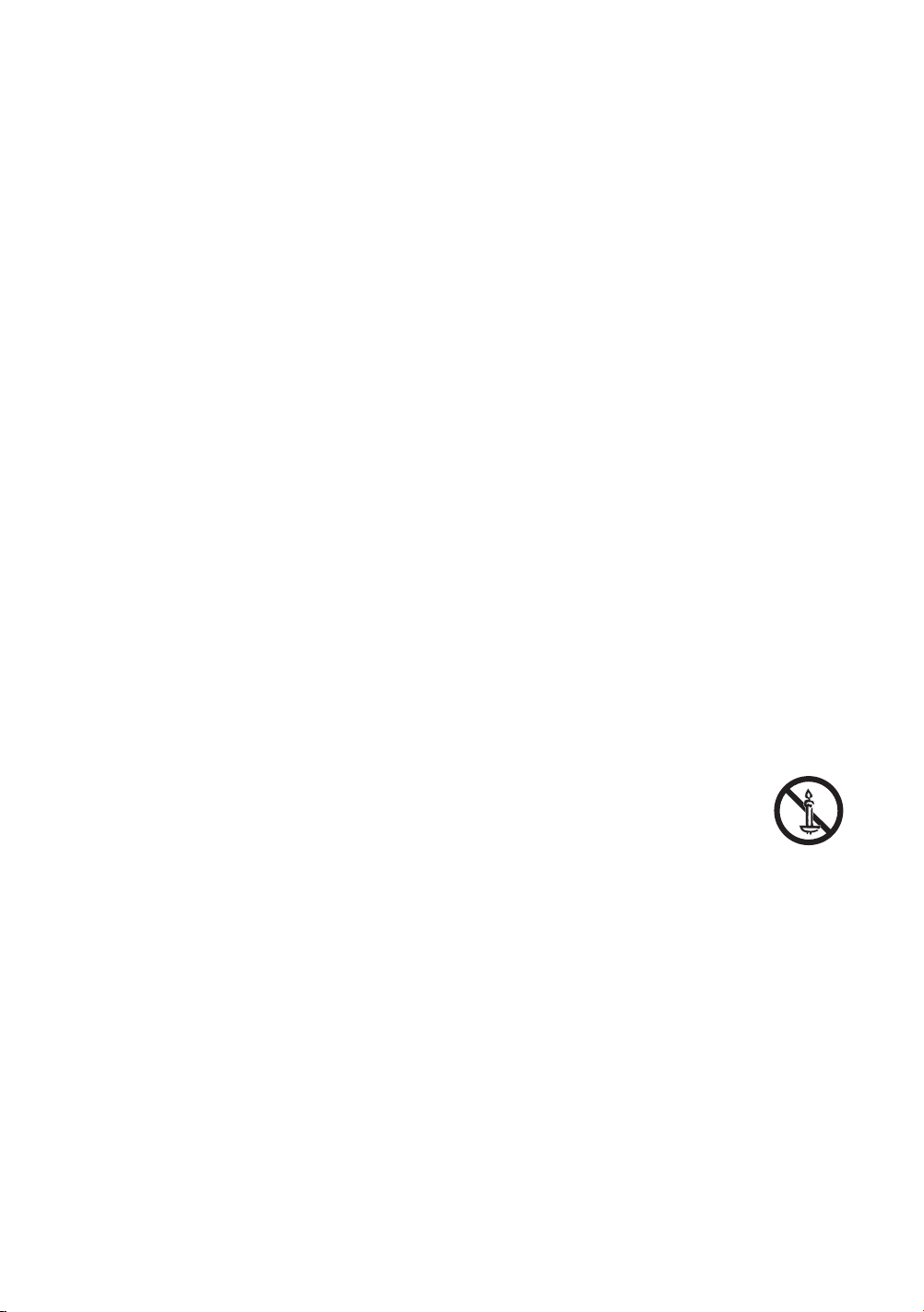
• WARNING - TO PREVENT THE SPREAD OF FIRE, KEEP CANDLES AND OTHER ITEMS WITH OPEN
FLAMES AWAY FROM THIS PRODUCT AT ALL TIMES.
• Use care when touching the TV after it has been on for some time. Some parts can be warm to the
touch.
• State of California Proposition 65 Warning
– WARNING - This product contains chemicals known to the State of California to cause cancer and birth
defects or other reproductive harm.
English - 4
Internet security
Samsung takes a number of steps to protect its Internet-compatible Smart TVs against unauthorized incursions and
hacking. For example, certain sensitive communications between the TV and the Internet servers are encrypted. In
addition, the TV’s operating system has adopted controls to prevent the installation of unauthorized applications.
Although we take steps to protect your Smart TV and personal information, no Internet-connected device or
transmission is completely secure. We therefore encourage you to take additional steps to safeguard your TV, secure
your Internet connection, and minimize the risk of unauthorized access. These steps are listed below:
• When Samsung releases software updates to improve the security of your TV, you should promptly install
these updates. To automatically receive these updates, turn on Auto Update in the TV's menu (Support >
Software Update > Auto Update). When an update is available, a popup message appears on the TV screen.
Accept the software download and update by selecting YES when prompted. Take steps to secure your wireless
router and network. Your router's manual should provide additional details about how to implement the
following measures:
– Secure your wireless router's management settings with a unique password to prevent unauthorized
changes to security related settings.
– Implement standard encryption (e.g., WPA2 encryption) on your wireless router to secure your wireless
network signal.
– Secure access to your wireless network with a hard-to-guess password.
– Conrm your router's rewall setting is enabled (if so equipped).
– Make sure that all your Internet-connected devices are behind your network's rewall.
– If your router or modem has a standby mode button, use it to disconnect your home network from the
Internet when it is not in use.
• Use strong passwords for all your Internet accounts (Netix, Facebook, etc.). If your TV has a camera, recess the
camera into the TV's bezel when it is not in use. Recessing the camera makes it inoperative.
• If any unexpected messages appear on your TV screen requesting permission to link a device or enable a remote
session, do NOT accept.
• Do not visit suspicious web sites and do not install any suspicious programs. We recommend that users install
only those authorized apps provided by Samsung through Samsung Smart Hub.
Figures and illustrations in this User Manual are provided for reference only and may differ from the actual
product appearance. Product design and specications may change without notice.
English - 5
English - 6
Before Reading This User Manual ---------------------------------------------------------------------------- 2
Warning! Important Safety Instructions ---------------------------------------------------------------------------- 3
01 TV Installation
Mounting the TV on a wall ---------------------------------------------------------------------------- 7
Providing proper ventilation for your TV ---------------------------------------------------------------------------- 8
Safety Precaution: Securing the TV to the wall to
prevent falling ---------------------------------------------------------------------------- 9
02 The Remote Control
Installing batteries into the remote control ---------------------------------------------------------------------------- 11
03 Initial Setup
Using the TV Controller ---------------------------------------------------------------------------- 12
04 Troubleshooting and Maintenance
Troubleshooting ---------------------------------------------------------------------------- 13
What is Remote Support? ---------------------------------------------------------------------------- 14
Eco Sensor and screen brightness ---------------------------------------------------------------------------- 15
Still image warning ---------------------------------------------------------------------------- 15
Caring for the TV ---------------------------------------------------------------------------- 15
05
---------------------------------------------------------------------------- 16
Environmental Considerations ---------------------------------------------------------------------------- 16
Decreasing power consumption ---------------------------------------------------------------------------- 17
Dimensions ---------------------------------------------------------------------------- 18
Licenses ---------------------------------------------------------------------------- 18
FCC and Warranty Information
Federal Communication Commission Interference
Statement ---------------------------------------------------------------------------- 19
This Class B digital apparatus complies with Canadian
ICES-003. ---------------------------------------------------------------------------- 19
IMPORTANT WARRANTY INFORMATION REGARDING
TELEVISION FORMAT VIEWING
---------------------------------------------------------------------------- 20
LIMITED WARRANTY TO ORIGINAL PURCHASER ---------------------------------------------------------------------------- 20
Contents
English - 7
01 TV Installation
Mounting the TV on a wall
If you mount this TV on a wall, follow the instructions exactly as set out by the manufacturer. Unless it is
correctly mounted, the TV may slide or fall and cause serious injury to a child or adult and serious damage
to the TV.
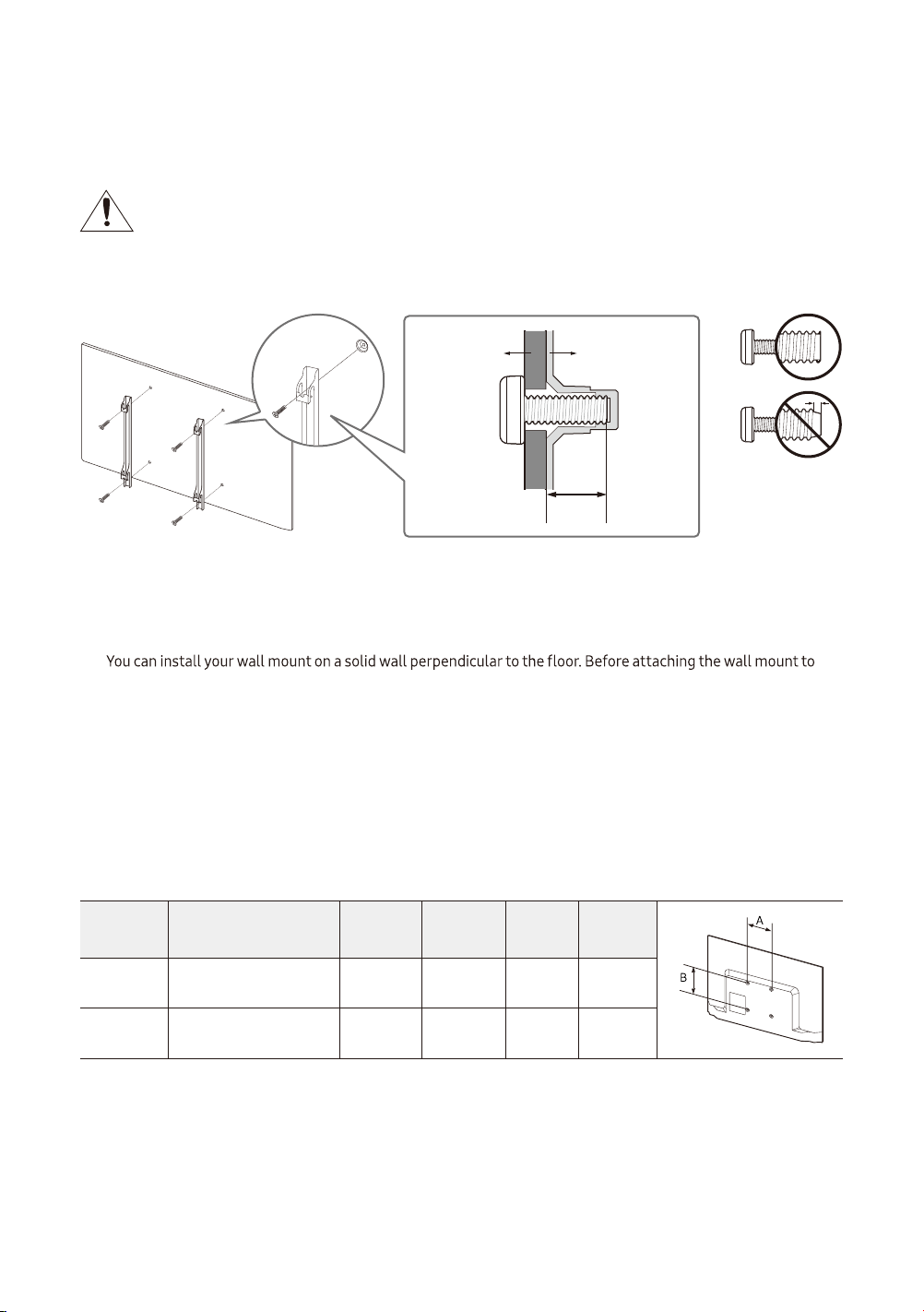
You can mount the TV on the wall using a wall mount kit (sold separately).
TV
Wall mount
bracket
C
• Samsung Electronics is not responsible for any damage to the product or injury to yourself or others if you
choose to install the wall mount on your own.
• To order the wall mount kit, contact Samsung Customer Care at 1-800-SAMSUNG (1-800-726-7864).
•
surfaces other than plaster board, contact your nearest dealer for additional information. If you install the TV on
a ceiling or slanted wall, it may fall and result in severe personal injury.
• When installing a wall mount kit, we recommend you fasten all four VESA screws.
• If you want to install a wall mount kit that attaches to the wall using two top screws only, be sure to use a
Samsung wall mount kit that supports this type of installat
ion. (You may not be able to purchase this type of
wall mount kit, depending on the geographical region.)
• Standard dimensions for wall mount kits are shown in the table below.
• If you are installing a third-party wall mount, note that the length of the screws you can use to attach the TV to
the wall mount is shown in column C in the table below.
TV size in
inches
VESA screw hole specs
(A * B) in millimeters
C (mm)
Standard
Screw
Pitch
(mm)
Quantity
32 100 x 100 6.2 - 8.2 M4 0.7 4
43 200 x 200 9.5 - 11.5 M6 0.7 4

Do not install your wall mount kit while your TV is turned on. This may result in personal injury from
electric shock.
• Do not use screws that are longer than the standard dimension or do not comply with the VESA standard screw
specications. Screws that are too long may cause damage to the inside of the TV set.
• For wall mounts that do not comply with the VESA standard screw specications, the length of the screws may
differ depending on the wall mount specications.
• Do not fasten the screws too rmly. This may damage the product or cause the product to fall, leading to
personal injury. Samsung is not liable for these kinds of accidents.
• Samsung is not liable for product damage or personal injury when a non-VESA or non-specied wall mount is
used or when the consumer fails to follow the product installation instructions.
• Do not mount the TV at more than a 15 degree tilt.
• Always have two people mount the TV onto a wall.
Providing proper ventilation for your TV
When you install your TV, maintain a distance of at least 4 inches between the TV and other objects (walls, cabinet
sides, etc.) to ensure proper ventilation. Failing to maintain proper ventilation may result in a re or a problem with
the product caused by an increase in its internal temperature.
When you install your TV with a stand or a wall mount, we strongly recommend you use parts provided by Samsung
Electronics only. Using parts provided by another manufacturer may cause difculties with the product or result in
injury caused by the product falling.
English - 8
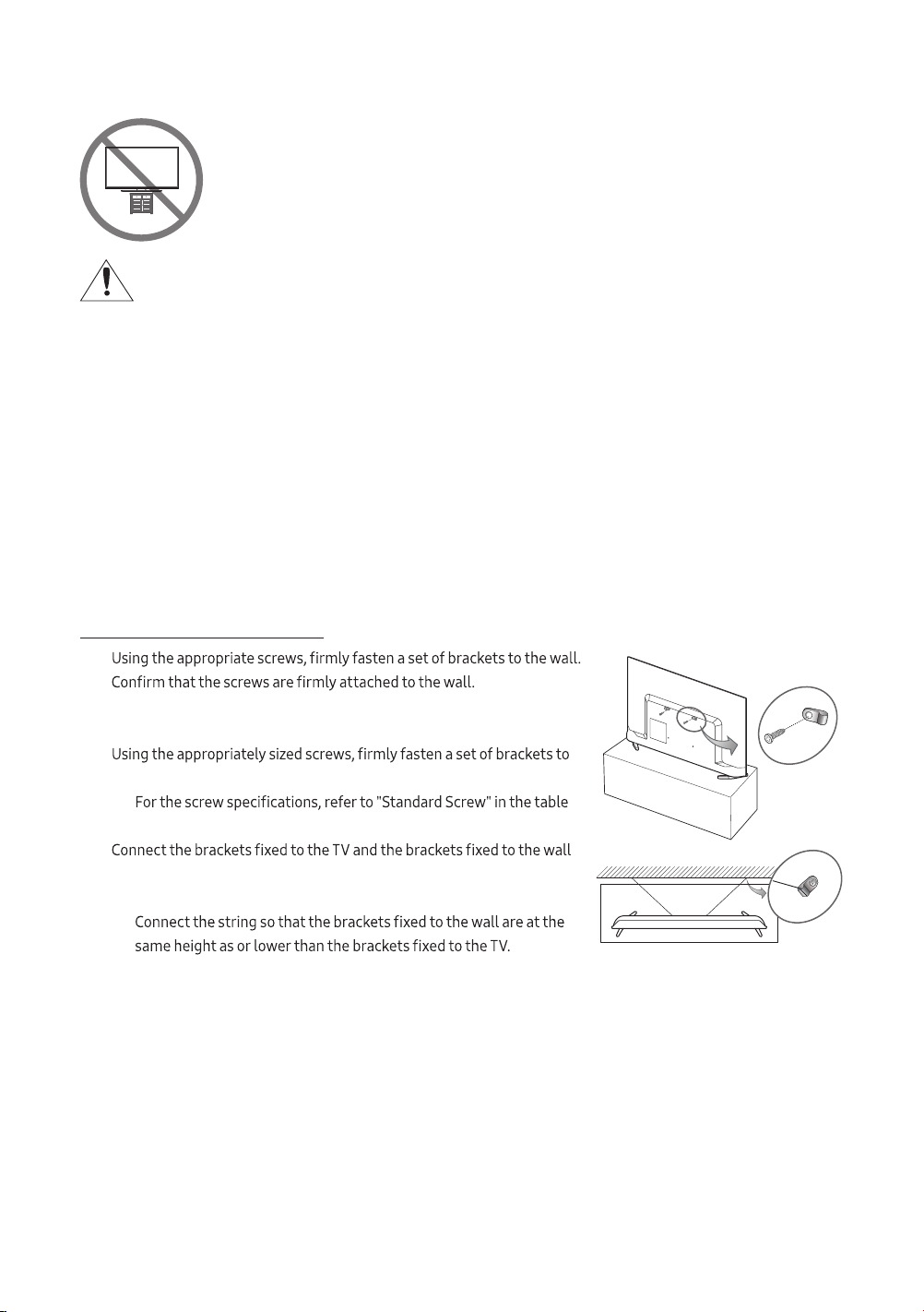
Safety Precaution: Securing the TV to the wall to prevent falling
Caution: Pulling, pushing, or climbing on the TV may cause the TV to fall. In particular, ensure
your children do not hang on or destabilize the TV. This action may cause the TV to tip over,
causing serious injuries or death. Follow all safety precautions provided in the Safety Flyer
included with your TV. For added stability and safety, you can purchase and install the anti-fall
device as described below.
WARNING: Never place a television set in an unstable location. The television set may fall, causing
serious personal injury or death. Many injuries, particularly to children, can be avoided by taking simple
precautions such as
• Using cabinets or stands recommended by the manufacturer of the television set.
• Only using furniture that can safely support the television set.
• Ensuring the television set is not overhanging the edge of the supporting furniture
.
• Not placing the television set on tall furniture (for example, cupboards or bookcases) without
anchoring both the furniture and the television set to a suitable support.
• Not placing the television set on cloth or other materials that may be located between the television
set and supporting furniture.
• Educating children about the dangers of climbing on furniture to reach the television set or its
controls.
If you are retaining and relocat
ing the television set that you are replacing with this new set, you should
apply the same precautions to the old set.
Preventing the TV from falling
1.
– You may need additional material such as wall anchors depending
on the type of wall.
2.
the TV.
–
on the previous page.
3.
with a durable, heavy-duty string, and then tie the string tightly.
– Install the TV near the wall so that it does not fall backwards.
–
English - 9
English - 10
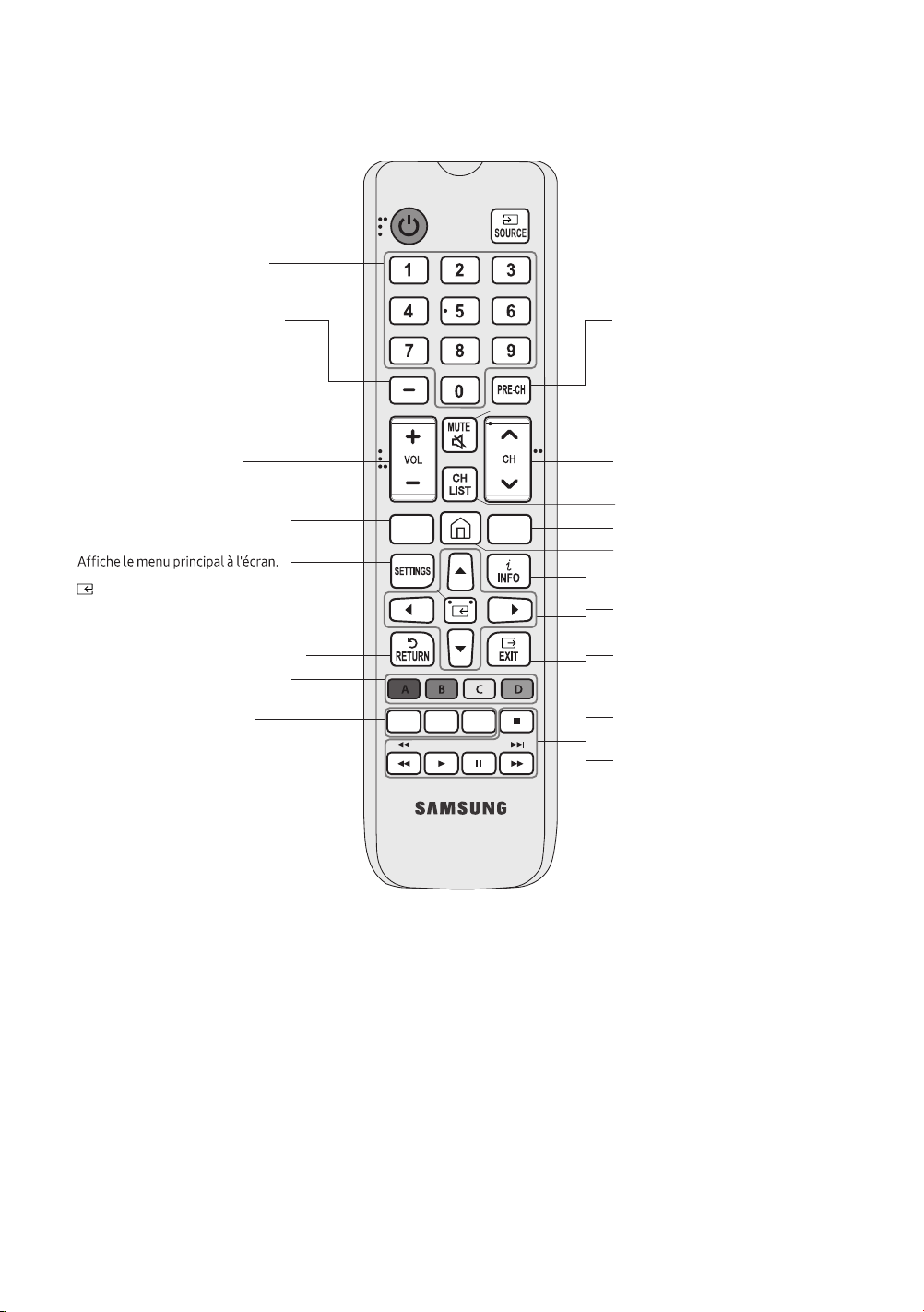
02 The Remote Control
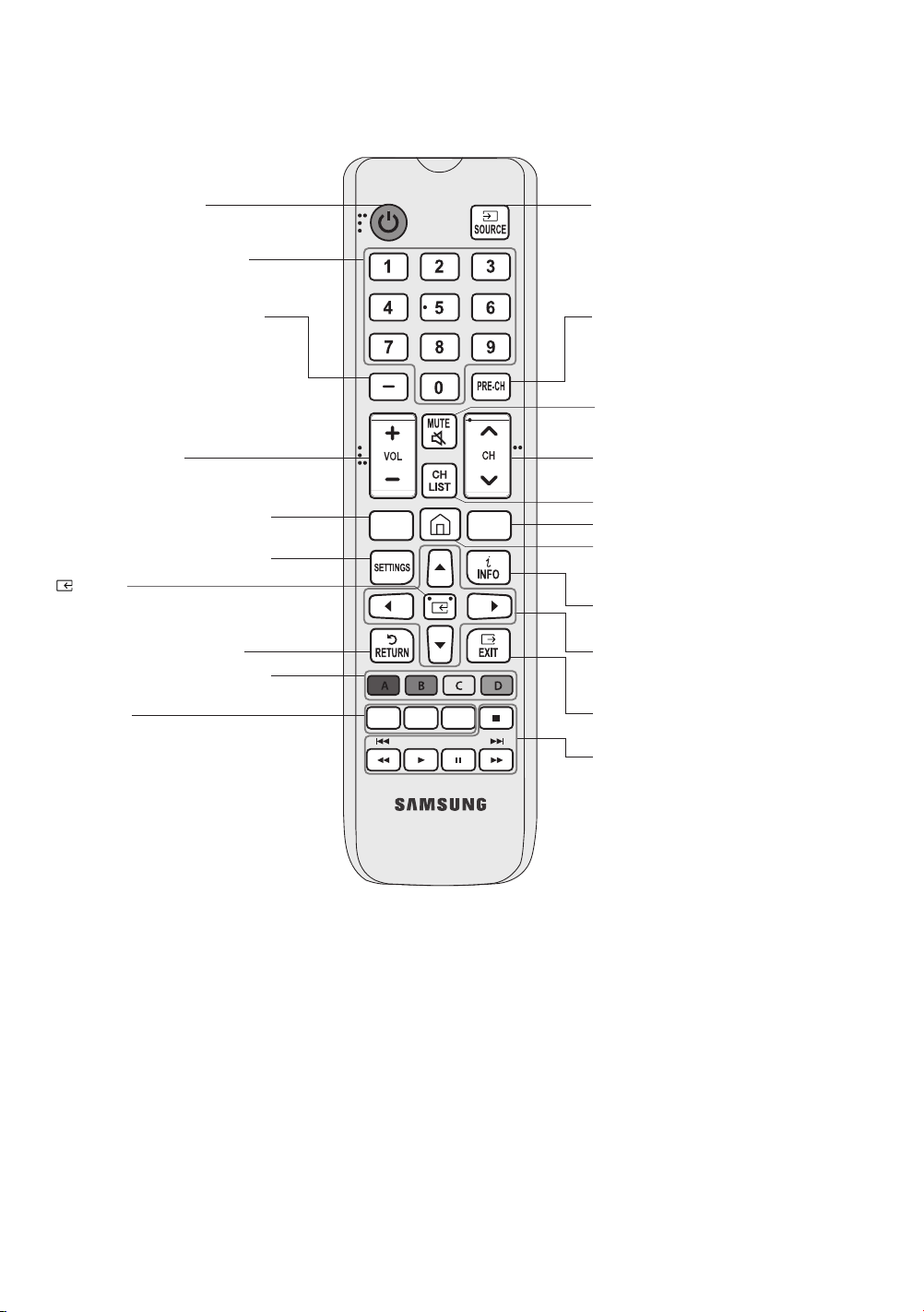
• The button names above may differ from the actual names.
• The remote control may differ by its model.
• This remote control has Braille points on the Power, Channel, Volume, and Enter buttons and can be used by
visually impaired persons.
(Select)
GUIDESLEEP
P.SIZE CC/VD
E-MANUAL
Selects additional digital channels
being broadcast by the same digital
station. For example, to select
channel ‘54-3’, press ‘54’, then press
‘-’ and ‘3’.
Adjusts the volume.
Displays the main on-screen menu.
Returns to the previous menu.
E-MANUAL
Displays the e-Manual.
P.SIZE
Changes the picture size.
CC/VD
When press this button, the
Accessibility Shortcuts menu appears.
Returns to the previous channel.
Launches the Channel List.
Changes channels.
Exits the menu.
Use these buttons with a specific
feature, according to the directions
on the TV's screen.
Displays the EPG(Electronic Program Guide).
Brings up Smart Hub applications.
(See the e-Manual chapter, Smart
Features > Smart Hub.
Displays information on the TV
screen.
Moves the cursor, selects the
onscreen menu items, and changes
the values seen on the TV's menu.
Displays and selects the available
video sources.
Turns the sound on and off.
Turns the TV on and off.
Gives direct access to channels.
Use these buttons according to the
directions on the TV screen.
Shuts off the TV automatically after
a preset period of time.
Press this button to select or run a
focused item.
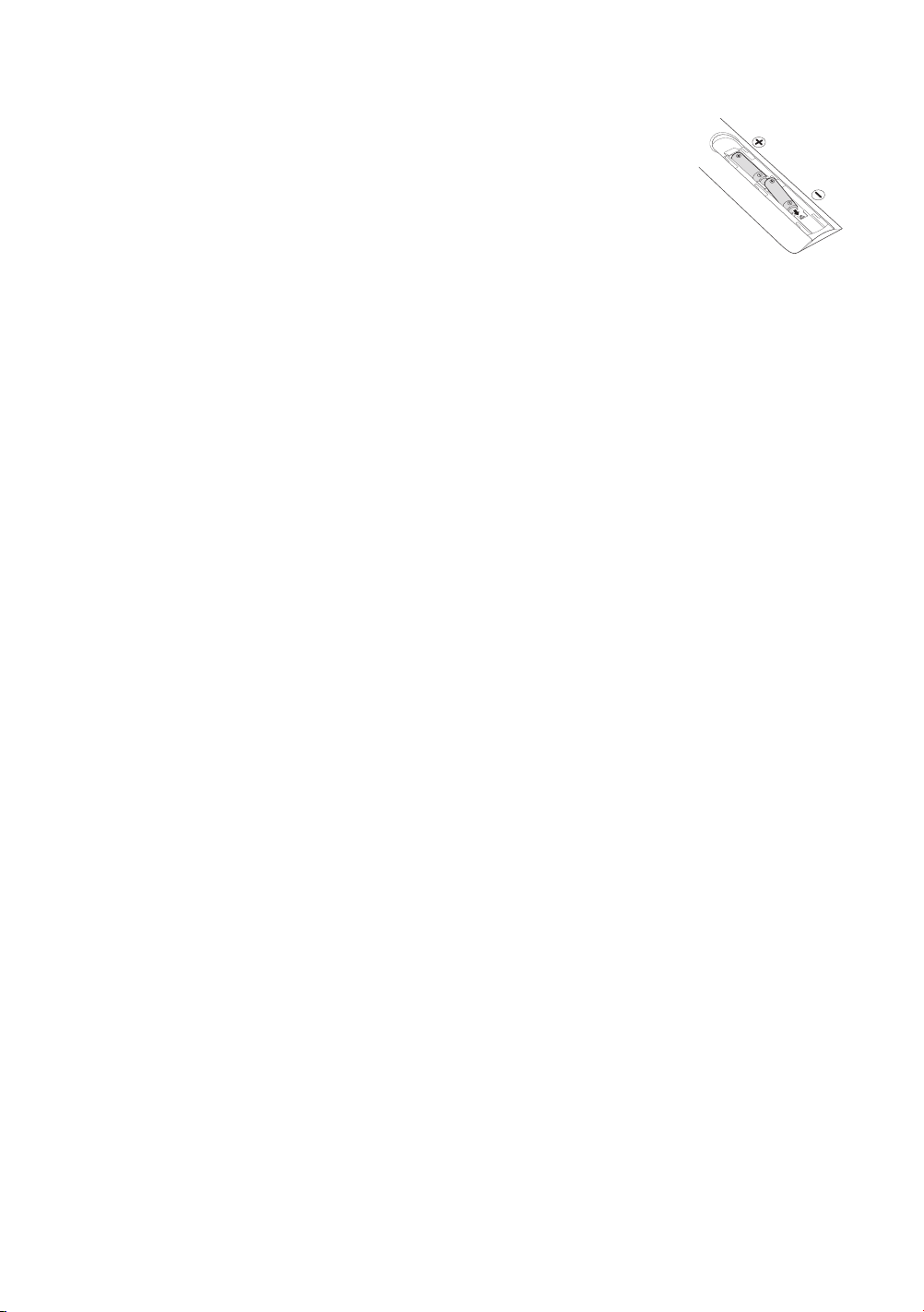
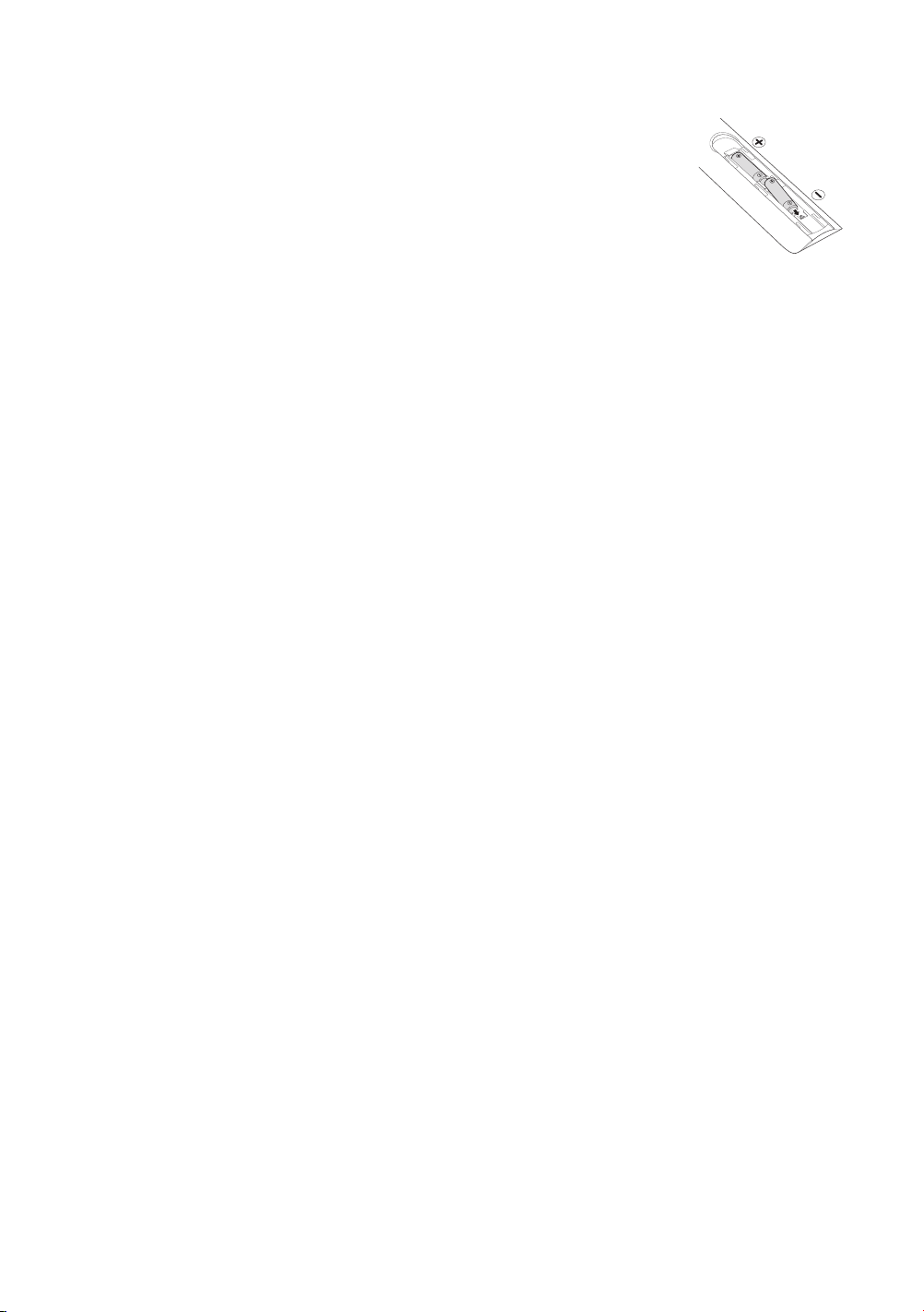
Installing batteries into the remote control
Match the polarity of the batteries to the symbols in the battery compartment.
• Use the remote control within 23 feet of the TV.
• Bright light may affect the performance of the remote control. Avoid using near
bright uorescent lights or neon signs.
• The color and shape of the remote may vary depending on the model.
English - 11
English - 12
When you turn on your TV for the rst time, it immediately starts the Initial Setup. Follow the instructions displayed
on the screen and congure the TV's basic settings to suit your viewing environment.
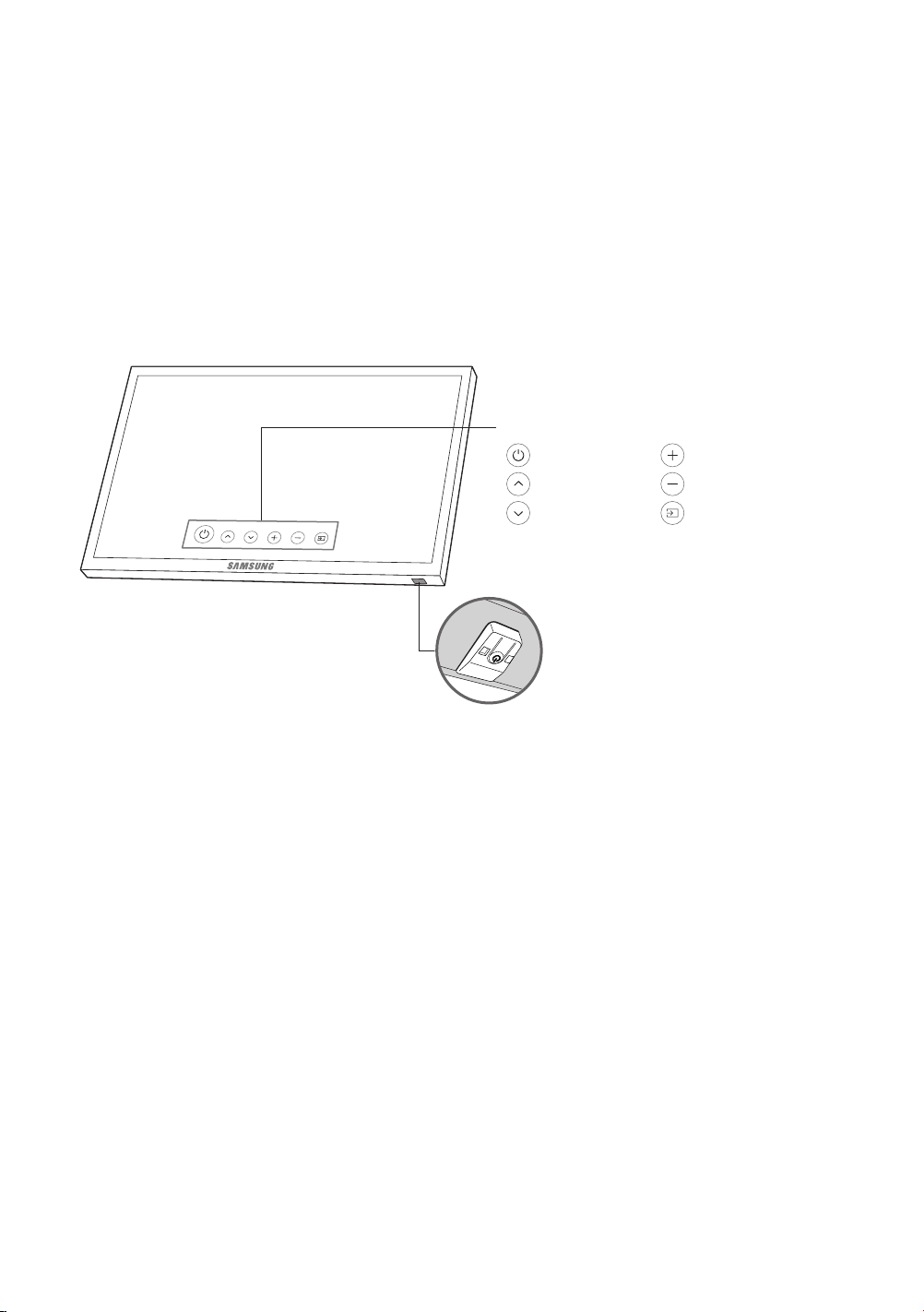
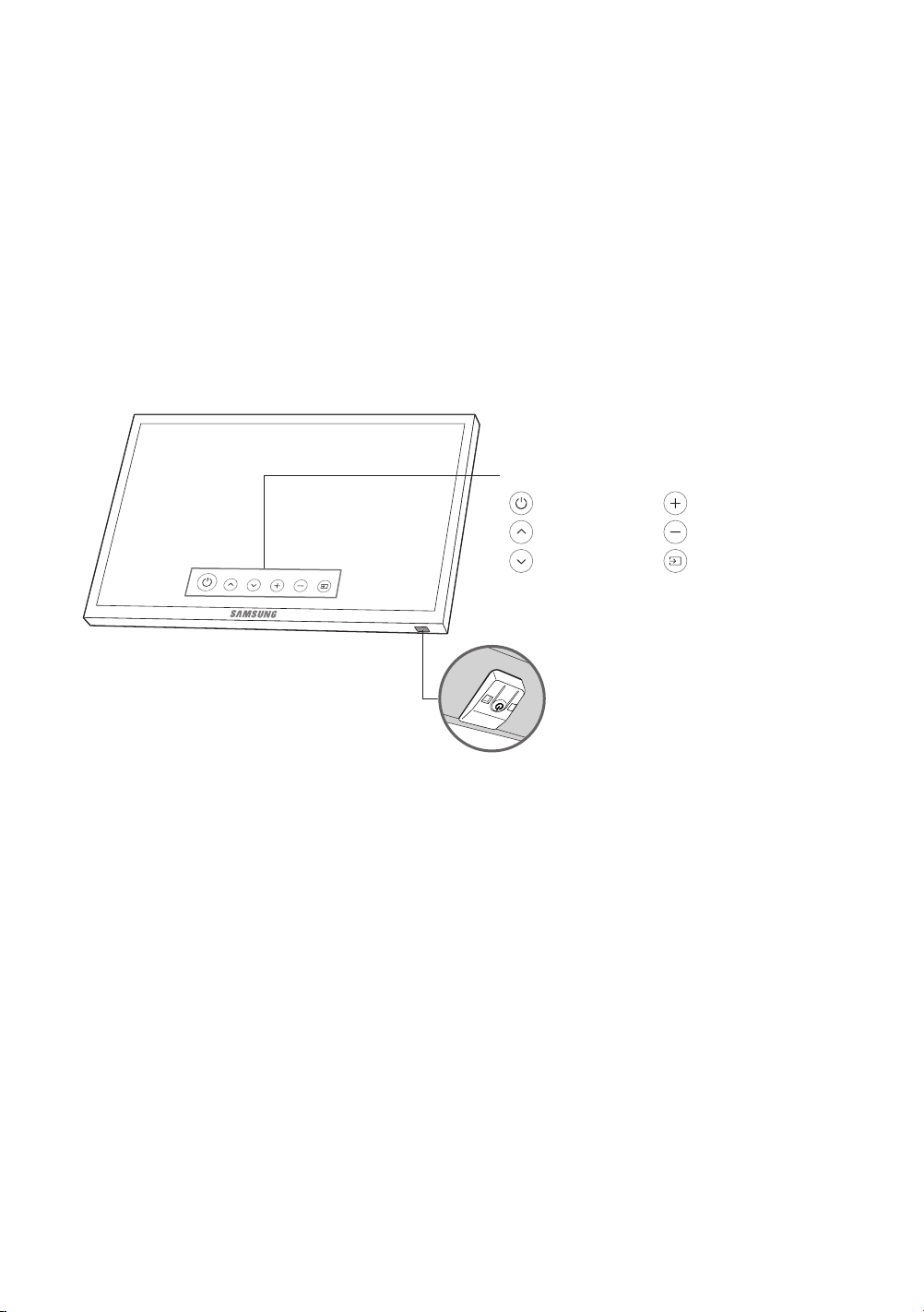
Using the TV Controller
You can turn on the TV with the TV Controller button at the bottom of the TV, and then use the Control Menu. The
Control menu appears when the TV Controller is pressed while the TV is On. For more information about its usage,
refer to the gure below.
TV Controller / Remote control sensor
Press: Move
Press & Hold: Select
The TV Controller is located on the bottom of
the TV.
: Power Off : Volume Up
: Channel Up : Volume Down
: Channel Down : Source
Control menu
03 Initial Setup
English - 13
04 Troubleshooting and Maintenance
Troubleshooting
If the TV seems to have a problem, rst review this list of possible problems and solutions. Alternatively, review the
Troubleshooting Section in the e-Manual. If none of the troubleshooting tips apply, visit www.samsung.com/support
or call Samsung Customer Service at 1-800-SAMSUNG (1-800-726-7864).
• For detailed information on troubleshooting, watch the troubleshooting videos at www.samsung.com/spsn.
• This TFT LED panel is made up of sub pixels which require sophisticated technology to produce. There may be,
however, a few bright or dark pixels on the screen. These pixels will have no impact on the performance of the
product.
• To keep your TV in optimum condition, upgrade to the latest software. Use the Update Now or Auto Update
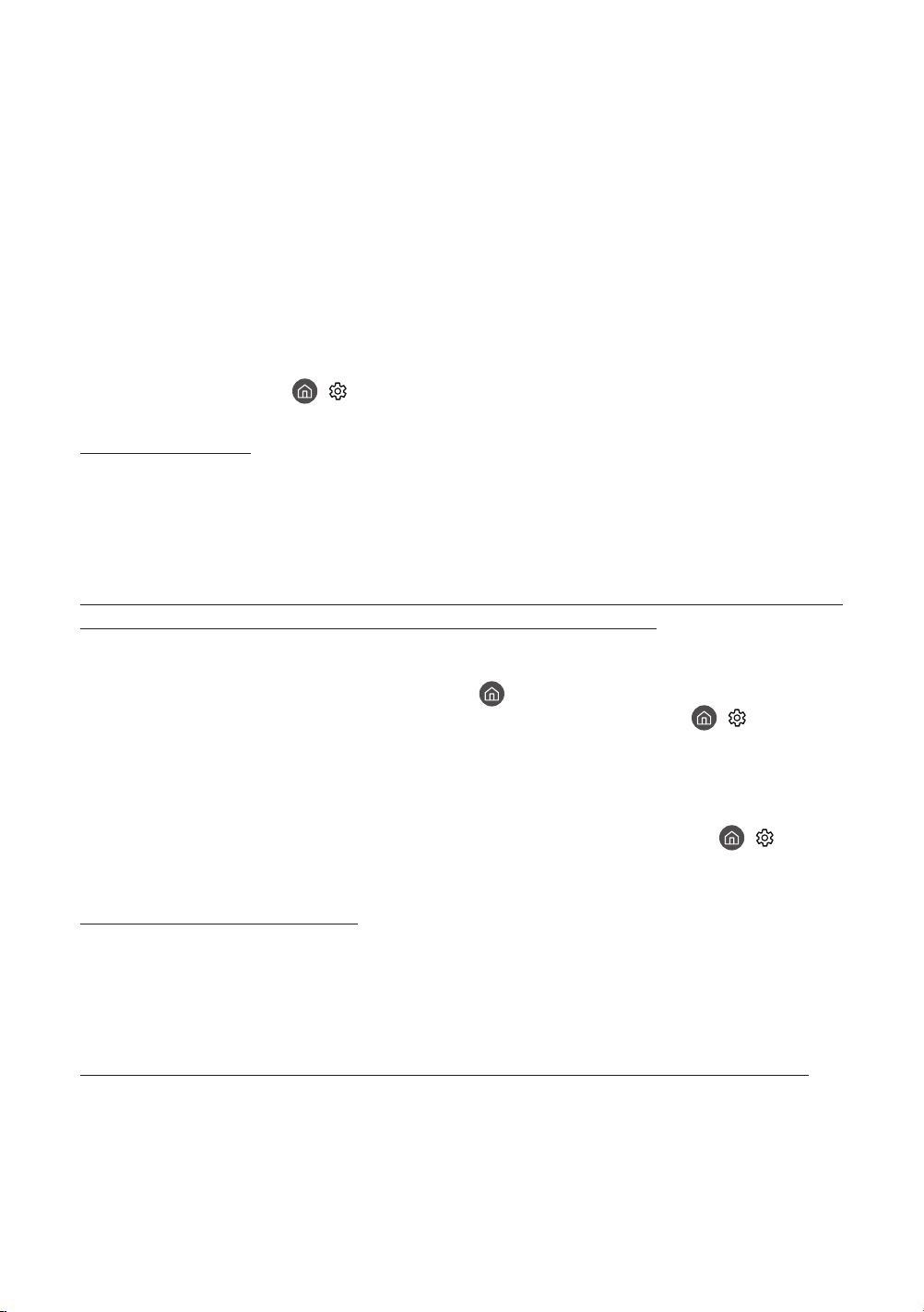
functions on the TV's menu (
> Settings > Support > Software Update > Update Now or Auto Update).
The TV won’t turn on.
• Make sure that the AC power cord is securely plugged in to the TV and the wall outlet.
• Make sure that the wall outlet is working and the power indicator on the TV is lit and glowing a solid red.
• Try pressing the Power button on the TV to make sure that the problem is not with the remote control. If the TV
turns on, refer to “Remote control does not work” below.
There is no picture/video/sound, or a distorted picture/video/sound from an external device, or
“Weak or No Signal” is displayed on the TV, or you cannot nd a channel.
• Make sure the connection to the device is correct and that all cables are fully inserted.
• Remove and reconnect all cables connected to the TV and the external devices. Try new cables if possible.
• Conrm that the correct input source has been selected (
> Source).
• Perform a TV self diagnosis to determine if the problem is caused by the TV or the device (
> Settings >
Support > Self Diagnosis > Start Picture Test or Start Sound Test).
• If the test results are normal, reboot the connected devices by unplugging each device's power cord and then
plugging it in again. If the issue persists, refer to the connection guide in the user manual of the connected
device.
• If the TV is not connected to a cable or satellite box, run Auto Program to search for channels (
> Settings >
Broadcasting > Auto Program).
The remote control does not work.
• Check if the power indicator on the TV blinks when you press the remote's Power button. If it does not, replace
the remote control's batteries.
• Make sure that the batteries are installed with their poles (+/–) in the correct direction.
• Try pointing the remote directly at the TV from 5 ft. to 6 ft. (1.5~1.8 m) away.
The cable or satellite box remote control doesn’t turn the TV on or off or adjust the volume.
• Program the cable or satellite box remote control to operate the TV. Refer to the cable or satellite box user
manual for the SAMSUNG TV code.
The TV settings are lost after 5 minutes.
• The TV is in the Retail Mode. Change the Usage Mode in the System Manager Menu to Home Mode ( >
Settings > General > System Manager > Usage Mode > Home Mode).
Intermittent Wi-Fi
• Make sure the TV has a network connection ( > Settings > General > Network > Network Status).
• Make sure the Wi-Fi password is entered correctly.
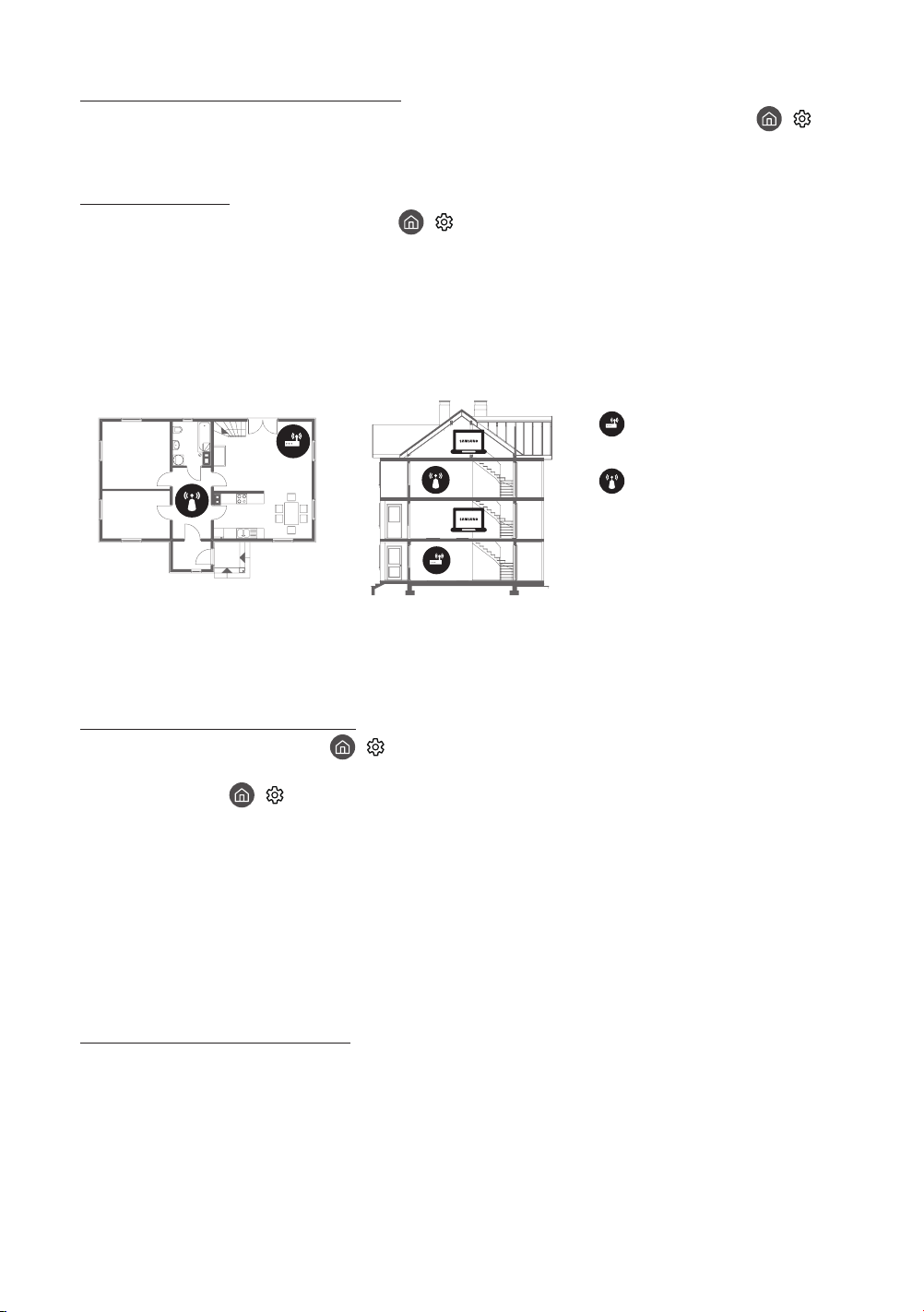
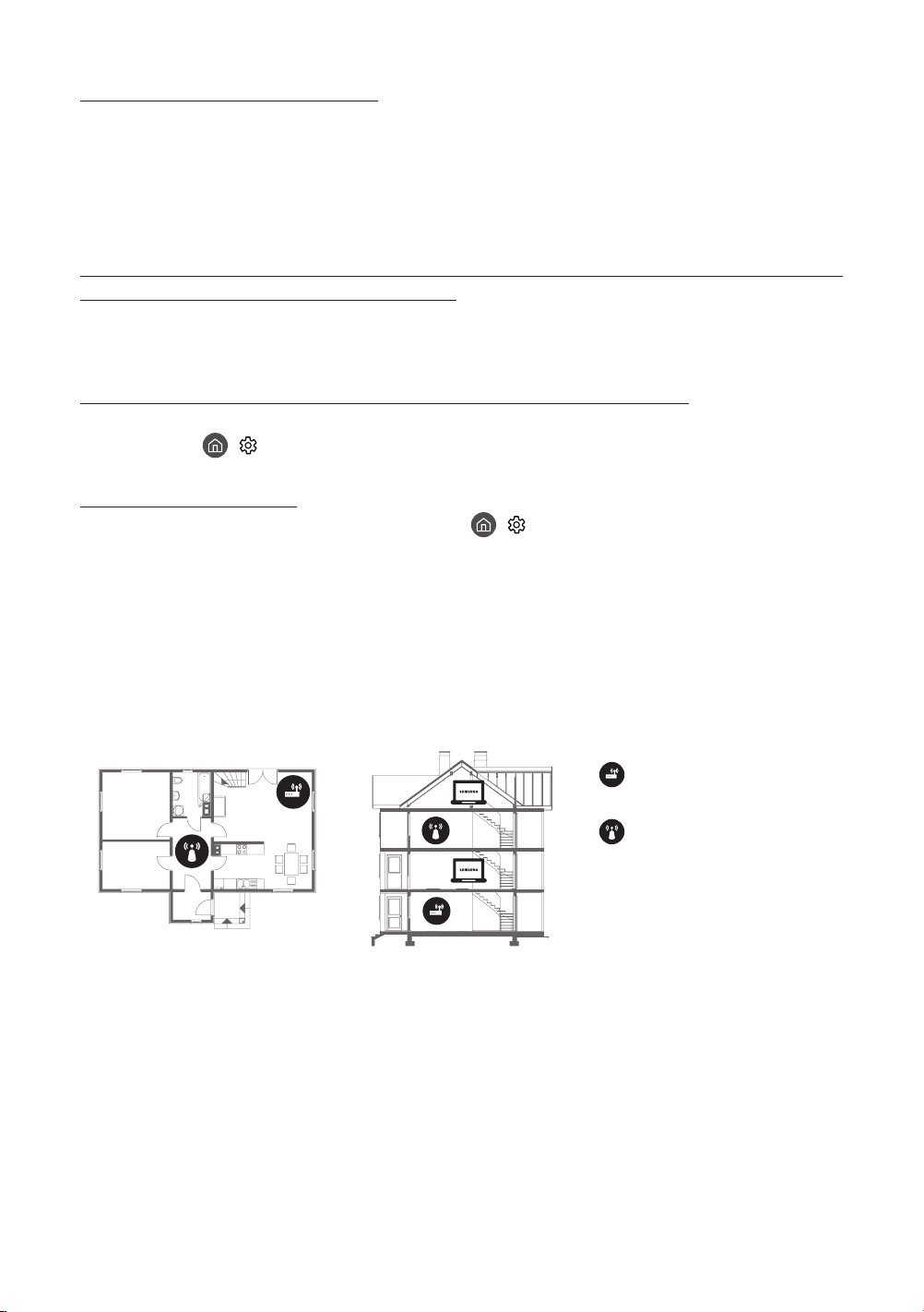
• Check the distance between the TV and the Modem/Router. The distance should not exceed 50 ft (15.2 m).
• Reduce interference by not using or turning off wireless devices. Also, verify that there are no obstacles
between the TV and the Modem/Router. (The Wi-Fi strength can be decreased by appliances, cordless phones,
stone walls/replaces, etc.)
Single story Multi story
Wireless router
Wireless repeater
• Contact your ISP and ask them to reset your network circuit to re-register the Mac addresses of your new
Modem/Router and the TV.
Video App problems (Youtube etc)
• Change the DNS to 8.8.8.8. Select > Settings > General > Network > Network Status > IP Settings >
DNS Setting > Enter manually > DNS Server > enter 8.8.8.8 > OK.
• Reset by selecting
> Settings > Support > Self Diagnosis > Reset Smart Hub.
What is Remote Support?
Samsung Remote Support service offers you one-on-one support with a Samsung Technician who can remotely:
• Diagnose your TV
• Adjust the TV settings for you
• Perform a factory reset on your TV
• Install recommended rmware updates
How does Remote Support work?
You can easily have a Samsung Tech service your TV remotely:
1. Call the Samsung Contact Center and ask for remote support.
2. Open the menu on your TV and go to the Support section.
3. Select Remote Management, then read and agree to the service agreements. When the PIN screen appears,
provide the PIN number to the agent.
4. The agent will then access your TV.
English - 14
English - 15
Eco Sensor and screen brightness
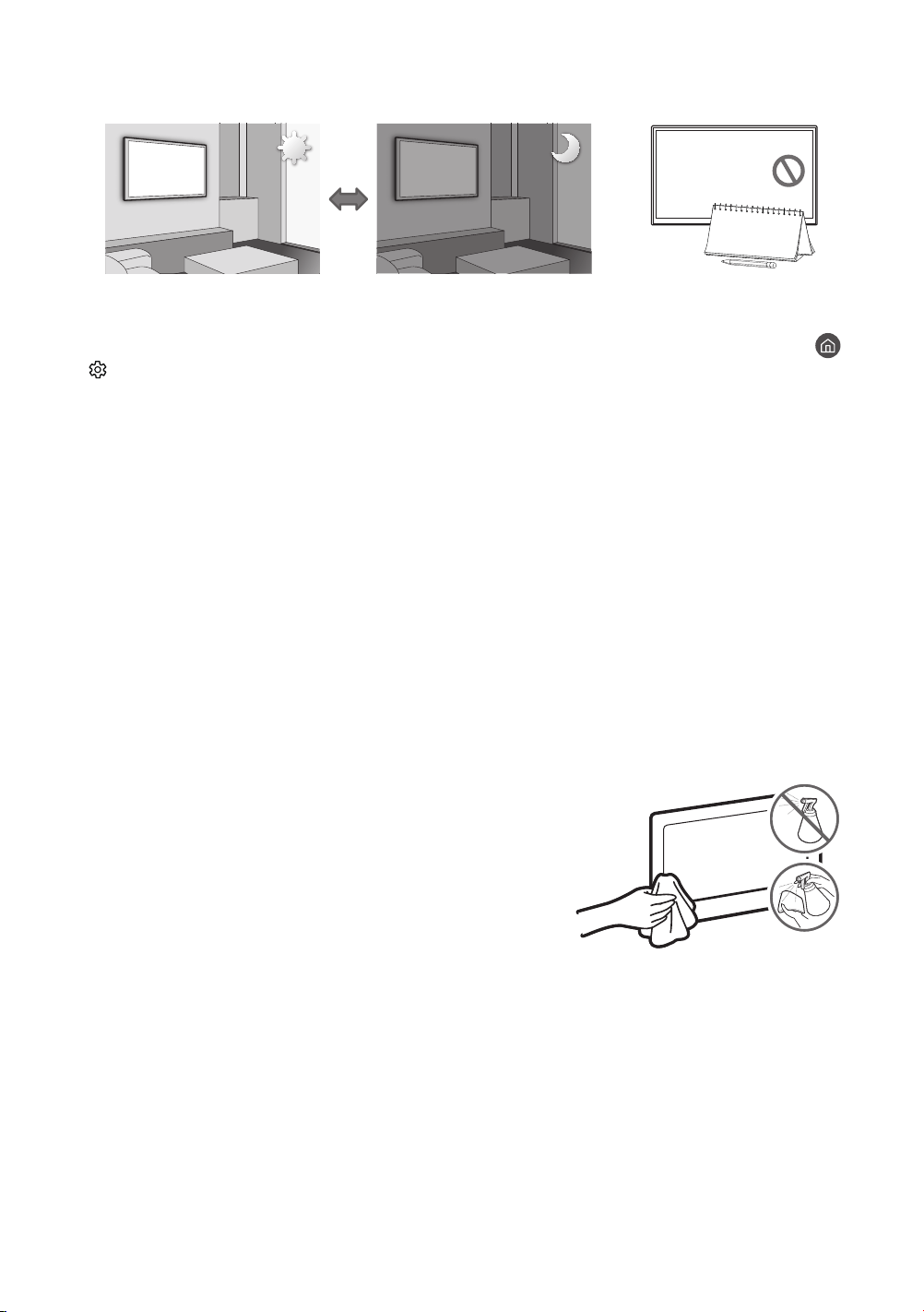
Eco Sensor adjusts the brightness of the TV automatically. This feature measures the light in your room and
optimizes the brightness of the TV automatically to reduce power consumption. If you want to turn this off, go to
>
Settings > General > Eco Solution > Ambient Light Detection.
• If the screen is too dark while you are watching TV in a dark environment, it may be due to the
Ambient Light Detection function.
• Do not block the sensor with any object. This can decrease picture brightness.
Still image warning
Avoid displaying still images (such as jpeg picture les), still image elements (such as TV channel logos, stock
or news crawls at the screen bottom etc.), or programs in panorama or 4:3 image format on the screen. If you
constantly display still pictures, it can cause image burn-in on the LED screen and affect image quality. To reduce the
risk of this adverse effect, please follow the recommendations below:
• Avoid displaying the same TV channel for long periods.
• Always try to display any image in full screen. Use the picture format menu of the TV for the best possible match.
• Reduce brightness and contrast to avoid the appearance of after-images.
• Use all TV features designed to reduce image retention and screen burn. Refer to the e-Manual for details.
Caring for the TV
• If a sticker was attached to the TV screen, some debris can remain
after you remove the sticker. Please clean the debris off before
watching TV.
• The exterior and screen of the TV can get scratched during cleaning.
Be sure to wipe the exterior and screen carefully using a soft cloth to
prevent scratches.
• Do not spray water or any liquid directly onto the TV. Any liquid that
goes into the product may cause a failure, re, or electric shock.
• To clean the screen, turn off the TV, then gently wipe away smudges
and ngerprints on the panel with a micro-ber cloth. Clean the
body or panel of the TV with a micro-ber cloth dampened with a
small amount of water. After that, remove the moisture with a dry
cloth. While cleaning, do not apply strong force to the surface of the
panel because it can damage the panel. Never use ammable liquids
(benzene, thinner, etc.) or a cleaning agent. For stubborn smudges,
spray a small amount of screen cleaner on a micro-ber cloth, and
then use the cloth to wipe away the smudges.
English - 16
05
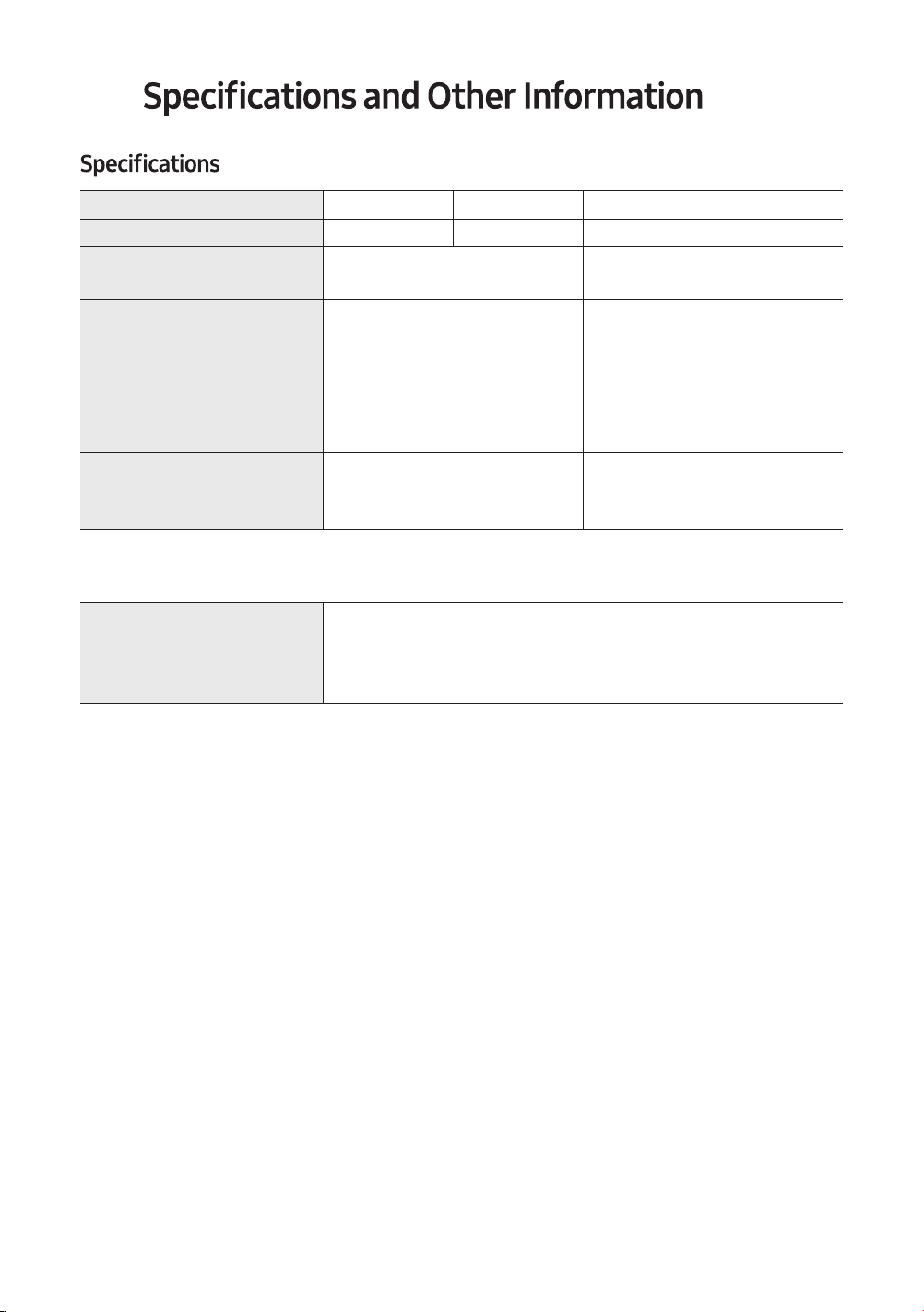
Model Name UN43N5300UN32M4500 UN32N5300
Display Resolution
1920 x 10801366 x 768 1920 x 1080
Screen Size
(Diagonal)
32˝ Class
(31.5 measured diagonally)
43˝ Class
(42.5 measured diagonally)
Sound (Output)
5 W + 5 W 10 W + 10 W
Dimensions (W x H x D)
Body
With stand
28.9 x 17.3 x 3.1 inches
(732.9 x 440.3 x 78.5 mm)
28.9 x 18.2 x 6.4 inches
(732.9 x 462.8 x 163.7 mm)
38.1 x 22.5 x 3.1 inches
(967.4 x 571.8 x 79.9 mm)
38.1 x 23.3 x 6.3 inches
(967.4 x 590.6 x 159.5 mm)
Weight
Without Stand
With Stand
9.3 lbs (4.2 kg)
9.5 lbs (4.3 kg)
16.1 lbs (7.3 kg)
16.3 lbs (7.4 kg)
Environmental Considerations
Operating Temperature
Operating Humidity
Storage Temperature
Storage Humidity
50°F to 104°F (10°C to 40°C)
10% to 80%, non-condensing
-4°F to 113°F (-20°C to 45°C)
5% to 95%, non-condensing
Notes
•
• This device is a Class B digital apparatus.
• For information about the power supply, and more information about power consumption, refer to the label-
rating attached to the TV.
• Your TV and its accessories may look different than the product images presented in this manual, depending on
the model.
• All drawings are not necessarily to scale. Some dimensions are subject to change without prior notice. Refer to
the dimensions before in
stalling your TV. Not responsi
ble for typographical or printed errors.
• To connect a LAN cable, use a CAT 7 (*STP type) cable for the connection.
* Shielded Twist Pair
© 2018 Samsung Electronics America, Inc
Dispose unwanted electronics through an approved recycler.
www.samsung.com/recyclingdirect or call, (877) 278 - 0799
Decreasing power consumption
decrease power consumption, unplug the power cord when you don't intend to use the TV for a long time.
English - 17
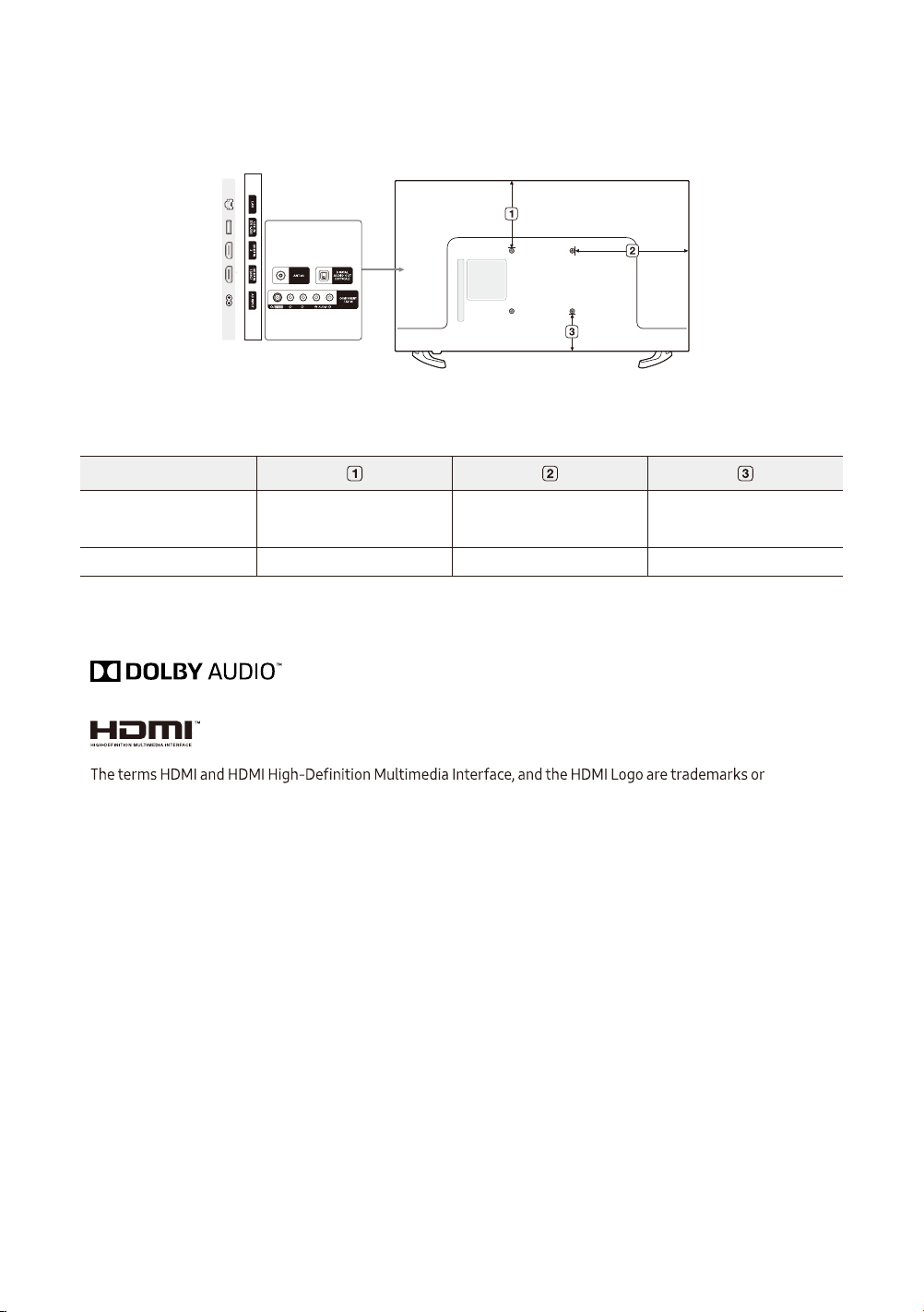
Dimensions
Port panel detail / Rear view
• The displayed image may differ from your TV, depending on the model.
(Unit: inches)
Model name
UN32M4500 /
UN32N5300
6.9 12.2 6.0
UN43N5300 9.1 15.1 5.2
Licenses
registered trademarks of HDMI Licensing LLC in the United States and other countries.
English - 18
English - 19
Federal Communication Commission Interference Statement
This equipment has been tested and found to comply with the limits for a Class B digital device, pursuant to Part
15 of the FCC Rules. These limits are designed to provide reasonable protection against harmful interference in a
residential installation. This equipment generates, uses and can radiate radio frequency energy and, if not installed
and used in accordance with the instructions, may cause harmful interference
to radio communications. However,
there is no guarantee that interference will not occur in a particular installation. If this equipment does cause
harmful interference to radio or television reception, which can be determined by turning the equipment off and on,
the user is encouraged to try to correct the interference by one of the following measures:
• Reorienting or relocating the receiv
ing antenna.
• Increasing the separation between the equipment and receiver.
• Connect the equipment to an outlet on a circuit different from that to which the receiver is connected.
• Consulting the dealer or an experienced radio/TV technician for help.
void the user’s authority to operate this equipment.
This device complies with Part 15 of the FCC Rules. Operation is subject to the following two conditions: (1) This
device may not cause harmful interference, and (2) this device must accept any interference received, including
interference that may cause undesired operation.
For products available in the US and Canadian markets, only channels 1~11 are available. You cannot select other
channels.
This device
and its antenna(s) must not be co-located or operated in conjunction with any other antenna or
transmitter.
FCC Radiation Exposure Statement:
This equipment complies with FCC radiation exposure limits set forth for an uncontrolled environment. This
equipment should be installed and operated so there is at least 8 inches (20 cm) between the radiator and your body.
FCC and Warranty Information
This Class B digital apparatus complies with Canadian ICES-003.
This Class B digital apparatus complies with Canadian ICES-003.
This device complies with Industry Canada licenseexempt RSS standard(s). Operation is subject to the following
two conditions: (1) this device may not cause interference, and (2) this device must accept any interference, including
interference that may cause undesired operation of the device.
Le présent appareil est conforme aux CNR d'Industrie Canada applicables aux appareils radio exempts de licence.
L'exploitation est autorisée aux deux conditions suivantes: (1) l'appareil ne doit pas produire de brouillage, et (2)
l'utilisateur de l'appareil doit accepter tout brouillage radioélectrique subi, même si le brouillage est susceptible
d'en compromettre le fonctionnement.
For product available in the USA/Canada market, only channel 1~11 can be operated. Selection of other channels is
not possible.
This device and its antenna(s) must not be colocated or operation in conjunction with any other antenna or transmitter.
Under Industry Canada regulations, this radio transmitter may only operate using an antenna of a type and maximum
(or lesser) gain approved for the transmitter by Industry Canada. To reduce potential radio interference to other users,
the antenna type and its gain should be so chosen that the equivalent isotropically radiated power (e.i.r.p.) is not more
than that necessary for successful communication.
English - 20
LIMITED WARRANTY TO ORIGINAL PURCHASER
This SAMSUNG brand product, as supplied and distributed by SAMSUNG and delivered new, in the original carton
to the original consumer purchaser, is warranted by SAMSUNG against manufacturing defects in materials and
workmanship for period of:
Categories Parts Labor Size Service
LCD/LED TV 1 Year 1 Year
42" and Larger Carry-In or In Home
40" and Smaller Carry-In
• For commercial use, the warranty is 90 Days Parts and Labor.
This limited warranty begins on the original date of purchase, and is valid only on products purchased and used in
the United States. To receive warranty service, the purchaser must contact SAMSUNG for problem determination
and service procedures.
Warranty service
can only be performed by a SAMSUNG authorized service center. The original dated bill of sale
must be presented upon request as proof of purchase to SAMSUNG or SAMSUNG's authorized service center.
SAMSUNG will repair or replace this product, at our option and at no charge as stipulated herein, with new or
replaced parts and products become the property of SAMSUNG and must be returned to SAMSUNG. Replacement
parts and products assume the remaining original warranty, or ninety (90) days, whichever is longer.
Certain products are eligible for In-home service at Samsung’s discretion. To receive in-home service, the product
must be unobstructed and accessible to service personnel. If during in-home service, repair cannot be completed,
it may be necessary to remov
e, repair and return the product. If in-home service is unavailable, SAMSUNG may
elect, at our option, to provide for transportation of our choice to and from a SAMSUNG authorized service
IMPORTANT WARRANTY INFORMATION REGARDING TELEVISION FORMAT
VIEWING
Wide screen format LED Displays (with 16:9 aspect ratios, the ratio of the screen width to height) are primarily
designed to view wide screen format full-motion video. The images displayed on them should primarily be in the
constantly in motion. Displaying stationary graphics and images on the screen, such as the dark sidebars on non-
expanded standard format television video and programming, should be limited to no more than 5% of the total
television viewing time per week.
Additionally, viewing other stationary images and text such as stock market crawls, video game displays, station
logos, web sites or computer graphics and patterns, should be limited as described abov
e for all televisions.
Displaying stationary images that exceed the above guidelines can cause uneven aging of LED Displays that leave
subtle, but permanent burned-in ghost images in the LED picture. To avoid this, vary the programming and images,
and primarily display full screen moving images, not stationary patterns or dark bars. On LED models that offer
picture sizing features, use these controls to view different formats as a
full screen picture.
Be careful about the television formats you select and the length of time you view them. Uneven LED aging as a
result of format selection and use, as well as burned in images, are not covered by your Samsung limited warranty.
IC Radiation Exposure Statement:
This equipment complies with IC RSS-102 radiation exposure limits set forth for an uncontrolled environment. This
equipment should be installed and operated with minimum distance 20cm between the radiator & your body.
THERE ARE NO EXPRESS WARRANTIES OTHER THAN THOSE LISTED AND DESCRIBED ABOVE, AND NO
WARRANTIES WHETHER EXPRESS OR IMPLIED, INCLUDING, BUT NOT LIMITED TO, ANY IMPLIED WARRANTIES OF
MERCHANTABILITY OR FITNESS FOR A PARTICULAR PURPOSE, SHALL APPLY AFTER THE EXPRESS WARRANTY
PERIODS STATED ABOVE, AND NO OTHER EXPRESS WARRANTY OR GUARANTY GIVEN BY ANY PERSON, FIRM OR
CORPORATION WITH RESPECT TO THIS PRODUCT SHALL BE BINDING ON SAMSUNG. SAMSUNG SHALL NOT BE
LIABLE FOR LOSS OF REVENUE
OR PROFITS, FAILURE TO REALIZE SAVINGS OR OTHER BENEFITS, OR ANY OTHER
SPECIAL, INCIDENTAL OR CONSEQUENTIAL DAMAGES CAUSED BY THE USE, MISUSE OR INABILITY TO USE THIS
PRODUCT, REGARDLESS OF THE LEGAL THEORY ON WHICH THE CLAIM IS BASED, AND EVEN IF SAMSUNG HAS
BEEN ADVISED OF THE POSSIBILITY OF SUCH DAMAGES. NOR SHALL RECOVERY OF ANY KIND AGAINST SAMSUNG
BE GREATER IN AMOUNT THAN THE PURCHASE PRICE OF THE PRODUCT SOLD BY SAMSUNG AND CAUSING THE
ALLEGED DAM
AGE. WITHOUT LIMITING THE FOREGOING, PURCHASER ASSUMES ALL RISK AND LIABILITY FOR
LOSS, DAMAGE OR INJURY TO PURCHASER AND PURCHASER’S PROPERTY AND TO OTHERS AND THEIR PROPERTY
ARISING OUT OF THE USE, MISUSE OR INABILITY TO USE THIS PRODUCT SOLD BY SAMSUNG NOT CAUSED
DIRECTLY BY THE NEGLIGENCE OF SAMSUNG. THIS LIMITED WARRANTY SHALL NOT EXTEND TO ANYONE OTHER
THAN THE ORIGINAL PURCHASER OF THIS PRODUCT, IS NONTRANSFERABLE
AND STATES YOUR EXCLUSIVE
REMEDY.
Some states do not allow limitations on how long an implied warranty lasts, or the exclusion or limitation of
incidental or consequential damages, so the above limitations or exclusions may not apply to you. This warranty
To obtain warranty service, please contact SAMSUNG at:
Samsung Electronics America, Inc.
85 Challenger Road
1-800-SAMSUNG (726-7864) – www.samsung.com
Samsung reseller. THIS LIMITED WARRANTY SHALL NOT APPLY TO ANY SAMSUNG PRODUCTS PURCHASED FROM
UNAUTHORIZED RESELLERS OR RETAILERS, EXCEPT IN STATES WHERE SUCH RESTRICTION MAY BE PROHIBITED.
For a list of Samsung authorized retailers, please go to: http://www.samsung.com/us/peaceofmind/authorized_
resellers.html.
English - 21
center. Otherwise, transportation to and from the SAMSUNG authorized service center is the responsibility of the
purchaser.
This limited warranty covers manufacturing defects in materials and workmanship encountered in normal, and
except to the extent otherwise expressly provided for in this statement, noncommercial use of this product, and
shall not apply to the following, including, but not limited to: damage which occurs in shipment; delivery and
installat
ion; applications and uses for which this product was not intended; altered product or serial numbers;
of products, equipment, systems, utilities, services, parts, supplies, accessories, applications, installations, repairs,
external wiring or connectors not supplied or authorized by SAMSUNG which damage this product or result in
to follow operating instructions, cleaning, maintenance and environmental instructions that are covered and
prescribed in the instruction book; reception problems and distortion related to noise, echo, interference or other
signal transmission and delivery problems; brightness related to normal aging, or burned-in images. SAMSUNG
does not warrant uninterrupted or error-free operation of the product.

This page is intentionally
left blank.
Merci d’avoir acheté ce produit Samsung.
Pour recevoir une plus vaste gamme de services, enregistrez votre produit au www.samsung.com/register.
Modèle N° de série
Pour de plus amples renseignements ou pour obtenir de l’aide, composez le 1-800-SAMSUNG (1-800-726-7864).
SÉRIE 4&5
GUIDE D'UTILISATION
SERIES 4&5
Français - 2
Avant de lire le guide d'utilisation.
Ce téléviseur comprend un guide d'utilisation et un guide électronique intégré.
Guide de
l’utilisateur
Veuillez lire le contenu de ce guide d'utilisation pour avoir
de l'information sur la sécurité du produit, l'installation, les
produit.
e-Manual
Pour avoir de plus amples renseignements au sujet du
téléviseur, consultez le guide électronique intégré au
téléviseur.
• Pour ouvrir le e-Manual,
> Paramètres > Support tech. >
Ouvrir e-Manual
Sur le site Web, vous pouvez télécharger le guide d'utilisation et voir son contenu sur votre ordinateur ou votre
appareil mobile.
Découvrir les fonctions d'assistance du guide électronique
Recherche
Sélectionnez un élément à partir des résultats de la recherche pour charger la
page correspondante.
Index
permet de sélectionner un mot clé pour aller à la page pertinente.
Regardé
récemment
permet de sélectionner un sujet dans la liste des rubriques récemment
consultées.
• Le guide électronique ne permet pas d'accéder à certains menus à l'écran.
Découvrir les fonctions qui s'afchent sur les pages du guide électronique
(Essayer
maintenant)
permet d'accéder à l'élément de menu et d'essayer directement l'option.
(Lier)
permet d'accéder à une rubrique mentionnée dans une page du guide
électronique.

Français - 3
Avertissement! Consignes de sécurité
importantes
Avant d'utiliser le téléviseur, veuillez lire les instructions de sécurité.
ATTENTION
indique qu'une connexion de sécurité
de mise à la terre (à la masse) n'est pas
requise.
RISQUE DE DÉCHARGE ÉLECTRIQUE. NE PAS
OUVRIR.
indiquée par ce symbole est la tension
CA.
Ce symbole indique la présence d'une
haute tension à l'intérieur. Tout contact
avec une pièce interne de l'appareil
présente un danger.
par ce symbole est la tension CC.
Ce symbole vous informe qu'une
documentation importante relative
au fonctionnement et à l'entretien est
fournie avec le produit.
Mise en garde. Consultez les instructions
à l'utilisateur qu'il doit consulter le guide
d'utilisation pour avoir de l'information
au sujet de la sécurité.
•
bon fonctionnement de l'appareil et d'éviter les risques de surchauffe, ces fentes et ouvertures ne doivent être ni
obstruées ni couvertes.
– L’appareil ne doit pas être placé dans un environnement clos tel qu’une bibliothèque ou une armoire
encastrée, sauf si une ventilation adéquate est prévue.
– L’appareil ne doit pas être placé à proximité ou au-dessus d’un radiateur ou d’une grille d'air de chauffage, ni
dans un endroit exposé à la lumière directe du soleil.
– Aucun récipient contenant de l’eau (vases, etc.) ne doit être placé sur l’appareil, car cela présente un risque
d’incendie ou de décharge électrique.
• L’appareil ne doit pas être exposé à la pluie ni placé à proximité d'une source d'eau, par exemple une baignoire,
un lavabo, un évier, un bac de lavage, un sous-sol humide, une piscine, etc. Si l’appareil est mouillé par accident,
débranchez-le et appelez immédiatement un revendeur agréé.
•
locale prévoit peut-être des mesures particulières pour la mise au rebut des piles. Veuillez communiquer avec
les autorités compétentes pour vous renseigner sur la mise au rebut ou le recyclage des piles.
• Evitez de surcharger les prises murales, les rallonges et les adaptateurs, car cela présente un risque d'incendie
ou d'électrocution.
•
prises de sortie murales et à leur point de sortie sur l'appareil.

• En cas d'orage, ou bien lorsque vous vous absentez ou n'utilisez pas votre appareil pendant une longue période,
débranchez celui-ci de la prise murale et débranchez également l’antenne ou le connecteur au réseau câblé. Ces
précautions éviteront que l’appareil ne soit endommagé par la foudre ou par des surtensions.
•
ce dernier correspond bien à la tension délivrée par le réseau électrique local.
• N'insérez jamais d'objet métallique dans les parties ouvertes de cet appareil, car Cela peut causer une source de
danger ou une décharge électrique.
• Pour éviter tout risque d'électrocution, ne mettez jamais les doigts à l’intérieur de l’appareil. Seul un technicien
• Assurez-vous de brancher le cordon d'alimentation de sorte qu'il soit correctement inséré dans la prise. Pour
• Si l’appareil ne fonctionne pas normalement, surtout s’il émet des odeurs ou des sons anormaux, débranchez-le
immédiatement et appelez un revendeur ou un centre de dépannage agréé.
• Si vous envisagez de ne pas utiliser le téléviseur ou de vous absenter de chez vous pendant une période
ou des personnes handicapées restent seuls à la maison sans supervision).
– L'accumulation de poussière peut provoquer une électrocution, une perte d'énergie, ou un incendie induit
par le cordon d'alimentation dû à des variations, une surchauffe ou une détérioration de l'isolation.
• Communiquez avec un centre de service homologué lorsque vous installez l'appareil dans un endroit exposé
à la poussière, à des températures faibles ou élevées, à des produits chimiques et si l’appareil doit fonctionner
causer de sérieux dommages au téléviseur.
•
– Une mise à la terre risque incorrecte peut entraîner des électrocutions ou endommager l'appareil (appareil
de classe 1 uniquement).
• Pour mettre cet appareil totalement hors tension, il doit être débranché de la prise murale. Pour être certain
d'alimentation soient facilement accessibles.
• Gardez les petits accessoires (piles, etc.) dans un endroit hors de portée des enfants.
• Veiller à ne pas échapper ni plier les lunettes. Si le produit est endommagé, débranchez le cordon d'alimentation
et communiquez avec un centre de service.
• Pour nettoyer l'appareil, débranchez le cordon d'alimentation de la prise murale et nettoyez l'appareil à
l'aide d'un chiffon doux et sec. N'utilisez pas de produits chimiques tels que de la cire, du benzène, de l'alcool,
endommager la surface du téléviseur ou effacer les parties imprimées.
• L’appareil ne doit pas être exposé à des éclaboussures ou gouttes d'eau ou de liquide.
• Ne pas jeter les piles au feu.
• Ne pas court-circuiter ou démonter les piles, et éviter qu'elles ne surchauffent.
• Il y a un risque d'explosion si vous n'utilisez pas la bonne sorte de piles pour remplacer les piles de la
•
• Faites preuve de précaution lorsque vous touchez l'appareil après qu'il ait été en marche pendant un
certain temps. Certains éléments peuvent être chauds.
Français - 4
Sécurité Internet
contre le piratage et les accès non autorisés. Par exemple, certaines communications sensibles entre le téléviseur
empêchent l'installation d'applications non autorisées.
Malgré toutes les mesures de protection que nous avons prises pour protéger l'information et l'accès au
téléviseur Smart TV, tout appareil connecté à Internet ou les transmissions de données sur Internet ne sauraient
être totalement sécurisés. Par conséquent, nous vous encourageons à prendre des mesure de protection
supplémentaires, à protéger votre connexion à Internet et à réduire les risques d'accès non autorisé. Ces mesures
• Nous vous conseillons d'installer le plus rapidement possible toutes les nouvelles mises à jour de logiciels que
Samsung met à disposition pour améliorer la sécurité de votre téléviseur. Pour recevoir automatiquement
ces mises à jour, activez l'option « Mise à jour auto » dans le menu du téléviseur (Support tech. >
Mise à jour du logiciel > Mise à jour auto
à l'écran. Procédez au téléchargement et à la mise à jour du logiciel en cliquant sur OUI lorsque le message
–
– Mettez en place un système de cryptage standard (par ex. le mécanisme de cryptage WPA2) sur votre
–
–
– Assurez-vous que tous vos appareils connectés à Internet se trouvent en aval du pare-feu du réseau.
– Si votre routeur ou modem comporte un bouton qui permet de le mettre en veille, utilisez ce bouton pour
déconnecter votre réseau résidentiel de l'Internet quand vous ne l'utilisez pas.
•
équipé d'une caméra, replacez-la dans son logement lorsque vous ne l'utilisez pas. Ainsi, elle est désactivée.
•
appareil ou d'activer une session à distance, n'acceptez en AUCUN cas.
• Ne visitez pas de sites Web douteux et évitez d'installer des programmes douteux. Nous recommandons aux
utilisateurs d'installer uniquement les applications autorisées fournies par Samsung par le biais de Samsung
préalable.
Français - 5
Français - 6
Avant de lire le guide d'utilisation. ---------------------------------------------------------------------------- 2
Avertissement! Consignes de sécurité importantes ---------------------------------------------------------------------------- 3
01 Contenu de la boîte
02 Installation du téléviseur
Installation du téléviseur au mur ---------------------------------------------------------------------------- 8
Ventilation adéquate de votre téléviseur ---------------------------------------------------------------------------- 9
Consignes de sécurité: Fixation du téléviseur sur le
mur pour empêcher qu'il ne tombe. ---------------------------------------------------------------------------- 9
03 Télécommande
Installation des piles dans la télécommande ---------------------------------------------------------------------------- 12
04
Utilisation du module de commande du téléviseur ---------------------------------------------------------------------------- 13
05 Dépannage et entretien
Dépannage ---------------------------------------------------------------------------- 14
Qu
---------------------------------------------------------------------------- 16
Capteur Eco et luminosité de l'écran ---------------------------------------------------------------------------- 16
Av
---------------------------------------------------------------------------- 17
Précautions à prendre pour le téléviseur ---------------------------------------------------------------------------- 17
06
---------------------------------------------------------------------------- 18
Facteurs environnementaux ---------------------------------------------------------------------------- 19
Réduire la consommation d'énergie ---------------------------------------------------------------------------- 19
Dimensions ---------------------------------------------------------------------------- 20
Licences ---------------------------------------------------------------------------- 20
Renseignements sur la FCC et la garantie
Déclaration de la Federal Communications
Commission relative au brouillage ---------------------------------------------------------------------------- 21
Cet appareil numérique de la classe B est conforme à
la norme NMB-003 du Canada. ---------------------------------------------------------------------------- 22
INFORMATION IMPORTANTE SUR LA GARANTIE
RELATIVE AU FORMAT DE L'IMAGE DU TÉLÉVISEUR ---------------------------------------------------------------------------- 22
Contenu

Français - 7
01 Contenu de la boîte
Veillez à ce que les articles suivants soient inclus avec votre téléviseur. Si des éléments sont manquants,
communiquez avec le détaillant.
• Télécommande et deux piles (AAA x 2)
• Guide de l’utilisateur
• Carte de garantie / Guide de réglementation
• Cordon d’alimentation
• La forme et la couleur des articles peuvent varier selon le modèle.
• Les câbles non compris avec l'appareil peuvent être achetés séparément.
• Lor
Si vous exercez une pression sur l’écran ou si vous le manipulez
de manière inappropriée, vous pourrez l’endommager.
Conformément à l’illustration, assurez-vous de tenir l’écran
par les bords lorsque vous soulevez le téléviseur.
Ne touchez pas
l'écran!
Français - 8
02 Installation du téléviseur
Installation du téléviseur au mur
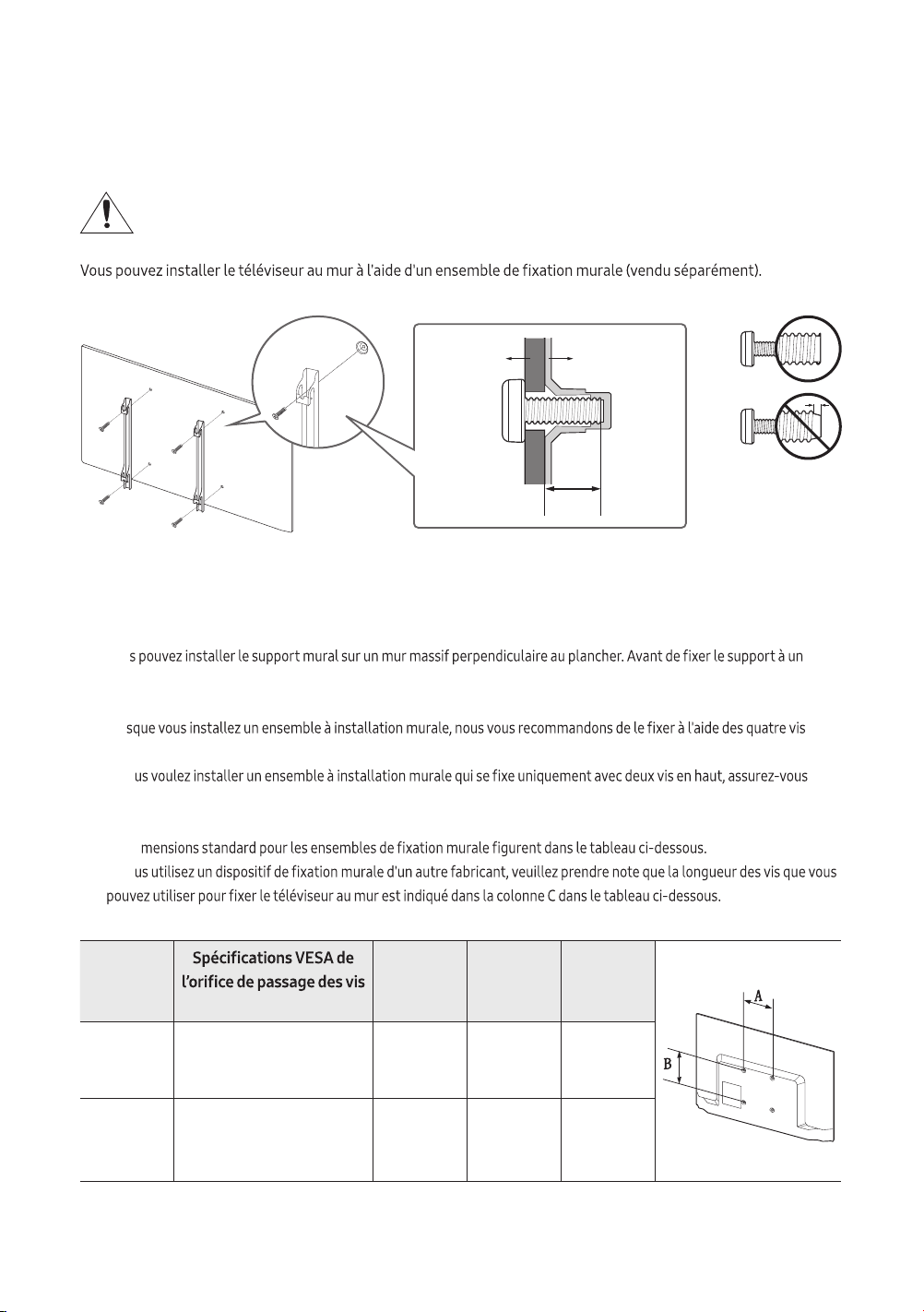
Pour l'installation du téléviseur sur un mur, vous devez suivre scrupuleusement les instructions
du fabricant. Si l’appareil est mal installé, il risque de glisser ou de tomber et d’être endommagé
sérieusement. Il risque aussi de blesser grièvement un enfant ou un adulte.
TV
Fixation pour
le support
mural
C
• Samsung Electronics n’est pas responsable des dommages causés à l’appareil ni des blessures possibles occasionnées à
vous ou à des tiers si vous tentez d’installer le support vous-même.
• Pour commander le support mural, téléphonez au Centre de service à la clientèle au 1-800-SAMSUNG (1-800-726-7864).
• Vou
matériau autre que le placoplâtre, veuillez communiquer avec votre détaillant local. Si vous installez le téléviseur à la
hauteur du plafond ou sur un mur incliné, il risque de tomber et de causer des blessures.
• Lor
VESA.
• Si vo
d'utiliser un ensemble Samsung qui est approprié à ce type d'installation. (Il se peut que vous ne puissiez pas acheter ce
type d'ensemble d'installation, selon votre zone géographique).
• Les di
• Si vo
Taille du
téléviseur
en pouces
(A * B) en millimètres
C (mm) Vis standard Quantité
32 100 x 100 6.2~8.2 M4 4
43 200 x 200 9.5~11.5 M6 4
N’installez pas le support mural lorsque le téléviseur est sous tension. Cela risque de causer un choc
électrique et des blessures corporelles.
•
•
• Ne serrez pas trop les vis; cela pourrait endommager le produit ou provoquer sa chute et causer des blessures.
Samsung décline toute responsabilité dans le cas où de tels accidents se produiraient.
• Samsung ne saurait être tenue responsable des dommages au produit ou des blessures occasionnés
consommateur ne suit pas les instructions d'installation du produit.
• N'installez pas le téléviseur à un angle d'inclinaison de plus de 15 degrés.
•
Ventilation adéquate de votre téléviseur
consigne pourrait faire augmenter la température interne du produit et causer un incendie ou endommager celui-ci.
Lorsque vous utilisez une base ou un support mural, nous vous recommandons fortement d'utiliser seulement les
pièces fournies par Samsung Electronics. Si vous utilisez des pièces fournies par un autre fabricant, cela pourrait
causer des problèmes ou entraîner des blessures engendrées par la chute du téléviseur.
Consignes de sécurité: Fixation du téléviseur sur le mur pour empêcher qu'il
ne tombe.
Mise en gardeLe fait de tirer, de pousser ou de monter sur le téléviseur peut en provoquer
la chute. Assurez-vous notamment que vos enfants ne se suspendent pas au téléviseur ni le
déséquilibrent. Cela pourrait le faire basculer et causer des blessures sérieuses ou entraîner
la mort. Suivez toutes les mesures de sécurité indiquées dans la brochure de votre téléviseur.
Pour une stabilité et une sécurité accrues, vous pouvez acheter et installer un dispositif anti-
chute tel que décrit ci-dessous.
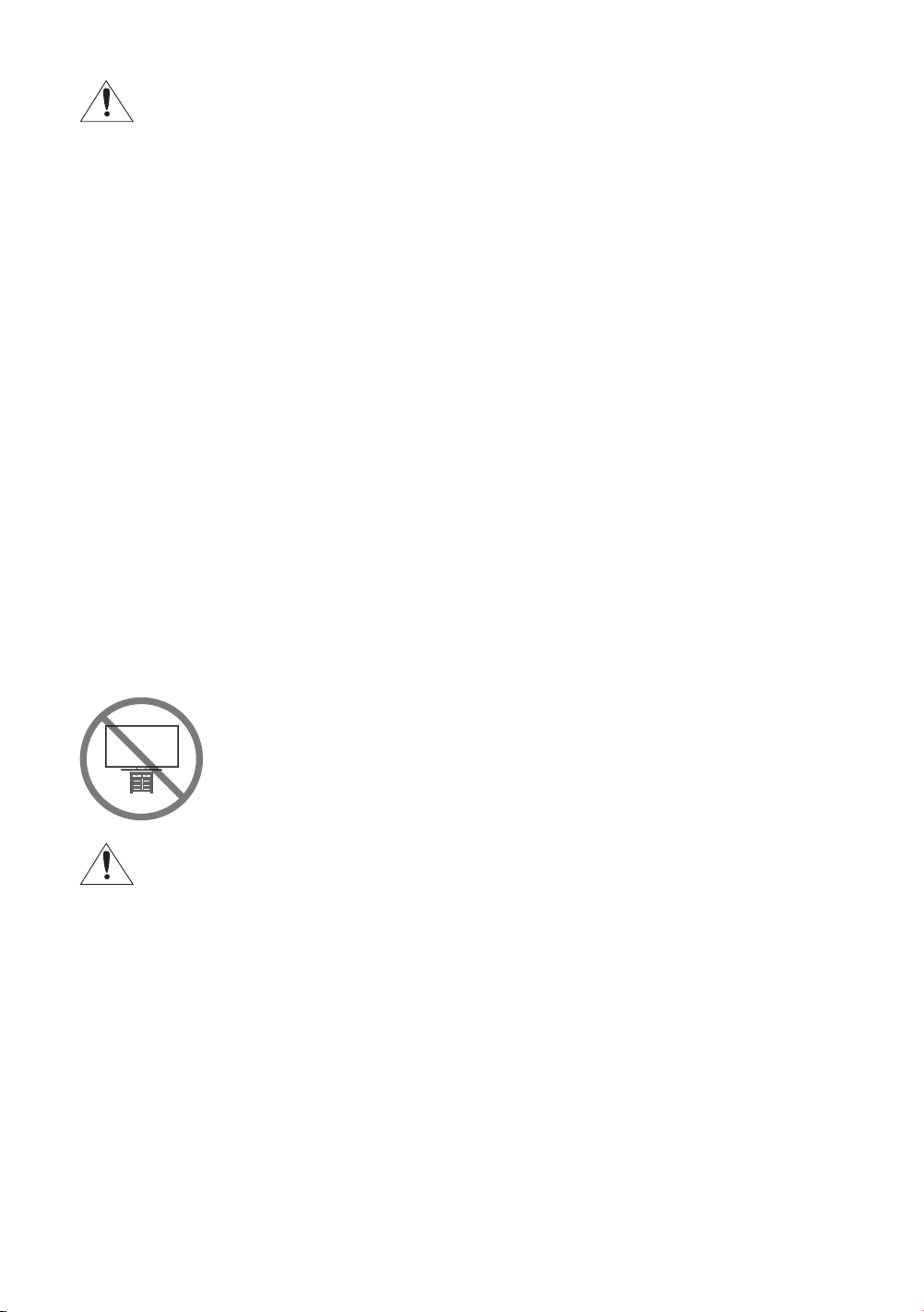
AVERTISSEMENT
et causer de graves blessures ou la mort. Pour éviter tout risque de blessure, particulièrement en
• Utiliser des meubles ou supports recommandés par le fabricant du téléviseur.
• Utiliser uniquement des meubles qui peuvent soutenir le téléviseur en toute sécurité.
• Veiller à ce que le téléviseur ne dépasse pas du bord du meuble sur lequel il est placé.
• Si le téléviseur est placé sur des meubles hauts (par exemple des armoires ou étagères à livres),
• Ne pas placer le téléviseur sur un tissu ou autre matériau qui peut se trouver entre ce dernier et le
meuble.
• Apprendre aux enfants qu'il est dangereux de monter sur les meubles pour atteindre le téléviseur ou
ses commandes.
Si vous conservez votre ancien téléviseur, vous devez prendre les mêmes précautions que vous suivez
pour le nouveau.
Français - 9
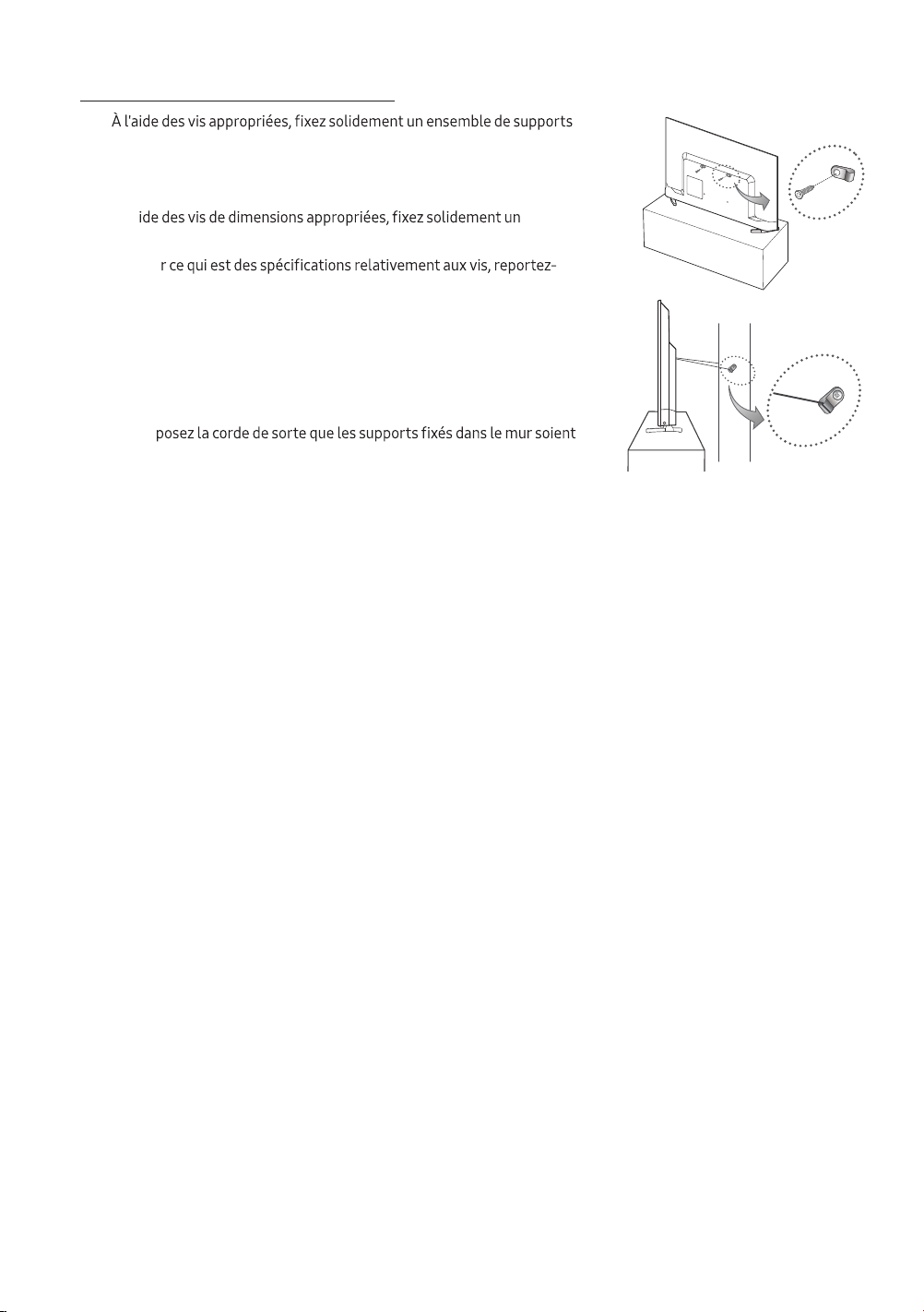
Pour empêcher le téléviseur de tomber
1.
sur le mur. Assurez-vous que les vis sont bien vissées au mur.
– Il pourrait s’avérer nécessaire d’utiliser des pièces supplémentaires
comme des douilles d’ancrage selon le type de mur.
2. À l'a
ensemble de supports sur le mur.
– Pou
vous à la rubrique « Vis standard » dans le tableau de la page
précédente.
3. Reliez les supports du téléviseur à ceux du mur à l'aide d'une corde à
usage industriel, puis attachez solidement cette dernière.
– Installez le téléviseur à proximité du mur de manière qu'il ne se
renverse pas vers l'arrière.
– Dis
à la même hauteur ou en dessous de ceux sur le téléviseur.
Français - 10
Français - 11
03 Télécommande
•
Cette fonction n'est pas disponible sur certains modèles dans certaines zones géographiques particulières.
•
Les noms des boutons ci-dessus peuvent être différents de ceux de l'appareil.
• La télécommande peut différer selon le modèle.
• Cette télécommande dispose de points de braille sur les touches Power, Channel, Volume et Enter, permettant
ainsi aux personnes aveugles de l'utiliser.
(Sélectionner)
GUIDESLEEP
P.SIZE CC/VD
E-MANUAL
Permet de choisir des chaînes
numériques supplémentaires
diffusées par la même station de
diffusion numérique. Par exemple,
pour sélectionner la chaîne
«54-3», appuyez sur «54», puis
sur «3».
Permet de régler le volume.
Permet de revenir au menu précédent.
E-MANUAL
Affiche le guide électronique
P.SIZE
Permet de changer la taille de l’image.
CC/VD
Permet de régler la fonction de
sous-titrage et d’afficher les sous-titres
à l'écran.
Permet de retourner à la chaîne
précédente.
Permet de lancer la Liste des chaînes.
Permet de changer de chaîne.
Permet de quitter le menu.
Utilisez ces touches avec une
fonction particulière selon les
instructions à l'écran du téléviseur.
Affiche le guide électronique des
programmes (EPG).
Permet de retourner à l'écran Accueil.
Permet d’afficher l’information à
l'écran du téléviseur.
Permet de déplacer le curseur,
de sélectionner les options de
menu à l’écran et de modifier les valeurs
affichées dans le menu du téléviseur.
Permet de couper le son et de le
rétablir.
sélectionner les sources vidéo
disponibles.
Permet l’accès direct aux chaînes.
Appuyez sur ces touches selon les
instructions à l'écran du téléviseur.
Permet au téléviseur de se mettre
automatiquement hors tension
après le délai choisi.
Appuyez sur la touche pour
sélectionner ou exécuter l'élément saisi.
Permet de mettre le téléviseur sous
tension et hors tension.
Permet d’afficher et de sélectionner
les sources vidéo disponibles.
Installation des piles dans la télécommande
compartiment.
•
• Une lumière intense peut affecter le bon fonctionnement de la télécommande.
enseigne au néon.
• La couleur et la forme de la télécommande peuvent varier en fonction du modèle.
Français - 12
Français - 13
correspondent à votre environnement de visionnement.
Utilisation du module de commande du téléviseur
Vous pouvez mettre le téléviseur sous tension à l'aide du bouton Commande du téléviseur situé dans la partie
renseignements sur son fonctionnement, reportez-vous à l'illustration ci-dessous.
Commande du téléviseur / Capteur pour la
télécommande
Appuyer: Déplacer
Maintenez enfoncéSélectionner
Le Commande du téléviseur se trouve dans la
partie inférieure du téléviseur.
Volume +
Chaîne + Volume –
Chaîne – Source
Menu de commande
04 Conguration initiale

Français - 14
05 Dépannage et entretien
Dépannage
Si le téléviseur semble présenter un problème, essayez d'abord de le corriger à l'aide de la présente liste des
Si aucun de ces conseils de dépannage ne fonctionne, rendez-vous à l’adresse www.samsung.com/support ou
communiquez avec le service à la clientèle de Samsung en composant le 1 800 SAMSUNG (1 800 726-7864).
• Pour de plus amples renseignements sur le dépannage, visionnez les vidéos sur le site www.samsung.com/spsn.
•
perfectionnée. Il se peut toutefois que certains pixels deviennent sombres ou plus lumineux à l’écran. Ce
phénomène n’a aucune incidence sur la performance de l’appareil.
• Pour optimiser les performances de votre téléviseur, utilisez la dernière version logicielle. Utilisez les fonctions
Mettre à jour maintenant ou Mise à jour auto dans le menu du téléviseur (
> Paramètres > Support tech. >
Mise à jour du logiciel > Mettre à jour maintenant or Mise à jour auto).
Le téléviseur ne s’allume pas.
• Assurez-vous que le cordon d’alimentation c.a. est bien branché à la prise de courant murale et au téléviseur.
• Assurez-vous que la prise murale fonctionne et que l'indicateur de puissance sur le téléviseur est allumé en
rouge.
• Appuyez sur la touche Mise sous tension du téléviseur pour vous assurer que la télécommande fonctionne
correctement. Si le téléviseur s'allume, reportez-vous à la section « La télécommande ne fonctionne pas » ci-
dessous.
Il n'y a pas d'image, de vidéo ou de son ou l'image, la vidéo ou le son provenant d'un appareil
externe sont déformés; le message «Signaux Faibles ou Inexistants» s'afche à l'écran, ou il
est impossible de trouver une chaîne.
• Assurez-vous que la connexion avec l'appareil est correcte et que tous les câbles sont bien insérés.
•
nouveaux câbles si possible.
•
> Source).
•
ou l'appareil (
> Paramètres > Support tech. > Autodiagnostic > Commencer le test de l’image ou
Commencer le test du son).
• Si les résultats des essais sont normaux, relancez les appareils branchés en débranchant le cordon
d'alimentation de chaque appareil et en le rebranchant. Si le problème persiste, reportez-vous au guide de
connexion dans le manuel d'utilisation de l'appareil connecté.
• Si le téléviseur n'est pas connecté à un câblosélecteur ou un décodeur, exécutez l'option Prog. auto pour
chercher des chaînes (
> Paramètres > Diffusion > Prog. auto).
La télécommande ne fonctionne pas.
•
• Lorsque vous insérez les piles, assurez-vous de respecter les polarités appropriées (+/– ).
•
pieds).
La télécommande du câblosélecteur ou du décodeur ne commande pas la mise sous tension ou
la mise hors tension du téléviseur ni le volume.
• Programmez la télécommande du câblosélecteur ou du décodeur pour faire fonctionner le téléviseur. Consultez
le guide d’utilisation du câblosélecteur ou du décodeur pour obtenir le code de téléviseur SAMSUNG.
Les paramètres de conguration du téléviseur sont perdus après 5 minutes.
• Le téléviseur est en mode Mode magasin. Passez du Mode d’utilisation dans le menu Gestionnaire système au
Mode maison (
> Paramètres > Général > Gestionnaire système > Mode d’utilisation > Mode maison).
Signal sans l intermittent
• Assurez-vous que le téléviseur a une connexion réseau ( > Paramètres > Général > Réseau >
État du réseau).
• Assurez-vous que le mot de passe Wi-Fi est correctement entré.
•
15,2 m (50 pi).
•
Un seul étage Plus d'un étage
•
d'enregistrer de nouveau les adresses Mac de votre modem ou routeur et votre téléviseur.
Français - 15
Français - 16
Problèmes liés aux applications vidéo (Youtube, etc.)
• > Paramètres > Général > Réseau > État du réseau >
Param. IP > Param. DNS > Entrer manuellement > Serveur DNS > entrez 8.8.8.8 > OK.
•
> Paramètres > Support tech. > Autodiagnostic > Réinitialiser Smart Hub.
Que signie le soutien technique à distance?
Samsung vous offre un service de soutien technique à distance et personnalisé. Un technicien de Samsung pourra à
• diagnostiquer votre téléviseur;
• ajuster les réglages du téléviseur;
• rétablir les paramètres par défaut sur votre téléviseur;
• installer les dernières versions du micrologiciel recommandées.
Comment fonctionne le soutien technique à distance?
1.
2. Ouvrez le menu de votre téléviseur et accédez à la section Support tech..
3. Sélectionnez Gestion à distance, puis acceptez les ententes sur le service après les avoir lues. Lorsque l'écran du
4. Ce dernier accédera à votre téléviseur.
Capteur Eco et luminosité de l'écran
Le capteur Eco ajuste automatiquement la luminosité de l'écran. Il mesure la lumière de votre pièce et optimise
automatiquement la luminosité du téléviseur pour réduire la consommation d’énergie. Si vous souhaitez le
désactiver, allez à
> Paramètres > Général > Solution Eco > Détection de l’éclairage ambiant.
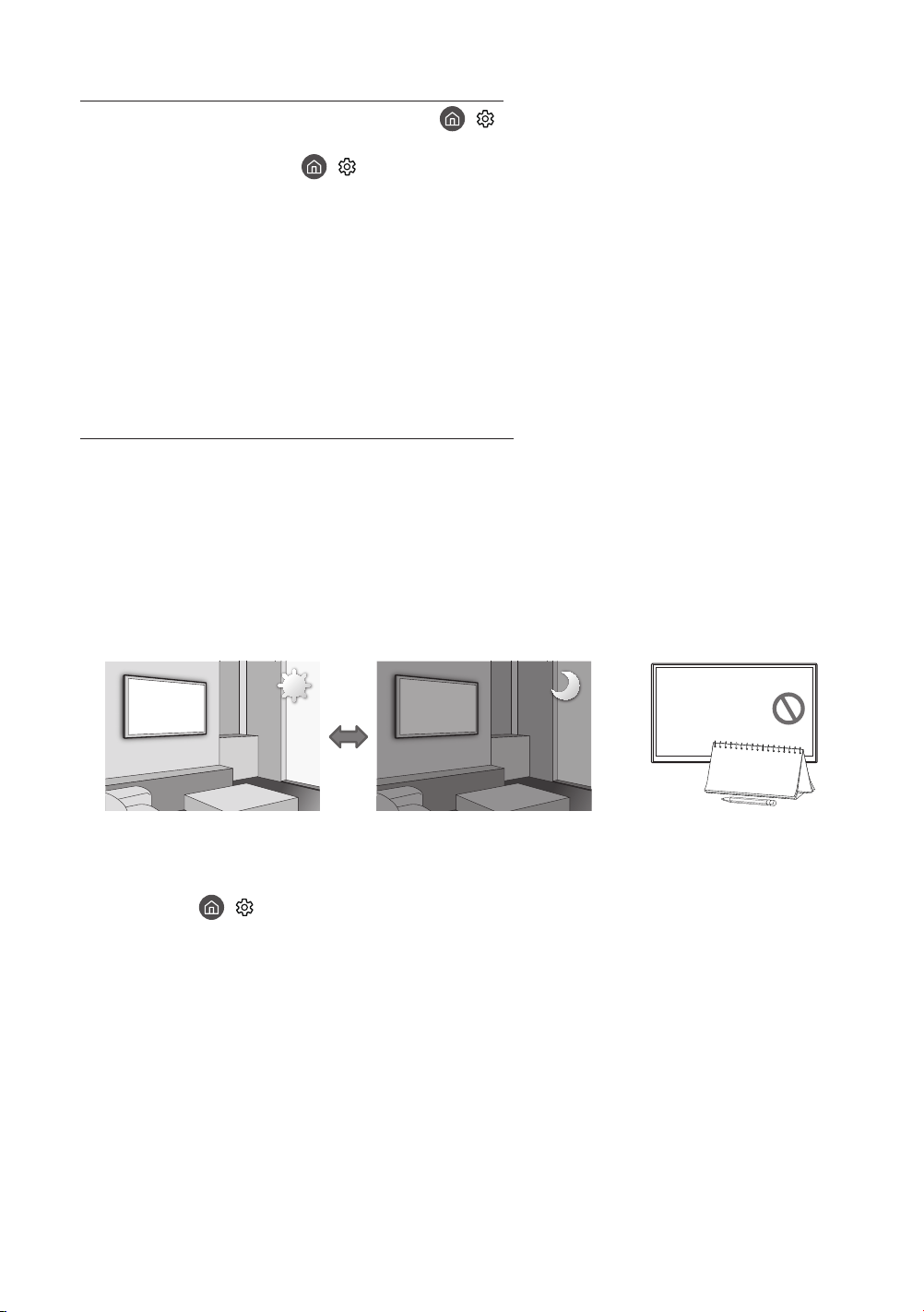
• Si l'écran est trop sombre dans un environnement sombre, cela peut être dû au Détection de l’éclairage ambiant.
•
Avertissement relatif aux images xes
bandeaux de nouvelles ou de cotes de la bourse au bas de l'écran, etc.) ou les émissions au format d’image panorama
•
•
pour obtenir les meilleurs résultats.
•
• Utilisez toutes les fonctions du téléviseur conçues pour réduire les images rémanentes et la brûlure d'écran.
Consultez le guide électronique pour obtenir plus de détails.
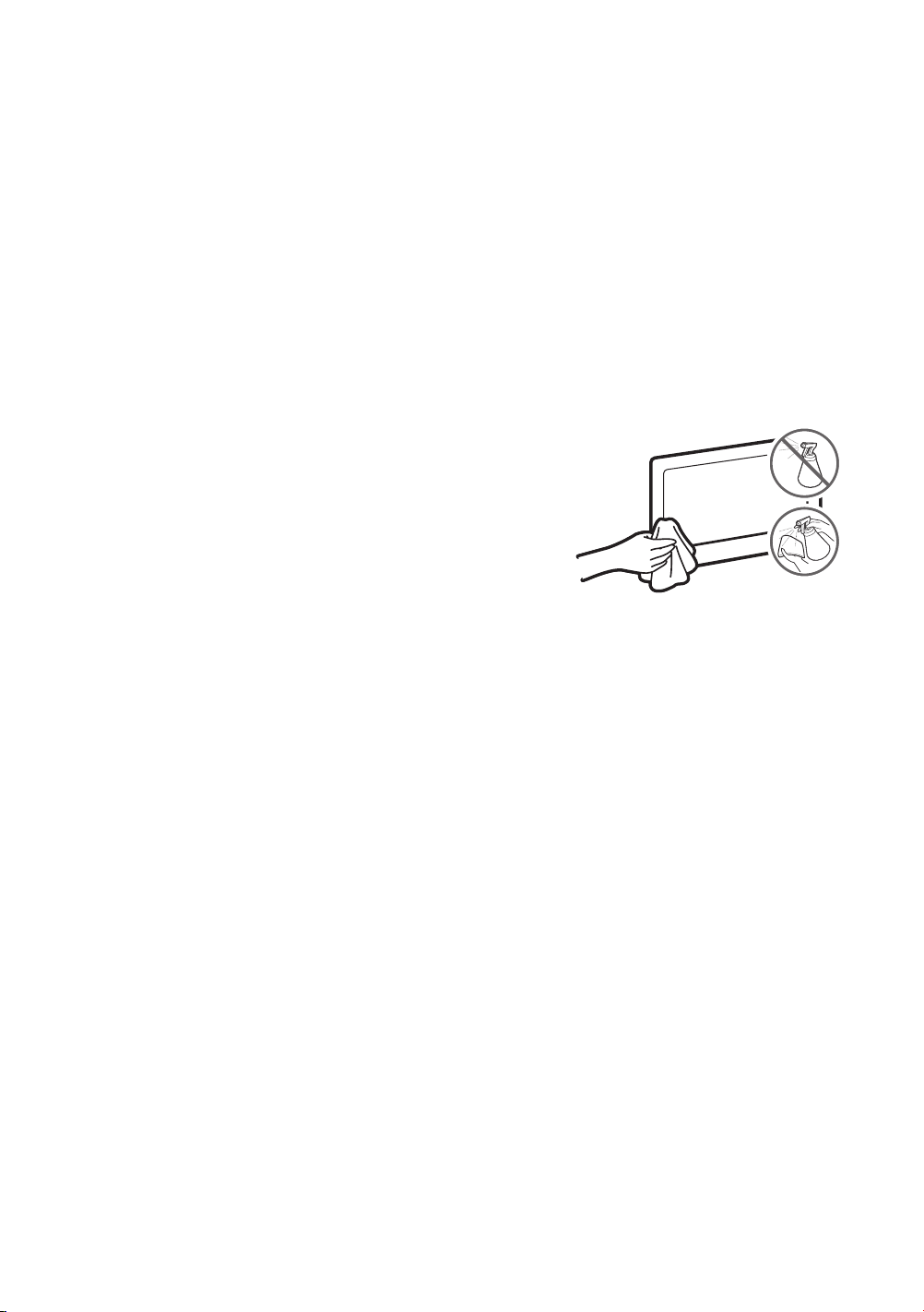
Précautions à prendre pour le téléviseur
• Si vous retirez l'autocollant apposé sur l'écran du téléviseur, il se
de regarder la télévision.
• La partie extérieure et l’écran du téléviseur peuvent être rayés
durant le nettoyage. Pour éviter qu'il n'y ait des rayures, essuyez
avec précaution la partie extérieure et l'écran à l'aide d'un chiffon
doux.
• Ne vaporisez pas de l'eau ou de liquide nettoyant directement sur
provoquer une défaillance, un incendie ou une décharge électrique.
• Pour nettoyer l'écran, mettez le téléviseur hors tension; ensuite,
essuyez doucement les traînées de saleté et traces de doigt avec
Ensuite, enlevez l'humidité avec un chiffon sec. N'exercez pas
une force excessive lorsque vous nettoyez la surface du panneau,
cela pourrait endommager celui-ci. N’utilisez pas de liquides
éliminer les traces récalcitrantes, appliquez un peu de produit de
du chiffon éliminez les traces restantes.
Français - 17
Français - 18
06
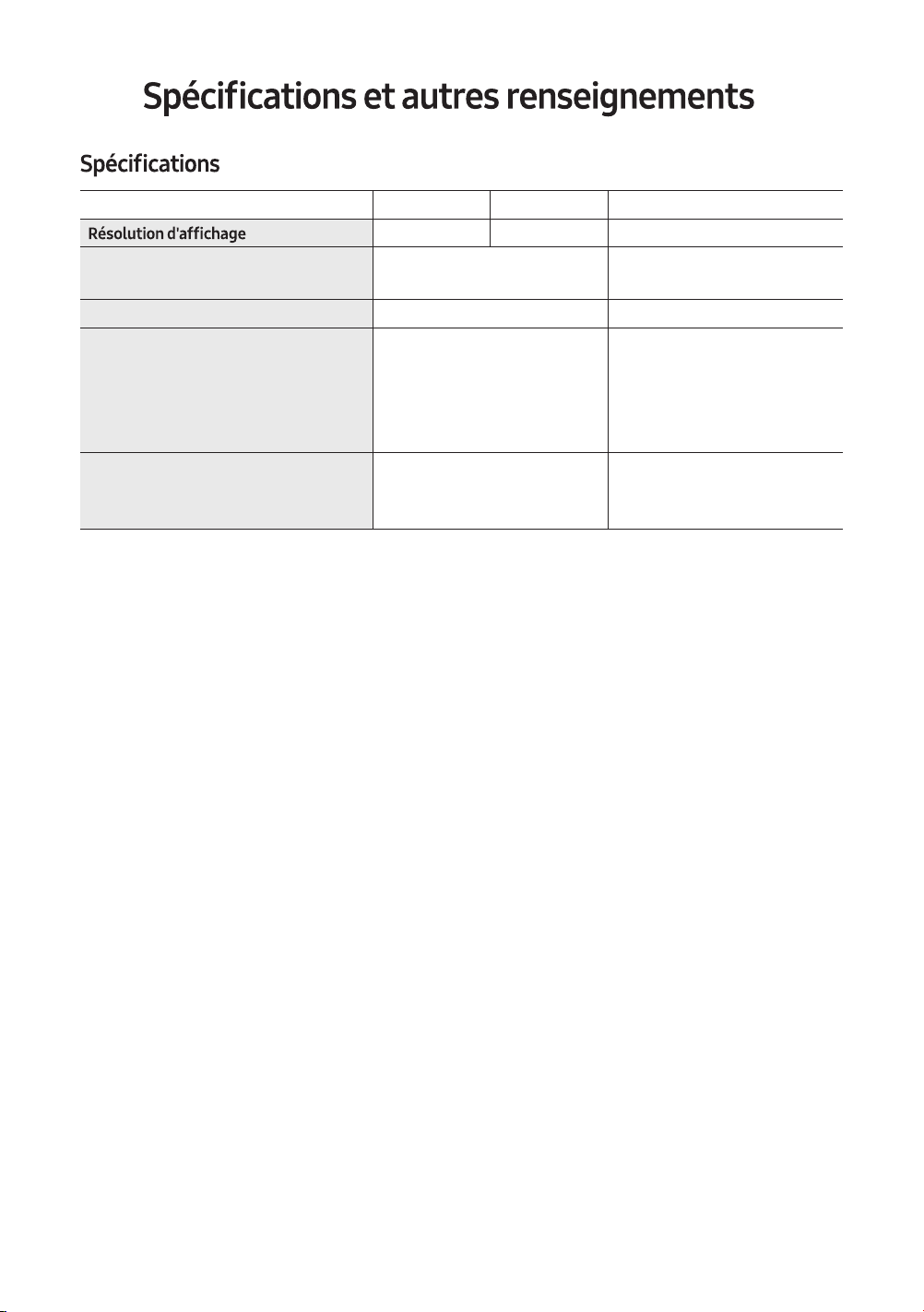
Nom du modèle UN32M4500 UN32N5300 UN43N5300
1366x 768 1920 x 1080 1920 x 1080
Taille de l'écran
(diagonale)
Categorie de 32 pouces
(31.5 pouces en diagonale)
Categorie de 43 pouces
(42.5 pouces en diagonale)
Son (sortie)
5W+5W 10W+10W
Dimensions (L x H x P)
Boîtier
Avec support
28.9 x 17.3 x 3.1 pouces
(732.9 x440.3 x 78.5 mm)
28.9 x 18.2 x 6.4 pouces
(732.9 x 462.8 x 163.7 mm)
38.1 x 22.5 x 3.1 pouces
(967.4 x 571.8 x 79.9 mm)
38.1 x 23.3 x 6.3 pouces
(967.4 x 590.6 x 159.5 mm)
Poids
Sa
ns support
Avec support
9.3 lb (4. 2 kg) 16.1 lb (7.3 kg)
9.5 lb (4. 3 kg) 16.3 lb (7.4 kg)
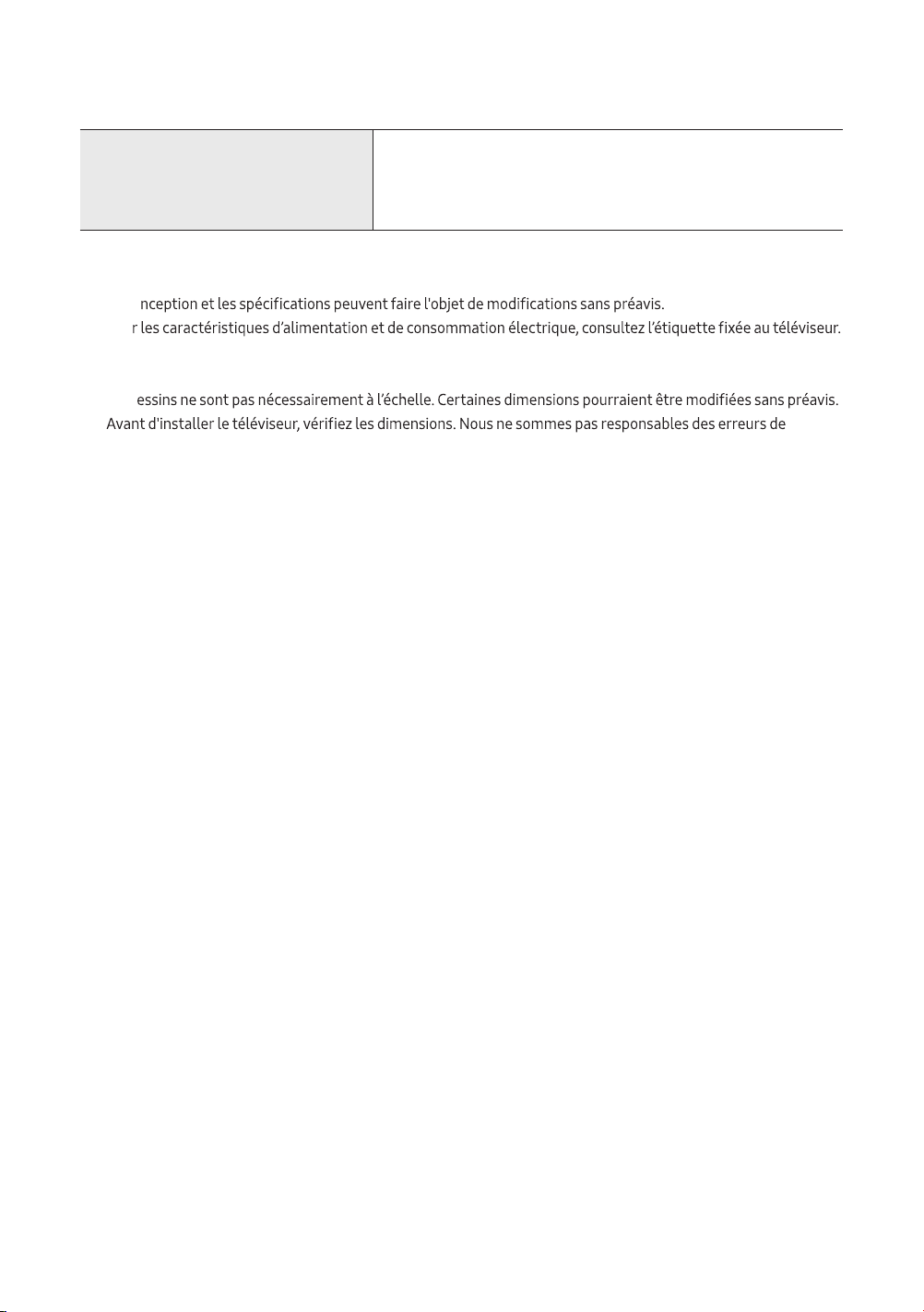
Facteurs environnementaux
Température de fonctionnement
Niveau d'humidité en fonctionnement
Température d'entreposage
Niveau d’humidité en entreposage
50 à 104 °F (10 à 40 ℃)
10 à 80%, sans condensation
-4 à 113 °F (-20 à 45 °C)
5 à 95%, sans condensation
Remarque
• La co
• Pou
• Votre téléviseur et ses accessoires peuvent être différents des illustrations présentées dans le présent guide, en
fonction du modèle.
• les d
typographie ou d’impression.
• Pour connecter un câble LAN, utilisez un câble CAT 7 (*type STP) pour la connexion.
* Shielded Twist Pair
Réduire la consommation d'énergie
Lorsque vous mettez le téléviseur hors tension, il passe en mode Veille. En mode veille, le téléviseur consommer une
faible quantité d'électricité. Pour réduire la consommation d'énergie, débranchez le cordon d'alimentation lorsque le
téléviseur n'est pas utilisé
pendant une longue période.
Français - 19
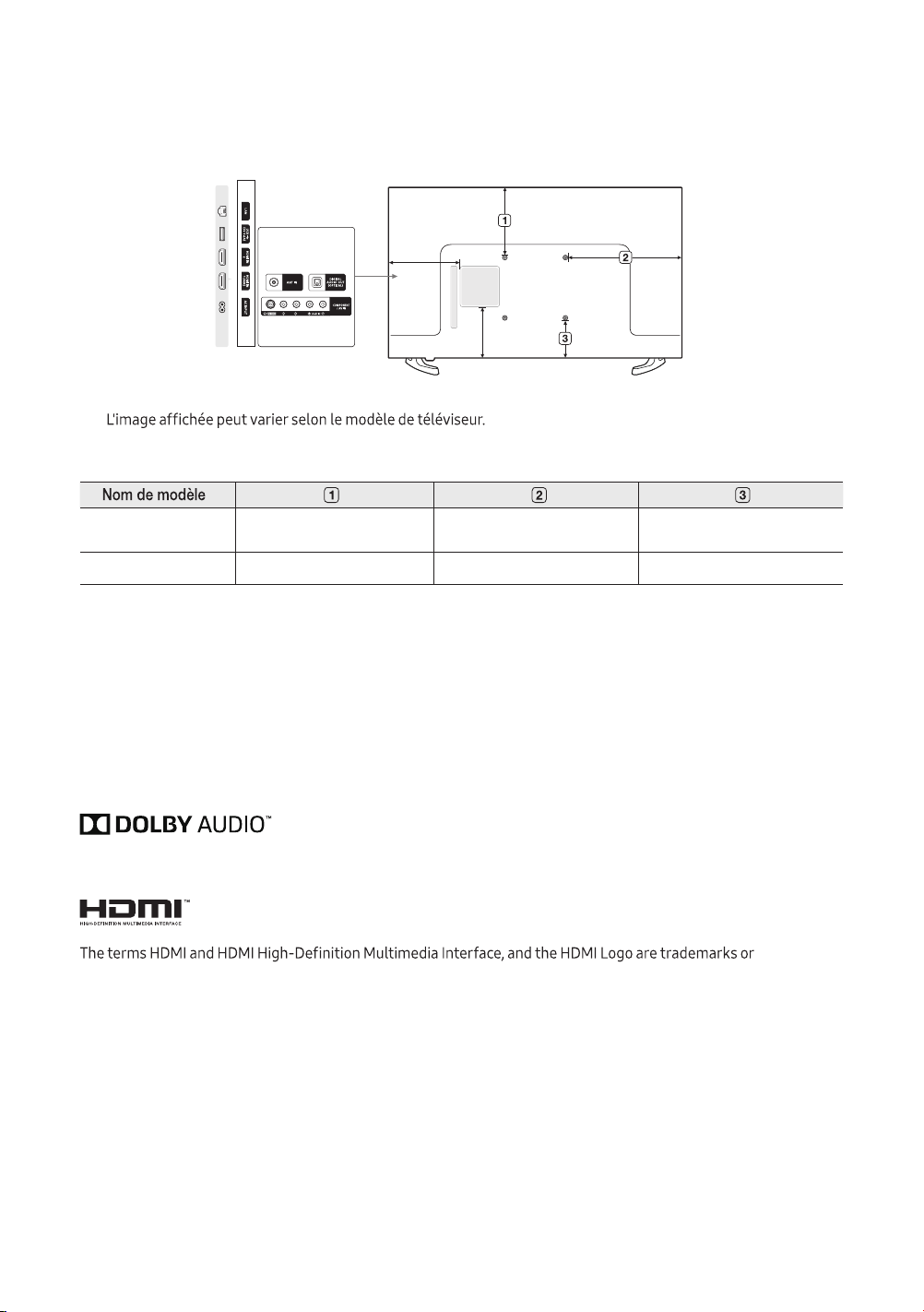
Dimensions
Panneau des ports / vue arrière
•
Licences
registered trademarks of HDMI Licensing LLC in the United States and other countries.
Français - 20
(Unité : pouces)
UN32M4500
UN32N5300
6.9 12.2 6.0
UN43N5300 9.1 15.1 5.2

Français - 21
Déclaration de la Federal Communications Commission relative au brouillage
conformément à l’alinéa 15 des règlements de la FCC. Ces restrictions sont conçues pour assurer une protection
raisonnable contre un brouillage préjudiciable lorsque l'appareil est utilisé dans un milieu résidentiel. Ce matériel
génère, utilise et peut diffuser de l’énergie sur les fréquences radio et, s’il n’est pas installé et utilisé conformément
au mode d'emploi, il peut brouiller les communications radio. Toutefois, il n’y a aucune garantie qu'un brouillage
ne se produira pas dans un milieu particulier. Si cet appareil brouille les communications radio ou télévision,
•
•
•
• Pour toute aide, consulter le distributeur ou s'adresser à un technicien expérimenté en radio-télévision.
conformité peut entraîner la révocation du droit à utiliser ce matériel.
Cet appareil est conforme à la partie 15 des règlements de la FCC. L'exploitation est autorisée aux deux conditions
brouillage radioélectrique subi, même si le brouillage est susceptible d'en compromettre le fonctionnement.
Pour les produits disponibles sur les marchés américain et canadien, seules les chaînes 1 à 11 sont disponibles. Vous
ne pouvez pas sélectionner d'autres chaînes.
Cet appareil et son ou ses antennes ne doivent pas être installés à proximité ou être utilisés conjointement avec une
autre antenne ou un autre émetteur.
Déclaration concernant l'exposition aux radiations de la FCC
Cet équipement est conforme aux limites de la FCC concernant l'exposition aux radiations applicables dans un
de 20 cm (8 po) au moins.
Renseignements sur la FCC et la garantie

Cet appareil numérique de la classe B est conforme à la norme NMB-003 du
Canada.
de l'appareil doit accepter tout brouillage radioélectrique subi, même si le brouillage est susceptible d'en
compromettre le fonctionnement.
l'utilisateur de l'appareil doit accepter tout brouillage radioélectrique subi, même si le brouillage est susceptible d'en
compromettre le fonctionnement.
Pour les produits disponibles sur les marchés américain et canadien, seules les chaînes de 1 à 11 peuvent fonctionner.
Il n'est pas possible de sélectionner d'autres chaînes.
Cet appareil et son ou ses antennes ne doivent pas être installés à proximité ou fonctionner conjointement avec
toute autre antenne ou émetteur.
En vertu de la réglementation d'Industrie Canada, le présent émetteur radio ne peut fonctionner qu'à l'aide d'une
le but de réduire les risques de brouillage radio électrique pour les autres utilisateurs, le type et le gain de l'antenne
doivent être choisis de manière à ce que la puissance isotrope rayonnée équivalente (p.i.r.e.) ne dépasse pas
l'intensité nécessaire à l'établissement d'une communication satisfaisante.
INFORMATION IMPORTANTE SUR LA GARANTIE RELATIVE AU FORMAT DE
L'IMAGE DU TÉLÉVISEUR
d'écoute hebdomadaire.
de jeux vidéo, les logos des stations, les sites Web ou les images graphiques et les schémas des ordinateurs, tel
qu'indiqué ci-dessus, et ce pour tous les téléviseurs.
émissions et les images et regardez principalement des images plein écran en mouvement et non pas des images ou
ces commandes pour obtenir différents formats en plein écran.
Prenez garde au choix des formats que vous utilisez pour regarder la télévision et à leur durée d’utilisation. Le
garantie limitée de Samsung; les images rémanentes en sont également exclues.
Français - 22

Cette page est laissée
intentionnellement en
blanc.

Cette page est laissée
intentionnellement en
blanc.

Cette page est laissée
intentionnellement en
blanc.
Comment contacter Samsung dans le monde
Si vous avez des suggestions ou des questions concernant les produits Samsung, veuillez contacter le Service
Consommateurs Samsung.
Country Customer Care Center Web Site Address
CANADA 1-800-SAMSUNG (726-7864) www.samsung.com/ca/
support (English)
www.samsung.com/ca_fr/
support (French)
Samsung Electronics Canada Inc.
2050 Derry Road West
Mississauga, Ontario L5N 0B9
Canada
U.S.A 1-800-SAMSUNG (726-7864) www.samsung.com/us/
support
Samsung Electronics America, Inc.
85 Challenger Road
© 2018 Samsung Electronics Co., Ltd. All rights reserved.
Contact SAMSUNG WORLD WIDE
If you have any questions or comments relating to Samsung products, please contact the SAMSUNG customer
care cente
90101-08241