Pico
®
remote control &
plug-in lamp dimmer
Welcome—and thank you for purchasing a Caséta
T
Wireless dimming kit.
Before you install the plug-in lamp dimmer,
please watch the installation video at
www.casetawireless.com/support
We hope you enjoy the convenience of Caséta
T
Wireless!
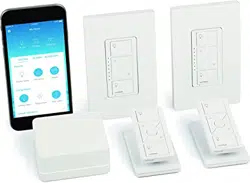
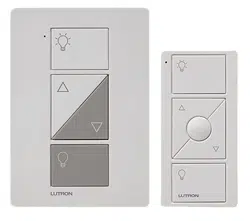
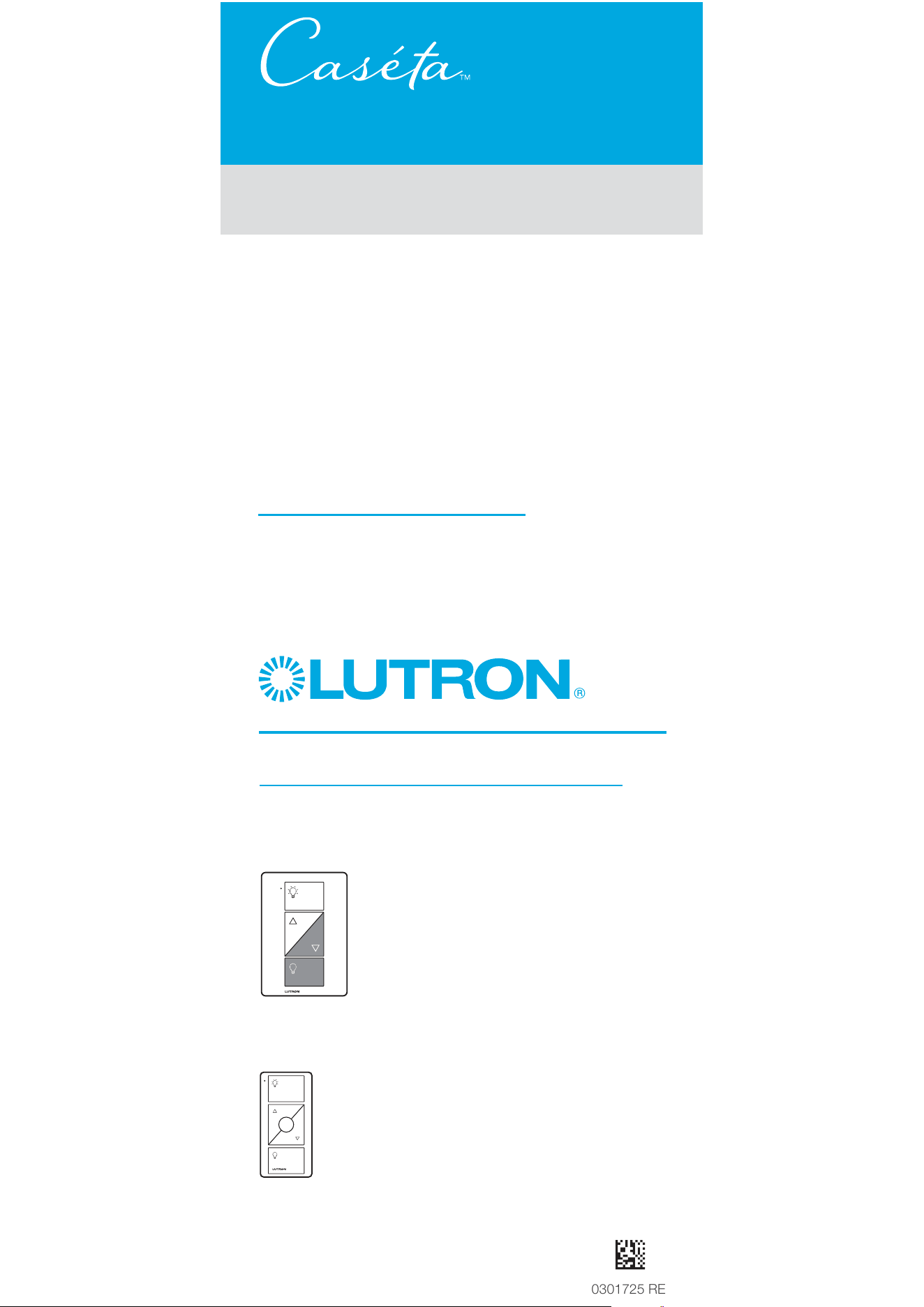
Contents supplied
Double your warranty
Plug-in lamp dimmer
(PD-3PCL)
Pico
R
remote control
(PJ2-3BRL)
Love Caséta
T
Wireless dimmers? Have ideas
for making them better? Tell us what you think
and we’ll extend your warranty by 1 year.
www.casetawireless.com/register
Wireless
quick-start guide
P/N 0301725 REV B
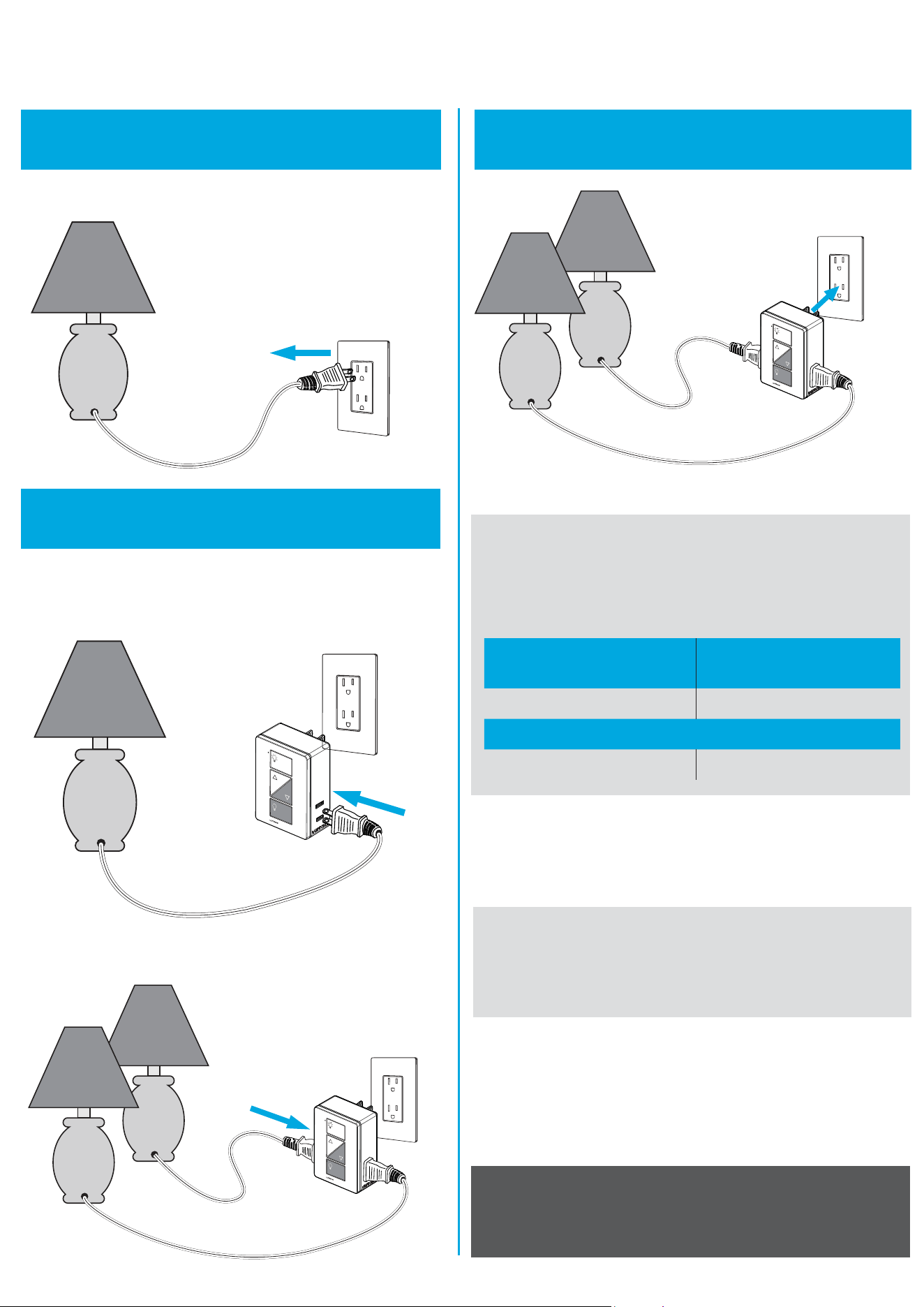
Installing your lamp dimmer
1
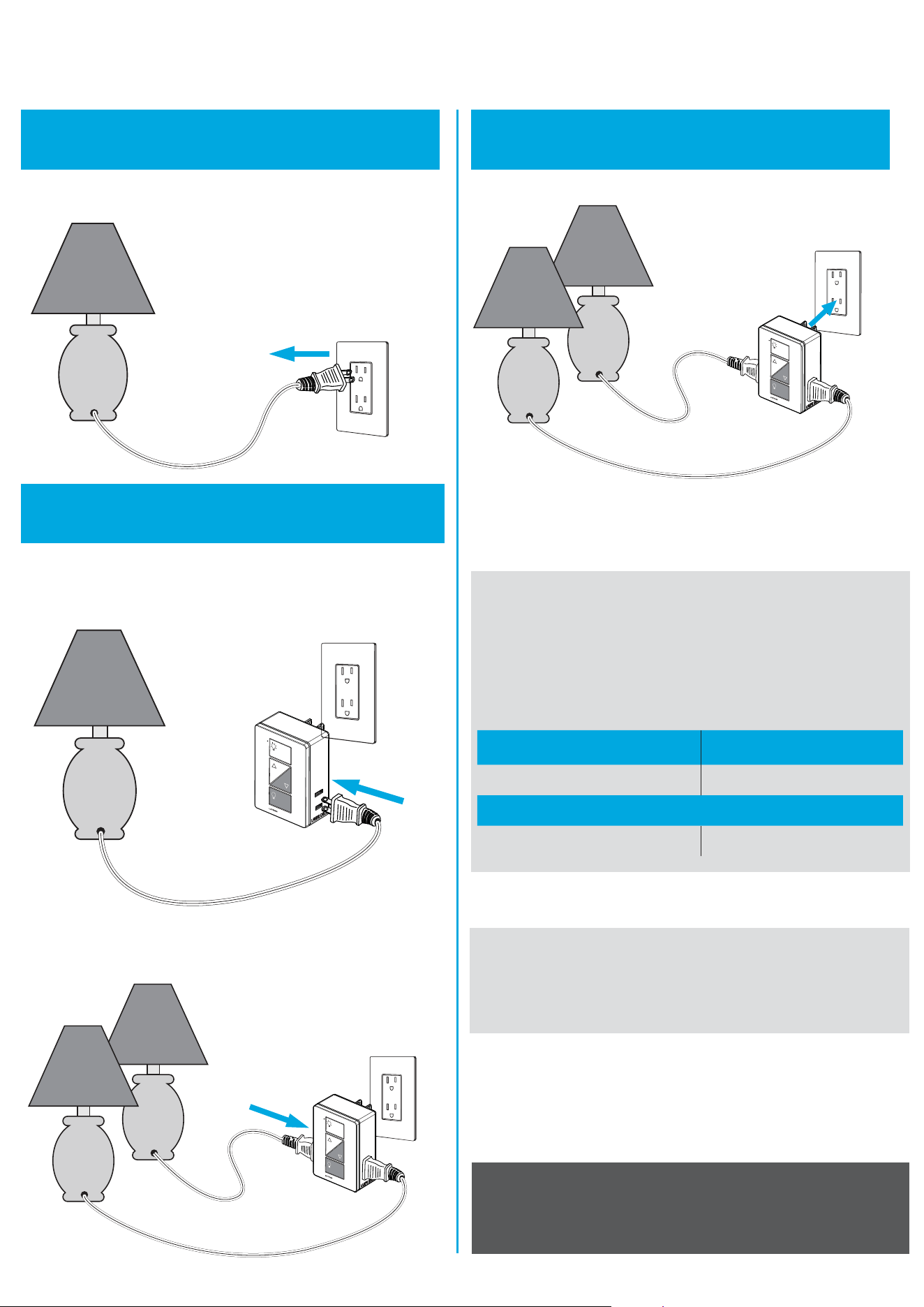
Turn on the lamp
Turn on the lamp you want to control and unplug it.
Warranty
For warranty information, please visit
www.casetawireless.com/warranty
For advanced features, tips for using CasétaT Wireless
dimmers with CFLs and LEDs, the complete CasétaT
Wireless product line, and more, please visit
www.casetawireless.com/features
2
Connect the lamp(s)
Plug the lamp cord into either side of the CasétaT
Wireless plug-in lamp dimmer.
3
Plug in the lamp dimmer
Important notes:
1. For indoor use only.
2. Operate between 32 ˚F (0 ˚C) and 104 ˚F (40 ˚C).
If you want to control a second lamp turn it on
and plug it into the other side.
Important note:
Use only with dimmable LED, dimmable CFL,
halogen, or incandescent lamps.
Do not exceed the total maximum wattage shown below:
Bulb Maximum Wattage
LED & CFL 100 W
or
Incandescent & Halogen 300 W
Go to www.casetawireless.com/support for
additional troubleshooting suggestions.
Symptoms Probable cause and action
Lamp does
not turn on or
lamp dimmer LED
does not light up.
• Light bulb(s) burned out.
• Lamp is turned off.
• Lamp is not plugged in.
• Outlet is switched off.
Light does
not respond
to Pico
R
remote
control.
• The dimmer failed to pair
with Pico
R
remote control;
see Pairing the lamp dimmer
and Pico
R
remote control.
• The dimmer is already at the
light level the Pico
R
remote
control is sending.
• The Pico
R
remote control
is outside the 30 ft (9 m)
operating range.
• The Pico
R
remote control
battery is low.
• The Pico
R
remote control
battery is installed incorrectly.
• Bulbs turn off
while being
dimmed.
• Bulbs turn on at
high light level
but do not turn
on at a low
light level.
• Bulbs flicker
or flash when
dimmed to a low
light level.
Verify bulbs are marked
dimmable and visit
www.casetawireless.com/
lowend
for information on adjusting
the dimmer for best
bulb performance.
Troubleshooting
Device Ratings
Plug-in lamp dimmer Pico
R
remote control
PD-3PCL PJ2-3BRL
120 V
~
50/60 Hz 3 V
-
10 mA
(1) CR2032 battery (included)
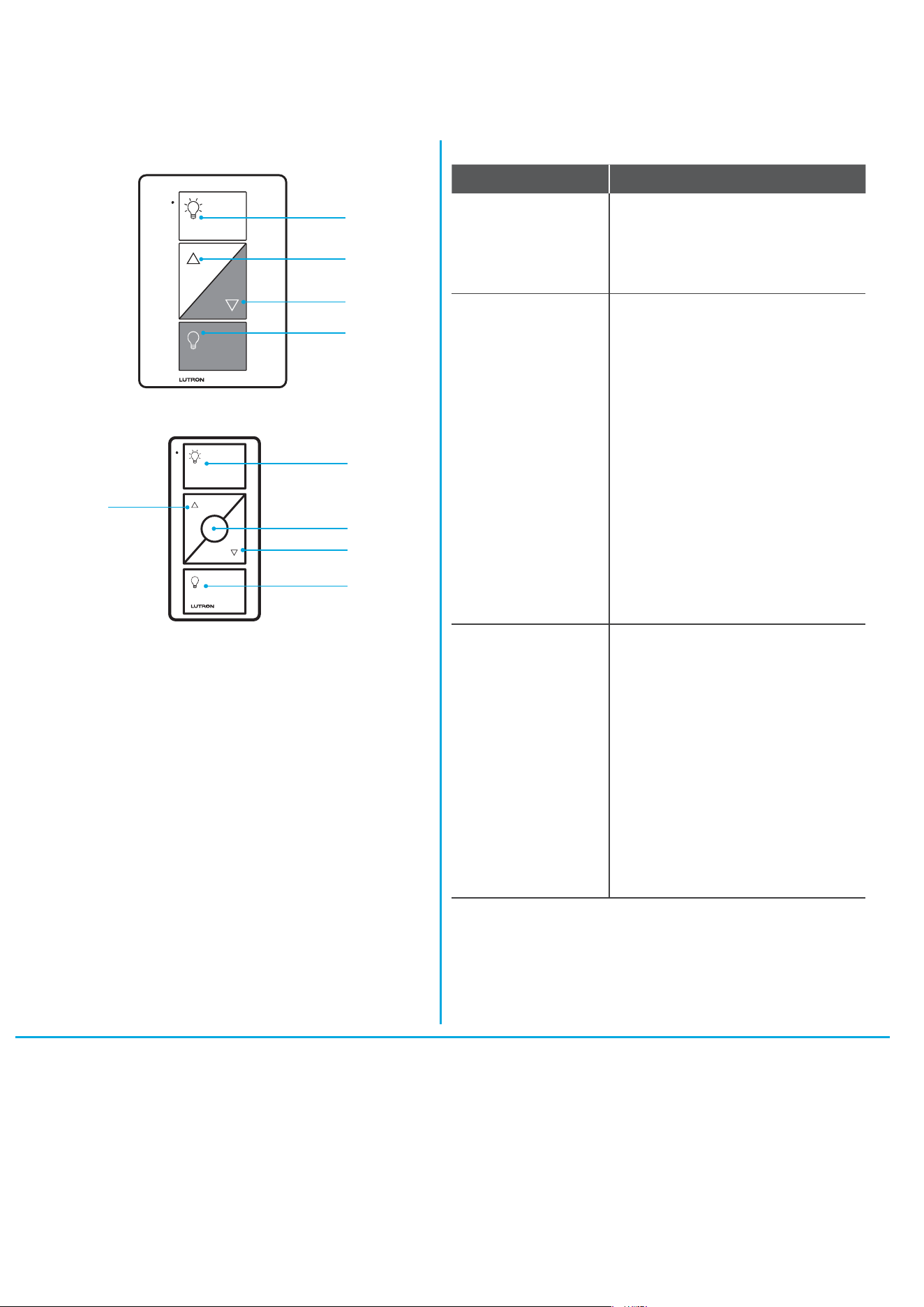
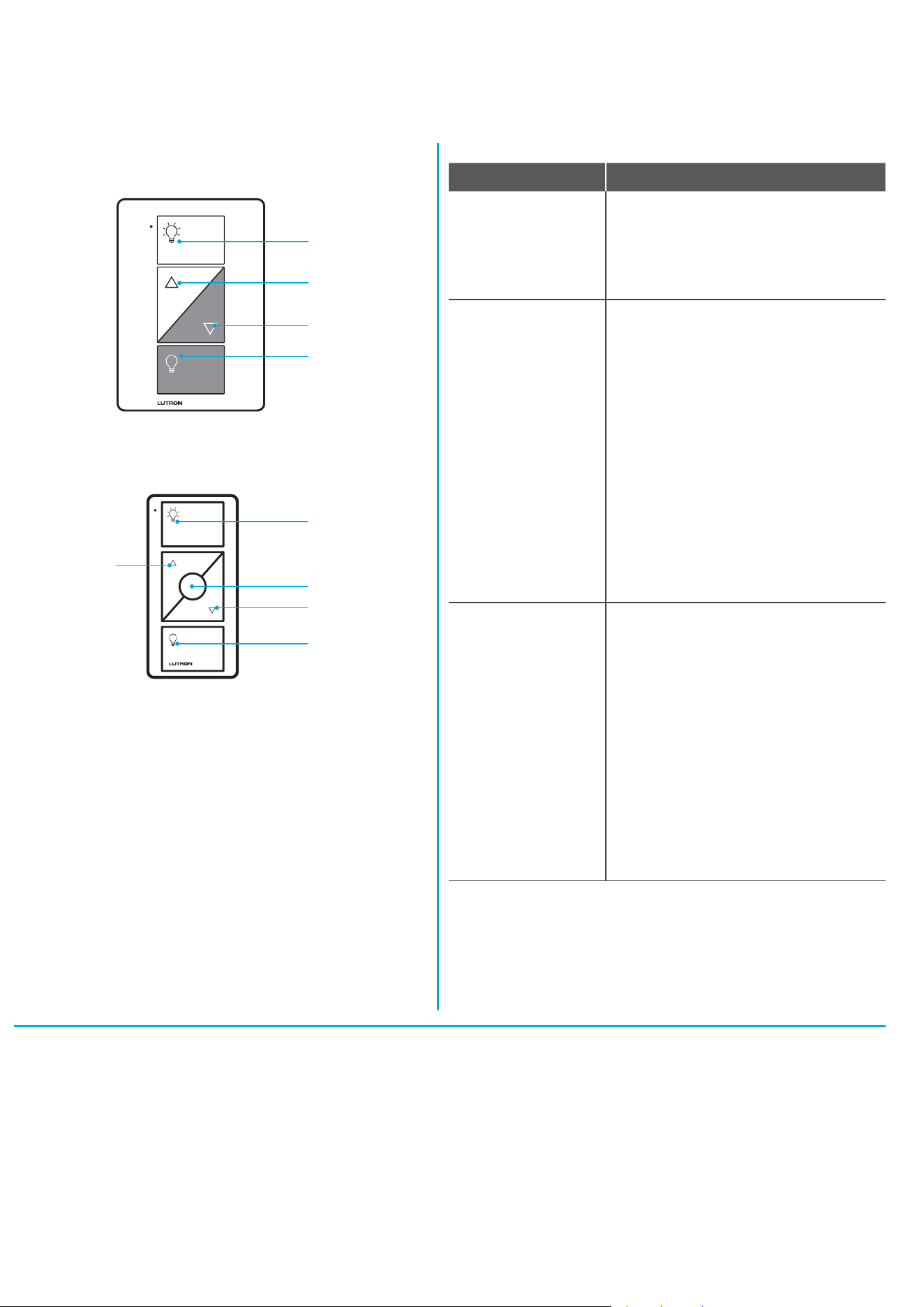
Using your controls
On
Off
Darker
Brighter
Plug-in lamp dimmer
CAUTION
To avoid overheating and possible damage to other
equipment, do not use to control motor-driven appliances,
or transformer-supplied appliances.
Codes
Install in accordance with all national and local electrical codes.
Pico
®
remote control
On
Off
Darker
Favorite
Brighter
This device complies with part 15 of the FCC Rules and Industry Canada license-
exempt RSS standard(s). Operation is subject to the following two conditions:
(1) This device may not cause interference, and (2) this device must accept
any interference, including interference that may cause undesired operation.
Modifications not expressly approved by Lutron Electronics Co., Inc. could void the
user’s authority to operate this equipment.
Note: This equipment has been tested and found to comply with the limits for
a Class B digital device, pursuant to part 15 of the FCC Rules. These limits
are designed to provide reasonable protection against harmful interference in
a residential installation. This equipment generates, uses and can radiate radio
frequency energy and, if not installed and used in accordance with the instructions,
may cause harmful interference to radio communications. However, there is no
guarantee that interference will not occur in a particular installation. If this equipment
does cause harmful interference to radio or television reception, which can be
determined by turning the equipment off and on, the user is encouraged to try to
correct the interference by one or more of the following measures:
—Reorient or relocate the receiving antenna.
—Increase the separation between the equipment and receiver.
— Connect the equipment into an outlet on a circuit different from that to which the
receiver is connected.
—Consult the dealer or an experienced radio/TV technician for help.
FCC/IC Information

Works with energy efficient
dimmable light bulbs:
Lutron Electronics Co., Inc.
7200 Suter Road
Coopersburg, PA 18036-1299, U.S.A.
NOTE: You can mix and match dimmable LED
and CFLs as well as halogen and incandescent
light bulbs with Caséta
T
Wireless dimmers.
Dimmable LED and CFL light bulbs vary in
their dimming performance. If you’re using these
bulbs and they flicker or turn off, please visit
www.casetawireless.com/lowend
for information on adjusting the dimmer for
best bulb performance.
For a complete list of compatible dimmable CFLs
and LEDs, please visit
www.casetawireless.com/bulblist
Compatible light bulbs include:
Cree
®
BA19-08027OMF-12DE26-1U100
Feit
®
A19/OM800/LED
Philips
®
9290002268
9290002267
Sylvania
®
LED8A/DIM/F/827
LED—up to 100 W
CFL—up to 100 W
Incandescent—up to 300 W
Halogen—up to 300 W
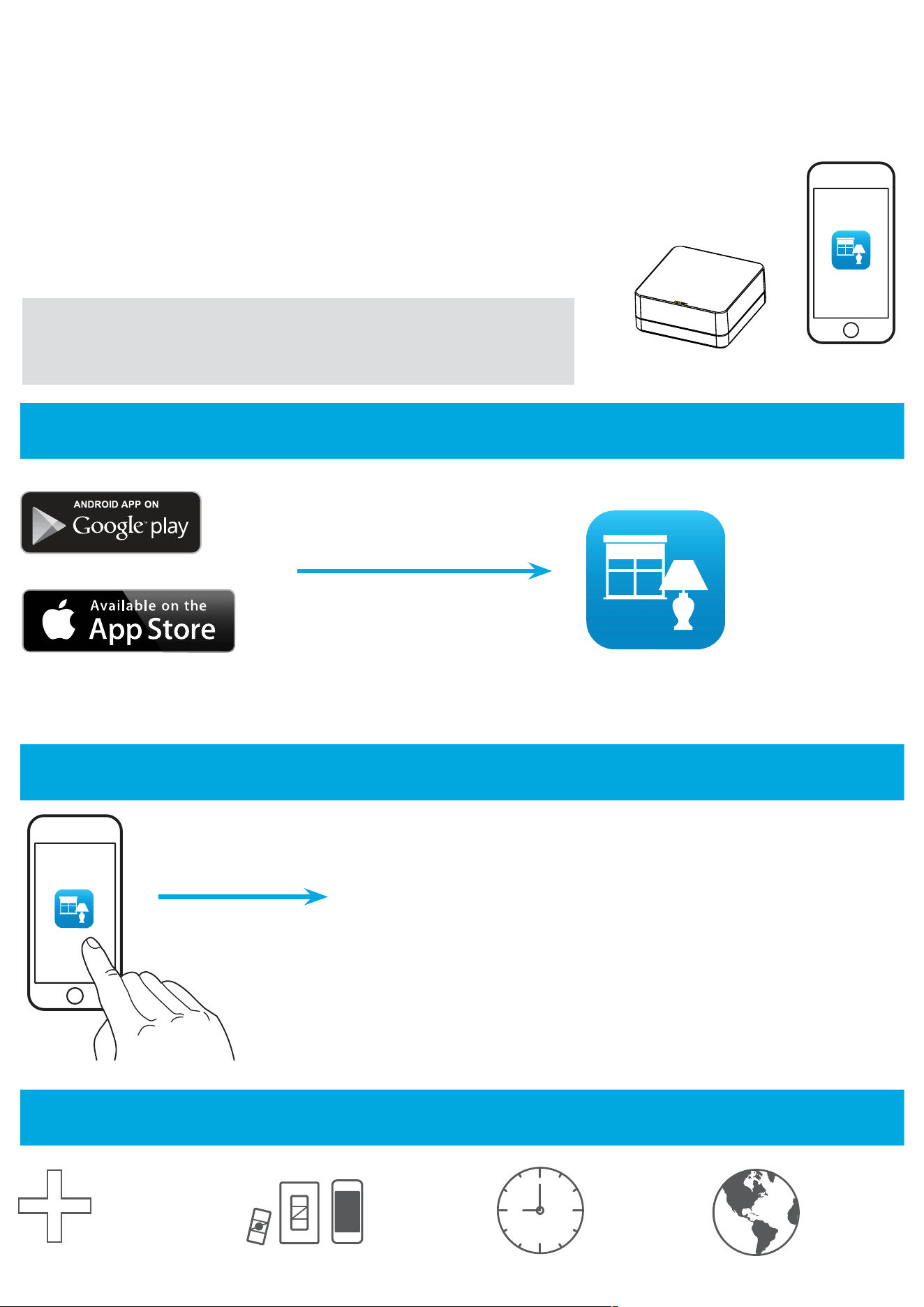
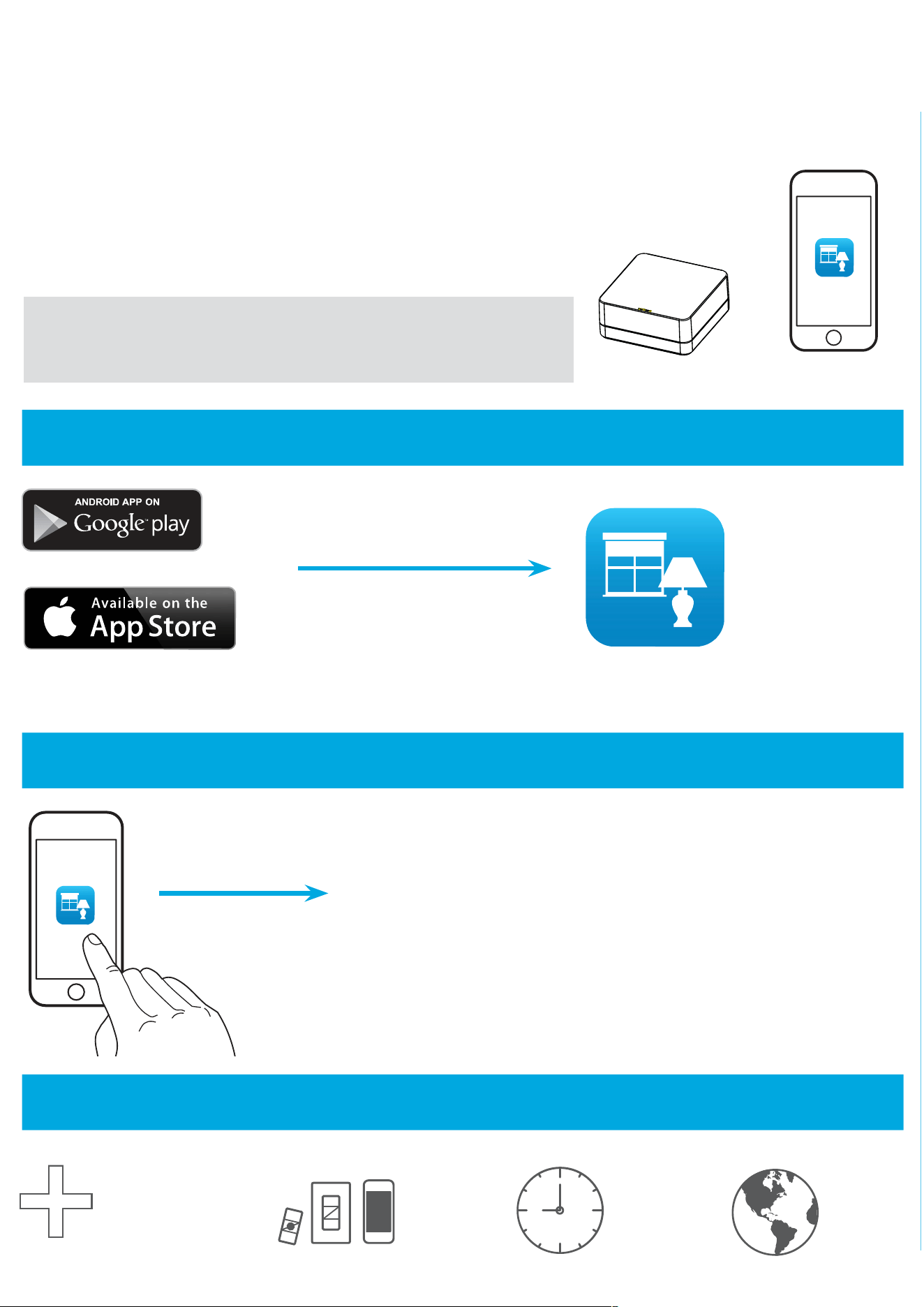
Using your Caséta
T
Wireless kit
The Lutron
®
app will walk you through
setting up your devices.
www.casetawireless.com/LutronApp
With a smartphone or tablet (Bridge required, sold separately)
Lutron
The Caséta
T
Wireless plug-in lamp dimmer can be controlled from a smartphone
when used with the Lutron
R
Smart Bridge
T
.
If you are using the dimmer and remote control with the Lutron
R
Smart Bridge
T
follow the instructions below.
Search for “Lutron Caseta”
Lutron
Lutron
R
Smart Bridge
T
Note:
If you are using the dimmer and remote control with another
manufacturer’s bridge, please refer to that manufacturer’s instructions
for set-up.
Lutron
Lutron
R
App
Add devices
• Pico
R
remotes
• Dimmers
• Shades
Control
three ways
Schedule
your lights
Connect
while away
Apple is a trademark of Apple Inc., registered in the U.S. and other countries. AppStore is a service mark of Apple Inc.
3
Use the Lutron
®
app to complete
ALL
remaining steps
2
Launch
®
the Lutron
®
app
1
Download the Lutron
®
app
Lutron, , and Pico are registered trademarks and Caséta and Smart Bridge
are trademarks of Lutron Electronics Co., Inc. Google and the Google logo are
registered trademarks of Google Inc., used with permission.
© 2014 Lutron Electronics Co., Inc.
P/N 0301725 REV B
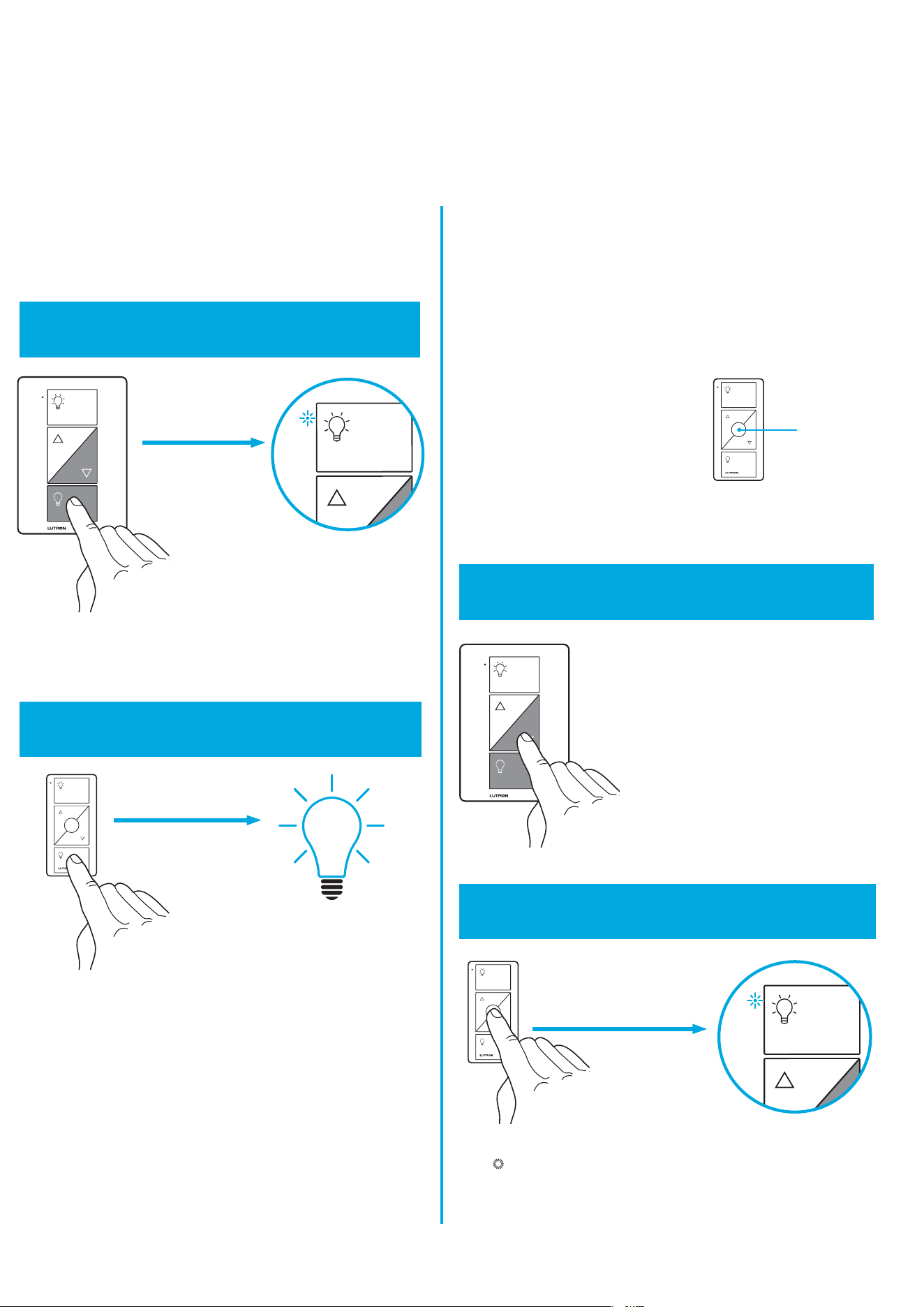
3
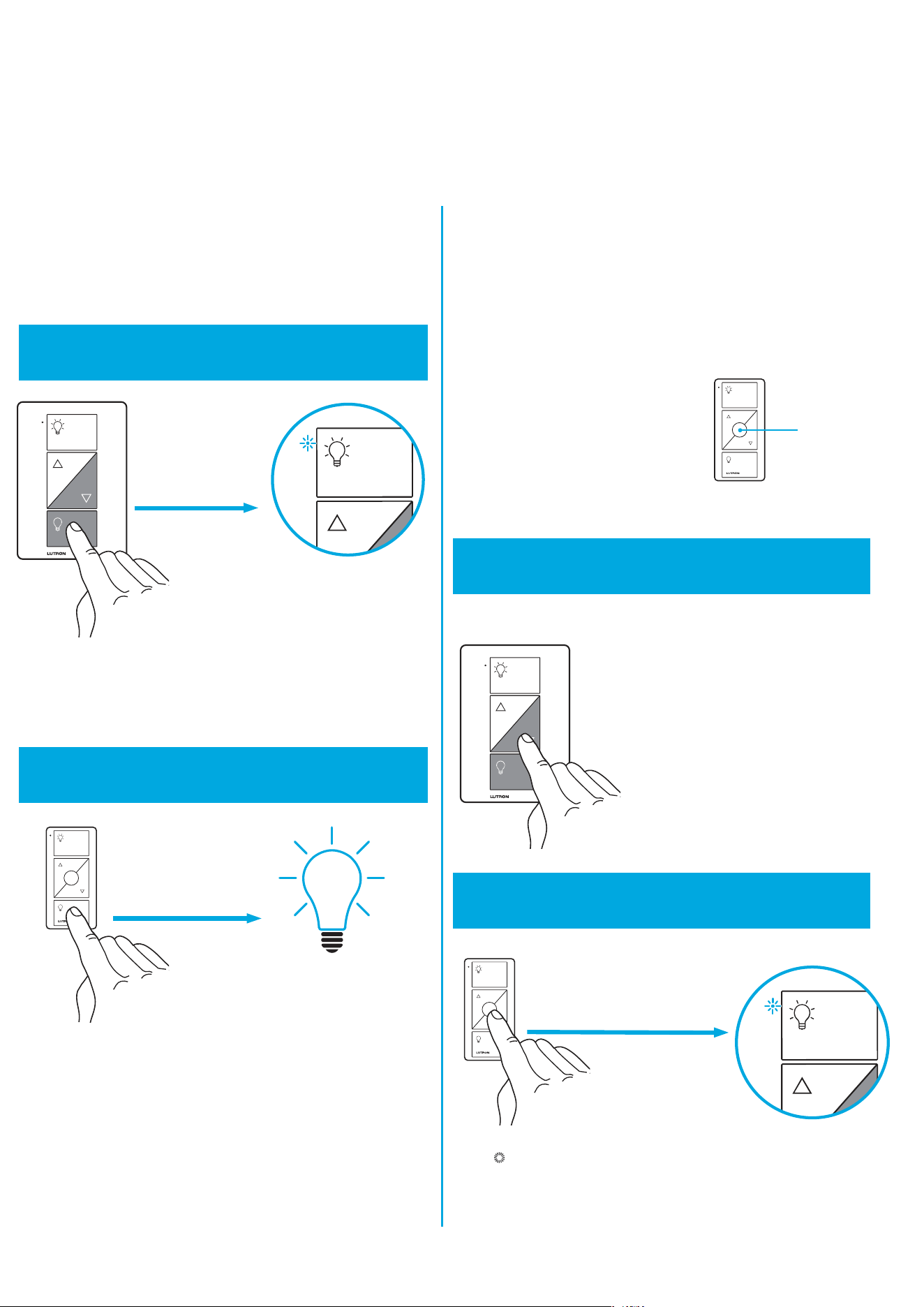
Set desired light level on dimmer
1
Press and hold “off” button on dimmer
Pairing the lamp dimmer and
Pico
R
remote control
2
Press and hold “off” button on remote
x3
Changing the favorite light level
on the Pico
R
remote control
(optional)
You can use the round “favorite”
button on the Pico
R
remote
control to recall a favorite light
level. We’ve set it to 50%, but you
can change it to any level you like.
Favorite
Hold for 6 seconds
until LED
starts blinking.
Hold for 6 seconds until
lights flash 3 times.
Repeat steps to pair other Pico
R
remote
controls.
4
Press and hold “favorite” button on remote
Hold for 6 seconds until the
plug-in lamp dimmer LED
blinks twice. New favorite
level is now saved.
x2
Without a smartphone or tablet (Bridge not required)
Controlremoto Pico
®
&
atenuador para lámparas enchufables
Lea antes de instalar.
Bienvenido, y gracias por comprar un kit de
atenuación Caséta
T
Wireless.
Antes de instalar el atenuador para lámparas
enchufables, veael video de instalación en
www.casetawireless.com/support
¡Esperamos que disfrute la comodidad de Caséta
T
Wireless!
Contenido suministrado
Doble su garantía
¿Le encantan los atenuadores Caséta
T
Wireless? ¿Tiene alguna idea para mejorarlos?
Cuéntenos su opinión y extenderemos la
garantía por 1año.
www.casetawireless.com/register
Wireless
guía de inicio rápido
Atenuador para lámparas
enchufables
(PD-3PCL)
Control remoto Pico
R
(PJ2-3BRL)
P/N 0301725 REV B
Garantía
Para obtener información sobre la garantía, visite
www.casetawireless.com/warranty
Para ver características avanzadas, consejos para
usar los atenuadores Caséta
T
Wireless con luces LFCA
y LED, la línea completa de productos Caséta
T
Wireless
y más, visite www.casetawireless.com/features
Nota importante:
Use solo con lámparas LED atenuables, LFCA
atenuables, halógenas, o incandescentes.
No exceda el vataje máximo total que se muestra
acontinuación:
Foco Vataje máximo
LED y LFCA 100 W
o
Incandescente yhalógena 300 W
Cómo instalar el atenuador de lámpara
1
Encienda la lámpara
2
Conecte las lámpara(s)
Enchufe el cable de la lámpara en uno de los lados
del atenuador para lámparas enchufables Caséta
T
Wireless.
Si desea controlar una segunda lámpara,
enciéndala yenchúfela en el otro lado.
Encienda la lámpara que quiere controlar y desenchúfela.
3
Enchufe el atenuador de lámpara
Notas importantes:
1. Solo para uso en interiores.
2. Opere entre 0°C (32°F) y 40°C (104°F).
Cómo usar sus controles
PRECAUCIÓN
Para evitar el sobrecalentamiento y evitar posibles daños a
otros equipos, no lo use para controlar electrodomésticos
con motor o electrodomésticos con transformador.
Códigos
Instale de acuerdo con todos los códigos eléctricos
nacionales y locales.
Este dispositivo cumple con la parte 15 de las reglas de la FFC (Comisión Federal
deComunicaciones) y con las normas RSS de IC (Industry Canada) para dispositivos
exentos de licencia. La operación está sujeta a las dos condiciones siguientes:
(1)Estedispositivo no debe causar interferencia perjudicial y (2) este dispositivo debe
aceptar cualquier interferencia recibida, incluyendo las que pueden causar una operación
indeseada. Cualquier cambio o modificación sin la aprobación explícita deLutron
Electronics Co., Inc. puede anular la autorización del usuario para operar elequipo.
Nota: Este equipo ha sido probado y se comprobó que cumple con los límites para
dispositivos digitales de ClaseB, de acuerdo con la Parte 15 de las Reglas de la FCC.
Estos límites se han diseñado para proveer una protección razonable contra interferencias
dañinas en una instalación residencial. Este equipo genera, usa ypuede emitir energía de
radiofrecuencia y si no se instala y utiliza de acuerdo con las instrucciones, puede causar
interferencia dañina en las comunicaciones de radio. Sin embargo, no hay garantía
de que no ocurrirá interferencia en una instalación determinada. Si este equipo causa
interferencia dañina en la recepción de la radio ola televisión, que se puede determinar
encendiendo y apagando el equipo, elusuario puede tratar de corregir la interferencia
mediante uno o más de los siguientes procedimientos:
—Cambiar la orientación o ubicación de la antena receptora.
—Aumentar la separación entre el equipo y el receptor.
— Conectar el equipo a un receptáculo que esté en un circuito diferente
al del receptor.
— Consultar al distribuidor o a un técnico experimentado en radio/TV para obtener ayuda.
Información de la FCC/IC
Clasificación de los dispositivos
Atenuador para lámparas Control remoto Pico
R
enchufables PJ2-3BRL
PD-3PCL 3V
-
10mA
120V
~
50/60Hz (1) Batería CR2032 (incluida)
Encendido
Apagado
Más oscuro
Más brillante
Más brillante
Encendido
Apagado
Más oscuro
Favorito
Control remoto Pico
R
Atenuador para lámparas enchufables
Ingrese a www.casetawireless.com/support para obtener
sugerencias adicionales para la resolución de problemas.
Síntomas Causa probable y acción
No se enciende la
lámpara o la luz
LED del atenuador
de lámpara.
• Los foco(s) están quemados.
• La lámpara está apagada.
• La lámpara no está enchufada.
• La toma de corriente está
apagada.
La luz no responde
al control remoto
Pico
R
.
• Falló el emparejamiento del
atenuador con el control remoto
Pico
R
; consulte Cómo emparejar
elatenuador de lámpara con el
control remoto Pico
R
.
• El atenuador ya se encuentra en el
nivel de luz solicitado por el control
remoto Pico
R
.
• El control remoto Pico
R
está fuera
del rango de funcionamiento
de9m(30pies).
• Las baterías del control remoto
Pico
R
están bajas.
• Las baterías del control remoto
Pico
R
están mal instaladas.
• Los focos se
apagan mientras
seatenúan.
• Los focos se
encienden en
un nivel de luz
alto pero no se
encienden en un
nivel de luz bajo.
• Los focos
parpadean
cuando se
atenúan a un
nivel de luz bajo.
Verifique que los focos tengan
la marca de atenuable y visite
www.casetawireless.com/lowend
para obtener información sobre
cómo ajustar el atenuador para un
mejor rendimiento del foco.
Resolución de problemas

NOTA: Puede combinar focos LFCA y LED
atenuables, así como focos de luz halógenos e
incandescentes, con los atenuadores Caséta
T
Wireless.
Los focos de luz atenuables LFCA y LED
varían en su rendimiento de atenuación. Si está
utilizando estos focos y parpadean o se apagan,
visite www.casetawireless.com/lowend
para obtener información sobre cómo ajustar el
atenuador para un mejor rendimiento del foco.
Para obtener una lista completa de los
LFCA y LED atenuables compatibles, visite
www.casetawireless.com/bulblist
Los focos de luz compatibles incluyen:
Cree
R
BA19-08027OMF-12DE26-1U100
Feit
R
A19/OM800/LED
Philips
R
9290002268
9290002267
Sylvania
R
LED8A/DIM/F/827
LED—hasta 100W
LFCA—hasta 100W
Funciona con focos de luz
atenuable de bajo consumo
energético:
Lutron Electronics Co., Inc.
7200 Suter Road
Coopersburg, PA 18036-1299, E.U.A.
Incandescente—hasta 300 W
Halógeno—hasta 300 W
Uso del kit Caséta
T
Wireless
La aplicación LutronR lo guiará por la
configuración de sus dispositivos.
www.casetawireless.com/LutronApp
Con un teléfono inteligente o una tableta
(se requiere un dispositivo de conexión que se vende por separado)
Lutron
El atenuador para lámparas enchufables CasétaT Wireless se puede controlar con un
teléfono inteligente cuando se utiliza con el dispositivo LutronR Smart BridgeT.
Si utiliza el atenuador y el control remoto con el Lutron® Smart BridgeT,
siga las instrucciones a continuación.
Busque “Lutron Caseta”
Lutron
LutronR Smart BridgeT
Nota: Si utiliza el atenuador y el control remoto con el dispositivo
de conexión de otro fabricante, consulte las instrucciones del
fabricante para configurarlo
Lutron
Aplicación
LutronR
Añada dispositivos
• Controles
remotos PicoR
• Atenuadores
• Persianas
Controle
de tres
maneras
Programe
sus luces
Conecte
a larga
distancia
Apple es una marca registrada de Apple Inc. en E.U.A. y en otros países. App Store es una marca de servicio de Apple Inc.
3
Utilice la aplicación de Lutron® para completar
TODOS
los pasos restantes
2
Inicie la aplicación Lutron®
1
Descargue la aplicación Lutron®
Cómo emparejar el atenuador
de lámpara con el control
remoto Pico
R
x3
Cómo cambiar el nivel de luz
favorito en el control remoto
Pico
R
(opcional)
x2
Sin un teléfono inteligente o una tableta
(no se requiere un dispositivo de conexión)
Mantenga presionado
durante 6 segundos
hasta que la luz
parpadee 3 veces.
1
Mantenga presionado el botón
“apagado” del atenuador
2
Mantenga presionado el botón
“apagado”del control remoto
Presione durante
6segundos
hasta que la luz
LED comience
aparpadear.
Repita los pasos para emparejar otros
controles Pico
R
.
3
Configure el nivel de luz deseado
enelatenuador
4
Mantenga presionado el botón
“favorito”del control remoto
Puede usar el botón redondo
“favorito” en el control remoto
Pico
R
para recuperar un nivel
de luz favorito. Lohemos
establecido en 50%, pero puede
cambiarlo al nivel que desee.
Favorito
Espere 6segundos hasta que el
LED del atenuador enchufable
parpadee dosveces. El nuevo
nivel favorito ha sido guardado.
Lutron, , y Pico son marcas registradas y FASS y Caséta son marcas
comerciales de Lutron Electronics Co., Inc. NEC es una marca registrada de
National Fire Protection Association, Quincy,Massachusetts. Google y el logotipo
de Google son marcas registradas de Google, Inc., utilizadas con autorización.
© 2014 Lutron Electronics Co., Inc.
P/N 0301725 REV B