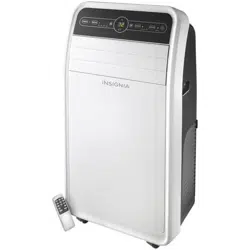
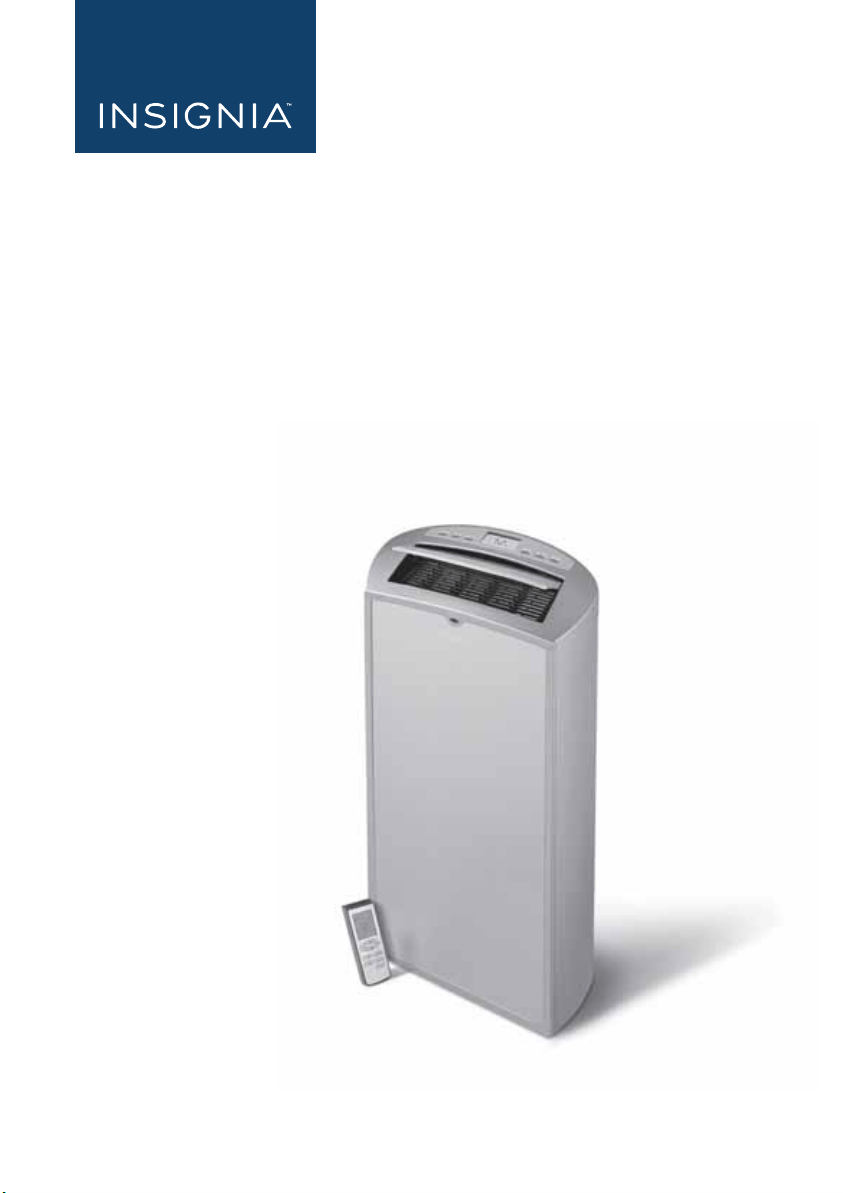
Before using your new product, please read these instructions to prevent any damage.
USER GUIDE
14,000 BTU Portable
Air Conditioner
NS-AC14PWH8
NS-AC14PWH8_16-0836_MAN_V1_ENG.fm Page 1 Wednesday, March 8, 2017 1:12 PM
www.insigniaproducts.com
2
Contents
Introduction . . . . . . . . . . . . . . . . . . . . . . . . . . . . . . . . . . . . . . . . . . . . . . . . . . . . . . . 2
Important Safety Instructions. . . . . . . . . . . . . . . . . . . . . . . . . . . . . . . . . . . . . . . 3
Electrical Safety . . . . . . . . . . . . . . . . . . . . . . . . . . . . . . . . . . . . . . . . . . . . . . . . . . . . 6
Integrated circuit breaker . . . . . . . . . . . . . . . . . . . . . . . . . . . . . . . . . . . . .6
Preferred grounding method. . . . . . . . . . . . . . . . . . . . . . . . . . . . . . . . . .6
Temporary grounding. . . . . . . . . . . . . . . . . . . . . . . . . . . . . . . . . . . . . . . . .7
Features . . . . . . . . . . . . . . . . . . . . . . . . . . . . . . . . . . . . . . . . . . . . . . . . . . . . . . . . . . .7
Package contents . . . . . . . . . . . . . . . . . . . . . . . . . . . . . . . . . . . . . . . . . . . . . 8
Main components . . . . . . . . . . . . . . . . . . . . . . . . . . . . . . . . . . . . . . . . . . . .9
Control panel . . . . . . . . . . . . . . . . . . . . . . . . . . . . . . . . . . . . . . . . . . . . . . . .11
Remote control . . . . . . . . . . . . . . . . . . . . . . . . . . . . . . . . . . . . . . . . . . . . . .13
Setting up your portable air conditioner . . . . . . . . . . . . . . . . . . . . . . . . . . .14
Placing your air conditioner . . . . . . . . . . . . . . . . . . . . . . . . . . . . . . . . . .15
Installing your air conditioner . . . . . . . . . . . . . . . . . . . . . . . . . . . . . . . .16
Attaching the drain hose for DRY mode operation (optional) . .19
Using your portable air conditioner . . . . . . . . . . . . . . . . . . . . . . . . . . . . . . . .21
Inserting the batteries in the remote control . . . . . . . . . . . . . . . . . .21
Using the air conditioner . . . . . . . . . . . . . . . . . . . . . . . . . . . . . . . . . . . . .22
Troubleshooting . . . . . . . . . . . . . . . . . . . . . . . . . . . . . . . . . . . . . . . . . . . . . . . . . .23
Understanding your air conditioner’s automatic protection . . .24
Cleaning and maintaining your air conditioner . . . . . . . . . . . . . . . . . . . . .25
Cleaning the case . . . . . . . . . . . . . . . . . . . . . . . . . . . . . . . . . . . . . . . . . . . .25
Cleaning the air filters . . . . . . . . . . . . . . . . . . . . . . . . . . . . . . . . . . . . . . . .25
Emptying the water collection tank. . . . . . . . . . . . . . . . . . . . . . . . . . .27
Storing your air conditioner . . . . . . . . . . . . . . . . . . . . . . . . . . . . . . . . . .28
Restarting your air conditioner after storage . . . . . . . . . . . . . . . . . .28
Specifications . . . . . . . . . . . . . . . . . . . . . . . . . . . . . . . . . . . . . . . . . . . . . . . . . . . . .28
ONE-YEAR LIMITED WARRANTY. . . . . . . . . . . . . . . . . . . . . . . . . . . . . . . . . . . .29
Introduction
Congratulations on your purchase of a high-quality Insignia product. Your
NS-AC14PWH8 represents state of the art design in portable air
conditioning, designed for reliable and trouble-free performance.
NS-AC14PWH8_16-0836_MAN_V1_ENG.fm Page 2 Wednesday, March 8, 2017 1:12 PM
3
14,000 BTU Portable Air Conditioner
www.insigniaproducts.com
Important Safety Instructions
WARNING
1 Read these instructions.
2 Keep these instructions.
3 Heed all warnings.
4 Follow all instructions.
5 Do not use this machine near water.
6 Clean only with damp cloth.
7 Do not block any ventilation openings. Install in accordance with the
manufacturer's instructions.
8 Do not install near any heat sources such as radiators, heat registers,
stoves, or other apparatus (including amplifiers) that produce heat.
9 Do not defeat the safety purpose of the polarized or grounding-type
plug. A polarized plug has two blades with one wider than the other. A
grounding type plug has two blades and a third grounding prong. The
wide blade or the third prong are provided for your safety. If the
provided plug does not fit into your outlet, consult an electrician for
replacement of the obsolete outlet.
10 Protect the power cord from being walked on or pinched particularly
at plugs, convenience receptacles, and the point where they exit from
the machine.
11 Do not attempt to modify or extend the power cord of this machine.
12 Unplug this machine during lightning storms or when it will not be
used for long periods of time.
13 Make sure that the available AC power matches the voltage
requirements of this machine.
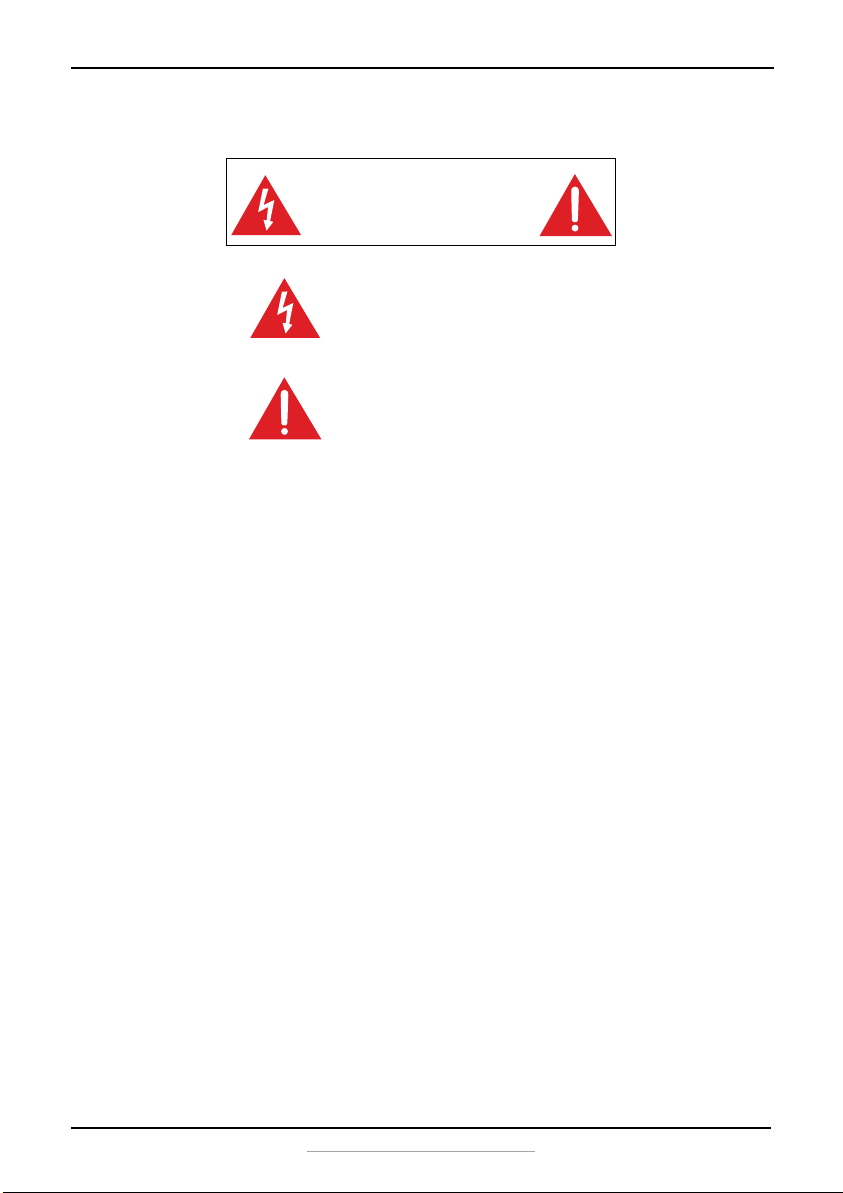
CAUTION
RISK OF ELECTRIC SHOCK
DO NOT OPEN
This symbol indicates that dangerous voltage
constituting a risk of electric shock is present
within your portable air conditioner.
This symbol indicates that there are important
operating and maintenance instructions in the
literature accompanying your portable air
conditioner.
NS-AC14PWH8_16-0836_MAN_V1_ENG.fm Page 3 Wednesday, March 8, 2017 1:12 PM
4
NS-AC14PWH8
www.insigniaproducts.com
14 Do not handle the plug with wet hands. This could result in an electric
shock.
15 Unplug the power cord by holding the plug, never by pulling the cord.
16 Do not turn the machine on or off by plugging or unplugging the
power cord.
17 Turn off the machine before unplugging it.
18 Refer all servicing to qualified service personnel. Servicing is required
when the machine has been damaged in any way, such as
power-supply cord or plug is damaged, liquid has been spilled or
objects have fallen into the machine, the machine has been exposed
to rain or moisture, does not operate normally, or has been dropped.
19 To reduce the risk of fire or electric shock, do not expose this machine
to rain, moisture, dripping, or splashing, and no objects filled with
liquids should be placed on top of it.
20 Batteries should not be exposed to excessive heat such as sunshine,
fire, or the like.
Additional precautions
• This machine is intended for household use. Do not use for any other
purpose.
• Use this machine indoors in a dry location only. Do not use it outdoors.
• Do not place heavy objects on the machine, as this could damage the
machine.
• Wipe the machine with a soft cloth to clean it. Do not use wax, thinner, or
irritating detergents.
• Do not allow children or pets to drink the water discharged by the
machine.
• Do not disassemble or attempt to repair the machine yourself.
• Do not plug this machine into an outlet with several other high electrical
usage appliances.
• Keep the machine away from heat sources and avoid direct sunlight.
• If the machine is making a loud noise or producing an odor or smoke,
switch off it, disconnect the plug, and immediately try to determine the
cause.
• Do not place heavy objects on the power cord to avoid it being crushed
and causing an electric shock.
• Do not put your fingers or hard objects into the outlet air guide bars.
• Turn the machine off and unplug it if there is water inside the machine,
then contact qualified service personnel for servicing.
Caution
Danger of explosion if battery is incorrectly replaced. Replace
only with the same or equivalent type.
NS-AC14PWH8_16-0836_MAN_V1_ENG.fm Page 4 Wednesday, March 8, 2017 1:12 PM
5
14,000 BTU Portable Air Conditioner
www.insigniaproducts.com
• Turn the machine off and unplug it before cleaning, moving, or servicing
it.
• To avoid injury, do not allow children or other individuals with special
needs to touch or operate the machine. The machine should only be used
with adult supervision.
• Place the air conditioner on a flat surface and upright to ensure the
normal operation of the compressor.
• Do not use the machine near gasoline or other flammable liquids.
• Do not use aerosol sprays or other solvents near the machine. This may
cause plastic deformation or possibly damage the electrical components
of the machine.
• The air conditioner unit must always be stored and transported
upright, otherwise you may cause irreparable damage to the
compressor. In case of doubt, we suggest that you wait for at least
24 hours before you start air-conditioning unit.
• Avoid restarting the air conditioning unit unless three minutes have
passed since being turned off, or the compressor may get damaged.
WARNING
Electric Shock Hazard
Failure to follow these instructions can result in electric shock, fire, or
death.
• This unit must be properly grounded.
• Do not, under any circumstances, cut or remove the grounding plug.
• If you do not have a properly grounded AC outlet, or if there is any
doubt that the outlet is not properly grounded, a qualified electrician
should check the outlet and circuit and, if necessary, install a properly
grounded outlet.
• This air conditioner must be plugged into a grounded 115V, 60 Hz AC
outlet, protected by a 15 amp time-delay fuse or circuit breaker.
• This air conditioner must be installed in accordance with national
wiring codes.
• Do not alter or modify the plug or cord of this air conditioner. If the
power cord becomes worn or damaged, the cord should only be replaced
by a qualified service technician using genuine replacement parts.
• Do not use an extension cord.
NS-AC14PWH8_16-0836_MAN_V1_ENG.fm Page 5 Wednesday, March 8, 2017 1:12 PM
6
NS-AC14PWH8
www.insigniaproducts.com
Electrical Safety
Integrated circuit breaker
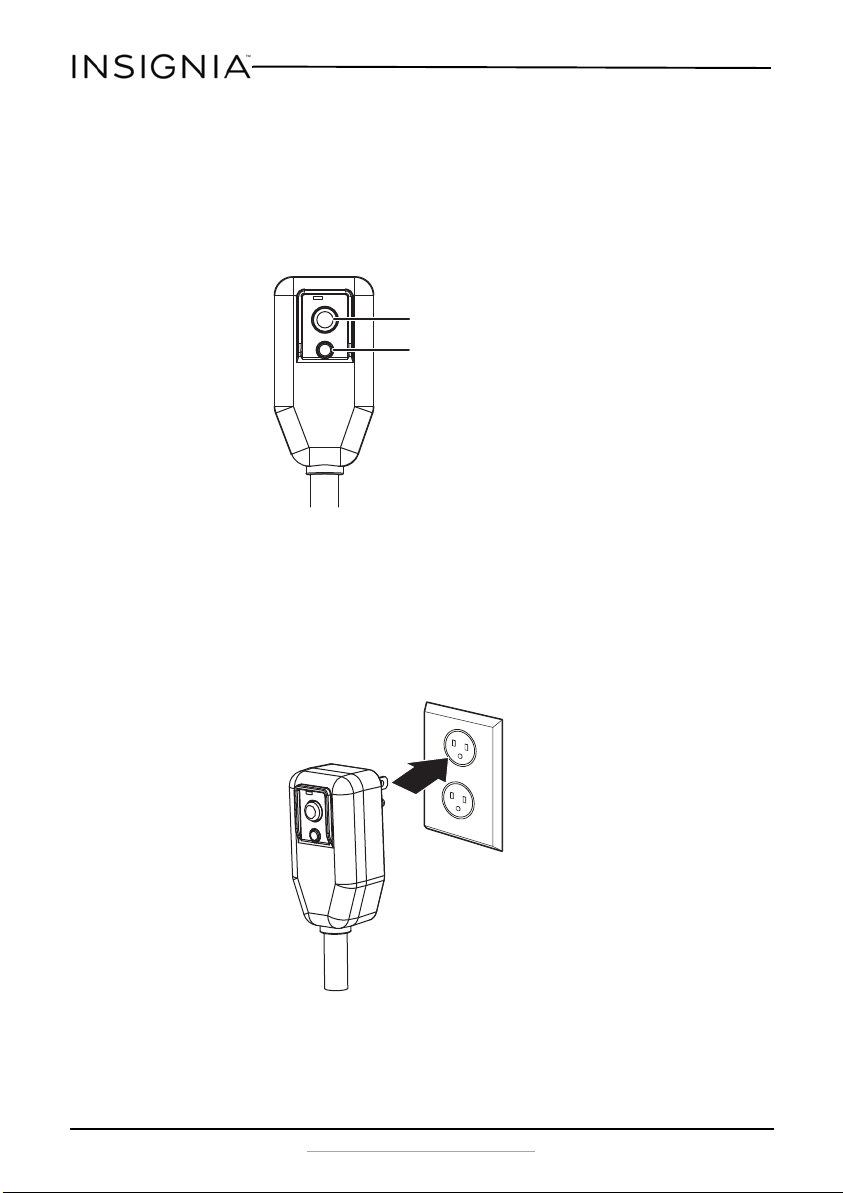
For additional safety, the power cord on this air conditioner features an
integrated circuit breaker. You can test and reset the circuit breaker using
the buttons provided on the plug case.
The circuit breaker should be tested periodically by pressing the TEST
button then the RESET button. If the TEST button does not cause the
circuit breaker to trip, or if the RESET button does not stay engaged,
unplug the air conditioner immediately and contact an Insignia
technician.
Preferred grounding method
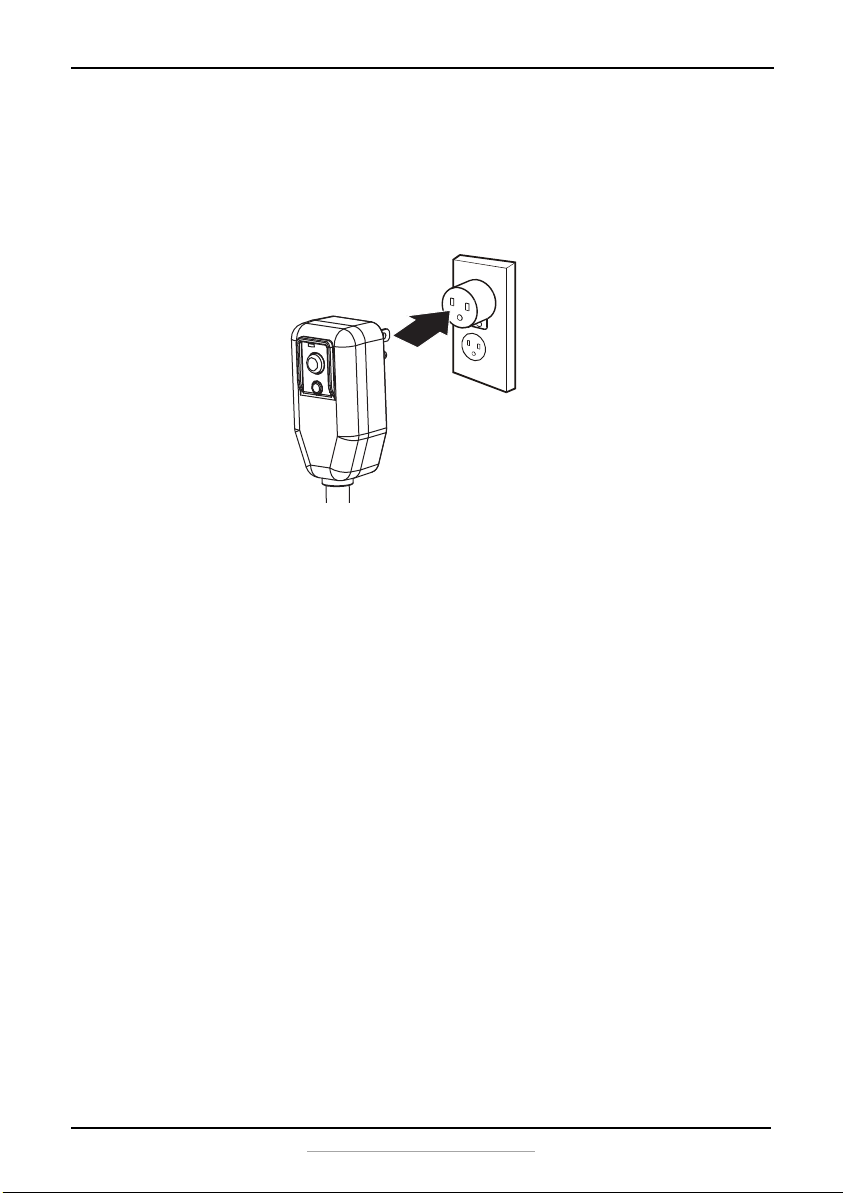
TEST button
RESET button
Make sure that a proper
ground exists before use.
NS-AC14PWH8_16-0836_MAN_V1_ENG.fm Page 6 Wednesday, March 8, 2017 1:12 PM
7
14,000 BTU Portable Air Conditioner
www.insigniaproducts.com
Temporary grounding
Due to potential safety hazards, we strongly discourage the use of an
adapter plug. If an adapter plug must be used for a temporary
connection, use only a UL-listed adapter with a minimum capacity of
120V~60Hz, 15A, and 1800W. Make sure that the large slot of the adapter
is aligned with the large slot in the outlet.
To prevent damage to the adapter’s ground terminal, hold the adapter in
place while plugging or unplugging the air conditioner.
Attaching the adapter ground terminal to the wall receptacle cover screw
does not ground the appliance unless the cover screw is metal and not
insulated and the wall receptacle is grounded through the house wiring.
Frequent connection and disconnection can damage the ground terminal
on the adapter. Never use a broken or damaged adapter.
Features
• 14,000 BTU
• 3-in-1 design (air conditioner, dehumidifier, fan)
• Digital controls with LCD display
• Multiple fan speeds with auto control
• Programmable timer and remote control
• Anti-freezing protection
•Auto On/Off
Make sure that a proper
ground exists before use.
NS-AC14PWH8_16-0836_MAN_V1_ENG.fm Page 7 Wednesday, March 8, 2017 1:12 PM
8
NS-AC14PWH8
www.insigniaproducts.com
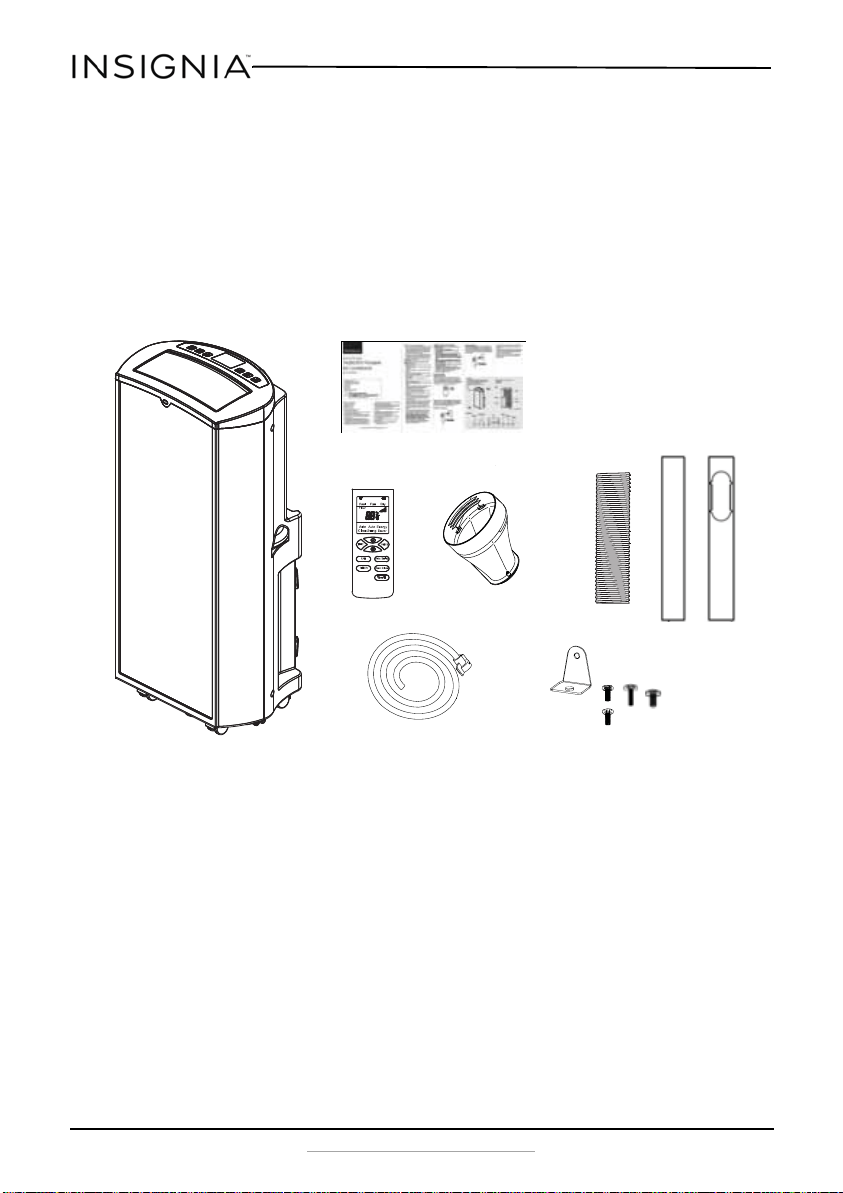
Package contents
• 14,000 BTU portable air conditioner
• Remote Control (2 batteries included)
•Drain hose
• Exhaust hose
• Hose adapter
• Window seal plate assembly (window seal plates [2], security bracket, and
four screws [two type A, one type B, and one type C])
•Quick Setup Guide
A
B
C
NS-AC14PWH8_16-0836_MAN_V1_ENG.fm Page 8 Wednesday, March 8, 2017 1:12 PM
9
14,000 BTU Portable Air Conditioner
www.insigniaproducts.com
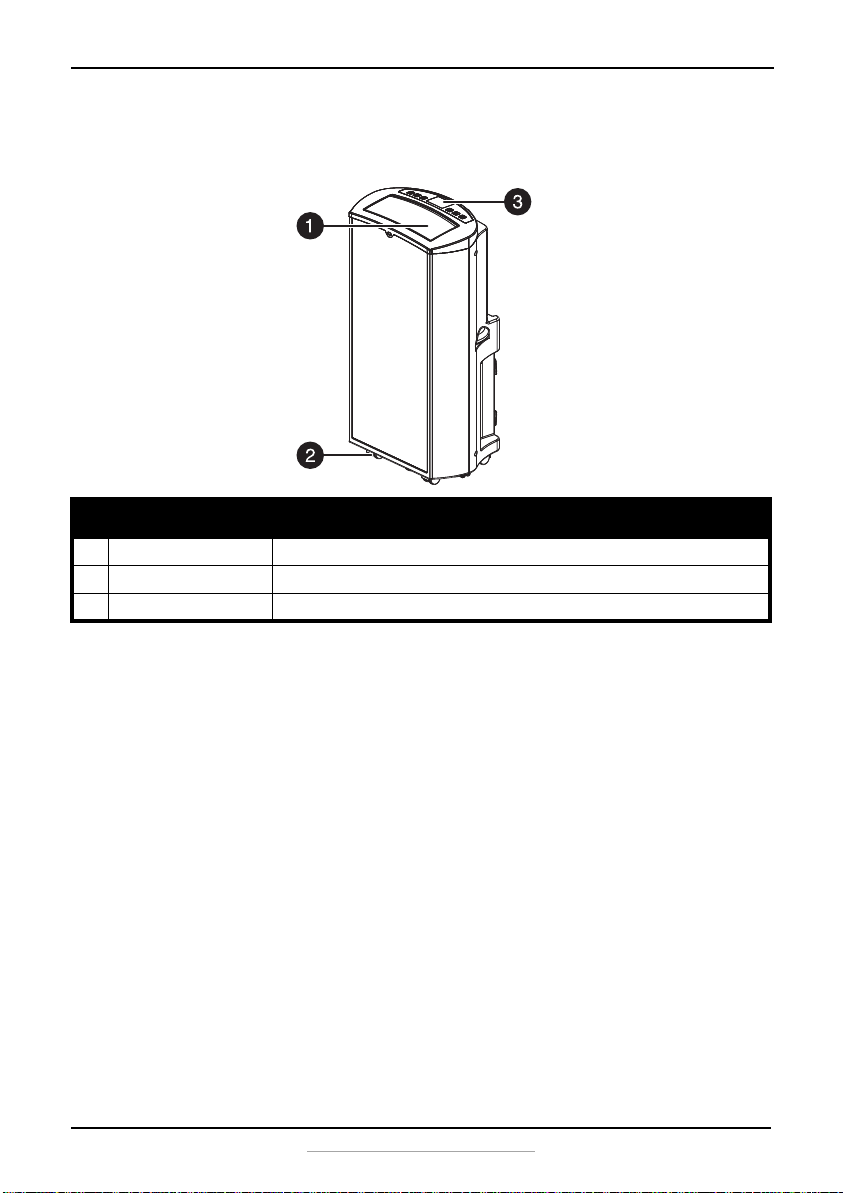
Main components
Front
# Item Description
1 Air outlet Allows cool air to exit the air conditioner. Do not block.
2 Swiveling casters Allow you to move the air conditioner easily on most surfaces. Pre-installed.
3 Control panel and display Displays air conditioner settings. Press the buttons to change settings.
NS-AC14PWH8_16-0836_MAN_V1_ENG.fm Page 9 Wednesday, March 8, 2017 1:12 PM
10
NS-AC14PWH8
www.insigniaproducts.com
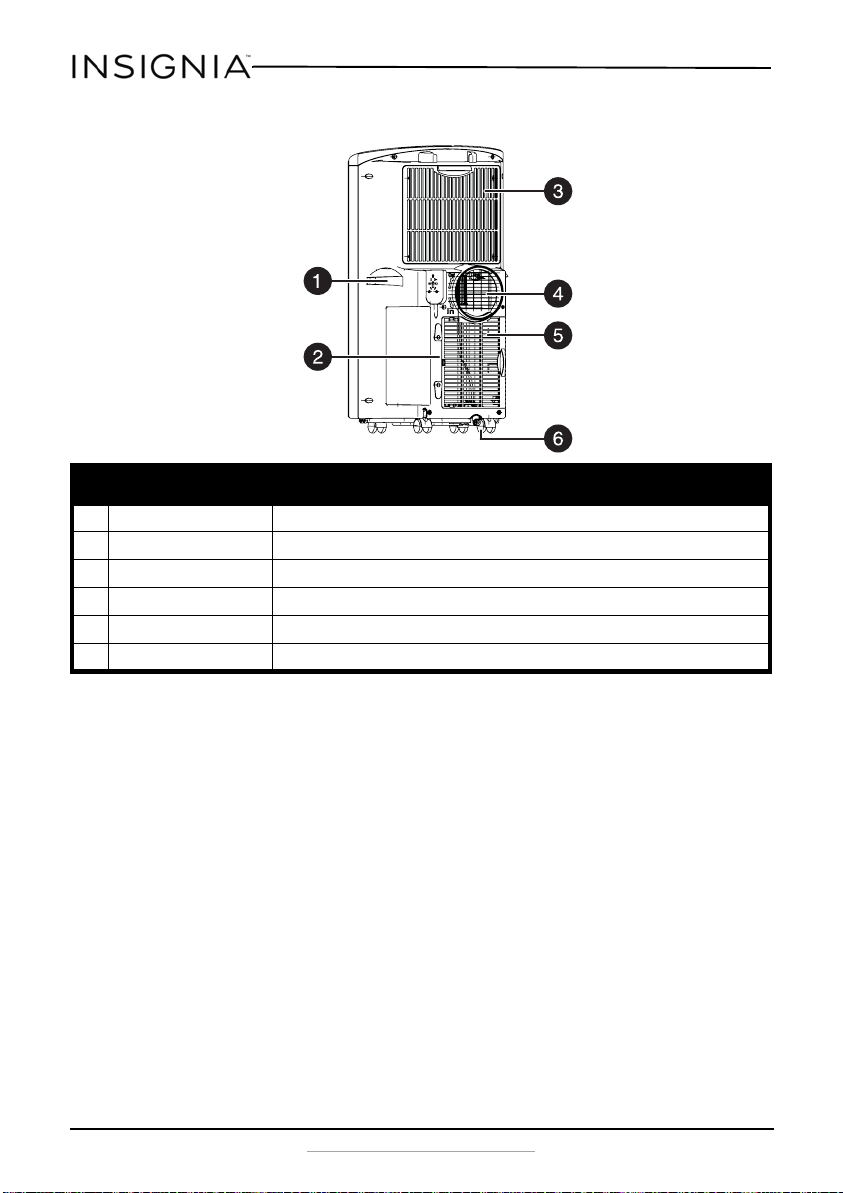
Back
# Item Description
1 Side handles (2) Provides a convenient grip when moving your air conditioner.
2 Power cord Plug this into a 115V 60 Hz AC outlet.
3 Upper filter Covers the upper air intake filter. Remove to clean the filter.
4 Air outlet Connect the exhaust hose to this outlet to vent exhaust air outside. Do not block.
5 Lower filter Covers the lower air intake filter. Remove to clean the filter.
6 Drain outlet/cover Use to drain the condensation from the air conditioner.
NS-AC14PWH8_16-0836_MAN_V1_ENG.fm Page 10 Wednesday, March 8, 2017 1:12 PM
11
14,000 BTU Portable Air Conditioner
www.insigniaproducts.com
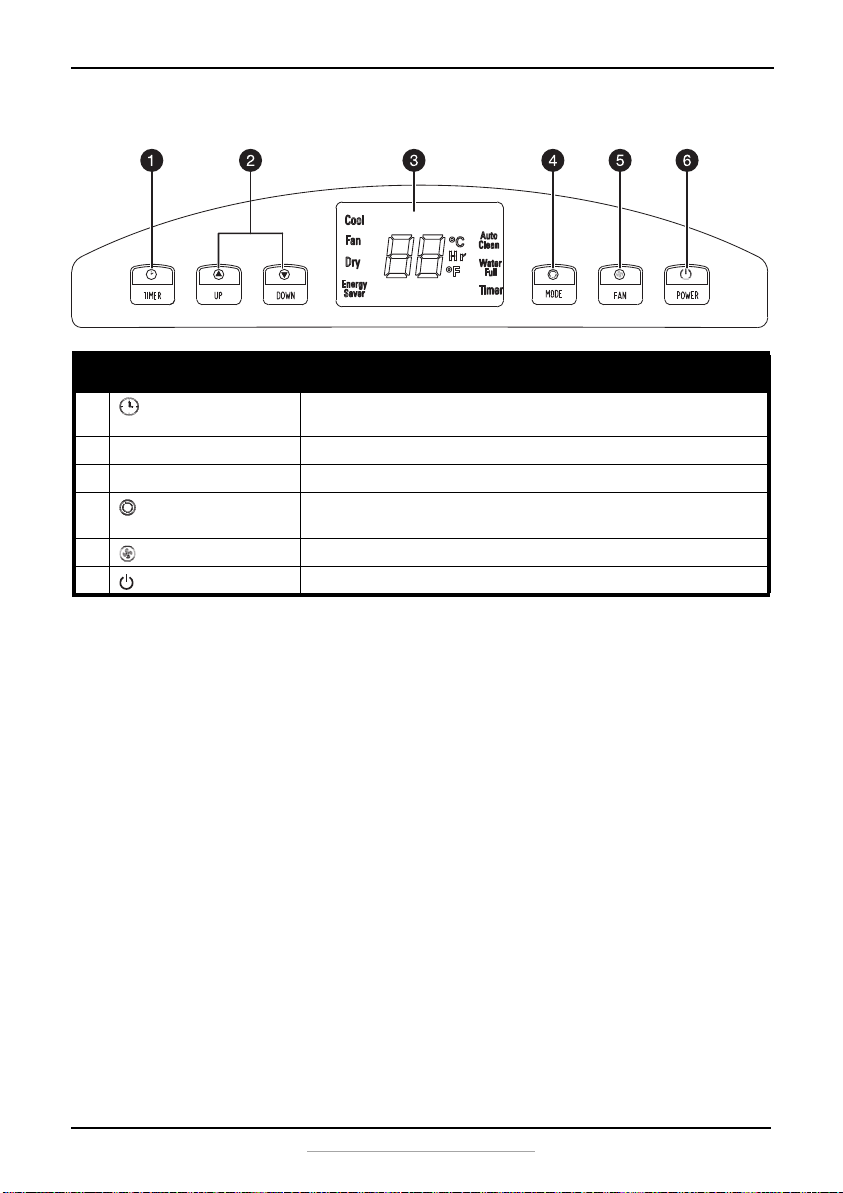
Control panel
# Item Description
1 TIMER button Press to set the air conditioner to turn on or off automatically. Change the settings
with the UP and DOWN buttons.
2
UP and
DOWN buttons Press to raise or lower settings.
3 Display Shows the temperature, timer, mode, and other important information.
4 MODE button Press to cycle the air conditioner through the available modes. Options include
COOL, FAN, DRY, and ENERGY SAVER.
5 FAN speed button Press to select low, medium, or high speed.
6 POWER button Press to turn the air conditioner on or off.
NS-AC14PWH8_16-0836_MAN_V1_ENG.fm Page 11 Wednesday, March 8, 2017 1:12 PM
12
NS-AC14PWH8
www.insigniaproducts.com
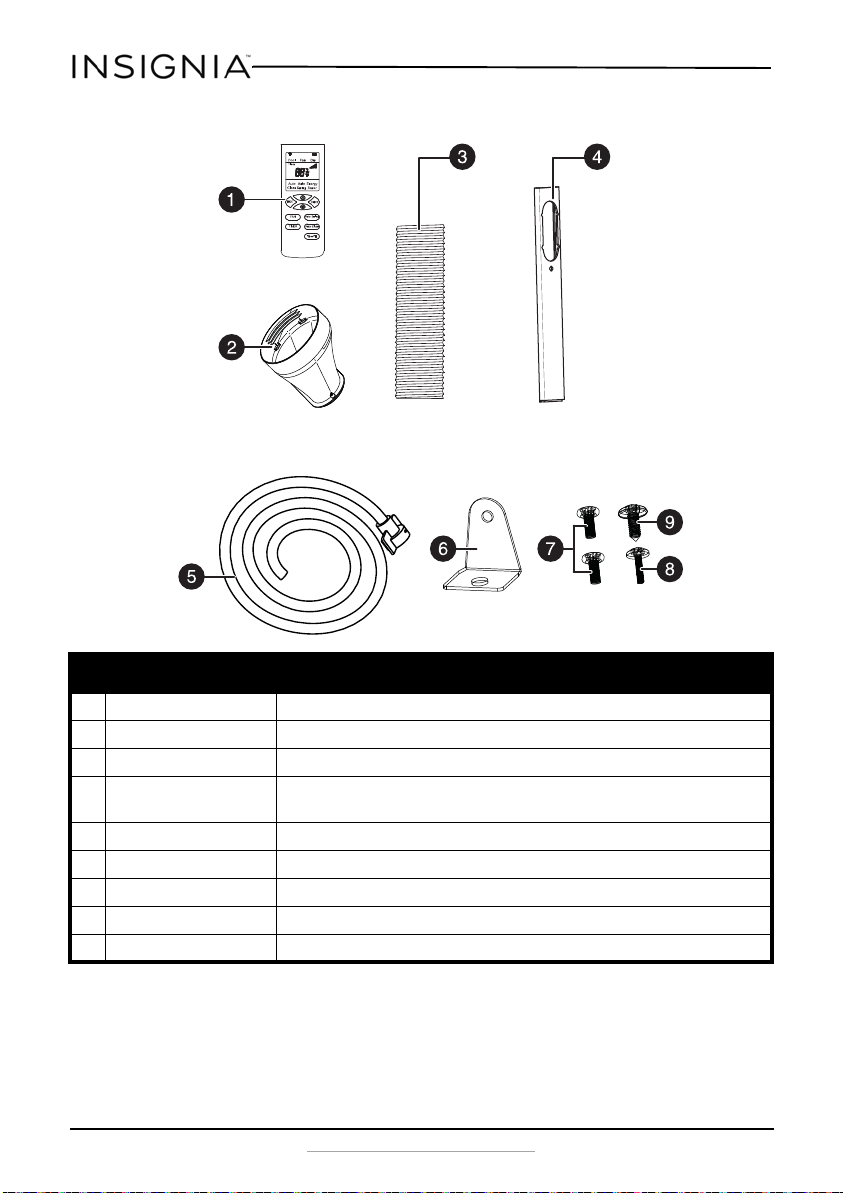
Accessories
# Item Description
1 Remote control Use to remotely control the air conditioner.
2 Hose adapter Connects the exhaust hose to the window installation kit to vent exhaust air outside.
3 Exhaust hose Used to vent exhaust air outside.
4 Window seal plate assembly Lets you route the air conditioner exhaust through a vertical or horizontal window
opening and seal your window at the correct height/width.
5 Drain hose Use to continuously drain the water from the air conditiioner.
6 Window security bracket Used to hold the window in place with the seal plate installed.
7 Screws A (2) Use one screw to secure the window adapter. (one is a spare)
8 Screw B Use to secure the hose adapter to the window adapter.
9 Screw C Used to hold the window security bracket in place.
NS-AC14PWH8_16-0836_MAN_V1_ENG.fm Page 12 Wednesday, March 8, 2017 1:12 PM
13
14,000 BTU Portable Air Conditioner
www.insigniaproducts.com
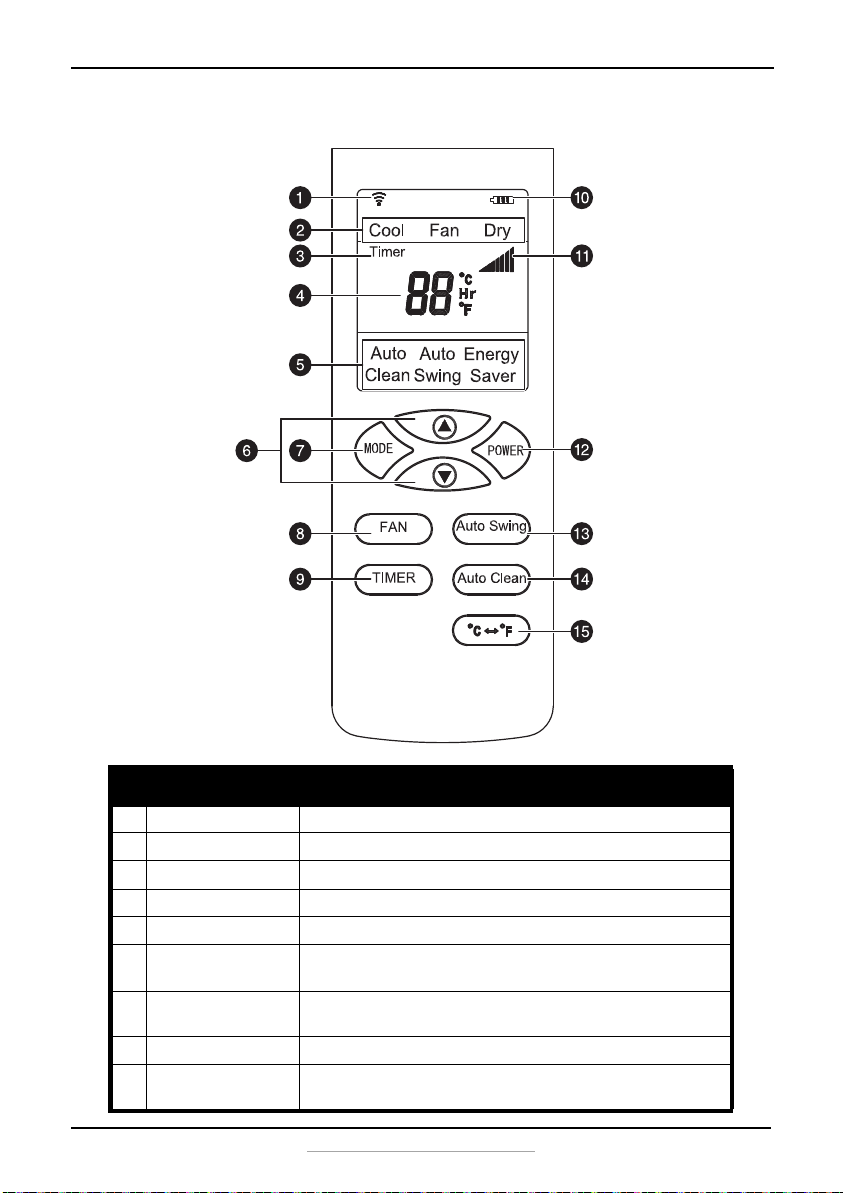
Remote control
# Item Description
1 LCD Lights when you press any button.
2 Mode indicator The selected mode lights.
3 Timer indicator Lights when the timer is being set.
4 Number display Shows the timer or temperature when settings are being made.
5 Function indicator Lights to show the current function.
6
(up) and
(down)
buttons
Press to adjust settings.
7 MODE button Press to cycle the air conditioner through the available modes. Options
include COOL, FAN, DRY, and ENERGY SAVER.
8 FAN button Press to select low, medium, or high speed.
9 TIMER button Press to set the air conditioner to turn on or off automatically. Change
settings with the
and
buttons.
NS-AC14PWH8_16-0836_MAN_V1_ENG.fm Page 13 Wednesday, March 8, 2017 1:12 PM
14
NS-AC14PWH8
www.insigniaproducts.com
Setting up your portable air conditioner
Remove and store (optional) packing materials for reuse. Remove any
shipping tape before using the air conditioner. Remove tape residue with
liquid dish soap and a damp cloth. Do not use sharp tools, alcohol,
thinners, or abrasive cleaners to remove adhesive, which could damage
the finish.
10 Battery indicator Shows the current battery charge in the remote control
11 Fan speed indicator Indicates the current fan speed.
12 POWER button Press to turn the air conditioner on or off.
13 Auto Swing button Press to turn the auto swing function on or off.
14 Auto Clean button Press to turn the auto clean function on or off.
15 °C -- °F button Press to switch between Fahrenheit and Celsius.
Note
• Do not remain in the direct airflow from the air conditioner
for extended periods.
• When used at the same time as stoves, fireplaces, or other
combustion/heating devices, make sure that there is
sufficient flow of fresh air into the room. Do not use in
tightly closed spaces with these types of devices.
• This air conditioner is intended for household use as a
consumer comfort appliance. Do not use it as a precision
climate control system for the purpose of cooling precision
equipment, food, pets, plants, artwork, and so on. Such
items could be damaged.
• Do not bend the hose downward when the window
installation kit is not being used. Doing so may cause
inferior performance or failure of the air conditioner.
# Item Description
NS-AC14PWH8_16-0836_MAN_V1_ENG.fm Page 14 Wednesday, March 8, 2017 1:12 PM
15
14,000 BTU Portable Air Conditioner
www.insigniaproducts.com
Placing your air conditioner
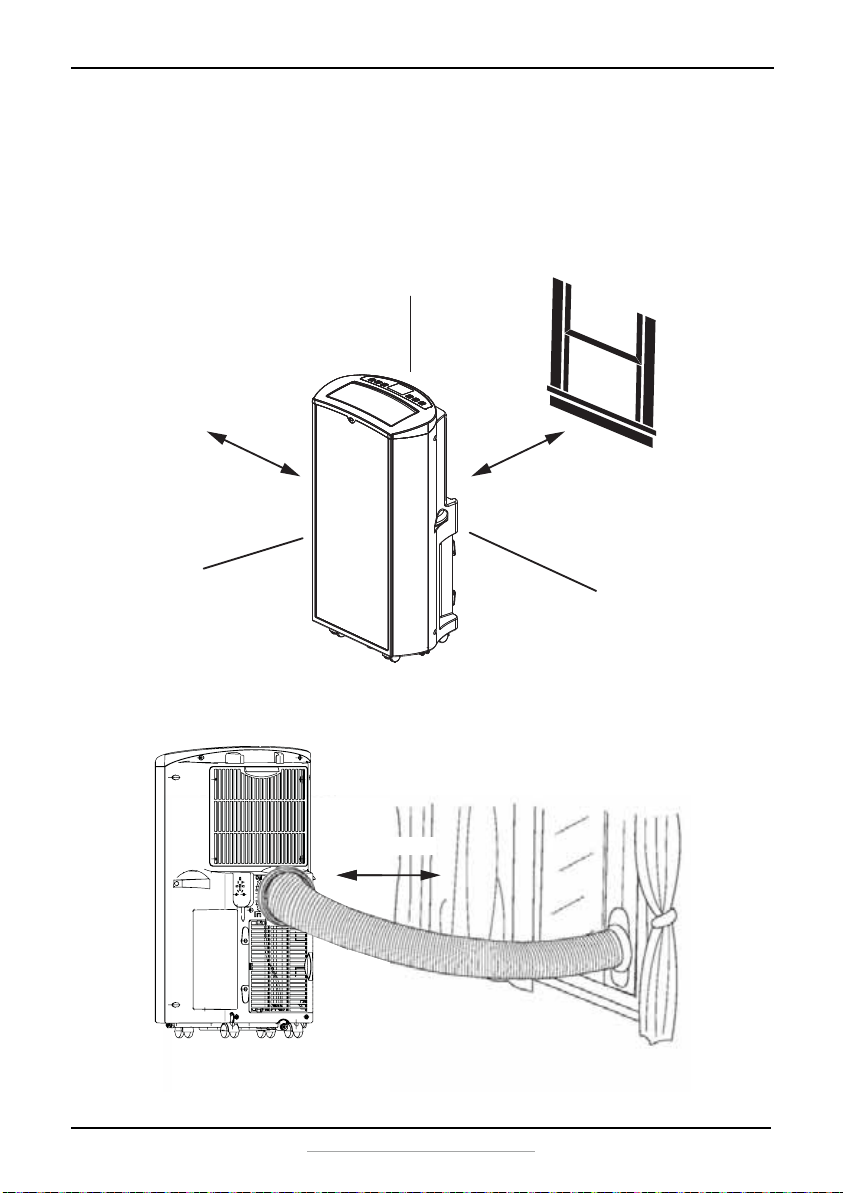
Place the unit on a flat, dry area near a window, so you can use the hose
and adapter to connect the air conditioner to the window installation kit
in order to vent the exhaust air outside.
To maintain good air circulation and optimum machine performance,
leave a 20 in. (50 cm) space around it.
20 in. (50 cm)
20 in. (50 cm)
20 in. (50 cm)
The power cord length
shown is not to scale.
NS-AC14PWH8_16-0836_MAN_V1_ENG.fm Page 15 Wednesday, March 8, 2017 1:12 PM
16
NS-AC14PWH8
www.insigniaproducts.com
Installing your air conditioner
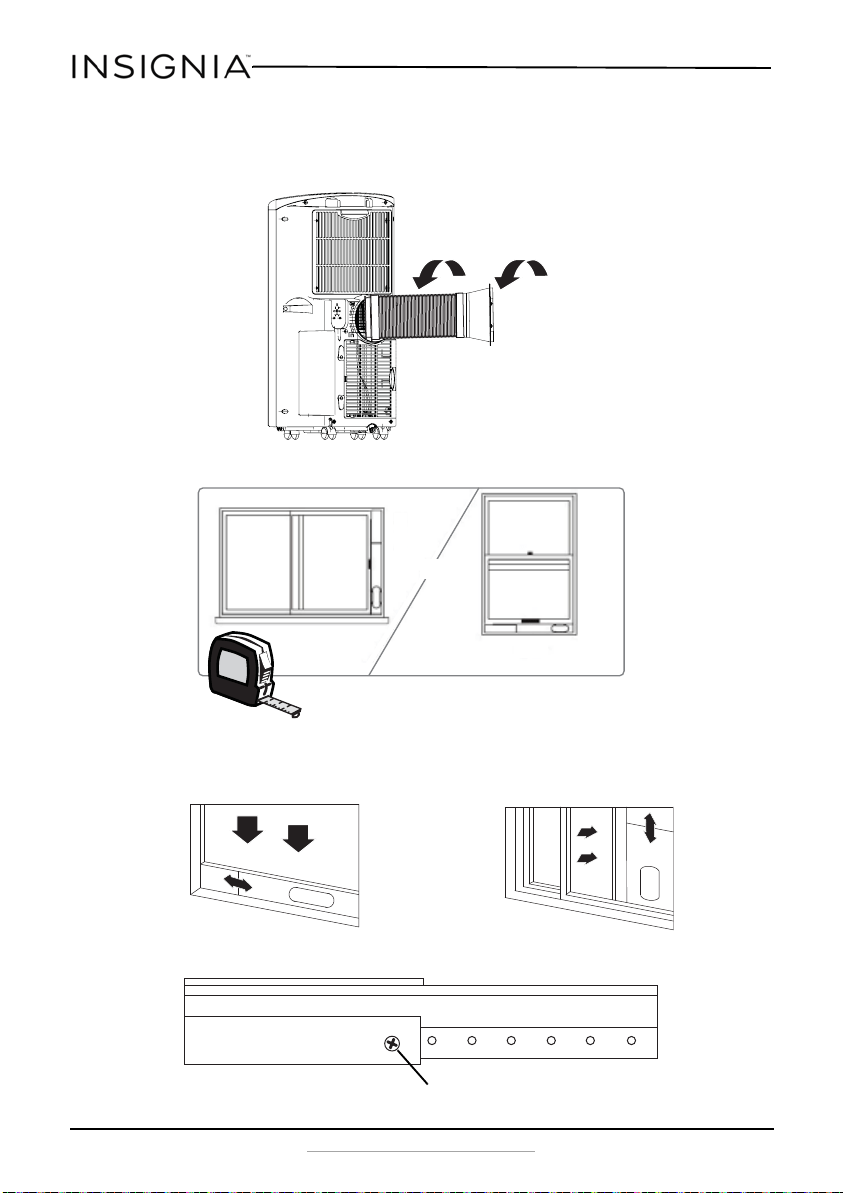
1 Screw the exhaust hose to the air outlet on the back of your air
conditioner, then screw the hose adapter to the other end of the hose.
2 Measure the window size.
3 Install the window sealing plate in the window opening, adjust the
length to fit the window opening and secure it with screw A
(provided).
OR
Screw A
NS-AC14PWH8_16-0836_MAN_V1_ENG.fm Page 16 Wednesday, March 8, 2017 1:12 PM
17
14,000 BTU Portable Air Conditioner
www.insigniaproducts.com
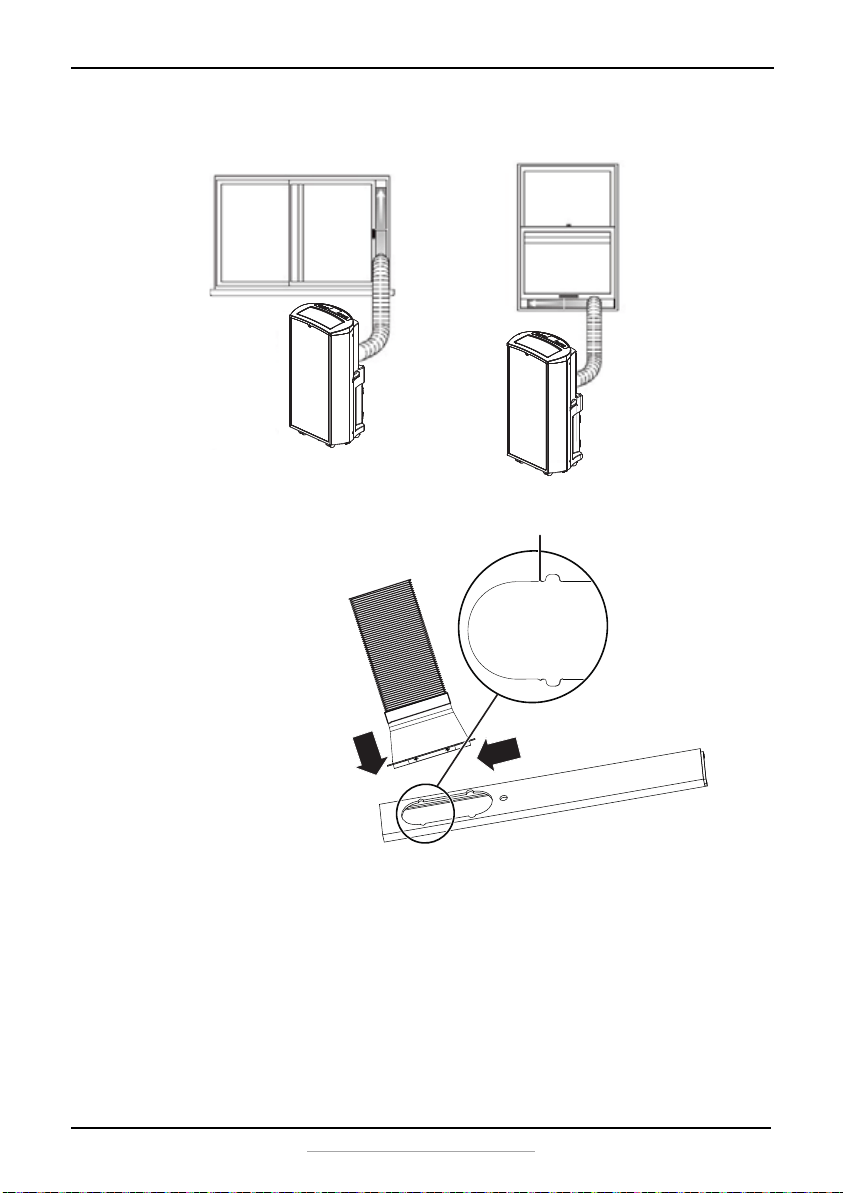
4 Insert the hose adapter into the vent panel, then slide it down or left
until it clicks into place.
Small gap
First insert
Second slide
NS-AC14PWH8_16-0836_MAN_V1_ENG.fm Page 17 Wednesday, March 8, 2017 1:12 PM
18
NS-AC14PWH8
www.insigniaproducts.com
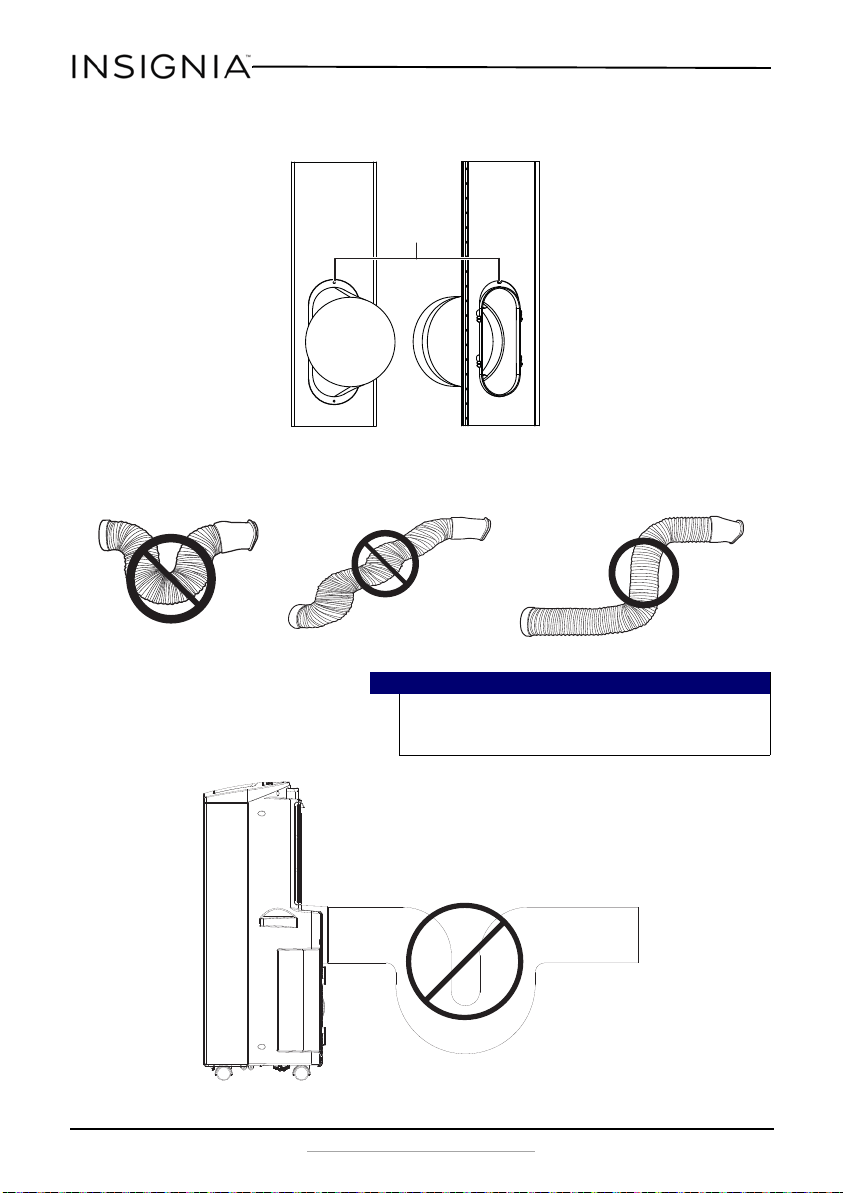
5 If desired, secure the hose adapter to the vent panel with a type B
screw.
• For optimum performance, do not twist the venting hose. For better
efficiency, shorten the hose, if possible.
Caution
The exhaust duct is designed especially for this air conditioner.
Replacing or lengthening the duct could result in damage to your
unit.
Type B screw
NS-AC14PWH8_16-0836_MAN_V1_ENG.fm Page 18 Wednesday, March 8, 2017 1:12 PM
19
14,000 BTU Portable Air Conditioner
www.insigniaproducts.com
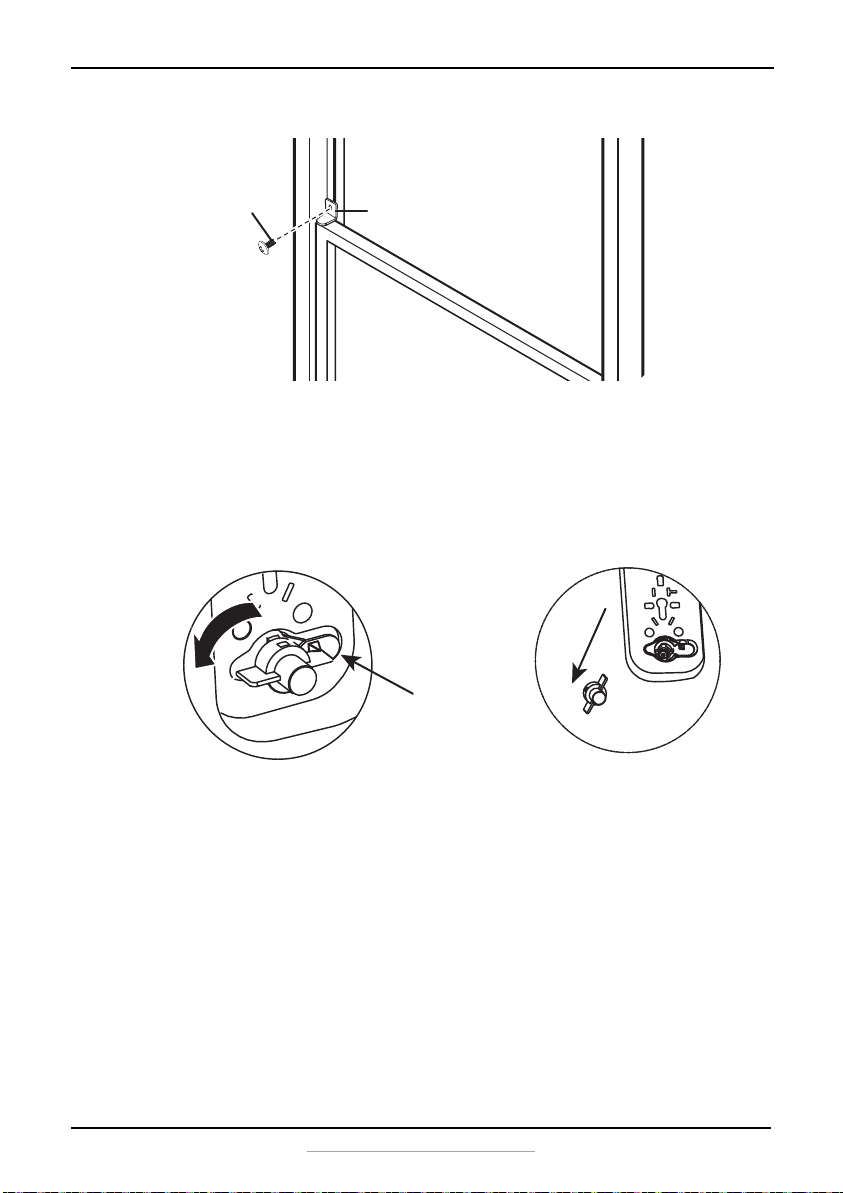
6 If desired, install the security bracket with the type C screw.
Attaching the drain hose for DRY mode operation (optional)
If you want to continuously drain the water from your air conditioner and
never have to manually drain the collection tank, do the following:
1 Unplug your air conditioner and move it to a location where you can
work on it.
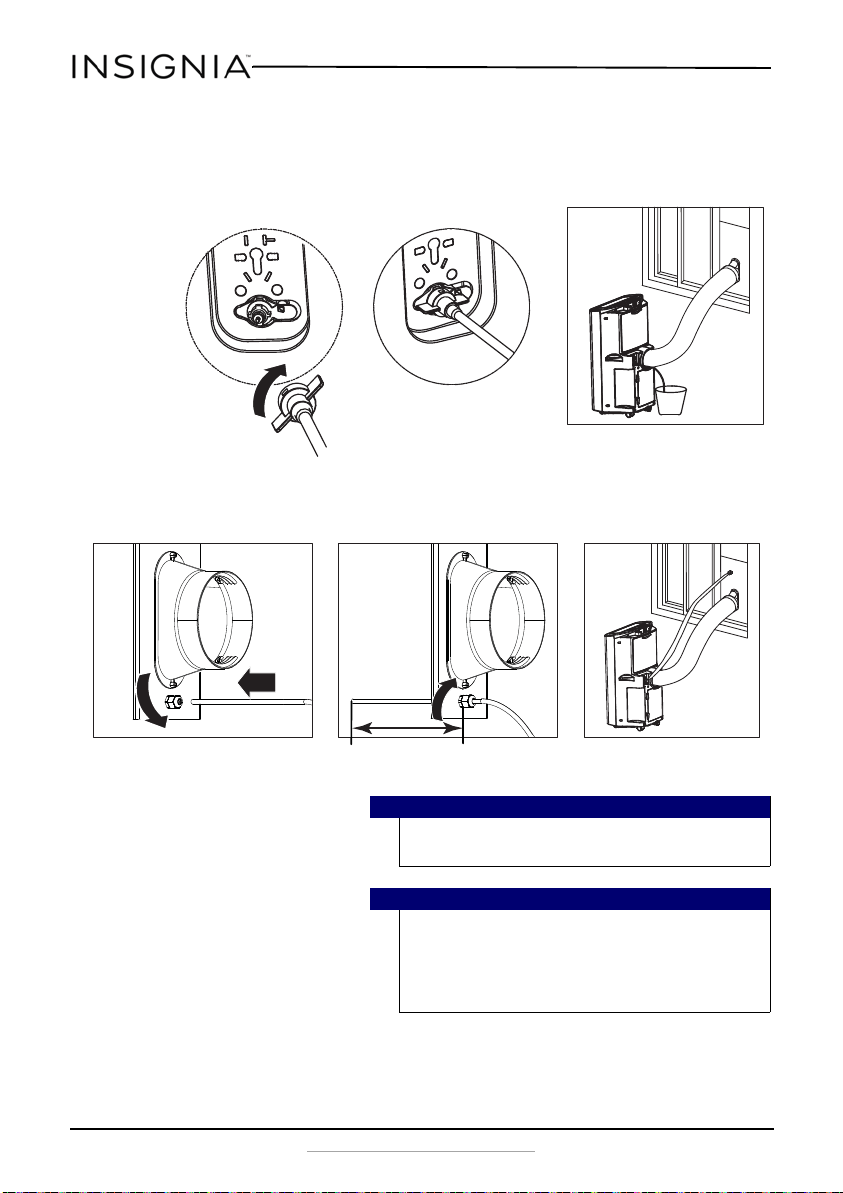
2 Remove the water plug from the drain outlet.
3 Install a 0.15 in. (4 mm) inside diameter drain hose (provided) on the
back of the unit where you removed the water plug. Use a hose clamp
(not provided) to make sure that there are no leaks.
Type C screw
Security bracket
NS-AC14PWH8_16-0836_MAN_V1_ENG.fm Page 19 Wednesday, March 8, 2017 1:12 PM
20
NS-AC14PWH8
www.insigniaproducts.com
4 Place the open end of the hose in a suitable location to drain
continuously.
5 Plug in your air conditioner and restart it.
6 Set your air conditioner to DRY mode using either the remote control
or the control panel.
Note
Make sure that the drain pipe extends more than eight inches
out from the vent panel.
Caution
To stop water from being drained through the drain pipe, press
the TIMER and DOWN buttons simultaneously. To begin draining
again, press the TIMER and DOWN buttons simultaneously
again. Do NOT use this function if there is no water in the
collection tank.
Indoor drain
Outdoor drain
More than 8”
NS-AC14PWH8_16-0836_MAN_V1_ENG.fm Page 20 Wednesday, March 8, 2017 1:12 PM
21
14,000 BTU Portable Air Conditioner
www.insigniaproducts.com
Using your portable air conditioner
Inserting the batteries in the remote control
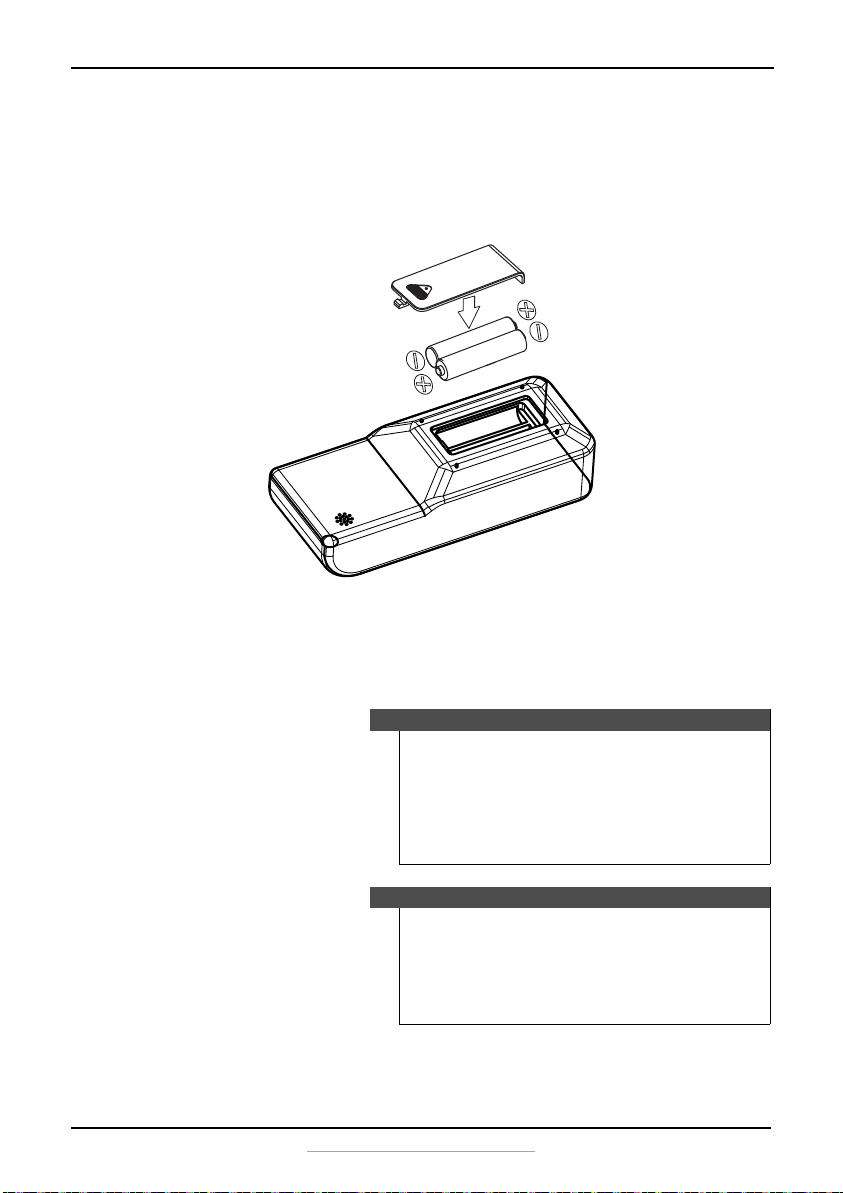
1 Press down on the arrow on the back of the remote control, then slide
the battery compartment cover from the battery compartment.
2 Insert two AAA batteries into the battery compartment. Note the
proper orientation of the + and – polarity of the batteries.
3 Reinstall the battery compartment cover, making sure the tab locks
into place.
Notes
• Use only carbon-zinc or alkaline batteries. Do not use
rechargeable batteries.
• When you replace the batteries, always replace them with
new batteries. No not mix old and new batteries.
• If your air conditioner will not be used for an extended
period of time, remove the batteries from the remote
control.
Cautions
• If the fluid from inside the batteries comes into contact with
your skin or clothes, wash immediately with clean water.
• Do not use the remote control if the batteries are leaking.
• If the fluid from inside the batteries gets into your mouth or
eyes, flush immediately with clean water and contact a
doctor for treatment.
Make sure that you orient the
batteries correctly (+ and –)
when you install them.
NS-AC14PWH8_16-0836_MAN_V1_ENG.fm Page 21 Wednesday, March 8, 2017 1:12 PM
22
NS-AC14PWH8
www.insigniaproducts.com
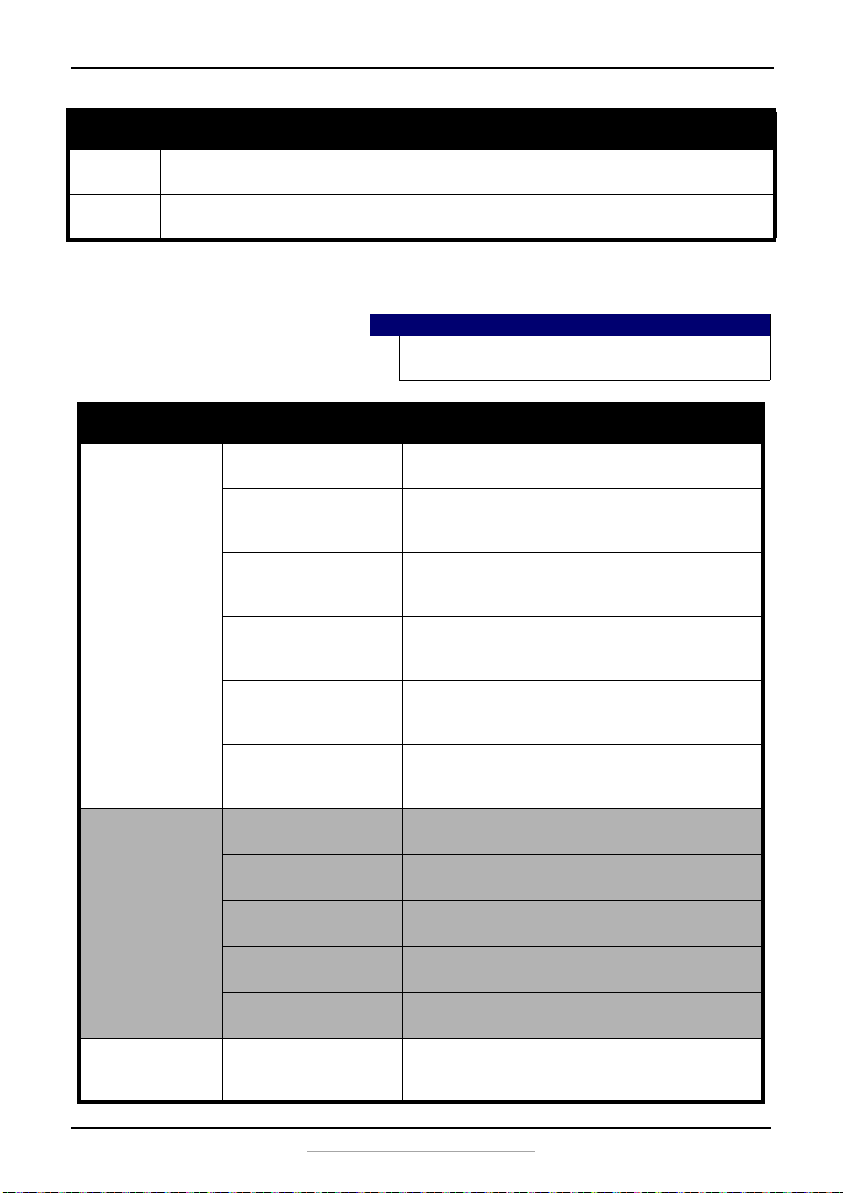
Using the air conditioner
You can control your air conditioner by using the control panel on the
front of the unit, or by using the remote control. If using the remote
control, always point it at the air conditioner.
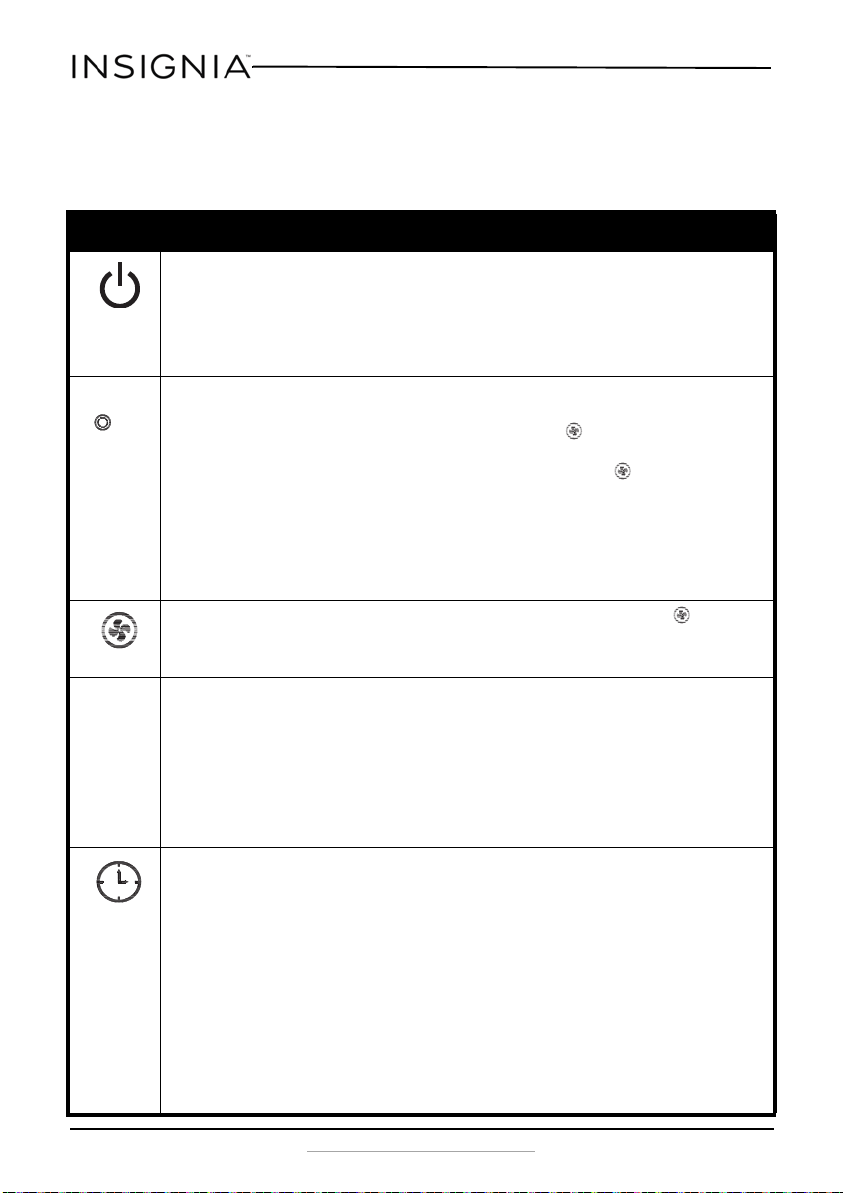
Button Description
POWER
Press to turn your air conditioner on or off.
When you turn the air conditioner on, you will hear a tone and the air discharge automatically opens. The
display shows the set temperature and the current mode.
When you turn your air conditioner off, you will hear a tone and the air discharge closes. Control settings, such
as Mode, Set Temperature, Auto Swing, and so on, are retained in memory when the power is off (unless the
unit has been unplugged).
MODE
Press to cycle through the operating modes (COOL, FAN, DRY, or ENERGY SAVER). The LED display shows the
active mode. The default mode is COOL.
COOL–The compressor runs and cools the room. Use the
or
and buttons to set the desired
temperature and fan speed.
FAN–The fan circulates the air, but the compressor does not run to cool it. Use the button to set the desired
fan speed.
DRY–The fan and dehumidifier both run to remove humidity from the air. After the set temperature is reached,
the compressor and fan turn off. The fan speed is preset and cannot be adjusted. (We suggest that you use a
drain hose in dry mode. See “Attaching the drain hose for DRY mode operation (optional)” on page 19.)
ENERGY SAVER– When the energy saver is active, ENERGY SAVER appears on the display. Your air conditioner
will run in cool mode at low speed.
FAN
Cycles through the available fan speeds (F1-Low, F2-Medium, F3-High). The LED next to the button
displays the fan speed. The speed can be selected in either the COOL or FAN modes.
COOL and DRY modes–press to adjust the temperature setting up to 86°F (30°C) or down to 60°F (16°C), in one
degree increments. The temperature can be switched between Fahrenheit and Celsius by pressing
and
at the same time, or by pressing the °F--°C button on the remote control.
TIMER mode–press
or
to adjust the delay time from one to 24 hours, in one hour increments. If you
press and hold
or
, the set temperature or time changes automatically.
NOTE: The temperature displayed is the room temperature, not the set temperature. In COOL, DRY, or ENERGY
SAVER mode, the thermostat in the air conditioner runs the compressor until the set temperature is reached,
then the compressor cycles on and off to maintain the set temperature.
\
TIMER
Press to set your air conditioner to turn off or turn on after a delay of up to 24 hours. The default is 0.
Automatic off–press
or
while the air conditioner is running to set the delay time from one to 24 hours,
in one hour increments. The air conditioner automatically turns off when the set delay time is reached.
Automatic on–press
or
while the air conditioner is off to set the delay time from one to 24 hours, in
one hour increments. The air conditioner automatically turns on when the set delay time is reached.
Press the TIMER button to see the delay time you have set on the LED display.
To change the set delay time (on or off), press the TIMER button, then adjust the time with the
or
buttons when the number begins to blink.
To cancel the Timer function, press the TIMER button, then press the
or
buttons when the number
begins to blink to adjust the time to 0. You can also press the TIMER button, then press it again when the
number begins to blink.
NOTE: Do not unplug the air conditioner while using the Timer function. After setting the Timer function, if
you use the remote control to change to another mode without resetting the Timer function, the timer is reset.
NS-AC14PWH8_16-0836_MAN_V1_ENG.fm Page 22 Wednesday, March 8, 2017 1:12 PM
23
14,000 BTU Portable Air Conditioner
www.insigniaproducts.com
Troubleshooting
Auto Swing Press to turn on the automatic oscillation, which varies the direction of the air flow to cool the room more
efficiently.
Auto Clean Press to turn on the automatic cleaning function. When the air conditioner is off, it operates at low speed to
remove excess water from the air conditioner. This helps to prevent the growth of harmful micro-organisms.
Caution
Do not try to repair your portable air conditioner yourself. Doing
so invalidates the warranty.
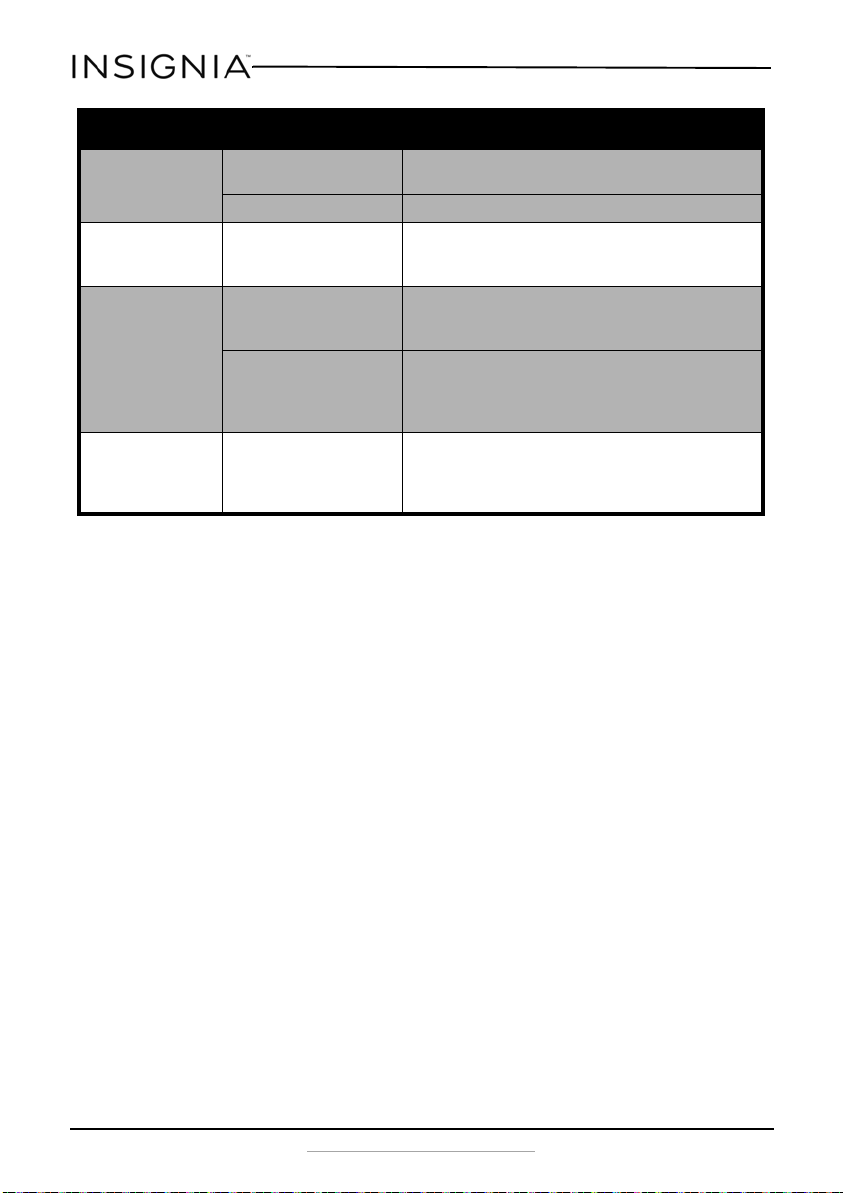
Problem Possible cause Possible solution
Air conditioner does not
start
The air conditioner is
unplugged.
Make sure that the air conditioner is plugged in and that the
plug is pushed completely into the outlet.
The fuse on the circuit is blown
or the circuit breaker is
tripped.
Check the house fuse/circuit breaker box and replace the fuse or
reset the circuit breaker.
Power failure. If a power failure occurs, the air conditioner turns off. When the
power is restored, wait three minutes to restart the air
conditioner to prevent tripping the compressor overload.
The current interrupter device
in the power cord has tripped.
Press the RESET button located on the power cord plug. If the
RESET button does not stay engaged, discontinue use of the air
conditioner and contact a qualified service technician.
Water Full lights on the
display.
The water collection tank is full and must be drained. Drain the
tank and reset your settings. See “Emptying the water
collection tank“ on page 27.
Room temperature is less than
the set temperature.
This is normal. The air conditioner automatically shuts off when
the room temperature equals, or is less than, the set
temperature. Adjust the temperature setting, if needed.
The air conditioner does
not cool
Airflow is restricted. Make sure that there are no curtains, blinds, or furniture
blocking the front of the air conditioner.
The temperature control may
not be set correctly
In COOL mode, decrease the temperature setting by pressing
the
button on the panel or the remote control.
The air filter is dirty. Clean the filter at lease every two weeks. See “Cleaning and
maintaining your air conditioner” on page 25.
The room may have been hot. You need to allow time for the room to cool down after you first
turn on the air conditioner.
The exhaust hose is not
connected or is blocked.
Connect the exhaust hose and make sure that it is not
obstructed and is functioning properly.
The air conditioner is
freezing up
The cooling coils are iced over. Ice may block the air flow and obstruct the air conditioner from
properly cooling the room. Set the mode control to High Fan or
High Cool.
Button Description
NS-AC14PWH8_16-0836_MAN_V1_ENG.fm Page 23 Wednesday, March 8, 2017 1:12 PM
24
NS-AC14PWH8
www.insigniaproducts.com
Understanding your air conditioner’s automatic protection
Anti-freezing protection - When the ambient temperature is very low
under Cooling Mode, Dry mode, and Energy Saver mode, the compressor
and motor will stop working for about seven minutes if the coil
temperature is below 0°C/32°F. When the coil temperature increases to
above 0°C/32°F, the protection turns off and the previous mode resumes.
Water-full protection - When the water level in the bottom water pan
exceeds the warning level, the unit will alert automatically, “FL” and
“Water Full” will flashes on the display. Turn off the air conditioner and
drain the water as described in “Emptying the water collection tank” on
page 27. After you have drained the water, restart your air conditioner.
Compressor delay protection - Except for the first power-on, the
compressor can start instantly. In other cases, the compressor will start
after three minutes delay protection.
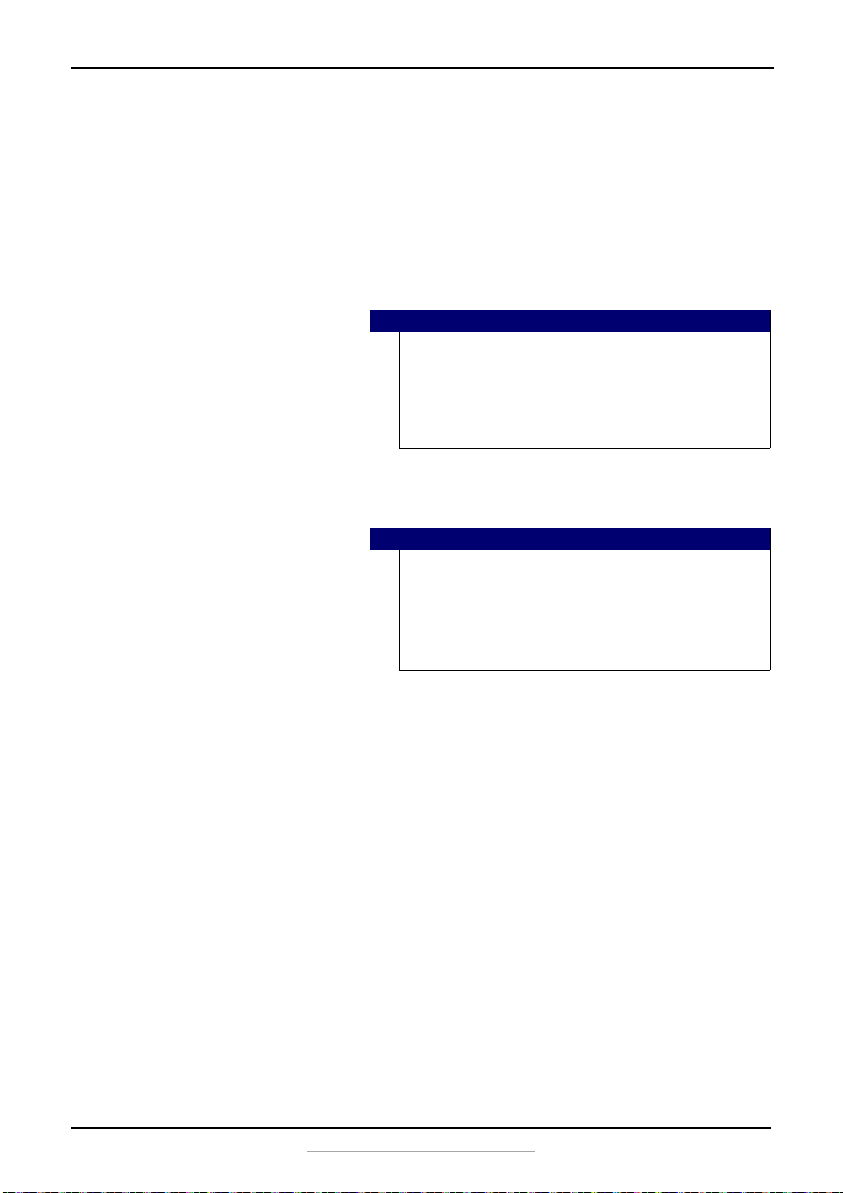
The air conditioner runs
too often or too long
The area to be cooled is too
large for the air conditioner.
Consult your Insignia technician for the air conditioner capacity
required to cool the desired area.
Doors or windows are open. Make sure that doors and windows are closed.
The venting hose is hot When the air conditioner runs
continuously for a long time,
the hose becomes hot.
This is normal.
The air conditioner is
too loud
The unit may seem rather loud
for the first two or three
minutes of operation.
This is the sound of the compressor starting up and is normal.
A soft, swishing noise can be
heard immediately after
turning the unit on or off, and
during operation.
This is the sound of the liquid refrigerant flowing in the unit and
is normal.
The air conditioner
makes an odd noise
An audible gurgling noise may
be heard when the unit is
operated on a gently sloping
floor.
Place the unit on a level floor.
Problem Possible cause Possible solution
NS-AC14PWH8_16-0836_MAN_V1_ENG.fm Page 24 Wednesday, March 8, 2017 1:12 PM
25
14,000 BTU Portable Air Conditioner
www.insigniaproducts.com
Cleaning and maintaining your air
conditioner
Your air conditioner is designed for year-round use with only minimal
cleaning and maintenance
For maximum efficiency, we recommend that you have the cooling coils
inspected and cleaned annually. Your local Best Buy Service Center can
provide this inspection and cleaning for a nominal fee.
Cleaning the case
Wipe the case with a slightly damp cloth, then wipe dry with a dry cloth.
Cleaning the air filters
Clean both upper and lower filters every two weeks. Depending on indoor
air quality, the filters may require cleaning more often. Dirty air filters
decrease the airflow and reduce the efficiency of the air conditioner.
Do not operate the air conditioner without the air filters in place.
Clean the filter grills at the same time that you clean the filters.
1 Turn off the air conditioner and unplug it from the wall outlet.
Warning
• Unplug the air conditioner before cleaning or performing
any maintenance or service.
• Be careful when cleaning coils or removing or reinstalling
the filter. The cooling fins are very sharp.
• Failure to follow the above precautions could result in
electric shock or personal injury.
Caution
To prevent damage to the finish, do not use:
• Gasoline, benzine, thinner, or other similar solvents.
• Abrasive cleaners.
Never pour water onto or into the air conditioner. It could
damage the internal components and create a shock or fire
hazard.
NS-AC14PWH8_16-0836_MAN_V1_ENG.fm Page 25 Wednesday, March 8, 2017 1:12 PM
26
NS-AC14PWH8
www.insigniaproducts.com
2 Lift the upper filter grill out by the handle.
3 Clean the upper filter by immersing it in warm water with a neutral
detergent. Rinse it thoroughly.
4 Let the filter dry completely, then reinstall it in the air conditioner.
5 Clean the lower filter the same way.
Cautions
• Do not use harsh cleaners or very hot water.
• Do not wash in a dishwasher or washing machine.
Note
• When the filter is not replaced in the air conditioner
correctly, there is a gap between the filter case and the unit.
Note
The active carbon filter cloth can be remove after pulling out the
filter frames and should be changed every two to three weeks,
based on the environment.
Open here
Upper
filter
Upper filter grill
NS-AC14PWH8_16-0836_MAN_V1_ENG.fm Page 26 Wednesday, March 8, 2017 1:12 PM
27
14,000 BTU Portable Air Conditioner
www.insigniaproducts.com
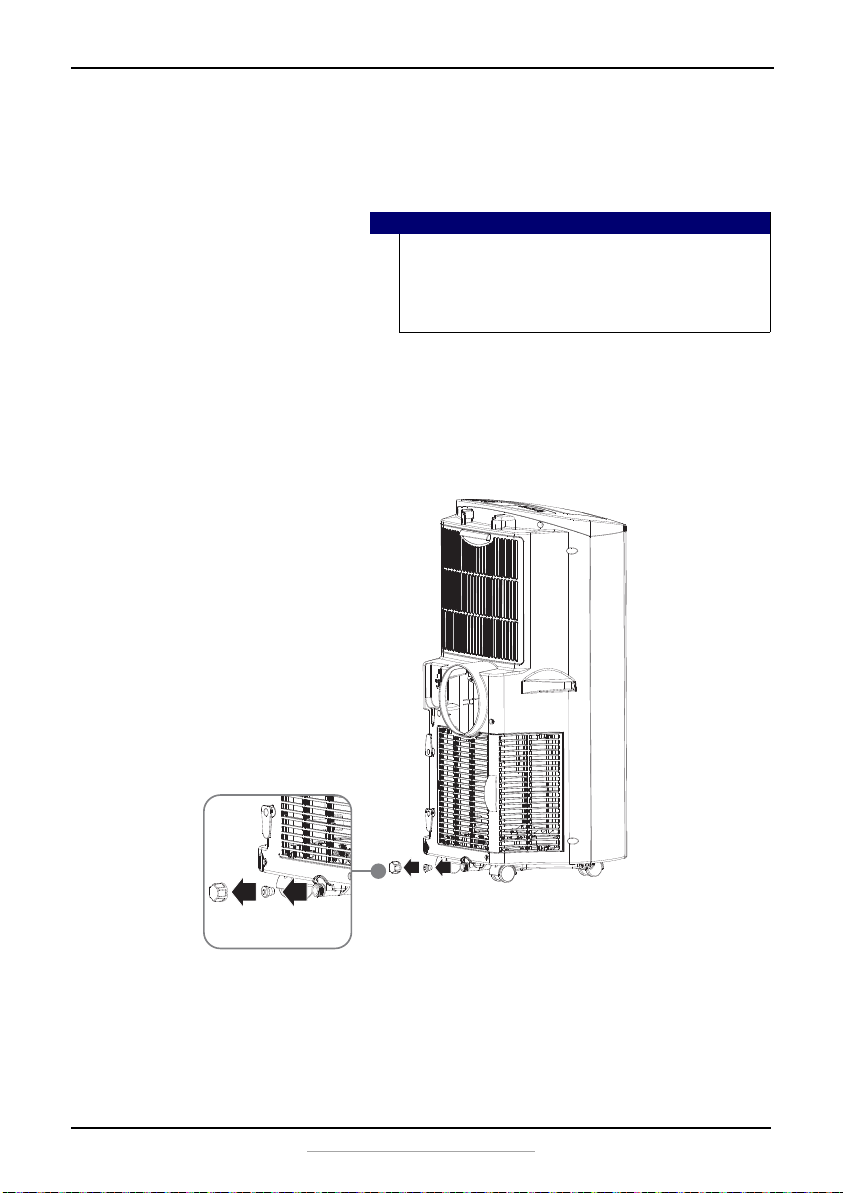
Emptying the water collection tank
When the internal water collection tank is full, “FL” or “Water Full” appears
on the LED display and your air conditioner turns off until the tank is
emptied.
1 Unplug your air conditioner, then disconnect the exhaust hose from
the back.
2 Move your air conditioner to a location where a suitable drain is
available or place a drain pan under the unit that is capable of holding
up to 1.1 pints (0.5 liters) of water.
3 Remove the rubber plug from the drain outlet.
4 After you have drained the water collection tank, replace the rubber
plug, making sure that the bolt is secure.
5 Place the air conditioner in the desired location, reconnect the exhaust
hose, then plug it in. When the air conditioner is restarted after being
drained, it automatically starts in COOL mode with a temperature
setting of 72°F.
Notes
• When operating or draining water from your air
conditioner, always protect carpeting and floors from
possible water spillage.
• When you drain the water from your air conditioner, be sure
to wipe up any spilled water with a dry cloth or towel.
NS-AC14PWH8_16-0836_MAN_V1_ENG.fm Page 27 Wednesday, March 8, 2017 1:12 PM
28
NS-AC14PWH8
www.insigniaproducts.com
Storing your air conditioner
If your air conditioner will not be used for an extended period of time, we
suggest that you prepare it for storage by doing the following:
1 Unplug your air conditioner.
2 Remove the rubber plug and drain the water collection tank
completely.
3 Reinstall the rubber plug.
4 Remove the filter case and clean the filter. Allow it to dry completely,
then reinstall it.
5 Remove the batteries from the remote control.
6 Store the air conditioner in a cool, dry place, away from direct sunlight,
extreme temperatures, and excessive dust.
Restarting your air conditioner after storage
1 Make sure that the filter case and rubber plug are in place.
2 Make sure that the power cord and plug are in good condition.
3 Install new AAA batteries in the remote control.
4 Move the air conditioner to the location where you plan to use it and
reconnect the exhaust hose and electrical plug.
5 Restart your air conditioner and make sure that everything runs
smoothly.
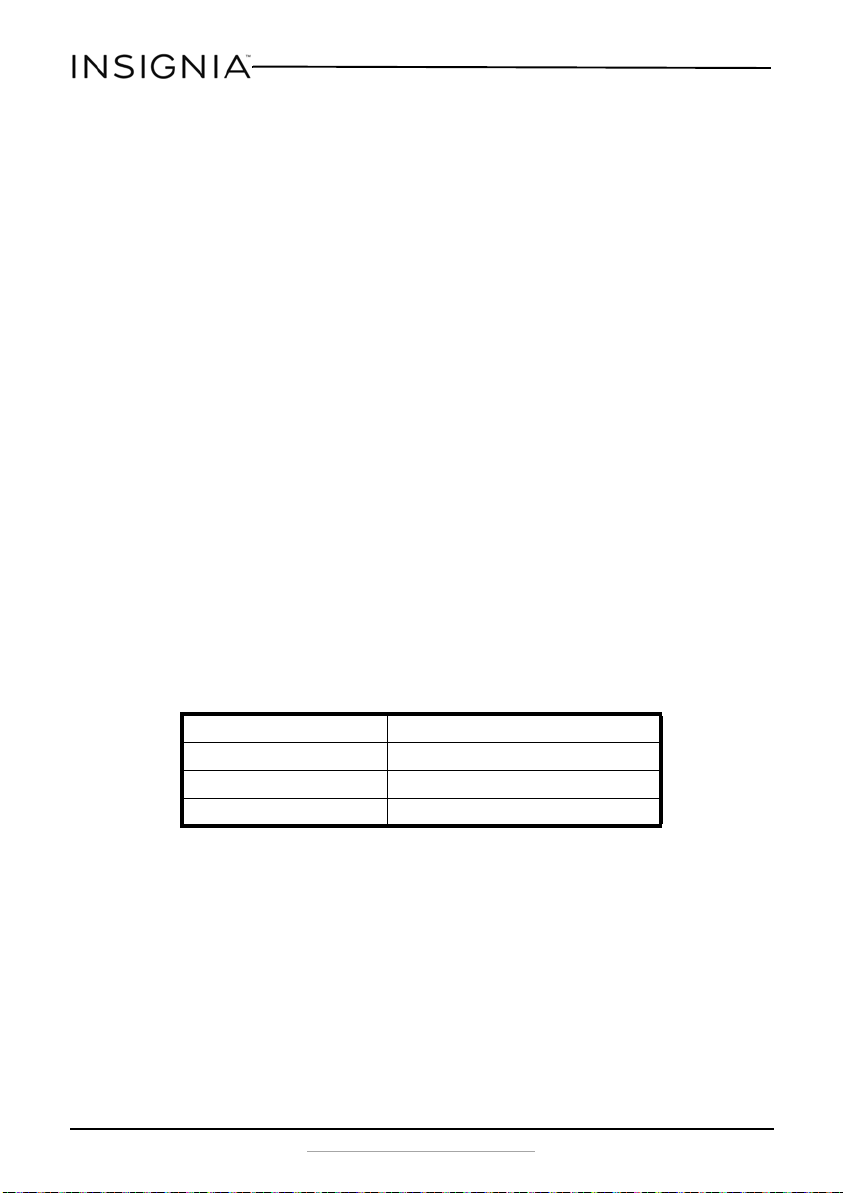
Specifications
Dimensions 13 x 18.5 x 33.3 in. (33 x 47 x 84.5 cm)
Weight 73.9 lb. (33.5 kg)
Electrical requirements 115V ~60 Hz
Power draw 1.38 Kwh
NS-AC14PWH8_16-0836_MAN_V1_ENG.fm Page 28 Wednesday, March 8, 2017 1:12 PM

29
14,000 BTU Portable Air Conditioner
www.insigniaproducts.com
ONE-YEAR LIMITED WARRANTY
Definitions:
The Distributor* of Insignia branded products warrants to you, the original purchaser of this
new Insignia-branded product (“Product”), that the Product shall be free of defects in the
original manufacturer of the material or workmanship for a period of one (1) year from the
date of your purchase of the Product (“Warranty Period”).
For this warranty to apply, your Product must be purchased in the United States or Canada
from a Best Buy branded retail store or online at www.bestbuy.com or www.bestbuy.ca, and
is packaged with this warranty statement.
How long does the coverage last?
The Warranty Period lasts for 1 year (365 days) from the date you purchased the Product.
Your purchase date is printed on the receipt you received with the Product.
What does this warranty cover?
During the Warranty Period, if the original manufacture of the material or workmanship of
the Product is determined to be defective by an authorized Insignia repair center or store
personnel, Insignia will (at its sole option): (1) repair the Product with new or rebuilt parts; or
(2) replace the Product at no charge with new or rebuilt comparable products or parts.
Products and parts replaced under this warranty become the property of Insignia and are
not returned to you. If service of Products or parts are required after the Warranty Period
expires, you must pay all labor and parts charges. This warranty lasts as long as you own your
Insignia Product during the Warranty Period. Warranty coverage terminates if you sell or
otherwise transfer the Product.
How to obtain warranty service?
If you purchased the Product at a Best Buy retail store location, please take your original
receipt and the Product to any Best Buy store. Make sure that you place the Product in its
original packaging or packaging that provides the same amount of protection as the original
packaging. If you purchased the Product from a Best Buy online web site (www.bestbuy.com
or www.bestbuy.ca), mail your original receipt and the Product to the address listed on the
web site. Make sure that you put the Product in its original packaging or packaging that
provides the same amount of protection as the original packaging.
To obtain warranty service, in the United States call 1-888-BESTBUY, Canada call
1-866-BESTBUY. Call agents may diagnose and correct the issue over the phone.
Where is the warranty valid?
This warranty is valid only in the United States and Canada at Best Buy branded retail stores
or websites to the original purchaser of the product in the county where the original
purchase was made.
What does the warranty not cover?
This warranty does not cover:
• Food loss/spoilage due to failure of refrigerator or freezer
• Customer instruction/education
•Installation
•Set up adjustments
•Cosmetic damage
• Damage due to weather, lightning, and other acts of God, such as power surges
•Accidental damage
•Misuse
•Abuse
NS-AC14PWH8_16-0836_MAN_V1_ENG.fm Page 29 Wednesday, March 8, 2017 1:12 PM
30
NS-AC14PWH8
www.insigniaproducts.com
•Negligence
• Commercial purposes/use, including but not limited to use in a place of business or in
communal areas of a multiple dwelling condominium or apartment complex, or
otherwise used in a place of other than a private home.
• Modification of any part of the Product, including the antenna
• Display panel damaged by static (non-moving) images applied for lengthy periods
(burn-in).
• Damage due to incorrect operation or maintenance
• Connection to an incorrect voltage or power supply
• Attempted repair by any person not authorized by Insignia to service the Product
• Products sold “as is” or “with all faults”
• Consumables, including but not limited to batteries (i.e. AA, AAA, C etc.)
• Products where the factory applied serial number has been altered or removed
• Loss or Theft of this product or any part of the product
• Display panels containing up to three (3) pixel failures (dots that are dark or incorrectly
illuminated) grouped in an area smaller than one tenth (1/10) of the display size or up
to five (5) pixel failures throughout the display. (Pixel based displays may contain a
limited number of pixels that may not function normally.)
• Failures or Damage caused by any contact including but not limited to liquids, gels or
pastes.
REPAIR REPLACEMENT AS PROVIDED UNDER THIS WARRANTY IS YOUR EXCLUSIVE REMEDY
FOR BREACH OF WARRANTY. INSIGNIA SHALL NOT BE LIABLE FOR ANY INCIDENTAL OR
CONSEQUENTIAL DAMAGES FOR THE BREACH OF ANY EXPRESS OR IMPLIED WARRANTY ON
THIS PRODUCT, INCLUDING, BUT NOT LIMITED TO, LOST DATA, LOSS OF USE OF YOUR
PRODUCT, LOST BUSINESS OR LOST PROFITS. INSIGNIA PRODUCTS MAKES NO OTHER
EXPRESS WARRANTIES WITH RESPECT TO THE PRODUCT, ALL EXPRESS AND IMPLIED
WARRANTIES FOR THE PRODUCT, INCLUDING, BUT NOT LIMITED TO, ANY IMPLIED
WARRANTIES OF AND CONDITIONS OF MERCHANTABILITY AND FITNESS FOR A PARTICULAR
PURPOSE, ARE LIMITED IN DURATION TO THE WARRANTY PERIOD SET FORTH ABOVE AND
NO WARRANTIES, WHETHER EXPRESS OR IMPLIED, WILL APPLY AFTER THE WARRANTY
PERIOD. SOME STATES, PROVINCES AND JURISDICTIONS DO NOT ALLOW LIMITATIONS ON
HOW LONG AN IMPLIED WARRANTY LASTS, SO THE ABOVE LIMITATION MAY NOT APPLY TO
YOU. THIS WARRANTY GIVES YOU SPECIFIC LEGAL RIGHTS, AND YOU MAY ALSO HAVE OTHER
RIGHTS, WHICH VARY FROM STATE TO STATE OR PROVINCE TO PROVINCE.
Contact Insignia:
For customer service please call 1-877-467-4289
www.insigniaproducts.com
INSIGNIA is a trademark of Best Buy and its affiliated companies.
Distributed by Best Buy Purchasing, LLC
7601 Penn Ave South, Richfield, MN 55423 U.S.A.
©2017 Best Buy. All rights reserved.
Made in China
NS-AC14PWH8_16-0836_MAN_V1_ENG.fm Page 30 Wednesday, March 8, 2017 1:12 PM
www.insigniaproducts.com
1-877-467-4289 (U.S. and Canada) or 01-800-926-3000 (Mexico)
INSIGNIA is a trademark of Best Buy and its affiliated companies.
Distributed by Best Buy Purchasing, LLC
7601 Penn Ave South, Richfield, MN 55423 U.S.A.
©2017 Best Buy. All rights reserved.
Made in China.
V1 ENGLISH
16-0836
NS-AC14PWH8_16-0836_MAN_V1_ENG.fm Page 31 Wednesday, March 8, 2017 1:12 PM