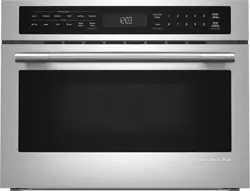
Turn off the power, unplug the appliance from the power supply.
Clean the inside of the oven after use with a slightly damp cloth.
Clean the accessories in the usual way in soapy water.
The door frame and seal and neighbouring parts must be cleaned carefully with a damp cloth when they are dirty.
Using Your Combi Oven
UTENSILS
CAUTION: Personal Injury Hazard - It is hazardous for anyone other than an authorised person to carry out any service or repair operation that involves the removal of a cover which gives protection against exposure to microwave energy.
See the instructions on "Materials you can use in microwave oven or to be avoided in microwave oven". There may be certain non-metallic utensils that are not safe to use for microwaving. If in doubt, you can test the utensil in question following the procedure below.
UtensilTest
Fill a microwave-safe container with 1 cup of cold water (250ml) along with the utensil in question.
Cook on maximum power for 1 minute.
Carefully feel the utensil. If the empty utensil is warm, do not use it for microwave cooking.
Do not exceed 1 minute cooking time.
Materials you can use in the Microwave
Aluminium Foil - Shielding only. Small smooth pieces can be used to cover thin parts of meat or poultry to prevent overcooking. Arcing can occur if foil is too close to oven walls. The foil should be at least 1 inch (2.5cm) away from oven walls.
Browning Dish - Follow manufacturer’s instructions. The bottom of browning dish must be at least 3/16 inch (5mm) above the turntable. Incorrect usage may cause the turntable to break.
Dinnerware - Microwave-safe only. Follow manufacturer's instructions. Do not use cracked or chipped dishes.
Glass Jars - Always remove lid. Use only to heat food until just warm. Most glass jars are not heat resistant and may break.
Glassware - Heat-resistant oven glassware only. Make sure there is no metallic trim. Do not use cracked or chipped dishes.
Oven Cooking Bag - Follow manufacturer’s instructions. Do not close with metal tie. Make slits to allow steam to escape.
Paper plates and cups - Use for short–term cooking/warming only. Do not leave oven unattended while cooking.
Paper Towels - Use to cover food for reheating and absorbing fat. Use with supervision for short-term cooking only.
Parchment Paper - Use as a cover to prevent splattering or a wrap for steaming.
Plastic - Microwave-safe only. Follow the manufacturer’s instructions. Should be labelled "Microwave Safe". Some plastic containers soften, as the food inside gets hot. "Boiling bags" and tightly closed plastic bags should be slit, pierced or vented as directed by package.
Plastic wrap - Microwave-safe only. Use to cover food during cooking to retain moisture. Do not allow plastic wrap to touch food.
Thermometers - Microwave-safe only meat and candy thermometers).
Wax Paper - Use as a cover to prevent splattering and retain moisture.
Materials to be avoided in Microwave Oven
Aluminium Tray - May cause arcing. Transfer food into microwave-safe dish.
Food carton with metal handle - May cause arcing. Transfer food into microwave-safe dish.
Metal or Metal-trimmed utensils - Metal shields the food from microwave energy. Metal trim may cause arcing.
Metal twist ties - May cause arcing and could cause a fire in the oven.
Paper Bags - May cause a fire in the oven.
Plastic Foam - Plastic foam may melt or contaminate the liquid inside when exposed to high temperature.
Wood - Wood will dry out when used in the microwave oven and may split or crack.
OPERATING INSTRUCTIONS
This oven uses modern electronic control to adjust cooking parameters to meet your needs better for cooking.
Clock Setting
When the power is connected, the oven will display “0:00”, buzzer will ring once.
Press “CLOCK/PRE-SET” to choose 12- hour or 24-hour.
Turn “ ” to adjust the hour figures, the input time should be within 0--23 (24- hour) or 1--12 (12-hour).
Press “CLOCK/PRE-SET”, the minute figures will flash.
Turn “ ”to adjust the minute figures, the input time should be within 0--59.
Press “CLOCK/PRE-SET” to finish clock setting.“:” will flash.
NOTE:
If the clock is not set, the oven will not function when powered.
While setting the clock, if you press "STOP/CLEAR”, the oven will go back to the previous state automatically.
Microwave Cooking
When the power is connected, the oven will display “0:00”, buzzer will ring once.
Press the “MICROWAVE” key once, and “P100” will display.
Press “MICROWAVE” four times or turn “ ”to select the microwave power from 100% to 10%. “P100”, “P80”, “P50”, “P30”,“P10” will display in order.
Press “START/+30SEC./CONFIRM” to confirm.
Turn “ ”to adjust the cooking time. (The time setting should be 0:05- 95:00.)
Press “START/+30SEC./CONFIRM” to start cooking.
NOTE: the intervals for the adjustment of cooking time are as follow:
0---1 min : by 5 seconds
1---5 min : by 10 seconds
5---10 min : by 30 seconds
10---30 min : by 1 minute
30---95 min : by 5 minutes
Microwave Power Chart
Press
Once
Twice
3 times
4 times
5 times
Power
100%
80%
50%
30%
10%
Grill Cooking
Press the “GRILL/COMBI.” key once, and “G-1” will display.
Press “START/+30SEC./CONFIRM” to confirm.
Turn “ ”to adjust the cooking time. (The time setting should be 0:05- 95:00.)
Press “START/+30SEC./CONFIRM” to start cooking.
Note:
After half the grill time passes, the oven sounds twice to tell you to turn the food over.
You can leave to continue grilling but in order to have a better effect of grilling food, you should turn the food over, close the door, and then press “START/+30SEC./CONFIRM” to continue cooking. Without interruption, the oven will work automatically and sound once.
Combination Cooking
Press the “GRILL/COMBI.” key once, and “G-1” will display.
Press “GRILL/COMBI.” four times or turn “ ”to select the grill power. Stop turning when “C-1”, “C-2”, “C-3” or “C-4” displays.
Press “START/+30SEC./CONFIRM” to confirm.
Turn “ ”to adjust the cooking time. (The time setting should be 0:05- 95:00.)
Press “START/+30SEC./CONFIRM” to start cooking.
NOTE:Combination Instructions
Convection Cooking (With preheating function)
The convection cooking mode allows you to cook the food as a traditional oven.
Microwave is not used. It is recommended that you should preheat the oven to the appropriate temperature before placing the food in the oven.
Press the “CONVECTION” key once, “140” will flash.
Keep pressing “CONVECTION” or turn “ ”to select the convection function. Note: the temperature can be chosen from 140 degrees to 230 degrees.
Press the “START/+30SEC./CONFIRM” to confirm the temperature.
Press the “START/+30SEC./CONFIRM” to start preheating. When the preheating temperature arrives, the buzzer will sound twice to remind you to put the food into the oven. And the preheated temperature is displayed and flashing.
Put the food into the oven and close the door. Turn “ ” to adjust the cooking time. (The maximum setting time is 95 minutes.)
Press the “START/+30SEC./CONFIRM” key to start cooking.
Note:
A. Cooking time cannot be input until the preheating temperature is reached.
When the temperature is reached, the door must be opened to input the cooking time.
B. If time is not input in 5 minutes, the oven will stop preheating. The buzzer sounds five times and returns to the waiting state.
Convection Cooking (Without preheating function)
Press the “CONVECTION” key once, “140” will flash.
Keep pressing “CONVECTION” or turn “ ” to select the convection function. Note: the temperature can be chosen from 140 degrees to 230 degrees.
Press the “START/+30SEC./CONFIRM” to confirm the temperature
Turn “ ” to adjust the cooking time. (The maximum setting time is 95 minutes.)
Press the “START/+30SEC./CONFIRM” key to start cooking.
Multi-Stage Cooking
A maximum of two stages can be set. If one stage is defrosting, it should be put in the first stage. The buzzer will ring once after each stage and the next stage will begin.
Note: Auto menu and preheating cannot be set as one of the multi-stage.
Example: if you want to defrost the food for 5 minutes, then to cook with 80% microwave power for 7 minutes. The steps are as follows:
Press “W.T./TIME DEFROST” twice, the screen will display “dEF2”.
Turn “ ” to adjust the defrost time to 5 minutes.
Press “MICROWAVE” once.
Turn “ ” to choose 80% microwave power till “P80” will display.
Press “START/+30SEC./CONFIRM” to confirm.
Turn “ ” to adjust the cooking time to 7 minutes.
Press “START/+30SEC./CONFIRM” to start cooking.
Pre-set Function
Set the clock first. (Refer to section ‘clock setting’.)
Select the cooking program. A maximum of two stages can be set. Defrosting should not be set in preset function. Auto menu can be set single stage only. Example: if you want to cook with 80% microwave power for 7 minutes.
Press “MICROWAVE” once.
Turn “ ” to choose 80% microwave power till “P80” will display.
Press “START/+30SEC./CONFIRM” to confirm.
Turn “ ” to adjust the cooking time to 7 minutes. After the above steps, please do not press “START/+30SEC./CONFIRM”. Then do as follows:
Press “CLOCK/PRE-SET”, current time displays and the hour figures flash.
Turn “ ” to adjust the hour figures, the input time should be within 0--23 (24- hour) or 1--12 (12-hour).
Press “CLOCK/PRE-SET”, the minute figures will flash.
Turn “ ” to adjust the minute figures, the input time should be within 0--59.
Press “START/+30SEC./CONFIRM” to finish setting. “:” will flash & timer countdown begins. Buzzer will ring twice to indicate cooking time has commenced.
Note: Clock must be set first. Otherwise, pre-set function will not work.
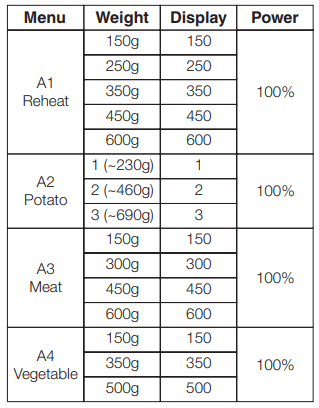
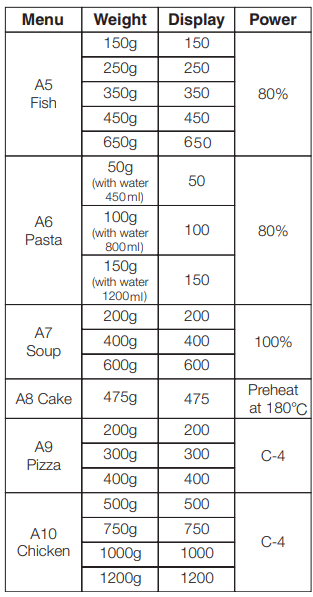
Auto Menu
In waiting state, turn “ ” right to choose the desired function and “A1”, “A2”, “A3”.... “A10” will be displayed.
Press “START/ +30 SEC./CONFIRM” to confirm the menu you need.
Turn “ ” to choose the weight of menu and “g” indicator will light.
Press “START/ +30 SEC./CONFIRM” to start cooking.
Note:
Cake menu is under convection cooking with 180°C-warm-up function, and you should preheat first following the auto menu operation, when the oven reaches temperature it will stop working and the buzzer will sound to remind you to open the door to put the cake in. Then press “Start/+30Sec./Confirm” to commence cooking.
Auto Menu Chart
Defrost byW.T.
Press “W.T./TIME DEFROST” pad once, the oven will display “dEF1”.
Turn “ ” to select the weight of food. At the same time, “g” will light, the weight should be 100-2000g.
Press “START/+30SEC./CONFIRM” key to start defrosting “ ” and “ ” indicators will flash and “g” indicator will go out.
Defrost byTime
Press “W.T./TIME DEFROST” key twice, the oven will display “dEF2”.
Turn “ ”to select the cooking time. The maximum setting time is 95 minutes.
Press " START/+30SEC./CONFIRM" key to start defrosting. “ ” and “ ” indicators will flash.
Note: if the food weight is no more than 200 grams, please place the food at the edge of the glass turntable but not the center to be defrosted.
Speedy Cooking
In waiting state, press “START/+30SEC./CONFIRM” key to cook with 100% power level for 30 seconds. Each press of the same key will add an increase of 30 second intervals. The maximum cooking time is 95 minutes.
During microwave, grill, convection and combination states, press “START/+30SEC./CONFIRM" key to cook with 100% power level for 30 seconds. Each press of the same key will add an increase of 30 second intervals.
Note: This function cannot work under defrost, auto menu and multi-stage cooking.
Speedy Microwave Cooking
In waiting state, turn “ ” left to choose cooking time directly then press "START/+30SEC./CONFIRM” key to cook with 100% microwave power. This program can be set as one of multi-stage programs.
Inquiring Function
In cooking state, press “MICROWAVE”, “GRILL/COMBI.” or “CONVECTION”, the current power will be displayed for 2-3 seconds.
In pre-set state, press “CLOCK/PRESET” to inquire the time for delayed start cooking. The pre-set time will flash for 2-3 seconds, then the oven will turn back to the clock display.
During cooking state, press “CLOCK/PRE-SET” to check the current time. It will be displayed for 2-3 seconds.
Lock-out Function for Children
Lock: In waiting state, press “STOP/CLEAR” for 3 seconds, there will be a long “beep” signalling entering into the children-lock state and “ ” indicator will light. LED will display current time or 0:00.
Lock quitting: In locked state, press “STOP/CLEAR” for 3 seconds, there will be a long “beep” denoting that the lock is released and “ ”indicator will disappear.
Explanation of alerts
The buzzer will sound once when you first begin to turn the knob.
START/+30 SEC./CONFIRM” must be pressed to continue cooking if the door is opened during cooking.
Once the cooking program has been set if "START/+30 SEC./CONFIRM” is not pressed in 5 minutes, the current time will be displayed and the setting will be cancelled.
The buzzer sounds once for an effective button press, an ineffective press will be no response.
The buzzer will sound five times to alert you when cooking is finished.
Troubleshooting
Normal Operation
Microwave oven is interfering with the TV reception.
Radio and TV reception may be interfered when microwave oven operating. It is similar to the interference of small electrical appliances, like mixer, vacuum cleaner, and electric fan. It is normal.
Dim oven light
In low power microwave cooking, oven light may become dim. It is normal.
Steam accumulating on door, hot air out of vents.
In cooking, steam may come out of food. Most will get out from vents. But some may accumulate on cool place like oven door. It is normal.
Oven started accidentally with no food in.
It is forbidden to run the unit without any food inside. It is very dangerous.
Issue
Possible Cause
Remedy
Oven cannot be started.
Power cord not plugged in tightly.
Unplug. Then plug in again after 10 seconds.
Fuse blowing or circuit breaker tripped.
Repair by authorised service agent.
Trouble with outlet
Test outlet with other electrical appliances.
Oven does not heat.
Door not closed well
Close door well.
Glass turntable makes noise when microwave oven operates.
Dirty roller rest and bottom.
Refer to “Care and Cleaning” to clean dirty parts.
 ” to adjust the hour figures, the input time should be within 0--23 (24- hour) or 1--12 (12-hour).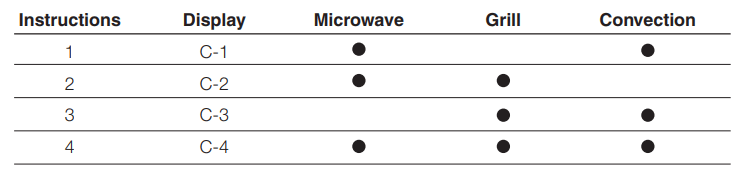
 ” and “
 ” indicators will flash and “g” indicator will go out.
 ” indicator will light. LED will display current time or 0:00.