www.zlinekitchen.com
User Manual
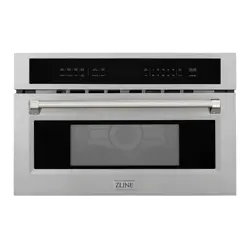
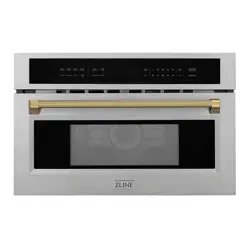
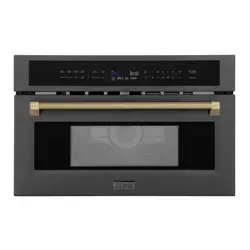
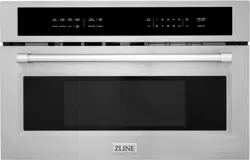
MICROWAVE OVENS
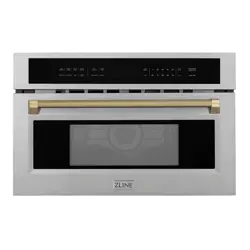
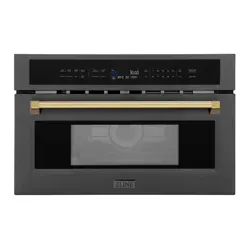
MWO MODELS

ZLINE Kitchen and Bath provides Attainable Luxury, where the kitchen and bath of your dreams
is never out of reach. Through our unique designs and unparalleled quality, we’re dedicated to
providing you an elevated experience in the heart of your home. With an endless selection of
features and finishes, our inspiration is your reality.
ZLINE is fueled by a passion for innovation; A relentless pursuit of bringing the
highest end luxury designs and professional features into everyone’s homes.
Because we continually strive to improve our products, we may change
specifications and designs without prior notice.
Scan the QR code to view the most up-to-date version of the Installation Manual
and User Manual.
WARNING: This product can expose you to chemicals including nickel, which is known to the
State of California to cause cancer. For more information, go to www.P65Warnings.ca.gov.

TABLE OF CONTENTS
IMPORTANT SAFETY INSTRUCTIONS . . . . . . . . . . . . . . . . . . . 1
OPERATION . . . . . . . . . . . . . . . . . . . . . . . . . . . . . . . . . . . . . . . . 8
Turntable and Grill Rack . . . . . . . . . . . . . . . . . . . . . . . . . . . . . 8
Handle Installation . . . . . . . . . . . . . . . . . . . . . . . . . . . . . . . . 9
Touch Keys and Display . . . . . . . . . . . . . . . . . . . . . . . . . . . . . 12
MAINTENANCE AND CLEANING . . . . . . . . . . . . . . . . . . . . .36
TROUBLESHOOTING . . . . . . . . . . . . . . . . . . . . . . . . . . . . . . . . 38
WARRANTY . . . . . . . . . . . . . . . . . . . . . . . . . . . . . . . . . . . . . . . .40
1
Before operation, please read and follow these important
instructions for the safety of your home and the people living in it.
When using electrical appliances, basic safety precautions
should be followed, including the following:
• Install or locate this appliance only in accordance with the
provided installation instructions.
WARNING
WARNING: Ensure that the appliance is switched
off before replacing the lamp to avoid the possibility
of electric shock.
• Do not attempt to operate this oven with the door open.
This can result in harmful exposure to microwave energy.
• It is important not to break or tamper with the safety interlocks.
• Do not place any object between the oven front face and
the door or allow soil or cleaner residue to accumulate on
sealing surfaces.
• Do not operate the oven if it is damaged. It is particularly
important that the oven door closes properly and that there
is no damage to the:
• Door (bent or broken)
• Hinges and latches (broken or loosened)
• Door seals and sealing surfaces (dirty or eroding)
• The oven should not be adjusted or repaired by anyone
except properly qualified service personnel.
• If the oven is not maintained in a good state of cleanliness,
its surface could be degraded and affect the lifespan of
the oven and lead to a dangerous situation.
IMPORTANT SAFETY INSTRUCTIONS
General Safety

2
IMPORTANT SAFETY INSTRUCTIONS
• Use this appliance only for its intended use as described
in the manual. Do not use corrosive chemicals or vapors in
this appliance. This type of oven is specifically designed to
heat, cook, or defrost food. It is not designed for industrial
or laboratory use.
• Do not use harsh abrasive cleaners or sharp metal scrapers
to clean the oven door glass since they can scratch the
surface, which may result in shattering of the glass.
• Heavily soiled seal: If the seal is very dirty or eroded,
the appliance door will no longer close properly during
operation. The fronts of adjacent units could also be
damaged. Always keep the seal clean.
• This appliance can be used by children if they have
been given supervision or instruction concerning use
of the appliance in a safe way and understand the
hazards involved.
• Children shall not play with the appliance. Cleaning and
user maintenance shall not be made by children without
supervision. Keep the appliance and its cord out of reach
of children without supervision.
• If the electrical cord is damaged, it must be replaced by
the manufacturer or a similarly qualified professional in
order to avoid a hazard.
• Do not immerse cord or plug in water.
• Keep cord away from heated surface.
• Do not let cord hang over edge of table or counter.
• Do not cover or block any openings on the appliance.
• Do not store this appliance outdoors. Do not use this product
near water — for example, near a kitchen sink, in a wet
basement, near a swimming pool, or similar location.
General Safety
3
IMPORTANT SAFETY INSTRUCTIONS
• To reduce the risk of fire inside the oven:
• Do not overcook food. Carefully oversee appliance
when paper, plastic, or other combustible materials
are placed inside the oven to facilitate cooking.
• Remove wire twist-ties from paper or plastic bags
before placing bag in oven.
• If material inside of the oven ignites, keep oven door
closed, turn oven off, and disconnect power cord or
shut off power at the fuse or circuit breaker panel.
• Do not use the microwave for storage purposes. Do not
leave paper products, cooking utensils, or food inside
when not in use.
• If smoke is emitted, switch off and unplug the appliance
and keep the door closed in order to stifle any flames.
• Care should be taken not to displace the turntable when
removing containers from the appliance.
• Some products, such as whole eggs and sealed containers
— for example, closed glass jars — can explode and should
not be heated in this oven.
WARNING
WARNING: Liquids and other foods must not be
heated in sealed containers since they are
liable to explode.
Fire Safety

4
IMPORTANT SAFETY INSTRUCTIONS
• HOT CONTENTS CAN CAUSE SEVERE BURNS. DO
NOT ALLOW CHILDREN TO USE THE MICROWAVE. Use
caution when removing hot items.
• Liquids such as water, coffee, or tea may be heated beyond
the boiling point without appearing to be boiling. Visible
bubbling or boiling when the container is removed from
the microwave oven is not always present. THIS COULD
RESULT IN VERY HOT LIQUID SUDDENLY BOILING
OVER WHEN THE CONTAINER IS DISTURBED OR A
UTENSIL IS INSERTED INTO THE LIQUID. To reduce the
risk of injury to persons:
• Do not overheat the liquid.
• Stir the liquid both before and halfway through heating it.
• Do not use straight-sided containers with narrow necks.
• After heating, allow the container to stand in the
microwave oven for a short time before removing
the container.
• Use extreme care when inserting a spoon or other
utensil into the container.
• Do not operate any heating or cooking appliance beneath
the appliance. (Exception: A microwave oven made for
use above another heating appliance.)
• Do not mount unit over or near any portion of heating or
cooking appliance. (Exception: A microwave oven made
for use above another heating appliance.)
• Do not mount over sink.
• Do not store anything directly on top of the appliance
surface when the appliance is in operation.
• Oversized food or oversized metal utensils should not be
inserted in the oven as they may create a fire or risk of
electric shock.
Food Safety
5
IMPORTANT SAFETY INSTRUCTIONS
• The appliance shall not be cleaned with a steam cleaner.
• Do not clean with metal scouring pads. Pieces can burn
off the pad and touch electrical parts, increasing the risk
of electric shock.
• Do not use paper products when appliance is operated in
the convection or baking mode.
• Do not store any materials, other than manufacturer’s
recommended accessories, in this oven when not in use.
• Do not cover racks or any other part of the oven with metal
foil. This will cause overheating of the oven.
• When heating food in plastic or paper containers, keep an
eye on the oven due to the possibility of ignition.
• Only use utensils that are suitable for use in microwave ovens.
• The contents of feeding bottles and baby food jars must
be stirred or shaken and the temperature checked before
consumption in order to avoid burns.
• The oven should be cleaned regularly and any food deposits
removed since they may explode even after microwave
heating has ended.
• The microwave oven is intended for heating food and
beverages. Drying of food or clothing and heating of
warming pads, slippers, sponges, damp cloths, and similar
items may lead to risk of injury, ignition, or fire.
WARNING
WARNING: The appliance and its accessible parts
become hot during use. Surface of a storage drawer
can get hot. Care should be taken to avoid touching
heating elements. Metallic containers for
food and beverages are not allowed during
microwave cooking.
Cooking Safety

6
IMPORTANT SAFETY INSTRUCTIONS
• The appliance is intended to be used built-in.
• The appliance must not be installed behind a decorative
door in order to avoid overheating.
• Using metal, aluminum, or other non-microwave-safe
objects with the microwave function can cause sparks.
Sparks can irreparably damage the glass on the inside the
of the door.
• Never pour water inside the hot cooking compartment.
This will cause steam. The temperature change can
cause damage.
• Do not store moist food in the cooking compartment for
long periods.
• Do not use the appliance to store food. This can lead
to corrosion.
• Do not open the door to assist with cooling down food. The
door must remain closed.
• Do not trap anything in the appliance door. Even if the
door is only slightly ajar, the fronts of adjacent units may
be damaged over time.
• Do not operate the microwave without food inside. Doing
so may lead to power overloading. Never switch on the
appliance unless there is food in the cooking compartment.
• Do not stand or place anything on the open appliance
door. Do not place ovenware or accessories on the
appliance door.
• When transporting the appliance, do not carry or hold the
appliance by the door handle. The door handle cannot
support the weight of the appliance and could break.
Cooking Safety
7
IMPORTANT SAFETY INSTRUCTIONS
ENVIRONMENTALLY-FRIENDLY DISPOSAL
■
■
■
■ is
■
Th
96/EC on W
(WEEE). The direct
collection and recycli
across t
Dispose of packaging in an environmentally-friendly
manner. This appliance complies with European
Directive 2002/96/EC on Waste Electrical and
Electronic Equipment (WEEE). The directive gives a
framework for the collection and recycling of old
appliances, which is valid across the EU.
Environmental Safety
8
OPERATION
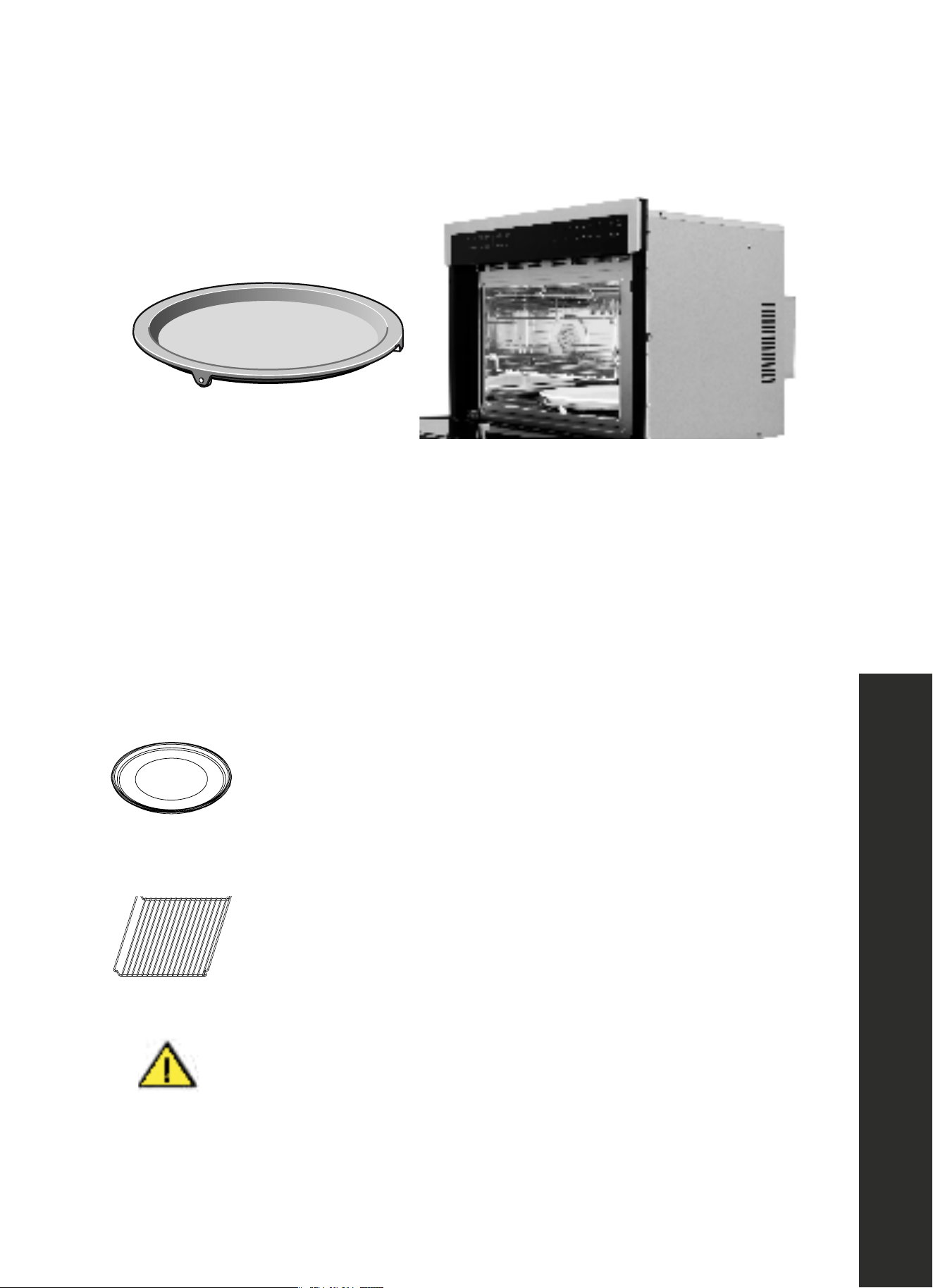
TURNTABLE AND GRILL RACK
Accessories
Before using the appliance for the first time
Here you will find everything you need to do before using your
oven to prepare food for the first time. First read the section on
Safety information
.
Setting the clock
Heating up the oven
Cleaning the accessories
Before you use the accessories for the first time, clean them
thoroughly with hot soapy water and a soft dish cloth.
Setting the oven
There are various ways in which you can set your oven. Here we
will explain how you can select the desired type of heating and
temperature or grill setting. You can also select the oven cooking
time for your dish. Please refer to the section on
Setting the time-
setting options
.
Setting Convection mode
Turntable
As a surface for the wire rack.
Food which particularly requires a lot of heat from underneath can be
prepared directly on the turntable.
The turntable can turn clockwise or anti-clockwise.
Place the turntable on the drive in the centre of the cooking
compartment. Ensure that it is properly fitted.
■ Never use the microwave without the turntable.
■ The turntable can withstand max. 5 kg.
■ The turntable must turn when using all types of heating.
Lower wire rack
For the microwave and for baking and roasting in the oven.
Higher wire rack
For grilling, e.g. steaks, sausages and for toasting bread.
As a support for shallow dishes.
Once the appliance is connected, "12:00" will be displayed as
Opening the oven door during operation
Operation is suspended. After closing the door, touch the
key. Operation continues.
Cancelling operation
Note:
Type and quantity of accessories is subject to actual demand.
the time of day. To set the correct time, proceed as follows:
Example: roast 350 for 20 minutes
Food that particularly requires a lot of heat from underneath can be prepared directly on the
metal turntable.
• The turntable can turn clockwise or counterclockwise.
• Place the turntable on the drive in the center of the cooking compartment. Ensure that it
is properly fitted.
• Never use the microwave without the turntable.
• The turntable can withstand up to 11 lb (5 kg).
• The turntable must turn when using all types of heating.
The appliance also comes with a ceramic turntable that can be placed
on the metal turntable for stabler cooking.
Accessories
Before using the appliance for the first time
Here you will find everything you need to do before using your
oven to prepare food for the first time. First read the section on
Safety information
.
Setting the clock
Heating up the oven
Cleaning the accessories
Before you use the accessories for the first time, clean them
thoroughly with hot soapy water and a soft dish cloth.
Setting the oven
There are various ways in which you can set your oven. Here we
will explain how you can select the desired type of heating and
temperature or grill setting. You can also select the oven cooking
time for your dish. Please refer to the section on
Setting the time-
setting options
.
Setting Convection mode
Turntable
As a surface for the wire rack.
Food which particularly requires a lot of heat from underneath can be
prepared directly on the turntable.
The turntable can turn clockwise or anti-clockwise.
Place the turntable on the drive in the centre of the cooking
compartment. Ensure that it is properly fitted.
■ Never use the microwave without the turntable.
■ The turntable can withstand max. 5 kg.
■ The turntable must turn when using all types of heating.
Lower wire rack
For the microwave and for baking and roasting in the oven.
Higher wire rack
For grilling, e.g. steaks, sausages and for toasting bread.
As a support for shallow dishes.
Once the appliance is connected, "12:00" will be displayed as
Opening the oven door during operation
Operation is suspended. After closing the door, touch the
key. Operation continues.
Cancelling operation
Note:
Type and quantity of accessories is subject to actual demand.
the time of day. To set the correct time, proceed as follows:
Example: roast 350 for 20 minutes
Accessories
Before using the appliance for the first time
Here you will find everything you need to do before using your
oven to prepare food for the first time. First read the section on
.
Setting the clock
Heating up the oven
Cleaning the accessories
Before you use the accessories for the first time, clean them
thoroughly with hot soapy water and a soft dish cloth.
Setting the oven
There are various ways in which you can set your oven. Here we
will explain how you can select the desired type of heating and
temperature or grill setting. You can also select the oven cooking
time for your dish. Please refer to the section on
Setting the time-
setting options
.
Setting Convection mode
Turntable
As a surface for the wire rack.
Food which particularly requires a lot of heat from underneath can be
prepared directly on the turntable.
The turntable can turn clockwise or anti-clockwise.
Place the turntable on the drive in the centre of the cooking
compartment. Ensure that it is properly fitted.
■ Never use the microwave without the turntable.
■ The turntable can withstand max. 5 kg.
■ The turntable must turn when using all types of heating.
Lower wire rack
For the microwave and for baking and roasting in the oven.
Higher wire rack
For grilling, e.g. steaks, sausages and for toasting bread.
As a support for shallow dishes.
Once the appliance is connected, "12:00" will be displayed as
Opening the oven door during operation
Operation is suspended. After closing the door, touch the
key. Operation continues.
Cancelling operation
Note:
Type and quantity of accessories is subject to actual demand.
the time of day. To set the correct time, proceed as follows:
Example: roast 350 for 20 minutes
Accessories
Before using the appliance for the first time
Here you will find everything you need to do before using your
oven to prepare food for the first time. First read the section on
Safety information
.
Setting the clock
Heating up the oven
Cleaning the accessories
Before you use the accessories for the first time, clean them
thoroughly with hot soapy water and a soft dish cloth.
Setting the oven
There are various ways in which you can set your oven. Here we
will explain how you can select the desired type of heating and
temperature or grill setting. You can also select the oven cooking
time for your dish. Please refer to the section on
Setting the time-
setting options
.
Setting Convection mode
Turntable
As a surface for the wire rack.
Food which particularly requires a lot of heat from underneath can be
prepared directly on the turntable.
The turntable can turn clockwise or anti-clockwise.
Place the turntable on the drive in the centre of the cooking
compartment. Ensure that it is properly fitted.
■ Never use the microwave without the turntable.
■ The turntable can withstand max. 5 kg.
■ The turntable must turn when using all types of heating.
Lower wire rack
For the microwave and for baking and roasting in the oven.
Higher wire rack
For grilling, e.g. steaks, sausages and for toasting bread.
As a support for shallow dishes.
Once the appliance is connected, "12:00" will be displayed as
Opening the oven door during operation
Operation is suspended. After closing the door, touch the
key. Operation continues.
Cancelling operation
Note:
Type and quantity of accessories is subject to actual demand.
the time of day. To set the correct time, proceed as follows:
Example: roast 350 for 20 minutes
A reversible wire grill rack is included for maximum convection
performance. For best results, place rack face down for baking or roasting
and face up for grilling.
WARNING
The rack can remain inside the microwave during the microwave function as
long as it is placed properly in the rack holders.
Before using the accessories for the first time, clean them thoroughly with hot soapy water
and a soft dish cloth.
Accessories
9
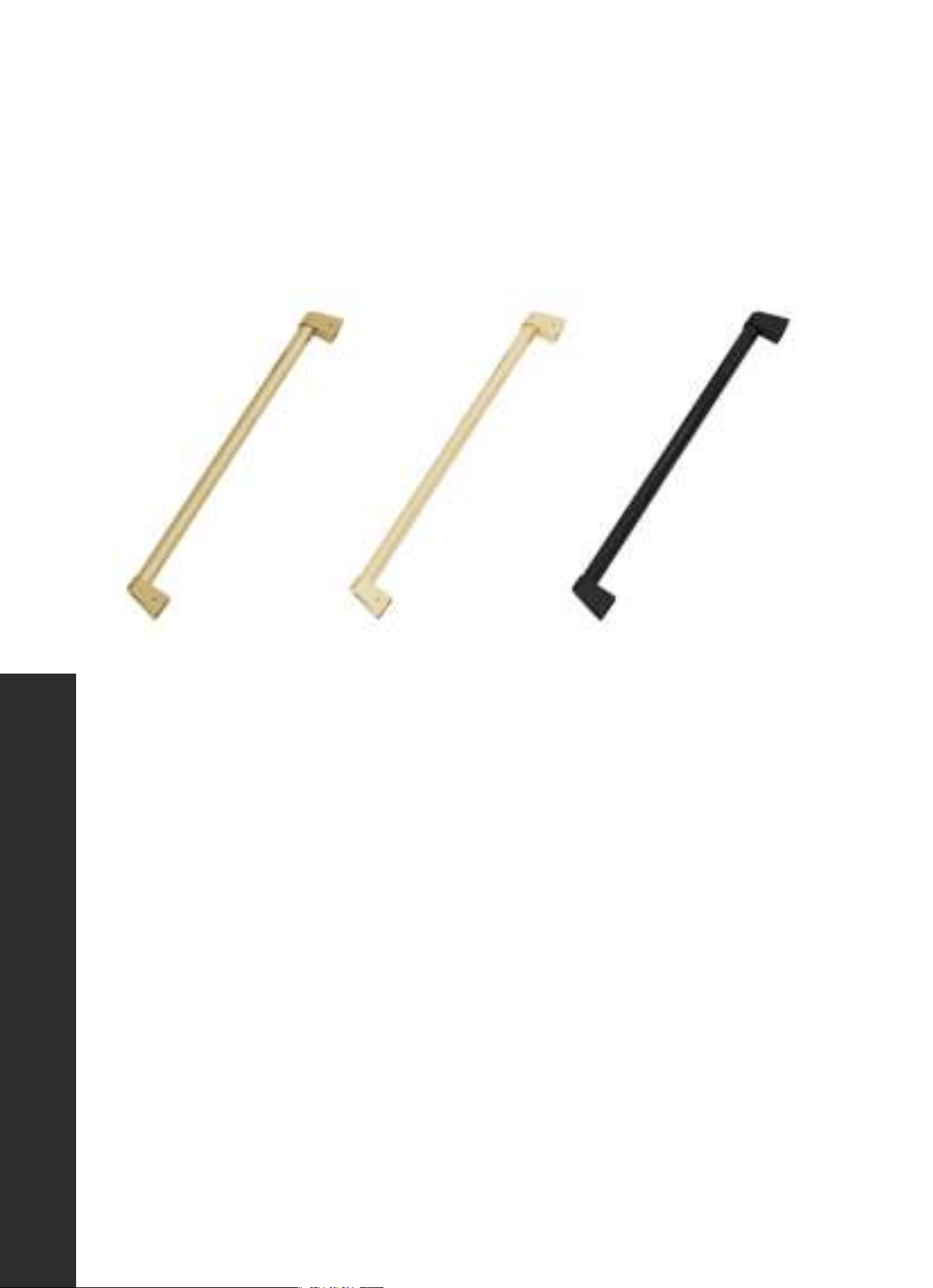
Installing Handles
OPERATION
HANDLE INSTALLATION
NOTE: The Allen/hex key needed to remove the handle is only included with Autograph
Edition handles (Champagne Bronze, Gold, and Matte Black).
Autograph Edition handles
1. Locate the holes on the underside of each handle base.
2. Using a 7/64" Allen/hex key, loosen both the left and right set screws.
3. Carefully remove the handle. If installing an Autograph Edition handle, carefully place
the new handle on the mounting studs. Then, using the Allen/hex key, tighten the left and
right set screws until the handle is firmly in place.
10
Utensils
OPERATION
RADIO INTERFERENCE
• Operation of the microwave oven may cause interference to your radio, TV, or
similar equipment.
• When there is interference, it may be reduced or eliminated by taking the
following measures:
• Clean the door and sealing surface of the oven.
• Reorient the receiving antenna of the radio or TV.
• Move the microwave oven away from the receiver.
• Plug the microwave oven into a different outlet so the appliance and receiver are on
different branch circuits.
NOTE: This device complies with part 18 of the FCC Rules.
UTENSILS FOR USE IN MICROWAVE
MODE
CAUTION
CAUTION: Personal Injury Hazard
• Tightly-closed utensils could explode. Closed containers should be
opened and plastic pouches should be pierced before cooking.
• Carefully review the instructions on page 11 regarding what utensils to
NOT use while using the microwave function.
• Please note there may be certain non-metallic utensils that are not safe
to use for microwaving. If in doubt, you can test the utensil in question
following the procedure below.
UTENSIL TEST
Fill a microwave-safe container with 1 cup of cold water along with the
utensil in question.
1. Cook on maximum microwave cooking power for 1 minute.
2. Carefully feel the utensil. If the utensil is warm, do not use it for microwave
cooking.
3. Do not exceed 1 minute cooking time.
11
Safe Materials
OPERATION
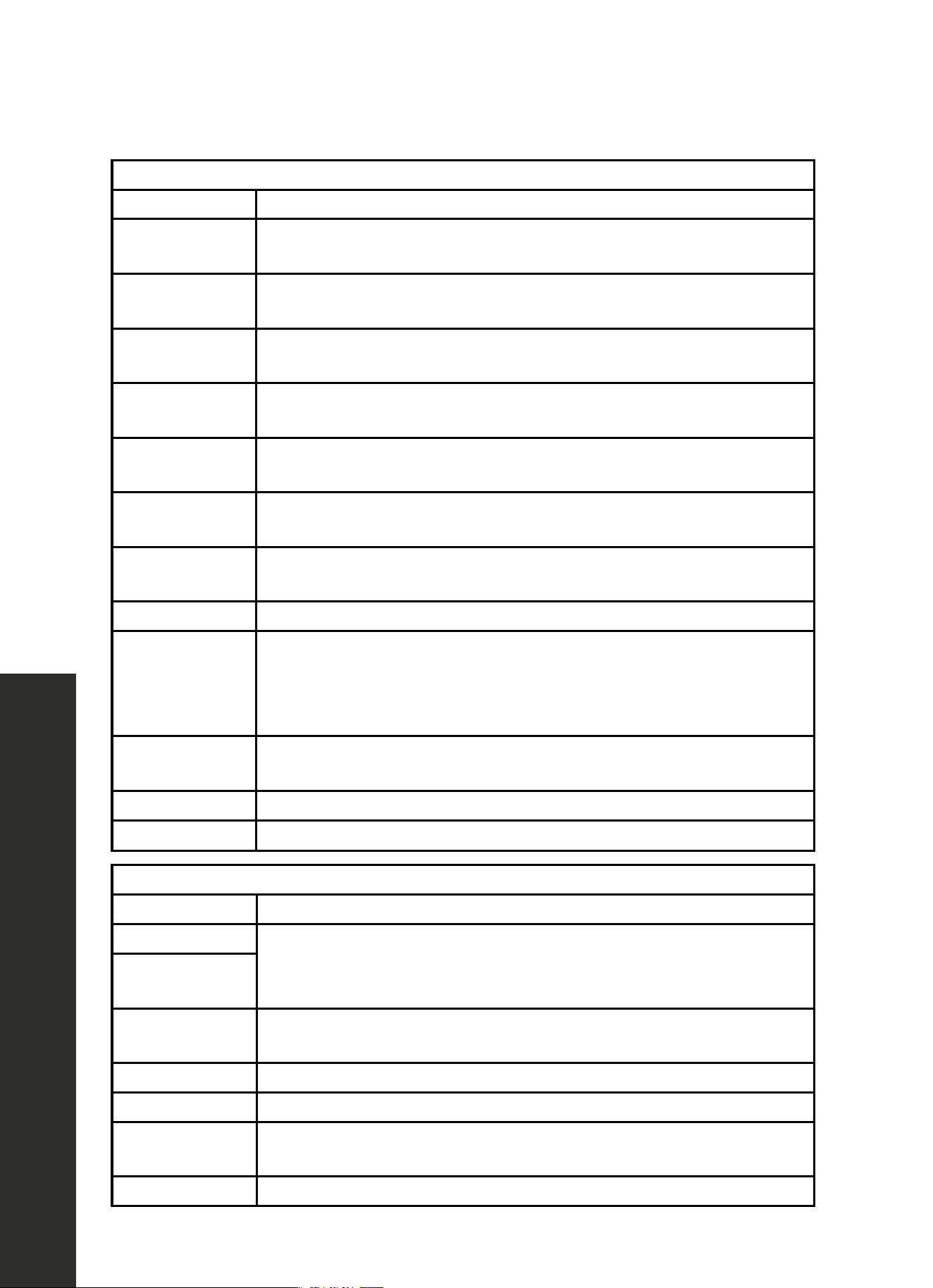
MATERIALS YOU CAN USE WHILE MICROWAVE COOKING
UTENSILS GUIDE
Browning dish
Follow manufacturer’s instructions. The bottom of browning dish must be at least 3/16" (5
mm) above the turntable. Incorrect usage may cause the turntable to break.
Dinnerware
Microwave-safe only. Follow manufacturer’s instructions. Do not use cracked or
chipped dishes.
Glass jars
Always remove lid. Use only to heat food until just warm. Most glass jars are not heat-
resistant and may break.
Glassware
Heat-resistant oven glassware only. Make sure there is no metallic trim. Do not use
cracked or chipped dishes.
Oven cooking bags
Follow manufacturer’s instructions. Do not close with metal twist tie. Make slits to allow
steam to escape.
Paper plates
and cups
Use for short term cooking/warming only. Do not leave oven unattended while cooking.
Paper towels
Use to cover food for reheating and absorbing fat. Use with supervision for short-term
cooking only.
Parchment paper Use as a cover to prevent splattering or a wrap for steaming.
Plastic
Microwave-safe only. Follow the manufacturer’s instructions. Some plastic containers
soften as the food inside gets hot. “Boiling bags” and tightly closed plastic bags should be
slit, pierced, or vented as directed by package. Use only to cover food during cooking.
Plastic wrap
Microwave-safe only. Use to cover food during cooking to retain moisture. Do not allow
plastic wrap to touch food.
Thermometers Microwave-safe only (meat and candy thermometers).
Wax paper Use as a cover to prevent splattering and retain moisture.
MATERIALS TO BE AVOIDED WHILE MICROWAVE COOKING
UTENSILS GUIDE
Aluminum tray
Use of metal or aluminum while microwave cooking may cause arcing (sparks inside the
unit). Transfer food into microwave-safe dish.
Food carton with
metal handle
Metal or metal-
trimmed utensils
Metal shields the food from microwave energy. Metal trim may cause arcing.
Metal twist ties May cause arcing and could cause a fire in the oven.
Paper bags May cause a fire in the oven.
Plastic foam
Plastic foam may melt or contaminate food/liquid inside when exposed to high
temperatures.
Wood Wood will dry out when used in the microwave oven and may split or crack.
12
■
■
■
■
■
■
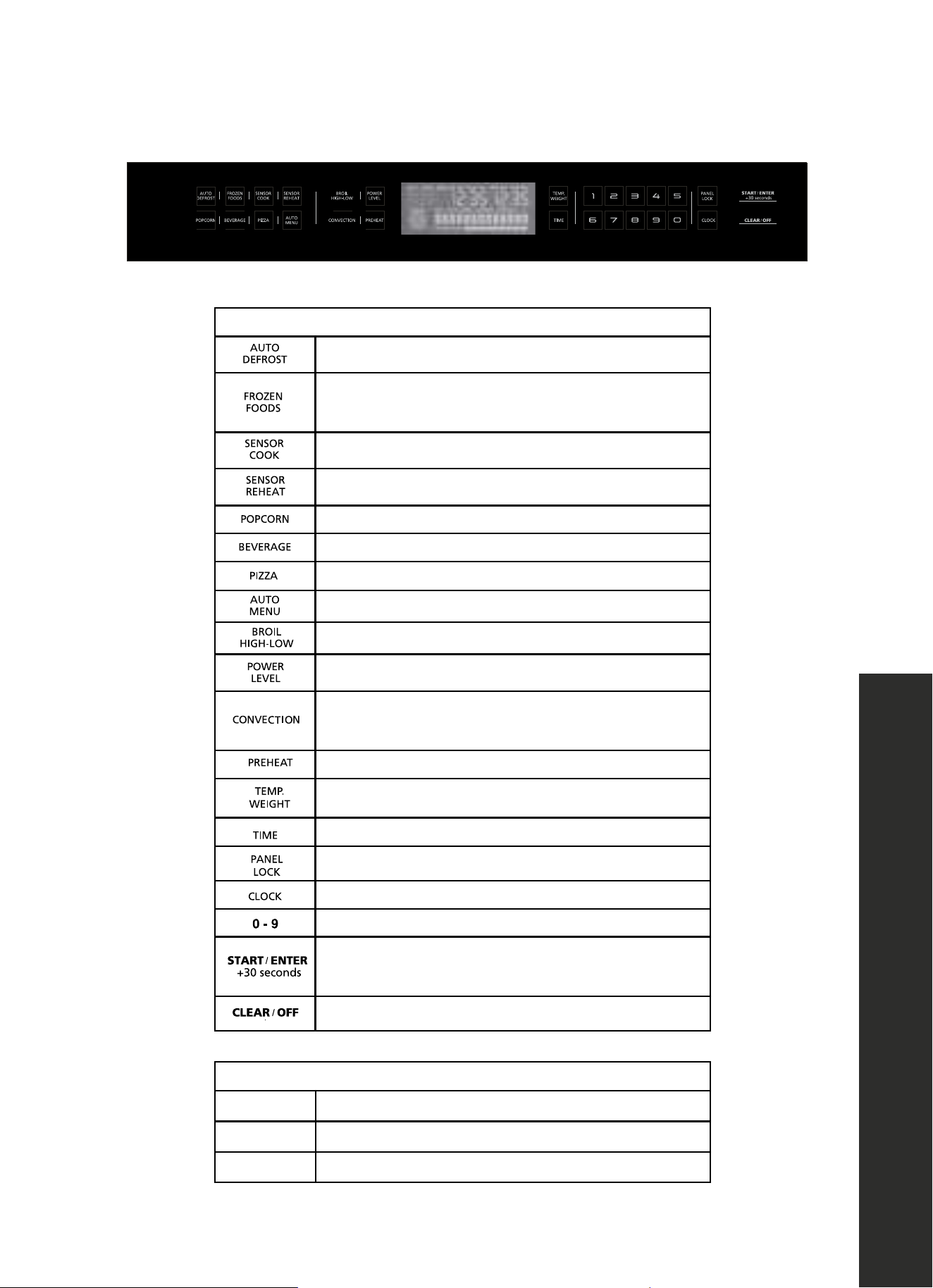
TOUCH KEYS AND DISPLAY
■
■
Select auto defrost programs
■
■
Start cooking programs for frozen
convenience foods
■
■
Select sensor cook programs
■
■
Select sensor reheat programs
■
■
Cook popcorn
■
■
Heat beverages
■
■
Select pizza programs
■
■
Select auto menu programs
■
■
Set broil modes (high/low)
■
■
Set power level for microwave operation
■
■
Select bake cook programs
Select roast cook programs
■
■
Select preheat programs
■
■
Set temperature or weight of cooking
■
■
Set Time for cooking time
■
■
Activate/deactivate childproof lock
■
■
Set time of day
■
■
Use the number keys to enter customized values
■
■
Confirm entered values/start cooking mode
Add 30 seconds
■
■
Clear entered value/turn appliance off
PARAMETER ADJUSTMENT
Auto menu Select 8 automatic programs
Weight Set the weight of cooking
Time Set the time of cooking
Keys and Display
OPERATION
13
Childproof Lock
OPERATION
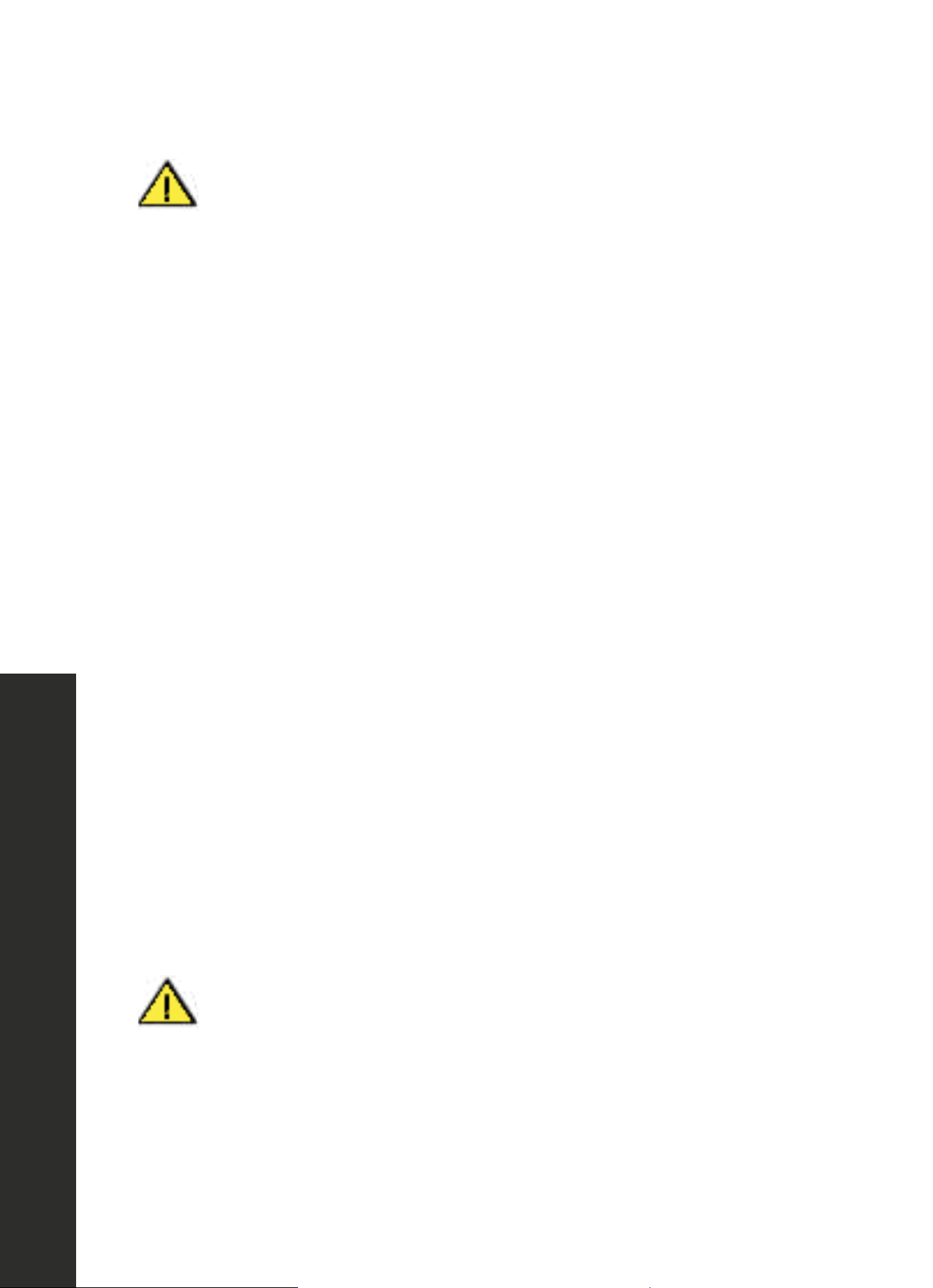
WARNING
Avoid opening the microwave while it is actively in use. The lifespan of the
product will decrease if microwave functions are not properly stopped
before opening.
CHILDPROOF LOCK
The oven has a childproof lock to prevent children from switching it on accidentally. The oven
will not react to any settings. The timer and clock also cannot be set when the childproof lock
has been switched on.
SWITCHING ON THE CHILDPROOF LOCK
1. No cooking time should be set.
2. Touch and hold the Panel Lock key for approximately 3 seconds. The lock symbol appears
in the display. The childproof lock is activated.
SWITCHING OFF THE CHILDPROOF LOCK
Touch and hold the Panel Lock key for approximately 3 seconds. The lock symbol on the
display goes out. The childproof lock is deactivated.
CHILDPROOF LOCK WITH OTHER COOKING OPERATIONS
When other cooking programs have been set, the childproof lock is not operational.
COOLING FAN
• Your appliance has a cooling fan. The cooling fan switches on during operation. The hot
air escapes above the door.
• The cooling fan continues to run for a certain time after operation.
WARNING
WARNING: Do not cover the ventilation slots. Otherwise, the
appliance will overheat.
• The appliance needs to remain cool during microwave operation. The cooling fan may
continue to run even when the microwave operation has completed.
• Condensation may appear on the door window, interior walls, and floor. This is normal
and does not adversely affect microwave operation. Wipe away the condensation
after cooking.

14
Clock Settings
OPERATION
SETTING THE CLOCK
1. Once the appliance is connected, “12:00” will be displayed as the time of day. To set
the correct time, proceed as follows:
2. Touch Clock.
3. Enter the correct time using the number keys.
Example: To set the clock to 12:41, type in 1 2 4 1.
4. Touch Start/Enter to confirm.
CHANGING THE CLOCK
1. Touch Clock in waiting state.
2. Enter the correct time using the number keys.
3. Touch Start/Enter to confirm.
SETTING THE TIMESETTING OPTIONS
Your oven has various time-setting options. You can use the Clock key to call up the menu
and switch between the individual functions.
SETTING THE COOKING TIME
1. The cooking time for your meal can be set on the oven. When the cooking time has elapsed,
the oven switches itself off automatically. This means that you do not have to interrupt
other work to switch off the oven. The cooking time cannot be accidentally exceeded.
2. The oven starts. The cooking time counts down in the display.
3. The cooking time has elapsed
4. An audible signal sounds. The oven stops heating.
15
Oven Settings
OPERATION
HEATING UP THE OVEN
To remove the new oven smell, heat up the microwave when it is empty and closed. One
hour with Convection at 350 ◦F is ideal. Ensure that no packaging remnants have been left
inside the oven.
1. Touch Convection once to enter bake mode.
2. Enter the numbers 3 5 0 with the number keys.
3. Touch TIME to adjust cooking time.
4. Enter the numbers 6 0 0 0 with the number keys.
5. Touch Start/Enter to start cooking.
SETTING CONVECTION MODE
Example: Roast 350 ◦F for 20 minutes
1. Touch Convection once to enter bake mode. Touch Convection twice to enter roast mode.
2. Enter the numbers 3 5 0 with the number keys.
3. Touch TIME to adjust cooking time.
4. Enter the numbers 2 0 0 0 with the number keys.
5. Touch Start/Enter to start cooking.
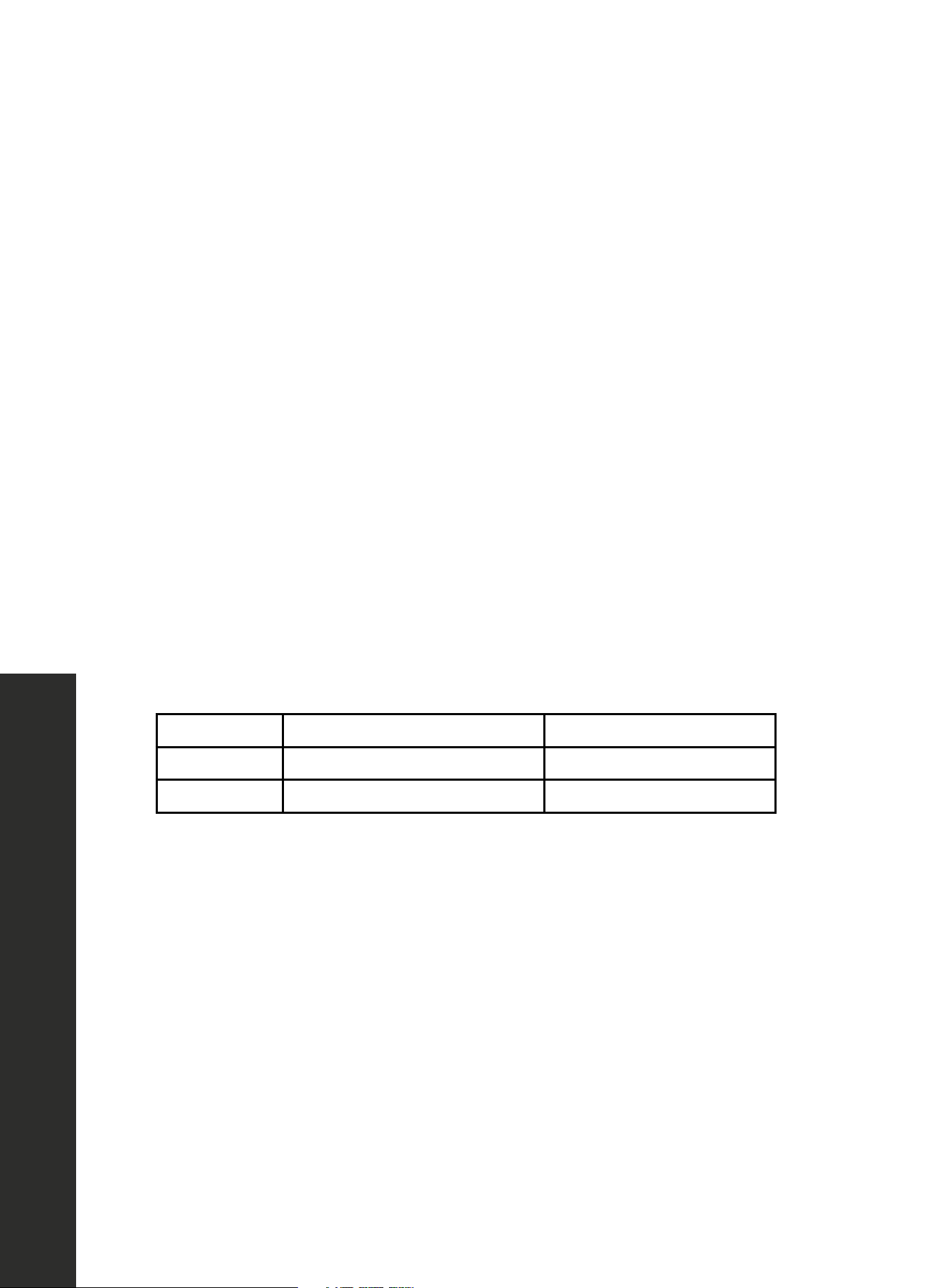
PROGRAM TOUCH CONVECTION KEY TEMPERATURE RANGE
Bake Once 250–400 °F
Roast Twice 300–450 °F
NOTE: If you do not need to adjust the time, skip Step 3–4.
OPENING THE OVEN DOOR DURING OPERATION
Operation is suspended. After closing the door, touch the Start/Enter key. Operation continues.
CANCELING OPERATION
1. Touch Clear/Off to cancel the active oven mode. The appliance turns off and the clock
is displayed.
2. The cooling fans may continue to run for awhile and then switch off automatically.

16
Preheating Settings
OPERATION
RAPID PREHEATING
With rapid preheating, your oven reaches the set temperature particularly quickly.
1. To ensure optimal cooking, only put your food in the cooking compartment when the
preheating phase is complete.
2. Touch the PREHEAT key.
3. Enter the temperature setting with the number keys. The input temperature should be
within 100 °F to 450 °F .
4. Touch the Start/Enter key. The oven begins to heat up.
THE PREHEATING PROCESS IS COMPLETE
A signal sounds. Put your dish in the oven. Set the cooking mode you need.
CANCELING RAPID PREHEATING
• While setting the rapid preheating function, touch Clear/Off to cancel the function.
• During rapid preheating, touch Clear/Off to cancel the function. You can also open the
door to cancel the function.
NOTE: You can open the door to put food inside only after you hear a notification and see
the preheating icon blinking.

17
Power Settings
OPERATION
SUITABLE MICROWAVE OVENWARE
Suitable dishes are heat-resistant ovenware made of glass, oven heat resistant silicon
cookware, glass ceramic, porcelain, ceramic or heat-resistant plastic. These materials allow
microwaves to pass through.
UNSUITABLE MICROWAVE OVENWARE
Metal ovenware is unsuitable when using the microwave function. Metal does not allow
microwaves to pass through. Food in covered metal containers will remain cold.
OVENWARE TEST
Do not switch on the microwave unless there is food inside. The following ovenware test
is the only exception to this rule. Perform the following test if you are unsure whether your
ovenware is suitable for use in the microwave:
• Heat the empty ovenware at maximum power for 1/2 to 1 minute.
• Check the temperature occasionally during that time.
• The ovenware should still be cold or warm to the touch.
• The ovenware is unsuitable if it becomes hot or if sparks are generated.
MICROWAVE POWER SETTINGS
• You can select from 11 different microwave power levels. If you do not set a power level,
the microwave will automatically operate at the highest power level.
• The table on the next page provides suggested power levels for various types of food
that can be prepared in the microwave.
18
Power Settings
OPERATION
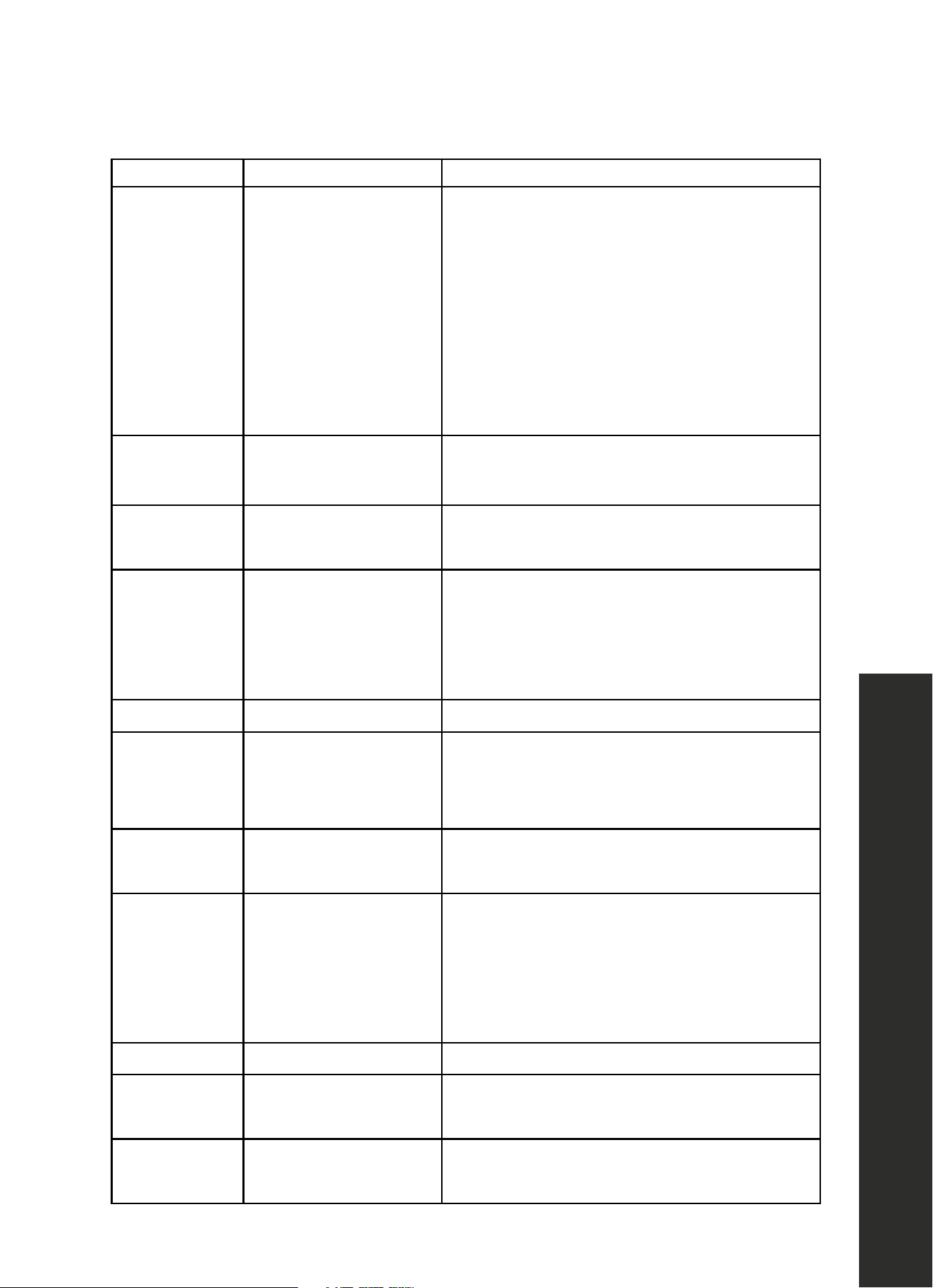
POWER LEVEL MICROWAVE OUTPUT USE FOR
PWR100 100%
• Boiling water
• Cooking ground meat
• Making candy
• Cooking fresh fruit and vegetables
• Cooking fish and poultry
• Preheating browning dish
• Reheating beverages
• Cooking bacon slices
PWR90 90%
• Reheating meat slices quickly
• Sautéing onions, celery, and green peppers
PWR80 80%
• All reheating
• Cooking scrambled eggs
PWR70 70%
• Cooking breads and cereal products
• Cooking cheese dishes
• Cooking muffins, brownies, and cupcakes
• Cooking whole poultry
PWR60 60% • Cooking pasta
PWR50 50%
• Cooking meat
• Cooking custard
• Cooking spare ribs, rib roast, and sirloin roast
PWR40 40%
• Cooking less tender cuts of meat
• Reheating frozen packaged foods
PWR30 30%
• Thawing meat, poultry, and seafood
• Cooking small quantities of food
• Finish cooking casseroles, stew,
and some sauces
• Melting chocolate
PWR20 20% • Softening butter and cream cheese
PWR10 10%
• Softening ice cream
• Raise yeast dough
PWR0 0%
This setting operates the fan with no power to help
remove the odors in the oven.

19
OPERATION
Power Settings
SETTING THE MICROWAVE
1. Enter the desired cook time with the number keys. The timer display will fill in from
right to left.
Example: To set a microwave time of 20 minutes and 30 seconds, enter the
numbers 2 0 3 0.
2. You can start microwave operation with the default power PWR100 by touching Start/
Enter or you can set a different power level.
3. Touch Power Level. Enter the desired power level using the number keys.
4. Touch Start/Enter to start microwave operation. The microwave timer will start
to count down.
EXPRESS COOKING
1. In standby state, touch number keys 1 to 9 to start microwave cooking at level PWR100
from 1 to 9 minutes.
2. If the door is closed, the oven will start to cook after 2 seconds.
OPENING THE OVEN DOOR DURING OPERATION
Operation will be immediately suspended. After closing the door, touch the Start/Enter key
to continue operation.
CANCELING OPERATION
1. Touch Clear/Off to cancel operation.
2. The cooling fans may continue to run for awhile and then switch off automatically.
SPEEDY MICROWAVE COOKING
1. Use the Start/Enter key to quick-start your microwave at the highest power level. You
can touch the key repeatedly to increase the microwave time in increments of 30 seconds.
2. Touching this key during microwave operation will add 30 seconds to the remaining
microwave time.
3. A signal will sound when the cooking time has elapsed.

20
Power Settings
OPERATION
MULTISTAGE COOKING
1. Enter the desired cook time with the number keys.
2. Touch Power Level.
3. Enter the desired power level for the first stage of cooking using the number keys.
4. Touch Power Level.
5. Enter the desired power level for the second stage using the number keys.
6. Touch Start/Enter.
7. Enter the desired cook time with the number keys.
8. Touch Start/Enter to start microwave operation.
9. The buzzer will sound 3 times when the first stage of cooking is finished and enter to the
second stage.
21
Automatic Programs
OPERATION
AUTOMATIC PROGRAMS
SETTING A PROGRAM
1. When setting a program, the temperature selector must be in the off position.
2. Touch Auto menu.
3. Touch Auto menu repeatedly to scroll through the full Auto menu.
4. Touch the number keys to adjust weight of food.
5. Touch Start/Enter to start cooking.
OPENING APPLIANCE DOOR DURING OPERATION
Opening the appliance door during operation will interrupt the current mode. Close the
appliance door and then touch Start/Enter to resume operation.
CANCEL OPERATION
Touch Clear/Off to cancel the operation. The cooling fans may continue to run for awhile
and then switch off automatically.
AUTO MENU
PROGRAM WEIGHT RANGE FOOD PLACEMENT
1- Chicken Breasts 0.5–3.0 lb (0.2–1.4 kg) Wire rack, facing down
2 - Chicken Thigh 0.5–3.0 lb (0.2–1.4 kg) Wire rack, facing down
3 - Whole Poultry 1.5–4.5 lb (0.7–2 kg) Turntable
4 - Beef Roast 0.5–3.25 lb (0.2–1.5 kg) Turntable
5 - Pork Tenderloin 1.0–3.0 lb (0.5–1.4 kg) Wire rack, facing down
6 - Pork Chops 0.5–3.0 lb (0.2–1.4 kg) Wire rack, facing down
7 - Meatloaf 1.0–3.25 lb (0.5–1.5 kg) Turntable
8 - Fish Fillets 0.5–2.0 lb (0.2–0.9 kg) Wire rack, facing down
22
Defrosting Settings
OPERATION
DEFROSTING PROGRAMS
You can use the 2 defrosting programs to defrost ground meat and meat pieces.
1. Touch Auto Defrost once or twice to choose “GROUND MEAT” or “MEAT PIECES.”
2. Enter the weight of the food you want to defrost using the number keys.
3. Touch Start/Enter to start defrosting.
PREPARING FOOD
1. Use food that has been frozen at -0.4 °F (-18 °C) and stored in portion-sized quantities
that are as thin as possible.
2. Take the food to be defrosted out of all packaging and weigh it. You need to know the
weight to set the program.
3. Liquid will be produced when defrosting meat or poultry. Drain off this liquid when
periodically turning meat and poultry and under no circumstances use it for other
purposes or allow it to come into contact with other foods.
MICROWAVE OVENWARE
Place the food in a microwaveable shallow dish, e.g. a ceramic or glass plate, but do not
cover. When defrosting chicken and chicken portions, an audible signal will sound on two
occasions to indicate that the food should be turned.
RESTING TIME
The defrosted food should be left to stand for an additional 10 to 30 minutes until it reaches
an even temperature. Large pieces of meat require a longer standing time than smaller
pieces. Flat pieces of meat and items made from minced meat should be separated from
each other before leaving to stand. After this time, you can continue to prepare the food,
even though thick pieces of meat may still be frozen in the middle. The giblets can be removed
from poultry at this point.
PROGRAM NO. DEFROST WEIGHT RANGE
1 Ground meat 0.50–2.0 lb (0.23–0.9 kg)
2 Meat pieces 0.50–3.0 (0.23–1.36 kg)
23
Popcorn Settings
OPERATION
POPCORN
• Do not leave oven unattended while popping corn. Popcorn may ignite and cause fire.
• Never set the microwave power too high. Always place the popcorn bag on the ceramic
turntable or on a microwave-safe plate on top of the metal turntable.
• The popcorn feature lets you pop 3 different bag sizes of commercially packaged
microwave popcorn. Use the following table to determine the setting to use:
• NOTE: Popcorn times may vary by brand and/or type.
BAG SIZE TOUCH POPCORN KEY
1.2 oz 1 time
2.5 oz 2 times
3.5 oz 3 times
SETTING POPCORN MODE
1. Clear any previously set programs prior to choosing the mode. Touch Clear/Off.
2. Touch Popcorn. The cook time is displayed.
3. Touch Popcorn repeatedly or touch number key 1 to 3 to choose the desired weight.
4. Touch Start/Enter.
5. The microwave timer starts counting down.
6. When the microwave time has elapsed, a beep will sound.
BEVERAGE
The beverage feature heats 1/2 to 2 cups (4 to 16 oz.) of a beverage. Use the table below
to determine the setting to use.
AMOUNT TOUCH BEVERAGE KEY
1/2 cup (about 4 oz.) 1 time
1 cup (about 8 oz.) 2 times
1 1/2 cups (about 12 oz.) 3 times
2 cups (about 16 oz.) 4 times

24
Beverage Settings
OPERATION
SETTING BEVERAGE MODE
1. Touch Beverage. The cook time is displayed.
2. Touch Beverage repeatedly or touch number key 1 to 4 to choose the desired amount.
3. Touch Start/Enter.
4. The microwave timer starts counting down. When the microwave timer has elapsed, a
beep will sound.
FROZEN FOODS
SETTING FROZEN FOODS
1. Clear any previously set programs prior to choosing the mode. Touch Clear/Off.
2. Touch Frozen Foods.
3. You can change the temperature by using the number keys. You can enter a temperature
between 200 and 450° F.
4. Touch TIME to adjust cooking time.
5. Touch Start/Enter to start cooking.
OPENING APPLIANCE DOOR DURING OPERATION
Opening the appliance door during operation will interrupt the current mode. When you
close the appliance door, and touch the Start/Enter, operation will be resumed.
CANCEL OPERATION
1. Touch Clear/Off to cancel the operation.
2. The cooling fans may continue to run for awhile and then switch off automatically.
25
Pizza Settings
OPERATION
PIZZA
You can use the Pizza mode to bake three different types of pizza:
MODE NO. PIZZA TYPE BAKE ON
1 Frozen pizza Metal turntable
2 Fresh pizza Metal turntable
3 Microwave pizza Ceramic turntable
PIZZA TIPS
• Check pizza before minimum time elapses, as pizza may cook faster compared to a
traditional oven.
• For fresh pizza, use a pizza paddle for sliding the pizza on and from the metal turntable.
• If using a pizza paddle, sprinkle the paddle liberally with cornmeal for ease in transferring
the dough to the metal turntable.
• Maximum size is 12" (305 mm) for fresh and frozen pizzas.
• Avoid using a pizza stone as it can damage the oven.
• The metal turntable can be used for cutting pizza into slices. Remove the turntable from
the oven after the pizza is baked.
SETTING PIZZA MODE FOR FRESH OR FROZEN PIZZA
• You can set a temperature range from 375 to 450° F for fresh and frozen pizza modes.
• You can bake fresh or frozen pizza directly on the metal turntable.
1. Clear any previously set programs prior to choosing the mode. Touch Clear/Off.
2. Touch Pizza.
3. Touch Pizza repeatedly to scroll through all pizza modes.
4. Touch Start/Enter.
5. You can change the temperature by using the number keys. And you also can change
the cooking time by touching TIME and then touching number keys. Touch Start/
Enter to confirm.
6. The microwave oven starts preheating.
7. The set temperature is reached once the preheat bar has filled up completely and a
beep sounds.

26
Pizza Settings
OPERATION
OPENING APPLIANCE DOOR DURING OPERATION
Opening the appliance door during operation will interrupt the current mode. When you
close the appliance door, operation will be resumed.
SETTING PIZZA MODE FOR MICROWAVE PIZZA
1. Place the microwave pizza on the ceramic turntable and put it in the oven following
package directions.
2. Touch Pizza.
3. Touch Pizza repeatedly until MICROWAVE PIZZA is displayed.
4. Touch Start/Enter. The appliance starts sensing.
5. When sensing is complete, a beep will sound and the calculated cook time will start
to count down.
6. Once the calculated cook time is displayed, you can open the door to turn or rearrange
the food. Touch Start/Enter to resume operation.
OPENING APPLIANCE DOOR DURING OPERATION
Opening the appliance door during operation will interrupt the current mode. Close the
appliance door and then touch Start/Enter to resume operation.
SENSOR COOKING
You can select two sensor cooking modes. Sensor cooking allows you to cook many of
your favorite foods without selecting cooking times and power levels. The microwave oven
automatically determines the required cooking time for each food item. For best results for
cooking by sensor, follow these recommendations:
• Food cooked with the sensor system should start from normal storage temperature.
• Metal turntable, ceramic turntable, and outside of container should be dry.
• Foods should always be covered loosely with microwavable plastic wrap, wax
paper, or lid.
• Do not open the door or touch Clear/Off key during sensing time. When sensing time
is over, the oven beeps once and the remaining cooking time will appear in the display.
At this time you can open the door to stir, turn or rearrange the food.
SENSOR REHEAT
The Sensor Reheat feature lets you reheat dinner plates or casseroles (8–16 oz.) for your
cooking convenience.

27
OPERATION
Sensor Cooking
SETTING SENSOR REHEAT
1. Touch Sensor Reheat.
2. Touch Start/Enter. Sensing is displayed. The microwave operates during sensing.
3. When sensing is complete, a beep will sound and the calculated cook time will start
to count down. Do not open the door during the sensing process, or the program will
be canceled.
4. Once the calculated cook time is displayed, you can open the door to stir, turn, or
rearrange the food. Touch Start/Enter to resume operation.
5. When sensor reheat is finished, a beep will sound.
28
Sensor Cooking
OPERATION
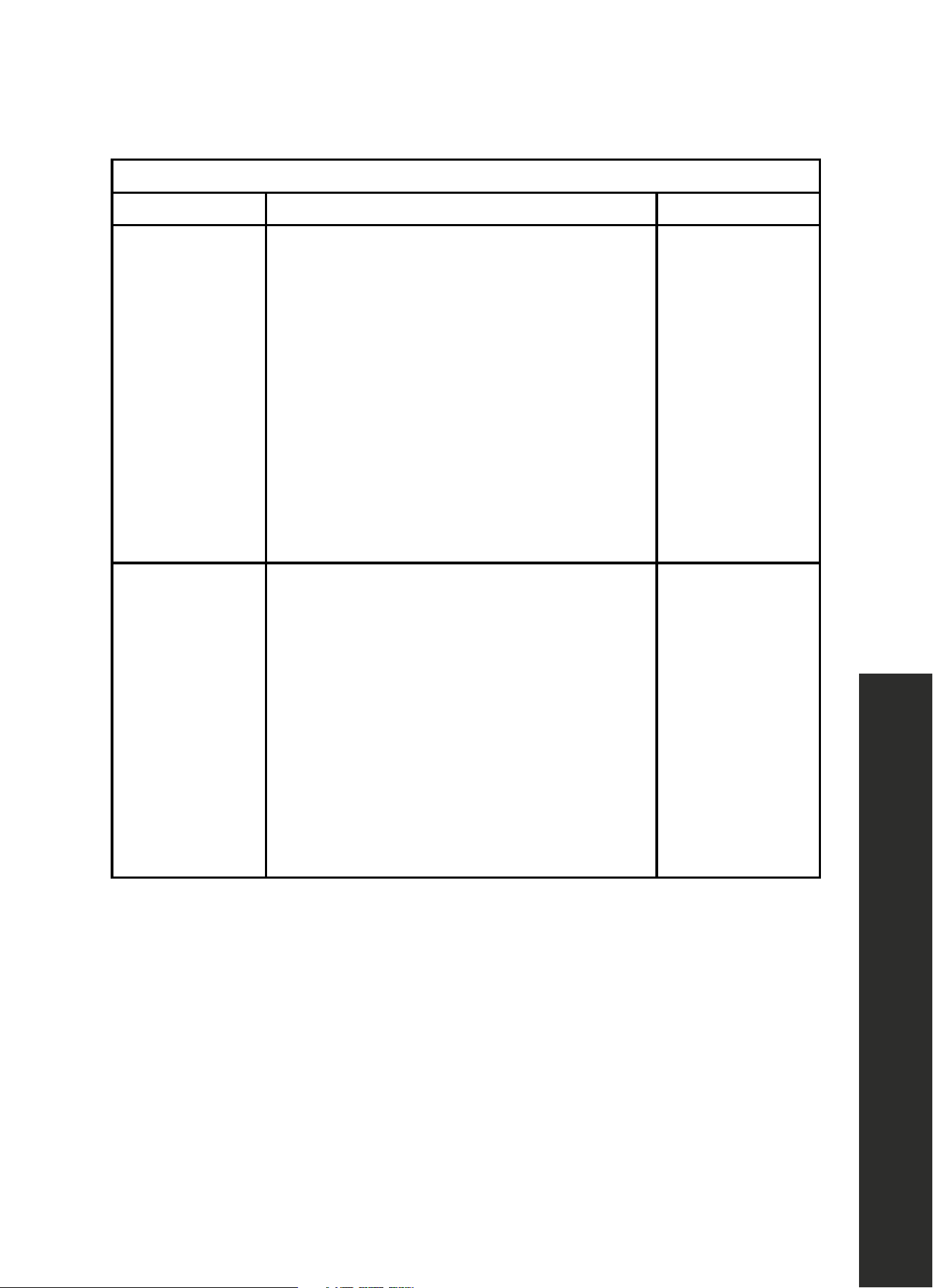
REHEAT COOKING SUGGESTIONS
FOOD DIRECTIONS QUANTITY
Dinner plate
Use only pre-cooked, refrigerated foods. Cover
plate with vented plastic wrap or waxed paper,
tucked under plate. If food is not hot enough after
heating with the Reheat feature, continue heating
using manual time and power level setting.
Contents:
• 3–4 oz. meat, poultry or fish (up to 6
oz. with bone)
• 1/2 cup starch (potatoes, pasta, rice, etc.)
• 1/2 cup of vegetables (about 3–4 oz.)
1 serving (1 plate)
Casserole, Pasta
Cover plate with lid or vented plastic wrap. If
food is not hot enough after heating with the
Reheat feature, continue heating using manual
time and power level setting.
Stir foods once before serving.
Contents:
• Casserole: refrigerated foods (such as beef
stew or lasagna)
• Pasta: canned spaghetti and ravioli,
refrigerated foods
1 to 4 servings
SENSOR COOK
Sensor Cook allows you to cook many of your favorite foods without selecting cooking times
and power levels. The microwave oven automatically determines the required cooking time
for each food item.
29
Sensor Cooking
OPERATION
SETTING SENSOR COOK
1. Clear any previously set programs prior to choosing the mode. Touch Clear/Off.
2. Touch Sensor Cook.
3. Touch Sensor Cook repeatedly to select Ground Meat.
4. Touch Start/Enter.
5. The program will start sensing with the microwave operating.
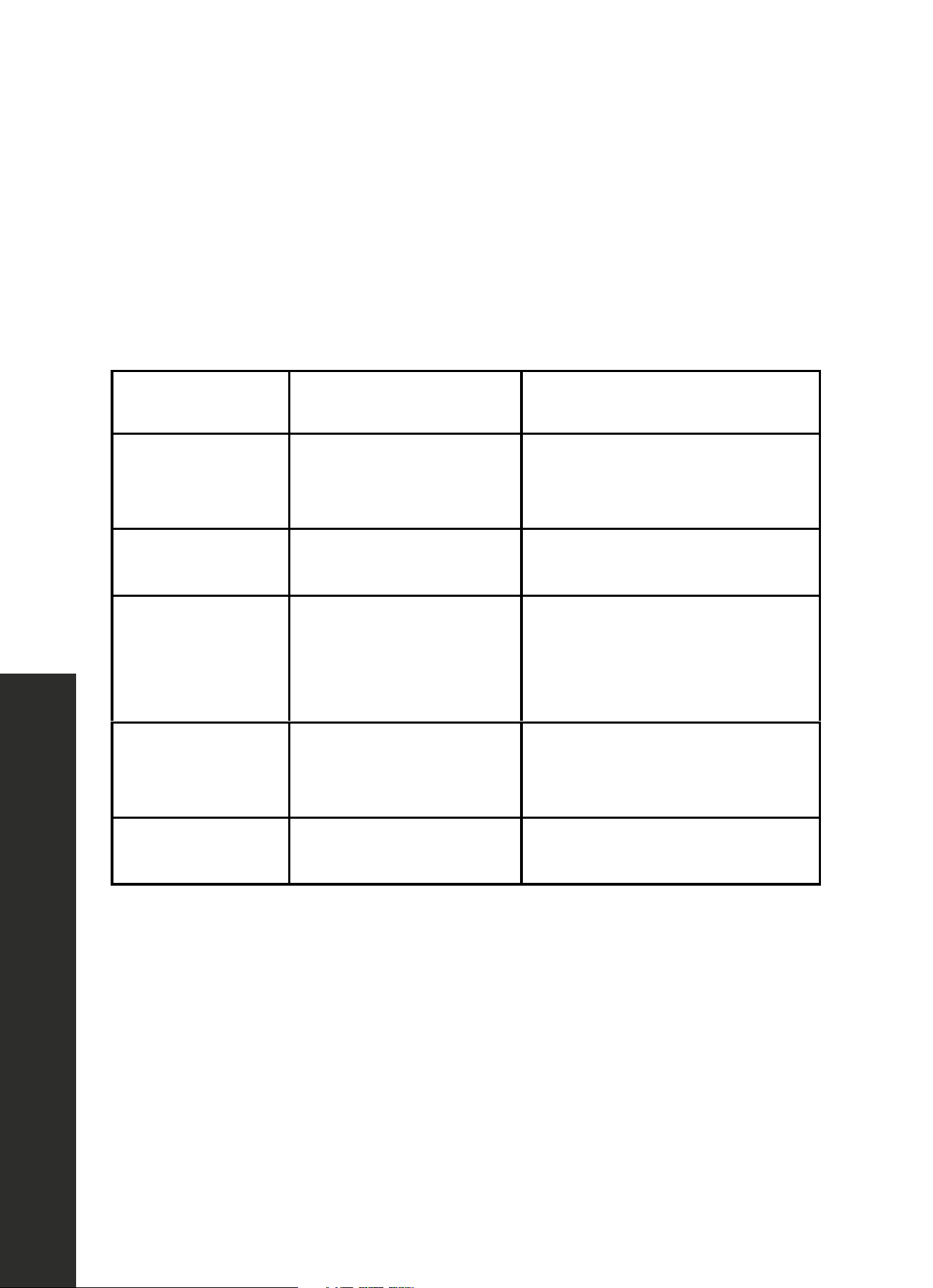
SENSOR COOK
PROGRAM
QUANTITY COOKING TIPS
1 - Baked Potato 1–4 potatoes (8–32 oz.)
Pierce skin with a fork. Do not
cover. After cooking, allow to stand
wrapped in foil for 5 minutes.
2 - Ground Meat 8–24 oz. (0.5–1.5 lb)
After cooking, allow to stand,
covered, for 3–4 minutes.
3 - Fresh Vegetables 4–16 oz. (0.25–1 lb)
No water is needed if vegetables
have just been washed. Add 2
tablespoons of water per 8 ounces
of fresh vegetables.
4 - Fish/Seafood 8–20 oz. (0.5–1.25 lb)
Roll thin edges underneath.
Arrange in a ring around
microwaveable dish.
5 - Frozen Entrees 10–20 oz. (0.63–1.25 lb)
Follow package instructions for
venting, cutting plastic film, etc.
When sensing is complete, a beep will sound and the calculated cook time will start
to count down.
Do not open the door during the sensing process, or the program will be canceled.
1. Once the calculated cook time is displayed, you can open the door to stir, turn or
rearrange the food. Touch Start/Enter to resume operation.
2. When sensor cook is finished, a beep will sound.
30
Broil Settings
OPERATION
OPENING APPLIANCE DOOR DURING OPERATION
Opening the appliance door during operation will interrupt the current mode. Close the
appliance door and then touch Start/Enter to resume operation.
CANCEL OPERATION
1. Touch Clear/Off to cancel the active oven mode. The appliance turns off and the clock
is displayed.
2. The cooling fans may continue to run for awhile and then switch off automatically.
BROIL
The Broil feature uses intense heat radiated from the upper element.
SETTING BROIL MODE
1. Clear any previously set programs prior to choosing the mode. Touch Clear/Off.
2. Touch Broil HIGH-LOW.
3. Touch Broil HIGH-LOW again to change to Broil HIGH-LOW mode.
4. Enter the desired cooking time with the number keys.
5. Touch Start/Enter to start operation.
NOTE: Always use a broil pan when cooking in Broil mode.
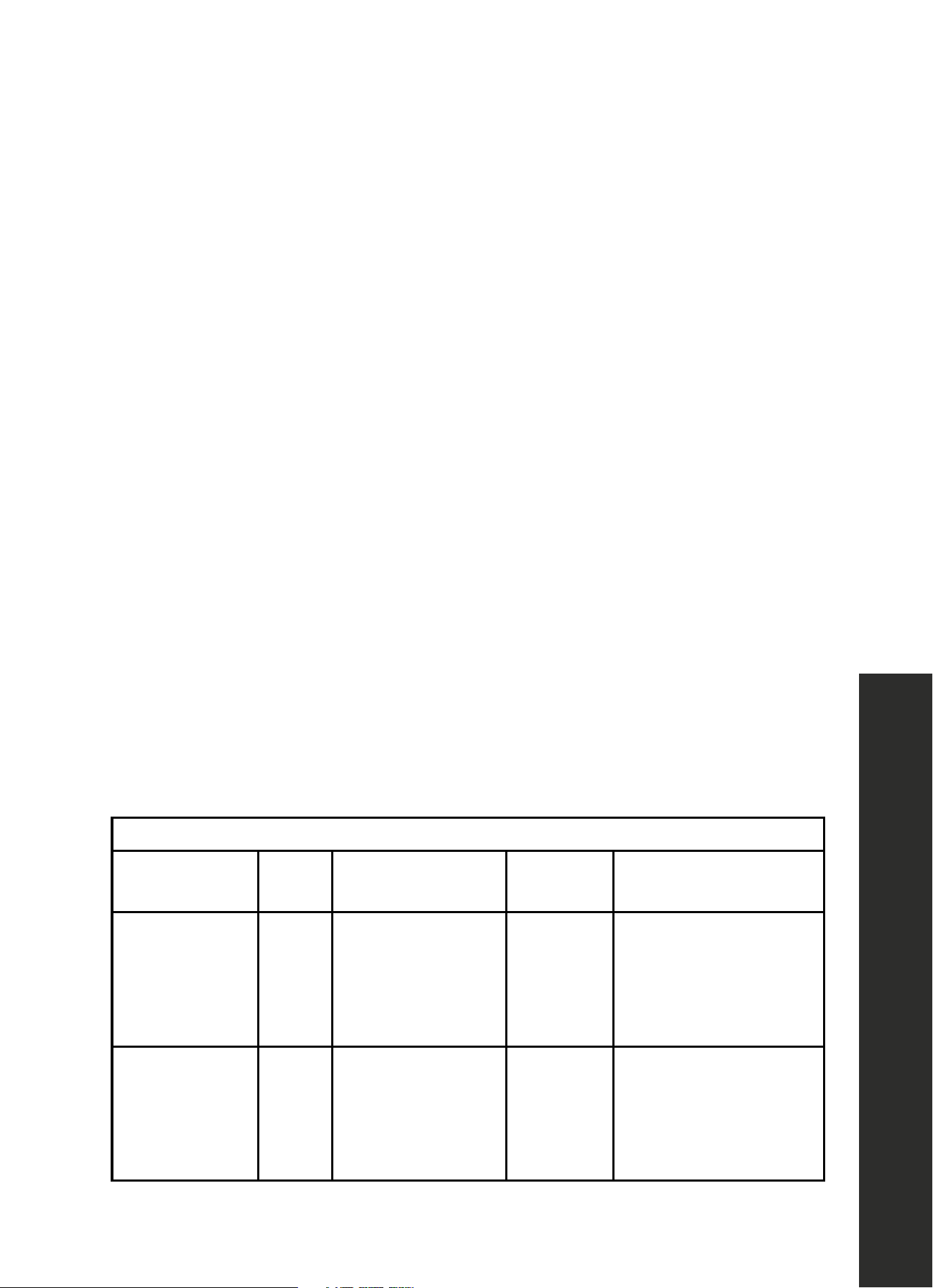
BROIL: Place pan of food on the wire rack with the recess facing up.
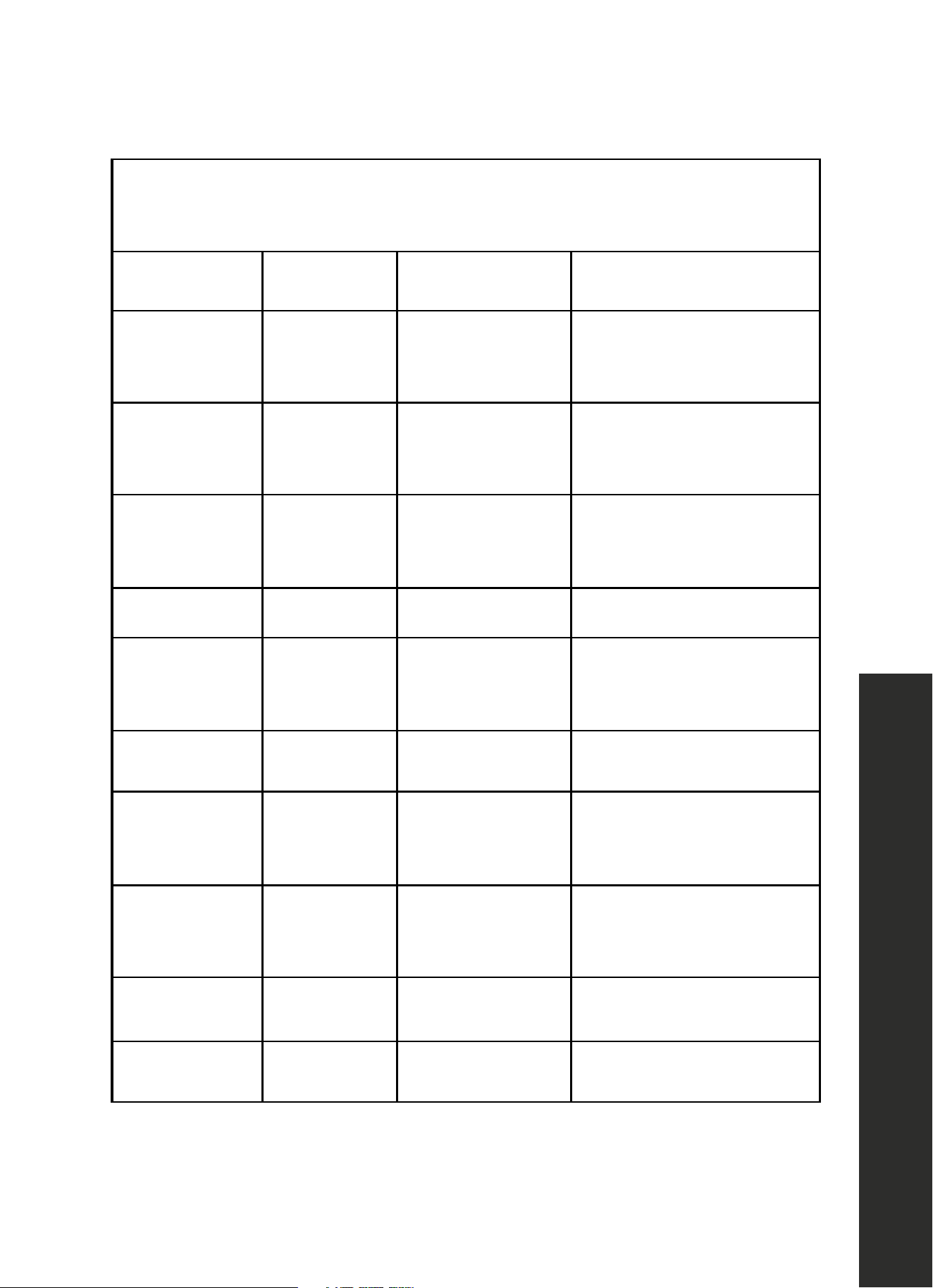
FOOD
OVEN
TEMP
COOKING
TIME (MINUTES)
INTERNAL
TEMP
COOKING TIPS
Hamburgers
3/4"–1"
(19–25 mm)
thick, medium
High
Side 1: 9–11 mins
Side 2: 10–12 mins
160 °F
(71 °C)
Use pan that allows fat
to drain away from the
food. High fat meat
causes more spattering.
Lamb chops
1" (19 mm),
medium
High
Side 1: 9–11 mins
Side 2: 10–12 mins
160 °F
(71 °C)
Use pan that allows
fat to drain away from
the food. Slit fat to
prevent curling.
31
Cooking Guide
OPERATION
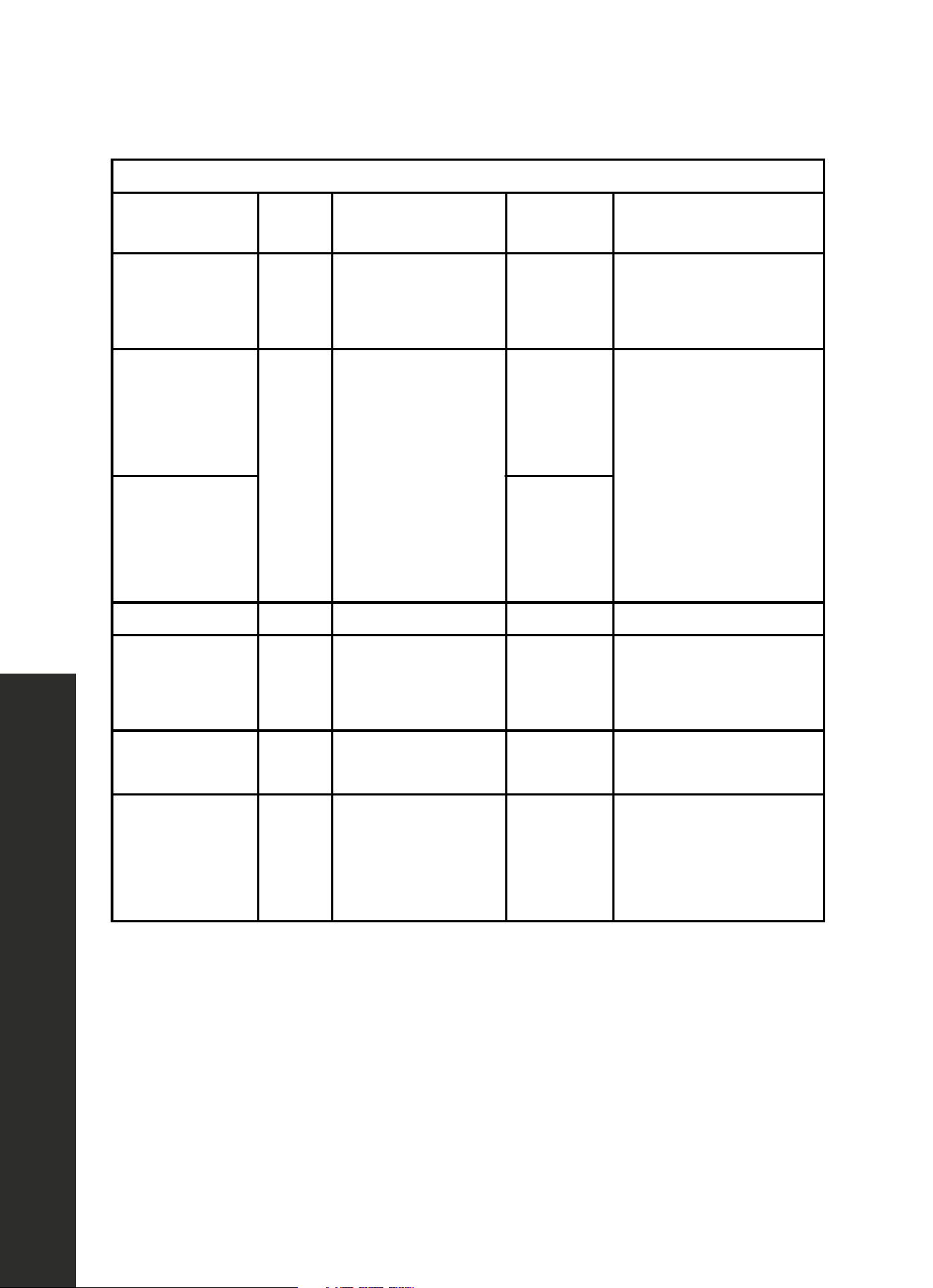
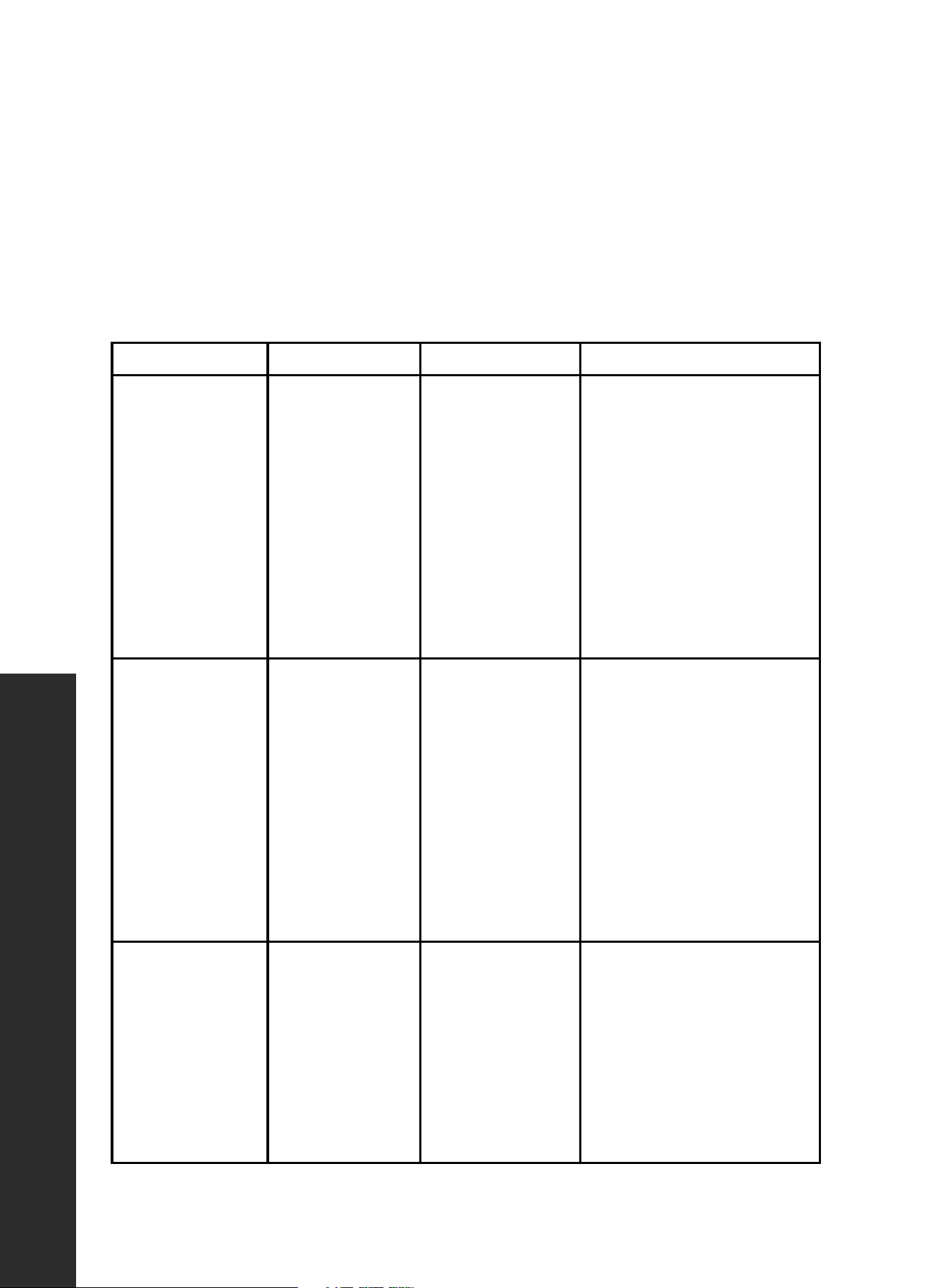
BROIL: Place pan of food on the wire rack with the recess facing up.
FOOD
OVEN
TEMP
COOKING
TIME (MINUTES)
INTERNAL
TEMP
COOKING TIPS
Sausage
Fresh
High
Side 1: 9–11 mins
Side 2: 8–10 mins
160 °F
(71 °C)
Use pan that allows
fat to drain away
from the food.
Steaks
3/4"–1"
(19–25 mm),
medium
High
Side 1: 9–11 mins
Side 2: 10–12 mins
160 °F
(71 °C)
Use pan that allows
fat to drain away from
the food. Slit fat to
prevent curling.
Steaks
3/4"–1"
(19–25 mm),
medium rare
145 °F
(63 °C)
Toasting bread Low 3–5 mins - Check at minimum time.
Top browning
casseroles
Low 3–5 mins -
Use only metal or glass
ceramic dishes such as
CorningWare®.
Chicken
breasts, bone-in
Low
Side 1: 9–11 mins
Side 2: 10–12 mins
170 °F
(77 °C)
Start breast side down.
Fish fillet
3/4"–1"
(19–25 mm)
Low 11–15 mins
145 °F
(63 °C)
No turning of fish. Turn
thin ends under. Brush
with olive oil or butter to
prevent sticking.
32
Cooking Guide
OPERATION
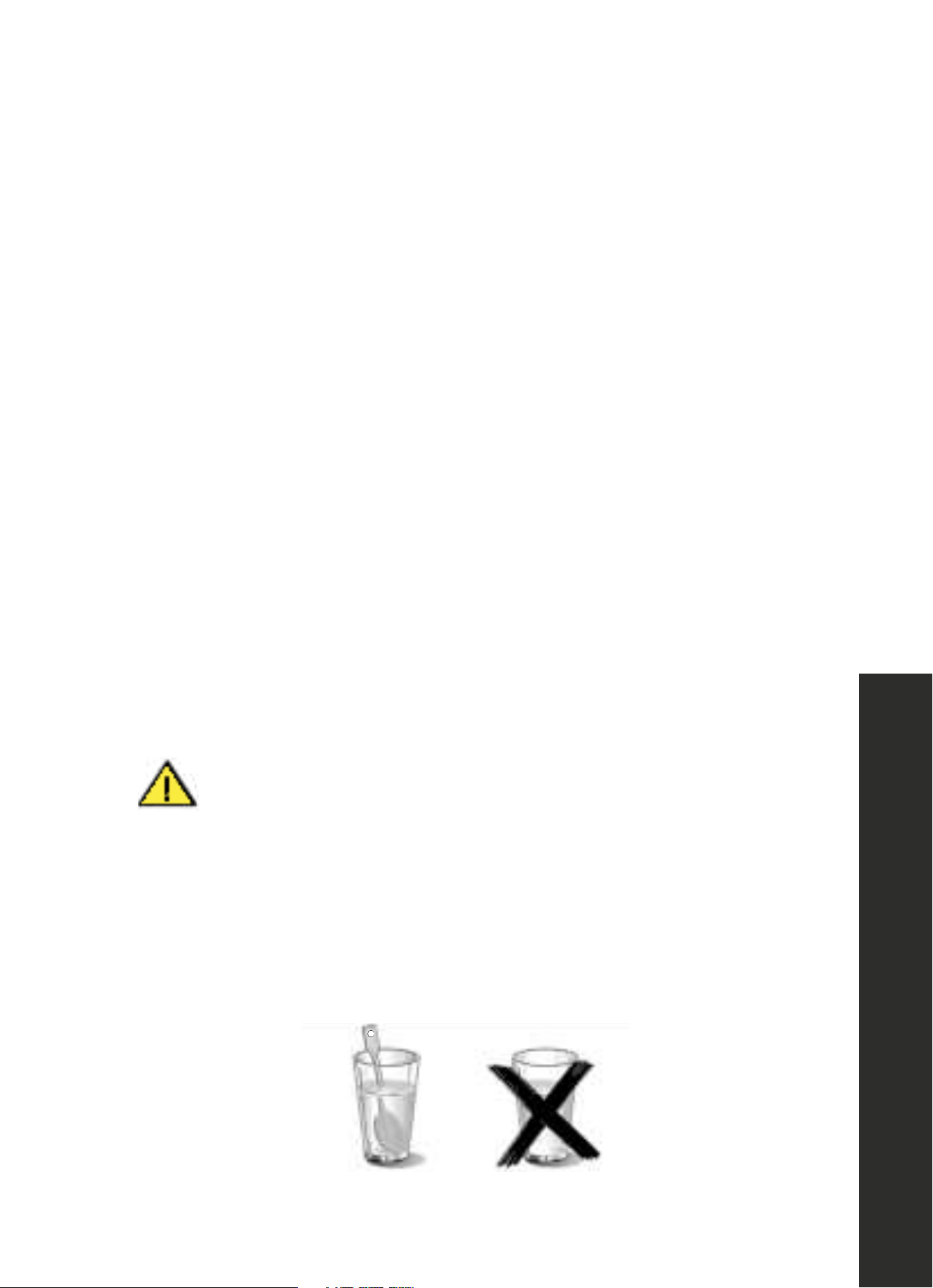
CONVECTION: Preheat the oven before adding foods. Once the oven is preheated,
place the food in the oven quickly to minimize loss of heat. Place pans of food on the wire
rack with the recess facing down.
FOOD
OVEN
TEMP
COOKING
TIME (MINUTES)
COOKING TIPS
Biscuits 350 °F 13–20 mins
A dark or dull baking sheet
will result in a browner,
crisper crust.
Cake
13" x 9"
(330 x 229 mm)
350 °F 23–28 mins
For a tender, light golden
brown crust, use light, shiny
metal bakeware.
Cookies 350–375 °F 8–14 mins
A dark or dull baking sheet
will result in a browner,
crisper crust.
Cornbread 425–450 °F 25–30 mins Use a square baking pan.
Cupcakes 350 °F 18–21 mins
Ideal for ready-made
mixes. Prepare according to
package directions.
Dinner rolls 400 °F 12–18 mins
Use with fresh or frozen
dinner rolls.
Fresh fruit pie 375 °F 50–60 mins
A dark or dull baking pie
pan will result in a browner,
crisper crust.
Muffins 400 °F 10–18 mins
Ideal for ready-made
mixes. Prepare according to
package directions.
Roasted
vegetables
425–450 °F 15–20 mins
Use dark or dull metal
pan. Stir once.
Shortcakes 450 °F 10–18 mins
Best for individual shortcakes.
Use dark coated pan.
33
Cooking Guide
OPERATION
COOKING SEAFOOD IN YOUR MICROWAVE
Be sure to place fish on a microwave-safe roasting rack in a microwave-safe dish. Be sure
to always cook fish until it flakes easily with a fork. Use a tight cover to steam fish; a lighter
cover of wax paper or paper towel provides less steaming. And be sure not to overcook
fish; check it at a minimum cooking time before cooking longer.
SEAFOOD POWER LEVEL COOKING TIME DIRECTIONS
Fish steaks up to
1 1/2 lb (0.7 kg)
Medium high (7) 7–11 min/lb
Arrange fish on roasting
rack with meaty portions
toward the outside of rack.
Cover with wax paper. Turn
over and rearrange halfway
through cook time. Cook until
fish flakes easily with fork.
Let stand 3–5 mins.
Fish fillets up to
1 1/2 lb (0.7 kg)
Medium high (7) 7–11 min/lb
Arrange fillets in a baking
dish. Cover with wax paper.
If over 1/2" (13 mm) thick,
turn over and rearrange
halfway through cook
time. Cook until fish flakes
easily with fork.
Let stand 2–3 mins.
Shrimp up to
1 1/2 lb (0.7 kg)
Medium high (7) 7–11 min/lb
Arrange shrimp in a baking
dish without overlapping or
layering. Cover with wax
paper. Cook until firm and
opaque, stirring 2 or 3 times.
Let stand 5 mins.
34
Cooking Guide
OPERATION
COOKING EGGS AND VEGETABLES IN YOUR MICROWAVE
• Never cook eggs in the shell and never warm hard-cooked eggs in the shell; they
can explode.
• Always pierce yolk on whole eggs to keep them from bursting.
• Cook eggs just until set; they will become tough if overcooked.
• Cooking scrambled eggs is safe.
• Always place vegetables like asparagus and broccoli with the stem ends pointing toward
the edge of the dish and the tips toward the center.
• When cooking cut vegetables, always cover the dish with a lid or vented microwavable
plastic wrap.
• Whole, unpeeled vegetables such as potatoes, sweet potatoes, squash, eggplant,
etc., should have their skin pricked in several locations before cooking to prevent them
from bursting.
• For more even cooking, stir or rearrange whole vegetables halfway through the cook time.
• Most of the time, the denser the food, the longer the required standing time. For example,
a baked potato should stand for 5 minutes before serving, while a dish of peas may be
served immediately.
HEATING FOOD
WARNING
WARNING: Risk of scalding
There is a possibility of delayed boiling when a liquid is heated. This means that the liquid
reaches boiling temperature without the usual steam bubbles rising to the surface. Even if
the container only moves a little, the hot liquid can suddenly boil over and spatter. When
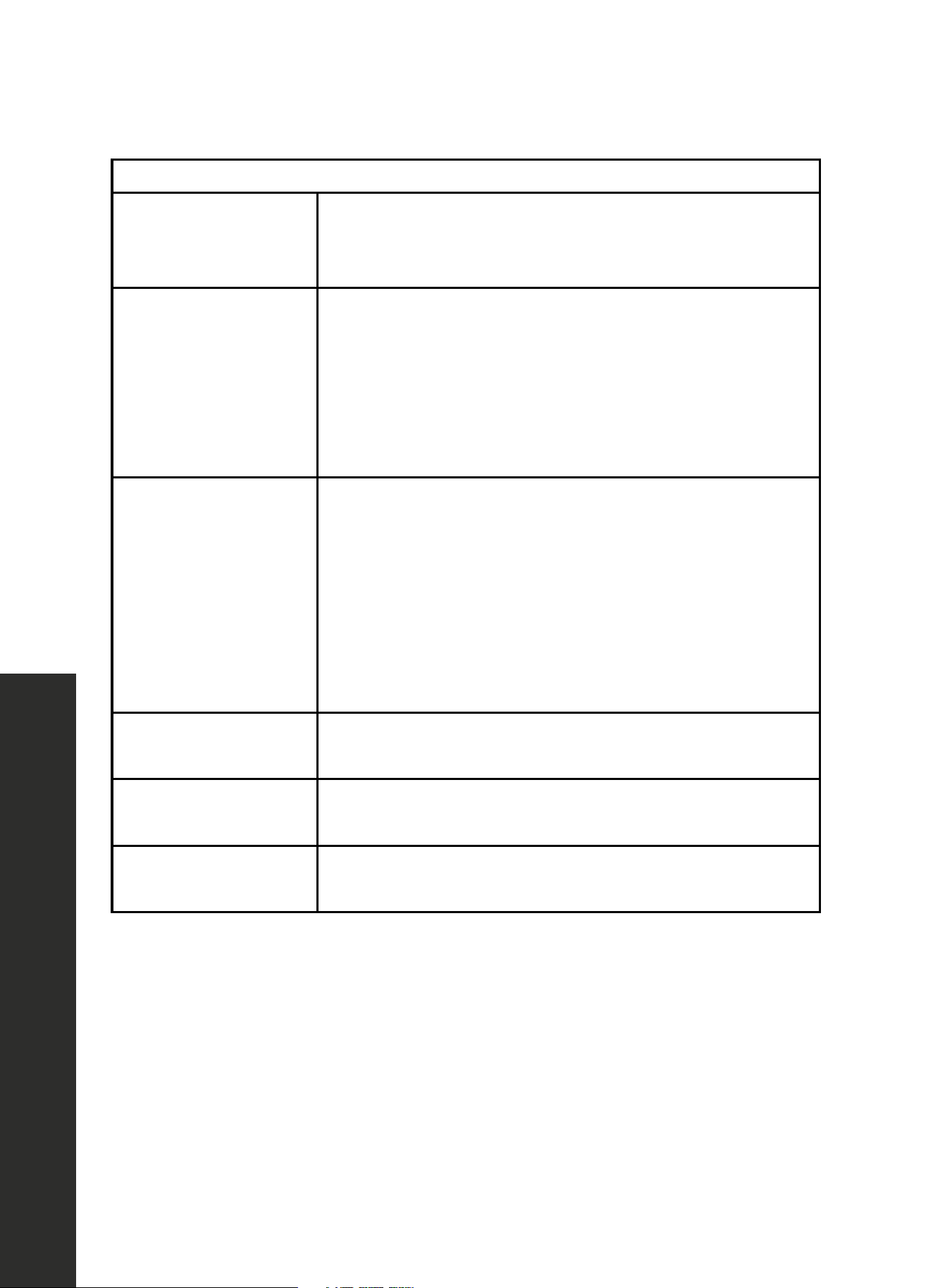
heating liquids, always place a wooden spoon or chopstick in the container. This will prevent
delayed boiling.

35
Energy Tips
OPERATION
ACRYLAMIDE IN FOOD
Which foods are affected? Acrylamide is mainly produced in grain and potato products that
are heated to high temperatures, such as potato crisps, chips, toast, bread rolls, bread, or
fine baked goods (biscuits, gingerbread, cookies).
Tips for keeping acrylamide to a minimum when preparing food:
• Keep cooking times to a minimum.
• Cook meals until they are golden brown, but not too dark. Large, thick pieces of food
contain less acrylamide.
• Max. 400 °F (204 °C) in top/bottom heating or max 350 °F (177 °C) in convection
cooking or baking mode.
ENERGY AND ENVIRONMENT TIPS
Below are some tips on how to save energy when baking and roasting and how to dispose
of your appliance properly.
SAVING ENERGY
• Only preheat the oven if this is specified in the recipe or in the operating instruction tables.
• When convection cooking, use dark, black, lacquered or enameled baking tins. They
absorb the heat particularly well.
• Open the oven door as infrequently as possible while you are cooking, baking,
or roasting.
• It is best to bake several cakes one after the other. The oven is still warm. This reduces
the baking time for the second cake. You can also place two loaf tins next to each other.
• For longer cooking times, you can switch the oven off 10 minutes before the end of the
cooking time and use the residual heat to finish cooking.

36
Maintenance and Cleaning
MAINTENANCE AND CLEANING
CARE AND CLEANING
• Penetrating moisture may cause an electric shock. Do not use any high-pressure cleaners
or steam cleaners.
• Never clean the appliance immediately after switching off, as you risk being burned. Let
the appliance cool down.
• Microwave energy may escape if the cooking compartment door or the door seal is
damaged, which can be a serious health risk. Never use the appliance if the cooking
compartment door or the door seal is damaged. If you see damage, contact ZLINE at
1-614-777-5004.
• Slight differences in color on the front of the appliance are caused by the use of different
materials, such as glass, plastic, and metal.
• Shadows on the door panel that look like streaks are caused by reflections made by
the oven light.
• Unpleasant odors, e.g. after fish has been prepared, can be removed very easily. Add a
few drops of lemon juice to a cup of water. Place a wooden spoon into the container to
prevent delayed boiling. Heat the water for 1 to 2 minutes at maximum microwave power.
• When cleaning surfaces of the door and oven that come together when closing the
door, use only mild, nonabrasive soaps or a kitchen-safe cleaner applied with a sponge
or soft cloth.
CLEANING AGENTS
• To ensure that the different surfaces are not damaged by using the wrong cleaning agent,
observe the information in the table. Do not use:
• Sharp or abrasive cleaning agents
• Metal or glass scrapers to clean the glass in the appliance door
• Metal or glass scrapers to clean the door seal
• Hard scouring pads and sponges
• Cleaning agents with high concentrations of alcohol
• Wash new sponge cloths thoroughly before use.
• Allow all surfaces to dry thoroughly before using the appliance again.
37
Maintenance and Cleaning
MAINTENANCE AND CLEANING
CLEANING GUIDE
Appliance front
Hot soapy water: Clean with a dish cloth and dry with a soft
cloth. Do not use glass cleaners or metal or glass scrapers
for cleaning.
Appliance front with
stainless steel
Hot soapy water: Clean with a dish cloth and dry with a
soft cloth. Remove flecks of limescale, grease, starch, and
albumin (e.g. egg white) immediately. Corrosion can form
under such residues. Special stainless steel cleaning agents
can be obtained at appliance stores and other vendors. Do
not use glass cleaners or metal or glass scrapers for cleaning.
Cooking compartment
Hot soapy water: Clean with a dish cloth and dry with a
soft cloth. Remove flecks of limescale, grease, starch and
albumin (e.g. egg white) immediately. Corrosion can form
under such residues. Special stainless steel cleaning agents
can be obtained from the after-sales service or from specialist
shops. Do not use glass cleaners or metal or glass scrapers
for cleaning.
Recess in
cooking compartment
Damp cloth: Ensure that no water seeps through the turntable
drive into the appliance interior.
Door panels
Glass cleaner: Clean with a dish cloth. Do not use a
glass scraper.
Seal
Hot soapy water: Clean with a dish cloth, do not scour. Do
not use a metal or glass scraper for cleaning.
38
Troubleshooting
TROUBLESHOOTING
ISSUE POSSIBLE CAUSE TROUBLESHOOTING
The appliance
does not work
Faulty circuit breaker.
Look in the fuse box and
check that the circuit
breaker for the appliance
is in working order.
Plug not plugged in. Plug in the plug.
Power interrupted. Check outlet.
The appliance does not
work.
Malfunction table
Malfunctions often have simple explanations. Please refer to the
malfunction table before calling the after-sales service.
If a meal does not turn out exactly as you wanted, refer to the
plenty of cooking tips and tricks.
Risk of electric shock!
Incorrect repairs are dangerous. Repairs may only be carried out
by one of our trained after-sales engineers.
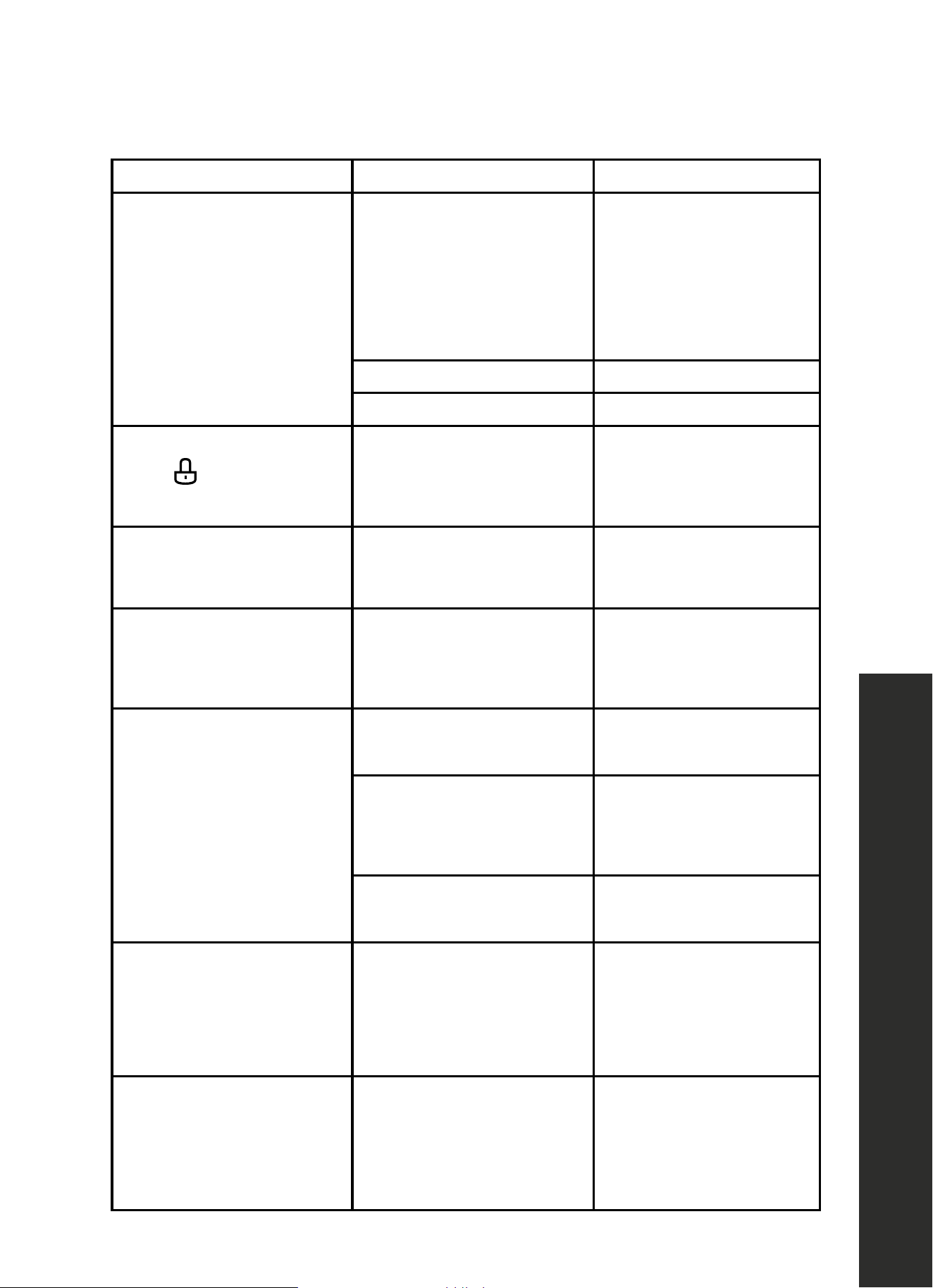
Malfunction table
Problem Possible cause Remedy/information
The appliance does not work. Faulty circuit breaker. Look in the fuse box and check that the circuit
breaker for the appliance is in working order.
Plug not plugged in. Plug in the plug.
Power cut Check whether the kitchen light works.
The appliance does not work.
appears in the display panel.
Childproof lock is active. Deactivate the childproof lock (see section:
Childproof lock).
‹:‹‹ is in the display panel. Power cut Reset the clock.
The microwave does not switch on. Door not fully closed. Check whether food residue or debris is
trapped in the door.
It takes longer than before for the food
to heat up in the microwave
The selected microwave power level is too low. Select a higher power level.
A larger amount than usual has been placed in
the appliance.
Double the amount = almost double the
cooking time.
The food was colder than usual. Stir or turn the food during cooking.
Turntable grates or grinds. Dirt or debris in the area around the turntable
drive.
Clean the rollers under the turntable and the
recess in the oven floor thoroughly.
A particular operating mode or power
level cannot be set.
The temperature, power level or combined
setting is not possible for this operating mode.
Choose permitted settings.
“‚ appears in the display panel. The thermal safety switch-off function has been
activated.
Call the after-sales service.
“…
appears in the display panel. The thermal safety switch-off function has been
activated.
Call the after-sales service.
appears in the display panel. Humidity sensor
“‚ˆ appears in the display panel. Rapid heating has failed. Call the after-sales service.
Acrylamide in foodstuffs
Which foods are affected?
Acrylamide is mainly produced in grain and potato products that
are heated to high temperatures, such as potato crisps, chips,
toast, bread rolls, bread, fine baked goods (biscuits, gingerbread,
cookies).
Tips for keeping acrylamide to a minimum when preparing food
General Keep cooking times to a minimum. Cook meals until they are golden brown, but not too
dark. Large, thick pieces of food contain less acrylamide.
Baking biscuits
Oven chips
Max. 200 °C in Top/bottom heating or max. 180 °C in 3D hot air or hot air mode. Max.
190° C in Top/bottom heating or max. 170 °C in 3D hot air or hot air mode. Egg white
and egg yolk reduce the formation of acrylamide. Distribute thinly and evenly over the
baking tray. Cook at least 400 g at once on a baking tray so that the chips do not dry out.
Expert Cooking Guide
section, where you will find
error Call the after-sales service
appears in the
display panel.
Childproof lock is active.
Deactivate the childproof
lock (page 13).
Malfunction table
Malfunctions often have simple explanations. Please refer to the
malfunction table before calling the after-sales service.
If a meal does not turn out exactly as you wanted, refer to the
plenty of cooking tips and tricks.
Risk of electric shock!
Incorrect repairs are dangerous. Repairs may only be carried out
by one of our trained after-sales engineers.
Malfunction table
Problem Possible cause Remedy/information
The appliance does not work. Faulty circuit breaker. Look in the fuse box and check that the circuit
breaker for the appliance is in working order.
Plug not plugged in. Plug in the plug.
Power cut Check whether the kitchen light works.
The appliance does not work.
appears in the display panel.
Childproof lock is active. Deactivate the childproof lock (see section:
Childproof lock).
‹:‹‹ is in the display panel. Power cut Reset the clock.
The microwave does not switch on. Door not fully closed. Check whether food residue or debris is
trapped in the door.
It takes longer than before for the food
to heat up in the microwave
The selected microwave power level is too low. Select a higher power level.
A larger amount than usual has been placed in
the appliance.
Double the amount = almost double the
cooking time.
The food was colder than usual. Stir or turn the food during cooking.
Turntable grates or grinds. Dirt or debris in the area around the turntable
drive.
Clean the rollers under the turntable and the
recess in the oven floor thoroughly.
A particular operating mode or power
level cannot be set.
The temperature, power level or combined
setting is not possible for this operating mode.
Choose permitted settings.
“‚ appears in the display panel. The thermal safety switch-off function has been
activated.
Call the after-sales service.
“…
appears in the display panel. The thermal safety switch-off function has been
activated.
Call the after-sales service.
appears in the display panel. Humidity sensor
“‚ˆ appears in the display panel. Rapid heating has failed. Call the after-sales service.
Acrylamide in foodstuffs
Which foods are affected?
Acrylamide is mainly produced in grain and potato products that
are heated to high temperatures, such as potato crisps, chips,
toast, bread rolls, bread, fine baked goods (biscuits, gingerbread,
cookies).
Tips for keeping acrylamide to a minimum when preparing food
General Keep cooking times to a minimum. Cook meals until they are golden brown, but not too
dark. Large, thick pieces of food contain less acrylamide.
Baking biscuits
Oven chips
Max. 200 °C in Top/bottom heating or max. 180 °C in 3D hot air or hot air mode. Max.
190° C in Top/bottom heating or max. 170 °C in 3D hot air or hot air mode. Egg white
and egg yolk reduce the formation of acrylamide. Distribute thinly and evenly over the
baking tray. Cook at least 400 g at once on a baking tray so that the chips do not dry out.
Expert Cooking Guide
section, where you will find
error Call the after-sales service
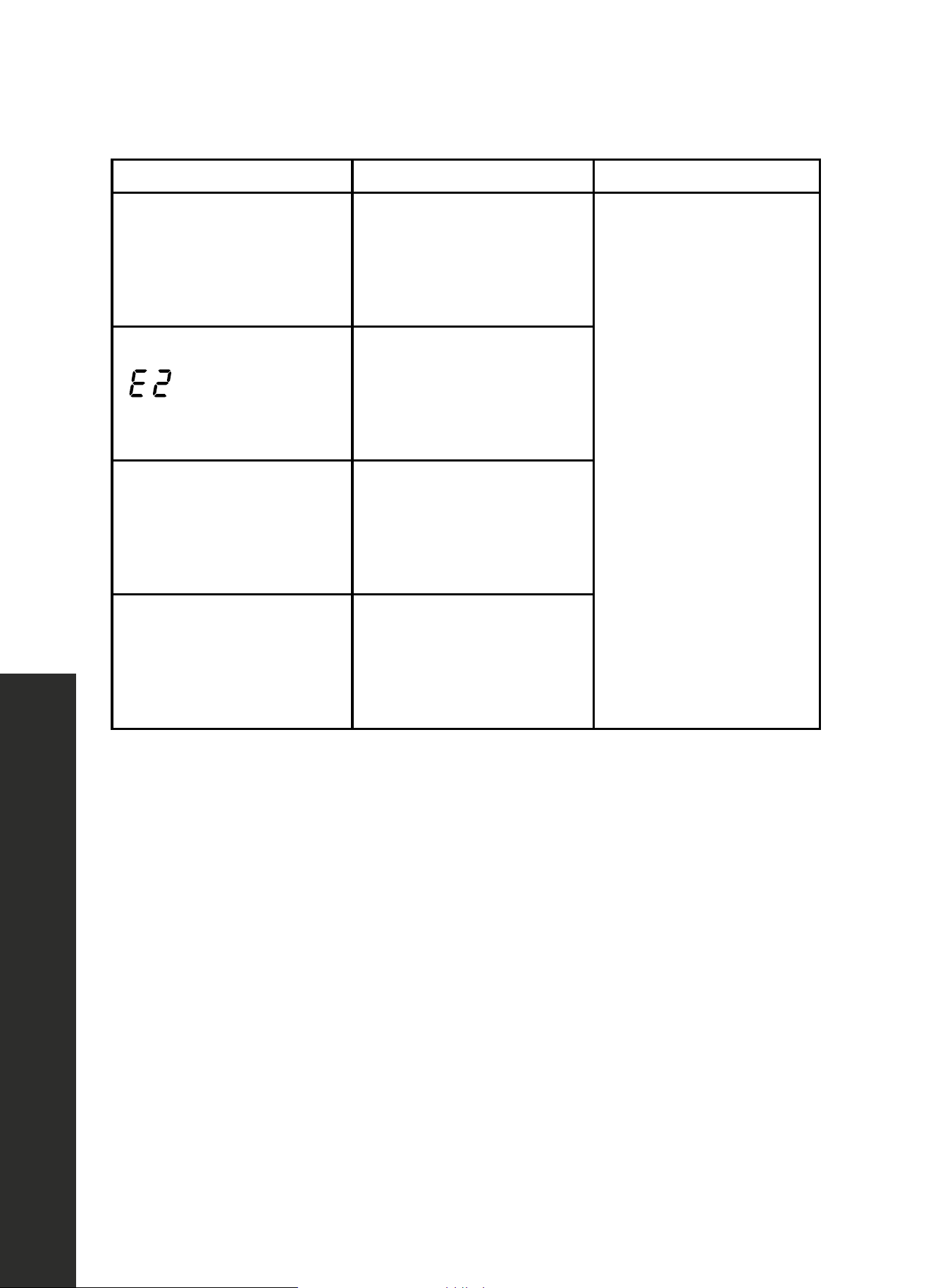
is in the
display panel.
Power cut.
Reset the
clock (page 14).
The microwave does
not switch on.
Door not fully closed.
Check whether food
residue or debris is
trapped in the door.
It takes longer than before
for the food to heat up in
the microwave.
The selected microwave
power level is too low.
Select a higher power
level (page 18).
A larger amount than
usual has been placed in
the appliance.
Double the amount of
food equals almost
double the cooking time.
The food was
colder than usual.
Stir or turn the food
during cooking.
Turntable grates or grinds.
Dirt or debris in the area
around the turntable drive.
Clean the rollers under the
turntable and the recess in
the oven floor thoroughly.
A particular operating
mode or power level
cannot be set.
The temperature, power
level, or combined setting
is not possible for this
operating mode.
Choose permitted settings.
39
Troubleshooting
TROUBLESHOOTING
ISSUE POSSIBLE CAUSE TROUBLESHOOTING
Malfunction table
Malfunctions often have simple explanations. Please refer to the
malfunction table before calling the after-sales service.
If a meal does not turn out exactly as you wanted, refer to the
plenty of cooking tips and tricks.
Risk of electric shock!
Incorrect repairs are dangerous. Repairs may only be carried out
by one of our trained after-sales engineers.
Malfunction table
Problem Possible cause Remedy/information
The appliance does not work. Faulty circuit breaker. Look in the fuse box and check that the circuit
breaker for the appliance is in working order.
Plug not plugged in. Plug in the plug.
Power cut Check whether the kitchen light works.
The appliance does not work.
appears in the display panel.
Childproof lock is active. Deactivate the childproof lock (see section:
Childproof lock).
‹:‹‹ is in the display panel. Power cut Reset the clock.
The microwave does not switch on. Door not fully closed. Check whether food residue or debris is
trapped in the door.
It takes longer than before for the food
to heat up in the microwave
The selected microwave power level is too low. Select a higher power level.
A larger amount than usual has been placed in
the appliance.
Double the amount = almost double the
cooking time.
The food was colder than usual. Stir or turn the food during cooking.
Turntable grates or grinds. Dirt or debris in the area around the turntable
drive.
Clean the rollers under the turntable and the
recess in the oven floor thoroughly.
A particular operating mode or power
level cannot be set.
The temperature, power level or combined
setting is not possible for this operating mode.
Choose permitted settings.
“‚ appears in the display panel. The thermal safety switch-off function has been
activated.
Call the after-sales service.
“…
appears in the display panel. The thermal safety switch-off function has been
activated.
Call the after-sales service.
appears in the display panel. Humidity sensor
“‚ˆ appears in the display panel. Rapid heating has failed. Call the after-sales service.
Acrylamide in foodstuffs
Which foods are affected?
Acrylamide is mainly produced in grain and potato products that
are heated to high temperatures, such as potato crisps, chips,
toast, bread rolls, bread, fine baked goods (biscuits, gingerbread,
cookies).
Tips for keeping acrylamide to a minimum when preparing food
General Keep cooking times to a minimum. Cook meals until they are golden brown, but not too
dark. Large, thick pieces of food contain less acrylamide.
Baking biscuits
Oven chips
Max. 200 °C in Top/bottom heating or max. 180 °C in 3D hot air or hot air mode. Max.
190° C in Top/bottom heating or max. 170 °C in 3D hot air or hot air mode. Egg white
and egg yolk reduce the formation of acrylamide. Distribute thinly and evenly over the
baking tray. Cook at least 400 g at once on a baking tray so that the chips do not dry out.
Expert Cooking Guide
section, where you will find
error Call the after-sales service
appears in the
display panel.
The thermal safety switch-off
function has been activated.
Call customer service at
1-614-777-5004.
Malfunction table
Malfunctions often have simple explanations. Please refer to the
malfunction table before calling the after-sales service.
If a meal does not turn out exactly as you wanted, refer to the
plenty of cooking tips and tricks.
Risk of electric shock!
Incorrect repairs are dangerous. Repairs may only be carried out
by one of our trained after-sales engineers.
Malfunction table
Problem Possible cause Remedy/information
The appliance does not work. Faulty circuit breaker. Look in the fuse box and check that the circuit
breaker for the appliance is in working order.
Plug not plugged in. Plug in the plug.
Power cut Check whether the kitchen light works.
The appliance does not work.
appears in the display panel.
Childproof lock is active. Deactivate the childproof lock (see section:
Childproof lock).
‹:‹‹ is in the display panel. Power cut Reset the clock.
The microwave does not switch on. Door not fully closed. Check whether food residue or debris is
trapped in the door.
It takes longer than before for the food
to heat up in the microwave
The selected microwave power level is too low. Select a higher power level.
A larger amount than usual has been placed in
the appliance.
Double the amount = almost double the
cooking time.
The food was colder than usual. Stir or turn the food during cooking.
Turntable grates or grinds. Dirt or debris in the area around the turntable
drive.
Clean the rollers under the turntable and the
recess in the oven floor thoroughly.
A particular operating mode or power
level cannot be set.
The temperature, power level or combined
setting is not possible for this operating mode.
Choose permitted settings.
“‚ appears in the display panel. The thermal safety switch-off function has been
activated.
Call the after-sales service.
“…
appears in the display panel. The thermal safety switch-off function has been
activated.
Call the after-sales service.
appears in the display panel. Humidity sensor
“‚ˆ appears in the display panel. Rapid heating has failed. Call the after-sales service.
Acrylamide in foodstuffs
Which foods are affected?
Acrylamide is mainly produced in grain and potato products that
are heated to high temperatures, such as potato crisps, chips,
toast, bread rolls, bread, fine baked goods (biscuits, gingerbread,
cookies).
Tips for keeping acrylamide to a minimum when preparing food
General Keep cooking times to a minimum. Cook meals until they are golden brown, but not too
dark. Large, thick pieces of food contain less acrylamide.
Baking biscuits
Oven chips
Max. 200 °C in Top/bottom heating or max. 180 °C in 3D hot air or hot air mode. Max.
190° C in Top/bottom heating or max. 170 °C in 3D hot air or hot air mode. Egg white
and egg yolk reduce the formation of acrylamide. Distribute thinly and evenly over the
baking tray. Cook at least 400 g at once on a baking tray so that the chips do not dry out.
Expert Cooking Guide
section, where you will find
error Call the after-sales service
appears in the
display panel.
The thermal safety switch-off
function has been activated.
Malfunction table
Malfunctions often have simple explanations. Please refer to the
malfunction table before calling the after-sales service.
If a meal does not turn out exactly as you wanted, refer to the
plenty of cooking tips and tricks.
Risk of electric shock!
Incorrect repairs are dangerous. Repairs may only be carried out
by one of our trained after-sales engineers.
Malfunction table
Problem Possible cause Remedy/information
The appliance does not work. Faulty circuit breaker. Look in the fuse box and check that the circuit
breaker for the appliance is in working order.
Plug not plugged in. Plug in the plug.
Power cut Check whether the kitchen light works.
The appliance does not work.
appears in the display panel.
Childproof lock is active. Deactivate the childproof lock (see section:
Childproof lock).
‹:‹‹ is in the display panel. Power cut Reset the clock.
The microwave does not switch on. Door not fully closed. Check whether food residue or debris is
trapped in the door.
It takes longer than before for the food
to heat up in the microwave
The selected microwave power level is too low. Select a higher power level.
A larger amount than usual has been placed in
the appliance.
Double the amount = almost double the
cooking time.
The food was colder than usual. Stir or turn the food during cooking.
Turntable grates or grinds. Dirt or debris in the area around the turntable
drive.
Clean the rollers under the turntable and the
recess in the oven floor thoroughly.
A particular operating mode or power
level cannot be set.
The temperature, power level or combined
setting is not possible for this operating mode.
Choose permitted settings.
“‚ appears in the display panel. The thermal safety switch-off function has been
activated.
Call the after-sales service.
“…
appears in the display panel. The thermal safety switch-off function has been
activated.
Call the after-sales service.
appears in the display panel. Humidity sensor
“‚ˆ appears in the display panel. Rapid heating has failed. Call the after-sales service.
Acrylamide in foodstuffs
Which foods are affected?
Acrylamide is mainly produced in grain and potato products that
are heated to high temperatures, such as potato crisps, chips,
toast, bread rolls, bread, fine baked goods (biscuits, gingerbread,
cookies).
Tips for keeping acrylamide to a minimum when preparing food
General Keep cooking times to a minimum. Cook meals until they are golden brown, but not too
dark. Large, thick pieces of food contain less acrylamide.
Baking biscuits
Oven chips
Max. 200 °C in Top/bottom heating or max. 180 °C in 3D hot air or hot air mode. Max.
190° C in Top/bottom heating or max. 170 °C in 3D hot air or hot air mode. Egg white
and egg yolk reduce the formation of acrylamide. Distribute thinly and evenly over the
baking tray. Cook at least 400 g at once on a baking tray so that the chips do not dry out.
Expert Cooking Guide
section, where you will find
error Call the after-sales service
appears in the
display panel.
Humidity sensor error.
Malfunction table
Malfunctions often have simple explanations. Please refer to the
malfunction table before calling the after-sales service.
If a meal does not turn out exactly as you wanted, refer to the
plenty of cooking tips and tricks.
Risk of electric shock!
Incorrect repairs are dangerous. Repairs may only be carried out
by one of our trained after-sales engineers.
Malfunction table
Problem Possible cause Remedy/information
The appliance does not work. Faulty circuit breaker. Look in the fuse box and check that the circuit
breaker for the appliance is in working order.
Plug not plugged in. Plug in the plug.
Power cut Check whether the kitchen light works.
The appliance does not work.
appears in the display panel.
Childproof lock is active. Deactivate the childproof lock (see section:
Childproof lock).
‹:‹‹ is in the display panel. Power cut Reset the clock.
The microwave does not switch on. Door not fully closed. Check whether food residue or debris is
trapped in the door.
It takes longer than before for the food
to heat up in the microwave
The selected microwave power level is too low. Select a higher power level.
A larger amount than usual has been placed in
the appliance.
Double the amount = almost double the
cooking time.
The food was colder than usual. Stir or turn the food during cooking.
Turntable grates or grinds. Dirt or debris in the area around the turntable
drive.
Clean the rollers under the turntable and the
recess in the oven floor thoroughly.
A particular operating mode or power
level cannot be set.
The temperature, power level or combined
setting is not possible for this operating mode.
Choose permitted settings.
“‚ appears in the display panel. The thermal safety switch-off function has been
activated.
Call the after-sales service.
“…
appears in the display panel. The thermal safety switch-off function has been
activated.
Call the after-sales service.
appears in the display panel. Humidity sensor
“‚ˆ appears in the display panel. Rapid heating has failed. Call the after-sales service.
Acrylamide in foodstuffs
Which foods are affected?
Acrylamide is mainly produced in grain and potato products that
are heated to high temperatures, such as potato crisps, chips,
toast, bread rolls, bread, fine baked goods (biscuits, gingerbread,
cookies).
Tips for keeping acrylamide to a minimum when preparing food
General Keep cooking times to a minimum. Cook meals until they are golden brown, but not too
dark. Large, thick pieces of food contain less acrylamide.
Baking biscuits
Oven chips
Max. 200 °C in Top/bottom heating or max. 180 °C in 3D hot air or hot air mode. Max.
190° C in Top/bottom heating or max. 170 °C in 3D hot air or hot air mode. Egg white
and egg yolk reduce the formation of acrylamide. Distribute thinly and evenly over the
baking tray. Cook at least 400 g at once on a baking tray so that the chips do not dry out.
Expert Cooking Guide
section, where you will find
error Call the after-sales service
Malfunction table
Malfunctions often have simple explanations. Please refer to the
malfunction table before calling the after-sales service.
If a meal does not turn out exactly as you wanted, refer to the
plenty of cooking tips and tricks.
Risk of electric shock!
Incorrect repairs are dangerous. Repairs may only be carried out
by one of our trained after-sales engineers.
Malfunction table
Problem Possible cause Remedy/information
The appliance does not work. Faulty circuit breaker. Look in the fuse box and check that the circuit
breaker for the appliance is in working order.
Plug not plugged in. Plug in the plug.
Power cut Check whether the kitchen light works.
The appliance does not work.
appears in the display panel.
Childproof lock is active. Deactivate the childproof lock (see section:
Childproof lock).
‹:‹‹ is in the display panel. Power cut Reset the clock.
The microwave does not switch on. Door not fully closed. Check whether food residue or debris is
trapped in the door.
It takes longer than before for the food
to heat up in the microwave
The selected microwave power level is too low. Select a higher power level.
A larger amount than usual has been placed in
the appliance.
Double the amount = almost double the
cooking time.
The food was colder than usual. Stir or turn the food during cooking.
Turntable grates or grinds. Dirt or debris in the area around the turntable
drive.
Clean the rollers under the turntable and the
recess in the oven floor thoroughly.
A particular operating mode or power
level cannot be set.
The temperature, power level or combined
setting is not possible for this operating mode.
Choose permitted settings.
“‚ appears in the display panel. The thermal safety switch-off function has been
activated.
Call the after-sales service.
“…
appears in the display panel. The thermal safety switch-off function has been
activated.
Call the after-sales service.
appears in the display panel. Humidity sensor
“‚ˆ appears in the display panel. Rapid heating has failed. Call the after-sales service.
Acrylamide in foodstuffs
Which foods are affected?
Acrylamide is mainly produced in grain and potato products that
are heated to high temperatures, such as potato crisps, chips,
toast, bread rolls, bread, fine baked goods (biscuits, gingerbread,
cookies).
Tips for keeping acrylamide to a minimum when preparing food
General Keep cooking times to a minimum. Cook meals until they are golden brown, but not too
dark. Large, thick pieces of food contain less acrylamide.
Baking biscuits
Oven chips
Max. 200 °C in Top/bottom heating or max. 180 °C in 3D hot air or hot air mode. Max.
190° C in Top/bottom heating or max. 170 °C in 3D hot air or hot air mode. Egg white
and egg yolk reduce the formation of acrylamide. Distribute thinly and evenly over the
baking tray. Cook at least 400 g at once on a baking tray so that the chips do not dry out.
Expert Cooking Guide
section, where you will find
error Call the after-sales service
Malfunction table
Malfunctions often have simple explanations. Please refer to the
malfunction table before calling the after-sales service.
If a meal does not turn out exactly as you wanted, refer to the
plenty of cooking tips and tricks.
Risk of electric shock!
Incorrect repairs are dangerous. Repairs may only be carried out
by one of our trained after-sales engineers.
Malfunction table
Problem Possible cause Remedy/information
The appliance does not work. Faulty circuit breaker. Look in the fuse box and check that the circuit
breaker for the appliance is in working order.
Plug not plugged in. Plug in the plug.
Power cut Check whether the kitchen light works.
The appliance does not work.
appears in the display panel.
Childproof lock is active. Deactivate the childproof lock (see section:
Childproof lock).
‹:‹‹ is in the display panel. Power cut Reset the clock.
The microwave does not switch on. Door not fully closed. Check whether food residue or debris is
trapped in the door.
It takes longer than before for the food
to heat up in the microwave
The selected microwave power level is too low. Select a higher power level.
A larger amount than usual has been placed in
the appliance.
Double the amount = almost double the
cooking time.
The food was colder than usual. Stir or turn the food during cooking.
Turntable grates or grinds. Dirt or debris in the area around the turntable
drive.
Clean the rollers under the turntable and the
recess in the oven floor thoroughly.
A particular operating mode or power
level cannot be set.
The temperature, power level or combined
setting is not possible for this operating mode.
Choose permitted settings.
“‚ appears in the display panel. The thermal safety switch-off function has been
activated.
Call the after-sales service.
“…
appears in the display panel. The thermal safety switch-off function has been
activated.
Call the after-sales service.
appears in the display panel. Humidity sensor
“‚ˆ appears in the display panel. Rapid heating has failed. Call the after-sales service.
Acrylamide in foodstuffs
Which foods are affected?
Acrylamide is mainly produced in grain and potato products that
are heated to high temperatures, such as potato crisps, chips,
toast, bread rolls, bread, fine baked goods (biscuits, gingerbread,
cookies).
Tips for keeping acrylamide to a minimum when preparing food
General Keep cooking times to a minimum. Cook meals until they are golden brown, but not too
dark. Large, thick pieces of food contain less acrylamide.
Baking biscuits
Oven chips
Max. 200 °C in Top/bottom heating or max. 180 °C in 3D hot air or hot air mode. Max.
190° C in Top/bottom heating or max. 170 °C in 3D hot air or hot air mode. Egg white
and egg yolk reduce the formation of acrylamide. Distribute thinly and evenly over the
baking tray. Cook at least 400 g at once on a baking tray so that the chips do not dry out.
Expert Cooking Guide
section, where you will find
error Call the after-sales service
Malfunction table
Malfunctions often have simple explanations. Please refer to the
malfunction table before calling the after-sales service.
If a meal does not turn out exactly as you wanted, refer to the
plenty of cooking tips and tricks.
Risk of electric shock!
Incorrect repairs are dangerous. Repairs may only be carried out
by one of our trained after-sales engineers.
Malfunction table
Problem Possible cause Remedy/information
The appliance does not work. Faulty circuit breaker. Look in the fuse box and check that the circuit
breaker for the appliance is in working order.
Plug not plugged in. Plug in the plug.
Power cut Check whether the kitchen light works.
The appliance does not work.
appears in the display panel.
Childproof lock is active. Deactivate the childproof lock (see section:
Childproof lock).
‹:‹‹ is in the display panel. Power cut Reset the clock.
The microwave does not switch on. Door not fully closed. Check whether food residue or debris is
trapped in the door.
It takes longer than before for the food
to heat up in the microwave
The selected microwave power level is too low. Select a higher power level.
A larger amount than usual has been placed in
the appliance.
Double the amount = almost double the
cooking time.
The food was colder than usual. Stir or turn the food during cooking.
Turntable grates or grinds. Dirt or debris in the area around the turntable
drive.
Clean the rollers under the turntable and the
recess in the oven floor thoroughly.
A particular operating mode or power
level cannot be set.
The temperature, power level or combined
setting is not possible for this operating mode.
Choose permitted settings.
“‚ appears in the display panel. The thermal safety switch-off function has been
activated.
Call the after-sales service.
“…
appears in the display panel. The thermal safety switch-off function has been
activated.
Call the after-sales service.
appears in the display panel. Humidity sensor
“‚ˆ appears in the display panel. Rapid heating has failed. Call the after-sales service.
Acrylamide in foodstuffs
Which foods are affected?
Acrylamide is mainly produced in grain and potato products that
are heated to high temperatures, such as potato crisps, chips,
toast, bread rolls, bread, fine baked goods (biscuits, gingerbread,
cookies).
Tips for keeping acrylamide to a minimum when preparing food
General Keep cooking times to a minimum. Cook meals until they are golden brown, but not too
dark. Large, thick pieces of food contain less acrylamide.
Baking biscuits
Oven chips
Max. 200 °C in Top/bottom heating or max. 180 °C in 3D hot air or hot air mode. Max.
190° C in Top/bottom heating or max. 170 °C in 3D hot air or hot air mode. Egg white
and egg yolk reduce the formation of acrylamide. Distribute thinly and evenly over the
baking tray. Cook at least 400 g at once on a baking tray so that the chips do not dry out.
Expert Cooking Guide
section, where you will find
error Call the after-sales service
appears in the
display panel.
Rapid heating has failed.

WARRANTY
COVERAGE
ZLINE Kitchen and Bath (“ZLINE”) microwave parts will be warrantied for two years from the
original date of product delivery for the original purchaser of the product.
ZLINE warranty periods begin from the original date of product delivery and solely cover
the original purchaser of the product, delivered new and in its original carton. ZLINE will
provide free-of-charge, non-consumable replacement parts for the components that failed
due to manufacturing defects.
It is the responsibility of the customer to install all replacement parts, as ZLINE does not perform
service repairs on its microwave products.
ZLINE’s liability is limited to the original purchase price of the product. Additional injuries,
losses, damages, or other inconveniences caused by product malfunction or defects in
materials are not covered under the terms of this warranty.
TERMS
ZLINE warranties apply only to the original purchaser of a ZLINE product installed for normal
residential use. This is defined as a single-family, residential dwelling in a non-commercial
setting. Any warranty claim stemming from installation, operation, or any other use within a
commercial setting is not covered under this limited warranty.
Commercial settings include, but are not limited to: schools, churches, hotels, restaurants,
vacation rentals such as Airbnb, daycare centers, private clubs, fire stations, common areas
in multi-family dwellings, nursing homes, food service locations, and institutional food service
locations such as hospitals or correctional facilities.
This warranty is non-transferable and will not under any circumstance be extended based on
the date of installation — the warranty period takes effect from the date of delivery and only
covers the original purchaser. The warranty applies only to products installed in the contiguous
United States and the District of Columbia.

WARRANTY
Out-of-pocket payments will not be reimbursed for replacement parts unless prior approval is
received from ZLINE. Unapproved out-of-pocket payments for parts will not be reimbursed.
Out-of-pockets for any type of service will not be reimbursed, as ZLINE does not perform
service repairs on its microwave products. All warranty procedures must be followed to
maintain warranty coverage.
If ZLINE is unable to replace the defective part after a reasonable number of attempts, ZLINE
reserves the right to offer to replace the product or provide the original purchaser a full refund
of the purchase price of the product (not including installation, removal, or other charges that
were not included in the original purchase price).
The original purchaser of the product must provide the original proof of purchase, including
the purchase date, when filing a claim to obtain replacement parts or refunds. Additionally,
the original purchaser of the product must provide the serial number of the product when filing
a claim to obtain replacement parts or refunds.
This warranty shall not apply to any ZLINE product in which the original factory serial
number has been removed, altered, or cannot be readily determined for any reason. Further,
ZLINE is not responsible for damage resulting from, but not limited to: shipment, delivery, or
improper installation; negligence or improper maintenance, misuse, or abuse of the product;
unauthorized alteration, modification, or tampering with the product; accident, fire, floods,
pest infestations, pandemics, natural disasters, or any other unpreventable or unexplained
acts of nature, commonly referred to as “acts of God”; flare-up fires or damages caused
by improper electric supply, electrical line current, voltage, or power surges; and service
to correct installation not in accordance with the instructions contained in ZLINE’s product
manuals and/or with local government codes.
Additionally, this microwave warranty does not apply to aesthetic damage, scratches, or natural
wear caused by normal use; second-hand, open box products, or products purchased from
an unauthorized retailer; consumable parts including, but not limited to, metal and charcoal
filters; and damages, problems, or any type of performance-related issues stemming from
alteration or tampering with the microwave, including, but not limited to, painting stainless
steel, black stainless, or DuraSnow
®
finishes or any portion of the product’s interior or exterior,
and cutting the 3-prong plug to manually hardwire the product.
Information contained within ZLINE’s installation and user manuals, in addition to product
information included on ZLINE’s website and all related digital listings, do not cover every
possible condition and situation that may occur during the installation or operation of
ZLINE products.
ZLINE reserves the right to make changes at any time to its products when considered safe,
necessary, and useful. Always check the ZLINE website for the most up-to-date version of its
product manuals: www.zlinekitchen.com/pages/manuals.
Do not install or operate any ZLINE product if it has missing or broken parts or if it arrives
damaged due to shipping. If ZLINE products arrive damaged, contact ZLINE Customer
Experience at 1-614-777-5004 for help. Failure to report a damaged appliance prior to
installation or operation may void the warranty. ZLINE does not perform service repairs on its
microwave products.
ZLINE disclaims responsibility for damage or injury caused by improper installation or use of
any of its products. ZLINE is under no obligation, by law or otherwise, to provide concessions,
including repairs, prorates, rebates, discounts, or replacements, once the warranty has expired.
SERIAL NUMBER LOCATION
The rating tag shows the model and serial number of
your appliance. Please write down the model number
and serial number of your appliance. The serial
number is located on the right side of the microwave.
The tag is visible when the microwave door is open.
Both are needed to obtain warranty assistance. Do
not remove permanently affixed labels, warnings, or
plates from the product. This will void the warranty.
You may also consider attaching your receipt or proof
of purchase to this manual.
WARRANTY
WARRANTY
CUSTOMER SERVICE AND PARTS INFORMATION
Please contact ZLINE Customer Service for questions and
troubleshooting help at 1-614-777-5004 or visit
www.zlinekitchen.com/contact to utilize our online Customer
Experience Portal.
Scan the QR code to view the most up-to-date version of our Installation
Manual and User Manual.
Need to purchase a part or accessory for your ZLINE product?
Visit www.zlineparts.com, ZLINE’s official parts distribution partner.