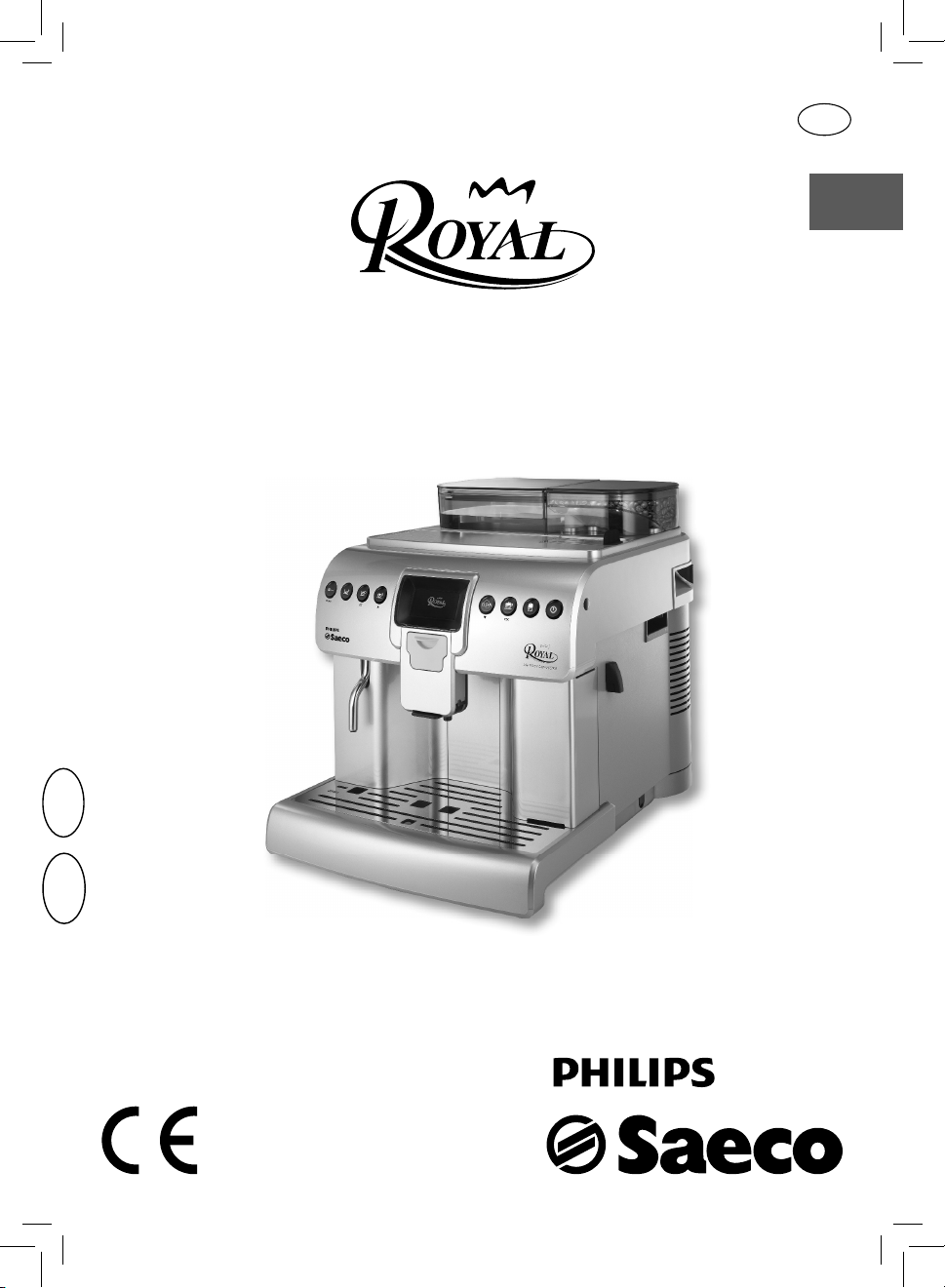
Type HD8930
OPERATING INSTRUCTIONS
READ THESE INSTRUCTIONS CAREFULLY BEFORE USING THE MACHINE.
English
Register your product and get support at
www.philips.com/welcome
02
EN
02
IMPORTANT SAFEGUARDS
When using electrical appliances, basic safety precautions should always be
followed, including the following:
1. Read all instructions.
2. Do not touch hot surfaces. Use handles or knobs.
3. To protect against fire, electric shock and injury to persons do not immerse
cord, plugs, or appliance in water or other liquid.
4. Close supervision is necessary when the appliance is used by or near
children.
5. Unplug from outlet when not in use and before cleaning. Allow to cool
before putting on or taking off parts, and before cleaning the appliance.
6. Do not operate any appliance with a damaged cord or plug or after the
appliance malfunctions, or has been damaged in any manner. Return
appliance to the nearest authorized service facility for examination, repair
or adjustment.
7. The use of accessory attachments not recommended by the appliance
manufacturer may result in fire, electric shock or injury to persons.
8. Do not use outdoors.
9. Do not let cord hang over edge of table or counter, or touch hot surfaces.
10. Do not place on or near a hot gas or electric burner, or in a heated oven.
11. Always attach plug to appliance first, then plug cord into wall outlet. To
disconnect, turn any control to “off”, then remove plug from wall outlet.
12. Do not use appliance for other than intended use.
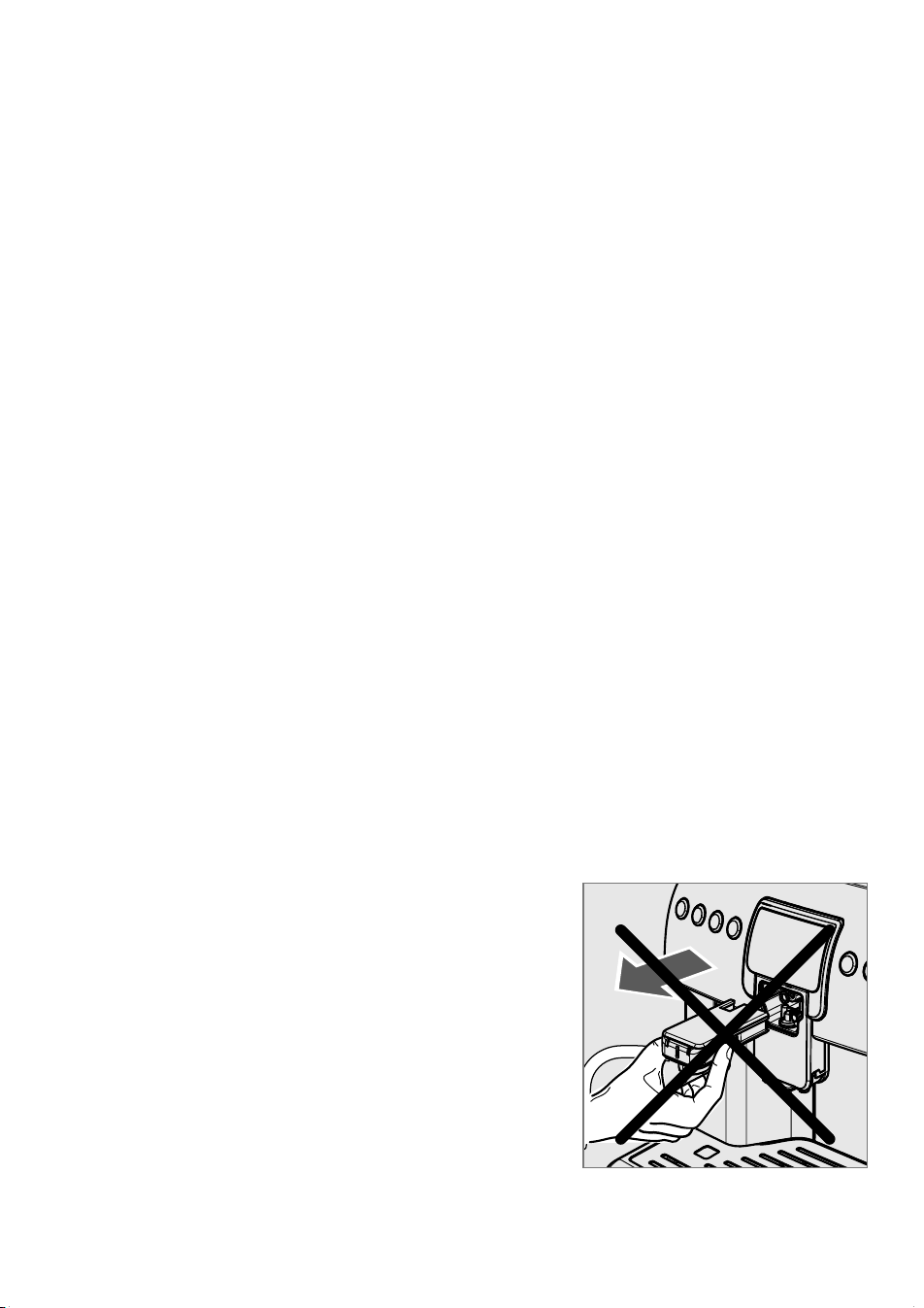
13. WARNING: Do not remove the Cappuccinatore while in use, steam can
be released.
14. Save these instructions.
SAVE THESE INSTRUCTIONS

CAUTION
This appliance is for household use only. Any servicing, other than cleaning
and user maintenance, should be performed by an authorized service center.
Do not immerse machine in water. To reduce the risk of fire or electric shock,
do not disassemble the machine. There are no parts inside the machine
serviceable by the user. Repair should be done by authorized service personnel
only.
1. Check voltage to be sure that the voltage indicated on the nameplate
corresponds with your voltage.
2. Never use warm or hot water to fill the water tank. Use cold water only.
3. Keep your hands and the cord away from hot parts of the appliance during
operation.
4. Never clean with scrubbing powders or harsh cleaners. Simply use a soft
cloth dampened with water.
5. For optimal taste of your coffee, use purified or bottled water. Periodic
descaling is still recommended every 2-3 months.
6. Do not use caramelized or flavored coffee beans.
INSTRUCTIONS FOR THE POWER
SUPPLY CORD
A. A short power-supply cord (or detachable power-supply cord) is to be
provided to reduce risks resulting from becoming entangled in or tripping
over a longer cord.
B. Longer detachable power-supply cords or extension cords are available
and may used if care is exercised in their use.
C. If a long detachable power-supply cord or extension cord is used,
1. The marked electrical rating of the detachable power-supply cord or
extension cord should be at least as great as the electrical rating of the
appliance
2. If the appliance is of the grounded type, the extension cord should be a
grounding-type 3-wire cord, and
3. The longer cord should be arranged so that it will not drape over the
counter top or table top where it can be pulled on by children or tripped
over.

Contents
Introduction ..........................................................................3
General Description ( g.1) ..................................................3
Important ..............................................................................4
Intended Use .................................................................................................................................................. 4
Power Supply - Power Cord ......................................................................................................................4
For the Safety of Others ............................................................................................................................. 4
Danger of Burns ............................................................................................................................................4
Machine Location - Suitable Location for Operation and Maintenance .................................. 4
Storing the Machine - Cleaning .............................................................................................................. 5
Malfunction .................................................................................................................................................... 5
Fire Safety Precautions ...............................................................................................................................5
First Use .................................................................................6
Packaging ........................................................................................................................................................6
Preliminary Operations .............................................................................................................................. 6
Double Function Buttons ..........................................................................................................................8
Setting the Language (Upon First Use) ................................................................................................9
Warm-up and Rinsing .................................................................................................................................9
Rinse/Self-Cleaning Cycle ........................................................................................................................10
For a Perfect Espresso: Rinse the Co ee Circuit if Using the Machine for the First Time or
After a Long Period of Inactivity............................................................................................................10
Measuring and Adjusting Water Hardness ...................... 12
"INTENZA+" Water Filter ................................................... 14
Adjustments ....................................................................... 16
Adjusting the Co ee Grinder .................................................................................................................16
Adjusting the "Aroma" - Amount of Ground Co ee ......................................................................16
Adjusting the Co ee Length ..................................................................................................................17
Adjusting the Cappuccino or Latte Macchiato Length .................................................................18
Eco-friendly: Stand-by ..............................................................................................................................19
Brewing Co ee ................................................................... 19
Cup-warming Surface ...............................................................................................................................19
Adjusting the Dispensing Spout ...........................................................................................................19
Using Co ee Beans ....................................................................................................................................21
Using Pre-ground Co ee .........................................................................................................................21
Brewing Cappuccino ......................................................... 23
Latte Macchiato ................................................................. 24
Milk Handling .................................................................... 25
Milk Thermos (Optional) ..........................................................................................................................25
Milk Container .............................................................................................................................................27
"SPECIAL" Products ............................................................ 28
Dispensing Hot Water ...............................................................................................................................28
Long Co ee ..................................................................................................................................................29
Hot Milk ..........................................................................................................................................................29
American Co ee .........................................................................................................................................30
Steam ..............................................................................................................................................................31
Beverage Programming .................................................... 32
Dispensed Beverages Counters ............................................................................................................32
Beverage Parameters ................................................................................................................................33
Hot Water Parameters (BEVERAGE MENU - >SPECIAL BEVERAGES) .........................................34
Activating Steam (BEVERAGE MENU -> SPECIAL BEVERAGES) ..................................................34
Default Parameters ....................................................................................................................................34

Machine Programming ..................................................... 35
General Menu ..............................................................................................................................................36
Display Menu ...............................................................................................................................................37
Water Menu ..................................................................................................................................................37
Maintenance ................................................................................................................................................38
Factory Settings ..........................................................................................................................................38
Cleaning and Maintenance ............................................... 39
General Cleaning ........................................................................................................................................39
Cleaning the Cappuccinatore (After Each Use) ...............................................................................40
Day Cleaning - Thermos ...........................................................................................................................43
Monthly Cleaning - Cappuccinatore + Thermos (Thorough Cleaning) ..................................45
Brew Group ........................................................................ 48
Weekly Cleaning - Brew Group ..............................................................................................................48
Cleaning the Brew Group with the “Co ee Oil Remover” ............................................................50
Brew Group Lubrication ...........................................................................................................................51
Descaling ............................................................................ 53
LCD Display Warnings ....................................................... 57
Troubleshooting ................................................................ 59
Technical Speci cations .................................................... 60
Service ................................................................................ 62
2
1
MENU OK ESC
29
25 30
28
21
16
17
23
26 24
22
123
13
11
14
15
45
7
8
910
12
18
19
20
6
27
31
33 3834 3935 4036 4137
32
ENGLISH
3
Introduction
Congratulations on your purchase and welcome to Philips Saeco!
To fully bene t from the support that Philips o ers, register your product at
www.philips.com/welcome.
In this user manual you will nd all the information you need to install,
use, clean and descale your appliance. In case you need further support,
please contact the toll free Philips consumer care help line. You can nd
the phone number on the last page of this document and in the warranty
booklet supplied with the appliance.
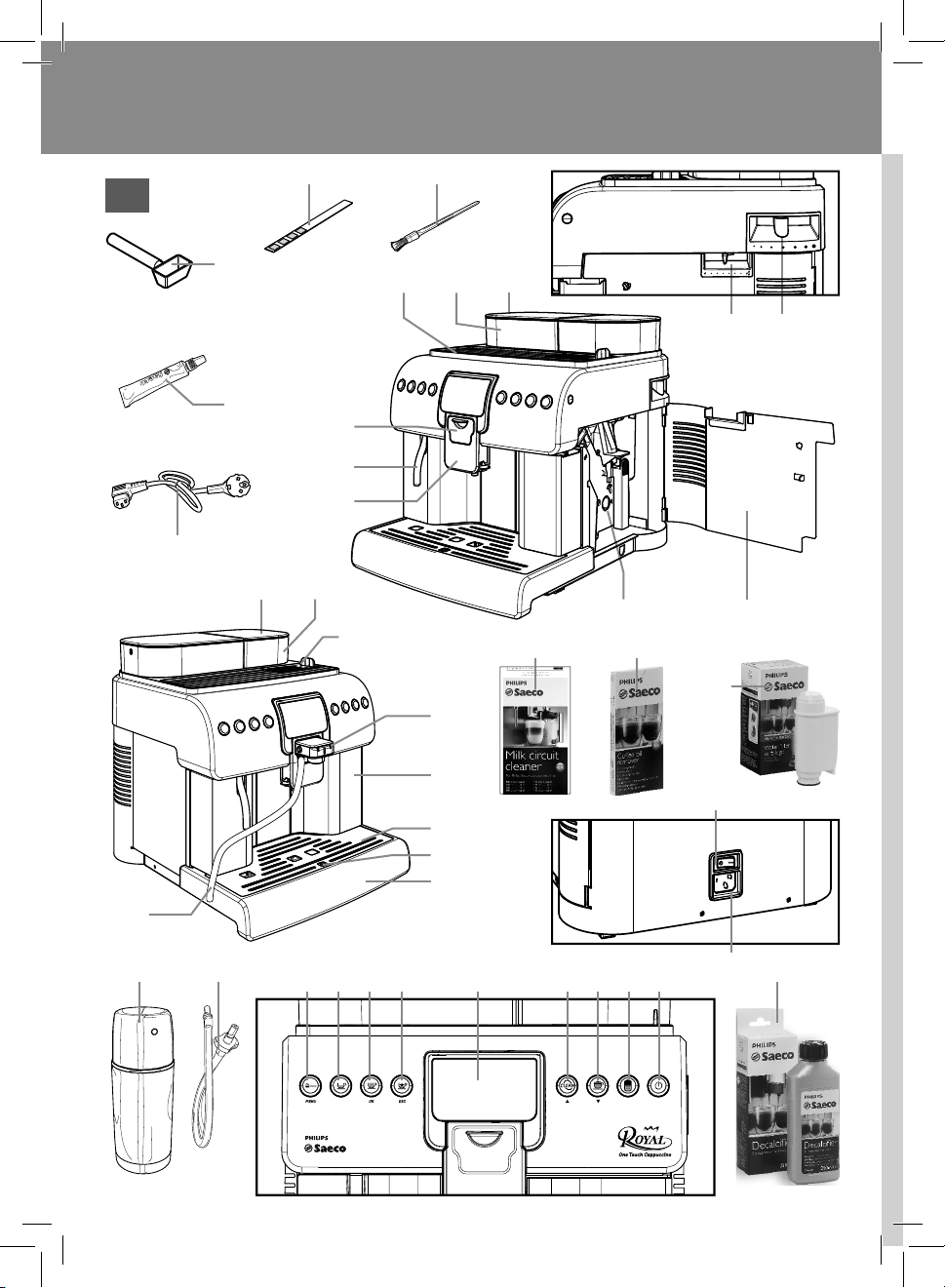
General Description ( g.1)
1 Cup-warming surface
2 Water tank
3 Water tank lid
4 Co ee dose adjustment
5 Grinder adjustment
6 Cappuccinatore cover
7 Hot water wand
8 Dispensing spout
9 Brew group
10 Service door
11 Pre-ground co ee compartment + lid
12 Co ee bean hopper lid
13 Co ee bean hopper
14 Cappuccinatore (removable type)
15 Co ee grounds drawer
16 Cup holder grill
17 Full drip tray indicator
18 Drip tray + tray (inner) cover
19 Power button
20 Power cord socket
21 Pre-ground co ee dosing unit
22 Grease for brew group
23 Power cord
24 Cleaning brush
25 Milk circuit detergent - (Optional)
26 Water hardness test
27 Milk Thermos - (Optional)
28 Descaling solution - (Optional)
29 (INTENZA+) Filter - (Optional)
30 Brew group cleaning tablets - (Optional)
31 Suction tube for Cappuccinatore
32 Connection hose Thermos - Cappuccinatore - (Optional)
33 Pre-ground co ee selection button
2
nd
Function - "Menu" button to access the programming mode
34 Espresso co ee brew button
35 Co ee brew button
2
nd
Function - "OK" button to con rm selection
36 Special beverages selection button
2
nd
Function - “ESC” button to exit or stop the brewing procedure
37 Display
38 Cappuccinatore "Clean" button
2
nd
Function - "Page Up" button to scroll the menu
39 Cappuccino brew button
2
nd
Function - "Page Down" button to scroll the menu
40 Latte Macchiato brew button
41 ON/OFF button
4
ENGLISH
Important
Read this user manual carefully before using the appliance and save it for
future reference.
Never allow water to come into contact with any of the electrical parts of
the machine: Danger of short circuit! Hot water may cause burning! Never
not direct the hot water jet towards body parts. Handle the hot water
wand with care.
Intended Use
The co ee machine is intended for domestic use only. Do not make any
technical changes or use the machine for unauthorised purposes since this
would create serious hazards! The appliance is not to be used by persons
(including children) with reduced physical, mental or sensory abilities or
with scarce experience and/or expertise, unless they are supervised by a
person responsible for their safety, or they are instructed by this person on
how to properly use the machine.
Power Supply - Power Cord
Connect the co ee machine only to a suitable socket.
The socket to which the machine is connected must be:
- Compatible with the type of plug installed on the machine.
- Suitably sized to comply with the data on the plate attached to the
appliance;
- Connected to an e cient earthing system.
Never use the co ee machine if the power cord is defective or damaged.
If the power cord is damaged, it must be replaced by the manufacturer or
by its authorised service centre.
Do not pass the power cord around corners, over sharp edges or over hot
objects and keep it away from oil.
Do not use the power cord to carry or pull the co ee machine.
Do not pull out the plug by the power cord or touch it with wet hands. Do
not let the power cord hang freely from tables or shelves.
For the Safety of Others
Prevent children from playing with the machine. Children are not aware
of the risks related to electrical household appliances. Do not leave the
machine packaging materials within the reach of children.
Danger of Burns
Never direct the jet of hot steam and/or hot water towards yourself or
others: Danger of burns!
Machine Location - Suitable Location for Operation and Mainte-
nance
For best use, it is recommended to:
• Choose a safe, level surface, where there will be no danger of overturn-
ing the appliance or being injured.
• Choose a location that is su ciently well-lit, clean and near an easily
ENGLISH
5
reachable socket.
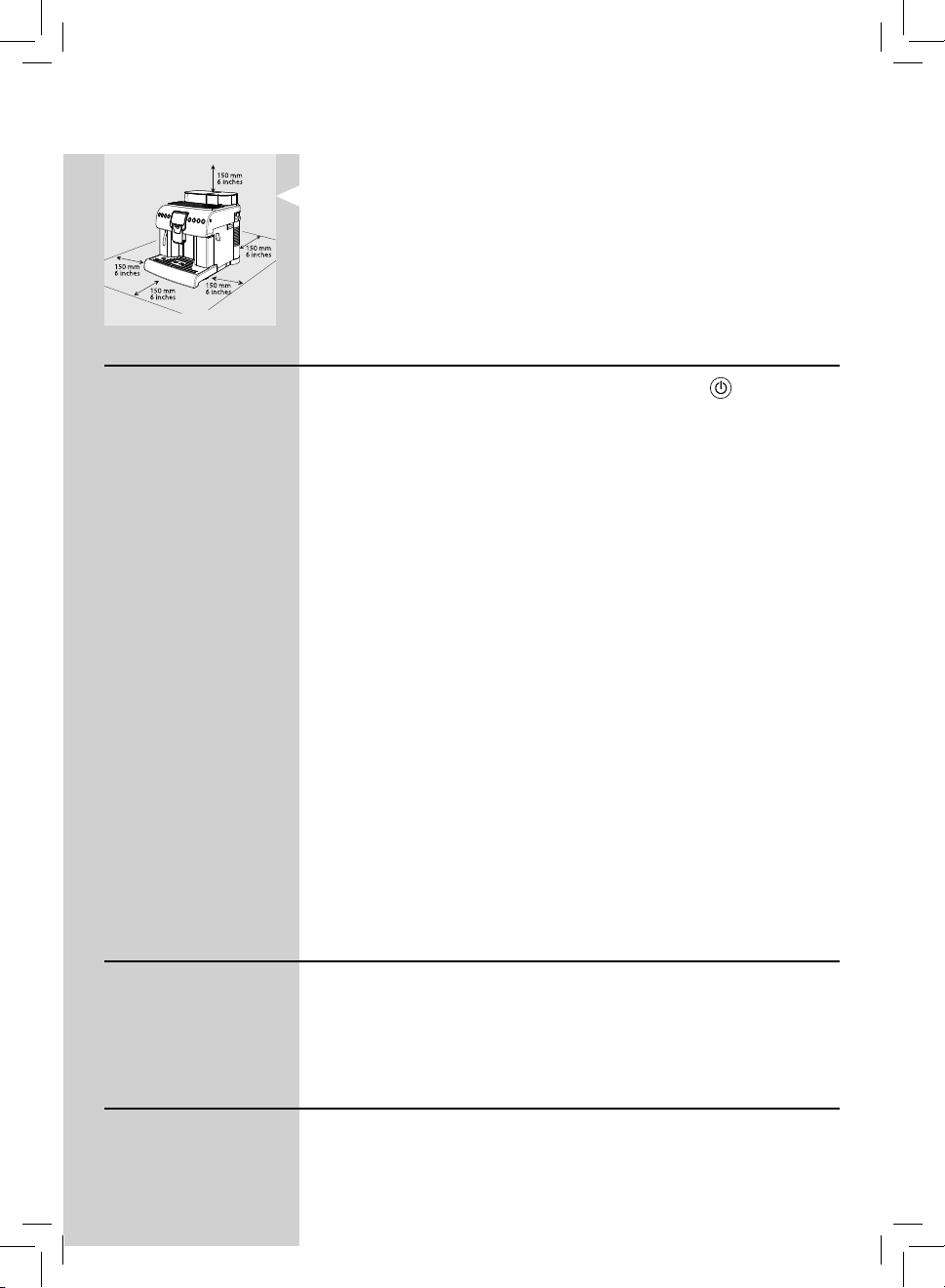
• Provide for a minimum distance from the sides of the machine as
shown in the illustration
.
• While switching on or o the machine, we suggest placing an empty
glass under the dispensing spout.
Do not keep the machine at temperatures below 0°C. Frost may damage
the machine. Do not use the co ee machine outdoors.
In order to prevent its housing from melting or being damaged, do not
place the machine on very hot surfaces and close to open ames.
Storing the Machine - Cleaning
Before cleaning the machine, turn it o by pressing the " " button and
then by switching the power button to "0". Finally, remove the plug from
the socket.
Keep the machine at its best, clean and store it properly.
Since the machine uses natural ingredients to brew beverages (co ee
beans, water, milk, etc.), some residues of ground co ee or condensed wa-
ter could be present on its supporting surface. For this reason we recom-
mend to periodically clean both the visible parts of the machine and the
area beneath it.
Before storing the machine we strongly recommend to clean it:
- Water left in the tank and/or the water circuit for several days should
not be consumed. If the machine is going to remain inactive for a long
time, dispense water from the hot water wand and carefully clean the
Cappuccinatore (if supplied).
- Turn o the power button and clean the machine. Finally, remove the
plug from the socket. Wait for the machine to cool down.
Never immerse the machine in water! Store it in a dry place, out of the
reach of children. Keep it protected from dust and dirt.
It is strictly forbidden to tamper with the internal parts of the machine.
For thorough cleaning, the Cappuccinatore can be detached and disassem-
bled and its parts can be put in a dishwasher (not professional type).
The washing process in the dishwasher may cause the surface of the Cap-
puccinatore parts to tarnish or the graphics to fade, especially if aggressive
detergents are used.
This is a normal phenomenon and does not a ect in any way the correct
operation of the milk system.
Malfunction
In case of failure, problems or a suspected fault resulting from the falling of
the machine, immediately remove the plug from the socket. Never attempt
to operate a faulty machine.
For further information on troubleshooting and service, please refer to the
"Troubleshooting" and "Service" chapters.
Fire Safety Precautions
In case of re, use carbon dioxide (CO
2
) extinguishers. Do not use water or
dry powder extinguishers.
6
ENGLISH
First Use
Packaging
The original packaging has been designed and constructed to protect the
machine during transport. We recommend keeping the packaging material
for possible future transport.
Preliminary Operations
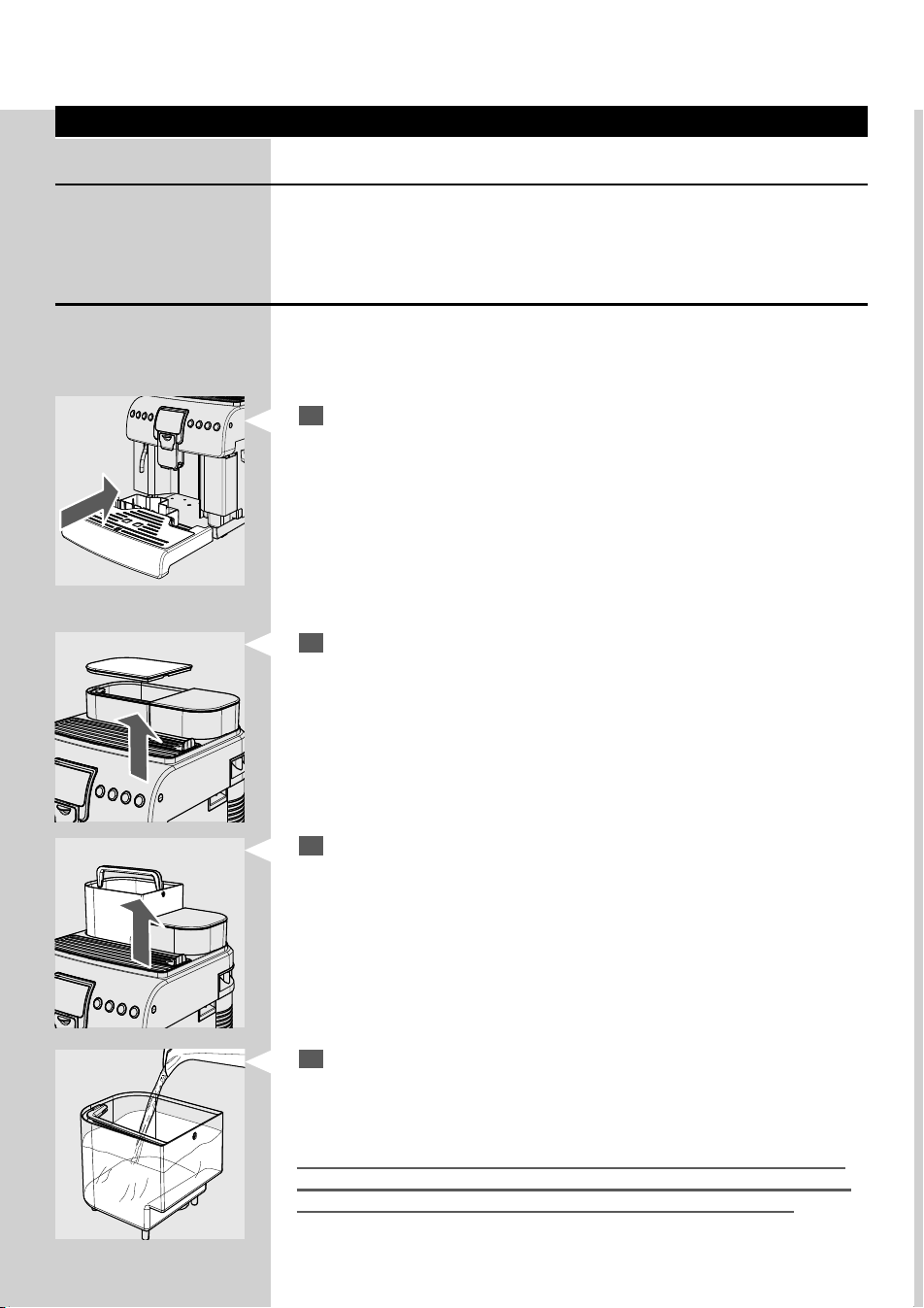
Remove the drip tray with grill and the co ee machine from the packaging.
Place the machine in a place that meets the requirements described in the
safety regulations.
1
Place the drip tray with grill into its seat on the machine. Make sure the
tray is fully inserted to its limit stop.
Note: Insert the plug into the socket only when indicated and make sure the
power button is on "0".
Important Note: Carefully read the explanations of all the warnings the
machine displays to the user on the control panel LCD display (section "LCD
Display Warnings").
4
Rinse and ll it with fresh water, making sure that the (MAX) level
indicated in the tank is not exceeded. Place the water tank back into its
seat and reposition the lid.
Fill the tank only with fresh, non-sparkling water. Hot water or any other
liquid may damage the tank and/or the machine. Do not operate the ma-
chine without water. Make sure there is enough water in the tank.
3
Remove the water tank from its seat by only using the relevant handle.
2
Remove the lid from the water tank.
ENGLISH
7
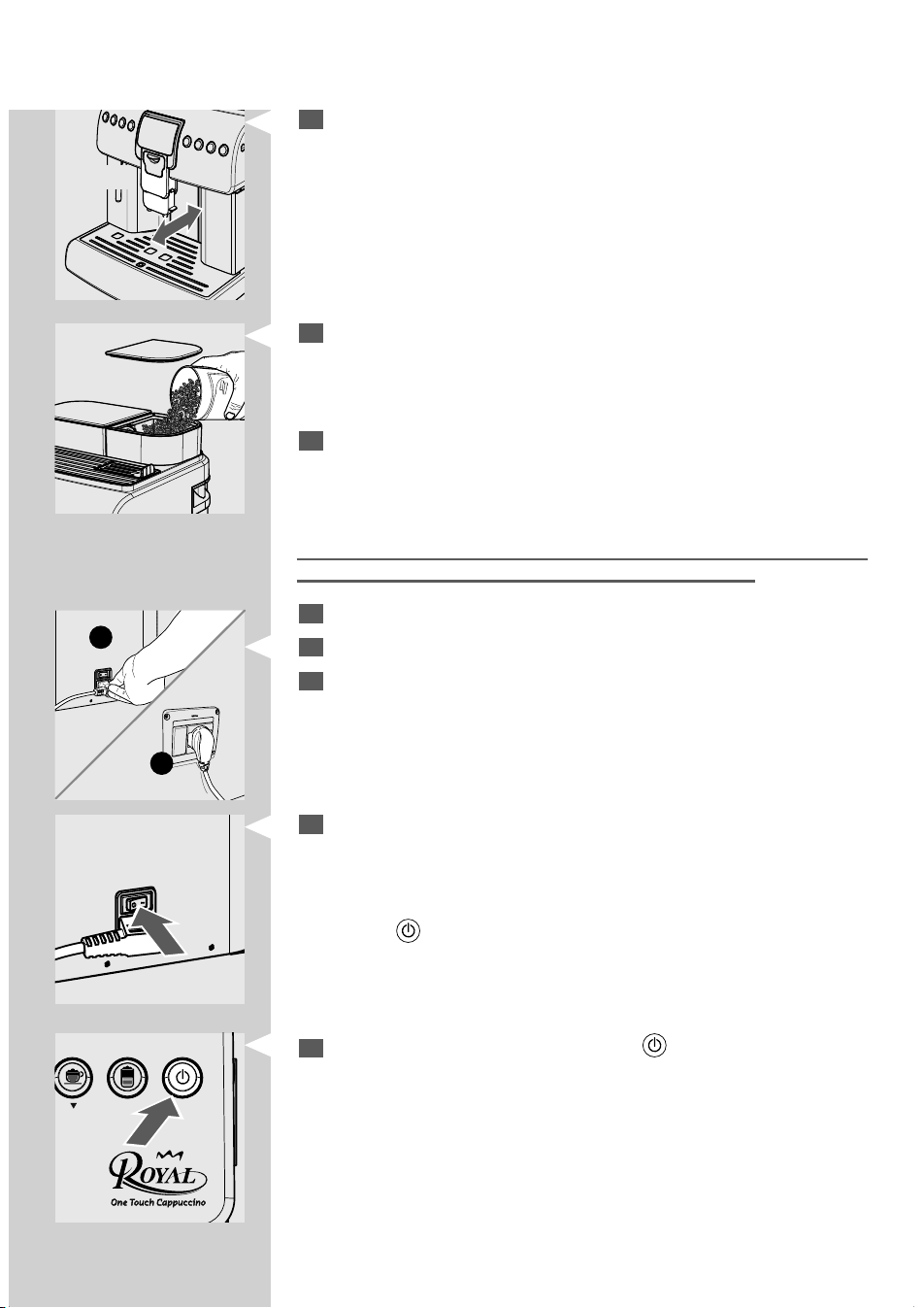
5
Make sure the dispensing spout is in correct position. Move it horizon-
tally until you hear the CLICK indicating the correct position.
If this is not done, some product might leak out of the dispensing
spout.
1
2
11
Switch the power button to "I" to turn on the machine.
Note: The power button is located in the rear part of the machine.
After carrying out a check cycle, the machine goes into stand-by mode
and the "
" button blinks.
12
To turn on the machine simply press the " " button.
Note: The language needs to be selected only upon rst use (see page 9).
Note: Once the warm-up is complete, upon rst use the machine primes the
circuit and performs a rinse cycle of the internal circuits. A small amount of
water is dispensed. Wait for this cycle to be completed.
CLICK!
6
Remove the co ee bean hopper lid.
Note: The hopper may be provided with di erent safety features according to
the regulations applicable in the country of use of the machine.
7
Slowly pour the co ee beans into the hopper.
If the water tank is not inserted, check that no co ee beans fall into the tank
compartment. If this happens, remove them to avoid any malfunctions.
Only co ee beans must be put into the co ee bean hopper. Ground co ee,
instant co ee or any other object may damage the machine.
8
Reposition the co ee bean hopper lid.
9
Insert the plug into the socket on the back of the machine.
10
Insert the plug of the other end of the cable into a wall socket with
suitable power voltage.
8
ENGLISH
Double Function Buttons
Some buttons in the control panel have a double function.
The double function is only activated in certain moments during the ma-
chine operation or when accessing the programming mode.
The additional function is indicated by the icon under the machine button.
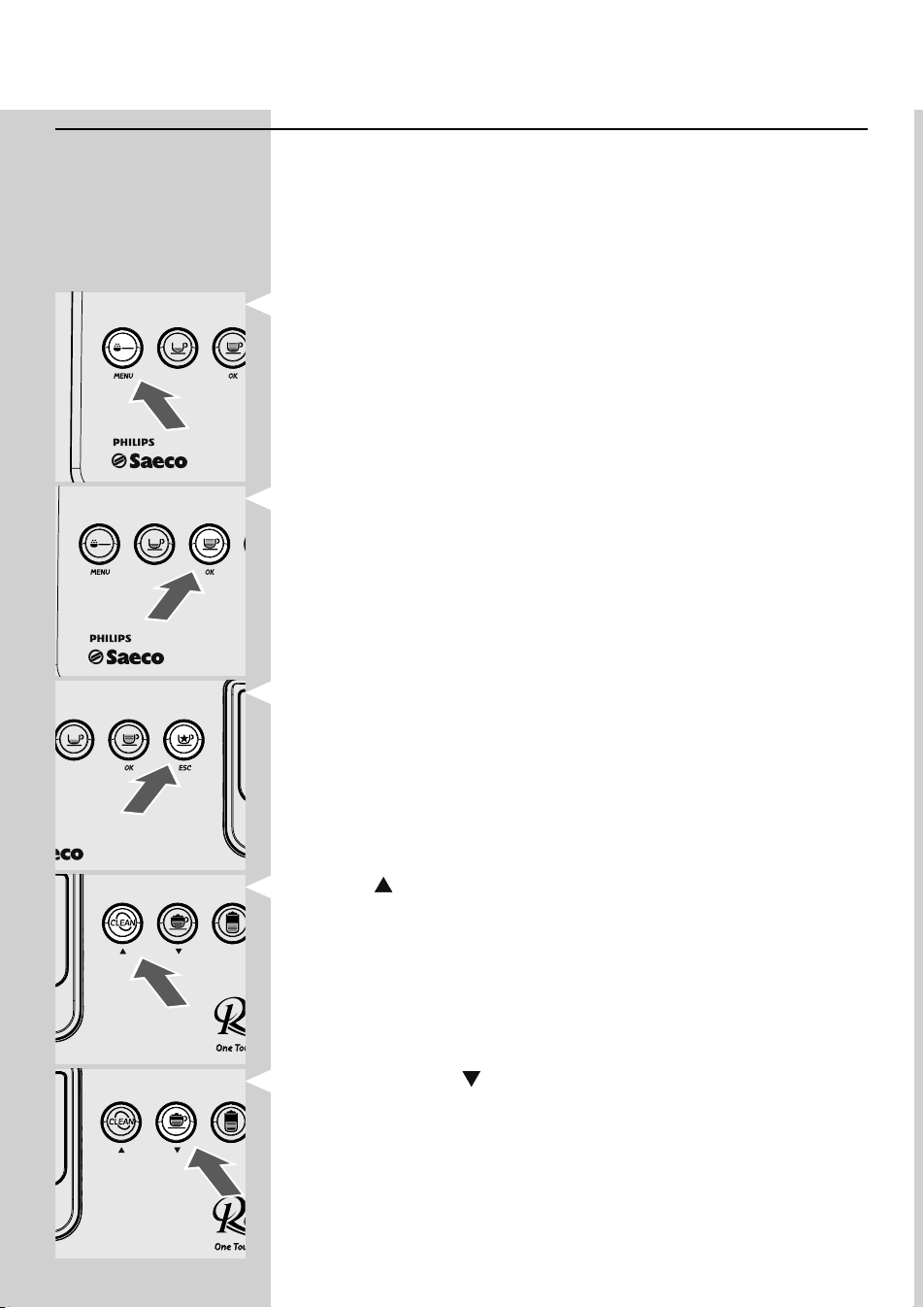
MENU OK
OK ESC
MENU OK
Pre-ground co ee selection - MENU Button
This button allows you to select the co ee brew mode with pre-ground
co ee.
2
nd
Function - Hold it pressed for 5 seconds to access the machine pro-
gramming menu.
Co ee Brew - OK Button
This button allows you to select one co ee brewing.
2
nd
Function - Press it to select the displayed option.
Special Beverages Selection - ESC Button
This button allows you to access the list of special beverages that the
machine can brew.
2
nd
Function - Press it to exit the selected page and/or the programming
mode completely and/or to stop brewing the beverage.
CLEAN - “
” Button
This button allows you to perform a cleaning cycle of the Cappuccinatore
by dispensing steam (see the special section for further details).
2
nd
Function - Press it to scroll the current page selection up.
Cappuccino Brew - “
” Button
This button allows you to select the cappuccino brewing.
2
nd
Function - Press it to scroll the current page selection down.
ENGLISH
9
Setting the Language (Upon First Use)
At rst start up, the machine requires you to select and store the desired
language for the displayed messages. This allows you to adjust the pa-
rameters of the beverages to the typical parameters of the country where
the machine is used. This is why some languages are di erentiated also by
country.
If no language is selected, you will be requested to select it at next ma-
chine start-up.
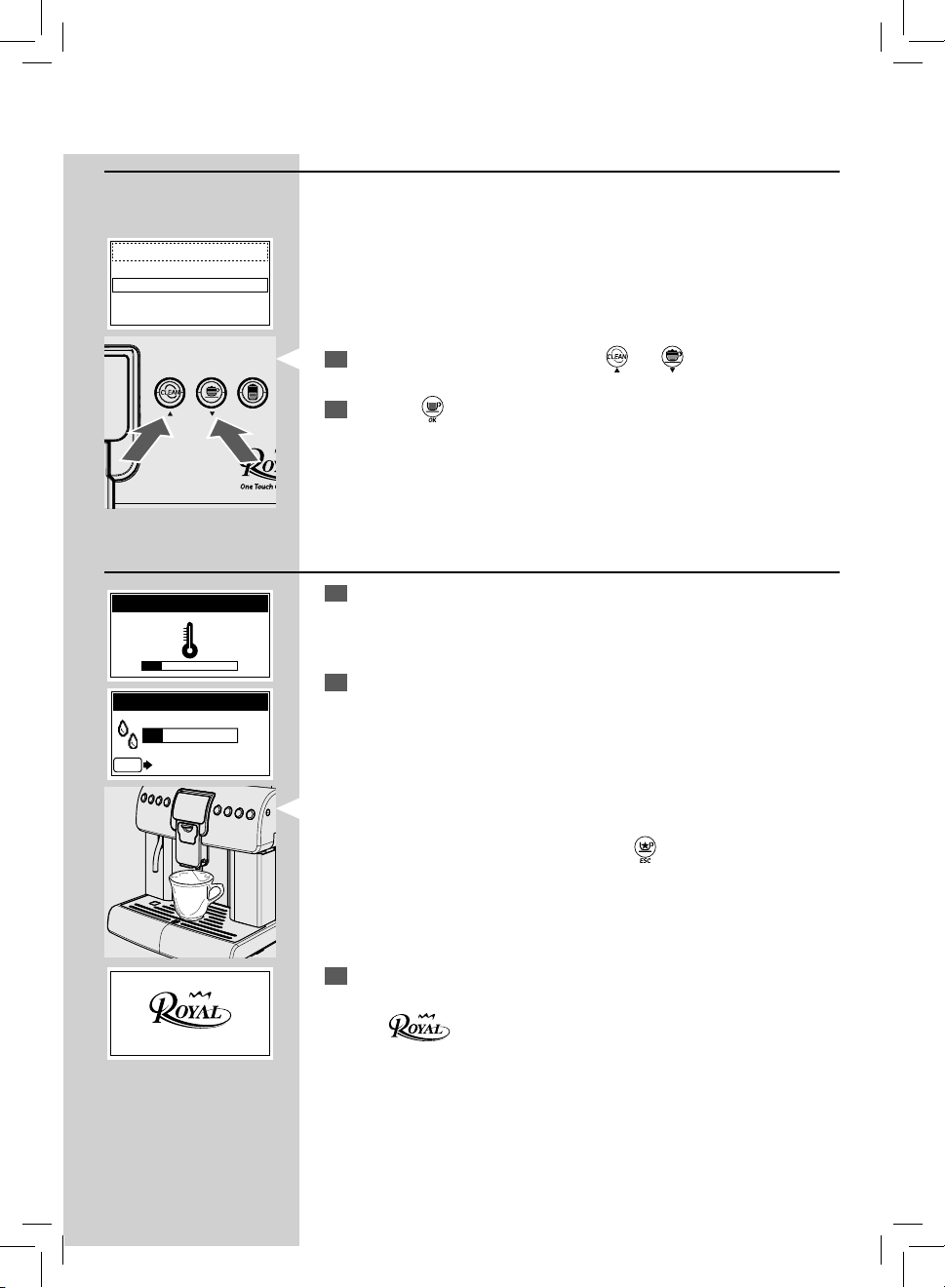
1
Select the language by pressing the " " or " " button.
2
Press the " " button to store the language.
Warm-up and Rinsing
1
Upon start-up, the machine activates the warm-up phase. Wait until it
is completed.
Note: The bar is in progress to show that the machine is heating up the system.
2
Once the warm-up is complete, the machine performs a rinse cycle of
the internal circuits.
Note: The bar is in progress to show that the machine is performing the system
rinse cycle.
A small quantity of water is dispensed. Wait for the cycle to end.
Note: The cycle can be stopped by pressing the "
" button.
3
Then, the machine is ready for use.
The logo
is displayed indicating that the machine is ready for use.
Note: If the machine is being used for the rst time or after a long period of
inactivity, follow the procedures described in the following section.
LANGUAGE
ITALIANO
ENGLISH
DEUTSCH
FRANÇAIS
HEATING UP…
RINSING
ESC
STOP RINSING
10
ENGLISH
Rinse/Self-Cleaning Cycle
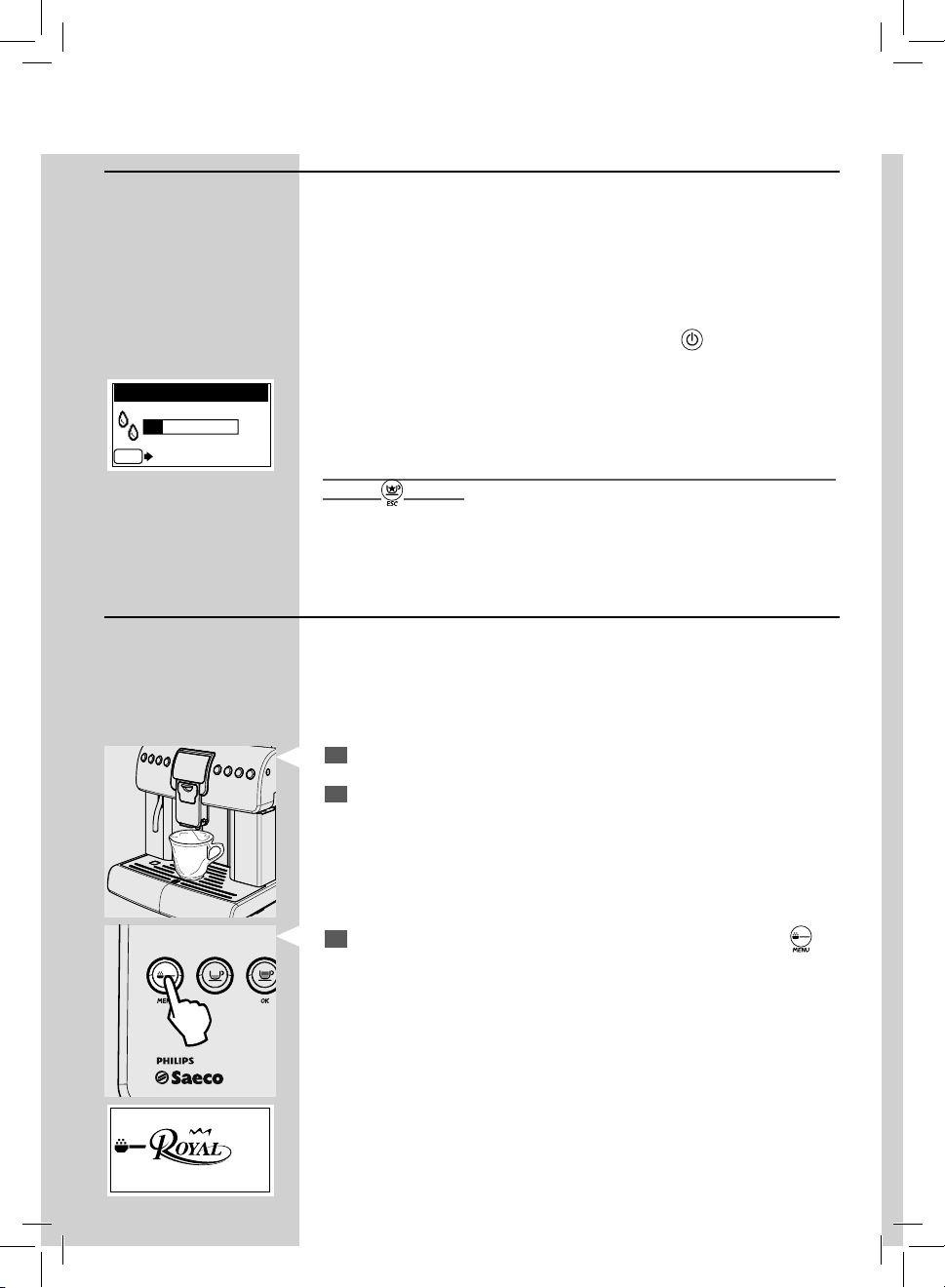
This cycle allows you to rinse the internal co ee circuits with fresh water.
The cycle is carried out:
• At machine start-up (with cold boiler)
• After priming the circuit (with cold boiler)
• During the stand-by preparation phase (if at least a co ee product has
been brewed)
• During the turning o phase after pressing the "
" button (if at least
a co ee product has been brewed).
A small amount of water will be dispensed to rinse and heat all the ma-
chine parts; in this phase this icon is displayed.
Wait for the cycle to nish automatically. You can stop dispensing by press-
ing the "
" button.
MENU OK
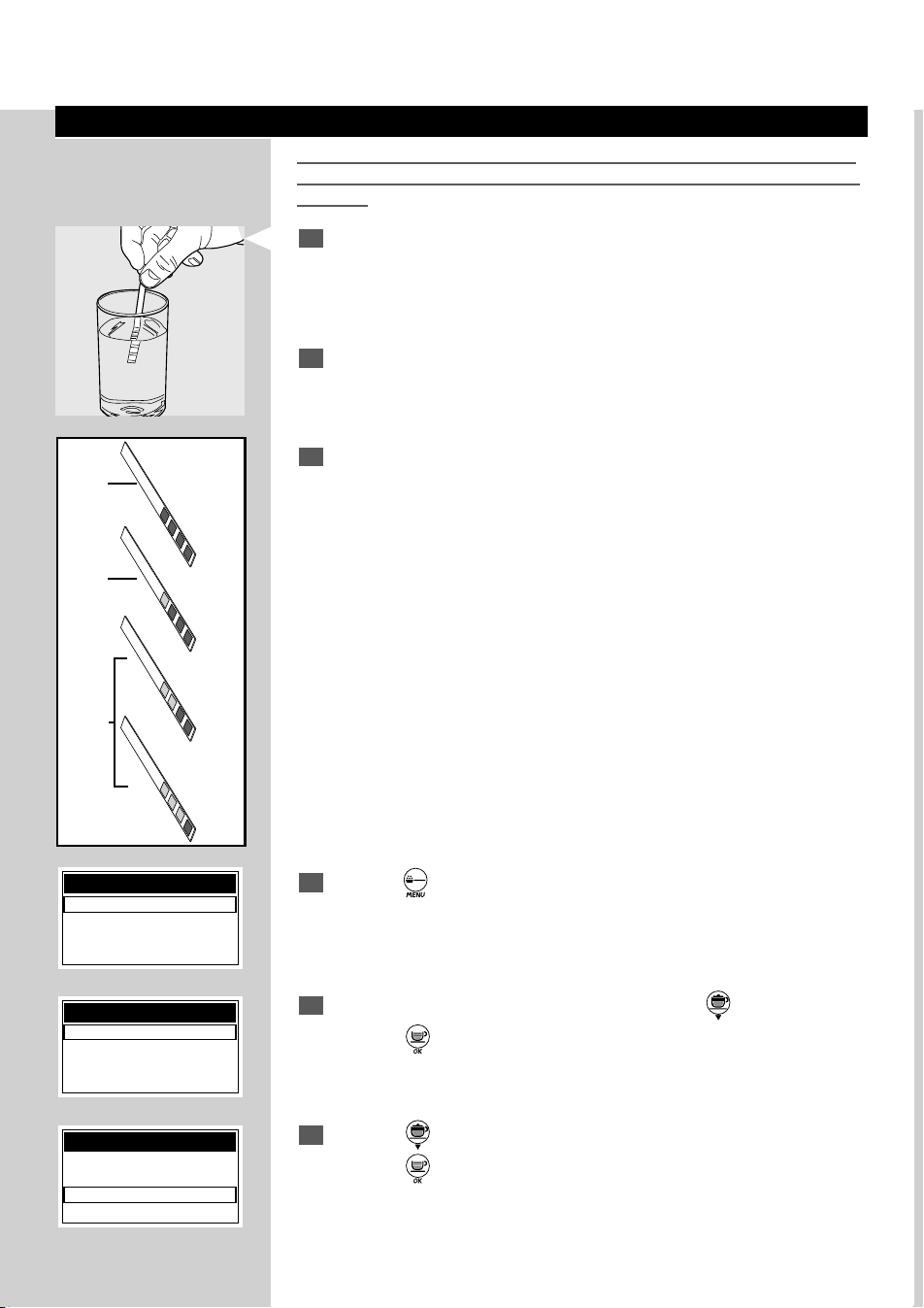
For a Perfect Espresso: Rinse the Co ee Circuit if Using the Machine
for the First Time or After a Long Period of Inactivity.
These simple operations will make it possible to always brew excellent cof-
fee. They have to be performed:
A) At rst start-up.
B) When the machine remains inactive for a long time (more than 2
weeks).
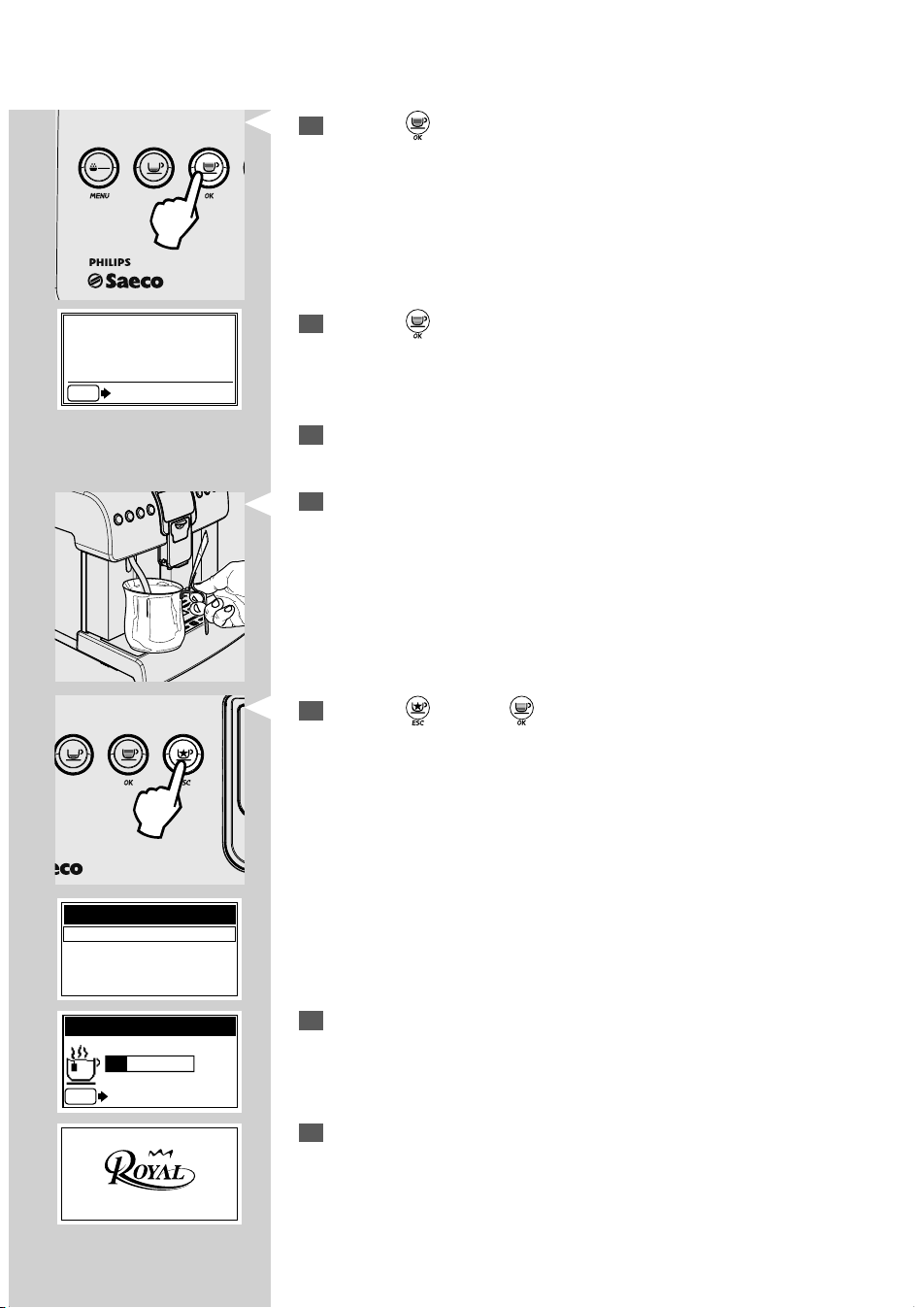
1
Place a large container under the dispensing spout.
2
Empty the water tank, wash and rinse it and ll it with fresh water.
3
Select the pre-ground co ee brewing function by pressing the " "
button once.
The display indicates that the pre-ground function has been selected.
RINSING
ESC
STOP RINSING
ENGLISH
11
MENU OK
OK ESC
4
Press the " " button to select co ee.
Note: Do not add pre-ground co ee into the compartment.
8
Press the " " and the " " buttons to select and start dispensing
HOT WATER.
9
When the hot water dispensing procedure is complete, empty the
container.
10
The machine is now ready for use.
5
Press the " "button to start the dispensing procedure.
The machine will dispense hot water through the dispensing spout.
Wait until the dispensing procedure is complete and empty the water
tank.
6
Repeat the operations from step 1 to step 5 for 3 times, then continue
with step 7.
7
Place a container under the hot water wand.
SPECIAL BEVERAGES
HOT WATER
LONG COFFEE
HOT MILK
AMERICAN COFFEE
HOT WATER
ESC
STOP HOT WATER
MEMO
ESC
ESC
INSERT
GROUND COFFEE
AND PRESS OK
12
ENGLISH
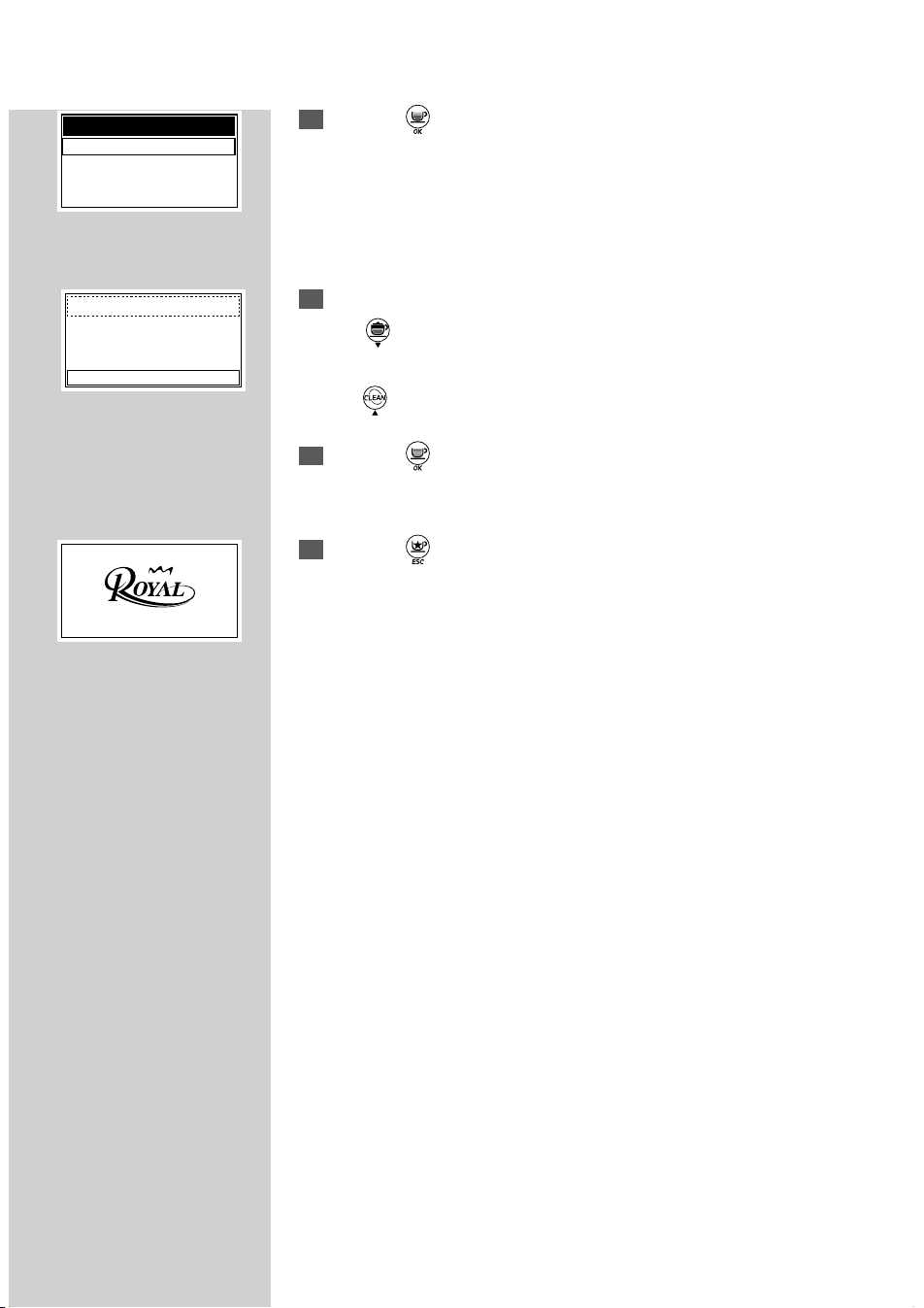
Measuring and Adjusting Water Hardness
Measuring water hardness is very important in order to correctly manage
the "INTENZA+" lter and the frequency with which the machine must be
descaled.
1
Immerse the water hardness test strip - provided with the machine - in
water for 1 second.
Note: The test strip is only valid for one measurement.
2
Check how many squares change colour and refer to the table.
Note: The letters correspond to the references that are located in the base of
the Intenza lter. The lter must be adjusted according to this measurement.
3
The numbers correspond to the settings indicated in the following
machine adjustments.
More precisely:
1 = (very soft water)
2 = (soft water)
3 = (hard water)
4 = (very hard water)
23 4
A
B
C
Intenza Aroma System
Machine water hardness setting
1
4
Hold the " " button pressed for 5 seconds to access the program-
ming mode.
5
To select the "MACHINE MENU" option, press the " " button.
Press the "
" button for access.
6
Press the " " button until the "WATER MENU" option can be selected.
Press the "
" button for access.
MACHINE MENU
GENERAL MENU
DISPLAY MENU
WATER MENU
MAINTENANCE
MACHINE MENU
GENERAL MENU
DISPLAY MENU
WATER MENU
MAINTENANCE
MENU
BEVERAGE MENU
MACHINE MENU
ENGLISH
13
7
Press the " " button to enter the "HARDNESS" menu.
Note: The machine is supplied with a standard adjustment suitable for most of
the uses.
8
Press:
The "
" button to increase the value
or
the "
" button to reduce the value.
9
Press the " " button to con rm the selected change.
10
Press the " " button until the following product brewing page is
displayed.
HARDNESS
1
2
3
4
WATER MENU
HARDNESS
ENABLE FILTER
ACTIVATE FILTER

14
ENGLISH
"INTENZA+" Water Filter
The “INTENZA+” water lter can improve the quality of water. Using the
“INTENZA+” lter will prevent limescale from building up and will ensure
a much more intense aroma to your espresso co ee. We therefore recom-
mend you to install the “INTENZA+” water lter. You can purchase it at your
local dealer, on-line at the Philips on-line shop at http://shop.philips.com or
at the authorised service centres.
2
Remove the "INTENZA+" water lter from its package. The lter should
be set according to the measurements performed to set water hard-
ness. Use the water hardness test strip provided with the machine.
Set the "Intenza Aroma System" as speci ed on the lter package (see
section "Measuring and Adjusting Water Hardness").
A = Soft water
B = Hard water (standard)
C = Very hard water
ù
3
Immerse the "INTENZA+" water lter vertically (with the opening posi-
tioned upwards) in cold water and delicately press its sides so as to let
the air bubbles out.
1
Remove the small white lter from the tank and store it in a dry place
sheltered from dust.
Measuring water hardness is very important in order to correctly manage
the "INTENZA+" water lter and the frequency with which the machine
must be descaled.
4
Put the lter into the empty tank. Press it until its limit stop.
5
Fill the tank with fresh drinking water and reinsert it into the machine.
ENGLISH
15
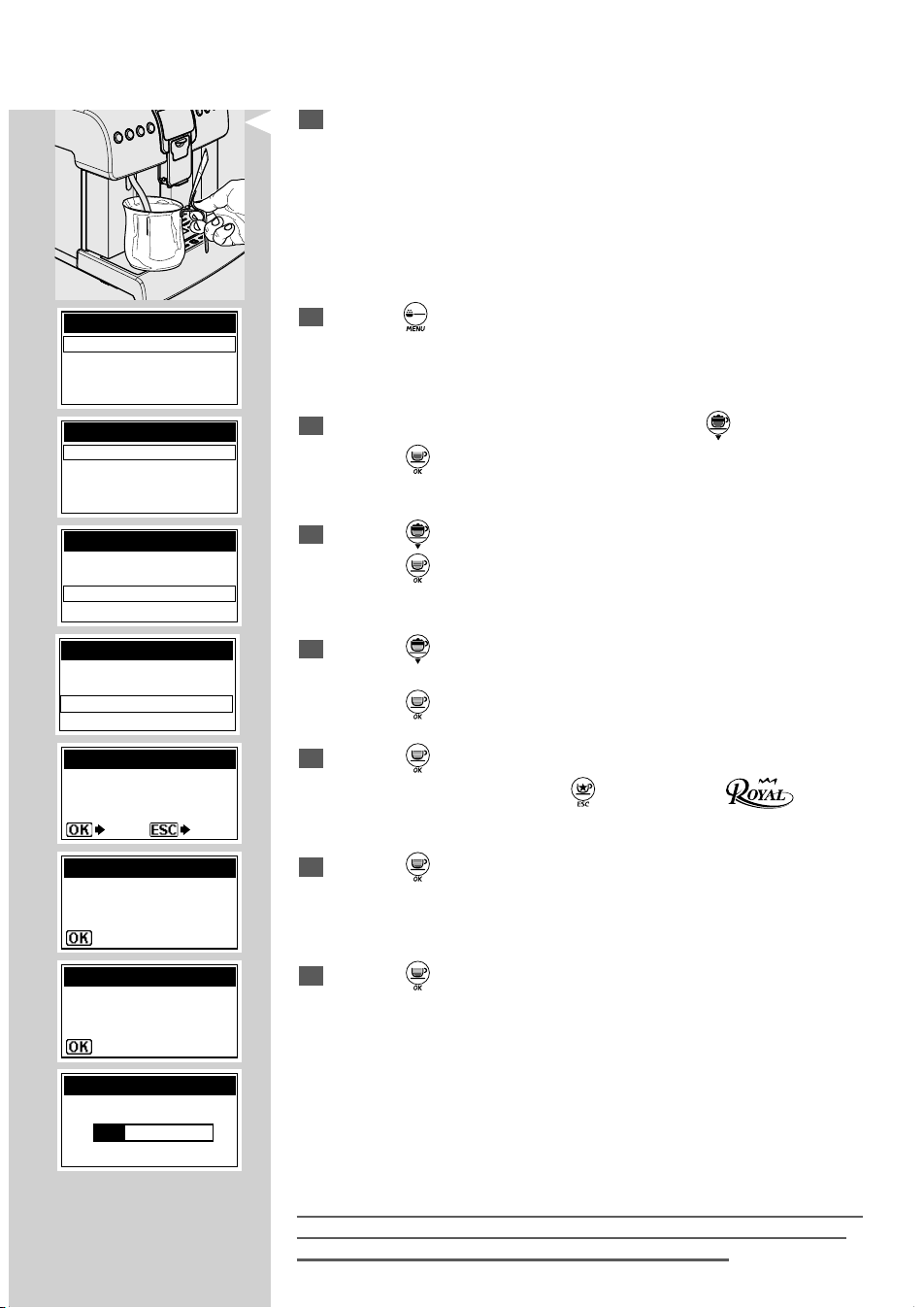
6
Place a large container under the hot water wand.
7
Hold the " " button pressed for 5 seconds to access the program-
ming mode.
8
To select the "MACHINE MENU" option, press the " " button.
Press the "
" button for access.
9
Press the " " button until the "WATER MENU" option can be selected.
Press the "
" button for access.
10
Press the " " button until the "ACTIVATE FILTER" option can be se-
lected.
Press the " " button for access.
11
Press the " " button.
Note: To quit the procedure press the “
” button until the logo is
displayed.
12
Press the " " button to con rm the introduction of the new lter.
13
Press the " " button to con rm.
Wait until the machine stops dispensing the necessary water to activate
the lter.
At the end of the cycle, remove the container that you had previously
placed under the hot water wand.
Note: At the end of the procedure, the display automatically returns to the
product brewing page. If the water lter is not available, insert the small
white lter previously removed (see step 1) into the tank.
MENU
BEVERAGE MENU
MACHINE MENU
WATER MENU
HARDNESS
ENABLE FILTER
ACTIVATE FILTER
ACTIVATE FILTER?
ACTIVATE FILTER
YES NO
INSERT FILTER.
FILL THE TANK
ACTIVATE FILTER
PLACE A CONTAINER
UNDER THE
WATER SPOUT
ACTIVATE FILTER
ACTIVATE FILTER
MACHINE MENU
GENERAL MENU
DISPLAY MENU
WATER MENU
MAINTENANCE
MACHINE MENU
GENERAL MENU
DISPLAY MENU
WATER MENU
MAINTENANCE
16
ENGLISH
Adjustments
The machine that you have bought allows for certain adjustments that will
permit you to use it to its full potential.
Adjusting the Co ee Grinder
Warning! The grind adjustment lever must only be turned when the co ee
grinder is working. Do not pour ground and/or instant co ee into the cof-
fee bean hopper.
Do not insert any material other than co ee beans into the hopper. The
grinder contains moving parts that may be dangerous. Therefore, do not
insert ngers and/or other objects. Turn o the machine by pressing the
ON/OFF button and remove the plug from the socket before carrying out
any type of operation inside the co ee bean hopper.
The machine allows you to make slight adjustments to the co ee grinder
to adapt it to the kind of co ee used.
To make any adjustment, use the lever located on the side of the machine.
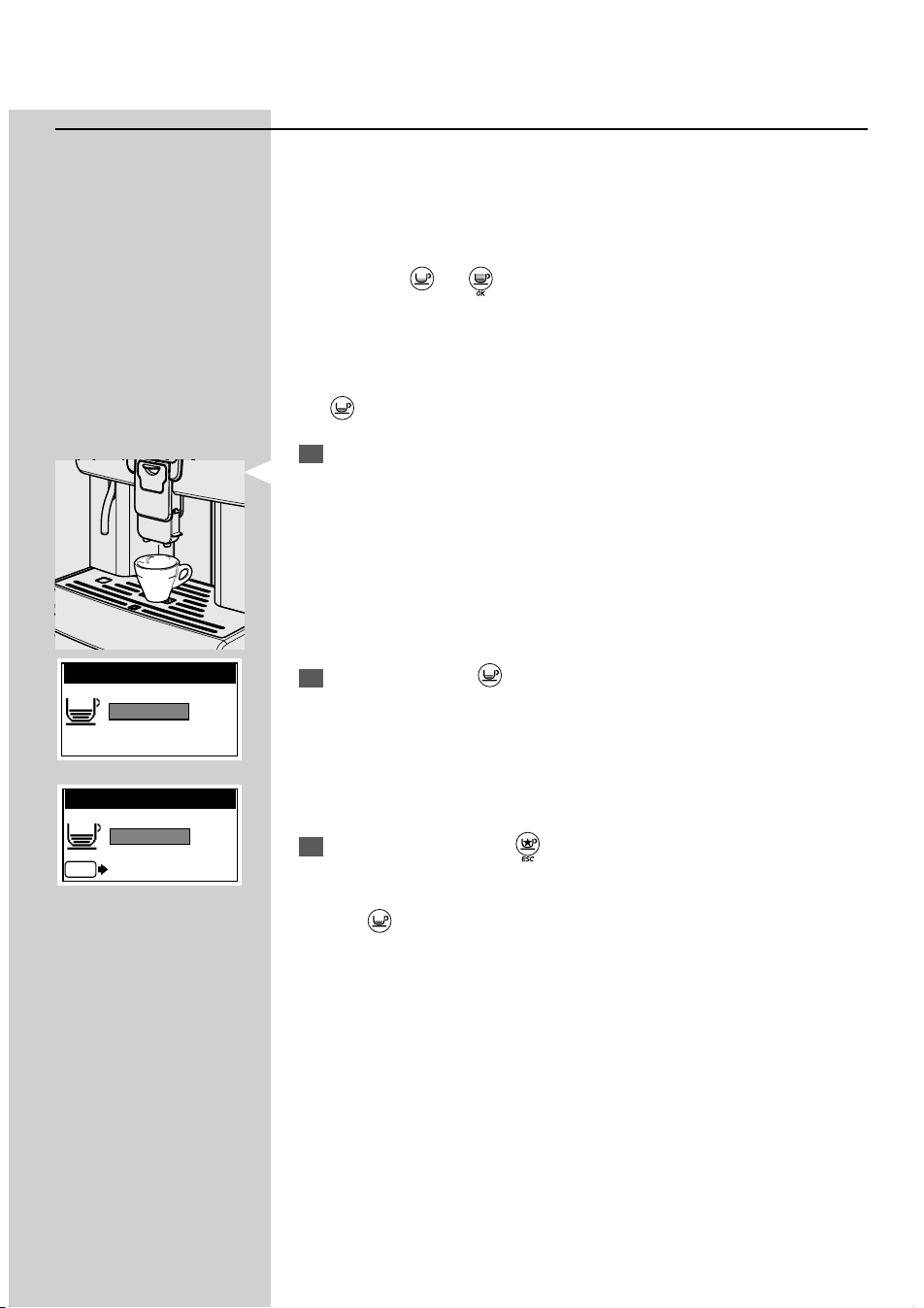
Turn the lever one notch at a time and brew 2-3 cups of co ee; this is the
only way to notice di erences in grind.
The reference marks indicate the grind setting. You can set di erent de-
grees of grind with the following references:
1 - Fine Grind
2 - Coarse Grind
Adjusting the "Aroma" - Amount of Ground Co ee
The machine allows you to program the amount of co ee to be ground for
preparing each cup of co ee.
Warning! The Aroma adjustment lever must only be turned when the
co ee grinder is stopped. Adjustment must be performed before brewing
co ee.
To make any adjustment, use the lever located on the side of the machine.
The reference marks indicate the amount of ground co ee which has been
set. You can set di erent amounts with the following references:
3 - Minimum co ee amount (about 7 grams)
4 - Maximum co ee amount (about 11 grams)
1
3
2
4
ENGLISH
17
Adjusting the Co ee Length
The machine allows you to adjust the amount of brewed co ee according
to your taste and/or the size of your cups.
Note: This function cannot be used to adjust American co ee length, this prod-
uct requires using the speci c menu in the "BEVERAGE MENU".
Each time the “
” or “ ” button is pressed and released, the machine
brews a pre-set amount of co ee. This amount may be reprogrammed
according to your taste. Each button may be individually programmed for a
speci c brew setting.
Note: As an example, the following procedure describes the programming of
the "
" button, which is usually associated with espresso co ee.
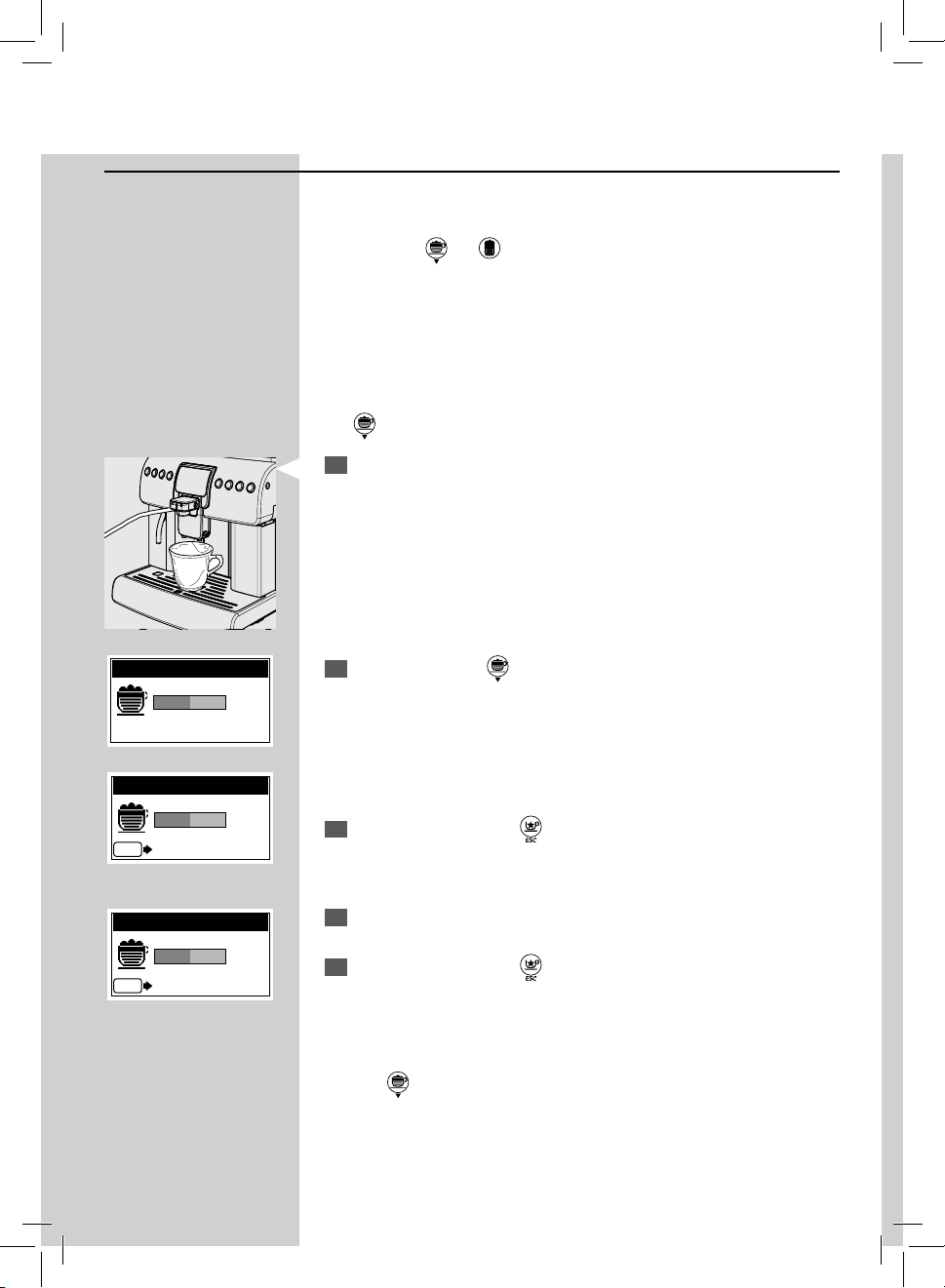
1
Place a cup under the dispensing spout.
2
Press and hold the " " button until the "MEMO" message is dis-
played and remove your nger. The machine is now programming.
The machine begins the brewing phase. The "STOP COFFEE" message
is displayed.
3
From now on, press the " " button when the desired amount of cof-
fee is reached in the cup.
Now the "
" button has been programmed; each time it is pressed and
released, the machine will brew the same amount that has just been set.
MEMO
MEMO
ESC
STOP COFFEE
18
ENGLISH
Adjusting the Cappuccino or Latte Macchiato Length
The machine allows you to adjust the brewed amount of Cappuccino (or
Latte Macchiato) according to your taste and/or the size of your cups.
Each time the “
” or “ ” button is pressed and released, the machine
brews a pre-set amount of Cappuccino (or Latte macchiato). This amount
may be reprogrammed according to your taste. Each button may be indi-
vidually programmed for a speci c brew setting.
Note: Before programming, you need to prepare the machine and milk as
described in the Cappuccino section.
Note: As an example, the following procedure describes the programming of
the “
” button, which is normally associated with cappuccino.
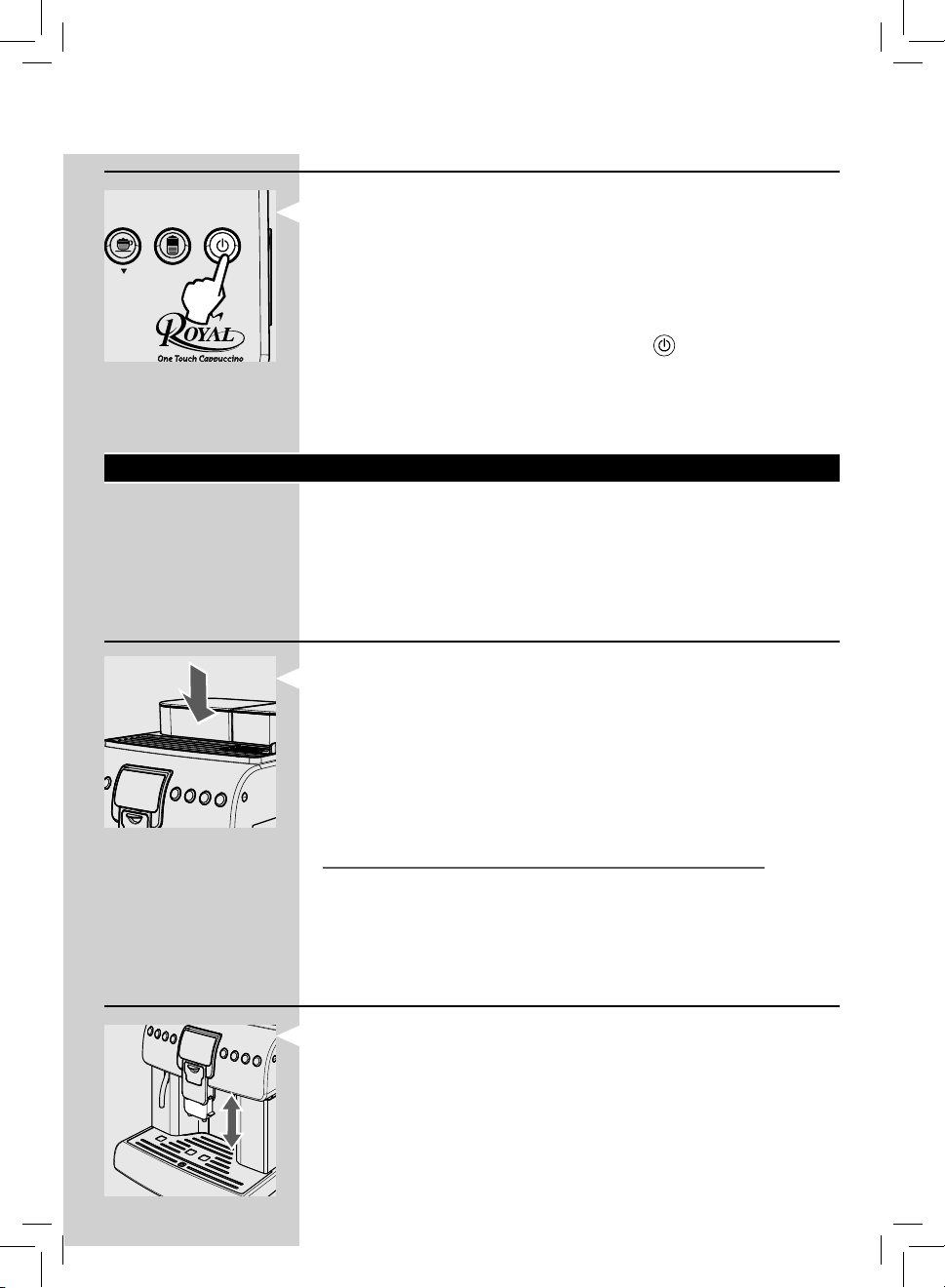
1
Place a cup or a mug under the dispensing spout.
2
Press and hold the " " button until the "MEMO" message is dis-
played and remove your nger. The machine is now programming.
The machine begins the milk dispensing phase. The “STOP MILK” mes-
sage is displayed.
3
From now on, press the “ ” button when the desired amount of milk
is reached in the cup.
4
Immediately after, the machine begins the co ee brewing phase. The
“STOP COFFEE” message is displayed.
5
From now on, press the “ ” button when the desired amount of cof-
fee is reached in the cup.
Now the "
" button has been programmed; each time it is pressed and
released, the machine will brew the same amount that has just been set.
MEMO
MEMO
ESC
STOP MILK
MEMO
ESC
STOP COFFEE
ENGLISH
19
Eco-friendly: Stand-by
The machine is designed for energy saving. The machine automatically
turns o after 30 minutes of inactivity.
Note:
- During the turning o phase, the machine performs a rinse cycle, if a cof-
fee product has been brewed.
- Time can be programmed according to your needs (see page 36).
To turn on the machine again, simply press the "
" button (if the power
button is set to "I"). In this case the machine will perform the rinse cycle
only if the boiler is cold.
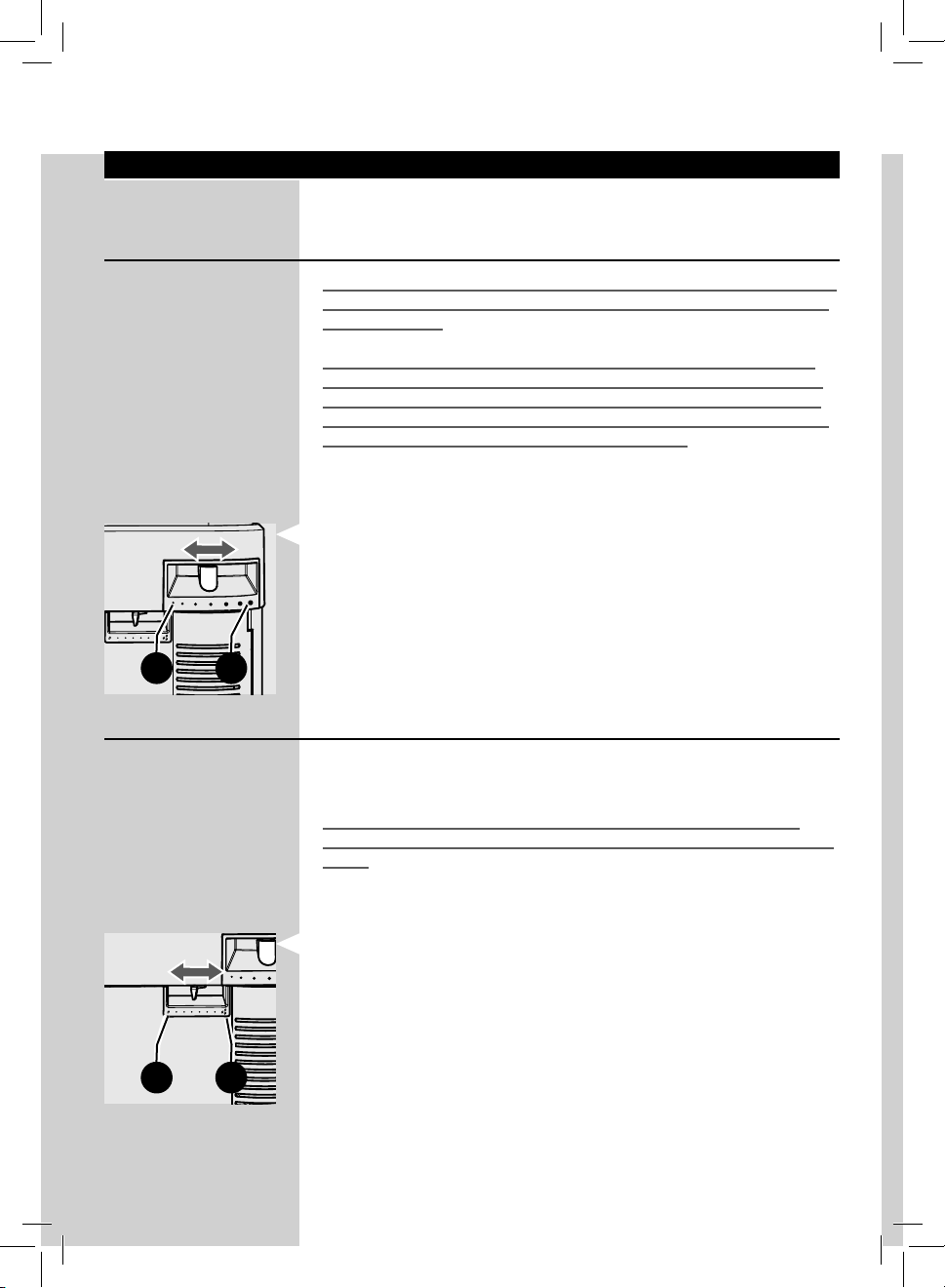
Adjusting the Dispensing Spout
Most cups on the market can be used with this co ee machine.
The height of the dispensing spout may be adjusted to better t the
dimensions of the cups that you wish to use.
Manually move the dispensing spout up or down to adjust its height.
Brewing Co ee
Before brewing co ee check the lights on the display and make sure the
water tank and co ee bean hopper are full.
Before brewing co ee, adjust the height of the dispensing spout according
to your needs and select the aroma by using the adjustment lever; other-
wise, select the pre-ground co ee.
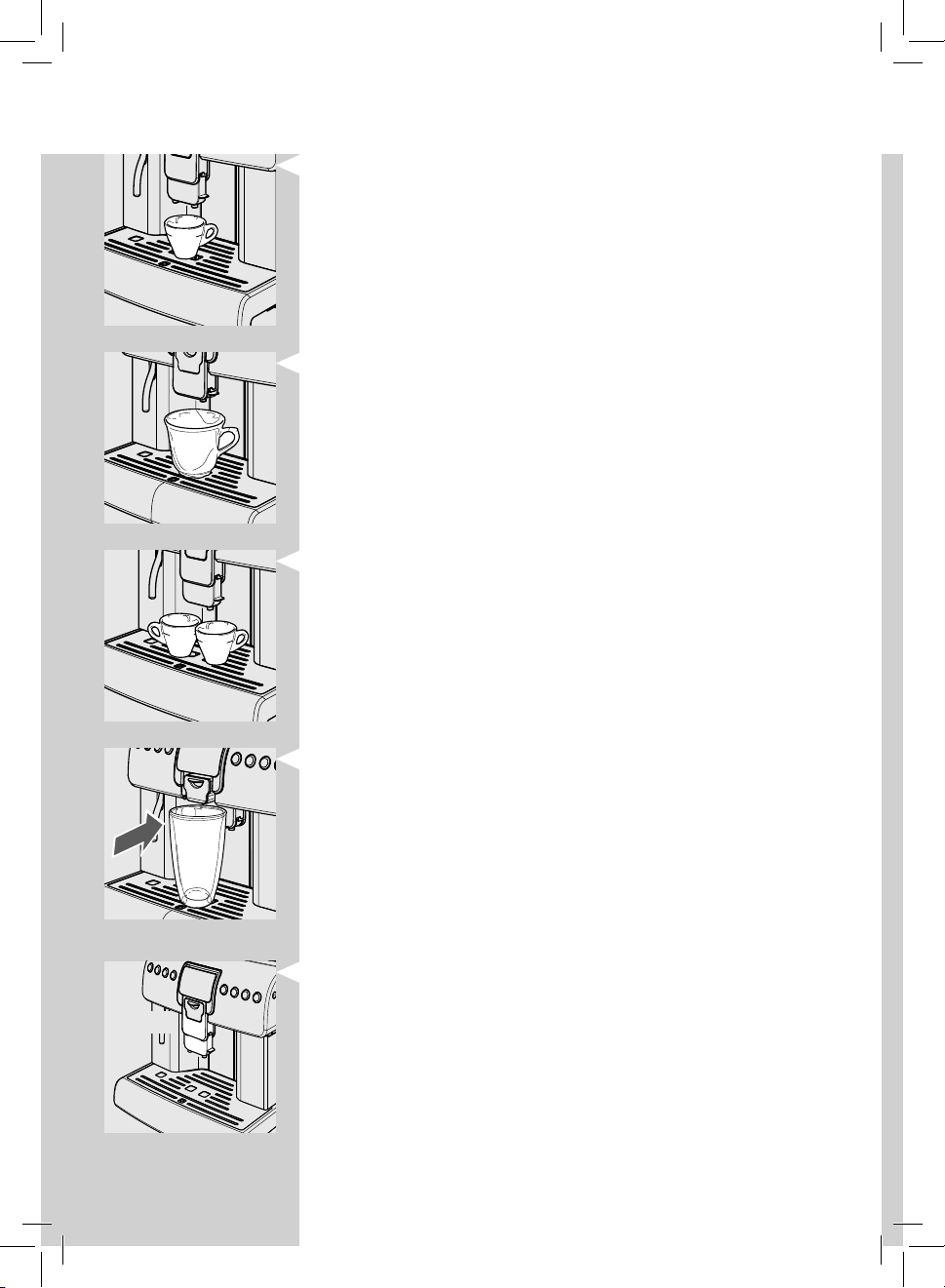
Cup-warming Surface
The machine features a cup-warming surface to keep your cups warm and
ready. Warm cups bring out the full aroma of co ee and let you enjoy its
taste in full.
Place the cups that you usually use and wait until they are warm.
Note: The cup-warming surface has a higher temperature than the other
machine surfaces, so we recommend not to touch it with sensitive body parts
to avoid irritations.
Using the cup-warming surface for other purposes is prohibited.
The cup-warming surface is disabled by default for energy saving pur-
poses. Refer to page 36 of the manual to activate it.
20
ENGLISH
The recommended positions are:
For the use of small cups.
For the use of large cups.
Two cups can be placed under the dispensing spout to brew two cups of co ee
at the same time.
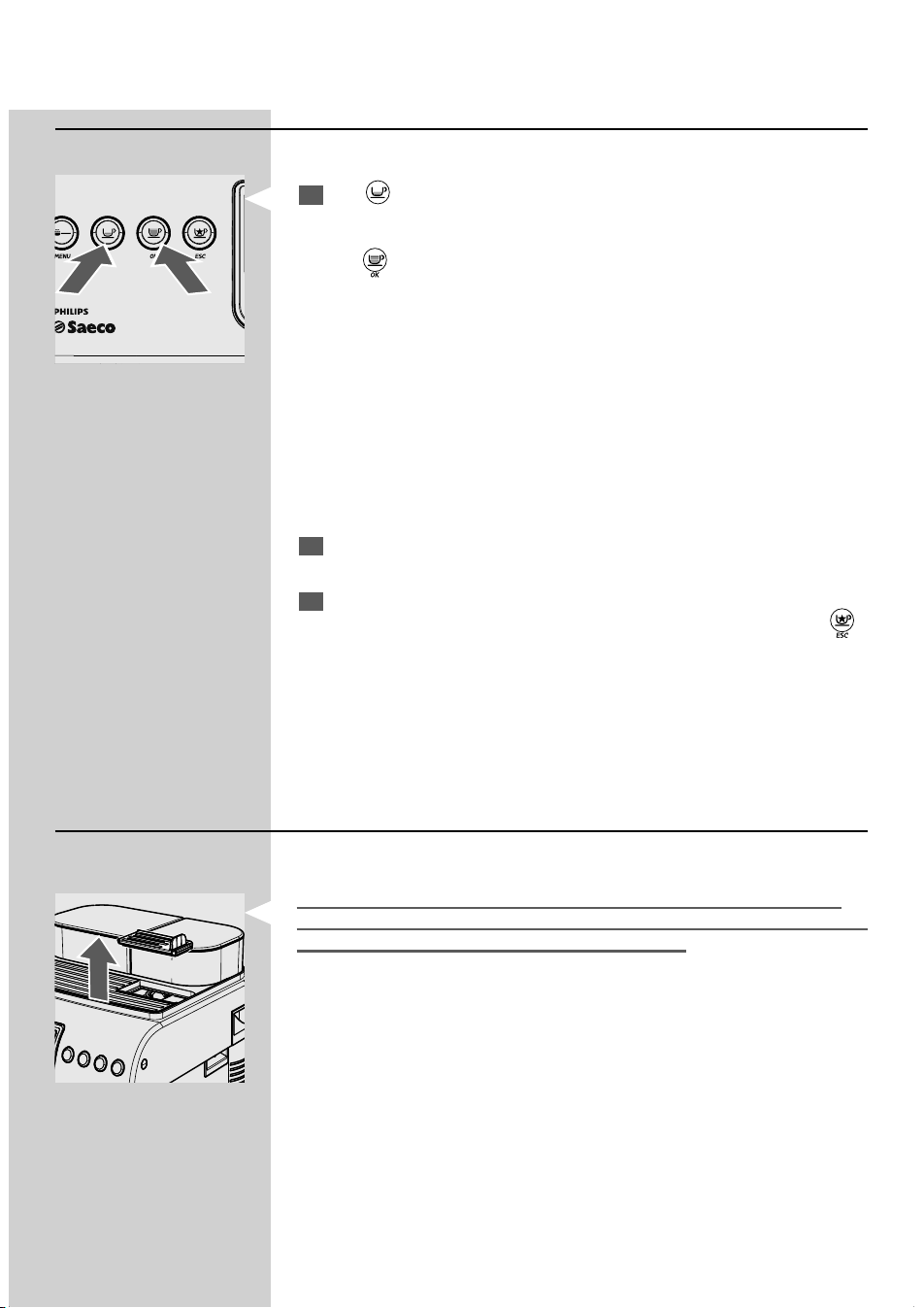
If you want to use tall glasses or mugs, push the dispensing spout to its
limit stop. In this case, you can just brew one product at a time.
Note: Before any brewing procedure and/or when bringing the dispensing
spout back to its normal brewing position, make sure that it is correctly posi-
tioned. This can be noted through the CLICK indicating the correct position.
If this is not done, some product might leak out of the dispensing spout.
CLICK!
ENGLISH
21
Using Co ee Beans
To brew co ee, press and release:
1
The " " button for a cup of espresso.
or
the "
" button for a cup of long espresso.
The brewing cycle then starts:
To brew 1 cup of co ee, press the desired button once.
To brew 2 cups of co ee, press the desired button twice consecutively.
Note: To brew 2 cups of co ee, the machine automatically grinds and doses the
correct amount of co ee. Brewing two co ees requires two grinding cycles and
two brewing cycles, which the machine carries out automatically.
2
Once the prebrewing cycle is complete, co ee begins to come out of
the dispensing spout.
3
Co ee brewing stops automatically when the set level is reached.
However, it is possible to stop the co ee brewing by pressing the “
”
button.
Note: The machine is adjusted to brew a true Italian espresso co ee. This
feature may slightly lengthen the brewing time, allowing the intense co ee
avour to develop fully.
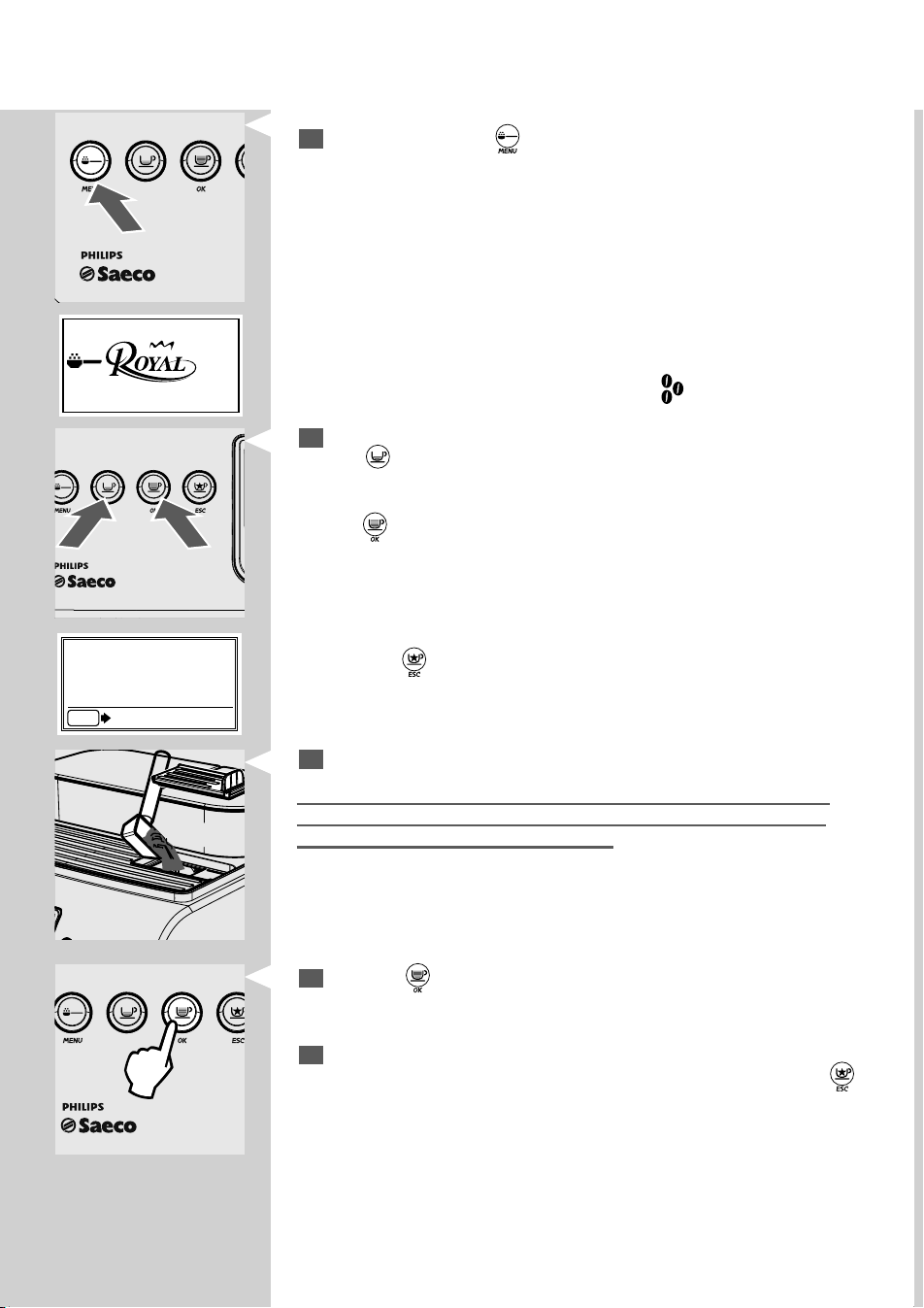
Using Pre-ground Co ee
This function allows using pre-ground co ee.
Pre-ground co ee must be poured into the relevant compartment posi-
tioned next to the co ee bean hopper. Only use ground co ee for espresso
machines and never co ee beans or instant co ee.
Note:
If no pre-ground co ee is poured into the compartment, only water will be
dispensed.
If the dose is excessive and 2 or more measuring scoops of co ee are used, the
machine will not brew the product. Also in this case, the machine will run an
empty cycle and discharge any ground co ee into the co ee grounds drawer.
M
ENU OK ESC
22
ENGLISH
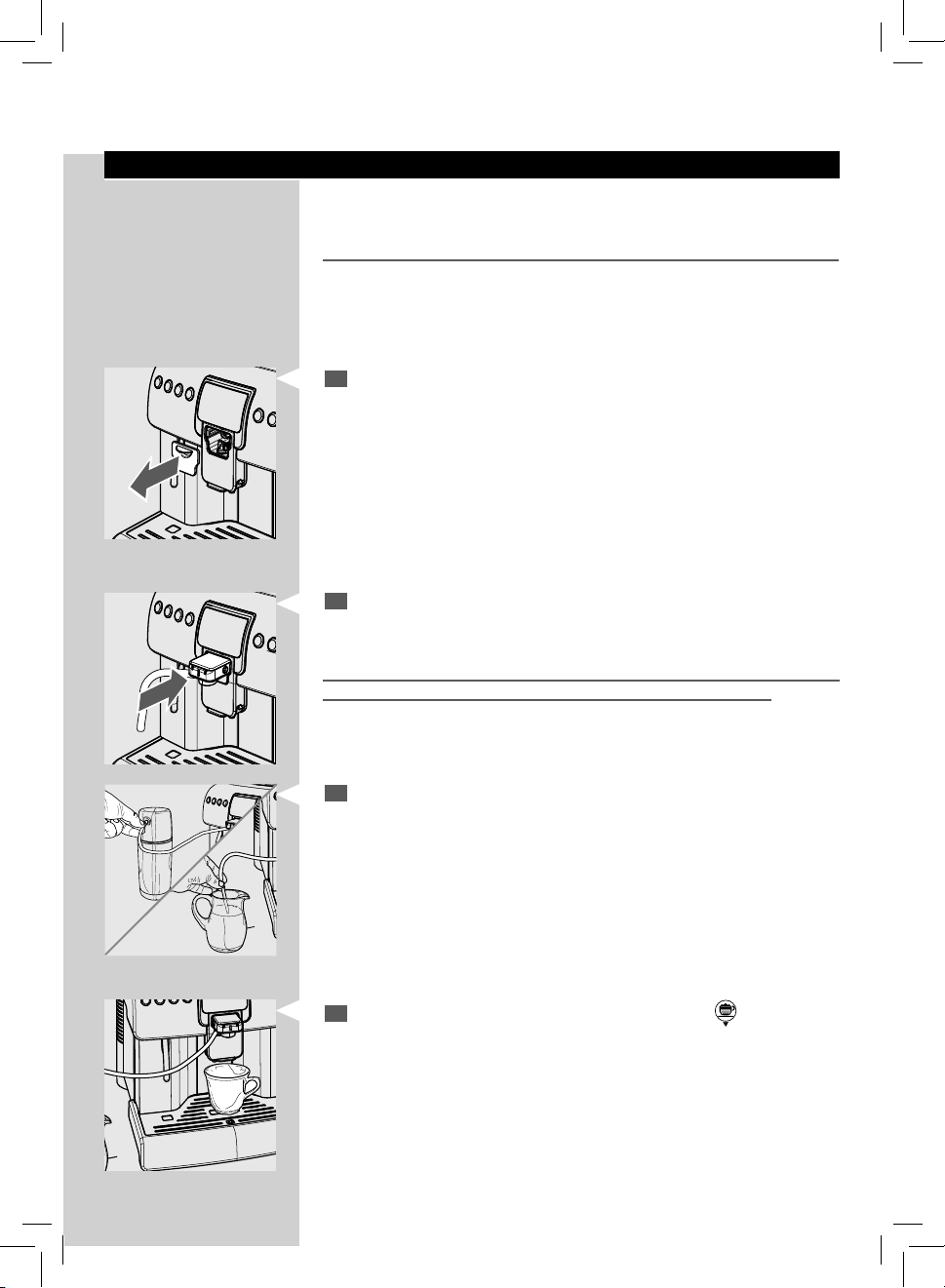
To brew co ee:
1
Press and release the “ ” button to select and activate the pre-
ground co ee function.
MENU OK
MENU OK ESC
This page indicates that the function has been activated.
Note: If the brewing is not started within 10 seconds, the machine goes back to
the co ee beans operating mode and displays the
symbol.
2
Press and release:
The "
" button for a cup of espresso
or
the "
" button for a cup of long espresso.
M
ENU OK ESC
3
Lift the pre-ground co ee compartment lid.
Warning: Add only pre-ground co ee to the compartment. Other sub-
stances and objects may cause severe damages to the machine. Such
damages will not be covered by warranty.
Add only 1 scoop of pre-ground co ee to the compartment. Use only
the measuring scoop supplied with the machine to perform this opera-
tion. Then, close the lid.
4
Press the " " button. The brewing cycle starts.
Once the prebrewing cycle is complete, co ee begins to come out of
the dispensing spout.
5
Co ee brewing stops automatically when the set level is reached.
However, it is possible to stop the co ee brewing by pressing the “
”
button.
After brewing the product, the co ee beans con guration of the ma-
chine is restored.
Note: Repeat the steps described above to brew more cups of co ee.
Note: If the brewing is not started within 30 seconds after the page is displayed
or in case the “
” button is pressed, the machine returns to the main menu
and discharges any inserted co ee into the co ee grounds drawer.
MEMO
ESC
ESC
INSERT
GROUND COFFEE
AND PRESS OK
ENGLISH
23
Brewing Cappuccino
The machine allows brewing cappuccino quickly and easily with the touch
of a button.
Danger of burning! Dispensing may be preceded by small jets of hot water.
Important Note: Immediately after using the Cappuccinatore to froth milk,
clean the suction hose externally with a damp cloth. This way, all parts will be
perfectly clean and free of any milk residue.
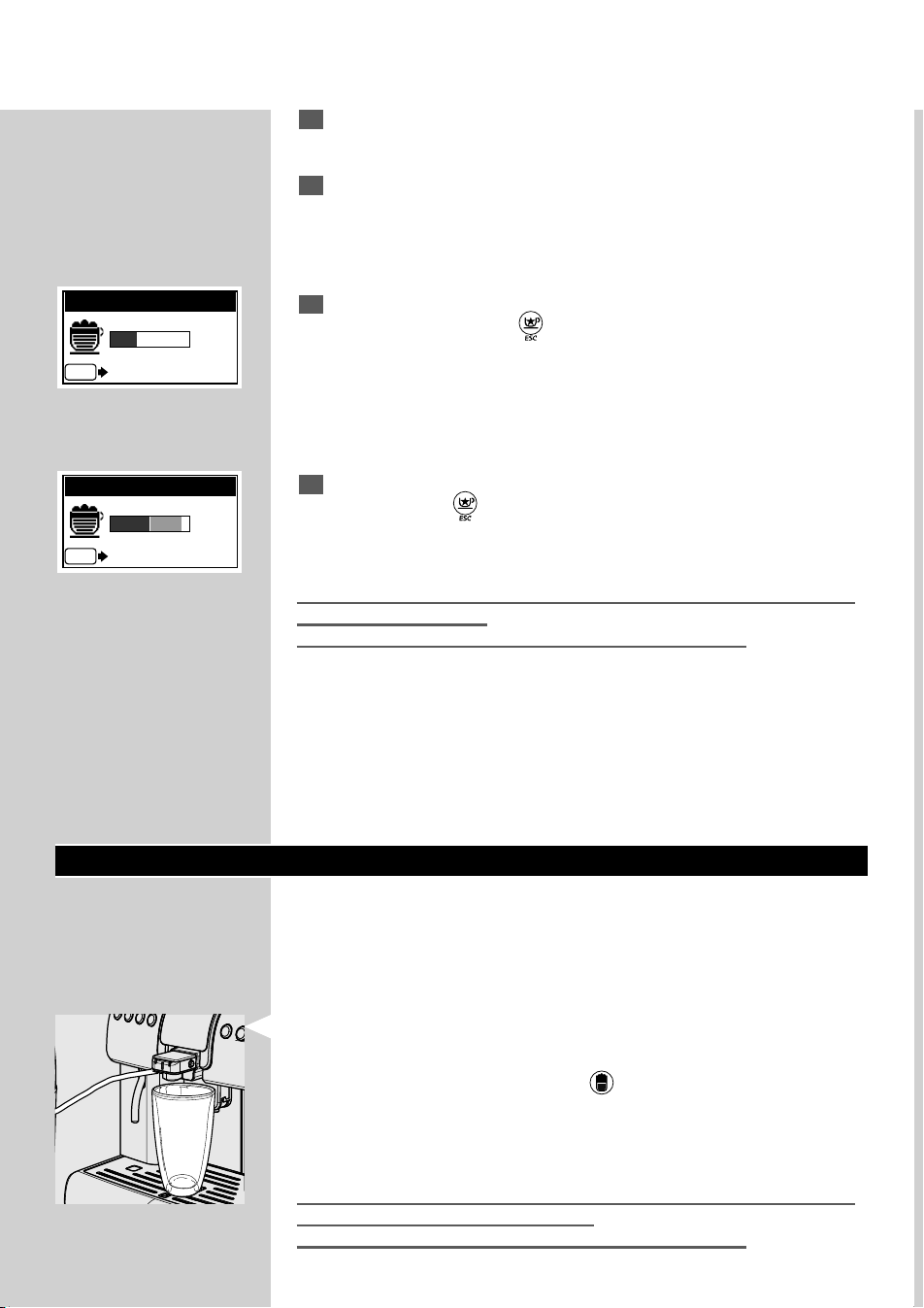
1
Remove the cover from the front side.
Note: The cover can be placed on the machine side using the integrated
magnet.
2
Insert the Cappuccinatore into its seat until it locks into place. Check
that it cannot slide away.
Warning: Before using the Cappuccinatore, clean it along with the Thermos
(if used), as described in the "Cleaning and Maintenance" section.
3
Insert the clean hose (according to your choice)
- in the milk Thermos
or
- directly in the milk container.
Note: To ensure better results when preparing a cappuccino, use cold milk.
4
Place the cup under the dispensing spout. Press the " " button.
24
ENGLISH
5
The machine needs a preheating time.
6
After preheating, the machine starts brewing the cappuccino.
7
At this stage, the machine dispenses frothed milk. You can stop dis-
pensing by pressing the “
” button.
8
After dispensing milk, the machine brews co ee. You can stop brewing
by pressing the “
” button.
You can enjoy your cappuccino just like at the co ee bar.
After using the Cappuccinatore, clean it as described in the "Cleaning the
Cappuccinatore" section.
Remove the container or Thermos and clean it, if necessary.
Note: The “WARNING CLEANING” function can be activated, if desired; this
function reminds you when the Cappuccinatore needs to be cleaned. To acti-
vate this function, refer to the machine programming section on page 38.
Latte Macchiato
The machine allows brewing a latte macchiato quickly and easily with the
touch of a button.
To brew a latte macchiato perform all steps for preparing a cappuccino up
to step 4.
We recommend using tall glasses for this type of preparation, thus properly
moving the dispensing spout.
When the machine is ready, press the "
" button to start brewing the
latte macchiato.
The machine prepares the latte macchiato automatically.
After using the Cappuccinatore, clean it as described in the "Cleaning the
Cappuccinatore" section (See page 40).
Remove the container or Thermos and clean it, if necessary.
CAPPUCCINO
ESC
STOP MILK
CAPPUCCINO
ESC
STOP COFFEE
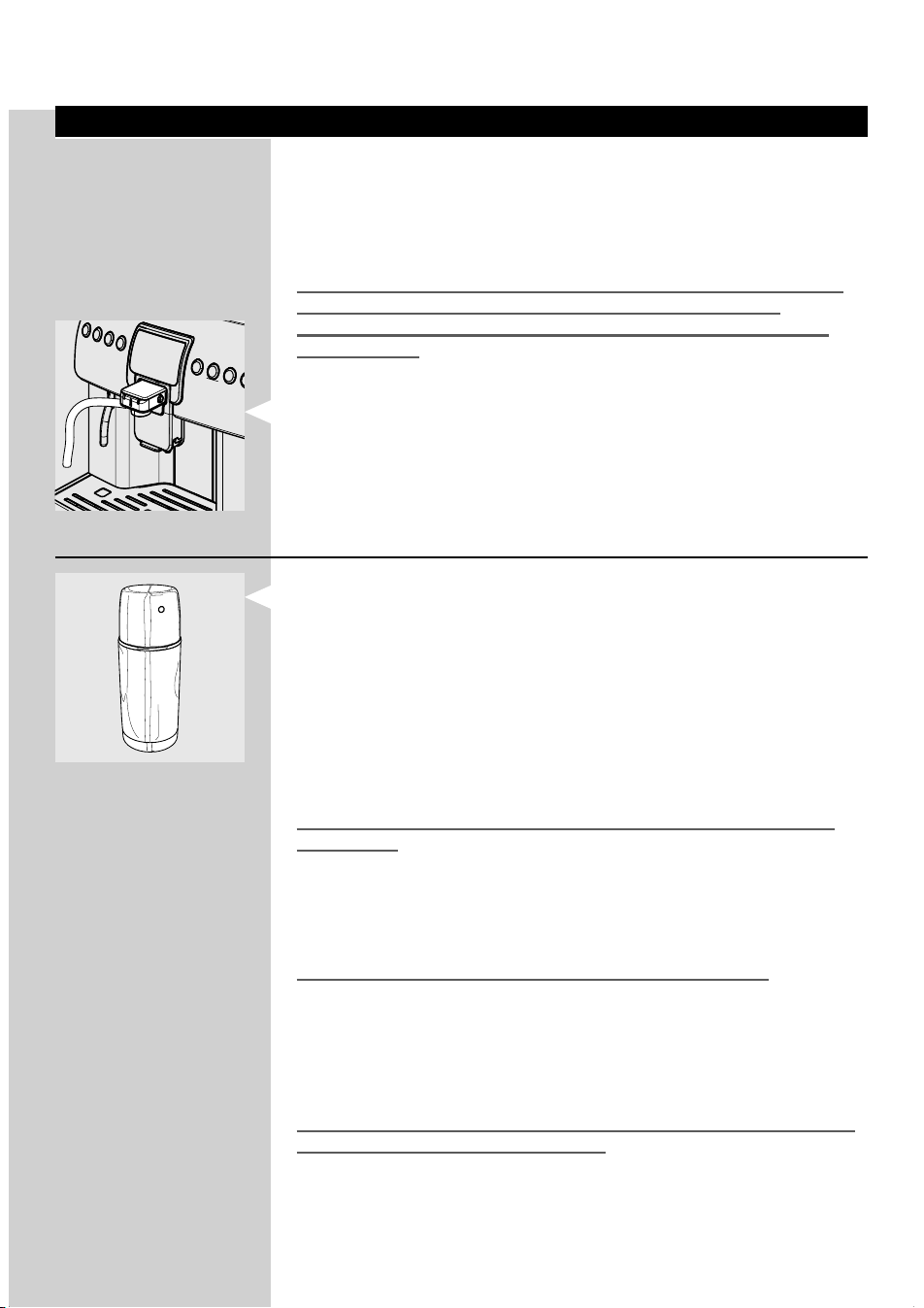
ENGLISH
25
Milk Handling
With this machine you can prepare cappuccino, latte macchiato and other
milk-based beverage quickly and enjoy your relax time.
You can use either the supplied Thermos or directly the milk container
which can be purchase ad your local dealer's shop.
MILK MUST BE USED AND STORED IN ACCORDANCE WITH THE INSTRUC-
TIONS GIVEN ON THE MANUFACTURER'S ORIGINAL PACKAGING.
WE ACCEPT NO LIABILITY FOR USE OF MILK UNSUITABLE FOR HUMAN
CONSUMPTION.
Milk-based beverages can only be prepared if the Cappuccinatore is
installed.
Milk Thermos (Optional)
The machine is supplied with a Thermos speci cally designed and built
to improve milk storage, since it limits the milk temperature increase. The
Thermos is only suitable for quick and easy domestic use. It is not recom-
mended for continuous, professional-type operation.
Do not use the Thermos to store milk in the refrigerator. Its insulating
power does not allow the refrigerator to cool milk and to reach the correct
storage temperature. It is recommended to pour in a jug the milk remained
in the Thermos and that has not been used. Then store it in the refrigerator
for correct storage.
To increase storage performance, we recommend lling with cold milk
(approx. 4°C).
Note: Before using the Thermos, make sure it is thoroughly clean and sanitary.
If there is milk left in the Thermos, make sure it is still suitable for food con-
sumption before using it.
Do not use the Thermos to heat any beverage other than milk.
The container must be removed at least once a month to allow proper
cleaning of all parts. In this way, you can keep a high sanitation level of
the brewed beverages. For correct cleaning, refer to the "CLEANING THE
THERMOS" section (see pages 43-45).
Warning: Before using the Thermos, clean it as described in the "Cleaning
and Maintenance" section (See page 39).
For correct storage, milk needs to be kept at low temperatures. The Ther-
mos allows you to keep milk out of the fridge as long as it is necessary for
its correct use.
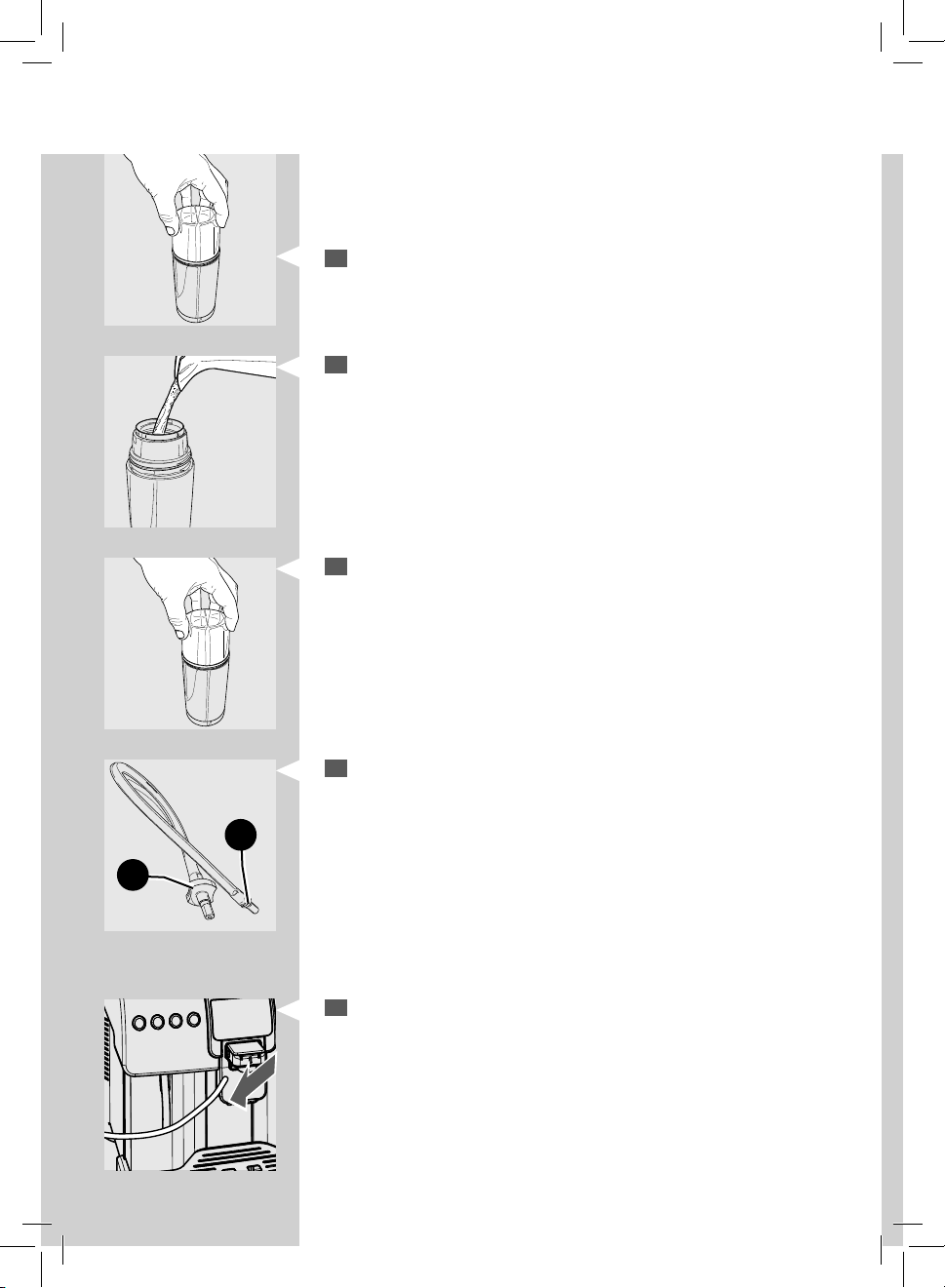
26
ENGLISH
At an ambient temperature of 20°C, the temperature of the milk in the
Thermos increases by 4-6°C after 4 hours. Consider this approximate data
to determine if milk can still be used in relation to the time it has been
stored in the Thermos.
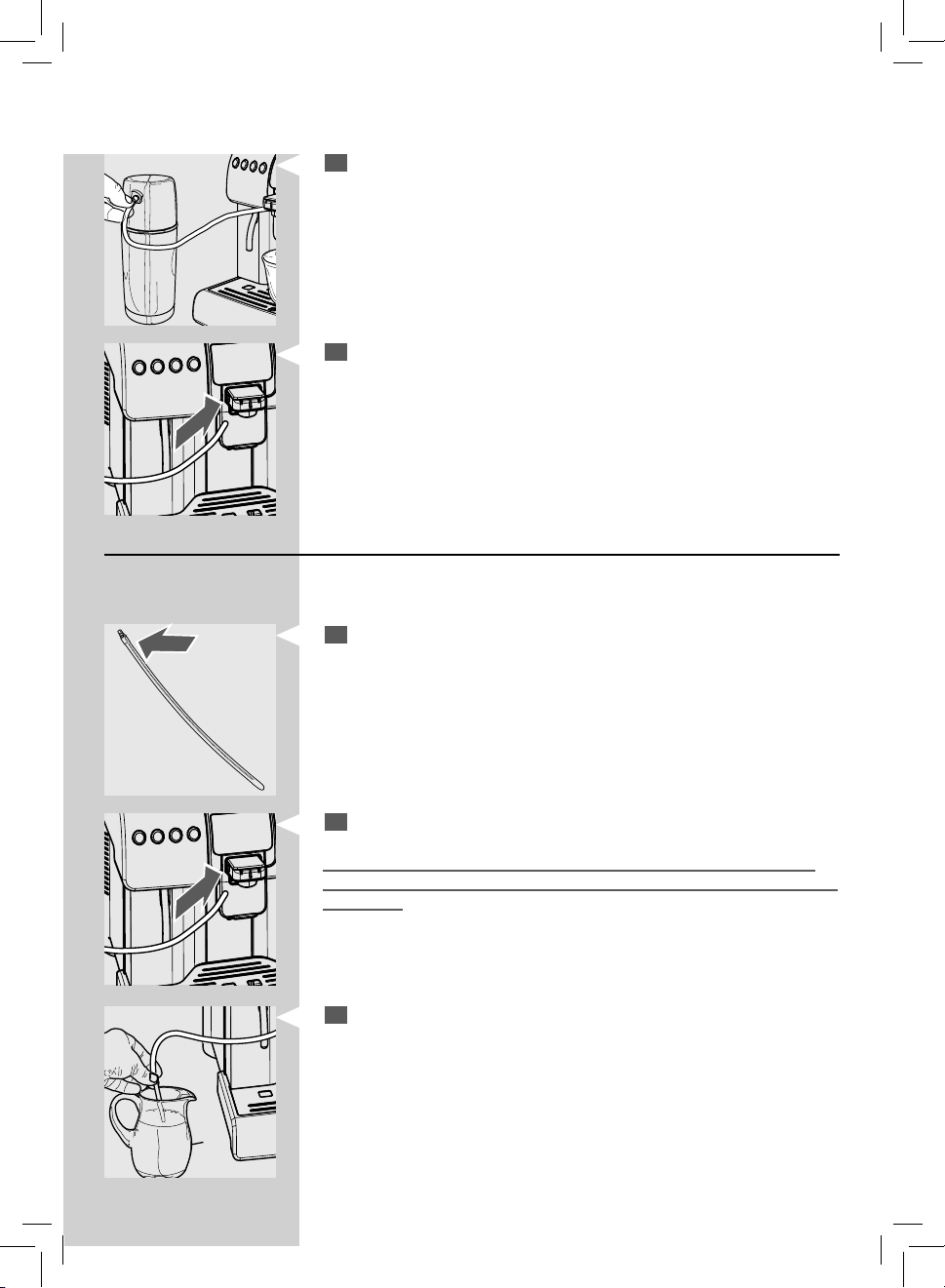
1
Loosen and remove the Thermos lid.
2
Pour milk into the Thermos. Fill in with milk from the MIN level indica-
tor and do not exceed the MAX level indicator.
3
Reinsert the Thermos lid by screwing it.
4
Use only the supplied hose to connect the Thermos to the Cappuccina-
tore.
This hose features two special ttings for optimum operation. The
ttings are di erent from each other, i.e. tting (B) is to be connected
to the Cappuccinatore, while tting (A) is to be properly connected to
the Thermos.
Note: The ttings cannot be exchanged, as this could cause the system to
malfunction.
5
Remove the suction tube that is installed in the Cappuccinatore.
A
B
ENGLISH
27
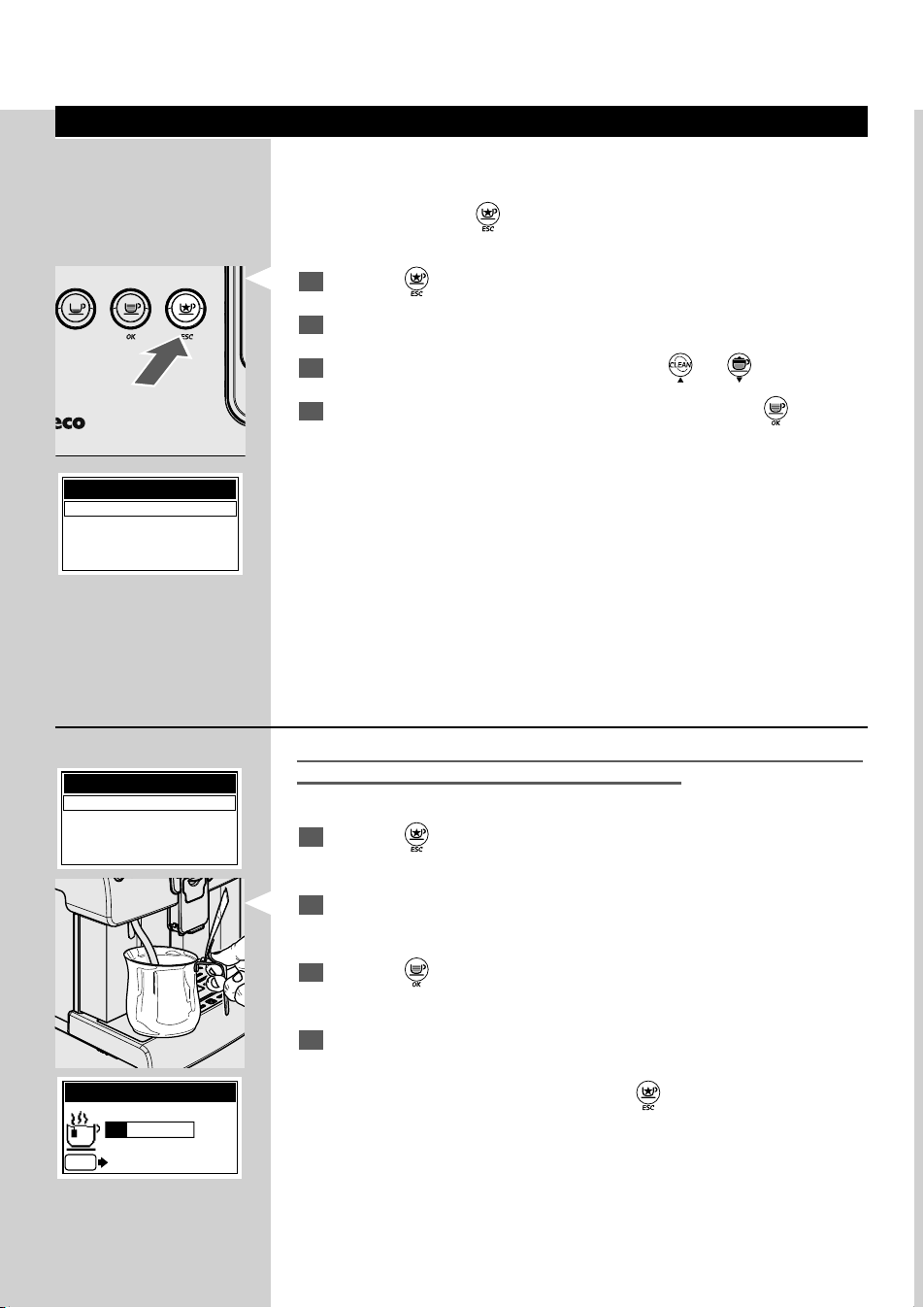
6
Insert the hose tting in the Thermos.
7
Insert the tting in the Cappuccinatore.
The Thermos can now be used to brew milk-based products.
Milk Container
The milk container can be used directly with the machine to prepare the
beverages.
1
For direct use of the milk container it is necessary to use the Cappucci-
natore suction tube. This tube only features one tting.
2
Check that the tube is inserted in the Cappuccinatore.
Warning: In this case, make sure that the tube is clean on the outside as
well, to prevent milk from coming into contact with the dirt on the outside
of the tube.
3
Remove the clean suction tube and insert it directly into the container.
Note: After use, remove the tube and wash it properly. Place the container back
in the fridge for correct milk storage.
28
ENGLISH
"SPECIAL" Products
The machine is designed to brew other products not displayed on the
control panel.
Note: After pressing the “
” button, if no product is selected, the machine
goes back to the main menu after 10 seconds.
1
Press the “ ” button to enter the menu.
2
The display shows the page for "special" beverages.
3
Select the desired beverage by pressing the “ ” or “ ” button.
4
When the desired beverage has been selected, press the “ ” button
to start the preparation.
Refer to the relevant section about brewing the desired beverage.
Note: If no selection is carried out within 10 seconds, the machine goes back to
the home page.
In order to prepare milk-based beverages, install the Cappuccinatore and the
Thermos (if necessary) after washing them as described in the "Cleaning and
Maintenance" section.
OK ESC
SPECIAL BEVERAGES
HOT WATER
LONG COFFEE
HOT MILK
AMERICAN COFFEE
SPECIAL BEVERAGES
HOT WATER
LONG COFFEE
HOT MILK
AMERICAN COFFEE
HOT WATER
ESC
STOP HOT WATER
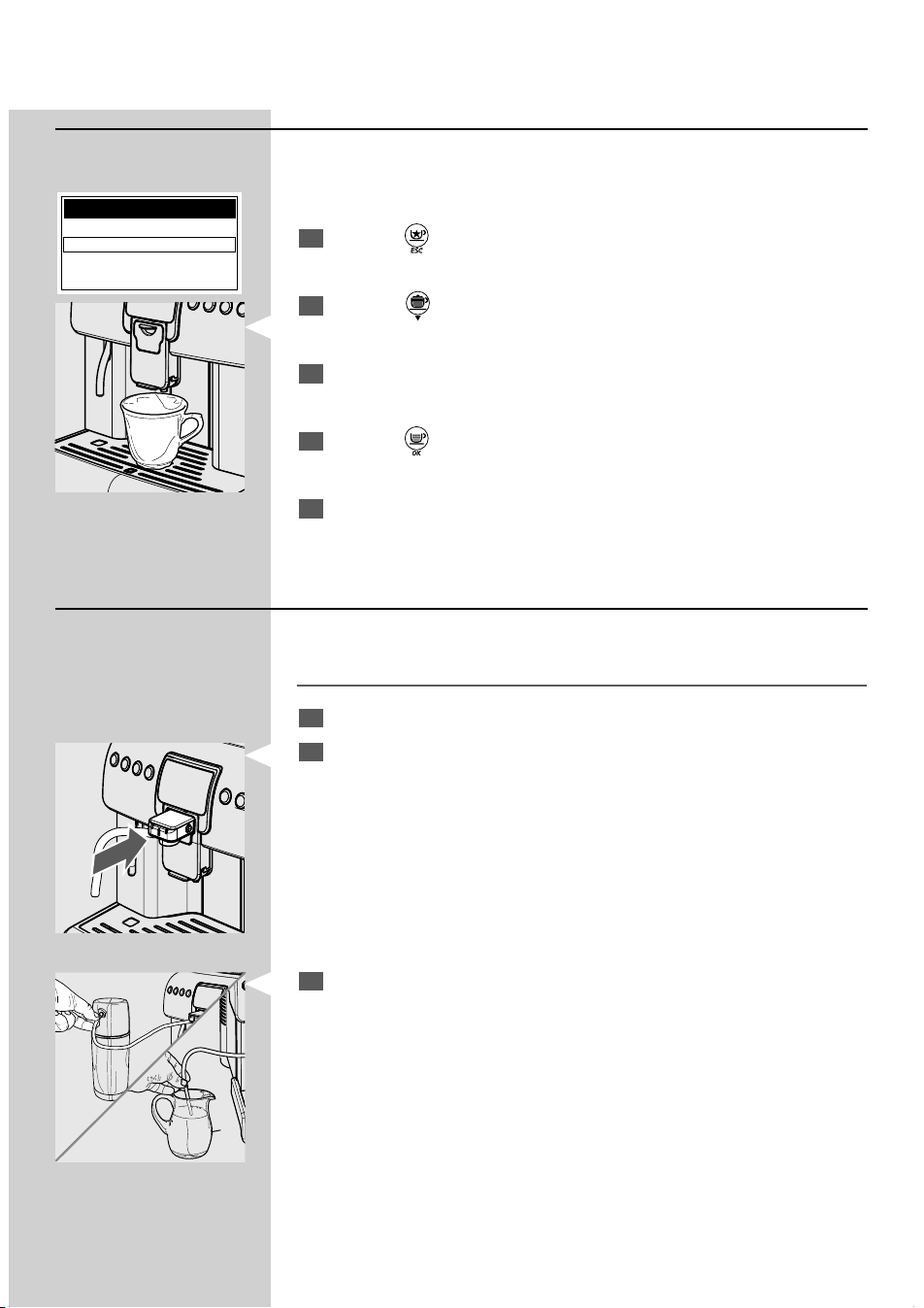
Dispensing Hot Water
Dispensing may be preceded by short spurts of hot water. Risk of burning.
The hot water wand may reach high temperatures.
1
Press the “ ” button to enter the menu.
2
Place a container under the hot water wand.
3
Press the “ ” button to start the preparation.
4
After dispensing, remove the container with hot water.
Note: You can stop dispensing by pressing the “
” button.
ENGLISH
29
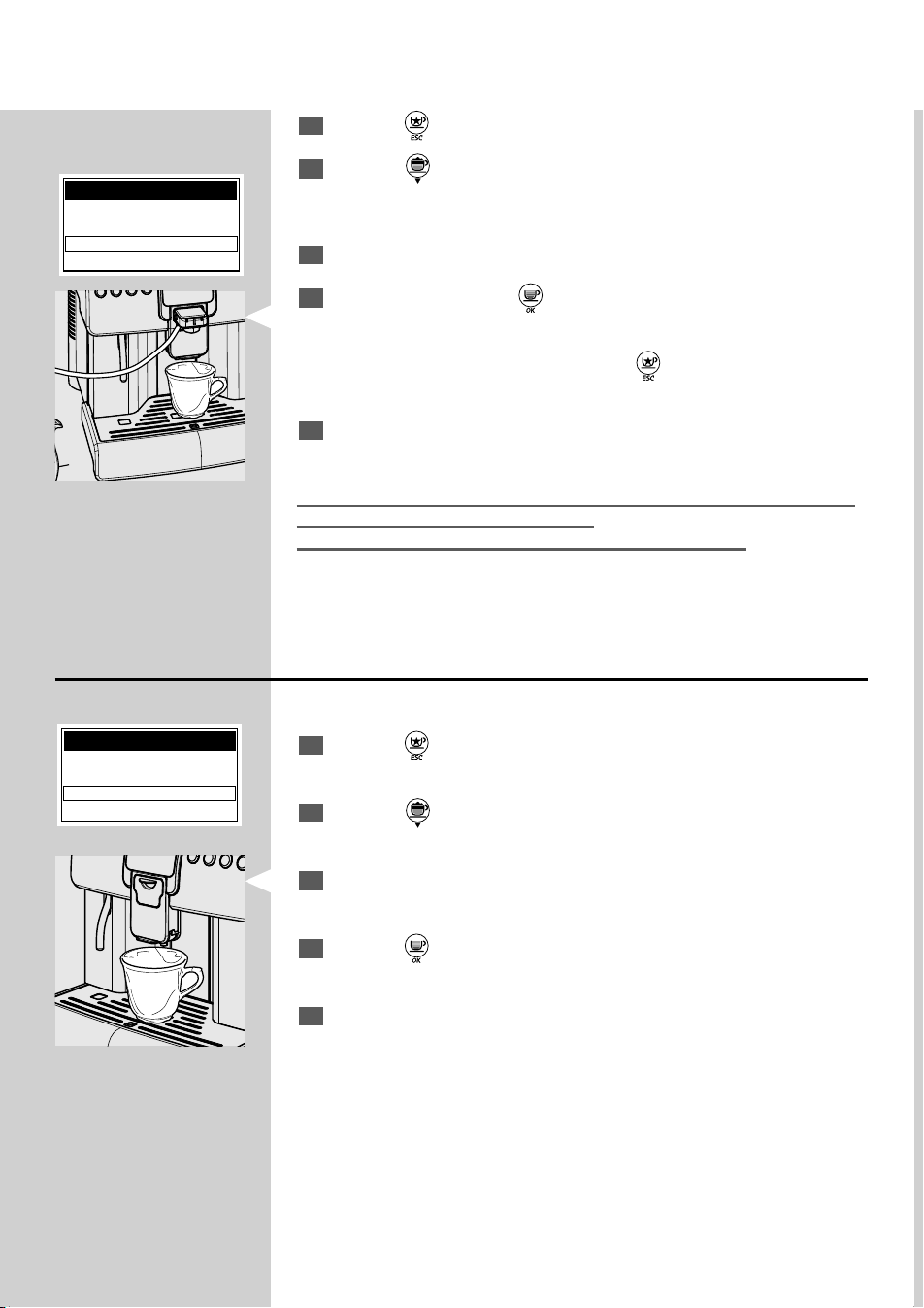
Long Co ee
This programme allows you to prepare a long co ee.
Note: In this case, you can just prepare one co ee at a time.
1
Press the “ ” button to enter the menu.
2
Press the " " button to select "LONG COFFEE".
3
Place a suitable cup under the dispensing spout.
4
Press the “ ” button to start the preparation.
5
After brewing, remove the co ee cup.
Hot Milk
This programme allows you to prepare a hot milk.
Danger of burning! Dispensing may be preceded by small jets of hot water.
1
Remove the cover from the front side.
2
Insert the complete Cappuccinatore into its seat until it locks into
place. Check that it cannot slide away.
3
Insert the clean hose (according to your choice)
- in the milk Thermos
or
- directly in the milk container.
Note: To ensure better results, use cold milk.
SPECIAL BEVERAGES
HOT WATER
LONG COFFEE
HOT MILK
AMERICAN COFFEE
30
ENGLISH
4
Press the “ ” button to enter the menu.
5
Press the " " button to select "HOT MILK".
6
Place a suitable cup under the dispensing spout.
7
Con rm by pressing the “ ” button to start the preparation.
Note: You can stop dispensing by pressing the “
” button.
8
After dispensing, remove the cup with milk.
After using the Cappuccinatore, clean it as described in the "Cleaning the
Cappuccinatore" section (See page 40).
Remove the container or Thermos and clean it, if necessary.
SPECIAL BEVERAGES
HOT WATER
LONG COFFEE
HOT MILK
AMERICAN COFFEE
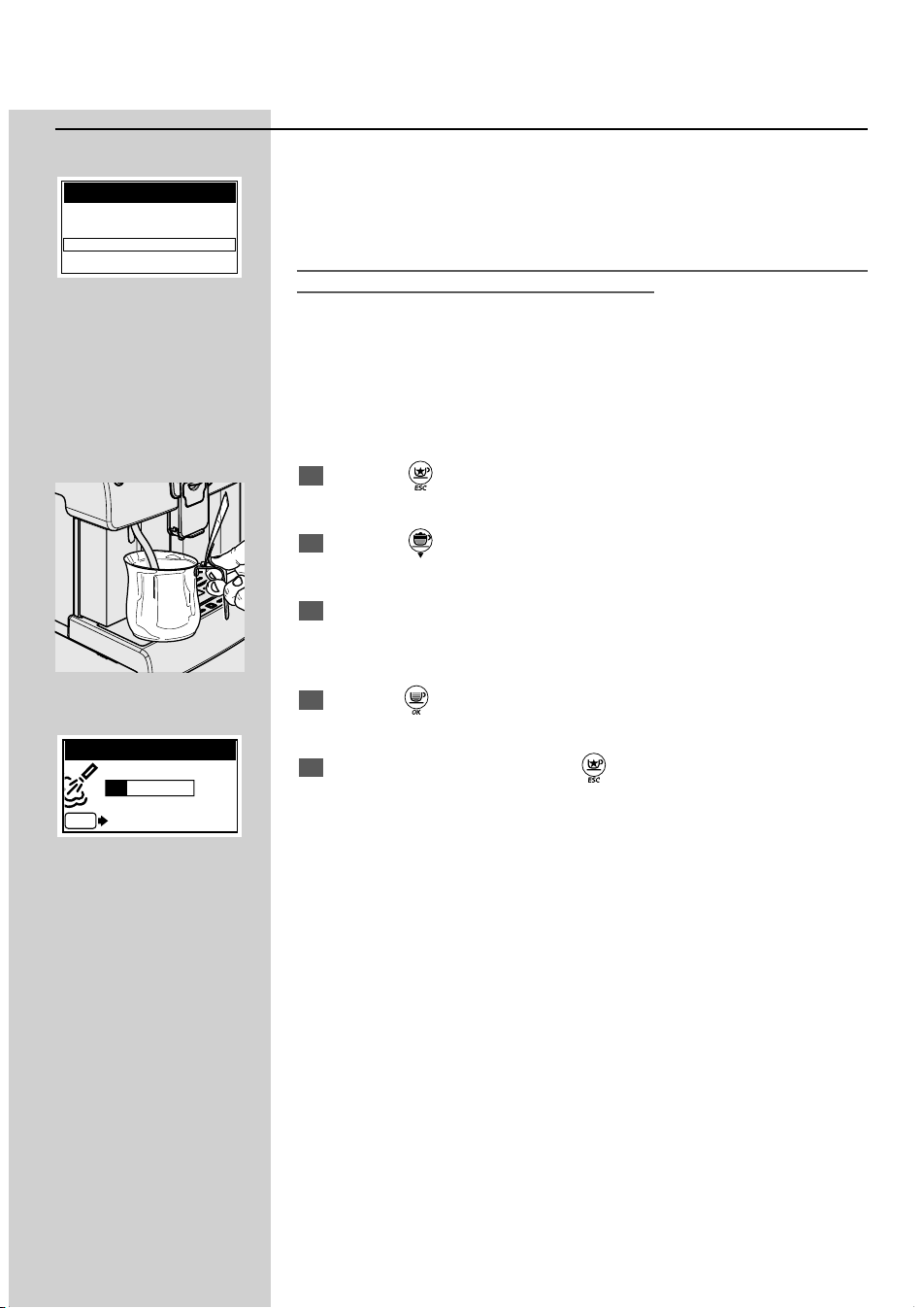
American Co ee
This programme allows preparing and American co ee.
1
Press the “ ” button to enter the menu.
2
Press the " " button to select "AMERICAN COFFEE".
3
Place a suitable cup under the dispensing spout.
4
Press the “ ” button to start the preparation.
5
After brewing, remove the co ee cup.
SPECIAL BEVERAGES
LONG COFFEE
HOT MILK
AMERICAN COFFEE
STEAM
ENGLISH
31
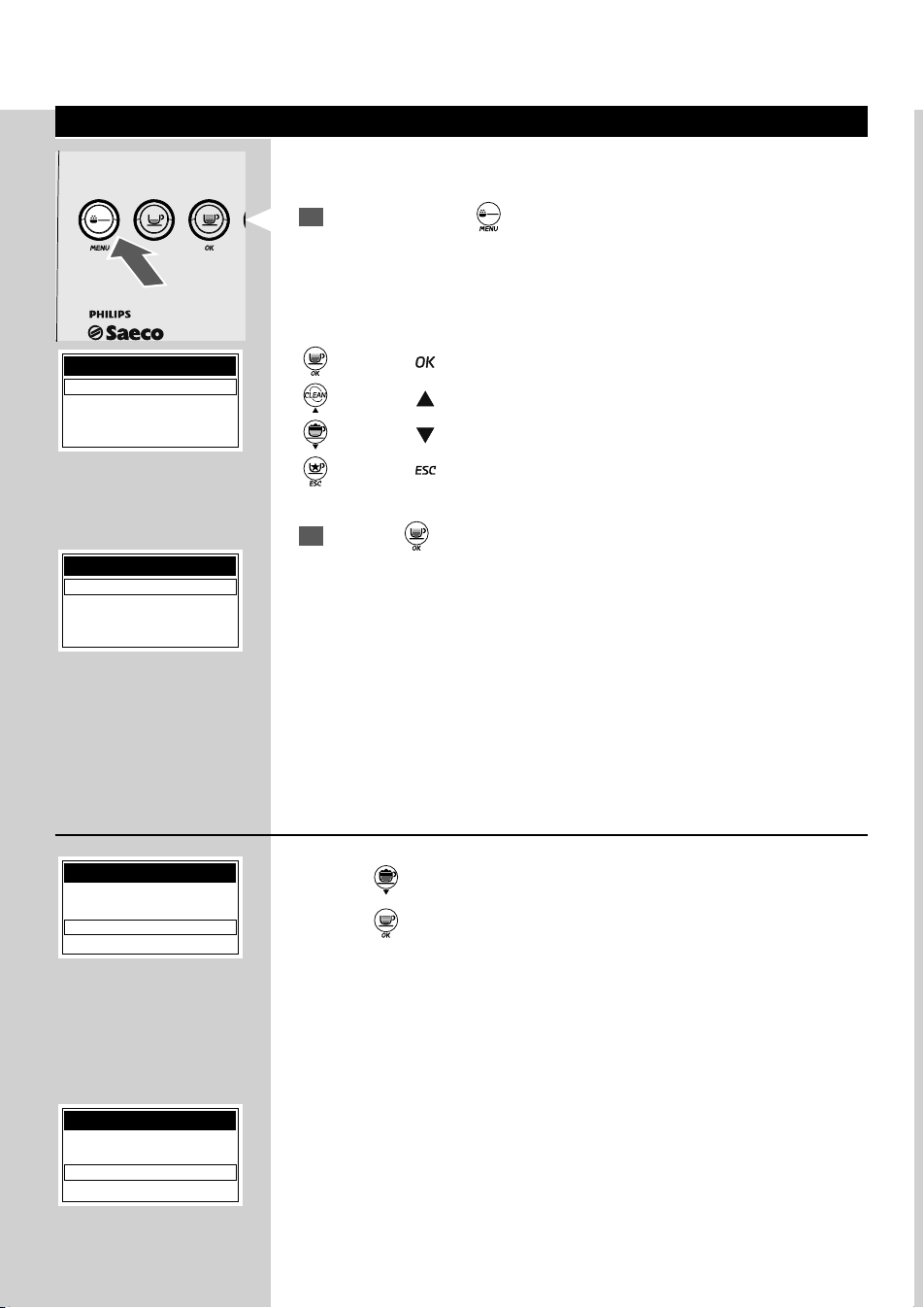
Steam
Note: By default, this function is disabled and not visible. It can become visible
and available only if it is activated manually in the beverage programming:
BEVERAGE MENU -> SPECIAL BEVERAGES -> STEAM -> ON
Dispensing may be preceded by short spurts of hot water. Danger of burns.
The steam wand may reach high temperatures.
This program allows steam to be dispensed in order to heat up the bevera-
ges directly in the container.
Note: Clean the wand before using it to heat any liquid.
1
Press the “ ” button to access the menu.
2
Press the “ ” button to select “STEAM”.
3
Place a suitable cup under the hot water wand and immerse the wand
in the liquid to heat.
4
Press the “ ” button to start the preparation.
5
To stop the dispensing press the “ ” button.
SPECIAL BEVERAGES
HOT MILK
AMERICAN COFFEE
STEAM
STEAM
ESC
STOP STEAM
32
ENGLISH
Beverage Programming
All beverage settings can be customized.
1
Press and hold the “ ” button for 5 seconds to access the machine
main menu.
When you enter the programming mode, the buttons have a di erent
function:
“
” button = “ ” (con rms a selection or a change you have made)
“ ” button = “ ” (scrolls up the menu)
“ ” button = “ ” (scrolls down the menu)
“ ” button = “ ” (con rms when you exit a selection)
2
Press the “ ” button to con rm the selection and enter the “BEVER-
AGE MENU”.
This function allows you to set all parameters concerning a beverage brew-
ing.
MENU OK
MENU
BEVERAGE MENU
MACHINE MENU
BEVERAGE MENU
ESPRESSO
COFFEE
CAPPUCCINO
LATTE MACCHIATO
BEVERAGE MENU
LATTE MACCHIATO
SPECIAL BEVERAGES
COUNTERS
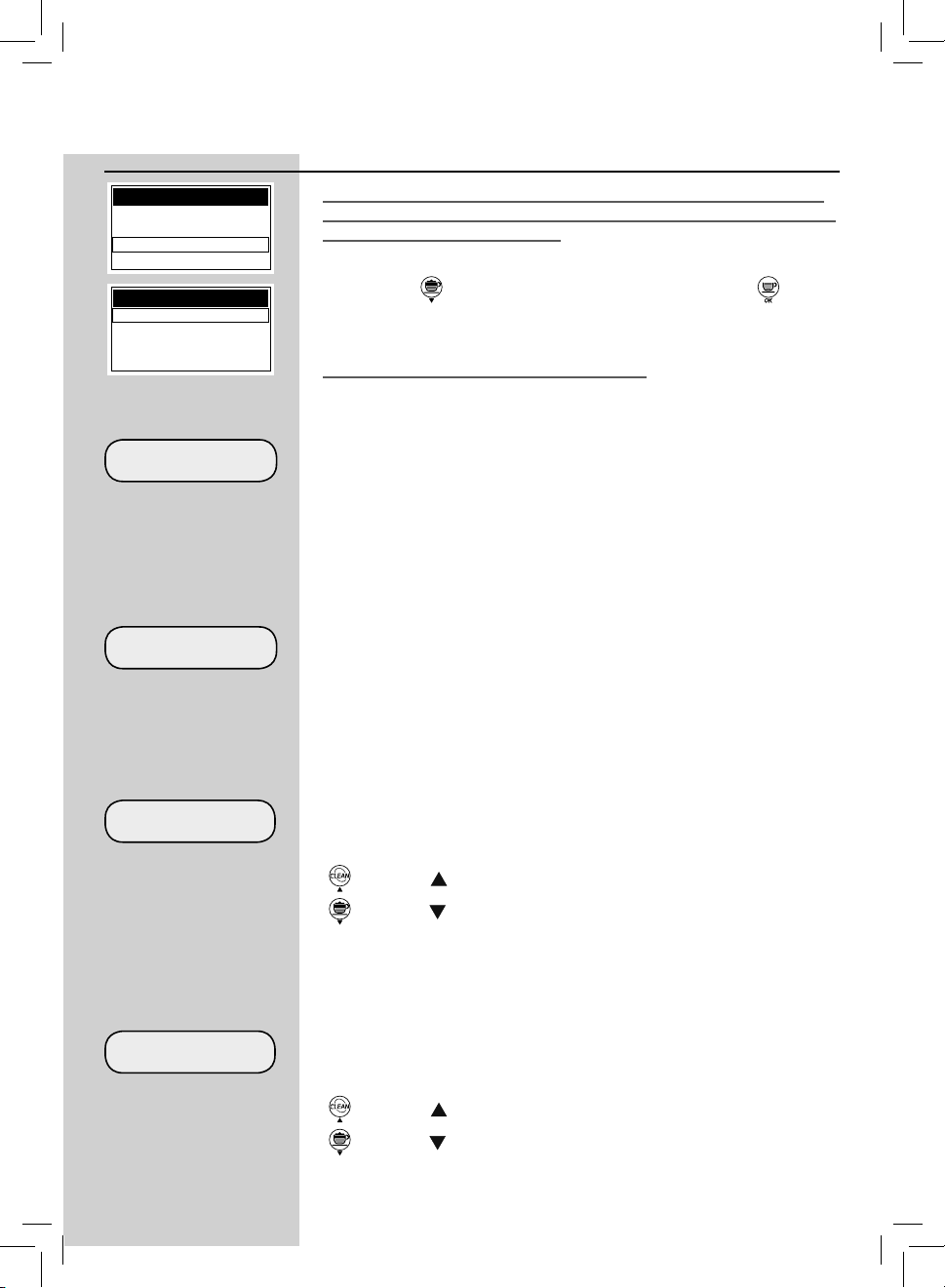
Dispensed Beverages Counters
This menu enables checking how many products have been brewed.
Press the “
” button until the “COUNTERS” option is selected.
Press the “
” button to enter the option and display the number of brew-
ing procedures performed for each product.
COUNTERS
LATTE MACCHIATO
HOT MILK
COUNTERS RESET
This section, which is displayed as the last option in the “COUNTERS”
menu, allows you to reset all the counters of the products that have been
dispensed until that moment. This can be useful to reset the machine after
maintenance.
ENGLISH
33
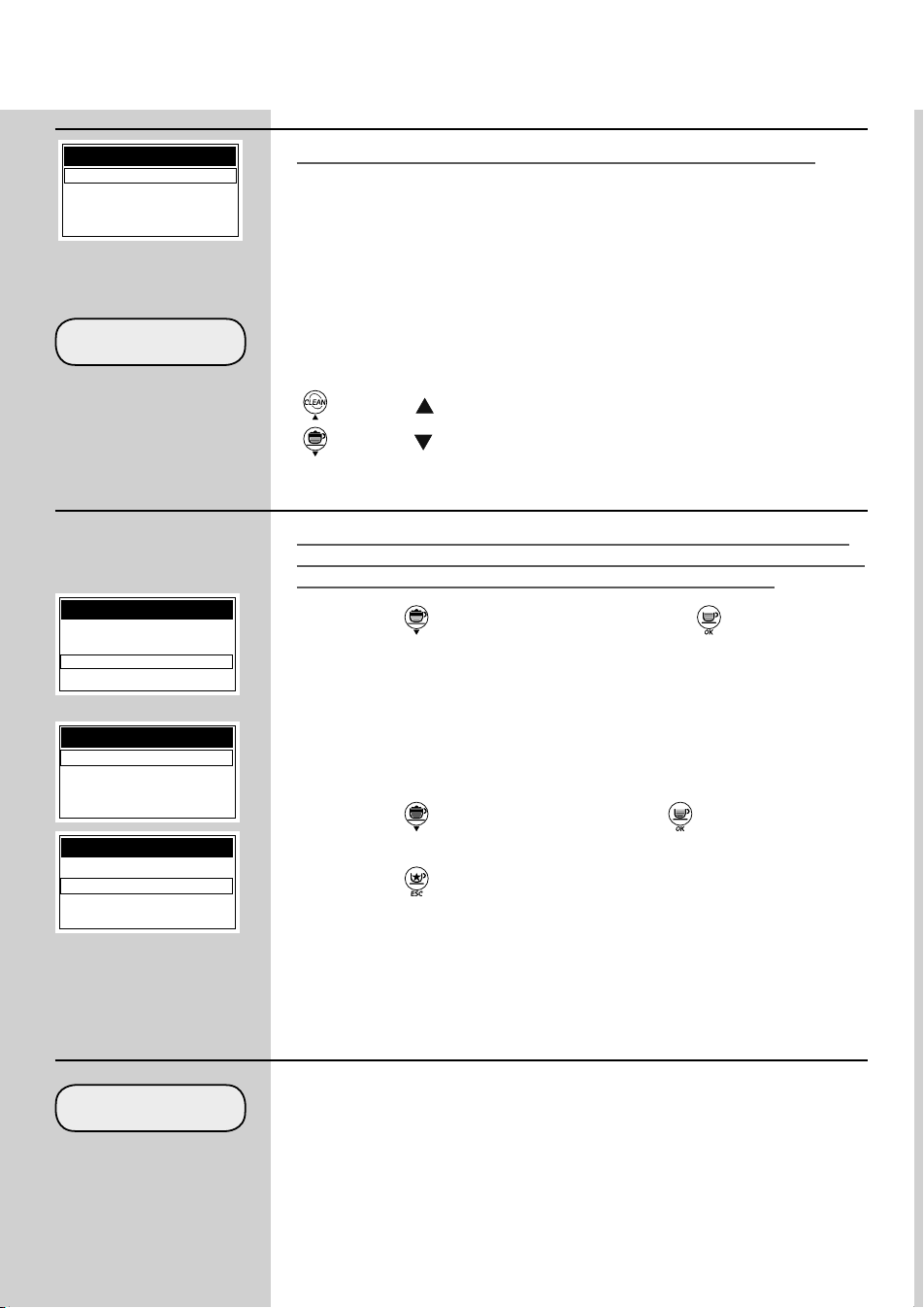
PREBREWING
Prebrewing: Co ee is slightly dampened before brewing so as to bring out
its full aroma and let it acquire an excellent taste.
OFF: prebrewing is not performed.
LOW: activated.
HIGH: longer in order to bring out the co ee taste.
COFFEE TEMPERATURE
COFFEE LENGTH
This section allows you to program the temperature for co ee brewing.
LOW: low temperature.
NORMAL: standard temperature.
HIGH: high temperature.
This section allows programming the amount of co ee to be brewed for
each selected beverage. The bar allows you to adjust the exact amount of
co ee to brew.
“
” button = “ ” (to increase the amount of co ee in the cup).
“ ” button = “ ” (to reduce the amount of co ee in the cup).
MILK QUANTITY
This section allows you to program the amount of milk for each selected
beverage. The bar allows you to adjust the exact amount of milk to dispen-
se.
“
” button = “ ” (to increase the amount of milk in the cup).
“ ” button = “ ” (to reduce the amount of milk in the cup).
Beverage Parameters
In this case we look at how to programme a customized cappuccino. The
milk managing options are not shown when a co ee brewing (espresso or
long co ee) is being programmed.
Press the “
” button to select the “CAPPUCCINO” and the “ ” button
to enter the menu.
The following describes the di erent functions.
BEVERAGE MENU
ESPRESSO
COFFEE
CAPPUCCINO
LATTE MACCHIATO
CAPPUCCINO
PREBREWING
COFFEE TEMPERATURE
COFFEE LENGTH
MILK QUANTITY
34
ENGLISH
DEFAULT
Default Parameters
For each beverage it is possible to reset the original standard values as-
signed by the manufacturer. After selecting this function, the beverage
customized settings are deleted.
WATER QUANTITY
This section allows programming the amount of water to be dispensed
when pressing the corresponding button. The bar allows you to adjust the
exact amount of water to dispense.
“
” button = “ ” (to increase the amount of hot water in the cup).
“ ” button = “ ” (to reduce the amount of hot water in the cup).
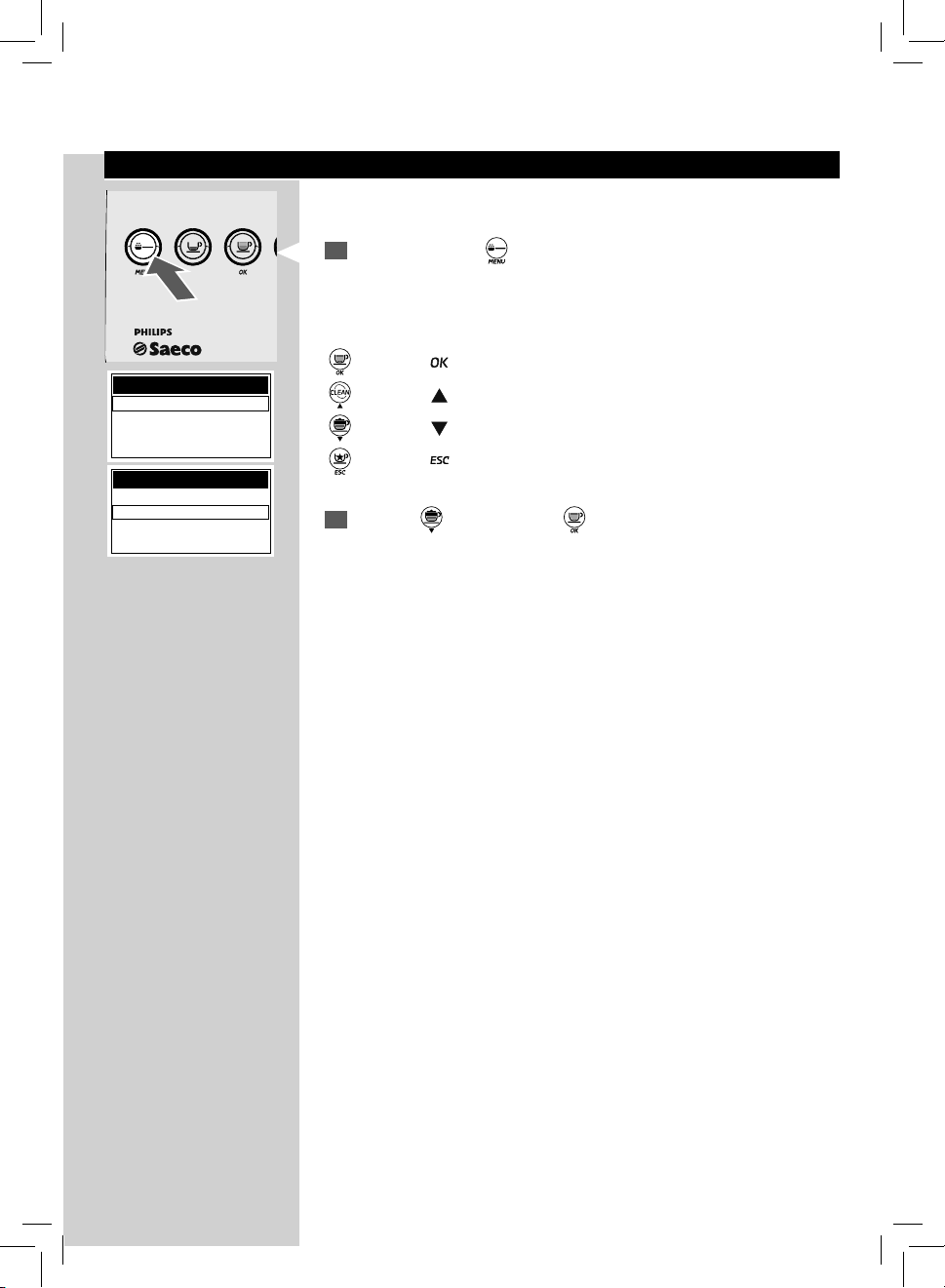
Activating Steam (BEVERAGE MENU -> SPECIAL BEVERAGES)
These settings are valid only for activating the steam function. When the
activation is complete the menu will be available, and the user will be able
to activate it by following the procedure described on page 31.
Press the “
” button to select “STEAM” and the “ ” button to enter
the menu.
Hot Water Parameters (BEVERAGE MENU - >SPECIAL BEVERAGES)
These settings are valid only for programming hot water dispensing.
HOT WATER
WATER QUANTITY
DEFAULT
Press the “ ” button to select “ON” and the “ ” button to activate the
steam function.
Press the “
” button once or more times to exit.
SPECIAL BEVERAGES
HOT MILK
AMERICAN COFFEE
STEAM
STEAM
OFF
ON
STEAM
OFF
ON
ENGLISH
35
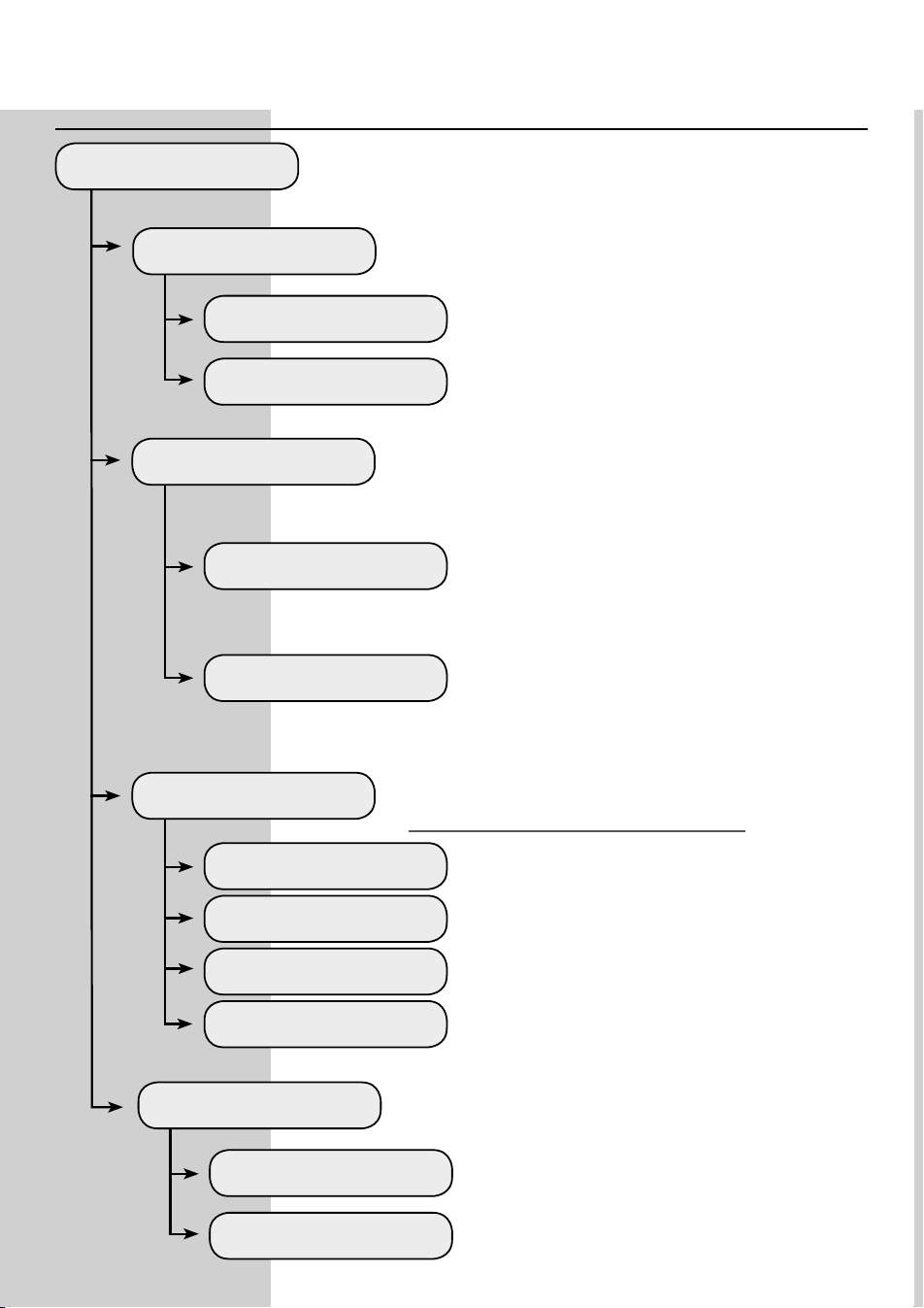
Machine Programming
The machine allows you to customize the operating settings.
1
Press and hold the “ ” button for 5 seconds to access the machine
main menu.
When you enter the programming mode, the buttons have a di erent
function:
“
” button = “ ” (con rms a selection or a change you have made)
“ ” button = “ ” (scrolls up the menu)
“ ” button = “ ” (scrolls down the menu)
“ ” button = “ ” (con rms when you exit a selection)
2
Press the “ ” button and the “ ” button to con rm the selection and
enter the “MACHINE MENU”.
MENU OK
MENU
BEVERAGE MENU
MACHINE MENU
MENU
BEVERAGE MENU
MACHINE MENU
36
ENGLISH
GENERAL MENU
TONE
CUP-WARM. SURFACE
OFF
OFF
ON
ON
To change the machine operating settings.
This function activates/deactivates the acoustic alarms.
This function allows activating/deactivating the cup-warm-
ing surface located on the upper part of the machine.
To deactivate the acoustic alarms.
To deactivate the cup-warming surface.
To activate the acoustic alarms.
To activate the cup-warming surface.
ECOMODE
OFF
ON
This function enables activating the boilers on the machine
to allow saving energy.
This way, only the co ee boiler is activated at
machine start-up. The machine saves energy but
needs longer time to dispense milk-based bever-
ages.
This function activates all the boilers at every ma-
chine start-up to be immediately able to prepare
all kinds of beverages. The power consumption
is higher this way, because the machine is always
ready for use.
15 MINUTES
30 MINUTES
60 MINUTES
180 MINUTES
STAND-BY SETTINGS
To set the time interval for the machine to go into stand-by
mode after the last brewing.
The default time value is «after 30 minutes».
Once the set time has elapsed, the machine goes
into stand-by mode.
Press any button to turn the machine on again.
After performing the function diagnostics and the
warm-up phase, the machine is again ready for
use.
General Menu
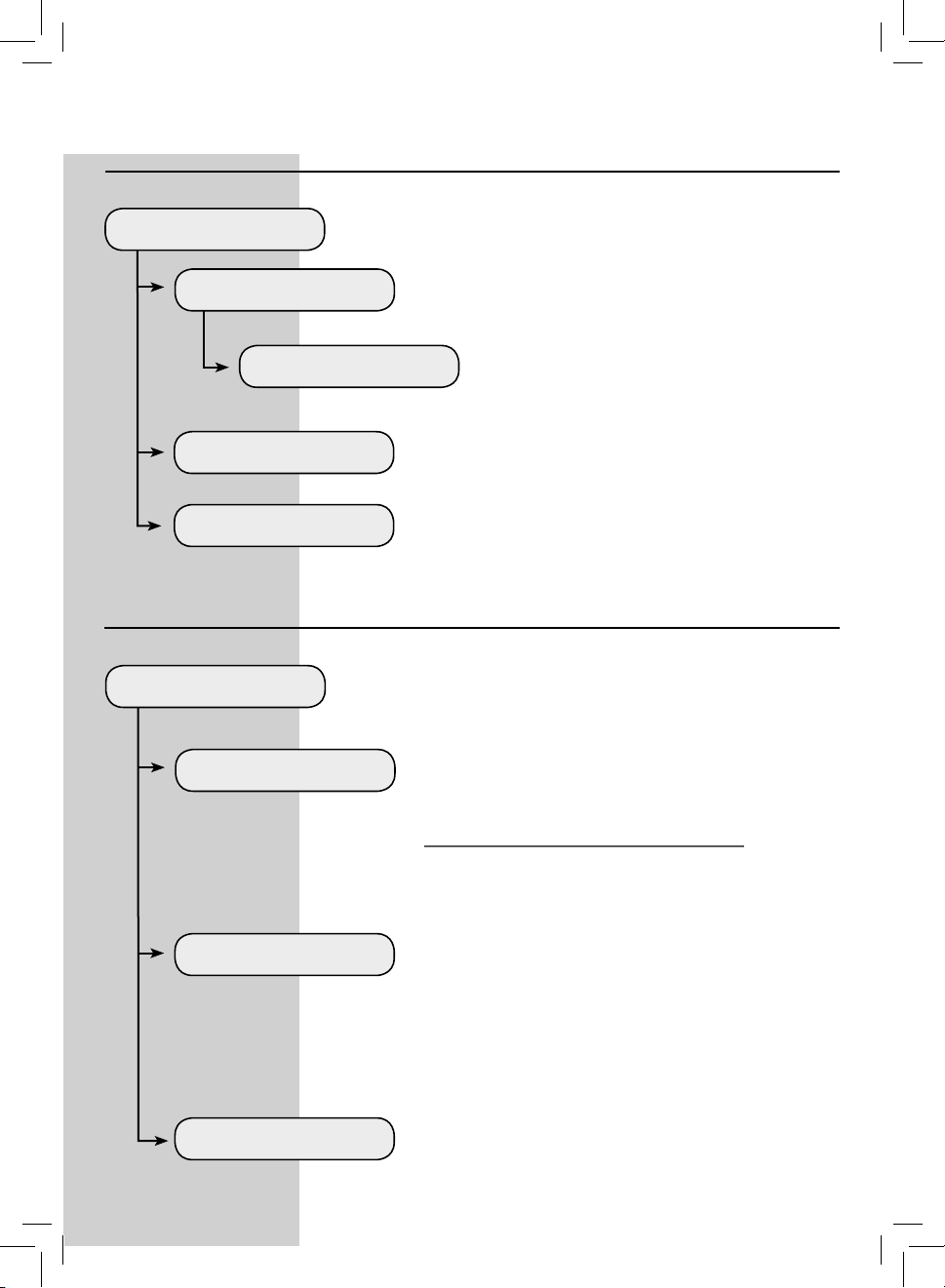
ENGLISH
37
DISPLAY MENU
LANGUAGE
CONTRAST
BRIGHTNESS
ENGLISH
This menu allows you to set the menu language and the display
brightness and contrast.
This setting is of fundamental importance for correctly
adjusting the parameters of the machine according to the
country where the machine is used.
To set the correct display contrast according to the room
illumination.
To set the correct display brightness according to the room
illumination.
The currently selected language is displayed.
The language can be changed with the special
controls.
Display Menu
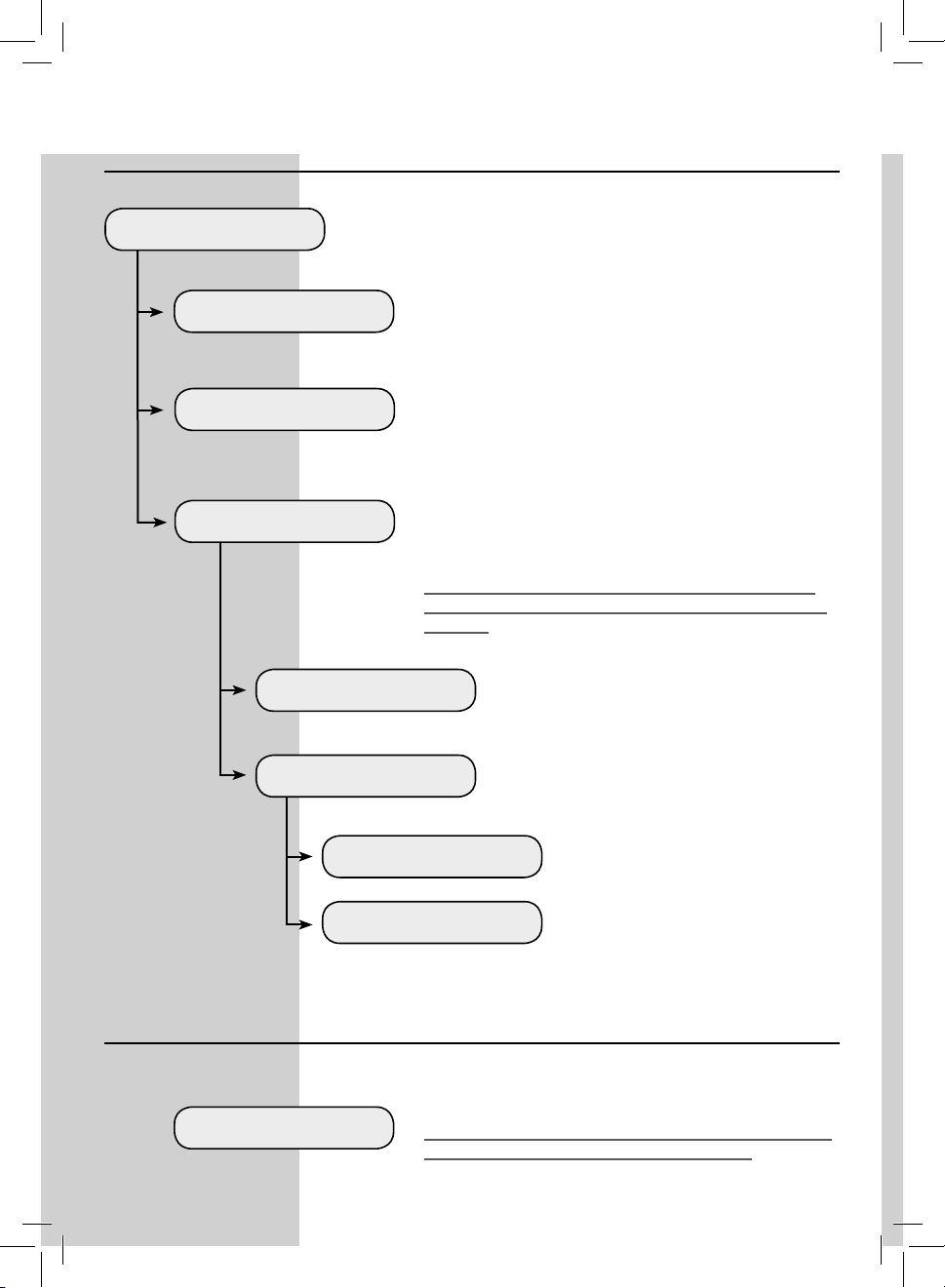
WATER MENU
HARDNESS
ENABLE FILTER
ACTIVATE FILTER
This menu allows setting correct water parameters for co ee brewing.
To change the machine water hardness setting.
With the "Hardness" function you can adjust your machine
to the level of hardness of the water you use, so that the
machine will request descaling at the right moment.
Measure water hardness as shown on page 12.
To activate/deactivate the warning signal to replace the
water lter. By activating this function, the machine noti es
the user when the water lter needs to be replaced.
OFF: Warning disabled.
ON: Warning enabled (this value is automatically set when
the lter is activated).
To activate the lter after its installation or replacement.
Refer to the relevant section on page 14 to correctly install
and/or replace the lter.
Water Menu
38
ENGLISH
FACTORY SETTINGS
This menu allows setting all the functions for correct machine mainte-
nance.
This function allows restoring all factory settings.
Note: This section allows you to restore the factory settings
relative to the machine menu personal settings.
Maintenance
Factory Settings
DESCALING
BREW GROUP CLEAN
This function allows you to perform the descaling cycle (see
page 53).
This function allows you to perform the wash cycle for the
Brew Group (see page 50).
START CLEANING
OFF
WARNING CLEANING
ON
This function activates the display warning mes-
sage indicating that the machine needs a Cappuc-
cinatore cleaning cycle.
The warning message is disabled.
The warning message is active. The
message is displayed when the machi-
ne needs a Cappuccinatore cleaning
cycle.
This function starts the Cappuccinatore cleaning
cycle as described in the relevant section.
CAPPUCCINATORE CLEAN
This function allows you to perform the wash cycle for the
Cappuccinatore and/or Thermos used to prepare the milk-
based beverages (see page 45).
Note: This cleaning procedure is fundamental for correct
maintenance and operation of the Cappuccinatore and/or
Thermos.
MAINTENANCE
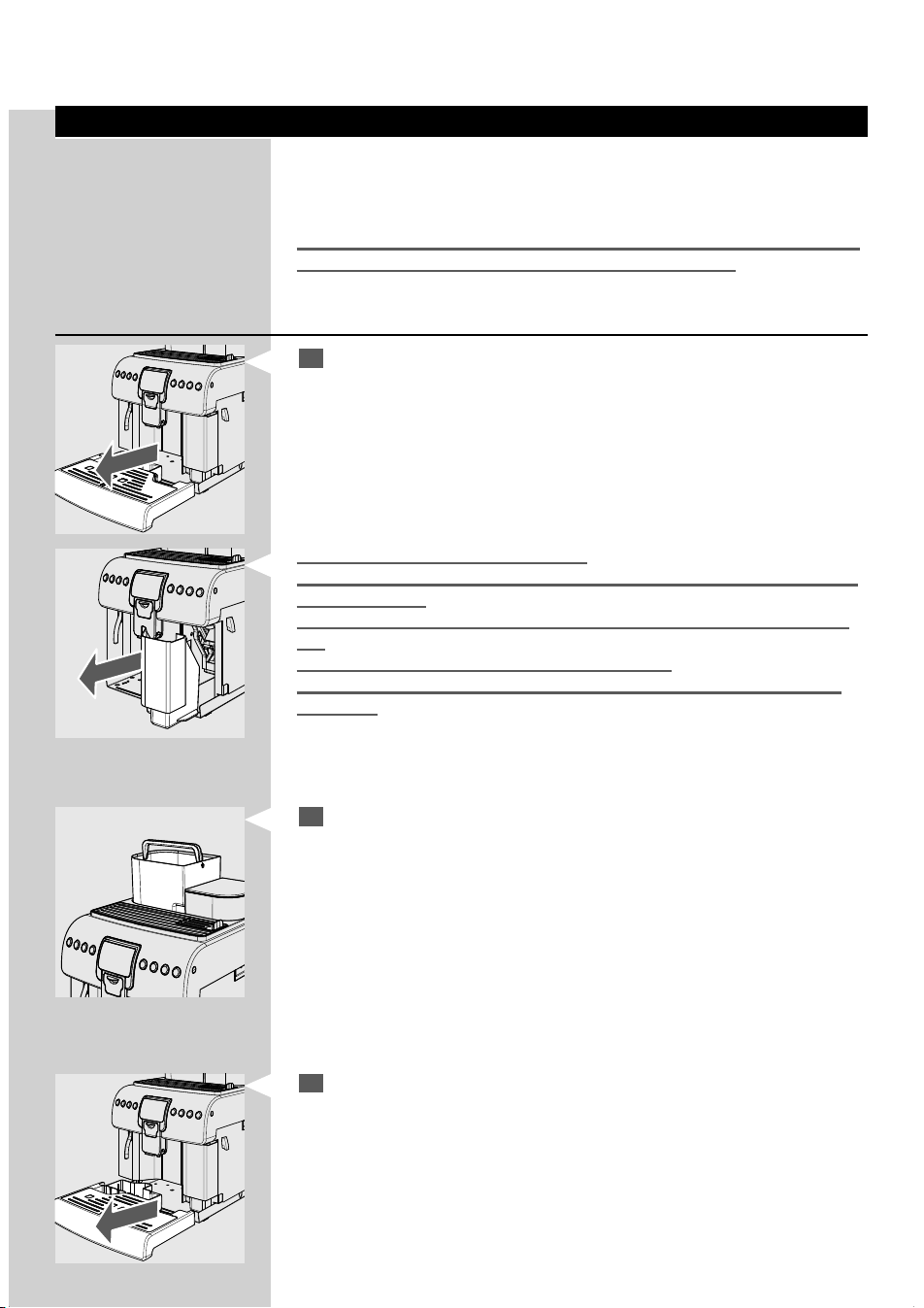
ENGLISH
39
Cleaning and Maintenance
As some of the parts of your appliance come in contact with water and cof-
fee during normal use, it is important that you clean your appliance regu-
larly. This is an easy procedure with your Philips-Saeco Espresso machine.
Just follow the steps indicated on the display and described below.
Not doing this will ultimately make your appliance stop working properly,
and in this case repair is not covered under your warranty.
General Cleaning
1
Empty and clean the drip tray and the co ee grounds drawer daily,
with the machine turned on.
Note: We recommend cleaning the oat and its seat to ensure perfect opera-
tion.
Note: Other maintenance and cleaning operations can only be carried out
when the machine is cold and disconnected from the electrical network.
Do not immerse the machine in water.
Do not wash any of the removable parts in the dishwasher (except for the
Cappuccinatore).
Do not use sharp objects or harsh chemical products (solvents) for clean-
ing.
Use a soft, dampened cloth to clean the machine.
Do not dry the machine and/or its parts using a microwave and/or stan-
dard oven.
2
It is recommended to clean the water tank daily:
- Remove the "INTENZA+" water lter (or remove the small white
lter if you have not yet installed the "INTENZA+" water lter) from
the water tank and wash it under running drinking water.
- Reposition the "INTENZA+" water lter (or the small white lter if
you have not yet installed the "INTENZA+" water lter) in its hous-
ing by gently pressing and turning it at the same time.
- Fill the water tank with fresh drinking water.
3
Empty and clean the drip tray daily. Perform this operation also when
the oat is raised.
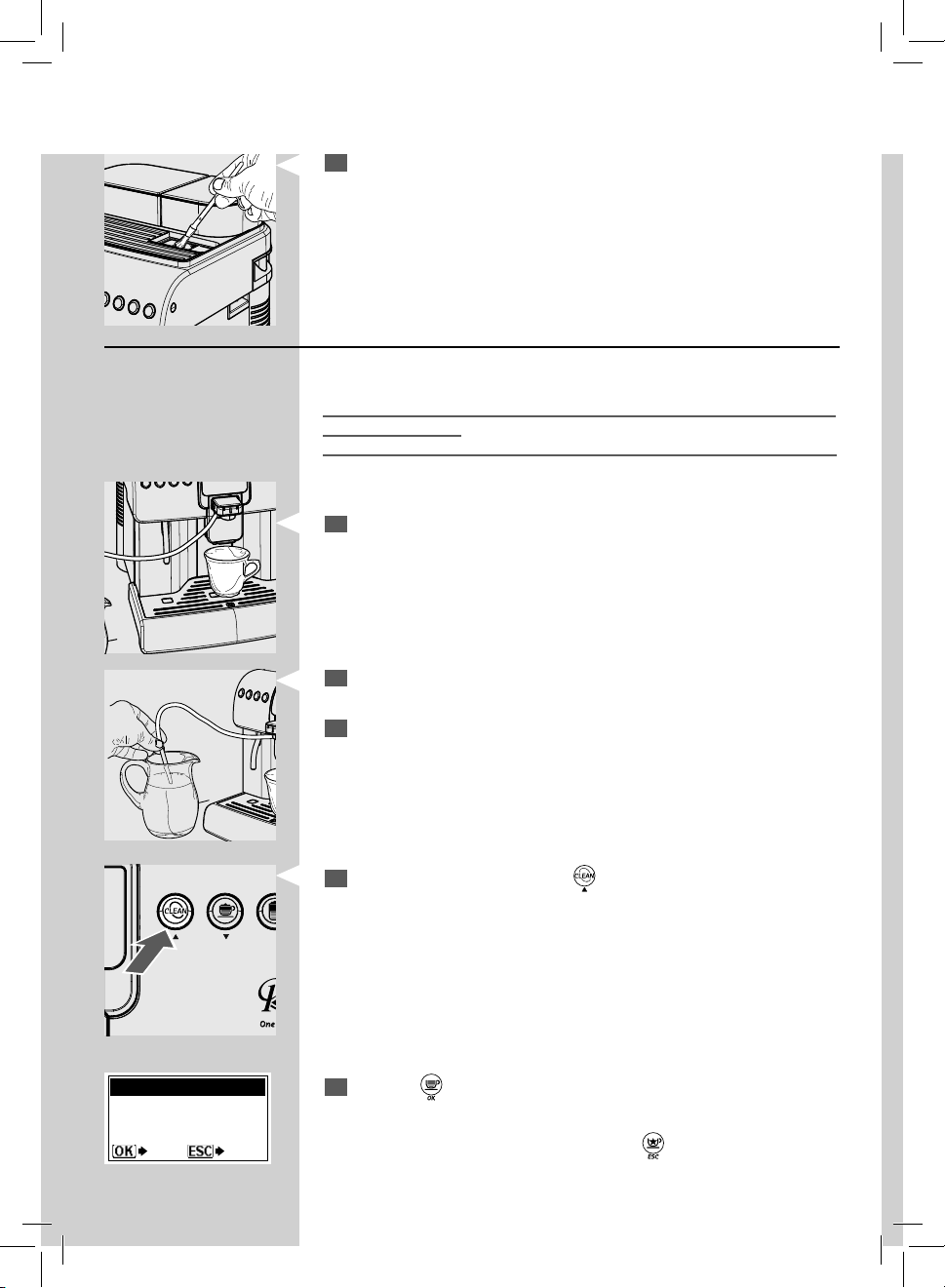
40
ENGLISH
4
If you use the pre-ground co ee compartment, clean it every week
with the supplied brush.
Cleaning the Cappuccinatore (After Each Use)
The Cappuccinatore must be washed and cleaned every time it is used.
The lack of cleaning before and after each use can a ect the correct opera-
tion of the machine.
Danger of burning! Dispensing may be preceded by small jets of hot water.
For a quick cleaning, proceed as follows:
1
Make sure the Cappuccinatore complete with all its parts is correctly
inserted.
2
Insert the suction hose in a carafe containing clean water.
3
Place a container under the dispensing spout.
4
With the machine on, press the " " button.
REPLACE MILK CONTAINER
WITH ANOTHER ONE WITH
FRESH WATER
CAPPUCCINATORE CLEANING
YES NO
5
Press the “ ” button to start the cleaning cycle for the Cappuccinato-
re.
Note: To exit the cycle at any moment, press the “
” button.
ENGLISH
41
6
The machine warms the system up.
Once the warm-up is complete, the machine performs an assisted
wash cycle for the Cappuccinatore.
Wait until the cycle is complete.
STOP CLEANING
CAPPUCCINATORE CLEANING
PLEASE WAIT …
7
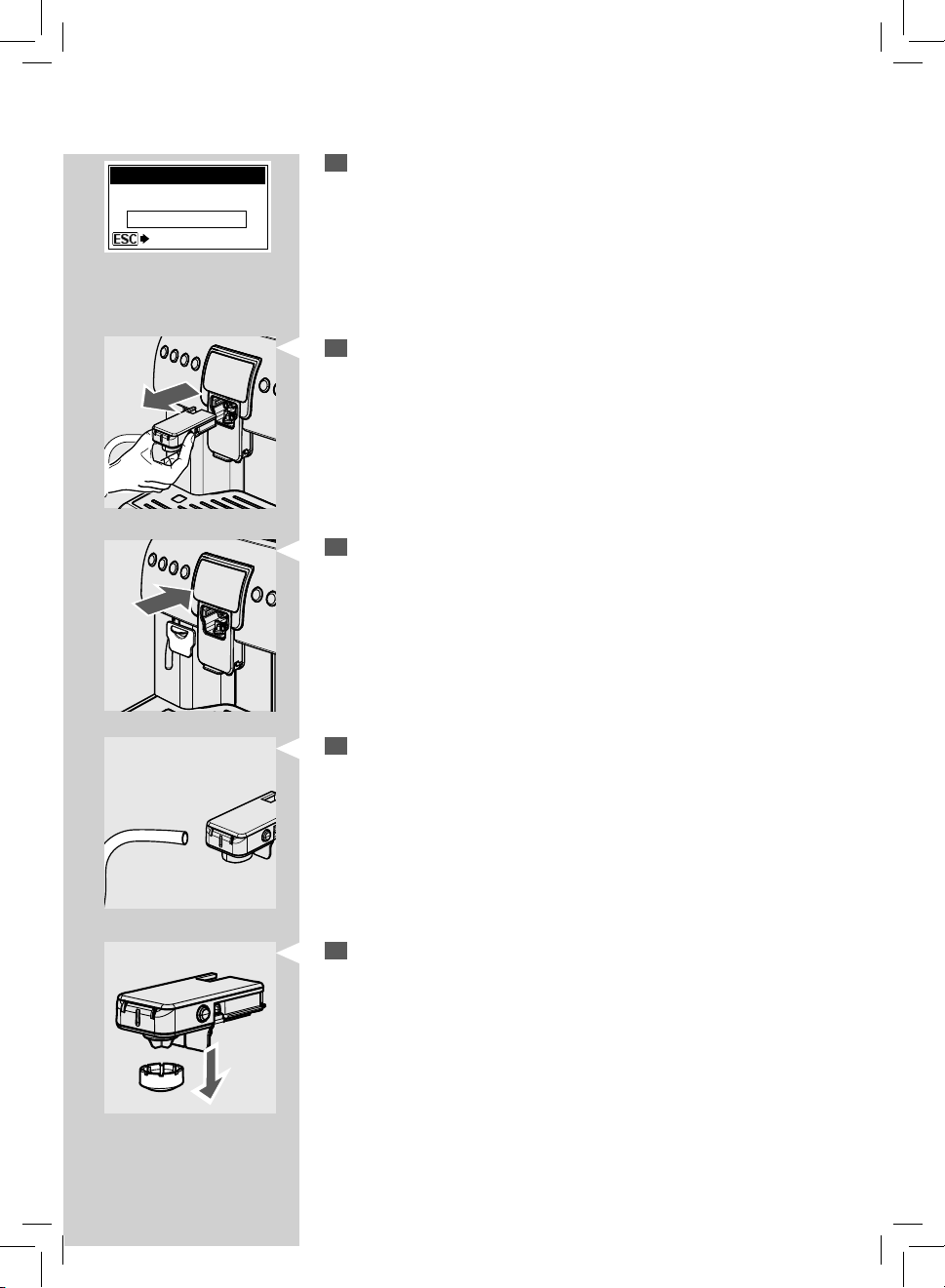
Only once the cycle is complete press the side buttons and remove the
Cappuccinatore.
8
Place the cover back on the machine.
Important Note: We recommend removing the Cappuccinatore when not be-
ing used, in order to keep it clean.
9
Remove the suction tube from the Cappuccinatore.
10
Remove the ring from the Cappuccinatore.

42
ENGLISH
11
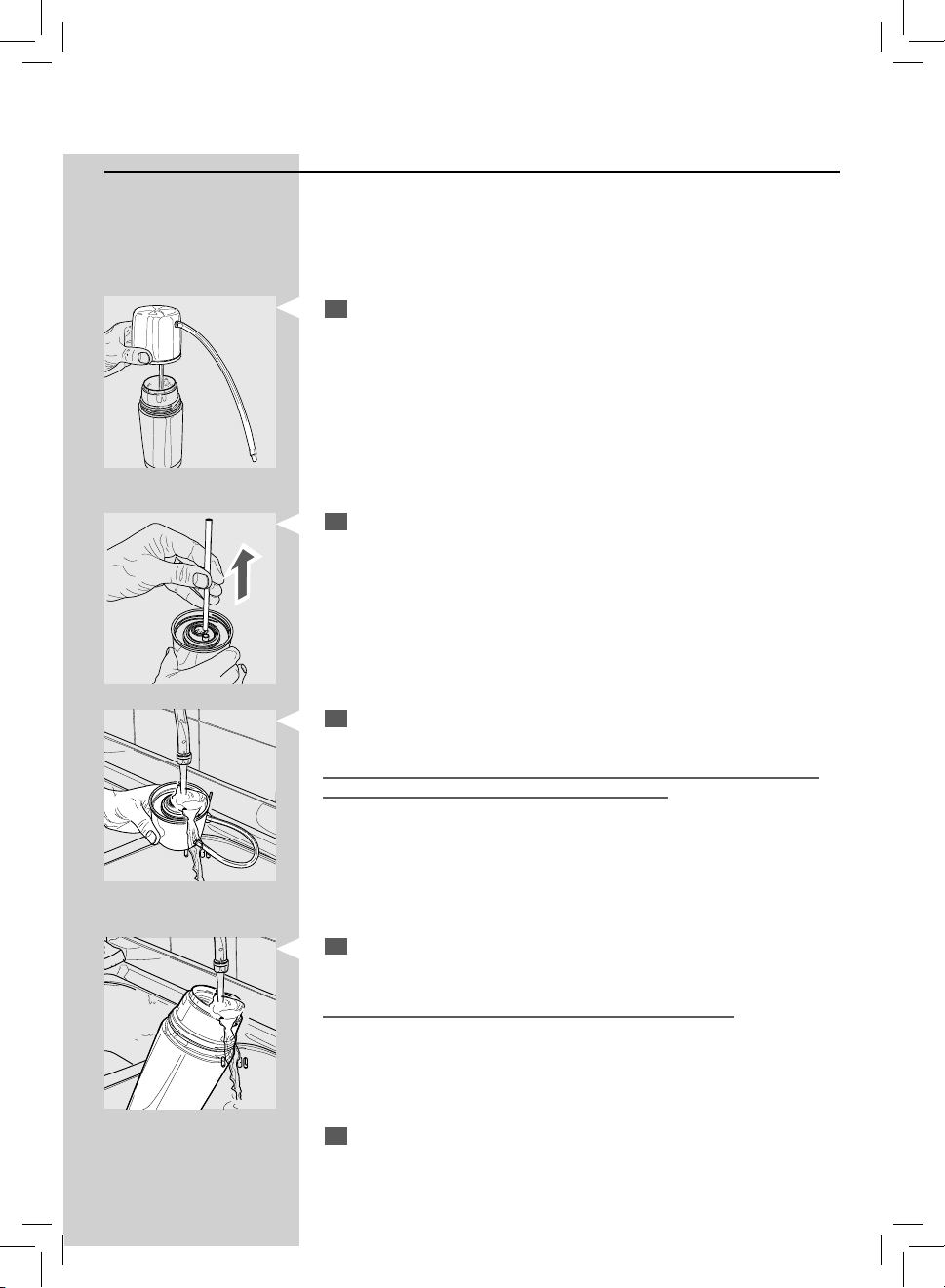
Rotate and lift the Cappuccinatore cover and remove it from the Cap-
puccinatore body.
12
Remove the valve from the Cappuccinatore.
13
Remove the suction tube joint from the Cappuccinatore.
14
Wash the parts under running water.
Make sure any possible milk deposits/residues are removed.
After washing, reassemble the parts following the same procedure
used for disassembly, but in reverse order.
Note: The “WARNING CLEANING” function can be activated, if desired; this
function reminds you when the Cappuccinatore needs to be cleaned. To acti-
vate this function, refer to the machine programming section on page 38.
1
2
ENGLISH
43
2
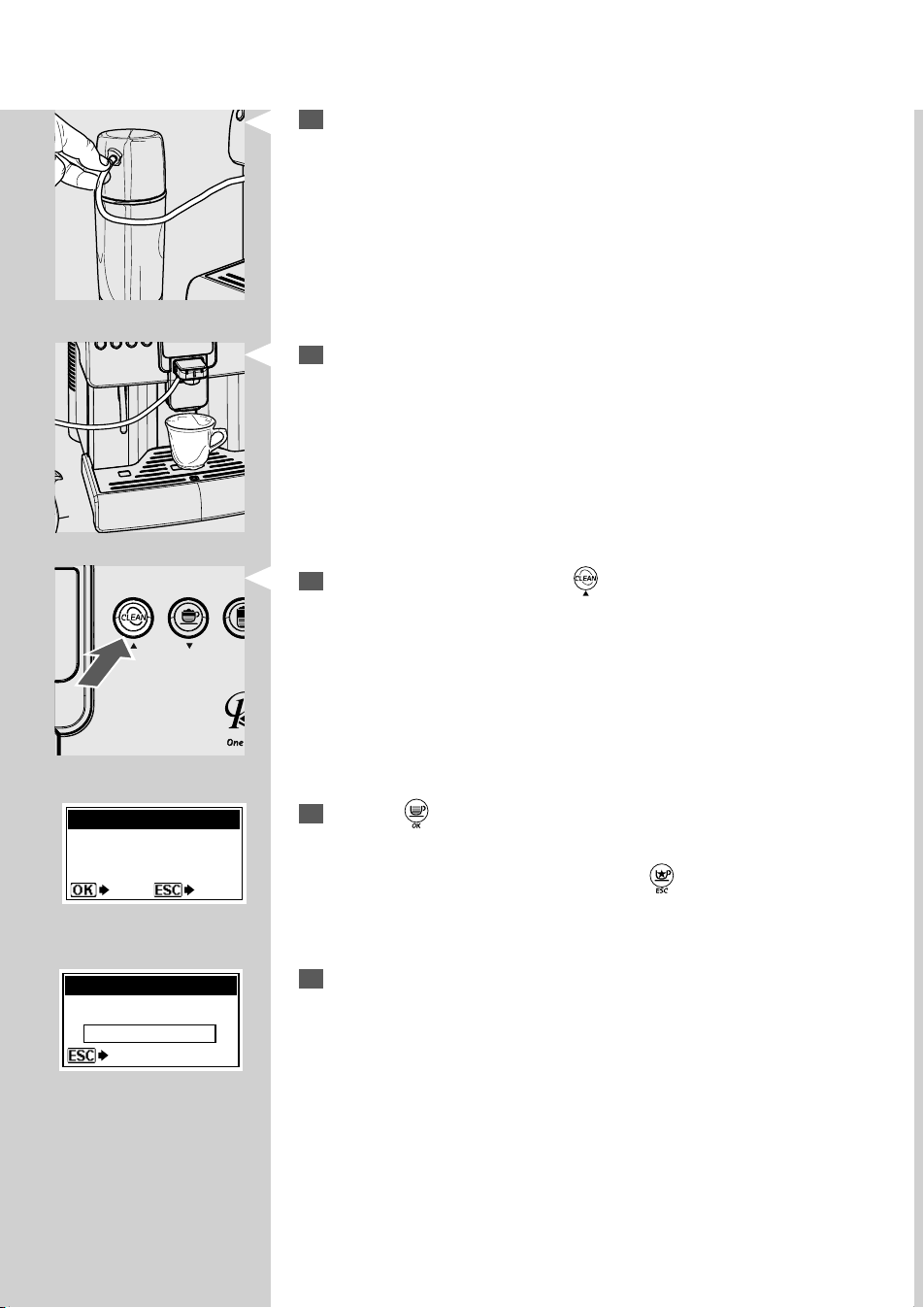
Remove the steel tube installed inside the Thermos lid. Wash it under
lukewarm running water.
Day Cleaning - Thermos
The Thermos has to be cleaned every day to ensure proper operation.
Note: To clean the Thermos, the Cappuccinatore has to be installed. You can
take the occasion to perform the daily cleaning of the Cappuccinatore at the
same time.
1
Rotate the lid and open the Thermos.
3
Wash the Thermos lid keeping the external rubber hose with plastic t-
ting inserted; in particular, wash the internal seal of the lid thoroughly.
After washing the Thermos lid, install the previously removed steel tube
inside it. Without this tube milk cannot be frothed.
4
Wash the inside of the Thermos under lukewarm running water.
Make sure any possible milk deposits/residues are removed.
5
Fill the Thermos with fresh water and close the lid.
44
ENGLISH
6
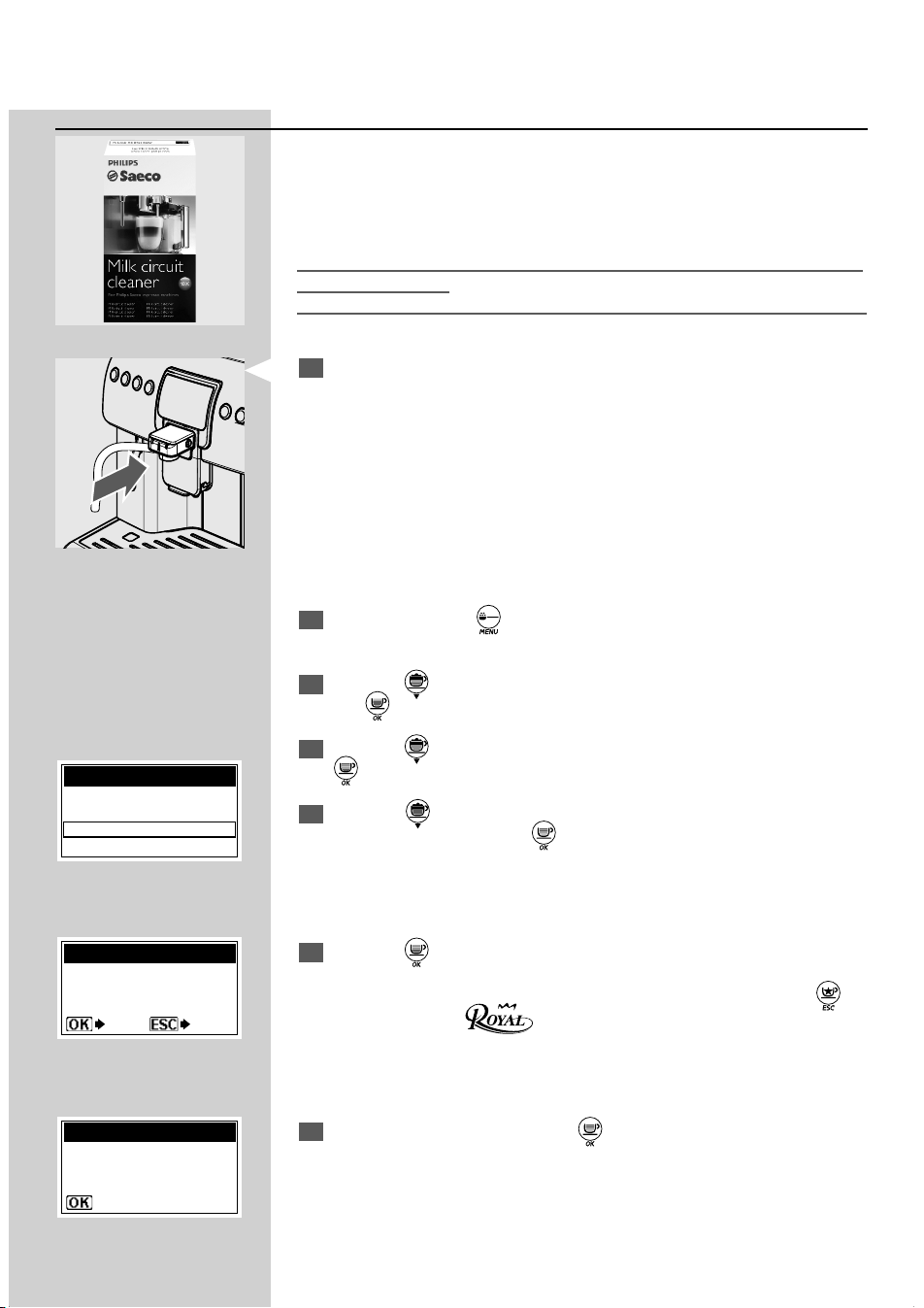
Connect the Thermos to the Cappuccinatore.
7
Place a container under the dispensing spout.
8
With the machine on, press the " " button.
9
Press the “ ” button to start the cleaning cycle for the Cappuccinato-
re.
Note: To exit the cycle at any moment, press the “
” button.
REPLACE MILK CONTAINER
WITH ANOTHER ONE WITH
FRESH WATER
CAPPUCCINATORE CLEANING
YES NO
STOP CLEANING
CAPPUCCINATORE CLEANING
PLEASE WAIT …
10
The machine warms the system up.
Once the warm-up is complete, the machine performs an assisted
wash cycle for the Cappuccinatore.
Wait until the cycle is complete.
The wash cycle is now complete.
Refer to the following section for a thorough cleaning.
ENGLISH
45
Monthly Cleaning - Cappuccinatore + Thermos (Thorough Cleaning)
Clean all the Cappuccinatore and Thermos parts thoroughly every month
using the Saeco detergent supplied with the machine. The Saeco deter-
gent may be purchased at your local dealer, at the Philips on-line shop at
http://shop.philips.com or at authorised service centres.
The lack of cleaning before and after each use can a ect the correct opera-
tion of the machine.
Danger of burning! Dispensing may be preceded by small jets of hot water.
1
Make sure the Cappuccinatore is correctly placed.
2
Press and hold the “ ” button for 5 seconds to enter the machine
main menu.
3
Press the “ ” button and select the “MACHINE MENU” option; press
the “
” button to enter the menu.
4
Press the “ ” button and select the “MAINTENANCE” option; press the
“
” button to enter the menu.
5
Press the " " button until the "CAPPUCCINATORE CLEANING" option
can be selected. Press the "
" button to con rm.
6
Press the “ ” button to start the cleaning cycle of the Cappuccinatore.
Note: If this option is con rmed, the cycle must be completed. Press the “
”
button to exit until the
logo is displayed.
7
Fill the water tank and press the “ ” button to con rm.
MAINTENANCE
BREW GROUP CLEAN
DESCALING
CAPPUCCINATORE CLEANING
WASH THE
CAPPUCCINATORE?
CAPPUCCINATORE CLEANING
YES NO
REFILL
WATER TANK
CAPPUCCINATORE CLEANING
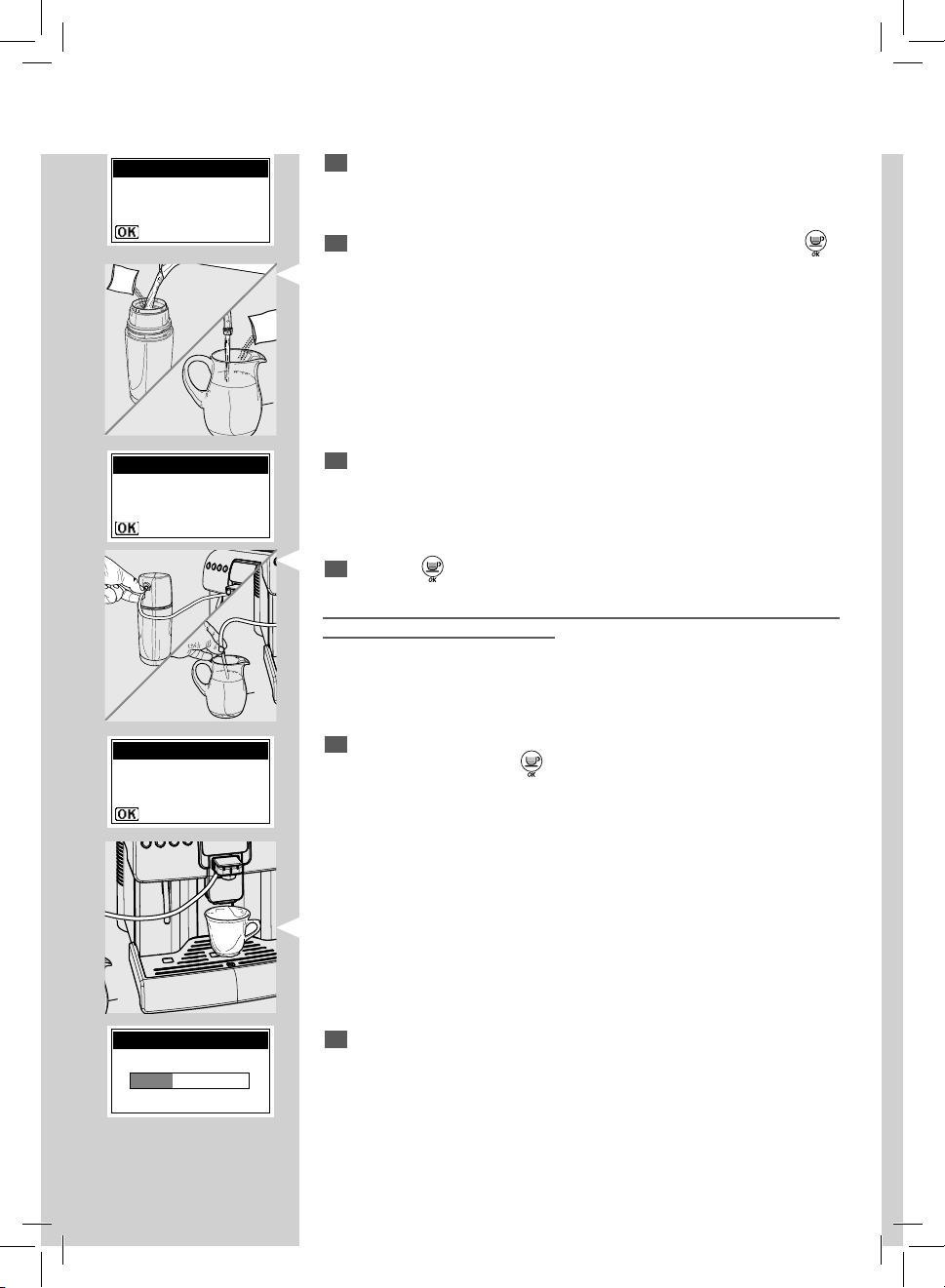
46
ENGLISH
10
Insert the clean hose (according to your choice)
- in the Thermos
or
- directly in the container.
11
Press the " " button to con rm.
Drinking the solution dispensed during this procedure is strictly forbidden.
The solution must be disposed of.
8
Pour a solution bag in the Thermos or in a container with 1/2 (a half)
litre of fresh drinking water.
9
Wait for the bag content to dissolve completely and then press the “ ”
button to con rm.
12
Place an empty container of at least 1litre capacity under the dispens-
ing spout and press the “
” button to con rm.
13
The machine performs a wash cycle of the Cappuccinatore.
The bar shows the washing progress.
Wait until the cycle stops automatically.
POUR DETERGENT
IN A CONTAINER
WITH 1/2 L WATER
CAPPUCCINATORE CLEANING
PUT CAPPUCCINATORE
HOSE IN THE
CONTAINER
CAPPUCCINATORE CLEANING
PLACE A CONTAINER
UNDER THE
DISPENSING SPOUT
CAPPUCCINATORE CLEANING
CAPPUCCINATORE CLEANING
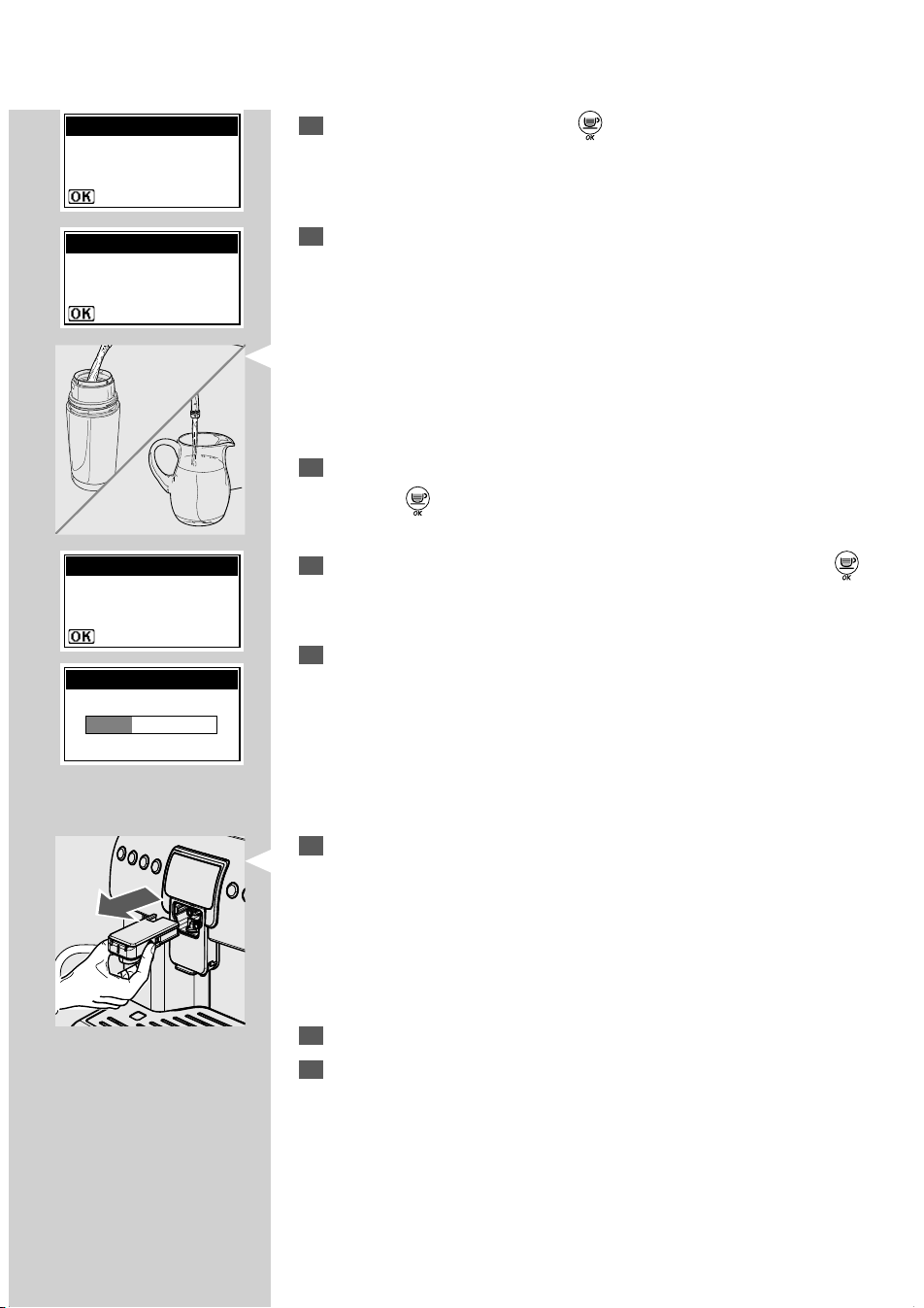
ENGLISH
47
14
Fill the water tank and press the “ ” button to con rm.
15
Carefully wash:
- the Thermos
or
- the container
used for the solution and ll it with 1/2 (a half ) litre of fresh drinking
water that will be used for rinsing.
Empty the container placed under the dispensing spout.
16
Insert the suction hose in the used container.
Press the "
" button to con rm.
17
Place an empty container under the dispensing spout and press the “ ”
button to con rm.
18
The machine performs a rinse cycle of the Cappuccinatore.
The bar shows the rinsing progress.
Wait until the cycle stops automatically. The machine will go back to
the normal operating cycle.
19
Push the buttons located on the sides and remove the Cappuccinatore.
20
Wash all the Cappuccinatore parts, as described on page 41-42.
21
Wash all the Thermos parts (if the Thermos has been used), as de-
scribed on page 43.
Important Note: We recommend removing the Cappuccinatore when not be-
ing used, in order to keep it clean.
REFILL
WATER TANK
CAPPUCCINATORE RINSING
INSERT CAPPUCCINATORE
HOSE IN A CONTAINER
WITH 1/2 L WATER
CAPPUCCINATORE RINSING
PLACE A CONTAINER
UNDER THE
DISPENSING SPOUT
CAPPUCCINATORE RINSING
CAPPUCCINATORE RINSING
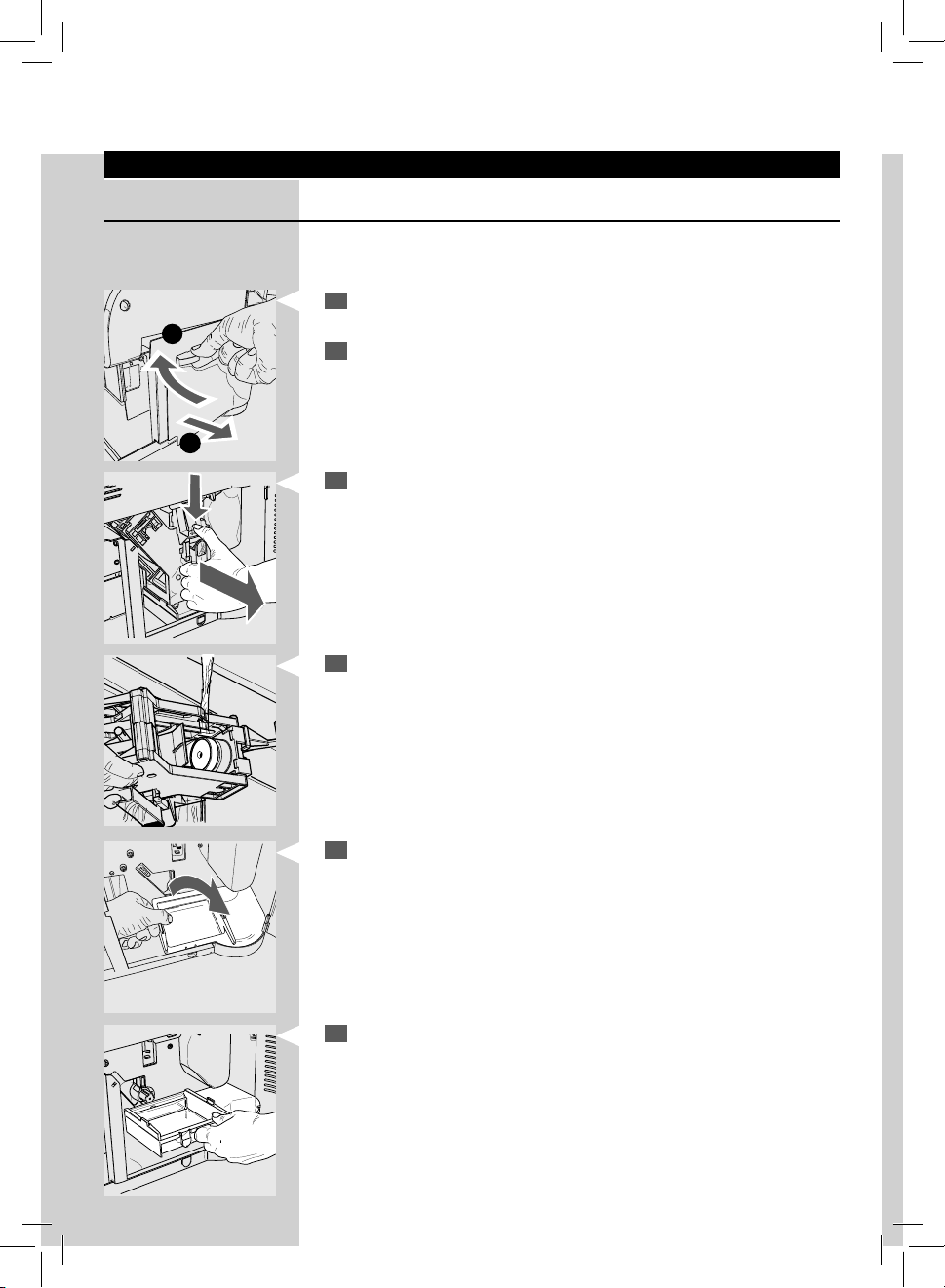
48
ENGLISH
Brew Group
Weekly Cleaning - Brew Group
The brew group should be cleaned every time the co ee bean hopper is lled or
at least once a week.
1
Turn o the machine by pressing the power button and remove the
plug from the socket.
2
Remove the drip tray and the co ee grounds drawer.
Open the service door:
1) Rotate the lever clockwise by 90°.
2) Pull the door towards you.
1
2
3
Remove the brew group: Pull it by the handle and press the «PRESS»
button. The brew group must be washed only with lukewarm water
with no detergent.
4
Wash the brew group with lukewarm water and carefully wash the
upper lter. Before placing the Brew Group in its housing, make sure
there is no water left in the brewing chamber.
5
Lift the rear part of the inner tray and unlock it.
6
Remove the inner tray, wash and reposition it in its seat.
Note: When inserting the tray follow the same procedure used for disassembly,
but in reverse order.
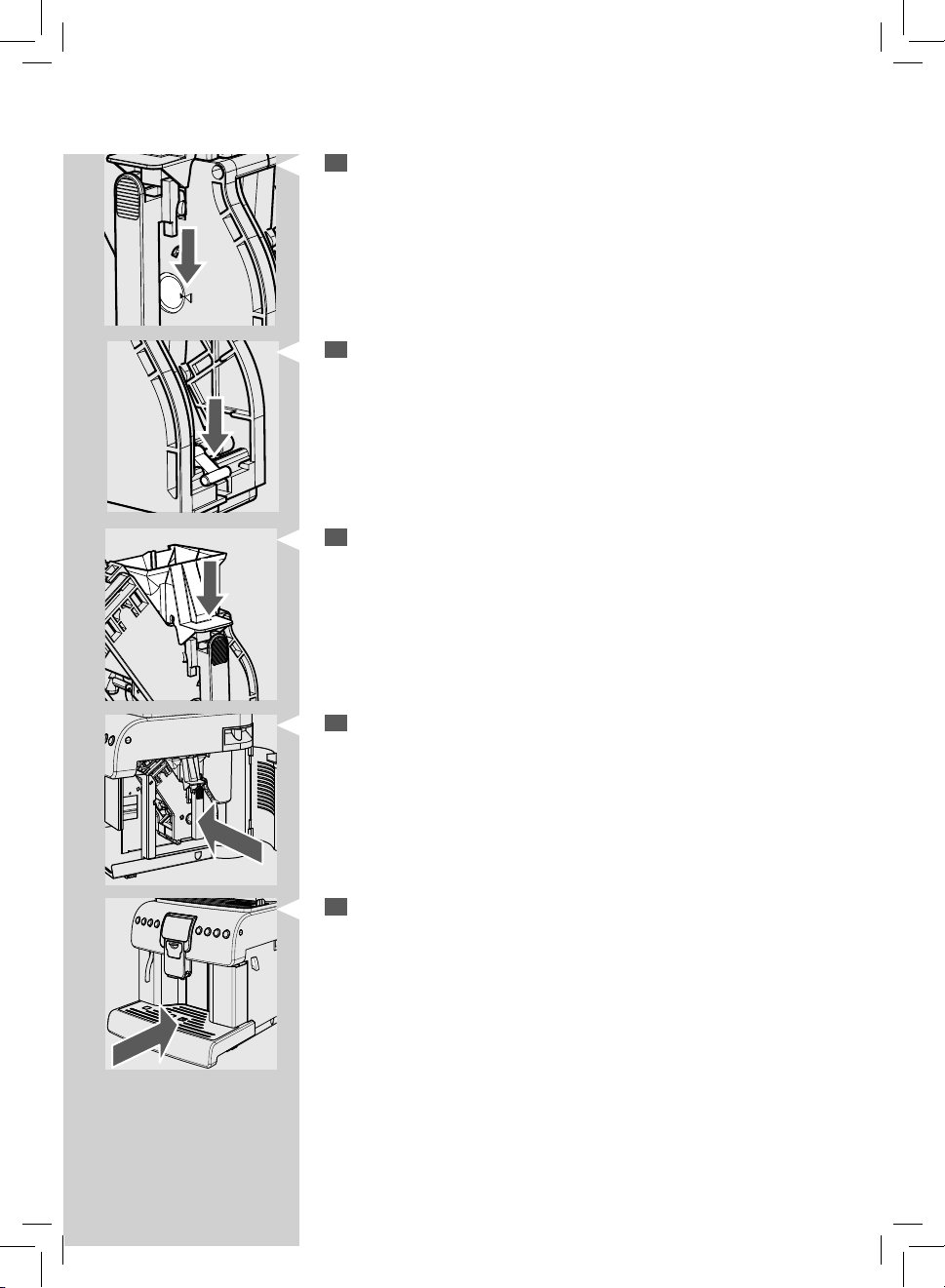
ENGLISH
49
7
Make sure the Brew Group is in the rest position; the two reference
signs must match.
If they do no match, proceed as described in step (8).
10
Insert the Brew Group in its seat again until it locks into place WITHOUT
pressing the "PRESS" button.
8
Make sure that the lever is in contact with the brew group base.
11
Insert the co ee grounds drawer and the drip tray. Close the service
door.
9
Make sure that the hook to lock the Brew Group is in the correct posi-
tion; to check its position rmly press the "PRESS" button.
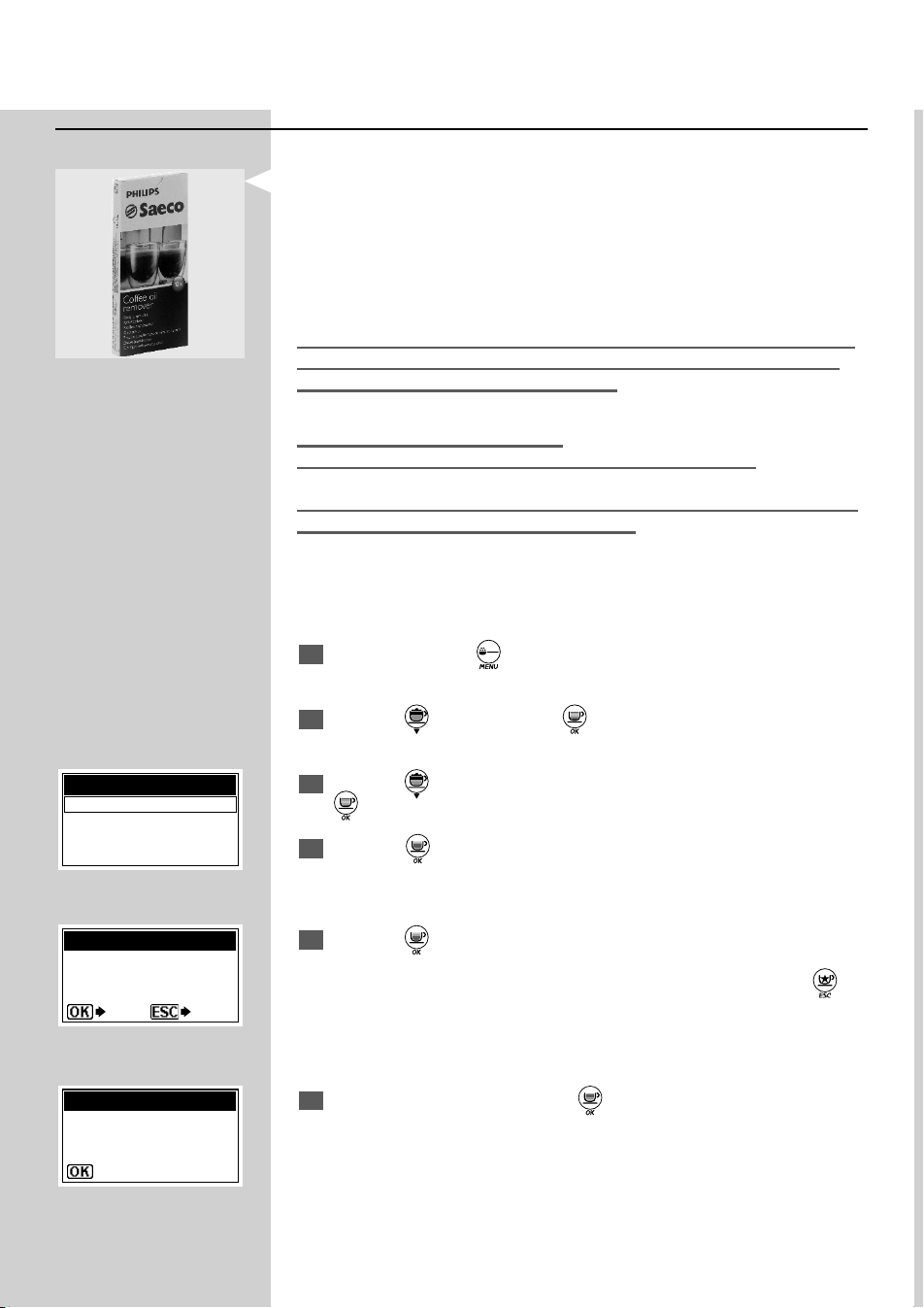
50
ENGLISH
Cleaning the Brew Group with the “Co ee Oil Remover”
Besides weekly cleaning, we recommend you to carry out this cleaning
cycle with the “Co ee Oil Remover” after about 500 cups of co ee or every
month. This operation completes the maintenance process for the Brew
Group.
The “Co ee Oil Remover” for cleaning the Brew Group and the “Mainte-
nance Kit” can be purchased at your local dealer, at the Philips online shop
at http://shop.philips.com or at authorised service centres.
Warning: The “Co ee Oil Remover” does not have any descaling property.
For the descaling cycle use the Saeco descaling solution and follow the
steps described in the “Descaling” chapter.
The wash cycle cannot be stopped.
Do not leave the machine unattended during this operation.
Warning! Drinking the solution dispensed during this procedure is strictly
forbidden. The solution must be disposed of.
1
Press and hold the “ ” button for 5 seconds to enter the machine
main menu.
2
Press the “ ” button and the “ ” button to con rm the selection and
enter the “MACHINE MENU”.
3
Press the “ ” button and select the “MAINTENANCE” option; press the
“
” button to enter the menu.
4
Press the " " button to con rm.
5
Press the “ ” button to start the cleaning cycle of the brew group.
Note: If this option is con rmed the cycle must be completed. Press the “
”
button to exit.
6
Fill the water tank and press the “ ” button to con rm.
MAINTENANCE
BREW GROUP CLEAN
DESCALING
CAPPUCCINATORE CLEANING
PERFORM BREW
GROUP CLEANING?
BREW GROUP CLEAN
YES NO
REFILL
WATER TANK
BREW GROUP CLEAN
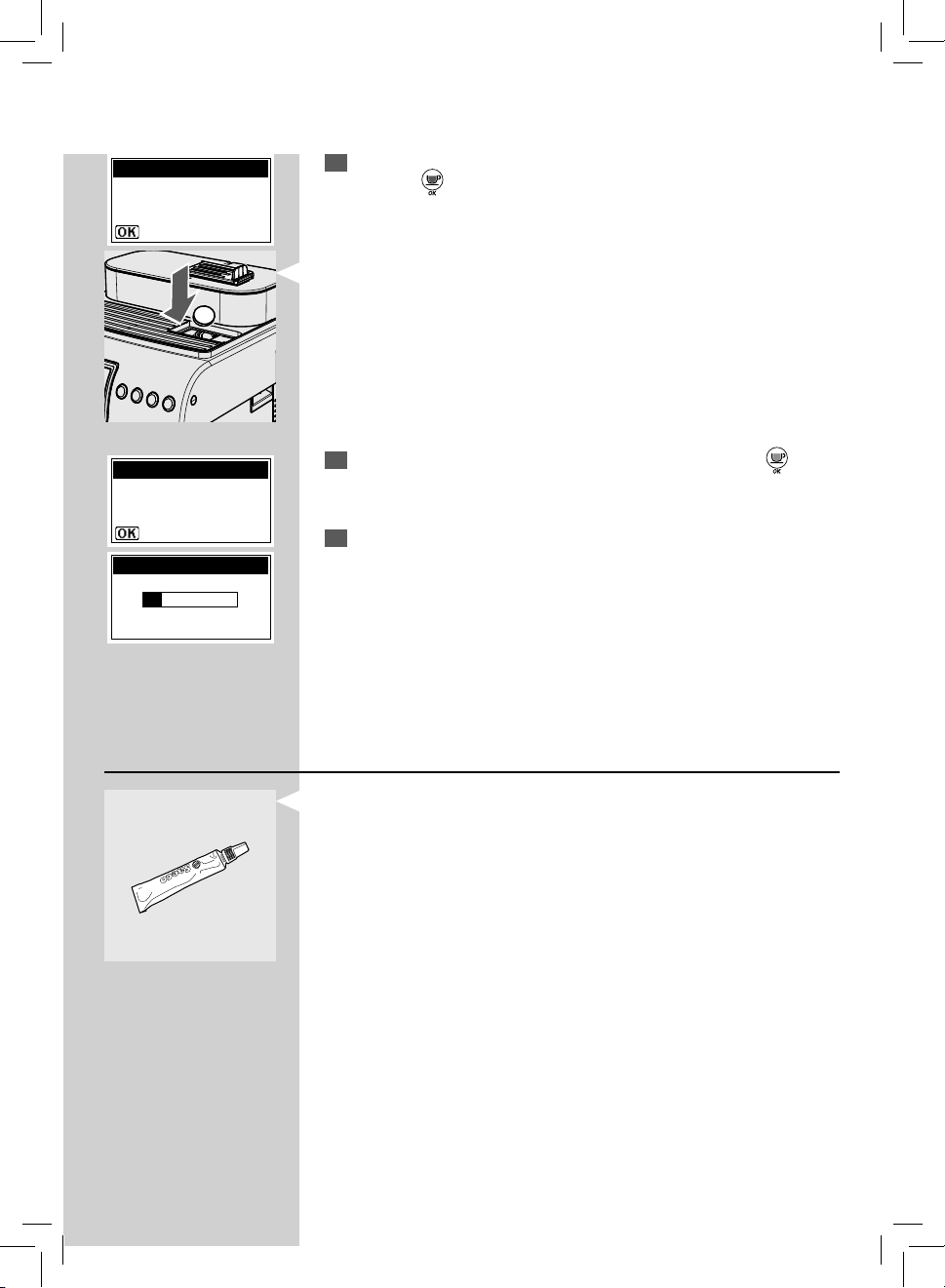
ENGLISH
51
8
Place a container under the dispensing spout and press the “ ” but-
ton to con rm.
9
The machine completes the cycle automatically.
Note: Once the cycle is complete, the machine goes back to its normal operat-
ing mode.
Brew Group Lubrication
Lubricate the Brew Group after approximately 500 cups of co ee or once a
month. The grease to lubricate the Brew Group and the complete "Service
Kit" may be purchased at your local dealer, at the Philips on-line shop at
http://shop.philips.com or at authorised service centres.
Note: To display the number of co ee cups brewed, please refer to the "COUNTERS"
menu in the "BEVERAGE MENU" menu.
Before lubricating the brew group clean it under running water as described in
the chapter “Weekly Cleaning - Brew Group”.
7
Insert the cleaning tablet into the pre-ground co ee compartment and
press the “
” button to con rm.
PLACE A CONTAINER
UNDER THE
DISPENSING SPOUT
BREW GROUP CLEAN
BREW GROUP CLEAN
INSERT GROUP
CLEAN TAB
BREW GROUP CLEAN
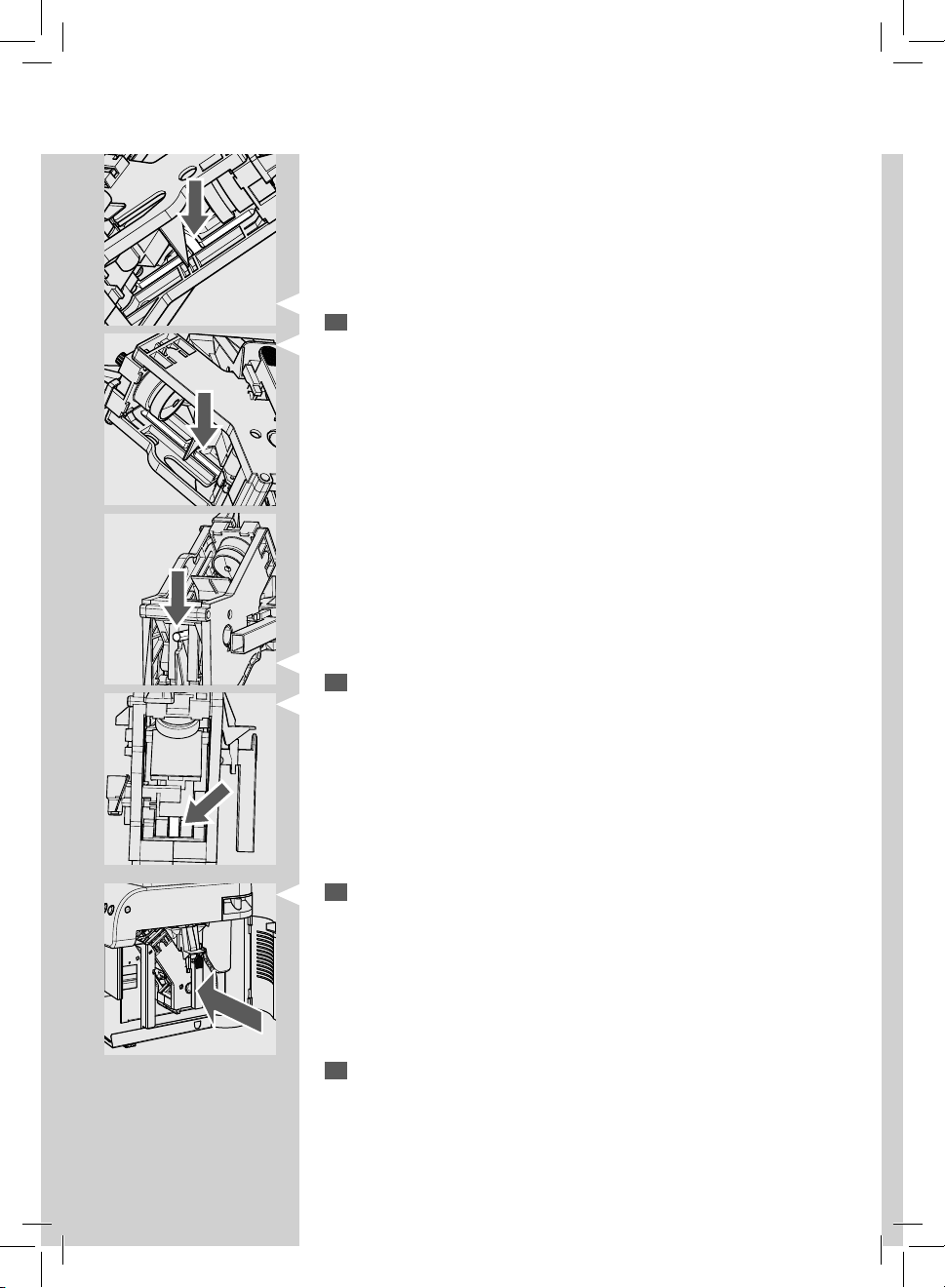
52
ENGLISH
1
Lubricate the brew group guides using the Saeco grease only. Apply
the grease evenly on both side guides.
2
Lubricate also the shaft.
3
Insert the Brew Group in its seat again until it locks into place WITHOUT
pressing the "PRESS" button.
Note: the detailed instructions to prepare the brew group and insert it correctly
in the machine can be found on page 49 (point 7, 8, 9 and 10) of the section
“Weekly Cleaning - Brew Group”.
4
Insert the co ee grounds drawer and the drip tray. Close the service
door.

ENGLISH
53
Descaling
Limescale is a natural part of the water used for the machine operation. It
needs to be removed regularly as it may clog the water and co ee circuit of
your appliance.
This is an easy procedure with your Philips-Saeco machine.
The advanced electronics tells you on the display of the machine (in clear
symbols) when descaling is needed. Just follow the steps described below.
Not doing this will ultimately make your appliance stop working properly,
and in this case repair is not covered under your warranty.
Use the Saeco descaling product only. Its formula has been designed to
ensure better machine performance and operation for its whole operating
life. If correctly used, it also avoids alterations in the brewed product. The
descaling solution and the complete "Maintenance Kit" may be purchased
at your local dealer, at the Philips on-line shop at http://shop.philips.com or
at authorised service centres.
Warning! Never drink the descaling solution or any products dispensed
until the cycle has been carried out to the end. Never use vinegar as a
descaling solution.
1
Turn on the machine by pressing the ON/OFF button. Wait for the
machine to nish its rinse and warm-up process.
Warning! Remove the "Intenza" lter before adding the descaling solution.
2
Press and hold the “ ” button for 5 seconds to access the machine
main menu.
3
Press the “ ” button and the “ ” button to con rm the selection and
enter the “MACHINE MENU”.
4
Press the “ ” button and select the “MAINTENANCE” option; press the
“
” button to enter the menu.
5
Press the “ ” button and select the “DESCALING” option; press the “ ”
button to enter the menu.
MAINTENANCE
BREW GROUP CLEAN
DESCALING
CAPPUCCINATORE CLEANING
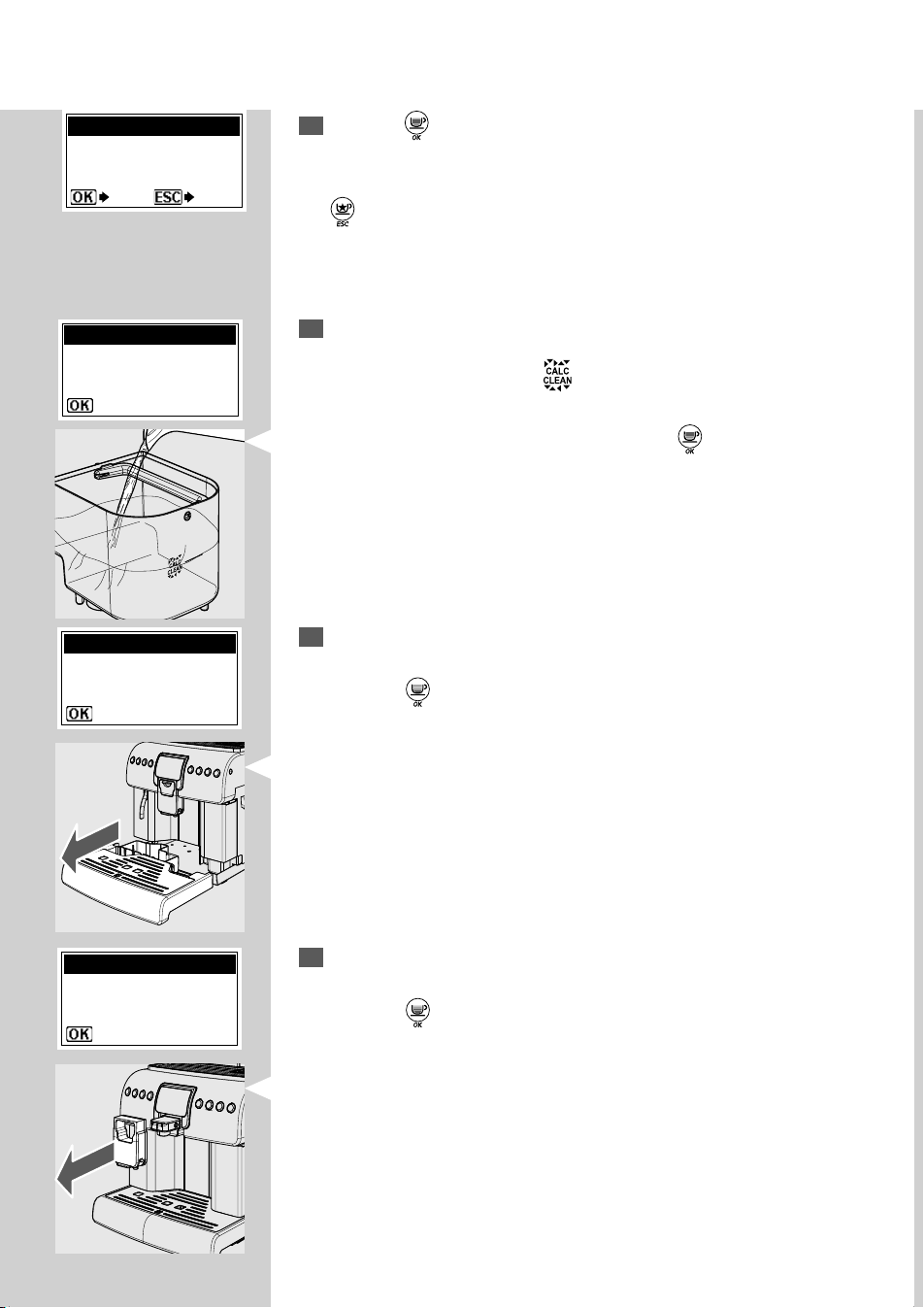
54
ENGLISH
7
Pour the entire content of the Saeco concentrated descaling solution
into the water tank and then ll the tank with fresh drinking water up
to the level indicated by the
icon.
Place the tank back in the machine. Press the "
" button.
9
Insert the complete Cappuccinatore into the machine and remove the
dispensing spout.
Press the " " button.
Note: Keep the suction tube removed from the Cappuccinatore while the
descaling cycle is performed.
6
Press the “ ” button to start the DESCALING cycle.
Note: If this option is con rmed, the rest of the cycle must be completed. Press
the “
” button to exit.
8
Remove any liquids from the drip tray and insert it back into the ma-
chine.
Press the " " button.
START DESCALING?
DESCALING
YES NO
FILL TANK WITH
DESCALING SOLUTION
DESCALING
EMPTY DRIP TRAY
DESCALING
INSERT THE
CAPPUCCINATORE WITH
ALL THE COMPONENTS
DESCALING
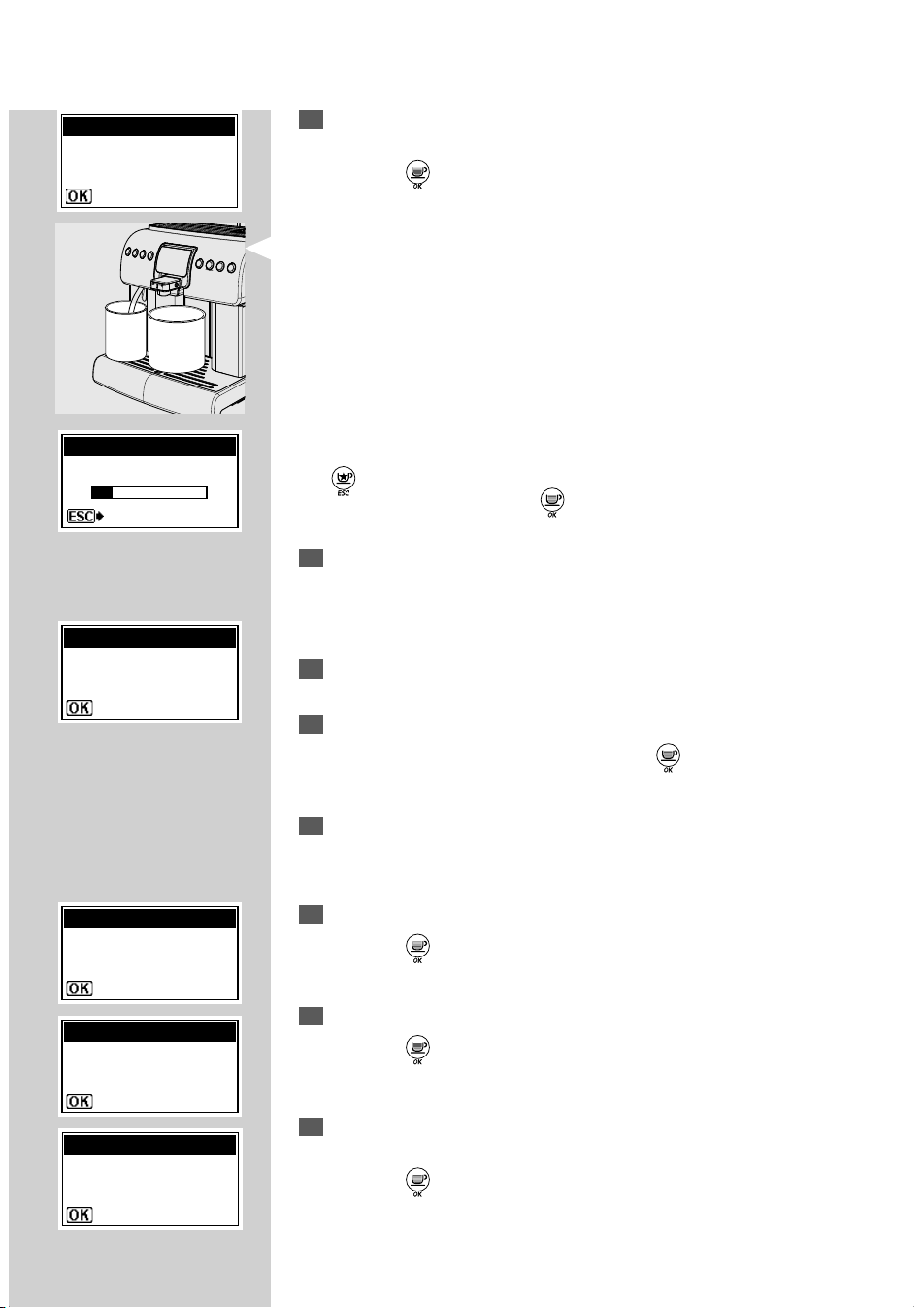
ENGLISH
55
10
Place a container under the hot water wand and a large enough con-
tainer under the Cappuccinatore.
Press the "
" button.
Note: Use a container of at least 1.5 litre capacity.
If you do not have a container of this capacity, pause the cycle by pressing
the “
” button, empty the container, place it back in the machine and
restart the cycle by pressing the “
” button.
11
At this point the machine will start dispensing the descaling solution at
intervals (the bar shows the cycle progress).
12
When the solution in the tank is nished, the machine requests to
empty and rinse the tank with fresh drinking water.
13
Rinse the water tank thoroughly and re ll it with fresh drinking water.
Insert the tank into the machine. Press the “
” button.
14
Empty the containers used to collect the liquid dispensed by the ma-
chine.
15
Remove any liquids from the drip tray and insert it back.
Press the "
" button.
16
Check that the Cappuccinatore is placed in the machine.
Press the "
" button.
17
Place a container under the hot water wand and a large enough con-
tainer under the Cappuccinatore.
Press the " " button.
EMPTY DRIP TRAY
DESCALING
INSERT THE
CAPPUCCINATORE WITH
ALL THE COMPONENTS
DESCALING
PLACE A CONTAINER
UNDER MILK AND HOT
WATER SPOUTS
DESCALING
RINSE TANK &
FILL WITH FRESH WATER
DESCALING
PLACE A CONTAINER
UNDER MILK AND HOT
WATER SPOUTS
DESCALING
STEP 1/2
DESCALING
PAUSE
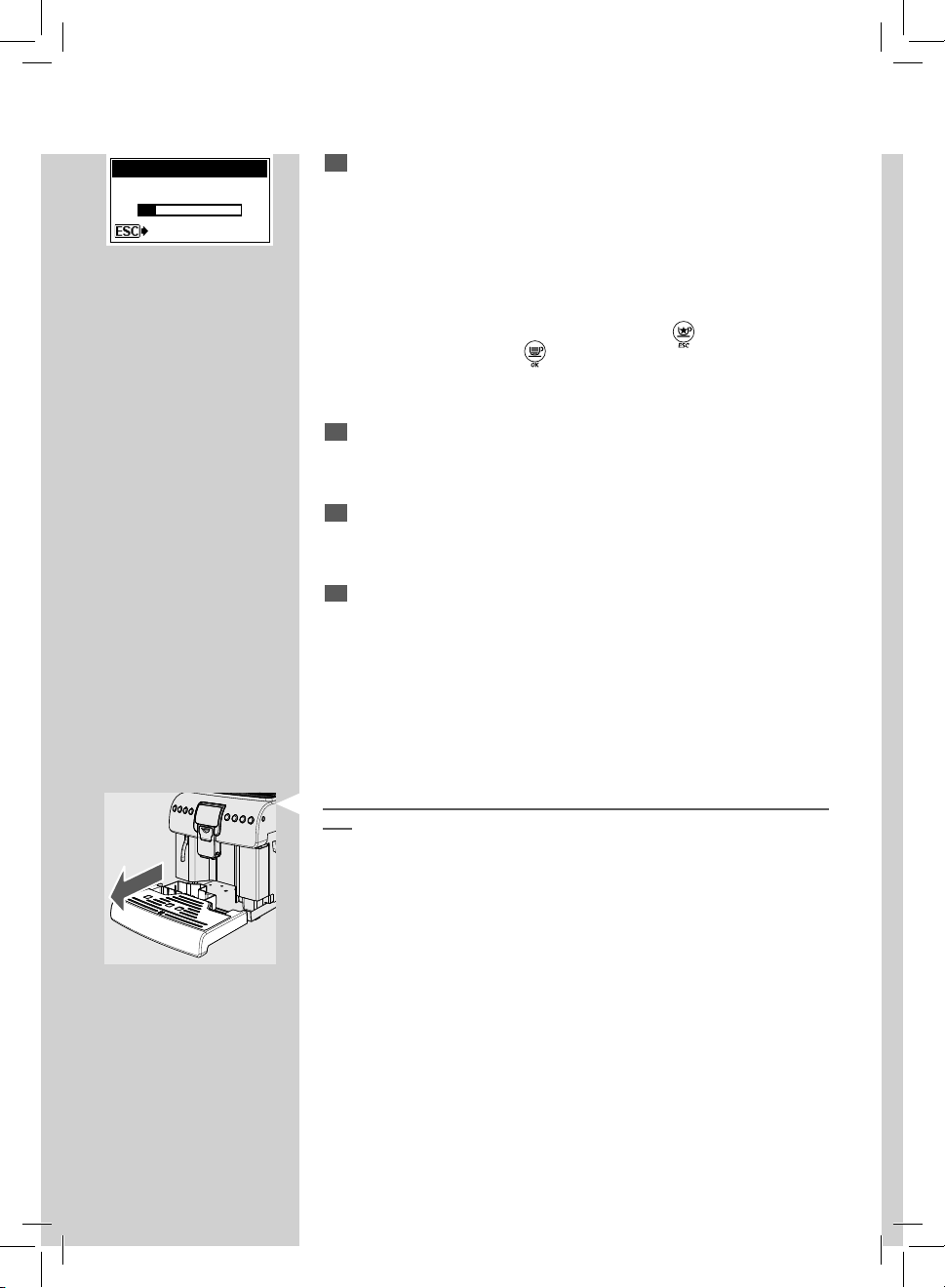
56
ENGLISH
18
The machine performs the rinse cycle.
Note: A default amount of water is needed for the rinse phase. This allows
performing an ideal rinse cycle to ensure the best conditions to brew products.
The message about lling the tank for the rinse cycle is normal, as it is part of
the procedure.
Note: The rinse cycle may be paused by pressing the “
” button.
To resume the cycle, press the “
” button again. This allows you to empty the
container or to go away for a short period of time.
19
Once the rinse cycle is complete, the machine carries out the warm-up
and rinse cycle to prepare for product brewing.
20
Empty the containers used to collect the liquid dispensed by the ma-
chine and reassemble the dispensing spout.
21
The machine is now ready for use.
Note:
- The descaling solution must be disposed of according to the manufac-
turer's instructions and/or regulations in force in the country of use.
- After completing the descaling cycle:
1 Wash the brew group as described in the “Brew Group” section in the
“Cleaning and Maintenance” chapter.
2 Rinse the Cappuccinatore under running water.
When the descaling cycle is complete, we recommend emptying the drip
tray.
STEP 2/2
DESCALING
PAUSE
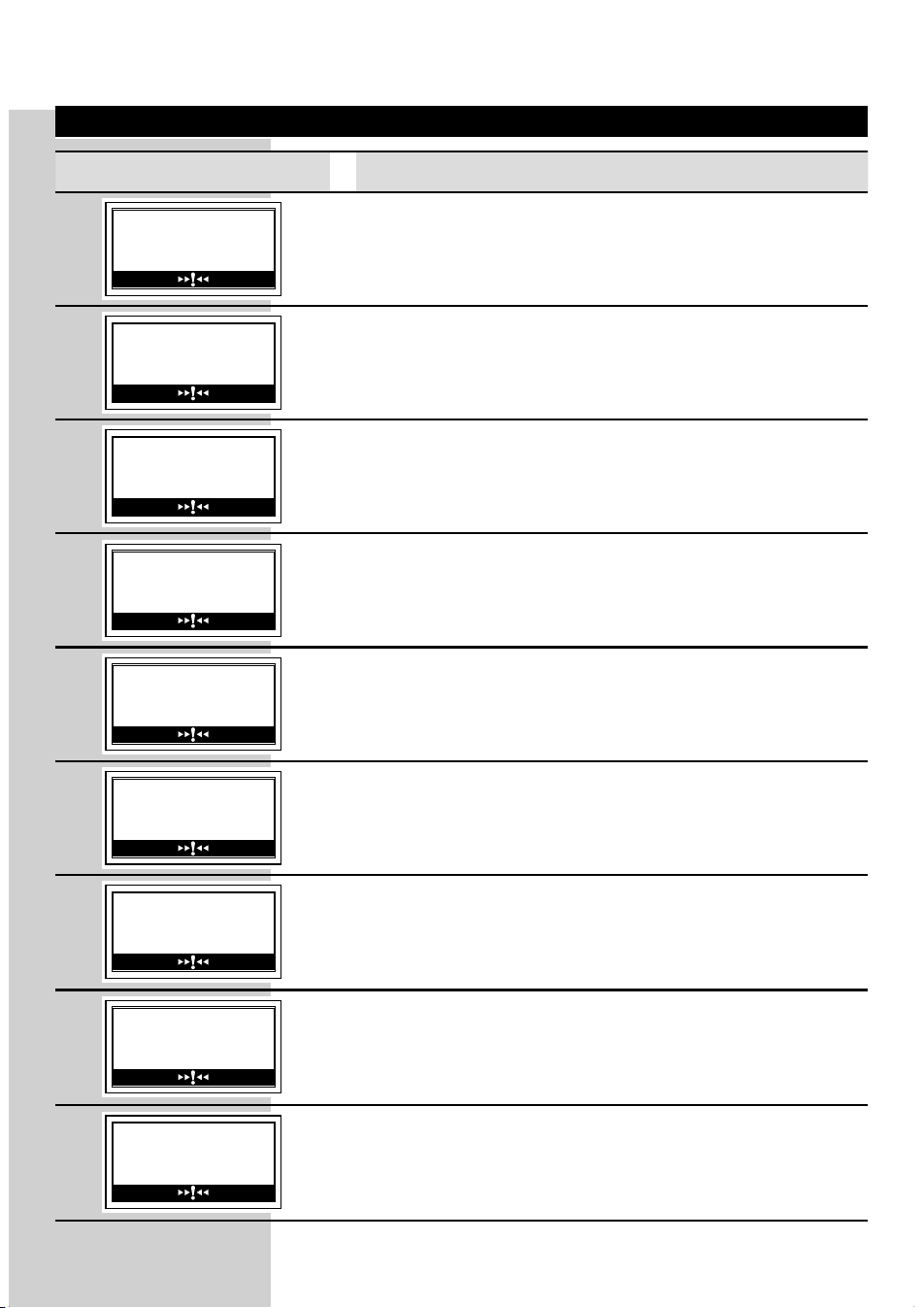
ENGLISH
57
Help Message Displayed How to Reset the Message
CLOSE
SIDE DOOR
To restore the machine operation, close the service door.
INSERT DRIP TRAY
Insert the drip tray.
INSERT COFFEE
GROUNDS DRAWER
Insert the co ee grounds drawer.
CLOSE
HOPPER DOOR
Close or correctly place the co ee bean hopper inner lid to be
able to prepare any product.
REFILL
WATER TANK
Remove the tank and ll it with fresh drinking water.
INSERT BREW GROUP
Insert the Brew Group into its seat.
INSERT
CAPPUCCINATORE
An operation has been selected that requires dispensing milk.
Insert the Cappuccinatore in the machine as speci ed in the
manual.
INSERT VALVE INTO
CAPPUCCINATORE
The selected operation requires milk dispensing. Insert the previ-
ously removed valve in the Cappuccinatore as described in the
manual (see step 12 on page 42).
ADD COFFEE
Fill the co ee bean hopper with co ee beans.
LCD Display Warnings

58
ENGLISH
Help Message Displayed How to Reset the Message
The machine requests a descaling cycle.
When this message is displayed, it is still possible to use the ma-
chine, but its correct operation might be a ected.
Damages caused by failure to descale the machine are not cov-
ered by warranty.
The machine requests the "Intenza" water lter to be replaced
with a new one. Replace the lter as described on page 14.
The alarm is displayed only if the "Enable Filter" function is set to
"ON". (see page 37).
The machine reminds that after a few cycles it will be necessary to
empty the co ee grounds drawer.
This message does not prevent the machine from brewing some
more products.
EMPTY COFFEE
GROUNDS DRAWER
Remove the co ee grounds drawer and empty the co ee
grounds into a suitable container.
Note: The co ee grounds drawer must be emptied only when the
machine asks for it and with the machine turned on. If you empty
the drawer with the machine turned o it will not record the
emptying operation.
Blinking red light. Machine in Stand-by.
The Stand-by settings can be changed (see page 36).
Press the "
" button
RESTART TO SOLVE
An event has occurred which needs the machine to be restarted.
Take note of the code (E xx) shown at the bottom.
Turn o the machine, wait for 30 seconds and then turn it on
again. If the problem persists, contact the service centre.
DESCALING
NEEDED.
DESCALE?
DESCALING
If this page is displayed after starting the machine, this means
that the descaling cycle is needed.
Press the "
" button to enter the descaling menu and refer to
the relevant section.
Press the "
" button to go on using the machine.
We remind you that damage caused by failure to descale the
machine are not covered by warranty.
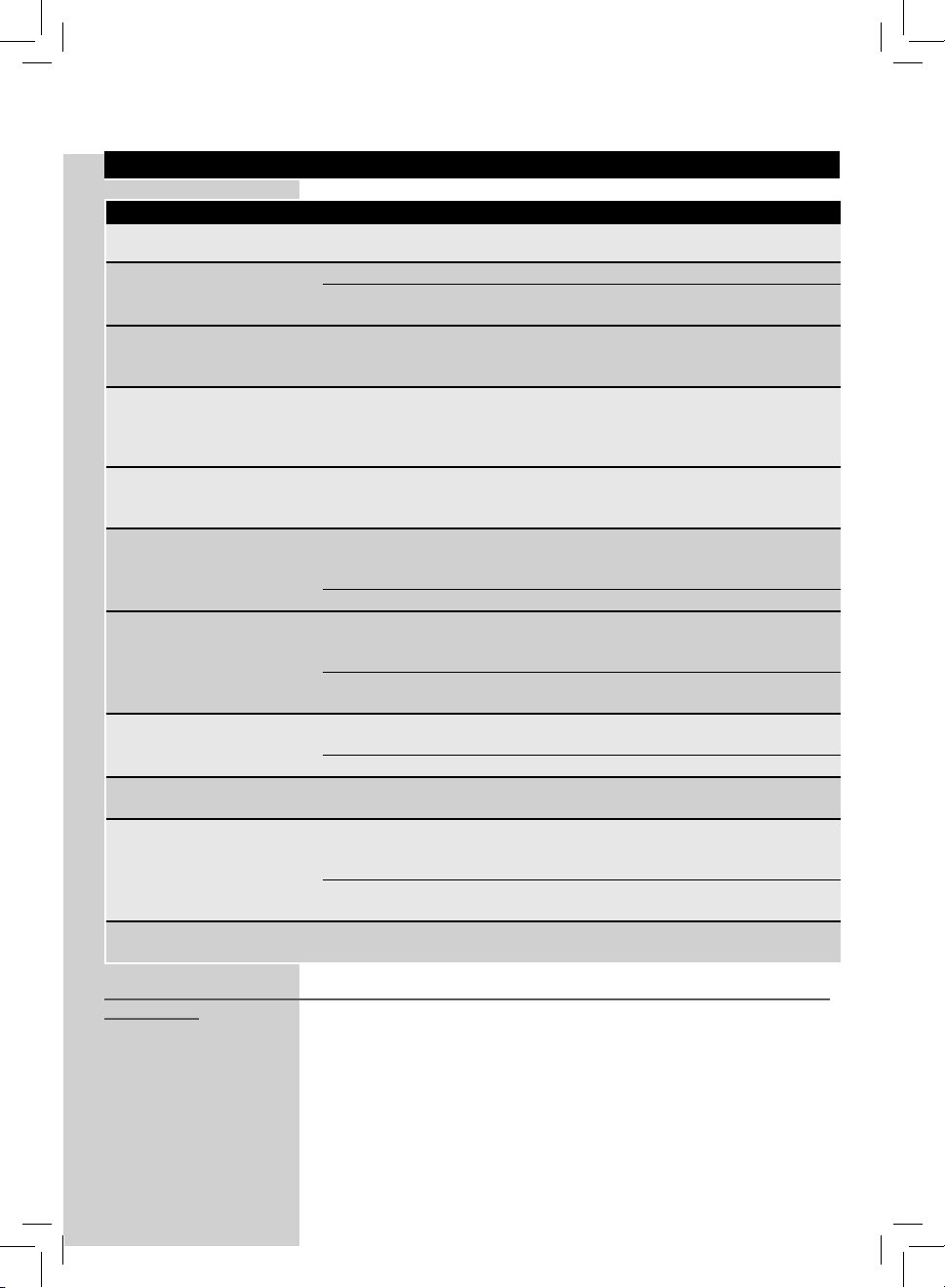
ENGLISH
59
Machine actions Causes Solutions
The machine does not switch on.
The machine is not plugged and/or the
power button is positioned on “0”.
Plug the machine and/or switch the
power button to “I”.
Co ee is not hot enough. The cups are cold. Preheat the cups with hot water.
Cup-warming surface deactivated Activate the cup-warming surface and
wait for the cups to warm.
Co ee has not enough crema.
(See note)
The blend is unsuitable, co ee is not
freshly roasted or the grind is too
coarse.
Change co ee blend or adjust the grind
as explained in section "Adjusting the
Co ee Grinder".
The machine takes a long time to
warm up or the amount of water
dispensed from the wand is too
little.
The machine circuit is clogged by
limescale.
Descale the machine.
Bubbles form at the Cappuccina-
tore spout while dispensing milk.
The tube ttings are not connected
properly or are not completely inserted
in the Cappuccinatore and/or Thermos.
Insert the suction tube completely in the
Cappuccinatore and/or Thermos (if used).
Steam comes out of the Cappuc-
cinatore when the Thermos is
connected and/or when sucking
milk.
There is no milk in the Thermos and/or
container any more.
Check for milk presence. If necessary, ll
in the Thermos again or replace the milk
container with a new one.
Thermos internal tube is not present. Install the tube in the Thermos lid.
The Brew Group cannot be
removed.
The Brew Group is out of place. Turn the machine on. Close the service
door. The brew group automatically
returns to the initial position.
The co ee grounds drawer is inserted. Remove the co ee grounds drawer before
removing the brew group.
The machine grinds the co ee
beans but no co ee comes out.
(See note)
The Brew Group is dirty. Clean the Brew Group ("Brew Group"
section).
The dispensing spout is dirty. Clean the dispensing spout.
Co ee is too weak.
(See note)
Too low dose Adjust the amount of co ee to be ground.
Co ee is brewed slowly.
(See note)
The co ee grind is too ne. Change co ee blend or adjust the grind
as explained in section "Adjusting the
Co ee Grinder".
The Brew Group is dirty. Clean the Brew Group ("Brew Group"
section).
Co ee leaks out of the dispensing
spout.
The dispensing spout is clogged or in
the wrong position.
Clean the dispensing spout and its holes.
Position the dispensing spout correctly.
Note: These problems can be considered normal if the co ee blend has been changed or if the machine has just
been installed.
Please, contact our consumer care help line at the phone number listed at the last page of this document for any
problems not covered in the above table or when the suggested solutions do not solve the problem.
Troubleshooting
Disposal
- The packing materials can be recycled.
- Appliance: Unplug the appliance and cut the power cord.
- Deliver the appliance and power cord to a service center or public waste disposal facility.
This product complies with eu directive 2002/96/ec.
The symbol
on the product or on its packaging indicates that this product may not be treated as
household waste. Instead it shall be handed over to the applicable collection point for the recycling of
electrical and electronic equipment.
By ensuring this product is disposed of correctly, you will help prevent potential negative consequences
for the environment and human health, which could otherwise be caused by inappropriate waste handling
of this product. For more detailed information about recycling of this product, please contact your local
city o ce, your household waste disposal service or the shop where you purchased the product.
Technical Speci cations
The manufacturer reserves the right to make changes to the technical speci cations of the product.
Nominal voltage - Power rating - Power supply . . . . . . . . . . . . . . . . . . . . . . . . . . . . . . . . . . . . . . . . . . . . . . . . . . . . . . . . See label on the inside of the service door
Housing material . . . . . . . . . . . . . . . . . . . . . . . . . . . . . . . . . . . . . . . . . . . . . . . . . . . . . . . . . . . . . . . . . . . . . . . . . . . . . . . . . . . . . . . . . . . Thermoplastic material / Metal
Size (w x h x d) (mm) . . . . . . . . . . . . . . . . . . . . . . . . . . . . . . . . . . . . . . . . . . . . . . . . . . . . . . . . . . . . . . . . . . . . . . . . . . . . . . . . . . . . . . . . . . . . . . . . . . . . 336 x 380 x 450
Weight . . . . . . . . . . . . . . . . . . . . . . . . . . . . . . . . . . . . . . . . . . . . . . . . . . . . . . . . . . . . . . . . . . . . . . . . . . . . . . . . . . . . . . . . . . . . . . . . . . . . . . . . . . . . . . . . . . . . . . . . . 15 kg
Power cord length . . . . . . . . . . . . . . . . . . . . . . . . . . . . . . . . . . . . . . . . . . . . . . . . . . . . . . . . . . . . . . . . . . . . . . . . . . . . . . . . . . . . . . . . . . . . . . . . . . . . . . . . . . . . . . . . 1.2 m
Control panel . . . . . . . . . . . . . . . . . . . . . . . . . . . . . . . . . . . . . . . . . . . . . . . . . . . . . . . . . . . . . . . . . . . . . . . . . . . . . . . . . . . . . . . . . . . . . . . . . . . . . . . . . . . . . . On the front
Cappuccinatore . . . . . . . . . . . . . . . . . . . . . . . . . . . . . . . . . . . . . . . . . . . . . . . . . . . . . . . . . . . . . . . . . . . . . . . . . . . . . . . . . . . . . . . . . . . . . . . . . . . .Special for cappuccino
Water tank . . . . . . . . . . . . . . . . . . . . . . . . . . . . . . . . . . . . . . . . . . . . . . . . . . . . . . . . . . . . . . . . . . . . . . . . . . . . . . . . . . . . . . . . . . . . . . . . . . . .2.2 litres - Removable type
Co ee bean hopper capacity (g) . . . . . . . . . . . . . . . . . . . . . . . . . . . . . . . . . . . . . . . . . . . . . . . . . . . . . . . . . . . . . . . . . . . . . . . . . . . . . . . . . . . . . . . . . . . . . . . . . . . . . .320
Co ee grounds drawer capacity . . . . . . . . . . . . . . . . . . . . . . . . . . . . . . . . . . . . . . . . . . . . . . . . . . . . . . . . . . . . . . . . . . . . . . . . . . . . . . . . . . . . . . . . . . . . . . . . . . . . . . .19
Pump pressure . . . . . . . . . . . . . . . . . . . . . . . . . . . . . . . . . . . . . . . . . . . . . . . . . . . . . . . . . . . . . . . . . . . . . . . . . . . . . . . . . . . . . . . . . . . . . . . . . . . . . . . . . . . . . . . . . . 15 bar
Boiler . . . . . . . . . . . . . . . . . . . . . . . . . . . . . . . . . . . . . . . . . . . . . . . . . . . . . . . . . . . . . . . . . . . . . . . . . . . . . . . . . . . . . . . . . . . . . . . . . . . . . . . . . . . . . . Stainless steel type
Safety devices . . . . . . . . . . . . . . . . . . . . . . . . . . . . . . . . . . . . . . . . . . . . . . . . . . . . . . . . . . . . . . . . . . . . . . . . . . . . . . . . . . . . . . . . . . . . Thermostats/Thermal protectors

62
ENGLISH
Service
We want to ensure that you remain satis ed with your Philips Saeco Es-
presso co ee machine.
If not done already, please register your purchase on "www.philips.com/welcome"
so that we can stay in contact with you and send you cleaning and descaling re-
minders.
For cleaning and descaling operations, use SAECO products only. You can
purchase these products and other spare parts at your local dealer, at an
authorised service centre or at the Philips on-line shop by indicating one of
the following codes:
Descaling solution: CA6700
“Intenza+” lter: CA6702
Co ee Oil Remover: CA6704
Milk circuit cleaning system: CA6705
For cleaning and descaling, use SAECO products only. You can purchase
these on-line at the Philips on-line shop at:
• NL http://shop.philips.nl
• BE http://shop.philips.be
• FR http://shop.philips.fr
• DK http://shop.philips.dk
• DE http://shop.philips.de
• ES http://shop.philips.es or http://tienda.philips.es
• IT http://shop.philips.it
• SE http://shop.philips.se
If you have questions about your appliance, e.g. about its installation, use,
cleaning or descaling, please refer to this user manual or go for the latest
updates to www.philips.com/support.
Alternatively, you may contact our toll free consumer care help line at the
phone number listed on the last page of this document.
Our quali ed service sta will help you and, if needed, trouble shoot your
appliance by phone and where possible provide a solution during the call.
If this is not possible we will help you to initiate any necessary repair in the
shortest possible time and with maximum convenience.

CONSUMER RELATIONS DESKS
For Downloads & FAQs visit our Customer Support Website: www.philips.com/support
Argentina: .....................0800-888-7532 (número gratuito)
Australia: .......................1300 363 391 option 3 (toll free)
Bahrain: ........................+973 17700424
Baltics: .........................
........................................Estonia: 8000100288 (tasuta)
........................................Latvia: 6616 3264 (pašvaldību līmenis)
........................................Lithuania: 8 5 214 0294 (vietinis tarifas)
Belgium: ........................070 700 036 (€ 0,15 p/min)
Brazil: ............................0800 701 0203 (Demais localidades)
........................................(11) 2121 0203 (Grande São Paulo)
Bulgaria: .......................+359 02 4916274 (национални тарифа)
Canada: .........................1-800 371 7597 (local toll free)
Czech Republic: .............228880896 (vnitrostátní sazby)
China: ............................4008 800 008
Croatia: .........................+385 (01) 777 66 02
Denmark: ......................35 44 41 30 (lokal takst)
Germany: ......................0800 000 7520 (für Anrufe aus dem deutschen Festnetz, kostenfrei) –
........................................0180 501 06 71 (für Anrufe aus dem deutschen Mobilfunknetz kostenp ichtig, max. 0,42 €/Min)
España: ..........................902881082 (0,10€ establecimiento de llamada + 0,08€/min)
France: ...........................0157324051 (tarif national)
Greece: ..........................2111983029
Hong Kong: ...................852 2619 9663
Israel: .............................03-6458844
Iran: ..............................+98 21 2227 9353
Ireland: .........................08 18 21 01 41 (National call)
Italy: ..............................02 45279074 (tari a nazionale)
Japan: ...........................813-3-3555-0156
Korea: ...........................080-600 6600 (toll free)
Kuwait: .........................1 80 35 35.
Lebanon: ......................961 1 684900
Luxembourg: ................24871095 (tarif national/nationaler Tarif)
Magyarország: .............(061) 700 8152 (nemzeti mérték)
Malaysia: ......................1800 880 180
Mexico: .........................01800 504 6200 (número gratuito)
Netherlands: .................0900 202 11 77 (€ 0,10/min*)
Norway: ........................22971950 (nasjonale Tari nr.)
Österreich: ...................0800 180 016 (für Anrufe aus dem österreichischen Festnetz, kostenfrei)
........................................0820401132 (für Anrufe aus dem österreichischen Mobilfunknetz kostenp ichtig , Preis variiert je nach Mobilfunkanbieter)
Poland: .........................22 397 15 06 (Stawkę lokalną)
Portugal: ......................707780226 (0,12€ (0,30€ móvel))
Romania: ......................031 6300043 (accesibil din orice reţea, cu tarif local)
Russia/Россия: .............+7 495 961-1111 (без выходных) - 8 800 200-0880 (без выходных, звонок бесплатный, в т.ч. с мобильных телефонов)
Singapore: ....................+65 68823999
Slovenija: ......................01 888 83 13 (nacionalnih tarif)
Slovenská republika: ..2 332 155 70 (vnútroštátne tarifa)
Suomi: ...........................09 88 62 50 41 (kansallisten kutsu)
South Africa: ................021-425 6169
Sverige: .........................0857929067 (nationella samtal)
Switzerland: .................0800 002 050 (für Anrufe aus dem schweizer Festnetz, kostenfrei) +
........................................0848 000 292 (für Anrufe aus dem schweizer Mobilfunknetz kostenp ichtig , Preis variiert je nach Mobilfunkanbieter)
Ukraine: ........................0-800-500-697 (усі дзвінки з стаціонарних телефонів в межах України безкоштовні)
United Arab Emirates (Dubai): +971 4 2310300
United Kingdom: .........0844 338 04 89 (0,05GBP/minute)
USA: ..............................1-800-933-7876 (toll free)
Taiwan: .........................0800 231099
Thailand: ......................+6626528652
The manufacturer reserves the right to make changes without prior notice.
Rev.06 del 15-07-12
www.philips.com/saeco
EN
02
02

