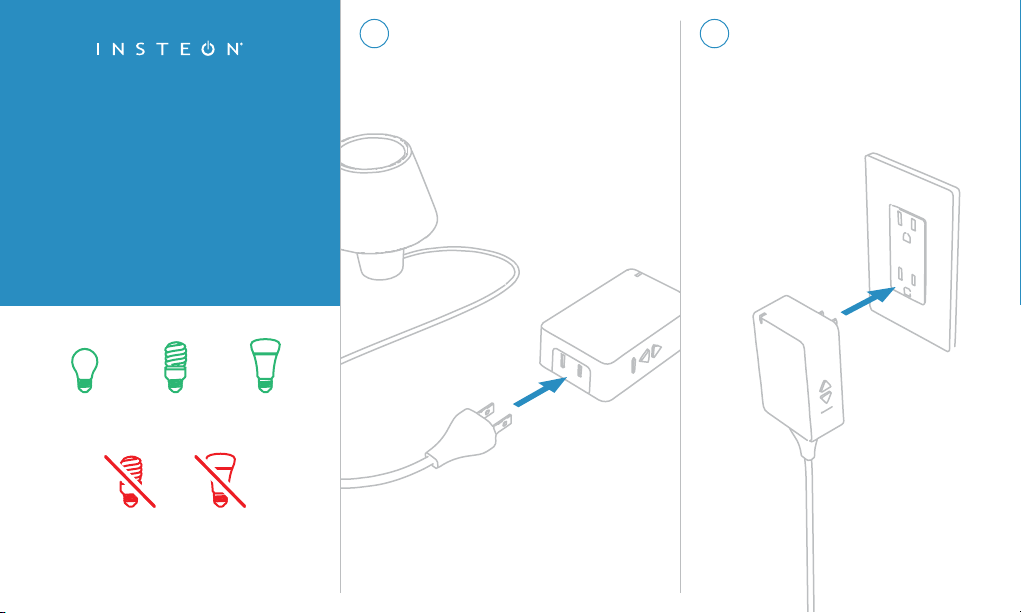
Turn on your lamp and connect it’s
power cord to Dimmer Module.
1
Only connect lamps with dimmable
bulbs to Dimmer Module.
Getting Started with
Insteon Dimmer Module
Plug Dimmer Module into a
power outlet.
2
Dimmable
CFL
CFL
Incandescent
& Halogen
Dimmable
LED
LED

For more documentation, visit:
insteon.com/get-started-2457d2
The Insteon app requires Insteon Hub.
Learn more at: insteon.com/hub
Follow the on-screen
instructions in the Insteon app
to add Dimmer Module.
3
When prompted, press and
hold the set button until
Dimmer Module beeps.
4
Rev 8.1.16
Go further and create schedules
to turn your lights on and off at
specific times.
insteon.com/schedules
Go further and control
multiple devices simultaneously
with scenes.
insteon.com/scenes