

en
3
Table of contents
[en]Instruction manual
8 Intended use . . . . . . . . . . . . . . . . . . . . . . . . . . . . . 4
( Important safety information . . . . . . . . . . . . . . . 4
General information . . . . . . . . . . . . . . . . . . . . . . . . . . . 4
Halogen lamp. . . . . . . . . . . . . . . . . . . . . . . . . . . . . . . . 5
Cleaning function . . . . . . . . . . . . . . . . . . . . . . . . . . . . . 5
] Causes of damage . . . . . . . . . . . . . . . . . . . . . . . . 6
General information . . . . . . . . . . . . . . . . . . . . . . . . . . . 6
7 Environmental protection . . . . . . . . . . . . . . . . . . 6
Saving energy . . . . . . . . . . . . . . . . . . . . . . . . . . . . . . . 6
Environmentally-friendly disposal . . . . . . . . . . . . . . . . . 6
* Getting to know your appliance . . . . . . . . . . . . . 7
Control panel . . . . . . . . . . . . . . . . . . . . . . . . . . . . . . . . 7
Controls . . . . . . . . . . . . . . . . . . . . . . . . . . . . . . . . . . . . 7
Display . . . . . . . . . . . . . . . . . . . . . . . . . . . . . . . . . . . . . 8
Operating modes . . . . . . . . . . . . . . . . . . . . . . . . . . . . . 8
Types of heating. . . . . . . . . . . . . . . . . . . . . . . . . . . . . . 9
Further information . . . . . . . . . . . . . . . . . . . . . . . . . . . 10
Cooking compartment functions . . . . . . . . . . . . . . . . 10
_ Accessories . . . . . . . . . . . . . . . . . . . . . . . . . . . . 10
Accessories included . . . . . . . . . . . . . . . . . . . . . . . . . 10
Inserting accessories . . . . . . . . . . . . . . . . . . . . . . . . . 10
Optional accessories . . . . . . . . . . . . . . . . . . . . . . . . . 11
K Before using for the first time. . . . . . . . . . . . . . 12
Initial use . . . . . . . . . . . . . . . . . . . . . . . . . . . . . . . . . . 12
Cleaning the cooking compartment and accessories 12
1 Operating the appliance . . . . . . . . . . . . . . . . . . 13
Switching the appliance on and off . . . . . . . . . . . . . . 13
Starting the operation. . . . . . . . . . . . . . . . . . . . . . . . . 13
Selecting an operating mode . . . . . . . . . . . . . . . . . . . 14
Setting the type of heating and temperature . . . . . . . 14
Rapid heating. . . . . . . . . . . . . . . . . . . . . . . . . . . . . . . 15
O Time-setting options . . . . . . . . . . . . . . . . . . . . . 15
Setting the cooking time . . . . . . . . . . . . . . . . . . . . . . 15
Setting the end time . . . . . . . . . . . . . . . . . . . . . . . . . . 16
Setting the timer . . . . . . . . . . . . . . . . . . . . . . . . . . . . . 17
A Childproof lock. . . . . . . . . . . . . . . . . . . . . . . . . . 17
Activating and deactivating . . . . . . . . . . . . . . . . . . . . 17
Q Basic settings. . . . . . . . . . . . . . . . . . . . . . . . . . . 18
Changing the basic settings . . . . . . . . . . . . . . . . . . . 18
List of basic settings . . . . . . . . . . . . . . . . . . . . . . . . . 18
Power cut . . . . . . . . . . . . . . . . . . . . . . . . . . . . . . . . . . 18
Changing the time . . . . . . . . . . . . . . . . . . . . . . . . . . . 18
F Sabbath mode . . . . . . . . . . . . . . . . . . . . . . . . . . 19
Starting Sabbath mode . . . . . . . . . . . . . . . . . . . . . . . 19
D Cleaning agent . . . . . . . . . . . . . . . . . . . . . . . . . . 19
Suitable cleaning agents . . . . . . . . . . . . . . . . . . . . . .19
Surfaces in the cooking compartment . . . . . . . . . . . .20
Keeping the appliance clean . . . . . . . . . . . . . . . . . . .20
. Cleaning function. . . . . . . . . . . . . . . . . . . . . . . . 21
Prior to initiating the cleaning function . . . . . . . . . . . .21
Setting the cleaning function . . . . . . . . . . . . . . . . . . .21
Once the cleaning function has ended . . . . . . . . . . . .21
p Rails. . . . . . . . . . . . . . . . . . . . . . . . . . . . . . . . . . . 22
Detaching and refitting the rails . . . . . . . . . . . . . . . . .22
q Appliance door . . . . . . . . . . . . . . . . . . . . . . . . . . 23
Removing and fitting the appliance door . . . . . . . . . .23
Removing the door cover . . . . . . . . . . . . . . . . . . . . . .23
Removing and installing the door panels . . . . . . . . . .24
3 Trouble shooting . . . . . . . . . . . . . . . . . . . . . . . . 25
Rectifying faults yourself . . . . . . . . . . . . . . . . . . . . . . .25
Maximum operating time . . . . . . . . . . . . . . . . . . . . . .25
Replacing the bulb in the top of the cooking
compartment . . . . . . . . . . . . . . . . . . . . . . . . . . . . . . .26
Glass cover . . . . . . . . . . . . . . . . . . . . . . . . . . . . . . . .26
4 Customer service . . . . . . . . . . . . . . . . . . . . . . . . 26
E number and FD number . . . . . . . . . . . . . . . . . . . . .26
P Dishes . . . . . . . . . . . . . . . . . . . . . . . . . . . . . . . . . 27
Information about the programs . . . . . . . . . . . . . . . . .27
Cooking a dish with AutoPilot. . . . . . . . . . . . . . . . . . .27
J Tested for you in our cooking studio . . . . . . . . 28
Silicone moulds . . . . . . . . . . . . . . . . . . . . . . . . . . . . .28
Baking . . . . . . . . . . . . . . . . . . . . . . . . . . . . . . . . . . . .28
Roasting and braising. . . . . . . . . . . . . . . . . . . . . . . . .30
Grilling . . . . . . . . . . . . . . . . . . . . . . . . . . . . . . . . . . . .33
Convenience products . . . . . . . . . . . . . . . . . . . . . . . .36
Yogurt. . . . . . . . . . . . . . . . . . . . . . . . . . . . . . . . . . . . .37
Save energy with Eco heating types. . . . . . . . . . . . . .37
Acrylamide in foodstuffs . . . . . . . . . . . . . . . . . . . . . . .38
Slow cook. . . . . . . . . . . . . . . . . . . . . . . . . . . . . . . . . .39
Drying . . . . . . . . . . . . . . . . . . . . . . . . . . . . . . . . . . . . .40
Preserving . . . . . . . . . . . . . . . . . . . . . . . . . . . . . . . . .40
Proving dough . . . . . . . . . . . . . . . . . . . . . . . . . . . . . .41
Defrosting . . . . . . . . . . . . . . . . . . . . . . . . . . . . . . . . . .42
Keeping warm . . . . . . . . . . . . . . . . . . . . . . . . . . . . . .42
Test dishes . . . . . . . . . . . . . . . . . . . . . . . . . . . . . . . . .43
Produktinfo
Additional information on products, accessories,
replacement parts and services can be found at
www.bosch-home.com and in the online shop
www.bosch-eshop.com

en Intended use
4
8Intended use
Intended use
Read these instructions carefully. Only then
will you be able to operate your appliance
safely and correctly. Retain the instruction
manual and installation instructions for future
use or for subsequent owners.
This appliance is only intended to be fully fitted
in a kitchen. Observe the special installation
instructions.
Check the appliance for damage after
unpacking it. Do not connect the appliance if it
has been damaged in transport.
Only a licensed professional may connect
appliances without plugs. Damage caused by
incorrect connection is not covered under
warranty.
This appliance is intended for domestic use
only. The appliance must only be used for the
preparation of food and drink. The appliance
must be supervised during operation. Only
use this appliance indoors.
This appliance may be used by children over
the age of 8 years old and by persons with
reduced physical, sensory or mental
capabilities or by persons with a lack of
experience or knowledge if they are
supervised or are instructed by a person
responsible for their safety how to use the
appliance safely and have understood the
associated hazards.
Children must not play with, on, or around the
appliance. Children must not clean the
appliance or carry out general maintenance
unless they are at least 8 years old and are
being supervised.
Keep children below the age of 8 years old at
a safe distance from the appliance and power
cable.
Always slide accessories into the cooking
compartment the right way round.
~ "Accessories" on page 10
(Important safety
information
Important safety information
General information
:Warning – Risk of fire!
■ Combustible items stored in the cooking
compartment may catch fire. Never store
combustible items in the cooking
compartment. Never open the appliance
door if there is smoke inside. Switch off the
appliance and unplug it from the mains or
switch off the circuit breaker in the fuse box.
Risk of fire!
■ A draught is created when the appliance
door is opened. Greaseproof paper may
come into contact with the heating element
and catch fire. Do not place greaseproof
paper loosely over accessories during
preheating. Always weight down the
greaseproof paper with a dish or a baking
tin. Only cover the surface required with
greaseproof paper. Greaseproof paper
must not protrude over the accessories.
:Warning – Risk of burns!
■ The appliance becomes very hot. Never
touch the interior surfaces of the cooking
compartment or the heating elements.
Always allow the appliance to cool down.
Keep children at a safe distance.
Risk of serious burns!
■ Accessories and ovenware become very
hot. Always use oven gloves to remove
accessories or ovenware from the cooking
compartment.
Risk of burns!
■ Alcoholic vapours may catch fire in the hot
cooking compartment. Never prepare food
containing large quantities of drinks with a
high alcohol content. Only use small
quantities of drinks with a high alcohol
content. Open the appliance door with care.
:Warning – Risk of scalding!
■ The accessible parts become hot during
operation. Never touch the hot parts. Keep
children at a safe distance.
Risk of scalding!
■ When you open the appliance door, hot
steam can escape. Steam may not be
visible, depending on its temperature. When
opening, do not stand too close to the
appliance. Open the appliance door
carefully. Keep children away.
Risk of scalding!
■ Water in a hot cooking compartment may
create hot steam. Never pour water into the
hot cooking compartment.

Important safety information en
5
:Warning – Risk of injury!
■ Scratched glass in the appliance door may
develop into a crack. Do not use a glass
scraper, sharp or abrasive cleaning aids or
detergents.
Risk of injury!
■ The hinges on the appliance door move
when opening and closing the door, and
you may be trapped. Keep your hands away
from the hinges.
:Warning – Risk of electric shock!
■ Incorrect repairs are dangerous. Repairs
may only be carried out and damaged
power cables replaced by one of our
trained after-sales technicians. If the
appliance is defective, unplug the appliance
from the mains or switch off the circuit
breaker in the fuse box. Contact the after-
sales service.
Risk of electric shock and serious injury!
■ The cable insulation on electrical
appliances may melt when touching hot
parts of the appliance. Never bring
electrical appliance cables into contact with
hot parts of the appliance.
Risk of electric shock!
■ Do not use any high-pressure cleaners or
steam cleaners, which can result in an
electric shock.
Risk of electric shock!
■ A defective appliance may cause electric
shock. Never switch on a defective
appliance. Unplug the appliance from the
mains or switch off the circuit breaker in the
fuse box. Contact the after-sales service.
:Warning – Hazard due to magnetism!
Permanent magnets are used in the control
panel or in the control elements. They may
affect electronic implants, e.g. heart
pacemakers or insulin pumps. Wearers of
electronic implants must stay at least 10 cm
away from the control panel.
Halogen lamp
:Warning – Risk of electric shock!
When replacing the cooking compartment
bulb, the bulb socket contacts are live. Before
replacing the bulb, unplug the appliance from
the mains or switch off the circuit breaker in
the fuse box.
Cleaning function
:Warning – Risk of burns!
; The appliance will become very hot on the
outside during the cleaning function. Never
touch the appliance door. Allow the appliance
to cool down. Keep children away from the
appliance.

en Causes of damage
6
]Causes of damage
Causes of damage
General information
Caution!
■ Accessories, foil, greaseproof paper or ovenware on
the cooking compartment floor: do not place
accessories on the cooking compartment floor. Do
not cover the cooking compartment floor with any
sort of foil or greaseproof paper. Do not place
ovenware on the cooking compartment floor if a
temperature of over 50 ºC has been set. This will
cause heat to accumulate. The baking and roasting
times will no longer be correct and the enamel will
be damaged.
■ Aluminium foil: Aluminium foil in the cooking
compartment must not come into contact with the
door glass. This could cause permanent
discolouration of the door glass.
■ Water in a hot cooking compartment: do not pour
water into the cooking compartment when it is hot.
This will cause steam. The temperature change can
cause damage to the enamel.
■ Moisture in the cooking compartment: Over an
extended period of time, moisture in the cooking
compartment may lead to corrosion. Allow the
cooking compartment to dry after use. Do not keep
moist food in the closed cooking compartment for
extended periods of time. Do not store food in the
cooking compartment.
■ Cooling with the appliance door open: Following
operation at high temperatures, only allow the
cooking compartment to cool down with the door
closed. Do not trap anything in the appliance door.
Even if the door is only left open a crack, the front of
nearby furniture may become damaged over time.
Only leave the cooking compartment to dry with the
door open if a lot of moisture was produced whilst
the oven was operating.
■ Fruit juice: when baking particularly juicy fruit pies,
do not pack the baking tray too generously. Fruit
juice dripping from the baking tray leaves stains that
cannot be removed. If possible, use the deeper
universal pan.
■ Extremely dirty seal: If the seal is very dirty, the
appliance door will no longer close properly during
operation. The fronts of adjacent units could be
damaged. Always keep the seal clean.
■ Appliance door as a seat, shelf or worktop: Do not
sit on the appliance door, or place or hang anything
on it. Do not place any cookware or accessories on
the appliance door.
■ Inserting accessories: depending on the appliance
model, accessories can scratch the door panel
when closing the appliance door. Always insert the
accessories into the cooking compartment as far as
they will go.
■ Carrying the appliance: do not carry or hold the
appliance by the door handle. The door handle
cannot support the weight of the appliance and
could break.
7Environmental protection
Environmental protection
Your new appliance is particularly energy-efficient. Here
you can find tips on how to save even more energy
when using the appliance, and how to dispose of your
appliance properly.
Saving energy
■ Only preheat the appliance if this is specified in the
recipe or in the tables in the operating instructions.
■ Use dark, black lacquered or enamelled baking tins.
They absorb heat particularly well.
■ Open the appliance door as infrequently as possible
during operation.
■ It is best to bake several cakes one after the other.
The cooking compartment is still warm. This reduces
the baking time for the second cake. You can place
two cake tins next to each other in the cooking
compartment.
■ For longer cooking times, you can switch the
appliance off 10 minutes before the end of the
cooking time and use the residual heat to finish
cooking.
Environmentally-friendly disposal
Dispose of packaging in an environmentally-friendly
manner.
This appliance is labelled in accordance with
European Directive 2012/19/EU concerning
used electrical and electronic appliances
(waste electrical and electronic equipment -
WEEE). The guideline determines the
framework for the return and recycling of used
appliances as applicable throughout the EU.
Getting to know your appliance en
7
*Getting to know your
appliance
Getting to know your appliance
In this chapter, we will explain the displays and controls.
You will also find out about the various functions of your
appliance.
Note: Depending on the appliance model, individual
details and colours may differ.
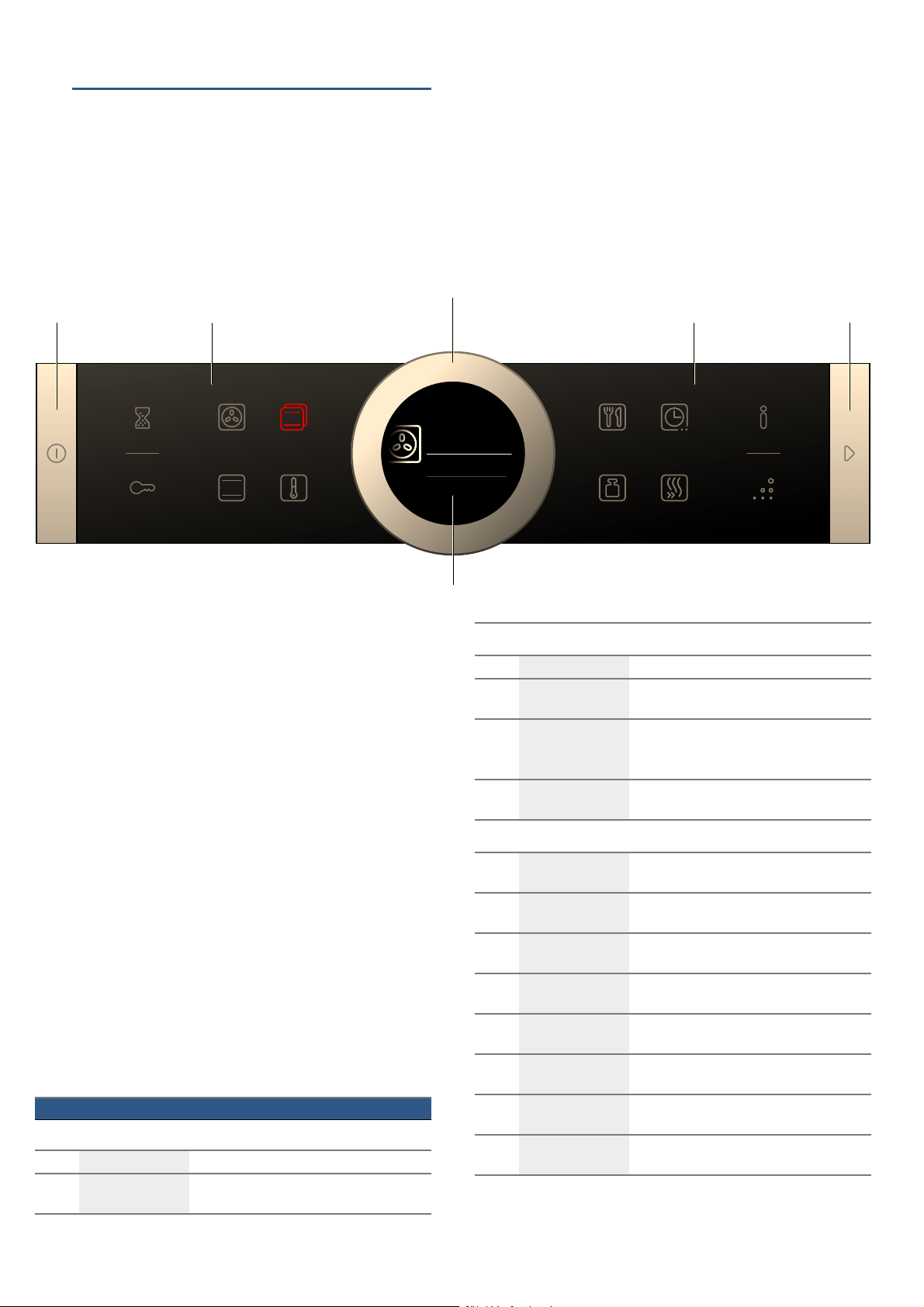
Control panel
In the control panel, you can use the various buttons,
touch fields and the rotary selector to set the different
appliance functions. The current settings are shown on
the display.
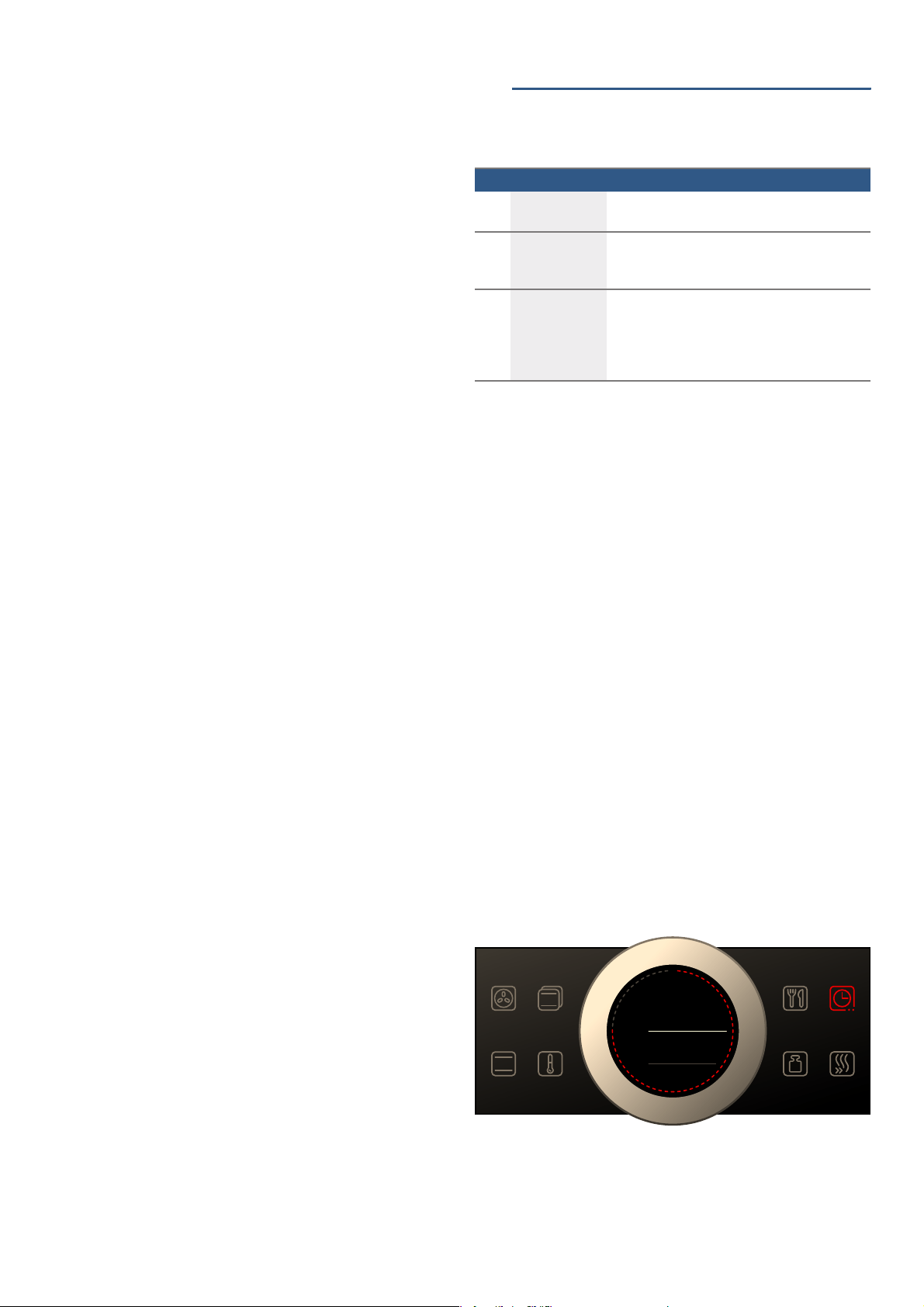
The overview shows the control panel when the
appliance is switched on with a selected heating type.
Controls
The individual controls are adapted for the various
functions of your appliance. You can set your appliance
simply and directly.
Buttons and touch fields
Here you can find a short explanation of the various
buttons and touch fields.
--------
'KRWDLU
PV
PV
RQ
RII
VWDUW
VWRS
'
KRWDLU
a
&
#
( Buttons
The buttons on the left- and right-hand side of the
control panel have a pressure point. Press these
buttons to activate them.
For appliances that do not have a stainless steel
front, these two button touch fields do not have a
pressure point.
0 Touch fields
There are sensors under the touch fields. Simply
touch the respective symbol to select the function.
8 Rotary selector
The rotary selector is fitted so that you can turn it
indefinitely to the left or right. Press it lightly and
move it in the direction required using your finger.
@ Display
You can see the current adjustment values,
options or notes in the display.
Symbol Meaning
Buttons
ÿ on/off Switching the appliance on and off
l Start/Stop Starting, pausing or cancelling (hold down
for approx. 3 secs) an operation
External touch fields
t Timer Selects the timer
D Childproof lock Activating and deactivating (hold down for
approx. 4 secs) the childproof lock
° Information Display notes
Hold down (approx. 3 secs) to call up the
basic settings
u EcoClean Direct Selects the "cleaning function" operating
mode
Internal touch fields
< 4D hot air Selects the "4D hot air" heating type
directly
% Top/bottom heat-
ing
Selects the "Top/bottom heating" heating
type directly
! Heating types Selects the "heating types" operating
mode
} Temperature Selects the temperature in the cooking
compartment
% AutoCook Selects the operating mode for dishes
with cooking programmes
a Weight Selects the weight for the operating mode
for dishes
s Time-setting
options
Select time-setting options
F Rapid heating Starts or cancels Rapid heating for the
cooking compartment
en Getting to know your appliance
8
The touch field, which has a value on the display that
can be changed or displayed in the foreground, lights
up red.
Rotary selector
You can use the rotary selector to change the
adjustment values shown on the display.
In most selection lists, such as the temperature, you
have to turn the rotary selector back the other way if
you reach the minimum or maximum value. However,
for the heating types for example, the first selection
follows the last.
Display
The display is structured so that the information can be
read at a glance in any situation.
The value that you can currently set is in focus. It is
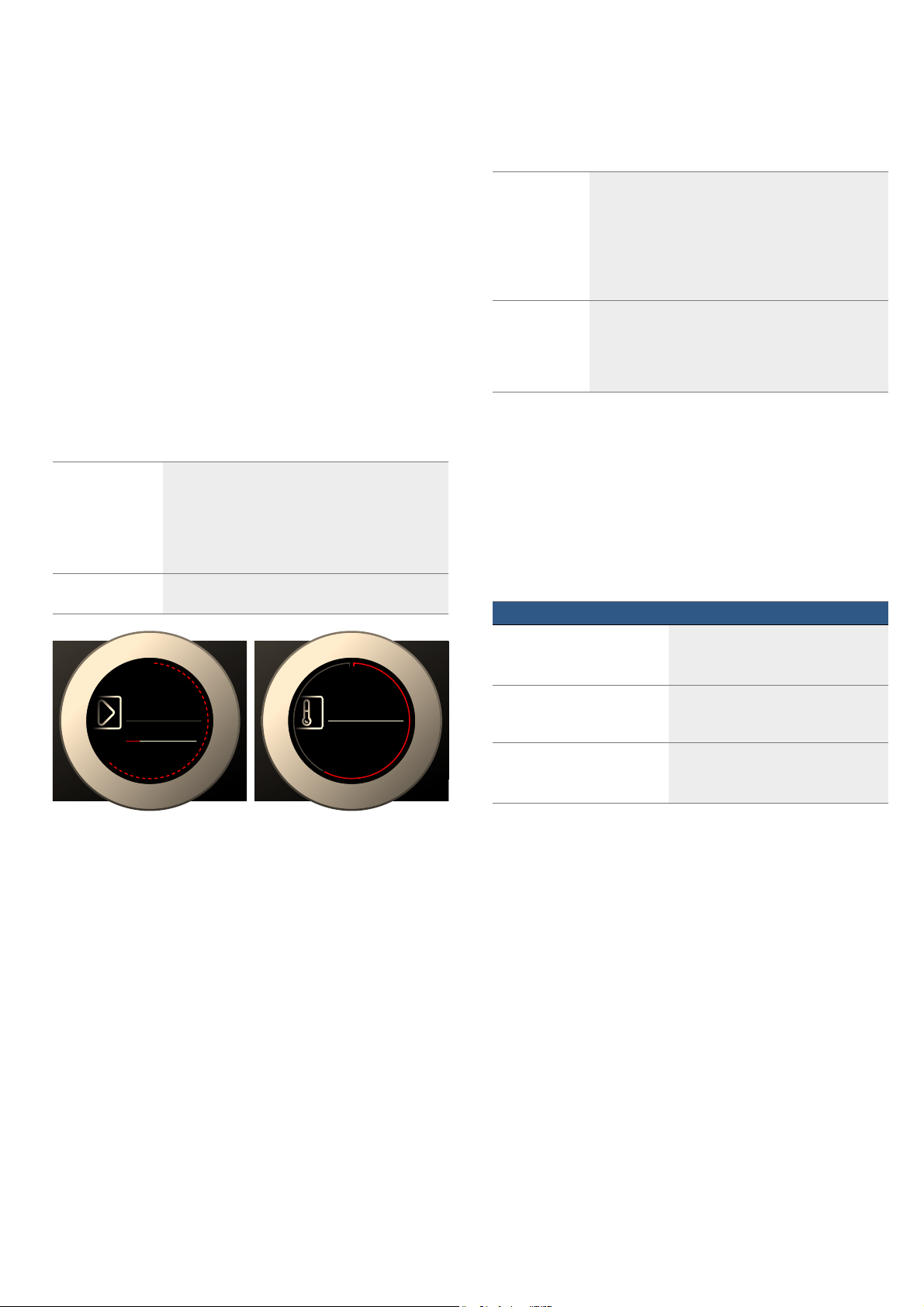
displayed in white lettering and underlined in white. The
value in the background is displayed in grey.
Display ring
The display ring can be found around the outside of the
display.
If you change a value, the display ring shows you where
you are in the selection list. Depending on the settings
area and length of the selection list, the display ring
may be continuous or divided into segments.
During operation, the display ring turns red at second-
long intervals. After every full minute, the segments turn
red again from the beginning. As the cooking time
counts down, one segment disappears every second.
Temperature display
After the operation has started, the current cooking
compartment temperature is displayed graphically on
the display.
Note: Due to thermal inertia, the temperature displayed
may be slightly different to the actual temperature inside
the oven.
Operating modes
Your appliance has various operating modes which
make your appliance easier to use.
You can find more precise descriptions of these in the
corresponding sections.
--------
Focus The value in focus can be changed directly with-
out first being selected.
After starting an operation, either the temperature
or the level is always in focus. At the same time,
the white line is the heating line and gradually
turns red.
Enlargement As you change the value in focus using the rotary
selector, only this value is displayed larger.
7\SHVRIKHDWLQJ
_
7H[W
7H[W
7HPSHUDWXUH
&
_
7H[W
7H[W
+HL]DUWHQ
P
V
a
&
Heating line The white line under the temperature turns red from
left to right as the cooking compartment heats up.
When you are preheating the appliance, the optimal
time to place the food in the cooking compartment
is when the line has completely turned red.
For set levels, e.g. the grill setting, the heating line
turns red immediately.
Residual heat
indicator
When the appliance is switched off, the display ring
shows the residual heat in the cooking compart-
ment. As the residual heat cools down, the display
ring becomes darker and disappears completely at
some point.
Operating mode Use
Heating types
~ "Operating the appliance"
on page 13
There are various finely tuned heating
types for the optimal preparation of
your food.
AutoCook
~ "Dishes" on page 27
There are preprogrammed setting val-
ues which are suitable for many
dishes.
EcoClean Direct
~ "Cleaning function"
on page 21
The cleaning function cleans the
cooking compartment almost by
itself.

Getting to know your appliance en
9
Types of heating
To enable you to find the correct type of heating for
your dish, we have explained the differences and
scopes of application here.
The symbols for each type of heating help you to
remember them.
When cooking at very high temperatures, the appliance
lowers the temperature slightly after an extended
period.
--------
Default values
For each heating type, the appliance specifies a default
temperature or level. You can accept this value or
change it in the appropriate area.
Heating type Temperature Use
<
4D hot air 30-275 °C For baking and roasting on one or more levels.
The fan distributes heat from the ring heating element in the back panel evenly
around the cooking compartment.
%
Top/bottom heating 30-300 °C For traditional baking and roasting on one level. Especially suitable for cakes with
moist toppings.
Heat is emitted evenly from the top and bottom.
.
Hot air eco 30-275 °C For energy-optimised cooking of selected dishes on one level without preheating.
The fan distributes the energy-optimised heat from the ring heating element in the
back wall evenly around the cooking compartment.
#
Top/bottom heating eco 30-300 °C For energy-optimised cooking of selected dishes.
Heat is emitted evenly from the top and bottom.
7
Hot air grilling 30-300 °C For roasting poultry, whole fish and larger pieces of meat.
The grill element and the fan switch on and off alternately. The fan circulates the
hot air around the food.
(
Grill, large area Grill settings:
1 = low
2 = medium
3 = high
For grilling flat items for grilling, such as steaks and sausages, for making toast,
and for cooking au gratin.
The whole area below the grill element becomes hot.
*
Grill, small area Grill settings:
1 = low
2 = medium
3 = high
For grilling small amounts of steaks or sausages, for making toast, and for cook-
ing au gratin.
The centre area under the grill heating element becomes hot.
$
Pizza setting 30-275 °C For preparing pizza and dishes which require a lot of heat from underneath.
The bottom heating element and the ring heating element in the back panel heat
up.
.
Slow cooking 70-120 °C For gentle and slow cooking of seared, tender pieces of meat in ovenware without
a lid.
The heat is emitted evenly from the top and bottom at low temperatures.
$
Bottom heating 30-250 °C For cooking in a bain marie and for the final baking stage.
The heat is emitted from below.
B
Defrosting 30-60 °C For gently defrosting frozen food.
O
Keeping warm 60-100 °C For keeping cooked food warm.
P
Preheating ovenware 30-70 °C For preheating ovenware.
en Accessories
10
Further information
In most cases, the appliance provides notes and further
information on the action just carried out.
Touch the ° field. The note is shown in the display for a
few seconds. Use the rotary selector to scroll to the end
of longer notes.
Some notes are displayed automatically, for example as
confirmation, or to provide an instruction or warning.
Cooking compartment functions
The functions in the cooking compartment make your
appliance easier to use. This, for example, enables the
cooking compartment to be well lit and a cooling fan to
prevent the appliance from overheating.
Opening the appliance door
If you open the appliance door during an on-going
operation, the operation is paused. The operation
continues to run when you close the door.
Interior lighting
When you open the appliance door, the interior lighting
switches on. If the door remains open for longer than
around 15 minutes, the lighting switches off again.
For most operating modes, the interior lighting switches
on as soon as the operation is started. When the
operation has finished, the lighting switches off.
Note: You can set the interior lighting not to come on
during the operation in the basic settings. ~ "Basic
settings" on page 18
Cooling fan
The cooling fan switches on and off as required. The
hot air escapes above the door.
Caution!
Do not cover the ventilation slots. Otherwise, the
appliance may overheat.
So that the cooking compartment cools down more
quickly after the operation, the cooling fan continues to
run for a certain period afterwards.
Note: You can change how long the cooling fan
continues to run in the basic settings. ~ "Basic
settings" on page 18
_Accessories
Accessories
Your appliance is accompanied by a range of
accessories. Here, you can find an overview of the
accessories included and information on how to use
them correctly.
Accessories included
Your appliance is equipped with the following
accessories:
--------
Only use original accessories. They are specially
adapted for your appliance.
You can buy accessories from the after-sales service,
from specialist retailers or online.
Note: The accessories may deform when they become
hot. This does not affect their function. Once they have
cooled down again, they regain their original shape.
Inserting accessories
The cooking compartment has five shelf positions. The
shelf positions are counted from the bottom up.
Always insert the accessory between the two guide
rods for a shelf position.
The accessories can be pulled out approximately
halfway without tipping.
Notes
■ Ensure that you always insert the accessories into
the cooking compartment the right way round.
■ Always insert the accessories fully into the cooking
compartment so that they do not touch the appliance
door.
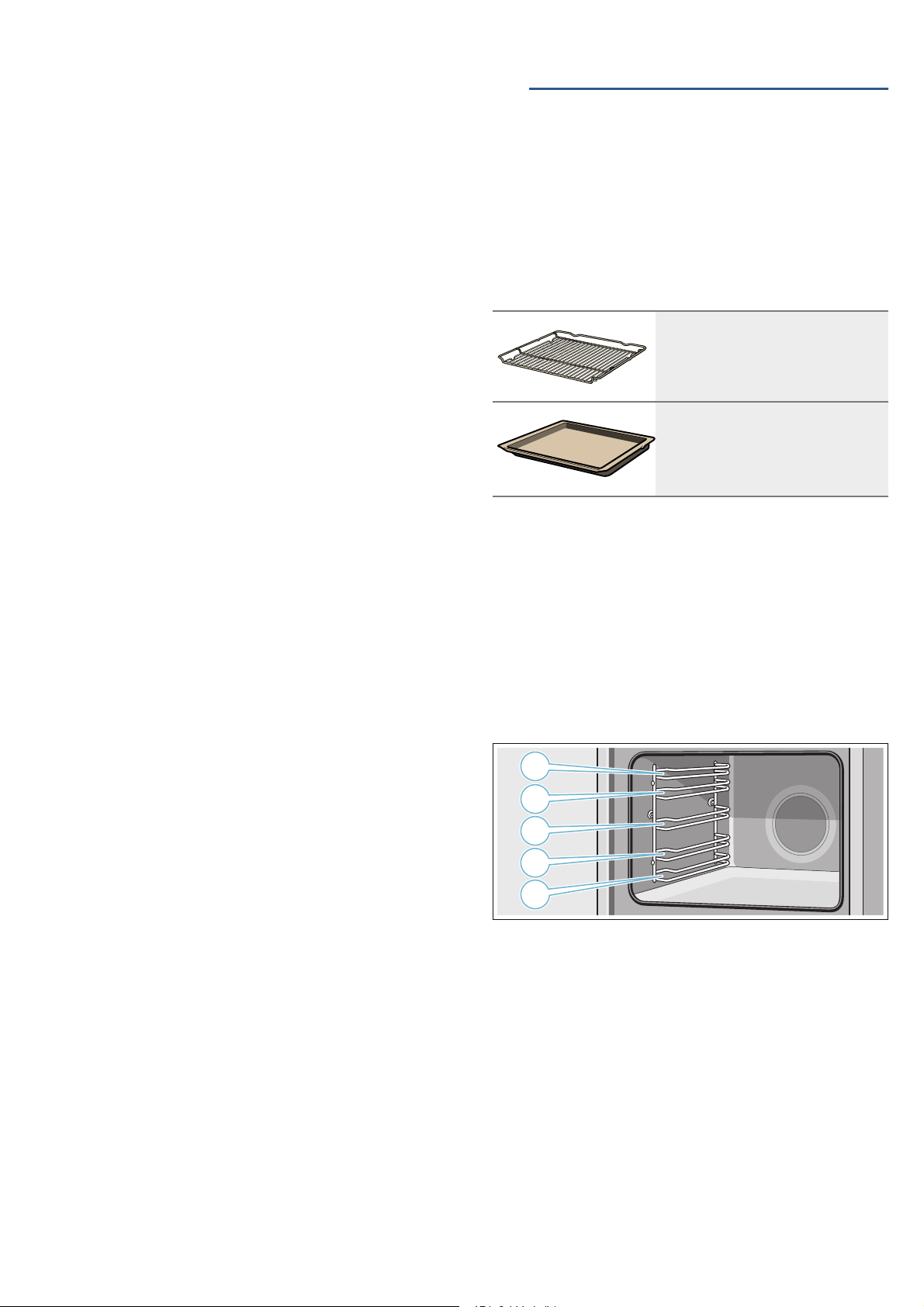
Wire rack
For ovenware, cake tins and ovenproof
dishes.
For roasts and grilled food.
Universal pan
For moist cakes, pastries, frozen meals
and large roasts.
It can be used to catch dripping fat when
you are grilling directly on the wire rack.
Accessories en
11
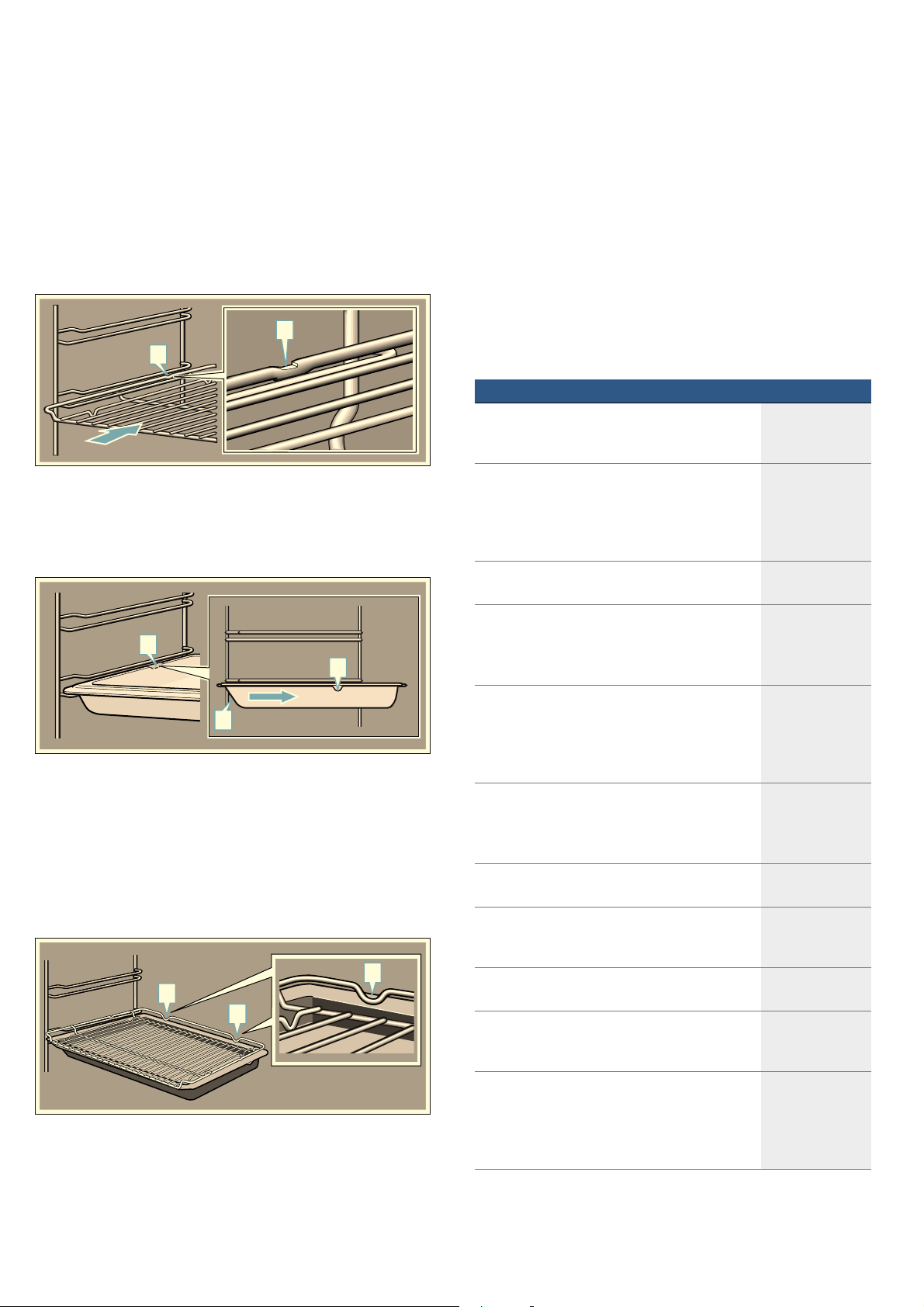
Locking function
The accessories can be pulled out approximately
halfway until they lock in place. The locking function
prevents the accessories from tilting when they are
pulled out. The accessories must be inserted into the
cooking compartment correctly for the tilt protection to
work properly.
When inserting the wire rack, ensure that lug ‚ is at the
rear and is facing downwards. The open side must be
facing the appliance door and the outer rail must be
facing downwards ¾.
When inserting baking trays, ensure that lug ‚ is at the
rear and is facing downwards. The sloping edge of the
accessory ƒ must be facing towards the appliance
door.
Example in the picture: Universal pan
Combining accessories
You can insert the wire rack and the universal pan at
the same time to catch drops of liquid.
When inserting the wire rack, ensure that both spacers
‚ are at the rear edge. When inserting the universal
pan, the wire rack is on top of the upper guide rod of
the shelf position.
Example in the picture: Universal pan
Optional accessories
You can buy optional accessories from the after-sales
service, from specialist retailers or online. *You will find
a comprehensive range of products for your appliance
in our brochures and online.
Both availability and whether it is possible to order
online differ between countries. Please see your sales
brochures for more details.
When purchasing, please always quote the exact order
number of the optional accessory.
Note: Not all optional accessories are suitable for every
appliance. When purchasing, please always quote the
exact identification number (E-no.) of your appliance.
~ "Customer service" on page 26
D
D
D
D
E
D
D
D
Optional accessories Order number
Wire rack
For ovenware, cake tins and ovenproof dishes,
and for roasts and grilled food.
HEZ634000
Universal pan
For moist cakes, pastries, frozen meals and large
roasts.
It can be used to catch dripping fat when you are
grilling directly on the wire rack.
HEZ632070
Baking tray
For tray bakes and small baked products.
HEZ631070
Wire insert
For meat, poultry and fish.
For inserting into the universal pan to catch drip-
ping fat and meat juices.
HEZ324000
Universal pan, non-stick
For moist cakes, pastries, frozen meals and large
roasts.
Pastries and roasts can be removed more easily
from the universal pan.
HEZ632010
Baking tray, non-stick
For tray bakes and small baked products.
The pastries can be removed more easily from the
baking tray.
HEZ631010
Profi pan
For preparing large quantities.
HEZ633070
Lid for the Profi pan
The lid turns the Profi pan into a Profi roasting
dish.
HEZ633001
Pizza tray
For pizzas and large round cakes.
HEZ617000
Grill tray
Use for grilling in place of the wire rack or as a
splatter guard.Only use in the universal pan.
HEZ625071
Bread-baking stone
For home-made bread, bread rolls and pizzas that
require a crispy base.
The baking stone must be preheated to the rec-
ommended temperature.
HEZ327000

en Before using for the first time
12
--------
KBefore using for the first
time
Before using for the first time
Before you can use your new appliance, you must
make some settings. You must also clean the cooking
compartment and accessories.
Initial use
After connecting the appliance to the power or following
a power cut, the settings for initial use are shown on the
display. It may take a few seconds for the instruction to
appear.
Note: You can change these settings at any time in the
basic settings. ~ "Basic settings" on page 18
Selecting the language
The language is the first setting displayed. "German" is
the preset language.
1. Turn the rotary selector to set the required language.
2. Press the s field to confirm.
The next setting appears.
Setting the time
The time starts at "12:00".
1. Set the time using the rotary selector.
2. Press the sfield to confirm.
A note appears on the display confirming that the initial
use has been completed. The current time is displayed.
Cleaning the cooking compartment and
accessories
Before using the appliance to prepare food for the first
time, you must clean the cooking compartment and
accessories.
Cleaning the cooking compartment
To remove the new-appliance smell, heat up the
cooking compartment when empty and with the oven
door closed.
Ensure that the cooking compartment does not contain
any leftover packaging, such as polystyrene pellets.
Before heating up the appliance, wipe the smooth
surfaces in the cooking compartment with a soft, wet
cloth. Keep the kitchen ventilated while the appliance is
heating up.
Adjust the settings indicated. You can find out how to
set the heating type and the temperature in the next
section. ~ "Operating the appliance" on page 13
Glass roasting dish (5.1 litres)
For stews and bakes.
Particularly suitable for the "Meals" operating
mode.
HEZ915001
Glass tray
For large roasts, moist cakes and bakes.
HEZ864000
Glass tray
For bakes, vegetable dishes and baked goods.
HEZ636000
Pull-out system, 1 level
The pull-out rails at level 2 allow you to pull the
accessories out further without them tipping.
HEZ638100
Pull-out system, 2 levels
The pull-out rails at levels 2 and 3 allow you to pull
the accessories out further without them tipping.
HEZ638200
Pull-out system, 3 levels
The pull-out rails at levels 1, 2 and 3 allow you to
pull the accessories out further without them tip-
ping.
HEZ638300
Settings
Heating type Top/bottom heating %
Temperature 240 °C
Cooking time 1 hour

Operating the appliance en
13
Switch off the appliance after the indicated cooking time
using the ÿ On/Off button.
After the cooking compartment has cooled down, clean
the smooth surfaces with soapy water and a dish cloth.
Cleaning the accessories
Clean the accessories thoroughly using soapy water
and a dish cloth or soft brush.
1Operating the appliance
Operating the appliance
You have already learnt about the controls and how
they work. Now we will explain how to set your
appliance. You will learn about what happens when you
switch the appliance on and off, and how to select the
operating mode.
Switching the appliance on and off
Before you are able to set the appliance, you must
switch it on.
Note: The childproof lock and the timer can also be set
when the appliance is switched off. Certain displays and
notes, such as those relating to the residual heat in the
cooking compartment, remain visible on the display
after the appliance has been switched off.
Switch off your appliance when you do not need to use
it. If no settings are applied for a long time, the
appliance switches itself off automatically.
Switching on the appliance
Press the ÿ On/Off button to switch on the appliance.
All touch fields light up red. The Bosch logo appears on
the display, and then the first heating type in the
selection list.
Note: In the basic settings, you can specify which
operating mode should appear after the appliance is
switched on. ~ "Basic settings" on page 18
Switching off the appliance
Press the ÿ On/Off button to switch off the appliance.
Any functions that may be running are cancelled.
The time, or if applicable, the residual heat indicator,
appears on the display.
Note: In the basic settings, you can set whether the
clock should be displayed when the appliance is
switched off. ~ "Basic settings" on page 18
Starting the operation
You must press the l Start/Stop button to start each
operation.
After starting the appliance, the time display is shown
on the display along with the settings. The display ring
and the heating line also appear.
Pausing the operation
You can also interrupt and then continue an operation
using the l Start/Stop button.
If you press and hold the l Start/Stop button for
approx. 3 seconds, the operation is cancelled and all
settings are reset.
Note: The fan may continue to run after an operation
has been paused or cancelled.
en Operating the appliance
14
Selecting an operating mode
Once the appliance is switched on, the default
operating mode is displayed. You can start this setting
immediately using the l Start/Stop button.
If you want to select a different operating mode, you
can find detailed descriptions of these modes in the
relevant chapters.
The following always applies:
1. Touch the appropriate field.
The symbol lights up red.
2. Turn the rotary selector to change the highlighted
selection.
3. If necessary, apply other settings.
To do this, touch the appropriate field and change
the value using the rotary selector.
4. Press the l Start/Stop button to start.
The appliance starts the operation.
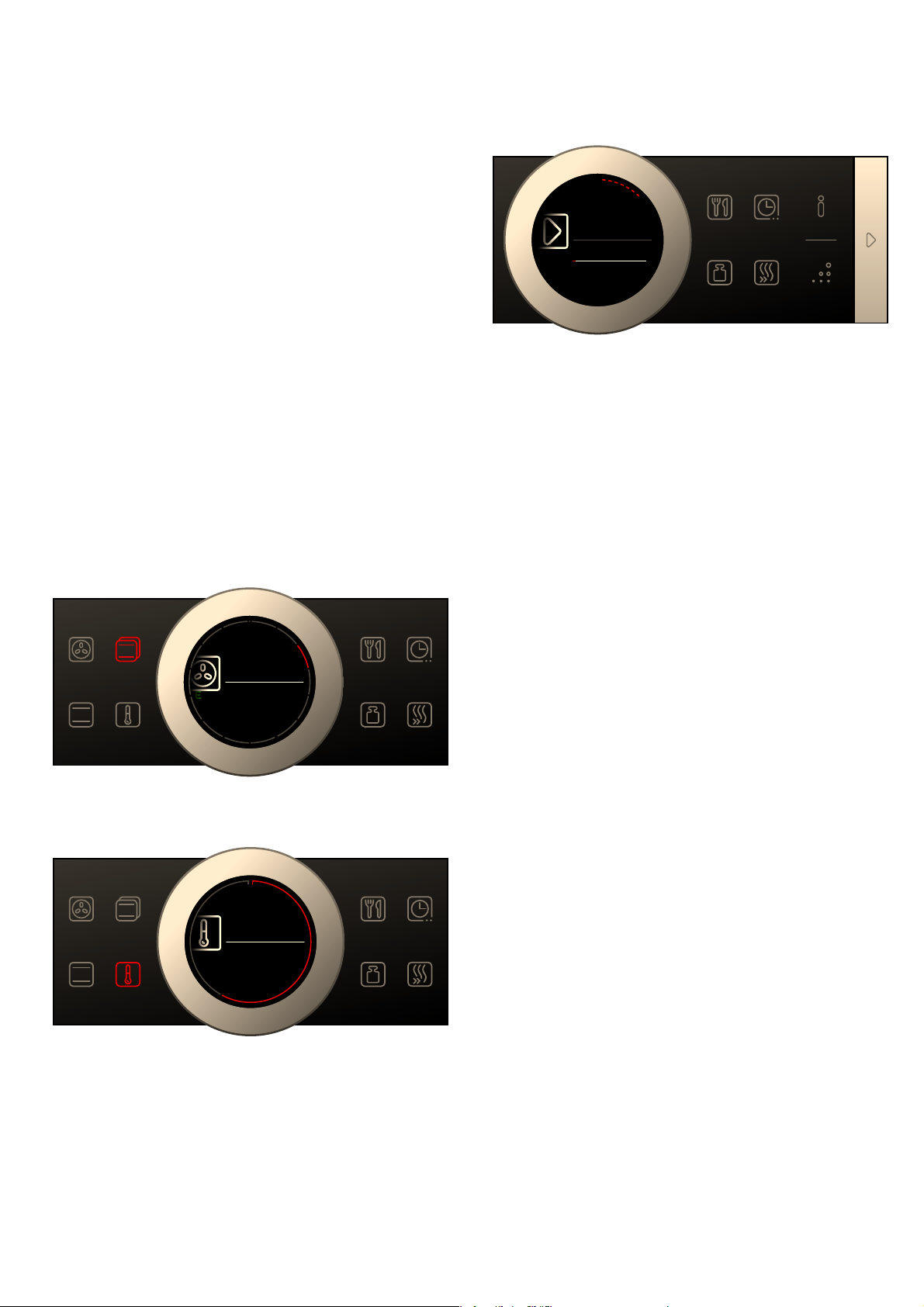
Setting the type of heating and temperature
If the "Types of heating" operating mode has not been
selected, touch the ! field. The symbol lights up red
and the first type of heating with the default temperature
appears on the display.
Example in the picture: Hot air eco . at 195 °C.
1. Set the type of heating using the rotary selector.
2. Touch the } field.
The temperature is highlighted white in the display.
3. Set the temperature using the rotary selector.
4. Press the l Start/Stop button to start.
The time on the display shows how long the
operation has already been running.
The appliance begins to heat up.
When your dish is ready, switch off the appliance using
the ÿ On/Off button.
Note: You can set a cooking time and an end time for
the operation on the appliance. ~ "Time-setting
options" on page 15
Changing
After starting the appliance, the temperature is
highlighted. When you move the rotary selector, the
temperature is changed and applied immediately.
To change the type of heating, first press the l Start/
Stop button to interrupt the operation and then touch
the ! field. The first type of heating appears with the
corresponding default temperature. Use the rotary
selector to change the type of heating.
Note: When you change the type of heating, the other
settings are also reset.
Directly selecting types of heating
You can select certain types of heating directly using
the touch fields. This makes the appliance even easier
and faster to set.
The types of heating that can be set directly are:
■ < 4D hot air
■ % Top/bottom heating
Applying settings
1. Touch the field with the required type of heating.
The temperature is immediately highlighted white.
2. Set the temperature using the rotary selector.
3. Press the l Start/Stop button to start.
The appliance begins to heat up.
+RWDLUHFR
PV
P
V
7\SHVRI
KHDWLQJ
&
&
&
&
&
&
&
&D
&D
P
+RWDLU
HFR
PV
_
7H[W
7H[W
7HPSHUDWXUH
&
_
7H[W
7H[W
P
V
VWDUW
VWRS
a
&
Time-setting options en
15
Rapid heating
With Rapid heating, you can shorten the heat-up time
for some heating types.
Heating types suitable for Rapid heating are:
■ < 4D hot air
■ % Top/bottom heating
To ensure an even cooking result, do not place your
food in the cooking compartment until Rapid heating is
complete.
Adjusting settings
Ensure you have selected a suitable heating type and
set a temperature of at least 100 °C. Otherwise, Rapid
heating cannot be activated.
1. Set the heating type and temperature.
2. Touch the F field.
The symbol lights up red. A confirmation note appears
on the display.
When Rapid heating comes to an end, an audible
signal sounds and a note appears on the display. The
symbol is no longer lit up. Place your dish in the
cooking compartment.
Note: The "cooking time" time-setting option starts at
the same time as Rapid heating. Therefore, only set a
cooking time when Rapid heating has come to an end.
Cancelling
To cancel Rapid heating, touch theF field again. The
symbol is no longer lit up.
OTime-setting options
Time-setting options
Your appliance has different time-setting options.
You can call up the cooking time and the end time after
setting a operation using the s field. The timer has a
separate t field and can be adjusted at any time.
A signal sounds after a cooking time or timed period
has elapsed. You can cancel the signal early by
touching the s field.
Note: You can change how long the signal sounds for
in the basic settings. ~ "Basic settings" on page 18
Setting the cooking time
You can set the cooking time for your dish on the
appliance. This means that the cooking time is not
unintentionally exceeded and you do not need to
interrupt other work in order to end the operation.
Applying settings
Depending on which direction you turn the rotary
selector first, the cooking time starts at a particular
default value: Left = 10 minutes, right = 30 minutes.
The cooking time can be set in one-minute increments
up to one hour, and then in five-minute increments.
The maximum setting is 23 hours and 59 minutes.
Example in the picture: Cooking time of 45 minutes.
1. Set the operating mode, and temperature or level.
2. Touch the s field before starting.
The cooking time is highlighted white in the display.
3. Turn the rotary selector to set the cooking time.
The value is applied after a few seconds, or touch
the s field twice. The cooking time is shown on the
display under the operating mode and temperature
or level.
Time-setting option Use
q Cooking time After the set cooking time has elapsed, the
appliance ends the operation automatically.
r End Enter a cooking time and the required end
time. The appliance starts automatically so
that the operation ends at the required time.
t Timer The timer functions like an egg timer. It runs
independently from the operation and the
other time-setting options. After the set time
has elapsed, the appliance does not switch on
or off automatically.
_
7H[W
7H[W
7\SHVRIKHDWLQJ
P
V
¿
(QG
¿
&RRNLQJWLPH

en Time-setting options
16
4. Press the l Start/Stop button to start.
The cooking time counts down on the display.
The appliance begins to heat up.
Once the cooking time has elapsed, an audible signal
sounds. The appliance stops heating. The cooking time
00 m 00 s is shown on the display.
You can set another cooking time using the s field, or
continue the operation without a cooking time using the
l Start/Stop button.
When your dish is ready, switch the appliance off using
the ÿ On/Off button.
Changing and cancelling
To change the cooking time, touch the s field. The
cooking time is highlighted white and can be changed
using the rotary selector. Use the s field to accept the
change.
If you want to cancel the cooking time, reset the
cooking time to zero. After the change has been
applied, you can continue the operation without a
cooking time using the l Start/Stop button.
Setting the end time
You can delay the time that the cooking time ends. You
can, for example, put your dish in the cooking
compartment in the morning and set the cooking time
so that it is ready at lunch time.
Notes
■ Ensure that food is not left in the cooking
compartment for too long as it may spoil.
■ Do not adjust the end time once the operation has
started. The cooking result would no longer be
satisfactory.
Applying settings
The end of the cooking time can be delayed by a
maximum of 23 hours and 59 minutes.
Example in the picture: The set cooking time is 45
minutes and the dish should be ready at 12:00.
1. Set the operating mode, and temperature or level.
2. Set the cooking time.
3. Before starting, touch the s field again once.
The end time is highlighted white in the display.
4. Set a later end time using the rotary selector.
The value is applied after a few seconds, or touch
the s field again. The end time is shown in the
display under the operating mode and temperature
or level.
5. Press the l Start/Stop button to start.
The time at which the appliance will start is shown in
the display.
The appliance is in standby mode. When the appliance
starts, the cooking time counts down on the display.
Once the cooking time has elapsed, an audible signal
sounds. The appliance stops heating. The cooking time
00 m 00 s is shown on the display.
You can set another cooking time using the s field, or
continue the operation without a cooking time using the
l Start/Stop button.
When your dish is ready, switch the appliance off using
the ÿ On/Off button.
Changing and cancelling
To change the end time, interrupt the operation using
the l Start/Stop button and then touch the s field
twice. The end time is highlighted white and can be
changed using the rotary selector. Continue the
operation using the l Start/Stop button.
If you want to cancel the end time, reset the end time to
zero. You can start the set cooking time immediately
using thel Start/Stop button.
Note: The end time can only be changed if the cooking
time has not elapsed. Otherwise the cooking result
would no longer be satisfactory.
VWDUW
VWRS
_
7H[W
7H[W
P
V
a
&
_
7H[W
7H[W
7\SHVRIKHDWLQJ
¿
(QG
&RRNLQJWLPH
_
7H[W
7H[W
6WDUW
VWDUW
VWRS

Childproof lock en
17
Setting the timer
The timer runs alongside other settings. You can set it
at any time, even if the appliance is switched off. It has
its own audible signal so that you can tell whether it is
the timer or a cooking time which has elapsed.
Adjusting settings
The timer duration always starts at zero minutes.
The higher the value, the greater the time steps when
setting the timer.
The maximum setting is 24 hours.
1. Touch the t field.
The symbol lights up red. On the display, the timer
duration is shown in white and in focus.
2. Set the timer duration using the rotary selector.
3. Press the t field to start.
Note: After a few seconds, the timer also starts
automatically.
The timer duration counts down.
The timer remains visible on the display if the appliance
is switched off. When an operation is running, the
settings for this operation are shown in the foreground.
When you touch the t field, the timer duration is
displayed for a few seconds.
When the timer duration comes to an end, an audible
signal sounds and a note appears on the display. The
symbol is no longer lit up.
Tip: If the set timer duration relates to the appliance
operation, use the cooking time. The time is visible in
the foreground and the appliance switches off
automatically.
Changing and cancelling
To change the timer duration, touch the t field. The
timer duration is displayed in white and in focus, and
can be changed by using the rotary selector.
If you want to cancel the timer, reset the timer duration
to zero. Once the change has been applied, the symbol
is no longer lit up.
AChildproof lock
Childproof lock
Your appliance is equipped with a childproof lock so
that children cannot switch it on accidentally or change
any settings.
The control panel is locked and no settings can be
made. The appliance can only be switched off using the
ÿ On/Off button.
Activating and deactivating
You can activate and deactivate the childproof lock
when the appliance is switched on or off.
In each case, press the D field for approx. 4 seconds.
A confirmation note appears on the display.
The D field lights up red when the appliance is
switched on. The D field does not light up when the
appliance is switched off.

en Basic settings
18
QBasic settings
Basic settings
There are various settings available to you in order to
help use your appliance effectively and simply. You can
change these settings as required.
Changing the basic settings
The appliance must be switched off.
1. Touch the ° field for approx. 3 seconds.
Notes on the process appear on the display.
2. Press the s field to confirm the notes.
The first setting "language" appears on the display.
3. Turn the rotary selector to change the setting as
required.
4. Touch the s field.
The next setting is shown on the display and can be
changed using the rotary selector.
5. Touch the s field to go through all the settings and
use the rotary selector to make changes as required.
6. When finished, press and hold the ° field for approx.
3 seconds to confirm the settings.
A note is shown on the display to confirm that the
settings have been saved.
Cancelling
If you do not want to save the settings, you can press
the ÿ On/Off button to cancel. A note is shown on the
display to confirm that the settings have not been
saved.
List of basic settings
Depending on the features of your appliance, not all
basic settings are accessible.
--------
Note: Changes to the language, button tone and
display brightness settings take effect immediately. All
other changes take effect after the settings have been
changed.
Power cut
The changes you make to the settings are saved even
after a power cut.
You only have to reset the settings for the initial use
following a long-term power cut. The appliance can
bridge a short-term power cut.
Changing the time
If you want to change the time, for example from
summer to winter time, you have to change the basic
setting.
The appliance must be switched off.
1. Touch the ° field for approx. 3 seconds.
Notes on the process appear on the display.
2. Press the s field to confirm the notes.
The first setting "language" appears in the display.
3. Touch the s field.
The setting for the clock appears.
4. Turn the rotary selector to change the clock time.
5. Press and hold the ° field for approx. 3 seconds to
confirm the setting.
A note is shown on the display to confirm that the
settings have been saved.
Setting Options
Language Additional languages are possible.
Clock Clock in 24-hour format
Audible signal Short cooking time (30 sec.)
Medium cooking time (1 min.)*
Long cooking time (5 min.)
Button tone Switched on
Switched off* (tone remains for ÿ On/
Off)
Display brightness Scale with 5 levels
Clock display Off
Digital*
Lighting Off during operation
On during operation*
Childproof lock Button lock only*
Door lock and button lock
Operation after switching
on
Types of heating*
AutoCook
Night-time darkening Switched off*
Switched on
Brand logo Display*
Do not display
Fan run-on time Recommended*
Minimum
Pull-out system Not retrofitted* (for rails and single pull-
out system)
Retrofitted (for double and triple pull-out
systems)
Sabbath mode Switched on
Switched off*
Factory settings Restore
Do not restore*
* Factory setting (factory settings may vary depending on the appli-
ance model)

Sabbath mode en
19
FSabbath mode
Sabbath mode
With the Sabbath mode, a cooking time of up to 74
hours can be set. You can keep the food in the cooking
compartment warm without having to switch the oven
on or off.
Starting Sabbath mode
Before you are able to use the Sabbath mode, you must
activate it in the basic settings. ~ "Basic settings"
on page 18
When the basic setting has been changed accordingly,
Sabbath mode is listed with the types of heating as the
last type of heating.
The appliance heats up with top/bottom heating. You
can set a temperature between 85 °C and 140 °C.
1. Set the 0 Sabbath mode type of heating using the
rotary selector.
2. Touch the } field.
The temperature is highlighted white in the display.
3. Set the required temperature using the rotary
selector.
4. Touch the s field before starting.
The cooking time is highlighted white in the display.
5. Set the required cooking time using the rotary
selector.
Note: The end time cannot be delayed.
6. Press the l Start/Stop button to start.
The cooking time counts down on the display.
The appliance begins to heat up.
When the cooking time for Sabbath mode has ended,
an audible signal sounds. The appliance stops heating.
The cooking time 00 m 00 s is shown on the display.
Press the ÿ On/Off button to switch off the appliance.
Note: The operation is not interrupted if you open the
appliance door.
Changing and cancelling
After starting the appliance, the settings can no longer
be changed.
If you would like to cancel Sabbath mode, switch the
appliance off using the ÿ On/Off button. You can no
longer pause the operation using the l Start/Stop
button.
DCleaning agent
Cleaning agent
With good care and cleaning, your appliance will retain
its appearance and remain fully functioning for a long
time to come. We will explain here how you should
correctly care for and clean your appliance.
Suitable cleaning agents
To ensure that the different surfaces are not damaged
by using the wrong cleaning agent, observe the
information in the table. Depending on the appliance
model, not all of the areas listed may be on/in your
appliance.
Caution!
Risk of surface damage
Do not use:
■ Harsh or abrasive cleaning agents,
■ Cleaning agents with a high alcohol content,
■ Hard scouring pads or cleaning sponges,
■ High-pressure cleaners or steam cleaners,
■ Special cleaners for cleaning the appliance while it is
hot.
Wash new sponge cloths thoroughly before use.
Tip: Highly recommended cleaning and care products
can be purchased through the after-sales service.
Observe the respective manufacturer's instructions.
:Warning – Risk of burns!
The appliance becomes very hot. Never touch the
interior surfaces of the cooking compartment or the
heating elements. Always allow the appliance to cool
down. Keep children at a safe distance.
Area Cleaning
Appliance exterior
Stainless steel
front
Hot soapy water:
Clean with a dish cloth and then dry with a soft
cloth.
Remove flecks of limescale, grease, starch and
albumin (e.g. egg white) immediately. Corrosion
can form under such flecks.
Special stainless steel cleaning products suitable
for hot surfaces are available from our after-sales
service or from specialist retailers. Apply a very
thin layer of the cleaning product with a soft cloth.
Plastic Hot soapy water:
Clean with a dish cloth and then dry with a soft
cloth.
Do not use glass cleaner or a glass scraper.
Painted surfaces Hot soapy water:
Clean with a dish cloth and then dry with a soft
cloth.
Control panel Hot soapy water:
Clean with a dish cloth and then dry with a soft
cloth.
Do not use glass cleaner or a glass scraper.

en Cleaning agent
20
--------
Notes
■ Slight differences in colour on the front of the
appliance are caused by the use of different
materials, such as glass, plastic and metal.
■ Shadows on the door panels, which look like
streaks, are caused by reflections made by the
interior lighting.
■ Enamel is baked on at very high temperatures.This
can cause some slight colour variation. This is
normal and does not affect operation.
The edges of thin trays cannot be completely
enamelled. As a result, these edges can be rough.
This does not impair the anti-corrosion protection.
Surfaces in the cooking compartment
The back wall, ceiling and side parts in the cooking
compartment are self-cleaning. You can tell this from
the rough surface.
The cooking compartment floor is enamelled and has
smooth surfaces.
Cleaning enamel surfaces
Clean the smooth enamel surfaces with a dish cloth
and hot soapy water or a vinegar solution. Then dry with
a soft cloth.
Soften baked-on food residues with a damp cloth and
soapy water. If there are heavy deposits of dirt, use a
stainless steel scouring pad or oven cleaner.
Leave the cooking compartment open to dry after
cleaning.
Cleaning self-cleaning surfaces
The self-cleaning surfaces are coated with a porous,
matte ceramic layer. This coating absorbs and dispels
splashes from baking and roasting while the appliance
is in operation.
If the self-cleaning surfaces no longer clean themselves
sufficiently and dark stains appear, they can be cleaned
using the cleaning function. To do this, refer to the
information in the relevant section. ~ "Cleaning
function" on page 21
Caution!
Do not use oven cleaner on self-cleaning surfaces. This
will damage the surfaces. If oven cleaner does get onto
these surfaces, dab it off immediately using water and a
sponge cloth. Do not rub the surface and do not use
abrasive cleaning aids.
Keeping the appliance clean
Always keep the appliance clean and remove dirt
immediately so that stubborn deposits of dirt do not
build up.
Tips
■ Clean the cooking compartment after each use. This
will ensure that dirt cannot be baked on.
■ Always remove flecks of limescale, grease, starch
and albumin (e.g. egg white) immediately.
■ Use the universal pan for baking very moist cakes.
■ Use suitable ovenware for roasting, e.g. a roasting
dish.
Door panels Hot soapy water:
Clean with a dish cloth and then dry with a soft
cloth.
Do not use a glass scraper or a stainless steel
scouring pad.
Door handle Hot soapy water:
Clean with a dish cloth and then dry with a soft
cloth.
If descaler comes into contact with the door han-
dle, wipe it off immediately. Otherwise, any stains
will not be able to be removed.
Appliance exterior
Enamel surfaces
and self-cleaning
surfaces
Observe the instructions for the surfaces of the
cooking compartment that follow the table.
Glass cover for
the interior light-
ing
Hot soapy water:
Clean with a dish cloth and then dry with a soft
cloth.
If the cooking compartment is heavily soiled, use
oven cleaner.
Door seal
Do not remove.
Hot soapy water:
Clean with a dish cloth.
Do not scour.
Stainless steel
door cover
Stainless steel cleaner:
Observe the manufacturer's instructions.
Do not use stainless steel care products.
Remove the door cover for cleaning.
Rails Hot soapy water:
Soak and clean with a dish cloth or brush.
Pull-out system Hot soapy water:
Clean with a dish cloth or a brush.
Do not remove the lubricant while the pull-out rails
are pulled out – it is best to clean them when they
are pushed in. Do not clean in the dishwasher.
Accessories Hot soapy water:
Soak and clean with a dish cloth or brush.
If there are heavy deposits of dirt, use a stainless
steel scouring pad.

Cleaning function en
21
.Cleaning function
Cleaning function
The self-cleaning surfaces in the cooking compartment
are cleaned with the “EcoClean Direct” cleaning
function.
The self-cleaning surfaces (back panel, ceiling panel
and side panels) are coated with a porous, matt
ceramic material. This coating absorbs and breaks
down splashes from baking, roasting and grilling while
the oven is in operation. If the surfaces no longer clean
themselves adequately and dark patches appear, the
surfaces can be cleaned by the cleaning function.
Note: The appliance records the number of times it is
used.The appliance indicates when it has reached a
point in time after which cleaning is recommended. The
recommendation is displayed until the cleaning function
has finished.
If you do not act on this recommendation, the self-
cleaning surfaces may become damaged.
If your appliance is already prematurely very dirty or if
you notice dark patches on the back panel, do not wait
until your appliance recommends cleaning to do so.
This is because the more often the appliance is
cleaned, the longer the self-cleaning surfaces will retain
their cleaning capability. You can clean your appliance
at any time as required using the cleaning function.
Prior to initiating the cleaning function
Remove shelves, rails, accessories and ovenware from
the cooking compartment.
Cleaning the cooking compartment floor and the
inside of the appliance door
Remove the worst dirt from the cooking compartment
floor, the inside of the appliance door and the interior
lighting. Otherwise, patches will appear that can no
longer be removed.
Caution!
Do not use oven cleaner on the self-cleaning surfaces.
This will damage the surfaces. If oven cleaner does
come into contact with these surfaces, dab it off
immediately with water and a sponge cloth. Please to
not rub or use any abrasive cleaning materials.
Setting the cleaning function
Before setting the cleaning function, ensure that you
have followed all instructions for preparation.
The duration for the cleaning function is preset to 1
hour. It cannot be changed.
1. Touch the u field.
2. Confirm using the l Start/Stop button.
A note appears relating to the preparations required
for the cleaning function.
3. Press the l Start/Stop button to start.
The cooking time counts down on the display. The
heating line does not appear for the cleaning
function.
The cleaning function starts.
Ventilate the kitchen when the cleaning function is
running.
When the cleaning function has ended, an audible
signal sounds. The cooking time 00 m 00 s is shown on
the display. Press the ÿ On/Off button to switch off the
appliance.
Setting a later end time
You can set a later end time. Before starting the
appliance, touch the s field and set a later end time
using the rotary selector.
The appliance switches to standby after it is started. The
end time can no longer be changed.
Cancel
If you would like to cancel the cleaning function, switch
the appliance off using the ÿ On/Off button. You can
no longer pause the operation using the l Start/Stop
button.
Note: The operating hour counter is not reset. The
instruction for the cleaning function is still shown on the
display.
Once the cleaning function has ended
Once the cooking compartment has cooled down, wipe
down the cooking compartment with a damp cloth if
necessary.
Note: During operation and while the cleaning function
is active, reddish patches may form on the surfaces.
This is not rust, but food residues. These patches are
not hazardous to your health and do not limit the
cleaning capacity of the self-cleaning surfaces.
en Rails
22
pRails
Rails
With good care and cleaning, your appliance will retain
its appearance and remain fully functional for a long
time to come. This will tell you how to remove the
shelves and clean them.
Detaching and refitting the rails
:Warning – Risk of burns!
The rails become very hot. Never touch the hot rails.
Always allow the appliance to cool down. Keep children
away from the appliance.
Detaching the rails
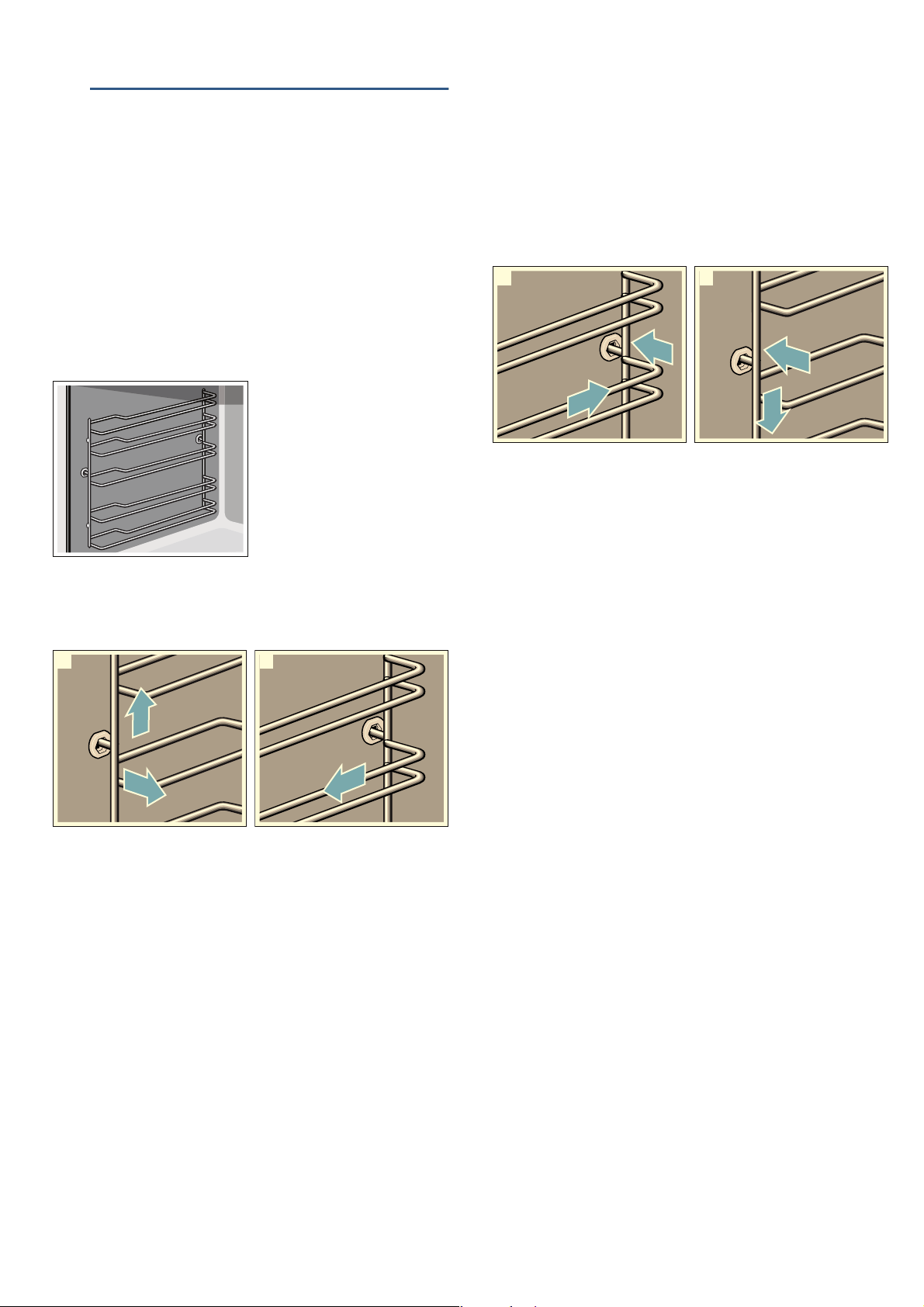
1. Lift the rail slightly at the front ‚ and detach it ƒ
(figure !).
2. Then pull the whole rail towards you and take it out
(figure ").
Clean the rails with cleaning agent and a sponge. For
stubborn deposits of dirt, use a brush.
Attaching the rails
The rails only fit on the right or the left side. For both
rails, ensure that the curved rods are at the front.
1. First, insert the rail in the middle of the rear socket ‚,
until the rail rests against the cooking compartment
wall, and push it back ƒ (figure !).
2. Then insert the rail into the front socket „, until the
rail also rests against the cooking compartment wall
here, and press it downwards … (figure ").
2
1
D
E
2
F
G
1
D
E
Appliance door en
23
qAppliance door
Appliance door
With good care and cleaning, your appliance will retain
its appearance and remain fully functional for a long
time to come. This will tell you how to remove the
appliance door and clean it.
Removing and fitting the appliance door
For cleaning purposes and to remove the door panels,
you can detach the appliance door.
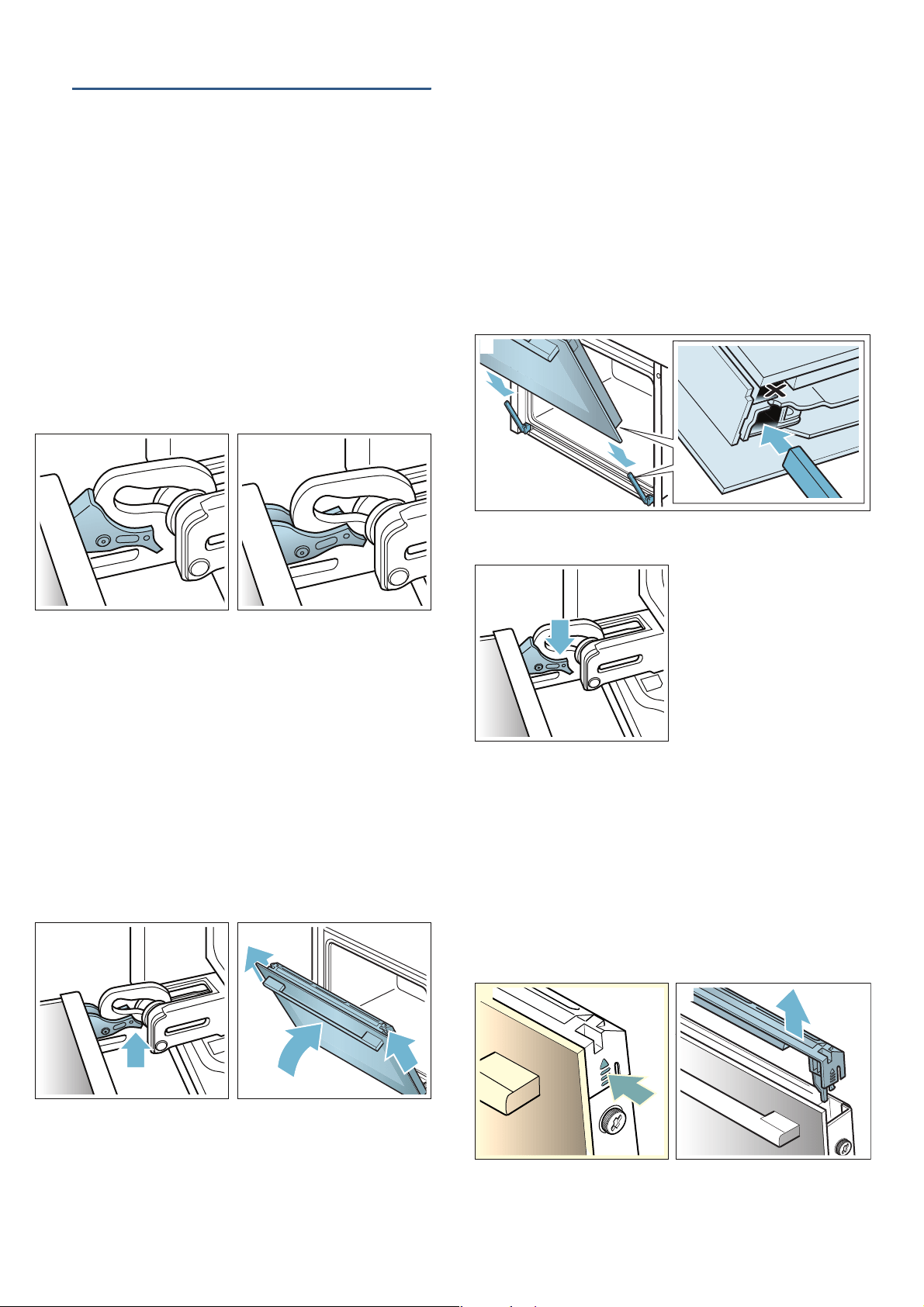
The appliance door hinges each have a locking lever.
When the locking levers are closed (figure !), the
appliance door is secured in place. It cannot be
detached.
When the locking levers are open in order to detach the
appliance door (figure "), the hinges are locked. They
cannot snap shut.
:Warning – Risk of injury!
■ If the hinges are not locked, they can snap shut with
great force. Ensure that the locking levers are always
fully closed or, when detaching the appliance door,
fully open.
Risk of injury!
■ The hinges on the appliance door move when
opening and closing the door, and you may be
trapped. Keep your hands away from the hinges.
Removing the appliance door
1. Open the appliance door fully.
2. Fold open the two locking levers on the left and right
(figure !).
3. Close the appliance door as far as the limit stop ‚.
With both hands, grip the door on the left- and right-
hand side ƒ, and pull it out upwards (figure ").
Fitting the appliance door
Reattach the appliance door in the opposite sequence
to removal.
1. When attaching the appliance door, ensure that both
hinges are inserted straight into the opening (figure
!).
Place both hinges at the bottom on the outer panel
and use this as a guide.
Ensure that the hinges are inserted into the correct
opening. You must be able to insert them easily and
without resistance. If you can feel any resistance,
check that the hinges are inserted into the correct
opening.
2. Open the appliance door fully. Fold both locking
levers closed again (figure ").
3. Close the cooking compartment door.
Removing the door cover
The stainless steel inlay in the door cover may become
discoloured. To carry out thorough cleaning, you can
remove the cover.
1. Open the appliance door slightly.
2. Press on the right and left side of the cover (figure
!).
3. Remove the cover (figure ").
Close the appliance door carefully.
2
1
2
E
E
D
1I
1
2I
2
1
en Appliance door
24
Note: Clean the stainless steel inlay in the cover with
stainless steel cleaner. Clean the rest of the door
cover with soapy water and a soft cloth.
4. Open the appliance door again slightly. Put the
cover back in place and press on it until it clicks
audibly into place (figure #).
5. Close the appliance door.
Removing and installing the door panels
To facilitate cleaning, you can remove the glass panels
from the appliance door.
Removing the door from the appliance
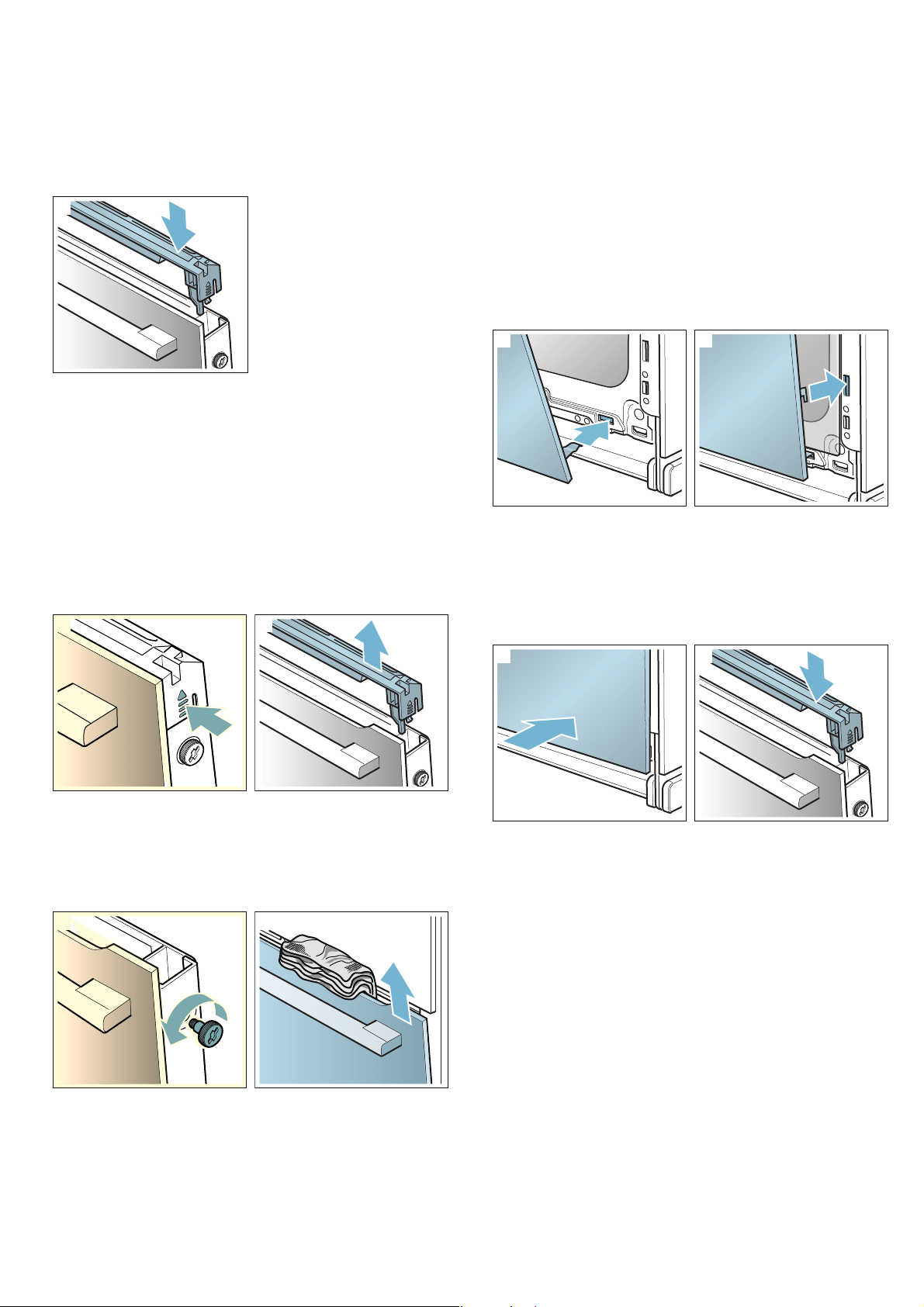
1. Open the appliance door slightly.
2. Press on the right and left side of the cover (figure
!).
3. Remove the cover (figure ").
4. Loosen and remove the screws on the left and right
of the appliance door (figure #).
5. Before closing the door again, trap a tea towel which
has been folded several times in the door (figure $).
Pull out the front panel upwards and lay it on a flat
surface with the door handle facing downwards.
Clean the panels with glass cleaner and a soft cloth.
:Warning – Risk of injury!
■ Scratched glass in the appliance door may develop
into a crack. Do not use a glass scraper, sharp or
abrasive cleaning aids or detergents.
Risk of injury!
■ The hinges on the appliance door move when
opening and closing the door, and you may be
trapped. Keep your hands away from the hinges.
Fitting the door on the appliance
1. Insert the front panel at the bottom into the retainers
(figure !).
2. Close the front panel until both upper hooks are
opposite the opening (figure ").
3. Press the front panel at the bottom until it clicks
audibly into place (figure #)
4. Open the appliance door again slightly and remove
the tea towel.
5. Screw both screws back in on the left and right.
6. Put the cover back in place and press on it until it
clicks audibly into place (figure $).
7. Close the appliance door.
Caution!
Do not use the cooking compartment again until the
panels have been correctly fitted.
21
2
1

Trouble shooting en
25
3Trouble shooting
Trouble shooting
If a fault occurs, there is often a simple explanation.
Before calling the after-sales service, please refer to the
fault table and attempt to correct the fault yourself.
Rectifying faults yourself
You can often easily rectify technical faults on the
appliance yourself.
If a dish does not turn out exactly as you wanted, you
can find many tips and instructions for preparation at
the end of the operating manual. ~ "Tested for you in
our cooking studio" on page 28
--------
:Warning – Risk of electric shock!
Incorrect repairs are dangerous. Repairs may only be
carried out and damaged power cables replaced by
one of our trained after-sales technicians. If the
appliance is defective, unplug the appliance from the
mains or switch off the circuit breaker in the fuse box.
Contact the after-sales service.
Error messages on the display
When an error message appears on the display with "D"
or "E", e.g. D0111 or E0111, switch the appliance off
and on again using the ÿ On/Off button.
If it was a one-off error, the display goes out. If the error
message appears again, call the after-sales service and
quote the exact error message.
Maximum operating time
If you do not change the settings on your appliance for
several hours, the appliance stops heating up
automatically. This prevents unwanted continuous
operation.
The respective settings for the operating mode govern
when the maximum operating time is reached.
Maximum operating time reached
A note appears on the display confirming that the
maximum operating time has been reached.
To continue operation, touch any field or turn the rotary
selector.
Switch the appliance off using the ÿ On/Off button if
you do not need to use it.
Tip: Set a cooking time so that the appliance does not
switch off when you do not want it to, e.g. with an
extremely long preparation time. The appliance heats
up until the set cooking time has elapsed.
Fault Possible cause Notes/remedy
The appliance does not work. Faulty fuse. Check the circuit breaker in the fuse box.
Power cut Check whether the kitchen light or other kitchen appliances are working.
"Sprache Deutsch" appears on the
display.
Power cut Reset the language and the time.
The time does not appear when the
appliance is switched off.
Basic setting is changed. Change the basic setting for the clock display.
The appliance does not heat up; the
m symbol lights up on the display.
Demo mode is activated in the
basic settings.
Briefly disconnect the appliance from the mains (switch off the circuit breaker
in the fuse box) and then deactivate demo mode in the basic settings within 3
minutes.
The rotary selector has fallen out of
the support in the control panel.
The rotary selector has been
accidentally disengaged.
The rotary selector can be removed. Simply place the rotary selector back in
its support in the control panel and push it in so that it engages and can be
turned as usual.
The rotary selector can no longer be
turned easily.
There is dirt under the rotary
selector.
The rotary selector can be removed. To disengage the rotary selector, simply
remove it from the support. Alternatively, press on the outer edge of the rotary
selector so that it tips and can be picked up easily.
Carefully clean the rotary selector and its support on the appliance using a
cloth and soapy water. Dry with a soft cloth. Do not use any sharp or abrasive
materials. Do not soak or clean in the dishwasher.
Do not remove the rotary selector too often so that the support remains sta-
ble.
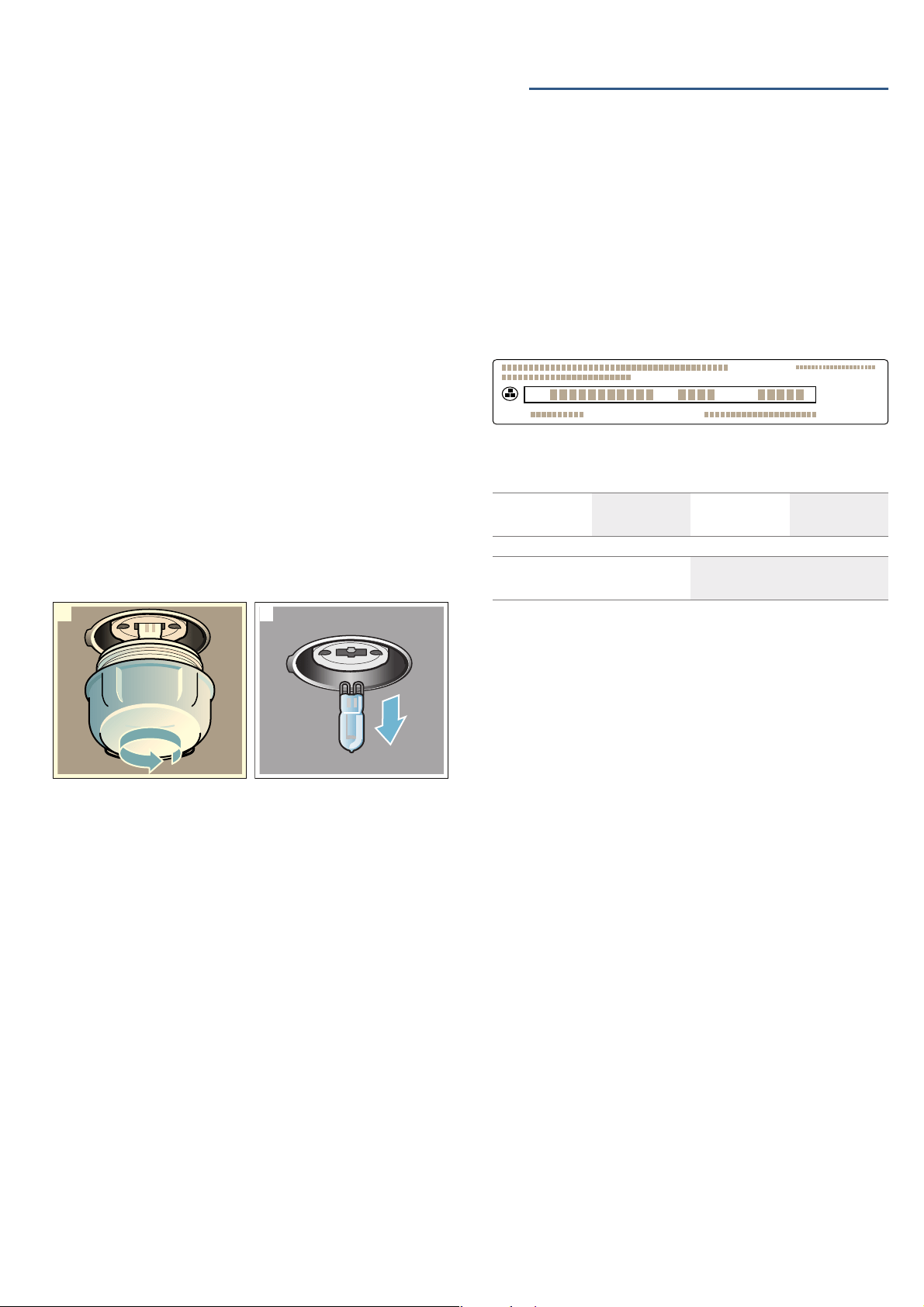
en Customer service
26
Replacing the bulb in the top of the cooking
compartment
If the cooking compartment light bulb fails, it must be
replaced. Heat-resistant, 40 watt, 230 V halogen bulbs
are available from the after-sales service or specialist
retailers.
When handling the halogen bulb, use a dry cloth. This
will increase the service life of the bulb. Only use these
bulbs.
:Warning – Risk of electric shock!
When replacing the cooking compartment bulb, the
bulb socket contacts are live. Before replacing the bulb,
unplug the appliance from the mains or switch off the
circuit breaker in the fuse box.
:Warning – Risk of burns!
The appliance becomes very hot. Never touch the
interior surfaces of the cooking compartment or the
heating elements. Always allow the appliance to cool
down. Keep children at a safe distance.
1. Place a tea towel in the cold cooking compartment
to prevent damage.
2. Turn the glass cover anti-clockwise to remove it
(figure !).
3. Pull out the bulb – do not turn it (figure ").
Insert the new bulb, making sure that the pins are in
the correct position. Push the bulb in firmly.
4. Screw the glass cover back in.
5. Remove the tea towel and switch on the circuit
breaker.
Glass cover
If the glass cover of the halogen bulb is damaged, it
must be replaced. You can obtain a new glass cover
from the after-sales service. Please specify the E
number and FD number of your appliance.
4Customer service
Customer service
Our after-sales service is there for you if your appliance
needs to be repaired. We will always find an
appropriate solution, also in order to avoid after-sales
personnel having to make unnecessary visits.
E number and FD number
When calling us, please give the full product number (E
no.) and the production number (FD no.) so that we can
provide you with the correct advice. The rating plate
bearing these numbers can be found when you open
the appliance door.
To save time, you can make a note of the number of
your appliance and the telephone number of the after-
sales service in the space below, should it be required.
Please note that a visit from an after-sales service
engineer is not free of charge, even during the warranty
period.
Please find the contact data of all countries in the
enclosed customer service list.
To book an engineer visit and product advice
Rely on the professionalism of the manufacturer. You
can therefore be sure that the repair is carried out by
trained service technicians who carry original spare
parts for your appliances.
21
E no. FD no.
After-sales service O
GB 0344 892 8979
Calls charged at local or mobile rate.
IE 01450 2655
0.03 € per minute at peak. Off peak 0.0088 €
per minute.
=1U)'(1U
7\SH

Dishes en
27
PDishes
Dishes
With the “AutoCook” operating mode, you can cook a
wide range of dishes. The appliance selects most
settings for you automatically.
Information about the programs
■ The cooking result depends on the quality of the
food and the type of cookware. For an optimal
cooking result, use food that is in good condition
and chilled meat only.
■ The appliance chooses the optimal heating mode
and the time and temperature setting for you. You
will only be asked to enter the weight. It is not
possible to set weights outside of the intended
weight range.
■ When roasting dishes for which the appliance will
apply the temperature selection for you,
temperatures of up to 300 °C can be saved.
Therefore, make sure that you use cookware that is
sufficiently heat resistant.
■ Information is provided, e.g. on cookware, shelf
position or the addition of liquid when cooking meat.
Some food requires turning or stirring, etc., during
cooking. This is shown on the display shortly after
operation starts. An audible signal will remind you at
the right time.
■ Information on the right kind of cookware to use and
tips and tricks for the preparation can be found at
the end of the instruction manual.
Cooking a dish with AutoPilot
Using the rotary selector, go through all the dishes to
see which dishes are available with AutoPilot.
Weigh your food before placing it in the cooking
compartment in order to be able to set the correct
weight.
The cooking time is calculated depending on the dish
and the weight, and cannot be changed.
1. Touch the % field.
The first dish is highlighted white in the display.
2. Turn the rotary selector to set the required dish.
3. Touch the a field.
The weight is highlighted white in the display.
4. Turn the rotary selector to set the weight of your
dish.
The cooking time is calculated automatically.
5. Confirm using the l Start/Stop button.
A note appears on accessories and shelf position.
6. Press the l Start/Stop button to start.
The cooking time counts down on the display. The
heating line does not appear for dishes.
The appliance begins to heat up.
Once the cooking time has elapsed, an audible signal
sounds. The appliance stops heating.
When your dish is ready, switch off the appliance using
the ÿ On/Off button.
Continue cooking
After the cooking time has ended, you can leave some
dishes to continue cooking if you are not satisfied with
the cooking result.
A query appears on the display, which asks if you want
to continue cooking. If you want to continue cooking,
press the l Start/Stop button. A cooking time is
suggested, which can be changed. Press the l Start/
Stop button to start.
Note: You can extend the cooking time as often as
required.
When you are satisfied with the cooking result, touch
the % field.
Press the ÿ On/Off button to switch off the appliance.
Setting a later end time
You can set a later end time for some dishes. Before
starting the appliance, touch the s field and set a later
end time using the rotary selector.
The appliance switches to standby after it is started. The
end time can no longer be changed.
Changing and cancelling
After starting the appliance, the settings can no longer
be changed.
If you would like to cancel the operation, switch the
appliance off using the ÿ On/Off button. You can no
longer pause the operation using the l Start/Stop
button.

en Tested for you in our cooking studio
28
JTested for you in our
cooking studio
Tested for you in our cooking studio
Here, you can find a selection of dishes and the ideal
settings for them. We will show you which type of
heating and temperature are best suited to your dish.
You will get information on suitable cooking
accessories and the height at which they should be
placed in the oven. You will also get tips about
cookware and preparation methods.
Note: A lot of steam can build up in the cooking
compartment when cooking food.
Your appliance is very energy-efficient and radiates very
little heat to its surroundings during operation. Due to
the high difference in temperature between the
appliance interior and the external parts of the
appliance, condensation may build up on the door,
control panel or adjacent kitchen cabinet panels. This is
a normal physical phenomenon. Condensation can be
reduced by preheating the oven or opening the door
carefully.
Silicone moulds
For the best cooking results, we recommend dark-
coloured metal baking tins/dishes.
Nevertheless, if you wish to use silicone moulds, follow
the manufacturer's instructions and recipes. Silicone
moulds are often smaller than normal baking tins.
Quantity and recipe specifications may vary.
Baking
Here, you can find recommended settings for many
dishes.
Also refer to the notes in the section on allowing dough
to rise.
Only use original accessories supplied with your
appliance. These have been tailored to the cooking
compartment and the operating modes of your
appliance.
Shelf positions
Use the indicated shelf positions.
Baking on one level
When baking on one level, use the following shelf
positions:
■ Tall baked items: Level 2
■ Flat baked items: Level 3
You can also prepare soufflés in a water bath in the
universal pan. To do so, slide the universal pan in at
level 2.
Baking on two levels
Use 4D hot air. Baked items that are placed into the
oven on trays or in baking tins/dishes at the same time
will not necessarily be ready at the same time.
■ Universal pan: Level 3
Baking tray: Level 1
■ Baking tins/dishes on the wire rack
First wire rack: Level 3
Second wire rack: Level 1
By preparing several dishes at the same time, you can
make energy savings of up to 45 per cent. Position
baking tins/dishes next to one another or offset and
vertically stacked in the cooking compartment.
Accessories
Ensure that you always use suitable accessories and
that they are placed in the oven the right way around.
Wire rack
Insert the wire rack with the open side facing the
appliance door and the outer rail pointing downwards .
Universal pan or baking tray
Slide the universal pan or the baking tray in carefully as
far as the limit stop with the bevelled edge facing the
appliance door.
When baking moist cakes or pastries with many
toppings, use the universal pan so that any excess
liquid does not overflow and make the cooking
compartment dirty.
Baking tins
Dark- coloured metal baking tins are most suitable.
Tinplate baking tins, ceramic dishes and glass dishes
extend baking time and mean that the baked item will
not brown evenly. If you wish to bake using these
baking tins/dishes and using top/bottom heating, slide
in the tin/dish at level 1.
Greaseproof paper
Only use greaseproof paper that is suitable for the
selected temperature. Always cut greaseproof paper to
size.
Recommended setting values
You can find the ideal heating type for various pastries
in the table. The temperature and baking time are
dependent on the quantity and composition of the
dough. Different settings ranges are indicated for this
reason. Try using the lower values at first. A lower
temperature results in more even browning. If
necessary, use a higher setting the next time.
Note: Baking times can not be reduced by using higher
temperatures. Cakes or small baked items would only
be cooked on the outside, and would not be fully baked
in the middle.
The setting values apply to dishes placed into a cold
cooking compartment. By doing so, you can make
energy savings of up to 20 per cent. If you preheat the
oven, you can reduce the indicated baking times by
several minutes.
Preheating is necessary for selected dishes, and this is
indicated in the table.
Tested for you in our cooking studio en
29
If you wish to follow one of your own recipes when
baking, you should use a similar baked item in the table
as a reference. You can find additional information in
the tips on baking attached to the settings table.
Remove unused accessories from the cooking
compartment. This will achieve the best possible
cooking results and energy savings of up to 20 per
cent.
Types of heating used:
■ < 4D hot air
■ % Top/bottom heating
■ $ Pizza setting
Dish Accessories/cookware Shelf po-
sition
Type of
heating
Tempera-
ture in °C
Cooking
time in mins.
One level baking
Victoria sponge cake 2x Ø20 cm tins 2 < 160-170* 25-30
Light fruit cake high Ø20 cm tin 2 < 140-160* 70-90
Rich fruit cake high Ø23 cm tin 2 < 130-150* 150-180
Fruit crumble flat glass dish 3 < 150-170* 35-45
Sponge Cake (fatless), 3 eggs springform cake tin Ø26 cm 2 < 160-170* 25-35
Sponge flan, 6 eggs springform cake tin Ø28 cm 2 < 150-170* 30-50
Swiss roll swiss roll tin 3 < 180-190* 10-15
Tart plate Ø20 cm or pie tin 2 $ 160-170* 50-60
Quiche quiche tin (dark coated) 3 $ 190-210 30-40
(White) Bread loaf tin (1x 900 g or 2x 450 g) 2 < 180-200* 20-30
Scones baking tray 3 < 180-200* 10-14
Biscuits baking tray 3 < 140-160* 10-25
Small Cakes 12-cup-tin 3 < 140-160* 20-30
Puff pastry slices baking tray 3 < 170-190* 20-35
Jam tarts 12-cup-tin 3 < 170-190* 15-30
Meringue baking tray 3 < 80-90* 120-150
Pavlova baking tray 3 < 90-100* 120-180
Soufflé 1,2L-soufflé dish 2 < 160-170* 35-45
Soufflé individual moulds 2 % 170-190 65-75
Choux pastry baking tray 3 < 190-210* 30-40
Pie rectangular pie tin 2 < 170-190 50-70
Yorkshire pudding 12-cup-tin 3 < 200-220* 15-25
Jacket potatoes baking tray 3 < 150-170* 75-90
Pizza, homemade baking tray 3 $ 200-220 25-35
Pizza, homemade, thin base pizza tray 2 % 250-270 20-25
Pizza, homemade, thin base pizza tray 2 $ 210-220 25-30
Multishelf baking
Victoria Sponge Cake, 2 levels 4x Ø20 cm tins 3+1 < 160-170* 25-35
Scones, 2 levels 2 baking trays 3+1 < 170-190* 12-16
Biscuits, 2 levels 2 baking trays 3+1 < 140-160* 10-25
Biscuits, 3 levels 3 baking trays 5+3+1 < 140-160* 15-30
Small cakes, 2 levels 2x 12-cup-tins 3+1 < 140-160* 22-32
Puff pastry slices, 2 levels 2 baking trays 3+1 < 170-190* 25-45
Puff pastry slices, 3 levels 3 baking trays 5+3+1 < 170-190* 25-45
Jam tarts, 2 levels 2x 12-cup-tins 3+1 < 170-190* 20-35
Meringues, 2 levels 2 baking trays 3+1 < 80-90* 120-150
Jacket potatoes, 2 levels universal pan + baking tray 3+1 < 150-170* 75-90
(White) Bread, 2 levels 4x loaf tins 3+1 < 170-190* 30-40
Pizza, homemade, 2 levels universal pan + baking tray 3+1 < 180-200 35-45
* Preheat

en Tested for you in our cooking studio
30
Tips on baking
Roasting and braising
Here, you can find information on roasting and braising
poultry and meat. You can find the ideal settings for
many dishes in the settings tables.
Poultry
For duck or goose, pierce the skin on the underside of
the wings. This allows the fat to run out.
If using duck breast, score the skin. Do not turn duck
breasts.
When you turn poultry, ensure that the breast side or
the skin side is underneath at first.
Poultry will turn out particularly crispy and brown if you
baste it towards the end of the roasting time with butter,
salted water or orange juice.
Meat
Baste lean meat with fat as required or cover it with
strips of bacon.
Score the rind crosswise. If you turn the joint when
cooking, ensure that the rind is underneath at first.
When the joint is ready, turn off the oven and allow it to
rest for another 10 minutes in the cooking
compartment. This allows the meat juices to be better
distributed. Wrap the joint in aluminium foil if necessary.
The recommended resting time is not included in the
cooking time indicated.
Roasting on the wire rack
On the wire rack, poultry and meat will become very
crispy on all sides. Roasting on the wire rack is well
suited for larger poultry or for multiple pieces at the
same time.
Depending on the size and type of the meat, add up to
^ litres of water to the universal pan. Any dripping fat
and meat juices will be caught. You can prepare a
sauce using these meat juices. In addition, less smoke
is generated, and the cooking compartment stays
cleaner.
Slide the universal pan into the oven at the indicated
shelf position with the wire rack attached. Ensure that
the wire rack is correctly positioned on the universal
pan. ~ "Accessories" on page 10
You want to find out whether the cake
is completely cooked in the middle.
Push a cocktail stick into the highest point on the cake. If the cocktail stick comes out clean with no dough res-
idue, the cake is ready.
The cake collapses. Next time, use less liquid. Alternatively, set the temperature to be 10 °C lower and extend the baking time.
Adhere to the specified ingredients and preparation instructions in the recipe.
The cake has risen in the middle but
is lower around the edge.
Only grease the base of the springform cake tin. After baking, loosen the cake carefully with a knife.
The fruit juice overflows. Next time, use the universal pan.
Small baked items stick to one
another during baking.
There should be a gap of approx. 2 cm around each item. This gives enough space for the baked items to
expand well and brown on all sides.
The cake is too dry. Set the temperature 10 °C higher and shorten the baking time.
The cake is generally too light in col-
our.
If the shelf position and the cookware are correct, then you should increase the temperature if necessary or
extend the baking time.
The cake is too light on top, and too
dark underneath.
Bake the cake one level higher in the oven the next time.
The cake is too dark on top, and too
light underneath.
Bake the cake one level lower in the oven the next time. Select a lower temperature and extend the baking
time.
Cakes baked in a tray or tin are too
brown at the back.
Place the baking tray in the middle of the accessories, not directly against the back wall.
The whole cake is too dark. Select a lower temperature next time and extend the baking time if necessary.
The cake is unevenly browned. Select a slightly lower temperature.
Protruding greaseproof paper can affect the air circulation. Always cut greaseproof paper to size.
Ensure that the baking tin does not stand directly in front of the openings in the cooking compartment back
wall.
When baking small items, you should use similar sizes and thicknesses wherever possible.
You were baking on several levels.
The items on the top baking tray are
darker than those on the lower baking
tray.
Always select 4D hot air when baking on several levels. Baked items that are placed into the oven on trays or
in baking tins/dishes at the same time will not necessarily be ready at the same time.
The cake looks good, but is not
cooked properly in the middle.
Use a lower temperature and bake slightly longer; if necessary, add slightly less liquid. For cakes with a moist
topping, bake the base first. Sprinkle it with almonds or breadcrumbs and then place the topping on top.
The cake cannot be turned out of the
dish when it is turned upside down.
Allow the cake to cool down for 5 to 10 minutes after baking. If it still sticks, carefully loosen the cake around
the edges again using a knife. Turn the cake tin upside down again and cover it several times with a cold, wet
cloth. Next time, grease the baking tin/dish and sprinkle with breadcrumbs.

Tested for you in our cooking studio en
31
Roasting and braising in cookware
It is more convenient to roast and braise meat in
cookware. You can take the joint out of the cooking
compartment more easily in the cookware, and prepare
the sauce in the cookware itself.
Only use cookware which is suitable for use in an oven.
Check whether the cookware fits in the cooking
compartment.
Glass cookware is most suitable. Place hot glass
cookware onto a dry mat after cooking. If the surface is
damp or cold, the glass may crack.
Add in a little liquid for roasting if the meat is lean. A
covering of approx. ^ cm depth should be applied to
the base of any glass cookware.
The amount of liquid is dependent on the type of meat,
the cookware material and also on whether or not a lid
is used. If preparing meat in an enamelled or dark metal
roasting dish, it will need a little more liquid than if
cooked in glass cookware.
The steam evaporates in the cookware when roasting.
Carefully pour in more liquid if required.
Shiny roasting dishes made from stainless steel or
aluminium reflect heat like a mirror and are therefore
not particularly suitable. The meat cooks more slowly
and will not brown so much. Use a higher temperature
and/or a longer cooking time.
Observe the manufacturer's instructions for your
roasting cookware.
Roasting in uncovered cookware
It is best to use a deep roasting tin/dish for roasting
poultry and meat. Place the tin/dish onto the wire rack.
If you do not have any suitable cookware, use the
universal pan.
Braising in covered cookware
When preparing food with covered cookware, the
cooking compartment remains considerably cleaner.
Ensure that the lid fits well and closes properly. Place
the cookware onto the wire rack.
The distance between the meat and the lid must be at
least 3 cm. The meat may rise.
Very hot steam may escape when opening the lid after
cooking. Lift the lid at the rear, so that the hot steam
can escape away from you.
If necessary, braise the meat first by searing it. Add
water, wine, vinegar or a similar liquid to the braising
liquid. A covering at least 2 cm deep should be applied
to the base of the cookware.
The steam evaporates in the cookware when roasting.
Carefully pour in more liquid if required.
Recommended setting values
In the table, you can find the ideal heating type for
poultry and meat. Temperature and cooking time
depend on the quantity, composition and temperature
of the food. Different settings ranges are indicated for
this reason. Try using the lower values at first. You can
increase the temperature next time if necessary.
The setting values are based on the assumption that
unstuffed, chilled, ready-to-roast poultry and meat are
placed into a cold cooking compartment. By doing so,
you can make energy savings of up to 20 per cent. If
you preheat the oven, the indicated cooking times will
be reduced by several minutes.
In the table, you can find specifications for poultry and
meat with default values for the weight. If you wish to
prepare heavier poultry or meat, use the lower
temperature in every case. If roasting several joints, use
the weight of the heaviest piece as a basis for
determining the cooking time. The individual pieces
should be approximately equal in size.
A general rule: the larger the poultry or piece of meat is,
the lower the cooking temperature and the longer the
cooking time.
Turn the poultry and meat after approx. ^ to Z of the
indicated time.
Remove unused accessories from the cooking
compartment. This will achieve the best possible
cooking results and energy savings of up to 20 per
cent.
Type of heating used:
■ < 4D hot air
Dish Accessories/cookware Shelf po-
sition
Type of
heating
Temperature in
°C
Cooking time in
mins.
Beef
Slow roast joint wire rack 2 < 130-140* 40+40
Top side / Top rump wire rack 2 < 160-170* 30+25
Lamb
Leg (bone-in) wire rack 2 < 160-170* 30+25
Shoulder (bone-in) wire rack 2 < 160-170* 25+20
Shoulder (boned and rolled) wire rack 2 < 170-180* 25+25
Rack of lamb wire rack 2 < 180-190* 25+25
* Preheat

en Tested for you in our cooking studio
32
Tips on roasting and braising
Pork
Roast joint wire rack 2 < 180-190* 35+35
Loin joint wire rack 2 < 170-180* 30+30
Belly wire rack 2 < 160-170* 30+25
Gammon joint wire rack 2 < 160-170* 30+30
Poultry
Chicken, whole wire rack 2 < 170-180* 25+25
Chicken, portion (je 200-250 g) wire rack 2 < 190-200* 35-45
Chicken, quarter (je 450 g) wire rack 2 < 180-190* 40-60
Duck, 2-3 kg wire rack 2 < 180-190* 20+20
Turkey, crown wire rack 2 < 160-170* 20+15
Turkey, drumstick wire rack 2 < 160-170* 25+25
Turkey, whole, 3-4 kg wire rack 2 < 160-170* 15+10
Turkey, whole, 4,5-12 kg wire rack 2 < 160-170* 12+12
Meat dishes
Meat loaf cookware, uncovered 2 < 170-180* 20+35
Casserole
Diced meat (beef, pork, lamb) cookware, covered 2 < 140 60+120
Braising steak cookware, covered 2 < 140 65+120
Chicken pieces (boned) cookware, covered 2 < 140 70+110
Complete meal
With beef wire rack + wire rack + universal pan 4+1 < 160, then 200
(yorkshire pud-
ding)
weight of meat (see
table above) + 15-25
for yorkshire pudding
With chicken wire rack + wire rack + universal pan 4+1 < 180 weight of chicken (see
table above)
Dish Accessories/cookware Shelf po-
sition
Type of
heating
Temperature in
°C
Cooking time in
mins.
* Preheat
The cooking compartment becomes
very dirty.
Prepare your food in an enclosed roasting dish with higher temperature or use the grill tray. You will achieve
the best roasting results if you use the grill tray. The grill tray can be bought later as a special accessory.
The roast is too dark and the crack-
ling is burned in places, and/or the
roast is too dry.
Check the shelf position and temperature. Select a lower temperature the next time and reduce the roasting
time if necessary.
The crackling is too thin. Increase the temperature or switch on the grill briefly at the end of the roasting time.
The roast looks good but the juices
are burnt.
Next time, use a smaller roasting dish and add more liquid if necessary.
The roast looks good but the juices
are too clear and watery.
Next time, use a larger roasting dish and add less liquid if necessary.
The meat gets burned during brais-
ing.
The roasting dish and lid must fit together well and close properly.
Reduce the temperature and add more liquid when braising if necessary.

Tested for you in our cooking studio en
33
Grilling
Here, you can find information on grilling poultry, meat
and fish, as well as toast. You can find the ideal settings
for certain dishes in the settings tables.
Grilling with circulated air
Circulated air grilling is very well suited to the
preparation of whole poultry, fish, and also meat, e.g.
roast pork with crackling.
Poultry
For duck or goose, pierce the skin on the underside of
the wings. This allows the fat to run out.
If using duck breast, score the skin. Do not turn duck
breasts.
When you turn poultry, ensure that the breast side or
the skin side is underneath at first.
Poultry will turn out particularly crispy and brown if you
baste it towards the end of the roasting time with butter,
salted water or orange juice.
Meat
Baste lean meat with fat as required or cover it with
strips of bacon.
Score the rind crosswise. If you turn the joint when
cooking, ensure that the rind is underneath at first.
When the joint is ready, turn off the oven and allow it to
rest for another 10 minutes in the cooking
compartment. This allows the meat juices to be better
distributed. Wrap the joint in aluminium foil if necessary.
The recommended resting time is not included in the
cooking time indicated.
Fish
Fish cooked whole does not have to be turned. Place
the whole fish into the cooking compartment in
swimming position with the dorsal fin facing upwards.
Placing half a potato or a small oven-proof container in
the stomach cavity of the fish will provide stability.
You can tell when the fish is cooked because the dorsal
fin can be removed easily.
Roasting on the wire rack
On the wire rack, poultry and meat will become very
crispy on all sides. Roasting on the wire rack is well
suited for larger poultry or for multiple pieces at the
same time.
Depending on the size and type of the meat, add up to
^ litres of water to the universal pan. Any dripping fat
and meat juices will be caught. You can prepare a
sauce using these meat juices. In addition, less smoke
is generated, and the cooking compartment stays
cleaner.
Slide the universal pan into the oven at the indicated
shelf position with the wire rack attached. Ensure that
the wire rack is correctly positioned on the universal
pan. ~ "Accessories" on page 10
Roasting in cookware
It is more convenient to roast and braise meat in
cookware. You can take the joint out of the cooking
compartment more easily in the cookware, and prepare
the sauce in the cookware itself.
Only use cookware which is suitable for use in an oven.
Check whether the cookware fits in the cooking
compartment.
Glass cookware is most suitable. Place hot glass
cookware onto a dry mat after cooking. If the surface is
damp or cold, the glass may crack.
Add in a little liquid if the meat is lean. A covering of
approx. ^ cm depth should be applied to the base of
any glass cookware.
The quantity of liquid is dependent on the type of meat,
the cookware material and also on whether or not a lid
is used. If preparing poultry, meat or fish in an
enamelled or dark metal roasting dish, it will need a
little more liquid than if cooked in glass cookware.
The steam evaporates in the cookware when roasting.
Carefully pour in more liquid if required.
Shiny roasting dishes made from stainless steel or
aluminium reflect heat like a mirror and are therefore
not particularly suitable. The meat cooks more slowly
and will not brown so much. Use a higher temperature
and/or a longer cooking time.
Observe the manufacturer's instructions for your
roasting cookware.
Uncovered cookware
Use a deep roasting tin/dish for roasting meat. Place
the tin/dish onto the wire rack. If you do not have any
suitable cookware, use the universal pan.
Covered cookware
When cooking with covered cookware, the cooking
compartment remains considerably cleaner. Ensure that
the lid fits well and closes properly. Place the cookware
onto the wire rack.
The distance between the meat and the lid must be at
least 3 cm. The meat may rise.
Very hot steam may escape when opening the lid after
cooking. Lift the lid at the rear, so that the hot steam
can escape away from you.
If necessary, braise the meat first by searing it. Add
water, wine, vinegar or a similar liquid to the braising
liquid. A covering approx. 1-2 cm deep should be
applied to the base of the cookware.
The steam evaporates in the cookware when roasting.
Carefully pour in more liquid if required.
Meat can also become crispy in a covered roasting
dish. To do so, use a roasting dish with a glass lid and
set a higher temperature.
en Tested for you in our cooking studio
34
Grilling flat pieces
Flat pieces of poultry, meat and fish, such as steaks,
drumsticks and burgers, can be prepared well using the
"Grill" heating type. Excellent results are also achieved
when grilling toast.
Grilling
Keep the appliance door closed when using the grill.
Never grill with the appliance door open.
Slide the universal pan into the oven at the indicated
shelf position with the wire rack attached. Dripping fat
will be collected. Ensure that the wire rack is positioned
correctly on the universal pan. ~ "Accessories"
on page 10
Note: When grilling very fatty items, do not slide the
universal pan in directly under the wire rack, but rather
at level 2.
When grilling, try wherever possible to use pieces of
food which are of a similar thickness and weight. This
will allow them to brown evenly and remain succulent
and juicy. Place the food to be grilled directly onto the
wire rack.
Use tongs to turn the pieces of food you are grilling. If
you pierce the meat with a fork, the juices will run out
and it will become dry.
Do not add salt to the food until after it has been grilled.
Salt draws water from the meat.
Notes
■ The grill element switches itself on and off
continuously; this is normal. The grill setting
determines how frequently this occurs.
■ Smoke may be produced when grilling.
Recommended setting values
In the table, you can find the ideal heating type for your
poultry, meat and fish, in addition to toast. Temperature
and cooking time depend on the quantity, composition
and temperature of the food. Settings ranges are
indicated for this reason. Try using the lower values at
first. You can use a higher setting next time if
necessary.
The setting values are based on the assumption that
unstuffed, chilled, ready-to-roast poultry, meat and fish
are placed into a cold cooking compartment.
In the table, you can find specifications for poultry, meat
and fish with default values for the weight. If you wish to
prepare heavier poultry, meat or fish, use the lower
temperature in every case. If roasting several joints, use
the weight of the heaviest piece as a basis for
determining the cooking time. The individual pieces
should be approximately equal in size.
A general rule: the larger the poultry, meat or fish is, the
lower the cooking temperature and the longer the
cooking time.
Turn the poultry, meat and fish after approx.^ to Z of
the indicated time.
Remove unused accessories from the cooking
compartment. This will achieve the best possible
cooking results and energy savings of up to 20 per
cent.
Types of heating used:
■ 7 Circulated air grilling
■ ( Grill, large area
Dish Accessories Shelf po-
sition
Type of
heating
Temperature in °C /
Grill setting
Cooking time
in mins.
Beef
Steaks, height 2-3 cm** wire rack 5 ( 3 1st side 10-12
2nd side 3-5
Burger, height 1-2 cm wire rack 5 ( 3* 1st side 6-8
2nd side 4-6
Slow roast joint wire rack 2 7 180-200 30+30
Top side / Top rump wire rack 2 7 150-160 30+30
Lamb
Steaks, height 2-3 cm wire rack 5 ( 3* 1st side 8-10
2nd side 4-6
Chops, height 2-3 cm wire rack 5 ( 3 1st side 6-8
2nd side 6-8
Leg (bone-in) wire rack 2 7 160-180 30+30
* Preheat
** Do not preheat
*** Preheat 3 minutes
**** Preheat 3 minutes, turn over several times

Tested for you in our cooking studio en
35
Shoulder (bone -in) wire rack 2 7 170-190 25+15
Shoulder (boned and rolled) wire rack 2 7 170-190 25+20
Rack of lamb wire rack 2 7 190-200 25+20
Pork
Steaks, height 2 cm wire rack 5 ( 2 1st side 10-12
2nd side 5-7
Chops, height 2-3 cm wire rack 4 ( 3* 1st side 10-12
2nd side 9-10
Burger, height 1-2 cm*** wire rack 5 ( 3* 1st side 6-8
2nd side 4-6
Sausages, thickness 2-4 cm**** wire rack 4 ( 3* 10-15
Roast joint wire rack 2 7 180-200 35+40
Loin joint wire rack 2 7 180-200 30+30
Belly wire rack 2 7 220-240 25+40
Belly, 1 kg wire rack 2 7 190-200 25-35
Gammon joint wire rack 2 7 180-200 30+25
Poultry
Chicken drumstick, 150 g each wire rack 3 7 210-230 20-30
Chicken breast, boneless, 150 g
each***
wire rack 4 ( 3* 1st side 10-15
2nd side 10-15
Chicken, whole wire rack 2 7 200-220 20+15
Chicken, portion, 200-250 g each wire rack 3 7 210-230 1st side 15-20
2nd side 10-15
Chicken, quarter 450 g each wire rack 2 7 210-230 1st side 20-25
2nd side 15-20
Duck, 2-3 kg wire rack 2 7 190-210 20+20
Turkey, crown wire rack 2 7 190-210 20+10
Turkey, drumstick wire rack 2 7 190-210 25+20
Turkey, whole, 3-4 kg wire rack 2 7 160-180 15+10
Turkey, whole, 4,5-12 kg wire rack 2 7 140-160 12+12
Fish
Trout, whole, 300 g each wire rack 2 7 170-190 20-30
Fillets, each 150 g*** wire rack 4 ( 1* 1st side 5-10
2nd side 5-10
Toast
Grilling white bread** wire rack 5 ( 3 4-6
Dish Accessories Shelf po-
sition
Type of
heating
Temperature in °C /
Grill setting
Cooking time
in mins.
* Preheat
** Do not preheat
*** Preheat 3 minutes
**** Preheat 3 minutes, turn over several times

en Tested for you in our cooking studio
36
Convenience products
Here, you can find the ideal settings for preparing
chilled and frozen food.
Only use original accessories supplied with your
appliance. These have been tailored to the cooking
compartment and the operating modes of your
appliance.
Tips
■ The cooking result greatly depends on the quality of
the food. Pre-browning and unevenness may already
be present on the packaged product.
■ Do not use frozen products that are heavily frosted.
Remove any ice on the food.
■ Distribute foods which are in pieces, such as bread
rolls and potato products, so that they are spread
flat and evenly on the accessories. Leave a little
space between the individual pieces.
■ Observe the instructions on the packaging.
Shelf positions
Use the indicated shelf positions.
Baking on one level
When baking on one level, use the following shelf
positions:
■ Tall baked items: Level 2
■ Flat baked items: Level 3
Baking on two levels
Use 4D hot air. Baked items that are placed into the
oven on trays or in baking tins/dishes at the same time
will not necessarily be ready at the same time.
■ Universal pan: Level 3
Baking tray: Level 1
Accessories
Ensure that you always use suitable accessories and
that they are placed in the oven the right way around.
Wire rack
Insert the wire rack with the open side facing the
appliance door and the outer rail pointing downwards .
Universal pan or baking tray
Slide the universal pan or the baking tray in carefully as
far as the limit stop with the bevelled edge facing the
appliance door.
Greaseproof paper
Only use greaseproof paper that is suitable for the
selected temperature. Always cut greaseproof paper to
size.
Recommended setting values
In the table, you can find the ideal heating type for
various dishes. Temperature and cooking time depend
on the quantity and composition of the product. Setting
ranges are indicated for this reason. Try using the lower
values at first. A lower temperature results in more even
browning. You can use a higher setting next time if
necessary.
Note: Cooking times cannot be reduced by using
higher temperatures. The dish would only be cooked on
the outside, but would not be fully cooked in the middle.
The setting values apply to dishes placed into a cold
cooking compartment. By doing so, you can make
energy savings of up to 20 per cent. If you preheat the
oven, the indicated cooking times will be reduced by
several minutes.
Preheating is necessary for selected dishes, and this is
indicated in the table.
Remove unused accessories from the cooking
compartment. This will achieve the best possible
cooking results and energy savings of up to 20 per
cent.
Types of heating used:
■ < 4D hot air
■ % Top/bottom heating
■ $ Pizza setting
Dish Accessories/cookware Shelf po-
sition
Type of
heating
Tempera-
ture in °C
Cooking
time in mins.
Pizza, chilled
Pizza, chilled wire rack 3 $ 190-210 10-15
Pizza, frozen
Pizza, thin base wire rack 3 $ 190-210 15-20
Pizza, thin base, 2 levels universal pan + wire rack 3+1 < 190-210 20-25
Pizza, thick base wire rack 3 $ 180-200 20-25
Pizza, thick base, 2 levels universal pan + wire rack 3+1 < 190-210 20-30
Pizza baguette wire rack 3 $ 200-220 15-20
Potatoe products, frozen
Oven chips universal pan 3 $ 190-210 25-35
Oven chips, 2 levels universal pan + baking tray 3+1 < 190-210 30-40
Croquettes universal pan 3 $ 200-220 25-35
Hash browns universal pan 3 $ 200-220 25-35
Potatoe wedges universal pan 3 $ 190-210 25-35
* Turn during cooking
Tested for you in our cooking studio en
37
Yogurt
You can make your own yogurt using your appliance.
Preparing yogurt
Remove accessories and shelves from the cooking
compartment. The cooking compartment must be
empty.
1. Heat 1 litre of milk (3.5 % fat) to 90 °C on the hob
and then cool down to 40 °C.
It is sufficient to heat UHT milk to 40 °C.
2. Stir in 150 g (chilled) yogurt.
3. Pour into cups or small jars and cover with cling film.
4. Place the cups or jars onto the cooking
compartment floor and use the settings indicated in
the table.
5. After preparation, leave the yogurt to cool in the
refrigerator.
Type of heating used:
■ < 4D hot air
Save energy with Eco heating types
When cooking food, you can save energy using the
energy-efficient heating types "Hotair Eco" and "Top/
bottom heating Eco".
Place the food into the empty cooking compartment
before it has heated up. Otherwise, energy optimisation
will not have any effect. Always keep the appliance door
closed when cooking.
Remove unused accessories from the cooking
compartment. This will allow you to achieve ideal
cooking results and save energy.
Only use original accessories supplied with your
appliance. These have been tailored to the cooking
compartment and the operating modes of your
appliance.
Accessories
Ensure that you always use suitable accessories and
that they are placed in the oven the right way around.
Wire rack
Insert the wire rack with the open side facing the
appliance door and the outer rail pointing downwards .
Universal pan or baking tray
Slide the universal pan or the baking tray in carefully as
far as the limit stop with the bevelled edge facing the
appliance door.
Baking tins and cookware
Dark- coloured metal baking tins are most suitable.
These allow you to make energy savings of up to 35
per cent.
Cookware made from stainless steel or aluminium
reflects heat like a mirror. Non-reflective cookware
made from enamel, heat-resistant glass or coated, die-
cast aluminium is more suitable.
Tinplate baking tins, ceramic dishes or glass dishes
prolong baking time, and the cake will not brown so
evenly.
Greaseproof paper
Only use greaseproof paper that is suitable for the
selected temperature. Always cut greaseproof paper to
size.
Baked goods, frozen, prebaked
Rolls, baguettes universal pan 3 $ 180-200 10-15
White bread universal pan 3 < 180-200 15-30
Fried food, frozen
Fish fingers* universal pan 3 % 200-220 20-30
Chicken nuggets universal pan 3 $ 190-210 20-25
Food, chilled
Lasagna, 400 g ovenproof dish on wire rack 2 $ 190-210 30-35
Lasagna, 1,2 kg ovenproof dish on wire rack 2 $ 180-200 30-40
Food, frozen
Lasagna, 400 g ovenproof dish on wire rack 2 $ 190-210 30-35
Lasagna, 1,2 kg ovenproof dish on wire rack 2 $ 180-200 50-70
Dish Accessories/cookware Shelf po-
sition
Type of
heating
Tempera-
ture in °C
Cooking
time in mins.
* Turn during cooking
Dish Cookware Shelf position Type of
heating
Tempera-
ture in °C
Cooking
time in hours
Yoghurt individual moulds cooking compartment floor < 40-45 8-9h

en Tested for you in our cooking studio
38
Recommended setting values
Here, you can find specifications for various dishes. The
temperature and baking time are dependent on the
quantity and composition of the dough. Different
settings ranges are indicated for this reason. Try using
the lower values at first. A lower temperature results in
more even browning. If necessary, use a higher setting
the next time.
Note: Baking times can not be reduced by using higher
temperatures. Cakes or baked items would only be
cooked on the outside, but would not be cooked
completely in the middle.
Types of heating used:
■ . Hotair Eco
■ # Top/bottom heating Eco
Acrylamide in foodstuffs
Acrylamide is mainly produced in grain and potato
products prepared at high temperatures, such as potato
crisps, chips, sliced bread, bread rolls, bread or fine
baked goods (biscuits, gingerbread, spiced biscuit).
Dish Accessories/cookware Shelf po-
sition
Type of
heating
Tempera-
ture in °C
Cooking
time in mins.
Baking
Victoria Sponge Cake 2x Ø20 cm tins 2 . 170-180 30-40
Light Fruit Cake high Ø20 cm tin 2 . 150-170 70-90
Rich Fruit Cake high Ø23 cm tin 2 . 140-160 120-180
Fruit crumble flat glass dish 3 . 160-180 40-70
Sponge Cake (fatless), 3 eggs springform cake tin Ø26 cm 2 . 160-170 25-40
Swiss Roll swiss roll tin 3 . 180-190 15-25
Tart plate Ø20 cm or pie tin 2 . 170-190 55-70
Quiche quiche tin (dark coated) 3 . 190-210 35-45
(White) Bread loaf tin (1x 900 g or 2x 450 g) 2 . 190-200 40-50
Scones baking tray 3 . 190-210 15-20
Jam tarts 12-cup-tin 3 . 180-200 20-30
Soufflé 1,2L-soufflé dish 2 . 160-170 40-50
Pie rectangular pie tin 2 . 190-200 40-55
Jacket Potatoes baking tray 3 . 150-170 60-90
Meat
Beef, slow roast joint wire rack 2 . 130-140 40+40
Casserole
Diced meat (beef, pork, lamb) cookware, covered 2 . 140 60+120
Braising steak cookware, covered 2 . 140 65+120
Fish
Fish, braised, whole 300 g, e. g. trout cookware, covered 2 # 190-210 25-35
Fish, braised, whole 1,5kg, e. g. salmon cookware, covered 2 # 190-210 45-55
Fish fillet, plain, braised, 100 g cookware, covered 2 # 190-210 15-25
Tips for keeping acrylamide to a minimum
General ■ Keep cooking times as short as possible.
■ Cook food until it is golden brown, but not too dark.
■ Large, thick pieces of food contain less acrylamide.
Baking With top/bottom heating at max. 200 °C.
With hot air at max. 180 °C.
Biscuits With top/bottom heating at max. 190 °C.
With hot air at max. 170 °C.
Egg or egg yolk reduces the production of acrylamide.
Oven chips Spread out a single layer evenly on the baking tray. Cook at least 400 g at once on a baking tray so that
the chips do not dry out.

Tested for you in our cooking studio en
39
Slow cook
Slow cooking is a technique for cooking food over a
long period at low temperatures. For this reason, it is
also called "low-temperature cooking".
Slow cooking is ideal for all prime cuts (e.g. tender
portions of beef, veal, pork, lamb or poultry) which are
to be cooked "à point". The meat will remain succulent
and tender.
The benefit of this cooking method is that it allows lots
of scope for menu planning because slow-cooked meat
is easy to keep warm. You do not have to turn the meat
when cooking. Keep the appliance door closed in order
to maintain an even cooking climate.
Only use fresh, clean and hygienic meat without bones.
Carefully remove sinews and fat from around the edge.
Fat develops a strong, distinct flavour during slow
cooking. You can also use seasoned or marinated
meat. Do not use defrosted meat.
Meat can be carved immediately following slow
cooking. No standing time is required. Due to the
special cooking method, the meat looks pink, but is not
raw or undercooked.
Note: Delayed-start operation with an end time is not
possible for the slow cooking heating type.
Cookware
Use shallow cookware, e.g. a glass/porcelain serving
dish. Place the cookware into the cooking compartment
to preheat it.
Always place the uncovered cookware onto the wire
rack at level 2.
You can find additional information in the tips on slow
cooking attached to the settings table.
Your appliance features the heating type "Slow cook".
Only start operation when the cooking compartment
has fully cooled down. Allow the cooking compartment
to warm up for approx. 15 minutes with the cookware
inside.
Sear the meat on the hotplate at a very high heat and
for a sufficiently long time on all sides, even on the
ends. Place into the preheated cookware right away.
Place the cookware containing the meat into the
cooking compartment once again and cook slowly.
Recommended setting values
The slow cooking temperature and cooking time are
dependent on the size, thickness and quality of the
meat. Different settings ranges are indicated for this
reason.
Type of heating used:
■ . Slow cooking
Dish Cookware Shelf posi-
tion
Type of
heating
Searing time
in mins.
Tempera-
ture in °C
Cooking
time in
mins.
Poultry
Duck breast, 400 g Cookware, uncovered 2 . 6-8 80* 60-120
Chicken breast fillet, 200 g each Cookware, uncovered 2 . 5-7 90* 60-90
Turkey breast, boned, 1 kg Cookware, uncovered 2 . 8-10 90* 150-210
Pork
Pork tenderloin steak, 5-6 cm thick,
1.5 kg
Cookware, uncovered 2 . 8-10 80* 180-210
Pork fillet, whole Cookware, uncovered 2 . 6-8 80* 60-120
Pork medallions, 4 cm thick Cookware, uncovered 2 . 5-7 80* 90-120
Beef
Joint of beef (rump), 6-7 cm thick,
1.5 kg
Cookware, uncovered 2 . 8-10 80* 180-240
Beef tenderloin, whole, 1 kg Cookware, uncovered 2 . 4-6 80* 180-240
Sirloin, 5-6 cm thick Cookware, uncovered 2 . 6-8 80* 210-270
Beef medallions/rump steak, 4 cm
thick
Cookware, uncovered 2 . 5-7 80* 30-60
Veal
Joint of veal, 4-5 cm thick, 1.5 kg Cookware, uncovered 2 . 8-10 80* 180-240
Joint of veal, 10-15 cm thick, 1.5 kg Cookware, uncovered 2 . 8-10 80* 210-240
Veal fillet, whole, 800 g Cookware, uncovered 2 . 5-7 80* 120-150
Veal medallions, 4 cm thick Cookware, uncovered 2 . 5-7 80* 30-45
* Preheat
en Tested for you in our cooking studio
40
Tips for slow cooking
Drying
With 4D hot air, you can dry foods with outstanding
results. With this type of preserving, flavourings are
concentrated by the dehydration.
Only use unblemished fruit, vegetables and herbs and
wash them thoroughly. Line the wire rack with
greaseproof paper or parchment paper. Drain the
excess water from the fruit and dry it.
If necessary, cut it into equal chunks or thin slices.
Place unpeeled fruit onto the dish with the sliced
surfaces facing upwards. Ensure that neither fruit nor
mushrooms overlap on the wire rack.
Grate vegetables and then blanch them. Allow the
blanched vegetables to drain off and distribute them
evenly on the wire rack.
Dry herbs on the stem. Position the herbs evenly and
slightly heaped on the wire rack.
Use the following shelf positions for drying:
■ 1 wire rack: Level 3
■ 2 wire racks: Level 3+1
Turn very juicy fruit and vegetables several times. After
drying, remove the dried products from the paper
immediately.
Recommended setting values
In the table, you can find settings for drying various
foodstuffs. The temperature and cooking time are
dependent on the type, moisture, ripeness and
thickness of the food to be dried. The longer you leave
the food to be dried, the better it will be preserved. The
thinner the slices are, the quicker the drying process
will be and the more aromatic the dried food will
remain. Setting ranges are indicated for this reason.
If you wish to dry additional foodstuffs, you should use
similar foodstuffs in the table as a reference.
Type of heating used:
■ < 4D hot air
Preserving
You can preserve fruit and vegetables using your
appliance.
:Warning – Risk of injury!
If the food is preserved incorrectly, the preserving jars
may burst. Follow the instructions for preserving.
Jars
Use only clean and undamaged preserving jars. Only
use heat-resistant, clean and undamaged rubber rings.
Check clips and clamps in advance.
For each preserving process, only use preserving jars
that are the same size and contain the same food. In
the cooking compartment, you can preserve the
contents of a maximum of six ^, 1 or 1^-litre
preserving jars at the same time. Do not use jars that
are larger or taller than this. The lids could rupture.
Preserving jars must not touch one another in the
cooking compartment during the preserving process.
Lamb
Saddles of lamb, boneless, 200 g each Cookware, uncovered 2 . 5-7 80* 120-180
Leg of lamb, boned, medium, 1 kg, tied Cookware, uncovered 2 . 6-8 80* 150-210
Slow-cooking duck breast. Place the cold duck breast into a pan and fry the skin side first. After slow cooking, grill for 3 to 5 minutes until
crispy.
The slow-cooked meat is not as hot as
conventionally roasted meat.
So that the roasted meat does not cool so quickly, warm the plates and serve the sauces very hot.
Dish Cookware Shelf posi-
tion
Type of
heating
Searing time
in mins.
Tempera-
ture in °C
Cooking
time in
mins.
* Preheat
Fruit, vegetables and herbs Accessories Type of
heating
Tempera-
ture in °C
Cooking time in
hours
Pomes (apple rings, 3 mm thick, 200 g per wire rack) 1-2 wire racks < 80 5-9
Stone fruit (plums) 1-2 wire racks < 80 8-10
Root vegetables (carrots), grated, blanched 1-2 wire racks < 80 5-8
Sliced mushrooms 1-2 wire racks < 60 6-9
Herbs, washed 1-2 wire racks < 60 2-6

Tested for you in our cooking studio en
41
Preparing fruit and vegetables
Only use fruit and vegetables that are in good condition.
Wash them thoroughly.
Peel, core and chop fruit and vegetables appropriate to
their type and fill the preserving jars with them up to
approx. 2 cm below the rim.
Fruit
Fill the preserving jars with the fruit along with a hot,
skimmed sugar solution (approx. 400 ml for a 1-litre
jar). For one litre of water:
■ Approx. 250 g sugar for sweet fruit
■ Approx. 500 g sugar for sour fruit
Vegetables
Fill the jars with the vegetables along with hot, boiled
water.
Wipe the rims of the jars, as they must be clean. Place
a damp rubber ring and a lid on each jar. Seal the jars
with clamps. Place the jars into the universal pan so
that they do not touch each other. Pour 500 ml hot
water (approx. 80 °C) into the universal pan. Use the
settings indicated in the table.
Ending the preserving process
Fruit
After a short while, small bubbles will form at short
intervals. Switch off the appliance once all preserving
jars are bubbling. Remove the jars from the cooking
compartment after the indicated cooling time.
Vegetables
After a short while, small bubbles will form at short
intervals. As soon as all preserving jars are bubbling,
reduce the temperature to 120 °C and allow the jars to
continue to bubble in the closed cooking compartment
as indicated in the table. After this time has elapsed,
switch off the appliance and make use of the residual
heat for several minutes as indicated in the table.
After preserving, remove the jars from the cooking
compartment and place them onto a clean cloth. Do not
place these hot jars onto a cold or damp surface, as
they may crack. Cover the preserving jars to protect
them from draughts. Only remove the clamps once the
jars are cold.
Recommended setting values
The indicated times in the settings table are average
values for preserving fruit and vegetables. They may be
influenced by room temperature, the number of jars,
quantity, heat and quality of the jar contents. The
specifications are based on 1-litre round jars. Before
you switch off the appliance or change the cooking
mode, check whether the contents of the jars are
bubbling as they should. The bubbling process starts
after approx. 30-60 minutes.
Type of heating used:
■ < 4D hot air
Proving dough
You can prove yeast dough in your appliance more
quickly than at room temperature. Use the top/bottom
heating type. Only start operation when the cooking
compartment has fully cooled down.
Always allow yeast dough to prove twice. Observe the
specifications in the settings tables for the 1st and 2nd
proving processes (dough fermentation and final
fermentation).
Dough fermentation
Use the settings indicated in the table and heat up the
appliance. Position the dough bowl on the wire rack.
Do not open the appliance door during the proving
process, as moisture will escape. Cover the dough.
Final fermentation
Place your baked item into the oven at the shelf position
indicated in the table.
If you want to preheat the oven, the final fermentation
takes place outside the appliance in a warm place.
Recommended setting values
The temperature and proving time are dependent on
the type and quantity of the ingredients. The values in
the table are therefore only meant to be average values.
Preserving Cookware Shelf posi-
tion
Type of
heating
Tempera-
ture in °C
Cooking time in mins.
Vegetables, e.g. carrots 1-litre preserving jars 1 < 160-170 Before it starts bubbling:30-40
120 When it starts to bubble: 30-40
- Residual heat: 30
Vegetables, e.g. cucumbers 1-litre preserving jars 1 < 160-170 Before it starts bubbling: 30-40
- Residual heat: 30
Stone fruit, e.g. cherries, damsons 1-litre preserving jars 1 < 160-170 Before it starts bubbling:30-40
- Residual heat:35
Pomes, e.g. apples, strawberries 1-litre preserving jars 1 < 160-170 Before it starts bubbling:30-40
- Residual heat: 25

en Tested for you in our cooking studio
42
Type of heating used:
■ % Top/bottom heating
Defrosting
The defrost heating type is suitable for defrosting frozen
fruit, vegetables and baked items. Poultry, meat and fish
should ideally be defrosted in the refrigerator.
Use the following shelf positions when defrosting:
■ 1 wire rack: Level 2
■ 2 wire racks: Level 3+1
Recommended setting values
The times in the table are average values. They are
dependent on the quality, freezing temperature (-18 °C)
and composition of the food. Time ranges are indicated.
Set the shortest time first and then extend the time if
necessary.
Tip: Items which were frozen flat or portioned defrost
faster than those frozen in a block.
Remove frozen food from the packaging and place it in
suitable cookware onto the wire rack.
Stir the food or turn it once or twice in between. Large
pieces of food should be turned several times.
Occasionally split the food or remove items which have
already defrosted from the cooking compartment.
Leave the defrosted food to rest for another 10 to 30
minutes in the appliance whilst it is switched off, so that
the temperature balances out.
Type of heating used:
■ B Defrosting
Keeping warm
You can keep cooked dishes warm using the "Keeping
warm" heating type. This will avoid condensation
developing, and means you will not have to wipe out the
cooking compartment.
Do not keep cooked dishes warm for longer than two
hours. Be aware that some dishes may continue
cooking whilst being kept warm. Cover the dishes if
necessary.
Dish Accessories/cookware Shelf posi-
tion
Type of
heating
Step Tempera-
ture in °C
Cooking
time in
mins.
Yeast dough, light Bowl 2 % Dough fer-
mentation
35-40 25-30
Baking tray 2 % Final fermen-
tation
35-40 10-20
Yeast dough, heavy and rich Bowl 2 % Dough fer-
mentation
35-40 20-40
Baking tray 2 % Final fermen-
tation
35-40 15-25
Dish Accessories Shelf posi-
tion
Type of
heating
Tempera-
ture in °C
Cooking
time in
mins.
Bread, bread rolls
Bread & bread rolls general Baking tray 2 B 50 40-70
Cake
Cake, moist Baking tray 2 B 50 70-90
Cake, dry Baking tray 2 B 60 60-75

Tested for you in our cooking studio en
43
Test dishes
These tables have been produced for test institutes to
facilitate the inspection of the appliance.
In accordance with EN 60350-1:2013 and IEC
60350-1:2011.
Baking
Baked items that are placed into the oven on trays or in
baking tins/dishes at the same time will not necessarily
be ready at the same time.
Shelf positions for baking on two levels:
■ Universal pan: Level 3
Baking tray: Level 1
■ Baking tins/dishes on the wire rack
First wire rack: Level 3
Second wire rack: Level 1
Shelf positions for baking on three levels:
■ Baking tray: Level 5
■ Universal pan: Level 3
■ Baking tray: Level 1
Double-crusted apple pie
Double- crusted apple pie on one level: place dark-
coloured springform cake tins diagonally next to each
other.
Double-crusted apple pie on two levels: position dark-
coloured springform cake tins above each other so that
they are offset.
Cakes in tinplate springform cake tins: bake on one
level with top/bottom heating. Place the springform
cake tin onto the universal pan instead of onto the wire
rack.
Hot water sponge cake
Hot water sponge cake on two levels: vertically stack
springform cake tins in an offset manner on the wire
racks.
Notes
■ The setting values apply to dishes placed into a cold
cooking compartment.
■ Please note the information in the tables about
preheating. The setting values are valid without rapid
heating-up.
■ For baking, use the lower of the indicated
temperatures first.
Types of heating used:
■ < 4D hot air
■ % Top/bottom heating
■ $ Pizza setting
Dish Accessories Shelf posi-
tion
Type of
heating
Tempera-
ture in °C
Cooking
time in
mins.
Baking
Piped cookies (Preheat for 5 minutes) Baking tray 3 % 140-150* 25-40
Piped cookies (Preheat for 5 minutes) Baking tray 3 < 140-150* 25-40
Piped cookies, 2 levels (Preheat for 5 minutes) Baking tray + universal pan 1+3 < 140-150* 30-40
Piped cookies, 3 levels (Preheat for 5 minutes) Baking trays + universal pan 5+3+1 < 130-140* 35-55
Small cakes (Preheat for 5 minutes) Baking tray 3 % 150* 25-35
Small cakes (Preheat for 5 minutes) Baking tray 3 < 150* 25-35
Small cakes, 2 levels (Preheat for 5 minutes) Baking tray + universal pan 1+3 < 150* 30-40
Small cakes, 3 levels (Preheat for 5 minutes) Baking trays + universal pan 5+3+1 < 140* 35-55
Hot water sponge cake Springform cake tin, diameter 26 cm 2 % 160-170* 20-35
Hot water sponge cake Springform cake tin, diameter 26 cm 2 < 160-170* 25-35
Hot water sponge cake, 2 levels Springform cake tin, diameter 26 cm 3+1 < 150-170* 30-50
Double-crusted apple pie 2 x black plate tins, diameter 20 cm 2 $ 170-180 60-80
Double-crusted apple pie 2 x black plate tins, diameter 20 cm 2 % 180-200 60-80
Double-crusted apple pie, 2 levels 2 x black plate tins, diameter 20 cm 3+1 < 170-190 70-90
* Preheat

en Tested for you in our cooking studio
44
Grilling
Also slide in the universal pan. The liquid will be caught
and the cooking compartment stays cleaner.
Type of heating used:
■ ( Grill, large area
Dish Accessories Shelf posi-
tion
Type of
heating
Grill
setting
Cooking
time in
mins.
Grilling
Toasting bread* Wire rack 5 ( 3 4-6
Beefburgers, x 12** Wire rack 4 ( 3 25-30
* Do not preheat
** Turn after 2/3 of the total time

6

6


3PCFSU#PTDI)BVTHFSÉUF(NC)
XXXCPTDIIPNFDPN
$BSM8FSZ4USBF
.ßODIFO
(FSNBOZ
*9001011473*
9001011473
941208