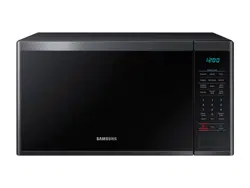
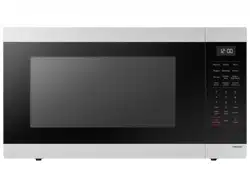
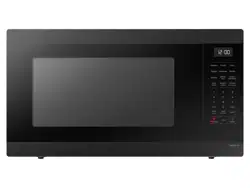
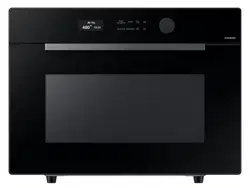
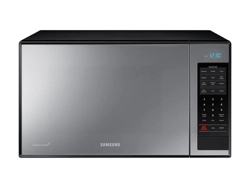
Make sure all parts and accessories are included in the product package. If you have a problem with the oven or accessories, contact a local Samsung customer center or your retailer.
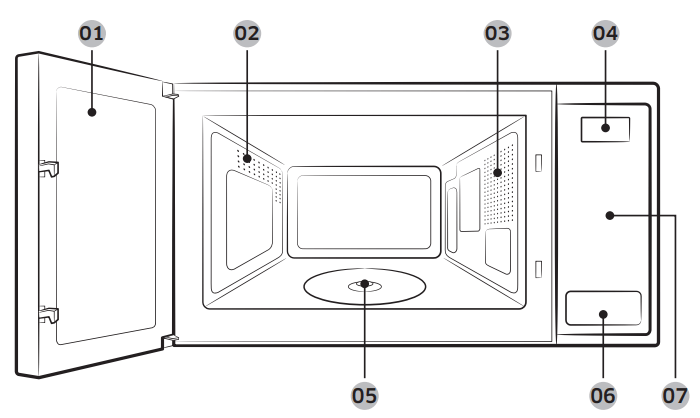
Oven at a glance
Door
Vent
Oven light
Display
Coupler
Push button door opener
Feature panel
Accessories
The oven comes with different accessories that help you prepare different types of food.
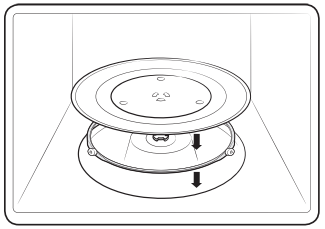
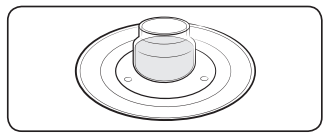
Roller ring
Put in the center of the base. It supports the turntable.
Turntable
Put on the roller ring with the center fitting the coupler on the microwave’s floor. It serves as a cooking base.
NOTE: Do not operate the oven without the turntable on the roller ring.
Turntable
Remove all packing materials inside the oven.Install the roller ring and turntable. Check that the turntable rotates freely.
Maintenance
Cleaning
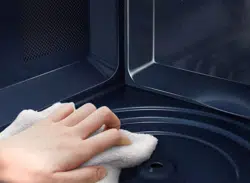
Clean the oven regularly to prevent impurities from building up on or inside the oven. Also pay special attention to the door, door sealing, and turntable and roller ring (applicable models only).
If the door won’t open or close smoothly, first check if the door seals have built up impurities. Use a soft cloth and soapy water to clean both the inner and outer sides of the oven. Rinse and dry well.
To remove stubborn impurities with bad smells from inside the oven
With the oven empty, put a cup of diluted lemon juice on the center of the turntable.
Heat the oven for 10 minutes at maximum power.
When the cycle is complete, wait until the oven cools down. Then, open the door and clean the cooking chamber.
To clean inside swing-heater models
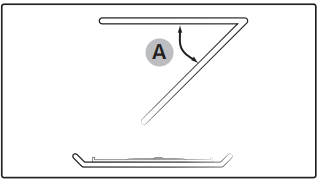
To clean the upper area of the cooking chamber, lower the top heating element by 45° (A) as shown. This will help you clean the upper area. When done, reposition the top heating element.
CAUTION:
Keep the door and door sealing clean and ensure the door opens and closes smoothly. Otherwise, the oven’s lifecycle may be shortened.
Take caution not to spill water into the oven vents.
Do not use any abrasive or chemical substances for cleaning.
After each use of the oven, use a mild detergent to clean the cooking chamber after waiting for the oven to cool down.
Replacement (repair)
WARNING: This oven has no user-removable parts inside. Do not try to replace parts or repair the oven yourself.
If you encounter a problem with hinges, sealing, and/or the door, contact a qualified technician or a local Samsung service center for technical assistance.
If you want to replace the light bulb, contact a local Samsung service center. Do not replace it yourself.
If you encounter a problem with the outer housing of the oven, first unplug the power cord from the power source, and then contact a local Samsung service center.
Care during an extended period of disuse
If you don’t use the oven for an extended period of time, unplug the power cord and move the oven to a dry, dust-free location. Dust and moisture that builds up inside the oven may affect the performance of the oven.
Before you start
Before you use the microwave for the first time, there is some basic information you should know. This information starts below.
NOTE: Before or during any cooking mode, you can set/change the clock or the kitchen timer.
Current time
It is important to set the correct clock time to ensure correct automatic operations.
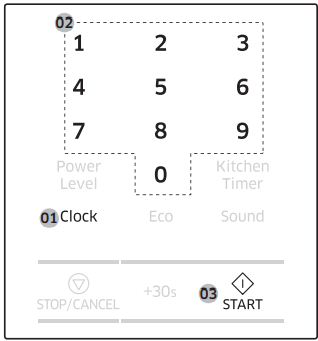
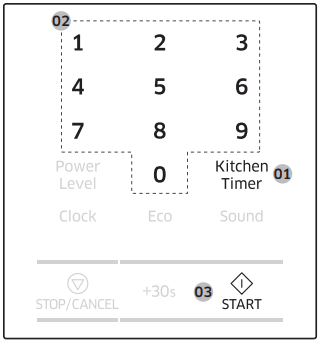
Press Clock.
Use the number buttons to enter the current time. For example, press 5, 0, and 0 in sequence for 5:00 o’clock.
Press START to confirm your settings. The colon (:) indicator blinks several times.
Power saving
To reduce power consumption when not using the oven, use the power saving function of the oven.
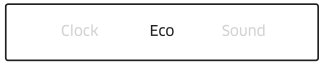
To activate power saving, press Eco to turn off the display.
To deactivate power saving, open the door or press Eco again. The display turns back on showing the current time.
Auto power saving
After 25 minutes of user inactivity, the oven automatically enters power saving mode. Any previous function will be cancelled, and the current time will be displayed.
If you open the door and leave it open, the oven light will turn off after 5 minutes.
Child lock
To prevent accidents, Child Lock disables all controls except for the Eco button.
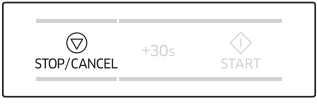
Hold down STOP/CANCEL for 3 seconds to activate. Hold down STOP/CANCEL again for 3 seconds to deactivate.
Sound On/Off
You can mute or unmute the sounds (beeps or melody) made by the oven.
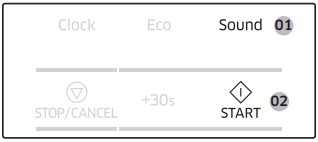
To mute the sounds, press Sound until “OFF” appears in the display. Then, press START.
To unmute the sounds, press Sound again until “ON” appears in the display. Then, press START.
Kitchen timer
Press Kitchen Timer.
Press the number buttons to set the length of time. For example, press 3 - 0 - 0 to set the timer to 3 minutes.
Press START. The Kitchen Timer counts down the time.
About microwave energy
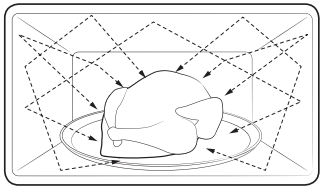
Microwaves are high-frequency electromagnetic waves. The magnetron built into the oven generates microwaves which cook or reheat food without deforming or discolouring it.
The microwaves generated by the magnetron are distributed uniformly by the microwave's distribution system. This is why the food cooks evenly.
The microwaves are absorbed by the food to a depth of approx. 1 inch (2.5 cm). Then, the microwaves dissipate inside the food as cooking continues.
The cooking time is affected by the following conditions of the food:
Quantity and density
Moisture content
Initial temperature (especially, when frozen)
NOTE: The cooked food retains heat in its core after cooking is complete. This is why you must observe the standing times specified in this manual, which ensures food cooks evenly down to the core.
Cookware for microwaving
Cookware used for Microwave Mode must allow microwaves to pass through and penetrate food. Metals such as stainless steel, aluminum, and copper reflect microwaves. Therefore, do not use cookware made of metallic materials. Cookware marked microwave - safe is always safe for use. For additional information on appropriate cookware, refer to the following guide.
Requirements:
Flat bottom and straight sides
Tight-fitting lid
Well-balanced pan with handles that weigh less than the main pan
Material
Microwave safe
Description
Aluminium foil
Use for a small serving size to protect against overcooking. Arcing can occur if the foil is near the oven wall or if you use an excessive amount of foil.
Crusty plate
Do not use for preheating for more than 8 minutes.
Bone china or earthenware
Porcelain, pottery, glazed earthenware, and bone china are usually microwave safe, unless decorated with a metal trim.
Disposable polyester cardboard dishes
Some frozen foods are packaged in these dishes.
Fast-food packaging
Polystyrene cups or containers
Overheating may cause these to melt
Paper bags or newspaper
These may catch fire
Recycled paper or metal trims
These may cause arcing
Glassware
Oven-to-table ware
Microwave-safe unless decorated with metal trim.
Fine glassware
Rapid heating may cause delicate glassware to break or crack.
Glass jars
Appropriate for warming only. Remove the lid before cooking.
Metal
Dishes
These may cause arcing or fire.
Freezer bag with twist-ties
Paper
Plates, cups, napkins, and kitchen paper
Use to cook for a short time. These absorb excess moisture.
Recycled paper
Causes arcing
Plastic
Containers
Use thermoplastic containers only. Some plastics may warp or discolour at high temperatures.
Cling film
Use to maintain moisture after cooking
Freezer bags
Use boilable or ovenproof bags only.
Wax or grease-proof paper
Use to maintain moisture and prevent spattering.
: Microwave Safe
: Use Caution
: Microwave Unsafe
Operations
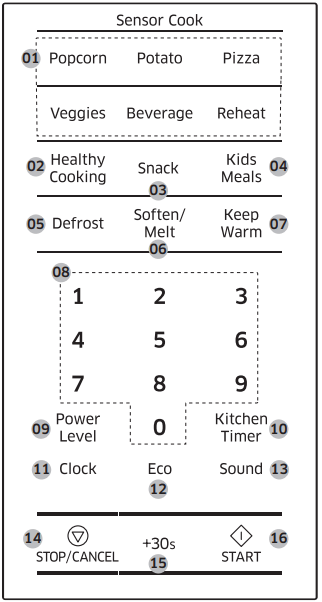
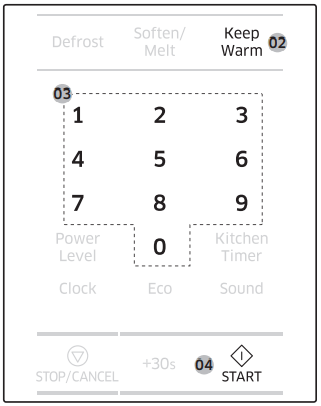
Feature panel
The front panel comes in a wide range of materials and colors. For improved quality, the actual appearance of the oven is subject to change without notice.
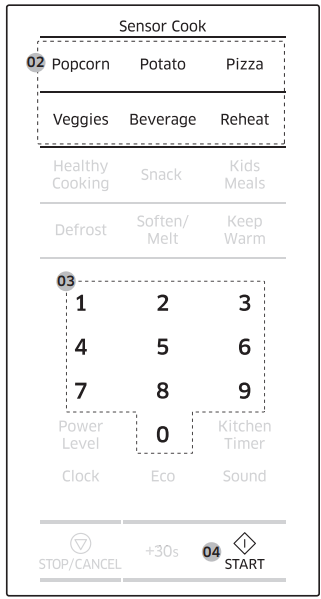
Sensor Cook
Healthy Cooking
Snack
Kids Meals
Defrost
Soften/Melt
Keep Warm
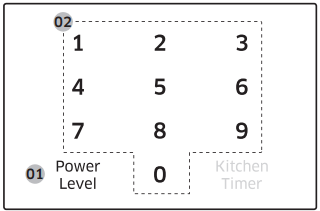
Number
Power Level
Kitchen Timer
Clock
Eco
Sound
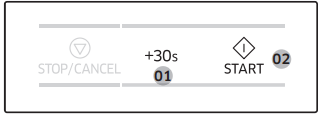
STOP/CANCEL
+30s
START
Simple steps to start
To cook food
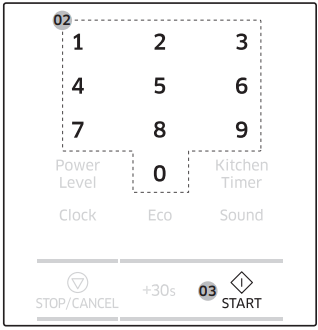
Put the food in a microwave-safe container, and then put the container in the center of the turntable.
Use the number buttons to set the cooking time.
Press START.
NOTE: When cooking is complete, the oven beeps 4 times. Use oven gloves to take out the food.
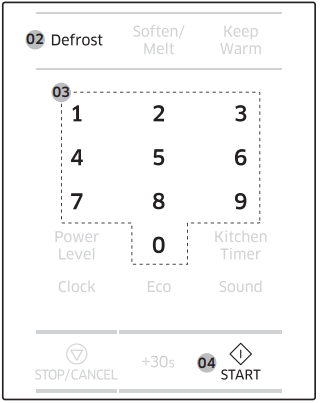
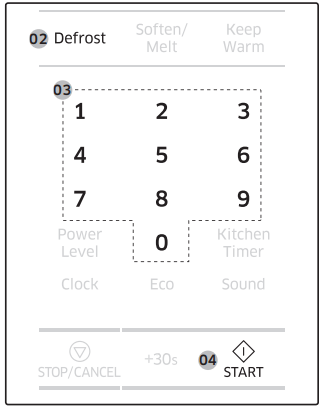
To defrost frozen food
Put the frozen food in a microwave-safe container, and then put the container in the center of the turntable.
Press Defrost.
Use the number buttons to set the serving size.
Press START
Manual mode
Microwave
This is the basic function of this microwave oven. The power level is set to High by default.
Put food in a microwave-safe container, and then place the container on the turntable.
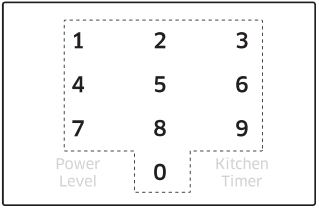
Use the number buttons to set the cooking time (max: 99 min 99 sec). For example, to set the time to 10 minutes, press 1 and 0 for the minutes, and 0 and 0 for the seconds (10:00).
To change the default power level, press Power Level, and then select a different level.
Press START.
When cooking is complete, the oven beeps 4 times. Use oven gloves to take out the food.
Common settings
Cooking time
Follow these steps to set or change the cooking time. By default, the power level is set to High.
Use the number buttons to set the cooking time (max: 99 min 99 sec). The time area consists of the minute and second elements. To set a cooking time of 25 minutes, for example, press 2 and 5 for the minutes, then 0 and 0 for the seconds.
NOTE:
To change the cooking time during operation, press STOP/CANCEL twice, and then repeat the steps above.
To stop cooking, simply open the door, or press STOP/CANCEL. To resume operation, close the door and press START.
To cancel cooking, press STOP/CANCEL twice
Time increment
You might want to add extra time to the current cooking time while cooking is in progress. Time can be added in 30 second intervals.
Before or during cooking, press +30s as many times as needed. For example, to add 2 minutes to the current cooking time, press the button 4 times.
Press START. The oven continues to operate for the changed time.
NOTE: This button is not enabled when you use Auto mode.
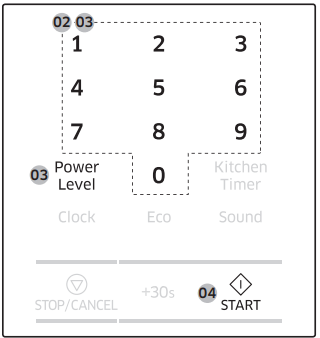
Power level
Select the cooking time, and then choose the power level before pressing the Start button.
Press Power Level.
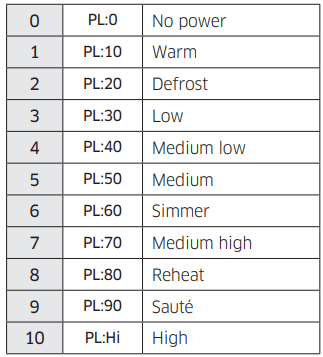
Use the number buttons to select a specific power level. Available levels range from No power (0) to High (10).
See the table below.
NOTE: To check the current power level while cooking is in progress, press Power Level.
Sensor mode
Sensor Cook
For inexperienced cooks, the oven offers a total of 9 Sensor Cook programs in 6 different categories. Take advantage of this feature to save time or shorten your learning curve. The cooking time and temperature will be adjusted according to the selected recipe.
Put food in a microwave-safe container, and then put the container in the center of the turntable.
Select a category by pressing Popcorn, Potato, Pizza, Veggies, Beverage, or Reheat.
Press the selected button again or the number buttons to select a specific program.
Press START.
When cooking is complete, the oven beeps 4 times. Use oven gloves to take out the food.
Auto mode
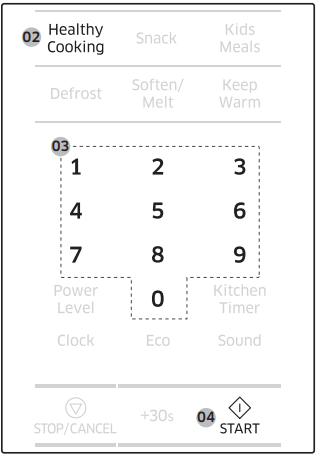
Healthy Cooking
For healthier alternatives, the oven offers a total of 10 Healthy Cook programs. Take advantage of this feature to save time or shorten your learning curve. The cooking time and temperature will be adjusted according to the selected recipe.
Put food in a microwave-safe container, and then put the container in the center of the turntable.
Press Healthy Cooking.
Press the Healthy Cooking button again or the number buttons to select a specific program.
Press START.
When cooking is complete, the oven beeps 4 times. Use oven gloves to take out the food.
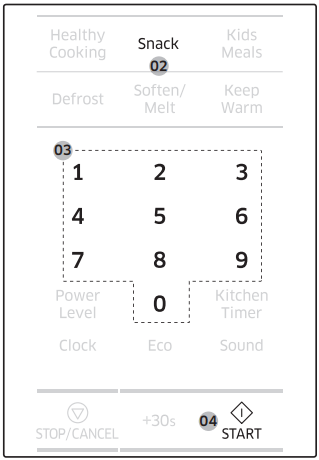
Snack
The Snack feature has 5 pre-programmed cooking times. You do not need to set either cooking times or the power level.
Put food in the center of the turntable, and then close the door.
Press Snack.
Press the Snack button again or the number buttons to select a specific program.
Press START.
When the cycle is complete, the oven beeps 4 times. Use oven gloves to take out the food.
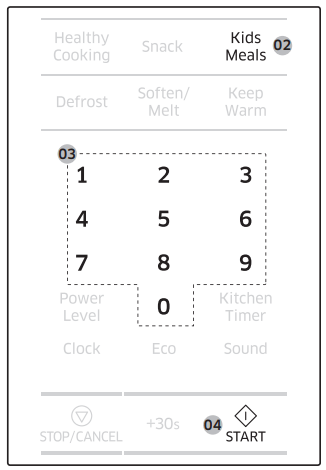
Kids Meals
Kids meals feature has 4 pre-programmed cooking times. You do not need to set either cooking times or the power level.
Put food in the center of the turntable.
Press Kids Meals.
Press the Kids Meals or number buttons to select a specific program.
Press START.
When cooking is complete, the oven beeps 4 times. Use oven gloves to take out the food.
CAUTION: Before inserting food in the oven, remove any metal or plastic cover or lid from the food.
Convenience
Defrost
This is useful to defrost frozen meat, poultry, fish, or bread. The operating time and power level will be adjusted according to the selected program.
Put food in the center of the turntable, and then close the door.
Press Defrost to select a category.
Use the number buttons to select a weight.
Press START.
When the cycle is complete, the oven beeps 4 times. Use oven gloves to take out the food.
NOTE:
The oven beeps in the middle of the cycle to remind you to turn the food over. Turn the food over, and then press Start again to continue. When the cycle is complete, the oven beeps 4 times.
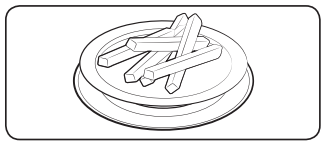
You can defrost food manually. To do this, set a time, press the 2 button (20 % power), and then press START.
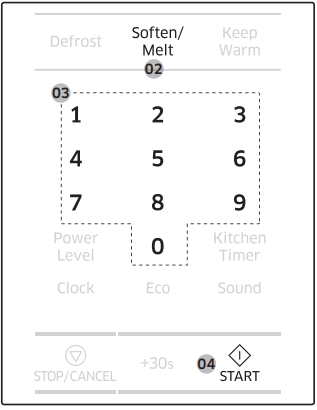
Soften/Melt
This is useful to soften or melt soft food or confections such as butter, chocolate, and sugar.
Put food in the center of the turntable.
Press Soften/Melt.
Press the Soften/Melt button again or the number buttons to select a specific program.
Press START.
When the cycle is complete, the oven beeps 4 times. Use oven gloves to take out the food.
Keep Warm
If you want to keep cooked foods warm until serving, use this function. The operating time and power level will be adjusted according to the selected program.
Put food in the center of the turntable, and then close the door.
Press Keep Warm. The default time is 99 minutes.
Use the number buttons to set the warming time (max: 99 min 99 sec.).
Press START.
When the cycle is complete, the oven beeps 4 times. Use oven gloves to take out the food.
CAUTION:
Do not use this function to reheat cold food. Use this only for keeping food that has just been cooked warm.
Do not keep food for more than 1 hour. The food surface may dry up.
Do not put food covered with lids or plastic wrap in the oven.
Troubleshooting
If you encounter a problem with your oven, first check the tables starting below and try the suggestions. If a problem persists, or if an information code keeps appearing on the display, contact a local Samsung service center.
Checkpoints
If you encounter a problem with the oven, first check the tables below and try the suggestions.
Problem
Cause
Action
General
The buttons cannot be pressed properly.
Foreign matter may be caught between the buttons.
Remove the foreign matter and try again.
For touch models: Moisture is on the exterior.
Wipe the moisture from the exterior
Child lock is activated.
Deactivate Child lock
The time is not displayed.
Power is not supplied.
Make sure power is supplied. Confirm the microwave is plugged in. Check your fuses or circuit breakers.
The Eco (power-saving) function is set.
Turn off the Eco function.
The oven does not work.
Power is not supplied.
Make sure power is supplied. Confirm the microwave is plugged in. Check your fuses or circuit breakers
The door is open.
Close the door and try again.
The door open safety mechanisms are covered in foreign matter
Remove the foreign matter and try again.
The oven stops while in operation.
The user has opened the door to turn food over.
After turning over the food, press the Start button again to start operation.
The power turns off during operation.
The oven has been cooking for an extended period of time.
After cooking for an extended period of time, let the oven cool
The cooling fan is not working.
Listen for the sound of the cooling fan
Trying to operate the oven without food inside.
Put food in the oven.
There is not enough ventilation space around the oven.
There are intake/exhaust outlets on the front and rear of the oven for ventilation.
Check the installation guide and make sure that the microwave is far enough away from walls and cabinets for proper ventilation.
Several appliances or devices are plugged into the same outlet.
Unplug all other appliances or devices from the outlet.
There is no power to the oven.
Power is not supplied.
Make sure power is supplied. Confirm the microwave is plugged in. Check your fuses or circuit breakers.
There is a popping sound during operation, and the oven doesn't work.
Cooking sealed food or using a container with a lid may causes popping sounds.
Do not use sealed containers as they may burst during cooking due to expansion of the contents.
The oven exterior gets too hot during operation.
There is not enough ventilation space around the oven.
There are intake/exhaust outlets on the front and rear of the oven for ventilation. Check the installation guide and make sure that the microwave is far enough away from walls and cabinets for proper ventilation.
Objects are on top of the oven.
Remove all objects on the top of the oven.
The door cannot be opened properly
Food residue is stuck between the door and oven interior.
Clean the oven and then open the door.
The oven does not heat.
The oven may not work, too much food is being cooked, or improper cookware is being used.
To test the oven, put one cup of water in a microwave-safe container, put the container in the oven, and then run the microwave for 1-2 minutes to check whether the water is heated. If the water is heated, reduce the amount of food and start the function again. Use a cooking container with a flat bottom.
Heating is weak or slow
The oven may not work, too much food is being cooked, or improper cookware is being used.
To test the oven, put one cup of water in a microwave-safe container, put the container in the oven, and then run the microwave for 1-2 minutes to check whether the water is heated. If the water is heated, reduce the amount of food and start the function again. Use a cooking container with a flat bottom.
The warm function does not work.
The oven may not work, too much food is being cooked, or improper cookware is being used.
To test the oven, put one cup of water in a microwave-safe container, put the container in the oven, and then run the microwave for 1-2 minutes to check whether the water is heated. If the water is heated, reduce the amount of food and start the function again. Use a cooking container with a flat bottom.
The thaw function does not work.
The oven may not work, too much food is being cooked, or improper cookware is being used.
To test the oven, put one cup of water in a microwave-safe container, put the container in the oven, and then run the microwave for 1-2 minutes to check whether the water is heated. If the water is heated, reduce the amount of food and start the function again. Use a cooking container with a flat bottom.
The interior light is dim or does not turn on.
The door has been left open for a long time.
The interior light may automatically turn off when the Eco function operates. Close and reopen the door or press the “Cancel” button.
The interior light is covered by foreign matter
Clean the inside of the oven and check again.
A beeping sound occurs during cooking.
If the Auto Cook function is being used, this beeping sound means it's time to turn over the food during thawing
After turning over the food, press the Start button again to restart operation.
The oven is not level.
The oven is installed on an uneven surface.
Make sure the oven is installed on flat, stable surface.
There are sparks during cooking.
Metal containers are used during the oven/thawing functions.
Do not use metal containers.
When power is connected, the oven immediately starts to work.
The door is not properly closed.
Close the door and check again.
There is electricity coming from the oven.
The power or power socket is not properly grounded.
Make sure the power and power socket are properly grounded.
There is water dripping.
Water or steam may be generated by the cooking or defrosting process, depending on the food. This is not an oven malfunction.
Let the oven cool and then wipe with a dry dish towel.
Steam leaks from the door.
Water or steam may be generated by the cooking or defrosting process, depending on the food. This is not an oven malfunction
Let the oven cool and then wipe with a dry dish towel.
There is water left in the oven.
Water or steam may be generated by the cooking or defrosting process, depending on the food. This is not an oven malfunction.
Let the oven cool and then wipe with a dry dish towel.
The brightness inside the oven varies.
Changes in brightness reflect changes in power output. Power output changes depending on the functions in use.
Power output changes during cooking are not malfunctions.
Cooking is finished, but the cooling fan is still running.
To ventilate the oven, the cooling fan continues to run for about 5 minutes after cooking is complete.
This is not an oven malfunction.
Pressing the +30sec button operates the oven.
This happens when the oven was not operating.
The microwave oven is designed to start operating when you press the +30 sec button if it was not operating.
Turntable
While turning, the turntable comes out of place or stops turning.
There is no roller ring, or the roller ring is not properly in place.
Install the roller ring and then try again.
The turn table drags while turning
The roller ring is not properly in place, there is too much food, or the container is too large and touches the inside of the microwave.
Adjust the amount of food and do not use containers that are too large.
The turn table rattles while turning and is noisy.
Food residue is stuck to the bottom of the oven.
Remove any food residue stuck to the bottom of the oven.
NOTE: If the above guidelines do not enable you to solve the problem, then contact your local SAMSUNG customer service center.
Please have the following information ready:
The model and serial numbers, normally printed on the rear of the oven
Your warranty details
A clear description of the problem
Information code
Code
Description
Action
C-d0
Control buttons are pressed over 10 seconds.
Clean the keys and check if there is water on the surface around the keys. If this occurs again, turn off the microwave oven for more than 30 seconds, and then try setting again. If this code appears again, call your local Samsung service center
C-10
The GAS Sensor is open.
Unplug the power cord of the oven, and then contact a local Samsung service center.
The GAS Sensor is shorted.
NOTE: If the suggested solution does not solve the problem, contact your local SAMSUNG Service Center.
#1 Can this countertop be installed into a space above the oven?
This model is not designed for built-in installation and does not have the same ventilation system as the "over the range" models. This model also requires a minimum of 4 inches of space behind and on the sides in order to function properly.
The magnetron is the heating element of a microwave oven. Magnetic fields cause a vibration of the molecules in an item which creates the heat required to cook that item.
#3 What part of this microwave is Ceramic? I don't see any ceramic, just regular metal?
This model is designed to be installed over a range, and can be installed between cabinetry. However, the bottom of the microwave does require air flow as this is where the vents are located.