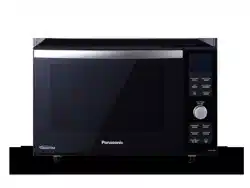
Operating Instructions
Bedienungsanleitung
Gebruiksaanwijzing
Mode d’emploi
Manuale d’istruzioni
Instrucciones de funcionamiento
Instrukcja obsługi
Návod k obsluze
Kezelési útmutató
Microwave Oven
Mikrowellengerät
Magnetron
Four à Micro-ondes
Forno a Microonde
Horno Microondas
Kuchenka Mikrofalowa
Mikrovlnná trouba
Mikrohullámú sütö
NN-DF383B
English Deutsch
Nederlands
Français Italiano Español
Polski Česky Magyar

IMPORTANT SAFETY INSTRUCTIONS: Before operating this oven, please read these
instructions carefully and keep for future reference.
WICHTIGE SICHERHEITSANWEISUNGEN. Bitte sorgfältig durchlesen und zur weiteren
Bezugnahme aufbewahren.
BELANGRIJKE VEILIGHEIDSINSTRUCTIES. Lees ze a.u.b. zorgvuldig door en bewaar ze zodat
u ze opnieuw kunt raadplegen wanneer nodig.
INSTRUCTIONS DE SÛRETÉ IMPORTANTES. Avant d’utiliser le four à micro-ondes, lisez
attentivement les recommandations d’utilisation et conservez-les soigneusement.
ISTRUZIONI IMPORTANTI PER LA SICUREZZA. Leggere attentamente queste istruzioni e
conservarle per consultazioni future.
INSTRUCCIONES SOBRE SEGURIDAD IMPORTANTES. Léalas detenidamente y guárdelas
para futura referencia.
WAŻNE INSTRUKCJE BEZPIECZEŃSTWA. Prosimy o dokładne zapoznanie się z instrukcją i
zachowanie jej.
DŮLEŽITÉ POKYNY K BEZPEČNOSTI. Pečlivě si je prosím přečtěte a uložte pro případné
použití.
FONTOS BIZTONSÁGI UTASÍTÁSOK. A készülék használata előtt, kérjük, olvassa el ezeket az
útmutatásokat és őrizze meg azt későbbi hivatkozás céljából.

1
EN
English
Important safety instructions. Before
operating this oven, please read these
instructions carefully and keep for future
reference.
This appliance can be used by children
aged from 8 years and above and persons
with reduced physical, sensory and
mental capabilities or lack of experience
and knowledge if they have been given
supervision or instruction by a person
responsible for their safety concerning the
use of the appliance in a safe way and
understand the hazards involved. Children
shall not play with the appliance. Cleaning
and user maintenance shall not be made
by children without supervision. Keep the
appliance and its cord out of reach of
children less than 8 years.
When this oven is installed, it should
be easy to isolate the appliance from the
electricity supply by pulling out the plug or
operating a circuit breaker.

2
3
EN
If the supply cord is damaged, it must be
replaced by the manufacturer or its service
agent or a similarly qualied person in order
to avoid a hazard.
Warning! The appliance should be
inspected for damage to the door seals
and door seal areas and if these areas
are damaged the appliance should not
be operated until it has been repaired
by a service technician trained by the
manufacturer.
Warning! Do not attempt to tamper with
or make any adjustments or repairs to the
door, control panel housing, safety interlock
switches or any other part of the oven. Do
not remove the outer panel from the oven
which gives protection against exposure to
microwave energy. Repairs should only be
by a qualied service person.
Liquids and other foods must not be
heated in sealed containers since they are
liable to explode.
Warning! Do not place this oven near an
electric or gas cooker range.

2
3
EN
English
Warning! Only allow children to use the
oven without supervision when adequate
instructions have been given so that the
child is able to use the oven in a safe way
and understands the hazards of improper
use.
For Countertop use:
Allow 15 cm of space on the top of the
oven, 10 cm at the back, 5 cm on one side,
and the other side open.
When heating food in plastic or paper
containers, check the oven frequently
as these types of containers ignite if
overheated.
If smoke is emitted or a re occurs in the
oven, press Stop/Cancel button and leave
the door closed in order to stie any ames.
Disconnect the power cord, or shut off
power at fuse or circuit breaker panel.
When heating liquids, e.g. soup, sauces

4
5
EN
and beverages in your oven, overheating
the liquid beyond boiling point can occur
without evidence of bubbling. This could
result in a sudden boil over of the hot liquid.
The contents of feeding bottles and baby
food jars are to be stirred or shaken. The
temperature has to be checked before
consumption to avoid burns.
Do not cook eggs in their shells and whole
hard-boiled eggs by MICROWAVE. Pressure
may build up and the eggs may explode,
even after the microwave heating has
ended.
Clean the inside of the oven, door seals
and door seal areas regularly. When food
splatters or spilled liquids adhere to the oven
walls, ceramic plate, door seals and door
seal areas wipe off with a damp cloth. Mild
detergent may be used if they get very dirty.
The use of harsh detergent or abrasive is
not recommended.
DO NOT USE COMMERCIAL OVEN
CLEANERS.
When using the OVEN, GRILL or

4
5
EN
English
COMBINATION modes, some foods may
inevitably splatter grease on to the oven
walls. If the oven is not cleaned occasionally,
it may start to “smoke” during use.
Failure to maintain the oven in a clean
condition could lead to deterioration of
surfaces that could affect the life of the
appliance and possibly result in a hazardous
situation.
Warning! The accessible parts may
become hot in combination use. Young
children should be kept away. Children
should only use the oven under adult
supervision due to the temperatures
generated.
This oven is intended for counter-top use
only. It is not intended for Built-in use or for
use inside a cupboard.
A steam cleaner is not to be used for
cleaning.
Do not use harsh, abrasive cleaners or

6
7
EN
sharp metal scrapers to clean the oven door
glass since they can scratch the surface,
which may result in shattering of the glass.
Exterior oven surfaces, including air vents
on the cabinet and the oven door will get hot
during OVEN, GRILLING and COMBINATION
modes, take care when opening or closing
the door and when inserting or removing food
and accessories.
This appliance is not intended to be
operated by means of an external timer or
separate remote-control system.
Only use utensils that are suitable for use in
microwave ovens.

6
7
EN
English
Contents
Installation and connection �����������������������������������������������������������������������������������������������8
Placement of your oven ����������������������������������������������������������������������������������������������������8
Important safety instructions ��������������������������������������������������������������������������������������� 9-12
Outline diagram ���������������������������������������������������������������������������������������������������������������13
Control panel NN-DF383B�����������������������������������������������������������������������������������������������14
Control and operation procedure �������������������������������������������������������������������������������������15
Setting the clock �������������������������������������������������������������������������������������������������������������16
Child safety lock �������������������������������������������������������������������������������������������������������������16
Oven accessories �����������������������������������������������������������������������������������������������������������17
Cooking modes����������������������������������������������������������������������������������������������������������������17
Microwave cooking and defrosting ����������������������������������������������������������������������������������18
Grilling �����������������������������������������������������������������������������������������������������������������������������19
Oven cooking������������������������������������������������������������������������������������������������������������� 20-21
Combination cooking ������������������������������������������������������������������������������������������������� 22-23
Using the timer ����������������������������������������������������������������������������������������������������������������24
Multi-stage cooking����������������������������������������������������������������������������������������������������������25
Using the memory function ����������������������������������������������������������������������������������������������26
Turbo defrost �������������������������������������������������������������������������������������������������������������������27
Auto sensor programs ����������������������������������������������������������������������������������������������� 28-30
Auto weight programs������������������������������������������������������������������������������������������������ 31-32
Questions and answers ��������������������������������������������������������������������������������������������� 33-34
Care of your oven ������������������������������������������������������������������������������������������������������������35
Technical specications ���������������������������������������������������������������������������������������������������36
Thank you for purchasing a Panasonic Microwave Oven.
8
9
EN
Examine your microwave oven
Unpack the oven, remove all packing
material, and examine the oven for any
damage such as dents, broken door
latches or cracks in the door. If you nd any
damage, notify your dealer immediately� Do
not install a damaged microwave oven�
Important!
THIS UNIT HAS TO BE PROPERLY
EARTHED FOR PERSONAL SAFETY.
Earthing instructions
If your AC outlet is not grounded, it is the
personal responsibility of the customer to
have it replaced with a properly grounded
wall socket�
Operation voltage
The voltage has to be the same as specied
on the label on the oven� If a higher voltage
than specied is used, it may cause a re or
other damages�
Installation and connection
This oven is intended for counter-top use
only� It is not intended for Built-in use or for
use inside a cupboard�
1. Place the oven on a at and stable
surface more than 85 cm above the
oor.
2� When this oven is installed, it should
be easy to isolate the appliance from
the electricity supply by pulling out the
plug or operating a circuit breaker�
3� For proper operation, ensure a
sufcient air circulation for the oven.
Counter-top use:
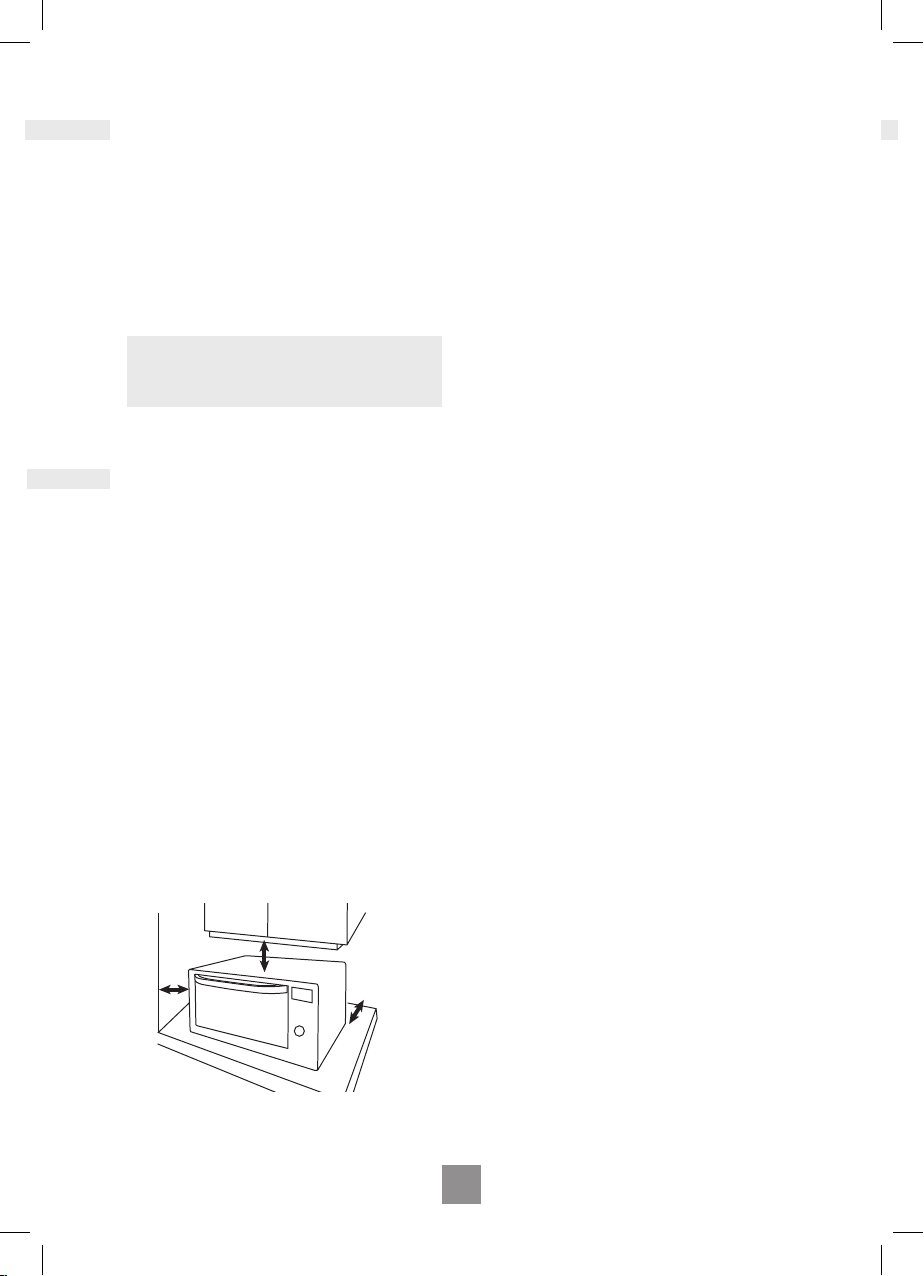
a� Allow 15 cm of space on the top of the
oven, 10 cm at the back, 5 cm on one
side, and the other side open�
4� Do not place this oven near an electric
or gas cooker range�
5� The feet should not be removed�
6� This oven is only for household usage�
Do not use outdoors�
7� Avoid using the oven in high humidity�
8� The power cord should not touch the
outside of the oven� Keep the cord
away from hot surfaces� Do not let the
cord hang over the edge of a table or
work top� Do not immerse the cord,
plug or oven in water�
9� Do not block the air vents on the
sides and back of the oven� If these
openings are blocked during operation
the oven may overheat� In this case
the oven is protected by a thermal
safety device and resumes operation
only after cooling down�
10� This appliance is not intended to be
operated by means of an external
timer or separate remote-control
system�
Placement of your oven
15 cm
5 cm
10 cm
open
counter top

8
9
EN
English
WARNING!
Important safety instructions
1� The door seals and seal areas should
be cleaned with a damp cloth� The
appliance should be inspected for
damage to the door seals and door
seal areas and if these areas are
damaged the appliance should not
be operated until it has been repaired
by a service technician trained by the
manufacturer�
2� Do not attempt to tamper with or
make any adjustments or repairs
to the door, control panel housing,
safety interlock switches or any other
part of the oven� Do not remove the
outer panel from the oven which
gives protection against exposure to
microwave energy� Repairs should
only be carried out by a qualied
service person�
3� Do not operate this appliance if it has
a damaged CORD OR PLUG, if it is
not working properly, or if it has been
damaged or dropped� It is dangerous
for anyone other than a service
technician trained by the manufacturer
to perform repair service�
4� If the supply cord is damaged, it must
be replaced by the manufacturer or its
service agent or a similarly qualied
person in order to avoid a hazard�
5� Only allow children to use the oven
without supervision when adequate
instructions have been given so that
the child is able to use the oven in a
safe way and understands the hazards
of improper use�
6� Liquids and other foods must not be
heated in sealed containers since they
are liable to explode�
7� Users are advised to avoid a
downward pressure on the microwave
oven door when in the open position�
There is a safety risk that the oven will
tilt forward�
8� This appliance is not intended for use
by persons (including children)
with reduced sensory or mental
capabilities, or lack of experience
and knowledge unless they have
been given supervision or instruction
concerning use of the appliance by
a person responsible for their safety�
Children should be supervised to
ensure that they do not play with the
appliance�
Important safety instructions

10
11
EN
Use of your oven
1� Do not use the oven for any reason
other than the preparation of food�
This oven is specically designed to
heat or cook food� Do not use this
oven to heat chemicals or other non-
food products�
2� Before use, check that utensils/
containers are suitable for use in
microwave ovens�
3� Do not attempt to use this microwave
oven to dry newspaper, clothing or
any other materials� They may catch
on re.
4� When the oven is not being used,
do not store any objects inside the
oven in case it is accidentally turned
on�
5� The appliance must not be operated
by MICROWAVE or COMBINATION
WITHOUT FOOD IN THE OVEN�
Operation in this manner may damage
the appliance� Exception to this is
point 1 under heater operation�
6. If smoke is emitted or a re occurs in
the oven, press Stop/Cancel button
and leave the door closed in order
to stie any ames. Disconnect the
power cord, or shut off power at fuse
or circuit breaker panel�
Heater operation
1� Before using OVEN, GRILL or
COMBINATION function for the rst
time, wipe excessive oil off in the oven
cavity and operate the oven without
food and accessories on OVEN
220°C, for 20 minutes� This will allow
the oil that is used for rust protection
to be burned off� This is the only time
the oven is used empty�
2� Exterior oven surfaces, including air
vents on the cabinet and the oven
door will get hot during OVEN,
GRILLING and COMBINATION
modes, take care when opening or
closing the door and when inserting or
removing food and accessories�
3� The oven has two heaters situated
in the top and two heaters situated
in the bottom of the oven cavity�
After using the OVEN, GRILLING
and COMBINATION function these
surfaces will be very hot� Care should
be taken to avoid touching the heating
elements inside the oven�
Caution! Hot surfaces
After cooking by these modes,
the oven accessories will be very hot.
4� The accessible parts may become hot
in combination use� Young children
should be kept away, and children
should only use the oven under adult
supervision due to the temperatures
generated�
Oven light
When it becomes necessary to replace the
oven light, please consult your dealer�
Accessories
The oven comes equipped with a variety of
accessories� Always follow the directions
given for use of the accessories�
Enamel Shelf
1� The Enamel Shelf is for cooking on
OVEN or GRILL mode only� Do
not use on MICROWAVE or
COMBINATION modes�
Important safety instructions

10
11
EN
English
Important safety instructions
Wire rack
1� The wire rack is used to facilitate
browning of small dishes and help with
the good circulation of the heat�
2� Do not use any metal container
directly on the wire rack in
COMBINATION with MICROWAVE�
3� Do not use the wire rack in
MICROWAVE mode only�
Cooking times
The cooking time depends on the
condition, temperature, amount of food
and on the type of cookware�
Begin with the minimum cooking time
to help prevent overcooking� If the
food is not sufciently cooked you can
always cook it for a little longer�
Important!
If the recommended cooking times are
exceeded the food will be spoiled and
in extreme circumstances could catch
re and possibly damage the interior of
the oven.
Small quantities of foods
Small quantities of food or foods with
low moisture content can burn, dry
out or catch on re if cooked too long.
If materials inside the oven should
ignite, keep the oven door closed, turn
the oven off and remove the plug from
the socket�
Eggs
Do not cook eggs in their shells and
whole hard-boiled eggs by
MICROWAVE� Pressure may build up
and the eggs may explode, even after
the microwave heating has ended�
Piercing Skin
Food with non porous skins, such as
potatoes, egg yolks and sausages
must be pierced before cooking by
MICROWAVE to prevent bursting�
Meat thermometer
Use a meat thermometer to check the
degree of cooking of roasts and
poultry only when the meat has been
removed from the oven� Do not use a
conventional meat thermometer in the
microwave oven because it may cause
sparking�

12
13
EN
Liquids
When heating liquids, e�g� soup,
sauces and beverages in your
microwave oven, overheating the
liquid beyond boiling point can occur
without evidence of bubbling� This
could result in a sudden boil over of
the hot liquid�
To prevent this possibility the following
steps should be taken:
a Avoid using straight-sided
containers with narrow necks�
b Do not overheat�
c Stir the liquid before placing the
container in the oven and again
halfway through the cooking time�
d After heating, allow it to stand
in the oven for a short time, stir
again before carefully removing
the container�
Paper/plastic
When heating food in plastic or paper
containers, check the oven frequently
as these types of containers ignite if
overheated�
Do not use recycled paper products
(e�g� Kitchen Roll) unless the paper
product is labelled as safe for
microwave oven use� Recycled paper
products may contain impurities which
may cause sparks and/or res during
use�
Remove wire twist-ties from roasting
bags before placing the bags in the
oven�
Utensils/foil
Do not heat any closed cans or bottles
because they might explode�
Metal containers or dishes with
metallic trim should not be used during
microwave cooking� Sparking will
occur�
If you use any aluminium foil, meat
spikes or metalware the distance
between them and the oven walls
and door should be at least 2 cm to
prevent sparking�
Feeding bottles/baby food jars
The top and teat or lid must be
removed from feeding bottles or baby
food jars before placing in the oven�
The contents of feeding bottles and
baby food jars are to be stirred or
shaken�
The temperature has to be checked
before consumption to avoid burns�
Fan Motor operation
After using the oven the fan motor may
rotate for a few minutes to cool the electric
components� This is normal and you can
take out food even though the fan motor
operates� You can continue using the oven
during this time�
Important safety instructions
12
13
EN
English
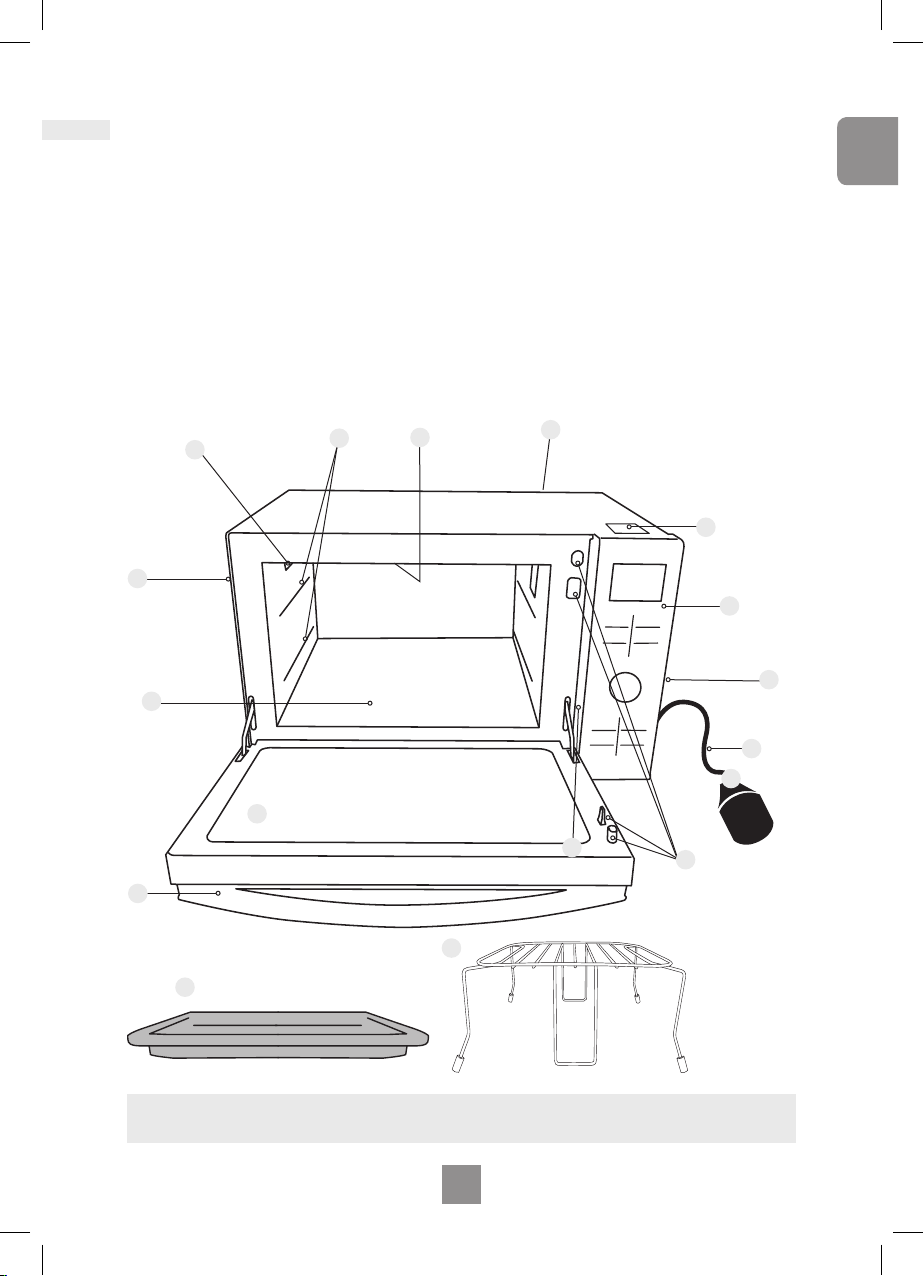
1. Door release
Pull the door handle downwards to
open� When you open the oven door
during cooking, the cooking is stopped
temporarily without clearing earlier
made settings� The cooking is
resumed as soon as the door is closed
and the Start pad pressed� The oven
lamp lights as soon as the oven door
is opened�
2. Oven window
3. Door safety lock system
4. Oven air vent
5. Shelf positions
6. External oven air vents
7. Control panel
8. Power supply cord
9. Plug
10. Identication label
11. Grill elements
12. Ceramic plate
13. Caution label (Hot surfaces)
14. Enamel shelf
15. Wire rack
Outline diagram
Note.
This illustration is for reference only�
1
13
12
2
7
9
3
11
10
5
6
6
6
4
8
14
15
14
15
EN
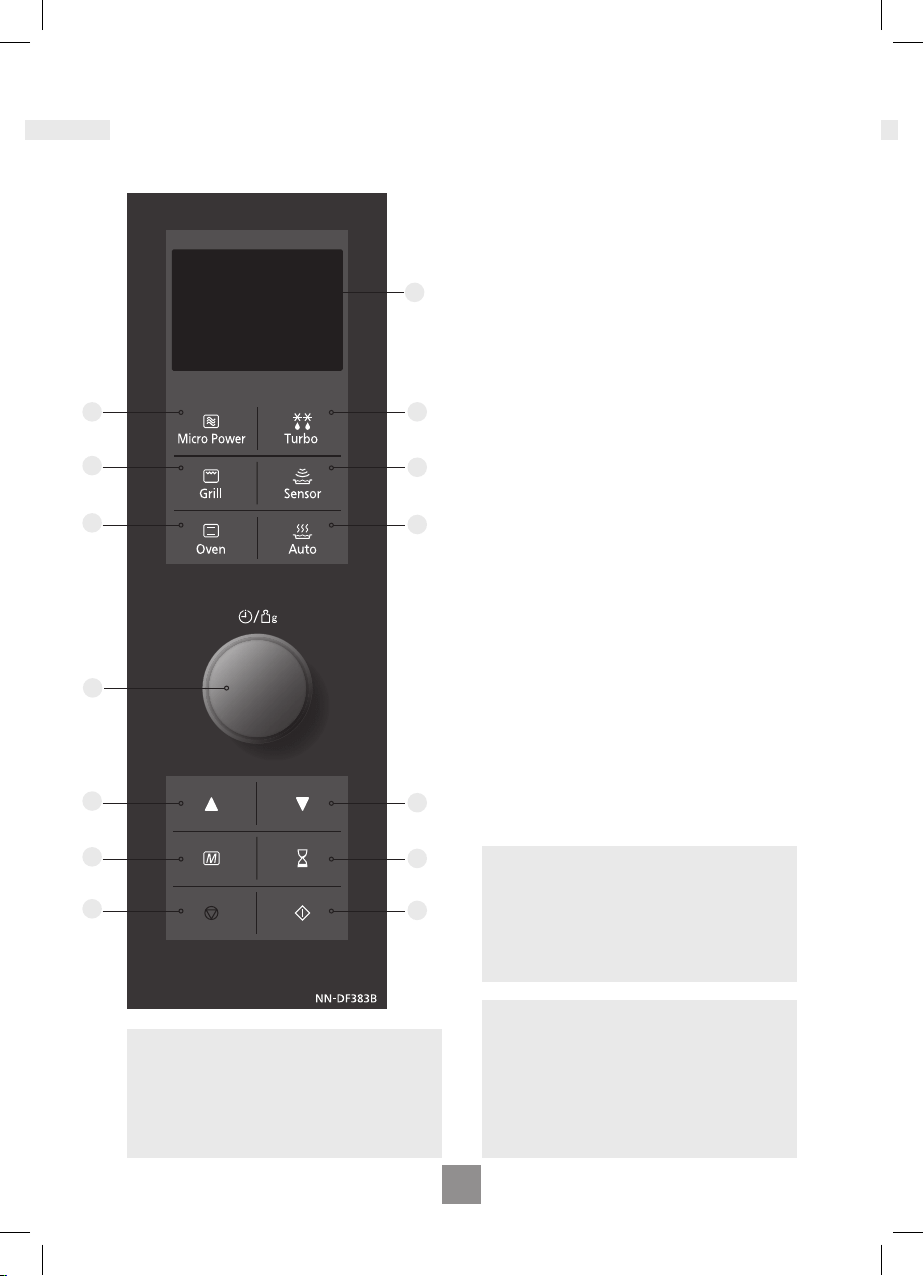
Control panel NN-DF383B
Note
If an operation is set and start button is not
pressed, after 6 minutes the oven will
automatically cancel the operation� The
display will revert back to clock mode�
1 Display window
2 Microwave power levels button
3 Turbo defrost programs button
4 Grill button
5 Auto sensor programs button
6 Oven power button
7 Auto weight programs button
8 Time / Weight selection dial
9 More button
10 Less button
11 Memory button
12 Timer button
13 Stop /Cancel button:
Before Cooking:
One press clears your instructions
During Cooking:
One press temporarily stops the cooking
program� Another press cancels all
your instructions and the time of day will
appear in the display�
14 Start button
This oven is equipped with an energy
saving function�
Please note
1� When in stand-by mode the brightness
of the display will be reduced�
2� The oven will enter stand-by mode,
when rst plugged in and immediately
after the last operation has completed�
Beep sound
When a button is pressed correctly a beep
will be heard� If a button is pressed and no
beep is heard, the unit has not or cannot
accept the instruction� At the end of any
complete program, the oven will beep 5
times�
1
4
6
9
11
13
3
5
7
10
12
14
8
2
14
15
EN
English
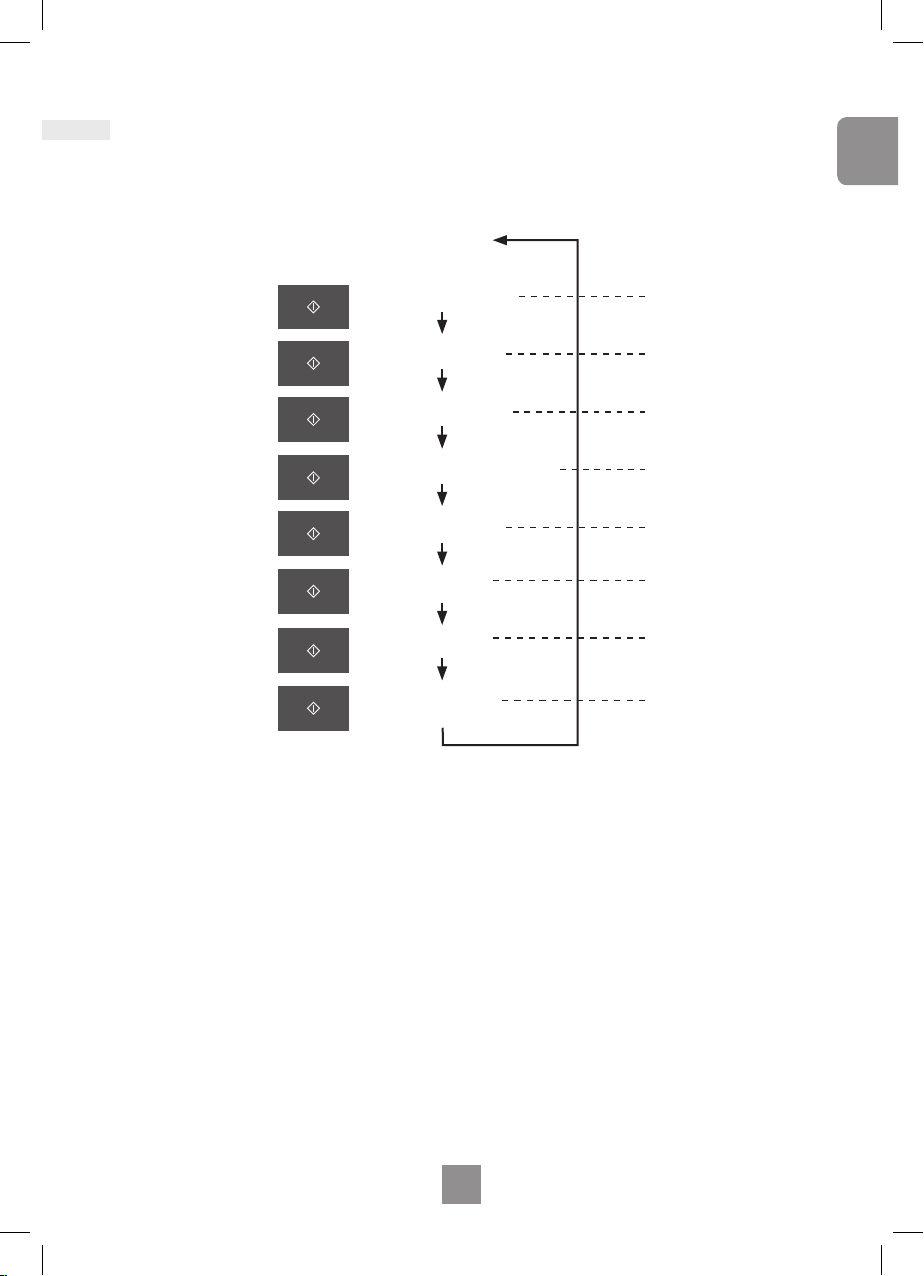
Controls and operation procedure
These models have a unique function “Word Prompting” which guides you through the
operation of your microwave� After plugging in the oven press the Start Button until
you locate your language� As you press the buttons, the display will scroll the next
instruction eliminating the opportunities for mistakes� If for any reason you wish to change
the language displayed, unplug the oven and repeat this procedure�
If the Timer Button is pressed 4 times, this will turn off the operation guide� To turn the
operation guide back on, press the Timer Button 4 times�
“88:88”Plug-in
Word Prompting
Word Prompting:
Press
Press
Press
Press
Press
Press
Press
Press
"FRANCAIS"
"ITALIANO"
"NEDERLANDS"
"DEUTSCH"
"ESPANOL"
"POLSKI"
"CESKY"
"ENGLISH"
In French
In Italian
In Dutch
In German
In Spanish
In Polish
In Czech
In English
16
17
EN
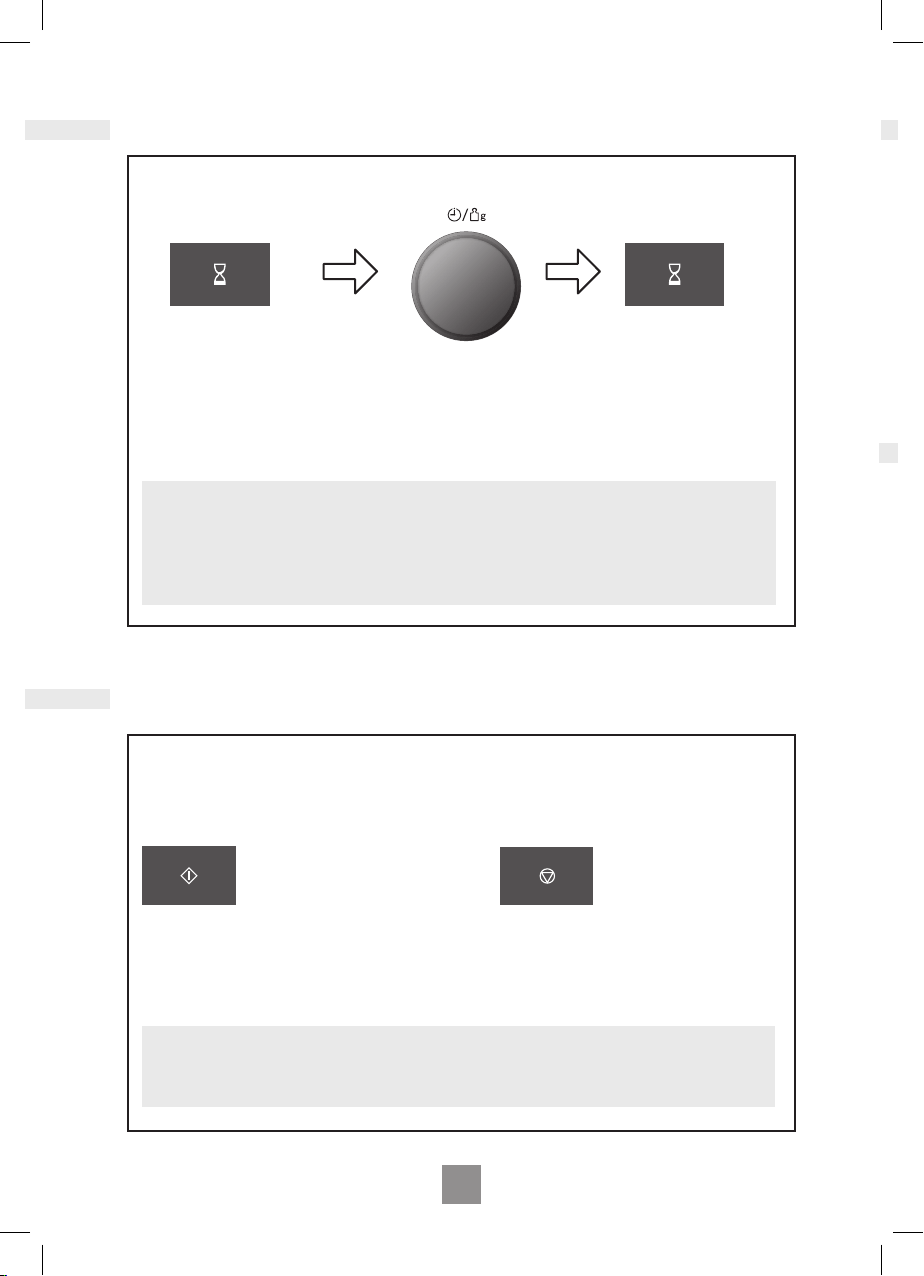
Using this system will make the oven controls inoperable; however, the door can be opened.
Child Lock can be set when the display shows a colon or the time.
Press Start three times
The time of day will disappear� Actual time will
not be lost� ‘
*
’ is indicated in the display�
To Set: To Cancel:
Press Stop /Cancel three times
The time of day will reappear in the display�
Note
1� To activate child lock, Start must be pressed 3 times within a 10 second period�
Setting the clock
Child safety lock
When the oven is rst plugged in “88:88” appears in display window.
Press Timer Button twice.
Notes
1� To reset time of day, repeat step 1 through to step 3, as above�
2� The clock will keep the time of day as long as the oven is plugged in and electricity is
supplied�
3� This is a 24 hour clock, i�e� 2 pm = 14:00 not 2:00�
Turn Time / Weight Dial.
Enter the time by turning the Time/
Weight dial. The time appears in the
display and the colon blinks�
Press Timer Button.
The colon stops blinking
time of day is now locked
into the display�
16
17
EN
English
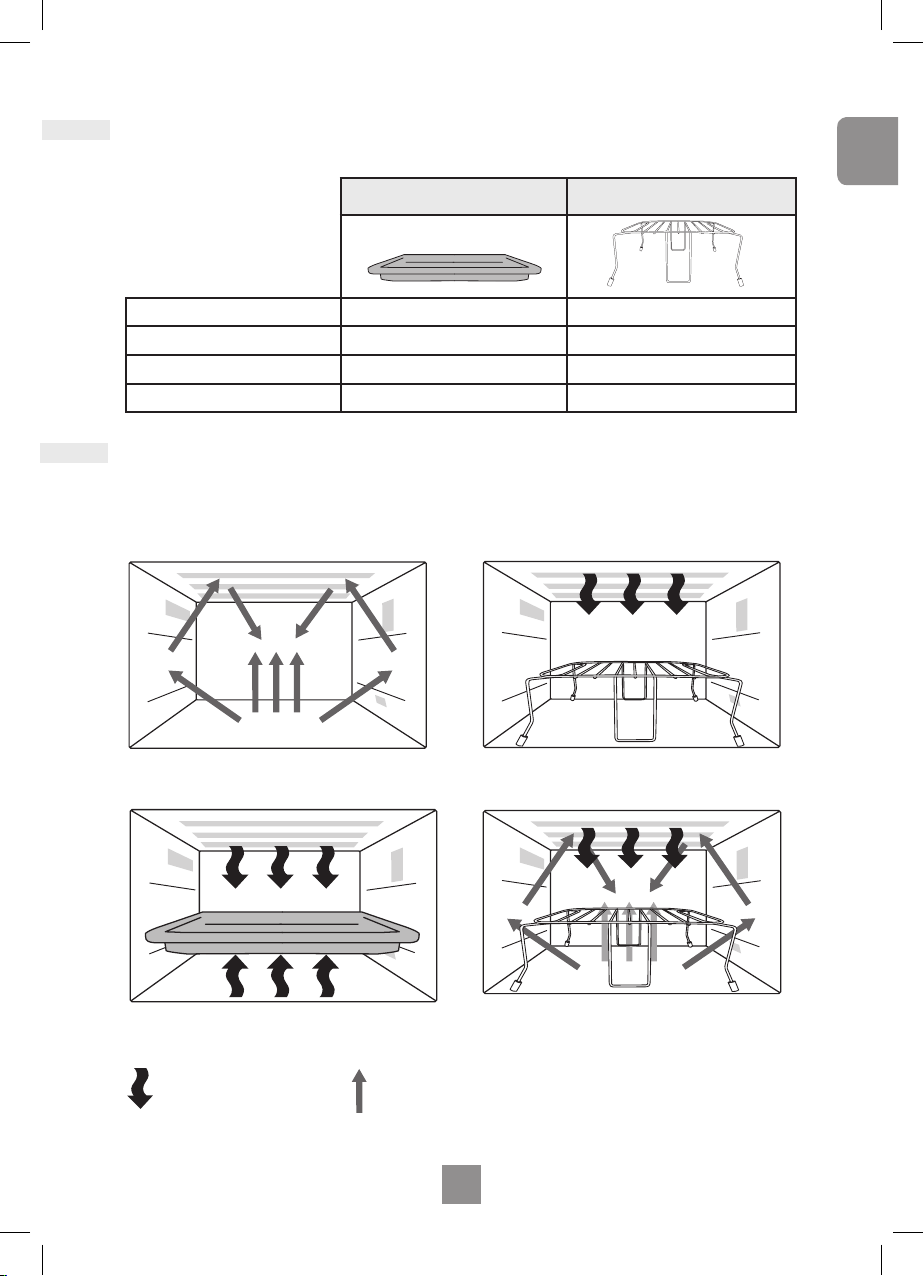
Oven Accessories
Cooking Modes
Microwave
Oven
Grill + Microwave
Key
Grill
The following chart shows correct use of the accessories in the oven
The diagrams shown below are cooking modes with examples of the accessories.
It may vary depending on recipe/dish used. Further information can be found in the Cookbook.
Enamel shelf Wire Rack
Microwave
✖ ✖
Grill
✔ ✔
Oven
✔ ✔
Combination
✖ ✔
Heater Microwave
18
19
EN
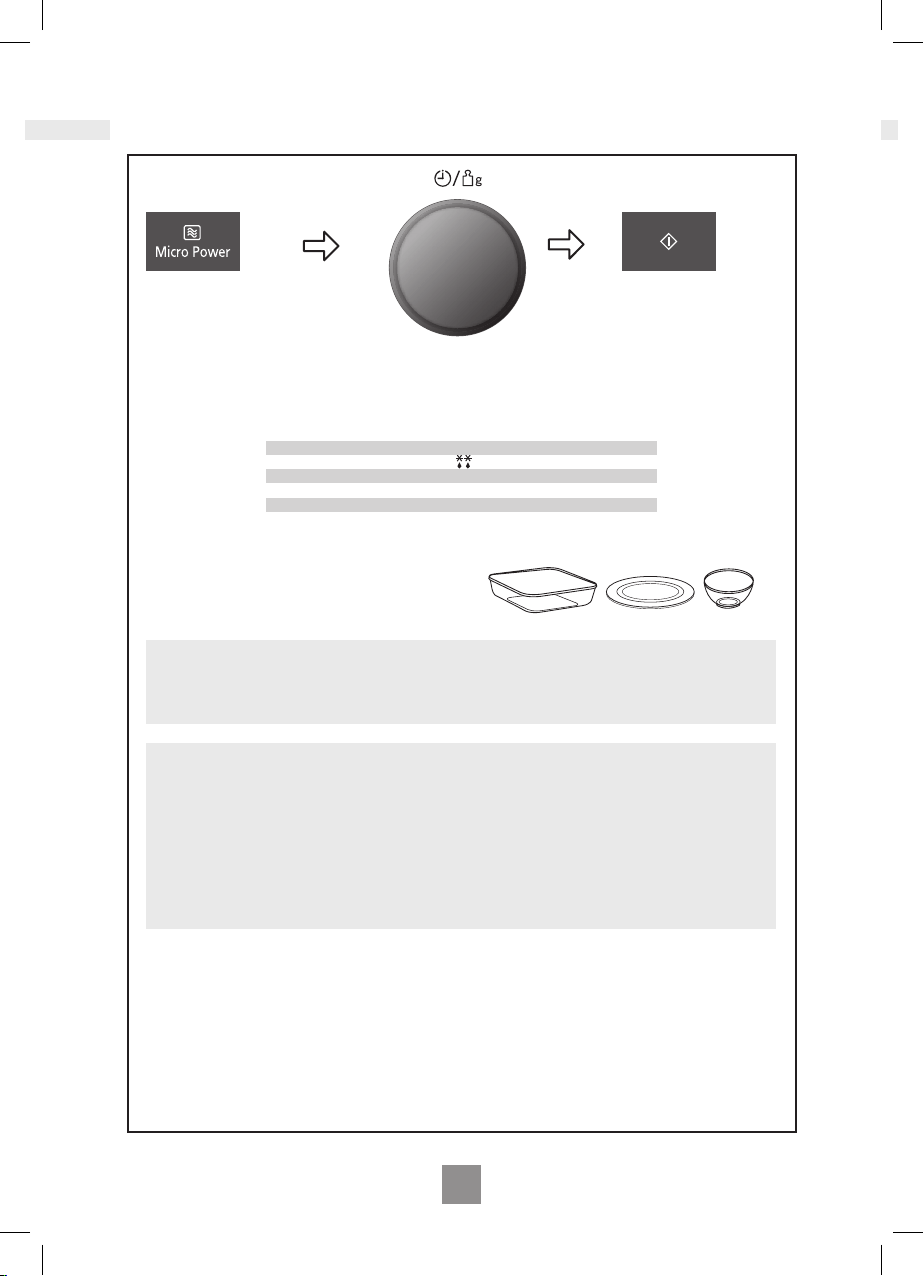
Microwave cooking and defrosting
Press Microwave Power.
Select desired power level�
CAUTION!
The oven will automatically work on MAX (1000 W) microwave power if a cooking time is
entered without the power level previously being selected�
Set the cooking time
using the Time/Weight
Dial (1000 W power: up to
30 minutes Other powers:
up to 90 minutes)�
Press Start Button.
The cooking program
will count down�
Notes
1� For multi-stage cooking refer to page 25 EN�
2� Stand time can be programmed after microwave power and time setting� Refer to
using the timer page 24 EN�
3� You can change the cooking time during cooking if required� Turn Time/Weight Dial
to increase or decrease the cooking time� Time can be increased/decreased in 1
minute increments, up to 10 minutes� Turning the dial to zero will end cooking�
Bottom Feeding Technology
Please note that this product uses bottom feeding technology for microwave distribution
which differs from traditional turntable side feeding methods and creates more useable
space for a variety of different sized dishes� This microwave feeding style can give a
difference in heating times (in microwave mode) when compared against side feeding
appliances� This is quite normal and should not cause any concern� Please refer to the
reheating and cooking charts in the cook book�
1 Press
2 Presses
3 Presses
4 Presses
5 Presses
6 Presses
Max
Defrost
Medium
Low
Simmer
Warm
1000 Watts
270 Watts
600 Watts
440 Watts
300 Watts
100 Watts
Use your own Pyrex® dishes, plates or bowls directly
on the ceramic plate� Do not place food directly on the
ceramic plate�
Use of accessory:
18
19
EN
English
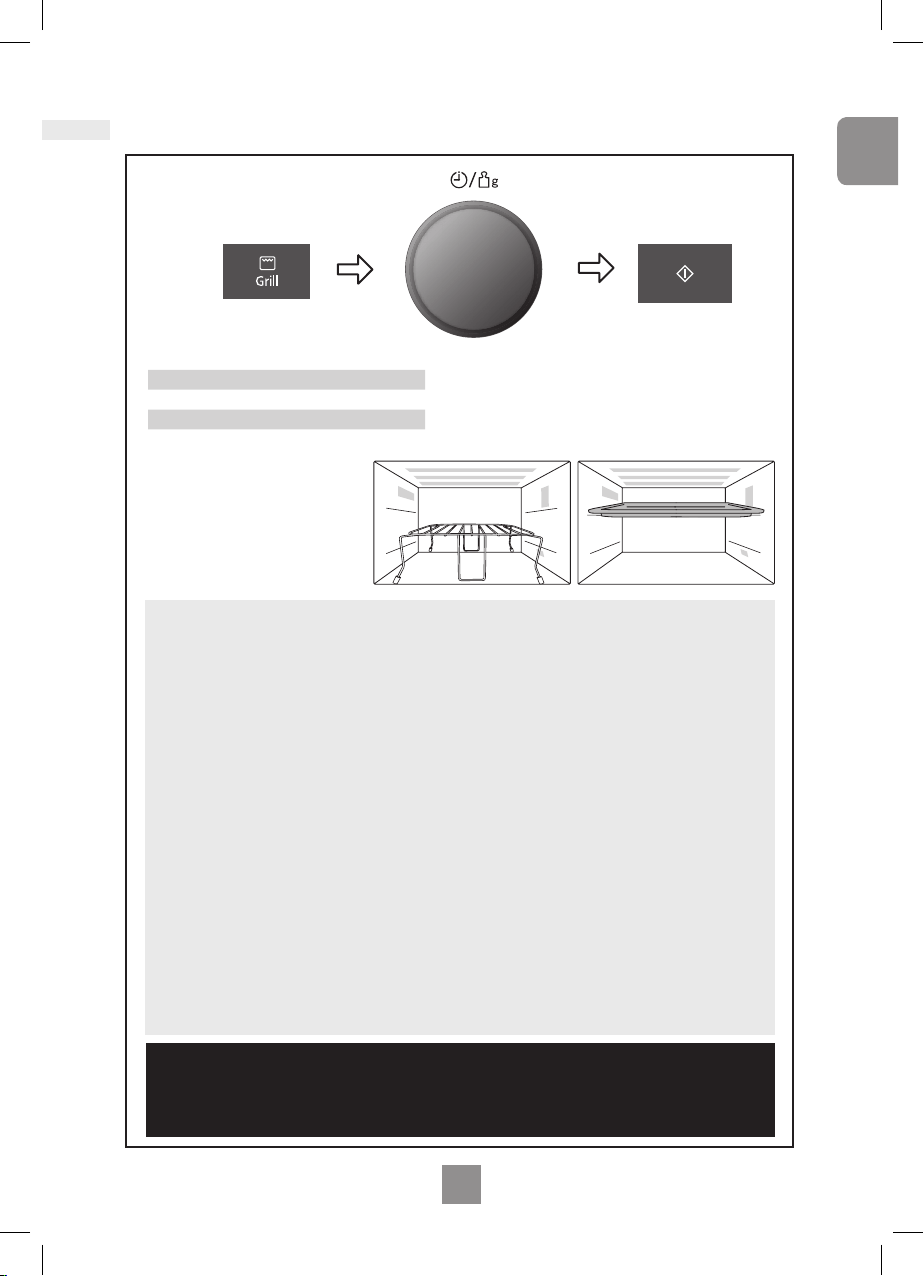
Grilling
Notes
1� Place food on wire rack on ceramic plate� Place a heatproof plate (Pyrex®)
underneath to catch fat and drips� Alternatively use the enamel shelf in the top shelf
position� For large weight foods, place in a dish directly on the ceramic plate�
2� Never cover foods when grilling�
3� DO NOT attempt to preheat the grill�
4� The grill will only operate with the oven door closed� It is not possible to use the grill
function with the door open�
5� There is no microwave power on the GRILL only program�
6� Most foods require turning halfway during cooking� When turning food, open oven
door and CAREFULLY remove wire rack using oven gloves�
7� After turning, return food to the oven and close door� After closing oven door, press
Start� The oven display will continue to count down the remaining grilling time� It is
quite safe to open the oven door at any time to check the progress of the food as it is
grilling�
8� The grill will glow on and off during cooking - this is normal� Always clean the oven
after using the Grill and before using the microwave or combination�
9� You can change the cooking time during cooking if required� Turn Time/Weight Dial
to increase or decrease the cooking time� Time can be increased/decreased in 1
minute increments, up to 10 minutes� Turning the dial to zero will end cooking�
CAUTION!
Remove wire rack from oven by holding the rack and heatproof dish
rmly. Use oven gloves when removing accessories. Never touch the outside window
or inside metal parts of the door or oven when taking food in or out due to the high
temperatures involved�
Set Time
Select Cooking time by
turning the Time/Weight Dial�
Time can be set up to
90 minutes�
Press Start
The time counts
down in the display�
Press Grill to select level
1 press Grill 1 1000 W (high)
2 presses Grill 2 700 W (medium)
3 Presses Grill 3 500 W (low)
Use of accessory:
20
21
EN
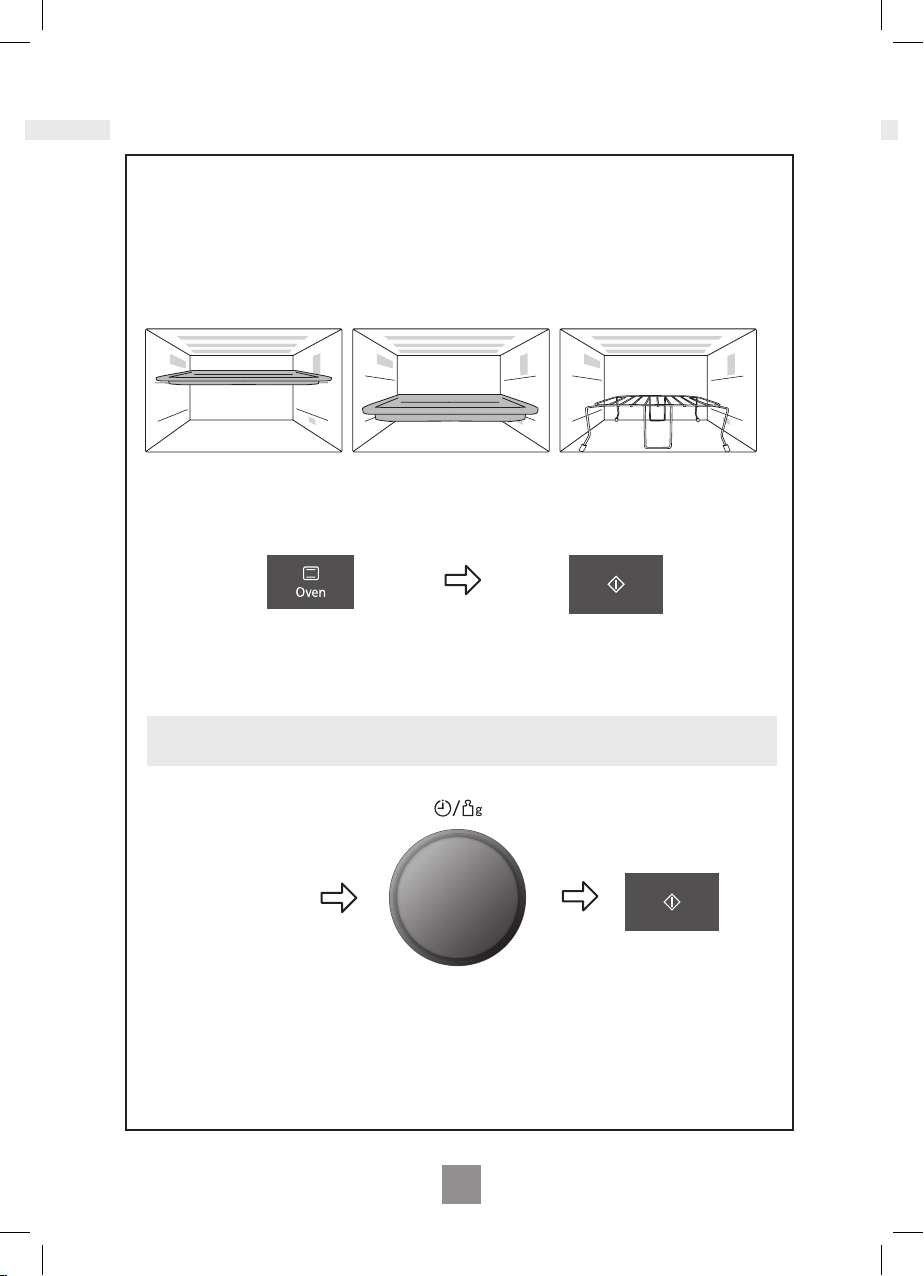
Oven Cooking
Set Time
Select Cooking time by
turning the Time/Weight Dial�
Time can be set up to
90 mins
After preheating,
place the food in
the oven.
Press Start Button
Use of accessory:
Oven:
This Pad offers a choice of oven temperatures 40°C (for proving dough) and 100 -
220°C in 10°C increments� For quick selection of the most commonly used cooking
temperatures, the temperatures start at 150°C and count up to 220°C then 40°C (for
proving dough) and 100°C�
Press Start Button
to start preheating.
Set the desired
oven temperature.
Note:
The oven can not preheat at 40℃.

20
21
EN
English
Oven Cooking
Note on Preheating:
1� Do not open the door during preheating� After preheating 3 beeps will be heard and the
“P” will ash in the display window. If the oven door is not opened after preheating, the
oven will maintain the selected temperature� After 1 hour, including preheating, the
oven will shut off automatically and revert to time of day�
2� If you want to cook without preheating, after selecting the desired temperature, set the
cooking time then press Start Button�
Notes:
1� When the selected cooking time is less than one hour, the time counts down second by
second�
2� When the selected cooking time is over one hour, the time counts down minute by
minute until only “1H 00” (1 hour) remains� The display then indicates minutes and
seconds and counts down second by second�
3� You can add to the cooking time during cooking, if required� Turn the Time/Weight Dial
to increase the cooking time� Time can be added in 1 minute increments up to 10
minutes�
4� After pressing Start Button, the selected temperature can be recalled� Press Oven
Button once to indicate the temperature in the display window�
CAUTION!
Always use oven gloves when removing the food and Accessories
after cooking as the oven and accessories will be Very hot�
22
23
EN
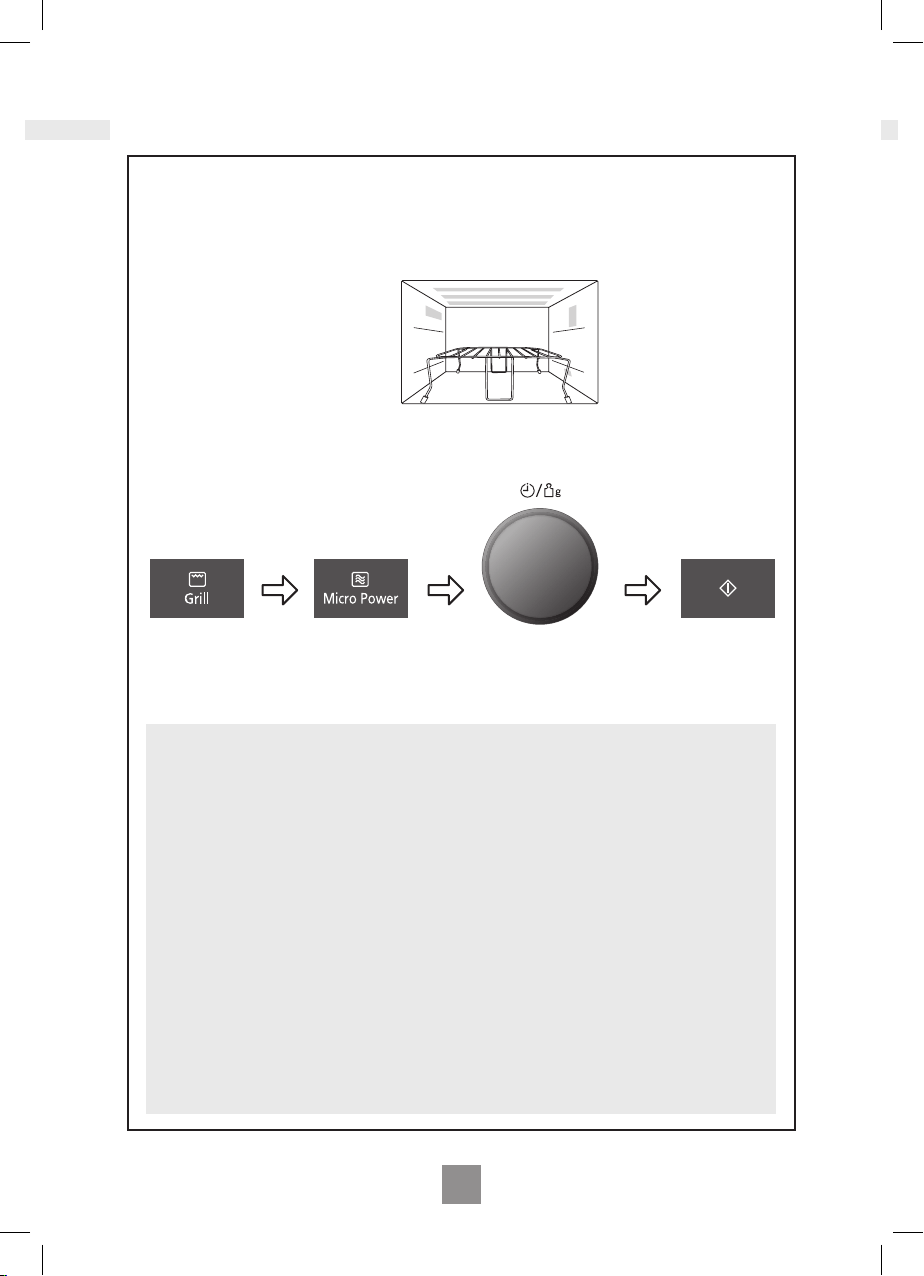
Combination Cooking
Notes:
1� Place food on wire rack on ceramic plate� Place
a heatproof plate (Pyrex
®
)
underneath to catch fat drips�
2�
The wire rack is designed to be used for Combination and Grilling� Never attempt
to use any other metal accessory except the one provided with the oven�
3� Use the wire rack only as described� DO NOT use if operating the oven with less than
200 g of food on a manual program� For small quantities do not cook by Combination,
cook by GRILL or MICROWAVE ONLY for best results�
4� Never cover foods when cooking on Combination�
5� DO NOT preheat the grill on Combination�
6� Arcing may occur if the incorrect weight of food is used, the wire rack has been
damaged, or a metal container has been used accidentally. Arcing is ashes of blue
light seen in the microwave� If this occurs, stop the oven immediately�
7� Some foods should be cooked on Combination without using the wire rack i�e� roasts,
gratins, pies and puddings� The food should be placed in a heatproof non-metallic
dish and placed directly onto the ceramic plate�
Set the desired
Grill setting
Set the cooking time
using the Time/Weight
Dial (up to 90 minutes)�
Press Start
Button� The time
counts down in
the display�
Set the desired
Microwave
Power Level�
Use of accessory:
Grill + Microwave
There is only one combination setting�
1� Grill + Microwave,
1000 W Microwave power level is not available on Combination cooking� This would not
be useful in normal use (the food would be cooked before browning is achieved)� 270 W
Defrost can not be set in combination�

22
23
EN
English
Combination Cooking
Notes:
8� DO NOT use plastic MICROWAVE containers on combination programs (unless
suitable for combination cooking)� Dishes must be able to withstand the heat of the
top grill - heatproof glass e�g� Pyrex® or ceramic are ideal�
9� DO NOT use your own metal dishes or tins, as the microwaves will not penetrate the
food evenly�
10� When the selected cooking time is less than one hour, the time counts down second
by second�
11� When the selected cooking time is over one hour, the time counts down minute by
minute until only “1H 00” (1 hour) remains� The display then indicates minutes and
seconds and counts down second by second�
12� You can add to the cooking time during cooking, if required� Turn the Time/Weight dial
to increase the cooking time� Time can be added in 1 minute increments, up to
10 minutes�
CAUTION!
Remove wire rack from oven by holding the rack and heatproof dish
rmly. Use oven gloves when removing accessories. Never touch the outside window
or inside metal parts of the door or oven when taking food in or out due to the high
temperatures involved�
24
25
EN
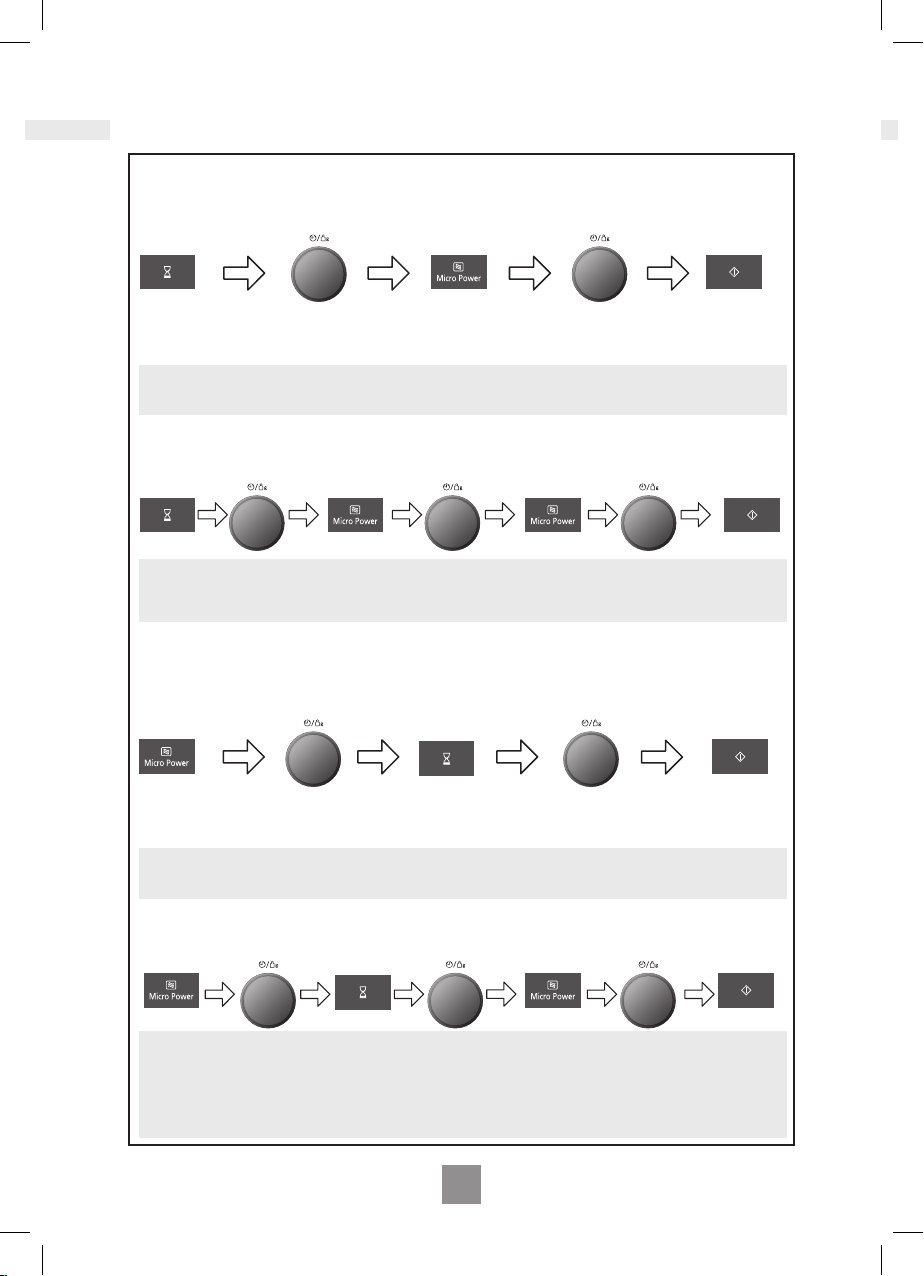
Using the timer
Notes
1� Three stage cooking can be programmed including Delay Start cooking�
Notes
1� Three stage cooking can be programmed including stand time�
2� If the programmed delay time exceeds one hour, the time will count down in units of
minutes� If less than one hour, the time will count down in units of seconds�
3� Delay Start cannot be programmed before an auto program�
2� If the oven door is opened during the Stand Time or Minute Timer, the time in the
display window will continue to count down�
3� This feature may also be used as a minute timer� In this case press the Timer, set
time and press Start�
4� Stand time cannot be programmed after an auto program�
By using the Timer, you are able to program Delay Start cooking.
By using the Timer, you can program Stand Time after cooking is completed or use to program
the oven as a minute timer.
Press Timer.
Set the desired cooking
program and cooking time.
Set the delay time by
turning the Time/ Weight
Dial (up to 9 hours)�
Press Timer.
Set the desired cooking
program and cooking time.
Set desired amount of time
by turning the Time/Weight
Dial (up to 9 hours)�
Press Start
Press Start.
example
example
example
example
Delay Start: 1 hour
Max Power (1000 W): 10 min Simmer Power (300 W): 20 min
Delay start cooking
Stand time
Once Once
Once 5 Times
Max Power (1000 W): 4 min Stand Time: 5 min
Max Power (1000 W): 2 min
24
25
EN
English
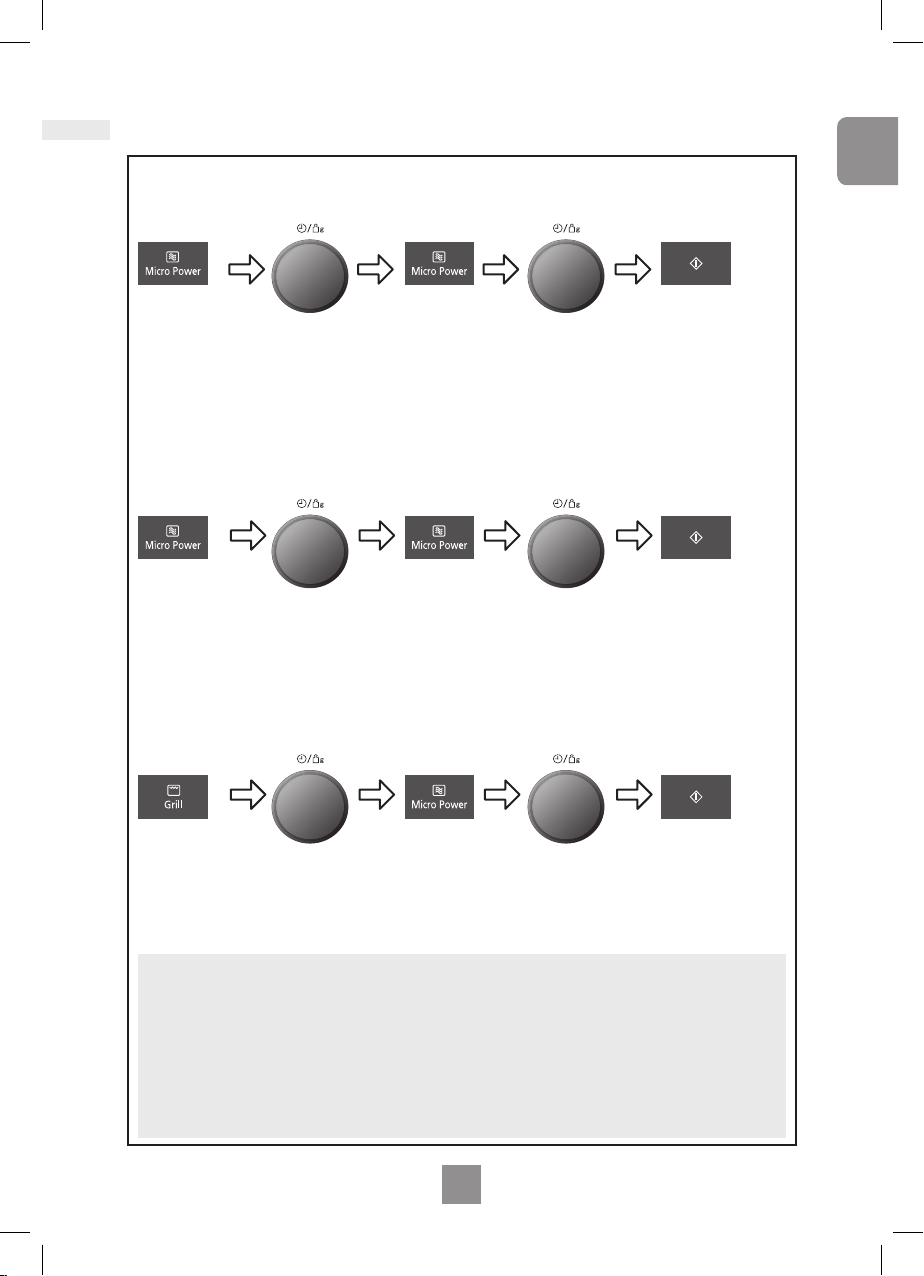
Multi-stage cooking
Notes
1� For 3 stage cooking, enter another cooking program before pressing start�
2� During operation, pressing Stop/Cancel once will stop the operation� Pressing Start
will re-start the programmed operation� Pressing Stop/Cancel twice will stop and clear the
programmed operation�
3� Whilst not operating, pressing Stop/Cancel will clear the selected program�
4� Auto programs cannot be used with multi-stage cooking�
Example:
Press
Microwave
Power. Select
desired power
level
2 or 3 stage cooking
Press
Microwave
Power twice to
select defrost
power (270 W).
Press
Microwave
Power once
to select max
power (1000 W).
Set the
cooking time
to 2 minutes
using the Time/
Weight Dial
Set the
cooking time
to 3 minutes
using the Time/
Weight Dial
Press Start.
Set the cooking
time using the
Time/Weight Dial.
Press
Microwave
Power. Select
desired power
level
Set the cooking
time using the
Time/Weight Dial.
Press Start.
The cooking program
will start and the time
in the display will
count down�
Example: To GRILL at LOW for 4 minutes and cook food on LOW power (440 W) for 5 minutes.
Press Grill
Power 3 times
to select Grill
level 3 (low).
Press Microwave
Power four times
to select low
power (440 W).
Set the
cooking time
to 4 minutes
using the Time/
Weight Dial
Set the
cooking time
to 5 minutes
using the Time/
Weight Dial
Press Start.
Example: To DEFROST (270 W) for 2 minutes and cook food on MAX (1000 W) power for
3 minutes.
26
27
EN
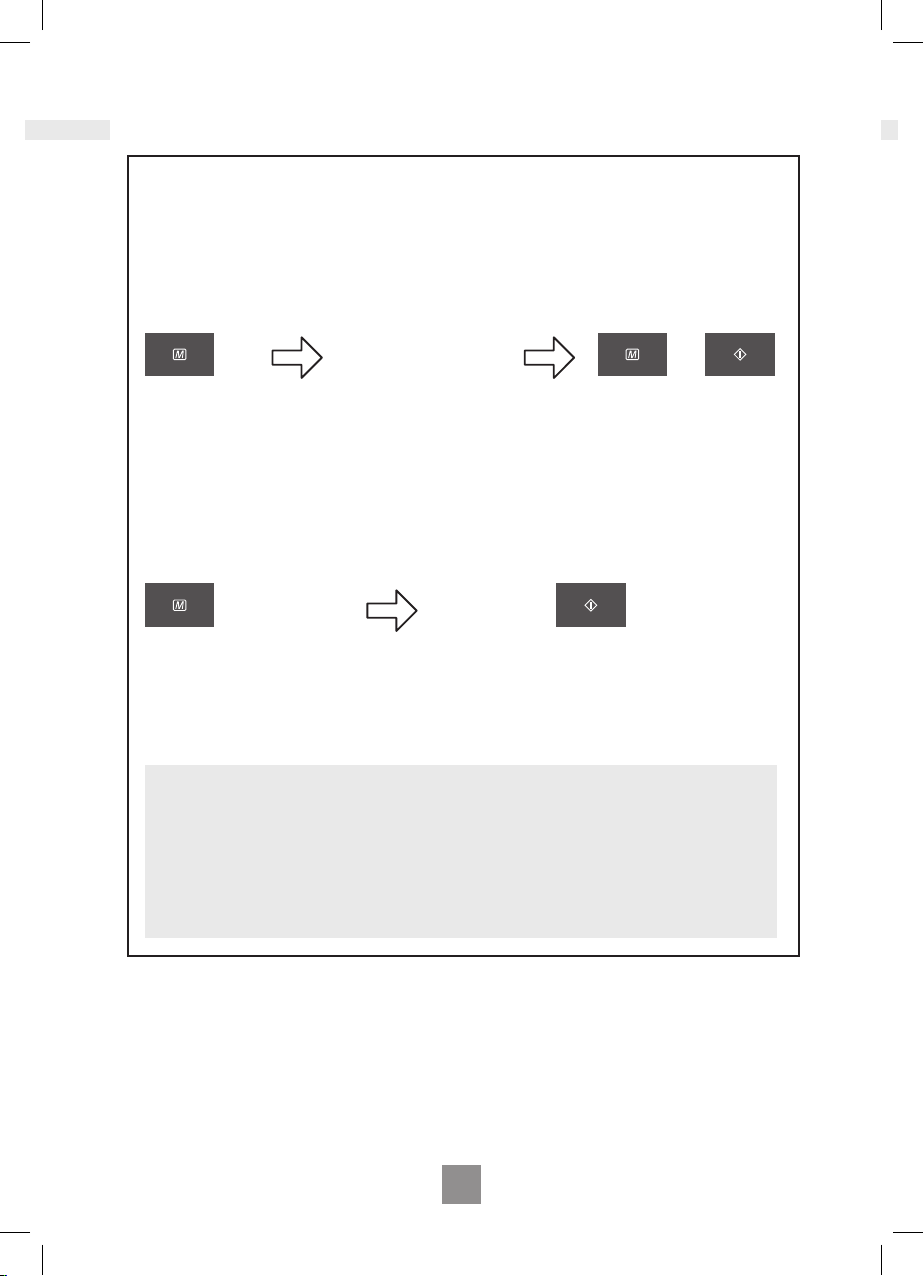
Using the memory function
To set a memory program
This feature allows you to pre-program your oven for a regular reheating or cooking task. You
are able to pre-program your oven for a specic power level and time that is convenient for
you. You can only pre-program one memory task with this oven.
Press Memory.
The oven is automatically pre-set
to memory�
1� To select memory 2 press
memory button twice� To select
memory 3 press memory button
three times�
Press Memory.
The oven is automatically pre-set
to memory�
1� To select memory 2 press
memory button twice� To select
memory 3 press memory button
three times�
Program the desired
cooking program.
Press Memory to store
this task or press Start
to start cooking in this
sequence.
Press Start to begin cooking
Notes
1� Auto programs cannot be programmed into memory�
2� Memory can only store 1 stage cooking� It is not possible to store 2 or 3 stage
cooking�
3� Setting a new cooking program into memory will cancel the cooking program
previously stored�
4� Memory program will be cancelled if the power supply is off or the plug is
disconnected�
To use a memory program
OR
26
27
EN
English
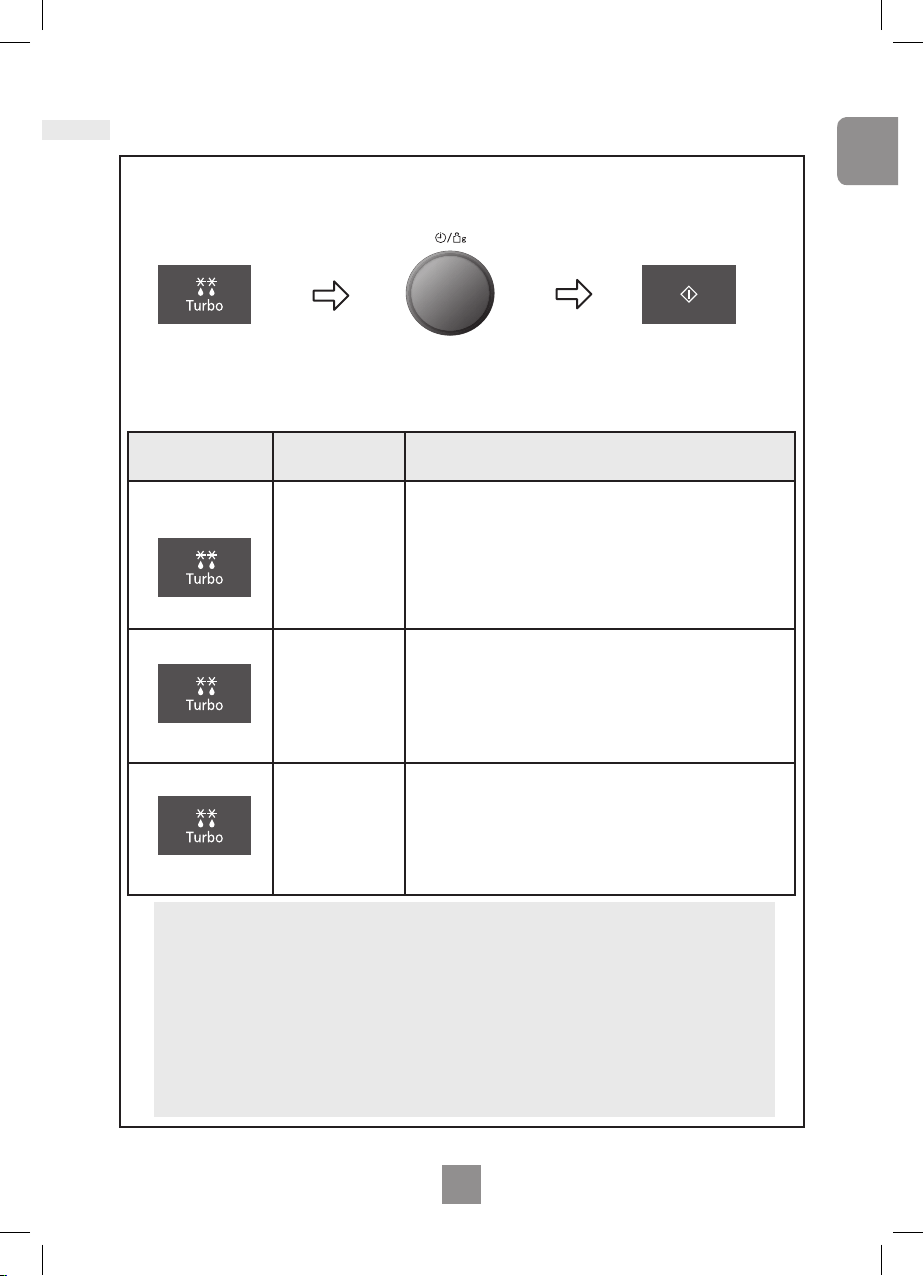
Press Start
Remember to stir or
turn the food during
defrosting�
With this feature you can defrost frozen food according to the weight�
The weight is programmed in grams� For quick selection, the weight starts from the
most commonly used weight for each program�
Set the weight of the frozen food
by using the Time/Weight Dial.
Turning the dial slowly will count
up in 10 g steps� Turning the dial
quickly will count up in 100 g steps�
Select the desired Turbo Defrost
program
1 Press Small Pieces
2 Presses Big Piece
3 Presses Bread
Program
Min./Max.
Weight
Suitable Food
1. SMALL
PIECES
1 press
200 g - 1200 g
Small pieces of meat, escallop, sausages, minced meat,
steak, chops, sh llets (each 100 g to 400 g)� Press turbo
defrost once� Turn and shield at beeps� Allow to stand for 5
min to 30 mins�
2. BIG PIECE
2 presses
400 g - 2500 g
Big pieces of meat, whole chickens, meat joints� Press turbo
defrost twice� Whole chickens and meat joints will require
shielding during defrosting� Protect wings, breast and fat
with smooth pieces of aluminum foil secured with cocktail
sticks� Do not allow the foil to touch the walls of the oven�
Standing time of 1 to 2 hours should be allowed before
cooking� Turn and shield at beeps�
3. BREAD
3 presses
100 g - 900 g
Small or large loaves of bread, white or wholewheat� Place
the loaf on a piece of kitchen roll� Press turbo defrost three
times and turn at beep� Allow bread to stand for 5 min (white
light bread) to 30 min (dense rye bread)� Cut large loaves in
half during standing time�
IMPORTANT!
See page 18 EN in cook book for defrosting guidelines
Note
1� When the defrosting time is longer than 60 minutes, the time will appear in
hours and minutes�
2� The shape and size of the food will determine the maximum weight the oven can
accommodate�
3� Allow standing time to ensure the food is completely defrosted�
Turbo defrost
28
29
EN
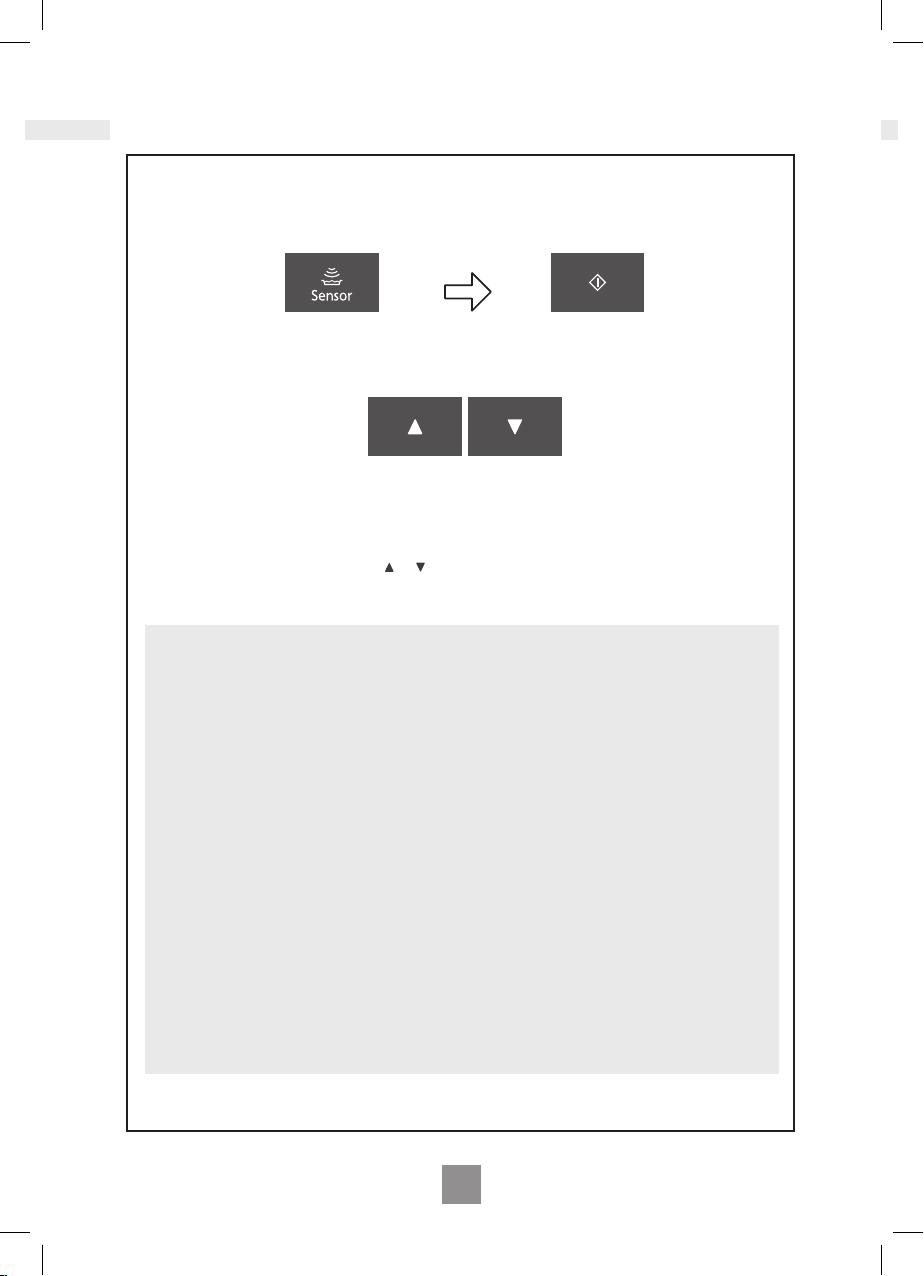
Auto sensor programs
A variety of food may be cooked without having to enter the cooking time, weight or the power
level.
Select the desired
Auto Sensor Program.
Plus/Minus Control:
Preferences for degree of cooking vary for each individual� After having used Auto Sensor
Programs a few times, you may decide you would prefer your food cooked to a different
degree of cooking� By using Plus/Minus control, the programs can be adjusted to cook food
for a longer or shorter time� Press or button before pressing Start Button� If you are
satised with the result of the Auto Sensor Programs, you do not have to use this control.
e.g.
Press Start Button.
Notes
1� The oven automatically calculates the cooking time or the remaining cooking time�
2� The door should not be opened before the time appears in the display window�
3� The temperature for frozen food is assumed to be -18°C to -20°C, for other types of
food +5°C to +8°C (refrigerator temperature)�
4� To prevent any mistakes during Auto Sensor Programs ensure that ceramic plate and
the container are dry�
5� The room temperature should not be more than 35°C and not less than 0°C�
6� Only cook foods within the recommended weight range described on pages
29-30 En�
7. For auto sensor programs, fresh vegetables and frozen vegetables cover with cling lm
Pierce the cling lm with a sharp knife once in the centre and four times around the
edge� For chilled meal and frozen meal programs reheat in container as purchased�
Pierce covering lm. If transferring meals into a dish, cover with pierced cling lm. For
auto sensor programs rice and pasta cover with a lid�
8� If the oven has previously been used and it is too hot to be used on an Turbo Defrost,
Auto Sensor and Auto Weight, ‘HOT’ will appear in the display window� After the ‘HOT’
disappears, the Auto Sensor Programs may be used� If in a hurry, cook food manually
by selecting the correct cooking mode and cooking time yourself�
28
29
EN
English
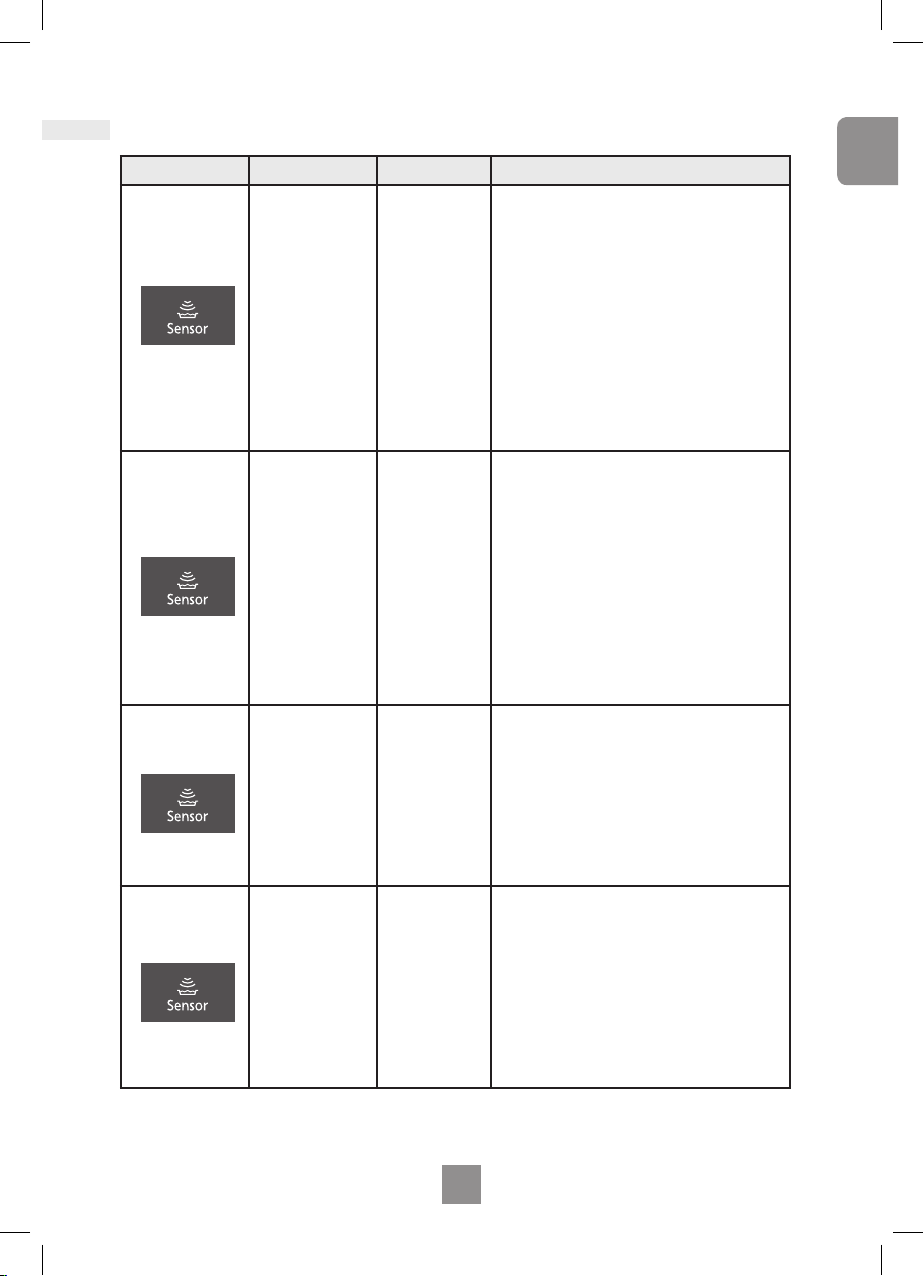
Auto sensor programs
Program Weight Accessories Instructions
4. CHILLED
MEAL
1 press
200 g - 1000 g
-
To reheat a fresh precooked meal. All
foods must be pre-cooked� Foods should be
at refrigerator temperature approx� + 5°C�
Reheat in container as purchased� Pierce
covering lm with a sharp knife once in the
centre and four times around the edge� If
transferring food to dish, cover with pierced
cling lm. Press auto sensor programs button
once then press start� Stir at beeps� Stir again
at end of program and allow a few minutes
standing time. Large pieces of meat/sh in a
thin sauce may require longer cooking� This
program is not suitable for starchy food such
as rice, noodles or potatoes�
5. FROZEN
MEAL
2 presses
200 g - 1000 g
-
To reheat a frozen precooked meal
All foods must be pre-cooked and frozen
(-18°C); Reheat in container as purchased�
Pierce covering lm with a sharp knife once
in the centre and four times around the edge�
If transferring food to dish, cover with pierced
cling lm. Press auto sensor programs button
twice then press start� Stir at beeps and cut
the blocks into pieces� Stir again at end of
program and allow a few minutes standing
time� Check temperature and cook further
minutes if necessary before eating� This
program is not suitable for portionable frozen
foods�
6. FRESH
VEGETABLES
3 presses
200 g - 1000 g
-
To cook fresh vegetables. Place prepared
vegetables into a suitable sized container�
Sprinkle with 1 tbsp cold water per 100 g
vegetables. Cover with cling lm. Pierce cling
lm with a sharp knife once in the centre
and four times around the edge� Press auto
sensor programs button three times� Press
start� Drain after cooking and season to taste�
7. FROZEN
VEGETABLES
4 presses
200 g - 1000 g
-
To cook frozen vegetables. Place
vegetables into a suitable sized container�
Sprinkle with 1-3 tbsp cold water� If cooking
vegetables with high water content, such
as spinach or tomatoes, do not add water�
Cover with cling lm. Pierce cling lm with a
sharp knife once in the centre and four times
around the edge� Press auto sensor
programs button four times� Press start�
Stir at the end of program and allow a few
minutes standing time� Drain and season to
taste�
30
31
EN
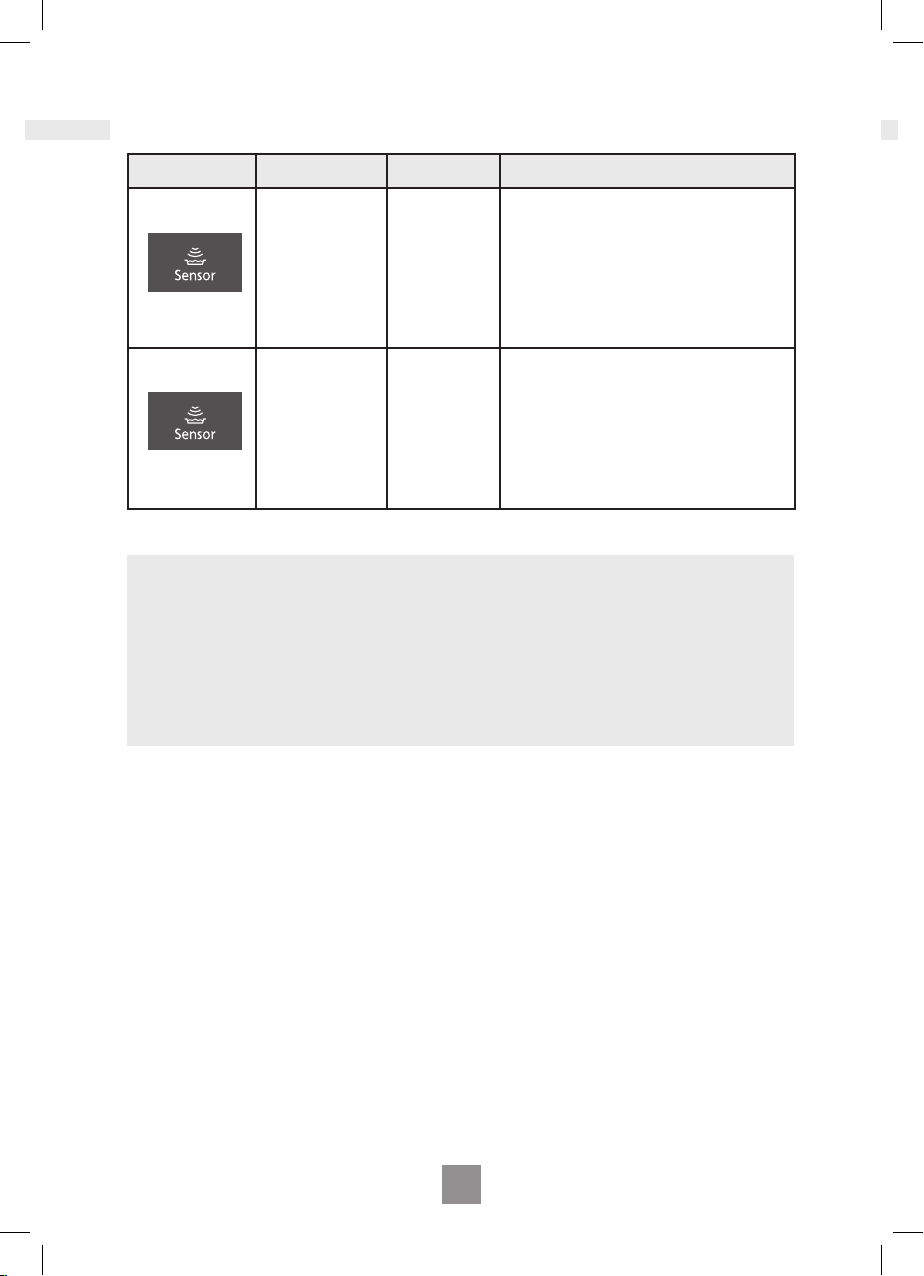
Program Weight Accessories Instructions
8. PASTA
5 presses
100 g - 450 g -
For cooking dried pasta. Use a large bowl�
Add 1 tsp salt, 1tbsp oil and boiling water�
For 100 g - 290 g pasta add 1 litre of boiling
water� For 300 g - 450 g pasta add 1 ½ litre
of boiling water� Cover with a lid� Press auto
sensor programs button ve times. Stir at
beeps� Press start� Drain after cooking�
9. RICE
6 presses
100 g - 300 g -
For cooking rice for savoury dishes not
rice puddings. (Thai, Basmati, Jasmine,
Suriname, Arborio or Mediterranean rice).
Rinse the rice thoroughly before cooking�
Use a large bowl� Add 2-2�5 times boiling
water to rice� Cover with a lid� Press auto
sensor programs button six times� Press
start� Stir at beeps� Allow to stand for 5
minutes after cooking� Drain after cooking�
Auto sensor programs
Notes
1� The Auto Sensor Programs must ONLY be used for foods described�
2� Only cook foods within the weight ranges described�
3� Always weigh the food rather than relying on the package information�
4. Most foods benet from a STANDING time, after cooking with an Auto Program, to allow
heat to continue conducting to the centre�
5� To allow for some variations that occur in food, check that food is thoroughly cooked and
piping hot before serving�
30
31
EN
English
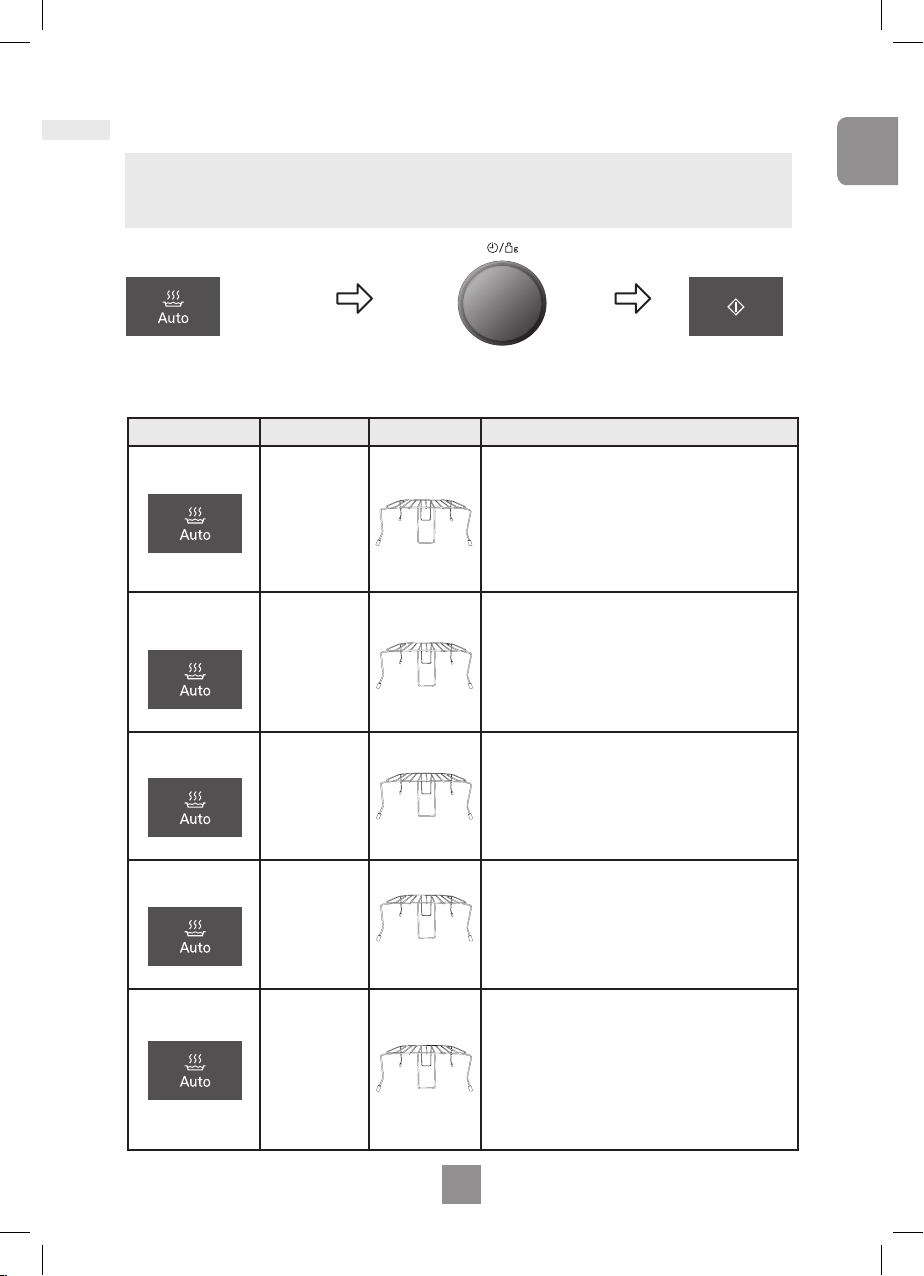
Note
The weight is programmed in grams� For quick selection, the weight starts from the most
commonly used weight for each program�
Program Weight Accessories Instructions
10.CHILLED
QUICHE
1 press
150 g - 500 g
For reheating fresh pre-cooked quiche. Remove
all packaging and place the quiche on the wire rack
on the ceramic plate� Press auto weight programs
button once, enter weight of food and press start�
Transfer the quiche onto a cooling rack at the end
of cooking and allow a few minutes standing time�
Quiche with a high content of cheese may result
in being hotter than quiches with vegetables� This
program is not suitable for deep lled quiches.
11. FROZEN
POTATO
PRODUCTS
2 presses
200 g - 500 g
For reheating, crisping and browning frozen
potato products. Spread out potato products in a
heatproof dish and place on the wire rack on the
ceramic plate� Press auto weight programs button
twice, enter weight of food and press Start� For
best results, cook in a single layer and stir at beep�
This program is not suitable for galettes, Pom’
Dauphine and Pom’ Noisette�
12. PASTRY
ITEMS
3 presses
100 g - 600 g
For reheating, crisping and browning fresh
pastry items e�g� friands, feuillete tresse etc�
Remove all packaging and place on wire rack on
ceramic plate� Press auto weight programs pad
three times, enter weight of food and press start�
Transfer the pastry items to a cooling rack and
allow a few minutes standing time�
13. CHILLED
PIZZA
4 presses
100 g - 450 g
For reheating and browning the top of fresh
pre-cooked pizza and cheese baguette. Remove
all packaging and place the chilled pizza on the
wire rack on the ceramic plate� Press the auto
weight programs button four times, enter the
weight of the food and press start�
14. FROZEN
PIZZA
5 presses
100 g - 450 g
For reheating and browning the top of frozen
pre-cooked pizza, bruschetta and cheese
baguette. Remove all packaging and place the
frozen pizza on the wire rack on the ceramic
plate. Press auto weight programs button ve
times, enter the weight of the food and press
start� Transfer the pizza on to a cooling rack at
the end of cooking� This program is not suitable
for deep pan pizzas or very thin pizzas such as
Flammekueche�
Auto weight programs
Press Start
Button
Set the weight of the food by using the Time /
Weight selection dial. Turning the dial slowly will
count up in 10 g steps� Turning the dial quickly will
count up in 100 g steps�
Select the desired
auto weight program.
32
33
EN
Auto weight programs
Homemade dishes
This function allows cooking of dishes using raw ingredients on the auto weight programs
Gratin Potato and Gratin Pasta� For these recipes please follow exactly the amounts and
methods, which are described below�
16. Gratin Pasta 7 Presses
Mix the pasta sauce and pasta together in a large dish until the pasta
is fully coated in the sauce� Sprinkle grated cheese over the top� Place
the casserole dish on the base of the ceramic plate� Press the auto
weight programs pad seven times� Press start� Allow to stand for 2
minutes after cooking�
ingredients
SERVES 4
550 g Fresh Pasta Sauce
e.g. tomato
400 g Fresh Pasta
e.g. tortellini/ravioli
50 g Grated hard cheese
e.g. Cheddar, mozzarella,
parmesan
Dish: 1 Pyrex® square
dish 22 cm
15. Gratin Potato 6 Presses
Cut the potatoes into thin slices� Peel and chop the garlic� Arrange the
potatoes slices in dish� Scatter over the garlic, half the cheese, salt and
pepper� Pour over the cream and milk� Cover with the rest of the grated
cheese� Place on ceramic plate� Press the auto weight programs pad
six times� Press Start� Allow to stand for 5 min after cooking�
ingredients
SERVES 4
700 g peeled potatoes,
1 garlic clove,
70 g emmenthal, grated,
salt and pepper,
200 ml single cream,
200 ml milk,
Dish: 1 dish
(Ø 25 cm)
Program Weight Accessories Instructions
15. GRATIN
POTATO
6 presses
Serves 4 -
See below for recipe�
Place on ceramic plate�
Press the auto weight programs pad six
times� Press Start (it is not necessary to
enter the weight of the food)� Allow to
stand for 5 min� after cooking�
16. GRATIN
PASTA
7 presses
Serves 4 -
See below for recipe�
Place on ceramic plate� Press the auto
weight programs pad seven times�
Press Start (it is not necessary to enter
the weight of the food)� Allow to stand
for 2 min after cooking�

32
33
EN
English
Questions and answers
Q: Why won’t my oven turn on?
A: When the oven does not turn on,
check the following:
1� Is the oven plugged in securely?
Remove the plug from the outlet, wait
10 seconds and reinsert�
2� Check the circuit breaker and the fuse
Reset the circuit breaker or replace
the fuse if it is tripped or blown�
3� If the circuit breaker or fuse is all right,
plug another appliance into the outlet�
If the other appliance works, there
probably is a problem with the oven�
If the other appliance does not work,
there probably is a problem with the
outlet�
If it seems that there is a problem
with the oven, contact an authorized
Service Centre�
Q: My oven causes interference with my TV.
Is this normal?
A: Some radio and TV interference might
occur when you cook with the
oven� This interference is similar to
the interference caused by small
appliances such as mixers, vacuums,
blow dryers, etc� It does not indicate a
problem with your oven�
Q: The oven won’t accept my program. Why?
A: The oven is designed not to accept an
incorrect program� For example, the
oven will not accept a fourth stage�
Q: Sometimes warm air comes from the oven
vents. Why?
A: The heat given off from the cooking
food warms the air in the oven cavity�
This warmed air is carried out of the
oven by the air ow pattern in the
oven� There are no microwaves in the
air� The oven vents should never be
blocked during cooking�
Q: I can’t set an auto sensor program and
‘HOT’ appears in the display. Why?
A: If the oven has previously been used
and it is too hot to be used on an Auto
Sensor Program, ‘HOT’ will appear in
the display window� After the ‘HOT’
disappears, the Auto Sensor Programs
may be used� If in a hurry, cook food
manually by selecting the correct
cooking mode and cooking time
yourself�
Q: Can I use a conventional oven
thermometer in the oven?
A: Only when you are using OVEN/
GRILL cooking mode� The metal in
some thermometers may cause arcing
in your oven and should not be used
on MICROWAVE and COMBINATION
cooking modes�
Q: There are humming and clicking
noises from my oven when I cook by
COMBINATION. What is causing these
noises?
A: The noises occur as the oven
automatically switches from
MICROWAVE power to OVEN/GRILL
to create the combination setting� This
is normal�
Q: My oven has an odour and generates
smoke when using the COMBINATION
and GRILL function. Why?
A: After repeated use, it is recommended
to clean the oven and then run the
oven without food� This will burn off
any food, residue or oil which may
cause an odour and/or smoking�
Q: The oven stops cooking by
microwave and ‘H97’ or ‘H98’ appears in
the display. Why?
A: This display indicates a problem with
the microwave generation system�
Please contact an authorised Service
Centre�
Q The fan continues to rotate after
cooking. Why?
A After using oven, the fan motor may
rotate to cool the electrical
components� This is normal and you
can continue using the oven at this
time�

34
35
EN
Questions and answers
Q: Can I check the pre-set oven temperature
while cooking or preheating by Oven?
A: Yes� Press Oven Button and the oven
temperature will appear in the display
window for 2 seconds�
Q “D” appears in the display and the oven
does not cook. Why?
A: The oven has been programmed in
DEMO MODE� This mode is designed
for retail store display� Deactivate this
mode by pressing microwave button
once and stop/cancel button 4 times�
Q. The word prompt has disappeared on my
display, I can only see numbers ?
A: There may have been a power failure,
and the wordprompt is disabled�
Unplug the oven for a few seconds,
then plug it again� When “88:88” is
displayed, press the start
button until your language is
displayed� Then set the clock� Refer to
page 16 EN�

34
35
EN
English
Care of your oven
1� Turn the oven off before cleaning�
2� Clean the inside of the oven, door
seals and door seal areas regularly�
When food splatters or spilled liquids
adhere to the oven walls, ceramic
plate, door seals and door seal areas
wipe off with a damp cloth� Mild
detergent may be used if they get very
dirty� The use of harsh detergent or
abrasive is not recommended�
DO NOT USE COMMERCIAL OVEN
CLEANERS�
3� Do not use harsh, abrasive cleaners or
sharp metal scrapers to clean the
oven door glass since they can
scratch the surface, which may result
in shattering the glass�
4� The outside oven surface should
be cleaned with a damp cloth� To
prevent damage to the operating parts
inside the oven, water should not be
allowed to seep into the ventilation
openings�
5� If the Control Panel becomes dirty,
clean it with a soft, dry cloth� Do not
use harsh detergents or abrasives
on the Control Panel� When cleaning
the Control Panel leave the oven
door open to prevent the oven from
accidentally turning on� After cleaning
touch STOP/CANCEL button to clear
display window�
6� If steam accumulates inside or
around the outside of the oven door,
wipe with a soft cloth� This may occur
when the oven is operated under high
humidity conditions and in no way
indicates a malfunction of the unit�
7. The oven cavity oor should be
cleaned regularly to avoid excessive
noise� Simply wipe the bottom surface
of the oven with mild detergent and hot
water then dry with a clean cloth�
8� When using the OVEN / GRILL or
COMBINATION mode, some foods
may inevitably splatter grease on
to the oven walls� If the oven is not
cleaned occasionally, it may start to
“smoke” during use�
9� A steam cleaner is not to be used for
cleaning�
10� This oven should only be serviced by
qualied personnel. For maintenance
and repair of the oven contact the
nearest authorized dealer�
11� Failure to maintain the oven in a clean
condition could lead to deterioration
of surfaces that could affect the life of
the appliance and possibly result in a
hazardous situation�
12� Keep air vents clean at all times�
Check that no dust or other material
is blocking any of the air vents on
the top, bottom or rear of the oven� If
air vents become blocked this could
cause overheating which would affect
the operation of the oven and possibly
result in a hazardous situation�
36
EN
Technical specifications
Power Source: 230 V, 50 Hz
Power Consumption: Maximum; 2060 W
Microwave; 1040 W
Grill; 1040 W
Output: Microwave; 1000 W (IEC-60705)
Grill Heater;
Heater top 1000 W
Heater bottom 600 W
Outside Dimensions:
483 mm (W) x 396 mm (D) x 310 mm (H)
Oven Cavity Dimensions:
299 mm (W) x 350 mm (D) x 199 mm (H)
Uncrated Weight: 13.3 kg
Noise: 60 dB
Weight and Dimensions shown are
approximate.
This product is an equipment that fullls the
European standard for EMC disturbances
(EMC = Electromagnetic Compatibility)
EN 55011� According to this standard this
product is an equipment of group 2, class B
and is within required limits� Group 2 means
that radio-frequency energy is intentionally
generated in the form of electromagnetic
radiation for purpose of warming or cooking
food� Class B means that this product may
be used in normal household areas�
Information on Disposal for
Users of Waste Electrical
& Electronic Equipment
(private households)
This symbol on the products and/
or accompanying documents
means that used electrical and electronic
products should not be mixed with general
household waste�
For proper treatment, recovery and
recycling, please take these products to
designated collection points, where they will
be accepted on a free of charge basis�
Alternatively, in some countries you may be
able to return your products to your local
retailer upon the purchase of an equivalent
new product�
Disposing of this product correctly will help
to save valuable resources and prevent
any potential negative effects on human
health and the environment which could
otherwise arise from inappropriate waste
handling� Please contact your local authority
for further details of your nearest designated
collection point�
Penalties may be applicable for incorrect
disposal of this waste, in accordance with
national legislation�
For business users in the
European Union
If you wish to discard electrical and
electronic equipment, please contact your
dealer or supplier for further information�
Information on Disposal in other
Countries outside the European
Union
This symbol is only valid in the European
Union�
If you wish to discard this product, please
contact your local authorities or dealer and
ask for the correct method of disposal�
Pursuant to the directive 2004/108/EC,
article 9(2)
Panasonic Testing Centre
Panasonic Marketing Europe GmbH
Winsbergring 15,22525 Hamburg,
F.R.Germany
Manufactured by Panasonic
Appliances Microwave Oven (Shanghai)
Co.,Ltd, 888, 898 Longdong Road,
Pudong, Shanghai, 201203, China.

Panasonic Corporation
Website:http://panasonic.net
© Panasonic Corporation 2013 F0003BG30EP
PA0313-0
Printed in P.R.C.