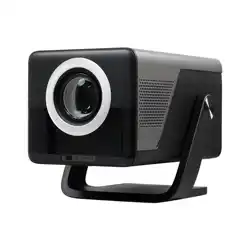
WEMI X7AR BLACK AND SLATE 2000 ANSI Daylight Visible Native 1080P Smart Video Projector 4K 8K Input, Android 14 Projecteur Portatif with HiFi Sound, Auto Focus & Keystone, WiFi Bluetooth Home Theater for iPhone/Netflix X7
Product's Documents
Below are documents related to this product, you can read online or download:
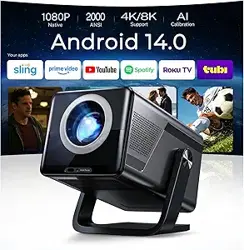
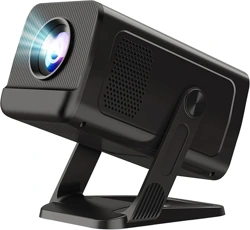
The WEMI X7 is a portable smart video projector designed for home cinema, outdoor entertainment, business presentations, gaming, and education. It features a native 1080P resolution with support for 4K and 8K input decoding, delivering crisp and vibrant visuals. The projector is powered by Android 14 OS, providing access to thousands of apps and live channels. Key features include AI-powered auto focus and keystone correction, Wi-Fi 6 and Bluetooth 5.4 connectivity, and built-in HiFi stereo speakers.
The projector supports a maximum image size of 200 inches and offers a brightness of 2000 ANSI lumens, making it suitable for use in daylight conditions. It includes a smart remote with air mouse and voice assistant capabilities.
What's in the Box
WEMI X7 Projector
HDMI Cable
Power Adapter
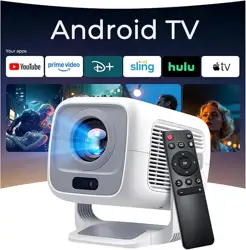
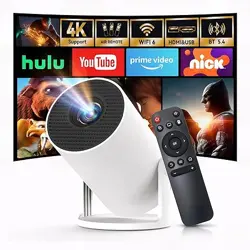
Remote Control (Note: Requires 2 x AAA batteries, not included)
Cleaning Kit
User Manual
Features
Display and Visual Performance
Native Resolution: 1920 x 1080 (Full HD).
4K/8K Decoding: Supports decoding of 4K and 8K content, displayed at native 1080P resolution.
Brightness: 2000 ANSI lumens for daylight visibility.
Contrast Ratio: 18000:1.
Color Gamut: 93% color gamut for vibrant colors.
Display Technology: LCD.
Maximum Image Size: 200 inches.
Minimum Image Size: 60 inches.
Throw Distance: 1 to 5 meters.
Smart Platform and Connectivity
Operating System: Android 14 OS with built-in Play Store.
Built-in Apps: Supports Netflix, Prime Video, YouTube, Tubi, Disney+, and more.
Wireless Connectivity: Wi-Fi 6 for fast streaming; Bluetooth 5.4 for connecting speakers or headphones.
Screen Mirroring: Supports Android Miracast, Apple AirPlay, and wired connection for iOS devices.
Auto Focus: Automatically adjusts focus for a sharp image.
Auto Keystone Correction: Corrects image distortion when the projector is placed at an angle.
Obstacle Avoidance: Detects and adjusts the image to avoid obstacles.
Screen Fit: Automatically fits the image to the screen area.
Orientation Detection: Detects projector orientation for correct image alignment.
Audio
Speakers: Built-in HiFi stereo dual speakers.
Audio Enhancement: Supports Dolby Atmos and Hi-Res Audio.
Smart Remote
Air Mouse: Use the remote as a pointer for easy navigation.
Voice Assistant: Press and hold the voice button to search, open apps, adjust volume, and more.
Physical Specifications
Dimensions: 8.9 x 5.7 x 7 inches (L x W x H).
Weight: 1.8 kg.
Color: Black and Slate Gray.
Mounting: Tabletop, ceiling, wall, bracket, or tripod.
Voltage: 120V.
Light Source Life: Up to 100,000 hours.
Use Guide
Setting Up the Projector
Place the projector on a stable, flat surface or mount it using a compatible ceiling mount, wall mount, bracket, or tripod.
Connect the power adapter to the projector and plug it into a 120V outlet.
Press the power button on the projector or remote to turn it on.
Initial Configuration
Follow the on-screen instructions to select your language and connect to a Wi-Fi network.
Sign in to your Google account to access the Play Store and pre-installed apps.
If prompted, allow the projector to perform auto focus and keystone correction for optimal image alignment.
Connecting Devices
HDMI: Connect laptops, gaming consoles (Switch, PS5), TV sticks, or DVD players using an HDMI cable.
USB: Insert a USB drive to play media files directly.
3.5mm Audio: Connect external speakers or headphones.
Wireless: Use screen mirroring (Miracast for Android, AirPlay for iOS) or stream via Wi-Fi 6.
Using the Remote Control
Insert two AAA batteries (not included) into the remote.
Point the remote at the projector and press buttons to navigate.
For air mouse functionality, move the remote like a pointer to control the cursor on screen.
Press and hold the voice button to activate the voice assistant. Speak commands such as "Open Netflix," "Search for action movies," or "Set volume to 50%."
Adjusting the Image
Auto Adjustment: The projector automatically adjusts focus, keystone, and screen fit when moved or turned on.
Manual Adjustment: If needed, go to Settings > Image to manually adjust focus, keystone, zoom, and other parameters.
Obstacle Avoidance: If an object is detected in the projection path, the projector will automatically adjust the image to avoid it.
Using Android TV
Navigate the home screen to access apps, settings, and inputs.
Open the Play Store to download additional apps such as Netflix, Prime Video, YouTube, Tubi, and Disney+.
Use the search function to find movies, shows, or apps.
Switch between inputs (HDMI, USB, screen mirroring) using the Input button on the remote.
Connecting to Bluetooth Devices
Go to Settings > Bluetooth on the projector.
Put your Bluetooth speaker, headphones, or other device in pairing mode.
Select the device from the list to connect.
Cleaning and Maintenance
Use the included cleaning kit to gently clean the lens. Avoid using abrasive materials.
If the projector is not used for an extended period, seal it to prevent dust accumulation.
Ensure ventilation openings are not blocked to prevent overheating.
Specifications
Brand
WEMI
Model
X7
Native Resolution
1920 x 1080
Maximum Display Resolution
7680 x 4320 (8K)
Brightness
2000 ANSI Lumens
Contrast Ratio
18000:1
Display Technology
LCD
Light Source Life
100,000 Hours
Image Size
60 - 200 Inches
Throw Distance
1 - 5 Meters
Operating System
Android 14
Connectivity
Wi-Fi 6, Bluetooth 5.4, HDMI (CEC/ARC), USB, 3.5mm Audio
The WEMI X7 projector comes with a 2-year warranty and a 1-year free replacement policy. For support, contact WEMI through their Amazon store or refer to the user manual for troubleshooting. Ensure you clean the lens regularly and seal the projector if not in use for long periods to avoid dust.