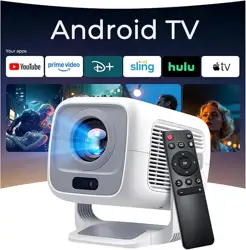
Model: AY3 | Brand: ONOAYO
Overview
The ONOAYO AY3 is a portable mini projector designed for indoor and outdoor use. It features a 360° adjustable stand, electric focus, auto keystone correction, and supports WiFi 6 and Bluetooth 5.4 connectivity. The projector delivers native 1080p resolution with a brightness of 1000 ANSI lumens.


What's in the Box
- Mini Projector (AY3) × 1
- 360° Adjustable Stand × 1
- Remote Control × 1
- Power Adapter × 1
- User Manual × 1
Features
360° Tool-free Adjustable Stand
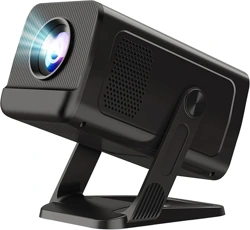
The projector includes a detachable stand that rotates 360°, allowing you to project onto walls, ceilings, or tables without tools. The stand can be removed for compact storage.

1000 ANSI Brightness & 1080p Resolution
Utilizing 3-chip 3-LCD technology and 50 high-brightness LED bulbs, the projector delivers native 1920 × 1080 resolution with a 20,000:1 contrast ratio.
Auto Keystone & Electric Focus
Automatic vertical keystone correction (±30° manual, ±50° manual) ensures a square image. The remote control provides one-touch motorized focus adjustment.

Wireless Connectivity
- WiFi 6: Dual-band 2.4G & 5G support for faster streaming.
- Bluetooth 5.4: Two-way Bluetooth for connecting external speakers or headphones.
Built-in Hi-Fi Speakers
Dual 8W speakers provide stereo sound. Note: Dolby Sound is not supported; disable Dolby settings on connected devices.
Digital Zoom & Aspect Ratio
Supports 70%–100% digital zoom and both 4:3 and 16:9 aspect ratios.

90° Mirror Rotate
The image can be rotated 90° for ceiling projection or other orientations.

Eye-Care Mode
A blue light reduction mode is available to reduce eye strain during extended viewing.
Specifications
| Specification | Details |
|---|---|
| Brightness | 1000 ANSI lumens |
| Native Resolution | 1920 × 1080 (1080p FHD) |
| Display Technology | LCD (3-chip 3-LCD) |
| Contrast Ratio | 20,000:1 |
| Wireless | WiFi 6 (2.4G & 5G), Bluetooth 5.4 |
| Special Functions | Electric focus, Auto vertical keystone (±30° auto, ±50° manual) |
| Zoom | 70% – 100% digital |
| Projection Size | 40" – 300" |
| Throw Distance | 3.28 ft – 19.68 ft |
| Built-in Speakers | Dual 8W Hi-Fi |
| Connectivity Ports | HDMI, USB, 3.5mm audio jack |
| Power Input | 100V – 240V, 50/60Hz |
| Lamp Life | 70,000+ hours |
| Dimensions (L×W×H) | 6.8 × 5.7 × 3.2 inches (173 × 145 × 81 mm) |
| Weight | 1.5 lbs (0.68 kg) |
| Color | Black |
Use Guide
1. Installing the Stand
- Align the nut holes on the bottom of the projector with the head holes on the stand. Ensure the head protrusion fits into the groove on the projector bottom.
- Rotate and tighten the screws until the projector is stable.
- The stand rotates 360° without tools. Adjust to your desired angle.
2. Powering On
- Connect the power adapter to the projector and plug into a wall outlet (100V–240V).
- Press the power button on the projector or remote control.
3. Adjusting the Image
- Focus: Use the remote control's electric focus button to sharpen the image. For best results, balance focus across the entire image rather than over-sharpening one area.
- Keystone: The projector automatically corrects vertical keystone (±30°). For manual adjustment (±50°), use the settings menu.
- Zoom: Adjust digital zoom between 70% and 100% using the remote or on-screen menu.
- Aspect Ratio: Switch between 4:3 and 16:9 in the settings menu.
4. Connecting Devices
- WiFi: Go to Settings > Network > WiFi. Select your network and enter the password.
- Bluetooth: Go to Settings > Bluetooth. Pair with external speakers or headphones.
- HDMI: Connect gaming consoles, laptops, or TV sticks to the HDMI port.
- USB: Insert a USB drive to play media files directly.
- 3.5mm Audio: Connect external speakers or headphones via the audio jack.
5. Streaming Services (Netflix, Amazon Prime, etc.)
6. Using the Remote Control
- Power: Turn projector on/off.
- Focus +/-: Adjust electric focus.
- Volume +/-: Control built-in speaker volume.
- Menu: Access on-screen settings.
- Directional pad: Navigate menus.
- OK: Confirm selection.
7. Eye-Care Mode
Enable blue light reduction in the settings menu to reduce eye strain during extended viewing sessions.
Troubleshooting
Image is Blurry
- Use the remote control's electric focus to adjust. Balance focus across the entire image for optimal clarity.
- Ensure the projector is at the correct distance from the screen (3.28 ft – 19.68 ft).
No Sound or Distorted Audio
- Check that the volume is not muted.
- If using external speakers, verify Bluetooth connection or 3.5mm cable.
- Disable Dolby Sound settings on connected devices, as Dolby is not supported.
Cannot Play Netflix/Amazon Prime via Phone Mirroring
- This is due to HDCP copyright protection. Use a TV stick (e.g., Fire TV Stick) connected via HDMI to stream these services.
WiFi Connection Issues
- Ensure you are within range of your router.
- Restart the projector and router.
- Check that you are selecting the correct network (2.4G or 5G).
Remote Control Not Working
- Replace the batteries in the remote.
- Ensure there are no obstructions between the remote and the projector's IR sensor.
Warranty and Support
The ONOAYO AY3 projector comes with a 3-year warranty and exchange service. For support, contact the ONOAYO team at [email protected].
For installation guide videos or further assistance, reach out via email with your purchase details.
Safety and Care
- Use the projector in a well-ventilated area. Do not block the cooling vents.
- For best image performance, use in a dim or dark environment.
- Clean the lens with a soft, dry cloth. Do not use abrasive cleaners.
- Do not expose the projector to rain or moisture.
- Unplug the power adapter during thunderstorms or if not in use for extended periods.