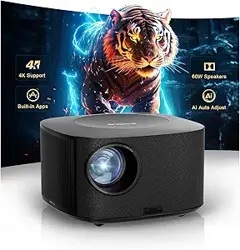
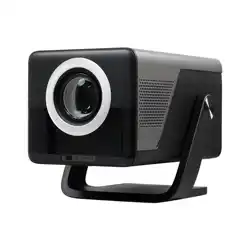
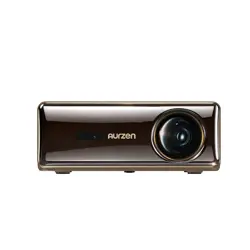
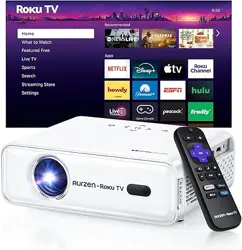
ONOAYO ONO5 PRO Projector-4K with WiFi and Bluetooth60W Dolby Audio/AI Auto Focus/Official Licensed Apps, Outdoor-Projector with Smart OS 2.0 , ONO5Pro 2.0 Smart Movie Projector for Indoor/Outdoor
Product's Documents
Below are documents related to this product, you can read online or download:
The ONOAYO ONO5Pro 2.0 is a smart movie projector designed for indoor and outdoor use. It features a native 1080p resolution with 4K support, a built-in Smart TV 2.0 operating system, WiFi 6 and Bluetooth 5.2 connectivity, and a 60W Dolby-certified stereo audio system.
2. What's in the Box
ONOAYO ONO5Pro 2.0 Smart Projector x 1
Remote Control x 1 (Battery NOT Included)
User Manual
HDMI Cable x 1 (1.2M/3.94ft)
Power Cord x 1 (1.5M/4.92ft)
Note: To play 4K video content, connect a 4K-capable device (like a TV stick) via the HDMI port. Videos labeled as 4K will be displayed at the projector's native 1080P resolution, which is referred to as "4K supported."
3. Key Features
3.1 Audio System
Dual 60W Dolby Audio: Features two 60W speakers tuned for cinema-like sound, capable of covering areas up to 540 sq.ft.
AI Sound Master: Automatically adjusts audio to reduce echoes and enhance bass and dialogue clarity.
3.2 Smart TV & Streaming
Smart TV Pro OS 2.0: Built-in operating system with access to official licensed apps like Prime Video, YouTube, and Disney+.
Live TV & Content: Provides access to over 1,500 live TV channels (news, sports) without subscription fees.
Chromecast Built-in: Allows for one-tap wireless casting from compatible devices.
3.3 Picture Quality
Native 1080P with 4K Support: Displays content at 1920 x 1080 resolution, accepting 4K input signals.
AI Image Engine Pro: Analyzes content in real-time to optimize color, contrast, and clarity. Covers 98% NTSC color gamut.
High Brightness: Equipped with a high-transmittance glass lens and high-power LED for clear viewing in various lighting conditions.
Ambient Light Sensor: Automatically adjusts brightness and contrast based on room lighting.
3-Second Alignment: Achieves a focused and aligned image within approximately 3 seconds, even on tilted surfaces.
Dynamic Zoom: Allows 50%-100% screen size adjustment without moving the projector or losing image quality.
3.5 Connectivity & Gaming
WiFi 6: Provides high-speed, stable wireless connectivity for streaming and screen mirroring from iOS, Android, and Windows devices.
Bluetooth 5.2: Enables bi-directional connection for streaming audio to the projector or from the projector to Bluetooth headphones/speakers.
Game Mode: Optimized for PS5/Xbox with an 18ms input latency and HDMI 2.1 support for responsive gaming.
Ports: Includes HDMI, USB, and a 3.5mm audio jack.
3.6 Control
Bluetooth Remote: Allows control from up to 10 meters away, without requiring a direct line of sight.
CEC (Consumer Electronics Control): Enables control of multiple compatible HDMI devices (e.g., TV stick, game console) with the projector's remote.
3.7 Durability & Cooling
Sealed Optical Engine: Protects against dust to prevent issues like black or yellow spots on the image.
Triple-Temperature Control System: Monitors temperature in real-time, adjusts cooling, and provides high-temperature safety protection for stable operation.
4. Use Guide
4.1 Initial Setup
Placement: Position the projector on a stable, flat surface, a tripod, or mount it to the ceiling or wall. Ensure there is adequate ventilation around the unit.
Power: Connect the included power cord to the projector and a wall outlet.
Power On: Press the power button on the projector or remote control.
Initial Calibration: Upon startup, the VisionlQ system will automatically focus the image, correct keystone distortion, and fit the image to your screen or wall. This process takes approximately 3 seconds.
Remote Control: Insert batteries (not included) into the remote control.
4.2 Connecting Devices
Wired (HDMI/USB): Use the included HDMI cable to connect gaming consoles, laptops, or TV sticks. Use the USB port to play media files from a flash drive.
Wireless (WiFi & Bluetooth):
Connect the projector to your home WiFi network through the settings menu in the Smart TV OS.
For screen mirroring, use the built-in Chromecast function or the screen mirroring/casting feature on your smartphone/tablet.
Enable Bluetooth in the settings to pair with headphones, speakers, or to use the Bluetooth remote.
4.3 Using the Smart TV OS
Navigate the home screen using the remote's directional and OK buttons.
Select and launch streaming apps like YouTube or Prime Video. You may need to log in to your accounts.
Access the Live TV section to browse available channels.
Use the settings menu to adjust network, display, sound, and system preferences.
4.4 Manual Adjustments (If Needed)
While the projector automates most adjustments, you can manually fine-tune settings via the on-screen menu:
Focus: Access manual focus if the auto-focus needs refinement.